

File: README.md
TL;DR
Ignite is a high-level library to help with training and evaluating neural networks in PyTorch flexibly and transparently.
Features
Less code than pure PyTorch
while ensuring maximum control and simplicityLibrary approach and no program's control inversion - Use ignite where and when you need
Extensible API for metrics, experiment managers, and other components
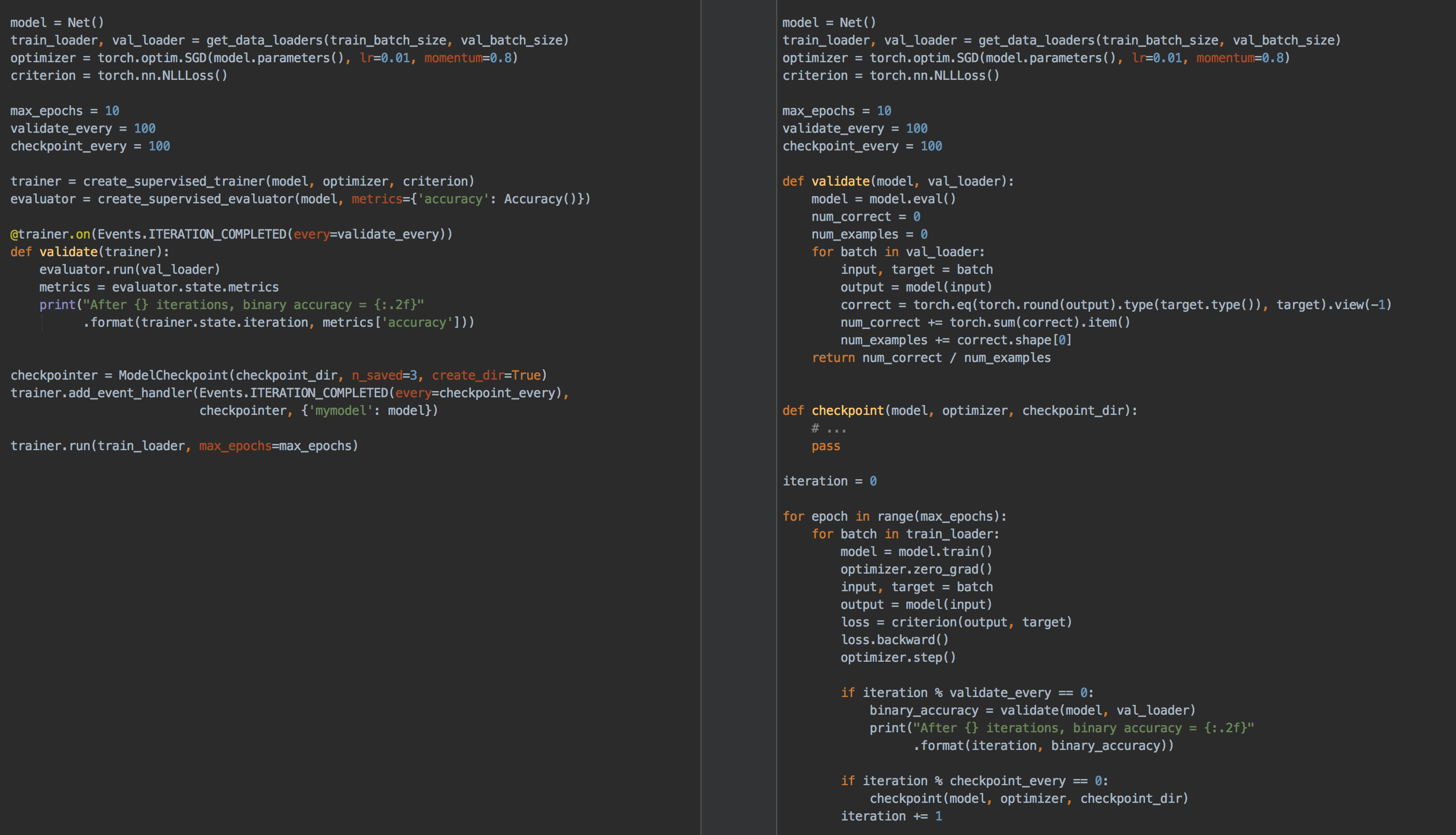
Table of Contents
- Table of Contents
- Why Ignite?
- Installation
- Getting Started
- Documentation
- Examples
- Communication
- Contributing
- Projects using Ignite
- Citing Ignite
- About the team & Disclaimer
Why Ignite?
Ignite is a library that provides three high-level features:
- Extremely simple engine and event system
- Out-of-the-box metrics to easily evaluate models
- Built-in handlers to compose training pipeline, save artifacts and log parameters and metrics
Simplified training and validation loop
No more coding for/while loops on epochs and iterations. Users instantiate engines and run them.
Example
from ignite.engine import Engine, Events, create_supervised_evaluator
from ignite.metrics import Accuracy


# Setup training engine:
def train_step(engine, batch):
    # Users can do whatever they need on a single iteration
    # Eg. forward/backward pass for any number of models, optimizers, etc
    # ...

trainer = Engine(train_step)

# Setup single model evaluation engine
evaluator = create_supervised_evaluator(model, metrics={"accuracy": Accuracy()})

def validation():
    state = evaluator.run(validation_data_loader)
    # print computed metrics
    print(trainer.state.epoch, state.metrics)

# Run model's validation at the end of each epoch
trainer.add_event_handler(Events.EPOCH_COMPLETED, validation)

# Start the training
trainer.run(training_data_loader, max_epochs=100)
Power of Events & Handlers
The cool thing with handlers is that they offer unparalleled flexibility (compared to, for example, callbacks). Handlers can be any function: e.g. lambda, simple function, class method, etc. Thus, we do not require to inherit from an interface and override its abstract methods which could unnecessarily bulk up your code and its complexity.
Execute any number of functions whenever you wish
Examples
trainer.add_event_handler(Events.STARTED, lambda _: print("Start training"))

# attach handler with args, kwargs
mydata = [1, 2, 3, 4]
logger = ...

def on_training_ended(data):
    print(f"Training is ended. mydata={data}")
    # User can use variables from another scope
    logger.info("Training is ended")


trainer.add_event_handler(Events.COMPLETED, on_training_ended, mydata)
# call any number of functions on a single event
trainer.add_event_handler(Events.COMPLETED, lambda engine: print(engine.state.times))

@trainer.on(Events.ITERATION_COMPLETED)
def log_something(engine):
    print(engine.state.output)
Built-in events filtering
Examples
# run the validation every 5 epochs
@trainer.on(Events.EPOCH_COMPLETED(every=5))
def run_validation():
    # run validation

# change some training variable once on 20th epoch
@trainer.on(Events.EPOCH_STARTED(once=20))
def change_training_variable():
    # ...

# Trigger handler with customly defined frequency
@trainer.on(Events.ITERATION_COMPLETED(event_filter=first_x_iters))
def log_gradients():
    # ...
Stack events to share some actions
Examples
Events can be stacked together to enable multiple calls:
@trainer.on(Events.COMPLETED | Events.EPOCH_COMPLETED(every=10))
def run_validation():
    # ...
Custom events to go beyond standard events
Examples
Custom events related to backward and optimizer step calls:
from ignite.engine import EventEnum


class BackpropEvents(EventEnum):
    BACKWARD_STARTED = 'backward_started'
    BACKWARD_COMPLETED = 'backward_completed'
    OPTIM_STEP_COMPLETED = 'optim_step_completed'

def update(engine, batch):
    # ...
    loss = criterion(y_pred, y)
    engine.fire_event(BackpropEvents.BACKWARD_STARTED)
    loss.backward()
    engine.fire_event(BackpropEvents.BACKWARD_COMPLETED)
    optimizer.step()
    engine.fire_event(BackpropEvents.OPTIM_STEP_COMPLETED)
    # ...

trainer = Engine(update)
trainer.register_events(*BackpropEvents)

@trainer.on(BackpropEvents.BACKWARD_STARTED)
def function_before_backprop(engine):
# ...- Complete snippet is found here.
- Another use-case of custom events: trainer for Truncated Backprop Through Time.
Out-of-the-box metrics
Metrics for various tasks:
Precision, Recall, Accuracy, Confusion Matrix, IoU etc, ~20 regression metrics.Users can also compose their metrics with ease from
existing ones using arithmetic operations or torch methods.
Example
precision = Precision(average=False)
recall = Recall(average=False)
F1_per_class = (precision * recall * 2 / (precision + recall))
F1_mean = F1_per_class.mean()  # torch mean method
F1_mean.attach(engine, "F1")
Installation
From pip:
pip install pytorch-igniteFrom conda:
conda install ignite -c pytorchFrom source:
pip install git+https://github.com/pytorch/igniteNightly releases
From pip:
pip install --pre pytorch-igniteFrom conda (this suggests to install pytorch nightly release instead of stable
version as dependency):
conda install ignite -c pytorch-nightlyDocker Images
Using pre-built images
Pull a pre-built docker image from our Docker Hub and run it with docker v19.03+.
docker run --gpus all -it -v $PWD:/workspace/project --network=host --shm-size 16G pytorchignite/base:latest /bin/bashList of available pre-built images
Base
pytorchignite/base:latestpytorchignite/apex:latestpytorchignite/hvd-base:latestpytorchignite/hvd-apex:latestpytorchignite/msdp-apex:latest
Vision:
pytorchignite/vision:latestpytorchignite/hvd-vision:latestpytorchignite/apex-vision:latestpytorchignite/hvd-apex-vision:latestpytorchignite/msdp-apex-vision:latest
NLP:
pytorchignite/nlp:latestpytorchignite/hvd-nlp:latestpytorchignite/apex-nlp:latestpytorchignite/hvd-apex-nlp:latestpytorchignite/msdp-apex-nlp:latest
For more details, see here.
Getting Started
Few pointers to get you started:
- Quick Start Guide: Essentials of getting a project up and running
- Concepts of the library: Engine, Events & Handlers, State, Metrics
- Full-featured template examples (coming soon)
Documentation
- Stable API documentation and an overview of the library: https://pytorch.org/ignite/
- Development version API documentation: https://pytorch.org/ignite/master/
- FAQ,
"Questions on Github" and
"Questions on Discuss.PyTorch". - Project's Roadmap
Additional Materials
- Distributed Training Made Easy with PyTorch-Ignite
- PyTorch Ecosystem Day 2021 Breakout session presentation
- Tutorial blog post about PyTorch-Ignite
- 8 Creators and Core Contributors Talk About Their Model Training Libraries From PyTorch Ecosystem
- Ignite Posters from Pytorch Developer Conferences:
Examples
Tutorials
- Text Classification using Convolutional Neural
Networks - Variational Auto
Encoders - Convolutional Neural Networks for Classifying Fashion-MNIST
Dataset - Training Cycle-GAN on Horses to
Zebras with Nvidia/Apex - logs on W&B - Another training Cycle-GAN on Horses to
Zebras with Native Torch CUDA AMP - logs on W&B - Finetuning EfficientNet-B0 on
CIFAR100 - Hyperparameters tuning with
Ax - Basic example of LR finder on
MNIST - Benchmark mixed precision training on Cifar100:
torch.amp vs nvidia/apex - MNIST training on a single
TPU - CIFAR10 Training on multiple TPUs
- Basic example of handlers
time profiling on MNIST training example
Reproducible Training Examples
Inspired by torchvision/references,
we provide several reproducible baselines for vision tasks:
- ImageNet - logs on Ignite Trains server coming soon ...
- Pascal VOC2012 - logs on Ignite Trains server coming soon ...
Features:
- Distributed training: native or horovod and using PyTorch native AMP
Code-Generator application
The easiest way to create your training scripts with PyTorch-Ignite:
Communication
GitHub issues: questions, bug reports, feature requests, etc.
Discuss.PyTorch, category "Ignite".
PyTorch-Ignite Discord Server: to chat with the community
GitHub Discussions: general library-related discussions, ideas, Q&A, etc.
User feedback
We have created a form for "user feedback". We
appreciate any type of feedback, and this is how we would like to see our
community:
- If you like the project and want to say thanks, this the right
place. - If you do not like something, please, share it with us, and we can
see how to improve it.
Thank you!
Contributing
Please see the contribution guidelines for more information.
As always, PRs are welcome :)
Projects using Ignite
Research papers
- BatchBALD: Efficient and Diverse Batch Acquisition for Deep Bayesian Active Learning
- A Model to Search for Synthesizable Molecules
- Localised Generative Flows
- Extracting T Cell Function and Differentiation Characteristics from the Biomedical Literature
- Variational Information Distillation for Knowledge Transfer
- XPersona: Evaluating Multilingual Personalized Chatbot
- CNN-CASS: CNN for Classification of Coronary Artery Stenosis Score in MPR Images
- Bridging Text and Video: A Universal Multimodal Transformer for Video-Audio Scene-Aware Dialog
- Adversarial Decomposition of Text Representation
- Uncertainty Estimation Using a Single Deep Deterministic Neural Network
- DeepSphere: a graph-based spherical CNN
- Norm-in-Norm Loss with Faster Convergence and Better Performance for Image Quality Assessment
- Unified Quality Assessment of In-the-Wild Videos with Mixed Datasets Training
- Deep Signature Transforms
- Neural CDEs for Long Time-Series via the Log-ODE Method
- Volumetric Grasping Network
- Mood Classification using Listening Data
- Deterministic Uncertainty Estimation (DUE)
- PyTorch-Hebbian: facilitating local learning in a deep learning framework
- Stochastic Weight Matrix-Based Regularization Methods for Deep Neural Networks
- Learning explanations that are hard to vary
- The role of disentanglement in generalisation
- A Probabilistic Programming Approach to Protein Structure Superposition
- PadChest: A large chest x-ray image dataset with multi-label annotated reports
Blog articles, tutorials, books
- State-of-the-Art Conversational AI with Transfer Learning
- Tutorial on Transfer Learning in NLP held at NAACL 2019
- Deep-Reinforcement-Learning-Hands-On-Second-Edition, published by Packt
- Once Upon a Repository: How to Write Readable, Maintainable Code with PyTorch
- The Hero Rises: Build Your Own SSD
- Using Optuna to Optimize PyTorch Ignite Hyperparameters
- PyTorch Ignite - Classifying Tiny ImageNet with EfficientNet
Toolkits
- Project MONAI - AI Toolkit for Healthcare Imaging
- DeepSeismic - Deep Learning for Seismic Imaging and Interpretation
- Nussl - a flexible, object-oriented Python audio source separation library
- PyTorch Adapt - A fully featured and modular domain adaptation library
- gnina-torch: PyTorch implementation of GNINA scoring function
Others
- Implementation of "Attention is All You Need" paper
- Implementation of DropBlock: A regularization method for convolutional networks in PyTorch
- Kaggle Kuzushiji Recognition: 2nd place solution
- Unsupervised Data Augmentation experiments in PyTorch
- Hyperparameters tuning with Optuna
- Logging with ChainerUI
- FixMatch experiments in PyTorch and Ignite (CTA dataaug policy)
- Kaggle Birdcall Identification Competition: 1st place solution
- Logging with Aim - An open-source experiment tracker
See other projects at "Used by"
If your project implements a paper, represents other use-cases not
covered in our official tutorials, Kaggle competition's code, or just
your code presents interesting results and uses Ignite. We would like to
add your project to this list, so please send a PR with brief
description of the project.
Citing Ignite
If you use PyTorch-Ignite in a scientific publication, we would appreciate citations to our project.
@misc{pytorch-ignite,
  author = {V. Fomin and J. Anmol and S. Desroziers and J. Kriss and A. Tejani},
  title = {High-level library to help with training neural networks in PyTorch},
  year = {2020},
  publisher = {GitHub},
  journal = {GitHub repository},
  howpublished = {\url{https://github.com/pytorch/ignite}},
}
About the team & Disclaimer
PyTorch-Ignite is a NumFOCUS Affiliated Project, operated and maintained by volunteers in the PyTorch community in their capacities as individuals
(and not as representatives of their employers). See the "About us"
page for a list of core contributors. For usage questions and issues, please see the various channels
here. For all other questions and inquiries, please send an email
to [email protected].
File: CODE_OF_CONDUCT.md
Code of Conduct
Our Pledge
In the interest of fostering an open and welcoming environment, we as
contributors and maintainers pledge to make participation in our project and
our community a harassment-free experience for everyone, regardless of age, body
size, disability, ethnicity, sex characteristics, gender identity and expression,
level of experience, education, socio-economic status, nationality, personal
appearance, race, religion, or sexual identity and orientation.
Our Standards
Examples of behavior that contributes to creating a positive environment
include:
- Using welcoming and inclusive language
- Being respectful of differing viewpoints and experiences
- Gracefully accepting constructive criticism
- Focusing on what is best for the community
- Showing empathy towards other community members
Examples of unacceptable behavior by participants include:
- The use of sexualized language or imagery and unwelcome sexual attention or
advances - Trolling, insulting/derogatory comments, and personal or political attacks
- Public or private harassment
- Publishing others' private information, such as a physical or electronic
address, without explicit permission - Other conduct which could reasonably be considered inappropriate in a
professional setting
Our Responsibilities
Project maintainers are responsible for clarifying the standards of acceptable
behavior and are expected to take appropriate and fair corrective action in
response to any instances of unacceptable behavior.
Project maintainers have the right and responsibility to remove, edit, or
reject comments, commits, code, wiki edits, issues, and other contributions
that are not aligned to this Code of Conduct, or to ban temporarily or
permanently any contributor for other behaviors that they deem inappropriate,
threatening, offensive, or harmful.
Scope
This Code of Conduct applies within all project spaces, and it also applies when
an individual is representing the project or its community in public spaces.
Examples of representing a project or community include using an official
project e-mail address, posting via an official social media account, or acting
as an appointed representative at an online or offline event. Representation of
a project may be further defined and clarified by project maintainers.
Enforcement
Instances of abusive, harassing, or otherwise unacceptable behavior may be
reported by contacting the project team at [email protected]. All
complaints will be reviewed and investigated and will result in a response that
is deemed necessary and appropriate to the circumstances. The project team is
obligated to maintain confidentiality with regard to the reporter of an incident.
Further details of specific enforcement policies may be posted separately.
Project maintainers who do not follow or enforce the Code of Conduct in good
faith may face temporary or permanent repercussions as determined by other
members of the project's leadership.
Attribution
This Code of Conduct is adapted from the Contributor Covenant, version 1.4,
available at https://www.contributor-covenant.org/version/1/4/code-of-conduct.html
For answers to common questions about this code of conduct, see
https://www.contributor-covenant.org/faq
File: codecov.yml
coverage:
precision: 2
round: down
range: "95...100"
status:
patch:
default:
target: 90
project:
default:
threshold: 1%
changes: false
comment: false
ignore:
- "tests/"
File: CONTRIBUTING.md
Contributing to Ignite
This project is a community effort, and everyone is welcome to contribute !
If you are interested in contributing to Ignite, there are many ways to help out. Your contributions may fall
into the following categories:
It helps us very much if you could
- Report issues you’re facing
- Give a :+1: on issues that others reported and that are relevant to you
- Spread a word about the project or simply :star: to say "I use it"
Answering queries on the issue tracker, investigating bugs and reviewing other developers’ pull requests are
very valuable contributions that decrease the burden on the project maintainers.You would like to improve the documentation. This is no less important than improving the library itself!
If you find a typo in the documentation, do not hesitate to submit a GitHub pull request.You would like to propose a new feature and implement it
- Post about your intended feature, and we shall discuss the design and
implementation. Once we agree that the plan looks good, go ahead and implement it.
- Post about your intended feature, and we shall discuss the design and
You would like to implement a feature or bug-fix for an outstanding issue
- Look at the issues labelled as "help wanted"
- Pick an issue and comment on the task that you want to work on this feature.
- If you need more context on a particular issue, please ask and we shall provide.
Table of Contents
- Table of Contents
- Developing Ignite
Developing Ignite
Quickstart guide for first-time contributors
- Install miniconda for your system.
- Create an isolated conda environment for pytorch-ignite:
conda create -n pytorch-ignite-dev python=3.11- Activate the newly created environment:
conda activate pytorch-ignite-dev- When developing please take care of preserving
.gitignorefile and make use of.git/info/excludeto exclude custom files like:.idea,.vscodeetc. - Please refer to github first contributions guidelines and don't hesitate to ask the pytorch-ignite community in case of any doubt.
- A good way to start is to tackle one of the good first issues.
Installation
Make a fork of the repository on the GitHub (see here for details).
As a result, for example your username ishappy-ignite-developer, then you should be able to see your fork on the GitHub, e.g https://github.com/happy-ignite-developer/ignite.gitClone your fork locally and setup
upstream. Assuming your username ishappy-ignite-developer:
git clone https://github.com/happy-ignite-developer/ignite.git
cd ignite
git remote add upstream https://github.com/pytorch/ignite.git
git remote -v
You might see the following output:
origin  https://github.com/happy-ignite-developer/ignite.git (fetch)
origin  https://github.com/happy-ignite-developer/ignite.git (push)
upstream        https://github.com/pytorch/ignite (fetch)
upstream https://github.com/pytorch/ignite (push)- Sync and install all necessary dependencies:
git pull upstream master
pip install -e .
pip install -r requirements-dev.txt
Code development
Codebase structure
- ignite - Core library files
- engine - Module containing core classes like Engine, Events, State.
- handlers - Module containing out-of-the-box handlers
- metrics - Module containing out-of-the-box metrics
- contrib - Contrib module with other metrics, handlers classes that may require additional dependencies
- distributed - Module with helpers for distributed computations
- tests - Python unit tests
- examples - Examples and notebook tutorials
- docs - Documentation files
If you modify the code, you will most probably also need to code some tests to ensure the correct behaviour. We are usingpytest to write our tests:
- naming convention for files
test_*.py, e.g.test_precision.py - naming of testing functions
def test_*, e.g.def test_precision_on_random_data()- if test function should run on GPU, please make sure to add
cudain the test name, e.g.def test_something_on_cuda().
Additionally, we may want to decorate it with@pytest.mark.skipif(not torch.cuda.is_available(), reason="Skip if no GPU").
For more examples, please see https://github.com/pytorch/ignite/blob/master/tests/ignite/engine/test_create_supervised.py - if test function checks distributed configuration, we have to mark the test as
@pytest.mark.distributedand additional
conditions depending on the intended checks. For example, please see
https://github.com/pytorch/ignite/blob/master/tests/ignite/metrics/test_accuracy.py
- if test function should run on GPU, please make sure to add
New code should be compatible with Python 3.X versions. Once you finish implementing a feature or bugfix and tests,
please run lint checking and tests:
Checking Code Style
To ensure the codebase complies with the PEP8 style guide, we use ruff to lint and ruff format to format the codebase.
Formatting the code
To automate the process, we have configured the repo with pre-commit.
To format files and commit changes:
# This should lint and autoformat the files
pre-commit -a
# If everything is OK, then commit
git add .
git commit -m "Added awesome feature"
Formatting the code with a pre-commit hook
To enable the pre-commit hooks follow the steps described below:
- Run
pre-commit installto configure a virtual environment to invoke linters and formatters on commits.
pip install pre-commit
pre-commit install- When files are committed:
- If the stages files are not compliant, the tools autoformat the staged files. If this were to happen, files should be staged and committed again. See example code below.
- If the staged files are not compliant errors will be raised. These errors should be fixed and the files should be committed again. See example code below.
git add .
git commit -m "Added awesome feature"
# DON'T WORRY IF ERRORS ARE RAISED.
# YOUR CODE IS NOT COMPLIANT WITH ruff format
# Fix any errors by following their suggestions
# again for committing
# After fixing any flake8 errors
git add .
git commit -m "Added feature"
Run tests:
To run a specific test, for example test_terminate from test_engine.py:
pytest tests/ignite/engine/test_engine.py -vvv -k test_terminateTo run all tests with coverage (assuming installed pytest-cov and pytest-xdist):
bash tests/run_cpu_tests.shOn Windows, distributed tests should be skipped
SKIP_DISTRIB_TESTS=1 bash tests/run_cpu_tests.shRun distributed tests only on CPU
To run distributed tests only (assuming installed pytest-xdist):
export WORLD_SIZE=2
CUDA_VISIBLE_DEVICES="" pytest --dist=each --tx $WORLD_SIZE*popen//python=python tests/ -m distributed -vvv
Run Pyrefly checks:
To run pyrefly to check the optional static type:
pyrefly checkTo change any config for specific folder, please see the file pyrefly.toml
Send a PR
If everything is OK, please send a Pull Request to https://github.com/pytorch/ignite from your fork.
If you are not familiar with creating a Pull Request, here are some guides:
- https://github.com/firstcontributions/first-contributions
- http://stackoverflow.com/questions/14680711/how-to-do-a-github-pull-request
- https://help.github.com/articles/creating-a-pull-request/
NOTE : When sending a PR, please kindly check if the changes are required to run in the CI.
For example, typo changes in CONTRIBUTING.md, README.md are not required to run in the CI.
So, please add [skip ci] in the PR title to save the resources. Ignite has setup several CIs.
- GitHub Actions
- Netlify
So, please add
[skip actions]for the changes which are not required to run on GitHub Actions,[skip netlify]for the changes which are not required to run on Netlify PR Preview build, or[skip ci]for the changes which are not required to run on any CI.
NOTE : Those skip statements are case sensitive, need open bracket [ and close bracket ].
And, Ignite has followed a convention of starting with skip word.
Sync up with the upstream
First, make sure you have set upstream by running:
git remote add upstream https://github.com/pytorch/igniteThen you can see if you have set up multiple remote correctly by running git remote -v:
origin  https://github.com/{YOUR_USERNAME}/ignite.git (fetch)
origin  https://github.com/{YOUR_USERNAME}/ignite.git (push)
upstream        https://github.com/pytorch/ignite (fetch)
upstream        https://github.com/pytorch/ignite (push)
Now you can get the latest development into your forked repository with this:
git fetch upstream
git checkout master
git merge upstream/master
Writing documentation
Ignite uses Google style
for formatting docstrings, specially from an example of Google style with Python 3 type annotations and
.. versionadded::directive for adding new classes, class methods, functions,.. versionchanged::directive for adding new arguments, changing internal behaviours, fixing bugs and.. deprecated::directive for deprecations.
Examples: versionadded usage link, versionchanged usage link
Length of line inside docstrings block must be limited to 120 characters.
Local documentation building and deploying
Please, follow the instructions to build and deploy the documentation locally.
Install requirements
cd docs
pip install -r requirements.txt
Katex is also needed to build the documentation.
To install katex, you need to have nodejs installed.
Optionally, we can install nodejs/npm using conda: conda install nodejs.
Then you can install katex with npm or yarn (if installed).
npm install -g katex
# or if you use yarn package manager
yarn global add katex
Build
cd docs
make html
Local deployment
Please, use python 3.X for the command below:
cd docs/build
python -m http.server <port>
# python -m http.server 1234
Then open the browser at localhost: (e.g. localhost:1234) and click to html folder.
Examples testing (doctests)
PyTorch-Ignite uses Sphinx directives. Every code that needs to be tested
should be under .. testcode:: and expected output should be under.. testoutput::. For example:
.. testcode::

    def process_function(engine, batch):
        y_pred, y = batch
        return y_pred, y
    engine = Engine(process_function)
    metric = SSIM(data_range=1.0)
    metric.attach(engine, 'ssim')
    preds = torch.rand([4, 3, 16, 16])
    target = preds * 0.75
    state = engine.run([[preds, target]])
    print(state.metrics['ssim'])

.. testoutput::

    0.9218971...
If the floating point results are needed for assertion and the results can vary per operating systems and PyTorch versions, we could assert the results up to 4 or 6 decimal places and match the rest of the results with .... Learn more about sphinx.ext.doctest in the official documentation.
To make writing doctests easy, there are some configurations defined in conf.py. Search doctest_global_setup in conf.py to see which variables and functions are available.
To run doctests locally:
cd docs
make html && make doctest
File: requirements-dev.txt
Tests
dill
filelock
pyrefly
numpy
pre-commit
pytest
pytest-cov
pytest-order
pytest-timeout
pytest-xdist
setuptools
fairlearn
Test contrib dependencies
scipy
pytorch-fid is not maintained anymore, using our fork
git+https://github.com/pytorch-ignite/pytorch-fid@8287430921edb01fec92fba6266a22bd49a71533
tqdm
scikit-learn
matplotlib
tensorboardX
visdom # Removed: unmaintained package, cannot be installed with modern packages
polyaxon
wandb
mlflow
neptune-client>=0.16.17
tensorboard
torchvision
pynvml<12 # pynvml module was removed in 12.X, is not developed or maintained. We should replace pynvml with something else.
clearml
scikit-image
pycocotools
nltk
Examples dependencies
pandas
gymnasium
temporary fix: E AttributeError: module 'mpmath' has no attribute 'rational'
mpmath<1.4
ranx
File: .pre-commit-config.yaml
exclude: "^conda.recipe|assets|docs"
repos:
repo: https://github.com/srstevenson/nb-clean
rev: 3.2.0
hooks:- id: nb-clean
args:- --preserve-cell-outputs
- --remove-empty-cells
types: [jupyter]
- id: nb-clean
repo: https://github.com/pre-commit/pre-commit-hooks
rev: v5.0.0
hooks:- id: check-toml
- id: check-yaml
- id: end-of-file-fixer
- id: trailing-whitespace
repo: https://github.com/pre-commit/mirrors-prettier
rev: v2.2.1
hooks:- id: prettier
exclude_types: ["python", "jupyter", "shell", "gitignore"]
- id: prettier
repo: https://github.com/astral-sh/ruff-pre-commit
rev: v0.11.13
hooks:- id: ruff-check
types_or: [python, pyi] - id: ruff-format
types_or: [python, pyi, jupyter]
- id: ruff-check
File: assets/logo/ignite_logo_guidelines.md
PyTorch Ignite Logo Guidelines
These guidelines are meant to help keep the PyTorch Ignite logo (as developed in #1221) consistent and recognizable across all its uses. They also provide a common language for referring to the logos and their components.
The primary logo is the combination of the logomark and wordmark next to each other. The logomark is the flame alone (no text) and the wordmark is only the text. It's preferable to use the primary logo whenever possible, and the logomark when a smaller version is needed.
Color
The full color options are a combonation of PyTorch's main orange (#ee4c2c) with yellow details (#eaa700). Light options are white (#FFFFFF) and dark options dark grey (#2a2a2a). The alternate "mixed" logo uses the full color logomark with a dark grey wordmark.
Whenever possible, use the full color logos. One color logos (light or dark) are to be used when full color will not have enough contrast, usually when logos must be on colored backgrounds or are being reproduced somewhere that doesn't support color.
Please note: The orange (#ee4c2c) and yellow (#eaa700) do not meet WCAG 2.1 color contrast recommendations for text or UI when used with white or other light colors. Make sure to use these colors primarily as decorative elements or with a dark color for text and/or UI. Accessibility should not be overlooked.
Type
The PyTorch Ignite wordmark is made from Oxygen (by Vernon Adams @vernnobile).
Minimum Size
For consistent legibility, please do not display the primary logo at less than 60px wide or the logomark at less than 15px wide.
Logo Integrity
A few other notes to keep in mind when using the logo:
- Make sure to scale the logo proportionally.
- Maintain a good amount of space around the logo. Don’t let it overlap with text, images, or other elements.
- Do not try and recreate or modify the logo. For example, do not use the logomark and then try to write PyTorch Ignite in another font.
File: conda.recipe/meta.yaml
{% set version = "0.5.3" %}
package:
name: ignite
version: {{ version }}
source:
path: ..
build:
number: 0
noarch: python
script: python -m pip install . -vv
https://conda.io/docs/user-guide/tasks/build-packages/define-metadata.html#export-runtime-requirements
requirements:
build:
- hatchling
- pip
- python >=3.9,<=3.13
- pytorch >=1.10,<3
- setuptools
run:
- python >=3.9,<=3.13
- pytorch >=1.10,<3
test:
imports:
- ignite
- ignite.engine
- ignite.handlers
- ignite.metrics
- ignite.contrib
about:
home: https://pytorch-ignite.ai
summary: "A lightweight library to help with training neural networks in PyTorch."
license: BSD-3-Clause
license_family: BSD
license_file: LICENSE
doc_url: https://docs.pytorch.org/ignite/
dev_url: https://github.com/pytorch/ignite
File: docker/README.md
Docker for users
We provide Dockerfiles in order to build containerized execution environment that ease the use of Ignite for computer vision and NLP tasks.
These images are also provided with the following Horovod configuration:
Available Frameworks:
    [ ] TensorFlow
    [X] PyTorch
    [ ] MXNet

Available Controllers:
    [ ] MPI
    [X] Gloo

Available Tensor Operations:
    [X] NCCL
    [ ] DDL
    [ ] CCL
    [ ] MPI
    [X] Gloo
Installation
- main/Dockerfile.base: latest stable PyTorch, Ignite with minimal dependencies
docker pull pytorchignite/base:latest
- main/Dockerfile.vision: base image with useful computer vision libraries
docker pull pytorchignite/vision:latest
- main/Dockerfile.nlp: base image with useful NLP libraries
docker pull pytorchignite/nlp:latest
- main/Dockerfile.apex: multi-stage NVIDIA/apex build with latest Pytorch, Ignite image with minimal dependencies
docker pull pytorchignite/apex:latest
- main/Dockerfile.apex-vision: base apex with useful computer vision libraries
docker pull pytorchignite/apex-vision:latest
- main/Dockerfile.apex-nlp: base apex with useful NLP libraries
docker pull pytorchignite/apex-nlp:latest
- hvd/Dockerfile.hvd-base: multi-stage Horovod build with latest stable PyTorch, Ignite with minimal dependencies
docker pull pytorchignite/hvd-base:latest
- hvd/Dockerfile.hvd-vision: base Horovod image with useful computer vision libraries
docker pull pytorchignite/hvd-vision:latest
- hvd/Dockerfile.hvd-nlp: base Horovod image with useful NLP libraries
docker pull pytorchignite/hvd-nlp:latest
- hvd/Dockerfile.hvd-apex: multi-stage NVIDIA/apex and Horovod build with latest Pytorch, Ignite image with minimal dependencies
docker pull pytorchignite/hvd-apex:latest
- hvd/Dockerfile.hvd-apex-vision: base Horovod apex with useful computer vision libraries
docker pull pytorchignite/hvd-apex-vision:latest
- hvd/Dockerfile.hvd-apex-nlp: base Horovod apex with useful NLP libraries
docker pull pytorchignite/hvd-apex-nlp:latest
Deprecated images (no version updates)
- msdp/Dockerfile.msdp-apex-base: multi-stage MSDeepSpeed build with latest Pytorch, Ignite image with minimal dependencies
docker pull pytorchignite/msdp-apex:latest
- msdp/Dockerfile.msdp-apex-vision: base MSDeepSpeed build with useful computer vision libraries
docker pull pytorchignite/msdp-apex-vision:latest
- msdp/Dockerfile.msdp-apex-nlp: base MSDeepSpeed build with useful NLP libraries
docker pull pytorchignite/msdp-apex-nlp:latest
How to use
docker run -it -v $PWD:/workspace/project --network=host --ipc=host pytorchignite/base:latest /bin/bashBuilding the image yourself
Dockerfiles are supplied to build images with dependencies that ease the use of Ignite for computer vision / NLP tasks:
cd main
docker build -t pytorchignite/base:latest -f Dockerfile.base .
File: docs/requirements.txt
sphinx==7
git+https://github.com/pytorch/pytorch_sphinx_theme.git#egg=pytorch_sphinx_theme
sphinxcontrib-katex
sphinx-copybutton==0.4.0
docutils==0.19
sphinx_togglebutton
sphinx_design
File: docs/source/defaults.rst
:orphan:
.. toggle::
.. testcode:: default, 1, 2, 3, 4, 5

    from collections import OrderedDict

    import torch
    from torch import nn, optim

    from ignite.engine import *
    from ignite.handlers import *
    from ignite.metrics import *
    from ignite.metrics.clustering import *
    from ignite.metrics.fairness import *
    from ignite.metrics.rec_sys import *
    from ignite.metrics.regression import *
    from ignite.utils import *

    # create default evaluator for doctests

    def eval_step(engine, batch):
        return batch

    default_evaluator = Engine(eval_step)

    # create default optimizer for doctests

    param_tensor = torch.zeros([1], requires_grad=True)
    default_optimizer = torch.optim.SGD([param_tensor], lr=0.1)

    # create default trainer for doctests
    # as handlers could be attached to the trainer,
    # each test must define his own trainer using `.. testsetup:`

    def get_default_trainer():

        def train_step(engine, batch):
            return batch

        return Engine(train_step)

    # create default model for doctests

    default_model = nn.Sequential(OrderedDict([
        ('base', nn.Linear(4, 2)),
        ('fc', nn.Linear(2, 1))
    ]))

    manual_seed(666)
File: docs/source/distributed.rst
ignite.distributed
Helper module to use distributed settings for multiple backends:
backends from native torch distributed configuration: "nccl", "gloo", "mpi"
XLA on TPUs via
pytorch/xla <https://github.com/pytorch/xla>_using
Horovod framework <https://horovod.readthedocs.io/en/stable/>_ as a backend
Distributed launcher and `auto` helpers
We provide a context manager to simplify the code of distributed configuration setup for all above supported backends.
In addition, methods like :meth:~ignite.distributed.auto.auto_model, :meth:~ignite.distributed.auto.auto_optim and
:meth:~ignite.distributed.auto.auto_dataloader help to adapt in a transparent way provided model, optimizer and data
loaders to existing configuration:
.. code-block:: python
# main.py

import ignite.distributed as idist

def training(local_rank, config, **kwargs):

    print(idist.get_rank(), ": run with config:", config, "- backend=", idist.backend())

    train_loader = idist.auto_dataloader(dataset, batch_size=32, num_workers=12, shuffle=True, **kwargs)
    # batch size, num_workers and sampler are automatically adapted to existing configuration
    # ...
    model = resnet50()
    model = idist.auto_model(model)
    # model is DDP or DP or just itself according to existing configuration
    # ...
    optimizer = optim.SGD(model.parameters(), lr=0.01)
    optimizer = idist.auto_optim(optimizer)
    # The optimizer remains unchanged, except for XLA configurations where the step() method is overridden.
    # User can safely call `optimizer.step()` (behind `xm.optimizer_step(optimizer)` is performed)


backend = "nccl"  # torch native distributed configuration on multiple GPUs
# backend = "xla-tpu"  # XLA TPUs distributed configuration
# backend = None  # no distributed configuration
#
# dist_configs = {'nproc_per_node': 4}  # Use specified distributed configuration if launch as python main.py
# dist_configs["start_method"] = "fork"  # Add start_method as "fork" if using Jupyter Notebook
with idist.Parallel(backend=backend, **dist_configs) as parallel:
    parallel.run(training, config, a=1, b=2)
Above code may be executed with torch.distributed.launch_ tool or by python and specifying distributed configuration
in the code. For more details, please see :class:~ignite.distributed.launcher.Parallel,
:meth:~ignite.distributed.auto.auto_model, :meth:~ignite.distributed.auto.auto_optim and
:meth:~ignite.distributed.auto.auto_dataloader.
Complete example of CIFAR10 training can be foundhere <https://github.com/pytorch/ignite/tree/master/examples/cifar10>_.
.. _torch.distributed.launch: https://pytorch.org/docs/stable/distributed.html#launch-utility
ignite.distributed.auto
.. currentmodule:: ignite.distributed.auto
.. autosummary::
:nosignatures:
:toctree: generated
DistributedProxySampler
auto_dataloader
auto_model
auto_optim
.. Note ::
In distributed configuration, methods :meth:`~ignite.distributed.auto.auto_model`, :meth:`~ignite.distributed.auto.auto_optim`
and :meth:`~ignite.distributed.auto.auto_dataloader` will have effect only when distributed group is initialized.
ignite.distributed.launcher
.. currentmodule:: ignite.distributed.launcher
.. autosummary::
:nosignatures:
:toctree: generated
Parallelignite.distributed.utils
This module wraps common methods to fetch information about distributed configuration, initialize/finalize process
group or spawn multiple processes.
.. currentmodule:: ignite.distributed.utils
.. autosummary::
:nosignatures:
:autolist:
.. automodule:: ignite.distributed.utils
:members:
.. attribute:: has_native_dist_support

    True if `torch.distributed` is available

.. attribute:: has_xla_support

    True if `torch_xla` package is found
File: docs/source/engine.rst
ignite.engine
Main module of the library containing:
ignite.engine.engine
.. currentmodule:: ignite.engine.engine
.. autosummary::
:nosignatures:
:toctree: generated
Engineignite.engine.events
.. currentmodule:: ignite.engine.events
.. autosummary::
:nosignatures:
:toctree: generated
CallableEventWithFilter
EventEnum
Events
EventsList
State
RemovableEventHandle
ignite.engine.deterministic
Helper methods for deterministic training
.. currentmodule:: ignite.engine.deterministic
.. autosummary::
:nosignatures:
:toctree: generated
DeterministicEngine
ReproducibleBatchSampler
keep_random_state
update_dataloader
helper methods to define supervised trainer and evaluator
.. currentmodule:: ignite.engine
.. autosummary::
:nosignatures:
:toctree: generated
create_supervised_trainer
create_supervised_evaluator
supervised_training_step
supervised_training_step_amp
supervised_training_step_apex
supervised_training_step_tpu
supervised_evaluation_step
supervised_evaluation_step_amp
Resuming the training
It is possible to resume the training from a checkpoint and approximately reproduce original run's behaviour.
Using Ignite, this can be easily done using :class:~ignite.handlers.checkpoint.Checkpoint handler. Engine provides two methods
to serialize and deserialize its internal state :meth:~ignite.engine.engine.Engine.state_dict and
:meth:~ignite.engine.engine.Engine.load_state_dict. In addition to serializing model, optimizer, lr scheduler, metrics, etc., user can
store the trainer and then resume the training. For example:
.. code-block:: python
from ignite.engine import Engine, Events
from ignite.handlers import Checkpoint, DiskSaver

trainer = ...
model = ...
optimizer = ...
lr_scheduler = ...
data_loader = ...
metric = ...

to_save = {'trainer': trainer, 'model': model, 'optimizer': optimizer, 'lr_scheduler': lr_scheduler, 'metric': metric}
handler = Checkpoint(to_save, DiskSaver('/tmp/training', create_dir=True))
trainer.add_event_handler(Events.EPOCH_COMPLETED, handler)
trainer.run(data_loader, max_epochs=100)
.. code-block:: bash
ls /tmp/training
> "checkpoint_50000.pt"
We can then restore the training from the last checkpoint.
.. code-block:: python
from ignite.handlers import Checkpoint

trainer = ...
model = ...
optimizer = ...
lr_scheduler = ...
data_loader = ...
metric = ...

to_load = {'trainer': trainer, 'model': model, 'optimizer': optimizer, 'lr_scheduler': lr_scheduler, 'metric': metric}
checkpoint = torch.load(checkpoint_file)
Checkpoint.load_objects(to_load=to_load, checkpoint=checkpoint)

trainer.run(train_loader, max_epochs=100)
It is also possible to store checkpoints every N iterations and continue the training from one of these checkpoints, i.e
from iteration.
Complete examples that resumes the training from a checkpoint can be found here:
save/resume MNIST <https://github.com/pytorch/ignite/tree/master/examples/mnist#training-save--resume>_save/resume Distributed CIFAR10 <https://github.com/pytorch/ignite/tree/master/examples/cifar10#check-resume-training>_
Deterministic training
In general, it is rather difficult task to achieve deterministic and reproducible trainings as it relies on multiple
aspects, e.g. data version, code version, software environment, hardware etc. According to PyTorch note on randomness <https://pytorch.org/docs/stable/notes/randomness.html>_:
there are some steps to take in order to make computations deterministic on your specific problem on one specific
platform and PyTorch release:
setup random state seed
set
cudnn to deterministic <https://pytorch.org/docs/stable/notes/randomness.html#cuda-convolution-benchmarking>_ if applicable
By default, these two options can be enough to run and rerun experiments in a deterministic way. Ignite's engine does not impact this behaviour.
In this module we provide helper methods and classes to make additional ":ref:Dataflow synchronization"
to ensure that model sees the same data for a given epoch:
- :class:
~ignite.engine.deterministic.DeterministicEngine - :class:
~ignite.engine.deterministic.ReproducibleBatchSampler
Dataflow synchronization
Ignite provides an option to control the dataflow by synchronizing random state on epochs. In this way, for a given
iteration/epoch the dataflow can be the same for a given seed. More precisely it is roughly looks like:
.. code-block:: python
for e in range(num_epochs):
    set_seed(seed + e)
    do_single_epoch_iterations(dataloader)
In addition, if data provider is torch.utils.data.DataLoader, batch data indices can be made completely deterministic.
Here is a trivial example of usage:
.. code-block:: python
import torch
from torch.utils.data import DataLoader
from ignite.engine import DeterministicEngine, Events
from ignite.utils import manual_seed


def random_train_data_loader(size):
    data = torch.arange(0, size)
    return DataLoader(data, batch_size=4, shuffle=True)


def print_train_data(engine, batch):
    i = engine.state.iteration
    e = engine.state.epoch
    print("train", e, i, batch.tolist())

trainer = DeterministicEngine(print_train_data)

print("Original Run")
manual_seed(56)
trainer.run(random_train_data_loader(40), max_epochs=2, epoch_length=5)

print("Resumed Run")
# Resume from 2nd epoch
trainer.load_state_dict({"epoch": 1, "epoch_length": 5, "max_epochs": 2, "rng_states": None})
manual_seed(56)
trainer.run(random_train_data_loader(40))
.. code-block:: text
Original Run
train 1 1 [31, 13, 3, 4]
train 1 2 [23, 18, 6, 16]
train 1 3 [10, 8, 33, 36]
train 1 4 [1, 37, 19, 9]
train 1 5 [20, 30, 14, 26]
train 2 6 [29, 35, 38, 34]
train 2 7 [7, 22, 12, 17]
train 2 8 [25, 21, 24, 15]
train 2 9 [39, 5, 2, 28]
train 2 10 [27, 11, 32, 0]
Resumed Run
train 2 6 [29, 35, 38, 34]
train 2 7 [7, 22, 12, 17]
train 2 8 [25, 21, 24, 15]
train 2 9 [39, 5, 2, 28]
train 2 10 [27, 11, 32, 0]
We can see that the data samples are exactly the same between original and resumed runs.
Complete examples that simulates a crash on a defined iteration and resumes the training from a checkpoint can be found
here:
save/resume MNIST <https://github.com/pytorch/ignite/tree/master/examples/mnist#training-save--resume>_save/resume Distributed CIFAR10 <https://github.com/pytorch/ignite/tree/master/examples/cifar10#check-resume-training>_
.. Note ::
In case when input data is `torch.utils.data.DataLoader`, previous batches are skipped and the first provided batch
corresponds to the batch after the checkpoint iteration. Internally, while resuming, previous datapoint indices are just
skipped without fetching the data.
.. warning::
However, while resuming from iteration, random data augmentations are not synchronized in the middle of the epoch and
thus batches remaining until the end of the epoch can be different of those from the initial run.
.. warning::
However, please, keep in mind that there can be an issue with dataflow synchronization on every epoch
if user's handler synchronizes the random state, for example, by calling periodically ``torch.manual_seed(seed)`` during
the run. This can have an impact on the dataflow:

.. code-block:: python

    def random_train_data_generator():
        while True:
            yield torch.randint(0, 100, size=(1, ))

    trainer = DeterministicEngine(print_train_data)

    @trainer.on(Events.ITERATION_COMPLETED(every=3))
    def user_handler():
        # handler synchronizes the random state
        torch.manual_seed(12)
        a = torch.rand(1)

    trainer.run(random_train_data_generator(), max_epochs=3, epoch_length=5);

.. code-block:: text

    train 1 1 [32]
    train 1 2 [29]
    train 1 3 [40]
    train 1 4 [3]  <---
    train 1 5 [22]
    train 2 6 [77]
    train 2 7 [3]  <---
    train 2 8 [22]
    train 2 9 [77]
    train 2 10 [3] <---
    train 3 11 [22]
    train 3 12 [77]
    train 3 13 [3] <---
    train 3 14 [22]
    train 3 15 [77]

Initially, the function ``random_train_data_generator()`` generates randomly data batches using the random state set
up by ``trainer``. This is intended behaviour until ``user_handler()`` is called.
After ``user_handler()`` execution, random state is altered and thus ``random_train_data_generator()`` will produce
random batches based on altered random state.

We provide helper decorator :meth:`~ignite.engine.deterministic.keep_random_state` to save and restore random states for
`torch`, `numpy` and `random`. Therefore, we can deal with described issue using this decorator:

.. code-block:: python

    from ignite.engine.deterministic import keep_random_state

    @trainer.on(Events.ITERATION_COMPLETED(every=3))
    @keep_random_state
    def user_handler():
        # handler synchronizes the random state
        torch.manual_seed(12)
        a = torch.rand(1)
File: docs/source/exceptions.rst
ignite.exceptions
.. currentmodule:: ignite.exceptions
.. autosummary::
:nosignatures:
:autolist:
.. autoclass:: NotComputableError
File: docs/source/handlers.rst
ignite.handlers
Complete list of generic handlers
.. currentmodule:: ignite.handlers
.. autosummary::
:nosignatures:
:toctree: generated
Checkpoint
checkpoint.CheckpointEvents
DiskSaver
ModelCheckpoint
EMAHandler
EarlyStopping
FastaiLRFinder
TerminateOnNan
TimeLimit
BasicTimeProfiler
HandlersTimeProfiler
Timer
global_step_from_engine
EpochOutputStore
.. autosummary::
:nosignatures:
:toctree: generated
:template: classwithcall.rst
checkpoint.BaseSaveHandler
param_scheduler.ParamScheduler
state_param_scheduler.StateParamScheduler
Interfaces
.. currentmodule:: ignite.base.mixins
.. autosummary::
:nosignatures:
:toctree: generated
ResettableHandlerLoggers
.. currentmodule:: ignite.handlers
.. autosummary::
:nosignatures:
:toctree: generated
:recursive:
base_logger
clearml_logger
mlflow_logger
neptune_logger
polyaxon_logger
tensorboard_logger
tqdm_logger

visdom_logger
wandb_logger
fbresearch_logger
.. seealso::
Below are a comprehensive list of examples of various loggers.

* See `tensorboardX mnist example <https://github.com/pytorch/ignite/blob/master/examples/mnist/mnist_with_tensorboard_logger.py>`_
  and `CycleGAN and EfficientNet notebooks <https://github.com/pytorch/ignite/tree/master/examples/notebooks>`_ for detailed usage.

* See `visdom mnist example <https://github.com/pytorch/ignite/blob/master/examples/mnist/mnist_with_visdom_logger.py>`_ for detailed usage.

* See `neptune mnist example <https://github.com/pytorch/ignite/blob/master/examples/mnist/mnist_with_neptune_logger.py>`_ for detailed usage.

* See `tqdm mnist example <https://github.com/pytorch/ignite/blob/master/examples/mnist/mnist_with_tqdm_logger.py>`_ for detailed usage.

* See `wandb mnist example <https://github.com/pytorch/ignite/blob/master/examples/mnist/mnist_with_wandb_logger.py>`_ for detailed usage.

* See `clearml mnist example <https://github.com/pytorch/ignite/blob/master/examples/mnist/mnist_with_clearml_logger.py>`_ for detailed usage.
.. _param-scheduler-label:
Logger setup helpers
.. automodule:: ignite.handlers.logger_utils
.. currentmodule:: ignite.handlers.logger_utils
.. autosummary::
:nosignatures:
:toctree: generated
setup_tb_logging
setup_visdom_logging
setup_mlflow_logging
setup_neptune_logging
setup_wandb_logging
setup_plx_logging
setup_clearml_logging
setup_trains_logging
Parameter scheduler
.. currentmodule:: ignite.handlers.param_scheduler
.. autosummary::
:nosignatures:
:toctree: generated
BaseParamScheduler
BatchSizeScheduler
ConcatScheduler
CosineAnnealingScheduler
CyclicalScheduler
LRScheduler
LinearCyclicalScheduler
ParamGroupScheduler
ParamScheduler
PiecewiseLinear
ReduceLROnPlateauScheduler
create_lr_scheduler_with_warmup
State Parameter scheduler
.. currentmodule:: ignite.handlers.state_param_scheduler
.. autosummary::
:nosignatures:
:toctree: generated
StateParamScheduler
LambdaStateScheduler
PiecewiseLinearStateScheduler
ExpStateScheduler
StepStateScheduler
MultiStepStateScheduler
More on parameter scheduling
In this section there are visual examples of various parameter schedulings that can be achieved.
Example with :class:~ignite.handlers.param_scheduler.CosineAnnealingScheduler
.. code-block:: python
import numpy as np
import matplotlib.pylab as plt
from ignite.handlers import CosineAnnealingScheduler
lr_values_1 = np.array(CosineAnnealingScheduler.simulate_values(num_events=75, param_name='lr',
start_value=1e-1, end_value=2e-2, cycle_size=20))
lr_values_2 = np.array(CosineAnnealingScheduler.simulate_values(num_events=75, param_name='lr',
start_value=1e-1, end_value=2e-2, cycle_size=20, cycle_mult=1.3))
lr_values_3 = np.array(CosineAnnealingScheduler.simulate_values(num_events=75, param_name='lr',
start_value=1e-1, end_value=2e-2,
cycle_size=20, start_value_mult=0.7))
lr_values_4 = np.array(CosineAnnealingScheduler.simulate_values(num_events=75, param_name='lr',
start_value=1e-1, end_value=2e-2,
cycle_size=20, end_value_mult=0.1))
plt.figure(figsize=(25, 5))
plt.subplot(141)
plt.title("Cosine annealing")
plt.plot(lr_values_1[:, 0], lr_values_1[:, 1], label="learning rate")
plt.xlabel("events")
plt.ylabel("values")
plt.legend()
plt.ylim([0.0, 0.12])
plt.subplot(142)
plt.title("Cosine annealing with cycle_mult=1.3")
plt.plot(lr_values_2[:, 0], lr_values_2[:, 1], label="learning rate")
plt.xlabel("events")
plt.ylabel("values")
plt.legend()
plt.ylim([0.0, 0.12])
plt.subplot(143)
plt.title("Cosine annealing with start_value_mult=0.7")
plt.plot(lr_values_3[:, 0], lr_values_3[:, 1], label="learning rate")
plt.xlabel("events")
plt.ylabel("values")
plt.legend()
plt.ylim([0.0, 0.12])
plt.subplot(144)
plt.title("Cosine annealing with end_value_mult=0.1")
plt.plot(lr_values_4[:, 0], lr_values_4[:, 1], label="learning rate")
plt.xlabel("events")
plt.ylabel("values")
plt.legend()
plt.ylim([0.0, 0.12])
.. image:: ./_static/img/schedulers/cosine_annealing_example.png
Example with :class:`ignite.handlers.param_scheduler.LinearCyclicalScheduler`
`````````````````````````````````````````````````````````````````````````````````````
.. code-block:: python
import numpy as np
import matplotlib.pylab as plt
from ignite.handlers import LinearCyclicalScheduler
lr_values_1 = np.array(LinearCyclicalScheduler.simulate_values(num_events=75, param_name='lr',
start_value=1e-1, end_value=2e-2, cycle_size=20))
lr_values_2 = np.array(LinearCyclicalScheduler.simulate_values(num_events=75, param_name='lr',
start_value=1e-1, end_value=2e-2, cycle_size=20, cycle_mult=1.3))
lr_values_3 = np.array(LinearCyclicalScheduler.simulate_values(num_events=75, param_name='lr',
start_value=1e-1, end_value=2e-2,
cycle_size=20, start_value_mult=0.7))
lr_values_4 = np.array(LinearCyclicalScheduler.simulate_values(num_events=75, param_name='lr',
start_value=1e-1, end_value=2e-2,
cycle_size=20, end_value_mult=0.1))
plt.figure(figsize=(25, 5))
plt.subplot(141)
plt.title("Linear cyclical scheduler")
plt.plot(lr_values_1[:, 0], lr_values_1[:, 1], label="learning rate")
plt.xlabel("events")
plt.ylabel("values")
plt.legend()
plt.ylim([0.0, 0.12])
plt.subplot(142)
plt.title("Linear cyclical scheduler with cycle_mult=1.3")
plt.plot(lr_values_2[:, 0], lr_values_2[:, 1], label="learning rate")
plt.xlabel("events")
plt.ylabel("values")
plt.legend()
plt.ylim([0.0, 0.12])
plt.subplot(143)
plt.title("Linear cyclical scheduler with start_value_mult=0.7")
plt.plot(lr_values_3[:, 0], lr_values_3[:, 1], label="learning rate")
plt.xlabel("events")
plt.ylabel("values")
plt.legend()
plt.ylim([0.0, 0.12])
plt.subplot(144)
plt.title("Linear cyclical scheduler with end_value_mult=0.1")
plt.plot(lr_values_4[:, 0], lr_values_4[:, 1], label="learning rate")
plt.xlabel("events")
plt.ylabel("values")
plt.legend()
plt.ylim([0.0, 0.12])
.. image:: ./_static/img/schedulers/linear_cyclical_example.png
Example with :class:`ignite.handlers.param_scheduler.ConcatScheduler`
`````````````````````````````````````````````````````````````````````````````
.. code-block:: python
import numpy as np
import matplotlib.pylab as plt
from ignite.handlers import LinearCyclicalScheduler, CosineAnnealingScheduler, ConcatScheduler
import torch
t1 = torch.zeros([1], requires_grad=True)
optimizer = torch.optim.SGD([t1], lr=0.1)
scheduler_1 = LinearCyclicalScheduler(optimizer, "lr", start_value=0.1, end_value=0.5, cycle_size=30)
scheduler_2 = CosineAnnealingScheduler(optimizer, "lr", start_value=0.5, end_value=0.01, cycle_size=50)
durations = [15, ]
lr_values_1 = np.array(ConcatScheduler.simulate_values(num_events=100, schedulers=[scheduler_1, scheduler_2], durations=durations))
t1 = torch.zeros([1], requires_grad=True)
optimizer = torch.optim.SGD([t1], lr=0.1)
scheduler_1 = LinearCyclicalScheduler(optimizer, "lr", start_value=0.1, end_value=0.5, cycle_size=30)
scheduler_2 = CosineAnnealingScheduler(optimizer, "momentum", start_value=0.5, end_value=0.01, cycle_size=50)
durations = [15, ]
lr_values_2 = np.array(ConcatScheduler.simulate_values(num_events=100, schedulers=[scheduler_1, scheduler_2], durations=durations,
param_names=["lr", "momentum"]))
plt.figure(figsize=(25, 5))
plt.subplot(131)
plt.title("Concat scheduler of linear + cosine annealing")
plt.plot(lr_values_1[:, 0], lr_values_1[:, 1], label="learning rate")
plt.xlabel("events")
plt.ylabel("values")
plt.legend()
plt.subplot(132)
plt.title("Concat scheduler of linear LR scheduler\n and cosine annealing on momentum")
plt.plot(lr_values_2[:, 0], lr_values_2[:, 1], label="learning rate")
plt.xlabel("events")
plt.ylabel("values")
plt.legend()
plt.subplot(133)
plt.title("Concat scheduler of linear LR scheduler\n and cosine annealing on momentum")
plt.plot(lr_values_2[:, 0], lr_values_2[:, 2], label="momentum")
plt.xlabel("events")
plt.ylabel("values")
plt.legend()
.. image:: ./_static/img/schedulers/concat_example.png
Piecewise linear scheduler
^^^^^^^^^^^^^^^^^^^^^^^^^^
.. code-block:: python
import numpy as np
import matplotlib.pylab as plt
from ignite.handlers import LinearCyclicalScheduler, ConcatScheduler
scheduler_1 = LinearCyclicalScheduler(optimizer, "lr", start_value=0.0, end_value=0.6, cycle_size=50)
scheduler_2 = LinearCyclicalScheduler(optimizer, "lr", start_value=0.6, end_value=0.0, cycle_size=150)
durations = [25, ]
lr_values = np.array(ConcatScheduler.simulate_values(num_events=100, schedulers=[scheduler_1, scheduler_2], durations=durations))
plt.title("Piecewise linear scheduler")
plt.plot(lr_values[:, 0], lr_values[:, 1], label="learning rate")
plt.xlabel("events")
plt.ylabel("values")
plt.legend()
.. image:: ./_static/img/schedulers/piecewise_linear.png
Example with :class:`ignite.handlers.param_scheduler.LRScheduler`
`````````````````````````````````````````````````````````````````````````
.. code-block:: python
import numpy as np
import matplotlib.pylab as plt
from ignite.handlers import LRScheduler
import torch
from torch.optim.lr_scheduler import ExponentialLR, StepLR, CosineAnnealingLR
tensor = torch.zeros([1], requires_grad=True)
optimizer = torch.optim.SGD([tensor], lr=0.1)
lr_scheduler_1 = StepLR(optimizer=optimizer, step_size=10, gamma=0.77)
lr_scheduler_2 = ExponentialLR(optimizer=optimizer, gamma=0.98)
lr_scheduler_3 = CosineAnnealingLR(optimizer=optimizer, T_max=10, eta_min=0.01)
lr_values_1 = np.array(LRScheduler.simulate_values(num_events=100, lr_scheduler=lr_scheduler_1))
lr_values_2 = np.array(LRScheduler.simulate_values(num_events=100, lr_scheduler=lr_scheduler_2))
lr_values_3 = np.array(LRScheduler.simulate_values(num_events=100, lr_scheduler=lr_scheduler_3))
plt.figure(figsize=(25, 5))
plt.subplot(131)
plt.title("Torch LR scheduler wrapping StepLR")
plt.plot(lr_values_1[:, 0], lr_values_1[:, 1], label="learning rate")
plt.xlabel("events")
plt.ylabel("values")
plt.legend()
plt.subplot(132)
plt.title("Torch LR scheduler wrapping ExponentialLR")
plt.plot(lr_values_2[:, 0], lr_values_2[:, 1], label="learning rate")
plt.xlabel("events")
plt.ylabel("values")
plt.legend()
plt.subplot(133)
plt.title("Torch LR scheduler wrapping CosineAnnealingLR")
plt.plot(lr_values_3[:, 0], lr_values_3[:, 1], label="learning rate")
plt.xlabel("events")
plt.ylabel("values")
plt.legend()
.. image:: ./_static/img/schedulers/lr_scheduler.png
Concatenate with torch schedulers
^^^^^^^^^^^^^^^^^^^^^^^^^^^^^^^^^
.. code-block:: python
import numpy as np
import matplotlib.pylab as plt
from ignite.handlers import LRScheduler, ConcatScheduler
import torch
from torch.optim.lr_scheduler import ExponentialLR, StepLR
t1 = torch.zeros([1], requires_grad=True)
optimizer = torch.optim.SGD([t1], lr=0.1)
scheduler_1 = LinearCyclicalScheduler(optimizer, "lr", start_value=0.001, end_value=0.1, cycle_size=30)
lr_scheduler = ExponentialLR(optimizer=optimizer, gamma=0.7)
scheduler_2 = LRScheduler(lr_scheduler=lr_scheduler)
durations = [15, ]
lr_values_1 = np.array(ConcatScheduler.simulate_values(num_events=30, schedulers=[scheduler_1, scheduler_2], durations=durations))
scheduler_1 = LinearCyclicalScheduler(optimizer, "lr", start_value=0.001, end_value=0.1, cycle_size=30)
lr_scheduler = StepLR(optimizer=optimizer, step_size=10, gamma=0.7)
scheduler_2 = LRScheduler(lr_scheduler=lr_scheduler)
durations = [15, ]
lr_values_2 = np.array(ConcatScheduler.simulate_values(num_events=75, schedulers=[scheduler_1, scheduler_2], durations=durations))
plt.figure(figsize=(15, 5))
plt.subplot(121)
plt.title("Concat scheduler of linear + ExponentialLR")
plt.plot(lr_values_1[:, 0], lr_values_1[:, 1], label="learning rate")
plt.xlabel("events")
plt.ylabel("values")
plt.legend()
plt.subplot(122)
plt.title("Concat scheduler of linear + StepLR")
plt.plot(lr_values_2[:, 0], lr_values_2[:, 1], label="learning rate")
plt.xlabel("events")
plt.ylabel("values")
plt.legend()
.. image:: ./_static/img/schedulers/concat_linear_exp_step_lr.png
Example with :class:`ignite.handlers.param_scheduler.ReduceLROnPlateauScheduler`
`````````````````````````````````````````````````````````````````````````````````````
.. code-block:: python
import matplotlib.pyplot as plt
import numpy as np
from ignite.handlers import ReduceLROnPlateauScheduler
metric_values = [0.7, 0.78, 0.81, 0.82, 0.82, 0.83, 0.80, 0.81, 0.84, 0.78]
num_events = 10
init_lr = 0.1
lr_values = np.array(ReduceLROnPlateauScheduler.simulate_values(
num_events, metric_values, init_lr,
factor=0.5, patience=1, mode='max', threshold=0.01, threshold_mode='abs'
)
)
plt.figure(figsize=(15, 5))
plt.suptitle("ReduceLROnPlateauScheduler")
plt.subplot(121)
plt.plot(lr_values[:, 1], label="learning rate")
plt.xticks(lr_values[:, 0])
plt.xlabel("events")
plt.ylabel("values")
plt.legend()
plt.subplot(122)
plt.plot(metric_values, label="metric")
plt.xticks(lr_values[:, 0])
plt.xlabel("events")
plt.ylabel("values")
plt.legend()
.. image:: ./_static/img/schedulers/reduce_lr_on_plateau_example.png
---
## File: docs/source/index.rst
Ignite Your Networks!
=====================
PyTorch-Ignite is a high-level library to help with training and evaluating neural networks in PyTorch flexibly and transparently.
.. image:: https://raw.githubusercontent.com/pytorch/ignite/master/assets/logo/ignite_logo_mixed.png
:target: https://pytorch-ignite.ai
All our documentation moved to `pytorch-ignite.ai <https://pytorch-ignite.ai/tutorials/beginner/01-getting-started/>`_
.. automodule:: ignite
.. toctree::
:maxdepth: 2
:caption: Package Reference
engine
handlers
metrics
distributed
exceptions
utils
.. automodule:: ignite.contrib
.. toctree::
:maxdepth: 2
:caption: Contrib Package Reference
contrib/engines
contrib/metrics
contrib/handlers
---
## File: docs/source/metrics.rst
ignite.metrics
==============
Metrics provide a way to compute various quantities of interest in an online
fashion without having to store the entire output history of a model.
.. _attach-engine:
Attach Engine API
------------------
The metrics as stated above are computed in a online fashion, which means that the metric instance accumulates some internal counters on
each iteration and metric value is computed once the epoch is ended. Internal counters are reset after every epoch. In practice, this is done with the
help of three methods: :meth:`~ignite.metrics.metric.Metric.reset()`, :meth:`~ignite.metrics.metric.Metric.update()` and :meth:`~ignite.metrics.metric.Metric.compute()`.
Therefore, a user needs to attach the metric instance to the engine so that the above three methods can be triggered on execution of certain :class:`~ignite.engine.events.Events`.
The :meth:`~ignite.metrics.metric.Metric.reset()` method is triggered on ``EPOCH_STARTED`` event and it is responsible to reset the metric to its initial state. The :meth:`~ignite.metrics.metric.Metric.update()` method is triggered
on ``ITERATION_COMPLETED`` event as it updates the state of the metric using the passed batch output. And :meth:`~ignite.metrics.metric.Metric.compute()` is triggered on ``EPOCH_COMPLETED``
event. It computes the metric based on its accumulated states. The metric value is computed using the output of the engine's ``process_function``:
.. code-block:: python
from ignite.engine import Engine
from ignite.metrics import Accuracy
def process_function(engine, batch):
# ...
return y_pred, y
engine = Engine(process_function)
metric = Accuracy()
metric.attach(engine, "accuracy")
# ...
state = engine.run(data)
print(f"Accuracy: {state.metrics['accuracy']}")
If the engine's output is not in the format ``(y_pred, y)`` or ``{'y_pred': y_pred, 'y': y, ...}``, the user can
use the ``output_transform`` argument to transform it:
.. code-block:: python
from ignite.engine import Engine
from ignite.metrics import Accuracy
def process_function(engine, batch):
# ...
return {'y_pred': y_pred, 'y_true': y, ...}
engine = Engine(process_function)
def output_transform(output):
# `output` variable is returned by above `process_function`
y_pred = output['y_pred']
y = output['y_true']
return y_pred, y # output format is according to `Accuracy` docs
metric = Accuracy(output_transform=output_transform)
metric.attach(engine, "accuracy")
# ...
state = engine.run(data)
print(f"Accuracy: {state.metrics['accuracy']}")
.. warning::
Please, be careful when using ``lambda`` functions to setup multiple ``output_transform`` for multiple metrics
.. code-block:: python
# Wrong
# metrics_group = [Accuracy(output_transform=lambda output: output[name]) for name in names]
# As lambda can not store `name` and all `output_transform` will use the last `name`
# A correct way. For example, using functools.partial
from functools import partial
def ot_func(output, name):
return output[name]
metrics_group = [Accuracy(output_transform=partial(ot_func, name=name)) for name in names]
For more details, see `here <https://discuss.pytorch.org/t/evaluate-multiple-models-with-one-evaluator-results-weird-metrics/96695>`_
.. Note ::
Most of implemented metrics are adapted to distributed computations and reduce their internal states across supported
devices before computing metric value. This can be helpful to run the evaluation on multiple nodes/GPU instances/TPUs
with a distributed data sampler. Following code snippet shows in detail how to use metrics:
.. code-block:: python
device = f"cuda:{local_rank}"
model = torch.nn.parallel.DistributedDataParallel(model,
device_ids=[local_rank, ],
output_device=local_rank)
test_sampler = DistributedSampler(test_dataset)
test_loader = DataLoader(
test_dataset,
batch_size=batch_size,
sampler=test_sampler,
num_workers=num_workers,
pin_memory=True
)
evaluator = create_supervised_evaluator(model, metrics={'accuracy': Accuracy()}, device=device)
.. Note ::
Metrics cannot be serialized using `pickle` module because the implementation is based on lambda functions.
Therefore, use the third party library `dill` to overcome the limitation of `pickle`.
Reset, Update, Compute API
--------------------------
User can also call directly the following methods on the metric:
- :meth:`~ignite.metrics.metric.Metric.reset()` : resets internal variables and accumulators
- :meth:`~ignite.metrics.metric.Metric.update()` : updates internal variables and accumulators with provided batch output ``(y_pred, y)``
- :meth:`~ignite.metrics.metric.Metric.compute()` : computes custom metric and return the result
This API gives a more fine-grained/custom usage on how to compute a metric. For example:
.. code-block:: python
from ignite.metrics import Precision
# Define the metric
precision = Precision()
# Start accumulation:
for x, y in data:
y_pred = model(x)
precision.update((y_pred, y))
# Compute the result
print("Precision: ", precision.compute())
# Reset metric
precision.reset()
# Start new accumulation:
for x, y in data:
y_pred = model(x)
precision.update((y_pred, y))
# Compute new result
print("Precision: ", precision.compute())
Metric arithmetic
-----------------
Metrics could be combined together to form new metrics. This could be done through arithmetic, such
as ``metric1 + metric2``, use PyTorch operators, such as ``(metric1 + metric2).pow(2).mean()``,
or use a lambda function, such as ``MetricsLambda(lambda a, b: torch.mean(a + b), metric1, metric2)``.
For example:
.. code-block:: python
from ignite.metrics import Precision, Recall
precision = Precision(average=False)
recall = Recall(average=False)
F1 = (precision * recall * 2 / (precision + recall)).mean()
.. note:: This example computes the mean of F1 across classes. To combine
precision and recall to get F1 or other F metrics, we have to be careful
that ``average=False``, i.e. to use the unaveraged precision and recall,
otherwise we will not be computing F-beta metrics.
Metrics also support indexing operation (if metric's result is a vector/matrix/tensor). For example, this can be useful to compute mean metric (e.g. precision, recall or IoU) ignoring the background:
.. code-block:: python
from ignite.metrics import ConfusionMatrix
cm = ConfusionMatrix(num_classes=10)
iou_metric = IoU(cm)
iou_no_bg_metric = iou_metric[:9] # We assume that the background index is 9
mean_iou_no_bg_metric = iou_no_bg_metric.mean()
# mean_iou_no_bg_metric.compute() -> tensor(0.12345)
How to create a custom metric
-----------------------------
To create a custom metric one needs to create a new class inheriting from :class:`~ignite.metrics.metric.Metric` and override
three methods :
- :meth:`~ignite.metrics.metric.Metric.reset()` : resets internal variables and accumulators
- :meth:`~ignite.metrics.metric.Metric.update()` : updates internal variables and accumulators with provided batch output ``(y_pred, y)``
- :meth:`~ignite.metrics.metric.Metric.compute()` : computes custom metric and return the result
For example, we would like to implement for illustration purposes a multi-class accuracy metric with some
specific condition (e.g. ignore user-defined classes):
.. code-block:: python
from ignite.metrics import Metric
from ignite.exceptions import NotComputableError
# These decorators helps with distributed settings
from ignite.metrics.metric import sync_all_reduce, reinit__is_reduced
class CustomAccuracy(Metric):
def __init__(self, ignored_class, output_transform=lambda x: x, device="cpu"):
self.ignored_class = ignored_class
self._num_correct = None
self._num_examples = None
super().__init__(output_transform=output_transform, device=device)
@reinit__is_reduced
def reset(self):
self._num_correct = torch.tensor(0, device=self._device)
self._num_examples = 0
super(CustomAccuracy, self).reset()
@reinit__is_reduced
def update(self, output):
y_pred, y = output[0].detach(), output[1].detach()
indices = torch.argmax(y_pred, dim=1)
mask = (y != self.ignored_class)
mask &= (indices != self.ignored_class)
y = y[mask]
indices = indices[mask]
correct = torch.eq(indices, y).view(-1)
self._num_correct += torch.sum(correct).to(self._device)
self._num_examples += correct.shape[0]
@sync_all_reduce("_num_examples", "_num_correct:SUM")
def compute(self):
if self._num_examples == 0:
raise NotComputableError('CustomAccuracy must have at least one example before it can be computed.')
return self._num_correct.item() / self._num_examples
We imported necessary classes as :class:`~ignite.metrics.metric.Metric`, :class:`~ignite.exceptions.NotComputableError` and
decorators to adapt the metric for distributed setting. In ``reset`` method, we reset internal variables ``_num_correct``
and ``_num_examples`` which are used to compute the custom metric. In ``updated`` method we define how to update
the internal variables. And finally in ``compute`` method, we compute metric value.
Notice that ``_num_correct`` is a tensor, since in ``update`` we accumulate tensor values. ``_num_examples`` is a python
scalar since we accumulate normal integers. For differentiable metrics, you must detach the accumulated values before
adding them to the internal variables.
We can check this implementation in a simple case:
.. code-block:: python
import torch
torch.manual_seed(8)
m = CustomAccuracy(ignored_class=3)
batch_size = 4
num_classes = 5
y_pred = torch.rand(batch_size, num_classes)
y = torch.randint(0, num_classes, size=(batch_size, ))
m.update((y_pred, y))
res = m.compute()
print(y, torch.argmax(y_pred, dim=1))
# Out: tensor([2, 2, 2, 3]) tensor([2, 1, 0, 0])
print(m._num_correct, m._num_examples, res)
# Out: 1 3 0.3333333333333333
Metrics and its usages
----------------------
By default, `Metrics` are epoch-wise, it means
- :meth:`~ignite.metrics.metric.Metric.reset()` is triggered every ``EPOCH_STARTED`` (See :class:`~ignite.engine.events.Events`).
- :meth:`~ignite.metrics.metric.Metric.update()` is triggered every ``ITERATION_COMPLETED``.
- :meth:`~ignite.metrics.metric.Metric.compute()` is triggered every ``EPOCH_COMPLETED``.
Usages can be user defined by creating a class inheriting from :class:`~ignite.metrics.metric.MetricUsage`. See the list below of usages.
Complete list of usages
~~~~~~~~~~~~~~~~~~~~~~~
- :class:`~ignite.metrics.metric.MetricUsage`
- :class:`~ignite.metrics.metric.EpochWise`
- :class:`~ignite.metrics.metric.RunningEpochWise`
- :class:`~ignite.metrics.metric.BatchWise`
- :class:`~ignite.metrics.metric.RunningBatchWise`
- :class:`~ignite.metrics.metric.SingleEpochRunningBatchWise`
- :class:`~ignite.metrics.metric.BatchFiltered`
Metrics and distributed computations
------------------------------------
In the above example, ``CustomAccuracy`` has ``reset``, ``update``, ``compute`` methods decorated
with :meth:`~ignite.metrics.metric.reinit__is_reduced`, :meth:`~ignite.metrics.metric.sync_all_reduce`. The purpose of these features is to adapt metrics in distributed
computations on supported backend and devices (see :doc:`distributed` for more details). More precisely, in the above
example we added ``@sync_all_reduce("_num_examples", "_num_correct:SUM")`` over ``compute`` method. This means that when ``compute``
method is called, metric's internal variables ``self._num_examples`` and ``self._num_correct:SUM`` are summed up over all participating
devices. We specify the reduction operation ``self._num_correct:SUM`` or we keep the default ``self._num_examples`` as the default is ``SUM``.
We currently support four reduction operations (SUM, MAX, MIN, PRODUCT).
Therefore, once collected, these internal variables can be used to compute the final metric value.
Complete list of metrics
------------------------
.. currentmodule:: ignite.metrics
.. autosummary::
:nosignatures:
:toctree: generated
Average
GeometricAverage
VariableAccumulation
Accuracy
ConfusionMatrix
ClassificationReport
DiceCoefficient
JaccardIndex
IoU
mIoU
EpochMetric
Fbeta
Frequency
Loss
MeanAbsoluteError
MeanAveragePrecision
MeanPairwiseDistance
MeanSquaredError
Metric
MetricGroup
MetricsLambda
MultiLabelConfusionMatrix
MutualInformation
ObjectDetectionAvgPrecisionRecall
CommonObjectDetectionMetrics
coco_tensor_list_to_dict_list
Precision
PSNR
Recall
RootMeanSquaredError
RunningAverage
SSIM
TopKCategoricalAccuracy
Bleu
Perplexity
Rouge
RougeL
RougeN
CharacterErrorRate
InceptionScore
FID
CosineSimilarity
Entropy
KLDivergence
JSDivergence
MatthewsCorrCoef
MaximumMeanDiscrepancy
HSIC
AveragePrecision
CohenKappa
GpuInfo
PrecisionRecallCurve
RocCurve
ROC_AUC
regression.CanberraMetric
regression.FractionalAbsoluteError
regression.FractionalBias
regression.GeometricMeanAbsoluteError
regression.GeometricMeanRelativeAbsoluteError
regression.ManhattanDistance
regression.MaximumAbsoluteError
regression.MeanAbsoluteRelativeError
regression.MeanError
regression.MeanNormalizedBias
regression.MedianAbsoluteError
regression.MedianAbsolutePercentageError
regression.MedianRelativeAbsoluteError
regression.PearsonCorrelation
regression.SpearmanRankCorrelation
regression.KendallRankCorrelation
regression.R2Score
regression.WaveHedgesDistance
clustering.SilhouetteScore
clustering.DaviesBouldinScore
clustering.CalinskiHarabaszScore
fairness.SubgroupAccuracyDifference
fairness.DemographicParityDifference
fairness.SelectionRate
fairness.SubgroupDifference
fairness.SubgroupMetric
rec_sys.HitRate
rec_sys.NDCG
.. note::
Module ignite.metrics.regression provides implementations of metrics useful
for regression tasks. Definitions of metrics are based on
`Botchkarev 2018`_, page 30 "Appendix 2. Metrics mathematical definitions".
Helpers for customizing metrics
-------------------------------
MetricUsage
~~~~~~~~~~~
.. autoclass:: ignite.metrics.metric.MetricUsage
EpochWise
~~~~~~~~~
.. autoclass:: ignite.metrics.metric.EpochWise
RunningEpochWise
~~~~~~~~~~~~~~~~
.. autoclass:: ignite.metrics.metric.RunningEpochWise
BatchWise
~~~~~~~~~
.. autoclass:: ignite.metrics.metric.BatchWise
RunningBatchWise
~~~~~~~~~~~~~~~~
.. autoclass:: ignite.metrics.metric.RunningBatchWise
SingleEpochRunningBatchWise
~~~~~~~~~~~~~~~~~~~~~~~~~~~
.. autoclass:: ignite.metrics.metric.SingleEpochRunningBatchWise
BatchFiltered
~~~~~~~~~~~~~
.. autoclass:: ignite.metrics.metric.BatchFiltered
.. currentmodule:: ignite.metrics.metric
reinit__is_reduced
~~~~~~~~~~~~~~~~~~
.. autofunction:: reinit__is_reduced
sync_all_reduce
~~~~~~~~~~~~~~~
.. autofunction:: sync_all_reduce
.. _`Botchkarev 2018`:
https://arxiv.org/abs/1809.03006
---
## File: docs/source/utils.rst
ignite.utils
============
Module with helper methods
.. currentmodule:: ignite.utils
.. autosummary::
:nosignatures:
:autolist:
.. automodule:: ignite.utils
:members:
---
## File: docs/source/_templates/classwithcall.rst
{{ objname | escape | underline }}
.. currentmodule:: {{ module }}
.. autoclass:: {{ objname }}
:members:
:special-members: __call__
{% block methods %}
{% if methods %}
.. rubric:: {{ _('Methods') }}
.. autosummary::
:nosignatures:
~{{ name }}.__call__
{% for item in methods %}
{% if item != "__init__" and item not in inherited_members %}
~{{ name }}.{{ item }}
{% endif %}
{% endfor %}
{% endif %}
{% endblock %}
---
## File: docs/source/_templates/autosummary/class.rst
{{ objname | escape | underline }}
.. currentmodule:: {{ module }}
.. autoclass:: {{ objname }}
:members:
{% block methods %}
{% if methods %}
.. rubric:: {{ _('Methods') }}
.. autosummary::
:nosignatures:
{% for item in methods %}
{% if item != "__init__" and item not in inherited_members %}
~{{ name }}.{{ item }}
{% endif %}
{% endfor %}
{% endif %}
{% endblock %}
---
## File: docs/source/_templates/autosummary/function.rst
{{ objname | escape | underline }}
.. currentmodule:: {{ module }}
.. autofunction:: {{ objname }}
---
## File: docs/source/_templates/autosummary/module.rst
{{ name | escape | underline }}
.. automodule:: {{ fullname }}
:members:
{% block attributes %}
{% if attributes %}
.. rubric:: {{ _('Module Attributes') }}
.. autosummary::
:nosignatures:
{% for item in attributes %}
{{ item }}
{%- endfor %}
{% endif %}
{% endblock %}
{% block functions %}
{% if functions %}
.. rubric:: {{ _('Functions') }}
.. autosummary::
:nosignatures:
{% for item in functions %}
{{ item }}
{%- endfor %}
{% endif %}
{% endblock %}
{% block classes %}
{% if classes %}
.. rubric:: {{ _('Classes') }}
.. autosummary::
:nosignatures:
{% for item in classes %}
{{ item }}
{%- endfor %}
{% endif %}
{% endblock %}
{% block exceptions %}
{% if exceptions %}
.. rubric:: {{ _('Exceptions') }}
.. autosummary::
:nosignatures:
{% for item in exceptions %}
{{ item }}
{%- endfor %}
{% endif %}
{% endblock %}
{% block modules %}
{% if modules %}
.. rubric:: Modules
.. autosummary::
:toctree:
:recursive:
{% for item in modules %}
{{ item }}
{%- endfor %}
{% endif %}
{% endblock %}
---
## File: docs/source/contrib/engines.rst
ignite.contrib.engines
======================
Contribution module of engines and helper tools:
ignite.contrib.engines.tbptt
.. currentmodule:: ignite.contrib.engines.tbptt
.. autosummary::
:nosignatures:
:autolist:
ignite.contrib.engines.common
.. currentmodule:: ignite.contrib.engines.common
.. autosummary::
:nosignatures:
:autolist:
Truncated Backpropagation Through Time
---------------------------------------
.. automodule:: ignite.contrib.engines.tbptt
:members:
Helper methods to setup trainer/evaluator
-----------------------------------------
.. note::
Logger setup helpers (``setup_tb_logging``, ``setup_mlflow_logging``, etc.) are now implemented in
:mod:`ignite.handlers.logger_utils` and re-exported from :mod:`ignite.contrib.engines.common` for backward compatibility.
.. automodule:: ignite.contrib.engines.common
:members:
---
## File: docs/source/contrib/handlers.rst
ignite.contrib.handlers
=======================
Contribution module of handlers
Parameter scheduler [deprecated]
--------------------------------
.. deprecated:: 0.4.4
Use :class:`~ignite.handlers.param_scheduler.ParamScheduler` instead, will be removed in version 0.6.0.
Was moved to :ref:`param-scheduler-label`.
LR finder [deprecated]
----------------------
.. deprecated:: 0.4.4
Use :class:`~ignite.handlers.lr_finder.FastaiLRFinder` instead, will be removed in version 0.6.0.
Time profilers [deprecated]
---------------------------
.. deprecated:: 0.4.6
Use :class:`~ignite.handlers.time_profilers.BasicTimeProfiler` instead, will be removed in version 0.6.0.
Use :class:`~ignite.handlers.time_profilers.HandlersTimeProfiler` instead, will be removed in version 0.6.0.
Loggers [deprecated]
--------------------
.. deprecated:: 0.5.0
Loggers moved to :ref:`Loggers`.
---
## File: docs/source/contrib/metrics.rst
ignite.contrib.metrics
=======================
Contrib module metrics [deprecated]
-----------------------------------
.. deprecated:: 0.5.0
All metrics moved to :ref:`Complete list of metrics`.
Regression metrics [deprecated]
--------------------------------
.. deprecated:: 0.5.0
All metrics moved to :ref:`Complete list of metrics`.
---
## File: examples/cifar10/README.md
# CIFAR10 Example with Ignite
In this example, we show how to use _Ignite_ to train a neural network:
- on 1 or more GPUs or TPUs
- compute training/validation metrics
- log learning rate, metrics etc
- save the best model weights
Configurations:
- [x] single GPU
- [x] multi GPUs on a single node
- [x] multi GPUs on multiple nodes
- [x] TPUs on Colab
## Requirements:
- pytorch-ignite: `pip install pytorch-ignite`
- [torchvision](https://github.com/pytorch/vision/): `pip install torchvision`
- [tqdm](https://github.com/tqdm/tqdm/): `pip install tqdm`
- [tensorboardx](https://github.com/lanpa/tensorboard-pytorch): `pip install tensorboardX`
- [python-fire](https://github.com/google/python-fire): `pip install fire`
- Optional: [clearml](https://github.com/allegroai/clearml): `pip install clearml`
Alternatively, install the all requirements using `pip install -r requirements.txt`.
## Usage:
Run the example on a single GPU:
```bash
python main.py run
```
For more details on accepted arguments:
```bash
python main.py run -- --help
```
If user would like to provide already downloaded dataset, the path can be setup in parameters as
```bash
--data_path="/path/to/cifar10/"
```
### Distributed training
#### Single node, multiple GPUs
Let's start training on a single node with 2 gpus:
```bash
# using torchrun
torchrun --nproc_per_node=2 main.py run --backend="nccl"
```
or
```bash
# using function spawn inside the code
python -u main.py run --backend="nccl" --nproc_per_node=2
```
##### Using [Horovod](https://horovod.readthedocs.io/en/latest/index.html) as distributed backend
Please, make sure to have Horovod installed before running.
Let's start training on a single node with 2 gpus:
```bash
# horovodrun
horovodrun -np=2 python -u main.py run --backend="horovod"
```
or
```bash
# using function spawn inside the code
python -u main.py run --backend="horovod" --nproc_per_node=2
```
#### Colab, on 8 TPUs
Same code can be run on TPUs: [](https://colab.research.google.com/drive/1E9zJrptnLJ_PKhmaP5Vhb6DTVRvyrKHx)
#### Multiple nodes, multiple GPUs
Let's start training on two nodes with 2 gpus each. We assuming that master node can be connected as `master`, e.g. `ping master`.
1. Execute on master node
```bash
torchrun \
--nnodes=2 \
--nproc_per_node=2 \
--node_rank=0 \
--master_addr=master --master_port=2222 \
main.py run --backend="nccl"
```
2. Execute on worker node
```bash
torchrun \
--nnodes=2 \
--nproc_per_node=2 \
--node_rank=1 \
--master_addr=master --master_port=2222 \
main.py run --backend="nccl"
```
### Check resume training
#### Single GPU
Initial training with a stop on 1000 iteration (~11 epochs)
```bash
python main.py run --stop_iteration=1000
```
Resume from the latest checkpoint
```bash
python main.py run --resume-from=/tmp/output-cifar10/resnet18_backend-None-1_stop-on-1000/training_checkpoint_1000.pt
```
### Distributed training
#### Single node, multiple GPUs
Initial training on a single node with 2 gpus with a stop on 1000 iteration (~11 epochs):
```bash
# using torchrun
torchrun --nproc_per_node=2 main.py run --backend="nccl" --stop_iteration=1000
```
Resume from the latest checkpoint
```bash
torchrun --nproc_per_node=2 main.py run --backend="nccl" \
--resume-from=/tmp/output-cifar10/resnet18_backend-nccl-2_stop-on-1000/training_checkpoint_1000.pt
```
Similar commands can be adapted for other cases.
## ClearML fileserver
If `ClearML` server is used (i.e. `--with_clearml` argument), the configuration to upload artifact must be done by
modifying the `ClearML` configuration file `~/clearml.conf` generated by `clearml-init`. According to the
[documentation](https://allegro.ai/clearml/docs/docs/examples/reporting/artifacts.html), the `output_uri` argument can be
configured in `sdk.development.default_output_uri` to fileserver uri. If server is self-hosted, `ClearML` fileserver uri is
`http://localhost:8081`.
For more details, see https://allegro.ai/clearml/docs/docs/examples/reporting/artifacts.html
---
## File: examples/cifar10/requirements.txt
pytorch-ignite
torchvision
tqdm
tensorboardX
fire
clearml
---
## File: examples/cifar10_qat/README.md
# Example of Quantization Aware Training (QAT) with Ignite on CIFAR10
Model's implementation is based on https://discuss.pytorch.org/t/evaluator-returns-nan/107972/3
In this example, we show how to use _Ignite_ to train a neural network:
- on 1 or more GPUs
- compute training/validation metrics
- log learning rate, metrics etc
- save the best model weights
Configurations:
- [x] single GPU
- [x] multi GPUs on a single node
## Requirements:
- pytorch-ignite: `pip install pytorch-ignite`
- [torchvision](https://github.com/pytorch/vision/): `pip install torchvision`
- [tqdm](https://github.com/tqdm/tqdm/): `pip install tqdm`
- [tensorboardx](https://github.com/lanpa/tensorboard-pytorch): `pip install tensorboardX`
- [python-fire](https://github.com/google/python-fire): `pip install fire`
- [brevitas](https://github.com/Xilinx/brevitas): `pip install git+https://github.com/Xilinx/brevitas.git`
## Usage:
We can train, for example, ResNet-18 with 8 bit weights and activations.
Run the example on a single GPU:
```bash
CUDA_VISIBLE_DEVICES=0 python main.py run --model="resnet18_QAT_8b"
```
Note: torch DataParallel is not working (v1.7.1) with QAT.
For details on accepted arguments:
```bash
python main.py run -- --help
```
If user would like to provide already downloaded dataset, the path can be setup in parameters as
```bash
--data_path="/path/to/cifar10/"
```
Other available models can be found [here](utils.py):
- resnet18_QAT_8b - ResNet-18 with 8 bit weights and activations
- resnet18_QAT_6b - ResNet-18 with 6 bit weights and activations
- resnet18_QAT_5b - ResNet-18 with 5 bit weights and activations
- resnet18_QAT_4b - ResNet-18 with 4 bit weights and activations
- torchvision models
### Distributed training
#### Single node, multiple GPUs
Let's start training on a single node with 2 gpus:
```bash
# using torch.distributed.launch
python -u -m torch.distributed.launch --nproc_per_node=2 --use_env main.py run --backend="nccl" --model="resnet18_QAT_8b"
```
##### Using [Horovod](https://horovod.readthedocs.io/en/latest/index.html) as distributed backend
Please, make sure to have Horovod installed before running.
Let's start training on a single node with 2 gpus:
```bash
# horovodrun
horovodrun -np=2 python -u main.py run --backend="horovod" --model="resnet18_QAT_8b"
```
or
```bash
# using function spawn inside the code
python -u main.py run --backend="horovod" --nproc_per_node=2 --model="resnet18_QAT_8b"
```
### Online logs
On TensorBoard.dev: https://tensorboard.dev/experiment/Kp9Wod3XR36Sg2I1gAh1cA/
---
## File: examples/cifar10_raytune/README.md
# CIFAR10 Example with Ray Tune and Ignite
This example demonstrates how to use **Ray Tune** for hyperparameter tuning with **PyTorch Ignite** for training and validation on the CIFAR10 dataset.
In this example, we show how to use _Ignite_ to train a neural network with:
- hyperparameter search using Ray Tune,
- ASHA scheduler for early stopping, see also: https://docs.ray.io/en/latest/tune/api/doc/ray.tune.schedulers.ASHAScheduler.html
## Requirements
- pytorch-ignite: `pip install pytorch-ignite`
- torch: `pip install torch`
- torchvision: `pip install torchvision`
- [Ray Tune](https://docs.ray.io/): `pip install ray[tune]`
Alternatively, please see `requirements.txt`
```bash
pip install -r requirements.txt
```
## Usage
Run with default settings (10 trials, 10 epochs):
```bash
python main.py
```
### Command-line arguments
| Argument | Default | Description |
| ------------------ | -------- | ----------------------------- |
| `--num_trials` | 10 | Number of trials for Ray Tune |
| `--num_epochs` | 10 | Number of epochs per trial |
| `--gpus_per_trial` | 1 | GPUs per trial (0 for CPU) |
| `--cpus_per_trial` | 4 | CPUs per trial |
| `--data_dir` | `./data` | Path to CIFAR10 dataset |
### Examples
Run with custom settings:
```bash
python main.py --num_trials 5 --num_epochs 5 --gpus_per_trial 1
```
Use a different data directory:
```bash
python main.py --data_dir /path/to/cifar10/
```
For more details on accepted arguments:
```bash
python main.py --help
```
## Search Space
The example searches over the following hyperparameters:
| Parameter | Values |
| ------------ | ---------------------------- |
| `l1` | [4, 8, 16, 32, 64, 128, 256] |
| `l2` | [4, 8, 16, 32, 64, 128, 256] |
| `lr` | [1e-4, 1e-1] |
| `batch_size` | [256, 512, 1024] |
- `l1`: First fully connected layer size
- `l2`: Second fully connected layer size
- `lr`: Log-uniformly sampled learning rate in [1e-4, 1e-1] for SGD optimizer
- `batch_size`: Training batch size
## Output
If we run main.py an example output could look like:
```
╭──────────────────────────────────────────────────────────────────────────────────────────────────────────────────────────────────────────╮
│ Trial name status l1 l2 lr batch_size iter total time (s) loss accuracy │
├──────────────────────────────────────────────────────────────────────────────────────────────────────────────────────────────────────────┤
│ train_with_ignite_ab528_00000 TERMINATED 4 128 0.000202867 1024 1 4.28721 2.31388 0.0993 │
│ train_with_ignite_ab528_00001 TERMINATED 128 4 0.0180925 256 10 20.296 1.24503 0.5711 │
│ train_with_ignite_ab528_00002 TERMINATED 8 256 0.000386848 1024 1 4.01333 2.30241 0.1003 │
│ train_with_ignite_ab528_00003 TERMINATED 16 4 0.00105969 256 1 3.59295 2.32562 0.0995 │
│ train_with_ignite_ab528_00004 TERMINATED 16 128 0.000495626 1024 2 5.8557 2.30494 0.0876 │
│ train_with_ignite_ab528_00005 TERMINATED 16 128 0.0379958 512 10 20.3416 1.20055 0.5765 │
│ train_with_ignite_ab528_00006 TERMINATED 4 32 0.00186652 1024 1 4.06322 2.30845 0.1059 │
│ train_with_ignite_ab528_00007 TERMINATED 16 16 0.00687211 512 2 5.40865 2.12892 0.2006 │
│ train_with_ignite_ab528_00008 TERMINATED 4 256 0.000143329 1024 1 3.79915 2.30698 0.0908 │
│ train_with_ignite_ab528_00009 TERMINATED 32 256 0.000630852 512 2 5.72633 2.29931 0.1221 │
╰──────────────────────────────────────────────────────────────────────────────────────────────────────────────────────────────────────────╯
Best trial config: {'l1': 16, 'l2': 128, 'lr': 0.03799583796432589, 'batch_size': 512, 'device': 'cuda'}
Best trial final validation loss: 1.200553125
Best trial final validation accuracy: 0.5765
Best trial test set accuracy: 0.5688
```
We see that most trials stop earlier than the number of maximum epochs (= 10, here). This is because the ASHAScheduler performs early stopping:
after each reported epoch, it compares trial performance and prunes the worst-performing ones. So `num_epochs = 10` is the upper limit
here, most trials stop earlier.
---
## File: examples/cifar10_raytune/requirements.txt
pytorch-ignite
ray[tune]
torch
torchvision
---
## File: examples/fast_neural_style/README.md
# fast-neural-style
### Introduction
This example is ported over from [pytorch-examples](https://github.com/pytorch/examples/tree/master/fast_neural_style).
It uses `ignite` to implement an algorithm for artistic style transfer as described in [Perceptual Losses for Real-Time Style Transfer and Super-Resolution](https://arxiv.org/abs/1603.08155).
### Requirements
- `torch`
- `torchvision`
- `ignite`
Example for `virtualenv` setup:
`virtualenv --python=/usr/bin/python3.5 env`
`source env/bin/activate`
`pip install torch torchvision pytorch-ignite`
The code runs on CPU, but GPU allows it to run much faster. If using GPU, please ensure proper libraries are installed.
### Documentation
#### Training
Code can be used to train a style transfer model for any image. To run code correctly, ensure that [MSCOCO dataset](http://images.cocodataset.org/zips/train2014.zip) and a style image are downloaded.
Since the code using Pytorch's Dataset functions, ensure that directory with MSCOCO dataset is formatted as shown below. The directory should be setup such that the location of the dataset is MSCOCO, which contains a single folder 0, containing all the images.
```bash
├── MSCOCO
│ ├── 0
│ │ ├── RY48TY43YT.jpg
│ │ ├── 4324J0FNFL.jpg
│ │ ├── Y9REWJKNFE.jpg
```
##### Example
`python neural_style.py train --epochs 2 --cuda 1 --dataset mscoco --dataroot /path/to/mscoco --style_image ./images/style_images/mosaic.jpg`
##### Flags
- `--epochs`: number of training epochs, default is 2.
- `--batch_size`: batch size for training, default is 8.
- `--dataset`: type of dataset.
- `--dataroot`: path to training dataset, the path should point to a folder containing another folder with all the training images.
- `--style_image`: path to style-image.
- `--checkpoint_model_dir`: path to folder where checkpoints of trained models will be saved.
- `--checkpoint_interval`: number of batches after which a checkpoint of trained model will be created.
- `--image_size`: size of training images, default is 256 X 256.
- `--style_size`: size of style-image, default is the original size of style image.
- `--cuda`: set it to 1 for running on GPU, 0 for CPU.
- `--seed`: random seed for training.
- `--content_weight`: weight for content-loss, default is 1e5.
- `--style_weight`: weight for style-loss, default is 1e10.
- `--lr`: learning rate, default is 1e-3.
#### Evaluation
Code can be used to stylize an image using a trained style transfer model.
##### Example
`python neural_style.py eval --content_image ./images/content_images/amber.jpg --output_image test.png --cuda 1 --model /tmp/checkpoints/checkpoint_net_2.pth`
#### Flags
- `--content_image`: path to content image you want to stylize.
- `--content_scale`: factor for scaling down the content image.
- `--output_image`: path for saving the output image.
- `--model`: saved model to be used for stylizing the image.
- `--cuda`: set it to 1 for running on GPU, 0 for CPU.
---
## File: examples/gan/README.md
# Deep Convolution Generative Adversarial Networks with Ignite
ported from [pytorch-examples](https://github.com/pytorch/examples/tree/master/dcgan)
Usage:
For example, run on CIFAR10 dataset:
```
python dcgan.py --dataset cifar10 --dataroot /tmp/cifar10 --output-dir /tmp/outputs-dcgan
```
---
## File: examples/mnist/README.md
# Basic MNIST Example with Ignite
ported from [pytorch-examples](https://github.com/pytorch/examples/tree/master/mnist)
#### Minimal requirements:
- [torchvision](https://github.com/pytorch/vision/): `pip install torchvision`
- [tqdm](https://github.com/tqdm/tqdm/): `pip install tqdm`
#### Usage:
Run the example:
```bash
python mnist.py
```
Same example with logging using TQDM progress bar
```bash
python mnist_with_tqdm_logger.py
```
### Logging with Tensorboard
MNIST example with training and validation monitoring using Tensorboard
#### Additional requirements:
- Tensorboard: `pip install tensorboard`
Run the example:
```bash
python mnist_with_tensorboard.py --log_dir=/tmp/tensorboard_logs
```
Start tensorboard:
```bash
tensorboard --logdir=/tmp/tensorboard_logs/
```
### Logging with Visdom
MNIST example with training and validation monitoring using Visdom
#### Additional requirements:
- [Visdom](https://github.com/facebookresearch/visdom): `pip install visdom`
#### Usage:
Start visdom:
```bash
python -m visdom.server
```
Run the example:
```bash
python mnist_with_visdom.py
```
### Logging with ClearML
#### Additional requirements:
- [ClearML python client](https://clear.ml/docs/latest/docs/): `pip install clearml`
#### Usage:
```bash
python mnist_with_clearml_logger.py
```
### Training save & resume
Example shows how to save a checkpoint of the trainer, model, optimizer, lr scheduler.
User can resume the training from stored latest checkpoint. In addition, training crash can be emulated.
We provided an option `--deterministic` which setups a deterministic trainer as
[`DeterministicEngine`](https://pytorch.org/ignite/engine.html#ignite.engine.deterministic.DeterministicEngine).
Trainer performs dataflow synchronization on epoch in order to ensure the same dataflow when training is resumed.
Please, see the documentation for more details.
#### Requirements:
- [torchvision](https://github.com/pytorch/vision/): `pip install torchvision`
- [tqdm](https://github.com/tqdm/tqdm/): `pip install tqdm`
- [TensorboardX](https://github.com/lanpa/tensorboard-pytorch): `pip install tensorboardX`
- Tensorboard: `pip install tensorboard`
#### Usage:
Training
```bash
python mnist_save_resume_engine.py --log_dir=logs/run_1 --epochs=10
# or same in deterministic mode
python mnist_save_resume_engine.py --log_dir=logs-det/run_1 --deterministic --epochs=10
```
Resume the training
```bash
python mnist_save_resume_engine.py --log_dir=logs/run_2 --resume_from=logs/run_1/checkpoint_5628.pt --epochs=10
# or same in deterministic mode
python mnist_save_resume_engine.py --log_dir=logs-det/run_2 --resume_from=logs-det/run_1/checkpoint_5628.pt --deterministic --epochs=10
```
Start tensorboard:
```bash
tensorboard --logdir=.
```
The script logs batch stats (mean/std of images, median of targets), model weights' norms and computed gradients norms in
`run.log` and `resume_run.log` to compare training behaviour in both cases.
If set `--deterministic` option, we can observe the same values after resuming the training.
| Non-deterministic | Deterministic |
| --------------------------------- | ------------------------------------- |
| | |
Deterministic `run.log` vs `resume_run.log`
#### Usage with simulated crash
Initial training with a crash
```bash
python mnist_save_resume_engine.py --crash_iteration 5700 --log_dir=logs/run_3_crash --epochs 10
# or same in deterministic mode
python mnist_save_resume_engine.py --crash_iteration 5700 --log_dir=logs-det/run_3_crash --epochs 10 --deterministic
```
Resume from the latest checkpoint
```bash
python mnist_save_resume_engine.py --resume_from logs/run_3_crash/checkpoint_6.pt --log_dir=logs/run_4 --epochs 10
# or same in deterministic mode
python mnist_save_resume_engine.py --resume_from logs-det/run_3_crash/checkpoint_6.pt --log_dir=logs-det/run_4 --epochs 10 --deterministic
```
| Non-deterministic | Deterministic |
| --------------------------------- | ------------------------------------- |
| | |
Deterministic `run.log` vs `resume_run.log`
---
## File: examples/references/README.md
# Reproducible trainings with Ignite
Inspired by [torchvision/references](https://github.com/pytorch/vision/tree/master/references), we provide several
reproducible baselines for vision tasks:
- [x] Classification
- [x] [ImageNet](classification/imagenet)
- [x] Segmentation
- [x] [Pascal VOC2012](segmentation/pascal_voc2012)
---
## File: examples/references/classification/imagenet/README.md
# Reproducible ImageNet training with Ignite
In this example, we provide script and tools to perform reproducible experiments on training neural networks on ImageNet
dataset.
Features:
- Distributed training with native automatic mixed precision
- Experiments tracking with [ClearML](https://github.com/allegroai/clearml)
| Model | Training Top-1 Accuracy | Training Top-5 Accuracy | Test Top-1 Accuracy | Test Top-5 Accuracy |
| --------- | ----------------------- | ----------------------- | ------------------- | ------------------- |
| ResNet-50 | 78% | 92% | 77% | 94% |
| Experiment | Model | Training Top-1 Accuracy | Training Top-5 Accuracy | Test Top-1 Accuracy | Test Top-5 Accuracy | ClearML Link |
| -------------- | ----- | ----------------------- | ----------------------- | ------------------- | ------------------- | ------------ |
| configs/???.py |
## Setup
```
pip install -r requirements.txt
```
### Docker
For docker users, you can use the following images to run the example:
```bash
docker pull pytorchignite/vision:latest
```
and install other requirements as suggested above
## Usage
Please, export the `DATASET_PATH` environment variable for the ImageNet dataset.
```bash
export DATASET_PATH=/path/to/imagenet
# e.g. export DATASET_PATH=/data/ where "train", "val", "meta.bin" are located
```
### Training
#### Single GPU
- Adjust batch size for your GPU type in the configuration file: `configs/baseline_resnet50.py` or `configs/baseline_resnet50.py`
Run the following command:
```bash
CUDA_VISIBLE_DEVICES=0 python -u main.py training configs/baseline_resnet50.py
```
#### Multiple GPUs
- Adjust total batch size for your GPUs in the configuration file: `configs/baseline_resnet50.py` or `configs/baseline_resnet50.py`
```bash
OMP_NUM_THREADS=1 torchrun --nproc_per_node=2 main.py training configs/baseline_resnet50.py
```
## Acknowledgements
Trainings were done using credits provided by [trainml.ai](trainml.ai) platform.
---
## File: examples/references/classification/imagenet/requirements.txt
albumentations
numpy
opencv-python-headless
fire
pytorch-ignite
tensorboard
torch
torchvision
tqdm
clearml
image-dataset-viz
py_config_runner>=0.2.0,<1.0.0
---
## File: examples/references/segmentation/pascal_voc2012/README.md
# Reproducible PASCAL VOC2012 training with PyTorch-Ignite
In this example, we provide script and tools to perform reproducible experiments on training neural networks on PASCAL VOC2012
dataset.
Features:
- Distributed training with native automatic mixed precision
- Experiments tracking with [ClearML](https://github.com/allegroai/clearml)
| Experiment | Model | Dataset | Val Avg IoU | ClearML Link |
| --------------------------------------- | ------------------- | -------- | ----------- | ------------------------------------------------------------------------------------------------------------------------------------ |
| configs/baseline_dplv3_resnet101.py | DeepLabV3 Resnet101 | VOC Only | 0.659161 | [link](https://app.clear.ml/projects/0e9a3a92d3134283b7d5572d516d60c5/experiments/a7254f084a9e47ca9380dfd739f89520/output/execution) |
| configs/baseline_dplv3_resnet101_sbd.py | DeepLabV3 Resnet101 | VOC+SBD | 0.6853087 | [link](https://app.clear.ml/projects/0e9a3a92d3134283b7d5572d516d60c5/experiments/dc4cee3377a74d19bc2d0e0e4d638c1f/output/execution) |
## Setup
```
pip install -r requirements.txt
```
### Docker
For docker users, you can use the following images to run the example:
```bash
docker pull pytorchignite/vision:latest
```
or
```bash
docker pull pytorchignite/hvd-vision:latest
```
and install other requirements as suggested above
### Using Horovod as distributed framework
We do not add `horovod` as a requirement into `requirements.txt`. Please, install it manually following the official guides or
use `pytorchignite/hvd-vision:latest` docker image.
### (Optional) Download Pascal VOC2012 and SDB datasets
Download and extract the datasets:
```bash
python main.py download /path/to/datasets
```
This script will download and extract the following datasets into `/path/to/datasets`
- The [Pascal VOC2012](http://host.robots.ox.ac.uk/pascal/VOC/voc2012/VOCtrainval_11-May-2012.tar) dataset
- Optionally, the [SBD](http://www.eecs.berkeley.edu/Research/Projects/CS/vision/grouping/semantic_contours/benchmark.tgz) evaluation dataset
## Usage
Please, export the `DATASET_PATH` environment variable for the Pascal VOC2012 dataset.
```bash
export DATASET_PATH=/path/to/pascal_voc2012
# e.g. export DATASET_PATH=/data/ where VOCdevkit is located
```
Optionally, if using SBD dataset, export the `SBD_DATASET_PATH` environment variable:
```bash
export SBD_DATASET_PATH=/path/to/SBD/
# e.g. export SBD_DATASET_PATH=/data/SBD/ where "cls img inst train.txt train_noval.txt val.txt" are located
```
### Training
#### Single GPU
- Adjust batch size for your GPU type in the configuration file: `configs/baseline_dplv3_resnet101_sbd.py` or `configs/baseline_dplv3_resnet101.py`
Run the following command:
```bash
CUDA_VISIBLE_DEVICES=0 python -u main.py training configs/baseline_dplv3_resnet101_sbd.py
# or without SBD
# CUDA_VISIBLE_DEVICES=0 python -u main.py training configs/baseline_dplv3_resnet101.py
```
#### Multiple GPUs
- Adjust total batch size for your GPUs in the configuration file: `configs/baseline_dplv3_resnet101_sbd.py` or `configs/baseline_dplv3_resnet101.py`
```bash
torchrun --nproc_per_node=2 main.py training configs/baseline_dplv3_resnet101_sbd.py
# or without SBD
# torchrun --nproc_per_node=2 main.py training configs/baseline_dplv3_resnet101.py
```
#### Using Horovod as distributed framework
- Adjust total batch size for your GPUs in the configuration file: `configs/baseline_dplv3_resnet101_sbd.py` or `configs/baseline_dplv3_resnet101.py`
```bash
horovodrun -np=2 python -u main.py training configs/baseline_dplv3_resnet101_sbd.py --backend="horovod"
# or without SBD
# horovodrun -np=2 python -u main.py training configs/baseline_dplv3_resnet101.py --backend="horovod"
```
### Evaluation
#### Single GPU
```bash
CUDA_VISIBLE_DEVICES=0 python -u main.py eval configs/eval_baseline_dplv3_resnet101_sbd.py
```
#### Multiple GPUs
```bash
torchrun --nproc_per_node=2 main.py eval configs/eval_baseline_dplv3_resnet101_sbd.py
```
#### Using Horovod as distributed framework
```bash
horovodrun -np=2 python -u main.py eval configs/eval_baseline_dplv3_resnet101_sbd.py --backend="horovod"
```
## Acknowledgements
Trainings were done using credits provided by AWS for open-source development via NumFOCUS
and using [trainml.ai](trainml.ai) platform.
---
## File: examples/references/segmentation/pascal_voc2012/requirements.txt
albumentations
numpy
opencv-python-headless
fire
pytorch-ignite
tensorboard
torch
torchvision
tqdm
clearml
image-dataset-viz
py_config_runner>=0.2.0,<1.0.0
---
## File: examples/reinforcement_learning/README.md
# Reinforcement learning training examples with Ignite
ported from [pytorch-examples](https://github.com/pytorch/examples/tree/master/reinforcement_learning)
```bash
pip install gymnasium
# For REINFORCE:
python reinforce.py
# For actor critic:
python actor_critic.py
```
---
## File: examples/siamese_network/README.md
# Siamese Network example on MNIST dataset
This example is ported over from [pytorch/examples/siamese_network](https://github.com/pytorch/examples/tree/main/siamese_network)
Usage:
```
pip install -r requirements.txt
python siamese_network.py
```
---
## File: examples/siamese_network/requirements.txt
torch
torchvision
pytorch-ignite
---
## File: examples/super_resolution/README.md
# Super-Resolution using an efficient sub-pixel convolutional neural network
ported from [pytorch-examples](https://github.com/pytorch/examples/tree/main/super_resolution)
This example illustrates how to use the efficient sub-pixel convolution layer described in ["Real-Time Single Image and Video Super-Resolution Using an Efficient Sub-Pixel Convolutional Neural Network" - Shi et al. 2016](https://arxiv.org/abs/1609.05158) for increasing spatial resolution within your network for tasks such as superresolution.
```
usage: main.py [-h] --upscale_factor UPSCALE_FACTOR [--crop_size CROPSIZE] [--batch_size BATCHSIZE]
[--test_batch_size TESTBATCHSIZE] [--n_epochs NEPOCHS] [--lr LR]
[--cuda] [--threads THREADS] [--seed SEED] [--debug]
PyTorch Super Res Example
optional arguments:
-h, --help show this help message and exit
--upscale_factor super resolution upscale factor
--crop_size cropped size of the images for training
--batch_size training batch size
--test_batch_size testing batch size
--n_epochs number of epochs to train for
--lr Learning Rate. Default=0.01
--cuda use cuda
--mps enable GPU on macOS
--threads number of threads for data loader to use Default=4
--seed random seed to use. Default=123
--debug debug mode for testing
```
This example trains a super-resolution network on the [Caltech101 dataset](https://pytorch.org/vision/main/generated/torchvision.datasets.Caltech101.html). A snapshot of the model after every epoch with filename `model_epoch_<epoch_number>.pth`
## Example Usage:
### Train
`python main.py --upscale_factor 3 --crop_size 180 --batch_size 4 --test_batch_size 100 --n_epochs 30 --lr 0.001`
### Super-Resolve
`python super_resolve.py --input_image .jpg --model model_epoch_500.pth --output_filename out.png`
### Super-resolve example on a Cifar-10 image
#### Input Image
#### Output Images
| Output image from Model | Output from bicubic sampling |
| --------------------------------------------- | ----------------------------------------------------------------------- |
| | |
---
## File: examples/transformers/README.md
# Transformers Example with Ignite
In this example, we show how to use _Ignite_ to finetune a transformer model:
- on 1 or more GPUs or TPUs
- compute training/validation metrics
- log learning rate, metrics etc
- save the best model weights
Configurations:
- [x] single GPU
- [x] multi GPUs on a single node
- [x] TPUs on Colab
## Requirements:
- pytorch-ignite: `pip install pytorch-ignite`
- [transformers](https://github.com/huggingface/transformers): `pip install transformers`
- [datasets](https://github.com/huggingface/datasets): `pip install datasets`
- [tqdm](https://github.com/tqdm/tqdm/): `pip install tqdm`
- [tensorboardx](https://github.com/lanpa/tensorboard-pytorch): `pip install tensorboardX`
- [python-fire](https://github.com/google/python-fire): `pip install fire`
- Optional: [clearml](https://github.com/allegroai/clearml): `pip install clearml`
Alternatively, install the all requirements using `pip install -r requirements.txt`.
## Usage:
Run the example on a single GPU:
```bash
python main.py run
```
If needed, please, adjust the batch size to your GPU device with `--batch_size` argument.
The default model is `bert-base-uncased` incase you need to change that use the `--model` argument, for details on which models can be used refer [here](https://huggingface.co/transformers/v3.0.2/model_doc/auto.html#automodelforsequenceclassification)
Example:
```bash
#Using DistilBERT which has 40% less parameters than bert-base-uncased
python main.py run --model="distilbert-base-uncased"
```
For details on accepted arguments:
```bash
python main.py run -- --help
```
### Distributed training
#### Single node, multiple GPUs
Let's start training on a single node with 2 gpus:
```bash
# using torch.distributed.launch
python -u -m torch.distributed.launch --nproc_per_node=2 --use_env main.py run --backend="nccl"
```
or
```bash
# using function spawn inside the code
python -u main.py run --backend="nccl" --nproc_per_node=2
```
##### Using [Horovod](https://horovod.readthedocs.io/en/latest/index.html) as distributed backend
Please, make sure to have Horovod installed before running.
Let's start training on a single node with 2 gpus:
```bash
# horovodrun
horovodrun -np=2 python -u main.py run --backend="horovod"
```
or
```bash
# using function spawn inside the code
python -u main.py run --backend="horovod" --nproc_per_node=2
```
#### Colab or Kaggle kernels, on 8 TPUs
```python
# setup TPU environment
import os
assert os.environ['COLAB_TPU_ADDR'], 'Make sure to select TPU from Edit > Notebook settings > Hardware accelerator'
```
```bash
VERSION = "nightly"
!curl -q https://raw.githubusercontent.com/pytorch/xla/master/contrib/scripts/env-setup.py -o pytorch-xla-env-setup.py
!python pytorch-xla-env-setup.py --version $VERSION > /dev/null
```
```python
from main import run
run(backend="xla-tpu", nproc_per_node=8)
```
## ClearML fileserver
If `ClearML` server is used (i.e. `--with_clearml` argument), the configuration to upload artifact must be done by
modifying the `ClearML` configuration file `~/clearml.conf` generated by `clearml-init`. According to the
[documentation](https://allegro.ai/clearml/docs/docs/examples/reporting/artifacts.html), the `output_uri` argument can be
configured in `sdk.development.default_output_uri` to fileserver uri. If server is self-hosted, `ClearML` fileserver uri is
`http://localhost:8081`.
For more details, see https://allegro.ai/clearml/docs/docs/examples/reporting/artifacts.html
---
## File: examples/transformers/requirements.txt
pytorch-ignite
transformers
datasets
tqdm
tensorboardX
fire
clearml
---
## File: .devcontainer/devcontainer.json
{
"name": "PyTorch Ignite",
"image": "mcr.microsoft.com/devcontainers/python:3.11",
"postCreateCommand": "pip install -e . && pip install -r requirements-dev.txt && pre-commit install",
"customizations": {
"vscode": {
"extensions": ["ms-python.python", "charliermarsh.ruff"],
"settings": {
"editor.formatOnSave": true,
"python.testing.pytestEnabled": true,
"[python]": {
"editor.defaultFormatter": "charliermarsh.ruff"
},
"editor.rulers": [80, 120]
}
}
}
}
---
## File: .github/dependabot.yml
version: 2
updates:
- package-ecosystem: "github-actions"
directory: "/"
schedule:
interval: "monthly"
groups:
github-actions:
patterns:
- "*"
---
## File: .github/failed_schedule_issue_template.md
---
title: Scheduled workflow failed
labels:
- bug
---
Oh no, something went wrong in the scheduled workflow **{{ env.GITHUB_WORKFLOW }} with commit {{ env.GITHUB_SHA }}**.
Please look into it:
{{ env.GITHUB_SERVER_URL }}/{{ env.GITHUB_REPOSITORY }}/actions/runs/{{ env.GITHUB_RUN_ID }}
Feel free to close this if this was just a one-off error.
---
## File: .github/FUNDING.yml
# These are supported funding model platforms
github: [vfdev-5] # Replace with up to 4 GitHub Sponsors-enabled usernames e.g., [user1, user2]
patreon: # Replace with a single Patreon username
open_collective: pytorch-ignite # Replace with a single Open Collective username
ko_fi: # Replace with a single Ko-fi username
tidelift: # Replace with a single Tidelift platform-name/package-name e.g., npm/babel
community_bridge: # Replace with a single Community Bridge project-name e.g., cloud-foundry
liberapay: # Replace with a single Liberapay username
issuehunt: # Replace with a single IssueHunt username
otechie: # Replace with a single Otechie username
custom: # Replace with up to 4 custom sponsorship URLs e.g., ['link1', 'link2']
---
## File: .github/pr-labeler-config.yml
# Add 'docker' to any changes within 'docker' folder or any subfolders
docker:
- changed-files:
- any-glob-to-any-file: docker/**
# Add 'docs' to any changes within 'docs' folder
docs:
- changed-files:
- any-glob-to-any-file: docs/**
# Add 'ci' to any changes in '.github' folder
ci:
- changed-files:
- any-glob-to-any-file: .github/**
# Add 'examples' to any changes within 'examples' folder
examples:
- changed-files:
- any-glob-to-any-file: examples/**
# Add 'base' to any changes within 'base' folder
"module: base":
- changed-files:
- any-glob-to-any-file: ignite/base/**/*
# Add 'contrib' to any changes within 'contrib' folder
"module: contrib":
- changed-files:
- any-glob-to-any-file: ignite/contrib/**/*
# Add 'distributed' to any changes within 'distributed' folder
"module: distributed":
- changed-files:
- any-glob-to-any-file: ignite/distributed/**/*
# Add 'engine' to any changes within 'engine' folder
"module: engine":
- changed-files:
- any-glob-to-any-file: ignite/engine/**/*
# Add 'handlers' to any changes within 'handlers' folder
"module: handlers":
- changed-files:
- any-glob-to-any-file: ignite/handlers/**/*
# Add 'metrics' to any changes within 'metrics' folder
"module: metrics":
- changed-files:
- any-glob-to-any-file: ignite/metrics/**/*
-
# Add 'utils' to any changes within 'utils' module
"module: utils":
- changed-files:
- any-glob-to-any-file: ignite/utils.py
---
## File: .github/PULL_REQUEST_TEMPLATE.md
Fixes #{issue number}
Check list:
- [ ] New tests are added (if a new feature is added)
- [ ] New doc strings: description and/or example code are in RST format
- [ ] Documentation is updated (if required)
---
## File: .github/ISSUE_TEMPLATE/bug-report.md
---
name: "\U0001F41B Bug Report"
about: Submit a bug report to help us improve Ignite
---
## 🐛 Bug description
## Environment
- PyTorch Version (e.g., 1.4):
- Ignite Version (e.g., 0.3.0):
- OS (e.g., Linux):
- How you installed Ignite (`conda`, `pip`, source):
- Python version:
- Any other relevant information:
---
## File: .github/ISSUE_TEMPLATE/documentation.md
---
name: "\U0001F4DA Documentation"
about: Report an issue, comment or suggestion related to project's docs
labels: "docs"
---
## 📚 Documentation
---
## File: .github/ISSUE_TEMPLATE/feature-request.md
---
name: "\U0001F680 Feature Request"
about: Submit a proposal/request for a new Ingite feature
---
## 🚀 Feature
---
## File: .github/ISSUE_TEMPLATE/questions-help-support.md
---
name: "❓Questions/Help/Support"
about: Do you have a question?
labels: "question"
---
## ❓ Questions/Help/Support
---
## File: .github/ISSUE_TEMPLATE/user-feedback.md
---
name: "\U0001F44D User feedback"
about: Say thanks or why you don't like
title: ""
labels: ""
assignees: ""
---
> This is a place to leave any feedback on this package.
> If you like the work, feel free to say thanks here
> If you do not like something, please, share it with us and we can see how to improve
> Thank you !
---
## File: .github/workflows/binaries-nightly-release.yml
name: Nightly Releases
on:
# https://docs.github.com/en/free-pro-team@latest/actions/reference/workflow-syntax-for-github-actions#onschedule
schedule:
# Run at 00:00 UTC Every Day
- cron: "0 0 * * *"
workflow_dispatch:
jobs:
build-publish:
runs-on: ubuntu-latest
steps:
- uses: actions/checkout@3d3c42e5aac5ba805825da76410c181273ba90b1 # v7.0.1
- name: Setup Miniconda
uses: conda-incubator/setup-miniconda@8ee1f361103df19b6f8c8655fd3967a8ecb162d5 # v4.0.1
with:
miniconda-version: "latest"
python-version: "3.13"
- name: Setup nightly version
run: |
sed -i "s/__version__ = \"\(.*\)\"/__version__ = \"\1.dev$(date -u +%Y%m%d)\"/g" ignite/__init__.py
cat ignite/__init__.py
sed -i "s/__version__ = \"\(.*\)\"/__version__ = \"\1.dev$(date -u +%Y%m%d)\"/g" conda.recipe/meta.yaml
cat conda.recipe/meta.yaml
- name: Install dependencies
shell: bash -l {0}
run: |
pip install torch torchvision --index-url https://download.pytorch.org/whl/nightly/cpu --pre
pip install -r requirements-dev.txt
- name: Build and Publish Conda binaries
shell: bash -l {0}
env:
ANACONDA_TOKEN: ${{ secrets.ANACONDA_TOKEN }}
UPLOAD_USER: "pytorch-nightly"
run: |
# Update version
chmod +x ./conda.recipe/build_and_upload.sh
./conda.recipe/build_and_upload.sh
- name: Build and Publish PyPI binaries
shell: bash -l {0}
run: |
# workaround to fix https://github.com/pytorch/ignite/issues/2373
pip uninstall -y twine pkginfo
pip install --upgrade --no-cache-dir hatch twine 'pkginfo>=1.8.2'
hatch build
twine --version
twine check dist/*
TWINE_USERNAME="${{ secrets.PYPI_USER }}" TWINE_PASSWORD="${{ secrets.PYPI_TOKEN }}" twine upload --verbose dist/*
- uses: JasonEtco/create-an-issue@1b14a70e4d8dc185e5cc76d3bec9eab20257b2c5 # v2.9.2
name: Create issue if nightly releases failed
if: failure()
env:
GITHUB_TOKEN: ${{ secrets.GITHUB_TOKEN }}
with:
filename: .github/failed_schedule_issue_template.md
---
## File: .github/workflows/code-style-checks.yml
name: Code Style Checks
on:
push:
branches:
- master
- "*.*.*"
paths:
- "**.py"
- "setup.cfg"
- "requirements-dev.txt"
- "pyproject.toml"
- ".pre-commit-config.yaml"
- ".github/workflows/code-style-checks.yml"
- ".devcontainer/devcontainer.json"
- "!assets/**"
- "!docker/**"
- "!docs/**"
- "!conda.recipe"
pull_request:
paths:
- "**.py"
- "setup.cfg"
- "requirements-dev.txt"
- "pyproject.toml"
- ".pre-commit-config.yaml"
- ".github/workflows/code-style-checks.yml"
- ".devcontainer/devcontainer.json"
- "!assets/**"
- "!docker/**"
- "!docs/**"
- "!conda.recipe"
workflow_dispatch:
merge_group:
concurrency:
# <workflow_name>--
group: code-style-${{ github.ref_name }}-${{ !(github.ref_protected) || github.sha }}
cancel-in-progress: true
jobs:
code-style:
runs-on: ubuntu-latest
strategy:
matrix:
python-version: ["3.12", "3.13"]
steps:
- uses: actions/checkout@3d3c42e5aac5ba805825da76410c181273ba90b1 # v7.0.1
- name: Get year & week number
id: get-date
run: |
echo "date=$(/bin/date "+%Y-%U")" >> $GITHUB_OUTPUT
- uses: astral-sh/setup-uv@20cfd1bf945f4377ade1205e4dbc17946fc9a30d # v10.0.1
with:
version: "latest"
python-version: ${{ matrix.python-version }}
activate-environment: true
enable-cache: true
cache-suffix: "${{ steps.get-date.outputs.date }}-style-${{ runner.os }}-${{ matrix.python-version }}"
cache-dependency-glob: |
**/requirements-dev.txt
**/pyproject.toml
- name: Install dependencies
run: |
uv pip install pre-commit
uv pip install -r requirements-dev.txt
uv pip install -e .
- name: Run pre-commit checks
run: pre-commit run --all-files --show-diff-on-failure
---
## File: .github/workflows/discord_issues.yml
name: Discuss "help-wanted" issue on Discord
on:
issues:
types:
- labeled
workflow_dispatch:
inputs:
issue_number:
required: true
permissions:
issues: write
jobs:
discord:
runs-on: ubuntu-latest
steps:
- name: "Discuss on Discord-Issues"
if: ${{ github.event.label.name == 'help wanted' }}
uses: EndBug/discuss-on-discord@bff2908cbd855fff72c1007aed386e09144727e1 # v1.1.0
with:
discord_bot_token: ${{ secrets.DISCORD_BOT_TOKEN }}
destination: ${{ secrets.DISCORD_BOT_DESTINATION }}
issue_number: ${{ github.event.inputs.issue_number || github.event.issue.number }}
issue_comment: Hey 👋, I've just created a [thread]($THREAD_LINK$) for this issue on [PyTorch-Ignite Discord](https://pytorch-ignite.ai/chat) where you can quickly talk to the community on the topic.
discord_message: New issue created in `${{ github.repository }}`:<https://github.com/${{ github.repository }}/issues/${{ github.event.issue.number }}>
---
## File: .github/workflows/discord_pull_requests.yaml
name: Discuss "help-wanted" PR on Discord
on:
pull_request:
types:
- labeled
workflow_dispatch:
inputs:
pull_request_number:
required: true
permissions:
pull-requests: write
jobs:
discord:
runs-on: ubuntu-latest
steps:
- name: "Discuss on Discord-PR (Non-maintainer only)"
if: ${{ github.event.label.name == 'help wanted' }}
uses: EndBug/discuss-on-discord@bff2908cbd855fff72c1007aed386e09144727e1 # v1.1.0
with:
discord_bot_token: ${{ secrets.DISCORD_BOT_TOKEN }}
destination: ${{ secrets.DISCORD_BOT_DESTINATION }}
issue_number: ${{ github.event.inputs.pull_request_number || github.event.pull_request.number }}
issue_comment: Hey 👋, I've just created a [thread]($THREAD_LINK$) for this pull request on [PyTorch-Ignite Discord](https://pytorch-ignite.ai/chat) where you can quickly talk to the community on the topic.
discord_message: New PR created in `${{ github.repository }}`:<https://github.com/${{ github.repository }}/pull/${{ github.event.pull_request_number || github.event.pull_request.number }}>
---
## File: .github/workflows/docker-build.yml
name: Build/Publish Docker Images
on:
pull_request:
paths:
- docker/**
- ".github/workflows/docker-build.yml"
release:
types: [published]
workflow_dispatch:
concurrency:
# <workflow_name>--
group: docker-build-publish-${{ github.ref_name }}-${{ !(github.ref_protected) || github.sha }}
cancel-in-progress: true
jobs:
setup:
name: Setup
runs-on: ubuntu-latest
outputs:
modified: ${{ steps.set-modified.outputs.modified }}
pth_version: ${{ steps.set-versions.outputs.pth_version }}
hvd_version: ${{ steps.set-versions.outputs.hvd_version }}
msdp_version: ${{ steps.set-versions.outputs.msdp_version }}
steps:
- uses: actions/checkout@3d3c42e5aac5ba805825da76410c181273ba90b1 # v7.0.1
- name: Changed Files Exporter
if: github.event_name == 'pull_request'
id: files
uses: umani/changed-files@138acc60bcaa548e0c194fc69ed36321ee8466d2 # v4.2.0
with:
repo-token: ${{ secrets.GITHUB_TOKEN }}
- name: Get a list of modified files
if: github.event_name == 'pull_request'
run: echo "modified=${{ steps.files.outputs.files_created }} ${{ steps.files.outputs.files_updated }}" >> $GITHUB_ENV
- name: Set outputs
id: set-modified
run: echo "modified=${{ env.modified }}" >> $GITHUB_OUTPUT
- name: Set versions
id: set-versions
working-directory: docker
run: |
echo "pth_version=$(python -c "import configparser; cfg=configparser.ConfigParser(); cfg.read('docker.cfg'); print(cfg.get('DEFAULT', 'build_docker_image_pytorch_version'))")" >> $GITHUB_OUTPUT
echo "hvd_version=$(python -c "import configparser; cfg=configparser.ConfigParser(); cfg.read('docker.cfg'); print(cfg.get('DEFAULT', 'build_docker_image_hvd_version'))")" >> $GITHUB_OUTPUT
build-hvd:
name: Build all Horovod flavoured PyTorch-Ignite images
needs: setup
if: github.event_name != 'pull_request' || (contains(needs.setup.outputs.modified, 'hvd/') || contains(needs.setup.outputs.modified, 'docker.cfg'))
# Cherry-picked from https://github.com/pytorch/test-infra/blob/main/.github/workflows/linux_job.yml
env:
PR_NUMBER: ${{ github.event.pull_request.number }}
runs-on: 4-core-ubuntu
steps:
- name: Clean workspace
run: |
echo "::group::Cleanup debug output"
sudo rm -rfv "${GITHUB_WORKSPACE}"
mkdir -p "${GITHUB_WORKSPACE}"
echo "::endgroup::"
- name: Checkout repository (${{ github.repository }})
uses: actions/checkout@3d3c42e5aac5ba805825da76410c181273ba90b1 # v7.0.1
with:
# Support the use case where we need to checkout someone's fork
ref: ${{ github.ref }}
path: ${{ github.repository }}
fetch-depth: 1
- name: Build docker images
working-directory: ${{ github.repository }}/docker
run: |
export PTH_VERSION=${{ needs.setup.outputs.pth_version }}
export HVD_VERSION=${{ needs.setup.outputs.hvd_version }}
bash build.sh hvd hvd-base
bash build.sh hvd hvd-vision
bash build.sh hvd hvd-nlp
- name: Publish docker images
if: github.event_name == 'workflow_dispatch' || github.event_name == 'release'
env:
DOCKER_TOKEN: ${{ secrets.DOCKER_TOKEN }}
DOCKER_USER: ${{ secrets.DOCKER_USER }}
working-directory: ${{ github.repository }}/docker
run: |
bash push_all.sh hvd-base
bash push_all.sh hvd-vision
bash push_all.sh hvd-nlp
build-hvd-apex:
name: Build all Horovod + Apex flavoured PyTorch-Ignite images
needs: setup
if: github.event_name != 'pull_request' || (contains(needs.setup.outputs.modified, 'hvd/') || contains(needs.setup.outputs.modified, 'docker.cfg'))
# Cherry-picked from https://github.com/pytorch/test-infra/blob/main/.github/workflows/linux_job.yml
env:
PR_NUMBER: ${{ github.event.pull_request.number }}
runs-on: 16-core-ubuntu
steps:
- name: Clean workspace
run: |
echo "::group::Cleanup debug output"
sudo rm -rfv "${GITHUB_WORKSPACE}"
mkdir -p "${GITHUB_WORKSPACE}"
echo "::endgroup::"
- name: Checkout repository (${{ github.repository }})
uses: actions/checkout@3d3c42e5aac5ba805825da76410c181273ba90b1 # v7.0.1
with:
# Support the use case where we need to checkout someone's fork
ref: ${{ github.ref }}
path: ${{ github.repository }}
fetch-depth: 1
- name: Build docker images
working-directory: ${{ github.repository }}/docker
run: |
export PTH_VERSION=${{ needs.setup.outputs.pth_version }}
export HVD_VERSION=${{ needs.setup.outputs.hvd_version }}
bash build.sh hvd hvd-apex
bash build.sh hvd hvd-apex-vision
bash build.sh hvd hvd-apex-nlp
- name: Publish docker images
if: github.event_name == 'workflow_dispatch' || github.event_name == 'release'
env:
DOCKER_TOKEN: ${{ secrets.DOCKER_TOKEN }}
DOCKER_USER: ${{ secrets.DOCKER_USER }}
working-directory: ${{ github.repository }}/docker
run: |
bash push_all.sh hvd-apex
bash push_all.sh hvd-apex-vision
bash push_all.sh hvd-apex-nlp
build-main:
name: Build all PyTorch-Ignite images
needs: setup
if: github.event_name != 'pull_request' || (contains(needs.setup.outputs.modified, 'main/') || contains(needs.setup.outputs.modified, 'docker.cfg'))
# Cherry-picked from https://github.com/pytorch/test-infra/blob/main/.github/workflows/linux_job.yml
env:
PR_NUMBER: ${{ github.event.pull_request.number }}
runs-on: 4-core-ubuntu
steps:
- name: Clean workspace
run: |
echo "::group::Cleanup debug output"
sudo rm -rfv "${GITHUB_WORKSPACE}"
mkdir -p "${GITHUB_WORKSPACE}"
echo "::endgroup::"
- name: Checkout repository (${{ github.repository }})
uses: actions/checkout@3d3c42e5aac5ba805825da76410c181273ba90b1 # v7.0.1
with:
# Support the use case where we need to checkout someone's fork
ref: ${{ github.ref }}
path: ${{ github.repository }}
fetch-depth: 1
- name: Build docker images
working-directory: ${{ github.repository }}/docker
run: |
export PTH_VERSION=${{ needs.setup.outputs.pth_version }}
export HVD_VERSION=${{ needs.setup.outputs.hvd_version }}
bash build.sh main base
bash build.sh main vision
bash build.sh main nlp
- name: Publish docker images
if: github.event_name == 'workflow_dispatch' || github.event_name == 'release'
env:
DOCKER_TOKEN: ${{ secrets.DOCKER_TOKEN }}
DOCKER_USER: ${{ secrets.DOCKER_USER }}
working-directory: ${{ github.repository }}/docker
run: |
bash push_all.sh base
bash push_all.sh vision
bash push_all.sh nlp
build-main-apex:
name: Build all PyTorch-Ignite images with Apex
needs: setup
if: github.event_name != 'pull_request' || (contains(needs.setup.outputs.modified, 'main/') || contains(needs.setup.outputs.modified, 'docker.cfg'))
# Cherry-picked from https://github.com/pytorch/test-infra/blob/main/.github/workflows/linux_job.yml
env:
PR_NUMBER: ${{ github.event.pull_request.number }}
runs-on: 16-core-ubuntu
steps:
- name: Clean workspace
run: |
echo "::group::Cleanup debug output"
sudo rm -rfv "${GITHUB_WORKSPACE}"
mkdir -p "${GITHUB_WORKSPACE}"
echo "::endgroup::"
- name: Checkout repository (${{ github.repository }})
uses: actions/checkout@3d3c42e5aac5ba805825da76410c181273ba90b1 # v7.0.1
with:
# Support the use case where we need to checkout someone's fork
ref: ${{ github.ref }}
path: ${{ github.repository }}
fetch-depth: 1
- name: Build docker images
working-directory: ${{ github.repository }}/docker
run: |
export PTH_VERSION=${{ needs.setup.outputs.pth_version }}
export HVD_VERSION=${{ needs.setup.outputs.hvd_version }}
bash build.sh main apex
bash build.sh main apex-vision
bash build.sh main apex-nlp
- name: Publish docker images
if: github.event_name == 'workflow_dispatch' || github.event_name == 'release'
env:
DOCKER_TOKEN: ${{ secrets.DOCKER_TOKEN }}
DOCKER_USER: ${{ secrets.DOCKER_USER }}
working-directory: ${{ github.repository }}/docker
run: |
bash push_all.sh apex
bash push_all.sh apex-vision
bash push_all.sh apex-nlp
---
## File: .github/workflows/docs.yml
name: Build docs
on:
push:
branches:
- master
pull_request:
paths-ignore:
- "tests/**"
- "docker/**"
release:
types: [published]
workflow_dispatch:
jobs:
build-deploy:
permissions:
contents: write
if: (github.ref == 'refs/heads/master' && github.event_name == 'push') || github.event_name == 'release'
runs-on: ${{ matrix.os }}
strategy:
max-parallel: 10
fail-fast: false
matrix:
os: ["ubuntu-latest"]
python-version: ["3.12"]
steps:
- uses: actions/checkout@3d3c42e5aac5ba805825da76410c181273ba90b1 # v7.0.1
- name: Get year & week number
id: get-date
run: |
echo "date=$(/bin/date "+%Y-%U")" >> $GITHUB_OUTPUT
- uses: astral-sh/setup-uv@20cfd1bf945f4377ade1205e4dbc17946fc9a30d # v10.0.1
with:
version: "latest"
python-version: "${{ matrix.python-version }}"
activate-environment: true
enable-cache: true
cache-suffix: "${{ steps.get-date.outputs.date }}-${{ hashFiles('requirements-dev.txt') }}-${{ hashFiles('docs/requirements.txt') }}"
cache-dependency-glob: |
**/docs/requirements.txt
**/requirements-dev.txt
**/pyproject.toml
- run: sudo npm install katex -g
- name: Install docs deps
run: bash .github/workflows/install_docs_deps.sh
- name: Build docs
run: bash .github/workflows/build_docs.sh
- name: Deploy docs
uses: peaceiris/actions-gh-pages@84c30a85c19949d7eee79c4ff27748b70285e453 # v4.1.0
with:
github_token: ${{ secrets.GITHUB_TOKEN }}
publish_dir: docs/build/html
publish_branch: gh-pages
commit_message: Deploy pytorch/ignite docs
force_orphan: true
linkcheck:
if: github.event_name == 'pull_request' || github.event_name == 'push'
runs-on: ${{ matrix.os }}
timeout-minutes: 10
strategy:
max-parallel: 10
fail-fast: false
matrix:
os: ["ubuntu-latest"]
python-version: ["3.12"]
steps:
- uses: actions/checkout@3d3c42e5aac5ba805825da76410c181273ba90b1 # v7.0.1
- name: Get year & week number
id: get-date
run: |
echo "date=$(/bin/date "+%Y-%U")" >> $GITHUB_OUTPUT
- uses: astral-sh/setup-uv@20cfd1bf945f4377ade1205e4dbc17946fc9a30d # v10.0.1
with:
version: "latest"
python-version: ${{ matrix.python-version }}
activate-environment: true
enable-cache: true
cache-suffix: "${{ steps.get-date.outputs.date }}-${{ hashFiles('requirements-dev.txt') }}-${{ hashFiles('docs/requirements.txt') }}"
cache-dependency-glob: |
**/docs/requirements.txt
**/requirements-dev.txt
**/pyproject.toml
- name: Install docs deps
run: bash .github/workflows/install_docs_deps.sh
- name: make linkcheck
uses: nick-fields/retry@ad984534de44a9489a53aefd81eb77f87c70dc60 # v4.0.0
with:
max_attempts: 3
timeout_minutes: 10
command: cd ./docs/ && make linkcheck
doctest:
if: github.event_name == 'pull_request' || github.event_name == 'push'
runs-on: ${{ matrix.os }}
strategy:
max-parallel: 10
fail-fast: false
matrix:
os: ["ubuntu-latest"]
python-version: ["3.12"]
steps:
- uses: actions/checkout@3d3c42e5aac5ba805825da76410c181273ba90b1 # v7.0.1
- name: Get year & week number
id: get-date
run: |
echo "date=$(/bin/date "+%Y-%U")" >> $GITHUB_OUTPUT
- uses: astral-sh/setup-uv@20cfd1bf945f4377ade1205e4dbc17946fc9a30d # v10.0.1
with:
version: "latest"
python-version: "${{ matrix.python-version }}"
activate-environment: true
enable-cache: true
cache-suffix: "${{ steps.get-date.outputs.date }}-${{ hashFiles('requirements-dev.txt') }}-${{ hashFiles('docs/requirements.txt') }}"
cache-dependency-glob: |
**/docs/requirements.txt
**/requirements-dev.txt
**/pyproject.toml
- run: sudo npm install katex -g
- name: Install docs deps
run: bash .github/workflows/install_docs_deps.sh
- name: make doctest
working-directory: ./docs/
run: |
make html
make doctest
make coverage
---
## File: .github/workflows/gpu-hvd-tests.yml
name: Run HVD-specific unit tests on GPUs
on:
push:
paths:
- "ignite/**"
- "tests/ignite/**"
- "tests/run_gpu_tests.sh"
- "examples/**.py"
- "requirements-dev.txt"
- ".github/workflows/gpu-hvd-tests.yml"
workflow_dispatch:
concurrency:
# <workflow_name>--
group: gpu-hvd-tests-${{ github.ref_name }}-${{ !(github.ref_protected) || github.sha }}
cancel-in-progress: true
jobs:
gpu-hvd-tests:
strategy:
matrix:
pytorch-channel: [pytorch]
fail-fast: false
runs-on: mt-l-x86aavx2-11-41-a10g
container:
image: pytorch/almalinux-builder:cuda12.8
options: --gpus all
timeout-minutes: 60
steps:
- name: Checkout repository
uses: actions/checkout@3d3c42e5aac5ba805825da76410c181273ba90b1 # v7.0.1
with:
fetch-depth: 1
- name: Show the environment
run: |
set -xe
nvidia-smi
ls -alh
conda --version
python --version
- name: Install PyTorch and dependencies
continue-on-error: false
run: |
set -xe
# Install PyTorch
if [ "${{ matrix.pytorch-channel }}" == "pytorch" ]; then
pip install --upgrade torch torchvision --index-url https://download.pytorch.org/whl/cu121
else
pip install --upgrade --pre torch torchvision --index-url https://download.pytorch.org/whl/nightly/cu121
fi
python -c "import torch; print(torch.__version__, ', CUDA is available: ', torch.cuda.is_available()); exit(not torch.cuda.is_available())"
pip list
# Install dependencies
pip install -r requirements-dev.txt
pip install -e .
# Upgrade pyOpenSSL to avoid issue:
# AttributeError: module 'lib' has no attribute 'X509_V_FLAG_NOTIFY_POLICY'. Did you mean: 'X509_V_FLAG_EXPLICIT_POLICY'?
pip install -U pyOpenSSL
- name: Install Horovod with NCCL GPU ops
run: |
set -xe
# Can't build Horovod with recent pytorch due to pytorch required C++17 standard
# and horovod is still using C++14
# HOROVOD_GPU_OPERATIONS=NCCL HOROVOD_WITH_PYTORCH=1 pip install horovod[pytorch]
# Using a similar hack as described here:
# https://github.com/horovod/horovod/issues/3941#issuecomment-1732505345
git clone --recursive https://github.com/horovod/horovod.git /horovod
cd /horovod
sed -i "s/CMAKE_CXX_STANDARD 14/CMAKE_CXX_STANDARD 17/g" CMakeLists.txt
sed -i "s/CMAKE_CXX_STANDARD 14/CMAKE_CXX_STANDARD 17/g" horovod/torch/CMakeLists.txt
HOROVOD_GPU_OPERATIONS=NCCL HOROVOD_WITH_PYTORCH=1 python setup.py install
horovodrun --check-build
pip list
- name: Run GPU and CPU Unit HVD Tests
run: |
set -xe
bash tests/run_gpu_tests.sh 2 hvd
CUDA_VISIBLE_DEVICES="" pytest --cov ignite --cov-append --cov-report term-missing --cov-report xml -vvv tests/ignite -m distributed -k hvd
- name: Upload coverage to Codecov
uses: codecov/codecov-action@fb8b3582c8e4def4969c97caa2f19720cb33a72f # v7.0.0
with:
files: coverage.xml
flags: gpu-2
fail_ci_if_error: false
- name: Run examples
continue-on-error: false
run: |
set -xe
# Install additional example dependencies
pip install fire
# Check training on CIFAR10, run with horovod backend using horovodrun
# initial run
CI=1 horovodrun -np 2 python -u examples/cifar10/main.py run --backend=horovod --checkpoint_every=200 --stop_iteration=500
# resume
CI=1 horovodrun -np 2 python examples/cifar10/main.py run --checkpoint_every=200 --num_epochs=7 --resume-from=/tmp/output-cifar10/resnet18_backend-horovod-2_stop-on-500/training_checkpoint_400.pt
# Check training on CIFAR10 using spawn
# initial run
CI=1 python -u examples/cifar10/main.py run --backend=horovod --nproc_per_node=2 --checkpoint_every=200 --stop_iteration=500
# resume
CI=1 python -u examples/cifar10/main.py run --backend=horovod --nproc_per_node=2 --checkpoint_every=200 --num_epochs=7 --resume-from=/tmp/output-cifar10/resnet18_backend-horovod-2_stop-on-500/training_checkpoint_400.pt
---
## File: .github/workflows/gpu-tests.yml
name: Run unit tests on GPUs
on:
push:
paths:
- "ignite/**"
- "tests/ignite/**"
- "tests/run_gpu_tests.sh"
- "examples/**.py"
- "requirements-dev.txt"
- ".github/workflows/gpu-tests.yml"
workflow_dispatch:
concurrency:
# <workflow_name>--
group: gpu-tests-${{ github.ref_name }}-${{ !(github.ref_protected) || github.sha }}
cancel-in-progress: true
jobs:
gpu-tests:
strategy:
matrix:
pytorch-channel: [pytorch, pytorch-nightly]
fail-fast: false
runs-on: mt-l-x86iavx512-45-172-t4-4
container:
image: pytorch/almalinux-builder:cuda12.8
options: --gpus all
timeout-minutes: 85
steps:
- name: Checkout repository
uses: actions/checkout@3d3c42e5aac5ba805825da76410c181273ba90b1 # v7.0.1
with:
fetch-depth: 1
- name: Show the environment
run: |
set -xe
nvidia-smi
ls -alh
conda --version
python --version
- name: Install PyTorch and dependencies
continue-on-error: false
run: |
set -xe
# Install PyTorch
if [ "${{ matrix.pytorch-channel }}" == "pytorch" ]; then
pip install --upgrade torch torchvision --index-url https://download.pytorch.org/whl/cu126
else
pip install --upgrade --pre torch torchvision --index-url https://download.pytorch.org/whl/nightly/cu126
fi
python -c "import torch; print(torch.__version__, ', CUDA is available: ', torch.cuda.is_available()); exit(not torch.cuda.is_available())"
pip list
# Install dependencies
pip install -r requirements-dev.txt
pip install -e .
# Upgrade pyOpenSSL to avoid issue:
# AttributeError: module 'lib' has no attribute 'X509_V_FLAG_NOTIFY_POLICY'. Did you mean: 'X509_V_FLAG_EXPLICIT_POLICY'?
pip install -U pyOpenSSL
- name: Run GPU Unit Tests
continue-on-error: false
uses: nick-fields/retry@ad984534de44a9489a53aefd81eb77f87c70dc60 # v4.0.0
with:
max_attempts: 5
timeout_minutes: 45
shell: bash
command: bash -xec 'bash tests/run_gpu_tests.sh 4'
new_command_on_retry: USE_LAST_FAILED=1 bash -xec 'bash tests/run_gpu_tests.sh 4'
- name: Upload coverage to Codecov
uses: codecov/codecov-action@fb8b3582c8e4def4969c97caa2f19720cb33a72f # v7.0.0
with:
files: coverage.xml
flags: gpu-2
fail_ci_if_error: false
- name: Run examples
continue-on-error: false
run: |
set -xe
# Install additional example dependencies
pip install fire
# Check training on cifar10, run without backend
## initial run
CI=1 python examples/cifar10/main.py run --checkpoint_every=200 --stop_iteration=500
## resume
CI=1 python examples/cifar10/main.py run --checkpoint_every=200 --num_epochs=7 --resume-from=/tmp/output-cifar10/resnet18_backend-None-1_stop-on-500/training_checkpoint_400.pt
# Check training on cifar10, run with NCCL backend using torchrun
## initial run
CI=1 torchrun --nproc_per_node=4 examples/cifar10/main.py run --backend=nccl --checkpoint_every=200 --stop_iteration=500
## resume
CI=1 torchrun --nproc_per_node=4 examples/cifar10/main.py run --backend=nccl --checkpoint_every=200 --num_epochs=7 --resume-from=/tmp/output-cifar10/resnet18_backend-nccl-4_stop-on-500/training_checkpoint_400.pt
# Check training on cifar10, run with NCCL backend using spawn
## initial run
CI=1 python -u examples/cifar10/main.py run --backend=nccl --nproc_per_node=4 --checkpoint_every=200 --stop_iteration=500
## resume
CI=1 python -u examples/cifar10/main.py run --backend=nccl --nproc_per_node=4 --checkpoint_every=200 --num_epochs=7 --resume-from=/tmp/output-cifar10/resnet18_backend-nccl-4_stop-on-500/training_checkpoint_400.pt
---
## File: .github/workflows/hvd-tests.yml
name: Run Horovod tests
on:
push:
branches:
- master
- "*.*.*"
paths:
- "ignite/**"
- "tests/ignite/**"
- "tests/run_cpu_tests.sh"
- ".github/workflows/hvd-tests.yml"
pull_request:
paths:
- "ignite/**"
- "tests/ignite/**"
- "tests/run_cpu_tests.sh"
- ".github/workflows/hvd-tests.yml"
workflow_dispatch:
merge_group:
concurrency:
# <workflow_name>--
group: hvd-tests-${{ github.ref_name }}-${{ !(github.ref_protected) || github.sha }}
cancel-in-progress: true
jobs:
horovod-tests:
runs-on: ubuntu-latest
timeout-minutes: 120
strategy:
matrix:
python-version: ["3.11"]
pytorch-channel: [pytorch]
steps:
- uses: actions/checkout@3d3c42e5aac5ba805825da76410c181273ba90b1 # v7.0.1
- name: Get year & week number
id: get-date
run: echo "date=$(/bin/date "+%Y-%U")" >> $GITHUB_OUTPUT
shell: bash -l {0}
- uses: astral-sh/setup-uv@20cfd1bf945f4377ade1205e4dbc17946fc9a30d # v10.0.1
with:
version: "latest"
python-version: ${{ matrix.python-version }}
activate-environment: true
enable-cache: true
cache-suffix: "${{ steps.get-date.outputs.date }}-pytorch-${{ runner.os }}-${{ matrix.python-version }}-${{ matrix.pytorch-channel }}"
cache-dependency-glob: |
**/requirements-dev.txt
**/pyproject.toml
- name: Install dependencies
shell: bash -l {0}
run: |
# Install other dependencies
uv pip install torch torchvision --index-url https://download.pytorch.org/whl/cpu
uv pip install -r requirements-dev.txt
# Install Horovod from source and apply a patch to build with recent pytorch
# We can't use pip install <whatever> as build-env can't find pytorch and
# `--no-build-isolation` does not work with horovod setup.py
git clone --recursive https://github.com/horovod/horovod.git /tmp/horovod
cd /tmp/horovod
sed -i "s/CMAKE_CXX_STANDARD 14/CMAKE_CXX_STANDARD 17/g" CMakeLists.txt
sed -i "s/CMAKE_CXX_STANDARD 14/CMAKE_CXX_STANDARD 17/g" horovod/torch/CMakeLists.txt
HOROVOD_WITH_PYTORCH=1 python setup.py install
cd -
# test the installation:
python -c "import horovod.torch as hvd; hvd.mpi_ops.Sum"
# Install ignite
uv pip install .
uv pip list
# Download MNIST: https://github.com/pytorch/ignite/issues/1737
# to "/tmp" for cpu tests
- name: Download MNIST
uses: pytorch-ignite/download-mnist-github-action@622fc8c4ff50b24322819f54f48624f26932892b # master
with:
target_dir: /tmp
- name: Run Tests
uses: nick-fields/retry@ad984534de44a9489a53aefd81eb77f87c70dc60 # v4.0.0
with:
max_attempts: 3
timeout_minutes: 40
shell: bash
command: USE_XDIST=0 bash tests/run_cpu_tests.sh
new_command_on_retry: USE_LAST_FAILED=1 USE_XDIST=0 bash tests/run_cpu_tests.sh
- name: Upload coverage to Codecov
uses: codecov/codecov-action@fb8b3582c8e4def4969c97caa2f19720cb33a72f # v7.0.0
with:
files: ./coverage.xml
flags: hvd-cpu
fail_ci_if_error: false
---
## File: .github/workflows/mps-tests.yml
name: Run unit tests on M1
on:
push:
branches:
- master
- "*.*.*"
paths:
- "ignite/**"
- "tests/ignite/**"
- "examples/**.py"
- "requirements-dev.txt"
- ".github/workflows/mps-tests.yml"
pull_request:
paths:
- "ignite/**"
- "tests/ignite/**"
- "examples/**.py"
- "requirements-dev.txt"
- ".github/workflows/mps-tests.yml"
workflow_dispatch:
merge_group:
concurrency:
# <workflow_name>--
group: mps-tests-${{ github.ref_name }}-${{ !(github.ref_protected) || github.sha }}
cancel-in-progress: true
# Cherry-picked from
# - https://github.com/pytorch/vision/blob/main/.github/workflows/tests.yml
# - https://github.com/pytorch/test-infra/blob/main/.github/workflows/macos_job.yml
jobs:
mps-tests:
strategy:
matrix:
python-version: [3.11]
pytorch-channel: ["pytorch"]
skip-distrib-tests: [1]
fail-fast: false
runs-on: ["macos-14"]
timeout-minutes: 60
steps:
- name: Clean workspace
run: |
echo "::group::Cleanup debug output"
sudo rm -rfv "${GITHUB_WORKSPACE}"
mkdir -p "${GITHUB_WORKSPACE}"
echo "::endgroup::"
- name: Checkout repository (pytorch/test-infra)
uses: actions/checkout@3d3c42e5aac5ba805825da76410c181273ba90b1 # v7.0.1
with:
# Support the use case where we need to checkout someone's fork
path: test-infra
- name: Checkout repository (${{ github.repository }})
uses: actions/checkout@3d3c42e5aac5ba805825da76410c181273ba90b1 # v7.0.1
with:
# Support the use case where we need to checkout someone's fork
ref: ${{ github.ref }}
path: ${{ github.repository }}
fetch-depth: 1
- name: Setup miniconda
uses: ./test-infra/.github/actions/setup-miniconda
with:
python-version: ${{ matrix.python-version }}
- name: Install uv
shell: bash -l {0}
run: |
eval "$(conda shell.bash hook)"
conda activate $CONDA_ENV
pip install uv
- name: Install GPG for Codecov
shell: bash -l {0}
run: |
# Install GPG which is required by codecov-action@v5
brew install gnupg
- name: Install PyTorch
if: ${{ matrix.pytorch-channel == 'pytorch' }}
shell: bash -l {0}
run: |
eval "$(conda shell.bash hook)"
conda activate $CONDA_ENV
uv pip install torch torchvision
- name: Install PyTorch (nightly)
if: ${{ matrix.pytorch-channel == 'pytorch-nightly' }}
shell: bash -l {0}
run: |
eval "$(conda shell.bash hook)"
conda activate $CONDA_ENV
uv pip install --pre torch torchvision --index-url https://download.pytorch.org/whl/nightly/cpu
- name: Install dependencies
shell: bash -l {0}
working-directory: ${{ github.repository }}
run: |
eval "$(conda shell.bash hook)"
conda activate $CONDA_ENV
# TODO: We add set -xe to explicitly fail the CI if one of the commands is failing.
# Somehow the step is passing even if a subcommand failed
set -xe
uv pip install -r requirements-dev.txt
echo "1 returned code: $?"
uv pip install .
echo "2 returned code: $?"
uv pip list
echo "3 returned code: $?"
# Download MNIST: https://github.com/pytorch/ignite/issues/1737
# to "/tmp" for unit tests
- name: Download MNIST
uses: pytorch-ignite/download-mnist-github-action@622fc8c4ff50b24322819f54f48624f26932892b # master
with:
target_dir: /tmp
# Copy MNIST to "." for the examples
- name: Copy MNIST
run: |
cp -R /tmp/MNIST .
- name: Run Tests
shell: bash -l {0}
working-directory: ${{ github.repository }}
run: |
eval "$(conda shell.bash hook)"
conda activate $CONDA_ENV
SKIP_DISTRIB_TESTS=${{ matrix.skip-distrib-tests }} bash tests/run_cpu_tests.sh
- name: Upload coverage to Codecov
uses: codecov/codecov-action@fb8b3582c8e4def4969c97caa2f19720cb33a72f # v7.0.0
with:
files: ${{ github.repository }}/coverage.xml
flags: mps
fail_ci_if_error: false
- name: Run MNIST Examples
shell: bash -l {0}
working-directory: ${{ github.repository }}
run: |
eval "$(conda shell.bash hook)"
conda activate $CONDA_ENV
python examples/mnist/mnist.py --epochs=1
---
## File: .github/workflows/pytorch-version-tests.yml
name: PyTorch version tests
on:
# https://docs.github.com/en/free-pro-team@latest/actions/reference/workflow-syntax-for-github-actions#onschedule
schedule:
# Run at 00:00 UTC Every Day
- cron: "0 0 * * *"
workflow_dispatch:
jobs:
build:
runs-on: ubuntu-latest
timeout-minutes: 85
strategy:
max-parallel: 5
fail-fast: false
matrix:
python-version: ["3.11", "3.12", "3.13"]
pytorch-version: [2.13.0, 2.12.1, 2.11.0, 2.7.1, 2.5.1]
# exclude:
# - pytorch-version: 2.2.2
# python-version: "3.12"
steps:
- uses: actions/checkout@3d3c42e5aac5ba805825da76410c181273ba90b1 # v7.0.1
- name: Get year & week number
id: get-date
run: echo "date=$(/bin/date "+%Y-%U")" >> $GITHUB_OUTPUT
shell: bash -l {0}
- uses: astral-sh/setup-uv@20cfd1bf945f4377ade1205e4dbc17946fc9a30d # v10.0.1
with:
version: "latest"
python-version: ${{ matrix.python-version }}
activate-environment: true
enable-cache: true
cache-suffix: "${{ steps.get-date.outputs.date }}-pytorch-${{ runner.os }}-${{ matrix.python-version }}-${{ matrix.pytorch-version }}"
cache-dependency-glob: |
**/requirements-dev.txt
**/pyproject.toml
- name: Install dependencies
run: |
uv pip install "torch==${{ matrix.pytorch-version }}" torchvision --index-url https://download.pytorch.org/whl/cpu
# We should install numpy<2.0 for pytorch<2.3
numpy_one_pth_version=$(python -c "import torch; print(float('.'.join(torch.__version__.split('.')[:2])) < 2.3)")
if [ "${numpy_one_pth_version}" == "True" ]; then
uv pip install -U "numpy<2.0"
fi
uv pip install -r requirements-dev.txt
uv pip install .
- name: Download MNIST
uses: pytorch-ignite/download-mnist-github-action@622fc8c4ff50b24322819f54f48624f26932892b # master
with:
target_dir: /tmp
- name: Run Tests
uses: nick-fields/retry@ad984534de44a9489a53aefd81eb77f87c70dc60 # v4.0.0
with:
max_attempts: 5
timeout_minutes: 15
shell: bash
command: bash -l tests/run_cpu_tests.sh "not test_time_profilers"
new_command_on_retry: USE_LAST_FAILED=1 bash -l tests/run_cpu_tests.sh "not test_time_profilers"
# create-issue:
# runs-on: ubuntu-latest
# # https://docs.github.com/en/actions/reference/context-and-expression-syntax-for-github-actions#needs-context
# needs: build
# if: always() && needs.build.result == 'failure'
# steps:
# - uses: actions/checkout@v6
# - uses: JasonEtco/create-an-issue@v2
# name: Create issue if pytorch version tests failed
# with:
# filename: .github/failed_schedule_issue_template.md
# env:
# GITHUB_TOKEN: ${{ secrets.GITHUB_TOKEN }}
---
## File: .github/workflows/stable-release-anaconda.yml
name: Anaconda Stable Releases
on:
release:
types: [published]
jobs:
conda-build-publish:
runs-on: ubuntu-latest
steps:
- uses: actions/checkout@3d3c42e5aac5ba805825da76410c181273ba90b1 # v7.0.1
- name: Setup Miniconda
uses: conda-incubator/setup-miniconda@8ee1f361103df19b6f8c8655fd3967a8ecb162d5 # v4.0.1
with:
miniconda-version: "latest"
python-version: "3.13"
- name: Build and Publish Conda binaries
shell: bash -l {0}
env:
ANACONDA_TOKEN: ${{ secrets.ANACONDA_TOKEN }}
UPLOAD_USER: "pytorch"
run: |
chmod +x ./conda.recipe/build_and_upload.sh
./conda.recipe/build_and_upload.sh
---
## File: .github/workflows/stable-release-pypi.yml
name: PyPI Stable Releases
on:
release:
types: [published]
jobs:
build-publish:
runs-on: ubuntu-latest
steps:
- uses: actions/checkout@3d3c42e5aac5ba805825da76410c181273ba90b1 # v7.0.1
- name: Setup uv
uses: astral-sh/setup-uv@20cfd1bf945f4377ade1205e4dbc17946fc9a30d # v10.0.1
with:
version: "latest"
python-version: "3.13"
activate-environment: true
- name: Install dependencies
run: |
uv pip install torch torchvision --index-url https://download.pytorch.org/whl/cpu
uv pip install -r requirements-dev.txt
- name: Build and Publish PyPI binaries
run: |
# workaround to fix https://github.com/pytorch/ignite/issues/2373
uv pip uninstall -y twine pkginfo
uv pip install --upgrade --no-cache-dir hatch twine 'pkginfo>=1.8.2'
hatch build
twine --version
twine check dist/*
TWINE_USERNAME="${{ secrets.PYPI_USER }}" TWINE_PASSWORD="${{ secrets.PYPI_TOKEN }}" twine upload --verbose dist/*
---
## File: .github/workflows/tpu-tests.yml
name: Run TPU tests
on:
push:
branches:
- master
- "*.*.*"
paths:
- "ignite/**"
- "tests/ignite/**"
- "tests/run_tpu_tests.sh"
- "requirements-dev.txt"
- ".github/workflows/tpu-tests.yml"
pull_request:
paths:
- "ignite/**"
- "tests/ignite/**"
- "tests/run_tpu_tests.sh"
- "requirements-dev.txt"
- ".github/workflows/tpu-tests.yml"
workflow_dispatch:
concurrency:
# <workflow_name>--
group: tpu-tests-${{ github.ref_name }}-${{ !(github.ref_protected) || github.sha }}
cancel-in-progress: true
jobs:
tpu-tests:
runs-on: ubuntu-latest
strategy:
fail-fast: false
matrix:
xla-version: [nightly]
steps:
- uses: actions/checkout@3d3c42e5aac5ba805825da76410c181273ba90b1 # v7.0.1
- name: Set up Python 3.12
uses: actions/setup-python@5fda3b95a4ea91299a34e894583c3862153e4b97 # v7.0.0
with:
python-version: "3.12"
architecture: "x64"
- name: Get year & week number
id: get-date
run: echo "date=$(/bin/date "+%Y-%U")" >> $GITHUB_OUTPUT
shell: bash -l {0}
- name: Get pip cache dir
id: pip-cache
run: |
pip3 install -U "pip<24"
echo "pip_cache=$(pip cache dir)" >> $GITHUB_OUTPUT
shell: bash -l {0}
- uses: actions/cache@55cc8345863c7cc4c66a329aec7e433d2d1c52a9 # v6.1.0
with:
path: |
${{ steps.pip-cache.outputs.pip_cache }}
key: ${{ steps.get-date.outputs.date }}-pytorch-${{ runner.os }}-${{ matrix.xla-version }}-${{ hashFiles('requirements-dev.txt') }}
restore-keys: |
${{ steps.get-date.outputs.date }}-pytorch-${{ runner.os }}-${{ matrix.xla-version }}-
- name: Install Torch XLA and others
run: |
## Install mkl (alternative approach to https://github.com/pytorch/xla/blob/b0ba29f98a695671972d4a4cc07441014dba2892/.kokoro/common.sh#L31-L32)
sudo apt-get update && sudo apt-get install -y libopenblas-dev libomp5
pip install mkl==2021.4.0
## Install torch & xla and torchvision
pip install --pre torch torchvision --index-url https://download.pytorch.org/whl/nightly/cpu
pip install https://storage.googleapis.com/pytorch-xla-releases/wheels/tpuvm/torch_xla-nightly-cp312-cp312-linux_x86_64.whl
# Check installation
python -c "import torch"
## Install test deps and Ignite
pip install -r requirements-dev.txt
pip install .
# Download MNIST: https://github.com/pytorch/ignite/issues/1737
# to "/tmp" for tpu tests
- name: Download MNIST
uses: pytorch-ignite/download-mnist-github-action@622fc8c4ff50b24322819f54f48624f26932892b # master
with:
target_dir: /tmp
- name: Run Tests
uses: nick-fields/retry@ad984534de44a9489a53aefd81eb77f87c70dc60 # v4.0.0
with:
max_attempts: 5
timeout_minutes: 25
shell: bash
command: |
python -c "import torch_xla; print('torch xla version:', torch_xla.__version__)"
bash tests/run_tpu_tests.sh
new_command_on_retry: USE_LAST_FAILED=1 bash tests/run_tpu_tests.sh
env:
LD_LIBRARY_PATH: ${{ env.LD_LIBRARY_PATH }}:${{ env.Python_ROOT_DIR }}/lib
XRT_DEVICE_MAP: "CPU:0;/job:localservice/replica:0/task:0/device:XLA_CPU:0"
XRT_WORKERS: "localservice:0;grpc://localhost:40934"
- name: Upload coverage to Codecov
uses: codecov/codecov-action@fb8b3582c8e4def4969c97caa2f19720cb33a72f # v7.0.0
with:
files: ./coverage.xml
flags: tpu
fail_ci_if_error: false
---
## File: .github/workflows/triage.yml
name: Triage
on:
pull_request_target:
# types: [opened]
# issues:
# types: [opened]
jobs:
triage:
permissions:
contents: read
pull-requests: write
runs-on: ubuntu-latest
steps:
- uses: actions/checkout@3d3c42e5aac5ba805825da76410c181273ba90b1 # v7.0.1
- name: Pull Request Labeler
uses: actions/labeler@bf12e9b00b37c5c0ca2b87b79b2daf7891dbda13 # v7.0.0
with:
configuration-path: .github/pr-labeler-config.yml
repo-token: "${{ secrets.GITHUB_TOKEN }}"
# Turned off due to unexpected behavior on issue opening+labeling? https://github.com/pytorch/ignite/issues/1836
# - name: Welcome
# uses: actions/first-interaction@v1
# with:
# issue-message: "**Thank you for opening your First Issue!**\n\nWe appreciate a lot user's feedback on what we are doing!\n\nIf you'd like to contribute to the project, please check out our [Contributing Guide](https://github.com/pytorch/ignite/blob/master/CONTRIBUTING.md)."
# pr-message: "**Thank you for opening your First Pull Request!**\nWe appreciate a lot community contributions as pull requests!\n\nIf you would like to get more details on the project development, please take a look at our [Contributing Guide](https://github.com/pytorch/ignite/blob/master/CONTRIBUTING.md)."
# repo-token: ${{ secrets.GITHUB_TOKEN }}
---
## File: .github/workflows/typing-checks.yml
name: Type Checking
on:
push:
branches:
- master
- "*.*.*"
paths:
- "ignite/**"
- "examples/**.py"
- "tests/ignite/**"
- "requirements-dev.txt"
- "pyproject.toml"
- "pyrefly.toml"
- ".github/workflows/typing-checks.yml"
pull_request:
paths:
- "ignite/**"
- "examples/**.py"
- "tests/ignite/**"
- "requirements-dev.txt"
- "pyproject.toml"
- "pyrefly.toml"
- ".github/workflows/typing-checks.yml"
workflow_dispatch:
merge_group:
concurrency:
# <workflow_name>--
group: typing-${{ github.ref_name }}-${{ !(github.ref_protected) || github.sha }}
cancel-in-progress: true
jobs:
pyrefly:
runs-on: ubuntu-latest
strategy:
matrix:
python-version: ["3.12", "3.13"]
pytorch-channel: [pytorch]
steps:
- uses: actions/checkout@3d3c42e5aac5ba805825da76410c181273ba90b1 # v7.0.1
- name: Get year & week number
id: get-date
run: |
echo "date=$(/bin/date "+%Y-%U")" >> $GITHUB_OUTPUT
- uses: astral-sh/setup-uv@20cfd1bf945f4377ade1205e4dbc17946fc9a30d # v10.0.1
with:
version: "latest"
python-version: ${{ matrix.python-version }}
activate-environment: true
enable-cache: true
cache-suffix: "${{ steps.get-date.outputs.date }}-typing-${{ runner.os }}-${{ matrix.python-version }}"
cache-dependency-glob: |
**/requirements-dev.txt
**/pyproject.toml
- name: Install PyTorch
run: uv pip install torch torchvision --index-url https://download.pytorch.org/whl/cpu
- name: Install dependencies
run: uv pip install -r requirements-dev.txt
- name: Run Pyrefly type checking
run: pyrefly check
---
## File: .github/workflows/unit-tests.yml
name: Run unit tests
on:
push:
branches:
- master
- "*.*.*"
paths:
- "examples/**.py"
- "ignite/**"
- "pyproject.toml"
- "tests/ignite/**"
- "tests/run_code_style.sh"
- "tests/run_cpu_tests.sh"
- "requirements-dev.txt"
- ".github/workflows/unit-tests.yml"
pull_request:
paths:
- "examples/**.py"
- "ignite/**"
- "pyproject.toml"
- "tests/ignite/**"
- "tests/run_code_style.sh"
- "tests/run_cpu_tests.sh"
- "requirements-dev.txt"
- ".github/workflows/unit-tests.yml"
workflow_dispatch:
merge_group:
concurrency:
# <workflow_name>--
group: unit-tests-${{ github.ref_name }}-${{ !(github.ref_protected) || github.sha }}
cancel-in-progress: true
jobs:
cpu-tests:
runs-on: ${{ matrix.os }}
timeout-minutes: 85
defaults:
run:
shell: bash
strategy:
max-parallel: 10
fail-fast: false
matrix:
os: [ubuntu-latest]
python-version: ["3.11", "3.12", "3.13", "3.14"]
pytorch-channel: [pytorch, pytorch-nightly]
include:
# includes a single build on windows
- os: windows-latest
pytorch-channel: pytorch
python-version: 3.11
skip-distrib-tests: 1
# includes a single build on macosx
- os: macos-latest
pytorch-channel: pytorch
python-version: 3.11
skip-distrib-tests: 1
steps:
- uses: actions/checkout@3d3c42e5aac5ba805825da76410c181273ba90b1 # v7.0.1
- name: Get year & week number
id: get-date
run: |
echo "date=$(/bin/date "+%Y-%U")" >> $GITHUB_OUTPUT
- uses: astral-sh/setup-uv@20cfd1bf945f4377ade1205e4dbc17946fc9a30d # v10.0.1
with:
version: "latest"
python-version: ${{ matrix.python-version }}
activate-environment: true
enable-cache: true
cache-suffix: "${{ steps.get-date.outputs.date }}-pytorch-${{ runner.os }}-${{ matrix.python-version }}-${{ matrix.pytorch-channel }}"
cache-dependency-glob: |
**/requirements-dev.txt
**/pyproject.toml
- name: Install PyTorch
if: ${{ matrix.pytorch-channel == 'pytorch' }}
run: uv pip install torch torchvision --index-url https://download.pytorch.org/whl/cpu
- name: Install PyTorch (nightly)
if: ${{ matrix.pytorch-channel == 'pytorch-nightly' }}
run: uv pip install torch torchvision --index-url https://download.pytorch.org/whl/nightly/cpu --pre
- name: Install dependencies
run: |
uv pip install -r requirements-dev.txt
uv pip install .
uv pip list
# Download MNIST: https://github.com/pytorch/ignite/issues/1737
# to "/tmp" for unit tests
- name: Download MNIST
uses: pytorch-ignite/download-mnist-github-action@622fc8c4ff50b24322819f54f48624f26932892b # master
with:
target_dir: /tmp
# Copy MNIST to "." for the examples
- name: Copy MNIST
run: |
cp -R /tmp/MNIST .
- name: Run Tests
uses: nick-fields/retry@ad984534de44a9489a53aefd81eb77f87c70dc60 # v4.0.0
with:
max_attempts: 5
timeout_minutes: 15
shell: bash
command: SKIP_DISTRIB_TESTS=${{ matrix.skip-distrib-tests }} bash tests/run_cpu_tests.sh
new_command_on_retry: USE_LAST_FAILED=1 SKIP_DISTRIB_TESTS=${{ matrix.skip-distrib-tests }} bash tests/run_cpu_tests.sh
- name: Upload coverage to Codecov
uses: codecov/codecov-action@fb8b3582c8e4def4969c97caa2f19720cb33a72f # v7.0.0
with:
files: ./coverage.xml
flags: cpu
fail_ci_if_error: false
- name: Run MNIST Examples
run: |
# MNIST
# 1) mnist.py
python examples/mnist/mnist.py --epochs=1
- name: Run MNIST with loggers Examples
if: ${{ matrix.os == 'ubuntu-latest' }}
run: |
# 2) mnist_with_visdom.py
# Visdom is unmaintained and cannot be installed with modern packages
# python -c "from visdom.server.build import download_scripts; download_scripts()" # download scripts : https://github.com/facebookresearch/visdom/blob/master/py/server.py#L929
# python -m visdom.server &
# sleep 10
# python examples/mnist/mnist_with_visdom.py --epochs=1
# kill %1
# 3.1) mnist_with_tensorboard.py with tbX
python examples/mnist/mnist_with_tensorboard.py --epochs=1
# 3.2) mnist_with_tensorboard.py with native torch tb
uv pip uninstall tensorboardX
python examples/mnist/mnist_with_tensorboard.py --epochs=1
- name: Run MNIST Example With Crash
if: ${{ matrix.os == 'ubuntu-latest' }}
continue-on-error: true
run: |
# 4) mnist_save_resume_engine.py
python examples/mnist/mnist_save_resume_engine.py --epochs=2 --crash_iteration 1100
- name: Resume MNIST from previous crash
if: ${{ matrix.os == 'ubuntu-latest' }}
run: |
python examples/mnist/mnist_save_resume_engine.py --epochs=2 --resume_from=/tmp/mnist_save_resume/checkpoint_1.pt
- name: Run GAN example
if: ${{ matrix.os == 'ubuntu-latest' }}
run: |
# DCGAN
python examples/gan/dcgan.py --dataset fake --dataroot /tmp/fakedata --output-dir /tmp/outputs-dcgan --batch-size 2 --epochs 2 --workers 0
- name: Run RL Examples
if: ${{ matrix.os == 'ubuntu-latest' }}
run: |
# RL
# 1) Actor-Critic
python examples/reinforcement_learning/actor_critic.py --max-episodes=2
# 2) Reinforce
python examples/reinforcement_learning/reinforce.py --max-episodes=2
- name: Run Neural Style Example
if: ${{ matrix.os == 'ubuntu-latest' }}
run: |
#fast-neural-style
#train
mkdir -p ~/.cache/torch/checkpoints/ && wget "https://download.pytorch.org/models/vgg16-397923af.pth" -O ~/.cache/torch/checkpoints/vgg16-397923af.pth
python examples/fast_neural_style/neural_style.py train --epochs 1 --cuda 0 --dataset test --dataroot . --image_size 32 --style_image examples/fast_neural_style/images/style_images/mosaic.jpg --style_size 32
- name: Run SR Example
if: ${{ matrix.os == 'ubuntu-latest' }}
run: |
set -e
echo "Testing Caltech101 dataset availability..."
if python -c "import torchvision; torchvision.datasets.Caltech101(root='./data', download=True)"; then
python examples/super_resolution/main.py --upscale_factor 3 --crop_size 180 --batch_size 4 --test_batch_size 100 --n_epochs 1 --lr 0.001 --threads 2 --debug
else
echo "Caltech101 dataset failed to download. Skipping SR example test."
fi
- name: Run CIFAR10 with Ray Tune and Ignite
if: ${{ matrix.os == 'ubuntu-latest' }}
run: |
echo "Downloading CIFAR10 archive from Zenodo..."
mkdir -p data
curl -L --retry 3 --retry-delay 10 -o data/cifar-10-python.tar.gz "https://zenodo.org/records/10089977/files/cifar-10-python.tar.gz?download=1"
uv pip install -r examples/cifar10_raytune/requirements.txt
python examples/cifar10_raytune/main.py --num_epochs 1 --num_trials 1 --cpus_per_trial 1 --gpus_per_trial 0