## TL;DR
Ignite is a high-level library to help with training and evaluating neural networks in PyTorch flexibly and transparently.
_Click on the image to see complete code_
### Features
- [Less code than pure PyTorch](https://raw.githubusercontent.com/pytorch/ignite/master/assets/ignite_vs_bare_pytorch.png)
while ensuring maximum control and simplicity
- Library approach and no program's control inversion - _Use ignite where and when you need_
- Extensible API for metrics, experiment managers, and other components
# Table of Contents
- [Table of Contents](#table-of-contents)
- [Why Ignite?](#why-ignite)
- [Simplified training and validation loop](#simplified-training-and-validation-loop)
- [Power of Events & Handlers](#power-of-events--handlers)
- [Execute any number of functions whenever you wish](#execute-any-number-of-functions-whenever-you-wish)
- [Built-in events filtering](#built-in-events-filtering)
- [Stack events to share some actions](#stack-events-to-share-some-actions)
- [Custom events to go beyond standard events](#custom-events-to-go-beyond-standard-events)
- [Out-of-the-box metrics](#out-of-the-box-metrics)
- [Installation](#installation)
- [Nightly releases](#nightly-releases)
- [Docker Images](#docker-images)
- [Using pre-built images](#using-pre-built-images)
- [Getting Started](#getting-started)
- [Documentation](#documentation)
- [Additional Materials](#additional-materials)
- [Examples](#examples)
- [Tutorials](#tutorials)
- [Reproducible Training Examples](#reproducible-training-examples)
- [Communication](#communication)
- [User feedback](#user-feedback)
- [Contributing](#contributing)
- [Projects using Ignite](#projects-using-ignite)
- [Citing Ignite](#citing-ignite)
- [About the team & Disclaimer](#about-the-team--disclaimer)
# Why Ignite?
Ignite is a **library** that provides three high-level features:
- Extremely simple engine and event system
- Out-of-the-box metrics to easily evaluate models
- Built-in handlers to compose training pipeline, save artifacts and log parameters and metrics
## Simplified training and validation loop
No more coding `for/while` loops on epochs and iterations. Users instantiate engines and run them.
Example
```python
from ignite.engine import Engine, Events, create_supervised_evaluator
from ignite.metrics import Accuracy
# Setup training engine:
def train_step(engine, batch):
# Users can do whatever they need on a single iteration
# Eg. forward/backward pass for any number of models, optimizers, etc
# ...
trainer = Engine(train_step)
# Setup single model evaluation engine
evaluator = create_supervised_evaluator(model, metrics={"accuracy": Accuracy()})
def validation():
state = evaluator.run(validation_data_loader)
# print computed metrics
print(trainer.state.epoch, state.metrics)
# Run model's validation at the end of each epoch
trainer.add_event_handler(Events.EPOCH_COMPLETED, validation)
# Start the training
trainer.run(training_data_loader, max_epochs=100)
```
## Power of Events & Handlers
The cool thing with handlers is that they offer unparalleled flexibility (compared to, for example, callbacks). Handlers can be any function: e.g. lambda, simple function, class method, etc. Thus, we do not require to inherit from an interface and override its abstract methods which could unnecessarily bulk up your code and its complexity.
### Execute any number of functions whenever you wish
Examples
```python
trainer.add_event_handler(Events.STARTED, lambda _: print("Start training"))
# attach handler with args, kwargs
mydata = [1, 2, 3, 4]
logger = ...
def on_training_ended(data):
print(f"Training is ended. mydata={data}")
# User can use variables from another scope
logger.info("Training is ended")
trainer.add_event_handler(Events.COMPLETED, on_training_ended, mydata)
# call any number of functions on a single event
trainer.add_event_handler(Events.COMPLETED, lambda engine: print(engine.state.times))
@trainer.on(Events.ITERATION_COMPLETED)
def log_something(engine):
print(engine.state.output)
```
### Built-in events filtering
Examples
```python
# run the validation every 5 epochs
@trainer.on(Events.EPOCH_COMPLETED(every=5))
def run_validation():
# run validation
# change some training variable once on 20th epoch
@trainer.on(Events.EPOCH_STARTED(once=20))
def change_training_variable():
# ...
# Trigger handler with customly defined frequency
@trainer.on(Events.ITERATION_COMPLETED(event_filter=first_x_iters))
def log_gradients():
# ...
```
### Stack events to share some actions
Examples
Events can be stacked together to enable multiple calls:
```python
@trainer.on(Events.COMPLETED | Events.EPOCH_COMPLETED(every=10))
def run_validation():
# ...
```
### Custom events to go beyond standard events
Examples
Custom events related to backward and optimizer step calls:
```python
from ignite.engine import EventEnum
class BackpropEvents(EventEnum):
BACKWARD_STARTED = 'backward_started'
BACKWARD_COMPLETED = 'backward_completed'
OPTIM_STEP_COMPLETED = 'optim_step_completed'
def update(engine, batch):
# ...
loss = criterion(y_pred, y)
engine.fire_event(BackpropEvents.BACKWARD_STARTED)
loss.backward()
engine.fire_event(BackpropEvents.BACKWARD_COMPLETED)
optimizer.step()
engine.fire_event(BackpropEvents.OPTIM_STEP_COMPLETED)
# ...
trainer = Engine(update)
trainer.register_events(*BackpropEvents)
@trainer.on(BackpropEvents.BACKWARD_STARTED)
def function_before_backprop(engine):
# ...
```
- Complete snippet is found [here](https://pytorch.org/ignite/faq.html#creating-custom-events-based-on-forward-backward-pass).
- Another use-case of custom events: [trainer for Truncated Backprop Through Time](https://pytorch.org/ignite/contrib/engines.html#ignite.contrib.engines.create_supervised_tbptt_trainer).
## Out-of-the-box metrics
- [Metrics](https://pytorch.org/ignite/metrics.html#complete-list-of-metrics) for various tasks:
Precision, Recall, Accuracy, Confusion Matrix, IoU etc, ~20 [regression metrics](https://pytorch.org/ignite/metrics.html#complete-list-of-metrics).
- Users can also [compose their metrics](https://pytorch.org/ignite/metrics.html#metric-arithmetics) with ease from
existing ones using arithmetic operations or torch methods.
Example
```python
precision = Precision(average=False)
recall = Recall(average=False)
F1_per_class = (precision * recall * 2 / (precision + recall))
F1_mean = F1_per_class.mean() # torch mean method
F1_mean.attach(engine, "F1")
```
# Installation
From [pip](https://pypi.org/project/pytorch-ignite/):
```bash
pip install pytorch-ignite
```
From [conda](https://anaconda.org/pytorch/ignite):
```bash
conda install ignite -c pytorch
```
From source:
```bash
pip install git+https://github.com/pytorch/ignite
```
## Nightly releases
From pip:
```bash
pip install --pre pytorch-ignite
```
From conda (this suggests to install [pytorch nightly release](https://anaconda.org/pytorch-nightly/pytorch) instead of stable
version as dependency):
```bash
conda install ignite -c pytorch-nightly
```
## Docker Images
### Using pre-built images
Pull a pre-built docker image from [our Docker Hub](https://hub.docker.com/u/pytorchignite) and run it with docker v19.03+.
```bash
docker run --gpus all -it -v $PWD:/workspace/project --network=host --shm-size 16G pytorchignite/base:latest /bin/bash
```
List of available pre-built images
Base
- `pytorchignite/base:latest`
- `pytorchignite/apex:latest`
- `pytorchignite/hvd-base:latest`
- `pytorchignite/hvd-apex:latest`
- `pytorchignite/msdp-apex:latest`
Vision:
- `pytorchignite/vision:latest`
- `pytorchignite/hvd-vision:latest`
- `pytorchignite/apex-vision:latest`
- `pytorchignite/hvd-apex-vision:latest`
- `pytorchignite/msdp-apex-vision:latest`
NLP:
- `pytorchignite/nlp:latest`
- `pytorchignite/hvd-nlp:latest`
- `pytorchignite/apex-nlp:latest`
- `pytorchignite/hvd-apex-nlp:latest`
- `pytorchignite/msdp-apex-nlp:latest`
For more details, see [here](docker).
# Getting Started
Few pointers to get you started:
- [Quick Start Guide: Essentials of getting a project up and running](https://pytorch-ignite.ai/tutorials/beginner/01-getting-started/)
- [Concepts of the library: Engine, Events & Handlers, State, Metrics](https://pytorch-ignite.ai/concepts/)
- Full-featured template examples (coming soon)
# Documentation
- Stable API documentation and an overview of the library: https://pytorch.org/ignite/
- Development version API documentation: https://pytorch.org/ignite/master/
- [FAQ](https://pytorch.org/ignite/faq.html),
["Questions on Github"](https://github.com/pytorch/ignite/issues?q=is%3Aissue+label%3Aquestion+) and
["Questions on Discuss.PyTorch"](https://discuss.pytorch.org/c/ignite).
- [Project's Roadmap](https://github.com/pytorch/ignite/wiki/Roadmap)
## Additional Materials
- [Distributed Training Made Easy with PyTorch-Ignite](https://labs.quansight.org/blog/2021/06/distributed-made-easy-with-ignite/)
- [PyTorch Ecosystem Day 2021 Breakout session presentation](https://colab.research.google.com/drive/1qhUgWQ0N2U71IVShLpocyeY4AhlDCPRd)
- [Tutorial blog post about PyTorch-Ignite](https://labs.quansight.org/blog/2020/09/pytorch-ignite/)
- [8 Creators and Core Contributors Talk About Their Model Training Libraries From PyTorch Ecosystem](https://neptune.ai/blog/model-training-libraries-pytorch-ecosystem?utm_source=reddit&utm_medium=post&utm_campaign=blog-model-training-libraries-pytorch-ecosystem)
- Ignite Posters from Pytorch Developer Conferences:
- [2021](https://drive.google.com/file/d/1YXrkJIepPk_KltSG1ZfWRtA5IRgPFz_U)
- [2019](https://drive.google.com/open?id=1bqIl-EM6GCCCoSixFZxhIbuF25F2qTZg)
- [2018](https://drive.google.com/open?id=1_2vzBJ0KeCjGv1srojMHiJRvceSVbVR5)
# Examples
## Tutorials
- [](https://colab.research.google.com/github/pytorch/ignite/blob/master/examples/notebooks/TextCNN.ipynb) [Text Classification using Convolutional Neural
Networks](https://github.com/pytorch/ignite/blob/master/examples/notebooks/TextCNN.ipynb)
- [](https://colab.research.google.com/github/pytorch/ignite/blob/master/examples/notebooks/VAE.ipynb) [Variational Auto
Encoders](https://github.com/pytorch/ignite/blob/master/examples/notebooks/VAE.ipynb)
- [](https://colab.research.google.com/github/pytorch/ignite/blob/master/examples/notebooks/FashionMNIST.ipynb) [Convolutional Neural Networks for Classifying Fashion-MNIST
Dataset](https://github.com/pytorch/ignite/blob/master/examples/notebooks/FashionMNIST.ipynb)
- [](https://colab.research.google.com/github/pytorch/ignite/blob/master/examples/notebooks/CycleGAN_with_nvidia_apex.ipynb) [Training Cycle-GAN on Horses to
Zebras with Nvidia/Apex](https://github.com/pytorch/ignite/blob/master/examples/notebooks/CycleGAN_with_nvidia_apex.ipynb) - [ logs on W&B](https://app.wandb.ai/vfdev-5/ignite-cyclegan-apex)
- [](https://colab.research.google.com/github/pytorch/ignite/blob/master/examples/notebooks/CycleGAN_with_torch_cuda_amp.ipynb) [Another training Cycle-GAN on Horses to
Zebras with Native Torch CUDA AMP](https://github.com/pytorch/ignite/blob/master/examples/notebooks/CycleGAN_with_torch_cuda_amp.ipynb) - [logs on W&B](https://app.wandb.ai/vfdev-5/ignite-cyclegan-torch-amp)
- [](https://colab.research.google.com/github/pytorch/ignite/blob/master/examples/notebooks/EfficientNet_Cifar100_finetuning.ipynb) [Finetuning EfficientNet-B0 on
CIFAR100](https://github.com/pytorch/ignite/blob/master/examples/notebooks/EfficientNet_Cifar100_finetuning.ipynb)
- [](https://colab.research.google.com/github/pytorch/ignite/blob/master/examples/notebooks/Cifar10_Ax_hyperparam_tuning.ipynb) [Hyperparameters tuning with
Ax](https://github.com/pytorch/ignite/blob/master/examples/notebooks/Cifar10_Ax_hyperparam_tuning.ipynb)
- [](https://colab.research.google.com/github/pytorch/ignite/blob/master/examples/notebooks/FastaiLRFinder_MNIST.ipynb) [Basic example of LR finder on
MNIST](https://github.com/pytorch/ignite/blob/master/examples/notebooks/FastaiLRFinder_MNIST.ipynb)
- [](https://colab.research.google.com/github/pytorch/ignite/blob/master/examples/notebooks/Cifar100_bench_amp.ipynb) [Benchmark mixed precision training on Cifar100:
torch.amp vs nvidia/apex](https://github.com/pytorch/ignite/blob/master/examples/notebooks/Cifar100_bench_amp.ipynb)
- [](https://colab.research.google.com/github/pytorch/ignite/blob/master/examples/notebooks/MNIST_on_TPU.ipynb) [MNIST training on a single
TPU](https://github.com/pytorch/ignite/blob/master/examples/notebooks/MNIST_on_TPU.ipynb)
- [](https://colab.research.google.com/drive/1E9zJrptnLJ_PKhmaP5Vhb6DTVRvyrKHx) [CIFAR10 Training on multiple TPUs](https://github.com/pytorch/ignite/tree/master/examples/cifar10)
- [](https://colab.research.google.com/github/pytorch/ignite/blob/master/examples/notebooks/HandlersTimeProfiler_MNIST.ipynb) [Basic example of handlers
time profiling on MNIST training example](https://github.com/pytorch/ignite/blob/master/examples/notebooks/HandlersTimeProfiler_MNIST.ipynb)
## Reproducible Training Examples
Inspired by [torchvision/references](https://github.com/pytorch/vision/tree/master/references),
we provide several reproducible baselines for vision tasks:
- [ImageNet](examples/references/classification/imagenet) - logs on Ignite Trains server coming soon ...
- [Pascal VOC2012](examples/references/segmentation/pascal_voc2012) - logs on Ignite Trains server coming soon ...
Features:
- Distributed training: native or horovod and using [PyTorch native AMP](https://pytorch.org/docs/stable/notes/amp_examples.html)
## Code-Generator application
The easiest way to create your training scripts with PyTorch-Ignite:
- https://code-generator.pytorch-ignite.ai/
# Communication
- [GitHub issues](https://github.com/pytorch/ignite/issues): questions, bug reports, feature requests, etc.
- [Discuss.PyTorch](https://discuss.pytorch.org/c/ignite), category "Ignite".
- [PyTorch-Ignite Discord Server](https://discord.gg/djZtm3EmKj): to chat with the community
- [GitHub Discussions](https://github.com/pytorch/ignite/discussions): general library-related discussions, ideas, Q&A, etc.
## User feedback
We have created a form for ["user feedback"](https://github.com/pytorch/ignite/issues/new/choose). We
appreciate any type of feedback, and this is how we would like to see our
community:
- If you like the project and want to say thanks, this the right
place.
- If you do not like something, please, share it with us, and we can
see how to improve it.
Thank you!
# Contributing
Please see the [contribution guidelines](https://github.com/pytorch/ignite/blob/master/CONTRIBUTING.md) for more information.
As always, PRs are welcome :)
# Projects using Ignite
Research papers
- [BatchBALD: Efficient and Diverse Batch Acquisition for Deep Bayesian Active Learning](https://github.com/BlackHC/BatchBALD)
- [A Model to Search for Synthesizable Molecules](https://github.com/john-bradshaw/molecule-chef)
- [Localised Generative Flows](https://github.com/jrmcornish/lgf)
- [Extracting T Cell Function and Differentiation Characteristics from the Biomedical Literature](https://github.com/hammerlab/t-cell-relation-extraction)
- [Variational Information Distillation for Knowledge Transfer](https://github.com/amzn/xfer/tree/master/var_info_distil)
- [XPersona: Evaluating Multilingual Personalized Chatbot](https://github.com/HLTCHKUST/Xpersona)
- [CNN-CASS: CNN for Classification of Coronary Artery Stenosis Score in MPR Images](https://github.com/ucuapps/CoronaryArteryStenosisScoreClassification)
- [Bridging Text and Video: A Universal Multimodal Transformer for Video-Audio Scene-Aware Dialog](https://github.com/ictnlp/DSTC8-AVSD)
- [Adversarial Decomposition of Text Representation](https://github.com/text-machine-lab/adversarial_decomposition)
- [Uncertainty Estimation Using a Single Deep Deterministic Neural Network](https://github.com/y0ast/deterministic-uncertainty-quantification)
- [DeepSphere: a graph-based spherical CNN](https://github.com/deepsphere/deepsphere-pytorch)
- [Norm-in-Norm Loss with Faster Convergence and Better Performance for Image Quality Assessment](https://github.com/lidq92/LinearityIQA)
- [Unified Quality Assessment of In-the-Wild Videos with Mixed Datasets Training](https://github.com/lidq92/MDTVSFA)
- [Deep Signature Transforms](https://github.com/patrick-kidger/Deep-Signature-Transforms)
- [Neural CDEs for Long Time-Series via the Log-ODE Method](https://github.com/jambo6/neuralCDEs-via-logODEs)
- [Volumetric Grasping Network](https://github.com/ethz-asl/vgn)
- [Mood Classification using Listening Data](https://github.com/fdlm/listening-moods)
- [Deterministic Uncertainty Estimation (DUE)](https://github.com/y0ast/DUE)
- [PyTorch-Hebbian: facilitating local learning in a deep learning framework](https://github.com/Joxis/pytorch-hebbian)
- [Stochastic Weight Matrix-Based Regularization Methods for Deep Neural Networks](https://github.com/rpatrik96/lod-wmm-2019)
- [Learning explanations that are hard to vary](https://github.com/gibipara92/learning-explanations-hard-to-vary)
- [The role of disentanglement in generalisation](https://github.com/mmrl/disent-and-gen)
- [A Probabilistic Programming Approach to Protein Structure Superposition](https://github.com/LysSanzMoreta/Theseus-PP)
- [PadChest: A large chest x-ray image dataset with multi-label annotated reports](https://github.com/auriml/Rx-thorax-automatic-captioning)
Blog articles, tutorials, books
- [State-of-the-Art Conversational AI with Transfer Learning](https://github.com/huggingface/transfer-learning-conv-ai)
- [Tutorial on Transfer Learning in NLP held at NAACL 2019](https://github.com/huggingface/naacl_transfer_learning_tutorial)
- [Deep-Reinforcement-Learning-Hands-On-Second-Edition, published by Packt](https://github.com/PacktPublishing/Deep-Reinforcement-Learning-Hands-On-Second-Edition)
- [Once Upon a Repository: How to Write Readable, Maintainable Code with PyTorch](https://towardsdatascience.com/once-upon-a-repository-how-to-write-readable-maintainable-code-with-pytorch-951f03f6a829)
- [The Hero Rises: Build Your Own SSD](https://allegro.ai/blog/the-hero-rises-build-your-own-ssd/)
- [Using Optuna to Optimize PyTorch Ignite Hyperparameters](https://medium.com/pytorch/using-optuna-to-optimize-pytorch-ignite-hyperparameters-626ffe6d4783)
- [PyTorch Ignite - Classifying Tiny ImageNet with EfficientNet](https://towardsdatascience.com/pytorch-ignite-classifying-tiny-imagenet-with-efficientnet-e5b1768e5e8f)
Toolkits
- [Project MONAI - AI Toolkit for Healthcare Imaging](https://github.com/Project-MONAI/MONAI)
- [DeepSeismic - Deep Learning for Seismic Imaging and Interpretation](https://github.com/microsoft/seismic-deeplearning)
- [Nussl - a flexible, object-oriented Python audio source separation library](https://github.com/nussl/nussl)
- [PyTorch Adapt - A fully featured and modular domain adaptation library](https://github.com/KevinMusgrave/pytorch-adapt)
- [gnina-torch: PyTorch implementation of GNINA scoring function](https://github.com/RMeli/gnina-torch)
Others
- [Implementation of "Attention is All You Need" paper](https://github.com/akurniawan/pytorch-transformer)
- [Implementation of DropBlock: A regularization method for convolutional networks in PyTorch](https://github.com/miguelvr/dropblock)
- [Kaggle Kuzushiji Recognition: 2nd place solution](https://github.com/lopuhin/kaggle-kuzushiji-2019)
- [Unsupervised Data Augmentation experiments in PyTorch](https://github.com/vfdev-5/UDA-pytorch)
- [Hyperparameters tuning with Optuna](https://github.com/optuna/optuna-examples/blob/main/pytorch/pytorch_ignite_simple.py)
- [Logging with ChainerUI](https://chainerui.readthedocs.io/en/latest/reference/module.html#external-library-support)
- [FixMatch experiments in PyTorch and Ignite (CTA dataaug policy)](https://github.com/vfdev-5/FixMatch-pytorch)
- [Kaggle Birdcall Identification Competition: 1st place solution](https://github.com/ryanwongsa/kaggle-birdsong-recognition)
- [Logging with Aim - An open-source experiment tracker](https://aimstack.readthedocs.io/en/latest/quick_start/integrations.html#integration-with-pytorch-ignite)
See other projects at ["Used by"](https://github.com/pytorch/ignite/network/dependents?package_id=UGFja2FnZS02NzI5ODEwNA%3D%3D)
If your project implements a paper, represents other use-cases not
covered in our official tutorials, Kaggle competition's code, or just
your code presents interesting results and uses Ignite. We would like to
add your project to this list, so please send a PR with brief
description of the project.
# Citing Ignite
If you use PyTorch-Ignite in a scientific publication, we would appreciate citations to our project.
```
@misc{pytorch-ignite,
author = {V. Fomin and J. Anmol and S. Desroziers and J. Kriss and A. Tejani},
title = {High-level library to help with training neural networks in PyTorch},
year = {2020},
publisher = {GitHub},
journal = {GitHub repository},
howpublished = {\url{https://github.com/pytorch/ignite}},
}
```
# About the team & Disclaimer
PyTorch-Ignite is a [NumFOCUS Affiliated Project](https://www.numfocus.org/), operated and maintained by volunteers in the PyTorch community in their capacities as individuals
(and not as representatives of their employers). See the ["About us"](https://pytorch-ignite.ai/about/community/#about-us)
page for a list of core contributors. For usage questions and issues, please see the various channels
[here](#communication). For all other questions and inquiries, please send an email
to contact@pytorch-ignite.ai.
---
### Overview (`docker/README.md`)
# Docker for users
We provide Dockerfiles in order to build containerized execution environment that ease the use of Ignite for computer vision and NLP tasks.
These images are also provided with the following Horovod configuration:
```bash
Available Frameworks:
[ ] TensorFlow
[X] PyTorch
[ ] MXNet
Available Controllers:
[ ] MPI
[X] Gloo
Available Tensor Operations:
[X] NCCL
[ ] DDL
[ ] CCL
[ ] MPI
[X] Gloo
```
## Installation
- [main/Dockerfile.base](main/Dockerfile.base): latest stable PyTorch, Ignite with minimal dependencies
- `docker pull pytorchignite/base:latest`
- [main/Dockerfile.vision](main/Dockerfile.vision): base image with useful computer vision libraries
- `docker pull pytorchignite/vision:latest`
- [main/Dockerfile.nlp](main/Dockerfile.nlp): base image with useful NLP libraries
- `docker pull pytorchignite/nlp:latest`
- [main/Dockerfile.apex](main/Dockerfile.apex): multi-stage NVIDIA/apex build with latest Pytorch, Ignite image with minimal dependencies
- `docker pull pytorchignite/apex:latest`
- [main/Dockerfile.apex-vision](main/Dockerfile.nlp): base apex with useful computer vision libraries
- `docker pull pytorchignite/apex-vision:latest`
- [main/Dockerfile.apex-nlp](main/Dockerfile.nlp): base apex with useful NLP libraries
- `docker pull pytorchignite/apex-nlp:latest`
- [hvd/Dockerfile.hvd-base](hvd/Dockerfile.hvd-base): multi-stage Horovod build with latest stable PyTorch, Ignite with minimal dependencies
- `docker pull pytorchignite/hvd-base:latest`
- [hvd/Dockerfile.hvd-vision](hvd/Dockerfile.hvd-vision): base Horovod image with useful computer vision libraries
- `docker pull pytorchignite/hvd-vision:latest`
- [hvd/Dockerfile.hvd-nlp](hvd/Dockerfile.hvd-nlp): base Horovod image with useful NLP libraries
- `docker pull pytorchignite/hvd-nlp:latest`
- [hvd/Dockerfile.hvd-apex](hvd/Dockerfile.hvd-apex): multi-stage NVIDIA/apex and Horovod build with latest Pytorch, Ignite image with minimal dependencies
- `docker pull pytorchignite/hvd-apex:latest`
- [hvd/Dockerfile.hvd-apex-vision](hvd/Dockerfile.hvd-apex-vision): base Horovod apex with useful computer vision libraries
- `docker pull pytorchignite/hvd-apex-vision:latest`
- [hvd/Dockerfile.hvd-apex-nlp](hvd/Dockerfile.hvd-apex-nlp): base Horovod apex with useful NLP libraries
- `docker pull pytorchignite/hvd-apex-nlp:latest`
**Deprecated images** (no version updates)
- [msdp/Dockerfile.msdp-apex-base](msdp/Dockerfile.msdp-apex): multi-stage MSDeepSpeed build with latest Pytorch, Ignite image with minimal dependencies
- `docker pull pytorchignite/msdp-apex:latest`
- [msdp/Dockerfile.msdp-apex-vision](msdp/Dockerfile.msdp-apex-vision): base MSDeepSpeed build with useful computer vision libraries
- `docker pull pytorchignite/msdp-apex-vision:latest`
- [msdp/Dockerfile.msdp-apex-nlp](msdp/Dockerfile.msdp-apex-nlp): base MSDeepSpeed build with useful NLP libraries
- `docker pull pytorchignite/msdp-apex-nlp:latest`
## How to use
```bash
docker run -it -v $PWD:/workspace/project --network=host --ipc=host pytorchignite/base:latest /bin/bash
```
## Building the image yourself
Dockerfiles are supplied to build images with dependencies that ease the use of Ignite for computer vision / NLP tasks:
```bash
cd main
docker build -t pytorchignite/base:latest -f Dockerfile.base .
```
---
### Overview (`examples/cifar10/README.md`)
# CIFAR10 Example with Ignite
In this example, we show how to use _Ignite_ to train a neural network:
- on 1 or more GPUs or TPUs
- compute training/validation metrics
- log learning rate, metrics etc
- save the best model weights
Configurations:
- [x] single GPU
- [x] multi GPUs on a single node
- [x] multi GPUs on multiple nodes
- [x] TPUs on Colab
## Requirements:
- pytorch-ignite: `pip install pytorch-ignite`
- [torchvision](https://github.com/pytorch/vision/): `pip install torchvision`
- [tqdm](https://github.com/tqdm/tqdm/): `pip install tqdm`
- [tensorboardx](https://github.com/lanpa/tensorboard-pytorch): `pip install tensorboardX`
- [python-fire](https://github.com/google/python-fire): `pip install fire`
- Optional: [clearml](https://github.com/allegroai/clearml): `pip install clearml`
Alternatively, install the all requirements using `pip install -r requirements.txt`.
## Usage:
Run the example on a single GPU:
```bash
python main.py run
```
For more details on accepted arguments:
```bash
python main.py run -- --help
```
If user would like to provide already downloaded dataset, the path can be setup in parameters as
```bash
--data_path="/path/to/cifar10/"
```
### Distributed training
#### Single node, multiple GPUs
Let's start training on a single node with 2 gpus:
```bash
# using torchrun
torchrun --nproc_per_node=2 main.py run --backend="nccl"
```
or
```bash
# using function spawn inside the code
python -u main.py run --backend="nccl" --nproc_per_node=2
```
##### Using [Horovod](https://horovod.readthedocs.io/en/latest/index.html) as distributed backend
Please, make sure to have Horovod installed before running.
Let's start training on a single node with 2 gpus:
```bash
# horovodrun
horovodrun -np=2 python -u main.py run --backend="horovod"
```
or
```bash
# using function spawn inside the code
python -u main.py run --backend="horovod" --nproc_per_node=2
```
#### Colab, on 8 TPUs
Same code can be run on TPUs: [](https://colab.research.google.com/drive/1E9zJrptnLJ_PKhmaP5Vhb6DTVRvyrKHx)
#### Multiple nodes, multiple GPUs
Let's start training on two nodes with 2 gpus each. We assuming that master node can be connected as `master`, e.g. `ping master`.
1. Execute on master node
```bash
torchrun \
--nnodes=2 \
--nproc_per_node=2 \
--node_rank=0 \
--master_addr=master --master_port=2222 \
main.py run --backend="nccl"
```
2. Execute on worker node
```bash
torchrun \
--nnodes=2 \
--nproc_per_node=2 \
--node_rank=1 \
--master_addr=master --master_port=2222 \
main.py run --backend="nccl"
```
### Check resume training
#### Single GPU
Initial training with a stop on 1000 iteration (~11 epochs)
```bash
python main.py run --stop_iteration=1000
```
Resume from the latest checkpoint
```bash
python main.py run --resume-from=/tmp/output-cifar10/resnet18_backend-None-1_stop-on-1000/training_checkpoint_1000.pt
```
### Distributed training
#### Single node, multiple GPUs
Initial training on a single node with 2 gpus with a stop on 1000 iteration (~11 epochs):
```bash
# using torchrun
torchrun --nproc_per_node=2 main.py run --backend="nccl" --stop_iteration=1000
```
Resume from the latest checkpoint
```bash
torchrun --nproc_per_node=2 main.py run --backend="nccl" \
--resume-from=/tmp/output-cifar10/resnet18_backend-nccl-2_stop-on-1000/training_checkpoint_1000.pt
```
Similar commands can be adapted for other cases.
## ClearML fileserver
If `ClearML` server is used (i.e. `--with_clearml` argument), the configuration to upload artifact must be done by
modifying the `ClearML` configuration file `~/clearml.conf` generated by `clearml-init`. According to the
[documentation](https://allegro.ai/clearml/docs/docs/examples/reporting/artifacts.html), the `output_uri` argument can be
configured in `sdk.development.default_output_uri` to fileserver uri. If server is self-hosted, `ClearML` fileserver uri is
`http://localhost:8081`.
For more details, see https://allegro.ai/clearml/docs/docs/examples/reporting/artifacts.html
---
### Overview (`examples/cifar10_qat/README.md`)
# Example of Quantization Aware Training (QAT) with Ignite on CIFAR10
Model's implementation is based on https://discuss.pytorch.org/t/evaluator-returns-nan/107972/3
In this example, we show how to use _Ignite_ to train a neural network:
- on 1 or more GPUs
- compute training/validation metrics
- log learning rate, metrics etc
- save the best model weights
Configurations:
- [x] single GPU
- [x] multi GPUs on a single node
## Requirements:
- pytorch-ignite: `pip install pytorch-ignite`
- [torchvision](https://github.com/pytorch/vision/): `pip install torchvision`
- [tqdm](https://github.com/tqdm/tqdm/): `pip install tqdm`
- [tensorboardx](https://github.com/lanpa/tensorboard-pytorch): `pip install tensorboardX`
- [python-fire](https://github.com/google/python-fire): `pip install fire`
- [brevitas](https://github.com/Xilinx/brevitas): `pip install git+https://github.com/Xilinx/brevitas.git`
## Usage:
We can train, for example, ResNet-18 with 8 bit weights and activations.
Run the example on a single GPU:
```bash
CUDA_VISIBLE_DEVICES=0 python main.py run --model="resnet18_QAT_8b"
```
Note: torch DataParallel is not working (v1.7.1) with QAT.
For details on accepted arguments:
```bash
python main.py run -- --help
```
If user would like to provide already downloaded dataset, the path can be setup in parameters as
```bash
--data_path="/path/to/cifar10/"
```
Other available models can be found [here](utils.py):
- resnet18_QAT_8b - ResNet-18 with 8 bit weights and activations
- resnet18_QAT_6b - ResNet-18 with 6 bit weights and activations
- resnet18_QAT_5b - ResNet-18 with 5 bit weights and activations
- resnet18_QAT_4b - ResNet-18 with 4 bit weights and activations
- torchvision models
### Distributed training
#### Single node, multiple GPUs
Let's start training on a single node with 2 gpus:
```bash
# using torch.distributed.launch
python -u -m torch.distributed.launch --nproc_per_node=2 --use_env main.py run --backend="nccl" --model="resnet18_QAT_8b"
```
##### Using [Horovod](https://horovod.readthedocs.io/en/latest/index.html) as distributed backend
Please, make sure to have Horovod installed before running.
Let's start training on a single node with 2 gpus:
```bash
# horovodrun
horovodrun -np=2 python -u main.py run --backend="horovod" --model="resnet18_QAT_8b"
```
or
```bash
# using function spawn inside the code
python -u main.py run --backend="horovod" --nproc_per_node=2 --model="resnet18_QAT_8b"
```
### Online logs
On TensorBoard.dev: https://tensorboard.dev/experiment/Kp9Wod3XR36Sg2I1gAh1cA/
---
### Overview (`examples/cifar10_raytune/README.md`)
# CIFAR10 Example with Ray Tune and Ignite
This example demonstrates how to use **Ray Tune** for hyperparameter tuning with **PyTorch Ignite** for training and validation on the CIFAR10 dataset.
In this example, we show how to use _Ignite_ to train a neural network with:
- hyperparameter search using Ray Tune,
- ASHA scheduler for early stopping, see also: https://docs.ray.io/en/latest/tune/api/doc/ray.tune.schedulers.ASHAScheduler.html
## Requirements
- pytorch-ignite: `pip install pytorch-ignite`
- torch: `pip install torch`
- torchvision: `pip install torchvision`
- [Ray Tune](https://docs.ray.io/): `pip install ray[tune]`
Alternatively, please see `requirements.txt`
```bash
pip install -r requirements.txt
```
## Usage
Run with default settings (10 trials, 10 epochs):
```bash
python main.py
```
### Command-line arguments
| Argument | Default | Description |
| ------------------ | -------- | ----------------------------- |
| `--num_trials` | 10 | Number of trials for Ray Tune |
| `--num_epochs` | 10 | Number of epochs per trial |
| `--gpus_per_trial` | 1 | GPUs per trial (0 for CPU) |
| `--cpus_per_trial` | 4 | CPUs per trial |
| `--data_dir` | `./data` | Path to CIFAR10 dataset |
### Examples
Run with custom settings:
```bash
python main.py --num_trials 5 --num_epochs 5 --gpus_per_trial 1
```
Use a different data directory:
```bash
python main.py --data_dir /path/to/cifar10/
```
For more details on accepted arguments:
```bash
python main.py --help
```
## Search Space
The example searches over the following hyperparameters:
| Parameter | Values |
| ------------ | ---------------------------- |
| `l1` | [4, 8, 16, 32, 64, 128, 256] |
| `l2` | [4, 8, 16, 32, 64, 128, 256] |
| `lr` | [1e-4, 1e-1] |
| `batch_size` | [256, 512, 1024] |
- `l1`: First fully connected layer size
- `l2`: Second fully connected layer size
- `lr`: Log-uniformly sampled learning rate in [1e-4, 1e-1] for SGD optimizer
- `batch_size`: Training batch size
## Output
If we run main.py an example output could look like:
```
/* Detailed source-code truncated for AI context efficiency. */
```
We see that most trials stop earlier than the number of maximum epochs (= 10, here). This is because the ASHAScheduler performs early stopping:
after each reported epoch, it compares trial performance and prunes the worst-performing ones. So `num_epochs = 10` is the upper limit
here, most trials stop earlier.
---
### Overview (`examples/fast_neural_style/README.md`)
# fast-neural-style
### Introduction
This example is ported over from [pytorch-examples](https://github.com/pytorch/examples/tree/master/fast_neural_style).
It uses `ignite` to implement an algorithm for artistic style transfer as described in [Perceptual Losses for Real-Time Style Transfer and Super-Resolution](https://arxiv.org/abs/1603.08155).
### Requirements
- `torch`
- `torchvision`
- `ignite`
Example for `virtualenv` setup:
`virtualenv --python=/usr/bin/python3.5 env`
`source env/bin/activate`
`pip install torch torchvision pytorch-ignite`
The code runs on CPU, but GPU allows it to run much faster. If using GPU, please ensure proper libraries are installed.
### Documentation
#### Training
Code can be used to train a style transfer model for any image. To run code correctly, ensure that [MSCOCO dataset](http://images.cocodataset.org/zips/train2014.zip) and a style image are downloaded.
Since the code using Pytorch's Dataset functions, ensure that directory with MSCOCO dataset is formatted as shown below. The directory should be setup such that the location of the dataset is MSCOCO, which contains a single folder 0, containing all the images.
```bash
├── MSCOCO
│ ├── 0
│ │ ├── RY48TY43YT.jpg
│ │ ├── 4324J0FNFL.jpg
│ │ ├── Y9REWJKNFE.jpg
```
##### Example
`python neural_style.py train --epochs 2 --cuda 1 --dataset mscoco --dataroot /path/to/mscoco --style_image ./images/style_images/mosaic.jpg`
##### Flags
- `--epochs`: number of training epochs, default is 2.
- `--batch_size`: batch size for training, default is 8.
- `--dataset`: type of dataset.
- `--dataroot`: path to training dataset, the path should point to a folder containing another folder with all the training images.
- `--style_image`: path to style-image.
- `--checkpoint_model_dir`: path to folder where checkpoints of trained models will be saved.
- `--checkpoint_interval`: number of batches after which a checkpoint of trained model will be created.
- `--image_size`: size of training images, default is 256 X 256.
- `--style_size`: size of style-image, default is the original size of style image.
- `--cuda`: set it to 1 for running on GPU, 0 for CPU.
- `--seed`: random seed for training.
- `--content_weight`: weight for content-loss, default is 1e5.
- `--style_weight`: weight for style-loss, default is 1e10.
- `--lr`: learning rate, default is 1e-3.
#### Evaluation
Code can be used to stylize an image using a trained style transfer model.
##### Example
`python neural_style.py eval --content_image ./images/content_images/amber.jpg --output_image test.png --cuda 1 --model /tmp/checkpoints/checkpoint_net_2.pth`
#### Flags
- `--content_image`: path to content image you want to stylize.
- `--content_scale`: factor for scaling down the content image.
- `--output_image`: path for saving the output image.
- `--model`: saved model to be used for stylizing the image.
- `--cuda`: set it to 1 for running on GPU, 0 for CPU.
---
### Overview (`examples/gan/README.md`)
# Deep Convolution Generative Adversarial Networks with Ignite
ported from [pytorch-examples](https://github.com/pytorch/examples/tree/master/dcgan)
Usage:
For example, run on CIFAR10 dataset:
```
python dcgan.py --dataset cifar10 --dataroot /tmp/cifar10 --output-dir /tmp/outputs-dcgan
```
---
### Overview (`examples/mnist/README.md`)
# Basic MNIST Example with Ignite
ported from [pytorch-examples](https://github.com/pytorch/examples/tree/master/mnist)
#### Minimal requirements:
- [torchvision](https://github.com/pytorch/vision/): `pip install torchvision`
- [tqdm](https://github.com/tqdm/tqdm/): `pip install tqdm`
#### Usage:
Run the example:
```bash
python mnist.py
```
Same example with logging using TQDM progress bar
```bash
python mnist_with_tqdm_logger.py
```
### Logging with Tensorboard
MNIST example with training and validation monitoring using Tensorboard
#### Additional requirements:
- Tensorboard: `pip install tensorboard`
Run the example:
```bash
python mnist_with_tensorboard.py --log_dir=/tmp/tensorboard_logs
```
Start tensorboard:
```bash
tensorboard --logdir=/tmp/tensorboard_logs/
```
### Logging with Visdom
MNIST example with training and validation monitoring using Visdom
#### Additional requirements:
- [Visdom](https://github.com/facebookresearch/visdom): `pip install visdom`
#### Usage:
Start visdom:
```bash
python -m visdom.server
```
Run the example:
```bash
python mnist_with_visdom.py
```
### Logging with ClearML
#### Additional requirements:
- [ClearML python client](https://clear.ml/docs/latest/docs/): `pip install clearml`
#### Usage:
```bash
python mnist_with_clearml_logger.py
```
### Training save & resume
Example shows how to save a checkpoint of the trainer, model, optimizer, lr scheduler.
User can resume the training from stored latest checkpoint. In addition, training crash can be emulated.
We provided an option `--deterministic` which setups a deterministic trainer as
[`DeterministicEngine`](https://pytorch.org/ignite/engine.html#ignite.engine.deterministic.DeterministicEngine).
Trainer performs dataflow synchronization on epoch in order to ensure the same dataflow when training is resumed.
Please, see the documentation for more details.
#### Requirements:
- [torchvision](https://github.com/pytorch/vision/): `pip install torchvision`
- [tqdm](https://github.com/tqdm/tqdm/): `pip install tqdm`
- [TensorboardX](https://github.com/lanpa/tensorboard-pytorch): `pip install tensorboardX`
- Tensorboard: `pip install tensorboard`
#### Usage:
Training
```bash
python mnist_save_resume_engine.py --log_dir=logs/run_1 --epochs=10
# or same in deterministic mode
python mnist_save_resume_engine.py --log_dir=logs-det/run_1 --deterministic --epochs=10
```
Resume the training
```bash
python mnist_save_resume_engine.py --log_dir=logs/run_2 --resume_from=logs/run_1/checkpoint_5628.pt --epochs=10
# or same in deterministic mode
python mnist_save_resume_engine.py --log_dir=logs-det/run_2 --resume_from=logs-det/run_1/checkpoint_5628.pt --deterministic --epochs=10
```
Start tensorboard:
```bash
tensorboard --logdir=.
```
The script logs batch stats (mean/std of images, median of targets), model weights' norms and computed gradients norms in
`run.log` and `resume_run.log` to compare training behaviour in both cases.
If set `--deterministic` option, we can observe the same values after resuming the training.
| Non-deterministic | Deterministic |
| --------------------------------- | ------------------------------------- |
| | |
Deterministic `run.log` vs `resume_run.log`
#### Usage with simulated crash
Initial training with a crash
```bash
python mnist_save_resume_engine.py --crash_iteration 5700 --log_dir=logs/run_3_crash --epochs 10
# or same in deterministic mode
python mnist_save_resume_engine.py --crash_iteration 5700 --log_dir=logs-det/run_3_crash --epochs 10 --deterministic
```
Resume from the latest checkpoint
```bash
python mnist_save_resume_engine.py --resume_from logs/run_3_crash/checkpoint_6.pt --log_dir=logs/run_4 --epochs 10
# or same in deterministic mode
python mnist_save_resume_engine.py --resume_from logs-det/run_3_crash/checkpoint_6.pt --log_dir=logs-det/run_4 --epochs 10 --deterministic
```
| Non-deterministic | Deterministic |
| --------------------------------- | ------------------------------------- |
| | |
Deterministic `run.log` vs `resume_run.log`
---
### Overview (`examples/references/README.md`)
# Reproducible trainings with Ignite
Inspired by [torchvision/references](https://github.com/pytorch/vision/tree/master/references), we provide several
reproducible baselines for vision tasks:
- [x] Classification
- [x] [ImageNet](classification/imagenet)
- [x] Segmentation
- [x] [Pascal VOC2012](segmentation/pascal_voc2012)
---
### Overview (`examples/reinforcement_learning/README.md`)
# Reinforcement learning training examples with Ignite
ported from [pytorch-examples](https://github.com/pytorch/examples/tree/master/reinforcement_learning)
```bash
pip install gymnasium
# For REINFORCE:
python reinforce.py
# For actor critic:
python actor_critic.py
```
---
### Overview (`examples/siamese_network/README.md`)
# Siamese Network example on MNIST dataset
This example is ported over from [pytorch/examples/siamese_network](https://github.com/pytorch/examples/tree/main/siamese_network)
Usage:
```
pip install -r requirements.txt
python siamese_network.py
```
---
### Overview (`examples/super_resolution/README.md`)
# Super-Resolution using an efficient sub-pixel convolutional neural network
ported from [pytorch-examples](https://github.com/pytorch/examples/tree/main/super_resolution)
This example illustrates how to use the efficient sub-pixel convolution layer described in ["Real-Time Single Image and Video Super-Resolution Using an Efficient Sub-Pixel Convolutional Neural Network" - Shi et al. 2016](https://arxiv.org/abs/1609.05158) for increasing spatial resolution within your network for tasks such as superresolution.
```
usage: main.py [-h] --upscale_factor UPSCALE_FACTOR [--crop_size CROPSIZE] [--batch_size BATCHSIZE]
[--test_batch_size TESTBATCHSIZE] [--n_epochs NEPOCHS] [--lr LR]
[--cuda] [--threads THREADS] [--seed SEED] [--debug]
PyTorch Super Res Example
optional arguments:
-h, --help show this help message and exit
--upscale_factor super resolution upscale factor
--crop_size cropped size of the images for training
--batch_size training batch size
--test_batch_size testing batch size
--n_epochs number of epochs to train for
--lr Learning Rate. Default=0.01
--cuda use cuda
--mps enable GPU on macOS
--threads number of threads for data loader to use Default=4
--seed random seed to use. Default=123
--debug debug mode for testing
```
This example trains a super-resolution network on the [Caltech101 dataset](https://pytorch.org/vision/main/generated/torchvision.datasets.Caltech101.html). A snapshot of the model after every epoch with filename `model_epoch_.pth`
## Example Usage:
### Train
`python main.py --upscale_factor 3 --crop_size 180 --batch_size 4 --test_batch_size 100 --n_epochs 30 --lr 0.001`
### Super-Resolve
`python super_resolve.py --input_image .jpg --model model_epoch_500.pth --output_filename out.png`
### Super-resolve example on a Cifar-10 image
#### Input Image
#### Output Images
| Output image from Model | Output from bicubic sampling |
| --------------------------------------------- | ----------------------------------------------------------------------- |
| | |
---
### Overview (`examples/transformers/README.md`)
# Transformers Example with Ignite
In this example, we show how to use _Ignite_ to finetune a transformer model:
- on 1 or more GPUs or TPUs
- compute training/validation metrics
- log learning rate, metrics etc
- save the best model weights
Configurations:
- [x] single GPU
- [x] multi GPUs on a single node
- [x] TPUs on Colab
## Requirements:
- pytorch-ignite: `pip install pytorch-ignite`
- [transformers](https://github.com/huggingface/transformers): `pip install transformers`
- [datasets](https://github.com/huggingface/datasets): `pip install datasets`
- [tqdm](https://github.com/tqdm/tqdm/): `pip install tqdm`
- [tensorboardx](https://github.com/lanpa/tensorboard-pytorch): `pip install tensorboardX`
- [python-fire](https://github.com/google/python-fire): `pip install fire`
- Optional: [clearml](https://github.com/allegroai/clearml): `pip install clearml`
Alternatively, install the all requirements using `pip install -r requirements.txt`.
## Usage:
Run the example on a single GPU:
```bash
python main.py run
```
If needed, please, adjust the batch size to your GPU device with `--batch_size` argument.
The default model is `bert-base-uncased` incase you need to change that use the `--model` argument, for details on which models can be used refer [here](https://huggingface.co/transformers/v3.0.2/model_doc/auto.html#automodelforsequenceclassification)
Example:
```bash
#Using DistilBERT which has 40% less parameters than bert-base-uncased
python main.py run --model="distilbert-base-uncased"
```
For details on accepted arguments:
```bash
python main.py run -- --help
```
### Distributed training
#### Single node, multiple GPUs
Let's start training on a single node with 2 gpus:
```bash
# using torch.distributed.launch
python -u -m torch.distributed.launch --nproc_per_node=2 --use_env main.py run --backend="nccl"
```
or
```bash
# using function spawn inside the code
python -u main.py run --backend="nccl" --nproc_per_node=2
```
##### Using [Horovod](https://horovod.readthedocs.io/en/latest/index.html) as distributed backend
Please, make sure to have Horovod installed before running.
Let's start training on a single node with 2 gpus:
```bash
# horovodrun
horovodrun -np=2 python -u main.py run --backend="horovod"
```
or
```bash
# using function spawn inside the code
python -u main.py run --backend="horovod" --nproc_per_node=2
```
#### Colab or Kaggle kernels, on 8 TPUs
```python
# setup TPU environment
import os
assert os.environ['COLAB_TPU_ADDR'], 'Make sure to select TPU from Edit > Notebook settings > Hardware accelerator'
```
```bash
VERSION = "nightly"
!curl -q https://raw.githubusercontent.com/pytorch/xla/master/contrib/scripts/env-setup.py -o pytorch-xla-env-setup.py
!python pytorch-xla-env-setup.py --version $VERSION > /dev/null
```
```python
from main import run
run(backend="xla-tpu", nproc_per_node=8)
```
## ClearML fileserver
If `ClearML` server is used (i.e. `--with_clearml` argument), the configuration to upload artifact must be done by
modifying the `ClearML` configuration file `~/clearml.conf` generated by `clearml-init`. According to the
[documentation](https://allegro.ai/clearml/docs/docs/examples/reporting/artifacts.html), the `output_uri` argument can be
configured in `sdk.development.default_output_uri` to fileserver uri. If server is self-hosted, `ClearML` fileserver uri is
`http://localhost:8081`.
For more details, see https://allegro.ai/clearml/docs/docs/examples/reporting/artifacts.html
---
### Overview (`examples/references/classification/imagenet/README.md`)
# Reproducible ImageNet training with Ignite
In this example, we provide script and tools to perform reproducible experiments on training neural networks on ImageNet
dataset.
Features:
- Distributed training with native automatic mixed precision
- Experiments tracking with [ClearML](https://github.com/allegroai/clearml)
| Model | Training Top-1 Accuracy | Training Top-5 Accuracy | Test Top-1 Accuracy | Test Top-5 Accuracy |
| --------- | ----------------------- | ----------------------- | ------------------- | ------------------- |
| ResNet-50 | 78% | 92% | 77% | 94% |
| Experiment | Model | Training Top-1 Accuracy | Training Top-5 Accuracy | Test Top-1 Accuracy | Test Top-5 Accuracy | ClearML Link |
| -------------- | ----- | ----------------------- | ----------------------- | ------------------- | ------------------- | ------------ |
| configs/???.py |
## Setup
```
pip install -r requirements.txt
```
### Docker
For docker users, you can use the following images to run the example:
```bash
docker pull pytorchignite/vision:latest
```
and install other requirements as suggested above
## Usage
Please, export the `DATASET_PATH` environment variable for the ImageNet dataset.
```bash
export DATASET_PATH=/path/to/imagenet
# e.g. export DATASET_PATH=/data/ where "train", "val", "meta.bin" are located
```
### Training
#### Single GPU
- Adjust batch size for your GPU type in the configuration file: `configs/baseline_resnet50.py` or `configs/baseline_resnet50.py`
Run the following command:
```bash
CUDA_VISIBLE_DEVICES=0 python -u main.py training configs/baseline_resnet50.py
```
#### Multiple GPUs
- Adjust total batch size for your GPUs in the configuration file: `configs/baseline_resnet50.py` or `configs/baseline_resnet50.py`
```bash
OMP_NUM_THREADS=1 torchrun --nproc_per_node=2 main.py training configs/baseline_resnet50.py
```
## Acknowledgements
Trainings were done using credits provided by [trainml.ai](trainml.ai) platform.
---
### Overview (`examples/references/segmentation/pascal_voc2012/README.md`)
# Reproducible PASCAL VOC2012 training with PyTorch-Ignite
In this example, we provide script and tools to perform reproducible experiments on training neural networks on PASCAL VOC2012
dataset.
Features:
- Distributed training with native automatic mixed precision
- Experiments tracking with [ClearML](https://github.com/allegroai/clearml)
| Experiment | Model | Dataset | Val Avg IoU | ClearML Link |
| --------------------------------------- | ------------------- | -------- | ----------- | ------------------------------------------------------------------------------------------------------------------------------------ |
| configs/baseline_dplv3_resnet101.py | DeepLabV3 Resnet101 | VOC Only | 0.659161 | [link](https://app.clear.ml/projects/0e9a3a92d3134283b7d5572d516d60c5/experiments/a7254f084a9e47ca9380dfd739f89520/output/execution) |
| configs/baseline_dplv3_resnet101_sbd.py | DeepLabV3 Resnet101 | VOC+SBD | 0.6853087 | [link](https://app.clear.ml/projects/0e9a3a92d3134283b7d5572d516d60c5/experiments/dc4cee3377a74d19bc2d0e0e4d638c1f/output/execution) |
## Setup
```
pip install -r requirements.txt
```
### Docker
For docker users, you can use the following images to run the example:
```bash
docker pull pytorchignite/vision:latest
```
or
```bash
docker pull pytorchignite/hvd-vision:latest
```
and install other requirements as suggested above
### Using Horovod as distributed framework
We do not add `horovod` as a requirement into `requirements.txt`. Please, install it manually following the official guides or
use `pytorchignite/hvd-vision:latest` docker image.
### (Optional) Download Pascal VOC2012 and SDB datasets
Download and extract the datasets:
```bash
python main.py download /path/to/datasets
```
This script will download and extract the following datasets into `/path/to/datasets`
- The [Pascal VOC2012](http://host.robots.ox.ac.uk/pascal/VOC/voc2012/VOCtrainval_11-May-2012.tar) dataset
- Optionally, the [SBD](http://www.eecs.berkeley.edu/Research/Projects/CS/vision/grouping/semantic_contours/benchmark.tgz) evaluation dataset
## Usage
Please, export the `DATASET_PATH` environment variable for the Pascal VOC2012 dataset.
```bash
export DATASET_PATH=/path/to/pascal_voc2012
# e.g. export DATASET_PATH=/data/ where VOCdevkit is located
```
Optionally, if using SBD dataset, export the `SBD_DATASET_PATH` environment variable:
```bash
export SBD_DATASET_PATH=/path/to/SBD/
# e.g. export SBD_DATASET_PATH=/data/SBD/ where "cls img inst train.txt train_noval.txt val.txt" are located
```
### Training
#### Single GPU
- Adjust batch size for your GPU type in the configuration file: `configs/baseline_dplv3_resnet101_sbd.py` or `configs/baseline_dplv3_resnet101.py`
Run the following command:
```bash
CUDA_VISIBLE_DEVICES=0 python -u main.py training configs/baseline_dplv3_resnet101_sbd.py
# or without SBD
# CUDA_VISIBLE_DEVICES=0 python -u main.py training configs/baseline_dplv3_resnet101.py
```
#### Multiple GPUs
- Adjust total batch size for your GPUs in the configuration file: `configs/baseline_dplv3_resnet101_sbd.py` or `configs/baseline_dplv3_resnet101.py`
```bash
torchrun --nproc_per_node=2 main.py training configs/baseline_dplv3_resnet101_sbd.py
# or without SBD
# torchrun --nproc_per_node=2 main.py training configs/baseline_dplv3_resnet101.py
```
#### Using Horovod as distributed framework
- Adjust total batch size for your GPUs in the configuration file: `configs/baseline_dplv3_resnet101_sbd.py` or `configs/baseline_dplv3_resnet101.py`
```bash
horovodrun -np=2 python -u main.py training configs/baseline_dplv3_resnet101_sbd.py --backend="horovod"
# or without SBD
# horovodrun -np=2 python -u main.py training configs/baseline_dplv3_resnet101.py --backend="horovod"
```
### Evaluation
#### Single GPU
```bash
CUDA_VISIBLE_DEVICES=0 python -u main.py eval configs/eval_baseline_dplv3_resnet101_sbd.py
```
#### Multiple GPUs
```bash
torchrun --nproc_per_node=2 main.py eval configs/eval_baseline_dplv3_resnet101_sbd.py
```
#### Using Horovod as distributed framework
```bash
horovodrun -np=2 python -u main.py eval configs/eval_baseline_dplv3_resnet101_sbd.py --backend="horovod"
```
## Acknowledgements
Trainings were done using credits provided by AWS for open-source development via NumFOCUS
and using [trainml.ai](trainml.ai) platform.
---
### Requirements (`docs/requirements.txt`)
sphinx==7
git+https://github.com/pytorch/pytorch_sphinx_theme.git#egg=pytorch_sphinx_theme
sphinxcontrib-katex
sphinx-copybutton==0.4.0
docutils==0.19
sphinx_togglebutton
sphinx_design
---
### Source Defaults (`docs/source/defaults.rst`)
:orphan:
.. toggle::
.. testcode:: default, 1, 2, 3, 4, 5
from collections import OrderedDict
import torch
from torch import nn, optim
from ignite.engine import *
from ignite.handlers import *
from ignite.metrics import *
from ignite.metrics.clustering import *
from ignite.metrics.fairness import *
from ignite.metrics.rec_sys import *
from ignite.metrics.regression import *
from ignite.utils import *
# create default evaluator for doctests
def eval_step(engine, batch):
return batch
default_evaluator = Engine(eval_step)
# create default optimizer for doctests
param_tensor = torch.zeros([1], requires_grad=True)
default_optimizer = torch.optim.SGD([param_tensor], lr=0.1)
# create default trainer for doctests
# as handlers could be attached to the trainer,
# each test must define his own trainer using `.. testsetup:`
def get_default_trainer():
def train_step(engine, batch):
return batch
return Engine(train_step)
# create default model for doctests
default_model = nn.Sequential(OrderedDict([
('base', nn.Linear(4, 2)),
('fc', nn.Linear(2, 1))
]))
manual_seed(666)
---
### Source Distributed (`docs/source/distributed.rst`)
ignite.distributed
==================
Helper module to use distributed settings for multiple backends:
- backends from native torch distributed configuration: "nccl", "gloo", "mpi"
- XLA on TPUs via `pytorch/xla `_
- using `Horovod framework `_ as a backend
Distributed launcher and `auto` helpers
---------------------------------------
We provide a context manager to simplify the code of distributed configuration setup for all above supported backends.
In addition, methods like :meth:`~ignite.distributed.auto.auto_model`, :meth:`~ignite.distributed.auto.auto_optim` and
:meth:`~ignite.distributed.auto.auto_dataloader` help to adapt in a transparent way provided model, optimizer and data
loaders to existing configuration:
.. code-block:: python
# main.py
import ignite.distributed as idist
def training(local_rank, config, **kwargs):
print(idist.get_rank(), ": run with config:", config, "- backend=", idist.backend())
train_loader = idist.auto_dataloader(dataset, batch_size=32, num_workers=12, shuffle=True, **kwargs)
# batch size, num_workers and sampler are automatically adapted to existing configuration
# ...
model = resnet50()
model = idist.auto_model(model)
# model is DDP or DP or just itself according to existing configuration
# ...
optimizer = optim.SGD(model.parameters(), lr=0.01)
optimizer = idist.auto_optim(optimizer)
# The optimizer remains unchanged, except for XLA configurations where the step() method is overridden.
# User can safely call `optimizer.step()` (behind `xm.optimizer_step(optimizer)` is performed)
backend = "nccl" # torch native distributed configuration on multiple GPUs
# backend = "xla-tpu" # XLA TPUs distributed configuration
# backend = None # no distributed configuration
#
# dist_configs = {'nproc_per_node': 4} # Use specified distributed configuration if launch as python main.py
# dist_configs["start_method"] = "fork" # Add start_method as "fork" if using Jupyter Notebook
with idist.Parallel(backend=backend, **dist_configs) as parallel:
parallel.run(training, config, a=1, b=2)
Above code may be executed with `torch.distributed.launch`_ tool or by python and specifying distributed configuration
in the code. For more details, please see :class:`~ignite.distributed.launcher.Parallel`,
:meth:`~ignite.distributed.auto.auto_model`, :meth:`~ignite.distributed.auto.auto_optim` and
:meth:`~ignite.distributed.auto.auto_dataloader`.
Complete example of CIFAR10 training can be found
`here `_.
.. _torch.distributed.launch: https://pytorch.org/docs/stable/distributed.html#launch-utility
ignite.distributed.auto
-----------------------
.. currentmodule:: ignite.distributed.auto
.. autosummary::
:nosignatures:
:toctree: generated
DistributedProxySampler
auto_dataloader
auto_model
auto_optim
.. Note ::
In distributed configuration, methods :meth:`~ignite.distributed.auto.auto_model`, :meth:`~ignite.distributed.auto.auto_optim`
and :meth:`~ignite.distributed.auto.auto_dataloader` will have effect only when distributed group is initialized.
ignite.distributed.launcher
---------------------------
.. currentmodule:: ignite.distributed.launcher
.. autosummary::
:nosignatures:
:toctree: generated
Parallel
ignite.distributed.utils
------------------------
This module wraps common methods to fetch information about distributed configuration, initialize/finalize process
group or spawn multiple processes.
.. currentmodule:: ignite.distributed.utils
.. autosummary::
:nosignatures:
:autolist:
.. automodule:: ignite.distributed.utils
:members:
.. attribute:: has_native_dist_support
True if `torch.distributed` is available
.. attribute:: has_xla_support
True if `torch_xla` package is found
---
### Source Engine (`docs/source/engine.rst`)
ignite.engine
==============
Main module of the library containing:
ignite.engine.engine
--------------------
.. currentmodule:: ignite.engine.engine
.. autosummary::
:nosignatures:
:toctree: generated
Engine
ignite.engine.events
--------------------
.. currentmodule:: ignite.engine.events
.. autosummary::
:nosignatures:
:toctree: generated
CallableEventWithFilter
EventEnum
Events
EventsList
State
RemovableEventHandle
ignite.engine.deterministic
---------------------------
Helper methods for deterministic training
.. currentmodule:: ignite.engine.deterministic
.. autosummary::
:nosignatures:
:toctree: generated
DeterministicEngine
ReproducibleBatchSampler
keep_random_state
update_dataloader
helper methods to define supervised trainer and evaluator
---------------------------------------------------------
.. currentmodule:: ignite.engine
.. autosummary::
:nosignatures:
:toctree: generated
create_supervised_trainer
create_supervised_evaluator
supervised_training_step
supervised_training_step_amp
supervised_training_step_apex
supervised_training_step_tpu
supervised_evaluation_step
supervised_evaluation_step_amp
Resuming the training
---------------------
It is possible to resume the training from a checkpoint and approximately reproduce original run's behaviour.
Using Ignite, this can be easily done using :class:`~ignite.handlers.checkpoint.Checkpoint` handler. Engine provides two methods
to serialize and deserialize its internal state :meth:`~ignite.engine.engine.Engine.state_dict` and
:meth:`~ignite.engine.engine.Engine.load_state_dict`. In addition to serializing model, optimizer, lr scheduler, metrics, etc., user can
store the trainer and then resume the training. For example:
.. code-block:: python
from ignite.engine import Engine, Events
from ignite.handlers import Checkpoint, DiskSaver
trainer = ...
model = ...
optimizer = ...
lr_scheduler = ...
data_loader = ...
metric = ...
to_save = {'trainer': trainer, 'model': model, 'optimizer': optimizer, 'lr_scheduler': lr_scheduler, 'metric': metric}
handler = Checkpoint(to_save, DiskSaver('/tmp/training', create_dir=True))
trainer.add_event_handler(Events.EPOCH_COMPLETED, handler)
trainer.run(data_loader, max_epochs=100)
.. code-block:: bash
ls /tmp/training
> "checkpoint_50000.pt"
We can then restore the training from the last checkpoint.
.. code-block:: python
from ignite.handlers import Checkpoint
trainer = ...
model = ...
optimizer = ...
lr_scheduler = ...
data_loader = ...
metric = ...
to_load = {'trainer': trainer, 'model': model, 'optimizer': optimizer, 'lr_scheduler': lr_scheduler, 'metric': metric}
checkpoint = torch.load(checkpoint_file)
Checkpoint.load_objects(to_load=to_load, checkpoint=checkpoint)
trainer.run(train_loader, max_epochs=100)
It is also possible to store checkpoints every N iterations and continue the training from one of these checkpoints, i.e
from iteration.
Complete examples that resumes the training from a checkpoint can be found here:
- `save/resume MNIST `_
- `save/resume Distributed CIFAR10 `_
Deterministic training
----------------------
In general, it is rather difficult task to achieve deterministic and reproducible trainings as it relies on multiple
aspects, e.g. data version, code version, software environment, hardware etc. According to `PyTorch note on randomness `_:
there are some steps to take in order to make computations deterministic on your specific problem on one specific
platform and PyTorch release:
- setup random state seed
- set `cudnn to deterministic `_ if applicable
By default, these two options can be enough to run and rerun experiments in a deterministic way. Ignite's engine does not impact this behaviour.
In this module we provide helper methods and classes to make additional ":ref:`Dataflow synchronization`"
to ensure that model sees the same data for a given epoch:
- :class:`~ignite.engine.deterministic.DeterministicEngine`
- :class:`~ignite.engine.deterministic.ReproducibleBatchSampler`
Dataflow synchronization
------------------------
Ignite provides an option to control the dataflow by synchronizing random state on epochs. In this way, for a given
iteration/epoch the dataflow can be the same for a given seed. More precisely it is roughly looks like:
.. code-block:: python
for e in range(num_epochs):
set_seed(seed + e)
do_single_epoch_iterations(dataloader)
In addition, if data provider is ``torch.utils.data.DataLoader``, batch data indices can be made completely deterministic.
Here is a trivial example of usage:
.. code-block:: python
import torch
from torch.utils.data import DataLoader
from ignite.engine import DeterministicEngine, Events
from ignite.utils import manual_seed
def random_train_data_loader(size):
data = torch.arange(0, size)
return DataLoader(data, batch_size=4, shuffle=True)
def print_train_data(engine, batch):
i = engine.state.iteration
e = engine.state.epoch
print("train", e, i, batch.tolist())
trainer = DeterministicEngine(print_train_data)
print("Original Run")
manual_seed(56)
trainer.run(random_train_data_loader(40), max_epochs=2, epoch_length=5)
print("Resumed Run")
# Resume from 2nd epoch
trainer.load_state_dict({"epoch": 1, "epoch_length": 5, "max_epochs": 2, "rng_states": None})
manual_seed(56)
trainer.run(random_train_data_loader(40))
.. code-block:: text
Original Run
train 1 1 [31, 13, 3, 4]
train 1 2 [23, 18, 6, 16]
train 1 3 [10, 8, 33, 36]
train 1 4 [1, 37, 19, 9]
train 1 5 [20, 30, 14, 26]
train 2 6 [29, 35, 38, 34]
train 2 7 [7, 22, 12, 17]
train 2 8 [25, 21, 24, 15]
train 2 9 [39, 5, 2, 28]
train 2 10 [27, 11, 32, 0]
Resumed Run
train 2 6 [29, 35, 38, 34]
train 2 7 [7, 22, 12, 17]
train 2 8 [25, 21, 24, 15]
train 2 9 [39, 5, 2, 28]
train 2 10 [27, 11, 32, 0]
We can see that the data samples are exactly the same between original and resumed runs.
Complete examples that simulates a crash on a defined iteration and resumes the training from a checkpoint can be found
here:
- `save/resume MNIST `_
- `save/resume Distributed CIFAR10 `_
.. Note ::
In case when input data is `torch.utils.data.DataLoader`, previous batches are skipped and the first provided batch
corresponds to the batch after the checkpoint iteration. Internally, while resuming, previous datapoint indices are just
skipped without fetching the data.
.. warning::
However, while resuming from iteration, random data augmentations are not synchronized in the middle of the epoch and
thus batches remaining until the end of the epoch can be different of those from the initial run.
.. warning::
However, please, keep in mind that there can be an issue with dataflow synchronization on every epoch
if user's handler synchronizes the random state, for example, by calling periodically ``torch.manual_seed(seed)`` during
the run. This can have an impact on the dataflow:
.. code-block:: python
def random_train_data_generator():
while True:
yield torch.randint(0, 100, size=(1, ))
trainer = DeterministicEngine(print_train_data)
@trainer.on(Events.ITERATION_COMPLETED(every=3))
def user_handler():
# handler synchronizes the random state
torch.manual_seed(12)
a = torch.rand(1)
trainer.run(random_train_data_generator(), max_epochs=3, epoch_length=5);
.. code-block:: text
train 1 1 [32]
train 1 2 [29]
train 1 3 [40]
train 1 4 [3] <---
train 1 5 [22]
train 2 6 [77]
train 2 7 [3] <---
train 2 8 [22]
train 2 9 [77]
train 2 10 [3] <---
train 3 11 [22]
train 3 12 [77]
train 3 13 [3] <---
train 3 14 [22]
train 3 15 [77]
Initially, the function ``random_train_data_generator()`` generates randomly data batches using the random state set
up by ``trainer``. This is intended behaviour until ``user_handler()`` is called.
After ``user_handler()`` execution, random state is altered and thus ``random_train_data_generator()`` will produce
random batches based on altered random state.
We provide helper decorator :meth:`~ignite.engine.deterministic.keep_random_state` to save and restore random states for
`torch`, `numpy` and `random`. Therefore, we can deal with described issue using this decorator:
.. code-block:: python
from ignite.engine.deterministic import keep_random_state
@trainer.on(Events.ITERATION_COMPLETED(every=3))
@keep_random_state
def user_handler():
# handler synchronizes the random state
torch.manual_seed(12)
a = torch.rand(1)
---
### Source Exceptions (`docs/source/exceptions.rst`)
ignite.exceptions
=================
.. currentmodule:: ignite.exceptions
.. autosummary::
:nosignatures:
:autolist:
.. autoclass:: NotComputableError
---
### Source Handlers (`docs/source/handlers.rst`)
ignite.handlers
===============
Complete list of generic handlers
----------------------------------
.. currentmodule:: ignite.handlers
.. autosummary::
:nosignatures:
:toctree: generated
Checkpoint
checkpoint.CheckpointEvents
DiskSaver
ModelCheckpoint
EMAHandler
EarlyStopping
FastaiLRFinder
TerminateOnNan
TimeLimit
BasicTimeProfiler
HandlersTimeProfiler
Timer
global_step_from_engine
EpochOutputStore
.. autosummary::
:nosignatures:
:toctree: generated
:template: classwithcall.rst
checkpoint.BaseSaveHandler
param_scheduler.ParamScheduler
state_param_scheduler.StateParamScheduler
Interfaces
----------
.. currentmodule:: ignite.base.mixins
.. autosummary::
:nosignatures:
:toctree: generated
ResettableHandler
Loggers
--------
.. currentmodule:: ignite.handlers
.. autosummary::
:nosignatures:
:toctree: generated
:recursive:
base_logger
clearml_logger
mlflow_logger
neptune_logger
polyaxon_logger
tensorboard_logger
tqdm_logger
visdom_logger
wandb_logger
fbresearch_logger
.. seealso::
Below are a comprehensive list of examples of various loggers.
* See `tensorboardX mnist example `_
and `CycleGAN and EfficientNet notebooks `_ for detailed usage.
* See `visdom mnist example `_ for detailed usage.
* See `neptune mnist example `_ for detailed usage.
* See `tqdm mnist example `_ for detailed usage.
* See `wandb mnist example `_ for detailed usage.
* See `clearml mnist example `_ for detailed usage.
.. _param-scheduler-label:
Logger setup helpers
---------------------
.. automodule:: ignite.handlers.logger_utils
.. currentmodule:: ignite.handlers.logger_utils
.. autosummary::
:nosignatures:
:toctree: generated
setup_tb_logging
setup_visdom_logging
setup_mlflow_logging
setup_neptune_logging
setup_wandb_logging
setup_plx_logging
setup_clearml_logging
setup_trains_logging
Parameter scheduler
-------------------
.. currentmodule:: ignite.handlers.param_scheduler
.. autosummary::
:nosignatures:
:toctree: generated
BaseParamScheduler
BatchSizeScheduler
ConcatScheduler
CosineAnnealingScheduler
CyclicalScheduler
LRScheduler
LinearCyclicalScheduler
ParamGroupScheduler
ParamScheduler
PiecewiseLinear
ReduceLROnPlateauScheduler
create_lr_scheduler_with_warmup
State Parameter scheduler
-------------------------
.. currentmodule:: ignite.handlers.state_param_scheduler
.. autosummary::
:nosignatures:
:toctree: generated
StateParamScheduler
LambdaStateScheduler
PiecewiseLinearStateScheduler
ExpStateScheduler
StepStateScheduler
MultiStepStateScheduler
More on parameter scheduling
----------------------------
In this section there are visual examples of various parameter schedulings that can be achieved.
Example with :class:`~ignite.handlers.param_scheduler.CosineAnnealingScheduler`
```````````````````````````````````````````````````````````````````````````````````````
/* Detailed source-code truncated for AI context efficiency. */
````````````````````````````````````````````````````````````````````````````````````
/* Detailed source-code truncated for AI context efficiency. */
`````````````````````````````````````````````````````````````````````````````
.. code-block:: python
import numpy as np
import matplotlib.pylab as plt
from ignite.handlers import LinearCyclicalScheduler, CosineAnnealingScheduler, ConcatScheduler
import torch
t1 = torch.zeros([1], requires_grad=True)
optimizer = torch.optim.SGD([t1], lr=0.1)
scheduler_1 = LinearCyclicalScheduler(optimizer, "lr", start_value=0.1, end_value=0.5, cycle_size=30)
scheduler_2 = CosineAnnealingScheduler(optimizer, "lr", start_value=0.5, end_value=0.01, cycle_size=50)
durations = [15, ]
lr_values_1 = np.array(ConcatScheduler.simulate_values(num_events=100, schedulers=[scheduler_1, scheduler_2], durations=durations))
t1 = torch.zeros([1], requires_grad=True)
optimizer = torch.optim.SGD([t1], lr=0.1)
scheduler_1 = LinearCyclicalScheduler(optimizer, "lr", start_value=0.1, end_value=0.5, cycle_size=30)
scheduler_2 = CosineAnnealingScheduler(optimizer, "momentum", start_value=0.5, end_value=0.01, cycle_size=50)
durations = [15, ]
lr_values_2 = np.array(ConcatScheduler.simulate_values(num_events=100, schedulers=[scheduler_1, scheduler_2], durations=durations,
param_names=["lr", "momentum"]))
plt.figure(figsize=(25, 5))
plt.subplot(131)
plt.title("Concat scheduler of linear + cosine annealing")
plt.plot(lr_values_1[:, 0], lr_values_1[:, 1], label="learning rate")
plt.xlabel("events")
plt.ylabel("values")
plt.legend()
plt.subplot(132)
plt.title("Concat scheduler of linear LR scheduler\n and cosine annealing on momentum")
plt.plot(lr_values_2[:, 0], lr_values_2[:, 1], label="learning rate")
plt.xlabel("events")
plt.ylabel("values")
plt.legend()
plt.subplot(133)
plt.title("Concat scheduler of linear LR scheduler\n and cosine annealing on momentum")
plt.plot(lr_values_2[:, 0], lr_values_2[:, 2], label="momentum")
plt.xlabel("events")
plt.ylabel("values")
plt.legend()
.. image:: ./_static/img/schedulers/concat_example.png
Piecewise linear scheduler
^^^^^^^^^^^^^^^^^^^^^^^^^^
.. code-block:: python
import numpy as np
import matplotlib.pylab as plt
from ignite.handlers import LinearCyclicalScheduler, ConcatScheduler
scheduler_1 = LinearCyclicalScheduler(optimizer, "lr", start_value=0.0, end_value=0.6, cycle_size=50)
scheduler_2 = LinearCyclicalScheduler(optimizer, "lr", start_value=0.6, end_value=0.0, cycle_size=150)
durations = [25, ]
lr_values = np.array(ConcatScheduler.simulate_values(num_events=100, schedulers=[scheduler_1, scheduler_2], durations=durations))
plt.title("Piecewise linear scheduler")
plt.plot(lr_values[:, 0], lr_values[:, 1], label="learning rate")
plt.xlabel("events")
plt.ylabel("values")
plt.legend()
.. image:: ./_static/img/schedulers/piecewise_linear.png
Example with :class:`ignite.handlers.param_scheduler.LRScheduler`
`````````````````````````````````````````````````````````````````````````
.. code-block:: python
import numpy as np
import matplotlib.pylab as plt
from ignite.handlers import LRScheduler
import torch
from torch.optim.lr_scheduler import ExponentialLR, StepLR, CosineAnnealingLR
tensor = torch.zeros([1], requires_grad=True)
optimizer = torch.optim.SGD([tensor], lr=0.1)
lr_scheduler_1 = StepLR(optimizer=optimizer, step_size=10, gamma=0.77)
lr_scheduler_2 = ExponentialLR(optimizer=optimizer, gamma=0.98)
lr_scheduler_3 = CosineAnnealingLR(optimizer=optimizer, T_max=10, eta_min=0.01)
lr_values_1 = np.array(LRScheduler.simulate_values(num_events=100, lr_scheduler=lr_scheduler_1))
lr_values_2 = np.array(LRScheduler.simulate_values(num_events=100, lr_scheduler=lr_scheduler_2))
lr_values_3 = np.array(LRScheduler.simulate_values(num_events=100, lr_scheduler=lr_scheduler_3))
plt.figure(figsize=(25, 5))
plt.subplot(131)
plt.title("Torch LR scheduler wrapping StepLR")
plt.plot(lr_values_1[:, 0], lr_values_1[:, 1], label="learning rate")
plt.xlabel("events")
plt.ylabel("values")
plt.legend()
plt.subplot(132)
plt.title("Torch LR scheduler wrapping ExponentialLR")
plt.plot(lr_values_2[:, 0], lr_values_2[:, 1], label="learning rate")
plt.xlabel("events")
plt.ylabel("values")
plt.legend()
plt.subplot(133)
plt.title("Torch LR scheduler wrapping CosineAnnealingLR")
plt.plot(lr_values_3[:, 0], lr_values_3[:, 1], label="learning rate")
plt.xlabel("events")
plt.ylabel("values")
plt.legend()
.. image:: ./_static/img/schedulers/lr_scheduler.png
Concatenate with torch schedulers
^^^^^^^^^^^^^^^^^^^^^^^^^^^^^^^^^
.. code-block:: python
import numpy as np
import matplotlib.pylab as plt
from ignite.handlers import LRScheduler, ConcatScheduler
import torch
from torch.optim.lr_scheduler import ExponentialLR, StepLR
t1 = torch.zeros([1], requires_grad=True)
optimizer = torch.optim.SGD([t1], lr=0.1)
scheduler_1 = LinearCyclicalScheduler(optimizer, "lr", start_value=0.001, end_value=0.1, cycle_size=30)
lr_scheduler = ExponentialLR(optimizer=optimizer, gamma=0.7)
scheduler_2 = LRScheduler(lr_scheduler=lr_scheduler)
durations = [15, ]
lr_values_1 = np.array(ConcatScheduler.simulate_values(num_events=30, schedulers=[scheduler_1, scheduler_2], durations=durations))
scheduler_1 = LinearCyclicalScheduler(optimizer, "lr", start_value=0.001, end_value=0.1, cycle_size=30)
lr_scheduler = StepLR(optimizer=optimizer, step_size=10, gamma=0.7)
scheduler_2 = LRScheduler(lr_scheduler=lr_scheduler)
durations = [15, ]
lr_values_2 = np.array(ConcatScheduler.simulate_values(num_events=75, schedulers=[scheduler_1, scheduler_2], durations=durations))
plt.figure(figsize=(15, 5))
plt.subplot(121)
plt.title("Concat scheduler of linear + ExponentialLR")
plt.plot(lr_values_1[:, 0], lr_values_1[:, 1], label="learning rate")
plt.xlabel("events")
plt.ylabel("values")
plt.legend()
plt.subplot(122)
plt.title("Concat scheduler of linear + StepLR")
plt.plot(lr_values_2[:, 0], lr_values_2[:, 1], label="learning rate")
plt.xlabel("events")
plt.ylabel("values")
plt.legend()
.. image:: ./_static/img/schedulers/concat_linear_exp_step_lr.png
Example with :class:`ignite.handlers.param_scheduler.ReduceLROnPlateauScheduler`
`````````````````````````````````````````````````````````````````````````````````````
.. code-block:: python
import matplotlib.pyplot as plt
import numpy as np
from ignite.handlers import ReduceLROnPlateauScheduler
metric_values = [0.7, 0.78, 0.81, 0.82, 0.82, 0.83, 0.80, 0.81, 0.84, 0.78]
num_events = 10
init_lr = 0.1
lr_values = np.array(ReduceLROnPlateauScheduler.simulate_values(
num_events, metric_values, init_lr,
factor=0.5, patience=1, mode='max', threshold=0.01, threshold_mode='abs'
)
)
plt.figure(figsize=(15, 5))
plt.suptitle("ReduceLROnPlateauScheduler")
plt.subplot(121)
plt.plot(lr_values[:, 1], label="learning rate")
plt.xticks(lr_values[:, 0])
plt.xlabel("events")
plt.ylabel("values")
plt.legend()
plt.subplot(122)
plt.plot(metric_values, label="metric")
plt.xticks(lr_values[:, 0])
plt.xlabel("events")
plt.ylabel("values")
plt.legend()
.. image:: ./_static/img/schedulers/reduce_lr_on_plateau_example.png
---
### Source Index (`docs/source/index.rst`)
Ignite Your Networks!
=====================
PyTorch-Ignite is a high-level library to help with training and evaluating neural networks in PyTorch flexibly and transparently.
.. image:: https://raw.githubusercontent.com/pytorch/ignite/master/assets/logo/ignite_logo_mixed.png
:target: https://pytorch-ignite.ai
All our documentation moved to `pytorch-ignite.ai `_
.. automodule:: ignite
.. toctree::
:maxdepth: 2
:caption: Package Reference
engine
handlers
metrics
distributed
exceptions
utils
.. automodule:: ignite.contrib
.. toctree::
:maxdepth: 2
:caption: Contrib Package Reference
contrib/engines
contrib/metrics
contrib/handlers
---
### Source Metrics (`docs/source/metrics.rst`)
ignite.metrics
==============
Metrics provide a way to compute various quantities of interest in an online
fashion without having to store the entire output history of a model.
.. _attach-engine:
Attach Engine API
------------------
The metrics as stated above are computed in a online fashion, which means that the metric instance accumulates some internal counters on
each iteration and metric value is computed once the epoch is ended. Internal counters are reset after every epoch. In practice, this is done with the
help of three methods: :meth:`~ignite.metrics.metric.Metric.reset()`, :meth:`~ignite.metrics.metric.Metric.update()` and :meth:`~ignite.metrics.metric.Metric.compute()`.
Therefore, a user needs to attach the metric instance to the engine so that the above three methods can be triggered on execution of certain :class:`~ignite.engine.events.Events`.
The :meth:`~ignite.metrics.metric.Metric.reset()` method is triggered on ``EPOCH_STARTED`` event and it is responsible to reset the metric to its initial state. The :meth:`~ignite.metrics.metric.Metric.update()` method is triggered
on ``ITERATION_COMPLETED`` event as it updates the state of the metric using the passed batch output. And :meth:`~ignite.metrics.metric.Metric.compute()` is triggered on ``EPOCH_COMPLETED``
event. It computes the metric based on its accumulated states. The metric value is computed using the output of the engine's ``process_function``:
.. code-block:: python
from ignite.engine import Engine
from ignite.metrics import Accuracy
def process_function(engine, batch):
# ...
return y_pred, y
engine = Engine(process_function)
metric = Accuracy()
metric.attach(engine, "accuracy")
# ...
state = engine.run(data)
print(f"Accuracy: {state.metrics['accuracy']}")
If the engine's output is not in the format ``(y_pred, y)`` or ``{'y_pred': y_pred, 'y': y, ...}``, the user can
use the ``output_transform`` argument to transform it:
.. code-block:: python
from ignite.engine import Engine
from ignite.metrics import Accuracy
def process_function(engine, batch):
# ...
return {'y_pred': y_pred, 'y_true': y, ...}
engine = Engine(process_function)
def output_transform(output):
# `output` variable is returned by above `process_function`
y_pred = output['y_pred']
y = output['y_true']
return y_pred, y # output format is according to `Accuracy` docs
metric = Accuracy(output_transform=output_transform)
metric.attach(engine, "accuracy")
# ...
state = engine.run(data)
print(f"Accuracy: {state.metrics['accuracy']}")
.. warning::
Please, be careful when using ``lambda`` functions to setup multiple ``output_transform`` for multiple metrics
.. code-block:: python
# Wrong
# metrics_group = [Accuracy(output_transform=lambda output: output[name]) for name in names]
# As lambda can not store `name` and all `output_transform` will use the last `name`
# A correct way. For example, using functools.partial
from functools import partial
def ot_func(output, name):
return output[name]
metrics_group = [Accuracy(output_transform=partial(ot_func, name=name)) for name in names]
For more details, see `here `_
.. Note ::
Most of implemented metrics are adapted to distributed computations and reduce their internal states across supported
devices before computing metric value. This can be helpful to run the evaluation on multiple nodes/GPU instances/TPUs
with a distributed data sampler. Following code snippet shows in detail how to use metrics:
.. code-block:: python
device = f"cuda:{local_rank}"
model = torch.nn.parallel.DistributedDataParallel(model,
device_ids=[local_rank, ],
output_device=local_rank)
test_sampler = DistributedSampler(test_dataset)
test_loader = DataLoader(
test_dataset,
batch_size=batch_size,
sampler=test_sampler,
num_workers=num_workers,
pin_memory=True
)
evaluator = create_supervised_evaluator(model, metrics={'accuracy': Accuracy()}, device=device)
.. Note ::
Metrics cannot be serialized using `pickle` module because the implementation is based on lambda functions.
Therefore, use the third party library `dill` to overcome the limitation of `pickle`.
Reset, Update, Compute API
--------------------------
User can also call directly the following methods on the metric:
- :meth:`~ignite.metrics.metric.Metric.reset()` : resets internal variables and accumulators
- :meth:`~ignite.metrics.metric.Metric.update()` : updates internal variables and accumulators with provided batch output ``(y_pred, y)``
- :meth:`~ignite.metrics.metric.Metric.compute()` : computes custom metric and return the result
This API gives a more fine-grained/custom usage on how to compute a metric. For example:
.. code-block:: python
from ignite.metrics import Precision
# Define the metric
precision = Precision()
# Start accumulation:
for x, y in data:
y_pred = model(x)
precision.update((y_pred, y))
# Compute the result
print("Precision: ", precision.compute())
# Reset metric
precision.reset()
# Start new accumulation:
for x, y in data:
y_pred = model(x)
precision.update((y_pred, y))
# Compute new result
print("Precision: ", precision.compute())
Metric arithmetic
-----------------
Metrics could be combined together to form new metrics. This could be done through arithmetic, such
as ``metric1 + metric2``, use PyTorch operators, such as ``(metric1 + metric2).pow(2).mean()``,
or use a lambda function, such as ``MetricsLambda(lambda a, b: torch.mean(a + b), metric1, metric2)``.
For example:
.. code-block:: python
from ignite.metrics import Precision, Recall
precision = Precision(average=False)
recall = Recall(average=False)
F1 = (precision * recall * 2 / (precision + recall)).mean()
.. note:: This example computes the mean of F1 across classes. To combine
precision and recall to get F1 or other F metrics, we have to be careful
that ``average=False``, i.e. to use the unaveraged precision and recall,
otherwise we will not be computing F-beta metrics.
Metrics also support indexing operation (if metric's result is a vector/matrix/tensor). For example, this can be useful to compute mean metric (e.g. precision, recall or IoU) ignoring the background:
.. code-block:: python
from ignite.metrics import ConfusionMatrix
cm = ConfusionMatrix(num_classes=10)
iou_metric = IoU(cm)
iou_no_bg_metric = iou_metric[:9] # We assume that the background index is 9
mean_iou_no_bg_metric = iou_no_bg_metric.mean()
# mean_iou_no_bg_metric.compute() -> tensor(0.12345)
How to create a custom metric
-----------------------------
To create a custom metric one needs to create a new class inheriting from :class:`~ignite.metrics.metric.Metric` and override
three methods :
- :meth:`~ignite.metrics.metric.Metric.reset()` : resets internal variables and accumulators
- :meth:`~ignite.metrics.metric.Metric.update()` : updates internal variables and accumulators with provided batch output ``(y_pred, y)``
- :meth:`~ignite.metrics.metric.Metric.compute()` : computes custom metric and return the result
For example, we would like to implement for illustration purposes a multi-class accuracy metric with some
specific condition (e.g. ignore user-defined classes):
.. code-block:: python
from ignite.metrics import Metric
from ignite.exceptions import NotComputableError
# These decorators helps with distributed settings
from ignite.metrics.metric import sync_all_reduce, reinit__is_reduced
class CustomAccuracy(Metric):
def __init__(self, ignored_class, output_transform=lambda x: x, device="cpu"):
self.ignored_class = ignored_class
self._num_correct = None
self._num_examples = None
super().__init__(output_transform=output_transform, device=device)
@reinit__is_reduced
def reset(self):
self._num_correct = torch.tensor(0, device=self._device)
self._num_examples = 0
super(CustomAccuracy, self).reset()
@reinit__is_reduced
def update(self, output):
y_pred, y = output[0].detach(), output[1].detach()
indices = torch.argmax(y_pred, dim=1)
mask = (y != self.ignored_class)
mask &= (indices != self.ignored_class)
y = y[mask]
indices = indices[mask]
correct = torch.eq(indices, y).view(-1)
self._num_correct += torch.sum(correct).to(self._device)
self._num_examples += correct.shape[0]
@sync_all_reduce("_num_examples", "_num_correct:SUM")
def compute(self):
if self._num_examples == 0:
raise NotComputableError('CustomAccuracy must have at least one example before it can be computed.')
return self._num_correct.item() / self._num_examples
We imported necessary classes as :class:`~ignite.metrics.metric.Metric`, :class:`~ignite.exceptions.NotComputableError` and
decorators to adapt the metric for distributed setting. In ``reset`` method, we reset internal variables ``_num_correct``
and ``_num_examples`` which are used to compute the custom metric. In ``updated`` method we define how to update
the internal variables. And finally in ``compute`` method, we compute metric value.
Notice that ``_num_correct`` is a tensor, since in ``update`` we accumulate tensor values. ``_num_examples`` is a python
scalar since we accumulate normal integers. For differentiable metrics, you must detach the accumulated values before
adding them to the internal variables.
We can check this implementation in a simple case:
.. code-block:: python
import torch
torch.manual_seed(8)
m = CustomAccuracy(ignored_class=3)
batch_size = 4
num_classes = 5
y_pred = torch.rand(batch_size, num_classes)
y = torch.randint(0, num_classes, size=(batch_size, ))
m.update((y_pred, y))
res = m.compute()
print(y, torch.argmax(y_pred, dim=1))
# Out: tensor([2, 2, 2, 3]) tensor([2, 1, 0, 0])
print(m._num_correct, m._num_examples, res)
# Out: 1 3 0.3333333333333333
Metrics and its usages
----------------------
By default, `Metrics` are epoch-wise, it means
- :meth:`~ignite.metrics.metric.Metric.reset()` is triggered every ``EPOCH_STARTED`` (See :class:`~ignite.engine.events.Events`).
- :meth:`~ignite.metrics.metric.Metric.update()` is triggered every ``ITERATION_COMPLETED``.
- :meth:`~ignite.metrics.metric.Metric.compute()` is triggered every ``EPOCH_COMPLETED``.
Usages can be user defined by creating a class inheriting from :class:`~ignite.metrics.metric.MetricUsage`. See the list below of usages.
Complete list of usages
~~~~~~~~~~~~~~~~~~~~~~~
- :class:`~ignite.metrics.metric.MetricUsage`
- :class:`~ignite.metrics.metric.EpochWise`
- :class:`~ignite.metrics.metric.RunningEpochWise`
- :class:`~ignite.metrics.metric.BatchWise`
- :class:`~ignite.metrics.metric.RunningBatchWise`
- :class:`~ignite.metrics.metric.SingleEpochRunningBatchWise`
- :class:`~ignite.metrics.metric.BatchFiltered`
Metrics and distributed computations
------------------------------------
In the above example, ``CustomAccuracy`` has ``reset``, ``update``, ``compute`` methods decorated
with :meth:`~ignite.metrics.metric.reinit__is_reduced`, :meth:`~ignite.metrics.metric.sync_all_reduce`. The purpose of these features is to adapt metrics in distributed
computations on supported backend and devices (see :doc:`distributed` for more details). More precisely, in the above
example we added ``@sync_all_reduce("_num_examples", "_num_correct:SUM")`` over ``compute`` method. This means that when ``compute``
method is called, metric's internal variables ``self._num_examples`` and ``self._num_correct:SUM`` are summed up over all participating
devices. We specify the reduction operation ``self._num_correct:SUM`` or we keep the default ``self._num_examples`` as the default is ``SUM``.
We currently support four reduction operations (SUM, MAX, MIN, PRODUCT).
Therefore, once collected, these internal variables can be used to compute the final metric value.
Complete list of metrics
------------------------
.. currentmodule:: ignite.metrics
.. autosummary::
:nosignatures:
:toctree: generated
Average
GeometricAverage
VariableAccumulation
Accuracy
ConfusionMatrix
ClassificationReport
DiceCoefficient
JaccardIndex
IoU
mIoU
EpochMetric
Fbeta
Frequency
Loss
MeanAbsoluteError
MeanAveragePrecision
MeanPairwiseDistance
MeanSquaredError
Metric
MetricGroup
MetricsLambda
MultiLabelConfusionMatrix
MutualInformation
ObjectDetectionAvgPrecisionRecall
CommonObjectDetectionMetrics
coco_tensor_list_to_dict_list
Precision
PSNR
Recall
RootMeanSquaredError
RunningAverage
SSIM
TopKCategoricalAccuracy
Bleu
Perplexity
Rouge
RougeL
RougeN
CharacterErrorRate
InceptionScore
FID
CosineSimilarity
Entropy
KLDivergence
JSDivergence
MatthewsCorrCoef
MaximumMeanDiscrepancy
HSIC
AveragePrecision
CohenKappa
GpuInfo
PrecisionRecallCurve
RocCurve
ROC_AUC
regression.CanberraMetric
regression.FractionalAbsoluteError
regression.FractionalBias
regression.GeometricMeanAbsoluteError
regression.GeometricMeanRelativeAbsoluteError
regression.ManhattanDistance
regression.MaximumAbsoluteError
regression.MeanAbsoluteRelativeError
regression.MeanError
regression.MeanNormalizedBias
regression.MedianAbsoluteError
regression.MedianAbsolutePercentageError
regression.MedianRelativeAbsoluteError
regression.PearsonCorrelation
regression.SpearmanRankCorrelation
regression.KendallRankCorrelation
regression.R2Score
regression.WaveHedgesDistance
clustering.SilhouetteScore
clustering.DaviesBouldinScore
clustering.CalinskiHarabaszScore
fairness.SubgroupAccuracyDifference
fairness.DemographicParityDifference
fairness.SelectionRate
fairness.SubgroupDifference
fairness.SubgroupMetric
rec_sys.HitRate
rec_sys.NDCG
.. note::
Module ignite.metrics.regression provides implementations of metrics useful
for regression tasks. Definitions of metrics are based on
`Botchkarev 2018`_, page 30 "Appendix 2. Metrics mathematical definitions".
Helpers for customizing metrics
-------------------------------
MetricUsage
~~~~~~~~~~~
.. autoclass:: ignite.metrics.metric.MetricUsage
EpochWise
~~~~~~~~~
.. autoclass:: ignite.metrics.metric.EpochWise
RunningEpochWise
~~~~~~~~~~~~~~~~
.. autoclass:: ignite.metrics.metric.RunningEpochWise
BatchWise
~~~~~~~~~
.. autoclass:: ignite.metrics.metric.BatchWise
RunningBatchWise
~~~~~~~~~~~~~~~~
.. autoclass:: ignite.metrics.metric.RunningBatchWise
SingleEpochRunningBatchWise
~~~~~~~~~~~~~~~~~~~~~~~~~~~
.. autoclass:: ignite.metrics.metric.SingleEpochRunningBatchWise
BatchFiltered
~~~~~~~~~~~~~
.. autoclass:: ignite.metrics.metric.BatchFiltered
.. currentmodule:: ignite.metrics.metric
reinit__is_reduced
~~~~~~~~~~~~~~~~~~
.. autofunction:: reinit__is_reduced
sync_all_reduce
~~~~~~~~~~~~~~~
.. autofunction:: sync_all_reduce
.. _`Botchkarev 2018`:
https://arxiv.org/abs/1809.03006
---
### Source Utils (`docs/source/utils.rst`)
ignite.utils
============
Module with helper methods
.. currentmodule:: ignite.utils
.. autosummary::
:nosignatures:
:autolist:
.. automodule:: ignite.utils
:members:
---
### Source Templates Classwithcall (`docs/source/_templates/classwithcall.rst`)
{{ objname | escape | underline }}
.. currentmodule:: {{ module }}
.. autoclass:: {{ objname }}
:members:
:special-members: __call__
{% block methods %}
{% if methods %}
.. rubric:: {{ _('Methods') }}
.. autosummary::
:nosignatures:
~{{ name }}.__call__
{% for item in methods %}
{% if item != "__init__" and item not in inherited_members %}
~{{ name }}.{{ item }}
{% endif %}
{% endfor %}
{% endif %}
{% endblock %}
---
### Source Contrib Engines (`docs/source/contrib/engines.rst`)
ignite.contrib.engines
======================
Contribution module of engines and helper tools:
ignite.contrib.engines.tbptt
.. currentmodule:: ignite.contrib.engines.tbptt
.. autosummary::
:nosignatures:
:autolist:
ignite.contrib.engines.common
.. currentmodule:: ignite.contrib.engines.common
.. autosummary::
:nosignatures:
:autolist:
Truncated Backpropagation Through Time
---------------------------------------
.. automodule:: ignite.contrib.engines.tbptt
:members:
Helper methods to setup trainer/evaluator
-----------------------------------------
.. note::
Logger setup helpers (``setup_tb_logging``, ``setup_mlflow_logging``, etc.) are now implemented in
:mod:`ignite.handlers.logger_utils` and re-exported from :mod:`ignite.contrib.engines.common` for backward compatibility.
.. automodule:: ignite.contrib.engines.common
:members:
---
### Source Contrib Handlers (`docs/source/contrib/handlers.rst`)
ignite.contrib.handlers
=======================
Contribution module of handlers
Parameter scheduler [deprecated]
--------------------------------
.. deprecated:: 0.4.4
Use :class:`~ignite.handlers.param_scheduler.ParamScheduler` instead, will be removed in version 0.6.0.
Was moved to :ref:`param-scheduler-label`.
LR finder [deprecated]
----------------------
.. deprecated:: 0.4.4
Use :class:`~ignite.handlers.lr_finder.FastaiLRFinder` instead, will be removed in version 0.6.0.
Time profilers [deprecated]
---------------------------
.. deprecated:: 0.4.6
Use :class:`~ignite.handlers.time_profilers.BasicTimeProfiler` instead, will be removed in version 0.6.0.
Use :class:`~ignite.handlers.time_profilers.HandlersTimeProfiler` instead, will be removed in version 0.6.0.
Loggers [deprecated]
--------------------
.. deprecated:: 0.5.0
Loggers moved to :ref:`Loggers`.
---
### Source Contrib Metrics (`docs/source/contrib/metrics.rst`)
ignite.contrib.metrics
=======================
Contrib module metrics [deprecated]
-----------------------------------
.. deprecated:: 0.5.0
All metrics moved to :ref:`Complete list of metrics`.
Regression metrics [deprecated]
--------------------------------
.. deprecated:: 0.5.0
All metrics moved to :ref:`Complete list of metrics`.
---
### Source Templates Autosummary Class (`docs/source/_templates/autosummary/class.rst`)
{{ objname | escape | underline }}
.. currentmodule:: {{ module }}
.. autoclass:: {{ objname }}
:members:
{% block methods %}
{% if methods %}
.. rubric:: {{ _('Methods') }}
.. autosummary::
:nosignatures:
{% for item in methods %}
{% if item != "__init__" and item not in inherited_members %}
~{{ name }}.{{ item }}
{% endif %}
{% endfor %}
{% endif %}
{% endblock %}
---
### Source Templates Autosummary Function (`docs/source/_templates/autosummary/function.rst`)
{{ objname | escape | underline }}
.. currentmodule:: {{ module }}
.. autofunction:: {{ objname }}
---
### Source Templates Autosummary Module (`docs/source/_templates/autosummary/module.rst`)
{{ name | escape | underline }}
.. automodule:: {{ fullname }}
:members:
{% block attributes %}
{% if attributes %}
.. rubric:: {{ _('Module Attributes') }}
.. autosummary::
:nosignatures:
{% for item in attributes %}
{{ item }}
{%- endfor %}
{% endif %}
{% endblock %}
{% block functions %}
{% if functions %}
.. rubric:: {{ _('Functions') }}
.. autosummary::
:nosignatures:
{% for item in functions %}
{{ item }}
{%- endfor %}
{% endif %}
{% endblock %}
{% block classes %}
{% if classes %}
.. rubric:: {{ _('Classes') }}
.. autosummary::
:nosignatures:
{% for item in classes %}
{{ item }}
{%- endfor %}
{% endif %}
{% endblock %}
{% block exceptions %}
{% if exceptions %}
.. rubric:: {{ _('Exceptions') }}
.. autosummary::
:nosignatures:
{% for item in exceptions %}
{{ item }}
{%- endfor %}
{% endif %}
{% endblock %}
{% block modules %}
{% if modules %}
.. rubric:: Modules
.. autosummary::
:toctree:
:recursive:
{% for item in modules %}
{{ item }}
{%- endfor %}
{% endif %}
{% endblock %}
---
--- METRICS ---
- Files Extracted: 31
- Estimated Token Budget: ~26819 tokens
- Canonical Reference: https://codewiki.google/github.com/pytorch/ignite

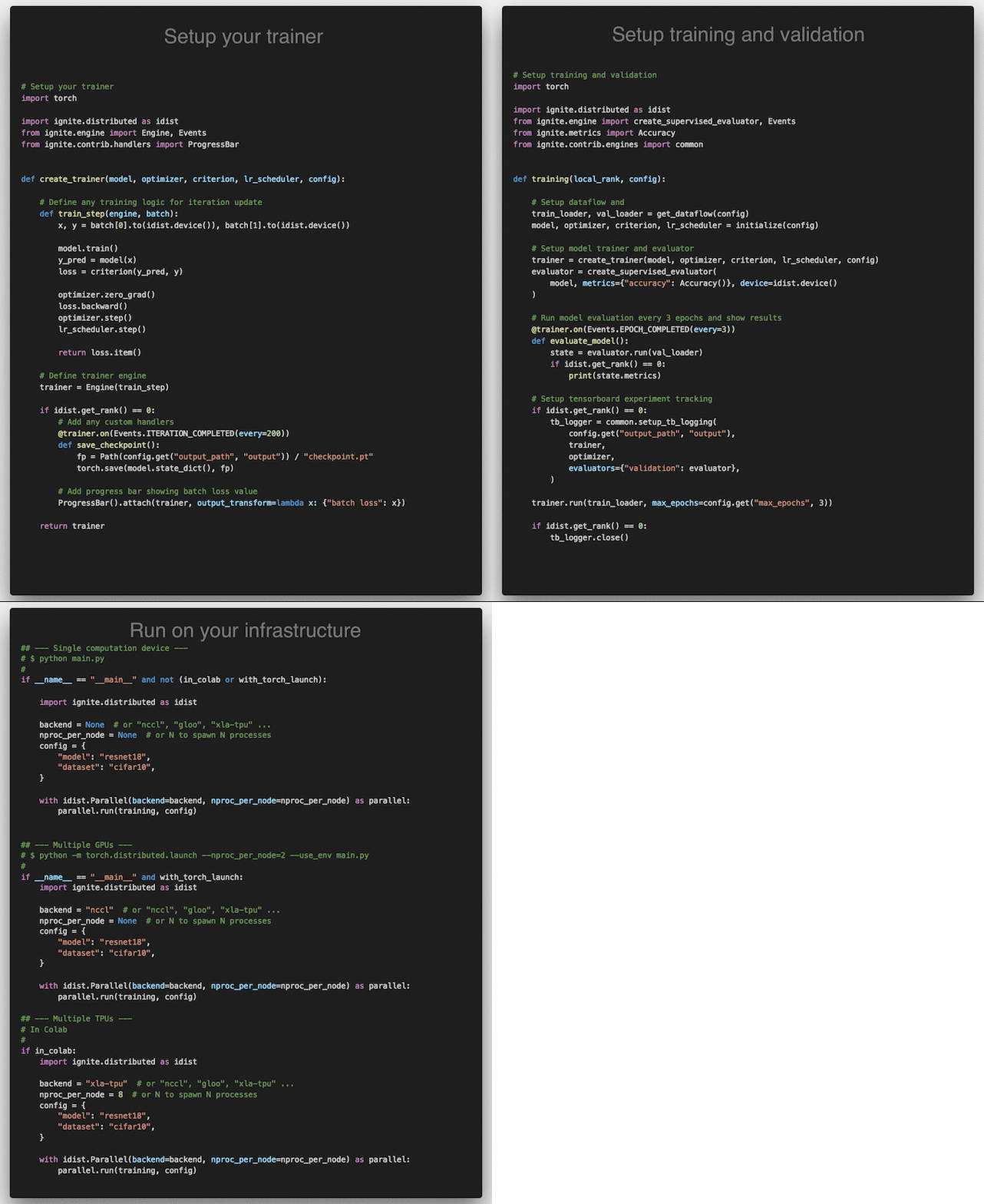 _Click on the image to see complete code_


