

File: README.md
sslh -- A ssl/ssh multiplexer
sslh accepts connections on specified ports, and forwards
them further based on tests performed on the first data
packet sent by the remote client.
Probes for HTTP, TLS/SSL (including SNI and ALPN), SSH, WireGuard,
OpenVPN, tinc, XMPP, SOCKS5, are implemented, and any other
protocol that can be tested using a regular expression, can
be recognised. A typical use case is to allow serving
several services on port 443 (e.g. to connect to SSH from
inside a corporate firewall, which almost never block port
443) while still serving HTTPS on that port.
Hence sslh acts as a protocol demultiplexer, or a
switchboard. With the SNI and ALPN probe, it makes a good
front-end to a virtual host farm hosted behind a single IP
address.
sslh has the bells and whistles expected from a mature
daemon: privilege and capabilities dropping, inetd support,
systemd support, transparent proxying, support for HAProxy's
proxyprotocol, chroot, logging, IPv4 and IPv6, TCP and UDP,
a fork-based, a select-based model, and yet another based on
libev for larger installations.
Install
Please refer to the install guide.
Security
Matthias Gerstner from OpenSUSE has performed a code review
of sslh from a security point of view, which revealed a
number of problems, including two CVE. His findings have
already been taken partly into account for the more critical
ones. The full
review
is well worth reading if you are using sslh in production.
Part of the securing your installation involves configuring
connection limits. This is described in this
guide.
Configuration
Please refer to the configuration guide.
Transparent proxying
Transparent proxying allows the target server to see the
original client IP address, i.e. sslh becomes invisible.
The same result can be achieved more easily by usingproxyprotocol if the backend server supports it. This is a
simple setting to add to the sslh protocol configuration,
usually with an equivalently simple setting to add in
the backend server configuration, so try that first. This is
explained in a separate document.
This means services behind sslh (Apache, sshd and so on)
will see the external IP and ports as if the external world
connected directly to them. This simplifies IP-based access
control (or makes it possible at all), and makes it possible
to use IP-based banning tools such as fail2ban.
There are two methods. One uses additional virtual network
interfaces. The principle and basic setup is described
here, with further
scenarios described there.
There is also a guide to use podman.
Another method uses iptable packet marking features, and is
highly dependent on your network environment and
infrastructure setup. There is no known generic approach,
and if you do not find directions for your exact setup, you
will probably need an extensive knowledge of network
management and iptables setup".
It is described in its own document.
In most cases, you will be better off following the first
method.
Docker image
How to use
docker run \
  --cap-add CAP_NET_RAW \
  --cap-add CAP_NET_BIND_SERVICE \
  --rm \
  -it \
  ghcr.io/yrutschle/sslh:latest \
  --foreground \
  --listen=0.0.0.0:443 \
  --ssh=hostname:22 \
  --tls=hostname:443
docker-compose example
version: "3"

services:
  sslh:
    image: ghcr.io/yrutschle/sslh:latest
    hostname: sslh
    ports:
      - 443:443
    command: --foreground --listen=0.0.0.0:443 --tls=nginx:443 --openvpn=openvpn:1194
    depends_on:
      - nginx
      - openvpn

  nginx:
    image: nginx

  openvpn:
    image: openvpn
Transparent mode 1: using sslh container for networking
Note: For transparent mode to work, the sslh container must be able to reach your services via localhost
version: "3"

services:
  sslh:
    build: https://github.com/yrutschle/sslh.git
    container_name: sslh
    environment:
      - TZ=${TZ}
    cap_add:
      - NET_ADMIN
      - NET_RAW
      - NET_BIND_SERVICE
    sysctls:
      - net.ipv4.conf.default.route_localnet=1
      - net.ipv4.conf.all.route_localnet=1
    command: --transparent --foreground --listen=0.0.0.0:443 --tls=localhost:8443 --openvpn=localhost:1194
    ports:
      - 443:443 #sslh

      - 80:80 #nginx
      - 8443:8443 #nginx

      - 1194:1194 #openvpn
    extra_hosts:
      - localbox:host-gateway
    restart: unless-stopped

  nginx:
    image: nginx:latest
    .....
    network_mode: service:sslh #set nginx container to use sslh networking.
    # ^^^ This is required. This makes nginx reachable by sslh via localhost

  openvpn:
    image: openvpn:latest
    .....
    network_mode: service:sslh #set openvpn container to use sslh networking
Transparent mode 2: using host networking
version: "3"

services:
  sslh:
    build: https://github.com/yrutschle/sslh.git
    container_name: sslh
    environment:
      - TZ=${TZ}
    cap_add:
      - NET_ADMIN
      - NET_RAW
      - NET_BIND_SERVICE
    # must be set manually
    #sysctls:
    #  - net.ipv4.conf.default.route_localnet=1
    #  - net.ipv4.conf.all.route_localnet=1
    command: --transparent --foreground --listen=0.0.0.0:443 --tls=localhost:8443 --openvpn=localhost:1194
    network_mode: host
    restart: unless-stopped

  nginx:
    image: nginx:latest
    .....
    ports:
      - 8443:8443 # bind to docker host on port 8443

  openvpn:
    image: openvpn:latest
    .....
    ports:
      - 1194:1194 # bind to docker host on port 1194
Comments? Questions?
You can subscribe to the sslh mailing list here:
https://lists.rutschle.net/mailman/listinfo/sslh
This mailing list should be used for discussion, feature
requests, and will be the preferred channel for announcements.
Of course, check the FAQ first!
File: doc/config.md
Configuration
If you use the scripts provided, sslh will get its
configuration from /etc/sslh.cfg. Please refer to
example.cfg for an overview of all the settings.
A good scheme is to use the external name of the machine inlisten, and bind httpd to localhost:443 (instead of all
binding to all interfaces): that way, HTTPS connections
coming from inside your network don't need to go throughsslh, and sslh is only there as a frontal for connections
coming from the internet.
Note that 'external name' in this context refers to the
actual IP address of the machine as seen from your network,
i.e. that that is not 127.0.0.1 in the output ofifconfig(8).
Libwrap support
Sslh can optionally perform libwrap checks for the sshd
service: because the connection to sshd will be coming
locally from sslh, sshd cannot determine the IP of the
client.
OpenVPN support
OpenVPN clients connecting to OpenVPN running with-port-share reportedly take more than one second between
the time the TCP connection is established and the time they
send the first data packet. This results in sslh with
default settings timing out and assuming an SSH connection.
To support OpenVPN connections reliably, it is necessary to
increase sslh's timeout to 5 seconds.
Instead of using OpenVPN's port sharing, it is more reliable
to use sslh's --openvpn option to get sslh to do the
port sharing.
Using proxytunnel with sslh
If you are connecting through a proxy that checks that the
outgoing connection really is SSL and rejects SSH, you can
encapsulate all your traffic in SSL using proxytunnel (this
should work with corkscrew as well). On the server side you
receive the traffic with stunnel to decapsulate SSL, then
pipe through sslh to switch HTTP on one side and SSL on the
other.
In that case, you end up with something like this:
ssh -> proxytunnel -e ----[ssh/ssl]---> stunnel ---[ssh]---> sslh --> sshd
Web browser -------------[http/ssl]---> stunnel ---[http]--> sslh --> httpd
Configuration goes like this on the server side, using stunnel3:
stunnel -f -p mycert.pem  -d thelonious:443 -l /usr/local/sbin/sslh -- \
	sslh -i  --http localhost:80 --ssh localhost:22
stunnel options:
-ffor foreground/debugging-pfor specifying the key and certificate-dfor specifying which interface and port
we're listening to for incoming connections-lsummonssslhin inetd mode.
sslh options:
-ifor inetd mode--httpto forward HTTP connections to port 80,
and SSH connections to port 22.
Capabilities support
On Linux (only?), you can compile sslh with USELIBCAP=1 set
in the Makefile to make use of POSIX capabilities; this will
save the required capabilities needed for transparent proxying
for unprivileged processes.
Alternatively, you may use filesystem capabilities instead
of starting sslh as root and asking it to drop privileges.
You will need CAP_NET_BIND_SERVICE for listening on port 443
and CAP_NET_RAW for transparent proxying (seecapabilities(7)).
You can use the setcap(8) utility to give these capabilities
to the executable:
sudo setcap cap_net_bind_service,cap_net_raw+pe sslh-selectThen you can run sslh-select as an unprivileged user, e.g.:
sslh-select -p myname:443 --ssh localhost:22 --tls localhost:443Transparent proxy support
Transparent proxying is described in its own
document.
It might be easier to configure sslh to use Proxyprotocol
if the backend server supports it.
Systemd Socket Activation
If compiled with USESYSTEMD then it is possible to activate
the service on demand and avoid running any code as root.
In this mode any listen configuration options are ignored and
the sockets are passed by systemd to the service.
Example socket unit:
[Unit]
Before=sslh.service

[Socket]
ListenStream=1.2.3.4:443
ListenStream=5.6.7.8:444
ListenStream=9.10.11.12:445
FreeBind=true

[Install]
WantedBy=sockets.target
Example service unit:
[Unit]
PartOf=sslh.socket

[Service]
ExecStart=/usr/sbin/sslh -v -f --ssh 127.0.0.1:22 --tls 127.0.0.1:443
KillMode=process
CapabilityBoundingSet=CAP_NET_BIND_SERVICE CAP_NET_RAW
PrivateTmp=true
PrivateDevices=true
ProtectSystem=full
ProtectHome=true
User=sslh
With this setup only the socket needs to be enabled. The sslh service
will be started on demand and does not need to run as root to bind the
sockets as systemd has already bound and passed them over. If the sslh
service is started on its own without the sockets being passed by systemd
then it will look to use those defined on the command line or config
file as usual. Any number of ListenStreams can be defined in the socket
file and systemd will pass them all over to sslh to use as usual.
To avoid inconsistency between starting via socket and starting directly
via the service Requires=sslh.socket can be added to the service unit to
mandate the use of the socket configuration.
Rather than overwriting the entire socket file drop in values can be placed
in /etc/systemd/system/sslh.socket.d/
values that will be merged.
In addition to the above with manual .socket file configuration there is an
optional systemd generator which can be compiled - systemd-sslh-generator
This parses the /etc/sslh.cfg (or /etc/sslh/sslh.cfg file if that exists
instead) configuration file and dynamically generates a socket file to use.
This will also merge with any sslh.socket.d drop in configuration but will be
overridden by a /etc/systemd/system/sslh.socket file.
To use the generator place it in /usr/lib/systemd/system-generators and then
call systemctl daemon-reload after any changes to /etc/sslh.cfg to generate
the new dynamic socket unit.
Fail2ban
If using transparent proxying, just use the standard ssh
rules. If you can't or don't want to use transparent
proxying, you can set fail2ban rules to block repeated ssh
connections from an IP address (obviously this depends
on the site, there might be legitimate reasons you would get
many connections to ssh from the same IP address...)
See example files in scripts/fail2ban.
UDP
sslh can perform demultiplexing on UDP packets as well.
This does not work with sslh-fork (it is not possible to
support UDP with a forking model). Specify a listening
address and target protocols with is_udp: true. sslh
will wait for incoming UDP packets, run the probes in the
usual fashion, and forward packets to the appropriate
target. sslh will then remember the association between
remote host to target server for 60 seconds by default,
which can be overridden with udp_timeout. This allows to
process both single-datagram protocols such as DNS, and
connection-based protocols such as QUIC.
An example for supporting QUIC is shown in example.cfg.
Limiting file descriptor consumption
There are various mechanisms to limit the number of
concurrent connections, which allows to limit the usage of
file descriptor. This is described in a separate
guide.
File: doc/Daisy-Chaining-Transparency-Explained.md
Daisy-Chaining-Transparency
This documentation goes a level deeper, what happens in the operating system with IP-addresses, and why some combinations of programs are failing, when they use the same transparency method.
There are situations, where you need to combine two applications, both working as ip-transparent proxies, to reach your goal. One example is, having nginx or stunnel as an proxytunnel-endpoint for tls tunneled ssh connections through https-proxies. An example for such a combination will be desribed at the end of this article.
Unfortunately you will see a lot of errors popping out: Address already in use
This article from Cloudflare blog explains why this is happening, while it is describing the solution to another problem. However this is a close relative to our problem.
Let us look to the following example: We have sslh (S) accepting connections from a client (C) and forwarding one of those connections to a man-in-the-middle (M), which finally forwards this connection to sshd. If everything works perfectly, we would like to see those connections.
But unfortunately we are receiving in many constellations errors, when M tries to open its connection to our final target sshd, here called T.
Let us look more close, why that is happening. We need for this two terminal windows on the same server.
First example, uncooperative applications
As the problem has nothing to do with transparency itself, but only of reuse of same IP-addresses and ports, we avoid the overhead of the additional capablities, to keep the example easy and clear.
In the first terminal we are starting python3 and entering the following three lines:
user@host:~$ python3
Python 3.11.2 (main, May  2 2024, 11:59:08) [GCC 12.2.0] on linux
Type "help", "copyright", "credits" or "license" for more information.
>>> import socket
>>> sock = socket.socket(socket.AF_INET, socket.SOCK_STREAM)
>>> sock.bind(("192.168.255.254", 12345))
>>>
Now we are going to the second terminal window, and trying just the same:
Python 3.11.2 (main, May  2 2024, 11:59:08) [GCC 12.2.0] on linux
Type "help", "copyright", "credits" or "license" for more information.
>>> import socket
>>> sock = socket.socket(socket.AF_INET, socket.SOCK_STREAM)
>>> sock.bind(("192.168.255.254", 12345))
Traceback (most recent call last):
  File "<stdin>", line 1, in <module>
OSError: [Errno 98] Address already in use
sock.bind(("192.168.255.254", 12346))  ##this however works!!
Here we are getting the error, which caused many of us hours of research.
The problem is caused by the fact, that the kernel does not know at the moment of the bind()-call, how we want to use the socket. If we use this as a server socket, and will do a listen()-call as next, this will not work, as for server sockets, the two-value tuple ADDRESS:PORT needs to be unique only to the process, tied to this socket.
That is the reason, that there are port ranges, reserved for servers, where the administrator is responsible not to assign the same port to two applications.
But as server ports are coming from a range, which will not be used for client connections, a server can be sure, that if it is started at any time in the future, no outgoing client has used its port for an outbound connection.
Clients are usually using ports from a so called ephemeral port range.
However, for clients each connection is valid, as long as one value in the four-tuples describing the connection is different. In our example above, the two values from the destination are different, so this connection could be established (in theory) without conflicts.
To make that happen, you need to deploy a special socket option to this socket, to explain, that we "know the risks" and we will reuse the ip-port combination.
And, as we see from the second bind() in the second example, the error message: Address already in use really means: Address:Port already in use
Taking Care, part I
Ok, now we are entering our two terminals again, pressing Ctrl-D to finish python, and start a new session like this in both terminals:
user@host:~$ python3
Python 3.11.2 (main, May  2 2024, 11:59:08) [GCC 12.2.0] on linux
Type "help", "copyright", "credits" or "license" for more information.
>>> import socket
>>> sock = socket.socket(socket.AF_INET, socket.SOCK_STREAM)
>>> sock.setsockopt(socket.SOL_SOCKET, socket.SO_REUSEADDR, 1)
>>> sock.bind(("192.168.255.254", 12345))
>>>
And we will see, that the problem is solved, when both applications are taking care.
Taking Care, part II
Ok, now we are going back to our terminals, pressing again Ctrl-D to finish python, and start new sessions like this:
In the first terminal we repeat the input from our first example, without the setsockopt() call:
user@host:~$ python3
Python 3.11.2 (main, May  2 2024, 11:59:08) [GCC 12.2.0] on linux
Type "help", "copyright", "credits" or "license" for more information.
>>> import socket
>>> sock = socket.socket(socket.AF_INET, socket.SOCK_STREAM)
>>> sock.bind(("192.168.255.254", 12345))
>>>
in the second terminal, we enter our modified cooperative example:
user@host:~$ python3
Python 3.11.2 (main, May  2 2024, 11:59:08) [GCC 12.2.0] on linux
Type "help", "copyright", "credits" or "license" for more information.
>>> import socket
>>> sock = socket.socket(socket.AF_INET, socket.SOCK_STREAM)
>>> sock.setsockopt(socket.SOL_SOCKET, socket.SO_REUSEADDR, 1)
>>> sock.bind(("192.168.255.254", 12345))
Traceback (most recent call last):
  File "<stdin>", line 1, in <module>
OSError: [Errno 98] Address already in use
>>>
Oops, here is our error again. And this is the reason, why I called this method "cooperative". As the first application has bound to that IP:PORT combination, without telling, that "it knows the risk", the kernel denies us, to use this combinations, as we may break the already active application. The first application is not "cooperative" :-(
Ok, but the kernel gives as some more possibilities: As we now get connections from a uncoperative application, we can no longer use the Client-IP-Port combination. We need to use a conflict free port for the client IP, to succeed. So lets get back to terminal 2 and continue after the error with the following commands:
user@host:~$ python3
Python 3.11.2 (main, May  2 2024, 11:59:08) [GCC 12.2.0] on linux
Type "help", "copyright", "credits" or "license" for more information.
>>> import socket
>>> sock = socket.socket(socket.AF_INET, socket.SOCK_STREAM)
>>> sock.setsockopt(socket.SOL_SOCKET, socket.SO_REUSEADDR, 1)
>>> sock.bind(("192.168.255.254", 12345))
Traceback (most recent call last):
  File "<stdin>", line 1, in <module>
OSError: [Errno 98] Address already in use
>>> sock.setsockopt(socket.SOL_SOCKET, socket.SO_REUSEADDR, 0)
>>> sock.setsockopt(socket.SOL_IP, socket.IP_BIND_ADDRESS_NO_PORT, 1)
>>> sock.bind(("192.168.255.254", 0))
>>>
This last example makes it neccessary, that you use a recent version of the python3 socket library, as older versions, have the option IP_BIND_ADDRESS_NO_PORT not yet defined.
With his behaviour, we are telling the kernel, that the kernel should assign us a conflict free port address at latest possible moment, while calling connect().
From man ip:
Inform the kernel to not reserve an ephemeral port when using bind(2)
with a port number of 0. The port will later be automatically chosen
at connect(2) time, in a way that allows sharing a source port as
long as the 4-tuple is unique.
Ok, now with those two actions an application is really ready for cooperative working in ip-transparent chains.
If you are running in problems, with any kind of application, where you are redirecting transparent traffic to from sslh, check the following:
- Are you using a recent version of sslh, having the described feature enabled
- are you using the most recent version of the other application
If you can confirm both checks, tell the maintainers of the other application, about possible fixes, and send them a link to this article.
Practical Use Of Daisy-Chaining: Proxytunnel Endpoint
One reasons, why we want to combine two programs is related to the core functionality of sslh. You wish to hide your ssh connection behind a https port.
But now you would like, to reach this port via the proxy-tunnel application, though an restrictive http(s) proxy. This is in many cases, one of the few methods, to escape from restricted private networks, like in companies, schools and universities. Unfortunately, many of those proxy-servers will check, that the protocol leaving the proxy is really tls. Therefore you need and endpoint in your system, which will terminate the tls-connection and forward the encapsulated ssh stream to the sshd. Sslh can't do tls termination, as this is not a core job of tls. One of the solutions tried here is stunnel. Stunnel can do transparency like sslh, but unfortunately belongs to the uncooperative ip-transparent programs. At the time of writing this article, you can use stunnel as the first-in-chain, and a very recent sslh as second in chain. But nginx (or openresty) is capable of this, however it prefers (at least in the tested versions), mostly the second way just selecting a new random port and not (always) preserving the original source port, what makes debugging of events much easier.
/* Detailed source-code truncated for AI context efficiency. */This nginx stream server shows a combination of different possibilities, how to establish an endpoint for proxytunnel or similar programs, to hide your ssh connection. Remember: Hiding ssh tunneled in tls does not neccessarly raise the security of your connection. In theory a combination of two methods may also lower the security. In addition there are more drawbacks: Such a connection needs more cpu on both ends for doing double crypto, and the throughput through he connection drops, as the ratio payload/header increases. the single ssh-packets are smaller, than usual.
So it is not recommended for doing scp or sftp through such connections.
Nginx Configration Explained
However, there are situations, where this is the only way, to reach your server.
So we have now this nginx instance helping us out.
The server stanza listening on 192.168.255.254:1443 is the main process, accepting incoming connections forwarded from sslh. It prereads tls SNI names, to get destination information. When in the nginx-configuration a variable is used, which is set by an map action, the mapping takes place just in that moment, when the variable needs to be expanded.
So we have either default values, in case there is no SNI, or values for individual SNI.
The connection stream is than forwarded ip-transparent to a given destination, which is itself another nginx instance, defined in the configuration file.
The Standard TLS-Termination
The server stanza listening on 192.168.255.254:444 is a very basic TLS terminating endpoint. In most cases, a proxy is happy with a destination like this. Here nginx just terminates the TLS connection and shovels the incoming packets over to sshd in ip-transparent way. The proxytunnel configuration for this target will look like:
host t2.yourdomain.top
  ProxyCommand /path/to/proxytunnel -e -p PROXY-IP:3128 -d t2.yourdomain.top:443
  ServerAliveInterval 30
If you have no proxytunnel on your system, you can also use openssl. In this case the configuration looks like:
host t2-alias
  ProxyCommand openssl s_client -proxy PROXY-IP:3128  -connect t2.yourdomain.top:443
  ServerAliveInterval 30
ssh ts-alias will use this configuration.
One point from the above configuration needs further explanation, as we just refer to our common letsencrypt store, for certificates.
Excurse To File ACLs
We are using here our common letsencrypt certificate store, as copying certificates after renewal is a pain in the as and prone to errors.
A small script makes sure, that all applications can read the certificates:
for i in  Debian-exim dovecot mail www-data nginx ; do
  setfacl -Rdm u:$i:rX ./archive/
  setfacl -Rdm u:$i:rX ./live/
  setfacl -Rm u:$i:rX ./archive/
  setfacl -Rm u:$i:rX ./live/
  for file in $( find ./live ./archive -type l,f ) ; do
    echo -e "$i $file set"
    setfacl -m u:$i:r $file
  done
done
This script needs only to be run, when a new application user needs access.
The first two lines are making sure (watch the d), that the given options
on those directories will be the default for newly created files below.
The uppercase X means, that x-access will only be granted to directories or files, having already x set for others.
The Tricky TLS Termination
The server stanza listening on 192.168.255.254:445 is a more tricky TLS terminating endpoint. Some proxies are trying to inspect the destination, before letting you go. Some of them you can fool, others not.
One trick can be to use an phantasy domain name with a self signed certificate, no dns server will ever resolve. As you are using this name as SNI name in your proxy-tunnel connection, it will work. This can be also a way, to hide your sshd, if someone, who knows you are using sslh tries to find your sshd. As long, as this person does not get access to proxies you are using, this may help in some situations.
Another trick is, requiring a client certificate for authentication. This is in each case the much better approach, as you can combine this also with official connected domain names. Without the client certificate no sshd!
The client certificate does not increase the above mentioned ratio between payload and headers, as this is only used while establishing the TLS connection.
It prevents however a proxy, doing a parallel sneak to your destination, to figure out what is behind. I have seen proxies letting you connect with this method, others are denying access.
To access this endpoint, the proxytunnel configuration inside ~/.ssh/config
will look like:
host cryptic.foo.notexists
  ProxyCommand /path/to/proxytunnel -e -c ~/public.cert -k ~/private.pem -C ~/myOwnCA.cert -p PROXY-IP:3128 -o cryptic.foo.notexists  -d t1.yourdomain.top:443
  ServerAliveInterval 30
-C gives the certfile to your certificate used for selfsigning the server certificate. You can also set -z for not verifying the certificate, but that is not recommended! t1.yourdomain.top represents a valid domain name, where the listening sslh can be reached. This name is not taken for SNI, because -o sets our hidden SNI name. Whenever you enter ssh cryptic.foo.notexists you will get connected to your server!
The best recommendation however is: Avoid self-signed certs, if you are not really sure what you are doing.
File: doc/FAQ.md
Frequently Asked Questions
When something doesn't work, look up here... and if it still
doesn't work, report how what was suggested here went.
It's also worth reading how to ask
questions
before posting on the mailing list or opening an issue in
GitHub.
Getting more info
There are several verbose options that each enable a set
of messages, each related to some event type. Seeexample.cfg for a list of them.
If something doesn't work, you'll want to run sslh with
lots of logging, and the logging directly in the terminal
(Otherwise, logs are sent to syslog, and usually end up in/var/log/auth.log). There is a general --verbose option
that will allow you to enable all messages:
sslh -v 3 -f -F myconfig.cfgforward to [PROBE] failed:connect: Connection refused
Usually this means sslh is configured to forward a
protocol somewhere, but no service is listening on the
target address. Check your sslh configuration, check the
corresponding server really is listening and running.
Finally, check the server is listening where you expect it
to:
netstat -lptI get a segmentation fault!
Well, it's not yours (fault): a segfault is always a bug in
the programme. Usually standard use cases are well tested,
so it may be related to something unusual in your
configuration, or even something wrong, but it should still
never result in a segfault.
Thankfully, when they are deterministic, segfaults are
usually fairly easy to fix if you're willing to run a few
diagnostics to help the developer.
First, make sure you have debug symbols:
$ file sslh-select
sslh-select: ELF 64-bit LSB pie executable, x86-64, version 1 (SYSV), dynamically linked, interpreter /lib64/ld-linux-x86-64.so.2, for GNU/Linux 3.2.0, BuildID[sha1]=a758ac75ff11f1ace577705b4d6627e301940b59, with debug_info, not stripped
Note with debug_info, not stripped at the end. If you
don't have that, your distribution stripped the binary: you
will need to get the source code and compile it yourself
(that way, you will also get the latest version).
Install valgrind and run sslh under it:
valgrind --leak-check=full ./sslh-fork -v 2 -f -F yourconfig.cfgReport the full output to the mailing list or github.
Valgrind is very powerful and gives precise hints of what is
wrong and why. For example on sslh issue
(#273)[https://github.com/yrutschle/sslh/issues/273]:
sudo valgrind --leak-check=full ./sslh-fork -v 2 -f -F /etc/sslh.cfg
==20037== Memcheck, a memory error detector
==20037== Copyright (C) 2002-2017, and GNU GPL'd, by Julian Seward et al.
==20037== Using Valgrind-3.15.0 and LibVEX; rerun with -h for copyright info
==20037== Command: ./sslh-fork -v 2 -f -F /etc/sslh.cfg
==20037==
sslh-fork v1.21b-1-g2c93a01-dirty started
--20037-- WARNING: unhandled arm-linux syscall: 403
--20037-- You may be able to write your own handler.
--20037-- Read the file README_MISSING_SYSCALL_OR_IOCTL.
--20037-- Nevertheless we consider this a bug.  Please report
--20037-- it at http://valgrind.org/support/bug_reports.html.
==20040== Conditional jump or move depends on uninitialised value(s)
==20040==    at 0x112A3C: parse_tls_header (tls.c:162)
==20040==    by 0x111CEF: is_tls_protocol (probe.c:214)
==20040==    by 0x11239F: probe_client_protocol (probe.c:366)
==20040==    by 0x10A8F7: start_shoveler (sslh-fork.c:98)
==20040==    by 0x10AE9B: main_loop (sslh-fork.c:200)
==20040==    by 0x1114FB: main (sslh-main.c:322)
==20040==
Here we see that something wrong is happening at tls.c
line 162, and it's linked to an uninitialised value.
Using sslh for virtual hosting
Virtual hosting refers to having several domain names behind
a single IP address. All Web servers handle this, but
sometimes it can be useful to do it with sslh.
TLS virtual hosting with SNI
For TLS, this is done very simply using Server Name
Indication, SNI for short, which is a TLS extension whereby
the client indicates the name of the server it wishes to
connect to. This can be a very powerful way to separate
several TLS-based services hosted behind the same port:
simply name each service with its own hostname. For example,
we could define mail.rutschle.net, im.rutschle.net,www.rutschle.net, all of which point to the same IP
address. sslh uses the sni_hostnames setting of the
TLS probe to do this, e.g.:
protocols: (
    {   name: "tls";
        host: "localhost";
        port: "993";
        sni_hostnames: [ "mail.rutschle.net" ];
    },
    {   name: "tls";
        host: "localhost";
        port: "xmpp-client";
        sni_hostnames: [ "im.rutschle.net" ];
    },
    {   name: "tls";
        host: "localhost";
        port: "4443";
        sni_hostnames: [ "www.rutschle.net" ];
    }
);
HTTP virtual hosting with regex
If you wish to serve several Web domains over HTTP throughsslh, you can do this simply by using regular expressions
on the Host specification part of the HTTP query.
The following example forwards connections to host_A.acme
to 192.168.0.2, and connections to host_B.acme to
192.168.0.3.
protocols: (
    {   name: "regex";
        host: "192.168.0.2";
        port: "80";
        regex_patterns:
                ["^(GET|POST|PUT|OPTIONS|DELETE|HEADER) [^ ]* HTTP/[0-9.]*[\r\n]*Host: host_A.acme"] },
    {   name: "regex";
        host: "192.168.0.3";
        port: "80";
        regex_patterns:
                ["^(GET|POST|PUT|OPTIONS|DELETE|HEADER) [^ ]* HTTP/[0-9.]*[\r\n]*Host: host_B.acme"] }
);
I get an error "Too many open files"
sslh used up all the file descriptors it can (1024 by default in Linux),
which means it cannot create new connections. On some
systems, you can increase the process limit with ulimit -n 2048 (for example). Maybe more usefully, you can limit the
connection usage based on protocols or listening address, as
described in the max_connections
guide.
File: doc/INSTALL.md
Pre-built binaries
Docker images of master and of the tagged versions are
available directly from Github.
Windows binaries for Cygwin are graciously produced by
nono303 on his repository.
Compile and install
Dependencies
sslh uses:
libconfig.
For Debian this is contained in packagelibconfig-dev.
You can compile with or without it using USELIBCONFIG in the Makefile.libwrap.
For Debian, this is contained in packageslibwrap0-dev.
Presence of libwrap is checked by the configure script.libsystemd, in package
libsystemd-dev.
You can compile with or without it using USESYSTEMD in the Makefile.libcap, in package
libcap-dev.
Presence of libcap is checked by the configure script.libconfig++-dev, in package
lìbconfig++-devlibbsd, to enable to change the process name (as shown in
ps,
so each forked process shows what protocol and what connection it is serving),
which requireslibbsdat runtime, andlibbsd-devat compile-time.
Presence of libbsd is checked by the configure script.libpcre2, in package
libpcre2-dev.
You can compile with or without it using ENABLE_REGEX in the Makefile.libev-dev, in package
libev-dev.
If you build a binary specifically and do not buildsslh-ev, you don't need this.libproxyprotocol
to support HAProxy's ProxyProtocol.
As this is not part of the distribution packages, set
C_INCLUDE_PATH, LD_LIBRARY_PATH, and LIBRARY_PATH to the appropriate
values:textexport C_INCLUDE_PATH=/home/user/src/libproxyprotocol/src export LD_LIBRARY_PATH=/home/user/src/libproxyprotocol/libs export LIBRARY_PATH=/home/user/src/libproxyprotocol/libs
For OpenSUSE, these are contained in packages libconfig9 and
libconfig-dev in repository
http://download.opensuse.org/repositories/multimedia:/libs/openSUSE_12.1/
For Fedora, you'll need packages libconfig and libconfig-devel:
yum install libconfig libconfig-develIf you want to rebuild sslh-conf.c (after a make distclean for example),
you will also need to add conf2struct
(v1.5) to your path.
The test scripts are written in Perl, and will requireIO::Socket::INET6 (libio-socket-inet6-perl in Debian).
Compilation
First you have to run ./configure in the ./sslh directory. After this,
the Makefile is created, and you can do your configuration changes in the Makefile.
After each run of ./configure, those changes are gone and the Makefile is recreated.
There are a couple of configuration options at the beginning of the Makefile:
# override undefine HAVE_LANDLOCKif you uncomment this line, sslh will be compiled
without landlock. This works with gcc versions < 12. Otherwise, if your system has
linux/landlock.h in the include path, the configure script creates a config.h file,
which defines HAVE_LANDLOCK. It is not enough, to set this to 0, you must delete it,
when you don't wish to have landlock in your binary.USELIBWRAPcompiles support for host access control (seehosts_access(3)),
you will needlibwrapheaders and library to compile (libwrap0-devin Debian).USELIBCONFIGcompiles support for the configuration file.
You will needlibconfigheaders to compile (libconfig8-devin Debian).USESYSTEMDcompiles support for using systemd socket activation.
You will needsystemdheaders to compile (systemd-develin Fedora).USELIBBSDcompiles support for updating the process name (as shown byps).USELIBCAPcompiles support for libcap, which allows to inherit capabilities to
daughter-processes, which run as restricted users. You need this, when you wish to
make sure, that the --user= parameter can be used, without setting capabilities etc.
to your binaries, to make this work.
Now you can do either a plain make to create the binaries, or you can do anmake install to create the binaries and install them.
Generating the configuration parser
The configuration file and command line parser is generated by conf2struct,
from sslhconf.cfg, which generates sslh-conf.c and sslh-conf.h.
The resulting files are included in the source
so sslh can be built without conf2struct installed.
Further, to prevent build issues,sslh-conf.[ch] has no dependency to sslhconf.cfg in the Makefile.
In the event of adding configuration settings,
they need to be regenerated using make c2s.
Binaries
The Makefile produces three different executables:sslh-fork, sslh-select and sslh-ev:
sslh-forkforks a new process for each incoming connection.
It is well-tested and very reliable, but incurs the overhead of many processes.
If you are going to usesslhfor a "small" setup
(less than a dozen ssh connections and a low-traffic https server)
thensslh-forkis probably more suited for you.sslh-selectuses only one thread, which monitors all connections at once.
It only incurs a 16 byte overhead per connection.
Also, if it stops, you'll lose all connections,
which means you can't upgrade it remotely.
If you are going to usesslhon a "medium" setup (a few hundreds of connections),
or if you are on a system where forking is expensive (e.g. Windows),sslh-selectwill be better.sslh-evis similar tosslh-select, but useslibevas a backend.
This allows using specific kernel APIs that
allow to manage thousands of connections concurrently.
Installation
- In general:sh
./configure make cp sslh-fork /usr/local/sbin/sslh cp basic.cfg /etc/sslh.cfg vi /etc/sslh.cfg - For Debian:sh
cp scripts/etc.init.d.sslh /etc/init.d/sslh - For CentOS:sh
cp scripts/etc.rc.d.init.d.sslh.centos /etc/rc.d/init.d/sslh
You might need to create links in /etc/rc<x>.d so that the server
start automatically at boot-up, e.g. under Debian:
update-rc.d sslh defaultsFile: doc/README.Windows.md
It is possible to run sslh on Windows. The fork model
should be avoided as it is very inefficient on Windows, butsslh-select and sslh-ev both work with good performance
(prefer the latter, however).
The following script downloads the latest cygwin, the latest version of sslh, and then compiles and copies the binaries with dependancies to an output folder.
It may be needed to correct it from time to time, but it works. I use it in a virtual machine.
Just retrieve WGET.EXE from https://eternallybored.org/misc/wget/ or git binaries.
Copy the 3 files
GO.cmd
wget.exe
compile.sh
to C root folder, then execute GO.cmd with administrative rights.
with GO.cmd
@ECHO OFF
CD /D "%~dp0"

NET SESSION >NUL 2>&1
IF %ERRORLEVEL% NEQ 0 (
    ECHO Permission denied. This script must be run as an Administrator.
    ECHO:
    GOTO FIN
) ELSE (
    ECHO Running as Administrator.
    TIMEOUT /T 2 >NUL
	wget --no-check-certificate https://www.cygwin.com/setup-x86_64.exe
	IF NOT EXIST setup-x86_64.exe GOTO FIN
	MKDIR C:\Z
	setup-x86_64.exe -l C:\Z -s ftp://ftp.funet.fi/pub/mirrors/sourceware.org/pub/cygwin/ -q -P make -P git -P gcc-g++ -P autoconf -P automake -P libtool -P libpcre-devel -P libpcre2-devel -P bison -P libev-devel
	MKDIR C:\cygwin64\home\user
COPY COMPILE.SH C:\cygwin64\home\user
		START C:\cygwin64\bin\mintty.exe /bin/bash --login -i ~/compile.sh
	START EXPLORER C:\zzSORTIE
)
:FIN
PAUSE
EXIT
and compile.sh
# SAVE FILE TO UNIX FORMAT
# COPY IT IN C cygwin64 home user
git clone https://github.com/hyperrealm/libconfig.git
cd libconfig
autoreconf -fi
./configure
make
make install
cd ..
cp /usr/local/lib/libconfig.* /usr/lib
git clone https://github.com/yrutschle/sslh.git
cd sslh
make
cd ..
mkdir /cygdrive/c/zzSORTIE
cp ./sslh/sslh*.exe /cygdrive/c/zzSORTIE
cp /usr/local/bin/cygconfig-11.dll /cygdrive/c/zzSORTIE
cp /cygdrive/c/cygwin64/bin/cygwin1.dll /cygdrive/c/zzSORTIE
cp /cygdrive/c/cygwin64/bin/cygpcreposix-0.dll /cygdrive/c/zzSORTIE
cp /cygdrive/c/cygwin64/bin/cygpcre-1.dll /cygdrive/c/zzSORTIE
cp /cygdrive/c/cygwin64/bin/cygev-4.dll /cygdrive/c/zzSORTIE
cp /cygdrive/c/cygwin64/bin/cygpcre2-8-0.dll /cygdrive/c/zzSORTIE
This method was contributed by lerenardo on github.
File: doc/scenarios-for-simple-transparent-proxy.md
Three Scenarios for the simple transparent proxy setup
Introduction
The first example is the configuration, which was described in the previous document. I omitted the loopback interface "lo" in those diagrams, trying not no overload the picture.
The connections have two different endings, showing the direction of the opening connection (SYN flag) and the answer connection (SYN-ACK flags). This is important, as the traffic in the transparent proxy setup flows somewhat unexpected.
Example 1
The first example shows the setup, which is described in the previous document. You see the Client connecting to sslh (red connection). When sslh accepts this connection, the SYN-ACK packet is send back to the client, which sends the first data packet(s) together with the ACK for the SYN-ACK. So the bidirectional tcp connection is fully open.
Sslh opens now the blue connection to sshd and needs for that elevation rights, as it uses the clients IP address as its own address for opening this connection. Now things are becoming complicated: Sshd send back the first packet with SYN-ACK flags (green line), addressed to the clients IP (dotted line). As already described, that would go wrong, so our routing trick makes this packet beeing deflected back to sslh, so this tcp connection is also opened. But we have here now an asymetric behaviour, that the read and write pathes of the tcp connection are going different routes.
The sslh process shuffles now all the bytes coming from sshd from the green line to the red line, vice versa for the packets from the client.
Example 2
In this example sshd is running on another server. No matter, if this is docker, kvm, virtualbox or another physical host, connected with an ethernet cable. Here we need no dummy interface, so we need another way, to configure our routing deflection. The principle is the same: We need to force packets coming back from sshd going to sslh and not directly back to the client.
In this case its your decision, where those rules will be tied in, options are:
- the startscript of sslh
- the docker or kvm configuration
- the configuration of the outgoing interface
Its two lines you need:
ip rule add from SSHD_ADDRESS/32 table sslh
ip route add local 0.0.0.0/0 dev lo table sslh
On the sshd host, we need no additional rules, as all traffic is coming back to our sslh host, because this is in this setting the default gateway. The only thing, we need to do: Assign a unique IP address only for sshd and all other services, you wish to hide behind sslh and host on this device.
There are two ways, how you can add multiple ip addresses to one device. The new ip addr add supports multiple add statements to one and the same interface name. So you can just duplicate the interface stancas in the /etc/network/interfaces configuration. The problem with this method is, that some older managment tools, like ifconfig are unable to show the additional addresses. So when you are used to some older tools, you may configure sub-interfaces like eth0:1.
However my recommendation is, migrate to new tools, get used to it, as old tools don't show you the whole configuration!
Example 3
This is now the extended version of the previous example. The target host has another path back to the client, as there is a default route to another interface. Now we need TWO routing deflections, one on the sslh host, like in scenario 2, and one on the sshd target host.
The routing setup on the target host looks like:
- Add an routing table name for the deflection table in /etc/iproute2/rt_tables
- Find a location, where you will hook the two routing rules in
ip rule add from SSHD_ADDRESS/32 table sslh_routeback
ip route add default via SERVER1_ETH1_IP dev eth0 table sslh_routeback
This is setting up a default route for all traffic, originating from the ip address sshd (or any other service) is using, back to the host, hosting sslh. On that host, those packets will be deflected again with the same rule from scenario 2.
Be aware, that scenario 3 can look very different and the picture above shows only one of those setups. Each configuration, where packets from the target system can find their way back, without beeing forcibly routed through the sslh hosting system, belongs into this category. This are e.g. virtual machines or containers, having interfaces in the same network, like the sslh hosting system. Even, when they look in some drawings embedded in their host, as soon, as they have network interfaces, allowing a direct connection to the client, it is scenario 3!
Modifications
Now you can think about many modifications, but the tools will be the same, for all other thinkable scenarios. You must always make sure, that packets from foreign hosts, will find their way back to the sslh host. So if the chain consists of three or four servers, all need the deflection rules.
Important Finding On Routing
When I went ahead and wrote in my first drawings the warning, that the kernel in scenario 2 and 3 needs to have forwarding in place, I finally tested, that this is not true. Both scenarios are working without kernel forwarding beeing activated!
The background: The deflecting routing table cames into the game, before the kernel has to made the decision, that packets with non local ip addresses in source and destination must be forwarded. After the routing rule deliveres the packet to sslh and sslh rewrites the source ip, the packet is treated as local, and can pass the system.
File: doc/simple_transparent_proxy.md
Transparent Proxy Configuration Using IP Routing#
This documentation is another explanation of the transparent proxy with the goal, beeing secure and minimalistic. Besides this documentation will explain, how and why this configuration works.
The explanation will only describe the connection to sshd, so the target sshd can be replace with any other target service, sslh supports.
Introduction in the data flow
This chapter can be skipped, if you just like to configure things fast.
This chapter is a little excurse to the dataflow. First point of all is something, which you will unfortunately not see in the nice routing diagrams for iptables or netfilter-tables (nft) like: Iptables at wikipedia, Netfilter Flow.

Packets from local application talking to other local applications are routed through the loopback-interface. They leave postrouting to lo and reentering from there prerouting, without passing ingress/egress.
This has nothing to do with the "route_localnet = 1" trick, which only makes, that the the local ip range 10.0.0.0/8 gets routed!
As you can read in many articles, this is nothing you should do, as you may bring your system at risk, because it allows to leak packets from outside to applications, which feel themselves secure, by using those unroutable addresses.
A Simple Simulation
You can prove this behaviour with a simple test:
# In one terminal start socat as a local echo server
# this is simulating sshd

socat TCP4-LISTEN:2000,bind=SERVER_IP,fork EXEC:cat

# In the next terminal start another instance of socat,
# simulating sslh

socat TCP-LISTEN:3000,bind=SERVER_IP,fork TCP:SERVER_IP:2000

# In another terminal you can watch the traffic on lo

tcpdump -i lo port 2000

# In the last terminal talk to the echo server
telnet SERVER_IP 2000
You will see your traffic on lo, but not on eth0, if you retry the tcpdump there.
If you setup sslh as non transparent proxy, it will just work, as what we have seen.
Going Transparent
In case of transparent proxy however, sslh uses some tricks, to reuse the clients IP on its outgoing interface to sshd. It opens the interface in raw mode, so it either needs to be started as root and drop privileges after binding, or you will need to give some capabilities to the sslh binary (cap_net_bind_service,cap_net_raw+ep), if you will start it as restricted user.
In this setup we continue, with dropping priviledges.
Doing so, you can send packets to the sshd, listening on another interface, but, the answer packets from sshd will get routed back to the client. This however will not work, as the client would refuse those packets, because they don't belong to a tcp session, the client opened. In most cases those packets would even not reach the client, as source ip addresses from private address space, will be blocked by most internet routers and connection providers.
So its mandatory, to use some tricks, to get those packets back to sslh. All configurations, I have seen so far, are using two components for that. They bind sshd to lo, and than they introduce some firewall rules, to mark packets, originating from the sshd port on lo, so that those packets can be routed in a next step -based on that marking- back to sslh.
Drawbacks From Using loopback
This idea has some serious drawbacks: First, you need to allow routing of the local address space, 127.0.0.0/8, with kernel configurations. Search for the string "net.ipv4.conf.default.route_localnet" and you will find lot of articles, why you should not do this.
By allowing this, you need additional firewall rules, dropping martian packets, which otherwise would get routed to the internet from other applications, running on lo, not aware, that their traffic could be routed. You need further firewall rules, blocking incoming packets to loopback addresses, as otherwise some applications (especially udp) could be the goal of some bad traffic.
Using A Dedicated Interface
So this configuration makes use of a own interface, just for the services, where sslh should hide the traffic for. We use a interface of the dummy kernel module, which was designed just for this case. It is an interface, beeing there, having no cable connection or whatsever, but applications can bind to it. We assign to this interface just a /32 private address, as this interface is not part of any network.
Doing so, we can avoid all the hassle with marking certain packets, coming from the single applications, sslh has to hide, as we now just route ALL traffic from this specific interface by its ip to sslh.
We need one routing rule and one routing table, this covers as many targets sslh will serve on this interface, without adding additional rules for adding apache, openvpn and others.
We need no firewall rules, preventing martians, as this single routing rule will deadroute all traffic from this interface, if sslh is not catching it up.
We only need firewall protection for this specific ip address, when we have activated ip forwarding on that system. If the system is no router and needs no forwarding, there is no protection needed.
Finally The Configuration
As described, we need as a first step a dedicated interface, just for the services, sslh should hide. Its possible, to generate individual interfaces for different configurations, however, that makes things again more complex and has no advantages seen so far.
Named Routing Table
As we configure the needed routing rules in the interface configuration, we need to define a name for the sslh routing table first.
Using named routing tables helps, understanding the routing configuration, as a name indicates, why this routing table is configured.
To do so go to /etc/iproute2/rt_tables and add a line
111 sslhWith newer versions of iproute2 the /etc/iproute2 directory with the embedded templates got no longer installed. The cause maybe, that the example names, which were not used in any configuration, generated confusion. However, once you need those files, generate them and they will be honoured. You still can use just numbers for your routing table. But doing this, and having more than one routing table, you need a list, which numer belongs to which configuration.
And seeing in the output from ip route list table all the tables names instead just numbers is worth creating the file.
Dummy Interface
Now we configure our dedicated interface.
In the file /etc/network/interfaces, we place this entry:
auto dummy0
iface dummy0 inet static
    address 192.168.255.254/32
    pre-up modprobe dummy
    ## Attention! with kernels, not automatically creating a dummy0
    ## interface after module loading the following line should be:
    ## pre-up modprobe dummy; if [ ! -e /sys/class/net/dummy0 ]; then ip link add dummy0 type dummy ; fi
    post-up ip rule add from 192.168.255.254 table sslh
    post-up ip route add local 0.0.0.0/0 dev dummy0 table sslh
    pre-down ip route del local 0.0.0.0/0 dev dummy0 table sslh
    pre-down ip rule del from 192.168.255.254 table sslh
As long, as your system has no other interfaces with private address-space, or is routing such addresses, you can continue with the given example. Otherwise you need to select a conflict free address.
If you are updating a older current configuration, make sure, that you have no longer insecure localnet routing in place:
sysctl  net.ipv4.conf.default.route_localnet
 sysctl net.ipv4.conf.all.route_localnet
should both report "0"!
Explanation Of The Routing Rules
The two routing rules in the dummy0 interface configuration are the key for this configuration.
The first line is an routing rule entry, routing everything coming from the dummy0 ip source address to a special routing table sslh.
The next line generates this table implicitly, by inserting a single rule, routing everything from that ip address to dummy0.
Opposite to other firewall based configurations, we have those rules now tied to the dummy0 device, dedicated to the hidden services.
When this interface comes up, the routing rules are making sure, that no martian packets can leave the system, by some processes using this IP address. When the interface goes down, we delete those rules.
Also the startup script needs lo longer special treatment for the transparent mode.
SSLH Default Configuration
And finally you need to configute /etc/default/sslh with the right settings for all the services, sslh should work for.
DAEMON_OPTS="--user sslh --listen SERVER_IP:443 --transparent  \
             --ssh 192.168.255.254:22 --tls 192.168.255.254:443 \
             --pidfile /var/run/sslh/sslh.pid"
Systemd
This setup is now startup agnostic. As we don't need special treatment in the startup script, the sysV based init scripts will just work, like the systemd scripts. Nothing needs to be modified, when going transparent.
Remote Setups
This concept can also be adapted for several setups, where the sshd (or any other target service) is running in a container, kvm-virtual machine, etc.
Precondition is, that the target system is the next hop and uses the sslh-hosting system as default gateway. In addition you need to bind an additional ip-address, solely used for sshd on the corresponding interface.
Than you can adapt the routing rule, routing traffic coming back from this ip to the sslh-routing-table.
Its also possible, to forward to an next hop system, which has its own default gateway back, bypassing the sslh-host.
In this case, you need to add a special route back to the sslh host, for all traffic with the sshd source ip address. This can be done similar to the two rules described above:
# first define a name for the table in /etc/iproute2/rt_tables e.g. sslh-routeback
  ip rule add from IPADRESS-OF-SERVIE table sslh-routeback
  ip route add default via IPADDRESS-OF_SSLH-HOST dev eth0 table sslh-routeback
The details are depending on your network settings. Als long, as the forward chain to the hidden service passes systems under your control, you can add backroutes on each system in that route. Precondition: The used ip address produces no conflict on those systems.
I added a second document, describing three possible scenarios in detail. Those three scenarios should cover all setups related to transparent proxying.
File: doc/tproxy.md
Transparent proxy using packet marking
Before reading further, make sure you try to set up
transparent proxying using IP routing.
It is conceptually easier to understand, cleaner, and more
portable.
Using this method is very tricky and
detail-dependant: depending on whether the target server and
sslh are on the same machine, different machines, or
different dockers, and tool versions, all seem to change the
required network configuration somewhat. If it doesn't work,
it's almost certain that the problem is not linked to sslh
but to the network setup that surrounds it. If in trouble,
it might be worth trying to set up the network rules
with a simpler server than sslh, such assocat
Users have tried to do at least the following:
sslhand the target servers run on the same host (see below)sslhruns on a host, and the target servers run on LXC or dockers running on the same host. No known working setup.sslhruns on a host, and the target servers run on different hosts on the same local network(see below)sslhruns on a host, and the target servers run on a different host on a different network (there is a usecase for this). No known working setup, and it's unclear it is possible.
Transparent proxy to one host
Linux
sslh needs extended rights to perform this: you'll need to
give it CAP_NET_RAW capabilities (see appropriate chapter)
or run it as root (but don't do that).
The firewalling tables also need to be adjusted as follows.
I don't think it is possible to have httpd and sslh both listen to 443 in
this scheme -- let me know if you manage that:
# Set route_localnet = 1 on all interfaces so that ssl can use "localhost" as destination
sysctl -w net.ipv4.conf.default.route_localnet=1
sysctl -w net.ipv4.conf.all.route_localnet=1

# DROP martian packets as they would have been if route_localnet was zero
# Note: packets not leaving the server aren't affected by this, thus sslh will still work
iptables -t raw -A PREROUTING ! -i lo -d 127.0.0.0/8 -j DROP
iptables -t mangle -A POSTROUTING ! -o lo -s 127.0.0.0/8 -j DROP

# Mark all connections made by ssl for special treatment (here sslh is run as user "sslh")
iptables -t nat -A OUTPUT -m owner --uid-owner sslh -p tcp --tcp-flags FIN,SYN,RST,ACK SYN -j CONNMARK --set-xmark 0x01/0x0f

# Outgoing packets that should go to sslh instead have to be rerouted, so mark them accordingly (copying over the connection mark)
iptables -t mangle -A OUTPUT ! -o lo -p tcp -m connmark --mark 0x01/0x0f -j CONNMARK --restore-mark --mask 0x0f

# Configure routing for those marked packets
ip rule add fwmark 0x1 lookup 100
ip route add local 0.0.0.0/0 dev lo table 100
Transparent proxying with IPv6 is similarly set up as follows:
# Set route_localnet = 1 on all interfaces so that ssl can use "localhost" as destination
# Not sure if this is needed for ipv6 though
sysctl -w net.ipv4.conf.default.route_localnet=1
sysctl -w net.ipv4.conf.all.route_localnet=1

# DROP martian packets as they would have been if route_localnet was zero
# Note: packets not leaving the server aren't affected by this, thus sslh will still work
ip6tables -t raw -A PREROUTING ! -i lo -d ::1/128 -j DROP
ip6tables -t mangle -A POSTROUTING ! -o lo -s ::1/128 -j DROP

# Mark all connections made by ssl for special treatment (here sslh is run as user "sslh")
ip6tables -t nat -A OUTPUT -m owner --uid-owner sslh -p tcp --tcp-flags FIN,SYN,RST,ACK SYN -j CONNMARK --set-xmark 0x01/0x0f

# Outgoing packets that should go to sslh instead have to be rerouted, so mark them accordingly (copying over the connection mark)
ip6tables -t mangle -A OUTPUT ! -o lo -p tcp -m connmark --mark 0x01/0x0f -j CONNMARK --restore-mark --mask 0x0f

# Configure routing for those marked packets
ip -6 rule add fwmark 0x1 lookup 100
ip -6 route add local ::/0 dev lo table 100
Explanation:
To be able to use localhost as destination in your sslh config along with transparent proxying
you have to allow routing of loopback addresses as done above.
This is something you usually should not do (see this stackoverflow post)
The two DROP iptables rules emulate the behaviour of route_localnet set to off (with one small difference:
allowing the reroute-check to happen after the fwmark is set on packets destined for sslh).
See this diagram for a good visualisation
showing how packets will traverse the iptables chains.
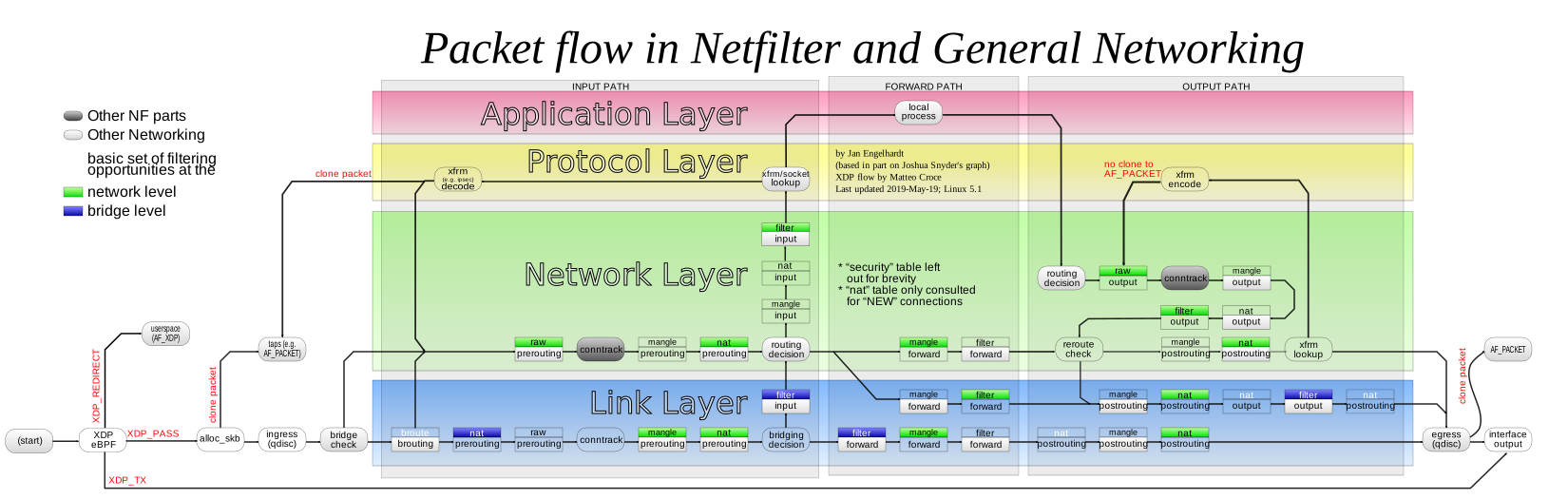
Note:
You have to run sslh as dedicated user (in this example the user is also named sslh), to not mess up with your normal networking.
These rules will allow you to connect directly to ssh on port
22 (or to any other service behind sslh) as well as through sslh on port 443.
Also remember that iptables configuration and ip routes and
rules won't be necessarily persisted after you reboot. Make
sure to save them properly. For example in CentOS7, you would
do iptables-save > /etc/sysconfig/iptables, and add bothip commands to your /etc/rc.local.
FreeBSD
Given you have no firewall defined yet, you can use the following configuration
to have ipfw properly redirect traffic back to sslh
/etc/rc.conf
firewall_enable="YES"
firewall_type="open"
firewall_logif="YES"
firewall_coscripts="/etc/ipfw/sslh.rules"
/etc/ipfw/sslh.rules
#! /bin/sh

# ssl
ipfw add 20000 fwd 192.0.2.1,443 log tcp from 192.0.2.1 8443 to any out
ipfw add 20010 fwd 2001:db8::1,443 log tcp from 2001:db8::1 8443 to any out

# ssh
ipfw add 20100 fwd 192.0.2.1,443 log tcp from 192.0.2.1 8022 to any out
ipfw add 20110 fwd 2001:db8::1,443 log tcp from 2001:db8::1 8022 to any out

# xmpp
ipfw add 20200 fwd 192.0.2.1,443 log tcp from 192.0.2.1 5222 to any out
ipfw add 20210 fwd 2001:db8::1,443 log tcp from 2001:db8::1 5222 to any out

# openvpn (running on other internal system)
ipfw add 20300 fwd 192.0.2.1,443 log tcp from 198.51.100.7 1194 to any out
ipfw add 20310 fwd 2001:db8::1,443 log tcp from 2001:db8:1::7 1194 to any out
General notes:
This will only work if sslh does not use any loopback
addresses (no 127.0.0.1 or localhost), you'll need to use
explicit IP addresses (or names):
sslh --listen 192.168.0.1:443 --ssh 192.168.0.1:22 --tls 192.168.0.1:4443This will not work:
sslh --listen 192.168.0.1:443 --ssh 127.0.0.1:22 --tls 127.0.0.1:4443Transparent proxying means the target server sees the real
origin address, so it means if the client connects using
IPv6, the server must also support IPv6. It is easy to
support both IPv4 and IPv6 by configuring the server
accordingly, and setting sslh to connect to a name that
resolves to both IPv4 and IPv6, e.g.:
sslh --transparent --listen <extaddr>:443 --ssh insideaddr:22

    /etc/hosts:
    192.168.0.1  insideaddr
    201::::2     insideaddr
Upon incoming IPv6 connection, sslh will first try to
connect to the IPv4 address (which will fail), then connect
to the IPv6 address.
Transparent Proxy to Two Hosts
Tutorial by Sean Warner. 19 June 2019 20:35
Aim
- Show that
sslhcan transparently proxy requests from the internet to services on two separate hosts that are both on the same LAN. - The IP address of the client initiating the request is what the destination should see… and not the IP address of the host that
sslhis running on, which is what happens whensslhis not running in transparent mode. - The solution here only works for my very specific use-case but hopefully others can adapt it to suits their needs.
Overview of my Network
Two Raspberry Pis on my home LAN:
- Pi A: 192.168.1.124 –
sslh(Port 4433), Apache2 web server for https (port 443),stunnel(port 4480) to decrypt ssh traffic and forward to SSH server (also on Pi A at Port 1022) - Pi B: 192.168.1.123 - HTTP server (port 8000), SSH server (port 1022 on PiB).
- I send traffic from the internet to my router's external port 443 then use a port forward rule in my router to map that to internal port 4433 where sslh is listening.
`sslh` build
sslh Version: sslh v1.19c-2-gf451cc8-dirty.
I compiled sslh from sources giving the binary pretty much all possible options such as Posix capabilities and systemd support.. here are the first few lines of the makefile:
# Configuration

VERSION=$(shell ./genver.sh -r)
ENABLE_REGEX=1         # Enable regex probes
USELIBCONFIG=1         # Use libconfig? (necessary to use configuration files)
USELIBPCRE=1           # Use libpcre? (needed for regex on musl)
USELIBWRAP=1           # Use libwrap?
USELIBCAP=1            # Use libcap?
USESYSTEMD=1           # Make use of systemd socket activation
COV_TEST=              # Perform test coverage?
PREFIX=/usr/local
BINDIR=$(PREFIX)/sbin
MANDIR=$(PREFIX)/share/man/man8
MAN=sslh.8.gz          # man page name

# End of configuration -- the rest should take care of
# itself
systemd setup
Create an sslh systemd service file...
# nano /lib/systemd/system/sslh.servicePaste in this contents…
[Unit]
Description=SSL/SSH multiplexer
After=network.target
Documentation=man:sslh(8)

[Service]
#EnvironmentFile=/etc/default/sslh
#ExecStart=/usr/local/sbin/sslh $DAEMON_OPTS
ExecStart=/usr/local/sbin/sslh -F /etc/sslh/sslh.cfg
KillMode=process

[Install]
WantedBy=multi-user.target
Save it and then…
# systemctl daemon-reloadStart it again to test…
# systemctl start sslh
Configure `sslh`
First stop sslh then open the config file and replace with below, save and start sslh again
# systemctl stop sslh
# nano /etc/sslh/sslh.cfg
# systemctl start sslhverbose: true;
foreground: true;
inetd: false;
numeric: true;
transparent: true;
timeout: 2;
user: "sslh";
pidfile: "/var/run/sslh.pid";
chroot: "/var/empty";
# You must have a port forward rule in the router: external port 443 <-> internal port 4433
# Local ip address of PiA is: 192.168.1.124, sslh and stunnel4 are running on this Pi
# Local ip address of PiB is: 192.168.1.123, http server and ssh server on this Pi
listen:
(
{ host: "192.168.1.124"; port: "4433"; }
);
# sslh demultiplexes based on the Protocol and Hostname
protocols:
(
{ name: "tls"; sni_hostnames: [ "www.example.com" ]; host: "192.168.1.124"; port: "443"; log_level: 1; },
# This probe is for tls encrypted ssh. SSLH forwards it to stunnel on port 4480 which decrypts it and sends it to the ssh server on PiA port 1022
{ name: "tls"; sni_hostnames: [ "ssh.example.com" ]; host: "192.168.1.124"; port: "4480"; log_level: 1; },
{ name: "http"; host: "192.168.1.123"; port: "8000"; log_level: 1; },
{ name: "ssh"; host: "192.168.1.123"; port: "1022"; log_level: 1; }
);
Configure `stunnel`
First stop stunnel then open the config file and replace with below, save and start stunnel again
# systemctl stop stunnel4
# nano /etc/stunnel/stunnel.conf
# systemctl start stunnel4# Debugging stuff (may be useful for troubleshooting)
foreground = yes
#debug = 5 # this is the default
debug = 7
output = /var/log/stunnel4/stunnel.log
pid = /var/run/stunnel4/stunnel.pid
fips = no
cert = /etc/letsencrypt/live/example.com/fullchain.pem
key = /etc/letsencrypt/live/example.com/privkey.pem
[ssh]
accept = 192.168.1.124:4480
connect = 192.168.1.124:1022
TIMEOUTclose = 0
Configure iptables for Pi A
The _add.sh script creates the rules, the _rm.sh script removes the rules.
They will be lost if you reboot but there are ways to make them load again on start-up..
# nano /usr/local/sbin/piA_tproxy_add.shiptables -t mangle -N SSLH
iptables -t mangle -A PREROUTING -p tcp -m socket --transparent -j SSLH
iptables -t mangle -A OUTPUT --protocol tcp --out-interface eth0 -m multiport --sport 443,4480 --jump SSLH
iptables -t mangle -A SSLH --jump MARK --set-mark 0x1
iptables -t mangle -A SSLH --jump ACCEPT
ip rule add fwmark 0x1 lookup 100
ip route add local 0.0.0.0/0 dev lo table 100# nano /usr/local/sbin/piA_tproxy_rm.shiptables -t mangle -D PREROUTING -p tcp -m socket --transparent -j SSLH
iptables -t mangle -D OUTPUT --protocol tcp --out-interface eth0 -m multiport --sport 443,4480 --jump SSLH
iptables -t mangle -D SSLH --jump MARK --set-mark 0x1
iptables -t mangle -D SSLH --jump ACCEPT
iptables -t mangle -X SSLH
ip rule del fwmark 0x1 lookup 100
ip route del local 0.0.0.0/0 dev lo table 100Make them executable..
# chmod +rx piA_tproxy_add.sh
# chmod +rx piA_tproxy_rm.sh
Now run the "add" script on Pi A!
# piA_tproxy_add.sh
# piA_tproxy_rm.sh
Configure iptables for Pi B
# nano /usr/local/sbin/piB_tproxy_add.shiptables -t mangle -N SSLHSSL
iptables -t mangle -A OUTPUT -o eth0 -p tcp -m multiport --sport 1022,8000 -j SSLHSSL
iptables -t mangle -A SSLHSSL --jump MARK --set-mark 0x1
iptables -t mangle -A SSLHSSL --jump ACCEPT
ip rule add fwmark 0x1 lookup 100
ip route add default via 192.168.1.124 table 100
ip route flush cache# nano /usr/local/sbin/piB_tproxy_rm.shiptables -t mangle -D OUTPUT -o eth0 -p tcp -m multiport --sport 1022,8000 -j SSLHSSL
iptables -t mangle -D SSLHSSL --jump MARK --set-mark 0x1
iptables -t mangle -D SSLHSSL --jump ACCEPT
iptables -t mangle -X SSLHSSL
ip rule del fwmark 0x1 lookup 100
ip route del default via 192.168.1.124 table 100
ip route flush cacheMake them executable..
# chmod +rx piB_tproxy_add.sh
# chmod +rx piB_tproxy_rm.sh
Now run the "add" script on Pi B!
# piB_tproxy_add.sh
# piB_tproxy_rm.sh
Testing
- Getting to sshd on PiA
I did this test using 4G from my phone (outside the LAN)
To simulate this I use proxytunnel. External port 443 is forwarded by my router to 4433. I need to arrive at sslh (port 4433) with ssh encrypted as TLS (hence I use the -e switch) and the sni_hostname set to ssh.example.com so that sslh will demultiplex to stunnel (port 4480) which will decrypt and forward to ssh server on PiA… see sslh.cfg and stunnel.conf.
The first IP:port is just a free HTTPS proxy I found on https://free-proxy-list.net
I execute this command from a terminal window..
# proxytunnel -v -e -C root.pem -p 78.141.192.198:8080 -d ssh.example.com:443- Getting to sshd on PiB
I did this test using 4G from my phone (outside the LAN)
My smartphone telecom provider blocks ssh over port 443 so I need to use proxytunnel to encrypt.
Use the Proxytunnel -X switch to encrypt from local proxy to destination only so by the time we get to the destination it is unencrypted and sslh will see the ssh protocol and demultiplex to PiB as per sslh.cfg.
# proxytunnel -v -X -C root.pem -p 78.141.192.198:8080 -d ssh.example.com:443Now when you test it all look at the output in daemon.log like this:
# grep -i 'ssl' /var/log/daemon.logYou should see that the IP address and port from the “connection from” and “forwarded from” fields are the same.
Special thanks and appreciation to Michael Yelsukov without whom I would never have got this working.
Any feedback or corrections very welcome!