

1. Project Overview & Quickstart (tokio-rs/tokio)
File: README.md
Tokio
A runtime for writing reliable, asynchronous, and slim applications with
the Rust programming language. It is:
Fast: Tokio's zero-cost abstractions give you bare-metal
performance.Reliable: Tokio leverages Rust's ownership, type system, and
concurrency model to reduce bugs and ensure thread safety.Scalable: Tokio has a minimal footprint, and handles backpressure
and cancellation naturally.




Website |
Guides |
API Docs |
Chat
Overview
Tokio is an event-driven, non-blocking I/O platform for writing
asynchronous applications with the Rust programming language. At a high
level, it provides a few major components:
- A multithreaded, work-stealing based task scheduler.
- A reactor backed by the operating system's event queue (epoll, kqueue,
IOCP, etc.). - Asynchronous TCP and UDP sockets.
These components provide the runtime components necessary for building
an asynchronous application.
Example
A basic TCP echo server with Tokio.
Make sure you enable the full features of the tokio crate on Cargo.toml:
[dependencies]
tokio = { version = "1.53.1", features = ["full"] }
Then, on your main.rs:
use tokio::net::TcpListener;
use tokio::io::{AsyncReadExt, AsyncWriteExt};

#[tokio::main]
async fn main() -> Result<(), Box<dyn std::error::Error>> {
    let listener = TcpListener::bind("127.0.0.1:8080").await?;

    loop {
        let (mut socket, _) = listener.accept().await?;

        tokio::spawn(async move {
            let mut buf = [0; 1024];

            // In a loop, read data from the socket and write the data back.
            loop {
                let n = match socket.read(&mut buf).await {
                    // socket closed
                    Ok(0) => return,
                    Ok(n) => n,
                    Err(e) => {
                        eprintln!("failed to read from socket; err = {:?}", e);
                        return;
                    }
                };

                // Write the data back
                if let Err(e) = socket.write_all(&buf[0..n]).await {
                    eprintln!("failed to write to socket; err = {:?}", e);
                    return;
                }
            }
        });
    }
}
More examples can be found here. For a larger "real world" example, see the
mini-redis repository.
To see a list of the available feature flags that can be enabled, check our
docs.
Getting Help
First, see if the answer to your question can be found in the Guides or the
API documentation. If the answer is not there, there is an active community in
the Tokio Discord server. We would be happy to try to answer your
question. You can also ask your question on the discussions page.
Contributing
:balloon: Thanks for your help improving the project! We are so happy to have
you! We have a contributing guide to help you get involved in the Tokio
project.
Related Projects
In addition to the crates in this repository, the Tokio project also maintains
several other libraries, including:
axum: A web application framework that focuses on ergonomics and modularity.hyper: A fast and correct HTTP/1.1 and HTTP/2 implementation for Rust.tonic: A gRPC over HTTP/2 implementation focused on high performance, interoperability, and flexibility.warp: A super-easy, composable, web server framework for warp speeds.tower: A library of modular and reusable components for building robust networking clients and servers.tracing(formerlytokio-trace): A framework for application-level tracing and async-aware diagnostics.mio: A low-level, cross-platform abstraction over OS I/O APIs that powerstokio.bytes: Utilities for working with bytes, including efficient byte buffers.loom: A testing tool for concurrent Rust code.
Changelog
The Tokio repository contains multiple crates. Each crate has its own changelog.
tokio- view changelogtokio-util- view changelogtokio-stream- view changelogtokio-macros- view changelogtokio-test- view changelog
Supported Rust Versions
Tokio will keep a rolling MSRV (minimum supported rust version) policy of at
least 6 months. When increasing the MSRV, the new Rust version must have been
released at least six months ago. The current MSRV is 1.71.
Note that the MSRV is not increased automatically, and only as part of a minor
release. The MSRV history for past minor releases can be found below:
- 1.48 to now - Rust 1.71
- 1.39 to 1.47 - Rust 1.70
- 1.30 to 1.38 - Rust 1.63
- 1.27 to 1.29 - Rust 1.56
- 1.17 to 1.26 - Rust 1.49
- 1.15 to 1.16 - Rust 1.46
- 1.0 to 1.14 - Rust 1.45
Note that although we try to avoid the situation where a dependency transitively
increases the MSRV of Tokio, we do not guarantee that this does not happen.
However, every minor release will have some set of versions of dependencies that
works with the MSRV of that minor release.
Release schedule
Tokio doesn't follow a fixed release schedule, but we typically make one minor
release each month. We make patch releases for bugfixes as necessary.
Bug patching policy
For the purposes of making patch releases with bugfixes, we have designated
certain minor releases as LTS (long term support) releases. Whenever a bug
warrants a patch release with a fix for the bug, it will be backported and
released as a new patch release for each LTS minor version. Our current LTS
releases are:
1.47.x- LTS release until September 2026. (MSRV 1.70)1.51.x- LTS release until March 2027. (MSRV 1.71)
Each LTS release will continue to receive backported fixes for at least a year.
If you wish to use a fixed minor release in your project, we recommend that you
use an LTS release.
To use a fixed minor version, you can specify the version with a tilde. For
example, to specify that you wish to use the newest 1.47.x patch release, you
can use the following dependency specification:
tokio = { version = "~1.47", features = [...] }Previous LTS releases
1.8.x- LTS release until February 2022.1.14.x- LTS release until June 2022.1.18.x- LTS release until June 2023.1.20.x- LTS release until September 2023.1.25.x- LTS release until March 2024.1.32.x- LTS release until September 2024.1.36.x- LTS release until March 2025.1.38.x- LTS release until July 2025.1.43.x- LTS release until March 2026.
License
This project is licensed under the MIT license.
Contribution
Unless you explicitly state otherwise, any contribution intentionally submitted
for inclusion in Tokio by you shall be licensed as MIT, without any additional
terms or conditions.
File: examples/README.md
Examples of how to use Tokio
This directory contains a number of examples showcasing various capabilities of
the tokio crate.
All examples can be executed with:
cargo run --example $nameA good starting point for the examples would be hello_world
and echo-tcp. Additionally the tokio website contains
additional guides for some of the examples.
For a larger "real world" example, see the mini-redis repository.
If you've got an example you'd like to see here, please feel free to open an
issue. Otherwise if you've got an example you'd like to add, please feel free
to make a PR!
File: target-specs/README.md
This is used for the no-atomic-u64-test ci check that verifies that Tokio
works even if the AtomicU64 type is missing.
When increasing the nightly compiler version, you may need to regenerate this
target using the following command:
rustc +nightly -Z unstable-options --print target-spec-json --target i686-unknown-linux-gnu | grep -v 'is-builtin' | sed 's/"max-atomic-width": 64/"max-atomic-width": 32/' > target-specs/i686-unknown-linux-gnu.jsonFile: tokio/docs/reactor-refactor.md
Refactor I/O driver
Describes changes to the I/O driver for the Tokio 0.3 release.
Goals
- Support
async fnon I/O types with&self. - Refine the
RegistrationAPI.
Non-goals
- Implement
AsyncRead/AsyncWritefor&TcpStreamor other reference type.
Overview
Currently, I/O types require &mut self for async functions. The reason for
this is the task's waker is stored in the I/O resource's internal state
(ScheduledIo) instead of in the future returned by the async function.
Because of this limitation, I/O types limit the number of wakers to one per
direction (a direction is either read-related events or write-related events).
Moving the waker from the internal I/O resource's state to the operation's
future enables multiple wakers to be registered per operation. The "intrusive
wake list" strategy used by Notify applies to this case, though there are some
concerns unique to the I/O driver.
Reworking the `Registration` type
While Registration is made private (per #2728), it remains in Tokio as an
implementation detail backing I/O resources such as TcpStream. The API ofRegistration is updated to support waiting for an arbitrary interest set with&self. This supports concurrent waiters with a different readiness interest.
struct Registration { ... }

// TODO: naming
struct ReadyEvent {
    tick: u32,
    ready: mio::Ready,
}

impl Registration {
    /// `interest` must be a super set of **all** interest sets specified in
    /// the other methods. This is the interest set passed to `mio`.
    pub fn new<T>(io: &T, interest: mio::Ready) -> io::Result<Registration>
        where T: mio::Evented;

    /// Awaits for any readiness event included in `interest`. Returns a
    /// `ReadyEvent` representing the received readiness event.
    async fn readiness(&self, interest: mio::Ready) -> io::Result<ReadyEvent>;

    /// Clears resource level readiness represented by the specified `ReadyEvent`
    async fn clear_readiness(&self, ready_event: ReadyEvent);
}
A new registration is created for a T: mio::Evented and a interest. This
creates a ScheduledIo entry with the I/O driver and registers the resource
with mio.
Because Tokio uses edge-triggered notifications, the I/O driver only
receives readiness from the OS once the ready state changes. The I/O driver
must track each resource's known readiness state. This helps prevent syscalls
when the process knows the syscall should return with EWOULDBLOCK.
A call to readiness() checks if the currently known resource readiness
overlaps with interest. If it does, then the readiness() immediately
returns. If it does not, then the task waits until the I/O driver receives a
readiness event.
The pseudocode to perform a TCP read is as follows.
async fn read(&self, buf: &mut [u8]) -> io::Result {
    loop {
        // Await readiness
        let event = self.readiness(interest).await?;

        match self.mio_socket.read(buf) {
            Ok(v) => return Ok(v),
            Err(ref e) if e.kind() == WouldBlock => {
                self.clear_readiness(event);
            }
            Err(e) => return Err(e),
        }
    }
}
Reworking the `ScheduledIo` type
The ScheduledIo type is switched to use an intrusive waker linked list. Each
entry in the linked list includes the interest set passed to readiness().
#[derive(Debug)]
pub(crate) struct ScheduledIo {
    /// Resource's known state packed with other state that must be
    /// atomically updated.
    readiness: AtomicUsize,

    /// Tracks tasks waiting on the resource
    waiters: Mutex<Waiters>,
}

#[derive(Debug)]
struct Waiters {
    // List of intrusive waiters.
    list: LinkedList<Waiter>,

    /// Waiter used by `AsyncRead` implementations.
    reader: Option<Waker>,

    /// Waiter used by `AsyncWrite` implementations.
    writer: Option<Waker>,
}

// This struct is contained by the **future** returned by `readiness()`.
#[derive(Debug)]
struct Waiter {
    /// Intrusive linked-list pointers
    pointers: linked_list::Pointers<Waiter>,

    /// Waker for task waiting on I/O resource
    waiter: Option<Waker>,

    /// Readiness events being waited on. This is
    /// the value passed to `readiness()`
    interest: mio::Ready,

    /// Should not be `Unpin`.
    _p: PhantomPinned,
}
When an I/O event is received from mio, the associated resources' readiness is
updated and the waiter list is iterated. All waiters with interest that
overlap the received readiness event are notified. Any waiter with an interest
that does not overlap the readiness event remains in the list.
Cancel interest on drop
The future returned by readiness() uses an intrusive linked list to store the
waker with ScheduledIo. Because readiness() can be called concurrently, many
wakers may be stored simultaneously in the list. If the readiness() future is
dropped early, it is essential that the waker is removed from the list. This
prevents leaking memory.
Race condition
Consider how many tasks may concurrently attempt I/O operations. This, combined
with how Tokio uses edge-triggered events, can result in a race condition. Let's
revisit the TCP read function:
async fn read(&self, buf: &mut [u8]) -> io::Result {
    loop {
        // Await readiness
        let event = self.readiness(interest).await?;

        match self.mio_socket.read(buf) {
            Ok(v) => return Ok(v),
            Err(ref e) if e.kind() == WouldBlock => {
                self.clear_readiness(event);
            }
            Err(e) => return Err(e),
        }
    }
}
If care is not taken, if between mio_socket.read(buf) returning andclear_readiness(event) is called, a readiness event arrives, the read()
function could deadlock. This happens because the readiness event is received,clear_readiness() unsets the readiness event, and on the next iteration,readiness().await will block forever as a new readiness event is not received.
The current I/O driver handles this condition by always registering the task's
waker before performing the operation. This is not ideal as it will result in
unnecessary task notification.
Instead, we will use a strategy to prevent clearing readiness if an "unseen"
readiness event has been received. The I/O driver will maintain a "tick" value.
Every time the mio poll() function is called, the tick is incremented. Each
readiness event has an associated tick. When the I/O driver sets the resource's
readiness, the driver's tick is packed into the atomic usize.
The ScheduledIo readiness AtomicUsize is structured as:
| shutdown | generation |  driver tick | readiness |
|----------+------------+--------------+-----------|
|   1 bit  |   7 bits   +    8 bits    +  16 bits  |
The shutdown and generation components exist today.
The readiness() function returns a ReadyEvent value. This value includes thetick component read with the resource's readiness value. Whenclear_readiness() is called, the ReadyEvent is provided. Readiness is only
cleared if the current tick matches the tick included in the ReadyEvent.
If the tick values do not match, the call to readiness() on the next iteration
will not block and the new tick is included in the new ReadyToken.
TODO
Implementing `AsyncRead` / `AsyncWrite`
The AsyncRead and AsyncWrite traits use a "poll" based API. This means that
it is not possible to use an intrusive linked list to track the waker.
Additionally, there is no future associated with the operation which means it is
not possible to cancel interest in the readiness events.
To implement AsyncRead and AsyncWrite, ScheduledIo includes dedicated
waker values for the read direction and the write direction. These values are
used to store the waker. Specific interest is not tracked for AsyncRead andAsyncWrite implementations. It is assumed that only events of interest are:
- Read ready
- Read closed
- Write ready
- Write closed
Note that "read closed" and "write closed" are only available with Mio 0.7. With
Mio 0.6, things were a bit messy.
It is only possible to implement AsyncRead and AsyncWrite for resource types
themselves and not for &Resource. Implementing the traits for &Resource
would permit concurrent operations to the resource. Because only a single waker
is stored per direction, any concurrent usage would result in deadlocks. An
alternate implementation would call for a Vec<Waker> but this would result in
memory leaks.
Enabling reads and writes for `&TcpStream`
Instead of implementing AsyncRead and AsyncWrite for &TcpStream, a new
function is added to TcpStream.
impl TcpStream {
    /// Naming TBD
    fn by_ref(&self) -> TcpStreamRef<'_>;
}

struct TcpStreamRef<'a> {
    stream: &'a TcpStream,

    // `Waiter` is the node in the intrusive waiter linked-list
    read_waiter: Waiter,
    write_waiter: Waiter,
}
Now, AsyncRead and AsyncWrite can be implemented on TcpStreamRef<'a>. When
the TcpStreamRef is dropped, all associated waker resources are cleaned up.
Removing all the `split()` functions
With TcpStream::by_ref(), TcpStream::split() is no longer needed. Instead,
it is possible to do something as follows.
let rd = my_stream.by_ref();
let wr = my_stream.by_ref();

select! {
    // use `rd` and `wr` in separate branches.
}
It is also possible to store a TcpStream in an Arc.
let arc_stream = Arc::new(my_tcp_stream);
let n = arc_stream.by_ref().read(buf).await?;
File: tokio/README.md
Tokio
A runtime for writing reliable, asynchronous, and slim applications with
the Rust programming language. It is:
Fast: Tokio's zero-cost abstractions give you bare-metal
performance.Reliable: Tokio leverages Rust's ownership, type system, and
concurrency model to reduce bugs and ensure thread safety.Scalable: Tokio has a minimal footprint, and handles backpressure
and cancellation naturally.
Website |
Guides |
API Docs |
Chat
Overview
Tokio is an event-driven, non-blocking I/O platform for writing
asynchronous applications with the Rust programming language. At a high
level, it provides a few major components:
- A multithreaded, work-stealing based task scheduler.
- A reactor backed by the operating system's event queue (epoll, kqueue,
IOCP, etc.). - Asynchronous TCP and UDP sockets.
These components provide the runtime components necessary for building
an asynchronous application.
Example
A basic TCP echo server with Tokio.
Make sure you enable the full features of the tokio crate on Cargo.toml:
[dependencies]
tokio = { version = "1.53.1", features = ["full"] }
Then, on your main.rs:
use tokio::net::TcpListener;
use tokio::io::{AsyncReadExt, AsyncWriteExt};

#[tokio::main]
async fn main() -> Result<(), Box<dyn std::error::Error>> {
    let listener = TcpListener::bind("127.0.0.1:8080").await?;

    loop {
        let (mut socket, _) = listener.accept().await?;

        tokio::spawn(async move {
            let mut buf = [0; 1024];

            // In a loop, read data from the socket and write the data back.
            loop {
                let n = match socket.read(&mut buf).await {
                    // socket closed
                    Ok(0) => return,
                    Ok(n) => n,
                    Err(e) => {
                        eprintln!("failed to read from socket; err = {:?}", e);
                        return;
                    }
                };

                // Write the data back
                if let Err(e) = socket.write_all(&buf[0..n]).await {
                    eprintln!("failed to write to socket; err = {:?}", e);
                    return;
                }
            }
        });
    }
}
More examples can be found here. For a larger "real world" example, see the
mini-redis repository.
To see a list of the available feature flags that can be enabled, check our
docs.
Getting Help
First, see if the answer to your question can be found in the Guides or the
API documentation. If the answer is not there, there is an active community in
the Tokio Discord server. We would be happy to try to answer your
question. You can also ask your question on the discussions page.
Contributing
:balloon: Thanks for your help improving the project! We are so happy to have
you! We have a contributing guide to help you get involved in the Tokio
project.
Related Projects
In addition to the crates in this repository, the Tokio project also maintains
several other libraries, including:
axum: A web application framework that focuses on ergonomics and modularity.hyper: A fast and correct HTTP/1.1 and HTTP/2 implementation for Rust.tonic: A gRPC over HTTP/2 implementation focused on high performance, interoperability, and flexibility.warp: A super-easy, composable, web server framework for warp speeds.tower: A library of modular and reusable components for building robust networking clients and servers.tracing(formerlytokio-trace): A framework for application-level tracing and async-aware diagnostics.mio: A low-level, cross-platform abstraction over OS I/O APIs that powerstokio.bytes: Utilities for working with bytes, including efficient byte buffers.loom: A testing tool for concurrent Rust code.
Changelog
The Tokio repository contains multiple crates. Each crate has its own changelog.
tokio- view changelogtokio-util- view changelogtokio-stream- view changelogtokio-macros- view changelogtokio-test- view changelog
Supported Rust Versions
Tokio will keep a rolling MSRV (minimum supported rust version) policy of at
least 6 months. When increasing the MSRV, the new Rust version must have been
released at least six months ago. The current MSRV is 1.71.
Note that the MSRV is not increased automatically, and only as part of a minor
release. The MSRV history for past minor releases can be found below:
- 1.48 to now - Rust 1.71
- 1.39 to 1.47 - Rust 1.70
- 1.30 to 1.38 - Rust 1.63
- 1.27 to 1.29 - Rust 1.56
- 1.17 to 1.26 - Rust 1.49
- 1.15 to 1.16 - Rust 1.46
- 1.0 to 1.14 - Rust 1.45
Note that although we try to avoid the situation where a dependency transitively
increases the MSRV of Tokio, we do not guarantee that this does not happen.
However, every minor release will have some set of versions of dependencies that
works with the MSRV of that minor release.
Release schedule
Tokio doesn't follow a fixed release schedule, but we typically make one minor
release each month. We make patch releases for bugfixes as necessary.
Bug patching policy
For the purposes of making patch releases with bugfixes, we have designated
certain minor releases as LTS (long term support) releases. Whenever a bug
warrants a patch release with a fix for the bug, it will be backported and
released as a new patch release for each LTS minor version. Our current LTS
releases are:
1.47.x- LTS release until September 2026. (MSRV 1.70)1.51.x- LTS release until March 2027. (MSRV 1.71)
Each LTS release will continue to receive backported fixes for at least a year.
If you wish to use a fixed minor release in your project, we recommend that you
use an LTS release.
To use a fixed minor version, you can specify the version with a tilde. For
example, to specify that you wish to use the newest 1.47.x patch release, you
can use the following dependency specification:
tokio = { version = "~1.47", features = [...] }Previous LTS releases
1.8.x- LTS release until February 2022.1.14.x- LTS release until June 2022.1.18.x- LTS release until June 2023.1.20.x- LTS release until September 2023.1.25.x- LTS release until March 2024.1.32.x- LTS release until September 2024.1.36.x- LTS release until March 2025.1.38.x- LTS release until July 2025.1.43.x- LTS release until March 2026.
License
This project is licensed under the MIT license.
Contribution
Unless you explicitly state otherwise, any contribution intentionally submitted
for inclusion in Tokio by you shall be licensed as MIT, without any additional
terms or conditions.
File: tokio-macros/README.md
Tokio Macros
Procedural macros for use with Tokio
License
This project is licensed under the MIT license.
Contribution
Unless you explicitly state otherwise, any contribution intentionally submitted
for inclusion in Tokio by you, shall be licensed as MIT, without any additional
terms or conditions.
File: tokio-stream/README.md
tokio-stream
Utilities to work with Stream and tokio.
License
This project is licensed under the MIT license.
Contribution
Unless you explicitly state otherwise, any contribution intentionally submitted
for inclusion in Tokio by you, shall be licensed as MIT, without any additional
terms or conditions.
File: tokio-test/README.md
tokio-test
Tokio and Futures based testing utilities
License
This project is licensed under the MIT license.
Contribution
Unless you explicitly state otherwise, any contribution intentionally submitted
for inclusion in Tokio by you, shall be licensed as MIT, without any additional
terms or conditions.
2. Official Technical Reference & Guides (tokio-rs/website)
File: README.md
Tokio Website
The website for the Tokio project. Lives at https://tokio.rs.
Besides containing the content for the website, it also includes crates
containing the example code used in the tutorial. These crates can be compiled
and run.
Contributing
Thinking about contributing? Great! This should help you get the website running
locally.
Getting Started
The website is built using Next.js paired with the Bulma CSS framework.
You'll need NPM to install the required packages with:
npm installNext, start the development server:
npm run devThen, open http://localhost:3000.
Resources
To learn more about Next.js, take a look at the following resources:
- Next.js Documentation - learn about Next.js features and API.
- Learn Next.js - an interactive Next.js tutorial.
- Bulma documentation - learn about Bulma.
License
This project is licensed under the MIT license.
Contribution
Unless you explicitly state otherwise, any contribution intentionally submitted
for inclusion in Tokio by you, shall be licensed as MIT, without any additional
terms or conditions.
You can run our tests by running the commands:
# in doc-test (unstable APIs are needed by some tests)
RUSTFLAGS="--cfg tokio_unstable" cargo +nightly test

# in tutorial-code
cargo test --all
The doc tests verify that all code blocks are valid Rust, and the tutorial-code folder
contains the full code examples from the tutorial.
File: content/tokio/topics/bridging.md
title: "Bridging with sync code"
In most examples of using Tokio, we mark the main function with #[tokio::main]
and make the entire project asynchronous.
In some cases, you may need to run a small portion of synchronous code. For more
information on that, see spawn_blocking.
In other cases, it may be easier to structure the application as largely
synchronous, with smaller or logically distinct asynchronous portions.
For instance, a GUI application might want to run the GUI code on the
main thread and run a Tokio runtime next to it on another thread.
This page explains how you can isolate async/await to a small part of your
project.
What `#[tokio::main]` expands to
The #[tokio::main] macro is a macro that replaces your main function with a
non-async main function that starts a runtime and then calls your code. For
instance, this:
#[tokio::main]
async fn main() {
    println!("Hello world");
}
is turned into this:
fn main() {
    tokio::runtime::Builder::new_multi_thread()
        .enable_all()
        .build()
        .unwrap()
        .block_on(async {
            println!("Hello world");
        })
}
by the macro. To use async/await in our own projects, we can do something
similar where we leverage the block_on method to enter the asynchronous
context where appropriate.
A synchronous interface to mini-redis
In this section, we will go through how to build a synchronous interface to
mini-redis by storing a Runtime object and using its block_on method.
In the following sections, we will discuss some alternate approaches and when
you should use each approach.
The interface that we will be wrapping is the asynchronous Client type. It
has several methods, and we will implement a blocking version of the following
methods:
To do this, we introduce a new file called src/clients/blocking_client.rs and
initialize it with a wrapper struct around the async Client type:
use tokio::net::ToSocketAddrs;
use tokio::runtime::Runtime;

pub use crate::clients::client::Message;

/// Established connection with a Redis server.
pub struct BlockingClient {
    /// The asynchronous `Client`.
    inner: crate::clients::Client,

    /// A `current_thread` runtime for executing operations on the
    /// asynchronous client in a blocking manner.
    rt: Runtime,
}

impl BlockingClient {
    pub fn connect<T: ToSocketAddrs>(addr: T) -> crate::Result {
        let rt = tokio::runtime::Builder::new_current_thread()
            .enable_all()
            .build()?;

        // Call the asynchronous connect method using the runtime.
        let inner = rt.block_on(crate::clients::Client::connect(addr))?;

        Ok(BlockingClient { inner, rt })
    }
}
Here, we have included the constructor function as our first example of how to
execute asynchronous methods in a non-async context. We do this using theblock_on method on the Tokio Runtime type, which executes an
asynchronous method and returns its result.
One important detail is the use of the current_thread runtime. Usually when
using Tokio, you would be using the default multi_thread runtime, which will
spawn a bunch of background threads so it can efficiently run many things at the
same time. For our use-case, we are only going to be doing one thing at the
time, so we won't gain anything by running multiple threads. This makes thecurrent_thread runtime a perfect fit as it doesn't spawn any threads.
The enable_all call enables the IO and timer drivers on the Tokio runtime.
If they are not enabled, the runtime is unable to perform IO or timers.
warning
Because thecurrent_threadruntime does not spawn threads, it only operates
whenblock_onis called. Onceblock_onreturns, all spawned tasks on that
runtime will freeze until you callblock_onagain. Use themulti_threaded
runtime if spawned tasks must keep running when not callingblock_on.
Once we have this struct, most of the methods are easy to implement:
use bytes::Bytes;
use std::time::Duration;

impl BlockingClient {
    pub fn get(&mut self, key: &str) -> crate::Result<Option> {
        self.rt.block_on(self.inner.get(key))
    }

    pub fn set(&mut self, key: &str, value: Bytes) -> crate::Result<()> {
        self.rt.block_on(self.inner.set(key, value))
    }

    pub fn set_expires(
        &mut self,
        key: &str,
        value: Bytes,
        expiration: Duration,
    ) -> crate::Result<()> {
        self.rt.block_on(self.inner.set_expires(key, value, expiration))
    }

    pub fn publish(&mut self, channel: &str, message: Bytes) -> crate::Result {
        self.rt.block_on(self.inner.publish(channel, message))
    }
}
The Client::subscribe method is more interesting because it transforms theClient into a Subscriber object. We can implement it in the following
manner:
/// A client that has entered pub/sub mode.
///
/// Once clients subscribe to a channel, they may only perform
/// pub/sub related commands. The `BlockingClient` type is
/// transitioned to a `BlockingSubscriber` type in order to
/// prevent non-pub/sub methods from being called.
pub struct BlockingSubscriber {
    /// The asynchronous `Subscriber`.
    inner: crate::clients::Subscriber,

    /// A `current_thread` runtime for executing operations on the
    /// asynchronous client in a blocking manner.
    rt: Runtime,
}

impl BlockingClient {
    pub fn subscribe(self, channels: Vec<String>) -> crate::Result {
        let subscriber = self.rt.block_on(self.inner.subscribe(channels))?;
        Ok(BlockingSubscriber {
            inner: subscriber,
            rt: self.rt,
        })
    }
}

impl BlockingSubscriber {
    pub fn get_subscribed(&self) -> &[String] {
        self.inner.get_subscribed()
    }

    pub fn next_message(&mut self) -> crate::Result<Option<Message>> {
        self.rt.block_on(self.inner.next_message())
    }

    pub fn subscribe(&mut self, channels: &[String]) -> crate::Result<()> {
        self.rt.block_on(self.inner.subscribe(channels))
    }

    pub fn unsubscribe(&mut self, channels: &[String]) -> crate::Result<()> {
        self.rt.block_on(self.inner.unsubscribe(channels))
    }
}
So, the subscribe method will first use the runtime to transform the
asynchronous Client into an asynchronous Subscriber. Then, it will store the
resulting Subscriber together with the Runtime and implement the various
methods using block_on.
Note that the asynchronous Subscriber struct has a non-async method calledget_subscribed. To handle this, we simply call it directly without involving
the runtime.
Other approaches
The above section explains the simplest way to implement a synchronous wrapper,
but it is not the only way. The approaches are:
- Create a
Runtimeand callblock_onon the async code. - Create a
Runtimeandspawnthings on it. - Run the
Runtimein a separate thread and send messages to it.
We already saw the first approach. The two other approaches are outlined below.
Spawning things on a runtime
The Runtime object has a method called spawn. When you call this method,
you create a new background task to run on the runtime. For example:
use tokio::runtime::Builder;
use tokio::time::{sleep, Duration};

fn main() {
    let runtime = Builder::new_multi_thread()
        .worker_threads(1)
        .enable_all()
        .build()
        .unwrap();

    let mut handles = Vec::with_capacity(10);
    for i in 0..10 {
        handles.push(runtime.spawn(my_bg_task(i)));
    }

    // Do something time-consuming while the background tasks execute.
    std::thread::sleep(Duration::from_millis(750));
    println!("Finished time-consuming task.");

    // Wait for all of them to complete.
    for handle in handles {
        // The `spawn` method returns a `JoinHandle`. A `JoinHandle` is
        // a future, so we can wait for it using `block_on`.
        runtime.block_on(handle).unwrap();
    }
}

async fn my_bg_task(i: u64) {
    // By subtracting, the tasks with larger values of i sleep for a
    // shorter duration.
    let millis = 1000 - 50 * i;
    println!("Task {} sleeping for {} ms.", i, millis);

    sleep(Duration::from_millis(millis)).await;

    println!("Task {} stopping.", i);
}Task 0 sleeping for 1000 ms.
Task 1 sleeping for 950 ms.
Task 2 sleeping for 900 ms.
Task 3 sleeping for 850 ms.
Task 4 sleeping for 800 ms.
Task 5 sleeping for 750 ms.
Task 6 sleeping for 700 ms.
Task 7 sleeping for 650 ms.
Task 8 sleeping for 600 ms.
Task 9 sleeping for 550 ms.
Task 9 stopping.
Task 8 stopping.
Task 7 stopping.
Task 6 stopping.
Finished time-consuming task.
Task 5 stopping.
Task 4 stopping.
Task 3 stopping.
Task 2 stopping.
Task 1 stopping.
Task 0 stopping.In the above example, we spawn 10 background tasks on the runtime, then wait
for all of them. As an example, this could be a good way of implementing
background network requests in a graphical application because network requests
are too time consuming to run them on the main GUI thread. Instead, you spawn
the request on a Tokio runtime running in the background, and have the task send
information back to the GUI code when the request has finished, or even
incrementally if you want a progress bar.
In this example, it is important that the runtime is configured to be amulti_thread runtime. If you change it to be a current_thread runtime,
you will find that the time consuming task finishes before any of the background
tasks start. This is because background tasks spawned on a current_thread
runtime will only execute during calls to block_on as the runtime otherwise
doesn't have anywhere to run them.
The example waits for the spawned tasks to finish by calling block_on on theJoinHandle returned by the call to spawn, but this isn't the only way to
do it. Here are some alternatives:
- Use a message passing channel such as
tokio::sync::mpsc. - Modify a shared value protected by e.g. a
Mutex. This can be a good
approach for a progress bar in a GUI, where the GUI reads the shared value
every frame.
The spawn method is also available on the Handle type. The Handle type
can be cloned to get many handles to a runtime, and each Handle can be used to
spawn new tasks on the runtime.
Sending messages
The third technique is to spawn a runtime and use message passing to communicate
with it. This involves a bit more boilerplate than the other two approaches, but
it is the most flexible approach. You can find a basic example below:
use tokio::runtime::Builder;
use tokio::sync::mpsc;

pub struct Task {
    name: String,
    // info that describes the task
}

async fn handle_task(task: Task) {
    println!("Got task {}", task.name);
}

#[derive(Clone)]
pub struct TaskSpawner {
    spawn: mpsc::Sender<Task>,
}

impl TaskSpawner {
    pub fn new() -> TaskSpawner {
        // Set up a channel for communicating.
        let (send, mut recv) = mpsc::channel(16);

        // Build the runtime for the new thread.
        //
        // The runtime is created before spawning the thread
        // to more cleanly forward errors if the `unwrap()`
        // panics.
        let rt = Builder::new_current_thread()
            .enable_all()
            .build()
            .unwrap();

        std::thread::spawn(move || {
            rt.block_on(async move {
                while let Some(task) = recv.recv().await {
                    tokio::spawn(handle_task(task));
                }

                // Once all senders have gone out of scope,
                // the `.recv()` call returns None and it will
                // exit from the while loop and shut down the
                // thread.
            });
        });

        TaskSpawner {
            spawn: send,
        }
    }

    pub fn spawn_task(&self, task: Task) {
        match self.spawn.blocking_send(task) {
            Ok(()) => {},
            Err(_) => panic!("The shared runtime has shut down."),
        }
    }
}
This example could be configured in many ways. For instance, you could use aSemaphore to limit the number of active tasks, or you could use a channel in
the opposite direction to send a response to the spawner. When you spawn a
runtime in this way, it is a type of actor.
File: content/tokio/topics/index.md
title: "Topics"
This section has self-contained articles related to various topics
that come up when writing asynchronous applications.
The currently available topics articles are:
- Bridging with sync code
- Graceful shutdown
- Getting started with Tracing
- Next steps with Tracing
- Testing
File: content/tokio/topics/shutdown.md
title: "Graceful Shutdown"
The purpose of this page is to give an overview of how to properly implement
shutdown in asynchronous applications.
There are usually three parts to implementing graceful shutdown:
- Figuring out when to shut down.
- Telling every part of the program to shut down.
- Waiting for other parts of the program to shut down.
The rest of this article will go through these parts. A real world
implementation of the approach described here can be found in mini-redis,
specifically the src/server.rs andsrc/shutdown.rs files.
Figuring out when to shut down
This will of course depend on the application, but one very common shutdown
criteria is when the application receives a signal from the operating system.
This happens e.g. when you press ctrl+c in the terminal while the program is
running. To detect this, Tokio provides a tokio::signal::ctrl_c
function, which will sleep until such a signal is received. You might use it
like this:
use tokio::signal;

#[tokio::main]
async fn main() {
    // ... spawn application as separate task ...

    match signal::ctrl_c().await {
        Ok(()) => {},
        Err(err) => {
            eprintln!("Unable to listen for shutdown signal: {}", err);
            // we also shut down in case of error
        },
    }

    // send shutdown signal to application and wait
}
If you have multiple shutdown conditions, you can use an mpsc channel
to send the shutdown signal to one place. You can then select onctrl_c and the channel. For example:
use tokio::signal;
use tokio::sync::mpsc;

#[tokio::main]
async fn main() {
    let (shutdown_send, mut shutdown_recv) = mpsc::unbounded_channel();

    // ... spawn application as separate task ...
    //
    // application uses shutdown_send in case a shutdown was issued from inside
    // the application

    tokio::select! {
        _ = signal::ctrl_c() => {},
        _ = shutdown_recv.recv() => {},
    }

    // send shutdown signal to application and wait
}
Telling things to shut down
When you want to tell one or more tasks to shut down, you can use Cancellation
Tokens. These tokens allow you to notify tasks that they
should terminate themselves in response to a cancellation request, making it
easy to implement graceful shutdowns.
To share a CancellationToken between several tasks, you must clone it. This is due
to the single ownership rule that requires that each value has a single owner. When
cloning a token, you get another token that's indistinguishable from the original;
if one is cancelled, then the other is also cancelled. You can make as many clones
as you need, and when you call cancel on one of them, they're all cancelled.
Here are the steps to use CancellationToken in multiple tasks:
- First, create a new
CancellationToken. - Then, create a clone of the original
CancellationTokenby calling theclonemethod on the original token. This will create a new token that can be used by another task. - Pass the original or cloned token to the tasks that should respond to cancellation requests.
- When you want to shut down the tasks gracefully, call the
cancelmethod on the original or cloned token. Any task listening to the cancellation request on the original or cloned token will be notified to shut down.
Here is code snippet showcasing the above mentioned steps:
// Step 1: Create a new CancellationToken
let token = CancellationToken::new();

// Step 2: Clone the token for use in another task
let cloned_token = token.clone();

// Task 1 - Wait for token cancellation or a long time
let task1_handle = tokio::spawn(async move {
    tokio::select! {
        // Step 3: Using cloned token to listen to cancellation requests
        _ = cloned_token.cancelled() => {
            // The token was cancelled, task can shut down
        }
        _ = tokio::time::sleep(std::time::Duration::from_secs(9999)) => {
            // Long work has completed
        }
    }
});

// Task 2 - Cancel the original token after a small delay
tokio::spawn(async move {
    tokio::time::sleep(std::time::Duration::from_millis(10)).await;

    // Step 4: Cancel the original or cloned token to notify other tasks about shutting down gracefully
    token.cancel();
});

// Wait for tasks to complete
task1_handle.await.unwrap()
With Cancellation Tokens, you don't have to shut down a task immediately when
the token is cancelled. Instead, you can run a shutdown procedure before
terminating the task, such as flushing data to a file or database, or sending
a shutdown message on a connection.
Waiting for things to finish shutting down
Once you have told other tasks to shut down, you will need to wait for them to
finish. One easy way to do so is to use a task tracker. A task tracker is a
collection of tasks. The wait method of the task tracker gives you a future
which resolves only after all of its contained futures have resolved and
the task tracker has been closed.
The following example will spawn 10 tasks, then use a task tracker to wait for
them to shut down.
use std::time::Duration;
use tokio::time::sleep;
use tokio_util::task::TaskTracker;

#[tokio::main]
async fn main() {
    let tracker = TaskTracker::new();

    for i in 0..10 {
        tracker.spawn(some_operation(i));
    }

    // Once we spawned everything, we close the tracker.
    tracker.close();

    // Wait for everything to finish.
    tracker.wait().await;

    println!("This is printed after all of the tasks.");
}

async fn some_operation(i: u64) {
    sleep(Duration::from_millis(100 * i)).await;
    println!("Task {} shutting down.", i);
}
File: content/tokio/topics/testing.md
title: "Unit Testing"
The purpose of this page is to give advice on how to write useful unit tests in
asynchronous applications.
Pausing and resuming time in tests
Sometimes, asynchronous code explicitly waits by calling tokio::time::sleep
or waiting on a tokio::time::Interval::tick. Testing behaviour based on
time (for example, an exponential backoff) can get cumbersome when the unit
test starts running very slowly. However, internally, the time-related
functionality of tokio supports pausing and resuming time. Pausing time has the
effect that any time-related future may become ready early. The condition for
the time-related future resolving early is that there are no more other futures
which may become ready. This essentially fast-forwards time when the only
future being awaited is time-related:
#[tokio::test]
async fn paused_time() {
    tokio::time::pause();
    let start = std::time::Instant::now();
    tokio::time::sleep(Duration::from_millis(500)).await;
    println!("{:?}ms", start.elapsed().as_millis());
}
This code prints 0ms on a reasonable machine.
For unit tests, it is often useful to run with paused time throughout. This can
be achieved simply by setting the macro argument start_paused to true:
#[tokio::test(start_paused = true)]
async fn paused_time() {
    let start = std::time::Instant::now();
    tokio::time::sleep(Duration::from_millis(500)).await;
    println!("{:?}ms", start.elapsed().as_millis());
}
Keep in mind that the start_paused attribute requires the tokio feature test-util.
See tokio::test "Configure the runtime to start with time paused" for more details.
Of course, the temporal order of future resolution is maintained, even when
using different time-related futures:
#[tokio::test(start_paused = true)]
async fn interval_with_paused_time() {
    let mut interval = interval(Duration::from_millis(300));
    let _ = timeout(Duration::from_secs(1), async move {
        loop {
            interval.tick().await;
            println!("Tick!");
        }
    })
    .await;
}
This code immediately prints "Tick!" exactly 4 times.
Mocking using [`AsyncRead`] and [`AsyncWrite`]
The generic traits for reading and writing asynchronously (AsyncRead andAsyncWrite) are implemented by, for example, sockets. They can be used for
mocking I/O performed by a socket.
Consider, for setup, this simple TCP server loop:
use tokio::net::TcpListener;

#[tokio::main]
async fn main() {
    # if true { return }
    let listener = TcpListener::bind("127.0.0.1:8080").await.unwrap();
    loop {
        let Ok((mut socket, _)) = listener.accept().await else {
            eprintln!("Failed to accept client");
            continue;
        };

        tokio::spawn(async move {
            let (reader, writer) = socket.split();
            // Run some client connection handler, for example:
            // handle_connection(reader, writer)
                // .await
                // .expect("Failed to handle connection");
        });
    }
}
Here, each TCP client connection is serviced by its dedicated tokio task. This
task owns a reader and a writer, which are split off of a TcpStream.
Consider now the actual client handler task, especially the where-clause of the
function signature:
use tokio::io::{AsyncBufReadExt, AsyncRead, AsyncWrite, AsyncWriteExt, BufReader};

async fn handle_connection<Reader, Writer>(
    reader: Reader,
    mut writer: Writer,
) -> std::io::Result<()>
where
    Reader: AsyncRead + Unpin,
    Writer: AsyncWrite + Unpin,
{
    let mut line = String::new();
    let mut reader = BufReader::new(reader);

    loop {
        if let Ok(bytes_read) = reader.read_line(&mut line).await {
            if bytes_read == 0 {
                break Ok(());
            }
            writer
                .write_all(format!("Thanks for your message.\r\n").as_bytes())
                .await
                .unwrap();
        }
        line.clear();
    }
}
Essentially, the given reader and writer, which implement AsyncRead andAsyncWrite, are serviced sequentially. For each received line, the handler
replies with "Thanks for your message.".
To unit test the client connection handler, a tokio_test::io::Builder can
be used as a mock:
# use tokio::io::{AsyncBufReadExt, AsyncRead, AsyncWrite, AsyncWriteExt, BufReader};
#
# async fn handle_connection<Reader, Writer>(
#     reader: Reader,
#     mut writer: Writer,
# ) -> std::io::Result<()>
# where
#     Reader: AsyncRead + Unpin,
#     Writer: AsyncWrite + Unpin,
# {
#     let mut line = String::new();
#     let mut reader = BufReader::new(reader);
#
#     loop {
#         if let Ok(bytes_read) = reader.read_line(&mut line).await {
#             if bytes_read == 0 {
#                 break Ok(());
#             }
#             writer
#                 .write_all(format!("Thanks for your message.\r\n").as_bytes())
#                 .await
#                 .unwrap();
#         }
#         line.clear();
#     }
# }
#
#[tokio::test]
async fn client_handler_replies_politely() {
    let reader = tokio_test::io::Builder::new()
        .read(b"Hi there\r\n")
        .read(b"How are you doing?\r\n")
        .build();
    let writer = tokio_test::io::Builder::new()
        .write(b"Thanks for your message.\r\n")
        .write(b"Thanks for your message.\r\n")
        .build();
    let _ = handle_connection(reader, writer).await;
}
File: content/tokio/topics/tracing.md
title: Getting started with Tracing
The tracing crate is a framework for instrumenting Rust programs to collect
structured, event-based diagnostic information.
In asynchronous systems like Tokio, interpreting traditional log messages can
often be quite challenging. Since individual tasks are multiplexed on the same
thread, associated events and log lines are intermixed making it difficult to
trace the logic flow. tracing expands upon logging-style diagnostics by
allowing libraries and applications to record structured events with additional
information about temporality and causality — unlike a log message, aSpan in tracing has a beginning and end time, may be entered and exited
by the flow of execution, and may exist within a nested tree of similar spans.
For representing things that occur at a single moment in time, tracing
provides the complementary concept of events. Both Spans and Events
are structured, with the ability to record typed data as well as textual
messages.
You can use tracing to:
- emit distributed traces to an OpenTelemetry collector
- debug your application with Tokio Console
- log to
stdout, a log file orjournald - profile where your application is spending time
Setup
To begin, add tracing and tracing-subscriber as dependencies:
[dependencies]
tracing = "0.1"
tracing-subscriber = "0.3"
The tracing crate provides the API we will use to emit traces. Thetracing-subscriber crate provides some basic utilities for forwarding those
traces to external listeners (e.g., stdout).
Subscribing to Traces
If you are authoring an executable (as opposed to a library), you will need to
register a tracing subscriber. Subscribers are types that process traces
emitted by your application and its dependencies, and can perform tasks
such as computing metrics, monitoring for errors, and re-emitting traces to the
outside world (e.g., journald, stdout, or an open-telemetry daemon).
In most circumstances, you should register your tracing subscriber as early as
possible in your main function. For instance, the FmtSubscriber type
provided by tracing-subscriber prints formatted traces and events tostdout, can be registered like so:
# mod mini_redis {
#       pub type Error = Box<dyn std::error::Error + Send + Sync>;
#       pub type Result<T> = std::result::Result<T, Error>;
# }
#[tokio::main]
pub async fn main() -> mini_redis::Result<()> {
    // construct a subscriber that prints formatted traces to stdout
    let subscriber = tracing_subscriber::FmtSubscriber::new();
    // use that subscriber to process traces emitted after this point
    tracing::subscriber::set_global_default(subscriber)?;
# /*
    ...
# */ Ok(())
}
If you run your application now, you may see some trace events emitted by Tokio,
but you will need to modify your own application to emit traces to get the most
out of tracing.
Subscriber Configuration
In the above example, we've configured FmtSubscriber with its default
configuration. However, tracing-subscriber also provides a number of ways to
configure the FmtSubscriber's behavior, such as customizing the output
format, including additional information (such as thread IDs or source code
locations) in the logs, and writing the logs to somewhere other than stdout.
For example:
// Start configuring a `fmt` subscriber
let subscriber = tracing_subscriber::fmt()
    // Use a more compact, abbreviated log format
    .compact()
    // Display source code file paths
    .with_file(true)
    // Display source code line numbers
    .with_line_number(true)
    // Display the thread ID an event was recorded on
    .with_thread_ids(true)
    // Don't display the event's target (module path)
    .with_target(false)
    // Build the subscriber
    .finish();
For details on the available configuration options, see thetracing_subscriber::fmt documentation.
In addition to the FmtSubscriber type from tracing-subscriber, otherSubscribers can implement their own ways of recording tracing data. This
includes alternative output formats, analysis and aggregation, and integration
with other systems such as distributed tracing or log aggregation services. A
number of crates provide additional Subscriber implementations that may be of
interest. See here for an (incomplete) list of additionalSubscriber implementations.
Finally, in some cases, it may be useful to combine multiple different ways of
recording traces together to build a single Subscriber that implements
multiple behaviors. For this purpose, the tracing-subscriber crate provides aLayer trait that represents a component that may be composed together with
other Layers to form a Subscriber. See here for details on usingLayers.
Emitting Spans and Events
The easiest way to emit spans is with the instrument proc-macro annotation
provided by tracing, which re-writes the bodies of functions to emit spans
each time they are invoked; e.g.:
#[tracing::instrument]
fn trace_me(a: u32, b: u32) -> u32 {
    a + b
}
Each invocation of trace_me will emit a tracing Span that:
- has a verbosity level of
info(the "middle ground" verbosity), - is named
trace_me, - has fields
aandb, whose values are the arguments oftrace_me
The instrument attribute is highly configurable; e.g., to trace
the method in mini-redis-server that handles each connection:
# struct Handler {
#     connection: tokio::net::TcpStream,
# }
# pub type Error = Box<dyn std::error::Error + Send + Sync>;
# pub type Result<T> = std::result::Result<T, Error>;
use tracing::instrument;

impl Handler {
    /// Process a single connection.
    #[instrument(
        name = "Handler::run",
        skip(self),
        fields(
            // `%` serializes the peer IP addr with `Display`
            peer_addr = %self.connection.peer_addr().unwrap()
        ),
    )]
    async fn run(&mut self) -> mini_redis::Result<()> {
# /*
        ...
# */ Ok::<_, _>(())
    }
}
mini-redis-server will now emit a tracing Span for each incoming
connection that:
- has a verbosity level of
info(the "middle ground" verbosity), - is named
Handler::run, - has some structured data associated with it.
fields(...)indicates that emitted span should include
thefmt::Displayrepresentation of the connection'sSocketAddrin a field
calledpeer_addr.skip(self)indicates that emitted span should not recordHandler's debug representation.
You can also construct a Span manually by invoking the span! macro, or
any of its leveled shorthands (error_span!, warn_span!, info_span!,debug_span!, trace_span!).
To emit events, invoke the event! macro, or any of its leveled shorthands
(error!, warn!, info!, debug!, trace!). For instance, to
log that a client sent a malformed command:
# type Error = Box<dyn std::error::Error + Send + Sync>;
# type Result<T> = std::result::Result<T, Error>;
# struct Command;
# impl Command {
#     fn from_frame<T>(frame: T) -> Result<()> {
#         Result::Ok(())
#     }
#     fn from_error<T>(err: T) {}
# }
# let frame = ();
// Convert the redis frame into a command struct. This returns an
// error if the frame is not a valid redis command.
let cmd = match Command::from_frame(frame) {
    Ok(cmd) => cmd,
    Err(cause) => {
        // The frame was malformed and could not be parsed. This is
        // probably indicative of an issue with the client (as opposed
        // to our server), so we (1) emit a warning...
        //
        // The syntax here is a shorthand provided by the `tracing`
        // crate. It can be thought of as similar to:
        //      tracing::warn! {
        //          cause = format!("{}", cause),
        //          "failed to parse command from frame"
        //      };
        // `tracing` provides structured logging, so information is
        // "logged" as key-value pairs.
        tracing::warn! {
            %cause,
            "failed to parse command from frame"
        };
        // ...and (2) respond to the client with the error:
        Command::from_error(cause)
    }
};
If you run your application, you now will see events decorated with their span's
context emitted for each incoming connection that it processes.
File: content/tokio/topics/tracing-next-steps.md
title: "Next steps with Tracing"
Tokio-console
tokio-console is an htop-like utility that enables you to see a real-time view
of an application’s spans and events. It can also represent "resources" that the
Tokio runtime has created, such as Tasks. It's essential for understanding
performance issues during the development process.
For instance, to use tokio-console in the mini-redis project,
you need to enable the tracing feature for the Tokio package:
# Update the tokio import in your Cargo.toml
tokio = { version = "1", features = ["full", "tracing"] }
Note: The full feature doesn't enable tracing.
You'll also need to add a dependency on the console-subscriber package. This
crate provides a Subscriber implementation that will replace the one currently
used by mini-redis:
# Add this to the dependencies section of your Cargo.toml
console-subscriber = "0.1.5"
Finally, in src/bin/server.rs, replace the call to tracing_subscriber with
the call to console-subscriber:
Replace this:
# use std::error::Error;
tracing_subscriber::fmt::try_init()?;
# Ok::<(), Box<dyn Error + Send + Sync + 'static>>(())
...with this:
console_subscriber::init();This will enable the console_subscriber, which means that any instrumentation
relevant to tokio-console will be recorded. Logging to stdout will still
happen (based on the value of the RUST_LOG environment variable).
Now we should be ready to start up mini-redis again, this time using thetokio_unstable flag (which is needed to enable tracing):
RUSTFLAGS="--cfg tokio_unstable" cargo run --bin mini-redis-serverThe tokio_unstable flag allows us to make use of additional APIs provided by
Tokio which do not currently have a guarantee of stability (in other words,
breaking changes are allowed for these APIs).
All that is remaining is to run the console itself in another terminal. The
easiest way to do that would be to install it from crates.io:
cargo install --locked tokio-consoleand then run it with:
tokio-consoleThe initial view you will see is for tokio Tasks that are currently running.
Example: 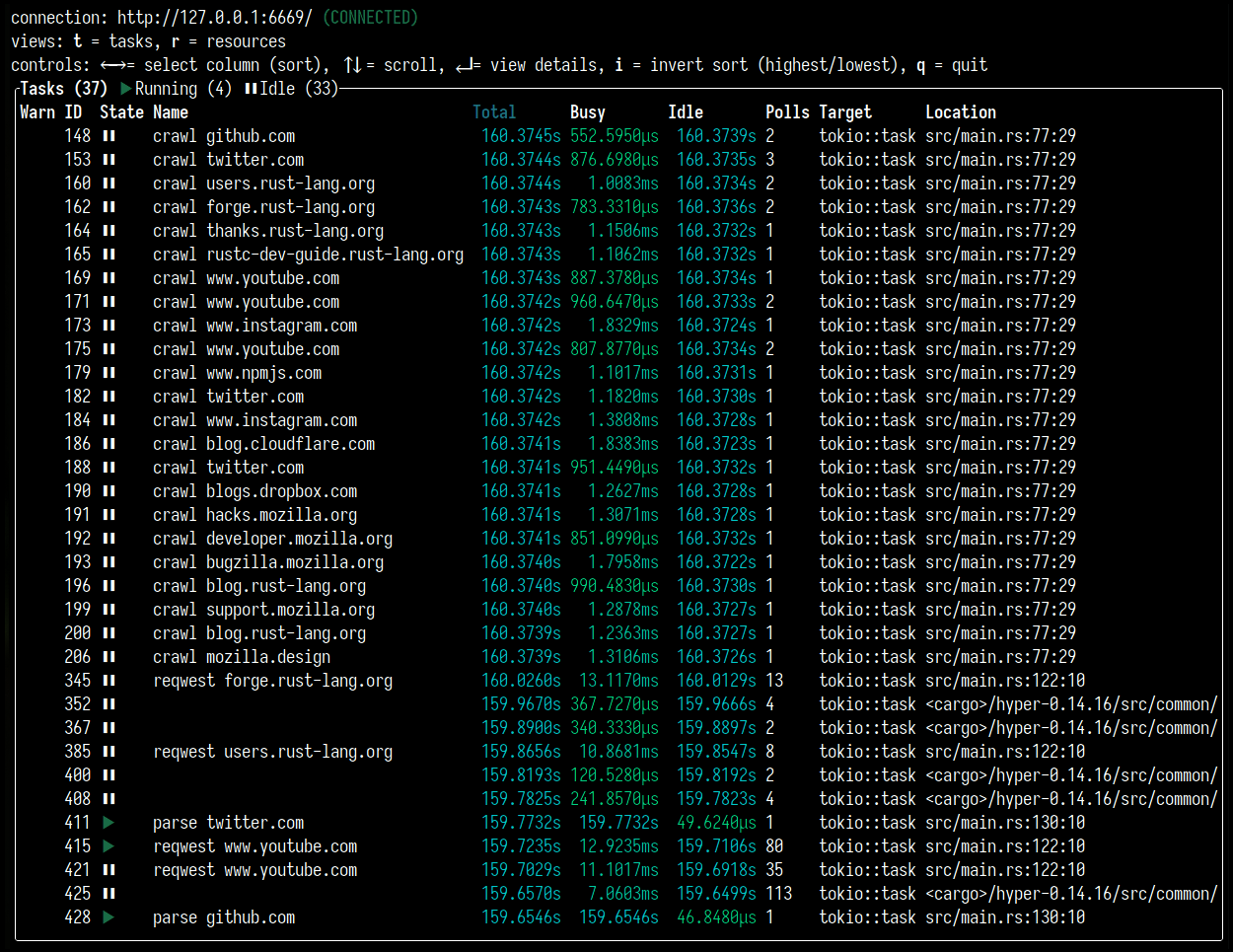
It can also show Tasks for a period of time after they have completed (the color
for these will be grey). You can generate some traces by running the mini-redis
hello world example (this is available in the mini-redis
repository):
cargo run --example hello_worldIf you press r, you can switch to the Resources view. This displays
semaphores, mutexes, and other constructs that are being used by the Tokio
runtime. Example: 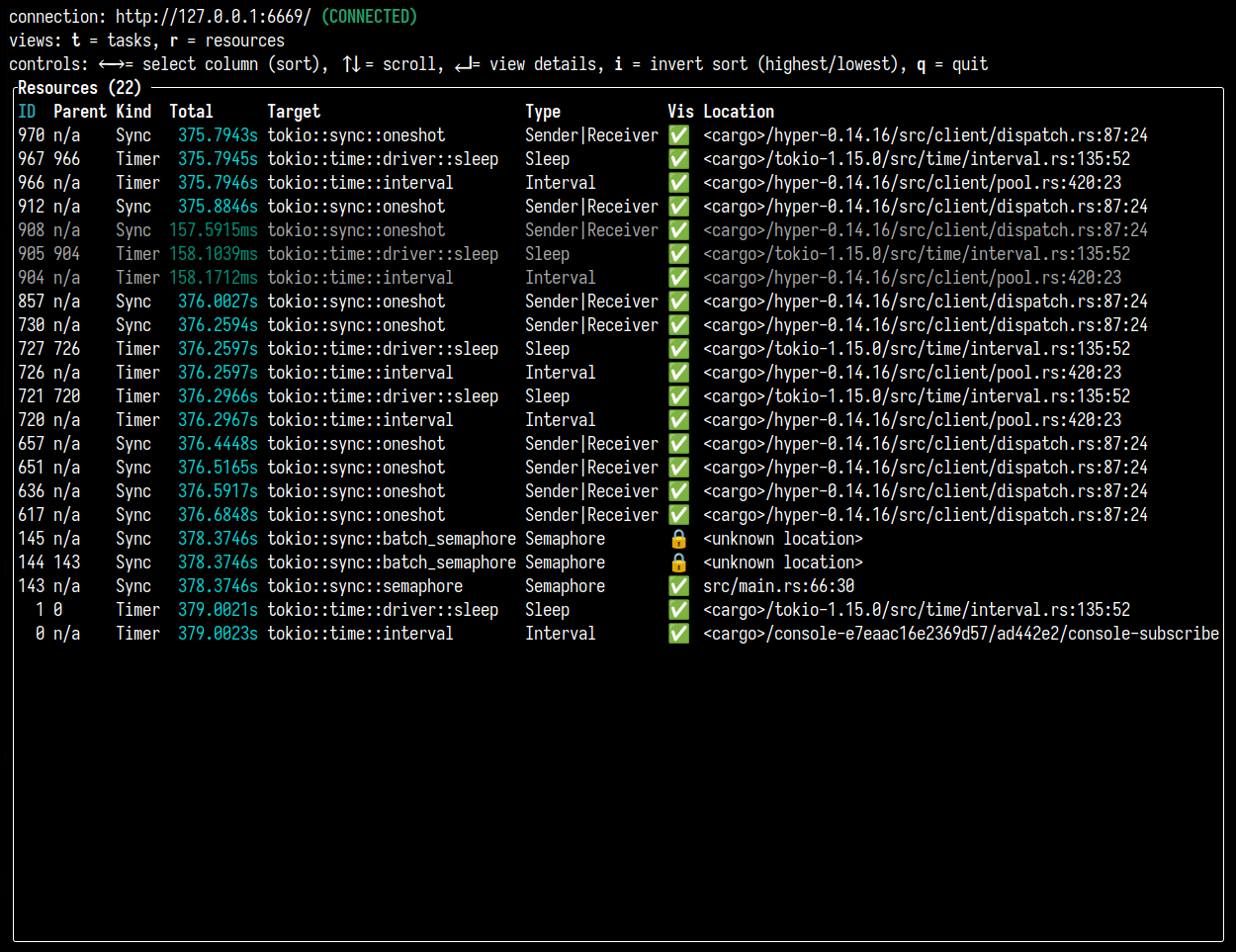
Whenever you need to introspect the Tokio runtime to understand the performance
of you application better, you can make use of tokio-console to view what is
happening in real time, helping you to spot deadlocks and other issues.
To learn more about how to use tokio-console, please visit its documentation
page.
Integrating with OpenTelemetry
OpenTelemetry (OTel) means multiple things; for
one, it's an open specification, defining a data model for traces and metrics
that can handle the needs of most users. It is also a set of language-specific
SDKs, providing instrumentation so that traces and metrics can be emitted from
an application. Thirdly, there is the OpenTelemetry Collector, a binary that
runs alongside your application to collect the traces and metrics, ultimately
pushing those out to a telemetry vendor, such as DataDog, Honeycomb, or AWS
X-Ray. It can also send data to tools such as Prometheus instead.
The opentelemetry crate is what
provides the OpenTelemetry SDK for Rust, and is what we will be using for this
tutorial.
In this tutorial, we will be setting up mini-redis to send data to
Jaeger, which is a UI for visualizing traces.
To run an instance of Jaeger, you can use Docker:
docker run -d -p6831:6831/udp -p6832:6832/udp -p16686:16686 -p14268:14268 jaegertracing/all-in-one:latestYou can visit the Jaeger page by going to http://localhost:16686.
It will look like this:
We'll come back to this page once we have some trace data generated and sent.
To set up mini-redis, we'll first need to add a few dependencies. Update yourCargo.toml with the following:
# Implements the types defined in the Otel spec
opentelemetry = "0.17.0"
# Integration between the tracing crate and the opentelemetry crate
tracing-opentelemetry = "0.17.2"
# Allows you to export data to Jaeger
opentelemetry-jaeger = "0.16.0"
Now, in src/bin/server.rs, add the following imports:
use opentelemetry::global;
use tracing_subscriber::{
    fmt, layer::SubscriberExt, util::SubscriberInitExt,
};
We will look at what each of these do in a moment.
The next step is to replace the call to tracing_subscriber with the OTel
setup.
Replace this:
# use std::error::Error;
tracing_subscriber::fmt::try_init()?;
# Ok::<(), Box<dyn Error + Send + Sync + 'static>>(())
...with this:
# use std::error::Error;
# use opentelemetry::global;
# use tracing_subscriber::{
#     fmt, layer::SubscriberExt, util::SubscriberInitExt,
# };
// Allows you to pass along context (i.e., trace IDs) across services
global::set_text_map_propagator(opentelemetry_jaeger::Propagator::new());
// Sets up the machinery needed to export data to Jaeger
// There are other OTel crates that provide pipelines for the vendors
// mentioned earlier.
let tracer = opentelemetry_jaeger::new_pipeline()
    .with_service_name("mini-redis")
    .install_simple()?;

// Create a tracing layer with the configured tracer
let opentelemetry = tracing_opentelemetry::layer().with_tracer(tracer);

// The SubscriberExt and SubscriberInitExt traits are needed to extend the
// Registry to accept `opentelemetry (the OpenTelemetryLayer type).
tracing_subscriber::registry()
    .with(opentelemetry)
    // Continue logging to stdout
    .with(fmt::Layer::default())
    .try_init()?;
# Ok::<(), Box<dyn Error + Send + Sync + 'static>>(())
Now you should be able to start up mini-redis:
cargo run --bin mini-redis-serverIn another terminal, run the hello world example (this is available in the
mini-redis repository):
cargo run --example hello_worldNow, refresh the Jaeger UI that we had open, and on the main Search page, find
"mini-redis" as one of the options in the Service dropdown.
Select that option, and click the "Find Traces" button. This should show the
request we just made from running the example.
Clicking on the trace should show you a detailed view of the spans that were
emitted during the handling of the hello world example.
That's it for now! You can explore this further by sending more requests, adding
additional instrumentation for mini-redis, or setting up OTel with a telemetry
vendor (instead of the Jaeger instance we are running locally). For this last
one, you might need to pull in an additional crate (for example, for sending
data to the OTel Collector, you'll need the opentelemetry-otlp crate). There
are many examples available in the opentelemetry-rust
repository.
Note: The mini-redis repo already contains a full example of OpenTelemetry with
AWS X-Ray, details of which can be found in theREADME, as well as
theCargo.toml
andsrc/bin/server.rs
files.
File: content/tokio/tutorial/async.md
title: "Async in depth"
At this point, we have completed a fairly comprehensive tour of asynchronous
Rust and Tokio. Now we will dig deeper into Rust's asynchronous runtime model.
At the very beginning of the tutorial, we hinted that asynchronous Rust takes a
unique approach. Now, we explain what that means.
Futures
As a quick review, let's take a very basic asynchronous function. This is
nothing new compared to what the tutorial has covered so far.
use tokio::net::TcpStream;

async fn my_async_fn() {
    println!("hello from async");
    let _socket = TcpStream::connect("127.0.0.1:3000").await.unwrap();
    println!("async TCP operation complete");
}
We call the function and it returns some value. We call .await on that value.
# async fn my_async_fn() {}
#[tokio::main]
async fn main() {
    let what_is_this = my_async_fn();
    // Nothing has been printed yet.
    what_is_this.await;
    // Text has been printed and socket has been
    // established and closed.
}
The value returned by my_async_fn() is a future. A future is a value that
implements the std::future::Future trait provided by the standard
library. They are values that contain the in-progress asynchronous computation.
The std::future::Future trait definition is:
use std::pin::Pin;
use std::task::{Context, Poll};

pub trait Future {
    type Output;

    fn poll(self: Pin<&mut Self>, cx: &mut Context)
        -> Poll<Self::Output>;
}
The associated type Output is the type that the future produces once
it completes. The Pin type is how Rust is able to support borrows inasync functions. See the standard library documentation for more
details.
Unlike how futures are implemented in other languages, a Rust future does not
represent a computation happening in the background, rather the Rust future
is the computation itself. The owner of the future is responsible for
advancing the computation by polling the future. This is done by callingFuture::poll.
Implementing `Future`
Let's implement a very simple future. This future will:
- Wait until a specific instant in time.
- Output some text to STDOUT.
- Yield a string.
use std::future::Future;
use std::pin::Pin;
use std::task::{Context, Poll};
use std::time::{Duration, Instant};

struct Delay {
    when: Instant,
}

impl Future for Delay {
    type Output = &'static str;

    fn poll(self: Pin<&mut Self>, cx: &mut Context<'_>)
        -> Poll<&'static str>
    {
        if Instant::now() >= self.when {
            println!("Hello world");
            Poll::Ready("done")
        } else {
            // Ignore this line for now.
            cx.waker().wake_by_ref();
            Poll::Pending
        }
    }
}

#[tokio::main]
async fn main() {
    let when = Instant::now() + Duration::from_millis(10);
    let future = Delay { when };

    let out = future.await;
    assert_eq!(out, "done");
}
Async fn as a Future
In the main function, we instantiate the future and call .await on it. From
async functions, we may call .await on any value that implements Future. In
turn, calling an async function returns an anonymous type that implementsFuture. In the case of async fn main(), the generated future is roughly:
use std::future::Future;
use std::pin::Pin;
use std::task::{Context, Poll};
use std::time::{Duration, Instant};

enum MainFuture {
    // Initialized, never polled
    State0,
    // Waiting on `Delay`, i.e. the `future.await` line.
    State1(Delay),
    // The future has completed.
    Terminated,
}
# struct Delay { when: Instant };
# impl Future for Delay {
#     type Output = &'static str;
#     fn poll(self: Pin<&mut Self>, _: &mut Context<'_>) -> Poll<&'static str> {
#         unimplemented!();
#     }
# }

impl Future for MainFuture {
    type Output = ();

    fn poll(mut self: Pin<&mut Self>, cx: &mut Context<'_>)
        -> Poll<()>
    {
        use MainFuture::*;

        loop {
            match *self {
                State0 => {
                    let when = Instant::now() +
                        Duration::from_millis(10);
                    let future = Delay { when };
                    *self = State1(future);
                }
                State1(ref mut my_future) => {
                    match Pin::new(my_future).poll(cx) {
                        Poll::Ready(out) => {
                            assert_eq!(out, "done");
                            *self = Terminated;
                            return Poll::Ready(());
                        }
                        Poll::Pending => {
                            return Poll::Pending;
                        }
                    }
                }
                Terminated => {
                    panic!("future polled after completion")
                }
            }
        }
    }
}
Rust futures are state machines. Here, MainFuture is represented as anenum of the future's possible states. The future starts in the State0 state.
When poll is invoked, the future attempts to advance its internal state as
much as possible. If the future is able to complete, Poll::Ready is returned
containing the output of the asynchronous computation.
If the future is not able to complete, usually due to resources it is
waiting on not being ready, then Poll::Pending is returned. ReceivingPoll::Pending indicates to the caller that the future will complete at a later
time and the caller should invoke poll again later.
We also see that futures are composed of other futures. Calling poll on the
outer future results in calling the inner future's poll function.
Executors
Asynchronous Rust functions return futures. Futures must have poll called on
them to advance their state. Futures are composed of other futures. So, the
question is, what calls poll on the very most outer future?
Recall from earlier, to run asynchronous functions, they must either be
passed to tokio::spawn or be the main function annotated with#[tokio::main]. This results in submitting the generated outer future to the
Tokio executor. The executor is responsible for calling Future::poll on the
outer future, driving the asynchronous computation to completion.
Mini Tokio
To better understand how this all fits together, let's implement our own minimal
version of Tokio! The full code can be found here.
use std::collections::VecDeque;
use std::future::Future;
use std::pin::Pin;
use std::task::{Context, Poll};
use std::time::{Duration, Instant};
use futures::task;

fn main() {
    let mut mini_tokio = MiniTokio::new();

    mini_tokio.spawn(async {
        let when = Instant::now() + Duration::from_millis(10);
        let future = Delay { when };

        let out = future.await;
        assert_eq!(out, "done");
    });

    mini_tokio.run();
}
# struct Delay { when: Instant }
# impl Future for Delay {
#     type Output = &'static str;
#     fn poll(self: Pin<&mut Self>, _: &mut Context<'_>) -> Poll<&'static str> {
#         Poll::Ready("done")
#     }
# }

struct MiniTokio {
    tasks: VecDeque<Task>,
}

type Task = Pin + Send>>;

impl MiniTokio {
    fn new() -> MiniTokio {
        MiniTokio {
            tasks: VecDeque::new(),
        }
    }

    /// Spawn a future onto the mini-tokio instance.
    fn spawn<F>(&mut self, future: F)
    where
        F: Future<Output = ()> + Send + 'static,
    {
        self.tasks.push_back(Box::pin(future));
    }

    fn run(&mut self) {
        let waker = task::noop_waker();
        let mut cx = Context::from_waker(&waker);

        while let Some(mut task) = self.tasks.pop_front() {
            if task.as_mut().poll(&mut cx).is_pending() {
                self.tasks.push_back(task);
            }
        }
    }
}
This runs the async block. A Delay instance is created with the requested
delay and is awaited on. However, our implementation so far has a major flaw.
Our executor never goes to sleep. The executor continuously loops all
spawned futures and polls them. Most of the time, the futures will not be ready
to perform more work and will return Poll::Pending again. The process will
burn CPU cycles and generally not be very efficient.
Ideally, we want mini-tokio to only poll futures when the future is able to make
progress. This happens when a resource that the task is blocked on becomes ready
to perform the requested operation. If the task wants to read data from a TCP
socket, then we only want to poll the task when the TCP socket has received
data. In our case, the task is blocked on the given Instant being reached.
Ideally, mini-tokio would only poll the task once that instant in time has
passed.
To achieve this, when a resource is polled, and the resource is not ready,
the resource will send a notification once it transitions into a ready state.
Wakers
Wakers are the missing piece. This is the system by which a resource is able to
notify the waiting task that the resource has become ready to continue some
operation.
Let's look at the Future::poll definition again:
fn poll(self: Pin<&mut Self>, cx: &mut Context)
    -> Poll<Self::Output>;
The Context argument to poll has a waker() method. This method returns aWaker bound to the current task. The Waker has a wake() method. Calling
this method signals to the executor that the associated task should be scheduled
for execution. Resources call wake() when they transition to a ready state to
notify the executor that polling the task will be able to make progress.
Updating `Delay`
We can update Delay to use wakers:
use std::future::Future;
use std::pin::Pin;
use std::task::{Context, Poll};
use std::time::{Duration, Instant};
use std::thread;

struct Delay {
    when: Instant,
}

impl Future for Delay {
    type Output = &'static str;

    fn poll(self: Pin<&mut Self>, cx: &mut Context<'_>)
        -> Poll<&'static str>
    {
        if Instant::now() >= self.when {
            println!("Hello world");
            Poll::Ready("done")
        } else {
            // Get a handle to the waker for the current task
            let waker = cx.waker().clone();
            let when = self.when;

            // Spawn a timer thread.
            thread::spawn(move || {
                let now = Instant::now();

                if now < when {
                    thread::sleep(when - now);
                }

                waker.wake();
            });

            Poll::Pending
        }
    }
}
Now, once the requested duration has elapsed, the calling task is notified and
the executor can ensure the task is scheduled again. The next step is to update
mini-tokio to listen for wake notifications.
There are still a few remaining issues with our Delay implementation. We will
fix them later.
warning
When a future returnsPoll::Pending, it must ensure that the waker is
signalled at some point. Forgetting to do this results in the task hanging
indefinitely.Forgetting to wake a task after returning
Poll::Pendingis a common
source of bugs.
Recall the first iteration of Delay. Here was the future implementation:
# use std::future::Future;
# use std::pin::Pin;
# use std::task::{Context, Poll};
# use std::time::Instant;
# struct Delay { when: Instant }
impl Future for Delay {
    type Output = &'static str;

    fn poll(self: Pin<&mut Self>, cx: &mut Context<'_>)
        -> Poll<&'static str>
    {
        if Instant::now() >= self.when {
            println!("Hello world");
            Poll::Ready("done")
        } else {
            // Ignore this line for now.
            cx.waker().wake_by_ref();
            Poll::Pending
        }
    }
}
Before returning Poll::Pending, we called cx.waker().wake_by_ref(). This is
to satisfy the future contract. By returning Poll::Pending, we are responsible
for signalling the waker. Because we didn't implement the timer thread yet, we
signalled the waker inline. Doing so will result in the future being immediately
re-scheduled, executed again, and probably not be ready to complete.
Notice that you are allowed to signal the waker more often than necessary. In
this particular case, we signal the waker even though we are not ready to
continue the operation at all. There is nothing wrong with this besides some
wasted CPU cycles. However, this particular implementation will result in a busy
loop.
Updating Mini Tokio
The next step is updating Mini Tokio to receive waker notifications. We want the
executor to only run tasks when they are woken, and to do this, Mini Tokio will
provide its own waker. When the waker is invoked, its associated task is queued
to be executed. Mini-Tokio passes this waker to the future when it polls the
future.
The updated Mini Tokio will use a channel to store scheduled tasks. Channels
allow tasks to be queued for execution from any thread. Wakers must be Send
and Sync.
info
TheSendandSynctraits are marker traits related to concurrency
provided by Rust. Types that can be sent to a different thread areSend. Most types areSend, but something likeRcis not. Types
that can be concurrently accessed through immutable references areSync. A type can beSendbut notSync— a good example isCell, which can be modified through an immutable reference, and
is thus not safe to access concurrently.For more details, see the related chapter in the Rust book.
Update the MiniTokio struct.
use std::sync::mpsc;
use std::sync::Arc;

struct MiniTokio {
    scheduled: mpsc::Receiver<Arc<Task>>,
    sender: mpsc::Sender<Arc<Task>>,
}

struct Task {
    // This will be filled in soon.
}
Wakers are Sync and can be cloned. When wake is called, the task must be
scheduled for execution. To implement this, we have a channel. When the wake()
is called on the waker, the task is pushed into the send half of the channel.
Our Task structure will implement the wake logic. To do this, it needs to
contain both the spawned future and the channel send half. We place the future
in a TaskFuture struct alongside a Poll enum to keep track of the latestFuture::poll() result, which is needed to handle spurious wake-ups. More
details are given in the implementation of the poll() method in TaskFuture.
# use std::future::Future;
# use std::pin::Pin;
# use std::sync::mpsc;
# use std::task::Poll;
use std::sync::{Arc, Mutex};

/// A structure holding a future and the result of
/// the latest call to its `poll` method.
struct TaskFuture {
    future: Pin + Send>>,
    poll: Poll<()>,
}

struct Task {
    // The `Mutex` is to make `Task` implement `Sync`. Only
    // one thread accesses `task_future` at any given time.
    // The `Mutex` is not required for correctness. Real Tokio
    // does not use a mutex here, but real Tokio has
    // more lines of code than can fit in a single tutorial
    // page.
    task_future: Mutex<TaskFuture>,
    executor: mpsc::Sender<Arc<Task>>,
}

impl Task {
    fn schedule(self: &Arc<Self>) {
        self.executor.send(self.clone());
    }
}
To schedule the task, the Arc is cloned and sent through the channel. Now, we
need to hook our schedule function with std::task::Waker. The
standard library provides a low-level API to do this using manual vtable
construction. This strategy provides maximum flexibility to
implementors, but requires a bunch of unsafe boilerplate code. Instead of usingRawWakerVTable directly, we will use the ArcWake utility
provided by the futures crate. This allows us to implement a simple trait to
expose our Task struct as a waker.
Add the following dependency to your Cargo.toml to pull in futures.
futures = "0.3"Then implement futures::task::ArcWake.
use futures::task::{self, ArcWake};
use std::sync::Arc;
# struct Task {}
# impl Task {
#     fn schedule(self: &Arc<Self>) {}
# }
impl ArcWake for Task {
    fn wake_by_ref(arc_self: &Arc<Self>) {
        arc_self.schedule();
    }
}
When the timer thread above calls waker.wake(), the task is pushed into the
channel. Next, we implement receiving and executing the tasks in theMiniTokio::run() function.
/* Detailed source-code truncated for AI context efficiency. */Multiple things are happening here. First, MiniTokio::run() is implemented.
The function runs in a loop receiving scheduled tasks from the channel.
As tasks are pushed into the channel when they are woken, these tasks are able
to make progress when executed.
Additionally, the MiniTokio::new() and MiniTokio::spawn() functions are
adjusted to use a channel rather than a VecDeque. When new tasks are spawned,
they are given a clone of the sender-part of the channel, which the task can
use to schedule itself on the runtime.
The Task::poll() function creates the waker using the ArcWake utility from
the futures crate. The waker is used to create a task::Context. Thattask::Context is passed to poll.
Summary
We have now seen an end-to-end example of how asynchronous Rust works. Rust'sasync/await feature is backed by traits. This allows third-party crates, like
Tokio, to provide the execution details.
- Asynchronous Rust operations are lazy and require a caller to poll them.
- Wakers are passed to futures to link a future to the task calling it.
- When a resource is not ready to complete an operation,
Poll::Pendingis
returned and the task's waker is recorded. - When the resource becomes ready, the task's waker is notified.
- The executor receives the notification and schedules the task to execute.
- The task is polled again, this time the resource is ready and the task makes
progress.
A few loose ends
Recall when we were implementing the Delay future, we said there were a few
more things to fix. Rust's asynchronous model allows a single future to migrate
across tasks while it executes. Consider the following:
use futures::future::poll_fn;
use std::future::Future;
use std::pin::Pin;
# use std::task::{Context, Poll};
# use std::time::{Duration, Instant};
# struct Delay { when: Instant }
# impl Future for Delay {
#   type Output = ();
#   fn poll(self: Pin<&mut Self>, _cx: &mut Context<'_>) -> Poll<()> {
#       Poll::Pending
#   }
# }

#[tokio::main]
async fn main() {
    let when = Instant::now() + Duration::from_millis(10);
    let mut delay = Some(Delay { when });

    poll_fn(move |cx| {
        let mut delay = delay.take().unwrap();
        let res = Pin::new(&mut delay).poll(cx);
        assert!(res.is_pending());
        tokio::spawn(async move {
            delay.await;
        });

        Poll::Ready(())
    }).await;
}
The poll_fn function creates a Future instance using a closure. The snippet
above creates a Delay instance, polls it once, then sends the Delay instance
to a new task where it is awaited. In this example, Delay::poll is called more
than once with different Waker instances. When this happens, you must make
sure to call wake on the Waker passed to the most recent call to poll.
When implementing a future, it is critical to assume that each call to poll
could supply a different Waker instance. The poll function must update any
previously recorded waker with the new one.
Our earlier implementation of Delay spawned a new thread every time it was
polled. This is fine, but can be very inefficient if it is polled too often
(e.g. if you select! over that future and some other future, both are polled
whenever either has an event). One approach to this is to remember whether you
have already spawned a thread, and only spawn a new thread if you haven't
already spawned one. However if you do this, you must ensure that the thread'sWaker is updated on later calls to poll, as you are otherwise not waking the
most recent Waker.
To fix our earlier implementation, we could do something like this:
/* Detailed source-code truncated for AI context efficiency. */It is a bit involved, but the idea is, on each call to poll, the future checks
if the supplied waker matches the previously recorded waker. If the two wakers
match, then there is nothing else to do. If they do not match, then the recorded
waker must be updated.
`Notify` utility
We demonstrated how a Delay future could be implemented by hand using wakers.
Wakers are the foundation of how asynchronous Rust works. Usually, it is not
necessary to drop down to that level. For example, in the case of Delay, we
could implement it entirely with async/await by using thetokio::sync::Notify utility. This utility provides a basic task
notification mechanism. It handles the details of wakers, including making sure
that the recorded waker matches the current task.
Using Notify, we can implement a delay function usingasync/await like this:
use tokio::sync::Notify;
use std::sync::Arc;
use std::time::{Duration, Instant};
use std::thread;

async fn delay(dur: Duration) {
    let when = Instant::now() + dur;
    let notify = Arc::new(Notify::new());
    let notify_clone = notify.clone();

    thread::spawn(move || {
        let now = Instant::now();

        if now < when {
            thread::sleep(when - now);
        }

        notify_clone.notify_one();
    });


    notify.notified().await;
}
File: content/tokio/tutorial/channels.md
title: "Channels"
Now that we have learned a bit about concurrency with Tokio, let's apply this on
the client side. Put the server code we wrote before into an explicit binary
file:
$ mkdir src/bin
$ mv src/main.rs src/bin/server.rs
and create a new binary file that will contain the client code:
$ touch src/bin/client.rsIn this file you will write this page's code. Whenever you want to run it,
you will have to launch the server first in a separate terminal window:
$ cargo run --bin serverAnd then the client, separately:
$ cargo run --bin clientThat being said, let's code!
Say we want to run two concurrent Redis commands. We can spawn
one task per command. Then the two commands would happen concurrently.
At first, we might try something like:
use mini_redis::client;

#[tokio::main]
async fn main() {
    // Establish a connection to the server
    let mut client = client::connect("127.0.0.1:6379").await.unwrap();

    // Spawn two tasks, one gets a key, the other sets a key
    let t1 = tokio::spawn(async {
        let res = client.get("foo").await;
    });

    let t2 = tokio::spawn(async {
        client.set("foo", "bar".into()).await;
    });

    t1.await.unwrap();
    t2.await.unwrap();
}
This does not compile because both tasks need to access the client somehow.
As Client does not implement Copy, it will not compile without some code to
facilitate this sharing. Additionally, Client::set takes &mut self, which
means that exclusive access is required to call it. We could open a connection
per task, but that is not ideal. We cannot use std::sync::Mutex as .await
would need to be called with the lock held. We could use tokio::sync::Mutex,
but that would only allow a single in-flight request. If the client implements
pipelining (in short, sending many commands without waiting for each prior
command's response), an async mutex results in underutilizing
the connection.
Message passing
The answer is to use message passing. The pattern involves spawning a dedicated
task to manage the client resource. Any task that wishes to issue a request
sends a message to the client task. The client task issues the request on
behalf of the sender, and the response is sent back to the sender.
Using this strategy, a single connection is established. The task managing theclient is able to get exclusive access in order to call get and set.
Additionally, the channel works as a buffer. Operations may be sent to theclient task while the client task is busy. Once the client task is
available to process new requests, it pulls the next request from the channel.
This can result in better throughput, and be extended to support connection
pooling.
Tokio's channel primitives
Tokio provides a number of channels, each serving a different purpose.
- mpsc: multi-producer, single-consumer channel. Many values can be sent.
- oneshot: single-producer, single consumer channel. A single value can be sent.
- broadcast: multi-producer, multi-consumer. Many values can be sent. Each
receiver sees every value. - watch: multi-producer, multi-consumer. Many values can be sent, but no
history is kept. Receivers only see the most recent value.
If you need a multi-producer multi-consumer channel where only one consumer sees
each message, you can use the async-channel crate. There are also channels
for use outside of asynchronous Rust, such as std::sync::mpsc andcrossbeam::channel. These channels wait for messages by blocking the
thread, which is not allowed in asynchronous code.
In this section, we will use mpsc and oneshot. The other types of message
passing channels are explored in later sections. The full code from this section
is found here.
Define the message type
In most cases, when using message passing, the task receiving the messages
responds to more than one command. In our case, the task will respond to GET andSET commands. To model this, we first define a Command enum and include a
variant for each command type.
use bytes::Bytes;

#[derive(Debug)]
enum Command {
    Get {
        key: String,
    },
    Set {
        key: String,
        val: Bytes,
    }
}
Create the channel
In the main function, an mpsc channel is created.
use tokio::sync::mpsc;

#[tokio::main]
async fn main() {
    // Create a new channel with a capacity of at most 32.
    let (tx, mut rx) = mpsc::channel(32);
# tx.send(()).await.unwrap();

    // ... Rest comes here
}
The mpsc channel is used to send commands to the task managing the redis
connection. The multi-producer capability allows messages to be sent from many
tasks. Creating the channel returns two values, a sender and a receiver. The two
handles are used separately. They may be moved to different tasks.
The channel is created with a capacity of 32. If messages are sent faster than
they are received, the channel will store them. Once the 32 messages are stored
in the channel, calling send(...).await will go to sleep until a message has
been removed by the receiver.
Sending from multiple tasks is done by cloning the Sender. For example:
use tokio::sync::mpsc;

#[tokio::main]
async fn main() {
    let (tx, mut rx) = mpsc::channel(32);
    let tx2 = tx.clone();

    tokio::spawn(async move {
        tx.send("sending from first handle").await.unwrap();
    });

    tokio::spawn(async move {
        tx2.send("sending from second handle").await.unwrap();
    });

    while let Some(message) = rx.recv().await {
        println!("GOT = {}", message);
    }
}
Both messages are sent to the single Receiver handle. It is not possible to
clone the receiver of an mpsc channel.
When every Sender has gone out of scope or has otherwise been dropped, it is
no longer possible to send more messages into the channel. At this point, therecv call on the Receiver will return None, which means that all senders
are gone and the channel is closed.
In our case of a task that manages the Redis connection, it knows that it
can close the Redis connection once the channel is closed, as the connection
will not be used again.
Spawn manager task
Next, spawn a task that processes messages from the channel. First, a client
connection is established to Redis. Then, received commands are issued via the
Redis connection.
use mini_redis::client;
# enum Command {
#    Get { key: String },
#    Set { key: String, val: bytes::Bytes }
# }
# async fn dox() {
# let (_, mut rx) = tokio::sync::mpsc::channel(10);
// The `move` keyword is used to **move** ownership of `rx` into the task.
let manager = tokio::spawn(async move {
    // Establish a connection to the server
    let mut client = client::connect("127.0.0.1:6379").await.unwrap();

    // Start receiving messages
    while let Some(cmd) = rx.recv().await {
        use Command::*;

        match cmd {
            Get { key } => {
                client.get(&key).await;
            }
            Set { key, val } => {
                client.set(&key, val).await;
            }
        }
    }
});
# }
Now, update the two tasks to send commands over the channel instead of issuing
them directly on the Redis connection.
# #[derive(Debug)]
# enum Command {
#    Get { key: String },
#    Set { key: String, val: bytes::Bytes }
# }
# async fn dox() {
# let (mut tx, _) = tokio::sync::mpsc::channel(10);
// The `Sender` handles are moved into the tasks. As there are two
// tasks, we need a second `Sender`.
let tx2 = tx.clone();

// Spawn two tasks, one gets a key, the other sets a key
let t1 = tokio::spawn(async move {
    let cmd = Command::Get {
        key: "foo".to_string(),
    };

    tx.send(cmd).await.unwrap();
});

let t2 = tokio::spawn(async move {
    let cmd = Command::Set {
        key: "foo".to_string(),
        val: "bar".into(),
    };

    tx2.send(cmd).await.unwrap();
});
# }
At the bottom of the main function, we .await the join handles to ensure the
commands fully complete before the process exits.
# type Jh = tokio::task::JoinHandle<()>;
# async fn dox(t1: Jh, t2: Jh, manager: Jh) {
t1.await.unwrap();
t2.await.unwrap();
manager.await.unwrap();
# }
Receive responses
The final step is to receive the response back from the manager task. The GET
command needs to get the value and the SET command needs to know if the
operation completed successfully.
To pass the response, a oneshot channel is used. The oneshot channel is a
single-producer, single-consumer channel optimized for sending a single value.
In our case, the single value is the response.
Similar to mpsc, oneshot::channel() returns a sender and receiver handle.
use tokio::sync::oneshot;

# async fn dox() {
let (tx, rx) = oneshot::channel();
# tx.send(()).unwrap();
# }
Unlike mpsc, no capacity is specified as the capacity is always one.
Additionally, neither handle can be cloned.
To receive responses from the manager task, before sending a command, a oneshot
channel is created. The Sender half of the channel is included in the command
to the manager task. The receive half is used to receive the response.
First, update Command to include the Sender. For convenience, a type alias
is used to reference the Sender.
use tokio::sync::oneshot;
use bytes::Bytes;

/// Multiple different commands are multiplexed over a single channel.
#[derive(Debug)]
enum Command {
    Get {
        key: String,
        resp: Responder<Option>,
    },
    Set {
        key: String,
        val: Bytes,
        resp: Responder<()>,
    },
}

/// Provided by the requester and used by the manager task to send
/// the command response back to the requester.
type Responder<T> = oneshot::Sender<mini_redis::Result<T>>;
Now, update the tasks issuing the commands to include the oneshot::Sender.
# use tokio::sync::{oneshot, mpsc};
# use bytes::Bytes;
# #[derive(Debug)]
# enum Command {
#     Get { key: String, resp: Responder<Option> },
#     Set { key: String, val: Bytes, resp: Responder<()> },
# }
# type Responder<T> = oneshot::Sender<mini_redis::Result<T>>;
# fn dox() {
# let (mut tx, mut rx) = mpsc::channel(10);
# let mut tx2 = tx.clone();
let t1 = tokio::spawn(async move {
    let (resp_tx, resp_rx) = oneshot::channel();
    let cmd = Command::Get {
        key: "foo".to_string(),
        resp: resp_tx,
    };

    // Send the GET request
    tx.send(cmd).await.unwrap();

    // Await the response
    let res = resp_rx.await;
    println!("GOT = {:?}", res);
});

let t2 = tokio::spawn(async move {
    let (resp_tx, resp_rx) = oneshot::channel();
    let cmd = Command::Set {
        key: "foo".to_string(),
        val: "bar".into(),
        resp: resp_tx,
    };

    // Send the SET request
    tx2.send(cmd).await.unwrap();

    // Await the response
    let res = resp_rx.await;
    println!("GOT = {:?}", res);
});
# }
Finally, update the manager task to send the response over the oneshot channel.
# use tokio::sync::{oneshot, mpsc};
# use bytes::Bytes;
# #[derive(Debug)]
# enum Command {
#     Get { key: String, resp: Responder<Option> },
#     Set { key: String, val: Bytes, resp: Responder<()> },
# }
# type Responder<T> = oneshot::Sender<mini_redis::Result<T>>;
# async fn dox(mut client: mini_redis::client::Client) {
# let (_, mut rx) = mpsc::channel::<Command>(10);
while let Some(cmd) = rx.recv().await {
    match cmd {
        Command::Get { key, resp } => {
            let res = client.get(&key).await;
            // Ignore errors
            let _ = resp.send(res);
        }
        Command::Set { key, val, resp } => {
            let res = client.set(&key, val).await;
            // Ignore errors
            let _ = resp.send(res);
        }
    }
}
# }
Calling send on oneshot::Sender completes immediately and does not
require an .await. This is because send on a oneshot channel will always
fail or succeed immediately without any form of waiting.
Sending a value on a oneshot channel returns Err when the receiver half has
dropped. This indicates the receiver is no longer interested in the response. In
our scenario, the receiver cancelling interest is an acceptable event. The Err
returned by resp.send(...) does not need to be handled.
You can find the entire code here.
Backpressure and bounded channels
Whenever concurrency or queuing is introduced, it is important to ensure that the
queing is bounded and the system will gracefully handle the load. Unbounded queues
will eventually fill up all available memory and cause the system to fail in
unpredictable ways.
Tokio takes care to avoid implicit queuing. A big part of this is the fact that
async operations are lazy. Consider the following:
# fn async_op() {}
# fn dox() {
loop {
    async_op();
}
# }
# fn main() {}
If the asynchronous operation runs eagerly, the loop will repeatedly queue a newasync_op to run without ensuring the previous operation completed. This
results in implicit unbounded queuing. Callback based systems and eager
future based systems are particularly susceptible to this.
However, with Tokio and asynchronous Rust, the above snippet will not result
in async_op running at all. This is because .await is never called. If the
snippet is updated to use .await, then the loop waits for the operation to
complete before starting over.
# async fn async_op() {}
# async fn dox() {
loop {
    // Will not repeat until `async_op` completes
    async_op().await;
}
# }
# fn main() {}
Concurrency and queuing must be explicitly introduced. Ways to do this include:
tokio::spawnselect!join!mpsc::channel
When doing so, take care to ensure the total amount of concurrency is bounded. For
example, when writing a TCP accept loop, ensure that the total number of open
sockets is bounded. When using mpsc::channel, pick a manageable channel
capacity. Specific bound values will be application specific.
Taking care and picking good bounds is a big part of writing reliable Tokio applications.
File: content/tokio/tutorial/framing.md
title: "Framing"
We will now apply what we just learned about I/O and implement the Mini-Redis
framing layer. Framing is the process of taking a byte stream and converting it
to a stream of frames. A frame is a unit of data transmitted between two peers.
The Redis protocol frame is defined as follows:
use bytes::Bytes;

enum Frame {
    Simple(String),
    Error(String),
    Integer(u64),
    Bulk(Bytes),
    Null,
    Array(Vec<Frame>),
}
Note how the frame only consists of data without any semantics. The command
parsing and implementation happen at a higher level.
For HTTP, a frame might look like:
# use bytes::Bytes;
# type Method = ();
# type Uri = ();
# type Version = ();
# type HeaderMap = ();
# type StatusCode = ();
enum HttpFrame {
    RequestHead {
        method: Method,
        uri: Uri,
        version: Version,
        headers: HeaderMap,
    },
    ResponseHead {
        status: StatusCode,
        version: Version,
        headers: HeaderMap,
    },
    BodyChunk {
        chunk: Bytes,
    },
}
To implement framing for Mini-Redis, we will implement a Connection struct
that wraps a TcpStream and reads/writes mini_redis::Frame values.
use tokio::net::TcpStream;
use mini_redis::{Frame, Result};

struct Connection {
    stream: TcpStream,
    // ... other fields here
}

impl Connection {
    /// Read a frame from the connection.
    ///
    /// Returns `None` if EOF is reached
    pub async fn read_frame(&mut self)
        -> Result<Option<Frame>>
    {
        // implementation here
# unimplemented!();
    }

    /// Write a frame to the connection.
    pub async fn write_frame(&mut self, frame: &Frame)
        -> Result<()>
    {
        // implementation here
# unimplemented!();
    }
}
You can find the details of the Redis wire protocol here. The fullConnection code is found here.
Buffered reads
The read_frame method waits for an entire frame to be received before
returning. A single call to TcpStream::read() may return an arbitrary amount
of data. It could contain an entire frame, a partial frame, or multiple frames.
If a partial frame is received, the data is buffered and more data is read from
the socket. If multiple frames are received, the first frame is returned and
the rest of the data is buffered until the next call to read_frame.
If you haven't already, create a new file called connection.rs.
touch src/connection.rsTo implement this, Connection needs a read buffer field. Data is read from the
socket into the read buffer. When a frame is parsed, the corresponding data is
removed from the buffer.
We will use BytesMut as the buffer type. This is a mutable version ofBytes.
use bytes::BytesMut;
use tokio::net::TcpStream;

pub struct Connection {
    stream: TcpStream,
    buffer: BytesMut,
}

impl Connection {
    pub fn new(stream: TcpStream) -> Connection {
        Connection {
            stream,
            // Allocate the buffer with 4kb of capacity.
            buffer: BytesMut::with_capacity(4096),
        }
    }
}
Next, we implement the read_frame() method.
use tokio::io::AsyncReadExt;
use bytes::Buf;
use mini_redis::Result;

# struct Connection {
#   stream: tokio::net::TcpStream,
#   buffer: bytes::BytesMut,
# }
# struct Frame {}
# impl Connection {
pub async fn read_frame(&mut self)
    -> Result<Option<Frame>>
{
    loop {
        // Attempt to parse a frame from the buffered data. If
        // enough data has been buffered, the frame is
        // returned.
        if let Some(frame) = self.parse_frame()? {
            return Ok(Some(frame));
        }

        // There is not enough buffered data to read a frame.
        // Attempt to read more data from the socket.
        //
        // On success, the number of bytes is returned. `0`
        // indicates "end of stream".
        if 0 == self.stream.read_buf(&mut self.buffer).await? {
            // The remote closed the connection. For this to be
            // a clean shutdown, there should be no data in the
            // read buffer. If there is, this means that the
            // peer closed the socket while sending a frame.
            if self.buffer.is_empty() {
                return Ok(None);
            } else {
                return Err("connection reset by peer".into());
            }
        }
    }
}
# fn parse_frame(&self) -> Result<Option<Frame>> { unimplemented!() }
# }
Let's break this down. The read_frame method operates in a loop. First,self.parse_frame() is called. This will attempt to parse a redis frame fromself.buffer. If there is enough data to parse a frame, the frame is returned
to the caller of read_frame().Otherwise, we attempt to read more data from the
socket into the buffer. After reading more data, parse_frame() is called
again. This time, if enough data has been received, parsing may succeed.
When reading from the stream, a return value of 0 indicates that no more data
will be received from the peer. If the read buffer still has data in it, this
indicates a partial frame has been received and the connection is being
terminated abruptly. This is an error condition and Err is returned.
The `Buf` trait
When reading from the stream, read_buf is called. This version of the read
function takes a value implementing BufMut from the bytes crate.
First, consider how we would implement the same read loop using read().Vec could be used instead of BytesMut.
use tokio::net::TcpStream;

pub struct Connection {
    stream: TcpStream,
    buffer: Vec,
    cursor: usize,
}

impl Connection {
    pub fn new(stream: TcpStream) -> Connection {
        Connection {
            stream,
            // Allocate the buffer with 4kb of capacity.
            buffer: vec![0; 4096],
            cursor: 0,
        }
    }
}
And the read_frame() function on Connection:
use mini_redis::{Frame, Result};

# use tokio::io::AsyncReadExt;
# pub struct Connection {
#     stream: tokio::net::TcpStream,
#     buffer: Vec,
#     cursor: usize,
# }
# impl Connection {
pub async fn read_frame(&mut self)
    -> Result<Option<Frame>>
{
    loop {
        if let Some(frame) = self.parse_frame()? {
            return Ok(Some(frame));
        }

        // Ensure the buffer has capacity
        if self.buffer.len() == self.cursor {
            // Grow the buffer
            self.buffer.resize(self.cursor * 2, 0);
        }

        // Read into the buffer, tracking the number
        // of bytes read
        let n = self.stream.read(
            &mut self.buffer[self.cursor..]).await?;

        if 0 == n {
            if self.cursor == 0 {
                return Ok(None);
            } else {
                return Err("connection reset by peer".into());
            }
        } else {
            // Update our cursor
            self.cursor += n;
        }
    }
}
# fn parse_frame(&mut self) -> Result<Option<Frame>> { unimplemented!() }
# }
When working with byte arrays and read, we must also maintain a cursor
tracking how much data has been buffered. We must make sure to pass the empty
portion of the buffer to read(). Otherwise, we would overwrite buffered data.
If our buffer gets filled up, we must grow the buffer in order to keep reading.
In parse_frame() (not included), we would need to parse data contained byself.buffer[..self.cursor].
Because pairing a byte array with a cursor is very common, the bytes crate
provides an abstraction representing a byte array and cursor. The Buf trait is
implemented by types from which data can be read. The BufMut trait is
implemented by types into which data can be written. When passing a T: BufMut
to read_buf(), the buffer's internal cursor is automatically updated byread_buf. Because of this, in our version of read_frame, we do not need to
manage our own cursor.
Additionally, when using Vec, the buffer must be initialized. vec![0; 4096] allocates an array of 4096 bytes and writes zero to every entry. When
resizing the buffer, the new capacity must also be initialized with zeros. The
initialization process is not free. When working with BytesMut and BufMut,
capacity is uninitialized. The BytesMut abstraction prevents us from
reading the uninitialized memory. This lets us avoid the initialization step.
Parsing
Now, let's look at the parse_frame() function. Parsing is done in two steps.
- Ensure a full frame is buffered and find the end index of the frame.
- Parse the frame.
The mini-redis crate provides us with a function for both of these steps:
We will also reuse the Buf abstraction to help. A Buf is passed intoFrame::check. As the check function iterates the passed in buffer, the
internal cursor will be advanced. When check returns, the buffer's internal
cursor points to the end of the frame.
For the Buf type, we will use std::io::Cursor<&[u8]>.
use mini_redis::{Frame, Result};
use mini_redis::frame::Error::Incomplete;
use bytes::Buf;
use std::io::Cursor;

# pub struct Connection {
#     stream: tokio::net::TcpStream,
#     buffer: bytes::BytesMut,
# }
# impl Connection {
fn parse_frame(&mut self)
    -> Result<Option<Frame>>
{
    // Create the `T: Buf` type.
    let mut buf = Cursor::new(&self.buffer[..]);

    // Check whether a full frame is available
    match Frame::check(&mut buf) {
        Ok(_) => {
            // Get the byte length of the frame
            let len = buf.position() as usize;

            // Reset the internal cursor for the
            // call to `parse`.
            buf.set_position(0);

            // Parse the frame
            let frame = Frame::parse(&mut buf)?;

            // Discard the frame from the buffer
            self.buffer.advance(len);

            // Return the frame to the caller.
            Ok(Some(frame))
        }
        // Not enough data has been buffered
        Err(Incomplete) => Ok(None),
        // An error was encountered
        Err(e) => Err(e.into()),
    }
}
# }
The full Frame::check function can be found here. We will
not cover it in its entirety.
The relevant thing to note is that Buf's "byte iterator" style APIs are used.
These fetch data and advance the internal cursor. For example, to parse a frame,
the first byte is checked to determine the type of the frame. The function used
is Buf::get_u8. This fetches the byte at the current cursor's position and
advances the cursor by one.
There are more useful methods on the Buf trait. Check the API docs
for more details.
Buffered writes
The other half of the framing API is the write_frame(frame) function. This
function writes an entire frame to the socket. In order to minimize write
syscalls, writes will be buffered. A write buffer is maintained and frames are
encoded to this buffer before being written to the socket. However, unlikeread_frame(), the entire frame is not always buffered to a byte array before
writing to the socket.
Consider a bulk stream frame. The value being written is Frame::Bulk(Bytes).
The wire format of a bulk frame is a frame head, which consists of the $
character followed by the data length in bytes. The majority of the frame is the
contents of the Bytes value. If the data is large, copying it to an
intermediate buffer would be costly.
To implement buffered writes, we will use the BufWriter struct.
This struct is initialized with a T: AsyncWrite and implements AsyncWrite
itself. When write is called on BufWriter, the write does not go directly to
the inner writer, but to a buffer. When the buffer is full, the contents are
flushed to the inner writer and the inner buffer is cleared. There are also
optimizations that allow bypassing the buffer in certain cases.
We will not attempt a full implementation of write_frame() as part of the
tutorial. See the full implementation here.
First, the Connection struct is updated:
use tokio::io::BufWriter;
use tokio::net::TcpStream;
use bytes::BytesMut;

pub struct Connection {
    stream: BufWriter<TcpStream>,
    buffer: BytesMut,
}

impl Connection {
    pub fn new(stream: TcpStream) -> Connection {
        Connection {
            stream: BufWriter::new(stream),
            buffer: BytesMut::with_capacity(4096),
        }
    }
}
Next, write_frame() is implemented.
use tokio::io::{self, AsyncWriteExt};
use mini_redis::Frame;

# struct Connection {
#   stream: tokio::io::BufWriter<tokio::net::TcpStream>,
#   buffer: bytes::BytesMut,
# }
# impl Connection {
async fn write_frame(&mut self, frame: &Frame)
    -> io::Result<()>
{
    match frame {
        Frame::Simple(val) => {
            self.stream.write_u8(b'+').await?;
            self.stream.write_all(val.as_bytes()).await?;
            self.stream.write_all(b"\r\n").await?;
        }
        Frame::Error(val) => {
            self.stream.write_u8(b'-').await?;
            self.stream.write_all(val.as_bytes()).await?;
            self.stream.write_all(b"\r\n").await?;
        }
        Frame::Integer(val) => {
            self.stream.write_u8(b':').await?;
            self.write_decimal(*val).await?;
        }
        Frame::Null => {
            self.stream.write_all(b"$-1\r\n").await?;
        }
        Frame::Bulk(val) => {
            let len = val.len();

            self.stream.write_u8(b'$').await?;
            self.write_decimal(len as u64).await?;
            self.stream.write_all(val).await?;
            self.stream.write_all(b"\r\n").await?;
        }
        Frame::Array(_val) => unimplemented!(),
    }

    self.stream.flush().await;

    Ok(())
}
# async fn write_decimal(&mut self, val: u64) -> io::Result<()> { unimplemented!() }
# }
The functions used here are provided by AsyncWriteExt. They are available onTcpStream as well, but it would not be advisable to issue single byte writes
without the intermediate buffer.
write_u8writes a single byte to the writer.write_allwrites the entire slice to the writer.write_decimalis implemented by mini-redis.
The function ends with a call to self.stream.flush().await. BecauseBufWriter stores writes in an intermediate buffer, calls to write do not
guarantee that the data is written to the socket. Before returning, we want the
frame to be written to the socket. The call to flush() writes any data pending
in the buffer to the socket.
Another alternative would be to not call flush() in write_frame().
Instead, provide a flush() function on Connection. This would allow the
caller to write queue multiple small frames in the write buffer then write them
all to the socket with one write syscall. Doing this complicates theConnection API. Simplicity is one of Mini-Redis' goals, so we decided to
include the flush().await call in fn write_frame().