

Technical Documentation: ricequant/rqalpha
ℹ️ Provenance: Multi-Tier Ingestion · CodeWiki Reference
Overview (`docs/claude/README.md`)
Claude Code Documentation
This directory contains detailed guidance for Claude Code when working with RQAlpha.
File Structure
- architecture.md - Core components, system design, and key directories
- strategy-guide.md - How to write strategies, API patterns, and documentation references
- bug-reproduction.md - Writing backtests to reproduce bugs, testing patterns, and debugging
- development.md - Development guidelines, code style, and common issues
Usage
The main CLAUDE.md file in the project root provides a lightweight overview and points to these detailed guides. This modular structure keeps the main file under 100 lines while providing comprehensive documentation when needed.
Maintenance
Review and update these files regularly to ensure they reflect current best practices and project structure.
README (`docs/README.rst`)
================================= RQAlpha Documentation Instruction
RQAlpha 使用 Sphinx 进行文档编写。
Requirements
- pandoc: http://pandoc.org/installing.html
- Sphinx
- watchdog
- sphinx_rtd_theme
- nbsphinx
- jupyter_client
- sphinx-autodoc-typehints
.. code-block:: bash
pip install Sphinx watchdog sphinx_rtd_theme nbsphinx jupyter_client sphinx-autodoc-typehintspandoc 需要下载 http://pandoc.org/installing.html 且重启pycharm(修改了环境变量)
Usage
make html: 编译文档并在{project}/docs/build/下生成HTML。make htmlview: 本地查看文档。make clean: 清空build目录下文件。make watch: 使用该命令可以根据源文件的变化自动编译文档。
Requirements (`docs/requirements.txt`)
setuptools <81
Sphinx ==2.4.4
sphinxcontrib-applehelp ==1.0.3 # 需要与 sphinx==2.4.4 兼容
sphinxcontrib-devhelp ==1.0.1
sphinxcontrib-htmlhelp ==1.0.3
sphinxcontrib-jsmath ==1.0.1
sphinxcontrib-qthelp ==1.0.2
sphinxcontrib-serializinghtml ==1.1.5
watchdog
sphinx_rtd_theme
nbsphinx ==0.3.5
jupyter_client
ipython_genutils
sphinx-autodoc-typehints
astroid ==2.2.5
nbconvert <6.0.0
jinja2 ==2.11.3
docutils ==0.16
pygments==2.7.4
alabaster==0.7.12
scipy
numpy
pandas
matplotlib
markupsafe ==2.0.1
setuptools_scm
Claude Architecture (`docs/claude/architecture.md`)
RQAlpha Architecture
Core Components
Environment (
rqalpha/environment.py)- Central registry for all system components
- Manages global state and provides access to data, broker, event bus, etc.
- Singleton pattern - accessed via
Environment.get_instance()
Main Entry (
rqalpha/main.py)run()function orchestrates the entire backtest/live trading process- Initializes environment, loads strategy, sets up mods, and executes
Strategy Execution (
rqalpha/core/)Strategy: Wraps user strategy codeStrategyContext: Provides context object passed to strategy functionsStrategyLoader: Loads strategy from file, source code, or user functionsExecutor: Executes strategy lifecycle (init, before_trading, handle_bar, etc.)
Data Layer (
rqalpha/data/)DataProxy: Main interface for accessing market databundle.py: Manages local data bundle (HDF5 format)BaseDataSource: Abstract interface for data sources- Supports both local bundle and RQData remote connection
Event System (
rqalpha/core/events.py)- Event-driven architecture
- Key events:
PRE_BEFORE_TRADING,BEFORE_TRADING,BAR,TICK,AFTER_TRADING,POST_SETTLEMENT - Mods can subscribe to events to extend functionality
Mod System (
rqalpha/mod/)- Extensibility through
AbstractModinterface - Mods implement
start_up()andtear_down()lifecycle methods - System mods (built-in):
sys_accounts: Account and position managementsys_simulation: Simulation broker and event sourcesys_analyser: Performance analysis and reportingsys_risk: Risk management and order validationsys_scheduler: Scheduled task executionsys_progress: Progress displaysys_transaction_cost: Transaction cost calculation
- Extensibility through
Interface Layer (
rqalpha/interface.py)- Abstract interfaces for extensibility:
AbstractMod: Mod extension interfaceAbstractBroker: Broker interface for order executionAbstractDataSource: Data source interfaceAbstractPosition: Position interfaceAbstractPersistProvider: Persistence interface
- Abstract interfaces for extensibility:
Key Directories
rqalpha/: Main packageapi.py: Public API functionsapis/: API implementationscmds/: CLI command implementationscore/: Core execution enginedata/: Data access layermod/: Built-in modsmodel/: Data models (Order, Trade, Position, etc.)portfolio/: Portfolio and account managementutils/: Utility functionsexamples/: Example strategies
tests/: Test suiteunittest/: Unit testsintegration_tests/: Integration testsapi_tests/: API tests
Configuration System
- Uses YAML configuration files
- Default config:
rqalpha/config.yml - Mod configs:
rqalpha/mod_config.yml - Config hierarchy: CLI args > strategy
__config__> config file > defaults - Access via
env.configor passed to modstart_up()
Strategy Lifecycle
init(context)- Called once at strategy startbefore_trading(context)- Called before market opens each dayhandle_bar(context, bar_dict)- Called on each bar (1d/1m/tick frequency)after_trading(context)- Called after market closes each day
Data Bundle Structure
- Stored in
~/.rqalpha/bundle/by default - HDF5 format for efficient storage and access
- Contains:
- Instrument info
- Daily bars
- Dividends and splits
- Trading calendar
- Index weights
Common Patterns
Accessing Environment
from rqalpha.environment import Environment
env = Environment.get_instance()
Working with Events
# Subscribe to events in mod start_up()
env.event_bus.add_listener(EVENT.POST_BAR, on_bar_callback)

# Publish custom events
env.event_bus.publish_event(Event(EVENT.CUSTOM, data=...))
Claude Bug Reproduction (`docs/claude/bug-reproduction.md`)
Bug Reproduction Guide
Writing Backtests for Bug Reproduction
IMPORTANT: This project focuses on running backtests. When encountering bugs, you may need to write a backtest to reproduce the issue.
Quick Start: Writing a Simple Backtest
Create a strategy file (e.g., test_strategy.py):
from rqalpha.apis import *

def init(context):
    """初始化策略"""
    logger.info("策略初始化")
    context.stock = "000001.XSHE"  # 平安银行
    update_universe(context.stock)

def before_trading(context):
    """每日开盘前执行"""
    logger.info(f"日期: {context.now.date()}")

def handle_bar(context, bar_dict):
    """每个bar执行一次 - 主要交易逻辑"""
    # 获取历史数据
    prices = history_bars(context.stock, 20, '1d', 'close')

    if prices is not None:
        avg_price = prices.mean()
        current_price = bar_dict[context.stock].close

        # 简单的均值回归策略
        if current_price < avg_price * 0.98:
            order_value(context.stock, 30000)
            logger.info(f"买入 {context.stock}")
        elif current_price > avg_price * 1.02:
            position = get_position(context.stock)
            if position.quantity > 0:
                order_target_percent(context.stock, 0)
                logger.info(f"卖出 {context.stock}")

def after_trading(context):
    """每日收盘后执行"""
    positions = context.portfolio.positions
    if len(positions) > 0:
        logger.info(f"持仓: {[p.order_book_id for p in positions.values()]}")
Running the Backtest
# Basic run
rqalpha run -f test_strategy.py -s 2023-01-01 -e 2023-03-31 --account stock 100000

# Save results to file
rqalpha run -f test_strategy.py -s 2023-01-01 -e 2023-03-31 --account stock 100000 -o result.pkl

# With detailed logging
rqalpha run -f test_strategy.py -s 2023-01-01 -e 2023-03-31 --account stock 100000 --log-level debug

# Generate report
rqalpha run -f test_strategy.py -s 2023-01-01 -e 2023-03-31 --account stock 100000 --report report.csv
Writing Test Cases for Bug Reproduction
Create a test file (e.g., test_bug_reproduction.py):
/* Detailed source-code truncated for AI context efficiency. */Running Test Cases
# Run with pytest
pytest test_bug_reproduction.py -v

# Run specific test
pytest test_bug_reproduction.py::test_bug_order_execution -v

# Run directly
python test_bug_reproduction.py
Common Backtest Patterns
1. Testing Order Execution
def handle_bar(context, bar_dict):
    # 市价单
    order_id = order_shares("000001.XSHE", 100)

    # 限价单
    order_id = order_shares("000001.XSHE", 100, style=LimitOrder(10.5))

    # 目标仓位
    order_target_percent("000001.XSHE", 0.3)  # 30%仓位

    # 目标金额
    order_target_value("000001.XSHE", 50000)
2. Testing Position Management
def handle_bar(context, bar_dict):
    # 获取单个持仓
    position = get_position("000001.XSHE")
    logger.info(f"数量: {position.quantity}, 市值: {position.market_value}")

    # 获取所有持仓
    positions = get_positions()
    for order_book_id, position in positions.items():
        logger.info(f"{order_book_id}: {position.quantity}")
3. Testing Historical Data
def handle_bar(context, bar_dict):
    # 获取历史K线
    prices = history_bars("000001.XSHE", 20, '1d', 'close')

    # 获取多个字段
    bars = history_bars("000001.XSHE", 20, '1d', ['open', 'high', 'low', 'close'])

    # 验证数据
    assert prices is not None, "历史数据不应该为None"
    assert len(prices) <= 20, "数据长度不应超过请求长度"
4. Testing Multiple Accounts
def init(context):
    # 多账户配置
    pass

def handle_bar(context, bar_dict):
    # 访问股票账户
    stock_account = context.portfolio.accounts['stock']
    logger.info(f"股票账户现金: {stock_account.cash}")

    # 访问期货账户
    if 'future' in context.portfolio.accounts:
        future_account = context.portfolio.accounts['future']
        logger.info(f"期货账户现金: {future_account.cash}")
Debugging Backtest Issues
1. Check Logs
# Run with debug logging
rqalpha run -f strategy.py -s 2023-01-01 -e 2023-01-31 --account stock 100000 --log-level debug 2>&1 | tee debug.log

# Filter specific logs
rqalpha run -f strategy.py ... 2>&1 | grep "ERROR"
rqalpha run -f strategy.py ... 2>&1 | grep "订单"
2. Add Logging in Strategy
def handle_bar(context, bar_dict):
    # 打印调试信息
    logger.info(f"当前时间: {context.now}")
    logger.info(f"账户现金: {context.portfolio.cash}")
    logger.info(f"持仓数量: {len(context.portfolio.positions)}")

    # 打印bar数据
    for stock in bar_dict:
        bar = bar_dict[stock]
        logger.info(f"{stock}: 开{bar.open} 高{bar.high} 低{bar.low} 收{bar.close}")
3. Use Assertions
def handle_bar(context, bar_dict):
    position = get_position("000001.XSHE")

    # 添加断言验证预期
    assert position.quantity >= 0, "持仓数量不能为负"
    assert context.portfolio.cash >= 0, "现金不能为负"

    # 验证数据完整性
    prices = history_bars("000001.XSHE", 20, '1d', 'close')
    assert prices is not None, "历史数据不应该为None"
    assert len(prices) > 0, "历史数据不应该为空"
Best Practices for Bug Reproduction
- Minimal Reproducible Example: Write the smallest possible strategy that reproduces the bug
- Clear Documentation: Add comments explaining what the bug is and expected vs actual behavior
- Specific Date Ranges: Use short date ranges (1-3 months) for faster iteration
- Assertions: Add assertions to verify expected behavior
- Logging: Use
logger.info()to track execution flow - Isolation: Test one thing at a time - don't mix multiple features in one test
Common Pitfalls
- Using
print()after backtest: Usesys.stderr.write()orlogger.info()instead - Accessing undefined APIs: Check API availability in
rqalpha/api.py - Wrong date format: Use 'YYYY-MM-DD' format for dates
- Missing bundle: Ensure bundle is downloaded before running
- Incorrect stock codes: Use format like "000001.XSHE" (stock code + exchange)
Claude Development (`docs/claude/development.md`)
Development Guide
Code Style
- Follow PEP 8
- Use type hints where appropriate
- Chinese comments are acceptable for domain-specific logic
Testing
- Write tests for new features
- Use pytest fixtures in
tests/integration_tests/conftest.py - Test both unit and integration levels
- Ensure tests pass before committing
Adding a New Mod
- Create mod package:
rqalpha_mod_<name>/ - Implement
AbstractModinterface - Define
__config__dict with mod settings - Implement
load_mod()function returning mod instance - Register mod in config file
Extending Data Sources
- Implement
AbstractDataSourceinterface - Override required methods:
get_bar(),history_bars(), etc. - Register via
env.set_data_source()in modstart_up()
Debugging
Enable Debug Logging
rqalpha run -f strategy.py --log-level debugProfiling
# Requires line_profiler
pip install rqalpha[profiler]
rqalpha run -f strategy.py --enable-profiler
Common Issues
- Bundle not found: Run
rqalpha download-bundlefirst - Import errors: Ensure rqalpha is installed in current environment
- Data mismatch: Check bundle version matches RQAlpha version
- Mod conflicts: Check mod priority and load order
API Exploration
# List all instruments
python -c "import rqalpha; from rqalpha.api import *; print(all_instruments('CS'))"

# Get trading dates
python -c "from rqalpha.api import *; print(get_trading_dates('2020-01-01', '2020-12-31'))"
Claude Strategy Guide (`docs/claude/strategy-guide.md`)
Strategy Writing Guide
Documentation Reference
When Writing Strategies
IMPORTANT: Before writing or modifying strategies, consult the documentation in docs/source/ to understand the correct API usage and patterns.
Key Documentation Files
Tutorial (
docs/source/intro/tutorial.rst)- 10-minute quick start guide
- Strategy lifecycle explanation (init, before_trading, handle_bar, after_trading)
- Complete examples with data queries and trading operations
- Read this first when learning strategy structure
API Reference (
docs/source/api/base_api.rst)- Complete API documentation with function signatures
- 约定函数 (Required Functions):
init(context)- Strategy initializationhandle_bar(context, bar_dict)- Bar data update handlerhandle_tick(context, tick)- Tick data update handlerbefore_trading(context)- Pre-market handlerafter_trading(context)- Post-market handleropen_auction(context, bar_dict)- Opening auction handler
- Data query APIs (all_instruments, history_bars, current_snapshot, etc.)
- Trading APIs (order_shares, order_value, order_target_percent, etc.)
- Always check this file for correct API signatures and parameters
Strategy Examples (
docs/source/intro/examples.rst)- Buy and hold strategy
- Golden cross (moving average) strategy
- Multiple complete working examples
- Use these as templates for new strategies
Running Algorithms (
docs/source/intro/run_algorithm.rst)- Detailed command-line options
- Configuration file usage
- Advanced execution modes
Extended API (
docs/source/api/extend_api.rst)- Ricequant financial data APIs
- Additional data sources and interfaces
Documentation Reading Workflow
When writing strategies, follow this workflow:
Start with examples (
docs/source/intro/examples.rst)- Find a similar strategy pattern
- Copy the basic structure
Check API reference (
docs/source/api/base_api.rst)- Verify function signatures
- Check parameter types and return values
- Understand context object properties
Review tutorial (
docs/source/intro/tutorial.rst)- Understand strategy lifecycle
- Learn data access patterns
- See complete working examples
Test incrementally
- Start with minimal code
- Add features one at a time
- Use assertions to verify behavior
Common API Patterns
Data Access
# Get historical bars
prices = history_bars(order_book_id, bar_count, frequency, fields)

# Get current position
position = get_position(order_book_id)

# Access bar data
bar = bar_dict[order_book_id]
current_price = bar.close
Trading Operations
# Order by shares
order_shares(order_book_id, amount)

# Order by value
order_value(order_book_id, cash_amount)

# Target position percentage
order_target_percent(order_book_id, percent)

# Target position value
order_target_value(order_book_id, cash_amount)
Context Object
# Portfolio information
context.portfolio.cash
context.portfolio.positions

# Custom variables
context.my_variable = value

# Current time
context.now
Simple Strategy Template
from rqalpha.apis import *

def init(context):
    """初始化策略"""
    logger.info("策略初始化")
    context.stock = "000001.XSHE"  # 平安银行
    update_universe(context.stock)

def before_trading(context):
    """每日开盘前执行"""
    logger.info(f"日期: {context.now.date()}")

def handle_bar(context, bar_dict):
    """每个bar执行一次 - 主要交易逻辑"""
    # 获取历史数据
    prices = history_bars(context.stock, 20, '1d', 'close')

    if prices is not None:
        avg_price = prices.mean()
        current_price = bar_dict[context.stock].close

        # 简单的均值回归策略
        if current_price < avg_price * 0.98:
            order_value(context.stock, 30000)
            logger.info(f"买入 {context.stock}")
        elif current_price > avg_price * 1.02:
            position = get_position(context.stock)
            if position.quantity > 0:
                order_target_percent(context.stock, 0)
                logger.info(f"卖出 {context.stock}")

def after_trading(context):
    """每日收盘后执行"""
    positions = context.portfolio.positions
    if len(positions) > 0:
        logger.info(f"持仓: {[p.order_book_id for p in positions.values()]}")
Documentation Build
To build and view the full documentation locally:
cd docs
pip install -r requirements.txt
make html
# Open docs/build/html/index.html in browser
Source Index (`docs/source/index.rst`)
=============================== RQAlpha |version| Documentation
.. image:: https://github.com/ricequant/rqalpha/workflows/Test/badge.svg
:target: https://github.com/ricequant/rqalpha/actions?query=workflow%3ATest
:alt: GitHub Actions status for recent build

.. image:: https://coveralls.io/repos/github/ricequant/rqalpha/badge.svg?branch=master
:target: https://coveralls.io/github/ricequant/rqalpha?branch=master

.. image:: https://readthedocs.org/projects/rqalpha/badge/?version=latest
:target: http://rqalpha.readthedocs.io/zh_CN/latest/?badge=latest
:alt: Documentation Status
.. image:: https://img.shields.io/pypi/v/rqalpha.svg
:target: https://pypi.python.org/pypi/rqalpha
:alt: PyPI Version

.. image:: https://img.shields.io/pypi/pyversions/rqalpha.svg
:target: https://pypi.python.org/pypi/rqalpha
:alt: Python Version Support

RQAlpha 从数据获取、算法交易、回测引擎,实盘模拟,实盘交易到数据分析,为程序化交易者提供了全套解决方案。
RQAlpha 具有灵活的配置方式,强大的扩展性,用户可以非常容易地定制专属于自己的程序化交易系统。
.. note::
RQAlpha 所有的策略都可以直接在 `Ricequant`_ 上进行回测和实盘模拟,并且可以通过微信和邮件实时推送您的交易信号。`Ricequant`_ 是一个开放的量化算法交易社区,为程序化交易者提供免费的回测和实盘模拟环境,并且会不间断举行实盘资金投入的量化比赛。特点
====================== =================================================================================
易于使用 让您集中于策略的开发,一行简单的命令就可以执行您的策略。
完善的文档 您可以直接访问 RQAlpha 文档_ 或者 Ricequant 文档_ 来获取您需要的信息。
活跃的社区 您可以通过访问 Ricequant 社区_ 获取和询问有关 RQAlpha 的一切问题,有很多优秀的童鞋会解答您的问题。
稳定的环境 每天都有会大量的算法交易在 Ricequant 上运行,无论是 RQAlpha,还是数据,我们能会做到问题秒处理,秒解决。
灵活的配置 您可以使用多种方式来配置和运行策略,只需简单的配置就可以构建适合自己的交易系统。
强大的扩展性 开发者可以基于我们提供的 Mod Hook 接口来进行扩展。
====================== =================================================================================
Mod
RQAlpha 提供了极具拓展性的 Mod Hook 接口,这意味着开发者可以非常容易的对接第三方库。
您可以通过如下方式使用 安装和使用Mod:
.. code-block:: bash
# 查看当前安装的 Mod 列表及状态
$ rqalpha mod list
# 启用 Mod
$ rqalpha mod enable xxx
# 禁用 Mod
$ rqalpha mod disable xxx
以下是目前已经集成的系统 Mod 列表:
======================= ==================================================================================
Mod名 说明
======================= ==================================================================================sys_accounts_ 提供了股票、期货的下单 API 实现及持仓模型的实现sys_analyser_ 记录每天的下单、成交、投资组合、持仓等信息,并计算风险度指标,并以csv、plot图标等形式输出分析结果sys_progress_ 在控制台输出当前策略的回测进度。sys_risk_ 对订单进行事前风控校验sys_scheduler_ 提供了定时器,即按照特定周期执行指定逻辑的功能sys_simulation_ 提供了模拟撮合引擎及回测事件源等模块,为回测和模拟交易提供支持sys_transaction_cost_ 实现了股票、期货的交易税费计算逻辑
======================= ==================================================================================
.. note::
如果您基于 RQAlpha 进行了 Mod 扩展,欢迎告知我们。在审核通过后,会在 Mod 列表中添加相关信息。获取帮助
关于RQAlpha的任何问题可以通过以下途径来获取帮助
- 可以通过
索引_ 或者使用搜索功能来查找特定问题 - 在
Github Issue_ 中提交issue - RQAlpha 交流群「487188429」
.. _Github Issue: https://github.com/ricequant/rqalpha/issues
.. _Ricequant: https://www.ricequant.com/algorithms
.. _RQAlpha 文档: http://rqalpha.readthedocs.io/zh_CN/latest/
.. _Ricequant 文档: https://www.ricequant.com/api/python/chn
.. _Ricequant 社区: https://www.ricequant.com/community/category/all/
.. _FAQ: http://rqalpha.readthedocs.io/zh_CN/latest/faq.html
.. _索引: http://rqalpha.readthedocs.io/zh_CN/latest/genindex.html
.. _RQAlpha 介绍: http://rqalpha.readthedocs.io/zh_CN/latest/intro/overview.html
.. _安装指南: http://rqalpha.readthedocs.io/zh_CN/latest/intro/install.html
.. _10分钟学会 RQAlpha: http://rqalpha.readthedocs.io/zh_CN/latest/intro/tutorial.html
.. _策略示例: http://rqalpha.readthedocs.io/zh_CN/latest/intro/examples.html
.. _API: http://rqalpha.readthedocs.io/zh_CN/latest/api/base_api.html
.. _如何贡献代码: http://rqalpha.readthedocs.io/zh_CN/latest/development/make_contribute.html
.. _基本概念: http://rqalpha.readthedocs.io/zh_CN/latest/development/basic_concept.html
.. _RQAlpha 基于 Mod 进行扩展: http://rqalpha.readthedocs.io/zh_CN/latest/development/mod.html
.. _History: http://rqalpha.readthedocs.io/zh_CN/latest/history.html
.. _TODO: https://github.com/ricequant/rqalpha/blob/master/TODO.md
.. _develop 分支: https://github.com/ricequant/rqalpha/tree/develop
.. _master 分支: https://github.com/ricequant/rqalpha
.. _rqalpha_mod_sys_stock_realtime: https://github.com/ricequant/rqalpha/blob/master/rqalpha/mod/rqalpha_mod_sys_stock_realtime/README.rst
.. _rqalpha_mod_tushare: https://github.com/ricequant/rqalpha-mod-tushare
.. _通过 Mod 扩展 RQAlpha: http://rqalpha.readthedocs.io/zh_CN/latest/development/mod.html
.. _sys_accounts: https://github.com/ricequant/rqalpha/blob/master/rqalpha/mod/rqalpha_mod_sys_accounts/README.rst
.. _sys_scheduler: https://github.com/ricequant/rqalpha/blob/master/rqalpha/mod/rqalpha_mod_sys_scheduler/README.rst
.. _sys_analyser: https://github.com/ricequant/rqalpha/blob/master/rqalpha/mod/rqalpha_mod_sys_analyser/README.rst
.. _sys_progress: https://github.com/ricequant/rqalpha/blob/master/rqalpha/mod/rqalpha_mod_sys_progress/README.rst
.. _sys_risk: https://github.com/ricequant/rqalpha/blob/master/rqalpha/mod/rqalpha_mod_sys_risk/README.rst
.. _sys_simulation: https://github.com/ricequant/rqalpha/blob/master/rqalpha/mod/rqalpha_mod_sys_simulation/README.rst
.. _sys_transaction_cost: https://github.com/ricequant/rqalpha/blob/master/rqalpha/mod/rqalpha_mod_sys_transaction_cost/README.rst
.. toctree::
:caption: 基础
:hidden:
intro/overview
intro/install
intro/tutorial
intro/examples
intro/detail_install
.. toctree::
:caption: IPython
:hidden:
:maxdepth: 3
:glob:
notebooks/run-rqalpha-in-ipython.ipynb.. toctree::
:caption: 进阶
:hidden:
intro/run_algorithm
intro/under_ide
intro/optimizing_parameters
.. toctree::
:caption: API
:hidden:
api/base_api
api/extend_api
.. toctree::
:caption: 开发
:hidden:
development/make_contribute
development/basic_concept
development/mod
development/event_source
development/data_source
development/collecting_logs
.. toctree::
:caption: 其他
:hidden:
historySource Api Base Api (`docs/source/api/base_api.rst`)
.. _api-base-api:
================== 基础 API
约定函数
init - 策略初始化
.. py:function:: init(context)
初始化方法 - 在回测和实时模拟交易只会在启动的时候触发一次。你的算法会使用这个方法来设置你需要的各种初始化配置。 context 对象将会在你的算法的所有其他的方法之间进行传递以方便你可以拿取到。

:param context: 策略上下文
:type context: :class:`~rqalpha.core.strategy_context.StrategyContext` object

:example:

..  code-block:: python

    def init(context):
        # cash_limit的属性是根据用户需求自己定义的,你可以定义无限多种自己随后需要的属性,ricequant的系统默认只是会占用context.portfolio的关键字来调用策略的投资组合信息
        context.cash_limit = 5000
handle_bar - k 线数据更新
.. py:function:: handle_bar(context, bar_dict)
bar数据的更新会自动触发该方法的调用。策略具体逻辑可在该方法内实现,包括交易信号的产生、订单的创建等。
在实时模拟交易中,该函数在交易时间内会每分钟被触发一次。

:param context: 策略上下文
:type context: :class:`~rqalpha.core.strategy_context.StrategyContext` object

:param bar_dict: key 为 order_book_id,value 为 bar 对象
:type bar_dict: Dict[:class:`~rqalpha.model.bar.BarObject`]

:example:

..  code-block:: python

    def handle_bar(context, bar_dict):
        # put all your algorithm main logic here.
        # ...
        order_shares('000001.XSHE', 500)
        # ...
handle_tick - 快照数据更新
.. py:function:: handle_tick(context, tick)
在 tick 级别的策略中,已订阅快照数据的更新会自动触发该方法的调用。策略具体逻辑可在该方法内实现,包括交易信号的产生、订单的创建等。
若订阅了多个合约,不同合约快照数据的更新会分别触发该方法。(触发时间包括集合竞价和连续交易时段)。

:param context: 策略上下文
:type context: :class:`~rqalpha.core.strategy_context.StrategyContext` object

:param tick: key为order_book_id,value为bar数据。当前合约池内所有合约的bar数据信息都会更新在bar_dict里面
:type tick: :class:`~rqalpha.model.tick.TickObject` object

:example:

..  code-block:: python

    def handle_bar(context, tick):
        # put all your algorithm main logic here.
        # ...
        order_shares(tick.order_book_id, tick.last)
        # ...
open_auction - 集合竞价
.. py:function:: open_auction(context, bar_dict)
盘前集合竞价发生时会触发该函数的调用,在该函数内发出的订单会以当日开盘价被撮合。
tick级别回测频率不触发集合竞价事件。

:param context: 策略上下文
:type context: :class:`~rqalpha.core.strategy_context.StrategyContext` object

:param bar_dict: key 为 order_book_id,value 为 **不完整的** bar 对象,该对象仅有 open, limit_up, limit_down 等字段,没有 close 等字段
:type bar_dict: Dict[:class:`~rqalpha.model.bar.BarObject`]

:example:

..  code-block:: python

    def open_auction(context, bar_dict):
        # put all your algorithm main logic here.
        # ...
        order_book_id = "000001.XSHE"
        order_shares(order_book_id, bar_dict[order_book_id].open)
        # ...
before_trading - 盘前
.. py:function:: before_trading(context)
每天在策略开始交易前会被调用。不能在这个函数中发送订单。需要注意,该函数的触发时间取决于用户当前所订阅合约的交易时间。

举例来说,如果用户订阅的合约中存在有夜盘交易的期货合约,则该函数可能会在前一日的20:00触发,而不是早晨08:00.

:param context: 策略上下文
:type context: :class:`~rqalpha.core.strategy_context.StrategyContext` object

:example:

..  code-block:: python

    def before_trading(context):
        logger.info("This is before trading")
after_trading - 盘后
.. py:function:: after_trading(context)
每天在收盘后被调用。不能在这个函数中发送订单。您可以在该函数中进行当日收盘后的一些计算。

在实时模拟交易中,该函数会在每天15:30触发。

:param context: 策略上下文
:type context: :class:`~rqalpha.core.strategy_context.StrategyContext` object
.. _api-base-api-order-api:
交易接口
OrderStyle - 订单类型
该类型可供后续下单接口中 price_or_style 参数使用
.. module:: rqalpha.model.order
.. _order_style:
.. autoclass:: MarketOrder
.. code-block:: python

    order_shares("000001.XSHE", amount=100, price_or_style=MarketOrder())
市价单
.. autoclass:: LimitOrder
:param float limit_price: 价格

.. code-block:: python

    order_shares("000001.XSHE", amount=100, price_or_style=LimitOrder(10))
限价单
.. autoclass:: TWAPOrder
:param int start_min: 分钟起始时间
:param int end_min: 分钟结束时间

.. code-block:: python

    order_shares("000001.XSHE", amount=100, price_or_style=TWAPOrder(931, 945))
算法时间加权价格订单
.. autoclass:: VWAPOrder
:param int start_min: 分钟起始时间
:param int end_min: 分钟结束时间

.. code-block:: python

    order_shares("000001.XSHE", amount=100, price_or_style=VWAPOrder(931, 945))
算法成交量加权价格订单
.. module:: rqalpha.api
submit_order - 自由参数下单「通用」
.. autofunction:: submit_order
order - 智能下单「通用」
.. autofunction:: order
order_to - 智能下单「通用」
.. autofunction:: order_to
order_shares - 指定股数交易「股票专用」
.. autofunction:: order_shares
order_lots - 指定手数交易「股票专用」
.. autofunction:: order_lots
order_value - 指定价值交易「股票专用」
.. autofunction:: order_value
order_percent - 一定比例下单「股票专用」
.. autofunction:: order_percent
order_target_value - 目标价值下单「股票专用」
.. autofunction:: order_target_value
order_target_percent - 目标比例下单「股票专用」
.. autofunction:: order_target_percent
order_target_portfolio - 批量调仓「股票专用」
.. autofunction:: order_target_portfolio
order_target_portfolio_smart - 批量调仓「股票专用」
.. autofunction:: order_target_portfolio_smart
buy_open - 买开「期货专用」
.. autofunction:: buy_open
sell_close - 平买仓「期货专用」
.. autofunction:: sell_close
sell_open - 卖开「期货专用」
.. autofunction:: sell_open
buy_close - 平卖仓「期货专用」
.. autofunction:: buy_close
cancel_order - 撤单
.. autofunction:: cancel_order
get_open_orders - 获取未成交订单数据
.. autofunction:: get_open_orders
exercise - 行权
.. autofunction:: exercise
.. _api-position-api:
持仓查询接口
get_position - 获取持仓对象
.. autofunction:: get_position
get_positions - 获取全部持仓对象
.. autofunction:: get_positions
数据查询接口
all_instruments - 所有合约基础信息
.. autofunction:: all_instruments
instruments - 合约详细信息
.. autofunction:: instruments
active_instrument - 当前交易时点活跃合约
.. autofunction:: active_instrument
instrument_history - 合约历史记录
.. autofunction:: instrument_history
active_instruments - 批量活跃合约
.. autofunction:: active_instruments
instruments_history - 批量合约历史记录
.. autofunction:: instruments_history
history_bars - 某一合约历史 bar 数据
.. autofunction:: history_bars
current_snapshot - 当前快照数据
.. autofunction:: current_snapshot(order_book_id)
get_trading_dates - 交易日列表
.. autofunction:: get_trading_dates(start_date, end_date)
get_previous_trading_date - 上一交易日
.. autofunction:: get_previous_trading_date(date)
get_next_trading_date - 下一交易日
.. autofunction:: get_next_trading_date(date)
history_ticks - 指定合约的历史 tick 数据
.. autofunction:: history_ticks
get_yield_curve - 收益率曲线
.. autofunction:: get_yield_curve(date=None, tenor=None)
industry - 行业股票列表
.. autofunction:: industry
sector - 板块股票列表
.. autofunction:: sector
get_dividend - 获取分红数据
.. autofunction:: get_dividend
is_suspended - 全天停牌判断
.. autofunction:: is_suspended(order_book_id)
is_st_stock - ST股判断
.. autofunction:: is_st_stock(order_book_id)
get_future_contracts - 期货可交易合约列表
.. autofunction:: get_future_contracts(underlying_symbol)
其他接口
update_universe - 更新合约池
.. autofunction:: update_universe
subscribe - 订阅合约
.. autofunction:: subscribe
unsubscribe - 取消订阅合约
.. autofunction:: unsubscribe
subscribe_event - 订阅事件
.. autofunction:: subscribe_event
deposit - 入金(增加账户资金)
.. autofunction:: deposit
withdraw - 出金(减少账户资金)
.. autofunction:: withdraw
finance - 融资(增加账户资金,增加负债)
.. autofunction:: finance
repay - 还款(减少账户资金,减少负债)
.. autofunction:: repay
plot - 画图
.. py:function:: after_trading(context)
在生成的图标结果中,某一个根线上增加一个点。

:param series_name: 序列名称
:type series_name: str

:param value: 值
:type value: float
scheduler定时器
scheduler.run_daily - 每天运行
.. py:function:: scheduler.run_daily(function, time_rule=None)
每日运行一次指定的函数,只能在init内使用。

注意,schedule一定在其对应时间点的handle_bar之前执行, 日频则忽略time_rule设置, 在当天handle_bar之前执行。

:param func function: 使传入的function每日运行。注意,function函数一定要包含(并且只能包含)context, bar_dict两个输入参数
:param int time_rule: 通过 market_open, market_close,physical_time 来设置当天运行的时间,为None时默认为9:31分执行

:example:

以下的范例代码片段是一个非常简单的例子,在每天交易后查询现在portfolio中剩下的cash的情况:

..  code-block:: python3
    :linenos:

    #scheduler调用的函数需要包括context, bar_dict两个输入参数
    def log_cash(context, bar_dict):
        logger.info("Remaning cash: %r" % context.portfolio.cash)

    def init(context):
        #...
        # 每天运行一次
        scheduler.run_daily(log_cash)
scheduler.run_weekly - 每周运行
.. py:function:: scheduler.run_weekly(function, weekday=x, tradingday=t, time_rule=None)
每周运行一次指定的函数,只能在init内使用。

注意:

*   tradingday中的负数表示倒数。
*   tradingday表示交易日。如某周只有四个交易日,则此周的tradingday=4与tradingday=-1表示同一天。
*   weekday和tradingday不能同时使用。

:param func function: 使传入的function每日交易开始前运行。注意,function函数一定要包含(并且只能包含)context, bar_dict两个输入参数。

:param int weekday: 1~5 分别代表周一至周五,用户必须指定

:param int tradingday: 范围为[-5,1],[1,5] 例如,1代表每周第一个交易日,-1代表每周倒数第一个交易日,用户可以不填写。

:param int time_rule: 通过 market_open, market_close,physical_time 来设置当天运行的时间,为None时默认为9:31分执行

:example:

以下的代码片段非常简单,在每周二固定运行打印一下现在的portfolio剩余的资金:

..  code-block:: python3
    :linenos:

    #scheduler调用的函数需要包括context, bar_dict两个参数
    def log_cash(context, bar_dict):
        logger.info("Remaning cash: %r" % context.portfolio.cash)

    def init(context):
        #...
        # 每周二打印一下剩余资金:
        scheduler.run_weekly(log_cash, weekday=2)
        # 每周第二个交易日打印剩余资金:
        #scheduler.run_weekly(log_cash, tradingday=2)
scheduler.run_monthly - 每月运行
.. py:function:: scheduler.run_monthly(function, tradingday=t, time_rule=None)
每月运行一次指定的函数,只能在init内使用。

注意:

*   tradingday的负数表示倒数。
*   tradingday表示交易日,如某月只有三个交易日,则此月的tradingday=3与tradingday=-1表示同一。

:param func function: 使传入的function每日交易开始前运行。注意,function函数一定要包含(并且只能包含)context, bar_dict两个输入参数。

:param int tradingday: 范围为[-23,1], [1,23] ,例如,1代表每月第一个交易日,-1代表每月倒数第一个交易日,用户必须指定。

:param int time_rule: 通过 market_open, market_close,physical_time 来设置当天运行的时间,为None时默认为9:31分执行

:example:

以下的代码片段非常简单的展示了每个月第一个交易日的时候我们进行一次财务数据查询,这对根据财务数据来调节股票组合的策略会非常有用:

..  code-block:: python3
    :linenos:

    #scheduler调用的函数需要包括context, bar_dict两个参数
    def query_fundamental(context, bar_dict):
        # 待筛选的股票池。get_factor / get_pit_financials_ex 需要显式给出候选标的
        stocks = index_components('000300.XSHG')

        # 取静态市盈率因子(估值指标),expect_df=True 时以 (order_book_id, date) 为索引返回
        pe_ratio = get_factor(stocks, 'pe_ratio_lyr', count=1, expect_df=True)['pe_ratio_lyr']
        pe_ratio = pe_ratio.groupby(level='order_book_id').last()

        # 筛出 pe_ratio 在 25 和 30 之间的股票
        candidates = pe_ratio[(pe_ratio > 25) & (pe_ratio < 30)].index.tolist()

        # 取这些股票最新一期的营业收入(三大表),以 (order_book_id, quarter) 为索引返回
        revenue = get_pit_financials_ex(candidates, ['revenue'], 1)['revenue']
        revenue = revenue.groupby(level='order_book_id').last()

        # 按营业收入降序取前 10 名
        fundamental_df = revenue.sort_values(ascending=False).head(10).to_frame('revenue')

        # 将查询结果dataframe的fundamental_df存放在context里面以备后面只需:
        context.fundamental_df = fundamental_df

        # 实时打印日志看下查询结果,会有我们精心处理的数据表格显示:
        logger.info(context.fundamental_df)

        # 用筛选出的标的更新股票池
        update_universe(fundamental_df.index.tolist())

     # 在这个方法中编写任何的初始化逻辑。context对象将会在你的算法策略的任何方法之间做传递。
    def init(context):
        # 每月的第一个交易日查询以下财务数据,以确保可以拿到最新更新的财务数据信息用来调整仓位
        scheduler.run_monthly(query_fundamental, tradingday=1)
time_rule - 定时间运行
scheduler还可以用来做定时间运行,比如在每天开盘后的一小时后或一分钟后定时运行,这里有很多种组合可以让您达到各种自己想要达到的定时运行的目的。

使用的方法是和上面的 :func:`scheduler.run_daily` , :func:`scheduler.run_weekly` 和 :func:`scheduler.run_monthly` 进行组合加入time_rule来一起使用。

注意:

*   market_open与market_close都跟随中国A股交易时间进行设置,即09:31~15:00。
*   physical_time用于设置物理时间,与market_open和market_close的相对时间不同。
*   physical_time更多用于交易时间不确定的品种,如商品期货。
*   使用time_rule定时运行只会在分钟级别回测和实时模拟交易中有定义的效果,在日回测中只会默认依然在该天运行,并不能在固定的时间运行。
*   在分钟回测中如未指定time_rule,则默认在开盘后一分钟运行,即09:31分。
*   目前暂不支持开盘交易(即 09:30分交易) 。
*   market_open(minute=120)将在11:30执行, market_open(minute=121)在13:01执行,中午休市的区间会被忽略。
*   time_rule='before_trading'表示在开市交易前运行scheduler函数。该函数运行时间将在before_trading函数运行完毕之后handle_bar运行之前。

`time_rule`: 定时具体几点几分运行某个函数。time_rule='before_trading' 表示开始交易前运行;market_open(hour=x, minute=y)表示A股市场开市后x小时y分钟运行,market_close(hour=x, minute=y)表示A股市场收市前x小时y分钟运行。如果不设置time_rule默认的值是中国A股市场开市后一分钟运行。

market_open, market_close,physical_time参数如下:

=========================   =========================   ==============================================================================
参数                         类型                        注释
=========================   =========================   ==============================================================================
hour                        int - option [1,4]          具体在market_open/market_close后/前第多少小时执行, 股票的交易时间为[9:31 - 11:30],[13:01 - 15:00]共240分钟,所以hour的范围为 [1,4]
minute                      int - option [1,240]        具体在market_open/market_close的后/前第多少分钟执行,同上,股票每天交易时间240分钟,所以minute的范围为 [1,240],中午休市的时间区间会被忽略。
=========================   =========================   ==============================================================================

:example:

*   每天的开市后10分钟运行:

    ..  code-block:: python3
        :linenos:

        scheduler.run_daily(function, time_rule=market_open(minute=10))

*   每周的第t个交易日闭市前1小时运行:

    ..  code-block:: python3
        :linenos:

        scheduler.run_weekly(function, tradingday=t, time_rule=market_close(hour=1))

*   每月的第t个交易日开市后1小时运行:

    ..  code-block:: python3
        :linenos:

        scheduler.run_monthly(function, tradingday=t, time_rule=market_open(hour=1))

*   每天开始交易前运行:

    ..  code-block:: python3
        :linenos:

        scheduler.run_daily(function, time_rule='before_trading')

*   每天十点运行:

    ..  code-block:: python3
        :linenos:

        scheduler.run_daily(function, time_rule=physical_time(hour=10, minute=0))
.. _api-base-types:
类
Context - 策略上下文
.. module:: rqalpha.core.strategy_context
.. autoclass:: StrategyContext
:members:
RunInfo - 策略运行信息
.. autoclass:: RunInfo
:members:
Bar - k 线行情
.. module:: rqalpha.model.bar
.. autoclass:: BarObject
:members:
:show-inheritance:
:inherited-members:
Tick - 快照行情
.. module:: rqalpha.model.tick
.. autoclass:: TickObject
:members:
:show-inheritance:
:inherited-members:
Order - 订单
.. module:: rqalpha.model.order
.. _order:
.. autoclass:: Order
:members:
:show-inheritance:
:inherited-members:
Portfolio - 投资组合
.. module:: rqalpha.portfolio
.. autoclass:: Portfolio
:members:
:show-inheritance:
:inherited-members:
Account - 账户
.. module:: rqalpha.portfolio.account
.. autoclass:: Account
:members:
:inherited-members:
StockPosition - 股票持仓
.. module:: rqalpha.mod.rqalpha_mod_sys_accounts.position_model
.. autoclass:: StockPosition
:members:
:inherited-members:
FuturePosition - 期货持仓
.. autoclass:: FuturePosition
:members:
:inherited-members:
Instrument - 交易标的
.. module:: rqalpha.model.instrument
.. py:class:: Instrument
..  py:attribute:: order_book_id

    【str】股票:证券代码,证券的独特的标识符。应以'.XSHG'或'.XSHE'结尾,前者代表上证,后者代表深证。期货:期货代码,期货的独特的标识符(郑商所期货合约数字部分进行了补齐。例如原有代码'ZC609'补齐之后变为'ZC1609')。主力连续合约UnderlyingSymbol+88,例如'IF88' ;指数连续合约命名规则为UnderlyingSymbol+99

..  py:attribute:: symbol

    【str】股票:证券的简称,例如'平安银行'。期货:期货的简称,例如'沪深1005'。

..  py:attribute:: abbrev_symbol

    【str】证券的名称缩写,在中国A股就是股票的拼音缩写,例如:'PAYH'就是平安银行股票的证券名缩写;在期货市场中例如'HS1005',主力连续合约与指数连续合约都为'null'。

..  py:attribute:: round_lot

    【int】股票:一手对应多少股,中国A股一手是100股。期货:一律为1。

..  py:attribute:: fund_type(基金专用)

    【str or None】基金类型。ETF 常见取值包括 ``Bond``、``BondIndex``、``ShortBond``、``Money``、``Stock``、``Hybrid``、``StockIndex``、``Related``、``QDII`` 和 ``Other``。ETF 数据不包含该字段时抛出 ``KeyError``;其他品种缺少该字段时返回 ``None``。

..  py:attribute:: sector_code(股票专用)

    【str】板块缩写代码,全球通用标准定义

..  py:attribute:: sector_code_name(股票专用)

    【str】以当地语言为标准的板块代码名

..  py:attribute:: industry_code(股票专用)

    【str】国民经济行业分类代码,具体可参考下方“Industry列表”

..  py:attribute:: industry_name(股票专用)

    【str】国民经济行业分类名称

..  py:attribute:: listed_date

    【str】股票:该证券上市日期。期货:期货的上市日期,主力连续合约与指数连续合约都为'0000-00-00'。

..  py:attribute:: de_listed_date

    【str】股票:退市日期。期货:交割日期。

..  py:attribute:: type

    【str】合约类型,目前支持的类型有: 'CS', 'INDX', 'LOF', 'ETF', 'Future'

..  py:attribute:: concept_names(股票专用)

    【str】概念股分类,例如:'铁路基建','基金重仓'等

..  py:attribute:: exchange

    【str】交易所。股票:'XSHE' - 深交所, 'XSHG' - 上交所。期货:'DCE' - 大连商品交易所, 'SHFE' - 上海期货交易所,'CFFEX' - 中国金融期货交易所, 'CZCE'- 郑州商品交易所

..  py:attribute:: board_type(股票专用)

    【str】板块类别,'MainBoard' - 主板,'GEM' - 创业板

..  py:attribute:: status(股票专用)

    【str】合约状态。'Active' - 正常上市, 'Delisted' - 终止上市, 'TemporarySuspended' - 暂停上市, 'PreIPO' - 发行配售期间, 'FailIPO' - 发行失败

..  py:attribute:: special_type(股票专用)

    【str】特别处理状态。'Normal' - 正常上市, 'ST' - ST处理, 'StarST' - \*ST代表该股票正在接受退市警告, 'PT' - 代表该股票连续3年收入为负,将被暂停交易, 'Other' - 其他

..  py:attribute:: contract_multiplier(期货专用)

    【float】合约乘数,例如沪深300股指期货的乘数为300.0

..  py:attribute:: underlying_order_book_id(期货专用)

    【str】合约标的代码,目前除股指期货(IH, IF, IC)之外的期货合约,这一字段全部为'null'

..  py:attribute:: underlying_symbol(期货专用)

    【str】合约标的名称,例如IF1005的合约标的名称为'IF'

..  py:attribute:: maturity_date(期货专用)

    【str】期货到期日。主力连续合约与指数连续合约都为'0000-00-00'

..  py:attribute:: settlement_method(期货专用)

    【str】交割方式,'CashSettlementRequired' - 现金交割, 'PhysicalSettlementRequired' - 实物交割

..  py:attribute:: product(期货专用)

    【str】产品类型,'Index' - 股指期货, 'Commodity' - 商品期货, 'Government' - 国债期货
Instrument对象也支持如下方法:
合约已上市天数:
..  code-block:: python

    instruments(order_book_id).days_from_listed()
如果合约首次上市交易,天数为0;如果合约尚未上市或已经退市,则天数值为-1
合约距离到期天数:
..  code-block:: python

    instruments(order_book_id).days_to_expire()
如果策略已经退市,则天数值为-1
最小价格变动单位:
.. code-block:: python

    instruments(order_book_id).tick_size()
合约在指定日期是否在交易:
.. code-block:: python

    instrument(order_book_id).active_at(dt)
枚举常量
.. module:: rqalpha.const
POSITION_DIRECTION - 持仓方向
.. py:class:: POSITION_DIRECTION
.. py:attribute::  LONG

    多方向

.. py:attribute::  SHORT

    空方向
SIDE - 交易方向
.. py:class:: SIDE
..  py:attribute:: BUY

    买

..  py:attribute:: SELL

    卖
POSITION_EFFECT - 交易动作
.. py:class:: POSITION_EFFECT
..  py:attribute:: OPEN

    开仓

..  py:attribute:: CLOSE

    平仓

..  py:attribute:: CLOSE_TODAY

    平今

..  py:attribute:: EXERCISE

    行权

..  py:attribute:: MATCH

    轧差
ORDER_TYPE - 订单类型
.. py:class:: ORDER_TYPE
..  py:attribute:: MARKET

    市价单

..  py:attribute:: LIMIT

    限价单

.. py:attribute:: ALGO

    算法单
ORDER_STATUS - 订单状态
.. py:class:: ORDER_STATUS
..  py:attribute:: PENDING_NEW

    待报

..  py:attribute:: ACTIVE

    已报

..  py:attribute:: FILLED

    全成

..  py:attribute:: CANCELLED

    已撤

..  py:attribute:: REJECTED

    拒单
RUN_TYPE - 策略运行类型
.. py:class:: RUN_TYPE
..  py:attribute:: BACKTEST

    回测

..  py:attribute:: PAPER_TRADING

    实盘模拟
EVENT - 事件类型
.. module:: rqalpha.events
.. py:class:: EVENT
..  py:attribute:: ORDER_PENDING_NEW

    订单创建成功

..  py:attribute:: ORDER_CREATION_PASS

    订单已报

..  py:attribute:: ORDER_CREATION_REJECT

    订单创建被拒

..  py:attribute:: ORDER_PENDING_CANCEL

    订单待撤

..  py:attribute:: ORDER_CANCELLATION_PASS

    订单撤单成功

..  py:attribute:: ORDER_CANCELLATION_REJECT

    订单撤单被拒

..  py:attribute:: ORDER_UNSOLICITED_UPDATE

    订单已报被拒

..  py:attribute:: TRADE

    成交
Source Api Extend Api (`docs/source/api/extend_api.rst`)
.. _api-extend-api:
================== 扩展 API
扩展 API 是 Ricequant 从众多的数据源中整理、归纳和维护的数据查询接口。您可以在安装了 RQDatac_ 后调用这些 API,或在 Ricequant 在线量化平台 <https://www.ricequant.com/welcome/quant>_ 中运行策略并免费调用扩展 API。
.. note::
调用扩展 API 前需要执行如下步骤以安装并启用 `RQDatac`_ :

    *   访问 `Ricequant 官网 <https://www.ricequant.com/welcome/rqdata>`_ 免费申请试用 `RQDatac`_ 及获取其文档
    *   根据文档安装 `RQDatac`_
    *   执行获取到的脚本讲 `RQDatac`_ 的 license 配置到环境变量中,或在执行策略时传入 ``--rqdatac license:xxx`` 参数
您也可以通过按照接口规范来进行 API 的扩展。
.. _RQDatac: https://www.ricequant.com/welcome/rqdata
行情
.. module:: rqalpha.api
get_price - 合约历史数据
.. autofunction:: get_price
get_price_change_rate - 历史涨跌幅
.. autofunction:: get_price_change_rate
股票
get_split - 拆分数据
.. autofunction:: get_split
get_securities_margin - 融资融券信息
.. autofunction:: get_securities_margin
concept - 概念股列表
.. autofunction:: concept
get_margin_stocks - 融资融券列表
.. autofunction:: get_margin_stocks
get_shares - 流通股信息
.. autofunction:: get_shares
get_turnover_rate - 历史换手率
.. autofunction:: get_turnover_rate
get_factor - 因子
.. autofunction:: get_factor
get_industry - 行业股票列表
.. autofunction:: get_industry
get_instrument_industry - 股票行业分类
.. autofunction:: get_instrument_industry
get_stock_connect - 沪深港通持股信息
.. autofunction:: get_stock_connect
current_performance - 财务快报数据
.. autofunction:: current_performance
get_pit_financials_ex - 季度财务信息
.. autofunction:: get_pit_financials_ex
指数
index_components - 指数成分股
.. autofunction:: index_components
index_weights - 指数成分股权重
.. autofunction:: index_weights
期货
.. module:: rqalpha.api.futures
futures.get_dominant - 期货主力合约
.. autofunction:: get_dominant
futures.get_member_rank - 期货会员持仓等排名
.. autofunction:: get_member_rank
futures.get_warehouse_stocks - 期货仓单数据
.. autofunction:: get_warehouse_stocks
futures.get_dominant_price - 期货主力合约连续合约行情数据
.. autofunction:: get_dominant_price
宏观经济
.. module:: rqalpha.api.econ
econ.get_reserve_ratio - 存款准备金率
.. autofunction:: get_reserve_ratio
econ.get_money_supply - 货币供应量
.. autofunction:: get_money_supply
Source Development Basic Concept (`docs/source/development/basic_concept.rst`)
.. _development-basic-concept:
================== 基本概念
接口
.. module:: rqalpha.interface
:synopsis: 接口
我们将重要模块进行了抽离,使得通过 Mod 来替换核心组件成为了可能。
- 策略加载模块(AbstractStrategyLoader): 加载策略,并将策略运行所需要的域环境传递给策略执行代码,可以通过扩展策略加载器来实现自定义策略源、自定义API载入等功能。
- 事件生成模块(AbstractEventSource): 无论是回测还是实盘,都需要基于数据源生成对应的事件,而事件生成模块主要负责生成策略执行相应的事件。
- 数据源模块(AbstractDataSource): 日线数据、分钟线数据、财务数据、债务数据等等都可以通过该模块进行扩展和使用。
- 券商代理模块(AbstractBroker): 用户的所有下单、账户、撮合逻辑其实都来自于券商+交易所,即使是回测,也实际是一个回测模拟交易所。因此可以通过扩展该模块来自定义Broker,也可以通过该模块扩展实盘交易等。
Mod
.. autoclass:: AbstractMod
:members:
Position
.. autoclass:: AbstractPosition
:members:
StrategyLoader
.. autoclass:: AbstractStrategyLoader
:members:
EventSource
.. autoclass:: AbstractEventSource
:members:
DataSource
.. autoclass:: AbstractDataSource
:members:
Broker
.. autoclass:: AbstractBroker
:members:
PriceBoarder
.. autoclass:: AbstractPriceBoard
:members:
PersistProvider
.. autoclass:: AbstractPersistProvider
:members:
AbstractFrontendValidator
.. autoclass:: AbstractFrontendValidator
:members:
AbstractTransactionCostDecider
.. autoclass:: AbstractTransactionCostDecider
:members:
Source Development Collecting Logs (`docs/source/development/collecting_logs.rst`)
.. _development-collection-logs:
================== 收集策略日志
RQAlpha 采用 logbook_ 作为默认的日志模块,开发者可以通过在 mod 中为 logger 添加 handler 实现自定义的日志收集。
以下是一个简单的 demo。
.. _logbook: https://logbook.readthedocs.io/en/stable/
Mod 示例
首先要做的是实现 handler_ 对象,此处实现的 handler 对象接受 :code:send_log_handler 函数作为参数,该函数会在打印日志的时候被调用。
.. _handler: https://logbook.readthedocs.io/en/stable/quickstart.html#handlers
.. code-block:: python
from logbook.handlers import Handler, StringFormatterHandlerMixin
from logbook.base import NOTSET

from rqalpha.environment import Environment


class LogHandler(Handler, StringFormatterHandlerMixin):
    def __init__(self, send_log_handler, level=NOTSET, format_string=None, filter=None, bubble=False):
        Handler.__init__(self, level, filter, bubble)
        StringFormatterHandlerMixin.__init__(self, format_string)
        self.send_log_handler = send_log_handler

    def _write(self, level_name, item):
        dt = Environment.get_instance().calendar_dt
        self.send_log_handler(dt, item, level_name)

    def emit(self, record):
        msg = self.format(record)
        self.lock.acquire()
        try:
            self._write(record.level_name, msg)
        finally:
            self.lock.release()
Mod 的实现如下,该 Mod 所做的所有工作仅仅是初始化了 :code:LogHandler 对象并将其传给 user_log 和 user_system_logger。另外需要实现 :code:_send_log 方法,将日志送往需要的去处。
.. code-block:: python
from rqalpha.interface import AbstractMod
from rqalpha.utils.logger import user_system_log, user_log


class CustomLogHandlerMod(AbstractMod):
    def _send_log(self, dt, text, log_tag):
        # TODO
        pass

    def start_up(self, env, mod_config):
        user_log.handlers.append(LogHandler(self._send_log, bubble=True))
        user_system_log.handlers.append(LogHandler(self._send_log, bubble=True))

    def tear_down(self, code, exception=None):
        pass


def load_mod():
    return CustomLogHandlerMod()
Source Development Data Source (`docs/source/development/data_source.rst`)
.. _development-data-source:
================== 扩展数据源
在程序化交易的过程中,数据的获取是非常重要的一个环节,而数据又包含很多种不同类型的数据,有行情数据、财务数据、指标因子数据以及自定义类型数据。
在实际交易过程中,对接数据源主要分为两种:
增加自有数据源
- 策略中直接读取自有数据
- 在策略中
import自定义模块 - 扩展 API 实现自有数据的读取
替换已有数据源
- 基础数据
- 行情数据
增加自有数据源
策略中直接读取自有数据
RQAlpha 不限制本地运行的策略调使用哪些库,因此您可以直接在策略中读取文件、访问数据库等,但需要关注如下两个注意事项:
- 请在 :code:
init, :code:before_trading, :code:handle_bar, :code:handle_tick, :code:after_trading等函数中读取自有数据,而不要在函数外执行数据获取的代码,否则可能会产生异常。 - RQAlpha 是读取策略代码并执行的,因此实际当前路径是运行
rqalpha命令的路径,策略使用相对路径容易产生异常。如果您需要根据策略路径来定位相对路径可以通过 :code:context.config.base.strategy_file来获取策略路径,从而获取相对策略文件的其他路径,具体使用方式请看下面的示例代码。
read_csv_as_df <https://github.com/ricequant/rqalpha/blob/develop/rqalpha/examples/data_source/read_csv_as_df.py>_
.. code-block:: python3
from rqalpha.api import *


def read_csv_as_df(csv_path):
    # 通过 pandas 读取 csv 文件,并生成 DataFrame
    import pandas as pd
    data = pd.read_csv(csv_path)
    return data


def init(context):
    import os
    # 获取当前运行策略的文件路径
    strategy_file_path = context.config.base.strategy_file
    # 根据当前策略的文件路径寻找到相对路径为 "../IF1706_20161108.csv" 的 csv 文件
    csv_path = os.path.join(os.path.dirname(strategy_file_path), "../IF1706_20161108.csv")
    # 读取 csv 文件并生成 df
    IF1706_df = read_csv_as_df(csv_path)
    # 传入 context 中
    context.IF1706_df = IF1706_df


def before_trading(context):
    # 通过context 获取在 init 阶段读取的 csv 文件数据
    logger.info(context.IF1706_df)


def handle_bar(context, bar):
    pass


__config__ = {
    "base": {
        "start_date": "2015-01-09",
        "end_date": "2015-01-10",
        "frequency": "1d",
        "matching_type": "current_bar",
        "benchmark": None,
        "accounts": {
            "future": 1000000
        }
    },
    "extra": {
        "log_level": "verbose",
    },
}
在策略中 import 自定义模块
如果您定义了自定义模块,希望在策略中引用,只需要在初始化的时候将模块对应的路径添加到 :code:sys.path 即可,但需要关注如下两个注意事项:
- 如果没有特殊原因,请在 :code:
init阶段添加 :code:sys.path路径。 - 如果您的自定义模块是基于策略策略的相对路径,则需要在 :code:
init函数中通过 :code:context.config.base.strategy_file获取到策略路径,然后再添加到 :code:sys.path中。 - RQAlpha 是读取策略代码并执行的,因此实际当前路径是执行
rqalpha命令的路径,避免使用相对路径。
get_csv_module <https://github.com/ricequant/rqalpha/blob/develop/rqalpha/examples/data_source/get_csv_module.py>_
.. code-block:: python3
import os


def read_csv_as_df(csv_path):
    import pandas as pd
    data = pd.read_csv(csv_path)
    return data


def get_csv():
    csv_path = os.path.join(os.path.dirname(__file__), "../IF1706_20161108.csv")
    return read_csv_as_df(csv_path)
import_get_csv_module <https://github.com/ricequant/rqalpha/blob/develop/rqalpha/examples/data_source/import_get_csv_module.py>_
.. code-block:: python3
from rqalpha.api import *


def init(context):
    import os
    import sys
    strategy_file_path = context.config.base.strategy_file
    sys.path.append(os.path.realpath(os.path.dirname(strategy_file_path)))

    from get_csv_module import get_csv

    IF1706_df = get_csv()
    context.IF1706_df = IF1706_df


def before_trading(context):
    logger.info(context.IF1706_df)


__config__ = {
    "base": {
        "start_date": "2015-01-09",
        "end_date": "2015-01-10",
        "frequency": "1d",
        "matching_type": "current_bar",
        "benchmark": None,
        "accounts": {
            "future": 1000000
        }
    },
    "extra": {
        "log_level": "verbose",
    },
}
扩展 API 实现自有数据的读取
我们通过创建一个 Mod 来实现扩展 API,启动策略时,只需要开启该 Mod, 对应的扩展 API 便可以生效,在策略中直接使用。
rqalpha_mod_extend_api_demo <https://github.com/ricequant/rqalpha/blob/develop/rqalpha/examples/extend_api/rqalpha_mod_extend_api_demo.py>_
.. code-block:: python3
import os
import pandas as pd
from rqalpha.interface import AbstractMod


__config__ = {
    "csv_path": None
}


def load_mod():
    return ExtendAPIDemoMod()


class ExtendAPIDemoMod(AbstractMod):
    def __init__(self):
        # 注入API 一定要在初始化阶段,否则无法成功注入
        self._csv_path = None
        self._inject_api()

    def start_up(self, env, mod_config):
        self._csv_path = os.path.abspath(os.path.join(os.path.dirname(__file__), mod_config.csv_path))

    def tear_down(self, code, exception=None):
        pass

    def _inject_api(self):
        from rqalpha import export_as_api
        from rqalpha.core.execution_context import ExecutionContext
        from rqalpha.const import EXECUTION_PHASE

        @export_as_api
        @ExecutionContext.enforce_phase(EXECUTION_PHASE.ON_INIT,
                                        EXECUTION_PHASE.BEFORE_TRADING,
                                        EXECUTION_PHASE.ON_BAR,
                                        EXECUTION_PHASE.AFTER_TRADING,
                                        EXECUTION_PHASE.SCHEDULED)
        def get_csv_as_df():
            data = pd.read_csv(self._csv_path)
            return data
如上代码,我们定义了 :code:rqalpha_mod_extend_api_demo Mod,该 Mod 接受一个参数: :code:csv_path, 其会转换为基于 Mod 的相对路径来获取对应的 csv 地址。
在该Mod中通过 :code:_inject_api 方法,定义了 :code:get_csv_ad_df 函数,并通过 :code:from rqalpha import export_as_api 装饰器完成了 API 的注入。
如果想限制扩展API所运行使用的范围,可以通过 :code:ExecutionContext.enforce_phase 来控制.
接下来我们看一下如何在策略中使用该扩展API:
test_extend_api <https://github.com/ricequant/rqalpha/blob/develop/rqalpha/examples/extend_api/test_extend_api.py>_
.. code-block:: python3
from rqalpha.api import *


def init(context):
    IF1706_df = get_csv_as_df()
    context.IF1706_df = IF1706_df


def before_trading(context):
    logger.info(context.IF1706_df)


__config__ = {
    "base": {
        "start_date": "2015-01-09",
        "end_date": "2015-01-10",
        "frequency": "1d",
        "matching_type": "current_bar",
        "benchmark": None,
        "accounts": {
            "future": 1000000
        }
    },
    "extra": {
        "log_level": "verbose",
    },
    "mod": {
        "extend_api_demo": {
            "enabled": True,
            "lib": "rqalpha.examples.extend_api.rqalpha_mod_extend_api_demo",
            "csv_path": "../IF1706_20161108.csv"
        }
    }
}
如上述代码,首先配置信息中添加 extend_api_demo 对应的配置
- :code:
enabled: True 表示开启该 Mod - :code:
lib: 指定该 Mod 对应的加载位置(rqlalpha 会自动去寻找rqalpha_mod_xxx对应的库,如果该库已经通过pip install安装,则无需显式指定 lib) - :code:
csv_path: 指定 csv 所在位置
至此,我们就可以直接在策略中使用 get_csv_as_df 函数了。
替换已有数据源
基础数据
通过 $ rqalpha update-bundle 下载的数据有如下文件:
.. code-block:: bash
$ cd ~/.rqalpha/bundle & tree -A -d -L 1

.
├── funds.h5
├── futures.h5
├── indexes.h5
├── dividends.h5
├── st_stock_days.h5
├── stocks.h5
├── suspended_days.h5
├── trading_dates.npy
└── yield_curve.h5
目前基础数据,比如 Instruments, st_stocks, suspended_days, trading_dates 都是全量数据,并且可以通过 $ rqalpha update-bundle 每天更新,因此没有相应的显式接口可以对其进行替换。
您如果想要替换,可以使用如下两种方式:
- 写脚本将自有数据源按照相同的格式生成对应的文件,并进行文件替换。
- 实现
AbstractDataSource <http://rqalpha.readthedocs.io/zh_CN/latest/development/basic_concept.html#datasource>_ 对应的接口,您可以继承BaseDataSource <https://github.com/ricequant/rqalpha/blob/develop/rqalpha/data/base_data_source.py>_ 并 override 对应的接口即可完成替换。
行情数据 - 五十行代码接入 tushare 行情数据
RQAlpha 支持自定义扩展数据源。得益于 RQAlpha 的 mod 机制,我们可以很方便的替换或者扩展默认的数据接口。
RQAlpha 将提供给用户的数据 API 和回测所需的基础数据抽象成了若干个函数,这些函数被封于 :class:~DataSource 类中,并将在需要的时候被调用。简单的说,我们只需要在自己定义的 mod 中扩展或重写默认的 :class:~DataSource 类,就可以替换掉默认的数据源,接入自有数据。
:class:~DataSource 类的完整文档,请参阅 :ref:development-basic-concept。下面将用一个简单的例子,为大家介绍如何用五十行左右的代码将默认的行情数据替换为 TuShare_ 的行情数据。
.. _TuShare: http://tushare.org
TushareKDataMod 的作用是使用 tushare 提供的k线数据替换 data_bundle 中的行情数据,由于目前 tushare 仅仅开放了日线、周线和月线的历史数据,所以该 mod 仍然只能提供日回测的功能,若未来 tushare 开放了60分钟或5分钟线的历史数据,只需进行简单修改,便可通过该 mod 使 RQAlpha 实现5分钟回测。
开工前,首先熟悉一下用到的 tushare 的k线接口,接口如下:
.. code-block:: python3
get_k_data(code, ktype='D', autype='qfq', index=False, start=None, end=None)如上文所说,我们要做的主要就是扩展或重写默认的 DataSource 类。在此处,我们选择建立一个新的 DataSource 类,该类继承于默认的 :class:~BaseDataSource 类。
这样做的好处在于我们不必重写 DataSource 需要实现的所有函数,而可以只实现与我们想替换的数据源相关的函数,其他数据的获取直接甩锅给父类 :class:~BaseDataSource 。
与行情数据密切相关的主要有以下三个函数:
- :code:
current_snapshot(instrument, frequency, dt) - :code:
get_bar(instrument, dt, frequency) - :code:
history_bars(instrument, bar_count, frequency, fields, dt, skip_suspended=True) - :code:
available_data_range(frequency)
经过查看 :class:DataProxy 类的源代码,可以发现,提供日级别数据的 DataSource 类不需要实现 :code:current_snapshot 函数,所以我们只关注后三个函数的实现。
:code:get_bar 和 :code:history_bars 函数实现的主要功能都是传入 instrument 对象,从 tushare 获取指定时间或时间段的 bar 数据。我们把这一过程抽象为一个函数:
.. code-block:: python3
class TushareKDataSource(BaseDataSource):

...

@staticmethod
def get_tushare_k_data(instrument, start_dt, end_dt):

    # 首先获取 order_book_id 并将其转换为 tushare 所能识别的 code
    order_book_id = instrument.order_book_id
    code = order_book_id.split(".")[0]

    # tushare 行情数据目前仅支持股票和指数,并通过 index 参数进行区分
    if instrument.type == 'CS':
        index = False
    elif instrument.type == 'INDX':
        index = True
    else:
        return None

    # 调用 tushare 函数,注意 datetime 需要转为指定格式的 str
    return ts.get_k_data(code, index=index, start=start_dt.strftime('%Y-%m-%d'), end=end_dt.strftime('%Y-%m-%d'))
现在实现 :code:get_bar 函数:
.. code-block:: python3
class TushareKDataSource(BaseDataSource):

    ...

    def get_bar(self, instrument, dt, frequency):

        # tushare k线数据暂时只能支持日级别的回测,其他情况甩锅给默认数据源
        if frequency != '1d':
            return super(TushareKDataSource, self).get_bar(instrument, dt, frequency)

        # 调用上边写好的函数获取k线数据
        bar_data = self.get_tushare_k_data(instrument, dt, dt)

        # 遇到获取不到数据的情况,同样甩锅;若有返回值,注意转换格式。
        if bar_data is None or bar_data.empty:
            return super(TushareKDataSource, self).get_bar(instrument, dt, frequency)
        else:
            return bar_data.iloc[0].to_dict()
然后是硬骨头 :code:history_bars 函数:
.. code-block:: python3
class TushareKDataSource(BaseDataSource):

    ...

    def history_bars(self, instrument, bar_count, frequency, fields, dt, skip_suspended=True):
        # tushare 的k线数据未对停牌日期做补齐,所以遇到不跳过停牌日期的情况我们先甩锅。有兴趣的开发者欢迎提交代码补齐停牌日数据。
        if frequency != '1d' or not skip_suspended:
            return super(TushareKDataSource, self).history_bars(instrument, bar_count, frequency, fields, dt, skip_suspended)

        # 参数只提供了截止日期和天数,我们需要自己找到开始日期
        # 获取交易日列表,并拿到截止日期在列表中的索引,之后再算出开始日期的索引
        start_dt_loc = self.get_trading_calendar().get_loc(dt.replace(hour=0, minute=0, second=0, microsecond=0)) - bar_count + 1
        # 根据索引拿到开始日期
        start_dt = self.get_trading_calendar()[start_dt_loc]

        # 调用上边写好的函数获取k线数据
        bar_data = self.get_tushare_k_data(instrument, start_dt, dt)

        if bar_data is None or bar_data.empty:
            return super(TushareKDataSource, self).get_bar(instrument, dt, frequency)
        else:
            # 注意传入的 fields 参数可能会有不同的数据类型
            if isinstance(fields, str):
                fields = [fields]
            fields = [field for field in fields if field in bar_data.columns]

            # 这样转换格式会导致返回值的格式与默认 DataSource 中该方法的返回值格式略有不同。欢迎有兴趣的开发者提交代码进行修改。
            return bar_data[fields].values
最后是 :code:available_data_range 函数
.. code-block:: python3
class TushareKDataSource(BaseDataSource):

    ...

    def available_data_range(self, frequency):
        return date(2005, 1, 1), date.today() - relativedelta(days=1)
把以上几个函数组合起来,并加入构造函数,就完成了我们重写的 DataSource 类。完整代码如下:
.. code-block:: python3
import tushare as ts
from datetime import date
from dateutil.relativedelta import relativedelta
from rqalpha.data.base_data_source import BaseDataSource


class TushareKDataSource(BaseDataSource):
    def __init__(self, path):
        super(TushareKDataSource, self).__init__(path)

    @staticmethod
    def get_tushare_k_data(instrument, start_dt, end_dt):
        order_book_id = instrument.order_book_id
        code = order_book_id.split(".")[0]

        if instrument.type == 'CS':
            index = False
        elif instrument.type == 'INDX':
            index = True
        else:
            return None

        return ts.get_k_data(code, index=index, start=start_dt.strftime('%Y-%m-%d'), end=end_dt.strftime('%Y-%m-%d'))

    def get_bar(self, instrument, dt, frequency):
        if frequency != '1d':
            return super(TushareKDataSource, self).get_bar(instrument, dt, frequency)

        bar_data = self.get_tushare_k_data(instrument, dt, dt)

        if bar_data is None or bar_data.empty:
            return super(TushareKDataSource, self).get_bar(instrument, dt, frequency)
        else:
            return bar_data.iloc[0].to_dict()

    def history_bars(self, instrument, bar_count, frequency, fields, dt, skip_suspended=True):
        if frequency != '1d' or not skip_suspended:
            return super(TushareKDataSource, self).history_bars(instrument, bar_count, frequency, fields, dt, skip_suspended)

        start_dt_loc = self.get_trading_calendar().get_loc(dt.replace(hour=0, minute=0, second=0, microsecond=0)) - bar_count + 1
        start_dt = self.get_trading_calendar()[start_dt_loc]

        bar_data = self.get_tushare_k_data(instrument, start_dt, dt)

        if bar_data is None or bar_data.empty:
            return super(TushareKDataSource, self).get_bar(instrument, dt, frequency)
        else:
            if isinstance(fields, str):
                fields = [fields]
            fields = [field for field in fields if field in bar_data.columns]

            return bar_data[fields].values

    def available_data_range(self, frequency):
        return date(2005, 1, 1), date.today() - relativedelta(days=1)
到目前为止,我们的主要工作已经完成了。想要将我们刚刚写好的 DataSource 类投入使用,还需要将其放入一个 mod 来被 RQAlpha 加载。
mod 的实现如下:
.. code-block:: python3
from rqalpha.interface import AbstractMod

from .data_source import TushareKDataSource


class TushareKDataMode(AbstractMod):
    def __init__(self):
        pass

    def start_up(self, env, mod_config):
        # 设置 data_source 为 TushareKDataSource 类的对象
        env.set_data_source(TushareKDataSource(env.config.base.data_bundle_path))

    def tear_down(self, code, exception=None):
        pass
最后的最后,添加 :code:load_mod 函数,该函数将被 RQAlpha 调用以加载我们刚刚写好的 mod 。
.. code-block:: python3
from .mod import TushareKDataMode


def load_mod():
    return TushareKDataMode()
至此,我们已经完成了外部行情数据的接入,剩下要做的就是在 RQAlpha 启动时传入的配置信息中开启以上 mod。
该 mod 只是一个简单的 demo,仍存在一些问题,例如调用 tushare 接口速度较慢,频繁调用会消耗大量时间。如能将多次调用合并,或是将接口的调用改为异步,相信能够大幅提升回测速度。
Source Development Event Source (`docs/source/development/event_source.rst`)
.. _development-event-source:
================== 扩展事件源
了解事件,首先要从 RQAlpha 的事件驱动说起。
RQAlpha 大部分的组件是以 :code:add_listener 的方式进行事件的注册。举例来说:
- 当Bar数据生成,则会触发 :code:
EVENT.BAR事件,那么用户的 :code:handle_bar相关的代码注册了该事件则会立即执行。 - 当订单成交,则会触发 :code:
EVENT.TRADE事件,那么系统的账户模块因为注册了该事件,就可以立即计算成交以后的收益和资金变化。 - 当订单下单,则会触发 :code:
EVENT.ORDER_PENDING_NEW事件,前端风控模块注册了该事件,则可以立即对该订单进行审核,如果不满足风控要求,则直接指定执行 :code:order._cancel(some_reason)来保证有问题的订单不会进入实际下单环节。
程序化交易中很多需求,都可以通过注册事件的方式无缝插入到 RQAlpha 中进行扩展。
事件源分类
SystemEvent: 系统事件源
- POST_SYSTEM_INIT: 系统初始化后触发
- POST_USER_INIT: 策略的 :code:
init函数执行后触发 - POST_SYSTEM_RESTORED: 在实盘时,你可能需要在此事件后根据其他信息源对系统状态进行调整
MarketEvent: 市场及数据事件源
- POST_UNIVERSE_CHANGED: 策略证券池发生变化后触发
- PRE_BEFORE_TRADING: 执行 :code:
before_trading函数前触发 - BEFORE_TRADING: 该事件会触发策略的 :code:
before_trading函数 - POST_BEFORE_TRADING: 执行 :code:
before_trading函数后触发 - PRE_BAR: 执行 :code:
handle_bar函数前触发 - BAR: 该事件会触发策略的 :code:
handle_bar函数 - POST_BAR: 执行 :code:
handle_bar函数后触发 - PRE_TICK: 执行 :code:
handle_tick前触发 - TICK: 该事件会触发策略的 :code:
handle_tick函数 - POST_TICK: 执行 :code:
handle_tick后触发 - PRE_SCHEDULED: 在 :code:
scheduler执行前触发 - POST_SCHEDULED: 在 :code:
scheduler执行后触发 - PRE_AFTER_TRADING: 执行 :code:
after_trading函数前触发 - AFTER_TRADING: 该事件会触发策略的 :code:
after_trading函数 - POST_AFTER_TRADING: 执行 :code:
after_trading函数后触发 - PRE_SETTLEMENT: 结算前触发该事件
- SETTLEMENT: 触发结算事件
- POST_SETTLEMENT: 结算后触发该事件
OrderEvent: 交易事件源
- ORDER_PENDING_NEW: 创建订单
- ORDER_CREATION_PASS: 创建订单成功
- ORDER_CREATION_REJECT: 创建订单失败
- ORDER_PENDING_CANCEL: 创建撤单
- ORDER_CANCELLATION_PASS: 撤销订单成功
- ORDER_CANCELLATION_REJECT: 撤销订单失败
- ORDER_UNSOLICITED_UPDATE: 订单状态更新
- TRADE: 成交
事件源的订阅及使用
我们可以订阅需要的事件源,从而在该事件发生时实现指定需求。
下面以最简单的 Mod - ProgressMod 为例,介绍事件源的订阅和使用。
ProgressMod 需要实现的需求非常的简单:在命令行输出目前回测的进度条。
.. image:: https://raw.githubusercontent.com/ricequant/rq-resource/master/rqalpha/progress_bar.png

首先定义一个 ProgressMod 类,继承与接口类 :class:~AbstractMod
.. code-block:: python3
from rqalpha.interface import AbstractMod

class ProgressMod(AbstractMod):

    def __init__(self):
        pass

    def start_up(self, env, mod_config):
        """
        RQAlpha 在系统启动时会调用此接口;在此接口中,可以通过调用 ``env`` 的相应方法来覆盖系统默认组件。

        :param env: 系统环境
        :type env: :class:`~Environment`
        :param mod_config: 模块配置参数
        """
        pass

    def tear_down(self, success, exception=None):
        """
        RQAlpha 在系统退出前会调用此接口。

        :param code: 退出代码
        :type code: rqalpha.const.EXIT_CODE
        :param exception: 如果在策略执行过程中出现错误,此对象为相应的异常对象
        """
        pass
我们将需求进行分拆:
- 在回测开始时初始化进度条
- 在回测每日交易结束后更新进度条
- 在回测结束后,终止进度条
为了实现以上需求,我们需要注册两个事件:
- :code:
EVENT.POST_SYSTEM_INIT系统初始化后 - :code:
EVENT.POST_AFTER_TRADING交易结束后
进度条相关 我们使用 :code:click 库来实现,具体 API 这里不详细展开。
接下来,我们在 :code:start_up 函数中进行事件注册,并定义 :code:_init 和 :code:_tick 函数来响应事件。
.. code-block:: python3
from rqalpha.interface import AbstractMod

class ProgressMod(AbstractMod):

    def __init__(self):
        self._env = None

    def start_up(self, env, mod_config):
        self._env = env
        env.event_bus.add_listener(EVENT.POST_AFTER_TRADING, self._tick)
        env.event_bus.add_listener(EVENT.POST_SYSTEM_INIT, self._init)

    def tear_down(self, success, exception=None):
        pass

    def _init(self, event):
        pass

    def _tick(self, event):
        pass
在 :code:_init 函数中,初始化 :code:progressBar,进度条的长度为回测的总时长
.. code-block:: python
def _init(self):
    trading_length = len(self._env.config.base.trading_calendar)
    self.progress_bar = click.progressbar(length=trading_length, show_eta=False)
在 :code:_tick 函数中,更新进度条
.. code-block:: python
def _tick(self, event):
    self.progress_bar.update(1)
在 :code:tear_down 函数中,终止进度条
.. code-block:: python
def tear_down(self, success, exception=None):
    self.progress_bar.render_finish()
至此,我们就完成了整个 ProgressMod 的编写
.. code-block:: python3
import click

from rqalpha.interface import AbstractMod
from rqalpha.core.events import EVENT


class ProgressMod(AbstractMod):
    def __init__(self):
        self._env = None
        self.progress_bar = None

    def start_up(self, env, mod_config):
        self._env = env
        env.event_bus.add_listener(EVENT.POST_AFTER_TRADING, self._tick)
        env.event_bus.add_listener(EVENT.POST_SYSTEM_INIT, self._init)

    def _init(self, event):
        trading_length = len(self._env.config.base.trading_calendar)
        self.progress_bar = click.progressbar(length=trading_length, show_eta=False)

    def _tick(self, event):
        self.progress_bar.update(1)

    def tear_down(self, success, exception=None):
        self.progress_bar.render_finish()
最后,我们添加默认的载入函数 :code:load_mod,一个完整的进度条的Mod就完成了
.. code-block:: python3
import click

from rqalpha.interface import AbstractMod
from rqalpha.events import EVENT


class ProgressMod(AbstractMod):
    def __init__(self):
        self._env = None
        self.progress_bar = None

    def start_up(self, env, mod_config):
        self._env = env
        env.event_bus.add_listener(EVENT.POST_AFTER_TRADING, self._tick)
        env.event_bus.add_listener(EVENT.POST_SYSTEM_INIT, self._init)

    def _init(self, event):
        trading_length = len(self._env.config.base.trading_calendar)
        self.progress_bar = click.progressbar(length=trading_length, show_eta=False)

    def _tick(self, event):
        self.progress_bar.update(1)

    def tear_down(self, success, exception=None):
        self.progress_bar.render_finish()


def load_mod():
    return ProgressMod()
事件源的扩展
上一节讲的是如何订阅事件源,那么如何发布事件呢?其实也很简单,只需要通过 :code:publish_event 就可以进行事件的发布。
RQAlpha 整个回测模块是通过 :code:rqalpha_mod_sys_simulation 实现的,其中定义了基于Bar回测的 :code:event_source 和 :code:simulation_broker, 其中包含了 MarketEvent 和 OrderEvent 大部分事件源的定义和发布。
我们简单来分析一下日线回测 :code:simulation_event_source 中 MaketEvent 相关事件的触发流程。
.. code-block:: python3
class SimulationEventSource(AbstractEventSource):

    ...

    def events(self, start_date, end_date, frequency):
        # 根据起始日期和结束日期,获取所有的交易日,然后再循环获取每一个交易日
        for day in self._env.data_proxy.get_trading_dates(start_date, end_date):
            date = day.to_pydatetime()
            dt_before_trading = date.replace(hour=0, minute=0)
            dt_bar = date.replace(hour=15, minute=0)
            dt_after_trading = date.replace(hour=15, minute=30)
            dt_settlement = date.replace(hour=17, minute=0)

            yield Event(EVENT.BEFORE_TRADING, calendar_dt=dt_before_trading, trading_dt=dt_before_trading)
            yield Event(EVENT.BAR, calendar_dt=dt_bar, trading_dt=dt_bar)

            yield Event(EVENT.AFTER_TRADING, calendar_dt=dt_after_trading, trading_dt=dt_after_trading)
yield Event(EVENT.SETTLEMENT, calendar_dt=dt_settlement, trading_dt=dt_settlement):code:event 函数是一个generator, 在 rqalpha_mod_sys_simulation 中主要返回 :code:BEFORE_TRADING, :code:BAR, :code:AFTER_TRADING 和 :code:SETTLEMENT 事件。RQAlpha 在接受到对应的事件后,会自动的进行相应的 publish_event 操作,并且会自动 publish 相关的 PRE_ 和 POST_ 事件。
而在 :code:simulation_broker 中可以看到,当被调用 cancel_order 时,会模拟撤单的执行流程,分别触发 :code:ORDER_PENDING_CANCEL && :code:ORDER_CANCELLATION_PASS 事件,并将 :code:account 和 :code:order 传递给回调函数,使其可以获取其可能需要到的数据。
.. code-block:: python3
class SimulationBroker(AbstractBroker, Persistable):

    def cancel_order(self, order):
        account = self._get_account_for(order.order_book_id)

        self._env.event_bus.publish_event(Event(EVENT.ORDER_PENDING_CANCEL, account=account, order=order))

        order._mark_cancelled(_("{order_id} order has been cancelled by user.").format(order_id=order.order_id))

        self._env.event_bus.publish_event(Event(EVENT.ORDER_CANCELLATION_PASS, account=account, order=order))

        # account.on_order_cancellation_pass(order)
        try:
            self._open_orders.remove((account, order))
        except ValueError:
            try:
                self._delayed_orders.remove((account, order))
            except ValueError:
                pass
如果想查看详细的事件源相关的内容,建议直接阅读 rqalpha_mod_sys_simulation 源码,您会发现,扩展事件源比想象中要简单。
您也可以基于 rqalpha_mod_sys_simulation 扩展一个自定义的回测引擎,实现您特定的回测需求。
Source Development Make Contribute (`docs/source/development/make_contribute.rst`)
.. _development-make-contribute:
================== 如何贡献代码
.. _Ricequant: https://www.ricequant.com/algorithms
.. _RQAlpha Github: https://github.com/ricequant/rqalpha
.. _master 分支: https://github.com/ricequant/rqalpha
.. _develop 分支: https://github.com/ricequant/rqalpha/tree/develop
.. _How to Contribute to an Open Source Project on GitHub: https://egghead.io/series/how-to-contribute-to-an-open-source-project-on-github
RQAlpha 是一个持续更新和维护的项目,它支持 Ricequant_ 平台的策略回测、实盘交易,因此合并代码是一件非常严谨的事情,这并不意味着我们不希望接受来自开源社区的贡献,反之,我们更愿意拥抱开源,加快产品的迭代、功能的完善、问题的修复。如果您愿意加入进来,共同维护和开发 RQAlpha,请阅读以下文档,希望以下内容可以解答您的疑惑,给您带来帮助。
RQAlpha 所有的开发工作都将会在 RQAlpha Github_ 上进行,无论是 团队成员还是个人贡献者都需要以同样的方式进行代码提交。
.. _development-make-contribute-branch-management:
分支管理
master 分支_ 为最新稳定版本,只有团队成员在发布新版本时才会将充分测试的 develop 分支_ 合并到 master 分支_ 中。
develop 分支_ 为最新开发版本,提交代码需要保证通过所有的测试。
如果是修复bug,需要额外创建 bug/xxx 分支来进行代码提交,测试通过后提交 pull request 并等待 team member 的 merge check.
如果是增加feature, 需要额外创建 feature/xxx 分支来进行代码提交,并完善文档和测试脚本,测试通过后提交 pull request 并等待 team member 的 merge check.
Bugs
如果您在使用的过程中发现了Bug, 请通过 https://github.com/ricequant/rqalpha/issues 来提交并描述相关的问题,您也可以在这里查看其它的issue,通过解决这些issue来贡献代码。
Pull Request
如果您是第一次通过 Pull Request 提交代码, 您可以参考 How to Contribute to an Open Source Project on GitHub_ 来了解 Contribute Workflow.
我们会认真审核您的 Pull Request, 并给出如下三种回应:
Merge Pull Request: 合并您的代码进入develop 分支_Pending: 如果发现有一些地方还需要完善,我们会给出具体的完善建议,并等待您的进一步提交。Won't Merge: 如果发现您的Pull Request不适合合并,我们会给出具体的解释,并关闭相应的issue。
Contribute Workflow
在提交 Pull Request 前,请确保您是按照如下流程进行代码的开发和测试的:
- Fork
RQAlpha Github_ - 基于
develop 分支_ 创建新的分支,分支命名需要遵循 :ref:development-make-contribute-branch-management中的命名规则。 - 如果您修改了代码,请保证通过测试。
- 如果您修改了API, 请保证文档也同时更新。
- 如果您增加了新的功能,请保证增加测试代码,
Development Workflow
To Be Continued
Style Guide
PEP8
License
::
版权所有 2019 深圳米筐科技有限公司(下称“米筐科技”)

除非遵守当前许可,否则不得使用本软件。

    * 非商业用途(非商业用途指个人出于非商业目的使用本软件,或者高校、研究所等非营利机构出于教育、科研等目的使用本软件):
        遵守 Apache License 2.0(下称“Apache 2.0 许可”),您可以在以下位置获得 Apache 2.0 许可的副本:
        http://www.apache.org/licenses/LICENSE-2.0。
        除非法律有要求或以书面形式达成协议,否则本软件分发时需保持当前许可“原样”不变,且不得附加任何条件。

    * 商业用途(商业用途指个人出于任何商业目的使用本软件,或者法人或其他组织出于任何目的使用本软件):
        未经米筐科技授权,任何个人不得出于任何商业目的使用本软件(包括但不限于向第三方提供、销售、出租、出借、转让本软件、本软件的衍生产品、引用或借鉴了本软件功能或源代码的产品或服务),任何法人或其他组织不得出于任何目的使用本软件,否则米筐科技有权追究相应的知识产权侵权责任。
        在此前提下,对本软件的使用同样需要遵守 Apache 2.0 许可,Apache 2.0 许可与本许可冲突之处,以本许可为准。
        详细的授权流程,请联系 [email protected] 获取。
Source Development Mod (`docs/source/development/mod.rst`)
.. _development-mod:
==================================== Mod
创建您的第一个Mod
每一个Mod都遵循扩展事件源的细则,通过对接接口即可实现各种逻辑的组合,而 Mod 接口是扩展事件源的标准格式,下面我们将创建一个最简单的Mod帮助大家理解。
.. warning:: 在克隆RQAlpha的时候发现我们有一些系统集成的 Mod 在 RQAlpha 里,这是为了大家可以能更好了解Mod逻辑,但是在开发Mod的过程里我们不建议您在原有的 RQAlpha 项目中做更改,而是将 Mod 以独立的项目进行开发。
Mod开发环境搭建
首先我们创建独立的开发虚拟环境:
.. code-block:: bash
$ conda create rqalpha-mod-hello在虚拟环境下将 RQAlpha 安装好:
如有问题请参考::ref:intro-install
创建Mod项目
我们以 rqalpha-mod-hello <https://github.com/johnsonchak/rqalpha-mod-hello>_ 项目为例,介绍如何实现一个简单的 Mod
项目结构:
.. code-block:: bash
rqalpha-mod-hello
├── requirements.txt
├── setup.py
└── rqalpha_mod_hello
    ├── __init__.py
    └── mod.py
假设在新的环境中已经可以成功运行 RQAlpha ,便按照Mod的标准命名格式创建项目 :code:rqalpha-mod-hello。进入 :code:rqalpha_mod_hello 文件夹,创建 :code:__init__.py,填入以下代码:
.. code-block:: python3
__config__ = {
    "url": None,

}

def load_mod():
    from .mod import HelloWorldMod
    return HelloWorldMod()
创建 :code:mod.py ,填入以下代码:
.. code-block:: python3
from rqalpha.interface import AbstractMod


class HelloWorldMod(AbstractMod):
    def start_up(self, env, mod_config):
        print(">>> HelloWorldMod.start_up")

    def tear_down(self, success, exception=None):
        print(">>> HelloWorldMod.tear_down")
自定义 Portfolio 初始化
当 Mod 需要创建或替换默认的 :code:Portfolio 时,应在 :code:start_up 中监听 :code:EVENT.INIT_PORTFOLIO,而不是直接创建 Portfolio。
:code:EVENT.INIT_PORTFOLIO 会在数据源、DataProxy、Broker 和事件源初始化完成后触发,此时默认 Portfolio 尚未创建。在监听函数中通过 :code:env.set_portfolio 注册自定义 Portfolio 后,框架将不再创建默认 Portfolio。自定义实现需要与 RQAlpha 所使用的 Portfolio 接口保持兼容。
.. code-block:: python3
from rqalpha.core.events import EVENT
from rqalpha.interface import AbstractMod
from rqalpha.portfolio import Portfolio


class CustomPortfolio(Portfolio):
    pass


class CustomPortfolioMod(AbstractMod):
    def start_up(self, env, mod_config):
        self._env = env
        env.event_bus.add_listener(
            EVENT.INIT_PORTFOLIO, self._init_portfolio
        )

    def _init_portfolio(self, event):
        config = self._env.config
        self._env.set_portfolio(CustomPortfolio(
            config.base.accounts,
            config.base.init_positions,
            config.mod.sys_accounts.financing_rate,
            self._env,
        ))

    def tear_down(self, code, exception=None):
        pass
我们第一个 Mod 就写好了,接下来我们需要写一个 :code:setup.py 以便我们以PyPI的形式发布以及安装。
PyPI方式安装Mod
在项目 :code:rqalpha-mod-hello 下新建 :code:setup.py ,按照以下格式填入代码。
.. code-block:: python3
#from pip.req import parse_requirements 这样的话如果pip版本较高会报错
try: # for pip >= 10
    from pip._internal.req import parse_requirements
except ImportError: # for pip <= 9.0.3
    from pip.req import parse_requirements

from setuptools import (
    find_packages,
    setup,
)

setup(
    name='rqalpha-mod-hello',     #mod名
    version="0.1.0",
    description='RQAlpha Mod to say hello',
    packages=find_packages(exclude=[]),
    author='your name',
    author_email='your email address',
    license='Apache License v2',
    package_data={'': ['*.*']},
    url='https://github.com/johnsonchak/rqalpha-mod-hello',
    install_requires=[str(ir.req) for ir in parse_requirements("requirements.txt", session=False)],
    zip_safe=False,
    classifiers=[
        'Programming Language :: Python',
        'Operating System :: Microsoft :: Windows',
        'Operating System :: Unix',
        'Programming Language :: Python :: 3.5',
        'Programming Language :: Python :: 3.6',
    ],
)
在完成 :code:setup.py 文件的同时需要为Mod添加版本信息 :code:VERSION.txt 以及运行所需环境说明文件 :code:requirements.txt :
完成以后即可在命令进入Mod项目的 :code:setup.py 所在路径下进行安装:
.. code-block:: bash
$ pip install -e ... note::
.. code-block:: bash

    $ pip install -e .

会扫描当前目录下的 :code:`setup.py` 文件执行安装,同时直接修改项目内文件就可以实现修改对应Mod。
激活以及使用Mod
激活并查看我们安装的mod:
.. code-block:: bash
$ rqalpha mod enable hello
$ rqalpha mod list
.. image:: https://raw.githubusercontent.com/ricequant/rq-resource/master/rqalpha/mod-install-success.png
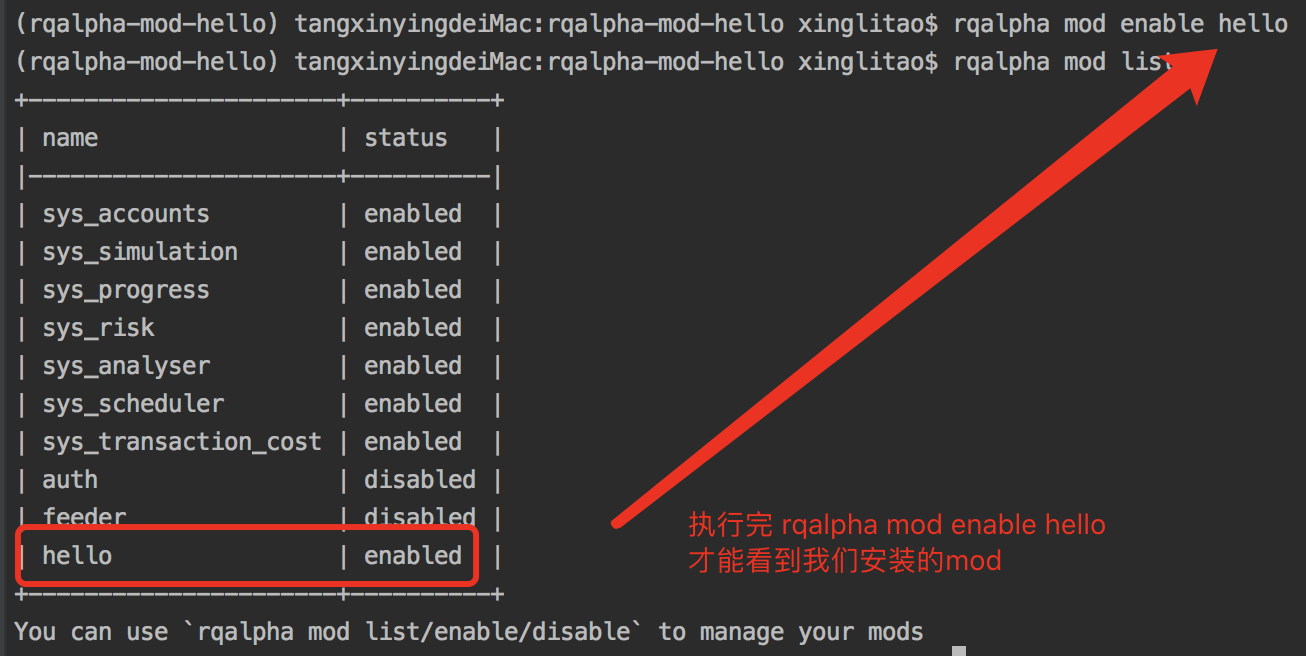
运行RQAlpha即可看到如下:
.. image:: https://raw.githubusercontent.com/ricequant/rq-resource/master/rqalpha/mod-run-success.png

.. note::
至此,完成了第一个Mod的创建以及安装,如您想与RQAlpha用户分享自己的Mod,您需要遵守一些发布格式,以便他人进行管理及使用。

:ref:`development-release-mod`
扩展 RQAlpha API
如果你想为 RQAlpha 创建自己的 API,你也可以通过 Mod 来注册新的 API。在内建的 mod 中,有一个 FuncatAPIMod ,将通达信、同花顺的公式表达能力移植到 Python 中,扩展了 RQAlpha 的 API。
其中的关键点,是通过了 :code:register_api 来注册 API。
我们只需要实现一个 Mod,然后在 :code:start_up 过程中,使用 :code:register_api 来注册 API ,既可以达到扩展 RQAlpha API 的功能。
.. code-block:: python3
class FuncatAPIMod(AbstractMod):
    def start_up(self, env, mod_config):
        try:
            import funcat
        except ImportError:
            print("-" * 50)
            print(">>> Missing funcat. Please run `pip install funcat`")
            print("-" * 50)
            raise

        # change funcat data backend to rqalpha
        from funcat.data.rqalpha_backend import RQAlphaDataBackend
        funcat.set_data_backend(RQAlphaDataBackend())

        # register funcat api into rqalpha
        from rqalpha.api import register_api
        for name in dir(funcat):
            obj = getattr(funcat, name)
            if getattr(obj, "__module__", "").startswith("funcat"):
                register_api(name, obj)

    def tear_down(self, code, exception=None):
        pass
.. _development-release-mod:
发布独立 Pypi 包作为 Mod
RQAlpha 支持安装、卸载、启用、停止第三方Mod。
.. code-block:: bash
# 以名为 "xxx" 的 Mod 为例,介绍RQAlpha 第三方Mod的使用

# 启用
$ rqalpha mod enable xxx

# 关闭
$ rqalpha mod disable xxx
如果您希望发布自己的Mod并被 RQAlpha 的用户使用,只需要遵循简单的约定即可。
下面为一个 RQAlpha Mod 的模板:
.. code-block:: python3
from rqalpha.interface import AbstractMod


class XXXMod(AbstractMod):
    def __init__(self):
        pass

    def start_up(self, env, mod_config):
        pass

    def tear_down(self, code, exception=None):
        pass


def load_mod():
    return XXXMod()


__mod_config__ = """
  param1: "111"
  param2: "222"
"""
约定如下:
- 需要定义并实现 :code:
load_mod函数, 其返回值为对应的继承自 :code:AbstractMod的类,并且 :code:load_mod所在文件必须按照 :code:rqalpha_mod_xxx规则进行命名。 - 如果有自定义参数的话,需要实现 :code:
__mod_config__变量,其为字符串,配置的具体格式为yaml格式(支持注释)。RQAlpha 会自动将其扩展到默认配置项中。 - 当写好 Mod 以后,需要发布到 Pypi 仓库中,并且包名需要如下格式: :code:
rqalpha-mod-xxx,以下的 setup.py 文件可作参考。
.. code-block:: python3
from pip.req import parse_requirements

from setuptools import (
    find_packages,
    setup,
)

setup(
    name='rqalpha-mod-xxx',
    version="0.1.0",
    description='RQAlpha Mod XXX',
    packages=find_packages(exclude=[]),
    author='',
    author_email='',
    license='Apache License v2',
    package_data={'': ['*.*']},
    url='',
    install_requires=[str(ir.req) for ir in parse_requirements("requirements.txt", session=False)],
    zip_safe=False,
    classifiers=[
        'Programming Language :: Python',
        'Operating System :: Microsoft :: Windows',
        'Operating System :: Unix',
        'Programming Language :: Python :: 3.6',
    ],
)
按此编写好 Mod 并发布到 Pypi 上以后,就可以直接使用RQAlpha的命令来安装和启用该Mod了。
如您不熟悉PyPI发布的流程,请参考官方文档:https://packaging.python.org/distributing/
如果您希望更多人使用您的Mod,您也可以联系我们,我们审核通过后,会在 RQAlpha 项目介绍和文档中增加您的Mod的介绍和推荐。
Source Intro Detail Install (`docs/source/intro/detail_install.rst`)
.. _intro-detail-install:
===================== Anaconda 虚拟环境搭建
Anaconda 是一个用于科学计算的 Python 发行版,支持 Linux, Mac, Windows, 包含了众多流行的科学计算、数据分析的 Python 包。
Anaconda 环境包含了常用的 Python 科学计算库及依赖关系,而 RQAlpha 有很多模块是依赖于这些科学计算库的,因此下载 Anaconda 可以轻松搭建出一个强大的 Python 量化研发的基础环境。
.. note::
安装 Anaconda 比较简单,只需要去 `Anaconda 官网`_ 下载对应操作系统版本的安装包进行安装即可。当安装成功后,执行如下命令来查看是否安装成功:
.. code-block:: bash
conda -VFor GNU/Linux
如果您使用 GNU/Linux 系统,可以使用如下方式进行 Anaconda 环境(基于 Python 3)的安装,下面以 CentOS 为例:
.. code-block:: bash
# 首先从 Anaconda 官网下载 anaconda Linux 64Bit 版本命令行安装包

$ wget https://repo.anaconda.com/archive/Anaconda3-2020.02-Linux-x86_64.sh

# 修改权限让脚本可以运行
$ chmod +x Anaconda3-2020.02-Linux-x86_64.sh

# 运行该安装脚本
$ ./Anaconda3-2020.02-Linux-x86_64.sh

# 剩下就是一路Yes或者Enter好了...

Welcome to Anaconda3 4.2.0 (by Continuum Analytics, Inc.)


In order to continue the installation process, please review the license

agreement.

Please, press ENTER to continue
>>>

# 重新加载一下 bash 就可以使用 `conda` 命令了
$ source ~/.bashrc

#然后尝试一下运行 `conda -V` 命令行看是否已经安装成功,如果返回对应的版本信息,则说明安装成功。

$ conda -V
conda 4.2.13

#设置matplotlib的backend(没有图形化界面的情况下)
$ echo "backend: Agg" > ~/.config/matplotlib/matplotlibrc
安装中文字体: 将 :code:WenQuanYi Micro Hei.ttf 放到 :code:/usr/share/fonts/chinese
在执行以下命令如出现问题,请参考 :ref:FAQ-chinese-fonts-mac
.. code-block:: bash
mkdir /usr/share/fonts/chinese
cd /usr/share/fonts/chinese
wget https://static.ricequant.com/data/WenQuanYi%20Micro%20Hei.ttf
fc-cache -fv
fc-list
rm -rf ~/.cache/matplotlib
rm -rf ~/.fontconfig
.. _Anaconda 官网: https://www.anaconda.com/distribution/
conda 虚拟环境
- 构建 conda 虚拟环境
我们强烈建议您去创建并使用Python虚拟环境,因为这样才能让您的开发环境更加独立,不会因为安装不同的包而出现问题,造成运行失败等。
目前流行的Python虚拟环境有两种::code:conda 和 :code:pyenv, 由于大部分的量化开发都是基于 Anaconda 的 python 技术栈,因此我们建议您使用 conda 作为默认的虚拟环境开发。
以下有几个常用的虚拟环境命令可以使用:
.. code-block:: bash
# 创建 conda 虚拟环境( :code:`env_name` 是您希望创建的虚拟环境名)
$ conda create --name env_name python=3.6

# 如您想创建一个名为rqalpha的虚拟环境
$ conda create --name rqalpha python=3.6

# 使用 conda 虚拟环境
$ source activate env_name
# 如果是 Windows 环境下 直接执行 activcate
$ activate env_name

# 退出 conda 虚拟环境
$ source deactivate env_name
# 如果是 Windows 环境下 直接执行 deactivate
$ deactivate env_name

# 删除 conda 虚拟环境
$ conda-env remove --name env_name
Source Intro Examples (`docs/source/intro/examples.rst`)
.. _intro-examples:
========================================== 策略示例
.. _Ricequant: https://www.ricequant.com/algorithms
在下面我们列举一些常用的算法范例,您可以通过RQAlpha运行,也可以直接登录 Ricequant_ 在线进行回测或模拟交易。
.. _intro-examples-buy-and-hold:
第一个策略-买入&持有
万事开头难,这是一个最简单的策略:在回测开始的第一天买入资金量的100%的平安银行并且一直持有。
.. code-block:: python3
:linenos:
# 在这个方法中编写任何的初始化逻辑。context对象将会在你的算法策略的任何方法之间做传递。
def init(context):
    logger.info("init")
    context.s1 = "000001.XSHE"
    update_universe(context.s1)
    # 是否已发送了order
    context.fired = False
    context.cnt = 1


def before_trading(context):
    logger.info("Before Trading", context.cnt)
    context.cnt += 1


# 你选择的证券的数据更新将会触发此段逻辑,例如日或分钟历史数据切片或者是实时数据切片更新
def handle_bar(context, bar_dict):
    context.cnt += 1
    logger.info("handle_bar", context.cnt)
    # 开始编写你的主要的算法逻辑

    # bar_dict[order_book_id] 可以拿到某个证券的bar信息
    # context.portfolio 可以拿到现在的投资组合状态信息

    # 使用order_shares(id_or_ins, amount)方法进行落单

    # TODO: 开始编写你的算法吧!
    if not context.fired:
        # order_percent并且传入1代表买入该股票并且使其占有投资组合的100%
        order_percent(context.s1, 1)
        context.fired = True
.. _intro-examples-golden-cross:
Golden Cross算法示例
以下是一个我们使用TALib编写的golden cross算法的示例,使用了simple moving average方法:
.. code-block:: python3
:linenos:
import talib


# 在这个方法中编写任何的初始化逻辑。context对象将会在你的算法策略的任何方法之间做传递。
def init(context):
    context.s1 = "000001.XSHE"

    # 设置这个策略当中会用到的参数,在策略中可以随时调用,这个策略使用长短均线,我们在这里设定长线和短线的区间,在调试寻找最佳区间的时候只需要在这里进行数值改动
    context.SHORTPERIOD = 20
    context.LONGPERIOD = 120


# 你选择的证券的数据更新将会触发此段逻辑,例如日或分钟历史数据切片或者是实时数据切片更新
def handle_bar(context, bar_dict):
    # 开始编写你的主要的算法逻辑

    # bar_dict[order_book_id] 可以拿到某个证券的bar信息
    # context.portfolio 可以拿到现在的投资组合状态信息

    # 使用order_shares(id_or_ins, amount)方法进行落单

    # TODO: 开始编写你的算法吧!

    # 因为策略需要用到均线,所以需要读取历史数据
    prices = history_bars(context.s1, context.LONGPERIOD+1, '1d', 'close')

    # 使用talib计算长短两根均线,均线以array的格式表达
    short_avg = talib.SMA(prices, context.SHORTPERIOD)
    long_avg = talib.SMA(prices, context.LONGPERIOD)

    plot("short avg", short_avg[-1])
    plot("long avg", long_avg[-1])

    # 获取当前投资组合中股票的仓位
    cur_position = get_position(context.s1).quantity
    # 计算现在portfolio中的现金可以购买多少股票
    shares = context.portfolio.cash/bar_dict[context.s1].close

    # 如果短均线从上往下跌破长均线,也就是在目前的bar短线平均值低于长线平均值,而上一个bar的短线平均值高于长线平均值
    if short_avg[-1] - long_avg[-1] < 0 and short_avg[-2] - long_avg[-2] > 0 and cur_position > 0:
        # 进行清仓
        order_target_value(context.s1, 0)

    # 如果短均线从下往上突破长均线,为入场信号
    if short_avg[-1] - long_avg[-1] > 0 and short_avg[-2] - long_avg[-2] < 0:
        # 满仓入股
        order_shares(context.s1, shares)
单股票 MACD 算法示例
以下是一个我们使用TALib编写的单股票MACD算法示例,使用了TALib的MACD方法:
.. code-block:: python3
:linenos:
import talib


# 在这个方法中编写任何的初始化逻辑。context对象将会在你的算法策略的任何方法之间做传递。
def init(context):
    context.s1 = "000001.XSHE"

    # 使用MACD需要设置长短均线和macd平均线的参数
    context.SHORTPERIOD = 12
    context.LONGPERIOD = 26
    context.SMOOTHPERIOD = 9
    context.OBSERVATION = 100


# 你选择的证券的数据更新将会触发此段逻辑,例如日或分钟历史数据切片或者是实时数据切片更新
def handle_bar(context, bar_dict):
    # 开始编写你的主要的算法逻辑

    # bar_dict[order_book_id] 可以拿到某个证券的bar信息
    # context.portfolio 可以拿到现在的投资组合状态信息

    # 使用order_shares(id_or_ins, amount)方法进行落单

    # TODO: 开始编写你的算法吧!

    # 读取历史数据,使用sma方式计算均线准确度和数据长度无关,但是在使用ema方式计算均线时建议将历史数据窗口适当放大,结果会更加准确
    prices = history_bars(context.s1, context.OBSERVATION,'1d','close')

    # 用Talib计算MACD取值,得到三个时间序列数组,分别为macd, signal 和 hist
    macd, signal, hist = talib.MACD(prices, context.SHORTPERIOD,
                                    context.LONGPERIOD, context.SMOOTHPERIOD)

    plot("macd", macd[-1])
    plot("macd signal", signal[-1])

    # macd 是长短均线的差值,signal是macd的均线,使用macd策略有几种不同的方法,我们这里采用macd线突破signal线的判断方法

    # 如果macd从上往下跌破macd_signal

    if macd[-1] - signal[-1] < 0 and macd[-2] - signal[-2] > 0:
        # 获取当前投资组合中股票的仓位
        curPosition = get_position(context.s1).quantity
        #进行清仓
        if curPosition > 0:
            order_target_value(context.s1, 0)

    # 如果短均线从下往上突破长均线,为入场信号
    if macd[-1] - signal[-1] > 0 and macd[-2] - signal[-2] < 0:
        # 满仓入股
        order_target_percent(context.s1, 1)
多股票RSI算法示例
以下是一个我们使用TALib编写的多股票RSI算法示例,使用了TALib的RSI方法:
.. code-block:: python3
:linenos:
import talib


# 在这个方法中编写任何的初始化逻辑。context对象将会在你的算法策略的任何方法之间做传递。
def init(context):

    # 选择我们感兴趣的股票
    context.s1 = "000001.XSHE"
    context.s2 = "601988.XSHG"
    context.s3 = "000068.XSHE"
    context.stocks = [context.s1, context.s2, context.s3]

    context.TIME_PERIOD = 14
    context.HIGH_RSI = 85
    context.LOW_RSI = 30
    context.ORDER_PERCENT = 0.3


# 你选择的证券的数据更新将会触发此段逻辑,例如日或分钟历史数据切片或者是实时数据切片更新
def handle_bar(context, bar_dict):
    # 开始编写你的主要的算法逻辑

    # bar_dict[order_book_id] 可以拿到某个证券的bar信息
    # context.portfolio 可以拿到现在的投资组合状态信息

    # 使用order_shares(id_or_ins, amount)方法进行落单

    # TODO: 开始编写你的算法吧!

    # 对我们选中的股票集合进行loop,运算每一只股票的RSI数值
    for stock in context.stocks:
        # 读取历史数据
        prices = history_bars(stock, context.TIME_PERIOD+1, '1d', 'close')

        # 用Talib计算RSI值
        rsi_data = talib.RSI(prices, timeperiod=context.TIME_PERIOD)[-1]

        cur_position = get_position(stock).quantity
        # 用剩余现金的30%来购买新的股票
        target_available_cash = context.portfolio.cash * context.ORDER_PERCENT

        # 当RSI大于设置的上限阀值,清仓该股票
        if rsi_data > context.HIGH_RSI and cur_position > 0:
            order_target_value(stock, 0)

        # 当RSI小于设置的下限阀值,用剩余cash的一定比例补仓该股
        if rsi_data < context.LOW_RSI:
            logger.info("target available cash caled: " + str(target_available_cash))
            # 如果剩余的现金不够一手 - 100shares,那么会被ricequant 的order management system reject掉
            order_value(stock, target_available_cash)
海龟交易系统
海龟交易系统也是非常经典的一种策略,我们也放出了范例代码如下,而关于海龟交易系统的介绍也可以参照 这篇帖子 <https://www.ricequant.com/community/topic/62/%E8%B6%8B%E5%8A%BF%E7%AD%96%E7%95%A5%E5%B0%8F%E8%AF%95%E7%89%9B%E5%88%80-%E6%B5%B7%E9%BE%9F%E4%BA%A4%E6%98%93%E4%BD%93%E7%B3%BB%E7%9A%84%E6%9E%84%E5%BB%BA>_ 。
.. code-block:: python3
:linenos:
import numpy as np
import talib
import math


def get_extreme(array_high_price_result, array_low_price_result):
    np_array_high_price_result = np.array(array_high_price_result[:-1])
    np_array_low_price_result = np.array(array_low_price_result[:-1])
    max_result = np_array_high_price_result.max()
    min_result = np_array_low_price_result.min()
    return [max_result, min_result]


def get_atr_and_unit( atr_array_result,  atr_length_result, portfolio_value_result):
    atr =  atr_array_result[ atr_length_result-1]
    unit = math.floor(portfolio_value_result * .01 / atr)
    return [atr, unit]


def get_stop_price(first_open_price_result, units_hold_result, atr_result):
    stop_price = first_open_price_result - 2 * atr_result \
                 + (units_hold_result - 1) * 0.5 * atr_result
    return stop_price


def init(context):
    context.trade_day_num = 0
    context.unit = 0
    context.atr = 0
    context.trading_signal = 'start'
    context.pre_trading_signal = ''
    context.units_hold_max = 4
    context.units_hold = 0
    context.quantity = 0
    context.max_add = 0
    context.first_open_price = 0
    context.s = '000300.XSHG'
    context.open_observe_time = 55
    context.close_observe_time = 20
    context.atr_time = 20


def handle_bar(context, bar_dict):
    portfolio_value = context.portfolio.portfolio_value
    high_price = history_bars(context.s, context.open_observe_time+1, '1d', 'high')
    low_price_for_atr = history_bars(context.s, context.open_observe_time+1, '1d', 'low')
    low_price_for_extreme = history_bars(context.s, context.close_observe_time+1, '1d', 'low')
    close_price = history_bars(context.s, context.open_observe_time+2, '1d', 'close')
    close_price_for_atr = close_price[:-1]

    atr_array = talib.ATR(high_price, low_price_for_atr, close_price_for_atr, timeperiod=context.atr_time)

    maxx = get_extreme(high_price, low_price_for_extreme)[0]
    minn = get_extreme(high_price, low_price_for_extreme)[1]
    atr = atr_array[-2]

    if context.trading_signal != 'start':
        if context.units_hold != 0:
            context.max_add += 0.5 * get_atr_and_unit(atr_array, atr_array.size, portfolio_value)[0]
    else:
        context.max_add = bar_dict[context.s].last

    cur_position = get_position(context.s).quantity
    available_cash = context.portfolio.cash
    market_value = context.portfolio.market_value

    if (cur_position > 0 and
            bar_dict[context.s].last < get_stop_price(context.first_open_price, context.units_hold, atr)):
        context.trading_signal = 'stop'
    else:
        if cur_position > 0 and bar_dict[context.s].last < minn:
            context.trading_signal = 'exit'
        else:
            if (bar_dict[context.s].last > context.max_add and context.units_hold != 0 and
                    context.units_hold < context.units_hold_max and
                    available_cash > bar_dict[context.s].last*context.unit):
                context.trading_signal = 'entry_add'
            else:
                if bar_dict[context.s].last > maxx and context.units_hold == 0:
                    context.max_add = bar_dict[context.s].last
                    context.trading_signal = 'entry'

    atr = get_atr_and_unit(atr_array, atr_array.size, portfolio_value)[0]
    if context.trade_day_num % 5 == 0:
        context.unit = get_atr_and_unit(atr_array, atr_array.size, portfolio_value)[1]
    context.trade_day_num += 1
    context.quantity = context.unit

    if (context.trading_signal != context.pre_trading_signal or
            (context.units_hold < context.units_hold_max and context.units_hold > 1) or
            context.trading_signal == 'stop'):
        if context.trading_signal == 'entry':
            context.quantity = context.unit
            if available_cash > bar_dict[context.s].last*context.quantity:
                order_shares(context.s, context.quantity)
                context.first_open_price = bar_dict[context.s].last
                context.units_hold = 1

        if context.trading_signal == 'entry_add':
            context.quantity = context.unit
            order_shares(context.s, context.quantity)
            context.units_hold += 1

        if context.trading_signal == 'stop':
            if context.units_hold > 0:
                order_shares(context.s, -context.quantity)
                context.units_hold -= 1

        if context.trading_signal == 'exit':
            if cur_position > 0:
                order_shares(context.s, -cur_position)
                context.units_hold = 0

    context.pre_trading_signal = context.trading_signal
股指期货MACD日回测
以下是一个使用TALib进行股指期货主力合约日级别回测MACD算法示例:
.. code-block:: python3
:linenos:
# 可以自己import我们平台支持的第三方python模块,比如pandas、numpy等
import talib


# 在这个方法中编写任何的初始化逻辑。context对象将会在你的算法策略的任何方法之间做传递
def init(context):
    # context内引入全局变量s1,存储目标合约信息
    context.s1 = 'IF1606'

    # 使用MACD需要设置长短均线和macd平均线的参数
    context.SHORTPERIOD = 12
    context.LONGPERIOD = 26
    context.SMOOTHPERIOD = 9
    context.OBSERVATION = 50

    #初始化时订阅合约行情。订阅之后的合约行情会在handle_bar中进行更新
    subscribe(context.s1)


# 你选择的期货数据更新将会触发此段逻辑,例如日线或分钟线更新
def handle_bar(context, bar_dict):
    # 开始编写你的主要的算法逻辑
    # 获取历史收盘价序列,history_bars函数直接返回ndarray,方便之后的有关指标计算
    prices = history_bars(context.s1, context.OBSERVATION, '1d', 'close')

    # 用Talib计算MACD取值,得到三个时间序列数组,分别为macd,signal 和 hist
    macd, signal, hist = talib.MACD(prices, context.SHORTPERIOD,
                                    context.LONGPERIOD, context.SMOOTHPERIOD)

    # macd 是长短均线的差值,signal是macd的均线,如果短均线从下往上突破长均线,为入场信号,进行买入开仓操作
    if macd[-1] - signal[-1] > 0 and macd[-2] - signal[-2] < 0:
        sell_qty = get_position(context.s1, POSITION_DIRECTION.SHORT).quantity
        # 先判断当前卖方仓位,如果有,则进行平仓操作
        if sell_qty > 0:
            buy_close(context.s1, 1)
        # 买入开仓
        buy_open(context.s1, 1)

    if macd[-1] - signal[-1] < 0 and macd[-2] - signal[-2] > 0:
        buy_qty = get_position(context.s1, POSITION_DIRECTION.LONG).quantity
        # 先判断当前买方仓位,如果有,则进行平仓操作
        if buy_qty > 0:
            sell_close(context.s1, 1)
        # 卖出开仓
        sell_open(context.s1, 1)
商品期货跨品种配对交易
该策略为分钟级别回测。运用了简单的移动平均以及布林带(Bollinger Bands <https://en.wikipedia.org/wiki/Bollinger_Bands>)作为交易信号产生源。有关对冲比率(HedgeRatio)的确定,您可以在我们的研究平台上面通过import statsmodels.api as sm引入 statsmodels <http://statsmodels.sourceforge.net/devel/> 中的OLS方法进行线性回归估计。具体估计窗口,您可以根据自己策略需要自行选择。
策略中的移动窗口选择为60分钟,即在每天开盘60分钟内不做任何交易,积累数据计算移动平均值。当然,这一移动窗口也可以根据自身需要进行灵活选择。下面例子中使用了黄金与白银两种商品期货进行配对交易。简单起见,例子中期货的价格并未做对数差处理。
.. code-block:: python3
:linenos:
import numpy as np


# 在这个方法中编写任何的初始化逻辑。context对象将会在你的算法策略的任何方法之间做传递。
def init(context):
    context.s1 = 'AG1612'
    context.s2 = 'AU1612'

    # 设置全局计数器
    context.counter = 0

    # 设置滚动窗口
    context.window = 60

    # 设置对冲手数,通过研究历史数据进行价格序列回归得到该值
    context.ratio = 15

    context.up_cross_up_limit = False
    context.down_cross_down_limit = False

    # 设置入场临界值
    context.entry_score = 2

    # 初始化时订阅合约行情。订阅之后的合约行情会在handle_bar中进行更新
    subscribe([context.s1, context.s2])


# before_trading此函数会在每天交易开始前被调用,当天只会被调用一次
def before_trading(context):
    # 样例商品期货在回测区间内有夜盘交易,所以在每日开盘前将计数器清零
    context.counter = 0


# 你选择的期货数据更新将会触发此段逻辑,例如日线或分钟线更新
def handle_bar(context, bar_dict):

    # 获取当前一对合约的仓位情况。如尚未有仓位,则对应持仓量都为0
    long_pos_a = get_position(context.s1, POSITION_DIRECTION.LONG)
    short_pos_a = get_position(context.s1, POSITION_DIRECTION.SHORT)
    long_pos_b = get_position(context.s2, POSITION_DIRECTION.LONG)
    short_pos_b = get_position(context.s2, POSITION_DIRECTION.SHORT)

    context.counter += 1
    # 当累积满一定数量的bar数据时候,进行交易逻辑的判断
    if context.counter > context.window:

        # 获取当天历史分钟线价格队列
        price_array_a = history_bars(context.s1, context.window, '1m', 'close')
        price_array_b = history_bars(context.s2, context.window, '1m', 'close')

        # 计算价差序列、其标准差、均值、上限、下限
        spread_array = price_array_a - context.ratio * price_array_b
        std = np.std(spread_array)
        mean = np.mean(spread_array)
        up_limit = mean + context.entry_score * std
        down_limit = mean - context.entry_score * std

        # 获取当前bar对应合约的收盘价格并计算价差
        price_a = bar_dict[context.s1].close
        price_b = bar_dict[context.s2].close
        spread = price_a - context.ratio * price_b

        # 如果价差低于预先计算得到的下限,则为建仓信号,'买入'价差合约
        if spread <= down_limit and not context.down_cross_down_limit:
            # 可以通过logger打印日志
            logger.info('spread: {}, mean: {}, down_limit: {}'.format(spread, mean, down_limit))
            logger.info('创建买入价差中...')

            # 获取当前剩余的应建仓的数量
            qty_a = 1 - long_pos_a.quantity
            qty_b = context.ratio - short_pos_b.sell_quantity

            # 由于存在成交不超过下一bar成交量25%的限制,所以可能要通过多次发单成交才能够成功建仓
            if qty_a > 0:
                buy_open(context.s1, qty_a)
            if qty_b > 0:
                sell_open(context.s2, qty_b)
            if qty_a == 0 and qty_b == 0:
                # 已成功建立价差的'多仓'
                context.down_cross_down_limit = True
                logger.info('买入价差仓位创建成功!')

        # 如果价差向上回归移动平均线,则为平仓信号
        if spread >= mean and context.down_cross_down_limit:
            logger.info('spread: {}, mean: {}, down_limit: {}'.format(spread, mean, down_limit))
            logger.info('对买入价差仓位进行平仓操作中...')

            # 由于存在成交不超过下一bar成交量25%的限制,所以可能要通过多次发单成交才能够成功建仓
            qty_a = long_pos_a.quantity
            qty_b = short_pos_b.quantity
            if qty_a > 0:
                sell_close(context.s1, qty_a)
            if qty_b > 0:
                buy_close(context.s2, qty_b)
            if qty_a == 0 and qty_b == 0:
                context.down_cross_down_limit = False
                logger.info('买入价差仓位平仓成功!')

        # 如果价差高于预先计算得到的上限,则为建仓信号,'卖出'价差合约
        if spread >= up_limit and not context.up_cross_up_limit:
            logger.info('spread: {}, mean: {}, up_limit: {}'.format(spread, mean, up_limit))
            logger.info('创建卖出价差中...')
            qty_a = 1 - short_pos_a.quantity
            qty_b = context.ratio - long_pos_b.quantity
            if qty_a > 0:
                sell_open(context.s1, qty_a)
            if qty_b > 0:
                buy_open(context.s2, qty_b)
            if qty_a == 0 and qty_b == 0:
                context.up_cross_up_limit = True
                logger.info('卖出价差仓位创建成功')

        # 如果价差向下回归移动平均线,则为平仓信号
        if spread < mean and context.up_cross_up_limit:
            logger.info('spread: {}, mean: {}, up_limit: {}'.format(spread, mean, up_limit))
            logger.info('对卖出价差仓位进行平仓操作中...')
            qty_a = short_pos_a.quantity
            qty_b = long_pos_b.quantity
            if qty_a > 0:
                buy_close(context.s1, qty_a)
            if qty_b > 0:
                sell_close(context.s2, qty_b)
            if qty_a == 0 and qty_b == 0:
                context.up_cross_up_limit = False
                logger.info('卖出价差仓位平仓成功!')
Source Intro Install (`docs/source/intro/install.rst`)
.. _intro-install:
================== 安装指南
安装前
.. image:: https://img.shields.io/pypi/pyversions/rqalpha.svg
:target: https://pypi.python.org/pypi/rqalpha
:alt: Python Version Support
.. note::
*   我们强烈建议您使用虚拟环境安装RQAlpha,以避免因为环境问题出现安装失败。虚拟环境的使用请参考::ref:`intro-detail-install`
*   如果安装过程中遇到了问题,先阅读该文档下面的 「FAQ」 章节来尝试着解决
*   如果执行 :code:`pip install` 安装依赖库网络速度比较慢的话,推荐使用 :code:`pip install -i https://pypi.douban.com/simple` 国内镜像来加速
安装
.. code-block:: bash
$ pip install -i https://pypi.douban.com/simple rqalpha查看 RQAlpha 是否安装成功可以通过如下方式:
.. code-block:: bash
$ rqalpha version.. _intro-install-get-data:
获取回测数据
RiceQuant 免费提供日级别的股票、常用指数、场内基金和期货数据供回测使用。数据每个月月初更新,可以通过以下命令来下载:
.. code-block:: bash
$ rqalpha download-bundle.. note::
Mac OS下执行 :code:`download-bundle` 出现问题,请参考::ref:`FAQ-download-bundle-mac`bundle 默认存放在 :code:~/.rqalpha 下,您也可以指定 bundle 的存放位置,
.. code-block:: bash
$ rqalpha download-bundle -d target_bundle_path如果您使用了指定路径来存放 bundle,那么执行程序的时候也同样需要指定对应的 bundle 路径。
.. code-block:: bash
$ rqalpha run -d target_bundle_path .....回测数据的更新
您也可以使用 RQDatac_ 在每日盘后即时更新回测数据,更新命令如下:
.. code-block:: bash
$ rqalpha update-bundle.. note::
您需要先安装 `RQDatac`_ 包、获取 `RQDatac`_ 的使用权限,并使用 Ricequant 提供的配置脚本将您的 `RQDatac`_ license 配置到系统环境变量中。请参考: https://www.ricequant.com/welcome/trial/rqdata-cloud.. _intro-config:
获取配置文件
如果运行 RQAlpha 时不指定配置文件,会在 :code:~/.rqalpha/ 文件夹下创建 :code:config.yml 文件作为默认配置文件。
如果您想要直接获得一份配置文件,也可以通过如下命令来获得。
.. code-block:: bash
$ rqalpha generate-config.. _intro-faq:
FAQ
- line-profiler 相关问题
RQAlpha 的性能分析功能依赖于 :code:line_profiler 包;通过 :code:pip 安装 RQAlpha 时,默认并不会附带安装 :code:line_profiler;
如果您需要使用性能分析功能,请使用 :code:pip install rqalpha[profiler] 方式安装 RQAlpha。
在windows上,建议您访问 http://www.lfd.uci.edu/~gohlke/pythonlibs/#line_profiler 下载 :code:line_profiler 直接进行安装。
在windows上,通过 :code:pip 安装 :code:line-profiler 需要安装 :code:Visual C++ Compiler。
请访问 https://wiki.python.org/moin/WindowsCompilers 根据自己的机器环境和Python版本选择安装对应的编译工具。
- Matplotlib 相关问题
- 运行回测时,matplotlib 报错怎么办?:code:
RuntimeError: Python is not installed as a framework:
解决方案:创建文件 :code:~/.matplotlib/matplotlibrc,并加入代码 :code:backend: TkAgg
- 在 Python 3.6 下没有任何报错,但是就是没有plot输出:
解决方案:创建文件 :code:~/.matplotlib/matplotlibrc,并加入代码 :code:backend: TkAgg
- 在Windows运行报 :code:
Error on import matplotlib.pyplot:
解决方案: 请访问 Error on import matplotlib.pyplot (on Anaconda3 for Windows 10 Home 64-bit PC) <http://stackoverflow.com/questions/34004063/error-on-import-matplotlib-pyplot-on-anaconda3-for-windows-10-home-64-bit-pc>_ 解决。
.. _FAQ-download-bundle-mac:
- Mac OS 获取回测数据相关问题
- Finder中查看数据存放位置:
Mac OS下默认关闭显示隐藏文件,如想在Finder中查看bundle,您需要打开显示隐藏文件:
.. code-block:: bash
$ defaults write com.apple.finder AppleShowAllFiles -boolean true ; killall Finder.. _FAQ-chinese-fonts-mac:
- Mac 下安装中文字体相关问题:
- 出现 :code:
Operation not permitted:
因为Mac OS 10.11 EI Capitan 后加入rootless机制,对系统的读写有了更严格的限制,在创建目录环节会出现“Operation not permitted”
您可以通过关闭rootless来解决这个问题。
请重启按住 :code:command + R ,进入恢复模式,打开Terminal:
.. code-block:: bash
$ csrutil disable- 出现 :code:
command not found:
Mac 下默认并没有安装很多命令,我们可以通过homebrew安装,如没有安装homebrew,请参考:
在Terminal下输入:
.. code-block:: bash
ruby -e "$(curl --insecure -fsSL https://raw.githubusercontent.com/Homebrew/install/master/install)”按照系统提示输入密码
:code:wget 命令没有安装:
.. code-block:: bash
$ brew install wget
:code:fc--cache 命令没有安装:
.. code-block:: bash
$ brew install fontconfig.. _FAQ-examples-path:
- 策略样例路径相关问题:
执行 :code:pip install rqalpha 后虽然会默认保存examples到python环境中,但路径相对复杂,我们建议您将examples目录重新保存到您认为方便的地方。
.. _RQDatac: https://www.ricequant.com/welcome/rqdata
Source Intro Optimizing Parameters (`docs/source/intro/optimizing_parameters.rst`)
.. _intro-optimizing-parameters:
================== 参数调优
对于以下双均线策略,我们希望对其进行参数调优,我们可以通过命令行参数 :code:--extra-vars 或者通过配置 :code:extra.context_vars 传递变量到 :code:context 对象中。
.. code-block:: python
from rqalpha.api import *
import talib


def init(context):
context.s1 = "000001.XSHE"

context.SHORTPERIOD = 20
context.LONGPERIOD = 120


def handle_bar(context, bar_dict):
prices = history_bars(context.s1, context.LONGPERIOD+1, '1d', 'close')

short_avg = talib.SMA(prices, context.SHORTPERIOD)
long_avg = talib.SMA(prices, context.LONGPERIOD)

cur_position = context.portfolio.positions[context.s1].quantity
shares = context.portfolio.cash / bar_dict[context.s1].close

if short_avg[-1] - long_avg[-1] < 0 and short_avg[-2] - long_avg[-2] > 0 and cur_position > 0:
    order_target_value(context.s1, 0)

if short_avg[-1] - long_avg[-1] > 0 and short_avg[-2] - long_avg[-2] < 0:
    order_shares(context.s1, shares)
通过函数调用传递参数
.. code-block:: python
import concurrent.futures
import multiprocessing
from rqalpha import run


tasks = []
for short_period in range(3, 10, 2):
for long_period in range(30, 90, 5):
    config = {
	"extra": {
	    "context_vars": {
		"SHORTPERIOD": short_period,
		"LONGPERIOD": long_period,
	    },
	    "log_level": "error",
	},
	"base": {
	    "matching_type": "current_bar",
	    "start_date": "2015-01-01",
	    "end_date": "2016-01-01",
	    "benchmark": "000001.XSHE",
	    "frequency": "1d",
	    "strategy_file": "rqalpha/examples/golden_cross.py",
        "accounts": {
            "stock": 100000
        }
	},
	"mod": {
	    "sys_progress": {
		"enabled": True,
		"show": True,
	    },
	    "sys_analyser": {
		"enabled": True,
		"output_file": "results/out-{short_period}-{long_period}.pkl".format(
		    short_period=short_period,
		    long_period=long_period,
		)
	    },
	},
    }

    tasks.append(config)


def run_bt(config):
run(config)


if __name__ == '__main__':
    with concurrent.futures.ProcessPoolExecutor(max_workers=multiprocessing.cpu_count()) as executor:
    for task in tasks:
        executor.submit(run_bt, task)
通过命令行传递参数
.. code-block:: python
import os
import json
import concurrent.futures
import multiprocessing


tasks = []
for short_period in range(3, 10, 2):
for long_period in range(30, 90, 5):
    extra_vars = {
	"SHORTPERIOD": short_period,
	"LONGPERIOD": long_period,
    }
    vars_params = json.dumps(extra_vars).encode("utf-8").decode("utf-8")

    cmd = ("rqalpha run -fq 1d -f rqalpha/examples/golden_cross.py --start-date 2015-01-01 --end-date 2016-01-01 "
	   "-o results/out-{short_period}-{long_period}.pkl --account stock 100000 --progress -bm 000001.XSHE --extra-vars '{params}' ").format(
	       short_period=short_period,
	       long_period=long_period,
	       params=vars_params)

    tasks.append(cmd)


def run_bt(cmd):
print(cmd)
os.system(cmd)


if __name__ == '__main__':
    with concurrent.futures.ProcessPoolExecutor(max_workers=multiprocessing.cpu_count()) as executor:
    for task in tasks:
        executor.submit(run_bt, task)
分析批量回测结果
.. code-block:: python
import glob
import pandas as pd


results = []

for name in glob.glob("results/*.pkl"):
result_dict = pd.read_pickle(name)
summary = result_dict["summary"]
results.append({
    "name": name,
    "annualized_returns": summary["annualized_returns"],
    "sharpe": summary["sharpe"],
    "max_drawdown": summary["max_drawdown"],
})

results_df = pd.DataFrame(results)

print("-" * 50)
print("Sort by sharpe")
print(results_df.sort_values("sharpe", ascending=False)[:10])

print("-" * 50)
print("Sort by annualized_returns")
print(results_df.sort_values("annualized_returns", ascending=False)[:10])
Source Intro Overview (`docs/source/intro/overview.rst`)
.. _intro-overview:
==================== 介绍
.. _Ricequant: https://www.ricequant.com/algorithms
.. _Ricequant 社区: https://www.ricequant.com/community
.. _RQAlpha 文档: http://rqalpha.readthedocs.io
.. _Ricequant 文档: https://www.ricequant.com/api/python/chn
RQAlpha 从数据获取、算法交易、回测引擎,实盘模拟,实盘交易到数据分析,为程序化交易者提供了全套解决方案。
RQAlpha 具有灵活的配置方式,强大的扩展性,用户可以非常容易地定制专属于自己的程序化交易系统。
特点
====================== =================================================================================
易于使用 让您集中于策略的开发,一行简单的命令就可以执行您的策略。
完善的文档 您可以直接访问 RQAlpha 文档_ 或者 Ricequant 文档_ 来获取您需要的信息。
活跃的社区 您可以通过访问 Ricequant 社区_ 获取和询问有关 RQAlpha 的一切问题,有很多优秀的童鞋会解答您的问题。
稳定的环境 每天都有会大量的算法交易在 Ricequant 上运行,无论是 RQAlpha,还是数据,我们能会做到问题秒处理,秒解决。
灵活的配置 您可以使用多种方式来配置和运行策略,只需简单的配置就可以构建适合自己的交易系统。
强大的扩展性 开发者可以基于我们提供的 Mod Hook 接口来进行扩展。
====================== =================================================================================
.. warning::
RQAlpha 本身支持不同周期的回测和实盘交易,但是目前只免费开放A股市场日线数据,如果用户需要做分钟回测或者更细级别的回测可以在 `Ricequant`_ 上进行,也通过实现数据层接口函数来使用自己的数据。自有数据源对接请参考 :ref:`development-event-source`RQAlpha 安装
.. code-block:: bash
$ pip install rqalpha.. note::
我们强烈建议您在虚拟环境下安装RQAlpha

虚拟环境的安装,请参考 :ref:`intro-detail-install`
数据获取
当 RQAlpha 安装完成后,可以通过如下命令获取我们提供的免费A股日线数据。获取及更新数据的详细内容请参考 :ref:intro-install-get-data
.. code-block:: bash
$ rqalpha download-bundle生成样例策略
运行以下命令,将会在指定目录生成一个examples文件夹,其中包含几个有趣的样例策略:
.. code-block:: bash
$ rqalpha examples -d ./运行回测
运行 RQAlpha 需要传递一些参数,可以通过命令 rqalpha help 查看,或者查看文档 :ref:intro-config 来获取相关信息。
运行如下命令:
.. code-block:: bash
$ cd examples
$ rqalpha run -f rsi.py -s 2014-01-01 -e 2016-01-01 -o result.pkl --plot --progress --account stock 100000
等待回测结束后,将显示您的收益率和Risk。
绘制回测结果
如果运行完回测后,还需要再次绘制回测结果,可以运行以下命令:
.. code-block:: bash
$ rqalpha plot result.pkl分析结果
RQAlpha可以输出一个 pickle 文件,里面为一个 dict 。keys 包括
- summary 回测摘要
- stock_portfolios 股票帐号的市值
- future_portfolios 期货帐号的市值
- total_portfolios 总账号的的市值
- benchmark_portfolios 基准帐号的市值
- stock_positions 股票持仓
- future_positions 期货仓位
- benchmark_positions 基准仓位
- trades 交易详情(交割单)
- plots 调用plot画图时,记录的值
.. code-block:: python3
import pickle

result_dict = pickle.load(open("/tmp/alpha.pkl", "rb"))   # 从输出pickle中读取数据

result_dict.keys()
# Out: dict_keys(['stock_portfolios', 'total_portfolios', 'stock_positions',
#                 'benchmark_portfolios', 'plots', 'summary', 'trades', 'benchmark_positions'])

result_dict["summary"]
# Out:
# {'alpha': 0.027,
#  'annualized_returns': 0.025000000000000001,
#  'benchmark': '000001.XSHG',
#  'benchmark_annualized_returns': -0.057285289949864038,
#  'benchmark_total_returns': -0.059871893424000011,
#  'beta': 0.314,
#  'cash': -617.64200000000005,
#  'commission_multiplier': 1,
#  'dividend_receivable': 0.0,
#  'downside_risk': 0.14299999999999999,
#  'end_date': datetime.date(2017, 1, 19),
#  'frequency': '1d',
#  'frozen_cash': 0.0,
#  'information_ratio': 0.45700000000000002,
#  'margin_multiplier': 1,
#  'market_value': 1027242.0,
#  'matching_type': 'CURRENT_BAR_CLOSE',
#  'max_drawdown': 0.087999999999999995,
#  'pnl': 26624.358,
#  'portfolio_value': 1026624.358,
#  'run_type': 'BACKTEST',
#  'sharpe': 0.016,
#  'slippage': 0,
#  'sortino': 0.014,
#  'start_date': datetime.date(2016, 1, 4),
#  'strategy_file': 'rqalpha/examples/simple_macd.py',
#  'strategy_name': 'simple_macd',
#  'strategy_type': 'stock',
#  'total_returns': 0.027,
#  'tracking_error': 0.18099999999999999,
#  'transaction_cost': 27467.462,
#  'volatility': 0.125}

result_dict["total_portfolios"][-5:]
# Out:
#             annualized_returns     cash  daily_pnl  daily_returns  \
# date
# 2017-01-13               0.024 -617.642     1119.0          0.001
# 2017-01-16               0.021 -617.642    -2238.0         -0.002
# 2017-01-17               0.022 -617.642     1119.0          0.001
# 2017-01-18               0.024 -617.642     2238.0          0.002
# 2017-01-19               0.025 -617.642     1119.0          0.001
#             dividend_receivable  frozen_cash  market_value        pnl  \
# date
# 2017-01-13                  0.0          0.0     1025004.0  24386.358
# 2017-01-16                  0.0          0.0     1022766.0  22148.358
# 2017-01-17                  0.0          0.0     1023885.0  23267.358
# 2017-01-18                  0.0          0.0     1026123.0  25505.358
# 2017-01-19                  0.0          0.0     1027242.0  26624.358
#             portfolio_value  total_returns  transaction_cost
# date
# 2017-01-13      1024386.358          0.024         27467.462
# 2017-01-16      1022148.358          0.022         27467.462
# 2017-01-17      1023267.358          0.023         27467.462
# 2017-01-18      1025505.358          0.026         27467.462
# 2017-01-19      1026624.358          0.027         27467.462

result_dict["stock_positions"][-5:]
# Out[6]:
#             average_cost  avg_price  bought_quantity  bought_value  \
# date
# 2017-01-13          9.15       9.15           111900     1023885.0
# 2017-01-16          9.15       9.15           111900     1023885.0
# 2017-01-17          9.15       9.15           111900     1023885.0
# 2017-01-18          9.15       9.15           111900     1023885.0
# 2017-01-19          9.15       9.15           111900     1023885.0
#             market_value order_book_id     pnl  quantity  sellable  \
# date
# 2017-01-13     1025004.0   000001.XSHE  1119.0    111900    111900
# 2017-01-16     1022766.0   000001.XSHE -1119.0    111900    111900
# 2017-01-17     1023885.0   000001.XSHE     0.0    111900    111900
# 2017-01-18     1026123.0   000001.XSHE  2238.0    111900    111900
# 2017-01-19     1027242.0   000001.XSHE  3357.0    111900    111900
#             sold_quantity  sold_value symbol  total_orders  total_trades  \
# date
# 2017-01-13              0         0.0   平安银行             1             1
# 2017-01-16              0         0.0   平安银行             1             1
# 2017-01-17              0         0.0   平安银行             1             1
# 2017-01-18              0         0.0   平安银行             1             1
# 2017-01-19              0         0.0   平安银行             1             1
#             transaction_cost  value_percent
# date
# 2017-01-13           819.108          1.001
# 2017-01-16           819.108          1.001
# 2017-01-17           819.108          1.001
# 2017-01-18           819.108          1.001
# 2017-01-19           819.108          1.001
Source Intro Run Algorithm (`docs/source/intro/run_algorithm.rst`)
.. _intro-run-alogirhtm:
==================== 多种方式运行策略
在策略开发过程中,每个人都会有不同的需求,比如
- 不同的时间周期进行回测,
- 想直接基于回测数据进行编程分析,或直接看一下收益结果。
- 想将回测好的策略直接用于实盘交易
- 不同的品种设置不同的风控标准
在设计 RQAlpha API 的时候,考虑到以上随时变化的需求,将这部分需要以参数方式的配置严格从代码层面剥离。同一份策略代码,通过启动策略时传入不同的参数来实现完全不同的策略开发、风控、运行和调优等的功能。
.. warning::
我们提供了多种方式来配置策略参数,请务必理解参数配置的优先级顺序,以避免在设置参数的时候因为优先级搞错而导致设置无效的问题!

参数配置优先级:策略代码中配置 > 命令行传参 = :code:`run_file | run_code | run_func` 函数传参 > 用户配置文件 > 系统默认配置文件
命令行运行
在命令行模式中,我们预先定义了常用的参数作为命令行的 option,您可以直接在控制台输入参数来配置 RQAlpha,
但并不是所有的参数都可以通过命令行来配置,如果有一些特殊的参数需要配置,请结合其他方式来配置您的策略。
当然您也可以扩展命令行,来实现您指定的命令行 option 选项。
此处列出一些常用 option 选项,完整的命令行 option 列表可以执行 :code:rqalpha run -h 查询.
命令行参数
===========   =============================   ==============================================================================
参数名缩写      参数名全称                        说明
===========   =============================   ==============================================================================
-d            `- -` data-bundle-path          数据源所存储的文件路径
-f            `- -` strategy-file             启动的策略文件路径
-s            `- -` start-date                回测起始日期
-e            `- -` end-date                  回测结束日期(如果是实盘,则忽略该配置)
-mm           `- -` margin-multiplier         设置保证金乘数,默认为1
-a            `- -` account                   设置账户类型及起始资金,比如股票期货混合策略,起始资金分别为10000, 20000 :code:`--account stock 10000 --account future 20000`
-fq           `- -` frequency                 目前支持 :code:`1d` (日线回测) 和 :code:`1m` (分钟线回测),如果要进行分钟线,请注意是否拥有对应的数据源,目前开源版本是不提供对应的数据源的
-rt           `- -` run-type                  运行类型,:code:`b` 为回测,:code:`p` 为模拟交易, :code:`r` 为实盘交易
N/A           `- -` resume                    在模拟交易和实盘交易中,RQAlpha支持策略的pause && resume,该选项表示开启 resume 功能
-l            `- -` log-level                 选择日志的输出等级,有 :code:`verbose` | code:`info` | :code:`warning` | :code:`error` 等选项,您可以通过设置 :code:`verbose` 来查看最详细的日志,或者设置 :code:`error` 只查看错误级别的日志输出
N/A           `- -` locale                    选择语言, 支持 :code:`en` | :code:`cn`
N/A           `- -` disable-user-system-log   关闭用户策略产生的系统日志(比如订单未成交等提示)
N/A           `- -` enable-profiler           启动策略逐行性能分析,启动后,在回测结束,会打印策略的运行性能分析报告,可以看到每一行消耗的时间
N/A           `- -` config                    设置配置文件路径
-mc           `- -` mod-config                配置 mod ,支持多个。:code:`-mc funcat_api.enabled True` 就可以启动一个 mod
N/A           `- -` rqdatac                   配置 rqdatac 的用户名密码,以便使用扩展 API,如 :code:`username:password`(若您已使用 Ricequant 提供的配置脚本将 rqdatac 的 license 配置到环境变量中,则无需再传入该参数)
===========   =============================   ==============================================================================


系统内置 Mod Option 扩展
系统内置 Mod 也提供了启动参数的扩展,当您开启了对应的 Mod 时,即可使用。
这里列出一些常用的扩展 option,完整的可用选项亦可以通过执行 :code:rqalpha run -h 查询。
=========== ============================= ==============================================================================
参数名缩写 参数名全称 说明
=========== ============================= ==============================================================================
-bm - - benchmark Benchmark,如果不设置,默认没有基准参照
N/A - - report [sys_analyser]保存交易详情
-o - - output-file [sys_analyser]指定回测结束时将回测数据输出到指定文件中
-p - - plot [sys_analyser]在回测结束后,查看图形化的收益曲线
N/A - - no-plot [sys_analyser]在回测结束后,不查看图形化的收益曲线
N/A - - plot-save [sys_analyser]将plot的收益图以指定文件路径保存
N/A - - progress [sys_progress]开启命令行显示回测进度条
N/A - - no-progress [sys_progress]关闭命令行查看回测进度
N/A - - short-stock [sys_accounts]允许股票卖空
N/A - - no-short-stock [sys_accounts]不允许股票卖空
N/A - - signal [sys_simulation]开启信号模式,不进行撮合,直接成交
-sp - - slippage [sys_simulation]设置滑点
-cm - - commission-multiplier [sys_simulation]设置手续费乘数,默认为1
-me - - match-engine [sys_simulation]启用的回测引擎,目前支持 :code:current_bar (当前Bar收盘价撮合) 和 :code:next_bar (下一个Bar开盘价撮合)
-r - - rid [sys_simulation]可以指定回测的唯一ID,用户区分多次回测的结果
=========== ============================= ==============================================================================
传递 Mod 参数
另外,部分可用的 mod 配置项没有直接暴露出命令行选项,对于这类参数,可以使用 :code:`-mc` 进行设置,如:

- :code:`-mc sys_accounts.auto_switch_order_value True` 开启股票下单接口资金不足时自动使用全部剩余资金下单的功能

.. code-block:: python3

   rqalpha run -rt p -fq 1m -f strategy.py --account stock 100000 -mc sys_accounts.auto_switch_order_value True

系统内置 mod 的可用配置项可以通过访问 mod 的 readme 页面查看,以下是目前已经集成的 Mod 列表:

========================    ==================================================================================
Mod                         说明
========================    ==================================================================================
`sys_accounts`_             股票分红退市、下单等行为的控制,股票期货的风控选项
`sys_analyser`_             回测后输出图片、记录文件等行为的控制;策略 benchmark 的控制
`sys_progress`_             策略运行过程中显示的进度条的控制
`sys_risk`_                 策略前端风控选项
`sys_simulation`_           回测、模拟交易中撮合行为的选项
`sys_transaction_cost`_     回测,模拟交易中税费的控制
========================    ==================================================================================

.. _sys_analyser: https://github.com/ricequant/rqalpha/blob/master/rqalpha/mod/rqalpha_mod_sys_analyser/README.rst
.. _sys_funcat: https://github.com/ricequant/rqalpha/blob/master/rqalpha/mod/rqalpha_mod_sys_funcat/README.rst
.. _sys_progress: https://github.com/ricequant/rqalpha/blob/master/rqalpha/mod/rqalpha_mod_sys_progress/README.rst
.. _sys_risk: https://github.com/ricequant/rqalpha/blob/master/rqalpha/mod/rqalpha_mod_sys_risk/README.rst
.. _sys_simulation: https://github.com/ricequant/rqalpha/blob/master/rqalpha/mod/rqalpha_mod_sys_simulation/README.rst
.. _sys_accounts: https://github.com/ricequant/rqalpha/blob/master/rqalpha/mod/rqalpha_mod_sys_accounts/README.rst
.. _sys_benchmark: https://github.com/ricequant/rqalpha/blob/master/rqalpha/mod/rqalpha_mod_sys_benchmark/README.rst
.. _sys_transaction_cost: https://github.com/ricequant/rqalpha/blob/master/rqalpha/mod/rqalpha_mod_sys_transaction_cost/README.rst


通过 Mod 自定义扩展命令行参数
RQAlpha 非常灵活,您可以在您的 Mod 中扩展命令行,我们以 sys_analyser Mod <https://github.com/ricequant/rqalpha/tree/master/rqalpha/mod/rqalpha_mod_sys_analyser>_ 添加自定义option :code:--plot 来实现展示收益图为例,来介绍以下如何扩展您自己的命令行参数。
.. note::
rqalpha_mod_sys_analyser 对应源码请访问 `这里 <https://github.com/ricequant/rqalpha/blob/master/rqalpha/mod/rqalpha_mod_sys_analyser/__init__.py>`_ 进行查看。RQAlpha 使用 click <http://click.pocoo.org/5/>_ 来实现命令行参数配置,您需要通过 click 来构建 option。
通过 :code:from rqalpha import cli 来获取命令行对象。
.. code-block:: python
import click
from rqalpha import cli
接下来我们命令 :code:rqalpha run 中添加参数 :code:--plot 来实现画图的功能
.. code-block:: python
cli.commands['run'].params.append(
    click.Option(
        ('-p', '--plot/--no-plot', 'mod__sys_analyser__plot'),
        default=None,
        help="[sys_analyser] plot result"
    )
)
我们还希望可以通过 :code:$ rqalpha plot result_pickle_file_path 来将之前通过pickle文件报错的某次回测的结果进行画图
.. code-block:: python
@cli.command()
@click.argument('result_pickle_file_path', type=click.Path(exists=True), required=True)
@click.option('--show/--hide', 'show', default=True)
@click.option('--plot-save', 'plot_save_file', default=None, type=click.Path(), help="save plot result to file")
def plot(result_pickle_file_path, show, plot_save_file):
    """
    [sys_analyser] draw result DataFrame
    """
    import pandas as pd
    from .plot import plot_result

    result_dict = pd.read_pickle(result_pickle_file_path)
    plot_result(result_dict, show, plot_save_file)
使用配置文件运行策略
在每次运行策略时,有一些参数是固定不变的,我们可以将不经常改变的参数写入配置文件。
RQAlpha 在运行策略时候会在当前目录下寻找 config.yml 或者 config.json 文件作为用户配置文件来读取。
创建 config.yml 配置文件
.. note::

    我们假设在当前目录下存在 `buy_and_hold.py` 策略文件

::

    # config.yml
    base:
      # 启动的策略文件路径
      strategy_file: .buy_and_hold.py
      # 回测起始日期
      start_date: 2015-06-01
      # 回测结束日期(如果是实盘,则忽略该配置)
      end_date: 2050-01-01
      # 目前支持 `1d` (日线回测) 和 `1m` (分钟线回测),如果要进行分钟线,请注意是否拥有对应的数据源,目前开源版本是不提供对应的数据源的。
      frequency: 1d
      # Benchmark,如果不设置,默认没有基准参照。
      benchmark: ~
      accounts:
        # 设置 股票为交易品种  初始资金为 100000 元
        stock:  100000
    extra:
      # 开启日志输出
      log_level: verbose
    mod:
      sys_analyser:
        enabled: true
        # 开启 plot 功能
        plot: true

当创建好 `config.yml` 文件后,执行 :code:`$ rqalpha run` 即可运行策略。

创建默认配置文件模板
您可以通过该命令在当前目录下创建一份包含了 RQAlpha 基础配置项的全部参数默认值的模板文件。
.. code-block:: bash
$ rqalpha generate-config::
# see more config
# http://rqalpha.readthedocs.io/zh_CN/stable/intro/run_algorithm.html
version: 0.1.6

# 白名单,设置可以直接在策略代码中指定哪些模块的配置项目
whitelist: [base, extra, validator, mod]

base:
  # 数据源所存储的文件路径
  data_bundle_path: ~
  # 启动的策略文件路径
  strategy_file: strategy.py
  # 策略源代码
  source_code: ~
  # 回测起始日期
  start_date: 2015-06-01
  # 回测结束日期(如果是实盘,则忽略该配置)
  end_date: 2050-01-01
  # 设置保证金乘数,默认为1
  margin_multiplier: 1
  # 运行类型,`b` 为回测,`p` 为模拟交易, `r` 为实盘交易。
  run_type: b
  # 目前支持 `1d` (日线回测) 和 `1m` (分钟线回测),如果要进行分钟线,请注意是否拥有对应的数据源,目前开源版本是不提供对应的数据源的。
  frequency: 1d
  # 在模拟交易和实盘交易中,RQAlpha支持策略的pause && resume,该选项表示开启 persist 功能呢,
  # 其会在每个bar结束对进行策略的持仓、账户信息,用户的代码上线文等内容进行持久化
  persist: false
  persist_mode: real_time
  # 设置策略可交易品种,目前支持 `stock` (股票账户)、`future` (期货账户),您也可以自行扩展
  accounts:
    # 如果想设置使用某个账户,只需要增加对应的初始资金即可
    stock: ~
    future: ~
  # 交易市场,如 cn 中国市场,hk 香港市场
  market: cn
  # 设置初始仓位
  init_positions: {}
  # 根据价格最小变动单位调整发单价格
  round_price: false
  # 用户自定义的期货合约数据,用于设置期货手续菲费率
  future_info: {}
  # 强平
  forced_liquidation: true
  # 是否开启期货历史交易参数进行回测,默认为 False
  futures_time_series_trading_parameters: false
  # 是否开启在回测过程中自动下载所需的 bundle 数据
  # 当前支持数据:1. 盘前集合竞价成交量;2. 期货历史交易参数
  auto_update_bundle: false
  # 自动下载的 bundle 文件支持单独设置存储路径,若不设置则使用 data_bundle_path 路径
  auto_update_bundle_path: ~
  # 一年交易日天数,默认使用DAYS_CNT.TRADING_DAYS_A_YEAR
  custom_trading_days_a_year: ~
  # 商品转让增值税及其他税费的费率
  # 当前版本默认值设置为 0 以向前兼容,将在后续版本中将默认值设置为 0.0318(该取值可见 CapitalGainsTaxMixin 类的说明)
  capital_gain_tax_rate: 0
  # 开仓订单在资金不足时进入“尽量成交”逻辑,可用于模拟真实交易中的算法母单执行过程
  partial_fill_on_insufficient_cash: false

extra:
  # 选择日期的输出等级,有 `verbose` | `info` | `warning` | `error` 等选项,您可以通过设置 `verbose` 来查看最详细的日志,
  # 或者设置 `error` 只查看错误级别的日志输出
  log_level: info
  # 通过该参数可以将预定义变量传入 `context` 内。
  context_vars: ~
  # enable_profiler: 是否启动性能分析
  enable_profiler: false
  is_hold: false
  locale: ~
  logger: []
  # 日志输出文件
  log_file: ~
.. warning::
生成的默认配置模板中不包含 Mod 相关的配置信息,每个 Mod 的配置信息请参考 Mod 对应的文档。策略内配置参数信息
RQAlpha 提供了策略内配置参数信息的功能,您可以方便的在策略文件中配置参数,我们以 test_f_buy_and_hold 文件 <https://github.com/ricequant/rqalpha/blob/master/tests/test_f_buy_and_hold.py>_ 为例来介绍此种策略运行方式。
.. code-block:: python
# test_f_buy_and_hold.py
def init(context):
    context.s1 = "IF88"
    subscribe(context.s1)
    logger.info("Interested in: " + str(context.s1))


def handle_bar(context, bar_dict):
    buy_open(context.s1, 1)


__config__ = {
    "base": {
        "start_date": "2015-01-09",
        "end_date": "2015-03-09",
        "frequency": "1d",
        "matching_type": "current_bar",
        "benchmark": None,
        "accounts": {
            "future": 1000000
        }
    },
    "extra": {
        "log_level": "error",
    },
    "mod": {
        "sys_progress": {
            "enabled": True,
            "show": True,
        },
    },
}
RQAlpha 会自动识别策略中的 :code:__config__ 变量。
.. warning::
虽然 RQAlpha 提供了此种方式来配置策略,但主要用于自动化测试中对每个策略进行参数配置,不建议在策略开发和运行中使用此方式运行策略。通过引用 RQAlpha 库在代码中运行策略
并不是所有业务场景下都需要使用 :code:rqalpha run 命令行的方式来运行策略,您也可以在您的脚本/程序中直接运行 RQAlpha。
.. note::
即使通过代码方式启动策略,RQAlpha 也会寻找代码执行目录是否存在 config.yml / config.json 文件,作为用户配置文件来加载配置。但代码中传入的 config 优先级更高。
使用 :code:run_file 函数来运行策略
此种模式下,您需要指定策略文件路径,并传入配置参数以启动策略

.. code-block:: python

    # run_file_demo
    from rqalpha import run_file

    config = {
      "base": {
        "start_date": "2016-06-01",
        "end_date": "2016-12-01",
        "benchmark": "000300.XSHG",
        "accounts": {
            "stock": 100000
        }
      },
      "extra": {
        "log_level": "verbose",
      },
      "mod": {
        "sys_analyser": {
          "enabled": True,
          "plot": True
        }
      }
    }

    strategy_file_path = "./buy_and_hold.py"

    run_file(strategy_file_path, config)

使用 :code:`run_code` 函数来运行策略
此种模式下,您需要以字符串的方式传入策略源码,并传入配置参数以启动策略
.. code-block:: python
# run_code_demo
from rqalpha import run_code

code = """
from rqalpha.api import *


def init(context):
    logger.info("init")
    context.s1 = "000001.XSHE"
    update_universe(context.s1)
    context.fired = False


def before_trading(context):
    pass


def handle_bar(context, bar_dict):
    if not context.fired:
        # order_percent并且传入1代表买入该股票并且使其占有投资组合的100%
        order_percent(context.s1, 1)
        context.fired = True
"""

config = {
  "base": {
    "start_date": "2016-06-01",
    "end_date": "2016-12-01",
    "benchmark": "000300.XSHG",
    "accounts": {
        "stock": 100000
    }
  },
  "extra": {
    "log_level": "verbose",
  },
  "mod": {
    "sys_analyser": {
      "enabled": True,
      "plot": True
    }
  }
}

run_code(code, config)
使用 :code:run_func 函数来运行策略
此种模式下,您只需要在当前环境下定义策略函数,并传入指定运行的函数,即可运行策略。

.. code-block:: python

    # run_func_demo
    from rqalpha.api import *
    from rqalpha import run_func


    def init(context):
        logger.info("init")
        context.s1 = "000001.XSHE"
        update_universe(context.s1)
        context.fired = False


    def before_trading(context):
        pass


    def handle_bar(context, bar_dict):
        if not context.fired:
            # order_percent并且传入1代表买入该股票并且使其占有投资组合的100%
            order_percent(context.s1, 1)
            context.fired = True


    config = {
      "base": {
        "start_date": "2016-06-01",
        "end_date": "2016-12-01",
        "benchmark": "000300.XSHG",
        "accounts": {
            "stock": 100000
        }
      },
      "extra": {
        "log_level": "verbose",
      },
      "mod": {
        "sys_analyser": {
          "enabled": True,
          "plot": True
        }
      }
    }

    # 您可以指定您要传递的参数
    run_func(init=init, before_trading=before_trading, handle_bar=handle_bar, config=config)

    # 如果你的函数命名是按照 API 规范来,则可以直接按照以下方式来运行
    # run_func(**globals())

---

### Source Intro Tutorial (`docs/source/intro/tutorial.rst`)

.. _intro-tutorial:

====================
10分钟教程
====================

在本教程中,我们假设 RQAlpha 已经正确安装在您的系统中,并且已经完成了相应回测数据的同步,如果有任何安装相关的问题,请首先查看 :ref:`intro-install`

策略运行流程
------------------------------------------------------

我们从 :ref:`intro-examples` 中选取 :ref:`intro-examples-buy-and-hold` 来进行回测。

在进行回测的过程中需要明确以下几个回测要素,您可通过生成 config.yml 传参(:ref:`intro-config`)或者通过命令行传参:

*   数据源路径
*   策略文件路径
*   回测起始时间
*   回测结束时间
*   起始资金
*   Benchmark

假如我们的策略存放在了 :code:`./rqalpha/examples/buy_and_hold.py` 路径下,回测的起始时间为 :code:`2016-06-01`, 结束时间为 :code:`2016-12-01`,我们给策略分配的起始资金为 :code:`100000`, Benchmark 设置为 :code:`000300.XSHG`

那么我们通过如下命令来运行回测

..  code-block:: bash

    rqalpha run -f ./rqalpha/examples/buy_and_hold.py -s 2016-06-01 -e 2016-12-01 --account stock 100000 --benchmark 000300.XSHG

如果我们想要以图形的方式查看回测的结果, 则增加 :code:`--plot` 参数

..  code-block:: bash

    rqalpha run -f ./rqalpha/examples/buy_and_hold.py -s 2016-06-01 -e 2016-12-01 --account stock 100000 --benchmark 000300.XSHG --plot

.. image:: https://raw.githubusercontent.com/ricequant/rq-resource/master/rqalpha/buy_and_hold.png

如果想把回测的数据保存下来,可以通过 :code:`-o` 参数将结果保存成 :code:`pkl` 文件。

..  code-block:: bash

    rqalpha run -f ./rqalpha/examples/buy_and_hold.py -s 2016-06-01 -e 2016-12-01 --account stock 100000 --benchmark 000300.XSHG --plot -o result.pkl


等回测结束后可以通过 :code:`pandas.read_pickle` 函数来读取数据进行之后的数据分析。

..  code-block:: python3
    :linenos:

    import pandas as pd

    result_dict = pd.read_pickle('result.pkl')

    result_dict.keys()
    # [out]dict_keys(['total_portfolios', 'summary', 'benchmark_portfolios', 'benchmark_positions', 'stock_positions', 'trades', 'stock_portfolios'])


策略编写流程
------------------------------------------------------

RQAlpha 抽离了策略框架的所有技术细节,以API的方式提供给策略研发者用于编写策略,从而避免陷入过多的技术细节,而非金融程序建模本身。

RQAlpha 的 API 主要分为约定函数、数据查询接口、交易接口等几类,参看 :ref:`api-base-api`。

*   约定函数: 作为 API 的入口函数,用户必须实现对应的约定函数才可以正确的使用RQAlpha

    *   :func:`init` : 初始化方法,会在程序启动的时候执行
    *   :func:`handle_bar`: bar数据更新时会自动触发调用
    *   :func:`before_trading`: 会在每天策略交易开始前调用
    *   :func:`after_trading`: 会在每天交易结束后调用

..  code-block:: python3
    :linenos:

    # 在这个方法中编写任何的初始化逻辑。context对象将会在你的算法策略的任何方法之间做传递。
    def init(context):
        # 在context中保存全局变量
        context.s1 = "000001.XSHE"
        # 实时打印日志
        logger.info("RunInfo: {}".format(context.run_info))

    # before_trading此函数会在每天策略交易开始前被调用,当天只会被调用一次
    def before_trading(context):
        logger.info("开盘前执行before_trading函数")

    # 你选择的证券的数据更新将会触发此段逻辑,例如日或分钟历史数据切片或者是实时数据切片更新
    def handle_bar(context, bar_dict):
        logger.info("每一个Bar执行")
        logger.info("打印Bar数据:")
        logger.info(bar_dict[context.s1])

    # after_trading函数会在每天交易结束后被调用,当天只会被调用一次
    def after_trading(context):
        logger.info("收盘后执行after_trading函数")

至此,我们写出了一个“完整”的策略,但是该策略实际上什么也没有做。

接下来,我们需要获取数据,根据数据来确定我们的仓位逻辑,因此会使用到数据查询的 API 接口。

*   数据查询

    *   :func:`all_instruments` : 获取所有合约基础信息数据
    *   :func:`instruments` : 获取合约详细数据
    *   :func:`history_bars` : 获取某一合约的历史数据
    *   :func:`current_snapshot` : 获取当前快照数据
    *   :func:`get_future_contracts` : 获取期货可以交易合约列表
    *   :func:`get_trading_dates`: 获取交易日列表
    *   :func:`get_previous_trading_date` : 获取上一日交易日
    *   :func:`get_next_trading_date` : 获取下一个交易日
    *   :func:`get_yield_curve`: 获取收益率曲线
    *   :func:`is_suspended` : 判断某股票当天是否停牌
    *   :func:`is_st_stock` : 判断某股票是否为 \*st

Ricequant 金融、财务、合约历史数据等数据接口请查看 :ref:`api-extend-api`

*   bar_dict: 在 :func:`handle_bar` 中我们可以使用 `bar_dict` 来获取相应的 :class:`Bar` 数据,`bar_dict` 是一个字典类型变量,直接通过传 `key` 的方式就可以获取到对应的 :class:`Bar` 数据。

*   我们可以引用第三方库来帮我们生成相应的指标序列,比如使用 `TA-Lib`_ 来获取移动平均线序列。

.. _TA-Lib: https://github.com/mrjbq7/ta-lib

..  code-block:: python3
    :linenos:

    import talib

    # 在这个方法中编写任何的初始化逻辑。context对象将会在你的算法策略的任何方法之间做传递。
    def init(context):
        # 在context中保存全局变量
        context.s1 = "000001.XSHE"
        # 实时打印日志
        logger.info("RunInfo: {}".format(context.run_info))

        # 设置这个策略当中会用到的参数,在策略中可以随时调用,这个策略使用长短均线,我们在这里设定长线和短线的区间,在调试寻找最佳区间的时候只需要在这里进行数值改动
        context.SHORTPERIOD = 20
        context.LONGPERIOD = 120


    # before_trading此函数会在每天策略交易开始前被调用,当天只会被调用一次
    def before_trading(context):
        logger.info("开盘前执行before_trading函数")

    # 你选择的证券的数据更新将会触发此段逻辑,例如日或分钟历史数据切片或者是实时数据切片更新
    def handle_bar(context, bar_dict):
        logger.info("每一个Bar执行")
        logger.info("打印Bar数据:")
        logger.info(bar_dict[context.s1])

        # 因为策略需要用到均线,所以需要读取历史数据
        prices = history_bars(context.s1, context.LONGPERIOD+1, '1d', 'close')

        # 使用talib计算长短两根均线,均线以array的格式表达
        short_avg = talib.SMA(prices, context.SHORTPERIOD)
        long_avg = talib.SMA(prices, context.LONGPERIOD)

        plot("short avg", short_avg[-1])
        plot("long avg", long_avg[-1])

        # 获取当前投资组合中股票的仓位
        cur_position = get_position(context.s1).quantity
        # 计算现在portfolio中的现金可以购买多少股票
        shares = context.portfolio.cash/bar_dict[context.s1].close

        # 如果短均线从上往下跌破长均线,也就是在目前的bar短线平均值低于长线平均值,而上一个bar的短线平均值高于长线平均值
        if short_avg[-1] - long_avg[-1] < 0 and short_avg[-2] - long_avg[-2] > 0 and cur_position > 0:
            # 进行清仓
            logger.info("进行清仓")

        # 如果短均线从下往上突破长均线,为入场信号
        if short_avg[-1] - long_avg[-1] > 0 and short_avg[-2] - long_avg[-2] < 0:
            # 满仓入股
            logger.info("满仓入股")

    # after_trading函数会在每天交易结束后被调用,当天只会被调用一次
    def after_trading(context):
        logger.info("开盘前执行after_trading函数")

至此,我们已经获取到了开仓和平仓的信号,那么接下来就需要调用交易接口来进行交易了。

*   交易接口: 我们提供了多种交易接口,以方便不同的使用需求

    *   :func:`order_shares`: 【股票专用】指定股数交易
    *   :func:`order_lots`: 【股票专用】指定手数交易
    *   :func:`order_value`: 【股票专用】指定价值交易
    *   :func:`order_percent`:【股票专用】 一定比例下单
    *   :func:`order_target_value`: 【股票专用】按照目标价值下单
    *   :func:`order_target_percent`: 【股票专用】按照目标比例下单
    *   :func:`buy_open`: 【期货专用】买开
    *   :func:`sell_close`:【期货专用】 平买仓
    *   :func:`sell_open`: 【期货专用】卖开
    *   :func:`buy_close`: 【期货专用】平卖仓
    *   :func:`cancel_order`: 撤单
    *   :func:`get_open_orders`: 获取未成交订单数据

我们分别使用 :func:`order_target_value` 和 :func:`order_shares` 进行平仓和开仓的操作,顺便把日志相关的代码删除,就是一个完整的 :ref:`intro-examples-golden-cross` 了。

..  code-block:: python3
    :linenos:

    import talib

    # 在这个方法中编写任何的初始化逻辑。context对象将会在你的算法策略的任何方法之间做传递。
    def init(context):
        # 在context中保存全局变量
        context.s1 = "000001.XSHE"

        # 设置这个策略当中会用到的参数,在策略中可以随时调用,这个策略使用长短均线,我们在这里设定长线和短线的区间,在调试寻找最佳区间的时候只需要在这里进行数值改动
        context.SHORTPERIOD = 20
        context.LONGPERIOD = 120


    # before_trading此函数会在每天策略交易开始前被调用,当天只会被调用一次
    def before_trading(context):
        pass

    # 你选择的证券的数据更新将会触发此段逻辑,例如日或分钟历史数据切片或者是实时数据切片更新
    def handle_bar(context, bar_dict):

        # 因为策略需要用到均线,所以需要读取历史数据
        prices = history_bars(context.s1, context.LONGPERIOD+1, '1d', 'close')

        # 使用talib计算长短两根均线,均线以array的格式表达
        short_avg = talib.SMA(prices, context.SHORTPERIOD)
        long_avg = talib.SMA(prices, context.LONGPERIOD)

        plot("short avg", short_avg[-1])
        plot("long avg", long_avg[-1])

        # 获取当前投资组合中股票的仓位
        cur_position = get_position(context.s1).quantity
        # 计算现在portfolio中的现金可以购买多少股票
        shares = context.portfolio.cash/bar_dict[context.s1].close

        # 如果短均线从上往下跌破长均线,也就是在目前的bar短线平均值低于长线平均值,而上一个bar的短线平均值高于长线平均值
        if short_avg[-1] - long_avg[-1] < 0 and short_avg[-2] - long_avg[-2] > 0 and cur_position > 0:
            # 进行清仓
            order_target_value(context.s1, 0)

        # 如果短均线从下往上突破长均线,为入场信号
        if short_avg[-1] - long_avg[-1] > 0 and short_avg[-2] - long_avg[-2] < 0:
            # 满仓入股
            order_shares(context.s1, shares)

    # after_trading函数会在每天交易结束后被调用,当天只会被调用一次
    def after_trading(context):
        pass


可以看到,我们使用 plot 函数绘制内容,也出现在了输出的结果中。


.. code-block:: bash

    $ rqalpha run -s 2014-01-01 -e 2016-01-01 -f rqalpha/examples/golden_cross.py --account stock 100000 -p -bm 000001.XSHE


.. image:: https://raw.githubusercontent.com/ricequant/rq-resource/master/rqalpha/golden_cross.png

---

### Source Intro Under Ide (`docs/source/intro/under_ide.rst`)

.. _intro-under-ide:


==============================
通过 PyCharm 运行/调试
==============================


下载并搭建PyCharm环境
====================================


有众多Python IDE(集成开发环境)可以供您选择,但我们强烈建议您使用PyCharm,一方面PyCharm的功能强大且简洁易用,另一方面以下文档我们也选择PyCharm作为样例。

您可以在选择在官网下载PyCharm:https://www.jetbrains.com/pycharm/

选择community版本即可,如您有需要也可以购买专业版。

安装好以后我们十分建议您将主题颜色更改为【Darcula】,没有什么,就是看着爽。

.. image:: https://raw.githubusercontent.com/ricequant/rq-resource/master/rqalpha/pycharm-theme.png


在PyCharm下搭建开发环境
====================================

我们假设您已经使用Anaconda搭建虚拟环境【rqalpha】,同时您已经成功安装了rqalpha并能成功运行。

如您在安装中遇到问题,请参考: :ref:`intro-install`


1.新建一个项目:
-----------------------------------------

File→ New Project, 比如项目叫做rqalpha-strategy

.. image:: https://raw.githubusercontent.com/ricequant/rq-resource/master/rqalpha/create-project.jpeg

.. warning::

    在 Windows 环境下,并不存在 `bin` 目录,Interpreter 请指定 `\\anaconda\\envs\\rqalpha\\Scripts\\python.exe`


2.对项目进行对应的python解释器的虚拟环境配置:
---------------------------------------------------

PyCharm Community Edition → Preferences → Project: rqalpha-strategy → Project Interpreter, 然后选择您创建的conda的虚拟环境,这个例子里面的话是放在:~/anaconda/envs/rqalpha/bin/python:

.. image:: https://github.com/ricequant/rq-resource/blob/master/rqalpha/preferences.jpeg?raw=true

项目创建好以后,新建立一个简单的 :code:`rqalpha` 策略吧,比如叫做 :code:`test.py`: 右键点击rqalpha-strategy项目→ New→ File→ test.py:

在test.py策略里面import所有的rqalpha支持的API: :code:`from rqalpha.api import *`,那么可以享受到代码的自动补全了:

策略必须添加 :code:`init,before_trading,ha`ndle_bar` 函数来补全整个策略:

.. image:: https://raw.githubusercontent.com/ricequant/rq-resource/master/rqalpha/import.jpeg


3.配置运行的命令行rqalpha的在conda环境中的位置:
----------------------------------------------------

.. warning::

    在 Windows 环境下

    如果是 Python 2.7 则没有对应的入口脚本,需要找到对应的 `__main__.py` 文件,参考路径: `c:\\Users\\xxx\\Anaconda2\\envs\\rqalpha2_7\\lib\\site-packages\\rqalpha\\__init__.py`

    如果是 Python 3.5 及以上,在 `/Scripts/` 目录下是存在 `rqalpha-script.py` 文件的,其可以作为入口文件。参考路径: `C:\\Users\\xxx\\Anaconda2\\envs\\rqalpha3_5\\Scripts\\rqalpha-script.py`

    相关 issue 讨论 请参考 `Issue 7 <https://github.com/ricequant/rqalpha/issues/7>`_

Run/Debug Configurations → 选择策略文件 → Configuration → Script → 找到对应的conda环境的rqalpha命令

.. image:: https://raw.githubusercontent.com/ricequant/rq-resource/master/rqalpha/config-one.jpeg

配置rqalpha-plus run的命令行:Run/Debug Configurations → 选择策略文件 → Configuration → Script parameters

.. image:: https://raw.githubusercontent.com/ricequant/rq-resource/master/rqalpha/config-two.jpeg

Python interpreter 内容可按以下格式并修改您对应的参数:

.. code-block:: bash

    run -f rqalpha-strategy/test.py -d /Users/your_count/.rqalpha/bundle -s 2016-06-01 -e 2016-12-01 --account stock 100000 --benchmark 000300.XSHG

注意:您需要运行的策略应当填写您当前project目录下的策略,bundle目录您可以通过在命令行中获取绝对路径填入。


4.配置完成运行测试:
--------------------------------------------

配置完成后点击运行

.. image:: https://raw.githubusercontent.com/ricequant/rq-resource/master/rqalpha/run.jpeg

.. image:: https://raw.githubusercontent.com/ricequant/rq-resource/master/rqalpha/after-run.jpeg

---

--- METRICS ---
- Files Extracted: 24
- Estimated Token Budget: ~39082 tokens
- Canonical Reference: https://codewiki.google/github.com/ricequant/rqalpha