

README
Documentation system
Source for https://www.rerun.io/docs and related API reference sites.
Sites overview
| Site | URL | Content source (this repo) | Build tool |
|---|---|---|---|
| Main docs | rerun.io/docs |
docs/content/ |
landing (Vercel) |
| Python API | ref.rerun.io/docs/python/ |
Docstrings in rerun_py/ |
MkDocs + mkdocstrings |
| C++ API | ref.rerun.io/docs/cpp/ |
/// comments in rerun_cpp/ |
Doxygen |
| JS API | ref.rerun.io/docs/js/ |
Source in rerun_js/ |
TypeDoc |
| Rust API | docs.rs/rerun |
/// comments in crates/ |
docs.rs (automatic on publish) |
The main docs site is rendered by a separate repository (rerun-io/landing) deployed on Vercel. It reads docs/content/ from this repo at the commit specified by the RELEASE_COMMIT env var (normally pointing at the docs-latest branch). To preview the main docs site locally you need to clone the landing repo and follow its setup instructions. PRs in this repo that touch docs/content/ automatically get a Vercel preview deployment link posted as a PR comment.
Key commands
pixi run py-docs-serve       # Serve Python API docs locally (hot-reload)
pixi run py-docs-build       # Build Python API docs
pixi run -e cpp cpp-docs     # Build C++ API docs (output: rerun_cpp/docs/html/)
pixi run js-docs             # Build JS API docs
pixi run js-docs-serve       # Serve JS docs locally
pixi run codegen             # Regenerate type reference docs (+ all SDK code) from re_type_definitions
pixi run man                 # Regenerate CLI reference at docs/content/reference/cli.md
pixi run search-index        # Build Meilisearch search index
pixi run mdlint              # Lint markdown files
pixi run link-check          # Check for broken links
Main docs site (`docs/content/`)
Markdown files with YAML frontmatter, organized hierarchically:
docs/content/
  index.md                        # Entry point
  overview/                       # Installation, what is Rerun
  getting-started/                # Quick start, data-in/out, configure viewer
  concepts/                       # Logging, visualization, querying
  howto/                          # Integration guides, tutorials
  reference/
    cli.md                        # Auto-generated (pixi run man)
    sdk/                          # SDK operating modes, micro-batching
    types/                        # Auto-generated type docs (pixi run codegen)
      archetypes/                 #   e.g. points3d.md
      components/                 #   e.g. position3d.md
      encodings/                  #   e.g. vec3d.md
      views/                      #   e.g. spatial3d_view.md
    viewer/                       # Viewer reference
  development/                    # Contributor docs
  _redirects.yaml                 # URL redirect mappings (old path → new path)
Frontmatter
Every page needs YAML frontmatter:
---
title: Examples    # Required: navigation title
order: 6           # Required: sort order in navigation
redirect: <url>    # Optional: redirect to this URL
hidden: true       # Optional: hide from navigation
expand: true       # Optional: expand sub-items in nav
ogImageUrl: <url>  # Optional: open-graph thumbnail
---
Previewing and updating the live site
PRs that touch docs/content/ automatically get a Vercel preview deployment (link posted as a PR comment). For a full local preview, clone the landing repo.
Production deploys from the docs-latest branch. Do not push to it directly.
- Normal flow: Merge to
main. If the PR has thedeploy docslabel, the commit is automatically cherry-picked todocs-latest(via.github/workflows/auto_docs.yml), which triggers a Vercel redeploy. - Releases: The release process force-pushes
maintodocs-latest. - Any commits only on
docs-latest(not onmain) will be lost on the next release.
Redirects
docs/content/_redirects.yaml maps old URLs to new locations. CI validates these via scripts/ci/check_doc_redirects.py. For redirects that should appear in navigation, use markdown files with redirect frontmatter instead.
Type reference docs (auto-generated)
The files in docs/content/reference/types/ are generated by codegen - do not edit them directly.
re_type_definitions                  →  pixi run codegen  →  docs/content/reference/types/
(crates/store/re_sdk_types/                                   + Rust/Python/C++ SDK code
 definitions/rerun/)
Documentation comes from the doc comments and attributes in re_type_definitions:
///comments become the page description\example archetypes/points3d_simple title="…" image="…"embeds snippet examples"attr.docs.category": "Spatial 3D"groups types in index pages"attr.docs.view_types": "Spatial3DView, Spatial2DView"lists compatible views
The generator is at crates/build/re_types_builder/src/codegen/docs/website.rs.
Code snippets
Multi-language code examples in docs/snippets/all/, organized by category:
docs/snippets/all/
  archetypes/
    points3d_simple.py       # Snippet files are flat per category,
    points3d_simple.rs       # named {snippet_name}.{py,rs,cpp}
    points3d_simple.cpp
  howto/
    load_urdf.py
  tutorials/
    data_out.py              # Can have [section] markers for partial includes
  views/
    ...
Reference in any doc page with a line containing only:
snippet: archetypes/points3d_simpleThis renders a tabbed code block with all available languages. Snippets can also be referenced from re_type_definitions via \example archetypes/points3d_simple title="…" image="…". Use [section] syntax to include only part of a snippet: snippet: tutorials/data_out[imports].
Snippets are validated in CI via docs/snippets/compare_snippet_output.py, which builds and runs each snippet in all languages and compares their .rrd outputs.
Screenshot links
Turn screenshots into links to the web viewer using data-inline-viewer:
<picture data-inline-viewer="snippets/my-example">
  <img src="https://static.rerun.io/my_screenshot/abc123/full.png">
</picture>
Values: examples/{NAME} for examples, snippets/{NAME} for snippets.
API reference docs
Python (`ref.rerun.io/docs/python/`)
Built with MkDocs (config: rerun_py/mkdocs.yml). The gen-files plugin runs rerun_py/docs/gen_common_index.py at build time to generate index pages from the rerun package structure using griffe.
Preview locally: pixi run py-docs-serve
See rerun_py/docs/writing_docs.md for docstring conventions.
C++ (`ref.rerun.io/docs/cpp/`)
Built with Doxygen (config: rerun_cpp/docs/Doxyfile). Requires the cpp pixi environment.
Build locally: pixi run -e cpp cpp-docs (output at rerun_cpp/docs/html/index.html)
See rerun_cpp/docs/writing_docs.md for comment conventions.
JS (`ref.rerun.io/docs/js/`)
Built with TypeDoc via Yarn workspaces.
Build locally: pixi run js-docs / pixi run js-docs-serve
Deployment
API docs are built and uploaded to Google Cloud Storage (gs://rerun-docs/docs/{python,cpp,js}/{version}/) by .github/workflows/reusable_deploy_docs.yml. Each release creates a versioned copy and updates the stable alias.
Search index
The search at rerun.io/docs is powered by Meilisearch. The index is built by pixi run search-index build, which ingests content from docs pages, Python/Rust API docs, and code examples. This runs in CI on pushes to docs-latest (see .github/workflows/on_push_docs.yml). It requires a nightly Rust toolchain for rustdoc JSON output.
Content/Changelog/Upcoming/ Template
title: Changeset entry (template) hidden: true type: feature # highlight | breaking | feature
My new feature
Short description of what changed and why a user should care.
Docs: TODO(name): add docs link
Example: TODO(name): add example link
Content/Changelog/Upcoming/Dataloader Fetch Decode Pipeline
title: "Experimental dataloader decoders now process fetch blocks" hidden: true type: breaking
Experimental dataloader decoders now process fetch blocks
The experimental PyTorch dataloader now calls each field decoder once per fetch block, passing a [FieldBatch][rerun.experimental.dataloader.FieldBatch] and a sequence of [DecodeRequest][rerun.experimental.dataloader.DecodeRequest] objects.
This lets numeric decoders gather samples in a vectorized operation and video decoders share work across requests from the same GOP.
Custom [ColumnDecoder][rerun.experimental.dataloader.ColumnDecoder] implementations must update their decode method from the per-sample API:
def decode(self, raw, index_value, segment_id):
    return tensor
to the batch API, returning one result per request in the same order:
def decode(self, batch, requests):
    return [tensor]
The fetch_size argument and manifest metadata field have also been renamed to fetch_block_size to clarify that fetching and decoding use the same block.
Docs: ../howto/train/dataloader.md
Content/Changelog/Upcoming/Datatypes Renamed To Encodings
title: "`datatypes` renamed to `encodings`" hidden: true type: breaking
`datatypes` renamed to `encodings`
datatype meant two different things in Rerun: the low-level types that components are built from, and the Arrow DataType those are stored as.
The first of the two is now called an encoding, so rerun.datatypes is rerun.encodings.
The old spelling still works, deprecated, and will be removed in a future release.
Python:
rr.datatypes.Vec3D([1, 2, 3])  # before
rr.encodings.Vec3D([1, 2, 3])  # after
Rust:
use re_types::datatypes::Vec3D;  // before
use re_types::encodings::Vec3D;  // after
C++ — the namespace alias keeps working, but the per-type include paths moved:
#include <rerun/datatypes/vec3d.hpp>  // before
#include <rerun/encodings/vec3d.hpp>  // after
Reference pages moved from reference/types/datatypes/… to reference/types/encodings/…; the old URLs redirect.
Docs: ../reference/types/encodings.md
Content/Changelog/Upcoming/Map Dataset Manifest
title: "`RerunMapDataset` can be built from a manifest" hidden: true type: feature
`RerunMapDataset` can be built from a manifest
RerunMapDataset.from_manifest(manifest, source, fields) builds a map-style dataset over the validated samples of a frozen Manifest, mirroring RerunIterableDataset.from_manifest.
This is a performance optimization: the manifest already holds the validated sample set and each field's frozen decode range, so the dataset skips the live scan at construction and the per-batch keyframe lookup when fetching.
manifest = Manifest.from_parquet("epoch.parquet")
dataset = RerunMapDataset.from_manifest(manifest, source, fields)
loader = DataLoader(dataset, batch_size=8, sampler=DistributedSampler(dataset))
The manifest's recorded order is not replayed here.
Ordering and cross-worker sharding stay with the DataLoader's sampler, as for any map-style dataset, so this cannot reproduce a manifest's run, use RerunIterableDataset.from_manifest for reproducible, resumable training.
Docs: ../howto/train/dataloader.md
Content/Changelog/Upcoming/Mp4 Reader Sparse Keyframe Marker
title: "`Mp4Reader` emits `is_keyframe` as a sparse marker chunk" hidden: true type: breaking
`Mp4Reader` emits `is_keyframe` as a sparse marker chunk
Stream mode used to put VideoStream:is_keyframe on every sample chunk, one true/false row per sample.
It now emits a single trailing chunk holding only is_keyframe, with one true row per keyframe:
# 0.35
[0] static -> VideoStream:codec
[1] GOP 0 -> VideoStream:is_keyframe, VideoStream:sample
[2] GOP 1 -> VideoStream:is_keyframe, VideoStream:sample

# 0.36
[0] static -> VideoStream:codec
[1] GOP 0 -> VideoStream:sample
[2] GOP 1 -> VideoStream:sample
[3] marker -> VideoStream:is_keyframe (only `true` rows)
GOP rebatching rejects is_keyframe=false rows, so the old dense column made collect(optimize=…) skip video rebatching entirely unless you passed fix_keyframe=True.
It now works with no extra flag, and the marker is kept verbatim instead of rebuilt.
A keyframe-only query (such as the dataloader's frame anchor) can also skip the sample column now that the two no longer share a chunk.
Code that post-processes the reader's stream has to tell the marker chunk apart from the sample chunks.
It is temporal but holds no samples, so logic keyed on not chunk.is_static will treat it as samples.
Key on the VideoStream:sample column instead:
is_sample_chunk = "VideoStream:sample" in chunk.to_record_batch().schema.namesThis bites hardest in a map that rewrites the time column (e.g. retagging mp4 PTS onto a wall-clock timeline): a positional cursor advances over the marker chunk and stamps it with the wrong time.
Content/Changelog/Upcoming/Recording Id No Longer Disables Properties
title: "Setting a recording id no longer disables recording properties" hidden: true type: breaking
Setting a recording id no longer disables recording properties
Properties are now sent regardless of setting the recording id for Rust and C++, making it consistent with Python.
Rust
// Now sends properties:
let rec = rerun::RecordingStreamBuilder::new("rerun_example_my_app")
    .recording_id("run-1")
    .recording_started(epoch)
    .save("run-1.rrd")?;
To get the old behavior back, opt out explicitly:
// To get the old behavior:
let rec = rerun::RecordingStreamBuilder::new("rerun_example_my_app")
    .recording_id("run-1")
    .send_properties(false) // new
    .save("run-1.rrd")?;
C++ also has a new send_properties opt-out as a constructor parameter:
// Sends properties:
const auto rec = rerun::RecordingStream("rerun_example_my_app", "run-1");

// Does not, same as old behavior:
const auto rec = rerun::RecordingStream("rerun_example_my_app", "run-1", rerun::StoreKind::Recording, false);
Docs: ../concepts/query-and-transform/properties-and-segments.md
Content/Changelog/Upcoming/State Timeline Visible Time Range
title: "Visible time range for state timeline views" hidden: true type: feature
Visible time range for state timeline views
State timeline views now have a Visible time range setting in the selection panel, the same one time series views have.
It is also available from the SDK as StateTimelineView(time_ranges=…).
Docs: ../reference/types/views/state_timeline_view.md
Content/Changelog/Upcoming/Viewer Loads Asset Data
title: "Assets" hidden: true type: feature
Assets
Assets are static data registered on a dataset and shared by its segments, such as a robot mesh that every episode refers to.
When you open a segment that has an asset the viewer downloads the asset, and caches it so other segments in the dataset don't
have to download the same asset again.
// TODO(isse): Add snippet (& docs!) on assets, and how to register them. Also video on UI when available.
Content/Changelog/ Template
title: "0.XX" order: 0 hidden: true
Highlights
TODO(release_manager): write the highlights
New features
Breaking changes
None.
Looking for an older release? See the migration guides for 0.33 and earlier.
Content/Changelog/Changeset 0 34
title: "0.34" order: 976
Highlights
Viewer MCP
We've added a MCP that allows an llm agent to see and interact with the Viewer!
You could ask your agent to
- verify its work looks as expected in the Viewer.
- debug a bug when something doesn't show up right.
- explore a recording or dataset to search for specific patterns.
The agent has full control over the Viewer, meaning it can see and click any widget.
Here's an example where Claude Sonnet was asked to create a fancy particle animation of the Rerun logo and verify its
work using the mcp in the open Viewer (sped up by a lot, except when showing the end result):
Once it wrote the script, it logged the recording to the Viewer, and then iterated until the result looked as requested.
It adjusted the camera position, improved the particle rendering by looking at different frames in the animation,
and then debugged why the fade out animation was still showing particles on the last frame.
Full prompt
/goal Create a new rerun python example in this folder that uses reruns 2D shapes to recreate the rerun logo (rerun-wordmark-black.svg).
There should be a nice fade-in animation in the beginning, 10 frames duration. Then pause a bit with the full rerun logo visible and then
the shapes should explosively fade away with a 20 frame animation before the recording ends.You may only stop once the recreated logo in the viewer looks close to the provided svg (black text, white background).
Use the mcp to verify in the open viewer, don't ever kill it. Once done, launch an opus agent and ask it to judge how
closely it looks to the original image. Keep going until it's convinced that it looks close.
See our mcp docs to get started.
Learning course
https://rerun.io/learn is a great way to learn how the Rerun data model covers the full physical AI experiment loop.
It is a short, hands-on course for robotics ML engineers who want the full robot learning data loop in one place:
raw data -> RRD -> derived layers -> dataset queries -> training -> evaluationRerun agent skills
We added new skills to the Rerun repo to make it easier to investigate existing robotics data with Rerun.
You can install the skills in your project via:
npx skills add rerun-io/rerunThe new learning course also shows how these agent skills can be used to collect, refine and train with robotics data.
`VoxelGridMap` archetype
Rerun now supports sparse voxel grids through a new VoxelGridMap archetype (thanks to @makeecat for the contribution!).
The archetype supports sparse indexing, anisotropic voxel sizes, pose offsets, and optional explicit colors or values & colormap per voxel.
Rerun's MCAP importer now also converts the dense ROS nav2_msgs/VoxelGrid and Foxglove VoxelGrid formats to Rerun VoxelGridMap.
And if you wonder how the smooth 3D navigation through the voxel scene in this video was done, see below!
🎮 Gamepad support in 3D views
You can now use a gamepad to navigate 3D views in the native viewer.
This makes it easier to do fine-grained, complex maneuvers with varying speed - e.g. for navigating large scenes or for screen videos.
Analog sticks control the eye position and look target, shoulder triggers move the eye up and down, and shoulder buttons accelerate/decelerate.
Note: The gamepad feature is currently experimental and can be activated through the settings menu.
Switch the 3D view's eye controls to FirstPerson for optimal experience.
Under the hood, we use the gilrs crate that supports a wide range of devices.
Drag & drop components
You can now drag & drop a component right from the streams panel to visualize it in a Time series view or Status timeline.
Transform debugging tool
We added a new debugging UI for visual introspection of the 3D transform cache.
This allows to view the tree structure of the transform hierarchy, including potentially disconnected trees, and inspect the latest stored values of each frame node or transform edge.
The UI supports horizontal and vertical tree layout and you can filter by transform type (e.g. static or temporal).
Note: this UI is currently a tab in the dev panel (accessible via "Toggle dev panel" in the menu or ctrl/cmd+shift+m).
But we are open to making this a dedicated view in the future - let us know if you have any feedback!
Breaking changes
`log_tick` no longer logged by default; `log_time` can be disabled
The SDK no longer injects the log_tick timeline column into logged data by default.
The log_time timeline is still injected by default, but can now be disabled.
The initial defaults are controlled by environment variables, read once on first use:
| Variable | Default | Effect |
|---|---|---|
RERUN_LOG_TICK |
off | Set truthy (1/true/on/…) to inject the log_tick timeline. |
RERUN_LOG_TIME |
on | Set falsy (0/false/off/…) to skip the log_time timeline. |
They can also be toggled at runtime, either on the active recording or on a specific RecordingStream:
snippet: migration/log_tick_enabled
If you relied on the log_tick timeline being present, set RERUN_LOG_TICK=1 (or call set_log_tick_enabled(true)) to restore the old behavior.
`rerun.recording` module removed
The rerun.recording module — Recording, RRDArchive, load_recording, load_archive — has been removed, having been deprecated in 0.32.
The related rr.send_recording(), RecordingStream.send_recording(), Recording.from_chunks(), and DatasetEntry.download_segment() are removed as well.
Use rerun.experimental.RrdReader instead.
See the 0.32 migration guide for more details.
Remove embedded base64-encoded table blueprints & replace with blueprint registration
Table blueprints are no longer read from the Arrow schema metadata key rerun:table_blueprint.
If you previously stored base64:… encoded .rbl bytes in table metadata, export that blueprint as a regular .rbl file and register it with TableEntry.register_blueprint(...) instead.
Tables without a registered blueprint fall back to Arrow field metadata and viewer heuristics.
[!NOTE]
As of this release table blueprints alongside dataset preview are still regarded as an
experimental feature which means that the table & APIs for table blueprints may change significantly.
`DatasetEntry.manifest()` deprecated
DatasetEntry.manifest() was always intended for internal and debugging use only and should never have been part of the public API.
It is now marked @deprecated and will be removed in a future release.
No public replacement is offered.
Remove previously deprecated SDK methods for custom indices
The DatasetEntry methods create_fts_search_index, create_vector_search_index, delete_search_indexes, search_fts, and search_vector have been removed, having been deprecated in 0.31.
This change does not impact your ability to search through your dataset via dataframe queries.
`rr.send_dataframe` is now stricter and built on `Chunk.from_record_batch`
rr.send_dataframe / rr.send_record_batch are now thin wrappers over the new rerun.experimental.Chunk.from_record_batch (and Chunk.from_dataframe), which turns an Arrow record batch into one chunk per entity path.
This makes the Arrow → chunk interpretation a first-class, well-specified capability, but it changes a few behaviors that previously happened silently.
Consequently, the following breaking behavior changes are introduced:
- A batch with no index column now raises instead of silently logging static data.
Opt in for a static chunk explicitly withindex=Nonefor static, or specify a column to use as index withindex=<column>for temporal chunk. - Entity-path recognition from a column name now requires a leading
/.
Names without it are no longer parsed for an entity path:fooandfoo:barpreviously became the entity/foo, and now land on the root entity/as components.
Only/entity:componentnames are split.
(Column names emitted by the Rerun SDK always have the/prefix.) - As a consequence,
property:…columns now land on the root entity/rather than an entity namedproperty.
Neither map back to/__properties— proper handling of this is not yet implemented. component_typeis no longer defaulted to the literal"Unknown"when absent; it is left unset.
`ParquetReader` column rules removed in favor of lenses
rerun.experimental.ParquetReader no longer accepts the column_rules parameter, and the ColumnRule class has been removed.ParquetReader is now a pure reader — it turns raw parquet columns into grouped, time-indexed chunks of struct/scalar components.
Mapping those struct fields into Rerun archetypes is now done with lenses on the reader's .stream().
`SaveScreenshot` gRPC endpoint moved to new `ViewerControlService`
Previously, the SaveScreenshot gRPC endpoint was part of the MessageProxyService.
Looking for an older release? See the migration guides for 0.33 and earlier.
Content/Changelog/Changeset 0 35
title: "0.35" order: 975
Highlights
Improved command palette
The Viewer's command palette (Cmd+k/Ctrl+k) now lets you find & select entities & components!
It also adds context dependent commands like, like refreshing the currently selected
catalog or dataset.
Experimental Viewer catalog
The Viewer now includes an experimental built-in catalog for working with local recordings without starting a separate catalog server.
For now, it has to be activated through the settings menu since there's still some rough edges.
The main advantage of this is that it allows you to stream arbitrary large rrd files from disk with ease!
The internal Viewer catalog implements the entire functionality of the OSS redap server protocol and can be connected to via the Python SDK.
For security reasons, we limit this to connections from the same machine.
It also is a first step in a series of changes that make the Viewer more streamlined & explicit
about consuming live versus server data.
Rich display of built-in url types
Rerun now detects links known url formats (links to rrds, hub datasets, etc.) and shows them as a compact link button:
Previously these all would all be shown as a plain link.
The Rerun Hub dataset open button has been reworked as well:
Import HDF5 data using the chunk processing API
This release introduces Hdf5Reader, which reads an HDF5 file into a lazy stream of chunks — each group becomes an entity, each dataset a component:
from rerun.experimental import Hdf5Reader, IndexColumn

reader = Hdf5Reader("episode.h5")
store = reader.stream(index_column=IndexColumn.timestamp("/time", input_unit="s")).collect()
Improved video chunk reader
Mp4Reader (Rust & Python) can now plumb data through FFmpeg to remove unsupported B-frames, transcode to different output formats, adjust gop size, and take advantage of some GPU accelerated codecs.
Also added improvements around reporting unsupported codecs more clearly, and handles large MP4 offsets without crashing.
This is experimental so we are still iterating on how to make it as seamless as possible to go from mp4 to RRD.
Feedback is welcome!
Time-windowed and corrupted MCAP conversion
You can now read a selected time range from a source MCAP file.
The corresponding option is available both for the Python McapReader and the CLI (see rerun mcap convert --help).
Besides simple time filtering, this also enables large recordings to be converted and optimized in bounded windows instead of loading the entire recording at once.
In a 20 GB test recording, processing 32 windows reduced peak memory use from about 26 GB to 1.4 GB and reduced wall-clock time from 14.3 seconds to 5.8 seconds.
Some user code is required to loop over windows in the source MCAP.
The converter can also read corrupted MCAP files directly without a separate recovery pass.
When the recover option is enabled in McapReader or CLI, the converter will attempt to recover the missing summary and index on-the-fly during processing.
Improved ROS 2 timestamp handling
All ROS 2 MCAP messages that have a top-level std_msgs/msg/Header "header" or a builtin_interfaces/Time "stamp" field now appear also on the ros2_timestamp timeline in addition to the standard MCAP log and publish timelines.
Previously, the ros2_timestamp timeline was only populated for ROS messages that were converted to Rerun archetypes.
Now this is supported for any ROS message that goes through schema reflection (e.g. custom ROS message types), making it easier to see all data in header timestamp order if desired.
Breaking changes
`StateChange.state` is now an array
The state field of the StateChange archetype now takes an array of values instead of a single value.
Each entry gets its own lane in the state timeline view, so one entity can track several states at once (e.g. the buttons of a gamepad).
Nothing changes on the wire or in stored recordings — this only affects the SDK APIs.
Rust
with_state now takes an iterator of values, so passing a single string no longer compiles.
Use the new StateChange::single convenience constructor, or pass an array:
// 0.34
rec.log("door", &rerun::StateChange::new().with_state("open"))?;

// 0.35
rec.log("door", &rerun::StateChange::single("open"))?;
// or, equivalently:
rec.log("door", &rerun::StateChange::new().with_state(["open"]))?;
To reset the state of individual instances, use the new with_state_opt, where a None entry resets that instance's lane:
rec.log("buttons", &rerun::StateChange::new().with_state_opt([Some("Idle"), None]))?;Python
No action needed.rr.StateChange(state="open") keeps working, and state=["idle", "pressed"] is now supported for multiple lanes.
C++
No action needed.rerun::StateChange().with_state("open") keeps working, and with_state({"idle", "pressed"}) is now supported for multiple lanes.
`ParquetReader` index columns now use `IndexColumn`
The experimental ParquetReader's index_columns argument no longer takes (name, type[, unit]) tuples.
Pass IndexColumn values instead, built with the timestamp/duration/sequence constructors (the timeline kind is the constructor you pick, and unit is now the keyword-only input_unit):
# 0.34
ParquetReader(path, index_columns=[("frame", "sequence"), ("ts", "timestamp", "ms")])

# 0.35
from rerun.experimental import IndexColumn

ParquetReader(path, index_columns=[IndexColumn.sequence("frame"), IndexColumn.timestamp("ts", input_unit="ms")])
`--follow` has been removed
Rerun no longer supports tailing .rrd.
If you previously used this for live workflows, tee the data to multiple sinks instead, e.g. log to both the viewer and an .rrd file from the producing process.
See the sink documentation page for more information on how to set up teeing.
Looking for an older release? See the migration guides for 0.33 and earlier.
Content/Changelog/Changeset 0 36
title: "0.36" order: 974
Highlights
Rerun 0.36 brings 3D gaussian splats to the Viewer: log them from the SDK or open a PLY file directly, complete with anisotropic scale, opacity, and view-dependent color.
The experimental Viewer catalog now streams .rrd files lazily in the browser, so the web Viewer can open recordings larger than your RAM.
3D views got configurable axes, the timeline got a new playhead navigation menu, and GrpcServerSink can finally be combined with other sinks, so you can serve live data and write a file at the same time.
Experimental 3D gaussian splat support
Rerun has now an experimental GaussianSplats3D archetype and supports visualizing them in the Viewer!
You can load any gaussian splat PLY file directly with the viewer or log the archetype directly from the logging SDK.
The archetype supports anisotropic scale and rotation, opacity, and view-dependent color using spherical harmonics up to degree 3.
This support is experimental as the archetype and our renderer (which is kept very simple for now and is compatible with all browsers) may still evolve significantly.
Let us know which formats and splatting variants you would like us to support next!
Experimental Viewer catalog: larger-than-RAM files on the web
The experimental Viewer catalog can now load .rrd files lazily in the web Viewer.
Files opened through the file dialog or drag-and-drop are streamed into the browser's Origin Private File System without passing through Wasm linear memory, and recording chunks are then read on demand.
This lets the web Viewer open recordings larger than available RAM and even larger than Wasm's 4 GiB address space.
Reopening the same file reuses its content-addressed browser-storage copy, when persistence is enabled.
Embedded default blueprints are now preserved when an .rrd is registered, so recordings open with their intended layout.
The Viewer catalog also stays hidden in the recording panel until it contains data.
To try it, open Settings, then enable Load files via Viewer catalog under Experimental before opening the .rrd file.
For large files on the web, also select Request persistence under Origin private filesystem.
This asks the browser to protect Viewer catalog files from automatic storage eviction and may increase the storage quota in some browsers; the browser can still deny the request.
Configurable axes for 3D views
Previously, setting the up, left, and down directions of a 3D scene required logging ViewCoordinates at the scene root.
You can now configure the axes directly from the UI or through blueprint code by changing the axes property.
Improved viewer timeline navigation
A new playhead navigation menu makes it easier to jump through a recording, and shows you what keyboard shortcuts are available.
Multi-sink support for `GrpcServerSink`
GrpcServerSink can now be combined with other recording sinks in the Rust, Python, and C++ SDKs.
This makes it possible to stream data to connected Viewers while simultaneously writing the same recording elsewhere.
# Stream data to several sinks at once:
rr.set_sinks(
    # Host a gRPC proxy server that web Viewers can connect to:
    rr.GrpcServerSink(),
    # Write data to a `data.rrd` file in the current directory:
    rr.FileSink("data.rrd"),
)
See Multiple sinks for more information.
Better MCAP file introspection via CLI and Python
The rerun mcap info CLI command has been rewritten to output richer and more detailed file-level information instead of just diagnostic checks.
The diagnostic checks are now in a dedicated rerun mcap check subcommand instead.
For programmatic access, the same information can be now also accessed through McapReader.info() in Python:
reader = McapReader("data.mcap")

print(f"{reader.info().chunks.count} chunks at max. {reader.info().chunks.max_compressed_size_bytes} B")

if reader.info().metadata_count > 0:
    print("MCAP has metadata records")

for channel in reader.info().channels:
    print(f"{channel.topic} [{channel.schema.name}] - {channel.message_count}")
The info is lazily built & cached once, so repeated calls to info() are cheap.
Breaking changes
Entry-name restrictions now apply to application IDs
To unify application IDs and catalog entry names, the EntryName restrictions now also apply to ApplicationId.
Rerun tries to migrate existing application IDs by replacing unsupported characters and dots with hyphens and adding a short hash suffix.
Long application IDs are truncated and receive the same suffix.
Update application IDs to use at most 180 characters and only ASCII alphanumeric characters, underscores, hyphens, spaces, brackets, and colons.
For example, change my/application to my-application.
`ParquetReader` loading options moved to `stream()`
The experimental ParquetReader's constructor now takes only the file path.
All loading options (entity_path_prefix, column_grouping, delimiter, prefixes, use_structs, static_columns, index_columns) moved to stream():
# 0.35
ParquetReader(path, column_grouping="individual", index_columns=[IndexColumn.sequence("frame")]).stream()

# 0.36
ParquetReader(path).stream(column_grouping="individual", index_columns=[IndexColumn.sequence("frame")])
The reader is now a lightweight handle over the file, and each stream() call is independent — one reader can drive several differently-configured streams over the same file.
Looking for an older release? See the migration guides for 0.33 and earlier.
Content/Concepts/Logging And Ingestion/Importers/Cpp
title: 🌊 C++ example order: 100 redirect: https://github.com/rerun-io/rerun/tree/main/examples/cpp/external_importer
Content/Concepts/Logging And Ingestion/Importers/Overview
title: Overview order: 50
Internally, the Importer trait takes care of loading files into the Viewer and/or SDK.
There are 3 broad kinds of Importers: builtin, external and custom.
External and custom are the two ways of extending the file loading system that we'll describe below.
When a user attempts to open a file in the Viewer/SDK, all known Importers are notified of the path to be opened, unconditionally.
This gives Importers maximum flexibility to decide what files they are interested in, as opposed to e.g. only being able to look at a file's extension.
Once notified, an Importer can return an ImporterError::Incompatible error to indicate that it doesn't support a given file type.
If, and only if, all importers known to the Viewer/SDK return an Incompatible error code, then an error message is shown to the user indicating that this file type is not (yet) supported.
In these instances of unsupported files, we expose two ways of implementing and registering your Importers, explained below.
External importers
The easiest way to create your own Importer is by implementing what we call an "external importer": a stand alone executable written in any language that the Rerun SDK ships for. Any executable on your $PATH with a name that starts with rerun-importer- (or rerun-loader- for backwards compatibility) will be treated as an Importer.
This executable takes a file path as a command line argument and outputs Rerun logs on stdout.
It will be called by the Rerun Viewer/SDK when the user opens a file, and be passed the path to that file.
From there, it can log data as usual, using the stdout logging sink.
The Rerun Viewer/SDK will then automatically load the data streamed to the external importer's standard output.
Like any other Importer, an external importer will be notified of all file openings, unconditionally.
To indicate that it does not support a given file, the importer has to exit with a dedicated status code.
When the Viewer and/or SDK executes an external importer, it will pass to it a set of recommended settings in the form of CLI parameters (in addition to the file path to be loaded, which is passed as the one and only positional argument):
--application-id <application_id>The recommended
ApplicationIdto log the data to.--opened-application-id <opened_application_id>(optional)The
ApplicationIdthat is currently opened in the viewer, if any.--recording-id <store_id>The recommended
RecordingIdto log the data to.Log data to this recording if you want it to appear in a new recording shared by all
importers for the current loading session.--opened-recording-id <opened_store_id>(optional)The
RecordingIdthat is currently opened in the viewer, if any.--entity-path-prefix <entity_path_prefix>(optional)Recommended prefix to prepend to all entity paths.
--static(optional)The data is expected to be logged as static.
--time_sequence <timeline1>=<seq1> <timeline2>=<seq2> …(optional)The data is expected to be logged at these specific sequence times.
--time_duration_nanos <timeline1>=<duration1> <timeline2>=<duration2> …(optional)The data is expected to be logged at these specific duration times.
The timestamps are expected to be in nanoseconds: use
rr.set_time_duration_nanos(Python) /RecordingStream::set_time_duration_nanos(C++, Rust) appropriately.--time_timestamp_nanos <timeline1>=<timestamp1> <timeline2>=<timestamp2> …(optional)The data is expected to be logged at these specific timestamp times.
The timestamps are expected to be in nanoseconds since Unix epoch: use
rr.set_time_timestamp_nanos(Python) /RecordingStream::set_time_timestamp_nanos(C++, Rust) appropriately.
Check out our examples for C++, Python and Rust that cover every steps in details.
Custom Rust importers
Another Rust-specific approach is to implement the Importer trait yourself and register it in the Rerun Viewer/SDK.
To do so, you'll need to import rerun as a library, register your Importer and then start the Viewer/SDK from code.
Check out our example that covers all these steps in details.
Content/Concepts/Logging And Ingestion/Importers/Python
title: 🐍 Python example order: 100 redirect: https://github.com/rerun-io/rerun/tree/main/examples/python/external_importer
Content/Concepts/Logging And Ingestion/Importers/Rust
title: 🦀 Rust example order: 120 redirect: https://github.com/rerun-io/rerun/tree/main/examples/rust/external_importer
Content/Concepts/Logging And Ingestion/Mcap/Cli Reference
title: CLI Reference for MCAP order: 500
This reference guide covers all command-line options and workflows for working with MCAP files in Rerun.
Basic commands
Direct viewing
Open MCAP files directly in the Rerun Viewer:
# View a single MCAP file
rerun data.mcap

# View multiple specific files
rerun file1.mcap file2.mcap file3.mcap

# Use glob patterns to load all MCAP files in a directory
rerun recordings/*.mcap

# Recursively load all MCAP files from a directory
rerun mcap_data/
File conversion
Convert MCAP files to Rerun's native RRD format:
# Convert MCAP to RRD format for faster loading
rerun mcap convert input.mcap -o output.rrd

# Convert with custom output location
rerun mcap convert data.mcap -o /path/to/output.rrd
Decoder selection
Using specific decoders
Control which processing decoders are applied during conversion:
# Use only protobuf decoding and file statistics
rerun mcap convert input.mcap -d protobuf -d stats -o output.rrd

# Use only ROS2 semantic interpretation for robotics data
rerun mcap convert input.mcap -d ros2msg -o output.rrd

# Add robot geometry from ROS robot_description topics
rerun mcap convert input.mcap -d ros2msg -d urdf -o output.rrd

# Combine multiple decoders for comprehensive data access
rerun mcap convert input.mcap -d ros2msg -d raw -d recording_info -o output.rrd
Available decoder options
Decoding:
raw: Preserve original message bytesschema: Extract metadata and schema informationstats: Compute file and channel statistics into RRD__mcap_propertiesmetadata: Extract metadata records into RRD__mcap_metadata, if presentattachments: Extract MCAP attachment records into static data under__mcap_attachmentsprotobuf: Decode protobuf messages using into generic Arrow data without Rerun visualization componentsrecording_info: Extract recording session metadata into RRD__mcap_propertiesurdf: Use Rerun's built-in URDF loader when a ROS 2/robot_descriptiontopic is present
Semantic:
foxglove: Semantic interpretation of Foxglove Protobuf messagesros2msg: Semantic interpretation of ROS2 messages
Default behavior
When no -d flags are specified, all available decoders are used:
# These commands are equivalent (default uses all decoders):

rerun mcap convert input.mcap -o output.rrd

rerun mcap convert input.mcap \
    -d raw \
    -d attachments \
    -d schema \
    -d stats \
    -d metadata \
    -d protobuf \
    -d recording_info \
    -d urdf \
    -d ros2msg \
    -d foxglove \
    -o output.rrd
Content/Concepts/Logging And Ingestion/Mcap/Decoders Explained
title: MCAP Decoders Explained order: 300
MCAP processing in Rerun uses a decoder architecture where each decoder represents a different way to interpret and extract data from the same MCAP source.
By default, when opening a file Rerun analyzes an MCAP file to determine which decoders are active to provide the most comprehensive view of your data, while avoiding duplication.
You can specify which decoders to use during conversion, allowing you to extract exactly the information you need for your analysis.
Understanding decoders with an example
When multiple decoders are enabled, they each process the same messages independently, creating different component types on identical entity paths. This can result in data duplication — for instance, enabling both raw and protobuf decoders stores the same message as both structured field data and raw binary blobs.
Consider an MCAP file from a ROS2 robot containing sensor data on the topic /robot/camera/image_raw with ROS2 sensor_msgs/msg/Image messages:
- With only the
ros2msgdecoder: Creates an Image archetype for direct visualization in Rerun's viewer - With only the
rawdecoder: Creates an McapMessage containing the original CDR-encoded message bytes - With both decoders enabled: All representations coexist on the same entity path
/robot/camera/image_raw
Schema and statistics decoders
The schema decoder extracts structural information about the MCAP file's organization, creating metadata entities that describe channel definitions, topic names with their message types, and schema definitions. This decoder is particularly useful for understanding unfamiliar MCAP files or getting an overview of available topics and channels before deeper processing.
The stats decoder computes file-level metrics and statistics, creating entities with message counts per channel, temporal ranges, file size information, and data rate analysis. This gives you insight into the scale and characteristics of your dataset for quality assessment and planning storage requirements.
Message interpretation decoders
Semantic interpretation
The ros2msg and foxglove decoders provide semantic interpretation and visualization of standard ROS 2 and Foxglove message types, creating meaningful Rerun visualization archetypes from data. Unlike the protobuf decoder, this decoder understands the semantics of the messages and creates appropriate visualizations: images become Image, point clouds become Points3D, IMU messages become SeriesLines with the data plotted over time, and so on.
See Message Formats for the complete list of supported message types.
Protobuf decoding
The protobuf decoder automatically decodes protobuf-encoded messages using reflection, creating structured component data based on the protobuf schema. Message fields become Rerun components that you can query and analyze.
However, this decoder provides structured access without semantic visualization meaning. While the data becomes queryable, it won't automatically appear as meaningful visualizations like images or point clouds, it gives you the data structure, not the visual interpretation.
The raw decoder
The raw decoder preserves the original message bytes without any interpretation, creating blob entities containing the unprocessed message data. Each message appears as a binary blob that can be accessed programmatically for custom analysis tools.
Recording info
The recording_info decoder extracts metadata about the recording session and capture context, creating metadata entities with information about recording timestamps, source system details, and capture software versions.
The URDF option
The urdf option uses Rerun's built-in URDF loader if there is a ROS 2 string topic named /robot_description, logging the robot model as static 3D geometry. In this MCAP workflow, joint transforms are not loaded from the URDF itself; they are expected to come from TF topics in the MCAP (e.g. /tf or /tf_static).
For general information about how to load URDF files, see here.
Decoder selection and performance
Selecting decoders
By default, Rerun processes MCAP files with all decoders active. You can control which decoders are used when converting MCAP files via the CLI using the -d flag:
# Use only specific decoders
rerun mcap convert input.mcap -d protobuf -d stats -o output.rrd

# Use multiple decoders for different perspectives
rerun mcap convert input.mcap -d ros2msg -d raw -d recording_info -o output.rrd

# Add robot geometry from ROS robot_description topics
rerun mcap convert input.mcap -d ros2msg -d urdf -o output.rrd
Accessing decoder data
Each decoder creates different types of components on entity paths (derived from MCAP channel topics) that can be accessed through Rerun's SDK:
- Data from the
ros2msgdecoder and supported Foxglove messages appears as native Rerun visualization archetypes (see here for an overview) - Other data from the
protobuforros2_reflectiondecoders appears as structured components that can be queried by field name or manually added to certain views (example) - Data from the
rawdecoder appears as blob components containing the original message bytes - Data from the
urdfoption appears as static 3D robot geometry loaded from the ROS 2/robot_descriptiontopic - Metadata from
schema,stats, andrecording_infodecoders appears as dedicated metadata entities
For more information on querying data and working with archetypes, see the Data Queries documentation.
Each of these decoders contributes their own chunks to the Rerun-native data.
Below is a table showing the mapping between MCAP data and Rerun components:
| MCAP Data | Rerun component | Description |
|---|---|---|
| Schema name | mcap.Schema:name |
Message type name from schema definition |
| Schema data | mcap.Schema:data |
Raw schema definition (protobuf, ROS2 msg, etc.) |
| Schema encoding | mcap.Schema:encoding |
Schema format type |
| Channel topic | mcap.Channel:topic |
Topic name from MCAP channel |
| Channel ID | mcap.Channel:id |
Numeric channel identifier |
| Message encoding | mcap.Channel:message_encoding |
Encoding format (e.g., protobuf, cdr) |
| Statistics | mcap.Statistics |
File-level metrics like message counts and time ranges |
| Raw message data | mcap.Message:data |
Unprocessed message bytes stored as binary blobs, handled by the raw decoder. |
Content/Concepts/Logging And Ingestion/Mcap/Message Formats
title: Supported Message Formats order: 200
Rerun provides automatic visualization for common message types in MCAP files:
- ROS 2 messages
- Foxglove schemas (Protobuf)
Overview
This table shows an overview of the ROS 2 and Foxglove message schemas that are automatically converted to Rerun archetypes.
We are continually adding support for more standard message types.
| Modality | ROS 2 | Foxglove Protobuf | Rerun Archetypes |
|---|---|---|---|
| Raw image | sensor_msgs/Image |
RawImage |
Image, DepthImage |
| Encoded image | sensor_msgs/CompressedImage |
CompressedImage |
EncodedImage, EncodedDepthImage |
| Video | sensor_msgs/CompressedImage (h264) |
CompressedVideo |
VideoStream |
| Camera calibration | sensor_msgs/CameraInfo |
CameraCalibration |
Pinhole |
| Point cloud | sensor_msgs/PointCloud2 |
PointCloud |
Points3D |
| Geo points | sensor_msgs/NavSatFix |
LocationFix, LocationFixes |
GeoPoints |
| Transforms | tf2_msgs/TFMessage |
FrameTransform, FrameTransforms |
Transform3D |
| Poses | geometry_msgs/PoseStamped |
PoseInFrame, PosesInFrame |
InstancePoses3D |
| Coordinate frame | .frame_id field in std_msgs/Header |
.frame_id field |
CoordinateFrame |
| Magnetic field | sensor_msgs/MagneticField |
- | Arrows3D |
| Misc. scalar sensor data | sensor_msgs/Imu, sensor_msgs/JointState, sensor_msgs/Temperature, sensor_msgs/FluidPressure, sensor_msgs/RelativeHumidity, sensor_msgs/Illuminance, sensor_msgs/Range, sensor_msgs/BatteryState, sensor_msgs/Joy |
- (usually covered via custom schemas, see Schema reflection below on this page) | Scalars |
| Text | std_msgs/String |
- | TextDocument |
| Log messages | rcl_interfaces/Log |
Log |
TextLog |
| 2D grid map | nav_msgs/OccupancyGrid |
- | GridMap |
| 3D voxel grid map | nav2_msgs/VoxelGrid |
VoxelGrid |
VoxelGridMap |
Timelines
The MCAP importer adds timelines based on the message timestamps.
In addition to the message_log_time and message_publish_time timestamps that are part of every MCAP message, we also add timelines with the application-specific timestamps from ROS and Foxglove schemas.
ROS
Most ROS message payloads have an additional Header that may also contain timestamp information. These timestamps are put onto specific ros2_* timelines.
Timestamps within Unix time range (1990-2100) create a ros2_timestamp timeline. Values outside this range create a ros2_duration timeline representing relative time from custom epochs.
Foxglove
Data from schemas containing a .timestamp field is put onto a timestamp timeline.
Transforms (TF)
Transform messages are converted to Transform3D, with parent_frame and child_frame set according to the frame_id and child_frame_id of each geometry_msgs/TransformStamped contained in the message's transforms list.
The timestamps of the individual transforms are put onto the respective timelines, allowing the viewer to resolve the spatial relationships between frames over time similar to a TF buffer in ROS.
You can read more about how Rerun handles transforms and "TF-style" frame names here.
To see the transforms in the viewer, you can select the entity corresponding to the topic and add a visualizer for TransformAxes3D as shown in the video here.
If you have transforms that correspond to joints in a robot model, you can also read more about how to load URDF models into a recording here.
Poses and frame IDs
Pose messages are converted to InstancePoses3D with a CoordinateFrame on the same entity path.
Just like Transform3D, you can visualize these poses in the viewer by selecting the entity and adding a TransformAxes3D visualizer in the selection panel.
Note that the visualization requires the parent coordinate frame of the pose to be known, i.e. part of the transform hierarchy of your data.
CoordinateFrames are also used for other message types that are supported by the ros2msg decoder, if they have an std_msgs/Header with a frame_id.
For data that can be visualized in 3D views (e.g. point clouds), this means that the viewer takes the respective coordinate frame's transform into account and renders the data relative to it.
Schema reflection
MCAP files allow for arbitrary custom message payloads, so you might have other message types in your files than the set of ROS 2 or Foxglove messages that Rerun automatically converts to archetypes.
Rerun's MCAP importer automatically decodes unknown Protobuf or ROS 2 messages using schema reflection.
This means that you won't get Rerun archetypes out of the box, but the message fields become queryable components (e.g. for training data curation via the Rerun SDK, see here).
Depending on the contents of your data, you can still manually add visualizers for certain fields to your blueprint, e.g. a time-series view for scalars or a dataframe view.
You can also use Lenses to attach Rerun semantics to the reflected data.
Example: time-series plot for custom message scalars
Here's an example with a custom Protobuf message that contains a robot gripper state.
After adding a new timeseries view via the blueprint panel, we select the Protobuf fields from our MCAP that we want to view through the view's selection panel:
View decoded message
Each entity that was decoded from an unknown MCAP message via reflection has an .message component, which contains queryable struct fields.
You can see this also in the selection panel:
ROS1 message types
ROS 1 data is not supported for semantic interpretation through any decoder.
The raw and schema decoders are able to preserve the original bytes and structure of ROS 1 messages in MCAP files, but Rerun will not convert them to visualization archetypes.
We don't plan to add support for ROS 1 in Rerun, as it has reached end-of-life in May 2025.
But if you have legacy ROS 1 data and want to migrate it to modern formats, we recommend to try external tools like rosbags.
For example, this command converts a ROS 1 .bag to a ROS 2 CDR-encoded .mcap that Rerun can import like any other supported ROS 2 recording:
rosbags-convert --src my_data_ros1.bag --dst my_data_ros2 --dst-storage mcap

rerun my_data_ros2/my_data_ros2.mcap
Please refer to the rosbags documentation for further information.
Adding support for new types
To request support for additional message types:
- File a GitHub issue requesting the specific message type
- Join the Rerun community on Discord to discuss and provide feedback on message support priorities. Or if you're open for a conversation, sign up here
Content/Concepts/Logging And Ingestion/Batches
title: Component Batches order: 900
In the Rerun data model, the value of a given component at a given point in time is always itself a list — or a batch — of values.
Consider this example:
rr.log("/data", rr.Points3D(positions=[0.0, 0.0, 0.0]))For convenience, the rr.Points3D archetype accepts a single position, but what actually happens is that the corresponding Position3D component is logged as a batch of length 1.
So the following log calls are equivalent:
single_point = [0.0, 0.0, 0.0]
rr.log("/data", rr.Points3D(positions=single_point)
rr.log("/data", rr.Points3D(positions=[single_point])
Logging larger batches is obviously possible:
rr.log("/data", rr.Points3D(positions=[[0.0, 0.0, 0.0], [1.0, 1.0, 1.0]]))The ability to log data as batches is useful in many cases, such as point clouds (as in the above example), bounding boxes for detected objects, tracked keypoints in a skeleton, or individual joint values for a robot arm.
This is also why, in the logging APIs, the majority of archetypes are named with the plural form, like rr.Points3D above.
An individual value within a batch is called an instance.
Component batches are immutable
When data is logged to a component for a given time point, the corresponding batch is immutable.
This means that additional instances cannot be appended to it, and existing instances cannot be modified.
The entire batch must be logged again, and this will replace the previous one.
Note that when data is logged multiple times for the same component and at the same time point, the last logged batch will be used, but the previously logged batches will remain in storage.
Instance joining semantics
Components are typically logged as part of archetypes, which are semantic groupings of related components (see Entities and Components).
Often, archetypes have instance joining semantics.
This means that the nth instance of one of the components relates to the nth instance of other components.
For example, this is the case of rr.Points3D: the nth value of its colors field applies to the nth value of its positions field.
Instance clamping
Such archetypes typically have a required component that acts as the primary component.
That's the component which defines how many logical instances the logged archetype represents.
For rr.Points3D, the primary component is Position3D.
Its batch size determines how many points will be visible in the viewer.
For components other than the primary component:
- if they have more instances, the additional instances are ignored by the viewer;
- if they have fewer instances, the last instance is repeated as required.
We refer to the latter case as clamping semantics, which can also be seen as a left-join using the primary component.
This enables natural logging calls such as the following:
rr.log("/data", rr.Points3D(positions=[[0.0, 0.0, 0.0], [1.0, 1.0, 1.0], [2.0, 2.0, 2.0]], radii=0.5))Here, an N=3 batch of positions is logged, along with a batch of N=1 radii.
That unique radius value is clamped to the three positions and thus applies to all three points when displayed in the viewer.
Instance joining and latest-at semantics
Instance joining applies to the current value of the components being displayed in the viewer.
It is worth remembering that the latest-at semantics still apply, which means that joined components do not need to be logged at the same time.
For example, one might log a point cloud with positions and colors at the beginning of a recording, and later only log updated positions.
The viewer will always look up for the "last" colors that were logged ("latest at" semantics) and use them for display.
Instance joining is not universal
Note that instance joining semantics are not universal.
Some archetypes don't use it, or use it partially.
For example, the rr.Mesh3D archetype has a vertex_positions required component, which defines the number of vertices in the mesh.
Some components have instance joining semantics with vertex_positions, including vertex_colors and vertex_texcoords.
However, some other components do not, including triangle_indices which contains triplets of indices into the vertex_positions batch and defines the triangles to be displayed.
Storage
Internally, component data is stored as Arrow List arrays within chunks.
Each row of the list array corresponds to a single time point, and the values in each row correspond to the component batch.
The Rerun data model exploits the fact that list arrays can have different lengths in each row to allow component batches to have different lengths at each time point.
This design choice is most visible when querying Rerun data.
The returned dataframes will always have the ListArray datatype for component columns, even if the underlying columns contain a single value per row, or all rows (or batches) have the same length.
See also
send_columns lets you efficiently send many batches of data in one log call.
Content/Concepts/Logging And Ingestion/Chunk Processing Api
title: Chunk Processing API order: 750
The Chunk Processing API is a flexible, chunk-centric API for data ingestion, transformation, and conversion pipelines.
It covers I/O from common robotics file formats, powerful declarative data wrangling primitives, and a multithreaded, native engine for pipeline execution.
The API is designed to support distributed execution in the future.
[!NOTE]
The Chunk Processing API is currently experimental and may change in future releases. It is available in the Python SDK underrerun.experimental.
Building blocks
The Chunk Processing API is built from three kinds of primitives — readers, stores, and lazy streams — that compose into a pipeline executed by a terminal call:
Readers
Readers produce Chunks from external sources such as files, or datasets hosted on a catalog server.
In some cases, readers are classes provided by the Chunk Processing API, such as RrdReader and McapReader.
The reader functionality can also be provided by classes from other parts of the Rerun SDK.
For example, DatasetEntry has a segment_store method which returns a LazyStore for the corresponding segment (see the catalog object model for more information on datasets).UrdfTree is another example of a class that offers reader functionality in addition to a larger feature set.
There are two ways in which a reader may provide chunks.
All readers can sequentially stream all their source's chunks, typically via the stream() method.
Internally, such readers typically parse the source file, convert data to chunks as it is extracted, and yield those chunks as they are produced.
Some readers, called IndexedReader, can also provide indexed, random access to chunks via a LazyStore.
This is typically implemented on top of an existing chunk index, and is currently available for the following readers:
RrdReader(relies on the RRD footer index)DatasetEntry.segment_store()(relies on the chunk index maintained by the catalog server)
Processing chunks through a LazyStore is beneficial for pipelines where only a subset of chunks is needed, avoiding the I/O cost of loading unnecessary ones.
[!NOTE]
Filter pushdown toLazyStore(e.g.lazy_store.stream().filter(content="/my/entity")) is planned but not yet implemented; today the filter runs after the chunks have been loaded.
In all cases, readers typically act as the root of a processing pipeline and provide a LazyChunkStream object to refine and execute it — see Lazy stream below.
Stores
A store is a collection of chunks and comes in two complementary flavors:
LazyStore— index-based, on-demand. Returned by indexed loaders such asRrdReader(path).store()andDatasetEntry.segment_store().ChunkStore— fully materialized, all chunks held in memory. Build one withChunkStore.from_chunks([...]), or materialize a stream viastream.collect().
The previous section already hinted at the perks of LazyStore. Being index-based, it is cheap to create and takes limited amounts of memory.
Also, it unlocks performance speed-ups by only loading chunks that are relevant to the given processing pipeline.
On the other hand, ChunkStore is fully materialized: its memory footprint scales with the recording size.
This is a major exception in the chunk processing API, which generally leans on lazy loading and streaming execution to allow processing large datasets with bounded memory.
Both kinds of stores share a common API surface, including:
- extracting the underlying
Schemaof the store; - turning the store back into a pipeline with
.stream(); - exposing various statistics and content summaries.
One common reason to materialize a ChunkStore is to run chunk optimization; see Optimize chunk count for details.
A materialized ChunkStore can also be queried directly as a dataframe with ChunkStore.reader, without spinning up a catalog server.
The returned DataFusion dataframe is data-equivalent to loading the same chunks into a dataset and calling its reader(), so the full dataframe query API applies — modulo the rerun_segment_id column (see the catalog object model for more information about datasets and segments).
For example, first materialize a store (here built a single chunk, for illustration):
snippet: concepts/chunk_processing_query[build_store]
Then the ChunkStore can be queried directly:
snippet: concepts/chunk_processing_query[query]
Lazy stream
The LazyChunkStream is the central abstraction: a deferred, single-pass iterator of chunks with operators for filtering (filter / drop), branching (split), fan-in (merge), reshaping (lenses), and arbitrary per-chunk manipulation (map / flat_map).
The key design is that a lazy stream is not a materialized collection or actual streaming process.
A LazyChunkStream instance can be thought of as a leaf node in a pipeline-description DAG.
By composition, it allows building up the DAG to represent the intended pipeline.
For example, this creates a basic pipeline that does nothing but read an MCAP file:
snippet: concepts/chunk_processing_intro[read]
This pipeline can be extended using the lazy stream's methods.
For example, we can add a filter operation:
snippet: concepts/chunk_processing_intro[filter]
Up to this point, no data has actually been read or processed.
This happens when a terminal operation is called, for example:
snippet: concepts/chunk_processing_intro[terminal]
This exact call triggers the pipeline execution, including reading the source MCAP, performing the filter operation, and writing the output RRD.
Pipeline execution
To recap:
- A pipeline is a DAG rooted at one or more readers or stores and ending at a leaf node represented by a lazy stream.
- Composition is cheap: building the DAG is metadata only, regardless of input size. This is done through
LazyChunkStream's APIs. - The actual execution of the pipeline is triggered by calling a terminal method of the lazy stream, for example
.write_rrd(). Terminal calls are blocking, but execution is multithreaded and essentially GIL-free. - Memory cost is bounded by what flows through a chunk at a time, not by the total recording size.
Move semantics
To better express the DAG composition process, LazyChunkStream instances exhibit Rust-like move semantics to avoid accidental reuse:
stream.filter(...)movesstreaminto the new pipeline. Reusingstreamafterwards raisesValueError: already been consumed.stream.split(...)returns two branches and consumes the parent. Each branch is itself a stream that can only be consumed once.LazyChunkStream.merge(a, b, ...)consumes every input.
Terminal calls, however, do not consume the stream — a lazy stream can be executed multiple times against different destinations:
chunk_list = stream.to_chunks()
stream.write_rrd(path=..., application_id=..., recording_id=...)
Note that doing so executes the entire pipeline twice, which may not be desirable for complex pipelines. In that case, collect the stream to an intermediate ChunkStore to trade memory for re-computation.
Complete example
The rest of this page walks through a single end-to-end pipeline that reads a robot-arm MCAP recording, fans the protobuf joint-state column out into per-joint Scalars series in degrees, tags the result with a static /metadata chunk built from scratch, and writes a new .rrd.
Full source: Python.
Setup
snippet: concepts/chunk_processing[setup]
- Imports the experimental entry points: readers (
McapReader), chunk and stream types (Chunk,LazyChunkStream), lens primitives (DeriveLens,Selector). - Locates the input MCAP relative to the repo root and picks a CWD-relative output path. Nothing here touches Rerun yet.
Reading
snippet: concepts/chunk_processing[reading]
McapReader(MCAP).stream()is the only line that touches the source — and even that is lazy: no MCAP bytes are decoded yet.- The returned
LazyChunkStreamis the root of the DAG.
Processing
snippet: concepts/chunk_processing[processing]
drop(content="/video_raw/**")is a no-op against this MCAP (the path does not exist) but illustrates content-based pruning.fan(side)builds sixDeriveLensinstances, one per joint, each extracting.joint_positions[i](viaSelector(...).pipe(...)), converting radians to degrees withpyarrow.compute, and routing the result to/joints_deg/<side>/<joint>as aScalarscolumn.- Two scoped
.lenses(...)calls apply the per-side fan only to chunks under/robot_left/**and/robot_right/**respectively. The same component name (schemas.proto.JointState:message) lives on both sides; scoping bycontent=is what disambiguates them. Withforward_unmatched, every chunk outside the scope passes through untouched.
Merging
snippet: concepts/chunk_processing[merging]
Chunk.from_columns("/metadata", indexes=[], columns=rr.AnyValues.columns(…))builds a single static chunk from scratch —indexes=[]makes it static. Any archetype's.columns(…)helper works here.LazyChunkStream.from_iter([metadata])lifts that one chunk into a one-element stream so it can participate in the pipeline.LazyChunkStream.merge(processed, ...)is fan-in: the two inputs become one stream. Order is preserved per-input, not globally.
Writing
snippet: concepts/chunk_processing[write]
write_rrd(...)is the terminal: this is where the DAG actually executes. The whole pipeline runs in a single streaming pass.application_idandrecording_ididentify the resulting recording; a freshuuid.uuid4()makes each invocation produce a distinct recording.
Relationship to the logging APIs
Both the logging APIs (rr.log, rr.send_columns, RecordingStream) and the Chunk Processing API target the same underlying data model, but they differ in several ways:
| Logging API | Chunk processing API | |
|---|---|---|
| Direction | logging call → sink | chunk source → transform → chunk sink |
| Granularity | single rows or columns of data | whole chunks |
| Execution model | continuous, as logging calls are emitted | lazy, upon stream execution |
| Where chunks come from | built by the logging API's batcher | already exist (from a reader) or built explicitly with Chunk.from_columns / Chunk.from_record_batch |
| Typical use | realtime data logging | ingestion, conversion, post-processing pipelines |
The two are interoperable:
Logging → chunk processing: save a
RecordingStreamto an.rrd, then re-open it withRrdReaderto get aLazyChunkStream.[!NOTE]
This roundtrip-via-file will be smoothed out in the future for better ergonomics and performance.Chunk processing → logging:
rerun.experimental.send_chunks(chunks, recording=...)feeds chunks into an activeRecordingStream(useful for streaming to a viewer, for example).Building chunks by hand:
Chunk.from_columnsmirrorsrr.send_columnsand accepts the samerr.<Archetype>.columns(...)helpers, so any data that can be logged withrr.send_columnscan also be packaged as aChunkand injected into a processing pipeline.
Likewise,Chunk.from_record_batch(for a singleRecordBatch) andChunk.from_dataframe(a multi-batchTable,RecordBatchReader, ordatafusion.DataFrame) mirrorsrr.send_record_batchandrr.send_dataframe.
See Chunks for details.
See also
- Chunks: the underlying data model.
- Lenses: the reshaping primitives used here.
robot_data_preprocessing: a practical example showing how to apply the chunk processing API to robot data.
Content/Concepts/Logging And Ingestion/Chunks
title: Chunks order: 700
A Chunk is the core datastructure at the heart of Rerun: it dictates how data gets logged, injected, stored, and queried.
A basic understanding of chunks is important in order to understand why and how Rerun and its APIs work the way they work.
How Rerun stores data
All the data you send into Rerun is stored in chunks, always.
A chunk is an Arrow-encoded, column-oriented table of binary data:
A Component Column contains one or more Component Batches, which in turn contain one or more instances (that is, a component is always an array). Each component batch corresponds to a single Row ID and one time point per timeline.
This design allows for keeping chunks within a target size range, even for recordings that combine low frequency but large data like point clouds or tensors (wide columns), with high frequency but small signals (tall columns).
Here's an excerpt from a real-world chunk (taken from the Helix example) (you might want to open this image in a new tab):
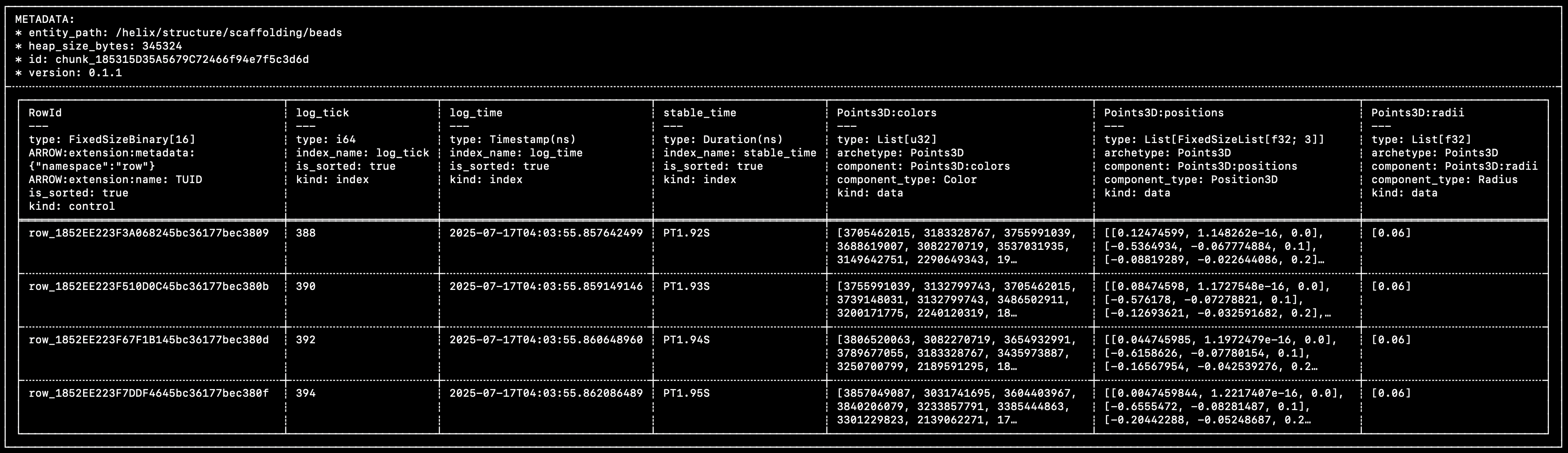
You can see that this matches very closely the diagram above:
- A single control column, that contains the unique row IDs.
- Multiple time/index columns (
log_tick,log_time,stable_time). - Multiple component columns (
Points3D:colors,Points3D:positions,Points3D:radii).
Within each row of each component column, the individual cells are Component Batches. Component batches are the atomic unit of data in Rerun.
The data in this specific chunk was logged with the following code:
snippet: concepts/how_helix_was_logged
You can learn more about chunks and how they came to be in this blog post.
Getting chunks into Rerun
If you've used the Rerun SDK before, you know it doesn't actually force you to craft these chunks manually, which would be rather cumbersome!
How does one create and store chunks in Rerun, then?
The row-oriented logging: `log`
The log API is generally what we show in the getting-started guides since it's the easiest to use:
snippet: archetypes/scalars_row_updates
The log API makes it possible to send data into Rerun on a row-by-row basis, without requiring any extra effort.
This row-oriented interface makes it very easy to integrate into existing codebase and just start logging data as it comes (hence the name).
Reference:
But if you're handing a bunch of rows of data over to Rerun, how does it end up neatly packaged in columnar chunks?
How are these rows turned into columns?
Before logging data, you can use the rr.set_time_ APIs to update the SDK's time context with timestamps for custom timelines.
For example, rr.set_time("frame", sequence=42) will set the "frame" timeline's current value to 42 in the time context.
When you later call rr.log, the SDK will generate a row id and a value for the built-in log_time timeline (enabled by default), as well as log_tick if you have opted in to it.
It will also grab the current values for any custom timelines from the time context.
Any data passed to rr.log becomes component batches.
The row id, timestamps, and logged component batches are then encoded as Apache Arrow arrays and together make up a row.
That row is then passed to a batcher, which appends the values from the row to the current chunk for the entity path.
The current chunk is then sent to its destination, either periodically or as soon as it crosses a size threshold.
Building up small column chunks before sending from the SDK trades off a small amount of latency and memory use in favor of more efficient transfer and ingestion.
You can read about how to configure the batcher here.
The column-oriented logging: `send_columns`
The log API showcased above is designed to extract data from your running code as it's being generated. It is, by nature, row-oriented.
If you already have data stored in something more column-oriented, it can be both a lot easier and more efficient to send it to Rerun in that form directly.
This is what the send_columns API is for: it lets you efficiently update the state of an entity over time, sending data for multiple index and component columns in a single operation.
[!WARNING]
send_columnsAPI bypasses the time context and micro-batcher.In contrast to the
logAPI,send_columnsdoes NOT add any other timelines to the data. Neither the built-in timelineslog_timeandlog_tick, nor any user timelines. Only the timelines explicitly included in the call tosend_columnswill be included.
snippet: archetypes/scalars_column_updates
Reference:
Sending actual chunks: `send_chunks`
The Chunk data structure described above is also exposed as a Python class.
You can build a chunk from, e.g., time/component columns, inspect or transform existing chunks, and forward chunks to a recording stream with send_chunks:
snippet: concepts/build_chunk
Alternatively, chunks can be created from an existing Arrow RecordBatch using Chunk.from_record_batch:
snippet: concepts/build_chunk_from_record_batch[body]
send_chunks also accepts iterables of chunks, as well as instances of LazyChunkStream, ChunkStore, and LazyStore.
For example, to forward every chunk of an existing RRD into a new recording stream:
snippet: concepts/send_chunks
Like send_columns, this path bypasses the time context and the micro-batcher: chunks are forwarded as-is, with whatever timelines they were built with.
See the Chunk Processing API for building ingestion, transformation, and conversion pipelines out of these primitives.
Reference:
Dataframe logging: `Chunk.from_dataframe` and `send_dataframe`
rr.send_dataframe and the related Chunk.from_dataframe extend the single record batch equivalent and accept a full PyArrow Table (or a RecordBatchReader, or any Arrow-C-stream object such as a datafusion.DataFrame) carrying any number of entities, and yields the chunks of each record batch in turn.
To map columns of the dataframe to Rerun timelines and components, the dataframe must carry the same rerun:* metadata as above.
For example, here we hand-craft a dataframe containing a Points3D entity:
snippet: concepts/send_dataframe[build_table]
Chunk.from_dataframe then interprets that metadata and yields one chunk per entity path:
snippet: concepts/send_dataframe[from_dataframe]
rr.send_dataframe is a thin logging convenience wrapper over Chunk.from_dataframe: it builds those same chunks and forwards them to the active recording stream in one call.
snippet: concepts/send_dataframe[send_dataframe]
Like send_columns, it bypasses the time context and the micro-batcher — only timelines explicitly present in the table are added.
Manually crafting the required metadata is obviously inconvenient.
This API is instead designed to compose with dataframe queries, which produce dataframes already populated with metadata derived from the originally queried data.
Reference:
Content/Concepts/Logging And Ingestion/Entity Component
title: Entities and Components order: 200
Data model
The core of Rerun's data model is inspired by the ideas of the Entity Component System (ECS) architecture pattern. In
short, an ECS is a composition-oriented framework in which entities represent generic objects while components describe
data associated with those entities.
- Entities are the "things" that you log with the
rr.log()function. They are represented by the
entity path string which is passed as first argument. - Components, however, are what contains the data that is associated with those "things". For example, position, color,
pixel data, etc.
Entities are like folders, and components are like files.
Additionally, the Rerun SDKs expose two additional concepts:
- Archetypes are coherent set of components corresponding to primitive such as 2D points or 3D boxes. In the Rerun SDKs, archetypes take the form of builder objects that assist with the creation of such component sets. They are meant as high-level, convenience helpers that can be bypassed entirely if/when required by advanced use-cases.
- Encodings are regular data structures that components occasionally rely on when fundamental data types (
float,uint32, etc.) are not sufficient.
Logging and viewing data
All the data that you log within Rerun is mapped to the concepts of entities and components.
For example, consider the case of logging a point:
rr.log("my_point", rr.Points2D([32.7, 45.9], colors=[255, 0, 0]))This statement uses the rr.Points2D archetype.
Internally, this archetype builds a set of, in this case, two components:
Points2D:positionsof typePosition2DPoints2D:colorsof typeColor.
Then, therr.log()function records these two components and associate them with the"my_point"entity.
Later, the View for spatial types queries the data store for all the entities that have a Points2D:positions component.
In this case it would find the "my_point" entity. This query additionally returns the Points2D:colors component because that
component is associated with the same entity. These two components are recognized as corresponding to the Points2D archetype (via metadata attached to the components), which informs the Viewer on how to display the corresponding entity.
See the Types reference for a list of archetypes,
components, and encodings.
Adding custom data
Although both the SDKs' archetype objects and the view are based on the same archetype definition (and are actually implemented using code that is automatically generated based on that definition), they both operate on arbitrary collection
of components. Neither the SDKs nor the Viewer enforce or require that an entity should contain a specific set of component.
The Rerun Viewer will display any data in a generic form, but its views will only work on sets of components it can
make sense of.
Your entity could have any number of additional components as well. This isn't a problem. Any components that
aren't relevant to the scene that the view is drawing are safely ignored. Also, Rerun even allows you to log your
own set of components, bypassing archetypes altogether.
In Python, the rr.AnyValues helper object can be used to add custom component(s) to an archetype:
snippet: tutorials/extra_values
It can also be used log an entirely custom set of components:
snippet: tutorials/any_values
For more complex use-cases, custom objects implementing the rr.AsComponents protocol can be used. For Rust, the rerun::AsComponents trait must be implemented:
snippet: tutorials/custom_data
Empty entities
An entity without components is nothing more than an identity (represented by its entity
path). It contains no data, and has no type. When you log a piece of data, all that you are doing is setting the values
of one or more components associated with that entity.
ECS systems
There is a third concept we haven't touched on: systems are processes which operate on the entities based on the components they possess.
Rerun is still settling on the exact form of formalized systems and outside of Rust Viewer code it is not yet possible to write your own systems. However, views work under the hood using a variety of systems. For more information see the Extend the Viewer in Rust section.
Content/Concepts/Logging And Ingestion/Entity Path
title: The Entity Path Hierarchy order: 300
Entity paths
As mentioned in the Entity Component overview, all entities within Rerun have a unique entity path.
The first argument to the log() function is this path. Each time you log to a specific entity path you will update the entity, i.e. log a new instance of it along the timeline.
It is possible to log multiple types of archetypes on the same entity path, but you should generally avoid mixing different kinds of geometric primitive. For example, logging a Points3D point cloud on an entity path where a Mesh3D was previously logged would overwrite the mesh's Position3D component with the point cloud's, but would leave the triangle_indices component untouched. The Rerun Viewer would likely be unable to display the result. See the Entity Component section for more information.
There are valid reasons to logs different kinds of archetypes to the same entity path, though. For example, it's common to log a Transform3D along with some geometry it relates to (see the Transforms & Coordinate Frames for more info).
Rerun treats entity paths as being arranged in a hierarchy with the / character acting as a separator between path
elements. The conventional path semantics including concepts of root and parent/child generally apply.
When writing paths in logging APIs the leading / is usually omitted.
In the file path analogy, each entity is a folder, and a component is a file.
This implies that any entity in a hierarchy can contain components.
For example (this uses the Python SDK but the same applies for all supported languages):
rr.log("image", rr.Image(img))
rr.log("image/points", rr.Points2D(points))
It is also acceptable to leave implicitly "empty" entities in your paths as well.
rr.log("camera/image", rr.Image(img))
rr.log("camera/image/detections/points", rr.Points2D(points))
Nothing needs to be explicitly logged to "camera" or "camera/image/detection" to make the above valid.
In other words, the log call is akin to creating a folder with mkdir -p and then writing files (components) to it.
Existing components of the same name will be overwritten.
Path parts
Each "part" of a path must be a non-empty string. Any character is allowed, but special characters need to be escaped using \.
Characters that need NOT be escaped are letters, numbers, and underscore, dash, and dot (_, -, .).
Any other character should be escaped, including symbols (\:, \$, …) and whitespace (\ , \n, \t, …).
You can insert an arbitrary unicode code point into an entity path using \u{262E}.
So for instance, world/3D/My\ Image.jpg/detection is a valid path (note the escaped space!).
[!WARNING]
Even though entity paths are somewhat analogous to file paths, they are NOT the same...does not mean "parent folder", and you are NOT intended to pass a file path as an entity path (especially not on Windows, which use\as a path separator).
Path hierarchy functions
Path hierarchy plays an important role in a number of different functions within Rerun:
- With the Transform System the
transformcomponent logged to any entity always describes
the relationship between that entity and its direct parent. - When resolving the meaning of
ClassIdandKeypointIdcomponents, Rerun uses the Annotation Context from the nearest ancestor in the hierarchy. - When adding data to Blueprints, it is common to add a path and all of its descendants.
- When using
rr.log("entity/path", rr.Clear(recursive=True)), it marks an entity and all of its descendants as being cleared. - In the future, it will also be possible to use path-hierarchy to set default-values for descendants
(#1158).
Reserved paths
The path prefix __ is considered reserved for use by the Rerun SDK itself and should not be used for logging
user data. This is where Rerun will log additional information such as properties (__properties) and warnings
(__warnings).
Content/Concepts/Logging And Ingestion/Latest At
title: Query semantics & partial updates order: 800
The Rerun data model is based around streams of entities with components
In Rerun, you model your data using entities (roughly objects) with batches of components that change over time.
An entity is identified by an entity path, e.g. /car/lidar/points, where the path syntax can be used to model hierarchies of entities.
A point cloud could be made up of positions and colors, but you can add whatever components you like to the entity.
Point positions are e.g. represented as a batch of Position3D component instances.
Components can have different values for different times, and do not have to be updated all at once.
Rerun supports multiple timelines (sequences of times), so that you can explore your data organized according to e.g. the camera's frame index or the time it was logged.
Core queries
All data that gets sent to the Rerun viewer is stored in an in-memory database, and there are two core types of queries against the database that visualizers in the viewer run.
Latest-at queries collect the latest version of each of an entity's components at a particular time.
This allows the visualizer to draw the current state of an object that was updated incrementally.
For example, you might want to update the vertex positions of a mesh while keeping textures and triangle indices constant.
Range queries instead collect all components associated with times on a time range.
These queries drive any visualization where data from more than one time is shown at the same time.
The obvious example is time series plots,
but it can also be used to e.g. show lidar point clouds from the last 10 frames together.
The queried range is typically configurable, see for instance this how-to guide on fixed windows plots for more information.
Partial updates
As mentioned above, the query semantics that power the Rerun Viewer, coupled with our chunk-based storage, make it possible to log only the components that have changed in-between frames (or whatever atomic unit your timeline is using).
Here's an example of updating only some specific properties of a point cloud, over time:
snippet: archetypes/points3d_partial_updates
To learn more about how to use our partial updates APIs, refer to this page.
Content/Concepts/Logging And Ingestion/Mcap
title: MCAP files order: 850
Working with MCAP files in Rerun:
Technical details and advanced usage:
Content/Concepts/Logging And Ingestion/Recordings
title: Recordings order: 100
What is a recording?
In their simplest form, recordings can be thought of as individual .rrd files containing Rerun data (or, equivalently, a single stream of data generated by a logging process).
In practice, what we call recording is more nuanced, sometimes depends on context, and can take many shapes.
This page aims to explain this in detail.
Logical vs physical recordings
The recording/file analogy comes short of describing how the Rerun Viewer handles data.
When the Viewer receives data, whether by loading a .rrd file or an incoming logging stream, it pools the corresponding data by recording ID and application ID.
This can be thought of as a logical recording, even though its source might be multiple files.
This implicit merging semantics also implies that, from the perspective of the Viewer, recordings are never "completed."
This enables the distributed logging workflows described below.
In its UI, the Viewer presents (logical) recordings sharing the same application ID as related.
In particular, they share the same blueprint.
Recordings on a catalog server
A catalog server has a slightly different object model, which you can read more about in Catalog object model.
Datasets are top-level objects that group semantically related episodes of data, which we call segments.
For example, it can be multiple recordings of the same robotic task.
Blueprints can optionally be assigned to datasets, so all segments in a dataset share the same blueprint.
Populating a dataset happens by registering recordings using the Catalog SDK.
Its recording ID becomes the segment ID, and its application ID is discarded.
Segments can contain multiple layers identified by their name, each backed by a .rrd file.
This again allows pooling multiple physical recordings into a single (logical) segment.
Distributed recordings
Both the Viewer's implicit merging semantics and the catalog server's layer system enable distributed logging workflows. Multiple processes or machines can produce separate .rrd files that share the same recording ID and application ID.
When these files are loaded into the Viewer, they are treated as a single logical recording. Alternatively, when using a catalog server, these files can be registered to separate layers. This enables workflows where data collection is distributed across multiple sources but visualized as a unified set of data.
You can learn more about this in the shared recordings guide.
Storage formats
Rerun recordings are stored in .rrd files. Blueprints are also recordings, albeit ones containing layout information instead of data. By convention, the .rbl file extension is used for blueprints.
Application IDs
Rerun recordings have an application ID in their metadata.
Application IDs are user-defined strings set when initializing the SDK.
They are subject to the same restrictions as catalog entry names.EntryName values are non-empty ASCII strings of at most 180 characters and may contain only alphanumeric characters, underscores, hyphens, dots, spaces, brackets, and colons.
Unsupported characters and dots in application IDs are normalized to hyphens, and migrated IDs receive a short hash suffix.
snippet: tutorials/custom-application-id
When application IDs matter
Application IDs are used by the Viewer when loading recordings directly (not via a catalog server):
- The Viewer stores blueprints per application ID
- Different recordings share the same blueprint if they share the same application ID
- Recordings are grouped by application ID in the Viewer UI
As stated above, application IDs are discarded when registering recordings to a catalog server. See Recordings on a catalog server above.
Check out the API to learn more about SDK initialization:
Recording IDs
By default, a random recording ID is generated each time you start logging.
This means that, by default, separate logging sessions will produce separate (logical) recording when loaded in the Viewer, and separate segments when registered to a dataset.
You can override the default recording ID when initializing the SDK (or the recording stream):
snippet: tutorials/custom-recording-id
This enables the distributed logging workflow described above, as well as assigning specific segment ID for recordings to be registered to datasets.
Content/Concepts/Logging And Ingestion/Rrd Format
title: RRD format order: 725
An RRD is the file format Rerun uses to persist recordings and blueprints. At the lowest level it is a linear sequence of framed messages — store announcements and chunks of data — optionally followed by a footer index that makes random access cheap. This page covers the envelope around chunks and how they are serialized; the chunk data model itself is described in Chunks.
Stores
Logical groupings of chunks form so-called stores.
They come in two flavors: recording and blueprint.
Both are structurally identical and distinguished only by a flag (store kind).
A single RRD can hold any number of stores.
The file extension is either .rrd or .rbl.
Both refer to the exact same on-disk format and are used conventionally:
.rrdfiles hold any combination of recording and blueprint stores;.rblfiles hold a single blueprint store.
Message kinds (`LogMsg`)
The body of an RRD is a sequence of LogMsgs. There are three variants:
SetStoreInfoannounces a new store and carries itsStoreInfo.
It must appear before any data for that store.
There can be more than oneSetStoreInfofor the same store in a single stream — for example, when aRecordingStreamis created and later attached to aFileSink— and the latest one wins.ArrowMsgcarries the actual data: an Apache Arrow IPC payload encoding a single chunk, tagged with theStoreIdit belongs to.
This is what makes up the bulk of every RRD.BlueprintActivationCommandis the only non-data control message.
It is emitted after a blueprint's chunks have been sent, and lets the producer atomically activate the blueprint via themake_active/make_defaultflags.
It exists so that the Viewer never sees a half-loaded blueprint, and so the application can decide whether to apply the blueprint as the current one or the default.
[!NOTE]
At the wire level there is also anEndmessage kind that frames the optional footer described below. It is not aLogMsgvariant in the application-level type system — it is an envelope reserved for the footer payload — but it shares the same framing as the threeLogMsgs above.
Chunks (`ArrowMsg` payload)
Every ArrowMsg carries a single chunk — an Apache Arrow RecordBatch with Rerun-specific schema metadata. A chunk belongs to one entity path and holds a contiguous run of rows for that entity, with one column per timeline and one column per component. See Chunks for the conceptual deep-dive (how chunks are built, batched, sorted, compacted); this section just shows what a chunk looks like when you crack one open.
The schema is laid out per Sorbet, Rerun's object-model spec — it defines how chunks, archetypes, components, and timelines map onto Arrow column names, types, and metadata. The easiest way to see it concretely is to save a recording and reopen it with RrdReader.
First, let's create an RRD file with some content:
snippet: concepts/rrd_format[write]
Then we can inspect the first chunk it contains:
snippet: concepts/rrd_format[inspect]
[!NOTE]
By default,chunk.format()trims metadata keys to keep the representation concise.
Usingtrim_metadata_keys=Falsedisables this behavior, so the typicalrerun:/sorbet:prefixes are visible here.
This prints a chunk together with its schema. A typical output looks like:
/* Detailed source-code truncated for AI context efficiency. */What to notice:
- All Rerun-specific metadata keys are prefixed with
rerun:(rerun:entity_path,rerun:id,rerun:kind,rerun:index_name, …). Sorbet's own metadata uses thesorbet:prefix (sorbet:version). - The chunk-level metadata identifies the entity path the chunk belongs to and the chunk's id.
- The
RowIdcolumn is the row identity column (rerun:kind: control). - Each timeline contributes one index column (
frame,log_tick,log_time) —log_timeis auto-populated by the logging API (andlog_tickif opted in),frameis the user-defined timeline. - Each component contributes one data column (
Points3D:colors,Points3D:positions) carrying the per-row values.
Store metadata (`StoreInfo`)
Every store in an RRD is identified by a StoreId and described by a StoreInfo:
StoreIdcombines:kind—RecordingorBlueprint. The on-disk format treats both identically; the kind is just a flag. What differs is the expected content: recordings hold user-logged data on user-defined entity paths, blueprints holdrr.blueprint.*objects on Viewer-reserved paths. The Viewer dispatches on the kind — recordings populate the data store, blueprints populate the Viewer's UI/layout state.application_id— a user-chosen identifier for the application that produced the recording (see Recordings for the conventions, including the relationship with segment and dataset IDs in the remote/catalog context).recording_id— a UUID or user-chosen string that distinguishes runs of the same application (catalog servers use this as the segment ID — see the catalog object model).
StoreInfowraps theStoreIdand adds:store_source— where the store came from (PythonSdk,RustSdk,CppSdk, or a file source such as CLI / drag-drop).store_version— the Rerun version that produced the data.
Matching application_id and recording_id is how the Viewer merges multiple .rrd files (or multiple stores within one file) into a single logical recording.
.rbl is just an RRD whose store happens to have kind = Blueprint — nothing in the bytes makes it special.
The convention of using .rbl for blueprints instead of .rrd is purely a filename hint to the Viewer and users.
When an RRD holds multiple stores each store begins with its own SetStoreInfo, and every subsequent ArrowMsg is tagged with its store's StoreId.
Messages from different stores may be interleaved or grouped.
The footer indexes each store separately, so readers can enumerate stores and select the ones they want without scanning chunk bytes.
Footer
The footer is an optional manifest appended at the end of an RRD that enables random access into the file.
For each chunk in the RRD, the manifest carries chunk-level metadata (id, byte offset in the file, byte size — compressed and uncompressed) along with per-component and per-timeline statistics and the chunk's schema hash.
Like all data in Rerun, the manifest is internally stored as an Arrow RecordBatch, with one row per chunk.
With the footer, a reader can enumerate stores in a handful of seeks and pull only the chunks it actually needs — for example, by entity path or by time range — without reading any chunk it does not care about.
This is what enables RrdReader to be cheap to use on large files, and the OSS catalog server to "load" large datasets quickly and with little memory overhead.
All tooling included in recent versions of the Rerun SDK emit footers by default.
An RRD may still miss a footer for a variety of reasons — for example, when a stream is not shut down cleanly, or legacy RRDs written before footers existed.
In those cases, readers fall back to a linear scan, which is semantically equivalent — just slower for partial reads.
For illustration, let's see what a footer looks like in an RRD.
This can be done with the following command:
rerun rrd print --footers --footers-lod 2 my.rrdHere we use --footers-lod 2 to see the entire table, which happen to be very wide. Here is the result for the recording produced by the snippet above:
/* Detailed source-code truncated for AI context efficiency. */The first lines decode the SetStoreInfo messages and the ArrowMsg payloads found in the stream.
The wide table that follows is the manifest itself, with one row per chunk.
The chunk-level columns (entity path, id, sortedness, row count, byte span, uncompressed size) are followed by per-component and per-timeline statistics — global timeline ranges (frame:start/end, log_tick:*, log_time:*) and per-component-per-timeline statistics (frame:Points3D:positions:start/end/num_rows, …) — that let an indexed reader skip components within a timeline range without reading their payloads.
File layout
This section gives a byte-level walkthrough of the framing. All multibyte integers are little-endian.
The high-level shape of any RRD is:
┌─────────────────────────────────────────────────────────┐
│ StreamHeader                                  12 bytes  │
├─────────────────────────────────────────────────────────┤
│ Message₁  :  MessageHeader (16 B) + payload (N₁ B)      │
│ Message₂  :  MessageHeader (16 B) + payload (N₂ B)      │
│ …                                                       │
├─────────────────────────────────────────────────────────┤
│ End msg   :  MessageHeader (16 B) + RrdFooter payload   │  ┐
│                                                         │  │ optional
│ StreamFooter                          32 bytes (typ.)   │  │ footer
└─────────────────────────────────────────────────────────┘  ┘
The three building blocks are detailed below.
Stream header
Every RRD opens with the same fixed 12 bytes:
StreamHeader — 12 bytes
┌────────────┬────────────┬─────────────────────┐
│   FourCC   │  Version   │   EncodingOptions   │
│  4 bytes   │  4 bytes   │       4 bytes       │
└────────────┴────────────┴─────────────────────┘
0 4 8 12| offset | field | value |
|---|---|---|
[0..4) |
FourCC | b"RRF2" for the current format |
[4..8) |
Version | 4-byte encoded Rerun crate version |
[8] |
compression | 0 = Off, 1 = LZ4 |
[9] |
serializer | 2 = Protobuf (1 once meant MsgPack and is now rejected) |
[10..12) |
reserved | 0x00 0x00 |
- Older
"RRF0"/"RRF1"FourCCs are recognized but rejected withOldRrdVersion— there is no in-place reader for them, you have to migrate through an older Rerun release. - The historical bit-pattern
[0, 0, 0, 0]forVersionis interpreted as0.2.0(pre-2023-02-27 files); any encoded version older than0.23is rejected outright. EncodingOptionsdescribes how the payloads of subsequent messages are encoded. In practice these flags are mostly advisory today — the values that matter ride alongside each individual message — but the bytes are still part of the format and the two reserved bytes must be zero.
[!NOTE]
The header format exposes legacy details that are no longer supported and may require an older Rerun SDK version to migrate.
However, RRDs created by Rerun SDK 0.23 and later are guaranteed to be migrated, and this guarantee holds for future releases — see the next section.
Message framing
After the header, the file is a sequence of framed messages. Each message is a 16-byte header followed by an opaque payload:
MessageHeader — 16 bytes
┌───────────────────────────┬───────────────────────────┐
│           kind            │       payload_len         │
│          u64 LE           │          u64 LE           │
└───────────────────────────┴───────────────────────────┘
0                           8                          16

╔════════════════════════════════╗
║   payload — payload_len bytes  ║
║   protobuf                     ║
╚════════════════════════════════╝| offset | field | value |
|---|---|---|
[0..8) |
kind |
MessageKind discriminant (see table below) |
[8..16) |
payload_len |
byte length of the protobuf payload that follows |
The kind field tells the decoder how to interpret the payload:
| Value | MessageKind |
Payload |
|---|---|---|
0 |
End |
An RrdFooter protobuf (the optional footer — see below) |
1 |
SetStoreInfo |
A SetStoreInfo protobuf (announces a store) |
2 |
ArrowMsg |
An ArrowMsg protobuf wrapping a chunk's Arrow IPC bytes (optionally LZ4-compressed) |
3 |
BlueprintActivationCommand |
A BlueprintActivationCommand protobuf |
The outer payload bytes are always plain protobuf. Of the four kinds, only ArrowMsg can carry compressed data: its compression field tracks whether the wrapped Arrow IPC bytes are LZ4-compressed, so different ArrowMsgs in the same file can mix compressed and uncompressed Arrow IPC payloads.
The compression byte in the StreamHeader's EncodingOptions is advisory only — per-message decoding does not consult it.
Stream footer
The footer is written in two parts.
The first part is a regular framed message: an End-kind MessageHeader followed by the RrdFooter protobuf payload described in the Footer section.
It lives somewhere in the message stream — usually right before the file is closed — and is no different from any other framed message structurally.
The second part is the StreamFooter trailer at EOF. It is not a framed message: it is a raw structure whose job is to let readers jump straight to the RrdFooter(s) from the end of the file.
The trailer is a variable-length entry table — one 20-byte StreamFooterEntry per RrdFooter in the stream — followed by a fixed 12-byte tail that always sits at the very end of the file:
StreamFooter = num_entries × StreamFooterEntry + 12-byte static tail

┌──────────────────────────────────────────────┬─────────────────────────┐
│ entries[0..num_entries) — 20·num_entries B   │   static tail — 12 B    │
└──────────────────────────────────────────────┴─────────────────────────┘
EOF − 12 − 20·num_entries                      EOF − 12                EOF
Each StreamFooterEntry is 20 bytes:
| offset | field | value |
|---|---|---|
[0..8) |
start |
u64 LE — byte offset of the RrdFooter payload (after its own MessageHeader) |
[8..16) |
len |
u64 LE — length of the RrdFooter payload |
[16..20) |
crc32 |
u32 LE — xxh32(payload) with the fixed seed 7850921 ("RERUN" in base-26) |
The static tail is the part with a known offset from EOF:
| offset (from EOF) | field | value |
|---|---|---|
[-12..-8) |
FourCC | b"RRF2" |
[-8..-4) |
identifier | b"FOOT" |
[-4..0) |
num_entries |
u32 LE — number of entries above |
The CRC only covers the RrdFooter payload, not the surrounding MessageHeader, so it can be checked independently of message framing.
Reading the footer therefore boils down to:
1. seek EOF − 12                     → read FourCC, identifier, num_entries
2. seek EOF − 12 − 20·num_entries    → read num_entries entries
3. for each entry:
       seek entry.start, read entry.len bytes
       check xxh32(bytes, seed=7850921) == entry.crc32
       decode protobuf RrdFooter
A file can legally have more than one trailer — that happens when streams are simply concatenated (cat a.rrd b.rrd > both.rrd), but tools like rerun rrd merge collapse them back into a single trailer with a single entry.
Files written without a footer (streaming sinks, legacy producers) skip the End message and the trailer entirely; readers detect their absence by the missing FOOT identifier and fall back to a linear scan.
Stability
The format is split into two layers with different stability stories.
Binary format
This concerns the binary structure of the RRD file.
The framing described in File layout is considered stable and we have no plans to change it.
Legacy RRDs whose Version field is older than 0.23 are currently rejected.
That's the cut-off below which we do not attempt to migrate at load time; a manual hop through an older Rerun SDK release is required.
The same is true for RRDs whose FourCC is RRF0 or RRF1.
Should we need to break framing compatibility again, the FourCC will bump (RRF3, …) and load-time auto-migration will be provided.
The rerun rrd migrate CLI will also be available for offline batch conversion.
Sorbet
We refer to the high-level data model specification as Sorbet.
Its reference implementation lives in the Rust re_sorbet crate.
This includes the chunk and footer schemas, as well as the high-level data model (timelines, archetypes, components, etc. — see Entities and Components).
Sorbet is versioned and subject to change, but re_sorbet performs in-memory migration to the current Sorbet version as chunks (and the footer manifest) are loaded.
Any CLI tool that rewrites an RRD (rerun rrd merge, rerun rrd optimize, rerun rrd migrate, …) emits chunks in the current Sorbet version, so a round-trip through any of these is also a migration.
Future changes to Sorbet will be auto-migrated in the same way.
Content/Concepts/Logging And Ingestion/Sinks
title: Sinks order: 1000
Sinks control where your Rerun data goes. They are the output destinations for your logged data.
When you log data with Rerun, that data needs to flow somewhere, whether that's to a live viewer, a file on disk, memory, or multiple destinations at once. Sinks provide this routing layer, giving you flexible control over how and where your recordings are stored and displayed.
Available sink types
Rerun provides several built-in sink types, each designed for specific use cases:
GrpcSink
Streams data to a Rerun Viewer over gRPC. This is the most common sink for live visualization.
snippet: concepts/grpc_sink
FileSink
Writes data to .rrd files on disk.
snippet: concepts/file_sink
Multiple sinks (Tee pattern)
One of the most powerful features of Rerun's sink system is the ability to send data to multiple destinations simultaneously. This "tee" pattern lets you both visualize data live and save it to disk in a single run.
snippet: howto/set_sinks
This pattern is useful when:
- You want to monitor a long-running process while archiving the data
- You're debugging and want both live feedback and a recording to analyze later
- You need to stream to multiple viewers or save to multiple files
See also
- Recordings: Understand how recordings relate to sinks
- Blueprints: Learn how to configure the viewer's layout
- API References:
Content/Concepts/Logging And Ingestion/Static
title: Static data order: 600
The Rerun SDK allows you to store data as static. Static data belongs to all timelines (existing ones, and ones not yet created) and shadows any temporal data of the same type on the same entity.
That is, any time you log static data to an entity path, all past, present and future temporal data on that same entity path and component is semantically discarded in favor of the static one (which doesn't necessarily mean that it is physically discarded, more on that below).
How to store static data?
Internally, all data in Rerun is stored as chunks of columns. Specifically, each chunk holds zero or more time columns (the indices), and zero or more component columns (the data).
Static data is data that lives in a chunk whose set of time columns is the empty set.
The easiest way to create such chunks is by using the log family of methods, which exposes a static flag where appropriate:
snippet: concepts/static/log_static
The same can be achieved using the send_columns API by simply leaving the time column set empty:
snippet: concepts/static/send_static
(Using send_columns that way is rarely useful in practice, but is just a logical continuation of the data model.)
When should I use static data?
There are two broad categories of situations where you'd want to use static data: scene setting and memory savings.
Scene setting
Often, you'll want to store data that isn't part of normal data capture, but sets the scene for how it should be shown.
For instance, if you are logging cars on a street, perhaps you want to always show a street mesh as part of the scenery, and for that it makes sense for that data to be static.
snippet: concepts/static/log_static
The alternative would be to log that data at the beginning of every relevant timeline, which can be very problematic as the set of timelines might not even be known before runtime.
Similarly, coordinate systems or annotation context are typically stored as static.
Memory savings
When you store temporal data in Rerun, it is always appended to the existing dataset: there is no such thing as overwriting temporal data. The dataset only grows, it never shrinks.
To compensate for that, the Rerun viewer has a garbage collection mechanism that will drop the oldest data from the store when memory becomes scarce.
For example, the following snippet stores 10 images at index 4 on the frame timeline:
snippet: concepts/static/log_temporal_10x
All these images are actually stored, and all of them can be visualized in the viewer independently, even though they share the same index.
Contrary to temporal data, static data is never garbage collected… but it can actually be overwritten!
Semantically, only a single piece of static data can exist at a given time for a specific component on a specific entity.
In the following snippet, only the data from latest log call (in execution order) will be inspectable in the viewer:
snippet: concepts/static/log_static_10x
In practice, the Rerun datastore will rely on these semantics to physically drop the superfluous static data where possible, therefore drastically reducing memory costs. See "Understanding storage costs" for more information.
Understanding storage costs
In "Memory savings", we mentioned that the following snippet semantically stores a single image:
snippet: concepts/static/log_static_10x
How these semantics actually translate to physical storage depends on the context.
In recordings
Rerun recordings (.rrd files) are just streams of binary messages: they have no semantics whatsoever, therefore they don't know what static means and can't do anything about it.
If you were to log the snippet above to a file (using e.g. rr.save()), you'd find that the recording does in fact contains your 10 images.
If you wanted the recording file itself to only contain a single static value, you would need to either:
- Stream the data to the viewer, and then save the recording directly out of the viewer using
Menu > Save recording(or the equivalent palette command). - Manually recompact your recording using the Rerun CLI so that the data overwrite semantics can get appropriately applied, e.g.:
rerun rrd optimize -o compacted.rrd myrecording.rrd.
In the viewer
The data store that backs the Rerun viewer natively understands these temporal/garbage-collected vs. static/overwritten semantics.
If you were to log the snippet above directly to the Rerun viewer (using e.g. rr.connect_grpc()), you'd notice that the viewer's memory usage stays constant: the data is automatically being overwritten as new updates come in.
For data where you don't need to keep track of historical values, this effectively to logs its new values indefinitely.
In the following example, you can see our face tracking example indefinitely tracking my face while maintaining constant memory usage by logging all data as static:
Content/Concepts/Logging And Ingestion/Timelines
title: Events and Timelines order: 500
Timelines
Each piece of logged data is associated with one or more timelines.
The logging SDK can automatically create two timelines for you:
log_time- a temporal timeline with the time of the log call. Enabled by default; opt-out via theRERUN_LOG_TIMEenvironment variable orset_log_time_enabled.log_tick- a sequence timeline with the sequence number of the log call. Disabled by default; opt-in via theRERUN_LOG_TICKenvironment variable orset_log_tick_enabled.
You can use the set_time function (Python reference: set_time) to associate logs with other timestamps on other timelines. For example:
snippet: tutorials/timelines_example
This will add the logged points to the timelines frame_idx and sensor_time, as well as the automatic log_time timeline (and log_tick, if you opted in).
You can then choose which timeline you want to organize your data along in the expanded timeline view in the bottom of the Rerun Viewer.
How to log precise times
Rerun supports three types of indices, all encoded as i64:
- Sequential
- Timestamp (nanoseconds since Unix epoch)
- Timedelta/duration (nanoseconds)
Here's how you use them:
snippet: concepts/indices
Reset active timeline & differing data per timeline
You can clear the active timeline(s) at any point using reset_time.
This can be particularly useful when you want to log different data for individual timelines as illustrated here:
snippet: concepts/different_data_per_timeline
On one timeline the points will appear blue, on the other they appear red.
Sending many time points at once
To get full control over the logged timelines you can use send_columns.
This is often a lot more efficient when you already have a chunk of temporal data, e.g. some sensor value over time.
Events
An event refer to an instance of logging one or more component batches to one or more timelines. In the viewer, the Time panel provide a graphical representation of these events across time and entities.
Static data
The rr.log() function has a static=False default argument.
If static=True is used instead, the data logged becomes static. Static data belongs to all timelines (existing ones, and ones not yet created) and shadows any temporal data of the same type on the same entity.
This is useful for data that isn't part of normal data capture, but sets the scene for how it should be shown.
For instance, if you are logging cars on a street, perhaps you want to always show a street mesh as part of the scenery, and for that it makes sense for that data to be static.
Similarly, coordinate systems or annotation context are typically static.
You can read more about static data in the dedicated section.
Content/Concepts/Logging And Ingestion/Transforms
title: Transforms & Coordinate Frames order: 400
Rerun comes with built-in support for modeling spatial relationships between entities.
This page details how the different archetypes involved interact with each other and explains how transforms are set up in Rerun.
Transforms
Entity path transforms
The Transform3D archetype allows you to specify how one coordinate system relates to another through translation, rotation, and scaling.
The simplest way to use transforms is through entity path hierarchies, where each transform describes the relationship between an entity and its parent path.
Note that by default, all entities are connected via identity transforms.
snippet: concepts/transform3d_hierarchy_simple
In this hierarchy:
- The
sunentity exists at the origin of its own coordinate system - The
sun/planettransform places the planet 6 units from the sun, along the x-axis - The
sun/planet/moontransform places the moon 3 units along x away from the planet
This creates a transform hierarchy where transforms propagate down the entity tree. The moon's final position in the sun's coordinate system is 9 units away (6 + 3),
because the transforms are applied sequentially.
Named transform frames
While entity path hierarchies work well for many cases, sometimes you need more flexibility in organizing your transforms.
In particular, for anyone familiar with ROS, we recommend using named transform frames as it allows you to model
your data much closer to how it would be defined when using ROS' tf2 library.
By explicitly specifying transform frames, you can decouple spatial relationships from the entity hierarchy.
Instead of relying on entity path relationships, each entity is first associated with a named transform frame using
the CoordinateFrame archetype.
The geometric relationship between two transform frames is then determined by logging Transform3D
with child_frame and parent_frame parameters set to their respective names.
snippet: concepts/transform3d_hierarchy_named_frames
Note that unlike in ROS, you can log your transform relationship on any entity.
[!NOTE]
A current limitation to this is that once aTransform3D(orPinhole) relating two frames has been logged to an entity, this particular relation may no longer be logged on any other entity.
An exception to this rule is static data: if you log a frame to frame relationship on an entity with static time, you can later on use a different entity for temporal information.
This is useful to specify "default" transforms without yet knowing what timeline and paths are going to be used for temporal transforms.
Named transform frames have several advantages over entity path based hierarchies:
- topology may change over time
- association of entities with coordinate frames is explicit and may changed over time (it can also be overridden via blueprint)
- several entities may be associated with the same frame
- frees up entity paths for semantic rather than geometric organization
Entity hierarchy based transforms under the hood
Under the hood, Rerun's entity path hierarchies actually use the same transform frame system as named frames.
For each entity path, an associated transform frame with the prefix tf# is automatically created:
for example, an entity /world/robot gets frame tf#/world/robot.
Path based hierarchies are then established by defaults the Viewer uses (also referred to as fallbacks):
Given an entity /world/robot:
- if no
CoordinateFrame::frameis specified, it automatically defaults totf#/world/robot - if no
Transform3D::child_frameis specified, it automatically defaults totf#/world/robot - if no
Transform3D::parent_frameis specified, it automatically defaults to the parent's implicit frame,tf#/world
The only special properties these implicit frames have over their named counterparts is that they
have implicit identity relationships.
Example
Given these entities:
rr.log("robot", rr.Transform3D(translation=[1, 0, 0]))
rr.log("robot/arm", rr.Transform3D(translation=[0, 1, 0]))
rr.log("robot/arm/gripper", rr.Points3D([0, 0, 0]))
Rerun will interpret this as-if it was logged with the named transform frames like so:
rr.log(
    "robot",
    rr.CoordinateFrame("tf#/robot"),
    rr.Transform3D(translation=[1, 0, 0], child_frame="tf#/robot", parent_frame="tf#/"),
)
rr.log(
    "robot/arm",
    rr.CoordinateFrame("tf#/robot/arm"),
    rr.Transform3D(translation=[0, 1, 0], child_frame="tf#/robot/arm", parent_frame="tf#/robot"),
)
rr.log("robot/arm/gripper", rr.CoordinateFrame("tf#/robot/arm/gripper"), rr.Points3D([0, 0, 0]))
Mixing named and implicit transform frames
We generally do not recommend mixing named and implicit transform frames since it can get confusing,
but doing so works seamlessly and can be useful if necessary.
Example:
rr.log("robot", rr.Transform3D(translation=[1, 0, 0]))
rr.log(
    "arm",
    rr.Transform3D(translation=[0, 1, 0], parent_frame="tf#/robot", child_frame="arm_frame"),
    rr.CoordinateFrame("arm_frame"),
)
rr.log("gripper", rr.Points3D([0, 0, 0]), rr.CoordinateFrame("arm_frame"))
Other transform types
Pinhole projections
In Rerun, pinhole cameras are not merely another archetype that can be visualized,
they are also treated as spatial relationships that define projections from 3D spaces to 2D subspaces.
This unified approach allows the Viewer to handle both traditional 3D-to-3D transforms and 3D-to-2D projections.
The Pinhole archetype defines this projection relationship through its intrinsic matrix (image_from_camera) and resolution.
Both implicit & named coordinate frames are supported, exactly as on Transform3D.
With the right setup, pinholes allow a bunch of powerful visualizations:
- the pinhole glyph itself in 3D views
- 2D in 3D: all 2D content that is part of the pinhole's transform subtree
- 3D in 2D: if the pinhole is at the origin of the view, 3D objects can be projected through pinhole camera into the view.
If a transform frame relationship has both a pinhole projection & regular transforms (in this context often regarded as the camera extrinsics),
the regular transform is applied first.
Example: 3D scene with 2D projections
Here's how to set up a 3D scene with pinhole cameras that create 2D projections:
In this example, the 3D objects (box and points) are automatically projected into the 2D camera view,
demonstrating how Rerun's transform system handles the spatial relationship between 3D world coordinates
and 2D image coordinates through pinhole projections.
snippet: archetypes/pinhole_projections
View coordinates
ViewCoordinates describes an orientation convention by specifying the directions in which the positive X, Y, and Z axes point.
It controls camera and view orientation.
For a 3D view, SpatialInformation.axes controls the eye orientation, navigation, and default grid plane.
A logged ViewCoordinates archetype provides the default value for 3D views whose origin is at or below that entity.
The view uses the value at its origin or the closest ancestor, so logging rr.log("/", rr.ViewCoordinates.RIGHT_HAND_Z_UP, static=True) applies to all 3D views unless a view overrides it in its blueprint.
If no archetype value is found, the view uses camera_xyz from the closest ancestor pinhole, followed by RFU as the final fallback.
This orientation does not change logged transforms.
For a Pinhole, camera_xyz controls the camera orientation and projection direction.
The default is RDF: +X is right, +Y is down, and +Z is forward.
Changing camera_xyz reorients the camera frustum, projected depth data, and the projection of 3D content into the camera view.
See the open_photogrammetry_format example for a non-default camera orientation.
For 2D spaces and other entities, view coordinates currently have currently no effect (#1387).
Pose transforms
InstancePoses3D defines geometric poses relative to an entity's transform frame.
Unlike with Transform3D, poses do not propagate through the transform hierarchy
and can store an arbitrary amount of transforms on the same entity.
For an entity that has both Transform3D
(without child_frame/parent_frame) and InstancePoses3D,
the Transform3D is applied first
(affecting the entity and all its children), then InstancePoses3D
is applied only to that specific entity.
(This is consistent with how entity hierarchy based transforms translate to transform frames.)
Instancing
Rerun's InstancePoses3D archetype is not only used
to model poses relative to an Entity's frame, but also for repeating (known as "instancing") visualizations on the same entity:
most visualizations will show once for each transform on InstancePoses3D
in the respective place.
snippet: archetypes/mesh3d_instancing
In this example, the mesh at "shape" is instantiated four times with different translations and rotations.
The box at "shape/box" is not affected by its parent's instance poses and appears only once.
Debugging transform trees
The Rerun viewer features a debugging UI for visual introspection of the 3D transform cache.
This allows to view the tree structure of the transforms, including potentially disconnected trees, and inspect the latest stored values of each frame node or transform edge.
The UI supports horizontal and vertical tree layout and you can filter by transform type (e.g. static or temporal).
[!NOTE]
This UI is currently a tab in the dev panel (accessible via "Toggle dev panel" in the menu or ctrl/cmd+shift+m).
We are open to making this a dedicated view in the future - let us know if you have any feedback!
Content/Concepts/Logging And Ingestion/Video
title: Video order: 1100
A stream of images (like those produced by a camera) can be logged to Rerun in several different ways:
- Uncompressed, as many
Images - Compressed as many
EncodedImages, using e.g. JPEG. - Compressed as a single
AssetVideo, using e.g. MP4. - Compressed as a series of encoded video samples using
VideoStream, using e.g. H.264 encoded frames.
These alternatives range on a scale of "simple, lossless, and big" to "complex, lossy, and small".
If you want lossless encoded images (with no compression artifacts), then you should log each video frame as Image.
This will use up a lot of space and bandwidth. You can also encode them as PNG and log them as EncodedImage,
though it should be noted that PNG encoding usually does very little for the file size of photographic images.
If you want to reduce bandwidth and storage cost, you can encode each frame as a JPEG and log it using EncodedImage. This can easily reduce the file sizes by almost two orders of magnitude with minimal perceptual loss.
This is also very simple to do, and the Python logging SDK has built-in support for it using Image.compress.
Finally, for the best compression ratio, you can encode the images as an encoded video.
There are two options to choose from:
- Raw video frames
VideoStream - Video files using
AssetVideo
[!WARNING]
Do not use compressed video if you need accurate pixel replication:
this is not only due to the obvious detail loss on encoding,
but also since the exact display of the same video is not consistent across platforms and decoder versions.
Streaming video / raw encoded video frames
The following example illustrates how to encode uncompressed video frames (represented by numpy arrays)
using pyAV into H.264 and directly log them to Rerun using VideoStream.
snippet: archetypes/video_stream_synthetic
Using VideoStream requires deeper knowledge of the encoding process
but unlike AssetVideo,
allows the Rerun Viewer to show incomplete or open ended video streams.
In contrast, AssetVideo requires the entire
video asset file to be in Viewer memory before decoding can begin.
Refer to the video camera streaming example to learn how to stream live video to Rerun.
For more details on how to query and decode video streams from Rerun, see our query video streams how-to.
Current limitations of VideoStream:
- #9815: Decoding on native is generally slower than decoding in the browser right now.
This can cause increased latency and in some cases may even stop video playback. - #10090: B-frames are not yet supported for
VideoStream. - #10422:
VideoFrameReferencedoes not yet work withVideoStream.
Export MP4 from RRD (remuxing)
Sample data from VideoStream can be queried
and remuxed to mp4 without re-encoding the video as demonstrated in this sample.
Check the doc page on retrieving data to learn more about dataframe queries in general.
Video files
You can use AssetVideo to log readily encoded video files.
Rerun ignores the timestamp at which the video asset itself is logged and requires you
to log VideoFrameReference to establish a
correlation of video time to the Rerun timeline.
To ease this, the SDK's read_frame_timestamps_nanos utility allows to read out timestamps from in-memory video assets:
snippet: archetypes/video_auto_frames
#7354: Currently, only MP4 files are supported.
Codec support in detail
Overview
Codec support varies in the web & native viewer:
| Browser | Native | |
|---|---|---|
| AV1 | ✅ | 🟧 |
| H.264/avc | ✅ | ✅ |
| H.265/hevc | 🟧 | ✅ |
| VP8 | ✅ | ✅ |
| VP9 | ✅ | ✅ |
Details see below.
When choosing a codec, we recommend AV1,
as it seems to have the best overall playback support while also having very high compression quality.
Since AV1 can have very long encoding times, it is often not suitable for streaming.
In cases where encoding time matters, we recommend H.264/avc.
Native viewer
AV1
AV1 is supported out of the box using a software decoder paired with gpu based image conversion.
Current limitations:
- #7755: AV1 is supported on all native builds exception on Linux ARM.
H.264/avc, H.265/hevc, VP8 & VP9
H.264/avc, H.265/hevc, VP8, and VP9 are supported via a separately installed FFmpeg binary, requiring a minimum version of 5.1.
The viewer does intentionally not come bundled with FFmpeg to avoid licensing issues.
By default rerun will look for a system installed FFmpeg installation in PATH,
but you can specify a custom path in the viewer's settings.
If you select a video that failed to play due to missing or incompatible FFmpeg binaries it will offer a download link to a build of FFmpeg for your platform.
Web viewer
Video playback in the Rerun Web Viewer is done using the browser's own video decoder, so the exact supported codecs depend on your browser.
Overall, we recommend using Chrome or another Chromium-based browser, as it seems to have the best video support as of writing.
For decoding video in the Web Viewer, we use the WebCodecs API.
This API enables us to take advantage of the browser's hardware accelerated video decoding capabilities.
It is implemented by all modern browsers, but with varying levels of support for different codecs, and varying levels of quality.
When it comes to codecs, we aim to support any codec which the browser supports, but
we currently cannot guarantee that all of them will work. For more information about
which codecs are supported by which browser, see Video codecs on MDN.
We tested the following codecs in more detail:
| Linux Firefox | Linux Chrome[^1] | macOS Firefox | macOS Chrome | macOS Safari | Windows Firefox | Windows Chrome[^2] | |
|---|---|---|---|---|---|---|---|
| AV1 | ✅ | ✅ | ✅ | ✅ | 🚧[^3] | ✅ | ✅ |
| H.264/avc | ✅ | ✅ | ✅ | ✅ | ✅ | ✅ | ✅ |
| H.265/hevc | ❌ | ❌ | ❌ | ✅ | 🚧[^4] | ❌ | 🚧[^5] |
| VP8 | ✅ | ✅ | ✅ | ✅ | ❌ | ||
| VP9 | ✅ | ✅ | ✅ | ✅ | ❌ |
[^1]: Any Chromium-based browser should work, but we don't test all of them.
[^2]: Chrome on Windows has been observed to stutter on playback. It can be mitigated by using software decoding, but this may lead to high memory usage. See #7595.
[^3]: Safari/WebKit does not support AV1 decoding except on Apple Silicon devices with hardware support.
[^4]: Safari/WebKit has been observed stuttering when playing hvc1 but working fine with hevc1. Despite support being advertised Safari 16.5 has been observed not support H.265 decoding.
[^5]: Only supported if hardware encoding is available. Therefore always affected by Windows stuttering issues, see above.
Beyond this, for best compatibility we recommend:
- prefer YUV over RGB & monochrome formats
- don't use more than 8bit per color channel
- keep resolutions at 8k & lower (see also #3782)
Other limitations
There are still some limitations to encoded Video in Rerun which will be addressed in the future:
- #7594: HDR video is not supported
- #5181: There is no audio support
- There is no video encoder in the Rerun SDK, so you need to create the video stream or file yourself.
Refer to the video camera streaming example to learn how to encode video usingpyAV.