

Technical Documentation: pgsty/pigsty
ℹ️ Provenance: Hybrid Fusion:
pgsty/pigsty(README + 2 In-Tree Chapters) · CodeWiki Reference · Recency: Active (< 180 days)
1. Project Overview & Quickstart (pgsty/pigsty)
PIGSTY - Self-Host Postgres like a Pro
Enterprise-Grade Open-Source PostgreSQL Distribution with HA, PITR, IaC, Monitor, and 575 PG extensions.
"PostgreSQL In Great STYle": Postgres, Infras, Graphics, Service, Toolbox, it's all Yours.
Website | ORG | PGEXT | Piglet | Public Demo | Blog | Discuss | Support | Release Notes | 中文
Pigsty scales from laptop to datacenter. Enterprise-grade. Developer-friendly. Get Started with the latest v4.5.0:
curl -fsSL https://repo.pigsty.io/get | bash -s v4.5.0Features
- Extensible: 575 PG Extensions & 12 PG Kernels available, Packed for 16 Linux Platforms, Battery-Included.
- Reliable: Self-healing HA clusters with pre-configured PITR and built-in ACL, CA & SSL secure best practice.
- Observable: SOTA monitoring for PG / Infra / Node based on the Victoria & Grafana stack: Demo & Gallery.
- Scalable: Auto-routed & pooled customizable database Services Access with haproxy, pgbouncer, and VIP.
- Maintainable: One-Cmd Deploy, Admin SOP, Auto-Tune, Local Repo, IaC and Vagrant / Terraform support.
- Composable: Bonus Modules such as Redis / Valkey, MinIO, Etcd, Docker, DuckDB, Supabase, & More.
- Controllable: Self-sufficient Infra Closure, Cloud Neutral FOSS. Run on bare Linux without Docker & K8S.
- Affordable: Self-Hosting like a Pro, without the cost of RDS. Empowering Cloud-Exit for Ultra Cost Saving!
You can even use many exotic PG Kernel Forks as in-place replacement and wrap it as a full RDS service:
| Kernel | Key Feature | Description |
|---|---|---|
| PostgreSQL | Battery-Included | Original PGDG PostgreSQL with 575 extensions |
| Supabase | Backend as Service | BaaS over PostgreSQL, Firebase alternative |
| Citus | Horizontal Scaling | Distributive PostgreSQL via native extension |
| Babelfish | SQL Server Simulation | Microsoft SQL Server wire-compatibility |
| IvorySQL | Oracle Simulation | Oracle Grammar and PL/SQL compatible |
| OpenHalo | MySQL Simulation | MySQL wire-protocol compatibility |
| DocumentDB | MongoDB Simulation | MongoDB wire-protocol compatibility |
| Percona | Transparent Data Encryption | Percona Distribution with pg_tde |
| OrioleDB | OLTP Optimization Engine | No bloat, No XID Wraparound, S3 Storage |
| PolarDB | Aurora flavor RAC | RAC, China domestic compliance |
| AgensGraph | Graph-Native Database | Transactional graph database based on PostgreSQL |
| pgEdge | Multi-Master Distributive | Geo-Distributive multi-writer Postgres |
| Cloudberry | MPP Data Warehouse | Greenplum 7 Apache OSS Fork |
And gather the synergistic superpowers of all 575 PostgreSQL Extensions all together:
Get Started
Prepare a fresh x86_64 / aarch64 node runs any compatible Linux OS Distros, then Install Pigsty with:
curl -fsSL https://repo.pigsty.io/get | bash; cd ~/pigsty;Then configure and run the deploy.yml playbook with an admin user (nopass ssh & sudo):
./configure -g    # generate config and random passwords
./deploy.yml      # deploy everything on current node
Finally, you will get a pigsty singleton node ready, with WebUI on port 80/443 and Postgres on port 5432.
For dev/testing purposes, you can also run Pigsty inside Docker containers: cd docker; make launch
Single-Node Setup | Production Deploy | Offline Install | Minimal Install | Docker Install | Run Supabase
Install with the pig cli
Then you can launch pigsty with pig sty sub command:
curl -fsSL https://repo.pigsty.io/pig | bash # install pig
pig sty init     # install latest pigsty src to ~/pigsty
pig sty conf     # auto-generate pigsty.yml config file
pig sty deploy   # run the deploy.yml playbook
Install with get script
/* Detailed source-code truncated for AI context efficiency. */HINT: To install a specific version, pass the version string as the first parameter:
bashcurl -fsSL https://repo.pigsty.io/get | bash -s v4.5.0
Clone src with git
You can also download the pigsty source with git, remember to check out a specific version tag, the main branch is for development.
git clone https://github.com/pgsty/pigsty; cd pigsty; git checkout v4.5.0Architecture
Pigsty uses a modular design: you can use one or all, with best-of-breed products integrated as a platform.
Self-healing PostgreSQL HA cluster powered by Patroni, Pgbouncer, PgBackrest & HAProxy
Nginx, Local Repo, DNSMasq, and the entire Victoria & Grafana observability stack.
Init node name, repo, pkg, NTP, ssh, admin, tune, expose services, collect logs & metrics.
Etcd cluster is used as a reliable distributed configuration store by PostgreSQL HA agents.
You can compose them freely in a declarative manner. INFRA & NODE will suffice for host monitoring.ETCD and PGSQL are used for HA PG clusters; installing them on multiple nodes automatically forms HA clusters.
The default deploy.yml playbook will deploy INFRA, NODE, ETCD & PGSQL on the current node.
This gives you an out-of-the-box PostgreSQL singleton instance (admin_ip:5432) with everything ready.
The node can be used as an admin controller to deploy & monitor more nodes & clusters. For example, you can install these 6 OPTIONAL extra modules for advanced use cases:
S3-compatible object storage service; used as an optional central backup server for PGSQL.
Deploy Redis or Valkey servers in standalone master-replica, sentinel, and native cluster mode.
Launch optional docker daemons to run other stateless parts besides Pigsty RDS.
JuiceFS can mount S3/MinIO, and even PostgreSQL as a filesystem shared by multi users.
Vibe coding environment with VS Code Server, JupyterLab, Node.js, and Claude Code.
Of course, you can deploy different kinds of HA PostgreSQL clusters on multiple nodes, as much as you want.
PostgreSQL RDS
To deploy an additional 3-node HA Postgres cluster pg-test. Add the cluster definition to the config inventory:
pg-test:
  hosts:
    10.10.10.11: { pg_seq: 1, pg_role: primary }
    10.10.10.12: { pg_seq: 2, pg_role: replica }
    10.10.10.13: { pg_seq: 3, pg_role: offline }
  vars: { pg_cluster: pg-test }
The default config file is pigsty.yml under pigsty home, add the snippet above to the all.children.pg-test,
Then, create the cluster with built-in playbooks in one command:
bin/pgsql-add pg-test # init pg-test clusterExample: Complex PostgreSQL Customization
This config file provides a detailed example of a complex PostgreSQL cluster pg-meta with multiple
databases, users, and service definition:
/* Detailed source-code truncated for AI context efficiency. */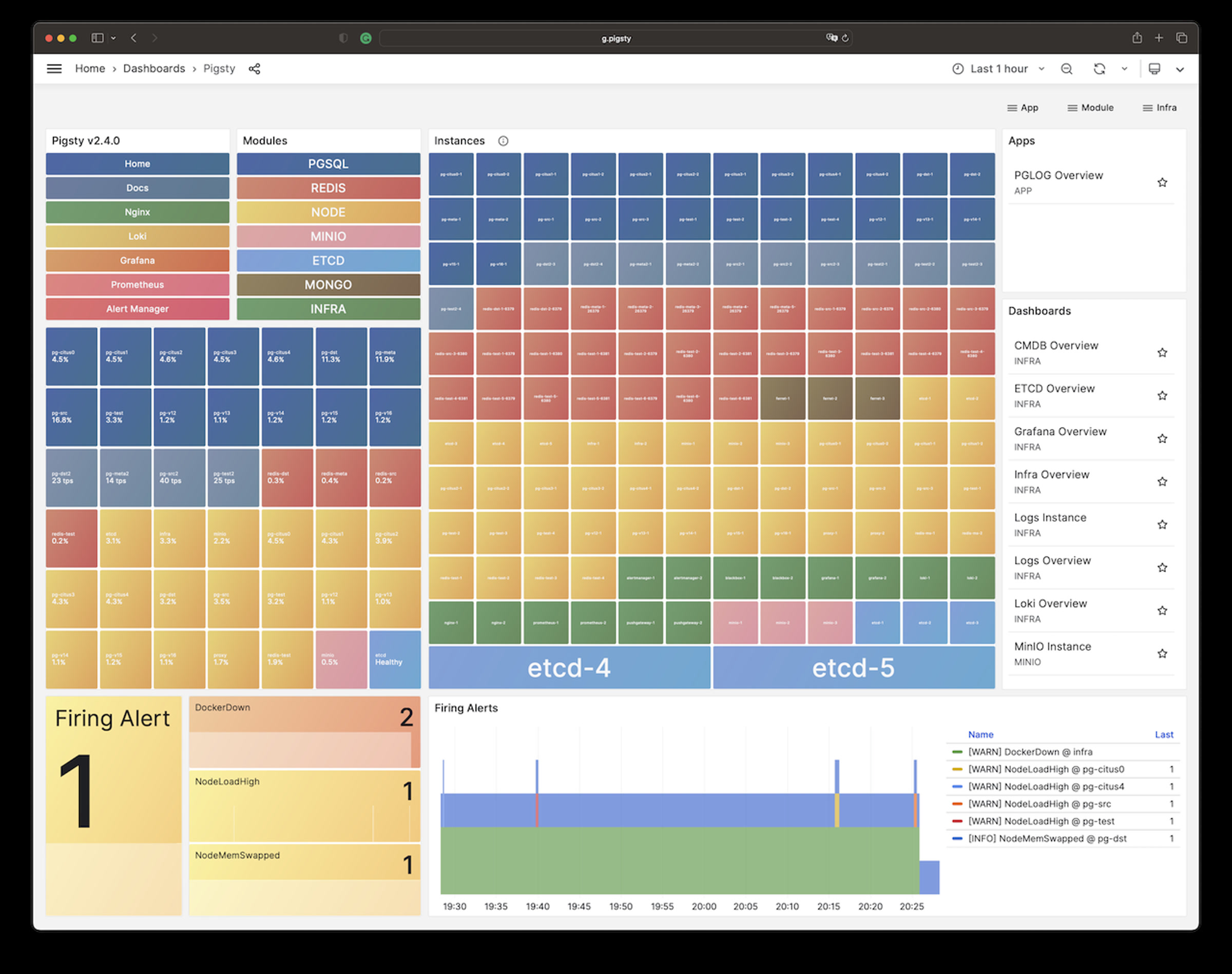
It will create a cluster with everything properly configured: High Availability powered by patroni & etcd; Point-In-Time-Recovery powered by pgBackRest & optional MinIO / S3;
auto-routed, pooled Services & Access pooled by pgBouncer and exposed by haproxy; and out-of-the-box Monitoring & alerting powered by the INFRA module.
The cluster keeps serving as long as ANY instance survives, with excellent Fault-Tolerance performance:
RPO = 0 on sync mode, RPO < 1MB on async mode; RTO ~ 2s on switchover, RTO < 30s on failover.
Customization
Pigsty is highly customizable. You can describe the entire database and infra deployment with 300+ parameters in a single config file and materialize them with one command.
There are many built-in configuration templates.
Example: Sandbox (4-node) with two PG cluster
The conf/full.yml utilizes four nodes to deploy two PostgreSQL clusters, pg-meta and pg-test:
pg-meta:
  hosts: { 10.10.10.10: { pg_seq: 1, pg_role: primary } }
  vars:
    pg_cluster: pg-meta
    pg_users:
      - {name: dbuser_meta     ,password: DBUser.Meta     ,pgbouncer: true ,roles: [dbrole_admin]    ,comment: pigsty admin user }
      - {name: dbuser_view     ,password: DBUser.Viewer   ,pgbouncer: true ,roles: [dbrole_readonly] ,comment: read-only viewer for meta database }
    pg_databases:
      - {name: meta ,baseline: cmdb.sql ,comment: pigsty meta database ,schemas: [pigsty]}
    pg_hba_rules:
      - {user: dbuser_view , db: all ,addr: infra ,auth: pwd ,title: 'allow grafana dashboard access cmdb from infra nodes'}
    pg_vip_enabled: true
    pg_vip_address: 10.10.10.2/24

# pgsql 3 node ha cluster: pg-test
pg-test:
  hosts:
    10.10.10.11: { pg_seq: 1, pg_role: primary }   # primary instance, leader of cluster
    10.10.10.12: { pg_seq: 2, pg_role: replica }   # replica instance, follower of leader
    10.10.10.13: { pg_seq: 3, pg_role: replica, pg_offline_query: true } # replica with offline access
  vars:
    pg_cluster: pg-test           # define pgsql cluster name
    pg_users:  [{ name: test , password: test , pgbouncer: true , roles: [ dbrole_admin ] }]
    pg_databases: [{ name: test }]
    pg_vip_enabled: true
    pg_vip_address: 10.10.10.3/24
You can even deploy PostgreSQL with different major versions and kernel forks in the same deployment:
Example: Security Setup & Delayed Replica
The following conf/safe.yml provisions a 4-node security enhanced PostgreSQL cluster pg-meta with a delayed replica pg-meta-delay:
/* Detailed source-code truncated for AI context efficiency. */Example: Horizontal Sharding with Citus
You can perform horizontal sharding on vanilla postgres with CITUS.
/* Detailed source-code truncated for AI context efficiency. */You can deploy different kinds of PostgreSQL instance such as primary, replica, offline, delayed, sync standby, etc.,
and customize with scene-optimize config templates and all 575 extensions out-of-the-box.
You can define Users, Databases, Service, HBAs and other entities with code and provision them in one pass.
You can also self-host postgres-centric software like SUPABASE, Odoo & Dify, Electric, GitLab, ... with Pigsty:
Example: Self-hosting Supabase
You can launch a self-hosting supabase with MinIO and PostgreSQL with just several commands:
./configure -c supabase    # use supabase config
./deploy.yml               # install pigsty
./docker.yml               # install docker compose
./app.yml                  # launch supabase stateless part with docker
The conf/supabase.yml just describes everything you need:
/* Detailed source-code truncated for AI context efficiency. */There are other pro, beta, or pilot modules, and there will be more coming in the future:
Compatibility
We recommend using Rocky Linux 9.8 / 10.2, Debian 12.15 / 13.6, and Ubuntu 22.04.5 / 24.04.4 / 26.04.0 for production use.
Pigsty runs directly on bare Linux, and focuses on actively maintained mainstream LTS Linux Distributions:
| Code | Distro | Minor | x86_64 |
aarch64 |
|---|---|---|---|---|
| EL10 | RHEL / Rocky / Alma 10 | 10.2 | el10.x86_64 |
el10.aarch64 |
| EL9 | RHEL / Rocky / Alma 9 | 9.8 | el9.x86_64 |
el9.aarch64 |
| EL8 | RHEL / Rocky / Alma 8 | 8.10 | el8.x86_64 |
el8.aarch64 |
| U26 | Ubuntu 26.04 (resolute) | 26.04.0 | u26.x86_64 |
u26.aarch64 |
| U24 | Ubuntu 24.04 (noble) | 24.04.4 | u24.x86_64 |
u24.aarch64 |
| U22 | Ubuntu 22.04 (jammy) | 22.04.5 | u22.x86_64 |
u22.aarch64 |
| D13 | Debian 13 (trixie) | 13.6 | d13.x86_64 |
d13.aarch64 |
| D12 | Debian 12 (bookworm) | 12.15 | d12.x86_64 |
d12.aarch64 |
Sponsor
Many thanks to our contributors and sponsors for making Pigsty possible. Special thanks to MiraclePlus for funding, to Cloudflare for hosting the Pigsty repo, Jetbrains for the dev tools, and to Vercel for hosting the Pigsty website.
| Vercel | JetBrains |
|---|---|
License
Pigsty is licensed under Apache-2.0. Check NOTICE and License Documentation for details.
About

2. In-Tree Documentation Chapters (pgsty/pigsty)
File: README.md
PIGSTY - Self-Host Postgres like a Pro
Enterprise-Grade Open-Source PostgreSQL Distribution with HA, PITR, IaC, Monitor, and 575 PG extensions.
"PostgreSQL In Great STYle": Postgres, Infras, Graphics, Service, Toolbox, it's all Yours.
Website | ORG | PGEXT | Piglet | Public Demo | Blog | Discuss | Support | Release Notes | 中文
Pigsty scales from laptop to datacenter. Enterprise-grade. Developer-friendly. Get Started with the latest v4.5.0:
curl -fsSL https://repo.pigsty.io/get | bash -s v4.5.0Features
- Extensible: 575 PG Extensions & 12 PG Kernels available, Packed for 16 Linux Platforms, Battery-Included.
- Reliable: Self-healing HA clusters with pre-configured PITR and built-in ACL, CA & SSL secure best practice.
- Observable: SOTA monitoring for PG / Infra / Node based on the Victoria & Grafana stack: Demo & Gallery.
- Scalable: Auto-routed & pooled customizable database Services Access with haproxy, pgbouncer, and VIP.
- Maintainable: One-Cmd Deploy, Admin SOP, Auto-Tune, Local Repo, IaC and Vagrant / Terraform support.
- Composable: Bonus Modules such as Redis / Valkey, MinIO, Etcd, Docker, DuckDB, Supabase, & More.
- Controllable: Self-sufficient Infra Closure, Cloud Neutral FOSS. Run on bare Linux without Docker & K8S.
- Affordable: Self-Hosting like a Pro, without the cost of RDS. Empowering Cloud-Exit for Ultra Cost Saving!
You can even use many exotic PG Kernel Forks as in-place replacement and wrap it as a full RDS service:
| Kernel | Key Feature | Description |
|---|---|---|
| PostgreSQL | Battery-Included | Original PGDG PostgreSQL with 575 extensions |
| Supabase | Backend as Service | BaaS over PostgreSQL, Firebase alternative |
| Citus | Horizontal Scaling | Distributive PostgreSQL via native extension |
| Babelfish | SQL Server Simulation | Microsoft SQL Server wire-compatibility |
| IvorySQL | Oracle Simulation | Oracle Grammar and PL/SQL compatible |
| OpenHalo | MySQL Simulation | MySQL wire-protocol compatibility |
| DocumentDB | MongoDB Simulation | MongoDB wire-protocol compatibility |
| Percona | Transparent Data Encryption | Percona Distribution with pg_tde |
| OrioleDB | OLTP Optimization Engine | No bloat, No XID Wraparound, S3 Storage |
| PolarDB | Aurora flavor RAC | RAC, China domestic compliance |
| AgensGraph | Graph-Native Database | Transactional graph database based on PostgreSQL |
| pgEdge | Multi-Master Distributive | Geo-Distributive multi-writer Postgres |
| Cloudberry | MPP Data Warehouse | Greenplum 7 Apache OSS Fork |
And gather the synergistic superpowers of all 575 PostgreSQL Extensions all together:
Get Started
Prepare a fresh x86_64 / aarch64 node runs any compatible Linux OS Distros, then Install Pigsty with:
curl -fsSL https://repo.pigsty.io/get | bash; cd ~/pigsty;Then configure and run the deploy.yml playbook with an admin user (nopass ssh & sudo):
./configure -g    # generate config and random passwords
./deploy.yml      # deploy everything on current node
Finally, you will get a pigsty singleton node ready, with WebUI on port 80/443 and Postgres on port 5432.
For dev/testing purposes, you can also run Pigsty inside Docker containers: cd docker; make launch
Single-Node Setup | Production Deploy | Offline Install | Minimal Install | Docker Install | Run Supabase
Install with the pig cli
Then you can launch pigsty with pig sty sub command:
curl -fsSL https://repo.pigsty.io/pig | bash # install pig
pig sty init     # install latest pigsty src to ~/pigsty
pig sty conf     # auto-generate pigsty.yml config file
pig sty deploy   # run the deploy.yml playbook
Install with get script
/* Detailed source-code truncated for AI context efficiency. */HINT: To install a specific version, pass the version string as the first parameter:
bashcurl -fsSL https://repo.pigsty.io/get | bash -s v4.5.0
Clone src with git
You can also download the pigsty source with git, remember to check out a specific version tag, the main branch is for development.
git clone https://github.com/pgsty/pigsty; cd pigsty; git checkout v4.5.0Architecture
Pigsty uses a modular design: you can use one or all, with best-of-breed products integrated as a platform.
Self-healing PostgreSQL HA cluster powered by Patroni, Pgbouncer, PgBackrest & HAProxy
Nginx, Local Repo, DNSMasq, and the entire Victoria & Grafana observability stack.
Init node name, repo, pkg, NTP, ssh, admin, tune, expose services, collect logs & metrics.
Etcd cluster is used as a reliable distributed configuration store by PostgreSQL HA agents.
You can compose them freely in a declarative manner. INFRA & NODE will suffice for host monitoring.ETCD and PGSQL are used for HA PG clusters; installing them on multiple nodes automatically forms HA clusters.
The default deploy.yml playbook will deploy INFRA, NODE, ETCD & PGSQL on the current node.
This gives you an out-of-the-box PostgreSQL singleton instance (admin_ip:5432) with everything ready.
The node can be used as an admin controller to deploy & monitor more nodes & clusters. For example, you can install these 6 OPTIONAL extra modules for advanced use cases:
S3-compatible object storage service; used as an optional central backup server for PGSQL.
Deploy Redis or Valkey servers in standalone master-replica, sentinel, and native cluster mode.
Launch optional docker daemons to run other stateless parts besides Pigsty RDS.
JuiceFS can mount S3/MinIO, and even PostgreSQL as a filesystem shared by multi users.
Vibe coding environment with VS Code Server, JupyterLab, Node.js, and Claude Code.
Of course, you can deploy different kinds of HA PostgreSQL clusters on multiple nodes, as much as you want.
PostgreSQL RDS
To deploy an additional 3-node HA Postgres cluster pg-test. Add the cluster definition to the config inventory:
pg-test:
  hosts:
    10.10.10.11: { pg_seq: 1, pg_role: primary }
    10.10.10.12: { pg_seq: 2, pg_role: replica }
    10.10.10.13: { pg_seq: 3, pg_role: offline }
  vars: { pg_cluster: pg-test }
The default config file is pigsty.yml under pigsty home, add the snippet above to the all.children.pg-test,
Then, create the cluster with built-in playbooks in one command:
bin/pgsql-add pg-test # init pg-test clusterExample: Complex PostgreSQL Customization
This config file provides a detailed example of a complex PostgreSQL cluster pg-meta with multiple
databases, users, and service definition:
/* Detailed source-code truncated for AI context efficiency. */It will create a cluster with everything properly configured: High Availability powered by patroni & etcd; Point-In-Time-Recovery powered by pgBackRest & optional MinIO / S3;
auto-routed, pooled Services & Access pooled by pgBouncer and exposed by haproxy; and out-of-the-box Monitoring & alerting powered by the INFRA module.
The cluster keeps serving as long as ANY instance survives, with excellent Fault-Tolerance performance:
RPO = 0 on sync mode, RPO < 1MB on async mode; RTO ~ 2s on switchover, RTO < 30s on failover.
Customization
Pigsty is highly customizable. You can describe the entire database and infra deployment with 300+ parameters in a single config file and materialize them with one command.
There are many built-in configuration templates.
Example: Sandbox (4-node) with two PG cluster
The conf/full.yml utilizes four nodes to deploy two PostgreSQL clusters, pg-meta and pg-test:
pg-meta:
  hosts: { 10.10.10.10: { pg_seq: 1, pg_role: primary } }
  vars:
    pg_cluster: pg-meta
    pg_users:
      - {name: dbuser_meta     ,password: DBUser.Meta     ,pgbouncer: true ,roles: [dbrole_admin]    ,comment: pigsty admin user }
      - {name: dbuser_view     ,password: DBUser.Viewer   ,pgbouncer: true ,roles: [dbrole_readonly] ,comment: read-only viewer for meta database }
    pg_databases:
      - {name: meta ,baseline: cmdb.sql ,comment: pigsty meta database ,schemas: [pigsty]}
    pg_hba_rules:
      - {user: dbuser_view , db: all ,addr: infra ,auth: pwd ,title: 'allow grafana dashboard access cmdb from infra nodes'}
    pg_vip_enabled: true
    pg_vip_address: 10.10.10.2/24

# pgsql 3 node ha cluster: pg-test
pg-test:
  hosts:
    10.10.10.11: { pg_seq: 1, pg_role: primary }   # primary instance, leader of cluster
    10.10.10.12: { pg_seq: 2, pg_role: replica }   # replica instance, follower of leader
    10.10.10.13: { pg_seq: 3, pg_role: replica, pg_offline_query: true } # replica with offline access
  vars:
    pg_cluster: pg-test           # define pgsql cluster name
    pg_users:  [{ name: test , password: test , pgbouncer: true , roles: [ dbrole_admin ] }]
    pg_databases: [{ name: test }]
    pg_vip_enabled: true
    pg_vip_address: 10.10.10.3/24
You can even deploy PostgreSQL with different major versions and kernel forks in the same deployment:
Example: Security Setup & Delayed Replica
The following conf/safe.yml provisions a 4-node security enhanced PostgreSQL cluster pg-meta with a delayed replica pg-meta-delay:
/* Detailed source-code truncated for AI context efficiency. */Example: Horizontal Sharding with Citus
You can perform horizontal sharding on vanilla postgres with CITUS.
/* Detailed source-code truncated for AI context efficiency. */You can deploy different kinds of PostgreSQL instance such as primary, replica, offline, delayed, sync standby, etc.,
and customize with scene-optimize config templates and all 575 extensions out-of-the-box.
You can define Users, Databases, Service, HBAs and other entities with code and provision them in one pass.
You can also self-host postgres-centric software like SUPABASE, Odoo & Dify, Electric, GitLab, ... with Pigsty:
Example: Self-hosting Supabase
You can launch a self-hosting supabase with MinIO and PostgreSQL with just several commands:
./configure -c supabase    # use supabase config
./deploy.yml               # install pigsty
./docker.yml               # install docker compose
./app.yml                  # launch supabase stateless part with docker
The conf/supabase.yml just describes everything you need:
/* Detailed source-code truncated for AI context efficiency. */There are other pro, beta, or pilot modules, and there will be more coming in the future:
Compatibility
We recommend using Rocky Linux 9.8 / 10.2, Debian 12.15 / 13.6, and Ubuntu 22.04.5 / 24.04.4 / 26.04.0 for production use.
Pigsty runs directly on bare Linux, and focuses on actively maintained mainstream LTS Linux Distributions:
| Code | Distro | Minor | x86_64 |
aarch64 |
|---|---|---|---|---|
| EL10 | RHEL / Rocky / Alma 10 | 10.2 | el10.x86_64 |
el10.aarch64 |
| EL9 | RHEL / Rocky / Alma 9 | 9.8 | el9.x86_64 |
el9.aarch64 |
| EL8 | RHEL / Rocky / Alma 8 | 8.10 | el8.x86_64 |
el8.aarch64 |
| U26 | Ubuntu 26.04 (resolute) | 26.04.0 | u26.x86_64 |
u26.aarch64 |
| U24 | Ubuntu 24.04 (noble) | 24.04.4 | u24.x86_64 |
u24.aarch64 |
| U22 | Ubuntu 22.04 (jammy) | 22.04.5 | u22.x86_64 |
u22.aarch64 |
| D13 | Debian 13 (trixie) | 13.6 | d13.x86_64 |
d13.aarch64 |
| D12 | Debian 12 (bookworm) | 12.15 | d12.x86_64 |
d12.aarch64 |
Sponsor
Many thanks to our contributors and sponsors for making Pigsty possible. Special thanks to MiraclePlus for funding, to Cloudflare for hosting the Pigsty repo, Jetbrains for the dev tools, and to Vercel for hosting the Pigsty website.
| Vercel | JetBrains |
|---|---|
License
Pigsty is licensed under Apache-2.0. Check NOTICE and License Documentation for details.
About
File: app/postgrest/README.md
PostgREST
PostgREST: https://postgrest.org/en/stable/index.html
Serve a RESTful API from any Postgres database
This is an example of creating pigsty cmdb API with PostgREST
cd ~/pigsty/app/postgrest; make uphttp://10.10.10.10:8884 is the default endpoint for PostgREST
Public API: http://api.pigsty.cc
Makefile
make up         # pull up postgrest with docker compose
make run        # launch postgrest with docker
make ui         # run swagger ui container
make view       # print postgrest access point
make log        # tail -f postgrest logs
make info       # introspect postgrest with jq
make stop       # stop postgrest container
make clean      # remove postgrest container
make rmui       # remove swagger ui container
make pull       # pull latest postgrest image
make rmi        # remove postgrest image
make save       # save postgrest image to /tmp/docker/postgrest.tgz
make load       # load postgrest image from /tmp/docker/postgrest.tgz
Swagger UI
Launch a swagger OpenAPI UI and visualize PostgREST API on 8883 with:
docker run --init --name swagger -p 8883:8080 -e API_URL=http://10.10.10.10:8884 swaggerapi/swagger-ui
# docker run -d -e API_URL=http://10.10.10.10:8884 -p 8883:8080 swaggerapi/swagger-editor # swagger editor
Check http://10.10.10.10:8883/
--- METRICS ---
- Files Extracted: 3
- Estimated Token Budget: ~11256 tokens
- Recency Window: Active (< 180 days)
- Canonical Reference: https://codewiki.google/github.com/pgsty/pigsty