

File: README.md
Contents
Summary
The OSSU curriculum is a complete education in computer science using online materials.
It's not merely for career training or professional development.
It's for those who want a proper, well-rounded grounding in concepts fundamental to all computing disciplines,
and for those who have the discipline, will, and (most importantly!) good habits to obtain this education largely on their own,
but with support from a worldwide community of fellow learners.
It is designed according to the degree requirements of undergraduate computer science majors, minus general education (non-CS) requirements,
as it is assumed most of the people following this curriculum are already educated outside the field of CS.
The courses themselves are among the very best in the world, often coming from Harvard, Princeton, MIT, etc.,
but specifically chosen to meet the following criteria.
Courses must:
- Be open for enrollment
- Run regularly (ideally in self-paced format, otherwise running multiple times per year)
- Be of generally high quality in teaching materials and pedagogical principles
- Match the curricular standards of the CS 2013: Curriculum Guidelines for Undergraduate Degree Programs in Computer Science
When no course meets the above criteria, the coursework is supplemented with a book.
When there are courses or books that don't fit into the curriculum but are otherwise of high quality,
they belong in extras/courses or extras/readings.
Organization. The curriculum is designed as follows:
- Intro CS: for students to try out CS and see if it's right for them
- Core CS: corresponds roughly to the first three years of a computer science curriculum, taking classes that all majors would be required to take
- Advanced CS: corresponds roughly to the final year of a computer science curriculum, taking electives according to the student's interests
- Final Project: a project for students to validate, consolidate, and display their knowledge, to be evaluated by their peers worldwide
Duration. It is possible to finish within about 2 years if you plan carefully and devote roughly 20 hours/week to your studies. Learners can use this spreadsheet to estimate their end date. Make a copy and input your start date and expected hours per week in the Timeline sheet. As you work through courses you can enter your actual course completion dates in the Curriculum Data sheet and get updated completion estimates.
Warning: While the spreadsheet is a useful tool to estimate the time you need to complete this curriculum, it may not always be up-to-date with the curriculum. Use the OSSU CS website or the repo to see what courses to do.
Cost. All or nearly all course material is available for free. However, some courses may charge money for assignments/tests/projects to be graded.
Note that both Coursera and edX offer financial aid.
Decide how much or how little to spend based on your own time and budget;
just remember that you can't purchase success!
Process. Students can work through the curriculum alone or in groups, in order or out of order.
- We recommend doing all courses in Core CS, only skipping a course when you are certain that you've already learned the material previously.
- For simplicity, we recommend working through courses (especially Core CS) in order from top to bottom. Some students choose to study multiple courses at a time in order to vary the material they are working on in a day/week. A popular option is to take the math courses in parallel with the introductory courses. Course prerequisites are listed to help you determine if you are prepared for a given course.
- Courses in Advanced CS are electives. Choose one subject (e.g. Advanced programming) you want to become an expert in and take all the courses under that heading. You can also create your own custom subject; the Discord community may provide feedback on your planned subject.
Content policy. If you plan on showing off some of your coursework publicly, you must share only files that you are allowed to.
Respect the code of conduct that you signed in the beginning of each course!
Getting help (Details about our FAQ and chatroom)
Community
- We have a Discord server! This should be your first stop to talk with other OSSU students. Why don't you introduce yourself right now? Join the OSSU Discord
- You can also interact through GitHub issues. If there is a problem with a course, or a change needs to be made to the curriculum, this is the place to start the conversation. Read more here.
- Add Open Source Society University to your Linkedin profile!
Warning: There are a few third-party/deprecated/outdated material that you might find when searching for OSSU. We recommend you to ignore them, and only use the OSSU CS website or OSSU CS Github Repo. Some known outdated materials are:
- An unmaintained and deprecated firebase app. Read more in the FAQ.
- An unmaintained and deprecated trello board
- Third-party notion templates
Curriculum
Prerequisites
- Core CS assumes the student has already taken high school math, including algebra, geometry, and pre-calculus.
- Advanced CS assumes the student has already taken the entirety of Core CS
and is knowledgeable enough now to decide which electives to take. - Note that Advanced systems assumes the student has taken a basic physics course (e.g. AP Physics in high school).
Intro CS
This course will introduce you to the world of computer science and programming. This course gives you a flavor of the material to come. If you finish the course wanting more, Computer Science is likely for you!
Topics covered:computationimperative programmingbasic data structures and algorithmsand more
| Courses | Duration | Effort | Prerequisites | Discussion |
|---|---|---|---|---|
| Introduction to Computer Science and Programming using Python | 14 weeks | 6-10 hours/week | high school algebra | chat |
Core CS
All coursework under Core CS is required, unless otherwise indicated.
Core programming
Topics covered:functional programmingdesign for testingprogram requirementscommon design patternsunit testingobject-oriented designstatic typingdynamic typingML-family languages (via Standard ML)Lisp-family languages (via Racket)Rubyand more
| Courses | Duration | Effort | Prerequisites | Discussion |
|---|---|---|---|---|
| Systematic Program Design | 13 weeks | 8-10 hours/week | none | chat: part 1 / part 2 |
| Class-based Program Design | 13 weeks | 5-10 hours/week | Systematic Program Design, High School Math | chat |
| Programming Languages | 11 weeks | 4-8 hours/week | Systematic Program Design | chat |
| Object-Oriented Design | 13 weeks | 5-10 hours/week | Class-based Program Design | chat |
| Software Architecture | 4 weeks | 2-5 hours/week | Object Oriented Design | chat |
Core math
Discrete math (Math for CS) is a prerequisite and closely related to the study of algorithms and data structures. Calculus both prepares students for discrete math and helps students develop mathematical maturity.
Topics covered:discrete mathematicsmathematical proofsbasic statisticsO-notationdiscrete probabilityand more
| Courses | Duration | Effort | Notes | Prerequisites | Discussion |
|---|---|---|---|---|---|
| Calculus 1A: Differentiation (alternative) | 13 weeks | 6-10 hours/week | The alternate covers this and the following 2 courses | high school math | chat |
| Calculus 1B: Integration | 13 weeks | 5-10 hours/week | - | Calculus 1A | chat |
| Calculus 1C: Coordinate Systems & Infinite Series | 6 weeks | 5-10 hours/week | - | Calculus 1B | chat |
| Mathematics for Computer Science (alternative) | 13 weeks | 5 hours/week | 2015/2019 solutions 2010 solutions 2005 solutions. | Calculus 1C | chat |
CS Tools
Understanding theory is important, but you will also be expected to create programs. There are a number of tools that are widely used to make that process easier. Learn them now to ease your future work writing programs.
Topics covered:terminals and shell scriptingvimcommand line environmentsversion controland more
| Courses | Duration | Effort | Prerequisites | Discussion |
|---|---|---|---|---|
| The Missing Semester of Your CS Education | 2 weeks | 12 hours/week | - | chat |
Core systems
Topics covered:procedural programmingmanual memory managementboolean algebragate logicmemorycomputer architectureassemblymachine languagevirtual machineshigh-level languagescompilersoperating systemsnetwork protocolsand more
| Courses | Duration | Effort | Additional Text / Assignments | Prerequisites | Discussion |
|---|---|---|---|---|---|
| Build a Modern Computer from First Principles: From Nand to Tetris (alternative) | 6 weeks | 7-13 hours/week | - | C-like programming language | chat |
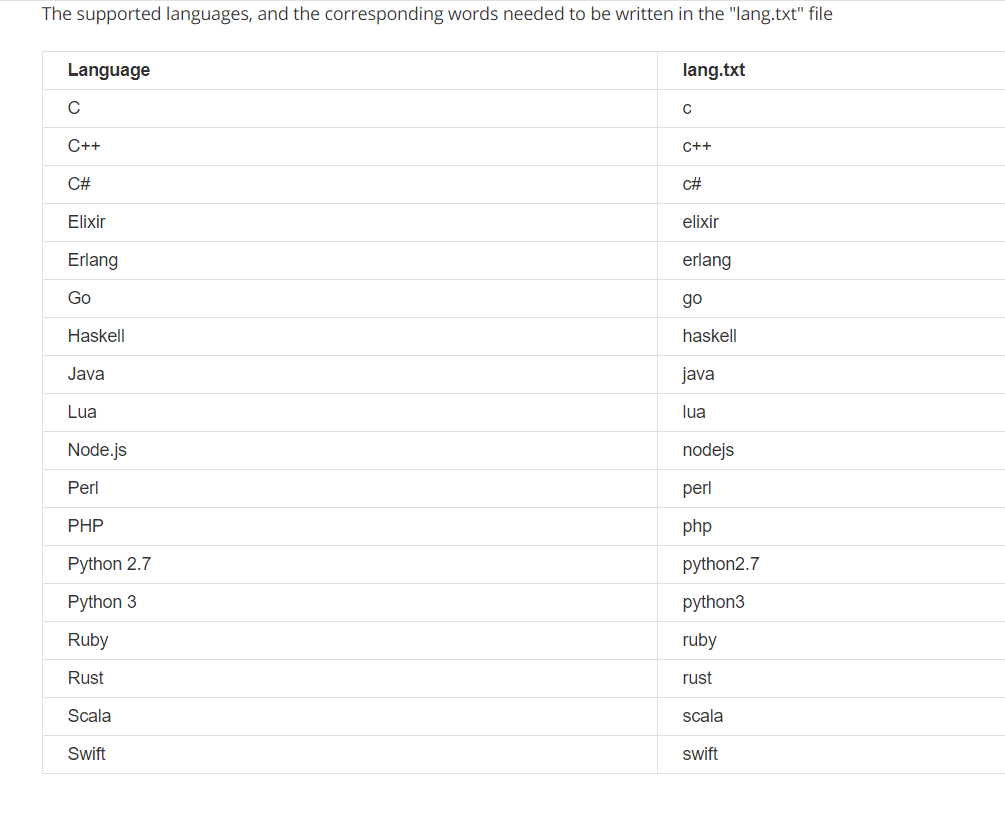
| Build a Modern Computer from First Principles: Nand to Tetris Part II | 6 weeks | 12-18 hours/week | - | one of these programming languages, From Nand to Tetris Part I | chat |
| Operating Systems: Three Easy Pieces | 10-12 weeks | 6-10 hours/week | - | Nand to Tetris Part II | chat |
| Computer Networking: a Top-Down Approach | 8 weeks | 4–12 hours/week | Wireshark Labs | algebra, probability, basic CS | chat |
Core theory
Topics covered:divide and conquersorting and searchingrandomized algorithmsgraph searchshortest pathsdata structuresgreedy algorithmsminimum spanning treesdynamic programmingNP-completenessand more
| Courses | Duration | Effort | Prerequisites | Discussion |
|---|---|---|---|---|
| Algorithms: Design and Analysis, Part 1 (alternative) | 8 weeks | 4-8 hours/week | any programming language, Mathematics for Computer Science | chat |
| Algorithms: Design and Analysis, Part 2 | 8 weeks | 4-8 hours/week | Algorithms Part 1 | chat |
Core security
Topics coveredConfidentiality, Integrity, AvailabilitySecure DesignDefensive ProgrammingThreats and AttacksNetwork SecurityCryptographyand more
| Courses | Duration | Effort | Prerequisites | Discussion |
|---|---|---|---|---|
| Cybersecurity Fundamentals | 8 weeks | 10-12 hours/week | - | chat |
| Principles of Secure Coding | 4 weeks | 4 hours/week | - | chat |
| Identifying Security Vulnerabilities | 4 weeks | 4 hours/week | - | chat |
Choose one of the following:
| Courses | Duration | Effort | Prerequisites | Discussion |
|---|---|---|---|---|
| Identifying Security Vulnerabilities in C/C++ Programming | 4 weeks | 5 hours/week | - | chat |
| Exploiting and Securing Vulnerabilities in Java Applications | 4 weeks | 5 hours/week | - | chat |
Core applications
Topics covered:Agile methodologyRESTsoftware specificationsrefactoringrelational databasestransaction processingdata modelingneural networkssupervised learningunsupervised learningOpenGLray tracingand more
| Courses | Duration | Effort | Prerequisites | Discussion |
|---|---|---|---|---|
| Databases: Modeling and Theory | 2 weeks | 10 hours/week | core programming | chat |
| Databases: Relational Databases and SQL | 2 weeks | 10 hours/week | core programming | chat |
| Databases: Semistructured Data | 2 weeks | 10 hours/week | core programming | chat |
| Machine Learning | 11 weeks | 9 hours/week | Basic coding | chat |
| Computer Graphics (alternative) | 6 weeks | 12 hours/week | C++ or Java, Basic Linear Algebra | chat |
| Software Engineering: Introduction (alternative) | 6 weeks | 8-10 hours/week | Core Programming, and a sizable project | chat |
Core ethics
Topics covered:Social ContextAnalytical ToolsProfessional EthicsIntellectual PropertyPrivacy and Civil Libertiesand more
| Courses | Duration | Effort | Prerequisites | Discussion |
|---|---|---|---|---|
| Ethics, Technology and Engineering | 9 weeks | 2 hours/week | none | chat |
| Introduction to Intellectual Property | 4 weeks | 2 hours/week | none | chat |
| Data Privacy Fundamentals | 3 weeks | 3 hours/week | none | chat |
Advanced CS
After completing every required course in Core CS, students should choose a subset of courses from Advanced CS based on interest.
Not every course from a subcategory needs to be taken.
But students should take every course that is relevant to the field they intend to go into.
Advanced programming
Topics covered:debugging theory and practicegoal-oriented programmingparallel computingobject-oriented analysis and designUMLlarge-scale software architecture and designand more
| Courses | Duration | Effort | Prerequisites |
|---|---|---|---|
| Parallel Programming | 4 weeks | 6-8 hours/week | Scala programming |
| Compilers | 9 weeks | 6-8 hours/week | none |
| Introduction to Haskell | 14 weeks | - | - |
| Learn Prolog Now! (alternative)* | 12 weeks | - | - |
| Software Debugging | 8 weeks | 6 hours/week | Python, object-oriented programming |
| Software Testing | 4 weeks | 6 hours/week | Python, programming experience |
(*) book by Blackburn, Bos, Striegnitz (compiled from source, redistributed under CC license)
Advanced systems
Topics covered:digital signalingcombinational logicCMOS technologiessequential logicfinite state machinesprocessor instruction setscachespipeliningvirtualizationparallel processingvirtual memorysynchronization primitivessystem call interfaceand more
| Courses | Duration | Effort | Prerequisites | Notes |
|---|---|---|---|---|
| Computation Structures 1: Digital Circuits alternative 1 alternative 2 | 10 weeks | 6 hours/week | Nand2Tetris II | Alternate links contain all 3 courses. |
| Computation Structures 2: Computer Architecture | 10 weeks | 6 hours/week | Computation Structures 1 | - |
| Computation Structures 3: Computer Organization | 10 weeks | 6 hours/week | Computation Structures 2 | - |
Advanced theory
Topics covered:formal languagesTuring machinescomputabilityevent-driven concurrencyautomatadistributed shared memoryconsensus algorithmsstate machine replicationcomputational geometry theorypropositional logicrelational logicHerbrand logicgame treesand more
| Courses | Duration | Effort | Prerequisites |
|---|---|---|---|
| Theory of Computation (alternative) | 13 weeks | 10 hours/week | Mathematics for Computer Science, logic, algorithms |
| Computational Geometry | 16 weeks | 8 hours/week | algorithms, C++ |
| Algorithmic Game Theory | 10 weeks | 12 hours/week | Core Theory |
Advanced Information Security
| Courses | Duration | Effort | Prerequisites |
|---|---|---|---|
| Web Security Fundamentals | 5 weeks | 4-6 hours/week | understanding basic web technologies |
| Security Governance & Compliance | 3 weeks | 3 hours/week | - |
| Digital Forensics Concepts | 3 weeks | 2-3 hours/week | Core Security |
| Secure Software Development: Requirements, Design, and Reuse | 7 weeks | 1-2 hours/week | Core Programming and Core Security |
| Secure Software Development: Implementation | 7 weeks | 1-2 hours/week | Secure Software Development: Requirements, Design, and Reuse |
| Secure Software Development: Verification and More Specialized Topics | 7 weeks | 1-2 hours/week | Secure Software Development: Implementation |
Advanced math
| Courses | Duration | Effort | Prerequisites | Discussion |
|---|---|---|---|---|
| Essence of Linear Algebra | - | - | high school math | chat |
| Linear Algebra | 14 weeks | 12 hours/week | corequisite: Essence of Linear Algebra | chat |
| Introduction to Numerical Methods | 14 weeks | 12 hours/week | Linear Algebra | chat |
| Introduction to Formal Logic | 10 weeks | 4-8 hours/week | Set Theory | chat |
| Probability | 15 weeks | 5-10 hours/week | Differentiation and Integration | chat |
Final project
Part of learning is doing.
The assignments and exams for each course are to prepare you to use your knowledge to solve real-world problems.
After you've completed Core CS and the parts of Advanced CS relevant to you,
you should identify a problem that you can solve using the knowledge you've acquired.
You can create something entirely new, or you can improve some tool/program that you use and wish were better.
Students who would like more guidance in creating a project may choose to use a series of project oriented courses.
Here is a sample of options
(many more are available, at this point you should be capable of identifying a series that is interesting and relevant to you):
| Courses | Duration | Effort | Prerequisites |
|---|---|---|---|
| Fullstack Open | 12 weeks | 15 hours/week | programming |
| Modern Robotics | 26 weeks | 2-5 hours/week | freshman-level physics, linear algebra, calculus, linear ordinary differential equations |
| Data Mining (Specialization) | 30 weeks | 2-5 hours/week | machine learning |
| Big Data (Specialization) | 30 weeks | 3-5 hours/week | none |
| Internet of Things (Specialization) | 30 weeks | 1-5 hours/week | strong programming |
| Cloud Computing (Specialization) | 30 weeks | 2-6 hours/week | C++ programming |
| Data Science (Specialization) | 43 weeks | 1-6 hours/week | none |
| Functional Programming in Scala (Specialization) | 29 weeks | 4-5 hours/week | One year programming experience |
| Game Design and Development with Unity 2020 (Specialization) | 6 months | 5 hours/week | programming, interactive design |
Congratulations
After completing the requirements of the curriculum above,
you will have completed the equivalent of a full bachelor's degree in Computer Science.
Congratulations!
What is next for you? The possibilities are boundless and overlapping:
- Look for a job as a developer!
- Check out the readings for classic books you can read that will sharpen your skills and expand your knowledge.
- Join a local developer meetup (e.g. via meetup.com).
- Pay attention to emerging technologies in the world of software development:
- Explore the actor model through Elixir, a new functional programming language for the web based on the battle-tested Erlang Virtual Machine!
- Explore borrowing and lifetimes through Rust, a systems language which achieves memory- and thread-safety without a garbage collector!
- Explore dependent type systems through Idris, a new Haskell-inspired language with unprecedented support for type-driven development.
Code of conduct
How to show your progress
Fork the GitHub repo into your own GitHub account and put ✅ next to the stuff you've completed as you complete it. This can serve as your kanban board and will be faster to implement than any other solution (giving you time to spend on the courses).
Team
- Eric Douglas: founder of OSSU
- Josh Hanson: lead technical maintainer
- Waciuma Wanjohi: lead academic maintainer
- Contributors
File: coursepages/spd/README.md
Systematic Program Design
This course has been developed by UBC and is available from Edx. We recommend you to do it from the archived version on Edx.
This programming course takes a unique approach, as it focuses on learning a systematic programming method rather than a programming language. This practical approach will help you channel your creativity so that you can program well in any language.
Course Link (Recommended):
- https://learning.edx.org/course/course-v1:UBCx+SPD1x+2T2015
- https://learning.edx.org/course/course-v1:UBCx+SPD2x+2T2015
- https://learning.edx.org/course/course-v1:UBCx+SPD3x+3T2015
Alternative Links:
- https://www.edx.org/learn/coding/university-of-british-columbia-how-to-code-simple-data (Up to Week 6A)
- https://www.edx.org/learn/coding/university-of-british-columbia-how-to-code-complex-data (Week 6B onwards)
Please see the FAQ below for explanation for different course versions.
Instructions
Note: These instructions are for the archived version of the course on Edx, which we recommend. They don't apply to other versions of the course.
- The course does not have a homepage on Edx, but don't worry about it. Open the link given above, log in (if you are not logged in) and then enroll in the course.
- Work through Week 1A to Week 6A as given in the course overview. Watch the videos, do the exercises, and then solve the problems from the problem bank.
- After you complete, Week 6A, complete the space invaders project with these instructions.
- Then, work through Week 6B onwards. Watch the videos, do the exercises, and then solve the problems from the problem bank.
- After that, watch the extra videos in this playlist.
- After you complete all the modules in the course, do the TA solver problem. You will find the instructions in the starter file.
- The problem bank tab has many additional problems. We suggest you to solve all of them to boost your understanding.
- Some links to starter files in the course are no longer working. You can download the starter files from this github repository: https://github.com/ossu/spd-starters. You can download a zip file of all the starter files using this link.
- You won't be able to submit your responses for the exercises, but you can see their answers by clicking on "Show Answer". Check your answers honestly.
- You won't be able to submit the problem bank problems, but they provide sample solutions. You can match your solution with it.
- While there are ways to do this course in other IDEs, we suggest you to use Dr. Racket, as configuring the problem starter files for other IDEs is not worth the effort.
- If you are stuck somewhere, feel free to ask questions. You can join the OSSU chat for this course here:
- Chat for discussions up to Week 6A: https://discord.gg/RfqAmGJ
- Chat for discussions from Week 6B onwards: https://discord.gg/kczJzpm
Notes
Dr. Racket defaults to using the newer notation
#true #false '(). You can configure Dr. Racket to use the notation used by the course by clicking in menu bar on Language > Choose Language. Then choose the required language (BSL, ISL or other variants). Then click on "Show details" in the bottom left of the window. Then choosetrue false emptyin "Constant Style" field. Run your file again to make sure it uses the new configuration.You can enable automatic closing of parentheses, brackets, and quotes. Click on Edit in the Menu Bar > Preferences > Go to Editing Tab > Go to General Editing Sub-tab > Check the "Enable automatic parentheses, square brackets, and quotes" checkbox.
You can use Ctrl + I to reindent the whole file.
If you are on Windows or Linux, use Alt + Backspace to delete whole words.
If you are unable to watch the videos on Edx for some reason, you can watch them on this youtube channel.
FAQ
This course is boring. Can I skip it?
No. This course may seem boring at first, but we suggest working though it. This is a great course, and it will probably change the way you think. Many students who found this course boring at first became a fan of the course by the time they completed it. Be very careful. The early parts (especially the rules about how evaluation works) plays a huge role in understanding how code works and gets executed for the rest of the course.
Why is this course taught using BSL? Would it not make more sense to teach it in an industry standard language?
This is an intentional choice, and here's why:
Lisp is the lingua franca of computer scientists -- by which we mean, PhD algorithm researchers. There are some good and some merely historical reasons for this, but it's a fact of life, so if you want to read white papers you're going to want to read Lisp. BSL is a good introduction, and frankly once you get over the parenthesis hell and once you know any Lisp you know how to read them all.
This is the first computer science course in most people's curricula that isn't centered around teaching you how to use a language. Because the point of computer science isn't to teach you a language. Or to teach you to code. Or to teach you to be a fullstack software engineer. Computer Science is a very narrowly-applied applied math with wide-ranging practical usage. But if you strip away all the qualifying language, it's math. Which means it has certain overarching rules that are completely, totally independent of your implementation language.
This course is built in a throwaway student language, specifically so you don't focus on the language and instead focus on what you're doing with the language. We don't care about public static void main or PEP8 style. We want to see ways to structure a program in any language. So we focus not on the things that make Java unique, and not on the things that make Python unique, and instead focus on the things that make code better.
It might seem rough to learn a new language just to take this course, but BSL frees you from having to worry about style linting or runtime issues or code compartmentalization or compiling or coding environment. It's a gift. Take it. The design patterns are hard enough.
Why there are different course versions, HTC, SPD? Why do you recommend the archived version?
There are two reasons people do these courses:
- The Knowledge
- The Certificate
OSSU assumes you're in it for the knowledge. You can have that for free. If you're doing it for the knowledge you don't need to submit your homework. You just need to do the homework.
If you want the recognition that you've done the thing, then you're in it for the certificate. You can't have the certificate for free. You have to pay for that.
There's no reason for you to submit homework sets unless you're doing it for the certificate -- If you're doing that, you can't actually get a certificate from the SPD course (because the course is expired) so you're in the wrong place.
If you want a certificate, then you need to take How To Code and you need to pay for it.
But you don't need to pay for anything in OSSU. We suggest you take SPD because the access to the information is better (because the course is expired) and it's more than sufficient for obtaining the knowledge.
TL;DR:
If you're in it for the knowledge, take SPD -- it's free but inactive
If you're in it for the certificate, take and pay for How To Code -- it's still an active course
Can I do this course in another programming language?
This course has really integrated with the programming languages it uses. We suggest you to use the language specified by the course. While, the concepts you learn from this course are applicable anywhere, trying to do the course with another language is not really sensible, and would just lead to wastage of time.
Can I use another IDE? I don't like Dr. Racket.
The programs in this course embed pictures and rich-text blocks in the code, which means, the files cannot be opened by other IDEs. While it is possible to prepare the starter files for use with other IDEs, you need Dr. Racket for that, and the time needed to do that can be better utilized in learning the concepts taught by the course.
How do I test functions which are supposed to output random values?
You can use check-random to test those functions. You can learn more about it here. It is needed for the Space Invaders project.
Credits
The problem starter files and the space invaders instructions were taken from the course "Systematic Program Design" on Edx, licensed under CC BY-NC-SA license.
File: coursepages/ostep/README.md
Operating Systems: Three Easy Pieces
Credit goes to palladian
Introduction
First, we should be frank: it's really hard to find a good self-contained online course on operating systems. OSTEP is the best course we've found so far. We describe below two approaches to the course, a "Base" approach which is suitable for most students, and an "Extended" approach, which is appropriate for students intending to specialize in systems programming.
The "base" approach covers all of our operating system curriculum requirements and should take about 80 hours of work.
The "extended" approach contains all of the work of the base approach and more. It involves learning very serious C and x86 assembly, and delving deep into kernel programming. It takes significantly more time (over 200 hours) and is much more challenging. For those students interested in this area of computing it is also highly rewarding.
Base Approach
- Read through the free online textbook Operating Systems: Three Easy Pieces
- Complete the homework questions at the end of each chapter. (There is an associated Github repository for the homeworks.)
This should take about 8 weeks, 10 hours/week. That's all you need to do!
You will need a Unix/Linux system, some basic command line tools, and a C compiler (such as GCC or Clang). On Windows, you can install Ubuntu in a virtual machine, or use WSL (Windows Subsystem for Linux). Mac OS is Unix-like, so it should be OK to use.
Course Links
C
Question: I see some C code in this book. How much C do I need to know?
Answer: You'll need to read and understand some C code in this book. You'll need basic understanding of arrays, pointers and print formatting. You can consult the free book Dive into Systems: Chapter 1 and 2. The CS50 Manual pages are also helpful to look up functions. You shouldn't spend too much time on learning C.
The code you'll read is fairly simple and presented in short fragments. The book helps you out quite a bit by manually introducing many C APIs such as the Process API, the Thread API, and so on. You can type, compile and run the code fragments, and read the corresponding explanations. The book explains them in great detail in a conversational style that's fun to read.
You will also write a little bit of C code. Only a minority of the chapters (about 10 out of 50) ask you to write some C code (while the other chapters require you to run provided simulation code and answer questions). These are usually simple, short C programs that imitate the code that was presented in that chapter, with small modifications.
When you're ready to start the homework, start with the reverse project this will be a good test to see if you're ready for the rest of the projects. For the rest of the hw projects use the link under course links.
If you are getting stuck on these, please don't spend too much time on them. There is a great solution set here. There is no honor code for this, so you are free to use the solutions. If you find yourself spending too much time, feel free to read and understand the solutions instead. Your main priority should be to gain understanding of operating systems concepts, not to master C coding.
Extended Approach
If you've chosen this option, then this is the first course in the OSSU curriculum for which you'll need to learn some prerequisites on your own before starting it, in addition to the courses that come before it in the curriculum. You might also run into some issues running the scripts for homework demos and for testing your solutions to the projects (although we hope we've solved most of those by now).
That said, if you're able to commit the time required for the prerequisites, we believe the reward is well worth the effort: this course is exciting, interesting, and quite useful for other fields of computer science and programming. One big attraction of this course is the opportunity to see a simplified but fully-functional Unix-like operating system in action and understand the concepts and design decisions that went into it as well as the low-level implementation details.
You should either watch all the lecture videos or read chapters 1 through 47 in the textbook (don't worry, the chapters are usually just a few pages long) as well as finish the projects listed below. We also strongly encourage you to do the homework exercises as they're assigned on the course website or in the book chapters; think of these like the "check-your-understanding" questions that pop up in the middle of lecture videos on sites like Coursera or edX.
Prerequisites
This class requires a lot of experience programming in C. You should finish one of the C books listed in the resources below before starting this course; if you try to learn C at the same time as the course material, you're likely to feel overwhelmed. If you haven't used C before, you should expect to spend a lot of time on this; it's hard to predict how long it might take for each person, but a rough estimate might be 8-10 hours per week for 3-5 weeks. You can always learn C alongside another OSSU course or even redo the exercises for other courses in C to gain practice with it.
You should also finish both parts of Nand2Tetris before starting this course. OSTEP focuses on the real-world x86 and x86_64 architectures, so you'll have to fill in some gaps in order to translate the concepts you learned in Nand2Tetris to a new architecture. You can do that with the x86 resources below, but note that they all assume you know C, so learn that first. This should take around 6-8 hours in total.
Course Links
- Course website
- Book
- Lecture videos
- Homework
- Homework Source Code Repo
- Homework Solutions
- Projects
- xv6
Roadmap
This course was originally taught as CS 537 at the University of Wisconsin by the author of the OSTEP textbook, so the projects are assigned in the course according to the best times to give UWisconsin students access to on-campus resources like recitation sections and office hours. That means they don't match up perfectly with the material being covered at that time in the lectures or textbook chapters. We recommend doing the course in the following order instead.
- Read chapters 1 and 2 of the OSTEP textbook and watch the first half (the introduction) of lecture 1.
- Do the
initial-utilitiesproject; it's intended as a litmus test for you to make sure you're comfortable enough with C before taking this class. You can watch discussion 1 for help. If it takes you more than 2 hours to write the code (not counting the discussion time and any time spent debugging), you should consider spending more time learning C before moving on in the course. (If you want more practice, you can doinitial-reversetoo, but it's not required.) - Watch lectures 1 through 5 and read chapters 3 through 24 of the OSTEP textbook. We recommend doing the homework assignments as they come up in the course calendar or book chapters.
- Watch discussion 3 and reread chapter 5, then do the
processes-shellproject. - Read the annotated guide to xv6 linked in the resources section below, starting from the beginning and stopping after the
System Calls: Processessection. - Watch discussion 2, then do the
initial-xv6project. - Watch discussion 5, then do the
scheduling-xv6-lotteryproject. - Watch discussion 7, then do the
vm-xv6-introproject. - Watch lectures 6 through 9 (and optionally, the review lecture) and read chapters 25 through 34; again, you're encouraged to do the homework.
- Watch discussion 10, then do the
concurrency-xv6-threadsproject. - Watch discussions 11 and 12, then do the
concurrency-mapreduceproject. - Watch lectures 10 through 14 (and optionally, the second review lecture) and read chapters 35 through 47; remember to do the homework along with the lectures or chapters.
- Do the
filesystems-checkerproject.
Running the Projects
This course was originally taught as CS 537 at the University of Wisconsin by the author of the OSTEP textbook, which means that the homework and projects were written with those students as a target audience and designed to be run on UWisconsin lab computers with specific software versions pre-installed for students. We hope this section fixes that so you can run them on other computers, but we haven't tested this on every computer, so if you run into other issues, let us know on the Discord channel and we'll try to help out.
In order to run the homework and projects on Linux or macOS, you'll need to have all of the following programs installed:
gccgasldgdbmakeobjcopyobjdumpddpythonperlgawkexpectgit
You will also need to install qemu, but we recommend using the patched version provided by the xv6 authors; see this link for details.
On macOS, you'll need to install a cross-compiler gcc suite capable of producing x86 ELF binaries; see the link above for details as well.
On Windows, you can use a Linux virtual machine for the homework and projects. Some of these packages are not yet supported on Apple M1 computers, and virtual machine software has not yet been ported to the new processor architecture; some students have used a VPS to do the homework and projects instead.
Next, clone the ostep-homework and ostep-projects repositories:
git clone https://github.com/remzi-arpacidusseau/ostep-homework/
git clone https://github.com/remzi-arpacidusseau/ostep-projects/
cd ostep-projects
You'll have to clone the xv6-public repository into the directory for each xv6-related OSTEP project. You could use the same copy for all the projects, but we recommend using separate copies to avoid previous projects causing bugs for later ones. Run the following commands in each of the initial-xv6, scheduling-xv6-lottery, vm-xv6-intro, concurrency-xv6-threads, and filesystems-checker directories.
mkdir src
git clone https://github.com/mit-pdos/xv6-public src
Hints and tips for Projects
initial-reverse: the error messages that are needed to pass the tests were wrong! The provided text said"error: ..."but the tests expected"reverse: ..."so make sure to match the tests' expectations in your code.- hints and tips for
processes-shell - hints for Project 1B:
initial-xv6 - hints for
scheduling-xv6-lottery - hints for
vm-xv6-intro
Resources
C
Please don't try to learn C from sites like GeeksforGeeks, TutorialsPoint, or Hackr.io (we're not even gonna link to them here). Those are great resources for other languages, but C has way too many pitfalls, and C tutorials online are often filled with dangerous errors and bad coding practices. We looked at many C resources for the recommendations below and unfortunately found many bad or unsafe ones; we'll only include the best ones here, so look no further!
We recommend learning C by working through (the entirety of) Jens Gustedt's Modern C, which is freely available online. This book is relatively short and will bring you up to speed on the C language itself as well as modern coding practices for it. Make sure to do all the exercises in the footnotes!
While the book above is our default recommendation, we also recommend K.N. King's C Programming: A Modern Approach as a second, more beginner-friendly option. It has some disadvantages: it's much longer (almost 850 pages), it's not available for free (and copies can be hard to find), and it's not quite as recent as Modern C (but still relevant nonetheless). That said, it has more exercises if you want extra practice, and the Q&A sections at the end of each chapter are filled with pearls of C wisdom and answers to C FAQs. It also covers almost the entirety of the C language and standard library, so it doubles as a reference book.
CS 50 doesn't quite cover enough C for OSTEP, but if you've already taken CS 50, you can supplement it with the books above.
Additional (optional) resources include:
- CS 50 Manual Pages: a great reference for looking up C library functions; most functions include both the usual manual as well as a beginner-friendly "less comfortable" option (just note that the "less comfortable" version uses
stringas an alias forchar *.) - cdecl: a tool to translate C gibberish into English.
- C track on exercism.org: additional practice exercises.
- Secure Coding Practices in C and C++: if you want to understand why other C resources are so unsafe.
- The C Programming Language: the original book on C by its creators. Too outdated for OSTEP, but a good read if you manage to find a copy.
x86 Architecture and Assembly Language
Nand2Tetris has already introduced most of the concepts you'll need to understand systems and computer architectures, so now you just need to port that knowledge to the real-world (32-bit) x86 architecture.
The easiest way to do that is by watching a subset of the lectures from the Computer Systems: A Programmer's Perspective course (or reading the matching chapters in the textbook of the same name). The lectures you'll need are:
- Machine-Level Programming I: Basics
- Machine-Level Programming II: Control
- Machine-Level Programming III: Procedures
- Machine-Level Programming IV: Data
- Machine-Level Programming V: Advanced Topics
- Linking
Furthermore, it is recommened to do the following labs. These labs are meant to teach you how to work with assembly:
- Bomb Lab: Writeup, self-study handout.
A "binary bomb" is a program provided to students as an object code file. When run, it prompts the user to type in 6 different strings. If any of these is incorrect, the bomb "explodes," printing an error message and logging the event on a grading server. Students must "defuse" their own unique bomb by disassembling and reverse engineering the program to determine what the 6 strings should be. The lab teaches students to understand assembly language, and also forces them to learn how to use a debugger. It's also great fun. A legendary lab among the CMU undergrads.
- Attack Lab: Writeup, self-study handout.
Students are given a pair of unique custom-generated x86-64 binary executables, called targets, that have buffer overflow bugs. One target is vulnerable to code injection attacks. The other is vulnerable to return-oriented programming attacks. Students are asked to modify the behavior of the targets by developing exploits based on either code injection or return-oriented programming. This lab teaches the students about the stack discipline and teaches them about the danger of writing code that is vulnerable to buffer overflow attacks. Note: run the targets with the -q flag to prevent them from trying to contact a non-existent grading server.
Additional (optional) resources include:
- CPU Registers x86: good for looking up specific registers.
- PC Assembly Language: a short book on x86 assembly.
- GCC Inline Assembly HOWTO: a guide to writing assembly code inside a C program.
- Intel 80386 Programmer's Reference Manual: the official (and huge) resourcefrom Intel.
xv6
You don't need to read anything about xv6 until after you start OSTEP; in fact, we recommend holding off on the xv6-related projects until you've finished the entire section on virtualization. After that, you'll need a guide to walk you through the source code.
The xv6 authors provide a book that you can read alongside the source code. There's also a handy line-numbered PDF version of the code with an index to see exactly where each function or constant gets used.
However, that book glosses over a lot of the details in the code that you might find challenging, including the advanced C features used, the x86 architecture- specific instructions, and the concurrency aspects (if you haven't finished that section of OSTEP before starting the xv6 projects). To solve this problem, we provide an annotated guide to xv6 that goes over the entire xv6 code and analyzes it line-by-line with explanations of the C features, hardware specs, and x86 conventions used. That means it's longer than the official xv6 book, so you don't have to read all of it (and you can probably skip the optional sections unless you care about device drivers), but you can use it as a reference if you're scratching your head about some part of the code.
Here is another in-depth explanation of the xv6 code.
Also here is an excellent video series walking through much of the xv6 code.
Miscellaneous
You'll need a general sense of how Makefiles work in order to use the Makefile for xv6. This tutorial covers much more than you need; just read the "Getting Started" and "Targets" sections and come back to the rest later if you need to look something up (but you shouldn't have to).
Additional (optional) resources include:
- GCC Command Options: a guide to command-line flags for the GNU C compiler
gcc. - Linker Scripts: a guide to writing scripts for the GNU linker
ld. - OSDev Wiki: a great resource for all kinds of OS concepts and implementation details.
- Linux Kernel Development: if you want to apply your xv6 knowledge toward contributing to the Linux kernel, this is a great read after OSTEP.
File: coursepages/intro-programming/README.md
Introduction to Programming
If you find the Intro CS course difficult to follow, start here. These courses are self-paced, allowing you to adjust the number of hours you spend per week to meet your needs.
You need to do only ONE of the following courses.
CS50P: Introduction to Programming with Python
This course has been developed by the CS50 team at Harvard University.
An introduction to programming using a language called Python. Learn how to read and write code as well as how to test and "debug" it. Designed for students with or without prior programming experience who'd like to learn Python specifically. Learn about functions, arguments, and return values (oh my!); variables and types; conditionals and Boolean expressions; and loops. Learn how to handle exceptions, find and fix bugs, and write unit tests; use third-party libraries; validate and extract data with regular expressions; model real-world entities with classes, objects, methods, and properties; and read and write files. Hands-on opportunities for lots of practice. Exercises inspired by real-world programming problems. No software required except for a web browser, or you can write code on your own PC or Mac.
Link: https://cs50.harvard.edu/python/
Note: This course is different from CS50 or CS50x. CS50 is not part of the OSSU curriculum. That being said, if you have completed CS50, you can skip this course and move on to the next one.
Instructions
- If you want to follow along with the instructor, log in to the CS50 "codespace" and watch this video to get started.
- Watch each lecture and complete the respective problem set. Read the lecture notes to revise things.
- If you are stuck somewhere, feel free to ask questions. You can join the OSSU chat for this course here: https://discord.gg/cBkssaJy5g.
- You can also join the CS50 discord server and ask questions there: https://discord.gg/cs50, but note that it is not affiliated with or maintained by OSSU.
Course Materials
- Functions, Variables — Notes — Problem Set
- Conditionals — Notes — Problem Set
- Loops — Notes — Problem Set
- Exceptions — Notes — Problem Set
- Libraries — Notes — Problem Set
- Unit Tests — Notes — Problem Set
- File I/O — Notes — Problem Set
- Regular Expressions — Notes — Problem Set
- Object-Oriented Programming — Notes — Problem Set
- Et Cetera — Notes — Final Project
Python for Everybody
This course has been created by Professor Charles Severance from the University of Michigan.
Learn to Program and Analyze Data with Python. Develop programs to gather, clean, analyze, and visualize data.
Link: https://www.py4e.com/lessons
Textbook: PDF / EPUB / HTML / Buy hardcopy
Note: This course is also offered on Coursera, Edx. Those versions require you to pay to get the full version of the course. We suggest doing the course on its website, which is completely free.
Instructions
- You need to sign in to the course website using your Google account to access the assignments.
- Watch all the videos of a lesson and then do its assignments.
- If you prefer reading books, you can read the HTML version of the chapter related to the lesson linked on the lesson's page, or you can download the whole book in different formats from this page.
- If you face any problems, feel free to ask questions. You can join the OSSU chat for this course here: https://discord.gg/syA242Z.
- You only need to complete the course up to the Regular Expressions lesson. The rest of the course is optional.
Course Materials
- Installing Python
- Why Program?
- Variables, expressions and statements
- Conditional Execution
- Functions
- Loops and Iterations
- Strings
- Files
- Lists
- Dictionaries
- Tuples
- Regular Expressions
- Network Programming (Optional)
- Using Web Services (Optional)
- Object-Oriented Programming (Optional)
- Databases (Optional)
- Data Visualization (Optional)
Fixes
- If you're doing the BeautifulSoup4 lesson, there is an issue with Python 3.10+ that will give you an error referencing the Collections library. We have a fix for you. We don't expect you to understand it, just put this in front of your code in the imports block:
import collections
collections.Callable = collections.abc.Callable

from bs4 import BeautifulSoup
Doing this should fix the compatibility issue and allow your code to run.
File: coursepages/intro-cs/README.md
Introduction to Computer Science and Programming using Python
This course will introduce you to the world of computer science and programming, giving you a flavor of the material to come. If you finish the course wanting more, Computer Science is likely for you!
This course has been developed by MIT and is available on MIT's OCW platform.
Introduction to Computer Science and Programming in Python is intended for students with little or no programming experience. It aims to provide students with an understanding of the role computation can play in solving problems and to help students, regardless of their major, feel justifiably confident of their ability to write small programs that allow them to accomplish useful goals. The class uses the Python programming language.
⚠️ Under Review
This course is under review. The course has been designed to accommodate people completely new to programming. However, if you find the course difficult to follow, you can try doing one of the Intro to Programming courses and then return to this course. We would like to hear your feedback regarding this course, and whether you needed to do the Intro to Programming courses first. Please provide your feedback on this RFC: https://github.com/ossu/computer-science/issues/1266.
Instructions
Open the course link given above. You will see a list of Lectures.
Clicking on the link of a particular lecture will present all the materials from that lecture to you.
Work through all the course lectures as given in the link above. Watch the videos, do the finger exercises, and then solve the problem sets.
You are not supposed to complete the problem sets as soon as they appear on a lecture page. You are supposed to start thinking about it from that point. The actual due dates, according to the course calendar are:
- PSET 0 - Before lecture 1
- PSET 1 - Before lecture 9
- PSET 2 - Before lecture 12
- PSET 3 - Before lecture 16
- PSET 4 - Before lecture 20
- PSET 5 - Before lecture 25
There are links to solution of finger exercises on each lecture page. Match your answers to the given solutions to grade yourself.
Each problem set come with a script and instructions to check your solution. Use them to grade yourself.
You don't need to install the full Anaconda distribution to do this course. See the notes section below for more information.
If you are stuck somewhere, feel free to ask questions. You can join the OSSU chat for this course here: https://discord.gg/jvchSm9.
Notes
Due to compatibility issues, we recommend using Python 3.8.X. A tool like pyenv, uv, or conda can be used to specify an older version of Python. The latest version of Spyder does not support Python 3.8, so version 6.0.8 is recommended (linked below).
- The course recommends Anaconda, which will install the Spyder IDE as well as tools to manage virtual environments that let you pin your Python version. Alternatively, you can download the Spyder IDE from here which will install the packages needed for this course without the size of the full Anaconda distribution. Note that you will still need to do some work to get the proper version of Python running.
- You can use VS Code, or any text editor/IDE you prefer. If you are using a text editor/IDE other than Spyder/Anaconda, you should note that the course sometimes ask you to run some additional statements after running a python file. To do so, run
python -i file.py. Then you can run additional statements. - You won't get any certificate for doing this course. If you really want a certificate, you need to do the faster instructor-paced 6.00.1x course on Edx on Edx. Certificate of an introductory course like this is not very valuable, so unless you are absolutely sure, we recommend you to do the 6.100L course linked above instead.
- If for some reason you want to do the OCW version of the faster paced 6.0001 course, you can do that here: https://ocw.mit.edu/courses/6-0001-introduction-to-computer-science-and-programming-in-python-fall-2016/.
- The course mentions the textbook Introduction to Computation and Programming Using Python, third edition as required reading. As with any course listed on OSSU, please remember: All paid additions should be considered optional. You will not fail this course if you do not read the textbook. "The book and the course lectures parallel each other, though there is more detail in the book about some topics." You are not missing out on enough for it to matter.