

Technical Documentation: ossrs/srs
ℹ️ Provenance: Multi-Tier Ingestion · CodeWiki Reference
Overview (README.md)
SRS(Simple Realtime Server)
SRS/4.0,Leo,是一个简单高效的实时视频服务器,支持RTMP/WebRTC/HLS/HTTP-FLV/SRT。
SRS is a simple, high efficiency and realtime video server, supports RTMP/WebRTC/HLS/HTTP-FLV/SRT.
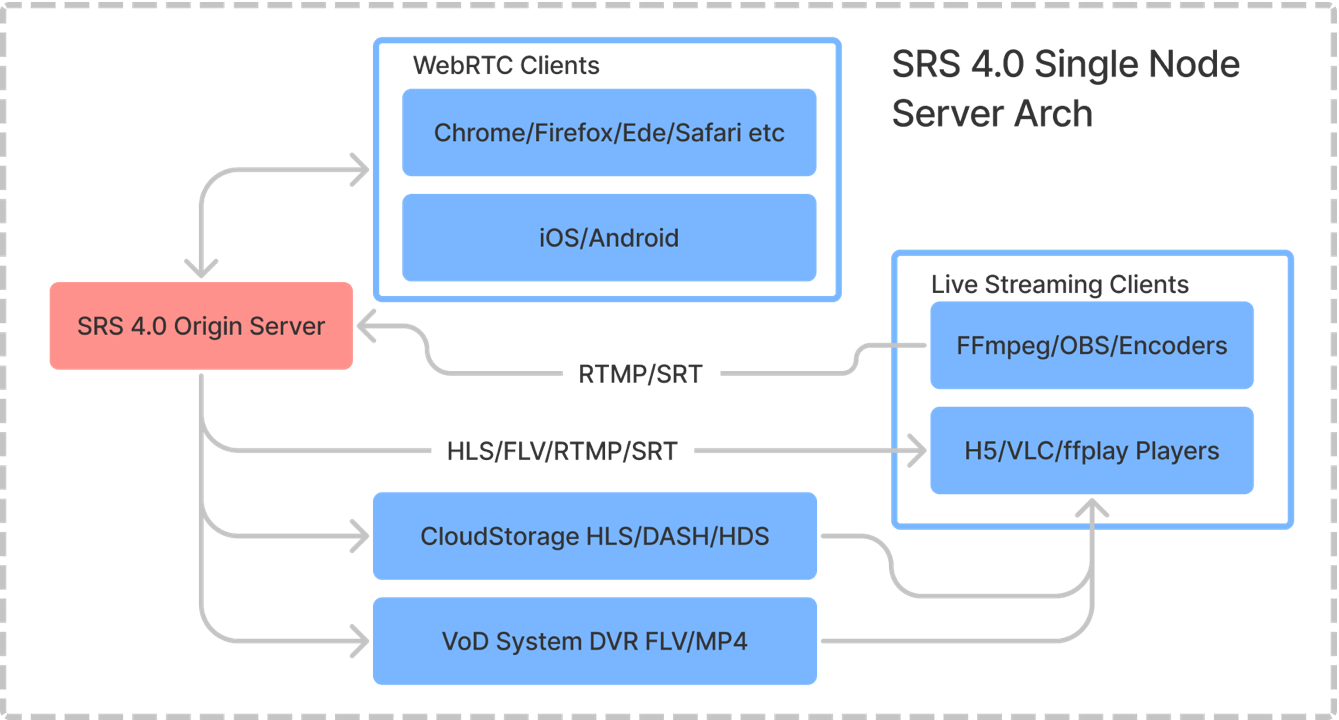
Note: The single node architecture for SRS, for detail please see here.
SRS is licenced under MIT, but some depended libraries are distributed using their own licenses.
Usage
Build SRS from source:
git clone -b 4.0release https://gitee.com/ossrs/srs.git &&
cd srs/trunk && ./configure && make && ./objs/srs -c conf/srs.conf
Open http://localhost:8080/ to check it, then publish
by FFmpeg or OBS as:
ffmpeg -re -i ./doc/source.flv -c copy -f flv -y rtmp://localhost/live/livestreamPlay the following streams by players:
- RTMP (by VLC): rtmp://localhost/live/livestream
- H5(HTTP-FLV): http://localhost:8080/live/livestream.flv
- H5(HLS): http://localhost:8080/live/livestream.m3u8
Note that if convert RTMP to WebRTC, please use rtmp2rtc.conf:
- H5(WebRTC): webrtc://localhost/live/livestream
Note: Besides of FFmpeg or OBS, it's also able to publish by H5
if WebRTC is enabled.
Highly recommend that directly run SRS by
docker(CN / EN),
Cloud Virtual Machine(CN / EN),
or K8s(CN / EN),
however it's also easy to build SRS from source code, for detail please see
Getting Started(CN / EN).
Note: If need HTTPS, by which WebRTC and modern browsers require, please read
HTTPS API(CN / EN)
and HTTPS Callback(CN / EN)
and HTTPS Live Streaming(CN / EN),
however HTTPS proxy also works perfect with SRS such as Nginx.
From here, please read wikis:
- Getting Started, please read Wiki first.
- 中文文档:起步,不读Wiki一定扑街,不读文档请不要提Issue,不读文档请不要提问题,任何文档中明确说过的疑问都不会解答。
Fast index for Wikis:
- Overview? (CN, EN)
- How to deliver RTMP streaming?(CN, EN)
- How to build RTMP Edge-Cluster?(CN, EN)
- How to build RTMP Origin-Cluster?(CN, EN)
- How to deliver HTTP-FLV streaming?(CN, EN)
- How to deliver HLS streaming?(CN, EN)
- How to deliver low-latency streaming?(CN, EN)
- How to use WebRTC? (CN, EN)
Other important wiki:
- Usage: How to delivery DASH(Experimental)?(CN, EN)
- Usage: How to transode RTMP stream by FFMPEG?(CN, EN)
- Usage: How to delivery HTTP FLV Live Streaming Cluster?(CN, EN)
- Usage: How to ingest file/stream/device to RTMP?(CN, EN)
- Usage: How to forward stream to other servers?(CN, EN)
- Usage: How to improve edge performance for multiple CPUs? (CN, EN)
- Usage: How to file a bug or contact us? (CN, EN)
AUTHORS
Thank you to all our contributors! 🙏
Note: You may provide financial support for this project by donating via Open Collective. Thank you for your support!
There are two types of people that have contributed code to the SRS project:
- Maintainers: Contribute and maintain important features. SRS always remembers and thanks you by writing your names in stream metadata.
- Contributors: Submit patches, report bugs, add translations, help answer newbie questions, and generally make SRS much better.
Maintainers of SRS project:
- Winlin: Focus on issues/PR and tests now.
- ZhaoWenjie: Focus on HDS module.
- ShiWei: Focus on SRT module.
- XiaoZhihong: Focus on WebRTC module.
- WuPengqiang: Focus on WebRTC module.
- XiaLixin: Focus on GB28181 module.
- LiPeng: Focus on WebRTC module.
- ChenGuanghua: Focus on WebRTC module.
- ChenHaibo: Focus on GB28181 and API module.
A big THANK YOU goes to:
- All friends of SRS for big supports.
- Genes amd Mabbott for creating st(state-threads).
- Michael Talyanksy for introducing ST to us.
Releases
- 2022-06-29, Release v4.0-r1, v4.0-r1, 4.0 release1, v4.0.253, 144680 lines.
- 2022-06-11, Release v4.0-r0, v4.0-r0, 4.0 release0, v4.0.252, 144680 lines.
- 2022-03-19, Release v4.0-b10, v4.0-b10, 4.0 beta10, v4.0.251, 144665 lines.
- 2022-02-15, Release v4.0-b9, v4.0-b9, 4.0 beta9, v4.0.245, 144474 lines.
- 2022-02-11, Release v4.0-b8, v4.0-b8, 4.0 beta8, v4.0.241, 144445 lines.
- 2022-02-09, Release v4.0-b7, v4.0-b7, 4.0 beta7, v4.0.240, 144437 lines.
- 2022-02-04, Release v4.0-b6, v4.0-b6, 4.0 beta6, v4.0.238, 144437 lines.
- 2022-01-30, Release v4.0-b5, v4.0-b5, 4.0 beta5, v4.0.236, 144416 lines.
- 2022-01-17, Release v4.0-b4, v4.0-b4, 4.0 beta4, v4.0.230, 144393 lines.
- 2022-01-13, Release v4.0-b3, v4.0-b3, 4.0 beta3, v4.0.229, 144393 lines.
- 2022-01-03, Release v4.0-b2, v4.0-b2, 4.0 beta2, v4.0.215, 144278 lines.
- 2021-12-19, Release v4.0-b1, v4.0-b1, 4.0 beta1, v4.0.206, 144126 lines.
- 2021-12-01, Release v4.0-b0, v4.0-b0, 4.0 beta0, v4.0.201, 144022 lines.
- 2021-11-15, Release v4.0.198, 4.0 dev8, v4.0.198, 144010 lines.
- 2021-11-02, Release v4.0.191, 4.0 dev7, v4.0.191, 143890 lines.
- 2021-10-12, Release v4.0.177, 4.0 dev6, v4.0.177, 143686 lines.
- 2021-09-05, Release v4.0.161, 4.0 dev5, v4.0.161, 145865 lines.
- 2021-08-15, Release v4.0.156, 4.0 dev4, v4.0.156, 145490 lines.
- 2021-08-14, Release v4.0.153, 4.0 dev3, v4.0.153, 145506 lines.
- 2021-08-07, Release v4.0.150, 4.0 dev2, v4.0.150, 145289 lines.
- 2021-07-25, Release v4.0.146, 4.0 dev1, v4.0.146, 144026 lines.
- 2021-07-04, Release v4.0.139, 4.0 dev0, v4.0.139, 143245 lines.
- 2020-06-27, Release v3.0-r0, 3.0 release0, 3.0.141, 122674 lines.
- 2020-02-02, Release v3.0-b0, 3.0 beta0, 3.0.112, 121709 lines.
- 2019-10-04, Release v3.0-a0, 3.0 alpha0, 3.0.56, 107946 lines.
- 2017-03-03, Release v2.0-r0, 2.0 release0, 2.0.234, 86373 lines.
- 2016-08-06, Release v2.0-b0, 2.0 beta0, 2.0.210, 89704 lines.
- 2015-08-23, Release v2.0-a0, 2.0 alpha0, 2.0.185, 89022 lines.
- 2014-12-05, Release v1.0-r0, all bug fixed, 1.0.10, 59391 lines.
- 2014-10-09, Release v0.9.8, all bug fixed, 1.0.0, 59316 lines.
- 2014-04-07, Release v0.9.1, live streaming. 30000 lines.
- 2013-10-23, Release v0.1.0, rtmp. 8287 lines.
- 2013-10-17, Created.
Features
Please read FEATURES.
Changelog
Please read CHANGELOG.
Compare
Comparing with other media servers, SRS is much better and stronger, for details please
read Product(CN/EN).
Performance
Please read PERFORMANCE.
Architecture
Please read ARCHITECTURE.
Ports
Please read PORTS.
APIs
Please read APIS.
Mirrors
Please read MIRRORS.
Beijing, 2013.10
Winlin
Trunk Doc README (`trunk/doc/README.md`)
Doc
The reference docs.
Live Streaming
- amf0_spec_121207.pdf, adobe amf0标准
- amf3_spec_121207.pdf, adobe amf3标准。
- hls-m3u8-draft-pantos-http-live-streaming-12.txt, hls-m3u8-draft-pantos-http-live-streaming-12.pdf, m3u8标准。
- hls-mpeg-ts-iso13818-1.pdf, ts标准。
- hls-mpeg-ts-VB_WhitePaper_TransportStreamVSProgramStream_rd2.pdf, ts的介绍。
- rtmp.part1.Chunk-Stream.pdf, rtmp.part2.Message-Formats.pdf, rtmp.part3.Commands-Messages.pdf, rtmp_specification_1.0.pdf, adobe rtmp标准。
- flv_v10_1.pdf, adobe flv。
- video_file_format_spec_v10_1.pdf flv/f4v.
Codec
- mp3.id3v2.3.0.pdf, http://id3.org/id3v2.3.0
- aac-iso-13818-7.pdf, ISO_IEC_13818-7-AAC-2004.pdf, aac标准,aac的编码等。
- aac-mp4a-format-ISO_IEC_14496-3+2001.pdf, ISO_IEC_14496-3-AAC-2001.pdf, aac的封装标准,即ts/flv里面的aac raw data标准。
- ISO_IEC_14496-1-System-2010.pdf mp4 base box.
- H.264-AVC-ISO_IEC_14496-10.pdf, ISO_IEC_14496-10-AVC-2003.pdf, avc标准,编码部分。
- H.264-AVC-ISO_IEC_14496-12_2012-mp4.pdf, ISO_IEC_14496-12-base-format-2012.pdf, mp4标准。
- ISO_14496-14_2003_mp4-file-format.pdf, ISO_IEC_14496-14-MP4-2003.pdf, mp4文件格式。
- H.264-AVC-ISO_IEC_14496-10-2012.pdf, ISO_IEC_14496-10-AVC-2012.pdf, avc标准,编码部分。上面的标准是2003年的,和下面的15是2010年的对不上。http://www.itu.int/ITU-T/recommendations/rec.aspx?rec=11466
- H.264-AVC-ISO_IEC_14496-15.pdf, ISO_IEC_14496-15-AVC-format-2012.pdf, avc标准,封装部分。
- H.264_MPEG-4-Part-10-White-Paper.pdf, h264简介。
HTTP
- http1.0-rfc1945.txt, rfc1945-1996-http1.0.txt, http://www.rfc-editor.org/rfc/rfc1945.txt
- http1.1-rfc2616.txt, rfc2616-1999-http1.1.txt, http://www.rfc-editor.org/rfc/rfc2616.txt
- arpa-internet-text-messages-rfc822.txt, rfc822-1982-arpa-internet-text-messages.txt, http://www.rfc-editor.org/rfc/rfc822.txt
RTC
- STUN, rfc5389-2008-stun.pdf: https://tools.ietf.org/html/rfc5389
- TURN, rfc5766-2010-turn.pdf: https://tools.ietf.org/html/rfc5766
- ICE, rfc5245-2010-ice.pdf: https://tools.ietf.org/html/rfc5245
- SIP, rfc3261-2002-sip.pdf: https://tools.ietf.org/html/rfc3261
SRT
- Haivision_SRT_Open_Source_White_Paper.pdf
- SRT_Alliance_Deployment_Guide.pdf
- SRT_Protocol_TechnicalOverview_DRAFT_2018-10-17.pdf
Others
- kafka-160915-0553-82964.pdf, https://cwiki.apache.org/confluence/display/KAFKA/A+Guide+To+The+Kafka+Protocol
- rtmfp-rfc7016.pdf, rfc7016-2013-rtmfp.pdf, adobe RTMFP, http://tools.ietf.org/html/rfc7016.
- rtmfp-tsvarea-1.pdf, http://www.ietf.org/proceedings/10mar/slides/tsvarea-1.pdf
- MPEG-DASH-ISO_IEC_23009-1_2012.pdf, ISO_IEC_23009-1-DASH-2012.pdf, MPEG-DASH标准。
- rfc2326-1998-rtsp.pdf
- rfc3550-2003-rtp.pdf
- adobe-hds-specification.pdf
- adobe-media-manifest-specification.pdf
- HTTPDynamicStreamingSpecificationErrataMay2014.pdf
- FlashMediaManifestFormatSpecificationErrataMay2014.pdf
Files
- ffmpeg-logo.png, ffmpeg-min.png, ffmpeg的logo。
- source.flv, source.200kbps.768x320.flv, avatar预告片,400kbps。
Winlin
Skills Internal Docs For Srs References Cpp Docs Doc Getting Started (`skills/internal-docs-for-srs/references/cpp-docs/doc/getting-started.md`)
title: Docker sidebar_label: Docker hide_title: false hide_table_of_contents: false
Docker
Please run SRS with docker.
Live Streaming
SRS supports live streaming.
Run SRS using docker:
docker run --rm -it -p 1935:1935 -p 1985:1985 -p 8080:8080 ossrs/srs:5Note: The available images is here.
Use docker of FFmpeg to publish:
docker run --rm -it ossrs/srs:encoder ffmpeg -stream_loop -1 -re -i doc/source.flv \
  -c copy -f flv rtmp://host.docker.internal/live/livestream
Or publish stream by FFmpeg or OBS :
ffmpeg -re -i ./doc/source.flv -c copy -f flv rtmp://localhost/live/livestreamNote: The file
./doc/source.flvis under the source repository of SRS.
Play stream by:
- RTMP (by VLC):
rtmp://localhost/live/livestream - H5(HTTP-FLV): http://localhost:8080/live/livestream.flv
- H5(HLS): http://localhost:8080/live/livestream.m3u8
WebRTC
SRS supports WebRTC for video chat.
Run SRS using docker:
CANDIDATE="192.168.1.10"
docker run --rm -it -p 1935:1935 -p 1985:1985 -p 8080:8080 -p 1990:1990 -p 8088:8088 \
    --env CANDIDATE=$CANDIDATE -p 8000:8000/udp \
    ossrs/srs:5
Note: Please replace the IP with your server IP.
Note: About CANDIDATE, please read CANDIDATE
If SRS runs on localhost, push stream to SRS by WebRTC: Publish
Note: If not localhost, browser(WebRTC) requires HTTPS, please see WebRTC using HTTPS for detail.
Play stream of SRS by WebRTC: Play
Note: If use different streams, you're able to do video chat application.
WebRTC for Live Streaming
SRS supports coverting live streaming to WebRTC.
Run SRS using docker:
CANDIDATE="192.168.1.10"
docker run --rm -it -p 1935:1935 -p 1985:1985 -p 8080:8080 -p 8000:8000/udp \
    --env SRS_RTMP_LISTEN=1935 --env SRS_HTTP_API_ENABLED=on --env SRS_HTTP_SERVER_ENABLED=on \
    --env SRS_RTC_SERVER_ENABLED=on --env SRS_RTC_SERVER_CANDIDATE=$CANDIDATE \
    --env SRS_VHOST_RTC_ENABLED=on --env SRS_VHOST_RTC_RTMP_TO_RTC=on --env SRS_VHOST_RTC_RTC_TO_RTMP=on \
    --env SRS_VHOST_HTTP_REMUX_ENABLED=on --env SRS_VHOST_HLS_ENABLED=on \
    ossrs/srs:8 ./objs/srs -e
Note: Please replace the IP with your server IP.
Note: About CANDIDATE, please read CANDIDATE
Note: If convert RTMP to WebRTC, you can also use the config file
rtmp2rtc.conf
Use docker of FFmpeg to publish:
docker run --rm -it ossrs/srs:encoder ffmpeg -stream_loop -1 -re -i doc/source.flv \
  -c copy -f flv rtmp://host.docker.internal/live/livestream
Or publish stream by FFmpeg or OBS :
ffmpeg -re -i ./doc/source.flv -c copy -f flv rtmp://localhost/live/livestreamNote: The file
./doc/source.flvis under the source repository of SRS.
Play stream by:
- WebRTC: http://localhost:1985/rtc/v1/whep/?app=live&stream=livestream
- H5(HTTP-FLV): http://localhost:8080/live/livestream.flv
- H5(HLS): http://localhost:8080/live/livestream.m3u8
WebRTC using HTTPS
When pushing stream to SRS, if not localhost, for example, to view WebRTC on pad or mobile phone, when SRS is running on remote server.
Note: If only need to play WebRTC stream, HTTP is ok. If wants to push stream, and not localhost, you need HTTPS.
Run SRS using docker:
CANDIDATE="192.168.1.10"
docker run --rm -it -p 1935:1935 -p 1985:1985 -p 8080:8080 -p 1990:1990 -p 8088:8088 -p 8000:8000/udp \
    --env SRS_RTMP_LISTEN=1935 --env SRS_HTTP_API_ENABLED=on --env SRS_HTTP_API_HTTPS_ENABLED=on \
    --env SRS_HTTP_SERVER_ENABLED=on --env SRS_HTTP_SERVER_HTTPS_ENABLED=on \
    --env SRS_RTC_SERVER_ENABLED=on --env SRS_RTC_SERVER_CANDIDATE=$CANDIDATE --env SRS_VHOST_RTC_ENABLED=on \
    --env SRS_VHOST_HTTP_REMUX_ENABLED=on --env SRS_VHOST_HLS_ENABLED=on \
    ossrs/srs:8 ./objs/srs -e
Note: Please replace the IP with your server IP.
Note: About CANDIDATE, please read CANDIDATE
Remark: Please use your HTTPS key and cert file, please read
HTTPS API
and HTTPS Callback
and HTTPS Live Streaming,
however HTTPS proxy also works perfect with SRS such as Nginx.
Push stream to SRS by WebRTC: Publish
Play stream of SRS by WebRTC: Play
Note: For self-sign certificate, please type
thisisunsafeto accept it.
Note: If use different streams, you're able to do video chat application.
SRT for Live Streaming
SRS supports publishing by SRT for live streaming, and play by SRT or other protocols.
First, start SRS with Docker:
docker run --rm -it -p 1935:1935 -p 1985:1985 -p 8080:8080 -p 10080:10080/udp \
    --env SRS_RTMP_LISTEN=1935 --env SRS_HTTP_API_ENABLED=on --env SRS_HTTP_SERVER_ENABLED=on \
    --env SRS_SRT_SERVER_ENABLED=on --env SRS_VHOST_SRT_ENABLED=on --env SRS_VHOST_SRT_SRT_TO_RTMP=on \
    --env SRS_SRT_SERVER_LATENCY=0 --env SRS_SRT_SERVER_RECVLATENCY=0 --env SRS_SRT_SERVER_TSBPDMODE=off \
    --env SRS_VHOST_HTTP_REMUX_ENABLED=on \
    ossrs/srs:8 ./objs/srs -e
Publish stream by FFmpeg or OBS :
ffmpeg -re -i ./doc/source.flv -c copy -pes_payload_size 0 -f mpegts \
'srt://127.0.0.1:10080?streamid=#!::r=live/livestream,m=publish'ffplay 'srt://127.0.0.1:10080?streamid=#!::r=live/livestream,m=request'Multiple Streams
You can send multiple streams to SRS by using different URLs. There's no need to change any settings;
just change the URL for the stream you're publishing and playing. It's very easy and straightforward.
rtmp://ip/live/livesteamrtmp://ip/live/livesteamNrtmp://ip/liveN/livestreamNrtmp://ip/whatever/doesnotmattersrt://ip:10080?streamid=#!::r=anyM/streamN,m=publishhttp://ip:1985/rtc/v1/whip/?app=anyM&stream=streamNhttp://ip:1985/rtc/v1/whep/?app=anyM&stream=streamNhttp://ip:8080/anyM/streamN.flvhttp://ip:8080/anyM/streamN.m3u8https://ip:8080/anyM/streamN.flvhttps://ip:8080/anyM/streamN.m3u8
SRS uses a configuration at the virtual host (vhost) level. All applications(app) and streams within the
same vhost share this configuration. For more information, please refer to the RTMP URL
documentation.
Trunk Doc Architecture (`trunk/doc/Architecture.md`)
Architecture
The architecture of SRS.
Architecture
The stream architecture of SRS.
/* Detailed source-code truncated for AI context efficiency. */Remark:
- Encoder: Encoder pushs RTMP stream to SRS.
- MediaSource: Supports any media source, ingesting by ffmpeg.
- Ingester: Forks a ffmpeg(or other tools) to ingest as rtmp to SRS, please read Ingest.
- Streamer: Remuxs other protocols to RTMP, please read Streamer.
- EXEC: Like NGINX-RTMP, EXEC forks external tools for events, please read ng-exec.
- SRTModule: A isolate module which run in hybrid model.
System Requirements
Supported operating systems and hardware:
- Linux, with x86, x86-64 or arm.
- Mac, with intel chip.
- Other OS, such as Windows, please use docker.
Trunk Doc CHANGELOG (`trunk/doc/CHANGELOG.md`)
Changelog
The changelog for SRS.
SRS 4.0 Changelog
- v4.0, 2022-06-29, Update SRS image for r.ossrs.net. v4.0.253
- v4.0, 2022-06-11, For #3058: Docker: Support x86_64, armv7 and aarch64 docker image (#3058). v4.0.252
- v4.0, 2022-03-19, For #2893: SRT: Decouple publish with play url (#2893). v4.0.251
- v4.0, 2022-03-19, Merge #2908: SRT: url supports multiple QueryStrings (#2908). v4.0.250
- v4.0, 2022-03-17, SRT: Support debug and run with CLion. v4.0.249
- v4.0, 2022-03-15, Merge #2966: Bugfix: Fix rtcp nack blp encode bug (#2966). v4.0.248
- v4.0, 2022-03-07, RTC: Identify the WebRTC publisher in param for hooks. v4.0.247
- v4.0, 2022-03-07, SRT: Append vhost to stream, not app. v4.0.246
- v4.0, 2022-02-15, Fix warnings for uuid. v4.0.245
- v4.0, 2022-02-15, Merge #2917: SRT: Close connection if RTMP failed. (#2917). v4.0.244
- v4.0, 2022-02-15, Refine build script for SRT to avoid warnings. v4.0.243
- v4.0, 2022-02-11, Support new fields for feature query. v4.0.241
- v4.0, 2022-02-09, Mirror docker images in TCR Singapore. v4.0.240
- v4.0, 2022-02-08, Refine the error for WebRTC H5 publisher. v4.0.239
- v4.0, 2022-02-04, Push docker to docker, acr and tcr. v4.0.238
- v4.0, 2022-02-03, Merge #2888: Fix bug when the value of http header is empty. (#2888). v4.0.237
- v4.0, 2022-01-30, Refine docker console, preview by players at the same server. v4.0.236
- v4.0, 2022-01-30, For docker, always use the console for logging. v4.0.235
- v4.0, 2022-01-29, Merge #2896: SRT: Reduce the SRT bug by limit the max times for retry. (#2896). v4.0.234
- v4.0, 2022-01-23, Merge #2886: Fix bug when free addrinfo. (#2886). v4.0.233
- v4.0, 2022-01-22, Merge #2887: Fix memory leak in SrsMetaCache. (#2887). v4.0.232
- v4.0, 2022-01-21, Support docker image for lighthouse. v4.0.231
- v4.0, 2022-01-17, Enable rtmp2rtc and rtc2rtmp for docker.conf
- v4.0, 2022-01-17, Support docker image for droplet. v4.0.230
- v4.0, 2022-01-16, Update README for Cloud Virtual Machine(CN / EN)
- v4.0, 2022-01-13, Merge #2872: RTC: fix play rtc judge for config rtc2rtmp on. (#2872). v4.0.229
- v4.0, 2022-01-13, Support configure with --config as default config file. v4.0.227
- v4.0, 2022-01-13, For #2880: Add SrsAutoFreeH to release ptr with hooks. (#2880). v4.0.226
- v4.0, 2022-01-13, Support api_port to specify the WebRTC API port. v4.0.224
- v4.0, 2022-01-13, Merge #2873: LiveSource: Refine fetch for external exposed interface. (#2873). v4.0.223
- v4.0, 2022-01-13, Add conf/vm.conf for cloud virtual machine. v4.0.222
- v4.0, 2022-01-12, Refine the running homepage. v4.0.221
- v4.0, 2022-01-12, Merge #2863: RTC: fix play crash or no stream for rtmp2rtc tips. (#2863). v4.0.220
- v4.0, 2022-01-05, For #2717: When reopening segment, never update the duration. (#2717). v4.0.219
- v4.0, 2022-01-04, Discover api server and ip as candidates. v4.0.218
- v4.0, 2022-01-04, Install test-on self-sign certificate. v4.0.217
- v4.0, 2022-01-03, For #2824: Support config in_docker to fix the detect fail. (#2824). v4.0.216
- v4.0, 2021-12-31, For #2728: Refine error log for rtmp2rtc. (#2728). v4.0.215
- v4.0, 2021-12-29, Merge #2770, #2820: Bugs fixed. (#2770)(#2820). v4.0.214
- v4.0, 2021-12-27, Fix #2811: Fix ulimit issue by detecting epoll on Ubuntu. (#2811). v4.0.213
- v4.0, 2021-12-26, Fix #2247: Cleanup server for GMC, by WaitGroup to destroy. (#2247). v4.0.212
- v4.0, 2021-12-25, For #2809, HTTP: Fix 2GB+ mp4/flv file downloading error. (#2809)(#2780)(#2781). v4.0.211
- v4.0, 2021-12-23, For #2800, Fix bug for large mp4(5G+) offset. (#2800). v4.0.210
- v4.0, 2021-12-23, For #2807, Fix bug for HLS log printing. (#2807). v4.0.209
- v4.0, 2021-12-23, For #2711, Refine the default config file. (#2711). v4.0.208
- v4.0, 2021-12-20, Merge #2784: RTC: Support payload name AV1X/AV1. (#2784)(#2760). v4.0.207
- v4.0, 2021-12-07, Merge #2771: RTC: Fix memory leak when replace rtp packet in cache. (#2771). v4.0.205
- v4.0, 2021-12-06, Merge #2766: RTC: Fix nack encode seqnum. (#2766). v4.0.204
- v4.0, 2021-12-04, Merge #2768: RTC: Fix bugs for RTC2RTMP. (#2768). v4.0.203
- v4.0, 2021-12-04, Merge #2757: RTC: Ignore empty audio packet when transcoding (#2757). v4.0.202
- v4.0, 2021-12-01, Fix #2762: RTC: Refine publish security error message (#2762). v4.0.200
- v4.0, 2021-11-25, Merge #2751: RTC: Fix crash when pkt->payload() if pkt is nullptr (#2751). v4.0.199
- v4.0, 2021-11-15, For #1708: ST: Print log when multiple thread stop one coroutine. (#1708). v4.0.198
- v4.0, 2021-11-14, Merge #2732: WebRTC: Fail to publish RTC automatically for HTML5. (#2732). v4.0.197
- v4.0, 2021-11-13, Merge #2729: RTC: check audio track exist when negotiate (#2729). v4.0.196
- v4.0, 2021-11-09, Merge #2721: Rtc2Rtmp: Use RTP timestamp to identify video frames. v4.0.195
- v4.0, 2021-11-07, Merge #2711: Config: Guess config files by FHS. v4.0.194
- v4.0, 2021-11-07, Merge #2714: DVR: copy req from publish. v4.0.193
- v4.0, 2021-11-04, Merge #2707: Refuse edge request when state is stopping. v4.0.192
- v4.0, 2021-11-02, Auto create package by github actions. v4.0.191
- v4.0, 2021-10-30, Merge #2552: Script: Refine CentOS7 service script to restart SRS. v4.0.190
- v4.0, 2021-10-30, Merge #2397: SRTP: Patch libsrtp2 to fix GCC10 build fail. v4.0.189
- v4.0, 2021-10-30, Merge #2284: Forward: Fast quit when cycle fail. v4.0.188
- v4.0, 2021-10-28, Merge #2186: Gop: Ignore zero timestamp when shrinking. v4.0.187
- v4.0, 2021-10-27, Merge #1963: Cluster: Origin server shouldn't be it's own coworker. v4.0.186
- v4.0, 2021-10-25, Merge #2692: API: Add server_id into http_hooks. v4.0.185
- v4.0, 2021-10-22, Merge #2687: API: Always stat client event if auth fail. v4.0.183
- v4.0, 2021-10-20, Merge #1758: JSON: Support escape special chars. v4.0.182
- v4.0, 2021-10-19, Merge #1754: RTMP: If port is explicity set to 0, use default 1935. v4.0.181
- v4.0, 2021-10-18, Merge #2670: SRT: Solve mpegts demux assert bug. v4.0.180
- v4.0, 2021-10-16, Merge #2665: API: Fix the same 'client_id' error when asynchronous call. v4.0.179
- v4.0, 2021-10-13, Merge #2671: SRT: Pes error when mpegts demux in srt. v4.0.178
- v4.0, 2021-10-12, Merge #2550: API use publish params. v4.0.177
- v4.0, 2021-10-12, Merge #2549: Fix duration issue for HLS on_hls. v4.0.176
- v4.0, 2021-10-11, Fix #1641, HLS/RTC picture corrupt for SPS/PPS lost. v4.0.175
- v4.0, 2021-10-11, RTC: Refine config, aac to rtmp_to_rtc, bframe to keep_bframe. v4.0.174
- v4.0, 2021-10-10, For #1641, Support RTMP publish and play regression test. v4.0.173
- v4.0, 2021-10-10, RTC: Change rtc.aac to discard by default. v4.0.172
- v4.0, 2021-10-10, Fix #2304 Remove Push RTSP feature. v4.0.171
- v4.0, 2021-10-10, Fix #2653 Remove HTTP RAW API. v4.0.170
- v4.0, 2021-10-08, Merge #2654: Parse width and width from SPS/PPS. v4.0.169
- v4.0, 2021-10-08, Default to log to console for docker. v4.0.168
- v4.0, 2021-10-07, Fix bugs #2648, #2415. v4.0.167
- v4.0, 2021-10-03, Support --arch and --cross-prefix for cross compile. 4.0.166
- v4.0, 2021-10-03, Actions: Create source tar file srs-server-4.0.165.tar.gz
- v4.0, 2021-09-23, Merge #2578 Support http callback on_play/stop. 4.0.163
- v4.0, 2021-09-23, Merge #2618 to fix FUA bug.
- v4.0, 2021-09-05, RTC: Merge #2581, Fix listen ipv6 and port. 4.0.161
- v4.0, 2021-09-04, For #2282, #2181, Move DVR async worker from SrsDvrPlan to global.
- v4.0, 2021-09-04, For #2282, #2181, Remove reload for dvr_apply. 4.0.160
- v4.0, 2021-08-28, RTC: Merge #1859, Enhancement: Add param and stream to on_connect. 4.0.159
- v4.0, 2021-08-27, RTC: Merge #2544, Support for multiple SPS/PPS, then pick the first one. 4.0.158
- v4.0, 2021-08-17, RTC: Merge #2470, RTC: Fix rtc to rtmp sync timestamp using sender report. 4.0.157
- v4.0, 2021-08-14, Support Github Actions to publish SRS. 4.0.155
- v4.0, 2021-08-14, RTC: Merge #2533, fix SDP comparison bug. 4.0.154
- v4.0, 2021-08-13, RTC: Merge #2526, fix codec issue for G.711 or H.263. 4.0.152
- v4.0, 2021-08-10, RTC: Merge #2509, support http hooks n_play/stop/publish/unpublish. 4.0.151
- v4.0, 2021-08-07, Merge #2514, Get original client ip instead of proxy ip, for rtc api #2514. 4.0.150
- v4.0, 2021-08-07, Fix #2508, Support features query by API. 4.0.149
- v4.0, 2021-07-25, Fix build failed. 4.0.146
- v4.0, 2021-07-24, Merge #2373, RTC: Fix NACK negotiation bug for Firefox. 4.0.145
- v4.0, 2021-07-24, Merge #2483, RTC: Support statistic for HTTP-API, HTTP-Callback and Security. 4.0.144
- v4.0, 2021-07-21, Merge #2474, SRT: Use thread-safe log for multiple-threading SRT module. 4.0.143
- v4.0, 2021-07-17, Fix bugs and enhance code. 4.0.142
- v4.0, 2021-07-16, Support CLion and cmake to build and debug SRS. 4.0.141
- v4.0, 2021-07-08, For #2403, fix padding packets for RTMP2RTC. 4.0.140
- v4.0, 2021-07-04, For #2424, use srandom/random to generate. 4.0.139
- v4.0, 2021-07-01, Merge #2452, fix FFmpeg bug by updating channel_layout. 4.0.138
- v4.0, 2021-06-30, Merge #2440, fix #2390, SRT bug for zerolatency. 4.0.137
- v4.0, 2021-06-28, Merge #2435, fix bug for HTTP-RAW-API to check vhost. 4.0.136
- v4.0, 2021-06-28, Fix #2431, configure FFmpeg bug. 4.0.135
- v4.0, 2021-06-28, Merge #2444, add libavcodec/crystalhd.c for FFmpeg. 4.0.134
- v4.0, 2021-06-28, Merge #2438, fix losing of last HLS ts file 4.0.133
- v4.0, 2021-06-27, Squash for #2424, query the latest available version. 4.0.132
- v4.0, 2021-06-24, Merge #2429 to fix SRT bug. 4.0.131
- v4.0, 2021-06-21, Fix #2413, fix RTMP to RTC bug 4.0.130
- v4.0, 2021-06-20, Guess where FFmpeg is. 4.0.129
- v4.0, 2021-06-20, Fix #1685, support RTC cross-build for armv7/armv8(aarch64). 4.0.128
- v4.0, 2021-06-17, Fix #2214, remove detection for gmc and gmp.
- v4.0, 2021-06-16, Change GB28181 to feature/gb28181. 4.0.127
- v4.0, 2021-06-01, Support --shared-ffmpeg to link with *.so for LGPL license. 4.0.126
- v4.0, 2021-06-01, Support --shared-srt to link with *.so for MPL license. 4.0.125
- v4.0, 2021-05-31, Use SPDX-License-Identifier: MIT. 4.0.124
- v4.0, 2021-05-21, Fix #2370 bug for Firefox play stream(published by Chrome). 4.0.121
- v4.0, 2021-05-21, RTC: Refine sdk, migrate from onaddstream to ontrack. 4.0.120
- v4.0, 2021-05-21, Tools: Refine configure options. 4.0.119
- v4.0, 2021-05-20, Fix build fail when disable RTC by --rtc=off. 4.0.118
- v4.0, 2021-05-15, SRT: Build SRT from source by SRS. 4.0.115
- v4.0, 2021-05-15, Rename SrsConsumer* to SrsLiveConsumer*. 4.0.114
- v4.0, 2021-05-15, Rename SrsRtcStream* to SrsRtcSource*. 4.0.113
- v4.0, 2021-05-15, Rename SrsSource* to SrsLiveSource*. 4.0.112
- v4.0, 2021-05-15, Rename SrsRtpPacket2 to SrsRtpPacket. 4.0.111
- v4.0, 2021-05-14, RTC: Remove Object Cache Pool, no effect. 4.0.110
- v4.0, 2021-05-14, Change virtual public to public. 4.0.109
- v4.0, 2021-05-14, Refine id and vid for statistic. 4.0.108
- v4.0, 2021-05-09, Refine tid for sdk and demos. 4.0.106
- v4.0, 2021-05-08, Refine shared fast timer. 4.0.105
- v4.0, 2021-05-08, Refine global or thread-local variables initialize. 4.0.104
- v4.0, 2021-05-07, RTC: Support circuit breaker. 4.0.103
- v4.0, 2021-05-07, RTC: Refine play stream find track. 4.0.102
- v4.0, 2021-05-07, RTC: Refine FastTimer to fixed interval. 4.0.101
- v4.0, 2021-05-06, RTC: Fix config bug for nack and twcc. 4.0.99
- v4.0, 2021-05-04, Add video room demo. 4.0.98
- v4.0, 2021-05-03, Add RTC stream merging demo by FFmpeg. 4.0.97
- v4.0, 2021-05-02, Add one to one demo. 4.0.96
- v4.0, 2021-04-20, Support RTC2RTMP bridger and shared FastTimer. 4.0.95
- v4.0, 2021-04-20, Refine transcoder to support aac2opus and opus2aac. 4.0.94
- v4.0, 2021-05-01, Timer: Extract and apply shared FastTimer. 4.0.93
- v4.0, 2021-04-29, RTC: Support AV1 for Chrome M90. 4.0.91
- v4.0, 2021-04-24, Change push-RTSP as deprecated feature.
- v4.0, 2021-04-24, Player: Change the default from RTMP to HTTP-FLV.
- v4.0, 2021-04-24, Disable CherryPy by --cherrypy=off. 4.0.90
- v4.0, 2021-04-01, RTC: Refine TWCC and SDP exchange. 4.0.88
- v4.0, 2021-03-24, RTC: Support WebRTC re-publish stream. 4.0.87
- v4.0, 2021-03-24, RTC: Use fast parse TWCC-ID, ignore in packet parsing. 4.0.86
- v4.0, 2021-03-09, DTLS: Fix ARQ bug, use openssl timeout. 4.0.84
- v4.0, 2021-03-08, DTLS: Fix dead loop by duplicated Alert message. 4.0.83
- v4.0, 2021-03-08, Fix bug when client DTLS is passive. 4.0.82
- v4.0, 2021-03-03, Fix #2106, #2011, RTMP/AAC transcode to Opus bug. 4.0.81
- v4.0, 2021-03-02, Refine build script for FFmpeg and SRTP. 4.0.80
- v4.0, 2021-03-02, Upgrade libsrtp from 2.0.0 to 2.3.0, with source code. 4.0.79
- v4.0, 2021-03-01, Upgrade openssl from 1.1.0e to 1.1.1b, with source code. 4.0.78
- v4.0, 2021-03-01, Enable Object Cache and Zero Copy Nack by default. 4.0.77
- v4.0, 2021-02-28, RTC: Support high performance Zero Copy NACK. 4.0.76
- v4.0, 2021-02-27, RTC: Support Object Cache Pool for performance. 4.0.75
- v4.0, 2021-02-12, RTC: Support High Resolution(about 25ms) Timer. 4.0.72
- v4.0, 2021-02-10, RTC: Improve performance about 700+ streams. 4.0.71
- v4.0, 2021-02-04, At least wait 1ms when <1ms, to avoid epoll_wait spin loop. 4.0.66
- v4.0, 2021-01-31, Enable -std=c++11 by default. 4.0.65
- v4.0, 2021-01-25, Enable --nasm and --srtp-asm by default for performance. 4.0.64
- v4.0, 2021-01-20, Support HTTP-FLV and HLS for srs-player by H5. 4.0.63
- v4.0, 2021-01-08, HTML5 video tag resolution adaptive. 4.0.59
- v4.0, 2021-01-08, Fix memory leak and bugs for RTC. 4.0.58
- v4.0, 2021-01-06, Merge #2109, Refine srs_string_split.
- v4.0, 2020-12-24, Support disable CherryPy. 4.0.57
- v4.0, 2020-11-12, For #1998, Support Firefox, use PT in offer. 4.0.55
- v4.0, 2020-11-11, For #1508, Transform http header name to upper camel case. 4.0.54
- v4.0, 2020-11-06, For #1657, Read cached data first in SSL. 4.0.48
- v4.0, 2020-11-06, For #1657, support HTTPS Streaming(HTTPS-FLV, etc). 4.0.47
- v4.0, 2020-11-06, For #1657, support HTTPS API. 4.0.46
- v4.0, 2020-11-03, For #1657, support HTTPS client, for http-callback. 4.0.45
- v4.0, 2020-10-31, Support gdb/srs.py to stat coroutines. 4.0.44
- v4.0, 2020-09-19, RTC: Extract resource manager. Use any UDP packet to keep alive. 4.0.43
- v4.0, 2020-09-09, RTC: Refine NACK RTT and efficiency. 4.0.42
- v4.0, 2020-09-08, Refine PLI/NACK/DTLS logs. 4.0.41
- v4.0, 2020-08-30, Fix serval bugs for RTC. Refine context API. 4.0.40
- v4.0, 2020-08-18, RTC: DTLS support ARQ, covered with utest. 4.0.39
- v4.0, 2020-08-06, RTC: Refine error check. 4.0.37
- v4.0, 2020-07-25, RTC: Support multiple address for client. 4.0.36
- v4.0, 2020-07-11, Refine log context with random string. 4.0.35
- v4.0, 2020-07-04, Fix some bugs for RTC. 4.0.34
- v4.0, 2020-06-24, Support static link c++ libraries. 4.0.32
- v4.0, 2020-06-23, Change log cid from int to string. 4.0.31
- v4.0, 2020-06-03, Support enable C++11. 4.0.29
- v4.0, 2020-05-31, Remove srs-librtmp. 4.0.28
- v4.0, 2020-05-21, For #307, disable GSO and sendmmsg. 4.0.27
- v4.0, 2020-05-14, For #307, refine core structure, RTMP base on frame, RTC base on RTP. 4.0.26
- v4.0, 2020-05-11, For #307, refine RTC publisher structure. 4.0.25
- v4.0, 2020-04-30, For #307, support publish RTC with passing opus. 4.0.24
- v4.0, 2020-04-14, For #307, support sendmmsg, GSO and reuseport. 4.0.23
- v4.0, 2020-04-05, For #307, SRTP ASM only works with openssl-1.0, auto detect it. 4.0.22
- v4.0, 2020-04-04, For #307, refine RTC latency from 600ms to 200ms. 4.0.20
- v4.0, 2020-04-03, For #307, build SRTP with openssl to improve performance. 4.0.19
- v4.0, 2020-03-31, Play stream by WebRTC on iOS/Android/PC browser. 4.0.17
- v4.0, 2020-03-28, Support multiple OS/Platform build cache. 4.0.16
- v4.0, 2020-03-28, For #1250, support macOS, OSX, MacbookPro, Apple Darwin.
- v4.0, 2020-03-22, Welcome maintainers Runner365, John and B.P.Y(Bepartofyou). 4.0.15
- v4.0, 2020-03-22, For #307, support play with WebRTC. 4.0.14
- v4.0, 2020-03-13, For #1636, fix bug for mux AAC to ADTS, never overwrite by RTMP sampling rate. 4.0.13
- v4.0, 2020-03-07, For #1612, fix crash bug for RTSP. 4.0.12
- v4.0, 2020-03-07, For #1631, support sei_filter for SRT. 4.0.11
- v4.0, 2020-03-01, For #1621, support mix_correct for aggregate aac for SRT. 4.0.10
- v4.0, 2020-02-25, For #1615, support default app(live) for vmix SRT. 4.0.9
- v4.0, 2020-02-21, For #1598, support SLB health checking by TCP. 4.0.8
- v4.0, 2020-02-19, For #1579, support rolling update of k8s. 4.0.7
- v4.0, 2020-02-18, For #1579, support start/final wait for gracefully quit. 4.0.6
- v4.0, 2020-02-18, For #1579, support gracefully quit and force to. 4.0.5
- v4.0, 2020-02-13, SRT supports detail config for DynamicEncoding. 4.0.4
- v4.0, 2020-02-04, Update project code. 4.0.3
- v4.0, 2020-01-26, Allow use libsrt.so for SRT is MPL license. 4.0.2
- v4.0, 2020-01-24, Fix #1147, support SRT(Secure Reliable Transport). 4.0.1
SRS 3.0 Changelog
- v3.0, 2021-05-12, Fix #2311, Copy the request for stat client. 3.0.162
- v3.0, 2021-04-28, 3.0 release5(3.0.161) released. 122750 lines.
- v3.0, 2021-04-28, Upgrade players. 3.0.161
- v3.0, 2021-04-24, 3.0 release4(3.0.160) released. 122750 lines.
- v3.0, 2021-04-24, Package players and console to zip and docker. 3.0.160
- v3.0, 2021-04-24, Add srs-console to research/console. 3.0.159
- v3.0, 2021-03-05, Refine usage to docker by default. 3.0.158
- v3.0, 2021-01-07, Change id from int to string for the statistics. 3.0.157
- v3.0, 2021-01-02, 3.0 release3(3.0.156) released. 122736 lines.
- v3.0, 2020-12-26, For RTMP edge/forward, pass vhost in tcUrl, not in stream. 3.0.156
- v3.0, 2020-12-17, Fix #1694, Support DVR 2GB+ MP4 file. 3.0.155
- v3.0, 2020-12-17, Fix #1548, Add edts in MP4 for Windows10. 3.0.154
- v3.0, 2020-10-31, 3.0 release2(3.0.153) released. 122663 lines.
- v3.0, 2020-10-31, Fix #509, Always malloc stack on heap. 3.0.153
- v3.0, 2020-10-31, Remove some global elements for debugging. 3.0.152
- v3.0, 2020-10-31, Use global _srs_server for debugging. 3.0.151
- v3.0, 2020-10-31, Refine source cid, track previous one. 3.0.150
- v3.0, 2020-10-25, Add hls.realtime.conf for low-latency HLS. 3.0.149
- v3.0, 2020-10-24, Refine script and startup logs. 3.0.148
- v3.0, 2020-10-23, Allow FFmpeg if exists at /usr/local/bin/ffmpeg. 3.0.147
- v3.0, 2020-10-23, Refine build script, use libssl in docker. 3.0.146
- v3.0, 2020-10-14, Fix #1987, Fix Kbps resample bug. 3.0.145
- v3.0, 2020-10-10, 3.0 release1(3.0.144) released. 122674 lines.
- v3.0, 2020-10-10, Fix #1780, build fail on Ubuntu20(focal). 3.0.144
- v3.0, 2020-09-14, Prevent stop ingest for multiple times. 3.0.143
- v3.0, 2020-09-10, RTC: Change SO_REUSEPORT fail to warning. 3.0.142
- v3.0, 2020-06-27, 3.0 release0(3.0.141) released. 122674 lines.
- v3.0, 2020-03-30, For #1672, fix dvr close file failed bug. 3.0.140
- v3.0, 2020-03-29, 3.0 beta4(3.0.139) released. 122674 lines.
- v3.0, 2020-03-28, Support multiple OS/Platform build cache. 3.0.139
- v3.0, 2020-03-28, For #1250, support macOS, OSX, MacbookPro, Apple Darwin. 3.0.138
- v3.0, 2020-03-21, For #1629, fix kickoff FLV client bug. 3.0.137
- v3.0, 2020-03-21, For #1619, configure without utest by default. 3.0.136
- v3.0, 2020-03-21, For #1651, fix return pnwrite of srs_write_large_iovs. 3.0.135
- v3.0, 2020-03-18, 3.0 beta3(3.0.134) released. 122509 lines.
- v3.0, 2020-03-12, For #1635, inotify watch ConfigMap for reload. 3.0.134
- v3.0, 2020-03-12, For #1635, support auto reaload config by inotify. 3.0.129
- v3.0, 2020-03-12, For #1630, disable cache for stream changing, and drop dup header. 3.0.128
- v3.0, 2020-03-12, For #1594, detect and disable daemon for docker. 3.0.127
- v3.0, 2020-03-12, For #1634, always check status in thread loop. 3.0.126
- v3.0, 2020-03-11, For #1634, refactor output with datetime for ingest/encoder/exec. 3.0.125
- v3.0, 2020-03-11, For #1634, fix quit by accident SIGTERM while killing FFMPEG. 3.0.124
- v3.0, 2020-03-05, 3.0 beta2(3.0.123) released. 122170 lines.
- v3.0, 2020-02-21, For #1598, support SLB health checking by TCP. 3.0.123
- v3.0, 2020-02-21, Fix bug for librtmp client ipv4/ipv6 socket. 3.0.122
- v3.0, 2020-02-18, For #1579, support start/final wait for gracefully quit. 3.0.121
- v3.0, 2020-02-18, For #1579, support force gracefully quit. 3.0.120
- v3.0, 2020-02-18, For #1579, support gracefully quit. 3.0.119
- v3.0, 2020-02-17, For #1601, flush async on_dvr/on_hls events before stop. 3.0.118
- v3.0, 2020-02-14, 3.0 beta1(3.0.117) released. 121964 lines.
- v3.0, 2020-02-14, For #1595, migrating streaming from ossrs.net to r.ossrs.net. 3.0.117
- v3.0, 2020-02-05, For #665, fix HTTP-FLV reloading bug. 3.0.116
- v3.0, 2020-02-05, For #1592, fix terminal echo off by redirect process stdin. 3.0.115
- v3.0, 2020-02-04, For #1186, refactor security check. 3.0.114
- v3.0, 2020-02-04, Fix #939, response right A/V flag in FLV header. 3.0.113
- v3.0, 2020-02-04, For #939, always enable fast FLV streaming.
- v3.0, 2020-02-02, 3.0 beta0(3.0.112) released. 121709 lines.
- v3.0, 2020-01-29, Support isolate version file. 3.0.112
- v3.0, 2020-01-29, Fix #1206, dispose ingester while server quiting. 3.0.111
- v3.0, 2020-01-28, Fix #1230, racing condition in source fetch or create. 3.0.110
- v3.0, 2020-01-27, Fix #1303, do not dispatch previous meta when not publishing. 3.0.109
- v3.0, 2020-01-26, Allow use libst.so for ST is MPL license.
- v3.0, 2020-01-26, Fix #607, set RTMP identifying recursive depth to 3.
- v3.0, 2020-01-25, Fix #878, remove deprecated #EXT-X-ALLOW-CACHE for HLS. 3.0.108
- v3.0, 2020-01-25, Fix #703, drop video data util sps/pps. 3.0.107
- v3.0, 2020-01-25, Fix #1108, reap DVR tmp file when unpublish. 3.0.106
- v3.0, 2020-01-21, 3.0 alpha9(3.0.105) released. 121577 lines.
- v3.0, 2020-01-21, Fix #1221, remove complex configure options. 3.0.104
- v3.0, 2020-01-21, Fix #1547, support crossbuild for ARM/MIPS.
- v3.0, 2020-01-21, For #1547, support setting cc/cxx/ar/ld/randlib tools. 3.0.103
- v3.0, 2020-01-19, For #1580, fix cid range problem. 3.0.102
- v3.0, 2020-01-19, For #1070, define FLV CodecID for AV1 and opus. 3.0.101
- v3.0, 2020-01-16, For #1575, correct RTMP redirect as tcUrl, add redirect2 as RTMP URL. 3.0.100
- v3.0, 2020-01-15, For #1509, decrease the fast vector init size from 64KB to 64B. 3.0.99
- v3.0, 2020-01-15, For #1509, release coroutine when source is idle. 3.0.98
- v3.0, 2020-01-10, 3.0 alpha8(3.0.97) released. 121555 lines.
- v3.0, 2020-01-09, For #1042, improve test coverage for service. 3.0.97
- v3.0, 2020-01-08, Merge #1554, support logrotate copytruncate. 3.0.96
- v3.0, 2020-01-05, Always use string instance to avoid crash risk. 3.0.95
- v3.0, 2020-01-05, For #460, fix ipv6 hostport parsing bug. 3.0.94
- v3.0, 2020-01-05, For #460, fix ipv6 intranet address filter bug. 3.0.93
- v3.0, 2020-01-05, For #1543, use getpeername to retrieve client ip. 3.0.92
- v3.0, 2020-01-02, For #1042, improve test coverage for config. 3.0.91
- v3.0, 2019-12-30, Fix mp4 security issue, check buffer when required size is variable.
- v3.0, 2019-12-29, 3.0 alpha7(3.0.90) released. 116356 lines.
- v3.0, 2019-12-29, For #1255, support vhost/domain in query string for HTTP streaming. 3.0.90
- v3.0, 2019-12-29, For #299, increase dash segment size for avsync issue. 3.0.89
- v3.0, 2019-12-27, For #299, fix some bugs in dash, it works now. 3.0.88
- v3.0, 2019-12-27, For #1544, fix memory leaking for complex error. 3.0.87
- v3.0, 2019-12-27, Add links for flv.js, hls.js and dash.js.
- v3.0, 2019-12-26, For #1105, http server support mp4 range.
- v3.0, 2019-12-26, For #1105, dvr mp4 supports playing on Chrome/Safari/Firefox. 3.0.86
- v3.0, 2019-12-26, 3.0 alpha6(3.0.85) released. 116056 lines.
- v3.0, 2019-12-26, For #1488, pass client ip to http callback. 3.0.85
- v3.0, 2019-12-25, For #1537, #1282, support aarch64 for armv8. 3.0.84
- v3.0, 2019-12-25, For #1538, fresh chunk allow fmt=0 or fmt=1. 3.0.83
- v3.0, 2019-12-25, Remove FFMPEG and NGINX, please use srs-docker instead. 3.0.82
- v3.0, 2019-12-25, For #1537, remove cross-build, not used patches, directly build st.
- v3.0, 2019-12-24, For #1508, support chunk length and content in multiple parts.
- v3.0, 2019-12-23, Merge SRS2 for running srs-librtmp on Windows. 3.0.80
- v3.0, 2019-12-23, For #1535, deprecate Adobe FMS/AMS edge token traversing(CN, EN) authentication. 3.0.79
- v3.0, 2019-12-23, For #1535, deprecate BWT(bandwidth testing). 3.0.78
- v3.0, 2019-12-23, For #1535, deprecate Adobe HDS(f4m)(CN, EN). 3.0.77
- v3.0, 2019-12-20, Fix #1508, http-client support read chunked response. 3.0.76
- v3.0, 2019-12-20, For #1508, refactor srs_is_digital, support all zeros.
- v3.0, 2019-12-19, 3.0 alpha5(3.0.75) released. 115362 lines.
- v3.0, 2019-12-19, Refine the RTMP iovs cache increasing to much faster.
- v3.0, 2019-12-19, Fix #1524, memory leak for amf0 strict array. 3.0.75
- v3.0, 2019-12-19, Fix random build failed bug for modules.
- v3.0, 2019-12-19, Fix #1520 and #1223, bug for origin cluster 3+ servers. 3.0.74
- v3.0, 2019-12-18, For #1042, add test for RAW AVC protocol.
- v3.0, 2019-12-18, Detect whether flash enabled for srs-player. 3.0.73
- v3.0, 2019-12-17, Fix HTTP CORS bug when sending response for OPTIONS. 3.0.72
- v3.0, 2019-12-17, Enhance HTTP response write for final_request.
- v3.0, 2019-12-17, Refactor HTTP stream to disconnect client when unpublish.
- v3.0, 2019-12-17, Fix HTTP-FLV and VOD-FLV conflicting bug.
- v3.0, 2019-12-17, Refactor HttpResponseWriter.write, default to single text mode.
- v3.0, 2019-12-16, For #1042, add test for HTTP protocol.
- v3.0, 2019-12-13, 3.0 alpha4(3.0.71) released. 112928 lines.
- v3.0, 2019-12-12, For #547, #1506, default hls_dts_directly to on. 3.0.71
- v3.0, 2019-12-12, SrsPacket supports converting to message, so can be sent by one API.
- v3.0, 2019-12-11, For #1042, cover RTMP client/server protocol.
- v3.0, 2019-12-11, Fix #1445, limit the createStream recursive depth. 3.0.70
- v3.0, 2019-12-11, For #1042, cover RTMP handshake protocol.
- v3.0, 2019-12-11, Fix #1229, fix the security risk in logger. 3.0.69
- v3.0, 2019-12-11, For #1229, fix the security risk in HDS. 3.0.69
- v3.0, 2019-12-05, Fix #1506, support directly turn FLV timestamp to TS DTS. 3.0.68
- v3.0, 2019-11-30, 3.0 alpha3(3.0.67) released. 110864 lines.
- v3.0, 2019-12-01, Fix #1501, use request coworker for origin cluster. 3.0.67
- v3.0, 2019-11-30, 3.0 alpha2(3.0.66) released. 110831 lines.
- v3.0, 2019-11-30, Fix #1501, use request coworker for origin cluster. 3.0.66
- v3.0, 2019-11-30, Random tid for docker. 3.0.65
- v3.0, 2019-11-30, Refine debug info for edge. 3.0.64
- v3.0, 2019-10-30, Cover protocol stack RTMP. 3.0.63
- v3.0, 2019-10-23, Cover JSON codec. 3.0.62
- v3.0, 2019-10-13, Use http://ossrs.net as homepage.
- v3.0, 2019-10-10, Cover AMF0 codec. 3.0.61
- v3.0, 2019-10-07, 3.0 alpha1(3.0.60) released. 107962 lines.
- v3.0, 2019-10-06, Support log rotate by init.d command. 3.0.60
- v3.0, 2019-10-06, We prefer ipv4, only use ipv6 if ipv4 is disabled. 3.0.59
- v3.0, 2019-10-05, Support systemctl service for CentOS7. 3.0.58
- v3.0, 2019-10-04, Disable SO_REUSEPORT if not supported. 3.0.57
- v3.0, 2019-10-04, 3.0 alpha0(3.0.56) released. 107946 lines.
- v3.0, 2019-10-04, Support go-oryx rtmplb with proxy protocol. 3.0.56
- v3.0, 2019-10-03, Fix #775, Support SO_REUSEPORT to improve edge performance. 3.0.54
- v3.0, 2019-10-03, For #467, Remove KAFKA producer. 3.0.53
- v3.0, 2019-05-14, Covert Kernel File reader/writer. 3.0.52
- v3.0, 2019-04-30, Refine typo in files. 3.0.51
- v3.0, 2019-04-25, Upgrade http-parser from 2.1 to 2.9.2 and cover it. 3.0.50
- v3.0, 2019-04-22, Refine in time unit. 3.0.49
- v3.0, 2019-04-07, Cover ST Coroutine and time unit. 3.0.48
- v3.0, 2019-04-06, Merge #1304, Fix ST coroutine pull error. 3.0.47
- v3.0, 2019-04-05, Merge #1339, Support HTTP-FLV params. 3.0.46
- v3.0, 2018-11-11, Merge #1261, Support
_definst_for Wowza. 3.0.44 - v3.0, 2018-08-26, SRS console support both Chinese and English.
- v3.0, 2018-08-25, Fix #1093, Support HLS encryption. 3.0.42
- v3.0, 2018-08-25, Fix #1051, Drop ts when republishing stream. 3.0.41
- v3.0, 2018-08-12, For #1202, Support edge/forward to Aliyun CDN. 3.0.40
- v3.0, 2018-08-11, For #910, Support HTTP FLV with HTTP callback. 3.0.39
- v3.0, 2018-08-05, Refine HTTP-FLV latency, support realtime mode.3.0.38
- v3.0, 2018-08-05, Fix #1087, Ignore iface without address. 3.0.37
- v3.0, 2018-08-04, For #1110, Support params in http callback. 3.0.36
- v3.0, 2018-08-02, Always use vhost in stream query, the unify uri. 3.0.35
- v3.0, 2018-08-02, For #1031, SRS edge support douyu.com. 3.0.34
- v3.0, 2018-07-22, Replace hex to string to match MIT license. 3.0.33
- v3.0, 2018-07-22, Replace base64 to match MIT license. 3.0.32
- v3.0, 2018-07-22, Replace crc32 IEEE and MPEG by pycrc to match MIT license. 3.0.31
- v3.0, 2018-07-21, Replace crc32 IEEE by golang to match MIT license. 3.0.30
- v3.0, 2018-02-16, Fix #464, support RTMP origin cluster. 3.0.29
- v3.0, 2018-02-13, Fix #1057, switch to simple handshake. 3.0.28
- v3.0, 2018-02-13, Fix #1059, merge from 2.0, supports url with vhost in stream. 3.0.27
- v3.0, 2018-01-01, Fix #913, support complex error. 3.0.26
- v3.0, 2017-06-04, Fix #299, support experimental MPEG-DASH. 3.0.25
- v3.0, 2017-05-30, Fix #821, support MP4 file parser. 3.0.24
- v3.0, 2017-05-30, Fix #904, replace NXJSON(LGPL) with json-parser(BSD). 3.0.23
- v3.0, 2017-04-16, Fix #547, support HLS audio in TS. 3.0.22
- v3.0, 2017-03-26, Fix #820, extract service for modules. 3.0.21
- v3.0, 2017-03-02, Fix #786, simply don't reuse object. 3.0.20
- v3.0, 2017-03-01, For #110, refine thread object. 3.0.19
- v3.0, 2017-02-12, Fix #301, user must config the codec in right way for HLS. 3.0.18
- v3.0, 2017-02-07, fix #738, support DVR general mp4. 3.0.17
- v3.0, 2017-01-19, for #742, refine source, meta and origin hub. 3.0.16
- v3.0, 2017-01-17, for #742, refine source, timeout, live cycle. 3.0.15
- v3.0, 2017-01-11, fix #735, config transform refer_publish invalid. 3.0.14
- v3.0, 2017-01-06, for #730, support config in/out ack size. 3.0.13
- v3.0, 2017-01-06, for #711, support perfile for transcode. 3.0.12
- v3.0, 2017-01-05, Fix #727, patch ST for valgrind and ARM. 3.0.11
- v3.0, 2017-01-05, for #324, always enable hstrs. 3.0.10
- v3.0, 2016-12-15, fix #717, #691, http api/static/stream support cors. 3.0.9
- v3.0, 2016-12-08, Fix #105, support log rotate signal SIGUSR1. 3.0.8
- v3.0, 2016-12-07, fix typo and refine grammar. 3.0.7
- v3.0, 2015-10-20, fix #502, support snapshot with http-callback or transcoder. 3.0.5
- v3.0, 2015-09-19, support amf0 and json to convert with each other.
- v3.0, 2015-09-19, json objects support dumps to string.
- v3.0, 2015-09-14, fix #459, support dvr raw api. 3.0.4
- v3.0, 2015-09-14, fix #459, dvr support apply filter for ng-control dvr module.
- v3.0, 2015-09-14, fix #319, http raw api support update global and vhost. 3.0.3
- v3.0, 2015-08-31, fix #319, http raw api support query global and vhost.
- v3.0, 2015-08-28, fix #471, api response the width and height. 3.0.2
- v3.0, 2015-08-25, fix #367, support nginx-rtmp exec. 3.0.1
SRS 2.0 Changelog
- v2.0, 2020-01-25, 2.0 release8(2.0.272) released. 87292 lines.
- v2.0, 2020-01-08, Merge #1554, support logrotate copytruncate. 2.0.272
- v2.0, 2020-01-05, Merge #1551, fix memory leak in RTSP stack. 2.0.270
- v2.0, 2019-12-26, For #1488, pass client ip to http callback. 2.0.269
- v2.0, 2019-12-23, Fix srs-librtmp #22, parse vhost splited by single seperator. 2.0.268
- v2.0, 2019-12-23, Fix srs-librtmp #25, build srs-librtmp on windows. 2.0.267
- v2.0, 2019-12-13, Support openssl versions greater than 1.1.0. 2.0.266
- v2.0, 2019-11-29, 2.0 release7(2.0.265) released. 86994 lines.
- v2.0, 2019-11-29, For srs-docker, install Cherrypy without sudo. 2.0.265
- v2.0, 2019-04-06, For #1304, Default HSTRS to on. 2.0.264
- v2.0, 2019-04-05, 2.0 release6(2.0.263) released. 86994 lines.
- v2.0, 2019-04-05, Merge #1312, Fix GCC7 build error, this statement may fall through. 2.0.263
- v2.0, 2019-04-05, Merge #1339, Support HTTP-FLV params. 2.0.262
- v2.0, 2018-12-01, Merge #1274, Upgrade to FFMPEG 4.1 and X264 157. 2.0.261
- v2.0, 2018-11-11, Merge #1261, Support
_definst_for Wowza. 2.0.260 - v2.0, 2018-11-11, Merge #1263, Fix string trim bug. 2.0.259
- v2.0, 2018-10-28, 2.0 release5(2.0.258) released. 86916 lines.
- v2.0, 2018-10-28, Fix #1250, Support build on OSX10.14 Mojave. 2.0.258
- v2.0, 2018-10-08, Merge #1236, Fix sleep bug in us. 2.0.257
- v2.0, 2018-10-08, Merge #1237, Support param for transcoder. 2.0.256
- v2.0, 2018-08-12, 2.0 release4(2.0.255) released. 86915 lines.
- v2.0, 2018-08-12, For #1202, Support edge/forward to Aliyun CDN. 2.0.255
- v2.0, 2018-08-11, For #910, Support HTTP FLV with HTTP callback. 2.0.254
- v2.0, 2018-08-11, For #1110, Refine params in http callback. 2.0.253
- v2.0, 2018-08-05, Refine HTTP-FLV latency, support realtime mode. 2.0.252
- v2.0, 2018-08-04, For #1110, Support params in http callback. 2.0.251
- v2.0, 2018-08-02, For #1031, SRS edge support douyu.com. 2.0.250
- v2.0, 2018-07-21, Merge #1119, fix memory leak. 2.0.249
- v2.0, 2018-07-18, 2.0 release3(2.0.248) released. 86775 lines.
- v2.0, 2018-07-17, Merge #1176, fix scaned issues. 2.0.248
- v2.0, 2018-02-28, Merge #1077, fix crash for edge HLS. 2.0.247
- v2.0, 2018-02-13, Fix #1059, support vhost in stream parameters. 2.0.246
- v2.0, 2018-01-07, Merge #1045, fix #1044, TCP connection alive detection. 2.0.245
- v2.0, 2018-01-04, Merge #1039, fix bug of init.d script.
- v2.0, 2018-01-01, Merge #1033, allow user to add some specific flags. 2.0.244
- v2.0, 2017-06-10, 2.0 release2(2.0.243) released. 86670 lines.
- v2.0, 2017-05-29, Merge #899 to fix #893, ts PES ext length. 2.0.243
- v2.0, 2017-05-01, Fix #865, shouldn't remove ts/m3u8 when hls_dispose disabled. 2.0.242
- v2.0, 2017-04-30, Fix #636, FD leak for requesting empty HTTP stream. 2.0.241
- v2.0, 2017-04-23, Fix #851, HTTP API support number of video frames for FPS. 2.0.240
- v2.0, 2017-04-18, 2.0 release1(2.0.239) released. 86515 lines.
- v2.0, 2017-04-18, Fix #848, crash at HTTP fast buffer grow. 2.0.239
- v2.0, 2017-04-15, Fix #844, support Haivision encoder. 2.0.238
- v2.0, 2017-04-15, Merge #846, fix fd leak for FLV stream caster. 2.0.237
- v2.0, 2017-04-15, Merge #841, avoid the duplicated sps/pps in ts. 2.0.236
- v2.0, 2017-04-09, Fix #834, crash for TS context corrupt. 2.0.235
- v2.0, 2017-03-03, 2.0 release0(2.0.234) released. 86373 lines.
- v2.0, 2017-02-25, for #730, remove the test code. 2.0.234
- v2.0, 2017-02-09, fix [#503](https://github.com/ossrs/srs/issues/503] disable utilities when reload a source. 2.0.233
- v2.0, 2017-01-22, for [#752](https://github.com/ossrs/srs/issues/752] release the io then free it for kbps. 2.0.232
- v2.0, 2017-01-18, fix [#750](https://github.com/ossrs/srs/issues/750] use specific error code for dns resolve. 2.0.231
- v2.0, 2017-01-18, 2.0 beta4(2.0.230) released. 86334 lines.
- v2.0, 2017-01-18, fix #749, timestamp overflow for ATC. 2.0.230
- v2.0, 2017-01-11, fix #740, convert ts aac audio private stream 1 to common. 2.0.229
- v2.0, 2017-01-11, fix #588, kbps interface error. 2.0.228
- v2.0, 2017-01-11, fix #736, recovery the hls dispose. 2.0.227
- v2.0, 2017-01-10, refine hls html5 video template.
- v2.0, 2017-01-10, fix #635, hls support NonIDR(open gop). 2.0.226
- v2.0, 2017-01-06, for #730, reset ack follow flash player rules. 2.0.225
- v2.0, 2016-12-15, for #513, remove hls ram from srs2 to srs3+. 2.0.224
- v2.0, 2016-12-13, 2.0 beta3(2.0.223) released. 86685 lines.
- v2.0, 2016-12-13, fix #713, disable the source cleanup. 2.0.223
- v2.0, 2016-12-13, fix #713, refine source to avoid critical fetch and create. 2.0.222
- v2.0, 2016-11-09, 2.0 beta2(2.0.221) released. 86691 lines.
- v2.0, 2016-11-05, fix #654, crash when source cleanup for edge. 2.0.221
- v2.0, 2016-10-26, fix #666, crash when source cleanup for http-flv. 2.0.220
- v2.0, 2016-10-10, fix #661, close fd after thread stopped. 2.0.219
- v2.0, 2016-09-23, support asprocess for oryx. 2.0.218
- v2.0, 2016-09-23, support change work_dir for oryx.
- v2.0, 2016-09-15, fix #640, typo for rtmp type. 2.0.217
- v2.0, 2016-09-12, fix fast stream error bug. 2.0.216
- v2.0, 2016-09-09, 2.0 beta1(2.0.215) released. 89941 lines.
- v2.0, 2016-09-09, refine librtmp comments about NALUs. 2.0.215
- v2.0, 2016-09-05, fix memory leak at source. 2.0.214
- v2.0, 2016-09-05, fix memory leak at handshake. 2.0.213
- v2.0, 2016-09-04, support valgrind for patched st.
- v2.0, 2016-09-03, support all arm for patched st. 2.0.212
- v2.0, 2016-09-01, workaround #511 the fly stfd in close. 2.0.211
- v2.0, 2016-08-30, comment the pcr.
- v2.0, 2016-08-18, fix srs-librtmp#4 filter frame.
- v2.0, 2016-08-10, fix socket timeout for librtmp.
- v2.0, 2016-08-08, fix the crash by srs_info log.
- v2.0, 2016-08-06, 2.0 beta0(2.0.210) released. 89704 lines.
- v2.0, 2016-05-17, fix the sps pps parse bug.
- v2.0, 2016-01-13, fix http reader bug, support infinite chunked. 2.0.209
- v2.0, 2016-01-09, merge #559 fix memory leak bug. 2.0.208
- v2.0, 2016-01-09, merge #558 add tcUrl for on_publish.
- v2.0, 2016-01-05, add keyword XCORE for coredump to identify the version. 2.0.207
- v2.0, 2015-12-23, 2.0 alpha3(2.0.205) released. 89544 lines.
- v2.0, 2015-12-22, for #509 always alloc big object at heap. 2.0.205
- v2.0, 2015-12-22, for #418 ignore null connect props to make RED5 happy. 2.0.204
- v2.0, 2015-12-22, for #546 thread terminate normally dispose bug. 2.0.203
- v2.0, 2015-12-22, for #541 failed when chunk size too small. 2.0.202
- v2.0, 2015-12-15, default hls_on_error to continue. 2.0.201
- v2.0, 2015-11-16, for #518 fix fd leak bug when fork. 2.0.200
- v2.0, 2015-11-05, for #511 fix bug for restart thread. 2.0.199
- v2.0, 2015-11-02, for #515 use srs_freepa and SrsAutoFreeA for array. 2.0.198
- v2.0, 2015-10-28, for ExoPlayer #828, remove duration for live.
- v2.0, 2015-10-28, for ExoPlayer #828, add av tag in flv header. 2.0.197
- v2.0, 2015-10-27, for #512 partial hotfix the hls pure audio. 2.0.196
- v2.0, 2015-10-08, 2.0 alpha2(2.0.195) released. 89358 lines.
- v2.0, 2015-10-04, for #448 fix the bug of response of http hooks. 2.0.195
- v2.0, 2015-10-01, for #497 response error when client not found to kickoff. 2.0.194
- v2.0, 2015-10-01, for #495 decrease the srs-librtmp size. 2.0.193
- v2.0, 2015-09-23, for #485 error when arm glibc 2.15+ or not i386/x86_64/amd64. 2.0.192
- v2.0, 2015-09-23, for #485 srs for respberrypi and cubieboard. 2.0.191
- v2.0, 2015-09-21, fix #484 hotfix the openssl build script 2.0.190
- v2.0, 2015-09-14, 2.0 alpha1(2.0.189) released. 89269 lines.
- v2.0, 2015-09-14, fix #474 config to donot parse width/height from sps. 2.0.189
- v2.0, 2015-09-14, for #474 always release publish for source.
- v2.0, 2015-09-14, for #458 http hooks use source thread cid. 2.0.188
- v2.0, 2015-09-14, for #475 fix http hooks crash for st context switch. 2.0.187
- v2.0, 2015-09-09, support reload utc_time. 2.0.186
- v2.0, 2015-08-23, 2.0 alpha0(2.0.185) released. 89022 lines.
- v2.0, 2015-08-22, HTTP API support JSONP by specifies the query string callback=xxx.
- v2.0, 2015-08-20, fix #380, srs-librtmp send sequence header when sps or pps changed.
- v2.0, 2015-08-18, close #454, support obs restart publish. 2.0.184
- v2.0, 2015-08-14, use reduce_sequence_header for stream control.
- v2.0, 2015-08-14, use send_min_interval for stream control. 2.0.183
- v2.0, 2015-08-12, enable the SRS_PERF_TCP_NODELAY and add config tcp_nodelay. 2.0.182
- v2.0, 2015-08-11, for #442 support kickoff connected client. 2.0.181
- v2.0, 2015-07-21, for #169 support default values for transcode. 2.0.180
- v2.0, 2015-07-21, fix #435 add pageUrl for HTTP callback on_play.
- v2.0, 2015-07-20, refine the hls, ignore packet when no sequence header. 2.0.179
- v2.0, 2015-07-16, for #441 use 30s timeout for first msg. 2.0.178
- v2.0, 2015-07-14, refine hls disable the time jitter, support not mix monotonically increase. 2.0.177
- v2.0, 2015-07-01, fix #433 fix the sps parse bug. 2.0.176
- v2.0, 2015-06-10, fix #425 refine the time jitter, correct (-inf,-250)+(250,+inf) to 10ms. 2.0.175
- v2.0, 2015-06-10, fix #424 fix aggregate timestamp bug. 2.0.174
- v2.0, 2015-06-06, fix #421 drop video for unkown RTMP header.
- v2.0, 2015-06-05, fix #420 remove ts for hls ram mode.
- v2.0, 2015-05-30, fix #209 cleanup hls when stop and timeout. 2.0.173.
- v2.0, 2015-05-29, fix #409 support pure video hls. 2.0.172.
- v2.0, 2015-05-28, support srs-dolphin, the multiple-process SRS.
- v2.0, 2015-05-24, fix #404 register handler then start http thread. 2.0.167.
- v2.0, 2015-05-23, refine the thread, protocol, kbps code. 2.0.166
- v2.0, 2015-05-23, fix #391 copy request for async call.
- v2.0, 2015-05-22, fix #397 the USER_HZ maybe not 100. 2.0.165
- v2.0, 2015-05-22, for #400, parse when got entire http header, by feilong. 2.0.164.
- v2.0, 2015-05-19, merge from bravo system, add the rtmfp to bms(commercial srs). 2.0.163.
- v2.0, 2015-05-10, support push flv stream over HTTP POST to SRS.
- v2.0, 2015-04-20, support ingest hls live stream to RTMP.
- v2.0, 2015-04-15, for #383, support mix_correct algorithm. 2.0.161.
- v2.0, 2015-04-13, for #381, support reap hls/ts by gop or not. 2.0.160.
- v2.0, 2015-04-10, enhanced on_hls_notify, support HTTP GET when reap ts.
- v2.0, 2015-04-10, refine the hls deviation for floor algorithm.
- v2.0, 2015-04-08, for #375, fix hls bug, keep cc continous between ts files. 2.0.159.
- v2.0, 2015-04-04, for #304, rewrite annexb mux for ts, refer to apple sample. 2.0.157.
- v2.0, 2015-04-03, enhanced avc decode, parse the sps get width+height. 2.0.156.
- v2.0, 2015-04-03, for #372, support transform vhost of edge 2.0.155.
- v2.0, 2015-03-30, for #366, config hls to disable cleanup of ts. 2.0.154.
- v2.0, 2015-03-31, support server cycle handler. 2.0.153.
- v2.0, 2015-03-31, support on_hls for http hooks. 2.0.152.
- v2.0, 2015-03-31, enhanced hls, support deviation for duration. 2.0.151.
- v2.0, 2015-03-30, for #351, support config the m3u8/ts path for hls. 2.0.149.
- v2.0, 2015-03-17, for #155, osx(darwin) support demo with nginx and ffmpeg. 2.0.143.
- v2.0, 2015-03-15, start 2.0release branch, 80773 lines.
- v2.0, 2015-03-14, fix #324, support hstrs(http stream trigger rtmp source) edge mode. 2.0.140.
- v2.0, 2015-03-14, for #324, support hstrs(http stream trigger rtmp source) origin mode. 2.0.139.
- v2.0, 2015-03-12, fix #328, support adobe hds. 2.0.138.
- v2.0, 2015-03-10, fix #155, support osx(darwin) for mac pro. 2.0.137.
- v2.0, 2015-03-08, fix #316, http api provides stream/vhost/srs/server bytes, codec and count. 2.0.136.
- v2.0, 2015-03-08, fix #310, refine aac LC, support aac HE/HEv2. 2.0.134.
- v2.0, 2015-03-06, for #322, fix http-flv stream bug, support multiple streams. 2.0.133.
- v2.0, 2015-03-06, refine http request parse. 2.0.132.
- v2.0, 2015-03-01, for #179, revert dvr http api. 2.0.128.
- v2.0, 2015-02-24, for #304, fix hls bug, write pts/dts error. 2.0.124
- v2.0, 2015-02-19, refine dvr, append file when dvr file exists. 2.0.122.
- v2.0, 2015-02-19, refine pithy print to more easyer to use. 2.0.121.
- v2.0, 2015-02-18, fix #2304, support push rtsp to srs. 2.0.120.
- v2.0, 2015-02-17, the join maybe failed, should use a variable to ensure thread terminated. 2.0.119.
- v2.0, 2015-02-15, for #304, support config default acodec/vcodec. 2.0.118.
- v2.0, 2015-02-15, for #304, rewrite hls/ts code, support h.264+mp3 for hls. 2.0.117.
- v2.0, 2015-02-12, for #304, use stringstream to generate m3u8, add hls_td_ratio. 2.0.116.
- v2.0, 2015-02-11, dev code ZhouGuowen for 2.0.115.
- v2.0, 2015-02-10, for #311, set pcr_base to dts. 2.0.114.
- v2.0, 2015-02-10, fix the bug of ibmf format which decoded in annexb.
- v2.0, 2015-02-10, for #310, downcast aac SSR to LC. 2.0.113
- v2.0, 2015-02-03, fix #136, support hls without io(in ram). 2.0.112
- v2.0, 2015-01-31, for #250, support push MPEGTS over UDP to SRS. 2.0.111
- v2.0, 2015-01-29, build libfdk-aac in ffmpeg. 2.0.108
- v2.0, 2015-01-25, for #301, hls support h.264+mp3, ok for vlc. 2.0.107
- v2.0, 2015-01-25, for #301, http ts stream support h.264+mp3. 2.0.106
- v2.0, 2015-01-25, hotfix #268, refine the pcr start at 0, dts/pts plus delay. 2.0.105
- v2.0, 2015-01-25, hotfix #151, refine pcr=dts-800ms and use dts/pts directly. 2.0.104
- v2.0, 2015-01-23, hotfix #151, use absolutely overflow to make jwplayer happy. 2.0.103
- v2.0, 2015-01-22, for #293, support http live ts stream. 2.0.101.
- v2.0, 2015-01-19, for #293, support http live flv/aac/mp3 stream with fast cache. 2.0.100.
- v2.0, 2015-01-18, for #293, support rtmp remux to http flv live stream. 2.0.99.
- v2.0, 2015-01-17, fix #277, refine http server refer to go http-framework. 2.0.98
- v2.0, 2015-01-17, for #277, refine http api refer to go http-framework. 2.0.97
- v2.0, 2015-01-17, hotfix #290, use iformat only for rtmp input. 2.0.95
- v2.0, 2015-01-08, hotfix #281, fix hls bug ignore type-9 send aud. 2.0.93
- v2.0, 2015-01-03, fix #274, http-callback support on_dvr when reap a dvr file. 2.0.89
- v2.0, 2015-01-03, hotfix to remove the pageUrl for http callback. 2.0.88
- v2.0, 2015-01-03, fix #179, dvr support custom filepath by variables. 2.0.87
- v2.0, 2015-01-02, fix #211, support security allow/deny publish/play all/ip. 2.0.86
- v2.0, 2015-01-02, hotfix #207, trim the last 0 of log. 2.0.85
- v2.0, 2014-01-02, fix #158, http-callback check http status code ok(200). 2.0.84
- v2.0, 2015-01-02, hotfix #216, http-callback post in application/json content-type. 2.0.83
- v2.0, 2014-01-02, fix #263, srs-librtmp flv read tag should init size. 2.0.82
- v2.0, 2015-01-01, hotfix #270, memory leak for http client post. 2.0.81
- v2.0, 2014-12-12, fix #266, aac profile is object id plus one. 2.0.80
- v2.0, 2014-12-29, hotfix #267, the forward dest ep should use server. 2.0.79
- v2.0, 2014-12-29, hotfix #268, the hls pcr is negative when startup. 2.0.78
- v2.0, 2014-12-22, hotfix #264, ignore NALU when sequence header to make HLS happy. 2.0.76
- v2.0, 2014-12-20, hotfix #264, support disconnect publish connect when hls error. 2.0.75
- v2.0, 2014-12-12, fix #257, support 0.1s+ latency. 2.0.70
- v2.0, 2014-12-08, update wiki for mr(EN, CN) and mw(EN, CN).
- v2.0, 2014-12-07, fix #251, 10k+ clients, use queue cond wait and fast vector. 2.0.67
- v2.0, 2014-12-05, fix #251, 9k+ clients, use fast cache for msgs queue. 2.0.57
- v2.0, 2014-12-04, fix #241, add mw(merged-write) config. 2.0.53
- v2.0, 2014-12-04, for #241, support mr(merged-read) config and reload. 2.0.52.
- v2.0, 2014-12-04, enable #241 and #248, +25% performance, 2.5k publisher. 2.0.50
- v2.0, 2014-12-04, fix #248, improve about 15% performance for fast buffer. 2.0.49
- v2.0, 2014-12-03, fix #244, conn thread use cond to wait for recv thread error. 2.0.47.
- v2.0, 2014-12-02, merge #239, traverse the token before response connect. 2.0.45.
- v2.0, 2014-12-02, srs-librtmp support hijack io apis for st-load. 2.0.42.
- v2.0, 2014-12-01, for #237, refine syscall for recv, supports 1.5k clients. 2.0.41.
- v2.0, 2014-11-30, add qtcreate project file trunk/src/qt/srs/srs-qt.pro. 2.0.39.
- v2.0, 2014-11-29, fix #235, refine handshake, replace union with template method. 2.0.38.
- v2.0, 2014-11-28, fix #215, add srs_rtmp_dump tool. 2.0.37.
- v2.0, 2014-11-25, update PRIMARY, AUTHORS, CONTRIBUTORS rule. 2.0.32.
- v2.0, 2014-11-24, fix #212, support publish aac adts raw stream. 2.0.31.
- v2.0, 2014-11-22, fix #217, remove timeout recv, support 7.5k+ 250kbps clients. 2.0.30.
- v2.0, 2014-11-21, srs-librtmp add rtmp prefix for rtmp/utils/human apis. 2.0.29.
- v2.0, 2014-11-21, refine examples of srs-librtmp, add srs_print_rtmp_packet. 2.0.28.
- v2.0, 2014-11-20, fix #212, support publish audio raw frames. 2.0.27
- v2.0, 2014-11-19, fix #213, support compile srs-librtmp on windows, bug #213. 2.0.26
- v2.0, 2014-11-18, all wiki translated to English. 2.0.23.
- v2.0, 2014-11-15, fix #204, srs-librtmp drop duplicated sps/pps(sequence header). 2.0.22.
- v2.0, 2014-11-15, fix #203, srs-librtmp drop any video before sps/pps(sequence header). 2.0.21.
- v2.0, 2014-11-15, fix #202, fix memory leak of h.264 raw packet send in srs-librtmp. 2.0.20.
- v2.0, 2014-11-13, fix #200, deadloop when read/write 0 and ETIME. 2.0.16.
- v2.0, 2014-11-13, fix #194, writev multiple msgs, support 6k+ 250kbps clients. 2.0.15.
- v2.0, 2014-11-12, fix #194, optmized st for timeout recv. pulse to 500ms. 2.0.14.
- v2.0, 2014-11-11, fix #195, remove the confuse code st_usleep(0). 2.0.13.
- v2.0, 2014-11-08, fix #191, configure --export-librtmp-project and --export-librtmp-single. 2.0.11.
- v2.0, 2014-11-08, fix #66, srs-librtmp support write h264 raw packet. 2.0.9.
- v2.0, 2014-10-25, fix #185, AMF0 support 0x0B the date type codec. 2.0.7.
- v2.0, 2014-10-24, fix #186, hotfix for bug #186, drop connect args when not object. 2.0.6.
- v2.0, 2014-10-24, rename wiki/xxx to wiki/v4_CN_xxx. 2.0.3.
- v2.0, 2014-10-19, fix #184, support AnnexB in RTMP body for HLS. 2.0.2
- v2.0, 2014-10-18, remove supports for OSX(darwin). 2.0.1.
- v2.0, 2014-10-16, revert github srs README to English. 2.0.0.
SRS 1.0 Changelog
- v1.0, 2014-12-05, 1.0 release(1.0.10) released. 59391 lines.
- v1.0, 2014-10-09, 1.0 beta(1.0.0) released. 59316 lines.
- v1.0, 2014-10-08, fix #151, always reap ts whatever audio or video packet. 0.9.223.
- v1.0, 2014-10-08, fix #162, failed if no epoll. 0.9.222.
- v1.0, 2014-09-30, fix #180, crash for multiple edge publishing the same stream. 0.9.220.
- v1.0, 2014-09-26, fix hls bug, refine config and log, according to clion of jetbrains. 0.9.216.
- v1.0, 2014-09-25, fix #177, dvr segment add config dvr_wait_keyframe. 0.9.213.
- v1.0, 2014-08-28, fix #167, add openssl includes to utest. 0.9.209.
- v1.0, 2014-08-27, max connections is 32756, for st use mmap default. 0.9.209
- v1.0, 2014-08-24, fix #150, forward should forward the sequence header when retry. 0.9.208.
- v1.0, 2014-08-22, for #165, refine dh wrapper, ensure public key is 128bytes. 0.9.206.
- v1.0, 2014-08-19, for #160, support forward/edge to flussonic, disable debug_srs_upnode to make flussonic happy. 0.9.201.
- v1.0, 2014-08-17, for #155, refine for osx, with ssl/http, disable statistics. 0.9.198.
- v1.0, 2014-08-06, fix #148, simplify the RTMP handshake key generation. 0.9.191.
- v1.0, 2014-08-06, fix #147, support identify the srs edge. 0.9.190.
- v1.0, 2014-08-03, 1.0 mainline7(0.9.189) released. 57432 lines.
- v1.0, 2014-08-03, fix #79, fix the reload remove edge assert bug. 0.9.189.
- v1.0, 2014-08-03, fix #57, use lock(acquire/release publish) to avoid duplicated publishing. 0.9.188.
- v1.0, 2014-08-03, fix #85, fix the segment-dvr sequence header missing. 0.9.187.
- v1.0, 2014-08-03, fix #145, refine ffmpeg log, check abitrate for libaacplus. 0.9.186.
- v1.0, 2014-08-03, fix #143, fix retrieve sys stat bug for all linux. 0.9.185.
- v1.0, 2014-08-02, fix #138, fix http hooks bug, regression bug. 0.9.184.
- v1.0, 2014-08-02, fix #142, fix tcp stat slow bug, use /proc/net/sockstat instead, refer to 'ss -s'. 0.9.183.
- v1.0, 2014-07-31, fix #141, support tun0(vpn network device) ip retrieve. 0.9.179.
- v1.0, 2014-07-27, support partially build on OSX(Darwin). 0.9.177
- v1.0, 2014-07-27, api connections add udp, add disk iops. 0.9.176
- v1.0, 2014-07-26, complete config utest. 0.9.173
- v1.0, 2014-07-26, fix #124, gop cache support disable video in publishing. 0.9.171.
- v1.0, 2014-07-23, fix #121, srs_info detail log compile failed. 0.9.168.
- v1.0, 2014-07-19, fix #119, use iformat and oformat for ffmpeg transcode. 0.9.163.
- v1.0, 2014-07-13, 1.0 mainline6(0.9.160) released. 50029 lines.
- v1.0, 2014-07-13, refine the bandwidth check/test, add as/js library, use srs-librtmp for linux tool. 0.9.159
- v1.0, 2014-07-12, complete rtmp stack utest. 0.9.156
- v1.0, 2014-07-06, fix #81, fix HLS codec info, IOS ok. 0.9.153.
- v1.0, 2014-07-06, fix #103, support all aac sample rate. 0.9.150.
- v1.0, 2014-07-05, complete kernel utest. 0.9.149
- v1.0, 2014-06-30, fix #111, always use 31bits timestamp. 0.9.143.
- v1.0, 2014-06-28, response the call message with null. 0.9.137
- v1.0, 2014-06-28, fix #110, thread start segment fault, thread cycle stop destroy thread. 0.9.136
- v1.0, 2014-06-27, fix #109, fix the system jump time, adjust system startup time. 0.9.135
- v1.0, 2014-06-27, 1.0 mainline5(0.9.134) released. 41573 lines.
- v1.0, 2014-06-27, SRS online 30days with RTMP/HLS.
- v1.0, 2014-06-25, fix #108, support config time jitter for encoder non-monotonical stream. 0.9.133
- v1.0, 2014-06-23, support report summaries in heartbeat. 0.9.132
- v1.0, 2014-06-22, performance refine, support 3k+ connections(270kbps). 0.9.130
- v1.0, 2014-06-21, support edge token traverse, fix #104. 0.9.129
- v1.0, 2014-06-19, add connections count to api summaries. 0.9.127
- v1.0, 2014-06-19, add srs bytes and kbps to api summaries. 0.9.126
- v1.0, 2014-06-18, add network bytes to api summaries. 0.9.125
- v1.0, 2014-06-14, fix #98, workaround for librtmp ping(fmt=1,cid=2 fresh stream). 0.9.124
- v1.0, 2014-05-29, support flv inject and flv http streaming with start=bytes. 0.9.122
- v1.0, 2014-05-28, 1.0 mainline4(0.9.120) released. 39200 lines.
- v1.0, 2014-05-27, fix #87, add source id for full trackable log. 0.9.120
- v1.0, 2014-05-27, fix #84, unpublish when edge disconnect. 0.9.119
- v1.0, 2014-05-27, fix #89, config to /dev/null to disable ffmpeg log. 0.9.117
- v1.0, 2014-05-25, fix #76, allow edge vhost to add or remove. 0.9.114
- v1.0, 2014-05-24, Johnny contribute ossrs.net. karthikeyan start to translate wiki to English.
- v1.0, 2014-05-22, fix #78, st joinable thread must be stop by other threads, 0.9.113
- v1.0, 2014-05-22, support amf0 StrictArray(0x0a). 0.9.111.
- v1.0, 2014-05-22, support flv parser, add amf0 to librtmp. 0.9.110
- v1.0, 2014-05-22, fix #74, add tcUrl for http callback on_connect, 0.9.109
- v1.0, 2014-05-19, support http heartbeat, 0.9.107
- v1.0, 2014-05-18, 1.0 mainline3(0.9.105) released. 37594 lines.
- v1.0, 2014-05-18, support http api json, to PUT/POST. 0.9.105
- v1.0, 2014-05-17, fix #72, also need stream_id for send_and_free_message. 0.9.101
- v1.0, 2014-05-17, rename struct to class. 0.9.100
- v1.0, 2014-05-14, fix [#67](https://github.com/ossrs/srs/issues/67] pithy print, stage must has a age. 0.9.98
- v1.0, 2014-05-13, fix mem leak for delete[] SharedPtrMessage array. 0.9.95
- v1.0, 2014-05-12, refine the kbps calc module. 0.9.93
- v1.0, 2014-05-12, fix bug #64: install_dir=DESTDIR+PREFIX
- v1.0, 2014-05-08, fix #36: never directly use *(int32_t*) for arm.
- v1.0, 2014-05-08, fix #60: support aggregate message
- v1.0, 2014-05-08, fix #59, edge support FMS origin server. 0.9.92
- v1.0, 2014-05-06, fix #50, ubuntu14 build error.
- v1.0, 2014-05-04, support mips linux.
- v1.0, 2014-04-30, fix bug #34: convert signal to io thread. 0.9.85
- v1.0, 2014-04-29, refine RTMP protocol completed, to 0.9.81
- v1.0, 2014-04-28, 1.0 mainline2(0.9.79) released. 35255 lines.
- v1.0, 2014-04-28, support full edge RTMP server. 0.9.79
- v1.0, 2014-04-27, support basic edge(play/publish) RTMP server. 0.9.78
- v1.0, 2014-04-25, add donation page. 0.9.76
- v1.0, 2014-04-21, support android app to start srs for internal edge. 0.9.72
- v1.0, 2014-04-19, support tool over srs-librtmp to ingest flv/rtmp. 0.9.71
- v1.0, 2014-04-17, support dvr(record live to flv file for vod). 0.9.69
- v1.0, 2014-04-11, add speex1.2 to transcode flash encoder stream. 0.9.58
- v1.0, 2014-04-10, support reload ingesters(add/remov/update). 0.9.57
- v1.0, 2014-04-07, 1.0 mainline(0.9.55) released. 30000 lines.
- v1.0, 2014-04-07, support ingest file/stream/device.
- v1.0, 2014-04-05, support http api and http server.
- v1.0, 2014-04-03, implements http framework and api/v1/version.
- v1.0, 2014-03-30, fix bug for st detecting epoll failed, force st to use epoll.
- v1.0, 2014-03-29, add wiki Performance for RaspberryPi.
- v1.0, 2014-03-29, add release binary package for raspberry-pi.
- v1.0, 2014-03-26, support RTMP ATC for HLS/HDS to support backup(failover).
- v1.0, 2014-03-23, support daemon, default start in daemon.
- v1.0, 2014-03-22, support make install/install-api and uninstall.
- v1.0, 2014-03-22, add ./etc/init.d/srs, refine to support make clean then make.
- v1.0, 2014-03-21, write pid to ./objs/srs.pid.
- v1.0, 2014-03-20, refine hls code, support pure audio HLS.
- v1.0, 2014-03-19, add vn/an for FFMPEG to drop video/audio for radio stream.
- v1.0, 2014-03-19, refine handshake, client support complex handshake, add utest.
- v1.0, 2014-03-16, fix bug on arm of st, the sp change from 20 to 8, for respberry-pi, @see commit
- v1.0, 2014-03-16, support ARM(debian armhf, v7cpu) with rtmp/ssl/hls/librtmp.
- v1.0, 2014-03-12, finish utest for amf0 codec.
- v1.0, 2014-03-06, add gperftools for mem leak detect, mem/cpu profile.
- v1.0, 2014-03-04, add gest framework for utest, build success.
- v1.0, 2014-03-02, srs-librtmp, client publish/play library like librtmp.
- v1.0, 2014-03-01, modularity, extract core/kernel/rtmp/app/main module.
- v1.0, 2014-02-28, support arm build(SRS/ST), add ssl to 3rdparty package.
- v1.0, 2014-02-28, add wiki BuildArm, FFMPEG, Reload
- v1.0, 2014-02-27, add wiki LowLatency, HTTPCallback
- v1.0, 2014-01-19, add wiki DeliveryHLS
- v1.0, 2014-01-12, add wiki HowToAskQuestion, RtmpUrlVhost
- v1.0, 2014-01-11, fix jw/flower player pause bug, which send closeStream actually.
- v1.0, 2014-01-05, add wiki Build, Performance, Forward
- v1.0, 2014-01-01, change listen(512), chunk-size(60000), to improve performance.
- v1.0, 2013-12-27, merge from wenjie, the bandwidth test feature.
- v0.9, 2013-12-25, v0.9 released. 20926 lines.
- v0.9, 2013-12-25, fix the bitrate bug(in Bps), use enhanced microphone.
- v0.9, 2013-12-22, demo video meeting or chat(SRS+cherrypy+jquery+bootstrap).
- v0.9, 2013-12-22, merge from wenjie, support banwidth test.
- v0.9, 2013-12-22, merge from wenjie: support set chunk size at vhost level
- v0.9, 2013-12-21, add players for play and publish.
- v0.9, 2013-12-15, ensure the HLS(ts) is continous when republish stream.
- v0.9, 2013-12-15, fix the hls reload bug, feed it the sequence header.
- v0.9, 2013-12-15, refine protocol, use int64_t timestamp for ts and jitter.
- v0.9, 2013-12-15, support set the live queue length(in seconds), drop when full.
- v0.9, 2013-12-15, fix the forwarder reconnect bug, feed it the sequence header.
- v0.9, 2013-12-15, support reload the hls/forwarder/transcoder.
- v0.9, 2013-12-14, refine the thread model for the retry threads.
- v0.9, 2013-12-10, auto install depends tools/libs on centos/ubuntu.
- v0.8, 2013-12-08, v0.8 released. 19186 lines.
- v0.8, 2013-12-08, support http hooks: on_connect/close/publish/unpublish/play/stop.
- v0.8, 2013-12-08, support multiple http hooks for a event.
- v0.8, 2013-12-07, support http callback hooks, on_connect.
- v0.8, 2013-12-07, support network based cli and json result, add CherryPy 3.2.4.
- v0.8, 2013-12-07, update http/hls/rtmp load test tool SB, use SRS rtmp sdk.
- v0.8, 2013-12-06, support max_connections, drop if exceed.
- v0.8, 2013-12-05, support log_dir, write ffmpeg log to file.
- v0.8, 2013-12-05, fix the forward/hls/encoder bug.
- v0.7, 2013-12-03, v0.7 released. 17605 lines.
- v0.7, 2013-12-01, support dead-loop detect for forwarder and transcoder.
- v0.7, 2013-12-01, support all ffmpeg filters and params.
- v0.7, 2013-11-30, support live stream transcoder by ffmpeg.
- v0.7, 2013-11-30, support --with/without -ffmpeg, build ffmpeg-2.1.
- v0.7, 2013-11-30, add ffmpeg-2.1, x264-core138, lame-3.99.5, libaacplus-2.0.2.
- v0.6, 2013-11-29, v0.6 released. 16094 lines.
- v0.6, 2013-11-29, add performance summary, 1800 clients, 900Mbps, CPU 90.2%, 41MB.
- v0.6, 2013-11-29, support forward stream to other edge server.
- v0.6, 2013-11-29, support forward stream to other origin server.
- v0.6, 2013-11-28, fix memory leak bug, aac decode bug.
- v0.6, 2013-11-27, support --with or --without -hls and -ssl options.
- v0.6, 2013-11-27, support AAC 44100HZ sample rate for iphone, adjust the timestamp.
- v0.5, 2013-11-26, v0.5 released. 14449 lines.
- v0.5, 2013-11-24, support HLS(m3u8), fragment and window.
- v0.5, 2013-11-24, support record to ts file for HLS.
- v0.5, 2013-11-21, add ts_info tool to demux ts file.
- v0.5, 2013-11-16, add rtmp players(OSMF/jwplayer5/jwplayer6).
- v0.4, 2013-11-10, v0.4 released. 12500 lines.
- v0.4, 2013-11-10, support config and reload the pithy print.
- v0.4, 2013-11-09, support reload config(vhost and its detail).
- v0.4, 2013-11-09, support reload config(listen and chunk_size) by SIGHUP(1).
- v0.4, 2013-11-09, support longtime(>4.6hours) publish/play.
- v0.4, 2013-11-09, support config the chunk_size.
- v0.4, 2013-11-09, support pause for live stream.
- v0.3, 2013-11-04, v0.3 released. 11773 lines.
- v0.3, 2013-11-04, support refer/play-refer/publish-refer.
- v0.3, 2013-11-04, support vhosts specified config.
- v0.3, 2013-11-02, support listen multiple ports.
- v0.3, 2013-11-02, support config file in nginx-conf style.
- v0.3, 2013-10-29, support pithy print log message specified by stage.
- v0.3, 2013-10-28, support librtmp without extended-timestamp in 0xCX chunk packet.
- v0.3, 2013-10-27, support cache last gop for client fast startup.
- v0.2, 2013-10-25, v0.2 released. 10125 lines.
- v0.2, 2013-10-25, support flash publish.
- v0.2, 2013-10-25, support h264/avc codec by rtmp complex handshake.
- v0.2, 2013-10-24, support time jitter detect and correct algorithm
- v0.2, 2013-10-24, support decode codec type to cache the h264/avc sequence header.
- v0.1, 2013-10-23, v0.1 released. 8287 lines.
- v0.1, 2013-10-23, support basic amf0 codec, simplify the api using c-style api.
- v0.1, 2013-10-23, support shared ptr msg for zero memory copy.
- v0.1, 2013-10-22, support vp6 codec with rtmp protocol specified simple handshake.
- v0.1, 2013-10-20, support multiple flash client play live streaming.
- v0.1, 2013-10-20, support FMLE/FFMPEG publish live streaming.
- v0.1, 2013-10-18, support rtmp message2chunk protocol(send_message).
- v0.1, 2013-10-17, support rtmp chunk2message protocol(recv_message).
Winlin 2021
Trunk Doc Dockers (`trunk/doc/Dockers.md`)
Dockers
About SRS Dockerfile:
- Dockerfile: For release and test.
- trunk/Dockerfile.pkg: For package binary.
- trunk/Dockerfile.builds: For test.
- trunk/Dockerfile.test: For test.
- trunk/Dockerfile.cov: For test and coverage.
docker build -t srs -f Dockerfile .Dependency Tree
The dependency tree about Dockerfile:
- Dockerfile
- ossrs/srs:ubuntu20
- ossrs/srs:ubuntu20-base2
- ossrs/srs:ubuntu20-base
- ubuntu:focal
- ossrs/srs:ubuntu20-base
- ubuntu:focal
- ossrs/srs:ubuntu20-base2
- ossrs/srs:ubuntu20-cache
- ossrs/srs:ubuntu20
- ubuntu:focal
- ossrs/srs:ubuntu20
- ubuntu:focal
- ossrs/srs:ubuntu20
- trunk/Dockerfile.test
- trunk/Dockerfile.cov
- trunk/Dockerfile.pkg
- ossrs/srs:dev
- centos:7
- ossrs/srs:dev
- trunk/Dockerfile.builds
- ossrs/srs:dev-cache
- ossrs/srs:dev
- centos:7
- ossrs/srs:dev
- ossrs/srs:dev6-cache
- ossrs/srs:dev6
- centos:6
- ossrs/srs:dev6
- ossrs/srs:ubuntu16-cache
- ossrs/srs:ubuntu16
- ubuntu:xenial
- ossrs/srs:ubuntu16
- ossrs/srs:ubuntu18-cache
- ossrs/srs:ubuntu18
- ubuntu:bionic
- ossrs/srs:ubuntu18
- ossrs/srs:ubuntu20-cache
- ossrs/srs:ubuntu20
- ubuntu:focal
- ossrs/srs:ubuntu20
- ossrs/srs:ubuntu16-cache-cross-arm
- ossrs/srs:ubuntu16
- ubuntu:xenial
- ossrs/srs:ubuntu16
- ossrs/srs:ubuntu16-cache-cross-aarch64
- ossrs/srs:ubuntu16
- ubuntu:xenial
- ossrs/srs:ubuntu16
- ossrs/srs:ubuntu20-cache-cross-arm
- ossrs/srs:ubuntu20
- ubuntu:focal
- ossrs/srs:ubuntu20
- ossrs/srs:ubuntu20-cache-cross-aarch64
- ossrs/srs:ubuntu20
- ubuntu:focal
- ossrs/srs:ubuntu20
- ossrs/srs:dev-cache
Image for Cache
To speedup the test, we use a set of cache images.
If need to reconfigure SRS, please update SRS, then update the images:
- ossrs/srs:dev-cache
- ossrs/srs:dev6-cache
- ossrs/srs:ubuntu16-cache
- ossrs/srs:ubuntu18-cache
- ossrs/srs:ubuntu20-cache
- ossrs/srs:ubuntu16-cache-cross-arm
- ossrs/srs:ubuntu16-cache-cross-aarch64
- ossrs/srs:ubuntu20-cache-cross-arm
- ossrs/srs:ubuntu20-cache-cross-aarch64
For example, update the release.yml for ubuntu20-cache:
# Build SRS for cache, never install it.
#     SRS is 2d036c3fd Fix #2747: Support Apple Silicon M1(aarch64). v5.0.41
# Please update this comment, if need to refresh the cached dependencies, like st/openssl/ffmpeg/libsrtp/libsrt etc.
Then push to github and the image will be updated automatically.
Trunk Doc Features (`trunk/doc/Features.md`)
Features
The features of SRS.
- Using coroutine by ST, it's really simple and stupid enough.
- Support cluster which consists of origin (CN,EN) and edge(CN, EN) server and uses RTMP as default transport protocol.
- Origin server supports remuxing RTMP to HTTP-FLV(CN, EN) and HLS(CN, EN).
- Edge server supports remuxing RTMP to HTTP-FLV(CN, EN). As for HLS(CN, EN) edge server, recomment to use HTTP edge server, such as NGINX.
- Support HLS with audio-only(CN, EN), which need to build the timestamp from AAC samples, so we enhanced it please read #547.
- Support HLS with mp3(h.264+mp3) audio codec, please read bug #301.
- Support transmux RTMP to HTTP-FLV/MP3/AAC/TS, please read wiki(CN, EN).
- Support ingesting(CN, EN) other protocols to SRS by FFMPEG.
- Support RTMP long time(>4.6hours) publishing/playing, with the timestamp corrected.
- Support native HTTP server(CN, EN) for http api and http live streaming.
- Support HTTP CORS for js in http api and http live streaming.
- Support HTTP API(CN, EN) for system management.
- Support HTTP callback(CN, EN) for authentication and integration.
- Support DVR(CN, EN) to record live streaming to FLV file.
- Support DVR control module like NGINX-RTMP, please read #459.
- Support EXEC like NGINX-RTMP, please read bug #367.
- Support security strategy including allow/deny publish/play IP(CN, EN).
- Support low latency(0.1s+) transport model, please read bug #257.
- Support gop-cache(CN, EN) for player fast startup.
- Support Vhost(CN, EN) and __defaultVhost__.
- Support reloading(CN, EN) to apply changes of config.
- Support listening at multiple ports.
- Support forwarding(CN, EN) to other RTMP servers.
- Support transcoding(CN, EN) by FFMPEG.
- All wikis are writen in Chinese and English.
- Enhanced json, replace NXJSON(LGPL) with json-parser(BSD), read #904.
- Support valgrind and latest ARM by patching ST, read ST#1 and ST#2.
- Support traceable and session-based log(CN, EN).
- High performance(CN, EN) RTMP/HTTP-FLV, 6000+ connections.
- Enhanced complex error code with description and stack, read #913.
- Enhanced RTMP url which supports vhost in stream, read #1059.
- Support origin cluster, please read #464, RTMP 302.
- Support listen at IPv4 and IPv6, read #460.
- Improve test coverage for core/kernel/protocol/service.
- Support docker by srs-docker.
- Support multiple processes by ReusePort(CN, EN), #775.
- Support a simple mgmt console, please read srs-console.
- [Experimental] Support playing stream by WebRTC, #307.
- [Experimental] Support publishing stream by WebRTC, #307.
- [Experimental] Support mux RTP/RTCP/DTLS/SRTP on one port for WebRTC, #307.
- [Experimental] Support client address changing for WebRTC, #307.
- [Experimental] Support transcode RTMP/AAC to WebRTC/Opus, #307.
- [Experimental] Support AV1 codec for WebRTC, #2324.
- [Experimental] Enhance HTTP Stream Server for HTTP-FLV, HTTPS, HLS etc. #1657.
- [Experimental] Support DVR in MP4 format, read #738.
- [Experimental] Support MPEG-DASH, the future live streaming protocol, read #299.
- [Experimental] Support pushing MPEG-TS over UDP, please read bug #250.
- [Experimental] Support pushing FLV over HTTP POST, please read wiki(CN, EN).
- [Experimental] Support SRT server, read #1147.
- [Experimental] Support transmux RTC to RTMP, #2093.
- [Deprecated] Support Adobe HDS(f4m), please read wiki(CN, EN) and #1535.
- [Deprecated] Support bandwidth testing, please read #1535.
- [Deprecated] Support Adobe FMS/AMS token traverse(CN, EN) authentication, please read #1535.
- [Removed] Support pushing RTSP, please read #2304.
- [Removed] Support HTTP RAW API, please read #2653.
- [Removed] Support RTMP client library: srs-librtmp.
- Support Windows/Cygwin 64bits, #2532.
- Support push stream by GB28181, #1500.
- Support IETF-QUIC for WebRTC Cluster, #2091.
- Enhanced forwarding with vhost and variables, #1342.
- Support DVR to Cloud Storage, #1193.
- Support H.265 over RTMP and HLS, #465.
- Improve RTC performance to 5K by multiple threading, #2188.
- Support source cleanup for idle streams, #413.
- Support change user to run SRS, #1111.
- Support HLS variant, #463.
Remark: About the milestone and product plan, please read (CN, EN) wiki.
Trunk Doc PERFORMANCE (`trunk/doc/PERFORMANCE.md`)
Performance
The performance benchmark data and corelative commits are listed here.
- See also: Performance for x86/x64 Test Guide.
- See also: Performance for RaspberryPi.
- For multiple processes performance, read #775: REUSEPORT or OriginCluster(CN/EN).
- For RTC benchmark, please use srs-bench.
The data for playing RTMP was benchmarked by SB:
| Update | SRS | Clients | Type | CPU | Memory | Commit |
|---|---|---|---|---|---|---|
| 2014-12-07 | 2.0.67 | 10k(10000) | players | 95% | 656MB | code |
| 2014-12-05 | 2.0.57 | 9.0k(9000) | players | 90% | 468MB | code |
| 2014-12-05 | 2.0.55 | 8.0k(8000) | players | 89% | 360MB | code |
| 2014-11-22 | 2.0.30 | 7.5k(7500) | players | 87% | 320MB | code |
| 2014-11-13 | 2.0.15 | 6.0k(6000) | players | 82% | 203MB | code |
| 2014-11-12 | 2.0.14 | 3.5k(3500) | players | 95% | 78MB | code |
| 2014-11-12 | 2.0.14 | 2.7k(2700) | players | 69% | 59MB | - |
| 2014-11-11 | 2.0.12 | 2.7k(2700) | players | 85% | 66MB | - |
| 2014-11-11 | 1.0.5 | 2.7k(2700) | players | 85% | 66MB | - |
| 2014-07-12 | 0.9.156 | 2.7k(2700) | players | 89% | 61MB | code |
| 2014-07-12 | 0.9.156 | 1.8k(1800) | players | 68% | 38MB | - |
| 2013-11-28 | 0.5.0 | 1.8k(1800) | players | 90% | 41M | - |
| Update | SFU | Clients | Type | CPU | Memory | Threads | VM |
|---|---|---|---|---|---|---|---|
| 2021-05-11 | SRS/v4.0.105 | 4000 | players | ~94% x1 | 419MB | 1 | G5 8CPU |
| 2021-05-11 | NginxRTMP/v1.2.1 | 2400 | players | ~92% x1 | 173MB | 1 | G5 8CPU |
Note: CentOS7, 600Kbps, ECS/G5-2.5GHZ(SkyLake),
SRS/v4.0.105,
NginxRTMP/v1.2.1.
The data for publishing RTMP was benchmarked by SB:
| Update | SRS | Clients | Type | CPU | Memory | Commit |
|---|---|---|---|---|---|---|
| 2014-12-04 | 2.0.52 | 4.0k(4000) | publishers | 80% | 331MB | code |
| 2014-12-04 | 2.0.51 | 2.5k(2500) | publishers | 91% | 259MB | code |
| 2014-12-04 | 2.0.49 | 2.5k(2500) | publishers | 95% | 404MB | code |
| 2014-12-04 | 2.0.49 | 1.4k(1400) | publishers | 68% | 144MB | - |
| 2014-12-03 | 2.0.48 | 1.4k(1400) | publishers | 95% | 140MB | code |
| 2014-12-03 | 2.0.47 | 1.4k(1400) | publishers | 95% | 140MB | - |
| 2014-12-03 | 2.0.47 | 1.2k(1200) | publishers | 84% | 76MB | code |
| 2014-12-03 | 2.0.12 | 1.2k(1200) | publishers | 96% | 43MB | - |
| 2014-12-03 | 1.0.10 | 1.2k(1200) | publishers | 96% | 43MB | - |
| Update | SFU | Clients | Type | CPU | Memory | Threads | VM |
|---|---|---|---|---|---|---|---|
| 2021-05-11 | SRS/v4.0.105 | 2300 | publishers | ~89% x1 | 1.1GB | 1 | G5 8CPU |
| 2021-05-11 | NginxRTMP/v1.2.1 | 1300 | publishers | ~84% x1 | 198MB | 1 | G5 8CPU |
Note: CentOS7, 600Kbps, ECS/G5-2.5GHZ(SkyLake),
SRS/v4.0.105,
NginxRTMP/v1.2.1.
The data for playing HTTP FLV was benchmarked by SB:
| Update | SRS | Clients | Type | CPU | Memory | Commit |
|---|---|---|---|---|---|---|
| 2014-05-25 | 2.0.171 | 6.0k(6000) | players | 84% | 297MB | code |
| 2014-05-24 | 2.0.170 | 3.0k(3000) | players | 89% | 96MB | code |
| 2014-05-24 | 2.0.169 | 3.0k(3000) | players | 94% | 188MB | code |
| 2014-05-24 | 2.0.168 | 2.3k(2300) | players | 92% | 276MB | code |
| 2014-05-24 | 2.0.167 | 1.0k(1000) | players | 82% | 86MB | - |
The RTC benchmark data, by srs-bench:
| Update | SFU | Clients | Type | CPU | Memory | Threads | VM |
|---|---|---|---|---|---|---|---|
| 2021-05-10 | SRS/v4.0.105 | 2000 | players | ~94% x1 | 462MB | 1 | G7 2CPU |
| 2021-05-10 | SRS/v4.0.105 | 1000 | players | ~90% x1 | 180MB | 1 | G5 2CPU |
| 2021-03-31 | SRS/v4.0.87 | 800 | players | ~94% x1 | 444MB | 1 | G5 2CPU |
| 2021-05-10 | Janus/v0.11.1 | 700 | players | ~93% x2 | 430MB | 24 | G5 2CPU |
| 2021-05-10 | SRS/v4.0.105 | 1700 | publishers | ~92% x1 | 334MB | 1 | G7 2CPU |
| 2021-05-10 | SRS/v4.0.105 | 950 | publishers | ~92% x1 | 132MB | 1 | G5 2CPU |
| 2021-03-31 | SRS/v4.0.87 | 550 | publishers | ~86% x1 | 1.3GB | 1 | G5 2CPU |
| 2021-05-10 | Janus/v0.11.1 | 350 | publishers | ~93% x2 | 405MB | 23 | G5 2CPU |
Note: CentOS7, 600Kbps, ECS/G5-2.5GHZ(SkyLake)/G7-2.7GHZ(IceLake),
SRS/v4.0.87,
SRS/v4.0.105,
Janus/v0.11.1.
The latency between encoder and player with realtime config(CN, EN):
| Update | SRS | Protocol | VP6 | H.264 | VP6+MP3 | H.264+MP3 |
|---|---|---|---|---|---|---|
| 2014-12-16 | 2.0.72 | RTMP | 0.1s | 0.4s | 0.8s | 0.6s |
| 2014-12-12 | 2.0.70 | RTMP | 0.1s | 0.4s | 1.0s | 0.9s |
| 2014-12-03 | 1.0.10 | RTMP | 0.4s | 0.4s | 0.9s | 1.2s |
| 2021-04-02 | 4.0.87 | WebRTC | x | 80ms | x | x |
2018-08-05, c45f72e, Refine HTTP-FLV latency, support realtime mode. 2.0.252
We used FMLE as encoder for benchmark. The latency of server was 0.1s+,
and the bottleneck was the encoder. For more information, read
bug #257.
Winlin 2021
Trunk Doc Resources (`trunk/doc/Resources.md`)
Resources
The resources of SRS.
Ports
The ports used by SRS, kernel services:
tcp://1935, for RTMP live streaming server(CN,EN).tcp://1985, HTTP API server, for HTTP-API(CN, EN), WebRTC(CN, EN), etc.tcp://8080, HTTP live streaming server, HTTP-FLV(CN, EN), HLS(CN, EN) as such.udp://8000, WebRTC Media(CN, EN) server.
For optional HTTPS services, which might be provided by other web servers:
tcp://8088, HTTPS live streaming server.tcp://1990, HTTPS API server.
For optional stream caster services, to push streams to SRS:
udp://8935, Stream Caster: Push MPEGTS over UDP server.tcp://554, Stream Caster: Push RTSP server.tcp://8936, Stream Caster: Push HTTP-FLV server.udp://10080, Stream Caster: Push SRT Media server.
For external services to work with SRS:
udp://1989, WebRTC Signaling server.
APIs
The API used by SRS:
/api/v1/The HTTP API path./rtc/v1/The HTTP API path for RTC./sig/v1/The demo signaling API.
Other API used by ossrs.net:
/gif/v1The statistic API./service/v1/The latest available version API./ws-service/v1/The latest available version API, by websocket./im-service/v1/The latest available version API, by IM./code-service/v1/The latest available version API, by Code verification.
The statistic path for ossrs.net:
/srs/xxxThe GitHub pages for srs/wiki/xxxThe GitHub wiki for srs/release/xxxThe pages for ossrs.net/console/xxxThe pages for console/player/xxxThe pages for players and publishers/k8s/xxxThe template and repository deploy by K8s, like srs-k8s-template
Mirrors
Gitee: https://gitee.com/ossrs/srs, the GIT usage(CN, EN)
git clone https://gitee.com/ossrs/srs.git &&
cd srs && git remote set-url origin https://github.com/ossrs/srs.git && git pull
Remark: For users in China, recomment to use mirror from CSDN or OSChina, because they are much faster.
Gitlab: https://gitlab.com/winlinvip/srs-gitlab, the GIT usage(CN, EN)
git clone https://gitlab.com/winlinvip/srs-gitlab.git srs &&
cd srs && git remote set-url origin https://github.com/ossrs/srs.git && git pull
Github: https://github.com/ossrs/srs, the GIT usage(CN, EN)
git clone https://github.com/ossrs/srs.git| Branch | Cost | Size | CMD |
|---|---|---|---|
| 3.0release | 2m19.931s | 262MB | git clone -b 3.0release https://gitee.com/ossrs/srs.git |
| 3.0release | 0m56.515s | 95MB | git clone -b 3.0release --depth=1 https://gitee.com/ossrs/srs.git |
| develop | 2m22.430s | 234MB | git clone -b develop https://gitee.com/ossrs/srs.git |
| develop | 0m46.421s | 42MB | git clone -b develop --depth=1 https://gitee.com/ossrs/srs.git |
| min | 2m22.865s | 217MB | git clone -b min https://gitee.com/ossrs/srs.git |
| min | 0m36.472s | 11MB | git clone -b min --depth=1 https://gitee.com/ossrs/srs.git |
Trunk 3rdparty Gperftools 2 Fit Docs T Test1.Times (`trunk/3rdparty/gperftools-2-fit/docs/t-test1.times.txt`)
time.1.ptmalloc.64:0.56 user 0.02 system 0.57 elapsed 100% CPU
time.1.tcmalloc.64:0.38 user 0.02 system 0.40 elapsed 98% CPU
time.1.ptmalloc.128:0.61 user 0.01 system 0.61 elapsed 101% CPU
time.1.tcmalloc.128:0.35 user 0.00 system 0.35 elapsed 99% CPU
time.1.ptmalloc.256:0.59 user 0.01 system 0.60 elapsed 100% CPU
time.1.tcmalloc.256:0.27 user 0.02 system 0.28 elapsed 102% CPU
time.1.ptmalloc.512:0.57 user 0.00 system 0.57 elapsed 100% CPU
time.1.tcmalloc.512:0.25 user 0.01 system 0.25 elapsed 101% CPU
time.1.ptmalloc.1024:0.52 user 0.00 system 0.52 elapsed 99% CPU
time.1.tcmalloc.1024:0.22 user 0.02 system 0.24 elapsed 97% CPU
time.1.ptmalloc.2048:0.47 user 0.00 system 0.47 elapsed 99% CPU
time.1.tcmalloc.2048:0.22 user 0.02 system 0.25 elapsed 95% CPU
time.1.ptmalloc.4096:0.48 user 0.01 system 0.48 elapsed 100% CPU
time.1.tcmalloc.4096:0.25 user 0.01 system 0.25 elapsed 100% CPU
time.1.ptmalloc.8192:0.49 user 0.02 system 0.49 elapsed 102% CPU
time.1.tcmalloc.8192:0.27 user 0.02 system 0.28 elapsed 101% CPU
time.1.ptmalloc.16384:0.51 user 0.04 system 0.55 elapsed 99% CPU
time.1.tcmalloc.16384:0.35 user 0.02 system 0.37 elapsed 100% CPU
time.1.ptmalloc.32768:0.53 user 0.14 system 0.66 elapsed 100% CPU
time.1.tcmalloc.32768:0.67 user 0.02 system 0.69 elapsed 99% CPU
time.1.ptmalloc.65536:0.68 user 0.31 system 0.98 elapsed 100% CPU
time.1.tcmalloc.65536:0.71 user 0.01 system 0.72 elapsed 99% CPU
time.1.ptmalloc.131072:0.90 user 0.72 system 1.62 elapsed 99% CPU
time.1.tcmalloc.131072:0.94 user 0.03 system 0.97 elapsed 99% CPU
time.2.ptmalloc.64:1.05 user 0.00 system 0.53 elapsed 196% CPU
time.2.tcmalloc.64:0.66 user 0.03 system 0.37 elapsed 185% CPU
time.2.ptmalloc.128:1.77 user 0.01 system 0.89 elapsed 198% CPU
time.2.tcmalloc.128:0.53 user 0.01 system 0.29 elapsed 184% CPU
time.2.ptmalloc.256:1.14 user 0.01 system 0.62 elapsed 182% CPU
time.2.tcmalloc.256:0.45 user 0.02 system 0.26 elapsed 180% CPU
time.2.ptmalloc.512:1.26 user 0.40 system 1.79 elapsed 92% CPU
time.2.tcmalloc.512:0.43 user 0.02 system 0.27 elapsed 166% CPU
time.2.ptmalloc.1024:0.98 user 0.03 system 0.56 elapsed 179% CPU
time.2.tcmalloc.1024:0.44 user 0.02 system 0.34 elapsed 134% CPU
time.2.ptmalloc.2048:0.87 user 0.02 system 0.44 elapsed 199% CPU
time.2.tcmalloc.2048:0.49 user 0.02 system 0.34 elapsed 148% CPU
time.2.ptmalloc.4096:0.92 user 0.03 system 0.48 elapsed 196% CPU
time.2.tcmalloc.4096:0.50 user 0.02 system 0.49 elapsed 105% CPU
time.2.ptmalloc.8192:1.05 user 0.04 system 0.55 elapsed 196% CPU
time.2.tcmalloc.8192:0.59 user 0.01 system 0.51 elapsed 116% CPU
time.2.ptmalloc.16384:1.30 user 0.14 system 0.72 elapsed 198% CPU
time.2.tcmalloc.16384:0.63 user 0.03 system 0.68 elapsed 96% CPU
time.2.ptmalloc.32768:1.33 user 0.56 system 1.00 elapsed 189% CPU
time.2.tcmalloc.32768:1.16 user 0.01 system 1.17 elapsed 99% CPU
time.2.ptmalloc.65536:1.86 user 1.79 system 2.01 elapsed 181% CPU
time.2.tcmalloc.65536:1.35 user 0.01 system 1.35 elapsed 100% CPU
time.2.ptmalloc.131072:2.61 user 5.19 system 4.81 elapsed 162% CPU
time.2.tcmalloc.131072:1.86 user 0.04 system 1.90 elapsed 100% CPU
time.3.ptmalloc.64:1.79 user 0.03 system 0.67 elapsed 268% CPU
time.3.tcmalloc.64:1.58 user 0.04 system 0.62 elapsed 260% CPU
time.3.ptmalloc.128:2.77 user 1.34 system 3.07 elapsed 133% CPU
time.3.tcmalloc.128:1.19 user 0.01 system 0.50 elapsed 236% CPU
time.3.ptmalloc.256:2.14 user 0.02 system 0.85 elapsed 252% CPU
time.3.tcmalloc.256:0.96 user 0.01 system 0.41 elapsed 236% CPU
time.3.ptmalloc.512:3.37 user 1.31 system 3.33 elapsed 140% CPU
time.3.tcmalloc.512:0.93 user 0.04 system 0.39 elapsed 243% CPU
time.3.ptmalloc.1024:1.66 user 0.01 system 0.64 elapsed 260% CPU
time.3.tcmalloc.1024:0.81 user 0.02 system 0.44 elapsed 187% CPU
time.3.ptmalloc.2048:2.07 user 0.01 system 0.82 elapsed 252% CPU
time.3.tcmalloc.2048:1.10 user 0.04 system 0.59 elapsed 191% CPU
time.3.ptmalloc.4096:2.01 user 0.03 system 0.79 elapsed 258% CPU
time.3.tcmalloc.4096:0.87 user 0.03 system 0.65 elapsed 137% CPU
time.3.ptmalloc.8192:2.22 user 0.11 system 0.83 elapsed 280% CPU
time.3.tcmalloc.8192:0.96 user 0.06 system 0.75 elapsed 135% CPU
time.3.ptmalloc.16384:2.56 user 0.47 system 1.02 elapsed 295% CPU
time.3.tcmalloc.16384:0.99 user 0.04 system 1.03 elapsed 99% CPU
time.3.ptmalloc.32768:3.29 user 1.75 system 1.96 elapsed 256% CPU
time.3.tcmalloc.32768:1.67 user 0.02 system 1.69 elapsed 99% CPU
time.3.ptmalloc.65536:4.04 user 6.62 system 4.92 elapsed 216% CPU
time.3.tcmalloc.65536:1.91 user 0.02 system 1.98 elapsed 97% CPU
time.3.ptmalloc.131072:5.55 user 17.86 system 12.44 elapsed 188% CPU
time.3.tcmalloc.131072:2.78 user 0.02 system 2.82 elapsed 99% CPU
time.4.ptmalloc.64:3.42 user 1.36 system 3.20 elapsed 149% CPU
time.4.tcmalloc.64:2.42 user 0.02 system 0.71 elapsed 341% CPU
time.4.ptmalloc.128:3.98 user 1.79 system 3.89 elapsed 148% CPU
time.4.tcmalloc.128:1.87 user 0.02 system 0.58 elapsed 325% CPU
time.4.ptmalloc.256:4.06 user 2.14 system 4.12 elapsed 150% CPU
time.4.tcmalloc.256:1.69 user 0.02 system 0.51 elapsed 331% CPU
time.4.ptmalloc.512:4.48 user 2.15 system 4.39 elapsed 150% CPU
time.4.tcmalloc.512:1.62 user 0.03 system 0.52 elapsed 314% CPU
time.4.ptmalloc.1024:3.18 user 0.03 system 0.84 elapsed 381% CPU
time.4.tcmalloc.1024:1.53 user 0.02 system 0.56 elapsed 274% CPU
time.4.ptmalloc.2048:3.24 user 0.02 system 0.84 elapsed 384% CPU
time.4.tcmalloc.2048:1.44 user 0.04 system 0.66 elapsed 221% CPU
time.4.ptmalloc.4096:3.50 user 0.04 system 0.91 elapsed 389% CPU
time.4.tcmalloc.4096:1.31 user 0.01 system 0.89 elapsed 148% CPU
time.4.ptmalloc.8192:6.77 user 3.85 system 4.14 elapsed 256% CPU
time.4.tcmalloc.8192:1.20 user 0.05 system 0.97 elapsed 127% CPU
time.4.ptmalloc.16384:7.08 user 5.06 system 4.63 elapsed 262% CPU
time.4.tcmalloc.16384:1.27 user 0.03 system 1.25 elapsed 103% CPU
time.4.ptmalloc.32768:5.57 user 4.22 system 3.31 elapsed 295% CPU
time.4.tcmalloc.32768:2.17 user 0.03 system 2.25 elapsed 97% CPU
time.4.ptmalloc.65536:6.11 user 15.05 system 9.19 elapsed 230% CPU
time.4.tcmalloc.65536:2.51 user 0.02 system 2.57 elapsed 98% CPU
time.4.ptmalloc.131072:7.58 user 33.15 system 21.28 elapsed 191% CPU
time.4.tcmalloc.131072:3.57 user 0.07 system 3.66 elapsed 99% CPU
time.5.ptmalloc.64:4.44 user 2.08 system 4.37 elapsed 148% CPU
time.5.tcmalloc.64:2.87 user 0.02 system 0.79 elapsed 361% CPU
time.5.ptmalloc.128:4.77 user 2.77 system 5.14 elapsed 146% CPU
time.5.tcmalloc.128:2.65 user 0.03 system 0.72 elapsed 367% CPU
time.5.ptmalloc.256:5.82 user 2.88 system 5.49 elapsed 158% CPU
time.5.tcmalloc.256:2.33 user 0.01 system 0.66 elapsed 352% CPU
time.5.ptmalloc.512:6.27 user 3.11 system 5.34 elapsed 175% CPU
time.5.tcmalloc.512:2.14 user 0.03 system 0.70 elapsed 307% CPU
time.5.ptmalloc.1024:6.82 user 3.18 system 5.23 elapsed 191% CPU
time.5.tcmalloc.1024:2.20 user 0.02 system 0.70 elapsed 313% CPU
time.5.ptmalloc.2048:6.57 user 3.46 system 5.22 elapsed 192% CPU
time.5.tcmalloc.2048:2.15 user 0.03 system 0.82 elapsed 264% CPU
time.5.ptmalloc.4096:8.75 user 5.09 system 5.26 elapsed 263% CPU
time.5.tcmalloc.4096:1.68 user 0.03 system 1.08 elapsed 158% CPU
time.5.ptmalloc.8192:4.48 user 0.61 system 1.51 elapsed 335% CPU
time.5.tcmalloc.8192:1.47 user 0.07 system 1.18 elapsed 129% CPU
time.5.ptmalloc.16384:5.71 user 1.98 system 2.14 elapsed 358% CPU
time.5.tcmalloc.16384:1.58 user 0.03 system 1.52 elapsed 105% CPU
time.5.ptmalloc.32768:7.19 user 7.81 system 5.53 elapsed 270% CPU
time.5.tcmalloc.32768:2.63 user 0.05 system 2.72 elapsed 98% CPU
time.5.ptmalloc.65536:8.45 user 23.51 system 14.30 elapsed 223% CPU
time.5.tcmalloc.65536:3.12 user 0.05 system 3.21 elapsed 98% CPU
time.5.ptmalloc.131072:10.22 user 43.63 system 27.84 elapsed 193% CPU
time.5.tcmalloc.131072:4.42 user 0.07 system 4.51 elapsed 99% CPU
time.6.ptmalloc.64:5.57 user 2.56 system 5.08 elapsed 159% CPU
time.6.tcmalloc.64:3.20 user 0.01 system 0.89 elapsed 360% CPU
time.6.ptmalloc.128:5.98 user 3.52 system 5.71 elapsed 166% CPU
time.6.tcmalloc.128:2.76 user 0.02 system 0.78 elapsed 355% CPU
time.6.ptmalloc.256:4.61 user 0.02 system 1.19 elapsed 389% CPU
time.6.tcmalloc.256:2.65 user 0.02 system 0.74 elapsed 356% CPU
time.6.ptmalloc.512:8.28 user 3.88 system 6.61 elapsed 183% CPU
time.6.tcmalloc.512:2.60 user 0.02 system 0.72 elapsed 362% CPU
time.6.ptmalloc.1024:4.75 user 0.00 system 1.22 elapsed 387% CPU
time.6.tcmalloc.1024:2.56 user 0.02 system 0.79 elapsed 325% CPU
time.6.ptmalloc.2048:8.90 user 4.59 system 6.15 elapsed 219% CPU
time.6.tcmalloc.2048:2.37 user 0.06 system 0.96 elapsed 250% CPU
time.6.ptmalloc.4096:11.41 user 7.02 system 6.31 elapsed 291% CPU
time.6.tcmalloc.4096:1.82 user 0.03 system 1.19 elapsed 154% CPU
time.6.ptmalloc.8192:11.64 user 8.25 system 5.97 elapsed 332% CPU
time.6.tcmalloc.8192:1.83 user 0.07 system 1.38 elapsed 136% CPU
time.6.ptmalloc.16384:7.44 user 2.98 system 3.01 elapsed 345% CPU
time.6.tcmalloc.16384:1.83 user 0.08 system 1.80 elapsed 105% CPU
time.6.ptmalloc.32768:8.69 user 12.35 system 8.04 elapsed 261% CPU
time.6.tcmalloc.32768:3.14 user 0.06 system 3.24 elapsed 98% CPU
time.6.ptmalloc.65536:10.52 user 35.43 system 20.75 elapsed 221% CPU
time.6.tcmalloc.65536:3.62 user 0.03 system 3.72 elapsed 98% CPU
time.6.ptmalloc.131072:11.74 user 59.00 system 36.93 elapsed 191% CPU
time.6.tcmalloc.131072:5.33 user 0.04 system 5.42 elapsed 98% CPU
time.7.ptmalloc.64:6.60 user 3.45 system 6.01 elapsed 167% CPU
time.7.tcmalloc.64:3.50 user 0.04 system 0.94 elapsed 376% CPU
time.7.ptmalloc.128:7.09 user 4.25 system 6.69 elapsed 169% CPU
time.7.tcmalloc.128:3.13 user 0.03 system 0.84 elapsed 374% CPU
time.7.ptmalloc.256:9.28 user 4.85 system 7.20 elapsed 196% CPU
time.7.tcmalloc.256:3.06 user 0.02 system 0.82 elapsed 375% CPU
time.7.ptmalloc.512:9.13 user 4.78 system 6.79 elapsed 204% CPU
time.7.tcmalloc.512:2.99 user 0.03 system 0.83 elapsed 359% CPU
time.7.ptmalloc.1024:10.85 user 6.41 system 7.52 elapsed 229% CPU
time.7.tcmalloc.1024:3.05 user 0.04 system 0.89 elapsed 345% CPU
time.7.ptmalloc.2048:5.65 user 0.08 system 1.47 elapsed 388% CPU
time.7.tcmalloc.2048:3.01 user 0.01 system 0.98 elapsed 306% CPU
time.7.ptmalloc.4096:6.09 user 0.08 system 1.58 elapsed 389% CPU
time.7.tcmalloc.4096:2.25 user 0.03 system 1.32 elapsed 171% CPU
time.7.ptmalloc.8192:6.73 user 0.85 system 1.99 elapsed 379% CPU
time.7.tcmalloc.8192:2.22 user 0.08 system 1.61 elapsed 142% CPU
time.7.ptmalloc.16384:8.87 user 4.66 system 4.04 elapsed 334% CPU
time.7.tcmalloc.16384:2.07 user 0.07 system 2.07 elapsed 103% CPU
time.7.ptmalloc.32768:10.61 user 17.85 system 11.22 elapsed 253% CPU
time.7.tcmalloc.32768:3.68 user 0.06 system 3.79 elapsed 98% CPU
time.7.ptmalloc.65536:13.05 user 45.97 system 27.28 elapsed 216% CPU
time.7.tcmalloc.65536:4.16 user 0.07 system 4.31 elapsed 98% CPU
time.7.ptmalloc.131072:13.22 user 62.67 system 41.33 elapsed 183% CPU
time.7.tcmalloc.131072:6.10 user 0.06 system 6.25 elapsed 98% CPU
time.8.ptmalloc.64:7.31 user 3.92 system 6.39 elapsed 175% CPU
time.8.tcmalloc.64:4.00 user 0.01 system 1.04 elapsed 383% CPU
time.8.ptmalloc.128:9.40 user 5.41 system 7.67 elapsed 192% CPU
time.8.tcmalloc.128:3.61 user 0.02 system 0.94 elapsed 386% CPU
time.8.ptmalloc.256:10.61 user 6.35 system 7.96 elapsed 212% CPU
time.8.tcmalloc.256:3.30 user 0.02 system 0.99 elapsed 335% CPU
time.8.ptmalloc.512:12.42 user 7.10 system 8.79 elapsed 221% CPU
time.8.tcmalloc.512:3.35 user 0.04 system 0.94 elapsed 358% CPU
time.8.ptmalloc.1024:13.63 user 8.54 system 8.95 elapsed 247% CPU
time.8.tcmalloc.1024:3.44 user 0.02 system 0.96 elapsed 359% CPU
time.8.ptmalloc.2048:6.45 user 0.03 system 1.67 elapsed 386% CPU
time.8.tcmalloc.2048:3.55 user 0.05 system 1.09 elapsed 328% CPU
time.8.ptmalloc.4096:6.83 user 0.26 system 1.80 elapsed 393% CPU
time.8.tcmalloc.4096:2.78 user 0.06 system 1.53 elapsed 185% CPU
time.8.ptmalloc.8192:7.59 user 1.29 system 2.36 elapsed 376% CPU
time.8.tcmalloc.8192:2.57 user 0.07 system 1.84 elapsed 142% CPU
time.8.ptmalloc.16384:10.15 user 6.20 system 5.20 elapsed 314% CPU
time.8.tcmalloc.16384:2.40 user 0.05 system 2.42 elapsed 101% CPU
time.8.ptmalloc.32768:11.82 user 24.48 system 14.60 elapsed 248% CPU
time.8.tcmalloc.32768:4.37 user 0.05 system 4.47 elapsed 98% CPU
time.8.ptmalloc.65536:15.41 user 58.94 system 34.42 elapsed 215% CPU
time.8.tcmalloc.65536:4.90 user 0.04 system 4.96 elapsed 99% CPU
time.8.ptmalloc.131072:16.07 user 82.93 system 52.51 elapsed 188% CPU
time.8.tcmalloc.131072:7.13 user 0.04 system 7.19 elapsed 99% CPU
time.9.ptmalloc.64:8.44 user 4.59 system 6.92 elapsed 188% CPU
time.9.tcmalloc.64:4.00 user 0.02 system 1.05 elapsed 382% CPU
time.9.ptmalloc.128:10.92 user 6.14 system 8.31 elapsed 205% CPU
time.9.tcmalloc.128:3.88 user 0.02 system 1.01 elapsed 382% CPU
time.9.ptmalloc.256:13.01 user 7.75 system 9.12 elapsed 227% CPU
time.9.tcmalloc.256:3.89 user 0.01 system 1.00 elapsed 386% CPU
time.9.ptmalloc.512:14.96 user 8.89 system 9.73 elapsed 244% CPU
time.9.tcmalloc.512:3.80 user 0.03 system 1.01 elapsed 377% CPU
time.9.ptmalloc.1024:15.42 user 10.20 system 9.80 elapsed 261% CPU
time.9.tcmalloc.1024:3.86 user 0.03 system 1.19 elapsed 325% CPU
time.9.ptmalloc.2048:7.24 user 0.02 system 1.87 elapsed 388% CPU
time.9.tcmalloc.2048:3.98 user 0.05 system 1.26 elapsed 319% CPU
time.9.ptmalloc.4096:7.96 user 0.18 system 2.06 elapsed 394% CPU
time.9.tcmalloc.4096:3.27 user 0.04 system 1.69 elapsed 195% CPU
time.9.ptmalloc.8192:9.00 user 1.63 system 2.79 elapsed 380% CPU
time.9.tcmalloc.8192:3.00 user 0.06 system 2.05 elapsed 148% CPU
time.9.ptmalloc.16384:12.07 user 8.13 system 6.55 elapsed 308% CPU
time.9.tcmalloc.16384:2.85 user 0.05 system 2.75 elapsed 105% CPU
time.9.ptmalloc.32768:13.99 user 29.65 system 18.02 elapsed 242% CPU
time.9.tcmalloc.32768:4.98 user 0.06 system 5.13 elapsed 98% CPU
time.9.ptmalloc.65536:16.89 user 70.42 system 42.11 elapsed 207% CPU
time.9.tcmalloc.65536:5.55 user 0.04 system 5.65 elapsed 98% CPU
time.9.ptmalloc.131072:18.53 user 94.11 system 61.17 elapsed 184% CPU
time.9.tcmalloc.131072:8.06 user 0.04 system 8.16 elapsed 99% CPU
time.10.ptmalloc.64:9.81 user 5.70 system 7.42 elapsed 208% CPU
time.10.tcmalloc.64:4.43 user 0.03 system 1.20 elapsed 370% CPU
time.10.ptmalloc.128:12.69 user 7.81 system 9.02 elapsed 227% CPU
time.10.tcmalloc.128:4.27 user 0.02 system 1.13 elapsed 378% CPU
time.10.ptmalloc.256:15.04 user 9.53 system 9.92 elapsed 247% CPU
time.10.tcmalloc.256:4.23 user 0.02 system 1.09 elapsed 388% CPU
time.10.ptmalloc.512:17.30 user 10.46 system 10.61 elapsed 261% CPU
time.10.tcmalloc.512:4.14 user 0.05 system 1.10 elapsed 379% CPU
time.10.ptmalloc.1024:16.96 user 9.38 system 9.30 elapsed 283% CPU
time.10.tcmalloc.1024:4.27 user 0.06 system 1.18 elapsed 366% CPU
time.10.ptmalloc.2048:8.07 user 0.03 system 2.06 elapsed 393% CPU
time.10.tcmalloc.2048:4.49 user 0.07 system 1.33 elapsed 342% CPU
time.10.ptmalloc.4096:8.66 user 0.25 system 2.25 elapsed 394% CPU
time.10.tcmalloc.4096:3.61 user 0.05 system 1.78 elapsed 205% CPU
time.10.ptmalloc.8192:21.52 user 17.43 system 10.41 elapsed 374% CPU
time.10.tcmalloc.8192:3.59 user 0.10 system 2.33 elapsed 158% CPU
time.10.ptmalloc.16384:20.55 user 24.85 system 12.55 elapsed 361% CPU
time.10.tcmalloc.16384:3.29 user 0.04 system 3.22 elapsed 103% CPU
time.10.ptmalloc.32768:15.23 user 38.13 system 22.49 elapsed 237% CPU
time.10.tcmalloc.32768:5.62 user 0.05 system 5.72 elapsed 99% CPU
time.10.ptmalloc.65536:19.80 user 85.42 system 49.98 elapsed 210% CPU
time.10.tcmalloc.65536:6.23 user 0.09 system 6.36 elapsed 99% CPU
time.10.ptmalloc.131072:20.91 user 106.97 system 69.08 elapsed 185% CPU
time.10.tcmalloc.131072:8.94 user 0.09 system 9.09 elapsed 99% CPU
time.11.ptmalloc.64:10.82 user 6.34 system 7.92 elapsed 216% CPU
time.11.tcmalloc.64:4.80 user 0.03 system 1.24 elapsed 387% CPU
time.11.ptmalloc.128:14.58 user 8.61 system 9.81 elapsed 236% CPU
time.11.tcmalloc.128:4.65 user 0.03 system 1.21 elapsed 384% CPU
time.11.ptmalloc.256:17.38 user 10.98 system 10.75 elapsed 263% CPU
time.11.tcmalloc.256:4.51 user 0.03 system 1.18 elapsed 384% CPU
time.11.ptmalloc.512:19.18 user 11.71 system 10.95 elapsed 282% CPU
time.11.tcmalloc.512:4.57 user 0.02 system 1.19 elapsed 384% CPU
time.11.ptmalloc.1024:19.94 user 12.41 system 10.48 elapsed 308% CPU
time.11.tcmalloc.1024:4.71 user 0.05 system 1.29 elapsed 367% CPU
time.11.ptmalloc.2048:8.70 user 0.04 system 2.35 elapsed 371% CPU
time.11.tcmalloc.2048:4.97 user 0.07 system 1.43 elapsed 350% CPU
time.11.ptmalloc.4096:22.47 user 18.43 system 10.82 elapsed 377% CPU
time.11.tcmalloc.4096:4.22 user 0.03 system 1.91 elapsed 221% CPU
time.11.ptmalloc.8192:11.61 user 2.38 system 3.73 elapsed 374% CPU
time.11.tcmalloc.8192:3.74 user 0.09 system 2.46 elapsed 155% CPU
time.11.ptmalloc.16384:14.13 user 13.38 system 9.60 elapsed 286% CPU
time.11.tcmalloc.16384:3.61 user 0.03 system 3.63 elapsed 100% CPU
time.11.ptmalloc.32768:17.92 user 43.84 system 26.74 elapsed 230% CPU
time.11.tcmalloc.32768:6.31 user 0.03 system 6.45 elapsed 98% CPU
time.11.ptmalloc.65536:22.40 user 96.38 system 58.30 elapsed 203% CPU
time.11.tcmalloc.65536:6.92 user 0.12 system 6.98 elapsed 100% CPU
time.11.ptmalloc.131072:21.03 user 108.04 system 72.78 elapsed 177% CPU
time.11.tcmalloc.131072:9.79 user 0.08 system 9.94 elapsed 99% CPU
time.12.ptmalloc.64:12.23 user 7.16 system 8.38 elapsed 231% CPU
time.12.tcmalloc.64:5.21 user 0.05 system 1.41 elapsed 371% CPU
time.12.ptmalloc.128:16.97 user 10.19 system 10.47 elapsed 259% CPU
time.12.tcmalloc.128:5.10 user 0.02 system 1.31 elapsed 390% CPU
time.12.ptmalloc.256:19.99 user 12.10 system 11.57 elapsed 277% CPU
time.12.tcmalloc.256:5.01 user 0.03 system 1.29 elapsed 390% CPU
time.12.ptmalloc.512:21.85 user 12.66 system 11.46 elapsed 300% CPU
time.12.tcmalloc.512:5.05 user 0.00 system 1.32 elapsed 379% CPU
time.12.ptmalloc.1024:9.40 user 0.04 system 2.40 elapsed 393% CPU
time.12.tcmalloc.1024:5.14 user 0.02 system 1.39 elapsed 369% CPU
time.12.ptmalloc.2048:9.72 user 0.04 system 2.49 elapsed 391% CPU
time.12.tcmalloc.2048:5.74 user 0.05 system 1.62 elapsed 355% CPU
time.12.ptmalloc.4096:10.64 user 0.20 system 2.75 elapsed 393% CPU
time.12.tcmalloc.4096:4.45 user 0.03 system 2.04 elapsed 218% CPU
time.12.ptmalloc.8192:12.66 user 3.30 system 4.30 elapsed 371% CPU
time.12.tcmalloc.8192:4.21 user 0.13 system 2.65 elapsed 163% CPU
time.12.ptmalloc.16384:15.73 user 15.68 system 11.14 elapsed 281% CPU
time.12.tcmalloc.16384:4.17 user 0.06 system 4.10 elapsed 102% CPU
time.12.ptmalloc.32768:19.45 user 56.00 system 32.74 elapsed 230% CPU
time.12.tcmalloc.32768:6.96 user 0.08 system 7.14 elapsed 98% CPU
time.12.ptmalloc.65536:23.33 user 110.45 system 65.06 elapsed 205% CPU
time.12.tcmalloc.65536:7.77 user 0.15 system 7.72 elapsed 102% CPU
time.12.ptmalloc.131072:24.03 user 124.74 system 82.94 elapsed 179% CPU
time.12.tcmalloc.131072:10.81 user 0.06 system 10.94 elapsed 99% CPU
time.13.ptmalloc.64:14.08 user 7.60 system 8.85 elapsed 244% CPU
time.13.tcmalloc.64:5.51 user 0.01 system 1.47 elapsed 375% CPU
time.13.ptmalloc.128:18.20 user 10.98 system 10.99 elapsed 265% CPU
time.13.tcmalloc.128:5.34 user 0.01 system 1.39 elapsed 382% CPU
time.13.ptmalloc.256:21.48 user 13.94 system 12.25 elapsed 289% CPU
time.13.tcmalloc.256:5.33 user 0.01 system 1.39 elapsed 381% CPU
time.13.ptmalloc.512:24.22 user 14.84 system 12.97 elapsed 301% CPU
time.13.tcmalloc.512:5.49 user 0.02 system 1.41 elapsed 389% CPU
time.13.ptmalloc.1024:25.26 user 17.03 system 12.85 elapsed 328% CPU
time.13.tcmalloc.1024:5.65 user 0.04 system 1.50 elapsed 378% CPU
time.13.ptmalloc.2048:10.41 user 0.03 system 2.69 elapsed 387% CPU
time.13.tcmalloc.2048:5.93 user 0.10 system 1.77 elapsed 339% CPU
time.13.ptmalloc.4096:11.37 user 0.52 system 3.04 elapsed 391% CPU
time.13.tcmalloc.4096:5.08 user 0.11 system 2.22 elapsed 233% CPU
time.13.ptmalloc.8192:21.76 user 18.54 system 10.58 elapsed 380% CPU
time.13.tcmalloc.8192:5.04 user 0.16 system 2.93 elapsed 177% CPU
time.13.ptmalloc.16384:26.35 user 34.47 system 17.01 elapsed 357% CPU
time.13.tcmalloc.16384:4.66 user 0.04 system 4.66 elapsed 100% CPU
time.13.ptmalloc.32768:21.41 user 63.59 system 38.14 elapsed 222% CPU
time.13.tcmalloc.32768:7.71 user 0.03 system 7.83 elapsed 98% CPU
time.13.ptmalloc.65536:24.99 user 120.80 system 71.59 elapsed 203% CPU
time.13.tcmalloc.65536:8.87 user 0.64 system 8.37 elapsed 113% CPU
time.13.ptmalloc.131072:25.97 user 142.27 system 96.00 elapsed 175% CPU
time.13.tcmalloc.131072:11.48 user 0.06 system 11.67 elapsed 98% CPU
time.14.ptmalloc.64:15.01 user 9.11 system 9.41 elapsed 256% CPU
time.14.tcmalloc.64:5.98 user 0.02 system 1.58 elapsed 378% CPU
time.14.ptmalloc.128:20.34 user 12.72 system 11.62 elapsed 284% CPU
time.14.tcmalloc.128:5.88 user 0.04 system 1.51 elapsed 392% CPU
time.14.ptmalloc.256:24.26 user 14.95 system 12.92 elapsed 303% CPU
time.14.tcmalloc.256:5.72 user 0.02 system 1.50 elapsed 381% CPU
time.14.ptmalloc.512:27.28 user 16.45 system 13.89 elapsed 314% CPU
time.14.tcmalloc.512:5.99 user 0.02 system 1.54 elapsed 388% CPU
time.14.ptmalloc.1024:25.84 user 16.99 system 12.61 elapsed 339% CPU
time.14.tcmalloc.1024:5.94 user 0.06 system 1.59 elapsed 375% CPU
time.14.ptmalloc.2048:11.96 user 0.01 system 3.12 elapsed 382% CPU
time.14.tcmalloc.2048:6.39 user 0.07 system 1.79 elapsed 359% CPU
time.14.ptmalloc.4096:20.19 user 11.77 system 8.26 elapsed 386% CPU
time.14.tcmalloc.4096:5.65 user 0.05 system 2.32 elapsed 244% CPU
time.14.ptmalloc.8192:22.01 user 16.39 system 9.89 elapsed 387% CPU
time.14.tcmalloc.8192:5.44 user 0.11 system 3.07 elapsed 180% CPU
time.14.ptmalloc.16384:18.15 user 22.40 system 15.02 elapsed 269% CPU
time.14.tcmalloc.16384:5.29 user 0.08 system 5.34 elapsed 100% CPU
time.14.ptmalloc.32768:24.29 user 72.07 system 42.63 elapsed 225% CPU
time.14.tcmalloc.32768:8.47 user 0.02 system 8.62 elapsed 98% CPU
time.14.ptmalloc.65536:27.63 user 130.56 system 78.64 elapsed 201% CPU
time.14.tcmalloc.65536:9.85 user 1.61 system 9.04 elapsed 126% CPU
time.14.ptmalloc.131072:28.87 user 146.38 system 100.54 elapsed 174% CPU
time.14.tcmalloc.131072:12.46 user 0.11 system 12.71 elapsed 98% CPU
time.15.ptmalloc.64:16.25 user 10.05 system 9.82 elapsed 267% CPU
time.15.tcmalloc.64:6.30 user 0.02 system 1.64 elapsed 385% CPU
time.15.ptmalloc.128:22.33 user 13.23 system 12.24 elapsed 290% CPU
time.15.tcmalloc.128:6.08 user 0.03 system 1.59 elapsed 384% CPU
time.15.ptmalloc.256:26.56 user 16.57 system 13.70 elapsed 314% CPU
time.15.tcmalloc.256:6.14 user 0.03 system 1.61 elapsed 382% CPU
time.15.ptmalloc.512:29.68 user 18.08 system 14.56 elapsed 327% CPU
time.15.tcmalloc.512:6.12 user 0.04 system 1.68 elapsed 364% CPU
time.15.ptmalloc.1024:17.07 user 6.22 system 6.26 elapsed 371% CPU
time.15.tcmalloc.1024:6.38 user 0.02 system 1.75 elapsed 364% CPU
time.15.ptmalloc.2048:26.64 user 17.25 system 11.51 elapsed 381% CPU
time.15.tcmalloc.2048:6.77 user 0.18 system 1.92 elapsed 361% CPU
time.15.ptmalloc.4096:13.21 user 0.74 system 3.57 elapsed 390% CPU
time.15.tcmalloc.4096:6.03 user 0.09 system 2.36 elapsed 258% CPU
time.15.ptmalloc.8192:22.92 user 17.51 system 10.50 elapsed 385% CPU
time.15.tcmalloc.8192:5.96 user 0.12 system 3.36 elapsed 180% CPU
time.15.ptmalloc.16384:19.37 user 24.87 system 16.69 elapsed 264% CPU
time.15.tcmalloc.16384:5.88 user 0.07 system 5.84 elapsed 101% CPU
time.15.ptmalloc.32768:25.43 user 82.30 system 48.98 elapsed 219% CPU
time.15.tcmalloc.32768:9.11 user 0.05 system 9.30 elapsed 98% CPU
time.15.ptmalloc.65536:29.31 user 140.07 system 83.78 elapsed 202% CPU
time.15.tcmalloc.65536:8.51 user 1.59 system 9.75 elapsed 103% CPU
time.15.ptmalloc.131072:30.22 user 163.15 system 109.50 elapsed 176% CPU
time.15.tcmalloc.131072:13.35 user 0.10 system 13.54 elapsed 99% CPU
time.16.ptmalloc.64:17.69 user 10.11 system 10.11 elapsed 274% CPU
time.16.tcmalloc.64:6.63 user 0.04 system 1.72 elapsed 387% CPU
time.16.ptmalloc.128:23.05 user 14.37 system 12.75 elapsed 293% CPU
time.16.tcmalloc.128:6.61 user 0.02 system 1.71 elapsed 387% CPU
time.16.ptmalloc.256:29.11 user 19.35 system 14.57 elapsed 332% CPU
time.16.tcmalloc.256:6.62 user 0.03 system 1.73 elapsed 382% CPU
time.16.ptmalloc.512:31.65 user 18.71 system 14.71 elapsed 342% CPU
time.16.tcmalloc.512:6.63 user 0.04 system 1.73 elapsed 383% CPU
time.16.ptmalloc.1024:31.99 user 21.22 system 14.87 elapsed 357% CPU
time.16.tcmalloc.1024:6.81 user 0.04 system 1.79 elapsed 382% CPU
time.16.ptmalloc.2048:30.35 user 21.36 system 13.30 elapsed 388% CPU
time.16.tcmalloc.2048:6.91 user 0.50 system 2.01 elapsed 367% CPU
time.16.ptmalloc.4096:18.85 user 7.18 system 6.61 elapsed 393% CPU
time.16.tcmalloc.4096:6.70 user 0.10 system 2.62 elapsed 259% CPU
time.16.ptmalloc.8192:22.19 user 14.30 system 9.37 elapsed 389% CPU
time.16.tcmalloc.8192:6.18 user 0.19 system 3.58 elapsed 177% CPU
time.16.ptmalloc.16384:31.22 user 46.78 system 22.92 elapsed 340% CPU
time.16.tcmalloc.16384:6.79 user 0.07 system 6.86 elapsed 99% CPU
time.16.ptmalloc.32768:27.31 user 87.32 system 52.00 elapsed 220% CPU
time.16.tcmalloc.32768:9.85 user 0.06 system 10.07 elapsed 98% CPU
time.16.ptmalloc.65536:32.83 user 160.62 system 95.67 elapsed 202% CPU
time.16.tcmalloc.65536:10.18 user 0.09 system 10.41 elapsed 98% CPU
time.16.ptmalloc.131072:31.99 user 173.41 system 115.98 elapsed 177% CPU
time.16.tcmalloc.131072:14.52 user 0.05 system 14.67 elapsed 99% CPU
time.17.ptmalloc.64:19.38 user 11.61 system 10.61 elapsed 291% CPU
time.17.tcmalloc.64:7.11 user 0.02 system 1.84 elapsed 386% CPU
time.17.ptmalloc.128:26.25 user 16.15 system 13.53 elapsed 313% CPU
time.17.tcmalloc.128:6.97 user 0.02 system 1.78 elapsed 390% CPU
time.17.ptmalloc.256:30.66 user 18.36 system 14.97 elapsed 327% CPU
time.17.tcmalloc.256:6.94 user 0.04 system 1.80 elapsed 387% CPU
time.17.ptmalloc.512:33.71 user 22.79 system 15.95 elapsed 354% CPU
time.17.tcmalloc.512:7.00 user 0.02 system 1.83 elapsed 381% CPU
time.17.ptmalloc.1024:33.49 user 22.47 system 15.00 elapsed 373% CPU
time.17.tcmalloc.1024:7.20 user 0.03 system 1.90 elapsed 380% CPU
time.17.ptmalloc.2048:23.87 user 11.92 system 9.26 elapsed 386% CPU
time.17.tcmalloc.2048:6.01 user 1.83 system 2.15 elapsed 363% CPU
time.17.ptmalloc.4096:14.69 user 0.95 system 3.98 elapsed 392% CPU
time.17.tcmalloc.4096:7.25 user 0.10 system 2.62 elapsed 279% CPU
time.17.ptmalloc.8192:22.44 user 13.52 system 9.39 elapsed 382% CPU
time.17.tcmalloc.8192:7.21 user 0.24 system 3.95 elapsed 188% CPU
time.17.ptmalloc.16384:23.33 user 33.67 system 21.89 elapsed 260% CPU
time.17.tcmalloc.16384:7.28 user 0.06 system 7.10 elapsed 103% CPU
time.17.ptmalloc.32768:29.35 user 103.11 system 60.36 elapsed 219% CPU
time.17.tcmalloc.32768:10.53 user 0.07 system 10.71 elapsed 98% CPU
time.17.ptmalloc.65536:33.21 user 170.89 system 100.84 elapsed 202% CPU
time.17.tcmalloc.65536:10.85 user 0.05 system 11.04 elapsed 98% CPU
time.17.ptmalloc.131072:34.98 user 182.87 system 122.05 elapsed 178% CPU
time.17.tcmalloc.131072:15.27 user 0.09 system 15.49 elapsed 99% CPU
time.18.ptmalloc.64:21.08 user 12.15 system 11.43 elapsed 290% CPU
time.18.tcmalloc.64:7.45 user 0.03 system 1.95 elapsed 383% CPU
time.18.ptmalloc.128:27.65 user 17.26 system 14.03 elapsed 320% CPU
time.18.tcmalloc.128:7.46 user 0.03 system 1.92 elapsed 389% CPU
time.18.ptmalloc.256:32.78 user 20.55 system 15.70 elapsed 339% CPU
time.18.tcmalloc.256:7.31 user 0.02 system 1.88 elapsed 389% CPU
time.18.ptmalloc.512:33.31 user 20.06 system 15.05 elapsed 354% CPU
time.18.tcmalloc.512:7.33 user 0.02 system 1.91 elapsed 383% CPU
time.18.ptmalloc.1024:35.46 user 24.83 system 16.30 elapsed 369% CPU
time.18.tcmalloc.1024:7.60 user 0.06 system 2.05 elapsed 373% CPU
time.18.ptmalloc.2048:19.98 user 6.80 system 6.76 elapsed 395% CPU
time.18.tcmalloc.2048:6.89 user 1.29 system 2.28 elapsed 357% CPU
time.18.ptmalloc.4096:15.99 user 0.93 system 4.32 elapsed 391% CPU
time.18.tcmalloc.4096:7.70 user 0.10 system 2.77 elapsed 280% CPU
time.18.ptmalloc.8192:23.51 user 14.84 system 9.97 elapsed 384% CPU
time.18.tcmalloc.8192:8.16 user 0.27 system 4.25 elapsed 197% CPU
time.18.ptmalloc.16384:35.79 user 52.41 system 26.47 elapsed 333% CPU
time.18.tcmalloc.16384:7.81 user 0.07 system 7.61 elapsed 103% CPU
time.18.ptmalloc.32768:33.17 user 116.07 system 68.64 elapsed 217% CPU
time.18.tcmalloc.32768:11.34 user 0.13 system 11.57 elapsed 99% CPU
time.18.ptmalloc.65536:35.91 user 177.82 system 106.75 elapsed 200% CPU
time.18.tcmalloc.65536:11.54 user 0.06 system 11.74 elapsed 98% CPU
time.18.ptmalloc.131072:36.38 user 187.18 system 126.91 elapsed 176% CPU
time.18.tcmalloc.131072:16.34 user 0.05 system 16.43 elapsed 99% CPU
time.19.ptmalloc.64:22.90 user 13.23 system 11.82 elapsed 305% CPU
time.19.tcmalloc.64:7.81 user 0.02 system 2.01 elapsed 388% CPU
time.19.ptmalloc.128:30.13 user 18.58 system 14.77 elapsed 329% CPU
time.19.tcmalloc.128:7.74 user 0.02 system 2.01 elapsed 386% CPU
time.19.ptmalloc.256:35.33 user 21.41 system 16.35 elapsed 347% CPU
time.19.tcmalloc.256:7.79 user 0.04 system 2.04 elapsed 382% CPU
time.19.ptmalloc.512:39.30 user 26.22 system 17.84 elapsed 367% CPU
time.19.tcmalloc.512:7.80 user 0.06 system 2.05 elapsed 381% CPU
time.19.ptmalloc.1024:35.70 user 23.90 system 15.66 elapsed 380% CPU
time.19.tcmalloc.1024:8.08 user 0.06 system 2.16 elapsed 376% CPU
time.19.ptmalloc.2048:18.33 user 3.28 system 5.47 elapsed 394% CPU
time.19.tcmalloc.2048:8.71 user 0.05 system 2.40 elapsed 363% CPU
time.19.ptmalloc.4096:16.94 user 0.89 system 4.64 elapsed 383% CPU
time.19.tcmalloc.4096:8.21 user 0.07 system 2.85 elapsed 289% CPU
time.19.ptmalloc.8192:25.61 user 17.15 system 11.33 elapsed 377% CPU
time.19.tcmalloc.8192:8.79 user 0.30 system 4.58 elapsed 198% CPU
time.19.ptmalloc.16384:27.11 user 46.66 system 29.67 elapsed 248% CPU
time.19.tcmalloc.16384:8.64 user 0.05 system 8.58 elapsed 101% CPU
time.19.ptmalloc.32768:33.80 user 117.69 system 70.65 elapsed 214% CPU
time.19.tcmalloc.32768:11.88 user 0.07 system 12.04 elapsed 99% CPU
time.19.ptmalloc.65536:36.90 user 180.21 system 109.01 elapsed 199% CPU
time.19.tcmalloc.65536:12.17 user 0.07 system 12.40 elapsed 98% CPU
time.19.ptmalloc.131072:38.50 user 195.15 system 132.81 elapsed 175% CPU
time.19.tcmalloc.131072:17.44 user 0.10 system 17.65 elapsed 99% CPU
time.20.ptmalloc.64:23.37 user 13.74 system 11.86 elapsed 312% CPU
time.20.tcmalloc.64:8.18 user 0.02 system 2.10 elapsed 389% CPU
time.20.ptmalloc.128:31.29 user 19.97 system 15.53 elapsed 329% CPU
time.20.tcmalloc.128:8.03 user 0.02 system 2.12 elapsed 378% CPU
time.20.ptmalloc.256:38.40 user 25.65 system 18.25 elapsed 350% CPU
time.20.tcmalloc.256:8.05 user 0.05 system 2.12 elapsed 380% CPU
time.20.ptmalloc.512:40.60 user 27.70 system 18.46 elapsed 369% CPU
time.20.tcmalloc.512:8.22 user 0.08 system 2.20 elapsed 375% CPU
time.20.ptmalloc.1024:40.02 user 28.52 system 17.56 elapsed 390% CPU
time.20.tcmalloc.1024:8.50 user 0.07 system 2.19 elapsed 391% CPU
time.20.ptmalloc.2048:16.13 user 0.23 system 4.23 elapsed 386% CPU
time.20.tcmalloc.2048:8.98 user 0.03 system 2.45 elapsed 367% CPU
time.20.ptmalloc.4096:17.14 user 0.87 system 4.60 elapsed 391% CPU
time.20.tcmalloc.4096:8.93 user 0.20 system 2.97 elapsed 306% CPU
time.20.ptmalloc.8192:25.24 user 17.16 system 11.14 elapsed 380% CPU
time.20.tcmalloc.8192:9.78 user 0.30 system 5.14 elapsed 195% CPU
time.20.ptmalloc.16384:39.93 user 60.36 system 30.24 elapsed 331% CPU
time.20.tcmalloc.16384:9.57 user 0.09 system 9.43 elapsed 102% CPU
time.20.ptmalloc.32768:36.44 user 130.23 system 76.79 elapsed 217% CPU
time.20.tcmalloc.32768:12.71 user 0.09 system 12.97 elapsed 98% CPU
time.20.ptmalloc.65536:39.79 user 202.09 system 120.34 elapsed 200% CPU
time.20.tcmalloc.65536:12.93 user 0.06 system 13.15 elapsed 98% CPU
time.20.ptmalloc.131072:41.91 user 202.76 system 138.51 elapsed 176% CPU
time.20.tcmalloc.131072:18.23 user 0.07 system 18.42 elapsed 99% CPU
Trunk 3rdparty Srs Docs Doc Arm (`trunk/3rdparty/srs-docs/doc/arm.md`)
title: ARM and CrossBuild sidebar_label: ARM and CrossBuild hide_title: false hide_table_of_contents: false
SRS for linux-arm
How to run SRS on ARM pcu?
- Run SRS on ARM: Client can play stream from ARM server.
Why run SRS on ARM?
The use scenario:
RaspberryPi
User is able to build and run SRS on RespberryPI. Please don't use crossbuild.
ARM Server: armv7, armv8(aarch64)
User is able to build and run SRS on ARM servers. Please don't use crossbuild.
./configure && makeBuild SRS in ARM server docker, see aarch64
docker run -it --rm -v `pwd`:/srs -w /srs ossrs/srs:aarch64 \
    bash -c "./configure && make"
For armv8 or aarch64, user should specify the arch, if the CPU arch is not identified automatically, see #1282:
./configure --extra-flags='-D__aarch64__' && makeRun SRS:
./objs/srs -c conf/console.confPublish stream:
ffmpeg -re -i doc/source.flv -c copy -f flv rtmp://127.0.0.1:1935/live/livestreamPlay stream:http://localhost:8080/live/livestream.flv
Ubuntu Cross Build SRS: ARMv8(aarch64)
Build SRS in docker(Ubuntu20(xenial)):
cd ~/git/srs/trunk
docker run --rm -it -v `pwd`:/srs -w /srs ossrs/srs:ubuntu20 bash
Install toolchain(optional):
apt-get install -y gcc-aarch64-linux-gnu g++-aarch64-linux-gnuCross build SRS:
./configure --cross-build --cross-prefix=aarch64-linux-gnu-
make
Run SRS on aarch64 docker:
cd ~/git/srs/trunk && docker run --rm -it -v `pwd`:/srs -w /srs \
    -p 1935:1935 -p 1985:1985 -p 8080:8080 arm64v8/ubuntu \
    ./objs/srs -c conf/console.conf
Publish stream:
ffmpeg -re -i doc/source.flv -c copy -f flv rtmp://127.0.0.1:1935/live/livestreamPlay stream:http://localhost:8080/live/livestream.flv
Ubuntu Cross Build SRS: ARMv7
Cross build ST and OpenSSL on Ubuntu20.
Build SRS in docker(Ubuntu20(xenial)):
cd ~/git/srs/trunk
docker run --rm -it -v `pwd`:/srs -w /srs ossrs/srs:ubuntu20 bash
Install toolchain(optional), for example Acqua or RoadRunner board
apt-get install -y gcc-arm-linux-gnueabihf g++-arm-linux-gnueabihfCross build SRS:
./configure --cross-build --cross-prefix=arm-linux-gnueabihf-
make
Run SRS on ARMv7 docker:
cd ~/git/srs/trunk && docker run --rm -it -v `pwd`:/srs -w /srs \
    -p 1935:1935 -p 1985:1985 -p 8080:8080 armv7/armhf-ubuntu \
    ./objs/srs -c conf/console.conf
Publish stream:
ffmpeg -re -i doc/source.flv -c copy -f flv rtmp://127.0.0.1:1935/live/livestreamPlay stream:http://localhost:8080/live/livestream.flv
Ubuntu Cross Build SRS: hisiv500(arm)
TBD.
Use Other Cross build tools
SRS configure options for cross build:
./configure -h

Presets:
  --cross-build             Enable cross-build, please set bellow Toolchain also. Default: off

Cross Build options:        @see https://ossrs.io/lts/en-us/docs/v7/doc/arm#ubuntu-cross-build-srs
  --cpu=<CPU>               Toolchain: Select the minimum required CPU. For example: --cpu=24kc
  --arch=<ARCH>             Toolchain: Select architecture. For example: --arch=aarch64
  --host=<BUILD>            Toolchain: Build programs to run on HOST. For example: --host=aarch64-linux-gnu
  --cross-prefix=<PREFIX>   Toolchain: Use PREFIX for tools. For example: --cross-prefix=aarch64-linux-gnu-

Toolchain options:
  --static=on|off           Whether add '-static' to link options. Default: off
  --cc=<CC>                 Toolchain: Use c compiler CC. Default: gcc
  --cxx=<CXX>               Toolchain: Use c++ compiler CXX. Default: g++
  --ar=<AR>                 Toolchain: Use archive tool AR. Default: g++
  --ld=<LD>                 Toolchain: Use linker tool LD. Default: g++
  --randlib=<RANDLIB>       Toolchain: Use randlib tool RANDLIB. Default: g++
  --extra-flags=<EFLAGS>    Set EFLAGS as CFLAGS and CXXFLAGS. Also passed to ST as EXTRA_CFLAGS.
Winlin 2014.11
Trunk 3rdparty Srs Docs Doc Client Sdk (`trunk/3rdparty/srs-docs/doc/client-sdk.md`)
title: Client SDK sidebar_label: Client SDK hide_title: false hide_table_of_contents: false
Client SDK
The workflow of live streaming:
+---------+      +-----------------+       +---------+
| Encoder +-->---+ SRS/CDN Network +--->---+ Player  |
+---------+      +-----------------+       +---------+
EXOPlayer
The EXOPlayer is a Android player which support HTTP-FLV and HLS.
IJKPlayer
ijkplayer is a player from bilibili, for both Android and iOS.
FFmpeg
FFmpeg is a complete, cross-platform solution to record, convert and stream audio and video.
LIBRTMP
The LIBRTMP or SRS-LIBRTMP only provides transport over RTMP.
WebRTC
WebRTC is Real-time communication for the web.
PC
Although the number of PC users are smaller, there are still some use scenarios for OBS.
Remark: For publishing by OBS, the Stream Key should be filled by stream name.
Winlin 2017.4
Trunk 3rdparty Srs Docs Doc Cloud (`trunk/3rdparty/srs-docs/doc/cloud.md`)
title: Cloud sidebar_label: Cloud hide_title: false hide_table_of_contents: false
Cloud
Migrated to Cloud
Trunk 3rdparty Srs Docs Doc Delivery Hds (`trunk/3rdparty/srs-docs/doc/delivery-hds.md`)
title: HDS Delivery sidebar_label: HDS Delivery hide_title: false hide_table_of_contents: false
HDS Delivery
HDS is the Http Dynamic Stream of Adobe,similar to Apple HLS.
For specification of HDS, read http://www.adobe.com/devnet/hds.html
Build
We can disable or enable HDS when build SRS, read Build
./configure --hds=onPlayer
The OSMF player can play HDS. For example, use VLC to play the following HDS:
http://ossrs.net:8081/live/livestream.f4mHDS Config
The vhost hds.srs.com of conf/full.conf describes the config for HDS:
vhost __defaultVhost__ {
    hds {
        # whether hds enabled
        # default: off
        enabled         on;
        # the hds fragment in seconds.
        # default: 10
        hds_fragment    10;
        # the hds window in seconds, erase the segment when exceed the window.
        # default: 60
        hds_window      60;
        # the path to store the hds files.
        # default: ./objs/nginx/html
        hds_path        ./objs/nginx/html;
    }
}
The config items are similar to HLS, read HLS config
Winlin 2015.3
Trunk 3rdparty Srs Docs Doc Delivery Hls (`trunk/3rdparty/srs-docs/doc/delivery-hls.md`)
title: HLS Delivery sidebar_label: HLS Delivery hide_title: false hide_table_of_contents: false
HLS Delivery
Migrated to HLS.
Trunk 3rdparty Srs Docs Doc Delivery Http Flv (`trunk/3rdparty/srs-docs/doc/delivery-http-flv.md`)
title: HTTP-FLV Delivery sidebar_label: HTTP-FLV Delivery hide_title: false hide_table_of_contents: false
HTTP-FLV Delivery
Migrated to HTTP-FLV.
Trunk 3rdparty Srs Docs Doc Delivery Rtmp (`trunk/3rdparty/srs-docs/doc/delivery-rtmp.md`)
title: RTMP Delivery sidebar_label: RTMP Delivery hide_title: false hide_table_of_contents: false
RTMP Delivery
Migrated to RTMP.
Trunk 3rdparty Srs Docs Doc Drm (`trunk/3rdparty/srs-docs/doc/drm.md`)
title: DRM sidebar_label: DRM hide_title: false hide_table_of_contents: false
DRM
DRM use to protect the content, can use many strategys:
- Referer Anti-suck: Check the referer(PageUrl) of RTMP connect params, which is set by flash player.
- Token Authentication: Check the token of RTMP connect params, SRS can use http-callback to verify the token.
- FMS token tranverse: Edge server will verify each connection on origin server.
- Access Server: Adobe Access Server.
- Publish Authentication: The authentication protocol for publish.
Referer Anti-suck
SRS support config the referer to anti-suck.
When play RTMP url, adobe flash player will send the page url in the connect params PageUrl,
which is cannot changed by as code, server can check the web page url to ensure the user is ok.
While user use client application, the PageUrl can be any value, for example,
use srs-librtmp to play RTMP url, the Referer anti-suck is not work.
To config the referer anti-suck in srs:
# the vhost for anti-suck.
vhost refer.anti_suck.com {
    # refer hotlink-denial.
    refer {
        # whether enable the refer hotlink-denial.
        # default: off.
        enabled         on;
        # the common refer for play and publish.
        # if the page url of client not in the refer, access denied.
        # if not specified this field, allow all.
        # default: not specified.
        all           github.com github.io;
        # refer for publish clients specified.
        # the common refer is not overrided by this.
        # if not specified this field, allow all.
        # default: not specified.
        publish   github.com github.io;
        # refer for play clients specified.
        # the common refer is not overrided by this.
        # if not specified this field, allow all.
        # default: not specified.
        play      github.com github.io;
    }
}
Remark: SRS3 use new style config for referer, which is compatible with SRS1/2.
The bellow protocols support referer:
- RTMP: Both publisher and player.
Token Authentication
The token authentication similar to referer, but the token is put in the url, not in the args of connect:
rtmp://vhost/app/stream?token=xxxx
http://vhost/app/stream.flv?token=xxxx
http://vhost/app/stream.m3u8?token=xxxx
http://vhost/rtc/v1/whip/?app=live&stream=livestream&token=xxx
http://vhost/rtc/v1/whep/?app=live&stream=livestream&token=xxx
SRS will pass the token in the http-callback. read HTTP callback
Token is robust then referer, can specifies more params, for instance, the expire time. For example:
- When user access the web page, web application server can generate a token in the URL, for example,
token = md5(time + id + salt + expire) = 88195f8943e5c944066725df2b1706f8 - The RTMP URL to publish is, for instance,
rtmp://192.168.1.10/live/livestream?time=1402307089&expire=3600&token=88195f8943e5c944066725df2b1706f8 - Config the http callback of SRS
on_publish http://127.0.0.1:8085/api/v1/streams;, read HTTP callback - When user publishing stream, SRS will callback the url with token to verify, if invalid, the http callback can return none zero which indicates error.
Note: You're able to verify the play.
TokenTraverse
The FMS token tranverse is when user connect to edge server,
the edge server will send the client info which contains token
to origin server to verify. It seems that the token from client
tranverse from edge to origin server.
FMS edge and origin use private protocol, use a connection to fetch data,
another to transport the control message, for example, the token tranverse
is a special command, @see https://github.com/ossrs/srs/issues/104
Recomment the token authentication to use http protocol;
the token tranverse must use RTMP protocol, so many RTMP servers do not
support the token tranverse.
SRS supports token tranverse like FMS, but SRS always create a new connection
to verify the client info on origin server.
THe config for token tranverse, see edge.token.traverse.conf:
listen              1935;
vhost __defaultVhost__ {
    cluster {
        mode            remote;
        origin          127.0.0.1:19350;
        token_traverse  on;
    }
}
Access Server
SRS does not support.
Publish Authentication
SRS does not support.
Winlin 2015.8
Trunk 3rdparty Srs Docs Doc Flv Vod Stream (`trunk/3rdparty/srs-docs/doc/flv-vod-stream.md`)
title: FLV Vod Streaming sidebar_label: FLV Vod Streaming hide_title: false hide_table_of_contents: false
FLV vod streaming
HTTP VOD
I recomment:
- Vod stream should always use HTTP protocol, never use RTMP.
SRS can dvr RTMP live stream to flv file, and provides some tools for vod stream,
but user should use other HTTP server to delivery flv file as vod stream. - In a word, SRS does not support vod, only support live.
The workflow of flv vod stream:
- SRS dvr live stream to flv file, or upload flv vod file, to the HTTP root dir:
objs/nginx/html - HTTP server must support flv?start=offset, for example, flv module of nginx, or use experiment SRS HTTP server.
- Use
research/librtmp/objs/srs_flv_injecterinject the keyframe offset to metadata of flv. - Flash player play http flv url, for instance,
http://192.168.1.170:8080/sample.flv - When user seek, for instance, seek to 300s.
- Player use the keyframe offset in metadata to calc the offset of 300s, for instance, 300s offset=
6638860 - Start new request, url is
http://192.168.1.170:8080/sample.flv?start=6638860
Note: SRS HTTP server is experiment, do not limit the bandwidth.
Note: SRS provides flv view tool research/librtmp/objs/srs_flv_parser, to list the seconds:offsets in metadata.
SRS Embeded HTTP server
SRS supports http-api, so SRS can also parse HTTP protocol(partial HTTP right now),
so SRS also implements a experiment HTTP server.
SRS HTTP server is rewrite, table and partial HTTP protocol support,
ok for online service.
For some emebeded device, for instance, arm linux, user can use SRS HTTP server,
for arm is not easy to build some server.
Config
Read HTTP Server
Winlin 2015.1
Trunk 3rdparty Srs Docs Doc Getting Started K8s (`trunk/3rdparty/srs-docs/doc/getting-started-k8s.md`)
title: K8s sidebar_label: K8s hide_title: false hide_table_of_contents: false
K8s
Note: SRS K8s is deprecated. Please use CDK instead.
We recommend using the HELM method to deploy SRS, see srs-helm. Of course,
SRS also supports direct deployment with K8s, refer to SRS K8s.
Actually, HELM is based on K8s and deploys K8s pods, which can be managed with kubectl. However, HELM offers a
more convenient way to manage and install applications, so SRS will mainly support HELM in the future.
Compared to Docker, HELM and K8s are mainly for medium to large scale deployments. If your business is not that
big, we recommend using Docker or Oryx directly. Generally, if you have less than a thousand streams, please
do not use HELM or K8s.
Trunk 3rdparty Srs Docs Doc Git (`trunk/3rdparty/srs-docs/doc/git.md`)
title: Git sidebar_label: Git hide_title: false hide_table_of_contents: false
Git Usage
How to use stable version of SRS? How to update code?
Checkout Branch
Some features are introduced in SRS2.0, the SRS1.0 does not support.
The wiki url specifies the version of SRS supports it.
To checkout SRS1.0 branch:
git pull && git checkout 1.0releaseTo checkout SRS2.0 branch:
git pull && git checkout 2.0releaseTo checkout SRS3.0 branch:
git pull && git checkout 3.0releaseTo checkout SRS4.0 branch:
git pull && git checkout 4.0releaseTo checkout SRS5.0 branch(if no 5.0release branch, it's develop):
git pull && git checkout developSRS Branches
The release branch is more stable than develop.
- 3.0release, stable release branch.
- 4.0release, stable release branch.
- develop(5.0), not stable.
Winlin 2014.11
Trunk 3rdparty Srs Docs Doc Gperf (`trunk/3rdparty/srs-docs/doc/gperf.md`)
title: GPERF sidebar_label: GPERF hide_title: false hide_table_of_contents: false
GPerf
No English version, please read v4_CN_GPERF or SRS性能(CPU)、内存优化工具用法
Trunk 3rdparty Srs Docs Doc Gprof (`trunk/3rdparty/srs-docs/doc/gprof.md`)
title: GPROF sidebar_label: GPROF hide_title: false hide_table_of_contents: false
Gprof
Please read SRS性能(CPU)、内存优化工具用法
Trunk 3rdparty Srs Docs Doc Ide (`trunk/3rdparty/srs-docs/doc/ide.md`)
title: IDE sidebar_label: IDE hide_title: false hide_table_of_contents: false
IDE
SRS supports JetBrains CLion
VSCode
See VSCode: Usage for example.
JetBrains
The clion of JetBrains, please open trunk/ide/srs_clion/CMakeLists.txt
Read http://www.jetbrains.com/clion/
Winlin 2015.10
Trunk 3rdparty Srs Docs Doc Install (`trunk/3rdparty/srs-docs/doc/install.md`)
title: Build and Install sidebar_label: Build and Install hide_title: false hide_table_of_contents: false
Install
You can directly use the release binaries, or build SRS step by step. See: Github: release or Mirror of China: release
OS
- Ubuntu20 is recommended.
- Use srs-docker to build SRS.
- Use srs-docker to run SRS.
Iptables and Selinux
Sometimes the stream play failed, but without any error message, or server cann't connect to. Please check the iptables and selinux.
Turn off iptables:
# disable the firewall
sudo /etc/init.d/iptables stop
sudo /sbin/chkconfig iptables off
Disable the selinux, to run getenforce to ensure the result is Disabled:
- Edit the config of selinux:
sudo vi /etc/sysconfig/selinux - Change the SELINUX to disabled:
SELINUX=disabled - Rebot:
sudo init 6
Build and Run SRS
It's very easy to build SRS:
./configure && makeAlso easy to start SRS:
./objs/srs -c conf/srs.confPublish RTMP, please read: Usage: RTMP
For service management, please read Service
Run SRS in docker, please read srs-docker
ARM
It's also ok to directly build on ARM server.
For ARM/MIPS or crossbuild, please read here
Winlin 2014.11
Trunk 3rdparty Srs Docs Doc K8s (`trunk/3rdparty/srs-docs/doc/k8s.md`)
title: K8s Guide sidebar_label: K8s Guide hide_title: false hide_table_of_contents: false
K8S
Note: SRS K8s is deprecated. Please use CDK instead.
Cloud+Docker+K8S enable everyone to build live video streaming cluster and service.
Why should you use k8s to build your SRS cluster?
- Simple: It's really simple and convenient, let's figure it out by QuickStart.
- Declarative deployment: We declare a desired SRS cluster and it'll always be there, without starting and migrating service, watchdog and SLB configuration.
- Expand easily: K8S allows you to expand infrastructure automatically, and you can expand your business cluster easily by change the number of Pods.
- Rolling Update: K8S allows deployment update, rollback and gray release with zero downtime.
- XXX: Coming soon...
This tutorial highlights how to build SRS cluster for a variety of scenarios in ACK(AlibabaCloud Container Service for Kubernetes).
- Deploy to Cloud Platforms: Clone template project and use actions to deploy.
- Quick Start: Deployment an SRS origin server in ACK.
- SRS Shares Volume with Nginx: SRS is able to deliver simple HTTP content, or work with Nginx, SRS delivers RTMP/HTTP-FLV and write HLS to a share volume, then Nginx reads and delivers HLS.
- SRS Edge Cluster for High Concurrency Streaming: SRS edge cluster, which is configured and updated automatically, to provide services for huge players.
- SRS Origin Cluster for a Large Number of Streams: SRS origin cluster is designed to serve a large number of streams.
- SRS Cluster Update, Rollback, Gray Release with Zero Downtime: K8S allows deployment update, rollback and gray release with zero downtime.
- Useful Tips
- Create K8S Cluster in ACK: Create your own k8s cluster in ACK.
- Publish Demo Streams to SRS: Publish the demo streams to SRS.
- Cleanup For DVR/HLS Temporary Files: Remove the temporary files for DVR/HLS.
- Use One SLB and EIP for All Streaming Service: Use one SLB for RTMP/HTTP-FLV/HLS streaming service.
- Build SRS Origin Cluster as Deployment: Rather than StatefulSet, we can also use deployment to build Origin Cluster.
- Managing Compute Resources for Containers: Resource requests and limits, and how pods requests are scheduled and limits are run.
- Auto Reload by Inotify: SRS supports auto reload by inotify watching ConfigMap changes.
Deploy to Cloud Platforms
SRS provides a set of template repository for fast deploy:
- General K8s
- TKE(Tencent Kubernetes Engine)
- ACK(Alibaba Cloud Container Service for Kubernetes)
- EKS(Amazon Elastic Kubernetes Service)
- AKS(Azure Kubernetes Service)
Quick Start
Assumes you have access to a k8s cluster:
kubectl cluster-infoLet's take a look at a single SRS origin server in k8s.
Step 1: Create a k8s deployment for SRS origin server:
cat <<EOF | kubectl apply -f -
apiVersion: apps/v1
kind: Deployment
metadata:
  name: srs-deployment
  labels:
    app: srs
spec:
  replicas: 1
  selector:
    matchLabels:
      app: srs
  template:
    metadata:
      labels:
        app: srs
    spec:
      containers:
      - name: srs
        image: ossrs/srs:3
        ports:
        - containerPort: 1935
        - containerPort: 1985
        - containerPort: 8080
EOF
Step 2: Create a k8s service which exposing live video streaming service by SLB with EIP:
cat <<EOF | kubectl apply -f -
apiVersion: v1
kind: Service
metadata:
  name: srs-service
spec:
  type: LoadBalancer
  selector:
    app: srs
  ports:
  - name: srs-service-1935-1935
    port: 1935
    protocol: TCP
    targetPort: 1935
  - name: srs-service-1985-1985
    port: 1985
    protocol: TCP
    targetPort: 1985
  - name: srs-service-8080-8080
    port: 8080
    protocol: TCP
    targetPort: 8080
EOF
Step 3: Done, you could get the EIP and play with SRS now.
Please use kubectl get svc/srs-service to get the EIP:
NAME          TYPE           CLUSTER-IP      EXTERNAL-IP
srs-service   LoadBalancer   172.21.12.131   28.170.32.118
Then you can publish and play with 28.170.32.118:
- Publish RTMP to
rtmp://28.170.32.118/live/livestream - Play RTMP from
rtmp://28.170.32.118/live/livestream - Play HTTP-FLV from http://28.170.32.118:8080/live/livestream.flv
- Play HLS from http://28.170.32.118:8080/live/livestream.m3u8
SRS Shares Volume with Nginx
This chapter will show you how SRS is going to provide HTTP Service with Nginx based on K8S.
SRS can distribute RTMP and HTTP-FLV, and write HLS segments to shared Volume, the Nginx Container can read Volume and distribute HLS. Of course SRS can distribute HLS too, but the next scenarios are better to use Nginx :
- 80 port is already used by nginx, SRS can share Volume with Nginx
- Nginx support HTTPS, after configure certificate, it can serve the HLS files generated by SRS through HTTPS protocol.
- Nginx or other Web server, can provide authenticate to serve HLS segments in a secure way.
- SRS now only support a part of HTTP/1.1。 Nginx Open Source version 1.9.5 or higher has built-in support for HTTP/2
the difference of traditional package deployment vs K8S:
| ECS | K8S | comment | |
|---|---|---|---|
| resources | Manually | Automatically | From the traditional deployment, the resources SLB、EIP and ECS, you need to buy and configure one by one yourself, use k8s the mentioned resources can be acquired and configured automatically. |
| deployment | Package | Image | From the K8s deployment, the pod’s docker image can easily rollback, and can keep the dev environment in touch with the prod, and the image can be cached on the node. So with docker image, you will get the required high efficiency、high density、high portability、resource isolation. |
| migration | Manually | Automatically | From the traditional deployment way, when change ECS, you need to apply the new machine resource, modify SLB, and install application by yourself. Based on K8S, it can auto complete the service migration, update SLB, configure liveness, readiness and startup probes. |
The following architecture of the K8s deployment:
Step 1: Create a k8s deployment for SRS and Nginx, the srs container will write the HLS segment to the shared Volume
cat <<EOF | kubectl apply -f -
apiVersion: apps/v1
kind: Deployment
metadata:
  name: srs-deploy
  labels:
    app: srs
spec:
  replicas: 1
  selector:
    matchLabels:
      app: srs
  template:
    metadata:
      labels:
        app: srs
    spec:
      volumes:
      - name: cache-volume
        emptyDir: {}
      containers:
      - name: srs
        image: ossrs/srs:3
        imagePullPolicy: IfNotPresent
        ports:
        - containerPort: 1935
        - containerPort: 1985
        - containerPort: 8080
        volumeMounts:
        - name: cache-volume
          mountPath: /usr/local/srs/objs/nginx/html
          readOnly: false
      - name: nginx
        image: nginx
        imagePullPolicy: IfNotPresent
        ports:
        - containerPort: 80
        volumeMounts:
        - name: cache-volume
          mountPath: /usr/share/nginx/html
          readOnly: true
      - name: srs-cp-files
        image: ossrs/srs:3
        imagePullPolicy: IfNotPresent
        volumeMounts:
        - name: cache-volume
          mountPath: /tmp/html
          readOnly: false
        command: ["/bin/sh"]
        args:
        - "-c"
        - >
          if [[ ! -f /tmp/html/index.html ]]; then
            cp -R ./objs/nginx/html/* /tmp/html
          fi &&
          sleep infinity
EOF
Note: Nginx’s default directory is /usr/share/nginx/html, please be awared, and change it to your own directory
Note: To share HLS segments, both SRS and Nginx are mounted to the emptyDir Volume at different paths, the emptyDir volume is initially empty and will be emptied as the pod is destoryed.
Note: Since the shared emptyDir Volume is initially empty, we start a srs-cp-files container, and copied the SRS default files, please refer to #1603.
Step 2: create a k8s Service, using SLB to provide external streaming service.
cat <<EOF | kubectl apply -f -
apiVersion: v1
kind: Service
metadata:
  name: srs-origin-service
spec:
  type: LoadBalancer
  selector:
    app: srs
  ports:
  - name: srs-origin-service-80-80
    port: 80
    protocol: TCP
    targetPort: 80
  - name: srs-origin-service-1935-1935
    port: 1935
    protocol: TCP
    targetPort: 1935
  - name: srs-origin-service-1985-1985
    port: 1985
    protocol: TCP
    targetPort: 1985
  - name: srs-origin-service-8080-8080
    port: 8080
    protocol: TCP
    targetPort: 8080
EOF
Note: We expose ports for external services through k8s LoadBalancer Service, where RTMP(1935)/FLV(8080)/API(1985) is served by SRS and HLS(80) is served by Nginx.
Note: Here we choose ACK to create SLB and EIP automatically, or you can specify SLB manually, refer to Use One SLB and EIP for All Streaming Service.
Step 3: Great job. You can publish and play streams now. the HLS stream can by played from SRS(8080) or Nginx(80).
- Publish RTMP to rtmp://28.170.32.118/live/livestream or Publish Demo Streams to SRS.
- Play RTMP from rtmp://28.170.32.118/live/livestream
- Play HTTP-FLV from http://28.170.32.118:8080/live/livestream.flv
- Play HLS from http://28.170.32.118:8080/live/livestream.m3u8
- Play HLS from http://28.170.32.118/live/livestream.m3u8
Note: Please replace the above EIP with your own, and use 'kubectl get svc/srs-origin-service’ to check your EIP
SRS Edge Cluster for High Concurrency Streaming
This chapter will show you how to build Edge Cluster for high concurrency streaming based on k8s.
Edge Cluster realizes merging the request of origin source. When there are many players, but request for a same stream, the Edge server still only request one stream from origin. So you can scale up the Edge Cluster to facilitate more clients requests. This is CDN’s important capability:high concurreny.
Note: Edge Cluster can be classified as RTMP Edge Cluster or HTTP-FLV Edge Cluster depending on the player’s stream protocol, for more details, can refer to the related Wiki.
For self-host origin, without so many play requests, why is it not recommended to use SRS Single Origin mode, and instead use Edge Cluster mode? look at the related scenarios:
Avoid overloading of origin. Even if it’s a bit push and play scene, in the case of many CDN requests for one origin stream, may be result in one stream has many request connections. Use Edge cluster can protect origin from too many requests, and transfer the danger to edge.
Can easily scale up multi Edge Clusters with different SLB exported, and to avoid interference of multiple CDNs, can execute traffic limit on sperate SLB. Use many Edge Clusters can ensure some CDN is available when Origin is down.
Can let Edge Cluster to handle stream distribution, and let Origin focus on Slice segments、 DVR、 Authentication functions.
the difference of traditional package deployment vs K8S:
| ECS | K8S | comment | |
|---|---|---|---|
| Resources | Manually | Automatically | From the traditional deployment, the resources SLB、EIP and ECS, you need to buy and configure one by one yourself, use k8s the mentioned resources can be acquired and configured automatically. |
| Deployment | Package | Image | From the K8s deployment, the pod’s docker image can easily rollback, and can keep the dev environment in touch with the prod, and the image can be cached on the node. So with docker image, you will get the required high efficiency、high density、high portability、resource isolation. |
| Watchdog | Manually | Automatically | When srs exited abnormally, the event should be monitored and auto restarted, you need do it by yourself from the traditional way.K8s provides liveness probes and ensuring automatically recovered when anormaly appears. |
| Migration | Manually | Automatically | From the traditional deployment way, when change ECS, you need to apply the new machine resource, modify SLB, and install application by yourself.Based on K8S, it can auto complete the service migration, update SLB, configure liveness, readiness and startup probes. |
| Configure | File | Volume | From the traditional deployment way, you need to configure ECS manually.K8s stores configuration data in ConfigMap, the data can be added to a specific path in the Volume, and consumed by the Pods. Allow you to decouple ECS scale up. |
| Scale Up | Manually | Automatically | From the traditional deployment way, you need to deploy and configure for the new applied ECS. Based on K8s, just modify the Replicas is ok, you can also enable auto scale. |
| Service Discovery | Manually | Automatically | From the traditional deployment way, when the Origin’s ip changed, you need to configure the new ip in Edge's config file.Use K8s, it will discover and notify the change to the Edge. |
| SLB | Manually | Automatically | From the traditional deployment way, when add a new Edge server, you need to update SLB config manually.Based on K8s, it will get updated automatically. |
The following architecture of The K8s deployment:
Step 1: Create Deployment and Service for SRS origin and Nginx origin.
srs-origin-deploy: create a k8s deployment of stateless application, which contains SRS Server(with origin config)、Nginx containers and a shared volume for containers to mount. The srs container will write the HLS segment to the shared volume.
srs-origin-service: create a k8s ClusterIP Service to provide Origin service, which can only be accessed inside the cluster.
srs-http-service: create a k8s LoadBalancer Service to provide the SLB based HTTP distribution service of HLS segments powered by Nginx.
/* Detailed source-code truncated for AI context efficiency. */Note: The Origin server only can be accessed inside the cluster, for it’s service type is ClsterIP, the Edge Server can connect to the remote Origin Server through the internal domain srs-origin-service.
Note: For share HLS segments, both SRS and Nginx are mounted to the emptyDir Volume at different paths, the emptyDIr volume is initially empty and the data in the emptyDir is deleted when the pod is removed.
Note: As the emptyDir is initially empty, so we start a srs-cp-files container, which will copy srs’s cached files to the shared volume. please refer1603
Note: The srs-http-service provide HLS distribution service with Nginx’s 80 port exported, and provide API service with SRS’s 1985 port exported.
Note: Here we choose ACK to create SLB and EIP automatically, or you can specify SLB manually, refer to Use One SLB and EIP for All Streaming Service
Step 2: Create Deployment and Service for SRS edge.
srs-edge-config: create a k8s ConfigMap, which stores configuration of SRS Edge Server.
sts-edge-deploy: create a k8s deployment, which will deploy a stateless application, and running multi replicas of SRS Edge Server.
srs-edge-service: create a k8s Service, using SLB to provide external streaming service
/* Detailed source-code truncated for AI context efficiency. */Note: The Edge Server’s configuration is stored in ConfigMap of srs-edge-config, and mount it to the /usr/local/srs/conf path, the srs.conf will appear in the directory.
Note: The Edge Server has been configured to work in cluster mode:remote, it will connect to the Origin Server through domain:srs-origin-service.
Note: The srs-edge-service provide RTMP service with SRS’s 1935 port exported, and provide HTTP-FLV service with SRS’s 80 port.
Note: we choose ACK to create SLB and EIP automatically, or you can specify SLB manually, refer to Use One SLB and EIP for All Streaming Service.
Step 3: Now, you made it. you can push retmp stream to the edge, and pull hls stream from Nginx, pull RTMP, HTTP-FLV from SRS.
Publish RTMP to rtmp://28.170.32.118/live/livestream or Publish Demo Streams to SRS.
Play RTMP from
rtmp://28.170.32.118/live/livestreamPlay HTTP-FLV from http://28.170.32.118:8080/live/livestream.flv
Play HLS from http://28.170.32.118/live/livestream.m3u8
Note: Please change the EIP in the stream address to yourself. you can exec 'kubectl get svc/srs-http-service' or 'kubectl get svc/srs-edge-service’ command to check your EIP address.
Note: If the SLB and EIP are created automatically, the HLS and RTMP/HTTP-FLV’s EIP are different. you can choose to specify the SLB manually, and both services can use the same SLB, for details please refer to Use One SLB and EIP for All Streaming Service.
SRS Origin Cluster for a Large Number of Streams
Coming soon...
SRS Cluster Update, Rollback, Gray Release with Zero Downtime
Coming soon...
Useful Tips
There are some useful tips for you.
- Create K8S Cluster in ACK: Create your own k8s cluster in ACK.
- Publish Demo Streams to SRS: Publish the demo streams to SRS.
- Use One SLB and EIP for All Streaming Service: Use one SLB for RTMP/HTTP-FLV/HLS streaming service.
- Build SRS Origin Cluster as Deployment: Rather than StatefulSet, we can also use deployment to build Origin Cluster.
- Managing Compute Resources for Containers: Resource requests and limits, and how pods requests are scheduled and limits are run.
- Auto Reload by Inotify: SRS supports auto reload by inotify watching ConfigMap changes.
Create K8S Cluster in ACK
Coming soon...
Publish Demo Streams to SRS
Coming soon...
Use One SLB for All Streaming Service
Coming soon...
Build SRS Origin Cluster as Deployment
Coming soon...
Managing Compute Resources for Containers
Coming soon...
Auto Reload by Inotify
Coming soon...
Winlin 2020.02
Trunk 3rdparty Srs Docs Doc Learning Path (`trunk/3rdparty/srs-docs/doc/learning-path.md`)
title: Learning Path sidebar_label: Learning Path hide_title: false hide_table_of_contents: false
Learning Path
A learning path for newcomers, please be sure to follow the documentation.
Quick Preview
First, It takes about 5 to 15 minutes to see what live streaming and WebRTC look like, as the following picture shown:。
Note: This may seem easy, even if you can open two pages directly from the SRS website, but you must build it yourself with SRS, not just open the online demo page.
How do you do it?Please refer to Getting Started。
The first step in approaching something new is to have an intuitive experience and feel for it. Although it seems simple, it involves almost the whole chain of things in the audio/video field:
- FFmpeg, a powerful audio/video client that supports publish and pull streaming, codecs encoding and decoding , as well as various processing capabilities.
- Chrome (or browser), H5 is the most convenient client, very convenient for demo and learning, SRS’s features basically have H5 demo.
- Audio and video protocols: RTMP, HTTP-FLV, HLS and WebRTC.
- SRS server, deploying audio and video cloud by itself, or providing cloud services for audio and video, SRS is essentially a kind of server for video cloud.
Note: The above diagram is still missing the mobile end, in fact, the mobile end is just a kind of end, and there is no new protocol, you can also download the SRS live streaming client, experience the above push stream and play, you can also enter your server's stream address to play.
Deeper
Second, understand each typical scenario of audio and video applications, about five core scenarios, which takes about 3~7 days in total:
Typical audio and video business scenarios, including but not limited to:
- All-platform live streaming. The Encoders (FFmpeg/OBS) above can publish RTMP to SRS; an SRS Origin (no need Cluster), which is muxed into HTTP-FLV streams and HLS; Players can choose HTTP-FLV or HLS streams to play according to the platform's player.
- WebRTC call services, one-to-one calls, multi-person calls, conference rooms, etc. WebRTC is the key and core capability introduced in SRS4. From 1 to 3 seconds latency at the beginning, to 100 to 300 milliseconds latency now, it is definitely not a change of numbers, but an essential change.
- Monitoring and broadcasting business to the cloud. In addition to using FFmpeg to actively pull streams to SRS, you can also use the SRT protocol of the broadcasting industry to publish streams, or the GB28181 protocol of the surveillance industry to publish streams, SRS can converts it to the Internet protocols for playing.
- Low latency live streaming and interactive live streaming. Convert RTMP to WebRTC for playing to reduce the latency of palying, and can also use the WebRTC to publish stream. In the future will support WebTransport live streaming.
- Large-Scale Business, if business grows rapidly, you can use SRS Edge Cluster to support massice Players, or use SRS Origin Cluster to support massive Encoders, of course, you can migrate your business to the video cloud smoothly too. In the future, SRS will also support WebRTC cluster.
Each scenario can build a typical application.
For Details
Third, Understand the technical points, application scenarios, code and problem solving, about 3 to 6 months.
- Video Columns, includes environment building, code analysis, and explanations from professional teachers at Voice Academy.
- Solution Guides,share and explore the application of SRS in different scenarios.
- Deployment Guides, how to deploy to implement different specific functions.
- Cluster Guides, when business grows rapidly, how to scale single server to cluster, and how to serve users in different regions.
- Integration Guides, How to integrate with existing systems, how to authenticate users, security and anti-stealing chain mechanisms, etc.
- Develop Guides, Concurrent principles, code analysis, high performance server framework, performance optimization, etc.
If you can thoroughly understand SRS, it's really not difficult.
Author:winlinvip
Origin Link:https://www.jianshu.com/p/2662df9fe078
From:jianshu.com
The copyright belongs to the author. For commercial reproduction, please contact the author for authorization, and for non-commercial reproduction, please cite the source.
Trunk 3rdparty Srs Docs Doc Log Rotate (`trunk/3rdparty/srs-docs/doc/log-rotate.md`)
title: Log Rotate sidebar_label: Log Rotate hide_title: false hide_table_of_contents: false
LogRotate
SRS always writes log to a single log file srs.log, so it will become very larger. We can use rotate the log to zip or remove it.
- First, move the log file to another tmp log file:
mv objs/srs.log /tmp/srs.`date +%s`.log - Then, send signal to SRS. SRS will close the previous file fd and reopen the log file:
killall -s SIGUSR1 - Finally, zip or remove the tmp log file.
Use logrotate
Recommend to use logrotate to manage log files.
- Install logrotate:
sudo yum install -y logrotate- Config logrotate to manage SRS log file:
cat << END > /etc/logrotate.d/srs
/usr/local/srs/objs/srs.log {
    daily
    dateext
    compress
    rotate 7
    size 1024M
    sharedscripts
    postrotate
        kill -USR1 \`cat /usr/local/srs/objs/srs.pid\`
    endscript
}
END
Note: Run logrotate manually by
logrotate -f /etc/logrotate.d/srs
CopyTruncate
For SRS2, we could use copytruncate,
but it's strongly not recommended because the logs maybe dropped, so it's only a workaround for server not supported
SIGUSR1 such as SRS2.
Yes, SRS3 surely supports copytruncate and it's not recommended.
The config is bellow, from PR#1561 by wnpllrzodiac:
cat << END > /etc/logrotate.d/srs
/usr/local/srs/objs/srs.log {
    daily
    dateext
    compress
    rotate 7
    size 1024M
    copytruncate
}
END
Winlin 2016.12
Trunk 3rdparty Srs Docs Doc Log (`trunk/3rdparty/srs-docs/doc/log.md`)
title: Log sidebar_label: Log hide_title: false hide_table_of_contents: false
SRS Log System
SRS can log to console or file, with level, session oriented log and tracable log.
LogTank
The tank is the container for log, to where write log:
There are two tank of SRS log, config the srs_log_tank to:
- console: Write log to console. Before config parsed, write log to console too.
- file: Default. Write log to file, and the
srs_log_filespecified the path of log file, which default to./objs/srs.log
The log specified config:
# the log tank, console or file.
# if console, print log to console.
# if file, write log to file. requires srs_log_file if log to file.
# default: file.
srs_log_tank        file;
LogLevel
The level is specified by srs_log_level_v2 and control which level of log to print:
- trace: Lots of log, which hurts performance. SRS default to disable it when compile.
- debug:Detail log, which huts performance. SRS default to disable it when compile.
- info: Important log, less and SRS enable it as default level.
- warn: Warning log, without debug log.
- error: Error level.
The level in config file:
# The log level for logging to console or file. It can be:
#       verbose, info, trace, warn, error
# If configure --log-level_v2=off, use SRS 4.0 level specs which is v1, the level text is:
#       Verb, Info, Trace, Warn, Error
# If configure --log-level_v2=on, use SRS 5.0 level specs which is v2, the level text is:
#       TRACE, DEBUG, INFO, WARN, ERROR
# Note: Do not support reloading, for SRS5+
# Overwrite by env SRS_LOG_LEVEL or SRS_SRS_LOG_LEVEL
# default: trace
srs_log_level trace;

# The log level v2, rewrite the config srs_log_level if not empty, it can be:
#       trace, debug, info, warn, error
# If configure --log-level_v2=off, use SRS 4.0 level specs which is v1, the level text is:
#       Verb, Info, Trace, Warn, Error
# If configure --log-level_v2=on, use SRS 5.0 level specs which is v2, the level text is:
#       TRACE, DEBUG, INFO, WARN, ERROR
# Overwrite by env SRS_LOG_LEVEL_V2 or SRS_SRS_LOG_LEVEL_V2
srs_log_level_v2 info;
Note: For SRS 5.0+, the
--log-level_v2is default toon, which means we use the new log level by default.
Notes:
- Enable all high level, for example, enable trace/warn/error when set level to trace.
- The trace and debug level is disabled when compile. Modify the
srs_kernel_log.hppwhen need to enable this. - Recomment to use
infolevel.
Log of tools
The feature Transcode/Ingest use external tools, for instance, FFMPEG. SRS use isolate log file for the external tools.
Set the tools log to /dev/null to disable the log:
# the logs dir.
# if enabled ffmpeg, each stracoding stream will create a log file.
# "/dev/null" to disable the log.
# default: ./objs
ff_log_dir          ./objs;
Log Format
SRS provides session oriented log, to enalbe us to grep specified connection log:
[2014-04-04 11:21:29.183][trace][2837][104][11] rtmp get peer ip success. ip=192.168.1.179The log format is:
- [2014-04-04 11:21:29.183] Date of log. The ms is set by the time cache of SRS_TIME_RESOLUTION_MS to avoid performance issue.
- [trace] Level of log. Trace is ok, warn and error maybe something is wrong.
- [2837] The pid of process(SrsPid). The session id maybe duplicated for multiple process.
- [104] The session id(SrsId), unique for the same process. So the pid+session-id is used to identify a connection.
- [11] The errno of system, optional for warn and error.
- rtmp get peer ip success. The description of log.
The following descript how to analysis the log of SRS.
Tracable Log
SRS can get the whole log when we got something, for example, the ip of client, or the stream for client and time to play, the page url.
Event for the cluster, SRS can find the session oriented directly. We can get the session of server, and the source id for the session, and the upnode session log util the origin server and the publish id.
The client also can get the pid and session-id of the connection on server. For example:
A client play stream: rtmp://dev:1935/live/livestream
We can get the server ip 192.168.1.107, the pid 9131 and session id 117. We can grep on this server directly by keyword "[9131][117]":
/* Detailed source-code truncated for AI context efficiency. */While the source id is 115(source_id=115), then find this session:
[winlin@dev6 srs]$ grep -ina "\[12665\]\[115\]" objs/edge.log
1320:[2014-05-27 19:21:27.518][trace][12665][115] edge connected, can_publish=1, url=rtmp://dev:1935/live/livestream, server=127.0.0.1:19350
1321:[2014-05-27 19:21:27.518][trace][12665][115] connect to server success. server=127.0.0.1, ip=127.0.0.1, port=19350
1323:[2014-05-27 19:21:27.519][trace][12665][115] complex handshake with server success.
1324:[2014-05-27 19:21:27.561][trace][12665][115] set ack window size to 2500000
1325:[2014-05-27 19:21:27.602][trace][12665][115] drop unknown message, type=6
1326:[2014-05-27 19:21:27.602][trace][12665][115] connected, version=0.9.119, ip=127.0.0.1, pid=12633, id=141
1327:[2014-05-27 19:21:27.602][trace][12665][115] set output chunk size to 60000
1328:[2014-05-27 19:21:27.602][trace][12665][115] edge change from 100 to state 101 (ingest connected).
1329:[2014-05-27 19:21:27.603][trace][12665][115] set input chunk size to 60000
1330:[2014-05-27 19:21:27.603][trace][12665][115] dispatch metadata success.
1331:[2014-05-27 19:21:27.603][trace][12665][115] update video sequence header success. size=46
1332:[2014-05-27 19:21:27.603][trace][12665][115] update audio sequence header success. size=4
1335:[2014-05-27 19:21:37.653][trace][12665][115] <- EIG time=10163, okbps=0,0,0, ikbps=234,254,231
We can finger out the upnode server session info connected, version=0.9.119, ip=127.0.0.1, pid=12633, id=141, then to grep on the upnode server:
/* Detailed source-code truncated for AI context efficiency. */And the source id 149(source_id=149), that is the session id of encoder:
[winlin@dev6 srs]$ grep -ina "\[12633\]\[149\]" objs/srs.log
857:[2014-05-27 19:22:56.919][trace][12633][149] serve client, peer ip=127.0.0.1
858:[2014-05-27 19:22:56.921][trace][12633][149] complex handshake with client success
859:[2014-05-27 19:22:56.960][trace][12633][149] rtmp connect app success. tcUrl=rtmp://127.0.0.1:19350/live?vhost=__defaultVhost__, pageUrl=, swfUrl=, schema=rtmp, vhost=__defaultVhost__, port=19350, app=live
860:[2014-05-27 19:22:57.040][trace][12633][149] identify client success. type=publish(FMLEPublish), stream_name=livestream, duration=-1.00
861:[2014-05-27 19:22:57.040][trace][12633][149] set output chunk size to 60000
862:[2014-05-27 19:22:57.040][trace][12633][149] source url=__defaultVhost__/live/livestream, ip=127.0.0.1, cache=1, is_edge=0, id=-1
863:[2014-05-27 19:22:57.123][trace][12633][149] set input chunk size to 60000
864:[2014-05-27 19:22:57.210][trace][12633][149] dispatch metadata success.
865:[2014-05-27 19:22:57.210][trace][12633][149] update video sequence header success. size=46
866:[2014-05-27 19:22:57.210][trace][12633][149] update audio sequence header success. size=4
870:[2014-05-27 19:23:04.970][trace][12633][149] <- CPB time=8117, okbps=4,0,0, ikbps=320,0,0
Encoder => Origin => Edge => Player, the whole link log we got directly!
Reverse Tracable Log
The tracable is finger log from the player to the origin. The reverse tracable log is from the origin to the edge and player.
For example, there is a origin and a edge, to grep the log on origin by keyword edge-srs:
[winlin@dev6 srs]$ grep -ina "edge-srs" objs/srs.origin.log
30:[2014-08-06 09:41:31.649][trace][21433][107] edge-srs ip=192.168.1.159, version=0.9.189, pid=21435, id=108
We get all edge srs which connectted to this origin, this edge ip is 192.168.1.159, pid is 21435, session id is 108. Then grep the log on the edge:
[winlin@dev6 srs]$ grep --color -ina "\[108\]" objs/srs.log
29:[2014-08-06 10:09:34.579][trace][22314][108] edge pull connected, can_publish=1, url=rtmp://dev:1935/live/livestream, server=127.0.0.1:1936
30:[2014-08-06 10:09:34.591][trace][22314][108] complex handshake success.
31:[2014-08-06 10:09:34.671][trace][22314][108] connected, version=0.9.190, ip=127.0.0.1, pid=22288, id=107
32:[2014-08-06 10:09:34.672][trace][22314][108] out chunk size to 60000
33:[2014-08-06 10:09:34.672][trace][22314][108] ignore the disabled transcode:
34:[2014-08-06 10:09:34.672][trace][22314][108] edge change from 100 to state 101 (pull).
35:[2014-08-06 10:09:34.672][trace][22314][108] input chunk size to 60000
36:[2014-08-06 10:09:34.672][trace][22314][108] got metadata, width=768, height=320, vcodec=7, acodec=10
37:[2014-08-06 10:09:34.672][trace][22314][108] 46B video sh, codec(7, profile=100, level=32, 0x0, 0kbps, 0fps, 0s)
38:[2014-08-06 10:09:34.672][trace][22314][108] 4B audio sh, codec(10, profile=1, 2channels, 0kbps, 44100HZ), flv(16bits, 2channels, 44100HZ)
39:[2014-08-06 10:09:34.779][trace][22314][107] update source_id=108[108]
46:[2014-08-06 10:09:36.853][trace][22314][110] source url=__defaultVhost__/live/livestream, ip=192.168.1.179, cache=1, is_edge=1, source_id=108[108]
50:[2014-08-06 10:09:44.949][trace][22314][108] <- EIG time=10293, okbps=3,0,0, ikbps=441,0,0
53:[2014-08-06 10:09:47.805][warn][22314][108][4] origin disconnected, retry. ret=1007
On this edge, we finger out there is 2 connections which connected on the source, by keyword source_id=108:
39:[2014-08-06 10:09:34.779][trace][22314][107] update source_id=108[108]
46:[2014-08-06 10:09:36.853][trace][22314][110] source url=__defaultVhost__/live/livestream, ip=192.168.1.179, cache=1, is_edge=1, source_id=108[108]
There are 2 connections connected on this source, 107 and 110.
Any Tracable Log
For SRS support tracalbe and reverse tracable log, so we can got the whold stream delivery log at any point.
For example, a cluster has a origin and an edge, origin ingest stream.
When I know the stream name, or any information, for example, we can grep the keyword type=Play for all client to play stream on origin server:
[winlin@dev6 srs]$ grep -ina "type=Play" objs/srs.origin.log
31:[2014-08-06 10:09:34.671][trace][22288][107] client identified, type=Play, stream_name=livestream, duration=-1.00
We got session id 107 which play the stream on origin:
/* Detailed source-code truncated for AI context efficiency. */The soruce id is 105, specified by source_id=105:
[winlin@dev6 srs]$ grep --color -ina "\[105\]" objs/srs.origin.log
16:[2014-08-06 10:09:30.331][trace][22288][105] RTMP client ip=127.0.0.1
17:[2014-08-06 10:09:30.331][trace][22288][105] srand initialized the random.
18:[2014-08-06 10:09:30.332][trace][22288][105] simple handshake success.
19:[2014-08-06 10:09:30.373][trace][22288][105] connect app, tcUrl=rtmp://127.0.0.1:1936/live?vhost=__defaultVhost__, pageUrl=, swfUrl=, schema=rtmp, vhost=__defaultVhost__, port=1936, app=live, args=null
21:[2014-08-06 10:09:30.417][trace][22288][105] client identified, type=publish(FMLEPublish), stream_name=livestream, duration=-1.00
22:[2014-08-06 10:09:30.417][trace][22288][105] out chunk size to 60000
23:[2014-08-06 10:09:30.418][trace][22288][105] source url=__defaultVhost__/live/livestream, ip=127.0.0.1, cache=1, is_edge=0, source_id=-1[-1]
24:[2014-08-06 10:09:30.466][trace][22288][105] got metadata, width=768, height=320, vcodec=7, acodec=10
25:[2014-08-06 10:09:30.466][trace][22288][105] 46B video sh, codec(7, profile=100, level=32, 0x0, 0kbps, 0fps, 0s)
26:[2014-08-06 10:09:30.466][trace][22288][105] 4B audio sh, codec(10, profile=1, 2channels, 0kbps, 44100HZ), flv(16bits, 2channels, 44100HZ)
33:[2014-08-06 10:09:34.671][trace][22288][107] source url=__defaultVhost__/live/livestream, ip=127.0.0.1, cache=1, is_edge=0, source_id=105[105]
38:[2014-08-06 10:09:40.732][trace][22288][105] <- CPB time=10100, okbps=3,0,0, ikbps=332,0,0
This source is the ingest stream source, we got the root source.
And we got 107 which is srs edge connection, by keyword edge-srs:
30:[2014-08-06 10:09:34.631][trace][22288][107] edge-srs ip=192.168.1.159, version=0.9.190, pid=22314, id=108Find the log on edge, the session id is 108:
[winlin@dev6 srs]$ grep --color -ina "\[108\]" objs/srs.log
29:[2014-08-06 10:09:34.579][trace][22314][108] edge pull connected, can_publish=1, url=rtmp://dev:1935/live/livestream, server=127.0.0.1:1936
30:[2014-08-06 10:09:34.591][trace][22314][108] complex handshake success.
31:[2014-08-06 10:09:34.671][trace][22314][108] connected, version=0.9.190, ip=127.0.0.1, pid=22288, id=107
32:[2014-08-06 10:09:34.672][trace][22314][108] out chunk size to 60000
33:[2014-08-06 10:09:34.672][trace][22314][108] ignore the disabled transcode:
34:[2014-08-06 10:09:34.672][trace][22314][108] edge change from 100 to state 101 (pull).
35:[2014-08-06 10:09:34.672][trace][22314][108] input chunk size to 60000
36:[2014-08-06 10:09:34.672][trace][22314][108] got metadata, width=768, height=320, vcodec=7, acodec=10
37:[2014-08-06 10:09:34.672][trace][22314][108] 46B video sh, codec(7, profile=100, level=32, 0x0, 0kbps, 0fps, 0s)
38:[2014-08-06 10:09:34.672][trace][22314][108] 4B audio sh, codec(10, profile=1, 2channels, 0kbps, 44100HZ), flv(16bits, 2channels, 44100HZ)
39:[2014-08-06 10:09:34.779][trace][22314][107] update source_id=108[108]
46:[2014-08-06 10:09:36.853][trace][22314][110] source url=__defaultVhost__/live/livestream, ip=192.168.1.179, cache=1, is_edge=1, source_id=108[108]
50:[2014-08-06 10:09:44.949][trace][22314][108] <- EIG time=10293, okbps=3,0,0, ikbps=441,0,0
53:[2014-08-06 10:09:47.805][warn][22314][108][4] origin disconnected, retry. ret=1007
We got the edge source 108, and there are 2 clients connected on this source 107 and 110, specified by keyword source_id=108:
/* Detailed source-code truncated for AI context efficiency. */The 107 is a client which trigger the edge to fetch stream from origin. Find 110:
[winlin@dev6 srs]$ grep --color -ina "\[110\]" objs/srs.log
40:[2014-08-06 10:09:36.609][trace][22314][110] RTMP client ip=192.168.1.179
41:[2014-08-06 10:09:36.613][trace][22314][110] complex handshake success
42:[2014-08-06 10:09:36.613][trace][22314][110] connect app, tcUrl=rtmp://dev:1935/live, pageUrl=http://www.ossrs.net/players/srs_player.html?vhost=dev&stream=livestream&server=dev&port=1935, swfUrl=http://www.ossrs.net/players/srs_player/release/srs_player.swf?_version=1.23, schema=rtmp, vhost=__defaultVhost__, port=1935, app=live, args=null
43:[2014-08-06 10:09:36.835][trace][22314][110] ignored. set buffer length to 800
44:[2014-08-06 10:09:36.853][trace][22314][110] client identified, type=Play, stream_name=livestream, duration=-1.00
45:[2014-08-06 10:09:36.853][trace][22314][110] out chunk size to 60000
46:[2014-08-06 10:09:36.853][trace][22314][110] source url=__defaultVhost__/live/livestream, ip=192.168.1.179, cache=1, is_edge=1, source_id=108[108]
47:[2014-08-06 10:09:36.853][trace][22314][110] dispatch cached gop success. count=95, duration=1573
48:[2014-08-06 10:09:36.853][trace][22314][110] create consumer, queue_size=30.00, tba=44100, tbv=25
49:[2014-08-06 10:09:36.853][trace][22314][110] ignored. set buffer length to 800
51:[2014-08-06 10:09:45.919][trace][22314][110] -> PLA time=8759, msgs=21, okbps=461,0,0, ikbps=3,0,0
52:[2014-08-06 10:09:46.247][warn][22314][110][104] client disconnect peer. ret=1004
The 110 is a flash player client.
System info
The system info and port listen at:
/* Detailed source-code truncated for AI context efficiency. */It means:
- The log file path:[2014-04-04 11:39:24.176][trace][0][0] log file is ./objs/srs.log
- SRS version:[2014-04-04 11:39:24.177][trace][0][0] srs 0.9.46
- Compile info:[2014-04-04 11:39:24.177][trace][0][0] uname: Linux dev6 2.6.32-71.el6.x86_64
#1 SMP Fri May 20 03:51:51 BST 2011 x86_64 x86_64 x86_64 GNU/Linux
- Compile date:[2014-04-04 11:39:24.177][trace][0][0] build: 2014-04-03 18:38:23, little-endian
- Build options:[2014-04-04 11:39:24.177][trace][0][0] configure: --dev --with-hls --with-nginx
--with-ssl --with-ffmpeg --with-http-callback --with-http-server --with-http-api --with-librtmp
--with-bwtc --with-research --with-utest --without-gperf --without-gmc --without-gmp
--without-gcp --without-gprof --without-arm-ubuntu12 --jobs=1 --prefix=/usr/local/srs - PID file:[2014-04-04 11:39:24.177][trace][0][0] write pid=4021 to ./objs/srs.pid success!
- Listen at port 1935(RTMP):[2014-04-04 11:39:24.177][trace][100][16] server started, listen at port=1935, type=0, fd=6
- Listen at port 1985(HTTP接口):[2014-04-04 11:39:24.177][trace][100][16] server started, listen at port=1985, type=1, fd=7
- Listen at port 8080(HTTP服务):[2014-04-04 11:39:24.177][trace][100][16] server started, listen at port=8080, type=2, fd=8
- Ready for connections:[2014-04-04 11:39:24.177][trace][101][16] listen cycle start, port=1935, type=0, fd=6
Session oriented log
SRS provides session oriented log.
For example, SRS running for 365 days, served 10000000 clients, how to find a specified client log?
We need something to grep, for instance, we know the stream url: rtmp://192.168.1.107:1935/live/livestream, then we can find the keyword to grep by research the publish log:
[2014-04-04 11:56:06.074][trace][104][11] rtmp get peer ip success. ip=192.168.1.179,
send_to=30000000us, recv_to=30000000us
[2014-04-04 11:56:06.080][trace][104][11] srand initialized the random.
[2014-04-04 11:56:06.082][trace][104][11] simple handshake with client success.
[2014-04-04 11:56:06.083][trace][104][11] rtmp connect app success.
tcUrl=rtmp://192.168.1.107:1935/live, pageUrl=, swfUrl=rtmp://192.168.1.107:1935/live,
schema=rtmp, vhost=__defaultVhost__, port=1935, app=live
[2014-04-04 11:56:06.288][trace][104][11] set ack window size to 2500000
[2014-04-04 11:56:06.288][trace][104][11] identify ignore messages except AMF0/AMF3
command message. type=0x5
[2014-04-04 11:56:06.288][trace][104][11] identify client success.
type=publish(FMLEPublish), stream_name=livestream
The keyword to grep:
- Use keyword
identify client success, thentype=publish, thenlivestream. - Or, use keyword
identify client success. type=publish, thenlivestream. - We can grep all
identify client success. type=publish, and research the result.
For example:
[winlin@dev6 srs]$ cat objs/srs.log|grep -ina "identify client success. type=publish"
20:[2014-04-04 11:56:06.288][trace][104][11] identify client success. type=publish, stream_name=livestream
43:[2014-04-04 11:56:18.138][trace][105][11] identify client success. type=publish, stream_name=winlin
65:[2014-04-04 11:56:29.531][trace][106][11] identify client success. type=publish, stream_name=livestream
86:[2014-04-04 11:56:35.966][trace][107][11] identify client success. type=publish, stream_name=livestream
There are some publish stream, and we can grep specified streamname.
[winlin@dev6 srs]$ cat objs/srs.log|grep -ina "identify client success. type=publish"|grep -a "livestream"
20:[2014-04-04 11:56:06.288][trace][104][11] identify client success. type=publish, stream_name=livestream
65:[2014-04-04 11:56:29.531][trace][106][11] identify client success. type=publish, stream_name=livestream
86:[2014-04-04 11:56:35.966][trace][107][11] identify client success. type=publish, stream_name=livestream
We can filter the result by time, for example, we use session id 104 to grep by keyword \[104\]\[:
/* Detailed source-code truncated for AI context efficiency. */Then we got the log for this session, and client closed connection by log: 36:[2014-04-04 11:56:12.620][error][104][104] identify client failed. ret=207(Connection reset by peer).
Daemon
When default SRS only print less log? Because SRS default use conf/srs.conf in daemon mode and print to log file.
When enable daemon, then no need to start by nohup:
# whether start as deamon
# default: on
daemon              on;
Use conf/console.conf to not start in daemon and log to conosle.
# no-daemon and write log to console config for srs.
# @see full.conf for detail config.

listen              1935;
daemon              off;
srs_log_tank        console;
vhost __defaultVhost__ {
}
Startup command:
./objs/srs -c conf/console.confTo startup with default config conf/srs.conf:
[winlin@dev6 srs]$ ./objs/srs -c conf/srs.conf
[2014-04-14 12:12:57.775][trace][0][0] config parse complete
[2014-04-14 12:12:57.775][trace][0][0] write log to file ./objs/srs.log
[2014-04-14 12:12:57.775][trace][0][0] you can: tailf ./objs/srs.log
[2014-04-14 12:12:57.775][trace][0][0] @see https://ossrs.io/lts/en-us/docs/v4/doc/log
Winlin 2014.10
Trunk 3rdparty Srs Docs Doc Nginx Exec (`trunk/3rdparty/srs-docs/doc/nginx-exec.md`)
title: Nginx RTMP EXEC sidebar_label: Nginx RTMP EXEC hide_title: false hide_table_of_contents: false
Exec
NGINX RTMP EXEC
SRS only support some exec introduced by NGINX RTMP:
- exec/exec_publish: Support.
- exec_pull: Not support.
- exec_play: Not support.
- exec_record_done: Not support.
Note: You could use HTTP Callback to start FFmpeg on your backend server. It's much better solution.
Config
The config for SRS EXEC list bellow, you can refer to conf/exec.conf.
vhost __defaultVhost__ {
    # the exec used to fork process when got some event.
    exec {
        # whether enable the exec.
        # default: off.
        enabled     off;
        # when publish stream, exec the process with variables:
        #       [vhost] the input stream vhost.
        #       [port] the intput stream port.
        #       [app] the input stream app.
        #       [stream] the input stream name.
        #       [engine] the tanscode engine name.
        # other variables for exec only:
        #       [url] the rtmp url which trigger the publish.
        #       [tcUrl] the client request tcUrl.
        #       [swfUrl] the client request swfUrl.
        #       [pageUrl] the client request pageUrl.
        # @remark empty to ignore this exec.
        publish     ./objs/ffmpeg/bin/ffmpeg -f flv -i [url] -c copy -y ./[stream].flv;
    }
}
Winlin 2015.8
Trunk 3rdparty Srs Docs Doc Perf (`trunk/3rdparty/srs-docs/doc/perf.md`)
title: Perf Analysis sidebar_label: Perf Analysis hide_title: false hide_table_of_contents: false
Perf
Please read SRS性能(CPU)、内存优化工具用法
Trunk 3rdparty Srs Docs Doc Raspberrypi (`trunk/3rdparty/srs-docs/doc/raspberrypi.md`)
title: RaspBerryPi sidebar_label: RaspBerryPi hide_title: false hide_table_of_contents: false
Performance benchmark for SRS on RaspberryPi
SRS can running on armv6(RaspberryPi) or armv7(Android).
The bellow data show the performance benchmark.
Install SRS
Download the binary for armv6 from Github
or SRS Server
RaspberryPi
The hardware of raspberrypi:
- RaspberryPi:Type B
- SoC BroadcomBCM2835(CPU,GPU,DSP,SDRAM,USB)
- CPU ARM1176JZF-S(ARM11) 700MHz
- GPU Broadcom VideoCore IV, OpenGL ES 2.0, 1080p 30 h.264/MPEG-4 AVC decoder
- RAM 512MByte
- USB 2 x USB2.0
- VideoOutput Composite RCA(PAL&NTSC), HDMI(rev 1.3&1.4), raw LCD Panels via DSI 14 HDMI resolution from 40x350 to 1920x1200 plus various PAL and NTSC standards
- AudioOutput 3.5mm, HDMI
- Storage SD/MMC/SDIO socket
- Network 10/100 ethernet
- Device 8xGPIO, UART, I2C, SPI bus, +3.3V, +5V, ground(nagetive)
- Power 700mA(3.5W) 5V
- Size 85.60 x 53.98 mm(3.370 x 2.125 in)
- OS Debian GNU/linux, Fedora, Arch Linux ARM, RISC OS, XBMC
Software:
- RaspberryPi img:2014-01-07-wheezy-raspbian.img
- uname: Linux raspberrypi 3.10.25+ #622 PREEMPT Fri Jan 3 18:41:00 GMT 2014 armv6l GNU/Linux
- cpu: arm61
- Server: srs 0.9.38
- ServerType: raspberry pi
- Client:srs-bench
- ClientType: Virtual Machine Centos6
- Play: PC win7, flash
- Network: 100Mbps
Stream information:
- Video Bitrate: 200kbps
- Resolution: 768x320
- Audio Bitrate: 30kbps
For arm SRS: arm
OS settings
Login as root, set the fd limits:
- Set limit:
ulimit -HSn 10240 - View the limit:
[root@dev6 ~]# ulimit -n
10240- Restart SRS:
sudo /etc/init.d/srs restart
Publish and Play
Use centos to publish to SRS:
- Start FFMPEG:
for((;;)); do \
    ./objs/ffmpeg/bin/ffmpeg \
        -re -i doc/source.flv \
        -acodec copy -vcodec copy \
        -f flv rtmp://192.168.1.105:1935/live/livestream; \
    sleep 1;
done- Play RTMP:
rtmp://192.168.1.105:1935/live/livestream - Online Play: Online Player
Client
The RTMP load test tool, read srs-bench
The sb_rtmp_load used to test RTMP load, support 800-3k concurrency for each process.
- Build:
./configure && make - Start:
./objs/sb_rtmp_load -c 800 -r <rtmp_url>
Record Data
Record data before test:
- The cpu for SRS:
pid=`ps aux|grep srs|grep objs|awk '{print $2}'` && top -p $pid- The cpu for srs-bench:
pid=`ps aux|grep load|grep rtmp|awk '{print $2}'` && top -p $pid- The connections:
for((;;)); do \
    srs_connections=`sudo netstat -anp|grep 1935|grep ESTABLISHED|wc -l`;  \
    echo "srs_connections: $srs_connections";  \
    sleep 5;  \
done- The bandwidth in NBps:
[winlin@dev6 ~]$ dstat 30
----total-cpu-usage---- -dsk/total- -net/lo- ---paging-- ---system--
usr sys idl wai hiq siq| read  writ| recv  send|  in   out | int   csw
  0   0  96   0   0   3|   0     0 |1860B   58k|   0     0 |2996   465
  0   1  96   0   0   3|   0     0 |1800B   56k|   0     0 |2989   463
0 0 97 0 0 2| 0 0 |1500B 46k| 0 0 |2979 461- The table
| Server | CPU | Mem | Conn | ENbps | ANbps | sb | Lat |
|---|---|---|---|---|---|---|---|
| SRS | 1.0% | 3MB | 3 | - | - | - | 0.8s |
Memory(Mem): The memory usage for server.
Clients(Conn): The cocurrency connections to server.
ExpectNbps(ENbps): The expect network bandwidth in Xbps.
ActualNbps(ANbps): The actual network bandwidth in Xbps.
Benchmark SRS 0.9.38
Let's start performance benchmark.
- The data for 10 clients:
./objs/sb_rtmp_load -c 10 -r rtmp://192.168.1.105:1935/live/livestream >/dev/null &| Server | CPU | Mem | Conn | ENbps | ANbps | sb | Lat |
|---|---|---|---|---|---|---|---|
| SRS | 17% | 1.4MB | 11 | 2.53Mbps | 2.6Mbps | 1.3% | 1.7s |
- The data for 20 clients:
| Server | CPU | Mem | Conn | ENbps | ANbps | sb | Lat |
|---|---|---|---|---|---|---|---|
| SRS | 23% | 2MB | 21 | 4.83Mbps | 5.5Mbps | 2.3% | 1.5s |
- The data for 30 clients:
| Server | CPU | Mem | Conn | ENbps | ANbps | sb | Lat |
|---|---|---|---|---|---|---|---|
| SRS | 50% | 4MB | 31 | 7.1Mbps | 8Mbps | 4% | 2s |
The summary for RaspberryPi Type B, 230kbps performance:
| Server | CPU | Mem | Conn | ENbps | ANbps | sb | Lat |
|---|---|---|---|---|---|---|---|
| SRS | 17% | 1.4MB | 11 | 2.53Mbps | 2.6Mbps | 1.3% | 1.7s |
| SRS | 23% | 2MB | 21 | 4.83Mbps | 5.5Mbps | 2.3% | 1.5s |
| SRS | 50% | 4MB | 31 | 7.1Mbps | 8Mbps | 4% | 2s |
Benchmark SRS 0.9.72
The benchmark for RTMP SRS 0.9.72.
| Server | CPU | Mem | Conn | ENbps | ANbps | sb | Lat |
|---|---|---|---|---|---|---|---|
| SRS | 5% | 2MB | 2 | 1Mbps | 1.2Mbps | 0% | 1.5s |
| SRS | 20% | 2MB | 12 | 6.9Mbps | 6.6Mbps | 2.8% | 2s |
| SRS | 36% | 2.4MB | 22 | 12.7Mbps | 12.9Mbps | 2.3% | 2.5s |
| SRS | 47% | 3.1MB | 32 | 18.5Mbps | 18.5Mbps | 5% | 2.0s |
| SRS | 62% | 3.4MB | 42 | 24.3Mbps | 25.7Mbps | 9.3% | 3.4s |
| SRS | 85% | 3.7MB | 52 | 30.2Mbps | 30.7Mbps | 13.6% | 3.5s |
cubieboard benchmark
No data.
Winlin 2014.11
Trunk 3rdparty Srs Docs Doc Reload (`trunk/3rdparty/srs-docs/doc/reload.md`)
title: Reload sidebar_label: Reload hide_title: false hide_table_of_contents: false
Reload
Almost all features of SRS support reload, donot disconnect
all connection and apply the new config.
NotSupportedFeatures
The bellow features can not reload:
- deamon: whether start as deamon mode.
- mode: the mode of vhost.
The daemon never support reload.
The mode of vhost, to make the vhost origin or edge, should never directly
change the mode, because of:
- The origin and edge switch is too complex.
- The origin always put in a device group, never change to edge actually.
- The upnode or origin restart have no effect to user, edge will retry.
A workaround to modify the mode of vhost:
- Delete the vhost and reload.
- Ensure the vhost is deleted, for the reload is async.
- Add vhost with new mode, then reload.
Use Scenario
The use scenario of reload:
- Donot restart server to apply new config, only
killall -1 srs. - Donot disconnect user connections.
Usage
The usage of reload: killall -1 srs
Or send signal to process: kill -1 7635
Or use SRS scripts: /etc/init.d/srs reload
Winlin 2014.11
Trunk 3rdparty Srs Docs Doc Reuse Port (`trunk/3rdparty/srs-docs/doc/reuse-port.md`)
title: Reuse Port sidebar_label: Reuse Port hide_title: false hide_table_of_contents: false
Reuse Port
You can use REUSE_PORT for different use scenarios.
For Edge Server
The performance of SRS2 is improved huge, but is it enough?
Absolutely NOT! In SRS3, we provide OriginCluster for multiple origin servers to work together,
and go-oryx as a tcp proxy for edge server, and these are not good enough, so we support
SO_REUSEPORT feature for multiple processes edge server.
Remark: The SO_REUSEPORT requires Linux Kernel 3.9+, so you should upgrade your kernel for CentOS6, or you could choose Ubuntu20.
First, we start a edge server which listen at 1935:
./objs/srs -c conf/edge.confThen, at the same server, start another edge server which also listen at 1935:
./objs/srs -c conf/edge2.confNote: They should use different pid file, or it will fail to start the second edge server.
There are two SRS edge servers:
[root@bf2e88b31f9b trunk]# ps aux|grep srs
root       381  0.1  0.0  19888  5752 pts/2    S+   08:03   0:01 ./objs/srs -c conf/edge.conf
root       383  0.0  0.0  19204  5468 pts/1    S+   08:04   0:00 ./objs/srs -c conf/edge2.conf

[root@bf2e88b31f9b trunk]# lsof -p 381
srs     381 root    7u     IPv6  18835      0t0        TCP *:macromedia-fcs (LISTEN)
[root@bf2e88b31f9b trunk]# lsof -p 383
srs     383 root    7u     IPv6  17831      0t0        TCP *:macromedia-fcs (LISTEN)
After that, we start the origin server, from which these edge server to pull streams:
./objs/srs -c conf/origin.confFinally, we could publish to origin/edge, and play stream from each edge server:
for((;;)); do \
        ./objs/ffmpeg/bin/ffmpeg -re -i ./doc/source.flv \
        -c copy \
        -f flv rtmp://192.168.1.170/live/livestream; \
        sleep 1; \
    done
Use VLC to play the RTMP stream: rtmp://192.168.1.170:1935/live/livestream
For Origin Server
You can use REUSE_PORT in Origin Server. Each Origin Server is isolated, only works for HLS:
+-----------------+
Client --->-- + Origin Servers  +------> Player
              +-----------------+
Note: If need to deliver RTMP or HTTP-FLV, pelease use OriginCluster.
Start the first Origin Server, listen at 1935 and 8080, covert RTMP to HLS:
./objs/srs -c conf/origin.hls.only1.confStart the second Origin Server, listen at 1935 and 8080, covert RTMP to HLS:
./objs/srs -c conf/origin.hls.only2.confPublish stream to origin, system will select a random Origin Server:
./objs/ffmpeg/bin/ffmpeg -re -i ./doc/source.flv -c copy -f flv rtmp://localhost/live/livestream1Publish another stream to origin, system will select a random Origin Server:
./objs/ffmpeg/bin/ffmpeg -re -i ./doc/source.flv -c copy -f flv rtmp://localhost/live/livestream2Note: It works only for HLS, please use OriginCluster for RTMP or HTTP-FLV.
Trunk 3rdparty Srs Docs Doc Rtmp Atc (`trunk/3rdparty/srs-docs/doc/rtmp-atc.md`)
title: RTMP ATC sidebar_label: RTMP ATC hide_title: false hide_table_of_contents: false
ATC Deploy
How to deploy RTMP fault backup? When origin for edge restart, edge will
switch to another origin, so it is easy to config fault tolerance for edge,
only need to specifies multiple origin servers.
How to deploy HLS fault backup? When edge can not got a piece of ts, it
will fetch from another origin server, so the ts in these two server must
be absolutely equals. We must use atc for HLS/HDS which over http file stream.
For the deploy of HDS/HLS, read Adobe: HDS/HLS fault backup:
+----------+        +----------+
               +--ATC->-+  server  +--ATC->-+ packager +-+   +---------+
+----------+   | RTMP   +----------+ RTMP   +----------+ |   | Reverse |    +-------+
| encoder  +->-+                                         +->-+  Proxy  +-->-+  CDN  +
+----------+   |        +----------+        +----------+ |   | (nginx) |    +-------+
               +--ATC->-+  server  +--ATC->-+ packager +-+   +---------+
                 RTMP   +----------+ RTMP   +----------+
The RTMP is in ATC, the absolute time, so server or other tools can output
HLS in multiple tools.
Config ATC on SRS
ATC of SRS is default off, the RTMP timestamp to client always start at 0.
vhost __defaultVhost__ {
    # for play client, both RTMP and other stream clients,
    # for instance, the HTTP FLV stream clients.
    play {
        # vhost for atc for hls/hds/rtmp backup.
        # generally, atc default to off, server delivery rtmp stream to client(flash) timestamp from 0.
        # when atc is on, server delivery rtmp stream by absolute time.
        # atc is used, for instance, encoder will copy stream to master and slave server,
        # server use atc to delivery stream to edge/client, where stream time from master/slave server
        # is always the same, client/tools can slice RTMP stream to HLS according to the same time,
        # if the time not the same, the HLS stream cannot slice to support system backup.
        #
        # @see http://www.adobe.com/cn/devnet/adobe-media-server/articles/varnish-sample-for-failover.html
        # @see http://www.baidu.com/#wd=hds%20hls%20atc
        #
        # default: off
        atc             off;
    }
}
ATC for Adobe Flash Player
When ATC is on, flash will start play ok when:
- sequence header: The timstamp of sequence header must equals to the first packet.
- metadata: The timstamp of metadata must equals to the first packet.
We test the flash player, it ok to play the RTMP stream with or without ATC.
ATC for encoder
The encoder can control the atc of SRS, when encoder write a field
"bravo_atc":"true".
We can disable this feature:
vhost atc.srs.com {
    # for play client, both RTMP and other stream clients,
    # for instance, the HTTP FLV stream clients.
    play {
        # whether enable the auto atc,
        # if enabled, detect the bravo_atc="true" in onMetaData packet,
        # set atc to on if matched.
        # always ignore the onMetaData if atc_auto is off.
        # default: off
        atc_auto        off;
    }
}
Winlin 2014.11
Trunk 3rdparty Srs Docs Doc Rtmp Handshake (`trunk/3rdparty/srs-docs/doc/rtmp-handshake.md`)
title: RTMP Handshake sidebar_label: RTMP Handshake hide_title: false hide_table_of_contents: false
RTMP Handshake
The rtmp specification 1.0 defines the RTMP handshake:
- c0/s0: 1 bytes, specifies the protocol is RTMP or RTMPE/RTMPS.
- c1/s1: 1536 bytes, first 4 bytes is time, next 4 bytes is 0x00, 1528 random bytes.
- c2/s2: 1536 bytes, first 4 bytes is time echo, next 4 bytes is time, 1528 bytes c2==s1 and s2==c1.
This is the simple handshake, the standard handshake, and the FMLE use this handshake.
While the server connected by flash player only support simple handshake, the flash player can only play the vp6 codec, and do not support h.264+aac. Adobe changed the simple handshake to encrypted complex handshake, see: Changed Handshake of RTMP
The handshake summary: |
| Handshake | Depends | Player | Client | SRS | Use Scenario |
|---|---|---|---|---|---|
| SimpleStandard | No | vp6+mp3/speex | All | Supprted | Encoder, for examle, FMLE, FFMPEG |
| Complex | openssl | vp6+mp3/speexh264+aac | Flash | Supported | Flash player requires complex handshake to play h.264+aac codec. |
Player(Flash palyer): The supported codec for flash player.
Notes: When compile SRS with SSL, SRS will try complex, then simple.
Winlin 2014.10
Trunk 3rdparty Srs Docs Doc Rtmp Pk Http (`trunk/3rdparty/srs-docs/doc/rtmp-pk-http.md`)
title: RTMP vs HTTP sidebar_label: RTMP vs HTTP hide_title: false hide_table_of_contents: false
RTMP PK HTTP
There are two major methods to deliver video over internet, Live and WebRTC.
Ignore other delivery protocol, which is not used on internet:
- UDP: Private protocols, realtime protocol, latence in ms.
- P2P: FlashP2P of Adobe, others are private protocol. Large latence, in minutes.
- RTSP: Private protocol not for internet.
And the protocol base on HTTP:
- HTTP progressive: Ancient protocol, not used now.
- HTTP stream: Support seek in query string, for instance, http://x/x.mp4?start=x.
- HLS: The HLS is developed by Apple. Both Apple and Android support it.
- HDS: The HLS like developed by Adobe, shit.
- DASH: The HLS like developed by some companies, not used in China.
Compare the delivery methods on internet:
- HLS: Apple HLS, for both live and vod.
- HTTP: HTTP stream, private http stream, for vod.
- RTMP: Adobe RTMP, for live stream.
RTMP
The RTMP is stream protocol, good for:
- Realtime: RTMP latency can be 0.8-3s.
- DRM: RTMPE/RTMPS encrypt protocol.
- Stable for PC flash.
- Server input: The actual industrial standard for encoder to output to server is RTMP.
- Fault Tolerance: The RTMP edge-origin can support fault tolerance for stream protocol.
- Monitor: The stream protocol can be monitored.
RTMP is bad for:
- Complex: RTMP is more complex than HTTP, especially the edge.
- Hard to cache: Must use edge to cache.
HTTP
The HTTP stream is the vod stream used for some video website:
HTTP is delivery files, good for:
- High performance: There are lots of good HTTP server, such as nginx, squid, traffic server.
- No small piece of file: The large file is good than pieces of file for HTTP cache.
- Firewall traverse: Almost all firewall never block the HTTP protocol.
HTTP is bad for:
- Large lantency: The http stream atleast N10s latency.
- Player does not support: Only PC flash can play http stream. Mobile platform does not support http stream.
HLS
HLS is the open standard of Apple. HLS is supported by Android3+.
HLS is good for:
- High performance: Same to HTTP stream.
- Firewall traverse: Same to HTTP stream.
- Mobile Platform standard: Apple IOS/OSX, Android and PC/flash support HLS.
HLS is bad for:
- Large lantency: The http stream atleast N10s latency.
- Pieces of file: CDN does not like small file.
Use Scenario
I recomment to use these delivery protocols in:
- Encoder always output RTMP for internet server.
- Server always accept RTMP from encoder.
- The cluster use RTMP as internal delivery protocol.
- The low latency application on PC: Use flash to play RTMP.
- Application without low latency required: RTMP or HLS.
- The vod stream on PC: Use HLS or HTTP stream.
- Apple IOS/OSX: Always use HLS. Or use library to play RTMP, like https://www.vitamio.org
- Android: Always use HLS. Or use library to play RTMP.
Winlin 2014.11
Trunk 3rdparty Srs Docs Doc Rtmp Url Vhost (`trunk/3rdparty/srs-docs/doc/rtmp-url-vhost.md`)
title: RTMP URL sidebar_label: RTMP URL hide_title: false hide_table_of_contents: false
RTMP URL/Vhost
The url of RTMP is simple, and the vhost is not a new concept, although it's easy to confuse for the fresh.
What is vhost? What is app? Why FMLE should input the app and stream?
Vhost(Virtual Host) is used to seperate customers or businesses.
Let's take a look at the typical use scenaio of vhost.
The benifit of RTMP and HLS, see: HLS
Use Scenario
The use scenario of vhost:
- Multiple customers cloud: For example, CDN(content delivery network) serves multiple customers. How does CDN to seperate customer and stat the data? Maybe stream path is duplicated, for example, live/livestream is the most frequently used app and stream. The vhost, similar to the virtual server, provides abstract for multiple customers.
- Different config: For example, FMLE publish h264+mp3, which should be transcoded to h264+aac. We can use vhost to use different config, h264+mp3 disabled hls while the h264+aac vhost enalbe hls.
In a word, vhost is the element of config, to seperate customer and apply different config.
Standard RTMP URL
Standard RTMP URL is the most compatible URL, for all servers and players can identify. The RTMP URL is similar to the HTTP URL:
| HTTP | Schema | Host | Port | App | Stream |
|---|---|---|---|---|---|
| http://192.168.1.10:80/players/srs_player.html | http | 192.168.1.10 | 80 | players | srs_player.html |
| rtmp://192.168.1.10:1935/live/livestream | rtmp | 192.168.1.10 | 1935 | live | livestream |
It is:
- Schema:The protocol prefix, HTTP/HTTPS for HTTP protocol, and RTMP/RTMPS/RTMPE/RTMPT for RTMP protocol, while the RTMFP is adobe flash p2p protocol.
- Host:The server ip or dns name to connect to. It is dns name for CDN, and the dns name is used as the vhost for the specified customer.
- Port:The tcp port, default 80 for HTTP and 1935 for RTMP.
- Path:The http file path for HTTP.
- App:The application for RTMP, similar to the directory of resource(stream).
- Stream:The stream for RTMP, similar to the resource(file) in specified app.
NO Vhost
However, most user donot need the vhost, and it's a little complex, so donot use it when you donot need it. Most user actually only need app and stream.
When to use vhost? When you serve 100+ customers and use the same delivery network, they use theire own vhost and can use the sample app and stream.
The common use scenario, for example, if you use SRS to build a video website. So you are the only customer, donot need vhost. Suppose you provides video chat, there are some categories which includes some chat rooms. For example, categories are military, reader, history. The military category has rooms rock, radar; the reader category has red_masion. The config of SRS is very simple:
listen              1935;
vhost __defaultVhost__ {
}
When generate web pages, for instance, military category, all app is military. The url of chat room is rtmp://yourdomain.com/military/rock, while the encoder publish this stream, and all player play this stream.
The other pages of the military category use the same app name military, but use the different stream name, fr example, radar chat room use the stream url rtmp://yourdomain.com/military/radar.
When generate the pages, add new stream, the config of SRS no need to change. For example, when add a new chat room cannon, no need to change config of SRS. It is simple enough!
The reader category can use app reader, and the red_mansion chat room can use the url rtmp://yourdomain.com/reader/red_mansion.
Vhost Use Scenarios
The vhost of RTMP is same to HTTP virtual server. For example, the demo.srs.com is resolve to 192.168.1.10 by dns or hosts:
| HTTP | Host | Port | Vhost |
|---|---|---|---|
| http://demo.srs.com:80/players/srs_player.html | 192.168.1.10 | 80 | demo.srs.com |
| rtmp://demo.srs.com:1935/live/livestream | 192.168.1.10 | 1935 | demo.srs.com |
The use scenario of vhost:
- Multiple Customers: When need to serve multiple customers use the same network, for example, cctv and wasu delivery stream on the same CDN, how to seperate them, when they use the same app and stream?
- DNS scheduler: When CDN delivery content, the fast edge for the specified user is resolved for the dns name. We can use vhost as the dns name to scheduler user to different edge.
- Multiple Config sections: Sometimes we need different config, for example, to delivery RTMP for PC and transcode RTMP to HLS for android and IOS, we can use one vhost to delivery RTMP and another for HLS.
Multiple Customers
For example, we got two customers cctv and wasu, use the same edge server 192.168.1.10, when user access the stream of these two customers:
| RTMP | Host | Port | Vhost | App | Stream |
|---|---|---|---|---|---|
| rtmp://show.cctv.cn/live/livestream | 192.168.1.10 | 1935 | show.cctv.cn | live | livestream |
| rtmp://show.wasu.cn/live/livestream | 192.168.1.10 | 1935 | show.wasu.cn | live | livestream |
The config on the edge 192.168.1.10, need to config the vhost:
listen              1935;
vhost show.cctv.cn {
}
vhost show.wasu.cn {
}
DNS GSLB
Please refer to the tech for DNS and CDN.
Config Unit
For example, two customers cctv and wasu, and cctv needs mininum latency, while wasu needs fast startup.
Then we config the cctv without gop cache, and wasu config with gop cache:
listen              1935;
vhost show.cctv.cn {
    chunk_size 128;
}
vhost show.wasu.cn {
    chunk_size 4096;
}
These two vhosts is completely isolated.
Default Vhost
The default vhost is __defaultVhost_\ introduced by FMS. When mismatch and vhost not found, use the default vhost if configed.
For example, the config of SRS on 192.168.1.10:
listen              1935;
vhost demo.srs.com {
}
Then, when user access the vhost:
- rtmp://demo.srs.com/live/livestream:OK, matched vhost is demo.srs.com.
- rtmp://192.168.1.10/live/livestream:Failed, no matched vhost, and no default vhost.
The rule of default vhost is same to other vhost, the default is used for the vhost not matched and not find.
Locate Vhost
There are two ways to access the vhost on server:
- DNS name: When access the dns name equals to the vhost, by dns resolve or hosts file, we can access the vhost on server.
- Stream parameters: While publishing or playing stream, the parameter can take the vhost. This needs the server supports this way, for example, SRS can use parameter
?vhost=VHOSTand?domain=VHOSTto access specified vhost.
For example:
RTMP URL: rtmp://demo.srs.com/live/livestream
Edge servers: 50 servers
Edge server ip: 192.168.1.100 to 192.168.1.150
Edge SRS config:
    listen              1935;
    vhost demo.srs.com {
        mode remote;
        origin: xxxxxxx;
    }
The ways to access the url on edge servers:
| User | RTMP URL | hosts | Target |
|---|---|---|---|
| User | rtmp://demo.srs.com/live/livestream | - | Resolved by DNS |
| DevOps | rtmp://demo.srs.com/live/livestream | 192.168.1.100 demo.srs.com | Connect to 192.168.1.100 |
| DevOps | rtmp://192.168.1.100/live?vhost=demo.srs.com/livestream | - | Connect to 192.168.1.100 |
| DevOps | rtmp://192.168.1.100/live...vhost...demo.srs.com/livestream | - | Connect to 192.168.1.100 |
It is sample way to access other servers.
Parameters in URL
There is no parameters for RTMP URL, similar to query string of HTTP, we can pass parameters in RTMP URL for SRS:
- Vhost:Specifies the vhost in the RTMP URL for SRS.
- Token authentication: Not implements for SRS, while user can specifies the token in the RTMP URL, SRS can fetch the token and verify it on remote authentication server. The token authentication is better and complex than refer authentication.
The parameters in SRS URL:
rtmp://192.168.1.100/live/livestream?vhost=demo.srs.comrtmp://192.168.1.100/live/livestream?domain=demo.srs.comrtmp://192.168.1.100/live/livestream?token=xxxrtmp://192.168.1.100/live/livestream?vhost=demo.srs.com&token=xxx
Note: FMLE passes the parameters in app, which should not be used now, because it confuses people.
It's also applied to other protocols, for example:
http://192.168.1.100/live/livestream.flv?vhost=demo.srs.com&token=xxxhttp://192.168.1.100/live/livestream.m3u8?vhost=demo.srs.com&token=xxxwebrtc://192.168.1.100/live/livestream?vhost=demo.srs.com&token=xxx
Note: SRT is another story, please read SRT Parameters for details.
URL of SRS
SRS always simplify the problem, never make it more complex.
The RTMP URL of SRS use standard RTMP URL. Generally do not need to modify the url or add parameters in it, except:
- Change vhost: Manually change vhost in RTMP URL for debuging.
- Token authentication: To support token authentication.
Furthermore, recomment user to use one level app and stream, never use multiple level app and stream. For example:
// Not recomment multiple level app and stream, which confuse people.
rtmp://demo.srs.com/show/live/livestream
rtmp://demo.srs.com/show/live/livestream/2013
The srs_player and srs_publisher donot support multiple level app and stream. Both srs_player and srs_publisher make the word behind the last / to stream, the left is tcUrl(vhost/app). For example:
// For both srs_player and srs_publisher:
// play or publish the following rtmp URL:
rtmp://demo.srs.com/show/live/livestream/2013
schema: rtmp
host/vhost: demo.srs.com
app: show/live/livestream
stream: 2013
It simplify the url, the palyer and publisher only need user to input a url, not tcUrl and stream.
The RTMP URL of SRS:
| URL | Description |
|---|---|
| rtmp://demo.srs.com/live/livestream | Standard RTMP URL |
| rtmp://192.168.1.10/live/livestream?vhost=demo.srs.com | URL specifies vhost |
| rtmp://demo.srs.com/live/livestream?key=ER892ID839KD9D0A1D87D | URL specifies token authentication |
Example Vhosts in SRS
The full.conf of conf of SRS contains many vhost, which used to show each feature. All features is put into the vhost demo.srs.com:
| Category | Vhost | Description |
|---|---|---|
| RTMP | defaultVhost | Default Vhost, only RTMP. |
| RTMP | chunksize.vhost.com | Sample to set the chunk_size. |
| Forward | same.vhost.forward.vhost.com | Sample for Foward stream to the same vhost. |
| HLS | with-hls.vhost.com | Sample for HLS. |
| HLS | no-hls.vhost.com | Sample to disable the HLS. |
| RTMP | min.delay.com | Sample to config the minimum latency for RTMP. |
| RTMP | refer.anti_suck.com | Sample for Refer anti-suck DRM. |
| RTMP | removed.vhost.com | Sample to disable vhost. |
| Callback | hooks.callback.vhost.com | Sample for http callback. |
| Transcode | mirror.transcode.vhost.com | Sample for transcode, to use the sample filter of FFMPEG. |
| Transcode | crop.transcode.vhost.com | Sample for transcode, to use the crop filter of FFMPEG. |
| Transcode | logo.transcode.vhost.com | Sample for transcode, to use the logo filter of FFMPEG. |
| Transcode | audio.transcode.vhost.com | Sample for transcode, to transcode audio only. |
| Transcode | copy.transcode.vhost.com | Sample for transcode, demux and mux. |
| Transcode | all.transcode.vhost.com | Sample for transcode, all transcode features. |
| Transcode | ffempty.transcode.vhost.com | Sample for empty transcode, display the parameters. |
| Transcode | app.transcode.vhost.com | Sample for transcode, transcode specified app streams. |
| Transcode | stream.transcode.vhost.com | Sample for transcode, transcode specified streams. |
The demo.conf of conf of SRS, used for demo of SRS。
| Category | Vhost | Description |
|---|---|---|
| DEMO | players | The vhost for default stream of srs_player, ingest this stream. |
| DEMO | players_pub | The vhost for the srs_publisher to publish stream to. |
| DEMO | players_pub_rtmp | The low latency vhost for demo. |
| DEMO | demo.srs.com | The full features for demo. |
| Others | dev | The vhost for dev, ignore. |
Winlin 2014.10
Trunk 3rdparty Srs Docs Doc Sample Arm (`trunk/3rdparty/srs-docs/doc/sample-arm.md`)
title: ARM Deploy sidebar_label: ARM Deploy hide_title: false hide_table_of_contents: false
SRS ARM deploy example
SRS can deploy on ARM linux. SRS provides srs-librtmp as client library for ARM.
Compile and build ARM, read SrsLinuxArm,
this artical describes how to deploy.
Suppose the IP of ubuntu12: 192.168.1.170
Suppose the ARM device running in VirtualBox 1935 mapped to Ubuntu12 19350, 22 mapped to 2200.
That is, we can access Ubuntu12 19350 to access the ARM 1935, while the Ubuntu 2200 for ARM 22.
For more information, read SrsLinuxArm
Note: We need to patch ST, read ST#1 and SrsLinuxArm
Ubuntu12 cross build SRS
Step 1, get SRS
For detail, read GIT
git clone https://github.com/ossrs/srs
cd srs/trunk
Or update the exists code:
git pullStep 2, build SRS
For detail, read SrsLinuxArm
./configure --cross-build && makeNote: To directly build on ARM device, for example RaspberryPi, use
./configureinstead. For others, please read SrsLinuxArm
Step 3, send SRS to ARM virtual machine
For detail, read SrsLinuxArm
# Password is:root
scp -P 2200 objs/srs  root@localhost:~
scp -P 2200 conf/rtmp.conf root@localhost:~
Start SRS on ARM
Login to Ubuntu 2200, we are on ARM:
Step 4, start SRS
For detail, read SrsLinuxArm
./objs/srs -c conf/rtmp.confStep 5, start Encoder
For detail, read SrsLinuxArm
Use FFMPEG to publish stream:
for((;;)); do \
        ./objs/ffmpeg/bin/ffmpeg -re -i ./doc/source.flv \
        -c copy \
        -f flv rtmp://192.168.1.170:19350/live/livestream; \
        sleep 1; \
    done
Or use FMLE to publish stream:
FMS URL: rtmp://192.168.1.170:19350/live
Stream: livestream
User Machine
Play RTMP stream on user machine.
Step 6, play RTMP stream
RTMP url is: rtmp://192.168.1.170:19350/live/livestream
User can use vlc to play the RTMP stream.
Note: Please replace all ip 192.168.1.170 to your server ip.
Winlin 2014.11
Trunk 3rdparty Srs Docs Doc Sample Dash (`trunk/3rdparty/srs-docs/doc/sample-dash.md`)
title: DASH Deploy sidebar_label: DASH Deploy hide_title: false hide_table_of_contents: false
DASH deploy example
Delivery DASH by SRS:
Suppose the server ip is 192.168.1.170
Step 1, get SRS
For detail, read GIT
git clone https://github.com/ossrs/srs
cd srs/trunk
Or update the exists code:
git pullStep 2, build SRS
For detail, read Build
./configure && makeStep 3, config SRS
Please read DASH
Save bellow as config, or use conf/dash.conf:
# conf/dash.conf
listen              1935;
max_connections     1000;
daemon              off;
srs_log_tank        console;
http_server {
    enabled         on;
    listen          8080;
    dir             ./objs/nginx/html;
}
vhost __defaultVhost__ {
    dash {
        enabled         on;
        dash_fragment       30;
        dash_update_period  150;
        dash_timeshift      300;
        dash_path           ./objs/nginx/html;
        dash_mpd_file       [app]/[stream].mpd;
    }
}
Step 4, start SRS
./objs/srs -c conf/dash.confNote: You can also use other web server, such as NGINX, to delivery files of DASH.
Step 5, start Encoder
Use FFMPEG to publish stream:
for((;;)); do \
        ./objs/ffmpeg/bin/ffmpeg -re -i ./doc/source.flv \
        -c copy \
        -f flv rtmp://192.168.1.170/live/livestream; \
        sleep 1; \
    done
The stream in SRS:
- RTMP url:
rtmp://192.168.1.170/live/livestream - DASH url:
http://192.168.1.170:8080/live/livestream.mpd
Step 6, play RTMP stream
RTMP url is: rtmp://192.168.1.170:1935/live/livestream
User can use vlc to play the RTMP stream.
Note: Please replace all ip 192.168.1.170 to your server ip.
Step 7, play DASH stream
DASH url: http://192.168.1.170:8080/live/livestream.mpd
Please use VLC to play.
Winlin 2020.01
Trunk 3rdparty Srs Docs Doc Sample Ffmpeg (`trunk/3rdparty/srs-docs/doc/sample-ffmpeg.md`)
title: Transcode Deploy sidebar_label: Transcode Deploy hide_title: false hide_table_of_contents: false
Transcode deploy example
FFMPEG can used to transcode the live stream, output the other RTMP server.
For detail, read FFMPEG.
Suppose the server ip is 192.168.1.170
Step 1, get SRS
For detail, read GIT
git clone https://github.com/ossrs/srs
cd srs/trunk
Or update the exists code:
git pullStep 2, build SRS
For detail, read Build
./configure --ffmpeg-tool=on && makeStep 3, config file
For detail, read FFMPEG
Save the bellow as config file, or use conf/ffmpeg.transcode.conf instead:
# conf/ffmpeg.transcode.conf
listen              1935;
max_connections     1000;
vhost __defaultVhost__ {
    transcode {
        enabled     on;
        ffmpeg      ./objs/ffmpeg/bin/ffmpeg;
        engine ff {
            enabled         on;
            vfilter {
            }
            vcodec          libx264;
            vbitrate        500;
            vfps            25;
            vwidth          768;
            vheight         320;
            vthreads        12;
            vprofile        main;
            vpreset         medium;
            vparams {
            }
            acodec          libfdk_aac;
            abitrate        70;
            asample_rate    44100;
            achannels       2;
            aparams {
            }
            output          rtmp://127.0.0.1:[port]/[app]?vhost=[vhost]/[stream]_[engine];
        }
    }
}
Step 4, start SRS
For detail, read FFMPEG
./objs/srs -c conf/ffmpeg.confStep 5, start encoder
For detail, read FFMPEG
Use FFMPEG to publish stream:
for((;;)); do \
        ./objs/ffmpeg/bin/ffmpeg -re -i ./doc/source.flv \
        -c copy \
        -f flv rtmp://192.168.1.170/live/livestream; \
        sleep 1; \
    done
Or use FMLE to publish:
FMS URL: rtmp://192.168.1.170/live
Stream: livestream
The stream in SRS:
- Stream publish by encoder: rtmp://192.168.1.170:1935/live/livestream
- Play the original stream: rtmp://192.168.1.170:1935/live/livestream
- Play the transcoded stream: rtmp://192.168.1.170:1935/live/livestream_ff
Step 6, play the stream
For detail, read FFMPEG
RTMP url is: rtmp://192.168.1.170:1935/live/livestream
User can use vlc to play the RTMP stream.
Note: Please replace all ip 192.168.1.170 to your server ip.
Step 7, play the transcoded stream
For detail, read FFMPEG
RTMP url is: rtmp://192.168.1.170:1935/live/livestream_ff
User can use vlc to play the RTMP stream.
Note: Please replace all ip 192.168.1.170 to your server ip.
Winlin 2014.11
Trunk 3rdparty Srs Docs Doc Sample Forward (`trunk/3rdparty/srs-docs/doc/sample-forward.md`)
title: Forward Deploy sidebar_label: Forward Deploy hide_title: false hide_table_of_contents: false
Forward deploy example
SRS can forward stream to other RTMP server.
Suppose the server ip is 192.168.1.170
Forward will copy streams to other RTMP server:
- Master: Encoder publish stream to master, which will forward to slave.
- Slave: Slave forward stream to slave.
We use master to listen at 1935, and slave listen at 19350.
Step 1, get SRS
For detail, read GIT
git clone https://github.com/ossrs/srs
cd srs/trunk
Or update the exists code:
git pullStep 2, build SRS
For detail, read Build
./configure && makeStep 3, config master SRS
For detail, read Forward
Save bellow as config, or use conf/forward.master.conf:
# conf/forward.master.conf
listen              1935;
max_connections     1000;
pid                 ./objs/srs.master.pid;
srs_log_tank        file;
srs_log_file        ./objs/srs.master.log;
vhost __defaultVhost__ {
    forward {
        enabled on;
        destination 127.0.0.1:19350;
    }
}
Step 4, start master SRS
For detail, read Forward
./objs/srs -c conf/forward.master.confStep 5, config slave SRS
For detail, read Forward
Save bellow as config, or use conf/forward.slave.conf:
# conf/forward.slave.conf
listen              19350;
pid                 ./objs/srs.slave.pid;
srs_log_tank        file;
srs_log_file        ./objs/srs.slave.log;
vhost __defaultVhost__ {
}
Step 6, start slave SRS
For detail, read Forward
./objs/srs -c conf/forward.slave.confNote: Ensure the master and slave is ok, no error in log.
[winlin@dev6 srs]$ sudo netstat -anp|grep srs
tcp        0      0 0.0.0.0:1935                0.0.0.0:*                   LISTEN      7826/srs
tcp        0      0 0.0.0.0:19350               0.0.0.0:*                   LISTEN      7834/srs
Step 7, start Encoder
For detail, read Forward
Use FFMPEG to publish stream:
for((;;)); do \
        ./objs/ffmpeg/bin/ffmpeg -re -i ./doc/source.flv \
        -c copy \
        -f flv rtmp://192.168.1.170/live/livestream; \
        sleep 1; \
    done
Or use FMLE to publish:
FMS URL: rtmp://192.168.1.170/live
Stream: livestream
The stream in SRS:
- Stream publish by encoder: rtmp://192.168.1.170:1935/live/livestream
- The stream forward by master SRS: rtmp://192.168.1.170:19350/live/livestream
- Play stream on master: rtmp://192.168.1.170/live/livestream
- Play strema on slave: rtmp://192.168.1.170:19350/live/livestream
Step 8, play the stream on master
For detail, read Forward
RTMP url is: rtmp://192.168.1.170:1935/live/livestream
User can use vlc to play the RTMP stream.
Note: Please replace all ip 192.168.1.170 to your server ip.
Step 9, play the stream on slave
For detail, read Forward
RTMP url is: rtmp://192.168.1.170:19350/live/livestream
User can use vlc to play the RTMP stream.
Note: Please replace all ip 192.168.1.170 to your server ip.
Winlin 2014.11
Trunk 3rdparty Srs Docs Doc Sample Hls Cluster (`trunk/3rdparty/srs-docs/doc/sample-hls-cluster.md`)
title: HLS Cluster Deploy sidebar_label: HLS Cluster Deploy hide_title: false hide_table_of_contents: false
HLS Edge Cluster Example
Example for HLS Edge Cluster, like to create a CDN to deliver HLS files.
Suppose the server ip is 192.168.1.170
Step 1, Get SRS code
For detail, read GIT
git clone https://github.com/ossrs/srs
cd srs/trunk
Or update the exists code:
git pullStep 2, Configure and build SRS
For detail, read Build
./configure && makeStep 3, Config origin srs, to generate HLS files
See HLS.
Please use config conf/hls.origin.conf, or create a config file by:
# conf/hls.origin.conf
listen              1935;
max_connections     1000;
daemon              off;
srs_log_tank        console;
http_server {
    enabled         on;
    listen          8080;
}
vhost __defaultVhost__ {
    hls {
        enabled         on;
        hls_ctx off;
        hls_ts_ctx off;
    }
}
Step 4, Config edge NGINX to deliver HLS files.
See Nginx for HLS.
Save bellow as config, or use conf/hls.edge.conf:
# conf/hls.edge.conf
worker_processes  3;
events {
    worker_connections  10240;
}

http {
    # For Proxy Cache.
    proxy_cache_path  /tmp/nginx-cache levels=1:2 keys_zone=srs_cache:8m max_size=1000m inactive=600m;
    proxy_temp_path /tmp/nginx-cache/tmp;

    server {
        listen       8081;
        # For Proxy Cache.
        proxy_cache_valid  404      10s;
        proxy_cache_lock on;
        proxy_cache_lock_age 300s;
        proxy_cache_lock_timeout 300s;
        proxy_cache_min_uses 1;

        location ~ /.+/.*\.(m3u8)$ {
            proxy_pass http://127.0.0.1:8080$request_uri;
            # For Proxy Cache.
            proxy_cache srs_cache;
            proxy_cache_key $scheme$proxy_host$uri$args;
            proxy_cache_valid  200 302  10s;
        }
        location ~ /.+/.*\.(ts)$ {
            proxy_pass http://127.0.0.1:8080$request_uri;
            # For Proxy Cache.
            proxy_cache srs_cache;
            proxy_cache_key $scheme$proxy_host$uri;
            proxy_cache_valid  200 302  60m;
        }
    }
}
Step 5, Start SRS Origin and NGINX Edge Server
nginx -c $(pwd)/conf/hls.edge.conf
./objs/srs -c conf/hls.origin.conf
Note: Please follow instructions of NGINX to download and install.
Step 6, Publish RTMP stream to SRS Origin, to generate HLS files.
Use FFMPEG to publish stream:
for((;;)); do \
    ./objs/ffmpeg/bin/ffmpeg -re -i ./doc/source.flv \
    -c copy -f flv rtmp://192.168.1.170/live/livestream; \
    sleep 1; \
done
Or use OBS to publish:
Server: rtmp://192.168.1.170/live
StreamKey: livestream
Step 7, Play HLS stream
HLS by SRS Origin: http://192.168.1.170:8080/live/livestream.m3u8
HLS by NGINX Edge: http://192.168.1.170:8081/live/livestream.m3u8
Note: Please replace all ip 192.168.1.170 to your server ip.
Step 8: Benchmark and More NGINX Edge Servers
Please use srs-bench to simulate a set of visitors:
docker run --rm -it --network=host --name sb ossrs/srs:sb \
  ./objs/sb_hls_load -c 100 -r http://192.168.1.170:8081/live/livestream.m3u8
You could run more NGINX from another server, use the same config.
Winlin 2014.11
Trunk 3rdparty Srs Docs Doc Sample Hls (`trunk/3rdparty/srs-docs/doc/sample-hls.md`)
title: HLS Deploy sidebar_label: HLS Deploy hide_title: false hide_table_of_contents: false
HLS deploy example
Migrated to HLS.
Trunk 3rdparty Srs Docs Doc Sample Http Flv Cluster (`trunk/3rdparty/srs-docs/doc/sample-http-flv-cluster.md`)
title: HTTP-FLV Cluster Deploy sidebar_label: HTTP-FLV Cluster Deploy hide_title: false hide_table_of_contents: false
HTTP FLV Cluster Example
About the HTTP FLV cluster of SRS, read HTTP FLV
How to use multiple process for HTTP FLV? Please read Reuse Port for detail.
This example show how to deploy three SRS instance, listen at different port at a machine(user can deploy each to different machine, use same port), while one is origin server, another two are edge servers. We can publish RTMP to origin or edge, and play the RTMP/FLV at any edge. The latency is same to RTMP, 0.8-1s.
Suppose the server ip is 192.168.1.170
Step 1, get SRS
For detail, read GIT
git clone https://github.com/ossrs/srs
cd srs/trunk
Or update the exists code:
git pullStep 2, build SRS
For detail, read Build
./configure && makeStep 3, config origin SRS
For detail, read HTTP FLV
Save bellow as config, or use conf/http.flv.live.conf:
# conf/http.flv.live.conf
listen              1935;
max_connections     1000;
http_server {
    enabled         on;
    listen          8080;
    dir             ./objs/nginx/html;
}
vhost __defaultVhost__ {
    http_remux {
        enabled     on;
        mount       [vhost]/[app]/[stream].flv;
        hstrs       on;
    }
}
Step 4, config edge SRS
For detail, read HTTP FLV
Save bellow as config, or use conf/http.flv.live.edge1.conf or conf/http.flv.live.edge2.conf:
# conf/http.flv.live.edge1.conf
listen              19351;
max_connections     1000;
pid                 objs/srs.flv.19351.pid;
srs_log_file        objs/srs.flv.19351.log;
http_server {
    enabled         on;
    listen          8081;
    dir             ./objs/nginx/html;
}
vhost __defaultVhost__ {
    mode remote;
    origin 127.0.0.1;
    http_remux {
        enabled     on;
        mount       [vhost]/[app]/[stream].flv;
        hstrs       on;
    }
}
Step 5, start SRS
For detail, read HTTP FLV
./objs/srs -c conf/http.flv.live.conf &
./objs/srs -c conf/http.flv.live.edge1.conf &
./objs/srs -c conf/http.flv.live.edge2.conf &
Step 6, start Encoder
For detail, read read HTTP FLV
Use FFMPEG to publish stream:
for((;;)); do \
        ./objs/ffmpeg/bin/ffmpeg -re -i ./doc/source.flv \
        -c copy \
        -f flv rtmp://192.168.1.170/live/livestream; \
        sleep 1; \
    done
Or use FMLE to publish:
FMS URL: rtmp://192.168.1.170/live
Stream: livestream
The streams on SRS origin:
- RTMP:
rtmp://192.168.1.170/live/livestream - HTTP FLV:
http://192.168.1.170:8080/live/livestream.flv
The streams on SRS edge1:
- RTMP:
rtmp://192.168.1.170:19351/live/livestream - HTTP FLV:
http://192.168.1.170:8081/live/livestream.flv
The streams on SRS edge2:
- RTMP:
rtmp://192.168.1.170:19352/live/livestream - HTTP FLV:
http://192.168.1.170:8082/live/livestream.flv
Step 7, play RTMP
For detail, read HTTP FLV
Origin RTMP url is: rtmp://192.168.1.170:1935/live/livestream, User can use vlc to play the RTMP stream.
Edge1 RTMP url is: rtmp://192.168.1.170:19351/live/livestream, User can use vlc to play the RTMP stream.
Edge2 RTMP url is: rtmp://192.168.1.170:19352/live/livestream, User can use vlc to play the RTMP stream.
Note: Please replace all ip 192.168.1.170 to your server ip.
Step 8, play HTTP FLV
For detail, read HTTP FLV
Origin HTTP FLV url: http://192.168.1.170:8080/live/livestream.flv, User can use vlc to play the HLS stream. Or, use online SRS player(you must input the flv url): srs-player
Edge1 HTTP FLV url: http://192.168.1.170:8081/live/livestream.flv, User can use vlc to play the HLS stream. Or, use online SRS player(you must input the flv url): srs-player
Edge2 HTTP FLV url: http://192.168.1.170:8082/live/livestream.flv, User can use vlc to play the HLS stream. Or, use online SRS player(you must input the flv url): srs-player
Note: Please replace all ip 192.168.1.170 to your server ip.
Winlin 2014.11
Trunk 3rdparty Srs Docs Doc Sample Http Flv (`trunk/3rdparty/srs-docs/doc/sample-http-flv.md`)
title: HTTP-FLV Deploy sidebar_label: HTTP-FLV Deploy hide_title: false hide_table_of_contents: false
HTTP FLV deploy example
Migrated to HTTP-FLV.
Trunk 3rdparty Srs Docs Doc Sample Http (`trunk/3rdparty/srs-docs/doc/sample-http.md`)
title: HTTP Server Deploy sidebar_label: HTTP Server Deploy hide_title: false hide_table_of_contents: false
SRS HTTP server deploy example
SRS embeded HTTP server, to delivery HLS and files.
Suppose the server ip is 192.168.1.170
Step 1, get SRS
For detail, read GIT
git clone https://github.com/ossrs/srs
cd srs/trunk
Or update the exists code:
git pullStep 2, build SRS
For detail, read Build
./configure && makeStep 3, config SRS
For detail, read HLS and HTTP Server
Save bellow as config, or use conf/http.hls.conf:
# conf/http.hls.conf
listen              1935;
max_connections     1000;
http_server {
    enabled         on;
    listen          8080;
    dir             ./objs/nginx/html;
}
vhost __defaultVhost__ {
    hls {
        enabled         on;
        hls_path        ./objs/nginx/html;
        hls_fragment    10;
        hls_window      60;
    }
}
Note: The hls_path must exists, srs never create it. For detail, read HLS
Step 4, start SRS
For detail, read HLS and SRS HTTP Server
./objs/srs -c conf/http.hls.confStep 5, start Encoder
For detail, read HLS
Use FFMPEG to publish stream:
for((;;)); do \
        ./objs/ffmpeg/bin/ffmpeg -re -i ./doc/source.flv \
        -c copy \
        -f flv rtmp://192.168.1.170/live/livestream; \
        sleep 1; \
    done
Or use FMLE(which support h.264+aac) to publish, read Transcode2HLS:
FMS URL: rtmp://192.168.1.170/live
Stream: livestream
The streams on SRS:
- RTMP:
rtmp://192.168.1.170/live/livestream - HLS:
http://192.168.1.170:8080/live/livestream.m3u8
Step 6, play RTMP
For detail, read HLS
RTMP url is: rtmp://192.168.1.170:1935/live/livestream
User can use vlc to play the RTMP stream.
Note: Please replace all ip 192.168.1.170 to your server ip.
Step 7, play HLS
For detail, read HLS
HLS url: http://192.168.1.170:8080/live/livestream.m3u8
User can use vlc to play the HLS stream.
Or, use online SRS player: srs-player
Note: Please replace all ip 192.168.1.170 to your server ip.
Winlin 2014.11
Trunk 3rdparty Srs Docs Doc Sample Ingest (`trunk/3rdparty/srs-docs/doc/sample-ingest.md`)
title: Ingest Deploy sidebar_label: Ingest Deploy hide_title: false hide_table_of_contents: false
Ingest deploy example
SRS can start process to ingest file/stream/device, transcode or not,
then publish to SRS. For detail, read Ingest.
Suppose the server ip is 192.168.1.170
Step 1, get SRS
For detail, read GIT
git clone https://github.com/ossrs/srs
cd srs/trunk
Or update the exists code:
git pullStep 2, build SRS
For detail, read Build
./configure --ffmpeg-tool=on && makeStep 3, config SRS
For detail, read Ingest
Save bellow as config, or use conf/ingest.conf:
# conf/ingest.conf
listen              1935;
max_connections     1000;
vhost __defaultVhost__ {
    ingest livestream {
        enabled      on;
        input {
            type    file;
            url     ./doc/source.flv;
        }
        ffmpeg      ./objs/ffmpeg/bin/ffmpeg;
        engine {
            enabled          off;
            output          rtmp://127.0.0.1:[port]/live?vhost=[vhost]/livestream;
        }
    }
}
Step 4, start SRS
For detail, read Ingest
./objs/srs -c conf/ingest.confThe streams on SRS:
- Stream ingest: rtmp://192.168.1.170:1935/live/livestream
Step 5, play RTMP
For detail, read Ingest
RTMP url is: rtmp://192.168.1.170:1935/live/livestream
User can use vlc to play the RTMP stream.
Note: Please replace all ip 192.168.1.170 to your server ip.
Winlin 2014.11
Trunk 3rdparty Srs Docs Doc Sample Origin Cluster (`trunk/3rdparty/srs-docs/doc/sample-origin-cluster.md`)
title: RTMP Origin Cluster sidebar_label: RTMP Origin Cluster hide_title: false hide_table_of_contents: false
RTMP Origin Cluster
RTMP Origin Cluster is a powerful feature for huge pushing streams,
we could use RTMP Origin Cluster and RTMP Edge Cluster together,
to support huge pushing and pulling streams.
Suppose your server is: 192.168.1.170
Step 1: Get SRS
For more information please read here
git clone https://github.com/ossrs/srs
cd srs/trunk
Or update your repository:
git pullStep 2: Build SRS
For more information please read here
./configure && makeStep 3: Config the first origin, Origin ServerA
For more information please read here
You can use the file conf/origin.cluster.serverA.conf, or write your own:
# conf/origin.cluster.serverA.conf
listen              19350;
max_connections     1000;
daemon              off;
srs_log_tank        console;
pid                 ./objs/origin.cluster.serverA.pid;
http_api {
    enabled         on;
    listen          9090;
}
vhost __defaultVhost__ {
    cluster {
        mode            local;
        origin_cluster  on;
        coworkers       127.0.0.1:9091;
    }
}
Step 4: Config the second origin, Origin ServerB
For more information please read here
You can use the file conf/origin.cluster.serverB.conf, or write your own:
# conf/origin.cluster.serverB.conf
listen              19351;
max_connections     1000;
daemon              off;
srs_log_tank        console;
pid                 ./objs/origin.cluster.serverB.pid;
http_api {
    enabled         on;
    listen          9091;
}
vhost __defaultVhost__ {
    cluster {
        mode            local;
        origin_cluster  on;
        coworkers       127.0.0.1:9090;
    }
}
Step 5: Config edge server, which pulls streams from Origin Servers
For more information please read here
You can use the file conf/origin.cluster.edge.conf, or write your own:
# conf/origin.cluster.edge.conf
listen              1935;
max_connections     1000;
pid                 objs/edge.pid;
daemon              off;
srs_log_tank        console;
vhost __defaultVhost__ {
    cluster {
        mode            remote;
        origin          127.0.0.1:19351 127.0.0.1:19350;
    }
}
Step 6: Start SRS servers
For more information please read here
./objs/srs -c conf/origin.cluster.serverA.conf &
./objs/srs -c conf/origin.cluster.serverB.conf &
./objs/srs -c conf/origin.cluster.edge.conf &
Step 7: Push stream to any Origin Server
For more information please read here
By FFmpeg:
for((;;)); do \
        ./objs/ffmpeg/bin/ffmpeg -re -i ./doc/source.flv \
        -c copy \
        -f flv rtmp://192.168.1.170:19350/live/livestream; \
        sleep 1; \
    done
Or FMLE:
FMS URL: rtmp://192.168.1.170:19350/live
Stream: livestream
Step 8: Play RTMP stream from Edge server
For more information please read here
RTMP URL is: rtmp://192.168.1.170/live/livestream, you can choose VLC.
Remark: Replace the IP
192.168.1.170to your server IP.
Winlin 2018.2
Trunk 3rdparty Srs Docs Doc Sample Realtime (`trunk/3rdparty/srs-docs/doc/sample-realtime.md`)
title: RTMP Realtime Deploy sidebar_label: RTMP Realtime Deploy hide_title: false hide_table_of_contents: false
RTMP low latency deploy example
The SRS realtime(low latency) mode can decrease the latency to 0.8-3s.
For detail about latency, read LowLatency.
Suppose the server ip is 192.168.1.170
Step 1, get SRS
For detail, read GIT
git clone https://github.com/ossrs/srs
cd srs/trunk
Or update the exists code:
git pullStep 2, build SRS
For detail, read Build
./configure && makeStep 3, config SRS
For detail, read LowLatency
Save bellow as config, or use conf/realtime.conf:
# conf/realtime.conf
listen              1935;
max_connections     1000;
vhost __defaultVhost__ {
    tcp_nodelay     on;
    min_latency     on;

    play {
        gop_cache       off;
        queue_length    10;
        mw_latency      100;
    }

    publish {
        mr off;
    }
}
Step 4, start SRS
For detail, read LowLatency
./objs/srs -c conf/realtime.confStep 5, start Encoder
For detail, read LowLatency
Use FFMPEG to publish stream:
for((;;)); do \
        ./objs/ffmpeg/bin/ffmpeg -re -i ./doc/source.flv \
        -c copy \
        -f flv rtmp://192.168.1.170/live/livestream; \
        sleep 1; \
    done
Or use FMLE to publish:
FMS URL: rtmp://192.168.1.170/live
Stream: livestream
Note: To measure the latency, can use the clock of mobile phone.
Step 6, play RTMP
For detail, read LowLatency
RTMP url is: rtmp://192.168.1.170:1935/live/livestream
User can use vlc to play the RTMP stream.
Note: Please replace all ip 192.168.1.170 to your server ip.
Winlin 2014.12
Trunk 3rdparty Srs Docs Doc Sample Rtmp Cluster (`trunk/3rdparty/srs-docs/doc/sample-rtmp-cluster.md`)
title: RTMP Cluster Deploy sidebar_label: RTMP Cluster Deploy hide_title: false hide_table_of_contents: false
RTMP Edge Cluster Example
RTMP Edge cluster deploy example
RTMP Edge cluster is the kernel feature of SRS.
Suppose the server ip is 192.168.1.170
Step 1, get SRS
For detail, read GIT
git clone https://github.com/ossrs/srs
cd srs/trunk
Or update the exists code:
git pullStep 2, build SRS
For detail, read Build
./configure && makeStep 3, config origin SRS
For detail, read RTMP and Edge
Save bellow as config, or use conf/origin.conf:
# conf/origin.conf
listen              19350;
max_connections     1000;
pid                 objs/origin.pid;
srs_log_file        ./objs/origin.log;
vhost __defaultVhost__ {
}
Step 4, config edge SRS
For detail, read RTMP and Edge
Save bellow as config, or use conf/edge.conf:
# conf/edge.conf
listen              1935;
max_connections     1000;
pid                 objs/edge.pid;
srs_log_file        ./objs/edge.log;
vhost __defaultVhost__ {
    cluster {
        mode            remote;
        origin          127.0.0.1:19350;
    }
}
Step 5, start SRS
For detail, read RTMP and Edge
./objs/srs -c conf/origin.conf &
./objs/srs -c conf/edge.conf &
Step 6, start Enocder
For detail, read RTMP and Edge
Use FFMPEG to publish stream:
for((;;)); do \
        ./objs/ffmpeg/bin/ffmpeg -re -i ./doc/source.flv \
        -c copy \
        -f flv rtmp://192.168.1.170/live/livestream; \
        sleep 1; \
    done
Or use FMLE to publish:
FMS URL: rtmp://192.168.1.170/live
Stream: livestream
Step 7, play RTMP
For detail, read RTMP and Edge
Origin RTMP url is: rtmp://192.168.1.170:19350/live/livestream, User can use vlc to play the RTMP stream.
Edge RTMP url is: rtmp://192.168.1.170:1935/live/livestream, User can use vlc to play the RTMP stream.
Note: Please replace all ip 192.168.1.170 to your server ip.
Winlin 2014.11
Trunk 3rdparty Srs Docs Doc Sample Rtmp (`trunk/3rdparty/srs-docs/doc/sample-rtmp.md`)
title: RTMP Deploy sidebar_label: RTMP Deploy hide_title: false hide_table_of_contents: false
RTMP Delivery
Migrated to RTMP.
Trunk 3rdparty Srs Docs Doc Sample Srt (`trunk/3rdparty/srs-docs/doc/sample-srt.md`)
title: SRT Deploy sidebar_label: SRT Deploy hide_title: false hide_table_of_contents: false
SRT deploy example
Migrated to SRT.
Trunk 3rdparty Srs Docs Doc Sample Transcode To Hls (`trunk/3rdparty/srs-docs/doc/sample-transcode-to-hls.md`)
title: Transcode HLS Deploy sidebar_label: Transcode HLS Deploy hide_title: false hide_table_of_contents: false
Transcode for HLS deploy example
HLS required h.264+aac, user can transcode for other codecs.
Pure audio HLS, read [HLS audio only][http://ossrs.net/srs.release/wiki/HLS-Audio-Only]
Suppose the server ip is 192.168.1.170
Step 1, get SRS
For detail, read GIT
git clone https://github.com/ossrs/srs
cd srs/trunk
Or update the exists code:
git pullStep 2, build SRS
For detail, read Build
./configure --ffmpeg-tool=on && makeStep 3, config SRS
For detail, read HLS
Save bellow as config, or use conf/transcode2hls.audio.only.conf:
# conf/transcode2hls.audio.only.conf
listen              1935;
max_connections     1000;
http_server {
    enabled         on;
    listen          8080;
    dir             ./objs/nginx/html;
}
vhost __defaultVhost__ {
    hls {
        enabled         on;
        hls_path        ./objs/nginx/html;
        hls_fragment    10;
        hls_window      60;
    }
    transcode {
        enabled     on;
        ffmpeg      ./objs/ffmpeg/bin/ffmpeg;
        engine ff {
            enabled         on;
            vcodec          copy;
            acodec          libfdk_aac;
            abitrate        45;
            asample_rate    44100;
            achannels       2;
            aparams {
            }
            output          rtmp://127.0.0.1:[port]/[app]?vhost=[vhost]/[stream]_[engine];
        }
    }
}
Step 4, strat SRS
For detail, read HLS
./objs/srs -c conf/transcode2hls.audio.only.confStep 5, start Encoder
For detail, read HLS
Use FFMPEG to publish stream:
for((;;)); do \
        ./objs/ffmpeg/bin/ffmpeg -re -i ./doc/source.flv \
        -c copy \
        -f flv rtmp://192.168.1.170/live/livestream; \
        sleep 1; \
    done
Or use FMLE to publish:
FMS URL: rtmp://192.168.1.170/live
Stream: livestream
The stream in SRS:
- RTMP URL:
rtmp://192.168.1.170/live/livestream - Transcode RTMP:
rtmp://192.168.1.170/live/livestream_ff - Transcode HLS:
http://192.168.1.170:8080/live/livestream_ff.m3u8
Note: we can use another vhost to output HLS, other codecs transcode then output to this vhost.
Step 6, play RTMP
For detail, read HLS
RTMP url is: rtmp://192.168.1.170:1935/live/livestream_ff
User can use vlc to play the RTMP stream.
Note: Please replace all ip 192.168.1.170 to your server ip.
Step 7, play HLS
For detail, read HLS
HLS url: http://192.168.1.170:8080/live/livestream_ff.m3u8
User can use vlc to play the HLS stream.
Or, use online SRS player: srs-player
Note: Please replace all ip 192.168.1.170 to your server ip.
Winlin 2014.11
Trunk 3rdparty Srs Docs Doc Sample (`trunk/3rdparty/srs-docs/doc/sample.md`)
title: Use Scenarios sidebar_label: Use Scenarios hide_title: false hide_table_of_contents: false
Use Scenarios
一般来讲,SRS的应用方式有以下几类:
- 搭建大规模CDN集群,可以在CDN内部的源站和边缘部署SRS。
- 小型业务快速搭建几台流媒体集群,譬如学校、企业等,需要分发的流不多,同时CDN覆盖不如自己部署几个节点,可以用SRS搭建自己的小集群。
- SRS作为源站,CDN作为加速边缘集群。比如推流到CDN后CDN转推到源站,播放时CDN会从源站取流。这样可以同时使用多个CDN。同时还可以在源站做DRM和DVR,输出HLS,更重要的是如果直接推CDN一般CDN之间不是互通的,当一个CDN出现故障无法快速切换到其他CDN。
- 编码器可以集成SRS支持拉流。一般编码器支持推RTMP/UDP流,如果集成SRS后,可以支持拉多种流。
- 协议转换网关,比如可以推送FLV到SRS转成RTMP协议,或者拉RTSP转RTMP,还有拉HLS转RTMP。SRS只要能接入流,就能输出能输出的协议。
- 学习流媒体可以用SRS。SRS提供了大量的协议的文档,wiki,和文档对应的代码,详细的issues,流媒体常见的功能实现,还有新流媒体技术的尝试。
- 还可以装逼用,在SRS微信群里涉及到很多流媒体和传输的问题,是个装逼的好平台。
Quzhibo
趣直播,一个知识直播平台,目前直播技术为主。
主要流程:
- obs 直播
- 有三台hls 服务器,主 srs 自动 forward 到 srs,然后那三台切割
- 有两台 flv 服务器,remote 拉群,发现有时会挂掉,用了个监控srs的脚本,一发现挂掉立马重启
- srs 推流到七牛,利用七牛接口,来生成 m3u8 回放 这样可以结束后,立马看到回放
Europe: Forward+EXEC
BEGINHO STREAMING PROJECT
I needed solution for pushing streams from origin server
to edge server. On origin server all streams are avaliable
in multicast (prepared with ffmpeg, h264 in mpegts container).
But routing multicast through GRE tunnel to the edge
server was very buggy. Any networks hickups in origin-edge
route were affecting streams in bad way (freezeing, pixelation and such)...
So, I found SRS project and after some reading of docs, I
decided to give it a try. Most intereseting feature of SRS
to me was a "forward" option. It allows to push all streams
you have avaliable on local server (SRS origin) to remote
server (SRS edge) with a single line in config file.
https://ossrs.net/lts/zh-cn/docs/v4/doc/sample-forward
SRS2 config on origin server:
vhost __defaultVhost__ {
           forward         xxx:19350;
    }
I "told" to ffmpegs on transcoder to publish stream to rtmp,
instead of multicast (and yes, I used multicast group as rtmp stream name):
ffmpeg -i udp://xxx:1234 -vcodec libx264 -acodec libfdk_aac \
      -metadata service_name="Channel 1" -metadata service_provider="PBS" \
      -f flv rtmp://xxx:1935/live/xxx:1234
Tested stream with ffprobe:
[root@encoder1 ~]# ffprobe rtmp://xxx:1935/live/xxx:1234
    Input #0, flv, from 'rtmp://xxx:1935/live/xxx:1234':
      Metadata:
        service_name    : Channel 1
        service_provider: PBS
        encoder         : Lavf57.24.100
        server          : SRS/2.0.209(ZhouGuowen)
        srs_primary     : SRS/1.0release
        srs_authors     : winlin,wenjie.zhao
        server_version  : 2.0.209
      Duration: N/A, start: 0.010000, bitrate: N/A
        Stream #0:0: Audio: aac (LC), 48000 Hz, stereo, fltp, 128 kb/s
        Stream #0:1: Video: h264 (High), yuvj420p(pc, bt709), 720x576 [SAR 16:11 DAR 20:11], 24 fps, 24 tbr, 1k tbn
On edge server (example IP xxx), there is a streaming software
wich accepts only mpegts as source. So, after receiving rtmp streams
from origin server, I needed all streams back to mpegts.
SRS have support for several types for output (hls, hds, rtmp, http-flv...)
but not mpegts, and i need udp mpegts. Then I asked Winlin for help
and he suggested to use SRS3 on edge server, as SRS3 have an feature
that SRS2 dont, and thats "exec" option. In SRS3 config, you can use
exec option, to call ffmpeg for every incoming stream and convert it to
whatever you like. I compiled SRS3 with "--with-ffmpeg" switch
(yes, source tree comes with ffmpeg in it) on edge server and...
SRS3 config on edge:
listen              19350;
    max_connections     1024;
    srs_log_tank        file;
    srs_log_file        ./objs/srs.slave.log;
    srs_log_level       error;
    vhost __defaultVhost__ {
        exec {
            enabled     on;
            publish     ./objs/ffmpeg/bin/ffmpeg -v quiet -re -i rtmp://127.0.0.1:1935/[app]?vhost=[vhost]/[stream] -c copy -vbsf h264_mp4toannexb -f mpegts "udp://[stream]?localaddr=127.0.0.1&pkt_size=1316";
        }
    }
FFmpeg will convert all incoming streams to udp mpegts, binding them
to lo (127.0.0.1) interface (you dont want multicast to leak all around).
SRS3 will use [stream] for udp address, thats why rtmp stream have name
by its multicast group on origin server ;)
When converting from rtmp to mpegts, "-vbsf h264_mp4toannexb" option is needed!
After starting SRS3 with this config, i checked is stream forwarded from
master server properly. So, ffprobe again, now on edge server:
[root@edge ~]# ffprobe  udp://xxx:1234?localaddr=127.0.0.1
    Input #0, mpegts, from 'udp://xxx:5002?localaddr=127.0.0.1':
      Duration: N/A, start: 29981.146500, bitrate: 130 kb/s
      Program 1
        Metadata:
          service_name    : Channel 1
          service_provider: PBS
        Stream #0:0[0x100]: Video: h264 (High) ([27][0][0][0] / 0x001B), yuvj420p(pc, bt709), 720x576 [SAR 16:11 DAR 20:11], 24 fps, 24 tbr, 90k tbn, 180k tbc
        Stream #0:1[0x101]: Audio: aac ([15][0][0][0] / 0x000F), 48000 Hz, stereo, fltp, 130 kb/s
I keep adding new streams with ffmpeg at origin server and they are avaliable
on slave server after second or two. Its almost a year when I started this origin
and edge SRS instances and they are still working without single restart ;)
Many thanks to Winlin!
LijiangTV
丽江热线,丽江广播电视台。
UPYUN
2015,又拍云直播部分,在SRS3基础上深度定制的版本。
bravovcloud
2015,观止云直播服务器,在SRS3基础上深度定制的版本。
gosun
2014.11,高升CDN直播部分,在SRS1的基础上深度定制的版本。
北京云博视
2014.10.10 by 谁变 63110982
http://www.y-bos.com/
verycdn
verycdn 开始用SRS。
2014.9.13 by 1163202026 11:19:35
目前SRS在测试中,没用过别的,直接上的srs,目前测试下来比较OK,没什么大问题。
SRS产品使用者
2014.7.23 by 阿才(1426953942) 11:04:01
我接触srs才几个月,不敢发表什么意见,只是通过这段时间的学习,觉得这个项目做得相当棒,作者及项目团队工作相当出色,精神非常值得赞赏,目前还在学习中。
2014.7.23 by 随想曲(156530446) 11:04:48
我作为使用者来说,就是这玩意完全当成正规高大上的产品用啦!
2014.7.23 by 湖中鱼(283946467) 11:06:23
me没怎么去具体分析srs只是觉得作者文档写得比较流畅不乏幽默感。但是目前我用到的功能只有rtmp推送直播,及hls这些nginx-rtmp都有,所以还是选择了用老外的东西
2014.7.23 by 我是蝈蝈(383854294) 11:11:59
为什么用SRS?轻便,省资源,有中文说明。SRS那些一站式的脚本与演示demo就能看出来作者是很用心的
web秀场
2014.7 by 刘重驰
我们目前正在调研 准备用到web秀场 和 移动端流媒体服务上
视频直播
2014.7 by 大腰怪
远程视频直播
2014.7 by 韧
我们的分发服务器用的就是srs,简单易用,稳定性好
我们以前也用过几个分发软件,都没有srs好用,真心的
chnvideo
2014.7 chnvideo编码器内置SRS提供RTMP和HLS拉服务。
某工厂监控系统
2014.4 by 斗破苍穷(154554381)
某工厂的监控系统主要组成:
- 采集端:采集端采用IPC摄像头安装在工厂重要监控位置,通过网线或者wifi连接到监控中心交换机。
- 监控中心:中心控制服务器,负责管理采集端和流媒体服务器,提供PC/Android/IOS观看平台。
- 流媒体服务器:负责接收采集端的流,提供观看端RTMP/HLS的流。
- 观看端:PC/Android/IOS。要求PC端的延迟在3秒内。Android/IOS延迟在20秒之内。
主要流程包括:
- 采集端启动:IPC摄像头像监控中心注册,获得发布地址,并告知监控中心采集端的信息,譬如摄像头设备名,ip地址,位置信息之类。
- 采集端开始推流:IPC摄像头使用librtmp发布到地址,即将音频视频数据推送到RTMP流媒体服务器。
- 流媒体服务器接收流:流媒体服务器使用SRS,接收采集端的RTMP流。FMS-3/3.5/4.5都有问题,估计是和librtmp对接问题。
- 观看端观看:用户使用PC/Android/IOS登录监控中心后,监控中心返回所有的摄像头信息和流地址。PC端使用flash,延迟在3秒之内;Android/IOS使用HLS,延迟在20秒之内。
- 时移:监控中心会开启录制计划,将RTMP流录制为FLV文件。用户可以在监控中心观看录制的历史视频。
网络摄像机
2014.4 by camer(2504296471)
网络摄像机使用hi3518芯片,如何用网页无插件直接观看网络摄像机的流呢?
目前有应用方式如下:
- hi3518上跑采集和推流程序(用srslibrtmp)
- 同时hi3518上还跑了srs/nginx-rtmp作为服务器
- 推流程序推到hi3518本机的nginx服务器
- PC上网页直接观看hi3518上的流
IOS可以看的监控
2014.3 by 独孤不孤独(378668966)
一般监控摄像头只支持输出RTMP/RTSP,或者支持RTSP方式读取流。如果想在IOS譬如IPad上看监控的流,怎么办?先部署一套rtmp服务器譬如nginx-rtmp/crtmpd/wowza/red5之类,然后用ffmpeg把rtsp流转成rtmp(或者摄像头直接推流到rtmp服务器),然后让服务器切片成hls输出,在IOS上观看。想想都觉得比较麻烦额,如果摄像头比较多怎么办?一个服务器还扛不住,部署集群?
最简单的方式是什么?摄像头自己支持输出HLS流不就好了?也就是摄像头有个内网ip作为服务器,摄像头给出一个hls的播放地址,IOS客户端譬如IPad可以播放这个HLS地址。
SRS最适合做这个事情,依赖很少,提供arm编译脚本,只需要改下configure的交叉编译工具就可以编译了。
主要流程:
- 编译arm下的srs,部署到树莓派,在摄像头中启动srs。
- 使用ffmpeg将摄像头的rtsp以RTMP方式推到srs。或者用自己程序采集设备数据推送RTMP流到srs。
- srs分发RTMP流和HLS流。其实PC上也可以看了。
- IOS譬如IPad上播放HLS地址。
清华活动直播
2014.2 by youngcow(5706022)
清华大学每周都会有活动,譬如名家演讲等,使用SRS支持,少量的机器即可满足高并发。
主要流程:
- 在教室使用播控系统(摄像机+采集卡或者摄像机+导播台)推送RTMP流到主SRS
- 主SRS自动Forward给从SRS(参考Forward)
- PC客户端(Flash)使用FlowerPlayer,支持多个服务器的负载均衡
- FlowerPlayer支持在两个主从SRS,自动选择一个服务器,实现负载均衡
主要的活动包括:
- 2014-02-23,丘成桐清华演讲
某农场监控
2014.1 by 孙悟空
农场中摄像头支持RTSP访问,FFMPEG将RTSP转换成RTMP推送到SRS,flash客户端播放RTMP流。同时flash客户端可以和控制服务器通信,控制农场的浇水和施肥。
截图:农场的植物开花了,据说种的是萝卜。。。
Winlin 2014.2
Trunk 3rdparty Srs Docs Doc Service (`trunk/3rdparty/srs-docs/doc/service.md`)
title: Linux Service sidebar_label: Linux Service hide_title: false hide_table_of_contents: false
SRS Linux Service
There are many ways to startup SRS:
- Directly run srs at the trunk/objs, and need start again when system restart.
- Linux service, the init.d scirpt at
srs/trunk/etc/init.d/srs, and user can add to linux service when linked to the /etc/init.d/srs then add as service/sbin/chkconfig --add srs.
The SRS release binary can be downloaded from release site, we can install as system service, see: Github: release or Mirror for China: release
Manual
We donot need to add to linux service to directly start SRS:
cd srs/trunk &&
./etc/init.d/srs start
or
cd srs/trunk &&
./objs/srs -c conf/srs.conf
init.d
Install and startup SRS as linux system service:
- Build SRS: the install script will modify the INSTALL ROOT of init.d script.
- Link to init.d: link the
trunk/etc/init.d/srsto/etc/init.d/srs - Add to linux service: use /sbin/chkconfig for Centos.
Step1: Build and Install SRS
Intall SRS when build ok:
make && sudo make installthe install of make will install srs to the prefix dir, default to /usr/local/srs, which is specified by configure, for instance, ./configure --prefix=`pwd`/_release set the install dir to _release of current dir to use make install without sudo.
Step2: Link script to init.d:
sudo ln -sf \
    /usr/local/srs/etc/init.d/srs \
    /etc/init.d/srs
**Step3:**Add as linux service:
#centos 6
sudo /sbin/chkconfig --add srs
or
#ubuntu12
sudo update-rc.d srs defaults
Use init.d script
Get the status of SRS:
/etc/init.d/srs statusStart SRS:
/etc/init.d/srs startStop SRS:
/etc/init.d/srs stopRestart SRS:
/etc/init.d/srs restartReload SRS:
/etc/init.d/srs reloadFor logrotate(SIGUSR1):
/etc/init.d/srs rotateFor Gracefully Quit(SIGQUIT):
/etc/init.d/srs gracesystemctl
Ubuntu20 use systemctl to manage services, we also need to install init.d service, then add to systemctl:
./configure && make && sudo make install &&
sudo ln -sf /usr/local/srs/etc/init.d/srs /etc/init.d/srs &&
sudo cp -f /usr/local/srs/usr/lib/systemd/system/srs.service /usr/lib/systemd/system/srs.service &&
sudo systemctl daemon-reload && sudo systemctl enable srs
Remark: We MUST copy the srs.service, or we couldn't enable the service by systemctl.
Use systemctl to start SRS:
sudo systemctl start srsGracefully Upgrade
Gracefully Upgrade allows upgrade with zero downtime, it can be done by:
- New SRS and old SRS should be able to listen at the same ports. They provide services in the same ports simultaneously.
- The old SRS then closes listeners, and quit util all connections closed, this is Gracefully Quit.
Note: About more informations, please see #1579.
SRS3 supports Gracefully Quit:
- Use signal
SIGQUIT, or command/etc/init.d/srs grace - A new config
grace_start_waitto wait for a while then start gracefully quit, default 2.3s - A new config
grace_final_waitallows wait for a few minutes finally, default 3.2s - A new config
force_grace_quitto force gracefully quit, see #1579.
# For gracefully quit, wait for a while then close listeners,
# because K8S notify SRS with SIGQUIT and update Service simultaneously,
# maybe there is some new connections incoming before Service updated.
# @see https://github.com/ossrs/srs/issues/1595#issuecomment-587516567
# default: 2300
grace_start_wait 2300;
# For gracefully quit, final wait for cleanup in milliseconds.
# @see https://github.com/ossrs/srs/issues/1579#issuecomment-587414898
# default: 3200
grace_final_wait 3200;
# Whether force gracefully quit, never fast quit.
# By default, SIGTERM which means fast quit, is sent by K8S, so we need to
# force SRS to treat SIGTERM as gracefully quit for gray release or canary.
# @see https://github.com/ossrs/srs/issues/1579#issuecomment-587475077
# default: off
force_grace_quit off;
Note: There is a example for Gracefully Quit, see #1579
Winlin 2019.10
Trunk 3rdparty Srs Docs Doc Special Control (`trunk/3rdparty/srs-docs/doc/special-control.md`)
title: Special Control sidebar_label: Special Control hide_title: false hide_table_of_contents: false
SpecialControl
SRS provides a set of config to ingerate with other systems.
Send Minimal Interval
vhost __defaultVhost__ {
    # for play client, both RTMP and other stream clients,
    # for instance, the HTTP FLV stream clients.
    play {
        # the minimal packets send interval in ms,
        # used to control the ndiff of stream by srs_rtmp_dump,
        # for example, some device can only accept some stream which
        # delivery packets in constant interval(not cbr).
        # @remark 0 to disable the minimal interval.
        # @remark >0 to make the srs to send message one by one.
        # @remark user can get the right packets interval in ms by srs_rtmp_dump.
        # default: 0
        send_min_interval       10.0;
    }
}
Reduce Sequence Header
vhost __defaultVhost__ {
    # for play client, both RTMP and other stream clients,
    # for instance, the HTTP FLV stream clients.
    play {
        # whether reduce the sequence header,
        # for some client which cannot got duplicated sequence header,
        # while the sequence header is not changed yet.
        # default: off
        reduce_sequence_header  on;
    }
}
Publish 1st Packet Timeout
vhost __defaultVhost__ {
    # the config for FMLE/Flash publisher, which push RTMP to SRS.
    publish {
        # the 1st packet timeout in ms for encoder.
        # default: 20000
        firstpkt_timeout    20000;
    }
}
Publish Normal Timeout
vhost __defaultVhost__ {
    # the config for FMLE/Flash publisher, which push RTMP to SRS.
    publish {
        # the normal packet timeout in ms for encoder.
        # default: 5000
        normal_timeout      7000;
    }
}
Debug SRS Upnode
vhost __defaultVhost__ {
    # when upnode(forward to, edge push to, edge pull from) is srs,
    # it's strongly recommend to open the debug_srs_upnode,
    # when connect to upnode, it will take the debug info,
    # for example, the id, source id, pid.
    # please see https://ossrs.io/lts/en-us/docs/v4/doc/log
    # default: on
    debug_srs_upnode    on;
}
UTC Time
# whether use utc_time to generate the time struct,
# if off, use localtime() to generate it,
# if on, use gmtime() instead, which use UTC time.
# default: off
utc_time            off;
HLS TS Floor
vhost __defaultVhost__ {
    hls {
        # whether use floor for the hls_ts_file path generation.
        # if on, use floor(timestamp/hls_fragment) as the variable [timestamp],
        #       and use enahanced algorithm to calc deviation for segment.
        # @remark when floor on, recommend the hls_segment>=2*gop.
        # default: off
        hls_ts_floor    off;
    }
}
HLS Wait Keyframe
vhost __defaultVhost__ {
    hls {
        # whether wait keyframe to reap segment,
        # if off, reap segment when duration exceed the fragment,
        # if on, reap segment when duration exceed and got keyframe.
        # default: on
        hls_wait_keyframe       on;
    }
}
HttpHooks On HLS Notify
vhost __defaultVhost__ {
    http_hooks {
        # when srs reap a ts file of hls, call this hook,
        # used to push file to cdn network, by get the ts file from cdn network.
        # so we use HTTP GET and use the variable following:
        #       [app], replace with the app.
        #       [stream], replace with the stream.
        #       [ts_url], replace with the ts url.
        # ignore any return data of server.
        # @remark random select a url to report, not report all.
        on_hls_notify   http://127.0.0.1:8085/api/v1/hls/[app]/[stream][ts_url];
    }
}
TCP NoDelay
vhost __defaultVhost__ {
    # whether enable the TCP_NODELAY
    # if on, set the nodelay of fd by setsockopt
    # default: off
    tcp_nodelay     on;
}
ATC Auto
vhost __defaultVhost__ {
    # for play client, both RTMP and other stream clients,
    # for instance, the HTTP FLV stream clients.
    play {
        # whether enable the auto atc,
        # if enabled, detect the bravo_atc="true" in onMetaData packet,
        # set atc to on if matched.
        # always ignore the onMetaData if atc_auto is off.
        # default: off
        atc_auto        off;
    }
}

Winlin 2015.8

---

### Trunk 3rdparty Srs Docs Doc Srs Lib Rtmp (`trunk/3rdparty/srs-docs/doc/srs-lib-rtmp.md`)

---
title: Librtmp
sidebar_label: Librtmp
hide_title: false
hide_table_of_contents: false
---

# SRS librtmp

[SRS](https://github.com/ossrs/srs) is a dedicated server project,
please use [librtmp](https://github.com/ossrs/librtmp) instead,
please read [#32](https://github.com/ossrs/srs-librtmp/issues/32).

Winlin 2014.11

---

### Trunk 3rdparty Srs Docs Doc Srt Codec (`trunk/3rdparty/srs-docs/doc/srt-codec.md`)

---
title: SRT Codec
sidebar_label: SRT Codec
hide_title: false
hide_table_of_contents: false
---

# SRT codec support

Migrated to [SRT](./srt.md).

---

### Trunk 3rdparty Srs Docs Doc Srt Params (`trunk/3rdparty/srs-docs/doc/srt-params.md`)

---
title: SRT Params
sidebar_label: SRT Params
hide_title: false
hide_table_of_contents: false
---

# SRT Config

Migrated to [SRT](./srt.md).

---

### Trunk 3rdparty Srs Docs Doc Srt Url (`trunk/3rdparty/srs-docs/doc/srt-url.md`)

---
title: SRT URL
sidebar_label: SRT URL
hide_title: false
hide_table_of_contents: false
---

# SRT URL Specification

Migrated to [SRT](./srt.md).

---

### Trunk 3rdparty Srs Docs Doc Streamer (`trunk/3rdparty/srs-docs/doc/streamer.md`)

---
title: Stream Converter
sidebar_label: Caster
hide_title: false
hide_table_of_contents: false
---

# Stream Caster

Stream Converters listen at special TCP/UDP ports, accept new connections and receive packets, then convert to and push
RTMP stream to SRS server like a RTMP client.

In short, it converts other protocols to RTMP, works like this:

```text
Client ---PUSH--> Stream Converter --RTMP--> SRS --RTMP/FLV/HLS/WebRTC--> Clients
Note: Some stream protocol contains more than one single stream or even transport connections.
Use Scenario
There are some use scenarios for stream caster, for example:
- Push MPEG-TS over UDP, by some encoder device.
- Push FLV by HTTP POST, by some mobile device.
Note: FFmpeg supports PUSH MPEGTS over UDP and FLV by HTTP POST to SRS.
Build
Stream Converter is always enabled in SRS, while some protocols might need special configure parameters, please read
instructions of each protocol.
Protocols
The protocols supported by Stream Converter:
- MPEG-TS over UDP: MPEG-TS stream over UDP protocol.
- FLV by HTTP POST: FLV stream over HTTP protocol.
Config
The configuration for stream converter:
# Push MPEGTS over UDP to SRS.
stream_caster {
    # Whether stream converter is enabled.
    # Default: off
    enabled on;
    # The type of stream converter, could be:
    #       mpegts_over_udp, push MPEG-TS over UDP and convert to RTMP.
    caster mpegts_over_udp;
    # The output rtmp url.
    # For mpegts_over_udp converter, the typically output url:
    #           rtmp://127.0.0.1/live/livestream
    output rtmp://127.0.0.1/live/livestream;
    # The listen port for stream converter.
    # For mpegts_over_udp converter, listen at udp port. for example, 8935.
    listen 8935;
}

# Push FLV by HTTP POST to SRS.
stream_caster {
    # Whether stream converter is enabled.
    # Default: off
    enabled on;
    # The type of stream converter, could be:
    #       flv, push FLV by HTTP POST and convert to RTMP.
    caster flv;
    # The output rtmp url.
    # For flv converter, the typically output url:
    #           rtmp://127.0.0.1/[app]/[stream]
    # For example, POST to url:
    #           http://127.0.0.1:8936/live/livestream.flv
    # Where the [app] is "live" and [stream] is "livestream", output is:
    #           rtmp://127.0.0.1/live/livestream
    output rtmp://127.0.0.1/[app]/[stream];
    # The listen port for stream converter.
    # For flv converter, listen at tcp port. for example, 8936.
    listen 8936;
}
Please follow instructions of specified protocols bellow.
Push MPEG-TS over UDP
You're able to push MPEGTS over UDP to SRS, then covert to RTMP and other protocols.
First, start SRS with configuration for MPEGTS:
./objs/srs -c conf/push.mpegts.over.udp.confNote: About the detail configuration, please read about the
mpegts_over_udpsection of config.
Then, start to push stream, for example, by FFmpeg:
ffmpeg -re -f flv -i doc/source.flv -c copy -f mpegts udp://127.0.0.1:8935Finally, play the stream:
- http://localhost:8080/live/livestream.flv
- http://localhost:8080/live/livestream.m3u8
- http://localhost:1985/rtc/v1/whep/?app=live&stream=livestream
Please note that each UDP port is bind to a RTMP stream.
Note: About the development notes, please see #250.
Push HTTP FLV to SRS
You're also able to push HTTP FLV by HTTP POST, which is very simple for mobile device to send HTTP stream.
First, start SRS with configuration for FLV:
./objs/srs -c conf/push.flv.confNote: About the detail configuration, please read about the
flvsection of config.
Then, start to push stream, for example, by FFmpeg:
ffmpeg -re -f flv -i doc/source.flv -c copy \
    -f flv http://127.0.0.1:8936/live/livestream.flv
Finally, play the stream:
- http://localhost:8080/live/livestream.flv
- http://localhost:8080/live/livestream.m3u8
- http://localhost:1985/rtc/v1/whep/?app=live&stream=livestream
Note: About the development notes, please see #2611.
Push RTSP to SRS
It's been eliminated, see #2304.
2015.1
Trunk 3rdparty Srs Docs Doc Time Jitter (`trunk/3rdparty/srs-docs/doc/time-jitter.md`)
title: Time Jitter sidebar_label: Time Jitter hide_title: false hide_table_of_contents: false
TimeJitter
This article describes the timestamp correct of SRS.
RTMP Monotonically Increase Timestamp
RTMP requires the timestamp is mono-inc(monotonically increase). The mono-inc is the
timestamp of packet is always larger.
RTMP requires the stream is mono-inc. The audio is mono-inc,
video is mono-inc, and stream mixed audio with video is mono-inc.
What happens when not mono-inc? Some server will disconnect connection, flash maybe
failed to play stream.
Timestamp Jitter
SRS will ensure the stream timestamp is mono-inc. When delta of packets too large, set to 40ms(fps 25).
Some components use the timestamp jitter:
- RTMP delivery: The timestamp jitter algorithm can set by vhost
time_jitter. - DVR: The timestamp jitter algorithm can set by dvr
time_jitter. - HLS: Always ensure the timestamp is mono-inc, use
fulltimestamp jitter algorithm. - Forward: Always ensure the timestamp is mono-inc, use
fulltimestamp jitter algorithm. - HTTP Audio Stream Fast Cache: Equals to RTMP time jitter, the vhost config. @see
fast_cache.
You can disable the timestamp jitter algorithm when your encoder can not ensure the
video+autio mono-inc, some encoder can ensure video mono-inc and audio mono-inc.
Config
Config the timestamp jitter in vhost for RTMP delivery:
vhost jitter.srs.com {
    # for play client, both RTMP and other stream clients,
    # for instance, the HTTP FLV stream clients.
    play {
        # about the stream monotonically increasing:
        #   1. video timestamp is monotonically increasing,
        #   2. audio timestamp is monotonically increasing,
        #   3. video and audio timestamp is interleaved/mixed monotonically increasing.
        # it's specified by RTMP specification, @see 3. Byte Order, Alignment, and Time Format
        # however, some encoder cannot provides this feature, please set this to off to ignore time jitter.
        # the time jitter algorithm:
        #   1. full, to ensure stream start at zero, and ensure stream monotonically increasing.
        #   2. zero, only ensure sttream start at zero, ignore timestamp jitter.
        #   3. off, disable the time jitter algorithm, like atc.
        # default: full
        time_jitter             full;
        # whether use the interleaved/mixed algorithm to correct the timestamp.
        # if on, always ensure the timestamp of audio+video is interleaved/mixed monotonically increase.
        # if off, use time_jitter to correct the timestamp if required.
        # default: off
        mix_correct             off;
    }
}
While the mix_correct of vhost can correct the audio+video stream to mixed monotonically increase.
Config timestamp jitter for dvr:
vhost dvr.srs.com {
    # dvr RTMP stream to file,
    # start to record to file when encoder publish,
    # reap flv according by specified dvr_plan.
    # http callbacks:
    # @see http callback on_dvr_hss_reap_flv on http_hooks section.
    dvr {
        # about the stream monotonically increasing:
        #   1. video timestamp is monotonically increasing,
        #   2. audio timestamp is monotonically increasing,
        #   3. video and audio timestamp is interleaved monotonically increasing.
        # it's specified by RTMP specification, @see 3. Byte Order, Alignment, and Time Format
        # however, some encoder cannot provides this feature, please set this to off to ignore time jitter.
        # the time jitter algorithm:
        #   1. full, to ensure stream start at zero, and ensure stream monotonically increasing.
        #   2. zero, only ensure sttream start at zero, ignore timestamp jitter.
        #   3. off, disable the time jitter algorithm, like atc.
        # default: full
        time_jitter             full;
    }
}
ATC
When RTMP ATC is on,
RTMP always disable the time_jitter.
Winlin 2015.4
Trunk 3rdparty Srs Docs Doc Windows (`trunk/3rdparty/srs-docs/doc/windows.md`)
title: Windows sidebar_label: Windows hide_title: false hide_table_of_contents: false
SRS for Windows
SRS 5.0.89+ supports Windows(Cygwin64).
SRS 7.0.60+ remove the supports for Windows, because it's too complex to maintain.
Please use WSL(Windows Subsystem for Linux) which starts a Ubuntu in Windows,
so you can simply build and run SRS by:
wsl --install -d Ubuntu-22.04Winlin 2022.11
Trunk 3rdparty St Srs Docs Timeout Heap (`trunk/3rdparty/st-srs/docs/timeout_heap.txt`)
How the timeout heap works
As of version 1.5, the State Threads Library represents the queue of
sleeping threads using a heap data structure rather than a sorted
linked list. This improves performance when there is a large number
of sleeping threads, since insertion into a heap takes O(log N) time
while insertion into a sorted list takes O(N) time. For example, in
one test 1000 threads were created, each thread called st_usleep()
with a random time interval, and then all the threads where
immediately interrupted and joined before the sleeps had a chance to
finish. The whole process was repeated 1000 times, for a total of a
million sleep queue insertions and removals. With the old list-based
sleep queue, this test took 100 seconds; now it takes only 12 seconds.
Heap data structures are typically based on dynamically resized
arrays. However, since the existing ST code base was very nicely
structured around linking the thread objects into pointer-based lists
without the need for any auxiliary data structures, implementing the
heap using a similar nodes-and-pointers based approach seemed more
appropriate for ST than introducing a separate array.
Thus, the new ST timeout heap works by organizing the existing
_st_thread_t objects in a balanced binary tree, just as they were
previously organized into a doubly-linked, sorted list. The global
_ST_SLEEPQ variable, formerly a linked list head, is now simply a
pointer to the root of this tree, and the root node of the tree is the
thread with the earliest timeout. Each thread object has two child
pointers, "left" and "right", pointing to threads with later timeouts.
Each node in the tree is numbered with an integer index, corresponding
to the array index in an array-based heap, and the tree is kept fully
balanced and left-adjusted at all times. In other words, the tree
consists of any number of fully populated top levels, followed by a
single bottom level which may be partially populated, such that any
existing nodes form a contiguous block to the left and the spaces for
missing nodes form a contiguous block to the right. For example, if
there are nine threads waiting for a timeout, they are numbered and
arranged in a tree exactly as follows:
1
       /     \
      2       3
     / \     / \
    4   5   6   7
   / \
  8   9
Each node has either no children, only a left child, or both a left
and a right child. Children always time out later than their parents
(this is called the "heap invariant"), but when a node has two
children, their mutual order is unspecified - the left child may time
out before or after the right child. If a node is numbered N, its
left child is numbered 2N, and its right child is numbered 2N+1.
There is no pointer from a child to its parent; all pointers point
downward. Additions and deletions both work by starting at the root
and traversing the tree towards the leaves, going left or right
according to the binary digits forming the index of the destination
node. As nodes are added or deleted, existing nodes are rearranged to
maintain the heap invariant.
Trunk 3rdparty St Srs Docs Win64 Coroutine (`trunk/3rdparty/st-srs/docs/win64_coroutine.md`)
How coroutines work on native Windows x64
This note explains how State Threads switches and starts threads (coroutines) on native Windows x64 with
MSVC (WIN64), and why a new thread starts in an assembly entry, _st_md_thread_start, instead of the way
it starts on Linux and macOS. The code is in md_win64.asm, the WIN64 branch of md.h, andst_thread_create in sched.c.
A thread is a saved set of registers
Running code is described by the CPU registers and the stack that rsp points into. To pause a thread, ST
saves the registers into its jmpbuf (thread->context); to resume it, ST loads them back. Two assembly
functions in md_win64.asm do this:
_st_md_cxt_save(env), likesetjmp, stores the registers intoenvand returns 0._st_md_cxt_restore(env, val), likelongjmp, loads the registers fromenv, setsrsp, and jumps to
the saved PC. The CPU continues right after the_st_md_cxt_savecall that filledenv, as if that call
returned a second time, withval(1 ifvalis 0).
The jmpbuf holds every register the Windows x64 ABI calls callee-saved, which a function must give back
unchanged, so the compiler may keep values in them across a call. A context switch is such a call.
| Slot | Content | Why |
|---|---|---|
| 0-7 | rbx, rbp, rdi, rsi, r12-r15 |
Callee-saved integer registers. On Linux, rdi and rsi are not. |
| 8 | rsp |
The stack the thread runs on (MD_GET_SP). |
| 9 | PC | Where the thread continues: the return address of the save. |
| 10-12 | TIB StackBase, StackLimit, DeallocationStack |
The bounds Windows keeps for the current stack (see below). |
| after 12 | MXCSR, x87 control word, xmm6-xmm15 |
Also callee-saved on Windows. On Linux, no xmm register is. |
Switching between two threads
A thread that blocks saves itself and restores the next one:
if (_st_md_cxt_save(me->context) == 0) {   /* save me, returns 0 */
    _st_md_cxt_restore(next->context, 1);  /* jump into next */
}
/* Later, when another thread restores me, the save returns 1 here and I go on. */
The next thread was paused the same way, so its jmpbuf holds its own stack, PC, and registers, and it
continues inside a function that really runs on that stack.
Starting a new thread
A new thread has never run, so it has never called _st_md_cxt_save; its first jmpbuf must be made up: a
stack pointer into its new, empty stack, and a PC to start at.
Linux and macOS: save, then patch the SP
if (_st_md_cxt_save(thread->context)) {  /* 1. save the creator's registers */
    _st_thread_main();                   /* 3. the new thread starts here */
}
MD_GET_SP(thread) = stack->sp;           /* 2. point only the SP at the new stack */
The first restore of this jmpbuf jumps back into st_thread_create, the save returns 1, and the code calls_st_thread_main. But that code now runs on the new stack, where st_thread_create was never called:
creator's stack                       new thread's stack
+---------------------------+         +---------------------------+
| st_thread_create locals,  |         | empty                     | <- rsp after the restore
| saved registers, return   |         |                           |
+---------------------------+         +---------------------------+
After the second return, a read of a local from the stack frame gets garbage, and a value the compiler kept
in a register from before the save is right only if it is one of the callee-saved registers the restore
loads back. The trick works only while the compiler emits nothing there but "if 1, call _st_thread_main".
The C language does not promise that, and the compiler does not know that _st_md_cxt_save returns twice.
On Linux it holds in practice: an access to a __thread variable such as _st_this_thread is one
instruction (mov %fs:offset on x86-64, tpidr_el0 on arm64), so there is nothing worth computing before
the save, and GCC and Clang have generated safe code there for decades.
On Windows it held only by luck. With /O2 and with /GL (LTCG), MSVC inlines _st_thread_main intost_thread_create. A Windows TLS access takes several steps (gs:[58h], the TLS array, _tls_index, the
offset), so MSVC computes the TLS base and &_st_this_vp before the save, keeps them in r13 and r14
(rbp and r15 with LTCG), and uses them after the second return. That is right only because those
registers are callee-saved; a spill to the stack would crash the new thread.
Windows: start in an assembly entry
On WIN64, MD_INIT_THREAD_ENTRY runs in st_thread_create after the SP is patched, and points the
jmpbuf at a small function written in assembly, so no compiler decides what runs first on the new stack:
sp = align_down(stack->sp, 16) - 8;  /* 8 mod 16, as at the entry of a function */
*(void **)sp = NULL;                 /* a return address of 0 */
jmpbuf[8] = sp;                      /* SP */
jmpbuf[9] = _st_md_thread_start;     /* PC */
The new stack is then:
higher addresses: the thread object and its keys
+----------------------+
| pad, 128 bytes       |
+----------------------+ <- 16-byte aligned
| 0, return address    | <- the SP in the jmpbuf, 8 mod 16
+----------------------+
| free stack, grows down
v
The first restore loads the registers, sets rsp to that slot, and jumps to _st_md_thread_start. To the
CPU this is a normal function call from address 0: a call pushes the return address and jumps, and the
"pushed" return address is the 0 written there.
_st_md_thread_start PROC FRAME
    sub rsp, 40          ; the callee's 32-byte home space, and 8 bytes to align rsp to 16
    .allocstack 40       ; unwind info: this frame is 40 bytes
    .endprolog
    call _st_thread_main ; run start(arg), then st_thread_exit
    int 3                ; never reached; st_thread_exit never returns
_st_md_thread_start ENDP- The Windows x64 ABI wants
rsp16-byte aligned at everycall, so it is 8 mod 16 at the entry of a
function. The entry starts in exactly that state, andsub rsp, 40aligns it again for the call. A wrong
alignment breaks aligned SSE instructions such asmovaps. _st_thread_mainis ordinary C with a normal frame. It runs the thread function and thenst_thread_exit, which switches to another thread and never comes back.- The new thread never runs a line of
st_thread_create. The only code between the restore and_st_thread_mainis the four instructions above, and the registers the creator saved are left over and
never read. So the start no longer depends on how the compiler uses that frame or its registers after the
save returns twice, at/Od,/O2, or/GL.
The restore itself is the same for every switch; only the first jmpbuf of a new thread differs.
Exceptions and stack walks (SEH)
Structured Exception Handling (SEH) is how Windows handles errors raised while code runs: a hardware fault
such as an access violation is an SEH exception, and MSVC implements a C++ throw as an SEH exception too
(code 0xE06D7363). To find a handler (a catch or an __except), Windows walks the stack frame by frame,
from the current function to its callers. Debuggers, crash dumps, and RtlCaptureStackBackTrace walk the
stack the same way.
On x64, Windows does not follow rbp chains. Every function has an entry in the unwind tables (.pdata
and .xdata) that the compiler or assembler generates. For a PC, the entry tells how far the function movedrsp and which registers it saved, so Windows finds the return address and steps to the caller.
Windows also checks every step against the stack bounds in the thread information block (TIB). If rsp
leaves StackLimit..StackBase, it takes the stack as corrupt and ends the process. That is why the
context switch saves and loads the TIB bounds (slots 10-12), and st_thread_create sets them for a new
thread (MD_INIT_STACK_BOUNDS). Without them, any exception on a thread stack would look like a corrupt
stack.
With the save-then-patch-SP trick, the outermost frame of a new thread would be code of st_thread_create
on a stack it was never called on. Its unwind entry points to a return address above the SP, in the pad or
the thread object, which is not a return address, so a walk would step into a random caller. With the assembly entry, the walk ends
cleanly:
thread function      -> unwind info: returns to _st_thread_main
_st_thread_main      -> unwind info: returns to _st_md_thread_start
_st_md_thread_start  -> PROC FRAME, .allocstack 40: the return address is at rsp+40, it is 0
0                    -> no caller: the end of the stack
PROC FRAME, .allocstack, and .endprolog make ml64 generate the unwind entry of the assembly
function; without them, Windows could not step over it. A return address of 0 is the usual mark of the
outermost frame. So a backtrace in a thread function has exactly three frames: the thread function,_st_thread_main, and _st_md_thread_start. A C++ throw is caught across any depth of frames, and an
unhandled exception ends the process with its exception code instead of hanging.
Linux has the same idea with DWARF .eh_frame instead of .pdata, but with no TIB check, and C++ code on
a thread stack normally catches its exceptions inside the thread function.
Summary
| Linux and macOS | Windows x64 | |
|---|---|---|
| PC of a new thread | In st_thread_create, after the save |
_st_md_thread_start, in assembly |
| SP of a new thread | The new stack top | The new stack top, aligned, with a return address of 0 |
| First code on the new stack | The tail of st_thread_create, from the compiler |
Four instructions written by hand |
| Depends on the optimizer | Yes, in theory | No |
| Stack walk at the top | Not defined | Ends at the return address of 0 |
| Registers saved | rbx, rbp, r12-r15, rsp, PC |
Also rdi, rsi, xmm6-xmm15, MXCSR, x87 control word, TIB bounds |
Only WIN64 defines MD_INIT_THREAD_ENTRY now; the other platforms keep the save-then-patch-SP trick. A
later change may give every platform and CPU an assembly entry, so all start new threads the same way.
Skills Internal Docs For Srs References Cpp Docs Doc Dvr (`skills/internal-docs-for-srs/references/cpp-docs/doc/dvr.md`)
title: DVR sidebar_label: DVR hide_title: false hide_table_of_contents: false
DVR
SRS supports DVR RTMP stream to FLV/MP4 file. Although the bellow using FLV as example, but MP4 is also available.
When FFmpeg/OBS publish RTMP stream to SRS, SRS will write the stream to FLV/MP4 file. The workflow is:
+------------+            +-------+           +---------------+
+ FFmpeg/OBS +---RTMP-->--+  SRS  +---DVR-->--+ FLV/MP4 File  +
+------------+            +-------+           +---------------+
Many users want more features about DVR, please consider use Oryx instead,
for example:
- Oryx supports S3 cloud storage, move the final MP4 file to S3 cloud storage.
- Oryx supports glob filters, to only record specified streams, not all streams.
- Oryx supports merge multiple publishing sessions to one MP4 file.
In facts, DVR feature can be very complicated, SRS only support basic DVR feature, while Oryx will continue
to improve the DVR features.
Build
DVR is always enabled for SRS3+.
For information about the dvr option, read Build
Config
The difficult of DVR is about the flv name, while SRS use app/stream+random name.
User can use http-callback to rename, for example, when DVR reap flv file.
Config for DVR:
/* Detailed source-code truncated for AI context efficiency. */The plan of DVR used to reap flv file:
- session: When start publish, open flv file, close file when unpublish.
- segment: Reap flv file by the dvr_duration and dvr_wait_keyframe.
- time_jitter: The time jitter algorithm to use.
- dvr_path: The path of dvr, the rules is specified at below.
The config file can also use conf/dvr.segment.conf or conf/dvr.session.conf.
Apply
The dvr apply is a filter which enable or disable the dvr of specified stream.
This feature is similar to nginx control module, but stronger than nginx.
User can use http raw api to control when to dvr specified stream.
Please read 351.
The following exmaple dvr live/stream1和live/stream2, the config:
vhost xxx {
    dvr {
        dvr_apply live/stream1 live/stream2;
    }
}
About the RAW API to control DVR, read 319 and wiki.
Custom Path
We can custom the dvr path(dir and filename) by rules:
- Use date and time and stream info as dir name, to avoid too many files in a dir.
- Use date and time and stream info as filename, for better search.
- Provides the data/time and stream info variables, use brackets to identify them.
- Keep SRS1.0 rule, supports write to a specified dir and uses timestamp as filename. If no filename specified(dir specified only), use
[stream].[timestamp].flvas filename to compatible with SRS1.0 rule.
About the data and time variable, refer to go time format string, for example, use an actual year 2006 instead YYYY, it's a good design:
2006-01-02 15:04:05.999The variables of dvr:
- Year, [2006], replace this const to current year.
- Month, [01], replace this const to current month.
- Date, [02], replace this const to current date.
- Hour, [15], replace this const to current hour.
- Minute, [04], repleace this const to current minute.
- Second, [05], repleace this const to current second.
- Millisecond, [999], repleace this const to current millisecond.
- Timestamp, [timestamp],replace this const to current UNIX timestamp in ms.
- Stream info, refer to transcode output, variables are [vhost], [app], [stream]
For example, for url rtmp://ossrs.net/live/livestream and time 2015-01-03 10:57:30.776:
No variables, the rule of SRS1.0(auto add
[stream].[timestamp].flvas filename):- dvr_path ./objs/nginx/html;
- =>
- dvr_path ./objs/nginx/html/live/livestream.1420254068776.flv;
Use stream and date as dir name, time as filename:
- dvr_path /data/[vhost]/[app]/[stream]/[2006]/[01]/[02]/[15].[04].[05].[999].flv;
- =>
- dvr_path /data/ossrs.net/live/livestream/2015/01/03/10.57.30.776.flv;
Use stream and year/month as dir name, date and time as filename:
- dvr_path /data/[vhost]/[app]/[stream]/[2006]/[01]/[02]-[15].[04].[05].[999].flv;
- =>
- dvr_path /data/ossrs.net/live/livestream/2015/01/03-10.57.30.776.flv;
Use vhost/app and year/month as dir name, stream/date/time as filename:
- dvr_path /data/[vhost]/[app]/[2006]/[01]/[stream]-[02]-[15].[04].[05].[999].flv;
- =>
- dvr_path /data/ossrs.net/live/2015/01/livestream-03-10.57.30.776.flv;
Use app as dirname, stream and timestamp as filename(the SRS1.0 rule):
- dvr_path /data/[app]/[stream].[timestamp].flv;
- =>
- dvr_path /data/live/livestream.1420254068776.flv;
Http Callback
Enable the on_dvr of http_hooks:
vhost your_vhost {
    dvr {
        enabled             on;
        dvr_path            ./objs/nginx/html/[app]/[stream]/[2006]/[01]/[02]/[15].[04].[05].[999].flv;
        dvr_plan            segment;
        dvr_duration        30;
        dvr_wait_keyframe   on;
    }
    http_hooks {
        enabled         on;
        on_dvr          http://127.0.0.1:8085/api/v1/dvrs;
    }
}
The log of api-server for api dvrs:
[2015-01-03 15:25:48][trace] post to dvrs, req={"action":"on_dvr","client_id":108,"ip":"127.0.0.1","vhost":"__defaultVhost__","app":"live","stream":"livestream","cwd":"/home/winlin/git/srs/trunk","file":"./objs/nginx/html/live/livestream/2015/1/3/15.25.18.442.flv"}
[2015-01-03 15:25:48][trace] srs on_dvr: client id=108, ip=127.0.0.1, vhost=__defaultVhost__, app=live, stream=livestream, cwd=/home/winlin/git/srs/trunk, file=./objs/nginx/html/live/livestream/2015/1/3/15.25.18.442.flv
127.0.0.1 - - [03/Jan/2015:15:25:48] "POST /api/v1/dvrs HTTP/1.1" 200 1 "" "SRS(Simple RTMP Server)2.0.88"
For more information, read about HttpCallback
Bug
The bugs of dvr:
- The dir and filename rules: #179
- The http callback for dvr: #274
- The MP4 format support: #738
- How to DVR multiple segments to a file? Read #776.
Reload
The changing of dvr and reload will restart the dvr, that is, to close current dvr file then apply new config.
Winlin 2015.1
Skills Internal Docs For Srs References Cpp Docs Doc Edge (`skills/internal-docs-for-srs/references/cpp-docs/doc/edge.md`)
title: Edge Cluster sidebar_label: Edge Cluster hide_title: false hide_table_of_contents: false
Edge Server
SRS edge dedicates to support huge players for a small set of streams.
Note: The edge server need to serve many clients, the SRS performance is ok.
Use Scenarios for Edge:
- CDN/VDN RTMP cluster, for many clients to upload(publish) or download(play).
- Small cluster, but many clients to publish. Forward is not ok for all stream is forwarded,
while edge is ok for it only fetch when user play the specified stream. - The BGP server is costly, while the edge is cheap. Use multiple levels edge
to ensure the BGP server low bandwidth.
Note: Edge can fetch stream from or push stream to origin. When user play
a stream on edge, edge will fetch from origin. When user publish stream to
edge, edge will push to origin.
Note: Always use Edge, except you actually know the forward. The forward will
always forward stream to multiple servers; while the edge only fetch or push
stream to a server and switch to next when error.
Concepts
When a vhost set mode to remote, the vhost in server is edge.
When a vhost set mode to local, the vhost in server is origin.
Edge is used to cache the stream of origin.
When user publish stream to the edge server, edge will forward the stream
to origin. For example, the origin server is in beijing, a user at shanghai needs
to pubish stream to origin server, we can add a edge server at shanghai, when
user publish stream to shanghai edge server, the edge server will forward stream to
beijing.
When user play the stream on edge, edge will fetch from origin when it has not
cache it yet. When edge already cached the stream, edge will directly delivery
stream to client. That is, when many clients connect to edge, there is only one
connection to origin for each stream. This is the CDN(content delivery network).
For example, the origin server is at beijing, there are 320 edge servers on other
provience, each edge server serves 2000 clients. There are 640,000 users play this
stream, and the bandwidth of CDN consumed 640Gbps; the origin server only serves 320
connections from all edge servers.
The edge server is design for huge cluster. Futhermore, the SRS edge can config with
multiple origin servers, SRS will switch to next when current origin server crash, and
the end user never disconnect when edge switch origin server.
Config
Config the edge in vhost:
/* Detailed source-code truncated for AI context efficiency. */The origin can specifies multiple servers.
Example
The example below specifies how to config a origin and edge.
The config of origin, see origin.conf:
listen              19350;
pid                 objs/origin.pid;
srs_log_file        ./objs/origin.log;
vhost __defaultVhost__ {
}
The config of edge, see edge.conf:
listen              1935;
pid                 objs/edge.pid;
srs_log_file        ./objs/edge.log;
vhost __defaultVhost__ {
    cluster {
        mode            remote;
        origin          127.0.0.1:19350;
    }
}
HLS Edge
The edge is for RTMP, that is, when publish stream to origin, only origin server output
the HLS, all edge server never output HLS util client access the RTMP stream on edge.
That is, never config HLS on edge server, it's no use. The HLS delivery must use squid or
traffic server to cache the HTTP origin server.
WebRTC Edge
Currently edge cluster only support RTMP and HTTP-FLV, doesn't support WebRTC. A new version
of Edge Cluster is planning, see #4402 for details.
Note that you can use new version of Origin Cluster for WebRTC, as it
can also used to expand the capacity of streams. However, if you need to expand the capacity
of viewers for one stream, you still need the new version of Edge Cluster.
Transform Vhost
The design of CDN stream system, always use up.xxxx and down.xxxx to operate them, for example, user publish to cdn by host up.srs.com and play by down.srs.com.
SRS can config the edge mode to transform the host to origin, use the config vhost down.srs.com for up edge server.
For more information, read the config of edge server.
Winlin 2015.4
Skills Internal Docs For Srs References Cpp Docs Doc Exporter (`skills/internal-docs-for-srs/references/cpp-docs/doc/exporter.md`)
title: Prometheus Exporter sidebar_label: Exporter hide_title: false hide_table_of_contents: false
Prometheus Exporter
The observability of SRS is about metrics(Prometheus Exporter), tracing(APM) and logging(Cloud Logging).
Introduction
For detail specs, please read OpenTelemetry.
Note: Please see Metrics, tracing, and logging
The architecture for Prometheus exporter:
+-----+               +-----------+     +---------+
| SRS +--Exporter-->--| Promethus +-->--+ Grafana +
+-----+   (HTTP)      +-----------+     +---------+
There is special config for exporter.
Config
The config for exporter is bellow. Highly recommend using environment variables to enable it:
# Prometheus exporter config.
# See https://prometheus.io/docs/instrumenting/exporters
exporter {
    # Whether exporter is enabled.
    # Overwrite by env SRS_EXPORTER_ENABLED
    # Default: off
    enabled off;
    # The http api listen port for exporter metrics.
    # Overwrite by env SRS_EXPORTER_LISTEN
    # Default: 9972
    # See https://github.com/prometheus/prometheus/wiki/Default-port-allocations
    listen 9972;
    # The logging label to category the cluster servers.
    # Overwrite by env SRS_EXPORTER_LABEL
    label cn-beijing;
    # The logging tag to category the cluster servers.
    # Overwrite by env SRS_EXPORTER_TAG
    tag cn-edge;
}
Let's start SRS exporter to export metrics to Prometheus.
Usage for SRS Exporter
Build and start SRS 5.0.86+:
./configure && make
env SRS_ENV_ONLY=on SRS_EXPORTER_ENABLED=on SRS_RTMP_LISTEN=1935 \
  ./objs/srs -e
Note: We use envrionment variables to config SRS, without config file. However, you're able to use config file
conf/prometheus.confto start the demo.
Note: Please open http://localhost:9972/metrics to verify SRS.
Then, use FFmpeg to push a live stream to SRS:
docker run --rm -it ossrs/srs:encoder ffmpeg -re -i doc/source.flv -c copy \
  -f flv rtmp://host.docker.internal/live/livestream
Next, run node_exporter to collect the node data:
docker run --rm -p 9100:9100 prom/node-exporterNote: Highly recommend downloading from here and startting by binary file.
Note: Please open http://localhost:9100/metrics to verify it.
Finally, create a prometheus.yml for prometheus:
scrape_configs:
  - job_name: "node"
    metrics_path: "/metrics"
    scrape_interval: 5s
    static_configs:
      - targets: ["host.docker.internal:9100"]
  - job_name: "srs"
    metrics_path: "/metrics"
    scrape_interval: 5s
    static_configs:
      - targets: ["host.docker.internal:9972"]
Note: We set the
scrape_intervalto5s, which is default to1mor one minute.
Start Prometheus by:
docker run --rm -v $(pwd)/prometheus.yml:/etc/prometheus/prometheus.yml \
  -p 9090:9090 prom/prometheus
Please ope Prometheus: Targets, or Prometheus: Graph to query the input bitrate:
rate(srs_receive_bytes_total[10s])*8This query is used to query the input bitrate, which is the bitrate of stream:
Normally we use Grafana to render the graph.
Usage for Grafana
First, start Grafana in docker:
docker run --rm -it -p 3000:3000 \
  -e GF_SECURITY_ADMIN_USER=admin \
  -e GF_SECURITY_ADMIN_PASSWORD=12345678 \
  -e GF_USERS_DEFAULT_THEME=light \
  grafana/grafana
Please access Grafana console by http://localhost:3000/
Note: Please input username
adminand password12345678then click login.
Run command to add a Prometheus DataSource:
curl -s -H "Content-Type: application/json" \
    -XPOST http://admin:12345678@localhost:3000/api/datasources \
    -d '{
    "name": "prometheus",
    "type": "prometheus",
    "access": "proxy", "isDefault": true,
    "url": "http://host.docker.internal:9090"
}'
Run command to import the HelloWorld dashboard:
data=$(curl https://raw.githubusercontent.com/ossrs/srs-grafana/main/dashboards/helloworld-import.json 2>/dev/null)
curl -s -H "Content-Type: application/json" \
    -XPOST http://admin:12345678@localhost:3000/api/dashboards/db \
    --data-binary "{\"dashboard\":${data},\"overwrite\":true,\"inputs\":[],\"folderId\":0}"
Note: For other dashboards, please see srs-grafana.
Then open Dashboards in browser, you will see the imported dashboard:
There are more other dashboards, please get them in srs-grafana.
Any patch is welcome.
Skills Internal Docs For Srs References Cpp Docs Doc Ffmpeg (`skills/internal-docs-for-srs/references/cpp-docs/doc/ffmpeg.md`)
title: FFMPEG sidebar_label: FFMPEG hide_title: false hide_table_of_contents: false
Live Streaming Transcode
SRS can transcode RTMP streams and output to any RTMP server, typically itself.
Use Scenario
The important use scenario of FFMPEG:
- One in N out: Publish a high resolution video with big bitrate, for intance, h.264 5Mbps 1080p. Then use FFMPEG to transcode to multiple bitrates, for example, 1080p/720p/576p, the 576p is for mobile devices.
- Support multiple screen: The stream published by flash is in h264/vp6/mp3/speex codec. Use FFMPEG to transcode to HLS(h264+aac) for IOS/Android.
- Stream filters: For example, add logo to stream. SRS supports all filters from FFMPEG.
- Snapshot: Please read snapshot by transcoder
Workflow
The workflow of SRS transcoding:
- Encoder publishes RTMP to SRS.
- SRS forks a process for FFMPEG when transcoding is configured.
- The forked FFMPEG transcodes the stream and publishes it to SRS or other servers.
Transcode Config
The SRS transcoding feature can apply on vhost, app or a specified stream.
/* Detailed source-code truncated for AI context efficiency. */The configuration applies to all streams of this vhost, for example:
- Publish stream to: rtmp://dev:1935/live/livestream
- Play the origin stream: rtmp://dev:1935/live/livestream
- Play the transcoded stream: rtmp://dev:1935/live/livestream_ff
The output URL contains some variables:
- [vhost] The input stream vhost, for instance, dev.ossrs.net
- [port] The input stream port, for instance, 1935
- [app] The input stream app, for instance, live
- [stream] The input stream name, for instance, livestream
- [engine] The transcode engine name, which follows the keyword engine, for instance, ff
Add the app or app/stream when you need to apply transcoding to it:
listen              1935;
vhost __defaultVhost__ {
    # Transcode all streams of app "live"
    transcode live {
    }
}
Or for streams:
listen              1935;
vhost __defaultVhost__ {
    # Transcode stream name is "livestream" and app is "live"
    transcode live/livestream{
    }
}
Transcode Rulers
All params of SRS transcode are for FFMPEG, and SRS renames some parameters:
| SRS | FFMPEG | Exammple | Description |
|---|---|---|---|
| vcodec | vcodec | ffmpeg ... -vcodec libx264 ... | The codec to use. |
| vbitrate | b:v | ffmpeg ... -b:v 500000 ... | The bitrate in kbps (for SRS) or bps (for FFMPEG) at which to output the transcoded stream. |
| vfps | r | ffmpeg ... -r 25 ... | The output framerate. |
| vwidth/vheight | s | ffmpeg ... -s 400x300 -aspect 400:300 ... | The output video size, the width x height and the aspect set to width:height. |
| vthreads | threads | ffmpeg ... -threads 8 ... | The number of encoding threads for x264. |
| vprofile | profile:v | ffmpeg ... -profile:v high ... | The profile for x264. |
| vpreset | preset | ffmpeg ... -preset medium ... | The preset for x264. |
| acodec | acodec | ffmpeg ... -acodec libfdk_aac ... | The codec for audio. |
| abitrate | b:a | ffmpeg ... -b:a 70000 ... | The bitrate in kbps (for SRS) and bps (for FFMPEG) for output audio. For libaacplus:16-72k. No limit for libfdk_aac. |
| asample_rate | ar | ffmpeg ... -ar 44100 ... | The audio sample rate. |
| achannels | ac | ffmpeg ... -ac 2 ... | The audio channel. |
There are more parameters for SRS:
- vfilter:Parameters added before the vcodec, for the FFMPEG filters.
- vparams:Parameters added after the vcodec, for the video transcode parameters.
- aparams:Parameters added after the acodec and before the -y, for the audio transcode parameters.
These parameters will generated by the sequence:
ffmpeg -f flv -i {vfilter} -vcodec ... {vparams} -acodec ... {aparams} -f flv -y {output}The actual parameters used to fork FFMPEG can be found in the log by the keywords start transcoder:
[2014-02-28 21:38:09.603][4][trace][start] start transcoder,
log: ./objs/logs/encoder-__defaultVhost__-live-livestream.log,
params: ./objs/ffmpeg/bin/ffmpeg -f flv -i
rtmp://127.0.0.1:1935/live?vhost=__defaultVhost__/livestream
-vcodec libx264 -b:v 500000 -r 25.00 -s 768x320 -aspect 768:320
-threads 12 -profile:v main -preset medium -acodec libfdk_aac
-b:a 70000 -ar 44100 -ac 2 -f flv
-y rtmp://127.0.0.1:1935/live?vhost=__defaultVhost__/livestream_ff
FFMPEG Log Path
When an FFMPEG process is forked, SRS will redirect the stdout and stderr to the log file, for instance, ./objs/logs/encoder-__defaultVhost__-live-livestream.log. Sometimes the log file is very large, so users can add parameters to vfilter to tell FFMPEG to generate less verbose logs:
listen              1935;
vhost __defaultVhost__ {
    transcode {
        enabled     on;
        ffmpeg      ./objs/ffmpeg/bin/ffmpeg;
        engine ff {
            enabled         on;
            vfilter {
                # -v quiet
                v           quiet;
            }
            vcodec          libx264;
            vbitrate        500;
            vfps            25;
            vwidth          768;
            vheight         320;
            vthreads        12;
            vprofile        main;
            vpreset         medium;
            vparams {
            }
            acodec          libfdk_aac;
            abitrate        70;
            asample_rate    44100;
            achannels       2;
            aparams {
            }
            output          rtmp://127.0.0.1:[port]/[app]?vhost=[vhost]/[stream]_[engine];
        }
    }
}
That is, add the parameter -v quiet to FFMPEG.
Copy Without Transcode
Set the vcodec/acodec to copy, FFMPEG will demux and mux without transcoding, like the forward of SRS. Users can copy video and transcode audio, for example, when flash is publishing the stream with h264+speex.
listen              1935;
vhost __defaultVhost__ {
    transcode {
        enabled     on;
        ffmpeg      ./objs/ffmpeg/bin/ffmpeg;
        engine ff {
            enabled         on;
            vcodec          copy;
            acodec          libfdk_aac;
            abitrate        70;
            asample_rate    44100;
            achannels       2;
            aparams {
            }
            output          rtmp://127.0.0.1:[port]/[app]?vhost=[vhost]/[stream]_[engine];
        }
    }
}
Or, copy video and audio:
listen              1935;
vhost __defaultVhost__ {
    transcode {
        enabled     on;
        ffmpeg      ./objs/ffmpeg/bin/ffmpeg;
        engine ff {
            enabled         on;
            vcodec          copy;
            acodec          copy;
            output          rtmp://127.0.0.1:[port]/[app]?vhost=[vhost]/[stream]_[engine];
        }
    }
}
Drop Video or Audio
FFMPEG can drop video or audio streams by configuring vcodec to vn and acodec to an. For example:
listen              1935;
vhost __defaultVhost__ {
    transcode {
        enabled     on;
        ffmpeg      ./objs/ffmpeg/bin/ffmpeg;
        engine vn {
            enabled         on;
            vcodec          vn;
            acodec          libfdk_aac;
            abitrate        45;
            asample_rate    44100;
            achannels       2;
            aparams {
            }
            output          rtmp://127.0.0.1:[port]/[app]?vhost=[vhost]/[stream]_[engine];
        }
    }
}
The configuration above will output pure audio in the aac codec.
Other Transcoding Configuration
There are lots of vhost in conf/full.conf for transcoding, or refer to FFMPEG:
- mirror.transcode.srs.com
- drawtext.transcode.srs.com
- crop.transcode.srs.com
- logo.transcode.srs.com
- audio.transcode.srs.com
- copy.transcode.srs.com
- all.transcode.srs.com
- ffempty.transcode.srs.com
- app.transcode.srs.com
- stream.transcode.srs.com
- vn.transcode.srs.com
FFMPEG Transcoding Streams by Flash Encoder
Flash web pages can encode and publish RTMP streams to the server, and the audio codec must be speex, nellymoser or pcma/pcmu.
Flash will disable audio when no audio is published, so FFMPEG may cannot discover the audio in the stream and will disable the audio.
FFMPEG
FFMPEG links:
Winlin 2015.6
Skills Internal Docs For Srs References Cpp Docs Doc Flv (`skills/internal-docs-for-srs/references/cpp-docs/doc/flv.md`)
title: HTTP-FLV sidebar_label: HTTP-FLV hide_title: false hide_table_of_contents: false
HTTP-FLV
HTTP-FLV is a live streaming protocol, sometimes simply called FLV, which is used to transmit live streams in FLV
format over an HTTP connection.
Unlike file downloads, live streams have an indefinite or uncertain length, so they are usually implemented using
the HTTP Chunked protocol. Similar to HTTP-FLV, there are also HTTP-TS and HTTP-MP3. TS is mainly used in broadcasting
and television, while MP3 is mainly used in the audio field.
Different from HLS, which is essentially an HTTP file download, HTTP-FLV is a streaming protocol. CDN support for
HTTP file downloads is well-developed, making HLS more compatible than HTTP-FLV. However, HTTP-FLV has lower latency
than HLS, typically achieving a delay of around 3 to 5 seconds, while HLS latency is generally 8 to 10 seconds or more.
In terms of protocol implementation, RTMP and HTTP-FLV are very similar. RTMP is based on the TCP protocol, and
HTTP-FLV is based on HTTP, which is also a TCP protocol. Therefore, their characteristics are very similar. RTMP
is generally used for streaming and live production because most live production devices support RTMP. For playback
and consumption, HTTP-FLV or HLS is used because playback devices have better support for HTTP.
HTTP-FLV is highly compatible, supported by almost all platforms and browsers except for the native iOS browser.
You can refer to MSE for more information. To support the iOS browser, you can
consider using HLS or WASM. Note that for native iOS apps, the ijkplayer can be used as a playback option.
Usage
SRS supports HTTP-FLV distribution, you can use docker or build from source:
docker run --rm -it -p 1935:1935 -p 8080:8080 \
  --env SRS_RTMP_LISTEN=1935 --env SRS_HTTP_SERVER_ENABLED=on --env SRS_VHOST_HTTP_REMUX_ENABLED=on \
  ossrs/srs:8 ./objs/srs -e
Use FFmpeg(click to download) or OBS(click to download) to push the stream:
ffmpeg -re -i ./doc/source.flv -c copy -f flv rtmp://localhost/live/livestreamOpen the following page to play the stream (if SRS is not on your local machine, please replace localhost with the server IP):
- HLS by SRS player: http://localhost:8080/live/livestream.flv
Config
The configuration for HTTP-FLV is as follows:
/* Detailed source-code truncated for AI context efficiency. */Note: These settings are only for playing HLS. For streaming settings, please follow your protocol, like referring to RTMP, SRT, or WebRTC streaming configurations.
The important settings are explained below:
has_audio: If there is an audio stream or not. If your stream doesn't have audio, set this tooff. Otherwise, the player might wait for audio.has_video: If there is a video stream or not. If your stream doesn't have video, set this tooff. Otherwise, the player might wait for video.
Cluster
SRS supports HTTP-FLV cluster distribution, which can handle a large number of viewing clients. Please refer to HTTP-FLV Cluster and Edge.
Crossdomain
SRS supports HTTP CORS by default. Please refer to HTTP CORS.
Websocket FLV
You can convert HTTP-FLV to WebSocket-FLV stream. Please refer to videojs-flow.
For HTTP to WebSocket conversion, please refer to mse.go.
HTTP FLV VOD Stream
For HTTP FLV on-demand streaming, please refer to: v4_CN_FlvVodStream.
HTTP and HTTPS Proxy
SRS works well with HTTP/HTTPS proxies such as Nginx, HTTPX, CaddyServer, etc. For detailed configuration, please refer to #2881.
HTTPS FLV Live Stream
SRS supports converting RTMP streams to HTTPS FLV streams. When publishing RTMP streams, a corresponding HTTP address is mounted in the SRS HTTP module (according to the configuration). Users can access this HTTPS FLV file, and the RTMP stream is converted to FLV for distribution.
Please refer to HTTPS Server or the conf/https.flv.live.conf configuration file.
HTTP TS Live Stream
SRS supports converting RTMP streams to HTTP TS streams. When publishing RTMP streams, a corresponding HTTP address is mounted in the SRS HTTP module (according to the configuration). Users can access this HTTP TS file, and the RTMP stream is converted to TS for distribution.
Please refer to the conf/http.ts.live.conf configuration file.
HTTP Mp3 Live Stream
SRS supports discarding video from RTMP streams and converting audio streams to MP3 format. A corresponding HTTP address is mounted in the SRS HTTP module (according to the configuration). Users can access this HTTP MP3 file, and the RTMP stream is converted to MP3 for distribution.
Please refer to the conf/http.mp3.live.conf configuration file.
HTTP Aac Live Stream
SRS supports discarding video from RTMP streams and converting audio streams to AAC format. A corresponding HTTP address is mounted in the SRS HTTP module (according to the configuration). Users can access this HTTP AAC file, and the RTMP stream is converted to AAC for distribution.
Please refer to the conf/http.aac.live.conf configuration file.
Why HTTP FLV
Why use HTTP FLV? HTTP FLV streaming is becoming more popular. The main advantages are:
- In the field of real-time Internet streaming media, RTMP is still dominant. HTTP-FLV has the same latency as RTMP, so it can meet latency requirements.
- Firewall penetration: Many firewalls block RTMP but not HTTP, so HTTP FLV is less likely to have strange issues.
- Scheduling: RTMP has a 302 feature, but it's only supported in the player's ActionScript. HTTP FLV supports 302, making it easier for CDNs to correct DNS errors.
- Fault tolerance: SRS's HTTP FLV can have multiple sources, just like RTMP, supporting multi-level hot backup.
- Universality: Flash can play both RTMP and HTTP FLV. Custom apps and mainstream players also support HTTP FLV playback.
- Simplicity: FLV is the simplest streaming media encapsulation, and HTTP is the most widely used protocol. Combining these two makes maintenance much easier than RTMP.
IPv6
SRS (v7.0.67+) supports IPv6 for HTTP-FLV streaming, enabling dual-stack (IPv4/IPv6) operation for low-latency live streaming. This allows HTTP-FLV clients to access streams using IPv6 addresses while maintaining full compatibility with existing IPv4 infrastructure.
IPv6 support is enabled automatically when SRS detects IPv6 addresses in the HTTP server configuration. Configure the HTTP server to listen on IPv6 addresses:
http_server {
    enabled on;
    # Listen on both IPv4 and IPv6
    listen 8080 [::]:8080;
    dir ./objs/nginx/html;
}
Access HTTP-FLV streams via IPv6:
# HTTP-FLV stream via IPv6
http://[::1]:8080/live/livestream.flv
Play HTTP-FLV stream via IPv6 using FFplay:
ffplay 'http://[::1]:8080/live/livestream.flv'SRS supports dual-stack HTTP-FLV operation, allowing both IPv4 and IPv6 clients to access streams simultaneously:
http_server {
    enabled on;
    # Listen on both IPv4 and IPv6
    listen 8080 [::]:8080;
    dir ./objs/nginx/html;
}
vhost __defaultVhost__ {
    http_remux {
        enabled on;
        mount [vhost]/[app]/[stream].flv;
    }
}
This configuration allows:
- IPv4 clients:
http://192.168.1.100:8080/live/livestream.flv - IPv6 clients:
http://[2001:db8::1]:8080/live/livestream.flv
Skills Internal Docs For Srs References Cpp Docs Doc Forward (`skills/internal-docs-for-srs/references/cpp-docs/doc/forward.md`)
title: Forward sidebar_label: Forward hide_title: false hide_table_of_contents: false
Forward For Small Cluster
SRS is design for live server, the forward is a important feature, used to
forward stream on server to other live servers.
Note: The information about edge, read Edge,
the best solution for large cluster and huge concurrency.
Note: The edge is for both play and publish.
Note: Use edge first, except need to copy a stream to multiple servers in a time.
The forward is used for fault backup, the origin can forward a stream to multiple origin servers,
the edge can use multiple origin server for backup.
For the usage of forward, read Usage: Forward
Keywords
The forward defined some roles:
- master: The master server which forward stream to slave server.
- slave: The slave server which accept stream from master.
Although the origin/edge can be master/slave, but it is too complex, it is strongly recomments that
the forward(master/slave) only for origin, never use edge to forward stream.
Config
Please refer to the vhost same.vhost.forward.srs.com of full.conf:
/* Detailed source-code truncated for AI context efficiency. */Dynamic Forward
SRS support dynamic forwarding, to query the forwarding config from your backend API.
So you must write a backend server, which is an HTTP server, or web server. It accepts HTTP requests from SRS, and then
responses the content with configs for SRS to do forward. It works like this:
+------+
Client ---Push-RTMP-->--+ SRS  +---HTTP-Request---> Your Backend Server
                        |      |                        +
                        +      +--<---Forward-Config----+
                        |      |
                        +      +----Push-RTMP----> RTMP Server
                        +------+
First, config the backend of forward:
vhost __defaultVhost__ {
    forward {
        enabled on;
        backend http://127.0.0.1:8085/api/v1/forward;
    }
}
While client publishing to SRS, SRS will request your HTTP backend server, with request body:
{
    "action": "on_forward",
    "server_id": "vid-k21d7y2",
    "client_id": "9o7g1330",
    "ip": "127.0.0.1",
    "vhost": "__defaultVhost__",
    "app": "live",
    "tcUrl": "rtmp://127.0.0.1:1935/live",
    "stream": "livestream",
    "param": ""
}
If your backend server responses with RTMP urls, SRS will start forwarding to the RTMP server:
{
   "code": 0,
   "data": {
       "urls":[
          "rtmp://127.0.0.1:19350/test/teststream"
       ]
   }
}
Note: If urls is empty array, SRS won't forward it.
For more details about dynamic forwarding, please read #1342.
Note: If both
backendanddestinationare configured, SRS uses only thebackend, even if it returns no urls.
Keyframe Restart
Each forwarder is an RTMP client that publishes to its destination. When the destination is down, the forwarder
retries every 3 seconds, while the stream keeps coming from the encoder.
After each successful publish to the destination, the first one and every reconnect, the forwarder starts fresh from live:
- It drops the media queued before the publish succeeded, so the destination never gets a burst of stale media.
- It sends the metadata, then the video and audio sequence headers, once each.
- It drops video until the next keyframe, so the destination never starts in the middle of a GOP. Audio is never dropped.
The forwarder queue is bounded by play.queue_length of the vhost. When the destination is too slow and the queue
overflows, the forwarder drops the queued media and waits for the next keyframe the same way.
This is always on, with no config.
Forward Status
SRS lists each forwarder of each publishing stream by the HTTP API /api/v1/forwards/, for both destination
and backend forwarders. It is read-only:
curl http://127.0.0.1:1985/api/v1/forwards/{
"code": 0,
"server": "vid-0w2w3z5",
"service": "x0e5c1u5",
"pid": "50234",
"total": 1,
"forwards": [
{
"id": "fwd-3k9x1zq",
"stream": "vid-a4r1n2m",
"vhost": "vid-7m2c0d1",
"app": "live",
"name": "livestream",
"url": "rtmp://192.168.1.6:1935/live/livestream",
"state": "forwarding",
"state_at": 1760086530123
}
]
}The total is the number of forwards, after the ?stream= filter if any. The list has at most count forwards
from start (default 0 and 10), so use total to page through them.
The fields of each forward:
id: The id of the forward, for/api/v1/forwards/{id}. It stays the same across retries; each publish creates new forwarders with new ids.stream: The id of the publishing stream, the same as/api/v1/streams/. Thevhost,appandnameare those of the publishing stream.url: The RTMP url the forwarder publishes to, with the stream key and query. Fordestination, it is the destination with the app, stream and query of the publisher; forbackend, it is the url the backend returned. SRS may append avhostparam, for example,?vhost=localhostwhen the publisher usedrtmp://localhost/live/livestream, or the IP of a backend url without avhostparam.state:connectinguntil the publish to the destination succeeds,forwardingwhile sending, orretryingduring the 3 seconds wait after an error.state_at: When the forward entered this state, in Unix milliseconds.
A forwarder exists only while its stream is publishing; it is removed when the stream unpublishes. To query the forwards
of one stream, use ?stream=<stream id>; to query one forward, use its id:
curl http://127.0.0.1:1985/api/v1/forwards/?stream=vid-a4r1n2m
curl http://127.0.0.1:1985/api/v1/forwards/fwd-3k9x1zq
See HTTP API: Forwards for details.
Note: The url contains the stream key, so please protect the HTTP API by
http_api.auth.
Add or Remove a Forward
SRS creates the forwarders of a stream only when the stream is published, and deletes them when it unpublishes.
There is no API to add or remove a forward of a live stream, and /api/v1/forwards/ is read-only: DELETE
returns HTTP 405. Removing a forwarder is the same as kicking its publisher, so SRS keeps only these primitives:
- For dynamic forward, your backend decides which forwards to create, on each publish.
- Kicking the publisher deletes every forwarder of the stream.
To stop a forward that is not created yet, your backend returns no url for it in the next on_forward.
To stop an active forward, your backend stops returning its url, then kicks the publisher. When the encoder
republishes, SRS asks your backend again, and creates only the forwards it returns. Adding a forward to a live
stream works the same way: return the new url, then kick the publisher.
To kick the publisher of a forward, find the stream id of the forward, then the client id of the publisher:
# 1. The stream id of the forward, the field `stream`.
curl http://127.0.0.1:1985/api/v1/forwards/
# 2. The client id of the publisher, the field `stream.publish.cid`.
curl http://127.0.0.1:1985/api/v1/streams/vid-a4r1n2m
# 3. Kick the publisher.
curl -X DELETE http://127.0.0.1:1985/api/v1/clients/4o3v9172
After the kick, the forwards of the stream are removed from /api/v1/forwards/. The encoder must republish by itself,
for example, by a loop in a script; the new forwarders get new ids.
Note: For
destination, kicking the publisher and republishing creates the same forwards again. To change the
destinations, change the config and restart SRS.
For Small Cluster
Forward can also used to build a small cluster:
+-------------+    +---------------+
                               +-->+ Slave(1935) +->--+  Player(3000) +
                               |   +-------------+    +---------------+
                               |   +-------------+    +---------------+
                               |-->+ Slave(1936) +->--+  Player(3000) +
         publish       forward |   +-------------+    +---------------+
+-----------+    +--------+    |     192.168.1.6
|  Encoder  +-->-+ Master +-->-|
+-----------+    +--------+    |   +-------------+    +---------------+
 192.168.1.3    192.168.1.5    +-->+ Slave(1935) +->--+  Player(3000) +
                               |   +-------------+    +---------------+
                               |   +-------------+    +---------------+
                               +-->+ Slave(1936) +->--+  Player(3000) +
                                   +-------------+    +---------------+
                                     192.168.1.7
The below sections is the example for this small cluster.
Encoder
Use FFMPEG as encoder to publish stream to master:
for((;;)); do\
    ./objs/ffmpeg/bin/ffmpeg -re -i doc/source.flv \
        -c copy -f flv rtmp://192.168.1.5:1935/live/livestream; \
done
SRS-Master Server
The SRS master server(192.168.1.5) config:
listen              1935;
pid                 ./objs/srs.pid;
max_connections     10240;
vhost __defaultVhost__ {
    forward {
        enabled on;
        destination 192.168.1.6:1935 192.168.1.6:1936 192.168.1.7:1935 192.168.1.7:1936;
    }
}
The RTMP play url on master is: rtmp://192.168.1.5/live/livestream
The master will forward stream to four slaves on two servers.
SRS-Slave Server
The slave server can use different port to run on multiple cpu server.
The slave on the same server must use different port and pid file.
For example, the slave server 192.168.1.6, start two SRS servers, listen at 1935 and 1936.
The config file for port 1935 srs.1935.conf:
listen              1935;
pid                 ./objs/srs.1935.pid;
max_connections     10240;
vhost __defaultVhost__ {
}
The config file for port 1936 srs.1936.conf:
listen              1936;
pid                 ./objs/srs.1936.pid;
max_connections     10240;
vhost __defaultVhost__ {
}
Start these two SRS processes:
nohup ./objs/srs -c srs.1935.conf >/dev/null 2>&1 &
nohup ./objs/srs -c srs.1936.conf >/dev/null 2>&1 &
The player random access these streams:
rtmp://192.168.1.6:1935/live/livestreamrtmp://192.168.1.6:1936/live/livestream
The other slave server 192.168.1.7 is similar to 192.168.1.6
Stream in Service
The stream in service:
| Url | Server | Port | Clients |
|---|---|---|---|
| rtmp://192.168.1.6:1935/live/livestream | 192.168.1.6 | 1935 | 3000 |
| rtmp://192.168.1.6:1936/live/livestream | 192.168.1.6 | 1936 | 3000 |
| rtmp://192.168.1.7:1935/live/livestream | 192.168.1.7 | 1935 | 3000 |
| rtmp://192.168.1.7:1936/live/livestream | 192.168.1.7 | 1936 | 3000 |
This architecture can support 12k clients.
User can add more slave or start new ports.
Forward VS Edge
The forward is not used in cdn, because CDN has thousands of servers, thousands of streams.
The forward will always forward all stream to slave servers.
CDN or large cluster must use edge, never use forward.
Other Use Scenarios
Forward used for transcoder, we can transcode a h.264+speex stream to a vhost, while this vhost forward
stream to slave. Then all stream on slave is h.264+aac, to delivery HLS.
Winlin 2014.11
Skills Internal Docs For Srs References Cpp Docs Doc Gb28181 (`skills/internal-docs-for-srs/references/cpp-docs/doc/gb28181.md`)
title: GB28181 sidebar_label: GB28181 hide_title: false hide_table_of_contents: false
GB28181
SRS uses an external SIP server, such as
srs-sip, for GB28181 signaling and receives
the media stream as RTP/PS over TCP. The external SIP server creates the SRS
media session through the HTTP API, then instructs the device to publish to the
TCP port returned by SRS.
Build SRS with GB28181 enabled:
./configure --gb28181=on && makeConfigure the GB28181 stream caster:
stream_caster {
    enabled on;
    caster gb28181;
    output rtmp://127.0.0.1/live/[stream];
    listen 9000;

    # Maximum time, in seconds, that an API-created session waits for its
    # media TCP connection. Fractional values such as 0.5 are supported.
    # Default: 10
    media_connect_timeout 10;
}

http_api {
    enabled on;
    listen 1985;
}
External SIP API
After completing the SIP negotiation, create the media session with the stream
ID and decimal RTP SSRC selected by the external SIP server:
curl -X POST http://127.0.0.1:1985/gb/v1/publish/ \
-H 'Content-Type: application/json' \
-d '{"id":"34020000001320000001","ssrc":"47190001"}'SRS returns the media endpoint:
{"code":0,"port":9000,"is_tcp":true}The device or external SIP service should then connect to the returned port and
publish RFC4571-framed RTP/PS over TCP using the same SSRC.
Session Lifecycle
The stream ID and SSRC uniquely reserve a GB28181 session. Creating another
session with either value while it remains reserved returns StreamBusy.
media_connect_timeout controls how long SRS keeps a session that was created
through /gb/v1/publish/ but never receives its media TCP connection. It is
measured in seconds, supports fractional values, and defaults to 10 seconds.
When the timeout expires, SRS releases both the stream ID and SSRC so the
external SIP server can publish them again.
Once the media TCP connection binds, the connection owns the media-session
lifecycle and media_connect_timeout no longer applies. Closing the current TCP
connection destroys the session and releases its stream ID and SSRC. A later
publish request may therefore reuse both values.
Skills Internal Docs For Srs References Cpp Docs Doc Getting Started Ai (`skills/internal-docs-for-srs/references/cpp-docs/doc/getting-started-ai.md`)
title: AI Agent sidebar_label: AI Agent hide_title: false hide_table_of_contents: false
AI Agent
SRS provides several ways to use AI: you can chat with the SRS Robot in Telegram or Discord for quick answers, or run AI locally with Claude Code, Codex, OpenClaw, or Kiro using the pre-configured SRS knowledge base.
Claude Code
You can use Claude Code locally with the SRS codebase. SRS ships with its skills in the .claude/skills directory, so Claude Code works out of the box with full context of the project.
Clone the SRS code, related projects, and start Claude Code:
git clone https://github.com/ossrs/oryx.git
git clone https://github.com/ossrs/dev-docker.git
git clone https://github.com/ossrs/srs.git
cd srs
claudeClaude Code will automatically load the SRS skills from srs/.claude/skills, giving it deep knowledge of the SRS codebase so you can ask questions, debug issues, write code, and more.
Codex
You can also use Codex locally with the SRS codebase. SRS ships with its skills in the .agents/skills directory, so Codex works out of the box.
Clone the SRS code, related projects, and start Codex:
git clone https://github.com/ossrs/oryx.git
git clone https://github.com/ossrs/dev-docker.git
git clone https://github.com/ossrs/srs.git
cd srs
codexCodex will automatically load the SRS skills from srs/.agents/skills.
Kiro
You can also use Kiro locally with the SRS codebase. SRS ships with its skills in the .kiro/skills directory, so Kiro works out of the box.
Clone the SRS code, related projects, and start Kiro:
git clone https://github.com/ossrs/oryx.git
git clone https://github.com/ossrs/dev-docker.git
git clone https://github.com/ossrs/srs.git
cd srs
kiro-cliKiro will automatically load the SRS skills from srs/.kiro/skills.
OpenClaw
You can create an OpenClaw agent with the SRS knowledge base for local use. First
clone the SRS code, and related projects:
git clone https://github.com/ossrs/oryx.git
git clone https://github.com/ossrs/dev-docker.git
git clone https://github.com/ossrs/srs.gitThere are two ways to point the agent at the SRS knowledge base:
- Set the workspace directly — when creating the agent, set the workspace path to
srs/.openclaw. - Soft link — create the agent with its default workspace, then remove the default workspace directory and replace it with a soft link to
srs/.openclaw:
ln -sf ~/git/srs/.openclaw ~/.openclaw/workspaceOnce the agent is running, list the available skills and trigger them to load the knowledge base. The skills tell the AI which files to load and how to work more effectively with the SRS codebase.
SRS Robot
SRS provides an AI-powered support robot built on OpenClaw, available in both the Telegram group and Discord channel. The robot has a deep knowledge base covering SRS code, documentation, and common usage scenarios, and is powered by the latest AI model.
You can ask the SRS Robot anything about SRS — how to use it, how to match your use case, how to configure it, how to debug issues, or any other questions. The robot will give you accurate, up-to-date answers based on the latest SRS knowledge base.
Join the SRS Telegram group: https://t.me/+RiynvKOxpQ42MGJl
Join the SRS Discord channel: https://discord.gg/yZ4BnPmHAd
Once you're in the group, @ the SRS Robot and ask your question directly.
Skills
After starting Claude Code, Codex, OpenClaw, or Kiro with the SRS codebase, you should use skills to get the best results. Skills load the right knowledge base for your task and guide the AI through the correct workflow.
The srs-support skill is provided for answering questions about the SRS project. It automatically loads the relevant knowledge base based on your question, so the AI can give you accurate and context-aware answers.
More skills will be added over time. To see what skills are currently available, simply ask the AI:
What skills can I use for SRS?Knowledge Base
Code and documentation alone are not enough for AI to truly understand and maintain a project. There is background knowledge, design thinking, accumulated experience, use cases, community communication, and debugging workflows that live only in people's heads — not in any file. The SRS knowledge base is an effort to make all of that explicit.
The knowledge base is the AI agent memory — files that encode the background, experience, and context behind SRS. It is built by having AI read the code and documents, then talking with AI to surface the implicit knowledge and write it down. Over time, the knowledge base will cover everything: not just what the code does, but why it was designed that way, how to think about problems, and how to operate and maintain the project.
The knowledge base and the code together are the single source of truth for SRS. The knowledge base captures what the code cannot — background, design decisions, use cases, debugging experience, and community knowledge. In the future, traditional documentation will be generated from the knowledge base and maintained entirely by AI.
On top of the knowledge base, there are skills. Skills are workflows that tell AI how to handle specific tasks, such as:
- Support — answering user questions and matching use cases
- Issue triage and fix — understanding, reproducing, and resolving issues
- Feature development — designing and implementing new features
- Maintenance — reviewing pull requests, managing releases, keeping the project healthy
- Debugging — diagnosing and tracing problems in the codebase
Each skill loads the relevant parts of the knowledge base and guides the AI through the right workflow for that task. This is what makes AI effective at maintaining SRS — not just raw intelligence, but structured knowledge and workflows built up over time.
Skills Internal Docs For Srs References Cpp Docs Doc Getting Started Build (`skills/internal-docs-for-srs/references/cpp-docs/doc/getting-started-build.md`)
title: Build sidebar_label: Build hide_title: false hide_table_of_contents: false
Build
You can build SRS from source code, but docker is highly recommend.
Live Streaming
SRS supports live streaming.
Get SRS source, recommend Ubuntu20:
git clone -b develop https://github.com/ossrs/srs.gitBuild SRS in srs/trunk:
cd srs/trunk
./configure
makeRun SRS server:
env SRS_RTMP_LISTEN=1935 SRS_HTTP_API_ENABLED=on SRS_HTTP_SERVER_ENABLED=on \
SRS_VHOST_HTTP_REMUX_ENABLED=on SRS_VHOST_HLS_ENABLED=on \
./objs/srs -eCheck SRS by http://localhost:8080/ or by the HTTP API, and the logs are in the console:
curl http://localhost:1985/api/v1/versionsPublish stream by FFmpeg or OBS :
ffmpeg -re -i ./doc/source.flv -c copy -f flv rtmp://localhost/live/livestreamNote: The file
./doc/source.flvis under the source repository of SRS.
Play stream by:
- RTMP (by VLC):
rtmp://localhost/live/livestream - H5(HTTP-FLV): http://localhost:8080/live/livestream.flv
- H5(HLS): http://localhost:8080/live/livestream.m3u8
WebRTC
SRS supports WebRTC for video chat.
Get SRS source, recommend Ubuntu20:
git clone -b develop https://github.com/ossrs/srs.gitBuild SRS in srs/trunk:
cd srs/trunk
./configure
makeRun SRS server:
CANDIDATE="192.168.1.10"
env SRS_RTMP_LISTEN=1935 SRS_HTTP_API_ENABLED=on SRS_HTTP_SERVER_ENABLED=on \
SRS_RTC_SERVER_ENABLED=on SRS_RTC_SERVER_CANDIDATE=$CANDIDATE SRS_VHOST_RTC_ENABLED=on \
SRS_VHOST_HTTP_REMUX_ENABLED=on SRS_VHOST_HLS_ENABLED=on \
./objs/srs -eNote: Please replace the IP with your server IP.
Note: About CANDIDATE, please read CANDIDATE
Check SRS by http://localhost:8080/ or by the HTTP API, and the logs are in the console:
curl http://localhost:1985/api/v1/versionsIf SRS runs on localhost, push stream to SRS by WebRTC: Publish
Note: If not localhost, browser(WebRTC) requires HTTPS, please see WebRTC using HTTPS for detail.
Play stream of SRS by WebRTC: Play
Note: If use different streams, you're able to do video chat application.
WebRTC for Live Streaming
SRS supports converting live streaming to WebRTC.
Get SRS source, recommend Ubuntu20:
git clone -b develop https://github.com/ossrs/srs.gitBuild SRS in srs/trunk:
cd srs/trunk
./configure
makeRun SRS server:
CANDIDATE="192.168.1.10"
env SRS_RTMP_LISTEN=1935 SRS_HTTP_API_ENABLED=on SRS_HTTP_SERVER_ENABLED=on \
SRS_RTC_SERVER_ENABLED=on SRS_RTC_SERVER_CANDIDATE=$CANDIDATE SRS_VHOST_RTC_ENABLED=on \
SRS_VHOST_RTC_RTMP_TO_RTC=on SRS_VHOST_RTC_RTC_TO_RTMP=on \
SRS_VHOST_HTTP_REMUX_ENABLED=on SRS_VHOST_HLS_ENABLED=on \
./objs/srs -eNote: Please replace the IP with your server IP.
Note: About CANDIDATE, please read CANDIDATE
Note: If convert RTMP to WebRTC, you can also use the config file
rtmp2rtc.conf
Publish stream by FFmpeg or OBS :
ffmpeg -re -i ./doc/source.flv -c copy -f flv rtmp://localhost/live/livestreamNote: The file
./doc/source.flvis under the source repository of SRS.
Play stream by:
- WebRTC: http://localhost:1985/rtc/v1/whep/?app=live&stream=livestream
- H5(HTTP-FLV): http://localhost:8080/live/livestream.flv
- H5(HLS): http://localhost:8080/live/livestream.m3u8
WebRTC using HTTPS
If not localhost, for example, to view WebRTC on pad or mobile phone, when SRS is running on remote server.
Get SRS source, recommend Ubuntu20:
git clone -b develop https://github.com/ossrs/srs.gitBuild SRS in srs/trunk:
cd srs/trunk
./configure
makeRun SRS server:
CANDIDATE="192.168.1.10"
env SRS_RTMP_LISTEN=1935 SRS_HTTP_API_ENABLED=on SRS_HTTP_API_HTTPS_ENABLED=on \
SRS_HTTP_SERVER_ENABLED=on SRS_HTTP_SERVER_HTTPS_ENABLED=on \
SRS_RTC_SERVER_ENABLED=on SRS_RTC_SERVER_CANDIDATE=$CANDIDATE SRS_VHOST_RTC_ENABLED=on \
SRS_VHOST_HTTP_REMUX_ENABLED=on \
./objs/srs -eNote: Please replace the IP with your server IP.
Note: About CANDIDATE, please read CANDIDATE
Remark: Please use your HTTPS key and cert file, please read
HTTPS API
and HTTPS Callback
and HTTPS Live Streaming,
however HTTPS proxy also works perfect with SRS such as Nginx.
Push stream to SRS by WebRTC: Publish
Play stream of SRS by WebRTC: Play
Note: For self-sign certificate, please type
thisisunsafeto accept it.
Note: If use different streams, you're able to do video chat application.
Cross Build
Normally you're able to build SRS on both ARM or MIPS servers.
If need to cross-build SRS for embed devices, pelase read ARM and CrossBuild.
Skills Internal Docs For Srs References Cpp Docs Doc Getting Started Cdk (`skills/internal-docs-for-srs/references/cpp-docs/doc/getting-started-cdk.md`)
title: CDK sidebar_label: CDK hide_title: false hide_table_of_contents: false
CDK
Please use srs-cdk to deploy SRS on AWS.
Skills Internal Docs For Srs References Cpp Docs Doc Hevc (`skills/internal-docs-for-srs/references/cpp-docs/doc/hevc.md`)
title: HEVC sidebar_label: HEVC hide_title: false hide_table_of_contents: false
HEVC
HEVC, also known as H.265, is the next-generation encoding after H.264 and belongs to the same generation of codecs
as AV1. H.265 can save about half the bandwidth compared to H.264, or provide double the clarity and image quality at
the same bandwidth.
However, the problem with H.265 is that it's not yet widely supported by clients. Almost all devices support H.264,
including low-performance phones or boxes, which have dedicated chips for H.264 support. Although H.265 has been
developed for almost ten years, there are still not enough devices that support it. In specific scenarios, like when
the device clearly supports H.265, you can choose H.265; otherwise, stick with H.264.
Additionally, the support for H.265 in transport protocols is gradually improving, but not all protocols support it
yet. MPEG-TS was the first to support H.265, and since SRT and HLS are based on TS, they also support it. RTMP and
HTTP-FLV only started supporting HEVC and AV1 in March 2023 with the Enhanced RTMP
project. As for WebRTC, only Safari supports it currently, and Chrome is said to be in development.
SRS 6.0 officially supports the H.265 feature. If you want to use the H.265 function, please switch to the SRS
6.0 version. Please refer to #465 for the detailed research and development process.
Overview
The architecutre for SRS to support H.265(or HEVC):
FFmpeg --RTMP(h.265)---> SRS ----RTMP/FLV/TS/HLS/WebRTC(h.265)--> Chrome/SafariFor live streaming:
- Chrome 105+ supports HEVC by default, see this post.
- You're able to play mp4 directly by H5 video, or by MSE if HTTP-FLV/HTTP-TS/HLS etc.
- Please use mpegts.js to play HTTP-TS with HEVC.
- There is a plan for mpegts.js to support HTTP-FLV with HEVC, see mpegts.js#64
- OBS 29+ supports HEVC over RTMP.
- FFmpeg or ffplay supports libx265
- FFmpeg 6 supports HEVC over RTMP, see 637c761b for detail.
- FFmpeg 4 or 5, need some patch for HEVC over RTMP/FLV, see FFmpeg Tools bellow.
- SRS also supports HEVC.
- We have merged HEVC support into SRS 6.0
- The original supports for HEVC is srs-gb28181/feature/h265 by runner365
Note: To check if your Chrome support HEVC, please open
chrome://gpuand searchhevc.
For WebRTC:
- Chrome does not support HEVC right now(2022.11), but supports AV1, please see #2324
- Safari supports HEVC if user enable it, please see this section
- SRS also only supports AV1, because Chrome does not support HEVC yet.
Usage
Please make sure your SRS is 6.0.4+, build with h265:
docker run --rm -it -p 1935:1935 -p 8080:8080 \
--env SRS_RTMP_LISTEN=1935 --env SRS_HTTP_SERVER_ENABLED=on \
--env SRS_VHOST_HTTP_REMUX_ENABLED=on --env SRS_VHOST_HLS_ENABLED=on \
ossrs/srs:8 ./objs/srs -eNote: Besides environment variables, you can also use
conf/hevc.flv.conforconf/hevc.ts.confconfig files.
Note: Recommendconf/hevc.ts.confbecause TS is better for HEVC.
Build and patch FFmpeg, see FFmpeg Tools:
# For macOS
docker run --rm -it ossrs/srs:encoder ffmpeg -stream_loop -1 -re -i doc/source.flv \
-acodec copy -vcodec libx265 -f flv rtmp://host.docker.internal/live/livestream
# For linux
docker run --net=host --rm -it ossrs/srs:encoder ffmpeg -stream_loop -1 -re -i doc/source.flv \
-acodec copy -vcodec libx265 -f flv rtmp://127.0.0.1/live/livestreamNote: Please change the ip
host.docker.internalto your SRS's IP.
Play the HEVC live streams by:
- HTTP-FLV(by H5): http://localhost:8080/live/livestream.flv
- HLS(by VLC or fflay):
http://localhost:8080/live/livestream.m3u8
Note: Please enable MPEG-DASH by
SRS_VHOST_DASH_ENABLED=onthen use VLC/ffplay to play streamhttp://localhost:8080/live/livestream.mpd
Note: Please enable HTTP-TS by
SRS_VHOST_HTTP_REMUX_MOUNT=[vhost]/[app]/[stream].tsthen use H5/VLC/ffplay to play streamhttp://localhost:8080/live/livestream.ts
Note: Please enable DVR MP4 by
SRS_VHOST_DVR_ENABLED=on SRS_VHOST_DVR_DVR_PATH=./objs/nginx/html/[app]/[stream].[timestamp].mp4if want to covert live stream to MP4 file.
Note: The detail about available protocols and tools for HEVC, please see Status of HEVC in SRS.
Note: The H5 player uses mpegts.js.
Status of HEVC in SRS
The status of protocols and HEVC:
- PUSH HEVC over RTMP by FFmpeg. v6.0.2
- PUSH HEVC over SRT by FFmpeg. v6.0.20
- PUSH HEVC over RTMP by OBS. #3464 https://github.com/obsproject/obs-studio/pull/8522
- PUSH HEVC over SRT by OBS. v6.0.20
- PUSH HEVC over GB28181. v6.0.25
- PULL HEVC over RTMP by FFmpeg, with patch for FFmpeg. v6.0.2
- PULL HEVC over HTTP-FLV by FFmpeg, with patch for FFmpeg. v6.0.2
- PULL HEVC over HTTP-TS by FFmpeg v6.0.4
- PULL HEVC over HLS by FFmpeg v6.0.11
- PULL HEVC over MPEG-DASH by FFmpeg v6.0.14
- PULL HEVC over SRT by FFmpeg. v6.0.20
- PUSH HEVC over WebRTC by Safari. v6.0.34
- PULL HEVC over WebRTC by Safari. v6.0.34
- PUSH HEVC over WebRTC by Chrome/Firefox
- PULL HEVC over WebRTC by Chrome/Firefox
- Play HEVC over HTTP-TS by mpegts.js, by Chrome 105+ MSE, NO WASM. v6.0.1
- Play pure video(no audio) HEVC over HTTP-TS by mpegts.js. v6.0.9
- Play HEVC over HTTP-FLV by mpegts.js, by Chrome 105+ MSE, NO WASM. v6.0.1
- Play HEVC over HLS by hls.js
- Play HEVC over MPEG-DASH by dash.js
- Play HEVC over HTTP-TS by ffplay, by offical release. v6.0.4
- PULL HEVC over RTMP by ffplay, with patch for FFmpeg. v6.0.2
- Play HEVC over HTTP-FLV by ffplay, with patch for FFmpeg. v6.0.2
- Play pure video(no audio) HEVC by ffplay.
- Play HEVC over HLS by ffplay. v6.0.11
- Play HEVC over MPEG-DASH by ffplay. v6.0.14
- Play HEVC over SRT by ffplay. v6.0.20
- Play HEVC over HTTP-TS by VLC, by official release. v6.0.4
- Play HEVC over SRT by VLC, by official. v6.0.20
- Play pure video(no audio) HEVC by VLC.
- Play HEVC over RTMP by VLC.
- Play HEVC over HTTP-FLV by VLC.
- Play HEVC over HLS by VLC. v6.0.11
- Play HEVC over MPEG-DASH by VLC. v6.0.14
- DVR HEVC to MP4/FLV file. v6.0.14
- HTTP API contains HEVC metadata.
- HTTP Callback takes HEVC metadata.
- Prometheus Exporter supports HEVC metadata.
- Improve coverage for HEVC.
- Add regression/blackbox tests for HEVC.
- Supports benchmark for HEVC by srs-bench.
- Support patched FFmpeg for SRS dockers: CentOS7, Ubuntu20 and Encoder.
- Update WordPress plugin SrsPlayer for HEVC.
- Update srs-cloud for HEVC.
- Edge server supports publish HEVC stream to origin.
- Edge server supprots play HEVC stream from origin.
- HEVC: Error empty SPS/PPS when coverting RTMP to HEVC.
Note: We're merging HEVC support to SRS 6.0, the original supports for HEVC is srs-gb28181/feature/h265 by runner365
FFmpeg Tools
The FFmpeg in ossrs/srs:encoder or ossrs/srs:6 is built with libx265 and patched with HEVC over RTMP support. So you're able to directly use:
docker run --rm -it --net host ossrs/srs:encoder \
ffmpeg -re -i doc/source.flv -acodec copy -vcodec libx265 \
-f flv rtmp://localhost/live/livestreamIf you want to build from code, please read the bellow instructions. Before build FFmpeg, we must build
libx264:
git clone https://code.videolan.org/videolan/x264.git ~/git/x264
cd ~/git/x264
./configure --prefix=$(pwd)/build --disable-asm --disable-cli --disable-shared --enable-static
make -j10
make installAnd then libx265:
git clone https://bitbucket.org/multicoreware/x265_git.git ~/git/x265_git
cd ~/git/x265_git/build/linux
cmake -DCMAKE_INSTALL_PREFIX=$(pwd)/build -DENABLE_SHARED=OFF ../../source
make -j10
m