

File: README.md
[Django REST framework][docs]



Awesome web-browsable Web APIs.
Full documentation for the project is available at https://www.django-rest-framework.org/.
Overview
Django REST framework is a powerful and flexible toolkit for building Web APIs.
Some reasons you might want to use REST framework:
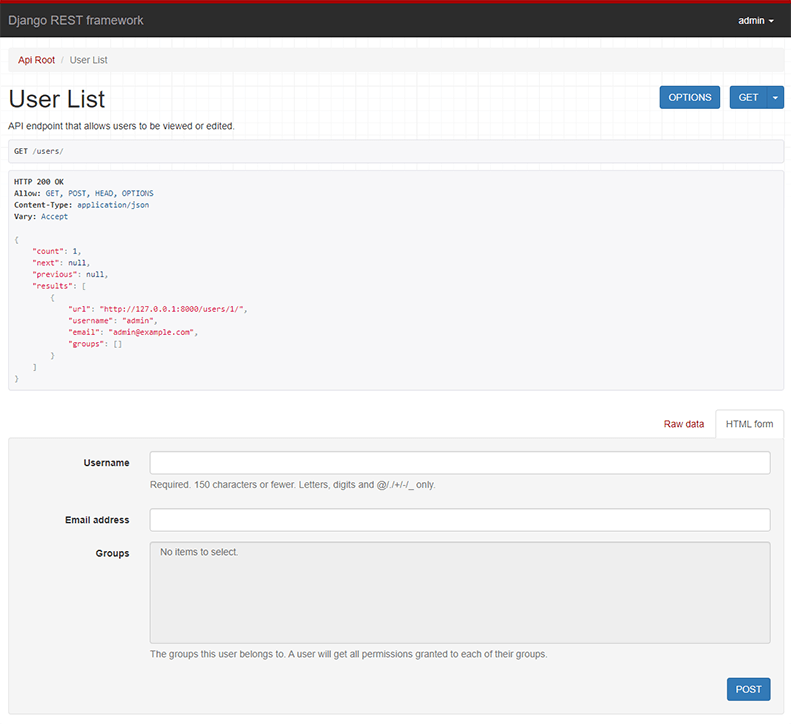
- The Web browsable API is a huge usability win for your developers.
- Authentication policies including optional packages for OAuth1a and OAuth2.
- Serialization that supports both ORM and non-ORM data sources.
- Customizable all the way down - just use regular function-based views if you don't need the more powerful features.
- Extensive documentation, and great community support.
Below: Screenshot from the browsable API
Requirements
- Python 3.10+
- Django 5.2, 6.0, 6.1
We highly recommend and only officially support the latest patch release of
each Python and Django series.
Installation
Install using pip...
pip install djangorestframeworkAdd 'rest_framework' to your INSTALLED_APPS setting.
INSTALLED_APPS = [
    # ...
    "rest_framework",
]
Example
Let's take a look at a quick example of using REST framework to build a simple model-backed API for accessing users and groups.
Start up a new project like so...
pip install django
pip install djangorestframework
django-admin startproject example .
./manage.py migrate
./manage.py createsuperuser
Now edit the example/urls.py module in your project:
from django.contrib.auth.models import User
from django.urls import include, path
from rest_framework import routers, serializers, viewsets


# Serializers define the API representation.
class UserSerializer(serializers.HyperlinkedModelSerializer):
    class Meta:
        model = User
        fields = ["url", "username", "email", "is_staff"]


# ViewSets define the view behavior.
class UserViewSet(viewsets.ModelViewSet):
    queryset = User.objects.all()
    serializer_class = UserSerializer


# Routers provide a way of automatically determining the URL conf.
router = routers.DefaultRouter()
router.register(r"users", UserViewSet)

# Wire up our API using automatic URL routing.
# Additionally, we include login URLs for the browsable API.
urlpatterns = [
    path("", include(router.urls)),
    path("api-auth/", include("rest_framework.urls", namespace="rest_framework")),
]
We'd also like to configure a couple of settings for our API.
Add the following to your settings.py module:
INSTALLED_APPS = [
    # ... make sure to include the default installed apps here.
    "rest_framework",
]

REST_FRAMEWORK = {
    # Use Django's standard `django.contrib.auth` permissions,
    # or allow read-only access for unauthenticated users.
    "DEFAULT_PERMISSION_CLASSES": [
        "rest_framework.permissions.DjangoModelPermissionsOrAnonReadOnly",
    ]
}
That's it, we're done!
./manage.py runserverYou can now open the API in your browser at http://127.0.0.1:8000/, and view your new 'users' API. If you use the Login control in the top right corner you'll also be able to add, create and delete users from the system.
You can also interact with the API using command line tools such as curl. For example, to list the users endpoint:
$ curl -H 'Accept: application/json; indent=4' -u admin:password http://127.0.0.1:8000/users/
[
    {
        "url": "http://127.0.0.1:8000/users/1/",
        "username": "admin",
        "email": "[email protected]",
        "is_staff": true,
    }
]
Or to create a new user:
$ curl -X POST -d username=new -d [email protected] -d is_staff=false -H 'Accept: application/json; indent=4' -u admin:password http://127.0.0.1:8000/users/
{
    "url": "http://127.0.0.1:8000/users/2/",
    "username": "new",
    "email": "[email protected]",
    "is_staff": false,
}
Documentation & Support
Full documentation for the project is available at https://www.django-rest-framework.org/.
For questions and support, use the REST framework discussion group, or #restframework on libera.chat IRC.
Security
Please see the security policy.
File: docs/api-guide/authentication.md
source:
- authentication.py
Auth needs to be pluggable.
— Jacob Kaplan-Moss, "REST worst practices"
Authentication is the mechanism of associating an incoming request with a set of identifying credentials, such as the user the request came from, or the token that it was signed with. The permission and throttling policies can then use those credentials to determine if the request should be permitted.
REST framework provides several authentication schemes out of the box, and also allows you to implement custom schemes.
Authentication always runs at the very start of the view, before the permission and throttling checks occur, and before any other code is allowed to proceed.
The request.user property will typically be set to an instance of the contrib.auth package's User class.
The request.auth property is used for any additional authentication information, for example, it may be used to represent an authentication token that the request was signed with.
!!! note
Don't forget that authentication by itself won't allow or disallow an incoming request, it simply identifies the credentials that the request was made with.
For information on how to set up the permission policies for your API please see the [permissions documentation][permission].How authentication is determined
The authentication schemes are always defined as a list of classes. REST framework will attempt to authenticate with each class in the list, and will set request.user and request.auth using the return value of the first class that successfully authenticates.
If no class authenticates, request.user will be set to an instance of django.contrib.auth.models.AnonymousUser, and request.auth will be set to None.
The value of request.user and request.auth for unauthenticated requests can be modified using the UNAUTHENTICATED_USER and UNAUTHENTICATED_TOKEN settings.
Setting the authentication scheme
The default authentication schemes may be set globally, using the DEFAULT_AUTHENTICATION_CLASSES setting. For example.
REST_FRAMEWORK = {
    'DEFAULT_AUTHENTICATION_CLASSES': [
        'rest_framework.authentication.BasicAuthentication',
        'rest_framework.authentication.SessionAuthentication',
    ]
}
You can also set the authentication scheme on a per-view or per-viewset basis,
using the APIView class-based views.
from rest_framework.authentication import SessionAuthentication, BasicAuthentication
from rest_framework.permissions import IsAuthenticated
from rest_framework.response import Response
from rest_framework.views import APIView

class ExampleView(APIView):
    authentication_classes = [SessionAuthentication, BasicAuthentication]
    permission_classes = [IsAuthenticated]

    def get(self, request, format=None):
        content = {
            'user': str(request.user),  # `django.contrib.auth.User` instance.
            'auth': str(request.auth),  # None
        }
        return Response(content)
Or, if you're using the @api_view decorator with function based views.
@api_view(['GET'])
@authentication_classes([SessionAuthentication, BasicAuthentication])
@permission_classes([IsAuthenticated])
def example_view(request, format=None):
    content = {
        'user': str(request.user),  # `django.contrib.auth.User` instance.
        'auth': str(request.auth),  # None
    }
    return Response(content)
Unauthorized and Forbidden responses
When an unauthenticated request is denied permission there are two different error codes that may be appropriate.
HTTP 401 responses must always include a WWW-Authenticate header, that instructs the client how to authenticate. HTTP 403 responses do not include the WWW-Authenticate header.
The kind of response that will be used depends on the authentication scheme. Although multiple authentication schemes may be in use, only one scheme may be used to determine the type of response. The first authentication class set on the view is used when determining the type of response.
Note that when a request may successfully authenticate, but still be denied permission to perform the request, in which case a 403 Permission Denied response will always be used, regardless of the authentication scheme.
Django 5.1+ `LoginRequiredMiddleware`
If you're running Django 5.1+ and use the LoginRequiredMiddleware, please note that all views from DRF are opted-out of this middleware. This is because the authentication in DRF is based on authentication and permissions classes, which may be determined after the middleware has been applied. Additionally, when the request is not authenticated, the middleware redirects the user to the login page, which is not suitable for API requests, where it's preferable to return a 401 status code.
REST framework offers an equivalent mechanism for DRF views via the global settings, DEFAULT_AUTHENTICATION_CLASSES and DEFAULT_PERMISSION_CLASSES. They should be changed accordingly if you need to enforce that API requests are logged in.
Apache mod_wsgi specific configuration
Note that if deploying to Apache using mod_wsgi, the authorization header is not passed through to a WSGI application by default, as it is assumed that authentication will be handled by Apache, rather than at an application level.
If you are deploying to Apache, and using any non-session based authentication, you will need to explicitly configure mod_wsgi to pass the required headers through to the application. This can be done by specifying the WSGIPassAuthorization directive in the appropriate context and setting it to 'On'.
# this can go in either server config, virtual host, directory or .htaccess
WSGIPassAuthorization On
API Reference
BasicAuthentication
This authentication scheme uses HTTP Basic Authentication, signed against a user's username and password. Basic authentication is generally only appropriate for testing.
If successfully authenticated, BasicAuthentication provides the following credentials.
request.userwill be a DjangoUserinstance.request.authwill beNone.
Unauthenticated responses that are denied permission will result in an HTTP 401 Unauthorized response with an appropriate WWW-Authenticate header. For example:
WWW-Authenticate: Basic realm="api"!!! note
If you use BasicAuthentication in production you must ensure that your API is only available over https. You should also ensure that your API clients will always re-request the username and password at login, and will never store those details to persistent storage.
TokenAuthentication
!!! note
The token authentication provided by Django REST framework is a fairly simple implementation.
For an implementation which allows more than one token per user, has some tighter security implementation details, and supports token expiry, please see the [Django REST Knox][django-rest-knox] third party package.This authentication scheme uses a simple token-based HTTP Authentication scheme. Token authentication is appropriate for client-server setups, such as native desktop and mobile clients.
To use the TokenAuthentication scheme you'll need to configure the authentication classes to include TokenAuthentication, and additionally include rest_framework.authtoken in your INSTALLED_APPS setting:
INSTALLED_APPS = [
    ...
    'rest_framework.authtoken'
]
Make sure to run manage.py migrate after changing your settings.
The rest_framework.authtoken app provides Django database migrations.
You'll also need to create tokens for your users.
from rest_framework.authtoken.models import Token

token = Token.objects.create(user=...)
print(token.key)
For clients to authenticate, the token key should be included in the Authorization HTTP header. The key should be prefixed by the string literal "Token", with whitespace separating the two strings. For example:
Authorization: Token 9944b09199c62bcf9418ad846dd0e4bbdfc6ee4bIf you want to use a different keyword in the header, such as Bearer, simply subclass TokenAuthentication and set the keyword class variable.
If successfully authenticated, TokenAuthentication provides the following credentials.
request.userwill be a DjangoUserinstance.request.authwill be arest_framework.authtoken.models.Tokeninstance.
Unauthenticated responses that are denied permission will result in an HTTP 401 Unauthorized response with an appropriate WWW-Authenticate header. For example:
WWW-Authenticate: TokenThe curl command line tool may be useful for testing token authenticated APIs. For example:
curl -X GET http://127.0.0.1:8000/api/example/ -H 'Authorization: Token 9944b09199c62bcf9418ad846dd0e4bbdfc6ee4b'!!! note
If you use TokenAuthentication in production you must ensure that your API is only available over https.
Generating Tokens
By using signals
If you want every user to have an automatically generated Token, you can simply catch the User's post_save signal.
from django.conf import settings
from django.db.models.signals import post_save
from django.dispatch import receiver
from rest_framework.authtoken.models import Token

@receiver(post_save, sender=settings.AUTH_USER_MODEL)
def create_auth_token(sender, instance=None, created=False, **kwargs):
    if created:
        Token.objects.create(user=instance)
Note that you'll want to ensure you place this code snippet in an installed models.py module, or some other location that will be imported by Django on startup.
If you've already created some users, you can generate tokens for all existing users like this:
from django.contrib.auth.models import User
from rest_framework.authtoken.models import Token

for user in User.objects.all():
    Token.objects.get_or_create(user=user)
By exposing an api endpoint
When using TokenAuthentication, you may want to provide a mechanism for clients to obtain a token given the username and password. REST framework provides a built-in view to provide this behavior. To use it, add the obtain_auth_token view to your URLconf:
from rest_framework.authtoken import views
urlpatterns += [
    path('api-token-auth/', views.obtain_auth_token)
]
Note that the URL part of the pattern can be whatever you want to use.
The obtain_auth_token view will return a JSON response when valid username and password fields are POSTed to the view using form data or JSON:
{ 'token' : '9944b09199c62bcf9418ad846dd0e4bbdfc6ee4b' }Note that the default obtain_auth_token view explicitly uses JSON requests and responses, rather than using default renderer and parser classes in your settings.
By default, there are no permissions or throttling applied to the obtain_auth_token view. If you do wish to apply throttling you'll need to override the view class,
and include them using the throttle_classes attribute.
If you need a customized version of the obtain_auth_token view, you can do so by subclassing the ObtainAuthToken view class, and using that in your url conf instead.
For example, you may return additional user information beyond the token value:
from rest_framework.authtoken.views import ObtainAuthToken
from rest_framework.authtoken.models import Token
from rest_framework.response import Response

class CustomAuthToken(ObtainAuthToken):

    def post(self, request, *args, **kwargs):
        serializer = self.serializer_class(data=request.data,
                                           context={'request': request})
        serializer.is_valid(raise_exception=True)
        user = serializer.validated_data['user']
        token, created = Token.objects.get_or_create(user=user)
        return Response({
            'token': token.key,
            'user_id': user.pk,
            'email': user.email
        })
And in your urls.py:
urlpatterns += [
    path('api-token-auth/', CustomAuthToken.as_view())
]
With Django admin
It is also possible to create Tokens manually through the admin interface. In case you are using a large user base, we recommend that you monkey patch the TokenAdmin class to customize it to your needs, more specifically by declaring the user field as raw_field.
your_app/admin.py:
from rest_framework.authtoken.admin import TokenAdmin

TokenAdmin.raw_id_fields = ['user']
Using Django manage.py command
Since version 3.6.4 it's possible to generate a user token using the following command:
./manage.py drf_create_tokenthis command will return the API token for the given user, creating it if it doesn't exist:
Generated token 9944b09199c62bcf9418ad846dd0e4bbdfc6ee4b for user user1In case you want to regenerate the token (for example if it has been compromised or leaked) you can pass an additional parameter:
./manage.py drf_create_token -rSessionAuthentication
This authentication scheme uses Django's default session backend for authentication. Session authentication is appropriate for AJAX clients that are running in the same session context as your website.
If successfully authenticated, SessionAuthentication provides the following credentials.
request.userwill be a DjangoUserinstance.request.authwill beNone.
Unauthenticated responses that are denied permission will result in an HTTP 403 Forbidden response.
If you're using an AJAX-style API with SessionAuthentication, you'll need to make sure you include a valid CSRF token for any "unsafe" HTTP method calls, such as PUT, PATCH, POST or DELETE requests. See the Django CSRF documentation for more details.
!!! warning
Always use Django's standard login view when creating login pages. This will ensure your login views are properly protected.
CSRF validation in REST framework works slightly differently from standard Django due to the need to support both session and non-session based authentication to the same views. This means that only authenticated requests require CSRF tokens, and anonymous requests may be sent without CSRF tokens. This behavior is not suitable for login views, which should always have CSRF validation applied.
RemoteUserAuthentication
This authentication scheme allows you to delegate authentication to your web server, which sets the REMOTE_USER
environment variable.
To use it, you must have django.contrib.auth.backends.RemoteUserBackend (or a subclass) in yourAUTHENTICATION_BACKENDS setting. By default, RemoteUserBackend creates User objects for usernames that don't
already exist. To change this and other behavior, consult the
Django documentation.
If successfully authenticated, RemoteUserAuthentication provides the following credentials:
request.userwill be a DjangoUserinstance.request.authwill beNone.
Consult your web server's documentation for information about configuring an authentication method, for example:
Custom authentication
To implement a custom authentication scheme, subclass BaseAuthentication and override the .authenticate(self, request) method. The method should return a two-tuple of (user, auth) if authentication succeeds, or None otherwise.
In some circumstances instead of returning None, you may want to raise an AuthenticationFailed exception from the .authenticate() method.
Typically the approach you should take is:
- If authentication is not attempted, return
None. Any other authentication schemes also in use will still be checked. - If authentication is attempted but fails, raise an
AuthenticationFailedexception. An error response will be returned immediately, regardless of any permissions checks, and without checking any other authentication schemes.
You may also override the .authenticate_header(self, request) method. If implemented, it should return a string that will be used as the value of the WWW-Authenticate header in a HTTP 401 Unauthorized response.
If the .authenticate_header() method is not overridden, the authentication scheme will return HTTP 403 Forbidden responses when an unauthenticated request is denied access.
!!! note
When your custom authenticator is invoked by the request object's .user or .auth properties, you may see an AttributeError re-raised as a WrappedAttributeError. This is necessary to prevent the original exception from being suppressed by the outer property access. Python will not recognize that the AttributeError originates from your custom authenticator and will instead assume that the request object does not have a .user or .auth property. These errors should be fixed or otherwise handled by your authenticator.
Example
The following example will authenticate any incoming request as the user given by the username in a custom request header named 'X-USERNAME'.
from django.contrib.auth.models import User
from rest_framework import authentication
from rest_framework import exceptions

class ExampleAuthentication(authentication.BaseAuthentication):
    def authenticate(self, request):
        username = request.META.get('HTTP_X_USERNAME')
        if not username:
            return None

        try:
            user = User.objects.get(username=username)
        except User.DoesNotExist:
            raise exceptions.AuthenticationFailed('No such user')

        return (user, None)
Third party packages
The following third-party packages are also available.
django-rest-knox
Django-rest-knox library provides models and views to handle token-based authentication in a more secure and extensible way than the built-in TokenAuthentication scheme - with Single Page Applications and Mobile clients in mind. It provides per-client tokens, and views to generate them when provided some other authentication (usually basic authentication), to delete the token (providing a server enforced logout) and to delete all tokens (logs out all clients that a user is logged into).
Django OAuth Toolkit
The Django OAuth Toolkit package provides OAuth 2.0 support and works with Python 3.4+. The package is maintained by jazzband and uses the excellent OAuthLib. The package is well documented, and well supported and is currently our recommended package for OAuth 2.0 support.
Installation & configuration
Install using pip.
pip install django-oauth-toolkitAdd the package to your INSTALLED_APPS and modify your REST framework settings.
INSTALLED_APPS = [
    ...
    'oauth2_provider',
]

REST_FRAMEWORK = {
    'DEFAULT_AUTHENTICATION_CLASSES': [
        'oauth2_provider.contrib.rest_framework.OAuth2Authentication',
    ]
}
For more details see the Django REST framework - Getting started documentation.
Django REST framework OAuth
The Django REST framework OAuth package provides both OAuth1 and OAuth2 support for REST framework.
This package was previously included directly in the REST framework but is now supported and maintained as a third-party package.
Installation & configuration
Install the package using pip.
pip install djangorestframework-oauthFor details on configuration and usage see the Django REST framework OAuth documentation for authentication and permissions.
JSON Web Token Authentication
JSON Web Token is a fairly new standard which can be used for token-based authentication. Unlike the built-in TokenAuthentication scheme, JWT Authentication doesn't need to use a database to validate a token. A package for JWT authentication is djangorestframework-simplejwt which provides some features as well as a pluggable token blacklist app.
Hawk HTTP Authentication
The HawkREST library builds on the Mohawk library to let you work with Hawk signed requests and responses in your API. Hawk lets two parties securely communicate with each other using messages signed by a shared key. It is based on HTTP MAC access authentication (which was based on parts of OAuth 1.0).
HTTP Signature Authentication
HTTP Signature (currently a IETF draft) provides a way to achieve origin authentication and message integrity for HTTP messages. Similar to Amazon's HTTP Signature scheme, used by many of its services, it permits stateless, per-request authentication. Elvio Toccalino maintains the djangorestframework-httpsignature (outdated) package which provides an easy-to-use HTTP Signature Authentication mechanism. You can use the updated fork version of djangorestframework-httpsignature, which is drf-httpsig.
Djoser
Djoser library provides a set of views to handle basic actions such as registration, login, logout, password reset and account activation. The package works with a custom user model and uses token-based authentication. This is a ready to use REST implementation of the Django authentication system.
DRF Auth Kit
DRF Auth Kit library provides a modern REST authentication solution with JWT cookies, social login, multi-factor authentication, and comprehensive user management. The package offers full type safety, automatic OpenAPI schema generation with DRF Spectacular. It supports multiple authentication types (JWT, DRF Token, or Custom) and includes built-in internationalization for 50+ languages.
django-rest-auth / dj-rest-auth
This library provides a set of REST API endpoints for registration, authentication (including social media authentication), password reset, retrieve and update user details, etc. By having these API endpoints, your client apps such as AngularJS, iOS, Android, and others can communicate to your Django backend site independently via REST APIs for user management.
There are currently two forks of this project.
- Django-rest-auth is the original project, but is not currently receiving updates.
- Dj-rest-auth is a newer fork of the project.
drf-social-oauth2
Drf-social-oauth2 is a framework that helps you authenticate with major social oauth2 vendors, such as Facebook, Google, Twitter, Orcid, etc. It generates tokens in a JWTed way with an easy setup.
drfpasswordless
drfpasswordless adds (Medium, Square Cash inspired) passwordless support to Django REST Framework's TokenAuthentication scheme. Users log in and sign up with a token sent to a contact point like an email address or a mobile number.
django-rest-authemail
django-rest-authemail provides a RESTful API interface for user signup and authentication. Email addresses are used for authentication, rather than usernames. API endpoints are available for signup, signup email verification, login, logout, password reset, password reset verification, email change, email change verification, password change, and user detail. A fully functional example project and detailed instructions are included.
Django-Rest-Durin
Django-Rest-Durin is built with the idea to have one library that does token auth for multiple Web/CLI/Mobile API clients via one interface but allows different token configuration for each API Client that consumes the API. It provides support for multiple tokens per user via custom models, views, permissions that work with Django-Rest-Framework. The token expiration time can be different per API client and is customizable via the Django Admin Interface.
More information can be found in the Documentation.
django-pyoidc
django_pyoidc adds support for OpenID Connect (OIDC) authentication. This allows you to delegate user management to an Identity Provider, which can be used to implement Single-Sign-On (SSO). It provides support for most uses-cases, such as customizing how token info are mapped to user models, using OIDC audiences for access control, etc.
More information can be found in the Documentation.
File: docs/api-guide/caching.md
Caching
A certain woman had a very sharp consciousness but almost no
memory ... She remembered enough to work, and she worked hard.
- Lydia Davis
Caching in REST Framework works well with the cache utilities
provided in Django.
Using cache with apiview and viewsets
Django provides a method_decorator to use
decorators with class based views. This can be used with
other cache decorators such as cache_page,vary_on_cookie and vary_on_headers.
from django.utils.decorators import method_decorator
from django.views.decorators.cache import cache_page
from django.views.decorators.vary import vary_on_cookie, vary_on_headers

from rest_framework.response import Response
from rest_framework.views import APIView
from rest_framework import viewsets


class UserViewSet(viewsets.ViewSet):
    # With cookie: cache requested url for each user for 2 hours
    @method_decorator(cache_page(60 * 60 * 2))
    @method_decorator(vary_on_cookie)
    def list(self, request, format=None):
        content = {
            "user_feed": request.user.get_user_feed(),
        }
        return Response(content)


class ProfileView(APIView):
    # With auth: cache requested url for each user for 2 hours
    @method_decorator(cache_page(60 * 60 * 2))
    @method_decorator(vary_on_headers("Authorization"))
    def get(self, request, format=None):
        content = {
            "user_feed": request.user.get_user_feed(),
        }
        return Response(content)


class PostView(APIView):
    # Cache page for the requested url
    @method_decorator(cache_page(60 * 60 * 2))
    def get(self, request, format=None):
        content = {
            "title": "Post title",
            "body": "Post content",
        }
        return Response(content)
Using cache with @api_view decorator
When using @api_view decorator, the Django-provided method-based cache decorators such as cache_page,vary_on_cookie and vary_on_headers can be called directly.
from django.views.decorators.cache import cache_page
from django.views.decorators.vary import vary_on_cookie

from rest_framework.decorators import api_view
from rest_framework.response import Response


@cache_page(60 * 15)
@vary_on_cookie
@api_view(["GET"])
def get_user_list(request):
    content = {"user_feed": request.user.get_user_feed()}
    return Response(content)
!!! note
The cache_page decorator only caches the GET and HEAD responses with status 200.
File: docs/api-guide/content-negotiation.md
source:
- negotiation.py
HTTP has provisions for several mechanisms for "content negotiation" - the process of selecting the best representation for a given response when there are multiple representations available.
— RFC 2616, Fielding et al.
Content negotiation is the process of selecting one of multiple possible representations to return to a client, based on client or server preferences.
Determining the accepted renderer
REST framework uses a simple style of content negotiation to determine which media type should be returned to a client, based on the available renderers, the priorities of each of those renderers, and the client's Accept: header. The style used is partly client-driven, and partly server-driven.
- More specific media types are given preference to less specific media types.
- If multiple media types have the same specificity, then preference is given to based on the ordering of the renderers configured for the given view.
For example, given the following Accept header:
application/json; indent=4, application/json, application/yaml, text/html, */*The priorities for each of the given media types would be:
application/json; indent=4application/json,application/yamlandtext/html*/*
If the requested view was only configured with renderers for YAML and HTML, then REST framework would select whichever renderer was listed first in the renderer_classes list or DEFAULT_RENDERER_CLASSES setting.
For more information on the HTTP Accept header, see RFC 2616
!!! note
"q" values are not taken into account by REST framework when determining preference. The use of "q" values negatively impacts caching, and in the author's opinion they are an unnecessary and overcomplicated approach to content negotiation.
This is a valid approach as the HTTP spec deliberately underspecifies how a server should weight server-based preferences against client-based preferences.Custom content negotiation
It's unlikely that you'll want to provide a custom content negotiation scheme for REST framework, but you can do so if needed. To implement a custom content negotiation scheme override BaseContentNegotiation.
REST framework's content negotiation classes handle selection of both the appropriate parser for the request, and the appropriate renderer for the response, so you should implement both the .select_parser(request, parsers) and .select_renderer(request, renderers, format_suffix) methods.
The select_parser() method should return one of the parser instances from the list of available parsers, or None if none of the parsers can handle the incoming request.
The select_renderer() method should return a two-tuple of (renderer instance, media type), or raise a NotAcceptable exception.
Example
The following is a custom content negotiation class which ignores the client
request when selecting the appropriate parser or renderer.
from rest_framework.negotiation import BaseContentNegotiation

class IgnoreClientContentNegotiation(BaseContentNegotiation):
    def select_parser(self, request, parsers):
        """
        Select the first parser in the `.parser_classes` list.
        """
        return parsers[0]

    def select_renderer(self, request, renderers, format_suffix):
        """
        Select the first renderer in the `.renderer_classes` list.
        """
        return (renderers[0], renderers[0].media_type)
Setting the content negotiation
The default content negotiation class may be set globally, using the DEFAULT_CONTENT_NEGOTIATION_CLASS setting. For example, the following settings would use our example IgnoreClientContentNegotiation class.
REST_FRAMEWORK = {
    'DEFAULT_CONTENT_NEGOTIATION_CLASS': 'myapp.negotiation.IgnoreClientContentNegotiation',
}
You can also set the content negotiation used for an individual view, or viewset, using the APIView class-based views.
from myapp.negotiation import IgnoreClientContentNegotiation
from rest_framework.response import Response
from rest_framework.views import APIView

class NoNegotiationView(APIView):
    """
    An example view that does not perform content negotiation.
    """
    content_negotiation_class = IgnoreClientContentNegotiation

    def get(self, request, format=None):
        return Response({
            'accepted media type': request.accepted_renderer.media_type
        })
File: docs/api-guide/exceptions.md
source:
- exceptions.py
Exceptions
Exceptions… allow error handling to be organized cleanly in a central or high-level place within the program structure.
— Doug Hellmann, Python Exception Handling Techniques
Exception handling in REST framework views
REST framework's views handle various exceptions, and deal with returning appropriate error responses.
The handled exceptions are:
- Subclasses of
APIExceptionraised inside REST framework. - Django's
Http404exception. - Django's
PermissionDeniedexception.
In each case, REST framework will return a response with an appropriate status code and content-type. The body of the response will include any additional details regarding the nature of the error.
Most error responses will include a key detail in the body of the response.
For example, the following request:
DELETE http://api.example.com/foo/bar HTTP/1.1
Accept: application/json
Might receive an error response indicating that the DELETE method is not allowed on that resource:
HTTP/1.1 405 Method Not Allowed
Content-Type: application/json
Content-Length: 42

{"detail": "Method 'DELETE' not allowed."}
Validation errors are handled slightly differently, and will include the field names as the keys in the response. If the validation error was not specific to a particular field then it will use the "non_field_errors" key, or whatever string value has been set for the NON_FIELD_ERRORS_KEY setting.
An example validation error might look like this:
HTTP/1.1 400 Bad Request
Content-Type: application/json
Content-Length: 94

{"amount": ["A valid integer is required."], "description": ["This field may not be blank."]}
Custom exception handling
You can implement custom exception handling by creating a handler function that converts exceptions raised in your API views into response objects. This allows you to control the style of error responses used by your API.
The function must take a pair of arguments, the first is the exception to be handled, and the second is a dictionary containing any extra context such as the view currently being handled. The exception handler function should either return a Response object, or return None if the exception cannot be handled. If the handler returns None then the exception will be re-raised and Django will return a standard HTTP 500 'server error' response.
For example, you might want to ensure that all error responses include the HTTP status code in the body of the response, like so:
HTTP/1.1 405 Method Not Allowed
Content-Type: application/json
Content-Length: 62

{"status_code": 405, "detail": "Method 'DELETE' not allowed."}
In order to alter the style of the response, you could write the following custom exception handler:
from rest_framework.views import exception_handler

def custom_exception_handler(exc, context):
    # Call REST framework's default exception handler first,
    # to get the standard error response.
    response = exception_handler(exc, context)

    # Now add the HTTP status code to the response.
    if response is not None:
        response.data['status_code'] = response.status_code

    return response
The context argument is not used by the default handler, but can be useful if the exception handler needs further information such as the view currently being handled, which can be accessed as context['view'].
The exception handler must also be configured in your settings, using the EXCEPTION_HANDLER setting key. For example:
REST_FRAMEWORK = {
    'EXCEPTION_HANDLER': 'my_project.my_app.utils.custom_exception_handler'
}
If not specified, the 'EXCEPTION_HANDLER' setting defaults to the standard exception handler provided by REST framework:
REST_FRAMEWORK = {
    'EXCEPTION_HANDLER': 'rest_framework.views.exception_handler'
}
Note that the exception handler will only be called for responses generated by raised exceptions. It will not be used for any responses returned directly by the view, such as the HTTP_400_BAD_REQUEST responses that are returned by the generic views when serializer validation fails.
API Reference
APIException
Signature: APIException()
The base class for all exceptions raised inside an APIView class or @api_view.
To provide a custom exception, subclass APIException and set the .status_code, .default_detail, and .default_code attributes on the class.
For example, if your API relies on a third party service that may sometimes be unreachable, you might want to implement an exception for the "503 Service Unavailable" HTTP response code. You could do this like so:
from rest_framework.exceptions import APIException

class ServiceUnavailable(APIException):
    status_code = 503
    default_detail = 'Service temporarily unavailable, try again later.'
    default_code = 'service_unavailable'
Inspecting API exceptions
There are a number of different properties available for inspecting the status
of an API exception. You can use these to build custom exception handling
for your project.
The available attributes and methods are:
.detail- Return the textual description of the error..get_codes()- Return the code identifier of the error..get_full_details()- Return both the textual description and the code identifier.
In most cases the error detail will be a simple item:
>>> print(exc.detail)
You do not have permission to perform this action.
>>> print(exc.get_codes())
permission_denied
>>> print(exc.get_full_details())
{'message':'You do not have permission to perform this action.','code':'permission_denied'}
In the case of validation errors the error detail will be either a list or
dictionary of items:
>>> print(exc.detail)
{"name":"This field is required.","age":"A valid integer is required."}
>>> print(exc.get_codes())
{"name":"required","age":"invalid"}
>>> print(exc.get_full_details())
{"name":{"message":"This field is required.","code":"required"},"age":{"message":"A valid integer is required.","code":"invalid"}}
ParseError
Signature: ParseError(detail=None, code=None)
Raised if the request contains malformed data when accessing request.data.
By default this exception results in a response with the HTTP status code "400 Bad Request".
AuthenticationFailed
Signature: AuthenticationFailed(detail=None, code=None)
Raised when an incoming request includes incorrect authentication.
By default this exception results in a response with the HTTP status code "401 Unauthenticated", but it may also result in a "403 Forbidden" response, depending on the authentication scheme in use. See the authentication documentation for more details.
NotAuthenticated
Signature: NotAuthenticated(detail=None, code=None)
Raised when an unauthenticated request fails the permission checks.
By default this exception results in a response with the HTTP status code "401 Unauthenticated", but it may also result in a "403 Forbidden" response, depending on the authentication scheme in use. See the authentication documentation for more details.
PermissionDenied
Signature: PermissionDenied(detail=None, code=None)
Raised when an authenticated request fails the permission checks.
By default this exception results in a response with the HTTP status code "403 Forbidden".
NotFound
Signature: NotFound(detail=None, code=None)
Raised when a resource does not exist at the given URL. This exception is equivalent to the standard Http404 Django exception.
By default this exception results in a response with the HTTP status code "404 Not Found".
MethodNotAllowed
Signature: MethodNotAllowed(method, detail=None, code=None)
Raised when an incoming request occurs that does not map to a handler method on the view.
By default this exception results in a response with the HTTP status code "405 Method Not Allowed".
NotAcceptable
Signature: NotAcceptable(detail=None, code=None)
Raised when an incoming request occurs with an Accept header that cannot be satisfied by any of the available renderers.
By default this exception results in a response with the HTTP status code "406 Not Acceptable".
UnsupportedMediaType
Signature: UnsupportedMediaType(media_type, detail=None, code=None)
Raised if there are no parsers that can handle the content type of the request data when accessing request.data.
By default this exception results in a response with the HTTP status code "415 Unsupported Media Type".
Throttled
Signature: Throttled(wait=None, detail=None, code=None)
Raised when an incoming request fails the throttling checks.
By default this exception results in a response with the HTTP status code "429 Too Many Requests".
ValidationError
Signature: ValidationError(detail=None, code=None)
The ValidationError exception is slightly different from the other APIException classes:
- The
detailargument may be a list or dictionary of error details, and may also be a nested data structure. By using a dictionary, you can specify field-level errors while performing object-level validation in thevalidate()method of a serializer. For example.raise serializers.ValidationError({'name': 'Please enter a valid name.'}) - By convention you should import the serializers module and use a fully qualified
ValidationErrorstyle, in order to differentiate it from Django's built-in validation error. For example.raise serializers.ValidationError('This field must be an integer value.')
The ValidationError class should be used for serializer and field validation, and by validator classes. It is also raised when calling serializer.is_valid with the raise_exception keyword argument:
serializer.is_valid(raise_exception=True)The generic views use the raise_exception=True flag, which means that you can override the style of validation error responses globally in your API. To do so, use a custom exception handler, as described above.
By default this exception results in a response with the HTTP status code "400 Bad Request".
Generic Error Views
Django REST Framework provides two error views suitable for providing generic JSON 500 Server Error and400 Bad Request responses. (Django's default error views provide HTML responses, which may not be appropriate for an
API-only application.)
Use these as per Django's Customizing error views documentation.
`rest_framework.exceptions.server_error`
Returns a response with status code 500 and application/json content type.
Set as handler500:
handler500 = 'rest_framework.exceptions.server_error'`rest_framework.exceptions.bad_request`
Returns a response with status code 400 and application/json content type.
Set as handler400:
handler400 = 'rest_framework.exceptions.bad_request'Third party packages
The following third-party packages are also available.
DRF Standardized Errors
The drf-standardized-errors package provides an exception handler that generates the same format for all 4xx and 5xx responses. It is a drop-in replacement for the default exception handler and allows customizing the error response format without rewriting the whole exception handler. The standardized error response format is easier to document and easier to handle by API consumers.
File: docs/api-guide/fields.md
source:
- fields.py
Serializer fields
Each field in a Form class is responsible not only for validating data, but also for "cleaning" it — normalizing it to a consistent format.
Serializer fields handle converting between primitive values and internal datatypes. They also deal with validating input values, as well as retrieving and setting the values from their parent objects.
!!! note
The serializer fields are declared in fields.py, but by convention you should import them using from rest_framework import serializers and refer to fields as serializers.<FieldName>.
Core arguments
Each serializer field class constructor takes at least these arguments. Some Field classes take additional, field-specific arguments, but the following should always be accepted:
`read_only`
Read-only fields are included in the API output, but should not be included in the input during create or update operations. Any 'read_only' fields that are incorrectly included in the serializer input will be ignored.
Set this to True to ensure that the field is used when serializing a representation, but is not used when creating or updating an instance during deserialization.
Defaults to False
`write_only`
Set this to True to ensure that the field may be used when updating or creating an instance, but is not included when serializing the representation.
Defaults to False
`required`
Normally an error will be raised if a field is not supplied during deserialization.
Set to false if this field is not required to be present during deserialization.
Setting this to False also allows the object attribute or dictionary key to be omitted from output when serializing the instance. If the key is not present it will simply not be included in the output representation.
Defaults to True. If you're using Model Serializer, the default value will be False when you have specified a default, or when the corresponding Model field has blank=True or null=True and is not part of a unique constraint at the same time. (Note that without a default value, unique constraints will cause the field to be required.)
`default`
If set, this gives the default value that will be used for the field if no input value is supplied. If not set the default behavior is to not populate the attribute at all.
The default is not applied during partial update operations. In the partial update case only fields that are provided in the incoming data will have a validated value returned.
May be set to a function or other callable, in which case the value will be evaluated each time it is used. When called, it will receive no arguments. If the callable has a requires_context = True attribute, then the serializer field will be passed as an argument.
For example:
class CurrentUserDefault:
    """
    May be applied as a `default=...` value on a serializer field.
    Returns the current user.
    """
    requires_context = True

    def __call__(self, serializer_field):
        return serializer_field.context['request'].user
When serializing the instance, default will be used if the object attribute or dictionary key is not present in the instance.
Note that setting a default value implies that the field is not required. Including both the default and required keyword arguments is invalid and will raise an error.
`allow_null`
Normally an error will be raised if None is passed to a serializer field. Set this keyword argument to True if None should be considered a valid value.
Note that, without an explicit default, setting this argument to True will imply a default value of null for serialization output, but does not imply a default for input deserialization.
Defaults to False
`source`
The name of the attribute that will be used to populate the field. May be a method that only takes a self argument, such as URLField(source='get_absolute_url'), or may use dotted notation to traverse attributes, such as EmailField(source='user.email').
When serializing fields with dotted notation, it may be necessary to provide a default value if any object is not present or is empty during attribute traversal. Beware of possible n+1 problems when using source attribute if you are accessing a relational orm model. For example:
class CommentSerializer(serializers.Serializer):
    email = serializers.EmailField(source="user.email")
This case would require user object to be fetched from database when it is not prefetched. If that is not wanted, be sure to be using prefetch_related and select_related methods appropriately. For more information about the methods refer to django documentation.
Also note that when dotted notation is used, after serializer validation the .validated_data attribute will not include a flat "<fieldname>": <value> item. Instead, it will include a nested dictionary derived by expanding the dotted path value of the source argument. So, for the previous serializer example, .validated_data would be:
{
    "user": {
        "email": ...
    }
}
instead of:
{
    "email": ...
}
This works this way because, in DRF's philosophy, the .data attribute represents the external API representation (where key names equal field names), while the .validated_data attribute represents the internal object structure (where the nesting and key names follow the source path).
The value source='*' has a special meaning, and is used to indicate that the entire object should be passed through to the field. This can be useful for creating nested representations, or for fields which require access to the complete object in order to determine the output representation.
Defaults to the name of the field.
`validators`
A list of validator functions which should be applied to the incoming field input, and which either raise a validation error or simply return. Validator functions should typically raise serializers.ValidationError, but Django's built-in ValidationError is also supported for compatibility with validators defined in the Django codebase or third party Django packages.
`error_messages`
A dictionary of error codes to error messages.
`label`
A short text string that may be used as the name of the field in HTML form fields or other descriptive elements.
`help_text`
A text string that may be used as a description of the field in HTML form fields or other descriptive elements.
`initial`
A value that should be used for pre-populating the value of HTML form fields. You may pass a callable to it, just as
you may do with any regular Django Field:
import datetime
from rest_framework import serializers
class ExampleSerializer(serializers.Serializer):
    day = serializers.DateField(initial=datetime.date.today)
`style`
A dictionary of key-value pairs that can be used to control how renderers should render the field.
Two examples here are 'input_type' and 'base_template':
# Use  for the input.
password = serializers.CharField(
    style={'input_type': 'password'}
)

# Use a radio input instead of a select input.
color_channel = serializers.ChoiceField(
    choices=['red', 'green', 'blue'],
    style={'base_template': 'radio.html'}
)
For more details see the HTML & Forms documentation.
Boolean fields
BooleanField
A boolean representation.
When using HTML encoded form input be aware that omitting a value will always be treated as setting a field to False, even if it has a default=True option specified. This is because HTML checkbox inputs represent the unchecked state by omitting the value, so REST framework treats omission as if it is an empty checkbox input.
Note that Django 2.1 removed the blank kwarg from models.BooleanField.
Prior to Django 2.1 models.BooleanField fields were always blank=True. Thus
since Django 2.1 default serializers.BooleanField instances will be generated
without the required kwarg (i.e. equivalent to required=True) whereas with
previous versions of Django, default BooleanField instances will be generated
with a required=False option. If you want to control this behavior manually,
explicitly declare the BooleanField on the serializer class, or use theextra_kwargs option to set the required flag.
Corresponds to django.db.models.fields.BooleanField.
Signature: BooleanField()
String fields
CharField
A text representation. Optionally validates the text to be shorter than max_length and longer than min_length.
Corresponds to django.db.models.fields.CharField or django.db.models.fields.TextField.
Signature: CharField(max_length=None, min_length=None, allow_blank=False, trim_whitespace=True)
max_length- Validates that the input contains no more than this number of characters.min_length- Validates that the input contains no fewer than this number of characters.allow_blank- If set toTruethen the empty string should be considered a valid value. If set toFalsethen the empty string is considered invalid and will raise a validation error. Defaults toFalse.trim_whitespace- If set toTruethen leading and trailing whitespace is trimmed. Defaults toTrue.
The allow_null option is also available for string fields, although its usage is discouraged in favor of allow_blank. It is valid to set both allow_blank=True and allow_null=True, but doing so means that there will be two differing types of empty value permissible for string representations, which can lead to data inconsistencies and subtle application bugs.
EmailField
A text representation, validates the text to be a valid email address.
Corresponds to django.db.models.fields.EmailField
Signature: EmailField(max_length=None, min_length=None, allow_blank=False)
RegexField
A text representation, that validates the given value matches against a certain regular expression.
Corresponds to django.forms.fields.RegexField.
Signature: RegexField(regex, max_length=None, min_length=None, allow_blank=False)
The mandatory regex argument may either be a string, or a compiled python regular expression object.
Uses Django's django.core.validators.RegexValidator for validation.
SlugField
A RegexField that validates the input against the pattern [a-zA-Z0-9_-]+.
Corresponds to django.db.models.fields.SlugField.
Signature: SlugField(max_length=50, min_length=None, allow_blank=False)
URLField
A RegexField that validates the input against a URL matching pattern. Expects fully qualified URLs of the form http://<host>/.
Corresponds to django.db.models.fields.URLField. Uses Django's django.core.validators.URLValidator for validation.
Signature: URLField(max_length=200, min_length=None, allow_blank=False)
UUIDField
A field that ensures the input is a valid UUID string. The to_internal_value method will return a uuid.UUID instance. On output the field will return a string in the canonical hyphenated format, for example:
"de305d54-75b4-431b-adb2-eb6b9e546013"Signature: UUIDField(format='hex_verbose')
format: Determines the representation format of the uuid value'hex_verbose'- The canonical hex representation, including hyphens:"5ce0e9a5-5ffa-654b-cee0-1238041fb31a"'hex'- The compact hex representation of the UUID, not including hyphens:"5ce0e9a55ffa654bcee01238041fb31a"'int'- A 128 bit integer representation of the UUID:"123456789012312313134124512351145145114"'urn'- RFC 4122 URN representation of the UUID:"urn:uuid:5ce0e9a5-5ffa-654b-cee0-1238041fb31a"
Changing theformatparameters only affects representation values. All formats are accepted byto_internal_value
FilePathField
A field whose choices are limited to the filenames in a certain directory on the filesystem
Corresponds to django.forms.fields.FilePathField.
Signature: FilePathField(path, match=None, recursive=False, allow_files=True, allow_folders=False, required=None, **kwargs)
path- The absolute filesystem path to a directory from which this FilePathField should get its choice.match- A regular expression, as a string, that FilePathField will use to filter filenames.recursive- Specifies whether all subdirectories of path should be included. Default isFalse.allow_files- Specifies whether files in the specified location should be included. Default isTrue. Either this orallow_foldersmust beTrue.allow_folders- Specifies whether folders in the specified location should be included. Default isFalse. Either this orallow_filesmust beTrue.
IPAddressField
A field that ensures the input is a valid IPv4 or IPv6 string.
Corresponds to django.forms.fields.IPAddressField and django.forms.fields.GenericIPAddressField.
Signature: IPAddressField(protocol='both', unpack_ipv4=False, **options)
protocolLimits valid inputs to the specified protocol. Accepted values are 'both' (default), 'IPv4' or 'IPv6'. Matching is case-insensitive.unpack_ipv4Unpacks IPv4 mapped addresses like ::ffff:192.0.2.1. If this option is enabled that address would be unpacked to 192.0.2.1. Default is disabled. Can only be used when protocol is set to 'both'.
Numeric fields
IntegerField
An integer representation.
Corresponds to django.db.models.fields.IntegerField, django.db.models.fields.SmallIntegerField, django.db.models.fields.PositiveIntegerField and django.db.models.fields.PositiveSmallIntegerField.
Signature: IntegerField(max_value=None, min_value=None)
max_valueValidate that the number provided is no greater than this value.min_valueValidate that the number provided is no less than this value.
BigIntegerField
A biginteger representation.
Corresponds to django.db.models.fields.BigIntegerField.
Signature: BigIntegerField(max_value=None, min_value=None, coerce_to_string=None)
max_valueValidate that the number provided is no greater than this value.min_valueValidate that the number provided is no less than this value.coerce_to_stringSet toTrueif string values should be returned for the representation, orFalseifBigIntegerobjects should be returned. Defaults to the same value as theCOERCE_BIGINT_TO_STRINGsettings key, which will beFalseunless overridden. IfBigIntegerobjects are returned by the serializer, then the final output format will be determined by the renderer.
FloatField
A floating point representation.
Corresponds to django.db.models.fields.FloatField.
Signature: FloatField(max_value=None, min_value=None)
max_valueValidate that the number provided is no greater than this value.min_valueValidate that the number provided is no less than this value.
DecimalField
A decimal representation, represented in Python by a Decimal instance.
Corresponds to django.db.models.fields.DecimalField.
Signature: DecimalField(max_digits, decimal_places, coerce_to_string=None, max_value=None, min_value=None)
max_digitsThe maximum number of digits allowed in the number. It must be eitherNoneor an integer greater than or equal todecimal_places.decimal_placesThe number of decimal places to store with the number.coerce_to_stringSet toTrueif string values should be returned for the representation, orFalseifDecimalobjects should be returned. Defaults to the same value as theCOERCE_DECIMAL_TO_STRINGsettings key, which will beTrueunless overridden. IfDecimalobjects are returned by the serializer, then the final output format will be determined by the renderer. Note that settinglocalizewill force the value toTrue.max_valueValidate that the number provided is no greater than this value. Should be an integer orDecimalobject.min_valueValidate that the number provided is no less than this value. Should be an integer orDecimalobject.localizeSet toTrueto enable localization of input and output based on the current locale. This will also forcecoerce_to_stringtoTrue. Defaults toFalse. Note that data formatting is enabled if you have setUSE_L10N=Truein your settings file.roundingSets the rounding mode used when quantizing to the configured precision. Valid values aredecimalmodule rounding modes. Defaults toNone.normalize_outputWill normalize the decimal value when serialized. This will strip all trailing zeroes and change the value's precision to the minimum required precision to be able to represent the value without losing data. Defaults toFalse.
Example usage
To validate numbers up to 999 with a resolution of 2 decimal places, you would use:
serializers.DecimalField(max_digits=5, decimal_places=2)And to validate numbers up to anything less than one billion with a resolution of 10 decimal places:
serializers.DecimalField(max_digits=19, decimal_places=10)Date and time fields
DateTimeField
A date and time representation.
Corresponds to django.db.models.fields.DateTimeField.
Signature: DateTimeField(format=api_settings.DATETIME_FORMAT, input_formats=None, default_timezone=None)
format- A string representing the output format. If not specified, this defaults to the same value as theDATETIME_FORMATsettings key, which will be'iso-8601'unless set. Setting to a format string indicates thatto_representationreturn values should be coerced to string output. Format strings are described below. Setting this value toNoneindicates that Pythondatetimeobjects should be returned byto_representation. In this case the datetime encoding will be determined by the renderer.input_formats- A list of strings representing the input formats which may be used to parse the date. If not specified, theDATETIME_INPUT_FORMATSsetting will be used, which defaults to['iso-8601'].default_timezone- Atzinfosubclass (zoneinfo) representing the timezone. If not specified and theUSE_TZsetting is enabled, this defaults to the current timezone. IfUSE_TZis disabled, then datetime objects will be naive.
`DateTimeField` format strings.
Format strings may either be Python strftime formats which explicitly specify the format, or the special string 'iso-8601', which indicates that ISO 8601 style datetimes should be used. (eg '2013-01-29T12:34:56.000000Z')
When a value of None is used for the format datetime objects will be returned by to_representation and the final output representation will be determined by the renderer class.
`auto_now` and `auto_now_add` model fields.
When using ModelSerializer or HyperlinkedModelSerializer, note that any model fields with auto_now=True or auto_now_add=True will use serializer fields that are read_only=True by default.
If you want to override this behavior, you'll need to declare the DateTimeField explicitly on the serializer. For example:
class CommentSerializer(serializers.ModelSerializer):
    created = serializers.DateTimeField()

    class Meta:
        model = Comment
DateField
A date representation.
Corresponds to django.db.models.fields.DateField
Signature: DateField(format=api_settings.DATE_FORMAT, input_formats=None)
format- A string representing the output format. If not specified, this defaults to the same value as theDATE_FORMATsettings key, which will be'iso-8601'unless set. Setting to a format string indicates thatto_representationreturn values should be coerced to string output. Format strings are described below. Setting this value toNoneindicates that Pythondateobjects should be returned byto_representation. In this case the date encoding will be determined by the renderer.input_formats- A list of strings representing the input formats which may be used to parse the date. If not specified, theDATE_INPUT_FORMATSsetting will be used, which defaults to['iso-8601'].
`DateField` format strings
Format strings may either be Python strftime formats which explicitly specify the format, or the special string 'iso-8601', which indicates that ISO 8601 style dates should be used. (eg '2013-01-29')
TimeField
A time representation.
Corresponds to django.db.models.fields.TimeField
Signature: TimeField(format=api_settings.TIME_FORMAT, input_formats=None)
format- A string representing the output format. If not specified, this defaults to the same value as theTIME_FORMATsettings key, which will be'iso-8601'unless set. Setting to a format string indicates thatto_representationreturn values should be coerced to string output. Format strings are described below. Setting this value toNoneindicates that Pythontimeobjects should be returned byto_representation. In this case the time encoding will be determined by the renderer.input_formats- A list of strings representing the input formats which may be used to parse the date. If not specified, theTIME_INPUT_FORMATSsetting will be used, which defaults to['iso-8601'].
`TimeField` format strings
Format strings may either be Python strftime formats which explicitly specify the format, or the special string 'iso-8601', which indicates that ISO 8601 style times should be used. (eg '12:34:56.000000')
DurationField
A Duration representation.
Corresponds to django.db.models.fields.DurationField
The validated_data for these fields will contain a datetime.timedelta instance.
Signature: DurationField(format=api_settings.DURATION_FORMAT, max_value=None, min_value=None)
format- A string representing the output format. If not specified, this defaults to the same value as theDURATION_FORMATsettings key, which will be'django'unless set. Formats are described below. Setting this value toNoneindicates that Pythontimedeltaobjects should be returned byto_representation. In this case the date encoding will be determined by the renderer.max_valueValidate that the duration provided is no greater than this value.min_valueValidate that the duration provided is no less than this value.
`DurationField` formats
Format may either be the special string 'iso-8601', which indicates that ISO 8601 style intervals should be used (eg 'P4DT1H15M20S'), or 'django' which indicates that Django interval format '[DD] [HH:[MM:]]ss[.uuuuuu]' should be used (eg: '4 1:15:20').
Choice selection fields
ChoiceField
A field that can accept a value out of a limited set of choices.
Used by ModelSerializer to automatically generate fields if the corresponding model field includes a choices=… argument.
Signature: ChoiceField(choices)
choices- A list of valid values, or a list of(key, display_name)tuples.allow_blank- If set toTruethen the empty string should be considered a valid value. If set toFalsethen the empty string is considered invalid and will raise a validation error. Defaults toFalse.html_cutoff- If set this will be the maximum number of choices that will be displayed by a HTML select drop down. Can be used to ensure that automatically generated ChoiceFields with very large possible selections do not prevent a template from rendering. Defaults toNone.html_cutoff_text- If set this will display a textual indicator if the maximum number of items have been cutoff in an HTML select drop down. Defaults to"More than {count} items…"
Both the allow_blank and allow_null are valid options on ChoiceField, although it is highly recommended that you only use one and not both. allow_blank should be preferred for textual choices, and allow_null should be preferred for numeric or other non-textual choices.
MultipleChoiceField
A field that can accept a list of zero, one or many values, chosen from a limited set of choices. Takes a single mandatory argument. to_internal_value returns a list containing the selected values, deduplicated.
Signature: MultipleChoiceField(choices)
choices- A list of valid values, or a list of(key, display_name)tuples.allow_blank- If set toTruethen the empty string should be considered a valid value. If set toFalsethen the empty string is considered invalid and will raise a validation error. Defaults toFalse.html_cutoff- If set this will be the maximum number of choices that will be displayed by a HTML select drop down. Can be used to ensure that automatically generated ChoiceFields with very large possible selections do not prevent a template from rendering. Defaults toNone.html_cutoff_text- If set this will display a textual indicator if the maximum number of items have been cutoff in an HTML select drop down. Defaults to"More than {count} items…"
As with ChoiceField, both the allow_blank and allow_null options are valid, although it is highly recommended that you only use one and not both. allow_blank should be preferred for textual choices, and allow_null should be preferred for numeric or other non-textual choices.
File upload fields
!!! note
The FileField and ImageField classes are only suitable for use with MultiPartParser or FileUploadParser. Most parsers, such as e.g. JSON don't support file uploads.
Django's regular FILE_UPLOAD_HANDLERS are used for handling uploaded files.
FileField
A file representation. Performs Django's standard FileField validation.
Corresponds to django.forms.fields.FileField.
Signature: FileField(max_length=None, allow_empty_file=False, use_url=UPLOADED_FILES_USE_URL)
max_length- Designates the maximum length for the file name.allow_empty_file- Designates if empty files are allowed.use_url- If set toTruethen URL string values will be used for the output representation. If set toFalsethen filename string values will be used for the output representation. Defaults to the value of theUPLOADED_FILES_USE_URLsettings key, which isTrueunless set otherwise.
ImageField
An image representation. Validates the uploaded file content as matching a known image format.
Corresponds to django.forms.fields.ImageField.
Signature: ImageField(max_length=None, allow_empty_file=False, use_url=UPLOADED_FILES_USE_URL)
max_length- Designates the maximum length for the file name.allow_empty_file- Designates if empty files are allowed.use_url- If set toTruethen URL string values will be used for the output representation. If set toFalsethen filename string values will be used for the output representation. Defaults to the value of theUPLOADED_FILES_USE_URLsettings key, which isTrueunless set otherwise.
Requires either the Pillow package or PIL package. The Pillow package is recommended, as PIL is no longer actively maintained.
Composite fields
ListField
A field class that validates a list of objects.
Signature: ListField(child=<A_FIELD_INSTANCE>, allow_empty=True, min_length=None, max_length=None)
child- A field instance that should be used for validating the objects in the list. If this argument is not provided then objects in the list will not be validated.allow_empty- Designates if empty lists are allowed.min_length- Validates that the list contains no fewer than this number of elements.max_length- Validates that the list contains no more than this number of elements.
For example, to validate a list of integers you might use something like the following:
scores = serializers.ListField(
   child=serializers.IntegerField(min_value=0, max_value=100)
)
The ListField class also supports a declarative style that allows you to write reusable list field classes.
class StringListField(serializers.ListField):
    child = serializers.CharField()
We can now reuse our custom StringListField class throughout our application, without having to provide a child argument to it.
DictField
A field class that validates a dictionary of objects. The keys in DictField are always assumed to be string values.
Signature: DictField(child=<A_FIELD_INSTANCE>, allow_empty=True)
child- A field instance that should be used for validating the values in the dictionary. If this argument is not provided then values in the mapping will not be validated.allow_empty- Designates if empty dictionaries are allowed.
For example, to create a field that validates a mapping of strings to strings, you would write something like this:
document = DictField(child=CharField())You can also use the declarative style, as with ListField. For example:
class DocumentField(DictField):
    child = CharField()
HStoreField
A preconfigured DictField that is compatible with Django's postgres HStoreField.
Signature: HStoreField(child=<A_FIELD_INSTANCE>, allow_empty=True)
child- A field instance that is used for validating the values in the dictionary. The default child field accepts both empty strings and null values.allow_empty- Designates if empty dictionaries are allowed.
Note that the child field must be an instance of CharField, as the hstore extension stores values as strings.
JSONField
A field class that validates that the incoming data structure consists of valid JSON primitives. In its alternate binary mode, it will represent and validate JSON-encoded binary strings.
Signature: JSONField(binary, encoder)
binary- If set toTruethen the field will output and validate a JSON encoded string, rather than a primitive data structure. Defaults toFalse.encoder- Use this JSON encoder to serialize input object. Defaults toNone.
Miscellaneous fields
ReadOnlyField
A field class that simply returns the value of the field without modification.
This field is used by default with ModelSerializer when including field names that relate to an attribute rather than a model field.
Signature: ReadOnlyField()
For example, if has_expired was a property on the Account model, then the following serializer would automatically generate it as a ReadOnlyField:
class AccountSerializer(serializers.ModelSerializer):
    class Meta:
        model = Account
        fields = ['id', 'account_name', 'has_expired']
HiddenField
A field class that does not take a value based on user input, but instead takes its value from a default value or callable.
Signature: HiddenField()
For example, to include a field that always provides the current time as part of the serializer validated data, you would use the following:
modified = serializers.HiddenField(default=timezone.now)The HiddenField class is usually only needed if you have some validation that needs to run based on some pre-provided field values, but you do not want to expose all of those fields to the end user.
For further examples on HiddenField see the validators documentation.
!!! note
HiddenField() does not appear in partial=True serializer (when making PATCH request).
ModelField
A generic field that can be tied to any arbitrary model field. The ModelField class delegates the task of serialization/deserialization to its associated model field. This field can be used to create serializer fields for custom model fields, without having to create a new custom serializer field.
This field is used by ModelSerializer to correspond to custom model field classes.
Signature: ModelField(model_field=<Django ModelField instance>)
The ModelField class is generally intended for internal use, but can be used by your API if needed. In order to properly instantiate a ModelField, it must be passed a field that is attached to an instantiated model. For example: ModelField(model_field=MyModel()._meta.get_field('custom_field'))
SerializerMethodField
This is a read-only field. It gets its value by calling a method on the serializer class it is attached to. It can be used to add any sort of data to the serialized representation of your object.
Signature: SerializerMethodField(method_name=None)
method_name- The name of the method on the serializer to be called. If not included this defaults toget_<field_name>.
The serializer method referred to by the method_name argument should accept a single argument (in addition to self), which is the object being serialized. It should return whatever you want to be included in the serialized representation of the object. For example:
from django.contrib.auth.models import User
from django.utils.timezone import now
from rest_framework import serializers

class UserSerializer(serializers.ModelSerializer):
    days_since_joined = serializers.SerializerMethodField()

    class Meta:
        model = User
        fields = '__all__'

    def get_days_since_joined(self, obj):
        return (now() - obj.date_joined).days
Custom fields
If you want to create a custom field, you'll need to subclass Field and then override either one or both of the .to_representation() and .to_internal_value() methods. These two methods are used to convert between the initial datatype, and a primitive, serializable datatype. Primitive datatypes will typically be any of a number, string, boolean, date/time/datetime or None. They may also be any list or dictionary like object that only contains other primitive objects. Other types might be supported, depending on the renderer that you are using.
The .to_representation() method is called to convert the initial datatype into a primitive, serializable datatype.
The .to_internal_value() method is called to restore a primitive datatype into its internal python representation. This method should raise a serializers.ValidationError if the data is invalid.
Examples
A Basic Custom Field
Let's look at an example of serializing a class that represents an RGB color value:
class Color:
    """
    A color represented in the RGB colorspace.
    """
    def __init__(self, red, green, blue):
        assert(red >= 0 and green >= 0 and blue >= 0)
        assert(red < 256 and green < 256 and blue < 256)
        self.red, self.green, self.blue = red, green, blue

class ColorField(serializers.Field):
    """
    Color objects are serialized into 'rgb(#, #, #)' notation.
    """
    def to_representation(self, value):
        return "rgb(%d, %d, %d)" % (value.red, value.green, value.blue)

    def to_internal_value(self, data):
        data = data.strip('rgb(').rstrip(')')
        red, green, blue = [int(col) for col in data.split(',')]
        return Color(red, green, blue)
By default field values are treated as mapping to an attribute on the object. If you need to customize how the field value is accessed and set you need to override .get_attribute() and/or .get_value().
As an example, let's create a field that can be used to represent the class name of the object being serialized:
class ClassNameField(serializers.Field):
    def get_attribute(self, instance):
        # We pass the object instance onto `to_representation`,
        # not just the field attribute.
        return instance

    def to_representation(self, value):
        """
        Serialize the value's class name.
        """
        return value.__class__.__name__
Raising validation errors
Our ColorField class above currently does not perform any data validation.
To indicate invalid data, we should raise a serializers.ValidationError, like so:
def to_internal_value(self, data):
    if not isinstance(data, str):
        msg = 'Incorrect type. Expected a string, but got %s'
        raise ValidationError(msg % type(data).__name__)

    if not re.match(r'^rgb\([0-9]+,[0-9]+,[0-9]+\)$', data):
        raise ValidationError('Incorrect format. Expected `rgb(#,#,#)`.')

    data = data.strip('rgb(').rstrip(')')
    red, green, blue = [int(col) for col in data.split(',')]

    if any([col > 255 or col < 0 for col in (red, green, blue)]):
        raise ValidationError('Value out of range. Must be between 0 and 255.')

    return Color(red, green, blue)
The .fail() method is a shortcut for raising ValidationError that takes a message string from the error_messages dictionary. For example:
default_error_messages = {
    'incorrect_type': 'Incorrect type. Expected a string, but got {input_type}',
    'incorrect_format': 'Incorrect format. Expected `rgb(#,#,#)`.',
    'out_of_range': 'Value out of range. Must be between 0 and 255.'
}

def to_internal_value(self, data):
    if not isinstance(data, str):
        self.fail('incorrect_type', input_type=type(data).__name__)

    if not re.match(r'^rgb\([0-9]+,[0-9]+,[0-9]+\)$', data):
        self.fail('incorrect_format')

    data = data.strip('rgb(').rstrip(')')
    red, green, blue = [int(col) for col in data.split(',')]

    if any([col > 255 or col < 0 for col in (red, green, blue)]):
        self.fail('out_of_range')

    return Color(red, green, blue)
This style keeps your error messages cleaner and more separated from your code, and should be preferred.
Using `source='*'`
Here we'll take an example of a flat DataPoint model with x_coordinate and y_coordinate attributes.
class DataPoint(models.Model):
    label = models.CharField(max_length=50)
    x_coordinate = models.SmallIntegerField()
    y_coordinate = models.SmallIntegerField()
Using a custom field and source='*' we can provide a nested representation of
the coordinate pair:
class CoordinateField(serializers.Field):

    def to_representation(self, value):
        ret = {
            "x": value.x_coordinate,
            "y": value.y_coordinate
        }
        return ret

    def to_internal_value(self, data):
        ret = {
            "x_coordinate": data["x"],
            "y_coordinate": data["y"],
        }
        return ret


class DataPointSerializer(serializers.ModelSerializer):
    coordinates = CoordinateField(source='*')

    class Meta:
        model = DataPoint
        fields = ['label', 'coordinates']
Note that this example doesn't handle validation. Partly for that reason, in a
real project, the coordinate nesting might be better handled with a nested serializer
using source='*', with two IntegerField instances, each with their own source
pointing to the relevant field.
The key points from the example, though, are:
to_representationis passed the entireDataPointobject and must map from that
to the desired output.text>>> instance = DataPoint(label='Example', x_coordinate=1, y_coordinate=2) >>> out_serializer = DataPointSerializer(instance) >>> out_serializer.data ReturnDict([('label', 'Example'), ('coordinates', {'x': 1, 'y': 2})])Unless our field is to be read-only,
to_internal_valuemust map back to a dict
suitable for updating our target object. Withsource='*', the return fromto_internal_valuewill update the root validated data dictionary, rather than a single key.text>>> data = { ... "label": "Second Example", ... "coordinates": { ... "x": 3, ... "y": 4, ... } ... } >>> in_serializer = DataPointSerializer(data=data) >>> in_serializer.is_valid() True >>> in_serializer.validated_data OrderedDict([('label', 'Second Example'), ('y_coordinate', 4), ('x_coordinate', 3)])
For completeness let's do the same thing again but with the nested serializer
approach suggested above:
class NestedCoordinateSerializer(serializers.Serializer):
    x = serializers.IntegerField(source='x_coordinate')
    y = serializers.IntegerField(source='y_coordinate')


class DataPointSerializer(serializers.ModelSerializer):
    coordinates = NestedCoordinateSerializer(source='*')

    class Meta:
        model = DataPoint
        fields = ['label', 'coordinates']
Here the mapping between the target and source attribute pairs (x andx_coordinate, y and y_coordinate) is handled in the IntegerField
declarations. It's our NestedCoordinateSerializer that takes source='*'.
Our new DataPointSerializer exhibits the same behavior as the custom field
approach.
Serializing:
>>> out_serializer = DataPointSerializer(instance)
>>> out_serializer.data
ReturnDict([('label', 'testing'),
            ('coordinates', OrderedDict([('x', 1), ('y', 2)]))])
Deserializing:
>>> in_serializer = DataPointSerializer(data=data)
>>> in_serializer.is_valid()
True
>>> in_serializer.validated_data
OrderedDict([('label', 'still testing'),
             ('x_coordinate', 3),
             ('y_coordinate', 4)])
But we also get the built-in validation for free:
>>> invalid_data = {
...     "label": "still testing",
...     "coordinates": {
...         "x": 'a',
...         "y": 'b',
...     }
... }
>>> invalid_serializer = DataPointSerializer(data=invalid_data)
>>> invalid_serializer.is_valid()
False
>>> invalid_serializer.errors
ReturnDict([('coordinates',
             {'x': ['A valid integer is required.'],
              'y': ['A valid integer is required.']})])
For this reason, the nested serializer approach would be the first to try. You
would use the custom field approach when the nested serializer becomes infeasible
or overly complex.
Third party packages
The following third party packages are also available.
DRF Compound Fields
The drf-compound-fields package provides "compound" serializer fields, such as lists of simple values, which can be described by other fields rather than serializers with the many=True option. Also provided are fields for typed dictionaries and values that can be either a specific type or a list of items of that type.
DRF Extra Fields
The drf-extra-fields package provides extra serializer fields for REST framework, including Base64ImageField and PointField classes.
djangorestframework-recursive
the djangorestframework-recursive package provides a RecursiveField for serializing and deserializing recursive structures
django-rest-framework-gis
The django-rest-framework-gis package provides geographic addons for django rest framework like a GeometryField field and a GeoJSON serializer.
File: docs/api-guide/filtering.md
source:
- filters.py
Filtering
The root QuerySet provided by the Manager describes all objects in the database table. Usually, though, you'll need to select only a subset of the complete set of objects.
The default behavior of REST framework's generic list views is to return the entire queryset for a model manager. Often you will want your API to restrict the items that are returned by the queryset.
The simplest way to filter the queryset of any view that subclasses GenericAPIView is to override the .get_queryset() method.
Overriding this method allows you to customize the queryset returned by the view in a number of different ways.
Filtering against the current user
You might want to filter the queryset to ensure that only results relevant to the currently authenticated user making the request are returned.
You can do so by filtering based on the value of request.user.
For example:
from myapp.models import Purchase
from myapp.serializers import PurchaseSerializer
from rest_framework import generics

class PurchaseList(generics.ListAPIView):
    serializer_class = PurchaseSerializer

    def get_queryset(self):
        """
        This view should return a list of all the purchases
        for the currently authenticated user.
        """
        user = self.request.user
        return Purchase.objects.filter(purchaser=user)
Filtering against the URL
Another style of filtering might involve restricting the queryset based on some part of the URL.
For example if your URL config contained an entry like this:
re_path('^purchases/(?P.+)/$', PurchaseList.as_view()),You could then write a view that returned a purchase queryset filtered by the username portion of the URL:
class PurchaseList(generics.ListAPIView):
    serializer_class = PurchaseSerializer

    def get_queryset(self):
        """
        This view should return a list of all the purchases for
        the user as determined by the username portion of the URL.
        """
        username = self.kwargs['username']
        return Purchase.objects.filter(purchaser__username=username)
Filtering against query parameters
A final example of filtering the initial queryset would be to determine the initial queryset based on query parameters in the url.
We can override .get_queryset() to deal with URLs such as http://example.com/api/purchases?username=denvercoder9, and filter the queryset only if the username parameter is included in the URL:
class PurchaseList(generics.ListAPIView):
    serializer_class = PurchaseSerializer

    def get_queryset(self):
        """
        Optionally restricts the returned purchases to a given user,
        by filtering against a `username` query parameter in the URL.
        """
        queryset = Purchase.objects.all()
        username = self.request.query_params.get('username')
        if username is not None:
            queryset = queryset.filter(purchaser__username=username)
        return queryset
Generic Filtering
As well as being able to override the default queryset, REST framework also includes support for generic filtering backends that allow you to easily construct complex searches and filters.
Generic filters can also present themselves as HTML controls in the browsable API and admin API.
Setting filter backends
The default filter backends may be set globally, using the DEFAULT_FILTER_BACKENDS setting. For example.
REST_FRAMEWORK = {
    'DEFAULT_FILTER_BACKENDS': ['django_filters.rest_framework.DjangoFilterBackend']
}
You can also set the filter backends on a per-view, or per-viewset basis,
using the GenericAPIView class-based views.
import django_filters.rest_framework
from django.contrib.auth.models import User
from myapp.serializers import UserSerializer
from rest_framework import generics

class UserListView(generics.ListAPIView):
    queryset = User.objects.all()
    serializer_class = UserSerializer
    filter_backends = [django_filters.rest_framework.DjangoFilterBackend]
Filtering and object lookups
Note that if a filter backend is configured for a view, then as well as being used to filter list views, it will also be used to filter the querysets used for returning a single object.
For instance, given the previous example, and a product with an id of 4675, the following URL would either return the corresponding object, or return a 404 response, depending on if the filtering conditions were met by the given product instance:
http://example.com/api/products/4675/?category=clothing&max_price=10.00Overriding the initial queryset
Note that you can use both an overridden .get_queryset() and generic filtering together, and everything will work as expected. For example, if Product had a many-to-many relationship with User, named purchase, you might want to write a view like this:
class PurchasedProductsList(generics.ListAPIView):
    """
    Return a list of all the products that the authenticated
    user has ever purchased, with optional filtering.
    """
    model = Product
    serializer_class = ProductSerializer
    filterset_class = ProductFilter

    def get_queryset(self):
        user = self.request.user
        return user.purchase_set.all()
API Guide
DjangoFilterBackend
The django-filter library includes a DjangoFilterBackend class which
supports highly customizable field filtering for REST framework.
To use DjangoFilterBackend, first install django-filter.
pip install django-filterThen add 'django_filters' to Django's INSTALLED_APPS:
INSTALLED_APPS = [
    ...
    'django_filters',
    ...
]
You should now either add the filter backend to your settings:
REST_FRAMEWORK = {
    'DEFAULT_FILTER_BACKENDS': ['django_filters.rest_framework.DjangoFilterBackend']
}
Or add the filter backend to an individual View or ViewSet.
from django_filters.rest_framework import DjangoFilterBackend

class UserListView(generics.ListAPIView):
    ...
    filter_backends = [DjangoFilterBackend]
If all you need is simple equality-based filtering, you can set a filterset_fields attribute on the view, or viewset, listing the set of fields you wish to filter against.
class ProductList(generics.ListAPIView):
    queryset = Product.objects.all()
    serializer_class = ProductSerializer
    filter_backends = [DjangoFilterBackend]
    filterset_fields = ['category', 'in_stock']
This will automatically create a FilterSet class for the given fields, and will allow you to make requests such as:
http://example.com/api/products?category=clothing&in_stock=TrueFor more advanced filtering requirements you can specify a FilterSet class that should be used by the view.
You can read more about FilterSets in the django-filter documentation.
It's also recommended that you read the section on DRF integration.
SearchFilter
The SearchFilter class supports simple single query parameter based searching, and is based on the Django admin's search functionality.
When in use, the browsable API will include a SearchFilter control:
The SearchFilter class will only be applied if the view has a search_fields attribute set. The search_fields attribute should be a list of names of text type fields on the model, such as CharField or TextField.
from rest_framework import filters

class UserListView(generics.ListAPIView):
    queryset = User.objects.all()
    serializer_class = UserSerializer
    filter_backends = [filters.SearchFilter]
    search_fields = ['username', 'email']
This will allow the client to filter the items in the list by making queries such as:
http://example.com/api/users?search=russellYou can also perform a related lookup on a ForeignKey or ManyToManyField with the lookup API double-underscore notation:
search_fields = ['username', 'email', 'profile__profession']For JSONField and HStoreField fields you can filter based on nested values within the data structure using the same double-underscore notation:
search_fields = ['data__breed', 'data__owner__other_pets__0__name']By default, searches will use case-insensitive partial matches. The search parameter may contain multiple search terms, which should be whitespace and/or comma separated. If multiple search terms are used then objects will be returned in the list only if all the provided terms are matched. Searches may contain quoted phrases with spaces, each phrase is considered as a single search term.
The search behavior may be specified by prefixing field names in search_fields with one of the following characters (which is equivalent to adding __<lookup> to the field):
| Prefix | Lookup | |
|---|---|---|
^ |
istartswith |
Starts-with search. |
= |
iexact |
Exact matches. |
$ |
iregex |
Regex search (see warning below). |
@ |
search |
Full-text search (Currently only supported Django's PostgreSQL backend). |
| None | icontains |
Contains search (Default). |
For example:
search_fields = ['=username', '=email']By default, the search parameter is named 'search', but this may be overridden with the SEARCH_PARAM setting in the REST_FRAMEWORK configuration.
!!! warning
When passing a regex to the filter via the $ prefix or performing a iregex lookup, beware of maliciously crafted regular expressions that may lead to excessive CPU consumption and denial of service (DoS). Consider avoiding regex search for untrusted clients, and familiarize yourself with risky patterns (e.g., catastrophic backtracking).
Accent-insensitive search
The UnaccentedSearchFilter subclass performs accent-insensitive matching, so that a search for Jeremy also matches Jérémy. It behaves like SearchFilter, except the lookups are wrapped with the unaccent transform: the default lookup becomes unaccent__icontains, ^ becomes unaccent__istartswith, = becomes unaccent__iexact, and $ becomes unaccent__iregex. The @ (full-text search) prefix is left unchanged, as the unaccent transform cannot be combined with a full-text search lookup.
from rest_framework import filters

class MyView(generics.ListAPIView):
    filter_backends = [filters.UnaccentedSearchFilter]
    search_fields = ['name']
This is currently only supported on Django's PostgreSQL backend, and requires the unaccent extension to be installed and django.contrib.postgres to be present in INSTALLED_APPS.
To dynamically change search fields based on request content, it's possible to subclass the SearchFilter and override the get_search_fields() function. For example, the following subclass will only search on title if the query parameter title_only is in the request:
from rest_framework import filters

class CustomSearchFilter(filters.SearchFilter):
    def get_search_fields(self, view, request):
        if request.query_params.get('title_only'):
            return ['title']
        return super().get_search_fields(view, request)
For more details, see the Django documentation.
OrderingFilter
The OrderingFilter class supports simple query parameter controlled ordering of results.
By default, the query parameter is named 'ordering', but this may be overridden with the ORDERING_PARAM setting in the REST_FRAMEWORK configuration.
For example, to order users by username:
http://example.com/api/users?ordering=usernameThe client may also specify reverse orderings by prefixing the field name with '-', like so:
http://example.com/api/users?ordering=-usernameMultiple orderings may also be specified:
http://example.com/api/users?ordering=account,usernameSpecifying which fields may be ordered against
It's recommended that you explicitly specify which fields the API should allow in the ordering filter. You can do this by setting an ordering_fields attribute on the view, like so:
class UserListView(generics.ListAPIView):
    queryset = User.objects.all()
    serializer_class = UserSerializer
    filter_backends = [filters.OrderingFilter]
    ordering_fields = ['username', 'email']
This helps prevent unexpected data leakage, such as allowing users to order against a password hash field or other sensitive data.
If you don't specify an ordering_fields attribute on the view, the filter class will default to allowing the user to filter on any readable fields on the serializer specified by the serializer_class attribute.
If you are confident that the queryset being used by the view doesn't contain any sensitive data, you can also explicitly specify that a view should allow ordering on any model field or queryset aggregate, by using the special value '__all__'.
class BookingsListView(generics.ListAPIView):
    queryset = Booking.objects.all()
    serializer_class = BookingSerializer
    filter_backends = [filters.OrderingFilter]
    ordering_fields = '__all__'
Specifying a default ordering
If an ordering attribute is set on the view, this will be used as the default ordering.
Typically you'd instead control this by setting order_by on the initial queryset, but using the ordering parameter on the view allows you to specify the ordering in a way that it can then be passed automatically as context to a rendered template. This makes it possible to automatically render column headers differently if they are being used to order the results.
class UserListView(generics.ListAPIView):
    queryset = User.objects.all()
    serializer_class = UserSerializer
    filter_backends = [filters.OrderingFilter]
    ordering_fields = ['username', 'email']
    ordering = ['username']
The ordering attribute may be either a string or a list/tuple of strings.
Custom generic filtering
You can also provide your own generic filtering backend, or write an installable app for other developers to use.
To do so override BaseFilterBackend, and override the .filter_queryset(self, request, queryset, view) method. The method should return a new, filtered queryset.
As well as allowing clients to perform searches and filtering, generic filter backends can be useful for restricting which objects should be visible to any given request or user.
Example
For example, you might need to restrict users to only being able to see objects they created.
class IsOwnerFilterBackend(filters.BaseFilterBackend):
    """
    Filter that only allows users to see their own objects.
    """
    def filter_queryset(self, request, queryset, view):
        return queryset.filter(owner=request.user)
We could achieve the same behavior by overriding get_queryset() on the views, but using a filter backend allows you to more easily add this restriction to multiple views, or to apply it across the entire API.
Customizing the interface
Generic filters may also present an interface in the browsable API. To do so you should implement a to_html() method which returns a rendered HTML representation of the filter. This method should have the following signature:
to_html(self, request, queryset, view)
The method should return a rendered HTML string.
Third party packages
The following third party packages provide additional filter implementations.
Django REST framework filters package
The django-rest-framework-filters package works together with the DjangoFilterBackend class, and allows you to easily create filters across relationships, or create multiple filter lookup types for a given field.
Django REST framework full word search filter
The djangorestframework-word-filter developed as alternative to filters.SearchFilter which will search full word in text, or exact match.
Django URL Filter
django-url-filter provides a safe way to filter data via human-friendly URLs. It works very similar to DRF serializers and fields in a sense that they can be nested except they are called filtersets and filters. That provides easy way to filter related data. Also this library is generic-purpose so it can be used to filter other sources of data and not only Django QuerySets.
drf-url-filters
drf-url-filter is a simple Django app to apply filters on drf ModelViewSet's Queryset in a clean, simple and configurable way. It also supports validations on incoming query params and their values. A beautiful python package Voluptuous is being used for validations on the incoming query parameters. The best part about voluptuous is you can define your own validations as per your query params requirements.
File: docs/api-guide/format-suffixes.md
source:
- urlpatterns.py
Format suffixes
Section 6.2.1 does not say that content negotiation should be
used all the time.— Roy Fielding, REST discuss mailing list
A common pattern for Web APIs is to use filename extensions on URLs to provide an endpoint for a given media type. For example, 'http://example.com/api/users.json' to serve a JSON representation.
Adding format-suffix patterns to each individual entry in the URLconf for your API is error-prone and non-DRY, so REST framework provides a shortcut to adding these patterns to your URLConf.
format_suffix_patterns
Signature: format_suffix_patterns(urlpatterns, suffix_required=False, allowed=None)
Returns a URL pattern list which includes format suffix patterns appended to each of the URL patterns provided.
Arguments:
- urlpatterns: Required. A URL pattern list.
- suffix_required: Optional. A boolean indicating if suffixes in the URLs should be optional or mandatory. Defaults to
False, meaning that suffixes are optional by default. - allowed: Optional. A list or tuple of valid format suffixes. If not provided, a wildcard format suffix pattern will be used.
Example:
from rest_framework.urlpatterns import format_suffix_patterns
from blog import views

urlpatterns = [
    path('', views.apt_root),
    path('comments/', views.comment_list),
    path('comments//', views.comment_detail)
]

urlpatterns = format_suffix_patterns(urlpatterns, allowed=['json', 'html'])
When using format_suffix_patterns, you must make sure to add the 'format' keyword argument to the corresponding views. For example:
@api_view(['GET', 'POST'])
def comment_list(request, format=None):
    # do stuff...
Or with class-based views:
class CommentList(APIView):
    def get(self, request, format=None):
        # do stuff...

    def post(self, request, format=None):
        # do stuff...
The name of the kwarg used may be modified by using the FORMAT_SUFFIX_KWARG setting.
Also note that format_suffix_patterns does not support descending into include URL patterns.
Using with `i18n_patterns`
If using the i18n_patterns function provided by Django, as well as format_suffix_patterns you should make sure that the i18n_patterns function is applied as the final, or outermost function. For example:
urlpatterns = [
    …
]

urlpatterns = i18n_patterns(
    format_suffix_patterns(urlpatterns, allowed=['json', 'html'])
)
Query parameter formats
An alternative to the format suffixes is to include the requested format in a query parameter. REST framework provides this option by default, and it is used in the browsable API to switch between differing available representations.
To select a representation using its short format, use the format query parameter. For example: http://example.com/organizations/?format=csv.
The name of this query parameter can be modified using the URL_FORMAT_OVERRIDE setting. Set the value to None to disable this behavior.
Accept headers vs. format suffixes
There seems to be a view among some of the Web community that filename extensions are not a RESTful pattern, and that HTTP Accept headers should always be used instead.
It is actually a misconception. For example, take the following quote from Roy Fielding discussing the relative merits of query parameter media-type indicators vs. file extension media-type indicators:
“That's why I always prefer extensions. Neither choice has anything to do with REST.” — Roy Fielding, REST discuss mailing list
The quote does not mention Accept headers, but it does make it clear that format suffixes should be considered an acceptable pattern.
File: docs/api-guide/metadata.md
source:
- metadata.py
Metadata
[The
OPTIONS] method allows a client to determine the options and/or requirements associated with a resource, or the capabilities of a server, without implying a resource action or initiating a resource retrieval.
REST framework includes a configurable mechanism for determining how your API should respond to OPTIONS requests. This allows you to return API schema or other resource information.
There are not currently any widely adopted conventions for exactly what style of response should be returned for HTTP OPTIONS requests, so we provide an ad-hoc style that returns some useful information.
Here's an example response that demonstrates the information that is returned by default.
HTTP 200 OK
Allow: GET, POST, HEAD, OPTIONS
Content-Type: application/json

{
    "name": "To Do List",
    "description": "List existing 'To Do' items, or create a new item.",
    "renders": [
        "application/json",
        "text/html"
    ],
    "parses": [
        "application/json",
        "application/x-www-form-urlencoded",
        "multipart/form-data"
    ],
    "actions": {
        "POST": {
            "note": {
                "type": "string",
                "required": false,
                "read_only": false,
                "label": "title",
                "max_length": 100
            }
        }
    }
}
Setting the metadata scheme
You can set the metadata class globally using the 'DEFAULT_METADATA_CLASS' settings key:
REST_FRAMEWORK = {
    'DEFAULT_METADATA_CLASS': 'rest_framework.metadata.SimpleMetadata'
}
Or you can set the metadata class individually for a view:
class APIRoot(APIView):
    metadata_class = APIRootMetadata

    def get(self, request, format=None):
        return Response({
            ...
        })
The REST framework package only includes a single metadata class implementation, named SimpleMetadata. If you want to use an alternative style you'll need to implement a custom metadata class.
Creating schema endpoints
If you have specific requirements for creating schema endpoints that are accessed with regular GET requests, you might consider reusing the metadata API for doing so.
For example, the following additional route could be used on a viewset to provide a linkable schema endpoint.
@action(methods=['GET'], detail=False)
def api_schema(self, request):
    meta = self.metadata_class()
    data = meta.determine_metadata(request, self)
    return Response(data)
There are a couple of reasons that you might choose to take this approach, including that OPTIONS responses are not cacheable.
Custom metadata classes
If you want to provide a custom metadata class you should override BaseMetadata and implement the determine_metadata(self, request, view) method.
Useful things that you might want to do could include returning schema information, using a format such as JSON schema, or returning debug information to admin users.
Example
The following class could be used to limit the information that is returned to OPTIONS requests.
class MinimalMetadata(BaseMetadata):
    """
    Don't include field and other information for `OPTIONS` requests.
    Just return the name and description.
    """
    def determine_metadata(self, request, view):
        return {
            'name': view.get_view_name(),
            'description': view.get_view_description()
        }
Then configure your settings to use this custom class:
REST_FRAMEWORK = {
    'DEFAULT_METADATA_CLASS': 'myproject.apps.core.MinimalMetadata'
}
Third party packages
The following third party packages provide additional metadata implementations.
DRF-schema-adapter
drf-schema-adapter is a set of tools that makes it easier to provide schema information to frontend frameworks and libraries. It provides a metadata mixin as well as 2 metadata classes and several adapters suitable to generate json-schema as well as schema information readable by various libraries.
You can also write your own adapter to work with your specific frontend.
If you wish to do so, it also provides an exporter that can export those schema information to json files.