

1. Project Overview & Quickstart (QwenLM/Qwen)
File: README.md
中文  |  English  |  日本語 |  Français |  Español
[!Important]
Qwen2 is here! You are welcome to follow QwenLM/Qwen2 and share your experience there.This repo (QwenLM/Qwen) is no longer actively maintained, due to substantial codebase differences.
| Qwen-Chat | Qwen-Chat (Int4) | Qwen-Chat (Int8) | Qwen | |
|---|---|---|---|---|
| 1.8B | 🤖 🤗 | 🤖 🤗 | 🤖 🤗 | 🤖 🤗 |
| 7B | 🤖 🤗 | 🤖 🤗 | 🤖 🤗 | 🤖 🤗 |
| 14B | 🤖 🤗 | 🤖 🤗 | 🤖 🤗 | 🤖 🤗 |
| 72B | 🤖 🤗 | 🤖 🤗 | 🤖 🤗 | 🤖 🤗 |
We opensource our Qwen series, now including Qwen, the base language models, namely Qwen-1.8B, Qwen-7B, Qwen-14B, and Qwen-72B, as well as Qwen-Chat, the chat models, namely Qwen-1.8B-Chat, Qwen-7B-Chat, Qwen-14B-Chat, and Qwen-72B-Chat. Links are on the above table. Click them and check the model cards. Also, we release the technical report. Please click the paper link and check it out!
In brief, we have strong base language models, which have been stably pretrained for up to 3 trillion tokens of multilingual data with a wide coverage of domains, languages (with a focus on Chinese and English), etc. They are able to achieve competitive performance on benchmark datasets. Additionally, we have chat models that are aligned with human preference based on SFT and RLHF (not released yet), which are able to chat, create content, extract information, summarize, translate, code, solve math problems, and so on, and are able to use tools, play as agents, or even play as code interpreters, etc.
| Model | Release Date | Max Length | System Prompt Enhancement | # of Pretrained Tokens | Minimum GPU Memory Usage of Finetuning (Q-Lora) | Minimum GPU Usage of Generating 2048 Tokens (Int4) | Tool Usage |
|---|---|---|---|---|---|---|---|
| Qwen-1.8B | 23.11.30 | 32K | ✅ | 2.2T | 5.8GB | 2.9GB | ✅ |
| Qwen-7B | 23.08.03 | 32K | ❎ | 2.4T | 11.5GB | 8.2GB | ✅ |
| Qwen-14B | 23.09.25 | 8K | ❎ | 3.0T | 18.7GB | 13.0GB | ✅ |
| Qwen-72B | 23.11.30 | 32K | ✅ | 3.0T | 61.4GB | 48.9GB | ✅ |
In this repo, you can figure out:
- Quickstart with Qwen, and enjoy the simple inference.
- Details about the quantization models, including GPTQ and KV cache quantization.
- Statistics of inference performance, including speed and memory.
- Tutorials on finetuning, including full-parameter tuning, LoRA, and Q-LoRA.
- Instructions on deployment, with the example of vLLM and FastChat.
- Instructions on building demos, including WebUI, CLI demo, etc.
- Introduction to DashScope API service, as well as the instructions on building an OpenAI-style API for your model.
- Information about Qwen for tool use, agent, and code interpreter
- Statistics of long-context understanding evaluation
- License agreement
- ...
Also, if you meet problems, turn to FAQ for help first. Still feeling struggled? Feel free to shoot us issues (better in English so that more people can understand you)! If you would like to help us, send us pull requests with no hesitation! We are always excited about PR!
Would like to chat with us or date us coffee time? Welcome to our Discord or WeChat!
News and Updates
- 2023.11.30 🔥 We release Qwen-72B and Qwen-72B-Chat, which are trained on 3T tokens and support 32k context, along with Qwen-1.8B, and Qwen-1.8B-Chat, on ModelScope and Hugging Face. We have also strengthened the System Prompt capabilities of the Qwen-72B-Chat and Qwen-1.8B-Chat, see example documentation. Additionally, support the inference on Ascend 910 and Hygon DCU. Check
ascend-supportanddcu-supportfor more details. - 2023.10.17 We release the Int8 quantized model Qwen-7B-Chat-Int8 and Qwen-14B-Chat-Int8.
- 2023.9.25 🔥 We release Qwen-14B and Qwen-14B-Chat on ModelScope and Hugging Face, along with qwen.cpp and Qwen-Agent. Codes and checkpoints of Qwen-7B and Qwen-7B-Chat are also updated. PLEASE PULL THE LATEST VERSION!
- Compared to Qwen-7B (original), Qwen-7B uses more training tokens, increasing from 2.2T tokens to 2.4T tokens, while the context length extends from 2048 to 8192. The Chinese knowledge and coding ability of Qwen-7B have been further improved.
- 2023.9.12 We now support finetuning on the Qwen-7B models, including full-parameter finetuning, LoRA and Q-LoRA.
- 2023.8.21 We release the Int4 quantized model for Qwen-7B-Chat, Qwen-7B-Chat-Int4, which requires low memory costs but achieves improved inference speed. Besides, there is no significant performance degradation on the benchmark evaluation.
- 2023.8.3 We release both Qwen-7B and Qwen-7B-Chat on ModelScope and Hugging Face. We also provide a technical memo for more details about the model, including training details and model performance.
Performance
Qwen models outperform the baseline models of similar model sizes on a series of benchmark datasets, e.g., MMLU, C-Eval, GSM8K, MATH, HumanEval, MBPP, BBH, etc., which evaluate the models’ capabilities on natural language understanding, mathematic problem solving, coding, etc. Qwen-72B achieves better performance than LLaMA2-70B on all tasks and outperforms GPT-3.5 on 7 out of 10 tasks.
| Model | MMLU | C-Eval | GSM8K | MATH | HumanEval | MBPP | BBH | CMMLU |
|---|---|---|---|---|---|---|---|---|
| 5-shot | 5-shot | 8-shot | 4-shot | 0-shot | 3-shot | 3-shot | 5-shot | |
| LLaMA2-7B | 46.8 | 32.5 | 16.7 | 3.3 | 12.8 | 20.8 | 38.2 | 31.8 |
| LLaMA2-13B | 55.0 | 41.4 | 29.6 | 5.0 | 18.9 | 30.3 | 45.6 | 38.4 |
| LLaMA2-34B | 62.6 | - | 42.2 | 6.2 | 22.6 | 33.0 | 44.1 | - |
| ChatGLM2-6B | 47.9 | 51.7 | 32.4 | 6.5 | - | - | 33.7 | - |
| InternLM-7B | 51.0 | 53.4 | 31.2 | 6.3 | 10.4 | 14.0 | 37.0 | 51.8 |
| InternLM-20B | 62.1 | 58.8 | 52.6 | 7.9 | 25.6 | 35.6 | 52.5 | 59.0 |
| Baichuan2-7B | 54.7 | 56.3 | 24.6 | 5.6 | 18.3 | 24.2 | 41.6 | 57.1 |
| Baichuan2-13B | 59.5 | 59.0 | 52.8 | 10.1 | 17.1 | 30.2 | 49.0 | 62.0 |
| Yi-34B | 76.3 | 81.8 | 67.9 | 15.9 | 26.2 | 38.2 | 66.4 | 82.6 |
| XVERSE-65B | 70.8 | 68.6 | 60.3 | - | 26.3 | - | - | - |
| Qwen-1.8B | 45.3 | 56.1 | 32.3 | 2.3 | 15.2 | 14.2 | 22.3 | 52.1 |
| Qwen-7B | 58.2 | 63.5 | 51.7 | 11.6 | 29.9 | 31.6 | 45.0 | 62.2 |
| Qwen-14B | 66.3 | 72.1 | 61.3 | 24.8 | 32.3 | 40.8 | 53.4 | 71.0 |
| Qwen-72B | 77.4 | 83.3 | 78.9 | 35.2 | 35.4 | 52.2 | 67.7 | 83.6 |
For all compared models, we report the best scores between their official reported results and OpenCompass.
For more experimental results (detailed model performance on more benchmark datasets) and details, please refer to our technical report by clicking here.
Requirements
- python 3.8 and above
- pytorch 1.12 and above, 2.0 and above are recommended
- transformers 4.32 and above
- CUDA 11.4 and above are recommended (this is for GPU users, flash-attention users, etc.)
Quickstart
Below, we provide simple examples to show how to use Qwen-Chat with 🤖 ModelScope and 🤗 Transformers.
You can use our pre-built docker images to skip most of the environment setup steps, see Section "Using Pre-built Docker Images" for more details.
If not using docker, please make sure you have setup the environment and installed the required packages. Make sure you meet the above requirements, and then install the dependent libraries.
pip install -r requirements.txtIf your device supports fp16 or bf16, we recommend installing flash-attention (we support flash attention 2 now.) for higher efficiency and lower memory usage. (flash-attention is optional and the project can run normally without installing it)
git clone https://github.com/Dao-AILab/flash-attention
cd flash-attention && pip install .
# Below are optional. Installing them might be slow.
# pip install csrc/layer_norm
# If the version of flash-attn is higher than 2.1.1, the following is not needed.
# pip install csrc/rotary
Now you can start with ModelScope or Transformers.
🤗 Transformers
To use Qwen-Chat for the inference, all you need to do is to input a few lines of codes as demonstrated below. Remember to pass in the correct model names or paths, such as "Qwen/Qwen-7B-Chat" and "Qwen/Qwen-14B-Chat". However, please make sure that you are using the latest code.
/* Detailed source-code truncated for AI context efficiency. */Running Qwen, the base language model, is also simple.
Running Qwen
from transformers import AutoModelForCausalLM, AutoTokenizer
from transformers.generation import GenerationConfig

# Model names: "Qwen/Qwen-7B", "Qwen/Qwen-14B"
tokenizer = AutoTokenizer.from_pretrained("Qwen/Qwen-7B", trust_remote_code=True)
# use bf16
# model = AutoModelForCausalLM.from_pretrained("Qwen/Qwen-7B", device_map="auto", trust_remote_code=True, bf16=True).eval()
# use fp16
# model = AutoModelForCausalLM.from_pretrained("Qwen/Qwen-7B", device_map="auto", trust_remote_code=True, fp16=True).eval()
# use cpu only
# model = AutoModelForCausalLM.from_pretrained("Qwen/Qwen-7B", device_map="cpu", trust_remote_code=True).eval()
# use auto mode, automatically select precision based on the device.
model = AutoModelForCausalLM.from_pretrained(
    "Qwen/Qwen-7B",
    device_map="auto",
    trust_remote_code=True
).eval()

# Specify hyperparameters for generation. But if you use transformers>=4.32.0, there is no need to do this.
# model.generation_config = GenerationConfig.from_pretrained("Qwen/Qwen-7B", trust_remote_code=True)

inputs = tokenizer('蒙古国的首都是乌兰巴托(Ulaanbaatar)\n冰岛的首都是雷克雅未克(Reykjavik)\n埃塞俄比亚的首都是', return_tensors='pt')
inputs = inputs.to(model.device)
pred = model.generate(**inputs)
print(tokenizer.decode(pred.cpu()[0], skip_special_tokens=True))
# 蒙古国的首都是乌兰巴托(Ulaanbaatar)\n冰岛的首都是雷克雅未克(Reykjavik)\n埃塞俄比亚的首都是亚的斯亚贝巴(Addis Ababa)...
In the event of a network issue while attempting to download model checkpoints and codes from HuggingFace, an alternative approach is to initially fetch the checkpoint from ModelScope and then load it from the local directory as outlined below:
from modelscope import snapshot_download
from transformers import AutoModelForCausalLM, AutoTokenizer

# Downloading model checkpoint to a local dir model_dir
# model_dir = snapshot_download('qwen/Qwen-7B')
# model_dir = snapshot_download('qwen/Qwen-7B-Chat')
# model_dir = snapshot_download('qwen/Qwen-14B')
model_dir = snapshot_download('qwen/Qwen-14B-Chat')

# Loading local checkpoints
# trust_remote_code is still set as True since we still load codes from local dir instead of transformers
tokenizer = AutoTokenizer.from_pretrained(model_dir, trust_remote_code=True)
model = AutoModelForCausalLM.from_pretrained(
    model_dir,
    device_map="auto",
    trust_remote_code=True
).eval()
🤖 ModelScope
ModelScope is an open-source platform for Model-as-a-Service (MaaS), which provides flexible and cost-effective model service to AI developers. Similarly, you can run the models with ModelScope as shown below:
from modelscope import AutoModelForCausalLM, AutoTokenizer
from modelscope import GenerationConfig

# Model names: "qwen/Qwen-7B-Chat", "qwen/Qwen-14B-Chat"
tokenizer = AutoTokenizer.from_pretrained("qwen/Qwen-7B-Chat", trust_remote_code=True)
model = AutoModelForCausalLM.from_pretrained("qwen/Qwen-7B-Chat", device_map="auto", trust_remote_code=True, fp16=True).eval()
model.generation_config = GenerationConfig.from_pretrained("Qwen/Qwen-7B-Chat", trust_remote_code=True) # 可指定不同的生成长度、top_p等相关超参

response, history = model.chat(tokenizer, "你好", history=None)
print(response)
response, history = model.chat(tokenizer, "浙江的省会在哪里?", history=history)
print(response)
response, history = model.chat(tokenizer, "它有什么好玩的景点", history=history)
print(response)
Batch Inference
Qwen supports batch inference. With flash attention enabled, using batch inference can bring a 40% speedup. The example code is shown below:
/* Detailed source-code truncated for AI context efficiency. */CPU
To deploy our models on CPU, we strongly advise you to use qwen.cpp, which is a pure C++ implementation of Qwen and tiktoken. Check the repo for more details!
Also, it is also simple to directly run the model on CPU, which requires your specification of device:
model = AutoModelForCausalLM.from_pretrained("Qwen/Qwen-7B-Chat", device_map="cpu", trust_remote_code=True).eval()However, it is likely that you suffer from extremely low inference efficiency.
Multiple GPUs
If you suffer from lack of GPU memory and you would like to run the model on more than 1 GPU, you can directly use the default loading method, which is now supported by Transformers. The previous method based on utils.py is deprecated.
However, though this method is simple, the efficiency of the native pipeline parallelism is low. We advise you to use vLLM with FastChat and please read the section for deployment.
x86 Platforms
When deploy on Core™/Xeon® Scalable Processors or with Arc™ GPU, OpenVINO™ Toolkit is recommended. You can install and run this example notebook. For related issues, you are welcome to file an issue at OpenVINO repo.
DashScope
The most simple way to use Qwen through APIs is DashScope API service through Alibaba Cloud. We give an introduction to the usage. Additionally, we provide a script for you to deploy an OpenAI-style API on your own servers.
DashScope is the large language model API service provided by Alibaba Cloud, which now supports Qwen. Note that the models behind DashScope are in-house versions temporarily without details provided. The services include qwen-turbo and qwen-plus, where the former one runs faster and the latter achieves better performance. For more information, visit the documentation here.
Please head to the official website link to create a DashScope account and obtain the API key (AK). We recommend setting the AK with an environment variable:
export DASHSCOPE_API_KEY="YOUR_DASHSCOPE_API_KEY"Then please install the packages and click here for the documentation. If you use Python, you can install DashScope with pip:
pip install dashscopeIf you use JAVA SDK, you can install it in this way:
<dependency>
    <groupId>com.alibaba</groupId>
    <artifactId>dashscope-sdk-java</artifactId>
    <version>the-latest-version</version>
</dependency>
The simplest way to use DashScope is the usage with messages, which is similar to OpenAI API. The example is demonstrated below:
import random
from http import HTTPStatus
from dashscope import Generation


def call_with_messages():
    messages = [{'role': 'system', 'content': 'You are a helpful assistant.'},
                {'role': 'user', 'content': '如何做西红柿鸡蛋?'}]
    gen = Generation()
    response = gen.call(
        Generation.Models.qwen_turbo,
        messages=messages,
        seed=random.randint(1, 10000),  # set the random seed, optional, default to 1234 if not set
        result_format='message',  # set the result to be "message" format.
    )
    return response


if __name__ == '__main__':
    response = call_with_messages()
    if response.status_code == HTTPStatus.OK:
        print(response)
    else:
        print('Request id: %s, Status code: %s, error code: %s, error message: %s' % (
            response.request_id, response.status_code,
            response.code, response.message
        ))
For more usages, please visit the official website for more details.
Quantization
GPTQ
We provide a solution based on AutoGPTQ, and release the Int4 and Int8 quantized models, which achieve nearly lossless model effects but improved performance on both memory costs and inference speed.
Here we demonstrate how to use our provided quantized models for inference. Before you start, make sure you meet the requirements of auto-gptq (e.g., torch 2.0 and above, transformers 4.32.0 and above, etc.) and install the required packages:
pip install auto-gptq optimumIf you meet problems installing auto-gptq, we advise you to check out the official repo to find a wheel.
Note: The pre-compiled
auto-gptqpackages strongly depend on the version oftorchand its CUDA version. Moreover, due to recent update,
you may also encounter unsupported version errors fromtransformers,optimum, orpeft.
We recommend using the latest versions meeting the following requirements:
- torch==2.1 auto-gptq>=0.5.1 transformers>=4.35.0 optimum>=1.14.0 peft>=0.6.1
- torch>=2.0,<2.1 auto-gptq<0.5.0 transformers<4.35.0 optimum<1.14.0 peft>=0.5.0,<0.6.0
Then you can load the quantized model easily and run inference as same as usual:
# Model names: "Qwen/Qwen-7B-Chat-Int4", "Qwen/Qwen-14B-Chat-Int4"
model = AutoModelForCausalLM.from_pretrained(
    "Qwen/Qwen-7B-Chat-Int4",
    device_map="auto",
    trust_remote_code=True
).eval()
response, history = model.chat(tokenizer, "Hi", history=None)
We illustrate the model performance of both BF16, Int8 and Int4 models on the benchmark, and we find that the quantized model does not suffer from significant performance degradation. Results are shown below:
| Quantization | MMLU | CEval (val) | GSM8K | Humaneval |
|---|---|---|---|---|
| Qwen-1.8B-Chat (BF16) | 43.3 | 55.6 | 33.7 | 26.2 |
| Qwen-1.8B-Chat (Int8) | 43.1 | 55.8 | 33.0 | 27.4 |
| Qwen-1.8B-Chat (Int4) | 42.9 | 52.8 | 31.2 | 25.0 |
| Qwen-7B-Chat (BF16) | 55.8 | 59.7 | 50.3 | 37.2 |
| Qwen-7B-Chat (Int8) | 55.4 | 59.4 | 48.3 | 34.8 |
| Qwen-7B-Chat (Int4) | 55.1 | 59.2 | 49.7 | 29.9 |
| Qwen-14B-Chat (BF16) | 64.6 | 69.8 | 60.1 | 43.9 |
| Qwen-14B-Chat (Int8) | 63.6 | 68.6 | 60.0 | 48.2 |
| Qwen-14B-Chat (Int4) | 63.3 | 69.0 | 59.8 | 45.7 |
| Qwen-72B-Chat (BF16) | 74.4 | 80.1 | 76.4 | 64.6 |
| Qwen-72B-Chat (Int8) | 73.5 | 80.1 | 73.5 | 62.2 |
| Qwen-72B-Chat (Int4) | 73.4 | 80.1 | 75.3 | 61.6 |
Quantization of KV cache
NOTE: Please be aware that due to the internal mechanism of Hugging Face, the support files for this functionality
(i.e.,cache_autogptq_cuda_256.cppandcache_autogptq_cuda_kernel_256.cu) may be missing. Please manually download
them from the Hugging Face Hub and place them into the same folder as the other module files.
The attention KV cache can be quantized and compressed for storage, to get a higher sample throughput. The arguments use_cache_quantization and use_cache_kernel in config.json are provided to enable KV cache quantization. The specific use method is as follows:
model = AutoModelForCausalLM.from_pretrained(
    "Qwen/Qwen-7B-Chat",
     device_map="auto",
     trust_remote_code=True,
     use_cache_quantization=True,
     use_cache_kernel=True,
     use_flash_attn=False
)
Attention: Currently, KV cache quantization and flash attention cannot be used at the same time.
If you enable KV cache quantization and flash attention at the same time (use_flash_attn=True, use_cache_quantization=True, use_cache_kernel=True), use_flash_attn is disabled by default (use_flash_attn=false).
We have verified that the use of the quantized Int8-KV-Cache model does not suffer from significant performance degradation in downstream evaluation. In the following, we focus on profiling its memory footprint in different conditions.
The profiling runs on a single A100-SXM4-80G GPU with PyTorch 2.0.1 and CUDA 11.4.
We use BF16 models to generate 1024 tokens by default, and "OOM" indicates out-of-memory error.
With KV cache quantization, the model can infer with a larger batch size (bs).
| USE KV Cache | bs=1 | bs=4 | bs=16 | bs=32 | bs=64 | bs=100 |
|---|---|---|---|---|---|---|
| No | 16.3GB | 24.1GB | 31.7GB | 48.7GB | OOM | OOM |
| Yes | 15.5GB | 17.2GB | 22.3GB | 30.2GB | 48.2GB | 72.4GB |
With KV cache quantization the model can save more memory when generating longer sequence (sl, sequence length, referring to the number of tokens generated) at the stage of inference.
| USE KV Cache | sl=512 | sl=1024 | sl=2048 | sl=4096 | sl=8192 |
|---|---|---|---|---|---|
| No | 15.2GB | 16.3GB | 17.6GB | 19.5GB | 23.2GB |
| Yes | 15GB | 15.5GB | 15.8GB | 16.6GB | 17.6GB |
The model with KV cache quantization will convert the format of layer_past from float to int8, and meanwhile the quantized layer-past will also store the quantization parameters.
Specific steps are as follows:
- Quantize key/value
qv,scale,zero_point=quantize_cache_v(v)- Store into layer_past
The following is the format of quantized layer_past:
layer_past=((q_key,key_scale,key_zero_point),
                (q_value,value_scale,value_zero_point))
The original format of layer_past is shown below:
layer_past=(key,value)If you want to use the attention KV which is quantized, you can use the dequantization operation to convert the Int8 key/value back to the float format as follows:
v=dequantize_cache_torch(qv,scale,zero_point)Inference Performance
This section provides the statistics of speed and memory of models in different precisions. The speed and memory profiling are conducted using this script.
We measured the average inference speed (tokens/s) and GPU memory usage of generating 2048 with the models in BF16, Int8, and Int4.
| Model Size | Quantization | Speed (Tokens/s) | GPU Memory Usage |
|---|---|---|---|
| 1.8B | BF16 | 54.09 | 4.23GB |
| Int8 | 55.56 | 3.48GB | |
| Int4 | 71.07 | 2.91GB | |
| 7B | BF16 | 40.93 | 16.99GB |
| Int8 | 37.47 | 11.20GB | |
| Int4 | 50.09 | 8.21GB | |
| 14B | BF16 | 32.22 | 30.15GB |
| Int8 | 29.28 | 18.81GB | |
| Int4 | 38.72 | 13.01GB | |
| 72B | BF16 | 8.48 | 144.69GB (2xA100) |
| Int8 | 9.05 | 81.27GB (2xA100) | |
| Int4 | 11.32 | 48.86GB | |
| 72B + vLLM | BF16 | 17.60 | 2xA100 |
The profiling runs on a single A100-SXM4-80G GPU (except 2xA100 is mentioned) with PyTorch 2.0.1, CUDA 11.8, and Flash-Attention 2. (72B + vLLM uses PyTorch 2.1.0 and Cuda 11.8.) The inference speed is averaged over the encoded and generated tokens.
Note: The generation speed of the Int4/Int8 models mentioned above is provided by the autogptq library. The current speed of the model loaded using AutoModelForCausalLM.from_pretrained will be approximately 20% slower. We have reported this issue to the HuggingFace team and will update it promptly if a solution is available.
We also measure the inference speed and GPU memory usage with different settings of context and generation lengths, Flash-Attention version. You can find the results in the according modelcards on Hugging Face or ModelScope.
Finetuning
Usage
Now we provide the official training script, finetune.py, for users to finetune the pretrained model for downstream applications in a simple fashion. Additionally, we provide shell scripts to launch finetuning with no worries. This script supports the training with DeepSpeed and FSDP. The shell scripts that we provide use DeepSpeed (Note: this may have conflicts with the latest version of pydantic and you should use make sure pydantic<2.0) and Peft. You can install them by:
pip install "peft<0.8.0" deepspeedTo prepare your training data, you need to put all the samples into a list and save it to a json file. Each sample is a dictionary consisting of an id and a list for conversation. Below is a simple example list with 1 sample:
[
  {
    "id": "identity_0",
    "conversations": [
      {
        "from": "user",
        "value": "你好"
      },
      {
        "from": "assistant",
        "value": "我是一个语言模型,我叫通义千问。"
      }
    ]
  }
]
After data preparation, you can use the provided shell scripts to run finetuning. Remember to specify the path to the data file, $DATA.
The finetuning scripts allow you to perform:
- Full-parameter finetuning
- LoRA
- Q-LoRA
Full-parameter finetuning requires updating all parameters in the whole training process. To launch your training, run the following script:
# Distributed training. We do not provide single-GPU training script as the insufficient GPU memory will break down the training.
bash finetune/finetune_ds.sh
Remember to specify the correct model name or path, the data path, as well as the output directory in the shell scripts. Another thing to notice is that we use DeepSpeed ZeRO 3 in this script. If you want to make changes, just remove the argument --deepspeed or make changes in the DeepSpeed configuration json file based on your requirements. Additionally, this script supports mixed-precision training, and thus you can use --bf16 True or --fp16 True. Remember to use DeepSpeed when you use fp16 due to mixed precision training. Empirically we advise you to use bf16 to make your training consistent with our pretraining and alignment if your machine supports bf16, and thus we use it by default.
Similarly, to run LoRA, use another script to run as shown below. Before you start, make sure that you have installed peft. Also, you need to specify your paths to your model, data, and output. We advise you to use absolute path for your pretrained model. This is because LoRA only saves the adapter and the absolute path in the adapter configuration json file is used for finding out the pretrained model to load. Also, this script support both bf16 and fp16.
# Single GPU training
bash finetune/finetune_lora_single_gpu.sh
# Distributed training
bash finetune/finetune_lora_ds.sh
In comparison with full-parameter finetuning, LoRA (paper) only updates the parameters of adapter layers but keeps the original large language model layers frozen. This allows much fewer memory costs and thus fewer computation costs.
Note that if you use LoRA to finetune the base language model, e.g., Qwen-7B, instead of chat models, e.g., Qwen-7B-Chat, the script automatically switches the embedding and output layer as trainable parameters. This is because the base language model has no knowledge of special tokens brought by ChatML format. Thus these layers should be updated for the model to understand and predict the tokens. Or in another word, if your training brings in special tokens in LoRA, you should set the layers to trainable parameters by setting modules_to_save inside the code. Also, if we have these parameters trainable, it is not available to use ZeRO 3, and this is why we use ZeRO 2 in the script by default. If you do not have new trainable parameters, you can switch to ZeRO 3 by changing the DeepSpeed configuration file. Additionally, we find that there is a significant gap between the memory footprint of LoRA with and without these trainable parameters. Therefore, if you have trouble with memory, we advise you to LoRA finetune the chat models. Check the profile below for more information.
If you still suffer from insufficient memory, you can consider Q-LoRA (paper), which uses the quantized large language model and other techniques such as paged attention to allow even fewer memory costs.
Note: to run single-GPU Q-LoRA training, you may need to install mpi4py through pip or conda.
To run Q-LoRA, directly run the following script:
# Single GPU training
bash finetune/finetune_qlora_single_gpu.sh
# Distributed training
bash finetune/finetune_qlora_ds.sh
For Q-LoRA, we advise you to load our provided quantized model, e.g., Qwen-7B-Chat-Int4. You SHOULD NOT use the bf16 models. Different from full-parameter finetuning and LoRA, only fp16 is supported for Q-LoRA. For single-GPU training, we have to use DeepSpeed for mixed-precision training due to our observation of errors caused by torch amp. Besides, for Q-LoRA, the troubles with the special tokens in LoRA still exist. However, as we only provide the Int4 models for chat models, which means the language model has learned the special tokens of ChatML format, you have no worry about the layers. Note that the layers of the Int4 model should not be trainable, and thus if you introduce special tokens in your training, Q-LoRA might not work.
NOTE: Please be aware that due to the internal mechanisms of Hugging Face, certain non-Python files (e.g.,
*.cppand*.cu)
may be missing from the saved checkpoint. You may need to manually copy them to the directory containing other files.
Different from full-parameter finetuning, the training of both LoRA and Q-LoRA only saves the adapter parameters. Suppose your training starts from Qwen-7B, you can load the finetuned model for inference as shown below:
from peft import AutoPeftModelForCausalLM

model = AutoPeftModelForCausalLM.from_pretrained(
    path_to_adapter, # path to the output directory
    device_map="auto",
    trust_remote_code=True
).eval()
NOTE: If
peft>=0.8.0, it will try to load the tokenizer as well, however, initialized withouttrust_remote_code=True, leading toValueError: Tokenizer class QWenTokenizer does not exist or is not currently imported.Currently, you could downgradepeft<0.8.0or move tokenizer files elsewhere to workaround this issue.
If you want to merge the adapters and save the finetuned model as a standalone model (you can only do this with LoRA, and you CANNOT merge the parameters from Q-LoRA), you can run the following codes:
from peft import AutoPeftModelForCausalLM

model = AutoPeftModelForCausalLM.from_pretrained(
    path_to_adapter, # path to the output directory
    device_map="auto",
    trust_remote_code=True
).eval()

merged_model = model.merge_and_unload()
# max_shard_size and safe serialization are not necessary.
# They respectively work for sharding checkpoint and save the model to safetensors
merged_model.save_pretrained(new_model_directory, max_shard_size="2048MB", safe_serialization=True)
The new_model_directory directory will contain the merged model weights and module files. Please note that *.cu and *.cpp files may be missing in the saved files. If you wish to use the KV cache functionality, please manually copy them. Besides, the tokenizer files are not saved in the new directory in this step. You can copy the tokenizer files or use the following code
from transformers import AutoTokenizer

tokenizer = AutoTokenizer.from_pretrained(
    path_to_adapter, # path to the output directory
    trust_remote_code=True
)

tokenizer.save_pretrained(new_model_directory)
Note: For multi-GPU training, you need to specify the proper hyperparameters for distributed training based on your machine. Besides, we advise you to specify your maximum sequence length with the argument --model_max_length, based on your consideration of data, memory footprint, and training speed.
Quantize Fine-tuned Models
This section applies to full-parameter/LoRA fine-tuned models. (Note: You do not need to quantize the Q-LoRA fine-tuned model because it is already quantized.)
If you use LoRA, please follow the above instructions to merge your model before quantization.
We recommend using auto_gptq to quantize the finetuned model.
pip install auto-gptq optimumNote: Currently AutoGPTQ has a bug referred in this issue. Here is a workaround PR, and you can pull this branch and install from the source.
First, prepare the calibration data. You can reuse the fine-tuning data, or use other data following the same format.
Second, run the following script:
python run_gptq.py \
    --model_name_or_path $YOUR_LORA_MODEL_PATH \
    --data_path $DATA \
    --out_path $OUTPUT_PATH \
    --bits 4 # 4 for int4; 8 for int8
This step requires GPUs and may costs a few hours according to your data size and model size.
Then, copy all *.py, *.cu, *.cpp files and generation_config.json to the output path. And we recommend you to overwrite config.json by copying the file from the coresponding official quantized model
(for example, if you are fine-tuning Qwen-7B-Chat and use --bits 4, you can find the config.json from Qwen-7B-Chat-Int4).
You should also rename the gptq.safetensors into model.safetensors.
Finally, test the model by the same method to load the official quantized model. For example,
from transformers import AutoModelForCausalLM, AutoTokenizer
from transformers.generation import GenerationConfig

tokenizer = AutoTokenizer.from_pretrained("/path/to/your/model", trust_remote_code=True)

model = AutoModelForCausalLM.from_pretrained(
    "/path/to/your/model",
    device_map="auto",
    trust_remote_code=True
).eval()

response, history = model.chat(tokenizer, "你好", history=None)
print(response)
Multinode Finetuning
Our provided scripts support multinode finetuning. You can refer to the comments in script to correctly set corresponding arguments and launch the script on each node. For more information about multinode distributed training, please refer to torchrun.
Note: DeepSpeed ZeRO 3 requires much greater inter-node communication rate than ZeRO 2, which will significantly reduce the training speed in the case of multinode finetuning. Therefore, we do not recommend using DeepSpeed ZeRO 3 configurations in multinode finetuning scripts.
Profiling of Memory and Speed
We profile the GPU memory and training speed of both LoRA (LoRA (emb) refers to training the embedding and output layer, while LoRA has no trainable embedding and output layer) and Q-LoRA in the setup of single-GPU training. In this test, we experiment on a single A100-SXM4-80G GPU, and we use CUDA 11.8 and Pytorch 2.0. Flash attention 2 is applied. We uniformly use a batch size of 1 and gradient accumulation of 8. We profile the memory (GB) and speed (s/iter) of inputs of different lengths, namely 256, 512, 1024, 2048, 4096, and 8192. We also report the statistics of full-parameter finetuning with Qwen-7B on 2 A100 GPUs. We only report the statistics of 256, 512, and 1024 tokens due to the limitation of GPU memory.
For Qwen-7B, we also test the performance of multinode finetuning. We experiment using two servers, each containing two A100-SXM4-80G GPUs, and the rest of configurations are the same as other Qwen-7B experiments. The results of multinode finetuning are marked as LoRA (multinode) in the table.
For Qwen-72B, we experiment in two ways: 1) Lora fintuning + DeepSpeed ZeRO 3 on 4 A100-SXM4-80G GPUs and 2) QLora (int4) fine-tuning on a single A100-SXM4-80G GPU. Note that OOM occurs on 4 A100-SXM4-80G GPUs both with LoRA (emb) fine-tuning and LoRA fine-tuning without Deepspeed ZeRO 3 (you can pass --deepspeed finetune/ds_config_zero3.json to finetune/finetune_lora_ds.sh to enable DeepSpeed ZeRO 3).
The statistics are listed below:
| Model Size | Method | #Nodes | #GPUs per node | Sequence Length | |||||
|---|---|---|---|---|---|---|---|---|---|
| 256 | 512 | 1024 | 2048 | 4096 | 8192 | ||||
| 1.8B | LoRA | 1 | 1 | 6.7G / 1.0s/it | 7.4G / 1.0s/it | 8.4G / 1.1s/it | 11.0G / 1.7s/it | 16.2G / 3.3s/it | 21.8G / 6.8s/it |
| LoRA (emb) | 1 | 1 | 13.7G / 1.0s/it | 14.0G / 1.0s/it | 14.0G / 1.1s/it | 15.1G / 1.8s/it | 19.7G / 3.4s/it | 27.7G / 7.0s/it | |
| Q-LoRA | 1 | 1 | 5.8G / 1.4s/it | 6.0G / 1.4s/it | 6.6G / 1.4s/it | 7.8G / 2.0s/it | 10.2G / 3.4s/it | 15.8G / 6.5s/it | |
| Full-parameter | 1 | 1 | 43.5G / 2.1s/it | 43.5G / 2.2s/it | 43.5G / 2.2s/it | 43.5G / 2.3s/it | 47.1G / 2.8s/it | 48.3G / 5.6s/it | |
| 7B | LoRA | 1 | 1 | 20.1G / 1.2s/it | 20.4G / 1.5s/it | 21.5G / 2.8s/it | 23.8G / 5.2s/it | 29.7G / 10.1s/it | 36.6G / 21.3s/it |
| LoRA (emb) | 1 | 1 | 33.7G / 1.4s/it | 34.1G / 1.6s/it | 35.2G / 2.9s/it | 35.1G / 5.3s/it | 39.2G / 10.3s/it | 48.5G / 21.7s/it | |
| Q-LoRA | 1 | 1 | 11.5G / 3.0s/it | 11.5G / 3.0s/it | 12.3G / 3.5s/it | 13.9G / 7.0s/it | 16.9G / 11.6s/it | 23.5G / 22.3s/it | |
| Full-parameter | 1 | 2 | 139.2G / 4.0s/it | 148.0G / 4.0s/it | 162.0G / 4.5s/it | - | - | - | |
| LoRA (multinode) | 2 | 2 | 74.7G / 2.09s/it | 77.6G / 3.16s/it | 84.9G / 5.17s/it | 95.1G / 9.25s/it | 121.1G / 18.1s/it | 155.5G / 37.4s/it | |
| 14B | LoRA | 1 | 1 | 34.6G / 1.6s/it | 35.1G / 2.4s/it | 35.3G / 4.4s/it | 37.4G / 8.4s/it | 42.5G / 17.0s/it | 55.2G / 36.0s/it |
| LoRA (emb) | 1 | 1 | 51.2 / 1.7s/it | 51.1G / 2.6s/it | 51.5G / 4.6s/it | 54.1G / 8.6s/it | 56.8G / 17.2s/it | 67.7G / 36.3s/it | |
| Q-LoRA | 1 | 1 | 18.7G / 5.3s/it | 18.4G / 6.3s/it | 18.9G / 8.2s/it | 19.9G / 11.8s/it | 23.0G / 20.1s/it | 27.9G / 38.3s/it | |
| 72B | LoRA + Deepspeed Zero3 | 1 | 4 | 215.4G / 17.6s/it | 217.7G / 20.5s/it | 222.6G / 29.4s/it | 228.8G / 45.7s/it | 249.0G / 83.4s/it | 289.2G / 161.5s/it |
| Q-LoRA | 1 | 1 | 61.4G / 27.4s/it | 61.4G / 31.5s/it | 62.9G / 41.4s/it | 64.1G / 59.5s/it | 68.0G / 97.7s/it | 75.6G / 179.8s/it |
Deployment
vLLM
For deployment and fast inference, we suggest using vLLM.
If you use CUDA 12.1 and PyTorch 2.1, you can directly use the following command to install vLLM.
pip install vllmOtherwise, please refer to the official vLLM Installation Instructions.
vLLM + Transformer-like Wrapper
You can download the wrapper codes and execute the following commands for multiple rounds of dialogue interaction. (Note: It currently only supports the model.chat() method.)
from vllm_wrapper import vLLMWrapper

model = vLLMWrapper('Qwen/Qwen-7B-Chat', tensor_parallel_size=1)
# model = vLLMWrapper('Qwen/Qwen-7B-Chat-Int4', tensor_parallel_size=1, dtype="float16")

response, history = model.chat(query="你好", history=None)
print(response)
response, history = model.chat(query="给我讲一个年轻人奋斗创业最终取得成功的故事。", history=history)
print(response)
response, history = model.chat(query="给这个故事起一个标题", history=history)
print(response)
vLLM + Web Demo / OpenAI-like API
You can use FastChat to lauch a web demo or an OpenAI API server. First, install FastChat:
pip install "fschat[model_worker,webui]"To run Qwen with vLLM and FastChat, you need launch a controller by:
python -m fastchat.serve.controllerThen you can launch the model worker, which means loading your model for inference. For single GPU inference, you can directly run:
python -m fastchat.serve.vllm_worker --model-path $model_path --trust-remote-code --dtype bfloat16
# python -m fastchat.serve.vllm_worker --model-path $model_path --trust-remote-code --dtype float16 # run int4 model
However, if you hope to run the model on multiple GPUs for faster inference or larger memory, you can use tensor parallelism supported by vLLM. Suppose you run the model on 4 GPUs, the command is shown below:
python -m fastchat.serve.vllm_worker --model-path $model_path --trust-remote-code --tensor-parallel-size 4 --dtype bfloat16
# python -m fastchat.serve.vllm_worker --model-path $model_path --trust-remote-code --tensor-parallel-size 4 --dtype float16 # run int4 model
After launching your model worker, you can launch a:
- Web UI Demo
python -m fastchat.serve.gradio_web_server- OpenAI API
python -m fastchat.serve.openai_api_server --host localhost --port 8000However, if you find it difficult to use vLLM and FastChat, you can try our provided simplest methods to deploy a web demo, CLI demo, and API.
Web UI
We provide code for users to build a web UI demo (thanks to @wysaid). Before you start, make sure you install the following packages:
pip install -r requirements_web_demo.txtThen run the command below and click on the generated link:
python web_demo.pyCLI Demo
We provide a CLI demo example in cli_demo.py, which supports streaming output for the generation. Users can interact with Qwen-7B-Chat by inputting prompts, and the model returns model outputs in the streaming mode. Run the command below:
python cli_demo.pyAPI
We provide methods to deploy local API based on OpenAI API (thanks to @hanpenggit). Before you start, install the required packages:
pip install fastapi uvicorn "openai<1.0" pydantic sse_starletteThen run the command to deploy your API:
python openai_api.pyYou can change your arguments, e.g., -c for checkpoint name or path, --cpu-only for CPU deployment, etc. If you meet problems launching your API deployment, updating the packages to the latest version can probably solve them.
Using the API is also simple. See the example below:
import openai
openai.api_base = "http://localhost:8000/v1"
openai.api_key = "none"

# create a request activating streaming response
for chunk in openai.ChatCompletion.create(
    model="Qwen",
    messages=[
        {"role": "user", "content": "你好"}
    ],
    stream=True
    # Specifying stop words in streaming output format is not yet supported and is under development.
):
    if hasattr(chunk.choices[0].delta, "content"):
        print(chunk.choices[0].delta.content, end="", flush=True)

# create a request not activating streaming response
response = openai.ChatCompletion.create(
    model="Qwen",
    messages=[
        {"role": "user", "content": "你好"}
    ],
    stream=False,
    stop=[] # You can add custom stop words here, e.g., stop=["Observation:"] for ReAct prompting.
)
print(response.choices[0].message.content)
Function calling is also supported (but only when stream=False for the moment). See the example usage here.
🐳 Docker
To simplify the deployment process, we provide docker images with pre-built environments: qwenllm/qwen. You only need to install the driver and download model files to launch demos, deploy OpenAI API, and finetune the model.
Preparation
- Install the correct version of Nvidia driver depending on the image to use:
qwenllm/qwen:cu117(recommend):>= 515.48.07qwenllm/qwen:cu114(w/o flash-attention):>= 470.82.01qwenllm/qwen:cu121:>= 530.30.02qwenllm/qwen:latest: same asqwenllm/qwen:cu117
- Install and configure docker and nvidia-container-toolkit:
# configure docker
sudo systemctl start docker
# test if docker is correctly installed
sudo docker run hello-world

# configure nvidia-container-toolkit
sudo nvidia-ctk runtime configure --runtime=docker
sudo systemctl restart docker
# test if nvidia-container-toolkit is correctly installed
sudo docker run --rm --runtime=nvidia --gpus all ubuntu nvidia-smi- Download model checkpoints and codes to your environment (see here).
Deployment
Here we use Qwen-7B-Chat as an example. Before launching a web demo or API, you can setup the configuration as shown below:
IMAGE_NAME=qwenllm/qwen:cu117
PORT=8901
CHECKPOINT_PATH=/path/to/Qwen-7B-Chat   # Path to downloaded model checkpoints and codes
The following scripts can help you build:
- OpenAI API
bash docker/docker_openai_api.sh -i ${IMAGE_NAME} -c ${CHECKPOINT_PATH} --port ${PORT}- Web UI
bash docker/docker_web_demo.sh -i ${IMAGE_NAME} -c ${CHECKPOINT_PATH} --port ${PORT}- CLI Demo
bash docker/docker_cli_demo.sh -i ${IMAGE_NAME} -c ${CHECKPOINT_PATH}The commands above will automatically download the required image and launch a Web UI demo in background (the service will auto-restart). You can open http://localhost:${PORT} on the host to use the demo.
The demo is successfully launched if you see the following output:
Successfully started web demo. Open '...' to try!
Run `docker logs ...` to check demo status.
Run `docker rm -f ...` to stop and remove the demo.
If you want to check the status of the demo, you can use docker logs qwen to display outputs.
You can use docker rm -f qwen to stop the service and remove the container.
Finetuning
The method of finetuning using the pre-built Docker image is basically the same as the above chapter (we have already installed dependencies in the image):
The following is an example of single-GPU LoRA:
IMAGE_NAME=qwenllm/qwen:cu117
CHECKPOINT_PATH=/path/to/Qwen-7B                # Path to downloaded model checkpoints and codes
#CHECKPOINT_PATH=/path/to/Qwen-7B-Chat-Int4     # Path to downloaded model checkpoints and codes (Q-LoRA)
DATA_PATH=/path/to/data/root                    # Prepare finetune data at ${DATA_PATH}/example.json
OUTPUT_PATH=/path/to/output/checkpoint          # Path to finetune outputs

# Use all host devices by default
DEVICE=all
# If you need to specify GPUs for training, set device as follow (NOTE: internal quotation marks cannot be omitted)
#DEVICE='"device=0,1,2,3"'

mkdir -p ${OUTPUT_PATH}

# Single-GPU LoRA finetuning
docker run --gpus ${DEVICE} --rm --name qwen \
    --mount type=bind,source=${CHECKPOINT_PATH},target=/data/shared/Qwen/Qwen-7B \
    --mount type=bind,source=${DATA_PATH},target=/data/shared/Qwen/data \
    --mount type=bind,source=${OUTPUT_PATH},target=/data/shared/Qwen/output_qwen \
    --shm-size=2gb \
    -it ${IMAGE_NAME} \
    bash finetune/finetune_lora_single_gpu.sh -m /data/shared/Qwen/Qwen-7B/ -d /data/shared/Qwen/data/example.json
To make a change to single-GPU Q-LoRA for example, you just need to modify the bash command inside docker run:
bash finetune/finetune_qlora_single_gpu.sh -m /data/shared/Qwen/Qwen-7B-Chat-Int4/ -d /data/shared/Qwen/data/example.json🔥 System Prompt
Qwen-1.8-Chat and Qwen-72B-Chat have been fully trained on diverse system prompts with multiple rounds of complex interactions, so that they can follow a variety of system prompts and realize model customization in context, further improving the scalability of Qwen-chat.
With System Prompt, Qwen-Chat can realize roly playing, language style transfer, task setting, and behavior setting.
For more information, please refer to the example documentation.
Tool Usage
Qwen-Chat has been optimized for tool usage and function calling capabilities. Users can develop agents, LangChain applications, and even augment Qwen with a Python Code Interpreter.
We provide documentation on how to implement tool calls based on the principle of ReAct Prompting, please refer to the ReAct example. Based on this principle, we provide support for function calling in openai_api.py.
We have tested the model's tool calling capabilities on our open-source Chinese evaluation benchmark and found that Qwen-Chat consistently performs well:
| Chinese Tool-Use Benchmark (Version 20231206) | |||
|---|---|---|---|
| Model | Tool Selection (Acc.↑) | Tool Input (Rouge-L↑) | False Positive Error↓ |
| GPT-4 | 98.0% | 0.953 | 23.9% |
| GPT-3.5 | 74.5% | 0.807 | 80.6% |
| Qwen-1_8B-Chat | 85.0% | 0.839 | 27.6% |
| Qwen-7B-Chat | 95.5% | 0.900 | 11.6% |
| Qwen-14B-Chat | 96.9% | 0.917 | 5.6% |
| Qwen-72B-Chat | 98.2% | 0.927 | 1.1% |
To assess Qwen's ability to use the Python Code Interpreter for tasks such as mathematical problem solving, data visualization, and other general-purpose tasks such as file handling and web scraping, we have created and open-sourced a benchmark specifically designed for evaluating these capabilities. You can find the benchmark at this link.
We have observed that Qwen performs well in terms of code executability and result accuracy when generating code:
| Code Interpreter Benchmark (Version 20231206) | ||||
|---|---|---|---|---|
| Model | Accuracy of Code Execution Results (%) | Executable Rate of Code (%) | ||
| Math↑ | Visualization-Hard↑ | Visualization-Easy↑ | General↑ | |
| GPT-4 | 82.8 | 66.7 | 60.8 | 82.8 |
| GPT-3.5 | 47.3 | 33.3 | 55.7 | 74.1 |
| LLaMA2-13B-Chat | 8.3 | 1.2 | 15.2 | 48.3 |
| CodeLLaMA-13B-Instruct | 28.2 | 15.5 | 21.5 | 74.1 |
| InternLM-20B-Chat | 34.6 | 10.7 | 25.1 | 65.5 |
| ChatGLM3-6B | 54.2 | 4.8 | 15.2 | 67.1 |
| Qwen-1.8B-Chat | 25.6 | 21.4 | 22.8 | 65.5 |
| Qwen-7B-Chat | 41.9 | 23.8 | 38.0 | 67.2 |
| Qwen-14B-Chat | 58.4 | 31.0 | 45.6 | 65.5 |
| Qwen-72B-Chat | 72.7 | 41.7 | 43.0 | 82.8 |
Long-Context Understanding
To extend the context length and break the bottleneck of training sequence length, we introduce several techniques, including NTK-aware interpolation, window attention, and LogN attention scaling, to extend the context length of Qwen-14B from 2K to over 8K tokens, and Qwen-1.8B/7B from 8K to 32K tokens.
For Qwen-72B, we adapt RoPE to longer contexts with a larger rotary base. Qwen-72B supports the max context length of 32K tokens.
We conduct language modeling experiments on the arXiv dataset with the PPL evaluation and find that Qwen can reach outstanding performance in the scenario of long context. Results are demonstrated below:
| Model | Sequence Length | |||||
|---|---|---|---|---|---|---|
| 1024 | 2048 | 4096 | 8192 | 16384 | 32768 | |
| Qwen-7B (original) | 4.23 | 3.78 | 39.35 | 469.81 | 2645.09 | - |
| + dynamic_ntk | 4.23 | 3.78 | 3.59 | 3.66 | 5.71 | - |
| + dynamic_ntk + logn | 4.23 | 3.78 | 3.58 | 3.56 | 4.62 | - |
| + dynamic_ntk + logn + window_attn | 4.23 | 3.78 | 3.58 | 3.49 | 4.32 | - |
| Qwen-1.8B | 5.00 | 4.48 | 4.13 | 3.89 | 17.42 | 433.85 |
| + dynamic_ntk + logn + window_attn | 5.00 | 4.48 | 4.14 | 3.93 | 3.82 | 3.83 |
| Qwen-7B | 4.23 | 3.81 | 3.52 | 3.31 | 7.27 | 181.49 |
| + dynamic_ntk + logn + window_attn | 4.23 | 3.81 | 3.52 | 3.33 | 3.22 | 3.17 |
| Qwen-14B | - | 3.46 | 22.79 | 334.65 | 3168.35 | - |
| + dynamic_ntk + logn + window_attn | - | 3.46 | 3.29 | 3.18 | 3.42 | - |
| Qwen-72B | - | - | - | 2.83 | 2.73 | 2.72 |
Furthermore, to verify the ability of Qwen-72B-Chat on long text understanding, we tested it on L-Eval (closed-ended tasks). The results are as follows:
| Model | Input Length | Average | Coursera | GSM | QuALITY | TOEFL | CodeU | SFcition |
|---|---|---|---|---|---|---|---|---|
| ChatGPT-3.5-16k | 16K | 60.73 | 63.51 | 84.00 | 61.38 | 78.43 | 12.22 | 64.84 |
| Qwen-72B-Chat | 32K | 62.30 | 58.13 | 76.00 | 77.22 | 86.24 | 6.66 | 69.53 |
We conducted the "needle in a haystack" experiment (the idea came from @Greg Kamradt) to test whether the model can retrieve information at different positions in the inputs of different lengths, the result is as follows:
The above results show that Qwen-72B-Chat can accurately retrieve information placed in various positions within an input length of 32k, proving its excellent long text understanding capabilities.
Tokenizer
Our tokenizer based on tiktoken is different from other tokenizers, e.g., sentencepiece tokenizer. You need to pay attention to special tokens, especially in finetuning. For more detailed information on the tokenizer and related use in fine-tuning, please refer to the documentation.
Reproduction
For your reproduction of the model performance on benchmark datasets, we provide scripts for you to reproduce the results. Check eval/EVALUATION.md for more information. Note that the reproduction may lead to slight differences from our reported results.
FAQ
If you meet problems, please refer to FAQ and the issues first to search a solution before you launch a new issue.
Citation
If you find our work helpful, feel free to give us a cite.
@article{qwen,
  title={Qwen Technical Report},
  author={Jinze Bai and Shuai Bai and Yunfei Chu and Zeyu Cui and Kai Dang and Xiaodong Deng and Yang Fan and Wenbin Ge and Yu Han and Fei Huang and Binyuan Hui and Luo Ji and Mei Li and Junyang Lin and Runji Lin and Dayiheng Liu and Gao Liu and Chengqiang Lu and Keming Lu and Jianxin Ma and Rui Men and Xingzhang Ren and Xuancheng Ren and Chuanqi Tan and Sinan Tan and Jianhong Tu and Peng Wang and Shijie Wang and Wei Wang and Shengguang Wu and Benfeng Xu and Jin Xu and An Yang and Hao Yang and Jian Yang and Shusheng Yang and Yang Yao and Bowen Yu and Hongyi Yuan and Zheng Yuan and Jianwei Zhang and Xingxuan Zhang and Yichang Zhang and Zhenru Zhang and Chang Zhou and Jingren Zhou and Xiaohuan Zhou and Tianhang Zhu},
  journal={arXiv preprint arXiv:2309.16609},
  year={2023}
}
License Agreement
The source code provided at https://github.com/QwenLM/Qwen is licensed under the Apache 2.0 License that can be found at the root directory.
Researchers and developers are free to use the codes and model weights of both Qwen and Qwen-Chat. For their commercial use, please check the License Agreement accompanying each model.
Qwen-72B, Qwen-14B, and Qwen-7B are licensed under the Tongyi Qianwen LICENSE AGREEMENT that can be found at the corresponding HuggingFace and ModelScope repository. For commercial use, please fill out the form (72B, 14B, and 7B) to apply.
Qwen-1.8B is licensed under the Tongyi Qianwen RESEARCH LICENSE AGREEMENT that can be found at the corresponding HuggingFace and ModelScope repository. For commercial use, please contact us.
Contact Us
If you are interested to leave a message to either our research team or product team, join our Discord or WeChat groups! Also, feel free to send an email to [email protected].
File: ascend-support/README.md
昇腾910架构基于mindformers推理Qwen-7B-Chat模型
环境要求
- 硬件:Ascend 910A/B
运行步骤
首先参考Qwen README下载官方模型到/path/to/Qwen-7B-Chat。
下载并启动镜像
docker pull qwenllm/qwen-mindspore:latest

cd /path/to/Qwen/ascend-support

# 下载模型到此处
CHECKPOINT_PATH=/path/to/Qwen-7B-Chat

cd ascend-support

# 启动docker容器
bash docker_qwen.sh -c ${CHECKPOINT_PATH}
执行权重转换
在容器内执行下面的命令,将Qwen模型转换为适配mindformers的格式:
python3 /data/qwen/mindformers/research/qwen/convert_weight.py转换后模型的输出位置为${CHECKPOINT_PATH}/qwen-7b-chat.ckpt。
执行推理
在容器内执行下面的命令,进行推理:
cd /data/qwen/mindformers/research/qwen
export PYTHONPATH=/data/qwen/mindformers:$PYTHONPATH
python3 infer_qwen.py
File: dcu-support/README.md
DCU 架构基于 fastllm 推理 Qwen 模型
环境配置
环境准备
docker pull image.sourcefind.cn:5000/dcu/admin/base/pytorch:1.13.1-centos7.6-dtk-23.04-py38-latest容器启动
根据如下命令启动推理容器,其中需自定义一个容器名
# <container_name> 自定义容器名
#  当前工程所在路径
docker run -it --name=<container_name> -v :/work --device=/dev/kfd --device=/dev/dri --security-opt seccomp=unconfined --cap-add=SYS_PTRACE --shm-size=16G --group-add 39 image.sourcefind.cn:5000/dcu/admin/base/pytorch:1.13.1-centos7.6-dtk-23.04-py38-latest /bin/bash
加载环境
进入容器后执行如下命令,加载运行环境变量
source /opt/dtk-23.04/cuda/env.sh安装方法
#进入本工程目录
cd package
python setup.py install
推理
模型转换
首先参考Qwen README下载官方模型,并通过如下方式将模型转换为 fastllm 用于推理的形式:
通过
pip install -r requirements.txt安装模型转换所需依赖如果使用已经下载完成的模型或者自己finetune的模型需要修改qwen2flm.py文件中创建tokenizer, model时的模型存放路径
# 在本工程目录下执行:
python3 qwen2flm.py qwen-7b-fp16.bin float16 # 导出fp16模型,参数为导出的模型路径
模型推理
# 命令行聊天程序,使用了模型创建以及流式对话效果
python cli_demo.py -p qwen-7b-fp16.bin

# batch推理程序
python cli_demo_batch.py -p qwen-7b-fp16.bin

# 简易webui,需要先安装streamlit-chat
streamlit run web_demo.py qwen-7b-fp16.bin
File: recipes/inference/vllm/README.md
Inference Qwen Using vLLM
For deployment and fast inference, we suggest using vLLM.
Installation
If you use cuda 12.1 and pytorch 2.1, you can directly use the following command to install vLLM.
# Install vLLM with CUDA 12.1.
pip install vllm
Otherwise, please refer to the official vLLM Installation Instructions.
If you have trouble building vLLM, we recommend using Docker image.
docker run --gpus all -it --rm --ipc=host --network=host qwenllm/qwen:cu121 bashGPU Requirements
Qwen model use Bfloat16 by default, but Bfloat16 is only supported on GPUs with compute capability of at least 8. For GPUs with compute capability less than 8.0, it is recommended to set the dtype to float16. You can find your gpu compute capability on this link.
We have tested the GPU memory usage on NVIDIA Tesla V100 32GB by manually adjusting gpu-memory-utilization in eager mode, you can refer to the following table to determine whether your machine is capable of running these models.
| Model | seq_len 2048 | seq_len 8192 | seq_len 16384 | seq_len 32768 |
|---|---|---|---|---|
| Qwen-1.8B | 6.22G | 7.46G | ||
| Qwen-7B | 17.94G | 20.96G | ||
| Qwen-7B-Int4 | 9.10G | 12.26G | ||
| Qwen-14B | 33.40G | |||
| Qwen-14B-Int4 | 13.30G | |||
| Qwen-72B | 166.87G | 185.50G | 210.80G | 253.80G |
| Qwen-72B-int4 | 55.37G | 73.66G | 97.79G | 158.80G |
We have also listed the models that can run on consumer graphics cards by default sequence length in the following table. If the GPU memory only exceeds the model's memory usage by a small margin, you can make the model run on your machine by reducing the max-model-len parameter.
(ps: To run Qwen-14B-Int4 on NVIDIA RTX 3080Ti, you need to set gpu-memory-utilization as 0.99 and enforce eager mode)
| GPU Memory | GPU | Support Model |
|---|---|---|
| 24GB | NVIDIA RTX 4090/3090/A5000 | Qwen-1.8B/Qwen-7B/Qwen-7B-Int4/Qwen-14B-Int4 |
| 16GB | NVIDIA RTX A4000 | Qwen-1.8B/Qwen-7B-Int4/Qwen-14B-Int4 |
| 12GB | NVIDIA RTX 3080Ti/TITAN Xp | Qwen-1.8B/Qwen-14B-Int4 |
| 11GB | NVIDIA RTX 2080Ti/GTX 1080Ti | Qwen-1.8B |
| 10GB | NVIDIA RTX 3080 | Qwen-1.8B |
Usage
vLLM + Web Demo / OpenAI-like API
You can use FastChat to launch a web demo or an OpenAI API server. First, install FastChat:
pip install "fschat[model_worker,webui]=0.2.33" "openai<1.0"To run Qwen with vLLM and FastChat, you need launch a controller by:
python -m fastchat.serve.controllerThen you can launch the model worker, which means loading your model for inference. For single GPU inference, you can directly run:
python -m fastchat.serve.vllm_worker --model-path $model_path --trust-remote-code --dtype bfloat16
# run int4 model or GPUs with compute capability less than 8.0
# python -m fastchat.serve.vllm_worker --model-path $model_path --trust-remote-code --dtype float16
However, if you hope to run the model on multiple GPUs for faster inference or larger memory, you can use tensor parallelism supported by vLLM. Suppose you run the model on 4 GPUs, the command is shown below:
python -m fastchat.serve.vllm_worker --model-path $model_path --trust-remote-code --tensor-parallel-size 4 --dtype bfloat16
# run int4 model or GPUs with compute capability less than 8.0
# python -m fastchat.serve.vllm_worker --model-path $model_path --trust-remote-code --tensor-parallel-size 4 --dtype float16
After launching your model worker, you can launch a:
- Web UI Demo
python -m fastchat.serve.gradio_web_server- OpenAI API
python -m fastchat.serve.openai_api_server --host localhost --port 8000For OpenAI API server, you can invoke the server in the following manner.
import openai
openai.api_base = "http://localhost:8000/v1"
openai.api_key = "none"

# create a request activating streaming response
for chunk in openai.ChatCompletion.create(
    model="Qwen",
    messages=[
        {"role": "user", "content": "你好"}
    ],
    stream=True
    # Specifying stop words in streaming output format is not yet supported and is under development.
):
    if hasattr(chunk.choices[0].delta, "content"):
        print(chunk.choices[0].delta.content, end="", flush=True)

# create a request not activating streaming response
response = openai.ChatCompletion.create(
    model="Qwen",
    messages=[
        {"role": "user", "content": "你好"}
    ],
    stream=False,
    stop=[] # You can add custom stop words here, e.g., stop=["Observation:"] for ReAct prompting.
)
print(response.choices[0].message.content)
If you find "POST /v1/chat/completions HTTP/1.1" 200 OK in openai_api_server log, it indicates that the call was successful.
vLLM does not support dynamic-NTK ROPE. Therefore, extending long sequences for Qwen model may lead to quality degradation(even gibberish).
vLLM + Transformer-like Wrapper
You can download the wrapper codes and execute the following commands for multiple rounds of dialogue interaction. (Note: It currently only supports the model.chat() method.)
from vllm_wrapper import vLLMWrapper

# Bfloat16 is only supported on GPUs with compute capability of at least 8.0,
model = vLLMWrapper('Qwen/Qwen-7B-Chat', tensor_parallel_size=1)

# run int4 model or GPUs with compute capability less than 8.0
# model = vLLMWrapper('Qwen/Qwen-7B-Chat-Int4', tensor_parallel_size=1, dtype="float16")

response, history = model.chat(query="你好", history=None)
print(response)
response, history = model.chat(query="给我讲一个年轻人奋斗创业最终取得成功的故事。", history=history)
print(response)
response, history = model.chat(query="给这个故事起一个标题", history=history)
print(response)
vLLM Standalone OpenAI-like API
You can also deploy an OpenAI API server independently through vLLM. First, you need to download chat template file.
Then, you can launch an OpenAI API server by following command:
python -m vllm.entrypoints.openai.api_server --model $model_path --trust-remote-code --chat-template template_chatml.jinja

# run int4 model or GPUs with compute capability less than 8.0
# python -m vllm.entrypoints.openai.api_server --model $model_path --trust-remote-code --dtype float16 --chat-template template_chatml.jinja
For vLLM standalone OpenAI API server, You need to set the stop_token_ids parameter to [151645] or stop parameter to ["<|im_end|>"] when invoking the server.
import openai
openai.api_base = "http://localhost:8000/v1"
openai.api_key = "none"

# create a request activating streaming response
for chunk in openai.ChatCompletion.create(
    model="Qwen",
    messages=[
        {"role": "user", "content": "你好"}
    ],
    stream=True,
    stop_token_ids=[151645]
):
    if hasattr(chunk.choices[0].delta, "content"):
        print(chunk.choices[0].delta.content, end="", flush=True)

# create a request not activating streaming response
response = openai.ChatCompletion.create(
    model="Qwen",
    messages=[
        {"role": "user", "content": "你好"}
    ],
    stream=False,
    stop_token_ids=[151645]
)
print(response.choices[0].message.content)
File: recipes/inference/tensorrt/README.md
Inference Qwen Using TensorRT-LLM
Below, we provide a simple example to show how to inference Qwen by TensorRT-LLM. We recommend using GPUs with compute capability of at least SM_80 such as A10 and A800 to run this example, as we have tested on these GPUs. You can find your gpu compute capability on this link.
Installation
You can use pre-built docker image to run this example. Simultaneously, You can also refer to the official TensorRT-LLM for installation and detailed usage.
docker run --gpus all -it --ipc=host --network=host pai-image-manage-registry.cn-wulanchabu.cr.aliyuncs.com/pai/llm-inference:tensorrt-llm-0.8.0 bashQuickstart
- Download model by modelscope
cd TensorRT-LLM/examples/qwen
python3 -c "from modelscope.hub.snapshot_download import snapshot_download; snapshot_download('Qwen/Qwen-1_8B-Chat', cache_dir='.', revision='master')"
mkdir -p ./tmp/Qwen
mv Qwen/Qwen-1_8B-Chat ./tmp/Qwen/1_8B- Build TensorRT engine from HF checkpoint
python3 build.py --hf_model_dir ./tmp/Qwen/1_8B/ \
                --dtype float16 \
                --remove_input_padding \
                --use_gpt_attention_plugin float16 \
                --enable_context_fmha \
                --use_gemm_plugin float16 \
--output_dir ./tmp/Qwen/1_8B/trt_engines/fp16/1-gpu/- Inference
python3 ../run.py --input_text "你好,请问你叫什么?" \
                  --max_output_len=512 \
                  --tokenizer_dir ./tmp/Qwen/1_8B/ \
--engine_dir=./tmp/Qwen/1_8B/trt_engines/fp16/1-gpuInput [Text 0]: "<|im_start|>system
You are a helpful assistant.<|im_end|>
<|im_start|>user
你好,请问你叫什么?<|im_end|>
<|im_start|>assistant
"
Output [Text 0 Beam 0]: "你好,我是来自阿里云的大规模语言模型,我叫通义千问。"File: recipes/inference/quantization/README.md
Quantization
GPTQ
We provide a solution based on AutoGPTQ, and release the Int4 and Int8 quantized models, which achieve nearly lossless model effects but improved performance on both memory costs and inference speed.
Here we demonstrate how to use our provided quantized models for inference. Before you start, make sure you meet the requirements of auto-gptq (e.g., torch 2.0 and above, transformers 4.32.0 and above, etc.) and install the required packages:
pip install auto-gptq optimumIf you meet problems installing auto-gptq, we advise you to check out the official repo to find a wheel.
Note: The pre-compiled
auto-gptqpackages strongly depend on the version oftorchand its CUDA version. Moreover, due to recent update,
you may also encounter unsupported version errors fromtransformers,optimum, orpeft.
We recommend using the latest versions meeting the following requirements:
- torch==2.1 auto-gptq>=0.5.1 transformers>=4.35.0 optimum>=1.14.0 peft>=0.6.1
- torch>=2.0,<2.1 auto-gptq<0.5.0 transformers<4.35.0 optimum<1.14.0 peft>=0.5.0,<0.6.0
Then you can load the quantized model easily and run inference as same as usual:
# Model names: "Qwen/Qwen-7B-Chat-Int4", "Qwen/Qwen-14B-Chat-Int4"
model = AutoModelForCausalLM.from_pretrained(
    "Qwen/Qwen-7B-Chat-Int4",
    device_map="auto",
    trust_remote_code=True
).eval()
response, history = model.chat(tokenizer, "Hi", history=None)
We illustrate the model performance of both BF16, Int8 and Int4 models on the benchmark, and we find that the quantized model does not suffer from significant performance degradation. Results are shown below:
| Quantization | MMLU | CEval (val) | GSM8K | Humaneval |
|---|---|---|---|---|
| Qwen-1.8B-Chat (BF16) | 43.3 | 55.6 | 33.7 | 26.2 |
| Qwen-1.8B-Chat (Int8) | 43.1 | 55.8 | 33.0 | 27.4 |
| Qwen-1.8B-Chat (Int4) | 42.9 | 52.8 | 31.2 | 25.0 |
| Qwen-7B-Chat (BF16) | 55.8 | 59.7 | 50.3 | 37.2 |
| Qwen-7B-Chat (Int8) | 55.4 | 59.4 | 48.3 | 34.8 |
| Qwen-7B-Chat (Int4) | 55.1 | 59.2 | 49.7 | 29.9 |
| Qwen-14B-Chat (BF16) | 64.6 | 69.8 | 60.1 | 43.9 |
| Qwen-14B-Chat (Int8) | 63.6 | 68.6 | 60.0 | 48.2 |
| Qwen-14B-Chat (Int4) | 63.3 | 69.0 | 59.8 | 45.7 |
| Qwen-72B-Chat (BF16) | 74.4 | 80.1 | 76.4 | 64.6 |
| Qwen-72B-Chat (Int8) | 73.5 | 80.1 | 73.5 | 62.2 |
| Qwen-72B-Chat (Int4) | 73.4 | 80.1 | 75.3 | 61.6 |
Quantization of KV cache
NOTE: Please be aware that due to the internal mechanism of Hugging Face, the support files for this functionality
(i.e.,cache_autogptq_cuda_256.cppandcache_autogptq_cuda_kernel_256.cu) may be missing. Please manually download
them from the Hugging Face Hub and place them into the same folder as the other module files.
The attention KV cache can be quantized and compressed for storage, to get a higher sample throughput. The arguments use_cache_quantization and use_cache_kernel in config.json are provided to enable KV cache quantization. The specific use method is as follows:
model = AutoModelForCausalLM.from_pretrained(
    "Qwen/Qwen-7B-Chat",
     device_map="auto",
     trust_remote_code=True,
     use_cache_quantization=True,
     use_cache_kernel=True,
     use_flash_attn=False
)
Attention: Currently, KV cache quantization and flash attention cannot be used at the same time.
If you enable KV cache quantization and flash attention at the same time (use_flash_attn=True, use_cache_quantization=True, use_cache_kernel=True), use_flash_attn is disabled by default (use_flash_attn=false).
We have verified that the use of the quantized Int8-KV-Cache model does not suffer from significant performance degradation in downstream evaluation. In the following, we focus on profiling its memory footprint in different conditions.
The profiling runs on a single A100-SXM4-80G GPU with PyTorch 2.0.1 and CUDA 11.4.
We use BF16 models to generate 1024 tokens by default, and "OOM" indicates out-of-memory error.
With KV cache quantization, the model can infer with a larger batch size (bs).
| USE KV Cache | bs=1 | bs=4 | bs=16 | bs=32 | bs=64 | bs=100 |
|---|---|---|---|---|---|---|
| No | 16.3GB | 24.1GB | 31.7GB | 48.7GB | OOM | OOM |
| Yes | 15.5GB | 17.2GB | 22.3GB | 30.2GB | 48.2GB | 72.4GB |
With KV cache quantization the model can save more memory when generating longer sequence (sl, sequence length, referring to the number of tokens generated) at the stage of inference.
| USE KV Cache | sl=512 | sl=1024 | sl=2048 | sl=4096 | sl=8192 |
|---|---|---|---|---|---|
| No | 15.2GB | 16.3GB | 17.6GB | 19.5GB | 23.2GB |
| Yes | 15GB | 15.5GB | 15.8GB | 16.6GB | 17.6GB |
The model with KV cache quantization will convert the format of layer_past from float to int8, and meanwhile the quantized layer-past will also store the quantization parameters.
Specific steps are as follows:
- Quantize key/value
qv,scale,zero_point=quantize_cache_v(v)- Store into layer_past
The following is the format of quantized layer_past:
layer_past=((q_key,key_scale,key_zero_point),
                (q_value,value_scale,value_zero_point))
The original format of layer_past is shown below:
layer_past=(key,value)If you want to use the attention KV which is quantized, you can use the dequantization operation to convert the Int8 key/value back to the float format as follows:
v=dequantize_cache_torch(qv,scale,zero_point)File: recipes/inference/hf_modelscope/README.md
Inference Qwen Using 🤖 ModelScope and 🤗 Transformers
Below, we provide simple examples to show how to inference Qwen with 🤖 ModelScope and 🤗 Transformers.
Requirements
- python 3.8 and above
- pytorch 1.12 and above, 2.0 and above are recommended
- transformers 4.32 and above
- CUDA 11.4 and above are recommended (this is for GPU users, flash-attention users, etc.)
Installation
You can use our pre-built docker images to skip most of the environment setup steps, see Section "Using Pre-built Docker Images" for more details.
If not using docker, please make sure you have setup the environment and installed the required packages. Make sure you meet the above requirements, and then install the dependent libraries.
pip install -r Qwen/requirements.txtIf your device supports fp16 or bf16, we recommend installing flash-attention (we support flash attention 2 now.) for higher efficiency and lower memory usage. (flash-attention is optional and the project can run normally without installing it)
git clone https://github.com/Dao-AILab/flash-attention
cd flash-attention && pip install .
# Below are optional. Installing them might be slow.
# pip install csrc/layer_norm
# If the version of flash-attn is higher than 2.1.1, the following is not needed.
# pip install csrc/rotary
Now you can start with ModelScope or Transformers.
🤗 Transformers
To use Qwen-Chat for the inference, all you need to do is to input a few lines of codes as demonstrated below. Remember to pass in the correct model names or paths, such as "Qwen/Qwen-7B-Chat" and "Qwen/Qwen-14B-Chat". However, please make sure that you are using the latest code.
/* Detailed source-code truncated for AI context efficiency. */Running Qwen, the base language model, is also simple.
Running Qwen
from transformers import AutoModelForCausalLM, AutoTokenizer
from transformers.generation import GenerationConfig

# Model names: "Qwen/Qwen-7B", "Qwen/Qwen-14B"
tokenizer = AutoTokenizer.from_pretrained("Qwen/Qwen-7B", trust_remote_code=True)
# use bf16
# model = AutoModelForCausalLM.from_pretrained("Qwen/Qwen-7B", device_map="auto", trust_remote_code=True, bf16=True).eval()
# use fp16
# model = AutoModelForCausalLM.from_pretrained("Qwen/Qwen-7B", device_map="auto", trust_remote_code=True, fp16=True).eval()
# use cpu only
# model = AutoModelForCausalLM.from_pretrained("Qwen/Qwen-7B", device_map="cpu", trust_remote_code=True).eval()
# use auto mode, automatically select precision based on the device.
model = AutoModelForCausalLM.from_pretrained(
    "Qwen/Qwen-7B",
    device_map="auto",
    trust_remote_code=True
).eval()

# Specify hyperparameters for generation. But if you use transformers>=4.32.0, there is no need to do this.
# model.generation_config = GenerationConfig.from_pretrained("Qwen/Qwen-7B", trust_remote_code=True)

inputs = tokenizer('蒙古国的首都是乌兰巴托(Ulaanbaatar)\n冰岛的首都是雷克雅未克(Reykjavik)\n埃塞俄比亚的首都是', return_tensors='pt')
inputs = inputs.to(model.device)
pred = model.generate(**inputs)
print(tokenizer.decode(pred.cpu()[0], skip_special_tokens=True))
# 蒙古国的首都是乌兰巴托(Ulaanbaatar)\n冰岛的首都是雷克雅未克(Reykjavik)\n埃塞俄比亚的首都是亚的斯亚贝巴(Addis Ababa)...
In the event of a network issue while attempting to download model checkpoints and codes from HuggingFace, an alternative approach is to initially fetch the checkpoint from ModelScope and then load it from the local directory as outlined below:
from modelscope import snapshot_download
from transformers import AutoModelForCausalLM, AutoTokenizer

# Downloading model checkpoint to a local dir model_dir
# model_dir = snapshot_download('qwen/Qwen-7B')
# model_dir = snapshot_download('qwen/Qwen-7B-Chat')
# model_dir = snapshot_download('qwen/Qwen-14B')
model_dir = snapshot_download('qwen/Qwen-14B-Chat')

# Loading local checkpoints
# trust_remote_code is still set as True since we still load codes from local dir instead of transformers
tokenizer = AutoTokenizer.from_pretrained(model_dir, trust_remote_code=True)
model = AutoModelForCausalLM.from_pretrained(
    model_dir,
    device_map="auto",
    trust_remote_code=True
).eval()
🤖 ModelScope
ModelScope is an open-source platform for Model-as-a-Service (MaaS), which provides flexible and cost-effective model service to AI developers. Similarly, you can run the models with ModelScope as shown below:
from modelscope import AutoModelForCausalLM, AutoTokenizer
from modelscope import GenerationConfig

# Model names: "qwen/Qwen-7B-Chat", "qwen/Qwen-14B-Chat"
tokenizer = AutoTokenizer.from_pretrained("qwen/Qwen-7B-Chat", trust_remote_code=True)
model = AutoModelForCausalLM.from_pretrained("qwen/Qwen-7B-Chat", device_map="auto", trust_remote_code=True, fp16=True).eval()
model.generation_config = GenerationConfig.from_pretrained("Qwen/Qwen-7B-Chat", trust_remote_code=True) # 可指定不同的生成长度、top_p等相关超参

response, history = model.chat(tokenizer, "你好", history=None)
print(response)
response, history = model.chat(tokenizer, "浙江的省会在哪里?", history=history)
print(response)
response, history = model.chat(tokenizer, "它有什么好玩的景点", history=history)
print(response)
Batch Inference
Qwen supports batch inference. With flash attention enabled, using batch inference can bring a 40% speedup. The example code is shown below:
/* Detailed source-code truncated for AI context efficiency. */CPU
To deploy our models on CPU, we strongly advise you to use qwen.cpp, which is a pure C++ implementation of Qwen and tiktoken. Check the repo for more details!
Also, it is also simple to directly run the model on CPU, which requires your specification of device:
model = AutoModelForCausalLM.from_pretrained("Qwen/Qwen-7B-Chat", device_map="cpu", trust_remote_code=True).eval()However, it is likely that you suffer from extremely low inference efficiency.
Multiple GPUs
If you suffer from lack of GPU memory and you would like to run the model on more than 1 GPU, you can directly use the default loading method, which is now supported by Transformers. The previous method based on utils.py is deprecated.
However, though this method is simple, the efficiency of the native pipeline parallelism is low. We advise you to use vLLM with FastChat and please read the section for deployment.
File: recipes/inference/dashscope/README.md
Inference Qwen Using DashScope
The most simple way to use Qwen through APIs is DashScope API service through Alibaba Cloud. We give an introduction to the usage. Additionally, we provide a script for you to deploy an OpenAI-style API on your own servers.
DashScope is the large language model API service provided by Alibaba Cloud, which now supports Qwen. Note that the models behind DashScope are in-house versions temporarily without details provided. The services include qwen-turbo and qwen-plus, where the former one runs faster and the latter achieves better performance. For more information, visit the documentation here.
Please head to the official website link to create a DashScope account and obtain the API key (AK). We recommend setting the AK with an environment variable:
export DASHSCOPE_API_KEY="YOUR_DASHSCOPE_API_KEY"Then please install the packages and click here for the documentation. If you use Python, you can install DashScope with pip:
pip install dashscopeIf you use JAVA SDK, you can install it in this way:
<dependency>
    <groupId>com.alibaba</groupId>
    <artifactId>dashscope-sdk-java</artifactId>
    <version>the-latest-version</version>
</dependency>
The simplest way to use DashScope is the usage with messages, which is similar to OpenAI API. The example is demonstrated below:
import random
from http import HTTPStatus
from dashscope import Generation


def call_with_messages():
    messages = [{'role': 'system', 'content': 'You are a helpful assistant.'},
                {'role': 'user', 'content': '如何做西红柿鸡蛋?'}]
    gen = Generation()
    response = gen.call(
        Generation.Models.qwen_turbo,
        messages=messages,
        seed=random.randint(1, 10000),  # set the random seed, optional, default to 1234 if not set
        result_format='message',  # set the result to be "message" format.
    )
    return response


if __name__ == '__main__':
    response = call_with_messages()
    if response.status_code == HTTPStatus.OK:
        print(response)
    else:
        print('Request id: %s, Status code: %s, error code: %s, error message: %s' % (
            response.request_id, response.status_code,
            response.code, response.message
        ))
For more usages, please visit the official website for more details.
File: recipes/finetune/swift/README.md
Introduction
SWIFT (Scalable lightWeight Infrastructure for Fine-Tuning) is an extensible framwork designed to faciliate lightweight model fine-tuning and inference. It integrates implementations for various efficient fine-tuning methods, by embracing approaches that is parameter-efficient, memory-efficient, and time-efficient. SWIFT integrates seamlessly into ModelScope ecosystem and offers the capabilities to finetune various models, with a primary emphasis on LLMs and vision models. Additionally, SWIFT is fully compatible with PEFT, enabling users to leverage the familiar Peft interface to finetune ModelScope models.
Installation
# Set the global pip mirror
pip config set global.index-url https://mirrors.aliyun.com/pypi/simple/
# Install ms-swift
git clone https://github.com/modelscope/swift.git
cd swift
pip install -e .[llm]

# If you want to use deepspeed
pip install deepspeed -U

# If you want to use qlora training based on auto_gptq (recommended, performs better than bnb)
# Models supporting auto_gptq: `https://github.com/modelscope/swift/blob/main/docs/source/LLM/支持的模型和数据集.md#模型`
# There's a version correspondence between auto_gptq and cuda; refer to `https://github.com/PanQiWei/AutoGPTQ#quick-installation` for selecting the appropriate version
pip install auto_gptq -U

# If you want to use qlora training based on bnb
pip install bitsandbytes -U

# Environment alignment (run the following commands if you encounter errors; the repository is tested with the latest environment)
pip install -r requirements/framework.txt  -U
pip install -r requirements/llm.txt  -U
WebUI Usage
Run the following command to start the webui and conduct model training and inference through the graphical interface:
swift web-uiA screenshot example can be found at:
Fine-tuning
# Experimental environment: A10, 3090, V100, ...
# GPU memory requirement: 20GB
CUDA_VISIBLE_DEVICES=0 \
swift sft \
    --model_id_or_path qwen/Qwen-7B-Chat \
    --dataset blossom-math-zh \
    --output_dir output \

# Use your own dataset
CUDA_VISIBLE_DEVICES=0 \
swift sft \
    --model_id_or_path qwen/Qwen-7B-Chat \
    --custom_train_dataset_path chatml.jsonl \
    --output_dir output \

# Using DDP (Distributed Data Parallel)
# Experimental environment: 2 * 3090
# GPU memory requirement: 2 * 23GB
CUDA_VISIBLE_DEVICES=0,1 \
NPROC_PER_NODE=2 \
swift sft \
    --model_id_or_path qwen/Qwen-7B-Chat \
    --dataset blossom-math-zh \
    --output_dir output \

# Multi-machine multi-GPU setup
# node0
CUDA_VISIBLE_DEVICES=0,1,2,3 \
NNODES=2 \
NODE_RANK=0 \
MASTER_ADDR=127.0.0.1 \
NPROC_PER_NODE=4 \
swift sft \
    --model_id_or_path qwen/Qwen-7B-Chat \
    --dataset blossom-math-zh \
    --output_dir output \
# node1
CUDA_VISIBLE_DEVICES=0,1,2,3 \
NNODES=2 \
NODE_RANK=1 \
MASTER_ADDR=xxx.xxx.xxx.xxx \
NPROC_PER_NODE=4 \
swift sft \
    --model_id_or_path qwen/Qwen-7B-Chat \
    --dataset blossom-math-zh \
    --output_dir output \
For more fine-tuning methods, please refer to here.
Examples
| 模型名称 | 训练方法 |
|---|---|
| qwen_14b | lora_ddp_ds |
| qwen_14b | qlora |
| qwen_14b | qlora_ddp_ds |
| qwen_14b_chat | lora_ddp_ds |
| qwen_14b_chat | qlora |
| qwen_14b_chat | qlora_ddp_ds |
| qwen_14b_chat_int4 | qlora |
| qwen_14b_chat_int4 | qlora_ddp_ds |
| qwen_14b_chat_int8 | qlora |
| qwen_14b_chat_int8 | qlora_ddp_ds |
| qwen_1_8b_chat | full |
| qwen_1_8b_chat | full_ddp |
| qwen_72b_chat | lora_mp |
| qwen_72b_chat | lora_mp_ddp |
| qwen_72b_chat | qlora |
| qwen_72b_chat_int4 | qlora_ddp_ds |
| qwen_72b_chat_int8 | qlora_ddp_ds |
| qwen_7b | lora_ddp_ds |
| qwen_7b | qlora_ddp |
| qwen_7b_chat | full |
| qwen_7b_chat | full_freeze_ddp |
| qwen_7b_chat | full_mp |
| qwen_7b_chat | full_mp_ddp |
| qwen_7b_chat | lora |
| qwen_7b_chat | lora_ddp |
| qwen_7b_chat | lora_ddp_ds |
| qwen_7b_chat | lora_mp_ddp |
| qwen_7b_chat | qlora |
| qwen_7b_chat | qlora_ddp |
| qwen_7b_chat | qlora_ddp_ds |
| qwen_7b_chat_int4 | qalora |
| qwen_7b_chat_int4 | qlora |
| qwen_7b_chat_int4 | qlora_ddp_ds |
| qwen_7b_chat_int8 | qlora |
| qwen_7b_chat_int8 | qlora_ddp_ds |
| qwen_audio_chat | full_mp |
| qwen_audio_chat | full_mp_ddp |
| qwen_audio_chat | lora |
| qwen_audio_chat | lora_ddp_ds |
| qwen_vl | lora_ddp_ds |
| qwen_vl_chat | full_mp |
| qwen_vl_chat | full_mp_ddp |
| qwen_vl_chat | lora |
| qwen_vl_chat | lora_ddp_ds |
| qwen_vl_chat | qlora |
| qwen_vl_chat_int4 | qlora |
| qwen_vl_chat_int4 | qlora_ddp_ds |
Inference
import os
os.environ['CUDA_VISIBLE_DEVICES'] = '0'

from swift.llm import (
    get_model_tokenizer, get_template, inference, ModelType, get_default_template_type,
)
from swift.utils import seed_everything

model_type = ModelType.qwen_7b_chat
template_type = get_default_template_type(model_type)
print(f'template_type: {template_type}')  # template_type: qwen


kwargs = {}
# kwargs['use_flash_attn'] = True  # Use flash_attn if desired

model, tokenizer = get_model_tokenizer(model_type, model_kwargs={'device_map': 'auto'}, **kwargs)
# Modify max_new_tokens
model.generation_config.max_new_tokens = 128

template = get_template(template_type, tokenizer)
seed_everything(42)
query = 'What is the provincial capital of Zhejiang?'
response, history = inference(model, template, query)
print(f'query: {query}')
print(f'response: {response}')

query = 'What delicious food can be found here?'
response, history = inference(model, template, query, history)
print(f'query: {query}')
print(f'response: {response}')
print(f'history: {history}')

"""Output[0]:
query: What is the provincial capital of Zhejiang?
response: The provincial capital of Zhejiang is Hangzhou.
query: What delicious food can be found here?
response: Hangzhou has many famous delicacies, such as West Lake Vinegar Fish, Longjing Shrimp, Sweet and Sour Spare Ribs, and Maodu. Additionally, there are unique Hangzhou-style pastries like Osmanthus Cake, Lotus Paste Pastry, and Aiwo Steamed Rice Cakes.
history: [('What is the provincial capital of Zhejiang?', 'The provincial capital of Zhejiang is Hangzhou.'), ('What delicious food can be found here?', 'Hangzhou has many famous delicacies, such as West Lake Vinegar Fish, Longjing Shrimp, Sweet and Sour Spare Ribs, and Maodu. Additionally, there are unique Hangzhou-style pastries like Osmanthus Cake, Lotus Paste Pastry, and Aiwo Steamed Rice Cakes.')]
"""

# Streaming dialogue output with verbose mode
inference(model, template, 'What was the first question?', history, verbose=True, stream=True)
"""Output[1]:
[PROMPT]
You asked your first question, "What is the provincial capital of Zhejiang?"
[OUTPUT] Your first question was “What is the provincial capital of Zhejiang?”
"""

For more on inference usage, please refer to [here](https://github.com/modelscope/swift/blob/main/docs/source/LLM/LLM_Inference_Guide.md).

---

## File: recipes/finetune/swift/README_CN.md

## 介绍
[SWIFT](https://github.com/modelscope/swift)(Scalable lightWeight Infrastructure for Fine-Tuning)是一个可扩展的轻量级一站式训练、推理深度学习框架。它集成了各种高效的微调方法,如LoRA、QLoRA、阿里云自研的ResTuning-Bypass等,以及开箱即用的训练推理脚本,使开发者可以在单张商业级显卡上微调推理LLM&AIGC模型。此外,SWIFT与PEFT完全兼容,使开发者可以在ModelScope模型体系中使用PEFT的能力。

## 安装
```shell
# 设置pip全局镜像
pip config set global.index-url https://mirrors.aliyun.com/pypi/simple/
# 安装ms-swift
git clone https://github.com/modelscope/swift.git
cd swift
pip install -e .[llm]

# 如果你想要使用deepspeed.
pip install deepspeed -U

# 如果你想要使用基于auto_gptq的qlora训练. (推荐, 效果优于bnb)
# 支持auto_gptq的模型: `https://github.com/modelscope/swift/blob/main/docs/source/LLM/支持的模型和数据集.md#模型`
# auto_gptq和cuda版本有对应关系,请按照`https://github.com/PanQiWei/AutoGPTQ#quick-installation`选择版本
pip install auto_gptq -U

# 如果你想要使用基于bnb的qlora训练.
pip install bitsandbytes -U

# 环境对齐 (如果你运行错误, 可以跑下面的代码, 仓库使用最新环境测试)
pip install -r requirements/framework.txt  -U
pip install -r requirements/llm.txt  -U
webui使用
执行如下命令启动webui通过界面方式进行模型训练推理
swift web-ui界面示例如下
微调
# Experimental environment: A10, 3090, V100, ...
# 20GB GPU memory
CUDA_VISIBLE_DEVICES=0 \
swift sft \
    --model_id_or_path qwen/Qwen-7B-Chat \
    --dataset blossom-math-zh \
    --output_dir output \

# 使用自己的数据集
CUDA_VISIBLE_DEVICES=0 \
swift sft \
    --model_id_or_path qwen/Qwen-7B-Chat \
    --custom_train_dataset_path chatml.jsonl \
    --output_dir output \

# 使用DDP
# Experimental environment: 2 * 3090
# 2 * 23GB GPU memory
CUDA_VISIBLE_DEVICES=0,1 \
NPROC_PER_NODE=2 \
swift sft \
    --model_id_or_path qwen/Qwen-7B-Chat \
    --dataset blossom-math-zh \
    --output_dir output \

# 多机多卡
# node0
CUDA_VISIBLE_DEVICES=0,1,2,3 \
NNODES=2 \
NODE_RANK=0 \
MASTER_ADDR=127.0.0.1 \
NPROC_PER_NODE=4 \
swift sft \
    --model_id_or_path qwen/Qwen-7B-Chat \
    --dataset blossom-math-zh \
    --output_dir output \
# node1
CUDA_VISIBLE_DEVICES=0,1,2,3 \
NNODES=2 \
NODE_RANK=1 \
MASTER_ADDR=xxx.xxx.xxx.xxx \
NPROC_PER_NODE=4 \
swift sft \
    --model_id_or_path qwen/Qwen-7B-Chat \
    --dataset blossom-math-zh \
--output_dir output \更多微调方法参考这里
已有微调代码示例
| 模型名称 | 训练方法 |
|---|---|
| qwen_14b | lora_ddp_ds |
| qwen_14b | qlora |
| qwen_14b | qlora_ddp_ds |
| qwen_14b_chat | lora_ddp_ds |
| qwen_14b_chat | qlora |
| qwen_14b_chat | qlora_ddp_ds |
| qwen_14b_chat_int4 | qlora |
| qwen_14b_chat_int4 | qlora_ddp_ds |
| qwen_14b_chat_int8 | qlora |
| qwen_14b_chat_int8 | qlora_ddp_ds |
| qwen_1_8b_chat | full |
| qwen_1_8b_chat | full_ddp |
| qwen_72b_chat | lora_mp |
| qwen_72b_chat | lora_mp_ddp |
| qwen_72b_chat | qlora |
| qwen_72b_chat_int4 | qlora_ddp_ds |
| qwen_72b_chat_int8 | qlora_ddp_ds |
| qwen_7b | lora_ddp_ds |
| qwen_7b | qlora_ddp |
| qwen_7b_chat | full |
| qwen_7b_chat | full_freeze_ddp |
| qwen_7b_chat | full_mp |
| qwen_7b_chat | full_mp_ddp |
| qwen_7b_chat | lora |
| qwen_7b_chat | lora_ddp |
| qwen_7b_chat | lora_ddp_ds |
| qwen_7b_chat | lora_mp_ddp |
| qwen_7b_chat | qlora |
| qwen_7b_chat | qlora_ddp |
| qwen_7b_chat | qlora_ddp_ds |
| qwen_7b_chat_int4 | qalora |
| qwen_7b_chat_int4 | qlora |
| qwen_7b_chat_int4 | qlora_ddp_ds |
| qwen_7b_chat_int8 | qlora |
| qwen_7b_chat_int8 | qlora_ddp_ds |
| qwen_audio_chat | full_mp |
| qwen_audio_chat | full_mp_ddp |
| qwen_audio_chat | lora |
| qwen_audio_chat | lora_ddp_ds |
| qwen_vl | lora_ddp_ds |
| qwen_vl_chat | full_mp |
| qwen_vl_chat | full_mp_ddp |
| qwen_vl_chat | lora |
| qwen_vl_chat | lora_ddp_ds |
| qwen_vl_chat | qlora |
| qwen_vl_chat_int4 | qlora |
| qwen_vl_chat_int4 | qlora_ddp_ds |
推理
import os
os.environ['CUDA_VISIBLE_DEVICES'] = '0'

from swift.llm import (
    get_model_tokenizer, get_template, inference, ModelType, get_default_template_type,
)
from swift.utils import seed_everything

model_type = ModelType.qwen_7b_chat
template_type = get_default_template_type(model_type)
print(f'template_type: {template_type}')  # template_type: qwen


kwargs = {}
# kwargs['use_flash_attn'] = True  # 使用flash_attn

model, tokenizer = get_model_tokenizer(model_type, model_kwargs={'device_map': 'auto'}, **kwargs)
# 修改max_new_tokens
model.generation_config.max_new_tokens = 128

template = get_template(template_type, tokenizer)
seed_everything(42)
query = '浙江的省会在哪里?'
response, history = inference(model, template, query)
print(f'query: {query}')
print(f'response: {response}')
query = '这有什么好吃的?'
response, history = inference(model, template, query, history)
print(f'query: {query}')
print(f'response: {response}')
print(f'history: {history}')

"""Out[0]
query: 浙江的省会在哪里?
response: 浙江省的省会是杭州。
query: 这有什么好吃的?
response: 杭州市有很多著名的美食,例如西湖醋鱼、龙井虾仁、糖醋排骨、毛血旺等。此外,还有杭州特色的点心,如桂花糕、荷花酥、艾窝窝等。
history: [('浙江的省会在哪里?', '浙江省的省会是杭州。'), ('这有什么好吃的?', '杭州市有很多著名的美食,例如西湖醋鱼、龙井虾仁、糖醋排骨、毛血旺等。此外,还有杭州特色的点心,如桂花糕、荷花酥、艾窝窝等。')]
"""

# 流式输出对话模板
inference(model, template, '第一个问题是什么', history, verbose=True, stream=True)
"""Out[1]
[PROMPT]<|im_start|>system
You are a helpful assistant.<|im_end|>
<|im_start|>user
浙江的省会在哪里?<|im_end|>
<|im_start|>assistant
浙江省的省会是杭州。<|im_end|>
<|im_start|>user
这有什么好吃的?<|im_end|>
<|im_start|>assistant
杭州市有很多著名的美食,例如西湖醋鱼、龙井虾仁、糖醋排骨、毛血旺等。此外,还有杭州特色的点心,如桂花糕、荷花酥、艾窝窝等。<|im_end|>
<|im_start|>user
第一个问题是什么<|im_end|>
<|im_start|>assistant
[OUTPUT]你的第一个问题是“浙江的省会在哪里?”<|im_end|>
"""更多推理使用请参考这里
2. Official Technical Reference & Guides (QwenLM/QwenLM.github.io)
File: README.md
Qwen's Blog
[!IMPORTANT]
This blog is no longer being updated. For the latest news, please visit qwen.ai.
File: content/about/index.md
title: "About Us"
search_hidden: true
show_bread_crumbs: false
hide_meta: true
disable_share: true
header:
background: "linear-gradient(to top, #30cfd0 0%, #330867 100%);"
Qwen Team
The Qwen team aims at chasing artificial general intelligence and now focuses on building generalist models, including large language models and large multimodal models. We embrace opensource and previously we have released the Qwen model series, including the language models (Qwen), expert models (Qwen-Coder and Qwen-Math), and multimodal models (Qwen-VL and Qwen-Audio). Additionally, we have built web service and APP for users to benefit from the assistance of Qwen for your daily work and life. We are a group of people with diverse talents and interests. Feel free to chat with us and welcome to join us!
Links
In the following, we provide important links for you to refer to our opensource resources.
Resources
{{< button href="https://github.com/QwenLM/Qwen" label="GITHUB" external=true >}}
{{< button href="https://modelscope.com/organization/qwen" label="MODELSCOPE" external=true >}}
{{< button href="https://huggingface.co/Qwen" label="HUGGING FACE" external=true >}}
{{< button href="https://www.kaggle.com/models/qwen-lm" label="KAGGLE" external=true >}}
Social Media
{{< button href="https://x.com/Alibaba_Qwen" label="X" external=true >}}
{{< button href="https://www.linkedin.com/company/qwen/" label="LINKEDIN" external=true >}}
{{< button href="https://discord.com/invite/CV4E9rpNSD" label="DISCORD" external=true >}}
API
{{< button href="https://www.alibabacloud.com/en/product/modelstudio" label="ALIBABA CLOUD" external=true >}}
{{< button href="https://www.aliyun.com/product/bailian" label="ALIYUN" external=true >}}
File: content/blog/chinese-clip/index.md
title: "Chinese CLIP: Contrastive Vision-Language Pretraining in Chinese"
date: 2022-12-24T14:54:19+08:00
weight: 1
aliases: ["/first"]
tags: ["Research"]
author: ["Junyang Lin", "Binyuan Hui"]
comments: false
disable_share: false
hide_meta: false
hide_summary: false # to hide summary in list
hide_footer: false
math: false
search_hidden: false # to hide from search page
show_reading_time: true
show_bread_crumbs: true
show_post_nav_links: false # the prev/next after the content
show_code_copy_buttons: true
show_word_count: true
use_hugo_toc: true
show_toc: true
toc_open: true # default expand all
cover:
image: "cnclip_banner.jpg"
# can also paste direct link from external site
# ex. https://i.ibb.co/K0HVPBd/paper-mod-profilemode.png
alt: ""
caption: ""
relative: true # To use relative path for cover image, used in hugo Page-bundles
responsive_images: true
hidden: false
header:
background: "" # background css value
background_image: ""
gradient: false
blur: false
CLIP[^1] is a phenomenal playmaker in vision and multimodal representation learning. It plays not only as a foundation model but also a bridge between vision and language. It has triggered a series of research in different fields, especially text-to-image generation. However, we find that there is a necessity for a language-specific CLIP for applications, especially cross-modal retrieval, and there is no opensourced Chinese CLIP with good performance. We therefore launched this project to promote the Chinese multimodal representation learning.
{{< button href="https://arxiv.org/abs/2211.01335" label="Paper" external=true >}}
{{< button href="https://github.com/OFA-Sys/Chinese-CLIP" label="GitHub" external=true >}}
{{< button href="https://www.modelscope.cn/models/damo/multi-modal_clip-vit-base-patch16_zh/summary" label="ModelScope" external=true >}}
{{< button href="https://huggingface.co/spaces/OFA-Sys/chinese-clip-zero-shot-image-classification" label="Demo" external=true >}}
Background
In real-world vision-language applications, e.g., cross-modal retrieval, the language plays an important role. Suppose we directly use CLIP and translation for texts, the quality of translation will significantly impact the downstream performance. Furthermore, another significant issue is the domains of pretraining data. If we hope the model achieve good performance on the Chinese data, there is also a necessity for CLIP to adapt to the domain of images in the Chinese websites, which reflect cultural values, social landscape, etc.
Here is an example of the search with mCLIP[^2]. We find that it is really hard for the model to understand some concepts in Chinese, and it can only retrieve relevant items that belong to western culture.
{{< figure src="https://qianwen-res.oss-accelerate-overseas.aliyuncs.com/assets/blog/cnclip/search.jpg#center" width="80%" >}}

Also, we have conducted experiments on cross-modal retrieval with the original CLIP plus machine translation. The performance significantly degrades and falls far back behind our Chinese CLIP. This is also an evidence to support why we need a language-specific CLIP.
Method
In general, we follow the setups of the original CLIP, and we propose a two-stage pretraining method that shows better performance than training from scratch. We believe this is a more cost-effective way to transfer CLIP to another language.
{{< figure src="https://qianwen-res.oss-accelerate-overseas.aliyuncs.com/assets/blog/cnclip/chinese-clip-model-v3.jpg#center" width="80%" >}}

In the first stage, we initialize the two towers with pretrained models, which are the vision encoder of CLIP, e.g., ViT-B, ResNet, etc., and Chinese RoBERTa RoBERTA-wwm-Chinese. We freeze the image encoder and contrastively tune the language encoder that maps its representation to the output space of CLIP vision encoder. In the second stage, we unlock the vision encoder and contrastively tune the two towers so that the vision encoder can learn to model the distribution of the images of Chinese data.
To make this research reproducible, we mostly use the public datasets for pretraining, including the part marked with "zh" in LAION-5B[^3], Wukong dataset[^4], the translated data from Visual Genome and MSCOCO, etc. The total amount of the image-text pairs reaches 200 million.
We released 5 versions of Chinese CLIP, including ResNet-50, ViT-B/16, ViT-L/14, ViT-L/14
@336px, and ViT-H/14. The statistics are listed below.
{{< figure src="https://qianwen-res.oss-accelerate-overseas.aliyuncs.com/assets/blog/cnclip/model_variants.jpg#center" width="80%" >}}

Experiments
The experiments are conducted on 3 cross-modal retrieval datasets, including the Chinese native dataset MUGE, and the English-native datasets (which means the images and texts are not from the Chinese websites) Flickr30K-CN and COCO-CN. On all datasets, Chinese CLIP performs the best, and its gap with the previous best models in MUGE is much larger than those in the other datasets. This demonstrates that our method is contributive to building a language specific CLIP model that can perform much better on native datasets.
{{< figure src="https://qianwen-res.oss-accelerate-overseas.aliyuncs.com/assets/blog/cnclip/muge.jpg#center" width="80%" >}}

{{< figure src="https://qianwen-res.oss-accelerate-overseas.aliyuncs.com/assets/blog/cnclip/flickr.jpg#center" width="80%" >}}

{{< figure src="https://qianwen-res.oss-accelerate-overseas.aliyuncs.com/assets/blog/cnclip/coco.jpg#center" width="80%" >}}

We also try Chinese CLIP on zero-shot image classification, and we participate in the ELEVATER benchmark[^5] by translating all labels and prompts to Chinese manually. Results show that Chinese CLIP can also achieve a competitive performance in the English-native benchmark.
{{< figure src="https://qianwen-res.oss-accelerate-overseas.aliyuncs.com/assets/blog/cnclip/elevater.jpg#center" width="80%" >}}

For the ablation, it can be found that in comparison with training from scratch, the two-stage pretraining method demonstrates much better performance, and the second-stage pretraining can further level up the model performance in cross-modal retrieval.
{{< figure src="https://qianwen-res.oss-accelerate-overseas.aliyuncs.com/assets/blog/cnclip/ablation.jpg#center" title="Ablation studies." >}}

Limitations and Future Work
Though the above contents show the effectiveness of Chinese CLIP, we still need to work on validating its role as a vision foundation model. Empirically, it should be a strong foundation model for tasks of Chinese-native data. Thus, in the next step, we will work on building a benchmark for Chinese multimodal representation learning and vision representation learning.
Feel free to visit our GitHub repo and use the codes and checkpoints. Hope they will be helpful for your research or applications!
[^1]: Radford, A., Kim, J.W., Hallacy, C., Ramesh, A., Goh, G., Agarwal, S., Sastry, G., Askell, A., Mishkin, P., Clark, J., Krueger, G., & Sutskever, I. (2021).
Learning Transferable Visual Models From Natural Language Supervision.
International Conference on Machine Learning.
[^2]: Carlsson, F., Eisen, P., Rekathati, F., & Sahlgren, M. (2022).
Cross-lingual and Multilingual CLIP.
International Conference on Language Resources and Evaluation.
[^3]: Schuhmann, C., Beaumont, R., Vencu, R., Gordon, C., Wightman, R., Cherti, M., Coombes, T., Katta, A., Mullis, C., Wortsman, M., Schramowski, P., Kundurthy, S., Crowson, K., Schmidt, L., Kaczmarczyk, R., & Jitsev, J. (2022).
LAION-5B: An open large-scale dataset for training next generation image-text models.
arXiv, abs/2210.08402.
[^4]: Gu, J., Meng, X., Lu, G., Hou, L., Niu, M., Xu, H., Liang, X., Zhang, W., Jiang, X., & Xu, C. (2022).
Wukong: 100 Million Large-scale Chinese Cross-modal Pre-training Dataset and A Foundation Framework.
arXiv, abs/2202.06767.
[^5]: Li, C., Liu, H., Li, L., Zhang, P., Aneja, J., Yang, J., Jin, P., Lee, Y.J., Hu, H., Liu, Z., & Gao, J. (2022).
ELEVATER: A Benchmark and Toolkit for Evaluating Language-Augmented Visual Models.
arXiv, abs/2204.08790.
File: content/blog/chinese-clip/index.zh.md
title: "Chinese CLIP: 中文图文对比学习预训练"
date: 2022-12-24T14:54:19+08:00
weight: 1
aliases: ["/first"]
tags: ["Research"]
author: ["Junyang Lin", "Binyuan Hui"]
comments: false
disable_share: false
hide_meta: false
hide_summary: false # to hide summary in list
hide_footer: false
math: false
search_hidden: false # to hide from search page
show_reading_time: true
show_bread_crumbs: true
show_post_nav_links: false # the prev/next after the content
show_code_copy_buttons: true
show_word_count: true
use_hugo_toc: true
show_toc: true
toc_open: true # default expand all
cover:
image: "cnclip_banner.jpg"
# can also paste direct link from external site
# ex. https://i.ibb.co/K0HVPBd/paper-mod-profilemode.png
alt: ""
caption: ""
relative: true # To use relative path for cover image, used in hugo Page-bundles
responsive_images: true
hidden: false
header:
background: "" # background css value
background_image: ""
gradient: false
blur: false
lang: zh-CNs
CLIP[^1]是多模态表示学习领域一个现象级的模型。它不仅扮演基础模型,并且建立了视觉和语言的桥梁。它还推动了很多其他领域技术的发展,尤其是文本生成图像。然而,我们还需要特定语言的CLIP,尤其在现实应用中,比如跨模态检索。在此之前还没有效果较好的开源中文CLIP。因此我们希望通过这个项目推动中文多模态的发展。
{{< button href="https://arxiv.org/abs/2211.01335" label="论文" external=true >}}
{{< button href="https://github.com/OFA-Sys/Chinese-CLIP" label="Github" external=true >}}
{{< button href="https://www.modelscope.cn/models/damo/multi-modal_clip-vit-base-patch16_zh/summary" label="ModelScope" external=true >}}
{{< button href="https://huggingface.co/spaces/OFA-Sys/chinese-clip-zero-shot-image-classification" label="体验" external=true >}}
背景
在诸如跨模态检索的图文应用中,语言往往扮演重要的角色。假设直接使用CLIP和翻译文本,翻译质量将严重影响下游任务表现。此外,预训练数据的分布也同样重要。我们希望能够有一个模型较好地建模中文世界的数据,那么CLIP的图像学习同样需要适应到中文世界图像的领域中,这些图像在很多维度都有自己的特色,比如它所蕴含的文化价值、展现的社会风貌等。
下面是一个多语言CLIP[^2]检索的例子。不难看出,模型难以理解一些中文概念,甚至只能召回一些西方文化类似的概念的图片。
{{< figure src="https://qianwen-res.oss-accelerate-overseas.aliyuncs.com/assets/blog/cnclip/search.jpg#center" width="80%" >}}
并且,我们还做了相关实验,对比原始CLIP配合翻译文本和中文CLIP在跨模态检索任务上的表现。原始CLIP的效果远低于中文CLIP,这也一定程度反映语言特定的CLIP模型的必要性。
方法
我们尽可能采用和原始CLIP一致的设定,不去增加模块或者设计复杂化的训练方法。而为了更加高效的训练,包括训练效率和最终迁移效果的提升,我们没有选择从头开始预训练,而是提出一个两阶段预训练的方法。
{{< figure src="https://qianwen-res.oss-accelerate-overseas.aliyuncs.com/assets/blog/cnclip/chinese-clip-model-v3.jpg#center" width="80%" >}}
在第一阶段中,我们将CLIP的双塔用已有的预训练模型进行初始化,分别是CLIP的视觉侧(如ViT-B、ResNet等)以及中文RoBERTa RoBERTA-wwm-Chinese。我们冻结图像塔,通过对比学习让文本塔的输出表示和图像塔的一致。在第二阶段中,我们解冻图像塔,进行对比学习继续训练,从而图像塔也能学习建模中文领域的图像数据分布。
在可复现性方面,我们尽可能采用公开数据集,其中包括LAION-5B[^3]的中文部分、悟空数据集[^4]、来自VG和MSCOCO等的翻译数据。总数据量大约2亿。
我们推出了5个规模的中文CLIP模型,其中包括ResNet-50、ViT-B/16、ViT-L/14、ViT-L/14@336px和ViT-H/14。具体数据详见下表。
{{< figure src="https://qianwen-res.oss-accelerate-overseas.aliyuncs.com/assets/blog/cnclip/model_variants.jpg#center" width="80%" >}}
实验
我们做了3个跨模态检索的实验,其中包括中文原生的MUGE和英文原生的Flickr30K-CN和COCO-CN。在所有数据集上,中文CLIP都取得了最好的效果,而尤其在MUGE上中文CLIP相比此前模型的优势最为巨大。这也反映中文CLIP在中文原生数据集上能够取得更好的表现。
{{< figure src="https://qianwen-res.oss-accelerate-overseas.aliyuncs.com/assets/blog/cnclip/muge.jpg#center" width="80%" >}}
{{< figure src="https://qianwen-res.oss-accelerate-overseas.aliyuncs.com/assets/blog/cnclip/flickr.jpg#center" width="80%" >}}
{{< figure src="https://qianwen-res.oss-accelerate-overseas.aliyuncs.com/assets/blog/cnclip/coco.jpg#center" width="80%" >}}
我们也尝试了中文CLIP的零样本分类能力,并在ELEVATER[^5]上做了测试,具体实现包括翻译标签和提示词。实验结果也反映中文CLIP在英文原生的基准上同样能取得有竞争力的表现。
{{< figure src="https://qianwen-res.oss-accelerate-overseas.aliyuncs.com/assets/blog/cnclip/elevater.jpg#center" width="80%" >}}
我们补充了实验说明两阶段训练方法的有效性。对比从头训练,不管是收敛效率还是最终迁移效果上,两阶段的方法都取得更好的效果,并且对比单纯的一阶段联合训练,第二阶段预训练的加入还能进一步提升效果。这也意味着当我们打造一个语言特定的中文CLIP其实不需要从头来,可以在已有模型的基础上站得更高。
{{< figure src="https://qianwen-res.oss-accelerate-overseas.aliyuncs.com/assets/blog/cnclip/ablation.jpg#center" title="Ablation studies." >}}
局限性及未来工作
尽管上文介绍了中文CLIP的强大之处,但我们仍需要认识到当前中文CLIP还没有充分验证其作为视觉基础模型的作用。经验上,它应当在中文原生数据上表现更好。因此,在下一阶段的工作中,我们将研究构造一个针对中文多模态表示学习和视觉表示学习的基准。
欢迎大家访问我们的GitHub存储库和ModelScope模型库,并使用我们的代码和模型。希望能够帮助到你们的研究和应用!
[^1]: Radford, A., Kim, J.W., Hallacy, C., Ramesh, A., Goh, G., Agarwal, S., Sastry, G., Askell, A., Mishkin, P., Clark, J., Krueger, G., & Sutskever, I. (2021).
Learning Transferable Visual Models From Natural Language Supervision.
International Conference on Machine Learning.
[^2]: Carlsson, F., Eisen, P., Rekathati, F., & Sahlgren, M. (2022).
Cross-lingual and Multilingual CLIP.
International Conference on Language Resources and Evaluation.
[^3]: Schuhmann, C., Beaumont, R., Vencu, R., Gordon, C., Wightman, R., Cherti, M., Coombes, T., Katta, A., Mullis, C., Wortsman, M., Schramowski, P., Kundurthy, S., Crowson, K., Schmidt, L., Kaczmarczyk, R., & Jitsev, J. (2022).
LAION-5B: An open large-scale dataset for training next generation image-text models.
arXiv, abs/2210.08402.
[^4]: Gu, J., Meng, X., Lu, G., Hou, L., Niu, M., Xu, H., Liang, X., Zhang, W., Jiang, X., & Xu, C. (2022).
Wukong: 100 Million Large-scale Chinese Cross-modal Pre-training Dataset and A Foundation Framework.
arXiv, abs/2202.06767.
[^5]: Li, C., Liu, H., Li, L., Zhang, P., Aneja, J., Yang, J., Jin, P., Lee, Y.J., Hu, H., Liu, Z., & Gao, J. (2022).
ELEVATER: A Benchmark and Toolkit for Evaluating Language-Augmented Visual Models.
arXiv, abs/2204.08790.
File: content/blog/codeqwen1.5/index.md
title: "Code with CodeQwen1.5"
date: 2024-04-16T13:33:00+08:00
weight: 1
aliases: ["/first"]
tags: ["Research"]
draft: true
comments: false
disable_share: false
hide_meta: false
hide_summary: false # to hide summary in list
hide_footer: false
math: true
search_hidden: false # to hide from search page
show_reading_time: true
show_bread_crumbs: true
show_post_nav_links: false # the prev/next after the content
show_code_copy_buttons: true
show_word_count: true
use_hugo_toc: true
show_toc: true
toc_open: true # default expand all
cover:
image: "path"
# can also paste direct link from external site
# ex. https://i.ibb.co/K0HVPBd/paper-mod-profilemode.png
alt: ""
caption: ""
relative: true # To use relative path for cover image, used in hugo Page-bundles
responsive_images: true
hidden: false
header:
background: "" # background css value
background_image: ""
gradient: false
blur: false
{{< button href="https://github.com/QwenLM/CodeQwen1.5" label="GITHUB" external=true >}}
{{< button href="https://huggingface.co/Qwen" label="HUGGING FACE" external=true >}}
{{< button href="https://modelscope.cn/organization/qwen" label="MODELSCOPE" external=true >}}
{{< button href="https://huggingface.co/spaces/Qwen/CodeQwen1.5-7b-Chat-demo" label="DEMO" external=true >}}
{{< button href="https://discord.gg/yPEP2vHTu4" label="DISCORD" external=true >}}
Introduction
The advent of advanced programming tools, which harnesses the power of large language models (LLMs), has significantly enhanced programmer productivity and accuracy. Notwithstanding these advancements, dominant coding assistants like Github Copilot, built upon proprietary LLMs, pose notable challenges in terms of cost, privacy, security, and potential copyright infringement. Recognizing the imperative for a more transparent and accessible alternative, the open-source community has embarked on a concerted endeavor to develop open codeLLMs. This initiative has already given rise to several promising open-source models, including StarCoder2, CodeLlama, and DeepSeek-Coder, offering a path forward, albeit one that necessitates continued refinement.
{{< figure src="https://qianwen-res.oss-accelerate-overseas.aliyuncs.com/assets/blog/codeqwen1.5/intro.png#center" width="100%">}}

Today, we are delighted to introduce a new member of the Qwen1.5 open-source family, the CodeQwen1.5-7B, a specialized codeLLM built upon the Qwen1.5 language model. CodeQwen1.5-7B has been pretrained with around 3 trillion tokens of code-related data. It supports an extensive repertoire of 92 programming languages, and it exhibits exceptional capacity in long-context understanding and generation with the ability to process information of 64K tokens. In terms of performance, CodeQwen1.5 demonstrates impressive capabilities in basic code generation, long-context modeliing, code editation and SQL. We believe this model can significantly enhance developer productivity and streamline software development workflows within diverse technological environments.
CodeQwen is a Basic Coder
Code generation is a key competence for large language models, as they are tasked with translating natural language instructions into executable code with unwavering precision. CodeQwen1.5, with only 7 billion parameters, has surpassed larger models in basic code generation capabilities, further narrowing the gap in coding proficiency between GPT-4 and opensource code LLMs. We conducted a thorough evaluation on HumanEval and MBPP to provide a clear and fair comparison as follows.
| Model | Size | HumanEval
0-shot | HumanEval+
0-shot | MBPP
0-shot | MBPP+
0-shot | MBPP
3-shot |
| --- | --- | --- | --- | --- | --- | --- |
| Base Model | | | | | | |
| CodeLlama-Base | 7B | 33.5 | 25.6 | 52.1 | 41.6 | 38.6 |
| StarCoder2 | 7B | 35.4 | 29.9 | 54.4 | 45.6 | 51.0 |
| DeepSeek-Coder-Base | 6.7B | 47.6 | 39.6 | 70.2 | 56.6 | 60.6 |
| CodeQwen1.5 | 7B | 51.8 | 45.7 | 72.2 | 60.2 | 61.8 |
| Chat Model | | | | | | |
| GPT-3.5-Turbo | - | 76.8 | 70.7 | 82.5 | 69.7 | 70.8 |
| GPT-4-Turbo (Nov 2023) | - | 85.4 | 81.7 | 83.5 | 70.7 | 80.0 |
| DeepSeek-Coder-Instruct | 6.7B | 78.6 | 70.1 | 73.2 | 63.4 | 65.4 |
| CodeQwen1.5-Chat | 7B | 83.5 | 78.7 | 77.7 | 67.2 | 70.6 |
In addition to the widely recognized HumanEval and MBPP benchmarks, we explored LiveCodeBench. This benchmark assesses code performance by introducing fresh challenges sourced from coding competitions such as LeetCode, AtCoder, and CodeForces over time. Our evaluation of CodeQwen1.5 on LiveCodeBench spanned from September 1, 2023, to April 1, 2024. The findings indicate that CodeQwen1.5 ranks among the top open-access models currently available. Note: it is possible that the inclusion of LeetCode data in our pretraining corpus may contribute to the performance in LiveCodeBench.
{{< figure src="https://qianwen-res.oss-accelerate-overseas.aliyuncs.com/assets/blog/codeqwen1.5/livecode.png#center" width="75%">}}

The evaluations mentioned primarily revolve around Python capabilities; however, CodeQwen1.5 is not merely a Python specialist but also an expert across multiple programming languages. We conducted a comprehensive evaluation of CodeQwen1.5 in the eight mainstream languages featured in MultiPL-E, including Python, C++, Java, PHP, TypeScript, C#, Bash, and JavaScript. The results highlight the exceptional programming capabilities of CodeQwen1.5.
{{< figure src="https://qianwen-res.oss-accelerate-overseas.aliyuncs.com/assets/blog/codeqwen1.5/radar-vertical.png#center" width="40%">}}

CodeQwen is a Long Context Coder
Long context capability is crucial for code LLMs, serving as the core skill for understanding repository-level code and becoming a code agent. However, current code models still have very limited support for length, which hinders their potential for practical application. CodeQwen1.5 aims to further advance the progress of open-source code models in long context modeling. To achieve this, we have collected and constructed long sequence code data at the repository level for pre-training. Through careful data proportioning and organization, we have enabled it to support input lengths of up to 64K tokens.
Evaluation 1: We collected high-quality repo from GitHub Trending repositories on 2024-3-28 that were not included in CodeQwen1.5's training data to observe the effectiveness of long context modeling. The following figure demonstrates that as the sequence length increases, CodeQwen1.5's Perplexity (PPL) still manages to maintain a downward trend.
{{< figure src="https://qianwen-res.oss-accelerate-overseas.aliyuncs.com/assets/blog/codeqwen1.5/longcontext-ppl.png#center" width="90%">}}

Evaluation 2: We created a synthetic task called Needle in the Code, inspired by popular long-context evaluations in the text domain. In this task, we inserted a very simple custom function at various positions within a longer codebase (we chose Megatron to honor its contributions to open-source LLMs!) and tested whether the model could replicate this function at the end of the codebase. The figure below shows that CodeQwen is capable of successfully completing this task within a 64k length range.
{{< figure src="https://qianwen-res.oss-accelerate-overseas.aliyuncs.com/assets/blog/codeqwen1.5/longcontext-needle.png#center" width="90%">}}

Both Evaluation 1 and Evaluation 2 serve as initial and foundational assessments. For the Chat model, we aim to evaluate its long context capabilities with more practical tasks. However, our objective is to examine the Chat model's capability to handle long contexts through more pragmatic, real-world evaluation tasks.
Evaluation 3: SWE Bench is a benchmark designed to assess the ability of Large Language Models (LLMs) or agents to tackle practical software development challenges. It presents contestants with a code repository and an associated issue, tasking them with generating a commit patch that resolves the issue effectively. The benchmark uniquely emphasizes the long-context processing capabilities of code LLMs, necessitating both deep comprehension of the given codebase and the generation of extensive, unit-test-passing code.
{{< figure src="https://qianwen-res.oss-accelerate-overseas.aliyuncs.com/assets/blog/codeqwen1.5/swe-bench.png#center" width="95%">}}

Currently, participants in the SWE Bench competition predominantly are proprietary models. We introduce CodeQwen1.5 as an open-source model entry. Despite achieving a score of 0.89, CodeQwen1.5 surpasses ChatGPT-3.5, demonstrating the nascent yet promising competitiveness of open-source code models against their proprietary counterparts.
CodeQwen is a Debugger
An effective code assistant must demonstrate proficiency in both generating code in response to given specifications and adeptly modifying or debugging existing code to accommodate evolving requirements or rectify errors. In assessing CodeQwen1.5's proficiency in code modification tasks, we concentrated our evaluation on the CodeEditorBench suite, encompassing four distinct dimensions: Debugging, Translation, Language Switching, and Code Polishing. The results indicate that CodeQwen1.5 achieves the SOTA performance at the 7 billion parameter scale.
{{< figure src="https://qianwen-res.oss-accelerate-overseas.aliyuncs.com/assets/blog/codeqwen1.5/codeedit.jpeg#center" width="90%">}}

CodeQwen is a SQLer
CodeQwen1.5 serves as a solution to bridge the gap between non-programming professionals and efficient data interaction. It alleviates the steep learning curve associated with SQL by enabling users without coding expertise to query databases through natural language. We evaluated CodeQwen1.5-Chat's performance on two popular Text-to-SQL benchmarks, Spider and Bird. Experimental results pose CodeQwen1.5 a second position close to GPT-4 (results come from DIN-SQL, a SOTA prompting method). This outstanding performance is attributed to the utilization of synthetic data throughout both pre-training and fine-tuning stages. Synthetic data, characterized by its scalability, verifiability, and variety, emerges as a compelling area for future research due to its proven effectiveness in enhancing CodeQwen1.5's SQL capabilities.
{{< figure src="https://qianwen-res.oss-accelerate-overseas.aliyuncs.com/assets/blog/codeqwen1.5/sql-score.png#center" width="90%">}}

Develop with CodeQwen1.5
CodeQwen1.5 is part of the Qwen1.5 open-source family. We advise you to read our blog for Qwen1.5 to figure out the usages with Transformers, vLLM, llama.cpp, Ollama, etc.
Conclusion
We have released CodeQwen1.5-7B and CodeQwen1.5-7B-Chat, an open and versatile code LLM. The models are intended to aid progress in code assistance and code agents, benefiting the research community. We'll keep investing heavily in smart code development, with the ultimate goal of creating AI programmers.
Citation
@misc{codeqwen1.5,
    title = {Code with CodeQwen1.5},
    url = {https://qwenlm.github.io/blog/codeqwen1.5/},
    author = {Qwen Team},
    month = {April},
    year = {2024}
}
File: content/blog/codeqwen1.5/index.zh.md
title: "与 CodeQwen1.5 结对编程"
date: 2024-04-16T13:33:00+08:00
weight: 1
aliases: ["/first"]
tags: ["Research"]
draft: false
comments: false
disable_share: false
hide_meta: false
hide_summary: false # to hide summary in list
hide_footer: false
math: true
search_hidden: false # to hide from search page
show_reading_time: true
show_bread_crumbs: true
show_post_nav_links: false # the prev/next after the content
show_code_copy_buttons: true
show_word_count: true
use_hugo_toc: true
show_toc: true
toc_open: true # default expand all
cover:
image: "path"
# can also paste direct link from external site
# ex. https://i.ibb.co/K0HVPBd/paper-mod-profilemode.png
alt: ""
caption: ""
relative: true # To use relative path for cover image, used in hugo Page-bundles
responsive_images: true
hidden: false
header:
background: "" # background css value
background_image: ""
gradient: false
blur: false
{{< button href="https://github.com/QwenLM/CodeQwen1.5" label="GITHUB" external=true >}}
{{< button href="https://huggingface.co/Qwen" label="HUGGING FACE" external=true >}}
{{< button href="https://modelscope.cn/organization/qwen" label="MODELSCOPE" external=true >}}
{{< button href="https://huggingface.co/spaces/Qwen/CodeQwen1.5-7b-Chat-demo" label="DEMO" external=true >}}
{{< button href="https://discord.gg/yPEP2vHTu4" label="DISCORD" external=true >}}
简介
代码助手,是一种基于 LLMs 的智能化的编程工具,它可以帮助程序员更高效、更准确的编写代码,使得整个软件开发过程更加流畅和高效。然而流行的代码助手,比如 Github Copilot,依赖于闭源的商业模型,不仅昂贵还会引起如隐私、安全、版权等方面的担忧。幸运的是,开源社区正在致力于打造开放代码模型来实现开放的代码助手。近期涌现出了一批优秀的 Open CodeLLMs,比如 StarCoder2、CodeLlama、DeepSeek-Coder 等,提供了一条新的路径,但仍然值得探索。
{{< figure src="https://qianwen-res.oss-accelerate-overseas.aliyuncs.com/assets/blog/codeqwen1.5/intro.png#center" width="100%">}}
今天,我们非常激动地和大家介绍来自 Qwen1.5 开源家族的新成员,一个代码专家模型 CodeQwen1.5! CodeQwen1.5 基于 Qwen 语言模型初始化,拥有 7B 参数的模型,其拥有 GQA 架构,经过了 ~3T tokens 代码相关的数据进行预训练,共计支持 92 种编程语言、且最长支持 64K 的上下文输入。效果方面,CodeQwen1.5 展现出了非凡的代码生成、长序列建模、代码修改、SQL 能力等,该模型可以大大提高开发人员的工作效率,并在不同的技术环境中简化软件开发工作流程。
CodeQwen 是基础的 Coder
代码生成是大语言模型的关键能力之一,期待模型将自然语言指令转换为具有精确的、可执行的代码。仅拥有 70 亿参数的 CodeQwen1.5 在基础代码生成能力上已经超过了更尺寸的模型,进一步缩小了开源代码 LLM 和 GPT-4 之间的编码能力差距。我们对 HumanEval 和 MBPP 进行了评估,下面是具体的比较。
| Model | Size | HumanEval
0-shot | HumanEval+
0-shot | MBPP
0-shot | MBPP+
0-shot | MBPP
3-shot |
| --- | --- | --- | --- | --- | --- | --- |
| Base Model | | | | | | |
| CodeLlama-Base | 7B | 33.5 | 25.6 | 52.1 | 41.6 | 38.6 |
| StarCoder2 | 7B | 35.4 | 29.9 | 54.4 | 45.6 | 51.0 |
| DeepSeek-Coder-Base | 6.7B | 47.6 | 39.6 | 70.2 | 56.6 | 60.6 |
| CodeQwen1.5 | 7B | 51.8 | 45.7 | 72.2 | 60.2 | 61.8 |
| Chat Model | | | | | | |
| GPT-3.5-Turbo | - | 76.8 | 70.7 | 82.5 | 69.7 | 70.8 |
| GPT-4-Turbo (Nov 2023) | - | 85.4 | 81.7 | 83.5 | 70.7 | 80.0 |
| DeepSeek-Coder-Instruct | 6.7B | 78.6 | 70.1 | 73.2 | 63.4 | 65.4 |
| CodeQwen1.5-Chat | 7B | 83.5 | 78.7 | 77.7 | 67.2 | 70.6 |
除了流行的 Humaneval 与 MBPP 外,我们还注意到了 LiveCodeBench,一个对 LLM 代码能力进行更全面、随着时间动态更新的评估。LiveCodeBench 不断地从 LeetCode、AtCoder 和 CodeForces 三个竞赛平台中收集问题来测试模型的泛化能力。我们选择在 LiveCodeBench (2023-09-01->2024-04-01)上对 CodeQwen1.5 进行评估,结果展示出了 CodeQwen1.5 极具竞争力的效果。但值得注意的是,在预训练语料中包含的 LeetCode 数据可能对该评测有帮助。
{{< figure src="https://qianwen-res.oss-accelerate-overseas.aliyuncs.com/assets/blog/codeqwen1.5/livecode.png#center" width="75%">}}
上述的评估主要围绕 Python 能力,但 CodeQwen1.5 不仅仅是 Python 专家,还是一个多编程语言专家。我们在 MultiPL-E 的 8 种主流语言(Python、C++、Java、PHP、TypeScript、C#、Bash,JavaScript)上对 CodeQwen1.5 进行全面评估。这些结果证明了 CodeQwen1.5 强大的编程能力。
{{< figure src="https://qianwen-res.oss-accelerate-overseas.aliyuncs.com/assets/blog/codeqwen1.5/radar-vertical.png#center" width="40%">}}
CodeQwen 是长序列 Coder
长序列能力对于代码模型来说至关重要,是理解仓库级别代码、成为 Code Agent 的核心能力。而当前的代码模型对于长度的支持仍然非常有限,阻碍了其实际应用的潜力。CodeQwen1.5 希望进一步推进开源代码模型在长序列建模上的进展,我们收集并构造了仓库级别的长序列代码数据进行预训练,通过精细的数据配比和组织方式,使其最终可以最长支持 64K 的输入长度。
评估一:我们选择了不在 CodeQwen1.5 训练数据、最新产生的高质量 github 仓库 (来自 2024-3-28 的 Github Trending 仓库),来观测其长序列建模的有效性。下图可以发现在序列不断增长的情况下, CodeQwen1.5 的 PPL 仍然可以保持下降的趋势。
{{< figure src="https://qianwen-res.oss-accelerate-overseas.aliyuncs.com/assets/blog/codeqwen1.5/longcontext-ppl.png#center" width="90%">}}
评估二:一个名为 Needle in the Code 的合成任务, 其效仿文本领域流行的长序列评测。我们在一个较长的代码库(我们选择了 Megatron,向其对开源 LLMs 的贡献致敬)的不同位置中插入非常简单的一个自定义函数,测试模型能否在代码库最后重复这个函数。下图可以发现,CodeQwen 能够在 64k 长度范围内仍然可以很好的完成这个任务。
{{< figure src="https://qianwen-res.oss-accelerate-overseas.aliyuncs.com/assets/blog/codeqwen1.5/longcontext-needle.png#center" width="90%">}}
无论是评估一还是评估二,都是初步的、基础的评估方式,仅仅是一个起点而非全部。但是,对于 Chat 模型,我们希望用更实际的任务来评估其长序列能力。
评估三:SWE Bench 的目的是解决真实软件开发中的问题,给定一个代码仓库和 issue,期待 LLMs/Agents 能够给出相应的 commit patch 来解决这个 issue。SWE Bench 对 Code LLMs 的长序列能力提出了更高的要求,不仅需要理解代码仓库,还要生成可通过单测的代码。
{{< figure src="https://qianwen-res.oss-accelerate-overseas.aliyuncs.com/assets/blog/codeqwen1.5/swe-bench.png#center" width="95%">}}
目前 SWEBench 竞技场上的玩家都依赖闭源模型,我们让 CodeQwen1.5 首次入局,尽管仅有 0.89 的分数但仍强于 ChatGPT3.5,这展示了开源代码模型与专有模型的竞争力尽管尚处于初期,但具有潜力。
CodeQwen 是优秀的代码修改者
一个好的代码助手不仅可以根据指令生成代码,还能够针对已有代码或者新的需求进行修改或错误修复。为此,我们评估了 CodeQwen1.5 在代码修改方面的能力。我们首先在关注 CodeEditorBench,涉及到 Debug、Translate、Switch、Polish 等四个方面的代码修改能力,结果表明 CodeQwen1.5 在 7B 规模上达到了最好的效果。
{{< figure src="https://qianwen-res.oss-accelerate-overseas.aliyuncs.com/assets/blog/codeqwen1.5/codeedit.jpeg#center" width="90%">}}
CodeQwen 是出色的 SQL 专家
CodeQwen1.5 可以作为一个智能的 SQL 专家,弥合了非编程专业人士与高效数据交互之间的差距。它通过自然语言使无编程专业知识的用户能够查询数据库,从而缓解了与SQL相关的陡峭学习曲线。我们在两个流行的文本到SQL基准测试Spider和Bird上评估了CodeQwen1.5-Chat的性能。实验结果显示,CodeQwen1.5在接近GPT-4的位置排名第二(结果来自DIN-SQL,一种 SOTA 的提示方法)。这一出色的表现得益于在预训练和微调阶段均广泛利用了合成数据。合成数据具有可扩展性、可验证性和多样性的特点,在增强CodeQwen1.5的SQL能力方面已被证明是一项具有吸引力的未来研究领域。
{{< figure src="https://qianwen-res.oss-accelerate-overseas.aliyuncs.com/assets/blog/codeqwen1.5/sql-score.png#center" width="90%">}}
部署 CodeQwen1.5
CodeQwen1.5 隶属 Qwen1.5 开源家族,我们推荐您阅读我们的 Qwen1.5 文档来了解具体的使用方式,目前已支持 Transformers, vLLM, llama.cpp, Ollama, 等等。
结论
我们发布了 CodeQwen1.5-7B 及 CodeQwen1.5-7B-Chat,一个开放的、多面体的 Code LLM,我们希望这个模型能在 Code 助手、Code Agent 等方面为社区贡献。未来我们仍然会积极的投入代码智能建设,实现真正的 AI 程序员。
引用
@misc{codeqwen1.5,
    title = {Code with CodeQwen1.5},
    url = {https://qwenlm.github.io/blog/codeqwen1.5/},
    author = {Qwen Team},
    month = {April},
    year = {2024}
}
File: content/blog/global-load-balance/index.md
title: "Global-batch load balance almost free lunch to improve your MoE LLM training"
date: 2025-01-21T00:00:03+08:00
weight: 1
aliases: ["/first"]
tags: ["Research"]
draft: true
comments: false
disable_share: false
hide_meta: false
hide_summary: false # to hide summary in list
hide_footer: false
math: true
search_hidden: false # to hide from search page
show_reading_time: true
show_bread_crumbs: true
show_post_nav_links: false # the prev/next after the content
show_code_copy_buttons: true
show_word_count: true
use_hugo_toc: true
show_toc: true
toc_open: true # default expand all
cover:
image: "path"
# can also paste direct link from external site
# ex. https://i.ibb.co/K0HVPBd/paper-mod-profilemode.png
alt: ""
caption: ""
relative: true # To use relative path for cover image, used in hugo Page-bundles
responsive_images: true
hidden: false
header:
background: "" # background css value
background_image: ""
gradient: false
blur: false
{{< figure src="https://qianwen-res.oss-cn-beijing.aliyuncs.com/assets/balance/main_results.png#center" width="100%">}}

{{< button href="https://github.com/QwenLM/Qwen2-Math" label="GITHUB" external=true >}}
{{< button href="https://huggingface.co/collections/Qwen/qwen25-math-66eaa240a1b7d5ee65f1da3e" label="HUGGING FACE" external=true >}}
{{< button href="https://modelscope.cn/organization/qwen" label="MODELSCOPE" external=true >}}
{{< button href="https://discord.gg/yPEP2vHTu4" label="DISCORD" external=true >}}
Background
The Mixture-of-Experts (MoEs) architecture has become a popular model-parameter-scale-up technique. Typically, one MoE layer consists of a router (often parameterized as one single Linear layer) and a group of experts (for transformer-based models, each expert is one feedforward layer). Given an input, only a subset of experts will be activated, and then their outputs will be aggregated based on the scores the router assigned. Specifically,
$$
\mathbb{y}=\sum_{i\in N_E,g_i\in\operatorname{topK}}g_i(\mathbb{x})E_i(\mathbb{x})
$$
Load Balancing loss
Load balancing loss is an essential regularization technique in training MoE-based networks, and high-level intuition encourages the balanced activation of all experts. It can be calculated as:
$$
L_{\text{balance}}=N_E \sum_{i=1}^{N_E} f_ip_i
$$
where $f_i$ is the activation frequency of the expert $E_i$, and the $p_i$ is the the average gating score that the expert $E_i$ is assigned.
However, most existing MoE training frameworks (e.g., Megatron-core), implement micro-batch level balance, which means the $L_{\text{balance}}$ is calculated within every micro-batch and is then averaged on the global batch level.
Our key point is that this implementation could be problematic if one micro-batch does not contain diverse data. For instance, imagine one micro-batch only contains some code data; the aforementioned load-balancing loss still pushes the router to distribute these code tokens to all experts uniformly, potentially hurting the model performance and preventing expert specialization.
This situation is even more common in training MoE-based LLMs: the data in one micro-batch is often from the same domain. This partially explains why most existing open-source MoE-based LLMs do not achieve notable expert specialization.
This drawback motivates us to extend the current method to the global-batch level balance.
From micro-batch balance to global-batch balance
One easy way to calculate global-batch balance loss is to 1) Synchronize expert selection frequency $f_i$ across all parallel groups; 2) Calculate the load-balancing loss in each parallel group (e.g., one GPU); 3) Aggregate the loss across all micro-batches.
Specifically,
$$
L_{\text{global}}=N_E\sum_{i=1}^{N_E}f_i^{\text{global}}p_i^{\text{global}}=N_E\sum_{i=1}^{n_E}f_i^{\text{global}}\cdot(\frac{1}{N_p}\sum_{j=1}^{N_p}p_j)= \frac{1}{N_P} \sum_{j=1}^{N_p}(N_E \sum_{i=1}^{N_E} \bar{f_i} \cdot P^j_i)
$$
Note that the expert selection frequency is just one expert-num-dimentional vector! It is almost free to synchronize them across micro-batches.
Results: More Performant and Interpretable MoE
We experiment with three MoE configs (3.4B with 0.6B activated, 15B with 2.54B activated, and 43B with 6.6B activated) and two data configs (120B tokens and 400B tokens). The results are shown in the following figure and chart.
In short, compared to the micro-batch-level loss, the global batch one achieves better performance in all settings (model, data, and tasks). More importantly, the MoE model achieves significant domain specialization with the global batch balance. In Figure (b) left, almost all experts are uniformly activated regardless of the domain. But in Figure (b) right, some experts are frequently activated by a specific domain, demonstrating their specialization.
{{< figure src="https://qianwen-res.oss-cn-beijing.aliyuncs.com/assets/balance/table_results.png#center" width="90%">}}

We further compare the model performance with balance batch size on a 3.4B with 0.6B activated model. The ptr-training PPL decreases rapidly from balance BSZ 2 to 128, and gradually saturates after 128. In the current mainstream MoE framework, even with cross expert-parallel groups communication, the balance BSZ is generally between 8 and 16 for larger models, which further reflects the significance of our method.
{{< figure src="https://qianwen-res.oss-cn-beijing.aliyuncs.com/assets/balance/different_balance_BSZ.png#center" width="70%">}}

Using global batch balance may result in a degradation in micro-batch balance, potentially affecting the computational efficiency of MoE. We further experimented with the effect of adding micro-batch balance loss on top of the global-batch balance loss (with constant weights of 0.01 of the global batch loss). It can be seen that adding local equalization improves the speed of the model (from 1.64 to 1.59 seconds per update step) while the effectiveness of the model is almost unaffected.
{{< figure src="https://qianwen-res.oss-cn-beijing.aliyuncs.com/assets/balance/efficiency.png#center" width="70%">}}

Conclusion
In summary, we investigate the challenges associated with the LBL in training MoEs models. By introducing global-batch balance loss, we achieve improved performance and foster expert specialization within the MoE model. We believe this advancement addresses an essential limitation in existing MoE training, offering a novel perspective for MoEs model optimization.
Though mainly experimenting with language-based tasks, we hope our work could pave the way for training more substantial and specialised MoE models in various domains.
Citation
If you find our work helpful, feel free to give us a citation.
@article{qiu2025demonsdetailimplementingload,
  title={Demons in the Detail: On Implementing Load Balancing Loss for Training Specialized Mixture-of-Expert Models},
  author={
    Zihan Qiu and Zeyu Huang and Bo Zheng and Kaiyue Wen and Zekun Wang and Rui Men and Ivan Titov and Dayiheng Liu and Jingren Zhou and Junyang Lin
  },
  journal={arXiv preprint arXiv:2501.11873},
  year={2025}
}
File: content/blog/global-load-balance/index.zh.md
title: "通过全局负载均衡提升混合专家模型的性能和特异化程度"
date: 2025-01-21T00:00:03+08:00
weight: 1
aliases: ["/first"]
tags: ["Research"]
draft: true
comments: false
disable_share: false
hide_meta: false
hide_summary: false # to hide summary in list
hide_footer: false
math: true
search_hidden: false # to hide from search page
show_reading_time: true
show_bread_crumbs: true
show_post_nav_links: false # the prev/next after the content
show_code_copy_buttons: true
show_word_count: true
use_hugo_toc: true
show_toc: true
toc_open: true # default expand all
cover:
image: "path"
# can also paste direct link from external site
# ex. https://i.ibb.co/K0HVPBd/paper-mod-profilemode.png
alt: ""
caption: ""
relative: true # To use relative path for cover image, used in hugo Page-bundles
responsive_images: true
hidden: false
header:
background: "" # background css value
background_image: ""
gradient: false
blur: false
{{< figure src="https://qianwen-res.oss-cn-beijing.aliyuncs.com/assets/balance/main_results.png#center" width="100%">}}
{{< button href="https://github.com/QwenLM/Qwen2-Math" label="GITHUB" external=true >}}
{{< button href="https://huggingface.co/collections/Qwen/qwen25-math-66eaa240a1b7d5ee65f1da3e" label="HUGGING FACE" external=true >}}
{{< button href="https://modelscope.cn/organization/qwen" label="MODELSCOPE" external=true >}}
{{< button href="https://discord.gg/yPEP2vHTu4" label="DISCORD" external=true >}}
**引言**
混合专家模型(MoEs)通过路由机制动态并稀疏地激活模型参数,使得能高效地增大模型参数规模。基于 TopK 机制的稀疏激活会在训练中会遇到专家激活不均衡的问题:少数被频繁选择的专家会被优化得更多,进一步使得这些专家被更频繁地选择,最终导致只选择少数专家,造成剩余专家的冗余。因此,MoE 在训练中需要引入额外的辅助损失(load balance loss,LBL)来鼓励专家的选择趋于均衡。
目前主流 MoE 训练框架中 LBL 实现其实是局部的负载均衡,这使得模型需要将局部的输入都均匀分配给不同的专家。然而,局部的输入往往只来自个别领域,局部负载均衡会让模型将所有领域的输入都均匀分配。这种均匀分配会阻碍某些专家更多处理特定领域的数据,也即阻碍专家出现领域层次的分化特征。我们发现,将局部的负载均衡放松到全局的负载均衡,能显著增强专家的特异化并提高模型性能。
从局部均衡到全局均衡
LBL 的计算公式为 $N_E \sum_{i=1}^{N_E} f_ip_i$ ,其中 $N_E$ 为专家数, $f_i$ 为专家 i 被选择的频率, $p_i$ 为路由赋予专家 i 的平均分数。目前 Megatron-mcore 等主流框架中的 LBL 都是在每一张卡上统计计算后再全局平均,这使得 $f_i$ 也是在局部统计,而优化 LBL 也鼓励模型将每个局部的输入都均匀分配给所有的专家。这也解释了为什么目前大部分 MoE 工作没有观察到领域层面的专家分化。
得益于 LBL 计算的格式,我们可以通过通信不同节点的 $f_i$ 来将局部的 LBL 转化为全局的 LBL。因为 $f_i$ 只是一个专家数大小的向量,即使是在全局通信的情况下也不会带来明显的开销。此外由于 LBL 的计算与模型其它部分的计算相对独立,还可以用计算掩盖等策略进一步消除同步 $f_i$ 的通信开销。
扩大均衡的范围带来稳定的提升
我们在三种参数规模(3.4B 激活 0.6B, 15B 激活 2.54B,43B 激活 6.6B)下分别训练了 120B 和 400B tokens,对比了不同的均衡范围(Balance BSZ)对模型性能的影响。所有模型都使用了细粒度专家、共享专家及 dropless 策略(专家不会抛弃超过容量的tokens)。可以看到,将均衡范围从一般框架实现的 4,8 或者 16 增大到 128 以上后模型在 Benchmark 指标和 PPL 都有明显提升。
{{< figure src="https://qianwen-res.oss-cn-beijing.aliyuncs.com/assets/balance/table_results.png#center" width="90%">}}
我们在 3.4B 激活 0.6B 的模型训练 400B tokens 到设置上进一步对比了模型效果随着均衡范围的变化,可以看到 balance BSZ 从 2 到 128 模型的 PPL 在快速降低,在 128 后逐渐饱和。目前主流 MoE 框架中即使是进行了机内通信,对于较大的模型 balance BSZ 也一般在 8 到 16 的,这进一步体现了我们通信方法的意义。
{{< figure src="https://qianwen-res.oss-cn-beijing.aliyuncs.com/assets/balance/different_balance_BSZ.png#center" width="70%">}}
添加少量局部均衡损失能提高模型效率
只使用全局均衡会导致局部均衡状况有所降低,这会一定程度影响 MoE 的计算效率。我们进一步实验了在主要使用全局均衡的情况下,在训练过程中添加局部均衡(默认实现的 LBL,损失权重为全局 LBL 的 1%)限制对于模型性能和效率的影响。可以看到,添加局部均衡能提升模型的速度(每个更新步耗时从 1.64秒提升到1.59秒),同时模型的效果也几乎不受影响。
{{< figure src="https://qianwen-res.oss-cn-beijing.aliyuncs.com/assets/balance/efficiency.png#center" width="70%">}}
结论
我们回顾了目前 MoE 训练框架中均衡损失,发现目前的实现方式会将所有来自相同领域的局部输入都均匀分配,限制了专家的分化。通过轻量的通信将局部均衡放松为全局均衡,MoE 模型的性能和专家特异性都得到了显著的提升。我们认为这一进展解决了现有MoE训练中的一个关键问题,为MoE模型的优化提供了新的视角,并有助于构建更加可解释的模型。尽管我们的实验主要集中在基于语言的任务上,我们希望我们的工作能够为在不同领域训练更大规模、更有效的 MoE 模型提供帮助。
引用
如果你觉得我们的工作有用,欢迎引用!
@article{qiu2025demonsdetailimplementingload,
  title={Demons in the Detail: On Implementing Load Balancing Loss for Training Specialized Mixture-of-Expert Models},
  author={
    Zihan Qiu and Zeyu Huang and Bo Zheng and Kaiyue Wen and Zekun Wang and Rui Men and Ivan Titov and Dayiheng Liu and Jingren Zhou and Junyang Lin
  },
  journal={arXiv preprint arXiv:2501.11873},
  year={2025}
}
File: content/blog/gspo/index.md
title: "GSPO: Towards Scalable Reinforcement Learning for Language Models"
date: 2025-07-27T15:00:00+08:00
weight: 1
aliases: ["/first"]
tags: ["Research"]
draft: true
comments: false
disable_share: false
hide_meta: false
hide_summary: false # to hide summary in list
hide_footer: false
math: true
search_hidden: false # to hide from search page
show_reading_time: true
show_bread_crumbs: true
show_post_nav_links: false # the prev/next after the content
show_code_copy_buttons: true
show_word_count: true
use_hugo_toc: true
show_toc: true
toc_open: true # default expand all
cover:
image: "path"
# can also paste direct link from external site
# ex. https://i.ibb.co/K0HVPBd/paper-mod-profilemode.png
alt: ""
caption: ""
relative: true # To use relative path for cover image, used in hugo Page-bundles
responsive_images: true
hidden: false
header:
background: "" # background css value
background_image: ""
gradient: false
blur: false
{{< button href="https://huggingface.co/papers/2507.18071" label="PAPER" external=true >}}
{{< button href="https://discord.gg/yPEP2vHTu4" label="DISCORD" external=true >}}
Introduction
Reinforcement Learning (RL) has emerged as a pivotal paradigm for scaling language models and enhancing their deep reasoning and problem-solving capabilities. To scale RL, the foremost prerequisite is maintaining stable and robust training dynamics. However, we observe that existing RL algorithms (such as GRPO) exhibit severe instability issues during long training and lead to irreversible model collapse, hindering further performance improvements with increased compute.
To enable successful RL scaling, we propose the Group Sequence Policy Optimization (GSPO) algorithm. Unlike previous RL algorithms, GSPO defines the importance ratio based on sequence likelihood and performs sequence-level clipping, rewarding, and optimization. Compared to GRPO, GSPO demonstrates remarkable advantages in the following aspects:
- Performant and Efficient: GSPO possesses significantly higher training efficiency and can achieve continuous performance improvements through increasing training compute;
- Notably Stable: GSPO maintains stable training processes and inherently resolves the stability challenges in the RL training of large Mixture-of-Experts (MoE) models;
- Infrastructure-Friendly: Due to sequence-level optimization, GSPO is fundamentally more tolerant to precision discrepancies, offering attractive potential for simplifying RL infrastructure.
These merits have contributed to the exceptional performance of the latest Qwen3 models (Instruct, Coder, Thinking).
Sequence-Level Optimization Objective
Let $x$ be a query, $\pi_{\theta_\mathrm{old}}$ be the old policy that generates responses, $\{y_i\}_{i=1}^G$ be the sampled response group, $\widehat{A}_{i}$ be the group relative advantage of each response, and $\pi_\theta$ be the current policy to be optimized. GSPO adopts the following optimization objective:
{{< rawhtml >}}
$$
\mathcal{J}\text{GSPO} (\theta)
=,
\mathbb{E}{ x \sim \mathcal{D},, {y_i}{i=1}^G \sim \pi{\theta_\mathrm{old}}( \cdot | x) }
\left[
\frac{1}{G} \sum_{i=1}^{G}
\min \left( s_{i}(\theta) \widehat{A}{i}, , \mathrm{clip} \left( s{i}(\theta), 1 - {\varepsilon}, 1 + {\varepsilon} \right) \widehat{A}_{i} \right)
\right],
$$
{{< /rawhtml >}}
where
{{< rawhtml >}} $$ s_{i}(\theta)
\left( \frac{ \pi_{\theta} (y_i | x) }{ \pi_{\theta_\text{old}} (y_i | x)} \right)^{\frac{1}{|y_i|}}
\exp \left( \frac{1}{|y_i|} \sum_{t=1}^{|y_i|} \log \frac{ \pi_{\theta} (y_{i,t} | x, y_{i,<t}) }{ \pi_{\theta_\text{old}} (y_{i,t} | x,y_{i,<t})} \right).
$$
{{< /rawhtml >}}
Here, $s_i(\theta)$ is the importance ratio defined based on sequence likelihood in GSPO, where we perform length normalization to reduce variance and unify the numerical range of $s_i(\theta)$.
Training Efficiency and Performance
We experiment with a cold-start model fine-tuned from Qwen3-30B-A3B-Base and report its training reward curves as well as performance curves on the AIME'24, LiveCodeBench, and CodeForces benchmarks. We compare against GRPO as the baseline. Note that GRPO necessitates the Routing Replay training strategy for the normal convergence of MoE RL (which we will discuss later), while GSPO has obviated the need for this strategy.
{{< figure src="https://qianwen-res.oss-accelerate-overseas.aliyuncs.com/results.jpg#center" title="Experimental results">}}
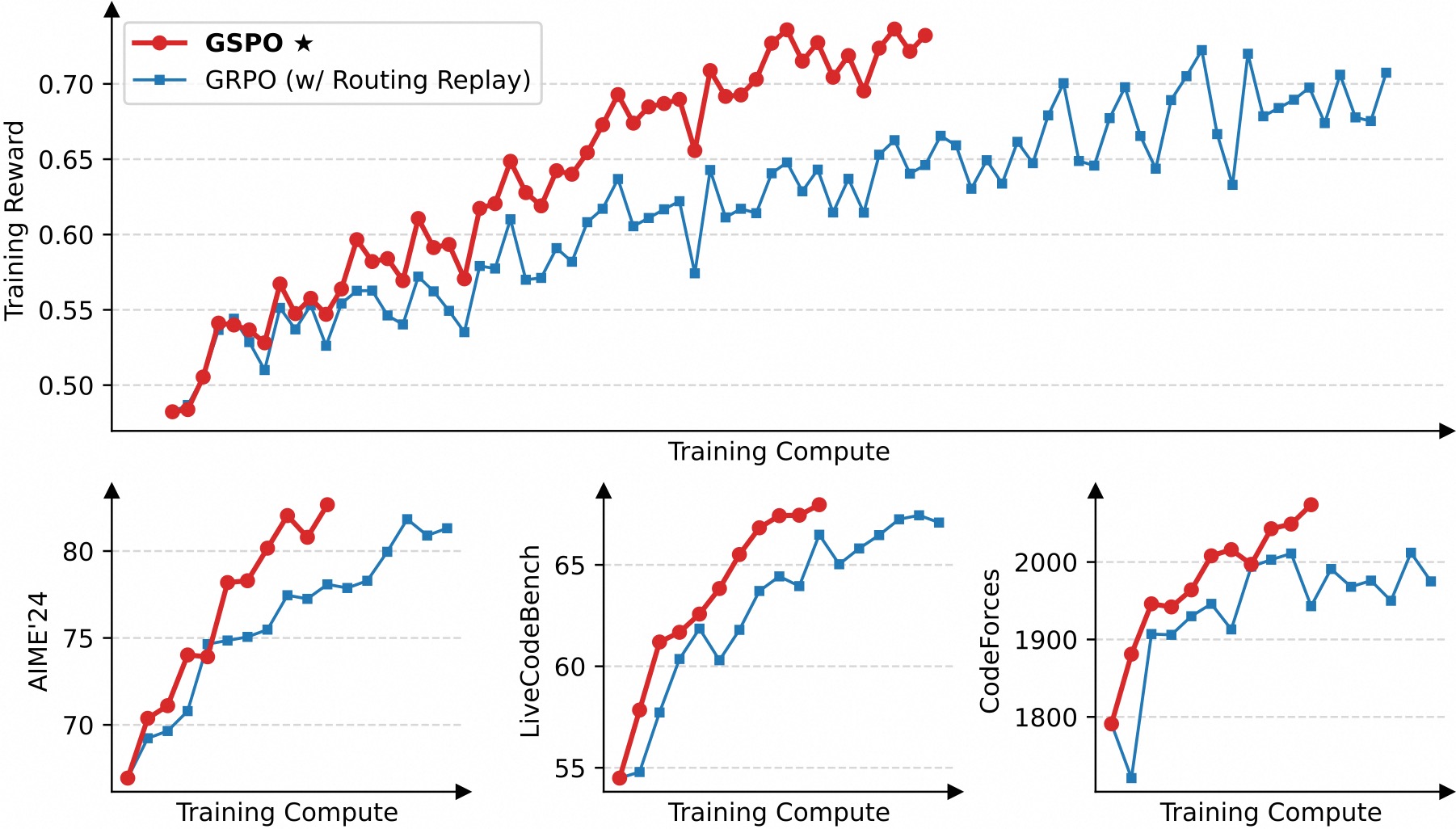
As shown in the figure above, GSPO demonstrates significantly higher training efficiency than GRPO, achieving better performance under the same training cost. Particularly, we observe that GSPO can deliver continuous performance improvement through increasing the training compute, regularly updating the query set, and extending the generation length — this is exactly the scalability we expect from an algorithm. Ultimately, we successfully applied GSPO to the large-scale RL training of the latest Qwen3 models, further unleashing the potential of RL scaling!
An interesting observation is that the fraction of tokens clipped in GSPO is two orders of magnitude higher than that in GRPO (as shown in the figure below), while GSPO still achieves higher training efficiency. This further demonstrates that GRPO's token-level optimization objective is noisy and inefficient, while GSPO's sequence-level approach provides a more reliable and effective learning signal.
{{< figure src="https://qianwen-res.oss-accelerate-overseas.aliyuncs.com/clipping.jpg" title="Fractions of clipped tokens">}}
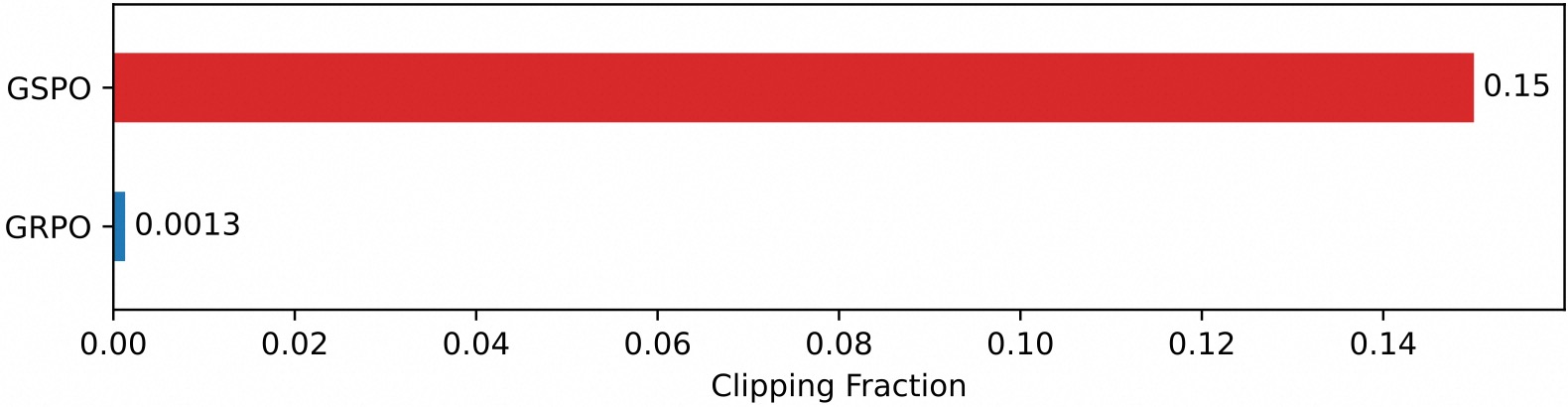
Benefits for MoE RL and Infrastructure
We found that when adopting the GRPO algorithm, the expert activation volatility of MoE models prevents RL training from converging properly. To address this challenge, we previously employed the Routing Replay training strategy, which caches the activated experts in $\pi_{\theta_\text{old}}$ and "replays" these routing patterns in $\pi_\theta$ when computing importance ratios. As shown in the figure below, Routing Replay is crucial for normal convergence of GRPO training on MoE models. However, the Routing Replay strategy incurs additional memory and communication overhead and may limit the actual capacity of MoE models.
{{< figure src="https://qianwen-res.oss-accelerate-overseas.aliyuncs.com/routing_replay.jpg" title="Effect of Routing Replay in the GRPO training of MoE models">}}
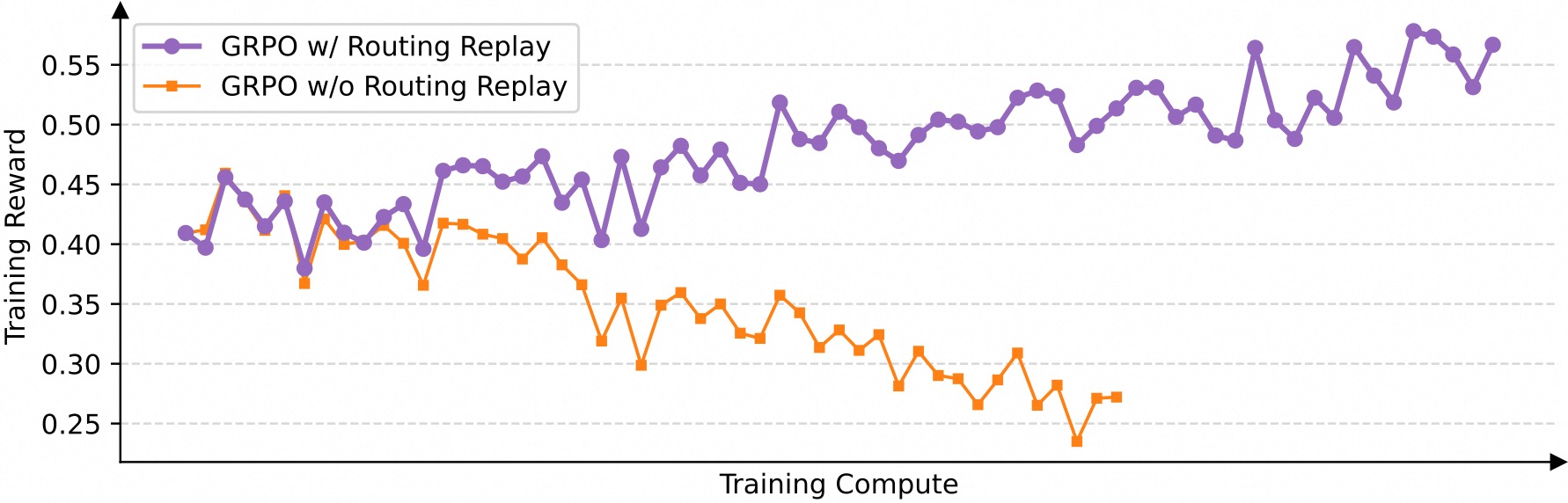
The notable advantage of GSPO lies in completely eliminating the dependency on Routing Replay. The key insight is that GSPO only focuses on sequence-level likelihood (i.e., $\pi_\theta(y_i|x)$) and is not sensitive to individual token likelihood (i.e., $\pi_\theta(y_{i,t}|x,y_{i,<t})$). Therefore, it does not require infrastructure-heavy workarounds like Routing Replay, both simplifying and stabilizing the training process while allowing models to maximize their capacity.
Additionally, since GSPO uses only sequence-level rather than token-level likelihoods for optimization, intuitively the former is much more tolerant of precision discrepancies. Therefore, GSPO makes it possible to directly use likelihoods returned by inference engines for optimization, eliminating the need for recomputation with training engines. This is particularly beneficial in scenarios such as partial rollout, multi-turn RL, and training-inference disaggregated frameworks.
Conclusion
We propose Group Sequence Policy Optimization (GSPO), a new RL algorithm for training language models. GSPO demonstrates notably superior training stability, efficiency, and performance compared to GRPO and exhibits particular efficacy for the large-scale RL training of MoE models, laying the foundation for the exceptional improvements in the latest Qwen3 models. With GSPO as our algorithmic cornerstone, we will continue to push the boundaries of RL scaling and look forward to the resulting fundamental advances in intelligence.
Citation
If you find our work helpful, feel free to give us a citation.
@article{gspo,
  title={Group Sequence Policy Optimization},
  author={
    Chujie Zheng and Shixuan Liu and Mingze Li and Xiong-Hui Chen and Bowen Yu and
    Chang Gao and Kai Dang and Yuqiong Liu and Rui Men and An Yang and Jingren Zhou and
    Junyang Lin
  },
  journal={arXiv preprint arXiv:2507.18071},
  year={2025}
}
File: content/blog/gspo/index.zh.md
title: "GSPO:迈向持续拓展的语言模型强化学习"
date: 2025-07-27T15:00:00+08:00
weight: 1
aliases: ["/first"]
tags: ["Research"]
draft: true
comments: false
disable_share: false
hide_meta: false
hide_summary: false # to hide summary in list
hide_footer: false
math: true
search_hidden: false # to hide from search page
show_reading_time: true
show_bread_crumbs: true
show_post_nav_links: false # the prev/next after the content
show_code_copy_buttons: true
show_word_count: true
use_hugo_toc: true
show_toc: true
toc_open: true # default expand all
cover:
image: "path"
# can also paste direct link from external site
# ex. https://i.ibb.co/K0HVPBd/paper-mod-profilemode.png
alt: ""
caption: ""
relative: true # To use relative path for cover image, used in hugo Page-bundles
responsive_images: true
hidden: false
header:
background: "" # background css value
background_image: ""
gradient: false
blur: false
{{< button href="https://huggingface.co/papers/2507.18071" label="PAPER" external=true >}}
{{< button href="https://discord.gg/yPEP2vHTu4" label="DISCORD" external=true >}}
引言
强化学习 (Reinforcement Learning,RL)已成为拓展语言模型、增强其深度推理与问题求解能力的关键技术范式。为了持续拓展 RL,首要前提是确保稳定、鲁棒的训练过程。然而,我们观察到现有的 RL 算法(如 GRPO)在长期训练中会暴露出严重的不稳定性问题并招致不可逆转的模型崩溃,阻碍了通过增加计算以获得进一步的性能提升。
为了能够持续拓展 RL,我们提出了 Group Sequence Policy Optimization (GSPO) 算法。不同于过去的 RL 算法,GSPO 定义了序列级别的重要性比率,并在序列层面执行裁剪、奖励和优化。相较于 GRPO,GSPO 在以下方面展现出突出优势:
- 强大高效:GSPO 具备显著更高的训练效率,并且能够通过增加计算获得持续的性能提升;
- 稳定性出色:GSPO 能够保持稳定的训练过程,并且根本地解决了混合专家(Mixture-of-Experts,MoE)模型的 RL 训练稳定性问题;
- 基础设施友好:由于在序列层面执行优化,GSPO 原则上对精度容忍度更高,具有简化 RL 基础设施的诱人前景。
以上优点促成了最新的 Qwen3 模型(Instruct、Coder、Thinking)的卓越性能。
序列级别的优化目标
设 $x$ 为查询,$\pi_{\theta_\mathrm{old}}$ 为用于采样回复的策略,$\{y_i\}_{i=1}^G$ 为采样得到的回复组,$\widehat{A}_{i}$ 为各个回复的组内相对优势,$\pi_\theta$ 为需优化的当前策略。GSPO 采用以下优化目标:
{{< rawhtml >}} $$ \mathcal{J}_\text{GSPO} (\theta)
\mathbb{E}{ x \sim \mathcal{D},, {y_i}{i=1}^G \sim \pi_{\theta_\text{old}}( \cdot | x) }
\left[
\frac{1}{G} \sum_{i=1}^{G}
\min \left( s_{i}(\theta) \widehat{A}{i}, , \mathrm{clip} \left( s{i}(\theta), 1 - {\varepsilon}, 1 + {\varepsilon} \right) \widehat{A}_{i} \right)
\right],
$$
{{< /rawhtml >}}
其中
{{< rawhtml >}} $$ s_{i}(\theta)
\left( \frac{ \pi_{\theta} (y_i | x) }{ \pi_{\theta_\text{old}} (y_i | x)} \right)^{\frac{1}{|y_i|}}
\exp \left( \frac{1}{|y_i|} \sum_{t=1}^{|y_i|} \log \frac{ \pi_{\theta} (y_{i,t} | x, y_{i,<t}) }{ \pi_{\theta_\text{old}} (y_{i,t} | x,y_{i,<t})} \right).
$$
{{< /rawhtml >}}
这里的 $s_i(\theta)$ 即为 GSPO 基于序列似然定义的重要性比率,其中我们进行了长度归一化以降低方差并统一 $s_i(\theta)$ 的数值范围。
训练效率与性能
我们使用基于 Qwen3-30B-A3B-Base 微调得到的冷启动模型进行实验,并汇报其训练奖励曲线以及在 AIME'24、LiveCodeBench 和 CodeForces 等基准上的性能曲线。我们对比 GRPO 作为基线。注意 GRPO 必需采用 Routing Replay 训练策略才能正常收敛(我们将在后文讨论),而 GSPO 则无需该策略。
{{< figure src="https://qianwen-res.oss-accelerate-overseas.aliyuncs.com/results.jpg#center" title="实验结果">}}
从上图可见,GSPO 表现出比 GRPO 显著更高的训练效率,即在同等计算开销下能够取得更优的性能。特别地,我们观察到 GSPO 可以通过增加算力来获得持续的性能提升——这正是我们所期待的算法的可拓展性。最终,我们成功地将 GSPO 应用于最新的 Qwen3 模型的大规模 RL 训练,进一步释放了 RL scaling 的潜能!
一个有趣的观察是,GSPO 所裁剪的 token 比例比 GRPO 要高上两个数量级(如下图所示),但却具有更高的训练效率。这进一步表明 GRPO 采用的 token 级别的优化目标是有噪和低效的,而 GSPO 的序列级别的优化目标则提供了更可靠、有效的学习信号。
{{< figure src="https://qianwen-res.oss-accelerate-overseas.aliyuncs.com/clipping.jpg#center" title="被裁剪的 token 比例">}}
对 MoE RL 和基础设施的收益
我们发现,当采用 GRPO 算法时,MoE 模型的专家激活波动性会使得 RL 训练无法正常收敛。为了解决这一挑战,我们过去采用了**路由回放(Routing Replay)**训练策略,即缓存 $\pi_{\theta_\text{old}}$ 中激活的专家,并在计算重要性比率时在 $\pi_\theta$ 中“回放”这些路由模式。从下图可见,Routing Replay 对于 GRPO 训练 MoE 模型的正常收敛至关重要。然而,Routing Replay 的做法会产生额外的内存和通信开销,并可能限制 MoE 模型的实际可用容量。
{{< figure src="https://qianwen-res.oss-accelerate-overseas.aliyuncs.com/routing_replay.jpg#center" title="Routing Replay 对 MoE 模型的 GRPO 训练的作用">}}
GSPO 的一大突出优势在于彻底消除了对 Routing Replay 的依赖。其核心洞见在于:GSPO 仅关注序列级别的似然(即 $\pi_\theta(y_i|x)$),而对个别 token 的似然(即 $\pi_\theta(y_{i,t}|x,y_{i,<t})$)不敏感。因此,其无需 Routing Replay 等对基础设施负担较大的手段,既简化和稳定了训练过程,又使得模型能够最大化地发挥容量与潜能。
此外,鉴于 GSPO 仅使用序列级别而非 token 级别的似然进行优化,直观上前者对精度差异的容忍度要高得多。因此,GSPO 使得直接使用推理引擎返回的似然进行优化成为可能,从而无需使用训练引擎进行重计算,这在 partial rollout、多轮 RL 以及训推分离框架等场景中特别有益。
结论
我们提出了 Group Sequence Policy Optimization (GSPO),这是用于训练语言模型的全新 RL 算法。相较于 GRPO,GSPO 在训练稳定性、效率和性能方面展现出显著优势,并在 MoE 模型的大规模 RL 训练中表现出突出的功效。这些优点为最新 Qwen3 模型的卓越性能奠定了算法基础。以 GSPO 作为算法基石,我们将持续推动 RL scaling 的边界,并期待由此带来的智能进步。
引用
如果你觉得我们的工作有用,欢迎引用!
@article{gspo,
  title={Group Sequence Policy Optimization},
  author={
    Chujie Zheng and Shixuan Liu and Mingze Li and Xiong-Hui Chen and Bowen Yu and
    Chang Gao and Kai Dang and Yuqiong Liu and Rui Men and An Yang and Jingren Zhou and
    Junyang Lin
  },
  journal={arXiv preprint arXiv:2507.18071},
  year={2025}
}