

File: README.md

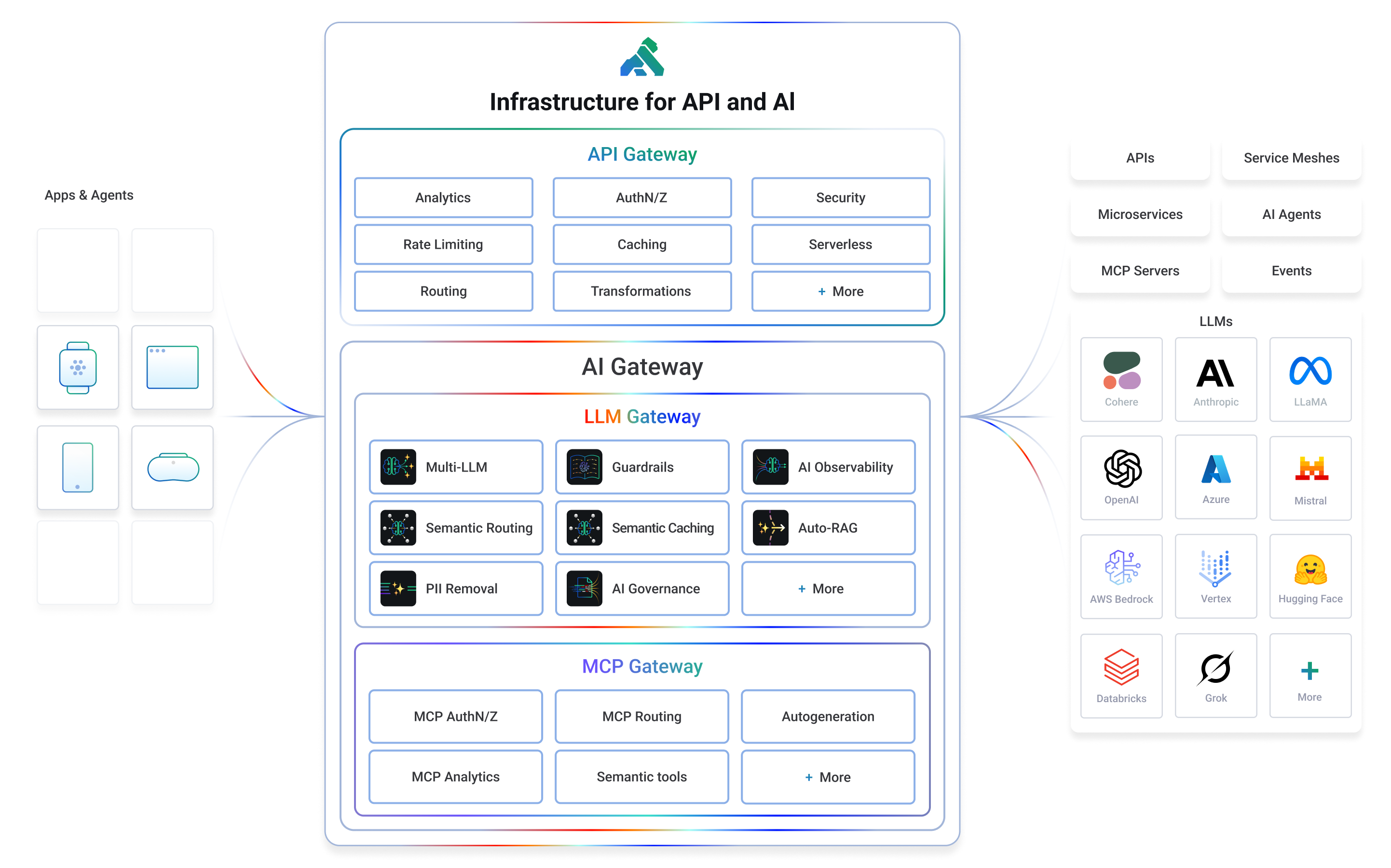
Kong or Kong Gateway is a cloud-native, platform-agnostic, scalable API 𖧹 LLM 𖧹 MCP Gateway distinguished for its high performance and extensibility via plugins. It also provides advanced AI traffic capabilities with multi-LLM support, semantic security, MCP traffic security and analytics, and more.
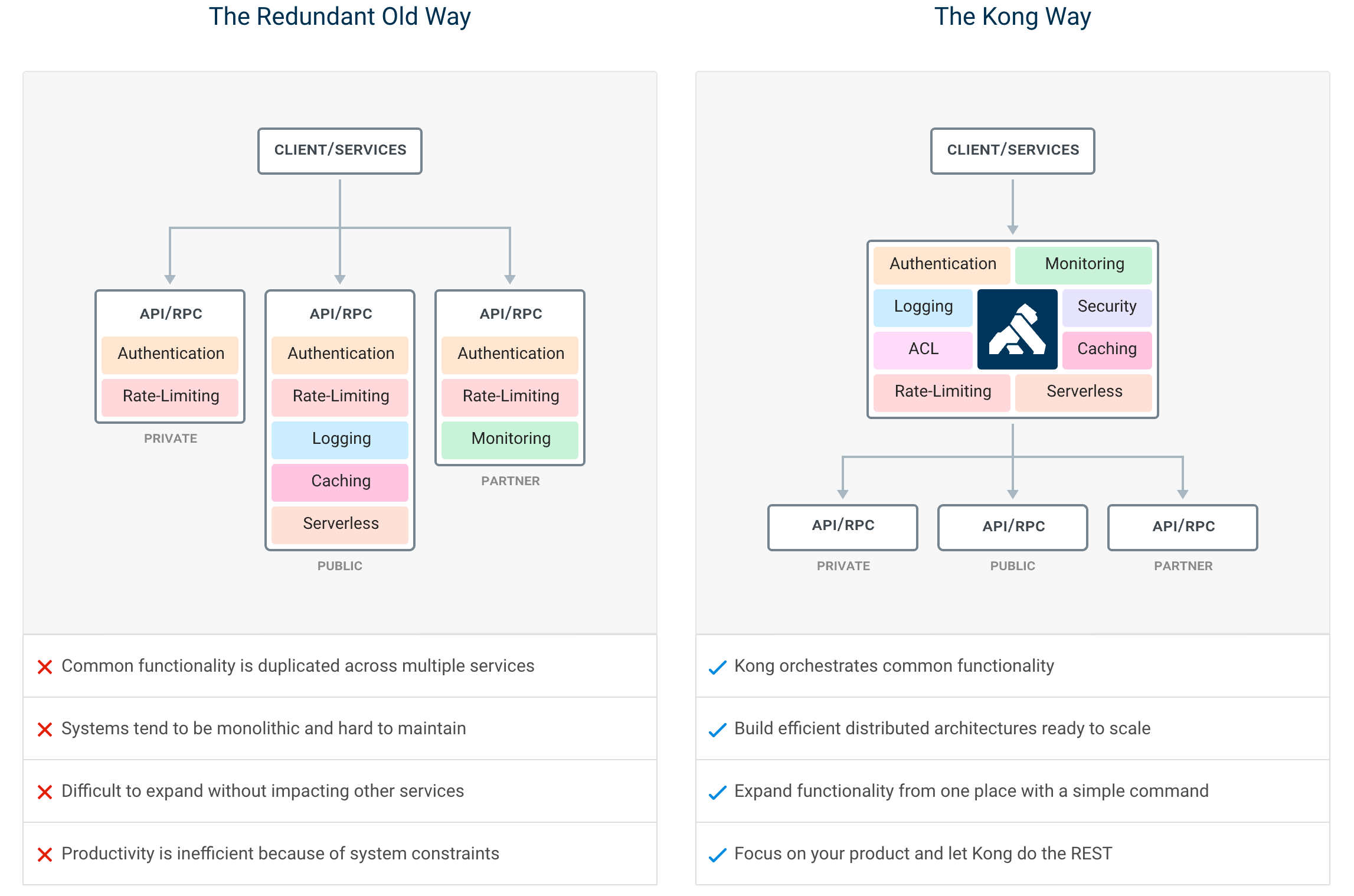
By providing functionality for proxying, routing, load balancing, health checking, authentication (and more), Kong serves as the central layer for orchestrating microservices or conventional API traffic - and agentic LLM and MCP as well - with ease.
Kong runs natively on Kubernetes thanks to its official Kubernetes Ingress Controller.
Installation | Documentation | Discussions | Forum | Blog | Builds | AI Gateway | Cloud Hosted Kong
Getting Started
If you prefer to use a cloud-hosted Kong, you can sign up for a free trial of Kong Konnect and get started in minutes. If not, you can follow the instructions below to get started with Kong on your own infrastructure.
Let’s test drive Kong by adding authentication to an API in under 5 minutes.
We suggest using the docker-compose distribution via the instructions below, but there is also a docker installation procedure if you’d prefer to run the Kong Gateway in DB-less mode.
Whether you’re running in the cloud, on bare metal, or using containers, you can find every supported distribution on our official installation page.
- To start, clone the Docker repository and navigate to the compose folder.
$ git clone https://github.com/Kong/docker-kong
$ cd docker-kong/compose/- Start the Gateway stack using:
$ KONG_DATABASE=postgres docker-compose --profile database upThe Gateway is now available on the following ports on localhost:
:8000- send traffic to your service via Kong:8001- configure Kong using Admin API or via decK:8002- access Kong's management Web UI (Kong Manager) on localhost:8002
Next, follow the quick start guide to tour the Gateway features.
Getting started with AI Gateway for LLM and MCP
If you would like to get started with Kong AI Gateway capabilities including LLM and MCP features, please refer to the official AI documentation.
Features
By centralizing common API, AI and MCP functionality across all your organization's services, Kong Gateway creates more freedom for engineering teams to focus on the challenges that matter most.
The top Kong features include:
- Advanced routing, load balancing, health checking - all configurable via a RESTful admin API or declarative configuration.
- Authentication and authorization for APIs using methods like JWT, basic auth, OAuth, ACLs and more.
- Universal LLM API to route across multiple providers like OpenAI, Anthropic, GCP Gemini, AWS Bedrock, Azure AI, Databricks, Mistral, Huggingface and more.
- MCP traffic governance, MCP security and MCP observability in addition to MCP autogeneration from any RESTful API.
- 60+ AI features like AI observability, semantic security and caching, semantic routing and more.
- Proxy, SSL/TLS termination, and connectivity support for L4 or L7 traffic.
- Plugins for enforcing traffic controls, rate limiting, req/res transformations, logging, monitoring and including a plugin developer hub.
- Sophisticated deployment models like Declarative Databaseless Deployment and Hybrid Deployment (control plane/data plane separation) without any vendor lock-in.
- Native ingress controller support for serving Kubernetes.
Plugin Hub
Plugins provide advanced functionality that extends the use of the Gateway. Many of the Kong Inc. and community-developed plugins like AWS Lambda, Correlation ID, and Response Transformer are showcased at the Plugin Hub.
Contribute to the Plugin Hub and ensure your next innovative idea is published and available to the broader community!
Contributing
We ❤️ pull requests, and we’re continually working hard to make it as easy as possible for developers to contribute. Before beginning development with the Kong Gateway, please familiarize yourself with the following developer resources:
- Community Pledge (COMMUNITY_PLEDGE.md) for our pledge to interact with you, the open source community.
- Contributor Guide (CONTRIBUTING.md) to learn about how to contribute to Kong.
- Development Guide (DEVELOPER.md): Setting up your development environment.
- CODE_OF_CONDUCT and COPYRIGHT
Use the Plugin Development Guide for building new and creative plugins, or browse the online version of Kong's source code documentation in the Plugin Development Kit (PDK) Reference. Developers can build plugins in Lua, Go or JavaScript.
Releases
Please see the Changelog for more details about a given release. The SemVer Specification is followed when versioning Gateway releases.
Join the Community
- Check out the docs
- Join the Kong discussions forum
- Join the Kong discussions at the Kong Nation forum: https://discuss.konghq.com/
- Join our Community Slack
- Read up on the latest happenings at our blog
- Follow us on X
- Subscribe to our YouTube channel
- Visit our homepage to learn more
Konnect Cloud
Kong Inc. offers commercial subscriptions that enhance the Kong Gateway in a variety of ways. Customers of Kong's Konnect Cloud subscription take advantage of additional gateway functionality, commercial support, and access to Kong's managed (SaaS) control plane platform. The Konnect Cloud platform features include real-time analytics, a service catalog, developer portals, and so much more! Get started with Konnect Cloud.
License
Copyright 2016-2026 Kong Inc.

Licensed under the Apache License, Version 2.0 (the "License");
you may not use this file except in compliance with the License.
You may obtain a copy of the License at

   https://www.apache.org/licenses/LICENSE-2.0

Unless required by applicable law or agreed to in writing, software
distributed under the License is distributed on an "AS IS" BASIS,
WITHOUT WARRANTIES OR CONDITIONS OF ANY KIND, either express or implied.
See the License for the specific language governing permissions and
limitations under the License.
File: autodoc/README.md
Prerequisites:
cd kong-root-repo
make dev
git checkout branch/tag/release
Generate everything:
cd kong-root-repo
./scripts/autodoc
You can then copy the generated files to the docs.konghq.com repo manually, as follows:
cp autodoc/output/nav/docs_nav.yml.admin-api.in  ../docs.konghq.com/autodoc-nav/docs_nav_$xyxversion.yml.admin-api.in

cp autodoc/output/cli.md ../docs.konghq.com/app/$xyxversion/cli.md

cp autodoc/output/configuration.md ../docs.konghq.com/app/$xyxversion/configuration.md

cp -r autodoc/output/pdk ../docs.konghq.com/app/$xyxversion/pdk

# Add the PDK nav to the docs nav
vim ../docs.konghq.com/app/_data/docs_nav_$xyxversion.yml
<add the contents of autodoc/output/_pdk_nav.yml in the "Plugin Development Kit" section
File: changelog/README.md
Setup
Download binary changelog 0.0.2 from Kong/gateway-changelog,
or release-helper,
and add it to environment variable PATH.
~ $ PATH="/path/to/changelog:$PATH"

~ $ changelog
changelog version 0.0.2
Ensure GITHUB_TOKEN is set in your environment.
~ $ echo $GITHUB_TOKENCreate changelog PR
The command will create a new changelog PR or update an existing one.
Please repeat the command if functional PRs with changelog are merged
after the creation or merge of the changelog PR.
The command depends on tools like curl, jq, etc., and will refuse to
create or update changelog PR if any of the tools is not satisfied.
~ $ pwd
/Users/zachary/workspace/kong/changelog

~ $ make BASE_BRANCH="release/3.6.x" VERSION="3.6.0"
The arguments are clarified as below.
BASE_BRANCH: the origin branch that the changelog PR is created from. It
is also the merge base.The local repo does not have to be on the base branch.
VERSION: the release version number we are creating the changelog PR for.It can be arbitrary strings as long as you know what you are doing (e.g. for
test purpose)DEBUG: shows debug output. Default tofalse.
Verify Development PRs
Given two arbitrary revisions, list commits, PRs, PRs without changelog
and PRs without CE2EE.
If a CE PR has neither the 'cherry-pick kong-ee' label nor
has cross-referenced EE PRs with 'cherry' in the title,
it is HIGHLY PROBABLY not synced to EE. This is only experimental
as developers may not follow the CE2EE guideline.
However, it is a quick shortcut for us to validate the majority of CE PRs.
Show the usage.
~ $ pwd
/Users/zachary/workspace/kong

~ $ changelog/verify-prs -h
Version: 0.1
 Author: Zachary Hu (zhucac AT outlook.com)
 Script: Compare between two revisions (e.g. tags and branches), and output
         commits, PRs, PRs without changelog and CE PRs without CE2EE (experimental).

         A PR should have an associated YML file under 'changelog/unreleased', otherwise
         it is printed for verification.

         Regarding CE2EE, if a CE PR has any cross-referenced EE PRs, it is regarded synced
         to EE. If strict mode is enabled, associated EE PRs must contain keyword 'cherry'
         in the title. If a CE PR is labelled with 'cherry-pick kong-ee', it is regarded synced
         to EE. If a CE PR is not synced to EE, it is printed for verification.

  Usage: changelog/verify-prs -h

         -v, --verbose       Print debug info.

         --strict-filter     When checking if a CE PR is synced to EE,
                             more strict filters are applied.

         --safe-mode         When checking if a CE PR is synced to EE,
                             check one by one. This overrides '--bulk'.

         --bulk N            Number of jobs ran concurrency. Default is '5'.
                             Adjust this value to your CPU cores.

Example:
         changelog/verify-prs --org-repo kong/kong --base-commit 3.4.2 --head-commit 3.4.3 [--strict-filter] [--bulk 5] [--safe-mode] [-v]

         ORG_REPO=kong/kong BASE_COMMIT=3.4.2 HEAD_COMMIT=3.4.3 changelog/verify-prs
Run the script. Both --base-commit and --head-commit can be set to branch names.
~ $ pwd
/Users/zachary/workspace/kong

~ $ changelog/verify-prs --org-repo kong/kong --base-commit 3.4.0 --head-commit 3.5.0
Org Repo: kong/kong
Base Commit: 3.4.0
Head Commit: 3.5.0

comparing between '3.4.0' and '3.5.0'
number of commits: 280
number of pages: 6
commits per page: 50

PRs:
https://github.com/Kong/kong/pull/7414
...

PRs without changelog:
https://github.com/Kong/kong/pull/7413
...

PRs without 'cherry-pick kong-ee' label:
https://github.com/Kong/kong/pull/11721
...

PRs without cross-referenced EE PRs:
https://github.com/Kong/kong/pull/11304
...

Commits: /var/folders/wc/fnkx5qmx61l_wx5shysmql5r0000gn/T/outputXXX.JEkGD8AO/commits.txt
PRs: /var/folders/wc/fnkx5qmx61l_wx5shysmql5r0000gn/T/outputXXX.JEkGD8AO/prs.txt
PRs without changelog: /var/folders/wc/fnkx5qmx61l_wx5shysmql5r0000gn/T/outputXXX.JEkGD8AO/prs_no_changelog.txt
CE PRs without cherry-pick label: /var/folders/wc/fnkx5qmx61l_wx5shysmql5r0000gn/T/outputXXX.JEkGD8AO/prs_no_cherrypick_label.txt
CE PRs without referenced EE cherry-pick PRs: /var/folders/wc/fnkx5qmx61l_wx5shysmql5r0000gn/T/outputXXX.JEkGD8AO/prs_no_cross_reference.txt

Remeber to remove /var/folders/wc/fnkx5qmx61l_wx5shysmql5r0000gn/T/outputXXX.JEkGD8AO
File: crate_locks/README.md
Crate Locks
This directory contains the lock files for the Rust dependencies.
xxx.Cargo.lock: This file is generated bycargo, but we generate it withbazelto make therules_rusthappy.xxx.lock: This file is generated bybazeland is used byrules_rustfor reproducibility.
Repin
For more information on how to repin the dependencies,
please check out the rules_rust.
Bash
crates="atc_router_crate_index"
CARGO_BAZEL_REPIN=1 CARGO_BAZEL_REPIN_ONLY=$crates bazel sync --only=$crates
unset crates
Fish
set -l crates \
    atc_router_crate_index
CARGO_BAZEL_REPIN=1 CARGO_BAZEL_REPIN_ONLY=$(string join ',' $crates) bazel sync --only=$(string join ',' $crates)
set -e crates
File: kong/dns/README.md
Name
Kong DNS client - The module is currently only used by Kong, and builds on top of the lua-resty-dns and lua-resty-mlcache libraries.
Table of Contents
APIs
The following APIs are for internal development use only within Kong. In the current version, the new DNS library still needs to be compatible with the original DNS library. Therefore, the functions listed below cannot be directly invoked. For example, the _M:resolve function in the following APIs will be replaced to ensure compatibility with the previous DNS library API interface specifications _M.resolve.
new
syntax: c, err = dns_client.new(opts)
context: any
Functionality:
Creates a dns client object. Returns nil and a message string on error.
Performs a series of initialization operations:
- parse
hostfile, - parse
resolv.conffile (used by the underlyinglua-resty-dnslibrary), - initialize multiple TTL options,
- create a mlcache object and initialize it.
Input parameters:
@opts It accepts a options table argument. The following options are supported:
- TTL options:
valid_ttl: (default:nil)- By default, it caches answers using the TTL value of a response. This optional parameter (in seconds) allows overriding it.
stale_ttl: (default:3600)- the time in seconds for keeping expired DNS records.
- Stale data remains in use from when a record expires until either the background refresh query completes or until
stale_ttlseconds have passed. This helps Kong stay resilient if the DNS server is temporarily unavailable.
error_ttl: (default:1)- the time in seconds for caching DNS error responses.
hosts: (default:/etc/hosts)- the path of
hostsfile.
- the path of
resolv_conf: (default:/etc/resolv.conf)- the path of
resolv.conffile, it will be parsed and passed into the underlyinglua-resty-dnslibrary.
- the path of
family: (default:{ "SRV", "A", "AAAA" })- the types of DNS records that the library should query, it is taken from
kong.confoptiondns_family.
- the types of DNS records that the library should query, it is taken from
- options for the underlying
lua-resty-dnslibrary:retrans: (default:5)- the total number of times of retransmitting the DNS request when receiving a DNS response times out according to the timeout setting. When trying to retransmit the query, the next nameserver according to the round-robin algorithm will be picked up.
- If not given, it is taken from
resolv.confoptionoptions attempts:<value>.
timeout: (default:2000)- the time in milliseconds for waiting for the response for a single attempt of request transmission.
- If not given, it is taken from
resolv.confoptionoptions timeout:<value>. But note that its unit inresolv.confis second.
random_resolver: (default:false)- a boolean flag controls whether to randomly pick the nameserver to query first. If
true, it will always start with the random nameserver. - If not given, it is taken from
resolv.confoptionrotate.
- a boolean flag controls whether to randomly pick the nameserver to query first. If
nameservers:- a list of nameservers to be used. Each nameserver entry can be either a single hostname string or a table holding both the hostname string and the port number. For example,
{"8.8.8.8", {"8.8.4.4", 53} }. - If not given, it is taken from
resolv.confoptionnameserver.
- a list of nameservers to be used. Each nameserver entry can be either a single hostname string or a table holding both the hostname string and the port number. For example,
cache_purge: (default:false)- a boolean flag controls whether to clear the internal cache shared by other DNS client instances across workers.
resolve
syntax: answers, err, tries? = resolve(qname, qtype, cache_only, tries?)
context: rewrite_by_lua*, access_by_lua*, content_by_lua*, ngx.timer.*
Functionality:
Performs a DNS resolution.
- Check if the
<qname>matches SRV format (\_service.\_proto.name) to determine the<qtype>(SRV or A/AAAA), then use the key<qname>:<qtype>to query mlcache. If cached results are found, return them directly. - If there are no results available in the cache, it triggers the L3 callback of
mlcache:getto query records from the DNS servers, details are as follows:- Check if
<qname>has an IP address in thehostsfile, return if found. - Check if
<qname>is an IP address itself, return if true. - Use
mlcache:peekto check if the expired key still exists in the shared dictionary. If it does, return it directly to mlcache and trigger an asynchronous background task to update the expired data (start_stale_update_task). The maximum time that expired data can be reused isstale_ttl, but the maximum TTL returned to mlcache cannot exceed 60s. This way, if the expired key is not successfully updated by the background task after 60s, it can still be reused by calling theresolvefunction from the upper layer to trigger the L3 callback to continue executing this logic and initiate another background task for updating.- For example, with a
stale_ttlof 3600s, if the background task fails to update the record due to network issues during this time, and the upper-level application continues to call resolve to get the domain name result, it will trigger a background task to query the DNS result for that domain name every 60s, resulting in approximately 60 background tasks being triggered (3600s/60s).
- For example, with a
- Query the DNS server, with
<qname>:<qtype>combinations:
1. The<qname>is extended according to settings inresolv.conf, such asndots,search, anddomain.
- Check if
Return value:
- Return value
answers, err:- Return one array-like Lua table contains all the records.
- For example,
{{"address":"[2001:db8:3333:4444:5555:6666:7777:8888]","class":1,"name":"example.test","ttl":30,"type":28},{"address":"192.168.1.1","class":1,"name":"example.test","ttl":30,"type":1},"expire":1720765379,"ttl":30}.- IPv6 addresses are enclosed in brackets (
[]).
- IPv6 addresses are enclosed in brackets (
- For example,
- If the server returns a non-zero error code, it will return
niland a string describing the error in this record.- For example,
nil, "dns server error: name error", the server returned a result with error code 3 (NXDOMAIN).
- For example,
- In case of severe errors, such network error or server's malformed DNS record response, it will return
niland a string describing the error instead. For example:nil, "dns server error: failed to send request to UDP server 10.0.0.1:53: timeout", there was a network issue.
- Return one array-like Lua table contains all the records.
- Return value and input parameter
@tries?:- If provided as an empty table, it will be returned as a third result. This table will be an array containing the error message for each (if any) failed try.
- For example,
[["example.test:A","dns server error: 3 name error"], ["example.test:AAAA","dns server error: 3 name error"]], both attempts failed due to a DNS server error with error code 3 (NXDOMAIN), indicating a name error.
- For example,
- If provided as an empty table, it will be returned as a third result. This table will be an array containing the error message for each (if any) failed try.
Input parameters:
@qname: the domain name to resolve.@qtype: (optional:nilor DNS TYPE value)- specify the query type instead of
self.ordertypes.
- specify the query type instead of
@cache_only: (optional:boolean)- control whether to solely retrieve data from the internal cache without querying to the nameserver.
@tries?: see the above sectionReturn value and input paramter @tries?.
resolve_address
syntax: ip, port_or_err, tries? = resolve_address(name, port, cache_only, tries?)
context: rewrite_by_lua*, access_by_lua*, content_by_lua*, ngx.timer.*
Functionality:
Performs a DNS resolution, and return a single randomly selected address (IP and port number).
When calling multiple times on cached records, it will apply load-balancing based on a round-robin (RR) scheme. For SRV records, this will be a weighted round-robin (WRR) scheme (because of the weights it will be randomized). It will apply the round-robin schemes on each level individually.
Return value:
- Return value
ip, port_or_err:- Return one IP address and port number from records.
- Return
nil, errif errors occur, witherrcontaining an error message.
- Return value and input parameter
@tries?: same as@tries?ofresolveAPI.
Input parameters:
@name: the domain name to resolve.@port: (optional:nilor port number)- default port number to return if none was found in the lookup chain (only SRV records carry port information, SRV with
port=0will be ignored).
- default port number to return if none was found in the lookup chain (only SRV records carry port information, SRV with
@cache_only: (optional:boolean)- control whether to solely retrieve data from the internal cache without querying to the nameserver.
Performance characteristics
Memory
We evaluated the capacity of DNS records using the following resources:
- Shared memory size:
- 5 MB (by default):
lua_shared_dict kong_dns_cache 5m. - 10 MB:
lua_shared_dict kong_dns_cache 10m.
- 5 MB (by default):
- DNS response:
- Each DNS resolution response contains some number of A type records.
- Record: ~80 bytes json string, e.g.,
{address = "127.0.0.1", name = <domain>, ttl = 3600, class = 1, type = 1}.
- Record: ~80 bytes json string, e.g.,
- Domain: ~36 bytes string, e.g.,
example<n>.long.long.long.long.test. Domain names with lengths between 10 and 36 bytes yield similar results.
- Each DNS resolution response contains some number of A type records.
The results of evaluation are as follows:
| shared memory size | number of records per response | number of loaded responses |
|---|---|---|
| 5 MB | 1 | 20224 |
| 5 MB | 2 ~ 3 | 10081 |
| 5 MB | 4 ~ 9 | 5041 |
| 5 MB | 10 ~ 20 | 5041 |
| 5 MB | 21 ~ 32 | 1261 |
| 10 MB | 1 | 40704 |
| 10 MB | 2 ~ 3 | 20321 |
| 10 MB | 4 ~ 9 | 10161 |
| 10 MB | 10 ~ 20 | 5081 |
| 10 MB | 20 ~ 32 | 2541 |
File: kong/dynamic_hook/README.md
Dynamic hooks
Dynamic hooks can be used to extend Kong's behavior and run code at specific stages in the request/response lifecycle.
Principles of operation
This module provides a way to define, enable, and execute dynamic hooks in Kong. It also allows hooking "before" and "after" handlers to functions, that are patched to execute them when called.
Dynamic Hooks can be organized into groups, allowing to enable or disable sets of hooks collectively.
Dynamic Hooks are intended solely for internal use. Usage of this feature is at your own risk.
Example usage
local dynamic_hook = require "kong.dynamic_hook"

----------------------------------------
-- Define a hook handler
local function before_hook(...)
  io.write("hello, ")
end

-- Hook a function
dynamic_hook.hook_function("my_group", _G, "print", "varargs", {
  befores = { before_hook },
})

-- Enable the hook group
dynamic_hook.enable_by_default("my_group")

-- Call the function
print("world!") -- prints "hello, world!"

----------------------------------------
-- Define another hook handler
local function log_event_hook(arg1, arg2)
  ngx.log(ngx.INFO, "event triggered with args: ", arg1, ", ", arg2)
end

-- Register a new hook
dynamic_hook.hook("event_group", "log_event", log_event_hook)

-- Enable the hook group for this request
dynamic_hook.enable_on_this_request("event_group")

-- Run the hook
dynamic_hook.run_hook("event_group", "log_event", 10, "test")
Application in Kong Gateway
Kong Gateway defines, registers and runs the following hooks:
| Hook | Description | Run Location |
|---|---|---|
| timing:auth - auth | (Timing module) enables request debuggingfor requests that match the requirements | Kong.rewrite (beginning) |
| timing - before:rewrite | (Timing module) enters the "rewrite" context, to beginmeasuring the rewrite phase's duration | Kong.rewrite (beginning) |
| timing - after:rewrite | (Timing module) exits the "rewrite" context, to endmeasuring the rewrite phase's duration | Kong.rewrite (end) |
| timing - dns:cache_lookup | (Timing module) sets the cache_hit context property | During each in-memory DNS cache lookup |
| timing - before:balancer | (Timing module) enters the "balancer" context, to beginmeasuring the balancer phase's duration | Kong.balancer (beginning) |
| timing - after:balancer | (Timing module) exits the "balancer" context, to endmeasuring the balancer phase's duration | Kong.balancer (end) |
| timing - before:access | (Timing module) enters the "access" context, to beginmeasuring the access phase's duration | Kong.access (beginning) |
| timing - before:router | (Timing module) enters the router's context, to beginmeasuring the router's execution | Before router initialization |
| timing - after:router | (Timing module) exits the router's context, to endmeasuring the router's execution | After router execution |
| timing - workspace_id:got | (Timing module) sets the workspace_id context property | Kong.access, after workspace ID assignment |
| timing - after:access | (Timing module) exits the "access" context, to endmeasuring the access phase's duration | Kong.access (end) |
| timing - before:response | (Timing module) enters the "response" context, to beginmeasuring the response phase's duration | Kong.response (beginning) |
| timing - after:response | (Timing module) exits the "response" context, to endmeasuring the response phase's duration | Kong.response (end) |
| timing - before:header_filter | (Timing module) enters the "header_filter" context, to beginmeasuring the header_filter phase's duration | Kong.header_filter (beginning) |
| timing - after:header_filter | (Timing module) exits the "header_filter" context, to endmeasuring the header_filter phase's duration | Kong.header_filter (end) |
| timing - before:body_filter | (Timing module) enters the "body_filter" context, to beginmeasuring the body_filter phase's duration | Kong.body_filter (beginning) |
| timing - after:body_filter | (Timing module) exits the "body_filter" context, to endmeasuring the body_filter phase's duration | Kong.body_filter (end) |
| timing - before:log | (Timing module) enters the "log" context, to beginmeasuring the log phase's duration | Kong.log (beginning) |
| timing - after:log | (Timing module) exits the "log" context, to endmeasuring the log phase's duration | Kong.log (end) |
| timing - before:plugin_iterator | (Timing module) enters the "plugins" context, to beginmeasuring the plugins iterator's execution | Before plugin iteration starts |
| timing - after:plugin_iterator | (Timing module) exits the "plugins" context, to endmeasuring the plugins iterator's execution | After plugin iteration ends |
| timing - before:plugin | (Timing module) enters each plugin's context, to beginmeasuring the plugin's execution | Before each plugin handler |
| timing - after:plugin | (Timing module) exits each plugin's context, to endmeasuring the plugin's execution | After each plugin handler |
"timing" hooks are used by the timing module when the request debugging feature is enabled.
The following functions are patched using hook_function:
| Function | Description |
|---|---|
| resty.dns.client.toip | (Timing module) measure dns query execution time |
| resty.http.connect | (Timing module) measure http connect execution time |
| resty.http.request | (Timing module) measure http request execution time |
| resty.redis.{method} | (Timing module) measure each Redis {method}'s execution time |
| ngx.socket.tcp | (Timing module) measure each tcp connectionand ssl handshake execution times |
| ngx.socket.udp | (Timing module) measure each udp "setpeername"execution time |
File: kong/plugins/zipkin/README.md
Testing the zipkin plugin:
Run postgres locally.
docker run -it -p 15002:9000 -p 15003:9001 kong/grpcbin
docker run -p 9411:9411 -it openzipkin/zipkin:2.19

KONG_SPEC_TEST_GRPCBIN_PORT=15002 \
KONG_SPEC_TEST_GRPCBIN_SSL_PORT=15003 \
bin/busted spec/03-plugins/34-zipkin/
File: kong/plugins/prometheus/grafana/README.md
Grafana integration
kong-official.json is the source of the Grafana dashboard at
https://grafana.com/grafana/dashboards/7424
The copy in this repository and the copy on Grafana Labs should be kept in
sync. Currently, this must be handled manually: if you make changes here, you
will need to log in to Grafana labs and upload the new version, or vice-versa.
File: spec/helpers/rpc_mock/readme.md
RPC Mock
This is a module for incercept and manipulate Kong's RPC calls between CP & DP.
CP
Visually we will get a mocked CP by calling:
local mocked_cp = require("spec.helpers.rpc_mock.cp").new()
mocked_cp:start()
This starts a working Kong CP, with all the funcitionalities and acts like normal CPs, except for that it can be manipulated with the mocked_cp object.
Arguments can be used to alter the control planes's options (or attach to an existing CP) or not to start incerception by default, etc.
Then we can let CP make a call to a specific node connected:
local res, err = mocked_cp:call(node1_uuid, "kong.sync.v2.notify_new_version", payload)And we can incercept a call to the mocked CP:
for _, record in pairs(mocked_cp.records) do
    print("DP ", record.nodeid, " made a call ", record.method)
    print(plprint(record.request))
    print(plprint(record.response))
end
We can also mock an API. (Note that the original handler will be overrided.)
DP
This is bascially an extended version of kong.clustering.rpc.manager.
Added API:
local mocked_dp = require("spec.helpers.rpc_mock.dp").new()
mocked_dp:try_connect()
mocked_dp:wait_until_connected()
assert(mocked_dp:is_connected())
mocked_dp:stop()
File: spec/README.md
Test helpers for Kong (integration) tests
To generate the documentation run the following command in the Kong source tree:
# install ldoc using LuaRocks
luarocks install ldoc

# generate and open the docs
cd spec && ldoc . && open docs/index.html && cd ..
Environment variables
When testing, Kong will ignore the KONG_xxx environment variables that are
usually used to configure it. This is to make sure that the tests run deterministically.
If this behaviour needs to be overridden, the KONG_TEST_xxx
version of the variable can be used, which will be respected by the Kong test
instance.
To prevent the test helpers from cleaning the Kong working directory, the
variable KONG_TEST_DONT_CLEAN can be set.
This comes in handy when inspecting the logs after the tests complete.
When testing with Redis, the environment variable KONG_SPEC_TEST_REDIS_HOST can be
used to specify where the Redis server can be found. If not specified, it will default
to 127.0.0.1. This setting is available to tests via helpers.redis_host.
The configuration file to be used can be set with KONG_SPEC_TEST_CONF_PATH. It can be
accessed via helpers as helpers.test_conf_path.