
Inquirer.js
A collection of common interactive command line user interfaces.
21,616 stars
TypeScript
1 file · ~1,289 tokens
#cli#command-line#javascript#javascript-library#node-js#nodejs#prompt#typescript
20 Discovered Rules
•
~32,091 Estimated Tokens
AI Agent Protocol & Instructions
AGENTS.md root-instruction ~1,191 tokens# Repository Guidelines
## Project Structure & Module Organization
The repo is a Yarn workspaces monorepo. Core runtime logic shared primitives and shared primitives live in `packages/core/src`, and individual prompt implementations under `packages/<prompt>/src`. Testing utilities sit in `packages/testing`, while `packages/demo` provides the interactive showcase. Integration suites reside in `integration/cjs` and `integration/esm` to verify bundling. Tooling scripts and repo wiring (tsconfig, release helpers) live in `tools/`. Treat `packages/*/dist` and `tools/*/dist` as generated output.
## Build, Test, and Development Commands
Install deps with `yarn install`. Use `yarn dev` for Turbo-powered incremental TypeScript builds. Launch the playground with `yarn demo`. Run `yarn tsc` for a project-wide compile. Execute `yarn pretest` for lint, format, and type gates, then `yarn test` for Vitest unit coverage followed by Node integration tests. After adding or moving workspaces, run `yarn setup` to refresh shared TS references.
## Coding Style & Naming Conventions
Code is ESM-first TypeScript targeting Node ≥ 18. Prettier enforces two-space indentation, trailing commas, and single quotes—lean on it rather than hand formatting. Prefer named exports, keep prompt IDs aligned with folder names, and store assets beside their entry points. Use `camelCase` for variables/functions and `PascalCase` for classes/components. Run `yarn oxlint --fix` and `yarn eslint --fix` before committing to maintain rule compliance.
## TypeScript Best Practices
Prioritize type safety and leverage existing types from the codebase. Use `Question<A>` from `packages/inquirer/src/types.ts` instead of generic `Record<string, unknown>` when working with question objects. Prefer `unknown` over `any` for truly unknown types, and use `Partial<T>` for optional properties. Leverage generic type parameters (like `<A extends Answers>`) throughout to maintain type consistency. Avoid eslint-disable comments by refactoring to proper types rather than suppressing warnings. When extending types, use intersection types (`Type & { prop: T }`) for explicit signatures rather than casting to `any`.
## Testing Guidelines
Vitest owns unit coverage via `vitest.config.ts`, with `coverage.all = true` so untested files fail CI. Co-locate specs as `*.test.ts` next to source, and model cross-package flows under `integration/**/**/*.test.ts`. Iterate with `yarn vitest --run packages`, then finish with `yarn test` to exercise the full matrix. Update snapshots using `yarn vitest --update`.
Keep tests simple and focused. Reuse existing test stubs and fixtures rather than creating custom mocks. If a behavior affects all prompts, test it with an existing prompt type rather than creating a specialized stub. Write tests that verify actual behavior rather than implementation details. Prefer straightforward assertions over complex validation logic.
## Package-Specific Code Style
### Type Declarations
Prefer `type` over `interface` for all object shapes. Never prefix type names with `I` (no `IEditorParams`, `IFileOptions`). Use descriptive names without Hungarian notation: `EditorParams`, `FileOptions`.
### Node.js Built-in Imports
Always use the `node:` protocol prefix for Node.js built-in modules: `import { spawn } from 'node:child_process'`, `import { readFileSync } from 'node:fs'`. This is enforced by linting.
### Error Classes
Model custom error classes after the style in `packages/core/src/lib/errors.ts`:
- Declare `override name = 'ErrorName'` as a class field (not set in the constructor).
- Pass `{ cause: originalError }` to `super()` to populate `this.cause` per the standard `Error` API.
- Do not add a separate `originalError` instance field.
- Do not include copyright header comments.
### Async Patterns
All async operations must be Promise-based. Do not use Node-style callbacks `(err, result) => void`. Do not use `setImmediate` to defer callbacks; use `await` and `Promise` directly. Wrap event-emitter-based APIs (like `child_process.spawn`) in `new Promise(...)`.
### Test File Location
Unit tests must be co-located as `*.test.ts` files beside their source files inside `src/`. Separate `test/` directories are not used.
## Commit & Pull Request Guidelines
Follow Conventional Commit prefixes such as `feat:`, `fix:`, `docs:`, or `chore:`; keep scopes lowercase (`feat(@inquirer/package-name): add fuzzy search`). Summaries should stay imperative and under 80 characters. Pull requests must describe the change, list the commands run (for example `yarn test`), and link issues or discussions. Attach terminal recordings or screenshots for UX-facing changes, and ensure lockfiles and generated readme fragments stay current.
Claude Agent Guidelines & System Prompt
CLAUDE.md claude-rule ~4 tokensRead @AGENTS.md
ansi Documentation
packages/ansi/README.md plugin-manifest ~440 tokens# @inquirer/ansi
A lightweight package providing ANSI escape sequences for terminal cursor manipulation and screen clearing.
# Installation
<table>
<tr>
<th>npm</th>
<th>yarn</th>
</tr>
<tr>
<td>
```sh
npm install @inquirer/ansi
```
</td>
<td>
```sh
yarn add @inquirer/ansi
```
</td>
</tr>
</table>
## Usage
```js
import {
cursorUp,
cursorDown,
cursorTo,
cursorLeft,
cursorHide,
cursorShow,
eraseLines,
} from '@inquirer/ansi';
// Move cursor up 3 lines
process.stdout.write(cursorUp(3));
// Move cursor to specific position (x: 10, y: 5)
process.stdout.write(cursorTo(10, 5));
// Hide/show cursor
process.stdout.write(cursorHide);
process.stdout.write(cursorShow);
// Clear 5 lines
process.stdout.write(eraseLines(5));
```
Or when used inside an inquirer prompt:
```js
import { cursorHide } from '@inquirer/ansi';
import { createPrompt } from '@inquirer/core';
export default createPrompt((config, done: (value: void) => void) => {
return `Choose an option${cursorHide}`;
});
```
## API
### Cursor Movement
- **`cursorUp(count?: number)`** - Move cursor up by `count` lines (default: 1)
- **`cursorDown(count?: number)`** - Move cursor down by `count` lines (default: 1)
- **`cursorTo(x: number, y?: number)`** - Move cursor to position (x, y). If y is omitted, only moves horizontally
- **`cursorLeft`** - Move cursor to beginning of line
### Cursor Visibility
- **`cursorHide`** - Hide the cursor
- **`cursorShow`** - Show the cursor
### Screen Manipulation
- **`eraseLines(count: number)`** - Clear `count` lines and position cursor at the beginning of the first cleared line
# License
Copyright (c) 2025 Simon Boudrias (twitter: [@vaxilart](https://twitter.com/Vaxilart))<br/>
Licensed under the MIT license.
checkbox Documentation
packages/checkbox/README.md plugin-manifest ~1,897 tokens# `@inquirer/checkbox`
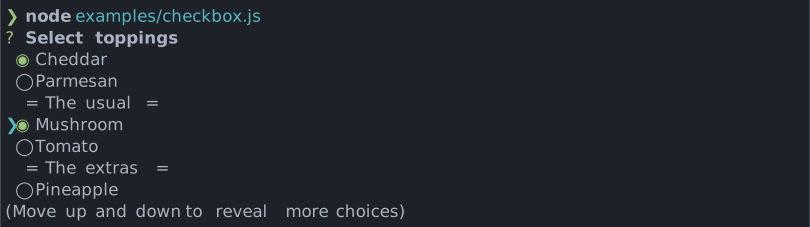
Simple interactive command line prompt to display a list of checkboxes (multi select).
# Installation
<table>
<tr>
<th>npm</th>
<th>yarn</th>
</tr>
<tr>
<td>
```sh
npm install @inquirer/prompts
```
</td>
<td>
```sh
yarn add @inquirer/prompts
```
</td>
</tr>
<tr>
<td colSpan="2" align="center">Or</td>
</tr>
<tr>
<td>
```sh
npm install @inquirer/checkbox
```
</td>
<td>
```sh
yarn add @inquirer/checkbox
```
</td>
</tr>
</table>
# Usage
```js
import { checkbox, Separator } from '@inquirer/prompts';
// Or
// import checkbox, { Separator } from '@inquirer/checkbox';
const answer = await checkbox({
message: 'Select a package manager',
choices: [
{ name: 'npm', value: 'npm' },
{ name: 'yarn', value: 'yarn' },
new Separator(),
{ name: 'pnpm', value: 'pnpm', disabled: true },
{
name: 'pnpm',
value: 'pnpm',
disabled: '(pnpm is not available)',
},
],
});
```
## Options
| Property | Type | Required | Description |
| --------- | --------------------------------------- | -------- | ----------------------------------------------------------------------------------------------------------------------------------------------------------------------------------------------------- |
| message | `string` | yes | The question to ask |
| choices | `Choice[]` | yes | List of the available choices. |
| pageSize | `number` | no | By default, lists of choice longer than 7 will be paginated. Use this option to control how many choices will appear on the screen at once. |
| loop | `boolean` | no | Defaults to `true`. When set to `false`, the cursor will be constrained to the top and bottom of the choice list without looping. |
| required | `boolean` | no | When set to `true`, ensures at least one choice must be selected. |
| validate | `async (Choice[]) => boolean \| string` | no | On submit, validate the choices. When returning a string, it'll be used as the error message displayed to the user. Note: returning a rejected promise, we'll assume a code error happened and crash. |
| shortcuts | [See Shortcuts](#Shortcuts) | no | Customize shortcut keys for `all` and `invert`. |
| theme | [See Theming](#Theming) | no | Customize look of the prompt. |
`Separator` objects can be used in the `choices` array to render non-selectable lines in the choice list. By default it'll render a line, but you can provide the text as argument (`new Separator('-- Dependencies --')`). This option is often used to add labels to groups within long list of options.
### `Choice` object
The `Choice` object is typed as
```ts
type Choice<Value> = {
value: Value;
name?: string;
checkedName?: string;
description?: string;
short?: string;
checked?: boolean;
disabled?: boolean | string;
};
```
Here's each property:
- `value`: The value is what will be returned by `await checkbox()`.
- `name`: This is the string displayed in the choice list.
- `checkedName`: Alternative `name` (or format) displayed when the choice is checked.
- `description`: Option for a longer description string that'll appear under the list when the cursor highlight a given choice.
- `short`: Once the prompt is done (press enter), we'll use `short` if defined to render next to the question. By default we'll use `name`.
- `checked`: If `true`, the option will be checked by default.
- `disabled`: Disallow the option from being selected. If `disabled` is a string, it'll be used as a help tip explaining why the choice isn't available.
Also note the `choices` array can contain `Separator`s to help organize long lists.
`choices` can also be an array of string, in which case the string will be used both as the `value` and the `name`.
## Keybindings
Set `INQUIRER_KEYBINDINGS=vim`, `INQUIRER_KEYBINDINGS=emacs`, or `INQUIRER_KEYBINDINGS=vim,emacs` to enable alternative navigation keybindings globally.
You can override the environment setting per prompt with `theme.keybindings`.
## Shortcuts
You can customize the shortcut keys for `all` and `invert` or disable them by setting them to `null`.
```ts
type Shortcuts = {
all?: string | null; // default: 'a'
invert?: string | null; // default: 'i'
};
```
## Theming
You can theme a prompt by passing a `theme` object option. The theme object only need to includes the keys you wish to modify, we'll fallback on the defaults for the rest.
```ts
type Theme = {
prefix: string | { idle: string; done: string };
spinner: {
interval: number;
frames: string[];
};
style: {
answer: (text: string) => string;
message: (text: string, status: 'idle' | 'done' | 'loading') => string;
error: (text: string) => string;
defaultAnswer: (text: string) => string;
help: (text: string) => string;
highlight: (text: string) => string;
key: (text: string) => string;
disabledChoice: (text: string) => string;
description: (text: string) => string;
renderSelectedChoices: <T>(
selectedChoices: ReadonlyArray<Choice<T>>,
allChoices: ReadonlyArray<Choice<T> | Separator>,
) => string;
keysHelpTip: (keys: [key: string, action: string][]) => string | undefined;
};
icon: {
checked: string;
unchecked: string;
cursor: string;
};
keybindings: readonly ('emacs' | 'vim')[];
};
```
### `theme.style.keysHelpTip`
This function allows you to customize the keyboard shortcuts help tip displayed below the prompt. It receives an array of key-action pairs and should return a formatted string. You can also hook here to localize the labels to different languages.
It can also returns `undefined` to hide the help tip entirely.
```js
theme: {
style: {
keysHelpTip: (keys) => {
// Return undefined to hide the help tip completely
return undefined;
// Or customize the formatting. Or localize the labels.
return keys.map(([key, action]) => `${key}: ${action}`).join(' | ');
};
}
}
```
# License
Copyright (c) 2023 Simon Boudrias (twitter: [@vaxilart](https://twitter.com/Vaxilart))<br/>
Licensed under the MIT license.
confirm Documentation
packages/confirm/README.md plugin-manifest ~520 tokens# `@inquirer/confirm`
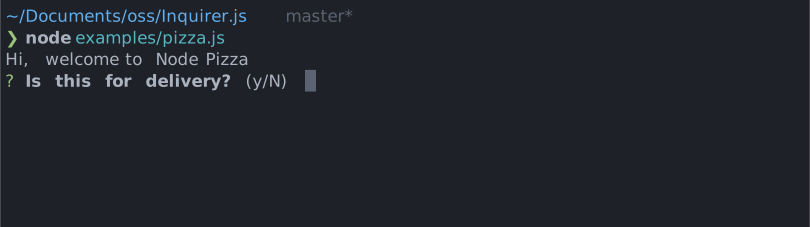
Simple interactive command line prompt to gather boolean input from users.
# Installation
<table>
<tr>
<th>npm</th>
<th>yarn</th>
</tr>
<tr>
<td>
```sh
npm install @inquirer/prompts
```
</td>
<td>
```sh
yarn add @inquirer/prompts
```
</td>
</tr>
<tr>
<td colSpan="2" align="center">Or</td>
</tr>
<tr>
<td>
```sh
npm install @inquirer/confirm
```
</td>
<td>
```sh
yarn add @inquirer/confirm
```
</td>
</tr>
</table>
# Usage
```js
import { confirm } from '@inquirer/prompts';
// Or
// import confirm from '@inquirer/confirm';
const answer = await confirm({ message: 'Continue?' });
```
## Options
| Property | Type | Required | Description |
| ----------- | ----------------------- | -------- | ------------------------------------------------------- |
| message | `string` | yes | The question to ask |
| default | `boolean` | no | Default answer (true or false) |
| transformer | `(boolean) => string` | no | Transform the prompt printed message to a custom string |
| theme | [See Theming](#Theming) | no | Customize look of the prompt. |
## Theming
You can theme a prompt by passing a `theme` object option. The theme object only need to includes the keys you wish to modify, we'll fallback on the defaults for the rest.
```ts
type Theme = {
prefix: string | { idle: string; done: string };
spinner: {
interval: number;
frames: string[];
};
style: {
answer: (text: string) => string;
message: (text: string, status: 'idle' | 'done' | 'loading') => string;
defaultAnswer: (text: string) => string;
};
};
```
# License
Copyright (c) 2023 Simon Boudrias (twitter: [@vaxilart](https://twitter.com/Vaxilart))<br/>
Licensed under the MIT license.
core Documentation
packages/core/README.md plugin-manifest ~2,971 tokens# `@inquirer/core`
The `@inquirer/core` package is the library enabling the creation of Inquirer prompts.
It aims to implements a lightweight API similar to React hooks - but without JSX.
# Installation
<table>
<tr>
<th>npm</th>
<th>yarn</th>
</tr>
<tr>
<td>
```sh
npm install @inquirer/core
```
</td>
<td>
```sh
yarn add @inquirer/core
```
</td>
</tr>
</table>
# Usage
## Basic concept
Visual terminal apps are at their core strings rendered onto the terminal.
The most basic prompt is a function returning a string that'll be rendered in the terminal. This function will run every time the prompt state change, and the new returned string will replace the previously rendered one. The prompt cursor appears after the string.
Wrapping the rendering function with `createPrompt()` will setup the rendering layer, inject the state management utilities, and wait until the `done` callback is called.
```ts
import { createPrompt } from '@inquirer/core';
const input = createPrompt((config, done) => {
// Implement logic
return '? My question';
});
// And it is then called as
const answer = await input({/* config */});
```
## Hooks
State management and user interactions are handled through hooks. Hooks are common [within the React ecosystem](https://react.dev/reference/react/hooks), and Inquirer reimplement the common ones.
### State hook
State lets a component “remember” information like user input. For example, an input prompt can use state to store the input value, while a list prompt can use state to track the cursor index.
`useState` declares a state variable that you can update directly.
The setter also accepts an updater function to compute the next state from the current one (mirroring React):
```ts
const [index, setIndex] = useState(0);
setIndex((current) => current + 1);
```
```ts
import { createPrompt, useState } from '@inquirer/core';
const input = createPrompt((config, done) => {
const [index, setIndex] = useState(0);
// ...
```
### Keypress hook
Almost all prompts need to react to user actions. In a terminal, this is done through typing.
`useKeypress` allows you to react to keypress events, and access the prompt line.
```ts
const input = createPrompt((config, done) => {
useKeypress((key) => {
if (key.name === 'enter') {
done(answer);
}
});
// ...
```
Behind the scenes, Inquirer prompts are wrappers around [readlines](https://nodejs.org/api/readline.html). Aside the keypress event object, the hook also pass the active readline instance to the event handler.
```ts
const input = createPrompt((config, done) => {
useKeypress((key, readline) => {
setValue(readline.line);
});
// ...
```
### Ref hook
Refs let a prompt hold some information that isn’t used for rendering, like a class instance or a timeout ID. Unlike with state, updating a ref does not re-render your prompt. Refs are an “escape hatch” from the rendering paradigm.
`useRef` declares a ref. You can hold any value in it, but most often it’s used to hold a timeout ID.
```ts
const input = createPrompt((config, done) => {
const timeout = useRef(null);
// ...
```
### Effect Hook
Effects let a prompt connect to and synchronize with external systems. This includes dealing with network or animations.
`useEffect` connects a component to an external system.
```ts
const chat = createPrompt((config, done) => {
useEffect(() => {
const connection = createConnection(roomId);
connection.connect();
return () => connection.disconnect();
}, [roomId]);
// ...
```
### Performance hook
A common way to optimize re-rendering performance is to skip unnecessary work. For example, you can tell Inquirer to reuse a cached calculation or to skip a re-render if the data has not changed since the previous render.
`useMemo` lets you cache the result of an expensive calculation.
```ts
const todoSelect = createPrompt((config, done) => {
const visibleTodos = useMemo(() => filterTodos(todos, tab), [todos, tab]);
// ...
```
### Rendering hooks
#### Prefix / loading
All default prompts, and most custom ones, uses a prefix at the beginning of the prompt line. This helps visually delineate different questions, and provides a convenient area to render a loading spinner.
`usePrefix` is a built-in hook to do this.
```ts
const input = createPrompt((config, done) => {
const prefix = usePrefix({ status });
return `${prefix} My question`;
});
```
#### Pagination
When looping through a long list of options (like in the `select` prompt), paginating the results appearing on the screen at once can be necessary. The `usePagination` hook is the utility used within the `select` and `checkbox` prompts to cycle through the list of options.
Pagination works by taking in the list of options and returning a subset of the rendered items that fit within the page. The hook takes in a few options. It needs a list of options (`items`), and a `pageSize` which is the number of lines to be rendered. The `active` index is the index of the currently selected/selectable item. The `loop` option is a boolean that indicates if the list should loop around when reaching the end: this is the default behavior. The pagination hook renders items only as necessary, so it takes a function that can render an item at an index, including an `active` state, called `renderItem`.
```js
export default createPrompt((config, done) => {
const [active, setActive] = useState(0);
const allChoices = config.choices.map((choice) => choice.name);
const page = usePagination({
items: allChoices,
active: active,
renderItem: ({ item, index, isActive }) => `${isActive ? ">" : " "}${index}. ${item.toString()}`
pageSize: config.pageSize,
loop: config.loop,
});
return `... ${page}`;
});
```
## `createPrompt()` API
As we saw earlier, the rendering function should return a string, and eventually call `done` to close the prompt and return the answer.
```ts
const input = createPrompt((config, done) => {
const [value, setValue] = useState();
useKeypress((key, readline) => {
if (key.name === 'enter') {
done(answer);
} else {
setValue(readline.line);
}
});
return `? ${config.message} ${value}`;
});
```
The rendering function can also return a tuple of 2 string (`[string, string]`.) The first string represents the prompt. The second one is content to render under the prompt, like an error message. The text input cursor will appear after the first string.
```ts
const number = createPrompt((config, done) => {
// Add some logic here
return [`? My question ${input}`, `! The input must be a number`];
});
```
### Typescript
If using typescript, `createPrompt` takes 2 generic arguments.
```ts
// createPrompt<Value, Config>
const input = createPrompt<string, { message: string }>(// ...
```
The first one is the type of the resolved value
```ts
const answer: string = await input();
```
The second one is the type of the prompt config; in other words the interface the created prompt will provide to users.
```ts
const answer = await input({
message: 'My question',
});
```
## Key utilities
Listening for keypress events inside an inquirer prompt is a very common pattern. To ease this, we export a few utility functions taking in the keypress event object and return a boolean:
- `isEnterKey()`
- `isBackspaceKey()`
- `isSpaceKey()`
- `isUpKey()` - Note: this utility will handle vim and emacs keybindings (up, `k`, and `ctrl+p`)
- `isDownKey()` - Note: this utility will handle vim and emacs keybindings (down, `j`, and `ctrl+n`)
- `isNumberKey()` one of 1, 2, 3, 4, 5, 6, 7, 8, 9, 0
Set `INQUIRER_KEYBINDINGS=vim`, `INQUIRER_KEYBINDINGS=emacs`, or `INQUIRER_KEYBINDINGS=vim,emacs` to enable alternative navigation keybindings globally. Prompt-level `theme.keybindings` values override the environment variable.
## Theming
Theming utilities will allow you to expose customization of the prompt style. Inquirer also has a few standard theme values shared across all the official prompts.
To allow standard customization:
```ts
import { createPrompt, usePrefix, makeTheme, type Theme } from '@inquirer/core';
import type { PartialDeep } from '@inquirer/type';
type PromptConfig = {
theme?: PartialDeep<Theme>;
};
export default createPrompt<string, PromptConfig>((config, done) => {
const theme = makeTheme(config.theme);
const prefix = usePrefix({ status, theme });
return `${prefix} ${theme.style.highlight('hello')}`;
});
```
To setup a custom theme:
```ts
import { createPrompt, makeTheme, type Theme } from '@inquirer/core';
import type { PartialDeep } from '@inquirer/type';
type PromptTheme = {};
const promptTheme: PromptTheme = {
icon: '!',
};
type PromptConfig = {
theme?: PartialDeep<Theme<PromptTheme>>;
};
export default createPrompt<string, PromptConfig>((config, done) => {
const theme = makeTheme(promptTheme, config.theme);
const prefix = usePrefix({ status, theme });
return `${prefix} ${theme.icon}`;
});
```
The [default theme keys cover](https://github.com/SBoudrias/Inquirer.js/blob/main/packages/core/src/lib/theme.ts):
```ts
type DefaultTheme = {
prefix: string | { idle: string; done: string };
spinner: {
interval: number;
frames: string[];
};
keybindings: readonly ('emacs' | 'vim')[];
style: {
answer: (text: string) => string;
message: (text: string, status: 'idle' | 'done' | 'loading') => string;
error: (text: string) => string;
defaultAnswer: (text: string) => string;
help: (text: string) => string;
highlight: (text: string) => string;
key: (text: string) => string;
};
};
```
# Examples
You can refer to any `@inquirer/prompts` prompts for real examples:
- [Confirm Prompt](https://github.com/SBoudrias/Inquirer.js/blob/main/packages/confirm/src/index.ts)
- [Input Prompt](https://github.com/SBoudrias/Inquirer.js/blob/main/packages/input/src/index.ts)
- [Password Prompt](https://github.com/SBoudrias/Inquirer.js/blob/main/packages/password/src/index.ts)
- [Editor Prompt](https://github.com/SBoudrias/Inquirer.js/blob/main/packages/editor/src/index.ts)
- [Select Prompt](https://github.com/SBoudrias/Inquirer.js/blob/main/packages/select/src/index.ts)
- [Checkbox Prompt](https://github.com/SBoudrias/Inquirer.js/blob/main/packages/checkbox/src/index.ts)
- [Rawlist Prompt](https://github.com/SBoudrias/Inquirer.js/blob/main/packages/rawlist/src/index.ts)
- [Expand Prompt](https://github.com/SBoudrias/Inquirer.js/blob/main/packages/expand/src/index.ts)
```ts
import { styleText } from 'node:util';
import {
createPrompt,
useState,
useKeypress,
isEnterKey,
usePrefix,
type Status,
} from '@inquirer/core';
const confirm = createPrompt<boolean, { message: string; default?: boolean }>(
(config, done) => {
const [status, setStatus] = useState<Status>('idle');
const [value, setValue] = useState('');
const prefix = usePrefix({});
useKeypress((key, rl) => {
if (isEnterKey(key)) {
const answer = value ? /^y(es)?/i.test(value) : config.default !== false;
setValue(answer ? 'yes' : 'no');
setStatus('done');
done(answer);
} else {
setValue(rl.line);
}
});
let formattedValue = value;
let defaultValue = '';
if (status === 'done') {
formattedValue = styleText('cyan', value);
} else {
defaultValue = styleText('dim', config.default === false ? ' (y/N)' : ' (Y/n)');
}
const message = styleText('bold', config.message);
return `${prefix} ${message}${defaultValue} ${formattedValue}`;
},
);
/**
* Which then can be used like this:
*/
const answer = await confirm({ message: 'Do you want to continue?' });
```
# License
Copyright (c) 2023 Simon Boudrias (twitter: [@vaxilart](https://twitter.com/Vaxilart))<br/>
Licensed under the MIT license.
editor Documentation
packages/editor/README.md plugin-manifest ~1,273 tokens# `@inquirer/editor`
Prompt that'll open the user preferred editor with default content and allow for a convenient multi-line input controlled through the command line.
The editor launched is the one [defined by the user's `EDITOR` environment variable](https://dev.to/jonasbn/til-integrate-visual-studio-code-with-shell--cli-2l1l).
# Installation
<table>
<tr>
<th>npm</th>
<th>yarn</th>
</tr>
<tr>
<td>
```sh
npm install @inquirer/prompts
```
</td>
<td>
```sh
yarn add @inquirer/prompts
```
</td>
</tr>
<tr>
<td colSpan="2" align="center">Or</td>
</tr>
<tr>
<td>
```sh
npm install @inquirer/editor
```
</td>
<td>
```sh
yarn add @inquirer/editor
```
</td>
</tr>
</table>
# Usage
```js
import { editor } from '@inquirer/prompts';
// Or
// import editor from '@inquirer/editor';
const answer = await editor({
message: 'Enter a description',
});
```
## Options
| Property | Type | Required | Description |
| ---------------- | ------------------------------------------------------------------------------ | ---------------------- | -------------------------------------------------------------------------------------------------------------------------------------------------------------------------------------------------------------------------------------- |
| message | `string` | yes | The question to ask |
| default | `string` | no | Default value which will automatically be present in the editor |
| validate | `string => boolean \| string \| Promise<boolean \| string>` | no | On submit, validate the content. When returning a string, it'll be used as the error message displayed to the user. Note: returning a rejected promise, we'll assume a code error happened and crash. |
| postfix | `string` | no (default to `.txt`) | The postfix of the file being edited. Adding this will add color highlighting to the file content in most editors. |
| file | [`IFileOptions`](https://github.com/mrkmg/node-external-editor#config-options) | no | Exposes the [`external-editor` package options](https://github.com/mrkmg/node-external-editor#config-options) to configure the temporary file. |
| waitForUserInput | `boolean` | no (default to `true`) | Open the editor automatically without waiting for the user to press enter. Note that this mean the user will not see the question! So make sure you have a default value that provide guidance if it's unclear what input is expected. |
| theme | [See Theming](#Theming) | no | Customize look of the prompt. |
## Theming
You can theme a prompt by passing a `theme` object option. The theme object only need to includes the keys you wish to modify, we'll fallback on the defaults for the rest.
```ts
type Theme = {
prefix: string | { idle: string; done: string };
spinner: {
interval: number;
frames: string[];
};
style: {
message: (text: string, status: 'idle' | 'done' | 'loading') => string;
error: (text: string) => string;
help: (text: string) => string;
key: (text: string) => string;
};
validationFailureMode: 'keep' | 'clear';
};
```
`validationFailureMode` defines the behavior of the prompt when the value submitted is invalid. By default, we'll keep the value allowing the user to edit it. When the theme option is set to `clear`, we'll remove and reset to the default value or empty string.
# License
Copyright (c) 2023 Simon Boudrias (twitter: [@vaxilart](https://twitter.com/Vaxilart))<br/>
Licensed under the MIT license.
expand Documentation
packages/expand/README.md plugin-manifest ~954 tokens# `@inquirer/expand`
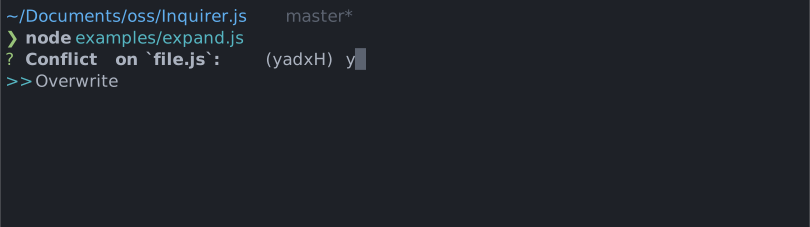
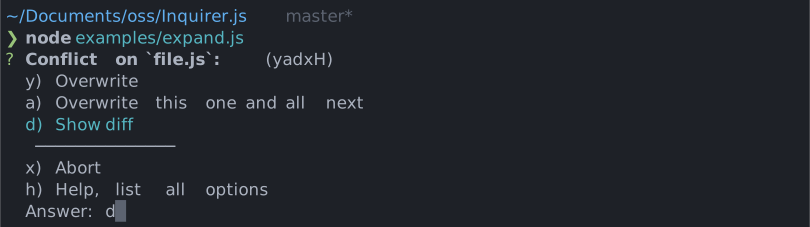
Compact single select prompt. Every option is assigned a shortcut key, and selecting `h` will expand all the choices and their descriptions.
# Installation
<table>
<tr>
<th>npm</th>
<th>yarn</th>
</tr>
<tr>
<td>
```sh
npm install @inquirer/prompts
```
</td>
<td>
```sh
yarn add @inquirer/prompts
```
</td>
</tr>
<tr>
<td colSpan="2" align="center">Or</td>
</tr>
<tr>
<td>
```sh
npm install @inquirer/expand
```
</td>
<td>
```sh
yarn add @inquirer/expand
```
</td>
</tr>
</table>
# Usage
```js
import { expand } from '@inquirer/prompts';
// Or
// import expand from '@inquirer/expand';
const answer = await expand({
message: 'Conflict on file.js',
default: 'y',
choices: [
{
key: 'y',
name: 'Overwrite',
value: 'overwrite',
},
{
key: 'a',
name: 'Overwrite this one and all next',
value: 'overwrite_all',
},
{
key: 'd',
name: 'Show diff',
value: 'diff',
},
{
key: 'x',
name: 'Abort',
value: 'abort',
},
],
});
```
## Options
| Property | Type | Required | Description |
| -------- | ----------------------- | -------- | ----------------------------------------------------------------------------------------- |
| message | `string` | yes | The question to ask |
| choices | `Choice[]` | yes | Array of the different allowed choices. The `h`/help option is always provided by default |
| default | `string` | no | Default choices to be selected. (value must be one of the choices `key`) |
| expanded | `boolean` | no | Expand the choices by default |
| theme | [See Theming](#Theming) | no | Customize look of the prompt. |
`Separator` objects can be used in the `choices` array to render non-selectable lines in the choice list. By default it'll render a line, but you can provide the text as argument (`new Separator('-- Dependencies --')`). This option is often used to add labels to groups within long list of options.
### `Choice` object
The `Choice` object is typed as
```ts
type Choice<Value> = {
value: Value;
name?: string;
key: string;
};
```
Here's each property:
- `value`: The value is what will be returned by `await expand()`.
- `name`: The string displayed in the choice list. It'll default to the stringify `value`.
- `key`: The input the use must provide to select the choice. Must be a lowercase single alphanumeric character string.
## Theming
You can theme a prompt by passing a `theme` object option. The theme object only need to includes the keys you wish to modify, we'll fallback on the defaults for the rest.
```ts
type Theme = {
prefix: string | { idle: string; done: string };
spinner: {
interval: number;
frames: string[];
};
style: {
answer: (text: string) => string;
message: (text: string, status: 'idle' | 'done' | 'loading') => string;
error: (text: string) => string;
defaultAnswer: (text: string) => string;
highlight: (text: string) => string;
};
};
```
# License
Copyright (c) 2023 Simon Boudrias (twitter: [@vaxilart](https://twitter.com/Vaxilart))<br/>
Licensed under the MIT license.
external-editor Documentation
packages/external-editor/README.md plugin-manifest ~1,374 tokens# `@inquirer/external-editor`
A Node.js module to edit a string with the user's preferred text editor using $VISUAL or $EDITOR.
> [!NOTE]
> This package is a replacement for the unmaintained `external-editor`. It includes security fixes.
# Installation
<table>
<tr>
<th>npm</th>
<th>yarn</th>
</tr>
<tr>
<td>
```sh
npm install @inquirer/external-editor
```
</td>
<td>
```sh
yarn add @inquirer/external-editor
```
</td>
</tr>
</table>
## Usage
A simple example using the `edit` function
```ts
import { edit } from '@inquirer/external-editor';
const data = edit('\n\n# Please write your text above');
console.log(data);
```
Example relying on the class construct
```ts
import {
ExternalEditor,
CreateFileError,
ReadFileError,
RemoveFileError,
LaunchEditorError,
} from '@inquirer/external-editor';
try {
const editor = new ExternalEditor();
const text = editor.run(); // the text is also available in editor.text
if (editor.lastExitStatus !== 0) {
console.log('The editor exited with a non-zero code');
}
// Do things with the text
editor.cleanup();
} catch (err) {
if (err instanceof CreateFileError) {
console.log('Failed to create the temporary file');
} else if (err instanceof ReadFileError) {
console.log('Failed to read the temporary file');
} else if (err instanceof LaunchEditorError) {
console.log('Failed to launch your editor');
} else if (err instanceof RemoveFileError) {
console.log('Failed to remove the temporary file');
} else {
throw err;
}
}
```
### Windows editor commands
On Windows, prefer setting `$VISUAL` or `$EDITOR` to the editor executable
rather than a `.cmd` or `.bat` shim. This package launches the editor directly
instead of through a shell so editor arguments and temporary file paths are not
interpreted as shell commands.
For example, use `Code.exe` with `--wait` instead of `code.cmd`:
```powershell
setx VISUAL '"C:\Program Files\Microsoft VS Code\Code.exe" --wait'
```
#### API
**Convenience Functions**
- `edit(text, config)`
- `text` (string) _Optional_ Defaults to empty string
- `config` (Config) _Optional_ Options for temporary file creation
- **Returns** (string) The contents of the file
- Could throw `CreateFileError`, `ReadFileError`, or `LaunchEditorError`, or `RemoveFileError`
- `editAsync(text, callback, config)`
- `text` (string) _Optional_ Defaults to empty string
- `callback` (function (error?, text?))
- `error` could be of type `CreateFileError`, `ReadFileError`, `LaunchEditorError`, or `RemoveFileError`
- `text` (string) The contents of the file
- `config` (Config) _Optional_ Options for temporary file creation
**Errors**
- `CreateFileError` Error thrown if the temporary file could not be created.
- `ReadFileError` Error thrown if the temporary file could not be read.
- `RemoveFileError` Error thrown if the temporary file could not be removed during cleanup.
- `LaunchEditorError` Error thrown if the editor could not be launched.
**External Editor Public Methods**
- `new ExternalEditor(text, config)`
- `text` (string) _Optional_ Defaults to empty string
- `config` (Config) _Optional_ Options for temporary file creation
- Could throw `CreateFileError`
- `run()` Launches the editor.
- **Returns** (string) The contents of the file
- Could throw `LaunchEditorError` or `ReadFileError`
- `runAsync(callback)` Launches the editor in an async way
- `callback` (function (error?, text?))
- `error` could be of type `ReadFileError` or `LaunchEditorError`
- `text` (string) The contents of the file
- `cleanup()` Removes the temporary file.
- Could throw `RemoveFileError`
**External Editor Public Properties**
- `text` (string) _readonly_ The text in the temporary file.
- `editor.bin` (string) The editor determined from the environment.
- `editor.args` (array) Default arguments for the bin
- `tempFile` (string) Path to temporary file. Can be changed, but be careful as the temporary file probably already
exists and would need be removed manually.
- `lastExitStatus` (number) The last exit code emitted from the editor.
**Config Options**
- `prefix` (string) _Optional_ A prefix for the file name.
- `postfix` (string) _Optional_ A postfix for the file name. Useful if you want to provide an extension.
- `mode` (number) _Optional_ Which mode to create the file with. e.g. 644
- `dir` (string) _Optional_ Which path to store the file.
## Why Synchronous?
Everything is synchronous to make sure the editor has complete control of the stdin and stdout. Testing has shown
async launching of the editor can lead to issues when using readline or other packages which try to read from stdin or
write to stdout. Seeing as this will be used in an interactive CLI environment, I made the decision to force the package
to be synchronous. If you know a reliable way to force all stdin and stdout to be limited only to the child_process,
please submit a PR.
If async is really needed, you can use `editAsync` or `runAsync`. If you are using readline or have anything else
listening to the stdin or you write to stdout, you will most likely have problem, so make sure to remove any other
listeners on stdin, stdout, or stderr.
## Demo
[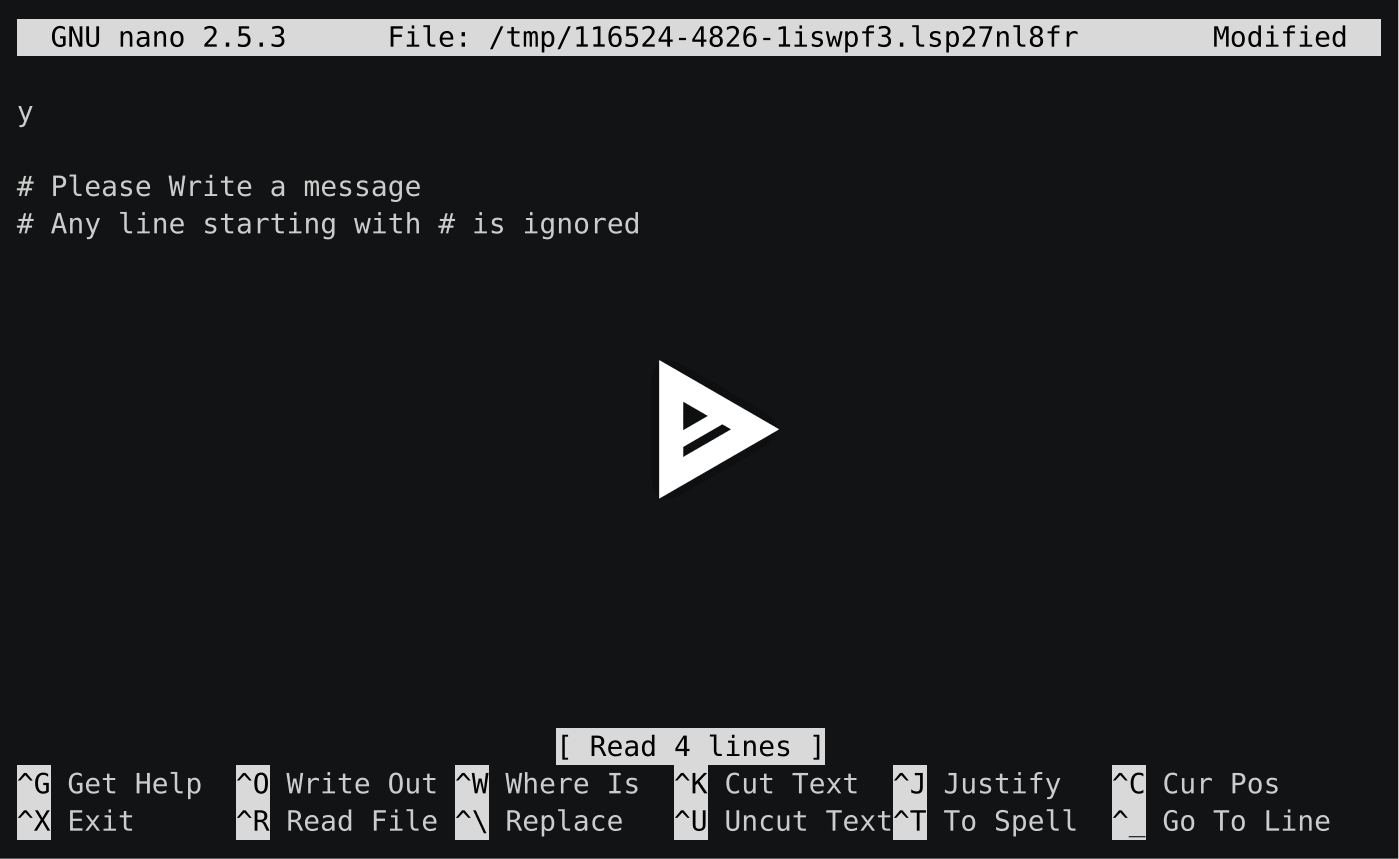](https://asciinema.org/a/a1qh9lypbe65mj0ivfuoslz2s)
# License
Copyright (c) 2025 Simon Boudrias (twitter: [@vaxilart](https://twitter.com/Vaxilart))<br/>
Licensed under the MIT license.
input Documentation
packages/input/README.md plugin-manifest ~1,290 tokens# `@inquirer/input`
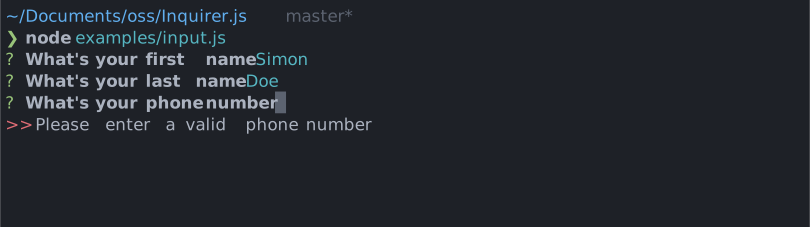
Interactive free text input component for command line interfaces. Supports validation, filtering, transformation, etc.
# Installation
<table>
<tr>
<th>npm</th>
<th>yarn</th>
</tr>
<tr>
<td>
```sh
npm install @inquirer/prompts
```
</td>
<td>
```sh
yarn add @inquirer/prompts
```
</td>
</tr>
<tr>
<td colSpan="2" align="center">Or</td>
</tr>
<tr>
<td>
```sh
npm install @inquirer/input
```
</td>
<td>
```sh
yarn add @inquirer/input
```
</td>
</tr>
</table>
# Usage
```js
import { input } from '@inquirer/prompts';
// Or
// import input from '@inquirer/input';
const answer = await input({ message: 'Enter your name' });
```
## Options
| Property | Type | Required | Description |
| ------------ | ----------------------------------------------------------- | -------- | ----------------------------------------------------------------------------------------------------------------------------------------------------------------------------------------------------------------------- |
| message | `string` | yes | The question to ask |
| default | `string` | no | Default value if no answer is provided; see the prefill option below for governing it's behaviour. |
| prefill | `'tab' \| 'editable'` | no | Defaults to `'tab'`. If set to `'tab'`, pressing `backspace` will clear the default and pressing `tab` will inline the value for edits; If set to `'editable'`, the default value will already be inlined to edit. |
| required | `boolean` | no | Defaults to `false`. If set to true, `undefined` (empty) will not be accepted for this. |
| transformer | `(string, { isFinal: boolean }) => string` | no | Transform/Format the raw value entered by the user. Once the prompt is completed, `isFinal` will be `true`. This function is purely visual, modify the answer in your code if needed. |
| validate | `string => boolean \| string \| Promise<boolean \| string>` | no | On submit, validate the filtered answered content. When returning a string, it'll be used as the error message displayed to the user. Note: returning a rejected promise, we'll assume a code error happened and crash. |
| pattern | `RegExp` | no | Regular expression to validate the input against. If the input doesn't match the pattern, validation will fail with the error message specified in `patternError`. |
| patternError | `string` | no | Error message to display when the input doesn't match the `pattern`. Defaults to `'Invalid input'`. |
| theme | [See Theming](#Theming) | no | Customize look of the prompt. |
## Theming
You can theme a prompt by passing a `theme` object option. The theme object only need to includes the keys you wish to modify, we'll fallback on the defaults for the rest.
```ts
type Theme = {
prefix: string | { idle: string; done: string };
spinner: {
interval: number;
frames: string[];
};
style: {
answer: (text: string) => string;
message: (text: string, status: 'idle' | 'done' | 'loading') => string;
error: (text: string) => string;
defaultAnswer: (text: string) => string;
};
validationFailureMode: 'keep' | 'clear';
};
```
`validationFailureMode` defines the behavior of the prompt when the value submitted is invalid. By default, we'll keep the value allowing the user to edit it. When the theme option is set to `clear`, we'll remove and reset to an empty string.
# License
Copyright (c) 2023 Simon Boudrias (twitter: [@vaxilart](https://twitter.com/Vaxilart))<br/>
Licensed under the MIT license.
inquirer Documentation
packages/inquirer/README.md plugin-manifest ~5,628 tokens<img width="75px" height="75px" align="right" alt="Inquirer Logo" src="https://raw.githubusercontent.com/SBoudrias/Inquirer.js/main/assets/inquirer_readme.svg?sanitize=true" title="Inquirer.js"/>
# Inquirer.js
[](https://www.npmjs.com/package/inquirer)
[](https://app.fossa.com/projects/git%2Bgithub.com%2FSBoudrias%2FInquirer.js?ref=badge_shield)
A collection of common interactive command line user interfaces.
> [!IMPORTANT]
> This is the legacy version of Inquirer.js. While it still receives maintenance, it is not actively developed. For the new Inquirer, see [@inquirer/prompts](https://www.npmjs.com/package/@inquirer/prompts).
## Table of Contents
1. [Documentation](#documentation)
1. [Installation](#installation)
2. [Examples](#examples)
3. [Methods](#methods)
4. [Objects](#objects)
5. [Question](#question)
6. [Answers](#answers)
7. [Separator](#separator)
8. [Prompt Types](#prompt-types)
2. [User Interfaces and Layouts](#user-interfaces-and-layouts)
1. [Reactive Interface](#reactive-interface)
3. [Support](#support)
4. [Known issues](#issues)
5. [News](#news)
6. [Contributing](#contributing)
7. [License](#license)
8. [Plugins](#plugins)
## Goal and Philosophy
**`Inquirer.js`** strives to be an easily embeddable and beautiful command line interface for [Node.js](https://nodejs.org/) (and perhaps the "CLI [Xanadu](https://en.wikipedia.org/wiki/Citizen_Kane)").
**`Inquirer.js`** should ease the process of
- providing _error feedback_
- _asking questions_
- _parsing_ input
- _validating_ answers
- managing _hierarchical prompts_
> **Note:** **`Inquirer.js`** provides the user interface and the inquiry session flow. If you're searching for a full blown command line program utility, then check out [commander](https://github.com/visionmedia/commander.js), [vorpal](https://github.com/dthree/vorpal) or [args](https://github.com/leo/args).
## [Documentation](#documentation)
<a name="documentation"></a>
### Installation
<a name="installation"></a>
<table>
<tr>
<th>npm</th>
<th>yarn</th>
</tr>
<tr>
<td>
```sh
npm install inquirer
```
</td>
<td>
```sh
yarn add inquirer
```
</td>
</tr>
</table>
```javascript
import inquirer from 'inquirer';
inquirer
.prompt([/* Pass your questions in here */])
.then((answers) => {
// Use user feedback for... whatever!!
})
.catch((error) => {
if (error.isTtyError) {
// Prompt couldn't be rendered in the current environment
} else {
// Something else went wrong
}
});
```
<a name="examples"></a>
### Examples (Run it and see it)
Check out the [`packages/inquirer/examples/`](https://github.com/SBoudrias/Inquirer.js/tree/main/packages/inquirer/examples) folder for code and interface examples.
```shell
yarn node packages/inquirer/examples/pizza.js
yarn node packages/inquirer/examples/checkbox.js
# etc...
```
### Methods
<a name="methods"></a>
> [!WARNING]
> Those interfaces are not necessary for modern Javascript, while still maintained, they're depreciated. We highly encourage you to adopt the more ergonomic and modern API with [@inquirer/prompts](https://www.npmjs.com/package/@inquirer/prompts). Both `inquirer` and `@inquirer/prompts` are usable at the same time, so you can progressively migrate.
#### `inquirer.prompt(questions, answers) -> promise`
Launch the prompt interface (inquiry session)
- **questions** a [Question Object](#question), an array or map of questions, or an RxJS-compatible Observable of questions
- **answers** (object) contains values of already answered questions. Inquirer will avoid asking answers already provided here. Defaults `{}`.
- returns a **Promise**
#### `inquirer.registerPrompt(name, prompt)`
Register prompt plugins under `name`.
- **name** (string) name of the this new prompt. (used for question `type`)
- **prompt** (object) the prompt object itself (the plugin)
#### `inquirer.createPromptModule() -> prompt function`
Create a self contained inquirer module. If you don't want to affect other libraries that also rely on inquirer when you overwrite or add new prompt types.
```js
const prompt = inquirer.createPromptModule();
prompt(questions).then(/* ... */);
```
### Objects
<a name="objects"></a>
#### Question
<a name="questions"></a>
A question object is a `hash` containing question related values:
- **type**: (String) Type of the prompt. Defaults: `input` - Possible values: `input`, `number`, `confirm`, `list`, `rawlist`, `expand`, `checkbox`, `password`, `editor`
- **name**: (String) The name to use when storing the answer in the answers hash. If the name contains periods, it will define a path in the answers hash.
- **message**: (String|Function) The question to print. If defined as a function, the first parameter will be the current inquirer session answers. Defaults to the value of `name` (followed by a colon).
- **default**: (String|Number|Boolean|Array|Function) Default value(s) to use if nothing is entered, or a function that returns the default value(s). If defined as a function, the first parameter will be the current inquirer session answers.
- **choices**: (Array|Function) Choices array or a function returning a choices array. If defined as a function, the first parameter will be the current inquirer session answers.
Array values can be simple `numbers`, `strings`, or `objects` containing a `name` (to display in list), a `value` (to save in the answers hash), and a `short` (to display after selection) properties. The choices array can also contain [a `Separator`](#separator).
- **validate**: (Function) Receive the user input and answers hash. Should return `true` if the value is valid, and an error message (`String`) otherwise. If `false` is returned, a default error message is provided.
- **filter**: (Function) Receive the user input and answers hash. Returns the filtered value to be used inside the program. The value returned will be added to the _Answers_ hash.
- **transformer**: (Function) Receive the user input, answers hash and option flags, and return a transformed value to display to the user. The transformation only impacts what is shown while editing. It does not modify the answers hash.
- **when**: (Function, Boolean) Receive the current user answers hash and should return `true` or `false` depending on whether or not this question should be asked. The value can also be a simple boolean.
- **pageSize**: (Number) Change the number of lines that will be rendered when using `list`, `rawList`, `expand` or `checkbox`.
- **prefix**: (String) Change the default _prefix_ message.
- **suffix**: (String) Change the default _suffix_ message.
- **askAnswered**: (Boolean) Force to prompt the question if the answer already exists.
- **loop**: (Boolean) Enable list looping. Defaults: `true`
- **waitUserInput**: (Boolean) Flag to enable/disable wait for user input before opening system editor - Defaults: `true`
`default`, `choices`(if defined as functions), `validate`, `filter` and `when` functions can be called asynchronously. Either return a promise or use `this.async()` to get a callback you'll call with the final value.
```javascript
{
/* Preferred way: with promise */
filter() {
return new Promise(/* etc... */);
},
/* Legacy way: with this.async */
validate: function (input) {
// Declare function as asynchronous, and save the done callback
const done = this.async();
// Do async stuff
setTimeout(function() {
if (typeof input !== 'number') {
// Pass the return value in the done callback
done('You need to provide a number');
} else {
// Pass the return value in the done callback
done(null, true);
}
}, 3000);
}
}
```
### Answers
<a name="answers"></a>
A key/value hash containing the client answers in each prompt.
- **Key** The `name` property of the _question_ object
- **Value** (Depends on the prompt)
- `confirm`: (Boolean)
- `input` : User input (filtered if `filter` is defined) (String)
- `number`: User input (filtered if `filter` is defined) (Number)
- `rawlist`, `list` : Selected choice value (or name if no value specified) (String)
### Separator
<a name="separator"></a>
A separator can be added to any `choices` array:
```
// In the question object
choices: [ "Choice A", new inquirer.Separator(), "choice B" ]
// Which'll be displayed this way
[?] What do you want to do?
> Order a pizza
Make a reservation
--------
Ask opening hours
Talk to the receptionist
```
The constructor takes a facultative `String` value that'll be use as the separator. If omitted, the separator will be `--------`.
Separator instances have a property `type` equal to `separator`. This should allow tools façading Inquirer interface from detecting separator types in lists.
<a name="prompt"></a>
### Prompt types
---
> **Note:**: _allowed options written inside square brackets (`[]`) are optional. Others are required._
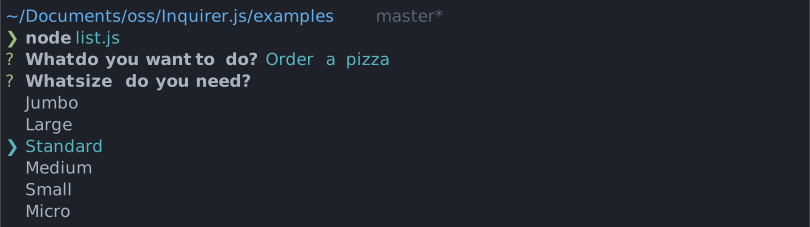
#### List - `{type: 'list'}`
Take `type`, `name`, `message`, `choices`[, `default`, `filter`, `loop`] properties.
(Note: `default` must be set to the `index` or `value` of one of the entries in `choices`)
---
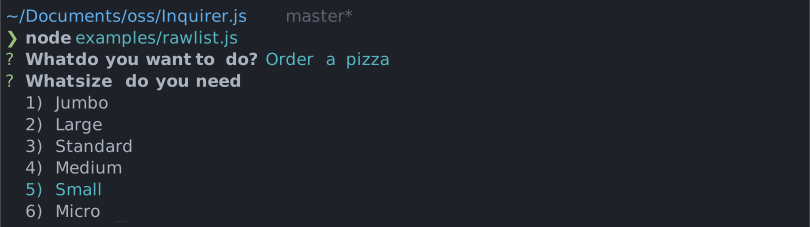
#### Raw List - `{type: 'rawlist'}`
Take `type`, `name`, `message`, `choices`[, `default`, `filter`, `loop`] properties.
(Note: `default` must be set to the `index` of one of the entries in `choices`)
---
#### Expand - `{type: 'expand'}`
Take `type`, `name`, `message`, `choices`[, `default`] properties.
Note: `default` must be the `index` of the desired default selection of the array. If `default` key not provided, then `help` will be used as default choice
Note that the `choices` object will take an extra parameter called `key` for the `expand` prompt. This parameter must be a single (lowercased) character. The `h` option is added by the prompt and shouldn't be defined by the user.
See `examples/expand.js` for a running example.


---
#### Checkbox - `{type: 'checkbox'}`
Take `type`, `name`, `message`, `choices`[, `filter`, `validate`, `default`, `loop`] properties. `default` is expected to be an Array of the checked choices value.
Choices marked as `{checked: true}` will be checked by default.
Choices whose property `disabled` is truthy will be unselectable. If `disabled` is a string, then the string will be outputted next to the disabled choice, otherwise it'll default to `"Disabled"`. The `disabled` property can also be a synchronous function receiving the current answers as argument and returning a boolean or a string.

---
#### Confirm - `{type: 'confirm'}`
Take `type`, `name`, `message`, [`default`, `transformer`] properties. `default` is expected to be a boolean if used.

---
#### Input - `{type: 'input'}`
Take `type`, `name`, `message`[, `default`, `filter`, `validate`, `transformer`] properties.

---
#### Input - `{type: 'number'}`
Take `type`, `name`, `message`[, `default`, `filter`, `validate`, `transformer`] properties.
---
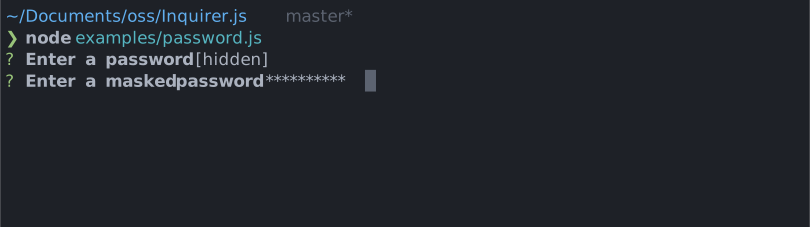
#### Password - `{type: 'password'}`
Take `type`, `name`, `message`, `mask`,[, `default`, `filter`, `validate`] properties.
---
Note that `mask` is required to hide the actual user input.
#### Editor - `{type: 'editor'}`
Take `type`, `name`, `message`[, `default`, `filter`, `validate`, `postfix`, `waitUserInput`] properties
Launches an instance of the users preferred editor on a temporary file. Once the user exits their editor, the contents of the temporary file are read in as the result. The editor to use is determined by reading the $VISUAL or $EDITOR environment variables. If neither of those are present, notepad (on Windows) or vim (Linux or Mac) is used.
The `postfix` property is useful if you want to provide an extension.
<a name="layouts"></a>
### Use in Non-Interactive Environments
`prompt()` requires that it is run in an interactive environment. (I.e. [One where `process.stdin.isTTY` is `true`](https://nodejs.org/docs/latest-v12.x/api/process.html#process_a_note_on_process_i_o)). If `prompt()` is invoked outside of such an environment, then `prompt()` will return a rejected promise with an error. For convenience, the error will have a `isTtyError` property to programmatically indicate the cause.
<a name="reactive"></a>
## Reactive interface
`inquirer.prompt()` accepts an RxJS-compatible Observable of questions. This supports dynamic flows where questions are emitted over time:
```js
const prompts = new Rx.Subject();
inquirer.prompt(prompts);
// At some point in the future, push new questions
prompts.next({/* question... */});
prompts.next({/* question... */});
// When you're done
prompts.complete();
```
And using the return value `process` property, you can access more fine grained callbacks:
```js
inquirer.prompt(prompts).ui.process.subscribe(onEachAnswer, onError, onComplete);
```
## Support (OS Terminals)
<a name="support"></a>
You should expect mostly good support for the CLI below. This does not mean we won't
look at issues found on other command line - feel free to report any!
- **Mac OS**:
- Terminal.app
- iTerm
- **Windows ([Known issues](#issues))**:
- [Windows Terminal](https://github.com/microsoft/terminal)
- [ConEmu](https://conemu.github.io/)
- cmd.exe
- Powershell
- Cygwin
- **Linux (Ubuntu, openSUSE, Arch Linux, etc)**:
- gnome-terminal (Terminal GNOME)
- konsole
## Known issues
<a name="issues"></a>
- **nodemon** - Makes the arrow keys print gibrish on list prompts.
Workaround: Add `{ stdin : false }` in the configuration file or pass `--no-stdin` in the CLI.
Please refer to [this issue](https://github.com/SBoudrias/Inquirer.js/issues/844#issuecomment-736675867)
- **grunt-exec** - Calling a node script that uses Inquirer from grunt-exec can cause the program to crash. To fix this, add to your grunt-exec config `stdio: 'inherit'`.
Please refer to [this issue](https://github.com/jharding/grunt-exec/issues/85)
- **Windows network streams** - Running Inquirer together with network streams in Windows platform inside some terminals can result in process hang.
Workaround: run inside another terminal.
Please refer to [this issue](https://github.com/nodejs/node/issues/21771)
## News on the march (Release notes)
<a name="news"></a>
Please refer to the [GitHub releases section for the changelog](https://github.com/SBoudrias/Inquirer.js/releases)
## Contributing
<a name="contributing"></a>
**Unit test**
Please add a unit test for every new feature or bug fix. `yarn test` to run the test suite.
**Documentation**
Add documentation for every API change. Feel free to send typo fixes and better docs!
We're looking to offer good support for multiple prompts and environments. If you want to
help, we'd like to keep a list of testers for each terminal/OS so we can contact you and
get feedback before release. Let us know if you want to be added to the list (just tweet
to [@vaxilart](https://twitter.com/Vaxilart)) or just add your name to [the wiki](https://github.com/SBoudrias/Inquirer.js/wiki/Testers)
## License
<a name="license"></a>
Copyright (c) 2023 Simon Boudrias (twitter: [@vaxilart](https://twitter.com/Vaxilart))<br/>
Licensed under the MIT license.
## Plugins
<a name="plugins"></a>
You can build custom prompts, or use open sourced ones. See [`@inquirer/core` documentation for building custom prompts](https://github.com/SBoudrias/Inquirer.js/tree/main/packages/core).
You can either call the custom prompts directly (preferred), or you can register them (depreciated):
```js
import customPrompt from '$$$/custom-prompt';
// 1. Preferred solution with new plugins
const answer = await customPrompt({ ...config });
// 2. Depreciated interface (or for old plugins)
inquirer.registerPrompt('custom', customPrompt);
const answers = await inquirer.prompt([
{
type: 'custom',
...config,
},
]);
```
When using Typescript and `registerPrompt`, you'll also need to define your prompt signature. Since Typescript is static, we cannot infer available plugins from function calls.
```ts
import customPrompt from '$$$/custom-prompt';
declare module 'inquirer' {
interface QuestionMap {
// 1. Easiest option
custom: Parameters<typeof customPrompt>[0];
// 2. Or manually define the prompt config
custom_alt: { message: string; option: number[] };
}
}
```
### Prompts
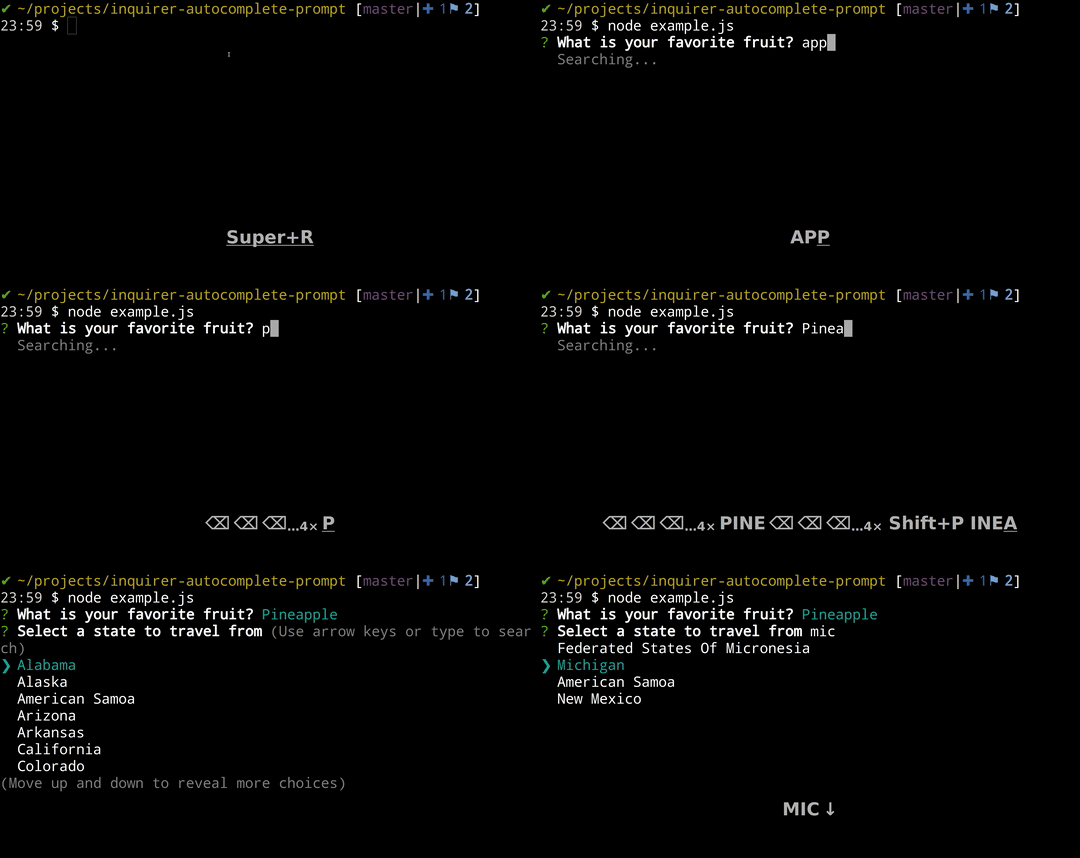
[**autocomplete**](https://github.com/mokkabonna/inquirer-autocomplete-prompt)<br>
Presents a list of options as the user types, compatible with other packages such as fuzzy (for search)<br>
<br>
[**checkbox-plus**](https://github.com/faressoft/inquirer-checkbox-plus-prompt)<br>
Checkbox list with autocomplete and other additions<br>
<br>

[**inquirer-date-prompt**](https://github.com/haversnail/inquirer-date-prompt)<br>
Customizable date/time selector with localization support<br>
<br>

[**datetime**](https://github.com/DerekTBrown/inquirer-datepicker-prompt)<br>
Customizable date/time selector using both number pad and arrow keys<br>
<br>

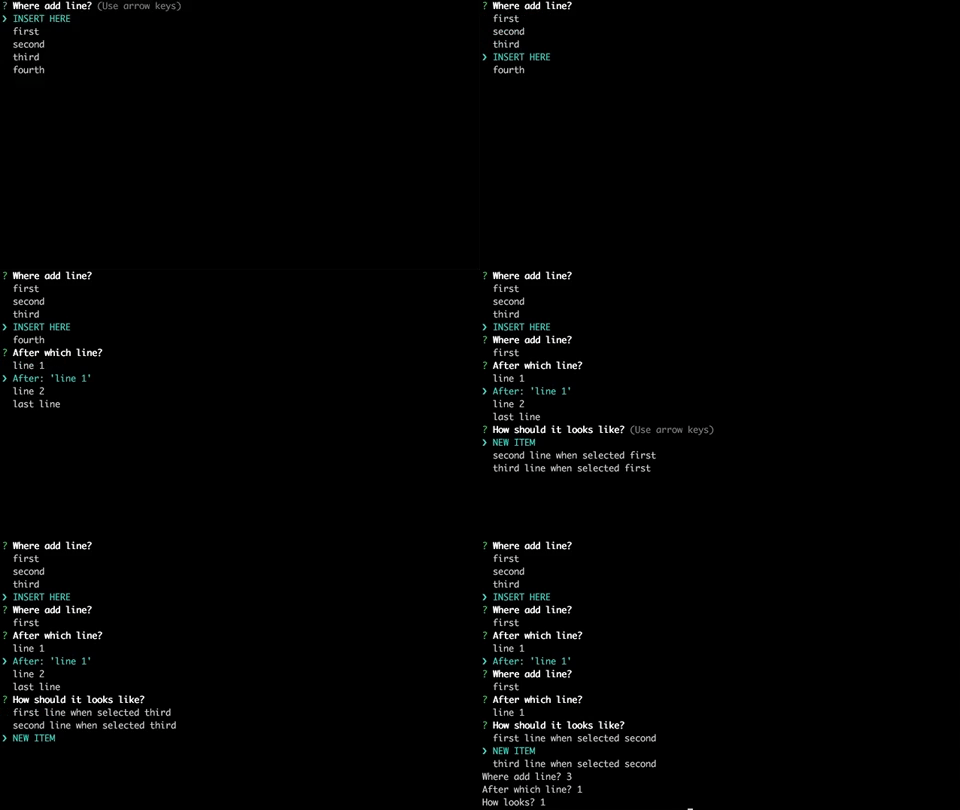
[**inquirer-select-line**](https://github.com/adam-golab/inquirer-select-line)<br>
Prompt for selecting index in array where add new element<br>
<br>
[**command**](https://github.com/sullof/inquirer-command-prompt)<br>
Simple prompt with command history and dynamic autocomplete<br>
[**inquirer-fuzzy-path**](https://github.com/adelsz/inquirer-fuzzy-path)<br>
Prompt for fuzzy file/directory selection.<br>
<br>

[**inquirer-emoji**](https://github.com/tannerntannern/inquirer-emoji)<br>
Prompt for inputting emojis.<br>
<br>

[**inquirer-chalk-pipe**](https://github.com/LitoMore/inquirer-chalk-pipe)<br>
Prompt for input chalk-pipe style strings<br>
<br>

[**inquirer-search-checkbox**](https://github.com/clinyong/inquirer-search-checkbox)<br>
Searchable Inquirer checkbox<br>

[**inquirer-search-list**](https://github.com/robin-rpr/inquirer-search-list)<br>
Searchable Inquirer list<br>
<br>

[**inquirer-prompt-suggest**](https://github.com/olistic/inquirer-prompt-suggest)<br>
Inquirer prompt for your less creative users.<br>
<br>

[**inquirer-s3**](https://github.com/HQarroum/inquirer-s3)<br>
An S3 object selector for Inquirer.<br>
<br>

[**inquirer-autosubmit-prompt**](https://github.com/yaodingyd/inquirer-autosubmit-prompt)<br>
Auto submit based on your current input, saving one extra enter<br>
[**inquirer-file-tree-selection-prompt**](https://github.com/anc95/inquirer-file-tree-selection)<br>
Inquirer prompt for to select a file or directory in file tree<br>
<br>

[**inquirer-tree-prompt**](https://github.com/insightfuls/inquirer-tree-prompt)<br>
Inquirer prompt to select from a tree<br>
<br>

[**inquirer-table-prompt**](https://github.com/eduardoboucas/inquirer-table-prompt)<br>
A table-like prompt for Inquirer.<br>
<br>
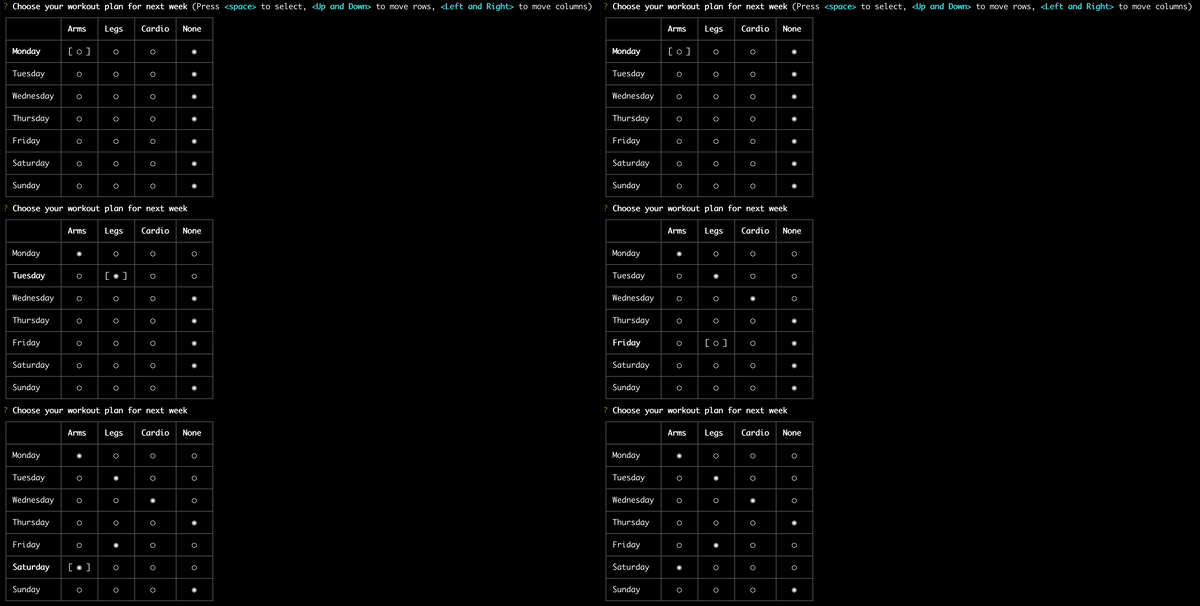
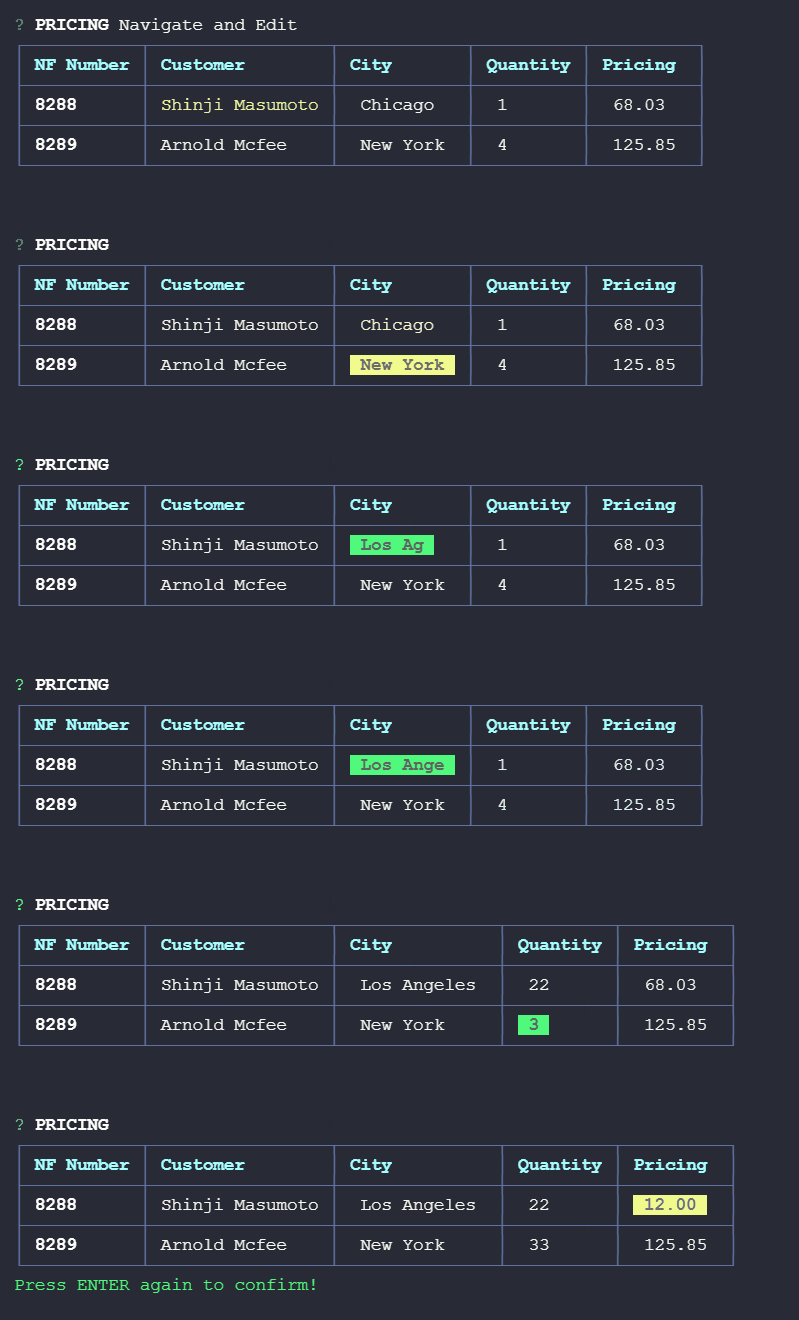
[**inquirer-table-input**](https://github.com/edelciomolina/inquirer-table-input)<br>
A table editing prompt for Inquirer.<br>
<br>
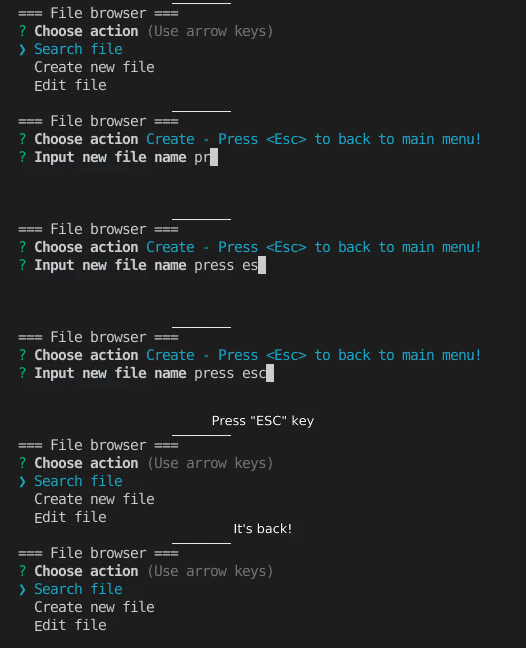
[**inquirer-interrupted-prompt**](https://github.com/lnquy065/inquirer-interrupted-prompt)<br>
Turning any existing inquirer and its plugin prompts into prompts that can be interrupted with a custom key.<br>
<br>
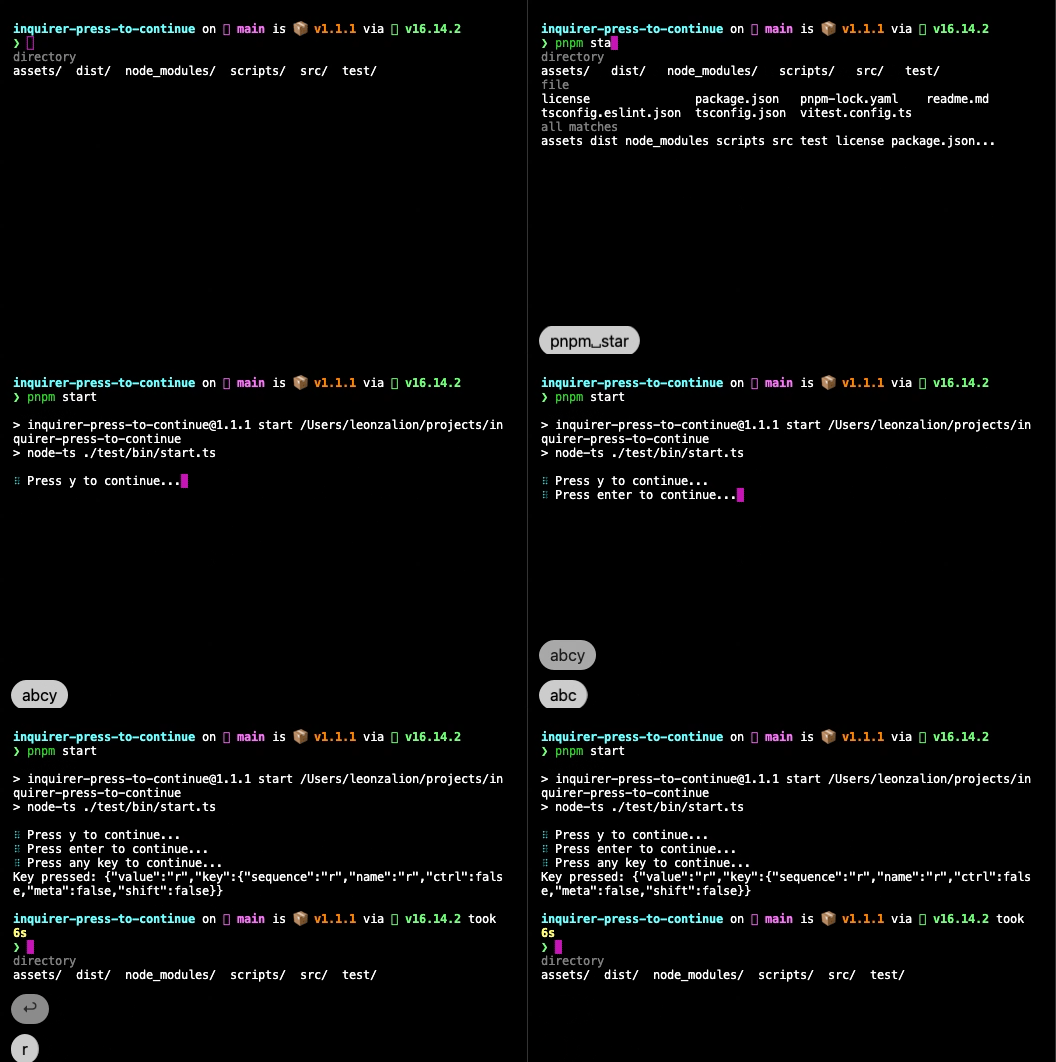
[**inquirer-press-to-continue**](https://github.com/leonzalion/inquirer-press-to-continue)<br>
A "press any key to continue" prompt for Inquirer.js<br>
<br>
number Documentation
packages/number/README.md plugin-manifest ~1,237 tokens# `@inquirer/number`
Interactive free number input component for command line interfaces. Supports validation, filtering, transformation, etc.
# Installation
<table>
<tr>
<th>npm</th>
<th>yarn</th>
</tr>
<tr>
<td>
```sh
npm install @inquirer/prompts
```
</td>
<td>
```sh
yarn add @inquirer/prompts
```
</td>
</tr>
<tr>
<td colSpan="2" align="center">Or</td>
</tr>
<tr>
<td>
```sh
npm install @inquirer/number
```
</td>
<td>
```sh
yarn add @inquirer/number
```
</td>
</tr>
</table>
# Usage
```js
import { number } from '@inquirer/prompts';
// Or
// import number from '@inquirer/number';
const answer = await number({ message: 'Enter your age' });
```
## Options
| Property | Type | Required | Description |
| -------- | -------------------------------------------------------------------------- | -------- | --------------------------------------------------------------------------------------------------------------------------------------------------------------------------------------------------------------------------------------------------------------- |
| message | `string` | yes | The question to ask |
| default | `number` | no | Default value if no answer is provided (clear it by pressing backspace) |
| min | `number` | no | The minimum value to accept for this input. |
| max | `number` | no | The maximum value to accept for this input. |
| step | `number \| 'any'` | no | The step option is a number that specifies the granularity that the value must adhere to. Only values which are equal to the basis for stepping (min if specified) are valid. This value defaults to 1, meaning by default the prompt will only allow integers. |
| required | `boolean` | no | Defaults to `false`. If set to true, `undefined` (empty) will not be accepted for this. |
| validate | `(number \| undefined) => boolean \| string \| Promise<boolean \| string>` | no | On submit, validate the filtered answered content. When returning a string, it'll be used as the error message displayed to the user. Note: returning a rejected promise, we'll assume a code error happened and crash. |
| theme | [See Theming](#Theming) | no | Customize look of the prompt. |
## Theming
You can theme a prompt by passing a `theme` object option. The theme object only need to includes the keys you wish to modify, we'll fallback on the defaults for the rest.
```ts
type Theme = {
prefix: string | { idle: string; done: string };
spinner: {
interval: number;
frames: string[];
};
style: {
answer: (text: string) => string;
message: (text: string, status: 'idle' | 'done' | 'loading') => string;
error: (text: string) => string;
defaultAnswer: (text: string) => string;
};
};
```
# License
Copyright (c) 2023 Simon Boudrias (twitter: [@vaxilart](https://twitter.com/Vaxilart))<br/>
Licensed under the MIT license.
password Documentation
packages/password/README.md plugin-manifest ~833 tokens# `@inquirer/password`
Interactive password input component for command line interfaces. Supports input validation and masked or transparent modes.

# Installation
<table>
<tr>
<th>npm</th>
<th>yarn</th>
</tr>
<tr>
<td>
```sh
npm install @inquirer/prompts
```
</td>
<td>
```sh
yarn add @inquirer/prompts
```
</td>
</tr>
<tr>
<td colSpan="2" align="center">Or</td>
</tr>
<tr>
<td>
```sh
npm install @inquirer/password
```
</td>
<td>
```sh
yarn add @inquirer/password
```
</td>
</tr>
</table>
# Usage
```js
import { password } from '@inquirer/prompts';
// Or
// import password from '@inquirer/password';
const answer = await password({ message: 'Enter your name' });
```
## Options
| Property | Type | Required | Description |
| -------- | ----------------------------------------------------------- | -------- | ----------------------------------------------------------------------------------------------------------------------------------------------------------------------------------------------------------------------- |
| message | `string` | yes | The question to ask |
| mask | `boolean` | no | Show a `*` mask over the input or keep it transparent |
| validate | `string => boolean \| string \| Promise<boolean \| string>` | no | On submit, validate the filtered answered content. When returning a string, it'll be used as the error message displayed to the user. Note: returning a rejected promise, we'll assume a code error happened and crash. |
| theme | [See Theming](#Theming) | no | Customize look of the prompt. |
## Theming
You can theme a prompt by passing a `theme` object option. The theme object only need to includes the keys you wish to modify, we'll fallback on the defaults for the rest.
```ts
type Theme = {
prefix: string | { idle: string; done: string };
spinner: {
interval: number;
frames: string[];
};
style: {
answer: (text: string) => string;
message: (text: string, status: 'idle' | 'done' | 'loading') => string;
error: (text: string) => string;
help: (text: string) => string;
};
};
```
# License
Copyright (c) 2023 Simon Boudrias (twitter: [@vaxilart](https://twitter.com/Vaxilart))<br/>
Licensed under the MIT license.
prompts Documentation
packages/prompts/README.md plugin-manifest ~4,979 tokens<img width="75px" height="75px" align="right" alt="Inquirer Logo" src="https://raw.githubusercontent.com/SBoudrias/Inquirer.js/main/assets/inquirer_readme.svg?sanitize=true" title="Inquirer.js"/>
# Inquirer
[](https://www.npmjs.com/package/@inquirer/prompts)
[](https://app.fossa.com/projects/git%2Bgithub.com%2FSBoudrias%2FInquirer.js?ref=badge_shield)
A collection of common interactive command line user interfaces.

Give it a try in your own terminal!
```sh
npx @inquirer/demo@latest
```
# Installation
<table>
<tr>
<th>npm</th>
<th>yarn</th>
<th>pnpm</th>
<th>bun</th>
</tr>
<tr>
<td>
```sh
npm install @inquirer/prompts
```
</td>
<td>
```sh
yarn add @inquirer/prompts
```
</td>
<td>
```sh
pnpm add @inquirer/prompts
```
</td>
<td>
```sh
bun add @inquirer/prompts
```
</td>
</tr>
</table>
> [!NOTE]
> Inquirer recently underwent a rewrite from the ground up to reduce the package size and improve performance. The previous version of the package is still maintained (though not actively developed), and offered hundreds of community contributed prompts that might not have been migrated to the latest API. If this is what you're looking for, the [previous package is over here](https://github.com/SBoudrias/Inquirer.js/tree/main/packages/inquirer).
# Usage
```js
import { input } from '@inquirer/prompts';
const answer = await input({ message: 'Enter your name' });
```
# Prompts
## [Input](https://github.com/SBoudrias/Inquirer.js/tree/main/packages/input)

```js
import { input } from '@inquirer/prompts';
```
[See documentation](https://github.com/SBoudrias/Inquirer.js/tree/main/packages/input) for usage example and options documentation.
## [Select](https://github.com/SBoudrias/Inquirer.js/tree/main/packages/select)

```js
import { select } from '@inquirer/prompts';
```
[See documentation](https://github.com/SBoudrias/Inquirer.js/tree/main/packages/select) for usage example and options documentation.
## [Checkbox](https://github.com/SBoudrias/Inquirer.js/tree/main/packages/checkbox)

```js
import { checkbox } from '@inquirer/prompts';
```
[See documentation](https://github.com/SBoudrias/Inquirer.js/tree/main/packages/checkbox) for usage example and options documentation.
## [Confirm](https://github.com/SBoudrias/Inquirer.js/tree/main/packages/confirm)

```js
import { confirm } from '@inquirer/prompts';
```
[See documentation](https://github.com/SBoudrias/Inquirer.js/tree/main/packages/confirm) for usage example and options documentation.
## [Search](https://github.com/SBoudrias/Inquirer.js/tree/main/packages/search)

```js
import { search } from '@inquirer/prompts';
```
[See documentation](https://github.com/SBoudrias/Inquirer.js/tree/main/packages/search) for usage example and options documentation.
## [Password](https://github.com/SBoudrias/Inquirer.js/tree/main/packages/password)

```js
import { password } from '@inquirer/prompts';
```
[See documentation](https://github.com/SBoudrias/Inquirer.js/tree/main/packages/password) for usage example and options documentation.
## [Expand](https://github.com/SBoudrias/Inquirer.js/tree/main/packages/expand)


```js
import { expand } from '@inquirer/prompts';
```
[See documentation](https://github.com/SBoudrias/Inquirer.js/tree/main/packages/expand) for usage example and options documentation.
## [Editor](https://github.com/SBoudrias/Inquirer.js/tree/main/packages/editor)
Launches an instance of the users preferred editor on a temporary file. Once the user exits their editor, the content of the temporary file is read as the answer. The editor used is determined by reading the $VISUAL or $EDITOR environment variables. If neither of those are present, the OS default is used (notepad on Windows, vim on Mac or Linux.)
```js
import { editor } from '@inquirer/prompts';
```
[See documentation](https://github.com/SBoudrias/Inquirer.js/tree/main/packages/editor) for usage example and options documentation.
## [Number](https://github.com/SBoudrias/Inquirer.js/tree/main/packages/number)
Very similar to the `input` prompt, but with built-in number validation configuration option.
```js
import { number } from '@inquirer/prompts';
```
[See documentation](https://github.com/SBoudrias/Inquirer.js/tree/main/packages/number) for usage example and options documentation.
## [Raw List](https://github.com/SBoudrias/Inquirer.js/tree/main/packages/rawlist)

```js
import { rawlist } from '@inquirer/prompts';
```
[See documentation](https://github.com/SBoudrias/Inquirer.js/tree/main/packages/rawlist) for usage example and options documentation.
# Internationalization (i18n)
Need prompts in a language other than English? The [`@inquirer/i18n`](https://github.com/SBoudrias/Inquirer.js/tree/main/packages/i18n) package is a drop-in replacement for `@inquirer/prompts` with built-in localization.
The root import automatically detects your locale from the `LANGUAGE`, `LC_ALL`, `LC_MESSAGES`, and `LANG` environment variables (falling back to the `Intl` API). If no supported locale is found, English is used.
```js
// Drop-in replacement — locale is auto-detected from environment variables
import { input, select, confirm } from '@inquirer/i18n';
```
Built-in locales include English, French, Spanish, Chinese (Simplified), and Portuguese. You can also pin to a specific language via sub-path imports (e.g. `@inquirer/i18n/fr`), or use the `createLocalizedPrompts` and `registerLocale` APIs to add your own.
[See the full documentation](https://github.com/SBoudrias/Inquirer.js/tree/main/packages/i18n) for available languages and how to create a custom locale.
# Create your own prompts
The [API documentation is over here](https://github.com/SBoudrias/Inquirer.js/tree/main/packages/core), and our [testing utilities here](https://github.com/SBoudrias/Inquirer.js/tree/main/packages/testing).
# Advanced usage
All inquirer prompts are a function taking 2 arguments. The first argument is the prompt configuration (unique to each prompt). The second is providing contextual or runtime configuration.
The context options are:
| Property | Type | Required | Description |
| ----------------- | ----------------------- | -------- | ------------------------------------------------------------ |
| input | `NodeJS.ReadableStream` | no | The stdin stream (defaults to `process.stdin`) |
| output | `NodeJS.WritableStream` | no | The stdout stream (defaults to `process.stdout`) |
| clearPromptOnDone | `boolean` | no | If true, we'll clear the screen after the prompt is answered |
| signal | `AbortSignal` | no | An AbortSignal to cancel prompts asynchronously |
> [!WARNING]
> When providing an input stream or piping `process.stdin`, it's very likely you need to call `process.stdin.setRawMode(true)`
> before calling inquirer functions. Node.js usually does it automatically, but when we shadow the stdin, Node can loss track
> and not know it has to. If the prompt isn't interactive (arrows don't work, etc), it's likely due to this.
When running Inquirer from an existing `node:readline` interface, pause the readline instance before starting the prompt, then resume it after the prompt settles. This makes the handoff of `process.stdin` ownership explicit and prevents the parent readline loop from losing control of the input stream.
```js
const answer = await rl.question('Command: ');
if (answer === 'configure') {
rl.pause();
try {
const value = await input({ message: 'Configuration value' });
} finally {
rl.resume();
}
}
```
Example:
```js
import { confirm } from '@inquirer/prompts';
const allowEmail = await confirm(
{ message: 'Do you allow us to send you email?' },
{
output: new Stream.Writable({
write(chunk, _encoding, next) {
// Do something
next();
},
}),
clearPromptOnDone: true,
},
);
```
## Canceling prompt
This can be done with either an `AbortController` or `AbortSignal`.
```js
// Example 1: using built-in AbortSignal utilities
import { confirm } from '@inquirer/prompts';
const answer = await confirm({ ... }, { signal: AbortSignal.timeout(5000) });
```
```js
// Example 2: implementing custom cancellation with an AbortController
import { confirm } from '@inquirer/prompts';
const controller = new AbortController();
setTimeout(() => {
controller.abort(); // This will reject the promise
}, 5000);
const answer = await confirm({ ... }, { signal: controller.signal });
```
# Recipes
## Handling `ctrl+c` gracefully
When a user press `ctrl+c` to exit a prompt, Inquirer rejects the prompt promise. This is the expected behavior in order to allow your program to teardown/cleanup its environment. When using `async/await`, rejected promises throw their error. When unhandled, those errors print their stack trace in your user's terminal.
```
ExitPromptError: User force closed the prompt with 0 null
at file://example/packages/core/dist/esm/lib/create-prompt.js:55:20
at Emitter.emit (file://example/node_modules/signal-exit/dist/mjs/index.js:67:19)
at #processEmit (file://example/node_modules/signal-exit/dist/mjs/index.js:236:27)
at #process.emit (file://example/node_modules/signal-exit/dist/mjs/index.js:187:37)
at process.callbackTrampoline (node:internal/async_hooks:130:17)
```
This isn't a great UX, which is why we highly recommend you to handle those errors gracefully.
First option is to wrap your scripts in `try/catch`; like [we do in our demo program](https://github.com/SBoudrias/Inquirer.js/blob/649e78147cbb6390a162ff842d4b21d53a233472/packages/demo/src/index.ts#L89-L95). Or handle the error in your CLI framework mechanism; for example [`Clipanion catch` method](https://mael.dev/clipanion/docs/errors#custom-error-handling).
Lastly, you could handle the error globally with an event listener and silence it.
```ts
process.on('uncaughtException', (error) => {
if (error instanceof Error && error.name === 'ExitPromptError') {
console.log('👋 until next time!');
} else {
// Rethrow unknown errors
throw error;
}
});
```
## Get answers in an object
When asking many questions, you might not want to keep one variable per answer everywhere. In which case, you can put the answer inside an object.
```js
import { input, confirm } from '@inquirer/prompts';
const answers = {
firstName: await input({ message: "What's your first name?" }),
allowEmail: await confirm({ message: 'Do you allow us to send you email?' }),
};
console.log(answers.firstName);
```
## Ask a question conditionally
Maybe some questions depend on some other question's answer.
```js
import { input, confirm } from '@inquirer/prompts';
const allowEmail = await confirm({ message: 'Do you allow us to send you email?' });
let email;
if (allowEmail) {
email = await input({ message: 'What is your email address' });
}
```
## Get default value after timeout
```js
import { input } from '@inquirer/prompts';
const controller = new AbortController();
const timeout = setTimeout(() => {
controller.abort();
}, 5000);
const clearInputTimeout = () => clearTimeout(timeout);
process.stdin.once('keypress', clearInputTimeout);
const answer = await input(
{ message: 'Enter a value (timing out in 5 seconds)' },
{ signal: controller.signal },
)
.catch((error) => {
if (error.name === 'AbortPromptError') {
return 'Default value';
}
throw error;
})
.finally(() => {
clearInputTimeout();
process.stdin.off('keypress', clearInputTimeout);
});
```
## Using as pre-commit/git hooks, or scripts
By default scripts ran from tools like `husky`/`lint-staged` might not run inside an interactive shell. In non-interactive shell, Inquirer cannot run, and users cannot send keypress events to the process.
For it to work, you must make sure you start a `tty` (or "interactive" input stream.)
If those scripts are set within your `package.json`, you can define the stream like so:
```json
"precommit": "my-script < /dev/tty"
```
Or if in a shell script file, you'll do it like so: (on Windows that's likely your only option)
```sh
#!/bin/sh
exec < /dev/tty
node my-script.js
```
## Using with nodemon
When using inquirer prompts with nodemon, you need to pass the `--no-stdin` flag for everything to work as expected.
```sh
npx nodemon ./packages/demo/demos/password.mjs --no-stdin
```
Note that for most of you, you'll be able to use the new watch-mode built-in Node. This mode works out of the box with inquirer.
```sh
# One of depending on your need
node --watch script.js
node --watch-path=packages/ packages/demo/
```
## Wait for config
Maybe some question configuration require to await a value.
```js
import { confirm } from '@inquirer/prompts';
const answer = await confirm({ message: await getMessage() });
```
## Usage with `npx` within bash scripts
You can use Inquirer prompts directly in the shell via [`npx`](https://docs.npmjs.com/cli/v8/commands/npx), which is useful for quick scripts or `package.json` commands.
A community library, [@inquirer-cli](https://github.com/fishballapp/inquirer-cli), exposes each prompt as a standalone CLI.
For example, to prompt for input:
```bash
name=$(npx -y @inquirer-cli/input -r "What is your name?")
echo "Hello, $name!"
```
Or to create an interactive version bump:
```bash
$ npm version $(npx -y @inquirer-cli/select -c patch -c minor -c major 'Select Version')
```
Find out more: [@inquirer-cli](https://github.com/fishballapp/inquirer-cli).
# Community prompts
If you created a cool prompt, [send us a PR adding it](https://github.com/SBoudrias/Inquirer.js/edit/main/packages/prompts/README.md) to the list below!
[**Interactive List Prompt**](https://github.com/pgibler/inquirer-interactive-list-prompt)<br/>
Select a choice either with arrow keys + Enter or by pressing a key associated with a choice.
```
? Choose an option:
> Run command (D)
Quit (Q)
```
[**Action Select Prompt**](https://github.com/zenithlight/inquirer-action-select)<br/>
Choose an item from a list and choose an action to take by pressing a key.
```
? Choose a file Open <O> Edit <E> Delete <X>
❯ image.png
audio.mp3
code.py
```
[**Table Multiple Prompt**](https://github.com/Bartheleway/inquirer-table-multiple)<br/>
Select multiple answer from a table display.
```sh
Choose between choices? (Press <space> to select, <Up and Down> to move rows,
<Left and Right> to move columns)
┌──────────┬───────┬───────┐
│ 1-2 of 2 │ Yes? │ No? |
├──────────┼───────┼───────┤
│ Choice 1 │ [ ◯ ] │ ◯ |
├──────────┼───────┼───────┤
│ Choice 2 │ ◯ │ ◯ |
└──────────┴───────┴───────┘
```
[**Toggle Prompt**](https://github.com/skarahoda/inquirer-toggle)<br/>
Confirm with a toggle. Select a choice with arrow keys + Enter.
```
? Do you want to continue? no / yes
```
[**Sortable Checkbox Prompt**](https://github.com/th0r/inquirer-sortable-checkbox)<br/>
The same as built-in checkbox prompt, but also allowing to reorder choices using ctrl+up/down.
```
? Which PRs and in what order would you like to merge? (Press <space> to select, <a> to toggle all, <i> to invert selection, <ctrl+up> to move item up, <ctrl+down> to move item down, and <enter> to proceed)
❯ ◯ PR 1
◯ PR 2
◯ PR 3
```
[**Multi Select Prompt**](https://github.com/jeffwcx/inquirer-select-pro)
An inquirer select that supports multiple selections and filtering/searching.
```
? Choose your OS, IDE, PL, etc. (Press <tab> to select/deselect, <backspace> to remove selected
option, <enter> to select option)
>> vue
>[ ] vue
[ ] vuejs
[ ] fuelphp
[ ] venv
[ ] vercel
(Use arrow keys to reveal more options)
```
[**File Selector Prompt**](https://github.com/br14n-sol/inquirer-file-selector)<br/>
A file selector, you can navigate freely between directories, choose what type of files you want to allow and it is fully customizable.
```sh
? Select a file:
/main/path/
├── folder1/
├── folder2/
├── folder3/
├── file1.txt
├── file2.pdf
└── file3.jpg (not allowed)
━━━━━━━━━━━━━━━━━━━━━━━━━━━━━━━━━━━━━━━━━━━━━━━━━━━━━━━━━
Use ↑↓ to navigate through the list
Press <esc> to navigate to the parent directory
Press <enter> to select a file or navigate to a directory
```
[**Select Prompt with Stateful Banner**](https://github.com/patik/inquirer-select-with-state)<br/>
The same as built-in select prompt, but it also displays a banner above the prompt which can be updated with a `setState` function. For example, it can display the results of a long-running command without making the user wait to see the prompt.
Initial display:
```
Directory size: loading...
? Choose an option
❯ Rename
Copy
Delete
```
A moment later:
```
Directory size: 123M
? Choose an option
❯ Rename
Copy
Delete
```
[**Ordered Checkbox Prompt**](https://github.com/kyou-izumi/inquirer-ordered-checkbox)<br/>
A sortable checkbox prompt that maintains the order of selection. Perfect for prioritizing tasks or ranking options.
```
? Configure your development workflow:
[1] Set up CI/CD pipeline
❯ [3] Code quality tools
[ ] Documentation
[2] Performance monitoring
──────────────
- Legacy system (disabled)
(Linting, formatting, and analysis)
```
[**Checkbox Plus Plus Prompt**](https://github.com/behnamazimi/inquirer-checkbox-plus-plus)<br/>
A modern multiselect checkbox prompt with search and filter capabilities, highlighting, autocomplete, and improved UX. Supports both ESM and CommonJS and is compatible with @inquirer/core v10+.
```
? Select colors [searching: "re"]
❯ ◉ The red color
◯ The green color
◉ The purple color
◯ The orange color
↑↓ navigate • space de/select • type search • 2 selected • ⏎ submit
```
[**Tree Prompt**](https://github.com/3z3qu13l/inquirer-tree-prompt)<br/>
Navigate a tree of choices, expanding and collapsing branches with the arrow keys. Children can be loaded lazily, and single or multiple items can be selected.
```
? Where is my phone?
▼ in the house
▼ in the living room
❯ on the sofa
on the TV cabinet
▶ in the bedroom
in the bathroom
▶ in the car
----------------
```
# License
Copyright (c) 2023 Simon Boudrias (twitter: [@vaxilart](https://twitter.com/Vaxilart))<br/>
Licensed under the MIT license.
rawlist Documentation
packages/rawlist/README.md plugin-manifest ~1,072 tokens# `@inquirer/rawlist`
Simple interactive command line prompt to display a raw list of choices (single value select) with minimal interaction.

# Installation
<table>
<tr>
<th>npm</th>
<th>yarn</th>
</tr>
<tr>
<td>
```sh
npm install @inquirer/prompts
```
</td>
<td>
```sh
yarn add @inquirer/prompts
```
</td>
</tr>
<tr>
<td colSpan="2" align="center">Or</td>
</tr>
<tr>
<td>
```sh
npm install @inquirer/rawlist
```
</td>
<td>
```sh
yarn add @inquirer/rawlist
```
</td>
</tr>
</table>
# Usage
```js
import { rawlist } from '@inquirer/prompts';
// Or
// import rawlist from '@inquirer/rawlist';
const answer = await rawlist({
message: 'Select a package manager',
choices: [
{ name: 'npm', value: 'npm' },
{ name: 'yarn', value: 'yarn' },
{ name: 'pnpm', value: 'pnpm' },
],
});
```
## Options
| Property | Type | Required | Description |
| -------- | ----------------------- | -------- | --------------------------------------------------------------------------------------------------------------------------------- |
| message | `string` | yes | The question to ask |
| choices | `Choice[]` | yes | List of the available choices. |
| loop | `boolean` | no | Defaults to `true`. When set to `false`, the cursor will be constrained to the top and bottom of the choice list without looping. |
| default | `Value` | no | The value of the choice to preselect. If the value is not found, no choice is preselected. |
| theme | [See Theming](#Theming) | no | Customize look of the prompt. |
`Separator` objects can be used in the `choices` array to render non-selectable lines in the choice list. By default it'll render a line, but you can provide the text as argument (`new Separator('-- Dependencies --')`). This option is often used to add labels to groups within long list of options.
### `Choice` object
The `Choice` object is typed as
```ts
type Choice<Value> = {
value: Value;
name?: string;
short?: string;
key?: string;
description?: string;
};
```
Here's each property:
- `value`: The value is what will be returned by `await rawlist()`.
- `name`: This is the string displayed in the choice list.
- `short`: Once the prompt is done (press enter), we'll use `short` if defined to render next to the question. By default we'll use `name`.
- `key`: The key of the choice. Displayed as `key) name`.
- `description`: Option description which appears below the list when the choice is selected.
`choices` can also be an array of string, in which case the string will be used both as the `value` and the `name`.
## Keybindings
Set `INQUIRER_KEYBINDINGS=vim`, `INQUIRER_KEYBINDINGS=emacs`, or `INQUIRER_KEYBINDINGS=vim,emacs` to enable alternative navigation keybindings globally.
You can override the environment setting per prompt with `theme.keybindings`.
## Theming
You can theme a prompt by passing a `theme` object option. The theme object only need to includes the keys you wish to modify, we'll fallback on the defaults for the rest.
```ts
type Theme = {
prefix: string | { idle: string; done: string };
spinner: {
interval: number;
frames: string[];
};
style: {
answer: (text: string) => string;
message: (text: string, status: 'idle' | 'done' | 'loading') => string;
error: (text: string) => string;
highlight: (text: string) => string;
description: (text: string) => string;
};
keybindings: readonly ('emacs' | 'vim')[];
};
```
# License
Copyright (c) 2023 Simon Boudrias (twitter: [@vaxilart](https://twitter.com/Vaxilart))<br/>
Licensed under the MIT license.
search Documentation
packages/search/README.md plugin-manifest ~1,969 tokens# `@inquirer/search`
Interactive search prompt component for command line interfaces.

# Installation
<table>
<tr>
<th>npm</th>
<th>yarn</th>
</tr>
<tr>
<td>
```sh
npm install @inquirer/prompts
```
</td>
<td>
```sh
yarn add @inquirer/prompts
```
</td>
</tr>
<tr>
<td>
```sh
npm install @inquirer/search
```
</td>
<td>
```sh
yarn add @inquirer/search
```
</td>
</tr>
</table>
# Usage
```js
import { search, Separator } from '@inquirer/prompts';
// Or
// import search, { Separator } from '@inquirer/search';
const answer = await search({
message: 'Select an npm package',
source: async (input, { signal }) => {
if (!input) {
return [];
}
const response = await fetch(
`https://registry.npmjs.org/-/v1/search?text=${encodeURIComponent(input)}&size=20`,
{ signal },
);
const data = await response.json();
return data.objects.map((pkg) => ({
name: pkg.package.name,
value: pkg.package.name,
description: pkg.package.description,
}));
},
});
```
## Options
| Property | Type | Required | Description |
| ------------ | ---------------------------------------------------------- | -------- | ---------------------------------------------------------------------------------------------------------------------------------------------------------------------------------------------------- |
| message | `string` | yes | The question to ask |
| source | `(term: string \| void) => Promise<Choice[]>` | yes | This function returns the choices relevant to the search term. |
| pageSize | `number` | no | By default, lists of choice longer than 7 will be paginated. Use this option to control how many choices will appear on the screen at once. |
| default | `Value` | no | Defines in front of which item the cursor will initially appear. When omitted, the cursor will appear on the first selectable item. |
| initialValue | `string` | no | The value used to pre-populate the search input. `source` will be called with this value as the initial search term. |
| validate | `Value => boolean \| string \| Promise<boolean \| string>` | no | On submit, validate the answer. When returning a string, it'll be used as the error message displayed to the user. Note: returning a rejected promise, we'll assume a code error happened and crash. |
| theme | [See Theming](#Theming) | no | Customize look of the prompt. |
### `source` function
The full signature type of `source` is as follow:
```ts
function(
term: string | void,
opt: { signal: AbortSignal },
): Promise<ReadonlyArray<Choice<Value> | Separator>>;
```
When `term` is `undefined`, it means the search term input is empty. You can use this to return default choices, or return an empty array.
Aside from returning the choices:
1. An `AbortSignal` is passed in to cancel ongoing network calls when the search term change.
2. `Separator`s can be used to organize the list.
### `Choice` object
The `Choice` object is typed as
```ts
type Choice<Value> = {
value: Value;
name?: string;
description?: string;
short?: string;
disabled?: boolean | string;
};
```
Here's each property:
- `value`: The value is what will be returned by `await search()`.
- `name`: This is the string displayed in the choice list.
- `description`: Option for a longer description string that'll appear under the list when the cursor highlight a given choice.
- `short`: Once the prompt is done (press enter), we'll use `short` if defined to render next to the question. By default we'll use `name`.
- `disabled`: Disallow the option from being selected. If `disabled` is a string, it'll be used as a help tip explaining why the choice isn't available.
Choices can also be an array of string, in which case the string will be used both as the `value` and the `name`.
### Validation & autocomplete interaction
The validation within the search prompt acts as a signal for the autocomplete feature.
When a list value is submitted and fail validation, the prompt will compare it to the search term. If they're the same, the prompt display the error. If they're not the same, we'll autocomplete the search term to match the value. Doing this will trigger a new search.
You can rely on this behavior to implement progressive autocomplete searches. Where you want the user to narrow the search in a progressive manner.
Pressing `tab` also triggers the term autocomplete.
You can see this behavior in action in [our search demo](https://github.com/SBoudrias/Inquirer.js/blob/main/packages/demo/src/demos/search.ts).
## Theming
You can theme a prompt by passing a `theme` object option. The theme object only need to includes the keys you wish to modify, we'll fallback on the defaults for the rest.
```ts
type Theme = {
prefix: string | { idle: string; done: string };
spinner: {
interval: number;
frames: string[];
};
style: {
answer: (text: string) => string;
message: (text: string, status: 'idle' | 'done' | 'loading') => string;
error: (text: string) => string;
help: (text: string) => string;
highlight: (text: string) => string;
description: (text: string) => string;
disabled: (text: string) => string;
searchTerm: (text: string) => string;
keysHelpTip: (keys: [key: string, action: string][]) => string | undefined;
};
icon: {
cursor: string;
};
};
```
### `theme.style.keysHelpTip`
This function allows you to customize the keyboard shortcuts help tip displayed below the prompt. It receives an array of key-action pairs and should return a formatted string. You can also hook here to localize the labels to different languages.
It can also returns `undefined` to hide the help tip entirely.
```js
theme: {
style: {
keysHelpTip: (keys) => {
// Return undefined to hide the help tip completely.
return undefined;
// Or customize the formatting. Or localize the labels.
return keys.map(([key, action]) => `${key}: ${action}`).join(' | ');
};
}
}
```
## Recipes
### Debounce search
```js
import { setTimeout } from 'node:timers/promises';
import { search } from '@inquirer/prompts';
const answer = await search({
message: 'Select an npm package',
source: async (input, { signal }) => {
await setTimeout(300);
if (signal.aborted) return [];
// Do the search
fetch(...)
},
});
```
# License
Copyright (c) 2024 Simon Boudrias (twitter: [@vaxilart](https://twitter.com/Vaxilart))<br/>
Licensed under the MIT license.
select Documentation
packages/select/README.md plugin-manifest ~1,541 tokens# `@inquirer/select`
Simple interactive command line prompt to display a list of choices (single select.)

# Installation
<table>
<tr>
<th>npm</th>
<th>yarn</th>
</tr>
<tr>
<td>
```sh
npm install @inquirer/prompts
```
</td>
<td>
```sh
yarn add @inquirer/prompts
```
</td>
</tr>
<tr>
<td colSpan="2" align="center">Or</td>
</tr>
<tr>
<td>
```sh
npm install @inquirer/select
```
</td>
<td>
```sh
yarn add @inquirer/select
```
</td>
</tr>
</table>
# Usage
```js
import { select, Separator } from '@inquirer/prompts';
// Or
// import select, { Separator } from '@inquirer/select';
const answer = await select({
message: 'Select a package manager',
choices: [
{
name: 'npm',
value: 'npm',
description: 'npm is the most popular package manager',
},
{
name: 'yarn',
value: 'yarn',
description: 'yarn is an awesome package manager',
},
new Separator(),
{
name: 'jspm',
value: 'jspm',
disabled: true,
},
{
name: 'pnpm',
value: 'pnpm',
disabled: '(pnpm is not available)',
},
],
});
```
## Options
| Property | Type | Required | Description |
| -------- | ----------------------- | -------- | ------------------------------------------------------------------------------------------------------------------------------------------- |
| message | `string` | yes | The question to ask |
| choices | `Choice[]` | yes | List of the available choices. |
| default | `string` | no | Defines in front of which item the cursor will initially appear. When omitted, the cursor will appear on the first selectable item. |
| pageSize | `number` | no | By default, lists of choice longer than 7 will be paginated. Use this option to control how many choices will appear on the screen at once. |
| loop | `boolean` | no | Defaults to `true`. When set to `false`, the cursor will be constrained to the top and bottom of the choice list without looping. |
| theme | [See Theming](#Theming) | no | Customize look of the prompt. |
`Separator` objects can be used in the `choices` array to render non-selectable lines in the choice list. By default it'll render a line, but you can provide the text as argument (`new Separator('-- Dependencies --')`). This option is often used to add labels to groups within long list of options.
### `Choice` object
The `Choice` object is typed as
```ts
type Choice<Value> = {
value: Value;
name?: string;
description?: string;
short?: string;
disabled?: boolean | string;
};
```
Here's each property:
- `value`: The value is what will be returned by `await select()`.
- `name`: This is the string displayed in the choice list.
- `description`: Option for a longer description string that'll appear under the list when the cursor highlight a given choice.
- `short`: Once the prompt is done (press enter), we'll use `short` if defined to render next to the question. By default we'll use `name`.
- `disabled`: Disallow the option from being selected. If `disabled` is a string, it'll be used as a help tip explaining why the choice isn't available.
`choices` can also be an array of string, in which case the string will be used both as the `value` and the `name`.
## Keybindings
Set `INQUIRER_KEYBINDINGS=vim`, `INQUIRER_KEYBINDINGS=emacs`, or `INQUIRER_KEYBINDINGS=vim,emacs` to enable alternative navigation keybindings globally.
When Vim keybindings are enabled, the prompt disables type-to-search so navigation keys are not interpreted as search input. You can override the environment setting per prompt with `theme.keybindings`.
## Theming
You can theme a prompt by passing a `theme` object option. The theme object only need to includes the keys you wish to modify, we'll fallback on the defaults for the rest.
```ts
type Theme = {
prefix: string | { idle: string; done: string };
spinner: {
interval: number;
frames: string[];
};
style: {
answer: (text: string) => string;
message: (text: string, status: 'idle' | 'done' | 'loading') => string;
error: (text: string) => string;
help: (text: string) => string;
highlight: (text: string) => string;
description: (text: string) => string;
disabled: (text: string) => string;
keysHelpTip: (keys: [key: string, action: string][]) => string | undefined;
};
icon: {
cursor: string;
};
indexMode: 'hidden' | 'number';
keybindings: readonly ('emacs' | 'vim')[];
};
```
### `theme.style.keysHelpTip`
This function allows you to customize the keyboard shortcuts help tip displayed below the prompt. It receives an array of key-action pairs and should return a formatted string. You can also hook here to localize the labels to different languages.
It can also returns `undefined` to hide the help tip entirely.
```js
theme: {
style: {
keysHelpTip: (keys) => {
// Return undefined to hide the help tip completely.
return undefined;
// Or customize the formatting. Or localize the labels.
return keys.map(([key, action]) => `${key}: ${action}`).join(' | ');
};
}
}
```
### `theme.indexMode`
Controls how indices are displayed before each choice:
- `hidden` (default): No indices are shown
- `number`: Display a number before each choice (e.g. "1. Option A")
# License
Copyright (c) 2023 Simon Boudrias (twitter: [@vaxilart](https://twitter.com/Vaxilart))<br/>
Licensed under the MIT license.
testing Documentation
packages/testing/README.md plugin-manifest ~1,861 tokens# `@inquirer/testing`
The `@inquirer/testing` package is Inquirer's answer to testing prompts [built with `@inquirer/core`](https://github.com/SBoudrias/Inquirer.js/tree/main/packages/core).
# Installation
<table>
<tr>
<th>npm</th>
<th>yarn</th>
</tr>
<tr>
<td>
```sh
npm install @inquirer/testing --save-dev
```
</td>
<td>
```sh
yarn add @inquirer/testing --dev
```
</td>
</tr>
</table>
# Usage
This package provides two ways to test Inquirer prompts:
1. **Unit testing** with `render()` - Test individual prompts in isolation
2. **E2E testing** with `screen` - Test full CLI applications that use Inquirer
## Unit Testing with `render()`
The `render()` function creates and instruments a command line interface for testing a single prompt.
```ts
import { render } from '@inquirer/testing';
import input from '@inquirer/input';
describe('input prompt', () => {
it('handle simple use case', async () => {
const { answer, events, getScreen } = await render(input, {
message: 'What is your name',
});
expect(getScreen()).toMatchInlineSnapshot(`"? What is your name"`);
events.type('J');
expect(getScreen()).toMatchInlineSnapshot(`"? What is your name J"`);
events.type('ohn');
events.keypress('enter');
await expect(answer).resolves.toEqual('John');
expect(getScreen()).toMatchInlineSnapshot(`"? What is your name John"`);
});
});
```
### `render()` API
`render` takes 2 arguments:
1. The Inquirer prompt to test (the return value of `createPrompt()`)
2. The prompt configuration (the first prompt argument)
`render` returns a promise that resolves once the prompt is rendered. This promise returns:
- `answer` (`Promise`) - Resolves when an answer is provided and valid
- `getScreen` (`({ raw?: boolean }) => string`) - Returns the current screen content. By default strips ANSI codes
- `nextRender` (`() => Promise<void>`) - Wait for the next screen update. Use after triggering async actions (e.g. pressing enter with validation). Coalesces rapid back-to-back renders so a single `await nextRender()` captures the final settled state
- `events` - Utilities to interact with the prompt:
- `keypress(key: string | KeyObject)` - Trigger a keypress event
- `type(text: string)` - Type text into the prompt
- `getFullOutput` (`() => Promise<string>`) - Returns the full output interpreted through a virtual terminal, resolving ANSI escape sequences into the actual screen state
### Async actions and `nextRender()`
When a keypress triggers an asynchronous action (such as input validation), the screen won't update synchronously. Use `nextRender()` to wait for the prompt to settle before reading the screen:
```ts
import { render } from '@inquirer/testing';
import input from '@inquirer/input';
it('shows a validation error', async () => {
const { answer, events, getScreen, nextRender } = await render(input, {
message: 'Enter a number',
validate: (value) => /^\d+$/.test(value) || 'Must be a number',
});
events.type('abc');
events.keypress('enter');
await nextRender(); // wait for validation to complete and the error to render
expect(getScreen()).toContain('Must be a number');
events.keypress('backspace');
events.keypress('backspace');
events.keypress('backspace');
events.type('42');
events.keypress('enter');
await expect(answer).resolves.toEqual('42');
});
```
### Unit Testing Example
You can refer to the [`@inquirer/input` test suite](https://github.com/SBoudrias/Inquirer.js/blob/main/packages/input/input.test.ts) for a comprehensive unit testing example using `render()`.
## E2E Testing with `screen`
For testing full CLI applications that use Inquirer prompts internally, use the framework-specific entry points:
### Vitest
```ts
import { describe, it, expect } from 'vitest';
import { screen } from '@inquirer/testing/vitest';
// Import your CLI AFTER @inquirer/testing/vitest
import { runMyCli } from './my-cli.js';
describe('my CLI', () => {
it('asks for name and confirms', async () => {
const result = runMyCli();
// First prompt is immediately available
expect(screen.getScreen()).toContain('What is your name?');
screen.type('John');
screen.keypress('enter');
// Wait for next prompt
await screen.next();
expect(screen.getScreen()).toContain('Confirm?');
screen.keypress('enter');
await result;
});
});
```
### Jest
```ts
import { screen } from '@inquirer/testing/jest';
import { runMyCli } from './my-cli.js';
describe('my CLI', () => {
it('asks for name and confirms', async () => {
const result = runMyCli();
// First prompt is immediately available
expect(screen.getScreen()).toContain('What is your name?');
screen.type('John');
screen.keypress('enter');
// Wait for next prompt
await screen.next();
expect(screen.getScreen()).toContain('Confirm?');
screen.keypress('enter');
await result;
});
});
```
### `screen` API
The `screen` object provides:
- `next()` - Wait for the next screen update (prompt transitions, validation errors, async updates). The initial prompt render is available immediately via `getScreen()` — no `next()` needed
- `getScreen({ raw?: boolean })` - Get the current prompt screen content. By default strips ANSI codes
- `getFullOutput({ raw?: boolean })` - Get all accumulated output interpreted through a virtual terminal (returns a `Promise`). By default resolves ANSI escape sequences into actual screen state
- `type(text)` - Type text (writes to stream AND emits keypresses)
- `keypress(key)` - Send a keypress event
- `clear()` - Reset screen state (called automatically before each test)
### Mocking Third-Party Prompts
All `@inquirer/*` prompts are mocked automatically. To mock a third-party or custom prompt package, use `wrapPrompt` in your own mock call:
#### Vitest
```ts
import { screen, wrapPrompt } from '@inquirer/testing/vitest';
vi.mock('@my-company/custom-prompt', async (importOriginal) => {
const actual = await importOriginal<typeof import('@my-company/custom-prompt')>();
return { ...actual, default: wrapPrompt(actual.default) };
});
```
#### Jest
In Jest, `jest.mock()` factories are hoisted before imports, so `wrapPrompt` must be accessed via `jest.requireActual()` inside the factory:
```ts
import { screen } from '@inquirer/testing/jest';
jest.mock('@my-company/custom-prompt', () => {
const { wrapPrompt } = jest.requireActual('@inquirer/testing/jest');
const actual = jest.requireActual('@my-company/custom-prompt');
return { ...actual, default: wrapPrompt(actual.default) };
});
```
### Important Notes
1. **Import order matters**: Import `@inquirer/testing/vitest` or `@inquirer/testing/jest` BEFORE importing modules that use Inquirer prompts
2. **Editor prompt**: The external editor is mocked — `screen.type()` buffers text, and `screen.keypress('enter')` submits it (same pattern as other prompts). Works with both `waitForUserInput: true` and `false`
3. **Sequential prompts**: Multiple prompts are supported, but they must run sequentially (not concurrently)
### E2E Testing Example
You can refer to the [`@inquirer/demo` test suite](https://github.com/SBoudrias/Inquirer.js/blob/main/packages/demo/demo.test.ts) for a comprehensive E2E testing example using `screen`.
# License
Copyright (c) 2023 Simon Boudrias (twitter: [@vaxilart](https://twitter.com/Vaxilart))<br/>
Licensed under the MIT license.
isolate-monorepo-package Documentation
tools/isolate-monorepo-package/README.md plugin-manifest ~506 tokens# isolate-monorepo-package
Tool to isolate a package within a monorepo, locally replicating the release flow to ensure dependencies will work together post build.
Aiming to simulate how packages work once published to npm, it:
1. Auto-discovers all workspace dependencies (direct and transitive)
2. Packs workspace dependencies as tarballs
3. Creates an isolated temp directory with modified package.json
4. Outputs the temp directory path for testing
While it uses `yarn` behind the scenes, it should work with any package manager that supports workspaces.
## Installation
This tool is automatically available in the Inquirer workspace. No separate installation needed.
Let me know if you'd like to see this published.
## Usage
```bash
# Basic usage - outputs the path to isolated directory
isolate-monorepo-package @inquirer/demo
# One-liner approach - CD directly into the isolated directory
cd $(yarn isolate-monorepo-package @inquirer/demo)
yarn set version stable # specific to yarn, this repo isn't setup, so it'll need to know which version to run.
yarn install
yarn test
cd -
# Or with npm
cd $(yarn isolate-monorepo-package @inquirer/demo)
npm install
npm test
cd -
```
## Command Line Options
- `<package-name>`: The workspace package to isolate (required)
- `-v, --verbose`: Show detailed progress information
## Output
The tool outputs only the path to the isolated directory to stdout. All other messages go to stderr, making it easy to capture the path in scripts:
```bash
# Capture path in variable
TEST_DIR=$(isolate-monorepo-package @inquirer/demo)
# Or CD directly
cd $(isolate-monorepo-package @inquirer/demo)
```
## Troubleshooting
If the tool fails:
1. Check that you're in a Yarn workspace (`.yarnrc.yml` must exist)
2. Verify the package name exists in the workspace
3. Use `-v` flag for detailed output
4. Ensure `/tmp/artifacts/` is writable
# License
Copyright (c) 2025 Simon Boudrias (twitter: [@vaxilart](https://twitter.com/Vaxilart))<br/>
Licensed under the MIT license.
package Documentation
tools/package/README.md plugin-manifest ~551 tokens# @sboudrias/package
Package metadata tools for JavaScript packages and monorepos.
# Installation
<table>
<tr>
<th>npm</th>
<th>yarn</th>
<th>pnpm</th>
<th>bun</th>
</tr>
<tr>
<td>
```sh
npm install @sboudrias/package --save-dev
```
</td>
<td>
```sh
yarn add @sboudrias/package --dev
```
</td>
<td>
```sh
pnpm add @sboudrias/package --save-dev
```
</td>
<td>
```sh
bun add @sboudrias/package --dev
```
</td>
</tr>
</table>
# Usage
```bash
package lint
```
`package lint` validates public workspace packages and fixes safe package metadata issues in place.
```bash
package lint --check
```
`package lint --check` runs the same validation without writing files. It exits non-zero when any package needs a fix or has a manual conflict.
# Lint Rules
## Valid Peer Dependencies
Runtime dependencies can declare their own peer dependencies. `package lint` makes those peer requirements visible on the package that uses the runtime dependency.
It adds missing peers to `peerDependencies` and copies matching `peerDependenciesMeta` entries so optional peers stay optional.
## Matching engines
Packages should only advertise Node.js support that their runtime dependencies can also support.
`package lint` sets missing, invalid, or out-of-root-range `engines.node` values to the root package `engines.node` range. It fails when a runtime dependency supports a narrower Node.js range than the package.
That failure is intentional. Bumping a dependency can raise the minimum supported Node.js version and break dependants that still install the package under the previous `engines.node` range. In that case, manually narrow the package engine range or choose a compatible dependency version.
## Ensure package.json is exposed
Packages should expose their manifest for tools that inspect package metadata at runtime.
`package lint` ensures public packages expose `"./package.json": "./package.json"` in `exports`.
# Workspace Discovery
The CLI discovers workspaces from `package.json` `workspaces` fields and `pnpm-workspace.yaml` files.
If no workspaces are configured, the root `package.json` is linted as a single-package project.
Private packages are ignored by default.
Explore Related Technologies & Topics
View All 9,111+ Repositories →Discover similar high-velocity repositories, agent skills, and OpenAPI specifications across the ecosystem.
#cli
Browse cli catalog →
#command-line
Browse command-line catalog →
#javascript
Browse javascript catalog →
#javascript-library
Browse javascript-library catalog →
#node-js
Browse node-js catalog →
#nodejs
Browse nodejs catalog →
🧠 Agent Skills
Prompt & rule files →
⚡ MCP Servers
Model Context Protocol →
🔌 OpenAPI Specs
REST & Swagger schemas →
⚖️ Benchmark
YakaAI vs Alternatives →