# Technical Documentation: yihong0618/running_page
> ℹ️ **Provenance:** Multi-Tier Ingestion · [CodeWiki Reference](https://codewiki.google/github.com/yihong0618/running_page)
### Overview (`README.md`)
## Note
1. clone or Fork before vercel 404 need to pull the latest code
2. python in README means python3 python
3. use v2.0 need change vercel setting from gatsby to vite
4. 2023.09.26 garmin need secret_string(and in Actions) get
```bash
python run_page/get_garmin_secret.py ${email} ${password}
# if cn
python run_page/get_garmin_secret.py ${email} ${password} --is-cn
```
5. 2024.09.29: Added `Elevation Gain` field, If you forked the project before this update, please run the following command:
- To resolve errors: `sqlalchemy.exc.OperationalError: (sqlite3.OperationalError) no such column: activities.elevation_gain`
- If you don't have a local environment, set `RUN_TYPE` to `db_updater` in the `.github/workflows/run_data_sync.yml` file once then change back.
```bash
python run_page/db_updater.py
```
- For old data: To include `Elevation Gain` for past activities, perform a full reimport.
- To show the 'Elevation Gain' column, modify `SHOW_ELEVATION_GAIN` in `src/utils/const.ts`
- note: `Elevation Gain` may be inaccurate. You can use Strava's "Correct Elevation" or Garmin's "Elev Corrections" feature for more precise data.
6. This project now uses MapCN (free) by default. If you choose to use Mapbox, please get your own token. Do not use the project maintainer's token - check this [issue](https://github.com/yihong0618/running_page/issues/643) and [issue #1055](https://github.com/yihong0618/running_page/issues/1055)




English | [简体中文](https://github.com/yihong0618/running_page/blob/master/README-CN.md) | [Wiki](https://mfydev.github.io/Running-Page-Wiki/)
## [Runner's Page Show](https://github.com/yihong0618/running_page/issues/12)
Running page runners
| Runner | page | App |
| ---------------------------------------------------- | ---------------------------------------------- | ----------- |
| [zhubao315](https://github.com/zhubao315) | | Strava |
| [shaonianche](https://github.com/shaonianche) | | Strava |
| [yihong0618](https://github.com/yihong0618) | | Nike |
| [superleeyom](https://github.com/superleeyom) | | Strava |
| [geekplux](https://github.com/geekplux) | | Nike |
| [guanlan](https://github.com/guanlan) | | Strava |
| [tuzimoe](https://github.com/tuzimoe) | | Nike |
| [ben_29](https://github.com/ben-29) | | Strava |
| [kcllf](https://github.com/kcllf) | | Garmin-cn |
| [mq](https://github.com/MQ-0707) | | Keep |
| [zhaohongxuan](https://github.com/zhaohongxuan) | | Strava |
| [yvetterowe](https://github.com/yvetterowe) | | Strava |
| [love-exercise](https://github.com/KaiOrange) | | Keep |
| [zstone12](https://github.com/zstone12) | | Keep |
| [Lax](https://github.com/Lax) | | Keep |
| [lusuzi](https://github.com/lusuzi) | | Nike |
| [wh1994](https://github.com/wh1994) | | Garmin |
| [liuyihui](https://github.com/YiHui-Liu) | | Keep |
| [sunyunxian](https://github.com/sunyunxian) | | Strava |
| [AhianZhang](https://github.com/AhianZhang) | | Nike |
| [L1cardo](https://github.com/L1cardo) | | Nike |
| [luckylele666](https://github.com/luckylele666) | | Strava |
| [MFYDev](https://github.com/MFYDev) | | Garmin-cn |
| [Eished](https://github.com/eished) | | Keep |
| [Liuxin](https://github.com/liuxindtc) | | Nike |
| [loucx](https://github.com/loucx) | | Nike |
| [winf42](https://github.com/winf42) | | Garmin-cn |
| [sun0225SUN](https://github.com/sun0225SUN) | | Nike |
| [Zhan](https://www.zlog.in/about/) | | Nike |
| [Dennis](https://run.domon.cn) | | Garmin-cn |
| [hanpei](https://running.nexts.top) | | Garmin-cn |
| [liugezhou](https://github.com/liugezhou) | | Strava |
| [Jason Tan](https://github.com/Jason-cqtan) | | Nike |
| [Conge](https://github.com/conge) | | Strava |
| [zHElEARN](https://github.com/zHElEARN) | | Strava |
| [Ym9i](https://github.com/Ym9i) | | Strava |
| [jianchengwang](https://github.com/jianchengwang) | | Suunto |
| [fxbin](https://github.com/fxbin) | | Keep |
| [shensl4499](https://github.com/shensl4499) | | codoon |
| [haowei93](https://github.com/haowei93) | | gpx |
| [stevenash0822](https://github.com/stevenash0822) | | Strava |
| [Vint](https://github.com/VintLin) | | Keep |
| [Muyids](https://github.com/muyids) | | Garmin-cn |
| [Gao Hao](https://github.com/efish2002) | | Garmin-cn |
| [Jinlei](https://github.com/iamjinlei0312) | | 咕咚 |
| [RealTiny656](https://github.com/tiny656) | | JoyRun |
| [EINDEX](https://github.com/eindex) | | Strava/Nike |
| [Melt](https://github.com/fpGHwd) | | Strava |
| [deepinwine](https://github.com/deepinwine) | | Garmin-cn |
| [Echo](https://github.com/donghao526) | | JoyRun |
| [Jeffggmm](https://github.com/Jeffggmm) | | Garmin |
| [s1smart](https://github.com/s1smart) | | Strava |
| [XmchxUp](https://github.com/XmchxUp) | | Strava |
| [Ryan](https://github.com/85Ryan) | | Strava |
| [PPZ](https://github.com/8824PPZ) | | Strava |
| [Yer1k](https://github.com/Yer1k) | | Strava |
| [AlienVision](https://github.com/weaming) | | Strava |
| [闻笑忘](https://wenxiaowan.com) | | 苹果健身 |
| [Vensent](https://github.com/Vensent) | | Garmin |
| [Zeonsing](https://github.com/NoonieBao) | | Coros |
| [yaoper](https://github.com/yaoper) | | codoon |
| [NoZTurn](https://github.com/NoZTurn) | | Strava |
| [laqieer](https://github.com/laqieer) | | Strava |
| [Guoxin](https://github.com/guoxinl) | | Strava |
| [laihj](https://github.com/laihj) | | 苹果健身 |
| [Ginta](https://github.com/mar-heaven) | | Keep |
| [Samuel](https://github.com/SamuelDixxon) | | Keep |
| [Evan](https://github.com/LinghaoChan) | | Keep |
| [Shuqi](https://github.com/zhufengme) | | Garmin |
| [shugoal](https://github.com/shugoal) | | Garmin |
| [Daniel](https://danielyu316.github.io/running_page) | | Codoon |
| [arthurfsy2](https://github.com/arthurfsy2) | | Garmin |
| [JMGutiH](https://github.com/JMGutiH) | | Strava |
| [Bolyn](https://run.wbolyn.com) | | Coros |
| [LeiChen](https://github.com/xthirty77) | | Coros |
| [itrunner](https://itrunner.cn) | | Garmin |
| [maslke](https://github.com/maslke) | | Garmin-cn |
| [Niewei Yang](https://github.com/Niewei-Yang) | | Strava |
| [RUN.LOG](https://github.com/bzzd2001) | | Strava |
| [StoneRicky](https://github.com/StoneRicky) | | COROS |
| [coutureone](https://github.com/coutureone) | | Garmin |
## How it works
## Features
1. GitHub Actions automatically synchronizes running data and generates page displays
2. Support for Vercel (recommended) and GitHub Pages automated deployment
3. React Hooks
4. Mapbox for map display
5. Supports most sports apps such as nike strava...
6. Support for metric and imperial units
7. Terminal UI (TUI) for browsing activities locally
> automatically backup gpx data for easy backup and uploading to other software.
>
> Note: If you don't want to make the data public, you can choose strava's fuzzy processing, or private repositories.
## Support
- **[Garmin](#garmin)**
- **[Garmin-CN](#garmin-cnchina)**
- **[New Way To Sync Nike Run Club](#nike-run-club-new)**
- **[Nike Run Club](#nike-run-club)**
- **[Strava](#strava)**
- **[GPX](#gpx)**
- **[TCX](#tcx)**
- **[FIT](#fit)**
- **[Garmin-CN_to_Garmin(Sync Garmin-CN activities to Garmin Global)](#garmin-cn-to-garmin)**
- **[Nike_to_Strava(Using NRC Run, Strava backup data)](#nike_to_strava)**
- **[Tcx_to_Strava(upload all tcx data to strava)](#tcx_to_strava)**
- **[Tcx_to_Garmin(upload all tcx data to Garmin)](#tcx_to_garmin)**
- **[Gpx_to_Strava(upload all gpx data to strava)](#gpx_to_strava)**
- **[Garmin_to_Strava(Using Garmin Run, Strava backup data)](#garmin_to_strava)**
- **[Strava_to_Garmin(Using Strava Run, Garmin backup data)](#strava_to_garmin)**
- **[COROS](#coros)**
- **[iGPSPORT](#igpsport)**
- **[Joyrun](#joyrun)**
- **[Komoot](#komoot)**
- **[Onelap](#onelap)**
- **[Intervals.icu](#intervalsicu)**
## Download
Clone or fork the repo.
```bash
git clone https://github.com/yihong0618/running_page.git --depth=1
```
## Installation and testing (node >= 20 python >= 3.12)
```bash
pip3 install -r requirements.txt
npm install corepack && corepack enable && pnpm install
pnpm develop
```
Open your browser and visit
## Strava Web Sync
> For when your Strava API application is `inactive` (all OAuth2 requests return 403), you can sync activities through Strava's web endpoints instead.
```bash
# Sync locally (last 7 days by default)
python run_page/strava_web_sync.py --days 7
# Runs only
python run_page/strava_web_sync.py --days 7 --only-run
```
**Getting the JWT:**
1. Log in to [strava.com](https://www.strava.com) in your browser
2. DevTools (F12) → Application → Cookies → `https://www.strava.com`
3. Copy the value of `strava_remember_token` (a long `eyJ...` JWT)
**CI setup:**
- Set `RUN_TYPE` to `strava_web` in the workflow
- Add GitHub Secret `STRAVA_JWT` (the JWT value)
- Optional Variable `STRAVA_WEB_DAYS` (default: 7)
> ⚠️ The JWT expires in ~30 days. Refresh `STRAVA_JWT` by re-copying it from the browser when it does.
## TUI (Terminal UI)
You can browse your activities in the terminal using the built-in Textual TUI.
```bash
# Using make
make tui
# Or run directly with uv
uv run run_page
# Or specify a custom activities.json path
uv run run_page /path/to/your/activities.json
```
Keyboard shortcuts inside TUI:
- `1` / `2` – Switch between List and Stats views
- `←` / `→` – Change year filter
- `↑` / `↓` – Navigate activities
- `y` – Cycle through years
- `t` – Cycle through activity types
- `q` – Quit
## Docker
```bash
# NRC
docker build -t running_page:latest . --build-arg app=NRC --build-arg nike_refresh_token=""
# Garmin
docker build -t running_page:latest . --build-arg app=Garmin --build-arg secret_string=""
# Garmin-CN
docker build -t running_page:latest . --build-arg app=Garmin-CN --build-arg secret_string=""
# Strava
docker build -t running_page:latest . --build-arg app=Strava --build-arg client_id="" --build-arg client_secret="" --build-arg refresh_token=""
# Nike_to_Strava
docker build -t running_page:latest . --build-arg app=Nike_to_Strava --build-arg nike_refresh_token="" --build-arg client_id="" --build-arg client_secret="" --build-arg refresh_token=""
# Keep
docker build -t running_page:latest . --build-arg app=Keep --build-arg keep_phone_number="" --build-arg keep_password=""
# run
docker run -itd -p 80:80 running_page:latest
# visit
Open your browser and visit localhost:80
```
### Imperial Units
* add `--build-arg VITE_USE_IMPERIAL=true` to `docker build ...`
* add `--units imperial` flag to each `python3 run_page/gen_svg.py ...` command in the [Dockerfile](https://github.com/yihong0618/running_page/blob/master/Dockerfile)
## Local sync data
### Modifying Mapbox token
> **Security Notice**: The Mapbox token has been migrated from `src/themes/classic/utils/const.ts` to `config.yml` for better security management.
>
> **For GitHub Actions / Automated Deployment**:
> 1. Go to your repository's **Settings → Secrets and variables → Actions**
> 2. Create a new secret named `MAPBOX_TOKEN` with your Mapbox token value
> 3. The build process automatically injects this token during GitHub Actions workflow execution
> 4. You should NOT commit your token to the repository
>
> **Priority Order**:
> - GitHub Actions Secret (`MAPBOX_TOKEN` env var) takes priority
> - Falls back to `config.yml` mapbox_token if secret is not set
> - Defaults to empty string if neither is available
Set your [Mapbox token](https://www.mapbox.com/) in one of these ways:
**Option 1: GitHub Actions Secret (Recommended for GitHub Pages)**
```bash
# Add MAPBOX_TOKEN to your repository secrets
# No changes needed to config.yml - it will use the secret automatically
```
**Option 2: Local Development with config.yml**
```yaml
# config.yml
mapbox_token: 'pk.eyJ1...your-token-here'
```
**Option 3: Environment Variable (Local Development)**
```bash
export VITE_MAPBOX_TOKEN='pk.eyJ1...your-token-here'
pnpm develop
```
> **Important**: Do not use the project maintainer's token - check this [issue](https://github.com/yihong0618/running_page/issues/643) and [issue #1055](https://github.com/yihong0618/running_page/issues/1055) for security and rate limit concerns.
## Change Default Map Tile Style (Classic Theme)
> If using the **classic** theme, you can customize the map tile style in the classic theme's configuration. The dashboard theme uses Mapbox by default (configured via `config.yml`).
```typescript
const MAP_TILE_VENDOR = 'mapcn'; // Default (free!)
const MAP_TILE_STYLE = 'osm-bright';
const MAP_TILE_ACCESS_TOKEN = ''; // Not needed for MapCN
```
Currently supported `MAP_TILE_VENDOR` options include:
- **"mapcn"** - MapCN map services (FREE, no token required) ⭐ DEFAULT & RECOMMENDED
- **"mapbox"** - Mapbox map services (requires token, has costs)
- **"maptiler"** - MapTiler map services (free tier available)
- **"stadiamaps"** - Stadia Maps services (free tier available)
Using MapCN (Default)
MapCN is a free map tile provider and is now the default. No configuration needed!
Available MapCN styles:
- **osm-bright** - Light OpenStreetMap style (default)
- **osm-liberty** - Alternative light style
- **dark-matter** - Dark theme style
**No access token required! ** 🎉
## Attribution
When using MapCN (Carto Basemaps), please ensure you comply with their attribution requirements:
- Map tiles: © [CARTO](https://carto.com/)
- Map data: © [OpenStreetMap](https://www.openstreetmap.org/copyright) contributors
The project template already includes appropriate attribution in the map display.
## Using Other Providers
If you prefer Mapbox, MapTiler, or Stadia Maps, you can change the vendor:
```typescript
const MAP_TILE_VENDOR = 'mapbox'; // or 'maptiler' or 'stadiamaps'
const MAP_TILE_STYLE = 'dark-v10'; // style for chosen vendor
const MAP_TILE_ACCESS_TOKEN = 'your_access_token_here';
```
Each `MAP_TILE_VENDOR` provides multiple `MAP_TILE_STYLE` options. Ensure the style matches your selected vendor. For available `MAP_TILE_STYLE` names, refer to the classic theme's map configuration.
When using **"mapbox"**, **"maptiler"** or **"stadiamaps"**, you must configure an `ACCESS_TOKEN`. The default token may cause quota limit issues if not replaced.
- **Mapbox**: Register at [https://www.mapbox.com/](https://www.mapbox.com/) (Has usage costs)
- **MapTiler**: Register at [https://cloud.maptiler.com/auth/widget](https://cloud.maptiler.com/auth/widget) (Free tier available)
- **Stadia Maps**: Sign up at [https://client.stadiamaps.com/signup/](https://client.stadiamaps.com/signup/) (Free tier available)
## Theme System (3.0)
Running Page 3.0 introduces a pluggable theme architecture. Built-in themes include **Dashboard** (modern single-page layout) and **Classic** (original multi-page layout).
### Switching Themes
Edit `config.yml` and rebuild:
```yaml
# dashboard | classic | custom
theme_preset: classic
```
> For detailed architecture, theme descriptions, custom theme creation, and the shared core layer API, see **[docs/theme-system.md](docs/theme-system.md)**.
## Custom your page (3.0)
All personalization is done through `config.yml` at the project root. Edit this file directly — no code changes needed.
```yaml
# config.yml
mapbox_token: 'your-token-here' # https://account.mapbox.com
avatar: 'https://...' # Profile avatar URL
locale: zh # zh | en
theme: dark # system | light | dark
theme_preset: dashboard # dashboard | classic | custom
goals:
Run:
yearly: 2000 # Annual distance target (km)
monthly: 150 # Monthly distance target (km)
weekly: 35 # Weekly distance target (km)
unit: distance # distance (km) | time (minutes)
```
- To use Google Analytics, you need to modify the configuration in the `src/utils/analytics.ts` file (if present).
```typescript
const USE_GOOGLE_ANALYTICS = false;
const GOOGLE_ANALYTICS_TRACKING_ID = '';
```
> privacy protection,setting flowing env:
```bash
# ignore distance for each polyline start and end.
IGNORE_START_END_RANGE = 200
# ignore meters for each point in below polyline.
IGNORE_RANGE = 200
# a polyline include point you want to ignore.
IGNORE_POLYLINE = ktjrFoemeU~IorGq}DeB
# Do filter before saving to database, you will lose some data, but you can protect your privacy, when you using public repo. enable for set 1, disable via unset.
IGNORE_BEFORE_SAVING =
```
You can using `Google map` [Interactive Polyline Encoder Utility](https://developers.google.com/maps/documentation/utilities/polylineutility), to making your `IGNORE_POLYLINE`.
### Indoor routes
Activities without GPS keep their original route, subtype and location data.
When selected on the dashboard or classic map, they display the most recent
earlier activity with a usable GPS route and a notice identifying that route.
If no earlier mapped activity exists, no substitute route is shown. This fallback
is only for display; it does not change activity distances, exports or the database.
Configured privacy filters still apply to exported routes.
For SVG posters generated from the database, the grid layout omits activities
whose stored route is empty or NULL. Other layouts retain their dates and distances
in activity totals; they do not borrow the frontend's substitute route.
Previously generated routes already stored in `run_page/data.db` cannot reliably be
distinguished from source routes. Reimport the original activity data to replace them.
## Download your running data
> Download your running data and do not forget to [generate svg in `total` page](#total-data-analysis)
### GPX
Make your GPX data
Copy all your gpx files to GPX_OUT or new gpx files
```bash
python run_page/gpx_sync.py
```
### TCX
Make your TCX data
Copy all your tcx files to TCX_OUT or new tcx files
```bash
python run_page/tcx_sync.py
```
### FIT
Make your FIT data
Copy all your tcx files to FIT_OUT or new fit files
```bash
python run_page/fit_sync.py
```
### Garmin
Get your Garmin data
- If you only want to sync `type running` add args --only-run
- If you only want `tcx` files add args --tcx
- If you only want `fit` files add args --fit
- If you are using Garmin as a data source, it is recommended that you pull the code to your local environment to run and obtain the Garmin secret.
**The Python version must be >=3.12**
#### Get Garmin Secret
Enter the following command in the terminal
```bash
# to get secret_string
python run_page/get_garmin_secret.py ${your email} ${your password}
```
#### Execute Garmin Sync Script
Copy the Secret output in the terminal,If you are using GitHub, please configure **GARMIN_SECRET_STRING** in `GitHub Action`.
```bash
# use this secret_string
python run_page/garmin_sync.py ${secret_string}
```
example:
```bash
python run_page/get_garmin_secret.py xxxxxxxxxxx
```
only-run:
```bash
python run_page/garmin_sync.py xxxxxxxxxxxxxx(secret_string) --only-run
```
### Garmin-CN(China)
Get your Garmin-CN data
- If you only want to sync `type running` add args --only-run
- If you only want `tcx` files add args --tcx
- If you only want `fit` files add args --fit
- If you are using Garmin as a data source, it is recommended that you pull the code to your local environment to run and obtain the Garmin secret.
**The Python version must be >=3.12**
#### Get Garmin CN Secret
Enter the following command in the terminal
```bash
# to get secret_string
python run_page/get_garmin_secret.py ${your email} ${your password} --is-cn
```
#### Execute Garmin CN Sync Script
Copy the Secret output in the terminal,If you are using GitHub, please configure **GARMIN_SECRET_STRING_CN** in GitHub Action.
example:
```bash
python run_page/garmin_sync.py xxxxxxxxx(secret_string) --is-cn
```
only-run:
```bash
python run_page/garmin_sync.py xxxxxxxxxxxxxx(secret_string) --is-cn --only-run
```
### Garmin-CN to Garmin
Sync your Garmin-CN data to Garmin
- If you only want to sync `type running` add args --only-run
**The Python version must be >=3.12**
#### Get Garmin CN Secret
Enter the following command in the terminal
```bash
# to get secret_string
python run_page/get_garmin_secret.py ${your email} ${your password} --is-cn
```
#### Get Garmin Secret
Enter the following command in the terminal
```bash
# to get secret_string
python run_page/get_garmin_secret.py ${your email} ${your password}
```
#### Sync Garmin CN to Garmin
Enter the following command in the terminal
```bash
# to sync garmin-cn to garmin-global
python run_page/garmin_sync_cn_global.py ${garmin_cn_secret_string} ${garmin_secret_string}
```
### Nike Run Club New
Get your Nike Run Club data
> Please note:Due to the discontinuation of Nike Run Club in mainland China, you can only log in through a VPN. Before starting, please ensure that you are using a global non-mainland China proxy, allowing you to access `nike.com` instead of `nike.com.cn`, as shown in the following image.
1. Sign in/Sign up [NikeRunClub](https://www.nike.com/) account
2. after successful login,openF12->Application->localstorage-> copy the content of "access_token" from the value of key`https://www.nike.com`.
3. Execute in the root directory , you should be able to see the image below, and then you can log into your account on the mobile as usual:
```bash
python run_page/nike_sync.py ${access_token}
```
if you want to automate the submission of NRC data, you can refer to [issue692](https://github.com/yihong0618/running_page/issues/692#issuecomment-2218849713).
If you've previously synced activities and want to continue syncing new ones, with `--continue-sync` args
```bash
python run_page/nike_sync.py ${access_token} --continue-sync
```
### Nike Run Club
Get your Nike Run Club data
> Please note: When you choose to deploy running_page on your own server, due to Nike has blocked some IDC's IP band, maybe your server cannot sync Nike Run Club's data correctly and display `403 error`, then you have to change another way to host it.
Get Nike's `refresh_token`
**ALL need to do outside GFW.**
1. Login from this [website](https://unite.nike.com/s3/unite/mobile.html?androidSDKVersion=3.1.0&corsoverride=https%3A%2F%2Funite.nike.com&uxid=com.nike.sport.running.droid.3.8&backendEnvironment=identity&view=login&clientId=VhAeafEGJ6G8e9DxRUz8iE50CZ9MiJMG), open F12 -> XHR -> get the `refresh_token` from login api.
2. copy this `refresh_token` and use it in GitHub Secrets or in command line
3. Execute in the root directory:
```bash
python run_page/nike_sync.py ${nike refresh_token}
```
example:
```bash
python run_page/nike_sync.py eyJhbGciThiMTItNGIw******
```
### Strava
Get your Strava data
> [!NOTE]
> Strava updated its Developer Program in June 2026. If you use Strava as the data source, or upload activities to Strava before syncing, check your app tier in the [Strava API settings dashboard](https://www.strava.com/settings/api). Standard Tier developers need a Strava subscription to access the API; existing Standard Tier developers are affected from June 30, 2026. See [Strava's announcement](https://communityhub.strava.com/insider-journal-9/an-update-to-our-developer-program-13428) for details.
1. Sign in/Sign up [Strava](https://www.strava.com/) account
2. Open after successful Signin [Strava Developers](http://developers.strava.com) -> [Create & Manage Your App](https://strava.com/settings/api)
3. Create `My API Application`: Enter the following information
Created successfully:
4. Use the link below to request all permissions: Replace `${your_id}` in the link with `My API Application` Client ID
```plaintext
https://www.strava.com/oauth/authorize?client_id=${your_id}&response_type=code&redirect_uri=http://localhost/exchange_token&approval_prompt=force&scope=read_all,profile:read_all,activity:read_all,profile:write,activity:write
```
Example:
```plaintext
https://www.strava.com/oauth/authorize?client_id=115321&response_type=code&redirect_uri=http://localhost/exchange_token&approval_prompt=force&scope=read_all,profile:read_all,activity:read_all,profile:write,activity:write
```
5. Get the `code` value in the link
example:
```bash
http://localhost/exchange_token?state=&code=1dab37edd9970971fb502c9efdd087f4f3471e6e&scope=read,activity:write,activity:read_all,profile:write,profile:read_all,read_all
```
`code` value:
```bash
1dab37edd9970971fb502c9efdd087f4f3471e6
```
6. Use `Client_id`、`Client_secret`、`Code` get `refresh_token`: Execute in `Terminal/iTerm`
```bash
curl -X POST https://www.strava.com/oauth/token \
-F client_id=${Your Client ID} \
-F client_secret=${Your Client Secret} \
-F code=${Your Code} \
-F grant_type=authorization_code
```
example:
```bash
curl -X POST https://www.strava.com/oauth/token \
-F client_id=12345 \
-F client_secret=b21******d0bfb377998ed1ac3b0 \
-F code=d09******b58abface48003 \
-F grant_type=authorization_code
```
7. Sync `Strava` data
> The first time you synchronize Strava data you need to change line 12 of the code False to True in strava_sync.py, and then change it to False after it finishes running.
> If you only want to sync `type running` add args --only-run
```bash
python run_page/strava_sync.py ${client_id} ${client_secret} ${refresh_token}
```
References:
-
-
-
### TCX_to_Strava
upload all tcx files to strava
1. follow the strava steps
2. copy all your tcx files to TCX_OUT
3. Execute in the root directory:
```bash
python run_page/tcx_to_strava_sync.py ${client_id} ${client_secret} ${strava_refresh_token}
```
example:
```bash
python run_page/tcx_to_strava_sync.py xxx xxx xxx
or
python run_page/tcx_to_strava_sync.py xxx xxx xxx --all
```
4. if you want to all files add args `--all`
### TCX_to_Garmin
upload all tcx files to garmin
1. follow the garmin steps
2. copy all your tcx files to TCX_OUT
3. Execute in the root directory:
```bash
python3 run_page/tcx_to_garmin_sync.py ${{ secrets.GARMIN_SECRET_STRING_CN }} --is-cn
```
example:
```bash
python run_page/tcx_to_garmin_sync.py xxx --is-cn
or Garmin Global
python run_page/tcx_to_garmin_sync.py xxx
```
4. if you want to all files add args `--all`
### GPX_to_Strava
upload all gpx files to strava
1. follow the strava steps
2. copy all your gpx files to GPX_OUT
3. Execute in the root directory:
```bash
python run_page/gpx_to_strava_sync.py ${client_id} ${client_secret} ${strava_refresh_token}
```
example:
```bash
python run_page/gpx_to_strava_sync.py xxx xxx xxx
or
python run_page/tcx_to_strava_sync.py xxx xxx xxx --all
```
4. if you want to all files add args `--all`
### Nike_to_Strava
Get your Nike Run Club data and upload to strava
1. follow the nike and strava steps
2. Execute in the root directory:
```bash
python run_page/nike_to_strava_sync.py ${nike_refresh_token} ${client_id} ${client_secret} ${strava_refresh_token}
```
example:
```bash
python run_page/nike_to_strava_sync.py eyJhbGciThiMTItNGIw****** xxx xxx xxx
```
### Garmin_to_Strava
Get your Garmin data and upload to strava
1. finish garmin and strava setup
2. Execute in the root directory:
```bash
python run_page/garmin_to_strava_sync.py ${client_id} ${client_secret} ${strava_refresh_token} ${garmin_secret_string} --is-cn
```
e.g.
```bash
python run_page/garmin_to_strava_sync.py xxx xxx xxx xx
```
### Strava_to_Garmin
Get your Strava data and upload to Garmin
1. finish garmin and strava setup, at the same time, you need to add additional strava config in GitHub Actions secret: `secrets.STRAVA_EMAIL`,`secrets.STRAVA_PASSWORD`,`secrets.STRAVA_JWT`, Note: `STRAVA_JWT` is superior to `STRAVA_EMAIL` and `STRAVA_PASSWORD` ,`STRAVA_JWT` is the `strava_remember_token` field of the Strava web login Cookie.
2. Execute in the root directory:
```bash
python run_page/strava_to_garmin_sync.py ${{ secrets.STRAVA_CLIENT_ID }} ${{ secrets.STRAVA_CLIENT_SECRET }} ${{ secrets.STRAVA_CLIENT_REFRESH_TOKEN }} ${{ secrets.GARMIN_SECRET_STRING }} ${{ secrets.STRAVA_EMAIL }} ${{ secrets.STRAVA_PASSWORD }}
```
if your garmin account region is **China**, you need to execute the command:
```bash
python run_page/strava_to_garmin_sync.py ${{ secrets.STRAVA_CLIENT_ID }} ${{ secrets.STRAVA_CLIENT_SECRET }} ${{ secrets.STRAVA_CLIENT_REFRESH_TOKEN }} ${{ secrets.GARMIN_SECRET_STRING_CN }} ${{ secrets.STRAVA_EMAIL }} ${{ secrets.STRAVA_PASSWORD }} ${{ secrets.STRAVA_JWT }} --is-cn
```
If you want to add Garmin Device during sync, you should add `--use_fake_garmin_device` argument, this will add a Garmin Device (Garmin Forerunner 245 by default, and you can change device in `garmin_device_adaptor.py`) in synced Garmin workout record, this is essential when you want to sync the workout record to other APP like Keep, JoyRun etc.
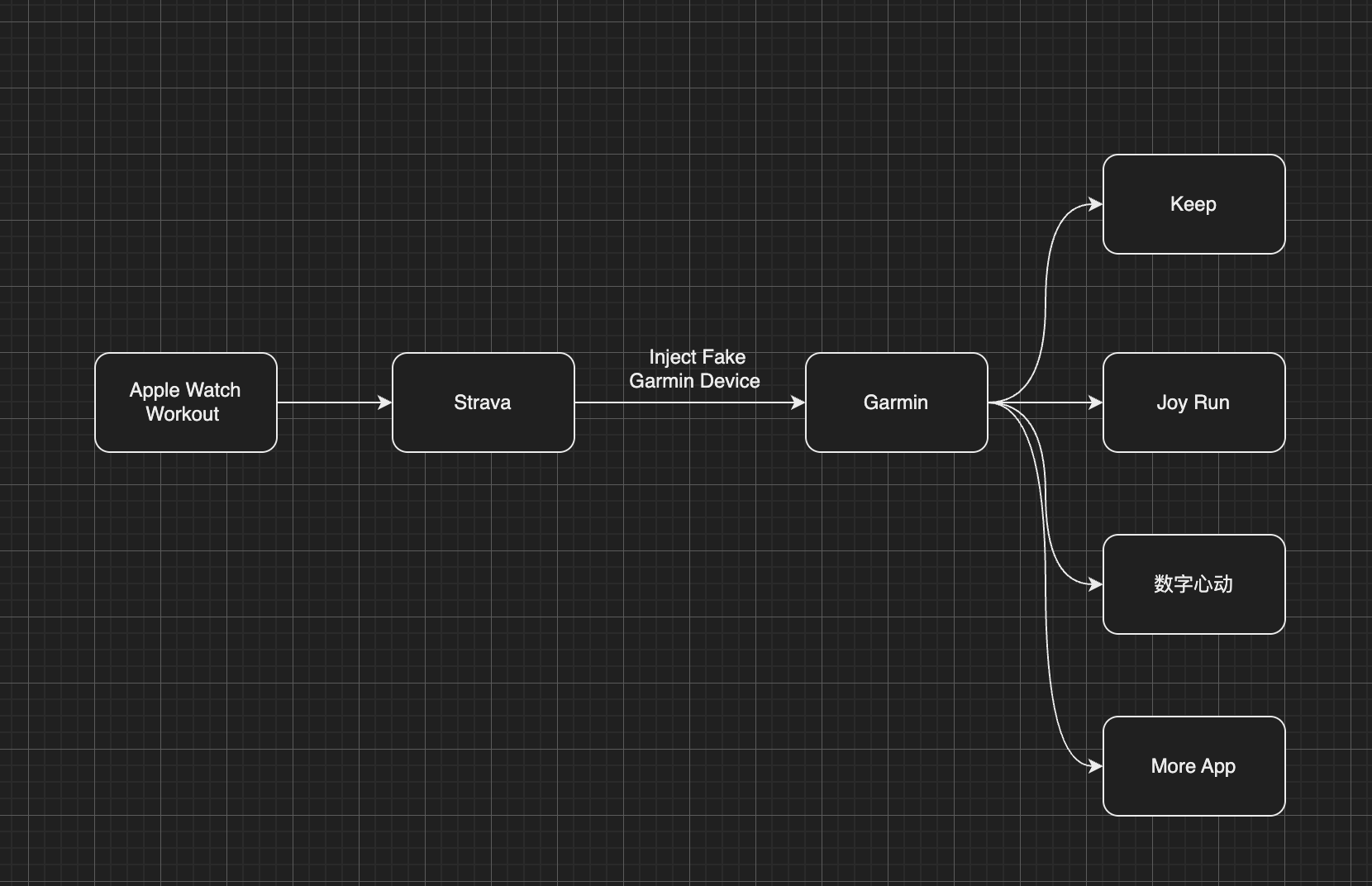 the final command will be:
```bash
python run_page/strava_to_garmin_sync.py ${{ secrets.STRAVA_CLIENT_ID }} ${{ secrets.STRAVA_CLIENT_SECRET }} ${{ secrets.STRAVA_CLIENT_REFRESH_TOKEN }} ${{ secrets.GARMIN_SECRET_STRING_CN }} ${{ secrets.STRAVA_EMAIL }} ${{ secrets.STRAVA_PASSWORD }} ${{ secrets.STRAVA_JWT }}--use_fake_garmin_device
```
ps: **when initializing for the first time, if you have a large amount of strava data, some data may fail to upload, just retry several times.**
the final command will be:
```bash
python run_page/strava_to_garmin_sync.py ${{ secrets.STRAVA_CLIENT_ID }} ${{ secrets.STRAVA_CLIENT_SECRET }} ${{ secrets.STRAVA_CLIENT_REFRESH_TOKEN }} ${{ secrets.GARMIN_SECRET_STRING_CN }} ${{ secrets.STRAVA_EMAIL }} ${{ secrets.STRAVA_PASSWORD }} ${{ secrets.STRAVA_JWT }}--use_fake_garmin_device
```
ps: **when initializing for the first time, if you have a large amount of strava data, some data may fail to upload, just retry several times.**
### COROS
Get your COROS data
- If you only want to sync `type running` add args --only-run
#### Enter the following command in the terminal
```bash
python run_page/coros_sync.py 'your coros account' 'your coros password'
```
#### Modify `run_data_sync.yml` `env.RUN_TYPE: coros`
#### Set the Coros account information in github action
- configure the `COROS_ACCOUNT` , `COROS_PASSWORD`
### iGPSPORT
Get your iGPSPORT data
#### Enter the following command in the terminal
```bash
python3 run_page/igpsport_sync.py 'your igpsport phone' 'password' --with-gpx
```
You can replace `with-gpx` with `with-fit` to acquire data in fit format.
### Joyrun
Get your Joyrun data
#### Enter the following command in the terminal
```bash
python3 run_page/joyrun_sync.py 'your joyrun phone' 'verication code' --with-gpx
```
You can replace `with-gpx` with `with-tcx` to acquire data in tcx format.
### Komoot
Get your Komoot data
#### Enter the following command in the terminal
```bash
python3 run_page/komoot_sync.py 'your komoot email' 'password' --with-gpx
```
| Parameter | Description |
| --- | --- |
| `mail` | Login using specified email address |
| `password` | Use provided password and skip interactive prompt |
| `-n`, `--anonymous` | Skip authentication, no interactive prompt (valid only with `-d`) |
| `--with-gpx` | Download all tours as GPX |
| `-r`, `--remove-deleted` | Remove GPX files (from `--output` dir) without corresponding tour in Komoot (deleted and previous versions) |
| `--start-date=YYYY-MM-DD` | Filter tours on or after specified date |
| `--end-date=YYYY-MM-DD` | Filter tours on or before specified date |
| `-e`, `--no-poi` | Do not include highlights as POIs |
### Onelap
Get your Onelap data
#### Enter the following command in the terminal
```bash
python3 run_page/onelap_sync.py 'your onelap phone' 'password' --with-fit
```
### Intervals.icu
Get your Intervals.icu data
Sync running activities from [Intervals.icu](https://intervals.icu). Downloads original FIT/GPX files.
1. Log in to [Intervals.icu](https://intervals.icu), go to **Settings** → **Developer Settings** to find your **Athlete ID** and create an **API Key**.
2. Execute in the root directory:
```bash
python run_page/intervals_icu_sync.py ${athlete_id} ${api_key}
```
If you want to sync all historical data (default is last 6 months):
```bash
python run_page/intervals_icu_sync.py ${athlete_id} ${api_key} --all
```
To specify a custom start date:
```bash
python run_page/intervals_icu_sync.py ${athlete_id} ${api_key} --start-date 2024-01-01
```
If your data comes from a Huawei/China device using the GCJ-02 coordinate system, add `--gcj02` to fix the coordinate offset (converts GCJ-02 to WGS-84 in downloaded FIT/GPX/TCX files):
```bash
python run_page/intervals_icu_sync.py ${athlete_id} ${api_key} --gcj02
```
#### GitHub Actions
1. Change `RUN_TYPE` to `intervals_icu` in the `run_data_sync.yml` file
2. Add `INTERVALS_ICU_ATHLETE_ID` and `INTERVALS_ICU_API_KEY` to your GitHub repository secrets
### Total Data Analysis
Running data display
- Generate SVG data display
- Display of results:[Click to view](https://raw.githubusercontent.com/yihong0618/running_page/master/assets/github.svg)、[Click to view](https://raw.githubusercontent.com/yihong0618/running_page/28fa801e4e30f30af5ae3dc906bf085daa137936/assets/grid.svg)
```
/* Detailed source-code truncated for AI context efficiency. */
```
Generate github style svg show
```bash
python run_page/gen_svg.py --from-db --title "${{ env.TITLE }}" --type github --athlete "${{ env.ATHLETE }}" --special-distance 10 --special-distance2 20 --special-color yellow --special-color2 red --output assets/github.svg --use-localtime --min-distance 0.5
```
If you want to change the display color of empty data(only github style), please use `--empty-data-color`:
```bash
python run_page/gen_svg.py --from-db --title "${{ env.TITLE }}" --type github --athlete "${{ env.ATHLETE }}" --special-distance 10 --special-distance2 20 --special-color yellow --special-color2 red --output assets/github.svg --use-localtime --min-distance 0.5 ----empty-data-color grey
```
Generate grid style svg show
```bash
python run_page/gen_svg.py --from-db --title "${{ env.TITLE_GRID }}" --type grid --athlete "${{ env.ATHLETE }}" --output assets/grid.svg --min-distance 10.0 --special-color yellow --special-color2 red --special-distance 20 --special-distance2 40 --use-localtime
```
```bash
python run_page/gen_svg.py --from-db --type circular --use-localtime
```
Generate a "Runner Month of Life" visualization as if your entire life consisted of only 1000 months.
```bash
python3 run_page/gen_svg.py --from-db --type monthoflife --birth 1989-03 --special-distance 10 --special-distance2 20 --special-color '#f9d367' --special-color2 '#f0a1a8' --output assets/mol.svg --use-localtime --athlete yihong0618 --title 'Runner Month of Life'
```
Generate your share png using GPT gpt-image-1([last one](./PNG_OUT/share_image_2025-04-29.png))
```bash
python run_page/auto_share_sync.py --api_key xxxxxxxxx --base_url xxxxxxxx
```
If you want to generate a share png for a date
```bash
python run_page/auto_share_sync.py --api_key xxxxxxxxx --base_url xxxxxxxx --date 2023-11-11
```
If you want to auto gen in ci you can refer this [link](https://github.com/yihong0618/run/blob/master/.github/workflows/run_data_sync.yml#L235-242)
For more display effects, see:
## server(recommendation vercel)
Use Vercel to deploy
1. vercel connects to your GitHub repo.
2. import repo
3. Awaiting completion of deployment
4. Visits
Use Cloudflare to deploy
1. Login to [Cloudflare dashboard](https://dash.cloudflare.com).
2. Click `Workers & Pages` on the left side.
3. Click `Create application` and select `Pages` tab, connect your GitHub account and select `running_page` Repo, then click `Begin setup`.
4. Scroll down to `Build settings`, choose `Create React App` from `Framework preset`, and set `Build output directory` to `dist`.
5. Scroll down, click `Environment variables (advanced)`, then add a variable like the below:
> Variable name = `PYTHON_VERSION`, Value = `3.12`
6. Click `Save and Deploy`
Deploy to GitHub Pages
1. Go to repository's `Settings -> GitHub Pages -> Source`, choose `GitHub Actions`
2. Go to the repository's `Actions -> Workflows -> All Workflows`, choose `Run Data Sync` from the left panel, and click `Run workflow`.
- The `Run Data Sync` will update data and then trigger the `Publish GitHub Pages` workflow
- Make sure the workflow runs without errors.
3. Open your website to check on the results
- note if the website doesn't reflect the latest data, please refresh it by `F5`.
- Some browsers (e.g. Chrome) won't refresh if there is a cache, you then need to use `Ctrl+F5` (Windows) or `Shift+Cmd+r` (Mac) to force clearing the cache and reload the page.
4. make sure you have write permissions in Workflow permissions settings.
5. If you want to deploy your running_page to xxx.github.io instead of xxx.github.io/running_page or redirect your GitHub Pages to a custom domain, you need to do three things:
- Rename your forked running_page repository to `xxx.github.io`, where xxx is your GitHub username
- Modify the Build module in gh-pages.yml, remove `${{ github.event.repository.name }}` and change to `run: PATH_PREFIX=/ pnpm build`
- In `config.yml`, set your custom domain URL or leave empty
## GitHub Actions
Modifying information in GitHub Actions
Actions [source code](https://github.com/yihong0618/running_page/blob/master/.github/workflows/run_data_sync.yml)
The following steps need to be taken
1. change to your app type and info
2. Add your secret in repo Settings > Secrets (add only the ones you need).
3. My secret is as follows
4. Go to repository's `Settings -> Code and automation -> Actions ->General`, Scroll to the bottom, find `Workflow permissions`, choose the first option `Read and write permissions`, click `Save`.
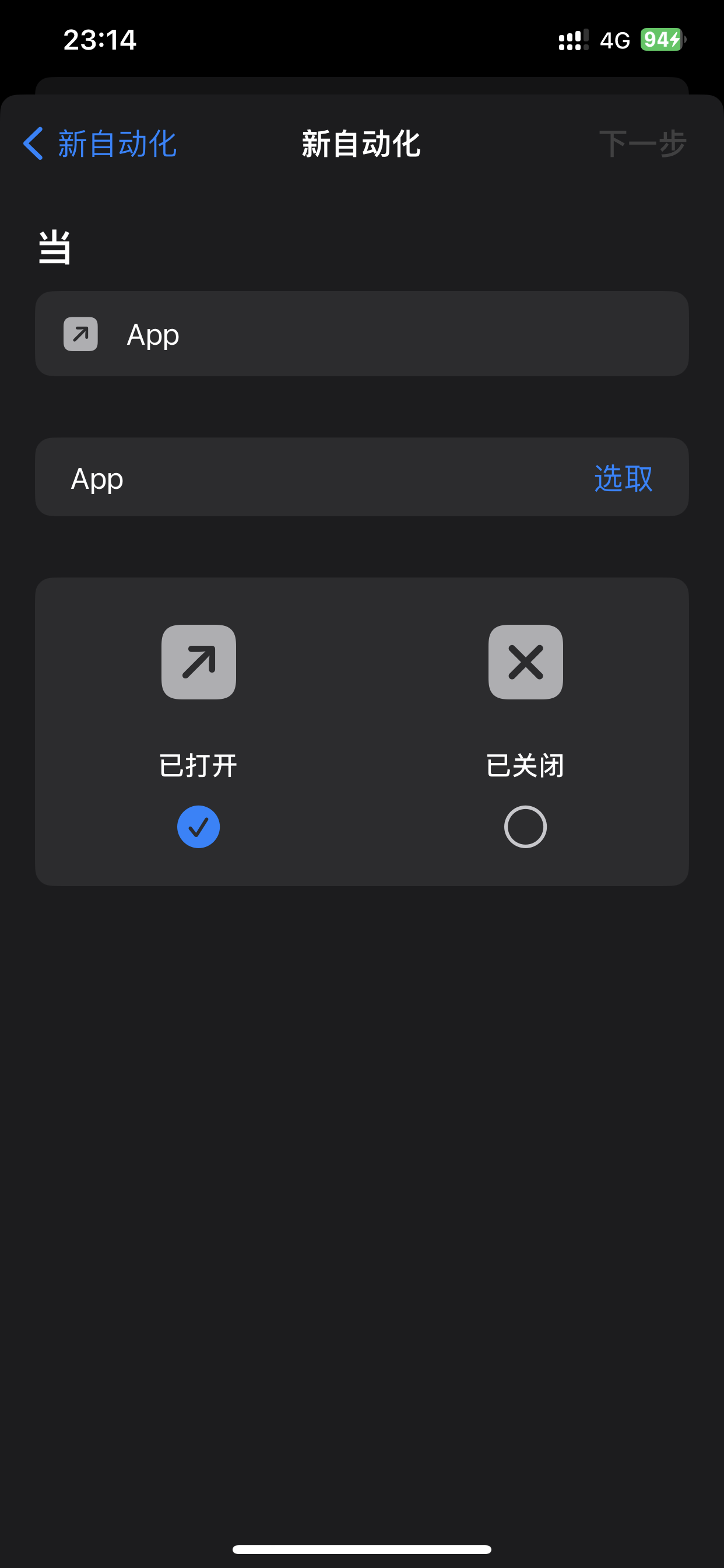
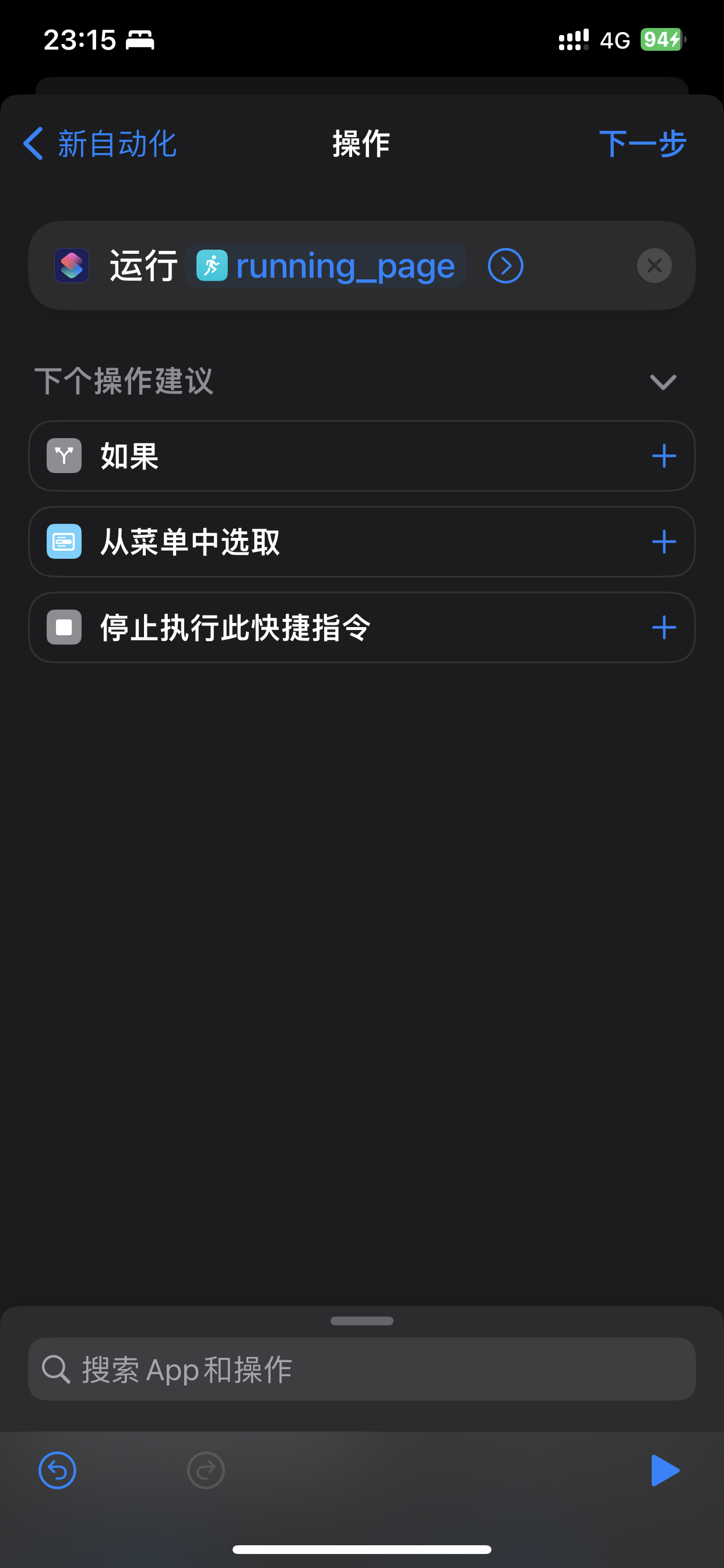
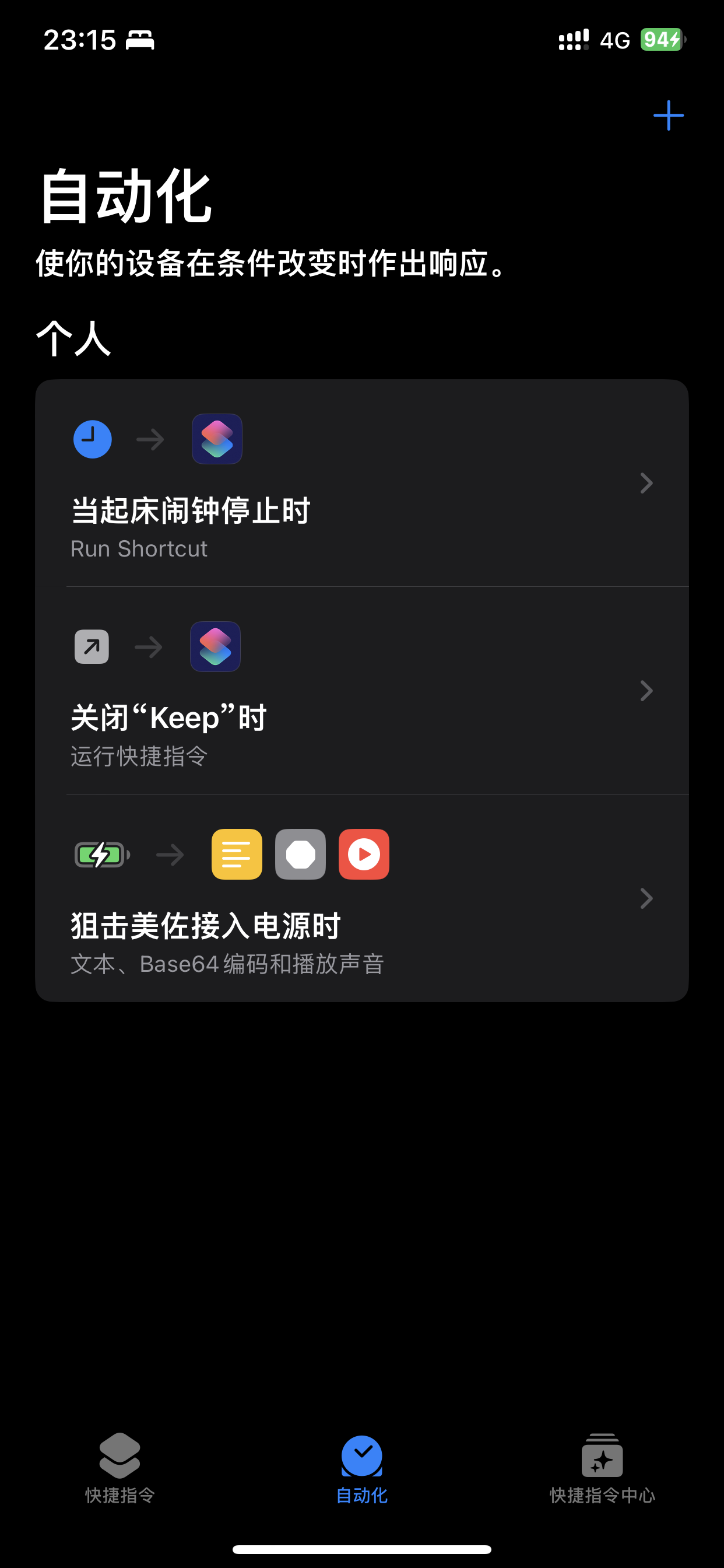
## Shortcuts
Automate with iOS Shortcuts
Take the keep app as an example. Close the app after running, and then automatically trigger Actions to update the data.
1. Get actions id (need to apply token)
```bash
curl https://api.github.com/repos/yihong0618/running_page/actions/workflows -H "Authorization: token d8xxxxxxxxxx" # change to your config
```
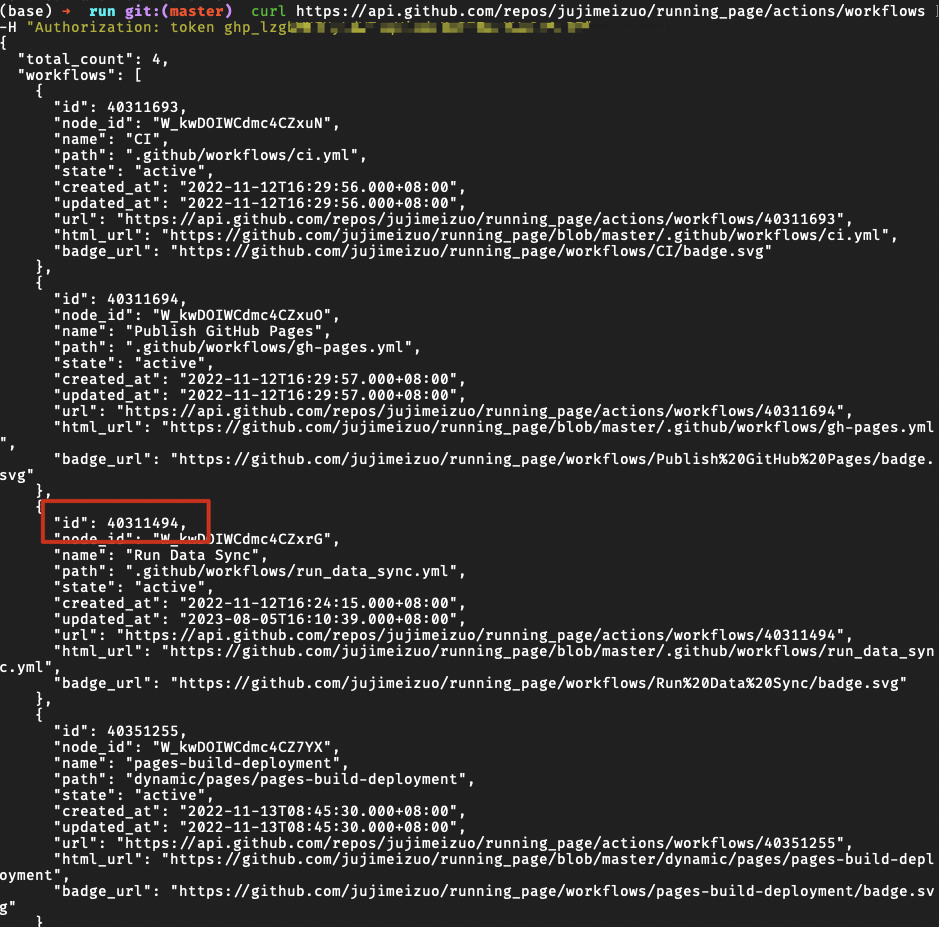 2. Binding shortcut instruction
1. Get it via icloud [running-page-shortcuts-template](https://www.icloud.com/shortcuts/4a5807a98b9a4e359815ff179c62bacb)
2. Modify the dictionary parameters in the following figure
2. Binding shortcut instruction
1. Get it via icloud [running-page-shortcuts-template](https://www.icloud.com/shortcuts/4a5807a98b9a4e359815ff179c62bacb)
2. Modify the dictionary parameters in the following figure
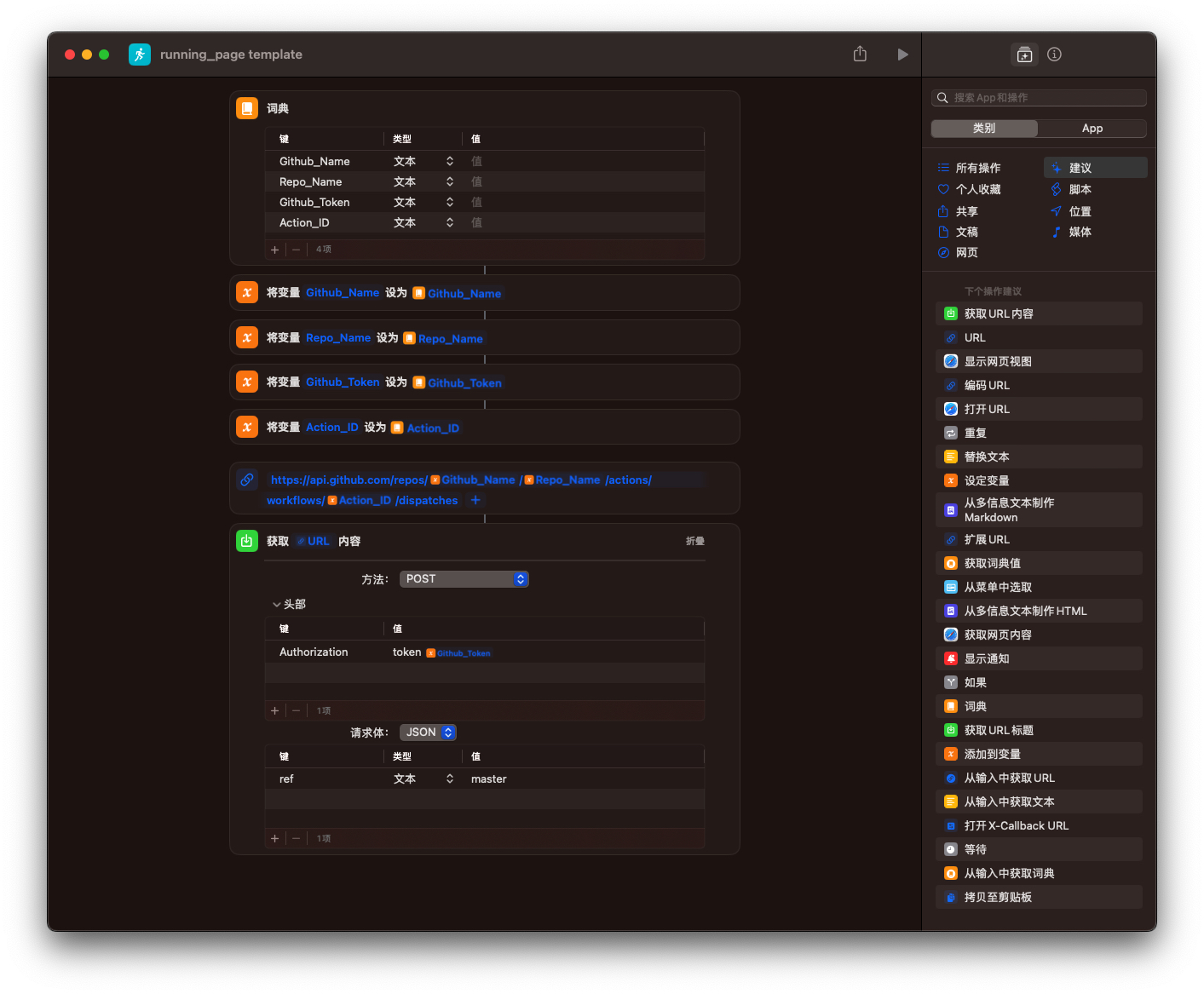 3. Automation
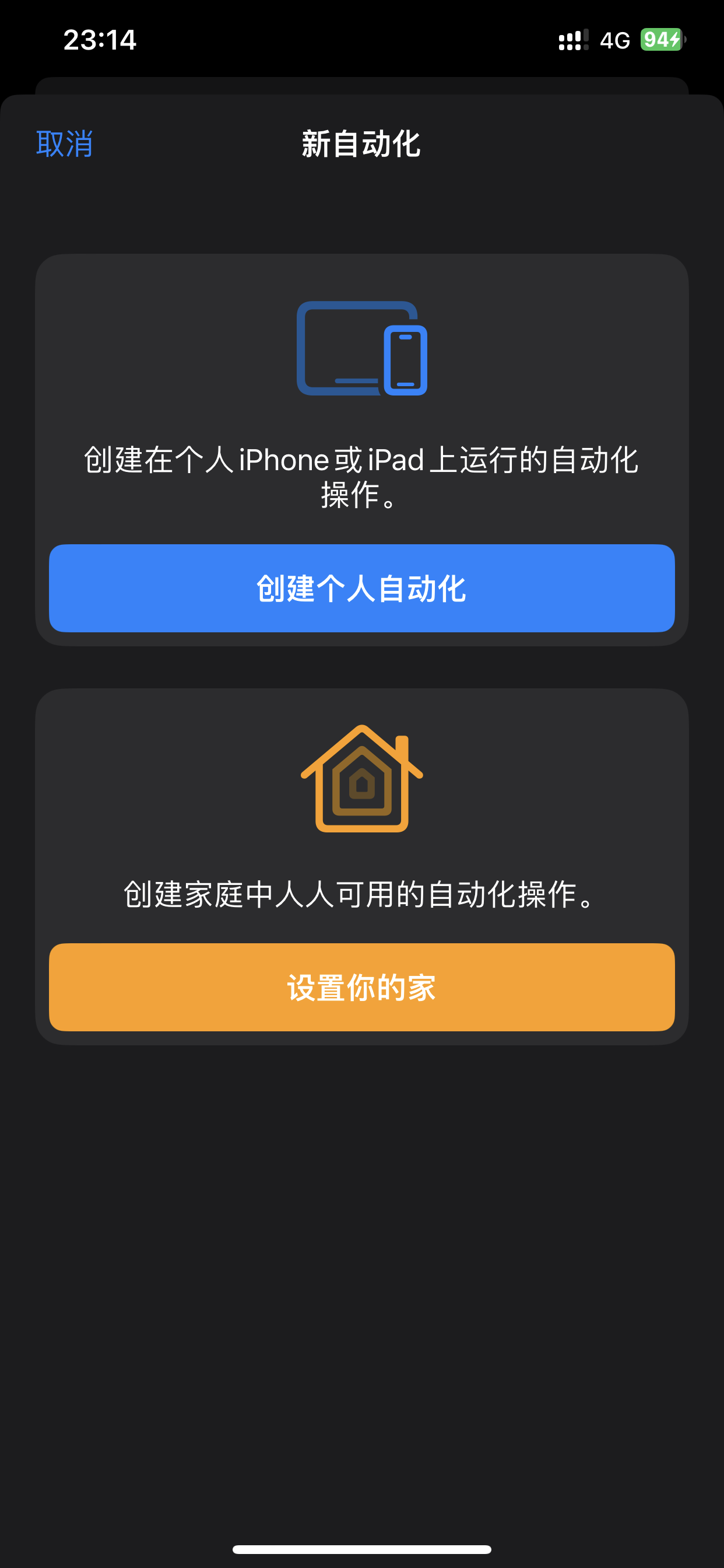
## Storing Data Files in GitHub Cache
Storing Data Files in GitHub Cache
When `SAVE_DATA_IN_GITHUB_CACHE` is set to `true` in the `run_data_sync.yml` file, the script can store fetched and intermediate data files in the GitHub Action Cache. This helps keep your GitHub commit history and directory clean.
If you are deploying using GitHub Pages, it is recommended to set this value to `true`, and set `BUILD_GH_PAGES` to true.
# Fit file
supported manufacturer:
- [x] Garmin
- [x] magene
# TODO
- [x] Complete this document.
- [x] Support Garmin, Garmin China
- [x] support for nike+strava
- [x] Support English
- [x] Refine the code
- [x] add new features
- [ ] tests
- [ ] support the world map
- [ ] support multiple types, like hiking, biking~
- [ ] support for Zeep life
# Contribution
- Any Issues welcome.
- PR need to disscuss first(For LLM year 2026)
- You can PR share your Running page in README I will merge it.
Before submitting PR:
- Format Python code with `black` (`black .`)
# Special thanks
- @[flopp](https://github.com/flopp) great repo [GpxTrackPoster](https://github.com/flopp/GpxTrackPoster)
- @[danpalmer](https://github.com/danpalmer) UI design
- @[shaonianche](https://github.com/shaonianche) icon design and doc
- @[geekplux](https://github.com/geekplux) Friendly help and encouragement, refactored the whole front-end code, learned a lot
- @[MFYDev](https://github.com/MFYDev) Wiki
# Recommended Forks
- @[gongzili456](https://github.com/gongzili456) for [motorcycle version](https://github.com/gongzili456/running_page)
- @[ben-29](https://github.com/ben-29) for [different types support](https://github.com/ben-29/workouts_page)
- @[geekplux](https://github.com/geekplux) for [different types support](https://github.com/geekplux/activities)
# Support
Just enjoy it~
# Raycast Extension
 # FAQ
- Strava API limit
```plaintext
Strava API Rate Limit Exceeded. Retry after 100 seconds
Strava API Rate Limit Timeout. Retry in 799.491622 seconds
```
- vercel git ignore gh-pages:
you can change settings -> build -> Ignored Build Step -> Custom command
```bash
if [ "$VERCEL_GIT_COMMIT_REF" != "gh-pages" ]; then exit 1; else exit 0;
```
---
### Theme System (`docs/theme-system.md`)
# 主题系统 (3.0)
Running Page 3.0 引入了可插拔的主题架构。你可以切换内置主题或创建自己的主题,无需修改源代码。
## 工作原理
主题位于 `src/themes//` 目录下,每个主题导出一个 React 组件。应用入口 (`src/App.tsx`) 维护一个**主题注册表**,将主题名称映射到懒加载的组件:
```typescript
// src/App.tsx
const themes: Record> = {
dashboard: lazy(() => import('./themes/dashboard')),
classic: lazy(() => import('./themes/classic')),
// 在此添加自定义主题
}
```
构建时,`config.yml` 中的 `theme_preset` 决定加载哪个主题。所有主题共享核心层 (`src/core/`)——类型、i18n 翻译、活动数据钩子和语言工具。
## 内置主题
### Dashboard
Dashboard 主题是为跑者设计的现代化单页布局,提供丰富的小部件:
- **统计卡片** — 年度/月度/周度进度条,含连续运动追踪
- **热力图** — GitHub 风格的活动网格,每日详情,支持导出 PNG
- **活动日志** — 分页表格,支持距离筛选(10km+、20km+、40km+),运动类型图标
- **路线地图** — 基于 Mapbox 的路线可视化,点击活动高亮轨迹
- **轨迹墙** — 全页轨迹网格,智能聚类(按起终点),支持导出 PNG
- **中国地图** — 省份级活动热力图,点击筛选
- **个人最佳** — 自动检测 PR(5K、10K、半马、全马)
- **日历小部件** — 月度日历,气泡显示距离
- **深色/浅色模式** — 跟随系统或手动切换
主要特性:
- 所有数据在一个页面展示(无需路由跳转)
- 点击任意活动即可在地图和日志中查看
- 热力图和轨迹墙支持导出为 PNG 图片
- 响应式两栏网格布局
### Classic
Classic 主题保留了原始的多页面布局,每个视图有独立路由。使用 `react-router-dom` 导航和 `react-map-gl` 地图。如果你更喜欢原始风格,或从 v2.x 升级,推荐选择此主题。
> **注意:** 如果你从 v2.x 升级,可在 `config.yml` 中设置 `theme_preset: classic`。
## 创建自定义主题
1. 在 `src/themes//` 下创建新目录,例如 `src/themes/minimal/`
2. 创建 `index.tsx` 导出默认 React 组件
3. 使用共享核心层获取数据和 i18n:
```tsx
// src/themes/minimal/index.tsx
import { getActivityData } from '@/hooks/useActivities'
import { useTheme } from '@/hooks/useTheme'
import { useLocale } from '@/hooks/useLocale'
import type { Activity } from '@/types'
export default function Minimal() {
const activities = getActivityData() as Activity[]
const { t } = useLocale()
// ... 你的自定义布局
}
```
4. 在 `src/App.tsx` 中注册你的主题:
```typescript
const themes = {
dashboard: lazy(() => import('./themes/dashboard')),
classic: lazy(() => import('./themes/classic')),
minimal: lazy(() => import('./themes/minimal')), // 添加这行
}
```
5. 在 `config.yml` 中设置 `theme_preset: minimal`
## 共享核心层 API
所有主题可用的钩子和工具:
| 模块 | 导出 |
|--------|---------|
| `@/hooks/useActivities` | `getActivityData()`、`useFilteredActivities()`、`getAvailableYears()`、`formatDistance()`、`formatPace()`、`formatDuration()`、`parseMovingTime()`、`extractProvince()` |
| `@/hooks/useLocale` | `useLocale()` → `{ t, locale }` 用于 i18n |
| `@/hooks/useTheme` | `useTheme()` → `{ dark, toggle }` 用于深/浅色模式 |
| `@/types` | `Activity`、`SportFilter` 类型 |
| `@/config` | `MAPBOX_TOKEN`、`AVATAR`、`GOALS`、`DEFAULT_LOCALE`、`THEME_PRESET` |
Dashboard 主题的组件 (`src/components/`) 也可复用 —— 如需要可在自定义主题中导入。
---
--- METRICS ---
- Files Extracted: 2
- Estimated Token Budget: ~13031 tokens
- Canonical Reference: https://codewiki.google/github.com/yihong0618/running_page
# FAQ
- Strava API limit
```plaintext
Strava API Rate Limit Exceeded. Retry after 100 seconds
Strava API Rate Limit Timeout. Retry in 799.491622 seconds
```
- vercel git ignore gh-pages:
you can change settings -> build -> Ignored Build Step -> Custom command
```bash
if [ "$VERCEL_GIT_COMMIT_REF" != "gh-pages" ]; then exit 1; else exit 0;
```
---
### Theme System (`docs/theme-system.md`)
# 主题系统 (3.0)
Running Page 3.0 引入了可插拔的主题架构。你可以切换内置主题或创建自己的主题,无需修改源代码。
## 工作原理
主题位于 `src/themes//` 目录下,每个主题导出一个 React 组件。应用入口 (`src/App.tsx`) 维护一个**主题注册表**,将主题名称映射到懒加载的组件:
```typescript
// src/App.tsx
const themes: Record> = {
dashboard: lazy(() => import('./themes/dashboard')),
classic: lazy(() => import('./themes/classic')),
// 在此添加自定义主题
}
```
构建时,`config.yml` 中的 `theme_preset` 决定加载哪个主题。所有主题共享核心层 (`src/core/`)——类型、i18n 翻译、活动数据钩子和语言工具。
## 内置主题
### Dashboard
Dashboard 主题是为跑者设计的现代化单页布局,提供丰富的小部件:
- **统计卡片** — 年度/月度/周度进度条,含连续运动追踪
- **热力图** — GitHub 风格的活动网格,每日详情,支持导出 PNG
- **活动日志** — 分页表格,支持距离筛选(10km+、20km+、40km+),运动类型图标
- **路线地图** — 基于 Mapbox 的路线可视化,点击活动高亮轨迹
- **轨迹墙** — 全页轨迹网格,智能聚类(按起终点),支持导出 PNG
- **中国地图** — 省份级活动热力图,点击筛选
- **个人最佳** — 自动检测 PR(5K、10K、半马、全马)
- **日历小部件** — 月度日历,气泡显示距离
- **深色/浅色模式** — 跟随系统或手动切换
主要特性:
- 所有数据在一个页面展示(无需路由跳转)
- 点击任意活动即可在地图和日志中查看
- 热力图和轨迹墙支持导出为 PNG 图片
- 响应式两栏网格布局
### Classic
Classic 主题保留了原始的多页面布局,每个视图有独立路由。使用 `react-router-dom` 导航和 `react-map-gl` 地图。如果你更喜欢原始风格,或从 v2.x 升级,推荐选择此主题。
> **注意:** 如果你从 v2.x 升级,可在 `config.yml` 中设置 `theme_preset: classic`。
## 创建自定义主题
1. 在 `src/themes//` 下创建新目录,例如 `src/themes/minimal/`
2. 创建 `index.tsx` 导出默认 React 组件
3. 使用共享核心层获取数据和 i18n:
```tsx
// src/themes/minimal/index.tsx
import { getActivityData } from '@/hooks/useActivities'
import { useTheme } from '@/hooks/useTheme'
import { useLocale } from '@/hooks/useLocale'
import type { Activity } from '@/types'
export default function Minimal() {
const activities = getActivityData() as Activity[]
const { t } = useLocale()
// ... 你的自定义布局
}
```
4. 在 `src/App.tsx` 中注册你的主题:
```typescript
const themes = {
dashboard: lazy(() => import('./themes/dashboard')),
classic: lazy(() => import('./themes/classic')),
minimal: lazy(() => import('./themes/minimal')), // 添加这行
}
```
5. 在 `config.yml` 中设置 `theme_preset: minimal`
## 共享核心层 API
所有主题可用的钩子和工具:
| 模块 | 导出 |
|--------|---------|
| `@/hooks/useActivities` | `getActivityData()`、`useFilteredActivities()`、`getAvailableYears()`、`formatDistance()`、`formatPace()`、`formatDuration()`、`parseMovingTime()`、`extractProvince()` |
| `@/hooks/useLocale` | `useLocale()` → `{ t, locale }` 用于 i18n |
| `@/hooks/useTheme` | `useTheme()` → `{ dark, toggle }` 用于深/浅色模式 |
| `@/types` | `Activity`、`SportFilter` 类型 |
| `@/config` | `MAPBOX_TOKEN`、`AVATAR`、`GOALS`、`DEFAULT_LOCALE`、`THEME_PRESET` |
Dashboard 主题的组件 (`src/components/`) 也可复用 —— 如需要可在自定义主题中导入。
---
--- METRICS ---
- Files Extracted: 2
- Estimated Token Budget: ~13031 tokens
- Canonical Reference: https://codewiki.google/github.com/yihong0618/running_page