# Technical Documentation: umijs/umi

> ℹ️ **Provenance:** Multi-Tier Ingestion · [CodeWiki Reference](https://codewiki.google/github.com/umijs/umi)

### Overview (README.md)

# umi

<p>
  <a href="https://www.npmjs.com/package/umi"><img src="https://badgen.net/npm/v/umi" alt="Version" /></a>
  <a href="https://www.npmjs.com/package/umi"><img src="https://badgen.net/npm/dm/umi" alt="Downloads" /></a>
  <a href="https://github.com/umijs/umi"><img src="https://github.com/umijs/umi/workflows/CI/badge.svg?branch=master&event=push" alt="build status" /></a>
  <a href="https://www.npmjs.com/package/umi"><img src="https://badgen.net/npm/license/umi" alt="License" /></a>
</p>

A framework in react community ✨

> Please consider following this project's author, [sorrycc](https://github.com/sorrycc), and consider starring the project to show your ❤️ and support.

### [🚀 Read the launch post →](https://umijs.org/blog/umi-4-rc)

### [📚 Learn Umi →](https://umijs.org/)

## Contribution

See [Contributing Guide](https://umijs.org/docs/introduce/contributing).

### Core Maintainers

Core Maintainers are community members who have contributed significantly to the project through addressing issues, fixing bugs, and implementing enhancements/features.

* [sorrycc](https://github.com/sorrycc)
* [xiaohuoni](https://github.com/xiaohuoni)
* [fireairforce](https://github.com/fireairforce)

### Maintainers

Maintainers are community members who have had 10 or more PRs merged in umi or have spent a lot of time contributing to the umi community or addressing issues.

* [PeachScript](https://github.com/PeachScript)
* [YdreamW](https://github.com/YdreamW)
* [yuaanlin](https://github.com/yuaanlin)
* [fz6m](https://github.com/fz6m)
* [stormslowly](https://github.com/stormslowly)
* [xierenyuan](https://github.com/xierenyuan)
* [siyi98](https://github.com/siyi98)
* [txp1035](https://github.com/txp1035)
* [zenotsai](https://github.com/zenotsai)

### Contributors

Contributors are community members who have had 1 or more PRs merged in umi. If you are a contributor, you can contact me [[sorrycc](https://github.com/sorrycc)] to join the Contributor Group.

<a href="https://github.com/umijs/umi/graphs/contributors"><img src="https://contrib.rocks/image?repo=umijs/umi" alt="Umi contributors" /></a>

## Community

* [交流和反馈群](https://fb.umijs.org/)

## LICENSE

[MIT](./LICENSE)

---

### README (`docs/README.md`)

# UmiJS

A static site base on [dumi](https://d.umijs.org).

## Development

```bash
# install dependencies
$ pnpm install

# start dev server
$ pnpm start

# build docs
$ pnpm run build
```

## LICENSE

MIT

---

### Docs Docs Guides Getting Started (`docs/docs/docs/guides/getting-started.md`)

---
order: -1
toc: content
---
# 快速上手

## 环境准备

首先得有 node，并确保 node 版本是 22 或以上。（推荐用 [nvm](https://github.com/nvm-sh/nvm) 来管理 node 版本，windows 下推荐用 [nvm-windows](https://github.com/coreybutler/nvm-windows)）

mac 或 linux 下安装 nvm。

```bash
$ curl -o- https://raw.githubusercontent.com/nvm-sh/nvm/v0.39.1/install.sh | bash
$ nvm -v
0.40.3
```

安装 node。

```
$ nvm install 22
$ nvm use 22
$ node -v
v22.21.1
```

然后需要包管理工具。node 默认包含 npm，但也可以选择其他方案，

- [pnpm](https://pnpm.io/installation), umi 团队推荐
- [Yarn](https://yarnpkg.com/getting-started/install)

安装 pnpm。

```bash
curl -fsSL https://get.pnpm.io/install.sh | sh -
$ pnpm -v
7.3.0
```

## 创建项目


通过官方工具创建项目，

PNPM

```bash
$ pnpm dlx create-umi@latest
✔ Install the following package: create-umi? (Y/n) · true
✔ Pick Npm Client › pnpm
✔ Pick Npm Registry › taobao
Write: .gitignore
Write: .npmrc
Write: .umirc.ts
Copy:  layouts/index.tsx
Write: package.json
Copy:  pages/index.tsx
Copy:  pages/users.tsx
Copy:  pages/users/foo.tsx
> @ postinstall /private/tmp/sorrycc-vylwuW
> umi setup
info  - generate files
```

BUN

```bash
$ bunx create-umi
✔ Pick Umi App Template › Simple App
✔ Pick Npm Client › pnpm
✔ Pick Npm Registry › npm
Write: .gitignore
Write: .npmrc
Write: .umirc.ts
Write: package.json
Copy:  src/assets/yay.jpg
Copy:  src/layouts/index.less
Write: src/layouts/index.tsx
Copy:  src/pages/docs.tsx
Copy:  src/pages/index.tsx
Write: tsconfig.json
Copy:  typings.d.ts
ready - Git initialized successfully
```

NPM

```bash
$ npx create-umi@latest
Need to install the following packages:
  create-umi@latest
Ok to proceed? (y) y
✔ Pick Umi App Template › Simple App
✔ Pick Npm Client › npm
✔ Pick Npm Registry › taobao
Write: .gitignore
Write: .npmrc
Write: .umirc.ts
Write: package.json
Copy:  src/assets/yay.jpg
Copy:  src/layouts/index.less
Write: src/layouts/index.tsx
Copy:  src/pages/docs.tsx
Copy:  src/pages/index.tsx
Write: tsconfig.json
Copy:  typings.d.ts

> postinstall
> umi setup
```

YARN

```bash
$ yarn create umi
success Installed "create-umi@4.0.6" with binaries:
      - create-umi
✔ Pick Umi App Template › Simple App
✔ Pick Npm Client › yarn
✔ Pick Npm Registry › taobao
Write: .gitignore
Write: .npmrc
Write: .umirc.ts
Write: package.json
Copy:  src/assets/yay.jpg
Copy:  src/layouts/index.less
Write: src/layouts/index.tsx
Copy:  src/pages/docs.tsx
Copy:  src/pages/index.tsx
Write: tsconfig.json
Copy:  typings.d.ts
yarn install v1.22.18
success Saved lockfile.
$ umi setup
info  - generate files
```

注：使用 bun 初始化项目会更快，需要 bun >= `0.4.0` 版本。

国内建议选 **pnpm + taobao 源**，速度提升明显。这一步会自动安装依赖，同时安装成功后会自动执行 `umi setup` 做一些文件预处理等工作。

### 从模板创建项目

```bash
  # 从 @umijs/electron-template 创建一个 electron 模板
  pnpm create umi --template electron
```

### 参数选项

使用 `create-umi` 创建项目时，可用的参数如下：

|     option     | description                |
| :------------: | :------------------------- |
|   `--no-git`   | 创建项目，但不初始化 Git   |
| `--no-install` | 创建项目，但不自动安装依赖 |

## 启动项目

执行 `pnpm dev` 命令，

```bash
$ pnpm dev
        ╔═════════════════════════════════════════════════════╗
        ║ App listening at:                                   ║
        ║  >   Local: https://127.0.0.1:8000                  ║
ready - ║  > Network: https://192.168.1.1:8000                ║
        ║                                                     ║
        ║ Now you can open browser with the above addresses👆 ║
        ╚═════════════════════════════════════════════════════╝
event - compiled successfully in 1121 ms (388 modules)
event - MFSU compiled successfully in 1308 ms (875 modules)
```

在浏览器里打开 [http://localhost:8000/](http://localhost:8000/)，能看到以下界面，


## 启用 Prettier（可选）

如果需要用 prettier 做项目代码的自动格式化，执行 `pnpm umi g`，

```bash
$ pnpm umi g
✔ Pick generator type › Enable Prettier -- Enable Prettier
info  - Write package.json
info  - Write .prettierrc
info  - Write .prettierignore
info  - Install dependencies with pnpm
```

## 部署发布

执行 `pnpm build` 命令，

```bash
> umi build
event - compiled successfully in 1179 ms (567 modules)
event - build index.html
```

产物默认会生成到 `./dist` 目录下，

```
./dist
├── index.html
├── umi.css
└── umi.js
```

完成构建后，就可以把 dist 目录部署到服务器上了。

---

### Docs Blog Code Splitting.En US (`docs/docs/blog/code-splitting.en-US.md`)

---
toc: content
order: 5
group:
  title: Blog
---

# 代码拆分指南

Umi 4 默认 按页拆包、按需加载（这近似等同于 Umi 3 中的 `dynamicImport`），通过 [`loading.tsx`](../docs/guides/directory-structure#loadingtsxjsx) 来自定义加载动画。

### 使用分包策略

Umi 4 内置了不同的代码拆分策略 ( [codeSplitting](../docs/api/config#codesplitting) ) ，通过配置开启：

```ts
// .umirc.ts
export default {
  codeSplitting: {
    jsStrategy: 'granularChunks',
  },
};
```

这会按照一定的优化策略进行自动分包，若需手动进行更细致的分包，请参见下文。

### 手动拆分

当你的产物体积变大时，可进一步手动拆包：

```ts
import { lazy, Suspense } from 'react'

// './Page' 该组件将被自动拆出去
const Page = lazy(() => import('./Page'))

export default function() {
  return (
    <Suspense fallback={<div>loading...</div}>
      <Page />
    </Suspense>
  )
}
```

通常情况下，我们会手动拆分引用了较大第三方库的组件，实现按需加载。

### 分析产物构成

通过指定 [ANALYZE](../docs/guides/env-variables#analyze) 环境变量可以分析产物构成，根据分析结果来修改代码和进一步决策。

---

### Docs Blog Code Splitting (`docs/docs/blog/code-splitting.md`)

---
toc: content
order: 5
group:
  title: Blog
---

# 代码拆分指南

Umi 4 默认 按页拆包、按需加载（这近似等同于 Umi 3 中的 `dynamicImport`），通过 [`loading.tsx`](../docs/guides/directory-structure#loadingtsxjsx) 来自定义加载动画。

### 使用分包策略

Umi 4 内置了不同的代码拆分策略 ( [codeSplitting](../docs/api/config#codesplitting) ) ，通过配置开启：

```ts
// .umirc.ts
export default {
  codeSplitting: {
    jsStrategy: 'granularChunks',
  },
};
```

这会按照一定的优化策略进行自动分包，若需手动进行更细致的分包，请参见下文。

### 手动拆分

当你的产物体积变大时，可进一步手动拆包：

```ts
import { lazy, Suspense } from 'react'

// './Page' 该组件将被自动拆出去
const Page = lazy(() => import('./Page'))

export default function() {
  return (
    <Suspense fallback={<div>loading...</div}>
      <Page />
    </Suspense>
  )
}
```

通常情况下，我们会手动拆分引用了较大第三方库的组件，实现按需加载。

### 分析产物构成

通过指定 [ANALYZE](../docs/guides/env-variables#analyze) 环境变量可以分析产物构成，根据分析结果来修改代码和进一步决策。

---

### Docs Blog Develop Blog Using Umi.En US (`docs/docs/blog/develop-blog-using-umi.en-US.md`)

---
order: 1
toc: content
group:
  title: Blog
---

# 使用 Umi 开发一个 Blog

这篇文章将带领你使用 Umi.js 搭配 [PlanetScale](https://planetscale.com/), [Prisma](https://www.prisma.io/) 和 [Tailwindcss](https://tailwindcss.com/)等服务与技术，开发一个简单的博客网站，并部署到 [Vercel](https://vercel.com) 服务。

## 成果展示

成果看起来是这样的：你会有一个博客首页展示你的文章 [https://umi-blog-example.vercel.app/](https://umi-blog-example.vercel.app/)


点击某一篇文章可以看到这篇文章的完整内容：[https://umi-blog-example.vercel.app/posts/5](https://umi-blog-example.vercel.app/posts/5)


当然，你还可以在博客中发表新文章：[https://umi-blog-example.vercel.app/posts/create](https://umi-blog-example.vercel.app/posts/create)


前提是你有登入：[https://umi-blog-example.vercel.app/login](https://umi-blog-example.vercel.app/login)


准备好了吗，让我们马上开始吧！

## 环境准备

首先，你必须确保你的本地环境已经准备好进行一个 Umi.js 项目的开发。如果你目前还没有开发过 Umi.js 项目，也没有在本地搭建过开发环境，建议你先阅读 [开发环境](../docs/guides/prepare) 这篇教学。

配置完本地环境以后，你已经准备好开始开发 Umi.js 项目了！跟着 [脚手架](../docs/guides/boilerplate) 这篇文档的教学，快速初始化一个 Umi.js 项目吧。

### 调整目录结构

因为我们的博客网站会使用到 Umi 4 的 API 路由功能，所以我们需要对脚手架自动产生的目录结构进行一些调整。你现在的目录结构应该看起来是这样的：

```text
.
├── assets
│    └── yay.jpg
├── layouts
│    ├── index.less
│    └── index.tsx
├── node_modules
├── package.json
├── pages
│    ├── docs.tsx
│    └── index.tsx
├── pnpm-lock.yaml
├── tsconfig.json
└── typings.d.ts
```

我们需要把 `assets`, `layouts`, `pages` 目录从根目录移动到 `src` 目录下，移动之后他看起来是这样的：

```text
.
├── src
│   ├── assets
│   │    └── yay.jpg
│   ├── layouts
│   │    ├── index.less
│   │    └── index.tsx
│   └──── pages
│        ├── docs.tsx
│        └── index.tsx
├── node_modules
├── package.json
├── pnpm-lock.yaml
├── tsconfig.json
└── typings.d.ts
```

:::info
为什么要这样做呢？这是因为根目录下的 `api` 目录会被我们作为 API 路由生成构建产物的地方，如果我们没有多一层 `src` 目录的话，我们的 API 路由目录就会和构建产物目录冲突啦～
:::

### 注册 PlanetScale 服务

我们的博客将会把用户和文章的数据保存在 MySQL 数据库中。然而，我们不需要真的自己准备一台服务器来运行数据库，我们可以使用免费的 [PlanetScale](https://planetscale.com/)来一键部署一个开箱即用的数据库！

首先从 [https://auth.planetscale.com/sign-in](https://auth.planetscale.com/sign-in)登入你的账号，如果你没有注册过，可以选择使用 GitHub 一键登入或是点击 [Sign up for an account](https://auth.planetscale.com/sign-up) 注册一个账号。


登入之后，在你的 PlanetScale 账号建立一个数据库（如果你是第一次注册，则可以看到他的教学步骤带领你一步步建立一个数据库）：


建立完成后，点击数据库页面右上角的 **Connect** 按钮：


你会在弹窗里面看到一个 **Connect With** 的下拉选单，选择 `Prisma`，然后就能获得一串这个格式的字符串：

```dotenv
DATABASE_URL='mysql://************:************@************.ap-southeast-2.psdb.cloud/umi-blog-example?sslaccept=strict'
```

这个字符串就是我们要用来让 Prisma 连接数据库的连线信息，暂时先把他记录起来就可以了 👍

### 安装依赖

接下来，帮我们的 Umi 项目安装这次教程会用到的依赖：

```shell
pnpm i -d prisma @types/bcryptjs @types/jsonwebtoken
pnpm i @prisma/client bcryptjs jsonwebtoken
```

这两行命令帮我们安装了这些包：

1. [prisma](https://github.com/prisma/prisma)和 [@prisma/client](https://www.npmjs.com/package/@prisma/client):这两个包让我们可以用 [Prisma](https://www.prisma.io/)来方便地串接数据库，不需要担心任何复杂的 SQL 命令。
2. [bcryptjs](https://github.com/dcodeIO/bcrypt.js):这个包让我们将用户注册后的密码使用 [Bcrypt](https://en.wikipedia.org/wiki/Bcrypt)哈希加密算法来安全的存储在数据库中。
3. [jsonwebtoken](https://github.com/auth0/node-jsonwebtoken):这个包让我们可以方便地使用用 [JWT(Json Web Token)](https://jwt.io/) 实现用户鉴权。

然后将 `package.json` 中 `scripts` 里面的 `build` 脚本从

```
"scripts": {
  "dev": "umi dev",
  "build": "umi build",
  "postinstall": "umi setup",
  "start": "npm run dev"
},
```

改成

```
"scripts": {
  "dev": "umi dev",
  "build": "prisma generate && umi build",
  "postinstall": "umi setup",
  "start": "npm run dev"
},
```

这可以确保每次开始构建以前都已经生成好 Prisma 客户端。

### 安装 Tailwindcss

使用 Umi 提供的微生成器来在项目中启用 Tailwindcss :

```shell
npx umi g tailwindcss
```

他会帮我们安装 Tailwindcss 所需要的依赖，然后生成需要的文件。

### 初始化页面组件

接下来，当你使用 `pnpm dev`启动项目后，可能会看到错误讯息并且启动失败了。这是因为我们在配置中声明了一些页面，但并没有帮他建立对应的页面组件！

我们可以使用 Umi 的微生成器来自动生成这些页面：`login.tsx`, `posts/post.tsx`, `posts/create.tsx`:

```shell
npx umi g page login posts/post posts/create
```

新增后的目录结构是这样的：

```text
src
├── assets
│     └── yay.jpg
├── layouts
│     ├── index.less
│     └── index.tsx
└── pages
    ├── index.less
    ├── index.tsx
    ├── login.less
    ├── login.tsx
    └── posts
        ├── create.less
        ├── create.tsx
        ├── post.less
        └── post.tsx
```

现在再输入一次 `pnpm dev` 就可以看到我们的网站正常启动了。

### 配置 umi 项目

最后一步，就是要来对 Umi 项目进行配置，完整的配置可以参考 [配置](../docs/api/config) 这篇教学文档，在本次的教学中，只要按照以下配置即可：

```ts
// .umirc.ts

export default {
  npmClient: 'pnpm',
  apiRoute: {
    platform: 'vercel',
  },
  routes: [
    { path: '/', component: 'index' },
    { path: '/posts/create', component: 'posts/create' },
    { path: '/login', component: 'login' },
    { path: '/posts/:postId', component: 'posts/post' },
  ],
  plugins: [require.resolve('@umijs/plugins/dist/tailwindcss')],
  tailwindcss: {},
};
```

其中，`apiRoute` 这个配置项告诉 Umi 我们的项目启用了 **API 路由** 这个功能，而 `platform: 'vercel'` 代表我们要部署到[Vercel](https://vercel.com) 平台，在 `umi build` 的时候会针对这个平台来将 API 路由进行打包。

为了顺利部署项目到 Vercel ，你需要在项目根目录下加入一个 `vercel.json` 配置文件：

```json
{
  "build": {
    "env": {
      "ENABLE_FILE_SYSTEM_API": "1"
    }
  },
  "rewrites": [
    {
      "source": "/api/:match*",
      "destination": "api/:match*"
    }
  ]
}
```

`route` 这个配置项则声明了我们网站的路由架构，可以看到我们的博客网站有这些页面：

- `/`: 首页
- `/posts/create`: 建立文章
- `/login`: 登入
- `/posts/:postId`: 某篇文章

`plugins` 配置项代表我们启用了哪些 Umi 插件，其中 `@umijs/plugins/dist/tailwindcss` 是在 Umi 中使用 Tailwindcss
的插件。下面一项 `tailwindcss: {}` 则是从配置来启用该插件的意思。

## API 路由设计

我们的整个博客网站由两大部分构成，一半是运行在浏览器内的前端代码，另一半则是运行在 Serverless Function 中的服务端代码。

为什么需要分成两边呢？这是因为有些代码我们不能让他在浏览器内运行，比如说用户鉴权、串接数据库等等的功能，这些必须作为一个服务然后以 API 的形式暴露给前端页面调用，这个部分可以透过 Umi 4 的 API 路由功能来实现。

> (这里好像放一张图可以比较清楚地解释)

因为我们已经在 `.umirc.ts` 配置文件中声明了我们要启用 API 路由功能，现在可以直接在 `src` 目录下添加一个 `api`目录，这个目录下以约定式路由的设计来提供 API 路由的开发。

作为一个博客的 API 服务，不难想到我们会需要这些接口来供用户调用：

1. 用户注册: `POST /api/register`
2. 用户登入: `POST /api/login`
3. 发表文章: `POST /api/posts`
4. 查询所有文章: `GET /api/posts`
5. 查询一篇文章: `GET /api/posts/{postId}`

所以我们可以在 `src/api` 目录下建立这些新文件：

```text
src
├── api
│     ├── login.ts
│     ├── register.ts
│     └── posts
│           ├── [postId].ts
│           └── index.ts
...
```

:::info
你可能注意到了，这里有一个文件叫做 `[postId].ts`，这个写法代表这个路由可以动态匹配不同的值。例如 `/api/posts/1` 和 `/api/posts/2` 两个请求都会交给 `src/api/posts/[postId].ts`处理，但他们的 `req.params` 分别是 `{ postId: 1 }` 和 `{ postId: 2 }`。
:::

这里的每个 `.ts` 文件就是一个 **API Handler**，他们默认导出一个函数用来处理发送到该路径的请求，我们可以暂时先这样写：

```ts
import type { UmiApiRequest, UmiApiResponse } from 'umi';

export default async function (req: UmiApiRequest, res: UmiApiResponse) {
  res.status(400).json({ error: 'This API is not implemented yet.' });
}
```

然后你可以试着用浏览器或 [Postman](https://www.postman.com) 访问看看这些 API 路由（例如 `http://localhost:8000/api/login` )，就可以看到你刚刚写的响应数据了 🎉


我们等一下再回来实作这些 API 路由的实际功能，因为有一个更重要的事情要先做。

## 定义 Schema

现在必须要先确定一件事情：我们要保存哪些数据、以怎么样的形式保存在数据库，又是以怎么样的形式响应给前端的？

### 文章数据

文章数据（Post）每笔数据就代表了一篇博客里面的文章，我们可以按自己的系统需求来设计他需要保存的内容，例如我们的范例保存了这些数据：

- `id`: 文章 ID
- `title`: 文章标题
- `authorId`: 作者的 ID
- `tags`: 文章的标签（以逗号隔开）
- `imageUrl`: 文章封面图片的链接
- `content`: 文章的内文（markdown 格式）

### 用户数据

用户数据 (User) 每笔数据代表一个在我们博客注册的用户数据，我们可以按照自己的系统需求来设计他需要保存的内容，例如我们的范例保存了这些数据：

- `id`: 用户 ID
- `name`: 名称
- `email`: 邮箱
- `avatarUrl`: 头像链接
- `passwordHash`: 加密过的密码

### 生成配置

> 这个章节可以考虑阅读 [Prisma 官方的教学文档](https://www.prisma.io/docs/getting-started/setup-prisma/start-from-scratch/relational-databases-typescript-mysql)

定义好数据格式以后，我们要让 Prisma 帮我们根据 Schema 设计来生成对应的客户端，并且自动的将数据库迁移至为我们设计的格式，

#### 连线到数据库

第一步，我们在根目录建立一个 `.env` 文件，并且在里面加入刚刚在 [注册 PlanetScale 服务](#注册-planetscale-服务) 章节拿到的连线信息。

```dotenv
# .env

DATABASE_URL='mysql://************:************@************.ap-southeast-2.psdb.cloud/umi-blog-example?sslaccept=strict'
```

#### 编写 Prisma 配置

第二步，在根目录下建立一个 `prisma/schema.prisma` 文件，并把我们设计的 Schema 按照 [Prisma 语法](https://pris.ly/d/prisma-schema) 写进去文件中：

```prisma
generator client {
  provider = "prisma-client-js"
  previewFeatures = ["referentialIntegrity"]
}

datasource db {
  provider = "mysql"
  referentialIntegrity = "prisma"
  url      = env("DATABASE_URL")
}

model Post {
  id        Int      @id @default(autoincrement())
  createdAt DateTime @default(now())
  updatedAt DateTime @updatedAt
  title     String   @db.VarChar(255)
  content   String?
  author    User     @relation(fields: [authorId], references: [id])
  authorId  Int
  imageUrl  String?
  tags      String

  @@index(authorId)
}

model User {
  id            Int      @id @default(autoincrement())
  email         String   @unique
  passwordHash  String
  name          String?
  posts         Post[]
  avatarUrl     String?
}
```

完成后，在命令行输入

```shell
npx prisma migrate dev --name init
```

他会帮我们将 MySQL 数据库迁移为我们定义的格式。 接下来，在命令行输入

```shell
npx prisma generate
```

他会帮我们生成一个按照我们的 Schema 设计量身定制的客户端包。

---

至此，我们已经顺利处理完数据库的部分，接下来只要专注于如何在 API 路由中使用 Prisma 客户端包来获取与更新数据即可。

## 实现 API 路由

我们现在要回头来实现刚刚建立的那些 `api` 目录下的 `.ts` 文件了，只要我们自己清楚：

1. API 会如何被调用 (path, request header, request body)
2. 我们应该在 API 内做什么事
3. 响应什么内容回去 (status, response header, response body)

那么 API 路由的开发就像写编写一个简单的函数一样。

### 用户注册

当用户对 `/api/register` 发起 `POST` 请求时，代表他们想要在我们的博客网站注册一个账号。

:::info
你可以在 [https://github.com/umijs/umi-blog-example/blob/main/src/api/register.ts](https://github.com/umijs/umi-blog-example/blob/main/src/api/register.ts) 找到这个示范的源代码！
:::

```
/* Detailed source-code truncated for AI context efficiency. */
```

完成开发后，可以使用 Postman 对这个 API 发起请求，测试功能是否正常运作。

### 用户登入

当用户对 `/api/login` 发起 `POST` 请求时，代表他们想要登入我们的博客网站并取得一个 JWT 令牌，这可以让他用于建立新文章。

:::info
这个部分留给读者练习，你可以在 [https://github.com/umijs/umi-blog-example/blob/main/src/api/login.ts](https://github.com/umijs/umi-blog-example/blob/main/src/api/login.ts) 找到这个示范的源代码！
:::

### 发表文章

当用户对 `/api/posts` 发起 `POST` 请求时，代表他们想要在我们的博客网站发表一篇文章。

:::info
这个部分留给读者练习，你可以在 [https://github.com/umijs/umi-blog-example/blob/main/src/api/posts/index.ts](https://github.com/umijs/umi-blog-example/blob/main/src/api/posts/index.ts) 找到这个示范的源代码！
:::

### 查询所有文章

当用户对 `/api/posts` 发起 `GET` 请求时，代表他们想要查询所有文章的数据。

:::info
这个部分留给读者练习，你可以在 [https://github.com/umijs/umi-blog-example/blob/main/src/api/posts/index.ts](https://github.com/umijs/umi-blog-example/blob/main/src/api/posts/index.ts) 找到这个示范的源代码！
:::

### 查询某篇文章

当用户对 `/api/posts/{postId}` 发起 `GET` 请求时，代表他们想要查询某篇文章的数据。

:::info
这个部分留给读者练习，你可以在 [https://github.com/umijs/umi-blog-example/blob/main/src/api/posts/%5BpostId%5D.ts](https://github.com/umijs/umi-blog-example/blob/main/src/api/posts/%5BpostId%5D.ts) 找到这个示范的源代码！
:::

## 实作页面组件

在这个章节，我们主要要学习如何在页面组件调用 API，来实现获取文章或注册等前后端交互的行为：

```jsx
// pages/index.tsx

import React, { useEffect, useState } from 'react';
import { history } from "umi";

export default function HomePage() {
  const [posts, setPosts] = useState<any[]>();
  return (
    <div>
      {!posts && <p>Loading...</p>}
      {posts && <div>
        {posts.map(post => <div key={post.id}>
          <div onClick={() => history.push(`/posts/${post.id}`)}>
            <p>{post.title}</p>
          </div>
        </div>)}
      </div>}
    </div>
  );
}
```

可以看到我们在首页组件维护了一个 `posts` 状态，当 `posts` 是 `undefined` 时，我们认为是数据尚未加载完成。所以我们可以加入一个 `useEffect`让他在组件加载后对 API 路由发起一个请求，去查询目前所有的文章列表：

```tsx
// pages/index.tsx

import React, { useEffect, useState } from 'react';
import { history } from 'umi';

export default function HomePage() {
  const [posts, setPosts] = useState<any[]>();

  async function refresh() {
    try {
      const res = await fetch('/api/posts');
      if (res.status !== 200) {
        console.error(await res.text());
      }
      setPosts(await res.json());
    } catch (err) {
      console.error(err);
    }
  }

  useEffect(() => {
    refresh();
  }, []);

  return (
    <div>
      {!posts && <p>Loading...</p>}
      {posts && (
        <div>
          {posts.map((post) => (
            <div key={post.id}>
              <div onClick={() => history.push(`/posts/${post.id}`)}>
                <p>{post.title}</p>
              </div>
            </div>
          ))}
        </div>
      )}
    </div>
  );
}
```

可以看到我们加入了一个 `refresh` 函数，他会帮我们从 API 路由查询目前的文章列表。若你现在访问这个页面，应该可以看到一开始是 `Loading ...`
等一阵子就会有全部文章的标题被渲染出来的效果。


最后只要帮他加一点样式：


---

其他页面留给读者实作，可以加入自己的想法及样式的设计来实现，源代码可参考：[https://github.com/umijs/umi-blog-example/blob/main/src/pages](https://github.com/umijs/umi-blog-example/blob/main/src/pages)

## 部署

最后，将你的项目提交到 git 服务上，然后登入 [Vercel](https://vercel.com):


如果你的项目代码是提交到 GitHub，那么建议你选择 GitHub 登入，这样你就可以在 Vercel 直接导入现有的代码仓库了 👍


导入以后，他会自动检测到这个项目是使用 Umi.js 框架搭建的，并且自动化完成相关的配置，因此直接点击 **Deploy** 即可开始部署！

等他部署完成以后，你的博客就正式上线啦 👍

---

但这个时候你会发现，网站内的 API 路由没有办法正常工作，这是因为他缺少了连线到数据库需要的环境变量。我们需要帮他配置一下：


在项目配置页面，下面有可以设置环境变量的地方：


你可以把 `DATABASE_URL`, `JWT_KEY` 等等你用到的环境变量从这里传入。


加入环境变量以后，点击 **Redeploy** 重新部署一次版本，你的博客就能正常运作啦～

---

### Docs Blog Develop Blog Using Umi (`docs/docs/blog/develop-blog-using-umi.md`)

---
order: 1
toc: content
group:
  title: Blog
---

# 使用 Umi 开发一个 Blog

这篇文章将带领你使用 Umi.js 搭配 [PlanetScale](https://planetscale.com/), [Prisma](https://www.prisma.io/) 和 [Tailwindcss](https://tailwindcss.com/)等服务与技术，开发一个简单的博客网站，并部署到 [Vercel](https://vercel.com) 服务。

## 成果展示

成果看起来是这样的：你会有一个博客首页展示你的文章 [https://umi-blog-example.vercel.app/](https://umi-blog-example.vercel.app/)


点击某一篇文章可以看到这篇文章的完整内容：[https://umi-blog-example.vercel.app/posts/5](https://umi-blog-example.vercel.app/posts/5)


当然，你还可以在博客中发表新文章：[https://umi-blog-example.vercel.app/posts/create](https://umi-blog-example.vercel.app/posts/create)


前提是你有登入：[https://umi-blog-example.vercel.app/login](https://umi-blog-example.vercel.app/login)


准备好了吗，让我们马上开始吧！

## 环境准备

首先，你必须确保你的本地环境已经准备好进行一个 Umi.js 项目的开发。如果你目前还没有开发过 Umi.js 项目，也没有在本地搭建过开发环境，建议你先阅读 [开发环境](../docs/guides/prepare) 这篇教学。

配置完本地环境以后，你已经准备好开始开发 Umi.js 项目了！跟着 [脚手架](../docs/guides/boilerplate) 这篇文档的教学，快速初始化一个 Umi.js 项目吧。

### 调整目录结构

因为我们的博客网站会使用到 Umi 4 的 API 路由功能，所以我们需要对脚手架自动产生的目录结构进行一些调整。你现在的目录结构应该看起来是这样的：

```text
.
├── assets
│    └── yay.jpg
├── layouts
│    ├── index.less
│    └── index.tsx
├── node_modules
├── package.json
├── pages
│    ├── docs.tsx
│    └── index.tsx
├── pnpm-lock.yaml
├── tsconfig.json
└── typings.d.ts
```

我们需要把 `assets`, `layouts`, `pages` 目录从根目录移动到 `src` 目录下，移动之后他看起来是这样的：

```text
.
├── src
│   ├── assets
│   │    └── yay.jpg
│   ├── layouts
│   │    ├── index.less
│   │    └── index.tsx
│   └──── pages
│        ├── docs.tsx
│        └── index.tsx
├── node_modules
├── package.json
├── pnpm-lock.yaml
├── tsconfig.json
└── typings.d.ts
```

:::info
为什么要这样做呢？这是因为根目录下的 `api` 目录会被我们作为 API 路由生成构建产物的地方，如果我们没有多一层 `src` 目录的话，我们的 API 路由目录就会和构建产物目录冲突啦～
:::

### 注册 PlanetScale 服务

我们的博客将会把用户和文章的数据保存在 MySQL 数据库中。然而，我们不需要真的自己准备一台服务器来运行数据库，我们可以使用免费的 [PlanetScale](https://planetscale.com/)来一键部署一个开箱即用的数据库！

首先从 [https://auth.planetscale.com/sign-in](https://auth.planetscale.com/sign-in)登入你的账号，如果你没有注册过，可以选择使用 GitHub 一键登入或是点击 [Sign up for an account](https://auth.planetscale.com/sign-up) 注册一个账号。


登入之后，在你的 PlanetScale 账号建立一个数据库（如果你是第一次注册，则可以看到他的教学步骤带领你一步步建立一个数据库）：


建立完成后，点击数据库页面右上角的 **Connect** 按钮：


你会在弹窗里面看到一个 **Connect With** 的下拉选单，选择 `Prisma`，然后就能获得一串这个格式的字符串：

```dotenv
DATABASE_URL='mysql://************:************@************.ap-southeast-2.psdb.cloud/umi-blog-example?sslaccept=strict'
```

这个字符串就是我们要用来让 Prisma 连接数据库的连线信息，暂时先把他记录起来就可以了 👍

### 安装依赖

接下来，帮我们的 Umi 项目安装这次教程会用到的依赖：

```shell
pnpm i -d prisma @types/bcryptjs @types/jsonwebtoken
pnpm i @prisma/client bcryptjs jsonwebtoken
```

这两行命令帮我们安装了这些包：

1. [prisma](https://github.com/prisma/prisma)和 [@prisma/client](https://www.npmjs.com/package/@prisma/client):这两个包让我们可以用 [Prisma](https://www.prisma.io/)来方便地串接数据库，不需要担心任何复杂的 SQL 命令。
2. [bcryptjs](https://github.com/dcodeIO/bcrypt.js):这个包让我们将用户注册后的密码使用 [Bcrypt](https://en.wikipedia.org/wiki/Bcrypt)哈希加密算法来安全的存储在数据库中。
3. [jsonwebtoken](https://github.com/auth0/node-jsonwebtoken):这个包让我们可以方便地使用用 [JWT(Json Web Token)](https://jwt.io/) 实现用户鉴权。

然后将 `package.json` 中 `scripts` 里面的 `build` 脚本从

```
"scripts": {
  "dev": "umi dev",
  "build": "umi build",
  "postinstall": "umi setup",
  "start": "npm run dev"
},
```

改成

```
"scripts": {
  "dev": "umi dev",
  "build": "prisma generate && umi build",
  "postinstall": "umi setup",
  "start": "npm run dev"
},
```

这可以确保每次开始构建以前都已经生成好 Prisma 客户端。

### 安装 Tailwindcss

使用 Umi 提供的微生成器来在项目中启用 Tailwindcss :

```shell
npx umi g tailwindcss
```

他会帮我们安装 Tailwindcss 所需要的依赖，然后生成需要的文件。

### 初始化页面组件

接下来，当你使用 `pnpm dev`启动项目后，可能会看到错误讯息并且启动失败了。这是因为我们在配置中声明了一些页面，但并没有帮他建立对应的页面组件！

我们可以使用 Umi 的微生成器来自动生成这些页面：`login.tsx`, `posts/post.tsx`, `posts/create.tsx`:

```shell
npx umi g page login posts/post posts/create
```

新增后的目录结构是这样的：

```text
src
├── assets
│     └── yay.jpg
├── layouts
│     ├── index.less
│     └── index.tsx
└── pages
    ├── index.less
    ├── index.tsx
    ├── login.less
    ├── login.tsx
    └── posts
        ├── create.less
        ├── create.tsx
        ├── post.less
        └── post.tsx
```

现在再输入一次 `pnpm dev` 就可以看到我们的网站正常启动了。

### 配置 umi 项目

最后一步，就是要来对 Umi 项目进行配置，完整的配置可以参考 [配置](../docs/api/config) 这篇教学文档，在本次的教学中，只要按照以下配置即可：

```ts
// .umirc.ts

export default {
  npmClient: 'pnpm',
  apiRoute: {
    platform: 'vercel',
  },
  routes: [
    { path: '/', component: 'index' },
    { path: '/posts/create', component: 'posts/create' },
    { path: '/login', component: 'login' },
    { path: '/posts/:postId', component: 'posts/post' },
  ],
  plugins: [require.resolve('@umijs/plugins/dist/tailwindcss')],
  tailwindcss: {},
};
```

其中，`apiRoute` 这个配置项告诉 Umi 我们的项目启用了 **API 路由** 这个功能，而 `platform: 'vercel'` 代表我们要部署到[Vercel](https://vercel.com) 平台，在 `umi build` 的时候会针对这个平台来将 API 路由进行打包。

为了顺利部署项目到 Vercel ，你需要在项目根目录下加入一个 `vercel.json` 配置文件：

```json
{
  "build": {
    "env": {
      "ENABLE_FILE_SYSTEM_API": "1"
    }
  },
  "rewrites": [
    {
      "source": "/api/:match*",
      "destination": "api/:match*"
    }
  ]
}
```

`route` 这个配置项则声明了我们网站的路由架构，可以看到我们的博客网站有这些页面：

- `/`: 首页
- `/posts/create`: 建立文章
- `/login`: 登入
- `/posts/:postId`: 某篇文章

`plugins` 配置项代表我们启用了哪些 Umi 插件，其中 `@umijs/plugins/dist/tailwindcss` 是在 Umi 中使用 Tailwindcss
的插件。下面一项 `tailwindcss: {}` 则是从配置来启用该插件的意思。

## API 路由设计

我们的整个博客网站由两大部分构成，一半是运行在浏览器内的前端代码，另一半则是运行在 Serverless Function 中的服务端代码。

为什么需要分成两边呢？这是因为有些代码我们不能让他在浏览器内运行，比如说用户鉴权、串接数据库等等的功能，这些必须作为一个服务然后以 API 的形式暴露给前端页面调用，这个部分可以透过 Umi 4 的 API 路由功能来实现。

> (这里好像放一张图可以比较清楚地解释)

因为我们已经在 `.umirc.ts` 配置文件中声明了我们要启用 API 路由功能，现在可以直接在 `src` 目录下添加一个 `api`目录，这个目录下以约定式路由的设计来提供 API 路由的开发。

作为一个博客的 API 服务，不难想到我们会需要这些接口来供用户调用：

1. 用户注册: `POST /api/register`
2. 用户登入: `POST /api/login`
3. 发表文章: `POST /api/posts`
4. 查询所有文章: `GET /api/posts`
5. 查询一篇文章: `GET /api/posts/{postId}`

所以我们可以在 `src/api` 目录下建立这些新文件：

```text
src
├── api
│     ├── login.ts
│     ├── register.ts
│     └── posts
│           ├── [postId].ts
│           └── index.ts
...
```

:::info
你可能注意到了，这里有一个文件叫做 `[postId].ts`，这个写法代表这个路由可以动态匹配不同的值。例如 `/api/posts/1` 和 `/api/posts/2` 两个请求都会交给 `src/api/posts/[postId].ts`处理，但他们的 `req.params` 分别是 `{ postId: 1 }` 和 `{ postId: 2 }`。
:::

这里的每个 `.ts` 文件就是一个 **API Handler**，他们默认导出一个函数用来处理发送到该路径的请求，我们可以暂时先这样写：

```ts
import type { UmiApiRequest, UmiApiResponse } from 'umi';

export default async function (req: UmiApiRequest, res: UmiApiResponse) {
  res.status(400).json({ error: 'This API is not implemented yet.' });
}
```

然后你可以试着用浏览器或 [Postman](https://www.postman.com) 访问看看这些 API 路由（例如 `http://localhost:8000/api/login` )，就可以看到你刚刚写的响应数据了 🎉


我们等一下再回来实作这些 API 路由的实际功能，因为有一个更重要的事情要先做。

## 定义 Schema

现在必须要先确定一件事情：我们要保存哪些数据、以怎么样的形式保存在数据库，又是以怎么样的形式响应给前端的？

### 文章数据

文章数据（Post）每笔数据就代表了一篇博客里面的文章，我们可以按自己的系统需求来设计他需要保存的内容，例如我们的范例保存了这些数据：

- `id`: 文章 ID
- `title`: 文章标题
- `authorId`: 作者的 ID
- `tags`: 文章的标签（以逗号隔开）
- `imageUrl`: 文章封面图片的链接
- `content`: 文章的内文（markdown 格式）

### 用户数据

用户数据 (User) 每笔数据代表一个在我们博客注册的用户数据，我们可以按照自己的系统需求来设计他需要保存的内容，例如我们的范例保存了这些数据：

- `id`: 用户 ID
- `name`: 名称
- `email`: 邮箱
- `avatarUrl`: 头像链接
- `passwordHash`: 加密过的密码

### 生成配置

> 这个章节可以考虑阅读 [Prisma 官方的教学文档](https://www.prisma.io/docs/getting-started/setup-prisma/start-from-scratch/relational-databases-typescript-mysql)

定义好数据格式以后，我们要让 Prisma 帮我们根据 Schema 设计来生成对应的客户端，并且自动的将数据库迁移至为我们设计的格式，

#### 连线到数据库

第一步，我们在根目录建立一个 `.env` 文件，并且在里面加入刚刚在 [注册 PlanetScale 服务](#注册-planetscale-服务) 章节拿到的连线信息。

```dotenv
# .env

DATABASE_URL='mysql://************:************@************.ap-southeast-2.psdb.cloud/umi-blog-example?sslaccept=strict'
```

#### 编写 Prisma 配置

第二步，在根目录下建立一个 `prisma/schema.prisma` 文件，并把我们设计的 Schema 按照 [Prisma 语法](https://pris.ly/d/prisma-schema) 写进去文件中：

```prisma
generator client {
  provider = "prisma-client-js"
  previewFeatures = ["referentialIntegrity"]
}

datasource db {
  provider = "mysql"
  referentialIntegrity = "prisma"
  url      = env("DATABASE_URL")
}

model Post {
  id        Int      @id @default(autoincrement())
  createdAt DateTime @default(now())
  updatedAt DateTime @updatedAt
  title     String   @db.VarChar(255)
  content   String?
  author    User     @relation(fields: [authorId], references: [id])
  authorId  Int
  imageUrl  String?
  tags      String

  @@index(authorId)
}

model User {
  id            Int      @id @default(autoincrement())
  email         String   @unique
  passwordHash  String
  name          String?
  posts         Post[]
  avatarUrl     String?
}
```

完成后，在命令行输入

```shell
npx prisma migrate dev --name init
```

他会帮我们将 MySQL 数据库迁移为我们定义的格式。 接下来，在命令行输入

```shell
npx prisma generate
```

他会帮我们生成一个按照我们的 Schema 设计量身定制的客户端包。

---

至此，我们已经顺利处理完数据库的部分，接下来只要专注于如何在 API 路由中使用 Prisma 客户端包来获取与更新数据即可。

## 实现 API 路由

我们现在要回头来实现刚刚建立的那些 `api` 目录下的 `.ts` 文件了，只要我们自己清楚：

1. API 会如何被调用 (path, request header, request body)
2. 我们应该在 API 内做什么事
3. 响应什么内容回去 (status, response header, response body)

那么 API 路由的开发就像写编写一个简单的函数一样。

### 用户注册

当用户对 `/api/register` 发起 `POST` 请求时，代表他们想要在我们的博客网站注册一个账号。

:::info
你可以在 [https://github.com/umijs/umi-blog-example/blob/main/src/api/register.ts](https://github.com/umijs/umi-blog-example/blob/main/src/api/register.ts) 找到这个示范的源代码！
:::

```
/* Detailed source-code truncated for AI context efficiency. */
```

完成开发后，可以使用 Postman 对这个 API 发起请求，测试功能是否正常运作。

### 用户登入

当用户对 `/api/login` 发起 `POST` 请求时，代表他们想要登入我们的博客网站并取得一个 JWT 令牌，这可以让他用于建立新文章。

:::info
这个部分留给读者练习，你可以在 [https://github.com/umijs/umi-blog-example/blob/main/src/api/login.ts](https://github.com/umijs/umi-blog-example/blob/main/src/api/login.ts) 找到这个示范的源代码！
:::

### 发表文章

当用户对 `/api/posts` 发起 `POST` 请求时，代表他们想要在我们的博客网站发表一篇文章。

:::info
这个部分留给读者练习，你可以在 [https://github.com/umijs/umi-blog-example/blob/main/src/api/posts/index.ts](https://github.com/umijs/umi-blog-example/blob/main/src/api/posts/index.ts) 找到这个示范的源代码！
:::

### 查询所有文章

当用户对 `/api/posts` 发起 `GET` 请求时，代表他们想要查询所有文章的数据。

:::info
这个部分留给读者练习，你可以在 [https://github.com/umijs/umi-blog-example/blob/main/src/api/posts/index.ts](https://github.com/umijs/umi-blog-example/blob/main/src/api/posts/index.ts) 找到这个示范的源代码！
:::

### 查询某篇文章

当用户对 `/api/posts/{postId}` 发起 `GET` 请求时，代表他们想要查询某篇文章的数据。

:::info
这个部分留给读者练习，你可以在 [https://github.com/umijs/umi-blog-example/blob/main/src/api/posts/%5BpostId%5D.ts](https://github.com/umijs/umi-blog-example/blob/main/src/api/posts/%5BpostId%5D.ts) 找到这个示范的源代码！
:::

## 实作页面组件

在这个章节，我们主要要学习如何在页面组件调用 API，来实现获取文章或注册等前后端交互的行为：

```jsx
// pages/index.tsx

import React, { useEffect, useState } from 'react';
import { history } from "umi";

export default function HomePage() {
  const [posts, setPosts] = useState<any[]>();
  return (
    <div>
      {!posts && <p>Loading...</p>}
      {posts && <div>
        {posts.map(post => <div key={post.id}>
          <div onClick={() => history.push(`/posts/${post.id}`)}>
            <p>{post.title}</p>
          </div>
        </div>)}
      </div>}
    </div>
  );
}
```

可以看到我们在首页组件维护了一个 `posts` 状态，当 `posts` 是 `undefined` 时，我们认为是数据尚未加载完成。所以我们可以加入一个 `useEffect`让他在组件加载后对 API 路由发起一个请求，去查询目前所有的文章列表：

```tsx
// pages/index.tsx

import React, { useEffect, useState } from 'react';
import { history } from 'umi';

export default function HomePage() {
  const [posts, setPosts] = useState<any[]>();

  async function refresh() {
    try {
      const res = await fetch('/api/posts');
      if (res.status !== 200) {
        console.error(await res.text());
      }
      setPosts(await res.json());
    } catch (err) {
      console.error(err);
    }
  }

  useEffect(() => {
    refresh();
  }, []);

  return (
    <div>
      {!posts && <p>Loading...</p>}
      {posts && (
        <div>
          {posts.map((post) => (
            <div key={post.id}>
              <div onClick={() => history.push(`/posts/${post.id}`)}>
                <p>{post.title}</p>
              </div>
            </div>
          ))}
        </div>
      )}
    </div>
  );
}
```

可以看到我们加入了一个 `refresh` 函数，他会帮我们从 API 路由查询目前的文章列表。若你现在访问这个页面，应该可以看到一开始是 `Loading ...`
等一阵子就会有全部文章的标题被渲染出来的效果。


最后只要帮他加一点样式：


---

其他页面留给读者实作，可以加入自己的想法及样式的设计来实现，源代码可参考：[https://github.com/umijs/umi-blog-example/blob/main/src/pages](https://github.com/umijs/umi-blog-example/blob/main/src/pages)

## 部署

最后，将你的项目提交到 git 服务上，然后登入 [Vercel](https://vercel.com):


如果你的项目代码是提交到 GitHub，那么建议你选择 GitHub 登入，这样你就可以在 Vercel 直接导入现有的代码仓库了 👍


导入以后，他会自动检测到这个项目是使用 Umi.js 框架搭建的，并且自动化完成相关的配置，因此直接点击 **Deploy** 即可开始部署！

等他部署完成以后，你的博客就正式上线啦 👍

---

但这个时候你会发现，网站内的 API 路由没有办法正常工作，这是因为他缺少了连线到数据库需要的环境变量。我们需要帮他配置一下：


在项目配置页面，下面有可以设置环境变量的地方：


你可以把 `DATABASE_URL`, `JWT_KEY` 等等你用到的环境变量从这里传入。


加入环境变量以后，点击 **Redeploy** 重新部署一次版本，你的博客就能正常运作啦～

---

### Docs Blog Legacy Browser.En US (`docs/docs/blog/legacy-browser.en-US.md`)

---
toc: content
order: 6
group:
  title: Blog
---

# 非现代浏览器兼容

## 默认兼容说明

Umi 4 默认不支持 IE ，编译兼容目标 `targets` 为 `chrome: 80` ，如需调整，请指定明确的 [targets](../docs/api/config#targets) ：

```ts
// .umirc.ts

export default {
  targets: { chrome: 67 },
};
```

若想反馈更多关于兼容性的问题，或参与讨论，请前往：[issue / 8656](https://github.com/umijs/umi/issues/8658)

## 兼容非现代浏览器

如果你并不需要兼容至 IE ，只为了提升项目对非现代浏览器的兼容性，可调整兼容目标 [targets](../docs/api/config#targets) 。

Umi 4 默认使用现代构建工具，产物生成至 `es6` ，如果你有要打包为 `es5` 产物的考量，请调整配置：

```ts
// .umirc.ts

export default {
  jsMinifier: 'terser',
  cssMinifier: 'cssnano',
};
```

## 兼容旧时代浏览器 ( IE 11 )

由于 IE 已经淘汰不再主流，当需要兼容至 IE 时，请阅读以下对策。

### 框架自带的 legacy mode

Umi 4 自带提供一个 `legacy` 配置用于构建降级（使用限制等详见 [legacy](../docs/api/config#legacy) ）：

```ts
// .umirc.ts

export default {
  legacy: {},
};
```

默认仅在构建时生效，将尝试构建能使 IE 兼容的产物。

### legacy mode 的更多自定义

`legacy` 开启时，默认会转译全部 `node_modules` ，这在大型项目中，会极大的增加构建时间。

若你了解当前项目使用的第三方依赖情况（知道哪些不再提供 `es5` 产物了），可以关闭 `node_modules` 的转换，改为使用 [`extraBabelIncludes`](https://umijs.org/docs/api/config#extrababelincludes) 定点配置那些需要额外纳入转换范围的包。

一个例子：

```ts
// .umirc.ts

export default {
  legacy: {
    nodeModulesTransform: false,
  },
  extraBabelIncludes: ['some-es6-pkg', /@scope\//],
};
```

### 提高兼容的鲁棒性

`legacy` 选项并不能 100% 保证产物 **没有边界情况** 的运行在被淘汰的浏览器内，你可能还需要添加 **前置的** 全量 polyfill 来增强项目的 [鲁棒性](https://baike.baidu.com/item/%E9%B2%81%E6%A3%92%E6%80%A7/832302) 。

```ts
// .umirc.ts

export default {
  headScripts: [
    'http://polyfill.alicdn.com/v3/polyfill.min.js', // or https://cdnjs.cloudflare.com/polyfill/v3/polyfill.min.js
  ],
  legacy: {},
};
```

参考的思路有：

| 方案               | 说明                                                                                                                                                                                                                                                                                                                                                  |
| :----------------- | :---------------------------------------------------------------------------------------------------------------------------------------------------------------------------------------------------------------------------------------------------------------------------------------------------------------------------------------------------- |
| CDN 引入           | 以 cdn 形式引入 **script 形式且前置的** 、目标浏览器环境缺少的 polyfill js 文件，如 [es6-shim](https://github.com/paulmillr/es6-shim) 。                                                                                                                                                                                                              |
| 人工 core-js       | 利用 [core-js](https://github.com/zloirock/core-js) 系工具，如通过 [core-js-builder](https://github.com/zloirock/core-js/tree/master/packages/core-js-builder) 构建自己需要的 polyfill 产物，再以 **前置 script 脚本** 形式引入项目。                                                                                                                 |
| 动态 polyfill 服务 | 使用根据当前浏览器请求 UA 动态下发所需 polyfill 的服务，比如 [polyfill.io (alicdn)](http://polyfill.alicdn.com/v3/polyfill.min.js) 或 [polyfill.io (CloudFlare)](https://cdnjs.cloudflare.com/polyfill/) 服务。另外，你还可以使用 [polyfill-service](https://github.com/cdnjs/polyfill-service) 自建相同的动态 polyfill 下发服务。 |

注：

1. 当你处于内外网隔离开发环境时，可以考虑将全部 polyfill 的 js 内容传入内网，在内网的 CDN 使用，或放入 public 目录等方式使用。

2. 使用 script 前置引入的意义在于，在项目 js 资源运行前就准备好一个完整的、被 polyfill 过 api 的环境。

### 在开发环境验证

推荐的做法是：构建后在本地通过 [`umi preview`](../docs/api/commands#preview) 或 [`serve`](https://www.npmjs.com/package/serve) 、nginx 等启动服务，来验证产物的 IE 11 运行可行性。

当你需要在开发环境验证时：

1. 将 `legacy.buildOnly` 置为 `false` 。

2. 由于 react fresh 、hmr 等开发注入的 es6 代码始终在第一位运行，你需要以 script 形式添加一个前置的 polyfill ，提前准备好环境。

```ts
// .umirc.ts

const isProd = process.env.NODE_ENV === 'production';
export default {
  legacy: {
    buildOnly: false,
  },
  headScripts: isProd ? [] : ['http://polyfill.alicdn.com/v3/polyfill.min.js'],
};
```

注：IE 11 并不能完整支持开发时的热更新，且缓存可能需要人为在控制台进行清除后才能看到最新的页面，请做好准备。

---

### Docs Blog Legacy Browser (`docs/docs/blog/legacy-browser.md`)

---
toc: content
order: 6
group:
  title: Blog
---

# 非现代浏览器兼容

## 默认兼容说明

Umi 4 默认不支持 IE ，编译兼容目标 `targets` 为 `chrome: 80` ，如需调整，请指定明确的 [targets](../docs/api/config#targets) ：

```ts
// .umirc.ts

export default {
  targets: { chrome: 67 },
};
```

若想反馈更多关于兼容性的问题，或参与讨论，请前往：[issue / 8656](https://github.com/umijs/umi/issues/8658)

## 兼容非现代浏览器

如果你并不需要兼容至 IE ，只为了提升项目对非现代浏览器的兼容性，可调整兼容目标 [targets](../docs/api/config#targets) 。

Umi 4 默认使用现代构建工具，产物生成至 `es6` ，如果你有要打包为 `es5` 产物的考量，请调整配置：

```ts
// .umirc.ts

export default {
  jsMinifier: 'terser',
  cssMinifier: 'cssnano',
};
```

## 兼容旧时代浏览器 ( IE 11 )

由于 IE 已经淘汰不再主流，当需要兼容至 IE 时，请阅读以下对策。

### 框架自带的 legacy mode

Umi 4 自带提供一个 `legacy` 配置用于构建降级（使用限制等详见 [legacy](../docs/api/config#legacy) ）：

```ts
// .umirc.ts

export default {
  legacy: {},
};
```

默认仅在构建时生效，将尝试构建能使 IE 兼容的产物。

### legacy mode 的更多自定义

`legacy` 开启时，默认会转译全部 `node_modules` ，这在大型项目中，会极大的增加构建时间。

若你了解当前项目使用的第三方依赖情况（知道哪些不再提供 `es5` 产物了），可以关闭 `node_modules` 的转换，改为使用 [`extraBabelIncludes`](https://umijs.org/docs/api/config#extrababelincludes) 定点配置那些需要额外纳入转换范围的包。

一个例子：

```ts
// .umirc.ts

export default {
  legacy: {
    nodeModulesTransform: false,
  },
  extraBabelIncludes: ['some-es6-pkg', /@scope\//],
};
```

### 提高兼容的鲁棒性

`legacy` 选项并不能 100% 保证产物 **没有边界情况** 的运行在被淘汰的浏览器内，你可能还需要添加 **前置的** 全量 polyfill 来增强项目的 [鲁棒性](https://baike.baidu.com/item/%E9%B2%81%E6%A3%92%E6%80%A7/832302) 。

```ts
// .umirc.ts

export default {
  headScripts: [
    'http://polyfill.alicdn.com/v3/polyfill.min.js',
  ],
  legacy: {},
};
```

参考的思路有：

| 方案               | 说明                                                                                                                                                                                                                                                                                                                                                  |
| :----------------- | :---------------------------------------------------------------------------------------------------------------------------------------------------------------------------------------------------------------------------------------------------------------------------------------------------------------------------------------------------- |
| CDN 引入           | 以 cdn 形式引入 **script 形式且前置的** 、目标浏览器环境缺少的 polyfill js 文件，如 [es6-shim](https://github.com/paulmillr/es6-shim) 。                                                                                                                                                                                                              |
| 人工 core-js       | 利用 [core-js](https://github.com/zloirock/core-js) 系工具，如通过 [core-js-builder](https://github.com/zloirock/core-js/tree/master/packages/core-js-builder) 构建自己需要的 polyfill 产物，再以 **前置 script 脚本** 形式引入项目。                                                                                                                 |
| 动态 polyfill 服务 | 使用根据当前浏览器请求 UA 动态下发所需 polyfill 的服务，比如 [polyfill.io (alicdn)](http://polyfill.alicdn.com/v3/polyfill.min.js) 或 [polyfill.io (CloudFlare)](https://cdnjs.cloudflare.com/polyfill/) 服务。另外，你还可以使用 [polyfill-service](https://github.com/cdnjs/polyfill-service) 自建相同的动态 polyfill 下发服务。 |

注：

1. 当你处于内外网隔离开发环境时，可以考虑将全部 polyfill 的 js 内容传入内网，在内网的 CDN 使用，或放入 public 目录等方式使用。

2. 使用 script 前置引入的意义在于，在项目 js 资源运行前就准备好一个完整的、被 polyfill 过 api 的环境。

### 在开发环境验证

推荐的做法是：构建后在本地通过 [`umi preview`](../docs/api/commands#preview) 或 [`serve`](https://www.npmjs.com/package/serve) 、nginx 等启动服务，来验证产物的 IE 11 运行可行性。

当你需要在开发环境验证时：

1. 将 `legacy.buildOnly` 置为 `false` 。

2. 由于 react fresh 、hmr 等开发注入的 es6 代码始终在第一位运行，你需要以 script 形式添加一个前置的 polyfill ，提前准备好环境。

```ts
// .umirc.ts

const isProd = process.env.NODE_ENV === 'production';
export default {
  legacy: {
    buildOnly: false,
  },
  headScripts: isProd ? [] : ['http://polyfill.alicdn.com/v3/polyfill.min.js'],
};
```

注：IE 11 并不能完整支持开发时的热更新，且缓存可能需要人为在控制台进行清除后才能看到最新的页面，请做好准备。

---

### Docs Blog Mfsu Faster Than Vite.En US (`docs/docs/blog/mfsu-faster-than-vite.en-US.md`)

---
order: 3
toc: content
group:
  title: Blog
---

# 比 Vite 还快的 MFSU

<p style={{ color: 'blue' }}>
  编者按：Change the code, don't Workaround! Webpack
  慢就去改他，优化到位后，Bundle 也可以很快。此方案会在 Umi 4
  中默认开启，适用于既要 Webpack 功能与生态，又想要 Vite 速度的同学们。
</p>

Umi 4 中同时支持 webpack 和 vite 两种构建方式，跑通了后，迫不及待对比了 Vite 和 Webpack + MFSU 的效果，结果有点意外。关于什么是 MFSU，我在[《SEE Conf: Umi 4 设计思路文字稿》](https://mp.weixin.qq.com/s?__biz=MjM5NDgyODI4MQ%3D%3D&mid=2247484533&idx=1&sn=9b15a67b88ebc95476fce1798eb49146)中有一段详细介绍。

<p>
  <span style={{ color: 'red', fontWeight: 'bold' }}>
    两个示例、四种模式、四个维度的对比。
  </span>
  两个示例分别是大型的全量 ant-design-pro 和小型的 libs example；四种模式分别是 webpack、webpack + MFSU、webpack + MFSU with esbuild mode、Vite in umi；四个维度分别是无缓存的冷启动、有缓存的热启动、修改代码后的热更新、页面打开速度。
</p>

多说几点和统计相关的。上述 webpack 相关模式全部开启物理缓存；Vite 是 Umi 中集成后的 Vite，也有担心是不是 Umi 对于 Vite 的误用，经开发者确认，基本排除误用的可能性，大段时间消耗在预编译依赖上；Ant Design Pro 中包含 less 的使用，这是使用 esbuild 无法加速的部分，这有影响，但对于不同模式应该是公平的；下图数据是本地用 13-inch M1 2022 重启电脑后跑 5 次后平均取值的结果；Vite 的热更速度没统计是因为由于 esm 的特性，改完后要等请求过来后处理完才算结束，无法统计，但肯定是很快的。

直接上结果。有兴趣手动验证的同学可到 umijs/umi 仓库的不同 example 目录下执行 npm run dev 验证。


<p style={{ color: 'gray', marginTop: 0, textAlign: 'center' }}>
  图：全量 ant-design-pro 速度对比图
</p>


<p style={{ color: 'gray', marginTop: 0, textAlign: 'center' }}>
  图：libs example 速度对比图
</p>

可以看到，**在这几个场景下，MFSU with esbuild 数据领先。** 四个模式的页面打开速度差不多，所以对比数据没在图中列出，这也是让我意外的点，原以为 Vite 请求多会让页面打开速度变慢，也有可能项目还不够复杂？

---

### Docs Blog Mfsu Faster Than Vite (`docs/docs/blog/mfsu-faster-than-vite.md`)

---
order: 3
toc: content
group:
  title: Blog
---

# 比 Vite 还快的 MFSU

<p style={{ color: 'blue' }}>
  编者按：Change the code, don't Workaround! Webpack
  慢就去改他，优化到位后，Bundle 也可以很快。此方案会在 Umi 4
  中默认开启，适用于既要 Webpack 功能与生态，又想要 Vite 速度的同学们。
</p>

Umi 4 中同时支持 webpack 和 vite 两种构建方式，跑通了后，迫不及待对比了 Vite 和 Webpack + MFSU 的效果，结果有点意外。关于什么是 MFSU，我在[《SEE Conf: Umi 4 设计思路文字稿》](https://mp.weixin.qq.com/s?__biz=MjM5NDgyODI4MQ%3D%3D&mid=2247484533&idx=1&sn=9b15a67b88ebc95476fce1798eb49146)中有一段详细介绍。

<p>
  <span style={{ color: 'red', fontWeight: 'bold' }}>
    两个示例、四种模式、四个维度的对比。
  </span>
  两个示例分别是大型的全量 ant-design-pro 和小型的 libs example；四种模式分别是 webpack、webpack + MFSU、webpack + MFSU with esbuild mode、Vite in umi；四个维度分别是无缓存的冷启动、有缓存的热启动、修改代码后的热更新、页面打开速度。
</p>

多说几点和统计相关的。上述 webpack 相关模式全部开启物理缓存；Vite 是 Umi 中集成后的 Vite，也有担心是不是 Umi 对于 Vite 的误用，经开发者确认，基本排除误用的可能性，大段时间消耗在预编译依赖上；Ant Design Pro 中包含 less 的使用，这是使用 esbuild 无法加速的部分，这有影响，但对于不同模式应该是公平的；下图数据是本地用 13-inch M1 2022 重启电脑后跑 5 次后平均取值的结果；Vite 的热更速度没统计是因为由于 esm 的特性，改完后要等请求过来后处理完才算结束，无法统计，但肯定是很快的。

直接上结果。有兴趣手动验证的同学可到 umijs/umi 仓库的不同 example 目录下执行 npm run dev 验证。


<p style={{ color: 'gray', marginTop: 0, textAlign: 'center' }}>
  图：全量 ant-design-pro 速度对比图
</p>


<p style={{ color: 'gray', marginTop: 0, textAlign: 'center' }}>
  图：libs example 速度对比图
</p>

可以看到，**在这几个场景下，MFSU with esbuild 数据领先。** 四个模式的页面打开速度差不多，所以对比数据没在图中列出，这也是让我意外的点，原以为 Vite 请求多会让页面打开速度变慢，也有可能项目还不够复杂？

---

### Docs Blog Mfsu Independent Usage.En US (`docs/docs/blog/mfsu-independent-usage.en-US.md`)

---
toc: content
order: 4
group:
  title: Blog
---

# 独立使用 MFSU

`MFSU` 支持独立在非 umijs 项目中使用，本文将会介绍如何将 `MFSU` 接入你的 webpack 项目。

## 示例项目

如何接入 MFSU ？提供以下几个 示例项目 配置供参考：

Webpack 配置示例：<a href="https://github.com/umijs/umi/tree/master/examples/mfsu-independent" target="_blank">examples/mfsu-independent</a>

CRA v5 配置示例：<a href="https://github.com/umijs/cra-v5-with-mfsu-example" target="_blank">cra-v5-with-mfsu-example</a>

## 安装

首先安装 `mfsu` 的依赖：

```bash
  pnpm add -D @umijs/mfsu
```

## 配置 MFSU

配置 MFSU 一共需要简单的四步操作，请确保以下所有行为都只在开发环境生效。

### 1. 初始化实例

第一步，初始化一个 `MFSU` 实例，这是 `MFSU` 的基础：

```js
// webpack.config.js

const { MFSU } = require('@umijs/mfsu');
const webpack = require('webpack');

// [mfsu] 1. init instance
const mfsu = new MFSU({
  implementor: webpack,
  buildDepWithESBuild: true,
});
```

### 2. 添加中间件

第二步，添加 `MFSU` 的 `devServer` 中间件到 webpack-dev-server 中，他将为你提供 `MFSU` 所需打包后的资源：

#### webpack 5

```js
// webpack.config.js

module.exports = {
  devServer: {
    // [mfsu] 2. add mfsu middleware
    setupMiddlewares(middlewares, devServer) {
      middlewares.unshift(...mfsu.getMiddlewares());
      return middlewares;
    },
  },
};
```

#### webpack 4

```js
// webpack.config.js

module.exports = {
  devServer: {
    // [mfsu] 2. add mfsu middleware
    onBeforeSetupMiddleware(devServer) {
      for (const middleware of mfsu.getMiddlewares()) {
        devServer.app.use(middleware);
      }
    },
  },
};
```

### 3. 配置转换器

第三步，你需要配置一种源码转换器，他的作用是用来收集、转换依赖导入路径，替换为 `MFSU` 的模块联邦地址（中间件所提供的）。

此处提供两种方案：`babel plugins` 或 `esbuild handler` ，一般情况下选择 `babel plugins` 即可。

#### Babel Plugins

向 `babel-loader` 添加 `MFSU` 的 `babel plugins` 即可。

```js
// webpack.config.js

module.exports = {
  module: {
    rules: [
      // handle javascript source loader
      {
        test: /\.[jt]sx?$/,
        exclude: /node_modules/,
        use: {
          loader: 'babel-loader',
          options: {
            plugins: [
              // [mfsu] 3. add mfsu babel plugins
              ...mfsu.getBabelPlugins(),
            ],
          },
        },
      },
    ],
  },
};
```

#### Esbuild handler

另一种方案是使用内置提供的 `esbuild-loader` 来处理 `js/ts` 资源，**仅用于开发环境** 。

:::info
<strong>使用这种方案的好处是</strong>：在开发环境获得比 `babel` 更快的编译和启动速度
:::

```js
// webpack.config.js

const { esbuildLoader } = require('@umijs/mfsu');
const esbuild = require('esbuild');

module.exports = {
  module: {
    rules: [
      {
        test: /\.[jt]sx?$/,
        exclude: /node_modules/,
        use: {
          loader: esbuildLoader,
          options: {
            handler: [
              // [mfsu] 3. add mfsu esbuild loader handlers
              ...mfsu.getEsbuildLoaderHandler(),
            ],
            target: 'esnext',
            implementation: esbuild,
          },
        },
      },
    ],
  },
};
```

:::warning
<strong>什么时候我不应该使用 esbuild 方案？</strong><br />1. 我有自定义的 `babel plugins` 必须在开发环境使用<br />2. 我需要显示 `css-in-js` 的开发环境友好类名（一般由 babel plugin 提供支持）<br />3. 在开发环境多适配一套 `esbuild-loader` 的成本大于配置 `babel plugins` 的成本
:::

### 4. 设定 webpack 配置

第四步，调用 `MFSU` 提供的方法改变你的 webpack 配置，在这里只有增量行为，你无需担心会影响到你原来的配置内容。

如下代码所示，`mfsu.setWebpackConfig` 是一个异步方法，为了调用他你需要将原来的 webpack 配置单独抽为一个对象 `config` 之后，再将调用此方法的返回值导出。

```js
// webpack.config.js

const config = {
  // origin webpack config
};

const depConfig = {
  // webpack config for dependencies
};

// [mfsu] 4. inject mfsu webpack config
const getConfig = async () => {
  await mfsu.setWebpackConfig({
    config,
    depConfig,
  });
  return config;
};

module.exports = getConfig();
```

到此为止，`MFSU` 完全配置完毕，下面可以开始启动项目使用。

## 使用

进行完 4 步配置后，启动你的项目，你可以从项目根目录得到 `.mfsu` 文件夹，即 `MFSU` 缓存文件夹，请将其添加到 git 的忽略列表（这些缓存文件你不应该提交他们）：

```bash
# .gitignore

.mfsu
```

符合预期时，你已经可以享受 `MFSU` 带来的好处，包括 `esbuild` 快速的打包和二次热启动的提速。

## 其他配置

以下是其他你可能会用到的 `MFSU` 实例配置：

```js
const mfsu = new MFSU({
  cwd: process.cwd(),
});
```

其他 Options:

| option                | default                  | description                                                            |
| :-------------------- | :----------------------- | :--------------------------------------------------------------------- |
| `cwd`                 | `process.cwd()`          | 项目根目录                                                             |
| `getCacheDependency`  | `() => {}`               | 用返回值来对比，使 MFSU cache 无效的函数                               |
| `tmpBase`             | `${process.cwd()}/.mfsu` | MFSU 缓存存放目录                                                      |
| `unMatchLibs`         | `[]`                     | 手动排除某些不需要被 MFSU 处理的依赖                                   |
| `runtimePublicPath`   | `undefined`              | 同 umijs > [`runtimePublicPath`](../docs/api/config#runtimepublicpath) |
| `implementor`         | `undefined`              | webpack 实例，需要和项目内使用的唯一实例一致                           |
| `buildDepWithESBuild` | `false`                  | 是否使用 `esbuild` 打包依赖                                            |
| `onMFSUProgress`      | `undefined`              | 获取 MFSU 编译进度的回调                                               |

## 常见问题

#### 如何保证我的 MFSU 配置只在开发环境生效？

使用环境标识避免所有 `MFSU` 在生产环境构建时的配置侵入：

```js
const isDev = process.env.NODE_ENV === 'development'

const mfsu = isDev
  ? new MFSU({
      implementor: webpack,
      buildDepWithESBuild: true,
    })
  : undefined

// e.g.
{
  test: /\.[jt]sx?$/,
  exclude: /node_modules/,
  use: {
    loader: 'babel-loader',
    options: {
      plugins: [
        ...(isDev ? [] : mfsu.getBabelPlugins())
      ]
    }
  }
}
```

---

### Docs Blog Mfsu Independent Usage (`docs/docs/blog/mfsu-independent-usage.md`)

---
toc: content
order: 4
group:
  title: Blog
---

# 独立使用 MFSU

`MFSU` 支持独立在非 umijs 项目中使用，本文将会介绍如何将 `MFSU` 接入你的 webpack 项目。

## 示例项目

如何接入 MFSU ？提供以下几个 示例项目 配置供参考：

Webpack 配置示例：<a href="https://github.com/umijs/umi/tree/master/examples/mfsu-independent" target="_blank">examples/mfsu-independent</a>

CRA v5 配置示例：<a href="https://github.com/umijs/cra-v5-with-mfsu-example" target="_blank">cra-v5-with-mfsu-example</a>

## 安装

首先安装 `mfsu` 的依赖：

```bash
  pnpm add -D @umijs/mfsu
```

## 配置 MFSU

配置 MFSU 一共需要简单的四步操作，请确保以下所有行为都只在开发环境生效。

### 1. 初始化实例

第一步，初始化一个 `MFSU` 实例，这是 `MFSU` 的基础：

```js
// webpack.config.js

const { MFSU } = require('@umijs/mfsu');
const webpack = require('webpack');

// [mfsu] 1. init instance
const mfsu = new MFSU({
  implementor: webpack,
  buildDepWithESBuild: true,
});
```

### 2. 添加中间件

第二步，添加 `MFSU` 的 `devServer` 中间件到 webpack-dev-server 中，他将为你提供 `MFSU` 所需打包后的资源：

#### webpack 5

```js
// webpack.config.js

module.exports = {
  devServer: {
    // [mfsu] 2. add mfsu middleware
    setupMiddlewares(middlewares, devServer) {
      middlewares.unshift(...mfsu.getMiddlewares());
      return middlewares;
    },
  },
};
```

#### webpack 4

```js
// webpack.config.js

module.exports = {
  devServer: {
    // [mfsu] 2. add mfsu middleware
    onBeforeSetupMiddleware(devServer) {
      for (const middleware of mfsu.getMiddlewares()) {
        devServer.app.use(middleware);
      }
    },
  },
};
```

### 3. 配置转换器

第三步，你需要配置一种源码转换器，他的作用是用来收集、转换依赖导入路径，替换为 `MFSU` 的模块联邦地址（中间件所提供的）。

此处提供两种方案：`babel plugins` 或 `esbuild handler` ，一般情况下选择 `babel plugins` 即可。

#### Babel Plugins

向 `babel-loader` 添加 `MFSU` 的 `babel plugins` 即可。

```js
// webpack.config.js

module.exports = {
  module: {
    rules: [
      // handle javascript source loader
      {
        test: /\.[jt]sx?$/,
        exclude: /node_modules/,
        use: {
          loader: 'babel-loader',
          options: {
            plugins: [
              // [mfsu] 3. add mfsu babel plugins
              ...mfsu.getBabelPlugins(),
            ],
          },
        },
      },
    ],
  },
};
```

#### Esbuild handler

另一种方案是使用内置提供的 `esbuild-loader` 来处理 `js/ts` 资源，**仅用于开发环境** 。

:::info
<strong>使用这种方案的好处是</strong>：在开发环境获得比 `babel` 更快的编译和启动速度
:::

```js
// webpack.config.js

const { esbuildLoader } = require('@umijs/mfsu');
const esbuild = require('esbuild');

module.exports = {
  module: {
    rules: [
      {
        test: /\.[jt]sx?$/,
        exclude: /node_modules/,
        use: {
          loader: esbuildLoader,
          options: {
            handler: [
              // [mfsu] 3. add mfsu esbuild loader handlers
              ...mfsu.getEsbuildLoaderHandler(),
            ],
            target: 'esnext',
            implementation: esbuild,
          },
        },
      },
    ],
  },
};
```

:::warning
<strong>什么时候我不应该使用 esbuild 方案？</strong><br />1. 我有自定义的 `babel plugins` 必须在开发环境使用<br />2. 我需要显示 `css-in-js` 的开发环境友好类名（一般由 babel plugin 提供支持）<br />3. 在开发环境多适配一套 `esbuild-loader` 的成本大于配置 `babel plugins` 的成本
:::

### 4. 设定 webpack 配置

第四步，调用 `MFSU` 提供的方法改变你的 webpack 配置，在这里只有增量行为，你无需担心会影响到你原来的配置内容。

如下代码所示，`mfsu.setWebpackConfig` 是一个异步方法，为了调用他你需要将原来的 webpack 配置单独抽为一个对象 `config` 之后，再将调用此方法的返回值导出。

```js
// webpack.config.js

const config = {
  // origin webpack config
};

const depConfig = {
  // webpack config for dependencies
};

// [mfsu] 4. inject mfsu webpack config
const getConfig = async () => {
  await mfsu.setWebpackConfig({
    config,
    depConfig,
  });
  return config;
};

module.exports = getConfig();
```

到此为止，`MFSU` 完全配置完毕，下面可以开始启动项目使用。

## 使用

进行完 4 步配置后，启动你的项目，你可以从项目根目录得到 `.mfsu` 文件夹，即 `MFSU` 缓存文件夹，请将其添加到 git 的忽略列表（这些缓存文件你不应该提交他们）：

```bash
# .gitignore

.mfsu
```

符合预期时，你已经可以享受 `MFSU` 带来的好处，包括 `esbuild` 快速的打包和二次热启动的提速。

## 其他配置

以下是其他你可能会用到的 `MFSU` 实例配置：

```js
const mfsu = new MFSU({
  cwd: process.cwd(),
});
```

其他 Options:

| option                | default                  | description                                                            |
| :-------------------- | :----------------------- | :--------------------------------------------------------------------- |
| `cwd`                 | `process.cwd()`          | 项目根目录                                                             |
| `getCacheDependency`  | `() => {}`               | 用返回值来对比，使 MFSU cache 无效的函数                               |
| `tmpBase`             | `${process.cwd()}/.mfsu` | MFSU 缓存存放目录                                                      |
| `unMatchLibs`         | `[]`                     | 手动排除某些不需要被 MFSU 处理的依赖                                   |
| `runtimePublicPath`   | `undefined`              | 同 umijs > [`runtimePublicPath`](../docs/api/config#runtimepublicpath) |
| `implementor`         | `undefined`              | webpack 实例，需要和项目内使用的唯一实例一致                           |
| `buildDepWithESBuild` | `false`                  | 是否使用 `esbuild` 打包依赖                                            |
| `onMFSUProgress`      | `undefined`              | 获取 MFSU 编译进度的回调                                               |

## 常见问题

#### 如何保证我的 MFSU 配置只在开发环境生效？

使用环境标识避免所有 `MFSU` 在生产环境构建时的配置侵入：

```js
const isDev = process.env.NODE_ENV === 'development'

const mfsu = isDev
  ? new MFSU({
      implementor: webpack,
      buildDepWithESBuild: true,
    })
  : undefined

// e.g.
{
  test: /\.[jt]sx?$/,
  exclude: /node_modules/,
  use: {
    loader: 'babel-loader',
    options: {
      plugins: [
        ...(isDev ? [] : mfsu.getBabelPlugins())
      ]
    }
  }
}
```

---

### Docs Blog Umi 4 Rc.En US (`docs/docs/blog/umi-4-rc.en-US.md`)

---
toc: content
order: 2
group:
  title: Blog
---

# Umi 4 RC 发布

大家好，Umi 4 经过几个月的开发，终于要和大家见面了。相比 Umi 2 到 3，3 到 4 的变化是巨大的，开发时间也更长，但我们尽量把对于开发者的影响降低到最小。按捺住激动的心情，在此先和大家分享下都有哪些变化。

🎉 新官网和文档<br /> 🚀 MFSU V3 & 默认开启<br /> 🎭 双构建引擎和 ESMi<br /> 🕸 Webpack 5<br /> ⛹🏾‍♂️ React Router 6 & 新路由<br /> 🐹 最佳实践迭代<br /> 🛡️ 依赖预打包<br /> 🤺 Umi Max<br /> 🐛 Low Import 研发模式<br /> ⚠️ 强约束功能集成<br /> 🎈 Import All From Umi 迭代<br /> 🍀 srcTranspiler 和 depTranspiler<br /> 🌼 jsMinifier 和 cssMinifier<br /> 🌸 应用元数据<br /> ❄️ 微生成器<br /> 🧪 贴心小改进<br />

<p>
  <span style={{ color: 'red', fontWeight: 'bold' }}>新官网和文档。</span>
  下图是新官网的首页，包括重新梳理的文档、信息结构、以及新写的文档插件。目前包含基础的配置、API、升级和快速上手等基础文档，剩余文档还在紧张编写中。有个变化是之前插件的文档集成到
  Umi 官网中，成为 Umi Max 的一部分，之后无需跳转。
</p>


<p>
  <span style={{ color: 'red', fontWeight: 'bold' }}>MFSU V3 & 默认开启。</span>
  MFSU 更新了他的第三个大版本，如果你有用 Umi 3 内置的 MFSU 并遇到问题，建议重新尝试，这个版本有很多改进，解决基本所有之前可能会遇到的诡异问题，并且编译速度和页面打开速度都更快。昨天我还有写一篇
  [《比 Vite 更快的 MFSU》](https://mp.weixin.qq.com/s?__biz=MjM5NDgyODI4MQ==&mid=2247484624&idx=1&sn=2addfa8cc2511fbea91faf831195788f)。基于此，我们自信地把这个功能在
  Umi 4 中默认开启。还有值得一提的是，MFSU 可脱离 Umi 运行。
</p>


<p>
  <span style={{ color: 'red', fontWeight: 'bold' }}>双构建引擎和 ESMi。</span>
  Umi 4 提供 Vite 和 Webpack 两种构建模式供开发者选择，并尽可能保证他们之间功能的一致性，可能有些同学会喜欢
  dev 用 vite，build 用 webpack 这样的组合。同时基于 Vite 模式实现了 ESMi 的 Client
  端，ESMi 依赖服务端，在外网还无法使用。
</p>

<p>
  <span style={{ color: 'red', fontWeight: 'bold' }}>Webpack 5。</span>Umi 4
  默认使用 webpack 5 并开启物理缓存。
</p>

<p>
  <span style={{ color: 'red', fontWeight: 'bold' }}>
    React Router 6 & 新路由。
  </span>
  Umi 4 的路由基于 React Router 6 实现，个人非常喜欢这个版本，因为 Remix 的原因，React
  Router 6 从设计上考虑了配置式路由的场景，让我得以删除大量 Umi 3 中关于路由渲染的代码。同时基于此，设计了新的路由结构，方便扩展和在未来处理路由的约定式请求。
</p>

<p>
  <span style={{ color: 'red', fontWeight: 'bold' }}>最佳实践迭代。</span>
  针对之前 umijs/plugins 仓库中的插件进行了重写、升级，并整合到主仓库。这么做是为了更好的顶层设计，让官方插件之间的风格更一致。
</p>

<p>
  <span style={{ color: 'red', fontWeight: 'bold' }}>​​依赖预打包。</span>
  由于服务企业内部，安全和稳定是其中很重要点，加上最近 colors 和 faker.js 闹得社区沸沸扬扬，谁都不希望睡一觉醒来，自己负责的业务挂了，还背个故障。Umi
  4 接着 Umi 3 继续做依赖预打包的事，并且更彻底，不仅是 node 侧的依赖，部分运行时的依赖也会做锁定，比如
  core-js 和 @babel/runtime。
</p>


<p>
  <span style={{ color: 'red', fontWeight: 'bold' }}>Umi Max。</span>Umi Max
  是内部 Bigfish
  框架的对外版本，解我们自己的问题，同时也给社区另一个集中化框架的选择。
</p>

<p>
  <span style={{ color: 'red', fontWeight: 'bold' }}>
    Low Import 研发模式。
  </span>
  这是 Umi 4 的试验性功能之一，目前已开发完成，解的问题是让开发者少些或不写 import
  语句。项目中大量的 import 其实都可以通过工程化的方式自动处理。Umi 4 里通过 lowImport:{' '}
  {} 开启，然后就可以无 import 直接用路由相关的 Link、useLocation 等，数据流相关的
  connect、useModel，antd 组件 Button、Calendar 等，以及其他更多。
</p>


<p>
  <span style={{ color: 'red', fontWeight: 'bold' }}>强约束功能集成。</span>Umi
  4 提供 API 让强约束和代码校验变得非常容易。API 包括
  api.onCheck、api.onCheckConfig、api.onCheckPkgJSON 和
  api.onCheckCode，顾名思义，非常好理解他们分别是干嘛的，可以分别对依赖类、代码类和配置类的内容做校验和卡点，适用于团队。
</p>

<p>
  <span style={{ color: 'red', fontWeight: 'bold' }}>
    Import All From Umi 迭代。
  </span>
  这是两年前 Umi 3 加的功能，最近发现 Remix、prisma、vitekit 等框架和工具都有类似实现。这种方式有好有坏。好处是通过
  umi 将大量依赖管理起来，用户无需手动安装。坏处是更黑盒，同时有点 Hack。Umi 4 不能解其黑盒问题，但解了
  Hack 问题，让实现无副作用，可以和 Vite、MFSU 等方案无缝结合。
</p>

<p>
  <span style={{ color: 'red', fontWeight: 'bold' }}>
    srcTranspiler 和 depTranspiler。
  </span>
  提供针对源码编译和依赖编译更多选择。源码编译可选 babel、swc 和 esbuild，目前没有银弹，合适场景做合适的选择。比如
  swc 由于不支持 top level await，和 mfsu 会有些冲突，但他适用于 build，因为有补丁可以兼容到
  es7；比如 esbuild 适用于 dev，因为快。数据方面以 ant-design-pro 项目为例，源码编译用
  esbuild 相比 babel 在 M1 2020 无缓存情况下会快 3s。
</p>

<p>
  <span style={{ color: 'red', fontWeight: 'bold' }}>
    jsMinifier 和 cssMinifier。
  </span>
  js 压缩和 css 压缩 Umi 4 默认都用的 esbuild，因为快。同时也提供更多选择，js 压缩还支持
  swc、terser 和 uglifyJs，css 压缩还支持 cssnano。
</p>

<p>
  <span style={{ color: 'red', fontWeight: 'bold' }}>应用元数据。</span>Umi 4
  有通过 api.appData
  收集各种项目数据，从配置、路由、package.json、tsconfig.json、npmClient
  到数据流、国际化、antd 用了哪个版本、react 和 react-dom
  的版本等，应有尽有，这对于插件开发者会非常实用，也适用于有统计需求的场景。
</p>

<p>
  <span style={{ color: 'red', fontWeight: 'bold' }}>微生成器。</span>没错，就是
  modern.js 的微生成器，这功能从 modern.js
  里学习了不少，名字就不改了。举个例子，比如 prettier
  功能，可能不是每个项目都需要，就比较适用于微生成器，按需启用、添加配置、安装依赖。
</p>

<p>
  <span style={{ color: 'red', fontWeight: 'bold' }}>贴心小改进。</span>
  还有不少贴心小改进，举两个例子。1 是项目中新增 plugin.ts，会默认作为插件添加，方便项目进行一些插件级的扩展；2
  是调试问题时通常需要修改编译后的代码看看有没有改对，你把 umi.js 下下来存到项目根目录，umi
  会优先使用这份代码。
</p>

以上是 Umi 4 目前的新功能。

除此之外，还有一些计划在正式版发布之前做的事情。包括 <span style={{color:'red'}}>api route、umi server and adapter、route loader、稳定的 lint、更多命令、组件研发 father 4、文档工具 dumi 2</span> 等，会在之后的 RC 版本中与大家见面。

欢迎大家尝鲜 Umi 4，官方文档有准备 ant-design-pro 从 Umi 3 到 4 的升级文档。同时 RC 阶段，还准备了一个<span style={{color:'red',fontWeight:'bold'}}>手把手升级的微信交流群</span>，欢迎 Umi 4 的先行者们加入，祝大家升级顺利，也提前祝大家新年快乐 🧨，🐯 年吉祥。

<p>
  <img
    src="https://img.alicdn.com/imgextra/i4/O1CN01QmMTeR1jd6l2cwHQh_!!6000000004570-0-tps-1170-1500.jpg"
    width="300"
  />
</p>

---

### Docs Blog Umi 4 Rc (`docs/docs/blog/umi-4-rc.md`)

---
toc: content
order: 2
group:
  title: Blog
---

# Umi 4 RC 发布

大家好，Umi 4 经过几个月的开发，终于要和大家见面了。相比 Umi 2 到 3，3 到 4 的变化是巨大的，开发时间也更长，但我们尽量把对于开发者的影响降低到最小。按捺住激动的心情，在此先和大家分享下都有哪些变化。

🎉 新官网和文档<br /> 🚀 MFSU V3 & 默认开启<br /> 🎭 双构建引擎和 ESMi<br /> 🕸 Webpack 5<br /> ⛹🏾‍♂️ React Router 6 & 新路由<br /> 🐹 最佳实践迭代<br /> 🛡️ 依赖预打包<br /> 🤺 Umi Max<br /> 🐛 Low Import 研发模式<br /> ⚠️ 强约束功能集成<br /> 🎈 Import All From Umi 迭代<br /> 🍀 srcTranspiler 和 depTranspiler<br /> 🌼 jsMinifier 和 cssMinifier<br /> 🌸 应用元数据<br /> ❄️ 微生成器<br /> 🧪 贴心小改进<br />

<p>
  <span style={{ color: 'red', fontWeight: 'bold' }}>新官网和文档。</span>
  下图是新官网的首页，包括重新梳理的文档、信息结构、以及新写的文档插件。目前包含基础的配置、API、升级和快速上手等基础文档，剩余文档还在紧张编写中。有个变化是之前插件的文档集成到
  Umi 官网中，成为 Umi Max 的一部分，之后无需跳转。
</p>


<p>
  <span style={{ color: 'red', fontWeight: 'bold' }}>MFSU V3 & 默认开启。</span>
  MFSU 更新了他的第三个大版本，如果你有用 Umi 3 内置的 MFSU 并遇到问题，建议重新尝试，这个版本有很多改进，解决基本所有之前可能会遇到的诡异问题，并且编译速度和页面打开速度都更快。昨天我还有写一篇
  <a href="https://mp.weixin.qq.com/s?__biz=MjM5NDgyODI4MQ==&mid=2247484624&idx=1&sn=2addfa8cc2511fbea91faf831195788f" target="_blank">《比 Vite 更快的 MFSU》</a>。基于此，我们自信地把这个功能在Umi 4 中默认开启。还有值得一提的是，MFSU 可脱离 Umi 运行。
</p>


<p>
  <span style={{ color: 'red', fontWeight: 'bold' }}>双构建引擎和 ESMi。</span>
  Umi 4 提供 Vite 和 Webpack 两种构建模式供开发者选择，并尽可能保证他们之间功能的一致性，可能有些同学会喜欢
  dev 用 vite，build 用 webpack 这样的组合。同时基于 Vite 模式实现了 ESMi 的 Client
  端，ESMi 依赖服务端，在外网还无法使用。
</p>

<p>
  <span style={{ color: 'red', fontWeight: 'bold' }}>Webpack 5。</span>Umi 4
  默认使用 webpack 5 并开启物理缓存。
</p>

<p>
  <span style={{ color: 'red', fontWeight: 'bold' }}>
    React Router 6 & 新路由。
  </span>
  Umi 4 的路由基于 React Router 6 实现，个人非常喜欢这个版本，因为 Remix 的原因，React
  Router 6 从设计上考虑了配置式路由的场景，让我得以删除大量 Umi 3 中关于路由渲染的代码。同时基于此，设计了新的路由结构，方便扩展和在未来处理路由的约定式请求。
</p>

<p>
  <span style={{ color: 'red', fontWeight: 'bold' }}>最佳实践迭代。</span>
  针对之前 umijs/plugins 仓库中的插件进行了重写、升级，并整合到主仓库。这么做是为了更好的顶层设计，让官方插件之间的风格更一致。
</p>

<p>
  <span style={{ color: 'red', fontWeight: 'bold' }}>​​依赖预打包。</span>
  由于服务企业内部，安全和稳定是其中很重要点，加上最近 colors 和 faker.js 闹得社区沸沸扬扬，谁都不希望睡一觉醒来，自己负责的业务挂了，还背个故障。Umi
  4 接着 Umi 3 继续做依赖预打包的事，并且更彻底，不仅是 node 侧的依赖，部分运行时的依赖也会做锁定，比如
  core-js 和 @babel/runtime。
</p>


<p>
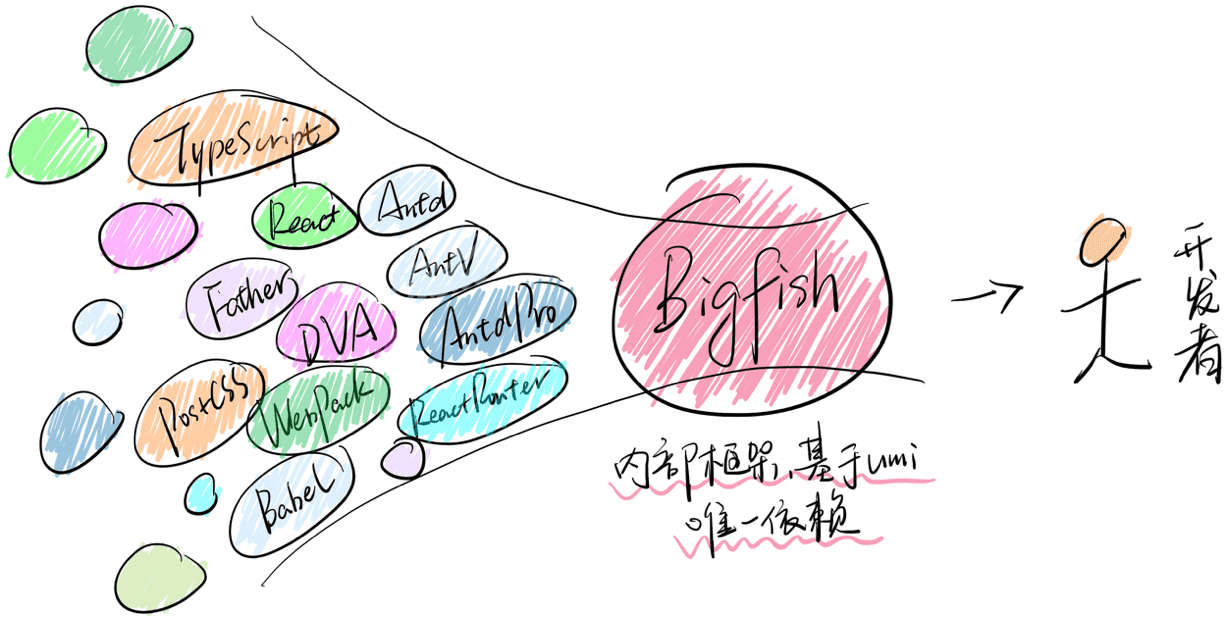
  <span style={{ color: 'red', fontWeight: 'bold' }}>Umi Max。</span>Umi Max
  是内部 Bigfish
  框架的对外版本，解我们自己的问题，同时也给社区另一个集中化框架的选择。
</p>

<p>
  <span style={{ color: 'red', fontWeight: 'bold' }}>
    Low Import 研发模式。
  </span>
  这是 Umi 4 的试验性功能之一，目前已开发完成，解的问题是让开发者少些或不写 import
  语句。项目中大量的 import 其实都可以通过工程化的方式自动处理。Umi 4 里通过 lowImport:{' '}
  {} 开启，然后就可以无 import 直接用路由相关的 Link、useLocation 等，数据流相关的
  connect、useModel，antd 组件 Button、Calendar 等，以及其他更多。
</p>


<p>
  <span style={{ color: 'red', fontWeight: 'bold' }}>强约束功能集成。</span>Umi
  4 提供 API 让强约束和代码校验变得非常容易。API 包括
  api.onCheck、api.onCheckConfig、api.onCheckPkgJSON 和
  api.onCheckCode，顾名思义，非常好理解他们分别是干嘛的，可以分别对依赖类、代码类和配置类的内容做校验和卡点，适用于团队。
</p>

<p>
  <span style={{ color: 'red', fontWeight: 'bold' }}>
    Import All From Umi 迭代。
  </span>
  这是两年前 Umi 3 加的功能，最近发现 Remix、prisma、vitekit 等框架和工具都有类似实现。这种方式有好有坏。好处是通过
  umi 将大量依赖管理起来，用户无需手动安装。坏处是更黑盒，同时有点 Hack。Umi 4 不能解其黑盒问题，但解了
  Hack 问题，让实现无副作用，可以和 Vite、MFSU 等方案无缝结合。
</p>

<p>
  <span style={{ color: 'red', fontWeight: 'bold' }}>
    srcTranspiler 和 depTranspiler。
  </span>
  提供针对源码编译和依赖编译更多选择。源码编译可选 babel、swc 和 esbuild，目前没有银弹，合适场景做合适的选择。比如
  swc 由于不支持 top level await，和 mfsu 会有些冲突，但他适用于 build，因为有补丁可以兼容到
  es7；比如 esbuild 适用于 dev，因为快。数据方面以 ant-design-pro 项目为例，源码编译用
  esbuild 相比 babel 在 M1 2020 无缓存情况下会快 3s。
</p>

<p>
  <span style={{ color: 'red', fontWeight: 'bold' }}>
    jsMinifier 和 cssMinifier。
  </span>
  js 压缩和 css 压缩 Umi 4 默认都用的 esbuild，因为快。同时也提供更多选择，js 压缩还支持
  swc、terser 和 uglifyJs，css 压缩还支持 cssnano。
</p>

<p>
  <span style={{ color: 'red', fontWeight: 'bold' }}>应用元数据。</span>Umi 4
  有通过 api.appData
  收集各种项目数据，从配置、路由、package.json、tsconfig.json、npmClient
  到数据流、国际化、antd 用了哪个版本、react 和 react-dom
  的版本等，应有尽有，这对于插件开发者会非常实用，也适用于有统计需求的场景。
</p>

<p>
  <span style={{ color: 'red', fontWeight: 'bold' }}>微生成器。</span>没错，就是
  modern.js 的微生成器，这功能从 modern.js
  里学习了不少，名字就不改了。举个例子，比如 prettier
  功能，可能不是每个项目都需要，就比较适用于微生成器，按需启用、添加配置、安装依赖。
</p>

<p>
  <span style={{ color: 'red', fontWeight: 'bold' }}>贴心小改进。</span>
  还有不少贴心小改进，举两个例子。1 是项目中新增 plugin.ts，会默认作为插件添加，方便项目进行一些插件级的扩展；2
  是调试问题时通常需要修改编译后的代码看看有没有改对，你把 umi.js 下下来存到项目根目录，umi
  会优先使用这份代码。
</p>

以上是 Umi 4 目前的新功能。

除此之外，还有一些计划在正式版发布之前做的事情。包括 <span style="color:red;">api route、umi server and adapter、route loader、稳定的 lint、更多命令、组件研发 father 4、文档工具 dumi 2</span> 等，会在之后的 RC 版本中与大家见面。

欢迎大家尝鲜 Umi 4，官方文档有准备 ant-design-pro 从 Umi 3 到 4 的升级文档。同时 RC 阶段，还准备了一个<span style="color:red;fontWeight:bold;">手把手升级的微信交流群</span>，欢迎 Umi 4 的先行者们加入，祝大家升级顺利，也提前祝大家新年快乐 🧨，🐯 年吉祥。

<p>
  <img
    src="https://img.alicdn.com/imgextra/i4/O1CN01QmMTeR1jd6l2cwHQh_!!6000000004570-0-tps-1170-1500.jpg"
    width="300"
  />
</p>

---

### Docs Blog Webpack 5 Prod Cache.En US (`docs/docs/blog/webpack-5-prod-cache.en-US.md`)

---
toc: content
order: 7
group:
  title: Blog
---

# 物理构建缓存

在 `umi build` 构建生产环境产物时，Umi 4 默认没有配置 webpack 5 的物理缓存，这是因为 webpack 的物理缓存失效时机问题，需要依赖用户项目的实际情况，所以没有很好的通用解决方案。

所以，当你不明确哪些依赖会让项目物理缓存失效时，很容易产生构建缓存不失效，导致产物是旧的问题，极大影响研发效率。

## 缓存场景

当你的项目需要构建缓存时，是有原因的，我们粗略把场景分成两类：普通项目、Monorepo 中的项目。

### 普通项目

构建比较慢，如何复用上次的物理缓存，做到多次构建提速？

#### 首选解决思路

此时首选的优化思路应该是：考虑使用其他更快的现代转译器，比如调整 [`srcTranspiler`](../docs/api/config#srctranspiler) 、[`cssMinifier`](../docs/api/config#cssminifier) 。

#### CI 中的问题

物理缓存一般存在于 `node_modules/.cache` ，这就意味着如果你在 CI 中构建，构建的基建必须要支持恢复上次的缓存文件，如果构建容器不支持恢复缓存，同样也无法享受好处。

#### 选择依据

所以，当你：

1. **多次构建**：确实有多次反复构建的需求。

2. **能恢复缓存**：在本地构建，或在 CI 有手段能恢复上次的物理缓存文件。

3. **时间长**：项目构建时间比较长、开启其他转译器仍无法提速（或有强诉求无法切换转译器）。

满足这些条件后，你才应该考虑开启物理缓存。

#### 配置方法

```ts
// .umirc.ts

import { join } from 'path';
import { defineConfig } from 'umi';
import { createHash } from 'crypto';

export default defineConfig({
  chainWebpack(config, { env }) {
    if (env === 'production') {
      config.cache({
        type: 'filesystem',
        store: 'pack',
        // 🟡 假如你的项目在 CI 中构建每次环境变量都不一样，请挑选或者排除
        version: createEnvironmentHash(process.env),
        buildDependencies: {
          config: [__filename],
          tsconfig: [join(__dirname, 'tsconfig.json')],
          packagejson: [join(__dirname, 'package.json')],
          umirc: [join(__dirname, '.umirc.ts')],
          // 🟡 其他可能会影响项目的配置文件路径，其内容变更会使缓存失效
        },
      });
    }
  },
});

function createEnvironmentHash(env: Record<string, any>) {
  const hash = createHash('md5');
  hash.update(JSON.stringify(env));
  const result = hash.digest('hex');
  return result;
}
```

请格外注意：

1. 你的项目有哪些文件、依赖会影响项目，配置他们作为依赖，变更时可以使得缓存失效。

2. 因为 `process.env` 包括了所有的 nodejs 环境变量，这非常多，如果环境变量在 CI 中每次构建都存在差异，请挑选所需的环境变量，或者排除掉会变化的。

   ```ts
   // 如挑选可能会影响项目内容的环境变量
   createEnvironmentHash({
     NODE_ENV: process.env.NODE_ENV,
     // ...
   });
   ```

### Monorepo 中的项目

在 monorepo 中，如何缓存需要前置构建的其他子包，比如构建 `apps/project-umi` 需要先构建好他依赖的子包 `libs/component` ，但是下次 `libs/component` 没有代码改动，如何跳过这部分前置依赖的构建？

此时推荐你使用 [Turborepo](https://turbo.build/repo) 来做 monorepo 构建方案，具体使用方法请参见 [官方文档](https://turbo.build/repo/docs) 和 [examples](https://github.com/vercel/turbo/tree/main/examples) 。

注：如果在 CI 中构建，同样需要容器支持恢复上次的 turbo 缓存，可以通过 [`--cache-dir`](https://turbo.build/repo/docs/reference/command-line-reference#--cache-dir) 选项更改缓存位置。

---

### Docs Blog Webpack 5 Prod Cache (`docs/docs/blog/webpack-5-prod-cache.md`)

---
toc: content
order: 7
group:
  title: Blog
---

# 物理构建缓存

在 `umi build` 构建生产环境产物时，Umi 4 默认没有配置 webpack 5 的物理缓存，这是因为 webpack 的物理缓存失效时机问题，需要依赖用户项目的实际情况，所以没有很好的通用解决方案。

所以，当你不明确哪些依赖会让项目物理缓存失效时，很容易产生构建缓存不失效，导致产物是旧的问题，极大影响研发效率。

## 缓存场景

当你的项目需要构建缓存时，是有原因的，我们粗略把场景分成两类：普通项目、Monorepo 中的项目。

### 普通项目

构建比较慢，如何复用上次的物理缓存，做到多次构建提速？

#### 首选解决思路

此时首选的优化思路应该是：考虑使用其他更快的现代转译器，比如调整 [`srcTranspiler`](../docs/api/config#srctranspiler) 、[`cssMinifier`](../docs/api/config#cssminifier) 。

#### CI 中的问题

物理缓存一般存在于 `node_modules/.cache` ，这就意味着如果你在 CI 中构建，构建的基建必须要支持恢复上次的缓存文件，如果构建容器不支持恢复缓存，同样也无法享受好处。

#### 选择依据

所以，当你：

1. **多次构建**：确实有多次反复构建的需求。

2. **能恢复缓存**：在本地构建，或在 CI 有手段能恢复上次的物理缓存文件。

3. **时间长**：项目构建时间比较长、开启其他转译器仍无法提速（或有强诉求无法切换转译器）。

满足这些条件后，你才应该考虑开启物理缓存。

#### 配置方法

```ts
// .umirc.ts

import { join } from 'path';
import { defineConfig } from 'umi';
import { createHash } from 'crypto';

export default defineConfig({
  chainWebpack(config, { env }) {
    if (env === 'production') {
      config.cache({
        type: 'filesystem',
        store: 'pack',
        // 🟡 假如你的项目在 CI 中构建每次环境变量都不一样，请挑选或者排除
        version: createEnvironmentHash(process.env),
        buildDependencies: {
          config: [__filename],
          tsconfig: [join(__dirname, 'tsconfig.json')],
          packagejson: [join(__dirname, 'package.json')],
          umirc: [join(__dirname, '.umirc.ts')],
          // 🟡 其他可能会影响项目的配置文件路径，其内容变更会使缓存失效
        },
      });
    }
  },
});

function createEnvironmentHash(env: Record<string, any>) {
  const hash = createHash('md5');
  hash.update(JSON.stringify(env));
  const result = hash.digest('hex');
  return result;
}
```

请格外注意：

1. 你的项目有哪些文件、依赖会影响项目，配置他们作为依赖，变更时可以使得缓存失效。

2. 因为 `process.env` 包括了所有的 nodejs 环境变量，这非常多，如果环境变量在 CI 中每次构建都存在差异，请挑选所需的环境变量，或者排除掉会变化的。

   ```ts
   // 如挑选可能会影响项目内容的环境变量
   createEnvironmentHash({
     NODE_ENV: process.env.NODE_ENV,
     // ...
   });
   ```

### Monorepo 中的项目

在 monorepo 中，如何缓存需要前置构建的其他子包，比如构建 `apps/project-umi` 需要先构建好他依赖的子包 `libs/component` ，但是下次 `libs/component` 没有代码改动，如何跳过这部分前置依赖的构建？

此时推荐你使用 [Turborepo](https://turbo.build/repo) 来做 monorepo 构建方案，具体使用方法请参见 [官方文档](https://turbo.build/repo/docs) 和 [examples](https://github.com/vercel/turbo/tree/main/examples) 。

注：如果在 CI 中构建，同样需要容器支持恢复上次的 turbo 缓存，可以通过 [`--cache-dir`](https://turbo.build/repo/docs/reference/command-line-reference#--cache-dir) 选项更改缓存位置。

---

### Docs Docs Api Api.En US (`docs/docs/docs/api/api.en-US.md`)

---
order: 1
toc: content
translated_at: '2024-03-17T10:47:17.550Z'
---

# API

For ease of search, the following content is sorted alphabetically.

## umi

### createBrowserHistory

Creates a `BrowserHistory` that uses the browser's built-in `history` to track application navigation. It is recommended for use in modern web browsers that support the HTML5 `history` API.

Type definition is as follows:
```ts
function createBrowserHistory(options?: { window?: Window }) => BrowserHistory;
```

Usage example:
```ts
// create a BrowserHistory
import { createBrowserHistory } from 'umi';
const history = createBrowserHistory();
// or a iframe BrowserHistory
import { createBrowserHistory } from 'umi';
const history = createBrowserHistory({
  window: iframe.contentWindow,
});
```
### createHashHistory

`createHashHistory` returns a `HashHistory` instance. The default `window` is the current document's `defaultView`.

The main difference between `HashHistory` and `BrowserHistory` is that `HashHistory` stores the current location in the hash part of the URL, which means it does not send a request to the server when switching routes. If you are hosting your site on a server that you cannot fully control, or in a single-page Electron application, `HashHistory` is recommended.

Usage example:
```ts
// create a HashHistory
import { createHashHistory } from 'umi';
const history = createHashHistory();
```

### createMemoryHistory

`MemoryHistory` is not operated or read from the address bar. It is also very suitable for testing and other rendering environments.

```ts
const history = createMemoryHistory(location)
```

### createSearchParams

A utility function that wraps `new URLSearchParams(init)`, supports creating with arrays and objects

```ts
import { createSearchParams } from 'umi';


// Assuming the path http://a.com?foo=1&bar=2
createSearchParams(location.search);
createSearchParams("foo=1&bar=2");
createSearchParams("?foo=1&bar=2");

// Key-value pair object
createSearchParams({ foo: 'bar', qux: 'qoo'}).toString()
// foo=bar&qux=qoo

// Key-value tuple array
createSearchParams([["foo", "1"], ["bar", "2"]]).toString()
// foo=1&bar=2
```

[URLSearchParams documentation](https://developer.mozilla.org/en-US/docs/Web/API/URLSearchParams/URLSearchParams)

### generatePath

Generates the actual route to be accessed using the given path with parameters and the corresponding params.

```ts
import { generatePath } from 'umi';

generatePath("/users/:id", { id: "42" }); // "/users/42"
generatePath("/files/:type/*", {
  type: "img",
  "*": "cat.jpg",
}); // "/files/img/cat.jpg"
```

### Helmet

The Helmet component provided by [react-helmet-async](https://github.com/staylor/react-helmet-async), used to dynamically configure tags in the `head` of the page, such as the `title`.

> Note: To ensure Helmet still works during SSR, be sure to use the Helmet provided by Umi instead of installing react-helmet separately

```tsx
import { Helmet } from 'umi';

export default function Page() {
  return (
    <Helmet>
      <title>Hello World</title>
    </Helmet>
  );
}
```

### history

Operations related to history, used to obtain current route information, execute route jumps, and listen for route changes.

```ts
// Recommended to use useLocation in components or hooks
import { useLocation } from 'umi';
export default function Page() {
  let location = useLocation();
  return (
    <div>
     { location.pathname }
     { location.search }
     { location.hash }
    </div>
  );
}
```

To get the current route information outside of React components and Hooks.

```ts
// location object, contains pathname, search, and hash
window.location.pathname;
window.location.search;
window.location.hash;
```

Imperative route navigation.

```ts
import { history } from 'umi';

// Jump to a specific route
history.push('/list');

// Jump to a specific route with parameters
history.push('/list?a=b&c=d#anchor', state);
history.push({
    pathname: '/list',
    search: '?a=b&c=d',
    hash: 'anchor',
  },
  {
    some: 'state-data',
  }
);

// Jump to the current path and refresh state
history.push({}, state)

// Jump back to the previous route
history.back();
history.go(-1);
```

:::info{title=🚨}
Note: `history.push` and `history.replace` require using `state` as the second parameter passed to these two APIs
:::


Route listening.

```ts
import { history } from 'umi';

const unlisten = history.listen(({ location, action }) => {
  console.log(location.pathname);
});
unlisten();
```

### Link

`<Link>` is a React component, an `<a>` element with routing jump functionality.

Type definition is as follows:

```ts
declare function Link(props: {
  prefetch?: boolean | 'intent' | 'render' | 'viewport' | 'none';
  prefetchTimeout?: number;
  to: string | Partial<{ pathname: string; search: string; hash: string }>;
  replace?: boolean;
  state?: any;
  reloadDocument?: boolean;
}): React.ReactElement;
```

Example:

```tsx
import { Link } from 'umi';

function IndexPage({ user }) {
  return <Link to={user.id}>{user.name}</Link>;
}
```

`<Link to>` supports relative path navigation; `<Link reloadDocument>` does not do routing navigation and is equivalent to the jump behavior of `<a href>`.

If `prefetch` is enabled, then when the user hovers over the component, Umi will automatically start preloading the component js files and data for the routing jump. (Note: Use this feature when `routePrefetch` is enabled)

### matchPath

`matchPath` can match a given path with a known route format and return the match result.

Type definition is as follows:

```ts
declare function matchPath<ParamKey extends string = string>(
  pattern: PathPattern | string,
  pathname: string
): PathMatch<ParamKey> | null;
interface PathMatch<ParamKey extends string = string> {
  params: Params<ParamKey>;
  pathname: string;
  pattern: PathPattern;
}
interface PathPattern {
  path: string;
  caseSensitive?: boolean;
  end?: boolean;
}
```

Example:
```ts
import { matchPath } from 'umi';
const match = matchPath(
  { path: "/users/:id" },
  "/users/123",
);
// {
//   "params": { "id": "123" },
//   "pathname": "/users/123",
//   "pathnameBase": "/users/123",
//   "pattern": { "path": "/users/:id" }
// }
```
### matchRoutes

`matchRoutes` can match a given path with multiple potential route choices and return the match result.

Type definition is as follows:

```ts
declare function matchRoutes(
  routes: RouteObject[],
  location: Partial<Location> | string,
  basename?: string
): RouteMatch[] | null;
interface RouteMatch<ParamKey extends string = string> {
  params: Params<ParamKey>;
  pathname: string;
  route: RouteObject;
}
```

Example:

```ts
import { matchRoutes } from 'umi';
const match = matchRoutes(
  [
    {
      path: "/users/:id",
    },
    {
      path: "/users/:id/posts/:postId",
    },
  ],
  "/users/123/posts/456",
);
// [
//  {
//    "params": {
//      "id": "123",
//       "postId": "456"
//     },
//     "pathname": "/users/123/posts/456",
//     "pathnameBase": "/users/123/posts/456",
//     "route": {
//       "path": "/users/:id/posts/:postId"
//     }
//   }
// ]
```

### NavLink

`<NavLink>` is a special form of `<Link>`, aware of whether it is in an active routing state. Often used in navigation menus, breadcrumbs, Tabs to display the current selection status.

Type definition is as follows:

```ts
declare function NavLink(props: LinkProps & {
  caseSensitive?: boolean;
  children?: React.ReactNode | ((props: { isActive: boolean }) => React.ReactNode);
  className?: string | ((props: { isActive: boolean }) => string | undefined);
  end?: boolean;
  style?: React.CSSProperties | ((props: { isActive: boolean }) => string | React.CSSProperties);
}): React.ReactElement;
```

The examples below use style, className, and children to render the active state.

```ts
import { NavLink } from 'umi';

function Navs() {
  return <ul>
    <li><NavLink to="message" style={({ isActive }) => isActive ? { color: 'red' } : undefined}>Messages</NavLink></li>
    <li><NavLink to="tasks" className={({ isActive }) => isActive ? 'active' : undefined}>Tasks</NavLink></li>
    <li><NavLink to="blog">{({ isActive }) => <span className={isActive ? 'active' : undefined}>Blog</span>}</NavLink></li>
  </ul>;
}
```

### Outlet

`<Outlet>` is used to render child routes within a parent route. If the parent route is an exact match, it will render the index route of the child routes (if any).

Type definition is as follows:

```ts
interface OutletProps {
  context?: unknown;
}
declare function Outlet(
  props: OutletProps
): React.ReactElement | null;
```

Example:

```ts
import { Outlet } from 'umi';

function Dashboard() {
  return (
    <div>
      <h1>Dashboard</h1>
      <Outlet />
    </div>
  );
}

function DashboardWithContext() {
  return (
    <div>
      <h1>Dashboard</h1>
      <Outlet context={{ prop: 'a' }}/>
    </div>
  );
}
```

The `context` of the `Outlet` component can be retrieved in the child component using the API `useOutletContext`.

### resolvePath

Used to resolve front-end routing jump paths on the client side.

Type definition is as follows:

```ts
declare function resolvePath(
  to: Partial<Location> | string,
  fromPathname?: string
): {
  pathname: string;
  search: string;
  hash: string;
};
```

Example:

```ts
// Same-level relative jump, returns { pathname: '/parent/child', search: '', hash: '' }
resolvePath('child', '/parent');
resolvePath('./child', '/parent');
resolvePath('', '/parent/child');
resolvePath('.', '/parent/child');

// Ancestor level relative jump, returns { pathname: '/parent/sibling', search: '', hash: '' }
resolvePath('../sibling', '/parent/child');
resolvePath('../../parent/sibling', '/other/child');

// Absolute jump, returns { pathname: '/target', search: '', hash: '' }
resolvePath('/target', '/parent');
resolvePath('/target', '/parent/child');

// Jump with search and hash, returns { pathname: '/params', search: '?a=b', hash: '#c' }
resolvePath('/params?a=b#c', '/prev');
```

### terminal

`terminal` is a tool for logging messages from the browser to the node terminal during the development stage.

Example:
```ts
import {terminal} from 'umi';
// The following three commands will print logs in different colors on the umi startup terminal
terminal.log('i am log level');
terminal.warn('i am warn level');
terminal.error('i am error level');
```
Note that `terminal` only takes effect when the environment variable `NODE_ENV` is not `production`; the corresponding log call functions in Umi's build output will not have any effect, so you can leave the calls to `terminal` in your code.

### useAppData

`useAppData` returns global application data.

Type definition is as follows:

```ts
declare function useAppData(): {
  routes: Record<id, Route>;
  routeComponents: Record<id, Promise<React.ReactComponent>>;
  clientRoutes: ClientRoute[];
  pluginManager: any;
  rootElement: string;
  basename: string;
  clientLoaderData: { [routeKey: string]: any };
  preloadRoute: (to: string) => void;
};
```
Note: This API might still be adjusted.

### useLocation

`useLocation` returns the current location object.

Type definition is as follows:

```ts
declare function useLocation(): {
  pathname: string;
  search: string;
  state: unknown;
  key: Key;
};
```

One scenario is to perform some side effect operations when location changes, such as page view statistics.

```ts
import { useLocation } from 'umi';

function App() {
  const location = useLocation();
  React.useEffect(() => {
    ga('send', 'pageview');
  }, [location]);
  // ...
}
```

### useMatch

`useMatch` returns match information for the given path; if no match, it will return `null`

Type definition is as follows:

```ts
declare function useMatch(pattern: {
  path: string;
  caseSensitive?: boolean;
  end?: boolean;
} | string): {
  params: Record<string, string>;
  pathname: string;
  pattern: {
    path: string;
    caseSensitive?: boolean;
    end?: boolean;
  };
};
```

Example:
```tsx
import { useMatch } from 'umi';

// when url = '/events/12'
const match = useMatch('/events/:eventId');
console.log(match?.pathname, match?.params.eventId);
// '/events/12 12'
```

### useNavigate

`useNavigate` hook function returns a function that can control jumping; for example, it can be used after submitting a form to jump to another page.

```ts
declare function useNavigate(): NavigateFunction;

interface NavigateFunction {
  (
    to: To,
    options?: { replace?: boolean; state?: any }
  ): void;
  (delta: number): void;
}
```

Example:

* Jump to path
```ts
import { useNavigate } from 'umi';

let navigate = useNavigate();
navigate("../success", { replace: true });
```

* Go back to the previous page
```ts
import { useNavigate } from 'umi';

let navigate = useNavigate();
navigate(-1);
```

### useOutlet

`useOutlet` returns the child route element currently matched, used internally by the `<Outlet>`.

Type definition is as follows:
```ts
declare function useOutlet(): React.ReactElement | null;
```

Example:
```ts
import { useOutlet } from 'umi';

const Layout = ()=>{
  const outlet = useOutlet()

  return <div className="fancyLayout">
    {outlet}
  </div>
}
```

### useOutletContext

`useOutletContext` is used to return the `context` mounted on the `Outlet` component.

Type definition is as follows:
```ts
declare function useOutletContext<Context = unknown>(): Context;
```

Example:
```ts
import { useOutletContext, Outlet } from 'umi';

const Layout = () => {
  return <div className="fancyLayout">
    <Outlet context={{ prop: 'from Layout'}} />
  </div>
}

const SomeRouteComponentUnderLayout = () => {
  const layoutContext = useOutletContext();

  return JSON.stringify(layoutContext)   // {"prop":"from Layout"}
}
```

### useParams

The `useParams` hook function returns a read-only key-value pair object of dynamic route matching parameters; child routes will inherit dynamic parameters from parent routes.

Type definition is as follows:
```ts
declare function useParams<
  K extends string = string
>(): Readonly<Params<K>>;
```

Example:

```ts
import { useParams } from 'umi';

// Assuming a route configuration user/:uId/repo/:rId
// Current path       user/abc/repo/def
const params = useParams()
/* params
{ uId: 'abc', rId: 'def'}
*/
```

### useResolvedPath

`useResolvedPath` resolves the complete routing information for the target address based on the current path.

Type definition is as follows:
```ts
declare function useResolvedPath(to: To): Path;
```

Example:

```ts
import { useResolvedPath } from 'umi';

const path = useResolvedPath('docs')
/* path
{ pathname: '/a/new/page/docs', search: '', hash: '' }
*/
```

### useRouteData

`useRouteData` returns the route data of the currently matched route.

Type definition is as follows:

```ts
declare function useRouteData(): {
  route: Route;
};
```
Note: This API might still be adjusted.

Example:
```ts
import { useRouteData } from 'umi';

const route = useRouteData();
/* route
{
  route: {
    path: 'a/page',
    id: 'a/page/index',
    parentId: '@@/global-layout',
    file: 'a/page/index.tsx'
  }
}
*/
```

### useRoutes

`useRoutes` is a hook function to render routes, pass in route configuration and optional parameter `location` to get the rendering result; if there is no matched route, the result is `null`.

Type definition is as follows:
```ts
declare function useRoutes(
  routes: RouteObject[],
  location?: Partial<Location> | string;
): React.ReactElement | null;
```

Example:

```ts
import * as React from "react";
import { useRoutes } from "umi";

function App() {
  let element = useRoutes([
    {
      path: "/",
      element: <Dashboard />,
      children: [
        {
          path: "messages",
          element: <DashboardMessages />,
        },
        { path: "tasks", element: <DashboardTasks /> },
      ],
    },
    { path: "team", element: <AboutPage /> },
  ]);

  return element;
}
```

### useRouteProps

Read the props attribute of the current route in the route configuration using this hook. You can use this hook to obtain additional information in the route configuration.

```ts
// .umirc.ts
routes: [
  {
    path: '/',
    custom_key: '1',
  }
]
```

```ts
import { useRouteProps } from 'umi'

export default function Page() {
  const routeProps = useRouteProps()

  // use `routeProps.custom_key`
} 
```

Note: Also applicable to convention-based routing.

### useSelectedRoutes

Used to read all the route information hit by the current path. For example, in a `layout`, it is possible to obtain information on all the subroutes hit, and also to obtain parameters configured in `routes`, which is very useful.

Example:

```tsx
// layouts/index.tsx

import { useSelectedRoutes } from 'umi'

export default function Layout() {
  const routes = useSelectedRoutes()
  const lastRoute = routes.at(-1)

  if (lastRoute?.pathname === '/some/path') {
    return <div>1 : <Outlet /></div>
  }

  if (

---

### Docs Docs Api Api (`docs/docs/docs/api/api.md`)

---
order: 1
toc: content
---

# API

为方便查找，以下内容通过字母排序。

## umi

### createBrowserHistory

创建使用浏览器内置 `history` 来跟踪应用的 `BrowserHistory`。推荐在支持 HTML5 `history` 接口的 现代 Web 浏览器中使用。

类型定义如下：
```ts
function createBrowserHistory(options?: { window?: Window }) => BrowserHistory;
```

使用范例：
```ts
// create a BrowserHistory
import { createBrowserHistory } from 'umi';
const history = createBrowserHistory();
// or a iframe BrowserHistory
import { createBrowserHistory } from 'umi';
const history = createBrowserHistory({
  window: iframe.contentWindow,
});
```
### createHashHistory

`createHashHistory` 返回一个 `HashHistory` 实例。`window` 默认为当前 `document` 的 `defaultView`。

`HashHistory` 与 `BrowserHistory` 的主要区别在于，`HashHistory` 将当前位置存储在 URL 的哈希部分中，这意味着它在路由切换时不会发送请求到服务器。如果您将站点托管在您无法完全控制服务器上，或者在只提供同单页面的 Electron 应用程序中，推荐使用 `HashHistory`。

使用范例：
```ts
// create a HashHistory
import { createHashHistory } from 'umi';
const history = createHashHistory();
```

### createMemoryHistory

`MemoryHistory` 不会在地址栏被操作或读取。它也非常适合测试和其他的渲染环境。

```ts
const history = createMemoryHistory(location)
```

### createSearchParams

包装 `new URLSearchParams(init)` 的工具函数，支持使用数组和对象创建

```ts
import { createSearchParams } from 'umi';


// 假设路径 http://a.com?foo=1&bar=2
createSearchParams(location.search);
createSearchParams("foo=1&bar=2");
createSearchParams("?foo=1&bar=2");

// 键值对对象
createSearchParams({ foo: 'bar', qux: 'qoo'}).toString()
// foo=bar&qux=qoo

// 键值元组数组
createSearchParams([["foo", "1"], ["bar", "2"]]).toString()
// foo=1&bar=2
```

[URLSearchParams 文档](https://developer.mozilla.org/en-US/docs/Web/API/URLSearchParams/URLSearchParams)

### generatePath

使用给定的带参数的 path 和对应的 params 生成实际要访问的路由。

```ts
import { generatePath } from 'umi';

generatePath("/users/:id", { id: "42" }); // "/users/42"
generatePath("/files/:type/*", {
  type: "img",
  "*": "cat.jpg",
}); // "/files/img/cat.jpg"
```

### Helmet

即 [react-helmet-async](https://github.com/staylor/react-helmet-async) 提供的 Helmet 组件，用于在页面中动态配置 `head` 中的标签，例如 `title`。

> 注意：为了确保 SSR 时 Helmet 仍能正常工作，请务必使用 Umi 提供的 Helmet 而不是单独安装 react-helmet

```tsx
import { Helmet } from 'umi';

export default function Page() {
  return (
    <Helmet>
      <title>Hello World</title>
    </Helmet>
  );
}
```

### history

和 history 相关的操作，用于获取当前路由信息、执行路由跳转、监听路由变更。

```ts
// 建议组件或 hooks 里用 useLocation 取
import { useLocation } from 'umi';
export default function Page() {
  let location = useLocation();
  return (
    <div>
     { location.pathname }
     { location.search }
     { location.hash }
    </div>
  );
}
```

如果在 React 组件和 Hooks 之外获取当前路由信息。

```ts
// location 对象，包含 pathname、search 和 hash
window.location.pathname;
window.location.search;
window.location.hash;
```

命令式路由跳转。

```ts
import { history } from 'umi';

// 跳转到指定路由
history.push('/list');

// 带参数跳转到指定路由
history.push('/list?a=b&c=d#anchor', state);
history.push({
    pathname: '/list',
    search: '?a=b&c=d',
    hash: 'anchor',
  },
  {
    some: 'state-data',
  }
);

// 跳转当前路径，并刷新 state
history.push({}, state)

// 跳转到上一个路由
history.back();
history.go(-1);
```

:::info{title=🚨}
注意：history.push 和 history.replace 需要使用 `state` 需将 `state` 作为这两个 API 的第二个参数传递
:::


路由监听。

```ts
import { history } from 'umi';

const unlisten = history.listen(({ location, action }) => {
  console.log(location.pathname);
});
unlisten();
```

### Link

`<Link>` 是 React 组件，是带路由跳转功能的 `<a>` 元素。

类型定义如下：

```ts
declare function Link(props: {
  prefetch?: boolean | 'intent' | 'render' | 'viewport' | 'none';
  prefetchTimeout?: number;
  to: string | Partial<{ pathname: string; search: string; hash: string }>;
  replace?: boolean;
  state?: any;
  reloadDocument?: boolean;
}): React.ReactElement;
```

示例：

```tsx
import { Link } from 'umi';

function IndexPage({ user }) {
  return <Link to={user.id}>{user.name}</Link>;
}
```

`<Link to>` 支持相对路径跳转；`<Link reloadDocument>` 不做路由跳转，等同于 `<a href>` 的跳转行为。

若开启了 `prefetch` 则当用户将鼠标放到该组件上方时，Umi 就会自动开始进行跳转路由的组件 js 文件和数据预加载。（注：使用此功能请开启 `routePrefetch` 配置）

### matchPath

`matchPath` 可以将给定的路径以及一个已知的路由格式进行匹配，并且返回匹配结果。

类型定义如下：

```ts
declare function matchPath<ParamKey extends string = string>(
  pattern: PathPattern | string,
  pathname: string
): PathMatch<ParamKey> | null;
interface PathMatch<ParamKey extends string = string> {
  params: Params<ParamKey>;
  pathname: string;
  pattern: PathPattern;
}
interface PathPattern {
  path: string;
  caseSensitive?: boolean;
  end?: boolean;
}
```

示例：
```ts
import { matchPath } from 'umi';
const match = matchPath(
  { path: "/users/:id" },
  "/users/123",
);
// {
//   "params": { "id": "123" },
//   "pathname": "/users/123",
//   "pathnameBase": "/users/123",
//   "pattern": { "path": "/users/:id" }
// }
```
### matchRoutes

`matchRoutes` 可以将给定的路径以及多个可能的路由选择进行匹配，并且返回匹配结果。

类型定义如下：

```ts
declare function matchRoutes(
  routes: RouteObject[],
  location: Partial<Location> | string,
  basename?: string
): RouteMatch[] | null;
interface RouteMatch<ParamKey extends string = string> {
  params: Params<ParamKey>;
  pathname: string;
  route: RouteObject;
}
```

示例：

```ts
import { matchRoutes } from 'umi';
const match = matchRoutes(
  [
    {
      path: "/users/:id",
    },
    {
      path: "/users/:id/posts/:postId",
    },
  ],
  "/users/123/posts/456",
);
// [
//  {
//    "params": {
//      "id": "123",
//       "postId": "456"
//     },
//     "pathname": "/users/123/posts/456",
//     "pathnameBase": "/users/123/posts/456",
//     "route": {
//       "path": "/users/:id/posts/:postId"
//     }
//   }
// ]
```

### NavLink

`<NavLink>` 是 `<Link>` 的特殊形态，他知道当前是否为路由激活状态。通常在导航菜单、面包屑、Tabs 中会使用，用于显示当前的选中状态。

类型定义如下：

```ts
declare function NavLink(props: LinkProps & {
  caseSensitive?: boolean;
  children?: React.ReactNode | ((props: { isActive: boolean }) => React.ReactNode);
  className?: string | ((props: { isActive: boolean }) => string | undefined);
  end?: boolean;
  style?: React.CSSProperties | ((props: { isActive: boolean }) => string | React.CSSProperties);
}): React.ReactElement;
```

下方示例分别用了 style、className 和 children 来渲染 active 状态。

```ts
import { NavLink } from 'umi';

function Navs() {
  return <ul>
    <li><NavLink to="message" style={({ isActive }) => isActive ? { color: 'red' } : undefined}>Messages</NavLink></li>
    <li><NavLink to="tasks" className={({ isActive }) => isActive ? 'active' : undefined}>Tasks</NavLink></li>
    <li><NavLink to="blog">{({ isActive }) => <span className={isActive ? 'active' : undefined}>Blog</span>}</NavLink></li>
  </ul>;
}
```

### Outlet

`<Outlet>` 用于渲染父路由中渲染子路由。如果父路由被严格匹配，会渲染子路由中的 index 路由（如有）。

类型定义如下：

```ts
interface OutletProps {
  context?: unknown;
}
declare function Outlet(
  props: OutletProps
): React.ReactElement | null;
```

示例：

```ts
import { Outlet } from 'umi';

function Dashboard() {
  return (
    <div>
      <h1>Dashboard</h1>
      <Outlet />
    </div>
  );
}

function DashboardWithContext() {
  return (
    <div>
      <h1>Dashboard</h1>
      <Outlet context={{ prop: 'a' }}/>
    </div>
  );
}
```

`Outlet` 组件的 `context` 可以使用 API `useOutletContext` 在子组件中获取。

### resolvePath

用于在客户端解析前端路由跳转路径。

类型定义如下：

```ts
declare function resolvePath(
  to: Partial<Location> | string,
  fromPathname?: string
): {
  pathname: string;
  search: string;
  hash: string;
};
```

示例：

```ts
// 同级相对跳转，返回 { pathname: '/parent/child', search: '', hash: '' }
resolvePath('child', '/parent');
resolvePath('./child', '/parent');
resolvePath('', '/parent/child');
resolvePath('.', '/parent/child');

// 祖先层级相对跳转，返回 { pathname: '/parent/sibling', search: '', hash: '' }
resolvePath('../sibling', '/parent/child');
resolvePath('../../parent/sibling', '/other/child');

// 绝对跳转，返回 { pathname: '/target', search: '', hash: '' }
resolvePath('/target', '/parent');
resolvePath('/target', '/parent/child');

// 携带 search 和 hash 跳转，返回 { pathname: '/params', search: '?a=b', hash: '#c' }
resolvePath('/params?a=b#c', '/prev');
```

### terminal

`terminal` 用于在开发阶段在浏览器向 node 终端输出日志的工具。

示例：
```ts
import {terminal} from 'umi';
// 下面三条命令会在 umi 启动终端上打出用不同颜色代表的日志
terminal.log('i am log level');
terminal.warn('i am warn level');
terminal.error('i am error level');
```
注意 `terminal` 只在环境变量 `NODE_ENV` 非 `production` 时生效；在 Umi 的构建产物中对应的日志调用函数不会有任何作用，所以可以不必删除调用 `terminal` 的代码。

### useAppData

`useAppData` 返回全局的应用数据。

类型定义如下：

```ts
declare function useAppData(): {
  routes: Record<id, Route>;
  routeComponents: Record<id, Promise<React.ReactComponent>>;
  clientRoutes: ClientRoute[];
  pluginManager: any;
  rootElement: string;
  basename: string;
  clientLoaderData: { [routeKey: string]: any };
  preloadRoute: (to: string) => void;
};
```
注意：此处 API 可能还会调整。

### useLocation

`useLocation` 返回当前 location 对象。

类型定义如下：

```ts
declare function useLocation(): {
  pathname: string;
  search: string;
  state: unknown;
  key: Key;
};
```

一个场景是在 location change 时做一些 side effect 操作，比如 page view 统计。

```ts
import { useLocation } from 'umi';

function App() {
  const location = useLocation();
  React.useEffect(() => {
    ga('send', 'pageview');
  }, [location]);
  // ...
}
```

### useMatch

`useMatch` 返回传入 path 的匹配信息；如果匹配失败将返回 `null`

类型定义如下：

```ts
declare function useMatch(pattern: {
  path: string;
  caseSensitive?: boolean;
  end?: boolean;
} | string): {
  params: Record<string, string>;
  pathname: string;
  pattern: {
    path: string;
    caseSensitive?: boolean;
    end?: boolean;
  };
};
```

示例：
```tsx
import { useMatch } from 'umi';

// when url = '/events/12'
const match = useMatch('/events/:eventId');
console.log(match?.pathname, match?.params.eventId);
// '/events/12 12'
```

### useNavigate

`useNavigate` 钩子函数返回一个可以控制跳转的函数；比如可以用在提交完表单后跳转到其他页面。

```ts
declare function useNavigate(): NavigateFunction;

interface NavigateFunction {
  (
    to: To,
    options?: { replace?: boolean; state?: any }
  ): void;
  (delta: number): void;
}
```

示例：

* 跳转路径
```ts
import { useNavigate } from 'umi';

let navigate = useNavigate();
navigate("../success", { replace: true });
```

* 返回上一页
```ts
import { useNavigate } from 'umi';

let navigate = useNavigate();
navigate(-1);
```

### useOutlet

`useOutlet` 返回当前匹配的子路由元素，`<Outlet>` 内部使用的就是此 hook 。

类型定义如下：
```ts
declare function useOutlet(): React.ReactElement | null;
```

示例：
```ts
import { useOutlet } from 'umi';

const Layout = ()=>{
  const outlet = useOutlet()

  return <div className="fancyLayout">
    {outlet}
  </div>
}
```

### useOutletContext

`useOutletContext` 用于返回 `Outlet` 组件上挂载的 `context` 。

类型定义如下：
```ts
declare function useOutletContext<Context = unknown>(): Context;
```

示例：
```ts
import { useOutletContext, Outlet } from 'umi';

const Layout = () => {
  return <div className="fancyLayout">
    <Outlet context={{ prop: 'from Layout'}} />
  </div>
}

const SomeRouteComponentUnderLayout = () => {
  const layoutContext = useOutletContext();

  return JSON.stringify(layoutContext)   // {"prop":"from Layout"}
}
```

### useParams

`useParams` 钩子函数返回动态路由的匹配参数键值对对象；子路由中会集成父路由的动态参数。

类型定义如下：
```ts
declare function useParams<
  K extends string = string
>(): Readonly<Params<K>>;
```

示例：

```ts
import { useParams } from 'umi';

// 假设有路由配置  user/:uId/repo/:rId
// 当前路径       user/abc/repo/def
const params = useParams()
/* params
{ uId: 'abc', rId: 'def'}
*/
```

### useResolvedPath

`useResolvedPath` 根据当前路径将目标地址解析出完整的路由信息。

类型定义如下：
```ts
declare function useResolvedPath(to: To): Path;
```

示例：

```ts
import { useResolvedPath } from 'umi';

const path = useResolvedPath('docs')
/* path
{ pathname: '/a/new/page/docs', search: '', hash: '' }
*/
```

### useRouteData

`useRouteData` 返回当前匹配路由的数据的钩子函数。

类型定义如下：

```ts
declare function useRouteData(): {
  route: Route;
};
```
注意：此处 API 可能还会调整。

示例：
```ts
import { useRouteData } from 'umi';

const route = useRouteData();
/* route
{
  route: {
    path: 'a/page',
    id: 'a/page/index',
    parentId: '@@/global-layout',
    file: 'a/page/index.tsx'
  }
}
*/
```

### useRoutes

`useRoutes` 渲染路由的钩子函数，传入路由配置和可选参数 `location`, 即可得到渲染结果；如果没有匹配的路由，结果为 `null`。

类型定义如下：
```ts
declare function useRoutes(
  routes: RouteObject[],
  location?: Partial<Location> | string;
): React.ReactElement | null;
```

示例：

```ts
import * as React from "react";
import { useRoutes } from "umi";

function App() {
  let element = useRoutes([
    {
      path: "/",
      element: <Dashboard />,
      children: [
        {
          path: "messages",
          element: <DashboardMessages />,
        },
        { path: "tasks", element: <DashboardTasks /> },
      ],
    },
    { path: "team", element: <AboutPage /> },
  ]);

  return element;
}
```

### useRouteProps

读取当前路由在路由配置里的 props 属性，你可以用此 hook 来获取路由配置中的额外信息。

```ts
// .umirc.ts
routes: [
  {
    path: '/',
    custom_key: '1',
  }
]
```

```ts
import { useRouteProps } from 'umi'

export default function Page() {
  const routeProps = useRouteProps()

  // use `routeProps.custom_key`
} 
```

注：同样适用于约定式路由。

### useSelectedRoutes

用于读取当前路径命中的所有路由信息。比如在 `layout` 布局中可以获取到当前命中的所有子路由信息，同时可以获取到在 `routes` 配置中的参数，这格外有用。

实例：

```tsx
// layouts/index.tsx

import { useSelectedRoutes } from 'umi'

export default function Layout() {
  const routes = useSelectedRoutes()
  const lastRoute = routes.at(-1)

  if (lastRoute?.pathname === '/some/path') {
    return <div>1 : <Outlet /></div>
  }

  if (lastRoute?.extraProp) {
    return <div>2 : <Outlet /></div>
  }

  return <Outlet />
}
```

### useSearchParams

`useSearchParams` 用于读取和修改当前 URL 的 query string。类似 React 的 `useState`，其返回包含两个值的数组，当前 URL 的 search 参数和用于更新 search 参数的函数。

类型定义如下：

```ts
declare function useSearchParams(defaultInit?: URLSearchParamsInit): [
  URLSearchParams,
  (
    nextInit?: URLSearchParamsInit,
    navigateOpts?: : { replace?: boolean; state?: any }
  ) => void
];

type URLSearchParamsInit =
  | string
  | ParamKeyValuePair[]
  | Record<string, string | string[]>
  | URLSearchParams;
```

示例：
```ts
import React from 'react';
import { useSearchParams } from 'umi';

function App() {
  let [searchParams, setSearchParams] = useSearchParams();
  function handleSubmit(event) {
    event.preventDefault();
    setSearchParams(serializeFormQuery(event.target));
  }
  return <form onSubmit={handleSubmit}>{/* ... */}</form>;
}
```

### withRouter

`withRouter` 参考 [react-router faq](https://reactrouter.com/docs/en/v6/getting-started/faq#what-happened-to-withrouter-i-need-it) 实现的版本, 仅实现了部分能力, 请参考类型定义按需使用, 建议迁移到 React Hook API。

类型定义如下:

```ts
export interface RouteComponentProps<T = ReturnType<typeof useParams>> {
  history: {
    back: () => void;
    goBack: () => void;
    location: ReturnType<typeof useLocation>;
    push: (url: string, state?: any) => void;
  };
  location: ReturnType<typeof useLocation>;
  match: {
    params: T;
  };
  params: T;
  navigate: ReturnType<typeof useNavigate>;
}
```

示例：
```tsx
import React from 'react';
import { withRouter } from 'umi';

class HelloWorld extends React.Component<any> {
  render() {
    return (
      <div>
        Hello World {this.props.location.pathname}
        <h2>params: {JSON.stringify(this.props.match.params)}</h2>
        <button
          onClick={() => {
            this.props.history.push('/users');
          }}
        >
          To Users
        </button>
      </div>
    );
  }
}

export default withRouter(HelloWorld);
```

---

### Docs Docs Api Commands.En US (`docs/docs/docs/api/commands.en-US.md`)

---
order: 4
toc: content
translated_at: '2024-03-17T10:43:51.227Z'
---

# Command Line

umi offers many built-in command line interfaces to start and build projects, as well as some auxiliary development commands, such as generators.

To get a list of available commands, you can run the help command in the project directory:

```bash
umi help
```

You should see logs similar to the following:

```bash
Usage: umi <command> [options]

Commands:

    build     build app for production
    config    umi config cli
    dev       dev server for development
    help      show commands help
    lint      lint source code using eslint and stylelint
    setup     setup project
    deadcode  check dead code
    version   show umi version
    v         show umi version
    plugin    inspect umi plugins
    verify-commit verify the commit message, which is usually used with husky.
    preview   locally preview production build
    run       run the script commands, support for ts and zx
    generate  generate code snippets quickly
    g         generate code snippets quickly

Run `umi help <command>` for more information of specific commands.
Visit https://umijs.org/ to learn more about Umi.
```

> For ease of lookup, the commands below are sorted alphabetically.

## build

Build the project for deployment in a production environment.

```bash
$ umi build
```

## config

Quickly view and modify configuration via the command line.

Viewing configuration, you can use `list` or `get`.

```bash
$ umi config list
 - [key: polyfill] false
 - [key: externals] { esbuild: true }

$ umi config get mfsu
 - [key: externals] { esbuild: true }
```

Modifying configuration, you can use `set` or `remove`.

```bash
$ umi config set polyfill false
set config:polyfill on /private/tmp/sorrycc-wsYpty/.umirc.ts

$ umi config remove polyfill
remove config:polyfill on /private/tmp/sorrycc-wsYpty/.umirc.ts
```

## dev

Start a local development server for project development and debugging.

```bash
$ umi dev
        ╔═════════════════════════════════════════════════════╗
        ║ App listening at:                                   ║
        ║  >   Local: https://127.0.0.1:8001                  ║
ready - ║  > Network: https://192.168.1.1:8001                ║
        ║                                                     ║
        ║ Now you can open browser with the above addresses👆 ║
        ╚═════════════════════════════════════════════════════╝
event - compiled successfully in 1051 ms (416 modules)
```

## generate

Used for incrementally generating files or enabling features, the command line alias is `g`.

When used without any parameters, it will opt for an interactive generator selection.

```bash
$ umi g
# or
$ umi generate
? Pick generator type › - Use arrow-keys. Return to submit.
❯   Create Pages -- Create a umi page by page name
    Enable Prettier -- Enable Prettier
```

You can also specify parameters.

```bash
# Generate route files
$ umi g page index --typescript --less
```

## help

View help.

```bash
$ umi help
Usage: umi <command> [options]

Commands:

    build     build app for production
    config    umi config cli
    dev       dev server for development
    help      show commands help
    setup     setup project
    version   show umi version
    plugin    inspect umi plugins
    generate  generate code snippets quickly

Run `umi help <command>` for more information of specific commands.
Visit https://umijs.org/ to learn more about Umi.
```

You can also specify a command to see detailed help for that command.

```bash
$ umi help build
Usage: umi build [options]
build app for production.

Details:
    umi build

    # build without compression
    COMPRESS=none umi build

    # clean and build
    umi build --clean
```

## lint

Used to check and correct code to match rules.

```bash
$ umi lint
Usage: umi lint

 Support for validation of js, ts, tsx, jsx type files only: umi lint --eslint-only

 Support for validation of css, less and other style files only: umi lint --stylelint-only

 Support for cssinjs mode validation: umi lint --stylelint-only --cssinjs

 Correct the code: --fix

```

## plugin

Plugin related operations, currently only supports the `list` subcommand.

List all plugins.

```bash
$ umi plugin list
- @umijs/core/dist/service/servicePlugin
- @umijs/preset-umi (from preset)
- @umijs/preset-umi/dist/registerMethods (from preset)
- @umijs/preset-umi/dist/features/appData/appData (from preset)
- @umijs/preset-umi/dist/features/check/check (from preset)
- @umijs/preset-umi/dist/features/configPlugins/configPlugins (from preset)
- virtual: config-styles
- virtual: config-scripts
- virtual: config-routes
- virtual: config-plugins
...
```

## preview

The `umi preview` command will launch a local static web server, running the dist folder at http://127.0.0.1:4172, for previewing the production build, supporting proxy, mock, etc. settings.

You can use the `--port` parameter to configure the service's running port.

```bash
$ umi preview --port 9527
```

Now the `preview` command will run the server at http://127.0.0.1:9527.

Use the `--host` parameter to specify the service's running hostname.

The following user configurations will also take effect during `preview`

* [https](./config#https)
* [proxy](../guides/proxy)
* [mock](../guides/mock)

Note that the `dist` directory will change with the configuration of `outputPath`.

## run

The `umi run` command allows you to run TypeScript and ESM files like running js with node. You can pair it with [zx](https://github.com/google/zx) for better script command usability.

```bash
$ umi run ./script.ts
```

## setup

Initialize the project, doing operations like generating temporary files. Usually set in `scripts.postinstall` in package.json.

```bash
{
  "scripts": { "postinstall": "umi setup" }
}
```

## deadcode

Used to find files in the src directory that are not referenced, and output to the root directory.

```bash
$ umi deadcode
- Preparing...
- begin check deadCode
- write file /examples/umi-run/DeadCodeList-{timeStamp}.txt
- check dead code end, please be careful if you want to remove them
```

## mfsu

The `umi mfsu` command can be used to view MFSU dependency information, rebuild MFSU dependencies, and clear MFSU dependencies.

```bash title="Get MFSU command help"
$ umi mfsu
```

```bash title="Get MFSU dependency list"
$ umi mfsu ls
warning@4.0.3
regenerator-runtime/runtime.js@0.13.11
react/jsx-dev-runtime@18.1.0
react-intl@3.12.1
react-error-overlay/lib/index.js@6.0.9
react@18.1.0
qiankun@2.8.4
lodash/noop@4.17.21
lodash/mergeWith@4.17.21
lodash/concat@4.17.21
...
```

```bash title="Rebuild MFSU dependency"
$ umi mfsu build
info  - Preparing...
info  - MFSU eager strategy enabled
warn  - Invalidate webpack cache since mfsu cache is missing
info  - [MFSU] buildDeps since cacheDependency has changed
...
info  - [plugin: @umijs/preset-umi/dist/commands/mfsu/mfsu] [MFSU][eager] build success
```

```bash title="Clear MFSU dependency"
$ # Delete dependency information list
$ umi mfsu remove
$ # Delete dependency information list and product files
$ umi mfsu remove --all
```

## verifyCommit

Verify commit message information, usually used in conjunction with [husky](https://github.com/typicode/husky).

For example, configure the following in `.husky/commit-msg`,

```bash
#!/bin/sh
. "$(dirname "$0")/_/husky.sh"

npx --no-install umi verify-commit $1
```

## version

View the `umi` version, equivalent to `umi -v`.

```bash
$ umi version
4.0.0
```

---

### Docs Docs Api Commands (`docs/docs/docs/api/commands.md`)

---
order: 4
toc: content
---
# 命令行

umi 提供了很多内置的命令行用于启动，构建项目，另外还有一些辅助开发的命令，如生成器等。

要获取可用的命令列表，你可以在项目目录中运行 help 命令：

```bash
umi help
```

你应该能看到类似如下的日志：

```bash
Usage: umi <command> [options]

Commands:

    build     build app for production
    config    umi config cli
    dev       dev server for development
    help      show commands help
    lint      lint source code using eslint and stylelint
    setup     setup project
    deadcode  check dead code
    version   show umi version
    v         show umi version
    plugin    inspect umi plugins
    verify-commit verify the commit message, which is usually used with husky.
    preview   locally preview production build
    run       run the script commands, support for ts and zx
    generate  generate code snippets quickly
    g         generate code snippets quickly

Run `umi help <command>` for more information of specific commands.
Visit https://umijs.org/ to learn more about Umi.
```

> 为方便查找，以下命令通过字母排序。

## build

构建项目，适用于生产环境的部署。

```bash
$ umi build
```

## config

通过命令行快速查看和修改配置。

查看配置，可以用 `list` 或 `get`。

```bash
$ umi config list
 - [key: polyfill] false
 - [key: externals] { esbuild: true }

$ umi config get mfsu
 - [key: externals] { esbuild: true }
```

修改配置，可以用 `set` 或 `remove`。

```bash
$ umi config set polyfill false
set config:polyfill on /private/tmp/sorrycc-wsYpty/.umirc.ts

$ umi config remove polyfill
remove config:polyfill on /private/tmp/sorrycc-wsYpty/.umirc.ts
```

## dev

启动本地开发服务器，进行项目的开发与调试。

```bash
$ umi dev
        ╔═════════════════════════════════════════════════════╗
        ║ App listening at:                                   ║
        ║  >   Local: https://127.0.0.1:8001                  ║
ready - ║  > Network: https://192.168.1.1:8001                ║
        ║                                                     ║
        ║ Now you can open browser with the above addresses👆 ║
        ╚═════════════════════════════════════════════════════╝
event - compiled successfully in 1051 ms (416 modules)
```

## generate

用于增量生成文件或启用功能，命令行别名是 `g`。

不加任何参数时会给交互式的生成器选择。

```bash
$ umi g
# 或
$ umi generate
? Pick generator type › - Use arrow-keys. Return to submit.
❯   Create Pages -- Create a umi page by page name
    Enable Prettier -- Enable Prettier
```

也可以指定参数。

```bash
# 生成路由文件
$ umi g page index --typescript --less
```

## help

查看帮助。

```bash
$ umi help
Usage: umi <command> [options]

Commands:

    build     build app for production
    config    umi config cli
    dev       dev server for development
    help      show commands help
    setup     setup project
    version   show umi version
    plugin    inspect umi plugins
    generate  generate code snippets quickly

Run `umi help <command>` for more information of specific commands.
Visit https://umijs.org/ to learn more about Umi.
```

也可指定命令，查看特定命令的详细帮助。

```bash
$ umi help build
Usage: umi build [options]
build app for production.

Details:
    umi build

    # build without compression
    COMPRESS=none umi build

    # clean and build
    umi build --clean
```

## lint

用于检查及修正代码是否符合规则。

```bash
$ umi lint
Usage: umi lint

 支持只校验 js、ts、tsx、jsx 类型文件： umi lint --eslint-only

 支持只校验 css、less 等样式文件： umi lint --stylelint-only

 支持校验 cssinjs 模式校验： umi lint --stylelint-only --cssinjs

 修正代码： --fix

```

## plugin

插件相关操作，目前只支持 `list` 子命令。

列出所有插件。

```bash
$ umi plugin list
- @umijs/core/dist/service/servicePlugin
- @umijs/preset-umi (from preset)
- @umijs/preset-umi/dist/registerMethods (from preset)
- @umijs/preset-umi/dist/features/appData/appData (from preset)
- @umijs/preset-umi/dist/features/check/check (from preset)
- @umijs/preset-umi/dist/features/configPlugins/configPlugins (from preset)
- virtual: config-styles
- virtual: config-scripts
- virtual: config-routes
- virtual: config-plugins
...
```

## preview

`umi preview` 命令会在本地启动一个静态 Web 服务器，将 dist 文件夹运行在 http://127.0.0.1:4172, 用于预览构建后产物, 支持 proxy、mock 等设置。

你可以通过 `--port` 参数来配置服务的运行端口。

```bash
$ umi preview --port 9527
```

现在 `preview` 命令会将服务器运行在 http://127.0.0.1:9527.

通过 `--host` 参数来指定 配置服务运行的 hostname。

以下用户配置在 `preview` 时也会生效

* [https](./config#https)
* [proxy](../guides/proxy)
* [mock](../guides/mock)

注意 `dist` 目录会随着配置 `outputPath` 的变更而变更。

## run

`umi run` 命令可以让你像 node 运行 js 一样来运行 TypeScript 和 ESM 文件。你可以搭配 [zx](https://github.com/google/zx) 来更好的使用脚本命令。

```bash
$ umi run ./script.ts
```

## setup

初始化项目，会做临时文件的生成等操作。通常在 package.json 的 `scripts.postinstall` 里设置。

```bash
{
  "scripts": { "postinstall": "umi setup" }
}
```

## deadcode

用于查找 src 目录下未被引用的文件，并在根目录输出文件。

```bash
$ umi deadcode
- Preparing...
- begin check deadCode
- write file /examples/umi-run/DeadCodeList-{timeStamp}.txt
- check dead code end, please be careful if you want to remove them
```

## mfsu

`umi mfsu` 命令可以查看 MFSU 依赖信息、重新构建 MFSU 依赖和清除 MFSU 依赖。


```bash title="获取 MFSU 命令帮忙"
$ umi mfsu
```

```bash title="获取 MFSU 依赖列表"
$ umi mfsu ls
warning@4.0.3
regenerator-runtime/runtime.js@0.13.11
react/jsx-dev-runtime@18.1.0
react-intl@3.12.1
react-error-overlay/lib/index.js@6.0.9
react@18.1.0
qiankun@2.8.4
lodash/noop@4.17.21
lodash/mergeWith@4.17.21
lodash/concat@4.17.21
...
```

```bash title="重新构建 MFSU 依赖"
$ umi mfsu build
info  - Preparing...
info  - MFSU eager strategy enabled
warn  - Invalidate webpack cache since mfsu cache is missing
info  - [MFSU] buildDeps since cacheDependency has changed
...
info  - [plugin: @umijs/preset-umi/dist/commands/mfsu/mfsu] [MFSU][eager] build success
```

```bash title="清除 MFSU 依赖"
$ # 删除依赖信息列表
$ umi mfsu remove
$ # 删除依赖信息列表和产物文件
$ umi mfsu remove --all
```

## verifyCommit

验证 commit message 信息，通常和 [husky](https://github.com/typicode/husky) 搭配使用。

比如在 `.husky/commit-msg` 做如下配置，

```bash
#!/bin/sh
. "$(dirname "$0")/_/husky.sh"

npx --no-install umi verify-commit $1
```

## version

查看 `umi` 版本，等同于 `umi -v`。

```bash
$ umi version
4.0.0
```

---

### Docs Docs Api Config.En US (`docs/docs/docs/api/config.en-US.md`)

---
order: 2
toc: content
translated_at: '2024-03-17T10:42:29.295Z'
---

# Configuration

For the custom configurations available in umi, you can use the `.umirc.ts` file or `config/config.ts` in the project root directory. It's noteworthy that both files have the same functionality, just residing in different directories. You have to choose one of them, with `.umirc.ts` having a higher priority.

> For more information about the directory structure, you can learn more [here](../guides/directory-structure).

umi's configuration file is a regular node module, which is used when the umi [command line](./commands) is executed and is not included in the browser-side build.

> For some configurations that are required for the browser-side build, and some configurations that affect the style presentation, in umi they are collectively referred to as "runtime configuration", you can see more about it in [runtime configuration](./runtime-config).

Here is the simplest example of an umi configuration file:

```ts
import { defineConfig } from 'umi';

export default defineConfig({
  outputPath: 'dist',
});
```

Wrapping configurations with `defineConfig` is to get better spell check support when writing the configuration file. If you don't need it, `export default {}` works too.

It's important to note that when using umi, you don't need to understand the purpose of each configuration. You can briefly browse through all the configurations that umi supports below, and then, when needed, come back to see how to enable and modify the configurations you need.

> For convenience, the following configurations are sorted alphabetically.

## alias

- Type: `Record<string, string>`
- Default value: `{}`

Configure aliases, to map the source in import statements.

For example:

```js
{
  alias: {
    foo: '/tmp/to/foo',
  }
}
```

Then in the code, `import 'foo'` will actually become `import '/tmp/to/foo'`.

Some tips:

1. It's better to use absolute paths as the value of alias, especially when pointing to a dependency, remember to add `require.resolve`, for instance,

```js
// ❌
{
  alias: {
    foo: 'foo',
  }
}

// ✅
{
  alias: {
    foo: require.resolve('foo'),
  }
}
```

2. If you don't want subpaths to be mapped as well, remember to add a `$` suffix, for example

```js
// import 'foo/bar' will be mapped to import '/tmp/to/foo/bar'
{
  alias: {
    foo: '/tmp/to/foo',
  }
}

// import 'foo/bar' will still be import 'foo/bar', and won't be modified
{
  alias: {
    foo$: '/tmp/to/foo',
  }
}
```

## autoprefixer

- Type: `object`
- Default value: `{ flexbox: 'no-2009' }`

Used for parsing CSS and adds vendor prefixes to CSS rules using values from Can I Use. It enables autoprefixing, such as automatically adding `-webkit-` prefix.

For more configurations, please consult [autoprefixer's options](https://github.com/postcss/autoprefixer#options).

## analyze

- Type: `object`
- Default value: `{}`

Specific configuration options for the analyzer plugin when analyzing product composition through the [`ANALYZE`](../guides/env-variables#analyze) environment variable. See [webpack-bundle-analyzer](https://github.com/webpack-contrib/webpack-bundle-analyzer#options-for-plugin)

When using Vite mode, in addition to customizing the configuration of [rollup-plugin-visualizer](https://github.com/btd/rollup-plugin-visualizer), `excludeAssets`, `generateStatsFile`, `openAnalyzer`, `reportFilename`, `reportTitle` options will automatically adapt.

## base

- Type: `string`
- Default value: `/`

To deploy the umi project in a non-root directory, you can use the base configuration.

The base configuration allows you to set a routing prefix for your application. For example, with routes `/` and `/users`, after setting base to `/foo/`, you can access the previous routes through `/foo/` and `/foo/users`.

> Note: The base configuration must be set at build time and can't be changed without rebuilding, because this value is inlined in the client-side package.

## cacheDirectoryPath

- Type: `string`
- Default value: `node_modules/.cache`

By default, Umi stores some cache files generated during the build process in the `node_modules/.cache` directory, such as logger logs, webpack cache, mfsu cache, etc. You can modify Umi's cache file directory using the `cacheDirectoryPath` configuration.

Example,

```js
// Change the cache file path to the node_modules/.cache1 folder
cacheDirectoryPath: 'node_modules/.cache1',
```

## chainWebpack

- Type: `(memo, args) => void`
- Default value: `null`

To extend Umi's built-in webpack configuration, we provide a way to modify the webpack configuration in a chained programming style, based on webpack-chain. See the documentation of webpack-api for specific APIs.

As shown below:

```js
export default {
  chainWebpack(memo, args) {
    return memo;
  },
};
```

This function has two parameters:

- `memo` is the existing webpack configuration
- `args` contains some additional information and auxiliary objects, currently including `env` and `webpack`. `env` is the current environment, with values of `development` or `production`; `webpack` is the webpack object, from which webpack's built-in plugins can be obtained.

Usage example:

```js
export default {
  chainWebpack(memo, { env, webpack }) {
    // Set alias
    memo.resolve.alias.set('foo', '/tmp/to/foo');

    // Add extra plugins
    memo.plugin('hello').use(Plugin, [...args]);

    // Delete Umi's built-in plugin
    memo.plugins.delete('hmr');
  },
};
```

## clickToComponent

- Type: `{ editor?: string }`
- Default value: `false`

> Currently, only React projects are supported.

When this feature is enabled, you can jump to the source code location in the editor by `Option+Click/Alt+Click` on the component. `Option+Right-click/Alt+Right-click` opens the context to view the parent component.

About parameters. The `editor` parameter defaults to 'vscode', supporting `vscode`, `vscode-insiders` and `cursor`.

Configure the behavior of clickToComponent, for more details see [click-to-component](https://github.com/ericclemmons/click-to-component).

Example:

```ts
// .umirc.ts
export default {
  clickToComponent: {},
};
```

## clientLoader

- Type: `{}`
- Default value: `false`

When enabled, you can declare a data loading function `clientLoader` for each route. Extracting the data loading process required by the page into `clientLoader` allows Umi to preload the data before the page components are fully loaded, avoiding the issue of waterfall requests. For details, see [Route Data Preloading](../guides/client-loader).

Example:

```ts
// .umirc.ts
export default {
  clientLoader: {},
};
```

Configuration enabled, use in the route component:

```jsx
// pages/.../some_page.tsx

import { useClientLoaderData } from 'umi';

export default function SomePage() {
  const { data } = useClientLoaderData();
  return <div>{data}</div>;
}

export async function clientLoader() {
  const data = await fetch('/api/data');
  return data;
}
```

## codeSplitting

- Type: `{ jsStrategy: 'bigVendors' | 'depPerChunk' | 'granularChunks'; jsStrategyOptions: {} }`
- Default value: `null`

Provide code splitting strategy solutions.

bigVendors is the big vendors scheme, which packs the files under node_modules in the async chunk together, which can avoid repetition. At the same time, the disadvantages are, 1) the size of a single file is too large, 2) there is no caching efficiency to speak of.

depPerChunk is similar to bigVendors, but different in that dependencies are split by package name + version, solving bigVendors’ issues with size and caching efficiency. However, it also brings potential problems, possibly leading to more requests. My understanding is that for non-large projects its actually fine because, 1) a single page's requests will not include a very large number of dependencies, 2) based on HTTP/2, dozens of requests are not a problem. But, for large or huge projects, a more suitable solution is needed.

granularChunks take a middle value between bigVendors and depPerChunk, while also having better utilization of caching efficiency. Unless there are special circumstances, the granularChunks strategy is recommended.

## conventionLayout

- Type: `boolean`
- Default value: `undefined`

`src/layouts/index.[tsx|vue|jsx|js]` is conventionally set as layout, enabled by default. It can be disabled by setting `conventionLayout: false`.

## conventionRoutes

- Type: `{ base: string; exclude: RegExp[] }`
- Default value: `null`

Modify the default convention-based route rules, only valid when using umi's convention-based routing. Convention-based routing, also known as file-based routing, means that you don’t need to write configurations manually, as the file system is the routes, and the routing configuration is analyzed through directories and files and their naming.

When using convention-based routing, it's conventioned that all `(j|t)sx?` files under `src/pages` are routes.

> You can see more details in [Convention-based Routing](../guides/routes#conventional-routing).

### base

`base` is used to set the base path for the routes by convention, by default reading from `src/pages`. If it is a site for documentation, you might need to change it to `./docs`;

### exclude

You can use `exclude` to filter some files that are not needed, such as you can use it to exclude files under components, models, etc.

Example,

```js
// Do not recognize files under components and models directories as routes
conventionRoutes: {
  exclude: [/\/components\//, /\/models\//],
}
```

## copy

- Type: `Array<string | { from: string; to: string; }>`
- Default value: `[]`

Configure the files or folders to be copied to the output directory.

When configuring as a string, it is copied to the product directory by default, such as:

```ts
copy: ['foo.json', 'src/bar.json']
```

Will produce the following product structure:

```
+ dist
  - bar.json
  - foo.json
+ src
  - bar.json
- foo.json
```

You can also configure the specific copy location through objects, where the relative path starts from the project root directory:

```ts
copy: [
  { from: 'from', to: 'dist/output' },
  { from: 'file.json', to: 'dist' }
]
```

This time will produce the following product structure:

```
+ dist
  + output
    - foo.json
  - file.json
+ from
  - foo.json
- file.json
```

## crossorigin

- Type: `{ includes?: string[] }`
- Default value: `false`

Configure the script tag's crossorigin. If declared, the local script will have a crossorigin="anonymous" attribute.

Regarding the parameters. The parameter `includes` can allow extra non-local script tags to have this attribute.

For example:

```
crossorigin: {}
```

Then the output HTML will have these changes,

```diff
-
<script src="/umi.js"></script>
+
<script src="/umi.js" crossorigin="anonymous"></script>
```

## cssMinifier

- Type: `string`, optional values: `esbuild`, `cssnano`, `parcelCSS`, `none`
- Default value: `esbuild`

Configure the tool for minifying CSS during build time; `none` means not to minify.

Example:

```js
{
  cssMinifier: 'esbuild'
}
```

## cssMinifierOptions

- Type: `object`
- Default value: `{}`

Options for the CSS minification tool, `cssMinifier`.

Example:

```js
{
  cssMinifier: 'esbuild',
  cssMinifierOptions: {
    minifyWhitespace: true,
    minifySyntax: true,
  },
}
```

Consult the corresponding documentation for CSS minification configuration.

- [esbuild reference](https://esbuild.github.io/api/#minify)
- [cssnano reference](https://cssnano.co/docs/config-file/)
- [parcelCSS reference](https://github.com/parcel-bundler/parcel-css/blob/master/node/index.d.ts)

## cssPublicPath
- Type: `string`
- Default value: `./`

Customize the public path for external resources like images and files in CSS. Acts similar to `publicPath`. The default value is `./`.

## cssLoader

- Type: `object`
- Default value: `{}`

Configure css-loader , see [css-loader > options](https://github.com/webpack-contrib/css-loader#options)

## cssLoaderModules

- Type: `object`
- Default value: `{}`

Configure the behavior of CSS modules, see [css-loader > modules](https://github.com/webpack-contrib/css-loader#modules).

For example:

```ts
cssLoaderModules: {
  // Configure to use camelCase
  exportLocalsConvention: 'camelCase'
}
```

## deadCode

- Type: `{ patterns?: string[]; exclude?: string[]; failOnHint?: boolean; detectUnusedFiles?: boolean; detectUnusedExport?: boolean; context?: string }`
- Default value: `false`

Check for unused files and exports, only enabled at build phase.

For example:

```
deadCode: {}
```

Then execute build, if any issues are found, a warning will be printed:

```
Warning: There are 1 unused files:
 1. /pages/index.module.less
 Please be careful if you want to remove them (¬º-°)¬.
```

Configuration items:

 - `patterns` : Scope of code identification, such as `['src/pages/**']`
 - `exclude` : Scope to exclude from detection, such as `['src/pages/utils/**']`
 - `failOnHint` : Whether to stop the process if detection fails, default `false` not to stop
 - `detectUnusedFiles` : Whether to detect unused files, default `true` for detection
 - `detectUnusedExport` : Whether to detect unused exports, default `true` for detection
 - `context` : The directory to start matching, default as the current project root directory

## define

- Type: `Record<string, string>`
- Default value: As shown below

```
  { 
    'process.env.NODE_ENV' : process.env.NODE_ENV,
    'process.env.HMR' : process.env.HMR, 
    'process.env.SOCKET_SERVER': process.env.ERROR_OVERLAY' 
  }
```

Set available variables in the code based on [define-plugin plugin](https://webpack.js.org/plugins/define-plugin/).

:::warning{title=🚨}
1. Property values will be converted with `JSON.stringify`.
2. The replacement of key values is matched by their syntactic form, for instance, configuring `{'a.b.c': 'abcValue'}` can't replace the code in `a.b?.c`.
:::

For example,

```
define: { FOO: 'bar' }
```

Then the code like `console.log(hello, FOO)` will be compiled to `console.log(hello, 'bar')`.

When you use these variables in a TypeScript project, you need to declare the variable type in the typings file to support ts type hints, for example:

If your typings file is global:

```ts
// typings.d.ts
declare const FOO: string;
```

If your typings file is non-global (contains import/export):

```ts
// typings.d.ts
import './other.d.ts';

declare global {
 const FOO: string;
}
```
## devtool

- Type: `string`
- Default value: Dev defaults to `cheap-module-source-map`, no sourcemap by default for build

Sets the sourcemap generation method.

Common optional values include:

- `eval`, the fastest type, but does not support old browsers
- `source-map`, the slowest but most comprehensive type

Example,

```js
// Disable sourcemap generation in dev stage
devtool: false;

// Only set sourcemap for dev stage
devtool: process.env.NODE_ENV === 'development' ? 'eval' : false;
```

## classPropertiesLoose
- Type: `object`
- Default value: `{}`

Set babel class-properties to enable loose mode

## esbuildMinifyIIFE

- Type: `boolean`
- Default value: `false`

Fix the namespace conflict caused by global variables automatically introduced by the esbuild compressor.

Since Umi 4 defaults to using esbuild as the compressor, the compressor will automatically inject global variables as polyfill, which may cause conflicts like async chunks global variables, conflicts between qiankun sub-apps and main apps' global variables, etc. This issue can be resolved by enabling this option or switching the [`jsMinifier`](#jsminifier-webpack) compressor.

For more details, see [vite#7948](https://github.com/vitejs/vite/pull/7948).

Example,
```ts
esbuildMinifyIIFE: true
```

## externals

- Type: `Record<string, string> | Function`
- Default value: `{}`

Set which modules are not to be bundled, instead to be imported through `<script>` or other methods, usually used in conjunction with headScripts configuration.

Example,

```
// external react
externals: { react: 'React' },
headScripts: ['https://unpkg.com/react@17.0.1/umd/react.production.min.js'],
```

Note: Do not easily set antd’s externals, as due to its many dependencies and complicated usage, many problems could occur, and it’s hard to fully explain in one or two sentences.

## extraBabelIncludes

- Type: `Array<string | RegExp>`
- Default value: `[]`

Configures extra NPM packages or directories for Babel compilation. For example:

```js
export default {
  extraBabelIncludes: [
    // Support absolute path
    join(__dirname, '../../common'),
    // Support npm package
    'react-monaco-editor',
    // Transpile all paths containing @scope
    /@scope/
  ],
};
```

## extraBabelPlugins

- Type: `string[] | Function`
- Default value: `[]`

Configures extra babel plugins. Can pass the plugin address or plugin function.

## extraBabelPresets

- Type: `string[] | Function`
- Default value: `[]`

Configures extra babel plugin sets. Can pass the plugin set address or plugin set function.

## extraPostCSSPlugins

- Type: `PostCSSPlugin[]`
- Default value: `[]`

Configures extra postcss

## exportStatic

- Type: `{ extraRoutePaths: IUserExtraRoute[] | (() => IUserExtraRoute[] | Promise<IUserExtraRoute[]>), ignorePreRenderError: boolean }`
- Default: `undefined`

When enabled, HTML files will be generated separately for each route, typically used for static site hosting. For example, if a project has the following routes:

```bash
/
/docs
/docs/a
```

Without `exportStatic` enabled, it will output:

```bash
dist/index.html
```

With `exportStatic` enabled, it will output:

```bash
dist/index.html
dist/docs/index.html
dist/docs/a/index.html
```

Additional pages can be generated through the `extraRoutePaths` sub-configuration, typically used for static generation of dynamic routes. For example, with the following route:

```bash
/news/:id
```

By default, it will only output `dist/news/:id/index.html`, but you can staticize it through `extraRoutePaths` configuration:

```ts
// .umirc.ts
export default {
  exportStatic: {
    // Configure fixed values
    extraRoutePaths: ['/news/1', '/news/2'],
    // Can also configure a function for dynamic retrieval
    extraRoutePaths: async () => {
      const res = await fetch('https://api.example.com/news');
      const data = await res.json();
      return data.map((item) => `/news/${item.id}`);
    },
  },
}
```

The output files will then become:

```bash
dist/news/:id/index.html
dist/news/1/index.html
dist/news/2/index.html
```

In addition to supporting string data configuration, `extraRoutePaths` can also be configured as an object array, used when SSR is enabled but you want to disable pre-rendering for certain routes, for example:

```ts
// .umirc.ts
export default {
  exportStatic: {
    // Output additional page files but skip pre-rendering
    extraRoutePaths: [{ path: '/news/1', prerender: false }],
  },
}
```

When `exportStatic` is used with `ssr`, pre-rendering will be performed. If pre-rendering fails, an exception will be thrown and the build will be terminated. You can configure `ignorePreRenderError` to ignore pre-rendering failure errors, for example:

```ts
// .umirc.ts
export default {
  exportStatic: {
    // Ignore pre-rendering failure errors
    ignorePreRenderError: true,
  },
}
```

## favicons

- Type: `string[]`
- Default: `null`

By default, the site will use the conventional [`favicon`](../guides/directory-structure#favicon) to create icon meta head tags.

You can customize it like this:

```js
favicons: [
  // Complete URL
  'https://domain.com/favicon.ico',
  // This will point to `/favicon.png`, make sure your project has `public/favicon.png`
  '/favicon.png'
]
```

## reactCompiler

- Type: `boolean | object`
- Default: `null`

Whether to enable React Compiler through `babel-plugin-react-compiler`. Reference https://react.dev/learn/react-compiler.

```ts
reactCompiler: true,
```

React Compiler options are passed directly to `babel-plugin-react-compiler`:

```ts
reactCompiler: {
  target: '19',
},
```

Note:

- reactCompiler is currently incompatible with mfsu and mako. If they are enabled together, an error will be thrown; utoopack passes the React Compiler plugin config through babel-loader. To use the native Rust implementation in utoopack, configure [`utoopack.reactCompiler`](#utoopackreactcompiler) instead.
- reactCompiler targets React 19 by default. Please install react@19 and react-dom@19 as project dependencies. To use React 17 or 18, configure the matching `target` and install react-compiler-runtime.
- The old `forget` config is still accepted for compatibility, but it is deprecated. Please migrate to `reactCompiler`.

## forkTSChecker

- Type: `object`
- Default: `null`

Enable TypeScript type checking. Based on fork-ts-checker-webpack-plugin, configuration options can be found in [fork-ts-checker-webpack-plugin's Options](https://github.com/TypeStrong/fork-ts-checker-webpack-plugin#options).

## hash

- Type: `boolean`
- Default: `false`

Enable hash mode to include hash suffixes in build artifacts. Typically used for incremental releases and avoiding browser cache loading.

When enabled, the output typically looks like this:

```
+ dist
    - logo.sw892d.png
    - umi.df723s.js
    - umi.8sd8fw.css
    - index.html
```

Note: HTML files never have hash suffixes.

## headScripts

- Type: `string[] | Script[]`
- Default: `[]`

Configure additional scripts in the `<head>`.

For example:

```js
headScripts: [`alert(1);`, `https://a.com/b.js`],
```

Will generate HTML:

```html
<script>
  alert(1);
</script>
<script src="https://a.com/b.js"></script>
```

If additional attributes are needed, switch to object format, for example:

```js
headScripts: [
  { src: '/foo.js', defer: true },
  { content: `alert('hello');`, charset: 'utf-8' },
],
```

## helmet

- Type: `boolean`
- Default: `true`

Configure the integration of `react-helmet-async`. When set to `false`, `react-helmet-async` will not be integrated, and you won't be able to `import { Helmet }` from the framework. The build artifacts will also be reduced by [the corresponding size](https://bundlephobia.com/package/react-helmet-async).

## history

- Type: `{ type: 'browser' | 'hash' | 'memory' }`
- Default: `{ type: 'browser' }`

Set the routing history type.

## historyWithQuery

- Type: `‌{}`
- Default: `false`

Let history carry query parameters. For navigation scenarios using `useNavigate`, you'll need to handle the query manually.

## https

- Type: `{ cert: string; key: string; hosts: string[]; http2?: boolean }`
- Default: `{ hosts: ['127.0.0.1', 'localhost'] }`

Enable HTTPS mode for development. Umi 4 uses [`mkcert`](https://github.com/FiloSottile/mkcert) by default to quickly create certificates. Please ensure it's installed.

About the parameters:

- `cert` and `key` are used to specify the cert and key files respectively.
- `hosts` specifies which hosts should support HTTPS access, default is `['127.0.0.1', 'localhost']`.
- `http2` specifies whether to use HTTP 2.0 protocol, default is true (using HTTP 2.0 in Chrome or Edge browsers occasionally results in `ERR_HTTP2_PROTOCOL_ERROR`, if encountered, it's recommended to set this to false).

Example:

```js
https: {
}
```

## icons

- Type: `{ autoInstall: {}; alias: Record<string,string>; include: Array<string>; }`
- Default: `false`

You can quickly reference icon sets or local icons through the Icon component exported by umi.

### Using Icon Sets

In the umi configuration file, enable the icons feature and allow automatic installation of icon libraries.

```ts
icons: { autoInstall: {} },
```

Usage in pages:

```ts
import { Icon } from 'umi';
<Icon icon="fa:home" />
```

The string in icon is a combination of `collection:icon`, separated by `:`. Icon sets are recommended to be searched on the [Icônes website](https://icones.js.org/).

### Using Local Icons

In the umi configuration file, enable the icons feature.

```ts
icons: {},
```

To use local svg icons, you need to save the svg files in the `src/icons` directory, then reference them using the `local` prefix. For example, if you have a `umi.svg` in the `src/icons` directory, you can reference it like this:

```tsx
import { Icon } from 'umi';
<Icon icon="local:umi" />
```

### Configuration Options

- `autoInstall` indicates whether to automatically install icon sets; tnpm/cnpm clients are not currently supported, but you can manually install corresponding icon set packages `@iconify-json/collection-name`. Reference: [Icon Collection List](https://github.com/iconify/icon-sets/blob/master/collections.md), collection-name is the ***Icon set prefix*** item in the list.
- `alias` is used to configure icon aliases. For example, after configuring `alias:{home:'fa:home'}`, you can use the `fa:home` icon through `icon="home"`.
- `include` configures icons that need to be forcibly used, for example `include: ['fa:home', 'local:icon']`. Common use cases: when icon strings are defined in a map, making them undetectable; when using the `Icon` component in `mdx`.

### Icon Component Properties

- icon: specify the icon
- width: svg width
- height: svg height
- viewBox: svg viewBox
- style: external container style
- className: external container class name
- spin: whether to auto-rotate
- rotate: configure rotation angle, supports multiple formats like `1`, `"30deg"`, `"25%"`
- flip: supports `vertical`, `horizontal`, or their combination `vertical,horizontal`

## ignoreMomentLocale

- Type: `boolean`
- Default: `true`

Ignore moment's locale files to reduce build size.

Note: This feature is enabled by default. Configure `ignoreMomentLocale: false` to disable it.

## inlineLimit

- Type: `number`
- Default: `10000` (10k)

Configure the threshold for whether image files should be base64 encoded. By default, files less than 10000 bytes will be compiled to base64 encoding, otherwise, they will be generated as separate files.

## jsMinifier (webpack)

- Type: `string`, optional values: `esbuild`, `terser`, `swc`, `uglifyJs`, `none`
- Default: `esbuild`

Configure the tool for minifying JavaScript during build; `none` means no minification.

Example:

```ts
{
  jsMinifier: 'esbuild'
}
```

## jsMinifierOptions

- Type: `object`
- Default: `{}`

Options for `jsMinifier`; by default, code minification will remove comments in the code, you can preserve comments through the corresponding `jsMinifier` options.

Example:
```js
{
  jsMinifier: 'esbuild',
  jsMinifierOptions: {
    minifyWhitespace: true,
    minifyIdentifiers: true,
    minifySyntax: true,
  }
}
```

Configuration options need to correspond with the tool being used, refer to the respective documentation:

- [esbuild reference](https://esbuild.github.io/api/#minify)
- [terser reference](https://terser.org/docs/api-reference#minify-options)
- [swc reference](https://swc.rs/docs/configuration/minification#configuration)
- [uglifyJs reference](https://lisperator.net/uglifyjs/compress)

## lessLoader

- Type: `object`
- Default: `{ modifyVars: userConfig.theme, javascriptEnabled: true }`

Configure less-loader's Options. See [less-loader's Options](https://github.com/webpack-contrib/less-loader#lessoptions) for specific details.

> The default version is less@4. If you need compatibility with less@3, please configure using [less-options-math](https://lesscss.org/usage/#less-options-math).

## legacy

- Type: `{ buildOnly?: boolean; nodeModulesTransform?: boolean; checkOutput?: boolean; }`
- Default: `false`

When you need to support older browsers, you might need this option. When enabled, it will use **non-modern** build tools by default, which will significantly increase your build time.

```ts
legacy: {}
```

By default, it only takes effect during build. You can disable this restriction by setting `buildOnly: false`.

You can enable the `checkOutput: true` option to automatically run [`es-check`](https://github.com/yowainwright/es-check) after each build to check if the `.js` files in the output are in es5 format.

When this option is enabled:

 - Custom `srcTranspiler`, `jsMinifier`, `cssMinifier` options are not supported.
 - All source code in `node_modules` will be transpiled, with `targets` compatible down to ie 11. You can disable the transformation of `node_modules` by specifying `nodeModulesTransform: false`. In this case, you can use `extraBabelIncludes` to more precisely transform packages with compatibility issues.
 - Since older browsers don't support Top level await, when using `externals`, make sure you're not using asynchronous [`externalsType`](https://webpack.js.org/configuration/externals/#externalstype) while using synchronous dependency imports.

## links

- Type: `Link[]`
- Default: `[]`

Configure additional link tags.

Example:

```js
links: [{ href: '/foo.css', rel: 'preload' }],
```

## mako <Badge>4.3.2+</Badge>

- Type: `{ plugins?: Array<{ load?: ((...args: any[]) => unknown) | undefined; generateEnd?: ((...args: any[]) => unknown) | undefined; }> | undefined; px2rem?: { root?: number | undefined; propBlackList?: Array<string> | undefined; propWhiteList?: Array<string> | undefined; selectorBlackList?: Array<string> | undefined; selectorWhiteList?: Array<string> | undefined; selectorDoubleList?: Array<string> | undefined; } | undefined; experimental?: { webpackSyntaxValidate?: Array<string> | undefined; } | undefined; flexBugs?: boolean | undefined; moduleIdStrategy?: string | undefined; optimization?: { skipModules?: boolean | undefined; } | undefined; }`
- Default: `{}`

Use [mako](https://makojs.dev/) for compilation to significantly improve build speed.
Enable this capability through configuration, which will be passed to mako. Only some common configurations are provided here; more configurations can be set in the `mako.config.json` file. For more information, see the [mako-config documentation](https://makojs.dev/docs/config).

## manifest

- Type: `{ fileName: string; basePath: string }`
- Default: `null`

Enable generating an additional manifest file during build to describe the artifacts.

About the parameters: `fileName` is the name of the generated file, default is `asset-manifest.json`; `basePath` adds a prefix to all file paths.

Note: Only generated during build.

## mdx

- Type: `{ loader: string; loaderOptions: Object }`
- Default: `{}`

Configure mdx loader path and [loaderOptions](https://github.com/mdx-js/mdx/blob/v1/packages/mdx/index.js#L12) parameters.

## metas

- Type: `Meta[]`
- Default: `[]`

Configure additional meta tags.

For example:

```js
metas: [
  { name: 'keywords', content: 'umi, umijs' },
  { name: 'description', content: 'React framework.' },
],
```

Will generate the following HTML:

```html
<meta name="keywords" content="umi, umijs" />
<meta name="description" content="React framework." />
```

## mfsu

- Type: `{ esbuild: boolean; mfName: string; cacheDirectory: string; strategy: 'normal' | 'eager'; include?: string[]; chainWebpack: (memo, args) => void; exclude?: Array<string | RegExp> }`
- Default: `{ mfName: 'mf', strategy: 'normal' }`

Configure speed-up functionality based on [Module Federation](https://module-federation.github.io/).

About the parameters:

- `esbuild`: When set to `true`, dependency pre-compilation will use esbuild, making first startup faster. The downside is that secondary compilation won't have physical cache and will be slightly slower; recommended for projects with stable dependencies.
- `mfName`: This is the global variable for this solution's remote library, default is mf. Usually configured in micro-frontends to avoid conflicts between main and sub applications.
- `cacheDirectory`: Can customize the cache directory, default is `node_modules/.cache/mfsu`
- `chainWebpack`: Modify dependency webpack configuration using chain programming, based on webpack-chain. See [webpack-api documentation](https://github.com/sorrycc/webpack-chain) for specific APIs.
- `runtimePublicPath`: Will modify the publicPath of mf loading files to `window.publicPath`
- `strategy`: Specifies when mfsu compiles dependencies; in `normal` mode, Module Federation remote package is built after babel compilation analysis; in `eager` mode, building starts simultaneously with project code using static analysis.
- `include`: Only effective in `strategy: 'eager'` mode, used to compensate for dependencies that static analysis cannot detect in eager mode. For example, if `react` hasn't entered Module Federation remote modules, you can configure `{ include: [ 'react' ] }`
- `exclude`: Manually exclude certain dependencies that don't need MFSU processing. Can be strings or regular expressions. For example, if you don't want `vant` to go through MFSU processing, you can configure `{ exclude: [ 'vant' ] }` for exact word matching, or `{ exclude: [ /vant/ ] }` to exclude any dependencies whose `import` path matches the regex.

Example:

```js
// Use esbuild for dependency pre-compilation
mfsu: {
  esbuild: true,
}

// Disable mfsu functionality
mfsu: false;
```

```js
// webpack configuration modification
mfsu: {
```

## mock

- Type: `{ exclude: string[], include: string[] }`
- Default: `{}`

Configure mock functionality.

About the parameters. `exclude` is used to exclude unwanted mock files; `include` is used to add additional mock files outside the mock directory.

Example:

```js
// Make all _mock.ts files under pages become mock files
mock: {
  include: ['src/pages/**/_mock.ts'],
}
```

Note: This feature is enabled by default. Configure `mock: false` to disable it.

## mountElementId

- Type: `string`
- Default: `'root'`

Configure the element id where the React component tree is rendered in HTML.

Example:

```js
mountElementId: 'container'
```

## monorepoRedirect

- Type: `{ srcDir?: string[], exclude?: RegExp[], peerDeps?: boolean, useRootProject?: boolean }`
- Default: `false`

When using Umi in a monorepo, you might need to import components, utility functions, etc. from other sub-packages. By enabling this option, you can redirect these sub-package imports to their source code location (default is the `src` folder). This can also solve the issue of sub-package changes not hot-reloading in `MFSU` scenarios.

The benefits of this redirection are: supports hot updates, no need to pre-build other sub-packages for development.

Use `srcDir` to adjust the priority location for identifying source code folders, and use `exclude` to set dependencies that don't need redirection.

Example:

```js
// Default redirect to sub-package's src folder
monorepoRedirect: {}
// In sub-packages, prioritize redirecting to libs folder
monorepoRedirect: {
  srcDir: ['libs', 'src'],
}
// Don't redirect @scope/* sub-packages
monorepoRedirect: {
  exclude: [/^@scope\/.+/],
}
```

In actual large business monorepos, each sub-package's dependencies are loaded by looking up `node_modules` from their directory upward. However, during local development, dependencies are installed in `devDependencies`, which behaves differently from npm installation, inevitably leading to multiple instance issues.

:::info
For example, each sub-package needs `antd` during local development, installed in `devDependencies` and specified in `peerDependencies`. We expect that when the package is published to npm and installed by a project, `antd` uses the project's own dependency, globally unique. However, in the monorepo, dependencies specified in `devDependencies` must exist, and when sub-package code looks for dependencies, it starts from that sub-package, causing each sub-package to use its own `antd`, resulting in multiple copies of `antd` in the output, increased bundle size, broken message queues, etc.
:::

To solve this issue, we stipulate:

When the `peerDeps` option is enabled, all `peerDependencies` specified by sub-packages will automatically be added `alias` redirection for uniqueness, avoiding multiple instances:

```ts
monorepoRedirect: { peerDeps: true }
```

After redirection, dependencies become globally unique, maintaining consistency with the experience after installing packages from npm.

useRootProject: When your project is not in a monorepo subfolder but at the monorepo root, you can enable this option to make monorepoRedirect effective.

## mpa

- Type: `object`
- Default: `false`

Enable [mpa mode](../guides/mpa).

## outputPath

- Type: `string`
- Default: `dist`

Configure the output path.

Note: Not allowed to be set to directories related to conventional functionality such as src, public, pages, mock, config, locales, models, etc.

## phantomDependency

- Type: `{ exclude: string[] }`
- Default: `false`

Execute phantom dependency detection.

When using dependencies not declared in package.json, and not configured through alias or externals, it will throw an error and remind you.


If you need to whitelist certain dependencies, you can do so through the exclude configuration option. The exclude items are npm dependency package names.

```ts
export default {
  phantomDependency: {
    exclude: ['lodash']
  }
}
```

## plugins

- Type: `string[]`
- Default: `[]`

Configure additional Umi plugins.

Array items are paths pointing to plugins, which can be npm dependencies, relative paths, or absolute paths. If it's a relative path, it will start looking from the project root directory.

Example:

```js
plugins: [
  // npm dependency
  'umi-plugin-hello',
  // relative path
  './plugin',
  // absolute path
  `${__dirname}/plugin.js`,
],
```

## polyfill

- Type: `{ imports: string[] }`
- Default: `{}`

Configure polyfills to be imported on demand. By default, all polyfills are imported.

For example, to only import the stable part of core-js:

```js
polyfill: {
  imports: ['core-js/stable'],
}
```

If you have more extreme performance requirements, you can consider importing on demand:

```js
polyfill: {
  imports: ['core-js/features/promise/try', 'core-js/proposals/math-extensions'],
}
```

Note: This feature is enabled by default. Configure `polyfill: false` or set environment variable `BABEL_POLYFILL=none` to disable it.

## postcssLoader

- Type: `object`
- Default: `{}`

Configure [postcss-loader options](https://github.com/webpack-contrib/postcss-loader#options).

## presets

- Type: `string[]`
- Default: `[]`

Configure additional Umi preset collections.

Array items are paths pointing to preset collections, which can be npm dependencies, relative paths, or absolute paths. If it's a relative path, it will start looking from the project root directory.

Example:

```js
presets: [
  // npm dependency
  'umi-preset-hello',
  // relative path
  './preset',
  // absolute path
  `${__dirname}/preset.js`,
],
```

## proxy

- Type: `object`
- Default: `{}`

Configure proxy functionality.

For example:

```js
proxy: {
  '/api': {
    'target': 'http://jsonplaceholder.typicode.com/',
    'changeOrigin': true,
    'pathRewrite': { '^/api' : '' },
  }
}
```

Then accessing `/api/users` will access the data from http://jsonplaceholder.typicode.com/users.

Note: The proxy functionality is only effective during development.

## publicPath

- Type: `string`
- Default: `/`

Configure webpack's publicPath.

## reactRouter5Compat

- Type: `object`
- Default: `false`

Enable react-router 5 compatibility mode. In this mode, route component props will include location, match, history, and params properties, maintaining consistency with react-router 5.

However, note that:

1. This mode will have additional re-renders
2. Due to the history library update, the location still doesn't have a query property

## routes

- Type: `Route[]`
- Default: `[]`

Configure routes. For more information, please see [Configuring Routes](../guides/routes#configuring-routes)

## routeLoader

- Type: `{ moduleType: 'esm' | 'cjs' }`
- Default: `{ moduleType: 'esm' }`

Configure how routes are loaded. Setting moduleType to 'cjs' will load route components using `require`.

```ts
// moduleType: esm
'index': React.lazy(() => import(/* webpackChunkName: "p__index" */'../../pages/index.tsx')),

// moduleType: cjs
'index': React.lazy(() => Promise.resolve(require('../../pages/index.tsx'))),
```

## routePrefetch

- Type: `{ defaultPrefetch: 'none' | 'intent' | 'render' | 'viewport', defaultPrefetchTimeout: number } | false`
- Default: `false`

Enable route preloading functionality.

## run

- Type: `{ globals: string[] }`
- Default: `null`

Global injection configuration for the run command. Adding `['zx/globals']` means when using `umi run ./script.ts`, umi will automatically inject `import 'zx/globals';`, eliminating the need to write `import 'zx/globals';` in every script.

## runtimePublicPath

- Type: `object`
- Default: `null`

Enable runtime publicPath, which will use `window.publicPath` as the starting path for dynamic resource loading when enabled.

For example:

```js
runtimePublicPath: {},
```

## sassLoader

- Type: `object`
- Default: `{}`

Configure sass-loader, see [sass-loader > options](https://github.com/webpack-contrib/sass-loader#options)

## styleLoader

- Type: `object`
- Default: `false`

Enable style loader functionality, allowing CSS to be inlined in JS without outputting additional CSS files.

## stylusLoader

- Type: `object`
- Default: `{}`

Configure stylus-loader, see [stylus-loader > options](https://github.com/webpack-contrib/stylus-loader#options)

## styles

- Type: `string[]`
- Default: `[]`

Configure additional CSS.

Configuration items support inline styles and external style paths, the latter determined by whether it starts with https?://.

Inserted styles are prepended, with lower priority than user-written styles in the project.

For example:

```js
styles: [`body { color: red; }`, `https://a.com/b.css`],
```

Will generate the following HTML:

```html
<style>
  body {
    color: red;
  }
</style>
<link rel="stylesheet" href="https://a.com/b.css" />
```

## stagewise

- Type: `Record<string, any>`
- Default: `undefined`

Configure the Stagewise plugin. Stagewise is a development debugging tool that only takes effect in development mode.

Example:

```ts
// .umirc.ts
export default {
  stagewise: {
    // Stagewise toolbar configuration
    theme: 'dark',
    position: 'bottom-right',
  },
};
```

For more configuration options, see [Stagewise Configuration](https://kmi.corp.kuaishou.com/plugins/stagewise).

Note: This feature needs to be enabled through configuration.

## srcTranspiler

- Type: `string` optional values: `babel`, `swc`, `esbuild`
- Default: `babel`

Configure the tool for transpiling js/ts during build.

## srcTranspilerOptions

- Type: `{ swc?: SwcConfig, esbuild?: EsbuildConfig }`
- Default: `undefined`

If you use `swc` / `esbuild` as the `srcTranspiler` transpiler, you can further configure the transpiler through this option. See [SwcConfig](https://swc.rs/docs/configuration/swcrc) and [EsbuildConfig](https://esbuild.github.io/api/#transform-api) documentation for details.

For example, adding other plugins to swc:

```ts
srcTranspilerOptions: {
  swc: {
    jsc: {
      experimental: {
        plugins: [
          [
            '@swc/plugin-styled-components',
            {
              displayName: true,
              ssr: true,
            },
          ],
        ],
      },
    },
  },
}
```

## svgr

- Type: `object`
- Default: `{}`

svgr is enabled by default, supporting the following way to use React svg components:

```ts
import SmileUrl, { ReactComponent as SvgSmile } from './smile.svg';
```

You can configure svgr's behavior, see [@svgr/core > Config](https://github.com/gregberge/svgr/blob/main/packages/core/src/config.ts#L9) for configuration options.

## svgo

- Type: `object`
- Default: `{}`

Uses svgo by default to optimize svg resources, see [svgo](https://github.com/svg/svgo#configuration) for configuration options.

## targets

- Type: `object`
- Default: `{ chrome: 80 }`

Configure the minimum browser versions to support. Umi will automatically introduce polyfills, configure autoprefixer, and perform syntax transformations based on this.

Example:

```js
// Support ie11
targets: {
  ie: 11,
}
```

## theme

- Type: `object`
- Default: `{}`

Configure less variable theme.

Example:

```js
theme: { '@primary-color': '#1DA57A' }
```

## title

- Type: `string`
- Default: `null`

Configure global page title, currently only supports static Title.

## transformRuntime

- Type: `{ absoluteRuntime: string, version: string }`
- Default: `{}`

Configure transform-runtime plugin.

For example, if you want to use the latest @babel/runtime version. You can first configure it as follows:

```js
transformRuntime: {
  absoluteRuntime: process.cwd(),
}
```

Then install @babel/runtime to the project:

```bash
$ npm install @babel/runtime --save-dev
```

## utoopack <Badge>4.6.0+</Badge>

- Type: `Object`
- Default: `{}`

Use rust bundler [utoopack](http://github.com/utooland/utoo) to improve the performance of build.

This capability can be enabled through configuration, utoopack currently supports most of the framework's features.

When building a qiankun child application with utoopack, if the parent application uses qiankun 2, the qiankun version must be `2.10.17-beta.0` or later. Earlier versions do not provide `document.currentScript` correctly while executing entry scripts, which prevents the child application from loading. For more details about the integration, see the Utoo blog post [When Turbopack Meets qiankun: Adapting Utoopack for Micro Frontends](https://utoo.land/en/docs/blog/utoopack-qiankun).

### utoopack.reactCompiler

- Type: `boolean | { compilationMode?: 'infer' | 'annotation' | 'all'; target?: '18' | '19' }`
- Default: `false`

Enable utoopack's native Rust implementation of React Compiler. It optimizes React components directly in the Rust compilation pipeline, without requiring you to install or configure `babel-plugin-react-compiler`.

Add the following to `.umirc.ts` or `config/config.ts`:

```ts
export default {
  utoopack: {
    reactCompiler: true,
  },
};
```

`true` uses the defaults `compilationMode: 'infer'` and `target: '19'`, which require React 19 and React DOM 19 in your project. You can also pass an options object:

```ts
export default {
  utoopack: {
    reactCompiler: {
      compilationMode: 'infer',
      target: '19',
    },
  },
};
```

The Rust implementation currently supports the following options, rather than the full set of Babel plugin options:

| Option | Type | Default |
| --- | --- | --- |
| `compilationMode` | `'infer' \| 'annotation' \| 'all'` | `'infer'` |
| `target` | `'18' \| '19'` | `'19'` |

For React 18, set `utoopack.reactCompiler.target: '18'` and install the compatibility runtime as a production dependency:

```bash
npm install react-compiler-runtime
```

Umi's top-level [`reactCompiler`](#reactcompiler) option enables the Babel implementation. When switching to the Rust implementation, remove the top-level `reactCompiler`, the legacy `forget` option, and any manually configured `babel-plugin-react-compiler` to avoid enabling both implementations. Set `utoopack.reactCompiler: false` to disable the Rust implementation.

## verifyCommit

- Type: `{ scope: string[]; allowEmoji: boolean }`
- Default: `{ scope: ['feat', 'fix', 'docs', 'style', 'refactor', 'perf', 'test', 'workflow', 'build', 'ci', 'chore', 'types', 'wip', 'release', 'dep', 'deps', 'example', 'examples', 'merge', 'revert'] }`

Configuration options for the verify-commit command.

About parameters. `scope` is used to configure allowed scopes, case-insensitive, configuration will override the defaults; `allowEmoji` when enabled will allow EMOJI prefixes, like `💥 feat(module): added a great feature`.

```
verifyCommit: {
  scope: ['feat', 'fix'],
  allowEmoji: true,
}
```

Note: Commit messages generated by `git revert` or `git merge` commands and changesets' release merge format will pass verification by default.

## vite

- Type: `object`
- Default: `{}`

Developer's configuration will be merged into vite's [default configuration](https://vitejs.dev/config/).

Example:

```js
// Change temporary file path to node_modules/.bin/.vite folder
vite: {
  cacheDir: 'node_modules/.bin/.vite',
}
```

## writeToDisk

- Type: `boolean`
- Default: `false`

When enabled, it will output an additional copy of files to the dist directory in dev mode, typically used for chrome extension, electron application, sketch plugin, and other development scenarios.

---

### Docs Docs Api Config (`docs/docs/docs/api/config.md`)

---
order: 2
toc: content
---
# 配置

对于 umi 中能使用的自定义配置，你可以使用项目根目录的 `.umirc.ts` 文件或者 `config/config.ts`，值得注意的是这两个文件功能一致，仅仅是存在目录不同，2 选 1 ，`.umirc.ts` 文件优先级较高。

> 更多目录相关信息介绍，你可以在[目录结构](../guides/directory-structure)了解。

umi 的配置文件是一个正常的 node 模块，它在执行 umi [命令行](./commands)的时候使用，并且不包含在浏览器端构建中。

> 关于浏览器端构建需要用到的一些配置，还有一些在样式表现上产生作用的一些配置，在 umi 中被统一称为“运行时配置”，你可以在[运行时配置](./runtime-config)看到更多关于它的说明。

这里有一个最简单的 umi 配置文件的范例：

```ts
import { defineConfig } from 'umi';

export default defineConfig({
  outputPath: 'dist',
});
```

使用 `defineConfig` 包裹配置是为了在书写配置文件的时候，能得到更好的拼写联想支持。如果你不需要，直接 `export default {}` 也可以。

值得关注的是在你使用 umi 的时候，你不需要了解每一个配置的作用。你可以大致的浏览一下以下 umi 支持的所有配置，然后在你需要的时候，再回来查看如何启用和修改你需要的内容。

> 为方便查找，以下配置项通过字母排序。

## alias

- 类型：`Record<string, string>`
- 默认值：`{}`

配置别名，对 import 语句的 source 做映射。

比如：

```js
{
  alias: {
    foo: '/tmp/to/foo',
  }
}
```

然后代码里 `import 'foo'` 实际上会 `import '/tmp/to/foo'`。

有几个 Tip。

1、alias 的值最好用绝对路径，尤其是指向依赖时，记得加 `require.resolve`，比如，

```js
// ⛔
{
  alias: {
    foo: 'foo',
  }
}

// ✅
{
  alias: {
    foo: require.resolve('foo'),
  }
}
```

2、如果不需要子路径也被映射，记得加 `$` 后缀，比如

```js
// import 'foo/bar' 会被映射到 import '/tmp/to/foo/bar'
{
  alias: {
    foo: '/tmp/to/foo',
  }
}

// import 'foo/bar' 还是 import 'foo/bar'，不会被修改
{
  alias: {
    foo$: '/tmp/to/foo',
  }
}
```

## autoprefixer

- 类型：`object`
- 默认值：`{ flexbox: 'no-2009' }`

用于解析 CSS 并使用来自 Can I Use 的值将供应商前缀添加到 CSS 规则。如自动给 CSS 添加 `-webkit-` 前缀。

更多配置，请查阅 [autoprefixer 的配置项](https://github.com/postcss/autoprefixer#options)。

## analyze

- 类型：`object`
- 默认值：`{}`

通过指定 [`ANALYZE`](../guides/env-variables#analyze) 环境变量分析产物构成时，analyzer 插件的具体配置项，见 [webpack-bundle-analyzer](https://github.com/webpack-contrib/webpack-bundle-analyzer#options-for-plugin)

使用 Vite 模式时，除了可以自定义 [rollup-plugin-visualizer](https://github.com/btd/rollup-plugin-visualizer) 的配置， `excludeAssets`、`generateStatsFile`、`openAnalyzer`、`reportFilename`、`reportTitle` 这些选项会自动转换适配。

## base

- 类型：`string`
- 默认值：`/`

要在非根目录下部署 umi 项目时，你可以使用 base 配置。

base 配置允许你为应用程序设置路由前缀。比如有路由 `/` 和 `/users`，设置 base 为 `/foo/` 后就可通过 `/foo/` 和 `/foo/users` 访问到之前的路由。

> 注意：base 配置必须在构建时设置，并且不能在不重新构建的情况下更改，因为该值内联在客户端包中。

## cacheDirectoryPath

- 类型：`string`
- 默认值：`node_modules/.cache`

默认情况下 Umi 会将构建中的一些缓存文件存放在 `node_modules/.cache` 目录下，比如 logger 日志，webpack 缓存，mfsu 缓存等。你可以通过使用 `cacheDirectoryPath` 配置来修改 Umi 的缓存文件目录。

示例，

```js
// 更改缓存文件路径到 node_modules/.cache1 文件夹
cacheDirectoryPath: 'node_modules/.cache1',
```

## chainWebpack

- 类型：`(memo, args) => void`
- 默认值：`null`

为了扩展 Umi 内置的 webpack 配置，我们提供了用链式编程的方式修改 webpack 配置，基于 webpack-chain，具体 API 可参考 [webpack-api 的文档](https://github.com/mozilla-neutrino/webpack-chain)。

如下所示：

```js
export default {
  chainWebpack(memo, args) {
    return memo;
  },
};
```

该函数具有两个参数：

- `memo` 是现有 webpack 配置
- `args` 包含一些额外信息和辅助对象，目前有 `env` 和 `webpack`。`env` 为当前环境，值为 `development` 或 `production`；`webpack` 为 webpack 对象，可从中获取 webpack 内置插件等

用法示例：

```js
export default {
  chainWebpack(memo, { env, webpack }) {
    // 设置 alias
    memo.resolve.alias.set('foo', '/tmp/to/foo');

    // 添加额外插件
    memo.plugin('hello').use(Plugin, [...args]);

    // 删除 Umi 内置插件
    memo.plugins.delete('hmr');
  },
};
```

## clickToComponent

- 类型: `{ editor?: string }`
- 默认值: `false`

> 当前仅 React 项目支持。

开启后，可通过 `Option+Click/Alt+Click` 点击组件跳转至编辑器源码位置，`Option+Right-click/Alt+Right-click` 可以打开上下文，查看父组件。

关于参数。`editor` 为编辑器名称，默认为 'vscode'，支持 `vscode`, `vscode-insiders` 和 `cursor`。

配置 clickToComponent 的行为，详见 [click-to-component](https://github.com/ericclemmons/click-to-component)。

示例：

```ts
// .umirc.ts
export default {
  clickToComponent: {},
};
```

## clientLoader

- 类型: `{}`
- 默认值: `false`

开启后，可以为每个路由声明一个数据加载函数 `clientLoader`，将页面需要的加载数据程序提取到 `clientLoader` 可以让 Umi
提前在页面组件尚未加载好的时候提前进行数据的加载，避免瀑布流请求的问题，详细介绍请看 [路由数据预加载](../guides/client-loader)。

示例：

```ts
// .umirc.ts
export default {
  clientLoader: {},
};
```

配置开启后，在路由组件中使用：

```jsx
// pages/.../some_page.tsx

import { useClientLoaderData } from 'umi';

export default function SomePage() {
  const { data } = useClientLoaderData();
  return <div>{data}</div>;
}

export async function clientLoader() {
  const data = await fetch('/api/data');
  return data;
}
```

## codeSplitting

- 类型：`{ jsStrategy: 'bigVendors' | 'depPerChunk' | 'granularChunks'; jsStrategyOptions: {} }`
- 默认值：`null`

用于配置 code splitting 的策略方案，Umi 默认以路由为分界拆分 chunk，实现路由维度的 chunk 按需加载，如果在此之上希望继续提取公共 chunk，可以选择合适的策略进行配置，差异如下。

bigVendors 是大 vendors 方案，会将 async chunk 里的 node_modules 下的文件打包到一起，可以避免重复。同时缺点是，1）单文件的尺寸过大，2）毫无缓存效率可言。

depPerChunk 和 bigVendors 类似，不同的是把依赖按 package name + version 进行拆分，算是解了 bigVendors 的尺寸和缓存效率问题。但同时带来的潜在问题是，可能导致请求较多。我的理解是，对于非大型项目来说其实还好，因为，1）单个页面的请求不会包含非常多的依赖，2）基于 HTTP/2，几十个请求不算问题。但是，对于大型项目或巨型项目来说，需要考虑更合适的方案。

granularChunks 在 bigVendors 和 depPerChunk 之间取了中间值，同时又能在缓存效率上有更好的利用。无特殊场景，建议用 granularChunks 策略。

## conventionLayout

- 类型：`boolean`
- 默认值：`undefined`

`src/layouts/index.[tsx|vue|jsx|js]` 为约定式布局，默认开启。可通过配置 `conventionLayout: false` 关闭该默认行为。

## conventionRoutes

- 类型：`{ base: string; exclude: RegExp[] }`
- 默认值：`null`

修改默认的约定式路由规则，仅在使用 umi 约定式路由时有效，约定式路由也叫文件路由，就是不需要手写配置，文件系统即路由，通过目录和文件及其命名分析出路由配置。

使用约定式路由时，约定 `src/pages` 下所有的 `(j|t)sx?` 文件即路由。

> 你可以从[约定式路由](../guides/routes#约定式路由)查看更多说明。

### base

`base` 用于设置约定的路由的基础路径，默认从 `src/pages` 读取，如果是文档站点可能会需要将其改成 `./docs`；

### exclude

你可以使用 `exclude` 配置过滤一些不需要的文件，比如用于过滤 components、models 等。

示例，

```js
// 不识别 components 和 models 目录下的文件为路由
conventionRoutes: {
  exclude: [/\/components\//, /\/models\//],
}
```

## copy

- 类型：`Array<string | { from: string; to: string; }>`
- 默认值：`[]`

配置要复制到输出目录的文件或文件夹。

当配置字符串时，默认拷贝到产物目录，如：

```ts
copy: ['foo.json', 'src/bar.json']
```

会产生如下产物的结构：

```
+ dist
  - bar.json
  - foo.json
+ src
  - bar.json
- foo.json
```

你也可以通过对象配置具体的拷贝位置，其中相对路径的起点为项目根目录：

```ts
copy: [
  { from: 'from', to: 'dist/output' },
  { from: 'file.json', to: 'dist' }
]
```

此时将产生如下产物结构：

```
+ dist
  + output
    - foo.json
  - file.json
+ from
  - foo.json
- file.json
```

## crossorigin

- 类型：`{ includes?: string[] }`
- 默认值：`false`

配置 script 标签的 crossorigin。如果有声明，会为本地 script 加上 crossorigin="anonymous" 的属性。

关于参数。`includes` 参数可以为额外的非本地 script 标签加上此属性。

比如：

```
crossorigin: {}
```

然后输出的 HTML 中会有这些变化，

```diff
-
<script src="/umi.js"></script>
+
<script src="/umi.js" crossorigin="anonymous"></script>
```

## cssMinifier

- 类型：`string` 可选的值：`esbuild`, `cssnano`, `parcelCSS`, `none`
- 默认值：`esbuild`

配置构建时使用的 CSS 压缩工具; `none` 表示不压缩。

示例：

```js
{
  cssMinifier: 'esbuild'
}
```

## cssMinifierOptions

- 类型：`object`
- 默认值：`{}`

`cssMinifier` CSS 压缩工具配置选项。

示例：

```js
{
  cssMinifier: 'esbuild',
  cssMinifierOptions: {
    minifyWhitespace: true,
    minifySyntax: true,
  },
}
```

对应 CSS 压缩的配置请查看对应的文档。

- [esbuild 参考](https://esbuild.github.io/api/#minify)
- [cssnano 参考](https://cssnano.co/docs/config-file/)
- [parcelCSS 参考](https://github.com/parcel-bundler/parcel-css/blob/master/node/index.d.ts)

## cssPublicPath
- 类型：`string`
- 默认值：`./`

为 CSS 中的图片、文件等外部资源指定自定义公共路径。作用类似于 `publicPath` 默认值是 `./`。

## cssLoader

- 类型：`object`
- 默认值：`{}`

配置 css-loader ，详见 [css-loader > options](https://github.com/webpack-contrib/css-loader#options)

## cssLoaderModules

- 类型：`object`
- 默认值：`{}`

配置 css modules 的行为，详见 [css-loader > modules](https://github.com/webpack-contrib/css-loader#modules)。

如：

```ts
cssLoaderModules: {
  // 配置驼峰式使用
  exportLocalsConvention: 'camelCase'
}
```

## deadCode

- 类型：`{ patterns?: string[]; exclude?: string[]; failOnHint?: boolean; detectUnusedFiles?: boolean; detectUnusedExport?: boolean; context?: string }`
- 默认值：`false`

检测未使用的文件和导出，仅在 build 阶段开启。

比如：

```
deadCode: {}
```

然后执行 build，如有发现问题，会打印警告：

```
Warning: There are 1 unused files:
 1. /pages/index.module.less
 Please be careful if you want to remove them (¬º-°)¬.
```

可配置项：

 - `patterns` : 识别代码的范围，如 `['src/pages/**']`
 - `exclude` : 排除检测的范围，如 `['src/pages/utils/**']`
 - `failOnHint` : 检测失败是否终止进程，默认 `false` 不终止
 - `detectUnusedFiles` : 是否检测未使用的文件，默认 `true` 检测
 - `detectUnusedExport` : 是否检测未使用的导出，默认 `true` 检测
 - `context` : 匹配开始的目录，默认为当前项目根目录

## define

- 类型：`Record<string, string>`
- 默认值： 如下 

```
  { 
    'process.env.NODE_ENV' : process.env.NODE_ENV,
    'process.env.HMR' : process.env.HMR, 
    'process.env.SOCKET_SERVER': process.env.ERROR_OVERLAY' 
  }
```

基于[define-plugin 插件](https://webpack.js.org/plugins/define-plugin/)设置代码中的可用变量。

:::warning{title=🚨}
1. 属性值会经过一次 `JSON.stringify` 转换。
2. key 值的替换是通过语法形式来匹配的，比如配置了 `{'a.b.c': 'abcValue'}` 是无法替换代码中的  `a.b?.c` 的
:::

比如，

```
define: { FOO: 'bar' }
```

然后代码里的 `console.log(hello, FOO)` 会被编译成 `console.log(hello, 'bar')`。

当你在 ts 的项目中使用这些变量时，你需要在 typings 文件中声明变量类型，以支持 ts 类型提示，比如：

如果你的 typings 文件是全局的：

```ts
// typings.d.ts
declare const FOO: string;
```

如果你的 typings 文件是非全局的（包含了 import/export）：

```ts
// typings.d.ts
import './other.d.ts';

declare global {
 const FOO: string;
}
```
## devtool

- 类型：`string`
- 默认值：dev 时默认 `cheap-module-source-map`，build 时候默认无 sourcemap

设置 sourcemap 生成方式。

常见可选值有：

- `eval`，最快的类型，缺点是不支持低版本浏览器
- `source-map`，最慢但最全的类型

示例，

```js
// 关闭 dev 阶段的 sourcemap 生成
devtool: false;

// 只设置 dev 阶段的 sourcemap
devtool: process.env.NODE_ENV === 'development' ? 'eval' : false;
```

## classPropertiesLoose
- 类型：`object`
- 默认值：`{}`

设置 babel class-properties 启用 loose

## esbuildMinifyIIFE

- 类型：`boolean`
- 默认值：`false`

修复 esbuild 压缩器自动引入的全局变量导致的命名冲突问题。

由于 Umi 4 默认使用 esbuild 作为压缩器，该压缩器会自动注入全局变量作为 polyfill ，这可能会引发 异步块全局变量冲突、 qiankun 子应用和主应用全局变量冲突 等问题，通过打开该选项或切换 [`jsMinifier`](#jsminifier-webpack) 压缩器可解决此问题。

更多信息详见 [vite#7948](https://github.com/vitejs/vite/pull/7948) 。

示例,
```ts
esbuildMinifyIIFE: true
```

## externals

- 类型：`Record<string, string> | Function`
- 默认值：`{}`

设置哪些模块不打包，转而通过 `<script>` 或其他方式引入，通常需要搭配 headScripts 配置使用。

示例，

```
// external react
externals: { react: 'React' },
headScripts: ['https://unpkg.com/react@17.0.1/umd/react.production.min.js'],
```

注意：不要轻易设置 antd 的 externals，由于依赖较多，使用方式复杂，可能会遇到较多问题，并且一两句话很难解释清楚。

## extraBabelIncludes

- 类型：`Array<string | RegExp>`
- 默认值：`[]`

配置额外需要做 Babel 编译的 NPM 包或目录。比如：

```js
export default {
  extraBabelIncludes: [
    // 支持绝对路径
    join(__dirname, '../../common'),
    // 支持 npm 包
    'react-monaco-editor',
    // 转译全部路径含有 @scope 的包
    /@scope/
  ],
};
```

## extraBabelPlugins

- 类型：`string[] | Function`
- 默认值：`[]`

配置额外的 babel 插件。可传入插件地址或插件函数。

## extraBabelPresets

- 类型：`string[] | Function`
- 默认值：`[]`

配置额外的 babel 插件集。可传入插件集地址或插件集函数。

## extraPostCSSPlugins

- 类型：`PostCSSPlugin[]`
- 默认值：`[]`

配置额外的 postcss 插件。

## exportStatic

- 类型：`{ extraRoutePaths: IUserExtraRoute[] | (() => IUserExtraRoute[] | Promise<IUserExtraRoute[]>), ignorePreRenderError: boolean }`
- 默认值：`undefined`

开启该配置后会针对每个路由单独输出 HTML 文件，通常用于静态站点托管。例如项目有如下路由：

```bash
/
/docs
/docs/a
```

不开启 `exportStatic` 时会输出：

```bash
dist/index.html
```

开启 `exportStatic` 时会输出：

```bash
dist/index.html
dist/docs/index.html
dist/docs/a/index.html
```

通过 `extraRoutePaths` 子配置项可以产出额外的页面，通常用于动态路由静态化。例如有如下路由：

```bash
/news/:id
```

默认情况下只会输出 `dist/news/:id/index.html`，但可以通过配置 `extraRoutePaths` 将其静态化：

```ts
// .umirc.ts
export default {
  exportStatic: {
    // 配置固定值
    extraRoutePaths: ['/news/1', '/news/2'],
    // 也可以配置函数动态获取
    extraRoutePaths: async () => {
      const res = await fetch('https://api.example.com/news');
      const data = await res.json();
      return data.map((item) => `/news/${item.id}`);
    },
  },
}
```

此时输出文件会变成：

```bash
dist/news/:id/index.html
dist/news/1/index.html
dist/news/2/index.html
```

`extraRoutePaths` 除了支持配置字符串数据，还可以配置成对象数组，用于启用 SSR 时又希望对部分路由禁用预渲染的场景，例如：

```ts
// .umirc.ts
export default {
  exportStatic: {
    // 输出额外页面文件但跳过预渲染
    extraRoutePaths: [{ path: '/news/1', prerender: false }],
  },
}
```

`exportStatic` 在搭配 `ssr` 使用时会进行预渲染，在预渲染失败时会抛出异常并终止构建，可以通过配置 `ignorePreRenderError` 来忽略预渲染失败的错误，例如：

```ts
// .umirc.ts
export default {
  exportStatic: {
    // 忽略预渲染失败的错误
    ignorePreRenderError: true,
  },
}
```

## favicons

- 类型：`string[]`
- 默认值：`null`

默认情况下，站点将使用约定 [`favicon`](../guides/directory-structure#favicon) 来创建图标的 meta 头标签。

通过如下方式自定义：

```js
favicons: [
  // 完整地址
  'https://domain.com/favicon.ico',
  // 此时将指向 `/favicon.png` ，确保你的项目含有 `public/favicon.png`
  '/favicon.png'
]
```

## reactCompiler

- 类型：`boolean | object`
- 默认值：`null`

是否开启基于 `babel-plugin-react-compiler` 的 React Compiler 功能。参考 https://react.dev/learn/react-compiler 。

```ts
reactCompiler: true,
```

React Compiler 的配置项会直接透传给 `babel-plugin-react-compiler`：

```ts
reactCompiler: {
  target: '19',
},
```

注意：

- reactCompiler 和 mfsu、mako 暂时不兼容，如果同时打开会抛错；utoopack 会通过 babel-loader 传递 React Compiler 插件配置。使用 utoopack 内置的 Rust 版本时，请改用 [`utoopack.reactCompiler`](#utoopackreactcompiler)。
- reactCompiler 默认面向 React 19，使用时请安装 react@19 和 react-dom@19 到项目依赖。如果需要配合 React 17 或 18 使用，请配置对应的 `target` 并安装 react-compiler-runtime。
- 旧配置项 `forget` 仍可兼容使用，但已废弃，请迁移到 `reactCompiler`。

## forkTSChecker

- 类型：`object`
- 默认值：`null`

开启 TypeScript 的类型检查。基于 fork-ts-checker-webpack-plugin，配置项可参考 [fork-ts-checker-webpack-plugin 的 Options](https://github.com/TypeStrong/fork-ts-checker-webpack-plugin#options)。

## hash

- 类型：`boolean`
- 默认值：`false`

开启 hash 模式，让 build 之后的产物包含 hash 后缀。通常用于增量发布和避免浏览器加载缓存。

启用后，产物通常是这样，

```
+ dist
    - logo.sw892d.png
    - umi.df723s.js
    - umi.8sd8fw.css
    - index.html
```

注意：HTML 文件始终没有 hash 后缀。

## headScripts

- 类型：`string[] | Script[]`
- 默认值：`[]`

配置 `<head>` 中的额外 script。

比如，

```js
headScripts: [`alert(1);`, `https://a.com/b.js`],
```

会生成 HTML，

```html
<script>
  alert(1);
</script>
<script src="https://a.com/b.js"></script>
```

如果需要额外属性，切换到对象格式，比如，

```js
headScripts: [
  { src: '/foo.js', defer: true },
  { content: `alert('你好');`, charset: 'utf-8' },
],
```

## helmet

- 类型：`boolean`
- 默认值：`true`

配置 `react-helmet-async` 的集成，当设置为 `false` 时，不会集成 `react-helmet-async`，此时无法从框架中 `import { Helmet }` 使用，同时构建产物也会减少[相应的尺寸](https://bundlephobia.com/package/react-helmet-async)。

## history

- 类型：`{ type: 'browser' | 'hash' | 'memory' }`
- 默认值：`{ type: 'browser' }`

设置路由 history 类型。

## historyWithQuery

- 类型：`‌{}`
- 默认值：`false`

让 history 带上 query。除了通过 `useNavigate` 进行的跳转场景，此时还需自行处理 query。

## https

- 类型：`{ cert: string; key: string; hosts: string[]; http2?: boolean }`
- 默认值：`{ hosts: ['127.0.0.1', 'localhost'] }`

开启 dev 的 https 模式，Umi 4 默认使用 [`mkcert`](https://github.com/FiloSottile/mkcert) 快捷创建证书，请确保已经安装。

关于参数。

- `cert` 和 `key` 分别用于指定 cert 和 key 文件。
- `hosts` 用于指定要支持 https 访问的 host，默认是 `['127.0.0.1', 'localhost']`。
- `http2` 用于指定是否使用 HTTP 2.0 协议，默认是 true（使用 HTTP 2.0 在 Chrome 或 Edge 浏览器中中有偶然出现 `ERR_HTTP2_PROTOCOL_ERRO`报错，如有遇到，建议配置为 false）。

示例，

```js
https: {
}
```

## icons

- 类型：`{ autoInstall: {}; alias: Record<string,string>; include: Array<string>;  }`
- 默认值：`false`

你就可以通过 umi 导出的 Icon 组件快捷地引用 icon 集或者本地的 icon。

### icon 集使用

在 umi 配置文件设置，开启 icons 功能，并允许自动安装图标库。

```ts
icons: { autoInstall: {} },
```

页面使用：

```ts
import { Icon } from 'umi';
<Icon icon="fa:home" />
```

icon 里包含的字符串是 `collect:icon` 的组合，以 `:` 分割。Icon 集推荐在 [Icônes 网站](https://icones.js.org/)上搜索。

## 本地 icon 使用

在 umi 配置文件设置，开启 icons 功能。

```ts
icons: {},
```

本地 svg icon 的使用需要把 svg 保存在 `src/icons` 目录下，然后通过 `local` 这个前缀引用，比如在 `src/icons` 目录下有个 `umi.svg`，然后可以这样引用。

```tsx
import { Icon } from 'umi';
<Icon icon="local:umi" />
```

### 配置项介绍

- `autoInstall` 表示是否自动安装 icon 集；tnpm/cnpm 客户端暂不支持，但可以通过手动按需安装对应 icon 集合包 `@iconify-json/collection-name` 。 参考：[Icon 集合列表](https://github.com/iconify/icon-sets/blob/master/collections.md), collection-name 为列表中的 ***Icon set prefix*** 项。
- `alias` 用于配置 icon 的别名，比如配置了 `alias:{home:'fa:home'}` 后就可以通过 `icon="home"` 使用 `fa:home` 这个 icon 了。
- `include` 配置需要强制使用的 icon， 例如 `include: ['fa:home', 'local:icon']`。常见的使用场景：将 icon 字符串定义在一个 map 中，导致无法检测到；在 `mdx` 使用了 `Icon` 组件。

### Icon 组件属性

- icon，指定 icon
- width，svg 宽度
- height，svg 高度
- viewBox，svg viewBox
- style，外部容器样式
- className，外部容器样式名
- spin，是否自动旋转
- rotate，配置旋转角度，支持多种格式，比如 `1`，`"30deg"`、`"25%"` 都可以
- flip，支持 `vertical`、`horizontal`，或者他们的组合 `vertical,horizontal`

## ignoreMomentLocale

- 类型：`boolean`
- 默认值：`true`

忽略 moment 的 locale 文件，用于减少产物尺寸。

注意：此功能默认开。配置 `ignoreMomentLocale: false` 关闭。

## inlineLimit

- 类型：`number`
- 默认值：`10000` (10k)

配置图片文件是否走 base64 编译的阈值。默认是 10000 字节，少于他会被编译为 base64 编码，否则会生成单独的文件。

## jsMinifier (webpack)

- 类型：`string`，可选值 `esbuild`, `terser`, `swc`, `uglifyJs`, `none`
- 默认值：`esbuild`

配置构建时压缩 JavaScript 的工具；`none`表示不压缩。

示例：

```ts
{
  jsMinifier: 'esbuild'
}
```

## jsMinifierOptions

- 类型：`object`
- 默认值：`{}`

`jsMinifier` 的配置项；默认情况下压缩代码会移除代码中的注释，可以通过对应的 `jsMinifier` 选项来保留注释。

示例：
```js
{
  jsMinifier: 'esbuild',
  jsMinifierOptions: {
    minifyWhitespace: true,
    minifyIdentifiers: true,
    minifySyntax: true,
  }
}
```

配置项需要和所使用的工具对应，具体参考对应文档：

- [esbuild 参考](https://esbuild.github.io/api/#minify)
- [terser 参考](https://terser.org/docs/api-reference#minify-options)
- [swc 参考](https://swc.rs/docs/configuration/minification#configuration)
- [uglifyJs 参考](https://lisperator.net/uglifyjs/compress)

## lessLoader

- 类型：`object`
- 默认值：`{ modifyVars: userConfig.theme, javascriptEnabled: true }`

设置 less-loader 的 Options。具体参考参考 [less-loader 的 Options](https://github.com/webpack-contrib/less-loader#lessoptions)。

> 默认是用 less@4 版本，如果需要兼容 less@3 请配置使用[less-options-math](https://lesscss.org/usage/#less-options-math)。

## legacy

- 类型：`{ buildOnly?: boolean; nodeModulesTransform?: boolean; checkOutput?: boolean; }`
- 默认值：`false`

当你需要兼容低版本浏览器时，可能需要该选项，开启后将默认使用 **非现代** 的打包工具做构建，这会显著增加你的构建时间。

```ts
legacy: {}
```

默认只在构建时生效，通过设定 `buildOnly: false` 关闭该限制。

可通过打开 `checkOutput: true` 选项，每次构建结束后将自动运行 [`es-check`](https://github.com/yowainwright/es-check) 检查产物 `.js` 文件的语法是否为 es5 格式。

开启此选项后：

 - 不支持自定义 `srcTranspiler` 、`jsMinifier` 、 `cssMinifier` 选项。
 - 将转译全部 `node_modules` 内的源码，`targets` 兼容至 ie 11 ，通过指定 `nodeModulesTransform: false` 来取消对 `node_modules` 的转换，此时你可以通过配置 `extraBabelIncludes` 更精准的转换那些有兼容性问题的包。
 - 因低版本浏览器不支持 Top level await ，当你在使用 `externals` 时，确保你没有在使用异步性质的 [`externalsType`](https://webpack.js.org/configuration/externals/#externalstype) 时又使用了同步导入依赖。

## links

- 类型：`Link[]`
- 默认值：`[]`

配置额外的 link 标签。

示例，

```js
links: [{ href: '/foo.css', rel: 'preload' }],
```

## mako <Badge>4.3.2+</Badge>

- 类型: `{ plugins?: Array<{ load?: ((...args: any[]) => unknown) | undefined; generateEnd?: ((...args: any[]) => unknown) | undefined; }> | undefined; px2rem?: { root?: number | undefined; propBlackList?: Array<string> | undefined; propWhiteList?: Array<string> | undefined; selectorBlackList?: Array<string> | undefined; selectorWhiteList?: Array<string> | undefined; selectorDoubleList?: Array<string> | undefined; } | undefined; experimental?: { webpackSyntaxValidate?: Array<string> | undefined; } | undefined; flexBugs?: boolean | undefined; moduleIdStrategy?: string | undefined; optimization?: { skipModules?: boolean | undefined; } | undefined; }`
- 默认值: `{}`

使用 [mako](https://makojs.dev/) 用于编译以显著提高构建速度。
通过配置以启用这个能力，配置将传递给mako。这里只提供了一些常用的配置，更多的配置可以在 `mako.config.json` 文件中设置。有关更多信息，请参阅[mako-config文档](https://makojs.dev/docs/config)。

## manifest

- 类型：`{ fileName: string; basePath: string }`
- 默认值：`null`

开启 build 时生成额外的 manifest 文件，用于描述产物。

关于参数。`fileName` 是生成的文件名，默认是 `asset-manifest.json`；`basePath` 会给所有文件路径加上前缀。

注意：只在 build 时生成。

## mdx

- 类型：`{ loader: string; loaderOptions: Object }`
- 默认值：`{}`

mdx loader 配置 loader 配置路径，[loaderOptions](https://github.com/mdx-js/mdx/blob/v1/packages/mdx/index.js#L12) 配置参数

## metas

- 类型：`Meta[]`
- 默认值：`[]`

配置额外的 meta 标签。

比如，

```js
metas: [
  { name: 'keywords', content: 'umi, umijs' },
  { name: 'description', content: 'React framework.' },
],
```

会生成以下 HTML，

```html
<meta name="keywords" content="umi, umijs" />
<meta name="description" content="React framework." />
```

## mfsu

- 类型：`{ esbuild: boolean; mfName: string; cacheDirectory: string; strategy: 'normal' | 'eager'; include?: string[]; chainWebpack: (memo, args) => void; exclude?: Array<string | RegExp> }`
- 默认值：`{ mfName: 'mf', strategy: 'normal' }`

配置基于 [Module Federation](https://module-federation.github.io/) 的提速功能。

关于参数

- `esbuild` 配为 `true` 后会让依赖的预编译走 esbuild，从而让首次启动更快，缺点是二次编译不会有物理缓存，稍慢一些；推荐项目依赖比较稳定的项目使用。
- `mfName` 是此方案的 remote 库的全局变量，默认是 mf，通常在微前端中为了让主应用和子应用不冲突才会进行配置
- `cacheDirectory` 可以自定义缓存目录，默认是 `node_modules/.cache/mfsu`
- `chainWebpack` 用链式编程的方式修改 依赖的 webpack 配置，基于 webpack-chain，具体 API 可参考 [webpack-api 的文档](https://github.com/sorrycc/webpack-chain)；
- `runtimePublicPath` 会让修改 mf 加载文件的 publicPath 为 `window.publicPath`
- `strategy` 指定 mfsu 编译依赖的时机; `normal` 模式下，采用 babel 编译分析后，构建 Module Federation 远端包；`eager` 模式下采用静态分析的方式，和项目代码同时发起构建。
- `include` 仅在 `strategy: 'eager' ` 模式下生效， 用于补偿在 eager 模式下，静态分析无法分析到的依赖，例如 `react` 未进入 Module Federation 远端模块可以这样配置 `{ include: [ 'react' ] }`
- `exclude` 手动排除某些不需要被 MFSU 处理的依赖, 字符串或者正则的形式，比如 `vant` 不希望走 MFSU 处理，可以配置 `{ exclude: [ 'vant' ] }` 匹配逻辑为全词匹配，也可以配置 `{ exclude: [ /vant/ ] }` 只要 `import` 路径中匹配该正则的依赖都不走 MFSU 处理

示例，

```js
// 用 esbuild 做依赖预编译
mfsu: {
  esbuild: true,
}

// 关闭 mfsu 功能
mfsu: false;
```

```js
// webpack 配置修改
mfsu: {
  chainWebpack(memo, args) {
    // 添加额外插件
    memo.plugin('hello').use(Plugin, [...args]);
    return memo;
  }
}
```

注意：此功能默认开。配置 `mfsu: false` 关闭。

## mock

- 类型：`{ exclude: string[], include: string[] }`
- 默认值：`{}`

配置 mock 功能。

关于参数。`exclude` 用于排除不需要的 mock 文件；`include` 用于额外添加 mock 目录之外的 mock 文件。

示例，

```js
// 让所有 pages 下的 _mock.ts 文件成为 mock 文件
mock: {
  include: ['src/pages/**/_mock.ts'],
}
```

注意：此功能默认开。配置 `mock: false` 关闭。

## mountElementId

- 类型：`string`
- 默认值：`'root'`

配置 react 组件树渲染到 HTML 中的元素 id。

示例，

```js
mountElementId: 'container'
```

## monorepoRedirect

- 类型：`{ srcDir?: string[], exclude?: RegExp[], peerDeps?: boolean, useRootProject?: boolean }`
- 默认值：`false`

在 monorepo 中使用 Umi 时，你可能需要引入其他子包的组件、工具方法等，通过开启此选项来重定向这些子包的导入到他们的源码位置（默认为 `src` 文件夹），这也可以解决 `MFSU` 场景改动子包不热更新的问题。

这种重定向的好处是：支持热更新，无需预构建其他子包即可进行开发。

通过配置 `srcDir` 来调整识别源码文件夹的优先位置，通过 `exclude` 来设定不需要重定向的依赖范围。

示例：

```js
// 默认重定向到子包的 src 文件夹
monorepoRedirect: {}
// 在子包中寻找，优先定向到 libs 文件夹
monorepoRedirect: {
  srcDir: ['libs', 'src'],
}
// 不重定向 @scope/* 的子包
monorepoRedirect: {
  exclude: [/^@scope\/.+/],
}
```

在实际的大型业务 monorepo 中，每个子包的依赖都是从他们的目录开始向上寻找 `node_modules` 并加载的，但在本地开发时，依赖都安装在 `devDependencies` ，和从 npm 上安装表现不一致，所以不可避免会遇到多实例问题。

:::info
举个例子，每个子包在本地开发时都需要 `antd` ，在 `devDependencies` 中安装了，也在 `peerDependencies` 中指明了 `antd` ，我们预期该包发布到 npm ，被某个项目安装后， `antd` 是使用的项目本身的依赖，全局唯一，但由于在 monorepo 中，指定在 `devDependencies` 中的依赖必定存在，且子包代码寻找依赖时是从该子包进行的，导致了每个子包都用了自己的 `antd` ，出现了产物中有多份 `antd` 、产物体积增大、消息队列被破坏等情况。
:::

为了解决这种问题，我们约定：

当打开 `peerDeps` 选项时，所有子包指明的 `peerDependencies` 都会被自动添加 `alias` 重定向唯一化，避免多实例的存在：

```ts
monorepoRedirect: { peerDeps: true }
```

经过重定向，依赖全局唯一，便可以在开发时保持和在 npm 上安装包后的体验一致。

useRootProject: 当你的项目不在 monorepo 子文件夹里，而在 monorepo 根的话，你可以开启这个选项，以使 monorepoRedirect 生效。

## mpa

- 类型：`object`
- 默认值：`false`

启用 [mpa 模式](../guides/mpa)。

## outputPath

- 类型：`string`
- 默认值：`dist`

配置输出路径。

注意：不允许设定为 src、public、pages、mock、config、locales、models 等约定式功能相关的目录。

## phantomDependency

- 类型：`{ exclude: string[] }`
- 默认值：`false`

执行幽灵依赖检测。

当使用未在 package.json 中声明的依赖，以及也没有通过 alias 或 externals 进行配置时，会抛错并提醒。


如遇到有需要需做白名单处理，可通过 exclude 配置项实现，exclude 的项是 npm 依赖的包名。

```ts
export default {
  phantomDependency: {
    exclude: ['lodash']
  }
}
```

## plugins

- 类型：`string[]`
- 默认值：`[]`

配置额外的 Umi 插件。

数组项为指向插件的路径，可以是 npm 依赖、相对路径或绝对路径。如果是相对路径，则会从项目根目录开始找。

示例，

```js
plugins: [
  // npm 依赖
  'umi-plugin-hello',
  // 相对路径
  './plugin',
  // 绝对路径
  `${__dirname}/plugin.js`,
],
```

## polyfill

- 类型：`{ imports: string[] }`
- 默认值：`{}`

设置按需引入的 polyfill。默认全量引入。

比如只引入 core-js 的 stable 部分，

```js
polyfill: {
  imports: ['core-js/stable'],
}
```

如果对于性能有更极致的要求，可以考虑按需引入，

```js
polyfill: {
  imports: ['core-js/features/promise/try', 'core-js/proposals/math-extensions'],
}
```

注意：此功能默认开。配置 `polyfill: false` 或设置环境变量 `BABEL_POLYFILL=none` 关闭。

## postcssLoader

- 类型：`object`
- 默认值：`{}`

设置 [postcss-loader 的配置项](https://github.com/webpack-contrib/postcss-loader#options)。

## presets

- 类型：`string[]`
- 默认值：`[]`

配置额外的 Umi 插件集。

数组项为指向插件集的路径，可以是 npm 依赖、相对路径或绝对路径。如果是相对路径，则会从项目根目录开始找。

示例，

```js
presets: [
  // npm 依赖
  'umi-preset-hello',
  // 相对路径
  './preset',
  // 绝对路径
  `${__dirname}/preset.js`,
],
```

## proxy

- 类型：`object`
- 默认值：`{}`

配置代理功能。

比如，

```js
proxy: {
  '/api': {
    'target': 'http://jsonplaceholder.typicode.com/',
    'changeOrigin': true,
    'pathRewrite': { '^/api' : '' },
  }
}
```

然后访问 `/api/users` 就能访问到 http://jsonplaceholder.typicode.com/users 的数据。

注意：proxy 功能仅在 dev 时有效。

## publicPath

- 类型：`string`
- 默认值：`/`

配置 webpack 的 publicPath。

## reactRouter5Compat

- 类型：`object`
- 默认值：`false`

启用 react-router 5 兼容模式。此模式下，路由组件的 props 会包含 location、match、history 和 params 属性，和 react-router 5 的保持一致。

但要注意的是，

1. 此模式下会有额外的 re-render
2. 由于依赖库 history 更新，location 中依旧没有 query 属性

## routes

- 类型：`Route[]`
- 默认值：`[]`

配置路由。更多信息，请查看 [配置路由](../guides/routes#配置路由)

## routeLoader

- 类型：`{ moduleType: 'esm' | 'cjs' }`
- 默认值：`{ moduleType: 'esm' }`

配置路由加载方式。moduleType 配置为 'cjs' 会用 `require` 的方式加载路由组件。

```ts
// moduleType: esm
'index': React.lazy(() => import(/* webpackChunkName: "p__index" */'../../pages/index.tsx')),

// moduleType: cjs
'index': React.lazy(() => Promise.resolve(require('../../pages/index.tsx'))),
```

## routePrefetch

- 类型：`{ defaultPrefetch: 'none' | 'intent' | 'render' | 'viewport', defaultPrefetchTimeout: number } | false`
- 默认值：`false`

启用路由预加载功能。

## run

- 类型：`{ globals: string[] }`
- 默认值：`null`

run 命令的全局注入配置。添加`['zx/globals']`，在使用`umi run ./script.ts`的时候，umi会自动注入`import 'zx/globals';`，从而省略掉每个脚本都要写`import 'zx/globals';`。

## runtimePublicPath

- 类型：`object`
- 默认值：`null`

启用运行时 publicPath，开启后会使用 `window.publicPath` 作为资源动态加载的起始路径。

比如，

```js
runtimePublicPath: {},
```

## scripts

- 类型：`string[] | Script[]`
- 默认值：`[]`

配置 `<body>` 中额外的 script 标签。

比如，

```js
scripts: [`alert(1);`, `https://a.com/b.js`],
```

会生成 HTML，

```html
<script>
  alert(1);
</script>
<script src="https://a.com/b.js"></script>
```

如果需要额外属性，切换到对象格式，比如，

```js
scripts: [
  { src: '/foo.js', defer: true },
  { content: `alert('你好');`, charset: 'utf-8' },
],
```

## sassLoader

- 类型：`object`
- 默认值：`{}`

配置 sass-loader ，详见 [sass-loader > options](https://github.com/webpack-contrib/sass-loader#options)

## styleLoader

- 类型：`object`
- 默认值：`false`

启用 style loader 功能，让 CSS 内联在 JS 中，不输出额外的 CSS 文件。

## stylusLoader
- 类型：`object`
- 默认值：`{}`

配置 stylus-loader ，详见 [stylus-loader > options](https://github.com/webpack-contrib/stylus-loader#options)

## styles

- 类型：`string[]`
- 默认值：`[]`

配置额外的 CSS。

配置项支持内联样式和外联样式路径，后者通过是否以 https?:// 开头来判断。

插入的样式会前置，优先级低于项目内用户编写样式。

比如：

```js
styles: [`body { color: red; }`, `https://a.com/b.css`],
```

会生成以下 HTML，

```html
<style>
  body {
    color: red;
  }
</style>
<link rel="stylesheet" href="https://a.com/b.css" />
```

## stagewise

- 类型：`Record<string, any>`
- 默认值：`undefined`

配置 Stagewise 插件。Stagewise 是一个开发调试工具，仅在开发模式下生效。

示例：

```ts
// .umirc.ts
export default {
  stagewise: {
    // Stagewise 工具栏配置
    theme: 'dark',
    position: 'bottom-right',
  },
};
```

更多配置选项详见 [Stagewise 配置文档](https://kmi.corp.kuaishou.com/plugins/stagewise)。

注意：此功能需要通过配置启用。

## srcTranspiler

- 类型：`string` 可选的值：`babel`, `swc`, `esbuild`
- 默认值：`babel`

配置构建时转译 js/ts 的工具。

## srcTranspilerOptions

- 类型：`{ swc?: SwcConfig, esbuild?: EsbuildConfig }`
- 默认值：`undefined`

如果你使用了 `swc` / `esbuild` 作为 `srcTranspiler` 转译器，你可以通过此选项对转译器做进一步的配置，详见 [SwcConfig](https://swc.rs/docs/configuration/swcrc) 、 [EsbuildConfig](https://esbuild.github.io/api/#transform-api) 配置文档。

如给 swc 添加其他的插件：

```ts
srcTranspilerOptions: {
  swc: {
    jsc: {
      experimental: {
        plugins: [
          [
            '@swc/plugin-styled-components',
            {
              displayName: true,
              ssr: true,
            },
          ],
        ],
      },
    },
  },
}
```

## svgr

- 类型：`object`
- 默认值：`{}`

svgr 默认开启，支持如下方式使用 React svg 组件：

```ts
import SmileUrl, { ReactComponent as SvgSmile } from './smile.svg';
```

可配置 svgr 的行为，配置项详见 [@svgr/core > Config](https://github.com/gregberge/svgr/blob/main/packages/core/src/config.ts#L9)。

## svgo

- 类型：`object`
- 默认值：`{}`

默认使用 svgo 来优化 svg 资源，配置项详见 [svgo](https://github.com/svg/svgo#configuration) 。

## targets

- 类型：`object`
- 默认值：`{ chrome: 80 }`

配置需要兼容的浏览器最低版本。Umi 会根据这个自定引入 polyfill、配置 autoprefixer 和做语法转换等。

示例，

```js
// 兼容 ie11
targets: {
  ie: 11,
}
```

## theme

- 类型：`object`
- 默认值：`{}`

配置 less 变量主题。

示例：

```js
theme: { '@primary-color': '#1DA57A' }
```

## title

- 类型：`string`
- 默认值：`null`

配置全局页面 title，暂时只支持静态的 Title。

## transformRuntime

- 类型：`{ absoluteRuntime: string, version: string }`
- 默认值：`{}`

配置 transform-runtime 插件的部分功能。

比如，如果你想用最新的 @babel/runtime 版本。可先配置如下：

```js
transformRuntime: {
  absoluteRuntime: process.cwd(),
}
```

再安装 @babel/runtime 到项目中：

```bash
$ npm install @babel/runtime --save-dev
```

## utoopack <Badge>4.6.0+</Badge>

- 类型: `Object`
- 默认值: `{}`

使用 Rust Bundler [utoopack](http://github.com/utooland/utoo) 用于提升构建性能。

通过配置来启用这个能力，目前 utoopack 对框架中大部分功能已经支持。

使用 utoopack 构建 qiankun 子应用时，如果主应用使用 qiankun 2，qiankun 版本需为 `2.10.17-beta.0` 或更高。更早的版本无法在执行入口脚本时正确提供 `document.currentScript`，会导致子应用加载失败。更多适配原理请参阅 Utoo 官网博客[《当 Turbopack 遇上 qiankun：Utoopack 的微前端适配实践》](https://utoo.land/zh/docs/blog/utoopack-qiankun)。

### utoopack.reactCompiler

- 类型：`boolean | { compilationMode?: 'infer' | 'annotation' | 'all'; target?: '18' | '19' }`
- 默认值：`false`

开启 utoopack 内置的 Rust 版本 React Compiler，直接在 Rust 编译流程中优化 React 组件，无需额外安装或配置 `babel-plugin-react-compiler`。

在 `.umirc.ts` 或 `config/config.ts` 中配置：

```ts
export default {
  utoopack: {
    reactCompiler: true,
  },
};
```

`true` 使用默认的 `compilationMode: 'infer'` 和 `target: '19'`，项目需安装 React 19 和 React DOM 19。也可以传入配置对象：

```ts
export default {
  utoopack: {
    reactCompiler: {
      compilationMode: 'infer',
      target: '19',
    },
  },
};
```

Rust 版本目前支持以下选项，不能直接套用 Babel 插件的全部配置：

| 选项 | 类型 | 默认值 |
| --- | --- | --- |
| `compilationMode` | `'infer' \| 'annotation' \| 'all'` | `'infer'` |
| `target` | `'18' \| '19'` | `'19'` |

React 18 项目需设置 `utoopack.reactCompiler.target: '18'`，并将兼容运行时安装到生产依赖：

```bash
npm install react-compiler-runtime
```

Umi 顶层的 [`reactCompiler`](#reactcompiler) 配置启用的是 Babel 版本。切换到 Rust 版本时，应移除顶层 `reactCompiler`、旧的 `forget` 配置，以及手动添加的 `babel-plugin-react-compiler`，避免同时启用两种实现。设置 `utoopack.reactCompiler: false` 可关闭 Rust 版本。

## verifyCommit

- 类型：`{ scope: string[]; allowEmoji: boolean }`
- 默认值：`{ scope: ['feat', 'fix', 'docs', 'style', 'refactor', 'perf', 'test', 'workflow', 'build', 'ci', 'chore', 'types', 'wip', 'release', 'dep', 'deps', 'example', 'examples', 'merge', 'revert'] }`

针对 verify-commit 命令的配置项。

关于参数。`scope` 用于配置允许的 scope，不区分大小写，配置后会覆盖默认的；`allowEmoji` 开启后会允许加 EMOJI 前缀，比如 `💥 feat(模块): 添加了个很棒的功能`。

```
verifyCommit: {
  scope: ['feat', 'fix'],
  allowEmoji: true,
}
```

注意：使用 `git revert` 或 `git merge` 命令以及 `changesets` 的发版 merge 格式所产生的 commit message 会默认通过校验。

## vite

- 类型：`object`
- 默认值：`{}`

开发者的配置会 merge 到 vite 的 [默认配置](https://vitejs.dev/config/)。

示例，

```js
// 更改临时文件路径到 node_modules/.bin/.vite 文件夹
vite: {
  cacheDir: 'node_modules/.bin/.vite',
}
```

## writeToDisk

- 类型：`boolean`
- 默认值：`false`

开启后会在 dev 模式下额外输出一份文件到 dist 目录，通常用于 chrome 插件、electron 应用、sketch 插件等开发场景。

---

### Docs Docs Api Plugin Api.En US (`docs/docs/docs/api/plugin-api.en-US.md`)

---
order: 5
toc: content
translated_at: '2024-03-17T10:39:12.468Z'
---

# Plugin API

The core of Umi lies in its plugin mechanism. With Umi's plugin mechanism, you can gain the ability to extend your project's compile-time and runtime capabilities. The following lists all the plugin APIs we provide for you, to help you freely write plugins.

Before using the Umi plugin API, we suggest you first read the [Plugin](../guides/plugins) section to understand the mechanism and principle of umi plugins, this will help you better use the plugin API.

> For ease of lookup, the contents below are sorted alphabetically.

## Core API
Methods defined in service and PluginAPI.

### applyPlugins
```ts
api.applyPlugins({ key: string, type?: api.ApplyPluginsType, initialValue?: any, args?: any })
```
Get the data after the execution of hooks registered by `register()`, this is an asynchronous function, so it will return a Promise. An example and detailed explanation of this method see [register](#register) api

### describe
```ts
api.describe({ key?: string, config?: { default, schema, onChange }, enableBy? })
```
Executed in the plugin registration stage (initPresets or initPlugins stage), used to describe the key, configuration information, and enable mode of the plugin or set of plugins.

- `key` is the key name of the plugin configuration in the configuration
- `config.default` is the default value of the plugin configuration, when the user does not configure the key in the configuration, the default configuration will take effect.
- `config.schema` is used to declare the type of configuration, based on [joi](https://joi.dev/). **If you want the user to configure, this is mandatory**, otherwise the user's configuration is ineffective
- `config.onChange` is the processing mechanism after the configuration is modified in dev mode. The default value is `api.ConfigChangeType.reload`, indicating that the dev process will restart when the configuration item is modified in dev mode. You can also change it to `api.ConfigChangeType.regenerateTmpFiles`, indicating only regenerating temporary files. You can also pass in a method to customize the processing mechanism.
- `enableBy` is the enable mode of the plugin, the default is `api.EnableBy.register`, indicating that it is enabled by registration, i.e., the plugin will be enabled as long as it is registered. Can be changed to `api.EnableBy.config`, indicating enabled by configuration, the plugin is enabled only when the user configures the plugin's configuration items. You can also customize a method that returns a boolean value (true for enable) to decide its enable timing, this is commonly used to implement dynamic effects.

e.g.
```ts
api.describe({
  key: 'foo',
  config: {
    schema(joi){
      return joi.string();
    },
    onChange: api.ConfigChangeType.regenerateTmpFiles,
  },
  enableBy: api.EnableBy.config,
})
```
In this example, the `key` of the plugin is `foo`, so the key name in the configuration is `foo`, the type of configuration is a string, when the configuration `foo` changes, dev will only regenerate temporary files. This plugin will only be enabled after the user configures `foo`.

### isPluginEnable
```ts
api.isPluginEnable(key: string)
```
Determine whether the plugin is enabled, the parameter is the key of the plugin

### register
```ts
api.register({ key: string, fn, before?: string, stage?: number})
```
Register hooks available for use by `api.applyPlugins`.

- `key` is the category name of the registered hook, you can use `register` multiple times to register hooks to the same `key`, they will be executed in sequence. This `key` is also used when using `applyPlugins` to collect hooks data. Note: **This key has no relation to the plugin's key.**
- `fn` is the definition of the hook, which can be synchronous or asynchronous (just return a Promise)
- `stage` is used to adjust the execution order, the default is 0, setting it to -1 or less will execute in advance, setting it to 1 or more will execute later.
- `before` is also used to adjust the order of execution, the value passed in is the name of the registered hook. Note: **The name of the hook registered by `register` is the id of the Umi plugin.** For more usage of stage and before, refer to [tapable](https://github.com/webpack/tapable)

Note: Compared to `umi@3`, `umi@4` has removed the `pluginId` parameter.

The writing method of fn needs to be determined in combination with the type parameter that will be used by applyPlugins:
- `api.ApplyPluginsType.add` `applyPlugins` will concatenate their return values into an array according to the hook order. At this point, `fn` needs to have a return value, `fn` will get the parameter `args` of `applyPlugins` as its own parameter. `applyPlugins`'s `initialValue` must be an array, its default value is an empty array. When `key` starts with `'add'` and `type` is not explicitly declared, `applyPlugins` will default to execute in this type.
- `api.ApplyPluginsType.modify` `applyPlugins` will sequentially change the `applyPlugins` received `initialValue` according to the hook order, therefore **`initialValue` is mandatory** at this point. At this time `fn` needs to receive a `memo` as its first parameter, and will take the parameter `args` of `applyPlugins` as its second parameter. `memo` is the result of a series of hooks modifying `initialValue` before, `fn` needs to return the modified `memo`. When `key` starts with `'modify'` and `type` is not explicitly declared, `applyPlugins` will default to execute in this type.
- `api.ApplyPluginsType.event` `applyPlugins` will execute in sequence according to the hook order. At this time, `initialValue` does not need to be passed in. `fn` does not need to have a return value and will take the parameter `args` of `applyPlugins` as its own parameter. When `key` starts with `'on'` and `type` is not explicitly declared, `applyPlugins` will default to execute in this type.

e.g.1 add type
```ts
api.register({
  key: 'addFoo',
  // Synchronous
  fn: (args) => args
});

api.register({
  key: 'addFoo',
  // Asynchronous
  fn: async (args) => args * 2
})

api.applyPlugins({
  key: 'addFoo',
  // key is add type, no need to explicitly declare as api.ApplyPluginsType.add
  args: 1
}).then((data)=>{
  console.log(data); // [1, 2]
})
```
e.g.2 modify type
```ts
api.register({
  key: 'foo',
  fn: (memo, args) => ({ ...memo, a: args})
})
api.register({
  key: 'foo',
  fn: (memo) => ({...memo, b: 2})
})
api.applyPlugins({ 
  key: 'foo', 
  type: api.ApplyPluginsType.modify,
  // initialValue is required
  initialValue: { 
    a: 0,
    b: 0
  },
  args: 1
}).then((data) => {
    console.log(data); // { a: 1, b: 2 }
});
```

### registerCommand
```ts
api.registerCommand({
  name: string,
  description?: string,
  options?: string,
  details?: string,
  fn,
  alias?: string | string[],
  resolveConfigMode?: 'strict' | 'loose'
})
```
Register a command.
- `alias` is the alias, such as the alias g for generate
- `fn`'s parameter is `{ args }`, args' format is the same as the result of parsing by [yargs](https://github.com/yargs/yargs), it should be noted that the command itself is removed from `_`, such as executing `umi generate page foo`, `args._` is `['page', 'foo']`
- `resolveConfigMode` parameter controls the way of configuration parsing when executing commands, under `strict` mode it strictly verifies the content of the Umi project's configuration file, if there is illegal content the command execution is interrupted; under `loose` mode, the verification check of the configuration file is not performed.

### registerMethod
```ts
api.registerMethod({ name: string, fn? })
```
Register a method named `'name'` on api.

- When fn is passed, execute fn
- When fn is not passed, `registerMethod` will treat `name` as the `key` for `api.register` and curry it as `fn`. In this situation, it is equivalent to registering a quick call method for `register`, convenient for registering hook.

Note: 
- Compared to `umi@3`, `umi@4` has removed the exitsError parameter.
- It is generally not recommended to register additional methods, because they will not have ts hints, directly using `api.register()` is a safer approach.

e.g.1
```ts
api.registerMethod({
  name: foo,
  // has fn
  fn: (args) => {
    console.log(args);
  }
})
api.foo('hello, umi!'); // hello, umi!
```
In this example, we register a foo method on the api, which will console the parameter to the console.

e.g.2
```ts
import api from './api';

api.registerMethod({
  name: 'addFoo'
  // no fn
})

api.addFoo(args => args);
api.addFoo(args => args * 2);

api.applyPlugins({
  key: 'addFoo',
  args: 1
}).then((data)=>{
  console.log(data); // [1, 2]
});
```
In this example, we did not pass fn to `api.registerMethod`. At this time, we have registered a "registrar" on the api: `addFoo`. Each call to this method is equivalent to calling `register({ key: 'addFoo', fn })`. Therefore, when we use `api.applyPlugins` (since our method is an add type, we can not explicitly declare its type) we can get the values of the hooks we just registered.

### registerPresets
```ts
api.registerPresets(presets: string[])
```
Register a set of plugins, the parameter is an array of paths. This api must be executed in the initPresets stage, i.e. it can only register other presets in preset

e.g.
```ts
api.registerPresets([
  './preset',
  require.resolve('./preset_foo')
])
```

### registerPlugins
```ts
api.registerPlugins(plugins: string[])
```
Register plugins, the parameter is an array of paths. This api must be executed in the initPresets and initPlugins stage.

e.g.
```ts
api.registerPlugins([
  './plugin',
  require.resolve('./plugin_foo')
])
```

Note: Compared to `umi@3`, `umi@4` no longer supports passing plugin objects directly in `registerPresets` and `registerPlugins`, now only allows passing the path of the plugin.

### registerGenerator

Register a micro-generator to quickly generate template code.

Example:

```ts
import { GeneratorType } from '@umijs/core';
import { logger } from '@umijs/utils';
import { join } from 'path';
import { writeFileSync } from 'fs';

api.registerGenerator({
  key: 'editorconfig',
  name: 'Create .editorconfig',
  description: 'Setup editorconfig config',
  type: GeneratorType.generate,
  fn: () => {
    const configFilePath = join(api.cwd, '.editorconfig')
    if (existsSync(configFilePath)) {
      logger.info(`The .editorconfig file already exists.`)
      return
    }
    writeFileSync(
      configFilePath,
      `
# 🎨 http://editorconfig.org
root = true

[*]
indent_style = space
indent_size = 2
end_of_line = lf
charset = utf-8
trim_trailing_whitespace = true
insert_final_newline = true

[*.md]
trim_trailing_whitespace = false
`.trimStart(),
      'utf-8'
    )
    logger.info(`Generate .editorconfig file successful.`)
  }
})
```

More examples see [`Existing generator source code`](https://github.com/umijs/umi/tree/master/packages/preset-umi/src/commands/generators) .

### skipPlugins
```ts
api.skipPlugins(keys: string[])
```
Declare which plugins need to be disabled, the parameter is an array of plugin keys

## Extended Methods
Methods extended through `api.registerMethod()`, their role are to register some hooks for use, so they all need to receive a fn. Most of these methods are named in the manner of `add-` `modify-` `on-`, corresponding to the three methods of `api.ApplyPluginsType`, and the fns they receive are slightly different, see the section [register](#register) for details.

Note: All the fns mentioned below can be synchronous or asynchronous (just return a Promise). fn can be replaced by

```ts
{
  fn,
  name?: string,
  before?: string | string[],
  stage: number,
}

```
Where each parameter's role is detailed in [tapable](https://github.com/webpack/tapable)

### addBeforeBabelPlugins
Add additional Babel plugins. The fn passed in does not need parameters and needs to return a Babel plugin or array of plugins.
```ts
api.addBeforeBabelPlugins(() => {
  // Return a Babel plugin (from a Babel official website example)
  return () => {
    visitor: {
      Identifier(path) {
        const name = path.node.name;
        // Reverse the name
        path.node.name = name.split("").reverse().join("");
      }
    }
  }
})
```

### addBeforeBabelPresets
Add additional Babel preset collections. The fn passed in does not need parameters and needs to return a Babel preset collection (presets) or array of preset collections.
```ts
api.addBeforeBabelPresets(() => {
  // Return a Babel preset collection
  return () => {
    return {
      plugins: ["Babel_Plugin_A","Babel_Plugin_B"]
    }
  }
})
```

### addBeforeMiddlewares
Add middleware before webpack-dev-middleware. The fn passed in does not need parameters and needs to return an express middleware or its array.
```ts
api.addBeforeMiddlewares(() => {
  return (req, res, next) => {
    if(false) {
      res.end('end');
    }
    next();
  }
})
```

### addEntryCode
Add code at the end of the entry file (after render). The fn passed in does not need parameters and needs to return a string or array of strings.
```ts
api.addEntryCode(() => `console.log('I am after render!')`);
```

### addEntryCodeAhead
Add code at the beginning of the entry file (after import, before render). The fn passed in does not need parameters and needs to return a string or array of strings.
```ts
api.addEntryCodeAhead(() => `console.log('I am before render!')`)
```

### addEntryImports
Add import statements in the entry file (at the end of import). The fn passed in does not need parameters, it needs to return a `{source: string, specifier?: string}` or its array.
```ts
api.addEntryImports(() => ({
  source: '/modulePath/xxx.js',
  specifier: 'moduleName'
}))
```

### addEntryImportsAhead
Add import statements in the entry file (at the beginning of import). The fn passed in does not need parameters, it needs to return a `{source: string, specifier?: string}` or its array.
```ts
api.addEntryImportsAhead(() => ({
  source: 'anyPackage'
}))
```

### addExtraBabelPlugins
Add extra Babel plugins. The fn passed in does not need parameters and needs to return a Babel plugin or plugin array.

### addExtraBabelPresets
Add extra Babel preset collections. The fn passed in does not need parameters and needs to return a Babel preset collection or its array.

### addHTMLHeadScripts
Add scripts to the `<head>` element of HTML. The fn passed in does not need parameters and needs to return a string (the code to be added) or a `{ async?: boolean, charset?: string, crossOrigin?: string | null, defer?: boolean, src?: string, type?: string, content?: string }` or its array.
```ts
api.addHTMLHeadScripts(() => `console.log('I am in HTML-head')`)
```

### addHTMLLinks 
Add Link tags to HTML. The fn passed in does not need parameters, the returned object or its array interface is as follows:
```ts
{  
  as?: string, crossOrigin: string | null, 
  disabled?: boolean,
  href?: string,
  hreflang?: string,
  imageSizes?: string,
  imageSrcset?: string,
  integrity?: string,
  media?: string,
  referrerPolicy?: string,
  rel?: string,
  rev?: string,
  target?: string,
  type?: string 
}
```

### addHTMLMetas
Add Meta tags to HTML. The fn passed in does not need parameters, the returned object or its array interface is as follows:
```ts
{
  content?: string,
  'http-equiv'?: string,
  name?: string,
  scheme?: string  
}
```

### addHTMLScripts
Add scripts to the end of HTML. The fn passed in does not need parameters, the returned object interface is the same as [addHTMLHeadScripts](#addHTMLHeadScripts)

### addHTMLStyles
Add Style tags to HTML. The fn passed in does not need parameters, returning a string (code in the style tag) or `{ type?: string, content?: string }` or its array.


### addLayouts
Add global layout components. The fn passed in does not need parameters, returns `{ id?: string, file: string }`

### addMiddlewares
Add middleware, after the route middleware. The fn passed in does not need parameters, returns express middleware.

### addPolyfillImports
Add polyfill imports, executed at the very beginning of the application. The fn passed in does not need parameters, returns `{ source: string, specifier?:string }`

### addPrepareBuildPlugins

### addRuntimePlugin
Add runtime plugin, the fn passed in does not need parameters, returns a string, indicating the path of the plugin.

### addRuntimePluginKey
Add runtime plugin key, the fn passed in does not need parameters, returns a string, indicating the path of the plugin.

### addTmpGenerateWatcherPaths
Add watching paths, changes will re-generate temporary files. The fn passed in does not need parameters, returns a string, indicating the path to be watched.

### addOnDemandDeps
Add dependencies for on-demand installation, which will

---

### Docs Docs Api Plugin Api (`docs/docs/docs/api/plugin-api.md`)

---
order: 5
toc: content
---
# 插件 API

Umi 的核心就在于它的插件机制。基于 Umi 的插件机制，你可以获得扩展项目的编译时和运行时的能力。以下罗列出我们为你提供的所有的插件API，以帮助你能自由编写插件。

在查用 Umi 插件 API 之前，我们建议你先阅读[插件](../guides/plugins)一节，以了解 umi 插件的机制及原理，这将帮助你更好的使用插件 API。

> 为方便查找，以下内容通过字母排序。

## 核心 API
service 和 PluginAPI 里定义的方法。

### applyPlugins
```ts
api.applyPlugins({ key: string, type?: api.ApplyPluginsType, initialValue?: any, args?: any })
```
取得 `register()` 注册的 hooks 执行后的数据，这是一个异步函数，因此它返回的将是一个 Promise。这个方法的例子和详解见 [register](#register) api

### describe
```ts
api.describe({ key?:string, config?: { default , schema, onChange }, enableBy? })
```
在插件注册阶段( initPresets or initPlugins stage )执行，用于描述插件或者插件集的 key、配置信息和启用方式等。

- `key` 是配置中该插件配置的键名
- `config.default` 是插件配置的默认值，当用户没有在配置中配置 key 时，默认配置将生效。
- `config.schema` 用于声明配置的类型，基于 [joi](https://joi.dev/) 。 **如果你希望用户进行配置，这个是必须的** ，否则用户的配置无效
- `config.onChange` 是 dev 模式下，配置被修改后的处理机制。默认值为 `api.ConfigChangeType.reload`，表示在 dev 模式下，配置项被修改时会重启 dev 进程。 你也可以修改为 `api.ConfigChangeType.regenerateTmpFiles`, 表示只重新生成临时文件。你还可以传入一个方法，来自定义处理机制。
- `enableBy` 是插件的启用方式，默认是`api.EnableBy.register`，表示注册启用，即插件只要被注册就会被启用。可以更改为 `api.EnableBy.config` ，表示配置启用，只有配置插件的配置项才启用插件。你还可以自定义一个返回布尔值的方法（ true 为启用 ）来决定其启用时机，这通常用来实现动态生效。

e.g.
```ts
api.describe({
  key: 'foo',
  config: {
    schema(joi){
      return joi.string();
    },
    onChange: api.ConfigChangeType.regenerateTmpFiles,
  },
  enableBy: api.EnableBy.config,
})
```
这个例子中，插件的 `key` 为 `foo`，因此配置中的键名为 `foo`，配置的类型是字符串，当配置 `foo` 发生变化时，dev 只会重新生成临时文件。该插件只有在用户配置了 `foo` 之后才会启用。

### isPluginEnable
```ts
api.isPluginEnable( key：string)
```
判断插件是否启用，传入的参数是插件的 key

### register
```ts
api.register({ key: string, fn, before?: string, stage?: number})
```
为 `api.applyPlugins` 注册可供其使用的 hook。

- `key` 是注册的 hook 的类别名称，可以多次使用 `register` 向同一个 `key` 注册 hook，它们将会依次执行。这个 `key` 也同样是使用 `applyPlugins` 收集 hooks 数据时使用的 `key`。注意： **这里的 key 和 插件的 key 没有任何联系。** 
- `fn` 是 hook 的定义，可以是同步的，也可以是异步的（返回一个 Promise 即可）
- `stage` 用于调整执行顺序，默认为 0，设为 -1 或更少会提前执行，设为 1 或更多会后置执行。
- `before` 同样用于调整执行的顺序，传入的值为注册的 hook 的名称。注意：**`register` 注册的 hook 的名称是所在 Umi 插件的 id。** stage 和 before 的更多用法参考 [tapable](https://github.com/webpack/tapable)

注意： 相较于 `umi@3`， `umi@4` 去除了 `pluginId` 参数。

fn 的写法需要结合即将使用的 applyPlugins 的 type 参数来确定：
- `api.ApplyPluginsType.add` `applyPlugins` 将按照 hook 顺序来将它们的返回值拼接成一个数组。此时 `fn` 需要有返回值，`fn` 将获取 `applyPlugins` 的参数 `args` 来作为自己的参数。`applyPlugins` 的 `initialValue` 必须是一个数组，它的默认值是空数组。当 `key` 以 `'add'` 开头且没有显式地声明 `type` 时，`applyPlugins` 会默认按此类型执行。
- `api.ApplyPluginsType.modify` `applyPlugins` 将按照 hook 顺序来依次更改 `applyPlugins` 接收的 `initialValue`， 因此此时 **`initialValue` 是必须的** 。此时 `fn` 需要接收一个 `memo` 作为自己的第一个参数，而将会把 `applyPlugins` 的参数 `args` 来作为自己的第二个参数。`memo` 是前面一系列 hook 修改 `initialValue` 后的结果， `fn` 需要返回修改后的`memo` 。当 `key` 以 `'modify'` 开头且没有显式地声明 `type` 时，`applyPlugins` 会默认按此类型执行。
- `api.ApplyPluginsType.event` `applyPlugins` 将按照 hook 顺序来依次执行。此时不用传入 `initialValue` 。`fn` 不需要有返回值，并且将会把 `applyPlugins` 的参数 `args` 来作为自己的参数。当 `key` 以 `'on'` 开头且没有显式地声明 `type` 时，`applyPlugins` 会默认按此类型执行。

e.g.1 add 型
```ts
api.register({
  key: 'addFoo',
  // 同步
  fn: (args) => args
});

api.register({
  key: 'addFoo',
  // 异步
  fn: async (args) => args * 2
})

api.applyPlugins({
  key: 'addFoo',
  // key 是 add 型，不用显式声明为 api.ApplyPluginsType.add
  args: 1
}).then((data)=>{
  console.log(data); // [1,2]
})
```
e.g.2 modify 型
```ts
api.register({
  key: 'foo',
  fn: (memo, args) => ({ ...memo, a: args})
})
api.register({
  key: 'foo',
  fn: (memo) => ({...memo, b: 2})
})
api.applyPlugins({ 
  key: 'foo', 
  type: api.ApplyPluginsType.modify,
  // 必须有 initialValue
  initialValue: { 
    a: 0,
    b: 0
  },
  args: 1
}).then((data) => {
    console.log(data); // { a: 1, b: 2 }
});
```

### registerCommand
```ts
api.registerCommand({
  name: string,
  description? : string,
  options? : string,
  details? : string,
  fn,
  alias? : string | string[]
  resolveConfigMode? : 'strict' | 'loose'
})
```
注册命令。
- `alias` 为别名，比如 generate 的别名 g
- `fn` 的参数为 `{ args }`， args 的格式同 [yargs](https://github.com/yargs/yargs) 的解析结果，需要注意的是 `_` 里的 command 本身被去掉了，比如执行`umi generate page foo`，`args._` 为 `['page','foo']`
- `resolveConfigMode` 参数控制执行命令时配置解析的方式，`strict` 模式下强校验 Umi 项目的配置文件内容，如果有非法内容中断命令执行；`loose` 模式下不执行配置文件的校验检查。

### registerMethod
```ts
api.registerMethod({ name: string, fn? })
```
往 api 上注册一个名为 `'name'` 的方法。

- 当传入了 fn 时，执行 fn
- 当没有传入 fn 时，`registerMethod` 会将 `name` 作为 `api.register` 的 `key` 并且将其柯里化后作为 `fn`。这种情况下相当于注册了一个 `register` 的快捷调用方式，便于注册 hook。

注意： 
- 相较于 `umi@3`， `umi@4` 去除了 exitsError 参数。
- 通常不建议注册额外的方法，因为它们不会有 ts 提示，直接使用 `api.register()` 是一个更安全的做法。

e.g.1
```ts
api.registerMethod({
  name: foo,
  // 有 fn
  fn: (args) => {
    console.log(args);
  }
})
api.foo('hello, umi!'); // hello, umi!
```
该例子中，我们往api上注册了一个 foo 方法，该方法会把参数 console 到控制台。

e.g.2
```ts
import api from './api';

api.registerMethod({
  name: 'addFoo'
  // 没有 fn
})

api.addFoo( args => args );
api.addFoo( args => args * 2 );

api.applyPlugins({
  key: 'addFoo',
  args: 1
}).then((data)=>{
  console.log(data); // [ 1, 2 ]
});
```
该例子中，我们没有向 `api.registerMethod` 中传入 fn。此时，我们相当于往 api 上注册了一个"注册器"：`addFoo`。每次调用该方法都相当于调用了 `register({ key: 'addFoo', fn })`。因此当我们使用 `api.applyPlugins` 的时候（由于我们的方法是 add 型的，可以不用显式声明其 type ）就可以获取刚刚注册的 hook 的值。

### registerPresets
```ts
api.registerPresets( presets: string[] )
```
注册插件集，参数为路径数组。该 api 必须在 initPresets stage 执行，即只可以在 preset 中注册其他 presets

e.g.
```ts
api.registerPresets([
  './preset',
  require.resolve('./preset_foo')
])
```

### registerPlugins
```ts
api.registerPlugins( plugins: string[] )
```
注册插件，参数为路径数组。该 api 必须在 initPresets 和 initPlugins stage 执行。

e.g.
```ts
api.registerPlugins([
  './plugin',
  require.resolve('./plugin_foo')
])
```

注意： 相较于 `umi@3` ，`umi@4` 不再支持在 `registerPresets` 和 `registerPlugins` 中直接传入插件对象了，现在只允许传入插件的路径。

### registerGenerator

注册微生成器用来快捷生成模板代码。

示例：

```ts
import { GeneratorType } from '@umijs/core';
import { logger } from '@umijs/utils';
import { join } from 'path';
import { writeFileSync } from 'fs';

api.registerGenerator({
  key: 'editorconfig',
  name: 'Create .editorconfig',
  description: 'Setup editorconfig config',
  type: GeneratorType.generate,
  fn: () => {
    const configFilePath = join(api.cwd, '.editorconfig')
    if (existsSync(configFilePath)) {
      logger.info(`The .editorconfig file already exists.`)
      return
    }
    writeFileSync(
      configFilePath,
      `
# 🎨 http://editorconfig.org
root = true

[*]
indent_style = space
indent_size = 2
end_of_line = lf
charset = utf-8
trim_trailing_whitespace = true
insert_final_newline = true

[*.md]
trim_trailing_whitespace = false
`.trimStart(),
      'utf-8'
    )
    logger.info(`Generate .editorconfig file successful.`)
  }
})
```

更多示例见 [`已有生成器源码`](https://github.com/umijs/umi/tree/master/packages/preset-umi/src/commands/generators) 。

### skipPlugins
```ts
api.skipPlugins( keys: string[])
```
声明哪些插件需要被禁用，参数为插件 key 的数组

## 扩展方法
通过`api.registerMethod()` 扩展的方法，它们的作用都是注册一些 hook 以供使用，因此都需要接收一个 fn。这些方法中的大部分都按照 `add-` `modify-` `on-` 的方式命名，它们分别对应了 `api.ApplyPluginsType`的三种方式，不同方式接收的 fn 不太相同，详见 [register](#register) 一节。

注意： 下文提到的所有 fn 都可以是同步的或者异步的（返回一个 Promise 即可）。fn 都可以被

```ts
{
  fn,
  name?: string,
  before?: string | string[],
  stage: number,
}

```
代替。其中各个参数的作用详见 [tapable](https://github.com/webpack/tapable)

### addBeforeBabelPlugins
增加额外的 Babel 插件。传入的 fn 不需要参数，且需要返回一个 Babel 插件或插件数组。
```ts
api.addBeforeBabelPlugins(() => {
  // 返回一个 Babel 插件（来源于 Babel 官网的例子）
  return () => {
    visitor: {
      Identifier(path) {
        const name = path.node.name;
        path.node.name = name.split("").reverse().join("");
      }
    }
  }
})
```

### addBeforeBabelPresets
增加额外的 Babel 插件集。传入的 fn 不需要参数，且需要返回一个 Babel 插件集( presets )或插件集数组。
```ts
api.addBeforeBabelPresets(() => {
  // 返回一个 Babel 插件集
  return () => {
    return {
      plugins: ["Babel_Plugin_A","Babel_Plugin_B"]
    }
  }
})
```

### addBeforeMiddlewares
在 webpack-dev-middleware 之前添加中间件。传入的 fn 不需要参数，且需要返回一个 express 中间件或其数组。
```ts
api.addBeforeMiddlewares(() => {
  return (req, res, next) => {
    if(false) {
      res.end('end');
    }
    next();
  }
})
```

### addEntryCode
在入口文件的最后面添加代码（render 后）。传入的 fn 不需要参数，且需要返回一个 string 或者 string 数组。
```ts
api.addEntryCode(() => `console.log('I am after render!')`);
```

### addEntryCodeAhead
在入口文件的最前面添加代码（render 前，import 后）。传入的 fn 不需要参数，且需要返回一个 string 或者 string 数组。
```ts
api.addEntryCodeAhead(() => `console.log('I am before render!')`)
```

### addEntryImports
在入口文件中添加 import 语句 （import 最后面）。传入的 fn 不需要参数，其需要返回一个 `{source: string, specifier?: string}` 或其数组。
```ts
api.addEntryImports(() => ({
  source: '/modulePath/xxx.js',
  specifier: 'moduleName'
}))
```

### addEntryImportsAhead
在入口文件中添加 import 语句 （import 最前面）。传入的 fn 不需要参数，其需要返回一个 `{source: string, specifier?: string}` 或其数组。
```ts
api.addEntryImportsAhead(() => ({
  source: 'anyPackage'
}))
```

### addExtraBabelPlugins
添加额外的 Babel 插件。 传入的 fn 不需要参数，且需要返回一个 Babel 插件或插件数组。

### addExtraBabelPresets
添加额外的 Babel 插件集。传入的 fn 不需要参数，且需要返回一个 Babel 插件集或其数组。

### addHTMLHeadScripts
往 HTML 的 `<head>` 元素里添加 Script。传入的 fn 不需要参数，且需要返回一个 string（想要加入的代码） 或者 `{ async?: boolean, charset?: string, crossOrigin?: string | null, defer?: boolean, src?: string, type?: string, content?: string }` 或者它们的数组。
```ts
api.addHTMLHeadScripts(() => `console.log('I am in HTML-head')`)
```

### addHTMLLinks 
往 HTML 里添加 Link 标签。 传入的 fn 不需要参数，返回的对象或其数组接口如下：
```ts
{  
  as?: string, crossOrigin: string | null, 
  disabled?: boolean,
  href?: string,
  hreflang?: string,
  imageSizes?: string,
  imageSrcset?: string,
  integrity?: string,
  media?: string,
  referrerPolicy?: string,
  rel?: string,
  rev?: string,
  target?: string,
  type?: string 
}
```

### addHTMLMetas
往 HTML 里添加 Meta 标签。 传入的 fn 不需要参数，返回的对象或其数组接口如下：
```ts
{
  content?: string,
  'http-equiv'?: string,
  name?: string,
  scheme?: string  
}
```

### addHTMLScripts
往 HTML 尾部添加 Script。 传入的 fn 不需要参数，返回的对象接口同 [addHTMLHeadScripts](#addHTMLHeadScripts) 

### addHTMLStyles
往 HTML 里添加 Style 标签。 传入的 fn 不需要参数，返回一个 string （style 标签里的代码）或者 `{ type?: string, content?: string }`，或者它们的数组。


### addLayouts
添加全局 layout 组件。 传入的 fn 不需要参数，返回 `{ id?: string, file: string }`

### addMiddlewares
添加中间件，在 route 中间件之后。 传入的 fn 不需要参数，返回 express 中间件。

### addPolyfillImports
添加补丁 import，在整个应用的最前面执行。 传入的 fn 不需要参数，返回 `{ source: string, specifier?:string }`

### addPrepareBuildPlugins

### addRuntimePlugin
添加运行时插件，传入的 fn 不需要参数，返回 string ，表示插件的路径。

### addRuntimePluginKey
添加运行时插件的 Key， 传入的 fn 不需要参数，返回 string ，表示插件的路径。

### addTmpGenerateWatcherPaths
添加监听路径，变更时会重新生成临时文件。传入的 fn 不需要参数，返回 string，表示要监听的路径。

### addOnDemandDeps
添加按需安装的依赖，他们会在项目启动时检测是否安装：

```ts
  api.addOnDemandDeps(() => [{ name: '@swc/core', version: '^1.0.0', dev: true }])
```

### chainWebpack
通过 [webpack-chain](https://github.com/neutrinojs/webpack-chain) 的方式修改 webpack 配置。传入一个fn，该 fn 不需要返回值。它将接收两个参数：
- `memo` 对应 webpack-chain 的 config
- `args:{ webpack, env }`  `arg.webpack` 是 webpack 实例， `args.env` 代表当前的运行环境。

e.g.
```ts
api.chainWebpack(( memo, { webpack, env}) => {
  // set alias
  memo.resolve.alias.set('a','path/to/a');
  // Delete progess bar plugin
  memo.plugins.delete('progess');
})
```

### modifyAppData （`umi@4` 新增）

修改 app 元数据。传入的 fn 接收 appData 并且返回它。
```ts
api.modifyAppData((memo) => {
  memo.foo = 'foo';
  return memo;
})
```

### modifyConfig
修改配置，相较于用户的配置，这份是最终传给 Umi 使用的配置。传入的 fn 接收 config 作为第一个参数，并且返回它。另外 fn 可以接收 `{ paths }` 作为第二个参数。`paths` 保存了 Umi 的各个路径。
```ts
api.modifyConfig((memo, { paths }) => {
  memo.alias = {
    ...memo.alias,
    '@': paths.absSrcPath
  }
  return memo;
})
```

### modifyDefaultConfig
修改默认配置。传入的 fn 接收 config 并且返回它。

### modifyHTML
修改 HTML，基于 cheerio 的 ast。传入的 fn 接收 cheerioAPI 并且返回它。另外 fn 还可以接收`{ path }` 作为它的第二个参数，该参数代表路由的 path
```ts
api.modifyHTML(($, { path }) => {
  $('h2').addClass('welcome');
  return $;
})
```

### modifyHTMLFavicon
修改 HTML 的 favicon 路径。 传入的 fn 接收原本的 favicon 路径(string 类型)并且返回它。 

### modifyPaths
修改 paths，比如 absOutputPath、absTmpPath。传入的 fn 接收 paths 并且返回它。

paths 的接口如下：
```ts
paths:{
  cwd?: string;
  absSrcPath?: string;
  absPagesPath?: string;
  absTmpPath?: string;
  absNodeModulesPath?: string;
  absOutputPath?: string;
}
```

### modifyRendererPath
修改 renderer path。传入的 fn 接收原本的 path （string 类型）并且返回它。

### modifyServerRendererPath
修改 server renderer path。传入的 fn 接收原本的 path （string 类型）并且返回它。

### modifyRoutes
修改路由。 传入的 fn 接收 id-route 的 map 并且返回它。其中 route 的接口如下：
```ts
interface IRoute {
  path: string;
  file?: string;
  id: string;
  parentId?: string;
  [key: string]: any;
}
```
e.g.
```ts
api.modifyRoutes((memo) => {
  Object.keys(memo).forEach((id) => {
    const route = memo[id];
    if(route.path === '/'){
      route.path = '/redirect'
    }
  });
  return memo;
})
```

### modifyTSConfig

修改临时目录下的 tsconfig 文件内容。

```ts
api.modifyTSConfig((memo) => {
  memo.compilerOptions.paths['foo'] = ['bar'];
  return memo;
});
```

### modifyViteConfig
修改 vite 最终配置。 传入的 fn 接收 vite 的 Config 对象作为第一个参数并且返回它。另外 fn 还可以接收 `{ env }` 作为第二个参数，可以通过该参数获取当前的环境。
```ts
api.modifyViteConfig((memo, { env }) => {
  if(env === 'development'){
    // do something
  }
  return memo;
})
```
### modifyWebpackConfig
修改 webpack 最终配置。传入的 fn 接收 webpack 的 Config 对象作为第一个参数并且返回它。另外 fn 还可以接收 `{ webpack, env }` 作为第二个参数，其中 webpack 是 webpack 实例，env 代表当前环境。

```ts
api.modifyWebpackConfig((memo, { webpack, env }) => {
  // do something
  
  return memo;
})
```

### onBeforeCompiler
generate 之后，webpack / vite compiler 之前。传入的 fn 不接收任何参数。

### onBeforeMiddleware
提供在服务器内部执行所有其他中间件之前执行自定义中间件的能力, 这可以用来定义自定义处理程序， 例如:

```ts
api.onBeforeMiddleware(({ app }) => {
  app.get('/some/path', function (req, res) {
    res.json({ custom: 'response' });
  });
});
```

### onBuildComplete
build 完成时。传入的 fn 接收 `{ isFirstCompile: boolean, stats, time: number, err?: Error }` 作为参数。

### onBuildHtmlComplete
build 完成且 html 完成构建之后。

### onCheck
检查时，在 onStart 之前执行。传入的 fn 不接收任何参数

### onCheckCode
检查代码时。传入的 fn 接收的参数接口如下：
```ts
args: {
  file: string;
  code: string;
  isFromTmp: boolean;
  imports: {
    source: string;
    loc: any;
    default: string;
    namespace: string;
    kind: babelImportKind;
    specifiers: Record<string, { name: string; kind: babelImportKind }>;
  }[];
  exports: any[];
  cjsExports: string[]; 
}
```

### onCheckConfig
检查 config 时。传入的 fn 接收 `{ config, userConfig }`作为参数，它们分别表示实际的配置和用户的配置。

### onCheckPkgJSON
检查 package.json 时。传入的 fn 接收 `{origin?, current}` 作为参数。它们的类型都是 package.json 对象

### onDevCompileDone
dev 完成时。传入的 fn 接收的参数接口如下：
```ts
args: {
  isFirstCompile: boolean;
  stats: any;
  time: number; 
}
```

### onGenerateFiles
生成临时文件时，随着文件变化会频繁触发，有缓存。 传入的 fn 接收的参数接口如下：
```ts
args: {
  isFirstTime?: boolean;
  files?: {
    event: string;
    path: string;
  } | null;
}
```


### onPatchRoute
匹配单个路由，可以修改路由，给路由打补丁


### onPkgJSONChanged
package.json 变更时。传入的 fn 接收 `{origin?, current}` 作为参数。它们的类型都是 package.json 对象

### onPrepareBuildSuccess

### onStart
启动时。传入的 fn 不接收任何参数。


### writeTmpFile
`api.writeTmpFile()`的 type 参数的类型。

- content: 写入的文本内容，有内容就不会使用模板。
- context: 模板上下文。
- noPluginDir: 是否使用插件名做为目录。
- path: 写入文件的路径。
- tpl: 使用模板字符串，没有模板路径会使用它。
- tplPath: 使用模板文件的路径。


## 属性
从 api 可以直接访问到的属性，这些属性有一部分来自于 service

### appData

### args
命令行参数，这里去除了命令本身。

e.g.
- `$ umi dev --foo`,  args 为 `{ _:[], foo: true }`
- `$ umi g page index --typescript --less` , args 为 `{ _: [ 'page', 'index''], typescript: true, less: true }`

### config
最终的配置（取决于你访问的时机，可能是当前收集到的最终配置）

### cwd
当前路径

### env
即 `process.env.NODE_ENV` 可能有 `development`、`production` 和 `test`

### logger
插件日志对象，包含 `{ log, info, debug, error, warn, profile }`，他们都是方法。其中 `api.logger.profile` 可用于性能耗时记录。

```ts
api.logger.profile('barId');
setTimeout(() => {
  api.logger.profile('barId');
})
// profile - barId Completed in 6254ms
```

### name
当前命令的名称，例如 `$ umi dev `， `name` 就是 `dev`

### paths
项目相关的路径：
- `absNodeModulesPath`，node_modules 目录绝对路径
- `absOutputPath`，输出路径，默认是 ./dist
- `absPagesPath`，pages 目录绝对路径
- `absSrcPath`，src 目录绝对路径，需注意 src 目录是可选的，如果没有 src 目录，absSrcPath 等同于 cwd
- `absTmpPath`，临时目录绝对路径
- `cwd`，当前路径

注意： 注册阶段不能获取到。因此不能在插件里直接获取，要在 hook 里使用。

### pkg
当前项目的 `package.json` 对象

### pkgPath
当前项目的 `package.json` 的绝对路径。

### plugin
当前插件的对象。
- `type` 插件类型，有 preset 和 plugin 两种
- `path` 插件路径
- `id` 插件 id
- `key` 插件 key
- `config` 插件的配置
- `enableBy` 插件的启用方式

注意： 注册阶段使用的 plugin 对象是你 `describe` 之前的对象。

### service
Umi 的 `Service` 实例。通常不需要用到，除非你知道为什么。

### userConfig
用户的配置，从 `.umirc` 或 `config/config` 中读取的内容，没有经过 defaultConfig 以及插件的任何处理。可以在注册阶段使用。

### ApplyPluginsType
`api.applyPlugins()` 的 type 参数的类型。包含
- add
- modify
- event

### ConfigChangeType
为 `api.describe()` 提供 `config.onChange` 的类型，目前包含两种：
- restart，重启 dev 进程，是默认值
- regenerateTmpFiles，重新生成临时文件

### EnableBy
插件的启用方式，包含三种：
- register
- config

### ServiceStage
Umi service 的运行阶段。有如下阶段：
- uninitialized
- init
- initPresets
- initPlugins
- resolveConfig
- collectAppData
- onCheck
- onStart
- runCommand

---

### Docs Docs Api Runtime Config.En US (`docs/docs/docs/api/runtime-config.en-US.md`)

---
order: 3
toc: content
translated_at: '2024-03-17T10:36:22.270Z'
---

# Runtime Configuration

The difference between runtime configuration and configuration is that it runs on the browser side. Based on this, we can write functions, tsx, import browser dependencies, etc., here. Be careful not to import node dependencies.

## Configuration Method

It is agreed that `src/app.tsx` is for runtime configuration.

## TypeScript Hints

If you want hints while writing the configuration, you can define the configuration through the defineApp method of umi.

```js
import { defineApp } from 'umi';
export default defineApp({
  layout: () => {
    return {
      title: 'umi',
    };
  },
});

// or
import { RuntimeConfig } from 'umi';
export const layout: RuntimeConfig['layout'] = () => {
  return {
    title: 'umi',
  };
};
```

## Configuration Items

> The following configuration items are listed in alphabetical order.

### dva

If you are using dva, you can configure the runtime configuration for the dva plugin, please refer to [Plugin Configuration](../max/dva).

For example:

```ts
export default {
  dva: {
    immer: true,
    extraModels: [],
  },
};
```

#### extraModels

- Type: string[]
- Default: [] Configure additional dva models.

#### immer

- Type: boolean | object
- Default: false Indicates whether to enable immer to facilitate reducer modification.

Note: To be compatible with IE11, configure `{ immer: { enableES5: true }}`.

### Data Flow

If you need to define initialization data, use `getInitialState`, `useModel`, and other [data flow](../max/data-flow) related functions:

1. You can create a `@umijs/max` project with data flow functions, see [Introduction to Umi max](../max/introduce).

2. Or manually enable the plugin that provides the data flow functions:

   ```bash
     pnpm add -D @umijs/plugins
   ```

   ```ts
   // .umirc.ts
   export default {
     plugins: [
       '@umijs/plugins/dist/initial-state',
       '@umijs/plugins/dist/model',
     ],
     initialState: {},
     model: {},
   };
   ```

### getInitialState

- Type: `getInitialState: () => Promise<DataType extends any> | any`

The return value of `getInitialState()` will become the global initial state. For example:

```ts
// src/app.ts
import { fetchInitialData } from "@/services/initial";

export async function getInitialState() {
  const initialData = await fetchInitialData();
  return initialData;
}
```

Now, various plugins and the components you define can directly access this global initial state through `useModel('@@initialState')`, as shown below:

```tsx
import { useModel } from "umi";

export default function Page() {
  const { initialState, loading, error, refresh, setInitialState } =
    useModel("@@initialState");
  return <>{initialState}</>;
}
```

| Object Property | Type | Introduction |
| --- | --- | --- |
| `initialState` | `any` | The return value of the exported `getInitialState()` method |
| `loading` | `boolean` | Whether the `getInitialState()` or `refresh()` method is in progress. The rendering of other parts of the page will be **blocked** before the initial state is obtained for the first time |
| `error` | `Error` | If an error occurs while the exported `getInitialState()` method is running, the error information of the error |
| `refresh` | `() => void` | Re-execute the `getInitialState` method and obtain a new global initial state |
| `setInitialState` | `(state: any) => void` | Manually set the value of `initialState`, and the loading will be set to `false` after manual setting |

### layout

- Type: `RuntimeConfig | ProLayoutProps`

Modify the configuration of the [built-in layout](../max/layout-menu), such as configuring logout, custom navigation exposed rendering areas, etc.

> Note: You need to enable the [layout](../api/config#layout) plugin to use its runtime configuration.

```tsx
import { RuntimeConfig } from 'umi';

export const layout: RuntimeConfig = {
  logout: () => {}, // do something
};
```

For more specific configurations, refer to [Plugin Documentation](../max/layout-menu#runtime-configuration).

### onRouteChange

- type: `(args: { routes: Routes; clientRoutes: Routes; location: Location; action: Action; basename: string; isFirst: boolean }) => void`

Do something during initial loading and route switching.

For example, for doing tracking statistics,

```ts
export function onRouteChange({
  location,
  clientRoutes,
  routes,
  action,
  basename,
  isFirst,
}) {
  bacon(location.pathname);
}
```

For example, for setting the title,

```ts
import { matchRoutes } from 'umi';

export function onRouteChange({ clientRoutes, location }) {
  const route = matchRoutes(clientRoutes, location.pathname)?.pop()?.route;
  if (route) {
    document.title = route.title || '';
  }
}
```

### patchRoutes

- type: `(args: { routes: Routes; routeComponents }) => void`

```ts
export function patchRoutes({ routes, routeComponents }) {
  console.log('patchRoutes', routes, routeComponents);
}
```

- `routes`: A flattened list of routes.

- `routeComponents`: A mapping of routes to their components.

Note: If you need to dynamically update routes, it is recommended to use `patchClientRoutes()`, otherwise you may need to modify both `routes` and `routeComponents`.

### patchClientRoutes

- type: `(args: { routes: Routes; }) => void`

Modify the tree-like route table before it is rendered by react-router, receiving the same content as [useRoutes](https://reactrouter.com/en/main/hooks/use-routes).

For example, add a `/foo` route at the beginning,

```tsx
import Page from '@/extraRoutes/foo';

export function patchClientRoutes({ routes }) {
  routes.unshift({
    path: '/foo',
    element: <Page />,
  });
}
```

For example, add a redirect route at the beginning:

```tsx
import { Navigate } from 'umi';

export const patchClientRoutes = ({ routes }) => {
  routes.unshift({
    path: '/',
    element: <Navigate to="/home" replace />,
  });
};
```

For example, add a nested route:

```tsx
import Page from '@/extraRoutes/foo';

export const patchClientRoutes = ({ routes }) => {
  routes.push({
    path: '/group',
    children: [{
      path: '/group/page',
      element: <Page />,
    }],
  });
};
```

For example, use it in conjunction with the `render` configuration, requesting the server to dynamically update routes based on the response,

```ts
let extraRoutes;

export function patchClientRoutes({ routes }) {
  // Modify routes based on extraRoutes
  patch(routes, extraRoutes);
}

export function render(oldRender) {
  fetch('/api/routes')
    .then((res) => res.json())
    .then((res) => {
      extraRoutes = res.routes;
      oldRender();
    });
}
```

Note:

- Modify routes directly, no need to return

### qiankun

Umi has a built-in `qiankun` plugin to provide microfrontend capabilities, please refer to [Plugin Configuration](../max/micro-frontend).

### render

- Type: `(oldRender: Function)=>void`

Override render.

For example, for doing authorization check before rendering,

```bash
export function render(oldRender) {
  fetch('/api/auth').then(auth => {
    if (auth.isLogin) { oldRender() }
    else {
      location.href = '/login';
      oldRender()
    }
  });
}
```

### request

If you are using `import { request } from 'umi';` to request data, then you can customize middleware, interceptors, error handling adapters, etc., through this configuration. Please refer to [request](../max/request) plugin configuration.

### rootContainer

- Type: `(container: JSX.Element,args: { routes: Routes; plugin; history: History }) => JSX.Element;`

Modify the root component handed over to react-dom for rendering.

For example, to wrap a Provider around the outside,

```js
export function rootContainer(container, args) {
  return React.createElement(ThemeProvider, null, container);
}
```

args include:

- routes, full route configuration
- plugin, runtime plugin mechanism
- history, history instance

## More Configurations

Umi allows plugins to register runtime configurations. If you are using plugins, you will definitely find more runtime configuration items in the plugins.

---

### Docs Docs Api Runtime Config (`docs/docs/docs/api/runtime-config.md`)

---
order: 3
toc: content
---
# 运行时配置

运行时配置和配置的区别是他跑在浏览器端，基于此，我们可以在这里写函数、tsx、import 浏览器端依赖等等，注意不要引入 node 依赖。

## 配置方式

约定 `src/app.tsx` 为运行时配置。

## TypeScript 提示

如果你想在写配置时也有提示，可以通过 umi 的 defineApp 方法定义配置。

```js
import { defineApp } from 'umi';
export default defineApp({
  layout: () => {
    return {
      title: 'umi',
    };
  },
});

// or
import { RuntimeConfig } from 'umi';
export const layout: RuntimeConfig['layout'] = () => {
  return {
    title: 'umi',
  };
};
```

## 配置项

> 以下配置项按字母排序。

### dva

如果你使用的 dva，那么支持配置 dva 插件的运行时配置，具体参考[插件配置](../max/dva)。

比如：

```ts
export default {
  dva: {
    immer: true,
    extraModels: [],
  },
};
```

#### extraModels

- Type: string[]
- Default: [] 配置额外到 dva model。

#### immer

- Type: boolean | object
- Default: false 表示是否启用 immer 以方便修改 reducer。

注：如需兼容 IE11，需配置 `{ immer: { enableES5: true }}`。

### 数据流

若你需要定义初始化数据，使用 `getInitialState` 、`useModel` 等 [数据流](../max/data-flow) 相关功能：

1. 你可以创建自带数据流功能的 `@umijs/max` 项目，详见 [Umi max 简介](../max/introduce) 。

2. 或者手动开启数据流功能的插件使用该功能：

   ```bash
     pnpm add -D @umijs/plugins
   ```

   ```ts
   // .umirc.ts
   export default {
     plugins: [
       '@umijs/plugins/dist/initial-state',
       '@umijs/plugins/dist/model',
     ],
     initialState: {},
     model: {},
   };
   ```

### getInitialState

- Type: `getInitialState: () => Promise<DataType extends any> | any`

`getInitialState()` 的返回值将成为全局初始状态。例如：

```ts
// src/app.ts
import { fetchInitialData } from "@/services/initial";

export async function getInitialState() {
  const initialData = await fetchInitialData();
  return initialData;
}
```

现在，各种插件和您定义的组件都可以通过 `useModel('@@initialState')` 直接获取到这份全局的初始状态，如下所示：

```tsx
import { useModel } from "umi";

export default function Page() {
  const { initialState, loading, error, refresh, setInitialState } =
    useModel("@@initialState");
  return <>{initialState}</>;
}
```

| 对象属性 | 类型 | 介绍 |
| --- | --- | --- |
| `initialState` | `any` | 导出的 `getInitialState()` 方法的返回值 |
| `loading` | `boolean` | `getInitialState()` 或 `refresh()` 方法是否正在进行中。在首次获取到初始状态前，页面其他部分的渲染都会**被阻止** |
| `error` | `Error` | 如果导出的 `getInitialState()` 方法运行时报错，报错的错误信息 |
| `refresh` | `() => void` | 重新执行 `getInitialState` 方法，并获取新的全局初始状态 |
| `setInitialState` | `(state: any) => void` | 手动设置 `initialState` 的值，手动设置完毕会将 `loading` 置为 `false` |

### layout

- Type: `RuntimeConfig | ProLayoutProps`

修改[内置布局](../max/layout-menu)的配置，比如配置退出登陆、自定义导航暴露的渲染区域等。

> 注意：需要开启 [layout](../api/config#layout) 插件，才能使用它的运行时配置。

```tsx
import { RuntimeConfig } from 'umi';

export const layout: RuntimeConfig = {
  logout: () => {}, // do something
};
```

更多具体配置参考[插件文档](../max/layout-menu#运行时配置)。

### onRouteChange

<HashAnchorCompat from="#onroutechange-routes-clientroutes-location-action-basename-isfirst-" to="#onroutechange"></HashAnchorCompat>

- type: `(args: { routes: Routes; clientRoutes: Routes; location: Location; action: Action; basename: string; isFirst: boolean }) => void`

在初始加载和路由切换时做一些事情。

比如用于做埋点统计，

```ts
export function onRouteChange({
  location,
  clientRoutes,
  routes,
  action,
  basename,
  isFirst,
}) {
  bacon(location.pathname);
}
```

比如用于设置标题，

```ts
import { matchRoutes } from 'umi';

export function onRouteChange({ clientRoutes, location }) {
  const route = matchRoutes(clientRoutes, location.pathname)?.pop()?.route;
  if (route) {
    document.title = route.title || '';
  }
}
```

### patchRoutes

<HashAnchorCompat from="#patchroutes-routes-" to="#patchroutes"></HashAnchorCompat>

- type: `(args: { routes: Routes; routeComponents }) => void`

```ts
export function patchRoutes({ routes, routeComponents }) {
  console.log('patchRoutes', routes, routeComponents);
}
```

- `routes`: 打平的路由列表。

- `routeComponents`: 路由对应的组件映射。

注：如需动态更新路由，建议使用 `patchClientRoutes()` ，否则你可能需要同时修改 `routes` 和 `routeComponents`。

### patchClientRoutes

<HashAnchorCompat from="#patchclientroutes-routes-" to="#patchclientroutes"></HashAnchorCompat>

- type: `(args: { routes: Routes; }) => void`

修改被 react-router 渲染前的树状路由表，接收内容同 [useRoutes](https://reactrouter.com/en/main/hooks/use-routes)。

比如在最前面添加一个 `/foo` 路由，

```tsx
import Page from '@/extraRoutes/foo';

export function patchClientRoutes({ routes }) {
  routes.unshift({
    path: '/foo',
    element: <Page />,
  });
}
```

比如在最前面添加一个重定向路由：

```tsx
import { Navigate } from 'umi';

export const patchClientRoutes = ({ routes }) => {
  routes.unshift({
    path: '/',
    element: <Navigate to="/home" replace />,
  });
};
```

比如添加一个嵌套路由：

```tsx
import Page from '@/extraRoutes/foo';

export const patchClientRoutes = ({ routes }) => {
  routes.push({
    path: '/group',
    children: [{
      path: '/group/page',
      element: <Page />,
    }],
  });
};
```

比如和 `render` 配置配合使用，请求服务端根据响应动态更新路由，

```ts
let extraRoutes;

export function patchClientRoutes({ routes }) {
  // 根据 extraRoutes 对 routes 做一些修改
  patch(routes, extraRoutes);
}

export function render(oldRender) {
  fetch('/api/routes')
    .then((res) => res.json())
    .then((res) => {
      extraRoutes = res.routes;
      oldRender();
    });
}
```

注意：

- 直接修改 routes，不需要返回

### qiankun

Umi 内置了 `qiankun` 插件来提供微前端的能力，具体参考[插件配置](../max/micro-frontend)。

### render

<HashAnchorCompat from="#renderoldrender-function" to="#render"></HashAnchorCompat>

- Type: `(oldRender: Function)=>void`

覆写 render。

比如用于渲染之前做权限校验，

```bash
export function render(oldRender) {
  fetch('/api/auth').then(auth => {
    if (auth.isLogin) { oldRender() }
    else {
      location.href = '/login';
      oldRender()
    }
  });
}
```

### request

如果你使用了 `import { request } from 'umi';` 来请求数据，那么你可以通过该配置来自定义中间件、拦截器、错误处理适配等。具体参考 [request](../max/request) 插件配置。

### rootContainer

<HashAnchorCompat from="#rootcontainerlastrootcontainer-args" to="#rootcontainer"></HashAnchorCompat>

- Type: `(container: JSX.Element,args: { routes: Routes; plugin; history: History }) => JSX.Element;`

修改交给 react-dom 渲染时的根组件。

比如用于在外面包一个 Provider，

```js
export function rootContainer(container, args) {
  return React.createElement(ThemeProvider, null, container);
}
```

args 包含：

- routes，全量路由配置
- plugin，运行时插件机制
- history，history 实例

## 更多配置

Umi 允许插件注册运行时配置，如果你使用插件，肯定会在插件里找到更多运行时的配置项。

---

### Docs Docs Guides Boilerplate.En US (`docs/docs/docs/guides/boilerplate.en-US.md`)

---
order: 11
toc: content
translated_at: '2024-03-17T10:35:15.206Z'
---

# Scaffolding

Umi officially provides a scaffold, which allows you to easily and quickly create a project:

```bash
# Input the path to the project directory when prompted by the wizard
pnpm create umi
# Create a project under the my-umi-app folder in the current directory
pnpm create umi my-umi-app
```

This command installs the `create-umi` scaffold and runs it automatically. After running, it offers two options:

1. Pick Npm Client - Choose an Npm client

You can select your preferred Node dependency management tool from the following options:

- [npm](https://www.npmjs.com/)
- [cnpm](https://github.com/cnpm/cnpm)
- [tnpm](https://web.npm.alibaba-inc.com/)
- [yarn](https://yarnpkg.com/)
- [pnpm](https://pnpm.io/) (officially recommended by Umi)

2. Pick Npm Registry - Choose an Npm source

- [npm](https://www.npmjs.com/)
- [taobao](https://npmmirror.com/)

After choosing, it will automatically generate the most basic Umi project and install dependencies based on the selected client and registry source:

```text
.
├── package.json
├── pnpm-lock.yaml
├── src
│   ├── assets
│   │   └── yay.jpg
│   ├── layouts
│   │   ├── index.less
│   │   └── index.tsx
│   └── pages
│       ├── docs.tsx
│       └── index.tsx
├── tsconfig.json
└── typings.d.ts
```

This way, the initialization of the Umi project is completed with a single click.

---

### Docs Docs Guides Boilerplate (`docs/docs/docs/guides/boilerplate.md`)

---
order: 11
toc: content
---
# 脚手架

Umi 官方提供了一个脚手架 ，可以轻松快速创建一个项目：

```bash
# 在向导中输入文件夹名称
pnpm create umi
# 在当前目录的 my-umi-app 文件夹下创建项目
pnpm create umi my-umi-app
```

这个命令会安装 `create-umi` 脚手架并自动运行，运行后提供了两个可选项：

1. Pick Npm Client - 选择 Npm 客户端

你可以从以下几个选项中选择习惯的 Node 依赖管理工具：

- [npm](https://www.npmjs.com/)
- [cnpm](https://github.com/cnpm/cnpm)
- [tnpm](https://web.npm.alibaba-inc.com/)
- [yarn](https://yarnpkg.com/)
- [pnpm](https://pnpm.io/) (Umi 官方推荐)

2. Pick Npm Registry - 选择 Npm 源

- [npm](https://www.npmjs.com/)
- [taobao](https://npmmirror.com/)

选择后会自动生成一个最基本的 Umi 项目，并根据选中的客户端和镜像源安装依赖：

```text
.
├── package.json
├── pnpm-lock.yaml
├── src
│   ├── assets
│   │   └── yay.jpg
│   ├── layouts
│   │   ├── index.less
│   │   └── index.tsx
│   └── pages
│       ├── docs.tsx
│       └── index.tsx
├── tsconfig.json
└── typings.d.ts
```

这样就一键完成 Umi 项目的初始化了。

---

### Docs Docs Guides Client Loader.En US (`docs/docs/docs/guides/client-loader.en-US.md`)

---
order: 8
toc: content
translated_at: '2024-03-17T10:34:59.913Z'
---

# Route Data Loading

Umi provides an out-of-the-box solution for data pre-loading, which can solve the waterfall requests of page components and data dependencies under multi-layer nested routing. Umi automatically initiates their data requests in parallel according to the current route or the route being prepared for transition. Therefore, when the route component is loaded, there is already data available for immediate use.

## How to Enable

Configuration to enable:

```ts
// .umirc.ts

export default {
  clientLoader: {}
}
```

## How to Use

In the routing file, in addition to the default exported page component, another `clientLoader` function is exported, and the logic for route data loading is completed within this function.

```tsx
// pages/.../some_page.tsx

import { useClientLoaderData } from 'umi';

export default function SomePage() {
  const { data } = useClientLoaderData();
  return <div>{data}</div>;
}

export async function clientLoader() {
  const data = await fetch('/api/data');
  return data;
}
```

As shown in the code above, the data returned by the `clientLoader` function can be obtained inside the component by calling `useClientLoaderData`.

## Optimization Effect

Consider a scenario with three layers of nested routing:

1. We need to wait for the first layer route's component to load, then the first layer route's component makes a data request.
2. After the data request of the first layer route is completed, it starts to request the second layer route's component. After the second layer route's component is loaded, it requests the data needed for the second layer route.
3. After the data request of the second layer route is completed, it starts to request the third layer route's component. After the third layer route's component is loaded, it requests the data needed for the third layer route.
4. After the data request of the third layer route is completed, the entire page is finally rendered.

Such waterfall requests can severely impact the user experience, as shown in the figure below:


If the component's data request is extracted into `clientLoader`, then Umi can request these data in parallel:

---

### Docs Docs Guides Client Loader (`docs/docs/docs/guides/client-loader.md`)

---
order: 8
toc: content
---
# 路由数据加载

Umi 提供了开箱即用的数据预加载方案，能够解决在多层嵌套路由下，页面组件和数据依赖的瀑布流请求。Umi
会自动根据当前路由或准备跳转的路由，并行地发起他们的数据请求，因此当路由组件加载完成后，已经有马上可以使用的数据了。

## 启用方式

配置开启：

```ts
// .umirc.ts

export default {
  clientLoader: {}
}
```

## 使用方式

在路由文件中，除了默认导出的页面组件外，再导出一个 `clientLoader` 函数，并且在该函数内完成路由数据加载的逻辑。

```tsx
// pages/.../some_page.tsx

import { useClientLoaderData } from 'umi';

export default function SomePage() {
  const { data } = useClientLoaderData();
  return <div>{data}</div>;
}

export async function clientLoader() {
  const data = await fetch('/api/data');
  return data;
}
```

如上代码，在 `clientLoader` 函数返回的数据，可以在组件内调用 `useClientLoaderData` 获取。

## 优化效果

考虑一个三层嵌套路由的场景：

1. 我们需要先等第一层路由的组件加载完成，然后第一层路由的组件发起数据请求
2. 第一层路由的数据请求完成后，开始请求第二层路由的组件，第二层路由的组件加载好以后请求第二层路由需要的数据
3. 第二层路由的数据请求完成后，开始请求第三层路由的组件，第三层路由的组件加载好以后请求第三层路由需要的数据
4. 第三层路由的数据请求完成后，整个页面才完成渲染

这样的瀑布流请求会严重影响用户的体验，如下图所示：


如果将组件请求数据的程序提取到 `clientLoader` 中，则 Umi 可以并行地请求这些数据：

---

### Docs Docs Guides Debug.En US (`docs/docs/docs/guides/debug.en-US.md`)

---
order: 14
toc: content
translated_at: '2024-03-17T10:34:34.282Z'
---

# Debugging

In addition to using the browser's debugging tools for development debugging, Umi also recommends the following debugging methods to assist with project debugging.

## Debugging dev Products

If you need to debug the build product of the project during the dev stage, take `umi.js` as an example. First, download the original `umi.js` to the root directory of the current project. After editing it according to debugging needs, refresh the browser, and the `umi.js` used by the project will be replaced with the `umi.js` file in the root directory. If you need to restore it after debugging, just delete the `umi.js` in the root directory.

Example:
```bash
# Download the umi.js of the current project
$curl http://127.0.0.1:8000/umi.js -O

# Add the content you want to debug, for example, add an "debug!!!" alert
$ echo -e  '\n;alert("debug!!!");\n' >> umi.js
# Open the browser to see the alert box

# Exit debugging and return to normal state
$rm umi.js
```

The same can be done to debug other JavaScript files.

## XSwitch

If you need to debug or verify the current code modifications in a specific domain environment, we recommend using the Chrome plugin [XSwitch](https://chrome.google.com/webstore/detail/xswitch/idkjhjggpffolpidfkikidcokdkdaogg).


Suppose we want to debug local code on the live project address `https://www.myproject.com`. The project uses `https://www.myproject.com/umi.hash.js`, to verify the local project, we need to replace it with the local development environment's `http://127.0.0.1:000/umi.js`

First, start the local environment using the environment variable `SOCKET_SERVER` (to prevent continuous page refreshing due to the socket server not connecting).
```bash
$SOCKET_SERVER=http://127.0.0.1:8000/ npx umi dev
```

Then, configure the resource forwarding rules in XSwitch.
```json
{
  "proxy": [
    // The resource in the 0 item of the array will be replaced by the 1st item
    [
      "https://www.myproject.com/umi.2c8a01df.js",
      "http://127.0.0.1:8000/umi.js"
    ],
    // Using regex can easily handle the loading of js resources in the case of sub-packages
    [
      "https://www.myproject.com/(.*\.js)",
      "http://127.0.0.1:8000/$1",
    ],
    // If you need to verify visual presentation, don't forget to replace css resources
    [
      "https://www.myproject.com/umi.ae8b10e0.css",
      "http://127.0.0.1:8000/umi.css"
    ]
  ]
}
```

Refresh the page, and the content under the official domain will be replaced, making it convenient to debug in the specified environment.

To exit debugging, simply turn off the XSwitch plugin function.


:::success{title=💡}
If you use XSwitch often, you can create a new rule for saving.
:::

---

### Docs Docs Guides Debug (`docs/docs/docs/guides/debug.md`)

---
order: 14
toc: content
---

# 调试

除了使用浏览器的调试工具来完成开发中的调试外，Umi 还推荐以下调试方式来协助项目的调试。

## 调试 dev 产物

如果你需要在 dev 阶段调试项目的构建产物，以 `umi.js` 举例。先将原来的 `umi.js` 下载到当前项目根目录下。根据调试需要进行编辑后，刷新浏览器，项目使用的 `umi.js` 就替换成了根目录下的 `umi.js` 文件。如果调试完毕需要恢复，直接删除根目录的 `umi.js` 即可。

举例：
```bash
# 下载当前项目的 umi.js
$curl http://127.0.0.1:8000/umi.js -O

# 增加想调试的内容，举例增加 "debug!!!" 弹窗
$ echo -e  '\n;alert("debug!!!");\n' >> umi.js
# 打开浏览器就能看到 alert 弹窗

# 退出调试，恢复到正常状态
$rm umi.js
```

以此类推即可调试其他的 JavaScript 文件。

## XSwitch

如果需要在特定的域名环境调试或者验证当前的修改的代码，推荐使用 Chrome 插件 [XSwitch](https://chrome.google.com/webstore/detail/xswitch/idkjhjggpffolpidfkikidcokdkdaogg)。


假设我们想在线上项目地址 `https://www.myproject.com` 上调试本地代码。项目使用 `https://www.myproject.com/umi.hash.js`，为了验证本地的项目，需要将它替换成本地开发环境的 `http://127.0.0.1:000/umi.js`

首先使用环境变量 `SOCKET_SERVER` 启动本地环境（防止因为连接不上 socket server 导致页面不断刷新）。
```bash
$SOCKET_SERVER=http://127.0.0.1:8000/ npx umi dev
```

然后，在 XSwitch 中配置资源转发规则。
```json
{
  "proxy": [
    // 数组的第 0 项的资源会被第 1 项目替换
    [
      "https://www.myproject.com/umi.2c8a01df.js",
      "http://127.0.0.1:8000/umi.js"
    ],
    // 使用正则可以方便处理分包情况下 js 资源的加载
    [
      "https://www.myproject.com/(.*\.js)",
      "http://127.0.0.1:8000/$1",
    ],
    // 如果需要验证视觉表现，不要忘记替换 css 资源
    [
      "https://www.myproject.com/umi.ae8b10e0.css",
      "http://127.0.0.1:8000/umi.css"
    ]
  ]
}
```

刷新页面，正式域名下的内容就被替换了，这个时候就能方便的指定环境下调试了。

如果要退出调试，关闭 XSwitch 插件功能即可。


:::success{title=💡}
经常使用 XSwitch 的话，可新建一个规则保存。
:::

---

### Docs Docs Guides Directory Structure.En US (`docs/docs/docs/guides/directory-structure.en-US.md`)

---
order: 2
toc: content
translated_at: '2024-03-17T10:34:04.617Z'
---

# Directory Structure

This documents the directory structure conventionally (or recommended) in Umi projects. Please follow this directory structure to organize code during project development.

```bash
.
├── config
│   └── config.ts
├── dist
├── mock
│   └── app.ts｜tsx
├── public
├── src
│   ├── .umi
│   ├── .umi-production
│   ├── layouts
│   │   ├── BasicLayout.tsx
│   │   ├── index.less
│   ├── models
│   │   ├── global.ts
│   │   └── index.ts
│   ├── pages
│   │   ├── index.less
│   │   └── index.tsx
│   ├── utils // Recommended directory
│   │   └── index.ts
│   ├── services // Recommended directory
│   │   └── api.ts
│   ├── app.(ts|tsx)
│   ├── global.ts
│   ├── global.(css|less|sass|scss)
│   ├── overrides.(css|less|sass|scss)
│   ├── favicon.(ico|gif|png|jpg|jpeg|svg|avif|webp)
│   └── loading.(tsx|jsx)
├── node_modules
│   └── .cache
│       ├── bundler-webpack
│       ├── mfsu
│       └── mfsu-deps
├── .env
├── plugin.ts 
├── .umirc.ts // Choose between this and the config/config.ts file
├── package.json
├── tsconfig.json
└── typings.d.ts
```
## Root Directory

### package.json

Unlike Umi 3, Umi 4 does not automatically register plugins or presets beginning with `@umijs/preset-`, `@umijs/plugin-`, `umi-preset-`, and `umi-plugin-` in `package.json`. If you need to customize additional plugins/presets, you must manually configure them in [`plugins`](../api/config#plugins).

### .env

Environment variables, such as:

```text
PORT=8888
COMPRESS=none
```

### .umirc.ts

> Same function as the `config/config.ts` file, choose 1 out of 2. `.umirc.ts` file has a higher priority

Configuration file, includes all [non-runtime configurations](../api/config) in Umi (Runtime configurations are generally defined in [`app.ts`](#apptstsx)).

If you need to load different configurations in different environments, in Umi, this is achieved through [`UMI_ENV`](./env-variables#umi_env). An example of starting in a different environment:

```ts
// package.json
{
  "scripts": {
    "dev": "umi dev",
    "dev:pre": "cross-env UMI_ENV=pre umi dev"
  }
}
```

### config/config.ts

> Same function as the `.umirc.ts` file, choose 1 out of 2. `.umirc.ts` file has a higher priority

Same as [`.umirc.ts`](#umircts), the difference is that you can consolidate all configurations in a separate `config` folder under the root directory to keep it neat.

### dist Directory

The default output folder for artifacts after executing `umi build`. You can modify the output folder through the [`outputPath`](../api/config#outputpath) configuration.

### mock Directory

Place for mock files. All `.ts` / `.js` files in this directory will be loaded by the mock service to provide simulated data. See [Mock](./mock) for usage details.

### public Directory

Stores fixed static resources. For example, by placing `public/image.png`, it can be accessed during development via `/image.png`, and will be copied to the output folder after building.

Note:

1. For svg resources, Umi supports [svgr](../api/config#svgr), which can be directly imported for use as a component:

  ```ts
  import SmileUrl, { ReactComponent as SvgSmile } from './smile.svg';
  // <SvgSmile />
  ```

2. For resources like images, Umi supports direct import to obtain the resource path:

  ```tsx
  import imgUrl from './image.png'
  // <img src={imgUrl} />>
  ```

### `src` Directory

#### .umi Directory

:::warning{title=🛎️}
**Do not commit `.umi` temporary files to the git repository, already ignored by default in `.gitignore`.**
:::

Temporary file directory during development, such as entry files, routes, etc., will be temporarily generated here.

#### .umi-production Directory

:::warning{title=🛎️}
**Do not commit `.umi-production` temporary files to the git repository, already ignored by default in `.gitignore`.**
:::

Temporary file directory during build, such as entry files, routes, etc., will be temporarily generated here.

#### app.[ts|tsx]

[Runtime configuration](../api/runtime-config) file, where you can extend runtime capabilities, such as modifying routes, modifying the render method, etc.

The logic brought by runtime configuration runs in the browser. Therefore, when there are remote configurations, dynamic content, etc., which are not certain during local development and cannot be hardcoded, it is necessary to dynamically obtain them when the project is actually run in the browser.

#### layouts/index.tsx

Global layout, will be effective under all routes by default. For example, with the following route relationship:

```
[
  { path: '/', component: '@/pages/index' },
  { path: '/users', component: '@/pages/users' },
]
```

The output will be:

```jsx
<Layout>
  <Page>index</Page>
  <Page>users</Page>
</Layout>
```

When you need to turn off layout, you can use `layout: false`. When you need more layers of layout, consider using [`wrappers`](./routes#wrappers), only available in configuration routes:

```ts
  routes: [
    { path: '/', component: './index', layout: false },
    { 
      path: '/users', 
      component: './users', 
      wrappers: ['@/wrappers/auth']
    }
  ]
```

#### pages Directory

Conventionally, the route table is generated based on the file hierarchy structure of the `pages/*` folder for convention-based routing.

In configuration-based routing, if `component` is written as a relative path, it will start looking for files from this folder:

```ts
  routes: [
    // `./index` === `@/pages/index`
    { path: '/', component: './index' }
  ]
```

##### Basic Routes

Assuming the `pages` directory structure is as follows:

```
+ pages/
  + users/
    - index.tsx
  - index.tsx
```

Then, the automatically generated routing configuration would be as follows:

```ts
[
  { path: '/', component: '@/pages/index.tsx' },
  { path: '/users/', component: '@/pages/users/index.tsx' },
]
```

##### Dynamic Routes

Directories or files prefixed with `$` are considered dynamic routes. If no parameter name is specified after `$`, it represents `*` wildcard. For example, with the following directory structure:

```
+ pages/
  + foo/
    - $slug.tsx
  + $bar/
    - $.tsx
  - index.tsx
```

The generated routing configuration would be as follows:

```ts
[
  { path: '/', component: '@/pages/index.tsx' },
  { path: '/foo/:slug', component: '@/pages/foo/$slug.tsx' },
  { path: '/:bar/*', component: '@/pages/$bar/$.tsx' },
]
```

##### pages/404.tsx

In convention-based routing, this file will automatically be registered as the global fallback page for 404. If you are using configuration-based routing, you need to manually configure the catchall route at the end of the route table:

```ts
  routes: [
    // other routes ...
    { path: '/*', component: '@/pages/404.tsx' }
  ]
```

#### global.(j|t)sx?

Global pre-script file.

Unlike other front-end frameworks, Umi does not have an explicit main application entry (like `src/index.ts`). So when you have logic that needs to run globally or at the application front-end, consider including it in `global.ts`.

When you need to add a global Context or modify application runtime, please use [`app.tsx`](#apptstsx).

#### global.(css|less|sass|scss)

Global style file.

When you need to use styles globally, consider adding them to this file.

:::info{title=💡}
Note that the priority of this file is after the styles of third-party component libraries. So, when you need to override the styles of a third-party library, please use [`overrides.css`](#overridescsslesssassscss).
:::

#### overrides.(css|less|sass|scss)

High-priority global style file.

This file is generally dedicated for overriding third-party library styles, where all CSS selectors will be prefixed with `body` to lift the priority.

#### loading.(tsx|jsx)

Global loading component.

Umi 4 defaults to [code splitting by page](../../blog/code-splitting), so there is a loading process during page switching. Configure loading animations through this file.

### plugin.ts 

Project-level Umi plugin.

When you have Umi customization needs, you often use [plugin API](../api/plugin-api) (such as [modifying product html](../api/plugin-api#modifyhtml)). In this case, you can create this file for customization:

```ts
import type { IApi } from 'umi';

export default (api: IApi) => {
  api.onDevCompileDone((opts) => {
    opts;
    // console.log('> onDevCompileDone', opts.isFirstCompile);
  });
  api.modifyHTML(($) => {
    $;
  });
  api.chainWebpack((memo) => {
    memo;
  });
};

```

### favicon

Site `favicon` icon file.

When a `src/favicon.(ico|gif|png|jpg|jpeg|svg|avif|webp)` file exists, it will automatically add the site `favicon` to the output:

```html
<link rel="shortcut icon" href="/favicon.png">
```

If using external resources, etc., you can manually configure the site icon with [favicons](../api/config#favicons). Configuration value takes precedence over convention.

---

### Docs Docs Guides Directory Structure (`docs/docs/docs/guides/directory-structure.md`)

---
order: 2
toc: content
---
# 目录结构

这里罗列了 Umi 项目中约定（或推荐）的目录结构，在项目开发中，请遵照这个目录结构组织代码。

```bash
.
├── config
│   └── config.ts
├── dist
├── mock
│   └── app.ts｜tsx
├── public
├── src
│   ├── .umi
│   ├── .umi-production
│   ├── layouts
│   │   ├── BasicLayout.tsx
│   │   ├── index.less
│   ├── models
│   │   ├── global.ts
│   │   └── index.ts
│   ├── pages
│   │   ├── index.less
│   │   └── index.tsx
│   ├── utils // 推荐目录
│   │   └── index.ts
│   ├── services // 推荐目录
│   │   └── api.ts
│   ├── app.(ts|tsx)
│   ├── global.ts
│   ├── global.(css|less|sass|scss)
│   ├── overrides.(css|less|sass|scss)
│   ├── favicon.(ico|gif|png|jpg|jpeg|svg|avif|webp)
│   └── loading.(tsx|jsx)
├── node_modules
│   └── .cache
│       ├── bundler-webpack
│       ├── mfsu
│       └── mfsu-deps
├── .env
├── plugin.ts 
├── .umirc.ts // 与 config/config 文件 2 选一
├── package.json
├── tsconfig.json
└── typings.d.ts
```
## 根目录

### package.json

与 Umi 3 不同，Umi 4 不会自动注册 `package.json` 中以 `@umijs/preset-`、`@umijs/plugin-`、`umi-preset-` 和 `umi-plugin-` 开头的插件、预设，若你需要自定义额外的插件、预设，需要手动配置到 [`plugins`](../api/config#plugins) 。

### .env

环境变量，比如：

```text
PORT=8888
COMPRESS=none
```

### .umirc.ts

> 与 `config/config.ts` 文件功能相同，2 选 1 。`.umirc.ts` 文件优先级较高

配置文件，包含 Umi 所有[非运行时配置](../api/config)（运行时配置一般定义于 [`app.ts`](#apptstsx)）。

若你需要在不同环境中加载不同配置，这在 Umi 中是根据 [`UMI_ENV`](./env-variables#umi_env) 来实现的，一个不同环境启动的例子：

```ts
// package.json
{
  "scripts": {
    "dev": "umi dev",
    "dev:pre": "cross-env UMI_ENV=pre umi dev"
  }
}
```

### config/config.ts

> 与 `.umirc.ts` 文件功能相同，2 选 1 。`.umirc.ts` 文件优先级较高

与 [`.umirc.ts`](#umircts) 相同，区别是你可以单独在一个 `config` 文件夹下集中管理所有的配置，保持项目根目录整洁。

### dist 目录

执行 `umi build` 后产物的默认输出文件夹。可通过 [`outputPath`](../api/config#outputpath) 配置修改产物输出文件夹。

### mock 目录

存放 mock 文件，此目录下所有 `.ts` / `.js` 文件会被 mock 服务加载，从而提供模拟数据，使用方法详见 [Mock](./mock) 。

### public 目录

存放固定的静态资源，如存放 `public/image.png` ，则开发时可以通过 `/image.png` 访问到，构建后会被拷贝到输出文件夹。

注：

1. 对于 svg 资源，Umi 支持 [svgr](../api/config#svgr) ，可以直接导入作为组件使用：

  ```ts
  import SmileUrl, { ReactComponent as SvgSmile } from './smile.svg';
  // <SvgSmile />
  ```

2. 对于图片等资源，Umi 支持直接导入获取资源路径：

  ```tsx
  import imgUrl from './image.png'
  // <img src={imgUrl} />>
  ```

### `src` 目录

#### .umi 目录

:::warning{title=🛎️}
**不要提交 `.umi` 临时文件到 git 仓库，默认已在 `.gitignore` 被忽略。**
:::

dev 时的临时文件目录，比如入口文件、路由等，都会被临时生成到这里。

#### .umi-production 目录

:::warning{title=🛎️}
**不要提交 `.umi-production` 临时文件到 git 仓库，默认已在 `.gitignore` 被忽略。**
:::

build 时的临时文件目录，比如入口文件、路由等，都会被临时生成到这里。

#### app.[ts｜tsx]

[运行时配置](../api/runtime-config) 文件，可以在这里扩展运行时的能力，比如修改路由、修改 render 方法等。

运行时配置带来的逻辑会在浏览器中运行，因此当有远程配置、动态内容时，这些我们在本地开发时还不确定，不能写死，所以需要在浏览器实际运行项目时动态获取他们。

#### layouts/index.tsx

全局布局，默认会在所有路由下生效，比如有以下路由关系：

```
[
  { path: '/', component: '@/pages/index' },
  { path: '/users', component: '@/pages/users' },
]
```

输出为：

```jsx
<Layout>
  <Page>index</Page>
  <Page>users</Page>
</Layout>
```

当你需要关闭 layout 时可以使用 `layout: false` ，当你需要更多层 layout 时，可以考虑使用 [`wrappers`](./routes#wrappers) ，仅在配置式路由可用：

```ts
  routes: [
    { path: '/', component: './index', layout: false },
    { 
      path: '/users', 
      component: './users', 
      wrappers: ['@/wrappers/auth']
    }
  ]
```

#### pages 目录

约定式路由默认以 `pages/*` 文件夹的文件层级结构来生成路由表。

在配置式路由中，`component` 若写为相对路径，将从该文件夹为起点开始寻找文件：

```ts
  routes: [
    // `./index` === `@/pages/index`
    { path: '/', component: './index' }
  ]
```

##### 基础路由

假设 `pages` 目录结构如下：

```
+ pages/
  + users/
    - index.tsx
  - index.tsx
```

那么，会自动生成路由配置如下：

```ts
[
  { path: '/', component: '@/pages/index.tsx' },
  { path: '/users/', component: '@/pages/users/index.tsx' },
]
```

##### 动态路由

约定带 `$` 前缀的目录或文件为动态路由。若 `$` 后不指定参数名，则代表 `*` 通配，比如以下目录结构：

```
+ pages/
  + foo/
    - $slug.tsx
  + $bar/
    - $.tsx
  - index.tsx
```

会生成路由配置如下：

```ts
[
  { path: '/', component: '@/pages/index.tsx' },
  { path: '/foo/:slug', component: '@/pages/foo/$slug.tsx' },
  { path: '/:bar/*', component: '@/pages/$bar/$.tsx' },
]
```

##### pages/404.tsx

在使用约定式路由时，该文件会自动被注册为全局 404 的 fallback 页面。若你使用配置式路由，需要自行配置兜底路由到路由表最后一个：

```ts
  routes: [
    // other routes ...
    { path: '/*', component: '@/pages/404.tsx' }
  ]
```

#### global.(j|t)sx?

全局前置脚本文件。

Umi 区别于其他前端框架，没有显式的程序主入口（如 `src/index.ts`），所以当你有需要在应用前置、全局运行的逻辑时，优先考虑写入 `global.ts` 。

当你需要添加全局 Context 、修改应用运行时，请使用 [`app.tsx`](#apptstsx) 。

#### global.(css|less|sass|scss)

全局样式文件。

当你有需要全局使用的样式时，请考虑加入此文件。

:::info{title=💡}
需要注意的是，此文件的优先级在第三方组件库的样式之后，所以当你有覆盖第三方库样式的需求时，请使用 [`overrides.css`](#overridescsslesssassscss) 。
:::

#### overrides.(css|less|sass|scss)

高优先级全局样式文件。

该文件一般专用于覆盖第三方库样式，其中所有 CSS 选择器都会附加 `body` 前缀以抬高优先级。

#### loading.(tsx|jsx)

全局加载组件。

Umi 4 默认 [按页分包](../../blog/code-splitting) ，从而在页面切换时存在加载过程，通过该文件来配置加载动画。

### plugin.ts 

项目级 Umi 插件。

当你有 Umi 定制需求时，往往会用到 [插件 API](../api/plugin-api) （比如 [修改产物 html](../api/plugin-api#modifyhtml)），此时可创建该文件进行自定义：

```ts
import type { IApi } from 'umi';

export default (api: IApi) => {
  api.onDevCompileDone((opts) => {
    opts;
    // console.log('> onDevCompileDone', opts.isFirstCompile);
  });
  api.modifyHTML(($) => {
    $;
  });
  api.chainWebpack((memo) => {
    memo;
  });
};

```

### favicon

站点 `favicon` 图标文件。

当存在 `src/favicon.(ico|gif|png|jpg|jpeg|svg|avif|webp)` 文件时，将会自动在产物中添加站点 `favicon` ：

```html
<link rel="shortcut icon" href="/favicon.png">
```

若使用外部资源等，可以使用 [favicons](../api/config#favicons) 手动配置站点图标，配置值优先于约定。

---

### Docs Docs Guides Env Variables.En US (`docs/docs/docs/guides/env-variables.en-US.md`)

---
order: 10
toc: content
translated_at: '2024-03-17T10:32:30.023Z'
---

# Environment Variables

Umi can use environment variables for some special configuration and functions.

## How to Set Environment Variables

### Set when Executing Commands

For example, if you need to change the port of the `umi dev` development server, you can use the following command.

```bash
# OS X, Linux
$ PORT=3000 umi dev

# Windows (cmd.exe)
$ set PORT=3000&&umi dev
```

If you need to use environment variables on different operating systems, it is recommended to use the tool [cross-env](https://github.com/kentcdodds/cross-env).

```bash
$ pnpm install cross-env -D
$ cross-env PORT=3000 umi dev
```

### Set in .env File

If your environment variables need to be shared among developers, it is recommended to set them in the `.env` file in your project root directory, for example:

```text
# file .env
PORT=3000
BABEL_CACHE=none
```

Then execute,

```bash
$ umi dev
```

`umi` will start the dev server on port 3000 and disable babel's cache.

If you have some environment variables that need special configuration locally, you can configure them in the `.env.local` file to override the configuration in `.env`. For example, on top of the previous `.env` configuration, if you want to override the port 3000 with port 4000 for local development, you can define it as follows.

```text
# file .env.local
PORT=4000
```

`umi` will start the dev server on port 4000 while keeping babel's cache disabled.

Furthermore, the `umi` `.env` file also supports the way of configuring environment variables through variables. For example:

```
# file .env.local
FOO=foo
BAR=bar

CONCAT=$FOO$BAR # CONCAT=foobar
```

Use `.env.development` / `.env.production` to configure different environment variables for development and build respectively.

Note:

* It is not recommended to add `.env.local` to version control.

### Use Environment Variables in Browser

All the environment variables set through `.env` files or command line injection are by default only effective within the Umi configuration file (Node.js environment) and cannot directly use `process.env.VAR_NAME` in the browser. By further configuring [`define`](../api/config.md#define), they can be injected into the browser environment:

```bash
# .env
MY_TOKEN="xxxxx"
```

<br />

```ts
// .umirc.ts

  define: { 'process.env.MY_TOKEN': process.env.MY_TOKEN }
```

Note: We agree that all environment variables starting with `UMI_APP_` will be automatically injected into the browser, no need to configure `define` manually.

## List of Environment Variables

Listed in alphabetical order.

### APP_ROOT

Specify the project root directory.

Note:

* `APP_ROOT` cannot be set in `.env`, it can only be added in the command line

### ANALYZE

Used to analyze the bundle composition, turned off by default.

For example:

```bash
$ ANALYZE=1 umi dev
# or
$ ANALYZE=1 umi build
```

You can customize the port with the `ANALYZE_PORT` environment variable or customize the configuration with the [`analyze`](../api/config#analyze) option.

### BABEL_POLYFILL

By default, it applies all the patches for the targeted browsers based on the targets configuration, setting to `none` disables the built-in patch scheme.

### COMPRESS

CSS and JS are compressed by default, when the value is `none`, no compression is applied, valid during `build`.

### DID_YOU_KNOW

Setting to `none` will disable the "Did You Know" tips.

### ERROR_OVERLAY

Setting to `none` will disable the "Error Overlay", useful when debugging Error Boundary.

### FS_LOGGER

By default, physical logging is enabled, setting to `none` disables it, and it is temporarily not saved for webcontainer scenarios (e.g., stackbliz).

### HMR

HMR feature is enabled by default, setting to `none` turns it off.

### HOST

The default is `0.0.0.0`.

### PORT

Specifies the port number, the default is `8000`.

### SOCKET_SERVER

Specifies the socket server for HMR. For example:

```bash
$ SOCKET_SERVER=http://localhost:8000/ umi dev
```

### STRICT_PORT

If set, when the port is occupied, it will prompt the user to use another port and exit the process.

```bash
$ STRICT_PORT=8000 umi dev
```

### SPEED_MEASURE

Analyzes the Webpack compile time, supports `CONSOLE` and `JSON` formats, the default is `CONSOLE`.

```bash
$ SPEED_MEASURE=JSON umi dev
```

### UMI_ENV

When `UMI_ENV` is specified, it will additionally load the configuration file with the specified value, with priority as:

 - `config.ts`

 - `config.${UMI_ENV}.ts`

 - `config.${dev | prod | test}.ts`

 - `config.${dev | prod | test}.${UMI_ENV}.ts`

 - `config.local.ts`

If `UMI_ENV` is not specified, only the configuration file corresponding to the current environment will be loaded, the more specific down the list, the higher the priority, higher priority configurations can be moved down.

Note: Depending on the current environment, `dev`, `prod`, `test` configuration files will be automatically loaded, do not set the value of `UMI_ENV` to these.

### UMI_PLUGINS

Specifies the path of additional plugins to load when the `umi` command is executed, separated by `,`.

```bash
$ UMI_PLUGINS=./path/to/plugin1,./path/to/plugin2  umi dev
```

### UMI_PRESETS

Specifies the path of additional plugin sets to load when the `umi` command is executed, separated by `,`.

```bash
$ UMI_PRESETS=./path/to/preset1,./path/to/preset2  umi dev
```

### UMI_DEV_SERVER_COMPRESS

By default, the Umi development server comes with the [compress](https://github.com/expressjs/compression) compression middleware, which [prevents streaming access to SSE data](https://github.com/umijs/umi/issues/12144) during development. You can close the compress compression feature by specifying `UMI_DEV_SERVER_COMPRESS=none`:

```bash
  UMI_DEV_SERVER_COMPRESS=none umi dev
```

### WEBPACK_FS_CACHE_DEBUG

Turn on webpack's physical cache debug log.

```bash
$ WEBPACK_FS_CACHE_DEBUG=1 umi dev
```

---

### Docs Docs Guides Env Variables (`docs/docs/docs/guides/env-variables.md`)

---
order: 10
toc: content
---
# 环境变量

Umi 可以通过环境变量来完成一些特殊的配置和功能。

## 如何设置环境变量

### 执行命令时设置

例如需要改变 `umi dev` 开发服务器的端口，可以通过如下命令实现。

```bash
# OS X, Linux
$ PORT=3000 umi dev

# Windows (cmd.exe)
$ set PORT=3000&&umi dev
```

如果需要同时在不同的操作系统中使用环境变量，推荐使用工具 [cross-env](https://github.com/kentcdodds/cross-env)。

```bash
$ pnpm install cross-env -D
$ cross-env PORT=3000 umi dev
```

### 设置在 .env 文件中

如果你的环境变量需要在开发者之间共享，推荐你设置在项目根目录的 `.env` 文件中，例如:

```text
# file .env
PORT=3000
BABEL_CACHE=none
```

然后执行，

```bash
$ umi dev
```

`umi` 会以 3000 端口启动 dev server，并且禁用 babel 的缓存。

如果你有部分环境变量的配置在本地要做特殊配置，可以配置在 `.env.local` 文件中去覆盖 `.env` 的配置。比如在之前的 `.env` 的基础上, 你想本地开发覆盖之前 3000 端口, 而使用 4000 端口，可以做如下定义。

```text
# file .env.local
PORT=4000
```

`umi` 会以 4000 端口启动 dev server，同时保持禁用 babel 的缓存。

此外 `umi` `.env` 文件中还支持变量的方式来配置环境变量。例如：

```
# file .env.local
FOO=foo
BAR=bar

CONCAT=$FOO$BAR # CONCAT=foobar
```

Umi 不支持 `.env.development` / `.env.production` 的环境变量配置文件，如需在不同的环境下有不同的变量值，请使用 `cross-env` 在不同的启动命令上区分，或定义在各个 `UMI_ENV` 对应的 Umi 配置文件内。

注意：

* 不建议将 `.env.local` 加入版本管理中。

### 在浏览器中使用环境变量

所有通过 `.env` 环境变量文件 或 命令行注入 的环境变量均默认只在 Umi 配置文件 (Node.js 环境) 内生效，在浏览器中无法直接通过 `process.env.VAR_NAME` 方式使用，通过进一步配置 [`define`](../api/config.md#define) 来注入到浏览器环境中：

```bash
# .env
MY_TOKEN="xxxxx"
```

<br />

```ts
// .umirc.ts

  define: { 'process.env.MY_TOKEN': process.env.MY_TOKEN }
```

注：我们约定所有以 `UMI_APP_` 开头的环境变量会默认注入到浏览器中，无需配置 `define` 手动注入。

## 环境变量列表

按字母顺序排列。

### APP_ROOT

指定项目根目录。

注意：

* `APP_ROOT` 不能配在 `.env` 中，只能在命令行里添加


### ANALYZE

用于分析 bundle 构成，默认关闭。

比如：

```bash
$ ANALYZE=1 umi dev
# 或者
$ ANALYZE=1 umi build
```

可以通过 `ANALYZE_PORT` 环境变量自定义端口或 [`analyze`](../api/config#analyze) 选项自定义配置。

### BABEL_POLYFILL

默认会根据 targets 配置打目标浏览器的全量补丁，设置为 `none` 禁用内置的补丁方案。

### COMPRESS

默认压缩 CSS 和 JS，值为 `none` 时不压缩，`build` 时有效。

### DID_YOU_KNOW

设置为 `none` 会禁用「你知道吗」提示。

### ERROR_OVERLAY

设置为 `none` 会禁用「Error Overlay」，在调试 Error Boundary 时会有用。

### FS_LOGGER

默认会开启保存物理日志，值为 `none` 时不保存，同时针对 webcontainer 场景（比如 stackbliz）暂不保存。

### HMR

默认开启 HMR 功能，值为 `none` 时关闭。

### HOST

默认是 `0.0.0.0`。

### PORT

指定端口号，默认是 `8000`。

### SOCKET_SERVER

指定用于 HMR 的 socket 服务器。比如：

```bash
$ SOCKET_SERVER=http://localhost:8000/ umi dev
```

### STRICT_PORT

如果设置，当端口被占用时，会提示用户使用其他端口，并退出进程。

```bash
$ STRICT_PORT=8000 umi dev
```

### SPEED_MEASURE

分析 Webpack 编译时间，支持 `CONSOLE` 和 `JSON` 两种格式，默认是 `CONSOLE`。

```bash
$ SPEED_MEASURE=JSON umi dev
```

### UMI_ENV

当指定 `UMI_ENV` 时，会额外加载指定值的配置文件，优先级为：

 - `config.ts`

 - `config.${UMI_ENV}.ts`

 - `config.${dev | prod | test}.ts`

 - `config.${dev | prod | test}.${UMI_ENV}.ts`

 - `config.local.ts`

若不指定 `UMI_ENV` ，则只会加载当前环境对应的配置文件，越向下的越具体，优先级更高，高优的配置可以往下移动。

注：根据当前环境的不同，`dev`, `prod`, `test` 配置文件会自动加载，不能将 `UMI_ENV` 的值设定成他们。

### UMI_PLUGINS

指定 `umi` 命令执行时额外加载的插件的路径，使用 `,` 隔开。

```bash
$ UMI_PLUGINS=./path/to/plugin1,./path/to/plugin2  umi dev
```

### UMI_PRESETS

指定 `umi` 命令执行时额外加载插件集的路径，使用 `,` 隔开。

```bash
$ UMI_PRESETS=./path/to/preset1,./path/to/preset2  umi dev
```

### UMI_DEV_SERVER_COMPRESS

默认 Umi 开发服务器自带 [compress](https://github.com/expressjs/compression) 压缩中间件，这会使开发时 SSE 数据的传输 [无法流式获取](https://github.com/umijs/umi/issues/12144) ，通过指定 `UMI_DEV_SERVER_COMPRESS=none` 来关闭 compress 压缩功能：

```bash
  UMI_DEV_SERVER_COMPRESS=none umi dev
```

### WEBPACK_FS_CACHE_DEBUG

开启 webpack 的物理缓存 debug 日志。

```bash
$ WEBPACK_FS_CACHE_DEBUG=1 umi dev
```

---

### Docs Docs Guides Generator.En US (`docs/docs/docs/guides/generator.en-US.md`)

---
order: 12
toc: content
translated_at: '2024-03-17T10:31:39.880Z'
---

# Micro Generators

Umi comes with numerous micro generators to assist you in quickly completing some tedious work during development.

## How to Use

The command below will list all currently available generators, which you can select through an interactive way, with detailed prompts provided.

```bash
$ umi generate
# Or
$ umi g
```

You can also use a specific generator by `umi g <generatorName>`.

## Generator List

### Page Generator

Quickly generate a new page, with multiple usage methods available.

#### Basic Usage

Interactive input of page name and file generation method:

```bash
$umi g page
? What is the name of page? › mypage
? How dou you want page files to be created? › - Use arrow-keys. Return to submit.
❯   mypage/index.{tsx,less}
    mypage.{tsx,less}
```

Direct generation:

```bash
$umi g page foo
Write: src/pages/foo.tsx
Write: src/pages/foo.less
```

Generate a page in directory mode, with the directory containing the page's component and style files:

```bash
$umi g page bar --dir
Write: src/pages/bar/index.less
Write: src/pages/bar/index.tsx
```

Nested generation of pages:

```bash
$umi g page far/far/away/kingdom
Write: src/pages/far/far/away/kingdom.tsx
Write: src/pages/far/far/away/kingdom.less
```

Batch generation of multiple pages:

```bash
$umi g page  page1  page2   a/nested/page3
Write: src/pages/page1.tsx
Write: src/pages/page1.less
Write: src/pages/page2.tsx
Write: src/pages/page2.less
Write: src/pages/a/nested/page3.tsx
Write: src/pages/a/nested/page3.less
```

#### Customizing Page Template Content

If the page generator's default template does not meet your needs, you can customize the template content.

Execute `--eject` command:

```bash
$umi g page --eject
```

After the command is executed, the page generator will write its original template into the project's `/templates/page` directory:

```
.
├── package.json
└── templates
    └── page
        ├── index.less.tpl
        └── index.tsx.tpl
```

##### Using Template Variables

Both template files support template syntax, you can insert variables like this:

```tsx
import React from 'react';
import './{{{name}}}.less'

const message = '{{{msg}}}'
const count = {{{count}}}
```

Customize argument values:

```bash
$umi g page foo --msg "Hello World" --count 10
```
After running the command, the generated page content is as follows:

```tsx
import React from 'react';
import './foo.less'

const message = 'Hello World'
const count = 10
```

If you do not need to use template variables, you can omit the `.tpl` suffix, shorten `index.tsx.tpl` to `index.tsx`, and `index.less.tpl` to `index.less`.

##### Preset Variables

In the content generated in the previous section, we did not specify `name`, but it was still set to a value. This is because it belongs to the template's preset variables, below are all the preset variables currently available in the page template:

| Parameter | Default Value | Description |
| :-------: | :-----------: | :---------- |
| `name` | - | The name of the current file. If you execute `pnpm umi g page foo`, it will generate `pages/foo.tsx` and `pages/foo.less` files, where the value of `name` is "foo". |
| `color` | - | Generates a random RGB color. |
| `cssExt` | `less` | The file extension of the style sheet. |

To learn more about the template syntax, please refer to [mustache](https://www.npmjs.com/package/mustache).

##### `dir` Mode

Without using `dir` mode, if your page template folder only customizes one template file, missing files will automatically select the default template file.

If you use `dir` mode, its generated content will be consistent with your page custom template folder, and will only use the default template if your page custom template folder is empty. If your page custom template folder content is as follows:

```
.
├── a.tsx
└── index.tsx.tpl
```

The generated directory will be:

```
.
├── a.tsx
└── index.tsx
```

##### Fallback

If you still want to continue using the default template, you can specify `--fallback`, and the user-defined template will no longer be used:

```bash
$umi g page foo --fallback
```

### Component Generator

Generate needed components in the `src/components/` directory. Like the page generator, the component generator also has multiple generation methods.

#### Basic Usage

Interactive generation:
```bash
$umi g component
✔ Please input you component Name … foo
Write: src/components/Foo/index.ts
Write: src/components/Foo/component.tsx
```

Direct generation:
```bash
$umi g component bar
Write: src/components/Bar/index.ts
Write: src/components/Bar/component.tsx
```

Nested generation:
```bash
$umi g component group/subgroup/baz
Write: src/components/group/subgroup/Baz/index.ts
Write: src/components/group/subgroup/Baz/component.tsx
```

Batch generation:
```bash
$umi g component apple banana orange
Write: src/components/Apple/index.ts
Write: src/components/Apple/component.tsx
Write: src/components/Banana/index.ts
Write: src/components/Banana/component.tsx
Write: src/components/Orange/index.ts
Write: src/components/Orange/component.tsx
```

#### Customizing Component Template Content

Similar to the [Page Generator](#customizing-page-template-content), the component generator also supports customizing the template content. First, write the original template into the project's `/templates/component` directory:

```bash
$umi g component --eject
```

##### Using Template Variables

```bash
$umi g component foo --msg "Hello World"
```

Custom component templates can omit the `.tpl` suffix. You can shorten `index.ts.tpl` to `index.ts`, and `component.tsx.tpl` to `component.tsx`.

The component generator will generate content consistent with your custom template folder, and you can add more custom template files as needed.

##### Preset Variables

| Parameter | Default Value | Description |
| :-------: | :-----------: | :---------- |
| `compName` | - | The name of the current component. If you execute `pnpm umi g component foo`, the value of `compName` is `Foo`. |

##### Fallback

```bash
$umi g component foo --fallback
```

### RouteAPI Generator

Generate template files for the routeAPI feature.

Interactive generation:
```bash
$umi g api
✔ please input your api name: … starwar/people
Write: api/starwar/people.ts
```

Direct generation:
```bash
$umi g api films
Write: api/films.ts
```

Nested generator:
```bash
$umi g api planets/[id]
Write: api/planets/[id].ts
```

Batch generation:
```bash
$umi g api spaceships vehicles species
Write: api/spaceships.ts
Write: api/vehicles.ts
Write: api/species.ts
```

### Mock Generator

Generate template files for the [Mock](./mock) feature, refer to the [documentation](./mock) for the specific implementation of mock.

Interactive generation:
```bash
$umi g mock
✔ please input your mock file name … auth
Write: mock/auth.ts
```

Direct generation:
```bash
$umi g mock acl
Write: mock/acl.ts
```

Nested generation:
```bash
$umi g mock users/profile
Write: mock/users/profile.ts
```

### Prettier Configuration Generator

Generate [prettier](https://prettier.io/) configuration for the project, after executing the command, `umi` will generate recommended prettier configuration and install related dependencies.

```bash
$umi g prettier
info  - Write package.json
info  - Write .prettierrc
info  - Write .prettierignore
```

### Jest Configuration Generator

Generate [jest](https://jestjs.io/) configuration for the project, after executing the command, `umi` will generate Jest configuration and install related dependencies. Choose whether to use [@testing-library/react](https://www.npmjs.com/package/@testing-library/react) for UI testing as needed.

```bash
$umi g jest
✔ Will you use @testing-library/react for UI testing?! … yes
info  - Write package.json
info  - Write jest.config.ts
```

### Tailwind CSS Configuration Generator

Enable [Tailwind CSS](https://tailwindcss.com/) configuration for the project, after executing the command, `umi` will generate Tailwind CSS and install related dependencies.

```bash
$umi g tailwindcss
info  - Write package.json
set config:tailwindcss on /Users/umi/playground/.umirc.ts
set config:plugins on /Users/umi/playground/.umirc.ts
info  - Update .umirc.ts
info  - Write tailwind.config.js
info  - Write tailwind.css
```

### DvaJS Configuration Generator

Enable [Dva](https://dvajs.com/) configuration for the project, after executing the command, `umi` will generate Dva.

```bash
$umi g dva
set config:dva on /Users/umi/umi-playground/.umirc.ts
set config:plugins on /Users/umi/umi-playground/.umirc.ts
info  - Update config file
info  - Write example model
```

### Precommit Configuration Generator

Generate [precommit](https://typicode.github.io/husky) configuration for the project, after executing the command, `umi` will add husky and Git commit message format validation behavior, default formatting the Git staging area code before each Git commit.

> Note: If it is an initialized `@umijs/max` project, usually this generator is not needed, as husky is already configured.

```bash
$umi g precommit
info  - Update package.json for devDependencies
info  - Update package.json for scripts
info  - Write .lintstagedrc
info  - Create .husky
info  - Write commit-msg
info  - Write pre-commit
```

---

### Docs Docs Guides Generator (`docs/docs/docs/guides/generator.md`)

---
order: 12
toc: content
---
# 微生成器

Umi 中内置了众多微生成器，协助你在开发中快速地完成一些繁琐的工作。

## 如何使用

下面的命令会列出目前所有可用的生成器，可以通过交互式方式来选择你使用的功能，都有详细的提示。

```bash
$ umi generate
# 或者
$ umi g
```

你也可以通过 `umi g <generatorName>` 的形式来使用对应的生成器。

## 生成器列表

### 页面生成器

快速生成一个新页面，有以下多种使用方式。

#### 基本使用

交互式输入页面名称和文件生成方式：

```bash
$umi g page
? What is the name of page? › mypage
? How dou you want page files to be created? › - Use arrow-keys. Return to submit.
❯   mypage/index.{tsx,less}
    mypage.{tsx,less}
```

直接生成：

```bash
$umi g page foo
Write: src/pages/foo.tsx
Write: src/pages/foo.less
```

以目录方式生成页面，目录下为页面的组件和样式文件：

```bash
$umi g page bar --dir
Write: src/pages/bar/index.less
Write: src/pages/bar/index.tsx
```

嵌套生成页面：

```bash
$umi g page far/far/away/kingdom
Write: src/pages/far/far/away/kingdom.tsx
Write: src/pages/far/far/away/kingdom.less
```

批量生成多个页面：

```bash
$umi g page  page1  page2   a/nested/page3
Write: src/pages/page1.tsx
Write: src/pages/page1.less
Write: src/pages/page2.tsx
Write: src/pages/page2.less
Write: src/pages/a/nested/page3.tsx
Write: src/pages/a/nested/page3.less
```

#### 对页面模板内容进行自定义

如果页面生成器使用的默认模板不符合你的需求，你可以对模板内容进行自定义设置。

执行 `--eject` 命令：

```bash
$umi g page --eject
```

执行命令后，页面生成器会把它的原始模板写入到项目的 `/templates/page` 目录：

```
.
├── package.json
└── templates
    └── page
        ├── index.less.tpl
        └── index.tsx.tpl
```

##### 使用模板变量

两个模板文件都支持模板语法，你可以像下面这样插入变量：

```tsx
import React from 'react';
import './{{{name}}}.less'

const message = '{{{msg}}}'
const count = {{{count}}}
```

可以自定义参数值：

```bash
$umi g page foo --msg "Hello World" --count 10
```
运行命令后，生成的页面内容如下：

```tsx
import React from 'react';
import './foo.less'

const message = 'Hello World'
const count = 10
```

如果你不需要使用模板变量，可以省略 `.tpl` 后缀名，将 `index.tsx.tpl` 简写为 `index.tsx`，`index.less.tpl` 简写为 `index.less`。

##### 预设变量

在上一小节生成的内容中，我们并没有指定 `name`，但它还是被设置为了一个值。这是因为它属于模板中预设的变量，下面是目前页面模板所有的预设变量：

|参数|默认值|说明|
|:-:|:-:|:-|
| `name` | - | 当前文件的名称。如果执行 `pnpm umi g page foo`，会生成 `pages/foo.tsx` 和 `pages/foo.less` 两个文件，其中 `name` 的值为 "foo"。 |
| `color` | - | 随机生成一个 RGB 颜色。 |
| `cssExt` | `less` | 样式文件的后缀名。 |

如果想了解更多模板语法的内容，请查看 [mustache](https://www.npmjs.com/package/mustache)。

##### `dir` 模式

在不使用 `dir` 模式的情况下，如果你的页面模板文件夹只自定义了一个模板文件，缺失的文件会自动选取默认的模板文件。

如果使用 `dir` 模式，它的生成内容会和你的页面自定义模板文件夹保持一致，只有在页面自定义模板文件夹为空时才使用默认模板。如果你的页面自定义模板文件夹内容如下：

```
.
├── a.tsx
└── index.tsx.tpl
```

生成的目录将是：

```
.
├── a.tsx
└── index.tsx
```

##### 回退

如果还想继续使用默认的模板，可以指定 `--fallback`，此时不再使用用户自定义的模板：

```bash
$umi g page foo --fallback
```

### 组件生成器

在 `src/components/` 目录下生成项目需要的组件。和页面生成器一样，组件生成器也有多种生成方式。

#### 基本使用

交互式生成：
```bash
$umi g component
✔ Please input you component Name … foo
Write: src/components/Foo/index.ts
Write: src/components/Foo/component.tsx
```

直接生成：
```bash
$umi g component bar
Write: src/components/Bar/index.ts
Write: src/components/Bar/component.tsx
```

嵌套生成：
```bash
$umi g component group/subgroup/baz
Write: src/components/group/subgroup/Baz/index.ts
Write: src/components/group/subgroup/Baz/component.tsx
```

批量生成：
```bash
$umi g component apple banana orange
Write: src/components/Apple/index.ts
Write: src/components/Apple/component.tsx
Write: src/components/Banana/index.ts
Write: src/components/Banana/component.tsx
Write: src/components/Orange/index.ts
Write: src/components/Orange/component.tsx
```

#### 对组件模板内容进行自定义

与[页面生成器](#对页面模板内容进行自定义)相同，组件生成器也支持对模板内容自定义。首先，将原始模板写入到项目的 `/templates/component` 目录：

```bash
$umi g component --eject
```

##### 使用模板变量

```bash
$umi g component foo --msg "Hello World"
```

自定义组件模板可以省略 `.tpl` 后缀名。你可以将 `index.ts.tpl` 简写为 `index.ts`，`component.tsx.tpl` 简写为 `component.tsx`。

组件生成器将生成与你的自定义模板文件夹相一致的内容，你可以根据需要添加更多的自定义模板文件。

##### 预设变量

|参数|默认值|说明|
|:-:|:-:|:-|
| `compName` | - | 当前组件的名称。如果执行 `pnpm umi g component foo`， `compName` 的值为 `Foo`。 |

##### 回退

```bash
$umi g component foo --fallback
```

### RouteAPI 生成器

生成 routeAPI 功能的模板文件。

交互式生成：
```bash
$umi g api
✔ please input your api name: … starwar/people
Write: api/starwar/people.ts
```

直接生成:
```bash
$umi g api films
Write: api/films.ts
```

嵌套生成器：
```bash
$umi g api planets/[id]
Write: api/planets/[id].ts
```

批量生成：
```bash
$umi g api spaceships vehicles species
Write: api/spaceships.ts
Write: api/vehicles.ts
Write: api/species.ts
```

### Mock 生成器

生成 [Mock](./mock) 功能的模板文件，mock 的具体实现参考[文档](./mock)。

交互式生成：
```bash
$umi g mock
✔ please input your mock file name … auth
Write: mock/auth.ts
```

直接生成:
```bash
$umi g mock acl
Write: mock/acl.ts
```

嵌套生成:
```bash
$umi g mock users/profile
Write: mock/users/profile.ts
```

### Prettier 配置生成器

为项目生成 [prettier](https://prettier.io/) 配置，命令执行后，`umi` 会生成推荐的 prettier 配置和安装相应的依赖。

```bash
$umi g prettier
info  - Write package.json
info  - Write .prettierrc
info  - Write .prettierignore
```

### Jest 配置生成器

为项目生成 [jest](https://jestjs.io/) 配置，命令执行后，`umi` 会生成 Jest 配置和安装相应的依赖。根据需要选择是否要使用 [@testing-library/react](https://www.npmjs.com/package/@testing-library/react) 做 UI 测试。

```bash
$umi g jest
✔ Will you use @testing-library/react for UI testing?! … yes
info  - Write package.json
info  - Write jest.config.ts
```

### Tailwind CSS 配置生成器

为项目开启 [Tailwind CSS](https://tailwindcss.com/) 配置，命令执行后，`umi` 会生成 Tailwind CSS 和安装相应的依赖。

```bash
$umi g tailwindcss
info  - Write package.json
set config:tailwindcss on /Users/umi/playground/.umirc.ts
set config:plugins on /Users/umi/playground/.umirc.ts
info  - Update .umirc.ts
info  - Write tailwind.config.js
info  - Write tailwind.css
```

### DvaJS 配置生成器

为项目开启 [Dva](https://dvajs.com/) 配置，命令执行后，`umi` 会生成 Dva 。

```bash
$umi g dva
set config:dva on /Users/umi/umi-playground/.umirc.ts
set config:plugins on /Users/umi/umi-playground/.umirc.ts
info  - Update config file
info  - Write example model
```

### Precommit 配置生成器

为项目生成 [precommit](https://typicode.github.io/husky) 配置，命令执行后，`umi` 会为我们添加 husky 和 Git commit message 格式校验行为，在每次 Git commit 前会将 Git 暂存区的代码默认格式化。

> 注意：如果是初始化出来的 `@umijs/max` 项目，通常不需要该生成器，因为已经配置好 husky 了

```bash
$umi g precommit
info  - Update package.json for devDependencies
info  - Update package.json for scripts
info  - Write .lintstagedrc
info  - Create .husky
info  - Write commit-msg
info  - Write pre-commit
```

---

### Docs Docs Guides Getting Started.En US (`docs/docs/docs/guides/getting-started.en-US.md`)

---
order: -1
toc: content
translated_at: '2024-03-17T10:30:12.385Z'
---

# Getting Started

## Environment Setup

First, you need to have node installed and make sure your node version is 18 or above. (It's recommended to use [nvm](https://github.com/nvm-sh/nvm) to manage node versions on Mac or Linux, and [nvm-windows](https://github.com/coreybutler/nvm-windows) for Windows users.)

Install nvm on Mac or Linux.

```bash
$ curl -o- https://raw.githubusercontent.com/nvm-sh/nvm/v0.39.1/install.sh | bash
$ nvm -v
0.39.1
```

Install node.

```
$ nvm install 18
$ nvm use 18
$ node -v
v18.10.0
```

Then you need a package management tool. While npm comes with node by default, you can also choose other options,

- [pnpm](https://pnpm.io/installation), recommended by the umi team
- [Yarn](https://yarnpkg.com/getting-started/install)

Install pnpm.

```bash
curl -fsSL https://get.pnpm.io/install.sh | sh -
$ pnpm -v
7.3.0
```

## Create a Project

Create a project using the official tool,

PNPM

```bash
$ pnpm dlx create-umi@latest
✔ Install the following package: create-umi? (Y/n) · true
✔ Pick Npm Client › pnpm
✔ Pick Npm Registry › taobao
Write: .gitignore
Write: .npmrc
Write: .umirc.ts
Copy: layouts/index.tsx
Write: package.json
Copy: pages/index.tsx
Copy: pages/users.tsx
Copy: pages/users/foo.tsx
> @ postinstall /private/tmp/sorrycc-vylwuW
> umi setup
info  - generate files
```

BUN

```bash
$ bunx create-umi
✔ Pick Umi App Template › Simple App
✔ Pick Npm Client › pnpm
✔ Pick Npm Registry › npm
Write: .gitignore
Write: .npmrc
Write: .umirc.ts
Write: package.json
Copy: src/assets/yay.jpg
Copy: src/layouts/index.less
Write: src/layouts/index.tsx
Copy: src/pages/docs.tsx
Copy: src/pages/index.tsx
Write: tsconfig.json
Copy: typings.d.ts
ready - Git initialized successfully
```

NPM

```bash
$ npx create-umi@latest
Need to install the following packages:
  create-umi@latest
Ok to proceed? (y) y
✔ Pick Umi App Template › Simple App
✔ Pick Npm Client › npm
✔ Pick Npm Registry › taobao
Write: .gitignore
Write: .npmrc
Write: .umirc.ts
Write: package.json
Copy: src/assets/yay.jpg
Copy: src/layouts/index.less
Write: src/layouts/index.tsx
Copy: src/pages/docs.tsx
Copy: src/pages/index.tsx
Write: tsconfig.json
Copy: typings.d.ts

> postinstall
> umi setup
```

YARN

```bash
$ yarn create umi
success Installed "create-umi@4.0.6" with binaries:
      - create-umi
✔ Pick Umi App Template › Simple App
✔ Pick Npm Client › yarn
✔ Pick Npm Registry › taobao
Write: .gitignore
Write: .npmrc
Write: .umirc.ts
Write: package.json
Copy: src/assets/yay.jpg
Copy: src/layouts/index.less
Write: src/layouts/index.tsx
Copy: src/pages/docs.tsx
Copy: src/pages/index.tsx
Write: tsconfig.json
Copy: typings.d.ts
yarn install v1.22.18
success Saved lockfile.
$ umi setup
info  - generate files
```

Note: Initializing a project with bun is faster, requires bun >= `0.4.0` version.

For users in China, it's advised to choose **pnpm + taobao source** for a significant speed increase. This step will automatically install dependencies, and after installation, `umi setup` will execute to perform some file preprocessing, etc.

### Creating a Project From a Template

```bash
  # Create an electron template project from @umijs/electron-template
  pnpm create umi --template electron
```

### Command Options

The following options are available when creating a project with `create-umi`:

|     option     | description                |
| :------------: | :------------------------- |
|   `--no-git`   | Create a project without initializing Git   |
| `--no-install` | Create a project without automatically installing dependencies |

## Start the Project

Run the `pnpm dev` command,

```bash
$ pnpm dev
        ╔═════════════════════════════════════════════════════╗
        ║ App listening at:                                   ║
        ║  > Local: https://127.0.0.1:8000                  ║
ready - ║  > Network: https://192.168.1.1:8000                ║
        ║                                                     ║
        ║ Now you can open a browser with the above addresses👆 ║
        ╚═════════════════════════════════════════════════════╝
event - compiled successfully in 1121 ms (388 modules)
event - MFSU compiled successfully in 1308 ms (875 modules)
```

Open [http://localhost:8000/](http://localhost:8000/) in your browser, and you will see the following interface,


## Enable Prettier (Optional)

If you want to use prettier to automatically format your project's code, execute `pnpm umi g`,

```bash
$ pnpm umi g
✔ Pick generator type › Enable Prettier -- Enable Prettier
info  - Write package.json
info  - Write .prettierrc
info  - Write .prettierignore
info  - Install dependencies with pnpm
```

## Deploy and Publish

Run the `pnpm build` command,

```bash
> umi build
event - compiled successfully in 1179 ms (567 modules)
event - build index.html
```

The build artifacts will by default be generated in the `./dist` directory,

```
./dist
├── index.html
├── umi.css
└── umi.js
```

After building, you can deploy the dist directory to your server.

---

### Docs Docs Guides Lint.En US (`docs/docs/docs/guides/lint.en-US.md`)

---
order: 13
toc: content
translated_at: '2024-03-17T10:29:06.038Z'
---

# Coding Standards

We often use ESLint and Stylelint in projects to help us control coding quality. To achieve low-cost, high-performance, and more stable integration of the above tools, Umi provides out-of-the-box Lint capabilities, including the following features:

1. **Recommended Configurations**: Provides ESLint and Stylelint recommended configurations that can be directly inherited and used
2. **Unified CLI**: Provides `umi lint` CLI, integrating calls to ESLint and Stylelint
3. **Stable Rules**: Always ensures the stability of rules to avoid situations where upstream configuration updates cause lint failures in existing projects

The ESLint configuration has the following characteristics:

1. **Quality-Related Only**: We have selected dozens of quality-related rules from hundreds of rules to whitelist, returning to the essence of Lint, without conflict with Prettier's rules
2. **Performance Priority**: Some TypeScript rules are of low practicability but incur high project-wide compilation costs, so we disable these rules to improve performance
3. **Built-in Common Plugins**: Includes react, react-hooks, @typescript/eslint, jest, meeting daily needs

Additionally, the Stylelint configuration also includes built-in support for CSS-in-JS, allowing for the detection of stylesheet syntax errors in JS files. Sounds attractive? Let's see how to integrate it.

## How to Use
### Installation

To save on installation size, at present, the Lint module is only built into Umi Max. Use `max lint` to execute the lint process. **If you are using Umi, you need to first install `@umijs/lint`**:

```bash
$ npm i @umijs/lint -D
# or
$ pnpm add @umijs/lint -D
```

Then install ESLint and Stylelint:

> The current version of `stylelint` used by `@umijs/lint` is v14  

```bash
$ npm i -D eslint "stylelint@^14"
# or
$ pnpm add -D eslint "stylelint@^14"
```

### Enable Configuration

Inherit the configuration provided by Umi in your `.eslintrc.js` and `.stylelintrc.js`:

```js
// .eslintrc.js
module.exports = {
  // For Umi projects
  extends: require.resolve('umi/eslint'),

  // For Umi Max projects
  extends: require.resolve('@umijs/max/eslint'),
}

// .stylelintrc.js
module.exports = {
  // For Umi projects
  extends: require.resolve('umi/stylelint'),

  // For Umi Max projects
  extends: require.resolve('@umijs/max/stylelint'),
}
```

After the configuration files are created, we can already use the `eslint` and `stylelint` commands to execute lint, but we still recommend using the `umi lint` command for a more convenient experience.

### CLI

The usage of the `umi lint` command is as follows:

```bash
$ umi lint [glob] [--fix] [--eslint-only] [--stylelint-only] [--cssinjs]
```

Parameters explanation:

```bash
  [glob]: Optional, specify the files to lint, default is `{src,test}/**/*.{js,jsx,ts,tsx,css,less}`
  --quiet: Optional, disable reporting of `warn` rules, only output `error`
  --fix: Optional, auto-fix lint errors
  --eslint-only: Optional, execute ESLint only
  --stylelint-only: Optional, execute Stylelint only
  --cssinjs: Optional, enable CSS-in-JS support for Stylelint
```

Generally, directly executing `umi lint` should meet most needs.

## Standalone utoo-lint

Use `umi lint --utlint` to explicitly select [utoo-lint](https://github.com/utooland/utoo-lint). This entry point runs only utoo-lint. Without `--utlint`, `umi lint` continues to run ESLint and Stylelint as before. Umi Max projects can use `max lint --utlint`.

Install `@utoo/lint` in your project (Node.js 20 or later is required). This entry point does not require `@umijs/lint`, ESLint, or Stylelint:

```bash
$ pnpm add -D @utoo/lint
```

Create `utlint.config.ts`, for example:

```ts
import { defineConfig, globalIgnores } from '@utoo/lint/config';

export default defineConfig(
  globalIgnores(['**/.umi/**', '**/.umi-production/**', '**/.umi-test/**', 'dist']),
  {
    files: ['{src,test}/**/*.{js,jsx,ts,tsx,mjs,cjs,mts,cts}'],
    rules: {
      'no-debugger': 'error',
      'no-constant-condition': 'warn',
    },
  },
);
```

This is a minimal example; select rules for your project. Existing ESLint projects can generate a config using the migration steps below.

```bash
$ umi lint --utlint
$ umi lint --utlint --fix src
$ umi lint --utlint --config utlint.config.json src
```

Arguments other than `--utlint` are forwarded to utoo-lint, including file paths, native options, and subcommands. With no file arguments, utoo-lint handles config discovery and file selection; the legacy entry point's default glob is not injected. Do not combine `--utlint` with `--eslint-only`, `--stylelint-only`, or `--cssinjs`. Run style checks separately with `umi lint --stylelint-only`.

### Migrating from ESLint

Keep your existing ESLint config and its dependencies while previewing the conversion:

If your config extends `umi/eslint` or `@umijs/max/eslint`, update Umi / Max and `@umijs/lint` together to versions containing this entry point and its migration config-loading support.

```bash
$ umi lint --utlint migrate eslint --from .eslintrc.js --print
```

Then generate a separate config:

```bash
$ umi lint --utlint migrate eslint --from .eslintrc.js --output utlint.config.json
```

For flat config projects, change `--from` to `eslint.config.js`. This uses the migration tool provided by `@utoo/lint`. It leaves the original ESLint config intact and does not overwrite an existing output file by default.

Review unsupported rules, rule mappings, and ignored items in the migration report. Verify file scopes, ignored directories, rule options, and lint results. If unsupported rules remain, the tool still generates a config but exits with code `1`. Keep the corresponding ESLint checks or explicitly choose replacements before completing the migration. Do not assume plugin rules or rules requiring type information migrate equivalently. See the [ESLint migration guide](https://github.com/utooland/utoo-lint/blob/main/docs/eslint-migration.md) for details.

Once verified, update JavaScript / TypeScript scripts and lint-staged, for example:

```json
{
  "scripts": {
    "lint:js": "umi lint --utlint",
    "lint:style": "umi lint --stylelint-only"
  },
  "lint-staged": {
    "*.{js,jsx,ts,tsx,mjs,cjs,mts,cts}": "umi lint --utlint",
    "*.{css,less}": "umi lint --stylelint-only"
  }
}
```

Keep Stylelint and Prettier configs and dependencies as needed. Remove ESLint config and dependencies only after confirming no other tools still use them.

## Integrating with Git Workflow

We also recommend using [lint-staged](https://github.com/okonet/lint-staged#readme) and [Husky](https://typicode.github.io/husky/), integrating `umi lint` with the Git workflow to automatically lint **the current changes** when **committing code**.

### lint-staged

lint-staged is used to drive the `umi lint` command, checking only the changed content each time.

Installation method:

```bash
$ npm i lint-staged -D
#or
$ pnpm add lint-staged -D
```

Configure lint-staged in `package.json`:

```diff
{
+   "lint-staged": {
+     "*.{js,jsx,ts,tsx,css,less}": [
+       "umi lint"
+     ]
+   }
}
```

Now, if you execute `git add sample.js` and then `npx lint-staged`, it will only check the current changes in `sample.js`.

### Husky

Husky is used to bind Git Hooks to execute desired commands at specified timings (e.g., `pre-commit`). For installation methods, please refer to the Husky documentation: https://typicode.github.io/husky/#/?id=automatic-recommended

After initialization, modify the content of `.husky/pre-commit` manually:

```diff
#!/bin/sh
. "$(dirname "$0")/_/husky.sh"

- npm test
+ npx lint-staged
```

Now you're all set. Each time you execute the `git commit` command, `umi lint` will automatically check the code changes, ensuring coding quality while also ensuring execution efficiency.

## Prettier

On top of enabling `umi lint`, we also suggest using [Prettier](https://prettier.io/docs/en/install.html) together to ensure that the team's coding style is basically consistent.

Refer to the Prettier documentation to configure it with lint-staged: https://prettier.io/docs/en/install.html#git-hooks

## Appendix

1. ESLint rules built into Umi: https://github.com/umijs/umi/blob/master/packages/lint/src/config/eslint/rules/recommended.ts
2. Stylelint configuration built into Umi: https://github.com/umijs/umi/blob/master/packages/lint/src/config/stylelint/index.ts

---

### Docs Docs Guides Lint (`docs/docs/docs/guides/lint.md`)

---
order: 13
toc: content
---
# 编码规范

我们通常会在项目中使用 ESLint、Stylelint 来协助我们把控编码质量，为了实现低成本、高性能、更稳定地接入上述工具，Umi 提供了开箱即用的 Lint 能力，包含以下特性：

1. **推荐配置**：提供 ESLint 及 Stylelint 推荐配置，可以直接继承使用
2. **统一的 CLI**：提供 `umi lint` CLI，集成式调用 ESLint 和 Stylelint
3. **规则稳定**：始终确保规则的稳定性，不会出现上游配置更新导致存量项目 lint 失败的情况

其中，ESLint 配置具备如下特点：

1. **仅质量相关**：我们从数百条规则中筛选出数十条与编码质量相关的规则进行白名单开启，回归 Lint 本质，且不会与 Prettier 的规则冲突
2. **性能优先**：部分 TypeScript 的规则实用性低但项目全量编译的成本却很高，我们对这些规则进行禁用以提升性能
3. **内置常用插件**：包含 react、react-hooks、@typescript/eslint、jest，满足日常所需

另外，Stylelint 配置还内置 CSS-in-JS 支持，可以检测出 JS 文件中的样式表语法错误。听起来很有吸引力？来看看如何接入吧。

## 使用方式
### 安装

为了节省安装体积，目前仅在 Umi Max 中内置了 Lint 模块，使用 `max lint` 来执行 lint 过程。**如果你使用的是 Umi，需要先安装 `@umijs/lint`**：

```bash
$ npm i @umijs/lint -D
# or
$ pnpm add @umijs/lint -D
```

然后安装 ESLint 及 Stylelint：

> 目前 `@umijs/lint` 使用的 `stylelint` 版本是 v14  

```bash
$ npm i -D eslint "stylelint@^14"
# or
$ pnpm add -D eslint "stylelint@^14"
```

### 启用配置

在 `.eslintrc.js` 及 `.stylelintrc.js` 里继承 Umi 提供的配置：

```js
// .eslintrc.js
module.exports = {
  // Umi 项目
  extends: require.resolve('umi/eslint'),

  // Umi Max 项目
  extends: require.resolve('@umijs/max/eslint'),
}

// .stylelintrc.js
module.exports = {
  // Umi 项目
  extends: require.resolve('umi/stylelint'),

  // Umi Max 项目
  extends: require.resolve('@umijs/max/stylelint'),
}
```

在配置文件创建完毕后，我们其实已经可以通过 `eslint`、`stylelint` 命令来执行 lint 了，但我们仍然推荐使用 `umi lint` 命令，以获得更便捷的体验。

### CLI

`umi lint` 命令的用法如下：

```bash
$ umi lint [glob] [--fix] [--eslint-only] [--stylelint-only] [--cssinjs]
```

参数说明：

```bash
  [glob]: 可选，指定要 lint 的文件，默认为 `{src,test}/**/*.{js,jsx,ts,tsx,css,less}`
  --quiet: 可选，禁用 `warn` 规则的报告，仅输出 `error`
  --fix: 可选，自动修复 lint 错误
  --eslint-only: 可选，仅执行 ESLint
  --stylelint-only: 可选，仅执行 Stylelint
  --cssinjs: 可选，为 Stylelint 启用 CSS-in-JS 支持
```

通常来说，直接执行 `umi lint` 应该就能满足大部分情况。

## 独立使用 utoo-lint

通过 `umi lint --utlint` 显式选择 [utoo-lint](https://github.com/utooland/utoo-lint)。这个入口仅运行 utoo-lint；不加 `--utlint` 时，`umi lint` 仍按原来的方式运行 ESLint 和 Stylelint。Umi Max 项目使用 `max lint --utlint`。

在项目中安装 `@utoo/lint`（需要 Node.js 20 或更高版本）。独立入口不需要安装 `@umijs/lint`、ESLint 或 Stylelint：

```bash
$ pnpm add -D @utoo/lint
```

创建 `utlint.config.ts`，例如：

```ts
import { defineConfig, globalIgnores } from '@utoo/lint/config';

export default defineConfig(
  globalIgnores(['**/.umi/**', '**/.umi-production/**', '**/.umi-test/**', 'dist']),
  {
    files: ['{src,test}/**/*.{js,jsx,ts,tsx,mjs,cjs,mts,cts}'],
    rules: {
      'no-debugger': 'error',
      'no-constant-condition': 'warn',
    },
  },
);
```

这是最小配置示例，规则按项目需要选择。已有 ESLint 项目可使用下面的迁移方式生成配置。

```bash
$ umi lint --utlint
$ umi lint --utlint --fix src
$ umi lint --utlint --config utlint.config.json src
```

除 `--utlint` 外的参数直接传给 utoo-lint，包括文件路径、原生选项和子命令。未指定文件时使用 utoo-lint 自身的配置发现和文件选择逻辑，不使用旧入口的默认 glob。不要与 `--eslint-only`、`--stylelint-only` 或 `--cssinjs` 混用；样式检查可单独运行 `umi lint --stylelint-only`。

### 从 ESLint 迁移

保留现有 ESLint 配置及其依赖，先预览转换结果：

如果配置继承了 `umi/eslint` 或 `@umijs/max/eslint`，请将 Umi / Max 及 `@umijs/lint` 一并升级到包含此入口的版本，以获得迁移时的配置加载适配。

```bash
$ umi lint --utlint migrate eslint --from .eslintrc.js --print
```

再生成独立配置：

```bash
$ umi lint --utlint migrate eslint --from .eslintrc.js --output utlint.config.json
```

使用 flat config 的项目可将 `--from` 改为 `eslint.config.js`。迁移命令复用 `@utoo/lint` 自带的转换工具，不会修改原 ESLint 配置，也不会默认覆盖已有的输出文件。

检查迁移报告中的不支持规则、规则映射和忽略项，并核对文件范围、忽略目录、规则选项及检查结果。存在不支持的规则时，工具仍会生成配置，但返回退出码 `1`；这时迁移尚未完成，应保留相应的 ESLint 检查，或明确选择替代规则。插件及需要类型信息的规则不能假定等价迁移，详见 [ESLint 迁移指南](https://github.com/utooland/utoo-lint/blob/main/docs/eslint-migration.md)。

验证完成后，将 JavaScript / TypeScript 的检查脚本和 lint-staged 切换到新入口，例如：

```json
{
  "scripts": {
    "lint:js": "umi lint --utlint",
    "lint:style": "umi lint --stylelint-only"
  },
  "lint-staged": {
    "*.{js,jsx,ts,tsx,mjs,cjs,mts,cts}": "umi lint --utlint",
    "*.{css,less}": "umi lint --stylelint-only"
  }
}
```

Stylelint 和 Prettier 按需保留各自配置及依赖。确认没有其他工具使用 ESLint 后，再移除其配置和依赖。

## 与 Git 工作流结合

我们也推荐使用 [lint-staged](https://github.com/okonet/lint-staged#readme) 和 [Husky](https://typicode.github.io/husky/)，将 `umi lint` 与 Git 工作流结合使用，以便在**提交代码时**自动 lint **本次变更**的代码。

### lint-staged

lint-staged 用来驱动 `umi lint` 命令，每次仅将变更的内容交给 `umi lint` 进行检查。

安装方式：

```bash
$ npm i lint-staged -D
#or
$ pnpm add lint-staged -D
```

在 `package.json` 中配置 lint-staged：

```diff
{
+   "lint-staged": {
+     "*.{js,jsx,ts,tsx,css,less}": [
+       "umi lint"
+     ]
+   }
}
```

此时如果执行 `git add sample.js` 后，再执行 `npx lint-staged`，就能实现仅检查 `sample.js` 本次的变更了。

### Husky

Husky 用来绑定 Git Hooks、在指定时机（例如 `pre-commit`）执行我们想要的命令，安装方式请参考 Husky 文档：https://typicode.github.io/husky/#/?id=automatic-recommended

初始化完成后，需要手动修改 `.husky/pre-commit` 文件的内容：

```diff
#!/bin/sh
. "$(dirname "$0")/_/husky.sh"

- npm test
+ npx lint-staged
```

至此大功告成，每次执行 `git commit` 命令的时候，`umi lint` 就能自动对本次变更的代码进行检查，在确保编码质量的同时也能确保执行效率。

## Prettier

在启用 `umi lint` 的基础上，我们也建议与 [Prettier](https://prettier.io/docs/en/install.html) 一同使用，以确保团队的代码风格是基本一致的。

可参考 Prettier 文档将其配置到 lint-staged 中：https://prettier.io/docs/en/install.html#git-hooks

## 附录

1. Umi 内置的 ESLint 规则列表：https://github.com/umijs/umi/blob/master/packages/lint/src/config/eslint/rules/recommended.ts
2. Umi 内置的 Stylelint 配置：https://github.com/umijs/umi/blob/master/packages/lint/src/config/stylelint/index.ts

---

### Docs Docs Guides Mfsu.En US (`docs/docs/docs/guides/mfsu.en-US.md`)

---
order: 19
toc: content
translated_at: '2024-03-17T10:28:01.027Z'
---

# MFSU

## What is MFSU

MFSU is a package acceleration solution based on the new feature of webpack5, Module Federation. Its core idea is to divide and conquer by separating the compilation of application source code and application dependencies, and building less frequently changed application dependencies into a Module Federation remote application, thus avoiding the compilation of dependencies during application hot updates.

Activating MFSU significantly reduces the time needed for hot updates; therefore, we have enabled the MFSU feature by default in Umi projects. Of course, you can also disable it by configuring `mfsu: false`.

## Two Strategies of MFSU

The key point of MFSU is how to analyze the actual dependencies used in the application code. MFSU has two working modes based on different analysis methods.

### Normal Strategy (Compile-time Analysis)

Use the following configuration to enable

```ts {2}
mfsu: {
  strategy: 'normal',
}
```

In modern front-end projects, code needs to be transpiled before it is used in production. During this process, the transpiler (like babel) will insert new dependencies into the code. These inserted dependencies are invisible at the project code level but are collected through the transpilation plugins.

The compile-time analysis working mode of MFSU first compiles the application project source code separately, collecting the project's own dependencies and the dependencies introduced during compilation. After the compilation of the project code is completed, the collected results are used to continue the construction of the project dependency part of the code.

The entire process is serial, as shown in the example of building React references in the diagram below.


### Eager Strategy (Scanning Method)

```ts {2}
mfsu: {
  strategy: 'eager',
}
```

Different from the compile-time analysis method, the scanning analysis method first reads all source code files in the project, and then obtains the project dependencies through static analysis. This process is very fast, taking only about 700ms for a project with 170,000 lines of code and more than 1400 files. The cost of such fast analysis is that the collected dependencies will miss the dependencies inserted during project code compilation; these dependencies will eventually be compiled and packaged together with the project code.

After analyzing the project dependencies, Umi takes this dependency information and parallelly compiles both the project code and dependencies.

As you can see from the diagram below, the compilation part is parallel.


## Two Build Tools

MFSU supports using Webpack or esbuild to build project dependencies. The default configuration uses Webpack, and it is very compatible with the Webpack ecosystem.
Esbuild can be enabled with `mfsu: { esbuild: true }` to enjoy the high-speed construction of Esbuild.


## How to Choose

The advantage of **compile-time analysis** is that the collected dependencies are complete, and the construction and packaging of project codes and dependency codes are completely separated; after modifying the project code, only the project code part needs to be constructed. The disadvantage is also obvious, the construction process is serial.

The advantage of the **scanning method** is that the time-consuming code build is all parallel, which greatly improves the cold start time for larger projects. The downside is that some runtime dependencies will be compiled together with the project code.

Based on the analysis of advantages and disadvantages, the following suggestions are given:

- If you do not use the Module Federation feature, and project dependencies do not change frequently, it is recommended to try esbuild build first
- If you are in a mono repo project, it is recommended to use the "normal" strategy; it is recommended to enable the configuration ["monoreporedirect"](../api/config#monoreporedirect)
- If your project is large and has a large code base, the "eager" strategy is recommended
- If your project is just starting and dependencies will frequently change, the "eager" strategy is recommended
- For other types of projects, feel free to choose.

## Common Issues

### Dependency Missing

```bash /lodash.capitalize/
error - [MFSU][eager] build worker failed AssertionError [ERR_ASSERTION]: filePath not found of lodash.capitalize
```

Check your dependencies to ensure that the corresponding dependency has been installed. (As in the example of `lodash.capitalize`)

### Multiple Instances of React

The following error occurs in the browser


The root cause is that in some complex scenarios, React's code is packaged multiple times, resulting in multiple React instances at runtime. The solution is to avoid multiple instances using the `shared` configuration of Module Federation.
If other dependencies also have multiple instances issues, they can be solved in a similar way.

```ts {3-5}
mfsu: {
  shared: {
    react: {
      singleton: true,
    },
  },
},
```
:::info{title=⚠️}
If the [MF plugin](../max/mf) is enabled, you need to enable `shared`, please [refer to](../max/mf#using-with-mfsu).
:::	

### Externals script Compatibility Issue

If project dependency A depends on B, and the project has configured an externals script type for B as follows.

```ts
externals: {
  b: ['script https://cdn/b.js', b]
}
```

It will cause an error when enabling MFSU.

```ts
import * as b from 'b';
console.log(b);
```

Normally, b should be Module information, but what is obtained is `Promise<Module>`. I understand this is a problem with webpack, which has not handled the compatibility issue between externals script and module federation well, possibly also because externals script is rarely known and used.

The solution is not to use it mixed with MFSU, only enable it when `process.env.NODE_ENV === 'production'`.

```ts
externals: {
  ...(process.env.NODE_ENV === 'production' ? {b: ['script https://cdn/b.js', b]} : {})
}
```

### Dependency Cycle Issue

#### Scenario 1

In a monorepo, the project depends on package A, A depends on package B, and B is provided by a subpackage in the project monorepo. This forms a situation where the project source code depends on A, and A depends back on the project source code.
In this case, it is recommended to use the MFSU's exclude configuration.

```ts {2-4}
mfsu: {
  exclude: [
    'B'
  ]
}
```

#### Scenario 2

An unreasonable implementation of a certain dependency in the project, the project relies on the functionality related to the Bigfish plugin (i.e., references the content under the `.umi` directory); after enabling MFSU, the project may not compile normally; The solution and Scenario 1 are a similar configuration. Add this package to the `mfsu.exclude` field.


### Worker Compatibility Issue

If the project code needs to be used in a Worker, then the dependencies required by the Worker need to be added to the MFSU's [`exclude` configuration](../api/config#mfsu).
Worker related dependencies can only be bypassed in this way, because Module Federation shares modules through the `window` object, so modules from Module Federation cannot be used in workers.

---

### Docs Docs Guides Mfsu (`docs/docs/docs/guides/mfsu.md`)

---
order: 19
toc: content
---
# MFSU

## 什么是 MFSU

MFSU 是一种基于 webpack5 新特性 Module Federation 的打包提速方案。其核心的思路是通过分而治之，将应用源代码的编译和应用依赖的编译分离，将变动较小的应用依赖构建为一个 Module Federation 的 remote 应用，以免去应用热更新时对依赖的编译。

开启 MFSU 可以大幅减少热更新所需的时间了；因此我们在 Umi 的项目中默认开启了 MFSU 功能。当然你也可以通过配置 `mfsu: false` 来关闭它。

## MFSU 的两种策略

MFSU 最关键的一点是如何将应用代码的实际使用的依赖分析出来。根据不同的分析方式 MFSU 有两种工作方式。

### normal 策略 (编译时分析)

采用以下配置启用

```ts {2}
mfsu: {
  strategy: 'normal',
}
```

现代前端项目中的代码都需要经过转译(transpile)，才会在生产环境中使用。在转译的过程中转译器(比如：babel) 就会在代码中插入新的依赖。这些插入的依赖在项目代码层面是不可见， 但通过转译的插件才收集到。

MFSU 编译时分析的工作方式，先对应用项目源码单独进行编译，编译的同时收集项目的本身依赖和编译引入的依赖。待项目代码编译完成以后，使用收集到的结果继续进行项目依赖部分的代码的构建。

从下图中以 React 引用的构建举例可以看出，整个过程是串行的。


### eager 策略 (扫描方式)

```ts {2}
mfsu: {
  strategy: 'eager',
}
```

和编译时分析的方式不同，扫描分析的方式会先读取项目中的所有源代码文件，然后通过静态分析的方式获取项目的依赖。这个过程非常的快，在一个有 17 万行代码，1400 多个文件项目中，分析一次只需要 700ms 左右。如此快速的分析的代价是：收集到的依赖会缺失后面项目代码编译插入的依赖；这部分的依赖最终和项目代码一起编译打包。

分析完项目依赖之后，Umi 会拿着这份依赖信息，并行的去进行项目代码的编译和依赖的编译。

从下图可以看出，编译部分是并行。


## 两种构建工具

MFSU 支持使用 Webpack 或者 esbuild 构建项目的依赖。默认配置使用 Webpack，和 Webpack 生态很好的兼容。
Esbuild 通过 `mfsu: { esbuild: true }` 来开启，享受 Esbuild 的高效的构建速度。


## 如何选择

**编译时分析**的好处是收集的依赖是完整的，项目代码和依赖代码的构建打包完全分离；再项目代码修改以后只需要构建项目代码部分。缺点也很明显，构建的过程是串行的。

**扫描的方式**的优点在于耗时的代码构建都是并行的，对于较大项目的冷启动时间改善非常明显。缺点则是有一部分运行时依赖会和项目代码一起编译。

基于优缺点的分析，给出以下建议

- 如果不使用 Module Federation 的功能的话，项目依赖变动不频繁，建议先尝试 esbuild 构建
- 如果在 mono repo 项目中, 推荐使用 "normal" 策略; 推荐开启配置 ["monoreporedirect"](../api/config#monoreporedirect)
- 如果你的项目较大，项目代码基数较大，推荐使用 "eager" 策略
- 如果项目刚刚启动，会频繁的改动依赖，推荐使用 "eager" 策略
- 其他类型的项目则随意选择。

## 常见问题

### 依赖缺失

```bash /lodash.capitalize/
error - [MFSU][eager] build worker failed AssertionError [ERR_ASSERTION]: filePath not found of lodash.capitalize
```

检查你的依赖确保，对应的依赖已经安装。( 如例子中的 `lodash.capitalize`)

### React 多实例问题

在浏览器中有如下报错


根因在某些复杂场景下，React 的代码被打包多份，在运行时产出了多个 React 实例。解法通过 Module Federation 的 `shared` 配置来避免多实例的出现。
如果有其他依赖出现多实例的问题，可以通过类似的方式解决。

```ts {3-5}
mfsu: {
  shared: {
    react: {
      singleton: true,
    },
  },
},
```
:::info{title=⚠️}
如果开启了 [MF插件](../max/mf), 需要开启 `shared`，请[参考](../max/mf#和-mfsu-一起使用)。
:::	

### externals script 兼容问题

如果项目依赖 a，a 依赖 b，而项目配置了 b 的 script 类型的 externals 如下。

```ts
externals: {
  b: ['script https://cdn/b.js', b]
}
```

在开启 MFSU 时会报错。

```ts
import * as b from 'b';
console.log(b);
```

上述代码的 b 正常应该是 Module 信息，拿到的却是 `Promise<Module>`。我理解这是 webpack 的问题，没有处理好 externals script 和 module federation 之间的兼容问题，可能也是因为 externals script 很少有人知道和在使用。

解法是不要和 MFSU 混着用，只在 `process.env.NODE_ENV === 'production'` 时开启。

```ts
externals: {
  ...(process.env.NODE_ENV === 'production' ? {b: ['script https://cdn/b.js', b]} : {})
}
```

### 依赖环问题

#### 场景 1

在使用 monorepo 时 ，项目依赖了 A 包，A 依赖了 B 包，而 B 包是项目 monorepo 中子包提供。这行就形成项目源码依赖 A ，A 又重新依赖项目源码的情况。
这种情况建议使用 MFSU 的 exclude 配置。

```ts {2-4}
mfsu: {
  exclude: [
    'B'
  ]
}
```

#### 场景 2

项目的某个依赖的不合理的实现，项目中依赖了 Bigfish 插件相关的功能（即：引用了 `.umi` 目录下的内容 ）；在开启 MFSU 后项目可能不能正常编译；解法和场景 1 类似配置。将这个包配置进 `mfsu.exclude` 字段中。


### worker 兼容问题

如果项目代码需要在 Worker 中使用，那么需要将 Worker 需要的依赖添加到 MFSU 的 [`exclude` 配置中](../api/config#mfsu)。
Worker 相关依赖只能通过这样方式来绕过，因为 Module Federation 是通过 `window` 对象来共享模块的，所以在 worker 中不能使用 Module Federation 中的模块。

---

### Docs Docs Guides Mock.En US (`docs/docs/docs/guides/mock.en-US.md`)

---
order: 5
toc: content
translated_at: '2024-03-17T10:26:57.083Z'
---

# Mock

Umi provides an out-of-the-box Mock feature, which enables the setup of Mock data in a convenient and simple manner.

:::info{title=💡}
What is Mock data: After the front-end and back-end have agreed on the API interface, the front end can use Mock data to simulate the data that the API should return locally. This allows front-end and back-end development to proceed simultaneously, without being blocked by the ongoing development of the backend API.
:::

## Directory Conventions

Umi conventionally treats all files under the `/mock` directory as [Mock files](#mock-files), like this directory structure:

```text
.
├── mock
    ├── todos.ts
    ├── items.ts
    └── users.ts
└── src
    └── pages
        └── index.tsx
```

Thus, `todos.ts`, `items.ts`, and `users.ts` in the `/mock` directory will be processed by Umi as [Mock files](#mock-files).

## Mock Files

Mock files export an object by default, where each key of the object corresponds to a Mock interface, and the value is the data that should be returned by this interface, like in this Mock file:

```ts
// ./mock/users.ts

export default {

  // The return value can be an array
  'GET /api/users': [
    { id: 1, name: 'foo' },
    { id: 2, name: 'bar' }
  ],

  // The return value can also be an object
  'GET /api/users/1': { id: 1, name: 'foo' },

}
```

This declares two Mock interfaces. Through `GET /api/users`, you can get an array with two user data. Through `GET /api/users/1`, you can get simulated data for a user.

### Request Methods

When the HTTP request method is GET, you can omit the method part and only need the path, like:

```ts
// ./mock/users.ts

export default {

  '/api/users': [
    { id: 1, name: 'foo' },
    { id: 2, name: 'bar' }
  ],

  '/api/users/1': { id: 1, name: 'foo' },

}
```

You can also use different request methods, such as `POST`, `PUT`, `DELETE`:

```ts
// ./mock/users.ts

export default {

  'POST /api/users': { result: 'true' },

  'PUT /api/users/1': { id: 1, name: 'new-foo' },

}
```

### Custom Functions

In addition to directly declaring static return values, you can also use functions to declare how to compute the return values, like:

```ts
export default {

  'POST /api/users/create': (req, res) => {
    // Add CORS headers
    res.setHeader('Access-Control-Allow-Origin', '*');
    res.end('ok');
  }

}
```

For the APIs of `req` and `res`, refer to the [Express@4 official documentation](https://expressjs.com/en/api.html) for further understanding.

### defineMock

Furthermore, you can use the `defineMock` type helper function to provide code hints for writing mock objects, like:
```ts
import { defineMock } from "umi";

export default defineMock({
  "/api/users": [
    { id: 1, name: "foo" },
    { id: 2, name: "bar" },
  ],
  "/api/users/1": { id: 1, name: "foo" },
  "GET /api/users/2": (req, res) => {
    res.status(200).json({ id: 2, name: "bar" });
  },
});
```
`defineMock` simply provides type hints; the input and output are completely identical.
## Disabling Mock

Mock functionality is enabled by default in Umi. If it's not needed, it can be disabled from the config file:

```ts
// .umirc.ts

export default {
  mock: false,
};
```

Or by using an environmental variable:

```bash
MOCK=none umi dev
```

## Integrating Mock.js

In Mock, we often use [Mock.js](http://mockjs.com/) to help us conveniently generate random simulated data. If you are using Umi's Mock functionality, it's recommended to pair it with this library to enhance the realism of the simulated data:

```ts
import mockjs from 'mockjs';

export default {
  // Using third-party libraries like mockjs
  'GET /api/tags': mockjs.mock({
    'list|100': [{ name: '@city', 'value|1-100': 50, 'type|0-2': 1 }],
  }),
};
```

## Other Configurations

For a complete list of other configuration options for Mock functionality, please see the [configuration](../api/config#mock) section of the documentation.

---

### Docs Docs Guides Mock (`docs/docs/docs/guides/mock.md`)

---
order: 5
toc: content
---
# Mock

Umi 提供了开箱即用的 Mock 功能，能够用方便简单的方式来完成 Mock 数据的设置。

:::info{title=💡}
什么是 Mock 数据：在前后端约定好 API 接口以后，前端可以使用 Mock 数据来在本地模拟出 API 应该要返回的数据，这样一来前后端开发就可以同时进行，不会因为后端 API
还在开发而导致前端的工作被阻塞。
:::

## 目录约定

Umi 约定 `/mock` 目录下的所有文件为 [Mock 文件](#mock-文件)，例如这样的目录结构：

```text
.
├── mock
    ├── todos.ts
    ├── items.ts
    └── users.ts
└── src
    └── pages
        └── index.tsx
```

则 `/mock` 目录中的 `todos.ts`, `items.ts` 和 `users.ts` 就会被 Umi 视为 [Mock 文件](#mock-文件) 来处理。

## Mock 文件

Mock 文件默认导出一个对象，而对象的每个 Key 对应了一个 Mock 接口，值则是这个接口所对应的返回数据，例如这样的 Mock 文件：

```ts
// ./mock/users.ts

export default {

  // 返回值可以是数组形式
  'GET /api/users': [
    { id: 1, name: 'foo' },
    { id: 2, name: 'bar' }
  ],

  // 返回值也可以是对象形式
  'GET /api/users/1': { id: 1, name: 'foo' },

}
```

就声明了两个 Mock 接口，透过 `GET /api/users` 可以拿到一个带有两个用户数据的数组，透过 `GET /api/users/1` 可以拿到某个用户的模拟数据。

### 请求方法

当 HTTP 的请求方法是 GET 时，可以省略方法部分，只需要路径即可，例如：

```ts
// ./mock/users.ts

export default {

  '/api/users': [
    { id: 1, name: 'foo' },
    { id: 2, name: 'bar' }
  ],

  '/api/users/1': { id: 1, name: 'foo' },

}
```

也可以用不同的请求方法，例如 `POST`，`PUT`，`DELETE`：

```ts
// ./mock/users.ts

export default {

  'POST /api/users': { result: 'true' },

  'PUT /api/users/1': { id: 1, name: 'new-foo' },

}
```

### 自定义函数

除了直接静态声明返回值，也可以用函数的方式来声明如何计算返回值，例如：

```ts
export default {

  'POST /api/users/create': (req, res) => {
    // 添加跨域请求头
    res.setHeader('Access-Control-Allow-Origin', '*');
    res.end('ok');
  }

}
```

关于 `req` 和 `res` 的 API 可参考 [Express@4 官方文档](https://expressjs.com/en/api.html) 来进一步了解。

### defineMock

另外，也可以使用 `defineMock` 类型帮助函数来提供编写 mock 对象的代码提示，如：
```ts
import { defineMock } from "umi";

export default defineMock({
  "/api/users": [
    { id: 1, name: "foo" },
    { id: 2, name: "bar" },
  ],
  "/api/users/1": { id: 1, name: "foo" },
  "GET /api/users/2": (req, res) => {
    res.status(200).json({ id: 2, name: "bar" });
  },
});
```
`defineMock` 仅仅提供类型提示，入参与出参完全一致。
## 关闭 Mock

Umi 默认开启 Mock 功能，如果不需要的话可以从配置文件关闭：

```ts
// .umirc.ts

export default {
  mock: false,
};
```

或是用环境变量的方式关闭：

```bash
MOCK=none umi dev
```

## 引入 Mock.js

在 Mock 中我们经常使用 [Mock.js](http://mockjs.com/) 来帮我们方便地生成随机的模拟数据。如果你使用了 Umi 的 Mock
功能，建议你搭配这个库来提升模拟数据的真实性：

```ts
import mockjs from 'mockjs';

export default {
  // 使用 mockjs 等三方库
  'GET /api/tags': mockjs.mock({
    'list|100': [{ name: '@city', 'value|1-100': 50, 'type|0-2': 1 }],
  }),
};
```

## 其他配置

关于 Mock 功能完整的其他配置项，请在文档的 [配置](../api/config#mock) 章节中查看。

---

### Docs Docs Guides Plugins.En US (`docs/docs/docs/guides/plugins.en-US.md`)

---
order: 16
toc: content
translated_at: '2024-03-17T10:25:42.549Z'
---

# Plugin Development
The essence of Umi lies in its plugin mechanism. Based on the plugin mechanism of Umi, you can enhance the build-time and runtime capabilities of your project. You can freely write plugins using the [Plugin API](../api/plugin-api) we provide, thus achieving rich functionalities like modifying the code packaging configuration, modifying startup code, convention directory structure, modifying HTML, etc.

## Core Concepts
The essence of a plugin is a method that receives one parameter: api. Within the plugin, you can call methods provided by api to register some hooks, which Umi will execute at specific times.

For example:
```js
import { IApi } from 'umi';

export default (api: IApi) => {
  api.describe({
    key: 'changeFavicon',
    config: {
      schema(joi) {
        return joi.string();
      },
    },
    enableBy: api.EnableBy.config
  });
  api.modifyConfig((memo)=>{
    memo.favicons = api.userConfig.changeFavicon;
    return memo;
  });
};
```
The purpose of this plugin is to change the favicons in the configuration based on the user-configured changeFavicon value (a very simple example with no practical use XD). As you can see, a plugin is essentially a method that receives the parameter api. In this method, we called `api.modifyConfig` to register a hook: `(memo)=>{...}`. After you have configured `changeFavicon` in the configuration, Umi will register the plugin. During Umi's configuration collection lifecycle, the hook we registered in the plugin will be executed, changing the `favicon` in the configuration to the `changeFavicon` configured by the user.

### plugin and preset
The role of a preset is to preset some plugins, which is typically used to register a batch of presets and plugins. In presets, the method mentioned above that accepts the api can have a return value, which is an object containing plugins and presets properties, for the purpose of registering the corresponding plugins or plugin sets.

For example:
```js
import { IApi } from 'umi';

export default (api: IApi) => {
  return {
    plugins: ['./plugin_foo','./plugin_bar'],
    presets: ['./preset_foo']
  }
};
```
Their registration order is worth noting: presets are always registered before plugins. Umi maintains two queues to register presets and plugins sequentially, the registered `preset_foo` in this example would be placed at the head of the presets queue, and `plugin_foo` and `plugin_bar` would be placed at the tail of the plugins queue one by one. The purpose of putting preset at the head is to ensure the order and relationship between presets are controllable.

Another noteworthy point is: in plugins, you can also return some plugins or presets, but Umi won't do anything about it.

### Plugin's id and key
Each plugin corresponds to an id and key.

The id is an abbreviation for the plugin's path and serves as the unique identifier of the plugin; while the key is the key name used for plugin configuration.

For example, the plugin `node_modules/@umijs/plugin-foo/index.js`, typically, its id is `@umijs/plugin-foo`, and the key is `foo`. This allows developers to configure the item with the key name `foo` in the configuration to configure the plugin.

## Enabling Plugins
There are two ways to enable plugins: enable in environment variables and enable in configuration. (Different from `umi@3`, we no longer support automatic enabling of plugins in the dependencies of `package.json`)

Note: Here we refer to third-party plugins, as Umi's built-in plugins are universally enabled in the configuration through their keys.

### Environment Variables
You can also register additional plugins through the environment variables `UMI_PRESETS` and `UMI_PLUGINS`.
For example:
```shell
$ UMI_PRESETS = foo/preset.js umi dev
```
Note: It is not recommended for use in projects, usually for secondary packaging based on Umi framework.

### Configuration
Plugins are configured in the configuration through `presets` and `plugins`, for example:
```js
export default {
  presets: ['./preset/foo','bar/presets'],
  plugins: ['./plugin', require.resolve('plugin_foo')]
}
```
The content of the configuration is the path of the plugin.

### Order of Plugins
The registration of Umi plugins follows a certain order:
- All presets are registered before plugins.
- Built-in plugins -> plugins in environment variables -> plugins in user config.
- Plugins registered at the same time (in the same array) are registered in sequence.
- Presets registered in a preset are executed immediately, while plugins registered are executed at the end.

## Disabling Plugins
There are two ways to disable plugins
### Configuring key as false
For example:
```js
export default{
  mock: false
}
```
This would disable Umi's built-in mock plugin.

### Disabling Other Plugins in a Plugin
This can be done by using `api.skipPlugins(pluginId[])`, see [Plugin API](../api/plugin-api) for more details.

## Viewing Plugin Registration Status
### Command Line
```shell
$ umi plugin list
```

## Configuring Plugins
Configure plugins through the key of the plugin, for example:
```js
export default{
  mock: { exclude: ['./foo'] }
}
```
Here mock is the key of Umi's built-in mock plugin.

For instance, if we install a plugin `umi-plugin-bar`, its default key is `bar`, then it can be configured:
```js
export default{
  bar: { ... }
}
```

### Default Naming Rules for Plugin Keys
If the plugin is a package, the default value of the key will be the package name without prefix. For example, the default key for `@umijs/plugin-foo` is `foo`, and the default key for `@alipay/umi-plugin-bar` is `bar`. It is worth noting that this default rule requires your package name to conform to the Umi plugin naming convention.

If the plugin is not a package, the default value of the key will be the filename of the plugin. For example, the default key for `./plugins/foo.js` is `foo`.

To avoid unnecessary trouble, we recommend that you explicitly declare the key for your own written plugins.

## The Mechanism and Lifecycle of Umi Plugins


### Lifecycle

- init stage: At this stage, Umi loads various configuration information. Including loading `.env` files; requiring `package.json`; loading user configurations; resolving all plugins (built-in plugins, environment variables, and user configs in sequence).
- initPresets stage: At this stage, Umi registers presets. Presets can register additional plugins by returning `{ presets, plugins }`, where presets will be added to the top of the presets queue, and plugins will be added to the end of the plugins queue.
- initPlugins stage: At this stage, Umi registers plugins. These plugins include additional plugins added by presets in the previous stage. A point worth noting is that even though plugins can also `return { presets, plugins }`, Umi will not do anything about it. The init of a plugin is essentially executing the plugin's code (but the essence of the plugin's code is just calling the api to register various hooks, and the execution of hooks does not occur at this stage, so this is called plugin registration).
- resolveConfig stage: At this stage, Umi organizes definitions of `config schema` from various plugins, then executes hooks like `modifyConfig`, `modifyDefaultConfig`, `modifyPaths` etc., to collect configurations.
- collectionAppData stage: At this stage, Umi executes the `modifyAppData` hook, to maintain the metadata of the App. (`AppData` is a new api added in `umi@4`)
- onCheck stage: At this stage, Umi executes the `onCheck` hook.
- onStart stage: At this stage, Umi executes the `onStart` hook.
- runCommand stage: At this stage, Umi runs the current cli command to be executed, (for example `umi dev`, here the dev command will be executed) The various core functionalities of Umi are implemented in the command. Including most of the hooks registered by our plugins calling the api.

The above is the overall process of Umi's plugin mechanism.

### `register()`, `registerMethod()`, and `applyPlugins()`

`register()` accepts a key and a hook, maintaining a `key-hook[]` map, each call to `register()` will register an additional hook for the key.

`register()` registered hooks are for use by applyPlugins. The execution sequence of these hooks follows [tapable](https://github.com/webpack/tapable).

`registerMethod()` accepts a key and a fn, it registers a method on the api. If no fn is passed to `registerMethod()`, it will register a "register" on the api: it will register the result of `register()` passed in key and curried as fn to the api. This allows for registering hooks for the key quickly by calling this "register".

For more specific use of the above api, please refer to [Plugin API](../api/plugin-api).

### The Principle of PluginAPI
Umi assigns a PluginAPI object to each plugin, which references both the plugin itself and Umi's service.

Umi has proxied the `get()` method of the PluginAPI object according to the following rules:
- pluginMethod: If prop is a method in Umi's maintained `pluginMethods[]` (methods registered through `registerMethod()`), then it returns this method.
- service props: If prop is an attribute in the serviceProps array (these attributes are properties that Umi allows plugins direct access to), then it returns the corresponding property of the service.
- static props: If prop is an attribute in the staticProps array (these attributes are static variables, such as some type definitions and constants), then it returns it.
- Otherwise, it returns the property of the api.

Therefore, most of the apis provided to plugins by Umi are implemented by relying on `registerMethod()`, you can directly use our apis to quickly register hooks in plugins. This is also a manifestation of Umi's decoupling of framework and functionalities: Umi's service only provides plugin management functionalities, while the apis all rely on plugins to provide.

### preset-umi
`umi-core` provides a set of plugin registration and management mechanisms. And Umi's core functionalities are all implemented by [preset-umi](https://github.com/umijs/umi/tree/master/packages/preset-umi).

`preset-umi` is essentially an inbuilt plugin set, which provides plugins in three categories:
- registerMethods, registering some of the "registers" mentioned above for developers to quickly register hooks, occupying most of the PluginAPI.
- features, providing Umi with some features, such as appData, lowImport, mock, etc.
- commands, registering various commands, providing various functionalities of Umi CLI. Umi's ability to operate normally in the terminal relies on the functionalities provided by commands.

---

### Docs Docs Guides Plugins (`docs/docs/docs/guides/plugins.md`)

---
order: 16
toc: content
---
# 开发插件
Umi 的核心就在于它的插件机制。基于 Umi 的插件机制，你可以获得扩展项目的编译时和运行时的能力。你可以利用我们提供的 [插件API](../api/plugin-api) 来自由地编写插件，进而实现修改代码打包配置、修改启动代码、约定目录结构、修改 HTML 等丰富的功能。

## 核心概念
插件的本质就是一个方法，该方法接收了一个参数：api。在插件中，你可以调用 api 提供的方法进行一些 hook 的注册，随后 Umi 会在特定的时机执行这些 hook。

比如：
```js
import { IApi } from 'umi';

export default (api: IApi) => {
  api.describe({
    key: 'changeFavicon',
    config: {
      schema(joi) {
        return joi.string();
      },
    },
    enableBy: api.EnableBy.config
  });
  api.modifyConfig((memo)=>{
    memo.favicons = api.userConfig.changeFavicon;
    return memo;
  });
};
```
这个插件的作用是根据用户配置的 changeFavicon 值来更改配置中的 favicons，（一个很简单且没有实际用途的例子XD）。可以看到插件其实就是一个接收了参数 api 的方法。在这个方法中，我们调用了 `api.modifyConfig` 注册了一个 hook： `(memo)=>{...}`。当你在配置中配置了 `changeFavicon` 之后， Umi 会注册该插件。在 Umi 收集配置的生命周期里，我们在插件里注册的 hook 将被执行，此时配置中的 `favicon` 就会被修改为用户配置中的 `changeFavicon` 。

### plugin 和 preset
preset 的作用是预设一些插件，它通常用来注册一批 presets 和 plugins。在 preset 中，上述提到的接受 api 的方法可以有返回值，该返回值是一个包含 plugins 和 presets 属性的对象，其作用就是注册相应的插件或者插件集。

比如：
```js
import { IApi } from 'umi';

export default (api: IApi) => {
  return {
    plugins: ['./plugin_foo','./plugin_bar'],
    presets: ['./preset_foo']
  }
};
```
它们的注册顺序是值得注意的：presets 始终先于 plugins 注册。Umi 维护了两个队列分别用来依次注册 presets 和 plugins，这个例子中的注册的 `preset_foo` 将被置于 presets 队列队首，而 `plugin_foo` 和 `plugin_bar` 将被依次置于 plugins 队列队尾。这里把 preset 放在队首的目的在于保证 presets 之间的顺序和关系是可控的。

另外一个值得注意的点是：在 plugin 中，你也可以 return 一些 plugins 或者 presets，但是 Umi 不会对它做任何事情。

### 插件的 id 和 key
每个插件都对应一个 id 和 key。

id 是插件所在路径的简写，作为插件的唯一标识；而 key 则是用于插件配置的键名。 

比如插件 `node_modules/@umijs/plugin-foo/index.js` ，通常来说，它的 id 是 `@umijs/plugin-foo` , key 是 `foo`。此时就允许开发者在配置中来配置键名为 `foo` 的项，用来对插件进行配置。

## 启用插件
插件有两种启用方式： 环境变量中启用和配置中启用。（与 `umi@3` 不同，我们不再支持对 `package.json` 中依赖项的插件实现自动启用）

注意：这里的插件指的是第三方插件，Umi 的内置插件统一在配置中通过对其 key 进行配置来启用。

### 环境变量
还可以通过环境变量 `UMI_PRESETS` 和 `UMI_PLUGINS` 注册额外插件。
比如：
```shell
$ UMI_PRESETS = foo/preset.js umi dev
```
注意： 项目里不建议使用，通常用于基于 Umi 的框架二次封装。

### 配置
在配置里通过 `presets` 和 `plugins` 配置插件，比如：
```js
export default {
  presets: ['./preset/foo','bar/presets'],
  plugins: ['./plugin', require.resolve('plugin_foo')]
}
```
配置的内容为插件的路径。

### 插件的顺序
Umi 插件的注册遵循一定的顺序：
- 所有的 presets 都先于 plugins 被注册。
- 内置插件 -> 环境变量中的插件 -> 用户配置中的插件
- 同时注册（同一个数组里）的插件按顺序依次注册。
- preset 中注册的 preset 立即执行， 注册的 plugin 最后执行。

## 禁用插件
有两种方式禁用插件
### 配置 key 为 false
比如：
```js
export default{
  mock: false
}
```
会禁用 Umi 内置的 mock 插件。

### 在插件中禁用其他插件
可通过 `api.skipPlugins(pluginId[])` 的方式禁用，详见[插件 API](../api/plugin-api)。

## 查看插件注册情况
### 命令行
```shell
$ umi plugin list
```

## 配置插件
通过配置插件的 key 来配置插件，比如：
```js
export default{
  mock: { exclude: ['./foo'] }
}
```
这里 mock 就是 Umi 内置插件 mock 的 key。

再比如我们安装一个插件 `umi-plugin-bar`, 其 key 默认是 `bar`, 就可以配置：
```js
export default{
  bar: { ... }
}
```

### 插件 key 的默认命名规则
如果插件是一个包的话，key 的默认值将是去除前缀的包名。比如 `@umijs/plugin-foo` 的 key 默认为 `foo`， `@alipay/umi-plugin-bar` 的 key 默认为 `bar`。值得注意的是，该默认规则要求你的包名符合 Umi 插件的命名规范。

如果插件不是一个包的话，key 的默认值将是插件的文件名。比如 `./plugins/foo.js` 的 key 默认为 `foo` 。

为了避免不必要的麻烦，我们建议你为自己编写的插件显式地声明其 key。

## Umi 插件的机制及其生命周期


### 生命周期

- init stage: 该阶段 Umi 将加载各类配置信息。包括：加载 `.env` 文件； require `package.json`  ；加载用户的配置信息； resolve 所有的插件（内置插件、环境变量、用户配置依次进行）。
- initPresets stage:  该阶段 Umi 将注册 presets。presets 在注册的时候可以通过 `return { presets, plugins }` 来添加额外的插件。其中 presets 将添加到 presets 队列的队首，而 plugins 将被添加到 plugins 队列的队尾。
- initPlugins stage: 该阶段 Umi 将注册 plugins。这里的 plugins 包括上个阶段由 presets 添加的额外的 plugins， 一个值得注意的点在于： 尽管 plugins 也可以 `return { presets, plugins }` ，但是 Umi 不会对其进行任何操作。插件的 init 其实就是执行插件的代码（但是插件的代码本质其实只是调用 api 进行各种 hook 的注册，而 hook 的执行并非在此阶段执行，因此这里叫插件的注册）。
- resolveConfig stage: 该阶段 Umi 将整理各个插件中对于 `config schema` 的定义，然后执行插件的 `modifyConfig` 、`modifyDefaultConfig`、 `modifyPaths` 等 hook，进行配置的收集。
- collectionAppData stage: 该阶段 Umi 执行 `modifyAppData` hook，来维护 App 的元数据。（ `AppData` 是 `umi@4` 新增的 api ）
- onCheck stage: 该阶段 Umi 执行 `onCheck` hook。
- onStart stage: 该阶段 Umi 执行 `onStart` hook。
- runCommand stage:  该阶段 Umi 运行当前 cli 要执行的 command，（例如 `umi dev`, 这里就会执行 dev command）Umi 的各种核心功能都在 command 中实现。包括我们的插件调用 api 注册的绝大多数 hook。

以上就是 Umi 的插件机制的整体流程。

### `register()` 、 `registerMethod()` 以及 `applyPlugins()`

`register()` 接收一个 key 和 一个 hook，它维护了一个 `key-hook[]` 的 map，每当调用 `register()` 的时候，就会为 key 额外注册一个 hook。

`register()` 注册的 hooks 供 applyPlugins 使用。 这些 hook 的执行顺序参照 [tapable](https://github.com/webpack/tapable)。

`registerMethod()` 接收一个 key 和 一个 fn，它会在 api 上注册一个方法。如果你没有向 `registerMethod()` 中传入 fn，那么 `registerMethod()` 会在 api 上注册一个“注册器”： 它会将 `register()` 传入 key 并柯里化后的结果作为 fn 注册到 api 上。这样就可以通过调用这个“注册器”，快捷地为 key 注册 hook 了。

关于上述 api 的更具体的使用，请参照[插件 API](../api/plugin-api)。

### PluginAPI 的原理
Umi 会为每个插件赋予一个 PluginAPI 对象，这个对象引用了插件本身和 Umi 的 service。

Umi 为 PluginAPI 对象的 `get()` 方法进行了 proxy，具体规则如下：
- pluginMethod:  如果 prop 是 Umi 所维护的 `pluginMethods[]` ( `通过 registerMethod()` 注册的方法 ）中的方法，则返回这个方法。
- service props: 如果 prop 是 serviceProps 数组中的属性（这些属性是 Umi 允许插件直接访问的属性），则返回 service 对应的属性。
- static props: 如果 prop 是参数 staticProps 数组中的属性（这些属性是静态变量，诸如一些类型定义和常量），则将其返回。
- 否则返回 api 的属性。

因此，Umi 提供给插件的 api 绝大多数都是依靠 `registerMethod()` 来实现的，你可以直接使用我们的这些 api 快速地在插件中注册 hook。这也是 Umi 将框架和功能进行解耦的体现： Umi 的 service 只提供插件的管理功能，而 api 都依靠插件来提供。

### preset-umi
`umi-core` 提供了一套插件的注册及管理机制。而 Umi 的核心功能都靠 [preset-umi](https://github.com/umijs/umi/tree/master/packages/preset-umi) 来实现。

`preset-umi` 其实就是内置的一个插件集，它提供的插件分为三大类：
- registerMethods 这类插件注册了一些上述提到的“注册器”，以供开发者快速地注册 hook，这类方法也占据了 PluginAPI 中的大多数。
- features 这类插件为 Umi 提供了一些特性，例如 appData、lowImport、mock 等。
- commands 这类插件注册了各类 command， 提供了 Umi CLI 的各种功能。Umi 能够在终端中正常运行，依靠的就是 command 提供的功能。

---

### Docs Docs Guides Prepare.En US (`docs/docs/docs/guides/prepare.en-US.md`)

---
order: 1
toc: content
translated_at: '2024-03-17T10:23:41.561Z'
---

# Development Environment

This article will guide you through setting up a local development environment for an Umi.js project from scratch.

## Nodejs

Umi.js development requires [Node.js](https://nodejs.org/en/), so please ensure that Node.js is installed on your computer and its version is above 18.

:::info{title=💡}
If you are a macOS user, it is recommended to use [nvm](https://github.com/nvm-sh/nvm) to manage the versions of Node.js; Windows users are recommended to use [nvm-windows](https://github.com/coreybutler/nvm-windows).
:::

This article will use [nvm](https://github.com/nvm-sh/nvm) to install [Node.js](https://nodejs.org/en/) on macOS or Linux environments:

```bash
curl -o- https://raw.githubusercontent.com/nvm-sh/nvm/v0.39.1/install.sh | bash
nvm -v

0.39.1
```

After installing [nvm](https://github.com/nvm-sh/nvm), use the following commands to install [Node.js](https://nodejs.org/en/):

```bash
nvm install 18
nvm use 18
```

After the installation is complete, use the following commands to check if the installation was successful and the correct version was installed:

```bash
node -v

v18.14.0
```

## Dependency Management

After installing Node, the [npm](https://www.npmjs.com/) dependency management tool comes with it, but Umi.js recommends using [pnpm](https://pnpm.io/) for dependency management:

```bash
curl -fsSL https://get.pnpm.io/install.sh | sh -
```

After the installation is complete, you can use the following command to check if the installation was successful:

```bash
pnpm -v

7.3.0
```

## IDE

After installing [Node.js](https://nodejs.org/en/) and [pnpm](https://pnpm.io/) (or another dependency management tool), you need to choose an IDE or text editor you are comfortable with to write code. If you don't have a preferred IDE yet, you can choose one from the list below:

1. [Visual Studio Code](https://code.visualstudio.com/) (Recommended)
2. [WebStorm](https://www.jetbrains.com/webstorm/) (Recommended)
3. [IntelliJ IDEA](https://www.jetbrains.com/idea/)
4. [Sublime Text](https://www.sublimetext.com/)
5. [Atom](https://atom.io/)

## Next Steps

Congratulations! Your local environment is now ready to start developing Umi.js projects. Go to [boilerplate](boilerplate) to learn how to quickly start a project with the Umi.js scaffold! 🎉

---

### Docs Docs Guides Prepare (`docs/docs/docs/guides/prepare.md`)

---
order: 1
toc: content
---

# 开发环境

本文将带领你从零开始在本地搭建一个 Umi.js 项目的开发环境。

## Nodejs

Umi.js 需要使用 [Node.js](https://nodejs.org/zh-cn/) 来进行开发，因此请先确保电脑已经安装了 Node.js 且版本在 18 以上。

:::info{title=💡}
如果你是 macOS 用户，建议使用 [nvm](https://github.com/nvm-sh/nvm) 来管理 Node.js 的版本；
Windows 用户建议使用 [nvm-windows](https://github.com/coreybutler/nvm-windows) 。
:::

本文将在 macOS 或 Linux 环境下使用 [nvm](https://github.com/nvm-sh/nvm) 安装 [Node.js](https://nodejs.org/zh-cn/) ：

```bash
curl -o- https://raw.githubusercontent.com/nvm-sh/nvm/v0.39.1/install.sh | bash
nvm -v

0.39.1
```

安装完成 [nvm](https://github.com/nvm-sh/nvm) 之后，使用以下命令来安装 [Node.js](https://nodejs.org/zh-cn/) ：

```bash
nvm install 18
nvm use 18
```

安装完成后，使用以下命令来检查是否安装成功并且安装了正确的版本：

```bash
node -v

v18.14.0
```

## 依赖管理

Node 安装完成后会自带 [npm](https://www.npmjs.com/) 依赖管理工具，但 Umi.js 推荐使用 [pnpm](https://pnpm.io/) 来管理依赖：

```bash
curl -fsSL https://get.pnpm.io/install.sh | sh -
```

安装完成后，可以用以下命令检查是否安装成功：

```bash
pnpm -v

7.3.0
```

## IDE

安装完 [Node.js](https://nodejs.org/zh-cn/) 及 [pnpm](https://pnpm.io/) (或其他依赖管理工具) 后，你需要使用一个自己习惯的 IDE 或文本编辑器来编写代码。如果你还没有习惯的 IDE，可以从下方挑选一个：

1. [Visual Studio Code](https://code.visualstudio.com/) (推荐)
2. [WebStorm](https://www.jetbrains.com/webstorm/) (推荐)
3. [IntelliJ IDEA](https://www.jetbrains.com/idea/)
4. [Sublime Text](https://www.sublimetext.com/)
5. [Atom](https://atom.io/)

## 下一步

恭喜你！你的本地环境已经准备好开始开发 Umi.js 项目了，马上前往 [脚手架](boilerplate) 学习如何使用 Umi.js 脚手架快速启动一个项目吧！🎉

---

### Docs Docs Guides Proxy.En US (`docs/docs/docs/guides/proxy.en-US.md`)

---
order: 6
toc: content
translated_at: '2024-03-17T10:23:20.172Z'
---

# Proxy

> A proxy, also known as a network proxy, is a special network service that allows one endpoint (usually the client) to connect indirectly to another endpoint (usually the server). - [Wikipedia](https://zh.wikipedia.org/wiki/%E4%BB%A3%E7%90%86%E6%9C%8D%E5%8A%A1%E5%99%A8)

In project development (dev), all network requests (including resource requests) are responded to and dispatched through a local server. We use the [http-proxy-middleware](https://github.com/chimurai/http-proxy-middleware) middleware to proxy specified requests to another target server. For example, the request `fetch('/api')` to retrieve data from the remote `http://jsonplaceholder.typicode.com/`.

To achieve the above requirement, we only need to use proxy configuration in the configuration file:

```ts
export default {
  proxy: {
    '/api': {
      'target': 'http://jsonplaceholder.typicode.com/',
      'changeOrigin': true,
      'pathRewrite': { '^/api' : '' },
    },
  },
}
```

The above configuration indicates that requests with the `/api` prefix are proxied to `http://jsonplaceholder.typicode.com/`, replacing `/api` in the request address with `''`, and changing the request origin to the target URL. For instance, a request to `/api/a` is actually requesting `http://jsonplaceholder.typicode.com/a`.

We generally use this capability to solve cross-origin access problems in development. Due to the same-origin policy in browsers (or webview), we used to have the server support the Cross-Origin Resource Sharing (CORS) policy to circumvent cross-origin access issues. Now with local node services, we can use proxies to address this problem.

> XMLHttpRequest cannot load https://api.example.com. No 'Access-Control-Allow-Origin' header is present on the requested resource. Origin 'http://localhost:8000' is therefore not allowed access.

The principle is actually quite simple - browsers have cross-origin issues, but servers do not. We request the local service of the same origin, which then requests the remote service of a different origin. It's important to note that proxying requests means proxying the request service and does not directly modify the original request URL. It just passes the data returned by the target server to the front-end. Therefore, the request URL you see in the browser is still `http://localhost:8000/api/a`.

It's worth noting that proxy can only solve the cross-origin access problem during development (dev) and can be used in same-origin deployment when deploying. If a cross-origin problem occurs in production (build), similar configurations can be transferred to the Nginx container.

---

### Docs Docs Guides Proxy (`docs/docs/docs/guides/proxy.md`)

---
order: 6
toc: content
---
# 代理

> 代理也称网络代理，是一种特殊的网络服务，允许一个终端（一般为客户端）通过这个服务与另一个终端（一般为服务器）进行非直接的连接。- [维基百科](https://zh.wikipedia.org/wiki/%E4%BB%A3%E7%90%86%E6%9C%8D%E5%8A%A1%E5%99%A8)

在项目开发（dev）中，所有的网络请求（包括资源请求）都会通过本地的 server 做响应分发，我们通过使用 [http-proxy-middleware](https://github.com/chimurai/http-proxy-middleware) 中间件，来代理指定的请求到另一个目标服务器上。如请求 `fetch('/api')` 来取到远程 `http://jsonplaceholder.typicode.com/` 的数据。

要实现上述的需求我们只需要在配置文件中使用 proxy 配置：

```ts
export default {
  proxy: {
    '/api': {
      'target': 'http://jsonplaceholder.typicode.com/',
      'changeOrigin': true,
      'pathRewrite': { '^/api' : '' },
    },
  },
}
```

上述配置表示，将 `/api` 前缀的请求，代理到 `http://jsonplaceholder.typicode.com/`，替换请求地址中的 `/api` 为 `''`，并且将请求来源修改为目标url。如请求 `/api/a`，实际上是请求 `http://jsonplaceholder.typicode.com/a`。

一般我们使用这个能力来解决开发中的跨域访问问题。由于浏览器（或者 webview）存在同源策略，之前我们会让服务端配合使用 Cross-Origin Resource Sharing (CORS) 策略来绕过跨域访问问题。现在有了本地的 node 服务，我们就可以使用代理来解决这个问题。

> XMLHttpRequest cannot load https://api.example.com. No 'Access-Control-Allow-Origin' header is present on the requested resource. Origin 'http://localhost:8000' is therefore not allowed access.

原理其实很简单，就是浏览器上有跨域问题，但是服务端没有跨域问题。我们请求同源的本地服务，然后让本地服务去请求非同源的远程服务。需要注意的是，请求代理，代理的是请求的服务，不会直接修改发起的请求 url。它只是将目标服务器返回的数据传递到前端。所以你在浏览器上看到的请求地址还是 `http://localhost:8000/api/a`。

值得注意的是 proxy 暂时只能解开发时（dev）的跨域访问问题，可以在部署时使用同源部署。如果在生产上（build）发生跨域问题的话，可以将类似的配置转移到 Nginx 容器上。

---

### Docs Docs Guides Routes.En US (`docs/docs/docs/guides/routes.en-US.md`)

---
order: 3
toc: content
translated_at: '2024-03-17T10:22:52.868Z'
---

# Routing

In Umi applications, which are [single-page applications](https://en.wikipedia.org/wiki/Single-page_application), the navigation between pages is done client-side in the browser without re-fetching the HTML from the server. The HTML is loaded only once during the app initialization. Each page comprises different components, so navigating between pages essentially means toggling between these components. You need to associate different routing paths with their respective components in the configuration.

## Route Configuration Types

Refer to [history](../api/config#history) configuration.

## Configuring Routes

Routes are configured in the configuration file via the `routes` attribute, which is an array of route information.

For example:

```ts
// .umirc.ts
export default {
  routes: [
    { path: '/', component: 'index' },
    { path: '/user', component: 'user' },
  ],
}
```

Umi 4 defaults to page-level code splitting for faster page loads. Since the loading process is asynchronous, you often need to write a [`loading.tsx`](./directory-structure#loadingtsxjsx) to add loading styles to your project, improving the user experience.

:::info{title=💡}
You can set the network to slow in Chrome Devtools > Network tab, then switch routes to check if the loading component works.
:::

### path

* Type: `string`

`path` supports only two types of placeholders: the first is dynamic parameters, in the form of `:id`, and the second is the `*` wildcard, which can only appear at the end of the route string.

✅ The following are currently ***supported*** route path configurations:

```txt
/groups
/groups/admin
/users/:id
/users/:id/messages
/files/*
/files/:id/*
```

❌ The following route path configurations are currently ***not supported***:
```txt
/users/:id?
/tweets/:id(\d+)
/files/*/cat.jpg
/files-*
```

### component

* Type: `string`

Configures the React component path to render when the location and path match. It can be an absolute path or a relative path. If it's a relative path, it will start looking from `src/pages`.

If pointing to a file in the `src` directory, you can use `@`, e.g., `component: '@/layouts/basic'`. It's recommended to use `@` to organize the routing file location.

### routes

Configure sub-routes, usually used when adding a layout component for multiple paths.

For example:

```js
export default {
  routes: [
    { path: '/login', component: 'login' },
    {
      path: '/',
      component: '@/layouts/index',
      routes: [
        { path: '/list', component: 'list' },
        { path: '/admin', component: 'admin' },
      ],
    }, 
  ],
}
```

In the global layout `src/layouts/index`, use `<Outlet/>` to render sub-routes:

```tsx
import { Outlet } from 'umi'

export default function Page() {
  return (
    <div style={{ padding: 20 }}> 
      <Outlet/> 
    </div>
  )
}
```

This way, accessing `/list` and `/admin` will include the `src/layouts/index` layout component.

### redirect

* Type: `string`

Configure route redirection.

For example:

```js
export default {
  routes: [
    { path: '/', redirect: '/list' },
    { path: '/list', component: 'list' },
  ],
}
```

Accessing `/` will redirect to `/list`, where `src/pages/list` will render the content.

### wrappers

* Type: `string[]`

Configure wrapper components for the route component, adding more features to the current route component.

For example, it can be used for route-level permission verification:

```js
export default {
  routes: [
    { path: '/user', component: 'user',
      wrappers: [
        '@/wrappers/auth',
      ],
    },
    { path: '/login', component: 'login' },
  ]
}
```

Then, in `src/wrappers/auth`,

```jsx
import { Navigate, Outlet } from 'umi'

export default (props) => {
  const { isLogin } = useAuth();
  if (isLogin) {
    return <Outlet />;
  } else{
    return <Navigate to="/login" />;
  }
}
```

This way, accessing `/user` checks permissions with the `auth` component. If the check passes, `src/pages/user` is rendered; otherwise, it redirects to `/login`.

:::info{title=🚨}
Each component in `wrappers` adds a nested route layer to the current route component. If you want to keep the route structure unchanged, consider using a higher-order component. Implement the logic in the wrapper first, then decorate the corresponding route component with that higher-order component.
:::

Example:

```jsx
// src/hocs/withAuth.tsx
import { Navigate } from 'umi'

const withAuth = (Component) => ()=>{
  const { isLogin } = useAuth();
  if (isLogin) {
    return <Component />;
  } else{
    return <Navigate to="/login" />;
  }
}
```

```jsx
// src/pages/user.tsx

const TheOldPage = ()=>{
  // ...
}

export default withAuth(TheOldPage)
```

### layout

* Type: `boolean`

Configure `layout: false` to individually disable the global layout for a specific route:

```js
// .umirc.ts

export default {
  routes: [
    // Disable the global layout for the login page, allowing you to implement the entire page
    { path: '/login', component: '@/pages/Login', layout: false },
  ],
}
```

Note:

1. The global layout might come from the convention `layouts/index.tsx`, or added by plugins (like the layout plugin in `@umijs/max` that automatically adds menu layouts). When configuring `layout: false`, all layouts are canceled, and the component content occupies the whole page, which is often used for scenarios like login pages.

2. `layout: false` only affects the first-level routes. See more examples in [Global layout](#global-layout).

## Convention-based Routing

Apart from configuration-based routing, Umi also supports convention-based routing. Convention routing, also known as file-based routing, doesn't require manual configuration. The routing configuration is derived from the directory and file names and their naming within the file system.

**If there is no routes configuration, Umi enters convention-based routing mode** and analyzes the `src/pages` directory to obtain routing configurations.

For example, the following file structure:

```bash
.
  └── pages
    ├── index.tsx
    └── users.tsx
```

Will produce the following routing configuration,

```js
[
  { path: '/', component: '@/pages/index' },
  { path: '/users', component: '@/pages/users' },
]
```

> When using convention-based routing, the convention is that all `(j|t)sx?` files under `src/pages` are considered routes. If you need to modify the default rules, you can use the [conventionRoutes](../api/config#conventionroutes) configuration.

### Dynamic Routes

By convention, directories or files prefixed with `$` are dynamic routes. If a parameter name is not specified after `$`, it represents a wildcard `*`. For example, the following directory structure:

* `src/pages/users/$id.tsx` becomes `/users/:id`
* `src/pages/users/$id/settings.tsx` becomes `/users/:id/settings`

A complete example, such as the file structure below,

```
+ pages/
  + foo/
    - $slug.tsx
  + $bar/
    - $.tsx
  - index.tsx
```

Will generate the following route configuration:

```javascript
[
  { path: '/', component: '@/pages/index.tsx' },
  { path: '/foo/:slug', component: '@/pages/foo/$slug.tsx' },
  { path: '/:bar/*', component: '@/pages/$bar/$.tsx' },
];
```

### Global layout

The convention is for `src/layouts/index.tsx` to be the global layout. Return a React component and use `<Outlet />` to render nested routes.

For example, the following directory structure:

```bash
.
└── src
    ├── layouts
    │   └── index.tsx
    └── pages
        ├── index.tsx
        └── users.tsx
```

Will generate the following routes:

```js
[
  { 
    path: '/', 
    component: '@/layouts/index',
    routes: [
      { path: '', component: '@/pages/index' },
      { path: 'users', component: '@/pages/users' },
    ],
  },
]
```

You can use `layout: false` for fine-grained control to disable the **global layout** for a specific route. This option only takes effect at the first level:

```ts
  routes: [
    { 
      path: '/', 
      component: './index', 
      // 🟢 
      layout: false 
    },
    {
      path: '/users',
      routes: [
        // 🔴 Doesn't take effect, as the layout here is not the global layout but `/users`
        { layout: false }
      ]
    }
  ]
```

A custom global `layout` could look like this:

```tsx
import { Outlet } from 'umi'

export default function Layout() {
  return <Outlet />
}
```

### Different Global Layouts

You might need different global layouts for different routes. Umi does not support this configuration, but you can differentiate `location.path` in `src/layouts/index.tsx` to render different layouts.

For example, for a simple layout on `/login`,

```js
import { useLocation, Outlet } from 'umi';

export default function() {
  const location = useLocation();
  if (location.pathname === '/login') {
    return <SimpleLayout><Outlet /></SimpleLayout>
  }

  // Using `useAppData` / `useSelectedRoutes` for more routing information
  // const { clientRoutes } = useAppData()
  // const routes = useSelectedRoutes()

  return (
    <>
      <Header />
      <Outlet />
      <Footer />
    </>
  );
}
```

### 404 Route

The convention is for `src/pages/404.tsx` to be the 404 page. It must return a React component.

For example, the following directory structure,

```bash
.
└── pages
    ├── 404.tsx
    ├── index.tsx
    └── users.tsx
```

Will generate the routes,

```js
[
  { path: '/', component: '@/pages/index' },
  { path: '/users', component: '@/pages/users' },
  { path: '/*', component: '@/pages/404' },
]
```

This way, if you access `/foo`, neither `/` nor `/users` can match, so it will fallback to the 404 route rendered by `src/pages/404.tsx`.

> The 404 page automatically applies in convention-based routing only. If using configuration-based routing, you'll need to manually configure the 404 wildcard route.

## Page Navigation

For imperative navigation, use the [`history`](../api/api#history) API

Within components, you can also use the [`useNavigate`](../api/api#usenavigate) hook

## Link Component

For example:

```jsx
import { Link } from 'umi';

export default function Page() {
  return (
    <div>
      <Link to="/users">Users Page</Link>
    </div>
  )
}
```

Then, clicking on `Users Page` navigates to the `/users` address.

Note:

* `Link` is used only for internal navigations within a single-page application; use the `a` tag for external navigations.

## Route Component Parameters

Umi 4 uses [react-router@6](https://reactrouter.com/docs/en/v6/api) for routing components, and routing parameters can be accessed using its hooks.

### match Information

[useMatch](https://reactrouter.com/docs/en/v6/api#usematch)

```jsx
const match = useMatch('/comp/:id')
// match 
{
  "params": {
    "id": "paramId"
  },
  "pathname": "/comp/paramId/",
  "pathnameBase": "/comp/paramId",
  "pattern": {
    "path": "/comp/:id",
    "caseSensitive": false,
    "end": true
  }
}
```

### location Information

[useLocation](https://reactrouter.com/docs/en/v6/api#uselocation)

```jsx
const location  = useLocation();
// location
{
  "pathname": "/path/",
  "search": "",
  "hash": "",
  "state": null,
  "key": "default"
}
```

:::warning{title=🚨}
It is recommended to use `useLocation` instead of directly accessing `history.location`. The difference is in the `pathname` part.
`history.location.pathname` is the complete browser path; whereas, `useLocation` returns the `pathname` relative to the project's configured `base`.

Example: If the project is configured with `base: '/testbase'`,

Current browser address is `https://localhost:8000/testbase/page/apple`

`history.location.pathname` is `/testbase/page/apple`

`useLocation().pathname` is `/page/apple`
:::

### Dynamic Routing Parameters

[useParams](https://reactrouter.com/docs/en/v6/api#useparams)

```jsx
// Route configuration /comp/:id
// Current location /comp/paramId

const params  = useParams();
// params
{
  "id": "paramId"
}
```

### query Information

[useSearchParams](https://reactrouter.com/docs/en/v6/api#usesearchparams)

```jsx
// Current location /comp?a=b;
const [searchParams, setSearchParams] = useSearchParams();
searchParams.get('a')  // b
searchParams.toString()  // a=b

setSearchParams({a:'c',d:'e'}) // location changes to /comp?a=c&d=e
```

Refer to [searchParams API](https://developer.mozilla.org/zh-CN/docs/Web/API/URL/searchParams) for `searchParams` apis.

---

### Docs Docs Guides Routes (`docs/docs/docs/guides/routes.md`)

---
order: 3
toc: content
---

# 路由

在 Umi 应用是[单页应用](https://en.wikipedia.org/wiki/Single-page_application)，页面地址的跳转都是在浏览器端完成的，不会重新请求服务端获取 html，html 只在应用初始化时加载一次。所有页面由不同的组件构成，页面的切换其实就是不同组件的切换，你只需要在配置中把不同的路由路径和对应的组件关联上。

## 路由类型配置

请参考 [history](../api/config#history) 配置。

## 配置路由

在配置文件中通过 `routes` 进行配置，格式为路由信息的数组。

比如：

```ts
// .umirc.ts
export default {
  routes: [
    { path: '/', component: 'index' },
    { path: '/user', component: 'user' },
  ],
}
```

Umi 4 默认按页拆包，从而有更快的页面加载速度，由于加载过程是异步的，所以往往你需要编写 [`loading.tsx`](./directory-structure#loadingtsxjsx) 来给项目添加加载样式，提升用户体验。

:::info{title=💡}
你可以在 Chrome Devtools > 网络 Tab 中将网络设置成低速，然后切换路由查看加载组件是否生效。
:::

### path

* Type: `string`

`path` 只支持两种占位符配置，第一种是动态参数 `:id` 的形式，第二种是 `*` 通配符，通配符只能出现路由字符串的最后。

✅ 以下是目前***支持***的路由路径配置形式：

```txt
/groups
/groups/admin
/users/:id
/users/:id/messages
/files/*
/files/:id/*
```

❌ 以下是目前***不支持***的路由路径配置形式：
```txt
/users/:id?
/tweets/:id(\d+)
/files/*/cat.jpg
/files-*
```

### component

* Type: `string`

配置 location 和 path 匹配后用于渲染的 React 组件路径。可以是绝对路径，也可以是相对路径。如果是相对路径，会从 `src/pages` 开始寻找。

如果指向 `src` 目录的文件，可以用 `@`，比如 `component: '@/layouts/basic'`，推荐使用 `@` 组织路由文件位置。

### routes

配置子路由，通常在需要为多个路径增加 layout 组件时使用。

比如：

```js
export default {
  routes: [
    { path: '/login', component: 'login' },
    {
      path: '/',
      component: '@/layouts/index',
      routes: [
        { path: '/list', component: 'list' },
        { path: '/admin', component: 'admin' },
      ],
    }, 
  ],
}
```

在全局布局 `src/layouts/index` 中，通过 `<Outlet/>` 来渲染子路由：

```tsx
import { Outlet } from 'umi'

export default function Page() {
  return (
    <div style={{ padding: 20 }}> 
      <Outlet/> 
    </div>
  )
}
```

这样，访问 `/list` 和 `/admin` 就会带上 `src/layouts/index` 这个 layout 组件。

### redirect

* Type: `string`

配置路由跳转。

比如：

```js
export default {
  routes: [
    { path: '/', redirect: '/list' },
    { path: '/list', component: 'list' },
  ],
}
```

访问 `/` 会跳转到 `/list` 。

重定向时，默认不会携带原 url 的查询参数，如需保持原参数，添加 `keepQuery` 选项即可：

```ts
  routes: [
    { path: '/', redirect: '/list', keepQuery: true },

    // 注：若你需在跳转时处理参数，可以自行实现一个跳转组件
  ]
```

### wrappers

* Type: `string[]`

配置路由组件的包装组件，通过包装组件可以为当前的路由组件组合进更多的功能。
比如，可以用于路由级别的权限校验：

```js
export default {
  routes: [
    { path: '/user', component: 'user',
      wrappers: [
        '@/wrappers/auth',
      ],
    },
    { path: '/login', component: 'login' },
  ]
}
```

然后在 `src/wrappers/auth` 中，

```jsx
import { Navigate, Outlet } from 'umi'

export default (props) => {
  const { isLogin } = useAuth();
  if (isLogin) {
    return <Outlet />;
  } else{
    return <Navigate to="/login" />;
  }
}
```

这样，访问 `/user`，就通过 `auth` 组件做权限校验，如果通过，渲染 `src/pages/user`，否则跳转到 `/login`。


:::info{title=🚨}
`wrappers` 中的每个组件会给当前的路由组件增加一层嵌套路由，如果你希望路由结构不发生变化，推荐使用高阶组件。先在高阶组件中实现 wrapper 中的逻辑，然后使用该高阶组件装饰对应的路由组件。
:::

举例：

```jsx
// src/hocs/withAuth.tsx
import { Navigate } from 'umi'

const withAuth = (Component) => ()=>{
  const { isLogin } = useAuth();
  if (isLogin) {
    return <Component />;
  } else{
    return <Navigate to="/login" />;
  }
}
```

```jsx
// src/pages/user.tsx

const TheOldPage = ()=>{
  // ...
}

export default withAuth(TheOldPage)
```

### layout

* Type: `boolean`

通过配置 `layout: false` 可以单独关闭某一个路由的全局布局：

```js
// .umirc.ts

export default {
  routes: [
    // 取消 login 页面的全局布局，从而自行实现整个页面
    { path: '/login', component: '@/pages/Login', layout: false },
  ],
}
```

注：

1. 全局布局可能来自于 `layouts/index.tsx` 约定，或插件添加的 layout（如 `@umijs/max` 自带的 layout 插件将自动添加菜单布局），当配置 `layout: false` 时，将取消所有 layout ，此时组件内容占据整个页面，多用于登录页等场景。

2. `layout: false` 仅对一级路由生效，更多例子详见 [全局 layout](#全局-layout) 。

## 约定式路由

除配置式路由外，Umi 也支持约定式路由。约定式路由也叫文件路由，就是不需要手写配置，文件系统即路由，通过目录和文件及其命名分析出路由配置。

**如果没有 routes 配置，Umi 会进入约定式路由模式**，然后分析 `src/pages` 目录拿到路由配置。

比如以下文件结构：

```bash
.
  └── pages
    ├── index.tsx
    └── users.tsx
```

会得到以下路由配置，

```js
[
  { path: '/', component: '@/pages/index' },
  { path: '/users', component: '@/pages/users' },
]
```

> 使用约定式路由时，约定 `src/pages` 下所有的 `(j|t)sx?` 文件即路由。如果你需要修改默认规则，可以使用 [conventionRoutes](../api/config#conventionroutes) 配置。

### 动态路由

约定，带 `$` 前缀的目录或文件为动态路由。若 `$` 后不指定参数名，则代表 `*` 通配，比如以下目录结构：

比如：

* `src/pages/users/$id.tsx` 会成为 `/users/:id`
* `src/pages/users/$id/settings.tsx` 会成为 `/users/:id/settings`

举个完整的例子，比如以下文件结构，

```
+ pages/
  + foo/
    - $slug.tsx
  + $bar/
    - $.tsx
  - index.tsx
```

会生成路由配置如下：

```javascript
[
  { path: '/', component: '@/pages/index.tsx' },
  { path: '/foo/:slug', component: '@/pages/foo/$slug.tsx' },
  { path: '/:bar/*', component: '@/pages/$bar/$.tsx' },
];
```

### 全局 layout

约定 `src/layouts/index.tsx` 为全局路由。返回一个 React 组件，并通过 `<Outlet />` 渲染嵌套路由。

如以下目录结构：

```bash
.
└── src
    ├── layouts
    │   └── index.tsx
    └── pages
        ├── index.tsx
        └── users.tsx
```

会生成如下路由：

```js
[
  { 
    path: '/', 
    component: '@/layouts/index',
    routes: [
      { path: '', component: '@/pages/index' },
      { path: 'users', component: '@/pages/users' },
    ],
  },
]
```

可以通过 `layout: false` 来细粒度关闭某个路由的 **全局布局** 显示，该选项只在一级生效：

```ts
  routes: [
    { 
      path: '/', 
      component: './index', 
      // 🟢 
      layout: false 
    },
    {
      path: '/users',
      routes: [
        // 🔴 不生效，此时该路由的 layout 并不是全局布局，而是 `/users`
        { layout: false }
      ]
    }
  ]
```

一个自定义的全局 `layout` 格式如下：

```tsx
import { Outlet } from 'umi'

export default function Layout() {
  return <Outlet />
}
```

### 不同的全局 layout

你可能需要针对不同路由输出不同的全局 layout，Umi 不支持这样的配置，但你仍可以在 `src/layouts/index.tsx` 中对 `location.path` 做区分，渲染不同的 layout 。

比如想要针对 `/login` 输出简单布局，

```js
import { useLocation, Outlet } from 'umi';

export default function() {
  const location = useLocation();
  if (location.pathname === '/login') {
    return <SimpleLayout><Outlet /></SimpleLayout>
  }

  // 使用 `useAppData` / `useSelectedRoutes` 可以获得更多路由信息
  // const { clientRoutes } = useAppData()
  // const routes = useSelectedRoutes()

  return (
    <>
      <Header />
      <Outlet />
      <Footer />
    </>
  );
}
```

### 404 路由

约定 `src/pages/404.tsx` 为 404 页面，需返回 React 组件。

比如以下目录结构，

```bash
.
└── pages
    ├── 404.tsx
    ├── index.tsx
    └── users.tsx
```

会生成路由，

```js
[
  { path: '/', component: '@/pages/index' },
  { path: '/users', component: '@/pages/users' },
  { path: '/*', component: '@/pages/404' },
]
```

这样，如果访问 `/foo`，则 `/` 和 `/users` 都不能匹配，于是会 fallback 到 404 路由，通过 `src/pages/404.tsx` 进行渲染。

> 404 只有约定式路由会自动生效，如果使用配置式路由，需要自行配置 404 的通配路由。

## 页面跳转

命令式跳转请使用 [`history`](../api/api#history) API

组件内还可以使用 [`useNavigate`](../api/api#usenavigate) hook

## Link 组件

比如：

```jsx
import { Link } from 'umi';

export default function Page() {
  return (
    <div>
      <Link to="/users">Users Page</Link>
    </div>
  )
}
```

然后点击 `Users Page` 就会跳转到 `/users` 地址。

注意：

* `Link` 只用于单页应用的内部跳转，如果是外部地址跳转请使用 `a` 标签

## 路由组件参数

Umi 4 使用 [react-router@6](https://reactrouter.com/en/main) 作为路由组件，路由参数的获取使其 hooks。

### match 信息

[useMatch](https://reactrouter.com/en/main/hooks/use-match)

```jsx
const match = useMatch('/comp/:id')
// match 
{
  "params": {
    "id": "paramId"
  },
  "pathname": "/comp/paramId/",
  "pathnameBase": "/comp/paramId",
  "pattern": {
    "path": "/comp/:id",
    "caseSensitive": false,
    "end": true
  }
}
```

### location 信息

[useLocation](https://reactrouter.com/en/main/hooks/use-location)

```jsx
const location  = useLocation();
// location
{
  "pathname": "/path/",
  "search": "",
  "hash": "",
  "state": null,
  "key": "default"
}
```

:::warning{title=🚨}
推荐使用 `useLocation`, 而不是直接访问 `history.location`. 两者的区别是 `pathname` 的部分。
`history.location.pathname` 是完整的浏览器的路径名；而 `useLocation` 中返回的 `pathname` 是相对项目配置的`base`的路径。

举例：项目如果配置 `base: '/testbase'`, 

当前浏览器地址为 `https://localhost:8000/testbase/page/apple`

`history.location.pathname` 为 `/testbase/page/apple`

`useLocation().pathname` 为 `/page/apple`
:::

### 路由动态参数

[useParams](https://reactrouter.com/en/main/hooks/use-params)

```jsx
// 路由配置 /comp/:id
// 当前 location /comp/paramId

const params  = useParams();
// params
{
  "id": "paramId"
}
```

### query 信息

[useSearchParams](https://reactrouter.com/en/main/hooks/use-search-params)

```jsx
// 当前 location /comp?a=b;
const [searchParams, setSearchParams] = useSearchParams();
searchParams.get('a')  // b
searchParams.toString()  // a=b

setSearchParams({a:'c',d:'e'}) // location 变成 /comp?a=c&d=e
```

`searchParams`的 api [参考](https://developer.mozilla.org/zh-CN/docs/Web/API/URL/searchParams)

---

### Docs Docs Guides Styling.En US (`docs/docs/docs/guides/styling.en-US.md`)

---
order: 7
toc: content
translated_at: '2024-03-17T10:21:09.036Z'
---

# Styles

This document introduces various ways of using styles in Umi projects.

## Using CSS Styles

You can declare various styles in `.css` files in Umi projects, and then import them in `.js` files to make them effective.

For example, declare the style of the `.title` class as red in the `src/pages/index.css` file according to the following code:

```css
.title {
  color: red;
}
```

Then import it in the `src/pages/index.tsx` file to make it effective.

```jsx
// src/pages/index.tsx

import './index.css';

export default function () {
  return <div className="title">Hello World</div>;
}
```

The style imported in this way will be effective throughout the Umi project, i.e., regardless of which `.js`
file you import from, its declared style can be used on any page and component. If you want to avoid this situation, you can use the [CSS Modules](#using-css-modules) feature to limit the scope of the style.

## Using CSS Modules

When importing styles in `js` files, if you assign it a variable name, you can import the style as a CSS Module.

```jsx
// src/pages/index.tsx

import styles from './index.css';

export default function () {
  return <div className={styles.title}>
    Hello World
  </div>;
}
```

In the example above, the styles declared in the `index.css` file will not affect the global styles and will only be effective for styles used from the `styles` variable.

## Using CSS Preprocessors

Umi natively supports importing LESS (recommended), SASS, and SCSS styles. You can directly import and use these styles processed by CSS preprocessors in the same way as you import CSS files.

:::info{title=💡}
To use SASS (SCSS) in Umi, you need to install additional preprocessor dependencies, such as: `npm add -D sass`
:::

```jsx
// src/pages/index.tsx

import './index.less';
import './index.sass';
import './index.scss';

export default function () {
  return <div className="title">Hello World</div>;
}
```

CSS Module usage is also supported:

```jsx
// src/pages/index.tsx

import lessStyles from './index.less';
import sassStyles from './index.sass';
import scssStyles from './index.scss';

export default function () {
  return <div className={lessStyles.title}>
    Hello World
    <p className={sassStyles.blue}>I am blue</p>
    <p className={scssStyles.red}>I am red</p>
  </div>;
}
```

Umi also provides built-in support for `.styl` and `.stylus` files. `stylus` related preprocessor dependency must be installed first. Other usage is similar to the examples above.

```bash
# .styl and .stylus
npm add -D stylus
```

## Advanced Settings

If you need to use other style preprocessors besides the common LESS, SASS, or SCSS, you can add your own Loader through the [chainWebpack interface](../api/config#chainwebpack) provided by Umi plugins.

## Using Tailwindcss

Umi provides an internal [Tailwindcss](https://tailwindcss.com/)
plugin, and you can easily enable it using the [Micro-generator](./generator#tailwind-css-configuration-generator).

## Using UnoCSS

Similar to Tailwindcss, Umi also provides an internal [UnoCSS](https://github.com/unocss/unocss) plugin, which can be enabled in the same way.

1. Install `plugin-unocss`
2. Install `unocss` and `@unocss/cli`

```bash
pnpm i unocss @unocss/cli
```

3. Enable the plugin in Umi settings and declare the file directory where `unocss` will be used

```js
// .umirc.ts

export default {
  plugins: [
    require.resolve('@umijs/plugins/dist/unocss')
  ],
  unocss: {
    // Range of files to detect className, if the project does not include the src directory, use `pages/**/*.tsx`
    watch: ['src/**/*.tsx']
  },
};
```

4. Add a `unocss.config.ts`
   configuration file in the project directory and include the [UnoCSS Presets](https://github.com/unocss/unocss#presets) needed by the project

```js
// unocss.config.ts

import {defineConfig, presetAttributify, presetUno} from 'unocss';

export function createConfig({strict = true, dev = true} = {}) {
  return defineConfig({
    envMode: dev ? 'dev' : 'build', presets: [presetAttributify({strict}), presetUno()],
  });
}

export default createConfig(); 
```

5. Start the project for development. The plugin will listen to the `unocss.watch` field in the settings file, dynamically generate style files, and automatically apply them.

---

### Docs Docs Guides Styling (`docs/docs/docs/guides/styling.md`)

---
order: 7
toc: content
---

# 样式

本文介绍在 Umi 项目中使用样式的各种方式。

## 使用 CSS 样式

你可以在 Umi 项目中使用 `.css` 文件声明各种样式，然后在 `.js` 文件中引入即可生效。

例如，在 `src/pages/index.css` 文件按照以下代码声明 `.title` 类的样式为红色：

```css
.title {
  color: red;
}
```

然后在 `src/pages/index.tsx` 文件中引入即可生效。

```jsx
// src/pages/index.tsx

import './index.css';

export default function () {
  return <div className="title">Hello World</div>;
}
```

按照此种引入方式的样式会在整个 Umi 项目中生效，即无论你从哪个 `.js`
文件引入，他声明的样式可以在任何页面和组件中使用。如果你想要避免这种情况，可以使用 [CSS Modules](#使用-css-modules) 的功能来限制样式的作用域。

## 使用 CSS Modules

在 `js` 文件中引入样式时，如果赋予他一个变量名，就可以将样式以 CSS Module 的形式引入。

```jsx
// src/pages/index.tsx

import styles from './index.css';

export default function () {
  return <div className={styles.title}>
    Hello World
  </div>;
}
```

上面的示例中，`index.css` 文件中声明的样式不会对全局样式造成影响，只会对从 `styles` 变量中使用的样式生效。

## 使用 CSS 预处理器

Umi 默认支持 LESS (推荐)，SASS 和 SCSS 样式的导入，你可以直接按照引入 CSS 文件的方式引入并使用这些由 CSS 预处理器处理的样式。

:::info{title=💡}
在 Umi 中使用 SASS (SCSS) 需要额外安装预处理依赖 如: `npm add -D sass`
:::

```jsx
// src/pages/index.tsx

import './index.less';
import './index.sass';
import './index.scss';

export default function () {
  return <div className="title">Hello World</div>;
}
```

同样也支持 CSS Module 的用法：

```jsx
// src/pages/index.tsx

import lessStyles from './index.less';
import sassStyles from './index.sass';
import scssStyles from './index.scss';

export default function () {
  return <div className={lessStyles.title}>
    Hello World
    <p className={sassStyles.blue}>I am blue</p>
    <p className={scssStyles.red}>I am red</p>
  </div>;
}
```

Umi 也同时提供了对 `.styl` 和 `.stylus` 文件的内置支持。使用前必须安装 `stylus` 相应的预处理器依赖，其他用法用上面的例子

```bash
# .styl and .stylus
npm add -D stylus
```

## 进阶设置

如果你需要使用除了常见的 LESS, SASS 或 SCSS 以外的其他样式预处理器，你可以透过 Umi
插件提供的 [chainWebpack 接口](../api/config#chainwebpack)来加入自己需要的 Loader。

## 使用 Tailwindcss

Umi 提供了内置的 [Tailwindcss](https://tailwindcss.com/)
插件，并且可以直接方便地使用 [微生成器](./generator#tailwind-css-配置生成器) 来启用。

## 使用 UnoCSS

与 Tailwindcss 相同，Umi 也提供了内置的 [UnoCSS](https://github.com/unocss/unocss) 插件，可以按照相同方式开启。

1. 安装 `plugin-unocss`
2. 安装 `unocss` 及 `@unocss/cli`

```bash
pnpm i unocss @unocss/cli
```

3. 在 Umi 设置中启用插件，并声明会用到 `unocss` 的文件目录

```js
// .umirc.ts

export default {
  plugins: [
    require.resolve('@umijs/plugins/dist/unocss')
  ],
  unocss: {
    // 检测 className 的文件范围，若项目不包含 src 目录，可使用 `pages/**/*.tsx`
    watch: ['src/**/*.tsx']
  },
};
```

4. 在项目目录下加入 `unocss.config.ts`
   配置文件，并加入项目需要的 [UnoCSS Presets](https://github.com/unocss/unocss#presets)

```js
// unocss.config.ts

import {defineConfig, presetAttributify, presetUno} from 'unocss';

export function createConfig({strict = true, dev = true} = {}) {
  return defineConfig({
    envMode: dev ? 'dev' : 'build', presets: [presetAttributify({strict}), presetUno()],
  });
}

export default createConfig(); 
```

5. 启动项目进行开发，插件会监听设置文件中的 `unocss.watch` 字段，动态生成样式文件并自动套用

---

### Docs Docs Guides Test.En US (`docs/docs/docs/guides/test.en-US.md`)

---
order: 15
toc: content
translated_at: '2024-03-17T10:00:43.176Z'
---

# Testing

Automated testing is an effective means to ensure quality, and Umi 4 provides scaffolding for unit testing. Umi 4 recommends using [Jest](https://jestjs.io/) and [@testing-library/react](https://github.com/testing-library/react-testing-library) to complete the unit tests in your project.

## Configuration

Quickly configure Jest using Umi 4's micro-generator [reference](./generator#jest-configurator), and if you need to modify the Jest related configuration, you can do so in `jest.config.ts`.

Umi project

```ts
import { Config, configUmiAlias, createConfig } from 'umi/test';

export default async () => {
  return (await configUmiAlias({
    ...createConfig({
      target: 'browser',
      jsTransformer: 'esbuild',
      jsTransformerOpts: { jsx: 'automatic' },
    }),
    // Override the default Jest configuration of Umi, such as
    // displayName: "Umi jest",
  })) as Config.InitialOptions;
};
```

@umijs/max project

```ts
import { Config, configUmiAlias, createConfig } from '@umijs/max/test';

export default async () => {
  return (await configUmiAlias({
    ...createConfig({
      target: 'browser',
      jsTransformer: 'esbuild',
      jsTransformerOpts: { jsx: 'automatic' },
    }),
    // Override the default Jest configuration of Umi, such as
    // displayName: "Umi jest",
  })) as Config.InitialOptions;
};
```

After configuration, you can start writing unit tests.

## Non-UI Related Tests

Suppose we need to test a utils function `reverseApiData` that swaps the keys and values of the `data` object from an API request's result.

It's recommended to place the test file in the same directory as the module being tested for easy review and understanding of the module's functionality.

```txt
.
└── utils
    ├── reverseApiData.test.ts
    └── reverseApiData.ts
```

```ts
// utils/reverseApiData.ts
export async function reverseApiData(url: string, fetcher = fetch) {
  const res = await fetcher(url);
  const json = await res.json();

  const { data = {} } = json;
  const reversed: Record<string, any> = {};
  for (const key of Object.keys(data)) {
    const val = data[key];
    reversed[val] = key;
  }
  return reversed;
}
```

First, let's write our first test case to ensure `fetcher` uses the passed `url` to request API data

```ts
import { reverseApiData } from './reverseApiData';

// The test case name indicates the purpose of the test
test('reverseApiData use fetcher to request url', async () => {
  // Test cases are written in the structure of 3A

  // Arrange stage, prepare mock functions or data
  const fetcher = jest.fn().mockResolvedValue({
    json: () => Promise.resolve(),
  });

  // Act on the object under test
  await reverseApiData('https://api.end/point', fetcher);

  // Assert the test result
  expect(fetcher).toBeCalledWith('https://api.end/point');
});
```

Run the tests

```bash
$npx jest
info  - generate files
 PASS  src/utils/reverseApiData.test.ts

Test Suites: 1 passed, 1 total
Tests:       1 passed, 1 total
Snapshots:   0 total
Time:        0.894 s, estimated 1 s
Ran all test suites.
```

:::info{title=💡}
You can use `npx jest --watch` to keep the Jest process alive, saving you the wait time to start Jest again.
:::

Let's write another case to test the utility function's ability to reverse key-value pairs.

```ts
test('reverseApiData reverse simple object', async () => {
  const fetcher = jest.fn().mockResolvedValue({
    json: () => Promise.resolve({ data: { a: 'b' } }),
  });

  const reversed = await reverseApiData('url', fetcher);

  expect(reversed).toEqual({ b: 'a' });
});
```

Having each test case focus on one aspect of functionality can give us more accurate feedback during refactoring, such as what functionality a change has broken. Please refer to more cases [code](https://github.com/umijs/umi/tree/master/examples/test-test/utils/reverseApiData.test.ts).

## UI Testing

For component and UI-related testing, the use of `@testing-library/react` is recommended.

### Judging the Rendering Result

- Using Jest's snapshot

```tsx
// examples/test-test/components/Greet/Greet.test.tsx
import { render } from '@testing-library/react';
import React from 'react';
import Greet from './Greet';

test('renders Greet without name by snapshot', () => {
  const { container } = render(<Greet />);
  expect(container).toMatchSnapshot();
});
```

After running `npx jest`, a `__snapshots__` folder and the snapshot of the test case will be generated in the directory alongside the test cases. Please add them to version control.

- Using Jest's inline snapshot

```tsx
// examples/test-test/components/Greet/Greet.test.tsx
test('renders Greet without name by inline snapshot', () => {
  const { container } = render(<Greet />);

  expect(container).toMatchInlineSnapshot();
});
```

After running `npx jest`, the snapshot string will be filled in the parameters of the `toMatchInlineSnapshot` function. This method is suitable for short rendering results.

- Using @testing-library/jest-dom assertions

```tsx
// examples/test-test/components/Greet/Greet.test.tsx
import '@testing-library/jest-dom';

test('renders Greet without name assert by testing-library', () => {
  const { container } = render(<Greet />);

  const greetDom = screen.getByText('Anonymous');
  expect(greetDom).toBeInTheDocument();
});
```

For more [assertion APIs](https://github.com/testing-library/jest-dom)

### Judging Component Behavior

```tsx
// examples/test-test/components/Greet/Greet.test.tsx

test('Greet click', async () => {
  const onClick = jest.fn();
  const { container } = render(<Greet onClick={onClick} />);

  const greetDom = screen.getByText('Anonymous');
  await fireEvent.click(screen.getByText(/hello/i));

  expect(onClick).toBeCalledTimes(1);
});
```

---

### Docs Docs Guides Test (`docs/docs/docs/guides/test.md`)

---
order: 15
toc: content
---
# 测试

自动化测试是保障质量的有效手段，Umi 4 提供单元测试的脚手架。Umi 4 推荐使用 [Jest](https://jestjs.io/) 和 [@testing-library/react](https://github.com/testing-library/react-testing-library) 来完成项目中的单元测试。

## 配置

使用 Umi 4 的微生成器快速地配置好 Jest [参考](./generator#jest-配置生成器)，如果你需要修改 jest 相关的配置，可以在 `jest.config.ts` 修改。


umi 项目

```ts
import { Config, configUmiAlias, createConfig } from 'umi/test';

export default async () => {
  return (await configUmiAlias({
    ...createConfig({
      target: 'browser',
      jsTransformer: 'esbuild',
      jsTransformerOpts: { jsx: 'automatic' },
    }),
    // 覆盖 umi 的默认 jest 配置, 如
    // displayName: "Umi jest",
  })) as Config.InitialOptions;
};
```

@umijs/max 项目

```ts
import { Config, configUmiAlias, createConfig } from '@umijs/max/test';

export default async () => {
  return (await configUmiAlias({
    ...createConfig({
      target: 'browser',
      jsTransformer: 'esbuild',
      jsTransformerOpts: { jsx: 'automatic' },
    }),
    // 覆盖 umi 的默认 jest 配置, 如
    // displayName: "Umi jest",
  })) as Config.InitialOptions;
};
```

配置完后，就可以开始编写单元测试了。

## 与 UI 无关的测试

假设我们需要测试一个 utils 函数 `reverseApiData`, 它将 api 请求的结果 `data` 对象的 key 和 value 互换。

我们推荐将测试文件和被测模块放在同一级目录，这样可以方便查看测试文件以便理解模块的功能。

```txt
.
└── utils
    ├── reverseApiData.test.ts
    └── reverseApiData.ts
```

```ts
// utils/reverseApiData.ts
export async function reverseApiData(url: string, fetcher = fetch) {
  const res = await fetcher(url);
  const json = await res.json();

  const { data = {} } = json;
  const reversed: Record<string, any> = {};
  for (const key of Object.keys(data)) {
    const val = data[key];
    reversed[val] = key;
  }
  return reversed;
}
```

先来写我们第一个测试用例, 确保 `fetcher` 使用传入的 `url` 请求 api 的数据

```ts
import { reverseApiData } from './reverseApiData';

// 测试用例名字表明测试的目的
test('reverseApiData use fetcher to request url', async () => {
  // 测试用例以 3A 的结构来写

  // Arrange 准备阶段，准备 mock 函数或者数据
  const fetcher = jest.fn().mockResolvedValue({
    json: () => Promise.resolve(),
  });

  // Act 执行被测对象
  await reverseApiData('https://api.end/point', fetcher);

  // Assert 断言测试结果
  expect(fetcher).toBeCalledWith('https://api.end/point');
});
```

执行测试

```bash
$npx jest
info  - generate files
 PASS  src/utils/reverseApiData.test.ts

Test Suites: 1 passed, 1 total
Tests:       1 passed, 1 total
Snapshots:   0 total
Time:        0.894 s, estimated 1 s
Ran all test suites.
```

:::info{title=💡}
可以使用`npx jest --watch` 让 jest 进程不退出，这样能省去启动重新 jest 的等待时间。
:::

我们再写一个用例来测试这个工具函数完成了键值的对换功能。

```ts
test('reverseApiData reverse simple object', async () => {
  const fetcher = jest.fn().mockResolvedValue({
    json: () => Promise.resolve({ data: { a: 'b' } }),
  });

  const reversed = await reverseApiData('url', fetcher);

  expect(reversed).toEqual({ b: 'a' });
});
```

让每个测试用例只关注一个功能点，可以让用例在重构的时候给我们更准确的反馈，例如改动破坏了什么功能。更多的用例请参考 [代码](https://github.com/umijs/umi/tree/master/examples/test-test/utils/reverseApiData.test.ts)。

## UI 测试

组件和 UI 相关的测试推荐使用 `@testing-library/react`。

### 渲染结果判断

- 使用 jest 的 snapshot

```tsx
// examples/test-test/components/Greet/Greet.test.tsx
import { render } from '@testing-library/react';
import React from 'react';
import Greet from './Greet';

test('renders Greet without name by snapshot', () => {
  const { container } = render(<Greet />);
  expect(container).toMatchSnapshot();
});
```

执行 `npx jest` 后会在测试用例同级目录会生成 `__snapshots__` 文件夹和用例的 snapshot，请加入到版本管理中。

- 使用 jest 的 inline snapshot

```tsx
// examples/test-test/components/Greet/Greet.test.tsx
test('renders Greet without name by inline snapshot', () => {
  const { container } = render(<Greet />);

  expect(container).toMatchInlineSnapshot();
});
```

执行 `npx jest` 后会在 `toMatchInlineSnapshot` 函数的参数中填入 snapshot 字符串；这种方式适合渲染结果比较短的内容。

- 使用 @testing-library/jest-dom 断言

```tsx
// examples/test-test/components/Greet/Greet.test.tsx
import '@testing-library/jest-dom';

test('renders Greet without name assert by testing-library', () => {
  const { container } = render(<Greet />);

  const greetDom = screen.getByText('Anonymous');
  expect(greetDom).toBeInTheDocument();
});
```

更多[断言 API](https://github.com/testing-library/jest-dom)

### 组件行为判断

```tsx
// examples/test-test/components/Greet/Greet.test.tsx

test('Greet click', async () => {
  const onClick = jest.fn();
  const { container } = render(<Greet onClick={onClick} />);

  const greetDom = screen.getByText('Anonymous');
  await fireEvent.click(screen.getByText(/hello/i));

  expect(onClick).toBeCalledTimes(1);
});
```

---

### Docs Docs Guides Typescript.En US (`docs/docs/docs/guides/typescript.en-US.md`)

---
order: 9
toc: content
translated_at: '2024-03-17T09:59:29.526Z'
---

# TypeScript

Umi enables TypeScript by default. If the project is created using the official scaffolding, the built-in files are mainly in the format of `xx.(ts|tsx)`.

## TypeScript Hints in Configuration

If you want to have TypeScript syntax hints during configuration, you can wrap the configuration with `defineConfig()`:

```ts
// .umirc.ts

import { defineConfig } from 'umi';

export default defineConfig({
  routes: [
    { path: '/', component: '@/pages/index' },
  ],
});
```

---

### Docs Docs Guides Typescript (`docs/docs/docs/guides/typescript.md`)

---
order: 9
toc: content
---
# TypeScript

Umi 默认开启 TypeScript，如果是使用官方脚手架创建项目，内置的文件是以 `xx.(ts|tsx)` 为主的。

## 配置中的 TypeScript 提示

如果想要在配置时拥有 TypeScript 语法提示，可以在配置的地方包一层 `defineConfig()`：

```ts
// .umirc.ts

import { defineConfig } from 'umi';

export default defineConfig({
  routes: [
    { path: '/', component: '@/pages/index' },
  ],
});
```

---

### Docs Docs Guides Use Plugins.En US (`docs/docs/docs/guides/use-plugins.en-US.md`)

---
order: 4
toc: content
translated_at: '2024-03-17T09:58:19.770Z'
---

# Plugins

## Using Plugins

In a standard Umi application, by default, **no plugins are included**. If you want to use Max's features (such as data flow, antd, etc.), you will need to manually install the plugins and enable them:

```bash
  pnpm add -D @umijs/plugins
```

To enable the antd plugin:

```ts
// .umirc.ts
export default {
  plugins: ['@umijs/plugins/dist/antd'],
  antd: {}
}
```

The difference between Umi and Max is that Max already has most plugins built-in, such as data flow (`initial-state`, `model`), `antd`, etc. These plugins can be loaded and enabled from <a href="https://github.com/umijs/umi/tree/master/packages/plugins/src" target='_blank'>`@umijs/plugins/dist/*`</a>.

For further information about the features and configuration instructions offered by Max, please refer to the [Umi Max](../max/introduce) section.


:::info{title=💡}
**Should I choose Max?** <br/>
Using Max does not mean you have to use all of its features; you can disable plugins according to your needs. So, when you need Max's features, you can always choose to create a Max project.
:::

## Project-level Plugins

If you want to quickly use the functionality of plugins in your project (such as [modifying the output html](../introduce/faq#documentejs-where-did-it-got-how-to-customize-the-html-template)), you can create a `plugin.ts` in the project's root directory to write a project-level plugin, which will be automatically loaded as a plugin.

For a more detailed explanation of the directory structure, please refer to the [Directory Structure](./directory-structure) section.

## Developing Plugins

Please refer to the [Developing Plugins](./plugins) section.

---

### Docs Docs Guides Use Plugins (`docs/docs/docs/guides/use-plugins.md`)

---
order: 4
toc: content
---

# 插件

## 使用插件

在普通的 Umi 应用中，默认 **不附带任何插件** ，如需使用 Max 的功能（如 数据流、antd 等），需要手动安装插件并开启他们：

```bash
  pnpm add -D @umijs/plugins
```

如开启 antd 插件：

```ts
// .umirc.ts
export default {
  plugins: ['@umijs/plugins/dist/antd'],
  antd: {}
}
```

Umi 与 Max 的区别是 Max 已经内置了大部分插件，如 数据流（ `initial-state` 、 `model` ）、`antd` 等，这些插件都可以在 <a href="https://github.com/umijs/umi/tree/master/packages/plugins/src" target='_blank'>`@umijs/plugins/dist/*`</a> 加载并且开启。

如需进一步了解 Max 具备的功能和配置说明，请参阅 [Umi Max](../max/introduce) 章节。


:::info{title=💡}
**我是否应该选择 Max ？** <br/>
使用 Max 并不代表需要使用全部 Max 的功能，可以根据需求关闭插件，所以当你需要使用 Max 的功能时，可以总是选择创建 Max 项目。
:::

## 项目级插件

若你想在项目中快速使用插件的功能（如 [修改产物的 html](../introduce/faq#documentejs-去哪了如何自定义-html-模板) ），可以在项目的根目录创建 `plugin.ts` 编写一个项目级插件，该文件将被自动作为插件加载。

有关更详细的目录结构说明请参阅 [目录结构](./directory-structure) 章节。

## 开发插件

请参阅 [开发插件](./plugins) 章节。

---

### Docs Docs Guides Use Vue.En US (`docs/docs/docs/guides/use-vue.en-US.md`)

---
order: 17
toc: content
translated_at: '2024-03-17T09:57:48.935Z'
---

# Using Vue

This article introduces how to use Vue in Umi, where most of the configuration for Umi Vue is the same as React. Here we only list some configurations unique to Vue.

## How to Start

### Installation

```bash
pnpm add @umijs/preset-vue -D
```

### Configure Preset

```ts
// In .umirc.ts or config/config.ts
export default {
  presets: [require.resolve('@umijs/preset-vue')],
};
```

## Routing

### Config-based Routing

:::info
Here, we only list the parts that are different from React router configuration.
:::

#### name

Named routes

In addition to `path`, you can provide a `name` for any route:

```ts
export default {
  routes: [
    {
      path: '/user/:username',
      name: 'user',
      component: 'index'
    }
  ]
}
```

To link to a named route, you can pass an object to the `to` property of the `router-link` component:

```html
<router-link :to="{ name: 'user', params: { username: 'erina' }}">
  User
</router-link>
```

The effect is the same as imperatively calling `router.push`:

```ts
router.push({ name: 'user', params: { username: 'erina' } })
```

Both methods navigate to the path `/user/erina`.

#### redirect

You also use the `routes` configuration for redirections; for example, redirecting from `/home` to `/`:

```ts
export default {
  routes: [
    {
      path: '/home',
      redirect: '/'
    }
  ]
}
```

The target of the redirect can also be a named route:

```ts
export default {
  routes: [
    {
      path: '/home',
      redirect: {
        name: 'homepage'
      }
    }
  ]
}
```

#### alias

Redirect means that when a user accesses `/home`, the URL will be replaced with `/` and then matched to `/`. But what is an alias?

Aliasing `/` to `/home` means that when the user visits `/home`, the URL still is `/home`, but it will be matched as if the user is visiting `/`.

The corresponding route configuration is:
```ts
export default {
  routes: [
    {
      path: '/',
      component: 'index',
      alias: '/home'
    }
  ]
}
```

With aliases, you are free to map your UI structure to any URL without being constrained by the nesting structure of the configuration. Make aliases start with `/` to turn nested paths into absolute paths. You can even combine the two by providing multiple aliases with an array:

```ts
export default {
  routes: [
    {
      path: '/users',
      component: 'users',
      routes: [
        // Render UserList for these 3 URLs
        // - /users
        // - /users/list
        // - /people
        { path: '', component: '/users/UserList', alias: ['/people', 'list'] },
      ]
    }
  ]
}
```

### Page Navigation

```html
<script lang="ts" setup>
import { useRouter, useRoute } from 'umi';

const router = useRouter()
const route = useRoute()

const onHello = () => {
  router.push({
    name: 'search',
    query: {
      ...route.query,
    },
  })
}
</script>
```

For more details, [see here](https://router.vuejs.org/guide/advanced/composition-api.html#accessing-the-router-and-current-route-inside-setup)

### router-link

For more details, [see here](https://router.vuejs.org/guide/#router-link)

### router-view

For more details, [see here](https://router.vuejs.org/guide/#router-view)

## Runtime Configuration

You can control Vue and Vue-router related configuration through exporting settings in the conventional `src/app.tsx`.

### router

Configure router settings

```ts
// src/app.tsx
export const router: RouterConfig = {
  // @ts-ignore
  scrollBehavior(to, from) {
    console.log('scrollBehavior', to, from);
  },
};
```

### onMounted({app, router})

Callback for successful Vue app mount, where you can get instances of app and router for global component registration, route interceptors, etc.

```ts
export function onMounted({ app, router }: any) {
  console.log('onMounted', app, router);
  app.provide('umi-hello', {
    h: 'hello',
    w: 'word',
  });
}
```

### rootContainer(container)

Modify the root component rendered by vue-router.

For example, to wrap a parent component around the outside

```ts
import { h } from 'vue'

export function rootContainer(container) {
  return h(ThemeProvider, null, container);
}
```

## Examples

For more examples, see demos:

* [boilerplate-vue](https://github.com/umijs/umi/tree/master/examples/boilerplate-vue)
* [with-vue-pinia](https://github.com/umijs/umi/tree/master/examples/with-vue-pinia)
* [with-vue-element-plus](https://github.com/umijs/umi/tree/master/examples/with-vue-element-plus)

---

### Docs Docs Guides Use Vue (`docs/docs/docs/guides/use-vue.md`)

---
order: 17
toc: content
---

# 使用 Vue

本文介绍如何在 Umi 中使用 Vue , Umi Vue 大部分配置和 React 相同，这里只列出一些 Vue 独有的配置。

## 启动方式

### 安装

```bash
pnpm add  @umijs/preset-vue -D
```

### 配置预设

```ts
// .umirc.ts or config/config.ts 中
export default {
  presets: [require.resolve('@umijs/preset-vue')],
};

```

## 路由

### 配置式路由

:::info
这里仅列出和 React 路由配置差异部分。
:::

#### name

命名路由

除了 `path` 之外，你还可以为任何路由提供 `name` ：

```ts
export default {
  routes: [
    {
      path: '/user/:username',
      name: 'user',
      component: 'index'
    }
  ]
}
```

要链接到一个命名的路由，可以向 `router-link` 组件的 `to` 属性传递一个对象：

```html
<router-link :to="{ name: 'user', params: { username: 'erina' }}">
  User
</router-link>
```

效果和命令式地调用 `router.push` 一致：

```ts
router.push({ name: 'user', params: { username: 'erina' } })
```

在这方法都能导航到路径 `/user/erina`。

#### redirect

重定向也是通过 `routes` 配置来完成，下面例子是从 `/home` 重定向到 `/`：

```ts
export default {
  routes: [
    {
      path: '/home',
      redirect: '/'
    }
  ]
}
```

重定向的目标也可以是一个命名的路由：

```ts
export default {
  routes: [
    {
      path: '/home',
      redirect: {
        name: 'homepage'
      }
    }
  ]
}
```

#### alias

重定向是指当用户访问 `/home` 时，URL 会被 `/` 替换，然后匹配成 `/`。那么什么是别名呢？

将 `/` 别名为 `/home`，意味着当用户访问 `/home` 时，URL 仍然是 `/home`，但会被匹配为用户正在访问 `/`。

上面对应的路由配置为：
```ts
export default {
  routes: [
    {
      path: '/',
      component: 'index',
      alias: '/home'
    }
  ]
}
```

通过别名，你可以自由地将 UI 结构映射到一个任意的 URL，而不受配置的嵌套结构的限制。使别名以 `/` 开头，以使嵌套路径中的路径成为绝对路径。你甚至可以将两者结合起来，用一个数组提供多个别名：

```ts
export default {
  routes: [
    {
      path: '/users',
      component: 'users',
      routes: [
        // 为这 3 个 URL 呈现 UserList
        // - /users
        // - /users/list
        // - /people
        { path: '', component: '/users/UserList', alias: ['/people', 'list'] },
      ]
    }
  ]
}
```

### 页面跳转

```html
<script lang="ts" setup>
import { useRouter, useRoute } from 'umi';

const router = useRouter()
const route = useRoute()

const onHello = () => {
  router.push({
    name: 'search',
    query: {
      ...route.query,
    },
  })
}
</script>
```

更多[详见](https://router.vuejs.org/guide/advanced/composition-api.html#accessing-the-router-and-current-route-inside-setup)

### router-link

[详见](https://router.vuejs.org/guide/#router-link)

### router-view

[详见](https://router.vuejs.org/guide/#router-view)

## 运行时配置

可以通过在约定的 `src/app.tsx` 通过 export 配置来控制 vue vue-router 相关的配置。

### router

配置路由配置

```ts
// src/app.tsx
export const router: RouterConfig = {
  // @ts-ignore
  scrollBehavior(to, from) {
    console.log('scrollBehavior', to, from);
  },
};
```

### onMounted(\{app, router\})

Vue app mount 成功回调，这里可以拿到 app 的实例及 router 的实例，可以进行全局组件注册，路由拦截器等。

```ts
export function onMounted({ app, router }: any) {
  console.log('onMounted', app, router);
  app.provide('umi-hello', {
    h: 'hello',
    w: 'word',
  });
}
```

### rootContainer(container)

修改交给 vue-router 渲染时的根组件。

比如用于在外面包一个父组件

```ts
import { h } from 'vue'

export function rootContainer(container) {
  return h(ThemeProvider, null, container);
}
```

## Examples

更多详见 demo ：

* [boilerplate-vue](https://github.com/umijs/umi/tree/master/examples/boilerplate-vue)
* [with-vue-pinia](https://github.com/umijs/umi/tree/master/examples/with-vue-pinia)
* [with-vue-element-plus](https://github.com/umijs/umi/tree/master/examples/with-vue-element-plus)

---

### Docs Docs Introduce Contributing.En US (`docs/docs/docs/introduce/contributing.en-US.md`)

---
order: 3
toc: content
translated_at: '2024-03-17T09:56:34.842Z'
---

# Contributing

❤️ Loving Umi and want to get involved? Thanks!

## Environment Setup

### Node.js and pnpm

Developing Umi requires Node.js 18+ and `pnpm` v8.

It's recommended to use [Volta](https://volta.sh/) to manage the node and pnpm version. And you need to set the `VOLTA_FEATURE_PNPM` environment variable to enable pnpm support.

```bash
export VOLTA_FEATURE_PNPM=1
```

### Clone the Project

```bash
$ git clone git@github.com:umijs/umi.git
$ cd umi
```

### Install Dependencies and Build

```bash
$ pnpm i && pnpm build
```

## Developing Umi

### Start the dev Command

A must-run command for local development of Umi, for compiling TypeScript files in the `src` directory to the `dist` directory, and incrementally compiles on file changes.

```bash
$ pnpm dev
```

If you find it rather slow, you can also run the `pnpm dev` command for a specific package, for example.

```bash
$ cd packages/umi
$ pnpm dev
```

### Run Example

The `examples` directory contains various examples used for testing. Running an example is a common way to ensure functions work correctly during Umi development. Each example is equipped with a dev script, so just enter the example and run `pnpm dev`.

```bash
$ cd examples/boilerplate
$ pnpm dev
```

To run in vite mode, add the `--vite` argument,

```bash
$ pnpm dev --vite
```

### Testing

Currently running tests is fast, completing in just over 10s+. It’s recommended to run tests locally before submitting a PR to reduce Round Trips.

```bash
$ pnpm test
...
Test Suites: 1 skipped, 43 passed, 43 of 44 total
Tests:       6 skipped, 167 passed, 173 total
Snapshots:   0 total
Time:        13.658 s
Ran all test suites.
```

To run tests for specific files, use `pnpm jest` because `pnpm test` runs with turborepo enabled.

For example,

```bash
$ pnpm jest packages/plugin-docs/src/compiler.test.ts
```

## Contributing to Umi Documentation

Umi's documentation is implemented by Umi@4 and the `@umijs/plugin-docs` plugin, essentially an Umi project. Execute the following commands in the root directory to start development:

```bash
# Start Umi document development
# Compilation takes longer on first launch, please be patient
$ pnpm docs:dev
```

Open the specified port number to see real-time updates of documentation and results of the `@umijs/plugin-docs` plugin development.

### Writing Umi Documentation

Umi documentation is written in MDX format. MDX is an extension of the Markdown format allowing you to insert JSX components while writing Umi documentation.

:::success{title=🏆︎}
When writing **Documentation**, you can find usable components in `packages/plugin-docs/client/theme-doc/components`. When writing **Blog posts**, usable components can be found in `packages/plugin-docs/client/theme-blog/components`.
:::

Umi documentation code highlighting is based on [`Rehype Pretty Code`](https://github.com/atomiks/rehype-pretty-code), for full capabilities and instructions, please visit its [official documentation](https://rehype-pretty-code.netlify.app).

Execute the following command in the root directory to format existing Umi documentation:

```bash
$ pnpm format:docs
```

After formatting the documentation, it is recommended to **only submit the Umi documents you have written or modified**. Different document contributors have varying writing styles and formatting may not always retain the original intended style.

### Participating in Umi Documentation Plugin Development

Open a new terminal and execute the following commands:

```bash
$ cd packages/plugin-docs
$ pnpm dev:css
```

Now, when you modify the `tailwind.css` file or TailwindCSS style classes during development, a `tailwind.out.css` stylesheet file will be automatically compiled and generated.

Umi listens for changes in the `docs` and `packages/plugin-docs/client` directories, but does not listen to changes in `packages/plugin-docs/src`.

:::info{title=💡}
If you need to compile files in `packages/plugin-docs/src`, please move to the `packages/plugin-docs` directory and execute the `pnpm build` command, then restart development.
:::

Executing the following command in the root directory to format the code of Umi documentation plugin:

```bash
$ pnpm format:plugin-docs
```

Execute the following command in the root directory to build Umi documentation:

```bash
$ pnpm docs:build
```

## Adding a New Package

Adding a new package has a script encapsulated, no need to manually copy `package.json`, etc.:

```bash
# Create package directory
$ mkdir packages/foo
# Initialize package development
$ pnpm bootstrap
```

## Updating Dependencies

> It is not recommended for non-Core Maintainers to update a large number of dependencies because it involves pre-packaging of dependencies and there are many points to note.

Run `pnpm dep:update` to update dependencies.

```bash
$ pnpm dep:update
```

Since Umi pre-packages some dependencies, after updating dependencies, it's necessary to check if the updated dependency is in devDependencies and whether it has been pre-packaged. If so, execute `pnpm build:deps` in the corresponding package and specify the dependency to update pre-packaged dependency files.

```bash
$ pnpm build:deps --dep webpack-manifest-plugin
```

## Release

Only Core Maintainers can carry out releases. Umi now uses npm Trusted Publishing/OIDC, so the local release command only bumps versions, creates and pushes the release commit/tag, and no longer runs `npm publish` locally.

```bash
$ pnpm release
```

After the push, the GitHub Actions Release workflow obtains npm publishing permission through OIDC, runs `pnpm release:publish`, and publishes packages to npm with `--provenance`.

## Rolling Back through dist-tag

For example, to roll back to 4.0.81.

```bash
$ pnpm -rc --filter "./packages/**" exec pnpm dist-tag add \$PNPM_PACKAGE_NAME@4.0.81 latest
```

## Joining the Contributor Group

For those who have submitted Bugfix or Feature type PRs and are interested in participating in maintaining Umi, you can first scan the QR code below with DingTalk (mention your github id), and then I will add you to the group.

<img src="https://img.alicdn.com/imgextra/i2/O1CN01DLiPrU1WsbDdnwRr9_!!6000000002844-2-tps-340-336.png" />

If you don't know what you can contribute, you can search TODO or FIXME in the source code.

---

### Docs Docs Introduce Contributing (`docs/docs/docs/introduce/contributing.md`)

---
order: 3
toc: content
---

# 参与贡献

❤️ Loving Umi and want to get involved? Thanks!

## 环境准备

### Node.js 和 pnpm

开发 Umi 需要 Node.js 18+ 和 `pnpm` v8。

推荐使用 [Volta](https://volta.sh/) 来管理 Node.js 和 pnpm 版本。并且需要设置 `VOLTA_FEATURE_PNPM` 环境变量来启用 pnpm 支持。

```bash
export VOLTA_FEATURE_PNPM=1
```

### Clone 项目

```bash
$ git clone git@github.com:umijs/umi.git
$ cd umi
```

### 安装依赖并构建

```bash
$ pnpm i && pnpm build
```

## 开发 Umi

### 启动 dev 命令

本地开发 Umi 必开命令，用于编译 `src` 下的 TypeScript 文件到 `dist` 目录，同时监听文件变更，有变更时增量编译。

```bash
$ pnpm dev
```

如果觉得比较慢，也可以只跑特定 package 的 `pnpm dev` 命令，比如。

```bash
$ cd packages/umi
$ pnpm dev
```

### 跑 Example

`examples` 目录下保存了各种用于测试的例子，跑 example 是开发 Umi 时确认功能正常的常用方式。每个 example 都配了 dev 脚本，所以进入 example 然后执行 `pnpm dev` 即可。

```bash
$ cd examples/boilerplate
$ pnpm dev
```

如果要用 vite 模式跑，加 `--vite` 参数，

```bash
$ pnpm dev --vite
```

### 测试

目前跑测试很快，10s+ 就完成了。推荐本地跑一遍再提 PR，减少 Round Trip。

```bash
$ pnpm test
...
Test Suites: 1 skipped, 43 passed, 43 of 44 total
Tests:       6 skipped, 167 passed, 173 total
Snapshots:   0 total
Time:        13.658 s
Ran all test suites.
```

如果需要只跑部分文件的用例，用 `pnpm jest`，因为 `pnpm test` 是开了 turborepo 功能的。

比如，

```bash
$ pnpm jest packages/plugin-docs/src/compiler.test.ts
```

## 贡献 Umi 文档

Umi 的文档由 Umi@4 和 `@umijs/plugin-docs` 插件实现，本质上就是一个 Umi 项目。在根目录执行如下命令即可开始 Umi 文档的开发：

```bash
# 启用 Umi 文档开发
# 首次启动时编译耗时较长，请耐心等待
$ pnpm docs:dev
```

打开指定的端口号，即可实时查看文档更新的内容，以及 `@umijs/plugin-docs` 插件开发的成果。

### 撰写 Umi 文档

Umi 文档的编写基于 MDX 格式。MDX 是 Markdown 格式的拓展，允许您在撰写 Umi 文档时插入 JSX 组件。

:::success{title=🏆︎}
撰写 **文档（Document）** 时，可用的组件可以在 `packages/plugin-docs/client/theme-doc/components` 目录下找到。撰写 **博客（Blog）** 时，可用的组件可以在 `packages/plugin-docs/client/theme-blog/components` 目录下找到。
:::

Umi 文档的代码高亮基于 [`Rehype Pretty Code`](https://github.com/atomiks/rehype-pretty-code)，完整的能力和使用说明请移步它的[官方文档](https://rehype-pretty-code.netlify.app)。

在根目录执行如下命令可以格式化仓库中已有的 Umi 文档：

```bash
$ pnpm format:docs
```

格式化文档后，建议**仅提交您撰写或修改的 Umi 文档**。不同文档贡献者的写作风格有一定的差异，格式化以后不一定能保留原来期望的样式。

### 参与 Umi 文档插件开发

新建一个终端，执行如下命令：

```bash
$ cd packages/plugin-docs
$ pnpm dev:css
```

现在，当您修改了 `tailwind.css` 文件或在开发时修改了 TailwindCSS 样式类时，会自动编译并生成 `tailwind.out.css` 样式表文件。

Umi 会监听 `docs` 和 `packages/plugin-docs/client` 目录下文件的变化，而不会监听 `packages/plugin-docs/src` 目录。

:::info{title=💡}
如果您需要编译 `packages/plugin-docs/src` 中的文件，请移动到 `packages/plugin-docs` 目录下执行 `pnpm build` 命令，然后重启开发。
:::

在根目录执行如下命令可以格式化 Umi 文档插件的代码：

```bash
$ pnpm format:plugin-docs
```

在根目录执行如下命令可以构建 Umi 文档：

```bash
$ pnpm s
```

## 新增 package

新增 package 有封装脚本，无需手动复制 `package.json` 等文件：

```bash
# 创建 package 目录
$ mkdir packages/foo
# 初始化 package 开发
$ pnpm bootstrap
```

## 更新依赖

> 不推荐非 Core Maintainer 做大量依赖更新。因为涉及依赖预打包，有较多需注意的点。

执行 `pnpm dep:update` 可更新依赖。

```bash
$ pnpm dep:update
```

由于 Umi 有针对依赖做预打包处理，更新依赖后还需检查更新的依赖是否为 devDependencies 并且有对此做依赖预打包。如果有，需要在对应 package 下执行 `pnpm build:deps` 并指定依赖，用于更新预打包的依赖文件。

```bash
$ pnpm build:deps --dep webpack-manifest-plugin
```

## 发布

只有 Core Maintainer 才能执行发布。Umi 已切换到 npm Trusted Publishing/OIDC，本地发布命令只负责 bump version、生成 release commit/tag 并推送，不再直接执行 `npm publish`。

```bash
$ pnpm release
```

推送后，GitHub Actions 的 Release workflow 会通过 OIDC 获取 npm 发布权限，执行 `pnpm release:publish`，并带上 `--provenance` 将 package 发布到 npm。

## 通过 dist-tag 回滚

比如要回滚到 4.0.81 。

```bash
$ pnpm -rc --filter "./packages/**" exec pnpm dist-tag add \$PNPM_PACKAGE_NAME@4.0.81 latest
```

## 加入 Contributor 群

提交过 Bugfix 或 Feature 类 PR 的同学，如果有兴趣一起参与维护 Umi，可先用钉钉扫下方二维码（注明 github id）加我钉钉，然后我会拉到群里。

<img src="https://img.alicdn.com/imgextra/i2/O1CN01DLiPrU1WsbDdnwRr9_!!6000000002844-2-tps-340-336.png" />

如果你不知道可以贡献什么，可以到源码里搜 TODO 或 FIXME 找找。

---

### Docs Docs Introduce Faq.En US (`docs/docs/docs/introduce/faq.en-US.md`)

---
order: 5
toc: content
translated_at: '2024-03-17T09:54:04.320Z'
---

# FAQ

## Can I disable dynamicImport?

Yes, but it is not recommended to do so.

1. Install dependencies

```bash
  pnpm i babel-plugin-dynamic-import-node -D
```

2. Add `extraBabelPlugins` to the configuration, but only enable it for production

```ts
// .umirc.ts
export default {
  extraBabelPlugins: process.env.NODE_ENV === 'production'
    ? ['babel-plugin-dynamic-import-node']
    : []
}
```

## How to configure loading for dynamicImport when it's not present?

Define `src/loading.tsx`:

See [Directory Structure > loading.tsx](../guides/directory-structure#loadingtsxjsx)

## Can I use React 17?

Since Umi v4 has upgraded the default version of React to v18, be aware of compatibility between dependency libraries and React 18 when using Umi4. If you still need to use React 17, run the following commands and restart.

```bash
  pnpm add react@^17 react-dom@^17
```

## Constantly restarting and refreshing the page after proxying static resources locally

<img src='./img/rstart.png' />

Solution: Configure `SOCKET_SERVER=127.0.0.1:${port}` to start the project

```bash
  SOCKET_SERVER=http://127.0.0.1:8000 pnpm dev
```

## Error evaluating function `round`: argument must be a number

<img src='./img/less-error.png' />

Solution: In the new version of less, `/` is recognized as property shorthand by default. To restore the old behavior (where `/` was used as a calculation symbol by default), configure `lessLoader: { math: 'always' }`.

## The layout configuration option in routes does not take effect

The layout configuration has been moved to `app.ts`, see [Runtime Config > layout](https://umijs.org/docs/api/runtime-config#layout)

## Where did document.ejs go and how do I customize the HTML template

In addition to the injection through the configuration of external [script](https://umijs.org/docs/api/config#scripts), [css](https://umijs.org/docs/api/config#styles), you can also use the project-level plugin to more flexibly modify HTML products, see: [issuecomment-1151088426](https://github.com/umijs/umi-next/issues/868#issuecomment-1151088426)

## Why are external js files configured in scripts by default inserted after umi.js

React only starts running after the page has fully loaded, so inserting after `umi.js` will not affect the project.

If you need to insert it before `umi.js`, see [issuecomment-1176960539](https://github.com/umijs/umi/issues/8442#issuecomment-1176960539)

## How do I code split with Umi4?

Umi 4 splits code by page by default. If you feel the need for further optimization, you can use sub-package strategies or manual splitting, see: [Code Splitting Guide](../../blog/code-splitting)

If you have the requirement to pack all js products into a single `umi.js` file, please disable [dynamicImport](#can-i-disable-dynamicimport).

## Where did _layout.tsx go and how do I nest routes?

Umi 4 uses react-router v6, and nested route content is displayed through `<Outlet />`. See: [issuecomment-1206194329](https://github.com/umijs/umi/issues/8850#issuecomment-1206194329)

## How to use GraphQL

For configuring `graph-ql` loader, see: [discussions/8218](https://github.com/umijs/umi/discussions/8218)

## How to use WebAssembly

Configure as follows:

```ts
// .umirc.ts

export default {
  chainWebpack(config) {
    config.set('experiments', {
      ...config.get('experiments'),
      asyncWebAssembly: true
    })

    const REG = /\.wasm$/

    config.module.rule('asset').exclude.add(REG).end();

    config.module
      .rule('wasm')
      .test(REG)
      .exclude.add(/node_modules/)
      .end()
      .type('webassembly/async')
      .end()
  },
}
```

See an actual example: [discussions/8541](https://github.com/umijs/umi/discussions/8541)

## How to customize loaders

Depending on the scenario, you may need to exclude the file type you need to load from the static asset rules first and then add your own loader or modify it. Refer to the following examples:

 - [discussions/8218](https://github.com/umijs/umi/discussions/8218)

 - [discussions/8452](https://github.com/umijs/umi/discussions/8452)

## How to use css modules in third-party packages

1. Directly publish the source code of third-party packages' `jsx` / `ts` / `tsx` to npm, no need to translate to `js`. Umi 4 supports direct use.

2. If the third-party package output is `js`, you need to include it for additional processing by babel to support css modules:

```ts
// .umirc.ts
export default {
  extraBabelIncludes: ['your-pkg-name']
}
```

## How to solve the lack of hot updates in npm linked packages

Umi 4 has `mfsu` enabled by default and ignores changes in `node_modules` by default. Exclude the package from `mfsu` as follows:

```ts
// .umirc.ts

export default {
  mfsu: {
    exclude: ['package-name']
  },
}
```

## What is the priority order of config files for different environments?

For the detailed loading priority, see [UMI_ENV](../../docs/guides/env-variables#umi_env), and the same applies to `config/config.ts` or `.umirc.ts`.

## Problems with IE compatibility

Umi 4 is not IE compatible by default in the context of modern browsers.

If you need to adjust the build for compatibility targets, for older browsers, or for IE, please refer to [Legacy Browser Compatibility](../../blog/legacy-browser).

## SSR Issues

SSR is still an experimental feature and not recommended for production environments. If any issues are encountered, they should be reported on [issues](https://github.com/umijs/umi/issues).

## Vue / Vite Issues

Umi 4 now supports Vite mode and Vue. There may be edge cases, so report any issues on [issue](https://github.com/umijs/umi/issues).

## Why does the pathname obtained from `history` differ from the one obtained from `useLocation`?

This situation occurs when the project is configured with `base`. `history.location.pathname` reflects the browser's pathname, which includes the `base`. Route-related hooks, however, return the **frontend route** definition's pathname, which does not include the `base`. [Reference](../guides/routes#location-information).

## How to change the compression encoding format of the output

By default, the js/css compressor `esbuild` uses `ascii` encoding for compression, which may lead to the encoding of Chinese characters and increase the size of the output.

Adjust the encoding to `utf8` to prevent character conversion:

```ts
// .umirc.ts
export default {
  jsMinifierOptions: { charset: 'utf8' },
  cssMinifierOptions: { charset: 'utf8' }
}
```

Or switch the compressor to resolve this:

```ts
// .umirc.ts
export default {
  jsMinifier: 'terser',
  cssMinifier: 'cssnano'
}
```

## How to configure devServer options

Umi 4 no longer supports configuring `devServer`, but you can find alternatives as follows:

1. Use the [`proxy`](../api/config#proxy) option to set up a proxy, and modify request header information through `onProxyReq`, see [#10760](https://github.com/umijs/umi/issues/10760#issuecomment-1471158059).

2. Write a [project-level plugin](../guides/use-plugins#project-level-plugins) to insert an express middleware to modify requests, see [#10060](https://github.com/umijs/umi/issues/10060#issuecomment-1471519707).

---

### Docs Docs Introduce Faq (`docs/docs/docs/introduce/faq.md`)

---
order: 5
toc: content
---
# FAQ

## 可以关闭 dynamicImport 吗？

可以，但不建议关闭。

1、安装依赖

```bash
  pnpm i babel-plugin-dynamic-import-node -D
```

2、配置里加上 `extraBabelPlugins` ，但只针对 production 开启

```ts
// .umirc.ts
export default {
  extraBabelPlugins: process.env.NODE_ENV === 'production' 
    ? ['babel-plugin-dynamic-import-node'] 
    : []
}
```

## 没有 dynamicImport 怎么配置它的 loading ？

定义 `src/loading.tsx` :

参考 [目录结构 > loading.tsx](../guides/directory-structure#loadingtsxjsx)

## 可以用 react 17 吗？

由于 umi v4 升级了默认的 react 版本到 v18，使用 umi4 时注意下依赖库和 react 18 的兼容情况，如果还需要使用 react 17，请执行以下命令并重启。

```bash
  pnpm add react@^17 react-dom@^17
```

## 代理静态资源到本地后，一直 restart 刷新页面

<img src='./img/rstart.png' />

解法：配置 `SOCKET_SERVER=127.0.0.1:${port}` 启动项目

```bash
  SOCKET_SERVER=http://127.0.0.1:8000 pnpm dev
```

## Error evaluating function `round`: argument must be a number

<img src='./img/less-error.png' />

解法：新版 less 中 `/` 默认被识别为属性简写，通过配置 `lessLoader: { math: 'always' }` 恢复旧版行为（默认将 `/` 用作计算符号）。

## routes 里的 layout 配置选项不生效

layout 配置被移动到了 `app.ts` ，详见 [runtime-config > layout](https://umijs.org/docs/api/runtime-config#layout)


## document.ejs 去哪了，如何自定义 HTML 模板

除了可以通过 配置项 注入外部 [script](https://umijs.org/docs/api/config#scripts) 、[css](https://umijs.org/docs/api/config#styles) 外，还可以使用项目级插件更灵活的修改 HTML 产物，参见：[issuecomment-1151088426](https://github.com/umijs/umi-next/issues/868#issuecomment-1151088426)

## scripts 里配置的外部 js 文件为什么默认插入到 umi.js 的后面

react 只有在页面加载完毕后才会开始运行，所以插到 `umi.js` 后面不会影响项目。

若需要插到 `umi.js` 前面，可参见 [issuecomment-1176960539](https://github.com/umijs/umi/issues/8442#issuecomment-1176960539)

## umi4 我怎么分包

Umi 4 默认按页拆包，如果你觉得还需要优化，可以使用分包策略或手动拆包，详见：[代码拆分指南](../../blog/code-splitting)

如果你有将所有 js 产物打包成单 `umi.js` 文件的需求，请关闭 [dynamicImport](#可以关闭-dynamicimport-吗) 。

## _layout.tsx 去哪了，我怎么嵌套路由

Umi 4 使用 react-router v6 ，通过 `<Outlet />` 展示嵌套路由内容，可参见：[issuecomment-1206194329](https://github.com/umijs/umi/issues/8850#issuecomment-1206194329)

## 怎么用 GraphQL

配置 `graph-ql` loader 的方式可参见： [discussions/8218](https://github.com/umijs/umi/discussions/8218)

## 怎么用 WebAssembly

配置如下：

```ts
// .umirc.ts

export default {
  chainWebpack(config) {
    config.set('experiments', {
      ...config.get('experiments'),
      asyncWebAssembly: true
    })

    const REG = /\.wasm$/

    config.module.rule('asset').exclude.add(REG).end();

    config.module
      .rule('wasm')
      .test(REG)
      .exclude.add(/node_modules/)
      .end()
      .type('webassembly/async')
      .end()
  },
}
```

一个实际例子可参见：[discussions/8541](https://github.com/umijs/umi/discussions/8541)

## 怎么自定义 loader

根据场景不同，你可能要先从 静态资源规则 中排除你需要加载的文件类型，再添加你自己的 loader / 或修改，可参考如下实例：

 - [discussions/8218](https://github.com/umijs/umi/discussions/8218)

 - [discussions/8452](https://github.com/umijs/umi/discussions/8452)

## 第三方包里如何使用 css modules

1. 直接将第三方包的 `jsx` / `ts` / `tsx` 源码发布到 npm ，无需转译为 `js` Umi 4 支持直接使用。

2. 若第三方包产物是 `js` 的情况，需要将其纳入 babel 额外处理，才可以支持 css modules：

```ts
// .umirc.ts
export default {
  extraBabelIncludes: ['your-pkg-name']
}
```

## npm link 的包不热更新怎么解决

Umi 4 默认开启 `mfsu` ，默认忽略 `node_modules` 的变化，配置从 `mfsu` 排除该包即可：

```ts
// .umirc.ts

export default {
  mfsu: {
    exclude: ['package-name']
  },
}
```

## 我的环境很多，多环境 config 文件的优先级是怎样的

加载优先级详见 [UMI_ENV](../../docs/guides/env-variables#umi_env) ，无论是 `config/config.ts` 还是 `.umirc.ts` 同理。

## IE 兼容性问题

现代浏览器主流背景下，Umi 4 默认不兼容 IE 。

若你有调整构建兼容目标、兼容非现代浏览器、兼容 IE 浏览器的需求，请参考 [非现代浏览器兼容](../../blog/legacy-browser) 。

## SSR 问题

SSR 目前还处于实验性特性，不建议在生产环境使用，若发现问题可即时在 [issue](https://github.com/umijs/umi/issues) 反馈。

## Vue / Vite 问题

Umi 4 新增了 Vite 模式和 Vue 支持，可能存在 edge case ，若发现问题可即时在 [issue](https://github.com/umijs/umi/issues) 反馈。

## `history` 中取的 pathname 为什么和 `useLocation` 中的不一样

这种情况是在项目配置了 `base` 。 `history.location.pathname` 取到的值是浏览器地址中的 `pathname`，它是包含 `base` 的；而路由相关 hooks 取到的值是**前端路由**定义中的 `pathname`，它是不包含 `base` 的。[参考](../guides/routes#location-信息)。

## 调整产物的压缩编码格式

默认 js / css 的压缩器 `esbuild` 会采用 `ascii` 格式编码压缩，这可能导致中文字符被转码，增大产物体积。

可通过配置调整到 `utf8` 编码，防止字符被转换：

```ts
// .umirc.ts
export default {
  jsMinifierOptions: { charset: 'utf8' },
  cssMinifierOptions: { charset: 'utf8' }
}
```

或通过切换压缩器来解决：

```ts
// .umirc.ts
export default {
  jsMinifier: 'terser',
  cssMinifier: 'cssnano'
}
```

## devServer 选项怎么配置

Umi 4 不再支持配置 `devServer` 选项，但你可以通过以下方式找到替代：

1. [`proxy`](../api/config#proxy) 选项配置代理，可通过 `onProxyReq` 修改请求头信息，可参考 [#10760](https://github.com/umijs/umi/issues/10760#issuecomment-1471158059) 。

2. 编写 [项目级插件](../guides/use-plugins#项目级插件) ，插入 express 中间件以实现对请求的修改，可参考 [#10060](https://github.com/umijs/umi/issues/10060#issuecomment-1471519707) 。

---

### Docs Docs Introduce Introduce.En US (`docs/docs/docs/introduce/introduce.en-US.md`)

---
order: 1
toc: content
translated_at: '2024-03-17T09:52:32.853Z'
---

# Introduction to Umi

<br />
<img src="https://img.alicdn.com/imgextra/i3/O1CN01eBiy611b67KLFOxi3_!!6000000003415-2-tps-200-200.png" width="120" />

## What is Umi?

Umi, pronounced as "Wu Mi" in Chinese, is an extensible enterprise-level front-end application framework. Umi is based on routing, supporting both configuration-based routing and convention-based routing, ensuring the completeness of routing features and further extending functionalities based on this. Accompanied by a plugin system with a complete lifecycle, it covers every lifecycle from the source code to the build product, supporting various functional extensions and business needs.

Umi is the underlying front-end framework of Ant Group, serving directly or indirectly over 10,000 applications, including Java, Node, H5 Wireless, Hybrid applications, pure front-end assets applications, CMS applications, Electron applications, Serverless applications, and more. It has served our internal users well and many external users, including Taobao system, Feizhu, Alibaba Cloud, ByteDance, Tencent, Koubei, Meituan, etc. In ByteDance's [research report](https://zhuanlan.zhihu.com/p/403206195) in 2021, Umi was the choice of 25.33% of developers.

Umi has many interesting features, such as:

1. **Enterprise-level**, considering more in terms of security, stability, best practices, and constraint ability<br />
2. **Plugin-based**, everything can be modified, and Umi itself is also composed of plugins<br />
3. **MFSU**, a Webpack packaging solution faster than Vite<br />
4. Complete routing based on React Router 6<br />
5. The fastest request by default<br />
6. SSR & SSG<br />
7. Stable white-box performance with ESLint and Jest<br />
8. Framework-level integration of React 18<br />
9. Best practices for Monorepo<br />
...

## When Not to Use Umi?

If your project,

1. Needs to support IE 8 or lower browsers<br />
2. Needs to support React versions below 16.8.0<br />
3. Needs to run in environments below Node 14<br />
4. Has strong webpack customization needs and subjective willingness<br />
5. Needs to choose different routing solutions<br />
...

Umi might not be suitable for you.


## Why Not?

### create-react-app

create-react-app is a scaffolding tool and not the same type as meta frameworks like Umi, next.js, remix, ice, modern.js, etc. Scaffolding can quickly start a project, which is sufficient for individual projects, but not enough for teams. Because using scaffolding is like spilt water; once it starts, it cannot iterate. Meanwhile, the encapsulation and abstraction that scaffolding can do are very limited.

### next.js

If SSR is needed, next.js is a very good choice (of course, Umi also supports SSR); but if only CSR is needed, Umi would be a better choice. By comparison, Umi has better extensibility; and Umi offers many more down-to-earth features, such as configuration-based routing, patch scheme, integration of antd, micro frontends, internationalization, permissions, etc.; at the same time, Umi is more stable, because it locks all dependencies that can be locked and proactively updates regularly. A certain subversion of Umi will not fail to run due to reinstallation of dependencies.

### remix

Remix is a framework I really like, and Umi 4 has <strike>copied</strike> (learned) a lot from it. But Remix is a Server framework, its built-in loaders and actions run on the server side, so it requires certain deployment environments. Umi applies loaders, actions, and the request mechanism of Remix to both the client and server side, not only making server requests fast but also achieving theoretically fastest values for pure CSR projects. At the same time, Remix is based on esbuild for packaging, which may not be suitable for projects with compatibility requirements or especially large dependencies.

---

### Docs Docs Introduce Introduce (`docs/docs/docs/introduce/introduce.md`)

---
order: 1
toc: content
---
# Umi 介绍

<br />
<img src="https://img.alicdn.com/imgextra/i3/O1CN01eBiy611b67KLFOxi3_!!6000000003415-2-tps-200-200.png" width="120" />

##  Umi 是什么？

Umi，中文发音为「乌米」，是可扩展的企业级前端应用框架。Umi 以路由为基础，同时支持配置式路由和约定式路由，保证路由的功能完备，并以此进行功能扩展。然后配以生命周期完善的插件体系，覆盖从源码到构建产物的每个生命周期，支持各种功能扩展和业务需求。

Umi 是蚂蚁集团的底层前端框架，已直接或间接地服务了 10000+ 应用，包括 Java、Node、H5 无线、离线（Hybrid）应用、纯前端 assets 应用、CMS 应用、Electron 应用、Serverless 应用等。他已经很好地服务了我们的内部用户，同时也服务了不少外部用户，包括淘系、飞猪、阿里云、字节、腾讯、口碑、美团等。在 2021 年字节的[调研报告](https://zhuanlan.zhihu.com/p/403206195)中，Umi 是其中 25.33% 开发者的选择。

Umi 有很多非常有意思的特性，比如。

1、**企业级**，在安全性、稳定性、最佳实践、约束能力方面会考虑更多<br />
2、**插件化**，啥都能改，Umi 本身也是由插件构成<br />
3、**MFSU**，比 Vite 还快的 Webpack 打包方案<br />
4、基于 React Router 6 的完备路由<br />
5、默认最快的请求<br />
6、SSR & SSG<br />
7、稳定白盒性能好的 ESLint 和 Jest<br />
8、React 18 的框架级接入<br />
9、Monorepo 最佳实践<br />
...


## 什么时候不用 Umi？

如果你的项目，

1、需要支持 IE 8 或更低版本的浏览器<br />
2、需要支持 React 16.8.0 以下的 React<br />
3、需要跑在 Node 14 以下的环境中<br />
4、有很强的 webpack 自定义需求和主观意愿<br />
5、需要选择不同的路由方案<br />
...

Umi 可能不适合你。


## 为什么不是？

### create-react-app

create-react-app 是脚手架，和 Umi、next.js、remix、ice、modern.js 等元框架不是同一类型。脚手架可以让我们快速启动项目，对于单一的项目够用，但对于团队而言却不够。因为使用脚手架像泼出去的水，一旦启动，无法迭代。同时脚手架所能做的封装和抽象都非常有限。

### next.js

如果要做 SSR，next.js 是非常好的选择（当然，Umi 也支持 SSR）；而如果只做 CSR，Umi 会是更好的选择。相比之下，Umi 的扩展性会更好；并且 Umi 做了很多更贴地气的功能，比如配置式路由、补丁方案、antd 的接入、微前端、国际化、权限等；同时 Umi 会更稳定，因为他锁了能锁的全部依赖，定期主动更新。某一个子版本的 Umi，不会因为重装依赖之后而跑不起来。

### remix

Remix 是我非常喜欢的框架，Umi 4 从中<strike>抄</strike>（学）了不少东西。但 Remix 是 Server 框架，其内置的 loader 和 action 都是跑在 server 端的，所以会对部署环境会有一定要求。Umi 将 loader、action 以及 remix 的请求机制同时运用到 client 和 server 侧，不仅 server 请求快，纯 CSR 的项目请求也可达到理论的最快值。同时 Remix 基于 esbuild 做打包，可能不适用于对兼容性有要求或者依赖尺寸特别大的项目。

---

### Docs Docs Introduce Philosophy.En US (`docs/docs/docs/introduce/philosophy.en-US.md`)

---
order: 2
toc: content
translated_at: '2024-03-17T09:51:30.781Z'
---

# Design Philosophy

Umi has gone from 1 to 4, experimenting with many things, both successes and failures. We have gradually accumulated these successful experiences, guiding us on how to build a robust enterprise-level framework.

The design philosophy includes:

1. Technological Convergence
2. Plugins and Plugin Collections
3. Best Practices
4. Enterprise-Level
5. import all from umi
6. Compile-Time Framework
7. Dependency Prepacking
8. Fast by Default
9. Constraints and Openness

Below, we introduce the first five points, while the last four points (6-9) had a detailed share at the SEE Conf on January 8, 2022, see [SEE Conf: Umi 4 Design Philosophy Manuscript](https://mp.weixin.qq.com/s?__biz=MjM5NDgyODI4MQ%3D%3D&mid=2247484533&idx=1&sn=9b15a67b88ebc95476fce1798eb49146).

## Technological Convergence

<br />
<img src="https://img.alicdn.com/tfs/TB1hE8ywrr1gK0jSZFDXXb9yVXa-1227-620.png" width="600" />
<br />

Technological convergence is particularly important for teams, encompassing two meanings: 1) convergence of technology stacks and 2) convergence of dependencies. Convergence of technology stacks refers to the plethora of technology stacks available in the community, with numerous choices for each technical direction, such as data flows which alone could number over 100, and how developers should make their choice; After converging the technology stack, it's also necessary to converge dependencies, as the projects of developers within a team should not have many fragmented dependencies, each of which comes with an upgrading cost.

We hope that once developers depend on Umi, they no longer need to worry about dependencies like babel, webpack, postcss, react, react-router, etc., and by depending on @umijs/max, they need not be concerned with dependencies and technology stacks of developing mid-end projects.

## Plugins and Plugin Collections

<br />
<img src="https://img.alicdn.com/tfs/TB1mrhuwqL7gK0jSZFBXXXZZpXa-956-728.png" width="400" />
<br />

Umi satisfies different scenarios and business needs through the mechanism of plugins and plugin collections. A plugin is to extend a function, whereas a plugin collection is to extend a category of business. For example, to support vue, we could have `@umijs/preset-vue`, including build and runtime related to vue; to support the H5 application type, there could be `@umijs/preset-h5`, aggregating H5 related functionalities together.

As an analogy, plugin collections are similar to babel's presets and eslint's configs.

## Best Practices

Best practice is what we believe to be the best way to do something at the moment. The subject is us, so it could be relatively subjective. For instance, in aspects like routing, patch solutions, data flow, requests, permissions, internationalization, micro-frontends, icons usage, editor usage, charts, forms, etc., Umi will offer our best practices. Most of these practices come from internal practices and discussions at Ant Group, with some from the community. They are subjective and time-sensitive, so there might be relatively frequent iterations.

The need for best practices arises, 1) because there are too many solutions in the community to choose from, and 2) many people lack the energy, experience, or even willingness to make choices. Especially for non-professional front-end developers, having choices is better than having none, regardless of what those choices might be.

## Enterprise-Level

The npm community is "deteriorating" with political, malicious, advertisement, and job-seeking packages frequently appearing. Thus, how to ensure your project won’t “crash overnight” is an unavoidable issue for frameworks providing services to enterprises.

Umi achieves this by locking down versions, prepacking dependencies, hacking eslint to lock eslint's dependencies, and using configuration to lock down babel patch dependencies, so that Umi won't crash after you reinstall node_modules, aiming to be "Still Usable in Ten Years".

## import all from umi

Many may be hearing about this for the first time. import all from umi means all imports come from `umi`. For instance, dva is not `import { connect } from 'dva'`, but `import { connect } from 'umi'`, exported from Umi. The methods exported not only come from Umi itself but also from Umi plugins.

```ts
// A large number of plugins provide additional exports for umi
import { connect, useModel, useIntl, useRequest, MicroApp, ... } from 'umi';
```

The advantage is that Umi manages a large number of dependencies so users don’t need to manually install them; at the same time, developers will also have fewer import statements in their code.

---

### Docs Docs Introduce Philosophy (`docs/docs/docs/introduce/philosophy.md`)

---
order: 2
toc: content
---
# 设计思路

Umi 从 1 做到 4，试错了很多东西，也试对了不少。这些试对的点我们逐渐沉淀下来，就成为指引我们如何做好企业级框架的思路。

设计思路包括，

1、技术收敛<br />
2、插件和插件集<br />
3、最佳实践<br />
4、企业级<br />
5、import all from umi<br />
6、编译时框架<br />
7、依赖预打包<br />
8、默认快<br />
9、约束与开放<br />

下面仅介绍 1-5 的 5 点，剩下 6-9 的 4 点在 2022.1.8 的 SEE Conf 中有过详细分享，详见[《SEE Conf: Umi 4 设计思路文字稿》](https://mp.weixin.qq.com/s?__biz=MjM5NDgyODI4MQ%3D%3D&mid=2247484533&idx=1&sn=9b15a67b88ebc95476fce1798eb49146)。

## 技术收敛

<br />
<img src="https://img.alicdn.com/tfs/TB1hE8ywrr1gK0jSZFDXXb9yVXa-1227-620.png" width="600" />
<br />

技术收敛对团队而言尤其重要，他包含两层含义，1）技术栈收敛 2）依赖收敛。技术栈收敛指社区那么多技术栈，每个技术方向都有非常多选择，比如数据流应该就不下 100 种，开发者应该如何选择；收敛了技术栈之后还需要收敛依赖，团队中，开发者的项目不应该有很多细碎的依赖，每一个依赖都附带着升级成本。

我们希望开发者依赖 Umi 之后就无需关心 babel、webpack、postcss、react、react-router 等依赖，而依赖 @umijs/max 之后无需再关心开发中台项目的依赖和技术栈。

## 插件和插件集

<br />
<img src="https://img.alicdn.com/tfs/TB1mrhuwqL7gK0jSZFBXXXZZpXa-956-728.png" width="400" />
<br />

Umi 通过提供插件和插件集的机制来满足不同场景和业务的需求。插件是为了扩展一个功能，而插件集是为了扩展一类业务。比如要支持 vue，我们可以有 `@umijs/preset-vue`，包含 vue 相关的构建和运行时；比如要支持 h5 的应用类型，可以有 `@umijs/preset-h5`，把 h5 相关的功能集合到一起。

如果要类比，插件集和 babel 的 preset，以及 eslint 的 config 都类似。

## 最佳实践

最佳实践是我们认为做某件事当下最好的方式，主语是我们，所以会相对比较主观。比如路由、补丁方案、数据流、请求、权限、国际化、微前端、icons 使用、编辑器使用、图表、表单等方面，Umi 都会给出我们的最佳实践。这些最佳实践大部分来自蚂蚁集团内部的实践和讨论，也有部分来自社区。他们是主观和时间敏感的，所以可能会有相对比较频繁的迭代。

之所以需要最佳实践，1）是社区太多方案选择，2）是很多人没有选择的精力和经验甚至意愿。尤其是针对非专业的前端，有选择比没选择好，不管这个选择如何。

## 企业级

npm 社区「世风日下」，涉政包、恶意包、广告求职包频出，所以如何确保不会「睡一觉醒来项目挂了」是面对企业生成提供服务的框架绕不开的一个点。

Umi 通过写死版本、依赖预打包、通过 eslint hack 锁定 eslint 依赖，通过配置锁定 babel 补丁依赖等方式，让 Umi 不会在你重装 node_modules 之后就挂掉，并以此来实现「十年后依旧可用」。

## import all from umi

很多人可能都第一次听到。import all from umi 意思是所有 import 都来自 `umi`。比如 dva 不是 `import { connect } from 'dva'`，而是 `import { connect } from 'umi'`，从 Umi 中导出。导出的方法不仅来自 Umi 自身，还来自 Umi 插件。

这是两年前 Umi 3 加的功能，最近发现 Remix、prisma、vitekit 等框架和工具都有类似实现。

```ts
// 大量插件为 umi 提供额外导出内容
import { connect, useModel, useIntl, useRequest, MicroApp, ... } from 'umi';
```

这带来的好处是。通过 Umi 将大量依赖管理起来，用户无需手动安装；同时开发者在代码中也会少很多 import 语句。

---

### Docs Docs Introduce Upgrade To Umi 4.En US (`docs/docs/docs/introduce/upgrade-to-umi-4.en-US.md`)

---
order: 4
toc: content
translated_at: '2024-03-17T09:50:41.558Z'
---

# Upgrade to Umi 4

## Upgrade Steps

Upgrading to Umi 4 can be completed in just a few easy steps, which can simply be described as - "Reinstall dependencies, modify configuration":

1. **Dependency Handling**
2. **Start Command**
3. **Upgrading Non-Official Plugins**
4. **Configuration Layer Migration**
5. **Code Layer Modifications**

### Dependency Handling

Your project's `package.json` needs to upgrade Umi and replace the corresponding Umi plugins.

If `umi@3` was developed using a combination of `umi` + `@umijs/preset-react`, then you can directly upgrade using the new `max`.

```diff
{
  "devDependencies": {
+   "@umijs/max": "^4.0.0",
-   "umi": "^3.0.0",
-   "@umijs/preset-react": "^1.2.2"
  }
}
```

Delete `node_module`, then execute `npm install` to reinstall dependencies.

### Start Command

If using `@umijs/max`, you can replace `umi` with the `max` command, such as `max dev`, `max build`, etc.

`umi@4` moved some pre-project operations to the `setup` command, such as `umi g tmp` commands in umi@3, which need to be replaced with `umi setup`

`package.json`

```diff
{
  "scripts": {
-    "build": "umi build",
+    "build": "max build",
-    "postinstall": "umi g tmp",
+    "postinstall": "max setup",
-    "start": "umi dev",
+    "start": "max dev",
  }
}
```

### Upgrading Non-Official Plugins

For some non-Umi official Umi plugins used in the project, please contact the relevant authors to update them in a timely manner according to [plugin api changes](../api/plugin-api).

When migrating the project, you can first turn off references to the corresponding plugin packages, such as temporarily commenting out the `plugins` in the configuration, and removing all dependencies starting with `umi-plugin-`, `@umijs/plugin-`, and `@umijs/preset-` in package.json.

### Configuration Layer Migration

**Configurations provided by max** are as follows in `config/config.ts`:

> It’s worth noting that some rules that were conventionally enabled by plugins need to be explicitly configured in `umi@4`, as we want less 'black box' behavior in `umi@4`.

```typescript
import { defineConfig, utils } from 'umi';

export default defineConfig({
  model: {},
  antd: {},
  request: {},
  initialState: {},
  mock: {
    include: ['src/pages/**/_mock.ts'],
  },
  dva: {},
  layout: {
    // https://umijs.org/docs/max/layout-menu#configuration-at-build-time
    title: 'UmiJS',
    locale: true,
  },
  // https://umijs.org/zh-CN/plugins/plugin-locale
  locale: {
    // default zh-CN
    default: 'zh-CN',
    antd: true,
    // default true, when it is true, will use `navigator.language` overwrite default
    baseNavigator: true,
  },
});
```

**Configurations with differences** are as follows in `config/config.ts`:

```typescript
import { defineConfig, utils } from 'umi';

export default defineConfig({
-  fastRefresh: {},
+  fastRefresh: true,
  dva: {
   // The parameter hmr is no longer supported
-    hmr: true,
   },
// Default webpack5
-   webpack5: {},
})
```

### Code Layer Modifications

Umi 4 upgrades `react-router@5` to `react-router@6`, so there are some differences in the use of related api.

Props are empty objects by default, the following properties cannot be taken directly from props 

#### children

```typescript
import { Outlet } from 'umi';
<Outlet />;
```

Mainly needs modifications in the global layout

Such as `layouts/index.tsx`:

```diff
import React from 'react';
+ import { Outlet } from 'umi';

export default function Layout(props) {
  return (
    <div>
-      { props.children }
+      <Outlet />
    </div>
  );
}
```

Change the way that route components rendered with `React.cloneElement`, for example:

```diff
import React from 'react';
+ import { Outlet } from 'umi';

export default function RouteComponent(props) {
  return (
    <div>
-      { React.cloneElement(props.children, { someProp: 'p1' }) }
+      <Outlet context={{ someProp: 'p1' }} />
    </div>
  );
}
```

Change components to get values from `useOutletContext`

```diff
import React from 'react';
+ import { useOutletContext } from 'umi';

- export function Comp(props){
+ export function Comp() {
+   const props = useOutletContext();

  return props.someProp;
}
```

#### history

```diff
+ import { history } from 'umi';
export default function Page(props) {
  return (
    <div onClick={()=>{
-          props.history.push('list');
+          history.push('list');
    }}>
    </div>
  );
}
```

#### location

> It’s recommended to use useLocation in components or hooks, and window.location elsewhere.

```diff
export default function Page(props) {
+  const { location } = window;
  return (
    <div>
-     { props.location }
+     { location }
    </div>
  );
}
```

Or

```diff
+ import { useLocation } from 'umi';
export default function Page(props) {
+    let location = useLocation();
  return (
    <div>
-     { props.location }
+     { location }
    </div>
  );
}
```

#### match

```diff
+ import { useMatch } from 'umi';
export default function Page(props) {
+ const match = useMatch({ path: 'list/search/:type' });
  return (
    <div>
-     { props.match }
+     { match }
    </div>
  );
}
```

In the use of class component components:

```diff
import { matchPath } from 'umi';
class Page extends Component {
+  match = matchPath({ path: 'list/search/:type' }, window.location.pathname);
  state = {}
  render() {
    return (
      <div>
-        {this.props.match.type}
+        {this.match.type} 
      </div>
    )
  }
}
```
For more `Umi` related [api](https://umijs.org/docs/api/api)

Pay attention to the difference in match data:

```
// match v5
isExact: true
params: {}
path: "/users/abc"
url: "/users/abc"

// match v6
params:{  }
pathname: "/list/search/articles"
pathnameBase: "/list/search/articles"
pattern: {path: 'list/search/:type'}
```

For more changes and API updates, please refer to [react-router@6](https://reactrouter.com/docs/en/v6/api#uselocation)

After completing the above operations, execute `max dev`, and visit [http://localhost:8000](http://localhost:8000), please verify all functions meet expectations.

If your project cannot start normally, you may need to do the following:

## Configuration Changes

TODO

## FAQ

### Can't find query in location?

Query in location is no longer supported, later it’s recommended to use [search](https://developer.mozilla.org/en-US/docs/Web/API/URLSearchParams)

```diff
- const { query } = history.location;
+ import { parse } from 'query-string';
+ const query = parse(history.location.search);
```

### Can't find *.d file, or its reference

In `umi@3`, importing would automatically find the corresponding `.d.ts` file, such as:

`import { ButtonType } from './button';`

If there is a `.button.d.ts` file, it will correctly execute in `umi@3`, but it will cause an error in umi@4, you may need more standardized type references.

```diff
- import { ButtonType } from './button';
+ import type { ButtonType } from './button.d';
```

---

### Docs Docs Introduce Upgrade To Umi 4 (`docs/docs/docs/introduce/upgrade-to-umi-4.md`)

---
order: 4
toc: content
---
# 升级到 Umi 4

## 升级步骤

升级到 Umi 4 只需要简单的几步操作就能完成，简单的描述整个过程就是 - “重装依赖，修改配置”：

1. **依赖处理**
2. **启动命令**
3. **非官方插件升级**
4. **配置层迁移**
5. **代码层修改**

### 依赖处理

项目的 `package.json` 需要升级 Umi，并替换掉对应的 Umi 插件。

如果 `umi@3` 中是使用 `umi` + `@umijs/preset-react` 的组合进行开发的，那可以直接使用新版的 `max` 直接升级。

```diff
{
  "devDependencies": {
+   "@umijs/max": "^4.0.0",
-   "umi": "^3.0.0",
-   "@umijs/preset-react": "^1.2.2"
  }
}
```

删除 `node_module`，执行下 `npm install` 重装依赖。

### 启动命令

如果使用了 `@umijs/max` 可以使用 `max` 命令来替换 `umi`，`max dev`，`max build` 等。

`umi@4` 将一些项目前置操作放到了 `setup` 命令中，如 umi@3 中的 `umi g tmp` 等命令，需要使用 `umi setup` 替换

`package.json`

```diff
{
  "scripts": {
-    "build": "umi build",
+    "build": "max build",
-    "postinstall": "umi g tmp",
+    "postinstall": "max setup",
-    "start": "umi dev",
+    "start": "max dev",
  }
}
```

### 非官方插件升级

在项目中用到的一些非 Umi 官方提供的 Umi 插件，请联系相关作者及时根据[插件 api 变动](../api/plugin-api)。

项目迁移时可先关闭对相应插件包的引用，如临时注释配置中的 `plugins`，移除 package.json 中以 `umi-plugin-`，`@umijs/plugin-` 和 `@umijs/preset-` 开头的所有依赖。

### 配置层迁移

**max 提供的的配置项**如下 `config/config.ts` ：

> 需要注意的是，之前的一些插件约定开启的规则，在 `umi@4` 中几乎都要通过显式的配置开启，因为希望在 `umi@4` 中有更少的“黑盒”。

```typescript
import { defineConfig, utils } from 'umi';

export default defineConfig({
  model: {},
  antd: {},
  request: {},
  initialState: {},
  mock: {
    include: ['src/pages/**/_mock.ts'],
  },
  dva: {},
  layout: {
    // https://umijs.org/docs/max/layout-menu#构建时配置
    title: 'UmiJS',
    locale: true,
  },
  // https://umijs.org/zh-CN/plugins/plugin-locale
  locale: {
    // default zh-CN
    default: 'zh-CN',
    antd: true,
    // default true, when it is true, will use `navigator.language` overwrite default
    baseNavigator: true,
  },
});
```

**存在差异的配置项**如下 `config/config.ts` ：

```typescript
import { defineConfig, utils } from 'umi';

export default defineConfig({
-  fastRefresh: {},
+  fastRefresh: true,
  dva: {
   // 不再支持 hmr 这个参数
-    hmr: true,
   },
// 默认 webpack5
-   webpack5: {},
})
```

### 代码层修改

Umi 4 中将 `react-router@5` 升级到 `react-router@6`，所以路由相关的一些 api 存在着使用上的差异。

props 默认为空对象，以下属性都不能直接从 props 中取出 

#### children

```typescript
import { Outlet } from 'umi';
<Outlet />;
```

主要在全局 layout 中需要修改

如 `layouts/index.tsx`：

```diff
import React from 'react';
+ import { Outlet } from 'umi';

export default function Layout(props) {
  return (
    <div>
-      { props.children }
+      <Outlet />
    </div>
  );
}
```

使用了 `React.cloneElement` 方式渲染的路由组件改造，示例

```diff
import React from 'react';
+ import { Outlet } from 'umi';

export default function RouteComponent(props) {
  return (
    <div>
-      { React.cloneElement(props.children, { someProp: 'p1' }) }
+      <Outlet context={{ someProp: 'p1' }} />
    </div>
  );
}
```

组件改成从 `useOutletContext` 取值

```diff
import React from 'react';
+ import { useOutletContext } from 'umi';

- export function Comp(props){
+ export function Comp() {
+   const props = useOutletContext();

  return props.someProp;
}
```

#### history

```diff
+ import { history } from 'umi';
export default function Page(props) {
  return (
    <div onClick={()=>{
-          props.history.push('list');
+          history.push('list');
    }}>
    </div>
  );
}
```

#### location

> 建议组件或 hooks 里用 useLocation 取，其他地方就用 window.location 获取。

```diff
export default function Page(props) {
+  const { location } = window;
  return (
    <div>
-     { props.location }
+     { location }
    </div>
  );
}
```

或者

```diff
+ import { useLocation } from 'umi';
export default function Page(props) {
+    let location = useLocation();
  return (
    <div>
-     { props.location }
+     { location }
    </div>
  );
}
```

#### match

```diff
+ import { useMatch } from 'umi';
export default function Page(props) {
+ const match = useMatch({ path: 'list/search/:type' });
  return (
    <div>
-     { props.match }
+     { match }
    </div>
  );
}
```

在 class component 组件中的使用方式:

```diff
import { matchPath } from 'umi';
class Page extends Component {
+  match = matchPath({ path: 'list/search/:type' }, window.location.pathname);
  state = {}
  render() {
    return (
      <div>
-        {this.props.match.type}
+        {this.match.type} 
      </div>
    )
  }
}
```
更多 `Umi` 相关 [api](https://umijs.org/docs/api/api)

需要注意 match 数据的差异：

```
// match v5
isExact: true
params: {}
path: "/users/abc"
url: "/users/abc"

// match v6
params:{  }
pathname: "/list/search/articles"
pathnameBase: "/list/search/articles"
pattern: {path: 'list/search/:type'}
```

更多改动和 api 变更，请查阅 [react-router@6](https://reactrouter.com/docs/en/v6/api#uselocation)

完成以上操作后，执行下 `max dev`，访问 [http://localhost:8000](http://localhost:8000)，请验证所有功能都符合预期。

如果你的项目无法正常启动，你可能还需要做如下操作：

## 配置变更

TODO

## FAQ

### location 中的 query 找不到？

location 中的 query 不再支持了，后续推荐用 [search](https://developer.mozilla.org/en-US/docs/Web/API/URLSearchParams)

```diff
- const { query } = history.location;
+ import { parse } from 'query-string';
+ const query = parse(history.location.search);
```

### \*.d 文件找不到，或者它的引用找不到

在 `umi@3` 中通过 `import` 会自动找到同名的 `.d.ts` 文件，如：

`import { ButtonType } from './button';`

如果存在 `.button.d.ts` 文件，在 `umi@3` 中会正确执行，但是在 umi@4 中会发生报错，你可能需要更加规范的引用类型。

```diff
- import { ButtonType } from './button';
+ import type { ButtonType } from './button.d';
```

---

### Docs Docs Max Access.En US (`docs/docs/docs/max/access.en-US.md`)

---
order: 7
toc: content
translated_at: '2024-03-17T09:49:43.250Z'
---

# Permissions

## How to Enable

Configuring activation. Requires `src/access.ts` to provide permission configuration.

```ts
export default {
  access: {},
  // access plugin depends on the initial State so it needs to be enabled at the same time
  initialState: {},
};
```

## Introduction

We have agreed that `src/access.ts` is our permission definition file, which needs to export a function by default. The method will be executed when the project is initialized. This method needs to return an object, where each value of the object corresponds to a defined permission. As shown below:

```js
// src/access.ts
export default function (initialState) {
  const { userId, role } = initialState;

  return {
    canReadFoo: true,
    canUpdateFoo: role === 'admin',
    canDeleteFoo: (foo) => {
      return foo.ownerId === userId;
    },
  };
}
```

Where `initialState` is the data provided by the initialization state plugin `initial-state`, you can use this data to initialize your user permissions.

## Configuration

### Extended Routing Configuration

With the [layout](./layout-menu) plugin, you can easily implement permission control for some pages. As shown below, users can access the page only if they have the canReadPageA permission (defined in `src/access.ts`). Otherwise, it will render the default permission error page built into the Layout plugin by default.

```ts
export const routes = [
  {
    path: '/pageA',
    component: 'PageA',
    access: 'canReadPageA', // Some key of the permission definition return value
  },
];
```

### Custom Permission Page Configuration

As mentioned above, to configure a custom permission page, you need to define it in `src/app.tsx`.

```tsx
export const layout: RunTimeLayoutConfig = () => {
  return {
    // Customize the 403 page
    unAccessible: <div>'unAccessible'</div>,
    // Customize the 404 page
    noFound: <div>'noFound'</div>,
  };
};
```

#### access

- Type: `string`

The corresponding permission name.

## API

### useAccess

We provide a hook for obtaining permission-related information in components, as shown below:

```js
import React from 'react';
import { useAccess } from 'umi';

const PageA = (props) => {
  const { foo } = props;
  the access = useAccess();

  if (access.canReadFoo) {
    // If can read Foo, then...
  }

  return <>TODO</>;
};

export default PageA;
```

Combined with the `Access` component, it's easy to control the permissions of elements within pages.

### Access

You can use the `useAccess` hook and the `<Access />` component provided by the plugin to control permissions in your application. The `Access` component supports the following properties:

#### accessible

- Type: `boolean`

Whether permission is granted, usually obtained through `useAccess` and passed in.

#### fallback

- Type: `React.ReactNode`

The display when there is no permission, by default no content is displayed without permission.

### children

- Type: `React.ReactNode`

What is displayed when permission is granted.

A complete example is as follows:

```js
import React from 'react';
import { useAccess, Access } from 'umi';

const PageA = (props) => {
  const { foo } = props;
  const access = useAccess(); // members of access: canReadFoo, canUpdateFoo, canDeleteFoo

  if (access.canReadFoo) {
    // If can read Foo, then...
  }

  return (
    <div>
      <Access
        accessible={access.canReadFoo}
        fallback={<div>Can not read foo content.</div>}
      >
        Foo content.
      </Access>
      <Access
        accessible={access.canUpdateFoo}
        fallback={<div>Can not update foo.</div>}
      >
        Update foo.
      </Access>
      <Access
        accessible={access.canDeleteFoo(foo)}
        fallback={<div>Can not delete foo.</div>}
      >
        Delete foo.
      </Access>
    </div>
  );
};
```

- The return value `access` of `useAccess()` is the set of permissions defined in `src/access.ts`, which can be used to control the flow of code execution within components.

- The `<Access>` component has two properties: `accessible` and `fallback`. When `accessible` is `true`, it will render the child component; when `accessible` is `false`, it will render the `ReactNode` corresponding to the `fallback` property.

---

### Docs Docs Max Access (`docs/docs/docs/max/access.md`)

---
order: 7
toc: content
---
# 权限

## 启用方式

配置开启。同时需要 `src/access.ts` 提供权限配置。

```ts
export default {
  access: {},
  // access 插件依赖 initial State 所以需要同时开启
  initialState: {},
};
```

## 介绍

我们约定了 `src/access.ts` 为我们的权限定义文件，该文件需要默认导出一个方法，导出的方法会在项目初始化时被执行。该方法需要返回一个对象，对象的每一个值就对应定义了一条权限。如下所示：

```js
// src/access.ts
export default function (initialState) {
  const { userId, role } = initialState;

  return {
    canReadFoo: true,
    canUpdateFoo: role === 'admin',
    canDeleteFoo: (foo) => {
      return foo.ownerId === userId;
    },
  };
}
```

其中 `initialState` 是通过初始化状态插件 `initial-state` 提供的数据，你可以使用该数据来初始化你的用户权限。

## 配置

### 扩展的路由配置

配合 [layout](./layout-menu) 插件你可以很简单的实现针对某些页面的权限控制。如下所示，只有拥有了 canReadPageA （在 `src/access.ts` 中定义）权限，用户才可以访问该页面。否则会默认渲染 Layout 插件内置的权限错误页面。

```ts
export const routes = [
  {
    path: '/pageA',
    component: 'PageA',
    access: 'canReadPageA', // 权限定义返回值的某个 key
  },
];
```

### 自定义权限页面配置

上面说到默认渲染 Layout 插件内置的权限错误页面，如果想配置自定义权限页面需要在 `src/app.tsx` 中定义。

```tsx
export const layout: RunTimeLayoutConfig = () => {
  return {
    // 自定义 403 页面
    unAccessible: <div>'unAccessible'</div>,
    // 自定义 404 页面
    noFound: <div>'noFound'</div>,
  };
};
```

#### access

- Type: `string`

对应的权限名称。

## API

### useAccess

我们提供了一个 Hooks 用于在组件中获取权限相关信息，如下所示：

```js
import React from 'react';
import { useAccess } from 'umi';

const PageA = (props) => {
  const { foo } = props;
  const access = useAccess();

  if (access.canReadFoo) {
    // 如果可以读取 Foo，则...
  }

  return <>TODO</>;
};

export default PageA;
```

配合 `Access` 组件可以很简单的实现页面内的元素的权限控制。

### Access

可以在业务组件中使用插件提供的 React hook `useAccess` 以及组件 `<Access />` 对应用进行权限控制了。组件 `Access` 支持的属性如下：

#### accessible

- Type: `boolean`

是否有权限，通常通过 `useAccess` 获取后传入进来。

#### fallback

- Type: `React.ReactNode`

无权限时的显示，默认无权限不显示任何内容。

### children

- Type: `React.ReactNode`

有权限时的显示。

完整示例如下：

```js
import React from 'react';
import { useAccess, Access } from 'umi';

const PageA = (props) => {
  const { foo } = props;
  const access = useAccess(); // access 的成员: canReadFoo, canUpdateFoo, canDeleteFoo

  if (access.canReadFoo) {
    // 如果可以读取 Foo，则...
  }

  return (
    <div>
      <Access
        accessible={access.canReadFoo}
        fallback={<div>Can not read foo content.</div>}
      >
        Foo content.
      </Access>
      <Access
        accessible={access.canUpdateFoo}
        fallback={<div>Can not update foo.</div>}
      >
        Update foo.
      </Access>
      <Access
        accessible={access.canDeleteFoo(foo)}
        fallback={<div>Can not delete foo.</div>}
      >
        Delete foo.
      </Access>
    </div>
  );
};
```

- `useAccess()` 的返回值 `access` 就是 `src/access.ts` 中定义的权限集合，可以利用它进行组件内代码执行流的控制。

- `<Access>` 组件拥有 `accessible` 和 `fallback` 两个属性，当 `accessible` 为 `true` 时会渲染子组件，当 `accessible` 为 `false` 会渲染 `fallback` 属性对应的 `ReactNode`。

---

### Docs Docs Max Analytics.En US (`docs/docs/docs/max/analytics.en-US.md`)

---
order: 14
toc: content
translated_at: '2024-03-17T09:48:57.403Z'
---

# Site Statistics

`@umijs/max` has built-in site statistics functionality, currently supporting [Google Analytics](https://analytics.google.com/analytics/web/) and [Baidu Analytics](https://tongji.baidu.com/web/welcome/login)

## How to Enable

Configure it to be enabled and enter the respective analytics service key as required.

Example:

```ts
{
  analytics: {
    ga_v2: 'G-abcdefg', // google analytics key (GA 4)
    baidu: 'baidu_tongji_key',

    // If you are using the old version GA v1, please use `ga` to configure
    ga: 'ga_old_key'
  }
}
```

### Environment Variables

The key for [Google Analytics 4](https://support.google.com/analytics/answer/10089681) can also be configured through the environment variable `GA_V2_KEY`, and the old version uses `GA_KEY`.

---

### Docs Docs Max Analytics (`docs/docs/docs/max/analytics.md`)

---
order: 14
toc: content
---
# 站点统计

`@umijs/max` 内置了站点统计的功能，目前支持 [Google Analytics](https://analytics.google.com/analytics/web/) 和[百度统计](https://tongji.baidu.com/web/welcome/login)

## 启用方式

配置开启，按照需求配置进对应的统计服务的 key 即可。

举例：

```ts
{
  analytics: {
    ga_v2: 'G-abcdefg', // google analytics 的 key (GA 4)
    baidu: 'baidu_tongji_key',

    // 若你在使用 GA v1 旧版本，请使用 `ga` 来配置
    ga: 'ga_old_key'
  }
}
```

### 环境变量

[Google Analytics 4](https://support.google.com/analytics/answer/10089681) 的 key 也可以通过环境变量 `GA_V2_KEY` 来配置，旧版本为 `GA_KEY` 。

---

### Docs Docs Max Antd.En US (`docs/docs/docs/max/antd.en-US.md`)

---
order: 3
toc: content
translated_at: '2024-03-17T09:48:51.045Z'
---

# antd

Integration of the antd component library.

## How to Enable

Configure to enable, example:

```ts
// config/config.ts
export default {
  antd: {
    // configProvider
    configProvider: {},
    // themes
    dark: true,
    compact: true,
    // babel-plugin-import
    import: true,
    // less or css, default less
    style: 'less',
    // shortcut of `configProvider.theme`
    // used to configure theme token, antd v5 only
    theme: {},
    // antd <App /> valid for version 5.1.0 or higher, default: undefined
    appConfig: {},
    // Transform DayJS to MomentJS
    momentPicker: true,
    // Add StyleProvider for legacy browsers
    styleProvider: {
      hashPriority: 'high',
      legacyTransformer: true,
    },
  },
};
```

## Introduction

Includes the following features:

1. Built-in [antd](https://ant.design/), the current built-in version is `^4.0.0`
2. On-demand compilation based on [babel-plugin-import](https://github.com/ant-design/babel-plugin-import)
3. When using antd@4, you can switch to the dark theme with one click, see the image below


## Configuration

### Build-time Configuration

Note: Build-time configuration will go through JSON conversion, so here you can only set configurations that conform to the JSON format. For function configurations like `algorithm`, set them at [Runtime Configuration](#runtime-configuration).

#### dark

Enables dark theme.

- Type: `boolean`
- Default: `false`

#### compact

Enables compact theme.

- Type: `boolean`
- Default: `false`

For example:

```ts
export default {
  antd: {
    dark: true,
    compact: true,
  },
};
```

Dark theme activation is only supported with antd version 4. Compact theme is supported with `antd@>4.1.0`.

#### import

- Type: `boolean`

Configure `antd`'s `babel-plugin-import` for on-demand loading.

#### style

- Type: `"less" | "css"`
- Default: `less`

Configure the use of `antd` styles, default is `less`.

#### configProvider

- Type: `object`

Configure `antd`'s `configProvider`.

#### theme

- Type: `object`

Configure theme token for `antd@5`, equivalent to setting `configProvider.theme`, and this configuration item has higher priority.

**Note: This configuration is only available for antd v5**

#### appConfig

- Type: `object`

Configure the App wrapper component for `antd`, please note that for `antd@5.1.0 ~ 5.2.3`, it can only be enabled through `appConfig: {}`, and only `antd >=5.3.0` supports more App configuration projects.

**Note: This configuration is only available for antd v5.1.0 and above**

#### momentPicker

- Type: `boolean`

Configure whether `antd`'s `DatePicker`, `TimePicker`, `Calendar` components use `moment` as the date processing library, default is `false`.

**Note: This configuration is only available for antd v5 and above**

#### styleProvider

- Type: `object`

Configure `antd`'s `StyleProvider` component, which is used to support legacy browsers, such as IE11. When your project is configured with `legacy` or `targets` that include `ie`, it will automatically be downgraded, no manual configuration required.

With antd 5.17.0 and above, set `styleProvider: { layer: true }` to place component styles in `@layer antd` and lower their priority. Also set `antd.configProvider: {}` (or keep your existing configuration) to enable an inner `ConfigProvider` for icon styles. Set `layer: false` to explicitly disable it; leaving it unset preserves the default or inherited `StyleProvider` behavior.

**Note:**

1. This configuration is only available for antd v5 and above.

2. The downgrade of CSS relies on [`@ant-design/cssinjs`](https://ant.design/docs/react/compatible-style-cn). If you have explicitly installed `antd`, please also install and ensure that your `@ant-design/cssinjs` version corresponds correctly with `antd`.

### Runtime Configuration

In the runtime configuration of `app.ts(x)`, you can modify the values of antd's `ConfigProvider`. Before using this feature, **make sure you have enabled the `antd.configProvider` option**, otherwise changes to `ConfigProvider` will not take effect:

```ts
// .umirc.ts

  antd: {
    configProvider: {}
  }
```

For example, to configure antd 5's theme preset algorithm and the maximum number of `message` notifications:

```ts
// app.ts
import { RuntimeAntdConfig } from 'umi';
import { theme } from 'antd';

export const antd: RuntimeAntdConfig = (memo) => {
  memo.theme ??= {};
  memo.theme.algorithm = theme.darkAlgorithm; // Configure the preset dark algorithm for antd5

  memo.appConfig = {
    message: {
      // Configure the maximum number of messages displayed, when exceeding the limit, the earliest messages will be automatically closed
      maxCount: 3,
    }
  }

  return memo;
};
```

### Dynamically Switch Global Configuration

**Note: This feature is only available for antd v5**

Use `useAntdConfig` / `useAntdConfigSetter` methods to dynamically get and modify antd's `ConfigProvider` configuration, which can typically be used to dynamically modify themes.

Note: This feature depends on `ConfigProvider`, please also enable `configProvider: {}`.

```tsx
import { Layout, Space, Button, version, theme, MappingAlgorithm } from 'antd';
import { useAntdConfig, useAntdConfigSetter } from 'umi';
const { darkAlgorithm, defaultAlgorithm } = theme;

export default function Page() {
  const setAntdConfig = useAntdConfigSetter();
  const antdConfig = useAntdConfig();
  return (
    <Layout>
      <h1>with antd@{version}</h1>
      <Space>
        isDarkTheme
        <Switch
          checked={antdConfig?.theme?.algorithm.includes(darkAlgorithm)}
          onChange={(data) => {
            // This configuration will deep merge with the original configuration
            setAntdConfig({
              theme: {
                algorithm: [
                  data ? darkAlgorithm : defaultAlgorithm,
                ],
              },
            });
            // or 
            setAntdConfig((config) => {
              const algorithm = config.theme!.algorithm as MappingAlgorithm[];
              if (algorithm.includes(darkAlgorithm)) {
                config.theme!.algorithm = [defaultAlgorithm]
              } else {
                config.theme!.algorithm = [darkAlgorithm];
              }
              return config;
            });
          }}
        ></Switch>
      </Space>
    </Layout>
  );
}
```

Using `setAntdConfig`, you can dynamically modify any property supported by [antd@5 ConfigProvider](https://ant.design/components/config-provider-cn).

## FAQ

### How to use other versions of antd?

Install the version of antd you need in your project.

---

### Docs Docs Max Antd (`docs/docs/docs/max/antd.md`)

---
order: 3
toc: content
---
# antd

整合 antd 组件库。

## 启用方式

配置开启，示例：

```ts
// config/config.ts
export default {
  antd: {
    // configProvider
    configProvider: {},
    // themes
    dark: true,
    compact: true,
    // babel-plugin-import
    import: true,
    // less or css, default less
    style: 'less',
    // shortcut of `configProvider.theme`
    // use to configure theme token, antd v5 only
    theme: {},
    // antd <App /> valid for version 5.1.0 or higher, default: undefined
    appConfig: {},
    // Transform DayJS to MomentJS
    momentPicker: true,
    // Add StyleProvider for legacy browsers
    styleProvider: {
      hashPriority: 'high',
      legacyTransformer: true,
    },
  },
};
```

## 介绍

包含以下功能：

1. 内置 [antd](https://ant.design/)，目前内置版本是 `^4.0.0`
2. 基于 [babel-plugin-import](https://github.com/ant-design/babel-plugin-import) 做按需编译
3. 使用 antd@4 时，可一键切换为暗色主题，见下图


## 配置

### 构建时配置

注意：构建时配置会经过 json 转换，所以这里只能进行符合 json 格式的配置，如有例如 algorithm 等函数配置，可在[运行时配置](#运行时配置)中进行设置。

#### dark

开启暗色主题。

- Type: `boolean`
- Default: `false`

#### compact

开启紧凑主题。

- Type: `boolean`
- Default: `false`

比如：

```ts
export default {
  antd: {
    dark: true,
    compact: true,
  },
};
```

启用暗色主题，只有 antd 使用版本 4 时才支持。紧凑主题在 `antd@>4.1.0` 时支持。

#### import

- Type: `boolean`

配置 `antd` 的 `babel-plugin-import` 按需加载。

#### style

- Type: `"less" | "css"`
- Default: `less`

配置使用 `antd` 的样式，默认 `less`。

#### configProvider

- Type: `object`

配置 `antd` 的 `configProvider`。

#### theme

- Type: `object`

配置 `antd@5` 的 theme token，等同于配置 `configProvider.theme`，且该配置项拥有更高的优先级。

**注意：该配置项仅 antd v5 可用**

#### appConfig

- Type: `object`

配置 `antd` 的 App 包裹组件，请注意 `antd@5.1.0 ~ 5.2.3` 仅能通过 `appConfig: {}` 启用，只有 `antd >=5.3.0` 才支持更多 App 配置项目。

**注意：该配置项仅 antd v5.1.0 及以上可用**

#### momentPicker

- Type: `boolean`

配置 `antd` 的 `DatePicker`、`TimePicker`、`Calendar` 组件是否使用 `moment` 作为日期处理库，默认为 `false`。

**注意：该配置项仅 antd v5 及以上可用**

#### styleProvider

- Type: `object`

配置 `antd` 的 `StyleProvider` 组件，该组件用于兼容低版本浏览器，如 IE11。当你的项目配置了 `legacy` 或者 `targets` 包含 `ie` 时，会自动进行降级处理，不需要手动配置。

使用 antd 5.17.0 及以上版本时，可配置 `styleProvider: { layer: true }`，将组件样式放入 `@layer antd`，降低样式优先级。请同时配置 `antd.configProvider: {}`（或保留已有配置），以启用内层 `ConfigProvider` 处理图标样式。设置 `layer: false` 可显式关闭，未设置时保留 `StyleProvider` 的默认或继承行为。

**注意：**

1. 该配置项仅 antd v5 及以上可用。

2. 降级 CSS 需要依赖 [`@ant-design/cssinjs`](https://ant.design/docs/react/compatible-style-cn) ，若你显示安装了 `antd` ，请安装并确保你的 `@ant-design/cssinjs` 版本与 `antd` 正确对应。

### 运行时配置

在 `app.ts(x)` 运行时配置中可以修改 antd `ConfigProvider` 的值，使用此功能前，**确保你已经打开了 `antd.configProvider` 选项**，否则对 `ConfigProvider` 的修改不会生效：

```ts
// .umirc.ts

  antd: {
    configProvider: {}
  }
```

如配置 antd 5 的主题预设算法和 `message` 弹出框最大数：

```ts
// app.ts
import { RuntimeAntdConfig } from 'umi';
import { theme } from 'antd';

export const antd: RuntimeAntdConfig = (memo) => {
  memo.theme ??= {};
  memo.theme.algorithm = theme.darkAlgorithm; // 配置 antd5 的预设 dark 算法

  memo.appConfig = {
    message: {
      // 配置 message 最大显示数，超过限制时，最早的消息会被自动关闭
      maxCount: 3,
    }
  }

  return memo;
};
```

### 动态切换全局配置

**注意：该功能仅 antd v5 可用**

通过 `useAntdConfig` / `useAntdConfigSetter` 方法来动态获取、修改 antd 的 `ConfigProvider` 配置，通常可用于动态修改主题。

注：此功能需依赖 `ConfigProvider` ，请一并开启 `configProvider: {}` 。

```tsx
import { Layout, Space, Button, version, theme, MappingAlgorithm } from 'antd';
import { useAntdConfig, useAntdConfigSetter } from 'umi';
const { darkAlgorithm, defaultAlgorithm } = theme;

export default function Page() {
  const setAntdConfig = useAntdConfigSetter();
  const antdConfig = useAntdConfig();
  return (
    <Layout>
      <h1>with antd@{version}</h1>
      <Space>
        isDarkTheme
        <Switch
          checked={antdConfig?.theme?.algorithm.includes(darkAlgorithm)}
          onChange={(data) => {
            // 此配置会与原配置深合并
            setAntdConfig({
              theme: {
                algorithm: [
                  data ? darkAlgorithm : defaultAlgorithm,
                ],
              },
            });
            // or 
            setAntdConfig((config) => {
              const algorithm = config.theme!.algorithm as MappingAlgorithm[];
              if (algorithm.includes(darkAlgorithm)) {
                config.theme!.algorithm = [defaultAlgorithm]
              } else {
                config.theme!.algorithm = [darkAlgorithm];
              }
              return config;
            });
          }}
        ></Switch>
      </Space>
    </Layout>
  );
}
```

使用 `setAntdConfig` 可以动态修改 [antd@5 ConfigProvider](https://ant.design/components/config-provider-cn) 组件支持的所有属性。

## FAQ

### 如何使用 antd 的其他版本？

在项目中安装你需要的 antd 版本。

---

### Docs Docs Max Charts.En US (`docs/docs/docs/max/charts.en-US.md`)

---
order: 4
toc: content
translated_at: '2024-03-17T09:39:12.613Z'
---

# Charts

The Umi team recommends using [Ant Design Charts](https://charts.ant.design/) or [Pro Components](https://procomponents.ant.design/) in line with Ant Design to add visualization charts 📈 to your project.

This tutorial will provide you with some common use cases.

## Ant Design Charts

Ant Design Charts is a React implementation of the [AntV](https://antv.vision/en) project, developed by the data visualization team of Ant Group.

You can install the complete Ant Design Charts package:

```bash
pnpm install @ant-design/charts
```

You can also just include the sub-packages you use, for example:

```bash
# Install statistical chart package
pnpm install @ant-design/plots
```

In the example usage below, we will keep imports to a minimum.

You can also directly read the complete [Getting Started documentation](https://charts.ant.design/en/docs/manual/getting-started) and [Chart Examples](https://charts.ant.design/en/examples/gallery) of Ant Design Charts.

### Line Chart

Now, we need to create a line chart to display [these data](https://gw.alipayobjects.com/os/bmw-prod/1d565782-dde4-4bb6-8946-ea6a38ccf184.json).

First, include the statistical chart package:

```bash
pnpm install @ant-design/plots
```

Write code to fetch the data (omitted below):

```tsx
import { useState, useEffect } from 'react';

const DemoLine = () => {
  const [data, setData] = useState([]);

  useEffect(() => {
    asyncFetch();
  }, []);

  const asyncFetch = () => {
    fetch('https://gw.alipayobjects.com/os/bmw-prod/1d565782-dde4-4bb6-8946-ea6a38ccf184.json')
      .then((response) => response.json())
      .then((json) => setData(json))
      .catch((error) => {
        console.log('fetch data failed', error);
      });
  };
};
```

Thus, we have obtained the data and saved the JSON object's content to `data`. Each data object is like:

```json
{
  "Date": "2010-01",
  "scales": 1998,
}
```

Display the data on the line chart:

```tsx
import React from 'react';
import { Line } from '@ant-design/plots';

const DemoLine: React.FC = () => {
  // fetch data

  const config = {
    data,
    padding: 'auto',
    xField: 'Date',
    yField: 'scales',
    xAxis: {
      // type: 'timeCat',
      tickCount: 5,
    },
    smooth: true,
  };

  return <Line {...config} />;
};
```

In this, the `Date` attribute in `data` will serve as the X-axis horizontal axis of the line chart, and the `scales` attribute will serve as the Y-axis vertical axis for drawing.

The complete line chart code and effect can be viewed on [this page](https://charts.ant.design/en/examples/line/basic#spline).

### Column Chart

Now, we need to display the page load time through a column chart.

First, include the statistical chart package:

```bash
pnpm install @ant-design/plots
```

Suppose we have the following `data`:

```ts
const data = [
  {
    type: '0-1 seconds',
    value: 0.55,
  },
  {
    type: '1-3 seconds',
    value: 0.21,
  },
  {
    type: '3-5 seconds',
    value: 0.13,
  },
  {
    type: '5+ seconds',
    value: 0.11,
  },
];
```

Especially, for the case of `5+ seconds`, we want to mark it with a bright color. Then we can write the column chart code as follows:

```tsx
import React from 'react';
import { Column } from '@ant-design/plots';

const DemoColumn: React.FC = () => {
  // fetch data

  const paletteSemanticRed = '#F4664A';
  const brandColor = '#5B8FF9';
  const config = {
    data,
    xField: 'type',
    yField: 'value',
    seriesField: '',
    color: ({ type }) => {
      if (type === '5+ seconds') {
        return paletteSemanticRed;
      }

      return brandColor;
    },
    legend: false,
    xAxis: {
      label: {
        autoHide: true,
        autoRotate: false,
      },
    },
  };

  return <Column {...config} />;
};
```

The complete column chart code and effect can be viewed on [this page](https://charts.ant.design/en/examples/column/basic#color).

### Word Cloud

Now, we need to display the names of some countries in the world in a word cloud manner. The more populous the country, the larger the font size of its name in the word cloud.

First, include the statistical chart package:

```bash
pnpm install @ant-design/plots
```

Get the [`data`](https://gw.alipayobjects.com/os/antfincdn/jPKbal7r9r/mock.json) containing country population figures. It looks like:

```json
{
  "country": "China",
  "value": 1383220000,
  "category": "asia",
}
```

Render the data to get the word cloud:

```tsx
import React from 'react';
import { WordCloud } from '@ant-design/plots';

const DemoWordCloud: React.FC = () => {
  // fetch data

  const config = {
    data,
    wordField: 'country',
    weightField: 'value',
    color: '#122c6a',
    interactions: [
      {
        type: 'element-active',
      },
    ],
    state: {
      active: {
        style: {
          lineWidth: 2,
        },
      },
    },
  };

  return <WordCloud {...config} />;
};
```

The complete word cloud code and effect can be viewed on [this page](https://charts.ant.design/en/examples/more-plots/word-cloud#basic).

### Dot Map

Now, we need to display the distribution of cities and districts in our country on the map in the form of dots.

First, include the map package:

```bash
pnpm install @ant-design/maps
```

Get the [`data`](https://gw.alipayobjects.com/os/antfincdn/g5hIthhKlr/quanguoshixianweizhi.json) containing all district data. It looks like:

```json
{
  "list": [
    {
      "lnglat": [
        116.258446,
        37.686622
      ],
      "name": "Jing County",
      "style": 2
    },
    // ...
  ]
}
```

Where, `style` of `0` stands for municipal city, `1` for county-level city, and `2` for district.

Render the data to get the dot map:

```tsx
import React from 'react';
import { DotMap } from '@ant-design/maps';

const DemoDotMap: React.FC = () => {
  // fetch data

  const config = {
    map: {
      type: 'mapbox',
      style: 'dark',
      zoom: 3,
      center: [107.4976, 32.1697],
      pitch: 0,
    },
    source: {
      data,
      parser: {
        type: 'json',
        coordinates: 'lnglat',
      },
    },
    size: 4,
    color: {
      field: 'style',
      value: ({ style }) => {
        if (style == 0) {
          return '#14B4C9';
        } else if (style == 1) {
          return '#3771D9';
        } else {
          return '#B8EFE2';
        }
      },
    },
    legend: {
      type: 'category',
      position: 'bottomleft',
      items: [
        {
          color: '#14B4C9',
          value: 'Municipal city',
        },
        {
          color: '#3771D9',
          value: 'County-level city',
        },
        {
          color: '#B8EFE2',
          value: 'District',
        },
      ],
    },
  };

  return <DotMap {...config} />;
};
```

The complete dot map code and effect can be viewed on [this page](https://charts.ant.design/en/examples/map-dot/map-scatter#distribution-cities).

## Pro Components

Pro Components are aimed at mid-to-background applications, offering a higher degree of abstraction on top of Ant Design, providing a higher-level design specification to help developers quickly build high-quality pages.

You should import the sub-packages you use as needed:

```bash
# Import advanced table
pnpm install @ant-design/pro-table

# Import advanced list
pnpm install @ant-design/pro-list
```

You can also directly read Pro Components' complete [Getting Started documentation](https://procomponents.ant.design/docs/getting-started), [Table Examples](https://procomponents.ant.design/components/table) and [List Examples](https://procomponents.ant.design/components/list).

The examples below will assume you have already imported the sub-packages you will use.

### Pro Table Advanced Table

Now, you need to quickly build a table containing members and related information.

Member information is as follows:

```ts
const realNames = ['Ma Baba', 'Zhang Sanfeng', 'Fei Peng', 'Xu Changqing'];
const nickNames = ['Baba', 'Junbao', 'Jingtian', 'Mr. Xu'];
const emails = ['baba@antfin.com', 'junbao@antfin.com', 'jingtian@antfin.com', 'xvzhangmen@antfin.com'];
const phones = ['18800001234', '13900002345', '17200003456', '17800004567'];
```

Define a `Member` type:

```ts
export type Member = {
  id: number;
  realName: string;
  nickName: string;
  email: string;
  phone: string;
};
```

Process member information to build a `Member` array:

```ts
const memberList: Member[] = [];

for (let i = 0; i < realNames.length; i++) {
  memberList.push({
    id: `${102047 + i}`,
    realName: realNames[i],
    nickName: nickNames[i],
    email: emails[i],
    phone: phones[i],
  });
}
```

Pass the array to Pro Table to quickly build the table:

```tsx
import React from 'react';
import type { ProColumns } from '@ant-design/pro-table';
import ProTable from '@ant-design/pro-table';

// resolve member info list

const MemberList: React.FC = () => {
  const columns: ProColumns<Member>[] = [
    {
      dataIndex: 'realName',
      title: 'Name',
    },
    {
      dataIndex: 'nickName',
      title: 'Nickname',
    },
    {
      dataIndex: 'email',
      title: 'Account',
    },
    {
      dataIndex: 'phone',
      title: 'Phone number',
    },
    {
      title: 'Action',
      dataIndex: 'x',
      valueType: 'option',
      render: (_, record) => {
        return [<a key="edit">Edit</a>, <a key="remove">Remove</a>];
      },
    },
  ];

  return (
    <ProTable<Member>
      columns={columns}
      request={(params, sorter, filter) => {
        console.log(params, sorter, filter);
        return Promise.resolve({
          data: memberList,
          success: true,
        });
      }}
      rowKey="id"
      pagination={{
        showQuickJumper: true,
      }}
      toolBarRender={false}
      search={false}
    />
  );
}
```

The complete table code and effect can be viewed on [this page](https://procomponents.ant.design/components/table).

### Pro List Advanced List

Now, you need to quickly build a list containing test information.

Test information is as follows:

```ts
export type Test = {
  id: number;
  name: string;
  image: string;
  desc: string;
};

const testList: Test[] = [
  {
    id: 9903,
    name: 'Yuque\'s Sky',
    image:
      'https://gw.alipayobjects.com/zos/antfincdn/efFD%24IOql2/weixintupian_20170331104822.jpg',
    desc: 'Covered all test cases for the login module',
  },
  {
    id: 9904,
    name: 'Ant Design',
    image:
      'https://gw.alipayobjects.com/zos/antfincdn/efFD%24IOql2/weixintupian_20170331104822.jpg',
    desc: 'Covered all test cases, all scenarios have been verified under the Node 17 testing environment',
  },
  {
    id: 9905,
    name: 'Ant Group Experience Technology',
    image:
      'https://gw.alipayobjects.com/zos/antfincdn/efFD%24IOql2/weixintupian_20170331104822.jpg',
    desc: 'Covered all testing requirements, all scenarios have been verified under the Ubuntu 14.04 testing environment',
  },
  {
    id: 9906,
    name: 'TechUI',
    image:
      'https://gw.alipayobjects.com/zos/antfincdn/efFD%24IOql2/weixintupian_20170331104822.jpg',
    desc: 'Covered all testing requirements, all scenarios have been verified under MacOS testing environment',
  },
];
```

Pass the test information to Pro List to quickly build the list:

```tsx
import React from 'react';
import { Button } from 'antd';
import ProList from '@ant-design/pro-list';

// resolve test info list

const MemberList: React.FC = () => {
  return (
    <ProList<any>
      toolBarRender={() => {
        return [
          <Button key="add" type="primary">
            New
          </Button>,
        ];
      }}
      rowKey="id"
      headerTitle="Test Results"
      dataSource={testList}
      showActions="hover"
      showExtra="hover"
      metas={{
        title: {
          dataIndex: 'name',
        },
        avatar: {
          dataIndex: 'image',
        },
        description: {
          dataIndex: 'desc',
        },
        actions: {
          render: (text, row) => [
            <a key="link">Link</a>,
            <a key="warning">Alert</a>,
            <a key="view">View</a>,
          ],
        },
      }}
    />
  );
}
```

The complete list code and effect can be viewed on [this page](https://procomponents.ant.design/components/list).

---

### Docs Docs Max Charts (`docs/docs/docs/max/charts.md`)

---
order: 4
toc: content
---
# 图表

Umi 团队推荐使用与 Ant Design 一脉相承的 [Ant Design Charts](https://charts.ant.design/) 或 [Pro Components](https://procomponents.ant.design/) 来为您的项目添加可视化图表 📈。

本教程将为您提供一些常见的使用案例。

## Ant Design Charts

Ant Design Charts 是 [AntV](https://antv.vision/zh) 项目的 React 实现，由蚂蚁集团数据可视化团队开发。

您可以安装完整的 Ant Design Charts 包：

```bash
pnpm install @ant-design/charts
```

也可以仅引入使用到的子包，例如：

```bash
# 安装统计图表包
pnpm install @ant-design/plots
```

在下面的使用示例中，我们将最小化引入。

您也可以直接阅读 Ant Design Charts 完整的[上手文档](https://ant-design-charts.antgroup.com/manual/getting-started)和[图表示例](https://ant-design-charts.antgroup.com/examples)。

### 曲线图

现在，我们需要将[这些数据](https://gw.alipayobjects.com/os/bmw-prod/1d565782-dde4-4bb6-8946-ea6a38ccf184.json)制作为一个曲线图展示出来。

首先，引入统计图表包：

```bash
pnpm install @ant-design/plots
```

编写代码获取数据（后略）：

```tsx
import { useState, useEffect } from 'react';

const DemoLine = () => {
  const [data, setData] = useState([]);

  useEffect(() => {
    asyncFetch();
  }, []);

  const asyncFetch = () => {
    fetch('https://gw.alipayobjects.com/os/bmw-prod/1d565782-dde4-4bb6-8946-ea6a38ccf184.json')
      .then((response) => response.json())
      .then((json) => setData(json))
      .catch((error) => {
        console.log('fetch data failed', error);
      });
  };
};
```

这样，我们获取到了数据，并将数据 JSON 对象的内容保存到 `data` 中去。每个数据对象形如：

```json
{
  "Date": "2010-01",
  "scales": 1998,
}
```

将数据展示到曲线图上：

```tsx
import React from 'react';
import { Line } from '@ant-design/plots';

const DemoLine: React.FC = () => {
  // fetch data

  const config = {
    data,
    padding: 'auto',
    xField: 'Date',
    yField: 'scales',
    xAxis: {
      // type: 'timeCat',
      tickCount: 5,
    },
    smooth: true,
  };

  return <Line {...config} />;
};
```

其中，`data` 中数据的 `Date` 属性将作为曲线图的 X 横坐标，`scales` 属性将作为曲线图的 Y 纵坐标绘图。

完整的曲线图代码和效果可查看[此页面](https://charts.ant.design/zh/examples/line/basic#spline)。

### 柱状图

现在，我们需要把页面加载的时间通过柱状图展示出来。

首先，引入统计图表包：

```bash
pnpm install @ant-design/plots
```

假设我们有如下 `data`：

```ts
const data = [
  {
    type: '0-1 秒',
    value: 0.55,
  },
  {
    type: '1-3 秒',
    value: 0.21,
  },
  {
    type: '3-5 秒',
    value: 0.13,
  },
  {
    type: '5+ 秒',
    value: 0.11,
  },
];
```

特别的，对于 `5+ 秒` 的情况，我们想要用鲜明的颜色标注出来。那么可以编写柱状图代码如下：

```tsx
import React from 'react';
import { Column } from '@ant-design/plots';

const DemoColumn: React.FC = () => {
  // fetch data

  const paletteSemanticRed = '#F4664A';
  const brandColor = '#5B8FF9';
  const config = {
    data,
    xField: 'type',
    yField: 'value',
    seriesField: '',
    color: ({ type }) => {
      if (type === '5+ 秒') {
        return paletteSemanticRed;
      }

      return brandColor;
    },
    legend: false,
    xAxis: {
      label: {
        autoHide: true,
        autoRotate: false,
      },
    },
  };

  return <Column {...config} />;
};
```

完整的柱状图代码和效果可查看[此页面](https://charts.ant.design/zh/examples/column/basic#color)。

### 词云

现在，我们需要把世界上部分国家的名字以词云的方式展示出来。国家的人数越多，词云上国家的名字字体越大。

首先，引入统计图表包：

```bash
pnpm install @ant-design/plots
```

获取包含国家人口数量的 [`data`](https://gw.alipayobjects.com/os/antfincdn/jPKbal7r9r/mock.json)。形如：

```json
{
  "country": "China",
  "value": 1383220000,
  "category": "asia",
}
```

渲染数据，获得词云图：

```tsx
import React from 'react';
import { WordCloud } from '@ant-design/plots';

const DemoWordCloud: React.FC = () => {
  // fetch data

  const config = {
    data,
    wordField: 'country',
    weightField: 'value',
    color: '#122c6a',
    interactions: [
      {
        type: 'element-active',
      },
    ],
    state: {
      active: {
        style: {
          lineWidth: 2,
        },
      },
    },
  };

  return <WordCloud {...config} />;
};
```

完整的词云图代码和效果可查看[此页面](https://charts.ant.design/zh/examples/more-plots/word-cloud#basic)。

### 散点地图

现在，我们需要将我国城市和区县分布在地图上以散点的形式展示出来。

首先，引入地图包：

```bash
pnpm install @ant-design/maps
```

获取包含所有区县数据的 [`data`](https://gw.alipayobjects.com/os/antfincdn/g5hIthhKlr/quanguoshixianweizhi.json)。形如：

```json
{
  "list": [
    {
      "lnglat": [
        116.258446,
        37.686622
      ],
      "name": "景县",
      "style": 2
    },
    // ...
  ]
}
```

其中，`style` 为 `0` 表示为地级市，`1` 表示为县城市，`2` 表示为区县。

渲染数据，获得散点地图：

```tsx
import React from 'react';
import { DotMap } from '@ant-design/maps';

const DemoDotMap: React.FC = () => {
  // fetch data

  const config = {
    map: {
      type: 'mapbox',
      style: 'dark',
      zoom: 3,
      center: [107.4976, 32.1697],
      pitch: 0,
    },
    source: {
      data,
      parser: {
        type: 'json',
        coordinates: 'lnglat',
      },
    },
    size: 4,
    color: {
      field: 'style',
      value: ({ style }) => {
        if (style == 0) {
          return '#14B4C9';
        } else if (style == 1) {
          return '#3771D9';
        } else {
          return '#B8EFE2';
        }
      },
    },
    legend: {
      type: 'category',
      position: 'bottomleft',
      items: [
        {
          color: '#14B4C9',
          value: '地级市',
        },
        {
          color: '#3771D9',
          value: '县城市',
        },
        {
          color: '#B8EFE2',
          value: '区县',
        },
      ],
    },
  };

  return <DotMap {...config} />;
};
```

完整的散点地图代码和效果可查看[此页面](https://charts.ant.design/zh/examples/map-dot/map-scatter#distribution-cities)。

## Pro Components

Pro Components 面向中后台类应用，对 Ant Design 进行了更高程度的抽象，提供了更上层的设计规范，能够助开发者快速搭建出高质量的页面。

您应当按需引入使用到的子包：

```bash
# 引入高级表格
pnpm install @ant-design/pro-table

# 引入高级列表
pnpm install @ant-design/pro-list
```

您也可以直接阅读 Pro Components 完整的[上手文档](https://procomponents.ant.design/docs/getting-started)，[表格示例](https://procomponents.ant.design/components/table)和[列表示例](https://procomponents.ant.design/components/list)。

下面的示例中将默认您已经引入了使用到的子包。

### Pro Table 高级表格

现在，您需要快速构建一个包含有成员和相关信息的表格。

成员信息如下：

```ts
const realNames = ['马巴巴', '张三丰', '飞蓬', '徐长卿'];
const nickNames = ['巴巴', '君宝', '景天', '姓徐的'];
const emails = ['baba@antfin.com', 'junbao@antfin.com', 'jingtian@antfin.com', 'xvzhangmen@antfin.com'];
const phones = ['18800001234', '13900002345', '17200003456', '17800004567'];
```

定义一个 `Member` 类型：

```ts
export type Member = {
  id: number;
  realName: string;
  nickName: string;
  email: string;
  phone: string;
};
```

处理成员信息，构建一个 `Member` 数组：

```ts
const memberList: Member[] = [];

for (let i = 0; i < realNames.length; i++) {
  memberList.push({
    id: `${102047 + i}`,
    realName: realNames[i],
    nickName: nickNames[i],
    email: emails[i],
    phone: phones[i],
  });
}
```

将数组传递给 Pro Table，快速构建表格：

```tsx
import React from 'react';
import type { ProColumns } from '@ant-design/pro-table';
import ProTable from '@ant-design/pro-table';

// resolve member info list

const MemberList: React.FC = () => {
  const columns: ProColumns<Member>[] = [
    {
      dataIndex: 'realName',
      title: '姓名',
    },
    {
      dataIndex: 'nickName',
      title: '昵称',
    },
    {
      dataIndex: 'email',
      title: '账号',
    },
    {
      dataIndex: 'phone',
      title: '手机号',
    },
    {
      title: '操作',
      dataIndex: 'x',
      valueType: 'option',
      render: (_, record) => {
        return [<a key="edit">编辑</a>, <a key="remove">移除</a>];
      },
    },
  ];

  return (
    <ProTable<Member>
      columns={columns}
      request={(params, sorter, filter) => {
        console.log(params, sorter, filter);
        return Promise.resolve({
          data: memberList,
          success: true,
        });
      }}
      rowKey="id"
      pagination={{
        showQuickJumper: true,
      }}
      toolBarRender={false}
      search={false}
    />
  );
}
```

完整的表格代码和效果可查看[此页面](https://procomponents.ant.design/components/table)。

### Pro List 高级列表

现在，您需要快速构建一个包含测试信息的列表。

测试信息如下：

```ts
export type Test = {
  id: number;
  name: string;
  image: string;
  desc: string;
};

const testList: Test[] = [
  {
    id: 9903,
    name: '语雀的天空',
    image:
      'https://gw.alipayobjects.com/zos/antfincdn/efFD%24IOql2/weixintupian_20170331104822.jpg',
    desc: '覆盖了登录模块的所有测试用例',
  },
  {
    id: 9904,
    name: 'Ant Design',
    image:
      'https://gw.alipayobjects.com/zos/antfincdn/efFD%24IOql2/weixintupian_20170331104822.jpg',
    desc: '覆盖了所有测试用例，所有的案例均已在 Node 17 测试环境验证完成',
  },
  {
    id: 9905,
    name: '蚂蚁集团体验科技',
    image:
      'https://gw.alipayobjects.com/zos/antfincdn/efFD%24IOql2/weixintupian_20170331104822.jpg',
    desc: '覆盖了所有测试需求，所有的案例均已在 Ubuntu 14.04 测试环境验证完成',
  },
  {
    id: 9906,
    name: 'TechUI',
    image:
      'https://gw.alipayobjects.com/zos/antfincdn/efFD%24IOql2/weixintupian_20170331104822.jpg',
    desc: '覆盖了所有测试需求，所有的案例均已在 MacOS 测试环境验证完成',
  },
];
```

将测试信息传递给 Pro List，快速构建列表：

```tsx
import React from 'react';
import { Button } from 'antd';
import ProList from '@ant-design/pro-list';

// resolve test info list

const MemberList: React.FC = () => {
  return (
    <ProList<any>
      toolBarRender={() => {
        return [
          <Button key="add" type="primary">
            新建
          </Button>,
        ];
      }}
      rowKey="id"
      headerTitle="测试结果"
      dataSource={testList}
      showActions="hover"
      showExtra="hover"
      metas={{
        title: {
          dataIndex: 'name',
        },
        avatar: {
          dataIndex: 'image',
        },
        description: {
          dataIndex: 'desc',
        },
        actions: {
          render: (text, row) => [
            <a key="link">链路</a>,
            <a key="warning">报警</a>,
            <a key="view">查看</a>,
          ],
        },
      }}
    />
  );
}
```

完整的列表代码和效果可查看[此页面](https://procomponents.ant.design/components/list)。

---

### Docs Docs Max Data Flow.En US (`docs/docs/docs/max/data-flow.en-US.md`)

---
order: 5
toc: content
translated_at: '2024-03-18T00:49:20.502Z'
---

# Data Stream

`@umi/max` has a built-in **data flow management** [plugin](https://github.com/umijs/umi/blob/master/packages/plugins/src/model.ts), which is a lightweight data management solution based on the `hooks` paradigm. It can be used to manage global shared data in Umi projects.

## Configuration

e.g.

```ts
export default {
  model: {
    extraModels: ['src/models/userModel.ts'],
    preferSourceNamespace: false,
    sort: (a, b) => a.namespace.localeCompare(b.namespace),
  },
};
```

### extraModels

- Type: `string[]`
- Default: `[]`

Configure `extraModels` to automatically add these Model files to the data stream management.

### preferSourceNamespace

- Type: `boolean`
- Default: `false`

Whether to resolve `namespace` from Model source (applies to both conventional Models and `extraModels`).

It is off by default so a business return field named `namespace` is not mistaken for the registry key. When enabled, the `namespace` declared in source takes precedence, which helps customize namespaces when sharing Models across a monorepo / packages.

```ts
// .umirc.ts
export default {
  model: {
    preferSourceNamespace: true,
    // extraModels: ['../../packages/shared/src/models/tenant.ts'],
  },
};

// model source
export default () => ({
  namespace: 'businessTenant',
  user: null,
});

// usage
useModel('businessTenant');
```

:::warning{title=Note}
After enabling this, do not return `namespace` as a normal business field; it will be parsed as the Model registry name. To customize the namespace for a single file only, append `#{"namespace":"xxx"}` to the path instead of turning this option on.
:::

### sort

- Type: `(a: Model, b: Model) => number`
- Default: `(a, b) => a.namespace.localeCompare(b.namespace)`

Configure `sort` to sort the Model based on the return value of the `sort` function.

## Getting Started

### Creating a Model

The data flow management plugin adopts a conventional directory structure. We agree that Model files can be introduced in the `src/models`, `src/pages/xxxx/models/` directories, and in `src/pages/xxxx/model.{js,jsx,ts,tsx}` files.
Model files can have one of four suffix formats: `.(tsx|ts|jsx|js)`. The **namespace** priority is as follows:

1. Path `#meta`: `path/to/model.ts#{"namespace":"xxx"}`
2. `namespace` in source: requires `preferSourceNamespace`
3. Path convention (default)

Path convention rules:

| Path | Namespace | Description |
| :--- |:--- | :--- |
| `src/models/count.ts` | `count` | Defining model in `src/models` directory does not support directory nesting |
| `src/pages/pageA/model.ts` | `pageA.model` |  |
| `src/pages/pageB/models/product.ts` | `pageB.product` |  |
| `src/pages/pageB/models/fruit/apple.ts` | `pageB.fruit.apple` |  Definition in `pages/xxx/models` supports nested models |

A Model is essentially a custom `hook` with no "black magic" for the user to worry about.

When we need to access the global data in the Model, we can call the namespace directly. For example, for a Model file `userModel.ts`, its namespace is `userModel`.

Write a function with a default export:

```ts
// src/models/userModel.ts
export default function Page() {
  const user = {
    username: 'umi',
  };

  return { user };
};
```

This is a Model. What the plugin does is turn the state or data in it into **global data**, providing the same state or data to different components using that Model.

:::info{title=💡}
The Model file needs to export a function by default, which defines a `hook`. Files that do not conform to this standard will be filtered out and cannot be called by namespace.
:::

It's allowed to use other `hooks` in a Model. Take a counter as an example:

```ts
// src/models/counterModel.ts
import { useState, useCallback } from 'react';

export default function Page() {
  const [counter, setCounter] = useState(0);

  const increment = useCallback(() => setCounter((c) => c + 1), []);
  const decrement = useCallback(() => setCounter((c) => c - 1), []);

  return { counter, increment, decrement };
};
```

In real-world projects, we usually need to request backend interfaces to obtain the data we need. Now let's expand the previous example of fetching user information:

```ts
// src/models/userModel.ts
import { useState, useEffect } from 'react';
import { getUser } from '@/services/user';

export default function Page() {
  const [user, setUser] = useState({});
  const [loading, setLoading] = useState(true);

  useEffect(() => {
    getUser().then((res) => {
      setUser(res);
      setLoading(false);
    });
  }, []);

  return {
    user,
    loading,
  };
};
```

If you use [ahooks](https://ahooks.js.org) in your project, you can organize your code like this:

```ts
// src/models/userModel.ts
import { useRequest } from 'ahooks';
import { getUser } from '@/services/user';

export default function Page() {
  const { data: user, loading: loading } = useRequest(async () => {
    const res = await getUser();
    if (res) {
      return res;
    }
    return {};
  });

  return {
    user,
    loading,
  };
};
```

### Using a Model

Now, you want to use a global Model in a certain component. Taking the user information as an example, you only need to call the `useModel` hook function:

```tsx
// src/components/Username/index.tsx
import { useModel } from 'umi';

export default function Page() {
  const { user, loading } = useModel('userModel');

  return (
    {loading ? <></>: <div>{user.username}</div>}
  );
}
```

The `useModel()` method's argument is the Model's **namespace**.

:::info{title=💡}
If you use VSCode as the IDE for developing Umi projects, it's recommended to use it in conjunction with the [@umijs/plugin-model](https://marketplace.visualstudio.com/items?itemName=litiany4.umijs-plugin-model) plugin. It allows you to quickly jump to the file that defines the Model:


:::

## Performance Optimization

The `useModel()` method can accept an optional second parameter. When a component only needs to use part of the Model and is not interested in changes to other parameters, you can pass in a function to filter. Take the operation button for the counter as an example:

```tsx
// src/components/CounterActions/index.tsx
import { useModel } from 'umi';

export default function Page() {
  const { add, minus } = useModel('counterModel', (model) => ({
    add: model.increment,
    minus: model.decrement,
  }));

  return (
    <div>
      <button onClick={add}>add by 1</button>
      <button onClick={minus}>minus by 1</button>
    </div>
  );
};
```

The above component is not interested in the `counter` value in the counter Model, and only needs to use the `increment()` and `decrement()` methods provided by the Model. Therefore, we passed in a function as the second argument for the `useModel()` method, and its return value will be used as the return value of the `useModel()` method.

This way, we have filtered out the frequently changing `counter` value, avoiding the performance loss caused by the component's repetitive rendering.

## Global Initial State

`@umi/max` has a built-in **global initial state management** [plugin](https://github.com/umijs/umi/blob/master/packages/plugins/src/initial-state.ts), which allows you to quickly build and access the global initial state of Umi projects within components.

The global initial state is a special Model.

The global initial state is created at the very beginning of the entire Umi project. Write the export method `getInitialState()` in `src/app.ts`, and its return value will become the global initial state. For example:

```ts
// src/app.ts
import { fetchInitialData } from '@/services/initial';

export async function getInitialState() {
  const initialData = await fetchInitialData();
  return initialData;
}
```

Now, various plugins and your defined components can directly access this global initial state through `useModel('@@initialState')` as shown below:

```tsx
import { useModel } from 'umi';

export default function Page() {
  const { initialState, loading, error, refresh, setInitialState } =
    useModel('@@initialState');
  return <>{initialState}</>;
};
```

| Object Property | Type | Description |
| --- | --- | --- |
| `initialState` | `any` | The return value of the exported `getInitialState()` method |
| `loading` | `boolean` | Whether the `getInitialState()` or `refresh()` method is in progress. Before the initial state is obtained for the first time, the rendering of other parts of the page will be **blocked** |
| `error` | `Error` | If an error occurs while running the exported `getInitialState()` method, the error message |
| `refresh` | `() => void` | Re-execute the `getInitialState` method and obtain a new global initial state |
| `setInitialState` | `(state: any) => void` | Manually set the value of `initialState`, after manually setting it, `loading` will be set to `false` |

## Qiankun Parent-Child Communication

`@umi/max` has a built-in **Qiankun Micro-Frontend** [plugin](https://github.com/umijs/umi/blob/master/packages/plugins/src/qiankun.ts), which allows micro-applications to obtain the data Model passed from the parent application through the `useModel('@@qiankunStateFromMaster')` method, thereby achieving communication between parent and child applications.

For specific usage, please refer to the [micro-frontend's parent-child communication chapter](./micro-frontend#parent-child-communication).

## API

### `useModel`

`useModel()` is a hook function that provides the ability to use a Model. It accepts two parameters:

| Parameter | Type | Description |
| --- | --- | --- |
| `namespace` | `String` | The namespace of the Model file |
| `updater` | `(model: any) => any` | Optional parameter. Passing in a function, the return value of which is the Model state or data currently needed by the component, and it serves as the return value of the `useModel()` method. It plays a significant role in optimizing component performance. |

```tsx
// src/components/AdminInfo/index.tsx
import { useModel } from 'umi';

export default () => {
  const { user, fetchUser } = useModel('adminModel', (model) => ({
    user: model.admin,
    fetchUser: model.fetchAdmin,
  }));

  return <>hello</>;
};
```

---

### Docs Docs Max Data Flow (`docs/docs/docs/max/data-flow.md`)

---
order: 5
toc: content
---

# 数据流

`@umi/max` 内置了**数据流管理**[插件](https://github.com/umijs/umi/blob/master/packages/plugins/src/model.ts)，它是一种基于 `hooks` 范式的轻量级数据管理方案，可以在 Umi 项目中管理全局的共享数据。

## 配置

e.g.

```ts
export default {
  model: {
    extraModels: ['src/models/userModel.ts'],
    preferSourceNamespace: false,
    sort: (a, b) => a.namespace.localeCompare(b.namespace),
  },
};
```

### extraModels

- Type: `string[]`
- Default: `[]`

配置 `extraModels` 后，插件会自动将这些 Model 文件添加到数据流管理中。

### preferSourceNamespace

- Type: `boolean`
- Default: `false`

是否从 Model 源码中解析 `namespace`（同时作用于约定式 Model 与 `extraModels`）。

默认关闭，避免把业务返回值里的 `namespace` 字段误当作注册名。开启后优先使用源码中的 `namespace`，便于 monorepo / 跨包共享 Model 时自定义命名空间。

```ts
// .umirc.ts
export default {
  model: {
    preferSourceNamespace: true,
    // extraModels: ['../../packages/shared/src/models/tenant.ts'],
  },
};

// model 源码
export default () => ({
  namespace: 'businessTenant',
  user: null,
});

// 使用
useModel('businessTenant');
```

:::warning{title=注意}
开启后请勿再把 `namespace` 当作普通业务字段返回；它会被解析为 Model 注册名。若仅需个别文件自定义命名空间，也可在路径后追加 `#{"namespace":"xxx"}`，无需打开此开关。
:::

### sort

- Type: `(a: Model, b: Model) => number`
- Default: `(a, b) => a.namespace.localeCompare(b.namespace)`

配置 `sort` 后，插件会根据 `sort` 函数返回的值对 Model 进行排序。

## 开始使用

### 创建 Model

数据流管理插件采用约定式目录结构，我们约定可以在 `src/models`, `src/pages/xxxx/models/`目录中，和 `src/pages/xxxx/model.{js,jsx,ts,tsx}` 文件引入 Model 文件。
Model 文件允许使用 `.(tsx|ts|jsx|js)` 四种后缀格式，**命名空间（namespace）** 优先级如下：

1. 路径 `#meta`：`path/to/model.ts#{"namespace":"xxx"}`
2. 源码中的 `namespace`：需开启 `preferSourceNamespace`
3. 路径约定推导（默认）

路径约定规则如下。

| 路径 | 命名空间 | 说明 |
| :--- |:--- | :--- |
| `src/models/count.ts` | `count` | `src/models` 目录下不支持目录嵌套定义 model |
| `src/pages/pageA/model.ts` | `pageA.model` |  |
| `src/pages/pageB/models/product.ts` | `pageB.product` |  |
| `src/pages/pageB/models/fruit/apple.ts` | `pageB.fruit.apple` |  `pages/xxx/models` 下 model 定义支持嵌套定义 |

所谓的 Model，就是一个自定义的 `hooks`，没有任何使用者需要关注的“黑魔法”。

当我们需要获取 Model 中的全局数据时，调用该命名空间即可。例如，对于 Model 文件 `userModel.ts`，它的命名空间为 `userModel`。

编写一个默认导出的函数：

```ts
// src/models/userModel.ts
export default () => {
  const user = {
    username: 'umi',
  };

  return { user };
};
```

这就是一个 Model。插件所做的工作就是将其中的状态或数据变成了**全局数据**，不同的组件在使用该 Model 时，拿到的是同一份状态或数据。

:::info{title=💡}
Model 文件需要默认导出一个函数，此函数定义了一个 `hook`。对于不符合此规范的文件，将会被过滤掉，并无法通过命名空间调用。
:::

Model 中允许使用其它 `hooks`，以计数器为例：

```ts
// src/models/counterModel.ts
import { useState, useCallback } from 'react';

export default function Page() {
  const [counter, setCounter] = useState(0);

  const increment = useCallback(() => setCounter((c) => c + 1), []);
  const decrement = useCallback(() => setCounter((c) => c - 1), []);

  return { counter, increment, decrement };
};
```

在项目实践中，我们通常需要请求后端接口，来获取所需的数据。现在让我们来扩展前面获取用户信息的例子：

```ts
// src/models/userModel.ts
import { useState, useEffect } from 'react';
import { getUser } from '@/services/user';

export default function Page() {
  const [user, setUser] = useState({});
  const [loading, setLoading] = useState(true);

  useEffect(() => {
    getUser().then((res) => {
      setUser(res);
      setLoading(false);
    });
  }, []);

  return {
    user,
    loading,
  };
};
```

如果您在项目中使用了 [ahooks](https://ahooks.js.org)，可以像这样组织您的代码：

```ts
// src/models/userModel.ts
import { useRequest } from 'ahooks';
import { getUser } from '@/services/user';

export default function Page() {
  const { data: user, loading: loading } = useRequest(async () => {
    const res = await getUser();
    if (res) {
      return res;
    }
    return {};
  });

  return {
    user,
    loading,
  };
};
```

### 使用 Model

现在，您想要在某个组件中使用全局的 Model。以用户信息为例，只需要调用 `useModel` 这一钩子函数：

```tsx
// src/components/Username/index.tsx
import { useModel } from 'umi';

export default function Page() {
  const { user, loading } = useModel('userModel');

  return (
    {loading ? <></>: <div>{user.username}</div>}
  );
}
```

其中，`useModel()` 方法传入的参数为 Model 的**命名空间**。

:::info{title=💡}
如果您使用 VSCode 作为 Umi 项目开发的 IDE，推荐搭配 [@umijs/plugin-model](https://marketplace.visualstudio.com/items?itemName=litiany4.umijs-plugin-model)插件使用。它允许您快速跳转到定义 Model 的文件：


:::

## 性能优化

`useModel()` 方法可以接受可选的第二个参数，当组件只需要使用 Model 中的部分参数，而对其它参数的变化不感兴趣时，可以传入一个函数进行过滤。以实现计数器的操作按钮为例：

```tsx
// src/components/CounterActions/index.tsx
import { useModel } from 'umi';

export default function Page() {
  const { add, minus } = useModel('counterModel', (model) => ({
    add: model.increment,
    minus: model.decrement,
  }));

  return (
    <div>
      <button onClick={add}>add by 1</button>
      <button onClick={minus}>minus by 1</button>
    </div>
  );
};
```

上面的组件并不关心计数器 Model 中的 `counter` 值，只需要使用 Model 提供的 `increment()` 和 `decrement()` 方法。于是我们传入了一个函数作为 `useModel()` 方法的第二个参数，该函数的返回值将作为 `useModel()` 方法的返回值。

这样，我们过滤掉了 `counter` 这一频繁变化的值，避免了组件重复渲染带来的性能损失。

## 全局初始状态

`@umi/max` 内置了**全局初始状态管理**[插件](https://github.com/umijs/umi/blob/master/packages/plugins/src/initial-state.ts)，允许您快速构建并在组件内获取 Umi 项目全局的初始状态。

全局初始状态是一种特殊的 Model。

全局初始状态在整个 Umi 项目的最开始创建。编写 `src/app.ts` 的导出方法 `getInitialState()`，其返回值将成为全局初始状态。例如：

```ts
// src/app.ts
import { fetchInitialData } from '@/services/initial';

export async function getInitialState() {
  const initialData = await fetchInitialData();
  return initialData;
}
```

现在，各种插件和您定义的组件都可以通过 `useModel('@@initialState')` 直接获取到这份全局的初始状态，如下所示：

```tsx
import { useModel } from 'umi';

export default function Page() {
  const { initialState, loading, error, refresh, setInitialState } =
    useModel('@@initialState');
  return <>{initialState}</>;
};
```

| 对象属性 | 类型 | 介绍 |
| --- | --- | --- |
| `initialState` | `any` | 导出的 `getInitialState()` 方法的返回值 |
| `loading` | `boolean` | `getInitialState()` 或 `refresh()` 方法是否正在进行中。在首次获取到初始状态前，页面其他部分的渲染都会**被阻止** |
| `error` | `Error` | 如果导出的 `getInitialState()` 方法运行时报错，报错的错误信息 |
| `refresh` | `() => void` | 重新执行 `getInitialState` 方法，并获取新的全局初始状态 |
| `setInitialState` | `(state: any) => void` | 手动设置 `initialState` 的值，手动设置完毕会将 `loading` 置为 `false` |

## Qiankun 父子应用间通信

`@umi/max` 内置了 **Qiankun 微前端**[插件](https://github.com/umijs/umi/blob/master/packages/plugins/src/qiankun.ts)，当使用数据流插件时，它允许微应用通过 `useModel('@@qiankunStateFromMaster')` 方法获取父应用传递给子应用的数据 Model，进而实现父子应用间的通信。

具体的使用方法请查阅[微前端的父子应用通信章节](./micro-frontend#父子应用通信)。

## API

### `useModel`

`useModel()` 是一个钩子函数，提供了使用 Model 的能力。它接受两个参数：

| 参数 | 类型 | 介绍 |
| --- | --- | --- |
| `namespace` | `String` | Model 文件的命名空间 |
| `updater` | `(model: any) => any` | 可选参数。传入一个函数，函数的返回值为当前组件中需要使用到的 Model 状态或数据，并作为 `useModel()` 方法的返回值。对优化组件性能具有重要意义。 |

```tsx
// src/components/AdminInfo/index.tsx
import { useModel } from 'umi';

export default function Page() {
  const { user, fetchUser } = useModel('adminModel', (model) => ({
    user: model.admin,
    fetchUser: model.fetchAdmin,
  }));

  return <>hello</>;
};
```

---

### Docs Docs Max Dva.En US (`docs/docs/docs/max/dva.en-US.md`)

---
order: 13
toc: content
translated_at: '2024-03-17T09:17:48.666Z'
---

# dva

## Why We Need State Management

React components are essentially built through JSX and styles according to the state to form the final UI. It is the change in state that actually dynamizes the page. For simple frontend applications, the application data management needs can be met by the component's own state plus the parent component passing state via props. However, when the application scales to a certain degree, it will lead to very complex states maintained within components. Coupled with the state transfer between components, data management can easily become chaotic. A minor modification can lead to unpredictable side effects.

Therefore, we need pure UI components that, apart from rendering logic, do not mix other logics (such as network requests). This requires us to find a way to extract business logic unrelated to rendering, forming an independent layer (which is managed by the model in the `src/models` folder in Umi) to manage. All components are downgraded to `stateless components` that solely depend on props for rendering. In this way, the UI layer no longer needs to worry about rendering unrelated logics and focuses on UI rendering. (Note: The components mentioned here mainly refer to the page components under page, whereas the components under component should be relatively universal components that should also rely solely on props for rendering, and they should not have a model. Data should be passed to them via props in the page components).

## Simple Data Sharing

For simple applications that do not require complex data flows, only some simple data sharing is needed. We recommend using [Middle Platform Best Practices Simple Data Flow](./data-flow).

## How Umi Manages State

As shown in the figure below, Umi has built in [Dva](https://dvajs.com) to provide a set of state management solutions:


Data is uniformly managed in the models of `src/models`, components strive not to maintain data as much as possible, but to associate with the data in the model through connect. When there is an operation on the page, an action is triggered to request the backend interface and modify the data in the model, separating the business logic into a cyclic closed loop, allowing the data to flow unidirectionally within it, making the application easier to maintain. This idea originally came from Facebook's [flux](http://facebook.github.io/flux/). Let's take a closer look at how to implement such logic in Umi.

### Configuring dva

First, you need to configure `dva: {}` to activate the dva plugin built into Umi.

### Adding a model

Umi will automatically mount the model definition in `src/models` by default, you just need to create a new file in the model folder to add a model to manage component states.

After 2.0, to better support the demand loading of mobile H5 projects and the organization of models in large projects, we will also default mount the model under a certain page folder, you can refer to [Directory Structure Explanation](../guides/directory-structure) for specific structure. However, it is worth noting that the namespace of the model is global, and you still need to ensure your namespace is unique (the default is the file name). For most projects, we recommend managing them uniformly in the model, without using this function.

The model writing refers to the following example:

```js
import { queryUsers, queryUser } from '../../services/user';

export default {
  state: {
    user: {},
  },

  effects: {
    *queryUser({ payload }, { call, put }) {
      const { data } = yield call(queryUser, payload);
      yield put({ type: 'queryUserSuccess', payload: data });
    },
  },

  reducers: {
    queryUserSuccess(state, { payload }) {
      return {
        ...state,
        user: payload,
      };
    },
  },

  test(state) {
    console.log('test');
    return state;
  },
};
```

### Connecting the Component and Model

After creating the model, you can conveniently connect the model and component together in the component through the ES6 [Decorator](http://es6.ruanyifeng.com/#docs/decorator). Then you can access the data in the model through `this.props.[modelName]` in the component. (In the corresponding model, the default namespace is the file name)

Component example is as follows:

```javascript
import React, { Component } from 'react';
import { connect } from 'umi';

@connect(({ user }) => ({
  user,
}))
class UserInfo extends Component {
  constructor(props) {
    super(props);
  }
  render() {
    return <div>{this.props.user.name}</div>;
  }
}

export default UserInfo;
```

### Dispatching Events in Components

The connect method also adds `dispatch` to `this.props`, and you can call it to trigger the effects or reducer in the model to modify the data in the model when the user triggers a certain event. As shown below:

```javascript
import React, { Component } from 'react';
import { connect } from 'umi';

@connect(({ user }) => ({
  user,
}))
class UserInfo extends Component {
  constructor(props) {
    super(props);
  }
  render() {
    return (
      <div
        onClick={() => {
          this.props.dispatch({
            type: 'user/test',
          });
        }}
      >
        {this.props.user.name}
      </div>
    );
  }
}

export default UserInfo;
```

### Modifying Data

After dispatching an action, it will find an effect or reducer defined in the model according to the type in the action.

If it's an effect, it can request back-end data, and then trigger a reducer to modify the data. After the data is modified by the reducer, the component will update according to the latest data, thus completing a data flow.

## Documentation

### Model Definition

A model can define the following parts:

- namespace # The namespace of the model, uniquely identifying a model, can be omitted if it is the same as the file name
- state # Data in the model
- effects # Asynchronous actions, used to send asynchronous requests
- reducers # Synchronous actions, used to modify state

### Connect

`Connect` is used to associate a model and a component, adding related data and `dispatch` to the component's `props`. As shown below:

```jsx
import React, { Component } from 'react';
import { connect } from 'umi';

const mapModelToProps = allModels => {
  return {
    test: 'hello world',
    // props you want connect to Component
  };
};

@connect(mapModelToProps)
class UserInfo extends Component {
  render() {
    return <div>{this.props.test}</div>;
  }
}

export default UserInfo;
```

It is recommended to call connect through annotation, which is equivalent to `export default connect(mapModelToProps)(UserInfo);`. Connect accepts a parameter, a method, where you receive all the model information and need to return the object to be added to props. In the example above, you can get the string 'hello world' through `this.props.test`.

### Dispatch

At the same time as using `connect` to associate the component and the model, the framework will also add a `this.props.dispatch` method. With this method, you can trigger an action to the model. As shown below:

```jsx
render () {
  return <div onClick={() => {
   this.props.dispacth({
    type: 'modelnamespace/actionname',
    sometestdata: 'xxx',
    othertestata: {},
  }).then(() => {
    // it will return a promise
    // action success
  });
  }}>test</div>
}
```

The actions triggered by `this.props.dispatch` are divided into two categories: effect and reducer. Below are more details on them.

### Reducer

Reducer is a function that handles the logic of modifying data (synchronously, cannot request back-end). It accepts state and action, returning the old or new state. That is: `(state, action) => state`.

#### Add, Delete, Modify

Taking todos as an example.

```javascript
exports default {
  namespace: 'todos',
  state: [],
  reducers: {
    add(state, { payload: todo }) {
      return state.concat(todo);
    },
    remove(state, { payload: id }) {
      return state.filter(todo => todo.id !== id);
    },
    update(state, { payload: updatedTodo }) {
      return state.map(todo => {
        if (todo.id === updatedTodo.id) {
          return { ...todo, ...updatedTodo };
        } else {
          return todo;
        }
      });
    },
  },
};
```

#### Add, Delete, Modify Nested Data

It is recommended to keep at most one layer of nesting to maintain state flatness. Deep nesting makes reducer hard to write and maintain.

```javascript
app.model({
  namespace: 'app',
  state: {
    todos: [],
    loading: false,
  },
  reducers: {
    add(state, { payload: todo }) {
      const todos = state.todos.concat(todo);
      return { ...state, todos };
    },
  },
});
```

Below is an example of deep nesting, which should be avoided as much as possible.

```javascript
app.model({
  namespace: 'app',
  state: {
    a: {
      b: {
        todos: [],
        loading: false,
      },
    },
  },
  reducers: {
    add(state, { payload: todo }) {
      const todos = state.a.b.todos.concat(todo);
      const b = { ...state.a.b, todos };
      const a = { ...state.a, b };
      return { ...state, a };
    },
  },
});
```

### Effect

Effects are defined in the model. It is also a type of action, mainly used for asynchronous communication with the back-end. After requesting and receiving the necessary data from the back-end through effects, you can again send a reducer through the put method to modify the data.

Effect supports asynchronous request through ES6 [Generator function](http://es6.ruanyifeng.com/#docs/generator), see the example below:

```javascript
export default {
  namespace: 'todos',
  effects: {
    *addRemote({ payload: todo }, { put, call }) {
      yield call(addTodo, todo);
      yield put({ type: 'add', payload: todo });
    },
  },
};
```

Actions defined in effects must be Generator functions defined through `*`, and asynchronous logic is triggered through the keyword `yield` in the function.

#### Effects

##### put

Used to trigger an action.

```javascript
yield put({ type: 'todos/add', payload: 'Learn Dva' });
```

##### call

Used to call asynchronous logic, supporting promise.

```javascript
const result = yield call(fetch, '/todos');
```

##### select

Used to get data from state.

```javascript
const todos = yield select(state => state.todos);
```

### loading

The framework will by default add a model with the namespace loading, containing information related to loading of asynchronous effects in this model, its state format is as follows:

```js
{
  global: Boolean, // Whether there is really asynchronous request being sent
  models: {
    [modelnamespace]: Boolean, // The loading situation for each specific model
  },
  effects: {
    [modelnamespace/effectname]: Boolean, // The loading situation for each specific effect
  },
}
```

You can use this model to implement loading animations in components.

## Debugging

### redux

Since the underlying layer of dva is based on redux, you can install redux's [development tools](https://chrome.google.com/webstore/detail/redux-devtools/lmhkpmbekcpmknklioeibfkpmmfibljd?hl=zh-CN) to view the data and change records in the model.


## References

- [dva official website](https://dvajs.com/)

---

### Docs Docs Max Dva (`docs/docs/docs/max/dva.md`)

---
order: 13
toc: content
---
# dva

## 为什么需要状态管理

React 的组件只是通过 jsx 以及样式按照 state 构建最终的 UI，真正将页面动态化的实际上是 state 的变化实现的。对于简单的前端应用，在组件中通过组件自身的 state 加上父组件通过 props 状态的传递就能够满足应用数据管理的需求。但是当应用膨胀到一定程度后就会导致组件内维护的状态非常的复杂，加上组件之间状态的传递，很容易导致数据管理混乱。很小的修改都可能导致难以预料的副作用。

所以我们需要纯净的 UI 组件，除了渲染逻辑，不再杂糅其他（比如网络请求）。这样我们就要想办法把与渲染无关的业务逻辑抽离出来，形成独立的层（在 Umi 中就是 `src/models` 文件夹中所管理的 model ）去管理。让所有组件降级为`无状态组件`，仅仅依赖 props 渲染。这样 UI 层面就不需关心渲染无关的逻辑，专注做 UI 渲染。（注：这里说的组件主要是指 page 下面的页面组件，对于 component 下的组件本身就应该是比较通用的组件，更应该仅仅依赖 props 渲染，它们也不应该有 model，数据应该通过在页面组件中通过 props 传递过去）。

## 简单的数据共享

对于简单的应用，不需要复杂的数据流，只需要一些简单的数据共享。我们推荐使用 [中台最佳实践简易数据流](./data-flow) 。

## Umi 如何管理状态

如下图所示，Umi 内置了 [Dva](https://dvajs.com) 提供了一套状态管理方案：


数据统一在 `src/models` 中的 model 管理，组件内尽可能的不去维护数据，而是通过 connect 去关联 model 中的数据。页面有操作的时候则触发一个 action 去请求后端接口以及修改 model 中的数据，将业务逻辑分离到一个环形的闭环中，使得数据在其中单向流动。让应用更好维护。这样的思想最初来源于 Facebook 的 [flux](http://facebook.github.io/flux/)。接下来我们来具体看看如何在 Umi 中实现这样的逻辑。

### 配置 dva

首先你需要配置 `dva: {}` 打开 Umi 内置的 dva 插件。

### 添加 model

Umi 会默认将 `src/models` 下的 model 定义自动挂载，你只需要在 model 文件夹中新建文件即可新增一个 model 用来管理组件状态。

在 2.0 后，为了更好的支持移动端的 H5 项目的按需加载和大型项目的 model 组织，对于某个 page 文件夹下面的 model 我们也会默认挂载，具体结构可以参考[目录结构说明](../guides/directory-structure)。但是需要注意的是 model 的 namespace 是全局的，你仍然需要保证你的 namesapce 唯一（默认是文件名）。对于大部分的项目，我们推荐统一放到 model 中进行管理即可，不需要使用该功能。

model 的写法参考如下示例：

```js
import { queryUsers, queryUser } from '../../services/user';

export default {
  state: {
    user: {},
  },

  effects: {
    *queryUser({ payload }, { call, put }) {
      const { data } = yield call(queryUser, payload);
      yield put({ type: 'queryUserSuccess', payload: data });
    },
  },

  reducers: {
    queryUserSuccess(state, { payload }) {
      return {
        ...state,
        user: payload,
      };
    },
  },

  test(state) {
    console.log('test');
    return state;
  },
};
```

### 把组件和 model connect 在一起

新建完成 model 之后你就可以在组件中通过 ES6 的 [Decorator](http://es6.ruanyifeng.com/#docs/decorator) 方便的把 model 和组件 connect 到一起。然后你就可以在组件中通过`this.props.[modelName]`的方式来访问 model 中的数据了。（在对应的 model 中，默认 namespace 即为文件名）

组件如下示例：

```javascript
import React, { Component } from 'react';
import { connect } from 'umi';

@connect(({ user }) => ({
  user,
}))
class UserInfo extends Component {
  constructor(props) {
    super(props);
  }
  render() {
    return <div>{this.props.user.name}</div>;
  }
}

export default UserInfo;
```

### 在组件中 dispatch 事件

connect 方法同时也会添加 `dispatch` 到 `this.props` 上，你可以在用户触发某个事件的时候调用它来触发 model 中的 effects 或者 reducer 来修改 model 中的数据。如下所示：

```javascript
import React, { Component } from 'react';
import { connect } from 'umi';

@connect(({ user }) => ({
  user,
}))
class UserInfo extends Component {
  constructor(props) {
    super(props);
  }
  render() {
    return (
      <div
        onClick={() => {
          this.props.dispatch({
            type: 'user/test',
          });
        }}
      >
        {this.props.user.name}
      </div>
    );
  }
}

export default UserInfo;
```

### 修改数据

dispatch 一个 action 之后会按照 action 中的 type 找到定义在 model 中的一个 effect 或者 reducer。

如果是 effect，那么可以去请求后端数据，然后再触发一个 reducer 来修改数据。通过 reducer 修改数据之后组件便会按照最新的数据更新，至此，一次数据的流动就结束了。

## 文档

### model 定义

一个 model 中可以定义如下几个部分：

- namespace # model 的命名空间，唯一标识一个 model，如果与文件名相同可以省略不写
- state # model 中的数据
- effects # 异步 action，用来发送异步请求
- reducers # 同步 action，用来修改 state

### connect

`connect` 的是用来将 model 和组件关联在一起的，它会将相关数据和 `dispatch` 添加到组件的 `props` 中。如下所示：

```jsx
import React, { Component } from 'react';
import { connect } from 'umi';

const mapModelToProps = allModels => {
  return {
    test: 'hello world',
    // props you want connect to Component
  };
};

@connect(mapModelToProps)
class UserInfo extends Component {
  render() {
    return <div>{this.props.test}</div>;
  }
}

export default UserInfo;
```

推荐通过注解的方式调用 connect，它等同于 `export default connect(mapModelToProps)(UserInfo);`。connect 接收一个参数，是一个方法，在该方法中你接收到所有的 model 信息，需要返回要添加到 props 上的对象。在上面的例子中你就可以通过 `this.props.test` 得到 `hello world` 的字符串了。

### dispatch

在使用 `connect` 将组件和 model 关联在一起的同时框架也会添加一个 `this.props.dispatch` 的方法，通过该方法你可以触发一个 action 到 model 中。如下所示：

```jsx
render () {
  return <div onClick={() => {
   this.props.dispacth({
    type: 'modelnamespace/actionname',
    sometestdata: 'xxx',
    othertestata: {},
  }).then(() => {
    // it will return a promise
    // action success
  });
  }}>test</div>
}
```

通过 `this.props.dispatch` 触发的 action 分为 effect 和 reducer 两类，下面是对他们的更多细节说明。

### Reducer

reducer 是一个函数，用来处理修改数据的逻辑（同步，不能请求后端）。接受 state 和 action，返回老的或新的 state 。即：`(state, action) => state`。

#### 增删改

以 todos 为例。

```javascript
exports default {
  namespace: 'todos',
  state: [],
  reducers: {
    add(state, { payload: todo }) {
      return state.concat(todo);
    },
    remove(state, { payload: id }) {
      return state.filter(todo => todo.id !== id);
    },
    update(state, { payload: updatedTodo }) {
      return state.map(todo => {
        if (todo.id === updatedTodo.id) {
          return { ...todo, ...updatedTodo };
        } else {
          return todo;
        }
      });
    },
  },
};
```

#### 嵌套数据的增删改

建议最多一层嵌套，以保持 state 的扁平化，深层嵌套会让 reducer 很难写和难以维护。

```javascript
app.model({
  namespace: 'app',
  state: {
    todos: [],
    loading: false,
  },
  reducers: {
    add(state, { payload: todo }) {
      const todos = state.todos.concat(todo);
      return { ...state, todos };
    },
  },
});
```

下面是深层嵌套的例子，应尽量避免。

```javascript
app.model({
  namespace: 'app',
  state: {
    a: {
      b: {
        todos: [],
        loading: false,
      },
    },
  },
  reducers: {
    add(state, { payload: todo }) {
      const todos = state.a.b.todos.concat(todo);
      const b = { ...state.a.b, todos };
      const a = { ...state.a, b };
      return { ...state, a };
    },
  },
});
```

### Effect

effects 是定义在 model 中的。它也是一种类型的 action，主要用于和后端的异步通讯。通过 effects 请求后端发送和接收必要的数据之后可以通过 put 方法再次发送一个 reducer 来修改数据。

effect 通过 ES6 中 [Generator 函数](http://es6.ruanyifeng.com/#docs/generator) 来支持通过顺序的代码实现异步的请求，示例如下：

```javascript
export default {
  namespace: 'todos',
  effects: {
    *addRemote({ payload: todo }, { put, call }) {
      yield call(addTodo, todo);
      yield put({ type: 'add', payload: todo });
    },
  },
};
```

effects 中定义的 action 都必须是通过 `*` 定义的 Generator 函数，然后在函数中通过关键字 `yield` 来触发异步逻辑。

#### Effects

##### put

用于触发 action 。

```javascript
yield put({ type: 'todos/add', payload: 'Learn Dva' });
```

##### call

用于调用异步逻辑，支持 promise 。

```javascript
const result = yield call(fetch, '/todos');
```

##### select

用于从 state 里获取数据。

```javascript
const todos = yield select(state => state.todos);
```

### loading

框架会默认添加一个命名空间为 loading 的 model，该 model 包含 effects 异步加载 loading 的相关信息，它的 state 格式如下：

```js
{
  global: Boolean, // 是否真正有异步请求发送中
  models: {
    [modelnamespace]: Boolean, // 具体每个 model 的加载情况
  },
  effects: {
    [modelnamespace/effectname]: Boolean, // 具体每个 effect 的加载情况
  },
}
```

你可以使用该 model 实现在组件中添加 loading 动画。

## 调试

### redux

dva 的底层是基于 redux，所以你可以安装 redux 的[开发者工具](https://chrome.google.com/webstore/detail/redux-devtools/lmhkpmbekcpmknklioeibfkpmmfibljd?hl=zh-CN)用来查看 model 中的数据和变化的记录。


## 参考文章

- [dva 官网](https://dvajs.com/)

---

### Docs Docs Max I18n.En US (`docs/docs/docs/max/i18n.en-US.md`)

---
order: 8
toc: content
translated_at: '2024-03-17T09:15:38.373Z'
---

# Internationalization

`@umi/max` comes with the [Internationalization plugin](https://github.com/umijs/umi/blob/master/packages/plugins/src/locale.ts), which easily integrates internationalization features into your Umi application.

## Getting Started

The internationalization plugin adopts a convention-based directory structure, where we conventionally import multilingual files in the `src/locales` directory.

The naming of multilingual files should follow this specification: `<lang><separator><COUNTRY>.(js|json|ts)`. Here, `<separator>` is a delimiter, which defaults to `-`, and can be configured through the `baseSeparator` option.

For example, if you need to introduce support for Simplified Chinese and English in your project, you can create `zh-CN.ts` and `en-US.ts` files in the `src/locales` directory:

```diff
src
  + locales
    + zh-CN.ts
    + en-US.ts
  pages
```

Configure the internationalization plugin in `.umirc.ts`:

```ts
export default {
  locale: {
    // Default to using src/locales/zh-CN.ts as a multilingual file
    default: 'zh-CN',
    baseSeparator: '-',
  },
};
```

For more introductions to configuration, see the [Configuring Plugins](#configuring-plugins) section.

Now, add your first multilingual content:

```ts
// src/locales/zh-CN.ts
export default {
  welcome: '欢迎光临 Umi 的世界！',
};
```

```ts
// src/locales/en-US.ts
export default {
  welcome: "Welcome to Umi's world!",
};
```

You can also use `.json` files to store multilingual content:

```json
// src/locales/zh-CN.json
{
  "welcome": "欢迎光临 Umi 的世界！",
}

// src/locales/en-US.json
{
  "welcome": "Welcome to Umi's world!",
}
```

Everything is ready, now you can use multilingual content in Umi. Leave it to our `<FormattedMessage />` component, just pass in the previous `welcome` as the value of the parameter `id`:

```tsx
import { FormattedMessage } from 'umi';

export default function Page() {
  return (
    <div>
      <FormattedMessage id="welcome" />
    </div>
  );
};
```

The rendered result is as follows:

```html

<div>欢迎光临 Umi 的世界！</div>


<div>Welcome to Umi's world!</div>
```

## Using in Component Parameters

In some cases, you need to pass multilingual content as a parameter to a certain component. This can be achieved through the `intl` object:

```tsx
import { Alert } from 'antd';
import { useIntl } from 'umi';

export default function Page() {
  const intl = useIntl();
  const msg = intl.formatMessage({
    id: 'welcome',
  });

  return <Alert message={msg} type="success" />;
};
```

At the bottom layer, the internationalization plugin is encapsulated based on [`react-intl`](https://github.com/formatjs/formatjs/tree/main/packages/react-intl) and supports all its interfaces. For details, see [this document](https://github.com/formatjs/formatjs/blob/main/website/docs/react-intl/api.md).

In the code above, we used the `useIntl()` interface provided by `react-intl` to initialize the `intl` object and called the [`formatMessage()`](https://github.com/formatjs/formatjs/blob/main/website/docs/react-intl/api.md#formatmessage) method of this object to format the string.

## Formatting Strings

You may want to dynamically interpolate in multilingual translations, so you can write multilingual content like this:

```ts
// src/locales/zh-CN.ts
export default {
  user: {
    welcome: '{name}，今天也是美好的一天！',
  },
};
```

```ts
// src/locales/en-US.ts
export default {
  user: {
    welcome: '{name}, what a nice day!',
  },
};
```

Above, we wrote special syntax `{name}`, which allows us to dynamically assign values at runtime:

```tsx
import { FormattedMessage } from 'umi';

export default function Page() {
  return (
    <p>
      <FormattedMessage id="user.welcome" values={{ name: '张三' }} />
    </p>
  );
};
```

If you wish to achieve this through the `intl` object, you can do so by assigning it like this:

```tsx
import { useIntl } from 'umi';

export default function Page() {
  const intl = useIntl();
  the msg = intl.formatMessage(
    {
      id: 'user.welcome',
    },
    {
      name: '张三',
    },
  );

  return <p>{msg}</p>;
};
```

Note that the key-value pair object used for assignment should be passed as the second parameter of the `formatMessage()` method.

The rendered result is as follows:

```html

<p>张三，今天也是美好的一天！</p>


<p>张三, what a nice day!</p>
```

## Switching Languages

The preset `<SelectLang />` component can help you quickly add the feature of switching languages to your project, just write it like this:

```tsx
import { SelectLang } from 'umi';

export default function Page() {
  return <SelectLang />;
};
```

In many cases, you may need to write your own language-switching component. This is where the `setLocale()` interface comes in handy:

```ts
import { setLocale } from 'umi';

// Refresh the page when switching
setLocale('en-US');
```

When switching languages using this method, the current page will be refreshed by default. You can set its second parameter to `false` to switch languages without refreshing:

```ts
// Do not refresh the page when switching
setLocale('en-US', false);
```

If you need to switch to the default language, just call this method without passing any parameters:

```ts
// If your default language is zh-CN
// Then the following call has the same effect as setLocale('zh-CN')
setLocale();
```

## Multilingual Default Values

For the sake of page consistency, if Umi does not find the content corresponding to the `id` in the current multilingual file, it will directly render the `id` as the content on the page.

For example, if the following multilingual files are written:

```ts
// src/locales/zh-CN.ts
export default {
  table: {
    submit: '提交表单',
  },
};
```

```ts
// src/locales/en-US.ts
export default {
  // table: {
  //   submit: 'SUBMIT TABLE',
  // },
};
```

With the following component:

```tsx
import { Button } from 'antd';
import { FormattedMessage } from 'umi';

export default function Page() {
  return (
    <Button type="primary">
      <FormattedMessage id="table.submit" />
    </Button>
  );
};
```

The rendered result is:

```html

<button type="primary">提交表单</button>


<button type="primary">table.submit</button>
```

Especially, if you need to give a default value without completing internationalization adaptation, you can use the `defaultMessage` parameter:

```tsx
import { Button } from 'antd';
import { FormattedMessage } from 'umi';

export default function Page() {
  return (
    <Button type="primary">
      <FormattedMessage id="table.submit" defaultMessage="SUBMIT TABLE" />
    </Button>
  );
};
```

When using the `formatMessage()` method, you can do the same:

```tsx
import { Button } from 'antd';
import { useIntl } from 'umi';

export default function Page() {
  const intl = useIntl();
  the msg = intl.formatMessage({
    id: 'table.submit',
    defaultMessage: 'SUBMIT TABLE',
  });

  return <Button type="primary">{msg}</Button>;
};
```

Using `defaultMessage` to configure default values is not recommended as this will result in writing a large amount of repetitive internationalization content. The best case is that during your internationalization adaptation, ensure that each multilingual file contains all the keys used.

## Introduction to Common Interfaces

### `addLocale` Dynamically Add Language Support

Without creating and writing separate multilingual files, you can dynamically add language support at runtime using the `addLocale()` interface. It accepts three parameters:

| Parameter | Type | Description |
| --------- | ---- | ----------- |
| `name` | `String` | Key of the multilingual |
| `message` | `Object` | Multilingual content object |
| `options` | `Object` | `momentLocale` and `antd` configurations |

For example, if you want to dynamically introduce Traditional Chinese multilingual support, you can write code as follows:

```ts
import { addLocale } from 'umi';
import zhTW from 'antd/es/locale/zh_TW';

addLocale(
  'zh-TW',
  {
    welcome: '歡迎光臨 Umi 的世界！',
  },
  {
    momentLocale: 'zh-tw',
    antd: zhTW,
  },
);
```

### `getAllLocales` Get Multilingual List

You can get an array of all current multilingual options through the `getAllLocales()` interface, including multilingual options added through the `addLocale()` method. This interface defaults to looking for files in the `src/locales` directory that are like `zh-CN.(js|json|ts)` and returns the Key of the multilingual.

```ts
import { getAllLocales } from 'umi';

getAllLocales();
// [en-US, zh-CN, ...]
```

### `getLocale` Get the Currently Selected Language

You can get the currently selected language through the `getLocale()` interface:

```ts
import { getLocale } from 'umi';

getLocale();
// zh-CN
```

### `useIntl` Get `intl` Object

`useIntl()` is likely to be the most commonly used interface in your development. Through it, you can obtain the `intl` object, and further execute methods such as `formatMessage()` to achieve your diverse needs:

```json
// src/locales/en-US.json
{
  "welcome": "Hi, {name}."
}
```

```ts
import { useIntl } from 'umi';

const intl = useIntl();
const msg = intl.formatMessage(
  {
    id: 'welcome',
  },
  {
    name: 'Jackson',
  },
);
console.log(msg);
// Hi, Jackson.
```

For more uses of the `intl` object, please refer to the [interface documentation of `react-intl`](https://github.com/formatjs/formatjs/blob/main/website/docs/react-intl/api.md).

### `setLocale` Set Language

You can dynamically set the current language using the `setLocale()` interface through programming. It has two parameters:

| Parameter | Type | Description |
| --------- | ---- | ----------- |
| `lang` | `String` | The language to switch to |
| `realReload` | `Boolean` | Whether to refresh the page when switching, default is `true` to refresh |

```ts
import { setLocale } from 'umi';

// Refresh the page when switching
setLocale('en-US');

// Do not refresh the page when switching
setLocale('en-US', false);
```

## Configuring Plugins

You can configure the internationalization plugin in `.umirc.ts`. The default values are as follows:

```ts
export default {
  locale: {
    antd: false, // If `antd` is included in project dependencies, then default to true
    baseNavigator: true,
    baseSeparator: '-',
    default: 'zh-CN',
    title: false,
    useLocalStorage: true,
  },
};
```

The detailed introduction to the configuration is as follows:

| Configuration Item | Type | Default Value | Description |
| ------------------ | ---- | ------------- | ----------- |
| `antd` | `Boolean` | `false`; if the project contains `antd` dependency, then `true` | `antd` internationalization support. For more introduction, refer to [this document](https://ant.design/docs/react/i18n-cn). |
| `baseNavigator` | `Boolean` | `true`  | Enable **browser language detection**. By default, the recognition of the current language environment follows: `localStorage` `umi_locale` value > browser detection > `default` set default language > `zh-CN` |
| `baseSeparator` | `String` | `-` | **Delimiter** between Language and Country. The default is `-`, resulting in languages and directory files like `zh-CN`, `en-US` and `sk`, etc. If specified as `_`, then `default` defaults to `zh_CN`. |
| `default` | `String` | `zh-CN` | **Default language** of the project. When a specific language is not detected, use the default language set by `default`. |
| `title` | `Boolean` | `false` | Enable [**title internationalization**](#title-internationalization). |
| `useLocalStorage` | `Boolean` | `true` | Automatically using `localStorage` to save the currently used language. |

### Title Internationalization

Add a `title` item in the route configuration to enable internationalization support, automatically converting the page title to the corresponding multilingual content.

For example, the multilingual files are written as follows:

```ts
// src/locales/zh-CN.ts
export default {
  'site.title': 'Umi - 企业级 React 应用开发框架',
  'about.title': 'Umi - 关于我',
};
```

```ts
// src/locales/en-US.ts
export default {
  'site.title': 'Umi - Enterprise-level React Application Framework',
  'about.title': 'Umi - About me',
};
```

Configure the route content as follows:

```ts
// .umirc.ts
export default {
  title: 'site.title',
  routes: [
    {
      path: '/',
      component: 'Index',
    },
    {
      path: '/about',
      component: 'About',
      title: 'about.title',
    },
  ],
};
```

When visiting the page:

- `/` route. When the multilingual option is `zh-CN`, the page title is `Umi - 企业级 React 应用开发框架`; for `en-US`, the page title is `Umi - Enterprise-level React Application Framework`.
- `/about` route. When the multilingual option is `zh-CN`, the page title is `Umi - 关于我`; for `en-US`, the page title is `Umi - About me`.

## Runtime Expansion

The internationalization plugin allows you to expand and customize it at runtime.

### Custom `getLocale`

You can customize the logic of the `getLocale()` method for getting the page language, for example, by recognizing the link `?locale=en-US`, make `en-US` the language of the current page:

```ts
// src/app.ts
import qs from 'qs';

export const locale = {
  getLocale() {
    const { search } = window.location;
    const { locale = 'zh-CN'} = qs.parse(search, { ignoreQueryPrefix: true });
    return locale;
  },
};
```

### Custom Option Configuration
Umi’s i18n is implemented based on `react-intl`. 
When you need to configure more `react-intl` initialization options, you can configure them in `app.ts`. You can refer to the [react-intl documentation](https://formatjs.io/docs/react-intl/components) for specific configuration options
```js
// src/app.ts
import { RuntimeConfig } from '@umijs/max'

export const locale: RuntimeConfig['locale'] = {
  textComponent: 'span',
  onError: () => {
    console.log('error handler...');
  }
  // locale: string
  // formats: CustomFormats
  // messages: Record<string, string> | Record<string, MessageFormatElement[]>
  // defaultLocale: string
  // defaultFormats: CustomFormats
  // timeZone?: string
  // textComponent?: React.ComponentType | keyof React.ReactHTML
  // wrapRichTextChunksInFragment?: boolean
  // defaultRichTextElements?: Record<string, FormatXMLElementFn<React.ReactNode>>
  // onError(err: string): void
}

```
## FAQ

### Why not use the `formatMessage` syntax sugar directly?

Although `formatMessage` is very convenient to use directly, it is detached from React's lifecycle. The most serious issue is that switching languages cannot trigger DOM re-rendering. To solve this problem, we need to refresh the browser when switching languages, which is a poor user experience. Therefore, we recommend using `useIntl` or `injectIntl`, which can achieve the same functionality.

---

### Docs Docs Max I18n (`docs/docs/docs/max/i18n.md`)

---
order: 8
toc: content
---

# 国际化

`@umi/max` 内置了[国际化插件](https://github.com/umijs/umi/blob/master/packages/plugins/src/locale.ts)，它可以轻松地将国际化功能集成到你的 Umi 应用程序之中。

## 开始使用

国际化插件采用约定式目录结构，我们约定在 `src/locales` 目录下引入多语言文件。

多语言文件的命名需遵循此规范：`<lang><separator><COUNTRY>.(js|json|ts)`。其中，`<separator>` 为分隔符，默认为 `-`，可以通过 `baseSeparator` 项配置。

例如，如果您需要在项目中引入简体中文和英文的多语言支持，可以在 `src/locales` 目录下创建 `zh-CN.ts` 和 `en-US.ts` 两个文件：

```diff
src
  + locales
    + zh-CN.ts
    + en-US.ts
  pages
```

在 `.umirc.ts` 中配置国际化插件：

```ts
export default {
  locale: {
    // 默认使用 src/locales/zh-CN.ts 作为多语言文件
    default: 'zh-CN',
    baseSeparator: '-',
  },
};
```

关于配置的更多介绍可参见[配置插件](#配置插件)章节。

现在，添加您的第一条多语言内容：

```ts
// src/locales/zh-CN.ts
export default {
  welcome: '欢迎光临 Umi 的世界！',
};
```

```ts
// src/locales/en-US.ts
export default {
  welcome: "Welcome to Umi's world!",
};
```

您也可以使用 `.json` 文件来存放多语言的内容：

```json
// src/locales/zh-CN.json
{
  "welcome": "欢迎光临 Umi 的世界！",
}

// src/locales/en-US.json
{
  "welcome": "Welcome to Umi's world!",
}
```

一切就绪，现在您可以在 Umi 中使用多语言内容。交给我们的 `<FormattedMessage />` 组件吧，只需要将前面的 `welcome` 作为参数 `id` 的值传入即可：

```tsx
import { FormattedMessage } from 'umi';

export default function Page() {
  return (
    <div>
      <FormattedMessage id="welcome" />
    </div>
  );
};
```

渲染的结果如下：

```html

<div>欢迎光临 Umi 的世界！</div>


<div>Welcome to Umi's world!</div>
```

## 在组件的参数中使用

在某些情况下，您需要将多语言内容作为参数传递给某个组件。可以通过 `intl` 对象来实现：

```tsx
import { Alert } from 'antd';
import { useIntl } from 'umi';

export default function Page() {
  const intl = useIntl();
  const msg = intl.formatMessage({
    id: 'welcome',
  });

  return <Alert message={msg} type="success" />;
};
```

在底层，国际化插件基于 [`react-intl`](https://github.com/formatjs/formatjs/tree/main/packages/react-intl) 封装，并支持它的所有接口，详情可见[此文档](https://github.com/formatjs/formatjs/blob/main/website/docs/react-intl/api.md)。

在上面的代码中，我们就运用到了 `react-intl` 提供的 `useIntl()` 接口来初始化 `intl` 对象，并调用此对象的 [`formatMessage()`](https://github.com/formatjs/formatjs/blob/main/website/docs/react-intl/api.md#formatmessage) 方法来格式化字符串。

## 格式化字符串

您可能想要在多语言翻译中动态插值，那么可以像这样编写多语言内容：

```ts
// src/locales/zh-CN.ts
export default {
  user: {
    welcome: '{name}，今天也是美好的一天！',
  },
};
```

```ts
// src/locales/en-US.ts
export default {
  user: {
    welcome: '{name}, what a nice day!',
  },
};
```

在上面，我们编写了特殊的语法 `{name}`，这允许我们在运行时动态赋值：

```tsx
import { FormattedMessage } from 'umi';

export default function Page() {
  return (
    <p>
      <FormattedMessage id="user.welcome" values={{ name: '张三' }} />
    </p>
  );
};
```

如果您希望通过 `intl` 对象来实现，那么可以这样对它赋值：

```tsx
import { useIntl } from 'umi';

export default function Page() {
  const intl = useIntl();
  const msg = intl.formatMessage(
    {
      id: 'user.welcome',
    },
    {
      name: '张三',
    },
  );

  return <p>{msg}</p>;
};
```

注意，用于赋值的键值对对象应当作为 `formatMessage()` 方法的第二个参数传递。

渲染的结果如下：

```html

<p>张三，今天也是美好的一天！</p>


<p>张三, what a nice day!</p>
```

## 切换语言

通过预设的 `<SelectLang />` 组件可以帮助您快速地向项目中添加切换语言的功能，只需要像这样编写：

```tsx
import { SelectLang } from 'umi';

export default function Page() {
  return <SelectLang />;
};
```

更多情况下，您可能需要自己编写切换语言的组件。这时就轮到 `setLocale()` 接口大显身手了：

```ts
import { setLocale } from 'umi';

// 切换时刷新页面
setLocale('en-US');
```

使用该方法切换语言时，默认情况下会刷新当前的页面。您可以设置它的第二个参数为 `false` 来实现无刷新切换语言：

```ts
// 切换时不刷新页面
setLocale('en-US', false);
```

如果需要切换为默认的语言，只需要调用此方法而不用传递任何参数：

```ts
// 如果您的默认语言为 zh-CN
// 那么以下调用具有与 setLocale('zh-CN') 同样的效果
setLocale();
```

## 多语言默认值

为了页面的一致性，当 Umi 没有在当前的多语言文件中找到 `id` 对应的内容时，它会直接将 `id` 渲染为页面上的内容。

例如，编写了如下多语言文件：

```ts
// src/locales/zh-CN.ts
export default {
  table: {
    submit: '提交表单',
  },
};
```

```ts
// src/locales/en-US.ts
export default {
  // table: {
  //   submit: 'SUBMIT TABLE',
  // },
};
```

有如下组件：

```tsx
import { Button } from 'antd';
import { FormattedMessage } from 'umi';

export default function Page() {
  return (
    <Button type="primary">
      <FormattedMessage id="table.submit" />
    </Button>
  );
};
```

渲染的结果为：

```html

<button type="primary">提交表单</button>


<button type="primary">table.submit</button>
```

特别的，如果您需要在没有完成国际化适配的情况下，给出一个默认的值，可以使用 `defaultMessage` 参数：

```tsx
import { Button } from 'antd';
import { FormattedMessage } from 'umi';

export default function Page() {
  return (
    <Button type="primary">
      <FormattedMessage id="table.submit" defaultMessage="SUBMIT TABLE" />
    </Button>
  );
};
```

使用 `formatMessage()` 方法时，也可以这么做：

```tsx
import { Button } from 'antd';
import { useIntl } from 'umi';

export default function Page() {
  const intl = useIntl();
  const msg = intl.formatMessage({
    id: 'table.submit',
    defaultMessage: 'SUBMIT TABLE',
  });

  return <Button type="primary">{msg}</Button>;
};
```

不推荐使用 `defaultMessage` 配置默认值，因为这会编写大量重复的国际化内容。最好的情况是，在您进行国际化适配时，确保了每个多语言文件中都包含所有用到的键。

## 常用接口介绍

### `addLocale` 动态添加多语言支持

无需创建并编写单独的多语言文件，使用 `addLocale()` 接口可以在运行时动态添加语言支持。它接受三个参数：

| 参数      | 类型     | 介绍                          |
| --------- | -------- | ----------------------------- |
| `name`    | `String` | 多语言的 Key                  |
| `message` | `Object` | 多语言的内容对象              |
| `options` | `Object` | `momentLocale` 和 `antd` 配置 |

例如，您想要动态引入繁体中文的多语言支持，可以编写代码如下：

```ts
import { addLocale } from 'umi';
import zhTW from 'antd/es/locale/zh_TW';

addLocale(
  'zh-TW',
  {
    welcome: '歡迎光臨 Umi 的世界！',
  },
  {
    momentLocale: 'zh-tw',
    antd: zhTW,
  },
);
```

### `getAllLocales` 获取多语言列表

通过 `getAllLocales()` 接口可以获取当前所有多语言选项的数组，包括通过 `addLocale()` 方法添加的多语言选项。该接口默认会在 `src/locales` 目录下寻找形如 `zh-CN.(js|json|ts)` 的文件，并返回多语言的 Key。

```ts
import { getAllLocales } from 'umi';

getAllLocales();
// [en-US, zh-CN, ...]
```

### `getLocale` 获取当前选择的语言

通过 `getLocale()` 接口可以获取当前选择的语言：

```ts
import { getLocale } from 'umi';

getLocale();
// zh-CN
```

### `useIntl` 获取 `intl` 对象

`useIntl()` 很有可能会是您开发中最常用的接口，通过它可以获取 `intl` 对象，并进一步执行 `formatMessage()` 等方法来实现您多元的需求：

```json
// src/locales/en-US.json
{
  "welcome": "Hi, {name}."
}
```

```ts
import { useIntl } from 'umi';

const intl = useIntl();
const msg = intl.formatMessage(
  {
    id: 'welcome',
  },
  {
    name: 'Jackson',
  },
);
console.log(msg);
// Hi, Jackson.
```

关于 `intl` 对象的更多用法，请参阅 `react-intl` 的[接口文档](https://github.com/formatjs/formatjs/blob/main/website/docs/react-intl/api.md)。

### `setLocale` 设置语言

通过 `setLocale()` 接口可以使用编程的方法动态设置当前的语言。它有两个参数：

| 参数         | 类型      | 介绍                                       |
| ------------ | --------- | ------------------------------------------ |
| `lang`       | `String`  | 切换到的语言                               |
| `realReload` | `Boolean` | 切换时是否刷新页面，默认为 `true` 刷新页面 |

```ts
import { setLocale } from 'umi';

// 切换时刷新页面
setLocale('en-US');

// 切换时不刷新页面
setLocale('en-US', false);
```

## 配置插件

您可以在 `.umirc.ts` 中配置国际化插件。默认值如下：

```ts
export default {
  locale: {
    antd: false, // 如果项目依赖中包含 `antd`，则默认为 true
    baseNavigator: true,
    baseSeparator: '-',
    default: 'zh-CN',
    title: false,
    useLocalStorage: true,
  },
};
```

配置的详细介绍如下：

| 配置项 | 类型 | 默认值 | 介绍 |
| --- | --- | --- | --- |
| `antd` | `Boolean` | `false`；如果项目包含 `antd` 依赖，则为 `true` | `antd` 的国际化支持。更多介绍可参见[此文档](https://ant.design/docs/react/i18n-cn)。 |
| `baseNavigator` | `Boolean` | `true` | 开启**浏览器语言检测**。默认情况下，当前语言环境的识别按照：`localStorage` 中 `umi_locale` 值 > 浏览器检测 > `default` 设置的默认语言 > `zh-CN` |
| `baseSeparator` | `String` | `-` | 语言（Language）与国家（Country） 之间的**分割符**。默认情况下为 `-`，返回的语言及目录文件为 `zh-CN`、`en-US` 和 `sk` 等。若指定为 `_`，则 `default` 默认为 `zh_CN`。 |
| `default` | `String` | `zh-CN` | 项目**默认语言**。当检测不到具体语言时，使用 `default` 设置的默认语言。 |
| `title` | `Boolean` | `false` | 开启[**标题国际化**](#标题国际化)。 |
| `useLocalStorage` | `Boolean` | `true` | 自动使用 `localStorage` 保存当前使用的语言。 |

### 标题国际化

在路由配置中添加 `title` 项即可启用国际化支持，自动将页面的标题转为对应的多语言内容。

例如，编写多语言文件如下：

```ts
// src/locales/zh-CN.ts
export default {
  'site.title': 'Umi - 企业级 React 应用开发框架',
  'about.title': 'Umi - 关于我',
};
```

```ts
// src/locales/en-US.ts
export default {
  'site.title': 'Umi - Enterprise-level React Application Framework',
  'about.title': 'Umi - About me',
};
```

配置路由内容如下：

```ts
// .umirc.ts
export default {
  title: 'site.title',
  routes: [
    {
      path: '/',
      component: 'Index',
    },
    {
      path: '/about',
      component: 'About',
      title: 'about.title',
    },
  ],
};
```

访问页面时：

- `/` 路由。多语言选项为 `zh-CN` 时，页面标题为 `Umi - 企业级 React 应用开发框架`；为 `en-US` 时，页面标题为 `Umi - Enterprise-level React Application Framework`。
- `/about` 路由。多语言选项为 `zh-CN` 时，页面标题为 `Umi - 关于我`；为 `en-US` 时，页面标题为 `Umi - About me`。

## 运行时拓展

国际化插件允许您在运行时对它进行一些拓展与定制。

### 自定义 `getLocale`

您可以自定义获取页面语言 `getLocale()` 方法的逻辑，例如通过识别链接 `?locale=en-US`，将 `en-US` 作为当前页面的语言：

```ts
// src/app.ts
import qs from 'qs';

export const locale = {
  getLocale() {
    const { search } = window.location;
    const { locale = 'zh-CN' } = qs.parse(search, { ignoreQueryPrefix: true });
    return locale;
  },
};
```

### 自定义选项配置
Umi 的 i18n 是基于 `react-intl` 实现的，
当您需要配置更多 `react-intl` 初始化选项的时候，可以在 `app.ts` 中配置，具体配置选项可以参考[react-intl 文档](https://formatjs.io/docs/react-intl/components)
```js
// src/app.ts
import { RuntimeConfig } from '@umijs/max'

export const locale: RuntimeConfig['locale'] = {
  textComponent: 'span',
  onError: () => {
    console.log('error handler...');
  }
  // locale: string
  // formats: CustomFormats
  // messages: Record<string, string> | Record<string, MessageFormatElement[]>
  // defaultLocale: string
  // defaultFormats: CustomFormats
  // timeZone?: string
  // textComponent?: React.ComponentType | keyof React.ReactHTML
  // wrapRichTextChunksInFragment?: boolean
  // defaultRichTextElements?: Record<string, FormatXMLElementFn<React.ReactNode>>
  // onError(err: string): void
}

```
## FAQ

### 为什么不直接使用 `formatMessage` 这个语法糖？

虽然 `formatMessage` 直接使用起来会非常方便，但是它脱离了 React 的生命周期，最严重的问题就是切换语言时无法触发 DOM 的重新渲染。为了解决这个问题，我们切换语言时就需要刷新一下浏览器，用户体验很差。所以推荐大家使用 `useIntl` 或者 `injectIntl`，可以实现同样的功能。

---

### Docs Docs Max Introduce.En US (`docs/docs/docs/max/introduce.en-US.md`)

---
order: 1
toc: content
translated_at: '2024-03-17T09:02:46.141Z'
---

# Umi Max Introduction

Umi, as an extensible enterprise-level front end application framework, has already served 10,000+ applications within Ant Group, either directly or indirectly. Throughout the process of engineering practice, it has solved numerous common problems encountered in front end development, and these experiences have been accumulated into various Umi plugins. In order to make it more convenient for developers to utilize these plugins, we have integrated them into `@umijs/max` based on their open-source foundation. This allows developers to immediately obtain the same development experience as developing Umi applications within Ant Group through a scaffold.

## How to use

By selecting the `Ant Design Pro` template when using `create-umi`, you can use `@umijs/max` to create a project.

```bash {4}
$ npx create-umi@latest
? Pick Umi App Template › - Use arrow-keys. Return to submit.
    Simple App
❯   Ant Design Pro
    Vue Simple App
```

:::info{title=💡}
In Umi Max projects, use the command line `max{:bash}` instead of the original `umi{:bash}`, as shown below.
:::

```bash /max/
$ npx max g jest
```

Newly created projects come with the following plugins installed by default, which can be enabled as needed:

- [Access Control](./access)
- [Site Analytics](./analytics)
- [Ant Design (Antd)](./antd)
- [Charts](./charts)
- [dva](./dva)
- [Initial State](./data-flow#global-initial-state)
- [Data Flow](./data-flow)
- [Layout and Menu](./layout-menu)
- [Internationalization (i18n)](./i18n)
- [model](./data-flow)
- [Qiankun Micro-frontends](./micro-frontend)
- [Request Library](./request)
- [Tailwind CSS](./tailwindcss)
- [CSS-IN-JS](./styled-components)
- [Request Strategy](./react-query)
- [Global Data Store Strategy](./valtio)
- [Module Federation](./mf)

---

### Docs Docs Max Introduce (`docs/docs/docs/max/introduce.md`)

---
order: 1
toc: content
---
# Umi Max 简介

Umi 作为一个可扩展的企业级前端应用框架，在蚂蚁集团内部已经直接或间接地服务了 10000+ 应用。在工程实践的过程中，解决大量前端开发中开发中遇到的常见问题，这些经验累积成 Umi 各个插件。为了方便开发者更加方便的使用这些插件，在我们这些插件开源的基础上，直接将他们集成到一起，打造了 `@umijs/max`。 让开发者直接可以通过脚手架马上获得和蚂蚁集团开发 Umi 应用一样的开发体检。

## 如何使用

在使用 `create-umi` 选择 `Ant Design Pro` 模板，就能使用 `@umijs/max` 来创建项目了。

```bash {4}
$ npx create-umi@latest
? Pick Umi App Template › - Use arrow-keys. Return to submit.
    Simple App
❯   Ant Design Pro
    Vue Simple App
```

:::info{title=💡}
在 Umi Max 项目中命令行请使用 `max{:bash}`，而不是原来的 `umi{:bash}`，示例如下
:::

```bash /max/
$ npx max g jest
```

新建的项目默认安装以下插件, 可以按需开启：

- [权限](./access)
- [站点统计](./analytics)
- [Antd](./antd)
- [图表](./charts)
- [dva](./dva)
- [initial-state](./data-flow#全局初始状态)
- [数据流](./data-flow)
- [布局和菜单](./layout-menu)
- [国际化(多语言)](./i18n)
- [model](./data-flow)
- [乾坤微前端](./micro-frontend)
- [请求库](./request)
- [Tailwind CSS](./tailwindcss)
- [CSS-IN-JS](./styled-components)
- [请求方案](./react-query)
- [全局数据存储方案](./valtio)
- [Module Federation](./mf)

---

### Docs Docs Max Layout Menu.En US (`docs/docs/docs/max/layout-menu.en-US.md`)

---
order: 2
toc: content
translated_at: '2024-03-17T09:01:40.363Z'
---

# Layout and Menu

## How to Enable

Configure to enable.

```ts
// config/config.ts
export default {
  layout: {
    title: 'your app title',
  },
};
```

## Introduction

To further reduce R&D costs, we have integrated the layout as a Umi plugin. With simple configurations, you can have the Ant Design Layout ([ProLayout](https://procomponents.ant.design/components/layout)), including the navigation and sidebar. Thus, users don't need to worry about the layout.

- The default is Ant Design's Layout [@ant-design/pro-layout](https://www.npmjs.com/package/@ant-design/pro-layout), supporting all of its configuration items.
- The top navigation/side menu is automatically generated based on the configuration in the route.
- Default support for 403/404 handling of routes and Error Boundary.
- Used in conjunction with the `access` [plugin](./access), it can control route permissions.
- Used in conjunction with the `initial-state` [plugin](https://github.com/umijs/umi/blob/master/packages/plugins/src/initial-state.ts) and [data flow](./data-flow) plugins, it can display default user login information.

> Want dynamic menus? See here [Advanced Usage of Menu](https://beta-pro.ant.design/docs/advanced-menu-cn)

## Configuration

### Build-time Configuration

The plugin can be enabled through the `layout` property in the `config/config.ts` configuration file.

```ts
import { defineConfig } from 'umi';

export default defineConfig({
  layout: {
    title: 'Ant Design',
    locale: false, // Default is enabled, can be disabled if menu internationalization is not needed
  },
});
```

#### title

- Type: `string`
- Default: `name` in package.json

The product name displayed in the upper left corner of the layout, the default value is the package name.

#### locale

- Type: `boolean`
- Default: `false`

Whether to start internationalization configuration. After enabling, the menu names configured in the route will be treated as the keys for menu name internationalization. The plugin will look for the corresponding text in the locales file for `menu.[key]`, with the default value as that key, and the value of the name field configured in the route is the corresponding key value. If the menu is a multi-level route, assuming a second-level route menu, then the plugin will look for the corresponding text in the locales file for `menu.[key].[key]`. This feature requires the configuration of [`i18n`](./i18n). Can be configured as `false` to disable if menu internationalization is not needed.

### Runtime Configuration

Runtime configuration is written in `src/app.tsx`, with the key as `layout`.

```tsx
import { RunTimeLayoutConfig } from '@umijs/max';

export const layout: RunTimeLayoutConfig = (initialState) => {
  return {
    // Commonly used properties
    title: 'Ant Design',
    logo: 'https://img.alicdn.com/tfs/TB1YHEpwUT1gK0jSZFhXXaAtVXa-28-27.svg',

    // Default layout adjustments
    rightContentRender: () => <RightContent />,
    footerRender: () => <Footer />,
    menuHeaderRender: undefined,

    // Other properties see: https://procomponents.ant.design/components/layout#prolayout
  };
};
```

In addition to the plugin's unique configuration supported below, the runtime configuration supports all the build-time configurations and is passed through to [`@ant-design/pro-layout`](https://procomponents.ant.design/components/layout#prolayout).

#### title

- Type: `string`
- Default: `name` in package.json

The product name displayed in the upper left corner of the layout, the default value is the package name.

#### logo

- Type: `string`
- default: Ant Design Logo

The product logo displayed before the product name in the upper left corner.

#### logout

- Type: `(initialState: any) => void`
- Default: `null`

Used for the default Layout's UI in runtime configuration, handling the logout click logic, by default no action is taken.

> Note: By default, the logout button is not displayed in the upper right corner. It needs to be displayed in conjunction with the runtime configuration `app.ts(x)`'s `getInitialState` returning an object.

#### rightRender

- Type: `(initialState: any) => React.ReactNode`
- Default: Displays the username, avatar, logout-related components

`initialState` is the object returned by `getInitialState` in the runtime configuration `app.ts(x)`.

#### ErrorBoundary

- Type: `ReactNode`
- Default: Ant Design Pro's error page.

The component displayed after an error occurs.

### Extended Route Configuration

The Layout plugin, based on Umi's routing, encapsulates more configuration items, supporting more configuration capabilities. Newly added:

- Sidebar menu configuration.
- Layout route level display/hide related configuration.
- Configuration-style implementation of permission routes by combining with the permissions plugin.

Example as follows:

```typescript
// config/route.ts
export const routes: IBestAFSRoute[] = [
  {
    path: '/welcome',
    component: 'IndexPage',
    name: 'Welcome', // This notation is compatible
    icon: 'testicon',
    // For more features see
    // https://beta-pro.ant.design/docs/advanced-menu
    // ---
    // Open in a new page
    target: '_blank',
    // Don't show the top bar
    headerRender: false,
    // Don't show the footer
    footerRender: false,
    // Don't show the menu
    menuRender: false,
    // Don't show the menu header
    menuHeaderRender: false,
    // Permission configuration, needs to be used with the plugin-access
    access: 'canRead',
    // Hide submenu
    hideChildrenInMenu: true,
    // Hide self and submenu
    hideInMenu: true,
    // Hide in breadcrumb
    hideInBreadcrumb: true,
    // Sub-items up, still displayed,
    flatMenu: true,
  },
];
```

#### name

- Type: `string`

The name displayed on the menu, if absent, that menu is not displayed.

#### icon

- Type: `string`

The antd icon displayed on the menu, to support on-demand loading, the layout plugin will automatically convert it into an Antd icon's dom. The supported types can be found in [antd icon](https://ant.design/components/icon-cn/). Examples:

```ts
// <HomeOutlined /> Line style
icon: 'home'; // Line style can be abbreviated
icon: 'HomeOutlined';

// <HomeFilled /> Solid style
icon: 'HomeFilled';

// <HomeTwoTone /> Two-tone style
icon: 'HomeTwoTone';
```

#### access

- Type: `string`

When used together with the `plugin-access` plugin.

The permissions plugin will match the access string configured by the user here with all of the user's permissions. If a matching item is found, and if the value of that permission is false, then when the user visits that route, a 403 page is displayed by default.

#### locale

- Type: `string`

The internationalization configuration for the menu, the internationalization key is `menu.${submenu-name}.${name}`.

#### flatMenu

- Type: `boolean`

Default is false. When true, this item is only hidden in the menu, and its sub-items are brought up and still displayed.

Flattening the menu, if you only want the sub-level menu to not display itself, it can be configured to true.

```tsx
const before = [{ name: '111' }, { name: '222', children: [{ name: '333' }] }];
// flatMenu = true
const after = [{ name: '111' }, { name: '222' }, { name: '333' }];
```

#### xxxRender

- Type: `boolean`

Setting xxxRender to false, some layout modules can be hidden

- `headerRender=false` Do not show the top bar
- `footerRender=false` Do not show the footer
- `menuRender=false` Do not show the menu
- `menuHeaderRender=false` Do not show the menu's title and logo

#### hideInXXX

- Type: `boolean`

hideInXXX can manage the rendering of the menu.

- `hideChildrenInMenu=true` Hide submenu
- `hideInMenu=true` Hide self and submenu
- `hideInBreadcrumb=true` Hide in breadcrumb

---

### Docs Docs Max Layout Menu (`docs/docs/docs/max/layout-menu.md`)

---
order: 2
toc: content
---
# 布局与菜单

## 启用方式

配置开启。

```ts
// config/config.ts
export default {
  layout: {
    title: 'your app title',
  },
};
```

## 介绍

为了进一步降低研发成本，我们将布局通过 Umi 插件的方式内置，只需通过简单的配置即可拥有 Ant Design 的 Layout（[ProLayout](https://procomponents.ant.design/components/layout)），包括导航以及侧边栏。从而做到用户无需关心布局。

- 默认为 Ant Design 的 Layout [@ant-design/pro-layout](https://www.npmjs.com/package/@ant-design/pro-layout)，支持它全部配置项。
- 顶部导航/侧边栏菜单根据路由中的配置自动生成。
- 默认支持对路由的 403/404 处理和 Error Boundary。
- 搭配 `access` [插件](./access)一起使用，可以完成对路由权限的控制。
- 搭配 `initial-state` [插件](https://github.com/umijs/umi/blob/master/packages/plugins/src/initial-state.ts) 和 [数据流](./data-flow) 插件一起使用，可以拥有默认用户登陆信息的展示。

> 想要动态菜单？查看这里 [菜单的高级用法](https://beta-pro.ant.design/docs/advanced-menu-cn)

## 配置

### 构建时配置

可以通过配置文件 `config/config.ts` 中的 `layout` 属性开启插件。

```ts
import { defineConfig } from 'umi';

export default defineConfig({
  layout: {
    title: 'Ant Design',
    locale: false, // 默认开启，如无需菜单国际化可关闭
  },
});
```

#### title

- Type: `string`
- Default: `name` in package.json

显示在布局左上角的产品名，默认值为包名。

#### locale

- Type: `boolean`
- Default: `false`

是否开始国际化配置。开启后路由里配置的菜单名会被当作菜单名国际化的 key，插件会去 locales 文件中查找 `menu.[key]`对应的文案，默认值为该 key，路由配置的 name 字段的值就是对应的 key 值。如果菜单是多级路由假设是二级路由菜单，那么插件就会去 locales 文件中查找 `menu.[key].[key]`对应的文案，该功能需要配置 [`i18n`](./i18n) 使用。如无需菜单国际化可配置 `false` 关闭。

### 运行时配置

运行时配置写在 `src/app.tsx` 中，key 为 `layout`。

```tsx
import { RunTimeLayoutConfig } from '@umijs/max';

export const layout: RunTimeLayoutConfig = (initialState) => {
  return {
    // 常用属性
    title: 'Ant Design',
    logo: 'https://img.alicdn.com/tfs/TB1YHEpwUT1gK0jSZFhXXaAtVXa-28-27.svg',

    // 默认布局调整
    rightContentRender: () => <RightContent />,
    footerRender: () => <Footer />,
    menuHeaderRender: undefined,

    // 其他属性见：https://procomponents.ant.design/components/layout#prolayout
  };
};
```

除了下面的插件支持的特有配置外，运行时配置支持所有的构建时配置并透传给 [`@ant-design/pro-layout`](https://procomponents.ant.design/components/layout#prolayout)。

#### title

- Type: `string`
- Default: `name` in package.json

显示在布局左上角的产品名，默认值为包名。

#### logo

- Type: `string`
- default: Ant Design Logo

显示在布局左上角产品名前的产品 Logo。

#### logout

- Type: `(initialState: any) => void`
- Default: `null`

用于运行时配置默认 Layout 的 UI 中，点击退出登录的处理逻辑，默认不做处理。

> 注：默认在顶部右侧并不会显示退出按钮，需要在运行配置中配合运行时配置 `app.ts(x)` 中的 `getInitialState` 返回一个对象，才可以显示

#### rightRender

- Type: `(initialState: any) => React.ReactNode`
- Default: 展示用户名、头像、退出登录相关组件

`initialState` 是运行时配置 `app.ts(x)` 中的 `getInitialState` 返回的对象。

#### ErrorBoundary

- Type: `ReactNode`
- Default: Ant Design Pro 的错误页。

发生错误后展示的组件。

### 扩展的路由配置

Layout 插件会基于 Umi 的路由，封装了更多的配置项，支持更多配置式的能力。新增：

- 侧边栏菜单配置。
- 布局路由级别展示/隐藏相关配置。
- 与权限插件结合，配置式实现权限路由的功能。

示例如下：

```typescript
// config/route.ts
export const routes: IBestAFSRoute[] = [
  {
    path: '/welcome',
    component: 'IndexPage',
    name: '欢迎', // 兼容此写法
    icon: 'testicon',
    // 更多功能查看
    // https://beta-pro.ant.design/docs/advanced-menu
    // ---
    // 新页面打开
    target: '_blank',
    // 不展示顶栏
    headerRender: false,
    // 不展示页脚
    footerRender: false,
    // 不展示菜单
    menuRender: false,
    // 不展示菜单顶栏
    menuHeaderRender: false,
    // 权限配置，需要与 plugin-access 插件配合使用
    access: 'canRead',
    // 隐藏子菜单
    hideChildrenInMenu: true,
    // 隐藏自己和子菜单
    hideInMenu: true,
    // 在面包屑中隐藏
    hideInBreadcrumb: true,
    // 子项往上提，仍旧展示,
    flatMenu: true,
  },
];
```

#### name

- Type: `string`

菜单上显示的名称，没有则不展示该菜单。

#### icon

- Type: `string`

菜单上显示的 antd 的 icon，为了按需加载 layout 插件会帮你自动转化为 Antd icon 的 dom。支持类型可以在 [antd icon](https://ant.design/components/icon-cn/) 中找到。示例：

```ts
// <HomeOutlined /> 线框风格
icon: 'home'; // outlined 线框风格可简写
icon: 'HomeOutlined';

// <HomeFilled /> 实底风格
icon: 'HomeFilled';

// <HomeTwoTone /> 双色风格
icon: 'HomeTwoTone';
```

兼容[icons](../../docs/api/config#icons)功能，打开icons功能后，可以使用图标集或者本地的图标。具体请参考icons功能的相关配置和使用方法。

#### access

- Type: `string`

当 Layout 插件配合 `plugin-access` 插件使用时生效。

权限插件会将用户在这里配置的 access 字符串与当前用户所有权限做匹配，如果找到相同的项，并当该权限的值为 false，则当用户访问该路由时，默认展示 403 页面。

#### locale

- Type: `string`

菜单的国际化配置，国际化的 key 是 `menu.${submenu-name}.${name}`。

#### flatMenu

- Type: `boolean`

默认为 false，为 true 时在菜单中只隐藏此项，子项往上提，仍旧展示。

打平菜单，如果只想要子级的 menu 不展示自己的，可以配置为 true。

```tsx
const before = [{ name: '111' }, { name: '222', children: [{ name: '333' }] }];
// flatMenu = true
const after = [{ name: '111' }, { name: '222' }, { name: '333' }];
```

#### xxxRender

- Type: `boolean`

xxxRender 设置为 false，即可不展示部分 layout 模块

- `headerRender=false` 不显示顶栏
- `footerRender=false` 不显示页脚
- `menuRender=false` 不显示菜单
- `menuHeaderRender=false` 不显示菜单的 title 和 logo

#### hideInXXX

- Type: `boolean`

hideInXXX 可以管理 menu 的渲染。

- `hideChildrenInMenu=true` 隐藏子菜单
- `hideInMenu=true` 隐藏自己和子菜单
- `hideInBreadcrumb=true` 在面包屑中隐藏

---

### Docs Docs Max Mf.En US (`docs/docs/docs/max/mf.en-US.md`)

---
order: 17
toc: content
translated_at: '2024-03-17T08:55:33.242Z'
---

# Module Federation Plugin

Using Module Federation functionality in Umi projects.

:::warning{title=🚨}
Module Federation functionality requires browser support for `Top Level Await` feature. Please pay attention to browser support ([Browser support status](https://caniuse.com/?search=top%20level%20await)) when using it in production environment.
:::

## Configuration

### Configuring the use of remote modules

@umijs/max projects

```ts
// .umirc.ts
import { defineConfig } from '@umijs/max';

const shared = {
  react: {
    singleton: true,
    eager: true,
  },
  'react-dom': {
    singleton: true,
    eager: true,
  },
};

export default defineConfig({
  // Module Federation plugin is already built-in, just enable the configuration
  mf: {
    remotes: [
      {
        // Optional, if not configured, the current remotes[].name field is used
        aliasName: 'mfNameAlias',
        name: 'theMfName',
        entry: 'https://to.the.remote.com/remote.js',
        // Optional，will modify the publicPath of mf entry files to window[`mf_${name}EntryPath`]
        runtimeEntryPath: {},
      },
    ],

    // Configure MF shared modules
    shared,
  },
});
```

Regular Umi projects

```ts
// .umirc.ts
import { defineConfig } from 'umi';

const shared = {
  react: {
    singleton: true,
    eager: true,
  },
  'react-dom': {
    singleton: true,
    eager: true,
  },
};

export default defineConfig({
  plugins: ['@umijs/plugins/dist/mf'], // Import plugin
  mf: {
    remotes: [
      {
        // Optional, if not configured, the current remotes[].name field is used
        aliasName: 'mfNameAlias',
        name: 'theMfName',
        entry: 'https://to.the.remote.com/remote.js',
      },
    ],

    // Configure MF shared modules
    shared,
  },
});
```

In the project, you can now use `import XXX from 'mfNameAlias/XXXX'` to use the content of remote modules.

#### Runtime remote module loading

If you need to decide the remote module's loading address at runtime (based on the running environment), you can configure it as follows:

```ts
// .umirc.ts
defineConfig({
  mf: {
    remotes: [
      {
        name: 'theMfName',
        keyResolver: `(function(){ 
                    try { 
                        return window.injectInfo.env || 'PROD'
                    } catch(e) { 
                        return 'PROD'} 
                    })()`,
        entries: {
          PRE: 'http://pre.mf.com/remote.js',
          PROD: 'http://produ.mf.com/remote.js',
          TEST: 'http://test.dev.mf.com/remote.js',
          DEV: 'http://127.0.0.1:8000/remote.js',
        },
      },
    ],
    shared,
  },
});
```

- When using runtime remote module loading logic, do not configure `remotes[]#entry`, the plugin will prioritize this field.
- `keyResolver` is used to decide which key of `entries` to use at runtime; using an _Immediately Invoked Function Expression_ is recommended and can implement more complex functionality in the function. Does not support asynchronous functions.
- `keyResolver` can also use static values, configured as `keyResolver: '"PROD"'`

### Configuration for exporting remote modules

For the current project to provide remote modules, use the following configuration field for the module name

```ts
// .umirc.ts
// Extracting the variable is for consistent configuration with MFSU
const remoteMFName = 'remoteMFName';

defineConfig({
  mf: {
    name: remoteMFName,

    // Optional, library type of remote module, if the module needs to be used in a Qiankun sub-application, the suggested value is recommended,
    // Note that the name here must be consistent with the final MF module name
    // library: { type: "window", name: "exportMFName" },
  },
});
```

:::info{title=🚨}
The configured module name must be a valid Javascript variable name!
:::

The modules exported follow the convention, taking the directory names under `src/exposes` as the export items, and the export file is the index file under that directory, for example

```txt
src/exposes/
├── Button
│   └── index.jsx
├── Head
│   └── index.ts
└── Form
    └── index.tsx
```

The corresponding Module Federation exposes are

```js
{
  './Button': 'src/exposes/Button/index.jsx',
  './Button': 'src/exposes/Head/index.ts',
  './Form'  : 'src/exposes/Form/index.tsx',
}
```

### Disabling MF product hash

By default, when the user enables `hash: true`, the entry file in the MF product will automatically carry a hash, such as `remote.123abc.js`. You can disable it by setting `remoteHash: false` (resulting in `remote.js`), at which point you may need to modify nginx/CDN/gateway response header configuration to remove the cache for the `remote.js` file, otherwise the new build will not take effect.

Note: More harm without hash and recommended practices are detailed in [issue #11711](https://github.com/umijs/umi/issues/11711)


```ts
mf: {
  remoteHash: false
}
```

## Runtime API

### When to use runtime API?

Configuring with `import()` can easily use the Module Federation functionality. However, consider using runtime API if you have the following needs:

- When loading a remote module fails, the page needs to use a fallback component
- The loading address of the remote module cannot be determined by a synchronous function (requires asynchronous call)
- The loading address and module name of the remote module need to be determined at runtime

### safeMfImport

A fail-safe remote module loading function, interface definition as follows:

```ts
safeMfImport(moduleSpecifier: string, fallback: any): Promise<any>
```

Combined with `React.lazy` can implement lazy loading of remote modules

```ts
import { safeMfImport } from '@umijs/max';
import React, { Suspense } from 'react';

const RemoteCounter = React.lazy(() => {
  return safeMfImport('remoteCounter/Counter', { default: () => 'Fallback' });
});

export default function Page() {
  return (
    <Suspense fallback="loading">
      <RemoteCounter />
    </Suspense>
  );
};
```

:::info{title=🚨}
- Note that the fallback ***component*** needs to be wrapped in the object's `default` field to mimic a module.
- `remoteCounter/Counter` needs to correspond with the configuration.
:::

[Example code](https://github.com/umijs/umi/blob/master/examples/mf-host/src/pages/safe-import.tsx)

### safeRemoteComponent

This API is a higher-order component that encapsulates `safeMfImport`, interface definition as follows:

```ts
safeRemoteComponent<T extends React.ComponentType<any>>
  (opts: {
      moduleSpecifier:string;
      fallbackComponent: React.ComponentType<any>;  // Fallback component if remote component fails to load
      loadingElement: React.ReactNode ;             // Loading display for component loading
    } ): T
```

Example:

```ts
const RemoteCounter = safeRemoteComponent<React.FC<{ init?: number }>>({
  moduleSpecifier: 'remoteCounter/Counter',
  fallbackComponent: () => 'fallbacked',
  loadingElement: 'Loading',
});

export default function Page() {
  return (
    <div>
      <RemoteCounter init={808} />
    </div>
  );
};
```

[Example code](https://github.com/umijs/umi/blob/master/examples/mf-host/src/pages/safe-remote-component.tsx)

### rawMfImport

Loading remote modules, interface as follows.

```ts
rawMfImport(opts: {
  entry: string;
  remoteName: string;
  moduleName: string;
}): Promise<any>
```

Example

```ts
const RemoteCounter = React.lazy(() => {
  return rawMfImport({
    entry: 'http://localhost:8001/remote.js',
    moduleName: 'Counter',
    remoteName: 'remoteCounter',
  });
});
```

[Example code](https://github.com/umijs/umi/blob/master/examples/mf-host/src/pages/raw-mf-import.tsx)

### safeRemoteComponentWithMfConfig

A higher-order component that encapsulates `rawMfImport`:

```ts
type RawRemoteComponentOpts ={
  mfConfig:{
    entry:string;
    remoteName: string;
    moduleName: string;
  };
  fallbackComponent: ComponentType<any>;
  loadingElement: ReactNode;
}
safeRemoteComponentWithMfConfig<T extends ComponentType<any>>(opts: RawRemoteComponentOpts): T
```

Example

```ts
const RemoteCounter = safeRemoteComponentWithMfConfig<
  React.FC<{ init?: number }>
>({
  mfConfig: {
    entry: 'http://localhost:8001/remote.js',
    moduleName: 'Counter',
    remoteName: 'remoteCounter',
  },
  fallbackComponent: () => 'raw Fallback',
  loadingElement: 'raw Loading',
});

export default function Page() {
  return <RemoteCounter />;
};
```

[Example code](https://github.com/umijs/umi/blob/master/examples/mf-host/src/pages/raw-mf-component.tsx)

### registerMfRemote

Dynamically registers Module Federation module remote configurations.

```ts
type MFModuleRegisterRequest = { entry: string; remoteName: string; aliasName?:string; }
registerMfRemote (opts: MFModuleRegisterRequest): void
```

When using `safeMfImport` or `safeRemoteComponent`, `moduleSpecifier` must be a configured remote module. While calling `rawMfImport` is somewhat verbose, `registerMfRemote` can be used to register first, then use the succinct `safeMfImport` and `safeRemoteComponent`.

```ts
registerMfRemote({
  aliasName: 'registered',
  remoteName: 'remoteCounter',
  entry: 'http://127.0.0.1:8001/remote.js',
});

const RemoteCounter = React.lazy(() => {
  return safeMfImport('registered/Counter', { default: null });
});
```

[Example code](https://github.com/umijs/umi/blob/master/examples/mf-host/src/pages/register-then-import.tsx)

## Using with MFSU

The Module Federation plugin automatically modifies MFSU's **default** configuration based on plugin configuration to allow both features to work normally during the development stage, the principle is as follows:

Assume we have the following mf plugin configuration

```ts
// .umirc.ts
export default defineConfig({
  mf: {
    name: 'remoteMFName',
    remotes: [
      {
        name: 'remote1',
        entry: 'https://to.the.remote.com/remote.js',
      },
      {
        aliasName: 'aliasRemote',
        name: 'remote2',
        entry: 'https://to.the.remote.com/remote2.js',
      },
    ],
    shared: {
      react: {
        singleton: true,
        eager: true,
      },
      'react-dom': {
        singleton: true,
        eager: true,
      },
    }
  },
});
```

The corresponding final effective configuration is as follows

```ts
{
  mfsu: {
    // mf plugin automatically fills in the following default configurations compatible with MFSU
    // MFSU can also debug MF modules in the DEV stage
    remoteName: 'remoteMFName', 
    remoteAliases: ['remote1', 'aliasRemote'],
    shared: {
      react: {
        singleton: true,
        eager: true,
      },
      'react-dom': {
        singleton: true,
        eager: true,
      },
    }
  },
  mf: {
    name: 'remoteMFName',
    remotes: [
      {
        name: 'remote1',
        entry: 'https://to.the.remote.com/remote.js',
      },
      {
        aliasName: 'aliasRemote',
        name: 'remote2',
        entry: 'https://to.the.remote.com/remote2.js',
      },
    ],
    shared: {
      react: {
        singleton: true,
        eager: true,
      },
      'react-dom': {
        singleton: true,
        eager: true,
      },
    },
  },
}
```

---

### Docs Docs Max Mf (`docs/docs/docs/max/mf.md`)

---
order: 17
toc: content
---

# Module Federation 插件

在 Umi 项目使用 Module Federation 功能。

:::warning{title=🚨}
Module Federation 功能需要浏览器支持 `Top Level Await` 特性。在生产环境中使用请注意浏览器是否支持([浏览器支持情况](https://caniuse.com/?search=top%20level%20await))。
:::

## 配置

### 使用远端模块配置

@umijs/max 项目

```ts
// .umirc.ts
import { defineConfig } from '@umijs/max';

const shared = {
  react: {
    singleton: true,
    eager: true,
  },
  'react-dom': {
    singleton: true,
    eager: true,
  },
};

export default defineConfig({
  // 已经内置 Module Federation 插件, 直接开启配置即可
  mf: {
    remotes: [
      {
        // 可选，未配置则使用当前 remotes[].name 字段
        aliasName: 'mfNameAlias',
        name: 'theMfName',
        entry: 'https://to.the.remote.com/remote.js',
        // 可选，会让修改 mf entry 文件的 publicPath 为 window[`mf_${name}EntryPath`]
        runtimeEntryPath: {},
      },
    ],

    // 配置 MF 共享的模块
    shared,
  },
});
```

普通 Umi 项目

```ts
// .umirc.ts
import { defineConfig } from 'umi';

const shared = {
  react: {
    singleton: true,
    eager: true,
  },
  'react-dom': {
    singleton: true,
    eager: true,
  },
};

export default defineConfig({
  plugins: ['@umijs/plugins/dist/mf'], // 引入插件
  mf: {
    remotes: [
      {
        // 可选，未配置则使用当前 remotes[].name 字段
        aliasName: 'mfNameAlias',
        name: 'theMfName',
        entry: 'https://to.the.remote.com/remote.js',
      },
    ],

    // 配置 MF 共享的模块
    shared,
  },
});
```

在项目中就可以使用 `import XXX from 'mfNameAlias/XXXX'` 来使用远端模块的内容了。

#### 运行时远端模块加载

如果需要在运行时（根据运行的环境）决定加载远端模块的地址，可以采用如下方式配置：

```ts
// .umirc.ts
defineConfig({
  mf: {
    remotes: [
      {
        name: 'theMfName',
        keyResolver: `(function(){ 
                    try { 
                        return window.injectInfo.env || 'PROD'
                    } catch(e) { 
                        return 'PROD'} 
                    })()`,
        entries: {
          PRE: 'http://pre.mf.com/remote.js',
          PROD: 'http://produ.mf.com/remote.js',
          TEST: 'http://test.dev.mf.com/remote.js',
          DEV: 'http://127.0.0.1:8000/remote.js',
        },
      },
    ],
    shared,
  },
});
```

- 使用运行时远端模块加载逻辑时，不要配置 `remotes[]#entry` , 插件会优先使用该字段。
- `keyResolver` 用于在运行时决定使用 `entries` 哪个 key; 推荐使用 _立即调用函数表达式_ 的形式，可以在函数中实现较复杂的功能。不支持异步的函数。
- `keyResolver` 也可以使用静态的值，配置形式 `keyResolver: '"PROD"'`

### 导出远端模块配置

当前项目对外提供远端模块，模块名使用如下配置字段

```ts
// .umirc.ts
// 提取变量是为了和 MFSU 配合使用保持配置一致
const remoteMFName = 'remoteMFName';

defineConfig({
  mf: {
    name: remoteMFName,

    // 可选，远端模块库类型, 如果模块需要在乾坤子应用中使用建议配置示例的值，
    // 注意这里的 name 必须和最终 MF 模块的 name 一致
    // library: { type: "window", name: "exportMFName" },
  },
});
```

:::info{title=🚨}
配置的模块名必须为一个合法的 Javascript 变量名！
:::

导出的模块按照约定，将源代码目录下的 `exposes` 一级子目录名作为导出项，导出文件为该目录下的 index 文件，举例

```txt
src/exposes/
├── Button
│   └── index.jsx
├── Head
│   └── index.ts
└── Form
    └── index.tsx
```

对应的 Module Federation 的 exposes 为

```js
{
  './Button': 'src/exposes/Button/index.jsx',
  './Button': 'src/exposes/Head/index.ts',
  './Form'  : 'src/exposes/Form/index.tsx',
}
```

### 关闭 MF 产物 hash

默认情况下，当用户开启 `hash: true` 时， MF 产物中入口文件将自动携带 hash ，如 `remote.123abc.js` ，可通过设定 `remoteHash: false` 关闭（将得到 `remote.js` ），此时你可能需要修改 nginx / CDN / 网关 的响应头配置来去除该 `remote.js` 文件的缓存，否则新构建将无法生效。

注：没有 hash 的更多危害与推荐做法详见 [issue #11711](https://github.com/umijs/umi/issues/11711)


```ts
mf: {
  remoteHash: false
}
```

## 运行时 API

### 何时需要使用运行时 API ？

采用配置的方式结合`import()`已经可以方便的使用 Module Federation 功能。如果你有以下需求就应该考虑使用运行时 API。

- 远端模块的加载失败时，页面需要使用兜底组件
- 远端模块的加载的地址无法通过同步函数来确定（需要异步调用）
- 远端模块的加载的地址和模块名需要在运行时才能确定

### safeMfImport

有兜底的远端模块加载函数，接口定义如下：

```ts
safeMfImport(moduleSpecifier: string, fallback: any): Promise<any>
```

结合 `React.lazy` 可以实现远端模块的懒加载

```ts
import { safeMfImport } from '@umijs/max';
import React, { Suspense } from 'react';

const RemoteCounter = React.lazy(() => {
  return safeMfImport('remoteCounter/Counter', { default: () => 'Fallback' });
});

export default function Page() {
  return (
    <Suspense fallback="loading">
      <RemoteCounter />
    </Suspense>
  );
};
```

:::info{title=🚨}
- 注意这里需要将兜底的***组件***包装到对象的`default`字段上来模拟一个模块。
- `remoteCounter/Counter` 需要和配置对应。
:::

[实例代码](https://github.com/umijs/umi/blob/master/examples/mf-host/src/pages/safe-import.tsx)

### safeRemoteComponent

该 API 为封装了 `safeMfImport` 的高阶组件, 接口定义如下：

```ts
safeRemoteComponent<T extends React.ComponentType<any>>
  (opts: {
      moduleSpecifier:string;
      fallbackComponent: React.ComponentType<any>;  // 远端组件加载失败的兜底组件
      loadingElement: React.ReactNode ;             // 组件加载中的 loading 展示
    } ): T
```

示例:

```ts
const RemoteCounter = safeRemoteComponent<React.FC<{ init?: number }>>({
  moduleSpecifier: 'remoteCounter/Counter',
  fallbackComponent: () => 'fallbacked',
  loadingElement: 'Loading',
});

export default function Page() {
  return (
    <div>
      <RemoteCounter init={808} />
    </div>
  );
};
```

[示例代码](https://github.com/umijs/umi/blob/master/examples/mf-host/src/pages/safe-remote-component.tsx)

### rawMfImport

加载远端模块，接口如下。

```ts
rawMfImport(opts: {
  entry: string;
  remoteName: string;
  moduleName: string;
}): Promise<any>
```

示例

```ts
const RemoteCounter = React.lazy(() => {
  return rawMfImport({
    entry: 'http://localhost:8001/remote.js',
    moduleName: 'Counter',
    remoteName: 'remoteCounter',
  });
});
```

[示例代码](https://github.com/umijs/umi/blob/master/examples/mf-host/src/pages/raw-mf-import.tsx)

### safeRemoteComponentWithMfConfig

封装了`rawMfImport`的 高阶组件：

```ts
type RawRemoteComponentOpts ={
  mfConfig:{
    entry:string;
    remoteName: string;
    moduleName: string;
  };
  fallbackComponent: ComponentType<any>;
  loadingElement: ReactNode;
}
safeRemoteComponentWithMfConfig<T extends ComponentType<any>>(opts: RawRemoteComponentOpts): T
```

示例

```ts
const RemoteCounter = safeRemoteComponentWithMfConfig<
  React.FC<{ init?: number }>
>({
  mfConfig: {
    entry: 'http://localhost:8001/remote.js',
    moduleName: 'Counter',
    remoteName: 'remoteCounter',
  },
  fallbackComponent: () => 'raw Fallback',
  loadingElement: 'raw Loading',
});

export default function Page() {
  return <RemoteCounter />;
};
```

[示例代码](https://github.com/umijs/umi/blob/master/examples/mf-host/src/pages/raw-mf-component.tsx)

### registerMfRemote

动态的注册 Module Federation 模块远端配置。

```ts
type MFModuleRegisterRequest = { entry: string; remoteName: string; aliasName?:string; }
registerMfRemote (opts: MFModuleRegisterRequest): void
```

使用 `safeMfImport` 或者 `safeRemoteComponent` 时，`moduleSpecifier` 须是已经配置的远端模块。而 `rawMfImport` 的调用略啰嗦，可以使用 `registerMfRemote` 先注册，然后通过简洁的 `safeMfImport` 和 `safeRemoteComponent`。

```ts
registerMfRemote({
  aliasName: 'registered',
  remoteName: 'remoteCounter',
  entry: 'http://127.0.0.1:8001/remote.js',
});

const RemoteCounter = React.lazy(() => {
  return safeMfImport('registered/Counter', { default: null });
});
```

[示例代码](https://github.com/umijs/umi/blob/master/examples/mf-host/src/pages/register-then-import.tsx)

## 和 MFSU 一起使用

Module Federation 插件会根据插件配置自动修改 MFSU 的**默认**配置以使两个功能在开发阶段正常使用，原理介绍如下：

假设我们采用了如下 mf 插件的配置

```ts
// .umirc.ts
export default defineConfig({
  mf: {
    name: 'remoteMFName',
    remotes: [
      {
        name: 'remote1',
        entry: 'https://to.the.remote.com/remote.js',
      },
      {
        aliasName: 'aliasRemote',
        name: 'remote2',
        entry: 'https://to.the.remote.com/remote2.js',
      },
    ],
    shared: {
      react: {
        singleton: true,
        eager: true,
      },
      'react-dom': {
        singleton: true,
        eager: true,
      },
    }
  },
});
```

那么对应最后生效的配置如下

```ts
{
  mfsu: {
    // mf 插件自动填充以下和 MFSU 兼容的默认配置
    // 开启了 MFSU 也能在 DEV 阶段调试 MF 的模块
    remoteName: 'remoteMFName', 
    remoteAliases: ['remote1', 'aliasRemote'],
    shared: {
      react: {
        singleton: true,
        eager: true,
      },
      'react-dom': {
        singleton: true,
        eager: true,
      },
    }
  },
  mf: {
    name: 'remoteMFName',
    remotes: [
      {
        name: 'remote1',
        entry: 'https://to.the.remote.com/remote.js',
      },
      {
        aliasName: 'aliasRemote',
        name: 'remote2',
        entry: 'https://to.the.remote.com/remote2.js',
      },
    ],
    shared: {
      react: {
        singleton: true,
        eager: true,
      },
      'react-dom': {
        singleton: true,
        eager: true,
      },
    },
  },
}
```

---

### Docs Docs Max Micro Frontend.En US (`docs/docs/docs/max/micro-frontend.en-US.md`)

---
order: 9
toc: content
translated_at: '2026-08-17T03:38:01.000Z'
---

# Micro Frontends

`@umi/max` has a built-in **Qiankun Micro Frontends** [plugin](https://github.com/umijs/umi/blob/master/packages/plugins/src/qiankun.ts), which can enable the Qiankun micro frontend development mode with one click, helping you easily integrate Qiankun micro applications in your Umi project, and build a production-ready micro frontend architecture system.

For more information about Qiankun Micro Frontends, please refer to [this page](https://qiankun.umijs.org/guide).

## Micro Frontend Example


As shown in the picture above: In the parent application, after switching routes through the navigation bar, the content displayed below comes from different child applications. Child applications support being opened independently; child applications also support arbitrary nesting among themselves.

Another more intuitive understanding: Both the parent and child applications are **independent front-end projects**. The parent application can introduce child applications internally, and child applications can also continue to introduce grandchild applications internally, and so on.

When an application can be introduced by other applications as a child application, it becomes what we call a micro application.

## Getting Started

:::success{title=🏆︎}

This tutorial assumes that you have a basic understanding of what micro frontends are, what Qiankun micro applications are, and how to use Qiankun micro applications.

:::

### Configure the Parent Application

First, you need to configure the parent application and register information related to the child applications so that the parent application can recognize and introduce the child applications internally.

There are mainly two ways to register child applications:

- Register child applications through the plugin.
- Register child applications at runtime.

#### Register Child Applications Through the Plugin

Modify the Umi configuration file of the parent application and add the following content:

```ts
// .umirc.ts
export default {
  qiankun: {
    master: {
      apps: [
        {
          name: 'app1',
          entry: '//localhost:7001',
        },
        {
          name: 'app2',
          entry: '//localhost:7002',
        },
      ],
    },
  },
};
```

Where `name` is the name of the child application, which is needed when introducing the child application; `entry` is the HTTP address where the child application is running; the full API of `master` object can be [seen here](#masteroptions).

#### Register Child Applications at Runtime

Modify the Umi configuration file of the parent application and add the following content:

```ts
// .umirc.ts
export default {
  qiankun: {
    master: {},
  },
};
```

Modify the `src/app.ts` file of the parent application and export the `qiankun` object:

```ts
// src/app.ts
export const qiankun = {
  apps: [
    {
      name: 'app1',
      entry: '//localhost:7001',
    },
    {
      name: 'app2',
      entry: '//localhost:7002',
    },
  ],
};
```

### Configure the Child Application

Child applications need to export necessary lifecycle hooks for the parent application to call at the appropriate time.

Assuming your child application project is **developed based on Umi** and **the `qiankun` [plugin](https://github.com/umijs/umi/blob/master/packages/plugins/src/qiankun.ts) is introduced**. If not, you can follow [this tutorial](https://qiankun.umijs.org/guide/getting-started#sub-application) to configure.

:::warning{title="Utoopack compatibility"}
If the child application is built with utoopack and the parent application uses qiankun 2, upgrade qiankun in the parent application to `2.10.17-beta.0` or later. Earlier versions do not provide `document.currentScript` correctly while executing entry scripts, which prevents the child application from loading. For more details, see the Utoo blog post [When Turbopack Meets qiankun: Adapting Utoopack for Micro Frontends](https://utoo.land/en/docs/blog/utoopack-qiankun).
:::

Modify the Umi configuration file of the child application and add the following content:

```ts
// .umirc.ts
export default {
  qiankun: {
    slave: {},
  },
};
```

This way, the micro frontend plugin will automatically create the necessary lifecycle hooks and methods for the Qiankun child application in the project, Easy as a cake！

### Introduce Child Applications

To introduce child applications in the parent application, the plugin provides three different implementation methods:

- Introduce child applications based on routing.
- Introduce child applications through the `<MicroApp />` component.
- Introduce child applications through the `<MicroAppWithMemoHistory />` component.

#### Introduce Child Applications Based on Routing

Manually configure the `routes` item in the `.umirc.ts` file by binding child applications through routing. When to use:

- When the child application contains a complete routing switching logic.
- When the routing of parent and child applications is interrelated.

Now, if we want to load child applications `app1` and `app2` on the `/app1/project` and `/app2` routes, respectively, we can configure the parent application's routing as follows:

```ts
// .umirc.ts
export default {
  routes: [
    {
      path: '/',
      component: '@/layouts/index.tsx',
      routes: [
        {
          path: '/app1',
          component: '@/layouts/app-layout.tsx',
          routes: [
            // Configure the route associated with micro application app1
            {
              // Adding a * wildcard means associating all sub-routes under /app1/project to the micro application app1
              path: '/project/*',
              microApp: 'app1',
            },
          ],
        },
        // Configure the route associated with app2
        {
          path: '/app2/*',
          microApp: 'app2',
        },
      ],
    },
  ],
};
```

After configuration, the base route of the child application will be set to the `path` configured in the main application at runtime.

For example, in the above configuration, we specified the path associated with app1 as `/app1/project`. Suppose there is a route configured as `/user` in app1. When we want to access the page corresponding to `/user` in the parent application, the browser's URL needs to be `base + /user`, which is the `/app1/project/user` path, otherwise, the child application will render a blank or 404 page because it cannot match the correct route.

The `qiankun` plugin extends the original Umi routing object and adds a `microApp` field, which is the `name` of the registered child application. After switching to the corresponding route, Umi will use the `<MicroApp />` component to render this child application and replace the original route's `component`.

The extended Umi routing object API can be [seen here](#route).

#### Introduce Child Applications Through the `<MicroApp />` Component

Load (or unload) child applications through the `<MicroApp />` component. When to use:

- When the child application contains a complete routing switching logic.
- When the routing of parent and child applications is interrelated.

Now, if we want to introduce child application `app1` in a certain page of the parent application, we can write the code as follows:

```tsx
import { MicroApp } from 'umi';

export default function Page() {
  return <MicroApp name="app1" />;
}
```

When using this method to introduce child applications, the routing of parent and child applications will correspond one-to-one. For example, when the parent application's routing is `/some/page`, the child application's routing will be the same as `/some/page`. When switching child application routing, the parent application will switch synchronously.

If the parent application's route includes a prefix, you can configure the `base` attribute to ensure that the routing of the parent and child applications correspond correctly. For example, when the parent application's route is `/prefix/router-path/some/page`, if we want the child application's route to be `/some/page`, we can modify the code as follows:

```tsx
import { MicroApp } from 'umi';

export default function Page() {
  return <MicroApp name="app1" base="/prefix/router-path" />;
}
```

#### Introduce Child Applications Through the `<MicroAppWithMemoHistory />` Component

Load (or unload) child applications through the `<MicroAppWithMemoHistory />` component. When to use:

- Only use the specified route of the child application.
- When the routing of parent and child applications is independent of each other.

The `<MicroAppWithMemoHistory />` component is a variant of the `<MicroApp />` component. You need to explicitly provide the `url` attribute as the route of the child application. When the route of the parent application changes, the route of the child application **will not change**.

Now, if we want to introduce child application `app2` inside a certain component of the parent application, with the route of the child application being `/some/page`, we can write the code as follows:

```tsx
import { MicroAppWithMemoHistory } from 'umi';

export default function Page() {
  return <MicroAppWithMemoHistory name="app2" url="/some/page" />;
}
```

### Jumping Between Child Applications

If child applications are introduced **through the routing binding method**, inside other child applications, you can use `<MicroAppLink />` to jump to the corresponding route. Take child applications `app1` and `app2` as examples:

```tsx
// In app1
import { MicroAppLink } from 'umi';

export default function Page() {
  return (
    <>
      {/* The jump link is /app2/home */}
      <MicroAppLink name="app2" to="/home">
        <Button>go to app2</Button>
      </MicroAppLink>
    </>
  );
}
```

In the above example, after clicking the button, the parent application's routing becomes `/app2/home`, rendering the page of child application `app2` with an internal routing of `/home`. Similarly, if you want to go back to child application app1 from child application app2, you can write the code as follows:

```tsx
// In app2
import { MicroAppLink } from 'umi';

export default function Page() {
  return (
    <>
      {/* The jump link is /app1/project/home */}
      <MicroAppLink name="app1" to="/home">
        <Button>go to app1</Button>
      </MicroAppLink>
    </>
  );
}
```

You can also jump from the child application to the specified route of the parent application:

```tsx
// In the child application
import { MicroAppLink } from 'umi';

export default function Page() {
  return (
    <>
      {/* The jump link is /table */}
      <MicroAppLink isMaster to="/table">
        <Button>go to master app</Button>
      </MicroAppLink>
    </>
  );
}
```

## Child Application Lifecycle

Qiankun implemented some additional lifecycle hooks on the basis of single-spa. In the order of the micro application's lifecycle, the complete list of supported lifecycle hooks by Qiankun is as follows:

- `beforeLoad`, called **before the micro applications start fetching**. Initially, the micro application state is `NOT_LOADED`.
- [`load`](https://single-spa.js.org/docs/building-applications/#load), called **when the micro application is fetched**. The micro application state becomes `LOADING_SOURCE_CODE` when starting to fetch the micro application. If fetched successfully, the state becomes `NOT_BOOTSTRAPPED`; if the fetch fails, the state becomes `LOAD_ERROR`.
- [`bootstrap`](https://single-spa.js.org/docs/building-applications/#bootstrap), called **when the micro application finishes initializing**. The micro application state becomes `BOOTSTRAPPING` when starting to initialize the micro application. When initialization is finished, the state becomes `NOT_MOUNTED`.
- `beforeMount`, called **every time before the micro application starts mounting**.
- [`mount`](https://single-spa.js.org/docs/building-applications/#mount), called **every time when the micro application starts mounting**. The micro application state becomes `MOUNTING`.
- `afterMount`, called **every time when the micro application finishes mounting**. The micro application state becomes `MOUNTED`.
- `beforeUnmount`, called **every time before the micro application starts unmounting**.
- [`unmount`](https://single-spa.js.org/docs/building-applications/#unmount), called **every time when the micro application starts unmounting**. The micro application state becomes `UNMOUNTING`.
- `afterUnmount`, called **every time when the micro application finishes unmounting**. The micro application state becomes `NOT_MOUNTED`.
- [`unload`](https://single-spa.js.org/docs/building-applications/#unload), called **when the micro application is fully unloaded**. The micro application state becomes `NOT_LOADED`.

In addition, there is a special lifecycle hook `update`, which is effective only when introducing micro applications through the `<MicroApp />` or `<MicroAppWithMemoHistory />` component: it is called **manually when the micro application in the `MOUNTED` state is refreshed**. When starting to update, the micro application state becomes `UPDATING`; when the update is completed, the state becomes `MOUNTED` again.

You can refresh the child application manually like this:

```tsx
import { useRef } from 'react';
import { MicroApp } from 'umi';

export default function Page() {
  const microAppRef = useRef();

  // When this method is executed, the child application is updated
  const updateMicroApp = () => {
    microAppRef.current?.update();
  };

  return <MicroApp name="app1" ref={microAppRef} />;
}
```

When you need to add some custom logic in the lifecycle of the child application, you can configure it globally in the parent application as well as configure it individually in the child application.

### Parent Application Configures Lifecycle Hooks

Export the `qiankun` object in the `src/app.ts` of the parent application for global configuration. All child applications will implement these lifecycle hooks:

```ts
// src/app.ts
export const qiankun = {
  lifeCycles: {
    // For all child applications, print props information when mounting is finished
    async afterMount(props) {
      console.log(props);
    },
  },
};
```

### Child Application Configures Lifecycle Hooks

Export the `qiankun` object in the `src/app.ts` of the child application to implement lifecycle hooks. The child application supports configuring `bootstrap`, `mount`, and `unmount` hooks at runtime:

```ts
// src/app.ts
export const qiankun = {
  // Before the application loads
  async bootstrap(props) {
    console.log('app1 bootstrap', props);
  },
  // Triggered before the application render
  async mount(props) {
    console.log('app1 mount', props);
  },
  // Triggered after the application unmounts
  async unmount(props) {
    console.log('app1 unmount', props);
  },
};
```

## Communication Between Parent and Child Applications

There are two ways to implement communication between parent and child applications:

- Communication based on `useModel()`. This is the solution **recommended** by Umi.
- Communication based on configuration.

### Communication Based on `useModel()`

This communication method is based on the [data flow](https://github.com/umijs/umi/blob/master/packages/plugins/src/model.ts) plugin, which is already integrated into the `@umi/max` solution.

This communication method requires the child application to be **developed based on Umi** and to **introduce the data flow plugin**.

For detailed introduction to this plugin, see [Data Flow Guide](./data-flow).

#### The Main Application Passes Data

If child applications are introduced through the routing method, you need to export a function named `useQiankunStateForSlave()` in the `src/app.ts` of the parent application. The return value of this function will be passed to the child application:

```ts
// src/app.ts
export function useQiankunStateForSlave() {
  const [globalState, setGlobalState] = useState<any>({
    slogan: 'Hello MicroFrontend',
  });

  return {
    globalState,
    setGlobalState,
  };
}
```

If child applications are introduced through the component method, directly pass the data as component parameters to the child application:

```tsx
import { useState } from 'react';
import { MicroApp } from 'umi';

export default function Page() {
  const [globalState, setGlobalState] = useState<any>({
    slogan: 'Hello MicroFrontend',
  });

  return (
    <MicroApp
      name="app1"
      globalState={globalState}
      setGlobalState={setGlobalState}
    />
  );
}
```

#### Child Application Consumes Data

The child application will automatically generate a global Model, whose namespace is `@@qiankunStateFromMaster`. Through the `useModel()` method, child applications are allowed to get and consume the data passed by the parent application in any component, as follows:

```tsx
import { useModel } from 'umi';

export default function Page() {
  const masterProps = useModel('@@qiankunStateFromMaster');
  return <div>{JSON.stringify(masterProps)}</div>;
}
```

Or you can obtain and consume the data passed by the parent application through the higher-order method `connectMaster()`, as shown below:

```tsx
import { connectMaster } from 'umi';

function MyPage(props) {
  return <div>{JSON.stringify(props)}</div>;
}

export default connectMaster(MyPage);
```

The child application can also obtain and consume the `props` properties in the lifecycle hooks [configured according to the requirements](#child-application-configures-lifecycle-hooks).

Especially, when the parent application introduces the child application through the `<MicroApp />` or `<MicroAppWithMemoHistory />` component method, an additional `setLoading()` method will be passed to the child application. This allows the child application to execute this method at the appropriate time to mark the child application as loaded:

```tsx
const masterProps = useModel('@@qiankunStateFromMaster');
masterProps.setLoading(false);

// Or
function MyPage(props) {
  props.setLoading(false);
}
connectMaster(MyPage);
```

When the child application finishes mounting and becomes `MOUNTED`, it will automatically be marked as loaded.

### Communication Based on Configuration

When [registering the child application](#configure-the-parent-application) in the parent application configuration, the `props` attribute can be passed, transferring data to the child application.

For example, modify the `src/app.ts` of the parent application's `qiankun` export method as follows:

```ts
// src/app.ts
export const qiankun = {
  apps: [
    {
      name: 'app1',
      entry: '//localhost:7001',
      props: {
        accountOnClick: (event) => console.log(event),
        accountName: 'Alex',
        accountAge: 21,
      },
    },
  ],
};
```

The child application can obtain and use the passed `props` in lifecycle hooks by [implementing the corresponding lifecycle hooks](#child-application-configures-lifecycle-hooks) as needed.

## Custom Child Applications

When a loading indicator or error boundary is enabled for a child application, the child application receives an additional `wrapperClassName` CSS class. The rendered structure is as follows:

```tsx
<div style={{ position: 'relative' }} className={wrapperClassName}>
  <MicroAppLoader loading={loading} />
  <ErrorBoundary error={e} />
  <MicroApp className={className} />
</div>
```

### Child Application Loading Indicator

After this capability is enabled, a loading indicator is displayed automatically while the child application is loading. When the child application finishes mounting and reaches the `MOUNTED` state, the loading state ends and the child application content is displayed.

#### antd-based Loading Indicator

If your project uses antd, pass the `autoSetLoading` property to the child application to enable its loading indicator. The plugin automatically uses antd's [`<Spin />` component](https://ant.design/components/spin) as the loader.

When introducing a child application through routing, configure it as follows:

```ts
// .umirc.ts
export default {
  routes: [
    {
      path: '/app1',
      microApp: 'app1',
      microAppProps: {
        autoSetLoading: true,
      },
    },
  ],
};
```

When introducing a child application through a component, pass `autoSetLoading` directly:

```tsx
import { MicroApp } from 'umi';

export default function Page() {
  return <MicroApp name="app1" autoSetLoading />;
}
```

#### Custom Loading Indicator

If your project does not use antd, or if you want to override the default loading style, provide a custom `loader` component for the child application.

Child applications introduced through routing support this option only in runtime configuration:

```tsx
// .app.tsx
import CustomLoader from 'src/components/CustomLoader';

export const qiankun = () => ({
  routes: [
    {
      path: '/app1',
      microApp: 'app1',
      microAppProps: {
        loader: (loading) => <CustomLoader loading={loading} />,
      },
    },
  ],
});
```

When introducing a child application through a component, pass `loader` directly:

```tsx
import CustomLoader from '@/components/CustomLoader';
import { MicroApp } from 'umi';

export default function Page() {
  return (
    <MicroApp
      name="app1"
      loader={(loading) => <CustomLoader loading={loading} />}
    />
  );
}
```

The `loading` parameter is a `boolean`: `true` means that the child application is still loading, and `false` means that loading has finished.

To share one custom loading indicator across multiple child applications, configure `defaultLoader` in the parent application:

```ts
// .umirc.ts
qiankun: {
  master: {
    defaultLoader: '@/defaultLoader',
  },
},
```

`defaultLoader` is a file path. By convention, place the file in the [src directory](../guides/directory-structure#src-directory). In Umi, `@` represents the `src` directory.

`defaultLoader` has the same implementation as `loader` and receives a `boolean` `loading` parameter.

```tsx
// defaultLoader.tsx
import { Spin } from 'antd';

export default function (loading: boolean) {
  return <Spin spinning={loading} />;
}
```

Note: `loader` takes precedence over `defaultLoader`.

### Child Application Error Handling

After this capability is enabled, error information is displayed automatically when a child application fails to load.

#### antd-based Error Boundary

If your project uses antd, pass the `autoCaptureError` property to the child application to enable error handling. The plugin automatically uses antd's [`<Result />` component](https://ant.design/components/result) as the error boundary.

For example, the displayed language automatically follows the Umi locale configuration: <img src="https://mdn.alipayobjects.com/huamei_zvchwx/afts/img/A*gAAVRrAJJNEAAAAAAAAAAAAADuWEAQ/original">

When introducing a child application through routing, configure it as follows:

```ts
// .umirc.ts
export default {
  routes: [
    {
      path: '/app1',
      microApp: 'app1',
      microAppProps: {
        autoCaptureError: true,
      },
    },
  ],
};
```

When introducing a child application through a component, pass `autoCaptureError` directly:

```tsx
import { MicroApp } from 'umi';

export default function Page() {
  return <MicroApp name="app1" autoCaptureError />;
}
```

#### Custom Error Boundary

If your project does not use antd, or if you want to override the default error boundary style, provide a custom `errorBoundary` component for the child application.

Child applications introduced through routing support this option only in runtime configuration:

```tsx
// .app.tsx
import CustomErrorBoundary from '@/components/CustomErrorBoundary';

export const qiankun = () => ({
  routes: [
    {
      path: '/app1',
      microApp: 'app1',
      microAppProps: {
        errorBoundary: (error) => <CustomErrorBoundary error={error} />,
      },
    },
  ],
});
```

When introducing a child application through a component, pass `errorBoundary` directly:

```tsx
import CustomErrorBoundary from '@/components/CustomErrorBoundary';
import { MicroApp } from 'umi';

export default function Page() {
  return (
    <MicroApp
      name="app1"
      errorBoundary={(error) => <CustomErrorBoundary error={error} />}
    />
  );
}
```

The `error` parameter is an `Error` object.

To share one custom error boundary across multiple child applications, configure `defaultErrorBoundary` in the parent application:

```ts
// .umirc.ts
qiankun: {
  master: {
    defaultErrorBoundary: '@/defaultErrorBoundary',
  },
},
```

`defaultErrorBoundary` is a file path. By convention, place the file in the [src directory](../guides/directory-structure#src-directory). In Umi, `@` represents the `src` directory.

`defaultErrorBoundary` has the same implementation as `errorBoundary` and receives an `Error` parameter.

```tsx
// defaultErrorBoundary.tsx
export default function (error: Error) {
  return <div>{error?.message}</div>;
}
```

Note: `errorBoundary` takes precedence over `defaultErrorBoundary`.

## Micro App Cache keepAlive

When enabled, micro apps bound via routes keep their cache after you navigate away (powered by [`react-activation`](https://github.com/CJY0208/react-activation)), so state can be restored when you come back.

It is off by default. The plugin only wraps micro app routes with `KeepAlive` when enabled; **your app must mount `AliveScope` at the root** to own the cache lifecycle.

Full sample: [`examples/qiankun-keepalive`](https://github.com/umijs/umi/tree/master/examples/qiankun-keepalive) (master + `app1` / `app2`, tab bar, slave route `wrappers`).

### Configuration

```ts
// master .umirc.ts
export default {
  plugins: ['umi-plugin-keep-alive'],
  qiankun: {
    keepAlive: true,
    master: {
      apps: [
        {
          // Must match slave package.json name and route microApp
          name: 'app1',
          entry: '//localhost:7001',
          // Align with the route path prefix; injected as slave history.basename
          base: '/app1',
        },
      ],
    },
  },
  routes: [
    { path: '/app1/*', microApp: 'app1' },
  ],
};
```

```ts
// slave package.json
{ "name": "app1" }

// slave .umirc.ts
const { name } = require('./package.json');
const isProd = process.env.NODE_ENV === 'production';

export default {
  plugins: ['umi-plugin-keep-alive'],
  qiankun: { slave: {} },
  // Production assets/routes under /${name}/; in dev the master injects base
  base: isProd ? `/${name}/` : '/',
  publicPath: isProd ? `/${name}/` : '/',
  routes: [
    // Wrap every page with KeepAlive (umi wrappers become parent routes; use Outlet)
    { path: '/', component: 'index', wrappers: ['@/keepAlive/index'] },
    { path: '/about', component: 'about', wrappers: ['@/keepAlive/index'] },
  ],
};
```

### Mount AliveScope

Prefer [`umi-plugin-keep-alive`](https://github.com/alitajs/umi-plugin-keep-alive) (public `0.0.1-beta.34` with `react-activation@^0.13.4`): it mounts `AliveScope` and re-exports `KeepAlive` / `useAliveController` from `umi` / `@umijs/max`.

You can also wrap `AliveScope` in `app.tsx` via `rootContainer`. **Both master and slave need an AliveScope** (plugin or manual).

### Two cache layers

| Layer | Cache name | Role |
| --- | --- | --- |
| Master plugin | `` `qiankun_/${appName}/` `` | Caches the whole micro-app tree across app switches |
| Master tabs | `location.pathname` (e.g. `/app1/about`) | Empty `KeepAlive` only occupies a tab; real micro-app content renders outside |
| Slave wrappers | Slave `location.pathname` | Caches each page inside the micro app |

The tab bar should list caches **without** the `qiankun_` prefix; `qiankun_*` only holds the micro-app instance. After a slave clears its page caches, it can call `window.closeKeepAliveTab?.('qiankun_/app1/')` so the master drops that micro-app tree.

### Cache cleanup

```ts
import { useAliveController } from '@umijs/max';

const { dropScope } = useAliveController();
dropScope('qiankun_/app1/');
// or: window.closeKeepAliveTab?.('qiankun_/app1/');
```

### Pitfalls

:::warning{title=Important}
1. **`package.json` `name` must match `qiankun.master.apps[].name` and route `microApp`** (e.g. `app1` / `app2`). The cache key is `` `qiankun_/${name}/` ``; mismatches break tab close / cleanup.
2. **Align master `apps[].base` with the route prefix** (e.g. `base: '/app1'` with `path: '/app1/*'`); it is injected as the slave `history.basename`.
3. **Slave `base` / `publicPath` are env-specific**: production uses `` `/${name}/` ``; development usually uses `'/'` while the master injects the basename.
4. **React 18 requires `autoFreeze: false`**. With freeze on, restored micro apps often lose input/select state or become non-interactive. Generated micro-app `KeepAlive` already sets `autoFreeze={false}`; also disable it for any other `KeepAlive` you mount:

```ts
// master/slave app.tsx
import { KeepAlive } from 'react-activation';

KeepAlive.defaultProps = {
  ...(KeepAlive.defaultProps || {}),
  autoFreeze: false,
};
```

5. **`KeepAlive` and `AliveScope` must share one `react-activation` instance**. Install `react-activation` in the app (or via `umi-plugin-keep-alive`). If KeepAlive resolves from a different copy than AliveScope, caching silently fails and state is lost on switch.
6. **Wrap every slave page with `wrappers`**, and render the page with `<Outlet />` inside the wrapper (do not rely on `props.children` only — umi wrappers become `isWrapper` parents, otherwise the page is blank).
7. **Master tabs**: for micro-app routes, use an empty `KeepAlive` with `name={location.pathname}` for the tab, and render `<Outlet />` (the micro app) **outside** that KeepAlive so paths like `/app1/about` get tabs without blocking master providers.
8. **`keepAlive` only applies to route-bound `microApp`**. For `<MicroApp />` / `<MicroAppWithMemoHistory />`, wrap `KeepAlive` yourself.
:::

## Environment Variables

If you have configuration that cannot be written explicitly in `.umirc.ts` or `src/app.ts`, store it in an environment variable file. For example, define the parent application's `.env` file as follows:

```plaintext
INITIAL_QIANKUN_MASTER_OPTIONS="{\"apps\":[{\"name\":\"app1\",\"entry\":\"//localhost:7001\"},{\"name\":\"app2\",\"entry\":\"//localhost:7002\"}]}"
```

Internally, the micro frontend plugin runs `JSON.parse(process.env.INITIAL_QIANKUN_MASTER_OPTIONS)` and merges the result with the existing configuration. The environment variable above is equivalent to the following merged configuration:

```ts
export default {
  qiankun: {
    master: {
      apps: [
        {
          name: 'app1',
          entry: '//localhost:7001',
        },
        {
          name: 'app2',
          entry: '//localhost:7002',
        },
      ],
      // ...other configuration from .umirc.ts
    },
  },
};
```

When the same option exists in both places, such as `apps`, the value in `.umirc.ts` **overrides** the value from the environment variable.

Similarly, a child application can define the following `.env` file:

```plaintext
INITIAL_QIANKUN_SLAVE_OPTIONS="{\"enable\":false}"
```

This is equivalent to the following configuration:

```ts
export default {
  qiankun: {
    slave: {
      enable: false,
      // ...other configuration from .umirc.ts
    },
  },
};
```

## API

### QiankunOptions

| Property | Required | Description | Type | Default |
| --- | --- | --- | --- | --- |
| `master` | No | Parent application configuration | [`MasterOptions`](#masteroptions) | `undefined` |
| `slave` | No | Child application configuration | [`SlaveOptions`](#slaveoptions) | `undefined` |
| `keepAlive` | No | Whether to cache route-bound micro apps; see [Micro App Cache keepAlive](#micro-app-cache-keepalive) | `boolean` | `false` |
| `externalQiankun` | No | Whether to use an external qiankun dependency | `boolean` | `false` |

### MasterOptions

| Property | Required | Description | Type | Default |
| --- | --- | --- | --- | --- |
| `enable` | No | Enables the Qiankun micro application plugin; set it to `false` to disable the plugin | `boolean` | `undefined` |
| `apps` | Yes | Micro application configuration | [`App[]`](#app) | `undefined` |
| `routes` | No | Runtime routes for micro applications | [`Route[]`](#route) | `undefined` |
| `defaultErrorBoundary` | No | Default error boundary for child applications, specified as a file path | `string` | - |
| `defaultLoader` | No | Default loading indicator for child applications, specified as a file path | `string` | - |
| `sandbox` | No | Whether to enable sandbox mode | `boolean \| { strictStyleIsolation: boolean, experimentalStyleIsolation: boolean }` | `true` |
| `prefetch` | No | Whether to prefetch micro applications | `boolean \| 'all' \| string[] \| (( apps: RegistrableApp[] ) => { criticalAppNames: string[]; minorAppsName: string[] })` | `true` |

For more information about sandboxing and prefetching, see the [Qiankun API documentation](https://qiankun.umijs.org/api/#startopts).

### SlaveOptions

| Property | Required | Description | Type | Default |
| --- | --- | --- | --- | --- |
| `enable` | No | Enables the Qiankun micro application plugin; set it to `false` to disable the plugin | `boolean` | `undefined` |

### App

| Property | Required | Description | Type | Default |
| --- | --- | --- | --- | --- |
| `name` | Yes | Name of the micro application | `string` | - |
| `entry` | Yes | HTML address of the micro application | `string` | `{ script: string[], styles: [] }` |
| `credentials` | No | Whether to include cookies when fetching the micro application; see the [Qiankun FAQ](https://qiankun.umijs.org/faq/) | `boolean` | `false` |
| `props` | No | Data passed from the parent application to the micro application; see [Communication Between Parent and Child Applications](#communication-between-parent-and-child-applications) | `object` | `{}` |

### Route

| Property | Required | Description | Type | Default |
| --- | --- | --- | --- | --- |
| `path` | Yes | Route path | `string` | - |
| `microApp` | Yes | Name of the associated micro application | `string` | - |
| `microAppProps` | No | Micro application configuration | [`MicroAppProps`](#microappprops) | `{}` |

### MicroAppProps

| Property | Required | Description | Type | Default |
| --- | --- | --- | --- | --- |
| `autoSetLoading` | No | Automatically manages the micro application's loading state | `boolean` | `false` |
| `loader` | No | Custom loading-state component for the micro application | `(loading) => React.ReactNode` | `undefined` |
| `autoCaptureError` | No | Automatically captures micro application errors | `boolean` | `false` |
| `errorBoundary` | No | Custom error boundary component for the micro application | `(error: any) => React.ReactNode` | `undefined` |
| `className` | No | CSS class for the micro application | `string` | `undefined` |
| `wrapperClassName` | No | CSS class for the wrapper around the loader, error boundary, and micro application; applies only when a loader or error boundary is enabled | `string` | `undefined` |

## FAQ

### Child Application Lifecycle Hooks Load, but the Page Does Not Render

If the page reports no errors and the child application's root DOM node exists but is empty, the current URL most likely does not match any route in the child application.

For example, suppose the parent application contains this configuration:

```js
{
  path: '/app1',
  microApp: 'app1',
}
```

And the child application contains this route:

```js
{
  path: '/user',
  component: './User',
}
```

You must visit `/app1/user` to access the child application's user page.

---

### Docs Docs Max Micro Frontend (`docs/docs/docs/max/micro-frontend.md`)

---
order: 9
toc: content
---

# 微前端

`@umi/max` 内置了 **Qiankun 微前端**[插件](https://github.com/umijs/umi/blob/master/packages/plugins/src/qiankun.ts)，它可以一键启用 Qiankun 微前端开发模式，帮助您轻松地在 Umi 项目中集成 Qiankun 微应用，构建出一个生产可用的微前端架构系统。

关于 Qiankun 微前端的更多介绍请参阅[此页面](https://qiankun.umijs.org/zh/guide)。

## 微前端示例


如上图所示：在父应用里，我们通过导航栏切换路由后，下方显示的内容来自于不同的子应用。子应用支持单独打开；子应用之间也支持任意的嵌套。

换一种更直观的理解方式：父应用和子应用其实都是**独立的前端项目**，父应用可以在内部引入子应用，子应用也可以在自己内部继续引入孙子应用，以此类推。

当应用能够作为子应用被其它应用引入的时候，它就成为了我们所说的微应用。

## 开始使用

:::success{title=🏆︎}

本教程假设您对什么是微前端，什么是 Qiankun 微应用，以及如何使用 Qiankun 微应用已经有了基本的了解。

:::

### 配置父应用

首先需要配置父应用，注册子应用的相关信息，这样父应用才能识别子应用并在内部引入。

注册子应用的方式主要有两种：

- 插件注册子应用。
- 运行时注册子应用。

#### 插件注册子应用

修改父应用的 Umi 配置文件，添加如下内容：

```ts
// .umirc.ts
export default {
  qiankun: {
    master: {
      apps: [
        {
          name: 'app1',
          entry: '//localhost:7001',
        },
        {
          name: 'app2',
          entry: '//localhost:7002',
        },
      ],
    },
  },
};
```

其中，`name` 为子应用的名称，在引入子应用时需要使用到它；`entry` 为子应用运行的 HTTP 地址；`master` 对象的完整 API 可[见此](#masteroptions)。

#### 运行时注册子应用

修改父应用的 Umi 配置文件，添加如下内容：

```ts
// .umirc.ts
export default {
  qiankun: {
    master: {},
  },
};
```

修改父应用的 `src/app.ts` 文件，导出 `qiankun` 对象：

```ts
// src/app.ts
export const qiankun = {
  apps: [
    {
      name: 'app1',
      entry: '//localhost:7001',
    },
    {
      name: 'app2',
      entry: '//localhost:7002',
    },
  ],
};
```

### 配置子应用

子应用需要导出必要的生命周期钩子，供父应用在适当的时机调用。

假设您的子应用项目**基于 Umi 开发**且**引入了 `qiankun` [插件](https://github.com/umijs/umi/blob/master/packages/plugins/src/qiankun.ts)**。如果没有，可以按照[此教程](https://qiankun.umijs.org/zh/guide/getting-started#%E5%BE%AE%E5%BA%94%E7%94%A8)进行配置。

:::warning{title="Utoopack 兼容性"}
如果子应用使用 utoopack 构建，且主应用使用 qiankun 2，请将主应用的 qiankun 升级至 `2.10.17-beta.0` 或更高版本。更早的版本无法在执行入口脚本时正确提供 `document.currentScript`，会导致子应用加载失败。更多适配原理请参阅 Utoo 官网博客[《当 Turbopack 遇上 qiankun：Utoopack 的微前端适配实践》](https://utoo.land/zh/docs/blog/utoopack-qiankun)。
:::

修改子应用的 Umi 配置文件，添加如下内容：

```ts
// .umirc.ts
export default {
  qiankun: {
    slave: {},
  },
};
```

这样，微前端插件会自动在项目中创建好 Qiankun 子应用所需的生命周期钩子和方法，Easy as a cake！

### 引入子应用

在父应用中引入子应用，插件提供了三种不同实现的方式：

- 路由绑定引入子应用。
- `<MicroApp />` 组件引入子应用。
- `<MicroAppWithMemoHistory />` 组件引入子应用。

#### 路由绑定引入子应用

手动配置 `.umirc.ts` 文件中的 `routes` 项，通过路由的方式绑定子应用。何时使用：

- 子应用包含完整的路由切换逻辑时。
- 父子应用路由相互关联时。

现在，我们想要在 `/app1/project` 和 `/app2` 路由分别加载子应用 `app1` 和 `app2`，可以配置父应用的路由如下：

```ts
// .umirc.ts
export default {
  routes: [
    {
      path: '/',
      component: '@/layouts/index.tsx',
      routes: [
        {
          path: '/app1',
          component: '@/layouts/app-layout.tsx',
          routes: [
            // 配置微应用 app1 关联的路由
            {
              // 带上 * 通配符意味着将 /app1/project 下所有子路由都关联给微应用 app1
              path: '/project/*',
              microApp: 'app1',
            },
          ],
        },
        // 配置 app2 关联的路由
        {
          path: '/app2/*',
          microApp: 'app2',
        },
      ],
    },
  ],
};
```

配置好后，子应用的路由 base 会在运行时被设置为主应用中配置的 `path`。

例如，在上面的配置中，我们指定了 app1 关联的 path 为 `/app1/project`，假如 app1 里有一个路由配置为 `/user`，当我们想在父应用中访问 `/user` 对应的页面时，浏览器的 url 需要是 `base + /user`，即 `/app1/project/user` 路径，否则子应用会因为无法匹配到正确的路由而渲染空白或 404 页面。

`qiankun` 插件拓展了 Umi 原有的路由对象，新增了 `microApp` 字段，它的值为注册子应用的 `name`。切换到对应路由后，Umi 将会使用 `<MicroApp />` 组件渲染此子应用，并替换原来路由的 `component`。

拓展后的 Umi 路由对象 API [可见此](#route)。

#### `<MicroApp />` 组件引入子应用

通过 `<MicroApp />` 组件加载（或卸载）子应用。何时使用：

- 子应用包含完整的路由切换逻辑时。
- 父子应用路由相互关联时。

现在，我们想在父应用的某个页面中引入子应用 `app1`，可以编写代码如下：

```tsx
import { MicroApp } from 'umi';

export default function Page() {
  return <MicroApp name="app1" />;
}
```

使用该方式引入子应用时，父子应用的路由将一一对应。例如，当父应用路由为 `/some/page` 时，子应用路由同样为 `/some/page`。切换子应用路由时，父应用将同步切换。

如果父应用的路由包含前缀，可以通过配置 `base` 属性保证父子应用的路由正确对应。例如，父应用路由为 `/prefix/router-path/some/page` 时，我们希望子应用的路由为 `/some/page`，可以修改代码如下：

```tsx
import { MicroApp } from 'umi';

export default function Page() {
  return <MicroApp name="app1" base="/prefix/router-path" />;
}
```

#### `<MicroAppWithMemoHistory />` 组件引入子应用

通过 `<MicroAppWithMemoHistory />` 组件加载（或卸载）子应用。何时使用：

- 仅使用子应用的指定路由时。
- 父子应用路由相互独立时。

`<MicroAppWithMemoHistory />` 组件是 `<MicroApp />` 组件的变体，您需要显式提供 `url` 属性作为子应用的路由。当父应用的路由发生变化时，子应用的路由**不会改变**。

现在，我们想在父应用的某个组件内部引入 `app2` 子应用，子应用的路由为 `/some/page`，可以编写代码如下：

```tsx
import { MicroAppWithMemoHistory } from 'umi';

export default function Page() {
  return <MicroAppWithMemoHistory name="app2" url="/some/page" />;
}
```

### 子应用之间跳转

如果子应用通过**路由绑定的方式**引入，在其它子应用的内部，可以使用 `<MicroAppLink />` 跳转到对应的路由。以子应用 `app1` 和 `app2` 为例：

```tsx
// 在 app1 中
import { MicroAppLink } from 'umi';

export default function Page() {
  return (
    <>
      {/* 跳转链接为 /app2/home */}
      <MicroAppLink name="app2" to="/home">
        <Button>go to app2</Button>
      </MicroAppLink>
    </>
  );
}
```

在上面的例子中，点击按钮后，父应用的路由变为 `/app2/home`，渲染子应用 `app2` 内部路由为 `/home` 的页面。同理，如果想要从子应用 app2 回到子应用 app1，可以编写代码如下：

```tsx
// 在 app2 中
import { MicroAppLink } from 'umi';

export default function Page() {
  return (
    <>
      {/* 跳转链接为 /app1/project/home */}
      <MicroAppLink name="app1" to="/home">
        <Button>go to app1</Button>
      </MicroAppLink>
    </>
  );
}
```

您也可以从子应用跳转到父应用的指定路由：

```tsx
// 在子应用中
import { MicroAppLink } from 'umi';

export default function Page() {
  return (
    <>
      {/* 跳转链接为 /table */}
      <MicroAppLink isMaster to="/table">
        <Button>go to master app</Button>
      </MicroAppLink>
    </>
  );
}
```

## 子应用生命周期

Qiankun 在 single-spa 的基础上实现了一些额外的生命钩子。按照微应用的生命周期顺序，Qiankun 支持的完整的生命钩子列表如下：

- `beforeLoad`，微应用**开始获取前**调用。最初，微应用为 `NOT_LOADED` 状态。
- [`load`](https://single-spa.js.org/docs/building-applications/#load)，微应用**获取完成时**调用。开始获取微应用时，微应用变成 `LOADING_SOURCE_CODE` 状态。若获取成功，微应用变成 `NOT_BOOTSTRAPPED` 状态；若获取失败，微应用变成 `LOAD_ERROR` 状态。
- [`bootstrap`](https://single-spa.js.org/docs/building-applications/#bootstrap)，微应用**初始化完成时**调用。开始初始化微应用时，微应用变成 `BOOTSTRAPPING` 状态。初始化完成时，微应用变成 `NOT_MOUNTED` 状态。
- `beforeMount`，微应用每次**开始挂载前**调用。
- [`mount`](https://single-spa.js.org/docs/building-applications/#mount)，微应用每次**开始挂载时**调用。微应用变成 `MOUNTING` 状态。
- `afterMount`，微应用每次**挂载完成时**调用。微应用变成 `MOUNTED` 状态。
- `beforeUnmount`，微应用每次**开始卸载前**调用。
- [`unmount`](https://single-spa.js.org/docs/building-applications/#unmount)，微应用每次**开始卸载时**调用。微应用变成 `UNMOUNTING` 状态。
- `afterUnmount`，微应用每次**卸载完成时**调用。微应用变成 `NOT_MOUNTED` 状态。
- [`unload`](https://single-spa.js.org/docs/building-applications/#unload)，微应用**卸载完成时**调用。微应用变成 `NOT_LOADED` 状态。

此外，还存在一个特殊的生命钩子 `update`，仅在使用 `<MicroApp />` 或 `<MicroAppWithMemoHistory />` 组件引入微应用时生效：状态为 `MOUNTED` 的微应用**手动刷新时**调用。开始更新时，微应用变成 `UPDATING` 状态；更新完成时，微应用变成 `MOUNTED` 状态。

您可以像这样手动刷新子应用：

```tsx
import { useRef } from 'react';
import { MicroApp } from 'umi';

export default function Page() {
  const microAppRef = useRef();

  // 执行此方法时，更新子应用
  const updateMicroApp = () => {
    microAppRef.current?.update();
  };

  return <MicroApp name="app1" ref={microAppRef} />;
}
```

当您需要在子应用的生命周期里添加一些自定义的逻辑时，既可以在父应用中进行全局配置，也可以在子应用中进行单独配置。

### 父应用配置生命周期钩子

在父应用的 `src/app.ts` 中导出 `qiankun` 对象进行全局配置，所有的子应用都将实现这些生命周期钩子：

```ts
// src/app.ts
export const qiankun = {
  lifeCycles: {
    // 所有子应用在挂载完成时，打印 props 信息
    async afterMount(props) {
      console.log(props);
    },
  },
};
```

### 子应用配置生命周期钩子

在子应用的 `src/app.ts` 中导出 `qiankun` 对象，实现生命周期钩子。子应用运行时仅支持配置 `bootstrap`、`mount` 和 `unmount` 钩子：

```ts
// src/app.ts
export const qiankun = {
  // 应用加载之前
  async bootstrap(props) {
    console.log('app1 bootstrap', props);
  },
  // 应用 render 之前触发
  async mount(props) {
    console.log('app1 mount', props);
  },
  // 应用卸载之后触发
  async unmount(props) {
    console.log('app1 unmount', props);
  },
};
```

## 父子应用通信

父子应用间的通信有两种实现的方法：

- 基于 `useModel()` 的通信。这是 Umi **推荐**的解决方案。
- 基于配置的通信。

### 基于 `useModel()` 的通信

该通信方式基于 [数据流](https://github.com/umijs/umi/blob/master/packages/plugins/src/model.ts) 插件，此插件已经内置于 `@umi/max` 解决方案当中。

该通信方式需要子应用**基于 Umi 开发**且**引入了该数据流插件**。

关于此插件的详细介绍可见[数据流指南](./data-flow)。

#### 主应用透传数据

如果通过路由的模式引入子应用，则需要在父应用的 `src/app.ts` 里导出一个名为 `useQiankunStateForSlave()` 的函数，该函数的返回值将传递给子应用：

```ts
// src/app.ts
export function useQiankunStateForSlave() {
  const [globalState, setGlobalState] = useState<any>({
    slogan: 'Hello MicroFrontend',
  });

  return {
    globalState,
    setGlobalState,
  };
}
```

如果通过组件的模式引入子应用，直接将数据以组件参数的形式传递给子应用即可：

```tsx
import { useState } from 'react';
import { MicroApp } from 'umi';

export default function Page() {
  const [globalState, setGlobalState] = useState<any>({
    slogan: 'Hello MicroFrontend',
  });

  return (
    <MicroApp
      name="app1"
      globalState={globalState}
      setGlobalState={setGlobalState}
    />
  );
}
```

#### 子应用消费数据

子应用会自动生成一个全局的 Model，其命名空间为 `@@qiankunStateFromMaster`。通过 `useModel()` 方法，允许子应用在任意组件中获取并消费父应用透传的数据，如下所示：

```tsx
import { useModel } from 'umi';

export default function Page() {
  const masterProps = useModel('@@qiankunStateFromMaster');
  return <div>{JSON.stringify(masterProps)}</div>;
}
```

或者可以通过高阶方法 `connectMaster()` 来获取并消费父应用透传的数据，如下所示：

```tsx
import { connectMaster } from 'umi';

function MyPage(props) {
  return <div>{JSON.stringify(props)}</div>;
}

export default connectMaster(MyPage);
```

子应用也可以在生命周期钩子中获取并使用传入的 `props` 属性，根据需求[实现对应的生命周期钩子](#子应用配置生命周期钩子)即可。

特别的，当父应用使用 `<MicroApp />` 或 `<MicroAppWithMemoHistory />` 组件的方式引入子应用时，会额外向子应用传递一个 `setLoading()` 方法，允许子应用在合适的时机执行，标记子应用加载为完成状态：

```tsx
const masterProps = useModel('@@qiankunStateFromMaster');
masterProps.setLoading(false);

// 或者
function MyPage(props) {
  props.setLoading(false);
}
connectMaster(MyPage);
```

当子应用挂载完成变成 `MOUNTED` 状态时，会自动标记为完成状态。

### 基于配置的通信

在配置父应用[注册子应用](#配置父应用)时，可以传入 `props` 属性，将数据传递给子应用。

例如，修改父应用 `src/app.ts` 的 `qiankun` 导出方法如下：

```ts
// src/app.ts
export const qiankun = {
  apps: [
    {
      name: 'app1',
      entry: '//localhost:7001',
      props: {
        accountOnClick: (event) => console.log(event),
        accountName: 'Alex',
        accountAge: 21,
      },
    },
  ],
};
```

子应用可以在生命周期钩子中获取并使用传入的 `props` 属性，根据需求[实现对应的生命周期钩子](#子应用配置生命周期钩子)即可。

## 自定义子应用

当启用子应用加载动画或错误捕获能力时，子应用接受一个额外的样式类 `wrapperClassName`，渲染的结果如下所示：

```tsx
<div style={{ position: 'relative' }} className={wrapperClassName}>
  <MicroAppLoader loading={loading} />
  <ErrorBoundary error={e} />
  <MicroApp className={className} />
</div>
```

### 子应用加载动画

启用此能力后，当子应用正在加载时，会自动显示加载动画。当子应用挂载完成变成 `MOUNTED` 状态时，加载状态结束，显示子应用内容。

#### 基于 antd 的加载动画

当您使用 antd 作为项目组件库时，可以向子应用传入 `autoSetLoading` 属性以开启子应用加载动画，插件将会自动调用 antd 的 [`<Spin />` 组件](https://ant.design/components/spin-cn/)作为加载组件。

如果通过路由的模式引入子应用，可以配置如下：

```ts
// .umirc.ts
export default {
  routes: [
    {
      path: '/app1',
      microApp: 'app1',
      microAppProps: {
        autoSetLoading: true,
      },
    },
  ],
};
```

如果通过组件的模式引入子应用，直接将 `autoSetLoading` 作为参数传入即可：

```tsx
import { MicroApp } from 'umi';

export default function Page() {
  return <MicroApp name="app1" autoSetLoading />;
}
```

#### 自定义加载动画

如果您没有使用 antd 作为项目组件库，或希望覆盖默认的加载动画样式时，可以设置一个自定义的加载组件 `loader` 作为子应用的加载动画。

通过路由的模式引入的子应用，只支持在运行时配置，代码如下：

```tsx
// .app.tsx
import CustomLoader from 'src/components/CustomLoader';

export const qiankun = () => ({
  routes: [
    {
      path: '/app1',
      microApp: 'app1',
      microAppProps: {
        loader: (loading) => <CustomLoader loading={loading} />,
      },
    },
  ],
});
```

通过组件的模式引入子应用，直接将 `loader` 作为参数传入即可：

```tsx
import CustomLoader from '@/components/CustomLoader';
import { MicroApp } from 'umi';

export default function Page() {
  return (
    <MicroApp
      name="app1"
      loader={(loading) => <CustomLoader loading={loading} />}
    />
  );
}
```

其中，`loading` 为 `boolean` 类型参数，为 `true` 时表示仍在加载状态，为 `false` 时表示加载状态已结束。

如果项目中希望多个子应用使用统一的自定义加载动画，可以通过在主应用配置 `defaultLoader` 来完成

```ts
// .umirc.ts
qiankun: {
  master: {
    defaultLoader: '@/defaultLoader',
  },
},
```

其中，`defaultLoader` 为文件路径，统一约定放在 [src 目录](../guides/directory-structure.md#src-目录) 下，在 umi 中 `@` 即代表 `src` 目录。

`defaultLoader` 跟上述 `loader` 的实现一致，接收一个 `loading` 为 `boolean` 类型的参数。

```tsx
// defaultLoader.tsx
import { Spin } from 'antd';

export default function (loading: boolean) {
  return <Spin spinning={loading} />;
}
```

注意：`loader` 的优先级高于 `defaultLoader`。

### 子应用错误捕获

启用此能力后，当子应用加载出现异常时，会自动显示错误信息。

#### 基于 antd 的错误捕获组件

当您使用 antd 作为项目组件库时，可以向子应用传入 `autoCaptureError` 属性以开启子应用错误捕获能力，插件将会自动调用 antd 的 [`<Result />` 组件](https://ant.design/components/result-cn/)作为错误捕获组件。

如（文案语言会自动读取 umi locale 配置切换）：<img src="https://mdn.alipayobjects.com/huamei_zvchwx/afts/img/A*gAAVRrAJJNEAAAAAAAAAAAAADuWEAQ/original">

如果通过路由的模式引入子应用，可以配置如下：

```ts
// .umirc.ts
export default {
  routes: [
    {
      path: '/app1',
      microApp: 'app1',
      microAppProps: {
        autoCaptureError: true,
      },
    },
  ],
};
```

如果通过组件的模式引入子应用，直接将 `autoCaptureError` 作为参数传入即可：

```tsx
import { MicroApp } from 'umi';

export default function Page() {
  return <MicroApp name="app1" autoCaptureError />;
}
```

#### 自定义错误捕获组件

如果您没有使用 antd 作为项目组件库，或希望覆盖默认的错误捕获组件样式时，可以设置一个自定义的组件 `errorBoundary` 作为子应用的错误捕获组件。

通过路由的模式引入的子应用，只支持在运行时配置，代码如下：

```tsx
// .app.tsx
import CustomErrorBoundary from '@/components/CustomErrorBoundary';

export const qiankun = () => ({
  routes: [
    {
      path: '/app1',
      microApp: 'app1',
      microAppProps: {
        errorBoundary: (error) => <CustomErrorBoundary error={error} />,
      },
    },
  ],
});
```

通过组件的模式引入子应用，将 `errorBoundary` 作为参数传入即可：

```tsx
import CustomErrorBoundary from '@/components/CustomErrorBoundary';
import { MicroApp } from 'umi';

export default function Page() {
  return (
    <MicroApp
      name="app1"
      errorBoundary={(error) => <CustomErrorBoundary error={error} />}
    />
  );
}
```

其中，`error` 为 `Error` 类型参数。

如果项目中希望多个子应用使用统一的自定义错误捕获组件，可以通过在主应用配置 `defaultErrorBoundary` 来完成

```ts
// .umirc.ts
qiankun: {
  master: {
    defaultErrorBoundary: '@/defaultErrorBoundary',
  },
},
```

其中，`defaultErrorBoundary` 为文件路径，统一约定放在 [src 目录](../guides/directory-structure.md#src-目录) 下，在 umi 中 `@` 即代表 `src` 目录。

`defaultErrorBoundary` 跟上述 `errorBoundary` 的实现一致，接收一个 `error` 为 `Error` 类型的参数。

```tsx
// defaultErrorBoundary.tsx
export default function (error: Error) {
  return <div>{error?.message}</div>;
}
```

注意：`errorBoundary` 的优先级高于 `defaultErrorBoundary`。

## 子应用缓存 keepAlive

开启后，主应用通过路由绑定的微应用在切换离开时会保留缓存（基于 [`react-activation`](https://github.com/CJY0208/react-activation)），再次进入可恢复状态。

默认关闭。插件只负责在开启时用 `KeepAlive` 包装微应用路由；**`AliveScope` 需由业务在根节点自行挂载**，以便统一管理缓存生命周期。

完整示例：[`examples/qiankun-keepalive`](https://github.com/umijs/umi/tree/master/examples/qiankun-keepalive)（主应用 + `app1` / `app2` 子应用、页签栏、子应用路由 `wrappers`）。

### 配置

```ts
// 主应用 .umirc.ts
export default {
  plugins: ['umi-plugin-keep-alive'],
  qiankun: {
    keepAlive: true,
    master: {
      apps: [
        {
          // 必须与子应用 package.json 的 name、路由 microApp 一致
          name: 'app1',
          entry: '//localhost:7001',
          // 建议与路由 path 前缀一致，供运行时注入子应用 history.basename
          base: '/app1',
        },
      ],
    },
  },
  routes: [
    { path: '/app1/*', microApp: 'app1' },
  ],
};
```

```ts
// 子应用 package.json
{ "name": "app1" }

// 子应用 .umirc.ts
const { name } = require('./package.json');
const isProd = process.env.NODE_ENV === 'production';

export default {
  plugins: ['umi-plugin-keep-alive'],
  qiankun: { slave: {} },
  // 生产环境资源/路由挂在 /${name}/；开发环境由主应用注入 base
  base: isProd ? `/${name}/` : '/',
  publicPath: isProd ? `/${name}/` : '/',
  routes: [
    // 每个页面路由单独包 KeepAlive（umi wrappers 会变成父路由，内部用 Outlet 渲染页面）
    { path: '/', component: 'index', wrappers: ['@/keepAlive/index'] },
    { path: '/about', component: 'about', wrappers: ['@/keepAlive/index'] },
  ],
};
```

### 挂载 AliveScope

推荐使用 [`umi-plugin-keep-alive`](https://github.com/alitajs/umi-plugin-keep-alive)（公开版可用 `0.0.1-beta.34`，依赖 `react-activation@^0.13.4`）：插件会挂载 `AliveScope`，并从 `umi` / `@umijs/max` 导出 `KeepAlive`、`useAliveController`。

也可在 `app.tsx` 用 `rootContainer` 自行包裹 `AliveScope`。**主应用与子应用都需要 AliveScope**（各自安装插件或自行挂载）。

### 两层缓存

| 层级 | 缓存名 | 作用 |
| --- | --- | --- |
| 主应用插件 | `` `qiankun_/${appName}/` `` | 缓存整个微应用树（切换子应用时保留状态） |
| 主应用页签 | `location.pathname`（如 `/app1/about`） | 空 `KeepAlive` 仅占页签；真实微应用内容渲染在外侧 |
| 子应用 wrappers | 子应用内的 `location.pathname` | 缓存子应用各个页面 |

页签栏应展示**非** `qiankun_` 前缀的缓存；`qiankun_*` 只负责挂住微应用实例。子应用清空自身页面缓存后，可调用 `window.closeKeepAliveTab?.('qiankun_/app1/')` 通知主应用卸载对应微应用树。

### 缓存清理

```ts
import { useAliveController } from '@umijs/max';

const { dropScope } = useAliveController();
dropScope('qiankun_/app1/');
// 或：window.closeKeepAliveTab?.('qiankun_/app1/');
```

### 注意事项（常见坑）

:::warning{title=务必注意}
1. **`package.json` 的 `name` 必须与 `qiankun.master.apps[].name`、路由 `microApp` 一致**（示例为 `app1` / `app2`）。缓存键为 `` `qiankun_/${name}/` ``，不一致会导致关页签、清理缓存对不上。
2. **主应用 `apps[].base` 与路由前缀对齐**（如 `base: '/app1'` 对应 `path: '/app1/*'`），运行时会注入子应用 `history.basename`。
3. **子应用 `base` / `publicPath` 区分环境**：生产用 `` `/${name}/` ``；开发一般用 `'/'`，由主应用注入 basename。
4. **React 18 必须关闭 `autoFreeze`**。开启 freeze 后，缓存回来的微应用里输入框/下拉等往往无法恢复或不可交互。插件生成的微应用 `KeepAlive` 已设 `autoFreeze={false}`；业务侧其它 `KeepAlive` 也要关闭，例如：

```ts
// 主/子应用 app.tsx
import { KeepAlive } from 'react-activation';

KeepAlive.defaultProps = {
  ...(KeepAlive.defaultProps || {}),
  autoFreeze: false,
};
```

5. **`KeepAlive` 与 `AliveScope` 必须是同一份 `react-activation` 实例**。主应用需安装 `react-activation`（或通过 `umi-plugin-keep-alive` 引入）；若 KeepAlive 从插件绝对路径导入、AliveScope 从另一份包导入，缓存不会生效，切换后状态会丢。
6. **子应用路由用 `wrappers` 包每一页**，wrapper 内用 `<Outlet />` 渲染页面（不要只用 `props.children`，umi 的 wrapper 会变成 `isWrapper` 父路由，否则页面空白）。
7. **主应用页签**：在微应用路由上用「空 `KeepAlive` + `name={location.pathname}`」占位出 Tab，真实 `<Outlet />`（微应用）放在 KeepAlive 外面，才能既出 `/app1/about` 这类页签，又不挡主应用 Provider。
8. **`keepAlive` 仅作用于路由绑定的 `microApp`**。`<MicroApp />` / `<MicroAppWithMemoHistory />` 需自行包 `KeepAlive`。
:::

## 环境变量

如果您有一些不能显式编写在 `.umirc.ts` 或 `src/app.ts` 中的配置信息，可以将它们存放在环境变量文件中。例如编写父应用的环境变量文件 `.env` 如下：

```plaintext
INITIAL_QIANKUN_MASTER_OPTIONS="{\"apps\":[{\"name\":\"app1\",\"entry\":\"//localhost:7001\"},{\"name\":\"app2\",\"entry\":\"//localhost:7002\"}]}"
```

在内部，微前端插件会执行 `JSON.parse(process.env.INITIAL_QIANKUN_MASTER_OPTIONS)` 方法，然后将得到的结果与已有的配置信息合并。上面编写的环境变量，合并后相当于编写了如下配置信息：

```ts
export default {
  qiankun: {
    master: {
      apps: [
        {
          name: 'app1',
          entry: '//localhost:7001',
        },
        {
          name: 'app2',
          entry: '//localhost:7002',
        },
      ],
      // ... .umirc.ts 中其它的配置信息
    },
  },
};
```

需注意的是，当存在相同的配置项时，例如 `apps` 项，写在 `.umirc.ts` 中的配置项将**覆盖**环境变量中的配置项。

同理，对于子应用，可以编写环境变量 `.env` 文件如下：

```plaintext
INITIAL_QIANKUN_SLAVE_OPTIONS="{\"enable\":false}"
```

相当于编写了如下配置信息：

```ts
export default {
  qiankun: {
    slave: {
      enable: false,
      // ... .umirc.ts 中其它的配置信息
    },
  },
};
```

## API

### QiankunOptions

| 属性 | 必填 | 说明 | 类型 | 默认值 |
| --- | --- | --- | --- | --- |
| `master` | 否 | 父应用配置 | [`MasterOptions`](#masteroptions) | `undefined` |
| `slave` | 否 | 子应用配置 | [`SlaveOptions`](#slaveoptions) | `undefined` |
| `keepAlive` | 否 | 是否缓存路由绑定的微应用，详见 [子应用缓存 keepAlive](#子应用缓存-keepalive) | `boolean` | `false` |
| `externalQiankun` | 否 | 是否使用外部 qiankun 依赖 | `boolean` | `false` |

### MasterOptions

| 属性 | 必填 | 说明 | 类型 | 默认值 |
| --- | --- | --- | --- | --- |
| `enable` | 否 | 启用 Qiankun 微应用插件，设置为 `false` 时为不启用 | `boolean` | `undefined` |
| `apps` | 是 | 微应用配置 | [`App[]`](#app) | `undefined` |
| `routes` | 否 | 微应用运行时的路由 | [`Route[]`](#route) | `undefined` |
| `defaultErrorBoundary` | 否 | 子应用默认的错误捕获组件，值为文件路径 | `string` | - |
| `defaultLoader` | 否 | 子应用默认的加载动画，值为文件路径 | `string` | - |
| `sandbox` | 否 | 是否开启沙箱模式 | `boolean \| { strictStyleIsolation: boolean, experimentalStyleIsolation: boolean }` | `true` |
| `prefetch` | 否 | 是否启用微应用预加载 | `boolean \| 'all' \| string[] \| (( apps: RegistrableApp[] ) => { criticalAppNames: string[]; minorAppsName: string[] })` | `true` |

关于沙箱和预加载的介绍可见[此页面](https://qiankun.umijs.org/zh/api/#startopts)。

### SlaveOptions

| 属性 | 必填 | 说明 | 类型 | 默认值 |
| --- | --- | --- | --- | --- |
| `enable` | 否 | 启用 Qiankun 微应用插件，设置为 `false` 时为不启用 | `boolean` | `undefined` |

### App

| 属性 | 必填 | 说明 | 类型 | 默认值 |
| --- | --- | --- | --- | --- |
| `name` | 是 | 微应用的名称 | `string` |
| `entry` | 是 | 微应用的 HTML 地址 | `string` | `{ script: string[], styles: [] }` |
| `credentials` | 否 | 拉取微应用时同时拉取 Cookies，详见[此介绍](https://qiankun.umijs.org/zh/faq#%E5%A6%82%E4%BD%95%E8%A7%A3%E5%86%B3%E6%8B%89%E5%8F%96%E5%BE%AE%E5%BA%94%E7%94%A8-entry-%E6%97%B6-cookie-%E6%9C%AA%E6%90%BA%E5%B8%A6%E7%9A%84%E9%97%AE%E9%A2%98) | `boolean` | `false` |
| `props` | 否 | 父应用传递给微应用的数据，详见[父子应用通信章节](#父子应用通信) | `object` | `{}` |

### Route

| 属性 | 必填 | 说明 | 类型 | 默认值 |
| --- | --- | --- | --- | --- |
| `path` | 是 | 路由 PATH | `string` |
| `microApp` | 是 | 关联的微应用名称 | `string` |
| `microAppProps` | 否 | 微应用的配置 | [`MicroAppProps`](#microappprops) | `{}` |

### MicroAppProps

| 属性 | 必填 | 说明 | 类型 | 默认值 |
| --- | --- | --- | --- | --- |
| `autoSetLoading` | 否 | 自动设置微应用的加载状态 | `boolean` | `false` |
| `loader` | 否 | 自定义的微应用加载状态组件 | `(loading) => React.ReactNode` | `undefined` |
| `autoCaptureError` | 否 | 自动设置微应用的错误捕获 | `boolean` | `false` |
| `errorBoundary` | 否 | 自定义的微应用错误捕获组件 | `(error: any) => React.ReactNode` | `undefined` |
| `className` | 否 | 微应用的样式类 | `string` | `undefined` |
| `wrapperClassName` | 否 | 包裹微应用加载组件、错误捕获组件和微应用的样式类，仅在启用加载组件或错误捕获组件时有效 | `string` | `undefined` |

## FAQ

### 子应用的生命周期钩子加载了，但是页面没有渲染

如果页面没有报错，且通过查看 DOM 发现子应用的根节点已经有了，只是内容是空，这种基本可以确定是因为当前 url 没有匹配到子应用的任何路由导致的。

比如我们在主应用中配置了：

```js
{
  path: '/app1',
  microApp: 'app1',
}
```

子应用的路由配置是：

```js
{
  path: '/user',
  component: './User',
}
```

那么我们必须通过 `/app1/user` 路径才能正常的访问到子应用的 user 页面。

---

### Docs Docs Max React Query.En US (`docs/docs/docs/max/react-query.en-US.md`)

---
order: 11
toc: content
translated_at: '2024-03-17T08:46:49.932Z'
---

# react-query

@umijs/max comes with the [react-query](https://tanstack.com/query/) request strategy (which is the same as @tanstack/react-query).

## How to enable

If using @umijs/max, enable by configuring.

```ts
export default {
  reactQuery: {},
}
```

If using umi, first install the `@umijs/plugins` dependency, then enable through configuration.

```bash
$ pnpm i @umijs/plugins -D
```

```ts
export default {
  plugins: ['@umijs/plugins/dist/react-query'],
  reactQuery: {},
}
```

## Features

The plugin does a few things for you,

1. Enable react query's devtool in dev mode, which can be disabled with `reactQuery: { devtool: false }`, and the option is configured in app.ts through `export const reactQuery = { devtool }`.

2. Register a global QueryClient, which can be disabled with `reactQuery: { queryClient: false }`, and the option is configured in app.ts through `export const reactQuery = { queryClient }`.

3. Most of react-query's exports can be imported and used from `umi` or `@umijs/max`.

## Configuration

The following configurations can be done in `reactQuery`.

- `devtool`: boolean, whether to enable the official react query devtool, default `true`
- `queryClient`: boolean, whether to register a global QueryClient and QueryClientProvider, default `true`

For example:

```ts
export default {
  reactQuery: {
    devtool: false,
    queryClient: false,
  },
}
```

Note: The above two configurations need to be configured in `app.ts` at runtime.

## Runtime Configuration

Includes the following configurations.

- `devtool`: object
- `queryClient`: object

For example:

```ts
const API_SERVER = '/path/to/api/server';
export const reactQuery = {
  devtool: { 
    initialIsOpen: true,
  },
  queryClient: {
    defaultOptions: {
      queries: {
        queryFn: async ({ queryKey }) => {
          const res = await fetch(`${API_SERVER}/${queryKey.join('/')}`);
          if (res.status !== 200) {
            throw new Error(res.statusText);
          }
          return res.json();
        }
      }
    }
  },
};
```

---

### Docs Docs Max React Query (`docs/docs/docs/max/react-query.md`)

---
order: 11
toc: content
---
# react-query

@umijs/max 内置了 [react-query](https://tanstack.com/query/)（和 @tanstack/react-query 是同一个）请求方案。

## 启用方式

如果是 @umijs/max，配置开启。

```ts
export default {
  reactQuery: {},
}
```

如果是 umi，先安装 `@umijs/plugins` 依赖，再通过配置开启。

```bash
$ pnpm i @umijs/plugins -D
```

```ts
export default {
  plugins: ['@umijs/plugins/dist/react-query'],
  reactQuery: {},
}
```

:::info
注：在使用时，请务必检查关于 `refetchOnWindowFocus` 的配置项，详见 [运行时配置项](#运行时配置项) 。
:::

## 版本

默认使用的是 [TanStack Query](https://tanstack.com/query/latest) v4 版本，若需使用最新 v5 版本，手动安装 v5 版本的 `@tanstack/react-query` 与 `@tanstack/react-query-devtools` 依赖即可。

## 特性

插件帮你做了几件事，

1、dev 模式下开启 react query 的 devtool，可通过 `reactQuery: { devtool: false }` 关闭，选项在 app.ts 里通过 `export const reactQuery = { devtool }` 配置。

2、注册全局的 QueryClient，可通过 `reactQuery: { queryClient: false }` 关闭，选项在 app.ts 里通过 `export const reactQuery = { queryClient }` 配置。

3、大部分 react-query 的导出可以从 `umi` 或 `@umijs/max` 里 import 使用。

## 配置项

可以在 `reactQuery` 中做以下配置。

- `devtool`: boolean，是否开启 react query 官方 devtool 工具，默认 `true`
- `queryClient`: boolean, 是否注册全局的 QueryClient 和 QueryClientProvider，默认 `true`

比如：

```ts
export default {
  reactQuery: {
    devtool: false,
    queryClient: false,
  },
}
```

注：以上两个配置的运行时配置需在 `app.ts` 里进行配置。

## 运行时配置项

包含以下配置。

- `devtool`：object
- `queryClient`: object

例子：

```ts
// src/app.ts

import { RuntimeReactQueryType } from 'umi';

export const reactQuery: RuntimeReactQueryType = {
  devtool: { 
    initialIsOpen: true,
  },
  queryClient: {
    defaultOptions: {
      queries: {
        // 🟡 此配置具有的表现往往令人出乎意料，若无特殊需求，请默认关闭
        refetchOnWindowFocus: false,
      },
    },
  },
};
```

注：绝大多数项目中，**你都应该默认设定 `refetchOnWindowFocus: false`** ，否则将引发出人意料的反复获取数据效果（这在 SWR 中被称为 [`revalidateOnFocus`](https://swr.vercel.app/zh-CN/docs/api#options) ）。

---

### Docs Docs Max Request.En US (`docs/docs/docs/max/request.en-US.md`)

---
order: 6
toc: content
translated_at: '2024-03-17T08:46:03.932Z'
---

# Request

`@umijs/max` has built-in plugin solution. It offers a unified network request and error handling solution based on [axios](https://axios-http.com/) and ahooks' `useRequest` from [ahooks](https://ahooks-v2.surge.sh).

```js
import { request, useRequest } from 'umi';

request;
useRequest;
```

## Configuration
### Build-time configuration
```js
export default {
  request: {
    dataField: 'data'
  },
};
```

Build-time configuration allows configuring `dataField` for useRequest, with its default being `data`. This setting primarily facilitates direct data consumption by useRequest. If you wish to access the raw data returned by the backend when consuming data, configure `dataField` to `''` here.

For example, if your backend returns data in the following format.

```js
{
  success: true,
  data: 123,
  code: 1,
}
```

Then useRequest can directly consume the `data`, which would be 123, instead of `{ success, data, code }`.

### Runtime configuration

In `src/app.ts`, you can customize the request settings for your project by configuring the request item.

```ts
import type { RequestConfig } from 'umi';

export const request: RequestConfig = {
  timeout: 1000,
  // other axios options you want
  errorConfig: {
    errorHandler(){
    },
    errorThrower(){
    }
  },
  requestInterceptors: [],
  responseInterceptors: []
};
```

Besides `errorConfig`, `requestInterceptors`, and `responseInterceptors`, other configurations are directly passed through to [axios](https://axios-http.com/docs/req_config)'s request configuration. **The rules configured here apply to all** `request` and `useRequest` **methods**.

The runtime configuration options of `plugin-request` are introduced below. At the end of this section, we will provide a complete runtime configuration example, describing its functionality in detail.

#### errorConfig
If you want to set a unified error handling scheme for your requests, you can configure it here.

`errorThrower` takes the data returned by your backend and needs to throw an error you define. You can process the backend data here as needed.

Our `request` will catch the error thrown by `errorThrower` and execute your `errorHandler` method, which accepts two arguments. The first argument is the caught error, and the second argument is the request's opts.

`errorHandler` and `errorThrower` need to be used together. A complete example is provided at the end of the document.

If you find this way of error handling too complicated, you can directly implement your error handling in the interceptors.

:::info{title=🚨}
`errorThrower` is implemented using `responseInterceptors`, triggered when `data.success` is `false`.
:::

#### requestInterceptors
Add request phase interceptors to the request method.

Pass in an array where each element is an interceptor. They will be registered on the axios instance in order. The syntax for writing interceptors is consistent with axios request interceptor. It needs to take the request config as an argument and return it.

We recommend using `RequestConfig`, which helps you write your interceptors in a standardized manner.

e.g.
```ts
const request: RequestConfig = {
  requestInterceptors: [
    // directly write a function as an interceptor
    (url, options) =>
      {
        // do something
        return { url, options }
      },
    // a tuple, the first element is the request interceptor, the second is the error handler
    [(url, options) => {return { url, options }}, (error) => {return Promise.reject(error)}],
    // array, omitting error handler
    [(url, options) => {return { url, options }}]
  ]

}
```

Furthermore, to better accommodate umi-request, we allow umi-request interceptor syntax, even though it might not pass TypeScript's syntax check.

#### responseInterceptors
Add response phase interceptors to the request method.

Pass in an array where each element is an interceptor. They will be registered on the axios instance in order. The syntax for writing interceptors is consistent with axios response interceptor. It takes the axios response as an argument and returns it.

We recommend using `RequestConfig`, which helps you write your interceptors in a standardized manner.

e.g.
```ts
const request: RequestConfig = {
  responseInterceptors: [
    // directly write a function as an interceptor
    (response) =>
      {
        // No need for asynchronous processing to read response body content, can directly read from data, some fields can be found in the config
        const { data = {} as any, config } = response;
        // do something
        return response
      },
    // a tuple, the first element is the request interceptor, the second is the error handler
    [(response) => {return response}, (error) => {return Promise.reject(error)}],
    // array, omitting error handler
    [(response) => {return response}]
  ]

}
```

**Note: We will register interceptors according to your array sequence, but their execution order follows axios's convention, with request interceptors added later executing first, and response interceptors added later executing last**

## API
### useRequest
The plugin has built-in [@ahooksjs/useRequest](https://ahooks-v2.js.org/hooks/async), allowing you to consume data simply and conveniently within components. The example is as follows:
```typescript
import { useRequest } from 'umi';

export default function Page() {
  const { data, error, loading } = useRequest(() => {
    return services.getUserList('/api/test');
  });
  if (loading) {
    return <div>loading...</div>;
  }
  if (error) {
    return <div>{error.message}</div>;
  }
  return <div>{data.name}</div>;
};
```
In the above code, `data` is not the data returned by your backend, but its internal `data`, (because the default build-time configuration is 'data')

It should be noted that ahooks has been updated to 3.0, but for making it less difficult for `umi@3` projects to upgrade, we continued to use ahooks 2.0


### request
By `import { request } from '@@/plugin-request'`, you can use the built-in request method.

`request` accepts `options` in addition to passing through all of [axios](https://axios-http.com/docs/req_config)'s config, we also added a few extra attributes `skipErrorHandler`, `getResponse`, `requestInterceptors` and `responseInterceptors`.

The example is as follows:
```typescript
request('/api/user', {
  params: { name : 1 },
  timeout: 2000,
  // other axios options
  skipErrorHandler: true,
  getResponse: false,
  requestInterceptors: [],
  responseInterceptors: [],
}
```

When you want a particular request to skip error handling, you can achieve this by setting `skipErrorHandler` to `true`.

request returns the data from your backend by default, if you wish to receive the complete response structure from axios, it can be achieved by passing `{ getResponse: true }`.

`requestInterceptors` and `responseInterceptors` are written in the same way as the interceptors in runtime configuration, but the difference is that the interceptors registered here are "one-off". Furthermore, the interceptors written here will be registered after those in the runtime configuration.

**Note: When you have used errorHandler, the response interceptors registered here will be ineffective, because errorHandler will throw error**

### RequestConfig
This is an interface definition that can help you better configure runtime settings.
```typescript
import type { RequestConfig } from 'umi';

export const request:RequestConfig = {};
```
Note that you should add type when importing

## Cancel request
Cancel the request using the fetch API method -- `AbortController`.

```tsx
import { request } from '@umijs/max';
import { Button } from 'antd';

const controller = new AbortController();

const HomePage: React.FC = () => {
  const fetchData = async () => {
    const res = await request('/api/getData', {
      method: 'GET',
      signal: controller.signal
    })
  }

  const cancelData = () => {
    controller.abort();
  }
  return (
    <>
      <Button onClick={fetchData}>send request</Button>
      <Button onClick={cancelData}>cancel request</Button>
    </>
  );
};

export default HomePage;
```

## umi@3 to umi@4
In the upgrade from `umi@3` to `umi@4`, we discontinued umi-request and chose axios as the default request solution. Some functionality changes occurred in this switch.

### Changes in runtime configuration
Compared to `umi@3`, `umi@4`'s runtime configuration has undergone significant changes.
```diff
    export const request: RequestConfig = {
      errorConfig: {
++      errorHandler: () => {},
++      errorThrower: () => {}
--      errorPage: '',
--      adaptor: ()=>{},
      };
--    middlewares: [],
++    requestInterceptors: [],
++    responseInterceptors: [],
      ... // Differences between umi-request and axios.
    };
```

- umi-request's configuration items have become axios's configuration items.
- Removed the middlewares middleware. You can use axios's [interceptors](https://axios-http.com/docs/interceptors) to achieve the same functionality.
- errorConfig removed all original settings, adding errorHandler and errorThrower for unified error handling settings.

Replacing middleware. For a `umi@3` middleware, content before the `next()` method should be placed in `requestInterceptors`, while content after the `next()` method should be placed in `responseInterceptors`.

```ts

// Middleware
async function middleware(ctx, next) {
  const { url, options } = req;
  if (url.indexOf('/api') !== 0) {
    ctx.req.url = `/api/v1/${url}`;
  }
  await next();
  if (!ctx.res.success) {
    // do something
  }
}

// Interceptor
{
  requestInterceptors:[
    (config) => {
      if (config.url.indexOf('/api') !== 0) {
        config.url = `/api/v1/${url}`;
      }
      return config;
    }
  ],
  responseInterceptors: [
  (response) => {
    if(!response.data.success){
      // do something
    }
  }
  ]
}
```

### Changes in request method parameters
[umi-request](https://github.com/umijs/umi-request#request-options) and [axios](https://axios-http.com/docs/req_config) have some differences in configuration items. You can compare them by referring to their respective documentation.

### GET request parameter serialization

[Umi@3](https://github.com/umijs/umi-request/blob/master/src/middleware/simpleGet.js) uses the same Key to serialize arrays by default. Umi@4 requests based on axios, by default, serialize in the form with brackets `[]`.

```tsx
// Umi@3
import { useRequest } from 'umi';
// a: [1,2,3] => a=1&a=2&a=3

// Umi@4
import { useRequest } from '@umijs/max';
// a: [1,2,3] => a[]=1&a[]=2&a[]=3
```

If you wish to maintain the Umi@3 form, you can do so:

```ts
// src/app.[ts|tsx]

/** @doc https://github.com/sindresorhus/query-string#arrayformat-1 */
+ import queryString from 'query-string';

export const request: RequestConfig = {
+  paramsSerializer(params) {
+    return queryString.stringify(params);
+  },
   ...
}
```

## Runtime configuration example
Here's a complete example of runtime configuration, to help you better customize the request scheme for your project.

```
/* Detailed source-code truncated for AI context efficiency. */
```

The above example's error handling scheme is derived from `umi@3`'s built-in error handling. In this version, we removed it to allow users greater freedom in customizing their error handling schemes. If you still want to use it, you can paste this runtime configuration into your project.

You can also write your own error handling through response interceptors, **not limited to errorConfig**.

---

--- METRICS ---
- Files Extracted: 99
- Estimated Token Budget: ~166999 tokens
- Canonical Reference: https://codewiki.google/github.com/umijs/umi