# Technical Documentation: ufrisk/MemProcFS
> ℹ️ **Provenance:** Multi-Tier Ingestion · [CodeWiki Reference](https://codewiki.google/github.com/ufrisk/MemProcFS)
### Overview (`README.md`)
MemProcFS:
===============================
MemProcFS is an easy and convenient way of viewing physical memory as files in a virtual file system.
Easy trivial point and click memory analysis without the need for complicated commandline arguments! Access memory content and artifacts via files in a mounted virtual file system or via a feature rich application library to include in your own projects!
Analyze memory dump files, live memory via DumpIt or WinPMEM, live memory in read-write mode from virtual machines or from [PCILeech](https://github.com/ufrisk/pcileech/) [FPGA](https://github.com/ufrisk/pcileech-fpga/) hardware devices!
It's even possible to connect to a remote LeechAgent memory acquisition agent over a secured connection - allowing for remote live memory incident response - even over higher latency low band-width connections! Peek into [Virtual Machines with MemProcFS](https://github.com/ufrisk/MemProcFS/wiki/VM), [LiveCloudKd](https://github.com/ufrisk/LeechCore/wiki/Device_LiveCloudKd) or [VMware](https://github.com/ufrisk/LeechCore/wiki/Device_VMWare)!
Use your favorite tools to analyze memory - use your favorite hex editors, your python and powershell scripts, WinDbg or your favorite disassemblers and debuggers - all will work trivally with MemProcFS by just reading and writing files!
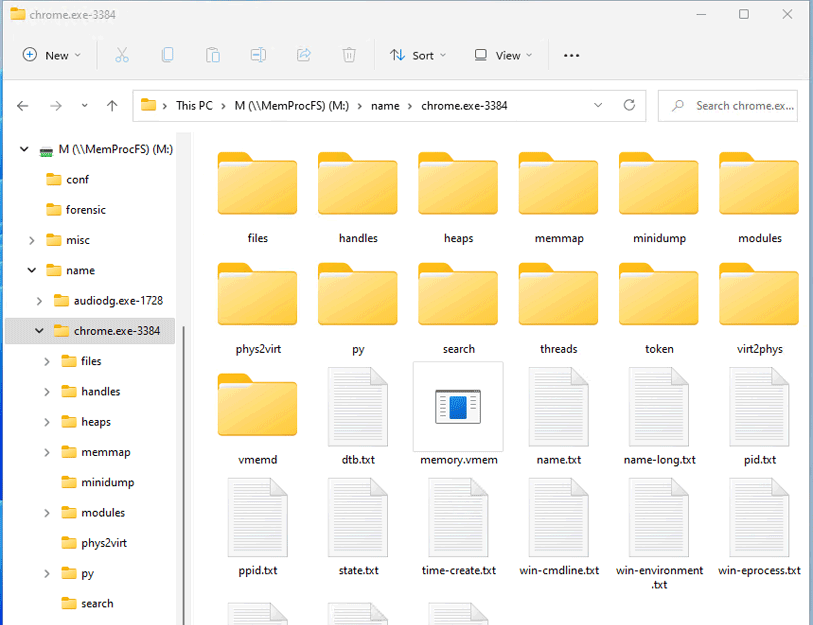
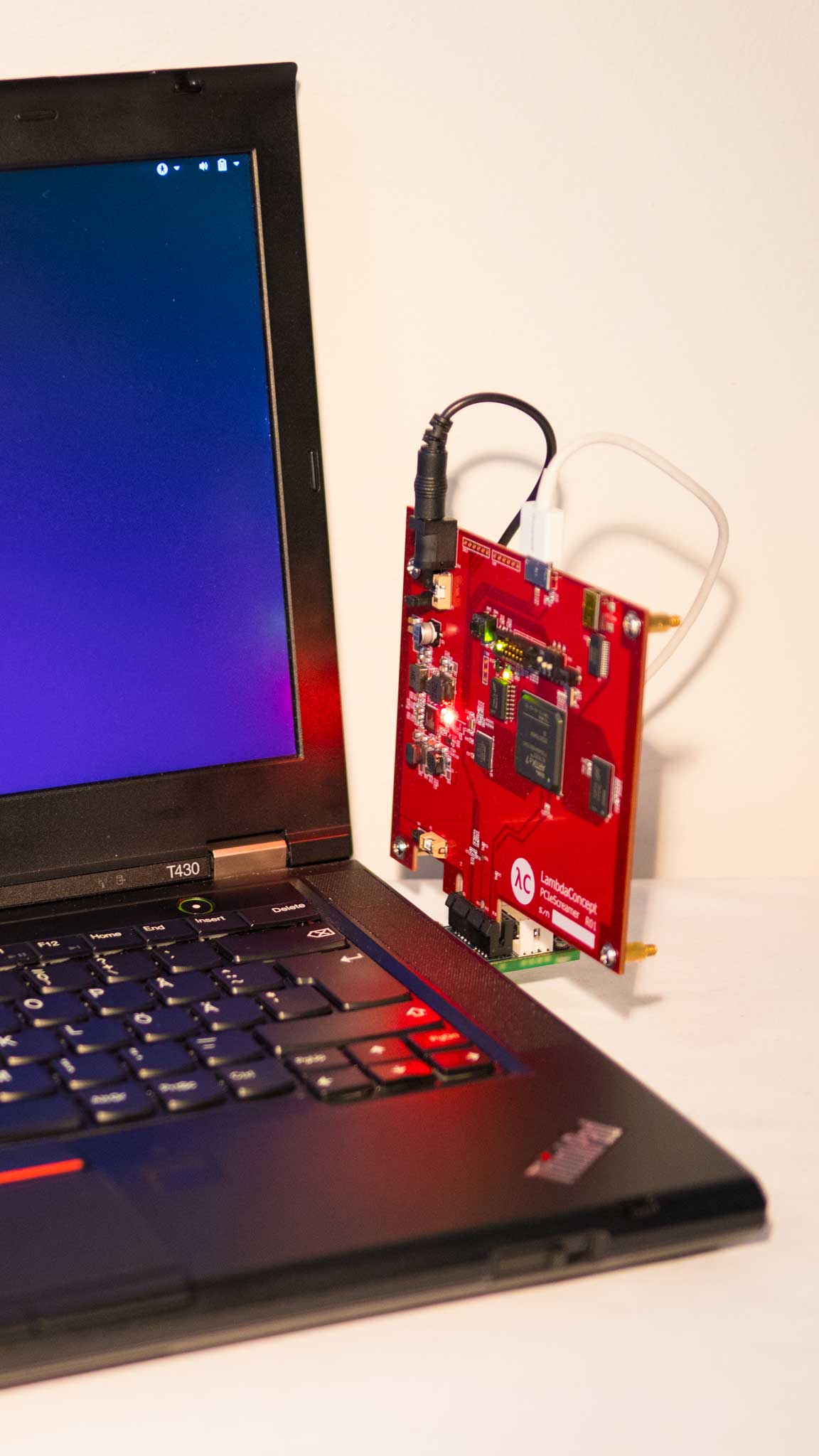
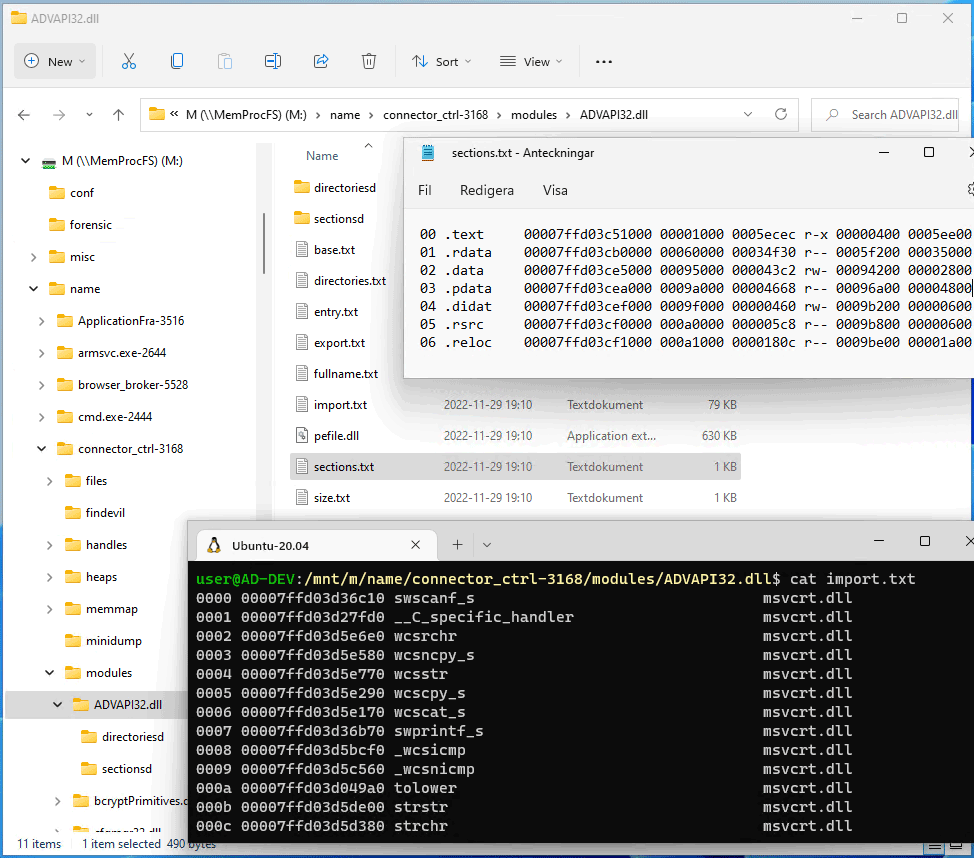

Get Started!
============
Check out the excellent quick walkthrough from [13Cubed](https://www.13cubed.com/) to get going! Also check out my older conference talks from Disobey and BlueHat.


For additional documentation **check out the [project wiki](https://github.com/ufrisk/MemProcFS/wiki)** for in-depth detailed information about the file system itself, its API and its plugin modules! For additional information about memory acqusition methods check out the **[LeechCore project](https://github.com/ufrisk/LeechCore/)** or hop into the [PCILeech/MemProcFS](https://pcileech.com/discord) Discord server!
To get going download the [latest binaries, modules and configuration files](https://github.com/ufrisk/MemProcFS/releases/latest) and check out the [guide](https://github.com/ufrisk/MemProcFS/wiki)!
Installing:
===========
Get the latest [binaries, modules and configuration files](https://github.com/ufrisk/MemProcFS/releases/latest) from the latest release. Alternatively clone the repository and build from source.
## Windows
Mounting the file system requires the Dokany file system library to be installed. Download and install the latest version of Dokany version 2 at: https://github.com/dokan-dev/dokany/releases/latest
To capture live memory (without PCILeech FPGA hardware) download [DumpIt](https://www.magnetforensics.com/resources/magnet-dumpit-for-windows) and start MemProcFS via DumpIt /LIVEKD mode. Alternatively, get WinPMEM by downloading the most recent signed [WinPMEM driver](https://github.com/Velocidex/c-aff4/tree/master/tools/pmem/resources/winpmem) and place it alongside MemProcFS - detailed instructions in the [LeechCore Wiki](https://github.com/ufrisk/LeechCore/wiki/Device_WinPMEM).
PCILeech FPGA will require hardware as well as _FTD3XXWU.dll_ to be dropped alongside the MemProcFS binaries. Please check out the [LeechCore](https://github.com/ufrisk/LeechCore) project for instructions.
## Linux
MemProcFS should be possible to run out-of-the-box on most Linux distros with FUSE installed. If building from source check out the guide about [MemProcFS on Linux](https://github.com/ufrisk/MemProcFS/wiki/_Linux).
## macOS
Download the latest MemProcFS release from [here](https://github.com/ufrisk/MemProcFS/releases/latest). MemProcFS when used as a mounted virtual file system depends on **macFuse** which requires a .kext. Download and install macFuse [here](https://github.com/macfuse/macfuse/releases/latest). If MemProcFS is used via the supported C/C++/Rust APIs macFuse is not required.
Extensive Python, Rust, Java, Go, C# and C/C++ API:
===============================
Include MemProcFS in your [C/C++](https://github.com/ufrisk/MemProcFS/wiki/API_C), [C#](https://github.com/ufrisk/MemProcFS/wiki/API_CSharp), [Java](https://github.com/ufrisk/MemProcFS/wiki/API_Java), [Go](https://github.com/TexHik620953/go-memprocfs/) (3rd party), [Python](https://github.com/ufrisk/MemProcFS/wiki/API_Python) or [Rust](https://github.com/ufrisk/MemProcFS/wiki/API_Rust) programming projects! Everything in MemProcFS is exposed via an easy-to-use API for use in your own projects! The Plugin friendly architecture allows users to easily extend MemProcFS with C/C++/Rust/Python plugins!
Everything in MemProcFS is exposed as APIs. APIs exist for both C/C++ `vmmdll.h`, C# [nuget package](https://www.nuget.org/packages/Vmmsharp/), Java, Python [pip package](https://pypi.org/project/memprocfs/) and Rust [crate](https://crates.io/crates/memprocfs). The file system itself is made available virtually via the API without the need to mount it. It is possible to read both virtual process memory as well as physical memory! The example below shows reading 0x20 bytes from physical address 0x1000:
```
>>> import memprocfs
>>> vmm = memprocfs.Vmm(['-device', 'c:/temp/win10_memdump.raw'])
>>> print(vmm.hex( vmm.memory.read(0x1000, 0x20) ))
0000 e9 4d 06 00 01 00 00 00 01 00 00 00 3f 00 18 10 .M..........?...
0010 00 00 00 00 00 00 00 00 00 00 00 00 00 00 00 00 ................
```
MemProcFS is available as a Python pip package and it's easy to integrate in your [Jupyter Notebooks](https://github.com/ufrisk/MemProcFS/wiki/API_Python_Jupyter).
Examples:
=========
Start MemProcFS from the command line - possibly by using one of the examples below.
Or register the memory dump file extension with MemProcFS.exe so that the file system is automatically mounted when double-clicking on a memory dump file!
- mount the memory dump file as default M:
`memprocfs.exe -device c:\temp\win10x64-dump.raw`
- mount the memory dump file as default M: with extra verbosity:
`memprocfs.exe -device c:\temp\win10x64-dump.raw -v`
- mount the memory dump file as default M: and start forensics mode:
`memprocfs.exe -device c:\temp\win10x64-dump.raw -forensic 1`
- mount the memory dump file as default M: and start forensics mode with a yara scan:
`memprocfs.exe -device c:\temp\win10x64-dump.raw -forensic 1 -forensic-yara-rules c:\yara\rules\windows_malware_index.yar`
- mount the memory dump file as /home/pi/mnt/ on Linux:
`./memprocfs -mount /home/pi/linux -device /dumps/win10x64-dump.raw`
- mount the memory dump file as S:
`memprocfs.exe -mount s -device c:\temp\win10x64-dump.raw`
- mount live target memory, in read-only mode, with WinPMEM driver:
`memprocfs.exe -device pmem`
- mount live target memory, in read/write mode, with PCILeech FPGA memory acquisition device:
`memprocfs.exe -device fpga -memmap auto`
- mount a memory dump with a corresponding page files:
`memprocfs.exe -device unknown-x64-dump.raw -pagefile0 pagefile.sys -pagefile1 swapfile.sys`
PCILeech and MemProcFS community:
=========
Find all this a bit overwhelming? Or just want to ask a quick question? Join the PCILeech and MemProcFS DMA community server at Discord!
 Building:
=========
Pre-built [binaries, modules and configuration files](https://github.com/ufrisk/MemProcFS/releases/latest) are found in the latest release.. MemProcFS binaries are built with Visual Studio 2022 and Ubuntu x64/AARCH64.
Detailed build instructions may be found in the [Wiki](https://github.com/ufrisk/MemProcFS/wiki) in the [Building](https://github.com/ufrisk/MemProcFS/wiki/Dev_Building) section.
License:
========
The project source code is released under: GNU Affero General Public License v3.0. Some bundled dependencies and plugins are released under GPLv3. Some bundled Microsoft redistributable binaries are released under separate licenses. Alternative licensing may be possible upon request.
Contributing:
=============
PCILeech, MemProcFS and LeechCore are open source but not open contribution. PCILeech, MemProcFS and LeechCore offers a highly flexible plugin architecture that will allow for contributions in the form of plugins. If you wish to make a contribution, other than a plugin, to the core projects please contact me before starting to develop.
Links:
======
* Twitter: [](https://twitter.com/intent/follow?screen_name=UlfFrisk)
* Discord: [](https://pcileech.com/discord)
* PCILeech: https://github.com/ufrisk/pcileech
* PCILeech FPGA: https://github.com/ufrisk/pcileech-fpga
* LeechCore: https://github.com/ufrisk/LeechCore
* MemProcFS: https://github.com/ufrisk/MemProcFS
* Blog: http://blog.frizk.net
Links - Related Projects:
=========================
* [MemProcFS-Analyzer](https://github.com/LETHAL-FORENSICS/MemProcFS-Analyzer/) is a 3rd party PowerShell application used for simplifying the usage of MemProcFS and to optimize your memory analysis workflow. MemProcFS-Analyzer is maintained by [@evild3ad](https://github.com/evild3ad) at [LETHAL-FORENSICS](https://github.com/LETHAL-FORENSICS).
Changelog:
===================
Building:
=========
Pre-built [binaries, modules and configuration files](https://github.com/ufrisk/MemProcFS/releases/latest) are found in the latest release.. MemProcFS binaries are built with Visual Studio 2022 and Ubuntu x64/AARCH64.
Detailed build instructions may be found in the [Wiki](https://github.com/ufrisk/MemProcFS/wiki) in the [Building](https://github.com/ufrisk/MemProcFS/wiki/Dev_Building) section.
License:
========
The project source code is released under: GNU Affero General Public License v3.0. Some bundled dependencies and plugins are released under GPLv3. Some bundled Microsoft redistributable binaries are released under separate licenses. Alternative licensing may be possible upon request.
Contributing:
=============
PCILeech, MemProcFS and LeechCore are open source but not open contribution. PCILeech, MemProcFS and LeechCore offers a highly flexible plugin architecture that will allow for contributions in the form of plugins. If you wish to make a contribution, other than a plugin, to the core projects please contact me before starting to develop.
Links:
======
* Twitter: [](https://twitter.com/intent/follow?screen_name=UlfFrisk)
* Discord: [](https://pcileech.com/discord)
* PCILeech: https://github.com/ufrisk/pcileech
* PCILeech FPGA: https://github.com/ufrisk/pcileech-fpga
* LeechCore: https://github.com/ufrisk/LeechCore
* MemProcFS: https://github.com/ufrisk/MemProcFS
* Blog: http://blog.frizk.net
Links - Related Projects:
=========================
* [MemProcFS-Analyzer](https://github.com/LETHAL-FORENSICS/MemProcFS-Analyzer/) is a 3rd party PowerShell application used for simplifying the usage of MemProcFS and to optimize your memory analysis workflow. MemProcFS-Analyzer is maintained by [@evild3ad](https://github.com/evild3ad) at [LETHAL-FORENSICS](https://github.com/LETHAL-FORENSICS).
Changelog:
===================
Previous releases (click to expand):
v1.0
* Initial Release.
v1.1-v4.9
* Various updates. Please see individual relases for more information.
v5.0
* Major release with new features to support parallel analysis tasks.
* Breaking API changes and major updates.
* Extended forensic analysis capabilties and [CSV file](https://github.com/ufrisk/MemProcFS/wiki/FS_Forensic_CSV) support.
* Linux plugin support.
* New [Java API](https://github.com/ufrisk/MemProcFS/wiki/API_Java).
v5.1
* Support for Windows 11 22H2.
* Text & Binary-only views at '/misc/view/'.
v5.2
* Bug fixes.
* [Virtual Machine support](https://github.com/ufrisk/MemProcFS/wiki/VM).
* [ARM64 Windows support](https://github.com/ufrisk/MemProcFS/wiki/_ARM64).
* FPGA performance improvements.
* Device tree information in /sys/drivers.
* Linux feature additions: memcompress and token.
* Manual download of debug symbols (PDBs) on offline systems (Windows only).
v5.3
* Bug fixes and performance optimizations.
* PE forwarded functions.
* PE version information.
* MemProcFS Python batch mode.
* Linux Python plugin support.
* Hyper-V Container/Sandbox support.
* Windows Hypervisor Platform support (VMware and VirtualBox on Hyper-V).
v5.4
* Rust API support.
* Debug symbol support when running on Linux.
v5.5
* [Findevil](https://github.com/ufrisk/MemProcFS/wiki/FS_FindEvil): New thread-based detections. Findevil is now forensic mode only.
* [Jupyter Notebook example](https://github.com/ufrisk/MemProcFS/wiki/API_Python_Jupyter)
* Yara support in [forensics mode](https://github.com/ufrisk/MemProcFS/wiki/FS_Forensic_Yara) and [search](https://github.com/ufrisk/MemProcFS/wiki/FS_YaraSearch).
v5.6
* Bug fixes, performance optimizations and minor updates.
* [files](https://github.com/ufrisk/MemProcFS/wiki/FS_Forensic_Files) plugin in forensics mode - showing files with recoverable contents.
* Built-in yara rules for [Findevil](https://github.com/ufrisk/MemProcFS/wiki/FS_FindEvil) in forensics mode from [Elastic Security](https://github.com/elastic/protections-artifacts).
Activate by accepting the Elastic license 2.0 by start-up option [`-license-accept-elastic-license-2.0`](https://github.com/ufrisk/MemProcFS/wiki/_CommandLine#-license-accept-elastic-license-2.0).
v5.7
* Bug fixes.
* Rust API updates.
* New FindEvil Yara detections.
* Yara scans of file objects (increased chance of vulnerable driver detection by FindEvil).
* Improved FPGA performance for smaller reads.
* Improved [MemProcFS remoting](https://github.com/ufrisk/MemProcFS/wiki/_Remoting) via a remote [LeechAgent](https://github.com/ufrisk/LeechCore/wiki/LeechAgent). Full MemProcFS remote support over SMB - tcp/445. Perfect for memory forensics Incident Response (IR)!
v5.8
* LeechCore API updates for C/C++, C#, Rust, Python, Java.
* Support for analyzing ARM64 Windows memory.
[v5.9](https://github.com/ufrisk/MemProcFS/releases/tag/v5.9)
* Bug fixes.
* Module improvements: ntfs, procinfo, web.
* C# API: improvements.
* Java API: support for java.lang.foreign (JDK21+) for efficient memory accesses.
* Linux PCIe FPGA performance improvements.
* FindEvil: Triggered Yara rules are now shown.
* FindEvil: AV detections from Windows Defender residing on the analyzed system.
* Python API: new functionality (multi-read, type-read) and improved scatter read performance.
* Support for Proxmox memory dump files.
[v5.10](https://github.com/ufrisk/MemProcFS/releases/tag/v5.10)
* Support for Windows 11 24H2 release.
* Bug fixes.
* Added named _SECTION objects to VAD map.
* `-memmap auto` improvements.
* Hibernation file support.
* FindEvil: UM APC detection. Thanks [@thejanit0r](https://github.com/thejanit0r) for the contribution.
* [Sysinfo module](https://github.com/ufrisk/MemProcFS/wiki/FS_Sys_Sysinfo) for easy-to-read system information.
* [Eventlog module](https://github.com/ufrisk/MemProcFS/wiki/FS_Misc_Eventlog) for convenient access to event log files.
* Binary search API now allows for up to 16M search terms (up from previous 16).
* Prefetch parsing.
[v5.11](https://github.com/ufrisk/MemProcFS/releases/tag/v5.11)
* Bug fixes.
* [New Vmmsharp C# API](https://github.com/ufrisk/MemProcFS/wiki/API_CSharp).
[v5.12](https://github.com/ufrisk/MemProcFS/releases/tag/v5.12)
* Bug fixes.
* updates (FindEvil, New signatures, etc.).
* New APIs for Kernel Objects, Drivers and Devices.
[v5.13](https://github.com/ufrisk/MemProcFS/releases/tag/v5.13)
* Bug fixes.
* New [console module](https://github.com/ufrisk/MemProcFS/wiki/FS_Process_Console) added.
* File recovery improvements (file sizes, signing info) for [files module](https://github.com/ufrisk/MemProcFS/wiki/FS_Forensic_Files).
* Memory callback API functionality (C/C++ API only).
* [Callstack parsing](https://github.com/ufrisk/MemProcFS/wiki/FS_Process_Threads) for x64 user-mode process callstacks.
[v5.14](https://github.com/ufrisk/MemProcFS/releases/tag/v5.14)
* Bug fixes.
* Linux clang compilation support.
* macOS support.
[v5.15](https://github.com/ufrisk/MemProcFS/releases/tag/v5.15)
* Bug fixes.
* Linux LeechAgent support using gRPC (LeechCore v2.21).
* New FindEvil detection: High Entropy.
* [DNS cache parsing](https://github.com/ufrisk/MemProcFS/wiki/FS_SysInfo_Network). Thanks [@MattCore71](https://github.com/MattCore71) for the contribution.
[v5.16](https://github.com/ufrisk/MemProcFS/releases/tag/v5.16)
* Bug fixes.
* Support for Windows 11 25H2