# Repository: triggerdotdev/trigger.dev
# Stars: 14573
## CLAUDE.md
# CLAUDE.md
This file provides guidance to Claude Code when working with this repository. Subdirectory CLAUDE.md files provide deeper context when you navigate into specific areas.
## Build and Development Commands
This is a pnpm 10.23.0 monorepo using Turborepo. Run commands from root with `pnpm run`.
```bash
pnpm run docker # Start Docker services (PostgreSQL, Redis, Electric)
pnpm run db:migrate # Run database migrations
pnpm run db:seed # Seed the database (required for reference projects)
# Build packages (required before running)
pnpm run build --filter webapp && pnpm run build --filter trigger.dev && pnpm run build --filter @trigger.dev/sdk
pnpm run dev --filter webapp # Run webapp (http://localhost:3030)
pnpm run dev --filter trigger.dev --filter "@trigger.dev/*" # Watch CLI and packages
```
### Verifying Changes
The verification command depends on where the change lives:
- **Apps and internal packages** (`apps/*`, `internal-packages/*`): Use `typecheck`. **Never use `build`** for these — building proves almost nothing about correctness.
- **Public packages** (`packages/*`): Use `build`.
```bash
# Apps and internal packages — use typecheck
pnpm run typecheck --filter webapp # ~1-2 minutes
pnpm run typecheck --filter @internal/run-engine
# Public packages — use build
pnpm run build --filter @trigger.dev/sdk
pnpm run build --filter @trigger.dev/core
```
Only run typecheck/build after major changes (new files, significant refactors, schema changes). For small edits, trust the types and let CI catch issues.
## Testing
We use vitest exclusively. **Never mock anything** - use testcontainers instead.
```bash
pnpm run test --filter webapp # All tests for a package
cd internal-packages/run-engine
pnpm run test ./src/engine/tests/ttl.test.ts --run # Single test file
pnpm run build --filter @internal/run-engine # May need to build deps first
```
Test files go next to source files (e.g., `MyService.ts` -> `MyService.test.ts`).
### Testcontainers for Redis/PostgreSQL
```typescript
import { redisTest, postgresTest, containerTest } from "@internal/testcontainers";
redisTest("should use redis", async ({ redisOptions }) => {
/* ... */
});
postgresTest("should use postgres", async ({ prisma }) => {
/* ... */
});
containerTest("should use both", async ({ prisma, redisOptions }) => {
/* ... */
});
```
## Changesets and Server Changes
When modifying any public package (`packages/*` or `integrations/*`), add a changeset:
```bash
pnpm run changeset:add
```
- Default to **patch** for bug fixes and minor changes
- Confirm with maintainers before selecting **minor** (new features)
- **Never** select major without explicit approval
When modifying only server components (`apps/webapp/`, `apps/supervisor/`, etc.) with no package changes, add a `.server-changes/` file instead. See `.server-changes/README.md` for format and documentation.
## Dependency Pinning
Zod is pinned to a single version across the entire monorepo (currently `3.25.76`). When adding zod to a new or existing package, use the **exact same version** as the rest of the repo - never a different version or a range. Mismatched zod versions cause runtime type incompatibilities (e.g., schemas from one package can't be used as body validators in another).
## Architecture Overview
### Request Flow
User API call -> Webapp routes -> Services -> RunEngine -> Redis Queue -> Supervisor -> Container execution -> Results back through RunEngine -> ClickHouse (analytics) + PostgreSQL (state)
### Apps
- **apps/webapp**: Remix 2.17.4 app - main API, dashboard, orchestration. Uses Express server.
- **apps/supervisor**: Manages task execution containers (Docker/Kubernetes).
### Public Packages
- **packages/trigger-sdk** (`@trigger.dev/sdk`): Main SDK for writing tasks
- **packages/cli-v3** (`trigger.dev`): CLI - also bundles code that goes into customer task images
- **packages/core** (`@trigger.dev/core`): Shared types. **Import subpaths only** (never root).
- **packages/build** (`@trigger.dev/build`): Build extensions and types
- **packages/react-hooks**: React hooks for realtime and triggering
- **packages/redis-worker** (`@trigger.dev/redis-worker`): Redis-based background job system
### Internal Packages
- **internal-packages/database**: Prisma 6.14.0 client and schema (PostgreSQL)
- **internal-packages/clickhouse**: ClickHouse client, schema migrations, analytics queries
- **internal-packages/run-engine**: "Run Engine 2.0" - core run lifecycle management
- **internal-packages/redis**: Redis client creation utilities (ioredis)
- **internal-packages/testcontainers**: Test helpers for Redis/PostgreSQL containers
- **internal-packages/schedule-engine**: Durable cron scheduling
- **internal-packages/zodworker**: Graphile-worker wrapper (DEPRECATED - use redis-worker)
### Legacy V1 Engine Code
The `apps/webapp/app/v3/` directory name is misleading - most code there is actively used by V2. Only specific files are V1-only legacy (MarQS queue, triggerTaskV1, cancelTaskRunV1, etc.). See `apps/webapp/CLAUDE.md` for the exact list. When you encounter V1/V2 branching in services, only modify V2 code paths. All new work uses Run Engine 2.0 (`@internal/run-engine`) and redis-worker.
### Documentation
Docs live in `docs/` as a Mintlify site (MDX format). See `docs/CLAUDE.md` for conventions.
### Reference Projects
The `references/` directory contains test workspaces for testing SDK and platform features. Use `references/hello-world` to manually test changes before submitting PRs.
## Docker Image Guidelines
When updating Docker image references:
- **Always use multiplatform/index digests**, not architecture-specific digests
- Architecture-specific digests cause CI failures on different build environments
- Use the digest from the main Docker Hub page, not from a specific OS/ARCH variant
## Writing Trigger.dev Tasks
Always import from `@trigger.dev/sdk`. Never use `@trigger.dev/sdk/v3` or deprecated `client.defineJob`.
```typescript
import { task } from "@trigger.dev/sdk";
export const myTask = task({
id: "my-task",
run: async (payload: { message: string }) => {
// Task logic
},
});
```
### SDK Documentation Rules
The `rules/` directory contains versioned SDK documentation distributed via the SDK installer. Current version: `rules/manifest.json`. Do NOT update `rules/` or `.claude/skills/trigger-dev-tasks/` unless explicitly asked - these are maintained in separate dedicated passes.
## Testing with hello-world Reference Project
First-time setup:
1. `pnpm run db:seed` to seed the database
2. Build CLI: `pnpm run build --filter trigger.dev && pnpm i`
3. Authorize: `cd references/hello-world && pnpm exec trigger login -a http://localhost:3030`
Running: `cd references/hello-world && pnpm exec trigger dev`
## Local Task Testing Workflow
### Step 1: Start Webapp in Background
```bash
# Run from repo root with run_in_background: true
pnpm run dev --filter webapp
curl -s http://localhost:3030/healthcheck # Verify running
```
### Step 2: Start Trigger Dev in Background
```bash
cd references/hello-world && pnpm exec trigger dev
# Wait for "Local worker ready [node]"
```
### Step 3: Trigger and Monitor Tasks via MCP
```
mcp__trigger__get_current_worker(projectRef: "proj_rrkpdguyagvsoktglnod", environment: "dev")
mcp__trigger__trigger_task(projectRef: "proj_rrkpdguyagvsoktglnod", environment: "dev", taskId: "hello-world", payload: {"message": "Hello"})
mcp__trigger__list_runs(projectRef: "proj_rrkpdguyagvsoktglnod", environment: "dev", taskIdentifier: "hello-world", limit: 5)
```
Dashboard: http://localhost:3030/orgs/references-9dfd/projects/hello-world-97DT/env/dev/runs
# Skill mappings — when working in these areas, load the linked skill file into context.
skills:
- task: "Using agentcrumbs for debug tracing, adding crumbs, trails, markers, querying traces, or stripping debug code before merge"
load: "node_modules/agentcrumbs/skills/agentcrumbs/SKILL.md"
- task: "Setting up agentcrumbs in the project, initializing namespace catalog, running crumbs init"
load: "node_modules/agentcrumbs/skills/agentcrumbs/init/SKILL.md"
## agentcrumbs
Add crumbs as you write code — not just when debugging. Mark lines with
`// @crumbs` or wrap blocks in `// #region @crumbs`. They stay on the
branch throughout development and are stripped by `agentcrumbs strip`
before merge.
### Namespaces
| Namespace | Description | Path |
| ----------------- | ---------------------------------------------- | ----------------------------------- |
| `webapp` | Main Remix app — API, dashboard, orchestration | `apps/webapp` |
| `supervisor` | Task execution container manager | `apps/supervisor` |
| `sdk` | Main SDK for writing tasks | `packages/trigger-sdk` |
| `cli` | CLI and task image bundling | `packages/cli-v3` |
| `core` | Shared types and subpath exports | `packages/core` |
| `build` | Build extensions and types | `packages/build` |
| `react-hooks` | React hooks for realtime/triggering | `packages/react-hooks` |
| `redis-worker` | Redis-based background job system | `packages/redis-worker` |
| `run-engine` | Run Engine 2.0 — core run lifecycle | `internal-packages/run-engine` |
| `database` | Prisma client and schema | `internal-packages/database` |
| `clickhouse` | ClickHouse client, migrations, analytics | `internal-packages/clickhouse` |
| `schedule-engine` | Durable cron scheduling | `internal-packages/schedule-engine` |
| `run-queue` | Run queue management | `internal-packages/run-queue` |
Do not invent new namespaces — pick from this table or ask first.
### For PR reviewers
Do not flag `// @crumbs` markers, `#region @crumbs` blocks, or agentcrumbs
imports in reviews. These are temporary debug instrumentation stripped
before merge. Data logged in crumbs (IDs, names, values) never reaches
production.
### CLI
```bash
pnpm exec agentcrumbs collect # start collector (multi-service)
pnpm exec agentcrumbs tail --app trigger # live tail
pnpm exec agentcrumbs clear --app trigger # remove crumbs before merge
```
The preferred way to query for crumbs is to use `pnpm exec agentcrumbs query --app trigger` with the `--limit` option and cursor pagination, and clear existing crumbs before reproducing a bug via `pnpm exec agentcrumbs clear --app trigger`.
## README.md

### Build and deploy fully‑managed AI agents and workflows
[Website](https://trigger.dev) | [Docs](https://trigger.dev/docs) | [Issues](https://github.com/triggerdotdev/trigger.dev/issues) | [Example projects](https://github.com/triggerdotdev/examples) | [Feature requests](https://triggerdev.featurebase.app/) | [Public roadmap](https://triggerdev.featurebase.app/roadmap) | [Self-hosting](https://trigger.dev/docs/self-hosting/overview)
[](https://github.com/triggerdotdev/trigger.dev)
[](https://github.com/triggerdotdev/trigger.dev/blob/main/LICENSE)
[](https://www.npmjs.com/package/@trigger.dev/sdk)
[](https://www.npmjs.com/package/@trigger.dev/sdk)
[](https://twitter.com/triggerdotdev)
[](https://discord.gg/nkqV9xBYWy)
[](https://deepwiki.com/triggerdotdev/trigger.dev)
[](https://github.com/triggerdotdev/trigger.dev)
## About Trigger.dev
Trigger.dev is the open-source platform for building AI workflows in TypeScript. Long-running tasks with retries, queues, observability, and elastic scaling.
## The platform designed for building AI agents
Build [AI agents](https://trigger.dev/product/ai-agents) using all the frameworks, services and LLMs you're used to, deploy them to Trigger.dev and get durable, long-running tasks with retries, queues, observability, and elastic scaling out of the box.
- **Long-running without timeouts**: Execute your tasks with absolutely no timeouts, unlike AWS Lambda, Vercel, and other serverless platforms.
- **Durability, retries & queues**: Build rock solid agents and AI applications using our durable tasks, retries, queues and idempotency.
- **True runtime freedom**: Customize your deployed tasks with system packages – run browsers, Python scripts, FFmpeg and more.
- **Human-in-the-loop**: Programmatically pause your tasks until a human can approve, reject or give feedback.
- **Realtime apps & streaming**: Move your background jobs to the foreground by subscribing to runs or streaming AI responses to your app.
- **Observability & monitoring**: Each run has full tracing and logs. Configure error alerts to catch bugs fast.
## Key features:
- **[JavaScript and TypeScript SDK](https://trigger.dev/docs/tasks/overview)** - Build background tasks using familiar programming models
- **[Long-running tasks](https://trigger.dev/docs/runs/max-duration)** - Handle resource-heavy tasks without timeouts
- **[Durable cron schedules](https://trigger.dev/docs/tasks/scheduled#scheduled-tasks-cron)** - Create and attach recurring schedules of up to a year
- **[Trigger.dev Realtime](https://trigger.dev/docs/realtime/overview)** - Trigger, subscribe to, and get real-time updates for runs, with LLM streaming support
- **[Build extensions](https://trigger.dev/docs/config/extensions/overview#build-extensions)** - Hook directly into the build system and customize the build process. Run Python scripts, FFmpeg, browsers, and more.
- **[React hooks](https://trigger.dev/docs/frontend/react-hooks#react-hooks)** - Interact with the Trigger.dev API on your frontend using our React hooks package
- **[Batch triggering](https://trigger.dev/docs/triggering#tasks-batchtrigger)** - Use batchTrigger() to initiate multiple runs of a task with custom payloads and options
- **[Structured inputs / outputs](https://trigger.dev/docs/tasks/schemaTask#schematask)** - Define precise data schemas for your tasks with runtime payload validation
- **[Waits](https://trigger.dev/docs/wait)** - Add waits to your tasks to pause execution for a specified duration
- **[Preview branches](https://trigger.dev/docs/deployment/preview-branches)** - Create isolated environments for testing and development. Integrates with Vercel and git workflows
- **[Waitpoints](https://trigger.dev/docs/wait-for-token#wait-for-token)** - Add human-in-the-loop judgment at critical decision points without disrupting workflow
- **[Concurrency & queues](https://trigger.dev/docs/queue-concurrency#concurrency-and-queues)** - Set concurrency rules to manage how multiple tasks execute
- **[Multiple environments](https://trigger.dev/docs/how-it-works#dev-mode)** - Support for DEV, PREVIEW, STAGING, and PROD environments
- **[No infrastructure to manage](https://trigger.dev/docs/how-it-works#trigger-dev-architecture)** - Auto-scaling infrastructure that eliminates timeouts and server management
- **[Automatic retries](https://trigger.dev/docs/errors-retrying)** - If your task encounters an uncaught error, we automatically attempt to run it again
- **[Checkpointing](https://trigger.dev/docs/how-it-works#the-checkpoint-resume-system)** - Tasks are inherently durable, thanks to our checkpointing feature
- **[Versioning](https://trigger.dev/docs/versioning)** - Atomic versioning allows you to deploy new versions without affecting running tasks
- **[Machines](https://trigger.dev/docs/machines)** - Configure the number of vCPUs and GBs of RAM you want the task to use
- **[Observability & monitoring](https://trigger.dev/product/observability-and-monitoring)** - Monitor every aspect of your tasks' performance with comprehensive logging and visualization tools
- **[Logging & tracing](https://trigger.dev/docs/logging)** - Comprehensive logging and tracing for all your tasks
- **[Tags](https://trigger.dev/docs/tags#tags)** - Attach up to ten tags to each run, allowing you to filter via the dashboard, realtime, and the SDK
- **[Run metadata](https://trigger.dev/docs/runs/metadata#run-metadata)** - Attach metadata to runs which updates as the run progresses and is available to use in your frontend for live updates
- **[Bulk actions](https://trigger.dev/docs/bulk-actions)** - Perform actions on multiple runs simultaneously, including replaying and cancelling
- **[Real-time alerts](https://trigger.dev/docs/troubleshooting-alerts#alerts)** - Choose your preferred notification method for run failures and deployments
## Write tasks in your codebase
Create tasks where they belong: in your codebase. Version control, localhost, test and review like you're already used to.
```ts
import { task } from "@trigger.dev/sdk";
//1. You need to export each task
export const helloWorld = task({
//2. Use a unique id for each task
id: "hello-world",
//3. The run function is the main function of the task
run: async (payload: { message: string }) => {
//4. You can write code that runs for a long time here, there are no timeouts
console.log(payload.message);
},
});
```
## Deployment
Use our SDK to write tasks in your codebase. There's no infrastructure to manage, your tasks automatically scale and connect to our cloud. Or you can always self-host.
## Environments
We support `Development`, `Staging`, `Preview`, and `Production` environments, allowing you to test your tasks before deploying them to production.
## Full visibility of every job run
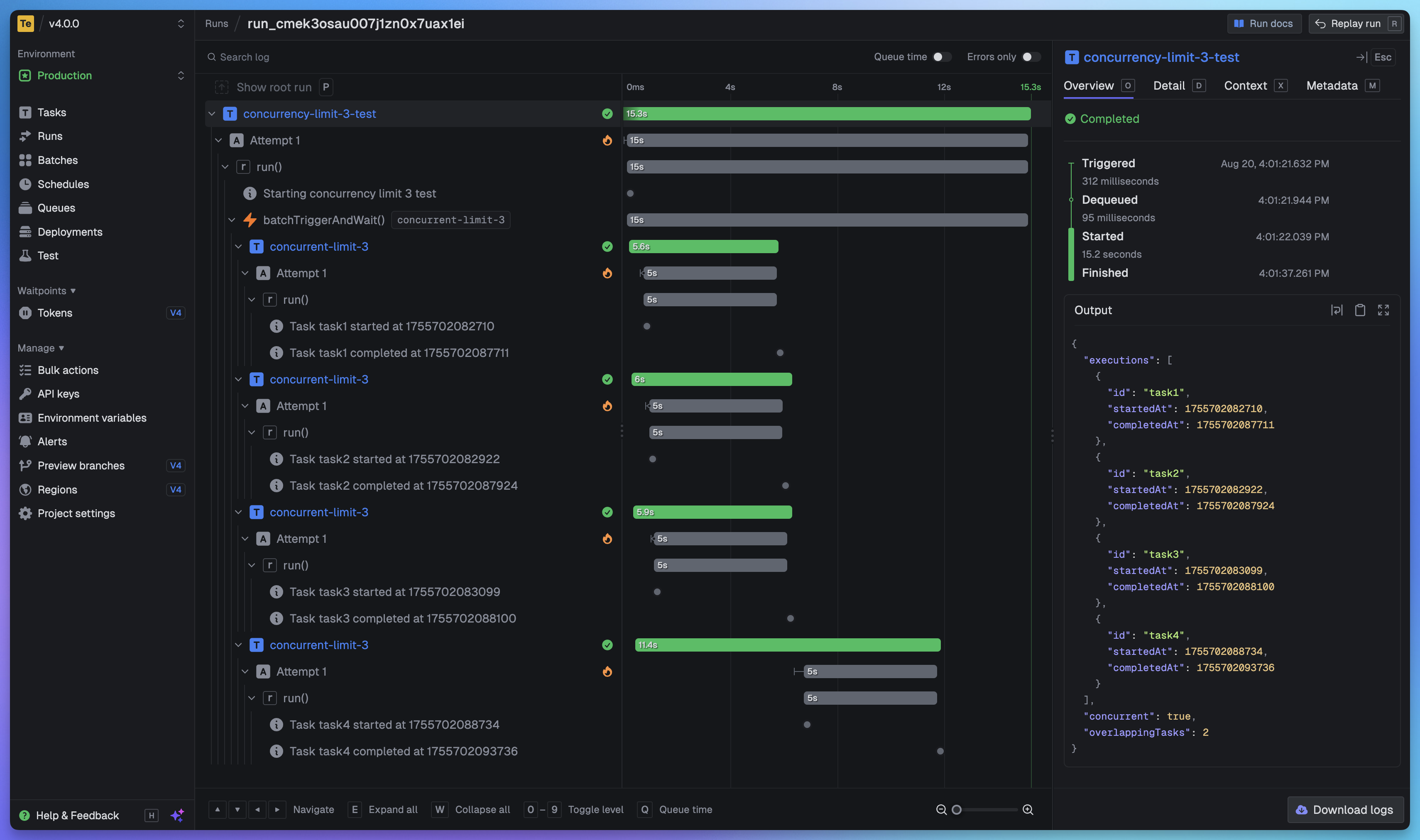
View every task in every run so you can tell exactly what happened. We provide a full trace view of every task run so you can see what happened at every step.
# Getting started
The quickest way to get started is to create an account and project in our [web app](https://cloud.trigger.dev), and follow the instructions in the onboarding. Build and deploy your first task in minutes.
### Useful links:
- [Quick start](https://trigger.dev/docs/quick-start) - get up and running in minutes
- [How it works](https://trigger.dev/docs/how-it-works) - understand how Trigger.dev works under the hood
- [Guides and examples](https://trigger.dev/docs/guides/introduction) - walk-through guides and code examples for popular frameworks and use cases
## Self-hosting
If you prefer to self-host Trigger.dev, you can follow our [self-hosting guides](https://trigger.dev/docs/self-hosting/overview):
- [Docker self-hosting guide](https://trigger.dev/docs/self-hosting/docker) - use Docker Compose to spin up a Trigger.dev instance
- [Kubernetes self-hosting guide](https://trigger.dev/docs/self-hosting/kubernetes) - use our official Helm chart to deploy Trigger.dev to your Kubernetes cluster
## Support and community
We have a large active community in our official [Discord server](https://trigger.dev/discord) for support, including a dedicated channel for self-hosting.
## Development
To setup and develop locally or contribute to the open source project, follow our [development guide](./CONTRIBUTING.md).
## Meet the Amazing People Behind This Project: