A powerful documentation framework on top of
MkDocs
Write your documentation in Markdown and create a professional static site for
your Open Source or commercial project in minutes – searchable, customizable,
more than 60 languages, for all devices.
## Everything you would expect
### It's just Markdown
Focus on the content of your documentation and create a professional static site
in minutes. No need to know HTML, CSS or JavaScript – let Material for MkDocs do
the heavy lifting for you.
### Works on all devices
Serve your documentation with confidence – Material for MkDocs automatically
adapts to perfectly fit the available screen estate, no matter the type or size
of the viewing device. Desktop. Tablet. Mobile. All great.
### Made to measure
Make it yours – change the colors, fonts, language, icons, logo, and more with
a few lines of configuration. Material for MkDocs can be easily extended and
provides many options to alter appearance and behavior.
### Fast and lightweight
Don't let your users wait – get incredible value with a small footprint by using
one of the fastest themes available with excellent performance, yielding optimal
search engine rankings and happy users that return.
### Maintain ownership
Own your documentation's complete sources and outputs, guaranteeing both
integrity and security – no need to entrust the backbone of your product
knowledge to third-party platforms. Retain full control.
### Open Source
You're in good company – choose a mature and actively maintained solution built
with state-of-the-art Open Source technologies, trusted by more than 50,000
individuals and organizations. Licensed under MIT.
## Quick start
Material for MkDocs can be installed with `pip`:
``` sh
pip install mkdocs-material
```
Add the following lines to `mkdocs.yml`:
``` yaml
theme:
name: material
```
For detailed installation instructions, configuration options, and a demo, visit
[squidfunk.github.io/mkdocs-material][Material for MkDocs]
[Material for MkDocs]: https://squidfunk.github.io/mkdocs-material/
## Trusted by ...
### ... industry leaders
[ArXiv](https://info.arxiv.org),
[Atlassian](https://atlassian.github.io/data-center-helm-charts/),
[AWS](https://aws.github.io/copilot-cli/),
[Bloomberg](https://bloomberg.github.io/selekt/),
[CERN](http://abpcomputing.web.cern.ch/),
[Datadog](https://datadoghq.dev/integrations-core/),
[Google](https://google.github.io/accompanist/),
[Harvard](https://informatics.fas.harvard.edu/),
[Hewlett Packard](https://hewlettpackard.github.io/squest/),
[HSBC](https://hsbc.github.io/pyratings/),
[ING](https://ing-bank.github.io/baker/),
[Intel](https://device-management-toolkit.github.io/docs/),
[JetBrains](https://jetbrains.github.io/projector-client/mkdocs/),
[LinkedIn](https://linkedin.github.io/school-of-sre/),
[Microsoft](https://microsoft.github.io/code-with-engineering-playbook/),
[Mozilla](https://mozillafoundation.github.io/engineering-handbook/),
[Netflix](https://netflix.github.io/titus/),
[OpenAI](https://openai.github.io/openai-agents-python/),
[Red Hat](https://ansible.readthedocs.io/projects/lint/),
[Roboflow](https://inference.roboflow.com/),
[Salesforce](https://policy-sentry.readthedocs.io/),
[SIEMENS](https://opensource.siemens.com/),
[Slack](https://slackhq.github.io/circuit/),
[Square](https://lysine.dev/okhttp/),
[Uber](https://uber-go.github.io/fx/),
[Zalando](https://opensource.zalando.com/skipper/)
### ... and successful Open Source projects
[Amp](https://amp.rs/docs/),
[Apache Iceberg](https://iceberg.apache.org/),
[Arduino](https://arduino.github.io/arduino-cli/),
[Asahi Linux](https://asahilinux.org/docs/),
[Auto-GPT](https://docs.agpt.co/),
[AutoKeras](https://autokeras.com/),
[BFE](https://www.bfe-networks.net/),
[CentOS](https://docs.infra.centos.org/),
[Crystal](https://crystal-lang.org/reference/),
[eBPF](https://ebpf-go.dev/),
[ejabberd](https://docs.ejabberd.im/),
[Electron](https://www.electron.build/),
[FastAPI](https://fastapi.tiangolo.com/),
[FlatBuffers](https://flatbuffers.dev/),
[{fmt}](https://fmt.dev/),
[Freqtrade](https://www.freqtrade.io/en/stable/),
[GoReleaser](https://goreleaser.com/),
[GraphRAG](https://microsoft.github.io/graphrag/),
[Headscale](https://headscale.net/),
[HedgeDoc](https://docs.hedgedoc.org/),
[Hummingbot](https://hummingbot.org/),
[Knative](https://knative.dev/docs/),
[Kubernetes](https://kops.sigs.k8s.io/),
[kSQL](https://docs.ksqldb.io/),
[LeakCanary](https://square.github.io/leakcanary/),
[LlamaIndex](https://docs.llamaindex.ai/),
[NetBox](https://netboxlabs.com/docs/netbox/en/stable/),
[Nokogiri](https://nokogiri.org/),
[OpenAI](https://openai.github.io/openai-agents-python/),
[OpenFaaS](https://docs.openfaas.com/),
[OpenSSL](https://docs.openssl.org/),
[Orchard Core](https://docs.orchardcore.net/en/latest/),
[Percona](https://docs.percona.com/percona-monitoring-and-management/),
[Pi-Hole](https://docs.pi-hole.net/),
[Polars](https://docs.pola.rs/),
[Pydantic](https://pydantic-docs.helpmanual.io/),
[PyPI](https://docs.pypi.org/),
[Quivr](https://core.quivr.com/),
[Renovate](https://docs.renovatebot.com/),
[RetroPie](https://retropie.org.uk/docs/),
[Ruff](https://docs.astral.sh/ruff/),
[Supervision](https://supervision.roboflow.com/latest/),
[Textual](https://textual.textualize.io/),
[Traefik](https://docs.traefik.io/),
[Trivy](https://aquasecurity.github.io/trivy/),
[Typer](https://typer.tiangolo.com/),
[tinygrad](https://docs.tinygrad.org/),
[Ultralytics](https://docs.ultralytics.com/),
[UV](https://docs.astral.sh/uv/),
[Vapor](https://docs.vapor.codes/),
[WebKit](https://docs.webkit.org/),
[WTF](https://wtfutil.com/),
[ZeroNet](https://zeronet.io/docs/)
## License
**MIT License**
Copyright (c) 2016-2025 Martin Donath
Permission is hereby granted, free of charge, to any person obtaining a copy
of this software and associated documentation files (the "Software"), to
deal in the Software without restriction, including without limitation the
rights to use, copy, modify, merge, publish, distribute, sublicense, and/or
sell copies of the Software, and to permit persons to whom the Software is
furnished to do so, subject to the following conditions:
The above copyright notice and this permission notice shall be included in
all copies or substantial portions of the Software.
THE SOFTWARE IS PROVIDED "AS IS", WITHOUT WARRANTY OF ANY KIND, EXPRESS OR
IMPLIED, INCLUDING BUT NOT LIMITED TO THE WARRANTIES OF MERCHANTABILITY,
FITNESS FOR A PARTICULAR PURPOSE AND NON-INFRINGEMENT. IN NO EVENT SHALL THE
AUTHORS OR COPYRIGHT HOLDERS BE LIABLE FOR ANY CLAIM, DAMAGES OR OTHER
LIABILITY, WHETHER IN AN ACTION OF CONTRACT, TORT OR OTHERWISE, ARISING
FROM, OUT OF OR IN CONNECTION WITH THE SOFTWARE OR THE USE OR OTHER DEALINGS
IN THE SOFTWARE.
---
### Getting Started (`docs/getting-started.md`)
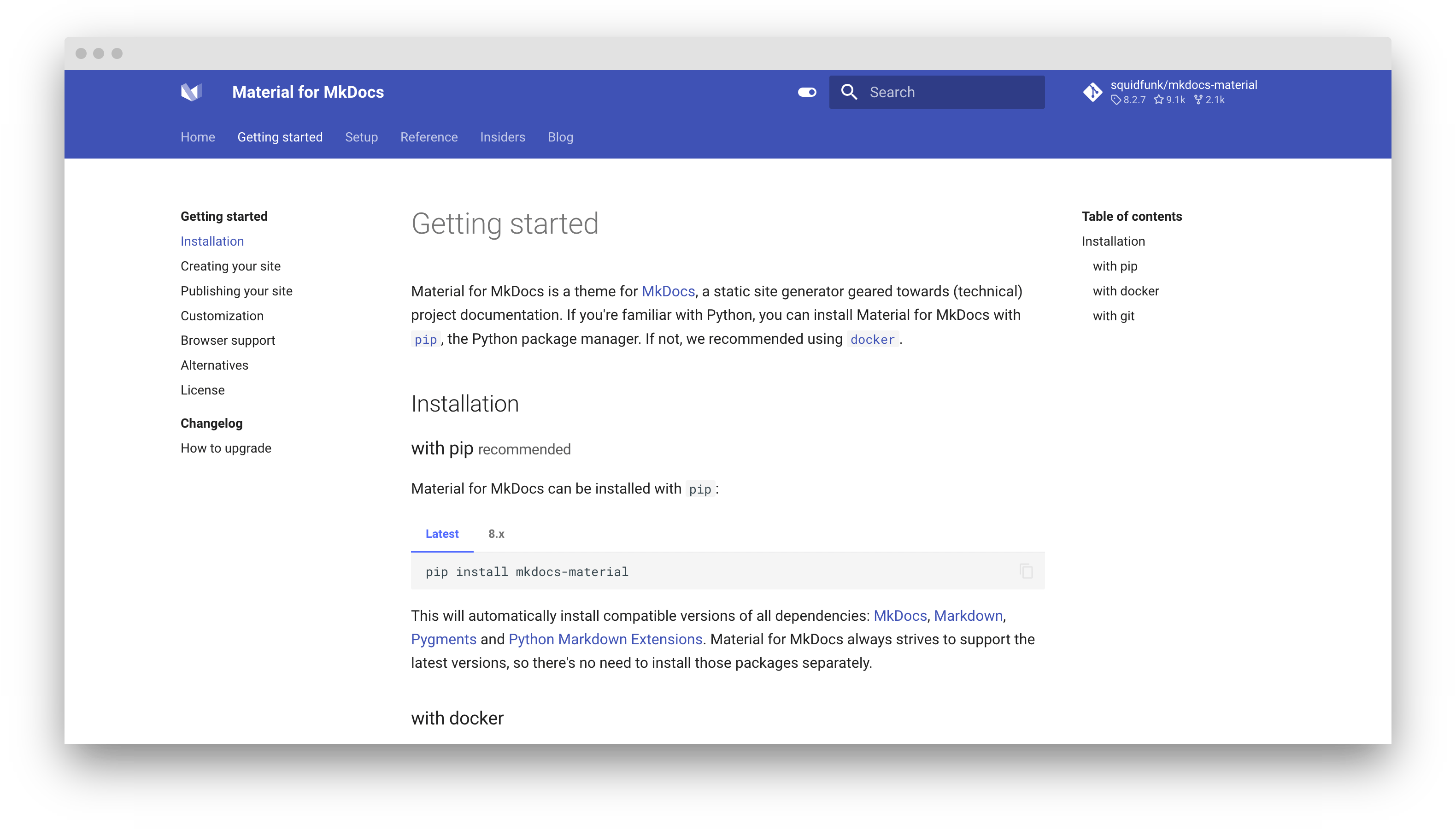
# Getting started
Material for MkDocs is a documentation framework built on [MkDocs],
a static site generator for project documentation. If you're familiar with
Python, you can install Material for MkDocs with [`pip`][pip], the Python
package manager. If not, we recommend using [`docker`][docker].
[MkDocs]: https://www.mkdocs.org
[pip]: #with-pip
[docker]: #with-docker
!!! info "Material for MkDocs reaches end of life on May 5, 2027"
[Zensical](https://zensical.org/docs/get-started/) is its successor, built by us,
the team that has maintained Material for MkDocs for the past 10 years.
Follow our [migration guide](https://zensical.org/docs/compatibility/mkdocs/migration/)
to move your site to Zensical. You can run it alongside MkDocs with your
existing content and configuration to check that your site looks and works
as expected before switching.
## Installation
### with pip recommended { #with-pip data-toc-label="with pip" }
Material for MkDocs is published as a [Python package] and can be installed with
`pip`, ideally by using a [virtual environment]. Open up a terminal and install
Material for MkDocs with:
=== "Latest"
``` sh
pip install mkdocs-material
```
=== "9.x"
``` sh
pip install mkdocs-material=="9.*" # (1)!
```
1. Material for MkDocs uses [semantic versioning][^2], which is why it's a
good idea to limit upgrades to the current major version.
This will make sure that you don't accidentally [upgrade to the next
major version], which may include breaking changes that silently corrupt
your site. Additionally, you can use `pip freeze` to create a lockfile,
so builds are reproducible at all times:
```
pip freeze > requirements.txt
```
Now, the lockfile can be used for installation:
```
pip install -r requirements.txt
```
[^2]:
Note that improvements of existing features are sometimes released as
patch releases, like for example improved rendering of content tabs, as
they're not considered to be new features.
This will automatically install compatible versions of all dependencies:
[MkDocs], [Markdown], [Pygments] and [Python Markdown Extensions].
---
:fontawesome-brands-youtube:{ style="color: #EE0F0F" }
__[How to set up Material for MkDocs]__ by @james-willett – :octicons-clock-24:
27m – Learn how to create and host a documentation site using Material for
MkDocs on GitHub Pages in a step-by-step guide.
[How to set up Material for MkDocs]: https://www.youtube.com/watch?v=xlABhbnNrfI
---
!!! tip
If you don't have prior experience with Python, we recommend reading
[Using Python's pip to Manage Your Projects' Dependencies], which is a
really good introduction on the mechanics of Python package management and
helps you troubleshoot if you run into errors.
[Python package]: https://pypi.org/project/mkdocs-material/
[virtual environment]: https://realpython.com/what-is-pip/#using-pip-in-a-python-virtual-environment
[semantic versioning]: https://semver.org/
[upgrade to the next major version]: upgrade.md
[Markdown]: https://python-markdown.github.io/
[Pygments]: https://pygments.org/
[Python Markdown Extensions]: https://facelessuser.github.io/pymdown-extensions/
[Using Python's pip to Manage Your Projects' Dependencies]: https://realpython.com/what-is-pip/
### with docker
The official [Docker image] includes all required dependencies. Pull the
image with:
=== "Latest"
```
docker pull squidfunk/mkdocs-material
```
=== "9.x"
```
docker pull squidfunk/mkdocs-material:9
```
The `mkdocs` executable is provided as an entry point and `serve` is the
default command. If you're not familiar with Docker don't worry, we have you
covered in the following sections.
The following plugins are bundled with the Docker image:
- [mkdocs-minify-plugin]
- [mkdocs-redirects]
[Docker image]: https://hub.docker.com/r/squidfunk/mkdocs-material/
[mkdocs-minify-plugin]: https://github.com/byrnereese/mkdocs-minify-plugin
[mkdocs-redirects]: https://github.com/datarobot/mkdocs-redirects
???+ warning
The Docker container is intended for local previewing purposes only and
is not suitable for deployment. This is because the web server used by
MkDocs for live previews is not designed for production use and may have
security vulnerabilities.
??? question "How to add plugins to the Docker image?"
Material for MkDocs only bundles selected plugins in order to keep the size
of the official image small. If the plugin you want to use is not included,
you can add them easily. Create a `Dockerfile` and extend the official image:
``` Dockerfile title="Dockerfile"
FROM squidfunk/mkdocs-material
RUN pip install mkdocs-macros-plugin
RUN pip install mkdocs-glightbox
```
Next, build the image with the following command:
```
docker build -t squidfunk/mkdocs-material .
```
The new image will have additional packages installed and can be used
exactly like the official image.
### with git
Material for MkDocs can be directly used from [GitHub] by cloning the
repository into a subfolder of your project root which might be useful if you
want to use the very latest version:
```
git clone https://github.com/squidfunk/mkdocs-material.git
```
Next, install the theme and its dependencies with:
```
pip install -e mkdocs-material
```
[GitHub]: https://github.com/squidfunk/mkdocs-material
---
### Index (`docs/index.md`)
---
template: home.html
title: Material for MkDocs
social:
cards_layout_options:
title: Documentation that simply works
---
Welcome to Material for MkDocs.
---
### Changelog Index (`docs/changelog/index.md`)
# Changelog
!!! warning "Material for MkDocs reaches end of life on May 5, 2027"
Material for MkDocs is in maintenance mode and no longer receives new features.
Critical bug fixes and security updates continue through **May 5, 2027**.
After that date, upstream maintenance ends.
You can continue using your installed version and published sites, but new
bugs, security vulnerabilities, or compatibility issues will no longer
receive fixes.
For a maintained successor, see [Zensical](https://zensical.org/) and our
[migration guide](https://zensical.org/docs/compatibility/mkdocs/migration/).
## Material for MkDocs
### 9.7.7 July 17, 2026 { id="9.7.7" }
- Fixed DOM-based XSS vulnerability in search suggestions
### 9.7.6 March 19, 2026 { id="9.7.6" }
- Automatically disable MkDocs 2.0 warning for forks of MkDocs
### 9.7.5 March 10, 2026 { id="9.7.5" }
- Limited version range of mkdocs to <2
- Updated MkDocs 2.0 incompatibility warning (clarify relation with MkDocs)
### 9.7.4 March 3, 2026 { id="9.7.4" }
- Hardened social cards plugin by switching to sandboxed environment
- Updated MkDocs 2.0 incompatibility warning
### 9.7.3 February 24, 2026 { id="9.7.3" }
- Fixed #8567: Print MkDocs 2.0 incompatibility warning to stderr
### 9.7.2 February 18, 2026 { id="9.7.2" }
- Opened up version ranges of optional dependencies for forward-compatibility
- Added warning to `mkdocs build` about impeding MkDocs 2.0 incompatibility
### 9.7.1 December 18, 2025 { id="9.7.1" }
- Updated requests to 2.30+ to mitigate CVE in urllib
- Fixed privacy plugin not picking up protocol-relative URLs
- Fixed #8542: false positives and negatives captured in privacy plugin
### 9.7.0 November 11, 2025 { id="9.7.0" }
!!! warning "Material for MkDocs is now in maintenance mode"
This is the last release of Material for MkDocs that will receive new features.
Going forward, the Material for MkDocs team focuses on [Zensical], a next-gen
static site generator built from first principles. We will provide critical
bug fixes and security updates for Material for MkDocs for 12 months at least.
[Read the full announcement on our blog]
This release includes all features that were previously exclusive to the
Insiders edition. These features are now freely available to everyone.
__Note on deprecated plugins__: The [projects] and [typeset] plugins are
included in this release, but must be considered deprecated. Both plugins
proved unsustainable to maintain and represent architectural dead ends. They
are provided as-is without ongoing support.
__Changes__:
- Added support for projects plugin (for compat, now deprecated)
- Added support for typeset plugin (for compat, now deprecated)
- Added support for pinned blog posts and author profiles
- Added support for customizing pagination for blog index pages
- Added support for customizing blog category sort order
- Added support for staying on page when switching languages
- Added support for disabling tags in table of contents
- Added support for nested tags and shadow tags
- Added support for footnote tooltips
- Added support for instant previews
- Added support for instant prefetching
- Added support for custom social card layouts
- Added support for custom social card background images
- Added support for selectable rangs in code blocks
- Added support for custom selectors for code annotations
- Added support for configurable log level in privacy plugin
- Added support for processing of external links in privacy plugin
- Added support for automatic image optimization via optimize plugin
- Added support for navigation paths (breadcrumbs)
- Fixed #8519: Vector accents do not render when using KaTeX
[Zensical]: https://zensical.org
[Read the full announcement on our blog]: ../blog/posts/zensical.md
[projects]: ../plugins/projects.md
[typeset]: ../plugins/typeset.md
### 9.6.23 November 1, 2025 { id="9.6.23" }
- Updated Burmese translation
### 9.6.22 October 15, 2025 { id="9.6.22" }
- Updated Georgian translation
### 9.6.21 September 30, 2025 { id="9.6.21" }
- Updated Serbian translations
- Fixed #8458: Temporary pin of click dependency
### 9.6.20 September 15, 2025 { id="9.6.20" }
- Fixed #8446: Deprecation warning as of Python 3.14 in Emoji extension
- Fixed #8440: `&` character not escaped in search highlighting
- Fixed #8439: FontAwesome icons color not set in social cards (regression)
### 9.6.19 September 7, 2025 { id="9.6.19" }
- Added support for Python 3.14
- Updated Bahasa Malaysia translations
### 9.6.18 August 22, 2025 { id="9.6.18" }
- Updated Azerbaijani translations
- Fixed last compat issues with [minijinja], now 100% compatible
### 9.6.17 August 15, 2025 { id="9.6.17" }
- Fixed #8396: Videos do not autoplay when inside a content tab
- Fixed #8394: Stroke width not effective in Mermaid.js diagrams
- Fixed disappearing version selector when hiding page title
### 9.6.16 July 26, 2025 { id="9.6.16" }
- Fixed #8349: Info plugin doesn't correctly detect virtualenv in some cases
- Fixed #8334: Find-in-page detects matches in hidden search result list
### 9.6.15 July 1, 2025 { id="9.6.15" }
- Updated Mongolian translations
- Improved semantic markup of "edit this page" button
- Improved info plugin virtual environment resolution
- Fixed #8291: Large font size setting throws of breakpoints in JavaScript
### 9.6.14 May 13, 2025 { id="9.6.14" }
- Fixed #8215: Social plugin crashes when CairoSVG is updated to 2.8
### 9.6.13 May 10, 2025 { id="9.6.13" }
- Fixed #8204: Annotations showing list markers in print view
- Fixed #8153: Improve style of cardinality symbols in Mermaid.js ER diagrams
### 9.6.12 April 17, 2025 { id="9.6.12" }
- Fixed #8158: Flip footnote back reference icon for right-to-left languages
### 9.6.11 April 1, 2025 { id="9.6.11" }
- Updated Docker image to latest Alpine Linux
- Bump required Jinja version to 3.1
- Fixed #8133: Jinja filter `items` not available (9.6.10 regression)
- Fixed #8128: Search plugin not entirely disabled via enabled setting
### 9.6.10 March 30, 2025 { id="9.6.10" }
This version is a pure refactoring release, and does not contain new features
or bug fixes. It strives to improve the compatibility of our templates with
alternative Jinja-like template engines that we're currently exploring,
including [minijinja].
Additionally, it replaces several instances of Python function invocations
with idiomatic use of template filters. All instances where variables have
been mutated inside templates have been replaced. Most changes have been made
in partials, and only a few in blocks, and all of them are fully backward
compatible, so no changes to overrides are necessary.
Note that this release does not replace the Jinja template engine with
minijinja. However, our templates are now 99% compatible with minijinja,
which means we can explore alternative Jinja-compatible implementations.
Additionally, immutability and removal of almost all Python function
invocations means much more idiomatic templating.
[minijinja]: https://github.com/mitsuhiko/minijinja
### 9.6.9 March 17, 2025 { id="9.6.9" }
- Updated Serbo-Croatian translations
- Fixed #8086: Custom SVG icons containing hashes break rendering
- Fixed #8067: Drawer has gap on right side in Firefox on some OSs
### 9.6.8 March 13, 2025 { id="9.6.8" }
- Added Welsh translations
- Fixed #8076: Privacy plugin crashes if HTTP download fails
### 9.6.7 March 3, 2025 { id="9.6.7" }
- Fixed #8056: Error in backrefs implementation (9.6.6 regression)
- Fixed #8054: Unescaped quotes in ARIA labels of table of contents
### 9.6.6 March 1, 2025 { id="9.6.6" }
- Fixed #8040: Privacy plugin not replacing exteral assets (9.6.5 regression)
- Fixed #8031: Replace unmaintained `regex` package in search plugin
### 9.6.5 February 20, 2025 { id="9.6.5" }
- Fixed #8016: Tags listing not showing when when file name has spaces
- Fixed #8012: Privacy plugin crashes if HTTP download fails
### 9.6.4 February 12, 2025 { id="9.6.4" }
- Fixed #7985: Blog content sometimes not stretching to full width
- Fixed #7978: Navigation rendering bug in Safari 18.3
### 9.6.3 February 7, 2025 { id="9.6.3" }
- Fixed rendering of arrow heads in Mermaid.js class diagrams
- Fixed #7960: Tags plugin crashes on numeric metadata titles
### 9.6.2 February 3, 2025 { id="9.6.2" }
- Fixed #7955: Excessively long words don't break on narrow screens
- Fixed #7947: Scope setting interferes with outdated version banner
### 9.6.1 January 31, 2025 { id="9.6.1" }
- Fixed #7943: Tags plugin crashing due to merge error
### 9.6.0 January 31, 2025 { id="9.6.0" }
- Added meta plugin
- Rewrite of the tags plugin
- Added support for allow lists in tags plugin
- Added support for and custom sorting in tags plugin
- Added support for related links in blog plugin
- Added support for custom index pages in blog plugin
- Added support for navigation subtitles
- Fixed #7924: Anchors might require two clicks when using instant navigation
### 9.5.50 January 18, 2025 { id="9.5.50" }
- Fixed #7913: Social plugin renders attribute lists in page title
### 9.5.49 December 16, 2024 { id="9.5.49" }
- Adjusted title color in dark mode for all supported Mermaid.js diagrams
- Fixed #7803: Privacy plugin crashes on generated files
- Fixed #7781: Mermaid.js flow chart title not visible in dark mode
### 9.5.48 December 8, 2024 { id="9.5.48" }
- Fixed #7774: Disabling social cards doesn't work
### 9.5.47 December 1, 2024 { id="9.5.47" }
- Fixed #7750: Numeric tags break search
- Fixed #7748: Blog plugin breaks when using future drafts (9.5.45 regression)
### 9.5.46 November 25, 2024 { id="9.5.46" }
- Added support for removing `preload` hints in privacy plugin
- Fixed #7734: Code blocks in h5 headlines are uppercased
- Fixed #7725: Blog plugin crashing on missing timezone (9.5.45 regression)
### 9.5.45 November 20, 2024 { id="9.5.45" }
- Reduced size of Docker image through multi-stage build
- Fixed #7708: Blog plugin crashing on YAML dates with timezones
### 9.5.44 November 5, 2024 { id="9.5.44" }
- Fixed #7672: Font CSS 404's when using privacy plugin (9.5.43 regression)
### 9.5.43 October 31, 2024 { id="9.5.43" }
- Added support for external images in SVGs in privacy plugin
- Fixed #7651: Privacy plugin doesn't handle quoted URLs in CSS
### 9.5.42 October 20, 2024 { id="9.5.42" }
- Fixed #7625: Invalid encoding of boolean attributes in privacy plugin
- Fixed #7624: Crash when disabling privacy plugin (9.5.41 regression)
### 9.5.41 October 15, 2024 { id="9.5.41" }
- Fixed #7619: Improved tooltip on logo disappears after instant navigation
- Fixed #7616: Race condition in built-in privacy plugin when inlining assets
- Fixed #7615: Comments and "Was this page helpful?" visible when printing
### 9.5.40 October 10, 2024 { id="9.5.40" }
- Updated Latvian translations
- Fixed #7597: Social cards not using site name on home page
### 9.5.39 September 29, 2024 { id="9.5.39" }
- Fixed #7226: not staying on page when using mike's canonical versioning
### 9.5.38 September 26, 2024 { id="9.5.38" }
- Added Albanian translations
### 9.5.37 September 25, 2024 { id="9.5.37" }
- Added 4th and 5th level ordered list styles
- Fixed #7548: Tags have no spacing in search
### 9.5.36 September 21, 2024 { id="9.5.36" }
- Fixed #7544: Social cards incorrectly rendering HTML entities
- Fixed #7542: Improved support for setting custom list styles
### 9.5.35 September 18, 2024 { id="9.5.35" }
- Fixed #7498: Search not showing for Vietnamese language
### 9.5.34 August 31, 2024 { id="9.5.34" }
- Updated Mermaid.js to version 11 (latest)
### 9.5.33 August 23, 2024 { id="9.5.33" }
- Fixed #7453: Incorrect position of tooltip when sorting table
### 9.5.32 August 19, 2024 { id="9.5.32" }
- Fixed RXSS vulnerability via deep link in search results
- Added support for fetching latest release from GitLab
### 9.5.31 August 2, 2024 { id="9.5.31" }
- Fixed #7405: DockerHub missing images > 9.5.27 due to change in Alpine/APK
### 9.5.30 July 23, 2024 { id="9.5.30" }
- Fixed #7380: Navigation icons disappearing on hover in Safari
- Fixed #7367: Blog readtime computation includes SVG text content
### 9.5.29 July 14, 2024 { id="9.5.29" }
- Updated Galician translations
- Fixed #7362: Annotations in figure captions rendering incorrectly
### 9.5.28 July 2, 2024 { id="9.5.28" }
- Fixed #7313: Improved tooltips mounted in sidebar when feature is disabled
### 9.5.27 June 16, 2024 { id="9.5.27" }
- Updated Estonian translations
### 9.5.26 June 6, 2024 { id="9.5.26" }
- Fixed #7232: Tab switches on scroll when linking tabs (9.5.19 regression)
- Fixed #7230: Blog author avatar broken when referring to local file
### 9.5.25 May 27, 2024 { id="9.5.25" }
- Fixed #7209: Tags plugin crashing on numeric tags
### 9.5.24 May 20, 2024 { id="9.5.24" }
- Fixed #7187: Version selector title rendering issue
### 9.5.23 May 15, 2024 { id="9.5.23" }
- Fixed #7183: Edge case in anchor navigation when using instant navigation
- Fixed #6436: Version selector not showing version alias
### 9.5.22 May 12, 2024 { id="9.5.22" }
- Fixed #7170: Copy button adds empty lines for line spans (9.5.18 regression)
- Fixed #7160: Version switching doesn't stay on page (9.5.5 regression)
- Fixed #5619: Links in Mermaid.js diagrams not discernible
### 9.5.21 May 3, 2024 { id="9.5.21" }
- Fixed #7133: Ensure latest version of Mermaid.js is used
- Fixed #7125: Added warning for dotfiles in info plugin
### 9.5.20 April 29, 2024 { id="9.5.20" }
- Fixed deprecation warning in privacy plugin (9.5.19 regression)
- Fixed #7119: Tags plugin emits deprecation warning (9.5.19 regression)
- Fixed #7118: Social plugin crashes if fonts are disabled (9.5.19 regression)
- Fixed #7085: Social plugin crashes on Windows when downloading fonts
### 9.5.19 April 25, 2024 { id="9.5.19" }
- Updated MkDocs to 1.6 and limited version to < 2
- Updated Docker image to latest Alpine Linux
- Removed `setup.py`, now that GitHub fully understands `pyproject.toml`
- Improved interop of social plugin with third-party MkDocs themes
- Fixed #7099: Blog reading time not rendered correctly for Japanese
- Fixed #7097: Improved resilience of tags plugin when no tags are given
- Fixed #7090: Active tab indicator in nested content tabs rendering bug
### 9.5.18 April 16, 2024 { id="9.5.18" }
- Refactored tooltips implementation to fix positioning issues
- Fixed #7044: Rendering glitch when hovering contributor avatar in Chrome
- Fixed #7043: Highlighted lines in code blocks cutoff on mobile
- Fixed #6910: Incorrect position of tooltip for page status in sidebar
- Fixed #6760: Incorrect position and overly long tooltip in tables
- Fixed #6488: Incorrect position and cutoff tooltip in content tabs
### 9.5.17 April 2, 2024 { id="9.5.17" }
- Updated Serbian translations
- Fixed #7003: Confusing keyboard interaction for palette toggle
- Fixed #7001: Blog posts now show time by default (9.5.16 regression)
- Fixed edge case in backport of social plugin font loading logic
### 9.5.16 March 31, 2024 { id="9.5.16" }
- Updated Russian translations
- Improved error handling and reporting in social plugin
- Improved error handling and reporting in privacy plugin
- Fixed blog plugin not allowing to use time in format strings
- Fixed #6983: Social plugin crashes because of Google Fonts API change
### 9.5.15 March 23, 2024 { id="9.5.15" }
- Reverted fix for transparent iframes (9.5.14)
- Fixed #6929: Interference of social plugin and auto dark mode
- Fixed #6938: Giscus shows dark background in light mode (9.5.14 regression)
### 9.5.14 March 18, 2024 { id="9.5.14" }
- Added support for hiding versions from selector when using mike
- Added init system to improve signal handling in Docker image
- Fixed edge cases in exclusion logic of info plugin
- Fixed inability to reset pipeline in search plugin
- Fixed syntax error in Finnish translations
- Fixed #6917: UTF-8 encoding problems in blog plugin on Windows
- Fixed #6889: Transparent iframes get background color
### 9.5.13 March 6, 2024 { id="9.5.13" }
- Updated Slovak translations
- Improved info plugin interop with projects plugin
- Improved info plugin inclusion/exclusion logic
- Fixed info plugin not gathering files recursively
- Fixed #6750: Ensure info plugin packs up all necessary files
### 9.5.12 February 29, 2024 { id="9.5.12" }
- Fixed #6846: Some meta tags removed on instant navigation (9.4.2 regression)
- Fixed #6823: KaTex not rendering on instant navigation (9.5.5 regression)
- Fixed #6821: Privacy plugin doesn't handle URLs with encoded characters
### 9.5.11 February 24, 2024 { id="9.5.11" }
- Updated Finnish translation
### 9.5.10 February 19, 2024 { id="9.5.10" }
- Updated Bahasa Malaysia translations
- Fixed #6783: Hide continue reading link for blog posts without separators
- Fixed #6779: Incorrect positioning of integrated table of contents
### 9.5.9 February 10, 2024 { id="9.5.9" }
- Fixed navigation pruning with tabs and sections enabled
### 9.5.8 February 7, 2024 { id="9.5.8" }
- Added Tamil translations
- Updated Esperanto translations
- Fixed relative images not being resolved for instant navigation
### 9.5.7 February 3, 2024 { id="9.5.7" }
- Fixed #6731: Small images in figures are not centered
- Fixed #6719: Instant navigation breaks table of contents (9.5.5 regression)
### 9.5.6 January 28, 2024 { id="9.5.6" }
- Fixed #6700: Missing styles for Mermaid.js labels with Markdown
### 9.5.5 January 24, 2024 { id="9.5.5" }
- Updated Tagalog translations
- Updated Pillow to 10.2 to mitigate security vulnerabilities
- Improved resilience of instant navigation
- Fixed #6687: Updated Mermaid.js to version 10.7.0 (latest)
- Fixed #6652: Keyboard events in custom elements captured
- Fixed #6582: Instant navigation doesn't correctly handle alternate URLs
- Fixed #6565: Instant navigation doesn't allow for `onclick` handlers
- Fixed #6345: Instant navigation sometimes breaks browser back button
- Fixed #6334: Instant navigation doesn't correctly position anchors (Safari)
- Fixed #6275: Instant navigation doesn't correctly resolve after 404
- Fixed #6102: Instant navigation reloads page on same link navigation
### 9.5.4 January 15, 2024 { id="9.5.4" }
- Fixed #6645: Local storage with invalid value can break site
- Fixed #6635: Tags icons before default ignored if default is set
### 9.5.3 December 23, 2023 { id="9.5.3" }
- Limited version range of MkDocs to < 1.6
- Updated Macedonian translations
- Fixed #6520: Group plugin crashes when using mike
- Fixed #6494: Hide author's email address if disabled in git-authors plugin
### 9.5.2 December 11, 2023 { id="9.5.2" }
- Fixed types for `slugify` settings in blog plugin config
- Fixed #6469: Horizontal scrollbars on MathJax containers
### 9.5.1 December 8, 2023 { id="9.5.1" }
- Updated Greek translations
- Fixed #6464: Privacy plugin cannot be enabled
- Fixed #6461: Sorting blog posts ignores time component in date
### 9.5.0 December 7, 2023 { id="9.5.0" }
Merged Insiders features of 'Goat's Horn' funding goal
- Added privacy plugin: automatic downloading of external assets
- Added support for card grids and grid layouts
- Added support for improved tooltips
- Added support for content tabs anchor links (deep linking)
- Added support for automatic dark/light mode
- Added support for document contributors
### 9.4.14 November 26, 2023 { id="9.4.14" }
- Added support for linking authors in blog posts
### 9.4.13 November 26, 2023 { id="9.4.13" }
- Fixed #6365: Blog plugin pagination links to previous pages broken
- Fixed #5758: Updated Mermaid.js to version 10.6.1 (latest)
### 9.4.12 November 24, 2023 { id="9.4.12" }
- Improved blog plugin to generate Unicode-aware slugs by default
- Fixed non-deterministic order of categories in blog plugin
### 9.4.11 November 23, 2023 { id="9.4.11" }
- Fixed #6364: Search plugin crashing when enabling theme while serving
- Fixed blog plugin crashing when disabling pagination
### 9.4.10 November 19, 2023 { id="9.4.10" }
- Fixed #6356: Version selector can't be disabled via mike's configuration
- Fixed #6281: Navigation not rendering due to Safari bug (9.4.2 regression)
- Fixed #6261: Navigation expansion animates on first load (9.4.2 regression)
### 9.4.9 November 17, 2023 { id="9.4.9" }
- Fixed #6344: Long entries cutoff in table of contents
- Fixed #6336: Custom template for glob archive not working with pagination
- Fixed #6328: Blog plugin crashes for locales with dashes, e.g. `pt-BR`
- Fixed #6327: Copy-to-clipboard button doesn't trim trailing line feed
- Fixed #6302: Version strings not matched when using mike, only aliases
- Fixed instant navigation progress indicator for gzipped content in Chrome
- Fixed rendering bug on details marker rotation in Firefox
### 9.4.8 November 5, 2023 { id="9.4.8" }
- Fixed invalid local address replacement when using instant loading
- Fixed #6275: Crash after navigation caused 404 when using instant loading
### 9.4.7 October 27, 2023 { id="9.4.7" }
- Added Azerbaijani translations
### 9.4.6 October 14, 2023 { id="9.4.6" }
- Updated Danish and Norwegian (Nynorsk) translations
- Fixed #6169: Blog post metadata layout overflows on small screens
### 9.4.5 October 10, 2023 { id="9.4.5" }
- Fixed sidebar auto-positioning (9.4.2 regression)
- Fixed #6166: Improve group plugin compatibility with Python < 3.10
- Fixed #6157: Hiding tags does not work (9.4.3 regression)
### 9.4.4 October 5, 2023 { id="9.4.4" }
- Added support for overriding text to be copied for code blocks
- Fixed broken layout in some browsers at breakpoints when using zoom
- Fixed #6132: Incomplete search highlighting for code blocks in titles
### 9.4.3 October 2, 2023 { id="9.4.3" }
- Added support for instant navigation progress indicator
- Improved spacing and alignment of tags
- Moved back-to-top button into separate partial
- Fixed #6104: Indentation for some code blocks lost in search
- Fixed #6094: Blog post metadata overlaps with footer on small screens
- Fixed #6069: Blog plugin crashes for categories with non-ASCII names
__Updated templates__ ([diff](https://github.com/squidfunk/mkdocs-material/compare/9.4.2...9.4.3))
- `base.html`
### 9.4.2 September 25, 2023 { id="9.4.2" }
- Updated Slovenian translations
- Added animation to sidebar navigation expansion and collapse
- Added support for auto-replacement of document head for instant navigation
- Improved compatibility of new emoji extension with Python < 3.10
- Switched regex dependency to use minimal version
- Refactored alignment and spacing of sidebar navigation
- Fixed expansion button not focusable via keyboard in sidebar navigation
- Fixed viewport offset restoration on first load when using instant navigation
- Fixed accidental highlight of non-clickable elements in blog plugin sidebar
- Fixed #6041: Blog plugin crashes when `nav` is defined and blog not included
- Fixed #5972: Blog plugin ignores section index pages in paginated views
- Fixed #5954: Repeated click on anchor ignored when using instant navigation
- Fixed #5742: Keyboard navigation broken when using instant navigation
__Updated templates__ ([diff](https://github.com/squidfunk/mkdocs-material/compare/9.4.1...9.4.2))
- `partials/nav-item.html`
- `blog-post.html`
### 9.4.1 September 22, 2023 { id="9.4.1" }
- Improved colors and contrast in dark mode
- Improved admonition borders to match font weight
- Switched content tabs to neutral color
### 9.4.0 September 21, 2023 { id="9.4.0" }
- Added Belarusian translations
- Added version info to entrypoint of package
- Added emoji extension as a replacement for `materialx`
- Improved slate color scheme (dark mode) - now even darker
- Restructured project to improve development experience
- Updated MkDocs to 1.5.3
- Fixed #3890: Development mode crash on Linux
### 9.3.2 September 19, 2023 { id="9.3.2" }
- Updated Slovenian translations
- Updated Python dependencies in requirements to use minimum versions
- Fixed #6017: Code highlighting inconsistent in Community and Insiders edition
- Fixed #6001: Contributor avatars display incorrectly in Firefox
- Fixed #6000: Blog post drafts are included in navigation
### 9.3.1 September 11, 2023 { id="9.3.1" }
- Fixed crash of group plugin when used together with hooks
### 9.3.0 September 11, 2023 { id="9.3.0" }
- Improved configuration sharing between Community and Insiders edition
- Added experimental built-in group plugin for enabling plugins conditionally
- Added new settings in tags plugin for enabling/disabling
- Dropped support for Python 3.7 (EOL)
### 9.2.8 September 4, 2023 { id="9.2.8" }
- Updated Italian and Russian translations
- Fixed #5952: Combining blog and tags plugin leads to wrong links
- Fixed #5951: Blog plugin ignores post title in metadata
- Fixed #5949: Blog plugin ignores post linked in nav
### 9.2.7 September 2, 2023 { id="9.2.7" }
- Switched dependencies to compatible release clauses
- Removed `readtime` and `lxml` dependencies for blog plugin
- Reduced size of Docker image to improve CI build performance
- Fixed #5945: Incorrect footer navigation for sibling pages of blog
- Fixed #5939: Page jumps when changing color palette (Firefox 117)
- Fixed #5901: Announcement bar reappears when using instant loading
- Fixed #5824: Allow to customize styles of sequence diagrams
### 9.2.6 August 31, 2023 { id="9.2.6" }
- Added Basque translations
- Added template for simple redirects
- Improved blog plugin interop by moving view generation to `on_files`
- Fixed #5924: Social plugin still checks dependencies when disabled
- Fixed #5916: Blog plugin crashes on Python 3.8 (9.2.0 regression)
### 9.2.5 August 27, 2023 { id="9.2.5" }
- Fixed error in dirty serve mode when using blog plugin
- Fixed page title not being consistent in blog plugin pagination
- Fixed #5899: Blog plugin pagination breaks when disabling directory URLs
### 9.2.4 August 26, 2023 { id="9.2.4" }
- Added version to bug report name in info plugin
- Updated Afrikaans translations
### 9.2.3 August 22, 2023 { id="9.2.3" }
- Fixed blog plugin rendering wrongly with `markdown.extensions.toc`
- Fixed blog plugin entrypoint generation
### 9.2.2 August 22, 2023 { id="9.2.2" }
- Fixed #5880: Blog plugin failing when building a standalone blog
- Fixed #5881: Blog plugin not compatible with Python < 3.10
### 9.2.1 August 21, 2023 { id="9.2.1" }
- Fixed #5879: Blog plugin failing when building a standalone blog
- Fixed error in blog plugin when using draft tagging on future date
- Fixed error in blog plugin when toc extension is not enabled
### 9.2.0 August 21, 2023 { id="9.2.0" }
__Additions and improvements__
- Added blogging support via built-in blog plugin
- Added support for Chinese language segmentaiton in search plugin
- Added support for adding custom dates to blog posts
- Added support for paginating archive and category pages
- Added support for annotations (outside of code blocks)
- Added support for navigation icons
- Added support for navigation pruning
- Added support for navigation status
- Added support for customizing site icons
- Added support for customizing (code) annotation icons
- Added focus outline to admonitions and details
- Added prompt for bug report name to info plugin
- Added Luxembourgish translations
- Improved rendering of (code) annotation markers
- Improved print styles for (code) annotations
- Improved customizability of navigation tabs
- Improved interop of plugins with external tools like mike
- Improved interop of blog plugin with awesome pages plugin
- Improved header partial by moving buttons into separate partials
- Improved clarity of `site_url` warning in social plugin
- Improved blog plugin to automatically setup directory structure
- Switched info plugin to `importlib` to mitigate deprecations
- Automatically download ResizeObserver polyfill when necessary
- Automatically add iframe-worker polyfill when necessary in offline plugin
- Automatically focus and bring up keyboard on touch devices
- Updated Serbo-Croatian translations
- Updated MkDocs to 1.5.2
__Removals__
- Removed Universal Analytics integration
- Removed ancient polyfills to reduce size of bundled JavaScript by 20%
- Removed necessity for `Array.flat` and `Array.flatMap` polyfill
- Removed announcement bar button when JavaScript is not available
__Fixes__
- Fixed rendering of tags when announcement bar is present
- Fixed tags plugin rendering pages excluded by other plugins
- Fixed #5132: Blog plugin requires `nav` entry in `mkdocs.yml`
- Fixed #5599: Insufficient contrast for default link color
- Fixed #5715: Blog plugin missing integrated table of contents in pagination
- Fixed #5806: Version selector not hoverable on some Android devices
- Fixed #5826: Blog post drafts with tags show up in tags index
### 9.1.21 July 27, 2023 { id="9.1.21" }
- Fixed MkDocs 1.4 compat issue in social plugin (9.1.20 regression)
### 9.1.20 July 27, 2023 { id="9.1.20" }
- Updated Sanskrit translations
- Fixed deprecation warnings for social plugin
### 9.1.19 July 18, 2023 { id="9.1.19" }
- Added support for MkDocs 1.5+
- Fixed #5699: Improve error reporting in social plugin
### 9.1.18 July 3, 2023 { id="9.1.18" }
- Updated Danish translations
- Added support for installing user requirements in Docker image
- Fixed #5655: Search separator with lookbehind breaks highlighting
### 9.1.17 June 23, 2023 { id="9.1.17" }
- Fixed #5633: Code annotations with nested lists incorrectly mounted
- Fixed #5628: Regression in new social plugin configuration scheme
### 9.1.16 June 15, 2023 { id="9.1.16" }
- Updated Indonesian translations
- Ensure scroll bar follows color scheme of operating system
### 9.1.15 May 29, 2023 { id="9.1.15" }
- Fixed #5566: Indicate color scheme to operating system
- Fixed #5565: Update `Dockerfile` to latest version of base image
- Fixed #5554: Add additional version tags (`9`, `9.1`) to Docker image
- Fixed #5536: Strip tags of ARIA labels in table of contents
### 9.1.14 May 20, 2023 { id="9.1.14" }
- Updated Armenian and Greek translations
### 9.1.13 May 16, 2023 { id="9.1.13" }
- Fixed #5517: Social plugin crashes for some fonts (e.g. Open Sans)
### 9.1.12 May 12, 2023 { id="9.1.12" }
- Updated Bengali (Bangla) translations
- Fixed #5503: Docker image publish errors on uppercase characters
- Fixed #5407: Auto-pause media when in hidden content tabs
### 9.1.11 May 8, 2023 { id="9.1.11" }
- Fixed #5487: Social plugin crashes without options (9.1.10 regression)
### 9.1.10 May 8, 2023 { id="9.1.10" }
- Added `cards_layout_options` setting for social cards
- Deprecated `cards_color` and `cards_font` setting for social cards
### 9.1.9 May 2, 2023 { id="9.1.9" }
- Added Telugu, Kannada and Sanskrit translations
- Fixed #5428: Fixed margins for light/dark mode images in figures
- Fixed #5420: Social plugin crashing for some specific Google Fonts
- Fixed #5160: Instant loading makes code annotations jump (9.1.1 regression)
- Fixed #4920: Social plugin not loading logo from custom icon set
- Fixed social plugin crashing when only code font is specified
### 9.1.8 April 24, 2023 { id="9.1.8" }
- Fixed #5417: Theme breaks when `palette` is not defined (9.1.7 regression)
### 9.1.7 April 22, 2023 { id="9.1.7" }
- Updated Persian (Farsi) and Turkish translations
- Fixed #5401: Added missing flag to disable built-in tags plugin
- Fixed #5206: Ensure defaults are set for primary and accent colors
- Fixed unnecessary inclusion of palette CSS when unused
### 9.1.6 April 7, 2023 { id="9.1.6" }
- Updated Persian (Farsi) translations
- Fixed #5300: Boxes in Mermaid sequence diagrams not color-abiding
### 9.1.5 March 31, 2023 { id="9.1.5" }
- Updated Lithuanian and Japanese translations
- Updated Mermaid.js to version 9.4.3
- Fixed #5290: Footer previous/next labels cut-off for short page titles
### 9.1.4 March 24, 2023 { id="9.1.4" }
- Fixed #5239: Instant loading breaks anchors in details (9.1.1 regression)
- Fixed #5211: Anchor following not working for Chinese (9.1.2 regression)
### 9.1.3 March 14, 2023 { id="9.1.3" }
- Added Kurdish (Soranî) translations
- Updated Norwegian (Bokmål), Portuguese and Romanian translations
- Improved compatibility with `mkdocs-jupyter` plugin
- Fixed #5198: Built-in search plugin not filtering `script` and `style` tags
- Fixed #5176: Back-to-top + instant loading not working (9.1.1 regression)
### 9.1.2 March 9, 2023 { id="9.1.2" }
- Updated Icelandic, Korean and Swedish translations
- Fixed #5168: Mermaid text boxes overflow (9.0.13 regression)
- Fixed #5155: Table of contents not highlighting percent-encoded URLs
### 9.1.1 March 5, 2023 { id="9.1.1" }
- Updated Czech and Thai translations
- Improved instant loading (scroll restoration, slow connections)
- Fixed #5023: Instant loading not allowing to go back to initial page
- Fixed #3797: Instant loading does not work with section anchors in Safari
### 9.1.0 March 2, 2023 { id="9.1.0" }
- Docker image now available for `amd64`, `arm64` and `arm/v7`
- Updated Chinese (Taiwanese) translations
- Generalized tag identifier implementation
- Fixed flickering of header shadow on load
- Fixed occasional flickering of announcement bar
### 9.0.15 February 26, 2023 { id="9.0.15" }
- Updated Chinese (Traditional) translations
- Updated Hebrew translations
### 9.0.14 February 23, 2023 { id="9.0.14" }
- Fixed #5072: Rendering bug on navigation expand button in Firefox
### 9.0.13 February 18, 2023 { id="9.0.13" }
- Updated Uzbek translations
- Switched back to pre-9.0.0 headline detection in `content` partial
- Fixed #5062: Version warning not readable when using slate scheme
- Fixed #5061: Improved discernibility of table row hover color
- Fixed #5034: Sequence actors in Mermaid diagrams not color-abiding
- Fixed #4919: Allow to hide version warning in multiple versions
### 9.0.12 February 9, 2023 { id="9.0.12" }
- Updated Catalan translations
- Fixed #4975: Mermaid entity relationship rendering diagrams bug
- Fixed #4924: Header title not reset when using instant loading
### 9.0.11 February 3, 2023 { id="9.0.11" }
- Added Mastodon verification for social links (`rel=me`)
- Updated Italian translations
### 9.0.10 February 2, 2023 { id="9.0.10" }
- Updated Arabic translations
- Updated Korean translations
- Updated Hungarian translations
- Updated Russian translations
- Fixed #4977: Improved accessibility for content tabs
- Fixed #4960: Sometimes anchor following doesn't bring last item into view
### 9.0.9 January 30, 2023 { id="9.0.9" }
- Updated Bulgarian translations
- Updated Chinese (Simplified) translations
- Updated Dutch translations
- Updated Hindi translations
- Updated Japanese translations
- Updated Polish translations
### 9.0.8 January 29, 2023 { id="9.0.8" }
- Updated Croatian translations
- Updated French translations
- Updated Hungarian translations
- Updated Portuguese (Brasilian) translations
- Updated Spanish translations
- Updated Ukrainian translations
- Updated Urdu translations
- Updated Vietnamese translations
### 9.0.7 January 28, 2023 { id="9.0.7" }
- Improved accessibility of sidebar navigation
- Moved all translations into Community edition
- Updated Polish and Portuguese (Brasilian) translations
- Fixed info plugin terminating on subsequent reload when serving
- Fixed #4910: Sidebar navigation labels have invalid ARIA roles
- Fixed #4884: Search query terms can't be separated by colons
### 9.0.6 January 19, 2023 { id="9.0.6" }
- Fixed #4883: Automatically disable info plugin when serving
- Fixed #4885: Search plugin crashes in some exotic cases (9.0.3 regression)
### 9.0.5 January 14, 2023 { id="9.0.5" }
- Fixed #4842: Improved accessibility of search result list
### 9.0.4 January 12, 2023 { id="9.0.4" }
- Fixed #4823: Improved contrast ratio in footer (9.0.2 regression)
- Fixed #4832: Set navigation items back to black (9.0.3 regression)
- Fixed #4843: Emojis broken due to maxcdn.com shutting down
- Upgraded Python Markdown Extensions to 9.9.1
### 9.0.3 January 8, 2023 { id="9.0.3" }
- Improved discernibility of section index pages in navigation
- Improved collapsing of adjacent whitespace in search plugin
- Updated Indonesian translations
- Fixed view source of this page button when edit URL points to blob
- Fixed #4829: Search overlay does not close for active anchor result
- Fixed #4824: Search plugin crashes for `h[1-6]` contained in other elements
- Fixed #4804: Nested navigation items not expandable with keyboard
- Fixed #4689: anchor tracking not working for anchors in tables
- Upgraded to Mermaid 9.3.0
### 9.0.2 January 4, 2023 { id="9.0.2" }
- Fixed #4823: Improved contrast ratio in footer to meet WCAG guidelines
- Fixed #4819: Social plugin crashes when card generation is disabled
- Fixed #4817: Search plugin crashes on numeric page titles in `nav`
### 9.0.1 January 3, 2023 { id="9.0.1" }
- Removed `pipdeptree` dependency for built-in info plugin
- Fixed appearance of linked tags when hovered (9.0.0 regression)
- Fixed #4810: Abbreviations run out of screen on touch devices
- Fixed #4813: View source and edit button links are the same
### 9.0.0 January 2, 2023 { id="9.0.0" }
__Additions and improvements__
- Added support for rich search previews
- Added support for tokenizer lookahead
- Added support for better search highlighting
- Added support for excluding content from search
- Added support for configurable search pipeline
- Added support for offline search via offline plugin
- Added support for multiple instances of built-in tags plugin
- Added support for removing copy-to-clipboard button
- Added support for removing footer navigation
- Added support for button to view the source of a page
- Improved readability of query string for search sharing
- Improved stability of search plugin when using `--dirtyreload`
- Improved search result group button, now sticky and stable
- Updated Norwegian translations
- Updated MkDocs to 1.4.2
__Removals__
- Removed deprecated alternative admonition qualifiers
- Removed `:is()` selectors (in output) for easier overriding
- Removed `.title` suffix on translations
- Removed legacy method for providing page title in feedback URL
- Removed support for indexing only titles in search
- Removed support for custom search transforms
- Removed support for custom search workers
- Removed temporary snow feature (easter egg)
__Fixes__
- Fixed Norwegian and Korean language code
- Fixed detection of composition events in search interface
- Fixed search plugin not using title set via front matter
- Fixed search highlighting of tags
- Fixed search sharing URL using post transformed string
- Fixed theme-color meta tag getting out-of-sync with palette toggle
- Fixed prev/next page keyboard navigation when footer is not present
- Fixed overflowing navigation tabs not being scrollable
- Fixed inclusion of code block line numbers from search
---
### 8.5.11 November 30, 2022 { id="8.5.11" }
- Let it snow, see https://x.com/squidfunk/status/1597939243090788352
### 8.5.10 November 11, 2022 { id="8.5.10" }
- Adjusted CSS to better allow for custom primary and accent colors
- Fixed #4620: Primary color is not applied (8.5.9 regression)
### 8.5.9 November 8, 2022 { id="8.5.9" }
- Fixed #4600: Illegible link colors for black and white primary colors
- Fixed #4594: Need to set schema to change link color
### 8.5.8 November 3, 2022 { id="8.5.8" }
- Added support for always showing settings in cookie consent
- Fixed #4571: Buttons invisible if primary color is `white` or `black`
- Fixed #4517: Illegible note in sequence diagram when using `slate` scheme
### 8.5.7 October 22, 2022 { id="8.5.7" }
- Deprecated additional admonition qualifiers to reduce size of CSS
- Fixed #4511: Search boost does not apply to sections
### 8.5.6 October 2, 2022 { id="8.5.6" }
- Modernized appearance of admonitions (with fallback, see docs)
- Improved appearance of inline code blocks in admonition titles
### 8.5.5 October 1, 2022 { id="8.5.5" }
- Updated MkDocs to 1.4
- Fixed compatibility issues with MkDocs 1.4
- Fixed #4430: build error when enabling consent without repository URL
### 8.5.4 September 30, 2022 { id="8.5.4" }
- Fixed expand icons shift on sidebar overflow (using `scrollbar-gutter`)
- Fixed #4429: Text in sequence diagrams overflows in Firefox
### 8.5.3 September 20, 2022 { id="8.5.3" }
- Fixed build error when enabling cookie consent without analytics
- Fixed #4381: Code blocks render ligatures for some fonts
### 8.5.2 September 18, 2022 { id="8.5.2" }
- Updated Mermaid.js to version 9.1.7
- Fixed overly large headlines in search results (8.5.0 regression)
- Fixed #4358: Navigation sections appear as clickable (8.5.0 regression)
- Fixed #4356: GitHub repository statistics fetched before cookie consent
### 8.5.1 September 15, 2022 { id="8.5.1" }
- Fixed #4366: Removed dependencies with native extensions
### 8.5.0 September 13, 2022 { id="8.5.0" }
- Added support for social cards
- Added support for code annotation anchor links (deep linking)
- Added support for code annotation comment stripping (syntax modifier)
- Added support for sidebars scrolling automatically to active item
- Added support for anchor following table of contents (= auto scroll)
- Added support for tag icons
### 8.4.4 September 12, 2022 { id="8.4.4" }
- Moved comments integration to separate partial (`comments.html`)
### 8.4.3 September 7, 2022 { id="8.4.3" }
- Added Simple Icons to bundled icons (+2,300 icons)
- Added support for changing edit icon
- Moved page actions to separate partial (`actions.html`)
- Fixed #4291: Version switching doesn't stay on page when anchors are used
- Fixed #4327: Links in data tables do not receive link styling
### 8.4.2 August 27, 2022 { id="8.4.2" }
- Updated Slovenian translations
- Fixed #4277: Feedback widget hidden after navigation with instant loading
- Fixed numeric tags in front matter breaking search functionality
### 8.4.1 August 21, 2022 { id="8.4.1" }
- Updated Croatian and Hebrew translations
### 8.4.0 August 13, 2022 { id="8.4.0" }
- Added support for cookie consent
- Added support for feedback widget (Was this page helpful?)
- Added support for dismissible announcement bar
- Added Armenian, Lithuanian, Tagalog, and Urdu translations
### 8.3.9 July 4, 2022 { id="8.3.9" }
- Updated Taiwanese translations for search
- Allow ids for content tabs with special characters (for mkdocstrings)
- Fixed #4083: home not clickable when using versioning (8.3.5 regression)
### 8.3.8 June 24, 2022 { id="8.3.8" }
- Fixed #4053: Limit width of videos to content area
- Fixed empty tags in front matter breaking search
### 8.3.7 June 22, 2022 { id="8.3.7" }
- Fixed search being stuck initializing when using tags (8.3.4 regression)
### 8.3.6 June 16, 2022 { id="8.3.6" }
- Fixed #4028: Links not clickable when using versioning (8.3.5 regression)
### 8.3.5 June 14, 2022 { id="8.3.5" }
- Fixed #4012: Stay on page not working for alias of active version
### 8.3.4 June 11, 2022 { id="8.3.4" }
- Fixed #4004: Tags with multiple words not searchable
### 8.3.3 June 7, 2022 { id="8.3.3" }
- Fixed #4000: Mermaid diagrams too dark in dark mode (8.3.0 regression)
### 8.3.2 June 5, 2022 { id="8.3.2" }
- Fixed #3987: Custom admonition icons don't work when defining color palette
### 8.3.1 June 4, 2022 { id="8.3.1" }
- Bump required Jinja version to 3.0.2
- Removed unnecessary conditions in templates
- Fixed scroll offset when content tabs are brought into view
- Fixed #3977: Content tabs snapping oddly in Firefox
- Fixed #3983: Missing condition in footer partial (8.3.0 regression)
### 8.3.0 June 2, 2022 { id="8.3.0" }
- Added support for custom admonition icons
- Added support for linking of content tabs
- Added support for boosting pages in search
- Added support for hiding footer navigation
- Added previous/next indicators to content tabs
- Improved typeset link colors in light and dark modes
### 8.2.16 May 28, 2022 { id="8.2.16" }
- Fixed #3957: Only animate code annotations when visible (save CPU cycles)
### 8.2.15 May 14, 2022 { id="8.2.15" }
- Added Uzbek translations
- Fixed spacing for code block results in content tabs
### 8.2.14 May 8, 2022 { id="8.2.14" }
- Fixed missing top right rounded border on admonition
- Fixed #3886: `4xx` status codes not handled when using instant loading
### 8.2.13 May 2, 2022 { id="8.2.13" }
- Fixed #3865: Tags index links to tagged pages 404 on Windows
- Fixed #3866: Bump required Python version from 3.6+ to 3.7+
### 8.2.12 April 30, 2022 { id="8.2.12" }
- Added support for GitHub-style hash fragments for dark/light images
- Improved rendering of nested code blocks in content tabs and annotations
- Fixed #3862: Upgraded to latest Pygments and Python Markdown Extensions
### 8.2.11 April 25, 2022 { id="8.2.11" }
- Temporarily pinned Pygments to `<2.12`
- Temporarily pinned Python Markdown Extensions to `<9.4`
- Improved rendering of code annotation markers
### 8.2.10 April 24, 2022 { id="8.2.10" }
- Added Macedonian translations
- Updated Mermaid.js to version 9.0.1
- Switched sidebar title in mobile navigation to bold font
- Fixed color of arrows in class and state diagrams for dark mode
- Fixed #3836: Inline admonitions overlayed by code block titles
### 8.2.9 April 8, 2022 { id="8.2.9" }
- Mitigate flicker on color palette switch by disabling all transitions
- Fixed search suggestions not triggered when following deep link
- Fixed incorrectly computed header height when using instant loading
- Fixed #3782: Admonition titles have extra pixels on wide screens in Firefox
- Fixed #3802: Always render table of contents container (except when hidden)
### 8.2.8 March 27, 2022 { id="8.2.8" }
- Bumped MkDocs version to 1.3.0 to mitigate breaking changes in Jinja
- Reverted Jinja version range limitation (added in 8.2.7)
- Improved styling of annotations and fixed borders of code blocks in tabs
- Added background color to code blocks in focused/hovered links
- Added check in tags plugin whether tags overview page exists
- Fixed #3744: Content tab indicator on wrong position when using back button
### 8.2.7 March 24, 2022 { id="8.2.7" }
- Temporarily limit Jinja version range to < 3.1 due to breaking changes
### 8.2.6 March 23, 2022 { id="8.2.6" }
- Fixed #3695: Deprecation warning for unescaped backslashes in templates
- Fixed #3696: Annotations not mounted in some Terraform code blocks
- Fixed #3698: Annotations not mounted in long code blocks (8.2.5 regression)
### 8.2.5 March 6, 2022 { id="8.2.5" }
- Fixed #3596: Mermaid not working when headline with name 'Mermaid' present
- Fixed #3643: Reduce time to render pages with thousands of code blocks
- Fixed #3665: Missing styles for Mermaid.js flowcharts cluster labels
### 8.2.4 March 2, 2022 { id="8.2.4" }
- Fixed malformed Google Fonts URL when a font setting was omitted
- Fixed #3648: Fixed specificity issue with admonitions in lists
- Fixed #3653: Invalid outdated version banner URL when using instant loading
### 8.2.3 February 27, 2022 { id="8.2.3" }
- Fixed #3578: Active element in table of contents off-by-one on large screens
### 8.2.2 February 26, 2022 { id="8.2.2" }
- Added automatic removal of query parameter when search is closed
- Fixed #3599: Anchors always overridden when using navigation tracking
### 8.2.1 February 17, 2022 { id="8.2.1" }
- Fixed module `material.plugins` not being found (8.2.0 regression)
### 8.2.0 February 17, 2022 { id="8.2.0" }
- Added native support for Mermaid.js diagrams
- Added native support for tags (with search integration)
- Added support for staying on page when switching versions
### 8.1.11 February 10, 2022 { id="8.1.11" }
- Added Portuguese (Brasilian) translations
- Updated FontAwesome to v6 – [check which icons were renamed here]
- Fixed #3545: Color palette toggle and search overlaying version selector
[check which icons were renamed here]: https://docs.fontawesome.com/v6/web/setup/upgrade/whats-changed#icons-renamed-in-version-6
### 8.1.10 February 6, 2022 { id="8.1.10" }
- Fixed cutoff of very wide logos in the sidebar on mobile
### 8.1.9 January 30, 2022 { id="8.1.9" }
- [Added support for `mkdocs.yml` validation and auto-complete][validation]
- Fixed errors in Latvian translations
[validation]: ../creating-your-site.md#minimal-configuration
### 8.1.8 January 23, 2022 { id="8.1.8" }
- Added Latvian translations
- Updated Giscus example integration with dynamic theme change support
- Fixed #3479: Back-to-top button not hidden when using sticky navigation tabs
- Fixed #3491: Logo in header and drawer doesn't honor aspect ratio
### 8.1.7 January 16, 2022 { id="8.1.7" }
- Improved back-to-top button behavior - now not shown on anchor jump
### 8.1.6 January 11, 2022 { id="8.1.6" }
- Fixed spacing of blockquotes (8.1.5 regression)
- Fixed edge cases for rounded corners on code blocks (8.1.5 regression)
- Fixed issues with code annotation line heights
### 8.1.5 January 9, 2022 { id="8.1.5" }
- Improved browser support: Chrome 49+, Safari 10+, Firefox 53+, Edge 79+
- Improved rendering of inline code blocks in headlines
- Added Bahasa Malaysian translations
- Fixed #3354: MathJax formulas show vertical scrollbar
### 8.1.4 January 2, 2022 { id="8.1.4" }
- Added indicator to navigation expander icon
- Improved support for reduced motion preference
- Fixed jitter of active content tab indicator
### 8.1.3 December 19, 2021 { id="8.1.3" }
- Added animation to active content tab indicator
- Fixed #3360: Highlighted lines add blank lines in copied text
- Fixed usage of subsequent index files when using section index pages
### 8.1.2 December 15, 2021 { id="8.1.2" }
- Switched CSS sources to logical properties
- Added transformation of logical properties to `ltr`/`rtl` equivalents
- Fixed spacing for admonitions inside lists (8.1.1 regression)
### 8.1.1 December 13, 2021 { id="8.1.1" }
- Added support for `#only-light` and `#only-dark` image hash fragments
- Fixed copy-to-clipboard adding blank lines when using line anchors
- Fixed code annotation directionality for right-to-left languages
- Fixed header title positioning for right-to-left languages
- Fixed admonition borders for right-to-left languages (8.0.0 regression)
- Fixed footer navigation link positioning (8.0.0 regression)
- Fixed footer navigation title breaking out of container when too long
- Fixed shrinking arrow in navigation title when too long
- Fixed #3343: Filtered stopwords appear as missing search terms
- Fixed #3346: Site unusable due to usage of `:not()` (Firefox 78 ESR)
### 8.1.0 December 10, 2021 { id="8.1.0" }
- Added basic support for code block line anchors
- Switched code annotation markers to `+` signs to improve usability
- Switched main site title to bold font
- Improved admonition icon positioning to align when `font-size` is increased
- Improved and simplified footnotes CSS
- Improved and simplified code annotation positioning
- Fixed syntax error in Russian translations
### 8.0.5 December 6, 2021 { id="8.0.5" }
- Fixed #3302: Footer refactoring induced ellipsis in some browsers
- Fixed #3313: Details always rendered closed on load (8.0.4 regression)
### 8.0.4 December 4, 2021 { id="8.0.4" }
- Improved support for deeply nested code annotations
- Improved code annotation and copy-to-clipboard interop
- Improved styling for code annotations inside admonitions
- Fixed #3274: Invalid anchor positioning when using instant loading
- Fixed #3294: Lists after code blocks without code annotations disappearing
- Fixed several positioning issues for code annotations
- Fixed JavaScript source map roots
### 8.0.3 December 2, 2021 { id="8.0.3" }
- Removed deprecated `google_analytics` setting (was forgotten in 8.0.0)
- Fixed syntax error in Swedish and Polish translations
- Fixed #3283: Invalid back-to-top button position with sticky navigation tabs
- Fixed #3285: Default details marker showing due to Safari bug
### 8.0.2 November 30, 2021 { id="8.0.2" }
- Fixed #3275: Code annotations always disappear on click
### 8.0.1 November 28, 2021 { id="8.0.1" }
- Improved rendering of code annotation markers
- Fixed #3265: Wrong margin on nested admonitions
- Fixed wrong `box-sizing` for code annotations in details
### 8.0.0 November 28, 2021 { id="8.0.0" }
- Added support for code annotations
- Added support for anchor tracking
- Added support for version warning
- Added `copyright` partial for easier override
- Removed deprecated content tabs legacy implementation
- Removed deprecated `seealso` admonition type
- Removed deprecated `site_keywords` setting (unsupported by MkDocs)
- Removed deprecated prebuilt search index support
- Removed deprecated web app manifest – use customization
- Removed `extracopyright` variable – use new `copyright` partial
- Removed Disqus integration – use customization
- Switched to `:is()` selectors for simple selector lists
- Switched autoprefixer from `last 4 years` to `last 2 years`
- Improved CSS overall to match modern standards
- Improved CSS variable semantics for fonts
- Improved extensibility by restructuring partials
- Improved handling of `details` when printing
- Improved keyboard navigation for footnotes
- Fixed #3214: Search highlighting breaks site when empty
---
### 7.3.6 October 30, 2021 { id="7.3.6" }
- Added support for adding titles to code blocks
### 7.3.5 October 27, 2021 { id="7.3.5" }
- Added support for setting table of contents title via `mkdocs.yml`
- Fixed back-to-top button position for right-to-left languages
### 7.3.4 October 17, 2021 { id="7.3.4" }
- Bumped MkDocs version to 1.2.3 to mitigate [CVE-2021-40978]
- Fixed spacing issues when using integrate table of contents with tabs
- Fixed some spacings issues for right-to-left languages
- Fixed race condition in search initialization
[CVE-2021-40978]: https://nvd.nist.gov/vuln/detail/CVE-2021-40978
### 7.3.3 October 11, 2021 { id="7.3.3" }
- Rewrite of entire documentation
- Adjusted height of new content tabs to match single line code blocks
- Fixed new content tabs missing right padding in some browsers on overflow
- Fixed new content tabs bleeding out of flex container on overflow
- Fixed new content tabs overflow scrolling bugs on some browsers
- Fixed new content tabs stealing keyboard access when active
- Fixed some spacings issues for right-to-left languages
### 7.3.2 October 6, 2021 { id="7.3.2" }
- Deprecated prebuilding of search index
- Improved graceful handling of broken search for `file://`
- Added minimum Jinja version to list of requirements
- Fixed #3071: Section index pages render empty directories
- Fixed margin issues when using navigation tabs (7.3.1 regression)
- Fixed search placeholder sometimes being shown too early
### 7.3.1 October 2, 2021 { id="7.3.1" }
- Added new experimental content tabs implementation
- Fixed #3069: GitHub stats broken for users/orgs (7.1.0 regression)
- Fixed #3070: Sections not linking to index page
- Fixed title not linking to index page when using tabs
- Fixed Disqus integration when using instant loading
- Fixed some spacing issues for right-to-left languages
- Fixed syntax error in Serbian translations
### 7.3.0 September 23, 2021 { id="7.3.0" }
- Added support for sticky navigation tabs
- Added support for section index pages
- Added support for removing generator notice
### 7.2.8 September 20, 2021 { id="7.2.8" }
- Fixed #3039: Search modal overlays menu on mobile (7.2.7 regression)
### 7.2.7 September 19, 2021 { id="7.2.7" }
- Updated Serbian and Serbo-Croatian translations
- Improved appearance of outline on details
- Fixed #2934: Scrollbar when header is hidden on some mobile browsers
- Fixed #3032: Anchor in details doesn't open on load (7.0.0 regression)
- Fixed back-to-top button being focusable when invisible
- Fixed broken admonition icons (removed in upstream)
### 7.2.6 September 1, 2021 { id="7.2.6" }
- Fixed rendering of `blockquote` elements (7.0.0 regression)
- Fixed #2973: Custom search worker setting ignored
### 7.2.5 August 25, 2021 { id="7.2.5" }
- Updated Portuguese translations
- Fixed execution of RxJS teardown logic (7.2.3 regression)
- Fixed #2970: Search results show escaped characters (7.2.2 regression)
### 7.2.4 August 11, 2021 { id="7.2.4" }
- Fixed #2926: Version selector not working (7.2.3 regression)
- Fixed #2929: Missing CSS class for banner (consistency with Insiders)
### 7.2.3 August 9, 2021 { id="7.2.3" }
- Slight facelift of data tables, now closer to Material Design
- Fixed instant loading not respecting clicks on search results
- Fixed #2881: Invalid anchor offsets when using instant loading
### 7.2.2 July 31, 2021 { id="7.2.2" }
- Updated Korean translations
- Fixed #2879: Search highlighting does not properly escape HTML
### 7.2.1 July 25, 2021 { id="7.2.1" }
- Fixed #2862: Back-to-top button overlays active search bar
### 7.2.0 July 21, 2021 { id="7.2.0" }
- Added support for search suggestions to save keystrokes
- Added support for search highlighting
- Added support for search sharing (i.e. deep linking)
### 7.1.11 July 18, 2021 { id="7.1.11" }
- Updated Spanish and Galician translations
### 7.1.10 July 10, 2021 { id="7.1.10" }
- Refactored appearance of back-to-top button
- Fixed graceful handling of search when browsing locally
### 7.1.9 June 25, 2021 { id="7.1.9" }
- Improved search language support for Thai and Hindi
- Fixed #2761: License comments lined up at end of file
### 7.1.8 June 12, 2021 { id="7.1.8" }
- Refactored analytics integration (because of MkDocs 1.2)
- Added support for Google Analytics 4 (`gtag.js`)
- Fixed missing escape for `aria-label` in footer links
### 7.1.7 June 6, 2021 { id="7.1.7" }
- Improved screen reader support
### 7.1.6 May 30, 2021 { id="7.1.6" }
- Deprecated `seealso` admonition qualifier
- Added Mongolian and updated Chinese translations
- Fixed #2429: Version selector not touch-friendly on Android devices
- Fixed #2703: Printed 'Initializing search' albeit ready on mobile
### 7.1.5 May 19, 2021 { id="7.1.5" }
- Fixed #2655: Details breaking page margins on print
### 7.1.4 May 6, 2021 { id="7.1.4" }
- Added support for git-revision-date-localized plugin creation date
- Improved footnote styles on `:target` and `:focus`
### 7.1.3 April 24, 2021 { id="7.1.3" }
- Fixed #2586: Empty table of contents shown (7.1.2 regression)
### 7.1.2 April 18, 2021 { id="7.1.2" }
- Fixed #2554: List markers sometimes overlap floated elements
- Fixed #2563: Adding a class to a `h1` breaks the table of contents
- Fixed #2566: Back-to-top button clickable when invisible
### 7.1.1 April 10, 2021 { id="7.1.1" }
- Fixed #2501: Nested definition lists compound bottom margin
- Fixed #2508: Switch `extracopyright` block to template variable
- Fixed #2533: Search (and other parts) not working in Safari <14
- Fixed #2538: Visual quirk when opening language selector
### 7.1.0 March 29, 2021 { id="7.1.0" }
- Added support for back-to-top button
- Added support for color palette toggle
- Added latest release to repository info (GitHub)
- Slight facelift of repository info (lighter fonts, spacing and icons)
### 7.0.7 March 28, 2021 { id="7.0.7" }
- Updated Hungarian translations
- Fixed #2466: Docker image not based on latest Python and Alpine
- Fixed #2488: Inconsistent header shadow behavior
- Fixed #2492: Inline code blocks in admonition titles missing background
### 7.0.6 March 14, 2021 { id="7.0.6" }
- Added trailing slash to version selector URL
- Added support for out-of-order anchors in table of contents
- Added `extra.homepage` option to link logo to arbitrary URL
- Improved security of Docker image (always update apk)
- Fixed horizontal spacing for nested inline admonitions
- Fixed text color of nested code blocks inside links
- Fixed version selector to always use version title
- Fixed logo link when using versioning with instant loading
### 7.0.5 March 7, 2021 { id="7.0.5" }
- Added `extracopyright` block to allow for custom copyright info
- Fixed evaluation of third-party scripts when using instant loading
- Fixed edge cases when using instant loading without directory URLs
- Fixed handling of version selector when using instant loading
- Fixed regression with header title not being updated correctly
- Fixed expanded sections not opening on first click (7.0.4 regression)
### 7.0.4 March 4, 2021 { id="7.0.4" }
- Added Icelandic translations
- Fixed #2386: Section close requires two clicks (navigation expansion)
- Fixed console error when search is disabled (7.0.0 regression)
- Fixed localsearch integration (7.0.0 regression)
### 7.0.3 February 26, 2021 { id="7.0.3" }
- Fixed JavaScript errors in older browsers (target ES2020 -> ES2015)
### 7.0.2 February 25, 2021 { id="7.0.2" }
- Fixed #2343: Invalid source map URLs for JS and CSS files
- Fixed #2347: Version selector missing when using versioning
### 7.0.1 February 24, 2021 { id="7.0.1" }
- Fixed #2334: Google Analytics triggers page view twice (7.0.0 regression)
- Fixed #2336: Details bleed into inline admonitions
- Fixed #2337: Images don't align correctly (7.0.0 regression)
### 7.0.0 February 22, 2021 { id="7.0.0" }
- Added support for deploying multiple versions
- Added support for integrating a language selector
- Added support for rendering admonitions as inline blocks
- Rewrite of the underlying reactive architecture
- Removed Webpack in favor of reactive build strategy (-480 dependencies)
- Fixed keyboard navigation for code blocks after content tabs switch
### 6.2.8 February 4, 2021 { id="6.2.8" }
- Updated Japanese and Polish translations
- Fixed #2261: Print dialog auto-closing when using instant loading
### 6.2.7 January 31, 2021 { id="6.2.7" }
- Fixed #2251: Updated Docker image to latest Alpine Linux
### 6.2.6 January 26, 2021 { id="6.2.6" }
- Added Bulgarian translations
- Fixed #2233: Search not shown when using header autohiding
### 6.2.5 January 17, 2021 { id="6.2.5" }
- Fixed syntax error in Swedish translations
- Optimized navigation partials to improve build speed for huge docs
### 6.2.4 January 9, 2021 { id="6.2.4" }
- Fixed #2156: Missing syntax highlighting for binary numbers
- Fixed #2186: Disqus showing on 404 page
### 6.2.3 December 27, 2020 { id="6.2.3" }
- Added back hidden overflow on root container
- Fixed #2142: MathJax formulas sometimes have vertical scrollbars
### 6.2.2 December 22, 2020 { id="6.2.2" }
- Removed Markdown version range limit (6.2.0 regression)
### 6.2.1 December 22, 2020 { id="6.2.1" }
- Fixed all import and asset paths in templates (6.2.0 regression)
- Downgraded webpack-asset-manifest-plugin - broke all asset paths
### 6.2.0 December 22, 2020 { id="6.2.0" }
- Added support for navigation sections
- Added support for navigation expansion
- Added support for integrating table of contents into navigation
- Added support for autohiding header on scroll
- Added support for hiding navigation and table of contents per page
- Added support for arbitrary items in navigation tabs
- Refactored navigation tabs to simplify grouping behavior
- Fixed anchor offset for permalinks in Safari (partial revert)
- Fixed #2098: Active tab sometimes not highlighted correctly
- Improved appearance for horizontal rulers
- Improved Spanish and Swedish translations
### 6.1.7 December 6, 2020 { id="6.1.7" }
- Fixed #2081: Fixed stats for private GitHub repositories
- Fixed alignment for admonition icon alignment for right-to-left languages
### 6.1.6 November 22, 2020 { id="6.1.6" }
- Fixed #2048: Math formulas show scrollbars (Windows)
### 6.1.5 November 15, 2020 { id="6.1.5" }
- Fixed search reset button not showing/hiding correctly
### 6.1.4 November 7, 2020 { id="6.1.4" }
- Fixed sidebar jitter when scrolling footer into view
### 6.1.3 November 5, 2020 { id="6.1.3" }
- Added support for keywords `meta` tag
- Fixed #2027: Line numbers don't scale with smaller font size
- Fixed link colors for black and white on `slate` color scheme
- Removed focus outline on scrolling code blocks for pointer devices
### 6.1.2 October 31, 2020 { id="6.1.2" }
- Fixed sizing of icons in admonitions, task lists, etc. (6.1.1 regression)
### 6.1.1 October 31, 2020 { id="6.1.1" }
- Fixed #2019: Page title not correctly updated when using instant loading
### 6.1.0 October 17, 2020 { id="6.1.0" }
- Fixed #1973: Added support for printing in dark mode
- Fixed #1974: Added support for printing content tabs
- Fixed #1995: Improved customizability of details extension
### 6.0.2 October 4, 2020 { id="6.0.2" }
- Added Georgian translations
- Added escaping for link `title` attributes where necessary
- Fixed #1956: Pages with whitespace in names have invalid links in search
- Removed unnecessary (duplicated) link `title` attributes
### 6.0.1 September 26, 2020 { id="6.0.1" }
- Fixed stemmer support for `file://` protocol through `iframe-worker`
- Fixed details marker showing for search result in Firefox
- Fixed tabbing behavior when search query is not empty
- Switched TypeScript compilation target to ES2015
- Reduced size of JavaScript by 30% (`176kb` → `124kb`)
- Removed `mkdocs` and `readthedocs` themes from Docker image
### 6.0.0 September 25, 2020 { id="6.0.0" }
- Improved search result look and feel
- Improved search result stability while typing
- Improved search result grouping (pages + headings)
- Improved search result relevance and scoring
- Added display of missing query terms to search results
- Reduced size of vendor bundle by 25% (`84kb` → `67kb`)
- Reduced size of the Docker image to improve CI build performance
- Removed hero partial in favor of custom implementation
- Removed deprecated front matter features
---
### 5.5.14 September 23, 2020 { id="5.5.14" }
- Improved spacing around image captions
- Fixed #1939: Long tables cause header overlap in print view
### 5.5.13 September 19, 2020 { id="5.5.13" }
- Improved abbreviations on touch devices
### 5.5.12 August 31, 2020 { id="5.5.12" }
- Fixed #1638: occasional `404` for images when using instant loading
### 5.5.11 August 28, 2020 { id="5.5.11" }
- Fixed Disqus integration, as the minifier killed the config
### 5.5.10 August 28, 2020 { id="5.5.10" }
- Improved rendering by moving Disqus integration after page load
- Fixed #1887: Moved navigation icons to CSS to reduce size of HTML
### 5.5.9 August 26, 2020 { id="5.5.9" }
- Added Esperanto translations
- Fixed #1884: External links not included in navigation tabs
### 5.5.8 August 23, 2020 { id="5.5.8" }
- Removed focus outline on `details` and content tabs for pointer devices
- Improved accessibility of content tabs (now navigable via arrow keys)
- Fixed #1877: `404` on search index when search is disabled
- Fixed some memleaks in observable subscriptions
- Fixed color definitions for `theme-color` meta tag
### 5.5.7 August 16, 2020 { id="5.5.7" }
- Improved contrast ratio to 4.5:1 for syntax highlighting
- Improved contrast ratio to 4.5:1 for table of contents
### 5.5.6 August 12, 2020 { id="5.5.6" }
- Switched base template for `404.html` to `main.html`
- Fixed #1864: GitHub organisation stats not loading
### 5.5.5 August 11, 2020 { id="5.5.5" }
- Fixed missing vendor and worker distribution files
### 5.5.4 August 11, 2020 { id="5.5.4" }
- Added support for sortable data tables
### 5.5.3 August 4, 2020 { id="5.5.3" }
- Fixed search for languages other than English (5.5.1 regression)
### 5.5.2 August 3, 2020 { id="5.5.2" }
- Improved highlight colors and spacing for `ins`, `del` and `mark`
- Changed some keyboard symbols for better equivalents
- Removed focus `outline` for details and code blocks on touch devices
- Fixed margins for admonitions (5.5.1 regression)
- Fixed too small content tab labels (5.5.1 regression)
- Fixed icon repeating for custom admonition icons
### 5.5.1 August 1, 2020 { id="5.5.1" }
- Improved typesetting by basing `font-size` and spacings on `em`
- Improved print view by slightly scaling down `font-size`
- Changed custom site title (metadata) to be suffixed with site name
- Fixed top- and bottom spacing of paragraphs inside table cells
### 5.5.0 July 24, 2020 { id="5.5.0" }
- Rewrite of entire documentation
- Rewrite of syntax highlighting to be customizable with CSS variables
- Improved syntax highlighting to work with light and dark theme
- Improved `slate` color scheme to be more customizable and easier on the eyes
- Added licenses of icon sets to distribution files
- Fixed stale document titles in Google Analytics when using instant loading
- Fixed width of previous and next footer links for tablet and above
- Fixed issues with top scroll margin for footnotes
- Fixed top margin for tabbed content when using a JavaScript highlighter
- Deprecated metadata-based redirects, source links and heroes
### 5.4.0 June 29, 2020 { id="5.4.0" }
- Added support to wrap searches in quotes to switch from `OR` to `AND`
- Fixed highlighting of numbers in search results
### 5.3.3 June 24, 2020 { id="5.3.3" }
- Added Bengali translations
- Fixed #1773: Search for numbers does not return any result (regression)
### 5.3.2 June 21, 2020 { id="5.3.2" }
- Improved search typeahead experience with non-Latin characters
- Fixed #1753: Japanese search doesn't work anymore
### 5.3.1 June 20, 2020 { id="5.3.1" }
- Fixed #1761: Duplication of search worker when subscribing to observable
### 5.3.0 June 15, 2020 { id="5.3.0" }
- Added support for color schemes based on user preference
- Fixed #1755: Tokenizer separator setting ignored
### 5.2.3 June 6, 2020 { id="5.2.3" }
- Improved search typeahead behavior for some languages (`de`, `fr`, ...)
- Improved styles for scrollbars on Firefox
- Fixed #1741: Removed `preconnect` hint for Google Analytics
### 5.2.2 May 26, 2020 { id="5.2.2" }
- Fixed #1728: Legacy Edge doesn't support `deg` values in `hsla` colors
### 5.2.1 May 22, 2020 { id="5.2.1" }
- Fixed color of links in table headers, e.g. footnotes
- Fixed color scheme not being applied without primary or accent color
- Fixed hover delay for links inside code blocks
### 5.2.0 May 18, 2020 { id="5.2.0" }
- Added color schemes implementation + dark mode
- Fixed #1583: Missing option for separate link colors
### 5.1.7 May 16, 2020 { id="5.1.7" }
- Added keyboard focus support for overflowing code blocks
- Fixed #1696: Infinite loop in some cases when using instant loading
### 5.1.6 May 9, 2020 { id="5.1.6" }
- Added Burmese translations
- Added general anchor offset solution using `scroll-margin-top`
- Fixed #1653: Instant loading shouldn't intercept links to `*.html` files
### 5.1.5 May 3, 2020 { id="5.1.5" }
- Added `name` attribute for social links to set link `title`
- Fixed #1623: Allow arbitrary links in social links
- Fixed #1664: Height of `iframe` is not adjustable
- Fixed #1667: Sidebars are scrolled to bottom on load (bug in Chrome 81+)
### 5.1.4 April 30, 2020 { id="5.1.4" }
- Switched to [@mdi/svg] Material Design icon package
- Fixed #1655: Navigation may disappear after switching viewports
- Fixed #1659: Unnecessary scrollbar for search results on Windows
- Fixed occasional distortions for images with explicit dimensions
- Fixed errors in German translations
[@mdi/svg]: https://github.com/Templarian/MaterialDesign-SVG
### 5.1.3 April 26, 2020 { id="5.1.3" }
- Fixed overflowing content area after switch to flexbox
### 5.1.2 April 26, 2020 { id="5.1.2" }
- Added status information to search observable
- Added status information to search modal
- Removed announcement bar from print media
- Removed media query packing logic due to race conditions
- Fixed #1520: Gracefully disable search on `file://` if Worker fails
- Fixed re-submission of query after search is initialized
- Fixed jitter of sidebars on all browsers by switching to `sticky`
### 5.1.1 April 17, 2020 { id="5.1.1" }
- Added new FontAwesome icons
- Fixed #1609: Instant loading doesn't honor `target=_blank`
- Fixed GitHub stars count rounding errors
- Fixed GitLab stars count retrieval
### 5.1.0 April 12, 2020 { id="5.1.0" }
- Added support for icons from Markdown through [mkdocs-material-extensions]
[mkdocs-material-extensions]: https://github.com/facelessuser/mkdocs-material-extensions
### 5.0.2 April 10, 2020 { id="5.0.2" }
- Added CSS source maps to distribution files
- Fixed errors in Chinese (Traditional) translations
- Fixed creation of stale directory on installation from git
- Improved overflow scrolling behavior on iOS (reduced bundle size by `4kb`)
### 5.0.1 April 7, 2020 { id="5.0.1" }
- Fixed syntax error in Spanish translation
### 5.0.0 April 7, 2020 { id="5.0.0" }
- Reactive architecture – try `app.dialog$.next("Hi!")` in the console
- Instant loading – make Material behave like a Single Page Application
- Improved CSS customization with CSS variables – set your brand's colors
- Improved CSS resilience, e.g. proper sidebar locking for customized headers
- Improved icon integration and configuration – now including over 5k icons
- Added possibility to use any icon for logo, repository and social links
- Search UI does not freeze anymore (moved to web worker)
- Search index built only once when using instant loading
- Improved extensible keyboard handling
- Support for prebuilt search indexes
- Support for displaying stars and forks for GitLab repositories
- Support for scroll snapping of sidebars and search results
- Reduced HTML and CSS footprint due to deprecation of Internet Explorer support
- Slight facelifting of some UI elements (admonitions, tables, ...)
### 4.6.3 February 14, 2020 { id="4.6.3" }
- Removed optional third-party plugins from `requirements.txt`
- Updated Docker image to contain all supported third-party plugins
### 4.6.2 February 8, 2020 { id="4.6.2" }
- Added Romanian translations
- Fixed #1451: Inconsistent spacing for fenced code blocks
### 4.6.1 February 8, 2020 { id="4.6.1" }
- Fixed #1324: Metadata author only rendering first character
- Fixed #1393: Set `tabindex` to `0` for skip to content link
- Fixed code blocks after Markdown 3.2 release
- Fixed errors in Japanese translations
- Improved Google Lighthouse score
### 4.6.0 December 11, 2019 { id="4.6.0" }
- Added support for [git-revision-date-localized-plugin]
- Fixed invalid character in Google Fonts URL
[git-revision-date-localized-plugin]: https://github.com/timvink/mkdocs-git-revision-date-localized-plugin
### 4.5.1 December 2, 2019 { id="4.5.1" }
- Added Thai translations
- Fixed missing assets in GitHub release `.zip` and `.tar.gz`
### 4.5.0 November 16, 2019 { id="4.5.0" }
- Fixed #1330: Upgraded EmojiOne to Tweomji due to licensing issues
- Fixed #1339: Temporarily pinned PyMdown and Markdown due to
- Fixed errors in Greek translations
- Improved GitHub statistics retrieval
### 4.4.3 October 3, 2019 { id="4.4.3" }
- Added Estonian translations
- Fixed removal of copyright banners in minified JavaScript
- Removed unnecessary title attributes from links in table of contents
### 4.4.2 August 27, 2019 { id="4.4.2" }
- Added Afrikaans translations
- Fixed broken page title when `h1` contained HTML tags
- Improved accessibility for IE users
- Removed unnecessary `title` attributes from links in navigation
### 4.4.1 August 22, 2019 { id="4.4.1" }
- Added support for `black` as a primary color
- Fixed broken footer bar when `h1` contained HTML tags
### 4.4.0 June 15, 2019 { id="4.4.0" }
- Added Slovenian translations
- Reverted template minification in favor of `mkdocs-minify-plugin`
- Fixed #1114: Tabs don't reappear when default `font-size` is smaller than `16`
### 4.3.1 May 23, 2019 { id="4.3.1" }
- Fixed spelling error in Danish translations
### 4.3.0 May 17, 2019 { id="4.3.0" }
- Added support for changing header through metadata title property
- Added `font-display: swap` to Google Font loading logic
- Removed whitespace from templates, saving `4kb` (`.7kb` gzipped) per request
- Fixed alignment of repository icons on tablet and desktop
### 4.2.0 April 28, 2019 { id="4.2.0" }
- Added Norwegian (Nynorsk) translations
- Fixed loss of focus in non-form input elements due to search hotkeys
- Fixed #1067: Search hotkeys not working for mobile/tablet screensize
- Fixed #1068: Search not correctly aligned for tablet screensize
### 4.1.2 April 16, 2019 { id="4.1.2" }
- Fixed #1072: HTML tags appearing in navigation link titles
### 4.1.1 March 28, 2019 { id="4.1.1" }
- Fixed minor CSS errors detected during validation
### 4.1.0 March 22, 2019 { id="4.1.0" }
- Fixed #1023: Search for Asian languages broken after Lunr.js update
- Fixed #1026: contenteditable elements loose focus on hotkeys
### 4.0.2 March 1, 2019 { id="4.0.2" }
- Fixed #1012: HTML character entities appear in search result titles
### 4.0.1 February 13, 2019 { id="4.0.1" }
- Fixed #762, #816: Glitch in sidebar when collapsing items
- Fixed #869: Automatically expand details before printing
### 4.0.0 February 13, 2019 { id="4.0.0" }
- Added background on hover for table rows
- Removed Google Tag Manager and reverted to Google Analytics
- Removed blocks in partials - Jinja doesn't support them
- Fixed #911: Chrome breaks layout if system language is Chinese (**BREAKING**)
- Fixed #976: Removed FastClick
---
### 3.3.0 January 29, 2019 { id="3.3.0" }
- Moved Google Analytics integration into `head` using Google Tag Manager
- Fixed #972: Unicode slugifier breaks table of contents blur on scroll
- Fixed #974: Additional links in table of contents break blur on scroll
### 3.2.0 December 28, 2018 { id="3.2.0" }
- Added support for redirects using metadata refresh
- Fixed #921: Load Google Analytics snippet asynchronously
### 3.1.0 November 17, 2018 { id="3.1.0" }
- Added support for Progressive Web App Manifest
- Fixed #915: Search bug in Safari (upgraded Lunr.js)
### 3.0.6 October 26, 2018 { id="3.0.6" }
- Added Taiwanese translations
- Fixed #906: JavaScript code blocks evaluated in search results
### 3.0.5 October 23, 2018 { id="3.0.5" }
- Added Croatian and Indonesian translations
- Fixed #899: Skip-to-content link invalid from 2nd level on
- Fixed #902: Missing URL filter in footer for FontAwesome link
### 3.0.4 September 3, 2018 { id="3.0.4" }
- Updated Dutch translations
- Fixed #856: Removed preconnect meta tag if Google Fonts are disabled
### 3.0.3 August 7, 2018 { id="3.0.3" }
- Fixed #841: Additional path levels for extra CSS and JS
### 3.0.2 August 6, 2018 { id="3.0.2" }
- Fixed #839: Lunr.js stemmer imports incorrect
### 3.0.1 August 5, 2018 { id="3.0.1" }
- Fixed #838: Search result links incorrect
### 3.0.0 August 5, 2018 { id="3.0.0" }
- Upgraded MkDocs to 1.0 (**BREAKING**)
- Upgraded Python in official Docker image to 3.6
- Added Serbian and Serbo-Croatian translations
---
### 2.9.4 July 29, 2018 { id="2.9.4" }
- Fixed build error after MkDocs upgrade
### 2.9.3 July 29, 2018 { id="2.9.3" }
- Added link to home for logo in drawer
- Fixed dependency problems between MkDocs and Tornado
### 2.9.2 June 29, 2018 { id="2.9.2" }
- Added Hindi and Czech translations
### 2.9.1 June 18, 2018 { id="2.9.1" }
- Added support for different spellings for theme color
- Fixed #799: Added support for webfont minification in production
- Fixed #800: Added `.highlighttable` as an alias for `.codehilitetable`
### 2.9.0 June 13, 2018 { id="2.9.0" }
- Added support for theme color on Android
- Fixed #796: Rendering of nested tabbed code blocks
### 2.8.0 June 10, 2018 { id="2.8.0" }
- Added support for grouping code blocks with tabs
- Added Material and FontAwesome icon fonts to distribution files (GDPR)
- Added note on compliance with GDPR
- Added Slovak translations
- Fixed #790: Prefixed `id` attributes with `__` to avoid name clashes
### 2.7.3 April 26, 2018 { id="2.7.3" }
- Added Finnish translations
### 2.7.2 April 9, 2018 { id="2.7.2" }
- Fixed rendering issue for `details` on Edge
### 2.7.1 March 21, 2018 { id="2.7.1" }
- Added Galician translations
- Fixed #730: Scroll chasing error on home page if Disqus is enabled
- Fixed #736: Reset drawer and search upon back button invocation
### 2.7.0 March 6, 2018 { id="2.7.0" }
- Added ability to set absolute URL for logo
- Added Hebrew translations
### 2.6.6 February 22, 2018 { id="2.6.6" }
- Added preconnect for Google Fonts for faster loading
- Fixed #710: With tabs sidebar disappears if JavaScript is not available
### 2.6.5 February 22, 2018 { id="2.6.5" }
- Reverted `--dev-addr` flag removal from `Dockerfile`
### 2.6.4 February 21, 2018 { id="2.6.4" }
- Added Catalan translations
- Fixed incorrect margins for buttons in Firefox and Safari
- Replaced package manager `yarn` with `npm 5.6`
- Reverted GitHub stars rounding method
- Removed `--dev-addr` flag from `Dockerfile` for Windows compatibility
### 2.6.3 February 18, 2018 { id="2.6.3" }
- Added Vietnamese translations
### 2.6.2 February 12, 2018 { id="2.6.2" }
- Added Arabic translations
- Fixed incorrect rounding of amount of GitHub stars
- Fixed double-layered borders for tables
### 2.6.1 February 11, 2018 { id="2.6.1" }
- Added ability to override Disqus integration using metadata
- Fixed #690: Duplicate slashes in source file URLs
- Fixed #696: Active page highlight not working with default palette
- Adjusted German translations
### 2.6.0 February 2, 2018 { id="2.6.0" }
- Moved default search configuration to default translation (English)
- Added support to automatically set text direction from translation
- Added support to disable search stop word filter in translation
- Added support to disable search trimmer in translation
- Added Persian translations
- Fixed support for Polish search
- Fixed disappearing GitHub, GitLab and Bitbucket repository icons
### 2.5.5 January 31, 2018 { id="2.5.5" }
- Added Hungarian translations
### 2.5.4 January 29, 2018 { id="2.5.4" }
- Fixed #683: `gh-deploy` fails inside Docker
### 2.5.3 January 25, 2018 { id="2.5.3" }
- Added Ukrainian translations
### 2.5.2 January 22, 2018 { id="2.5.2" }
- Added default search language mappings for all localizations
- Fixed #673: Error loading non-existent search language
- Fixed #675: Uncaught reference error when search plugin disabled
### 2.5.1 January 20, 2018 { id="2.5.1" }
- Fixed permalink for main headline
- Improved missing translation handling with English as a fallback
- Improved accessibility with skip-to-content link
### 2.5.0 January 13, 2018 { id="2.5.0" }
- Added support for right-to-left languages
### 2.4.0 January 11, 2018 { id="2.4.0" }
- Added focus state for clipboard buttons
- Fixed #400: Search bar steals tab focus
- Fixed search not closing on ++enter++ when result is selected
- Fixed search not closing when losing focus due to ++tab++
- Fixed collapsed navigation links getting focus
- Fixed `outline` being cut off on ++tab++ focus of navigation links
- Fixed bug with first search result navigation being ignored
- Removed search result navigation via ++tab++ (use ++up++ and ++down++)
- Removed `outline` resets for links
- Improved general tabbing behavior on desktop
### 2.3.0 January 9, 2018 { id="2.3.0" }
- Added `example` (synonym: `snippet`) style for admonitions
- Added synonym `abstract` for `summary` style for admonitions
### 2.2.6 December 27, 2017 { id="2.2.6" }
- Added Turkish translations
- Fixed unclickable area below header in case JavaScript is not available
### 2.2.5 December 18, 2017 { id="2.2.5" }
- Fixed #639: Broken default favicon
### 2.2.4 December 18, 2017 { id="2.2.4" }
- Fixed #638: Build breaks with Jinja < 2.9
### 2.2.3 December 13, 2017 { id="2.2.3" }
- Fixed #630: Admonition sets padding on any last child
- Adjusted Chinese (Traditional) translations
### 2.2.2 December 8, 2017 { id="2.2.2" }
- Added Dutch translations
- Adjusted targeted link and footnote offsets
- Simplified admonition styles and fixed padding bug
### 2.2.1 December 2, 2017 { id="2.2.1" }
- Fixed #616: Minor styling error with title-only admonitions
- Removed border for table of contents and improved spacing
### 2.2.0 November 22, 2017 { id="2.2.0" }
- Added support for hero teaser
- Added Portuguese translations
- Fixed #586: Footnote backref target offset regression
- Fixed #605: Search stemmers not correctly loaded
### 2.1.1 November 21, 2017 { id="2.1.1" }
- Replaced deprecated `babel-preset-es2015` with `babel-preset-env`
- Refactored Gulp build pipeline with Webpack
- Removed right border on sidebars
- Fixed broken color transition on header
### 2.1.0 November 19, 2017 { id="2.1.0" }
- Added support for `white` as a primary color
- Added support for sliding site name and title
- Fixed redundant clipboard button when using line numbers on code blocks
- Improved header appearance by making it taller
- Improved tabs appearance
- Improved CSS customizability by leveraging inheritance
- Removed scroll shadows via `background-attachment`
### 2.0.4 November 5, 2017 { id="2.0.4" }
- Fixed `details` not opening with footnote reference
### 2.0.3 November 5, 2017 { id="2.0.3" }
- Added Japanese translations
- Fixed #540: Jumping to anchor inside `details` doesn't open it
- Fixed active link colors in footer
### 2.0.2 November 1, 2017 { id="2.0.2" }
- Added Russian translations
- Fixed #542: Horizontal scrollbar between `1220px` and `1234px`
- Fixed #553: Metadata values only rendering first character
- Fixed #558: Flash of unstyled content
- Fixed favicon regression caused by deprecation upstream
### 2.0.1 October 31, 2017 { id="2.0.1" }
- Fixed error when initializing search
- Fixed styles for link to edit the current page
- Fixed styles on nested admonition in details
### 2.0.0 October 31, 2017 { id="2.0.0" }
- Upgraded MkDocs to 0.17.1 (__BREAKING__)
- Added support for easier configuration of search tokenizer
- Added support to disable search
- Added Korean translations
---
### 1.12.2 October 26, 2017 { id="1.12.2" }
- Added Italian, Norwegian, French and Chinese translations
### 1.12.1 October 22, 2017 { id="1.12.1" }
- Added Polish, Swedish and Spanish translations
- Improved downward compatibility with custom partials
- Temporarily pinned MkDocs version within Docker image to 0.16.3
- Fixed #519: Missing theme configuration file
### 1.12.0 October 20, 2017 { id="1.12.0" }
- Added support for setting language(s) via `mkdocs.yml`
- Added support for default localization
- Added German and Danish translations
- Fixed #374: Search bar misalignment on big screens
### 1.11.0 October 19, 2017 { id="1.11.0" }
- Added localization to clipboard
- Refactored localization logic
### 1.10.4 October 18, 2017 { id="1.10.4" }
- Improved print styles of code blocks
- Improved search UX (don't close on enter if no selection)
- Fixed #495: Vertical scrollbar on short pages
### 1.10.3 October 11, 2017 { id="1.10.3" }
- Fixed #484: Vertical scrollbar on some MathJax formulas
- Fixed #483: Footnote backref target offset regression
### 1.10.2 October 6, 2017 { id="1.10.2" }
- Fixed #468: Sidebar shows scrollbar if content is shorter (in Safari)
### 1.10.1 September 14, 2017 { id="1.10.1" }
- Fixed #455: Bold code blocks rendered with normal font weight
### 1.10.0 September 1, 2017 { id="1.10.0" }
- Added support to make logo default icon configurable
- Fixed uninitialized overflow scrolling on main pane for iOS
- Fixed error in mobile navigation in case JavaScript is not available
- Fixed incorrect color transition for nested panes in mobile navigation
- Improved checkbox styles for Tasklist from PyMdown Extension package
### 1.9.0 August 29, 2017 { id="1.9.0" }
- Added `info` (synonym: `todo`) style for admonitions
- Added `question` (synonym: `help`, `faq`) style for admonitions
- Added support for Details from PyMdown Extensions package
- Improved admonition styles to match details
- Improved styles for social links in footer
- Replaced ligatures with Unicode code points to avoid broken layout
- Upgraded PyMdown Extensions package dependency to >= 3.4
### 1.8.1 August 7, 2017 { id="1.8.1" }
- Fixed #421: Missing pagination for GitHub API
### 1.8.0 August 2, 2017 { id="1.8.0" }
- Added support for lazy-loading of search results for better performance
- Added support for customization of search tokenizer/separator
- Fixed #424: Search doesn't handle capital letters anymore
- Fixed #419: Search doesn't work on whole words
### 1.7.5 July 25, 2017 { id="1.7.5" }
- Fixed #398: Forms broken due to search shortcuts
- Improved search overall user experience
- Improved search matching and highlighting
- Improved search accessibility
### 1.7.4 June 21, 2017 { id="1.7.4" }
- Fixed functional link colors in table of contents for active palette
- Fixed #368: Compatibility issues with IE11
### 1.7.3 June 7, 2017 { id="1.7.3" }
- Fixed error when setting language to Japanese for site search
### 1.7.2 June 6, 2017 { id="1.7.2" }
- Fixed offset of search box when `repo_url` is not set
- Fixed non-disappearing tooltip
### 1.7.1 June 1, 2017 { id="1.7.1" }
- Fixed wrong `z-index` order of header, overlay and drawer
- Fixed wrong offset of targeted footnote back references
### 1.7.0 June 1, 2017 { id="1.7.0" }
- Added "copy to clipboard" buttons to code blocks
- Added support for multilingual site search
- Fixed search term highlighting for non-latin languages
### 1.6.4 May 24, 2017 { id="1.6.4" }
- Fixed #337: JavaScript error for GitHub organization URLs
### 1.6.3 May 16, 2017 { id="1.6.3" }
- Fixed #329: Broken source stats for private or unknown GitHub repos
### 1.6.2 May 15, 2017 { id="1.6.2" }
- Fixed #316: Fatal error for git clone on Windows
- Fixed #320: Chrome 58 creates double underline for `abbr` tags
- Fixed #323: Ligatures rendered inside code blocks
- Fixed miscalculated sidebar height due to missing margin collapse
- Changed deprecated MathJax CDN to Cloudflare
### 1.6.1 April 23, 2017 { id="1.6.1" }
- Fixed following of active/focused element if search input is focused
- Fixed layer order of search component elements
### 1.6.0 April 22, 2017 { id="1.6.0" }
- Added build test for Docker image on Travis
- Added search overlay for better user experience (focus)
- Added language from localizations to `html` tag
- Fixed #270: source links broken for absolute URLs
- Fixed missing top spacing for first targeted element in content
- Fixed too small footnote divider when using larger font sizes
### 1.5.5 April 20, 2017 { id="1.5.5" }
- Fixed #282: Browser search (Meta+F) is hijacked
### 1.5.4 April 8, 2017 { id="1.5.4" }
- Fixed broken highlighting for two or more search terms
- Fixed missing search results when only a `h1` is present
- Fixed unresponsive overlay on Android
### 1.5.3 April 7, 2017 { id="1.5.3" }
- Fixed deprecated calls for template variables
- Fixed wrong palette color for focused search result
- Fixed JavaScript errors on 404 page
- Fixed missing top spacing on 404 page
- Fixed missing right spacing on overflow of source container
### 1.5.2 April 5, 2017 { id="1.5.2" }
- Added requirements as explicit dependencies in `setup.py`
- Fixed non-synchronized transitions in search form
### 1.5.1 March 30, 2017 { id="1.5.1" }
- Fixed rendering and offset of targeted footnotes
- Fixed #238: Link on logo is not set to `site_url`
### 1.5.0 March 24, 2017 { id="1.5.0" }
- Added support for localization of search placeholder
- Added keyboard events for quick access of search
- Added keyboard events for search control
- Added opacity on hover for search buttons
- Added git hook to skip CI build on non-src changes
- Fixed non-resetting search placeholder when input is cleared
- Fixed error for unescaped parentheses in search term
- Fixed #229: Button to clear search missing
- Fixed #231: Escape key doesn't exit search
- Removed old-style figures from font feature settings
### 1.4.1 March 16, 2017 { id="1.4.1" }
- Fixed invalid destructuring attempt on NodeList (in Safari, Edge, IE)
### 1.4.0 March 16, 2017 { id="1.4.0" }
- Added support for grouping searched sections by documents
- Added support for highlighting of search terms
- Added support for localization of search results
- Fixed #216: table of contents icon doesn't show if `h1` is not present
- Reworked style and layout of search results for better usability
### 1.3.0 March 11, 2017 { id="1.3.0" }
- Added support for page-specific title and description using metadata
- Added support for linking source files to documentation
- Fixed jitter and offset of sidebar when zooming browser
- Fixed incorrectly initialized tablet sidebar height
- Fixed regression for #1: GitHub stars break if `repo_url` ends with a `/`
- Fixed undesired white line below copyright footer due to base font scaling
- Fixed issue with whitespace in path for scripts
- Fixed #205: support non-fixed (static) header
- Refactored footnote references for better visibility
- Reduced repaints to a minimum for non-tabs configuration
- Reduced contrast of edit button (slightly)
### 1.2.0 March 3, 2017 { id="1.2.0" }
- Added `quote` (synonym: `cite`) style for admonitions
- Added help message to build pipeline
- Fixed wrong navigation link colors when applying palette
- Fixed #197: Link missing in tabs navigation on deeply nested items
- Removed unnecessary dev dependencies
### 1.1.1 February 26, 2017 { id="1.1.1" }
- Fixed incorrectly displayed nested lists when using tabs
### 1.1.0 February 26, 2017 { id="1.1.0" }
- Added tabs navigation feature (optional)
- Added Disqus integration (optional)
- Added a high resolution Favicon with the new logo
- Added static type checking using Facebook's Flow
- Fixed #173: Dictionary elements have no bottom spacing
- Fixed #175: Tables cannot be set to 100% width
- Fixed race conditions in build related to asset revisioning
- Fixed accidentally re-introduced Permalink on top-level headline
- Fixed alignment of logo in drawer on IE11
- Refactored styles related to tables
- Refactored and automated Docker build and PyPI release
- Refactored build scripts
### 1.0.5 February 18, 2017 { id="1.0.5" }
- Fixed #153: Sidebar flows out of constrained area in Chrome 56
- Fixed #159: Footer jitter due to JavaScript if content is short
### 1.0.4 February 16, 2017 { id="1.0.4" }
- Fixed #142: Documentation build errors if `h1` is defined as raw HTML
- Fixed #164: PyPI release does not build and install
- Fixed offsets of targeted headlines
- Increased sidebar font size by `0.12rem`
### 1.0.3 January 22, 2017 { id="1.0.3" }
- Fixed #117: Table of contents items don't blur on fast scrolling
- Refactored sidebar positioning logic
- Further reduction of repaints
### 1.0.2 January 15, 2017 { id="1.0.2" }
- Fixed #108: Horizontal scrollbar in content area
### 1.0.1 January 14, 2017 { id="1.0.1" }
- Fixed massive repaints happening when scrolling
- Fixed footer back reference positions in case of overflow
- Fixed header logo from showing when the menu icon is rendered
- Changed scrollbar behavior to only show when content overflows
### 1.0.0 January 13, 2017 { id="1.0.0" }
- Introduced Webpack for more sophisticated JavaScript bundling
- Introduced ESLint and Stylelint for code style checks
- Introduced more accurate Material Design colors and shadows
- Introduced modular scales for harmonic font sizing
- Introduced git-hooks for better development workflow
- Rewrite of CSS using the BEM methodology and SassDoc guidelines
- Rewrite of JavaScript using ES6 and Babel as a transpiler
- Rewrite of Admonition, Permalinks and CodeHilite integration
- Rewrite of the complete typographical system
- Rewrite of Gulp asset pipeline in ES6 and separation of tasks
- Removed Bower as a dependency in favor of NPM
- Removed custom icon build in favor of the Material Design icon set
- Removed `_blank` targets on links due to vulnerability: http://bit.ly/1Mk2Rtw
- Removed unversioned assets from build directory
- Restructured templates into base templates and partials
- Added build and watch scripts in `package.json`
- Added support for Metadata and Footnotes Markdown extensions
- Added support for PyMdown Extensions package
- Added support for collapsible sections in navigation
- Added support for separate table of contents
- Added support for better accessibility through REM-based layout
- Added icons for GitHub, GitLab and BitBucket integrations
- Added more detailed documentation on specimen, extensions etc.
- Added a `404.html` error page for deployment on GitHub Pages
- Fixed live reload chain in watch mode when saving a template
- Fixed variable references to work with MkDocs 0.16
---
### 0.2.4 June 26, 2016 { id="0.2.4" }
- Fixed improperly set default favicon
- Fixed #33: Protocol relative URL for webfonts doesn't work with `file://`
- Fixed #34: IE11 on Windows 7 doesn't honor `max-width` on `main` tag
- Fixed #35: Add styling for blockquotes
### 0.2.3 May 16, 2016 { id="0.2.3" }
- Fixed #25: Highlight inline fenced blocks
- Fixed #26: Better highlighting for keystrokes
- Fixed #30: Suboptimal syntax highlighting for PHP
### 0.2.2 March 20, 2016 { id="0.2.2" }
- Fixed #15: Document Pygments dependency for CodeHilite
- Fixed #16: Favicon could not be set through `mkdocs.yml`
- Fixed #17: Put version into own container for styling
- Fixed #20: Fix rounded borders for tables
### 0.2.1 March 12, 2016 { id="0.2.1" }
- Fixed #10: Invisible header after closing search bar with ESC key
- Fixed #13: Table cells don't wrap
- Fixed empty list in table of contents when no headline is defined
- Corrected wrong path for static asset monitoring in Gulpfile.js
- Set up tracking of site search for Google Analytics
### 0.2.0 February 24, 2016 { id="0.2.0" }
- Fixed #6: Include multiple color palettes via `mkdocs.yml`
- Fixed #7: Better colors for links inside admonition notes and warnings
- Fixed #9: Text for prev/next footer navigation should be customizable
- Refactored templates (replaced `if`/`else` with modifiers where possible)
### 0.1.3 February 21, 2016 { id="0.1.3" }
- Fixed #3: Ordered lists within an unordered list have `::before` content
- Fixed #4: Click on Logo/Title without Github-Repository: `"None"`
- Fixed #5: Page without headlines renders empty list in table of contents
- Moved Modernizr to top to ensure basic usability in IE8
### 0.1.2 February 16, 2016 { id="0.1.2" }
- Fixed styles for deep navigational hierarchies
- Fixed webfont delivery problem when hosted in subdirectories
- Fixed print styles in mobile/tablet configuration
- Added option to configure fonts in `mkdocs.yml` with fallbacks
- Changed styles for admonition notes and warnings
- Set download link to latest version if available
- Set up tracking of outgoing links and actions for Google Analytics
### 0.1.1 February 11, 2016 { id="0.1.1" }
- Fixed #1: GitHub stars don't work if the repo_url ends with a `/`
- Updated NPM and Bower dependencies to most recent versions
- Changed footer/copyright link to Material theme to GitHub pages
- Made MkDocs building/serving in build process optional
- Set up continuous integration with Travis
### 0.1.0 February 9, 2016 { id="0.1.0" }
- Initial release
---
### Contributing Index (`docs/contributing/index.md`)
# Contributing
Material for MkDocs is an actively maintained and constantly evolving project
serving a diverse user base with versatile backgrounds and needs. In order to
efficiently address the requirements of all our users, evaluate change requests,
and fix bugs, we put in a lot of work.
Our ever-growing community includes many active users, who open new
issues and discussions several times a day, evolving our [issue tracker] and
[discussion board] into a knowledge base – an important addition to
our [documentation] – yielding value to both new and experienced users.
[discussion board]: https://github.com/squidfunk/mkdocs-material/discussions
[issue tracker]: https://github.com/squidfunk/mkdocs-material/issues
[documentation]: https://squidfunk.github.io/mkdocs-material/
## How you can contribute
We understand that reporting bugs, raising change requests, as well as engaging
in discussions can be time-consuming, which is why we've carefully optimized our
issue templates and defined guidelines to improve the overall interaction
within the project. We've invested a lot of time and effort into making our
[issue tracker] and [discussion board] as efficient as possible.
Our goal is to ensure that our documentation, as well as issue tracker and
discussion board, are __well-structured__, __easy to navigate__, and
__searchable__, so you can find what you need quickly and efficiently. Thus,
when you follow our guidelines, we can help you much faster.
In this section, we guide your through our processes.
### Creating an issue
- :material-bug-outline:
__Something is not working?__
---
Report a bug in Material for MkDocs by creating an issue with a
reproduction
---
[:octicons-arrow-right-24: Report a bug][report a bug]
- :material-file-document-remove-outline:
__Missing information in our docs?__
---
Report missing information or potential inconsistencies in our
documentation
---
[:octicons-arrow-right-24: Report a docs issue][report a docs issue]
- :material-lightbulb-on-20:
__Want to submit an idea?__
---
Propose a change, feature request, or suggest an improvement
---
[:octicons-arrow-right-24: Request a change][request a change]
- :material-account-question-outline:
__Have a question or need help?__
---
Ask a question on our [discussion board] and get in touch with our
community
---
[:octicons-arrow-right-24: Ask a question][discussion board]
### Contributing
- :material-translate:
__Missing support for your language?__
---
Add or improve translations for a new or already supported language
---
[:octicons-arrow-right-24: Add translations][add translations]
- :material-source-pull:
__Want to create a pull request?__
---
Learn how to create a comprehensive and useful pull request (PR)
---
[:octicons-arrow-right-24: Create a pull request][create a pull request]
[report a bug]: reporting-a-bug.md
[report a docs issue]: reporting-a-docs-issue.md
[request a change]: requesting-a-change.md
[add translations]: adding-translations.md
[create a pull request]: making-a-pull-request.md
## Checklist
Before interacting within the project, please take a moment to consider the
following questions. By doing so, you can ensure that you are using the correct
issue template and that you provide all necessary information when interacting
with our community.
!!! warning "Issues, discussions, and comments are forever"
Please note that everything you write is permanent and will remain
for everyone to read – forever. Therefore, please always be nice and
constructive, follow our contribution guidelines, and comply with our
[Code of Conduct].
### Before creating an issue
- Are you using the appropriate issue template, or is there another issue
template that better fits the context of your request?
- Have you checked if a similar bug report or change request has already been
created, or have you stumbled upon something that might be related?
- Did your fill out every field as requested and did you provide all additional
information we maintainers need to comprehend your request?
### Before asking a question
- Is the topic a question for our [discussion board], or is it a bug report or
change request that should better be raised on our [issue tracker]?
- Is there an open discussion on the topic of your request? If the answer is yes,
does your question match the direction of the discussion, or should you open a
new discussion?
- Did your provide our community with all the necessary information to
understand your question and help you quickly, or can you make it easier to
help you?
### Before commenting
- Is your comment relevant to the topic of the current page, post, issue, or
discussion, or is it a better idea to create a new issue or discussion?
- Does your comment add value to the conversation? Is it constructive and
respectful to our community and us maintainers? Could you just use a
[:octicons-smiley-16: reaction][reaction] instead?
[Code of Conduct]: https://github.com/squidfunk/mkdocs-material/blob/master/CODE_OF_CONDUCT.md
[reaction]: https://github.blog/2016-03-10-add-reactions-to-pull-requests-issues-and-comments/
## Rights and responsibilities
As maintainers, we are entrusted with the __responsibility__ to moderate
communication within our community, including the authority to close, remove,
reject, or edit issues, discussions, comments, commits, and to block users who
__do not align__ with our contribution guidelines and our [Code of Conduct].
This role requires us to be actively involved in maintaining the integrity and
positive atmosphere of our community. Upholding these standards decisively
ensures a respectful and inclusive environment for all members.
### Code of Conduct
Our [Code of Conduct] outlines the expectation for all community members to
treat one another with respect, employing inclusive and welcoming language. Our
commitment is to foster a positive and supportive environment, free of
inappropriate, offensive, or harmful behavior.
We take any violations seriously and will take appropriate action in response to
uphold these values.[^1]
[^1]:
__Warning and blocking policy:__
Given the increasing popularity of our project and our commitment to a
healthy community, we've defined clear guidelines on how we proceed with
violations:
1.1. __First warning:__ Users displaying repeated inappropriate, offensive,
or harmful behavior will receive a first warning. This warning serves as a
formal notice that their behavior is not in alignment with our community
standards and Code of Conduct. The first warning is permanent.
1.2. __Second warning and opportunity for resolution:__ If the behavior
persists, a second warning will be issued. Upon receiving the second
warning, the user will be given a 5-day period for reflection, during which
they are encouraged to publicly explain or apologize for their actions.
This period is designed to offer an opportunity for openly clearing out any
misunderstanding.
1.3. __Blocking:__ Should there be no response or improvement in behavior
following the second warning, we reserve the right to block the user from
the community and repository. Blocking is considered a last resort, used
only when absolutely necessary to protect the community's integrity and
positive atmosphere.
Blocking has been an exceptionally rare necessity in our overwhelmingly
positive community, highlighting our preference for constructive dialogue
and mutual respect. It aims to protect our community members and team.
### Incomplete issues and duplicates
We have invested significant time and effort in the setup of our contribution
process, ensuring that we assess the essential requirements for reviewing and
responding to issues effectively. Each field in our issue templates is
thoughtfully designed to help us fully understand your concerns and the nature
of your matter. We encourage all members to utilize the search function before
submitting new issues or starting discussions to help avoid duplicates. Your
cooperation is crucial in keeping our community's discussions constructive and
organized.
- __Mandatory completion of issue templates:__ We need all of the information
required in our issue templates because it ensures that every user and
maintainer, regardless of their experience, can understand the content and
severity of your bug report or change request.
- __Closing incomplete issues:__
We _reserve the right to close issues lacking essential information_, such as
but not limited to [minimal reproductions] or those not adhering to the
quality standards and requirements specified in our issue templates. Such
issues can be reopened once the missing information has been provided.
- __Handling duplicates:__ To maintain organized and efficient
communication within our [issue tracker] and [discussion board], we
_reserve the right to close any duplicated issues or lock duplicated
discussions_. Opening multiple channels to ask the same question or report the
same issue across different forums hinders our ability to manage and address
community concerns effectively. This approach is vital for efficient time
management, as duplicated questions can consume the time of multiple team
members simultaneously. Ensuring that each issue or discussion is unique and
progresses with new information helps us to maintain focus and support our
community.
We further _reserve the right to immediately close discussions or issues that
are reopened without providing new information_ or simply because users have
not yet received a response to their issue/question, as the issue is marked as
incomplete.
- __Limitations of automated tools:__ While we believe in the value and
efficiency that automated tools bring to identifying potential issues (such
as those identified by Lighthouse, Accessibility tools, and others), simply
submitting an issue generated by these tools does not constitute a complete
bug report. These tools sometimes produce verbose outputs and may include
false positives, which necessitate a critical evaluation. You are of course
welcome to attach generated reports to your issue. However, this does not
substitute the requirement for a minimal reproduction or a thorough discussion
of the findings. _We reserve the right to mark these issues as incomplete and
close them._ This practice ensures that we are addressing genuine concerns
with precision and clarity, rather than navigating through extensive automated
outputs.
[minimal reproductions]: ../guides/creating-a-reproduction.md
---
### Plugins Index (`docs/plugins/index.md`)
# Built-in plugins
Material for MkDocs started out as a theme for [MkDocs][mkdocs], but has since
evolved into a full-fledged framework for building and maintaining documentation.
The theme is still the core of the project, but it's now accompanied by a
growing number of complementary built-in plugins.
We strive to make those plugins as modular and generic as possible, so that they
can be used in a wide variety of projects and use cases. By providing useful
default settings, we also try to make them as easy to use as possible, so that
you can get started quickly, tweaking their settings later on. When
developing built-in plugins, we always adhere to the following design principles:
- **Modularity:** Built-in plugins are designed to be modular, so that they can
be easily combined to implement sophisticated pipelines. For example, the
[offline], [optimize] and [privacy] plugins can be used together to build
truly [offline-capable documentation].
- **Interoperability:** Built-in plugins are designed to be as compatible as
possible, so they can be used in combination with other plugins, including
third-party plugins. We strive to make it simple to integrate with the vast
ecosystem that has evolved around [MkDocs][mkdocs].
- **Performance:** Built-in plugins are designed to be as fast and
memory-efficient as possible, so that they don't unnecessarily slow down
builds. This is particularly important for large documentation projects with
thousands of pages.
[mkdocs]: https://www.mkdocs.org/
[design principles]: ../design-principles.md
[offline-capable documentation]: ../setup/building-for-offline-usage.md
## Categories
### Management
The following plugins greatly improve the authoring experience when working on
documentation projects by providing better management capabilities, from the
management of plugins, multiple projects, and metadata, to the creation of
minimal reproductions for bug reports:
- :material-format-list-group: __[Built-in group plugin][group]__
---
The group plugin allows to group plugins into logical units to conditionally
enable or disable them for specific environments with the use of
[environment variables][mkdocs.env].
---
__Optimal management of plugins when building in different environments__
- :material-file-tree: __[Built-in meta plugin][meta]__
---
The meta plugin makes it easy to manage metadata (front matter) for all
pages in a folder, so a certain subset of pages uses specific tags or a
custom template.
---
__Simpler organization, categorization and management of metadata__
- :material-folder-open: __[Built-in projects plugin][projects]__
---
The projects plugin allows to split your main project into multiple distinct
projects, build them concurrently and preview them together as one.
---
__Connect multiple projects together, and build them separately or as one__
- :material-information: __[Built-in info plugin][info]__
---
The info plugin is a small and useful utility that helps to create
self-contained minimal reproductions, so we maintainers can fix reported
bugs more quickly.
---
__Your bug reports are of the highest quality, so we can fix them as fast as
possible__
[group]: group.md
[info]: info.md
[meta]: meta.md
[projects]: projects.md
### Optimization
The following plugins are designed to help you build optimized documentation,
making it more accessible to your users through faster loading times, better
search engine rankings, beautiful preview images on social media, and GDPR
compliance with a few lines of configuration:
- :material-share-circle: __[Built-in social plugin][social]__
---
The social plugin automatically generates beautiful and customizable
social cards for each page of your documentation, showing as previews on
social media.
---
__Links to your site render beautiful social cards when shared on social
media__
- :material-rabbit: __[Built-in optimize plugin][optimize]__
---
The optimize plugin automatically identifies and optimizes all media files
that you reference in your project by using compression and conversion
techniques.
---
__Your site loads faster as smaller images are served to your users__
- :material-shield-account: __[Built-in privacy plugin][privacy]__
---
The privacy plugin downloads external assets automatically for easy
self-hosting, allowing for GDPR compliance with a single line of
configuration.
---
__Your documentation can be made GDPR compliant with minimal effort__
- :material-connection: __[Built-in offline plugin][offline]__
---
The offline plugin adds support for building [offline-capable documentation],
so you can distribute the [`site` directory][mkdocs.site_dir] as a `.zip`
file that can be downloaded.
---
__Your documentation can work without connectivity to the internet__
[offline]: offline.md
[optimize]: optimize.md
[privacy]: privacy.md
[social]: social.md
### Content
The following plugins are designed to help you set up a blog, provide search
functionality to your users, add tags to pages and posts, and use the same
typesetting capabilities in specific parts of the documentation exactly as in
the main content:
- :material-newspaper-variant-outline: __[Built-in blog plugin][blog]__
---
The blog plugin adds first-class support for blogging to Material for
MkDocs, either as a sidecar to your documentation or as a standalone
installation.
---
__Your blog is built with the same powerful engine as your documentation__
- :material-magnify: __[Built-in search plugin][search]__
---
The search plugin adds a search bar to the header, allowing users to search
the entire documentation, so it's easier for them to find what they're
looking for.
---
__Your documentation is searchable without any external services, even
offline__
- :material-tag-text: __[Built-in tags plugin][tags]__
---
The tags plugin adds first-class support for categorizing pages with tags,
adding the ability to group related pages to improve the discovery of
related content.
---
__Your pages are categorized with tags, yielding additional context__
- :material-format-title: __[Built-in typeset plugin][typeset]__
---
The typeset plugin allows to preserve the enriched presentation of titles
and headlines within the navigation and table of contents.
---
__Sidebars preserve the same formatting as section titles in pages__
[blog]: blog.md
[search]: search.md
[tags]: tags.md
[typeset]: typeset.md
## Architecture
### Multiple instances
Several built-in plugins have support for multiple instances, which means that
they can be used multiple times in the same configuration file, allowing to
fine-tune behavior for separate sections of your project. Currently, the
following plugins have support for multiple instances:
- [Built-in blog plugin][blog]
- [Built-in group plugin][group]
- [Built-in optimize plugin][optimize]
- [Built-in privacy plugin][privacy]
- [Built-in social plugin][social]
---
### Reference Index (`docs/reference/index.md`)
# Reference
Material for MkDocs is packed with many great features that make technical
writing a joyful activity. This section of the documentation explains how to set up
a page, and showcases all available specimen that can be used directly from
within Markdown files.
## Configuration
## Usage
### Setting the page `title`
Each page has a designated title, which is used in the navigation sidebar, for
[social cards] and in other places. While MkDocs attempts to automatically
determine the title of a page in a [four step process], the title can also be
explicitly set with the front matter `title` property:
``` yaml
---
title: Lorem ipsum dolor sit amet # (1)!
---
# Page title
...
```
1. This line sets the [`title`][title] inside the HTML document's
[`head`][head] for the generated page to the given value. Note that the
site title, which is set via [`site_name`][site_name], is appended with a
dash.
[social cards]: ../setup/setting-up-social-cards.md
[four step process]: https://www.mkdocs.org/user-guide/writing-your-docs/#meta-data
[title]: https://developer.mozilla.org/en-US/docs/Web/HTML/Element/title
[head]: https://developer.mozilla.org/en-US/docs/Web/HTML/Element/head
[site_name]: https://www.mkdocs.org/user-guide/configuration/#site_name
### Setting the page `description`
A Markdown file can include a description that is added to the `meta` tags of
a page, and is also used for [social cards]. It's a good idea to set a
[`site_description`][site_description] in `mkdocs.yml` as a fallback value if
the author does not explicitly define a description for a Markdown file:
``` yaml
---
description: Nullam urna elit, malesuada eget finibus ut, ac tortor. # (1)!
---
# Page title
...
```
1. This line sets the `meta` tag containing the description inside the
document `head` for the current page to the provided value.
[site_description]: https://www.mkdocs.org/user-guide/configuration/#site_description
### Setting the page `icon`
An icon can be assigned to each page, which is then rendered as part of the
navigation sidebar, as well as [navigation tabs], if enabled. Use the front
matter `icon` property to reference an icon, adding the following lines at the
top of a Markdown file:
``` yaml
---
icon: material/emoticon-happy # (1)!
---
# Page title
...
```
1. Enter a few keywords to find the perfect icon using our [icon search] and
click on the shortcode to copy it to your clipboard:
[icon search]: icons-emojis.md#search
[navigation tabs]: ../setup/setting-up-navigation.md#navigation-tabs
### Setting the page `status`
A status can be assigned to each page, which is then displayed as part of the
navigation sidebar. First, associate a status identifier with a description by
adding the following to `mkdocs.yml`:
``` yaml
extra:
status:
: # (1)!
```
1. The identifier can only include alphanumeric characters, as well as dashes
and underscores. For example, if you have a status `Recently added`, you can
set `new` as an identifier:
``` yaml
extra:
status:
new: Recently added
```
The page status can now be set with the front matter `status` property. For
example, you can mark a page as `new` with the following lines at the top of a
Markdown file:
``` yaml
---
status: new
---
# Page title
...
```
The following status identifiers are already defined:
- :material-alert-decagram: – `new`
- :material-trash-can: – `deprecated`
You can define a custom page status this way but if you want it to
have an icon other than the default one you need to also configure
that in your `extra.css`. We have an [example for a custom
page status] to get you started.
[example for a custom page status]: https://mkdocs-material.github.io/examples/page-status/
### Setting the page `subtitle`
Each page can define a subtitle, which is then rendered below the title as part
of the navigation sidebar by using the front matter `subtitle` property, and
adding the following lines:
``` yaml
---
subtitle: Nullam urna elit, malesuada eget finibus ut, ac tortor
---
# Page title
...
```
### Setting the page `template`
If you're using [theme extension] and created a new page template in the
`overrides` directory, you can enable it for a specific page. Add the following
lines at the top of a Markdown file:
``` yaml
---
template: custom.html
---
# Page title
...
```
??? question "How to set a page template for an entire folder?"
With the help of the [built-in meta plugin], you can set a custom template
for an entire section and all nested pages, by creating a `.meta.yml` file
in the corresponding folder with the following content:
``` yaml
template: custom.html
```
[theme extension]: ../customization.md#extending-the-theme
[built-in meta plugin]: ../plugins/meta.md
## Customization
### Using metadata in templates
#### :material-check-all: on all pages
In order to add custom `meta` tags to your document, you can [extend the theme
][theme extension] and [override the `extrahead` block][overriding blocks],
e.g. to add indexing policies for search engines via the `robots` property:
``` html
{% extends "base.html" %}
{% block extrahead %}
{% endblock %}
```
[overriding blocks]: ../customization.md#overriding-blocks
#### :material-check: on a single page
If you want to set a `meta` tag on a single page, or want to set different
values for different pages, you can use the `page.meta` object inside your
template override, e.g.:
``` html
{% extends "base.html" %}
{% block extrahead %}
{% if page and page.meta and page.meta.robots %}
{% else %}
{% endif %}
{% endblock %}
```
You can now use `robots` exactly like [`title`][title] and
[`description`][description] to set values. Note that in this case, the
template defines an `else` branch, which would set a default if none was given.
[title]: #setting-the-page-title
[description]: #setting-the-page-description
---
### Setup Index (`docs/setup/index.md`)
# Setup
Material for MkDocs offers a wide range of options for customizing your
documentation. In this section, we will explain how you can create a meaningful
structure for your site, change the look and feel, add a blog and comment system,
and build a highly optimized site.
## Site structure
Set up and customize the structure of your documentation by configuring the
header and footer to your taste, choosing among many modes of navigation,
setting up site search, and more.
- :fontawesome-solid-earth-americas: __[Language]__ – Choose out of the 60+ supported languages or add a new one
- :material-page-layout-sidebar-left: __[Navigation]__ – Create a clear, concise, and comprehensive navigation structure
- :material-page-layout-header: __[Header]__ – Customize the behavior of the header, add an announcement bar
- :material-page-layout-footer: __[Footer]__ – Add links to your social media profiles or websites in the footer
- :material-tab-search: __[Search]__ – Set up and configure search, running entirely in the user's browser
- :material-tag-plus-outline: __[Tags]__ – Categorize your pages with tags and group related pages
[Language]: changing-the-language.md
[Navigation]: setting-up-navigation.md
[Header]: setting-up-the-header.md
[Footer]: setting-up-the-footer.md
[Search]: setting-up-site-search.md
[Tags]: setting-up-tags.md
## Appearance
Match your brand's colors, fonts, icons, logo, and more with a few lines of
configuration – Material for MkDocs makes it easy to extend the basic
configuration or alter the appearance.
- :material-brush-variant: __[Colors]__ – Change colors with an existing color palette or customize with CSS
- :material-format-font: __[Fonts]__ – Choose among 1,000 Google Fonts or load self-hosted fonts
- :material-google-downasaur: __[Logo & Icons]__ – Change the logo, use any of the 8,000+ icons, or add new ones
- :material-cards-variant: __[Social Cards]__ – Automatically create social media previews when sharing links
[Colors]: changing-the-colors.md
[Fonts]: changing-the-fonts.md
[Logo & Icons]: changing-the-logo-and-icons.md
[Social Cards]: setting-up-social-cards.md
## Content
Create a blog, integrate a comment system, connect a git repository, and set up
versioned documentation that matches your project's versioning methodology.
- :material-book-open-outline: __[Blog]__ – Set up a standalone blog or host it alongside your documentation
- :material-comment-text-outline: __[Comment System]__ – Add a third-party comment system on any page or footer
- :octicons-versions-16: __[Versioning]__ – Deploy multiple versions by integrating with external utilities
- :octicons-repo-16: __[Repository]__ – Connect your documentation to your git repository
[Blog]: setting-up-a-blog.md
[Comment System]: adding-a-comment-system.md
[Versioning]: setting-up-versioning.md
[Repository]: adding-a-git-repository.md
## Optimization
Add site analytics and build an optimized site by adding automatic image
compression, complying with GDPR data privacy regulations, and making it
offline-capable.
- :material-google-analytics: __[Site analytics]__ – Learn how your users experience your documentation
- :material-screwdriver: __[Optimized site]__ – Create optimized sites that rank great on search engines
- :octicons-lock-16: __[Data Privacy]__ – Ensure compliance with data privacy regulations
- :octicons-cloud-offline-16: __[Offline usage]__ – Build an online and offline-capable documentation
[Site analytics]: setting-up-site-analytics.md
[Optimized site]: building-an-optimized-site.md
[Data Privacy]: ensuring-data-privacy.md
[Offline usage]: building-for-offline-usage.md
---
### Setup Extensions Index (`docs/setup/extensions/index.md`)
---
title: Extensions
---
# Extensions
Markdown is a very small language with a kind-of reference implementation called
[John Gruber's Markdown]. [Python Markdown] and [Python Markdown Extensions]
are two packages that enhance the Markdown writing experience, adding useful
syntax extensions for technical writing.
[John Gruber's Markdown]: https://daringfireball.net/projects/markdown/
[Python Markdown]: python-markdown.md
[Python Markdown Extensions]: python-markdown-extensions.md
## Supported extensions
The following extensions are all supported by Material for MkDocs and therefore
strongly recommended. Click on each extension to learn about its purpose and
configuration:
[Abbreviations]: python-markdown.md#abbreviations
[Admonition]: python-markdown.md#admonition
[Arithmatex]: python-markdown-extensions.md#arithmatex
[Attribute Lists]: python-markdown.md#attribute-lists
[BetterEm]: python-markdown-extensions.md#betterem
[Caret, Mark & Tilde]: python-markdown-extensions.md#caret-mark-tilde
[Critic]: python-markdown-extensions.md#critic
[Definition Lists]: python-markdown.md#definition-lists
[Details]: python-markdown-extensions.md#details
[Emoji]: python-markdown-extensions.md#emoji
[Footnotes]: python-markdown.md#footnotes
[Highlight]: python-markdown-extensions.md#highlight
[Keys]: python-markdown-extensions.md#keys
[Markdown in HTML]: python-markdown.md#markdown-in-html
[SmartSymbols]: python-markdown-extensions.md#smartsymbols
[Snippets]: python-markdown-extensions.md#snippets
[SuperFences]: python-markdown-extensions.md#superfences
[Tabbed]: python-markdown-extensions.md#tabbed
[Table of Contents]: python-markdown.md#table-of-contents
[Tables]: python-markdown.md#tables
[Tasklist]: python-markdown-extensions.md#tasklist
## Configuration
Extensions are configured as part of `mkdocs.yml` – the MkDocs configuration
file. The following sections contain two example configurations to bootstrap
your documentation project.
[overview]: #advanced-configuration
### Minimal configuration
This configuration is a good starting point for when you're using Material for
MkDocs for the first time. The best idea is to explore the [reference], and
gradually add what you want to use:
``` yaml
markdown_extensions:
# Python Markdown
- toc:
permalink: true
# Python Markdown Extensions
- pymdownx.highlight
- pymdownx.superfences
```
[reference]: ../../reference/index.md
### Recommended configuration
This configuration enables all Markdown-related features of Material for MkDocs
and is great for experienced users bootstrapping a new documentation project:
``` yaml
markdown_extensions:
# Python Markdown
- abbr
- admonition
- attr_list
- def_list
- footnotes
- md_in_html
- toc:
permalink: true
# Python Markdown Extensions
- pymdownx.arithmatex:
generic: true
- pymdownx.betterem:
smart_enable: all
- pymdownx.caret
- pymdownx.details
- pymdownx.emoji:
emoji_index: !!python/name:material.extensions.emoji.twemoji
emoji_generator: !!python/name:material.extensions.emoji.to_svg
- pymdownx.highlight
- pymdownx.inlinehilite
- pymdownx.keys
- pymdownx.mark
- pymdownx.smartsymbols
- pymdownx.superfences
- pymdownx.tabbed:
alternate_style: true
- pymdownx.tasklist:
custom_checkbox: true
- pymdownx.tilde
```
---
### Alternatives (`docs/alternatives.md`)
# Alternatives
If you're choosing a documentation tool or planning to move from Material for
MkDocs, the following alternatives offer different approaches.
## Zensical
[Zensical](https://zensical.org/) is the successor to Material for MkDocs, built
by the same team. It is free and Open Source, licensed under MIT.
For a new project, follow the [getting started guide](https://zensical.org/docs/get-started/).
For an existing Material site, use our
[migration guide](https://zensical.org/docs/compatibility/mkdocs/migration/).
You can run Zensical alongside MkDocs with your existing content and configuration
to check that your site looks and works as expected before switching.
Check the [plugin compatibility guide](https://zensical.org/docs/compatibility/mkdocs/plugins/)
for supported plugins and documented differences when planning your migration.
## Docusaurus
[Docusaurus] by Facebook is a very popular documentation generator and a good
choice if you or your company are already using [React] to build your site.
It will generate a [single page application] which is fundamentally different
from the site Material for MkDocs generates for you.
__Advantages__
- Very powerful, customizable and extendable
- Provides many components that aid in technical writing
- Large and rich ecosystem, backed by Facebook
__Challenges__
- High learning curve, JavaScript knowledge mandatory
- JavaScript ecosystem is very volatile, rather high maintenance
- More time needed to get up and running
While [Docusaurus] is one of the best choices when it comes to documentation
sites that output a single page application, there are many more solutions,
including [Docz], [Gatsby], [Vuepress] and [Docsify] that approach
this problem similarly.
[Docusaurus]: https://docusaurus.io/
[React]: https://reactjs.org/
[single page application]: https://en.wikipedia.org/wiki/Single-page_application
[Docz]: https://www.docz.site/
[Gatsby]: https://www.gatsbyjs.com/
[VuePress]: https://vuepress.vuejs.org/
[Docsify]: https://docsify.js.org/
## Jekyll
[Jekyll] is probably one of the most mature and widespread static site
generators and is written in [Ruby]. It is not specifically geared towards
technical project documentation and has many themes to choose from, which
can be challenging.
__Advantages__
- Battle-tested, rich ecosystem, many themes to choose from
- Brings great capabilities for blogging (permalinks, tags, etc.)
- Generates a SEO-friendly site, similar to Material for MkDocs
__Challenges__
- Not specifically geared towards technical project documentation
- Limited Markdown capabilities, not as advanced as Python Markdown
- More time needed to get up and running
[Jekyll]: https://jekyllrb.com/
[Ruby]: https://www.ruby-lang.org/de/
## Sphinx
[Sphinx] is an alternative static site generator specifically geared towards
generating reference documentation, offering powerful capabilities that are
lacking in MkDocs. It uses [reStructured text], a format similar to Markdown,
which some users find harder to use.
__Advantages__
- Very powerful, customizable and extendable
- Generates reference documentation from [Python docstrings]
- Large and rich ecosystem, used by many Python projects
__Challenges__
- High learning curve, [reStructured text] syntax might be challenging
- Search is less powerful than the one provided by MkDocs
- More time needed to get up and running
If you're considering using Sphinx because you need to generate reference
documentation, you should give [mkdocstrings] a try – an actively maintained
and popular framework building on top of MkDocs, implementing Sphinx-like
functionality.
[Sphinx]: https://www.sphinx-doc.org/
[reStructured text]: https://en.wikipedia.org/wiki/ReStructuredText
[Python docstrings]: https://www.python.org/dev/peps/pep-0257/
[mkdocstrings]: https://github.com/mkdocstrings/mkdocstrings
## GitBook
[GitBook] offers a hosted documentation solution that generates a beautiful and
functional site from Markdown files in your GitHub repository. However, it was
once Open Source, but turned into a closed source solution some time ago.
__Advantages__
- Hosted solution, minimal technical knowledge required
- Custom domains, authentication and other enterprise features
- Great collaboration features for teams
__Challenges__
- Closed source, not free for proprietary projects
- Limited Markdown capabilities, not as advanced as Python Markdown
- Many Open Source projects moved away from GitBook
Many users switched from [GitBook] to Material for MkDocs, as they want to keep
control and ownership of their documentation, favoring an Open Source solution.
[GitBook]: https://www.gitbook.com/
---
### Browser Support (`docs/browser-support.md`)
# Browser support
Material for MkDocs goes at great lengths to support the largest possible range
of browsers while retaining the simplest possibilities for customization via
modern CSS features like [custom properties] and [mask images].
[custom properties]: https://caniuse.com/css-variables
[mask images]: https://caniuse.com/mdn-css_properties_mask-image
## Supported browsers
The following table lists all browsers for which Material for MkDocs offers full
support, so it can be assumed that all features work without degradation. If you
find that something doesn't look right in a browser which is in the supported
version range, please [open an issue]:
| Browser | Version | Release date | | | Usage |
| ------------------------------------ | ------: | -----------: | ------: | -----: | ---------: |
| | | | desktop | mobile | overall |
| :fontawesome-brands-chrome: Chrome | 49+ | 03/2016 | 25.65% | 38.33% | 63.98% |
| :fontawesome-brands-safari: Safari | 10+ | 09/2016 | 4.63% | 14.96% | 19.59% |
| :fontawesome-brands-edge: Edge | 79+ | 01/2020 | 3.95% | n/a | 3.95% |
| :fontawesome-brands-firefox: Firefox | 53+ | 04/2017 | 3.40% | .30% | 3.70% |
| :fontawesome-brands-opera: Opera | 36+ | 03/2016 | 1.44% | .01% | 1.45% |
| | | | | | __92.67%__ |
Browser support matrix sourced from [caniuse.com].[^1]
[^1]:
The data was collected from [caniuse.com] in January 2022, and is primarily
based on browser support for [custom properties], [mask images] and the
[:is pseudo selector] which are not entirely polyfillable. Browsers with a
cumulated market share of less than 1% were not considered, but might still
be fully or partially supported.
Note that the usage data is based on global browser market share, so it could
in fact be entirely different for your target demographic. It's a good idea to
check the distribution of browser types and versions among your users.
[open an issue]: https://github.com/squidfunk/mkdocs-material/issues/new/choose
[caniuse.com]: https://caniuse.com/
[:is pseudo selector]: https://caniuse.com/css-matches-pseudo
[browser support]: #supported-browsers
[built-in privacy plugin]: plugins/privacy.md
## Other browsers
Albeit your site might not look as perfect as when viewed with a modern browser,
the following older browser versions might work with some additional effort:
- :fontawesome-brands-firefox: __Firefox 31-52__ – icons will render as little
boxes due to missing support for [mask images]. While this cannot be
polyfilled, it might be mitigated by hiding the icons altogether.
- :fontawesome-brands-edge: __Edge 16-18__ – the spacing of some elements might
be a little off due to missing support for the [:is pseudo selector], which
can be mitigated with some additional effort.
- :fontawesome-brands-internet-explorer: __Internet Explorer__ - no support,
mainly due to missing support for [custom properties]. The last version of
Material for MkDocs to support Internet Explorer is
.
---
### Conventions (`docs/conventions.md`)
# Conventions
This section explains several conventions used in this documentation.
## Symbols
This documentation use some symbols for illustration purposes. Before you read
on, please make sure you've made yourself familiar with the following list of
conventions:
### – Version { data-toc-label="Version" }
The tag symbol in conjunction with a version number denotes when a specific
feature or behavior was added. Make sure you're at least on this version
if you want to use it.
### – Default value { #default data-toc-label="Default value" }
Some properties in `mkdocs.yml` have default values for when the author does not
explicitly define them. The default value of the property is always included.
#### – Default value is computed { #default data-toc-label="is computed" }
Some default values are not set to static values but computed from other values,
like the site language, repository provider, or other settings.
#### – Default value is empty { #default data-toc-label="is empty" }
Some properties do not contain default values. This means that the functionality
that is associated with them is not available unless explicitly enabled.
### – Metadata property { #metadata data-toc-label="Metadata property" }
This symbol denotes that the thing described is a metadata property, which can
be used in Markdown documents as part of the front matter definition.
### – Multiple instances { #multiple-instances data-toc-label="Multiple instances" }
This symbol denotes that the plugin supports multiple instances, i.e, that it
can be used multiple times in the `plugins` setting in `mkdocs.yml`.
### – Optional feature { #feature data-toc-label="Optional feature" }
Most of the features are hidden behind feature flags, which means they must
be explicitly enabled via `mkdocs.yml`. This allows for the existence of
potentially orthogonal features.
### – Experimental { data-toc-label="Experimental" }
Some newer features are still considered experimental, which means they might
(although rarely) change at any time, including their complete removal (which
hasn't happened yet).
### – Plugin { data-toc-label="Plugin" }
Several features are implemented through MkDocs excellent plugin architecture,
some of which are built-in and distributed with Material for MkDocs, so no
installation is required.
### – Markdown extension { data-toc-label="Markdown extension" #extension }
This symbol denotes that the thing described is a Markdown extension, which can
be enabled in `mkdocs.yml` and adds additional functionality to the Markdown
parser.
### – Required value { #required data-toc-label="Required value" }
Some (very few in fact) properties or settings are required, which means the
authors must explicitly define them.
### – Customization { #customization data-toc-label="Customization" }
This symbol denotes that the thing described is a customization that must be
added by the author.
### – Utility { data-toc-label="Utility" }
Besides plugins, there are some utilities that build on top of MkDocs in order
to provide extended functionality, like for example support for versioning.
---
### Creating Your Site (`docs/creating-your-site.md`)
# Creating your site
After you've [installed] Material for MkDocs, you can bootstrap your project
documentation using the `mkdocs` executable. Go to the directory where you want
your project to be located and enter:
```
mkdocs new .
```
Alternatively, if you're running Material for MkDocs from within Docker, use:
=== "Unix, Powershell"
```
docker run --rm -it -v ${PWD}:/docs squidfunk/mkdocs-material new .
```
=== "Windows (cmd)"
```
docker run --rm -it -v "%cd%":/docs squidfunk/mkdocs-material new .
```
This will create the following structure:
``` { .sh .no-copy }
.
├─ docs/
│ └─ index.md
└─ mkdocs.yml
```
[installed]: getting-started.md
## Configuration
### Minimal configuration
Simply set the `site_name` and add the following lines to `mkdocs.yml` to enable the theme:
``` yaml hl_lines="2-5"
site_name: My site
site_url: https://mydomain.org/mysite
theme:
name: material
```
The `site_url` setting is important for a number of reasons.
By default, MkDocs will assume that your site is hosted at the root of
your domain. This is not the case, for example, when [publishing to GitHub
pages] - unless you use a custom domain. Another reason is that some of the
plugins require the `site_url` to be set, so you should always do this.
[publishing to GitHub pages]: publishing-your-site.md#github-pages
[installation methods]: getting-started.md#installation
??? tip "Recommended: [configuration validation and auto-complete]"
In order to minimize friction and maximize productivity, Material for MkDocs
provides its own [schema.json][^1] for `mkdocs.yml`. If your editor supports
YAML schema validation, it's definitely recommended to set it up:
=== "Visual Studio Code"
1. Install [`vscode-yaml`][vscode-yaml] for YAML language support.
2. Add the schema under the `yaml.schemas` key in your user or
workspace [`settings.json`][settings.json]:
``` json
{
"yaml.schemas": {
"https://squidfunk.github.io/mkdocs-material/schema.json": "mkdocs.yml"
},
"yaml.customTags": [ // (1)!
"!ENV scalar",
"!ENV sequence",
"!relative scalar",
"tag:yaml.org,2002:python/name:material.extensions.emoji.to_svg",
"tag:yaml.org,2002:python/name:material.extensions.emoji.twemoji",
"tag:yaml.org,2002:python/name:pymdownx.superfences.fence_code_format",
"tag:yaml.org,2002:python/object/apply:pymdownx.slugs.slugify mapping"
]
}
```
1. This setting is necessary if you plan to use [icons and emojis],
or Visual Studio Code will show errors on certain lines.
=== "Other"
1. Ensure your editor of choice has support for YAML schema validation.
2. Add the following lines at the top of `mkdocs.yml`:
``` yaml
# yaml-language-server: $schema=https://squidfunk.github.io/mkdocs-material/schema.json
```
[^1]:
If you're a MkDocs plugin or Markdown extension author and your project
works with Material for MkDocs, you're very much invited to contribute a
schema for your [extension] or [plugin] as part of a pull request on GitHub.
If you already have a schema defined, or wish to self-host your schema to
reduce duplication, you can add it via [$ref].
[configuration validation and auto-complete]: https://x.com/squidfunk/status/1487746003692400642
[schema.json]: schema.json
[vscode-yaml]: https://marketplace.visualstudio.com/items?itemName=redhat.vscode-yaml
[settings.json]: https://code.visualstudio.com/docs/getstarted/settings
[extension]: https://github.com/squidfunk/mkdocs-material/tree/master/docs/schema/extensions
[plugin]: https://github.com/squidfunk/mkdocs-material/tree/master/docs/schema/plugins
[$ref]: https://json-schema.org/understanding-json-schema/structuring.html#ref
[icons and emojis]: reference/icons-emojis.md
### Advanced configuration
Material for MkDocs comes with many configuration options. The setup section
explains in great detail how to configure and customize colors, fonts, icons
and much more:
- [Changing the colors]
- [Changing the fonts]
- [Changing the language]
- [Changing the logo and icons]
- [Ensuring data privacy]
- [Setting up navigation]
- [Setting up site search]
- [Setting up site analytics]
- [Setting up social cards]
- [Setting up a blog]
- [Setting up tags]
- [Setting up versioning]
- [Setting up the header]
- [Setting up the footer]
- [Adding a git repository]
- [Adding a comment system]
- [Building an optimized site]
- [Building for offline usage]
Furthermore, see the list of supported [Markdown extensions] that are natively
integrated with Material for MkDocs, delivering an unprecedented low-effort
technical writing experience.
[Changing the colors]: setup/changing-the-colors.md
[Changing the fonts]: setup/changing-the-fonts.md
[Changing the language]: setup/changing-the-language.md
[Changing the logo and icons]: setup/changing-the-logo-and-icons.md
[Ensuring data privacy]: setup/ensuring-data-privacy.md
[Setting up navigation]: setup/setting-up-navigation.md
[Setting up site search]: setup/setting-up-site-search.md
[Setting up site analytics]: setup/setting-up-site-analytics.md
[Setting up social cards]: setup/setting-up-social-cards.md
[Setting up a blog]: setup/setting-up-a-blog.md
[Setting up tags]: setup/setting-up-tags.md
[Setting up versioning]: setup/setting-up-versioning.md
[Setting up the header]: setup/setting-up-the-header.md
[Setting up the footer]: setup/setting-up-the-footer.md
[Adding a git repository]: setup/adding-a-git-repository.md
[Adding a comment system]: setup/adding-a-comment-system.md
[Building for offline usage]: setup/building-for-offline-usage.md
[Building an optimized site]: setup/building-an-optimized-site.md
[Markdown extensions]: setup/extensions/index.md
## Previewing as you write
### Zensical Studio
[Zensical Studio] brings workspace intelligence to **Zensical** and **MkDocs projects**
and integrates with Visual Studio Code and similar editors[^2]. It gives you a
synchronized side-by-side view of your Markdown source and rendered
documentation, with the preview updating as you write:
![Studio editor]
![Studio editor dark]
You can use Studio with your existing Material project and keep the same
authoring environment when you
[switch to Zensical](https://zensical.org/docs/compatibility/mkdocs/migration/).
Zensical Studio provides:
- :material-link-variant: [Link Intelligence]
---
Links, anchors, references, and snippets are resolved across the workspace, so they can be navigated, renamed, and kept up to date.
- :material-eye-outline: [Markdown Preview]
---
A side-by-side preview renders the current Python Markdown document and updates while you edit, so you can stay in your editor while writing.
- :material-format-align-left: [Markdown Formatter]
---
A structure-aware formatter for Python Markdown that understands nested extensions such as tabs, admonitions, lists, and code blocks.
- :material-alert-outline: [Markdown Linter]
---
Workspace-wide diagnostics, including cross-file link tracking and analysis, and structural and prose linting for common Markdown issues.
[^2]: Zensical Studio will be supported in more editors in the future, including JetBrains IDEs and Neovim.
[Studio editor]: assets/screenshots/zensical-studio.png#gh-light-mode-only
[Studio editor dark]: assets/screenshots/zensical-studio-dark.png#gh-dark-mode-only
[Link Intelligence]: https://zensical.org/studio/workflows/link-intelligence/
[Markdown Formatter]: https://zensical.org/studio/write/formatting/
[Markdown Linter]: https://zensical.org/studio/write/linting/
[Markdown Preview]: https://zensical.org/studio/write/preview/
[Zensical Studio]: https://zensical.org/studio
### MkDocs
MkDocs includes a live preview server, so you can preview your changes as you
write your documentation. The server will automatically rebuild the site upon
saving. Start it with:
``` sh
mkdocs serve --livereload # (1)!
```
1. If you have a large documentation project, it might take minutes until
MkDocs has rebuilt all pages for you to preview. If you're only interested
in the current page, the [`--dirtyreload`][--dirtyreload] flag will make
rebuilds much faster:
```
mkdocs serve --dirtyreload
```
If you're running Material for MkDocs from within Docker, use:
=== "Unix, Powershell"
```
docker run --rm -it -p 8000:8000 -v ${PWD}:/docs squidfunk/mkdocs-material
```
=== "Windows"
```
docker run --rm -it -p 8000:8000 -v "%cd%":/docs squidfunk/mkdocs-material
```
Point your browser to [localhost:8000][live preview] and you should see:
[![Creating your site]][Creating your site]
[--dirtyreload]: https://www.mkdocs.org/about/release-notes/#support-for-dirty-builds-990
[live preview]: http://localhost:8000
[Creating your site]: assets/screenshots/creating-your-site.png
## Building your site
When you're finished editing, you can build a static site from your Markdown
files with:
```
mkdocs build
```
If you're running Material for MkDocs from within Docker, use:
=== "Unix, Powershell"
```
docker run --rm -it -v ${PWD}:/docs squidfunk/mkdocs-material build
```
=== "Windows"
```
docker run --rm -it -v "%cd%":/docs squidfunk/mkdocs-material build
```
The contents of this directory make up your project documentation. There's no
need for operating a database or server, as it is completely self-contained.
The site can be hosted on [GitHub Pages], [GitLab Pages], a CDN of your choice
or your private web space.
[GitHub Pages]: publishing-your-site.md#github-pages
[GitLab pages]: publishing-your-site.md#gitlab-pages
If you intend to distribute your documentation as a set of files to be
read from a local filesystem rather than a web server (such as in a
`.zip` file), please read the notes about [building for offline
usage].
[building for offline usage]: setup/building-for-offline-usage.md
---
### Customization (`docs/customization.md`)
# Customization
Project documentation is as diverse as the projects themselves and Material for
MkDocs is a great starting point for making it look beautiful. However, as you
write your documentation, you may reach a point where small adjustments are
necessary to preserve your brand's style.
## Adding assets
[MkDocs] provides several ways to customize a theme. In order to make a few
small tweaks to Material for MkDocs, you can just add CSS and JavaScript files to
the `docs` directory.
[MkDocs]: https://www.mkdocs.org
### Additional CSS
If you want to tweak some colors or change the spacing of certain elements,
you can do this in a separate style sheet. The easiest way is by creating a
new style sheet file in the `docs` directory:
``` { .sh .no-copy }
.
├─ docs/
│ └─ stylesheets/
│ └─ extra.css
└─ mkdocs.yml
```
Then, add the following lines to `mkdocs.yml`:
``` yaml
extra_css:
- stylesheets/extra.css
```
### Additional JavaScript
If you want to integrate another syntax highlighter or add some custom logic to
your theme, create a new JavaScript file in the `docs` directory:
``` { .sh .no-copy }
.
├─ docs/
│ └─ javascripts/
│ └─ extra.js
└─ mkdocs.yml
```
Then, add the following lines to `mkdocs.yml`:
``` yaml
extra_javascript:
- javascripts/extra.js
```
??? tip "How to integrate with third-party JavaScript libraries"
It is likely that you will want to run your JavaScript code only
once the page has been fully loaded by the browser. This means
installing a callback function subscribing to events on the
`document$` observable exported by Material for MkDocs.
Using the `document$` observable is particularly important if you
are using [instant loading] since it will not result in a page
refresh in the browser - but subscribers on the observable will be
notified.
``` javascript
document$.subscribe(function() {
console.log("Initialize third-party libraries here")
})
```
`document$` is an [RxJS Observable] and you can call the `subscribe()`
method any number of times to attach different functionality.
[instant loading]: setup/setting-up-navigation.md/#instant-loading
[RxJS Observable]: https://rxjs.dev/api/index/class/Observable
## Extending the theme
If you want to alter the HTML source (e.g. add or remove some parts), you can
extend the theme. MkDocs supports [theme extension], an easy way to override
parts of Material for MkDocs without forking from git. This ensures that you
can update to the latest version more easily.
[theme extension]: https://www.mkdocs.org/user-guide/customizing-your-theme/#using-the-theme-custom_dir
### Setup and theme structure
Enable Material for MkDocs as usual in `mkdocs.yml`, and create a new folder
for `overrides` which you then reference using the [`custom_dir`][custom_dir]
setting:
``` yaml
theme:
name: material
custom_dir: overrides
```
!!! warning "Theme extension prerequisites"
As the [`custom_dir`][custom_dir] setting is used for the theme extension
process, Material for MkDocs needs to be installed via `pip` and referenced
with the [`name`][name] setting in `mkdocs.yml`. It will not work when
cloning from `git`.
The structure in the `overrides` directory must mirror the directory structure
of the original theme, as any file in the `overrides` directory will replace the
file with the same name which is part of the original theme. Besides, further
assets may also be put in the `overrides` directory:
```
/* Detailed source-code truncated for AI context efficiency. */
```
[custom_dir]: https://www.mkdocs.org/user-guide/configuration/#custom_dir
[name]: https://www.mkdocs.org/user-guide/configuration/#name
### Overriding partials
In order to override a partial, we can replace it with a file of the same name
and location in the `overrides` directory. For example, to replace the original
`footer.html` partial, create a new `footer.html` partial in the `overrides`
directory:
``` { .sh .no-copy }
.
├─ overrides/
│ └─ partials/
│ └─ footer.html
└─ mkdocs.yml
```
MkDocs will now use the new partial when rendering the theme. This can be done
with any file.
### Overriding blocks recommended { #overriding-blocks data-toc-label="Overriding blocks" }
Besides overriding partials, it's also possible to override (and extend)
template blocks, which are defined inside the templates and wrap specific
features. In order to set up block overrides, create a `main.html` file inside
the `overrides` directory:
``` { .sh .no-copy }
.
├─ overrides/
│ └─ main.html
└─ mkdocs.yml
```
Then, e.g. to override the site title, add the following lines to `main.html`:
``` html
{% extends "base.html" %}
{% block htmltitle %}
Lorem ipsum dolor sit amet
{% endblock %}
```
If you intend to __add__ something to a block rather than to replace it
altogether with new content, use `{{ super() }}` inside the block to include the
original block content. This is particularly useful when adding third-party
scripts to your docs, e.g.
``` html
{% extends "base.html" %}
{% block scripts %}
{{ super() }}
{% endblock %}
```
The following template blocks are provided by the theme:
| Block name | Purpose |
| :---------------- | :---------------------------------------------- |
| `analytics` | Wraps the Google Analytics integration |
| `announce` | Wraps the announcement bar |
| `config` | Wraps the JavaScript application config |
| `container` | Wraps the main content container |
| `content` | Wraps the main content |
| `extrahead` | Empty block to add custom meta tags |
| `fonts` | Wraps the font definitions |
| `footer` | Wraps the footer with navigation and copyright |
| `header` | Wraps the fixed header bar |
| `hero` | Wraps the hero teaser (if available) |
| `htmltitle` | Wraps the `` tag |
| `libs` | Wraps the JavaScript libraries (header) |
| `outdated` | Wraps the version warning |
| `scripts` | Wraps the JavaScript application (footer) |
| `site_meta` | Wraps the meta tags in the document head |
| `site_nav` | Wraps the site navigation and table of contents |
| `styles` | Wraps the style sheets (also extra sources) |
| `tabs` | Wraps the tabs navigation (if available) |
## Theme development
Material for MkDocs is built on top of [TypeScript], [RxJS] and [SASS], and
uses a lean, custom build process to put everything together.[^1] If you want
to make more fundamental changes, it may be necessary to make the adjustments
directly in the source of the theme and recompile it.
[^1]:
Prior to the build was based on Webpack, resulting
in occasional broken builds due to incompatibilities with loaders and
plugins. Therefore, we decided to swap Webpack for a leaner solution which
is now based on [RxJS] as the application itself. This allowed for the
pruning of more than 500 dependencies (~30% less).
[TypeScript]: https://www.typescriptlang.org/
[RxJS]: https://github.com/ReactiveX/rxjs
[SASS]: https://sass-lang.com
### Environment setup
First, clone the repository:
```
git clone https://github.com/squidfunk/mkdocs-material
cd mkdocs-material
```
Next, create a new [Python virtual environment][venv] and
[activate][venv-activate] it:
```
python -m venv venv
source venv/bin/activate
```
!!! note "Ensure pip always runs in a virtual environment"
If you set the environment variable `PIP_REQUIRE_VIRTUALENV` to
`true`, `pip` will refuse to install anything outside a virtual
environment. Forgetting to activate a `venv` can be very annoying
as it will install all sorts of things outside virtual
environments over time, possibly leading to further errors. So,
you may want to add this to your `.bashrc` or `.zshrc` and
re-start your shell:
```
export PIP_REQUIRE_VIRTUALENV=true
```
[venv]: https://docs.python.org/3/library/venv.html
[venv-activate]: https://docs.python.org/3/library/venv.html#how-venvs-work
Then, install all Python dependencies:
```
pip install -e ".[git, recommended, imaging]"
pip install nodeenv
```
In addition, you will need to install the `cairo` and `pngquant` libraries in your
system, as described in the [image processing] requirements guide.
[image processing]: plugins/requirements/image-processing.md
Finally, install the [Node.js] LTS version into the Python virtual environment
and install all Node.js dependencies:
```
nodeenv -p -n lts
npm install
```
[Node.js]: https://nodejs.org
### Development mode
Start the watcher with:
```
npm start
```
Then, in a second terminal window, start the MkDocs live preview server with:
```
mkdocs serve --watch-theme
```
Point your browser to [localhost:8000][live preview] and you should see this
very documentation in front of you.
!!! warning "Automatically generated files"
Never make any changes in the `material` directory, as the contents of this
directory are automatically generated from the `src` directory and will be
overwritten when the theme is built.
[live preview]: http://localhost:8000
### Building the theme
When you're finished making your changes, you can build the theme by invoking:
``` sh
npm run build # (1)!
```
1. While this command will build all theme files, it will skip the overrides
used in Material for MkDocs' own documentation which are not distributed
with the theme. If you forked the theme and want to build the overrides
as well, e.g. before submitting a PR with changes, use:
```
npm run build:all
```
This will take longer, as now the icon search index, schema files, as
well as additional style sheet and JavaScript files are built.
This triggers the production-level compilation and minification of all style
sheets and JavaScript files. After the command exits, the compiled files are
located in the `material` directory. When running `mkdocs build`, you should
now see your changes to the original theme.
---
### License (`docs/license.md`)
# License
**MIT License**
Copyright (c) 2016-2025 Martin Donath
Permission is hereby granted, free of charge, to any person obtaining a copy
of this software and associated documentation files (the "Software"), to
deal in the Software without restriction, including without limitation the
rights to use, copy, modify, merge, publish, distribute, sublicense, and/or
sell copies of the Software, and to permit persons to whom the Software is
furnished to do so, subject to the following conditions:
The above copyright notice and this permission notice shall be included in
all copies or substantial portions of the Software.
THE SOFTWARE IS PROVIDED "AS IS", WITHOUT WARRANTY OF ANY KIND, EXPRESS OR
IMPLIED, INCLUDING BUT NOT LIMITED TO THE WARRANTIES OF MERCHANTABILITY,
FITNESS FOR A PARTICULAR PURPOSE AND NON-INFRINGEMENT. IN NO EVENT SHALL THE
AUTHORS OR COPYRIGHT HOLDERS BE LIABLE FOR ANY CLAIM, DAMAGES OR OTHER
LIABILITY, WHETHER IN AN ACTION OF CONTRACT, TORT OR OTHERWISE, ARISING
FROM, OUT OF OR IN CONNECTION WITH THE SOFTWARE OR THE USE OR OTHER DEALINGS
IN THE SOFTWARE.
---
### Publishing Your Site (`docs/publishing-your-site.md`)
# Publishing your site
The great thing about hosting project documentation in a `git` repository is
the ability to deploy it automatically when new changes are pushed. MkDocs
makes this ridiculously simple.
## GitHub Pages
If you're already hosting your code on GitHub, [GitHub Pages] is certainly
the most convenient way to publish your project documentation. It's free of
charge and pretty easy to set up.
[GitHub Pages]: https://pages.github.com/
### with GitHub Actions
Using [GitHub Actions] you can automate the deployment of your project
documentation. At the root of your repository, create a new GitHub Actions
workflow, e.g. `.github/workflows/ci.yml`, and copy and paste the following
contents:
``` yaml
name: ci # (1)!
on:
push:
branches:
- master # (2)!
- main
permissions:
contents: write
jobs:
deploy:
runs-on: ubuntu-latest
steps:
- uses: actions/checkout@v4
- name: Configure Git Credentials
run: |
git config user.name github-actions[bot]
git config user.email 41898282+github-actions[bot]@users.noreply.github.com
- uses: actions/setup-python@v5
with:
python-version: 3.x
- run: echo "cache_id=$(date --utc '+%V')" >> $GITHUB_ENV # (3)!
- uses: actions/cache@v4
with:
key: mkdocs-material-${{ env.cache_id }}
path: ~/.cache # (4)!
restore-keys: |
mkdocs-material-
- run: pip install mkdocs-material # (5)!
- run: mkdocs gh-deploy --force
```
1. You can change the name to your liking.
2. At some point, GitHub renamed `master` to `main`. If your default branch
is named `master`, you can safely remove `main`, vice versa.
3. Store the `cache_id` environmental variable to access it later during cache
`key` creation. The name is case-sensitive, so be sure to align it with `${{ env.cache_id }}`.
- The `--utc` option makes sure that each workflow runner uses the same time zone.
- The `%V` format assures a cache update once a week.
- You can change the format to `%F` to have daily cache updates.
You can read the [manual page] to learn more about the formatting options of the `date` command.
4. Some Material for MkDocs plugins use [caching] to speed up repeated
builds, and store the results in the `~/.cache` directory.
5. This is the place to install further [MkDocs plugins] or Markdown
extensions with `pip` to be used during the build:
``` sh
pip install \
mkdocs-material \
mkdocs-awesome-pages-plugin \
...
```
Now, when a new commit is pushed to either the `master` or `main` branches,
the static site is automatically built and deployed. Push your changes to see
the workflow in action.
If the GitHub Page doesn't show up after a few minutes, go to the settings of
your repository and ensure that the [publishing source branch] for your GitHub
Page is set to `gh-pages`.
Your documentation should shortly appear at `<username>.github.io/<repository>`.
To publish your site on a custom domain, please refer to the [MkDocs documentation].
[GitHub Actions]: https://github.com/features/actions
[MkDocs plugins]: https://github.com/mkdocs/mkdocs/wiki/MkDocs-Plugins
[personal access token]: https://docs.github.com/en/github/authenticating-to-github/creating-a-personal-access-token
[built-in optimize plugin]: plugins/optimize.md
[GitHub secrets]: https://docs.github.com/en/actions/configuring-and-managing-workflows/creating-and-storing-encrypted-secrets
[publishing source branch]: https://docs.github.com/en/pages/getting-started-with-github-pages/configuring-a-publishing-source-for-your-github-pages-site
[manual page]: https://man7.org/linux/man-pages/man1/date.1.html
[caching]: plugins/requirements/caching.md
[MkDocs documentation]: https://www.mkdocs.org/user-guide/deploying-your-docs/#custom-domains
### with MkDocs
If you prefer to deploy your project documentation manually, you can just invoke
the following command from the directory containing the `mkdocs.yml` file:
```
mkdocs gh-deploy --force
```
This will build your documentation and deploy it to a branch
`gh-pages` in your repository. See [this overview in the MkDocs
documentation] for more information. For a description of the
arguments, see [the documentation for the command].
[this overview in the MkDocs documentation]: https://www.mkdocs.org/user-guide/deploying-your-docs/#project-pages
[the documentation for the command]: https://www.mkdocs.org/user-guide/cli/#mkdocs-gh-deploy
## GitLab Pages
If you're hosting your code on GitLab, deploying to [GitLab Pages] can be done
by using the [GitLab CI] task runner. At the root of your repository, create a
task definition named `.gitlab-ci.yml` and copy and paste the following
contents:
``` yaml
pages:
stage: deploy
image: python:latest
script:
- pip install mkdocs-material
- mkdocs build --site-dir public
cache:
key: ${CI_COMMIT_REF_SLUG}
paths:
- ~/.cache/ # (1)!
pages:
publish: public
rules:
- if: '$CI_COMMIT_BRANCH == $CI_DEFAULT_BRANCH'
```
1. Some Material for MkDocs plugins use [caching] to speed up repeated
builds, and store the results in the `~/.cache` directory.
Now, when a new commit is pushed to the [default branch] (typically `master` or
`main`), the static site is automatically built and deployed. Commit and push
the file to your repository to see the workflow in action.
Your documentation is not published under `<username>.gitlab.io/<repository>`
by default since **GitLab 17.4** [^1]. However, if you prefer a cleaner URL
structure, such as `<username>.gitlab.io/<repository>`, you need to adjust
your configuration.
To switch from a unique domain to the traditional URL structure, follow
these steps:
1. Locate Your Repository
2. Go to **Settings › Pages** in the repository menu.
3. In the **Unique domain settings** section, **uncheck** the box labeled
4. **Use unique domain**.
5. Click **Save changes** to apply the update.
Now you can reach your documentation under `<username>.gitlab.io/<repository>`.
[^1]: [Release notes for Gitlab 17.4](https://about.gitlab.com/releases/2024/09/19/gitlab-17-4-released/)
## Other
Since we can't cover all possible platforms, we rely on community contributed
guides that explain how to deploy websites built with Material for MkDocs to
other providers:
<div class="mdx-columns" markdown>
- [:simple-cloudflarepages: Cloudflare Pages][Cloudflare Pages]
- [:material-airballoon-outline: Fly.io][Flyio]
- [:simple-netlify: Netlify][Netlify]
- [:simple-scaleway: Scaleway][Scaleway]
</div>
[GitLab Pages]: https://gitlab.com/pages
[GitLab CI]: https://docs.gitlab.com/ee/ci/
[masked custom variables]: https://docs.gitlab.com/ee/ci/variables/#mask-a-cicd-variable
[default branch]: https://docs.gitlab.com/ee/user/project/repository/branches/default.html
[Cloudflare Pages]: https://deborahwrites.com/guides/deploy-host-mkdocs/deploy-mkdocs-material-cloudflare/
[Flyio]: https://documentation.breadnet.co.uk/cloud/fly/mkdocs-on-fly/
[Netlify]: https://deborahwrites.com/guides/deploy-host-mkdocs/deploy-mkdocs-material-netlify/
[Scaleway]: https://www.scaleway.com/en/docs/tutorials/using-bucket-website-with-mkdocs/
---
### Schema.Json (`docs/schema.json`)
{
"$schema": "https://json-schema.org/draft-07/schema",
"title": "Material for MkDocs",
"markdownDescription": "Configuration",
"type": "object",
"properties": {
"INHERIT": {
"title": "Inherit from configuration",
"markdownDescription": "https://www.mkdocs.org/user-guide/configuration/#configuration-inheritance",
"pattern": "\\.yml$"
},
"site_name": {
"title": "Site name, used in header, title and drawer",
"markdownDescription": "https://www.mkdocs.org/user-guide/configuration/#site_name",
"type": "string"
},
"site_url": {
"title": "Site URL",
"markdownDescription": "https://www.mkdocs.org/user-guide/configuration/#site_url",
"type": "string"
},
"site_author": {
"title": "Site author, used in document head",
"markdownDescription": "https://www.mkdocs.org/user-guide/configuration/#site_author",
"type": "string"
},
"site_description": {
"title": "Site description, used in document head and in social cards",
"markdownDescription": "https://www.mkdocs.org/user-guide/configuration/#site_description",
"type": "string"
},
"repo_name": {
"title": "Repository name, used in header",
"markdownDescription": "https://squidfunk.github.io/mkdocs-material/setup/adding-a-git-repository/#repository-name",
"type": "string"
},
"repo_url": {
"title": "Repository URL",
"markdownDescription": "https://squidfunk.github.io/mkdocs-material/setup/adding-a-git-repository/#repository",
"type": "string"
},
"edit_uri": {
"title": "Path from repository root to directory containing Markdown",
"markdownDescription": "https://www.mkdocs.org/user-guide/configuration/#edit_uri",
"type": "string"
},
"edit_uri_template": {
"title": "More flexible variant of edit_uri",
"markdownDescription": "https://www.mkdocs.org/user-guide/configuration/#edit_uri_template",
"type": "string"
},
"copyright": {
"title": "Copyright, used in footer",
"markdownDescription": "https://squidfunk.github.io/mkdocs-material/setup/setting-up-the-footer/#copyright-notice",
"type": "string"
},
"docs_dir": {
"title": "Directory containing the Markdown sources",
"markdownDescription": "https://www.mkdocs.org/user-guide/configuration/#docs_dir",
"type": "string",
"default": "docs"
},
"site_dir": {
"title": "Directory containing the HTML output",
"markdownDescription": "https://www.mkdocs.org/user-guide/configuration/#site_dir",
"type": "string",
"default": "site"
},
"use_directory_urls": {
"title": "Pages are located in their own directories",
"markdownDescription": "https://www.mkdocs.org/user-guide/configuration/#use_directory_urls",
"type": "boolean",
"default": false
},
"extra_templates": {
"title": "Additional HTML files to include",
"markdownDescription": "https://www.mkdocs.org/user-guide/configuration/#extra_templates",
"type": "array",
"items": {
"title": "Path to HTML file",
"markdownDescription": "https://www.mkdocs.org/user-guide/configuration/#extra_templates",
"pattern": "\\.html$"
},
"uniqueItems": true,
"minItems": 1
},
"extra_css": {
"title": "Additional CSS files to include",
"markdownDescription": "https://squidfunk.github.io/mkdocs-material/customization/#additional-css",
"type": "array",
"items": {
"title": "Path to CSS file",
"markdownDescription": "https://squidfunk.github.io/mkdocs-material/customization/#additional-css",
"pattern": "\\.css($|\\?)"
},
"uniqueItems": true,
"minItems": 1
},
"extra_javascript": {
"title": "Additional JavaScript files to include",
"markdownDescription": "https://squidfunk.github.io/mkdocs-material/customization/#additional-javascript",
"type": "array",
"items": {
"title": "Path to JavaScript file (may be local or absolute URL to external JS)",
"markdownDescription": "https://squidfunk.github.io/mkdocs-material/customization/#additional-javascript"
},
"uniqueItems": true,
"minItems": 1
},
"hooks": {
"title": "Hooks",
"markdownDescription": "https://www.mkdocs.org/user-guide/configuration/#hooks",
"type": "array",
"items": {
"title": "Path to Python file",
"markdownDescription": "https://www.mkdocs.org/user-guide/configuration/#hooks",
"pattern": "\\.py$"
},
"uniqueItems": true,
"minItems": 1
},
"strict": {
"title": "Strict mode",
"markdownDescription": "https://www.mkdocs.org/user-guide/configuration/#strict",
"type": "boolean",
"default": false
},
"dev_addr": {
"title": "Development IP Address",
"markdownDescription": "https://www.mkdocs.org/user-guide/configuration/#dev_addr",
"type": "string",
"default": "127.0.0.1:8000"
},
"remote_branch": {
"title": "Remote branch to deploy to",
"markdownDescription": "https://www.mkdocs.org/user-guide/configuration/#remote_branch",
"type": "string",
"default": "gh-pages"
},
"remote_name": {
"title": "Remote origin to deploy to",
"markdownDescription": "https://www.mkdocs.org/user-guide/configuration/#remote_name",
"type": "string",
"default": "origin"
},
"theme": {
"$ref": "schema/theme.json"
},
"plugins": {
"$ref": "schema/plugins.json"
},
"markdown_extensions": {
"$ref": "schema/extensions.json"
},
"extra": {
"$ref": "schema/extra.json"
},
"nav": {
"$ref": "schema/nav.json"
},
"validation": {
"$ref": "schema/validation.json"
},
"exclude_docs": {
"title": "Pattern to declare files to exclude from build",
"markdownDescription": "https://www.mkdocs.org/user-guide/configuration/#exclude_docs",
"type": "string"
},
"draft_docs": {
"title": "Pattern to declare draft documents",
"markdownDescription": "https://www.mkdocs.org/user-guide/configuration/#draft_docs",
"type": "string"
},
"not_in_nav": {
"title": "Pattern to declare pages that do not appear in the navigation",
"markdownDescription": "https://www.mkdocs.org/user-guide/configuration/#not_in_nav",
"type": "string"
},
"watch": {
"items": {
"title": "Path to watch for changes",
"type": "string"
},
"type": "array"
}
},
"additionalProperties": false
}
---
### Upgrade (`docs/upgrade.md`)
# How to upgrade
Upgrade to the latest version with:
```
pip install --upgrade --force-reinstall mkdocs-material
```
Show the currently installed version with:
```
pip show mkdocs-material
```
## Upgrading from 8.x to 9.x
This major release includes a brand new search implementation that is faster
and allows for rich previews, advanced tokenization and better highlighting.
It was available as part of Insiders for over a year, and now that the funding
goal was hit, makes its way into the community edition.
### Changes to `mkdocs.yml`
#### `content.code.copy`
The copy-to-clipboard buttons are now opt-in and can be enabled or disabled
per block. If you wish to enable them for all code blocks, add the following
lines to `mkdocs.yml`:
``` yaml
theme:
features:
- content.code.copy
```
#### `content.action.*`
A "view source" button can be shown next to the "edit this page" button, both
of which must now be explicitly enabled. Add the following lines to
`mkdocs.yml`:
``` yaml
theme:
features:
- content.action.edit
- content.action.view
```
#### `navigation.footer`
The _previous_ and _next_ buttons in the footer are now opt-in. If you wish to
keep them for your documentation, add the following lines to `mkdocs.yml`:
``` yaml
theme:
features:
- navigation.footer
```
#### `theme.language`
The Korean and Norwegian language codes were renamed, as they were non-standard:
- `kr` to `ko`
- `no` to `nb`
#### `feedback.ratings`
The old, nameless placeholders were removed (after being deprecated for several
months). Make sure to switch to the new named placeholders `{title}` and `{url}`:
```
https://github.com/.../issues/new/?title=[Feedback]+{title}+-+{url}
```
### Changes to `*.html` files
The templates have undergone a series of changes. If you have customized
Material for MkDocs with theme extension, be sure to incorporate the latest
changes into your templates. A good starting point is to [inspect the diff].
!!! warning "Built-in plugins not working after upgrade?"
If one of the built-in plugins (search or tags) doesn't work anymore without
any apparent error or cause, it is very likely related to custom overrides.
[MkDocs 1.4.1] and above allow themes to namespace built-in plugins, which
Material for MkDocs 9 now does in order to allow authors to use third-party
plugins with the same name as built-in plugins. Search your overrides for
[`"in config.plugins"`][in config.plugins] and add the `material/` namespace.
Affected partials:
- [`content.html`][content.html]
- [`header.html`][header.html]
[inspect the diff]: https://github.com/squidfunk/mkdocs-material/pull/4628/files#diff-3ca112736b9164701b599f34780107abf14bb79fe110c478cac410be90899828
[MkDocs 1.4.1]: https://github.com/mkdocs/mkdocs/releases/tag/1.4.1
[in config.plugins]: https://github.com/squidfunk/mkdocs-material/search?q=%22in+config.plugins%22
[content.html]: https://github.com/squidfunk/mkdocs-material/blob/master/src/templates/partials/content.html
[header.html]: https://github.com/squidfunk/mkdocs-material/blob/master/src/templates/partials/header.html
## Upgrading from 7.x to 8.x
### What's new?
- Added support for code annotations
- Added support for anchor tracking
- Added support for version warning
- Added `copyright` partial for easier override
- Removed deprecated content tabs legacy implementation
- Removed deprecated `seealso` admonition type
- Removed deprecated `site_keywords` setting (unsupported by MkDocs)
- Removed deprecated prebuilt search index support
- Removed deprecated web app manifest – use customization
- Removed `extracopyright` variable – use new `copyright` partial
- Removed Disqus integration – use customization
- Switched to `:is()` selectors for simple selector lists
- Switched autoprefixer from `last 4 years` to `last 2 years`
- Improved CSS overall to match modern standards
- Improved CSS variable semantics for fonts
- Improved extensibility by restructuring partials
- Improved handling of `details` when printing
- Improved keyboard navigation for footnotes
- Fixed #3214: Search highlighting breaks site when empty
### Changes to `mkdocs.yml`
#### `pymdownx.tabbed`
Support for the legacy style of the [Tabbed] extension was dropped in favor
of the new, alternate implementation which has [better behavior on mobile
viewports]:
=== "8.x"
``` yaml
markdown_extensions:
- pymdownx.tabbed:
alternate_style: true
```
=== "7.x"
``` yaml
markdown_extensions:
- pymdownx.tabbed
```
[Tabbed]: setup/extensions/python-markdown-extensions.md#tabbed
[better behavior on mobile viewports]: https://x.com/squidfunk/status/1424740370596958214
#### `pymdownx.superfences`
The `*-experimental` suffix must be removed from the [custom fence][SuperFences]
class property, which is used to target code blocks to be rendered as [diagrams]
using [Mermaid.js]:
=== "8.x"
``` yaml
markdown_extensions:
- pymdownx.superfences:
custom_fences:
- name: mermaid
class: mermaid
format: !!python/name:pymdownx.superfences.fence_code_format
```
=== "7.x"
``` yaml
markdown_extensions:
- pymdownx.superfences:
custom_fences:
- name: mermaid
class: mermaid-experimental
format: !!python/name:pymdownx.superfences.fence_code_format
```
[SuperFences]: setup/extensions/python-markdown-extensions.md#superfences
[diagrams]: reference/diagrams.md
[Mermaid.js]: https://mermaid-js.github.io/mermaid/
#### `google_analytics`
This option was [deprecated in MkDocs 1.2.0], as the implementation of a
JavaScript-based analytics integration is the responsibility of a theme.
The following lines must be changed:
=== "8.x"
``` yaml
extra:
analytics:
provider: google
property: UA-XXXXXXXX-X
```
=== "7.x"
``` yaml
google_analytics:
- UA-XXXXXXXX-X
- auto
```
[deprecated in MkDocs 1.2.0]: https://www.mkdocs.org/about/release-notes/#backward-incompatible-changes-in-12
### Changes to `*.html` files { data-search-exclude }
The templates have undergone a set of changes to make them future-proof. If
you've used theme extension to override a block or template, make sure that it
matches the new structure:
- If you've overridden a __block__, check `base.html` for potential changes
- If you've overridden a __template__, check the respective `*.html` file for
potential changes
=== ":octicons-file-code-16: `base.html`"
```
/* Detailed source-code truncated for AI context efficiency. */
```
```
/* Detailed source-code truncated for AI context efficiency. */
```
=== ":octicons-file-code-16: `partials/copyright.html`"
``` diff
@@ -0,0 +1,16 @@
+{#-
+ This file was automatically generated - do not edit
+-#}
+<div class="md-copyright">
+ {% if config.copyright %}
+ <div class="md-copyright__highlight">
+ {{ config.copyright }}
+ </div>
+ {% endif %}
+ {% if not config.extra.generator == false %}
+ Made with
+ <a href="https://squidfunk.github.io/mkdocs-material/" target="_blank" rel="noopener">
+ Material for MkDocs
+ </a>
+ {% endif %}
+</div>
```
=== ":octicons-file-code-16: `partials/footer.html`"
``` diff
@@ -41,21 +40,10 @@
{% endif %}
<div class="md-footer-meta md-typeset">
<div class="md-footer-meta__inner md-grid">
- <div class="md-footer-copyright">
- {% if config.copyright %}
- <div class="md-footer-copyright__highlight">
- {{ config.copyright }}
- </div>
- {% endif %}
- {% if not config.extra.generator == false %}
- Made with
- <a href="https://squidfunk.github.io/mkdocs-material/" target="_blank" rel="noopener">
- Material for MkDocs
- </a>
- {% endif %}
- {{ extracopyright }}
- </div>
- {% include "partials/social.html" %}
+ {% include "partials/copyright.html" %}
+ {% if config.extra.social %}
+ {% include "partials/social.html" %}
+ {% endif %}
</div>
</div>
</footer>
```
=== ":octicons-file-code-16: `partials/social.html`"
``` diff
@@ -4,17 +4,15 @@
-{% if config.extra.social %}
- <div class="md-footer-social">
- {% for social in config.extra.social %}
- {% set title = social.name %}
- {% if not title and "//" in social.link %}
- {% set _,url = social.link.split("//") %}
- {% set title = url.split("/")[0] %}
- {% endif %}
- <a href="{{ social.link }}" target="_blank" rel="noopener" title="{{ title | e }}" class="md-footer-social__link">
- {% include ".icons/" ~ social.icon ~ ".svg" %}
- </a>
- {% endfor %}
- </div>
-{% endif %}
+<div class="md-social">
+ {% for social in config.extra.social %}
+ {% set title = social.name %}
+ {% if not title and "//" in social.link %}
+ {% set _, url = social.link.split("//") %}
+ {% set title = url.split("/")[0] %}
+ {% endif %}
+ <a href="{{ social.link }}" target="_blank" rel="noopener" title="{{ title | e }}" class="md-social__link">
+ {% include ".icons/" ~ social.icon ~ ".svg" %}
+ </a>
+ {% endfor %}
+</div>
```
## Upgrading from 6.x to 7.x
### What's new?
- Added support for deploying multiple versions
- Added support for integrating a language selector
- Added support for rendering admonitions as inline blocks
- Rewrite of the underlying reactive architecture
- Removed Webpack in favor of reactive build strategy (–480 dependencies)
- Fixed keyboard navigation for code blocks after content tabs switch
### Changes to `mkdocs.yml`
#### `extra.version.method`
The versioning method configuration was renamed to `extra.version.provider` to
allow for different versioning strategies in the future:
=== "7.x"
``` yaml
extra:
version:
provider: mike
```
=== "6.x"
``` yaml
extra:
version:
method: mike
```
### Changes to `*.html` files { data-search-exclude }
The templates have undergone a set of changes to make them future-proof. If
you've used theme extension to override a block or template, make sure that it
matches the new structure:
- If you've overridden a __block__, check `base.html` for potential changes
- If you've overridden a __template__, check the respective `*.html` file for
potential changes
=== ":octicons-file-code-16: `base.html`"
```
/* Detailed source-code truncated for AI context efficiency. */
```
=== ":octicons-file-code-16: `partials/footer.html`"
```
/* Detailed source-code truncated for AI context efficiency. */
```
=== ":octicons-file-code-16: `partials/header.html`"
```
/* Detailed source-code truncated for AI context efficiency. */
```
=== ":octicons-file-code-16: `partials/source.html`"
``` diff
@@ -4,5 +4,5 @@
{% import "partials/language.html" as lang with context %}
-<a href="{{ config.repo_url }}" title="{{ lang.t('source.link.title') }}" class="md-source">
+<a href="{{ config.repo_url }}" title="{{ lang.t('source.link.title') }}" class="md-source" data-md-component="source">
<div class="md-source__icon md-icon">
{% set icon = config.theme.icon.repo or "fontawesome/brands/git-alt" %}
{% include ".icons/" ~ icon ~ ".svg" %}
```
=== ":octicons-file-code-16: `partials/toc.html`"
``` diff
@@ -12,7 +12,7 @@
<span class="md-nav__icon md-icon"></span>
{{ lang.t("toc.title") }}
</label>
- <ul class="md-nav__list" data-md-scrollfix>
+ <ul class="md-nav__list" data-md-component="toc" data-md-scrollfix>
{% for toc_item in toc %}
{% include "partials/toc-item.html" %}
{% endfor %}
```
## Upgrading from 5.x to 6.x
### What's new?
- Improved search result look and feel
- Improved search result stability while typing
- Improved search result grouping (pages + headings)
- Improved search result relevance and scoring
- Added display of missing query terms to search results
- Reduced size of vendor bundle by 25% (84kb → 67kb)
- Reduced size of the Docker image to improve CI build performance
- Removed hero partial in favor of custom implementation
- Removed deprecated front matter features
### Changes to `mkdocs.yml`
Following is a list of changes that need to be made to `mkdocs.yml`. Note that
you only have to adjust the value if you defined it, so if your configuration
does not contain the key, you can skip it.
#### `theme.features`
All feature flags that can be set from `mkdocs.yml`, like [tabs] and
[instant loading], are now prefixed with the name of the component or
function they apply to, e.g. `navigation.*`:
=== "6.x"
``` yaml
theme:
features:
- navigation.tabs
- navigation.instant
```
=== "5.x"
``` yaml
theme:
features:
- tabs
- instant
```
[tabs]: setup/setting-up-navigation.md#navigation-tabs
[instant loading]: setup/setting-up-navigation.md#instant-loading
### Changes to `*.html` files { data-search-exclude }
The templates have undergone a set of changes to make them future-proof. If
you've used theme extension to override a block or template, make sure that it
matches the new structure:
- If you've overridden a __block__, check `base.html` for potential changes
- If you've overridden a __template__, check the respective `*.html` file for
potential changes
=== ":octicons-file-code-16: `base.html`"
```
/* Detailed source-code truncated for AI context efficiency. */
```
=== ":octicons-file-code-16: `partials/hero.html`"
``` diff
@@ -1,12 +0,0 @@
-{#-
- This file was automatically generated - do not edit
--#}
-{% set class = "md-hero" %}
-{% if "tabs" not in config.theme.features %}
- {% set class = "md-hero md-hero--expand" %}
-{% endif %}
-<div class="{{ class }}" data-md-component="hero">
- <div class="md-hero__inner md-grid">
- {{ page.meta.hero }}
- </div>
-</div>
```
=== ":octicons-file-code-16: `partials/source-link`"
``` diff
@@ -1,14 +0,0 @@
-{#-
- This file was automatically generated - do not edit
--#}
-{% import "partials/language.html" as lang with context %}
-{% set repo = config.repo_url %}
-{% if repo | last == "/" %}
- {% set repo = repo[:-1] %}
-{% endif %}
-{% set path = page.meta.path | default("") %}
-<a href="{{ [repo, path, page.meta.source] | join('/') }}" title="{{ page.meta.source }}" class="md-content__button md-icon">
- {{ lang.t("meta.source") }}
- {% set icon = config.theme.icon.repo or "fontawesome/brands/git-alt" %}
- {% include ".icons/" ~ icon ~ ".svg" %}
-</a>
```
## Upgrading from 4.x to 5.x
### What's new?
- Reactive architecture – try `#!js app.dialog$.next("Hi!")` in the console
- [Instant loading] – make Material behave like a Single Page Application
- Improved CSS customization with [CSS variables] – set your brand's colors
- Improved CSS resilience, e.g. proper sidebar locking for customized headers
- Improved [icon integration] and configuration – now including over 5k icons
- Added possibility to use any icon for logo, repository and social links
- Search UI does not freeze anymore (moved to web worker)
- Search index built only once when using instant loading
- Improved extensible keyboard handling
- Support for [prebuilt search indexes]
- Support for displaying stars and forks for GitLab repositories
- Support for scroll snapping of sidebars and search results
- Reduced HTML and CSS footprint due to deprecation of Internet Explorer support
- Slight facelifting of some UI elements (admonitions, tables, ...)
[CSS variables]: setup/changing-the-colors.md#custom-colors
[icon integration]: reference/icons-emojis.md#search
[prebuilt search indexes]: plugins/search.md
### Changes to `mkdocs.yml`
Following is a list of changes that need to be made to `mkdocs.yml`. Note that
you only have to adjust the value if you defined it, so if your configuration
does not contain the key, you can skip it.
#### `theme.feature`
Optional features like [tabs] and [instant loading] are now implemented as
flags and can be enabled by listing them in `mkdocs.yml` under `theme.features`:
=== "5.x"
``` yaml
theme:
features:
- tabs
- instant
```
=== "4.x"
``` yaml
theme:
feature:
tabs: true
```
#### `theme.logo.icon`
The logo icon configuration was centralized under `theme.icon.logo` and can now
be set to any of the [icons bundled with the theme][icon integration]:
=== "5.x"
``` yaml
theme:
icon:
logo: material/cloud
```
=== "4.x"
``` yaml
theme:
logo:
icon: cloud
```
#### `extra.repo_icon`
The repo icon configuration was centralized under `theme.icon.repo` and can now
be set to any of the [icons bundled with the theme][icon integration]:
=== "5.x"
``` yaml
theme:
icon:
repo: fontawesome/brands/gitlab
```
=== "4.x"
``` yaml
extra:
repo_icon: gitlab
```
#### `extra.search.*`
Search is now configured as part of the [plugin options]. Note that the
search languages must now be listed as an array of strings and the `tokenizer`
was renamed to `separator`:
=== "5.x"
``` yaml
plugins:
- search:
separator: '[\s\-\.]+'
lang:
- en
- de
- ru
```
=== "4.x"
``` yaml
extra:
search:
language: en, de, ru
tokenizer: '[\s\-\.]+'
```
[plugin options]: plugins/search.md
#### `extra.social.*`
Social links stayed in the same place, but the `type` key was renamed to `icon`
in order to match the new way of specifying which icon to be used:
=== "5.x"
``` yaml
extra:
social:
- icon: fontawesome/brands/github-alt
link: https://github.com/squidfunk
```
=== "4.x"
``` yaml
extra:
social:
- type: github
link: https://github.com/squidfunk
```
### Changes to `*.html` files { data-search-exclude }
The templates have undergone a set of changes to make them future-proof. If
you've used theme extension to override a block or template, make sure that it
matches the new structure:
- If you've overridden a __block__, check `base.html` for potential changes
- If you've overridden a __template__, check the respective `*.html` file for
potential changes
=== ":octicons-file-code-16: `base.html`"
```
/* Detailed source-code truncated for AI context efficiency. */
```
=== ":octicons-file-code-16: `partials/footer.html`"
```
/* Detailed source-code truncated for AI context efficiency. */
```
=== ":octicons-file-code-16: `partials/header.html`"
```
/* Detailed source-code truncated for AI context efficiency. */
```
=== ":octicons-file-code-16: `partials/hero.html`"
``` diff
@@ -4,9 +4,8 @@
-{% set feature = config.theme.feature %}
{% set class = "md-hero" %}
-{% if not feature.tabs %}
+{% if "tabs" not in config.theme.features %}
{% set class = "md-hero md-hero--expand" %}
{% endif %}
<div class="{{ class }}" data-md-component="hero">
```
=== ":octicons-file-code-16: `partials/language.html`"
``` diff
@@ -4,12 +4,4 @@
{% import "partials/language/" + config.theme.language + ".html" as lang %}
{% import "partials/language/en.html" as fallback %}
-{% macro t(key) %}{{ {
- "direction": config.theme.direction,
- "search.language": (
- config.extra.search | default({})
- ).language,
- "search.tokenizer": (
- config.extra.search | default({})
- ).tokenizer | default("", true),
-}[key] or lang.t(key) or fallback.t(key) }}{% endmacro %}
+{% macro t(key) %}{{ lang.t(key) | default(fallback.t(key)) }}{% endmacro %}
```
=== ":octicons-file-code-16: `partials/logo.html`"
``` diff
@@ -0,0 +1,9 @@
+{#-
+ This file was automatically generated - do not edit
+-#}
+{% if config.theme.logo %}
+ <img src="{{ config.theme.logo | url }}" alt="logo">
+{% else %}
+ {% set icon = config.theme.icon.logo or "material/library" %}
+ {% include ".icons/" ~ icon ~ ".svg" %}
+{% endif %}
```
=== ":octicons-file-code-16: `partials/nav-item.html`"
``` diff
@@ -14,9 +14,15 @@
{% endif %}
<label class="md-nav__link" for="{{ path }}">
{{ nav_item.title }}
+ <span class="md-nav__icon md-icon">
+ {% include ".icons/material/chevron-right.svg" %}
+ </span>
</label>
- <nav class="md-nav" data-md-component="collapsible" data-md-level="{{ level }}">
+ <nav class="md-nav" aria-label="{{ nav_item.title }}" data-md-level="{{ level }}">
<label class="md-nav__title" for="{{ path }}">
+ <span class="md-nav__icon md-icon">
+ {% include ".icons/material/arrow-left.svg" %}
+ </span>
{{ nav_item.title }}
</label>
<ul class="md-nav__list" data-md-scrollfix>
@@ -39,6 +45,9 @@
{% if toc | first is defined %}
<label class="md-nav__link md-nav__link--active" for="__toc">
{{ nav_item.title }}
+ <span class="md-nav__icon md-icon">
+ {% include ".icons/material/table-of-contents.svg" %}
+ </span>
</label>
{% endif %}
<a href="{{ nav_item.url | url }}" title="{{ nav_item.title | striptags }}" class="md-nav__link md-nav__link--active">
```
=== ":octicons-file-code-16: `partials/nav.html`"
``` diff
@@ -4,14 +4,10 @@
-<nav class="md-nav md-nav--primary" data-md-level="0">
- <label class="md-nav__title md-nav__title--site" for="__drawer">
- <a href="{{ config.site_url | default(nav.homepage.url, true) | url }}" title="{{ config.site_name }}" class="md-nav__button md-logo">
- {% if config.theme.logo.icon %}
- <i class="md-icon">{{ config.theme.logo.icon }}</i>
- {% else %}
- <img alt="logo" src="{{ config.theme.logo | url }}" width="48" height="48">
- {% endif %}
+<nav class="md-nav md-nav--primary" aria-label="{{ lang.t('nav.title') }}" data-md-level="0">
+ <label class="md-nav__title" for="__drawer">
+ <a href="{{ config.site_url | default(nav.homepage.url, true) | url }}" title="{{ config.site_name }}" class="md-nav__button md-logo" aria-label="{{ config.site_name }}">
+ {% include "partials/logo.html" %}
</a>
{{ config.site_name }}
</label>
```
=== ":octicons-file-code-16: `partials/search.html`"
```
/* Detailed source-code truncated for AI context efficiency. */
```
=== ":octicons-file-code-16: `partials/social.html`"
``` diff
@@ -4,9 +4,12 @@
{% if config.extra.social %}
<div class="md-footer-social">
- <link rel="stylesheet" href="{{ 'assets/fonts/font-awesome.css' | url }}">
{% for social in config.extra.social %}
- <a href="{{ social.link }}" target="_blank" rel="noopener" title="{{ social.type }}" class="md-footer-social__link fa fa-{{ social.type }}"></a>
+ {% set _,rest = social.link.split("//") %}
+ {% set domain = rest.split("/")[0] %}
+ <a href="{{ social.link }}" target="_blank" rel="noopener" title="{{ domain }}" class="md-footer-social__link">
+ {% include ".icons/" ~ social.icon ~ ".svg" %}
+ </a>
{% endfor %}
</div>
{% endif %}
```
=== ":octicons-file-code-16: `partials/source-date.html`"
``` diff
@@ -0,0 +1,15 @@
+{#-
+ This file was automatically generated - do not edit
+-#}
+{% import "partials/language.html" as lang with context %}
+{% set label = lang.t("source.revision.date") %}
+<hr>
+<div class="md-source-date">
+ <small>
+ {% if page.meta.git_revision_date_localized %}
+ {{ label }}: {{ page.meta.git_revision_date_localized }}
+ {% elif page.meta.revision_date %}
+ {{ label }}: {{ page.meta.revision_date }}
+ {% endif %}
+ </small>
+</div>
```
=== ":octicons-file-code-16: `partials/source-link.html`"
``` diff
@@ -0,0 +1,13 @@
+{#-
+ This file was automatically generated - do not edit
+-#}
+{% import "partials/language.html" as lang with context %}
+{% set repo = config.repo_url %}
+{% if repo | last == "/" %}
+ {% set repo = repo[:-1] %}
+{% endif %}
+{% set path = page.meta.path | default([""]) %}
+<a href="{{ [repo, path, page.meta.source] | join('/') }}" title="{{ file }}" class="md-content__button md-icon">
+ {{ lang.t("meta.source") }}
+ {% include ".icons/" ~ config.theme.icon.repo ~ ".svg" %}
+</a>
```
=== ":octicons-file-code-16: `partials/source.html`"
``` diff
@@ -4,24 +4,11 @@
{% import "partials/language.html" as lang with context %}
-{% set platform = config.extra.repo_icon or config.repo_url %}
-{% if "github" in platform %}
- {% set repo_type = "github" %}
-{% elif "gitlab" in platform %}
- {% set repo_type = "gitlab" %}
-{% elif "bitbucket" in platform %}
- {% set repo_type = "bitbucket" %}
-{% else %}
- {% set repo_type = "" %}
-{% endif %}
-<a href="{{ config.repo_url }}" title="{{ lang.t('source.link.title') }}" class="md-source" data-md-source="{{ repo_type }}">
- {% if repo_type %}
- <div class="md-source__icon">
- <svg viewBox="0 0 24 24" width="24" height="24">
- <use xlink:href="#__{{ repo_type }}" width="24" height="24"></use>
- </svg>
- </div>
- {% endif %}
+<a href="{{ config.repo_url }}" title="{{ lang.t('source.link.title') }}" class="md-source">
+ <div class="md-source__icon md-icon">
+ {% set icon = config.theme.icon.repo or "fontawesome/brands/git-alt" %}
+ {% include ".icons/" ~ icon ~ ".svg" %}
+ </div>
<div class="md-source__repository">
{{ config.repo_name }}
</div>
```
=== ":octicons-file-code-16: `partials/tabs-item.html`"
``` diff
@@ -4,7 +4,7 @@
-{% if nav_item.is_homepage %}
+{% if nav_item.is_homepage or nav_item.url == "index.html" %}
<li class="md-tabs__item">
{% if not page.ancestors | length and nav | selectattr("url", page.url) %}
<a href="{{ nav_item.url | url }}" class="md-tabs__link md-tabs__link--active">
```
=== ":octicons-file-code-16: `partials/tabs.html`"
``` diff
@@ -5,7 +5,7 @@
{% if page.ancestors | length > 0 %}
{% set class = "md-tabs md-tabs--active" %}
{% endif %}
-<nav class="{{ class }}" data-md-component="tabs">
+<nav class="{{ class }}" aria-label="{{ lang.t('tabs.title') }}" data-md-component="tabs">
<div class="md-tabs__inner md-grid">
<ul class="md-tabs__list">
{% for nav_item in nav %}
```
=== ":octicons-file-code-16: `partials/toc-item.html`"
``` diff
@@ -6,7 +6,7 @@
{{ toc_item.title }}
</a>
{% if toc_item.children %}
- <nav class="md-nav">
+ <nav class="md-nav" aria-label="{{ toc_item.title }}">
<ul class="md-nav__list">
{% for toc_item in toc_item.children %}
{% include "partials/toc-item.html" %}
```
=== ":octicons-file-code-16: `partials/toc.html`"
``` diff
@@ -4,35 +4,22 @@
{% import "partials/language.html" as lang with context %}
-<nav class="md-nav md-nav--secondary">
+<nav class="md-nav md-nav--secondary" aria-label="{{ lang.t('toc.title') }}">
{% endif %}
{% if toc | first is defined %}
<label class="md-nav__title" for="__toc">
+ <span class="md-nav__icon md-icon">
+ {% include ".icons/material/arrow-left.svg" %}
+ </span>
{{ lang.t("toc.title") }}
</label>
<ul class="md-nav__list" data-md-scrollfix>
{% for toc_item in toc %}
{% include "partials/toc-item.html" %}
{% endfor %}
- {% if page.meta.source and page.meta.source | length > 0 %}
- <li class="md-nav__item">
- <a href="#__source" class="md-nav__link md-nav__link--active">
- {{ lang.t("meta.source") }}
- </a>
- </li>
- {% endif %}
- {% set disqus = config.extra.disqus %}
- {% if page and page.meta and page.meta.disqus is string %}
- {% set disqus = page.meta.disqus %}
- {% endif %}
- {% if not page.is_homepage and disqus %}
- <li class="md-nav__item">
- <a href="#__comments" class="md-nav__link md-nav__link--active">
- {{ lang.t("meta.comments") }}
- </a>
- </li>
- {% endif %}
</ul>
{% endif %}
</nav>
```
## Upgrading from 3.x to 4.x
### What's new?
Material for MkDocs 4 fixes incorrect layout on Chinese systems. The fix
includes a mandatory change of the base font-size from `10px` to `20px` which
means all `rem` values needed to be updated. Within the theme, `px` to `rem`
calculation is now encapsulated in a new function called `px2rem` which is part
of the SASS code base.
If you use Material for MkDocs with custom CSS that is based on `rem` values,
note that those values must now be divided by 2. Now, `1.0rem` doesn't map to
`10px`, but `20px`. To learn more about the problem and implications, please
refer to #911 in which the problem was discovered and fixed.
### Changes to `mkdocs.yml`
None.
### Changes to `*.html` files
None.
---
### Blog .Authors.Yml (`docs/blog/.authors.yml`)
authors:
squidfunk:
name: Martin Donath
description: Creator
avatar: https://avatars.githubusercontent.com/u/932156
url: https://github.com/squidfunk
alexvoss:
name: Alex Voss
description: Solutions Architect
avatar: https://avatars.githubusercontent.com/u/4134224
url: https://github.com/alexvoss
pawamoy:
name: Timothée Mazzucotelli
description: Developer
avatar: https://avatars.githubusercontent.com/u/3999221
url: https://github.com/pawamoy
katharinalisalin:
name: Kathi
description: Communications
avatar: https://avatars.githubusercontent.com/u/105352741
url: https://github.com/katharinalisalin
---
### Contributing Adding Translations (`docs/contributing/adding-translations.md`)
# Translations
It's unbelievable – with the help of international community contributions,
Material for MkDocs has been translated into 60+ languages. As you can imagine,
it's impossible for us maintainers to keep all languages up-to-date, and new
features sometimes require new translations.
If you would like to help us to make Material for MkDocs even more globally
accessible and have noticed a missing translation in your language, or would
like to add a new language, you can help us by following the steps of the guide
below.
## Before creating an issue
Translations change frequently, which is why we want to make sure that you don't
invest your time in duplicating work. Before adding translations, please check
the following things:
### Check language availability
With more than 60 languages, the chances are good that your language is already
supported by Material for MkDocs. You can check if your language is available,
or needs improvements or additional translations by inspecting the list of
[supported languages]:
- __Your language is already supported__ – in this case, you can check if there
are translations missing, and click the link underneath your language to add them, which takes 5 minutes.
- __Your language is missing__ – in that case, you can help us add support
for your language to Material for MkDocs! Read on, to learn how to do this.
[supported languages]: ../setup/changing-the-language.md#site-language
### Search our issue tracker
Another user might have already created an issue supplying the missing
translations for your language that still needs to be integrated by us
maintainers. To avoid investing your time in duplicated work, please search the
[issue tracker] beforehand.
[issue tracker]: https://github.com/squidfunk/mkdocs-material/issues
---
At this point, when you have made sure that Material for MkDocs doesn't already
support your language, you can add new translations for it by following the
issue template.
## Issue template
We have created an issue template that makes contributing translations as simple
as possible. It is the result of our experience with 60+ language contributions
and updates over the last couple of years, and consists of the following parts:
- [Title]
- [Translations]
- [Country flag] <small>optional</small>
- [Checklist]
[Title]: #title
[Translations]: #translations
[Country flag]: #country-flag
[Checklist]: #checklist
### Title
When you update an already existing language, you can just leave the title as it
is. Adding support for a new language, replace the `...` in the pre-filled title
with the name of your language.
| | Example |
| -------- | -------- |
| :material-check:{ style="color: #4DB6AC" } __Clear__ | Add translations for German
| :material-close:{ style="color: #EF5350" } __Unclear__ | Add translations ...
| :material-close:{ style="color: #EF5350" } __Useless__ | Help
### Translations
If a translation contains an :arrow_left: icon on the right side, it is missing.
You can translate this line and remove the :arrow_left: icon. If you don't know
how to translate specific lines, simply leave them for other contributors to
complete. To ensure the accuracy of your translation, consider double-checking the
context of the words by looking at our [English translations].
[English translations]: https://github.com/squidfunk/mkdocs-material/tree/master/src/templates/partials/languages/en.html
### Country flag <small>optional</small> { #country-flag }
For a better overview, our list of [supported languages] includes country flags
next to the language names. You can help us select a flag for your language by
adding the shortcode for the country flag to this field. Go to our
[emoji search] and enter `flag` to find all available shortcodes.
!!! question "What if my flag is not available?"
[Twemoji] provides flag emojis for 260 countries – subdivisions of countries,
such as states, provinces, or regions, are not supported. If you're adding
translations for a subdivision, please choose the most appropriate available
flag.
[Twemoji]: https://github.com/jdecked/twemoji
[emoji search]: ../reference/icons-emojis.md#search
> __Why this might be helpful__: adding a country flag next to the country name
> can be helpful for you and for others to find the language in the list of
> supported languages faster and easier. If your country's flag is not supported
> by [Twemoji], you can help us choose an alternative.
### Checklist
Thanks for following the guide and helping us to add new translations to Material
for MkDocs – you are almost done. The checklist ensures that you have read this
guide and have worked to your best knowledge to provide us with everything we need
to integrate your contribution.
__We'll take it from here.__
---
## Attribution
If you submit a translation using the template above, you will be __credited as
a co-author__ in the commit, so you don't need to open a pull request. You have
done a significant contribution to the project, making Material for MkDocs
accessible to more people around the world. Thank you!
---
### Contributing Making A Pull Request (`docs/contributing/making-a-pull-request.md`)
# Pull Requests
You can contribute to Material for MkDocs by making a [pull request] that
will be reviewed by maintainers and integrated into the main repository when
the changes made are approved. You can contribute bug fixes, changes to the
documentation, or new functionality you have developed.
[pull request]: https://docs.github.com/en/pull-requests
!!! note "Considering a pull request"
Before deciding to spend effort on making changes and creating a pull
request, please discuss what you intend to do. If you are responding to
what you think might be a bug, please issue a [bug report] first. If you
intend to work on documentation, create a [documentation issue]. If you
want to work on a new feature, please create a [change request].
Keep in mind the guidance given and let people advise you. It might be that
there are easier solutions to the problem you perceive and want to address.
It might be that what you want to achieve can already be done by
configuration or [customization].
[bug report]: reporting-a-bug.md
[documentation issue]: reporting-a-docs-issue.md
[change request]: requesting-a-change.md
[customization]: ../customization.md
## Learning about pull requests
Pull requests are a concept layered on top of Git by services that provide Git
hosting. Before you consider making a pull request, you should familiarize
yourself with the documentation on GitHub, the service we are using. The
following articles are of particular importance:
1. [Forking a repository]
2. [Creating a pull request from a fork]
3. [Creating a pull request]
Note that they provide tailored documentation for different operating systems
and different ways of interacting with GitHub. We do our best in the
documentation here to describe the process as it applies to Material for MkDocs
but cannot cover all possible combinations of tools and ways of doing things.
It is also important that you understand the concept of a pull-request in
general before continuing.
[Forking a repository]: https://docs.github.com/en/get-started/quickstart/fork-a-repo
[Creating a pull request from a fork]: https://docs.github.com/en/pull-requests/collaborating-with-pull-requests/proposing-changes-to-your-work-with-pull-requests/creating-a-pull-request-from-a-fork
[Creating a pull request]: https://docs.github.com/en/pull-requests/collaborating-with-pull-requests/proposing-changes-to-your-work-with-pull-requests/creating-a-pull-request
## Pull request process
In the following, we describe the general process for making pull requests. The
aim here is to provide the 30k ft overview before describing details later on.
### Preparing changes and draft PR
The diagram below describes what typically happens to repositories in the
process or preparing a pull request. We will be discussing the review-revise
process below. It is important that you understand the overall process first
before you worry about specific commands. This is why we cover this first before
providing instructions below.
``` mermaid
sequenceDiagram
autonumber
participant mkdocs-material
participant PR
participant fork
participant local
mkdocs-material ->> fork: fork on GitHub
fork ->> local: clone to local
local ->> local: branch
loop prepare
loop push
loop edit
local ->> local: commit
end
local ->> fork: push
end
mkdocs-material ->> fork: merge in any changes
fork ->>+ PR: create draft PR
PR ->> PR: review your changes
end
```
1. The first step is that you create a fork of the Material for MkDocs
repository. This provides you with a repository that you can push changes to.
Note that it is not possible to have more than one fork of a given repository
at any point in time. So, the fork you create will be *the* fork you have.
1. Once it is made, clone it to your local machine so you can start working on
your changes.
2. All contributions should be made through a 'topic branch' with a name that
describes the work being done. This allows you to have more than one piece
of work in progress and, if you are working with the public version, also
shows others clearly that the code contained is work in progress. The topic
branch will be relatively short-lived and will disappear at the end, when
your changes have been incorporated into the codebase.
3. If you intend to make any code changes, as opposed to working on
documentation only, you will need to [set up a development
environment](#setting-up-a-development-environment).
4. Next comes the iterative process of making edits, committing them to your
clone. Please commit in sensible chunks that constitute a piece of work
instead of committing everything in one go.
Remember that fine-grained, incremental commits are much easier to
review in than large changes all over the place and with many files involved.
Try to keep your changes as small and localized as possible and keep the
reviewer in mind when committing. In particular, make sure to write
meaningful commit messages.
5. Push your work up to your fork regularly.
6. You should also keep an eye on changes in the Material for MkDocs repository
you cloned. This is especially important if you work takes a while. Please
try and merge any concurrent changes into your fork and into your branch
regularly. You *must* do this at least once before creating a pull request,
so make your life easier and do it more often so as to minimize the risk of
conflicting changes.
7. Once you are happy that your changes are in a state that you can describe
them in a *draft* pull request, you should create this. Make sure to
reference any previous discussions or issues that gave rise to your work.
Creating a draft is a good way to get *early* feedback on your work from the
maintainer or others. You can explicitly request reviews at points where you
think this would be important.
8. Review your work as if you were the reviewer and fix any issues with your
work so far. Look critically at the diffs of the files that you have changed.
In particular, pay attention to whether the changes are as small as possible
and whether you have follow the general coding style used in the project.
If you received feedback, iterate over the process so far as necessary.
You should choose a number of projects to test your changes with. You should
definitely make sure that the changes do not break the building of the
documentation for Material for MkDocs, which you can find in the `docs`
folder. You may also want to make sure that relevant examples from the
[examples repository] still build fine.
[examples repository]: https://github.com/mkdocs-material/examples
### Finalizing
Once you are happy with your changes, you can move to the next step, finalizing
your pull request and asking for a more formal and detailed review. The diagram
below shows the process:
``` mermaid
sequenceDiagram
autonumber
participant mkdocs-material
participant PR
participant fork
participant local
activate PR
PR ->> PR : finalize PR
loop review
loop discuss
PR ->> PR: request review
PR ->> PR: discussion
local ->> fork: push further changes
end
PR ->> mkdocs-material: merge (and squash)
deactivate PR
fork ->> fork: delete branch
mkdocs-material ->> fork: pull
local ->> local: delete branch
fork ->> local: pull
end
```
1. When you are happy that the changes you made amount to a contribution that
the maintainer(s) could integrate into the codebase, finalize the pull
request. This signals to everyone that consider the work 'done' and that it
can be reviewed with a view to accepting and integrating it.
2. Request a review from the maintainer, `@squidfunk`.
3. The maintainer may make comments on your code, which you should discuss with
them. Bear in mind when doing this that the maintainer may have a different
point of view compared to yours. They will often take a more long-term
perspective of maintaining the project in the years to come while you may be
more focused on the specific issue or feature that you worked on. Please keep
the discussion respectful at all times.
It is important to note that not all pull requests get incorporated into the
codebase. The reasons can vary. The work may bring to light other issues that
block integration of the pull request. Sometimes it helps uncover better ways of
doing things or shows that a more general approach is needed. All of this is
fine and helps the project progress, even if specific changes are not,
ultimately, accepted.
4. Make any requested changes by committing them to your local clone and
pushing them up to your fork. This will automatically update the pull request.
It may well take a few iterations to get your contributions to an acceptable
state. You can help the process along by carefully reading comments made and
making changes with care.
5. Once the reviewer is fully satisfied with the changes, they can merge them
into the main branch (or 'master'). In the process, they may 'squash' your
commits together into a smaller number of commits and may edit the messages
that describe them. Congratulations, you have now contributed to this project
and should see the changes in the main branch under your name.
6. You can now delete the fork and your local repository and start afresh again
next time around. Alternatively, you can keep the repository and local clone
around but it is important that you keep them in sync with the upstream
repository for any subsequent work. We recommend that you start by deleting
the branch you used on your fork.
7. To make sure you have the changes you produced, pull them from the main
repository into the main branch of your fork.
8. Similarly, delete the topic branch from your local clone and...
9. pull the changes to its master branch.
## Steps
Now that the overall process is outlined, here are specific instructions and
tips. There are many choices to be made when describing a process for
contributing to a project via a pull request. In the following, we assume that
you are working with the Git command-line tools. For most alternatives (such as
using IDEs or using functionality provided through the GitHub web interface),
the translation from the command-line instructions should be simple enough. We
will add notes only where really necessary to keep the complexity of this to a
reasonable level.
### Forking the repository
To make changes to Material for MkDocs, you would first fork one of its
repositories on GitHub. This is so that you have a repository on GitHub that
you can push changes to (only maintainers and collaborators have write access
to the original repositories).
Fork the [repository] if you want to make changes to code or to the documentation.
It is a good idea to change the name of the repository by appending `-fork` so
that people who come across it know that they have found a temporary fork rather
than the original or a permanent fork of the project. You may also want to add
a description that clarifies what the repository is for.
[repository]: https://github.com/squidfunk/mkdocs-material
### Setting up a development environment
From this point onwards, please follow the [instructions for setting up the
development environment]. They will take you through the process of setting up
an environment in which you can make changes and review/test them.
[instructions for setting up the development environment]: ../customization.md#environment-setup
### Making changes
When you make changes to the code or the documentation please follow the
established style used in the project. Doing so increases readability and
also helps with making diffs easier to read for those who will review the pull
request. Avoid making any large-scale style changes such as asking your IDE
to re-format all code.
Study the code that you are modifying well to ensure that you fully understand
how it works before you try to change it. This will not only help you solve the
problem you are trying to address but also minimize the risks of creating
unintended side effects.
### Committing to a branch
Development for pull requests is best done in a topic branch separate from the
`master` branch. Create a new local branch with `git switch -c <name>` and
commit your changes to this branch.
When you want to push commits to your fork, you can do so with
`git push -u origin <name>`. The `-u` argument is the short version of
`--set-upstream`, which makes the newly created branch 'track' the branch with
the same `<name>` in your fork. This means that then `pull` and `push` commands
will work against that branch in your fork by default.
### Merging concurrent changes
If the work you do takes some time then the chances increase that changes will
be made to the main repository while you work. It is probably a good idea to set
up the original Material for MkDocs repository as an `upstream` repository for
your local clone.
This is what it might look like:
```bash hl_lines="4"
$ git remote -v
origin git@github.com:<your_username>/mkdocs-material-fork.git (fetch)
origin git@github.com:<your_username>/mkdocs-material-fork.git (push)
$ git remote add upstream https://github.com/squidfunk/mkdocs-material.git
$ git remote -v
origin git@github.com:alexvoss/mkdocs-material-fork.git (fetch)
origin git@github.com:alexvoss/mkdocs-material-fork.git (push)
upstream https://github.com/squidfunk/mkdocs-material.git (fetch)
upstream https://github.com/squidfunk/mkdocs-material.git (push)
```
After you have done this, you can pull any concurrent changes from the upstream
repository directly into your clone and do any necessary merges there, then push
them up to your fork. You will need to be explicit about which remote repository
you want to use when you are doing a `pull`:
```bash
# making and committing some local changes
push pull upstream master
```
This fetches changes from the `master` branch into your topic branch and merges
them.
### Testing and reviewing changes
Before you commit any changes, you should make sure that they work as expected
and do not create any unintended side effects. You should test them on at least
these three [smoke tests]:
- The documentation of Material for MkDocs itself. If you set up and run the
development environment as outlined in the [instructions for setting up the
development environment], `mkdocs serve` should be running and continuously
building the documentation. Check that there are no error messages and, ideally,
no (new) warnings.
- Test on a project that represents the problem or a test for a newly developed
feature. You may already have this if you have filed a bug report and created
a [minimal reproduction]. If you are working on a new feature then you may need
to build a project to serve as a test suite. It can double as documentation that
shows how your new feature is meant to work.
- Test with relevant examples from the [Material for MkDocs Examples]
repository.
[smoke tests]: https://en.wikipedia.org/wiki/Smoke_testing_(software)
[minimal reproduction]: https://squidfunk.github.io/mkdocs-material/guides/creating-a-reproduction/
[Material for MkDocs Examples]: https://github.com/mkdocs-material/examples
- Ideally, also test the examples in the [examples repository].
[examples repository]: https://github.com/mkdocs-material/examples
[projects plugin]: https://squidfunk.github.io/mkdocs-material/plugins/projects/
### Creating the pull request
Initially, create the pull request **as a draft**. You do this [through the
various interfaces that GitHub provides]. Which one you use is entirely up to
you. We do not provide specific instructions for using the interfaces as GitHub
provide all the information that should be necessary.
[through the various interfaces that GitHub provides]: https://docs.github.com/en/pull-requests/collaborating-with-pull-requests/proposing-changes-to-your-work-with-pull-requests/creating-a-pull-request
### Commits, messages, mistakes and 'squash'
### Deleting branches
Once the pull request has been merged into the master branch of the Material
for MkDocs repository, you should remove the branch both from the fork on
GitHub and from the local clone on your computer. This avoids possible
confusion about the state of development.
First, switch back to the `master` branch with `git switch master` and then
delete the branch used for the PR using `git branch -d <name>`.
### Subsequent Pull Requests
It is important that subsequent pull requests are started from an up-to-date
history of the `master` branch. One way to achieve this is to delete the fork
and start with an entirely new one next time round.
If you contribute to Material for MkDocs more often or just happen to be
doing two or more pull requests in succession, you can also just make sure
to sync your fork (using the GitHub UI) and pull from it into your local
repository. So, just delete the topic branch you created (both locally and in
your fork) and pull from the main repository's `master` branch into your
`master` branch before starting work on a new pull request.
## Dos and Don'ts
1. **Don't** just create a pull request with changes that are not explained.
2. **Do** discuss what you intend to do with people in the discussions so that the
rationale for any changes is clear before you write or modify code.
3. **Do** link to the discussion or any issues to provide the context for a pull
request.
4. **Do** ask questions if you are uncertain about anything.
5. **Do** ask yourself if what you are doing benefits the wider community and
makes Material for MkDocs a better product.
6. **Do** ask yourself if the cost of making the changes stands in a good
relation to the benefits they will bring. Some otherwise sensible changes can
add complexity for comparatively little gain, might break existing behaviour
or might be brittle when other changes need to be made.
7. **Do** merge in concurrent changes frequently to minimize the chance of
conflicting changes that may be difficult to resolve.
---
### Contributing Reporting A Bug (`docs/contributing/reporting-a-bug.md`)
# Bug reports
Material for MkDocs is an actively maintained project that we constantly strive
to improve. With a project of this size and complexity, bugs may occur. If you
think you have discovered a bug, you can help us by submitting an issue in our
public [issue tracker], following this guide.
[issue tracker]: https://github.com/squidfunk/mkdocs-material/issues
## Before creating an issue
With more than 20,000 users, issues are created every other day. The maintainers
of this project are trying very hard to keep the number of open issues down by
fixing bugs as fast as possible. By following this guide, you will know exactly
what information we need to help you quickly.
__But first, please do the following things before creating an issue.__
### Upgrade to latest version
Chances are that the bug you discovered was already fixed in a subsequent
version. Thus, before reporting an issue, ensure that you're running the
[latest version] of Material for MkDocs. Please consult our [upgrade guide] to
learn how to upgrade to the latest version.
!!! warning "Bug fixes are not backported"
Please understand that only bugs that occur in the latest version of
Material for MkDocs will be addressed. Also, to reduce duplicate efforts,
fixes cannot be backported to earlier versions.
### Remove customizations
If you're using [customizations] like [additional CSS], [JavaScript], or
[theme extension], please remove them from `mkdocs.yml` before reporting a bug.
We can't offer official support for bugs that might hide in your overrides, so
make sure to omit the following settings from `mkdocs.yml`:
- [`theme.custom_dir`][theme.custom_dir]
- [`hooks`][hooks]
- [`extra_css`][extra_css]
- [`extra_javascript`][extra_javascript]
If, after removing those settings, the bug is gone, the bug is likely caused by
your customizations. A good idea is to add them back gradually to narrow down
the root cause of the problem. If you did a major version upgrade, make sure you
adjusted all partials you have overridden.
!!! warning "Customizations mentioned in our documentation"
A handful of the features Material for MkDocs offers can only be implemented
with customizations. If you find a bug in any of the customizations [that
our documentation explicitly mentions], you are, of course, encouraged to
report it.
__Don't be shy to ask on our [discussion board] for help if you run into
problems.__
[latest version]: ../changelog/index.md
[upgrade guide]: ../upgrade.md
[Customizations]: ../customization.md
[additional CSS]: ../customization.md#additional-css
[JavaScript]: ../customization.md#additional-javascript
[theme extension]: ../customization.md#extending-the-theme
[theme.custom_dir]: https://www.mkdocs.org/user-guide/configuration/#custom_dir
[hooks]: https://www.mkdocs.org/user-guide/configuration/#hooks
[extra_css]: https://www.mkdocs.org/user-guide/configuration/#extra_css
[extra_javascript]: https://www.mkdocs.org/user-guide/configuration/#extra_javascript
[discussion board]: https://github.com/squidfunk/mkdocs-material/discussions
[StackOverflow]: https://stackoverflow.com
[that our documentation explicitly mentions]: ?q="extends+base"
### Search for solutions
At this stage, we know that the problem persists in the latest version and is
not caused by any of your customizations. However, the problem might result from
a small typo or a syntactical error in a configuration file, e.g., `mkdocs.yml`.
Now, before you go through the trouble of creating a bug report that is answered
and closed right away with a link to the relevant documentation section or
another already reported or closed issue or discussion, you can save time for
us and yourself by doing some research:
1. [Search our documentation] and look for the relevant sections that could
be related to your problem. If found, make sure that you configured
everything correctly.[^1]
[^1]:
When adding lines to `mkdocs.yml`, make sure you are preserving the
indentation as mentioned in the documentation since YAML is a
whitespace-sensitive language. Many reported issues turn out to be
configuration errors.
1. [Search our issue tracker][issue tracker], as another user might already
have reported the same problem, and there might even be a known workaround
or fix for it. Thus, no need to create a new issue.
2. [Search our discussion board][discussion board] to learn if other users
are struggling with similar problems and work together with our great
community towards a solution. Many problems are solved here.
__Keep track of all <u>search terms</u> and <u>relevant links</u>, you'll need
them in the bug report.__[^2]
[^2]:
We might be using terminology in our documentation different from yours,
but we mean the same. When you include the search terms and related links
in your bug report, you help us to adjust and improve the documentation.
---
At this point, when you still haven't found a solution to your problem, we
encourage you to create an issue because it's now very likely that you
stumbled over something we don't know yet. Read the following section to learn
how to create a complete and helpful bug report.
[Search our documentation]: ?q=
## Issue template
We have created a new issue template to make the bug reporting process as simple
as possible and more efficient for our community and us. It is the result of
our experience answering and fixing more than 1,600 issues (and counting) and
consists of the following parts:
- [Title]
- [Context] <small>optional</small>
- [Bug description]
- [Related links]
- [Reproduction]
- [Steps to reproduce]
- [Browser] <small>optional</small>
- [Checklist]
[Title]: #title
[Context]: #context
[Bug description]: #bug-description
[Related links]: #related-links
[Reproduction]: #reproduction
[Steps to reproduce]: #steps-to-reproduce
[Browser]: #browser
[Checklist]: #checklist
### Title
A good title is short and descriptive. It should be a one-sentence executive
summary of the issue, so the impact and severity of the bug you want to report
can be inferred from the title.
| | Example |
| -------- | -------- |
| :material-check:{ style="color: #4DB6AC" } __Clear__ | Built-in `typeset` plugin changes precedence of nav title over `h1`
| :material-close:{ style="color: #EF5350" } __Wordy__ | The built-in `typeset` plugin changes the precedence of the nav title over the document headline
| :material-close:{ style="color: #EF5350" } __Unclear__ | Title does not work
| :material-close:{ style="color: #EF5350" } __Useless__ | Help
### Context <small>optional</small> { #context }
Before describing the bug, you can provide additional context for us to
understand what you were trying to achieve. Explain the circumstances
in which you're using Material for MkDocs, and what you _think_ might be
relevant. Don't write about the bug here.
> __Why this might be helpful__: some errors only manifest in specific settings,
> environments or edge cases, for example, when your documentation contains
> thousands of documents.
### Bug description
Now, to the bug you want to report. Provide a clear, focused, specific, and
concise summary of the bug you encountered. Explain why you think this is a bug
that should be reported to Material for MkDocs, and not to one of its
dependencies.[^3] Adhere to the following principles:
[^3]:
Sometimes, users report bugs on our [issue tracker] that are caused by one
of our upstream dependencies, including [MkDocs], [Python Markdown],
[Python Markdown Extensions] or third-party plugins. A good rule of thumb is
to change the [`theme.name`][theme.name] to `mkdocs` or `readthedocs` and
check if the problem persists. If it does, the problem is likely not
related to Material for MkDocs and should be reported upstream. When in
doubt, use our [discussion board] to ask for help.
- __Explain the <u>what</u>, not the <u>how</u>__ – don't explain
[how to reproduce the bug][Steps to reproduce] here, we're getting there.
Focus on articulating the problem and its impact as clearly as possible.
- __Keep it short and concise__ – if the bug can be precisely explained in one
or two sentences, perfect. Don't inflate it – maintainers and future users
will be grateful for having to read less.
- __One bug at a time__ – if you encounter several unrelated bugs, please
create separate issues for them. Don't report them in the same issue, as
this makes attribution difficult.
---
:material-run-fast: __Stretch goal__ – if you found a workaround or a way to fix
the bug, you can help other users temporarily mitigate the problem before
we maintainers can fix the bug in our code base.
> __Why we need this__: in order for us to understand the problem, we
> need a clear description of it and quantify its impact, which is essential
> for triage and prioritization.
[MkDocs]: https://www.mkdocs.org
[Python Markdown]: https://python-markdown.github.io/extensions/
[Python Markdown Extensions]: https://facelessuser.github.io/pymdown-extensions/
[theme.name]: https://www.mkdocs.org/user-guide/configuration/#theme
### Related links
Of course, prior to reporting a bug, you have read our documentation and
[could not find a working solution][search for solutions]. Please share links
to all sections of our documentation that might be relevant to the bug, as it
helps us gradually improve it.
Additionally, since you have searched our [issue tracker] and [discussion board]
before reporting an issue, and have possibly found several issues or
discussions, include those as well. Every link to an issue or discussion creates
a backlink, guiding us maintainers and other users in the future.
---
:material-run-fast: __Stretch goal__ – if you also include the search terms you
used when [searching for a solution][search for solutions] to your problem, you
make it easier for us maintainers to improve the documentation.
> __Why we need this__: related links help us better understand what you were
> trying to achieve and whether sections of our documentation need to be
> adjusted, extended, or overhauled.
[search for solutions]: #search-for-solutions
### Reproduction
A minimal reproduction is at the heart of every well-written bug report, as
it allows us maintainers to instantly recreate the necessary conditions to
inspect the bug to quickly find its root cause. It's a proven fact that issues
with concise and small reproductions can be fixed much faster.
[:material-bug: Create reproduction][Create reproduction]{ .md-button .md-button--primary }
---
After you have created the reproduction, you should have a `.zip` file, ideally
not larger than 1 MB. Just drag and drop the `.zip` file into this field, which
will automatically upload it to GitHub.
> __Why we need this__: if an issue contains no minimal reproduction or just
> a link to a repository with thousands of files, the maintainers would need to
> invest a lot of time into trying to recreate the right conditions to even
> inspect the bug, let alone fix it.
!!! warning "Don't share links to repositories"
While we know that it is a good practice among developers to include a link
to a repository with the bug report, we currently don't support those in our
process. The reason is that the reproduction, which is automatically
produced by the [built-in info plugin] contains all of the necessary
environment information that is often forgotten to be included.
Additionally, there are many non-technical users of Material for MkDocs that
have trouble creating repositories.
[Create reproduction]: ../guides/creating-a-reproduction.md
[built-in info plugin]: ../plugins/info.md
### Steps to reproduce
At this point, you provided us with enough information to understand the bug
and provided us with a reproduction that we could run and inspect. However, when
we run your reproduction, it might not be immediately apparent how we can see
the bug in action.
Thus, please list the specific steps we should follow when running your
reproduction to observe the bug. Keep the steps short and concise, and make sure
not to leave anything out. Use simple language as you would explain it to a
five-year-old, and focus on continuity.
> __Why we need this__: we must know how to navigate your reproduction in order
> to observe the bug, as some bugs only occur at certain viewports or in
> specific conditions.
### Browser <small>optional</small> { #browser }
If you're reporting a bug that only occurs in one or more _specific_ browsers,
we need to know which browsers are affected. This field is optional, as it is
only relevant when the bug you are reporting does not involve a crash when
[previewing] or [building] your site.
---
:material-incognito: __Incognito mode__ – Please verify that a the bug is
not caused by a browser extension. Switch to incognito mode and try to reproduce
the bug. If it's gone, it's caused by an extension.
> __Why we need this__: some bugs only occur in specific browsers or versions.
> Since now, almost all browsers are evergreen, we usually don't need to know the
> version in which it occurs, but we might ask for it later. When in doubt, add
> the browser version as the first step in the field above.
[previewing]: http://localhost:8000/mkdocs-material/creating-your-site/#previewing-as-you-write
[building]: http://localhost:8000/mkdocs-material/creating-your-site/#building-your-site
### Checklist
Thanks for following the guide and creating a high-quality and complete bug
report – you are almost done. The checklist ensures that you have read this guide
and have worked to your best knowledge to provide us with everything we need to
know to help you.
__We'll take it from here.__
---
### Contributing Reporting A Docs Issue (`docs/contributing/reporting-a-docs-issue.md`)
# Documentation issues
Our documentation is composed of more than 80 pages and includes extensive
information on features, configurations, customizations, and much more. If you
have found an inconsistency or see room for improvement, please follow this
guide to submit an issue on our [issue tracker].
[issue tracker]: https://github.com/squidfunk/mkdocs-material/issues
## Issue template
Reporting a documentation issue is usually less involved than reporting a bug,
as we don't need a [reproduction]. Please thoroughly read this guide before
creating a new documentation issue, and provide the following information as
part of the issue:
- [Title]
- [Description]
- [Related links]
- [Proposed change] <small>optional</small>
- [Checklist]
[reproduction]: ../guides/creating-a-reproduction.md
[Title]: #title
[Description]: #description
[Related links]: #related-links
[Proposed change]: #proposed-change
[Checklist]: #checklist
### Title
A good title should be a short, one-sentence description of the issue, contain
all relevant information and, in particular, keywords to simplify the search in
our issue tracker.
| | Example |
| -------- | -------- |
| :material-check:{ style="color: #4DB6AC" } __Clear__ | Clarify social cards setup on Windows
| :material-close:{ style="color: #EF5350" } __Unclear__ | Missing information in the docs
| :material-close:{ style="color: #EF5350" } __Useless__ | Help
### Description
Provide a clear and concise summary of the inconsistency or issue you
encountered in the documentation or the documentation section that needs
improvement. Explain why you think the documentation should be adjusted and
describe the severity of the issue:
- __Keep it short and concise__ – if the inconsistency or issue can be
precisely explained in one or two sentences, perfect. Maintainers and future
users will be grateful for having to read less.
- __One issue at a time__ – if you encounter several unrelated inconsistencies,
please create separate issues for them. Don't report them in the same issue
– it makes attribution difficult.
> __Why we need this__: describing the problem clearly and concisely is a
> prerequisite for improving our documentation – we need to understand what's
> wrong, so we can fix it.
### Related links
After you described the documentation section that needs to be adjusted above,
we now ask you to share the link to this specific documentation section and
other possibly related sections. Make sure to use anchor links (permanent links)
where possible, as it simplifies discovery.
> __Why we need this__: providing the links to the documentation help us
> understand which sections of our documentation need to be adjusted, extended,
> or overhauled.
### Proposed change <small>optional</small> { #proposed-change }
Now that you have provided us with the description and links to the
documentation sections, you can help us, maintainers, and the community by
proposing an improvement. You can sketch out rough ideas or write a concrete
proposal. This field is optional but very helpful.
> __Why we need this__: an improvement proposal can be beneficial for other
> users who encounter the same issue, as they offer solutions before we
> maintainers can update the documentation.
### Checklist
Thanks for following the guide and providing valuable feedback for our
documentation – you are almost done. The checklist ensures that you have read
this guide and have worked to your best knowledge to provide us with every piece
of information we need to improve it.
__We'll take it from here.__
---
### Contributing Requesting A Change (`docs/contributing/requesting-a-change.md`)
# Change requests
Material for MkDocs is a powerful tool for creating beautiful and functional
documentation. With more than 20,000 users, we understand that our project
serves a wide range of use cases, which is why we have created the following
guide.
---
Put yourself in our shoes – with a project of this size, it can be challenging
to maintain existing functionality while constantly adding new features at the
same time. We highly value every idea or contribution from our community, and
we kindly ask you to take the time to read the following guidelines before
submitting your change request in our public [issue tracker]. This will help us
better understand the proposed change and how it will benefit our community.
This guide is our best effort to explain the criteria and reasoning behind our
decisions when evaluating change requests and considering them for
implementation.
[issue tracker]: https://github.com/squidfunk/mkdocs-material/issues
!!! warning "[How we manage change requests]"
Before submitting a new idea, please take a moment to read how we manage
change requests
[How we manage change requests]: #how-we-manage-change-requests
## Before creating an issue
Before you invest your time to fill out and submit a change request, we kindly
ask you to do some preliminary work by answering some questions to determine if
your idea is a good fit for Material for MkDocs and its maintenance scope.
__Please do the following things before creating an issue.__
### It's not a bug, it's a feature
Change requests are intended to suggest minor adjustments, ideas for new
features, or to kindly influence the project's direction and vision. It is
important to note that change requests are not intended for reporting bugs, as
they're missing essential information for debugging.
If you want to report a bug, please refer to our [bug reporting guide] instead.
[bug reporting guide]: reporting-a-bug.md
### Look for sources of inspiration
If you have seen your idea implemented in another static site generator or
theme, make sure to collect enough information on its implementation before
submitting, as this allows us to evaluate potential fit more quickly. Explain
what you like and dislike about the implementation.
### Connect with our community
Our [discussion board] is the best place to connect with our community. When
evaluating new ideas, it's essential to seek input from other users and consider
alternative viewpoints. This approach helps to implement new features in a way
that benefits a large number of users.
__Keep track of all <u>search terms</u> and <u>relevant links</u>, you'll need
them in the change request.__[^1]
[^1]:
We might be using terminology in our documentation different from yours,
but we mean the same. When you include the search terms and related links
in your change request, you help us to adjust and improve the documentation.
[:octicons-comment-discussion-16: Start a discussion][discussion board]{ .md-button .md-button--primary }
[discussion board]: https://github.com/squidfunk/mkdocs-material/discussions
## Issue template
Now that you have taken the time to do the necessary preliminary work and ensure
that your idea meets our requirements, you are invited to create a change
request. The following guide will walk you through all the necessary steps to
help you submit a comprehensive and useful issue:
- [Title]
- [Context] <small>optional</small>
- [Description]
- [Related links]
- [Use cases]
- [Visuals] <small>optional</small>
- [Checklist]
[Title]: #title
[Context]: #context
[Description]: #description
[Related links]: #related-links
[Use cases]: #use-cases
[Visuals]: #visuals
[Checklist]: #checklist
### Title
A good title is short and descriptive. It should be a one-sentence executive
summary of the idea, so the potential impact and benefit for our community can
be inferred from the title.
| | Example |
| -------- | -------- |
| :material-check:{ style="color: #4DB6AC" } __Clear__ | Index custom front matter in search
| :material-close:{ style="color: #EF5350" } __Wordy__ | Add a feature where authors can define custom front matter to be indexed in search
| :material-close:{ style="color: #EF5350" } __Unclear__ | Improve search
| :material-close:{ style="color: #EF5350" } __Useless__ | Help
### Context <small>optional</small> { #context }
Before describing your idea, you can provide additional context for us to
understand what you are trying to achieve. Explain the circumstances
in which you're using Material for MkDocs, and what you _think_ might be
relevant. Don't write about the change request here.
> __Why this might be helpful__: some ideas might only benefit specific
> settings, environments, or edge cases, for example, when your documentation
> contains thousands of documents. With a little context, change requests
> can be prioritized more accurately.
### Description
Next, provide a detailed and clear description of your idea. Explain why your
idea is relevant to Material for MkDocs and must be implemented here and not
in one of its dependencies:[^2]
[^2]:
Sometimes, users suggest ideas on our [issue tracker] that concern one of
our upstream dependencies, including [MkDocs][mkdocs], [Python Markdown],
[Python Markdown Extensions] or third-party plugins. It's a good idea to
think about whether your idea is beneficial to other themes, upstreaming
change requests for a bigger impact.
- __Explain the <u>what</u>, not the <u>why</u>__ – don't explain
[the benefits of your idea][Use cases] here, we're getting there.
Focus on describing the proposed change request as precisely as possible.
- __Keep it short and concise__ – be brief and to the point when describing
your idea, there is no need to over-describe it. Maintainers and future
users will be grateful for having to read less.
- __One idea at a time__ – if you have multiple ideas that don't belong
together, please open separate change requests for each of those ideas.
---
:material-run-fast: __Stretch goal__ – if you have a customization or another
way to add the proposed change, you can help other users by sharing it here
before we maintainers can add it to our code base.
> __Why we need this__: To understand and evaluate your proposed change, we
> need to have a clear understanding of your idea. By providing a detailed and
> precise description, you can help save you and us time spent discussing
> further clarification of your idea in the comments.
[Python Markdown]: https://python-markdown.github.io/extensions/
[Python Markdown Extensions]: https://facelessuser.github.io/pymdown-extensions/
### Related links
Please provide any relevant links to issues, discussions, or documentation
sections related to your change request. If you (or someone else) already
discussed this idea with our community on our discussion board, please include
the link to the discussion as well.
> __Why we need this__: Related links help us gain a comprehensive
> understanding of your change request by providing additional context.
> Additionally, linking to previous issues and discussions allows us
> to quickly evaluate the feedback and input already provided by our community.
### Use cases
Explain how your change request would work from an author's and user's
perspective – what's the expected impact, and why does it not only benefit you,
but other users? How many of them? Furthermore, would it potentially break
existing functionality?
> __Why we need this__: Understanding the use cases and benefits of an idea is
> crucial in evaluating its potential impact and usefulness for the project and
> its users. This information helps us to understand the expected value of the
> idea and how it aligns with the goals of the project.
### Visuals <small>optional</small> { #visuals }
We now have a clear and detailed description of your idea, including information
on its potential use cases and relevant links for context. If you have any
visuals, such as sketches, screenshots, mockups, or external assets, you may
present them in this section.
__You can drag and drop the files here or include links to external assets.__
Additionally, if you have seen this change, feature, or improvement used in
other static site generators or themes, please provide an example by showcasing
it and describing how it was implemented and incorporated.
> __Why this might be helpful__: Illustrations and visuals can help us
> maintainers better understand and envision your idea. Screenshots, sketches,
> or mockups can create an additional level of detail and clarity that text
> alone may not be able to convey. Also, seeing how your idea has been
> implemented in other projects can help us understand its potential impact and
> feasibility in Material for MkDocs, which helps us maintainers evaluate and
> triage change requests.
### Checklist
Thanks for following the guide and creating a high-quality change request – you
are almost done. The checklist ensures that you have read this guide and have
worked to your best knowledge to provide us with every piece of information to
review your idea for Material for MkDocs.
__We'll take it from here.__
---
## How we manage change requests
Change requests are submitted as issues on our public [issue tracker]. Since
they often propose new features or enhancements, we review and manage them
differently than bug reports.
To maintain clarity and ensure that our roadmap remains focused and achievable,
we've introduced a structured process and use a dedicated [backlog] to
track and organize change requests, and how they fit into our roadmap.
[backlog]: https://github.com/users/squidfunk/projects/4/views/1
Here’s how we handle new change requests:
1. We read and review the request to understand the idea.
2. We may leave comments to clarify intent or suggest alternatives.
3. If the idea is out of scope, we will close the request and explain why.
4. If the idea aligns with the project's vision, we'll categorize it as a change
request, and add it to our [backlog].
5. In either case, we close the request to keep the issue tracker clean and
focused on open bugs.
> Note: While the issue may be closed, that doesn't mean it's forgotten –
> change requests added to the project board remain part of our long-term
> planning.
__Benefits of this approach:__
- Users get a clearer and quicker overview of known issues and bugs, as change
requests are managed separately, giving a better idea how actively this project
is maintained.
- Related ideas are grouped in the backlog, allowing us to track progress more
effectively, and to more easily see which change requests are related.
## Rejected requests
__Your change request got rejected? We're sorry for that.__ We understand it can
be frustrating when your ideas don't get accepted, but as the maintainers of a
very popular project, we always need to consider the needs of our entire
community, sometimes forcing us to make tough decisions.
We always have to consider and balance many factors when evaluating change
requests, and we explain the reasoning behind our decisions whenever we can.
If you're unsure why your change request was rejected, please don't hesitate
to ask for clarification.
The following principles (in no particular order) form the basis for our
decisions:
- [ ] Alignment with vision and tone of the project
- [ ] Compatibility with existing features and plugins
- [ ] Compatibility with all screen sizes and browsers
- [ ] Effort of implementation and maintenance
- [ ] Usefulness to the majority of users
- [ ] Simplicity and ease of use
- [ ] Accessibility
But that's not the end of your idea – you can always implement it on your own
via [customization]. If you're unsure about how to do that or want to know if
someone has already done it, feel free to get in touch with our community on
the [discussion board].
[customization]: ../customization.md
---
### Guides Creating A Reproduction (`docs/guides/creating-a-reproduction.md`)
# Creating a reproduction
A reproduction is a simplified version of a bug that demonstrates the specific
scenario in which the bug occurred. It includes all necessary minimal settings
and instructions and should be as simple as possible while still demonstrating
the issue.
## Guide
### Environment <small>optional</small> { #environment }
We recommend using a [virtual environment], which is an isolated Python runtime.
If you are in a virtual environment, any packages that you install or upgrade
will be local to the environment. If you run into problems, you can
just delete and recreate the environment. It's trivial to set up:
- Create a new virtual environment with:
```
python3 -m venv venv
```
- Activate the environment with:
=== ":material-apple: macOS"
``` sh
. venv/bin/activate
```
=== ":fontawesome-brands-windows: Windows"
``` sh
. venv/Scripts/activate
```
=== ":material-linux: Linux"
``` sh
. venv/bin/activate
```
Your terminal should now print `(venv)` before the prompt, which is how you
know that you are inside the virtual environment that you just created.
- Exit the environment with:
```
deactivate
```
[virtual environment]: https://realpython.com/what-is-pip/#using-pip-in-a-python-virtual-environment
### Minimal reproduction
Following the instructions below, you will set up a skeleton project to create
a reproduction. As mentioned above, we recommend using a [virtual environment],
so create a new folder in your working directory and a new virtual environment
inside it. Next:
1. As mentioned in our [bug reporting guide], ensure that you're running the
latest version of Material for MkDocs, which might already include a fix for
the bug:
```
pip install --upgrade --force-reinstall mkdocs-material
```
2. Bootstrap a new documentation project using the `mkdocs` executable,
which you use as a basis for the reproduction. It's essential to create a
new, empty project for this:
```
mkdocs new .
```
Start by adding the [minimal configuration] in `mkdocs.yml`:
``` yaml
theme:
name: material
```
3. Now, only add the necessary settings to `mkdocs.yml` to keep the
reproduction minimal. If you are creating a reproduction for a rendering
bug, create only the necessary amount of Markdown documents. __Repeat this
step until the bug you want to report can be observed.__
4. As a last step, before packing everything into a `.zip` file, double-check
all settings and documents if they are essential to the reproduction, which
means that the bug does not occur when they are omitted. Remove all
non-essential lines and files.
[bug reporting guide]: ../contributing/reporting-a-bug.md#upgrade-to-latest-version
[minimal configuration]: ../creating-your-site.md#minimal-configuration
### Creating a `.zip` file
Material for MkDocs 9.0.0 includes a new plugin solely intended to create
reproductions for bug reports. When the built-in info plugin is enabled, MkDocs
will add all relevant files to a `.zip`, print a summary to the terminal and
exit. Add the following lines to `mkdocs.yml`:
``` yaml
plugins:
- info
```
Now, when running `mkdocs build`, a file called `example.zip` is automatically
created, containing the minimal reproduction you can directly attach to your bug
report.
```
INFO - Started archive creation for bug report
INFO - Archive successfully created:
example/.dependencies.json 859.0 B
example/.versions.log 83.0 B
example/docs/index.md 282.0 B
example/mkdocs.yml 56.0 B
example.zip 1.8 kB
```
---
### Plugins Blog (`docs/plugins/blog.md`)
---
title: Built-in blog plugin
icon: material/newspaper-variant-outline
---
# Built-in blog plugin
The blog plugin makes it very easy to build a blog, either as a sidecar to
your documentation or as the main thing. Focus on your content while the plugin
does all the heavy lifting, generating a view of all latest posts, [archive] and
[category] pages, configurable [pagination] and much more.
[archive]: #archive
[category]: #categories
[pagination]: #pagination
## Objective
### How it works
The plugin scans the configured [`posts` directory][config.post_dir] for
`.md` files from which paginated views[^1] are automatically generated. If not
configured otherwise, the plugin expects that your project has the following
directory layout, and will create any missing directories or files for you:
[^1]:
Views are pages that are automatically generated, i.e., the entry point to
your blog listing all latest posts, as well as [archive] and [category]
pages that list all posts associated with them through [metadata] in
chronological order.
``` { .sh .no-copy }
.
├─ docs/
│ └─ blog/
│ ├─ posts/
│ └─ index.md
└─ mkdocs.yml
```
The `index.md` file in the [`blog` directory][config.blog_dir] is the entry
point to your blog – a paginated view listing all posts in reverse chronological
order. Besides that, the plugin supports automatically creating [archive] and
[category] pages that list a subset of posts for a time interval or category.
[Post URLs][config.post_url_format] are completely configurable, no matter if
you want your URLs to include the post's date or not. Rendered dates always
display in the locale of the [site language] of your project. Like in other
static blog frameworks, posts can be annotated with a variety of [metadata],
allowing for easy integration with other [built-in plugins], e.g., the
[social] and [tags] plugin.
Posts can be organized in nested folders with a directory layout that suits your
specific needs, and can make use of all components and syntax that Material for
MkDocs offers, including [admonitions], [annotations], [code blocks],
[content tabs], [diagrams], [icons], [math], and more.
[metadata]: #metadata
[admonitions]: ../reference/admonitions.md
[annotations]: ../reference/annotations.md
[code blocks]: ../reference/code-blocks.md
[content tabs]: ../reference/content-tabs.md
[diagrams]: ../reference/diagrams.md
[icons]: ../reference/icons-emojis.md
[math]: ../reference/math.md
### When to use it
If you want to add a blog to your project, or migrate from another blog
framework to Material for MkDocs because of its excellent technical writing
capabilities, this plugin is a great choice, as it integrates perfectly with
many other built-in plugins:
<div class="grid cards" markdown>
- :material-file-tree: __[Built-in meta plugin][meta]__
---
The meta plugin makes it easy to apply [metadata] to a subset of posts,
including authors, tags, categories, draft status, as well as social card
layouts.
---
__Simpler organization, categorization and management of post metadata__
- :material-share-circle: __[Built-in social plugin][social]__
---
The social plugin automatically generates beautiful and customizable
social cards for each post and page, showing as previews on social media.
---
__Links to your blog render beautiful social cards when shared on social
media__
- :material-rabbit: __[Built-in optimize plugin][optimize]__
---
The optimize plugin automatically identifies and optimizes all media files
that you reference in your project by using compression and conversion
techniques.
---
__Your blog loads faster as smaller images are served to your users__
- :material-tag-text: __[Built-in tags plugin][tags]__
---
The tags plugin allows to categorize posts alongside with pages in your
project, to improve their discoverability and connect posts to your
documentation.
---
__Your documentation's tag system integrates with your blog__
</div>
[meta]: meta.md
[social]: social.md
[optimize]: optimize.md
[tags]: tags.md
## Configuration
As with all [built-in plugins], getting started with the blog plugin is
straightforward. Just add the following lines to `mkdocs.yml`, and you can
start writing your first post:
``` yaml
plugins:
- blog
```
The blog plugin is built into Material for MkDocs and doesn't need to be
installed.
[blog]: blog.md
[built-in plugins]: index.md
### Navigation
If you do not have site navigation configured in your `mkdocs.yml` then there is
nothing more to do. The blog [archive] and [category] pages will automatically
appear underneath the automatically generated navigation.
If you do have a navigation structure defined then you will need to specify
where the blog should appear in this. Create a [navigation section with an index
page] for the blog:
```yaml
theme:
name: material
features:
- navigation.indexes
nav:
- ...
- Blog:
- blog/index.md
```
The [archive] and [category] pages will appear within that section as
subsections beneath pages in the blog section. In this case, they would appear
after `index.md`. The path to the `index.md` file must match
[blog_dir][config.blog_dir]. This means that you can name the blog navigation
entry anything you like: 'Blog' or 'News' or perhaps 'Tips'.
[navigation section with an index page]: ../setup/setting-up-navigation.md#section-index-pages
### General
The following settings are available:
---
####
Use this setting to enable or disable the plugin when [building your project].
It's normally not necessary to specify this setting, but if you want to disable
the plugin, use:
``` yaml
plugins:
- blog:
enabled: false
```
[building your project]: ../creating-your-site.md#building-your-site
---
####
Use this setting to change the path where your blog is located in the
[`docs` directory][mkdocs.docs_dir]. The path is included in the generated
URLs as a prefix for all posts and views. You can change it with:
=== "Documentation + Blog"
``` yaml
plugins:
- blog:
blog_dir: blog
```
=== "Blog only"
``` yaml
plugins:
- blog:
blog_dir: .
```
The provided path is resolved from the [`docs` directory][mkdocs.docs_dir].
---
####
Use this setting to leverage the table of contents to display post titles in
views. This might be useful, if your post excerpts are rather long. If you want
to enable it, use:
``` yaml
plugins:
- blog:
blog_toc: true
```
### Posts
The following settings are available for posts:
---
####
Use this setting to change the folder where your posts are located. It's
normally not necessary to change this setting, but if you want to rename the
folder or change its file system location, use:
``` yaml
plugins:
- blog:
post_dir: "{blog}/articles"
```
Note that the [`posts` directory][config.post_dir] is solely used for post
organization – it is not included in post URLs, since they are automatically
and comfortably generated by this plugin.
The following placeholders are available:
- `blog` – [`blog` directory][config.blog_dir]
The provided path is resolved from the [`docs` directory][mkdocs.docs_dir].
---
####
Use this setting to change the date format of posts. This plugin uses [babel]
to render dates in the configured [site language]. You can use [babel]'s
[pattern syntax] or the following shortcodes:
=== "Monday, January 31, 2024"
``` yaml
plugins:
- blog:
post_date_format: full
```
=== "January 31, 2024"
``` yaml
plugins:
- blog:
post_date_format: long
```
=== "Jan 31, 2024"
``` yaml
plugins:
- blog:
post_date_format: medium
```
=== "1/31/24"
``` yaml
plugins:
- blog:
post_date_format: short
```
Note that depending on the [site language], results might look different for
other languages.
[babel]: https://pypi.org/project/Babel/
[site language]: ../setup/changing-the-language.md#site-language
[pattern syntax]: https://babel.pocoo.org/en/latest/dates.html#pattern-syntax
---
####
Use this setting to change the date format used in post URLs. The format string
must adhere to [babel]'s [pattern syntax] and should not contain whitespace.
Some popular choices:
=== ":material-link: blog/2024/01/31/:material-dots-horizontal:/"
``` yaml
plugins:
- blog:
post_url_date_format: yyyy/MM/dd
```
=== ":material-link: blog/2024/01/:material-dots-horizontal:/"
``` yaml
plugins:
- blog:
post_url_date_format: yyyy/MM
```
=== ":material-link: blog/2024/:material-dots-horizontal:/"
``` yaml
plugins:
- blog:
post_url_date_format: yyyy
```
If you want to remove the date from post URLs, e.g., when your blog features
mostly evergreen content, you can remove the `date` placeholder from the
[`post_url_format`][config.post_url_format] format string.
---
####
Use this setting to change the format string that is used when generating post
URLs. You can freely combine placeholders, and join them with slashes or other
characters:
=== ":material-link: blog/2024/:material-dots-horizontal:/"
``` yaml
plugins:
- blog:
post_url_format: "{date}/{slug}"
```
=== ":material-link: blog/:material-dots-horizontal:/"
``` yaml
plugins:
- blog:
post_url_format: "{slug}"
```
The following placeholders are available:
- `categories` – Post categories, slugified with [`categories_slugify`][config.categories_slugify]
- `date` – Post date, formatted with [`post_url_date_format`][config.post_url_date_format]
- `slug` – Post title, slugified with [`post_slugify`][config.post_slugify], or explicitly set via [`slug`][meta.slug] metadata property
- `file` – Post filename without `.md` file extension
If you remove the `date` placeholder, make sure that post URLs don't collide
with URLs of other pages hosted under the [`blog` directory][config.blog_dir],
as this leads to undefined behavior.
---
####
Use this setting to set an upper bound for the number of categories included in
post URLs if the `categories` placeholder is part of [`post_url_format`]
[config.post_url_format] and the post defines categories:
``` yaml
plugins:
- blog:
post_url_format: "{categories}/{slug}"
post_url_max_categories: 2
```
If more than one category is given, they are joined with `/` after slugifying.
---
####
Use this setting to change the function for generating URL-compatible slugs
from post titles. By default, the [`slugify`][pymdownx.slugs.slugify] function
from [Python Markdown Extensions] is used as follows:
``` yaml
plugins:
- blog:
post_slugify: !!python/object/apply:pymdownx.slugs.slugify
kwds:
case: lower
```
The default configuration is Unicode-aware and should produce good slugs for all
languages. Of course, you can also provide a custom slugification function for
more granular control.
[pymdownx.slugs.slugify]: https://github.com/facelessuser/pymdown-extensions/blob/01c91ce79c91304c22b4e3d7a9261accc931d707/pymdownx/slugs.py#L59-L65
[Python Markdown Extensions]: https://facelessuser.github.io/pymdown-extensions/extras/slugs/
---
####
Use this setting to change the separator that is passed to the slugification
function set as part of [`post_slugify`][config.post_slugify]. While the default
is a hyphen, it can be set to any string, e.g., `_`:
``` yaml
plugins:
- blog:
post_slugify_separator: _
```
---
####
By default, the plugin makes [post excerpts](../setup/setting-up-a-blog.md#adding-an-excerpt)
optional. When a post doesn't define an excerpt, views include the entire post.
This setting can be used to make post excerpts required:
=== "Optional"
``` yaml
plugins:
- blog:
post_excerpt: optional
```
=== "Required"
``` yaml
plugins:
- blog:
post_excerpt: required
```
When post excerpts are required, posts without excerpt separators raise an
error. Thus, this setting is useful when you want to make sure that all posts
have excerpts defined.
---
####
Use this setting to set an upper bound for the number of authors rendered in
post excerpts. While each post may be written by multiple authors, this setting
allows to limit the display to just a few or even a single author, or disable
authors in post excerpts:
=== "Render up to 2 authors"
``` yaml
plugins:
- blog:
post_excerpt_max_authors: 2
```
=== "Disable authors"
``` yaml
plugins:
- blog:
post_excerpt_max_authors: 0
```
This only applies to post excerpts in views. Posts always render all authors.
---
####
Use this setting to set an upper bound for the number of categories rendered in
post excerpts. While each post may be assigned to multiple categories, this
setting allows to limit the display to just a few or even a single category, or
disable categories in post excerpts:
=== "Render up to 2 categories"
``` yaml
plugins:
- blog:
post_excerpt_max_categories: 2
```
=== "Disable categories"
``` yaml
plugins:
- blog:
post_excerpt_max_categories: 0
```
This only applies to post excerpts in views. Posts always render all categories.
---
####
Use this setting to set the separator the plugin will look for in a post's
content when generating post excerpts. All content __before__ the separator is
considered to be part of the excerpt:
``` yaml
plugins:
- blog:
post_excerpt_separator:
```
It is common practice to use an HTML comment as a separator.
---
####
Use this setting to control whether the plugin should automatically compute the
reading time of a post, which is then rendered in post excerpts, as well as in
posts themselves:
``` yaml
plugins:
- blog:
post_readtime: false
```
!!! warning "Chinese, Japanese and Korean characters"
Reading time computation currently does not take segmentation of Chinese,
Japanese and Korean characters into account. This means that the reading
time for posts in these languages may be inaccurate. We're planning on
adding support in the future. In the meantime, please use the `readtime`
front matter property to set the reading time.
---
####
Use this setting to change the number of words that a reader is expected to read
per minute when computing the reading time of a post. If you want to fine-tune
it, use:
``` yaml
plugins:
- blog:
post_readtime_words_per_minute: 300
```
A reading time of 265 words per minute is considered to be the
[average reading time of an adult].
[average reading time of an adult]: https://help.medium.com/hc/en-us/articles/214991667-Read-time
### Archive
The following settings are available for archive pages:
---
####
Use this setting to enable or disable archive pages. An archive page shows all
posts for a specific interval (e.g. year, month, etc.) in reverse order. If you
want to disable archive pages, use:
``` yaml
plugins:
- blog:
archive: false
```
---
####
Use this setting to change the title of the archive section the plugin adds to
the navigation. If this setting is omitted, it's sourced from the translations.
If you want to change it, use:
``` yaml
plugins:
- blog:
archive_name: Archive
```
---
####
Use this setting to change the date format used for archive page titles. The
format string must adhere to [babel]'s [pattern syntax]. Some popular choices:
=== "2024"
``` yaml
plugins:
- blog:
archive_date_format: yyyy
```
=== "January 2024"
``` yaml
plugins:
- blog:
archive_date_format: MMMM yyyy
```
Note that depending on the [site language], results might look different for
other languages.
---
####
Use this setting to change the date format used for archive page URLs. The
format string must adhere to [babel]'s [pattern syntax] and should not contain
whitespace. Some popular choices:
=== ":material-link: blog/archive/2024/"
``` yaml
plugins:
- blog:
archive_url_date_format: yyyy
```
=== ":material-link: blog/archive/2024/01/"
``` yaml
plugins:
- blog:
archive_url_date_format: yyyy/MM
```
---
####
Use this setting to change the format string that is used when generating
archive page URLs. You can freely combine placeholders, and join them with
slashes or other characters:
=== ":material-link: blog/archive/2024/"
``` yaml
plugins:
- blog:
archive_url_format: "archive/{date}"
```
=== ":material-link: blog/2024/"
``` yaml
plugins:
- blog:
archive_url_format: "{date}"
```
The following placeholders are available:
- `date` – Archive date, formatted with [`archive_url_date_format`][config.archive_url_date_format]
---
####
Use this setting to enable or disable pagination for archive pages. The value
of this setting is inherited from [`pagination`][config.pagination], unless it's
explicitly set. To disable pagination, use:
``` yaml
plugins:
- blog:
archive_pagination: false
```
---
####
Use this setting to change the number of posts rendered per archive page. The
value of this setting is inherited from [`pagination_per_page`]
[config.pagination_per_page], unless it's explicitly set. To change it, use:
``` yaml
plugins:
- blog:
archive_pagination_per_page: 5
```
---
####
Use this setting to leverage the table of contents to display post titles on all
archive pages. The value of this setting is inherited from [`blog_toc`]
[config.blog_toc], unless it's explicitly set. To change it, use
``` yaml
plugins:
- blog:
archive_toc: true
```
### Categories
The following settings are available for category pages:
---
####
Use this setting to enable or disable category pages. A category page shows all
posts for a specific category in reverse chronological order. If you want to
disable category pages, use:
``` yaml
plugins:
- blog:
categories: false
```
---
####
Use this setting to change the title of the category section the plugin adds to
the navigation. If this setting is omitted, it's sourced from the translations.
If you want to change it, use:
``` yaml
plugins:
- blog:
categories_name: Categories
```
---
####
Use this setting to change the format string that is used when generating
category page URLs. You can freely combine placeholders, and join them with
slashes or other characters:
=== ":material-link: blog/category/:material-dots-horizontal:/"
``` yaml
plugins:
- blog:
categories_url_format: "category/{slug}"
```
=== ":material-link: blog/:material-dots-horizontal:/"
``` yaml
plugins:
- blog:
categories_url_format: "{slug}"
```
The following placeholders are available:
- `slug` – Category, slugified with [`categories_slugify`][config.categories_slugify]
---
####
Use this setting to change the function for generating URL-compatible slugs
from categories. By default, the [`slugify`][pymdownx.slugs.slugify] function
from [Python Markdown Extensions] is used as follows:
``` yaml
plugins:
- blog:
categories_slugify: !!python/object/apply:pymdownx.slugs.slugify
kwds:
case: lower
```
The default configuration is Unicode-aware and should produce good slugs for all
languages. Of course, you can also provide a custom slugification function for
more granular control.
---
####
Use this setting to change the separator that is passed to the slugification
function set as part of [`categories_slugify`][config.categories_slugify]. While
the default is a hyphen, it can be set to any string, e.g., `_`:
``` yaml
plugins:
- blog:
categories_slugify_separator: _
```
---
####
Use this setting to specify a custom function for sorting categories. For
example, if you want to sort categories by the number of posts they contain,
use the following configuration:
``` yaml
plugins:
- blog:
categories_sort_by: !!python/name:material.plugins.blog.view_post_count
```
Don't forget to enable [`categories_sort_reverse`][config.categories_sort_reverse].
You can define your own comparison function, which must return something
that can be compared while sorting, i.e., a string or number.
---
####
Use this setting to reverse the order in which categories are sorted. By
default, categories are sorted in ascending order, but you can reverse ordering
as follows:
``` yaml
plugins:
- blog:
categories_sort_reverse: true
```
---
####
The plugin allows to check categories against a predefined list, in order to
catch typos or make sure that categories are not arbitrarily added. Specify the
categories you want to allow with:
``` yaml
plugins:
- blog:
categories_allowed:
- Search
- Performance
```
The plugin stops the build if a post references a category that is not part of
this list. Posts can be assigned to categories by using the [`categories`]
[meta.categories] metadata property.
---
####
Use this setting to enable or disable pagination for category pages. The value
of this setting is inherited from [`pagination`][config.pagination], unless it's
explicitly set. To disable pagination, use:
``` yaml
plugins:
- blog:
categories_pagination: false
```
---
####
Use this setting to change the number of posts rendered per category page. The
value of this setting is inherited from [`pagination_per_page`]
[config.pagination_per_page], unless it's explicitly set. To change it, use:
``` yaml
plugins:
- blog:
categories_pagination_per_page: 5
```
---
####
Use this setting to leverage the table of contents to display post titles on all
category pages. The value of this setting is inherited from [`blog_toc`]
[config.blog_toc], unless it's explicitly set. To change it, use:
``` yaml
plugins:
- blog:
categories_toc: true
```
### Authors
The following settings are available for authors:
---
####
Use this setting to enable or disable post authors. If this setting is enabled,
the plugin will look for a file named [`.authors.yml`][config.authors_file] and
render authors in posts and views. Disable this behavior with:
``` yaml
plugins:
- blog:
authors: false
```
---
####
Use this setting to change the path of the file where the author information for
your posts resides. It's normally not necessary to change this setting, but if
you need to, use:
``` yaml
plugins:
- blog:
authors_file: "{blog}/.authors.yml"
```
The following placeholders are available:
- `blog` – [`blog` directory][config.blog_dir]
The provided path is resolved from the [`docs` directory][mkdocs.docs_dir].
!!! info "Format of author information"
The `.authors.yml` file must adhere to the following format:
``` yaml title=".authors.yml"
authors:
<author>:
name: string # Author name
description: string # Author description
avatar: url # Author avatar
slug: url # Author profile slug
url: url # Author website URL
```
Note that `<author>` must be set to an identifier for associating authors
with posts, e.g., a GitHub username like `squidfunk`. This identifier can
then be used in the [`authors`][meta.authors] metadata property of
a post. Multiple authors are supported. As an example, see
[the `.authors.yml` file][.authors.yml] we're using for our blog.
[.authors.yml]: https://github.com/squidfunk/mkdocs-material/blob/master/docs/blog/.authors.yml
---
####
Use this setting to enable or disable automatically generated author profiles.
An author profile shows all posts by an author in reverse chronological order.
You can enable author profiles with:
``` yaml
plugins:
- blog:
authors_profiles: true
```
---
####
Use this setting to change the title of the authors section the plugin adds to
the navigation. If this setting is omitted, it's sourced from the translations.
If you want to change it, use:
``` yaml
plugins:
- blog:
authors_profiles_name: Authors
```
---
####
Use this setting to change the format string that is used when generating
author profile URLs. You can freely combine placeholders, and join them with
slashes or other characters:
=== ":material-link: blog/author/:material-dots-horizontal:/"
``` yaml
plugins:
- blog:
authors_profiles_url_format: "author/{slug}"
```
=== ":material-link: blog/:material-dots-horizontal:/"
``` yaml
plugins:
- blog:
authors_profiles_url_format: "{slug}"
```
The following placeholders are available:
- `slug` – Author slug or identifier from [`authors_file`][config.authors_file]
- `name` – Author name from [`authors_file`][config.authors_file]
---
####
Use this setting to enable or disable pagination for author profiles. The value
of this setting is inherited from [`pagination`][config.pagination], unless it's
explicitly set. To disable pagination, use:
``` yaml
plugins:
- blog:
authors_profiles_pagination: false
```
---
####
Use this setting to change the number of posts rendered per archive page. The
value of this setting is inherited from [`pagination_per_page`]
[config.pagination_per_page], unless it's explicitly set. To change it, use:
``` yaml
plugins:
- blog:
authors_profiles_pagination_per_page: 5
```
---
####
Use this setting to leverage the table of contents to display post titles on all
author profiles. The value of this setting is inherited from [`blog_toc`]
[config.blog_toc], unless it's explicitly set. To change it, use:
``` yaml
plugins:
- blog:
authors_profiles_toc: true
```
### Pagination
The following settings are available for pagination:
---
####
Use this setting to enable or disable pagination in views – generated pages
that show posts or subsets of posts in reverse chronological order. If you want
to disable pagination, use:
``` yaml
plugins:
- blog:
pagination: false
```
---
####
Use this setting to change the number of posts rendered per page. If you have
rather long post excerpts, it can be a good idea to reduce the number of posts
per page:
``` yaml
plugins:
- blog:
pagination_per_page: 5
```
---
####
Use this setting to change the format string that is used when generating
paginated view URLs. You can freely combine placeholders, and join them with
slashes or other characters:
=== ":material-link: blog/page/n/"
``` yaml
plugins:
- blog:
pagination_url_format: "page/{page}"
```
=== ":material-link: blog/n/"
``` yaml
plugins:
- blog:
pagination_url_format: "{page}"
```
The following placeholders are available:
- `page` – Page number
---
####
The plugin uses the [paginate] module to generate the pagination markup using a
special syntax. Use this setting to customize how pagination is constructed.
Some popular choices:
=== "1 2 3 .. n"
``` yaml
plugins:
- blog:
pagination_format: "~2~"
```
=== "1 2 3 .. n :material-chevron-right: :material-chevron-double-right:"
``` yaml
plugins:
- blog:
pagination_format: "$link_first $link_previous ~2~ $link_next $link_last"
```
=== "1 :material-chevron-right:"
``` yaml
plugins:
- blog:
pagination_format: "$link_previous $page $link_next"
```
The following placeholders are supported by [paginate]:
- `#!css $first_page` – Number of first reachable page
- `#!css $last_page` – Number of last reachable page
- `#!css $page` – Number of currently selected page
- `#!css $page_count` – Number of reachable pages
- `#!css $items_per_page` – Maximal number of items per page
- `#!css $first_item` – Index of first item on the current page
- `#!css $last_item` – Index of last item on the current page
- `#!css $item_count` – Total number of items
- `#!css $link_first` – Link to first page (unless on first page)
- `#!css $link_last` – Link to last page (unless on last page)
- `#!css $link_previous` – Link to previous page (unless on first page)
- `#!css $link_next` – Link to next page (unless on last page)
[paginate]: https://pypi.org/project/paginate/
---
####
Use this setting to control whether pagination should be automatically disabled
when the view only consists of a single page. If you want to always render
pagination, use:
``` yaml
plugins:
- blog:
pagination_if_single_page: true
```
---
####
Use this setting to enable or disable persistence of content, i.e., if paginated
views should also display the content of their containing view. If you want to
enable this behavior, use:
``` yaml
plugins:
- blog:
pagination_keep_content: true
```
### Drafts
The following settings are available for drafts:
---
####
Rendering [draft posts][meta.draft] can be useful in deploy previews. Use this
setting to specify whether the plugin should include posts marked as drafts when
[building your project]:
=== "Render drafts"
``` yaml
plugins:
- blog:
draft: true
```
=== "Don't render drafts"
``` yaml
plugins:
- blog:
draft: false
```
---
####
Use this setting to control whether the plugin should include posts marked as
drafts when [previewing your site]. If you don't wish to include draft posts
when previewing, use:
``` yaml
plugins:
- blog:
draft_on_serve: false
```
[previewing your site]: ../creating-your-site.md#previewing-as-you-write
---
####
The plugin can automatically mark posts with future dates as drafts. When the
date is past today, the post is automatically included when
[building your project], unless explicitly marked as draft:
``` yaml
plugins:
- blog:
draft_if_future_date: true
```
## Usage
### Metadata
Posts can define a handful of metadata properties that specify how the plugin
renders them, in which views they are integrated, and how they are linked to
each other. The metadata of each post is validated against a schema to allow for
a quicker discovery of syntax errors.
The following properties are available:
---
####
Use this property to associate a post with [authors] by providing a list of
identifiers as defined in the [`authors_file`][config.authors_file]. If an
author can't be resolved, the plugin will terminate with an error:
``` yaml
---
authors:
- squidfunk # (1)!
---
# Post title
...
```
1. Authors are linked by using their identifiers. As an example, see
[the `.authors.yml` file][.authors.yml] we're using for our blog.
[authors]: #authors
---
####
Use this property to associate a post with one or more [categories][category],
making the post a part of the generated category page. Categories are defined
as a list of strings (whitespaces are allowed):
``` yaml
---
categories:
- Search
- Performance
---
# Post title
...
```
If you want to prevent accidental typos assigning categories to posts, you
can set a predefined list of allowed categories in `mkdocs.yml` by using
the [`categories_allowed`][config.categories_allowed] setting.
---
####
Use this property to specify a post's date. Note that this property is required,
which means the build fails when it's not set. Additional dates can be set by
using a slightly different syntax:
=== "Date"
``` yaml
---
date: 2024-01-31
---
# Post title
...
```
=== "Update date"
``` yaml
---
date:
created: 2024-01-31 # (1)!
updated: 2024-02-01
---
# Post title
...
```
1. Each post must have a creation date set.
=== "Custom date"
``` yaml
---
date:
created: 2024-01-31
my_custom_date: 2024-02-01 # (1)!
---
# Post title
...
```
1. The blog plugin validates all dates and allows to format them with
[babel]'s [pattern syntax] in templates. When using theme extension,
authors can add custom dates to templates.
This was first requested in #5733.
The following date formats are supported:
- `2024-01-31`
- `2024-01-31T12:00:00`
---
####
Use this property to mark a post as draft. The plugin allows to include or
exclude posts marked as drafts when [building your project] using the
[`draft`][config.draft] setting. Mark a post as draft with:
``` yaml
---
draft: true
---
# Post title
...
```
---
####
Use this property to pin a post to the top of a view. In case multiple posts are
pinned, the pinned posts are sorted by descending order and appear before all
other posts. Pin a post with:
``` yaml
---
pin: true
---
# Post title
...
```
---
####
Use this property to define a list of links that are rendered in the sidebar of
a post. The property follows the same syntax as [`nav`][mkdocs.nav] in
`mkdocs.yml`, supporting sections and even anchors:
=== "Links"
``` yaml
---
links:
- setup/setting-up-site-search.md
- insiders/index.md
---
# Post title
...
```
=== "Links with sections"
``` yaml
---
links:
- setup/setting-up-site-search.md
- Insiders:
- insiders/index.md
- insiders/getting-started.md
---
# Post title
...
```
=== "Links with anchors"
``` yaml
---
links:
- plugins/search.md # (1)!
- Insiders:
- insiders/how-to-sponsor.md
- insiders/getting-started.md#requirements
---
# Post title
...
```
1. If a link defines an anchor, the plugin resolves the anchor from the
linked page and sets the anchor title as a [subtitle].
All relative links are resolved from the [`docs` directory][mkdocs.docs_dir].
[subtitle]: ../reference/index.md#setting-the-page-subtitle
---
####
Use this property to explicitly set the reading time of a post in minutes. When
[`post_readtime`][config.post_readtime] is enabled, the plugin computes the
reading time of a post, which can be overridden with:
``` yaml
---
readtime: 15
---
# Post title
...
```
---
####
Use this property to explicitly set the slug of a post. By default, the slug of
a post is automatically computed by the [`post_slugify`][config.post_slugify]
function from the post's title, which can be overridden with:
``` yaml
---
slug: help-im-trapped-in-a-universe-factory
---
# Post title
...
```
Slugs are passed to [`post_url_format`][config.post_url_format].
---
!!! question "Missing something?"
When setting up your blog or migrating from another blog framework, you
might discover that you're missing specific functionality – we're happy to
consider adding it to the plugin! You can [open a discussion] to
ask a question, or create a [change request] on our [issue tracker], so we
can find out if it might be a good fit for the plugin.
[open a discussion]: https://github.com/squidfunk/mkdocs-material/discussions
[change request]: ../contributing/requesting-a-change.md
[issue tracker]: https://github.com/squidfunk/mkdocs-material/issues
---
### Plugins Group (`docs/plugins/group.md`)
---
title: Built-in group plugin
icon: material/format-list-group
---
# Built-in group plugin
The group plugin allows to group plugins into logical units to conditionally
enable or disable them for specific environments with the use of
[environment variables][mkdocs.env], e.g., to only enable a subset of
plugins when [building your project] during continuous integration (CI).
[building your project]: ../creating-your-site.md#building-your-site
## Objective
### How it works
The plugin conditionally and lazily loads all plugins that are part of a group
if and only if the group is enabled, which means that the plugin doesn't add any
overhead when the group is disabled. It also means that the grouped plugins
only need to be installed when the group is enabled.
The plugins that are part of the group are executed in the same order as if
they were defined at the top-level in the list of [`plugins`][mkdocs.plugins].
Thus, order is preserved and deterministic.
### When to use it
Whenever you're using multiple plugins that are only required in specific
environments, e.g., when building your project during continuous integration
(CI), the plugin is the perfect utility for making configuration simpler, as it
removes the need for splitting configuration into multiple files.
It can be used with any built-in or third-party plugin.
## Configuration
As with all [built-in plugins], getting started with the group plugin is
straightforward. Just add the following lines to `mkdocs.yml`, and start
splitting plugins into logical units:
``` yaml
plugins:
- group
```
The group plugin is built into Material for MkDocs and doesn't need to be
installed.
[group]: group.md
[built-in plugins]: index.md
### General
The following settings are available:
---
####
Use this setting to enable or disable the plugin when [building your project].
The plugin behaves differently than all other built-in plugins – __it is
disabled by default__. To enable a group, use:
``` yaml
plugins:
- group:
enabled: !ENV CI # (1)!
```
1. If you only want to use the group plugin for better organization and
always want to enable the plugins that are part of it, use:
``` yaml
plugins:
- group:
enabled: true
```
The decision to disable the plugin by default was made to simplify the usage
of environment variables, as it removes the need to provide a default value for
an environment variable.
Now, when [building your project], you can enable a group by setting the
[environment variable][mkdocs.env]:
``` sh
CI=true mkdocs build
```
[building your project]: ../creating-your-site.md#building-your-site
---
####
Use this setting to list the plugins that are part of the group. The syntax is
exactly the same as for the [`plugins`][mkdocs.plugins] setting, so you can
simply copy the list of plugins that you want to group, e.g:
``` yaml
plugins:
- group:
plugins:
- optimize
- minify
```
The plugins mentioned here are just used for illustration purposes.
---
### Plugins Info (`docs/plugins/info.md`)
---
title: Built-in info plugin
icon: material/information
---
# Built-in info plugin
The info plugin is a utility that is solely intended to create self-contained
[minimal reproductions] as `.zip` files when [reporting bugs] or proposing
[change requests], making communication between us maintainers and you much
easier, as we have a common ground to work on.
[minimal reproductions]: ../guides/creating-a-reproduction.md
[reporting bugs]: ../contributing/reporting-a-bug.md
[change requests]: ../contributing/requesting-a-change.md
## Objective
### How it works
The plugin helps you to prepare a minimal reproduction by collecting the
necessary information about the environment and configuration of your project.
This makes it easier for us to fix bugs, as it requires that you
[upgrade to the latest version] and [remove your customizations].
When following these principles, you can be confident that you don't report a
bug that has already been fixed in a subsequent release, or which is caused by
one of your customizations. Even more importantly, you actively help
us to fix the bug as quickly as possible.
The output of the plugin is a `.zip` file that you can share with us maintainers.
[Upgrade to the latest version]: ../contributing/reporting-a-bug.md#upgrade-to-latest-version
[Remove your customizations]: ../contributing/reporting-a-bug.md#remove-customizations
### When to use it
Whenever you're [reporting a bug][reporting bugs] or have something to discuss,
like a question or [change request][change requests], you should attach
a small, self-contained minimal reproduction. Runnable examples help to make
communication much more efficient, giving us maintainers more time to benefit
more users by pushing the project forward. Minimal reproductions are mandatory
for bug reports.
## Configuration
In order to get started with the built-in info plugin, just add the following
lines to `mkdocs.yml`, and quickly [create a minimal reproduction] to share
with us maintainers:
``` yaml
plugins:
- info
```
The info plugin is built into Material for MkDocs and doesn't need to be
installed.
[info]: info.md
[create a minimal reproduction]: ../guides/creating-a-reproduction.md
### General
The following settings are available:
---
####
Use this setting to enable or disable the plugin when [building your project].
It's normally not necessary to specify this setting, but if you want to disable
the plugin, use:
``` yaml
plugins:
- info:
enabled: false
```
[building your project]: ../creating-your-site.md#building-your-site
---
####
Use this setting to control whether the plugin should be enabled when
[previewing your site]. It's normally not necessary to specify this setting,
but if you want to change this behavior, use:
``` yaml
plugins:
- info:
enabled_on_serve: true
```
This setting streamlines the process of creating and inspecting minimal
reproductions, as it allows to quickly iterate on the reproduction without
having to disable the plugin first.
[previewing your site]: ../creating-your-site.md#previewing-as-you-write
### Archive
---
####
Use this setting to control whether the plugin should create a `.zip` file
from the project or exit after the version check. This setting is solely
intended for debugging the plugin itself:
``` yaml
plugins:
- info:
archive: false
```
---
####
Use this setting to control whether the plugin should stop creating the `.zip`
file when one of the [requirements] is not satisfied. This setting must only be
used when [reporting a bug][reporting bugs] that is related to a customization
[explicitly mentioned in our documentation]. You can change it with:
``` yaml
plugins:
- info:
archive_stop_on_violation: false
```
If you're using this setting when [reporting a bug][reporting bugs], please
explain why you think it is necessary to include customizations. If you're
unsure, please ask us first by [creating a discussion].
[requirements]: #how-it-works
[explicitly mentioned in our documentation]: ?q=%22extends+base%22
[creating a discussion]: https://github.com/squidfunk/mkdocs-material/discussions
---
### Plugins Meta (`docs/plugins/meta.md`)
---
title: Built-in meta plugin
icon: material/file-tree
---
# Built-in meta plugin
The meta plugin solves the problem of setting metadata (front matter) for all
pages in a folder, i.e., a subsection of your project, which is particularly
useful to ensure that a certain subset of pages features specific tags, uses a
custom template, or is attributed to an author.
## Objective
### How it works
The plugin scans the [`docs` directory][mkdocs.docs_dir] for `.meta.yml` files,
and recursively merges the contents of those files with the metadata (front
matter) of all pages that are contained in the same folder and all subfolders.
For example, if you want to add the tag <span class="md-tag">Example</span> to
multiple pages, use:
``` yaml title=".meta.yml"
tags:
- Example
```
Now, given the following directory layout, if you store the file in the folder
named `example`, all pages in that folder receive the tag, while all pages
outside of the folder remain unaffected:
``` { .sh .no-copy hl_lines="4-8" }
.
├─ docs/
│ ├─ ...
│ ├─ example/
│ │ ├─ .meta.yml
│ │ ├─ a.md
│ │ ├─ ...
│ │ └─ z.md
│ └─ ...
└─ mkdocs.yml
```
When combining metadata, lists and dictionaries are recursively merged, which
means you can append values to a list and add or set specific properties in a
dictionary on arbitrary levels.
### When to use it
While the plugin itself doesn't offer much functionality beyond adding and
merging metadata, it is a perfect companion for many of the other built-in
plugins that Material for MkDocs offers. Some of the most powerful combinations
of the meta plugin and other built-in plugins are:
<div class="grid cards" markdown>
- :material-share-circle: __[Built-in social plugin][social]__
---
The meta plugin can be used to [change the layout] for social cards or
[change specific layout options] like [background] or [color]
for a subset of pages.
``` yaml title=".meta.yml"
social:
cards_layout: default/variant
```
- :material-newspaper-variant-outline: __[Built-in blog plugin][blog]__
---
The meta plugin allows to automatically associate blog posts with specific
[authors] and [categories], ensuring that blog posts are always correctly
annotated.
``` yaml title=".meta.yml"
authors:
- squidfunk
```
- :material-tag-text: __[Built-in tags plugin][tags]__
---
The meta plugin makes it possible to ensure that subsections of your
project are annotated with [specific tags], so they can't be forgotten when
adding pages.
``` yaml title=".meta.yml"
tags:
- Example
```
- :material-magnify: __[Built-in search plugin][search]__
---
The meta plugin makes it easy to [boost] specific sections in search results
or to [exclude] them entirely from being indexed, giving more granular
control over search.
``` yaml title=".meta.yml"
search:
exclude: true
```
</div>
[social]: social.md
[change the layout]: social.md#meta.social.cards_layout
[change specific layout options]: social.md#meta.social.cards_layout_options
[background]: social.md#option.background_color
[color]: social.md#option.color
[blog]: blog.md
[authors]: blog.md#meta.authors
[categories]: blog.md#meta.categories
[tags]: tags.md
[specific tags]: tags.md#meta.tags
[search]: search.md
[exclude]: search.md#meta.search.exclude
[boost]: search.md#meta.search.boost
## Configuration
As with all [built-in plugins], getting started with the meta plugin is
straightforward. Just add the following lines to `mkdocs.yml`, and start
applying metadata for multiple pages at once:
``` yaml
plugins:
- meta
```
The meta plugin is included with Material for MkDocs and doesn't need to be
installed.
[meta]: meta.md
[built-in plugins]: index.md
### General
The following settings are available:
---
####
Use this setting to enable or disable the plugin when [building your project].
It's normally not necessary to specify this setting, but if you want to disable
the plugin, use:
``` yaml
plugins:
- meta:
enabled: false
```
[building your project]: ../creating-your-site.md#building-your-site
### Meta file
The following settings are available for meta files:
---
####
Use this setting to change the meta file name the plugin will look for when
scanning the [`docs` directory][mkdocs.docs_dir]. It's normally not necessary to
change this setting, but if you want to change it, use:
``` yaml
plugins:
- meta:
meta_file: .meta.yml
```
The provided path is resolved from the [`docs` directory][mkdocs.docs_dir]
recursively.
---
### Plugins Offline (`docs/plugins/offline.md`)
---
title: Built-in offline plugin
icon: material/connection
---
# Built-in offline plugin
[MkDocs][mkdocs] is one of the few frameworks that supports building
offline-capable documentation that can be directly viewed by the user – no
server needed. With the offline plugin, you can distribute the
[`site` directory][mkdocs.site_dir] as a downloadable `.zip` file while
retaining most interactive functionality.
## Objective
### How it works
After [building your project], switch to the [`site` directory][mkdocs.site_dir]
and open `index.html` in your browser – you're now viewing your documentation
from your local file system! Most browsers will denote this by showing `file://`
in the address bar. However, you'll realize that the site search is gone.
Material for MkDocs offers many interactive features, some of which will not
work from the local file system due to the restrictions of modern browsers. More
specifically and technically, all calls to the [Fetch API] will error with a
message like:
```
Cross origin requests are only supported for protocol schemes: http, [...]
```
While browsers impose those restriction for security reasons, it reduces the
interactivity of your project. The offline plugin makes sure that site search
keeps working by moving the search index to a JavaScript file, and leveraging
@squidfunk's [iframe-worker] shim.
Additionally, the plugin automatically disables the [`use_directory_urls`]
[mkdocs.use_directory_urls] setting, ensuring that users can open your
documentation directly from the local file system.
There are some [limitations].
[building your project]: ../creating-your-site.md#building-your-site
[Fetch API]: https://developer.mozilla.org/en-US/docs/Web/API/Fetch_API
[iframe-worker]: https://github.com/squidfunk/iframe-worker
[limitations]: #limitations
### When to use it
As the name already indicates, the plugin should only be used when you're
[building your project] for offline distribution. It's also good to know, that
the offline plugin plays nicely with the following other plugins, helping to
create even better offline-capable documentation:
<div class="grid cards" markdown>
- :material-shield-account: __[Built-in privacy plugin][privacy]__
---
The privacy plugin makes it easy to use external assets when building for
offline usage, as it automatically downloads them for distribution with
your documentation.
---
__Your documentation can work without connectivity to the internet[^1]__
- :material-rabbit: __[Built-in optimize plugin][optimize]__
---
The optimize plugin automatically identifies and optimizes all media files
that you reference in your project by using compression and conversion
techniques.
---
__Your documentation can be distributed as a smaller `.zip` download__
</div>
[^1]:
You might wonder why the [privacy plugin][privacy] is necessary to build
truly offline-capable documentation with the offline plugin. While it's
certainly possible to also add support for downloading external assets to
the offline plugin, this functionality is already fully implemented in the
privacy plugin and is its very raison d'être.
Material for MkDocs follows a modular approach for its plugin system – many
of the plugins work perfectly together and enhance each others
functionalities, allowing to solve complex problems with a few lines
of configuration.
[privacy]: privacy.md
[optimize]: optimize.md
## Configuration
As with all [built-in plugins], getting started with the offline plugin is
straightforward. Just add the following lines to `mkdocs.yml`, and start
building offline-capable documentation:
``` yaml
plugins:
- offline
```
The offline plugin is built into Material for MkDocs and doesn't need to be
installed.
[offline]: offline.md
[built-in plugins]: index.md
### General
The following settings are available:
---
####
Use this setting to enable or disable the plugin when [building your project].
If you want to build online- as well as offline-capable documentation, it's a
good idea to use an [environment variable][mkdocs.env]:
``` yaml
plugins:
- offline:
enabled: !ENV [OFFLINE, false]
```
## Limitations
When enabling the offline plugin, make sure to disable the following settings,
as they make use of the [Fetch API] which will error when invoked from the local
file system:
- [Instant loading]
- [Site analytics]
- [Versioning]
- [Comment systems]
[Instant loading]: ../setup/setting-up-navigation.md#instant-loading
[Site analytics]: ../setup/setting-up-site-analytics.md
[Versioning]: ../setup/setting-up-versioning.md
[Comment systems]: ../setup/adding-a-comment-system.md
---
### Plugins Optimize (`docs/plugins/optimize.md`)
---
title: Built-in optimize plugin
icon: material/rabbit
---
# Built-in optimize plugin
The optimize plugin automatically identifies and optimizes all media files when
[building your project] by using common compression and conversion techniques.
As a result, your site loads significantly faster and yields better rankings in
search engines.
[building your project]: ../creating-your-site.md#building-your-site
## Objective
### How it works
The plugin scans the [`docs` directory][mkdocs.docs_dir] for media files and
assets, optimizing them automatically in order to reduce the final size of the
[`site` directory][mkdocs.site_dir]. This leads to faster loading times as you
ship less bytes to your users, as well as a smaller download for
[offline-capable documentation].
Optimized images are [intelligently cached][intelligent caching], which is why
the plugin will only optimize media files that changed since the last build.
This makes it possible to swap out or update images, without having to worry
about optimizing them, or even worse, forgetting to do so.
In order to optimize media files, a few [dependencies] need to be available on
your system.
[offline-capable documentation]: ../setup/building-for-offline-usage.md
[dependencies]: #configuration
### When to use it
It's generally recommended to use the plugin, as media files are optimized
automatically without the need for intervention, ensuring that your site loads
as fast as possible. Optimized media files are one of the key components for a
high and consistent ranking in search engines.
Additionally, the plugin can be combined with other built-in plugins
that Material for MkDocs offers, in order to create sophisticated
build pipelines tailored to your project:
<div class="grid cards" markdown>
- :material-shield-account: __[Built-in privacy plugin][privacy]__
---
The privacy plugin makes it easy to use unoptimized external assets, passing
them to the optimize plugin before copying them to the [`site` directory]
[mkdocs.site_dir].
---
__External media files can be automatically downloaded and optimized__
- :material-connection: __[Built-in offline plugin][offline]__
---
The offline plugin adds support for building offline-capable documentation,
so you can distribute the [`site` directory][mkdocs.site_dir] as a `.zip`
file that can be downloaded.
---
__Your documentation can be distributed as a smaller `.zip` download__
</div>
[privacy]: privacy.md
[offline]: offline.md
## Configuration
As with all [built-in plugins], getting started with the optimize plugin is
straightforward. Just add the following lines to `mkdocs.yml`, and observe how
media files are optimized automatically:
``` yaml
plugins:
- optimize
```
The optimize plugin is built into Material for MkDocs and doesn't need to be
installed.
However, in order to optimize all media files, it's necessary to install the
dependencies for [image processing], if they're not already available on your
system. The linked guide includes instructions for several operating systems
and mentions some alternative environments.
[optimize]: optimize.md
[built-in plugins]: index.md
[image processing]: requirements/image-processing.md
### General
The following settings are available:
---
####
Use this setting to enable or disable the plugin when [building your project].
If you want to disable the plugin, e.g., for local builds, you can use an
[environment variable][mkdocs.env] in `mkdocs.yml`:
``` yaml
plugins:
- optimize:
enabled: !ENV [CI, false]
```
This configuration enables the plugin only during continuous integration (CI).
---
####
With more CPUs available, the plugin can do more work in parallel, and thus
complete media file optimization faster. If you want to disable concurrent
processing completely, use:
``` yaml
plugins:
- optimize:
concurrency: 1
```
By default, the plugin uses all available CPUs - 1 with a minimum of 1.
### Caching
The plugin implements an [intelligent caching] mechanism, ensuring that a media
file or asset is only passed through the optimization pipeline when its contents
change. If you swap out or update an image, the plugin detects it and updates
the optimized version of the media file.
The following settings are available for caching:
[intelligent caching]: requirements/caching.md
---
####
Use this setting to instruct the plugin to bypass the cache, in order to
re-optimize all media files, even though the cache may not be stale. It's
normally not necessary to specify this setting, except for when debugging
the plugin itself. Caching can be disabled with:
``` yaml
plugins:
- optimize:
cache: false
```
---
####
It is normally not necessary to specify this setting, except for when you want
to change the path within your root directory where media files are cached.
If you want to change it, use:
``` yaml
plugins:
- optimize:
cache_dir: my/custom/dir
```
If you're using [multiple instances] of the plugin, it can be a good idea to
set different cache directories for both instances, so that they don't interfere
with each other.
[multiple instances]: index.md#multiple-instances
### Optimization
Documentation often makes use of screenshots or diagrams for better
visualization of things, both of which are prime candidates for optimization.
The plugin automatically optimizes images using [pngquant] for `.png` files,
and [Pillow] for `.jpg` files.
The following settings are available for optimization:
[pngquant]: https://pngquant.org/
[Pillow]: https://pillow.readthedocs.io/
---
####
Use this setting to enable or disable media file optimization. Currently,
the plugin's sole purpose is to optimize media files, so it's equivalent to the
[`enabled`][config.enabled] setting, but in the near future, other features
might be added. If you want to disable optimization, use:
``` yaml
plugins:
- optimize:
optimize: false
```
---
####
Use this setting to enable or disable the optimization of `.png` files. It's
normally not necessary to specify this setting, but if you want to disable
the optimization of `.png` files, use:
``` yaml
plugins:
- optimize:
optimize_png: false
```
---
####
Use this setting to specify the speed/quality tradeoff that [pngquant] applies
when optimizing `.png` files. The lower the number, the more aggressively
[pngquant] will try to optimize:
=== "Slower <small>smaller</small>"
``` yaml
plugins:
- optimize:
optimize_png_speed: 1
```
=== "Faster <small>larger</small>"
``` yaml
plugins:
- optimize:
optimize_png_speed: 10
```
A factor of `10` has 5% lower quality, but is 8x faster than the default `3`.
---
####
Use this setting to specify whether [pngquant] should strip optional metadata
from `.png` files that are not required to display the image, e.g., [EXIF].
If you want to preserve metadata, use:
``` yaml
plugins:
- optimize:
optimize_png_strip: false
```
[EXIF]: https://en.wikipedia.org/wiki/Exif
---
####
Use this setting to enable or disable the optimization of `.jpg` files. It's
normally not necessary to specify this setting, but if you want to disable
the optimization of `.jpg` files, use:
``` yaml
plugins:
- optimize:
optimize_jpg: false
```
---
####
Use this setting to specify the image quality that [Pillow] applies when
optimizing `.jpg` files. If the images look blurry, it's a good idea to
fine-tune and change this setting:
``` yaml
plugins:
- optimize:
optimize_jpg_quality: 75
```
---
####
Use this setting to specify whether [Pillow] should use progressive encoding
when optimizing `.jpg` files, rendering faster on slow connections. If you want
to disable progressive encoding, use:
``` yaml
plugins:
- optimize:
optimize_jpg_progressive: false
```
[progressive encoding]: https://medium.com/hd-pro/jpeg-formats-progressive-vs-baseline-73b3938c2339
---
####
Use this setting to enable media file optimization for specific directories
of your project, e.g., when using [multiple instances] of the plugin to optimize
media files differently:
``` yaml
plugins:
- optimize:
optimize_include:
- screenshots/*
```
This configuration enables optimization for all media files that are contained
in the `screenshots` folder and its subfolders inside the [`docs` directory]
[mkdocs.docs_dir].
---
####
Use this setting to disable media file optimization for specific directories
of your project, e.g., when using [multiple instances] of the plugin to optimize
media files differently:
``` yaml
plugins:
- social:
optimize_exclude:
- vendor/*
```
This configuration disables optimization for all media files that are contained
in the `vendor` folder and its subfolders inside the [`docs` directory]
[mkdocs.docs_dir].
### Reporting
The following settings are available for reporting:
---
####
Use this setting to control whether the plugin should print the number of bytes
gained after optimizing each file. If you want to disable this behavior, use:
``` yaml
plugins:
- optimize:
print_gain: false
```
---
####
Use this setting to control whether the plugin should print the total number of
bytes gained after optimizing all files. If you want to disable this behavior,
use:
``` yaml
plugins:
- optimize:
print_gain_summary: false
```
---
### Plugins Privacy (`docs/plugins/privacy.md`)
---
title: Built-in privacy plugin
icon: material/shield-account
---
# Built-in privacy plugin
The privacy plugin offers a streamlined solution for automatically self-hosting
external assets. With just a single line of configuration, the plugin can
automatically identify and download external assets, making GDPR compliance
as effortless as it can possibly be.
## Objective
### How it works
The plugin scans the generated HTML for external assets, i.e., scripts, style
sheets, images, and web fonts, downloads them, stores them in the
[`site` directory][mkdocs.site_dir] and replaces all references with links to
the downloaded copies for effortless self-hosting. For example:
``` html
<script src="https://example.com/script.js"></script>
```
This external script is downloaded, and the link is replaced with:
``` html
<script src="assets/external/example.com/script.js"></script>
```
Of course, scripts and style sheets can reference further external assets,
which is why this process is repeated recursively until no further external
assets are detected:
- Scripts are scanned for further scripts, style sheets and JSON files
- Style sheets are scanned for images and web fonts
Additionally, hints like [`preconnect`][preconnect], used to reduce latency when
requesting external assets, are removed from the output, as they're not
necessary when self-hosting. After the plugin has done its work, your project
will be free of requests to external services.
There are some [limitations].
[preconnect]: https://developer.mozilla.org/en-US/docs/Web/HTML/Attributes/rel/preconnect
[limitations]: #limitations
### When to use it
The plugin was developed to make compliance with the 2018 European
__General Data Protection Regulation__ (GDPR) as simple as possible, while
retaining the flexibility and power that Material for MkDocs offers, like for
example its tight integration with [Google Fonts].
But, that's only the start. For example, if your project includes a lot of
images, enabling the plugin allows to move them outside of your repository, as
the plugin will automatically download and store them in the [`site` directory]
[mkdocs.site_dir] when [building your project].
Even more interestingly, the plugin can be combined with other built-in plugins
that Material for MkDocs offers, in order to create sophisticated build
pipelines tailored to your project:
<div class="grid cards" markdown>
- :material-rabbit: __[Built-in optimize plugin][optimize]__
---
The optimize plugin allows to optimize all downloaded external assets
detected by the privacy plugin by using compression and conversion
techniques.
---
__External media files are automatically downloaded and optimized__
- :material-connection: __[Built-in offline plugin][offline]__
---
The offline plugin adds support for building [offline-capable documentation],
so you can distribute the [`site` directory][mkdocs.site_dir] as a `.zip`
file that can be downloaded.
---
__Your documentation can work without connectivity to the internet__
</div>
[Google Fonts]: ../setup/changing-the-fonts.md
[building your project]: ../creating-your-site.md#building-your-site
[optimize]: optimize.md
[offline]: offline.md
[offline-capable documentation]: ../setup/building-for-offline-usage.md
## Configuration
As with all [built-in plugins], getting started with the privacy plugin is
straightforward. Just add the following lines to `mkdocs.yml`, and start
effortlessly self-hosting external assets:
``` yaml
plugins:
- privacy
```
The privacy plugin is built into Material for MkDocs and doesn't need to be
installed.
[privacy]: privacy.md
[built-in plugins]: index.md
### General
The following settings are available:
---
####
Use this setting to enable or disable the plugin when [building your project].
If you want to disable the plugin, e.g., for local builds, you can use an
[environment variable][mkdocs.env] in `mkdocs.yml`:
``` yaml
plugins:
- privacy:
enabled: !ENV [CI, false]
```
This configuration enables the plugin only during continuous integration (CI).
---
####
With more CPUs available, the plugin can do more work in parallel, and thus
complete handling of external assets faster. If you want to disable concurrent
processing completely, use:
``` yaml
plugins:
- privacy:
concurrency: 1
```
By default, the plugin uses all available CPUs - 1 with a minimum of 1.
### Caching
The plugin implements an [intelligent caching] mechanism, ensuring that external
assets are only downloaded when they're not already contained in the cache.
While the initial build might take some time, it's a good idea to use caching,
as it will speed up consecutive builds.
The following settings are available for caching:
[intelligent caching]: requirements/caching.md
---
####
Use this setting to instruct the plugin to bypass the cache, in order to
re-schedule downloads for all external assets, even though the cache may not be
stale. It's normally not necessary to specify this setting, except for when
debugging the plugin itself. Caching can be disabled with:
``` yaml
plugins:
- privacy:
cache: false
```
---
####
It is normally not necessary to specify this setting, except for when you want
to change the path within your root directory where downloaded copies are
cached. If you want to change it, use:
``` yaml
plugins:
- privacy:
cache_dir: my/custom/dir
```
If you're using [multiple instances] of the plugin, it can be a good idea to
set different cache directories for both instances, so that they don't interfere
with each other.
[multiple instances]: index.md#multiple-instances
### Logging
The following settings are available for logging:
---
####
Use this setting to control whether the plugin should display log messages when
building your site. While not being recommended, you can disable logging with:
``` yaml
plugins:
- privacy:
log: false
```
---
####
Use this setting to control the log level that the plugin should employ when
encountering errors, which requires that the [`log`][config.log] setting is
enabled. The following log levels are available:
=== "`error`"
``` yaml
plugins:
- privacy:
log_level: error
```
Only errors are reported.
=== "`warn`"
``` yaml
plugins:
- privacy:
log_level: warn
```
Errors and warnings are reported, terminating the build in
[`strict`][mkdocs.strict] mode. This includes warnings when symlinks cannot
be created due to a lack of permissions on Windows systems (#6550).
=== "`info`"
``` yaml
plugins:
- privacy:
log_level: info
```
Errors, warnings and informational messages are reported, including which
assets were successfully downloaded by the plugin.
=== "`debug`"
``` yaml
plugins:
- privacy:
log_level: debug
```
All messages are reported, including debug messages, if and only if MkDocs
was started with the `--verbose` flag. Note that this will print a lot of
messages and is only useful for debugging.
### External assets
The following settings are available for external assets:
---
####
Use this setting to control whether the plugin should download external
assets. If you only want the plugin to process [external links], you can disable
handling of external assets with:
``` yaml
plugins:
- privacy:
assets: false
```
[external links]: #external-links
---
####
Use this setting to control whether the plugin should downloads or only report
external assets when they're encountered. If you already self-host all external
assets, this setting can be used as a safety net to detect links to external
assets placed by the author in pages:
``` yaml
plugins:
- privacy:
assets_fetch: true
```
---
####
It is normally not necessary to specify this setting, except for when you want
to change the path within the [`site` directory][mkdocs.site_dir] where
external assets are stored. If you want to change it, use:
``` yaml
plugins:
- privacy:
assets_fetch_dir: my/custom/dir
```
This configuration stores the downloaded copies at `my/custom/dir` in the
[`site` directory][mkdocs.site_dir].
---
####
Use this setting to enable downloading of external assets for specific origins,
e.g., when using [multiple instances] of the plugin to fine-tune processing of
external assets for different origins:
``` yaml
plugins:
- privacy:
assets_include:
- unsplash.com/*
```
---
####
Use this setting to disable downloading of external assets for specific origins,
e.g., when using [multiple instances] of the plugin to fine-tune processing of
external assets for different origins:
``` yaml
plugins:
- privacy:
assets_exclude: # (1)!
- unpkg.com/mathjax@3/*
- giscus.app/*
```
1. [MathJax] loads web fonts for typesetting of mathematical content
through relative URLs, and thus cannot be automatically bundled by the
privacy plugin. [MathJax can be self-hosted].
[Giscus], which we recommend to use as a [comment system], uses a technique
called code-splitting to load only the code that is necessary, which
is implemented via relative URLs. [Giscus can be self-hosted] as well.
[MathJax]: ../reference/math.md
[MathJax can be self-hosted]: https://docs.mathjax.org/en/latest/web/hosting.html
[Giscus]: https://giscus.app/
[comment system]: ../setup/adding-a-comment-system.md
[Giscus can be self-hosted]: https://github.com/giscus/giscus/blob/main/SELF-HOSTING.md
---
### External links
The following settings are available for external links:
---
####
Use this setting to instruct the plugin to parse and process external links to
annotate them for [improved security], or to automatically add additional
attributes to external links. If you want to disable processing of external
links, use:
``` yaml
plugins:
- privacy:
links: false
```
[improved security]: https://developer.chrome.com/en/docs/lighthouse/best-practices/external-anchors-use-rel-noopener/
---
####
Use this setting to specify additional attributes that should be added to
external links, for example, to add `target="_blank"` to all external links
so they open in a new tab:
``` yaml
plugins:
- privacy:
links_attr_map:
target: _blank
```
---
####
It is normally not recommended to change this setting, as it will automatically
annotate external links that open in a new window with `rel="noopener"` for
[improved security]:
``` yaml
plugins:
- privacy:
links_noopener: true
```
## Limitations
### Dynamic URLs
Dynamically created URLs as part of scripts are not detected, and thus cannot be
downloaded automatically, as the plugin does not execute scripts – it only detects fully qualified URLs for downloading and replacement. In short, don't do this:
``` js
const host = "https://example.com"
const path = `${host}/script.js`
```
Instead, always use fully qualified URLs:
``` js
const url ="https://example.com/script.js"
```
### Embedded HTML
By default, embedded HTML files (e.g. in iframes) are not scanned for external
assets. This is a limitation of MkDocs, as it considers `.html` files to be
templates, which must be explicitly listed under
[`extra_templates`][mkdocs.extra_templates]. Thus, to self-host external assets
of an embedded HTML file:
``` yaml
extra_templates:
- iframe.html
```
Note that the path to `iframe.html` is relative to the
[`docs_dir`][mkdocs.docs_dir] directory.
---
### Plugins Projects (`docs/plugins/projects.md`)
---
title: Built-in projects plugin
icon: material/folder-open
status: deprecated
---
# Built-in projects plugin
The projects plugin adds the ability to split your main project into multiple
distinct projects, build them concurrently and preview them together as one.
This is particularly useful when creating a multi-language project, but can also
be used to split very large projects into smaller parts.
!!! bug "The built-in projects plugin is deprecated"
[Material for MkDocs is in maintenance mode]. The projects plugin, which was
formerly part of the [Insiders] edition, was released in , the last release that includes all features from the Insiders edition.
Unfortunately, the projects plugin turned out impossible to maintain, and
was one of the key motivators to create [Zensical].
---
__If you're considering the projects plugin, please be aware that known issues will <u>not</u> be fixed.__
[Material for MkDocs is in maintenance mode]: https://github.com/squidfunk/mkdocs-material/issues/8523
[Zensical]: ../blog/posts/zensical.md
[Insiders]: ../blog/posts/insiders-now-free-for-everyone.md
## Objective
### How it works
The plugin scans the configured [`projects` directory][config.projects_dir] for
`mkdocs.yml` files, identifies all nested projects and builds them concurrently.
If not configured otherwise, the plugin expects that your project has
the following directory layout, e.g. for a multi-language project:
``` { .sh .no-copy }
.
├─ docs/
├─ projects/
│ ├─ en/
│ │ ├─ docs/
│ │ └─ mkdocs.yml
│ └─ de/
│ ├─ docs/
│ └─ mkdocs.yml
└─ mkdocs.yml
```
One of the most useful and interesting features of the plugin is that it allows
[previewing your site] from the main project, while still being able to preview
and build each project individually. This is especially useful for
multi-language projects.
If, when [previewing your site], you change a file in one of the projects, the
plugin only rebuilds this project and makes sure that MkDocs will also reload
the associated files. This also creates the opportunity for splitting your
main project into several projects for a better editing experience.
There are some [limitations], but we're working hard to remove them.
[previewing your site]: ../creating-your-site.md#previewing-as-you-write
[limitations]: #limitations
### When to use it
The plugin came into existence because we needed a convenient and scalable
method to build our [examples] repository, which features many self-contained
and runnable projects that users can download and use as a basis when
bootstrapping a new project or [creating a reproduction].
When you want to create a multi-language project, or have a very large existing
project, you might consider using the plugin, as it makes managing, editing
and building more comfortable.
[examples]: https://github.com/mkdocs-material/examples
[creating a reproduction]: ../guides/creating-a-reproduction.md
## Configuration
In order to get started with the projects plugin, just add the following lines
to `mkdocs.yml`, and split your main project into several distinct projects that
can be built concurrently:
``` yaml
plugins:
- projects
```
The projects plugin is built into Material for MkDocs and doesn't need to be
installed.
[projects]: projects.md
### General
The following settings are available:
---
####
Use this setting to enable or disable the plugin when [building your project].
If you want to disable the plugin, e.g., for local builds, you can use an
[environment variable][mkdocs.env] in `mkdocs.yml`:
``` yaml
plugins:
- projects:
enabled: !ENV [CI, false]
```
This configuration enables the plugin only during continuous integration (CI).
[building your project]: ../creating-your-site.md#building-your-site
---
####
With more CPUs available, the plugin can do more work in parallel, and thus
build projects faster. If you want to disable concurrent processing completely,
use:
``` yaml
plugins:
- projects:
concurrency: 1
```
By default, the plugin uses all available CPUs - 1 with a minimum of 1.
### Caching
The plugin implements an [intelligent caching] mechanism, ensuring that a
project is only rebuilt when its contents change. While the initial build might
take some time, it's a good idea to use caching, as it will speed up consecutive
builds.
The following settings are available for caching:
[intelligent caching]: requirements/caching.md
---
####
Use this setting to instruct the plugin to bypass the cache, in order to
rebuild all projects, even though the cache may not be stale. It's normally not
necessary to specify this setting, except for when debugging the plugin itself.
Caching can be disabled with:
``` yaml
plugins:
- projects:
cache: false
```
---
####
It is normally not necessary to specify this setting, except for when you want
to change the path within your root directory where the metadata is cached.
If you want to change it, use:
``` yaml
plugins:
- projects:
cache_dir: my/custom/dir
```
### Logging
The following settings are available for logging:
---
####
Use this setting to control whether the plugin should display log messages from
projects when building your site. While not being recommended, you can disable
logging with:
``` yaml
plugins:
- projects:
log: false
```
---
####
Use this setting to control the log level that the plugin should employ when
encountering errors, which requires that the [`log`][config.log] setting is
enabled. The following log levels are available:
=== "`error`"
``` yaml
plugins:
- projects:
log_level: error
```
Only errors are reported.
=== "`warn`"
``` yaml
plugins:
- projects:
log_level: warn
```
Errors and warnings are reported, terminating the build in
[`strict`][mkdocs.strict] mode.
=== "`info`"
``` yaml
plugins:
- projects:
log_level: info
```
Errors, warnings and informational messages are reported.
=== "`debug`"
``` yaml
plugins:
- projects:
log_level: debug
```
All messages are reported, including debug messages.
### Projects
The following settings are available for projects:
---
####
Use this setting to enable or disable building of projects. Currently, the
plugin's sole purpose is to build projects, so it's equivalent to the
[`enabled`][config.enabled] setting, but in the future, other features might be
added. If you want to disable building of projects, use:
``` yaml
plugins:
- projects:
projects: false
```
---
####
Use this setting to change the folder where your projects are located. It's
normally not necessary to change this setting, but if you want to rename the
folder or change its file system location, use:
``` yaml
plugins:
- projects:
projects_dir: projects
```
Note that the [`projects` directory][config.projects_dir] is solely used for
project organization – it is not included in project URLs, since projects are
automatically hoisted by the plugin.
The provided path is resolved from the root directory.
---
####
Use this setting to change the location or name of configuration files the
plugin will look for when scanning the [`projects` directory]
[config.projects_dir]. Adjusting this setting can be necessary when the
configuration files are located in subdirectories of projects, e.g.
`docs/mkdocs.yml`:
``` yaml
plugins:
- projects:
projects_config_files: "**/mkdocs.yml" # (1)!
```
1. If all projects share the same location for their configuration files, e.g.,
`docs/mkdocs.yml`, it's advisable to fully qualify the path, as it's faster
to resolve than a `**` glob pattern.
``` yaml
plugins:
- projects:
projects_config_files: "*/docs/mkdocs.yml"
```
This configuration fits the following directory structure, which is quite
common for projects using git submodules:
``` { .sh .no-copy }
.
├─ docs/
├─ projects/
│ ├─ git-submodule-a/
│ │ └─ docs/
│ │ └─ mkdocs.yml
│ └─ git-submodule-b/
│ └─ docs/
│ └─ mkdocs.yml
└─ mkdocs.yml
```
The provided path is resolved from the [`projects` directory]
[config.projects_dir].
---
####
Use this setting to transform the configuration of each project as read from
`mkdocs.yml` before it is built, which allows for adjusting the configuration
of each project when building them together, but leave them untouched when
building them individually:
``` yaml
plugins:
- projects:
projects_config_transform: !!python/name:projects.transform
```
The provided module and function name are looked up in Python's [module search
path]. You need to add your root directory to the search path when building
your site, so Python can resolve it. The easiest way is to add the working
directory to the [`PYTHONPATH`][PYTHONPATH] environment variable:
``` .sh
export PYTHONPATH=.
```
!!! tip "How to define a configuration transformation function"
The [`python/name`][python-name] tag is provided by [PyYAML] and must point
to a valid module and function name within Python's [module search path].
The plugin passes the `project` and top-level `config` objects to the
function.
As an example, we can inherit the [`use_directory_urls`]
[mkdocs.use_directory_urls] setting for all projects from the top-level
configuration:
``` py title="projects/__init__.py"
from mkdocs.config.defaults import MkDocsConfig
# Transform project configuration
def transform(project: MkDocsConfig, config: MkDocsConfig):
project.use_directory_urls = config.use_directory_urls
```
[module search path]: https://docs.python.org/3/library/sys_path_init.html
[PYTHONPATH]: https://docs.python.org/3/using/cmdline.html#envvar-PYTHONPATH
[python-name]: https://pyyaml.org/wiki/PyYAMLDocumentation#yaml-tags-and-python-types
[PyYAML]: https://pyyaml.org/
### Hoisting
The following settings are available for hoisting:
---
####
Use this setting to enable or disable hoisting of themes files to the main
project. If you disable this setting, each project receives a copy of the
theme's files, which can be considered redundant:
``` yaml
plugins:
- projects:
hoisting: false
```
It's generally advisable to enable hoisting, as it yields faster deployments
and faster loading of your project's sites, because the files are the same for
all projects and can be deduplicated.
### Limitations
The plugin is one of the latest additions to Material for MkDocs, which means it
is rather young and has some limitations. We're working hard to remove them, and
we're happy to receive feedback and learn about your requirements in ?5800.
Current limitations are:
- __Basic multi-language support only__: we'll be investigating how to provide
better support for multi-language projects, allowing to easier interlink
projects and switch between them.
- __Separate search indexes and sitemaps__: currently, the projects are entirely
separate, which means they will have separate search indexes and sitemaps.
---
### Plugins Search (`docs/plugins/search.md`)
---
title: Built-in search plugin
icon: material/magnify
---
# Built-in search plugin
The search plugin adds a search bar to the header, allowing users to search your
documentation. It's powered by [lunr.js], a lightweight full-text search engine
for the browser, elimininating the need for external services, and even works
when building [offline-capable documentation].
[lunr.js]: https://lunrjs.com/
[offline-capable documentation]: ../setup/building-for-offline-usage.md
## Objective
### How it works
The plugin scans the generated HTML and builds a search index from all pages and
sections by extracting the section titles and contents. It preserves some inline
formatting like code blocks and lists, but removes all other formatting, so the
search index is as small as possible.
When a user visits your site, the search index is shipped to the browser,
indexed with [lunr.js] and made available for fast and simple querying – no
server needed. This ensures that the search index is always up to date with
your documentation, yielding accurate results.
### When to use it
It's generally recommended to use the plugin, as interactive search functionality
is a vital part of every good documentation. Additionally, the plugin integrates
perfectly with several of the other [built-in plugins] that Material for MkDocs
offers:
<div class="grid cards" markdown>
- :material-connection: __[Built-in offline plugin][offline]__
---
The offline plugin adds support for building offline-capable documentation,
so you can distribute the [`site` directory][mkdocs.site_dir] as a `.zip`
file that can be downloaded.
---
__Your documentation can work without connectivity to the internet__
- :material-file-tree: __[Built-in meta plugin][meta]__
---
The meta plugin makes it easy to [boost][meta.search.boost] specific
sections in search results or to [exclude][meta.search.exclude] them
entirely from being indexed, giving more granular control over search.
---
__Simpler organization and management of search in different subsections__
</div>
[offline]: offline.md
[meta]: meta.md
[built-in plugins]: index.md
## Configuration
As with all [built-in plugins], getting started with the search plugin is
straightforward. Just add the following lines to `mkdocs.yml`, and your users
will be able to search your documentation:
``` yaml
plugins:
- search
```
The search plugin is built into Material for MkDocs and doesn't need to be
installed.
[search]: search.md
[built-in plugins]: index.md
### General
The following settings are available:
---
####
Use this setting to enable or disable the plugin when [building your project].
It's normally not necessary to specify this setting, but if you want to disable
the plugin, use:
``` yaml
plugins:
- search:
enabled: false
```
[building your project]: ../creating-your-site.md#building-your-site
### Search
The following settings are available for search:
---
####
Use this setting to specify the language of the search index, enabling [stemming]
support for other languages than English. The default value is automatically
computed from the [site language], but can be explicitly set to another language
or even multiple languages with:
=== "Set language"
``` yaml
plugins:
- search:
lang: en
```
=== "Add further languages"
``` yaml
plugins:
- search:
lang: # (1)!
- en
- de
```
1. Be aware that including support for further languages increases the
base JavaScript payload by around 20kb and by another 15-30kb per
language, all before `gzip`.
[stemming]: https://en.wikipedia.org/wiki/Stemming
[site language]: ../setup/changing-the-language.md#site-language
[lunr languages]: https://github.com/MihaiValentin/lunr-languages
Language support is provided by [lunr languages], a collection of
language-specific stemmers and stop words for [lunr.js] maintained by the
Open Source community.
---
The following languages are currently supported by [lunr languages]:
<div class="mdx-columns" markdown>
- `ar` – Arabic
- `da` – Danish
- `de` – German
- `du` – Dutch
- `en` – English
- `es` – Spanish
- `fi` – Finnish
- `fr` – French
- `hi` – Hindi
- `hu` – Hungarian
- `hy` – Armenian
- `it` – Italian
- `ja` – Japanese
- `kn` - Kannada
- `ko` – Korean
- `no` – Norwegian
- `pt` – Portuguese
- `ro` – Romanian
- `ru` – Russian
- `sa` – Sanskrit
- `sv` – Swedish
- `ta` – Tamil
- `te` – Telugu
- `th` – Thai
- `tr` – Turkish
- `vi` – Vietnamese
- `zh` – Chinese
</div>
If [lunr languages] doesn't provide support for the selected [site language],
the plugin falls back to another language that yields the best stemming results.
If you discover that the search results are not satisfactory, you can contribute
to [lunr languages] by adding support for your language.
---
####
Use this setting to specify the separator used to split words when building the
search index on the client side. The default value is automatically computed
from the [site language], but can also be explicitly set to another value with:
``` yaml
plugins:
- search:
separator: '[\s\-,:!=\[\]()"/]+|(?!\b)(?=[A-Z][a-z])|\.(?!\d)|&[lg]t;'
```
Separators support [positive and negative lookahead assertions], which allows
for rather complex expressions that yield precise control over how words are
split when building the search index.
Broken into its parts, this separator induces the following behavior:
=== "Special characters"
```
[\s\-,:!=\[\]()"/]+
```
The first part of the expression inserts token boundaries for each
document before and after whitespace, hyphens, commas, brackets and
other special characters. If several of those special characters are
adjacent, they are treated as one.
=== "Case changes"
```
(?!\b)(?=[A-Z][a-z])
```
Many programming languages have naming conventions like `PascalCase` or
`camelCase`. By adding this subexpression to the separator,
[words are split at case changes], tokenizing the word `PascalCase`
into `Pascal` and `Case`.
=== "Version strings"
```
\.(?!\d)
```
When adding `.` to the separator, version strings like `1.2.3` are split
into `1`, `2` and `3`, which makes them undiscoverable via search. When
using this subexpression, a small lookahead is introduced which will
[preserve version strings] and keep them discoverable.
=== "HTML/XML tags"
```
&[lg]t;
```
If your documentation includes HTML/XML code examples, you may want to allow
users to find [specific tag names]. Unfortunately, the `<` and `>` control
characters are encoded in code blocks as `<` and `>`. Adding this
subexpression to the separator allows for just that.
[positive and negative lookahead assertions]: https://www.regular-expressions.info/lookaround.html
[words are split at case changes]: ?q=searchHighlight
[preserve version strings]: ?q=9.0.0
[specific tag names]: ?q=script
---
####
Use this setting to specify the [pipeline functions] that are used to filter and
expand tokens after tokenizing them with the [`separator`][config.separator] and
before adding them to the search index. The default value is automatically
computed from the [site language], but can also be explicitly set with:
``` yaml
plugins:
- search:
pipeline:
- stemmer
- stopWordFilter
- trimmer
```
The following pipeline functions can be used:
- `stemmer` – Stem tokens to their root form, e.g. `running` to `run`
- `stopWordFilter` – Filter common words according, e.g. `a`, `the`, etc.
- `trimmer` – Trim whitespace from tokens
[pipeline functions]: https://lunrjs.com/guides/customising.html#pipeline-functions
### Segmentation
The plugin supports text segmentation of Chinese via [jieba], a popular
Chinese text segmentation library. Other languages like Japanese and Korean are
currently segmented on the client side, but we're considering to move this
functionality into the plugin in the future.
The following settings are available for segmentation:
[jieba]: https://pypi.org/project/jieba/
---
####
Use this setting to specify a [custom dictionary] to be used by [jieba] for
segmenting text, replacing the default dictionary. [jieba] comes with
several dictionaries, which can be used with:
``` yaml
plugins:
- search:
jieba_dict: dict.txt
```
The following dictionaries are provided by [jieba]:
- [dict.txt.small] – 占用内存较小的词典文件
- [dict.txt.big] – 支持繁体分词更好的词典文件
The provided path is resolved from the root directory.
[custom dictionary]: https://github.com/fxsjy/jieba#%E5%85%B6%E4%BB%96%E8%AF%8D%E5%85%B8
[dict.txt.small]: https://github.com/fxsjy/jieba/raw/master/extra_dict/dict.txt.small
[dict.txt.big]: https://github.com/fxsjy/jieba/raw/master/extra_dict/dict.txt.big
---
####
Use this setting to specify an additional [user dictionary] to be used by
[jieba] for segmenting text, augmenting the default dictionary. User
dictionaries are ideal for tuning the segmenter:
``` yaml
plugins:
- search:
jieba_dict_user: user_dict.txt
```
The provided path is resolved from the root directory.
[user dictionary]: https://github.com/fxsjy/jieba#%E8%BD%BD%E5%85%A5%E8%AF%8D%E5%85%B8
## Usage
### Metadata
The following properties are available:
---
####
Use this property to increase or decrease the relevance of a page in the search
results, giving more weight to them. Use values above `1` to rank up and values
below `1` to rank down:
=== ":material-arrow-up-circle: Rank up"
``` yaml
---
search:
boost: 2 # (1)!
---
# Page title
...
```
1. When boosting pages, always start with low values.
=== ":material-arrow-down-circle: Rank down"
``` yaml
---
search:
boost: 0.5
---
# Page title
...
```
---
####
Use this property to exclude a page from the search results. Note that this will
not only remove the page, but also all subsections of the page from the search
results:
``` yaml
---
search:
exclude: true
---
# Page title
...
```
---
### Plugins Social (`docs/plugins/social.md`)
---
title: Built-in social plugin
icon: material/share-circle
---
# Built-in social plugin
The social plugin automatically and intelligently generates beautiful and highly
customizable social cards in different [layouts][default layouts] for each page
of your project, rendering as preview images whenever you or somebody else share
a link to your project on social media.
## Objective
### How it works
The plugin automatically generates a customizable social card for each page
of your project, which appears as a preview image when sharing a link to your
project on social media, without the use of external services and just
[a single line of configuration][configuration].
With the use of an efficient [image processing] library, the plugin allows to
define [custom layouts] for social cards, which can be adapted to match your
project's style and branding. While it would technically be much simpler to
generate social cards by using a web browser and an automation framework like
[Puppeteer][^1], it would add further liabilities to your toolchain, with the
potential to make build pipelines more complex, much more resource intense,
and significantly slower.
[^1]:
[GitHub wrote in their blog] that they use [Puppeteer] to generate social
card images for repositories, issues, commits, discussions, and basically
everything else that appear as preview images when shared on social media.
The generated social cards are [cached] and stored in the
[`site` directory][mkdocs.site_dir], and thus self-hosted, ensuring that your
project doesn't depend on external services. In order to generate social cards
images, a few [dependencies] need to be available on your system.
[configuration]: #configuration
[image processing]: requirements/image-processing.md
[custom layouts]: ../setup/setting-up-social-cards.md#customization
[Puppeteer]: https://github.com/puppeteer/puppeteer
[GitHub wrote in their blog]: https://github.blog/2021-06-22-framework-building-open-graph-images/
[cached]: #caching
[dependencies]: #configuration
### When to use it
There's one particular case when we don't recommend to use the plugin: when you
build [offline-capable documentation] to offer it as a download. Otherwise, it
always makes sense to enable the plugin, as links to your documentation shared
on social media will appear much more appealing.
Even more interestingly, the plugin can be combined with other built-in plugins
that Material for MkDocs offers, in order to create sophisticated build
pipelines tailored to your project:
<div class="grid cards" markdown>
- :material-newspaper-variant-outline: __[Built-in blog plugin][blog]__
---
The social plugin automatically generates beautiful and customizable
social cards for each post and page, showing as previews on social media.
---
__Links to your blog render beautiful social cards when shared on social media__
- :material-file-tree: __[Built-in meta plugin][meta]__
---
The meta plugin can be used to [change the layout][meta.social.cards_layout]
for social cards or [change specific layout options]
[meta.social.cards_layout_options] like [background][option.background_color]
or [color][option.color] for a subset of pages.
---
__Your documentation can use completely different social cards per section__
</div>
[offline-capable documentation]: ../setup/building-for-offline-usage.md
[blog]: blog.md
[meta]: meta.md
## Configuration
In order to get started with the social plugin, just add the following lines to
`mkdocs.yml`, and observe how Material for MkDocs generates beautiful social
cards for you:
``` yaml
plugins:
- social
```
The social plugin is built into Material for MkDocs and doesn't need to be
installed.
However, in order to generate social card images, it's necessary to install the
dependencies for [image processing], if they're not already available on your
system. The linked guide includes instructions for several operating systems
and mentions some alternative environments.
[social]: social.md
### General
The following settings are available:
---
####
Use this setting to enable or disable the plugin when [building your project].
If you want to disable the plugin, e.g., for local builds, you can use an
[environment variable][mkdocs.env] in `mkdocs.yml`:
``` yaml
plugins:
- social:
enabled: !ENV [CI, false]
```
This configuration enables the plugin only during continuous integration (CI).
[building your project]: ../creating-your-site.md#building-your-site
---
####
With more CPUs available, the plugin can do more work in parallel, and thus
complete social card generation faster. If you want to disable concurrent
processing completely, use:
``` yaml
plugins:
- social:
concurrency: 1
```
By default, the plugin uses all available CPUs - 1 with a minimum of 1.
### Caching
The plugin implements an [intelligent caching] mechanism, ensuring that social
cards are only regenerated when their contents change or they're not already
contained in the cache. If any of the variables used in a layout changes, the
plugin detects it and regenerates the social card.
The following settings are available for caching:
[intelligent caching]: requirements/caching.md
---
####
Use this setting to instruct the plugin to bypass the cache, in order to
re-generate social cards for all pages, even though the cache may not be stale.
It's normally not necessary to specify this setting, except for when debugging
the plugin itself. Caching can be disabled with:
``` yaml
plugins:
- social:
cache: false
```
---
####
It is normally not necessary to specify this setting, except for when you want
to change the path within your root directory where social card images are
cached. If you want to change it, use:
``` yaml
plugins:
- social:
cache_dir: my/custom/dir
```
If you're using [multiple instances] of the plugin, it can be a good idea to
set different cache directories for both instances, so that they don't interfere
with each other.
[multiple instances]: index.md#multiple-instances
### Logging
The following settings are available for logging:
---
####
Use this setting to control whether the plugin should only log errors when
generating social cards without terminating the build, e.g., invalid references
to icons. To terminate the build, use:
``` yaml
plugins:
- social:
log: false
```
---
####
Use this setting to control the log level that the plugin should employ when
encountering errors, which requires that the [`log`][config.log] setting is
enabled. The following log levels are available:
=== "`warn`"
``` yaml
plugins:
- social:
log_level: warn
```
Errors are reported as warnings, terminating the build in
[`strict`][mkdocs.strict] mode.
=== "`info`"
``` yaml
plugins:
- social:
log_level: info
```
Errors are only reported as informational messages.
=== "`ignore`"
``` yaml
plugins:
- social:
log_level: ignore
```
Errors are only reported when using the `--verbose` flag.
### Social cards
The following settings are available for social card generation:
---
####
Use this setting to enable or disable social card generation. Currently, the
plugin's sole purpose is to generate social cards, so it's equivalent to the
[`enabled`][config.enabled] setting, but in the future, other features might be
added. If you want to disable social card generation, use:
``` yaml
plugins:
- social:
cards: false
```
---
####
It is normally not necessary to specify this setting, except for when you want
to change the path within the [`site` directory][mkdocs.site_dir] where
social cards are stored. If you want to change it, use:
``` yaml
plugins:
- social:
cards_dir: my/custom/dir
```
This configuration stores the generated images at `my/custom/dir` in the
[`site` directory][mkdocs.site_dir].
---
####
If you want to build a [custom social card layout][custom layouts], use this
setting to change the folder where you store your custom layouts, the default
being a folder called `layouts` in your root directory:
``` yaml
plugins:
- social:
cards_layout_dir: layouts
```
The provided path is resolved from the root directory.
!!! tip "Where to store custom layouts"
Our recommendation is to locate the folder outside of the
[`docs` directory][mkdocs.docs_dir], to make sure that your [custom layouts]
are not copied to the [`site` directory][mkdocs.site_dir] when
[building your project], e.g., by adhering to the following directory
layout:
``` { .sh .no-copy }
.
├─ docs/
│ └─ *.md
├─ layouts/
│ └─ *.yml
└─ mkdocs.yml
```
---
####
The plugin ships a growing list of [`default` layouts][default layouts] for
social cards. If you've created a [custom social card layout][custom layouts],
you can instruct the plugin to use it exactly as one of the included layouts:
``` yaml
plugins:
- social:
cards_layout: my-custom-layout
```
The provided path is resolved from the[
`layouts` directory][config.cards_layout_dir].
!!! tip "How custom layouts are resolved"
By default, the plugin will load your [custom layouts] from a folder named
`layouts` in your root directory. If your layout is called
`my-custom-layout`, the directory layout must adhere to:
``` { .sh .no-copy }
.
├─ docs/
│ └─ *.md
├─ layouts/
│ └─ my-custom-layout.yml
└─ mkdocs.yml
```
---
####
Use this setting to set options for the layout specified via [`cards_layout`]
[config.cards_layout] (if the layout supports it), which allows for making
layouts easily and entirely configurable:
``` yaml
plugins:
- social:
cards_layout_options:
<option>: <value>
```
When creating a [custom layout][custom layouts], you are completely free in
defining which parts of your layout can be parametrized. The [`default` layouts]
[default layouts] included with the plugin support the following options:
<div class="mdx-columns" markdown>
- [`background_color`][option.background_color]
- [`background_image`][option.background_image]
- [`color`][option.color]
- [`font_family`][option.font_family]
- [`font_variant`][option.font_variant]
- [`logo`][option.logo]
- [`title`][option.title]
- [`description`][option.description]
</div>
[default layouts]: #layouts
---
####
Use this setting to enable social card generation for subsections of your
project, e.g., when using [multiple instances] of the plugin to generate
different social cards for different subsections:
``` yaml
plugins:
- social:
cards_include:
- blog/*
```
This configuration enables social card generation for all pages that are
contained in the `blog` folder and its subfolders inside the [`docs` directory]
[mkdocs.docs_dir].
---
####
Use this setting to disable social card generation for subsections of your
project, e.g., when using [multiple instances] of the plugin to generate
different social cards for different subsections:
``` yaml
plugins:
- social:
cards_exclude:
- changelog/*
```
This configuration disables social card generation for all pages that are
contained in the `changelog` folder and its subfolders inside the
[`docs` directory][mkdocs.docs_dir].
### Debugging
The plugin includes a special mode for debugging layouts, which is very useful
when creating [custom layouts], as it allows for quicker iteration and better
understanding of composition.
The following settings are available for debugging:
---
####
Use this setting to enable a special mode for debugging your layout, which
renders each layer with a colored outline and its `x` and `y` offsets, and
overlays a dot grid for alignment, so it's easier to understand how the
distinct layers of your layout are composed together:
``` yaml
plugins:
- social:
debug: true
```
---
####
By default, the plugin automatically disables [`debug`][config.debug] mode when
[building your project], so you can be sure that debug overlays are never
deployed to production. If you want to change that, use:
``` yaml
plugins:
- social:
debug_on_build: true
```
It's normally not necessary to change this setting, as it's just intended to
be a safety net.
---
####
When [`debug`][config.debug] mode is enabled, this setting specifies whether a
dot grid is rendered on top of all layers, to allow for better alignment. If you
want to switch the grid off, use:
``` yaml
plugins:
- social:
debug_grid: false
```
---
####
Use this setting to specify the step size of the dot grid in pixels, if enabled,
which can be useful to create perfectly aligned layers for ideal composition.
It you want to change it, use:
``` yaml
plugins:
- social:
debug_grid_step: 64
```
---
####
Use this setting to specify the color of the outlines that are added to each
layer and the dot grid that is rendered on top of all layers. If you need to
change it, use:
``` yaml
plugins:
- social:
debug_color: yellow
```
In rare cases, it might be necessary to change this setting if the dot grid or
the outlines are hard to distinguish, as the plugin will automatically adjust
the color if not explicitly set.
## Usage
### Metadata
The plugin allows to override a subset of settings through metadata (front
matter) in order to customize social card generation, e.g., to set [options for
the included `default` layouts][default layouts] for a single page, or even
[for an entire subsection] of your project by leveraging the [meta] plugin.
The following properties are available:
[for an entire subsection]: meta.md#how-it-works
[meta]: meta.md
---
####
Use this property to override the [`cards`][config.cards] setting for the given
page:
``` yaml
---
social:
cards: false
---
# Page title
...
```
---
####
Use this property to override the [`cards_layout`][config.cards_layout] setting
for the given page:
``` yaml
---
social:
cards_layout: my-custom-layout
---
# Page title
...
```
---
####
Use this property to override the [`cards_layout_options`]
[config.cards_layout_options] setting for the given page:
``` yaml
---
social:
cards_layout_options:
background_color: blue # Change background color
background_image: null # Remove background image
---
# Page title
...
```
Setting an option to `#!yaml null` resets the option.
### Layouts
While it is possible and simple to build [custom layouts], the plugin ships
several predefined layouts, all of which are prefixed with `default`. The
following layouts are included:
=== "`default`"
``` yaml
plugins:
- social:
cards_layout: default
```
<div class="result" markdown>
![Layout default]
This layout sets the following defaults:
- [`background_color`][option.background_color]
–
- [`font_family`][option.font_family]
–
</div>
=== "`default/variant`"
``` yaml
plugins:
- social:
cards_layout: default/variant
```
<div class="result" markdown>
![Layout default variant]
This layout includes the [page icon] and sets the following defaults:
- [`background_color`][option.background_color]
–
- [`font_family`][option.font_family]
–
</div>
=== "`default/accent`"
``` yaml
plugins:
- social:
cards_layout: default/accent
```
<div class="result" markdown>
![Layout default accent]
This layout sets the following defaults:
- [`background_color`][option.background_color]
–
- [`font_family`][option.font_family]
–
</div>
=== "`default/invert`"
``` yaml
plugins:
- social:
cards_layout: default/invert
```
<div class="result" markdown>
![Layout default invert]
This layout sets the following defaults:
- [`color`][option.background_color]
–
- [`font_family`][option.font_family]
–
</div>
=== "`default/only/image`"
``` yaml
plugins:
- social:
cards_layout: default/only/image
cards_layout_options:
background_image: layouts/background.png
```
<div class="result" markdown>
This layout only shows the given background image and scales it to cover.
</div>
The [`default` layouts][default layouts] are very flexible and comfortable to
use, as they replicate the original behavior of the plugin, sourcing default
values for all options from other `theme` settings.
The following options are available:
[Layout default]: ../assets/screenshots/social-cards.png
[Layout default variant]: ../assets/screenshots/social-cards-variant.png
[Layout default accent]: ../assets/screenshots/social-cards-accent.png
[Layout default invert]: ../assets/screenshots/social-cards-invert.png
[primary color]: ../setup/changing-the-colors.md#primary-color
[page icon]: ../reference/index.md#setting-the-page-icon
[accent color]: ../setup/changing-the-colors.md#accent-color
[font]: ../setup/changing-the-fonts.md#regular-font
---
####
Use this option to change the background color of the generated social card.
The value can be set to a valid color value [supported by pillow], the imaging
library used for card generation:
=== "Hexadecimal"
``` yaml
plugins:
- social:
cards_layout_options:
background_color: "#ff1493" # (1)!
```
1. The following notations are supported, whereas each character after the
`#` must be a valid hexadecimal in the range `#!css 0-F`:
- `#!css #rgb` – Color (short)
- `#!css #rgba` – Color + alpha (short)
- `#!css #rrggbb` – Color
- `#!css #rrggbbaa` – Color + alpha
=== "Color function"
``` yaml
plugins:
- social:
cards_layout_options:
background_color: rgb(255, 20, 147) # (1)!
```
1. The following functions are supported, listing the allowed maximum
values with the minimum values all being `#!css 0` or `#!css 0%`:
- `#!css rgb(255, 255, 255)` – Red, green and blue
- `#!css hsl(360, 100%, 100%)` – Hue, saturation and lightness
- `#!css hsv(360, 100%, 100%)` – Hue, saturation and value
=== "Color name"
``` yaml
plugins:
- social:
cards_layout_options:
background_color: deeppink # (1)!
```
1. See the [`<named-color>`][named-color] CSS data type for a list of
supported color names. Note that some might not be available.
If this options is used together with [`background_image`]
[option.background_image], the color is rendered on top of the image which
allows for tinting images. If you want to remove the background color, use:
``` yaml
plugins:
- social:
cards_layout_options:
background_color: transparent
```
[supported by pillow]: https://pillow.readthedocs.io/en/stable/reference/ImageColor.html#color-names
[named-color]: https://developer.mozilla.org/en-US/docs/Web/CSS/named-color
---
####
Use this option to define a background image for the generated social card. Note
that the image is tinted with the [`background_color`][option.background_color],
which can also be set to `transparent`:
=== "Image"
``` yaml
plugins:
- social:
cards_layout_options:
background_image: layouts/background.png
background_color: transparent
```
=== "Image with tint"
``` yaml
plugins:
- social:
cards_layout_options:
background_image: layouts/background.png
background_color: "#ff149366"
```
The provided path is resolved from the root directory.
---
####
Use this option to change the foreground color of the generated social card.
The value can be set to a valid color value [supported by pillow], the imaging
library used for card generation:
=== "Hexadecimal"
``` yaml
plugins:
- social:
cards_layout_options:
color: "#ffffff" # (1)!
```
1. The following notations are supported, whereas each character after the
`#` must be a valid hexadecimal in the range `#!css 0-F`:
- `#!css #rgb` – Color (short)
- `#!css #rgba` – Color + alpha (short)
- `#!css #rrggbb` – Color
- `#!css #rrggbbaa` – Color + alpha
=== "Color function"
``` yaml
plugins:
- social:
cards_layout_options:
color: rgb(255, 255, 255) # (1)!
```
1. The following functions are supported, listing the allowed maximum
values with the minimum values all being `#!css 0` or `#!css 0%`:
- `#!css rgb(255, 255, 255)` – Red, green and blue
- `#!css hsl(360, 100%, 100%)` – Hue, saturation and lightness
- `#!css hsv(360, 100%, 100%)` – Hue, saturation and value
=== "Color name"
``` yaml
plugins:
- social:
cards_layout_options:
color: white # (1)!
```
1. See the [`<named-color>`][named-color] CSS data type for a list of
supported color names. Note that some might not be available.
---
####
Use this option to change the font family of the generated social card. The
plugin automatically downloads the font from [Google Fonts], so the font must
point to an existing Google Font:
``` yaml
plugins:
- social:
cards_layout_options:
font_family: Ubuntu
```
When you've found a font that you like on [Google Fonts], you can just copy the
name from the font's specimen page and use it as the value for this option –
no further configuration needed.
[Google Fonts]: https://fonts.google.com/
---
####
Use this option to change the font variant used to generate the social card.
If the downloaded font has variants like `Condensed` or `Expanded`, you can set
them with:
``` yaml
plugins:
- social:
cards_layout_options:
font_variant: Condensed
```
The variant is combined with the style as used in the custom layout, so the
plugin is instructed to use combinations like `Condensed Regular` or
`Expanded Bold`.
---
####
Use this option to change the logo that is used in the generated social card.
By default, the plugin uses the [`theme.logo`][theme.logo] or [`theme.icon.logo`]
[theme.icon.logo] setting from `mkdocs.yml`. You can change it with:
``` yaml
plugins:
- social:
cards_layout_options:
logo: layouts/logo.png
```
The provided path is resolved from the root directory.
[theme.logo]: ../setup/changing-the-logo-and-icons.md#logo-image
[theme.icon.logo]: ../setup/changing-the-logo-and-icons.md#logo-icon-bundled
---
####
Use this option to change the title of the generated social card. This overrides
the computed page title as assigned by MkDocs, as well as the [`title`]
[meta.title] metadata property:
``` yaml
plugins:
- social:
cards_layout_options:
title: My custom title
```
[meta.title]: ../reference/index.md#setting-the-page-title
---
####
Use this option to change the description of the generated social card. This
overrides the set [`site_description`][mkdocs.site_description], if defined, as
well as the [`description`][meta.description] metadata property:
``` yaml
plugins:
- social:
cards_layout_options:
description: My custom description
```
[meta.description]: ../reference/index.md#setting-the-page-description
---
!!! question "Missing something?"
When setting up social cards, you might discover that you're missing
specific functionality – we're happy to consider adding it to the plugin!
You can [open a discussion] to ask a question, or create a [change request]
on our [issue tracker], so we can find out if it might be a good fit for
the plugin.
[open a discussion]: https://github.com/squidfunk/mkdocs-material/discussions
[change request]: ../contributing/requesting-a-change.md
[issue tracker]: https://github.com/squidfunk/mkdocs-material/issues
---
### Plugins Tags (`docs/plugins/tags.md`)
---
title: Built-in tags plugin
icon: material/tag-text
---
# Built-in tags plugin
The tags plugin adds first-class support for categorizing pages with the use
of tags, adding the possibility to group related pages and make them
discoverable via search and dedicated tags indexes. If your documentation is
large, tags can help to discover relevant information faster.
## Objective
### How it works
The plugin scans all pages for the [`tags`][meta.tags] metadata property and
generates a tags index, which is an inverted list of tags and the pages they
appear on. The tags index can be located anywhere in the [`nav`][mkdocs.nav],
allowing for maximum flexibility when adding tags to your project.
### When to use it
If you want to add one or multiple tags indexes to your project, the tags
plugin is a perfect choice as it makes this process ridiculously simple.
Additionally, it integrates perfectly with several of the other
[built-in plugins] that Material for MkDocs offers:
<div class="grid cards" markdown>
- :material-file-tree: __[Built-in meta plugin][meta]__
---
The meta plugin makes it possible to ensure that subsections of your
project are annotated with [specific tags][meta.tags], so they can't be
forgotten when adding pages.
---
__Simpler organization and management of tags in different subsections__
- :material-newspaper-variant-outline: __[Built-in blog plugin][blog]__
---
The tags plugin allows to categorize posts alongside with pages in your
project, to improve their discoverability and connect posts to your
documentation.
---
__Your documentation's tag system integrates with your blog__
</div>
[meta]: meta.md
[blog]: blog.md
[built-in plugins]: index.md
## Configuration
As with all [built-in plugins], getting started with the tags plugin is
straightforward. Just add the following lines to `mkdocs.yml`, and start using
[tags][meta.tags] to categorize your pages:
``` yaml
plugins:
- tags
```
The tags plugin is built into Material for MkDocs and doesn't need to be
installed.
[tags]: tags.md
### General
The following settings are available:
---
####
Use this setting to enable or disable the plugin when [building your project].
It's normally not necessary to specify this setting, but if you want to disable
the plugin, use:
``` yaml
plugins:
- tags:
enabled: false
```
[building your project]: ../creating-your-site.md#building-your-site
### Tags
The following settings are available for tags:
---
####
Use this setting to enable or disable rendering of tags. The plugin still
extracts tags from all pages, e.g., for [exporting tags] without rendering them.
Rendering can be disabled with:
``` yaml
plugins:
- tags:
tags: false
```
This setting is automatically disabled if [`export_only`][config.export_only]
is enabled.
[exporting tags]: #export
---
####
!!! warning "This setting is deprecated"
As of version , this setting is deprecated, as this
version ships a __ground up rewrite of the tags plugin__ which is much more
powerful than the previous version. Tags [listings] can be used on any page
now.
<div style="opacity: 0.5" markdown>
Use this setting to specify the location of the tags index, which is the page
used to render a list of all tags and their associated pages. If this setting is
specified, tags become clickable, pointing to the corresponding section in the
tags index:
``` yaml
plugins:
- tags:
tags_file: tags.md
```
The page holding the tags index can be linked anywhere in the [`nav`][mkdocs.nav]
section of `mkdocs.yml`. This setting is not required – you should only use it
if you want to have a tags index.
The provided path is resolved from the [`docs` directory][mkdocs.docs_dir].
</div>
[listings]: ../setup/setting-up-tags.md#adding-a-tags-index
---
####
Use this setting to change the function for generating URL-compatible slugs
from post titles. By default, the [`slugify`][pymdownx.slugs.slugify] function
from [Python Markdown Extensions] is used as follows:
``` yaml
plugins:
- tags:
tags_slugify: !!python/object/apply:pymdownx.slugs.slugify
kwds:
case: lower
```
The default configuration is Unicode-aware and should produce good slugs for all
languages. Of course, you can also provide a custom slugification function for
more granular control.
[pymdownx.slugs.slugify]: https://github.com/facelessuser/pymdown-extensions/blob/01c91ce79c91304c22b4e3d7a9261accc931d707/pymdownx/slugs.py#L59-L65
[Python Markdown Extensions]: https://facelessuser.github.io/pymdown-extensions/extras/slugs/
---
####
Use this setting to change the separator that is passed to the slugification
function set as part of [`tags_slugify`][config.tags_slugify]. While the default
is a hyphen, it can be set to any string, e.g., `_`:
``` yaml
plugins:
- tags:
tags_slugify_separator: _
```
---
####
Use this setting to change the format string that is used when generating tag
slugs. It is a good idea to prefix tag slugs with a string that makes them
unique, the default being:
``` yaml
plugins:
- tags:
tags_slugify_format: "tag:{slug}"
```
The following placeholders are available:
- `slug` – Tag slug, slugified with [`tags_slugify`][config.tags_slugify]
---
####
Use this setting to enable support for tag hierarchies (nested tags, e.g.,
`foo/bar`). If you intend to create hierarchical listings of tags, you can
enable this setting in `mkdocs.yml` with:
``` yaml
plugins:
- tags:
tags_hierarchy: true
```
---
####
Use this setting to change the separator that is used when creating tag
hierarchies. By default, tags are separated by a forward slash `/`, but you
can change this to any string, e.g., `.`:
``` yaml
plugins:
- tags:
tags_hierarchy_separator: .
```
---
####
Use this setting to specify a custom function for comparing tags. By default,
tag comparison is case-sensitive, but you can use `tag_name_casefold` for
case-insensitive comparison:
``` yaml
plugins:
- tags:
tags_sort_by: !!python/name:material.plugins.tags.tag_name_casefold
```
You can also define your own comparison function, which must return a string
or number representing the tag, that is used for sorting, and reference it in
[`tags_sort_by`][config.tags_sort_by].
---
####
Use this setting to reverse the order in which tags are sorted when comparing
them. By default, tags are sorted in ascending order, but you can reverse
ordering as follows:
``` yaml
plugins:
- tags:
tags_sort_reverse: true
```
---
####
Use this setting to change the name of the front matter property that is used by
the plugin. It is normally not necessary to change this setting, but if you want
to change it, you can use:
``` yaml
plugins:
- tags:
tags_name_property: tags
```
---
####
Use this setting to change the name of the template variable that is used by
the plugin. It is normally not necessary to change this setting, but if you want
to change it, you can use:
``` yaml
plugins:
- tags:
tags_name_variable: tags
```
---
####
The plugin allows to check tags against a predefined list, in order to catch
typos or make sure that tags are not arbitrarily added. Specify the tags you
want to allow with:
``` yaml
plugins:
- tags:
tags_allowed:
- HTML5
- JavaScript
- CSS
```
The plugin stops the build if a page references a tag that is not part of
this list. Pages can be assigned to tags by using the [`tags`][meta.tags]
metadata property.
### Listings
The following settings are available for listings:
---
####
Use this setting to enable or disable listings. It is normally not necessary to
change this setting, as listings are created entirely by inline comments, but
you can disable them if necessary with:
``` yaml
plugins:
- tags:
listings: false
```
This setting is automatically disabled if [`export_only`][config.export_only]
is enabled.
[exporting tags]: #export
---
####
Use this define listing configurations that you can then reference in listings
with a custom identifier. Sharing configurations is a good idea, especially
when you have many tag listings:
``` yaml
plugins:
- tags:
listings_map:
custom-id:
scope: true
exclude: Internal
```
Then, just reference the listing identifier:
``` html
```
See the [listings section] for a list of all available settings.
[listings section]: #listing-configuration
---
####
Use this setting to specify a custom function for comparing listing items. By
default, items are ordered by their titles, but you can change the sorting
criterion with the following configuration:
=== "Sort by item title"
``` yaml
plugins:
- tags:
listings_sort_by: !!python/name:material.plugins.tags.item_title
```
=== "Sort by item URL"
``` yaml
plugins:
- tags:
listings_sort_by: !!python/name:material.plugins.tags.item_url
```
You can also define your own comparison function, which must return a string
or number representing the item, that is used for sorting, and reference it in
[`listings_sort_by`][config.listings_sort_by].
---
####
Use this setting to reverse the order in which items are sorted when comparing
them. By default, items are sorted in ascending order, but you can reverse
ordering as follows:
``` yaml
plugins:
- tags:
listings_sort_reverse: true
```
---
####
Use this setting to specify a custom function for comparing tags in listings. By
default, tag comparison is case-sensitive, but you can use `tag_name_casefold`
for case-insensitivity:
``` yaml
plugins:
- tags:
tags_sort_by: !!python/name:material.plugins.tags.tag_name_casefold
```
You can also define your own comparison function, which must return a string
or number representing the tag, that is used for sorting, and reference it in
[`tags_sort_by`][config.tags_sort_by].
---
####
Use this setting to reverse the order in which tags are sorted when comparing
them. By default, tags are sorted in ascending order, but you can reverse
ordering as follows:
``` yaml
plugins:
- tags:
tags_sort_reverse: true
```
---
####
Use this setting to change the name of the directive the plugin will look for
when processing pages. If you want to use a shorter directive than
`material/tags`, you could use:
``` yaml
plugins:
- tags:
listings_directive: $tags
```
Using this setting, listings must now be referenced as such:
``` html
```
---
####
Use this setting to enable or disable tags showing up in the table of contents.
If you don't want tags to show up in the table of contents, you can disable this
behavior with:
``` yaml
plugins:
- tags:
listings_toc: false
```
### Shadow tags
The following settings are available for shadow tags:
---
####
Use this setting to specify whether the plugin should include shadow tags on
pages and in listings when [building your project], which might be useful for
deploy previews:
=== "Show shadow tags"
``` yaml
plugins:
- tags:
shadow: true
```
=== "Hide shadow tags"
``` yaml
plugins:
- tags:
shadow: false
```
---
####
Use this setting to control whether the plugin should include shadow tags on
pages and in listings when [previewing your site]. If you don't wish to include
them when previewing, use:
``` yaml
plugins:
- tags:
shadow_on_serve: false
```
[previewing your site]: ../creating-your-site.md#previewing-as-you-write
---
####
The plugin allows to specify a predefined list of shadow tags which can be
included and excluded from builds by using the [`shadow`][config.shadow]
setting. Shadow tags must be specified as a list:
``` yaml
plugins:
- tags:
shadow_tags:
- Draft
- Internal
```
---
####
Use this setting to specify a string that is checked as a prefix for each tag.
If the tag starts with this string, the tag is marked as a shadow tag. A common
practice is to use `_` as a prefix:
``` yaml
plugins:
- tags:
shadow_tags_prefix: _
```
---
####
Use this setting to specify a string that is checked as a suffix for each tag.
If the tag ends with this string, the tag is marked as a shadow tag. One option
can be to use `Internal` as a suffix:
``` yaml
plugins:
- tags:
shadow_tags_suffix: Internal
```
### Export
The following settings are available for exporting:
---
####
Use this setting to control whether the plugin creates a `tags.json` file
inside your [`site` directory][mkdocs.site_dir], which can then be consumed by
other plugins and projects:
``` yaml
plugins:
- tags:
export: true
```
---
####
Use this setting to change the path of the file where the exported tags are
stored. It's normally not necessary to change this setting, but if you need to,
use:
``` yaml
plugins:
- tags:
export_file: tags.json
```
The provided path is resolved from the [`site` directory][mkdocs.site_dir].
---
####
This setting is solely provided for convenience to disable the rendering of tags
and listings with a single setting (e.g. by using an environment variable),
while keeping the export functionality:
``` yaml
plugins:
- tags:
export_only: true
```
This will automatically disable the [`tags`][config.tags] and
[`listings`][config.listings] settings.
## Usage
### Metadata
The following properties are available:
---
####
Use this property to associate a page with one or more tags, making the page
appear in the generated tags index. Tags are defined as a list of strings
(whitespaces are allowed):
``` yaml
---
tags:
- HTML5
- JavaScript
- CSS
---
# Page title
...
```
If you want to prevent accidental typos when assigning tags to pages, you can
set a predefined list of allowed tags in `mkdocs.yml` by using the
[`tags_allowed`][config.tags_allowed] setting.
### Listing configuration
The listings configuration controls which tags are included in or excluded from
a listing and whether a listing only includes pages in the current scope.
Furthermore, listings can override some values from the global configuration.
The following settings are available:
---
####
This setting specifies whether the listing should only consider pages that are
within the current subsection of the documentation of the page the listing is
embedded in:
=== "Inline usage"
``` html
```
=== "Usage in `mkdocs.yml`"
``` yaml
plugins:
- tags:
listings_map:
custom-id:
scope: false
```
Then, just reference the listing identifier:
``` html
```
---
####
This setting specifies whether the listing should include shadow tags, which
allows to override the global [`shadow`][config.shadow] setting on a per-listing
basis:
=== "Inline usage"
``` html
```
=== "Usage in `mkdocs.yml`"
``` yaml
plugins:
- tags:
listings_map:
custom-id:
shadow: true
```
Then, just reference the listing identifier:
``` html
```
---
####
This setting specifies whether the listing should render tags inside the table
of contents, allowing to override the global [`listings_toc`][config.listings_toc]
setting on a per-listing basis:
=== "Inline usage"
``` html
```
=== "Usage in `mkdocs.yml`"
``` yaml
plugins:
- tags:
listings_map:
custom-id:
toc: true
```
Then, just reference the listing identifier:
``` html
```
---
####
Use this setting to specify which tags should be included in the listing. Each
page that features a tag that is part of this setting, is listed under the
respective tag:
=== "Inline usage"
``` html
```
=== "Usage in `mkdocs.yml`"
``` yaml
plugins:
- tags:
listings_map:
custom-id:
include:
- foo
- bar
```
Then, just reference the listing identifier:
``` html
```
If this setting is left empty, all tags and pages are included.
---
####
Use this setting to specify which tags should be excluded from the listing. Each
page that features a tag that is part of this setting, is excluded from the
listing entirely:
=== "Inline usage"
``` html
```
=== "Usage in `mkdocs.yml`"
``` yaml
plugins:
- tags:
listings_map:
custom-id:
exclude:
- foo
- bar
```
Then, just reference the listing identifier:
``` html
```
If this setting is left empty, no tags or pages are excluded.
## Limitations
The implementation of the tags plugin is tricky due to MkDocs architecture.
Notably, tag listing markers cannot appear within code blocks. For technical
details, refer to #8114.
---
### Plugins Typeset (`docs/plugins/typeset.md`)
---
title: Built-in typeset plugin
icon: material/format-title
status: deprecated
---
# Built-in typeset plugin
The typeset plugin allows to preserve the enriched presentation of titles and
headlines within the navigation and table of contents. This means that code
blocks, icons, emojis and any other inline formatting can be rendered exactly
as defined in the page's content.
!!! bug "The built-in typeset plugin is deprecated"
[Material for MkDocs is in maintenance mode]. The typeset plugin, which was
formerly part of the [Insiders] edition, was released in , the last release that includes all features from the Insiders edition.
Unfortunately, the typeset plugin turned out impossible to maintain, and
was one of the key motivators to create [Zensical].
---
__If you're considering the typeset plugin, please be aware that known issues will <u>not</u> be fixed.__
[Material for MkDocs is in maintenance mode]: https://github.com/squidfunk/mkdocs-material/issues/8523
[Zensical]: ../blog/posts/zensical.md
[Insiders]: ../blog/posts/insiders-now-free-for-everyone.md
## Objective
### How it works
When [building your project], MkDocs extracts the plain text from headlines and
drops the original formatting. This is generally useful and a good idea, since
this information is made available to other plugins that might have problems
when being passed HTML instead of plain text.
However, it also means that the entire formatting is lost.
The plugin hooks into the rendering process, extracts the original headlines,
and makes them available to be used in templates and plugins. The templates of
Material for MkDocs use this information to render an enriched version of the
navigation and table of contents.
[building your project]: ../creating-your-site.md#building-your-site
### When to use it
It's generally recommended to use the plugin, because it is a drop-in solution
that doesn't require any configuration and is designed to work out of the box.
Since it doesn't overwrite but only adds information, it's not expected to
interfere with other plugins.
## Configuration
As with all [built-in plugins], getting started with the typeset plugin is
straightforward. Just add the following lines to `mkdocs.yml`, and observe the
enriched navigation and table of contents:
``` yaml
plugins:
- typeset
```
The typeset plugin is built into Material for MkDocs and doesn't need to be
installed.
[typeset]: typeset.md
[built-in plugins]: index.md
### General
The following settings are available:
---
####
Use this setting to enable or disable the plugin when [building your project].
It's normally not necessary to specify this setting, but if you want to disable
the plugin, use:
``` yaml
plugins:
- typeset:
enabled: false
```
[building your project]: ../creating-your-site.md#building-your-site
---
### Reference Admonitions (`docs/reference/admonitions.md`)
---
icon: material/alert-outline
---
# Admonitions
Admonitions, also known as _call-outs_, are an excellent choice for including
side content without significantly interrupting the document flow. Material for
MkDocs provides several different types of admonitions and allows for the
inclusion and nesting of arbitrary content.
## Configuration
This configuration enables admonitions, allows to make them collapsible and to
nest arbitrary content inside admonitions. Add the following lines to
`mkdocs.yml`:
``` yaml
markdown_extensions:
- admonition
- pymdownx.details
- pymdownx.superfences
```
See additional configuration options:
- [Admonition]
- [Details]
- [SuperFences]
[Admonition]: ../setup/extensions/python-markdown.md#admonition
[Details]: ../setup/extensions/python-markdown-extensions.md#details
[SuperFences]: ../setup/extensions/python-markdown-extensions.md#superfences
### Admonition icons
Each of the supported admonition types has a distinct icon, which can be changed
to any icon bundled with the theme, or even a [custom icon]. Add the following
lines to `mkdocs.yml`:
``` yaml
theme:
icon:
admonition:
<type>: <icon> # (1)!
```
1. Enter a few keywords to find the perfect icon using our [icon search] and
click on the shortcode to copy it to your clipboard:
<div class="mdx-iconsearch" data-mdx-component="iconsearch">
<input class="md-input md-input--stretch mdx-iconsearch__input" placeholder="Search icon" data-mdx-component="iconsearch-query" value="alert" />
<div class="mdx-iconsearch-result" data-mdx-component="iconsearch-result" data-mdx-mode="file">
<div class="mdx-iconsearch-result__meta"></div>
<ol class="mdx-iconsearch-result__list"></ol>
</div>
</div>
??? example "Expand to show alternate icon sets"
=== ":octicons-mark-github-16: Octicons"
``` yaml
theme:
icon:
admonition:
note: octicons/tag-16
abstract: octicons/checklist-16
info: octicons/info-16
tip: octicons/squirrel-16
success: octicons/check-16
question: octicons/question-16
warning: octicons/alert-16
failure: octicons/x-circle-16
danger: octicons/zap-16
bug: octicons/bug-16
example: octicons/beaker-16
quote: octicons/quote-16
```
=== ":fontawesome-brands-font-awesome: FontAwesome"
``` yaml
theme:
icon:
admonition:
note: fontawesome/solid/note-sticky
abstract: fontawesome/solid/book
info: fontawesome/solid/circle-info
tip: fontawesome/solid/bullhorn
success: fontawesome/solid/check
question: fontawesome/solid/circle-question
warning: fontawesome/solid/triangle-exclamation
failure: fontawesome/solid/bomb
danger: fontawesome/solid/skull
bug: fontawesome/solid/robot
example: fontawesome/solid/flask
quote: fontawesome/solid/quote-left
```
[custom icon]: ../setup/changing-the-logo-and-icons.md#additional-icons
[supported types]: #supported-types
[icon search]: icons-emojis.md#search
## Usage
Admonitions follow a simple syntax: a block starts with `!!!`, followed by a
single keyword used as a [type qualifier]. The content of the block follows on
the next line, indented by four spaces:
``` markdown title="Admonition"
!!! note
Lorem ipsum dolor sit amet, consectetur adipiscing elit. Nulla et euismod
nulla. Curabitur feugiat, tortor non consequat finibus, justo purus auctor
massa, nec semper lorem quam in massa.
```
<div class="result" markdown>
!!! note
Lorem ipsum dolor sit amet, consectetur adipiscing elit. Nulla et euismod
nulla. Curabitur feugiat, tortor non consequat finibus, justo purus auctor
massa, nec semper lorem quam in massa.
</div>
[type qualifier]: #supported-types
### Changing the title
By default, the title will equal the type qualifier in titlecase. However, it
can be changed by adding a quoted string containing valid Markdown (including
links, formatting, ...) after the type qualifier:
``` markdown title="Admonition with custom title"
!!! note "Phasellus posuere in sem ut cursus"
Lorem ipsum dolor sit amet, consectetur adipiscing elit. Nulla et euismod
nulla. Curabitur feugiat, tortor non consequat finibus, justo purus auctor
massa, nec semper lorem quam in massa.
```
<div class="result" markdown>
!!! note "Phasellus posuere in sem ut cursus"
Lorem ipsum dolor sit amet, consectetur adipiscing elit. Nulla et euismod
nulla. Curabitur feugiat, tortor non consequat finibus, justo purus auctor
massa, nec semper lorem quam in massa.
</div>
### Nested admonitions
You can also include nested admonitions in your documentation. To do this, you
can use your existing admonitions and indent the desired ones:
``` markdown title="Nested Admonition"
!!! note "Outer Note"
Lorem ipsum dolor sit amet, consectetur adipiscing elit. Nulla et euismod
nulla. Curabitur feugiat, tortor non consequat finibus, justo purus auctor
massa, nec semper lorem quam in massa.
!!! note "Inner Note"
Lorem ipsum dolor sit amet, consectetur adipiscing elit. Nulla et euismod
nulla. Curabitur feugiat, tortor non consequat finibus, justo purus auctor
massa, nec semper lorem quam in massa.
```
<div class="result" markdown>
!!! note "Outer Note"
Lorem ipsum dolor sit amet, consectetur adipiscing elit. Nulla et euismod
nulla. Curabitur feugiat, tortor non consequat finibus, justo purus auctor
massa, nec semper lorem quam in massa.
!!! note "Inner Note"
Lorem ipsum dolor sit amet, consectetur adipiscing elit. Nulla et euismod
nulla. Curabitur feugiat, tortor non consequat finibus, justo purus auctor
massa, nec semper lorem quam in massa.
</div>
### Removing the title
Similar to [changing the title], the icon and title can be omitted entirely by
adding an empty string directly after the type qualifier. Note that this will
not work for [collapsible blocks]:
``` markdown title="Admonition without title"
!!! note ""
Lorem ipsum dolor sit amet, consectetur adipiscing elit. Nulla et euismod
nulla. Curabitur feugiat, tortor non consequat finibus, justo purus auctor
massa, nec semper lorem quam in massa.
```
<div class="result" markdown>
!!! note ""
Lorem ipsum dolor sit amet, consectetur adipiscing elit. Nulla et euismod
nulla. Curabitur feugiat, tortor non consequat finibus, justo purus auctor
massa, nec semper lorem quam in massa.
</div>
[changing the title]: #changing-the-title
[collapsible blocks]: #collapsible-blocks
### Collapsible blocks
When [Details] is enabled and an admonition block is started with `???` instead
of `!!!`, the admonition is rendered as an expandable block with a small toggle
on the right side:
``` markdown title="Admonition, collapsible"
??? note
Lorem ipsum dolor sit amet, consectetur adipiscing elit. Nulla et euismod
nulla. Curabitur feugiat, tortor non consequat finibus, justo purus auctor
massa, nec semper lorem quam in massa.
```
<div class="result" markdown>
??? note
Lorem ipsum dolor sit amet, consectetur adipiscing elit. Nulla et euismod
nulla. Curabitur feugiat, tortor non consequat finibus, justo purus auctor
massa, nec semper lorem quam in massa.
</div>
Adding a `+` after the `???` token renders the block expanded:
``` markdown title="Admonition, collapsible and initially expanded"
???+ note
Lorem ipsum dolor sit amet, consectetur adipiscing elit. Nulla et euismod
nulla. Curabitur feugiat, tortor non consequat finibus, justo purus auctor
massa, nec semper lorem quam in massa.
```
<div class="result" markdown>
???+ note
Lorem ipsum dolor sit amet, consectetur adipiscing elit. Nulla et euismod
nulla. Curabitur feugiat, tortor non consequat finibus, justo purus auctor
massa, nec semper lorem quam in massa.
</div>
### Inline blocks
Admonitions can also be rendered as inline blocks (e.g., for sidebars), placing
them to the right using the `inline` + `end` modifiers, or to the left using
only the `inline` modifier:
=== ":octicons-arrow-right-16: inline end"
!!! info inline end "Lorem ipsum"
Lorem ipsum dolor sit amet, consectetur adipiscing elit. Nulla et
euismod nulla. Curabitur feugiat, tortor non consequat finibus, justo
purus auctor massa, nec semper lorem quam in massa.
``` markdown
!!! info inline end "Lorem ipsum"
Lorem ipsum dolor sit amet, consectetur
adipiscing elit. Nulla et euismod nulla.
Curabitur feugiat, tortor non consequat
finibus, justo purus auctor massa, nec
semper lorem quam in massa.
```
Use `inline end` to align to the right (left for rtl languages).
=== ":octicons-arrow-left-16: inline"
!!! info inline "Lorem ipsum"
Lorem ipsum dolor sit amet, consectetur adipiscing elit. Nulla et
euismod nulla. Curabitur feugiat, tortor non consequat finibus, justo
purus auctor massa, nec semper lorem quam in massa.
``` markdown
!!! info inline "Lorem ipsum"
Lorem ipsum dolor sit amet, consectetur
adipiscing elit. Nulla et euismod nulla.
Curabitur feugiat, tortor non consequat
finibus, justo purus auctor massa, nec
semper lorem quam in massa.
```
Use `inline` to align to the left (right for rtl languages).
__Important__: admonitions that use the `inline` modifiers _must_ be declared
prior to the content block you want to place them beside. If there's
insufficient space to render the admonition next to the block, the admonition
will stretch to the full width of the viewport, e.g., on mobile viewports.
### Supported types
Following is a list of type qualifiers provided by Material for MkDocs, whereas
the default type, and thus fallback for unknown type qualifiers, is `note`[^1]:
[^1]:
Previously, some of the supported types defined more than one qualifier.
For example, authors could use `summary` or `tldr` as alternative qualifiers
to render an [`abstract`](#+type:abstract) admonition. As this increased the
size of the CSS that is shipped with Material for MkDocs, the additional
type qualifiers are now all deprecated and will be removed in the next major
version. This will also be mentioned in the upgrade guide.
: !!! note
Lorem ipsum dolor sit amet, consectetur adipiscing elit. Nulla et
euismod nulla. Curabitur feugiat, tortor non consequat finibus, justo
purus auctor massa, nec semper lorem quam in massa.
: !!! abstract
Lorem ipsum dolor sit amet, consectetur adipiscing elit. Nulla et
euismod nulla. Curabitur feugiat, tortor non consequat finibus, justo
purus auctor massa, nec semper lorem quam in massa.
: !!! info
Lorem ipsum dolor sit amet, consectetur adipiscing elit. Nulla et
euismod nulla. Curabitur feugiat, tortor non consequat finibus, justo
purus auctor massa, nec semper lorem quam in massa.
: !!! tip
Lorem ipsum dolor sit amet, consectetur adipiscing elit. Nulla et
euismod nulla. Curabitur feugiat, tortor non consequat finibus, justo
purus auctor massa, nec semper lorem quam in massa.
: !!! success
Lorem ipsum dolor sit amet, consectetur adipiscing elit. Nulla et
euismod nulla. Curabitur feugiat, tortor non consequat finibus, justo
purus auctor massa, nec semper lorem quam in massa.
: !!! question
Lorem ipsum dolor sit amet, consectetur adipiscing elit. Nulla et
euismod nulla. Curabitur feugiat, tortor non consequat finibus, justo
purus auctor massa, nec semper lorem quam in massa.
: !!! warning
Lorem ipsum dolor sit amet, consectetur adipiscing elit. Nulla et
euismod nulla. Curabitur feugiat, tortor non consequat finibus, justo
purus auctor massa, nec semper lorem quam in massa.
: !!! failure
Lorem ipsum dolor sit amet, consectetur adipiscing elit. Nulla et
euismod nulla. Curabitur feugiat, tortor non consequat finibus, justo
purus auctor massa, nec semper lorem quam in massa.
: !!! danger
Lorem ipsum dolor sit amet, consectetur adipiscing elit. Nulla et
euismod nulla. Curabitur feugiat, tortor non consequat finibus, justo
purus auctor massa, nec semper lorem quam in massa.
: !!! bug
Lorem ipsum dolor sit amet, consectetur adipiscing elit. Nulla et
euismod nulla. Curabitur feugiat, tortor non consequat finibus, justo
purus auctor massa, nec semper lorem quam in massa.
: !!! example
Lorem ipsum dolor sit amet, consectetur adipiscing elit. Nulla et
euismod nulla. Curabitur feugiat, tortor non consequat finibus, justo
purus auctor massa, nec semper lorem quam in massa.
: !!! quote
Lorem ipsum dolor sit amet, consectetur adipiscing elit. Nulla et
euismod nulla. Curabitur feugiat, tortor non consequat finibus, justo
purus auctor massa, nec semper lorem quam in massa.
## Customization
### Classic admonitions
Prior to version , admonitions had a slightly
different appearance:
!!! classic "Note"
Lorem ipsum dolor sit amet, consectetur adipiscing elit. Nulla et euismod
nulla. Curabitur feugiat, tortor non consequat finibus, justo purus auctor
massa, nec semper lorem quam in massa.
If you want to restore this appearance, add the following CSS to an
[additional style sheet]:
<style>
.md-typeset .admonition.classic {
border-width: 0;
border-left-width: 4px;
}
</style>
=== ":octicons-file-code-16: `docs/stylesheets/extra.css`"
``` css
.md-typeset .admonition,
.md-typeset details {
border-width: 0;
border-left-width: 4px;
}
```
=== ":octicons-file-code-16: `mkdocs.yml`"
``` yaml
extra_css:
- stylesheets/extra.css
```
### Custom admonitions
If you want to add a custom admonition type, all you need is a color and an
`*.svg` icon. Copy the icon's code from the [`.icons`][custom icons] folder
and add the following CSS to an [additional style sheet]:
<style>
:root {
--md-admonition-icon--pied-piper: url('data:image/svg+xml;charset=utf-8,<svg xmlns="http://www.w3.org/2000/svg" viewBox="0 0 576 512"><path d="M244 246c-3.2-2-6.3-2.9-10.1-2.9-6.6 0-12.6 3.2-19.3 3.7l1.7 4.9zm135.9 197.9c-19 0-64.1 9.5-79.9 19.8l6.9 45.1c35.7 6.1 70.1 3.6 106-9.8-4.8-10-23.5-55.1-33-55.1zM340.8 177c6.6 2.8 11.5 9.2 22.7 22.1 2-1.4 7.5-5.2 7.5-8.6 0-4.9-11.8-13.2-13.2-23 11.2-5.7 25.2-6 37.6-8.9 68.1-16.4 116.3-52.9 146.8-116.7C548.3 29.3 554 16.1 554.6 2l-2 2.6c-28.4 50-33 63.2-81.3 100-31.9 24.4-69.2 40.2-106.6 54.6l-6.3-.3v-21.8c-19.6 1.6-19.7-14.6-31.6-23-18.7 20.6-31.6 40.8-58.9 51.1-12.7 4.8-19.6 10-25.9 21.8 34.9-16.4 91.2-13.5 98.8-10zM555.5 0l-.6 1.1-.3.9.6-.6zm-59.2 382.1c-33.9-56.9-75.3-118.4-150-115.5l-.3-6c-1.1-13.5 32.8 3.2 35.1-31l-14.4 7.2c-19.8-45.7-8.6-54.3-65.5-54.3-14.7 0-26.7 1.7-41.4 4.6 2.9 18.6 2.2 36.7-10.9 50.3l19.5 5.5c-1.7 3.2-2.9 6.3-2.9 9.8 0 21 42.8 2.9 42.8 33.6 0 18.4-36.8 60.1-54.9 60.1-8 0-53.7-50-53.4-60.1l.3-4.6 52.3-11.5c13-2.6 12.3-22.7-2.9-22.7-3.7 0-43.1 9.2-49.4 10.6-2-5.2-7.5-14.1-13.8-14.1-3.2 0-6.3 3.2-9.5 4-9.2 2.6-31 2.9-21.5 20.1L15.9 298.5c-5.5 1.1-8.9 6.3-8.9 11.8 0 6 5.5 10.9 11.5 10.9 8 0 131.3-28.4 147.4-32.2 2.6 3.2 4.6 6.3 7.8 8.6 20.1 14.4 59.8 85.9 76.4 85.9 24.1 0 58-22.4 71.3-41.9 3.2-4.3 6.9-7.5 12.4-6.9.6 13.8-31.6 34.2-33 43.7-1.4 10.2-1 35.2-.3 41.1 26.7 8.1 52-3.6 77.9-2.9 4.3-21 10.6-41.9 9.8-63.5l-.3-9.5c-1.4-34.2-10.9-38.5-34.8-58.6-1.1-1.1-2.6-2.6-3.7-4 2.2-1.4 1.1-1 4.6-1.7 88.5 0 56.3 183.6 111.5 229.9 33.1-15 72.5-27.9 103.5-47.2-29-25.6-52.6-45.7-72.7-79.9zm-196.2 46.1v27.2l11.8-3.4-2.9-23.8zm-68.7-150.4l24.1 61.2 21-13.8-31.3-50.9zm84.4 154.9l2 12.4c9-1.5 58.4-6.6 58.4-14.1 0-1.4-.6-3.2-.9-4.6-26.8 0-36.9 3.8-59.5 6.3z"/></svg>')
}
.md-typeset .admonition.pied-piper,
.md-typeset details.pied-piper {
border-color: rgb(43, 155, 70);
}
.md-typeset .pied-piper > .admonition-title,
.md-typeset .pied-piper > summary {
background-color: rgba(43, 155, 70, 0.1);
}
.md-typeset .pied-piper > .admonition-title::before,
.md-typeset .pied-piper > summary::before {
background-color: rgb(43, 155, 70);
-webkit-mask-image: var(--md-admonition-icon--pied-piper);
mask-image: var(--md-admonition-icon--pied-piper);
}
</style>
=== ":octicons-file-code-16: `docs/stylesheets/extra.css`"
```
/* Detailed source-code truncated for AI context efficiency. */
```
=== ":octicons-file-code-16: `mkdocs.yml`"
``` yaml
extra_css:
- stylesheets/extra.css
```
After applying the customization, you can use the custom admonition type:
``` markdown title="Admonition with custom type"
!!! pied-piper "Pied Piper"
Lorem ipsum dolor sit amet, consectetur adipiscing elit. Nulla et
euismod nulla. Curabitur feugiat, tortor non consequat finibus, justo
purus auctor massa, nec semper lorem quam in massa.
```
<div class="result" markdown>
!!! pied-piper "Pied Piper"
Lorem ipsum dolor sit amet, consectetur adipiscing elit. Nulla et euismod
nulla. Curabitur feugiat, tortor non consequat finibus, justo purus auctor
massa, nec semper lorem quam in massa.
</div>
[custom icons]: https://github.com/squidfunk/mkdocs-material/tree/master/material/templates/.icons
[additional style sheet]: ../customization.md#additional-css
---
### Reference Annotations (`docs/reference/annotations.md`)
---
icon: material/plus-circle
---
# Annotations
One of the flagship features of Material for MkDocs is the ability to inject
annotations – little markers that can be added almost anywhere in a document
and expand a tooltip containing arbitrary Markdown on click or keyboard focus.
## Configuration
This configuration allows to add annotations to all inline- and block-level
elements, as well as code blocks, and nest annotations inside each other. Add
the following lines to `mkdocs.yml`:
``` yaml
markdown_extensions:
- attr_list
- md_in_html
- pymdownx.superfences
```
See additional configuration options:
- [Attribute Lists]
- [Markdown in HTML]
- [SuperFences]
[Attribute Lists]: ../setup/extensions/python-markdown.md#attribute-lists
[Markdown in HTML]: ../setup/extensions/python-markdown.md#markdown-in-html
[SuperFences]: ../setup/extensions/python-markdown-extensions.md#superfences
### Annotation icons
The annotation icon can be changed to any icon bundled with the theme, or even
a [custom icon], e.g. to material/arrow-right-circle:. Simply add the following
lines to `mkdocs.yml`:
``` yaml
theme:
icon:
annotation: material/arrow-right-circle # (1)!
```
1. Enter a few keywords to find the perfect icon using our [icon search] and
click on the shortcode to copy it to your clipboard:
<div class="mdx-iconsearch" data-mdx-component="iconsearch">
<input class="md-input md-input--stretch mdx-iconsearch__input" placeholder="Search icon" data-mdx-component="iconsearch-query" value="material circle" />
<div class="mdx-iconsearch-result" data-mdx-component="iconsearch-result" data-mdx-mode="file">
<div class="mdx-iconsearch-result__meta"></div>
<ol class="mdx-iconsearch-result__list"></ol>
</div>
</div>
Some popular choices:
- :material-plus-circle: - `material/plus-circle`
- :material-circle-medium: - `material/circle-medium`
- :material-record-circle: - `material/record-circle`
- :material-arrow-right-circle: - `material/arrow-right-circle`
- :material-arrow-right-circle-outline: - `material/arrow-right-circle-outline`
- :material-chevron-right-circle: - `material/chevron-right-circle`
- :material-star-four-points-circle: - `material/star-four-points-circle`
- :material-plus-circle-outline: - `material/plus-circle-outline`
[custom icon]: ../setup/changing-the-logo-and-icons.md#additional-icons
[icon search]: icons-emojis.md#search
## Usage
### Using annotations
Annotations consist of two parts: a marker, which can be placed anywhere in
a block marked with the `annotate` class, and content located in a list below
the block containing the marker:
``` markdown title="Text with annotations"
Lorem ipsum dolor sit amet, (1) consectetur adipiscing elit.
{ .annotate }
1. :man_raising_hand: I'm an annotation! I can contain `code`, __formatted
text__, images, ... basically anything that can be expressed in Markdown.
```
<div class="result" markdown>
Lorem ipsum dolor sit amet, (1) consectetur adipiscing elit.
{ .annotate }
1. :man_raising_hand: I'm an annotation! I can contain `code`, __formatted
text__, images, ... basically anything that can be written in Markdown.
</div>
Note that the `annotate` class must only be added to the outermost block. All
nested elements can use the same list to define annotations, except when
annotations are nested themselves.
#### in annotations
When [SuperFences] is enabled, annotations can be nested inside annotations by
adding the `annotate` class to the list item hosting the annotation content,
repeating the process:
``` markdown title="Text with nested annotations"
Lorem ipsum dolor sit amet, (1) consectetur adipiscing elit.
{ .annotate }
1. :man_raising_hand: I'm an annotation! (1)
{ .annotate }
1. :woman_raising_hand: I'm an annotation as well!
```
<div class="result" markdown>
Lorem ipsum dolor sit amet, (1) consectetur adipiscing elit.
{ .annotate }
1. :man_raising_hand: I'm an annotation! (1)
{ .annotate style="margin-bottom: 0" }
1. :woman_raising_hand: I'm an annotation as well!
</div>
#### in admonitions
The titles and bodies of [admonitions] can also host annotations by adding the
`annotate` modifier after the type qualifier, which is similar to how
[inline blocks] work:
``` markdown title="Admonition with annotations"
!!! note annotate "Phasellus posuere in sem ut cursus (1)"
Lorem ipsum dolor sit amet, (2) consectetur adipiscing elit. Nulla et
euismod nulla. Curabitur feugiat, tortor non consequat finibus, justo
purus auctor massa, nec semper lorem quam in massa.
1. :man_raising_hand: I'm an annotation!
2. :woman_raising_hand: I'm an annotation as well!
```
<div class="result" markdown>
!!! note annotate "Phasellus posuere in sem ut cursus (1)"
Lorem ipsum dolor sit amet, (2) consectetur adipiscing elit. Nulla et
euismod nulla. Curabitur feugiat, tortor non consequat finibus, justo
purus auctor massa, nec semper lorem quam in massa.
1. :man_raising_hand: I'm an annotation!
2. :woman_raising_hand: I'm an annotation as well!
</div>
[admonitions]: admonitions.md
[inline blocks]: admonitions.md#inline-blocks
#### in content tabs
Content tabs can host annotations by adding the `annotate` class to the block
of a dedicated content tab (and not to the container, which is not supported):
``` markdown title="Content tabs with annotations"
=== "Tab 1"
Lorem ipsum dolor sit amet, (1) consectetur adipiscing elit.
{ .annotate }
1. :man_raising_hand: I'm an annotation!
=== "Tab 2"
Phasellus posuere in sem ut cursus (1)
{ .annotate }
1. :woman_raising_hand: I'm an annotation as well!
```
<div class="result" markdown>
=== "Tab 1"
Lorem ipsum dolor sit amet, (1) consectetur adipiscing elit.
{ .annotate }
1. :man_raising_hand: I'm an annotation!
=== "Tab 2"
Phasellus posuere in sem ut cursus (1)
{ .annotate }
1. :woman_raising_hand: I'm an annotation as well!
</div>
#### in everything else
The [Attribute Lists] extension is the key ingredient for adding annotations to
most elements, but it has some [limitations]. However, it's always possible to
leverage the [Markdown in HTML] extension to wrap arbitrary elements with a
`div` with the `annotate` class:
```` html title="HTML with annotations"
<div class="annotate" markdown>
> Lorem ipsum dolor sit amet, (1) consectetur adipiscing elit.
</div>
1. :man_raising_hand: I'm an annotation!
````
<div class="result" markdown>
<div class="annotate" markdown>
> Lorem ipsum dolor sit amet, (1) consectetur adipiscing elit.
</div>
1. :man_raising_hand: I'm an annotation!
</div>
With this trick, annotations can also be added to blockquotes, lists, and many
other elements that are not supported by the [Attribute Lists] extension.
Furthermore, note that [code blocks follow different semantics].
!!! warning "Known limitations"
Please note that annotations currently don't work in [data tables] as
reported in #3453, as data tables are scrollable elements and positioning
is very tricky to get right. This might be fixed in the future.
[limitations]: https://python-markdown.github.io/extensions/attr_list/#limitations
[code blocks follow different semantics]: code-blocks.md#adding-annotations
[data tables]: data-tables.md
---
### Reference Buttons (`docs/reference/buttons.md`)
---
icon: material/button-cursor
---
# Buttons
Material for MkDocs provides dedicated styles for primary and secondary buttons
that can be added to any link, `label` or `button` element. This is especially
useful for documents or landing pages with dedicated _call-to-actions_.
## Configuration
This configuration allows to add attributes to all inline- and block-level
elements with a simple syntax, turning any link into a button. Add the
following lines to `mkdocs.yml`:
``` yaml
markdown_extensions:
- attr_list
```
See additional configuration options:
- [Attribute Lists]
[Attribute Lists]: ../setup/extensions/python-markdown.md#attribute-lists
## Usage
### Adding buttons
In order to render a link as a button, suffix it with curly braces and add the
`.md-button` class selector to it. The button will receive the selected
[primary color] and [accent color] if active.
``` markdown title="Button"
[Subscribe to our newsletter](#){ .md-button }
```
<div class="result" markdown>
[Subscribe to our newsletter][Demo]{ .md-button }
</div>
[primary color]: ../setup/changing-the-colors.md#primary-color
[accent color]: ../setup/changing-the-colors.md#accent-color
[Demo]: javascript:alert$.next("Demo")
### Adding primary buttons
If you want to display a filled, primary button (like on the [landing page]
of Material for MkDocs), add both, the `.md-button` and `.md-button--primary`
CSS class selectors.
``` markdown title="Button, primary"
[Subscribe to our newsletter](#){ .md-button .md-button--primary }
```
<div class="result" markdown>
[Subscribe to our newsletter][Demo]{ .md-button .md-button--primary }
</div>
[landing page]: ../index.md
### Adding icon buttons
Of course, icons can be added to all types of buttons by using the [icon syntax]
together with any valid icon shortcode, which can be easily found with a few keystrokes through our [icon search].
``` markdown title="Button with icon"
[Send :fontawesome-solid-paper-plane:](#){ .md-button }
```
<div class="result" markdown>
[Send :fontawesome-solid-paper-plane:][Demo]{ .md-button }
</div>
[icon syntax]: icons-emojis.md#using-icons
[icon search]: icons-emojis.md#search
---
### Reference Code Blocks (`docs/reference/code-blocks.md`)
---
icon: material/code-json
---
# Code blocks
Code blocks and examples are an essential part of technical project
documentation. Material for MkDocs provides different ways to set up syntax
highlighting for code blocks, either during build time using [Pygments] or
during runtime using a JavaScript syntax highlighter.
[Pygments]: https://pygments.org
## Configuration
This configuration enables syntax highlighting on code blocks and inline code
blocks, and allows to include source code directly from other files. Add the
following lines to `mkdocs.yml`:
``` yaml
markdown_extensions:
- pymdownx.highlight:
anchor_linenums: true
line_spans: __span
pygments_lang_class: true
- pymdownx.inlinehilite
- pymdownx.snippets
- pymdownx.superfences
```
The following sections discuss how to use different syntax highlighting features
with [Pygments], the recommended highlighter, so they don't apply when using a
JavaScript syntax highlighter.
See additional configuration options:
- [Highlight]
- [InlineHilite]
- [SuperFences]
- [Snippets]
[Highlight]: ../setup/extensions/python-markdown-extensions.md#highlight
[InlineHilite]: ../setup/extensions/python-markdown-extensions.md#inlinehilite
[SuperFences]: ../setup/extensions/python-markdown-extensions.md#superfences
[Snippets]: ../setup/extensions/python-markdown-extensions.md#snippets
### Code copy button
Code blocks can automatically render a button on the right side to allow the
user to copy a code block's contents to the clipboard. Add the following to
`mkdocs.yml` to enable them globally:
``` yaml
theme:
features:
- content.code.copy
```
??? info "Enabling or disabling code copy buttons for a specific code block"
If you don't want to enable code copy buttons globally, you can enable them
for a specific code block by using a slightly different syntax based on the
[Attribute Lists] extension:
```` yaml
``` { .yaml .copy }
# Code block content
```
````
Note that there must be a language shortcode, which has to come first and
must also be prefixed by a `.`. Similarly, the copy button can also be
disabled for a specific code block:
```` { .yaml .no-copy }
``` { .yaml .no-copy }
# Code block content
```
````
To enable or disable the copy button without syntax highlighting, you can
use the `.text` language shortcode, which doesn't highlight anything.
### Code selection button
Code blocks can include a button to allow for the selection of line ranges by
the user, which is perfect for linking to a specific subsection of a code block. This allows the user to apply [line highlighting] dynamically. Add the following
to `mkdocs.yml` to enable it globally:
``` yaml
theme:
features:
- content.code.select
```
??? info "Enabling or disabling code selection buttons for a specific code block"
If you don't want to enable code selection buttons globally, you can enable
them for a specific code block by using a slightly different syntax based on
the [Attribute Lists] extension:
```` yaml
``` { .yaml .select }
# Code block content
```
````
Note that the language shortcode which has to come first must now also be
prefixed by a `.`. Similarly, the selection button can also be disabled for
a specific code block:
```` { .yaml .no-select }
``` { .yaml .no-select }
# Code block content
```
````
[line highlighting]: #highlighting-specific-lines
### Code annotations
Code annotations offer a comfortable and friendly way to attach arbitrary
content to specific sections of code blocks by adding numeric markers in block
and inline comments in the language of the code block. Add the following to
`mkdocs.yml` to enable them globally:
``` yaml
theme:
features:
- content.code.annotate # (1)!
```
1. :man_raising_hand: I'm a code annotation! I can contain `code`, __formatted
text__, images, ... basically anything that can be written in Markdown.
??? info "Enabling code annotations for a specific code block"
If you don't want to enable code annotations globally, because you don't
like the automatic inlining behavior, you can enable them for a specific
code block by using a slightly different syntax based on the
[Attribute Lists] extension:
```` yaml
``` { .yaml .annotate }
# Code block content
```
````
Note that the language shortcode which has to come first must now also be
prefixed by a `.`.
[Attribute Lists]: ../setup/extensions/python-markdown.md#attribute-lists
#### Custom selectors
Normally, code annotations can only be [placed in comments], as comments can be
considered safe for placement. However, sometimes it might be necessary to place
annotations in parts of the code block where comments are not allowed, e.g. in
strings.
Additional selectors can be set per-language:
``` yaml
extra:
annotate:
json: [.s2] # (1)!
```
1. [`.s2`][s2] is the name of the lexeme that [Pygments] generates for double-quoted
strings. If you want to use a code annotation in another lexeme than a
comment, inspect the code block and determine which lexeme needs to be added
to the list of additional selectors.
__Important__: Code annotations cannot be split between lexemes.
Now, code annotations can be used from within strings in JSON:
``` json
{
"key": "value (1)"
}
```
1. :man_raising_hand: I'm a code annotation! I can contain `code`, __formatted
text__, images, ... basically anything that can be written in Markdown.
[placed in comments]: #adding-annotations
[s2]: https://github.com/squidfunk/mkdocs-material/blob/87d5ca487b9d9ab95c41ee72813149d214048693/src/assets/stylesheets/main/extensions/pymdownx/_highlight.scss#L45
## Usage
Code blocks must be enclosed with two separate lines containing three backticks.
To add syntax highlighting to those blocks, add the language shortcode directly
after the opening block. See the [list of available lexers] to find the
shortcode for a given language:
```` markdown title="Code block"
``` py
import tensorflow as tf
```
````
<div class="result" markdown>
``` py
import tensorflow as tf
```
</div>
[list of available lexers]: https://pygments.org/docs/lexers/
### Adding a title
In order to provide additional context, a custom title can be added to a code
block by using the `title="<custom title>"` option directly after the shortcode,
e.g. to display the name of a file:
```` markdown title="Code block with title"
``` py title="bubble_sort.py"
def bubble_sort(items):
for i in range(len(items)):
for j in range(len(items) - 1 - i):
if items[j] > items[j + 1]:
items[j], items[j + 1] = items[j + 1], items[j]
```
````
<div class="result" markdown>
``` py title="bubble_sort.py"
def bubble_sort(items):
for i in range(len(items)):
for j in range(len(items) - 1 - i):
if items[j] > items[j + 1]:
items[j], items[j + 1] = items[j + 1], items[j]
```
</div>
### Adding annotations
Code annotations can be placed anywhere in a code block where a comment for the
language of the block can be placed, e.g. for JavaScript in `#!js // ...` and
`#!js /* ... */`, for YAML in `#!yaml # ...`, etc.[^1]:
[^1]:
Code annotations require syntax highlighting with [Pygments] – they're
currently not compatible with JavaScript syntax highlighters, or languages
that do not have comments in their grammar. However, we're actively working
on supporting alternate ways of defining code annotations, allowing to
always place code annotations at the end of lines.
```` markdown title="Code block with annotation"
``` yaml
theme:
features:
- content.code.annotate # (1)
```
1. :man_raising_hand: I'm a code annotation! I can contain `code`, __formatted
text__, images, ... basically anything that can be written in Markdown.
````
<div class="result" markdown>
``` yaml
theme:
features:
- content.code.annotate # (1)
```
1. :man_raising_hand: I'm a code annotation! I can contain `code`, __formatted
text__, images, ... basically anything that can be written in Markdown.
</div>
#### Stripping comments
If you wish to strip the comment characters surrounding a code annotation,
simply add an `!` after the closing parenthesis of the code annotation:
```` markdown title="Code block with annotation, stripped"
``` yaml
# (1)!
```
1. Look ma, less line noise!
````
<div class="result" markdown>
``` yaml
# (1)!
```
1. Look ma, less line noise!
</div>
Note that this only allows for a single code annotation to be rendered per
comment. If you want to add multiple code annotations, comments cannot be
stripped for technical reasons.
### Adding line numbers
Line numbers can be added to a code block by using the `linenums="<start>"`
option directly after the shortcode, whereas `<start>` represents the starting
line number. A code block can start from a line number other than `1`, which
allows to split large code blocks for readability:
```` markdown title="Code block with line numbers"
``` py linenums="1"
def bubble_sort(items):
for i in range(len(items)):
for j in range(len(items) - 1 - i):
if items[j] > items[j + 1]:
items[j], items[j + 1] = items[j + 1], items[j]
```
````
<div class="result" markdown>
``` py linenums="1"
def bubble_sort(items):
for i in range(len(items)):
for j in range(len(items) - 1 - i):
if items[j] > items[j + 1]:
items[j], items[j + 1] = items[j + 1], items[j]
```
</div>
### Highlighting specific lines
Specific lines can be highlighted by passing the line numbers to the `hl_lines`
argument placed right after the language shortcode. Note that line counts start
at `1`, regardless of the starting line number specified as part of
[`linenums`][Adding line numbers]:
=== "Lines"
```` markdown title="Code block with highlighted lines"
``` py hl_lines="2 3"
def bubble_sort(items):
for i in range(len(items)):
for j in range(len(items) - 1 - i):
if items[j] > items[j + 1]:
items[j], items[j + 1] = items[j + 1], items[j]
```
````
<div class="result" markdown>
``` py linenums="1" hl_lines="2 3"
def bubble_sort(items):
for i in range(len(items)):
for j in range(len(items) - 1 - i):
if items[j] > items[j + 1]:
items[j], items[j + 1] = items[j + 1], items[j]
```
</div>
=== "Line ranges"
```` markdown title="Code block with highlighted line range"
``` py hl_lines="3-5"
def bubble_sort(items):
for i in range(len(items)):
for j in range(len(items) - 1 - i):
if items[j] > items[j + 1]:
items[j], items[j + 1] = items[j + 1], items[j]
```
````
<div class="result" markdown>
``` py linenums="1" hl_lines="3-5"
def bubble_sort(items):
for i in range(len(items)):
for j in range(len(items) - 1 - i):
if items[j] > items[j + 1]:
items[j], items[j + 1] = items[j + 1], items[j]
```
</div>
[Adding line numbers]: #adding-line-numbers
### Highlighting inline code blocks
When [InlineHilite] is enabled, syntax highlighting can be applied to inline
code blocks by prefixing them with a shebang, i.e. `#!`, directly followed by
the corresponding [language shortcode][list of available lexers].
``` markdown title="Inline code block"
The `#!python range()` function is used to generate a sequence of numbers.
```
<div class="result" markdown>
The `#!python range()` function is used to generate a sequence of numbers.
</div>
### Embedding external files
When [Snippets] is enabled, content from other files (including source files)
can be embedded by using the [`--8<--` notation][Snippets notation] directly
from within a code block:
```` markdown title="Code block with external content"
``` title=".browserslistrc"
;--8<-- ".browserslistrc"
```
````
<div class="result" markdown>
``` title=".browserslistrc"
last 4 years
```
</div>
[Snippets notation]: https://facelessuser.github.io/pymdown-extensions/extensions/snippets/#snippets-notation
## Customization
### Custom syntax theme
If [Pygments] is used, Material for MkDocs provides the [styles for code blocks]
[colors], which are built with a custom and well-balanced palette that works
equally well for both [color schemes]:
- :material-checkbox-blank-circle:{ style="color: var(--md-code-hl-number-color) " } `--md-code-hl-number-color`
- :material-checkbox-blank-circle:{ style="color: var(--md-code-hl-special-color) " } `--md-code-hl-special-color`
- :material-checkbox-blank-circle:{ style="color: var(--md-code-hl-function-color) " } `--md-code-hl-function-color`
- :material-checkbox-blank-circle:{ style="color: var(--md-code-hl-constant-color) " } `--md-code-hl-constant-color`
- :material-checkbox-blank-circle:{ style="color: var(--md-code-hl-keyword-color) " } `--md-code-hl-keyword-color`
- :material-checkbox-blank-circle:{ style="color: var(--md-code-hl-string-color) " } `--md-code-hl-string-color`
- :material-checkbox-blank-circle:{ style="color: var(--md-code-hl-name-color) " } `--md-code-hl-name-color`
- :material-checkbox-blank-circle:{ style="color: var(--md-code-hl-operator-color) " } `--md-code-hl-operator-color`
- :material-checkbox-blank-circle:{ style="color: var(--md-code-hl-punctuation-color) " } `--md-code-hl-punctuation-color`
- :material-checkbox-blank-circle:{ style="color: var(--md-code-hl-comment-color) " } `--md-code-hl-comment-color`
- :material-checkbox-blank-circle:{ style="color: var(--md-code-hl-generic-color) " } `--md-code-hl-generic-color`
- :material-checkbox-blank-circle:{ style="color: var(--md-code-hl-variable-color) " } `--md-code-hl-variable-color`
Code block foreground, background and line highlight colors are defined via:
- :material-checkbox-blank-circle:{ style="color: var(--md-code-fg-color) " } `--md-code-fg-color`
- :material-checkbox-blank-circle:{ style="color: var(--md-code-bg-color) " } `--md-code-bg-color`
- :material-checkbox-blank-circle:{ style="color: var(--md-code-hl-color) " } `--md-code-hl-color`
Let's say you want to change the color of `#!js "strings"`. While there are
several [types of string tokens], they use the same color. You can assign
a new color by using an [additional style sheet]:
=== ":octicons-file-code-16: `docs/stylesheets/extra.css`"
``` css
:root > * {
--md-code-hl-string-color: #0FF1CE;
}
```
=== ":octicons-file-code-16: `mkdocs.yml`"
``` yaml
extra_css:
- stylesheets/extra.css
```
If you want to tweak a specific type of string, e.g. ``#!js `backticks` ``, you
can lookup the specific CSS class name in the [syntax theme definition], and
override it as part of your [additional style sheet]:
=== ":octicons-file-code-16: `docs/stylesheets/extra.css`"
``` css
.highlight .sb {
color: #0FF1CE;
}
```
=== ":octicons-file-code-16: `mkdocs.yml`"
``` yaml
extra_css:
- stylesheets/extra.css
```
[colors]: https://github.com/squidfunk/mkdocs-material/blob/master/src/templates/assets/stylesheets/main/_colors.scss
[color schemes]: ../setup/changing-the-colors.md#color-scheme
[types of string tokens]: https://pygments.org/docs/tokens/#literals
[additional style sheet]: ../customization.md#additional-css
[syntax theme definition]: https://github.com/squidfunk/mkdocs-material/blob/master/src/templates/assets/stylesheets/main/extensions/pymdownx/_highlight.scss
### Annotation tooltip width
If you have a lot of content hosted inside your code annotations, it can be a
good idea to increase the width of the tooltip by adding the following as part
of an [additional style sheet]:
=== ":octicons-file-code-16: `docs/stylesheets/extra.css`"
``` css
:root {
--md-tooltip-width: 600px;
}
```
=== ":octicons-file-code-16: `mkdocs.yml`"
``` yaml
extra_css:
- stylesheets/extra.css
```
This will render annotations with a larger width:
<div style="--md-tooltip-width: 600px;" markdown>
``` yaml
# (1)!
```
1. Muuuuuuuuuuuuuuuch more space for content
</div>
---
### Reference Content Tabs (`docs/reference/content-tabs.md`)
---
icon: material/tab
---
# Content tabs
Sometimes, it's desirable to group alternative content under different tabs,
e.g. when describing how to access an API from different languages or
environments. Material for MkDocs allows for beautiful and functional tabs,
grouping code blocks and other content.
## Configuration
This configuration enables content tabs, and allows to nest arbitrary content
inside content tabs, including code blocks and ... more content tabs! Add the
following lines to `mkdocs.yml`:
``` yaml
markdown_extensions:
- pymdownx.superfences
- pymdownx.tabbed:
alternate_style: true
```
See additional configuration options:
- [SuperFences]
- [Tabbed]
[SuperFences]: ../setup/extensions/python-markdown-extensions.md#superfences
[Tabbed]: ../setup/extensions/python-markdown-extensions.md#tabbed
### Anchor links
In order to link to content tabs and share them more easily, an anchor link is
automatically added to each content tab, which you can copy via right click or
open in a new tab:
=== "Open me in a new tab ..."
=== "... or me ..."
=== "... or even me"
You can copy the link of the tab and create a link on the same or any other
page. For example, you can [jump to the third tab above this paragraph][tab_1].
!!! tip "Readable anchor links"
[Python Markdown Extensions] 9.6 adds support for [slugification] of
content tabs, which produces nicer looking and more readable anchor links.
Enable the slugify function with the following lines:
``` yaml
markdown_extensions:
- pymdownx.tabbed:
slugify: !!python/object/apply:pymdownx.slugs.slugify
kwds:
case: lower
```
For more information, please [see the extension guide][slugification].
[tab_1]: #anchor-links--or-even-me
[Python Markdown Extensions]: https://facelessuser.github.io/pymdown-extensions/
[slugification]: ../setup/extensions/python-markdown-extensions.md#+pymdownx.tabbed.slugify
### Linked content tabs
When enabled, all content tabs across the whole documentation site will be
linked and switch to the same label when the user clicks on a tab. Add the
following lines to `mkdocs.yml`:
``` yaml
theme:
features:
- content.tabs.link
```
Content tabs are linked based on their label, not offset. This means that all
tabs with the same label will be activated when a user clicks a content tab
regardless of order inside a container. Furthermore, this feature is fully
integrated with [instant loading] and persisted across page loads.
=== "Feature enabled"
[![Linked content tabs enabled]][Linked content tabs enabled]
=== "Feature disabled"
[![Linked content tabs disabled]][Linked content tabs disabled]
[instant loading]: ../setup/setting-up-navigation.md#instant-loading
[Linked content tabs enabled]: ../assets/screenshots/content-tabs-link.png
[Linked content tabs disabled]: ../assets/screenshots/content-tabs.png
## Usage
### Grouping code blocks
Code blocks are one of the primary targets to be grouped, and can be considered
a special case of content tabs, as tabs with a single code block are always
rendered without horizontal spacing:
``` title="Content tabs with code blocks"
=== "C"
``` c
#include <stdio.h>
int main(void) {
printf("Hello world!\n");
return 0;
}
```
=== "C++"
``` c++
#include <iostream>
int main(void) {
std::cout << "Hello world!" << std::endl;
return 0;
}
```
```
<div class="result" markdown>
=== "C"
``` c
#include <stdio.h>
int main(void) {
printf("Hello world!\n");
return 0;
}
```
=== "C++"
``` c++
#include <iostream>
int main(void) {
std::cout << "Hello world!" << std::endl;
return 0;
}
```
</div>
### Grouping other content
When a content tab contains more than one code block, it is rendered with
horizontal spacing. Vertical spacing is never added, but can be achieved
by nesting tabs in other blocks:
``` title="Content tabs"
=== "Unordered list"
* Sed sagittis eleifend rutrum
* Donec vitae suscipit est
* Nulla tempor lobortis orci
=== "Ordered list"
1. Sed sagittis eleifend rutrum
2. Donec vitae suscipit est
3. Nulla tempor lobortis orci
```
<div class="result" markdown>
=== "Unordered list"
* Sed sagittis eleifend rutrum
* Donec vitae suscipit est
* Nulla tempor lobortis orci
=== "Ordered list"
1. Sed sagittis eleifend rutrum
2. Donec vitae suscipit est
3. Nulla tempor lobortis orci
</div>
### Embedded content
When [SuperFences] is enabled, content tabs can contain arbitrary nested
content, including further content tabs, and can be nested in other blocks like
[admonitions] or blockquotes:
``` title="Content tabs in admonition"
!!! example
=== "Unordered List"
``` markdown
* Sed sagittis eleifend rutrum
* Donec vitae suscipit est
* Nulla tempor lobortis orci
```
=== "Ordered List"
``` markdown
1. Sed sagittis eleifend rutrum
2. Donec vitae suscipit est
3. Nulla tempor lobortis orci
```
```
<div class="result" markdown>
!!! example
=== "Unordered List"
``` markdown
* Sed sagittis eleifend rutrum
* Donec vitae suscipit est
* Nulla tempor lobortis orci
```
=== "Ordered List"
``` markdown
1. Sed sagittis eleifend rutrum
2. Donec vitae suscipit est
3. Nulla tempor lobortis orci
```
</div>
[admonitions]: admonitions.md
---
### Reference Data Tables (`docs/reference/data-tables.md`)
---
icon: material/table-edit
---
# Data tables
Material for MkDocs defines default styles for data tables – an excellent way
of rendering tabular data in project documentation. Furthermore, customizations
like [sortable tables] can be achieved with a third-party library and some
[additional JavaScript].
[sortable tables]: #sortable-tables
[additional JavaScript]: ../customization.md#additional-javascript
## Configuration
This configuration enables Markdown table support, which should normally be
enabled by default, but to be sure, add the following lines to `mkdocs.yml`:
``` yaml
markdown_extensions:
- tables
```
See additional configuration options:
- [Tables]
[Tables]: ../setup/extensions/python-markdown.md#tables
## Usage
Data tables can be used at any position in your project documentation and can
contain arbitrary Markdown, including inline code blocks, as well as [icons and
emojis]:
``` markdown title="Data table"
| Method | Description |
| ----------- | ------------------------------------ |
| `GET` | :material-check: Fetch resource |
| `PUT` | :material-check-all: Update resource |
| `DELETE` | :material-close: Delete resource |
```
<div class="result" markdown>
| Method | Description |
| ----------- | ------------------------------------ |
| `GET` | :material-check: Fetch resource |
| `PUT` | :material-check-all: Update resource |
| `DELETE` | :material-close: Delete resource |
</div>
[icons and emojis]: icons-emojis.md
### Column alignment
If you want to align a specific column to the `left`, `center` or `right`, you
can use the [regular Markdown syntax] placing `:` characters at the beginning
and/or end of the divider.
=== "Left"
``` markdown hl_lines="2" title="Data table, columns aligned to left"
| Method | Description |
| :---------- | :----------------------------------- |
| `GET` | :material-check: Fetch resource |
| `PUT` | :material-check-all: Update resource |
| `DELETE` | :material-close: Delete resource |
```
<div class="result" markdown>
| Method | Description |
| :---------- | :----------------------------------- |
| `GET` | :material-check: Fetch resource |
| `PUT` | :material-check-all: Update resource |
| `DELETE` | :material-close: Delete resource |
</div>
=== "Center"
``` markdown hl_lines="2" title="Data table, columns centered"
| Method | Description |
| :---------: | :----------------------------------: |
| `GET` | :material-check: Fetch resource |
| `PUT` | :material-check-all: Update resource |
| `DELETE` | :material-close: Delete resource |
```
<div class="result" markdown>
| Method | Description |
| :---------: | :----------------------------------: |
| `GET` | :material-check: Fetch resource |
| `PUT` | :material-check-all: Update resource |
| `DELETE` | :material-close: Delete resource |
</div>
=== "Right"
``` markdown hl_lines="2" title="Data table, columns aligned to right"
| Method | Description |
| ----------: | -----------------------------------: |
| `GET` | :material-check: Fetch resource |
| `PUT` | :material-check-all: Update resource |
| `DELETE` | :material-close: Delete resource |
```
<div class="result" markdown>
| Method | Description |
| ----------: | -----------------------------------: |
| `GET` | :material-check: Fetch resource |
| `PUT` | :material-check-all: Update resource |
| `DELETE` | :material-close: Delete resource |
</div>
[regular Markdown syntax]: https://www.markdownguide.org/extended-syntax/#tables
## Customization
### Sortable tables
If you want to make data tables sortable, you can add [tablesort], which is
natively integrated with Material for MkDocs and will also work with [instant
loading] via [additional JavaScript]:
=== ":octicons-file-code-16: `docs/javascripts/tablesort.js`"
``` js
document$.subscribe(function() {
var tables = document.querySelectorAll("article table:not([class])")
tables.forEach(function(table) {
new Tablesort(table)
})
})
```
=== ":octicons-file-code-16: `mkdocs.yml`"
``` yaml
extra_javascript:
- https://unpkg.com/tablesort@5.3.0/dist/tablesort.min.js
- javascripts/tablesort.js
```
After applying the customization, data tables can be sorted by clicking on a
column:
``` markdown title="Data table, columns sortable"
| Method | Description |
| ----------- | ------------------------------------ |
| `GET` | :material-check: Fetch resource |
| `PUT` | :material-check-all: Update resource |
| `DELETE` | :material-close: Delete resource |
```
<div class="result" markdown>
| Method | Description |
| ----------- | ------------------------------------ |
| `GET` | :material-check: Fetch resource |
| `PUT` | :material-check-all: Update resource |
| `DELETE` | :material-close: Delete resource |
</div>
Note that [tablesort] provides alternative comparison implementations like
numbers, filesizes, dates and month names. See the [tablesort documentation]
[tablesort] for more information.
<script src="https://unpkg.com/tablesort@5.3.0/dist/tablesort.min.js"></script>
<script>
var tables = document.querySelectorAll("article table")
new Tablesort(tables.item(tables.length - 1));
</script>
[tablesort]: http://tristen.ca/tablesort/demo/
[instant loading]: ../setup/setting-up-navigation.md#instant-loading
### Import table from file
The plugin [mkdocs-table-reader-plugin][table-reader-docs] allows you to
import data from a CSV or Excel file.
[table-reader-docs]: https://timvink.github.io/mkdocs-table-reader-plugin/
---
### Reference Diagrams (`docs/reference/diagrams.md`)
---
icon: material/graph-outline
---
# Diagrams
Diagrams help to communicate complex relationships and interconnections between
different technical components, and are a great addition to project
documentation. Material for MkDocs integrates with [Mermaid.js], a very
popular and flexible solution for drawing diagrams.
[Mermaid.js]: https://mermaid.js.org/
## Configuration
This configuration enables native support for [Mermaid.js] diagrams. Material
for MkDocs will automatically initialize the JavaScript runtime when a page
includes a `mermaid` code block:
``` yaml
markdown_extensions:
- pymdownx.superfences:
custom_fences:
- name: mermaid
class: mermaid
format: !!python/name:pymdownx.superfences.fence_code_format
```
No further configuration is necessary. Advantages over a custom integration:
- [x] Works with [instant loading] without any additional effort
- [x] Diagrams automatically use fonts and colors defined in `mkdocs.yml`[^1]
- [x] Fonts and colors can be customized with [additional style sheets]
- [x] Support for both, light and dark color schemes – _try it on this page!_
[^1]:
While all [Mermaid.js] features should work out-of-the-box, Material for
MkDocs will currently only adjust the fonts and colors for flowcharts,
sequence diagrams, class diagrams, state diagrams and entity relationship
diagrams. See the section on [other diagrams] for more information why this
is currently not implemented for all diagrams.
[instant loading]: ../setup/setting-up-navigation.md#instant-loading
[additional style sheets]: ../customization.md#additional-css
[other diagrams]: #other-diagram-types
## Usage
### Using flowcharts
[Flowcharts] are diagrams that represent workflows or processes. The steps
are rendered as nodes of various kinds and are connected by edges, describing
the necessary order of steps:
```` markdown title="Flow chart"
``` mermaid
graph LR
A[Start] --> B{Error?};
B -->|Yes| C[Hmm...];
C --> D[Debug];
D --> B;
B ---->|No| E[Yay!];
```
````
<div class="result" markdown>
``` mermaid
graph LR
A[Start] --> B{Error?};
B -->|Yes| C[Hmm...];
C --> D[Debug];
D --> B;
B ---->|No| E[Yay!];
```
</div>
[Flowcharts]: https://mermaid.js.org/syntax/flowchart.html
### Using sequence diagrams
[Sequence diagrams] describe a specific scenario as sequential interactions
between multiple objects or actors, including the messages that are exchanged
between those actors:
```` markdown title="Sequence diagram"
``` mermaid
sequenceDiagram
autonumber
Alice->>John: Hello John, how are you?
loop Healthcheck
John->>John: Fight against hypochondria
end
Note right of John: Rational thoughts!
John-->>Alice: Great!
John->>Bob: How about you?
Bob-->>John: Jolly good!
```
````
<div class="result" markdown>
``` mermaid
sequenceDiagram
autonumber
Alice->>John: Hello John, how are you?
loop Healthcheck
John->>John: Fight against hypochondria
end
Note right of John: Rational thoughts!
John-->>Alice: Great!
John->>Bob: How about you?
Bob-->>John: Jolly good!
```
</div>
[Sequence diagrams]: https://mermaid.js.org/syntax/sequenceDiagram.html
### Using state diagrams
[State diagrams] are a great tool to describe the behavior of a system,
decomposing it into a finite number of states, and transitions between those
states:
```` markdown title="State diagram"
``` mermaid
stateDiagram-v2
state fork_state <<fork>>
[*] --> fork_state
fork_state --> State2
fork_state --> State3
state join_state <<join>>
State2 --> join_state
State3 --> join_state
join_state --> State4
State4 --> [*]
```
````
<div class="result" markdown>
``` mermaid
stateDiagram-v2
state fork_state <<fork>>
[*] --> fork_state
fork_state --> State2
fork_state --> State3
state join_state <<join>>
State2 --> join_state
State3 --> join_state
join_state --> State4
State4 --> [*]
```
</div>
[State diagrams]: https://mermaid.js.org/syntax/stateDiagram.html
### Using class diagrams
[Class diagrams] are central to object oriented programming, describing the
structure of a system by modelling entities as classes and relationships between
them:
```` markdown title="Class diagram"
``` mermaid
classDiagram
Person <|-- Student
Person <|-- Professor
Person : +String name
Person : +String phoneNumber
Person : +String emailAddress
Person: +purchaseParkingPass()
Address "1" <-- "0..1" Person:lives at
class Student{
+int studentNumber
+int averageMark
+isEligibleToEnrol()
+getSeminarsTaken()
}
class Professor{
+int salary
}
class Address{
+String street
+String city
+String state
+int postalCode
+String country
-validate()
+outputAsLabel()
}
```
````
<div class="result" markdown>
``` mermaid
classDiagram
Person <|-- Student
Person <|-- Professor
Person : +String name
Person : +String phoneNumber
Person : +String emailAddress
Person: +purchaseParkingPass()
Address "1" <-- "0..1" Person:lives at
class Student{
+int studentNumber
+int averageMark
+isEligibleToEnrol()
+getSeminarsTaken()
}
class Professor{
+int salary
}
class Address{
+String street
+String city
+String state
+int postalCode
+String country
-validate()
+outputAsLabel()
}
```
</div>
[Class diagrams]: https://mermaid.js.org/syntax/classDiagram.html
### Using entity-relationship diagrams
An [entity-relationship diagram] is composed of entity types and specifies
relationships that exist between entities. It describes inter-related things in
a specific domain of knowledge:
```` markdown title="Entity-relationship diagram"
``` mermaid
erDiagram
CUSTOMER ||--o{ ORDER : places
ORDER ||--|{ LINE-ITEM : contains
LINE-ITEM {
string name
int pricePerUnit
}
CUSTOMER }|..|{ DELIVERY-ADDRESS : uses
```
````
<div class="result" markdown>
``` mermaid
erDiagram
CUSTOMER ||--o{ ORDER : places
ORDER ||--|{ LINE-ITEM : contains
LINE-ITEM {
string name
int pricePerUnit
}
CUSTOMER }|..|{ DELIVERY-ADDRESS : uses
```
</div>
[entity-relationship diagram]: https://mermaid.js.org/syntax/entityRelationshipDiagram.html
### Other diagram types
Besides the diagram types listed above, [Mermaid.js] provides support for
[pie charts], [gantt charts], [user journeys], [git graphs] and
[requirement diagrams], all of which are not officially supported by Material
for MkDocs. Those diagrams should still work as advertised by [Mermaid.js], but
we don't consider them a good choice, mostly as they don't work well on mobile.
[pie charts]: https://mermaid.js.org/syntax/pie.html
[gantt charts]: https://mermaid.js.org/syntax/gantt.html
[user journeys]: https://mermaid.js.org/syntax/userJourney.html
[git graphs]: https://mermaid.js.org/syntax/gitgraph.html
[requirement diagrams]: https://mermaid.js.org/syntax/requirementDiagram.html
## Customization
If you want to customize Mermaid.js, e.g. to bring in support for [ELK layouts],
you can do so by adding a custom JavaScript file to your `mkdocs.yml`:
=== ":octicons-file-code-16: `docs/javascripts/mermaid.mjs`"
``` js
import mermaid from 'https://cdn.jsdelivr.net/npm/mermaid@11/dist/mermaid.esm.min.mjs';
import elkLayouts from 'https://cdn.jsdelivr.net/npm/@mermaid-js/layout-elk@0/dist/mermaid-layout-elk.esm.min.mjs';
mermaid.registerLayoutLoaders(elkLayouts);
mermaid.initialize({
startOnLoad: false,
securityLevel: "loose",
layout: "elk",
});
// Important: necessary to make it visible to Material for MkDocs
window.mermaid = mermaid;
```
=== ":octicons-file-code-16: `mkdocs.yml`"
``` yaml
extra_javascript:
- javascripts/mermaid.mjs
```
[ELK layouts]: https://www.npmjs.com/package/@mermaid-js/layout-elk
---
--- METRICS ---
- Files Extracted: 44
- Estimated Token Budget: ~125480 tokens
- Canonical Reference: https://codewiki.google/github.com/squidfunk/mkdocs-material