# Technical Documentation: skydoves/Balloon
> ℹ️ **Provenance:** Multi-Tier Ingestion · [CodeWiki Reference](https://codewiki.google/github.com/skydoves/Balloon)
### Overview (`README.md`)
Balloon
:balloon: Modernized and sophisticated tooltips for Compose Multiplatform, fully customizable with an arrow and animations.











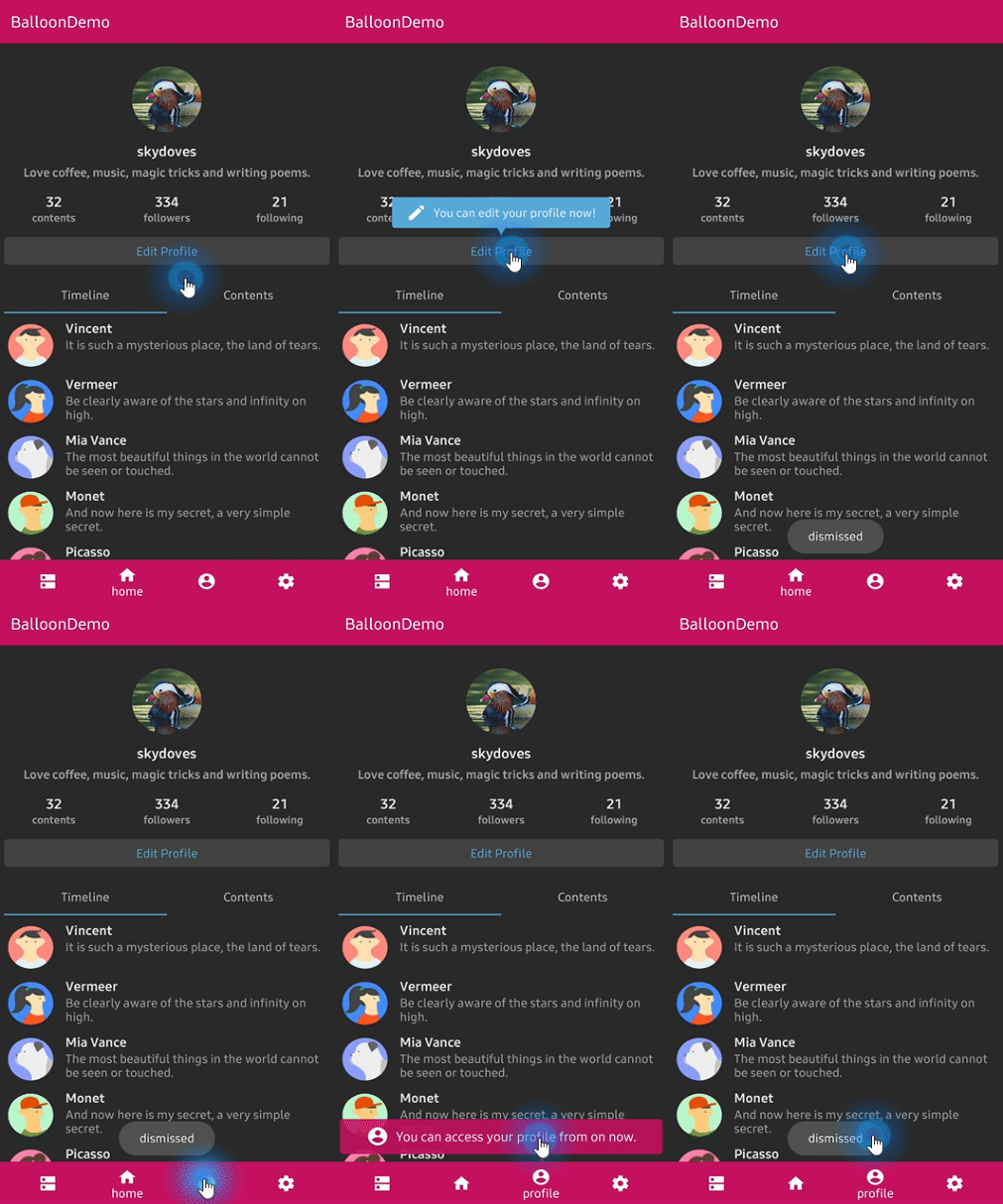

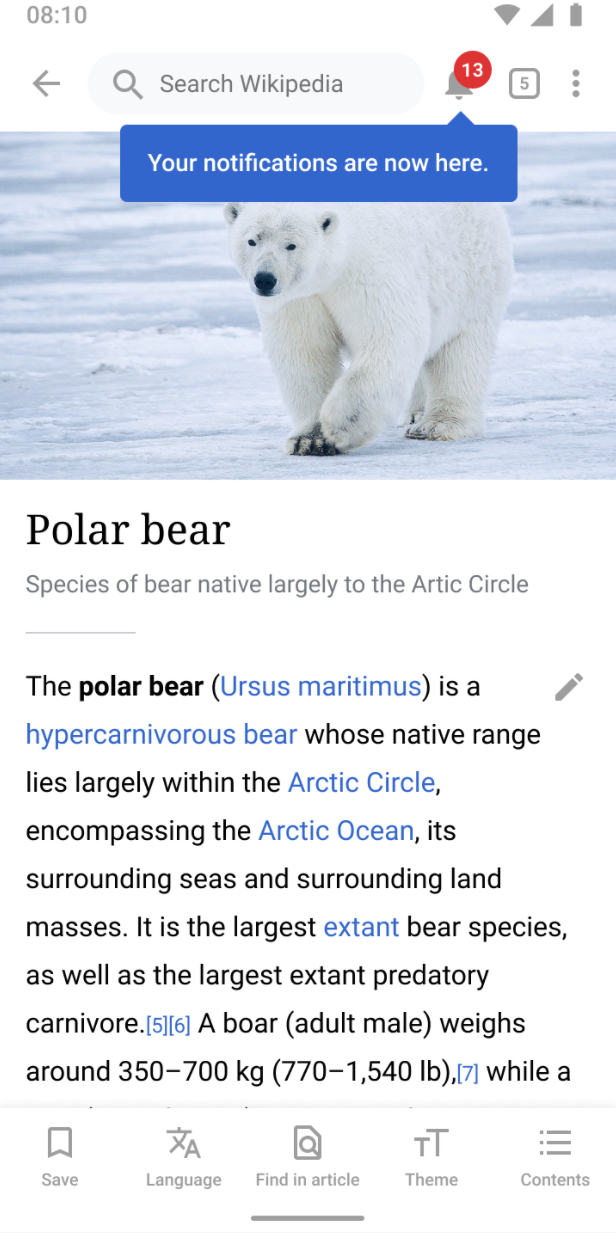
## Who's using Balloon?
**👉 [Check out who's using Balloon](/usecases.md)**
Balloon hits **+800,000 downloads every month** around the globe! :balloon:
 ## What's new in 2.0.0
Balloon 2.0.0 is a full rewrite on **Compose Multiplatform**. One artifact now runs on Android,
iOS, Desktop (JVM), and Web (Wasm), and everything is drawn by Compose instead of a
`PopupWindow`. There is no `Context`, no `View`, and no XML anywhere in the API.
If you are coming from 1.x, read the **[Migration guide from 1.x to 2.0.0](docs/migration.md)**.
The View based implementation is still available at version `1.7.6`, documented under
**[Balloon 1.x (View)](docs/legacy-view/index.md)**.
## 💝 Sponsors
## What's new in 2.0.0
Balloon 2.0.0 is a full rewrite on **Compose Multiplatform**. One artifact now runs on Android,
iOS, Desktop (JVM), and Web (Wasm), and everything is drawn by Compose instead of a
`PopupWindow`. There is no `Context`, no `View`, and no XML anywhere in the API.
If you are coming from 1.x, read the **[Migration guide from 1.x to 2.0.0](docs/migration.md)**.
The View based implementation is still available at version `1.7.6`, documented under
**[Balloon 1.x (View)](docs/legacy-view/index.md)**.
## 💝 Sponsors

 ## Including in your project
[](https://search.maven.org/search?q=g:%22com.github.skydoves%22%20AND%20a:%22balloon%22)
### Gradle
Add the dependency below to your **module**'s `build.gradle.kts` file.
**Compose Multiplatform**
```kotlin
kotlin {
sourceSets {
commonMain.dependencies {
implementation("com.github.skydoves:balloon:2.0.1")
}
}
}
```
**Android only**
```kotlin
dependencies {
implementation("com.github.skydoves:balloon:2.0.1")
}
```
Supported targets: `android`, `jvm` (Desktop), `iosArm64`, `iosSimulatorArm64`, `iosX64`, `wasmJs`.
## How to Use
A balloon is made of two things: a **style** that describes how it looks, and a **state** that
decides when it shows.
```kotlin
val style = rememberBalloonBuilder {
setArrowSize(10.dp)
setArrowPosition(0.5f)
setWidthRatio(0.7f)
setPadding(12.dp)
setCornerRadius(8.dp)
setBackgroundColor(Color(0xFF785EF0))
setBalloonAnimation(BalloonAnimation.ELASTIC)
}
val balloonState = rememberBalloonState(style)
```
Then attach it to an anchor. There are two ways to do that.
### Balloon composable
Wrap the anchor with the `Balloon` composable. The balloon body goes in `balloonContent`, and
the anchor goes in the trailing lambda.
```kotlin
Balloon(
state = balloonState,
balloonContent = {
Text(
text = "Now you can edit your profile!",
color = Color.White,
)
},
) {
Button(onClick = { balloonState.showAlignTop() }) {
Text(text = "Edit profile")
}
}
```
### Modifier.balloon
If you would rather decorate an existing composable than wrap it, use `Modifier.balloon`. It
needs a `BalloonHost` somewhere above it, which is what actually renders the popup and the
overlay scrim.
```kotlin
BalloonHost {
Column(verticalArrangement = Arrangement.spacedBy(16.dp)) {
Button(
modifier = Modifier.balloon(balloonState) {
Text(text = "Now you can edit your profile!", color = Color.White)
},
onClick = { balloonState.showAlignTop() },
) {
Text(text = "Edit profile")
}
}
}
```
Wrap your screen in `BalloonHost` once and every `Modifier.balloon` below it works. Forgetting
it throws an exception that says so, instead of silently rendering nothing.
### Showing and dismissing
`BalloonState` is the single place that controls visibility.
```kotlin
balloonState.showAlignTop() // above the anchor
balloonState.showAlignBottom() // below the anchor
balloonState.showAlignStart() // leading side
balloonState.showAlignEnd() // trailing side
balloonState.showAsDropDown() // below, leading edges aligned
balloonState.showAtCenter(BalloonCenterAlign.TOP)
balloonState.show(BalloonAlign.BOTTOM, xOffset = 8.dp, yOffset = 4.dp)
balloonState.toggle()
balloonState.dismiss()
balloonState.update(BalloonAlign.TOP) // move without replaying the animation
balloonState.dismissWithDelay(scope, 1_500L)
balloonState.isVisible // observable in composition
```
Every `show` has a `suspend` twin that returns once the balloon is dismissed, which makes
sequences easy to write.
```kotlin
LaunchedEffect(Unit) {
firstBalloon.awaitAlignTop()
secondBalloon.awaitAlignBottom()
thirdBalloon.awaitAtCenter(BalloonCenterAlign.END)
}
```
### Positioning
## Including in your project
[](https://search.maven.org/search?q=g:%22com.github.skydoves%22%20AND%20a:%22balloon%22)
### Gradle
Add the dependency below to your **module**'s `build.gradle.kts` file.
**Compose Multiplatform**
```kotlin
kotlin {
sourceSets {
commonMain.dependencies {
implementation("com.github.skydoves:balloon:2.0.1")
}
}
}
```
**Android only**
```kotlin
dependencies {
implementation("com.github.skydoves:balloon:2.0.1")
}
```
Supported targets: `android`, `jvm` (Desktop), `iosArm64`, `iosSimulatorArm64`, `iosX64`, `wasmJs`.
## How to Use
A balloon is made of two things: a **style** that describes how it looks, and a **state** that
decides when it shows.
```kotlin
val style = rememberBalloonBuilder {
setArrowSize(10.dp)
setArrowPosition(0.5f)
setWidthRatio(0.7f)
setPadding(12.dp)
setCornerRadius(8.dp)
setBackgroundColor(Color(0xFF785EF0))
setBalloonAnimation(BalloonAnimation.ELASTIC)
}
val balloonState = rememberBalloonState(style)
```
Then attach it to an anchor. There are two ways to do that.
### Balloon composable
Wrap the anchor with the `Balloon` composable. The balloon body goes in `balloonContent`, and
the anchor goes in the trailing lambda.
```kotlin
Balloon(
state = balloonState,
balloonContent = {
Text(
text = "Now you can edit your profile!",
color = Color.White,
)
},
) {
Button(onClick = { balloonState.showAlignTop() }) {
Text(text = "Edit profile")
}
}
```
### Modifier.balloon
If you would rather decorate an existing composable than wrap it, use `Modifier.balloon`. It
needs a `BalloonHost` somewhere above it, which is what actually renders the popup and the
overlay scrim.
```kotlin
BalloonHost {
Column(verticalArrangement = Arrangement.spacedBy(16.dp)) {
Button(
modifier = Modifier.balloon(balloonState) {
Text(text = "Now you can edit your profile!", color = Color.White)
},
onClick = { balloonState.showAlignTop() },
) {
Text(text = "Edit profile")
}
}
}
```
Wrap your screen in `BalloonHost` once and every `Modifier.balloon` below it works. Forgetting
it throws an exception that says so, instead of silently rendering nothing.
### Showing and dismissing
`BalloonState` is the single place that controls visibility.
```kotlin
balloonState.showAlignTop() // above the anchor
balloonState.showAlignBottom() // below the anchor
balloonState.showAlignStart() // leading side
balloonState.showAlignEnd() // trailing side
balloonState.showAsDropDown() // below, leading edges aligned
balloonState.showAtCenter(BalloonCenterAlign.TOP)
balloonState.show(BalloonAlign.BOTTOM, xOffset = 8.dp, yOffset = 4.dp)
balloonState.toggle()
balloonState.dismiss()
balloonState.update(BalloonAlign.TOP) // move without replaying the animation
balloonState.dismissWithDelay(scope, 1_500L)
balloonState.isVisible // observable in composition
```
Every `show` has a `suspend` twin that returns once the balloon is dismissed, which makes
sequences easy to write.
```kotlin
LaunchedEffect(Unit) {
firstBalloon.awaitAlignTop()
secondBalloon.awaitAlignBottom()
thirdBalloon.awaitAtCenter(BalloonCenterAlign.END)
}
```
### Positioning


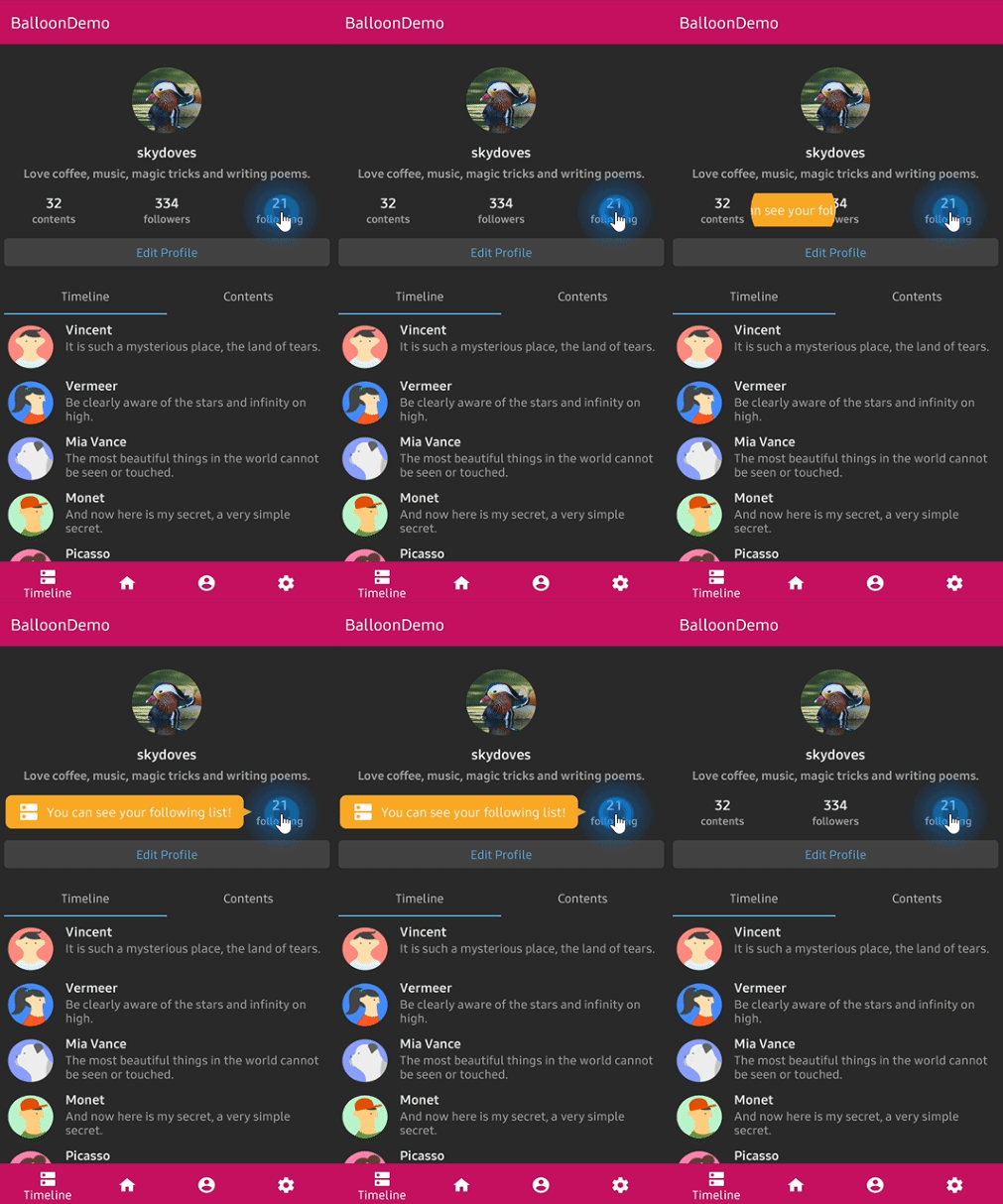
The arrow edge is derived from the alignment you show with, so it always points back at the
anchor without you naming it. When the requested side has no room and the opposite side does,
the balloon flips over and the arrow follows it. A final clamp keeps the balloon inside the
window.
To pin the arrow to a specific edge regardless of placement:
```kotlin
setArrowOrientation(ArrowOrientation.TOP)
setArrowOrientationRules(ArrowOrientationRules.ALIGN_FIXED)
```
### Arrow
```kotlin
setIsVisibleArrow(true)
setArrowSize(10.dp) // square
setArrowSize(width = 16.dp, height = 8.dp) // base and protrusion
setArrowPosition(0.62f) // 0f..1f along the edge
setArrowPositionRules(ArrowPositionRules.ALIGN_ANCHOR)
setArrowColor(Color.White)
```
`ALIGN_BALLOON` reads `arrowPosition` as a fraction of the balloon, and `ALIGN_ANCHOR` reads it
as a fraction of the anchor, so the arrow keeps pointing at the same spot on the anchor wherever
the balloon lands. Under `ALIGN_ANCHOR` the arrow is kept
`arrowSize * arrowAlignAnchorPaddingRatio + arrowAlignAnchorPadding` clear of the balloon's ends.
### Size and spacing
```kotlin
setWidth(200.dp) // fixed
setWidthRatio(0.6f) // fraction of the window
setMinWidth(120.dp)
setMaxWidth(320.dp)
setMinWidthRatio(0.3f)
setMaxWidthRatio(0.9f)
setHeight(120.dp)
setSize(width = 200.dp, height = 120.dp)
setPadding(12.dp)
setPadding(start = 8.dp, top = 4.dp, end = 8.dp, bottom = 4.dp)
setPaddingHorizontal(16.dp)
setPaddingVertical(8.dp)
setMargin(12.dp)
setMarginHorizontal(16.dp)
setElevation(2.dp)
```
Width and height specs size the whole popup box, which is the visible card plus the margins and
the `elevation` inset. Set `setElevation(0.dp)` and no margin if you want the card itself to be
exactly the size you asked for.
### Colors and border

```kotlin
setBackgroundColor(Color(0xFF785EF0))
setArrowColor(Color.White) // Color.Unspecified inherits the background
setCornerRadius(12.dp)
setBorder(color = Color.White, thickness = 2.dp)
setAlpha(0.9f)
```
The border traces the real silhouette, arrow included, at exactly the thickness you asked for.
### Overlay


An overlay dims the whole window and cuts the anchor out of it, which is how you build a
spotlight tour.
```kotlin
setIsVisibleOverlay(true)
setOverlayColor(Color(0x99000000))
setOverlayPadding(6.dp)
setOverlayShape(BalloonOverlayShape.RoundRect(radiusX = 12.dp, radiusY = 12.dp))
setBalloonOverlayAnimation(BalloonOverlayAnimation.FADE)
setDismissWhenOverlayClicked(true)
```
Shapes available: `Empty`, `Rect`, `Oval`, `Circle(radius)`, `RoundRect(radiusX, radiusY)`, and
`RoundRectPerCorner(topStart, topEnd, bottomEnd, bottomStart)`.
A balloon with an overlay must sit under a `BalloonHost`, because a popup cannot cover the
system bars. The scrim fills the host's own bounds, so put `BalloonHost` at the root of an
edge-to-edge window with `Modifier.fillMaxSize()` if you want it to dim the whole screen.
### Animations


```kotlin
setBalloonAnimation(BalloonAnimation.ELASTIC) // NONE, FADE, OVERSHOOT, ELASTIC, CIRCULAR
setCircularDuration(500L)
```
The durations, interpolators, and pivots are ports of the original animation resources, so the
motion is identical on every platform.
### Highlight animations

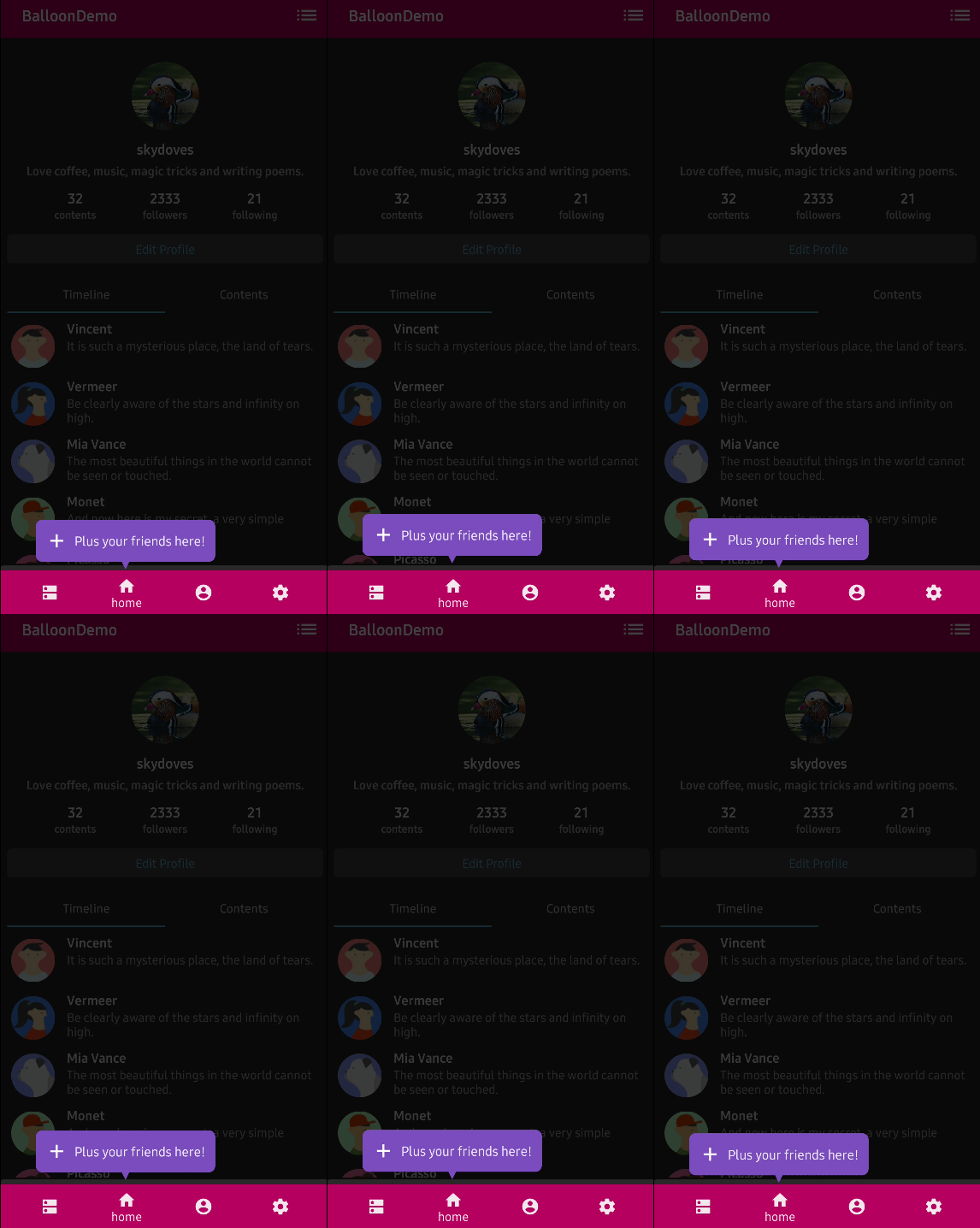


A looping animation that plays while the balloon is showing, to draw the eye.
```kotlin
setBalloonHighlightAnimation(BalloonHighlightAnimation.HEARTBEAT, startDelayMillis = 300L)
```
`NONE`, `HEARTBEAT`, `SHAKE`, `BREATH`, and `ROTATE`. `ROTATE` takes its parameters from
`setBalloonRotationAnimation(BalloonRotateAnimation(turns = 2, speedMillis = 1200))`.
### Listeners
Listeners are properties on the state rather than builder options, because `BalloonStyle` is
value equal data and lambdas would break that.
```kotlin
balloonState.onBalloonClick = { /* the body was tapped */ }
balloonState.onOverlayClick = { /* the scrim was tapped */ }
balloonState.onDismiss = { /* the balloon closed */ }
```
### Behavior
```kotlin
setDismissWhenClicked(true)
setDismissWhenTouchOutside(true)
setDismissWhenBackPressed(true)
setDismissWhenShowAgain(true)
setAutoDismissDuration(2_000L)
setFocusable(true)
```
## Custom content
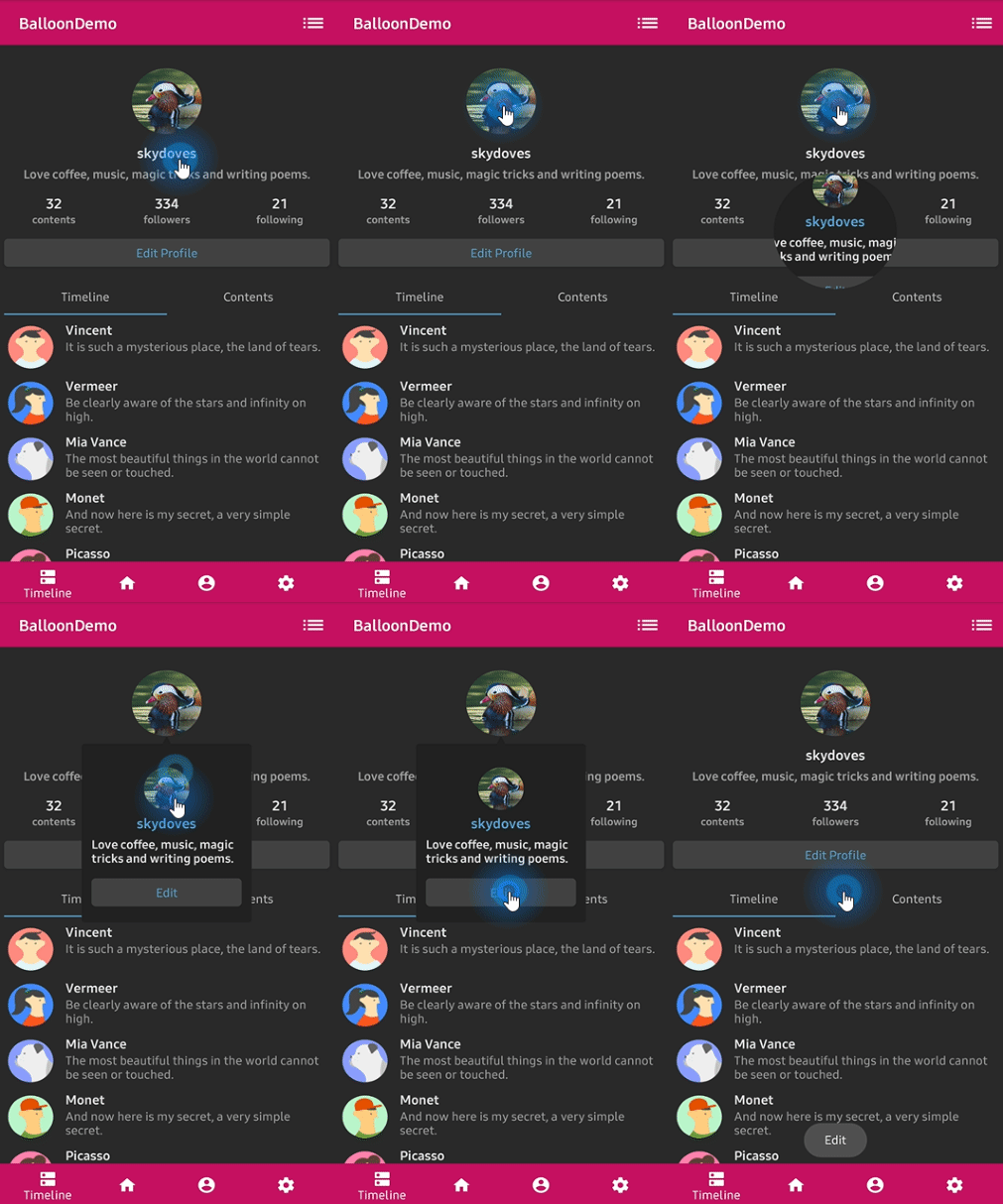
There is no `TextForm`, no `IconForm`, and no `setLayout`. The balloon body is a Compose slot, so
you build it the same way you build anything else.
```kotlin
Balloon(
state = balloonState,
balloonContent = {
Row(verticalAlignment = Alignment.CenterVertically) {
Icon(imageVector = Icons.Default.Edit, contentDescription = null, tint = Color.White)
Spacer(modifier = Modifier.width(8.dp))
Text(text = "Edit your profile", color = Color.White)
}
},
) {
ProfileImage(onClick = { balloonState.showAlignBottom() })
}
```
## Documentation
For a full reference of every option, see the **[documentation](https://skydoves.github.io/libraries/balloon/)**.
- [Getting Started](docs/getting-started.md)
- [Showing a Balloon](docs/showing.md)
- [Arrow](docs/arrow.md)
- [Size and Spacing](docs/size-spacing.md)
- [Customization](docs/customization.md)
- [Overlay](docs/overlay.md)
- [Animation](docs/animation.md)
- [Listeners](docs/listeners.md)
- [Migration from 1.x](docs/migration.md)
- [Balloon 1.x (View)](docs/legacy-view/index.md)
## Find this library useful? :heart:
Support it by joining __[stargazers](https://github.com/skydoves/balloon/stargazers)__ for this repository. :star:
Also, __[follow me](https://github.com/skydoves)__ on GitHub for my next creations! 🤩
# License
```xml
Designed and developed by 2019 skydoves (Jaewoong Eum)
Licensed under the Apache License, Version 2.0 (the "License");
you may not use this file except in compliance with the License.
You may obtain a copy of the License at
http://www.apache.org/licenses/LICENSE-2.0
Unless required by applicable law or agreed to in writing, software
distributed under the License is distributed on an "AS IS" BASIS,
WITHOUT WARRANTIES OR CONDITIONS OF ANY KIND, either express or implied.
See the License for the specific language governing permissions and
limitations under the License.
```
---
### Getting Started (`docs/getting-started.md`)
# Getting Started
This guide covers installing Balloon and attaching your first tooltip.
## Installation
[](https://search.maven.org/search?q=g:%22com.github.skydoves%22%20AND%20a:%22balloon%22)
=== "Compose Multiplatform"
```kotlin
kotlin {
sourceSets {
commonMain.dependencies {
implementation("com.github.skydoves:balloon:2.0.1")
}
}
}
```
=== "Android only"
```kotlin
dependencies {
implementation("com.github.skydoves:balloon:2.0.1")
}
```
Balloon depends on Compose Multiplatform 1.10.x and nothing else. The minimum Android SDK is 23.
## The two pieces
Every balloon is made of a **style** and a **state**.
`BalloonStyle` is immutable value data that describes how the balloon looks. Build it with the
fluent `Balloon.Builder`, usually through `rememberBalloonBuilder`:
```kotlin
val style = rememberBalloonBuilder {
setArrowSize(10.dp)
setArrowPosition(0.5f)
setPadding(12.dp)
setCornerRadius(8.dp)
setBackgroundColor(Color(0xFF785EF0))
setBalloonAnimation(BalloonAnimation.ELASTIC)
}
```
The builder also works outside composition, which is handy when the style is a constant:
```kotlin
val style = Balloon.Builder().apply {
setArrowSize(10.dp)
setPadding(12.dp)
setCornerRadius(8.dp)
setBackgroundColor(Color(0xFF785EF0))
setBalloonAnimation(BalloonAnimation.ELASTIC)
}.build()
```
`BalloonStyle` has no public constructor on purpose. It carries 43 properties, and a
constructor that names all of them would freeze every one of them into the published binary
interface, so adding a 44th option later would break code compiled against 2.0.0. The builder
is the one entry point and its signature never has to change.
`BalloonState` decides when the balloon shows and where:
```kotlin
val balloonState = rememberBalloonState(style)
```
The state survives recomposition. Passing an updated `style` restyles a visible balloon in place
without hiding it, so you can animate colors or sizes freely.
## Attaching a balloon
### Option 1: the Balloon composable
Wrap the anchor. The body goes in `balloonContent` and the anchor goes in the trailing lambda.
```kotlin
Balloon(
state = balloonState,
balloonContent = {
Text(text = "Now you can edit your profile!", color = Color.White)
},
) {
Button(onClick = { balloonState.showAlignTop() }) {
Text(text = "Edit profile")
}
}
```
Layout modifiers that belong to the anchor go on the `Balloon` composable itself, because it
wraps the anchor in a `Box`:
```kotlin
Balloon(
modifier = Modifier.weight(1f),
state = balloonState,
balloonContent = { Text(text = "Tooltip") },
) {
Text(text = "Anchor")
}
```
### Option 2: Modifier.balloon
When you would rather decorate an existing composable than wrap it, use `Modifier.balloon`. A
Compose modifier cannot emit content, so the balloon is rendered by a `BalloonHost` that sits
above the anchor in the tree.
```kotlin
BalloonHost {
Column(verticalArrangement = Arrangement.spacedBy(16.dp)) {
Button(
modifier = Modifier.balloon(balloonState) {
Text(text = "Now you can edit your profile!", color = Color.White)
},
onClick = { balloonState.showAlignTop() },
) {
Text(text = "Edit profile")
}
}
}
```
Wrap a screen in `BalloonHost` once and every `Modifier.balloon` below it works. If you forget,
the modifier throws an `IllegalStateException` naming `BalloonHost` rather than silently
rendering nothing.
The balloon body is composed inside the host, but it reads the CompositionLocals that were in
scope at the `Modifier.balloon` call site, so your `MaterialTheme`, `LocalContentColor`, and
`LocalLayoutDirection` are the anchor's, not the host's.
!!! tip "When do I need BalloonHost?"
Always for `Modifier.balloon`, and for any balloon that turns on an overlay. The overlay
scrim is drawn by the host so it can cover the entire window including the system bars,
which a popup window cannot do.
## Showing and dismissing
```kotlin
balloonState.showAlignTop()
balloonState.dismiss()
balloonState.toggle()
```
See [Showing a Balloon](showing.md) for every placement option, offsets, auto dismiss, and
coroutine sequences.
## Custom content
There is no `TextForm`, no `IconForm`, and no custom layout resource. The body is a Compose slot:
```kotlin
Balloon(
state = balloonState,
balloonContent = {
Row(verticalAlignment = Alignment.CenterVertically) {
Icon(imageVector = Icons.Default.Edit, contentDescription = null, tint = Color.White)
Spacer(modifier = Modifier.width(8.dp))
Text(text = "Edit your profile", color = Color.White)
}
},
) {
ProfileImage(onClick = { balloonState.showAlignBottom() })
}
```
---
### Index (`docs/index.md`)
# Overview
Balloon is a modernized and sophisticated tooltip library for **Compose Multiplatform**, fully
customizable with an arrow and animations. A single artifact runs on Android, iOS, Desktop (JVM),
and Web (Wasm).
!!! info "Balloon 2.0.0 is a rewrite"
Version 2.0.0 replaces the View based implementation with a Compose Multiplatform one.
There is no `Context`, no `View`, and no XML in the API. If you are upgrading, start with
the [Migration guide](migration.md). The View based library is still available at `1.7.6`
and is documented under [Balloon 1.x (View)](legacy-view/getting-started.md).
## Key features
- **Multiplatform**: one artifact for Android, iOS, Desktop, and Web
- **Compose native**: the balloon body is a composable slot, so you build it like any other UI
- **Two APIs**: wrap an anchor with `Balloon(...)`, or decorate one in place with `Modifier.balloon`
- **Smart placement**: the arrow points at the anchor automatically, and the balloon flips sides when there is no room
- **Rich animations**: fade, overshoot, elastic, and circular reveal, plus looping highlight animations
- **Overlay**: dim the window and cut the anchor out of it to build a spotlight tour
- **Coroutine friendly**: every `show` has a `suspend` twin that returns when the balloon closes
## Who's using Balloon?
Balloon hits **+800,000 downloads every month** around the globe.
!!! note "Featured on Google Dev Library"
Balloon is featured on the [Google Dev Library](https://devlibrary.withgoogle.com/products/android/repos/skydoves-Balloon), recognized for its quality and usefulness in the Android development community.
## Quick start
[](https://search.maven.org/search?q=g:%22com.github.skydoves%22%20AND%20a:%22balloon%22)
=== "Compose Multiplatform"
```kotlin
kotlin {
sourceSets {
commonMain.dependencies {
implementation("com.github.skydoves:balloon:2.0.1")
}
}
}
```
=== "Android only"
```kotlin
dependencies {
implementation("com.github.skydoves:balloon:2.0.1")
}
```
Then build a style, remember a state, and attach it to an anchor:
```kotlin
val style = rememberBalloonBuilder {
setArrowSize(10.dp)
setPadding(12.dp)
setCornerRadius(8.dp)
setBackgroundColor(Color(0xFF785EF0))
setBalloonAnimation(BalloonAnimation.ELASTIC)
}
val balloonState = rememberBalloonState(style)
Balloon(
state = balloonState,
balloonContent = { Text(text = "Now you can edit your profile!", color = Color.White) },
) {
Button(onClick = { balloonState.showAlignTop() }) {
Text(text = "Edit profile")
}
}
```
## Supported targets
| Target | Artifact suffix |
| --- | --- |
| Android | `balloon-android` |
| Desktop (JVM) | `balloon-desktop` |
| iOS (arm64) | `balloon-iosarm64` |
| iOS (simulator, arm64) | `balloon-iossimulatorarm64` |
| iOS (x64) | `balloon-iosx64` |
| Web (Wasm) | `balloon-wasm-js` |
Gradle picks the right one for you. Depend on `com.github.skydoves:balloon` and nothing else.
## Where to go next
- [Getting Started](getting-started.md) covers the two ways to attach a balloon
- [Showing a Balloon](showing.md) covers placement, offsets, and coroutine sequences
- [Migration from 1.x](migration.md) maps every old option to its 2.0.0 counterpart
---
### Legacy View Getting Started (`docs/legacy-view/getting-started.md`)
# Getting Started
!!! warning "Balloon 1.x (View)"
This page documents Balloon `1.7.6`, the last release of the View based library.
For the current version see the [Balloon 2.0.0 documentation](../index.md) and the
[Migration guide](../migration.md).
This guide covers the basics of creating and displaying Balloon tooltips in your Android application.
## Installation
Add the dependency below to your module's `build.gradle` file:
[](https://search.maven.org/search?q=g:%22com.github.skydoves%22%20AND%20a:%22balloon%22)
=== "Groovy"
```groovy
dependencies {
implementation("com.github.skydoves:balloon:1.7.6")
}
```
=== "Kotlin"
```kotlin
dependencies {
implementation("com.github.skydoves:balloon:1.7.6")
}
```
## Creating a Balloon
### Using Balloon.Builder
You can create a Balloon instance using the `Balloon.Builder` class:
```kotlin
val balloon = Balloon.Builder(context)
.setWidthRatio(1.0f)
.setHeight(BalloonSizeSpec.WRAP)
.setText("Edit your profile here!")
.setTextColorResource(R.color.white)
.setTextSize(15f)
.setIconDrawableResource(R.drawable.ic_edit)
.setArrowPositionRules(ArrowPositionRules.ALIGN_ANCHOR)
.setArrowSize(10)
.setArrowPosition(0.5f)
.setPadding(12)
.setCornerRadius(8f)
.setBackgroundColorResource(R.color.skyBlue)
.setBalloonAnimation(BalloonAnimation.ELASTIC)
.setLifecycleOwner(lifecycleOwner)
.build()
```
### Using Kotlin DSL
You can also create a Balloon using the Kotlin DSL with `createBalloon`:
```kotlin
val balloon = createBalloon(context) {
setWidthRatio(1.0f)
setHeight(BalloonSizeSpec.WRAP)
setText("Edit your profile here!")
setTextColorResource(R.color.white)
setTextSize(15f)
setIconDrawableResource(R.drawable.ic_edit)
setArrowPositionRules(ArrowPositionRules.ALIGN_ANCHOR)
setArrowSize(10)
setArrowPosition(0.5f)
setPadding(12)
setCornerRadius(8f)
setBackgroundColorResource(R.color.skyBlue)
setBalloonAnimation(BalloonAnimation.ELASTIC)
setLifecycleOwner(lifecycleOwner)
}
```
### Using Java
```java
Balloon balloon = new Balloon.Builder(context)
.setArrowSize(10)
.setArrowOrientation(ArrowOrientation.TOP)
.setArrowPositionRules(ArrowPositionRules.ALIGN_ANCHOR)
.setArrowPosition(0.5f)
.setWidth(BalloonSizeSpec.WRAP)
.setHeight(65)
.setTextSize(15f)
.setCornerRadius(4f)
.setAlpha(0.9f)
.setText("You can access your profile from now on.")
.setTextColor(ContextCompat.getColor(context, R.color.white))
.setIconDrawable(ContextCompat.getDrawable(context, R.drawable.ic_profile))
.setBackgroundColor(ContextCompat.getColor(context, R.color.colorPrimary))
.setOnBalloonClickListener(onBalloonClickListener)
.setBalloonAnimation(BalloonAnimation.FADE)
.setLifecycleOwner(lifecycleOwner)
.build();
```
## Width and Height
You can adjust the width and height of the Balloon using various approaches.
### Specific Size
Set specific sizes regardless of the content:
```kotlin
Balloon.Builder(context)
.setWidth(220) // sets 220dp width
.setHeight(160) // sets 160dp height
```
### Wrap Content
Set dynamic sizes depending on the content:
```kotlin
Balloon.Builder(context)
.setWidth(BalloonSizeSpec.WRAP) // width depends on content
.setHeight(BalloonSizeSpec.WRAP) // height depends on content
```
### Screen Ratio
Set width based on the screen size ratio:
```kotlin
Balloon.Builder(context)
.setWidthRatio(0.5f) // 50% of the horizontal screen size
```
## Padding and Margin
### Padding
Adjust the content padding inside the Balloon:
```kotlin
Balloon.Builder(context)
.setPadding(6) // 6dp padding on all sides
.setPaddingLeft(8) // 8dp left padding
.setPaddingTop(12) // 12dp top padding
.setPaddingRight(8)
.setPaddingBottom(12)
```
### Margin
Add margins to the Balloon container:
```kotlin
Balloon.Builder(context)
.setMargin(12) // margin on all sides
.setMarginLeft(14)
.setMarginRight(14)
.setMarginHorizontal(14) // left and right margins
```
## Lifecycle Management
To avoid memory leaks, always set the lifecycle owner. The Balloon will automatically dismiss when the activity or fragment is destroyed:
```kotlin
Balloon.Builder(context)
.setLifecycleOwner(lifecycleOwner)
```
!!! warning "Important"
Always set the lifecycle owner to prevent memory leaks. Dialog and PopupWindow can leak memory if not properly dismissed before the activity is destroyed.
## Lazy Initialization
You can initialize a Balloon lazily using the `balloon()` extension and a `Balloon.Factory`:
```kotlin
class CustomActivity : AppCompatActivity() {
private val profileBalloon by balloon()
}
```
Create a factory class that extends `Balloon.Factory`:
```kotlin
class ProfileBalloonFactory : Balloon.Factory() {
override fun create(context: Context, lifecycle: LifecycleOwner): Balloon {
return createBalloon(context) {
setLayout(R.layout.layout_custom_profile)
setArrowSize(10)
setArrowOrientation(ArrowOrientation.TOP)
setArrowPosition(0.5f)
setWidthRatio(0.55f)
setHeight(250)
setCornerRadius(4f)
setBackgroundColorResource(R.color.background)
setBalloonAnimation(BalloonAnimation.CIRCULAR)
setLifecycleOwner(lifecycle)
}
}
}
```
!!! note
The factory class must have a default (no-argument) constructor.
---
### Legacy View Index (`docs/legacy-view/index.md`)
# Balloon 1.x (View)
!!! warning "This section documents the previous major version"
Balloon `1.7.6` is the **last release of the View based library**. It still works and stays
published on Maven Central, but it receives no further releases.
New projects should use [Balloon 2.0.0](../index.md), which is built on Compose
Multiplatform. If you are upgrading, read the [Migration guide](../migration.md).
## What is here
Balloon 1.x is an Android only tooltip library built on `PopupWindow`. It ships two artifacts:
| Artifact | What it is |
| --- | --- |
| `com.github.skydoves:balloon:1.7.6` | the View and XML implementation |
| `com.github.skydoves:balloon-compose:1.7.6` | a Jetpack Compose wrapper around it |
```kotlin
dependencies {
implementation("com.github.skydoves:balloon:1.7.6")
implementation("com.github.skydoves:balloon-compose:1.7.6")
}
```
## Pages
- [Getting Started](getting-started.md)
- [Showing Balloon](showing.md)
- [Arrow](arrow.md)
- [Text and Icon](text-icon.md)
- [Customization](customization.md)
- [Overlay](overlay.md)
- [Animation](animation.md)
- [Listeners](listeners.md)
- [Persistence](persistence.md)
- Jetpack Compose
- [Overview](compose/overview.md)
- [BalloonState](compose/balloon-state.md)
- [Compose Extensions](compose/extensions.md)
## Should I upgrade?
| You are using | Recommendation |
| --- | --- |
| `balloon-compose` in a Compose app | Upgrade. The entry points already share their names, so the change is mostly imports, `Dp`, and `Color` |
| `balloon` from Compose via `Modifier.balloon` | Upgrade, same as above |
| `balloon` from XML layouts, Fragments, or RecyclerView adapters | Stay on `1.7.6`. There is no View API in 2.0.0 |
| Starting a new project | Use 2.0.0 |
See the [Migration guide](../migration.md) for a setter by setter mapping.
---
### Legacy View Compose Overview (`docs/legacy-view/compose/overview.md`)
# Jetpack Compose Overview
!!! warning "Balloon 1.x (View)"
This page documents Balloon `1.7.6`, the last release of the View based library.
For the current version see the [Balloon 2.0.0 documentation](../../index.md) and the
[Migration guide](../../migration.md).
Balloon provides first-class support for Jetpack Compose with a simple and intuitive API using the `Modifier.balloon()` extension.
## Installation
Add the Compose dependency to your `build.gradle`:
```gradle
dependencies {
implementation("com.github.skydoves:balloon-compose:1.7.6")
}
```
## Basic Usage
The recommended way to use Balloon in Compose is with `Modifier.balloon()`:
```kotlin
@Composable
fun MyScreen() {
val builder = rememberBalloonBuilder {
setText("Edit your profile here!")
setArrowSize(10)
setArrowPosition(0.5f)
setArrowPositionRules(ArrowPositionRules.ALIGN_ANCHOR)
setBackgroundColorResource(R.color.skyBlue)
setBalloonAnimation(BalloonAnimation.ELASTIC)
}
val balloonState = rememberBalloonState(builder)
Button(
onClick = { balloonState.showAlignTop() },
modifier = Modifier.balloon(balloonState) {
Text("Tooltip content")
}
) {
Text("Show Balloon")
}
}
```
## Components
The Compose integration consists of:
1. **`rememberBalloonBuilder`** - Creates a memoized `Balloon.Builder`
2. **`rememberBalloonState`** - Creates a `BalloonState` for controlling the balloon
3. **`Modifier.balloon()`** - Attaches a balloon to any composable
## Balloon Content
The balloon content is defined as a composable lambda:
```kotlin
Modifier.balloon(balloonState) {
// Any composable content
Column(
modifier = Modifier.padding(16.dp),
horizontalAlignment = Alignment.CenterHorizontally
) {
Icon(
imageVector = Icons.Default.Info,
contentDescription = null,
tint = Color.White
)
Spacer(modifier = Modifier.height(8.dp))
Text(
text = "Welcome to the app!",
color = Color.White
)
}
}
```
## Showing the Balloon
Use `BalloonState` methods to show the balloon:
```kotlin
// Show aligned to different positions
balloonState.showAlignTop()
balloonState.showAlignBottom()
balloonState.showAlignStart()
balloonState.showAlignEnd()
// Show at center
balloonState.showAtCenter()
// Show as dropdown
balloonState.showAsDropDown()
```
## Dismissing the Balloon
```kotlin
// Dismiss immediately
balloonState.dismiss()
// Dismiss with delay
balloonState.dismissWithDelay(1000L)
```
## Compose Color Extensions
Use Compose colors directly with the builder:
```kotlin
val builder = rememberBalloonBuilder {
setBackgroundColor(Color(0xFF4A90E2))
setTextColor(Color.White)
setArrowColor(Color(0xFF4A90E2))
setOverlayColor(Color.Black.copy(alpha = 0.5f))
}
```
## Example
Here's a complete example:
```kotlin
@Composable
fun ProfileScreen() {
val builder = rememberBalloonBuilder {
setArrowSize(10)
setArrowPosition(0.5f)
setArrowPositionRules(ArrowPositionRules.ALIGN_ANCHOR)
setWidth(BalloonSizeSpec.WRAP)
setHeight(BalloonSizeSpec.WRAP)
setPadding(12)
setMarginHorizontal(12)
setCornerRadius(8f)
setBackgroundColor(Color(0xFF333333))
setBalloonAnimation(BalloonAnimation.FADE)
}
val balloonState = rememberBalloonState(builder)
IconButton(
onClick = { balloonState.showAlignBottom() },
modifier = Modifier.balloon(balloonState) {
Text(
text = "Click to edit your profile",
color = Color.White,
modifier = Modifier.padding(8.dp)
)
}
) {
Icon(
imageVector = Icons.Default.Edit,
contentDescription = "Edit"
)
}
}
```
---
### Animation (`docs/animation.md`)
# Animation
Every animation here is a port of the corresponding `res/anim` resource from 1.x, with the same
duration, the same interpolator, and the same pivot. The three AOSP interpolators involved
(accelerate/decelerate, bounce, and overshoot) are reimplemented as Compose `Easing` functions,
so the motion is identical on Android, iOS, Desktop, and Web.
## Enter and exit
```kotlin
setBalloonAnimation(BalloonAnimation.ELASTIC)
```
| Value | Enter | Exit |
| --- | --- | --- |
| `NONE` | instant | instant |
| `FADE` | alpha 0 to 1 over 200ms, linear | reverse |
| `ELASTIC` | scale 0.5 to 1 over 250ms, bounce | scale to 0 over 250ms |
| `OVERSHOOT` | scale 0.5 to 1 over 250ms, overshoot | scale to 0 over 250ms |
| `CIRCULAR` | circular reveal, 500ms by default | scale to 0 over 200ms |
Every scale pivots on the balloon's center, which is what the original animation resources did
regardless of where the arrow sits.
```kotlin
setCircularDuration(700L) // only affects CIRCULAR
```
!!! note "CIRCULAR clears focusability"
`setBalloonAnimation(BalloonAnimation.CIRCULAR)` also sets `focusable` to `false`, which is
what 1.x did so the reveal can play without the popup stealing input. Call
`setFocusable(true)` afterwards if you want it back.
## Highlight animations
A looping animation that plays for as long as the balloon is showing, to draw the eye.
```kotlin
setBalloonHighlightAnimation(BalloonHighlightAnimation.HEARTBEAT)
setBalloonHighlightAnimation(BalloonHighlightAnimation.SHAKE, startDelayMillis = 300L)
```
| Value | Motion |
| --- | --- |
| `NONE` | nothing, the default |
| `HEARTBEAT` | pulses between 100% and 90% scale over 800ms |
| `SHAKE` | slides 13% of its own size away from the anchor and back over 650ms |
| `BREATH` | fades between 75% and 100% alpha over 800ms |
| `ROTATE` | spins in 3D, configured separately |
`HEARTBEAT` pivots on the **arrow** edge, so the arrow stays pinned to the anchor while the rest
of the balloon pulses toward it. When the arrow is hidden it pivots on the center instead.
`SHAKE` slides **away** from the arrow, so the tooltip tugs against the anchor it points at.
Until `startDelayMillis` elapses the balloon is drawn untransformed, exactly as in 1.x.
### ROTATE
```kotlin
setBalloonHighlightAnimation(BalloonHighlightAnimation.ROTATE)
setBalloonRotationAnimation(
BalloonRotateAnimation(
direction = BalloonRotateDirection.RIGHT,
turns = 1,
loops = BalloonRotateAnimation.INFINITE,
speedMillis = 2500,
degreeX = 0,
degreeZ = 0,
),
)
```
The balloon turns `360 * turns * direction` degrees around Y, plus optional fixed sweeps around
X and Z, over `speedMillis`, repeating `loops` times about its center. `INFINITE` repeats
forever.
Two differences from 1.x worth knowing. The perspective is density relative here, where
`android.graphics.Camera` sat at a fixed 576px whatever the screen, so the same rotation reads
slightly flatter on a dense display and consistent across devices. And 1.x left
`balloonRotateAnimation` null by default, which meant `ROTATE` did nothing until you configured
it; here the default is a real `BalloonRotateAnimation()`.
## Overlay animation
```kotlin
setBalloonOverlayAnimation(BalloonOverlayAnimation.FADE) // default
setBalloonOverlayAnimation(BalloonOverlayAnimation.NONE)
```
See [Overlay](overlay.md).
## Disabling animations in tests
Set `BalloonAnimation.NONE` so a screenshot or a semantics assertion runs against a settled
frame:
```kotlin
val style = DefaultBalloonStyle.derive { setBalloonAnimation(BalloonAnimation.NONE) }
```
`HEARTBEAT`, `SHAKE`, `BREATH`, and a `ROTATE` with `loops = INFINITE` never finish, so the
Compose test clock never goes idle and `waitForIdle` would hang. Drive the clock by hand for
those. A `ROTATE` with a finite `loops` completes on its own and needs none of this.
```kotlin
mainClock.autoAdvance = false
runOnUiThread { balloonState.showAlignBottom() }
mainClock.advanceTimeBy(16L)
onNodeWithTag("body").assertIsDisplayed()
```
---
### Arrow (`docs/arrow.md`)
# Arrow
The arrow is part of the balloon's silhouette, not a separate image. It is carved into the same
path as the body, so a border traces around it and a corner radius never clips it.
## Size
```kotlin
setIsVisibleArrow(true)
setArrowSize(10.dp) // square
setArrowSize(width = 16.dp, height = 8.dp) // base along the edge, protrusion outward
setArrowWidth(16.dp)
setArrowHeight(8.dp)
```
`width` is always the base along the balloon's edge and `height` is always how far the tip
sticks out, on every orientation. The visible protrusion is `arrowHeight - 1px`, which is the
one pixel the arrow overlaps the body by so no seam shows between them.
!!! note "Hiding the arrow frees its space"
`setIsVisibleArrow(false)` also releases the space the arrow occupied, so the body sits
flush against the anchor. Balloon 1.x kept reserving it, which left a gap the size of an
arrow nobody could see.
## Orientation
By default the arrow edge is derived from the alignment you show with, so it always points back
at the anchor:
| Shown with | Arrow edge |
| --- | --- |
| `showAlignTop()` | `BOTTOM` |
| `showAlignBottom()` | `TOP` |
| `showAlignStart()` | `END` |
| `showAlignEnd()` | `START` |
| `showAsDropDown()` | `TOP` |
To pin it instead:
```kotlin
setArrowOrientation(ArrowOrientation.TOP)
setArrowOrientationRules(ArrowOrientationRules.ALIGN_FIXED)
```
`ArrowOrientationRules` decides what happens when a lack of room flips the balloon to the
opposite side:
- `ALIGN_ANCHOR` (default): the arrow follows the balloon so it keeps pointing at the anchor
- `ALIGN_FIXED`: the arrow stays on the edge you named, wherever the balloon ends up
A flip never moves the arrow to a different axis. A horizontally pinned arrow stays horizontal
even when the balloon flips vertically, because the arrow axis decides how the balloon reserves
space and changing it mid placement would feed back into the decision that caused it.
## Position along the edge
```kotlin
setArrowPosition(0.62f) // 0f..1f
setArrowPositionRules(ArrowPositionRules.ALIGN_BALLOON) // default
```
`ALIGN_BALLOON` reads the value as a fraction of the balloon, so `0.5f` centers the arrow.
`ALIGN_ANCHOR` reads it as a fraction of the **anchor** instead, so the arrow keeps pointing at
the same spot on the anchor no matter where the balloon lands or how the window clamps it. This
is what you want for a wide balloon over a narrow anchor.
```kotlin
setArrowPositionRules(ArrowPositionRules.ALIGN_ANCHOR)
setArrowPosition(0.5f) // always points at the middle of the anchor
```
Under `ALIGN_ANCHOR` the arrow is kept clear of the balloon's ends by
```
arrowSize * arrowAlignAnchorPaddingRatio + arrowAlignAnchorPadding
```
which you can tune:
```kotlin
setArrowAlignAnchorPaddingRatio(2.5f) // default
setArrowAlignAnchorPadding(8.dp) // default 0.dp
```
The arrow base is also clamped to the straight part of the edge, `cornerRadius + arrowWidth / 2`
in from each end, so it never rides up onto a rounded corner.
## Color
```kotlin
setArrowColor(Color.White)
```
Leave it at `Color.Unspecified`, the default, and the arrow inherits `backgroundColor`. When you
set a different color the arrow is painted in its own pass on top of the body fill but behind
the balloon's content, so it can never cover what you put inside.
---
### Customization (`docs/customization.md`)
# Customization
## Colors
```kotlin
setBackgroundColor(Color(0xFF785EF0))
setArrowColor(Color.White) // Color.Unspecified inherits the background
setAlpha(0.9f)
```
`setAlpha` applies to the whole balloon in one layer, so overlapping parts do not double blend.
## Border
```kotlin
setBorder(color = Color.White, thickness = 2.dp)
setBalloonStroke(color = Color.White, thickness = 2.dp) // same thing, 1.x name
```
The stroke traces the real silhouette, arrow included, at exactly the thickness you asked for.
Leave `borderColor` at `Color.Unspecified` or `borderThickness` at `0.dp` to disable it.
## Content
The balloon body is a Compose slot, so there is nothing to configure on the builder. Build it
with the same composables you use everywhere else.
```kotlin
Balloon(
state = balloonState,
balloonContent = {
Column {
Text(
text = "Choose a drink",
color = Color.White,
style = MaterialTheme.typography.titleSmall,
)
Spacer(modifier = Modifier.height(8.dp))
drinks.forEach { drink ->
Row(
modifier = Modifier
.fillMaxWidth()
.clickable { onDrinkSelected(drink) }
.padding(vertical = 6.dp),
verticalAlignment = Alignment.CenterVertically,
) {
Icon(painter = painterResource(drink.icon), contentDescription = null)
Spacer(modifier = Modifier.width(8.dp))
Text(text = drink.name, color = Color.White)
}
}
}
},
) {
Button(onClick = { balloonState.showAlignBottom() }) { Text(text = "Drinks") }
}
```
Interactive content works normally. A tap that a child consumes never reaches the balloon's own
tap handler, so a clickable row inside the body does not accidentally trigger
`setDismissWhenClicked`.
## Reusing a style
`BalloonStyle` is immutable, and `derive` makes a variant that changes only what you name:
```kotlin
val base = rememberBalloonBuilder {
setCornerRadius(8.dp)
setPadding(12.dp)
setBackgroundColor(Color(0xFF785EF0))
}
val warning = base.derive { setBackgroundColor(Color(0xFFFF6F00)) }
val subtle = base.derive {
setAlpha(0.85f)
setArrowSize(8.dp)
}
```
`derive` takes the same builder block as `rememberBalloonBuilder`, starting from an existing
style instead of the defaults. It exists instead of a data class `copy` because a generated
`copy` would name all 43 properties in the published binary interface and make adding a 44th
option a breaking change.
`DefaultBalloonStyle` is the same value the builder produces with no calls, which makes a
convenient starting point.
## Restyling a visible balloon
`rememberBalloonState` re-applies the style on every recomposition, so an animated style updates
a balloon that is already showing without hiding it:
```kotlin
val color by animateColorAsState(if (selected) Color(0xFF785EF0) else Color(0xFF444444))
val balloonState = rememberBalloonState(style.derive { setBackgroundColor(color) })
```
## Behavior
```kotlin
setDismissWhenClicked(true) // tapping the body closes it
setDismissWhenTouchOutside(true) // tapping outside closes it
setDismissWhenBackPressed(true) // back or Escape closes it
setDismissWhenShowAgain(true) // showing a visible balloon closes it instead
setDismissWhenTouchMargin(true) // a tap in the margin band closes it too
setDismissWhenOverlayClicked(true) // tapping the scrim closes it
setAutoDismissDuration(2_000L) // 0L disables
setFocusable(true)
```
Two of these carry side effects, kept from 1.x so ported call sites behave the same:
- `setDismissWhenTouchOutside(false)` also clears focusability, so a balloon that ignores
outside taps does not sit there swallowing them
- `setBalloonAnimation(BalloonAnimation.CIRCULAR)` also clears focusability, so the reveal can
play without the popup stealing input
Call `setFocusable(true)` after either one if you want focus back.
## Accessibility
Balloon content is marked with an unmergeable semantics property, so a screen reader treats it
as its own subtree instead of folding it into a clickable ancestor. Give the content itself
meaningful semantics the way you normally would:
```kotlin
balloonContent = {
Text(
modifier = Modifier.semantics { liveRegion = LiveRegionMode.Polite },
text = "Now you can edit your profile!",
)
}
```
---
### Listeners (`docs/listeners.md`)
# Listeners
Listeners live on `BalloonState`, not on the builder. `BalloonStyle` is value equal data so that
two identical styles compare equal and a restyle can be detected cheaply, and storing lambdas
inside it would break that.
```kotlin
val balloonState = rememberBalloonState(style)
balloonState.onBalloonClick = { /* the body was tapped */ }
balloonState.onOverlayClick = { /* the scrim was tapped */ }
balloonState.onDismiss = { /* the balloon closed */ }
```
## onBalloonClick
Fires when the balloon body is tapped, before any dismissal caused by `setDismissWhenClicked`.
```kotlin
val style = rememberBalloonBuilder {
setDismissWhenClicked(true)
}
balloonState.onBalloonClick = {
analytics.log("tooltip_tapped")
}
```
A tap that a child of the balloon body consumes does not reach this listener, so a clickable row
inside the balloon behaves the way you would expect.
## onOverlayClick
Fires when the overlay scrim is tapped, before any dismissal caused by
`setDismissWhenOverlayClicked`.
```kotlin
balloonState.onOverlayClick = {
analytics.log("tour_scrim_tapped")
}
```
## onDismiss
Fires exactly once per visible to hidden transition. Calling `dismiss()` on an already hidden
balloon is a no-op and does not re-fire it.
```kotlin
balloonState.onDismiss = {
preferences.markTooltipSeen()
}
```
It fires for every reason a balloon can close, including the auto dismiss timer, an outside tap,
the back key, and the anchor leaving the composition or scrolling out of the window.
## Observing state instead
Often you do not need a callback at all. `isVisible` is snapshot state:
```kotlin
val rotation by animateFloatAsState(if (balloonState.isVisible) 180f else 0f)
Icon(
modifier = Modifier.rotate(rotation),
imageVector = Icons.Default.ExpandMore,
contentDescription = null,
)
```
And `await()` turns "run this after it closes" into straight line code:
```kotlin
LaunchedEffect(Unit) {
balloonState.awaitAlignBottom()
preferences.markTooltipSeen()
}
```
## What is not here
`OnBalloonInitializedListener`, `OnBalloonOutsideTouchListener`, `setOnBalloonTouchListener`, and
`setOnBalloonOverlayTouchListener` are gone. They existed to expose `View` and `MotionEvent`
plumbing that has no multiplatform equivalent. Use Compose instead:
| 1.x | 2.0.0 |
| --- | --- |
| `setOnBalloonInitializedListener` | `Modifier.onGloballyPositioned` inside the balloon content |
| `setOnBalloonOutsideTouchListener` | no equivalent. A popup cannot report touches that land outside it, so there is nothing to hook. Observe `onDismiss`, or handle the gesture in the layout that owns the anchor |
| `setOnBalloonTouchListener` | `Modifier.pointerInput` inside the balloon content, which does receive touches on the balloon itself |
| `setOnBalloonOverlayTouchListener` | `onOverlayClick` |
---
### Migration (`docs/migration.md`)
# Migration from 1.x to 2.0.0
Balloon 2.0.0 replaces the View based implementation with a Compose Multiplatform one. The
artifact name stays `com.github.skydoves:balloon`, but everything inside it is new.
If you are not ready to move, **stay on `1.7.6`**. It is the last release of the View based
library and its documentation lives under [Balloon 1.x (View)](legacy-view/getting-started.md).
```kotlin
// keep the View based library
implementation("com.github.skydoves:balloon:1.7.6")
implementation("com.github.skydoves:balloon-compose:1.7.6")
```
## What changed
| | 1.x | 2.0.0 |
| --- | --- | --- |
| Artifacts | `balloon`, `balloon-compose` | `balloon` |
| Platforms | Android | Android, iOS, Desktop (JVM), Web (Wasm) |
| Rendering | `PopupWindow` plus Android views | Compose `Popup` and a Compose `Shape` |
| Package | `com.skydoves.balloon`, `com.skydoves.balloon.compose` | `com.skydoves.balloon` |
| Content | `setText`, `TextForm`, `IconForm`, `setLayout` | a `@Composable` slot |
| Anchoring | you pass a `View` to every show call | `BalloonState` knows its own anchor |
| Lifecycle | `setLifecycleOwner`, manual disposal | composition disposal |
There is no `Context`, no `View`, no `Drawable`, no `Typeface`, and no XML anywhere in the API.
## Dependency
**Compose Multiplatform**
```kotlin
kotlin {
sourceSets {
commonMain.dependencies {
implementation("com.github.skydoves:balloon:2.0.1")
}
}
}
```
**Android only**
```kotlin
dependencies {
implementation("com.github.skydoves:balloon:2.0.1")
}
```
Remove `balloon-compose`. It is folded into `balloon`.
## Coming from the View API
**1.x**
```kotlin
val balloon = Balloon.Builder(context)
.setWidthRatio(0.7f)
.setHeight(BalloonSizeSpec.WRAP)
.setText("Now you can edit your profile!")
.setTextColorResource(R.color.white)
.setTextSize(15f)
.setIconDrawableResource(R.drawable.ic_edit)
.setArrowSize(10)
.setArrowPosition(0.5f)
.setPadding(12)
.setCornerRadius(8f)
.setBackgroundColorResource(R.color.purple)
.setBalloonAnimation(BalloonAnimation.ELASTIC)
.setLifecycleOwner(lifecycleOwner)
.build()
balloon.showAlignTop(anchorView)
```
**2.0.0**
```kotlin
val style = rememberBalloonBuilder {
setWidthRatio(0.7f)
setArrowSize(10.dp)
setArrowPosition(0.5f)
setPadding(12.dp)
setCornerRadius(8.dp)
setBackgroundColor(Color(0xFF785EF0))
setBalloonAnimation(BalloonAnimation.ELASTIC)
}
val balloonState = rememberBalloonState(style)
Balloon(
state = balloonState,
balloonContent = {
Row(verticalAlignment = Alignment.CenterVertically) {
Icon(imageVector = Icons.Default.Edit, contentDescription = null, tint = Color.White)
Spacer(modifier = Modifier.width(8.dp))
Text(text = "Now you can edit your profile!", color = Color.White, fontSize = 15.sp)
}
},
) {
Button(onClick = { balloonState.showAlignTop() }) { Text(text = "Edit profile") }
}
```
The biggest shift: **content is a Compose slot, not a builder property.** Text color, size,
typeface, icons, and custom layouts all move into the slot.
## Coming from balloon-compose
This one is nearly a drop-in. The entry points already have the same names.
**1.x**
```kotlin
import com.skydoves.balloon.compose.rememberBalloonBuilder
import com.skydoves.balloon.compose.rememberBalloonState
import com.skydoves.balloon.compose.balloon
val builder = rememberBalloonBuilder {
setArrowSize(10)
setPadding(12)
setCornerRadius(8f)
setBackgroundColorResource(R.color.purple)
}
val balloonState = rememberBalloonState(builder)
Button(
modifier = Modifier.balloon(balloonState) { Text("Tooltip") },
onClick = { balloonState.showAlignTop() },
) { Text("Anchor") }
```
**2.0.0**
```kotlin
import com.skydoves.balloon.BalloonHost
import com.skydoves.balloon.rememberBalloonBuilder
import com.skydoves.balloon.rememberBalloonState
import com.skydoves.balloon.balloon
val style = rememberBalloonBuilder {
setArrowSize(10.dp)
setPadding(12.dp)
setCornerRadius(8.dp)
setBackgroundColor(Color(0xFF785EF0))
}
val balloonState = rememberBalloonState(style)
BalloonHost {
Button(
modifier = Modifier.balloon(balloonState) { Text("Tooltip") },
onClick = { balloonState.showAlignTop() },
) { Text("Anchor") }
}
```
Three things to change:
1. Update the imports from `com.skydoves.balloon.compose` to `com.skydoves.balloon`
2. Wrap the screen in `BalloonHost`
3. Swap `Int` and resource id arguments for `Dp` and `Color`
## Setter mapping
Everything below is verified against the View implementation. Both demos rendered the same 89
configurations with fixed size, sentinel colored anchors and bodies, and the two screenshots
were diffed pixel by pixel. Rows marked **differs** are the deliberate departures, all listed
again under [Known differences](#known-differences).
### Shape and arrow
| 1.x | 2.0.0 | Notes |
| --- | --- | --- |
| `setCornerRadius(Float)`, `*Resource` | `setCornerRadius(Dp)` | |
| `setArrowSize(Int)`, `*Resource` | `setArrowSize(Dp)` | |
| not available | `setArrowSize(width: Dp, height: Dp)` | new overload |
| `setArrowWidth(Int)`, `setArrowHeight(Int)` | `setArrowWidth(Dp)`, `setArrowHeight(Dp)` | width is the base, height the protrusion, on every orientation. 1.x swaps them for START and END, which misplaces a non square arrow there |
| `setIsVisibleArrow(Boolean)` | `setIsVisibleArrow(Boolean)` | **differs**: hiding the arrow also releases its space, so the body sits flush against the anchor |
| `setArrowOrientation(...)` | `setArrowOrientation(...)` | **differs**: leaving it unset derives the edge from the alignment, so the arrow points at the anchor without being named |
| `setArrowOrientationRules(...)` | `setArrowOrientationRules(...)` | `ALIGN_FIXED` keeps an explicit orientation through a flip |
| `setArrowPosition(Float)` | `setArrowPosition(Float)` | clamped to `0f..1f`, measured against the popup box as before |
| `setArrowPositionRules(...)` | `setArrowPositionRules(...)` | `ALIGN_ANCHOR` reproduces `getArrowConstraintPositionX` including its clamp band |
| `setArrowAlignAnchorPadding(Int)`, `*Resource` | `setArrowAlignAnchorPadding(Dp)` | |
| `setArrowAlignAnchorPaddingRatio(Float)` | same | still `2.5f` by default |
| `setArrowColor(Int)`, `*Resource` | `setArrowColor(Color)` | `Color.Unspecified` inherits the background |
| `setArrowColorMatchBalloon(true)` | `setArrowColor(Color.Unspecified)` | the unspecified sentinel is "match balloon" |
| `setArrowDrawable(...)`, `*Resource` | not supported | no `Drawable` in common code, the arrow is part of the shape |
| `setArrowLeftPadding`, `Top`, `Right`, `BottomPadding` | not supported | those inset the arrow image view, use `setArrowSize` and `setArrowPosition` |
| `setArrowElevation(...)` | not supported | Compose has no per arrow elevation |
| `setIsClipArrowEnabled(...)` | not supported | 2.0.0 always draws one merged body and arrow path, with the default path's geometry, so both 1.x modes land on the same pixels |
| `setBackgroundColor(Int)`, `*Resource` | `setBackgroundColor(Color)` | |
| `setBackgroundDrawable(...)`, `*Resource` | not supported | layer your own painter inside the slot |
| `setBalloonStroke(Int, Float)` | `setBalloonStroke(Color, Dp)`, `setBorder(Color, Dp)` | **differs**: drawn at the thickness you asked for, around the arrow too. 1.x force enabled clip arrow mode, then drew the stroke and clipped half of it away |
| `setAlpha(Float)` | `setAlpha(Float)` | applied once to the whole balloon |
| `setElevation(Int)`, `*Resource` | `setElevation(Dp)` | the inset the popup reserves, which is what the width specs measure against. The shadow itself is not drawn, see below |
### Size and spacing
| 1.x | 2.0.0 | Notes |
| --- | --- | --- |
| `setPadding(Int)`, `*Resource` | `setPadding(Dp)` | |
| `setPadding{Left,Top,Right,Bottom}(Int)` | `setPadding{Start,Top,End,Bottom}(Dp)` | start and end, so it mirrors under RTL |
| `setPaddingHorizontal`, `setPaddingVertical` | same, with `Dp` | each preserves the other axis |
| `setMargin*` (every variant) | `setMargin*` (every variant, `Dp`) | |
| `setWidth(Int)`, `*Resource` | `setWidth(Dp)` | sizes the popup box, card plus margins plus the elevation inset, exactly as `bodyWindow.width` did |
| `setWidthRatio`, `setMinWidthRatio`, `setMaxWidthRatio` | same | fractions of the window, same precedence as 1.x |
| `setMinWidth`, `setMaxWidth`, `*Resource` | `setMinWidth(Dp)`, `setMaxWidth(Dp)` | also popup box bounds |
| `setHeight(Int)`, `*Resource` | `setHeight(Dp)` | popup box height |
| `setSize(w, h)`, `*Resource` | `setSize(Dp, Dp)` | |
| `BalloonSizeSpec.WRAP` | `Dp.Unspecified` | the default |
| `setMeasuredWidth(Int)` | not supported | dead code in 1.x, written but never read |
### Text and icon
The whole `TextForm` and `IconForm` surface is replaced by the `balloonContent` slot. That
covers `setText*`, `setTextColor*`, `setTextSize*`, `setTextIsHtml`, `setMovementMethod`,
`setEnableAutoSized`, `setMin/MaxAutoSizeTextSize`, `setTextTypeface`, `setTextLineSpacing`,
`setTextLetterSpacing`, `setIncludeFontPadding`, `setTextGravity`, `setTextForm`, every
`setIcon*`, and `setLayout(View | @LayoutRes | ViewBinding)`.
```kotlin
balloonContent = {
Row(verticalAlignment = Alignment.CenterVertically) {
Icon(imageVector = Icons.Default.Edit, contentDescription = null, tint = Color.White)
Spacer(modifier = Modifier.width(8.dp))
Text(text = "Edit your profile", color = Color.White, fontSize = 15.sp)
}
}
```
### Overlay
| 1.x | 2.0.0 | Notes |
| --- | --- | --- |
| `setIsVisibleOverlay(Boolean)` | same | requires a `BalloonHost` ancestor |
| `setOverlayColor(Int)`, `*Resource` | `setOverlayColor(Color)` | |
| `setOverlayPadding(Float)`, `*Resource` | `setOverlayPadding(Dp)` | |
| `setOverlayPadding(l, t, r, b)` | `setOverlayPadding(start, top, end, bottom)` | RTL aware |
| `setOverlayShape(...)` | `setOverlayShape(BalloonOverlayShape.…)` | `Empty`, `Rect`, `Oval`, `Circle(radius)`, `RoundRect(radiusX, radiusY)`, `RoundRectPerCorner(topStart, topEnd, bottomEnd, bottomStart)`. **Radii are `Dp` here and raw pixels in 1.x** |
| `setBalloonOverlayAnimation(...)` | same | `NONE` or `FADE` |
| `setDismissWhenOverlayClicked(...)` | same | |
| `setOverlayPaddingColor(Int)`, `*Resource` | `setOverlayPaddingColor(Color)` | fills the band the padding opens up |
| `setOverlayPaddingShader` | not supported | `Shader` is Android only |
| `setOverlayPosition(Point)`, `setOverlayGravity(Int)` | not supported | the cut-out always follows the anchor |
### Animation
| 1.x | 2.0.0 | Notes |
| --- | --- | --- |
| `setBalloonAnimation(...)` | same | same durations, interpolators, and center pivots. `CIRCULAR` also clears focusability, as before |
| `setCircularDuration(Long)` | same | |
| `setBalloonHighlightAnimation(..., startDelay)` | same | `HEARTBEAT`, `SHAKE`, `BREATH`, `ROTATE`, with the original magnitudes and pivots |
| `setBalloonRotationAnimation(...)` | `setBalloonRotationAnimation(BalloonRotateAnimation(...))` | a data class instead of a builder, same parameters |
| `setBalloonAnimationStyle`, `setBalloonOverlayAnimationStyle`, `setBalloonHighlightAnimationResource` | not supported | XML animation styles are Android only |
### Behavior, listeners, lifecycle
| 1.x | 2.0.0 | Notes |
| --- | --- | --- |
| `setDismissWhenTouchOutside(Boolean)` | same | turning it off also clears focusability, as before |
| `setDismissWhenBackPressed(Boolean)` | same | back on Android, Escape elsewhere |
| `setDismissWhenClicked`, `setDismissWhenShowAgain`, `setFocusable`, `setAutoDismissDuration` | same | |
| `setOnBalloonClickListener(...)` | `balloonState.onBalloonClick = { }` | a property on the state, because `BalloonStyle` is value equal data |
| `setOnBalloonDismissListener(...)` | `balloonState.onDismiss = { }` | |
| `setOnBalloonOverlayClickListener(...)` | `balloonState.onOverlayClick = { }` | |
| `setOnBalloonInitializedListener(...)` | `Modifier.onGloballyPositioned` in the slot | |
| `setOnBalloonTouchListener` | not supported | `View.OnTouchListener` and `MotionEvent` are Android only. Use `Modifier.pointerInput` inside the balloon content |
| `setOnBalloonOutsideTouchListener` | not supported | A popup cannot report touches outside itself, so there is nothing to hook. Observe `onDismiss`, or handle the gesture in the layout that owns the anchor |
| `setOnBalloonOverlayTouchListener` | `balloonState.onOverlayClick` | taps only, not raw motion events |
| `setDismissWhenTouchMargin(Boolean)` | same | still defaults to `true`, and still only acts when `setDismissWhenTouchOutside` is on |
| `setShouldPassTouchEventToAnchor(...)` | `setFocusable(false)` | a non focusable popup already lets touches through |
| `setDismissWhenLifecycleOnPause`, `setLifecycleOwner`, `setLifecycleObserver` | not needed | composition disposal dismisses the balloon |
| `setIsStatusBarVisible`, `setIsAttachedInDecor`, `setIsClippingEnabled`, `setIsComposableContent` | not supported | `PopupWindow` specific |
| `setRtlSupports(...)` | not needed | `LocalLayoutDirection` handles RTL throughout |
| `setPreferenceName`, `setShowCounts`, `runIfReachedShowCounts` | not supported | no multiplatform key value store is assumed, gate `show()` with `kotlinx-multiplatform-settings` or your own storage |
### Show and dismiss API
| 1.x | 2.0.0 | Notes |
| --- | --- | --- |
| `showAlignTop/Bottom/Start/End(anchor, x, y)` | `showAlignTop/Bottom/Start/End(x: Dp, y: Dp)` | the state knows its anchor |
| `showAsDropDown(anchor, x, y)` | `showAsDropDown(x: Dp, y: Dp)` | |
| `showAtCenter(anchor, x, y, centerAlign)` | `showAtCenter(centerAlign, x: Dp, y: Dp)` | |
| `showAlign(align, anchor, ...)` | `show(align, x: Dp, y: Dp)` | |
| `awaitAlign*`, `awaitAtCenter`, `awaitAsDropDown` | same names, `suspend` | |
| `update(anchor, x, y)`, `updateAlign*` | `update(align, x: Dp, y: Dp)` | moves without replaying the enter animation |
| `dismiss()` | `dismiss()` | |
| `dismissWithDelay(delay)` | `dismissWithDelay(scope, delayMillis)` | runs on the scope you hand it |
| `isShowing` | `isShowing` or `isVisible` | snapshot state, readable in composition |
| `relayShow*`, `awaitBalloonWindows { }` | not supported | chain `awaitAlign*` calls in a coroutine instead |
| `getMeasuredWidth/Height()`, `getContentView()`, `getBalloonArrowView()` | not applicable | there are no views |
## Known differences
These are the places where 2.0.0 deliberately does not reproduce 1.x. Each one was found by the
pixel diff described above.
1. **A hidden arrow takes no space.** `setIsVisibleArrow(false)` puts the body flush against the
anchor. 1.x left an `arrowHeight - 1px` gap.
2. **The arrow orientation defaults to pointing at the anchor.** In 1.x `arrowOrientation`
defaulted to `BOTTOM` and the auto rule only ever swapped an orientation for its opposite on
the same axis, so `showAlignStart()` on a default builder left the arrow pointing down.
3. **Balloons flip instead of clamping.** When the requested side has no room but the opposite
side does, the balloon moves and the arrow follows. 1.x only flipped vertically, through
`PopupWindow`, and horizontally it slid the balloon along the window edge until it overlapped
its own anchor.
4. **`setBalloonStroke` draws the thickness you asked for**, around the arrow too, and does not
switch the arrow to a different geometry.
5. **No drop shadow.** `elevation` reserves its space and drives the width math, but the shadow
is not drawn: Compose can only cast a shadow from a convex outline, and a balloon with an
arrow notch is not convex. Add `Modifier.shadow(...)` inside the slot if you need one.
6. **`BalloonOverlayShape.Circle` and `RoundRect` take `Dp`**, where 1.x took raw pixels.
Passing the same number gives a different result, so convert deliberately.
7. **The arrow never enters a rounded corner.** Its base is clamped to the straight part of the
edge, `cornerRadius + arrowWidth / 2` in from each end. 1.x applied no such clamp, so an
`arrowPosition` of `0f` or `1f` floated the triangle past the corner.
Everything else matches to the pixel.
## Behavior changes worth knowing
Beyond the deliberate differences above, four things behave differently for the same input.
1. **`setAutoDismissDuration(0L)` now means "never".** 1.x used `-1L` as the disabled sentinel
and treated `0L` as "dismiss immediately". Here `0L` disables auto dismiss and negatives are
clamped to it. Pass a positive value, or leave it unset.
2. **`BalloonHighlightAnimation.ROTATE` animates out of the box.** In 1.x
`balloonRotateAnimation` defaulted to `null`, so `ROTATE` without an explicit
`setBalloonRotationAnimation` did nothing at all. The default here is a real
`BalloonRotateAnimation()`, with the same values 1.x's own builder defaulted to.
3. **`BalloonOverlayAnimation.NONE` is now instant.** In 1.x it fell through to
`Balloon_Normal_Anim`, which scaled the scrim from the centre over 200ms, so "none" was not
none. Use `FADE` if you want a transition.
4. **`ROTATE`'s perspective is density relative.** `android.graphics.Camera` sat at a fixed
576px whatever the screen; `graphicsLayer` scales the camera distance by density, so the
same rotation reads slightly flatter on a dense screen and consistent across devices.
## A note on text color
`backgroundColor` still defaults to `Color.Black`, but the content is your composable now, so a
bare `Text(...)` picks up the ambient `LocalContentColor`. Under a light `MaterialTheme` that is
near black, which is invisible on a black balloon. 1.x set `textColor` to white for you. Set the
color yourself, or give the balloon a background that suits your theme:
```kotlin
balloonContent = { Text(text = "Tooltip", color = Color.White) }
```
## Staying on 1.x
The View based library is not going anywhere, it just stops receiving releases. `1.7.6` remains
on Maven Central and its documentation stays published under
[Balloon 1.x (View)](legacy-view/getting-started.md).
```kotlin
implementation("com.github.skydoves:balloon:1.7.6")
implementation("com.github.skydoves:balloon-compose:1.7.6")
```
Do not mix `1.7.6` and `2.0.0` of `com.github.skydoves:balloon` in one build. They are the same
coordinate, so Gradle resolves to one of them, and the two have no API in common.
---
### Overlay (`docs/overlay.md`)
# Overlay
An overlay dims the whole window and cuts the anchor out of it. That is how you build a
spotlight style onboarding tour.
## Basic usage
```kotlin
val style = rememberBalloonBuilder {
setIsVisibleOverlay(true)
setOverlayColor(Color(0x99000000))
setOverlayPadding(6.dp)
setOverlayShape(BalloonOverlayShape.Oval)
}
```
!!! warning "An overlay needs a BalloonHost"
The scrim is drawn by `BalloonHost`, not by a popup. A Compose `Popup` cannot do the job
on Android: its layout params are wrap content and the composition root clamps the
reported size to a measure spec that excludes the navigation bar, so a popup scrim would
stop short of the bottom of the screen.
```kotlin
BalloonHost(modifier = Modifier.fillMaxSize()) {
// Balloon(...) and Modifier.balloon(...) anchors go here
}
```
A balloon with `setIsVisibleOverlay(true)` outside a host throws an
`IllegalStateException` that says exactly this.
!!! note "The scrim covers the host, not the window"
The scrim fills the host's `Box` and is composited offscreen so the cut-out can erase
from it, which means it cannot paint outside those bounds. Balloon 1.x always dimmed the
whole display, because its scrim had a `MATCH_PARENT` window of its own.
To get the same result, put `BalloonHost` at the root of an edge-to-edge window with
`Modifier.fillMaxSize()`. Wrapping only a subtree dims only that subtree, which is
sometimes what you want and is worth knowing either way.
## Shapes
```kotlin
setOverlayShape(BalloonOverlayShape.Empty) // no cut-out, dim everything
setOverlayShape(BalloonOverlayShape.Rect) // the anchor's bounds
setOverlayShape(BalloonOverlayShape.Oval) // inscribed in the bounds, default
setOverlayShape(BalloonOverlayShape.Circle(radius = 40.dp))
setOverlayShape(BalloonOverlayShape.RoundRect(radiusX = 12.dp, radiusY = 12.dp))
setOverlayShape(
BalloonOverlayShape.RoundRectPerCorner(
topStart = 16.dp,
topEnd = 4.dp,
bottomEnd = 16.dp,
bottomStart = 4.dp,
),
)
```
`Circle` with no radius uses half of the anchor's longer side. Balloon 1.x had no default
here at all: its radius was mandatory, and a circle built without one drew nothing.
`RoundRectPerCorner` is the counterpart of 1.x's four-argument `BalloonOverlayRoundRect`. Its
corners are start relative, so they mirror under a right to left layout.
!!! note "Radii are Dp, not pixels"
`Circle` and `RoundRect` took raw pixels in 1.x and take `Dp` here. Passing the same
number gives a different result, so convert deliberately when porting.
## Padding
Extra space added around the anchor before the shape is cut:
```kotlin
setOverlayPadding(6.dp)
setOverlayPadding(start = 4.dp, top = 10.dp, end = 20.dp, bottom = 30.dp)
```
That band is transparent by default, like the rest of the cut-out. Fill it to draw a highlight
ring around the anchor:
```kotlin
setOverlayPadding(6.dp)
setOverlayPaddingColor(Color(0xFFFFC107))
```
## Animation
```kotlin
setBalloonOverlayAnimation(BalloonOverlayAnimation.FADE) // default, 200ms linear
setBalloonOverlayAnimation(BalloonOverlayAnimation.NONE)
```
## Interaction
The scrim is modal. A tap on it never falls through to the content underneath.
```kotlin
setDismissWhenOverlayClicked(true) // default
balloonState.onOverlayClick = { analytics.log("tour_scrim_tapped") }
```
`onOverlayClick` fires before any dismissal, so it runs whether or not
`dismissWhenOverlayClicked` is on.
## Building a tour
Combine an overlay with the `suspend` show calls and a tour is a handful of lines:
```kotlin
BalloonHost {
val tourStyle = rememberBalloonBuilder {
setIsVisibleOverlay(true)
setOverlayColor(Color(0xCC000000))
setOverlayPadding(8.dp)
setOverlayShape(BalloonOverlayShape.RoundRect(12.dp))
setBackgroundColor(Color.White)
setPadding(12.dp)
setCornerRadius(8.dp)
}
val step1 = rememberBalloonState(tourStyle)
val step2 = rememberBalloonState(tourStyle)
LaunchedEffect(Unit) {
step1.awaitAlignBottom()
step2.awaitAlignTop()
}
Column {
Button(modifier = Modifier.balloon(step1) { Text("Start here") }, onClick = {}) {
Text("Home")
}
Button(modifier = Modifier.balloon(step2) { Text("Then here") }, onClick = {}) {
Text("Profile")
}
}
}
```
---
### Showing (`docs/showing.md`)
# Showing a Balloon
`BalloonState` is the only thing that controls visibility. It knows its own anchor, so unlike
1.x you never pass a `View` to a show call.
## Placement
```kotlin
balloonState.showAlignTop()
balloonState.showAlignBottom()
balloonState.showAlignStart()
balloonState.showAlignEnd()
balloonState.showAsDropDown()
balloonState.showAtCenter(BalloonCenterAlign.TOP)
balloonState.show(BalloonAlign.BOTTOM)
```
| Call | Where the balloon lands |
| --- | --- |
| `showAlignTop()` | above the anchor, horizontally centered on it |
| `showAlignBottom()` | below the anchor, horizontally centered on it |
| `showAlignStart()` | leading side of the anchor, vertically centered on it |
| `showAlignEnd()` | trailing side of the anchor, vertically centered on it |
| `showAsDropDown()` | below the anchor with their leading edges aligned |
| `showAtCenter(align)` | against the anchor's center point on the given side |
| `show(BalloonAlign.CENTER)` | dead center on top of the anchor, for a plain overlay |
`START` and `END` resolve against `LocalLayoutDirection`, so a right to left layout mirrors
automatically.
### Offsets
Every show call takes `xOffset` and `yOffset` in `Dp`:
```kotlin
balloonState.showAlignBottom(xOffset = 8.dp, yOffset = 4.dp)
balloonState.show(BalloonAlign.TOP, xOffset = (-12).dp, yOffset = (-4).dp)
```
### Flipping and clamping
If the requested side has no room and the opposite side does, the balloon moves to the opposite
side and the arrow follows it so it keeps pointing at the anchor. The offset you passed is part
of that decision, so a balloon pushed down by `yOffset` flips on the room it will actually need.
A final clamp keeps the balloon inside the window. If you pinned the arrow with
`setArrowOrientationRules(ArrowOrientationRules.ALIGN_FIXED)`, the balloon still moves but the
arrow stays where you put it.
## Dismissing
```kotlin
balloonState.dismiss()
balloonState.toggle()
balloonState.dismissWithDelay(scope, delayMillis = 1_500L)
```
`dismissWithDelay` runs on the `CoroutineScope` you hand it, so it is cancelled with that scope.
It returns `false` and schedules nothing when the balloon is not showing.
A balloon also dismisses itself when:
- its anchor leaves the composition, for example a `LazyColumn` item scrolling out of the pool
- its anchor goes entirely out of view: off the window, or clipped away by a scrolling
container it sits inside, such as a `Column` with `Modifier.verticalScroll`. An anchor that
has not appeared yet does not count — a balloon shown while its anchor is still animating in
waits for it.
- `setAutoDismissDuration` elapses
- the user taps outside it, presses back or Escape, or taps the body, depending on the style
```kotlin
setAutoDismissDuration(2_000L) // 0L disables it
setDismissWhenTouchOutside(true)
setDismissWhenBackPressed(true)
setDismissWhenClicked(true)
setDismissWhenShowAgain(true) // showing an already visible balloon closes it
setDismissWhenTouchMargin(true) // a tap in the margin band closes it too
```
`setDismissWhenTouchMargin` covers a gap the framework cannot see. The margin, and the space
the balloon reserves for its arrow and its elevation inset, belong to the balloon's own popup,
so a tap there is not an outside click. On by default, as in 1.x, and it only acts when
`setDismissWhenTouchOutside` is on too.
## Moving a visible balloon
`update` changes the placement without replaying the enter animation or restarting the auto
dismiss timer. It does nothing when the balloon is hidden.
```kotlin
balloonState.update(BalloonAlign.TOP, xOffset = 4.dp)
```
## Observing visibility
`isVisible` is snapshot state, so reading it in composition is enough:
```kotlin
val rotation by animateFloatAsState(if (balloonState.isVisible) 180f else 0f)
Icon(modifier = Modifier.rotate(rotation), imageVector = Icons.Default.ExpandMore, contentDescription = null)
```
`isShowing` is an alias, kept for familiarity with 1.x.
## Sequences with coroutines
Every show has a `suspend` twin that shows the balloon and returns once it is dismissed. That
turns a chain of tooltips into straight line code.
```kotlin
LaunchedEffect(Unit) {
profileBalloon.awaitAlignBottom()
searchBalloon.awaitAlignTop()
settingsBalloon.awaitAtCenter(BalloonCenterAlign.END)
}
```
Available: `awaitAlignTop`, `awaitAlignBottom`, `awaitAlignStart`, `awaitAlignEnd`,
`awaitAsDropDown`, `awaitAtCenter`, `awaitAlign`, and bare `await()` which suspends until an
already visible balloon closes.
## Auto showing on first composition
```kotlin
LaunchedEffect(Unit) {
balloonState.showAlignBottom()
}
```
The balloon waits for the anchor to be measured before it places itself, so this is safe even on
the very first frame.
## Listeners
```kotlin
balloonState.onBalloonClick = { /* the body was tapped */ }
balloonState.onOverlayClick = { /* the scrim was tapped */ }
balloonState.onDismiss = { /* the balloon closed */ }
```
See [Listeners](listeners.md) for the details.
---
### Size Spacing (`docs/size-spacing.md`)
# Size and Spacing
## The box model
A balloon is not just the colored card you see. The popup box that gets positioned is
```
popup = margin + reserve + card(padding + your content)
```
where the reserve is the arrow protrusion on the arrow axis and `elevation` on the other axis.
Every width and height spec below sizes the **popup box**, exactly as it did in 1.x, so a ported
call site lands on the same pixels.
If you want the visible card to be exactly the size you asked for, set `setElevation(0.dp)` and
leave the margins at zero.
## Width
```kotlin
setWidth(200.dp) // fixed
setWidthRatio(0.6f) // fraction of the window width
setMinWidth(120.dp)
setMaxWidth(320.dp)
setMinWidthRatio(0.3f)
setMaxWidthRatio(0.9f)
```
They are resolved in this order, which is the order 1.x used:
1. `widthRatio`, if greater than `0f`, wins and gives an exact width
2. otherwise `minWidthRatio` or `maxWidthRatio`, if either is set, bound a wrapping balloon
3. otherwise `width`, if specified, gives an exact width capped at the window
4. otherwise the balloon wraps its content, bounded by `minWidth` and `maxWidth`
Leave `width` at `Dp.Unspecified` (the default) to wrap.
## Height
```kotlin
setHeight(120.dp)
setSize(width = 200.dp, height = 120.dp)
```
`Dp.Unspecified` wraps. There is no height ratio, matching 1.x.
## Padding
Padding is the space between the card's edge and your content.
```kotlin
setPadding(12.dp)
setPadding(start = 8.dp, top = 4.dp, end = 8.dp, bottom = 4.dp)
setPaddingHorizontal(16.dp)
setPaddingVertical(8.dp)
setPaddingStart(8.dp)
setPaddingTop(4.dp)
setPaddingEnd(8.dp)
setPaddingBottom(4.dp)
```
`setPaddingHorizontal` and `setPaddingVertical` each leave the other axis untouched.
Everything is start and end rather than left and right, so it mirrors under a right to left
layout direction.
## Margin
Margin keeps the balloon off the window edges and reduces the width every spec measures against.
```kotlin
setMargin(12.dp)
setMargin(start = 8.dp, top = 0.dp, end = 8.dp, bottom = 0.dp)
setMarginHorizontal(16.dp)
setMarginVertical(8.dp)
setMarginStart(8.dp)
setMarginTop(4.dp)
setMarginEnd(8.dp)
setMarginBottom(4.dp)
```
## Elevation
```kotlin
setElevation(2.dp) // default
```
In 1.x this was both the shadow and an inset around the card. Here it is the inset only, which
is what makes a wrapping balloon stop `2 * elevation` short of the window edges and what the
width specs are measured against. The drop shadow itself is not drawn, because Compose can only
cast a shadow from a convex outline and a balloon with an arrow notch is not convex. Add a
`Modifier.shadow(...)` inside the balloon content if you want one.
## Corner radius
```kotlin
setCornerRadius(12.dp)
```
The radius is clamped to half of the card's shorter side, so an oversized value rounds the card
into a stadium shape instead of inverting the path.
---
### Sponsor (`docs/sponsor.md`)
# Sponsor
Balloon is maintained as an open source project. If you find this library helpful, please consider supporting its development.
## GitHub Sponsors
You can sponsor the development of Balloon through GitHub Sponsors:
 ## Contributing
Contributions are welcome! Whether it's:
- Bug reports and feature requests
- Documentation improvements
- Code contributions
Please visit the [GitHub repository](https://github.com/skydoves/Balloon) to get started.
## License
```
Copyright 2019 skydoves (Jaewoong Eum)
Licensed under the Apache License, Version 2.0 (the "License");
you may not use this file except in compliance with the License.
You may obtain a copy of the License at
http://www.apache.org/licenses/LICENSE-2.0
Unless required by applicable law or agreed to in writing, software
distributed under the License is distributed on an "AS IS" BASIS,
WITHOUT WARRANTIES OR CONDITIONS OF ANY KIND, either express or implied.
See the License for the specific language governing permissions and
limitations under the License.
```
## Credits
Balloon is created and maintained by [skydoves](https://github.com/skydoves).
## Other Projects
Check out other open source projects by skydoves:
- [Landscapist](https://github.com/skydoves/Landscapist) - Jetpack Compose image loading library
- [Sandwich](https://github.com/skydoves/Sandwich) - Kotlin library for handling API responses
- [PowerSpinner](https://github.com/skydoves/PowerSpinner) - A lightweight spinner library
- [ColorPickerView](https://github.com/skydoves/ColorPickerView) - Android color picker library
---
### Legacy View Animation (`docs/legacy-view/animation.md`)
# Animation
!!! warning "Balloon 1.x (View)"
This page documents Balloon `1.7.6`, the last release of the View based library.
For the current version see the [Balloon 2.0.0 documentation](../index.md) and the
[Migration guide](../migration.md).
Balloon supports various animations for showing, dismissing, and highlighting tooltips.
## Balloon Animation
These animations play when the Balloon is shown and dismissed.
```kotlin
Balloon.Builder(context)
.setBalloonAnimation(BalloonAnimation.ELASTIC)
```
### Available Animations
```kotlin
BalloonAnimation.NONE // no animation
BalloonAnimation.FADE // fade in/out
BalloonAnimation.OVERSHOOT // overshoot effect
BalloonAnimation.ELASTIC // elastic bounce
BalloonAnimation.CIRCULAR // circular reveal
```
### Preview
| FADE | OVERSHOOT | ELASTIC | CIRCULAR |
|:----:|:---------:|:-------:|:--------:|
| | | | |
## Highlight Animation
These are repeating animations that play while the Balloon is displayed, drawing attention to the tooltip.
```kotlin
Balloon.Builder(context)
.setBalloonHighlightAnimation(BalloonHighlightAnimation.SHAKE)
```
### Available Highlight Animations
```kotlin
BalloonHighlightAnimation.NONE // no highlight animation
BalloonHighlightAnimation.HEARTBEAT // pulsing effect
BalloonHighlightAnimation.SHAKE // shaking effect
BalloonHighlightAnimation.BREATH // breathing effect
BalloonHighlightAnimation.ROTATE // rotation effect
```
### Preview
| HEARTBEAT | SHAKE | BREATH | ROTATE |
|:---------:|:-----:|:------:|:------:|
| | | | |
## Rotate Animation Configuration
Customize the rotate animation with additional options:
```kotlin
Balloon.Builder(context)
.setBalloonHighlightAnimation(BalloonHighlightAnimation.ROTATE)
.setBalloonRotationAnimation(
BalloonRotateAnimation.Builder()
.setLoops(2)
.setSpeeds(2500)
.setTurns(INFINITE)
.build()
)
```
## Overlay Animation
Control the animation of the overlay:
```kotlin
Balloon.Builder(context)
.setBalloonOverlayAnimation(BalloonOverlayAnimation.FADE)
```
### Available Overlay Animations
```kotlin
BalloonOverlayAnimation.NONE // no overlay animation
BalloonOverlayAnimation.FADE // fade in/out (default)
```
## Animation Duration
Customize animation durations for circular reveal animation:
```kotlin
Balloon.Builder(context)
.setCircularDuration(500L) // duration in milliseconds
```
## Custom Animations
You can use custom animation resources:
```kotlin
Balloon.Builder(context)
.setBalloonAnimationStyle(R.style.CustomBalloonAnimation)
```
Define your custom animation style in `styles.xml`:
```xml
```
---
### Legacy View Arrow (`docs/legacy-view/arrow.md`)
# Arrow
!!! warning "Balloon 1.x (View)"
This page documents Balloon `1.7.6`, the last release of the View based library.
For the current version see the [Balloon 2.0.0 documentation](../index.md) and the
[Migration guide](../migration.md).
This guide covers how to customize the arrow on your Balloon tooltips.
## Basic Arrow Configuration
```kotlin
Balloon.Builder(context)
.setIsVisibleArrow(true) // show or hide the arrow
.setArrowSize(10) // arrow size in dp
.setArrowPosition(0.5f) // position ratio (0.0 ~ 1.0)
.setArrowOrientation(ArrowOrientation.BOTTOM) // arrow direction
.setArrowDrawable(ContextCompat.getDrawable(context, R.drawable.arrow)) // custom drawable
```
## Arrow Orientation
The arrow orientation determines which side of the Balloon the arrow appears on:
```kotlin
ArrowOrientation.TOP // arrow points upward
ArrowOrientation.BOTTOM // arrow points downward
ArrowOrientation.START // arrow points to the start (left in LTR)
ArrowOrientation.END // arrow points to the end (right in LTR)
```
| TOP | BOTTOM | START | END |
|:---:|:------:|:-----:|:---:|
| | | | |
## Arrow Position
The `setArrowPosition` method uses a ratio value from 0.0 to 1.0 to determine where the arrow is placed along the Balloon edge.
```kotlin
Balloon.Builder(context)
.setArrowPosition(0.5f) // center
.setArrowPosition(0.2f) // 20% from the start
.setArrowPosition(0.8f) // 80% from the start
```
## Arrow Position Rules
You can choose how the arrow position is calculated:
### ALIGN_ANCHOR
The arrow position is calculated relative to the anchor view:
```kotlin
Balloon.Builder(context)
.setArrowPositionRules(ArrowPositionRules.ALIGN_ANCHOR)
.setArrowPosition(0.5f) // arrow will be at the center of the anchor
```
### ALIGN_BALLOON
The arrow position is calculated relative to the Balloon body:
```kotlin
Balloon.Builder(context)
.setArrowPositionRules(ArrowPositionRules.ALIGN_BALLOON) // default
.setArrowPosition(0.5f) // arrow will be at the center of the Balloon
```
## Arrow Orientation Rules
You can choose how the arrow orientation is determined:
### ALIGN_ANCHOR (Recommended)
The arrow orientation adapts based on available screen space:
```kotlin
Balloon.Builder(context)
.setArrowOrientationRules(ArrowOrientationRules.ALIGN_ANCHOR) // default
```
For example, if you set `ArrowOrientation.TOP` and call `showAlignBottom`, but there's not enough space below the anchor, the Balloon will be shown above the anchor and the arrow orientation will automatically change to `BOTTOM`.
### ALIGN_FIXED
The arrow orientation is fixed and does not change:
```kotlin
Balloon.Builder(context)
.setArrowOrientationRules(ArrowOrientationRules.ALIGN_FIXED)
```
## Arrow Size
### Fixed Size
```kotlin
Balloon.Builder(context)
.setArrowSize(10) // 10dp
```
### Wrap Content
The arrow size matches the original drawable resource size:
```kotlin
Balloon.Builder(context)
.setArrowSize(BalloonSizeSpec.WRAP)
```
## Arrow Color
The arrow color is automatically set to match the Balloon background color. You can also set a custom arrow drawable:
```kotlin
Balloon.Builder(context)
.setArrowDrawableResource(R.drawable.custom_arrow)
.setArrowColorResource(R.color.custom_arrow_color)
```
## Arrow Constraints
You can add left and right padding constraints to the arrow:
```kotlin
Balloon.Builder(context)
.setArrowLeftPadding(10) // minimum distance from left edge
.setArrowRightPadding(10) // minimum distance from right edge
```
## Arrow Elevation
Add elevation to the arrow for shadow effect:
```kotlin
Balloon.Builder(context)
.setArrowElevation(4f)
```
---
### Legacy View Customization (`docs/legacy-view/customization.md`)
# Customization
!!! warning "Balloon 1.x (View)"
This page documents Balloon `1.7.6`, the last release of the View based library.
For the current version see the [Balloon 2.0.0 documentation](../index.md) and the
[Migration guide](../migration.md).
This guide covers various customization options for Balloon tooltips.
## Background
### Background Color
```kotlin
Balloon.Builder(context)
.setBackgroundColor(Color.BLACK)
.setBackgroundColorResource(R.color.skyBlue)
```
### Corner Radius
```kotlin
Balloon.Builder(context)
.setCornerRadius(8f)
```
### Alpha (Transparency)
```kotlin
Balloon.Builder(context)
.setAlpha(0.9f) // 0.0 to 1.0
```
## Stroke (Border)
Add a stroke (border) to the Balloon container and arrow:
```kotlin
Balloon.Builder(context)
.setBalloonStroke(
color = Color.WHITE,
thickness = 4f
)
```
## Elevation and Shadow
```kotlin
Balloon.Builder(context)
.setElevation(6f)
```
## Focus and Dismiss Behavior
### Focusable
```kotlin
Balloon.Builder(context)
.setFocusable(true) // gains focus when shown
```
### Dismiss When Clicked
```kotlin
Balloon.Builder(context)
.setDismissWhenClicked(true) // dismiss when Balloon is clicked
```
### Dismiss When Touched Outside
```kotlin
Balloon.Builder(context)
.setDismissWhenTouchOutside(true) // dismiss when touching outside
```
### Dismiss When Shown Again
```kotlin
Balloon.Builder(context)
.setDismissWhenShowAgain(true) // dismiss current if show is called again
```
### Dismiss When Lifecycle Destroyed
```kotlin
Balloon.Builder(context)
.setDismissWhenLifecycleOnPause(true) // dismiss on onPause
```
## Pass Touch Events to Anchor
Allow touch events on the Balloon to pass through to the anchor view:
```kotlin
Balloon.Builder(context)
.setPassTouchEventToAnchor(true)
```
## RTL Support
Enable right-to-left layout support:
```kotlin
Balloon.Builder(context)
.setIsRtlLayout(true)
```
## Status Bar Visibility
Control whether the Balloon appears above or below the status bar:
```kotlin
Balloon.Builder(context)
.setIsStatusBarVisible(true)
```
## Preferences Name
Set a unique name for persistence features:
```kotlin
Balloon.Builder(context)
.setPreferenceName("my_balloon")
```
## Measured Size
Get the measured dimensions of the Balloon:
```kotlin
val width = balloon.getMeasuredWidth()
val height = balloon.getMeasuredHeight()
```
## Content View Access
Access the internal content view for advanced customization:
```kotlin
val contentView: ViewGroup = balloon.getContentView()
val arrowView: View = balloon.getBalloonArrowView()
```
---
### Legacy View Listeners (`docs/legacy-view/listeners.md`)
# Listeners
!!! warning "Balloon 1.x (View)"
This page documents Balloon `1.7.6`, the last release of the View based library.
For the current version see the [Balloon 2.0.0 documentation](../index.md) and the
[Migration guide](../migration.md).
Balloon provides various listeners to respond to user interactions and lifecycle events.
## Click Listeners
### Balloon Click Listener
Triggered when the user clicks on the Balloon content:
```kotlin
Balloon.Builder(context)
.setOnBalloonClickListener { view ->
// handle balloon click
}
```
### Balloon Overlay Click Listener
Triggered when the user clicks on the overlay area:
```kotlin
Balloon.Builder(context)
.setOnBalloonOverlayClickListener {
// handle overlay click
}
```
## Dismiss Listener
Triggered when the Balloon is dismissed:
```kotlin
Balloon.Builder(context)
.setOnBalloonDismissListener {
// handle balloon dismiss
}
```
## Initialization Listener
Triggered after the Balloon is fully initialized and laid out:
```kotlin
Balloon.Builder(context)
.setOnBalloonInitializedListener { view ->
// balloon is ready
}
```
## Touch Listeners
### Balloon Touch Listener
Handle touch events on the Balloon content:
```kotlin
Balloon.Builder(context)
.setOnBalloonTouchListener { view, motionEvent ->
// handle touch event
true // return true if consumed
}
```
### Outside Touch Listener
Triggered when the user touches outside the Balloon:
```kotlin
Balloon.Builder(context)
.setOnBalloonOutsideTouchListener { view, motionEvent ->
// handle outside touch
}
```
### Overlay Touch Listener
Handle touch events on the overlay:
```kotlin
Balloon.Builder(context)
.setOnBalloonOverlayTouchListener { view, motionEvent ->
// handle overlay touch
true // return true if consumed
}
```
## Setting Listeners After Building
You can also set listeners after building the Balloon:
```kotlin
val balloon = Balloon.Builder(context)
.setText("Hello World!")
.build()
balloon.setOnBalloonClickListener { view ->
// handle click
}
balloon.setOnBalloonDismissListener {
// handle dismiss
}
```
## Listeners with Interfaces
For Java or when you need a more structured approach, use the listener interfaces:
```kotlin
balloon.setOnBalloonClickListener(object : OnBalloonClickListener {
override fun onBalloonClick(view: View) {
// handle click
}
})
balloon.setOnBalloonDismissListener(object : OnBalloonDismissListener {
override fun onBalloonDismiss() {
// handle dismiss
}
})
```
## Chaining Show with Dismiss Listener
A common pattern is to show another Balloon when one is dismissed:
```kotlin
val firstBalloon = Balloon.Builder(context)
.setText("First tooltip")
.setOnBalloonDismissListener {
secondBalloon.showAlignBottom(anchor)
}
.build()
val secondBalloon = Balloon.Builder(context)
.setText("Second tooltip")
.build()
firstBalloon.showAlignBottom(anchor)
```
---
### Legacy View Overlay (`docs/legacy-view/overlay.md`)
# Overlay
!!! warning "Balloon 1.x (View)"
This page documents Balloon `1.7.6`, the last release of the View based library.
For the current version see the [Balloon 2.0.0 documentation](../index.md) and the
[Migration guide](../migration.md).
Balloon supports displaying an overlay over the entire screen except for the anchor view, creating a spotlight effect that highlights the anchor.
## Basic Overlay
```kotlin
Balloon.Builder(context)
.setIsVisibleOverlay(true)
.setOverlayColorResource(R.color.overlay)
.setOverlayPadding(6f)
.setOverlayPaddingColorResource(R.color.colorPrimary)
.setBalloonOverlayAnimation(BalloonOverlayAnimation.FADE)
.setDismissWhenOverlayClicked(false)
```
## Overlay Shapes
You can customize the shape of the highlighted area around the anchor.
### Oval (Default)
```kotlin
Balloon.Builder(context)
.setOverlayShape(BalloonOverlayOval)
```
### Circle
```kotlin
Balloon.Builder(context)
.setOverlayShape(BalloonOverlayCircle(radius = 36f))
```
### Rectangle
```kotlin
Balloon.Builder(context)
.setOverlayShape(BalloonOverlayRect)
```
### Rounded Rectangle
```kotlin
Balloon.Builder(context)
.setOverlayShape(BalloonOverlayRoundRect(12f, 12f))
```
You can also set individual corner radii:
```kotlin
Balloon.Builder(context)
.setOverlayShape(
BalloonOverlayRoundRect(
topLeftRadius = 8f,
topRightRadius = 8f,
bottomLeftRadius = 16f,
bottomRightRadius = 16f
)
)
```
### Preview
| OVAL | CIRCLE | RECT | ROUNDRECT |
|:----:|:------:|:----:|:---------:|
| | | | |
## Overlay Position
Set a specific position for the overlay shape:
```kotlin
Balloon.Builder(context)
.setOverlayPosition(Point(x, y))
```
## Overlay Animation
```kotlin
BalloonOverlayAnimation.NONE
BalloonOverlayAnimation.FADE // default
```
## Overlay Padding
Add padding around the highlighted area:
```kotlin
Balloon.Builder(context)
.setOverlayPadding(8f) // padding in dp
.setOverlayPaddingColorResource(R.color.paddingColor) // padding color
```
## Overlay Interaction
### Dismiss When Overlay Clicked
```kotlin
Balloon.Builder(context)
.setDismissWhenOverlayClicked(true) // dismiss balloon when overlay is clicked
```
### Overlay Click Listener
```kotlin
Balloon.Builder(context)
.setOnBalloonOverlayClickListener {
// handle overlay click
}
```
### Overlay Touch Listener
```kotlin
Balloon.Builder(context)
.setOnBalloonOverlayTouchListener { view, event ->
// handle overlay touch
true // return true if handled
}
```
## Multiple Anchors
You can display the overlay with multiple anchors highlighted:
```kotlin
balloon.showAlign(
align = BalloonAlign.TOP,
mainAnchor = mainView,
subAnchorList = listOf(secondaryView1, secondaryView2),
xOff = 0,
yOff = 0
)
```
---
### Legacy View Persistence (`docs/legacy-view/persistence.md`)
# Persistence
!!! warning "Balloon 1.x (View)"
This page documents Balloon `1.7.6`, the last release of the View based library.
For the current version see the [Balloon 2.0.0 documentation](../index.md) and the
[Migration guide](../migration.md).
Balloon supports persisting show counts to control how many times a tooltip is displayed. This is useful for onboarding flows where you only want to show tips a limited number of times.
## Show Count Limit
Set a maximum number of times the Balloon should be shown:
```kotlin
Balloon.Builder(context)
.setPreferenceName("my_tooltip")
.setShowCounts(3) // show only 3 times
```
With this configuration, the Balloon will only be displayed the first 3 times `showAlign*` is called. After that, the Balloon will not show.
## Check if Should Show
Before showing, you can check if the Balloon should be displayed based on the show count:
```kotlin
if (balloon.shouldShowUp()) {
balloon.showAlignBottom(anchor)
}
```
The `shouldShowUp()` method returns `true` if the show count hasn't been reached yet.
## Clear Preferences
Reset the show count for a specific Balloon:
```kotlin
balloon.clearAllPreferences()
```
This clears all persisted data for the Balloon, allowing it to be shown again.
## Preference Name
Each Balloon that uses persistence should have a unique preference name:
```kotlin
Balloon.Builder(context)
.setPreferenceName("unique_tooltip_name")
.setShowCounts(1) // show only once
```
The preference name is used as a key to store the show count in SharedPreferences.
## BalloonPersistence
For advanced use cases, you can access the `BalloonPersistence` singleton directly:
```kotlin
val persistence = BalloonPersistence.getInstance(context)
// Check if should show
val shouldShow = persistence.shouldShowUp("tooltip_name", 3)
// Manually increment count
persistence.putIncrementedCounts("tooltip_name")
// Clear all preferences
persistence.clearAllPreferences()
```
## One-Time Tooltips
A common use case is showing a tooltip only once:
```kotlin
val onboardingBalloon = Balloon.Builder(context)
.setText("This is a new feature!")
.setPreferenceName("feature_onboarding")
.setShowCounts(1)
.build()
// This will only show the first time
onboardingBalloon.showAlignBottom(anchor)
```
---
### Legacy View Showing (`docs/legacy-view/showing.md`)
# Showing Balloon
!!! warning "Balloon 1.x (View)"
This page documents Balloon `1.7.6`, the last release of the View based library.
For the current version see the [Balloon 2.0.0 documentation](../index.md) and the
[Migration guide](../migration.md).
This guide covers the various ways to display and dismiss Balloon tooltips.
## Display Methods
You can show the Balloon using different alignment methods. Each method positions the Balloon relative to an anchor view.
### Align Top
Shows the Balloon above the anchor view:
```kotlin
balloon.showAlignTop(anchor) // shows above the anchor
balloon.showAlignTop(anchor, xOff, yOff) // with offset
```
### Align Bottom
Shows the Balloon below the anchor view:
```kotlin
balloon.showAlignBottom(anchor) // shows below the anchor
balloon.showAlignBottom(anchor, xOff, yOff) // with offset
```
### Align Start
Shows the Balloon at the start (left in LTR) of the anchor view:
```kotlin
balloon.showAlignStart(anchor) // shows at start
balloon.showAlignStart(anchor, xOff, yOff) // with offset
```
### Align End
Shows the Balloon at the end (right in LTR) of the anchor view:
```kotlin
balloon.showAlignEnd(anchor) // shows at end
balloon.showAlignEnd(anchor, xOff, yOff) // with offset
```
### As Dropdown
Shows the Balloon as a dropdown below the anchor:
```kotlin
balloon.showAsDropDown(anchor) // shows as dropdown
balloon.showAsDropDown(anchor, xOff, yOff) // with offset
```
### At Center
Shows the Balloon overlapping the anchor at its center:
```kotlin
balloon.showAtCenter(anchor) // shows at center
balloon.showAtCenter(anchor, xOff, yOff, BalloonCenterAlign.TOP)
```
## Kotlin Extensions
You can also use Kotlin extension functions on views:
```kotlin
myButton.showAlignTop(balloon)
myButton.showAlignBottom(balloon)
myButton.showAlignStart(balloon)
myButton.showAlignEnd(balloon)
```
## Dismissing Balloon
### Immediate Dismiss
```kotlin
balloon.dismiss()
```
### Dismiss with Delay
```kotlin
balloon.dismissWithDelay(1000L) // dismisses after 1 second
```
### Auto Dismiss
Set the Balloon to automatically dismiss after a duration:
```kotlin
Balloon.Builder(context)
.setAutoDismissDuration(1000L) // auto dismiss after 1 second
```
## Sequential Display
You can show multiple Balloons sequentially using relay methods or coroutines.
### Using Relay Methods
```kotlin
customListBalloon
.relayShowAlignBottom(customProfileBalloon, circleImageView)
.relayShowAlignTop(customTagBalloon, bottomNavigationView, 130, 0)
// Start the sequence
customListBalloon.showAlignBottom(anchorView)
```
### Using Coroutines
```kotlin
coroutineScope.launch {
customListBalloon.awaitAlignBottom(anchorView)
customProfileBalloon.awaitAlignBottom(circleImageView)
customTagBalloon.awaitAlignTop(bottomNavigationView, 130, 0)
}
```
!!! note
The `relayShow__` and `await__` methods overwrite the `setOnDismissListener` internally, so you cannot use `setOnDismissListener` at the same time.
## Update Position
You can update the Balloon's position while it's displayed:
```kotlin
balloon.updateAlignTop(xOff, yOff)
balloon.updateAlignBottom(xOff, yOff)
balloon.updateAlignStart(xOff, yOff)
balloon.updateAlignEnd(xOff, yOff)
balloon.update(xOff, yOff)
```
## Display in DialogFragment
When showing a Balloon inside a DialogFragment, you may need to attach it to the decor frame:
```kotlin
balloon.setIsAttachedInDecor(true)
```
---
### Legacy View Text Icon (`docs/legacy-view/text-icon.md`)
# Text and Icon
!!! warning "Balloon 1.x (View)"
This page documents Balloon `1.7.6`, the last release of the View based library.
For the current version see the [Balloon 2.0.0 documentation](../index.md) and the
[Migration guide](../migration.md).
This guide covers how to customize the text and icon content of your Balloon tooltips.
## Text Configuration
### Basic Text
```kotlin
Balloon.Builder(context)
.setText("Edit your profile here!")
.setTextSize(15f)
.setTextColorResource(R.color.white)
.setTextGravity(Gravity.START)
.setTextTypeface(Typeface.BOLD)
```
### HTML Text
If your text contains HTML tags, enable HTML rendering:
```kotlin
Balloon.Builder(context)
.setText("Bold and italic text")
.setTextIsHtml(true)
```
### Auto-Sized Text
Enable auto-sizing to fit text within the Balloon window:
```kotlin
Balloon.Builder(context)
.setTextSize(15f)
.setMinAutoSizeTextSize(14f)
.setMaxAutoSizeTextSize(18f)
.setEnableAutoSized(true)
```
!!! note
Ensure the maximum auto text size is higher than the minimum auto text size.
## TextForm
`TextForm` allows you to create reusable text configurations that can be applied to multiple Balloons.
### Create TextForm
=== "Kotlin Builder"
```kotlin
val textForm = TextForm.Builder(context)
.setText("Edit your profile here!")
.setTextColorResource(R.color.white)
.setTextSize(14f)
.setTextTypeface(Typeface.BOLD)
.build()
```
=== "Kotlin DSL"
```kotlin
val textForm = textForm(context) {
setText("Edit your profile here!")
setTextColorResource(R.color.white)
setTextSize(14f)
setTextTypeface(Typeface.BOLD)
}
```
=== "Java"
```java
TextForm textForm = new TextForm.Builder(context)
.setText("Edit your profile here!")
.setTextColorResource(R.color.white)
.setTextSize(14f)
.setTextTypeface(Typeface.BOLD)
.build();
```
### Apply TextForm
```kotlin
Balloon.Builder(context)
.setTextForm(textForm)
```
## Icon Configuration
### Basic Icon
```kotlin
Balloon.Builder(context)
.setIconDrawableResource(R.drawable.ic_edit)
.setIconSize(20) // icon size in dp
.setIconSpace(10) // margin between icon and text
.setIconColorResource(R.color.white)
.setIconGravity(IconGravity.START) // START, END, TOP, BOTTOM
```
### Icon Gravity
Control where the icon appears relative to the text:
```kotlin
IconGravity.START // icon on the left (LTR)
IconGravity.END // icon on the right (LTR)
IconGravity.TOP // icon above text
IconGravity.BOTTOM // icon below text
```
## IconForm
`IconForm` allows you to create reusable icon configurations.
### Create IconForm
=== "Kotlin Builder"
```kotlin
val iconForm = IconForm.Builder(context)
.setDrawable(ContextCompat.getDrawable(context, R.drawable.arrow))
.setIconColor(ContextCompat.getColor(context, R.color.skyblue))
.setIconSize(20)
.setIconSpace(12)
.build()
```
=== "Kotlin DSL"
```kotlin
val iconForm = iconForm(context) {
setDrawable(ContextCompat.getDrawable(context, R.drawable.arrow))
setIconColor(ContextCompat.getColor(context, R.color.skyblue))
setIconSize(20)
setIconSpace(12)
}
```
=== "Java"
```java
IconForm iconForm = new IconForm.Builder(context)
.setDrawable(ContextCompat.getDrawable(context, R.drawable.arrow))
.setIconColor(ContextCompat.getColor(context, R.color.skyblue))
.setIconSize(20)
.setIconSpace(12)
.build();
```
### Apply IconForm
```kotlin
Balloon.Builder(context)
.setIconForm(iconForm)
```
## Custom Layout
For complex layouts, you can use a custom layout file:
```kotlin
val balloon = Balloon.Builder(context)
.setLayout(R.layout.layout_custom_balloon)
.setArrowSize(10)
.setArrowOrientation(ArrowOrientation.TOP)
.setArrowPosition(0.5f)
.setWidthRatio(0.55f)
.setHeight(250)
.setCornerRadius(4f)
.setBackgroundColorResource(R.color.black)
.setBalloonAnimation(BalloonAnimation.CIRCULAR)
.setLifecycleOwner(lifecycleOwner)
.build()
```
### Access Custom Views
After building the Balloon with a custom layout, you can access the views:
```kotlin
val button: Button = balloon.getContentView().findViewById(R.id.button_edit)
button.setOnClickListener {
Toast.makeText(context, "Edit clicked", Toast.LENGTH_SHORT).show()
balloon.dismiss()
}
```
---
### Legacy View Compose Balloon State (`docs/legacy-view/compose/balloon-state.md`)
# BalloonState
!!! warning "Balloon 1.x (View)"
This page documents Balloon `1.7.6`, the last release of the View based library.
For the current version see the [Balloon 2.0.0 documentation](../../index.md) and the
[Migration guide](../../migration.md).
`BalloonState` is the primary way to control balloon display in Jetpack Compose. It provides methods for showing, dismissing, and interacting with balloons.
## Creating BalloonState
Use `rememberBalloonState` to create a memoized state instance:
```kotlin
@Composable
fun MyScreen() {
val builder = rememberBalloonBuilder {
setText("Hello World!")
}
val balloonState = rememberBalloonState(builder)
}
```
You can also pass an optional key to trigger recomposition:
```kotlin
val balloonState = rememberBalloonState(
builder = builder,
key = someKey // recomposes when key changes
)
```
## Properties
### isShowing
Check if the balloon is currently visible:
```kotlin
if (balloonState.isShowing) {
// balloon is visible
}
```
### isAttached
Check if the balloon state is attached to a composable:
```kotlin
if (balloonState.isAttached) {
// safe to call show methods
}
```
### balloon
Access the underlying `Balloon` instance:
```kotlin
val balloon = balloonState.balloon
```
### anchorView
Access the anchor view:
```kotlin
val anchor = balloonState.anchorView
```
## Show Methods
### Show Aligned
Show the balloon aligned to different positions relative to the anchor:
```kotlin
// Show above the anchor
balloonState.showAlignTop()
balloonState.showAlignTop(xOff = 10, yOff = -5)
// Show below the anchor
balloonState.showAlignBottom()
balloonState.showAlignBottom(xOff = 0, yOff = 10)
// Show to the start (left in LTR)
balloonState.showAlignStart()
balloonState.showAlignStart(xOff = -10, yOff = 0)
// Show to the end (right in LTR)
balloonState.showAlignEnd()
balloonState.showAlignEnd(xOff = 10, yOff = 0)
```
### Show at Center
Show the balloon at the center of the anchor:
```kotlin
balloonState.showAtCenter()
balloonState.showAtCenter(
xOff = 0,
yOff = 0,
centerAlign = BalloonCenterAlign.TOP
)
```
### Show as Dropdown
Show the balloon as a dropdown below the anchor:
```kotlin
balloonState.showAsDropDown()
balloonState.showAsDropDown(xOff = 0, yOff = 10)
```
## Suspend Functions
For coroutine-based control, use the await variants:
```kotlin
LaunchedEffect(Unit) {
balloonState.awaitAlignTop()
// continues after balloon is dismissed
balloonState.awaitAlignBottom()
// continues after balloon is dismissed
}
```
## Dismiss Methods
```kotlin
// Dismiss immediately
balloonState.dismiss()
// Dismiss with delay (returns true if scheduled)
val scheduled = balloonState.dismissWithDelay(1000L)
```
## Update Position
Update the balloon position while it's visible:
```kotlin
balloonState.updateAlignTop(xOff = 0, yOff = -10)
balloonState.updateAlignBottom(xOff = 0, yOff = 10)
balloonState.updateAlignStart(xOff = -10, yOff = 0)
balloonState.updateAlignEnd(xOff = 10, yOff = 0)
balloonState.update(xOff = 0, yOff = 0)
```
## Listeners
Set listeners on the balloon state:
```kotlin
balloonState.setOnBalloonClickListener { view ->
// handle click
}
balloonState.setOnBalloonDismissListener {
// handle dismiss
}
balloonState.setOnBalloonOutsideTouchListener { view, event ->
// handle outside touch
}
balloonState.setOnBalloonOverlayClickListener {
// handle overlay click
}
```
## Persistence
Check if the balloon should show based on persistence settings:
```kotlin
if (balloonState.shouldShowUp()) {
balloonState.showAlignBottom()
}
// Clear persisted preferences
balloonState.clearAllPreferences()
```
## Measurements
Get the measured dimensions:
```kotlin
val width = balloonState.getMeasuredWidth()
val height = balloonState.getMeasuredHeight()
```
## Content View Access
Access the internal views:
```kotlin
val contentView = balloonState.getContentView()
val arrowView = balloonState.getBalloonArrowView()
```
## Example with State
```kotlin
@Composable
fun TooltipButton() {
val builder = rememberBalloonBuilder {
setArrowSize(10)
setArrowPosition(0.5f)
setBackgroundColor(Color.Gray)
}
val balloonState = rememberBalloonState(builder)
// Set up listeners
LaunchedEffect(balloonState) {
balloonState.setOnBalloonDismissListener {
println("Balloon dismissed")
}
}
Button(
onClick = {
if (balloonState.isShowing) {
balloonState.dismiss()
} else {
balloonState.showAlignTop()
}
},
modifier = Modifier.balloon(balloonState) {
Text("Tooltip text", color = Color.White)
}
) {
Text(if (balloonState.isShowing) "Hide" else "Show")
}
}
```
---
### Legacy View Compose Extensions (`docs/legacy-view/compose/extensions.md`)
# Compose Extensions
!!! warning "Balloon 1.x (View)"
This page documents Balloon `1.7.6`, the last release of the View based library.
For the current version see the [Balloon 2.0.0 documentation](../../index.md) and the
[Migration guide](../../migration.md).
Balloon provides extension functions for `Balloon.Builder` that allow you to use Compose `Color` values directly.
## Color Extensions
### Arrow Color
Set the arrow color using a Compose `Color`:
```kotlin
val builder = rememberBalloonBuilder {
setArrowColor(Color(0xFF4A90E2))
}
```
### Background Color
Set the balloon background color:
```kotlin
val builder = rememberBalloonBuilder {
setBackgroundColor(Color.DarkGray)
}
```
### Text Color
Set the text color:
```kotlin
val builder = rememberBalloonBuilder {
setTextColor(Color.White)
}
```
### Icon Color
Set the icon drawable color:
```kotlin
val builder = rememberBalloonBuilder {
setIconColor(Color.Yellow)
}
```
### Overlay Color
Set the overlay background color:
```kotlin
val builder = rememberBalloonBuilder {
setOverlayColor(Color.Black.copy(alpha = 0.6f))
}
```
### Overlay Padding Color
Set the overlay padding color:
```kotlin
val builder = rememberBalloonBuilder {
setOverlayPaddingColor(Color.Blue)
}
```
## Complete Example
```kotlin
@Composable
fun ThemedBalloon() {
val primaryColor = MaterialTheme.colorScheme.primary
val onPrimaryColor = MaterialTheme.colorScheme.onPrimary
val surfaceColor = MaterialTheme.colorScheme.surface
val builder = rememberBalloonBuilder {
setArrowSize(10)
setArrowPosition(0.5f)
setWidth(BalloonSizeSpec.WRAP)
setHeight(BalloonSizeSpec.WRAP)
setPadding(12)
setCornerRadius(8f)
// Use Compose colors directly
setBackgroundColor(primaryColor)
setTextColor(onPrimaryColor)
setArrowColor(primaryColor)
setOverlayColor(Color.Black.copy(alpha = 0.5f))
}
val balloonState = rememberBalloonState(builder)
Button(
onClick = { balloonState.showAlignTop() },
modifier = Modifier.balloon(balloonState) {
Text(
text = "Themed tooltip",
color = onPrimaryColor,
modifier = Modifier.padding(8.dp)
)
}
) {
Text("Show Balloon")
}
}
```
## Using with Material Theme
The extensions work seamlessly with Material Theme colors:
```kotlin
val builder = rememberBalloonBuilder {
val colors = MaterialTheme.colorScheme
setBackgroundColor(colors.primaryContainer)
setTextColor(colors.onPrimaryContainer)
setArrowColor(colors.primaryContainer)
setOverlayColor(colors.scrim.copy(alpha = 0.5f))
}
```
## Alpha Support
Compose colors with alpha channels are fully supported:
```kotlin
val builder = rememberBalloonBuilder {
setBackgroundColor(Color.Black.copy(alpha = 0.8f))
setOverlayColor(Color.Black.copy(alpha = 0.4f))
}
```
---
--- METRICS ---
- Files Extracted: 25
- Estimated Token Budget: ~31072 tokens
- Canonical Reference: https://codewiki.google/github.com/skydoves/Balloon
## Contributing
Contributions are welcome! Whether it's:
- Bug reports and feature requests
- Documentation improvements
- Code contributions
Please visit the [GitHub repository](https://github.com/skydoves/Balloon) to get started.
## License
```
Copyright 2019 skydoves (Jaewoong Eum)
Licensed under the Apache License, Version 2.0 (the "License");
you may not use this file except in compliance with the License.
You may obtain a copy of the License at
http://www.apache.org/licenses/LICENSE-2.0
Unless required by applicable law or agreed to in writing, software
distributed under the License is distributed on an "AS IS" BASIS,
WITHOUT WARRANTIES OR CONDITIONS OF ANY KIND, either express or implied.
See the License for the specific language governing permissions and
limitations under the License.
```
## Credits
Balloon is created and maintained by [skydoves](https://github.com/skydoves).
## Other Projects
Check out other open source projects by skydoves:
- [Landscapist](https://github.com/skydoves/Landscapist) - Jetpack Compose image loading library
- [Sandwich](https://github.com/skydoves/Sandwich) - Kotlin library for handling API responses
- [PowerSpinner](https://github.com/skydoves/PowerSpinner) - A lightweight spinner library
- [ColorPickerView](https://github.com/skydoves/ColorPickerView) - Android color picker library
---
### Legacy View Animation (`docs/legacy-view/animation.md`)
# Animation
!!! warning "Balloon 1.x (View)"
This page documents Balloon `1.7.6`, the last release of the View based library.
For the current version see the [Balloon 2.0.0 documentation](../index.md) and the
[Migration guide](../migration.md).
Balloon supports various animations for showing, dismissing, and highlighting tooltips.
## Balloon Animation
These animations play when the Balloon is shown and dismissed.
```kotlin
Balloon.Builder(context)
.setBalloonAnimation(BalloonAnimation.ELASTIC)
```
### Available Animations
```kotlin
BalloonAnimation.NONE // no animation
BalloonAnimation.FADE // fade in/out
BalloonAnimation.OVERSHOOT // overshoot effect
BalloonAnimation.ELASTIC // elastic bounce
BalloonAnimation.CIRCULAR // circular reveal
```
### Preview
| FADE | OVERSHOOT | ELASTIC | CIRCULAR |
|:----:|:---------:|:-------:|:--------:|
| | | | |
## Highlight Animation
These are repeating animations that play while the Balloon is displayed, drawing attention to the tooltip.
```kotlin
Balloon.Builder(context)
.setBalloonHighlightAnimation(BalloonHighlightAnimation.SHAKE)
```
### Available Highlight Animations
```kotlin
BalloonHighlightAnimation.NONE // no highlight animation
BalloonHighlightAnimation.HEARTBEAT // pulsing effect
BalloonHighlightAnimation.SHAKE // shaking effect
BalloonHighlightAnimation.BREATH // breathing effect
BalloonHighlightAnimation.ROTATE // rotation effect
```
### Preview
| HEARTBEAT | SHAKE | BREATH | ROTATE |
|:---------:|:-----:|:------:|:------:|
| | | | |
## Rotate Animation Configuration
Customize the rotate animation with additional options:
```kotlin
Balloon.Builder(context)
.setBalloonHighlightAnimation(BalloonHighlightAnimation.ROTATE)
.setBalloonRotationAnimation(
BalloonRotateAnimation.Builder()
.setLoops(2)
.setSpeeds(2500)
.setTurns(INFINITE)
.build()
)
```
## Overlay Animation
Control the animation of the overlay:
```kotlin
Balloon.Builder(context)
.setBalloonOverlayAnimation(BalloonOverlayAnimation.FADE)
```
### Available Overlay Animations
```kotlin
BalloonOverlayAnimation.NONE // no overlay animation
BalloonOverlayAnimation.FADE // fade in/out (default)
```
## Animation Duration
Customize animation durations for circular reveal animation:
```kotlin
Balloon.Builder(context)
.setCircularDuration(500L) // duration in milliseconds
```
## Custom Animations
You can use custom animation resources:
```kotlin
Balloon.Builder(context)
.setBalloonAnimationStyle(R.style.CustomBalloonAnimation)
```
Define your custom animation style in `styles.xml`:
```xml
```
---
### Legacy View Arrow (`docs/legacy-view/arrow.md`)
# Arrow
!!! warning "Balloon 1.x (View)"
This page documents Balloon `1.7.6`, the last release of the View based library.
For the current version see the [Balloon 2.0.0 documentation](../index.md) and the
[Migration guide](../migration.md).
This guide covers how to customize the arrow on your Balloon tooltips.
## Basic Arrow Configuration
```kotlin
Balloon.Builder(context)
.setIsVisibleArrow(true) // show or hide the arrow
.setArrowSize(10) // arrow size in dp
.setArrowPosition(0.5f) // position ratio (0.0 ~ 1.0)
.setArrowOrientation(ArrowOrientation.BOTTOM) // arrow direction
.setArrowDrawable(ContextCompat.getDrawable(context, R.drawable.arrow)) // custom drawable
```
## Arrow Orientation
The arrow orientation determines which side of the Balloon the arrow appears on:
```kotlin
ArrowOrientation.TOP // arrow points upward
ArrowOrientation.BOTTOM // arrow points downward
ArrowOrientation.START // arrow points to the start (left in LTR)
ArrowOrientation.END // arrow points to the end (right in LTR)
```
| TOP | BOTTOM | START | END |
|:---:|:------:|:-----:|:---:|
| | | | |
## Arrow Position
The `setArrowPosition` method uses a ratio value from 0.0 to 1.0 to determine where the arrow is placed along the Balloon edge.
```kotlin
Balloon.Builder(context)
.setArrowPosition(0.5f) // center
.setArrowPosition(0.2f) // 20% from the start
.setArrowPosition(0.8f) // 80% from the start
```
## Arrow Position Rules
You can choose how the arrow position is calculated:
### ALIGN_ANCHOR
The arrow position is calculated relative to the anchor view:
```kotlin
Balloon.Builder(context)
.setArrowPositionRules(ArrowPositionRules.ALIGN_ANCHOR)
.setArrowPosition(0.5f) // arrow will be at the center of the anchor
```
### ALIGN_BALLOON
The arrow position is calculated relative to the Balloon body:
```kotlin
Balloon.Builder(context)
.setArrowPositionRules(ArrowPositionRules.ALIGN_BALLOON) // default
.setArrowPosition(0.5f) // arrow will be at the center of the Balloon
```
## Arrow Orientation Rules
You can choose how the arrow orientation is determined:
### ALIGN_ANCHOR (Recommended)
The arrow orientation adapts based on available screen space:
```kotlin
Balloon.Builder(context)
.setArrowOrientationRules(ArrowOrientationRules.ALIGN_ANCHOR) // default
```
For example, if you set `ArrowOrientation.TOP` and call `showAlignBottom`, but there's not enough space below the anchor, the Balloon will be shown above the anchor and the arrow orientation will automatically change to `BOTTOM`.
### ALIGN_FIXED
The arrow orientation is fixed and does not change:
```kotlin
Balloon.Builder(context)
.setArrowOrientationRules(ArrowOrientationRules.ALIGN_FIXED)
```
## Arrow Size
### Fixed Size
```kotlin
Balloon.Builder(context)
.setArrowSize(10) // 10dp
```
### Wrap Content
The arrow size matches the original drawable resource size:
```kotlin
Balloon.Builder(context)
.setArrowSize(BalloonSizeSpec.WRAP)
```
## Arrow Color
The arrow color is automatically set to match the Balloon background color. You can also set a custom arrow drawable:
```kotlin
Balloon.Builder(context)
.setArrowDrawableResource(R.drawable.custom_arrow)
.setArrowColorResource(R.color.custom_arrow_color)
```
## Arrow Constraints
You can add left and right padding constraints to the arrow:
```kotlin
Balloon.Builder(context)
.setArrowLeftPadding(10) // minimum distance from left edge
.setArrowRightPadding(10) // minimum distance from right edge
```
## Arrow Elevation
Add elevation to the arrow for shadow effect:
```kotlin
Balloon.Builder(context)
.setArrowElevation(4f)
```
---
### Legacy View Customization (`docs/legacy-view/customization.md`)
# Customization
!!! warning "Balloon 1.x (View)"
This page documents Balloon `1.7.6`, the last release of the View based library.
For the current version see the [Balloon 2.0.0 documentation](../index.md) and the
[Migration guide](../migration.md).
This guide covers various customization options for Balloon tooltips.
## Background
### Background Color
```kotlin
Balloon.Builder(context)
.setBackgroundColor(Color.BLACK)
.setBackgroundColorResource(R.color.skyBlue)
```
### Corner Radius
```kotlin
Balloon.Builder(context)
.setCornerRadius(8f)
```
### Alpha (Transparency)
```kotlin
Balloon.Builder(context)
.setAlpha(0.9f) // 0.0 to 1.0
```
## Stroke (Border)
Add a stroke (border) to the Balloon container and arrow:
```kotlin
Balloon.Builder(context)
.setBalloonStroke(
color = Color.WHITE,
thickness = 4f
)
```
## Elevation and Shadow
```kotlin
Balloon.Builder(context)
.setElevation(6f)
```
## Focus and Dismiss Behavior
### Focusable
```kotlin
Balloon.Builder(context)
.setFocusable(true) // gains focus when shown
```
### Dismiss When Clicked
```kotlin
Balloon.Builder(context)
.setDismissWhenClicked(true) // dismiss when Balloon is clicked
```
### Dismiss When Touched Outside
```kotlin
Balloon.Builder(context)
.setDismissWhenTouchOutside(true) // dismiss when touching outside
```
### Dismiss When Shown Again
```kotlin
Balloon.Builder(context)
.setDismissWhenShowAgain(true) // dismiss current if show is called again
```
### Dismiss When Lifecycle Destroyed
```kotlin
Balloon.Builder(context)
.setDismissWhenLifecycleOnPause(true) // dismiss on onPause
```
## Pass Touch Events to Anchor
Allow touch events on the Balloon to pass through to the anchor view:
```kotlin
Balloon.Builder(context)
.setPassTouchEventToAnchor(true)
```
## RTL Support
Enable right-to-left layout support:
```kotlin
Balloon.Builder(context)
.setIsRtlLayout(true)
```
## Status Bar Visibility
Control whether the Balloon appears above or below the status bar:
```kotlin
Balloon.Builder(context)
.setIsStatusBarVisible(true)
```
## Preferences Name
Set a unique name for persistence features:
```kotlin
Balloon.Builder(context)
.setPreferenceName("my_balloon")
```
## Measured Size
Get the measured dimensions of the Balloon:
```kotlin
val width = balloon.getMeasuredWidth()
val height = balloon.getMeasuredHeight()
```
## Content View Access
Access the internal content view for advanced customization:
```kotlin
val contentView: ViewGroup = balloon.getContentView()
val arrowView: View = balloon.getBalloonArrowView()
```
---
### Legacy View Listeners (`docs/legacy-view/listeners.md`)
# Listeners
!!! warning "Balloon 1.x (View)"
This page documents Balloon `1.7.6`, the last release of the View based library.
For the current version see the [Balloon 2.0.0 documentation](../index.md) and the
[Migration guide](../migration.md).
Balloon provides various listeners to respond to user interactions and lifecycle events.
## Click Listeners
### Balloon Click Listener
Triggered when the user clicks on the Balloon content:
```kotlin
Balloon.Builder(context)
.setOnBalloonClickListener { view ->
// handle balloon click
}
```
### Balloon Overlay Click Listener
Triggered when the user clicks on the overlay area:
```kotlin
Balloon.Builder(context)
.setOnBalloonOverlayClickListener {
// handle overlay click
}
```
## Dismiss Listener
Triggered when the Balloon is dismissed:
```kotlin
Balloon.Builder(context)
.setOnBalloonDismissListener {
// handle balloon dismiss
}
```
## Initialization Listener
Triggered after the Balloon is fully initialized and laid out:
```kotlin
Balloon.Builder(context)
.setOnBalloonInitializedListener { view ->
// balloon is ready
}
```
## Touch Listeners
### Balloon Touch Listener
Handle touch events on the Balloon content:
```kotlin
Balloon.Builder(context)
.setOnBalloonTouchListener { view, motionEvent ->
// handle touch event
true // return true if consumed
}
```
### Outside Touch Listener
Triggered when the user touches outside the Balloon:
```kotlin
Balloon.Builder(context)
.setOnBalloonOutsideTouchListener { view, motionEvent ->
// handle outside touch
}
```
### Overlay Touch Listener
Handle touch events on the overlay:
```kotlin
Balloon.Builder(context)
.setOnBalloonOverlayTouchListener { view, motionEvent ->
// handle overlay touch
true // return true if consumed
}
```
## Setting Listeners After Building
You can also set listeners after building the Balloon:
```kotlin
val balloon = Balloon.Builder(context)
.setText("Hello World!")
.build()
balloon.setOnBalloonClickListener { view ->
// handle click
}
balloon.setOnBalloonDismissListener {
// handle dismiss
}
```
## Listeners with Interfaces
For Java or when you need a more structured approach, use the listener interfaces:
```kotlin
balloon.setOnBalloonClickListener(object : OnBalloonClickListener {
override fun onBalloonClick(view: View) {
// handle click
}
})
balloon.setOnBalloonDismissListener(object : OnBalloonDismissListener {
override fun onBalloonDismiss() {
// handle dismiss
}
})
```
## Chaining Show with Dismiss Listener
A common pattern is to show another Balloon when one is dismissed:
```kotlin
val firstBalloon = Balloon.Builder(context)
.setText("First tooltip")
.setOnBalloonDismissListener {
secondBalloon.showAlignBottom(anchor)
}
.build()
val secondBalloon = Balloon.Builder(context)
.setText("Second tooltip")
.build()
firstBalloon.showAlignBottom(anchor)
```
---
### Legacy View Overlay (`docs/legacy-view/overlay.md`)
# Overlay
!!! warning "Balloon 1.x (View)"
This page documents Balloon `1.7.6`, the last release of the View based library.
For the current version see the [Balloon 2.0.0 documentation](../index.md) and the
[Migration guide](../migration.md).
Balloon supports displaying an overlay over the entire screen except for the anchor view, creating a spotlight effect that highlights the anchor.
## Basic Overlay
```kotlin
Balloon.Builder(context)
.setIsVisibleOverlay(true)
.setOverlayColorResource(R.color.overlay)
.setOverlayPadding(6f)
.setOverlayPaddingColorResource(R.color.colorPrimary)
.setBalloonOverlayAnimation(BalloonOverlayAnimation.FADE)
.setDismissWhenOverlayClicked(false)
```
## Overlay Shapes
You can customize the shape of the highlighted area around the anchor.
### Oval (Default)
```kotlin
Balloon.Builder(context)
.setOverlayShape(BalloonOverlayOval)
```
### Circle
```kotlin
Balloon.Builder(context)
.setOverlayShape(BalloonOverlayCircle(radius = 36f))
```
### Rectangle
```kotlin
Balloon.Builder(context)
.setOverlayShape(BalloonOverlayRect)
```
### Rounded Rectangle
```kotlin
Balloon.Builder(context)
.setOverlayShape(BalloonOverlayRoundRect(12f, 12f))
```
You can also set individual corner radii:
```kotlin
Balloon.Builder(context)
.setOverlayShape(
BalloonOverlayRoundRect(
topLeftRadius = 8f,
topRightRadius = 8f,
bottomLeftRadius = 16f,
bottomRightRadius = 16f
)
)
```
### Preview
| OVAL | CIRCLE | RECT | ROUNDRECT |
|:----:|:------:|:----:|:---------:|
| | | | |
## Overlay Position
Set a specific position for the overlay shape:
```kotlin
Balloon.Builder(context)
.setOverlayPosition(Point(x, y))
```
## Overlay Animation
```kotlin
BalloonOverlayAnimation.NONE
BalloonOverlayAnimation.FADE // default
```
## Overlay Padding
Add padding around the highlighted area:
```kotlin
Balloon.Builder(context)
.setOverlayPadding(8f) // padding in dp
.setOverlayPaddingColorResource(R.color.paddingColor) // padding color
```
## Overlay Interaction
### Dismiss When Overlay Clicked
```kotlin
Balloon.Builder(context)
.setDismissWhenOverlayClicked(true) // dismiss balloon when overlay is clicked
```
### Overlay Click Listener
```kotlin
Balloon.Builder(context)
.setOnBalloonOverlayClickListener {
// handle overlay click
}
```
### Overlay Touch Listener
```kotlin
Balloon.Builder(context)
.setOnBalloonOverlayTouchListener { view, event ->
// handle overlay touch
true // return true if handled
}
```
## Multiple Anchors
You can display the overlay with multiple anchors highlighted:
```kotlin
balloon.showAlign(
align = BalloonAlign.TOP,
mainAnchor = mainView,
subAnchorList = listOf(secondaryView1, secondaryView2),
xOff = 0,
yOff = 0
)
```
---
### Legacy View Persistence (`docs/legacy-view/persistence.md`)
# Persistence
!!! warning "Balloon 1.x (View)"
This page documents Balloon `1.7.6`, the last release of the View based library.
For the current version see the [Balloon 2.0.0 documentation](../index.md) and the
[Migration guide](../migration.md).
Balloon supports persisting show counts to control how many times a tooltip is displayed. This is useful for onboarding flows where you only want to show tips a limited number of times.
## Show Count Limit
Set a maximum number of times the Balloon should be shown:
```kotlin
Balloon.Builder(context)
.setPreferenceName("my_tooltip")
.setShowCounts(3) // show only 3 times
```
With this configuration, the Balloon will only be displayed the first 3 times `showAlign*` is called. After that, the Balloon will not show.
## Check if Should Show
Before showing, you can check if the Balloon should be displayed based on the show count:
```kotlin
if (balloon.shouldShowUp()) {
balloon.showAlignBottom(anchor)
}
```
The `shouldShowUp()` method returns `true` if the show count hasn't been reached yet.
## Clear Preferences
Reset the show count for a specific Balloon:
```kotlin
balloon.clearAllPreferences()
```
This clears all persisted data for the Balloon, allowing it to be shown again.
## Preference Name
Each Balloon that uses persistence should have a unique preference name:
```kotlin
Balloon.Builder(context)
.setPreferenceName("unique_tooltip_name")
.setShowCounts(1) // show only once
```
The preference name is used as a key to store the show count in SharedPreferences.
## BalloonPersistence
For advanced use cases, you can access the `BalloonPersistence` singleton directly:
```kotlin
val persistence = BalloonPersistence.getInstance(context)
// Check if should show
val shouldShow = persistence.shouldShowUp("tooltip_name", 3)
// Manually increment count
persistence.putIncrementedCounts("tooltip_name")
// Clear all preferences
persistence.clearAllPreferences()
```
## One-Time Tooltips
A common use case is showing a tooltip only once:
```kotlin
val onboardingBalloon = Balloon.Builder(context)
.setText("This is a new feature!")
.setPreferenceName("feature_onboarding")
.setShowCounts(1)
.build()
// This will only show the first time
onboardingBalloon.showAlignBottom(anchor)
```
---
### Legacy View Showing (`docs/legacy-view/showing.md`)
# Showing Balloon
!!! warning "Balloon 1.x (View)"
This page documents Balloon `1.7.6`, the last release of the View based library.
For the current version see the [Balloon 2.0.0 documentation](../index.md) and the
[Migration guide](../migration.md).
This guide covers the various ways to display and dismiss Balloon tooltips.
## Display Methods
You can show the Balloon using different alignment methods. Each method positions the Balloon relative to an anchor view.
### Align Top
Shows the Balloon above the anchor view:
```kotlin
balloon.showAlignTop(anchor) // shows above the anchor
balloon.showAlignTop(anchor, xOff, yOff) // with offset
```
### Align Bottom
Shows the Balloon below the anchor view:
```kotlin
balloon.showAlignBottom(anchor) // shows below the anchor
balloon.showAlignBottom(anchor, xOff, yOff) // with offset
```
### Align Start
Shows the Balloon at the start (left in LTR) of the anchor view:
```kotlin
balloon.showAlignStart(anchor) // shows at start
balloon.showAlignStart(anchor, xOff, yOff) // with offset
```
### Align End
Shows the Balloon at the end (right in LTR) of the anchor view:
```kotlin
balloon.showAlignEnd(anchor) // shows at end
balloon.showAlignEnd(anchor, xOff, yOff) // with offset
```
### As Dropdown
Shows the Balloon as a dropdown below the anchor:
```kotlin
balloon.showAsDropDown(anchor) // shows as dropdown
balloon.showAsDropDown(anchor, xOff, yOff) // with offset
```
### At Center
Shows the Balloon overlapping the anchor at its center:
```kotlin
balloon.showAtCenter(anchor) // shows at center
balloon.showAtCenter(anchor, xOff, yOff, BalloonCenterAlign.TOP)
```
## Kotlin Extensions
You can also use Kotlin extension functions on views:
```kotlin
myButton.showAlignTop(balloon)
myButton.showAlignBottom(balloon)
myButton.showAlignStart(balloon)
myButton.showAlignEnd(balloon)
```
## Dismissing Balloon
### Immediate Dismiss
```kotlin
balloon.dismiss()
```
### Dismiss with Delay
```kotlin
balloon.dismissWithDelay(1000L) // dismisses after 1 second
```
### Auto Dismiss
Set the Balloon to automatically dismiss after a duration:
```kotlin
Balloon.Builder(context)
.setAutoDismissDuration(1000L) // auto dismiss after 1 second
```
## Sequential Display
You can show multiple Balloons sequentially using relay methods or coroutines.
### Using Relay Methods
```kotlin
customListBalloon
.relayShowAlignBottom(customProfileBalloon, circleImageView)
.relayShowAlignTop(customTagBalloon, bottomNavigationView, 130, 0)
// Start the sequence
customListBalloon.showAlignBottom(anchorView)
```
### Using Coroutines
```kotlin
coroutineScope.launch {
customListBalloon.awaitAlignBottom(anchorView)
customProfileBalloon.awaitAlignBottom(circleImageView)
customTagBalloon.awaitAlignTop(bottomNavigationView, 130, 0)
}
```
!!! note
The `relayShow__` and `await__` methods overwrite the `setOnDismissListener` internally, so you cannot use `setOnDismissListener` at the same time.
## Update Position
You can update the Balloon's position while it's displayed:
```kotlin
balloon.updateAlignTop(xOff, yOff)
balloon.updateAlignBottom(xOff, yOff)
balloon.updateAlignStart(xOff, yOff)
balloon.updateAlignEnd(xOff, yOff)
balloon.update(xOff, yOff)
```
## Display in DialogFragment
When showing a Balloon inside a DialogFragment, you may need to attach it to the decor frame:
```kotlin
balloon.setIsAttachedInDecor(true)
```
---
### Legacy View Text Icon (`docs/legacy-view/text-icon.md`)
# Text and Icon
!!! warning "Balloon 1.x (View)"
This page documents Balloon `1.7.6`, the last release of the View based library.
For the current version see the [Balloon 2.0.0 documentation](../index.md) and the
[Migration guide](../migration.md).
This guide covers how to customize the text and icon content of your Balloon tooltips.
## Text Configuration
### Basic Text
```kotlin
Balloon.Builder(context)
.setText("Edit your profile here!")
.setTextSize(15f)
.setTextColorResource(R.color.white)
.setTextGravity(Gravity.START)
.setTextTypeface(Typeface.BOLD)
```
### HTML Text
If your text contains HTML tags, enable HTML rendering:
```kotlin
Balloon.Builder(context)
.setText("Bold and italic text")
.setTextIsHtml(true)
```
### Auto-Sized Text
Enable auto-sizing to fit text within the Balloon window:
```kotlin
Balloon.Builder(context)
.setTextSize(15f)
.setMinAutoSizeTextSize(14f)
.setMaxAutoSizeTextSize(18f)
.setEnableAutoSized(true)
```
!!! note
Ensure the maximum auto text size is higher than the minimum auto text size.
## TextForm
`TextForm` allows you to create reusable text configurations that can be applied to multiple Balloons.
### Create TextForm
=== "Kotlin Builder"
```kotlin
val textForm = TextForm.Builder(context)
.setText("Edit your profile here!")
.setTextColorResource(R.color.white)
.setTextSize(14f)
.setTextTypeface(Typeface.BOLD)
.build()
```
=== "Kotlin DSL"
```kotlin
val textForm = textForm(context) {
setText("Edit your profile here!")
setTextColorResource(R.color.white)
setTextSize(14f)
setTextTypeface(Typeface.BOLD)
}
```
=== "Java"
```java
TextForm textForm = new TextForm.Builder(context)
.setText("Edit your profile here!")
.setTextColorResource(R.color.white)
.setTextSize(14f)
.setTextTypeface(Typeface.BOLD)
.build();
```
### Apply TextForm
```kotlin
Balloon.Builder(context)
.setTextForm(textForm)
```
## Icon Configuration
### Basic Icon
```kotlin
Balloon.Builder(context)
.setIconDrawableResource(R.drawable.ic_edit)
.setIconSize(20) // icon size in dp
.setIconSpace(10) // margin between icon and text
.setIconColorResource(R.color.white)
.setIconGravity(IconGravity.START) // START, END, TOP, BOTTOM
```
### Icon Gravity
Control where the icon appears relative to the text:
```kotlin
IconGravity.START // icon on the left (LTR)
IconGravity.END // icon on the right (LTR)
IconGravity.TOP // icon above text
IconGravity.BOTTOM // icon below text
```
## IconForm
`IconForm` allows you to create reusable icon configurations.
### Create IconForm
=== "Kotlin Builder"
```kotlin
val iconForm = IconForm.Builder(context)
.setDrawable(ContextCompat.getDrawable(context, R.drawable.arrow))
.setIconColor(ContextCompat.getColor(context, R.color.skyblue))
.setIconSize(20)
.setIconSpace(12)
.build()
```
=== "Kotlin DSL"
```kotlin
val iconForm = iconForm(context) {
setDrawable(ContextCompat.getDrawable(context, R.drawable.arrow))
setIconColor(ContextCompat.getColor(context, R.color.skyblue))
setIconSize(20)
setIconSpace(12)
}
```
=== "Java"
```java
IconForm iconForm = new IconForm.Builder(context)
.setDrawable(ContextCompat.getDrawable(context, R.drawable.arrow))
.setIconColor(ContextCompat.getColor(context, R.color.skyblue))
.setIconSize(20)
.setIconSpace(12)
.build();
```
### Apply IconForm
```kotlin
Balloon.Builder(context)
.setIconForm(iconForm)
```
## Custom Layout
For complex layouts, you can use a custom layout file:
```kotlin
val balloon = Balloon.Builder(context)
.setLayout(R.layout.layout_custom_balloon)
.setArrowSize(10)
.setArrowOrientation(ArrowOrientation.TOP)
.setArrowPosition(0.5f)
.setWidthRatio(0.55f)
.setHeight(250)
.setCornerRadius(4f)
.setBackgroundColorResource(R.color.black)
.setBalloonAnimation(BalloonAnimation.CIRCULAR)
.setLifecycleOwner(lifecycleOwner)
.build()
```
### Access Custom Views
After building the Balloon with a custom layout, you can access the views:
```kotlin
val button: Button = balloon.getContentView().findViewById(R.id.button_edit)
button.setOnClickListener {
Toast.makeText(context, "Edit clicked", Toast.LENGTH_SHORT).show()
balloon.dismiss()
}
```
---
### Legacy View Compose Balloon State (`docs/legacy-view/compose/balloon-state.md`)
# BalloonState
!!! warning "Balloon 1.x (View)"
This page documents Balloon `1.7.6`, the last release of the View based library.
For the current version see the [Balloon 2.0.0 documentation](../../index.md) and the
[Migration guide](../../migration.md).
`BalloonState` is the primary way to control balloon display in Jetpack Compose. It provides methods for showing, dismissing, and interacting with balloons.
## Creating BalloonState
Use `rememberBalloonState` to create a memoized state instance:
```kotlin
@Composable
fun MyScreen() {
val builder = rememberBalloonBuilder {
setText("Hello World!")
}
val balloonState = rememberBalloonState(builder)
}
```
You can also pass an optional key to trigger recomposition:
```kotlin
val balloonState = rememberBalloonState(
builder = builder,
key = someKey // recomposes when key changes
)
```
## Properties
### isShowing
Check if the balloon is currently visible:
```kotlin
if (balloonState.isShowing) {
// balloon is visible
}
```
### isAttached
Check if the balloon state is attached to a composable:
```kotlin
if (balloonState.isAttached) {
// safe to call show methods
}
```
### balloon
Access the underlying `Balloon` instance:
```kotlin
val balloon = balloonState.balloon
```
### anchorView
Access the anchor view:
```kotlin
val anchor = balloonState.anchorView
```
## Show Methods
### Show Aligned
Show the balloon aligned to different positions relative to the anchor:
```kotlin
// Show above the anchor
balloonState.showAlignTop()
balloonState.showAlignTop(xOff = 10, yOff = -5)
// Show below the anchor
balloonState.showAlignBottom()
balloonState.showAlignBottom(xOff = 0, yOff = 10)
// Show to the start (left in LTR)
balloonState.showAlignStart()
balloonState.showAlignStart(xOff = -10, yOff = 0)
// Show to the end (right in LTR)
balloonState.showAlignEnd()
balloonState.showAlignEnd(xOff = 10, yOff = 0)
```
### Show at Center
Show the balloon at the center of the anchor:
```kotlin
balloonState.showAtCenter()
balloonState.showAtCenter(
xOff = 0,
yOff = 0,
centerAlign = BalloonCenterAlign.TOP
)
```
### Show as Dropdown
Show the balloon as a dropdown below the anchor:
```kotlin
balloonState.showAsDropDown()
balloonState.showAsDropDown(xOff = 0, yOff = 10)
```
## Suspend Functions
For coroutine-based control, use the await variants:
```kotlin
LaunchedEffect(Unit) {
balloonState.awaitAlignTop()
// continues after balloon is dismissed
balloonState.awaitAlignBottom()
// continues after balloon is dismissed
}
```
## Dismiss Methods
```kotlin
// Dismiss immediately
balloonState.dismiss()
// Dismiss with delay (returns true if scheduled)
val scheduled = balloonState.dismissWithDelay(1000L)
```
## Update Position
Update the balloon position while it's visible:
```kotlin
balloonState.updateAlignTop(xOff = 0, yOff = -10)
balloonState.updateAlignBottom(xOff = 0, yOff = 10)
balloonState.updateAlignStart(xOff = -10, yOff = 0)
balloonState.updateAlignEnd(xOff = 10, yOff = 0)
balloonState.update(xOff = 0, yOff = 0)
```
## Listeners
Set listeners on the balloon state:
```kotlin
balloonState.setOnBalloonClickListener { view ->
// handle click
}
balloonState.setOnBalloonDismissListener {
// handle dismiss
}
balloonState.setOnBalloonOutsideTouchListener { view, event ->
// handle outside touch
}
balloonState.setOnBalloonOverlayClickListener {
// handle overlay click
}
```
## Persistence
Check if the balloon should show based on persistence settings:
```kotlin
if (balloonState.shouldShowUp()) {
balloonState.showAlignBottom()
}
// Clear persisted preferences
balloonState.clearAllPreferences()
```
## Measurements
Get the measured dimensions:
```kotlin
val width = balloonState.getMeasuredWidth()
val height = balloonState.getMeasuredHeight()
```
## Content View Access
Access the internal views:
```kotlin
val contentView = balloonState.getContentView()
val arrowView = balloonState.getBalloonArrowView()
```
## Example with State
```kotlin
@Composable
fun TooltipButton() {
val builder = rememberBalloonBuilder {
setArrowSize(10)
setArrowPosition(0.5f)
setBackgroundColor(Color.Gray)
}
val balloonState = rememberBalloonState(builder)
// Set up listeners
LaunchedEffect(balloonState) {
balloonState.setOnBalloonDismissListener {
println("Balloon dismissed")
}
}
Button(
onClick = {
if (balloonState.isShowing) {
balloonState.dismiss()
} else {
balloonState.showAlignTop()
}
},
modifier = Modifier.balloon(balloonState) {
Text("Tooltip text", color = Color.White)
}
) {
Text(if (balloonState.isShowing) "Hide" else "Show")
}
}
```
---
### Legacy View Compose Extensions (`docs/legacy-view/compose/extensions.md`)
# Compose Extensions
!!! warning "Balloon 1.x (View)"
This page documents Balloon `1.7.6`, the last release of the View based library.
For the current version see the [Balloon 2.0.0 documentation](../../index.md) and the
[Migration guide](../../migration.md).
Balloon provides extension functions for `Balloon.Builder` that allow you to use Compose `Color` values directly.
## Color Extensions
### Arrow Color
Set the arrow color using a Compose `Color`:
```kotlin
val builder = rememberBalloonBuilder {
setArrowColor(Color(0xFF4A90E2))
}
```
### Background Color
Set the balloon background color:
```kotlin
val builder = rememberBalloonBuilder {
setBackgroundColor(Color.DarkGray)
}
```
### Text Color
Set the text color:
```kotlin
val builder = rememberBalloonBuilder {
setTextColor(Color.White)
}
```
### Icon Color
Set the icon drawable color:
```kotlin
val builder = rememberBalloonBuilder {
setIconColor(Color.Yellow)
}
```
### Overlay Color
Set the overlay background color:
```kotlin
val builder = rememberBalloonBuilder {
setOverlayColor(Color.Black.copy(alpha = 0.6f))
}
```
### Overlay Padding Color
Set the overlay padding color:
```kotlin
val builder = rememberBalloonBuilder {
setOverlayPaddingColor(Color.Blue)
}
```
## Complete Example
```kotlin
@Composable
fun ThemedBalloon() {
val primaryColor = MaterialTheme.colorScheme.primary
val onPrimaryColor = MaterialTheme.colorScheme.onPrimary
val surfaceColor = MaterialTheme.colorScheme.surface
val builder = rememberBalloonBuilder {
setArrowSize(10)
setArrowPosition(0.5f)
setWidth(BalloonSizeSpec.WRAP)
setHeight(BalloonSizeSpec.WRAP)
setPadding(12)
setCornerRadius(8f)
// Use Compose colors directly
setBackgroundColor(primaryColor)
setTextColor(onPrimaryColor)
setArrowColor(primaryColor)
setOverlayColor(Color.Black.copy(alpha = 0.5f))
}
val balloonState = rememberBalloonState(builder)
Button(
onClick = { balloonState.showAlignTop() },
modifier = Modifier.balloon(balloonState) {
Text(
text = "Themed tooltip",
color = onPrimaryColor,
modifier = Modifier.padding(8.dp)
)
}
) {
Text("Show Balloon")
}
}
```
## Using with Material Theme
The extensions work seamlessly with Material Theme colors:
```kotlin
val builder = rememberBalloonBuilder {
val colors = MaterialTheme.colorScheme
setBackgroundColor(colors.primaryContainer)
setTextColor(colors.onPrimaryContainer)
setArrowColor(colors.primaryContainer)
setOverlayColor(colors.scrim.copy(alpha = 0.5f))
}
```
## Alpha Support
Compose colors with alpha channels are fully supported:
```kotlin
val builder = rememberBalloonBuilder {
setBackgroundColor(Color.Black.copy(alpha = 0.8f))
setOverlayColor(Color.Black.copy(alpha = 0.4f))
}
```
---
--- METRICS ---
- Files Extracted: 25
- Estimated Token Budget: ~31072 tokens
- Canonical Reference: https://codewiki.google/github.com/skydoves/Balloon