# Technical Documentation: sipeed/NanoKVM
> ℹ️ **Provenance:** Multi-Tier Ingestion · [CodeWiki Reference](https://codewiki.google/github.com/sipeed/NanoKVM)
### Overview (`README.md`)
# NanoKVM
## 🌟 What is NanoKVM?
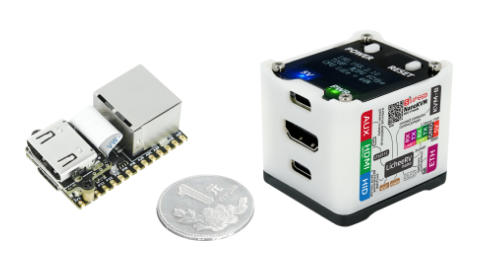
NanoKVM is a series of compact, open-source IP-KVM devices based on the LicheeRV Nano (RISC-V). It lets you remotely access and control computers as if you were sitting in front of them, making it useful for servers, embedded systems, and other headless machines.
## 📦 Product Family
Choose the NanoKVM model that best fits your deployment:
- **NanoKVM-Cube Lite:** A barebones kit for DIY users and bulk deployments.
- **NanoKVM-Cube Full:** A ready-to-use kit with a case, accessories, and a pre-flashed system SD card.
- **NanoKVM-PCIe:** A PCIe-bracket form factor for internal chassis mounting. It draws power from the PCIe slot and supports optional Wi-Fi and PoE.
- **[NanoKVM-Pro](https://github.com/sipeed/NanoKVM-Pro):** A higher-performance version with major upgrades:
- **Resolution:** Up to **4K@30fps / 2K@60fps**.
- **Network:** **1Gbps Ethernet + PoE + Wi-Fi 6**, upgraded from 100Mbps Ethernet.
- **Latency:** Hardware-accelerated encoding reduces latency from 100-150ms to **50-100ms**.
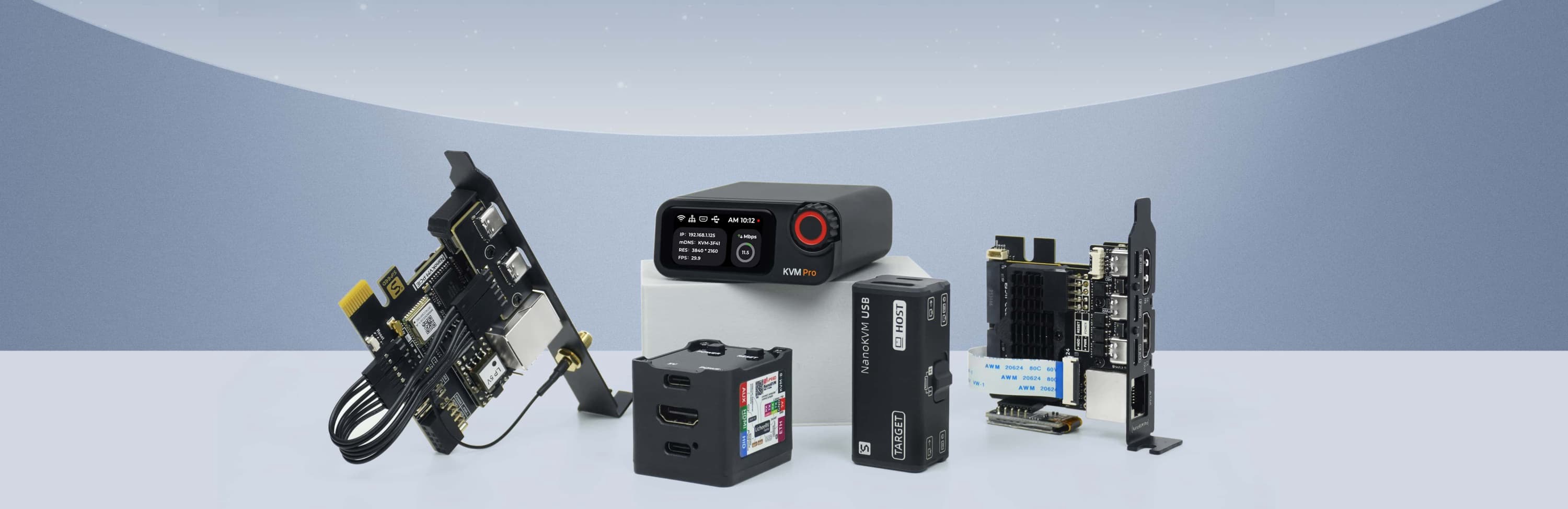
> If you are looking for a USB-based KVM solution, check out [NanoKVM-USB](https://github.com/sipeed/NanoKVM-USB).
## 🛠️ Technical Specifications
| Feature | NanoKVM-Pro | NanoKVM (Cube/PCIe) | GxxKVM | JxxKVM |
| ------------------ | ------------------------------------- | --------------------------------- | ---------------------------------- | ----------------------------------- |
| Core | AX630C 2xA53 1.2G | SG2002 1xC906 1.0G | RV1126 4xA7 1.5G | RV1106 1xA7 1.2G |
| Memory & Storage | 1G LPDDR4X + 32G eMMC | 256M DDR3 + 32G microSD | 1G DDR3 + 8G eMMC | 256M DDR3 + 16G eMMC |
| System | NanoKVM / PiKVM | NanoKVM | GxxKVM | JxxKVM |
| Resolution | 4K@30fps / 2K@60fps | 1080P@60fps | 4K@30fps / 2K@60fps | 1080P@60fps |
| HDMI Loopout | 4K loopout | — | — | — |
| Video Encoding | MJPEG / H.264 / H.265 | MJPEG / H.264 | MJPEG / H.264 | MJPEG / H.264 |
| Audio Transmit | ✓ | — | ✓ | — |
| UEFI / BIOS | ✓ | ✓ | ✓ | ✓ |
| Emulated USB Keyboard & Mouse | ✓ | ✓ | ✓ | ✓ |
| Emulated USB ISO | ✓ | ✓ | ✓ | ✓ |
| IPMI | ✓ | ✓ | ✓ | — |
| Wake-on-LAN | ✓ | ✓ | ✓ | ✓ |
| Web Terminal | ✓ | ✓ | ✓ | ✓ |
| Serial Terminal | 2 channels | 2 channels | — | 1 channel |
| Custom Scripts | ✓ | ✓ | — | — |
| Storage | 32G eMMC 300MB/s | 32G MicroSD 12MB/s | 8G eMMC 120MB/s | 8G eMMC 60MB/s |
| Ethernet | 1000M | 100M | 1000M | 100M |
| PoE | Optional | Optional | — | — |
| Wi-Fi | Optional Wi-Fi 6 | Optional Wi-Fi 6 | — | — |
| ATX Power Control | ✓ | ✓ | Extra $15 | Extra $10 |
| Display | 1.47" 320x172 LCD / 0.96" 128x64 OLED | 0.96" 128x64 OLED | — | 1.68" 280x240 |
| More Features | Sync LED Strip / Smart Assistant | — | — | — |
| Power Consumption | 0.6A@5V | 0.2A@5V | 0.4A@5V | 0.2A@5V |
| Power Input | USB-C or PoE | USB-C | USB-C | USB-C |
| Dimensions | 65x65x26mm | 40x36x36mm | 80x60x17.5mm | 60x43x(24~31)mm |
## 📂 Project Structure
```text
├── kvmapp # APP update package
│ ├── jpg_stream # Legacy support for direct updates from older versions
│ ├── kvm_new_app # Triggers components for kvm_system updates
│ ├── kvm_system # Core KVM application
│ ├── server # Front-end and back-end integration
│ └── system # Essential system components
├── web # NanoKVM Front-end (UI)
├── server # NanoKVM Back-end (Service)
├── support # Auxiliary modules (Image subsystem, status, updates, OLED, HID, etc.)
├── ...
```
## 💻 Development
Start with the guide that matches the part of NanoKVM you want to work on:
- **System support modules:** Build and update the low-level hardware support components in [support/sg2002/README.md](support/sg2002/README.md).
- **Backend service:** Set up, build, and understand the Go service in [server/README.md](server/README.md).
- **Frontend UI:** Develop, lint, and build the React interface in [web/README.md](web/README.md).
- **Release packaging:** Assemble the `nanokvm_.tar.gz` update package in [scripts/README.md](scripts/README.md).
> Backend compilation and runtime validation require the target toolchain or a NanoKVM device. See the module-specific guides above for the latest development workflow.
### Dev container (optional)
The repository ships a [Dev Container](https://containers.dev) setup (`.devcontainer/`) that layers the frontend toolchain (Node 22, pnpm 11) on top of the release builder image (RISC-V cross toolchain, Go, MaixCDK), so one container covers Go, C support-layer and web development. It is a convenience for IDE users; the `make` targets in the repository root remain the canonical CLI workflow.
- Requirements: Docker plus an editor or CLI with dev container support (e.g. the VS Code "Dev Containers" extension, or `devcontainer up`).
- On creation the container prepares itself automatically: `support/sg2002/build update_lib` (resyncs MaixCDK components with the checkout) and `pnpm install` for the frontend.
- Backend: run `server/build.sh` for a release-equivalent binary (BoringCrypto + `dl_lib` RPATH). `make app` builds a plain development binary without those, so prefer `server/build.sh` whenever the result should match a release.
- Support layer: `cd support/sg2002 && ./build kvm_system` (the MaixCDK virtualenv is part of the container environment).
- Frontend: `cd web && pnpm dev` (VS Code forwards port 3001 automatically; other clients may need to map it themselves); see [web/README.md](web/README.md) for pointing it at a device.
- The base image `ghcr.io/sipeed/nanokvm-builder:latest` is x86-64 only; on Apple Silicon it runs under emulation (works, but C builds are slow). You can also build the image locally first (`make builder-image`) and point the `BASE_IMAGE` build arg at it (e.g. via `build.args` in `devcontainer.json`). On Linux hosts the first container creation also takes a while: the container user is remapped to your uid, which re-chowns its home directory once.
- Hardware-dependent verification still requires a real NanoKVM device; the container covers compiling, linting and mock-mode web development only.
## 🔩 Hardware Platform (NanoKVM Cube/PCIe)
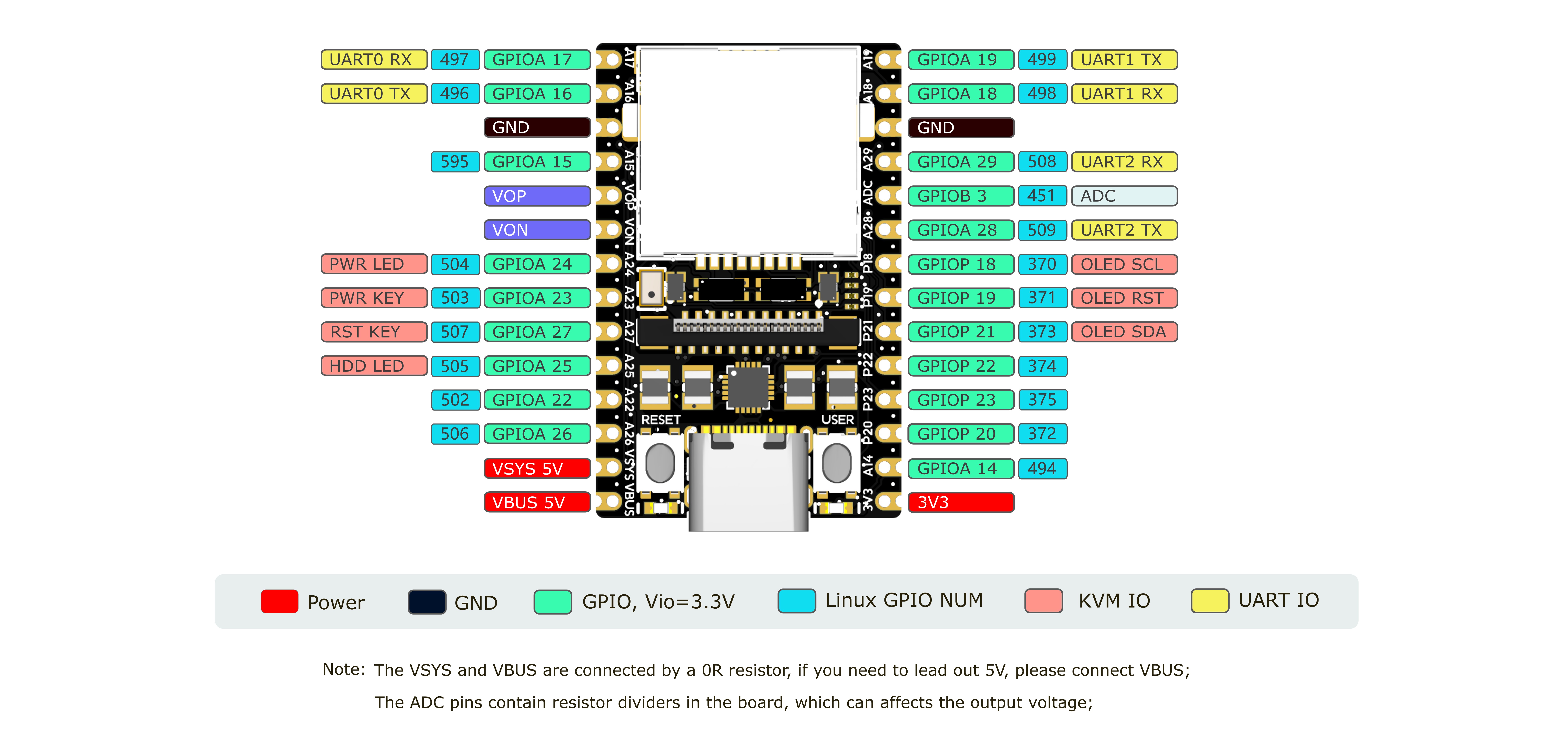
NanoKVM is based on Sipeed [LicheeRV Nano](https://wiki.sipeed.com/hardware/zh/lichee/RV_Nano/1_intro.html). You can find specifications, schematics, and dimensional drawings in the [download station](https://dl.sipeed.com/shareURL/LICHEE/LicheeRV_Nano).
The NanoKVM Cube/PCIe hardware is built from these components:
- **NanoKVM Lite:** LicheeRV Nano plus the HDMI-to-CSI board.
- **NanoKVM Full:** NanoKVM Lite plus the NanoKVM-A/B boards and enclosure.
- **HDMI-to-CSI board:** Converts the HDMI input signal.
- **NanoKVM-A board:** Provides OLED, ATX control output through USB-C, auxiliary power, and physical ATX power/reset buttons.
- **NanoKVM-B board:** Connects NanoKVM-A to the host computer's ATX pins for remote power control.
The NanoKVM image is built with the LicheeRV Nano SDK and MaixCDK. It is intended for NanoKVM hardware and is not a general-purpose KVM software package for other LicheeRV Nano or SG2002 products. If you want to build an HDMI input application on LicheeRV Nano or MaixCam, please contact us for technical support.
> Note: Of the 256MB memory on SG2002, 158MB is currently allocated to the multimedia subsystem for video capture and processing.
- [NanoKVM-A Schematic](https://cn.dl.sipeed.com/fileList/KVM/nanoKVM/HDK/02_Schematic/SCH_RV_Nano_KVM_A_30111.pdf)
- [NanoKVM-B Schematic](https://cn.dl.sipeed.com/fileList/KVM/nanoKVM/HDK/02_Schematic/SCH_RV_Nano_KVM_B_30131.pdf)
- [NanoKVM-PCIe Schematic](https://cn.dl.sipeed.com/fileList/KVM/KVM_PCIE/HDK/01_Schematic/SCH_nanoKVM_PCIE_3105D_2025-12-19.pdf)
- [NanoKVM image](https://github.com/sipeed/NanoKVM/releases/tag/NanoKVM)
## 🤝 Contributing
We welcome contributions. To get started:
1. Fork the repository.
2. Create a feature branch.
3. Commit your changes.
4. Push to the branch.
5. Open a Pull Request.
Please keep your pull requests small and focused to facilitate easier review and merging.
> 🎁 **Contributors who submit high-quality Pull Requests may receive a NanoKVM Cube, PCIe, or Pro as a token of our appreciation!**
## 🛒 Where to Buy
- [AliExpress (global, except USA and Russia)](https://www.aliexpress.com/item/1005007369816019.html)
- [Taobao](https://item.taobao.com/item.htm?id=811206560480)
- [Preorder for other regions](https://sipeed.com/nanokvm)
## 💬 Community & Support
- [Discord](https://discord.gg/V4sAZ9XWpN)
- QQ group: 703230713
- Email: [support@sipeed.com](mailto:support@sipeed.com)
- [FAQ](https://wiki.sipeed.com/hardware/en/kvm/NanoKVM/faq.html)
## 📜 License
This project is licensed under the GPL-3.0 License. See [LICENSE](LICENSE) for details.
---
### Overview (`scripts/README.md`)
# Release packaging
These scripts assemble the application update package that NanoKVM devices pull
over the air: `nanokvm_.tar.gz` plus its `latest.json` manifest.
| Script | Purpose |
|---|---|
| `build-in-container.sh` | Builds every riscv64 artifact (`kvm_system`, `libkvm.so`, `NanoKVM-Server`). Runs inside the `nanokvm-builder` image only. |
| `package.sh` | Stages the package tree, creates the tarball, and writes `latest.json`. |
| `compare-release.sh` | Diffs a freshly built package against the currently published one. Informational. |
| `verify-release-assets.sh` | Checks the three GitHub Release assets before publishing or promotion. |
| `verify-release-tag.sh` | Requires an annotated numeric tag whose commit is on `main`. |
## What the updater expects
The format is not arbitrary — it is fixed by the on-device updater in
`server/service/application/`:
- **One safe root directory.** The updater scans before extracting and accepts
only directories and regular files under `nanokvm_/`; links,
special files, duplicate paths, and path traversal are rejected.
- **`name` is the file name.** `version.go` builds the download URL as
`/`, where `` is `https://cdn.sipeed.com/nanokvm` (or
`.../preview` when `/etc/kvm/preview_updates` exists).
- **`sha512` is base64, not hex.** `update.go` compares against
`base64(raw sha512 digest)`. A hex digest will fail verification on device.
- **`/kvmapp/version`** is what the device reports as its installed version, so
it must match the `version` field.
New releases use manifest v2. `size` remains the exact compressed byte count
for older clients, while v2 clients use `size_bytes` and
`unpacked_size_bytes` for storage preflight checks. Historical v1 `size`
values have inconsistent units, so v2 clients only require v1 `size` to be
non-zero and verify the downloaded SHA-512 instead. Publish v2 metadata before
releasing clients that consume it; clients retain v1 compatibility for custom
update servers.
## Building a release
The frontend needs Node and pnpm on the host; everything riscv64 needs the
builder image (see `docker/Dockerfile`).
```bash
make release VERSION=2.4.4
```
That is equivalent to:
```bash
make release-build # kvm_system + libkvm.so + NanoKVM-Server, in Docker
make web # web/dist
make package VERSION=2.4.4 # build/release/{nanokvm_2.4.4.tar.gz,latest.json}
```
In CI this runs as the **NanoKVM Package** workflow. Pull requests and manual
runs only create Actions artifacts. For a public release, run **NanoKVM Create
Tag**, then run **NanoKVM Release** and choose prerelease, stable, or promotion.
Publishing attaches three assets:
Publishing is one-shot: an existing Release or draft is an error, and only a
published prerelease can be promoted.
- `nanokvm_.tar.gz`
- `latest.json`
- `sha256.txt`
The Actions artifact also includes `BUILD_INFO.txt` with the source commit,
workflow run, immutable builder image digest, and both checksum encodings; that
provenance file is not attached to the GitHub release. Uploading the tarball and
`latest.json` to the CDN is what actually offers the update to devices in the
field, so that step stays manual. `sha256.txt` is only for users verifying a
manual download and does not change the on-device `latest.json` contract.
## Where each file in the package comes from
| Package path | Source |
|---|---|
| `version` | the requested version |
| `server/NanoKVM-Server` | `server/build.sh` (BoringCrypto, RPATH `$ORIGIN/dl_lib`) |
| `server/dl_lib/` | whatever the `kvm_vision` build emits, with any library it does not emit backfilled from the tracked `server/dl_lib/` |
| `server/web/` | `web/dist/` |
| `kvm_system/kvm_system` | `support/sg2002` `build kvm_system` |
| `system/tool/` | prebuilt binaries in `tools/nanokvm_update_edid/` |
| `kvm/` | default runtime state (resolution, fps, quality) |
| everything else | tracked `kvmapp/` |
Note that `kvm/` ships default runtime state, and `install.go` replaces
`/kvmapp` wholesale, so an update resets those values on the device. That is
long-standing behaviour, not something these scripts introduce.
## The two copies of libkvm.so
`NanoKVM-Server` is cgo-linked against the **tracked** `server/dl_lib/libkvm.so`
(`server/common/kvm_vision.go`: `-L../dl_lib -lkvm`), but the package ships the
library the `kvm_vision` build just produced. Those are two different files, and
the tracked one can lag well behind — published releases have shipped this
mismatch for a long time.
Because a symbol the binary imports could in principle be absent from the
shipped library, and that would only surface as a crash on a real device,
`build-in-container.sh` checks the shipped `libkvm.so` still exports every
symbol `NanoKVM-Server` actually imports from it, and fails the build otherwise.
---
### Overview (`server/README.md`)
# NanoKVM Server
This is the backend server implementation for NanoKVM.
For detailed documentation, please visit our [Wiki](https://wiki.sipeed.com/nanokvm).
## Structure
```shell
server
├── common // Common utility components
├── config // Server configuration
├── dl_lib // Shared object libraries
├── include // Header files for shared objects
├── logger // Logging system
├── middleware // Server middleware components
├── proto // API request/response definitions
├── router // API route handlers
├── service // Core service implementations
├── utils // Utility functions
└── main.go
```
## Configuration
The configuration file path is `/etc/kvm/server.yaml`.
```
/* Detailed source-code truncated for AI context efficiency. */
```
## Web Users
NanoKVM uses two device-wide roles:
- `admin`: everything below, plus user management.
- `user`: only what the account is granted.
A grant names an action on one party, and the catalog the server serves to the account editor
carries its group, its risk, and the grants it implies:
| Group | Grants |
| --- | --- |
| console (this session) | `console.view`, `console.control` |
| target machine | `power`, `medium.attach` |
| media library (this device) | `library.read`, `library.write` |
| this device | `terminal`, `device`, `network`, `update` |
| services | `mcp`, `tailscale`, `ai` |
Implied grants are declared once, in the catalog, and the server resolves them before answering any
request: `console.control` implies `console.view`, both `medium.attach` and `library.write` imply
`library.read`, and every grant whose controls live in the console menu — `power`, `device`,
`network`, `update`, `mcp`, `tailscale` and `ai` — implies `console.view` too, because no page
outside the console renders them. Consequences worth knowing:
- An account can hold no console access at all. The web app then lands on a page that offers the
sections the account may use (the media library, the terminal) instead of a console it cannot
open. `library.read` is all that media access needs, because the other two media grants imply it,
and only `terminal` and the media grants can stand on their own pages in the first place.
- The media grants split along the trust boundary. `medium.attach` mounts or ejects a medium on the
target machine and writes into the shared partition the target reads; `library.write` changes what
the library keeps (uploads, deletes, the files inside an image); `library.read` lists and downloads.
The file endpoints serve an image and the shared partition through one path, so the route admits
either grant and each request is checked against the medium type it names. Every `.iso` and
`.img` on the partition is a library entry, so uploading one through the shared partition, or
deleting a file or folder that holds one, also needs `library.write`.
- The emulated USB devices are neither media nor network: the virtual disk and the RNDIS adapter
hand the target machine the raw data partition and a network interface, so both follow `device`.
A medium can only be attached while a `device` holder has the virtual disk switched on, and the
storage page says so when it is off.
Four grants reach further than their names suggest and amount to full device control. The catalog
has two risk levels, and `warn` is reserved for them: the account editor marks those four and
names them before the grants are saved:
- `terminal` is a root shell (the same one SSH gives) and can run saved and autostart scripts.
- `mcp` hands out a device-wide API key that drives the keyboard, mouse and screenshots from
outside the web session. The key is shared, so a copy keeps working after an account loses this
grant. Whenever a change takes the grant away (revoked, demoted, disabled or deleted), the account
editor warns and offers to regenerate the key, checked by default; regenerating disconnects every
MCP client until it is given the new key, and an administrator who keeps the key accepts that a
copy stays valid. The API takes the choice as `rotateMcpKey` (a body field on update, a query
parameter on delete) and never rotates without it.
- `ai` drives the device through the local loopback interface, which the other grants do not
restrict.
- `update` installs firmware and application packages. An offline package is checked only against
the checksum its uploader supplies, so installing one is running code as root.
`device` carries no such mark, although it changes what the device does for everyone and cannot be
narrowed per account. `device` turns SSH on or off (root login, with the device
owner's password), reboots the device, hands the raw data partition or a network interface to the
target machine through the emulated USB devices, and edits the OLED, HDMI, mDNS, memory, swap and
HID settings. The editor describes it that way.
Two grants also change settings that affect everyone watching: `console.view` sets the video mode,
resolution, frame rate and quality, and resets the HDMI capture; `power` manages the Wake-on-LAN
device list. Both are described that way in the editor.
Administrators manage accounts from **Settings > Account**. Account data remains in
`/etc/kvm/pwd`; the server migrates the legacy single-account JSON format in place and writes
the multi-user format atomically with mode `0600`. Keeping the same path preserves the physical
BOOT-button password reset behavior.
Users must confirm their current password when changing it themselves; administrators can reset
non-owner users from the account manager. Only the device owner can change the device owner's
password, because that password is also synchronized to the Linux root account.
All authenticated sessions are backed by the current account state: every request is authorized
against the account file, so a revoked grant stops working immediately without re-issuing a login.
Disabling, deleting, or resetting the password of a user invalidates that user's HTTP and real-time
connections without affecting other users. Changing the role or the grants of an account keeps its
login valid: the account is told to refresh, and only the long-lived connections whose cached
state depends on what changed are dropped (console, video stream, terminal, AI), so those clients
reconnect under the new grants. An account that loses `console.view` is sent to the landing page
instead of a console it can no longer open. Multiple
users may watch and control the KVM concurrently; input uses the existing cooperative HID
coordinator, so simultaneous input can interleave. A user without `console.control` keeps the
video and the menu for its other grants, but the console rejects keyboard and mouse reports and
the web UI marks the session as view only.
Video mode, quality, resolution, MJPEG frame-detection controls, and resetting the HDMI capture
require only `console.view` and stay shared KVM operations; when several users adjust them
concurrently, the latest change applies device-wide. Enabling or disabling the HDMI capture and
its idle timeout are device settings. `console.control` is input only: keyboard, mouse, paste, and
the input region that maps pointer motion onto the target screen.
The account file stores an explicit grant set: a record written before fine-grained permissions
keeps exactly what the user role used to grant, and the split media grants are translated on load,
so the store never holds a missing set that would fall back to different behavior later. Grants
this build does not know are preserved and ignored, so a downgrade cannot lock the device out.
Creating a regular account without naming a grant set keeps that same meaning, so a script that only
knows about roles gets the account the user role used to create; the account editor seeds a new
regular account with `console.view` only, and an explicitly empty set really is empty.
## Compile & Deploy
Note: The manual steps below require a Linux x86-64 host with Go 1.25 or newer; they are not compatible with ARM, Windows or macOS. With Docker you can skip them entirely and use the containerized flow instead — the root [Makefile](../Makefile) (`make shell`) or the dev container (see "Development" in the root [README](../README.md)) — which works on any host OS; run `server/build.sh` inside the container for a release-equivalent build.
1. Install the Toolchain
1. Download the toolchain from the following link: [Download Link](https://sophon-file.sophon.cn/sophon-prod-s3/drive/23/03/07/16/host-tools.tar.gz).
2. Extract the file and add the `host-tools/gcc/riscv64-linux-musl-x86_64/bin` directory to your PATH environment variable.
3. Run `riscv64-unknown-linux-musl-gcc -v`. If there is version information in the output, the installation is successful.
2. Compile the Project
1. Run `cd server` from the project root directory.
2. Run `go mod tidy` to install Go dependencies.
3. (Optional) If you compiled `libkvm.so` yourself, you need to modify its RPATH by `patchelf --add-rpath \$ORIGIN ./dl_lib/libkvm.so`.
4. Run `CGO_ENABLED=1 GOOS=linux GOARCH=riscv64 CC=riscv64-unknown-linux-musl-gcc CGO_CFLAGS="-mcpu=c906fdv -march=rv64imafdcv0p7xthead -mcmodel=medany -mabi=lp64d" go build` to compile the project.
5. After compilation, an executable file named `NanoKVM-Server` will be generated.
3. Modify RPATH
1. Run `sudo apt install patchelf` or `pip install patchelf` to install patchelf.
2. Run `patchelf --version`. Ensure the version is 0.14 or higher`.
3. Run `patchelf --add-rpath \$ORIGIN/dl_lib NanoKVM-Server` to modify the RPATH of the executable file.
4. Deploy the Application
1. File uploads requires SSH. Please enable it in the Web Settings: `Settings > SSH`;
2. Replace the original file in the NanoKVM `/kvmapp/server/` directory with the newly compiled `NanoKVM-Server`.
3. Restart the service on NanoKVM by executing `/etc/init.d/S95nanokvm restart`.
## Manually Update
> File uploads requires SSH. Please enable it in the Web Settings: `Settings > SSH`;
1. Download the latest application from [GitHub](https://github.com/sipeed/NanoKVM/releases);
2. Unzip the downloaded file and rename the unzipped folder to `kvmapp`;
3. Back up the existing `/kvmapp` directory on your NanoKVM, then replace it with the new `kvmapp` folder;
4. Run `/etc/init.d/S95nanokvm restart` on your NanoKVM to restart the service.
---
### Overview (`support/README.md`)
# NanoKVM Support Instructions
`/support` contains auxiliary functions for NanoKVM, such as image subsystem, system status monitoring, system updates, screen key drivers, and a few system functions.
Currently, NanoKVM is divided into two versions based on the main control chip: SG2002 (which includes NanoKVM-Lite/Full/PCIe) and H618 (including NanoKVM-Pro). Different chips have significantly different projects and compilation environments. To distinguish between them, they are stored separately in `/support/sg2002` and `/support/h618`.
---
### Overview (`web/README.md`)
# NanoKVM Frontend
This is NanoKVM web project. For more documentation, please refer to the [Wiki](https://wiki.sipeed.com/nanokvm).
## Structure
```shell
src
├── api // backend api
├── assets // static resources
├── components // public components
├── i18n // language resources
├── jotai // Global jotai variables
├── lib // util libs
├── pages // web pages
│ ├── auth // login and password
│ ├── desktop // remote desktop
│ ├── storage // virtual media and the files inside them
│ └── terminal // web terminal
├── router.tsx // routers
└── types // types
```
## Local Development
Requirements: Node.js >= 22 and pnpm >= 11 (the versions CI uses; enforced via the `engines` field in `package.json`).
> Development requires SSH. You can enable it in the Web Settings: `Settings > SSH`.
Due to CORS restrictions, authentication needs to be disabled during local development.
To develop authentication features, you need to build the project and test in NanoKVM.
1. Log in to NanoKVM via SSH: `ssh root@your-nanokvm-ip` (default password is root).
2. Open the configuration file `/etc/kvm/server.yaml/` and add `authentication: disable`. ⚠️CAUTION: This option disables all authentication and should NOT be enabled in production environment!
3. Restart the service: `/etc/init.d/S95nanokvm restart`.
4. Edit the `.env.development` file and change `VITE_SERVER_IP` to your NanoKVM IP address.
5. Run `pnpm dev` to start the server and visit http://localhost:3001/ in browser.
It's recommended to disable browser caching to avoid access issues during development:
1. Open the browser Developer Tools;
2. Go to the `Network` tab;
3. Check `Disable cache` option;
4. Refresh the page.
## Deployment
Build:
```shell
cd web
pnpm install
pnpm build
```
1. After the compilation is complete, the `dist` folder will be generated.
2. Rename the folder to `web`.
3. Upload `web` to `/kvmapp/server/` in NanoKVM.
4. Restart the service by executing `/etc/init.d/S95nanokvm restart` in NanoKVM.
Tips:
1. File uploads requires SSH. You can enable it in the Web Settings: `Settings > SSH`.
2. Browser may have old version cache. If you can't open the page, try a force refresh or clear the cache.
---
### Overview (`support/sg2002/README.md`)
# NanoKVM Support Instructions
## Environment Preparation
1. NanoKVM-Lite/Full/PCIe is based on the SG2002 as the main control chip. The projects in the support section are compiled under the [MaixCDK](https://github.com/sipeed/MaixCDK) framework. Before compiling, please ensure that the `MaixCDK` environment is correctly configured. For configuration instructions, click [here](https://github.com/sipeed/MaixCDK/blob/main/docs/doc_zh/README.md).
## kvm_system Compilation Instructions
> The `kvm_system` is responsible for monitoring the NanoKVM system status, system updates, screen key drivers, and a few system functions, compiled with MaixCDK.
1. Before compiling, please ensure that the above-mentioned `MaixCDK` environment is correctly configured.
2. Modify the paths of `MAIXCDK_PATH` and `NanoKVM_PATH` in `./build`.
3. Execute `./build kvm_system` to compile `kvm_system`.
4. Use `scp ./kvm_system/dist/kvm_system_release/kvm_system root@192.168.x.x:/kvmapp/kvm_system` to copy it to NanoKVM for testing.
5. Use `./build add_to_kvmapp` to place the executable file into the `/kvmapp` installation package.
6. Use `./build kvm_system clean` to clean the compilation of `kvm_system`.
## kvm_vision Compilation Instructions
> `kvm_vision` refers to the image acquisition and encoding subsystem of NanoKVM, compiled with MaixCDK to produce dynamic libraries for Go calls. Use `kvm_vision_test` to compile and test the dynamic library.
1. Before compiling, please ensure that the above-mentioned `MaixCDK` environment is correctly configured.
2. Modify the paths of `MAIXCDK_PATH` and `NanoKVM_PATH` in `./build`.
3. Execute `./build kvm_vision` to compile `kvm_vision_test`.
4. You can test the dynamic libraries in `kvm_vision_test/dist/kvm_vision_test_release/dl_lib/`.
5. Use `./build add_to_kvmapp` to place the dynamic libraries into the `/kvmapp` installation package.
6. Use `./build kvm_vision clean` to clean the compilation of `kvm_vision`.
---
### Overview (`tools/logo_generator/readme.md`)
# NanoKVM Logo Generator
**Compatible Hardware:** NanoKVM-Cube, NanoKVM-PCIe
🛠️ **Tool Description:**
This is a logo generator for the NanoKVM OLED display and Web. You can use it to create a `logo.bin` and `logo.ico` file and place them in the `/boot` directory of your NanoKVM system.
📋 **Instructions:**
1. **Install required libraries:**
```bash
pip install Pillow numpy textual
```
2. **Prepare your logo image:**
Make sure it's as square as possible for best results 🖼️
3. **Run the script:**
```bash
python logo_generator.py path/to/your_logo.png
```
4. **Choose your language:**
Select either English or Chinese
5. **Adjust the contrast:**
Fine-tune the contrast based on the preview below until you're happy with how it looks ✨
6. **Fine-tune pixel by pixel:**
Click on individual pixels to adjust details. If you prefer an inverted display, just click the invert button 🔄
7. **Export and deploy:**
Export the `logo.bin` & `logo.ico`, then copy it to the `/boot` directory of your NanoKVM system. You can do this by:
* Enabling SSH and using SCP to copy the file 💻
* Or directly placing it in the boot partition of your TF card 💾
8. **Reboot and enjoy:**
Make sure your NanoKVM application version is greater than 2.3.6 ✅
Reboot your NanoKVM, and you should see your custom logo on the OLED display! 🎉
---
--- METRICS ---
- Files Extracted: 7
- Estimated Token Budget: ~8611 tokens
- Canonical Reference: https://codewiki.google/github.com/sipeed/NanoKVM