---
RF-DETR is a real-time transformer architecture for object detection, instance segmentation, and keypoint detection (preview) developed by Roboflow. Built on a DINOv2 vision transformer backbone (a PE-Core-T backbone for Atto, Femto and Pico), RF-DETR delivers state-of-the-art accuracy and latency trade-offs on [Microsoft COCO](https://cocodataset.org/#home) and [RF100-VL](https://github.com/roboflow/rf100-vl).
RF-DETR uses a DINOv2 vision transformer backbone (PE-Core-T for Atto, Femto and Pico) and supports object detection, instance segmentation, and keypoint detection (preview) in a single, consistent API. The open-source `rfdetr` package and Apache-designated models are released under Apache 2.0, while Plus components (`rfdetr_plus`, including RF-DETR-Atto/Femto/Pico/XL/2XL detection models) are licensed under PML 1.0.
The published RF-DETR sizes were created with neural architecture search (NAS) — and the same NAS method is now available on the [Roboflow platform](https://app.roboflow.com/), so you can discover the best architecture for your own dataset. Learn more in the [NAS docs](https://docs.roboflow.com/train/neural-architecture-search).
https://github.com/user-attachments/assets/add23fd1-266f-4538-8809-d7dd5767e8e6
## Install
To install RF-DETR, install the `rfdetr` package in a [**Python>=3.10**](https://www.python.org/) environment with `pip`.
```bash
pip install rfdetr
```
Install from source
By installing RF-DETR from source, you can explore the most recent features and enhancements that have not yet been officially released. **Please note that these updates are still in development and may not be as stable as the latest published release.**
```bash
pip install https://github.com/roboflow/rf-detr/archive/refs/heads/develop.zip
```
## Benchmarks
RF-DETR achieves state-of-the-art results in both object detection and instance segmentation, with benchmarks reported on Microsoft COCO and RF100-VL (RF100-VL for detection only). The charts and tables below compare RF-DETR against other top real-time models across accuracy and latency for detection and segmentation. All COCO accuracy numbers are measured in-house for every model shown, computed with pycocotools in SAB over the full 5,000-image `val2017` split, so every row is directly comparable and may differ from vendor-reported figures. The sole exception is rows marked †, which are quoted from the original authors' paper and were not measured in SAB. All latency numbers were measured on an NVIDIA T4 using TensorRT, FP16, and batch size 1. Parameter counts are deployment (fused) `nn.Module` parameter counts (`model.parameters()`, not the raw tensor count of the saved checkpoint), except rows marked †, which are the authors' reported counts. For full benchmarking methodology and reproducibility details, see [roboflow/sab](https://github.com/roboflow/single_artifact_benchmarking).
### Detection
See object detection benchmark numbers
| Architecture | COCO AP50 | COCO AP50:95 | RF100VL AP50 | RF100VL AP50:95 | Latency (ms) | Params (M) | Resolution | License |
| :-----------: | :------------------: | :---------------------: | :---------------------: | :------------------------: | :----------: | :--------: | :--------: | :--------: |
| RF-DETR-A △ | 49.4 | 30.5 | 78.2 | 48.3 | 1.0 | 7.4 | 380x380 | PML 1.0 |
| RF-DETR-F △ | 55.9 | 37.8 | 82.5 | 53.8 | 1.4 | 7.9 | 384x384 | PML 1.0 |
| RF-DETR-P △ | 60.2 | 41.6 | 84.1 | 56.0 | 1.7 | 8.4 | 560x560 | PML 1.0 |
| RF-DETR-N | 67.6 | 48.4 | 85.0 | 57.7 | 2.3 | 30.5 | 384x384 | Apache 2.0 |
| RF-DETR-S | 72.1 | 53.0 | 86.7 | 60.2 | 3.5 | 32.1 | 512x512 | Apache 2.0 |
| RF-DETR-M | 73.6 | 54.7 | 87.4 | 61.2 | 4.4 | 33.7 | 576x576 | Apache 2.0 |
| RF-DETR-L | 75.1 | 56.5 | 88.2 | 62.2 | 6.8 | 33.9 | 704x704 | Apache 2.0 |
| RF-DETR-XL △ | 77.4 | 58.6 | 88.5 | 62.9 | 11.5 | 126.4 | 700x700 | PML 1.0 |
| RF-DETR-2XL △ | 78.5 | 60.1 | 89.0 | 63.2 | 17.2 | 126.9 | 880x880 | PML 1.0 |
| YOLO11-N | 52.0 | 37.4 | 81.4 | 55.3 | 2.5 | 2.6 | 640x640 | AGPL-3.0 |
| YOLO11-S | 59.7 | 44.4 | 82.3 | 56.2 | 3.2 | 9.4 | 640x640 | AGPL-3.0 |
| YOLO11-M | 64.1 | 48.6 | 82.5 | 56.5 | 5.1 | 20.1 | 640x640 | AGPL-3.0 |
| YOLO11-L | 64.9 | 49.9 | 82.2 | 56.5 | 6.5 | 25.3 | 640x640 | AGPL-3.0 |
| YOLO11-X | 66.1 | 50.9 | 81.7 | 56.2 | 10.5 | 56.9 | 640x640 | AGPL-3.0 |
| YOLO26-N | 55.8 | 40.3 | 76.7 | 52.0 | 1.7 | 2.6 | 640x640 | AGPL-3.0 |
| YOLO26-S | 64.3 | 47.7 | 82.7 | 57.0 | 2.6 | 9.4 | 640x640 | AGPL-3.0 |
| YOLO26-M | 69.7 | 52.5 | 84.4 | 58.7 | 4.4 | 20.1 | 640x640 | AGPL-3.0 |
| YOLO26-L | 71.1 | 54.1 | 85.0 | 59.3 | 5.7 | 25.3 | 640x640 | AGPL-3.0 |
| YOLO26-X | 74.0 | 56.9 | 85.6 | 60.0 | 9.6 | 56.9 | 640x640 | AGPL-3.0 |
| LW-DETR-T | 60.7 | 42.9 | 84.7 | 57.1 | 1.9 | 12.1 | 640x640 | Apache 2.0 |
| LW-DETR-S | 66.8 | 48.0 | 85.0 | 57.4 | 2.6 | 14.6 | 640x640 | Apache 2.0 |
| LW-DETR-M | 72.0 | 52.6 | 86.8 | 59.8 | 4.4 | 28.2 | 640x640 | Apache 2.0 |
| LW-DETR-L | 74.6 | 56.1 | 87.4 | 61.5 | 6.9 | 46.8 | 640x640 | Apache 2.0 |
| LW-DETR-X | 76.9 | 58.3 | 87.9 | 62.1 | 13.0 | 118.0 | 640x640 | Apache 2.0 |
| D-FINE-N | 60.2 | 42.7 | 84.4 | 58.2 | 2.1 | 3.8 | 640x640 | Apache 2.0 |
| D-FINE-S | 67.6 | 50.6 | 85.3 | 60.3 | 3.5 | 10.2 | 640x640 | Apache 2.0 |
| D-FINE-M | 72.6 | 55.0 | 85.5 | 60.6 | 5.4 | 19.2 | 640x640 | Apache 2.0 |
| D-FINE-L | 74.9 | 57.2 | 86.4 | 61.6 | 7.5 | 31.0 | 640x640 | Apache 2.0 |
| D-FINE-X | 76.8 | 59.3 | 86.9 | 62.2 | 11.5 | 62.0 | 640x640 | Apache 2.0 |
| SAM 3 † | — | — | — | 61.6 | — | ~850 | 1008x1008 | N/A |
> † Reported by the SAM 3 authors ([arXiv:2511.16719](https://arxiv.org/abs/2511.16719), Table 36), **not** measured by us in SAB. The value is SAM 3 fine-tuned on the full RF100-VL training set, which is the same setting as the RF100VL columns above — SAM 3's paper reports LW-DETR-m at 59.8 on this benchmark, matching our own measurement, so the numbers line up. Dashes mark results SAM 3 does not report under this protocol. Parameter count is the paper's stated ~850 M (~450 M vision + ~300 M text encoders + ~100 M detector/tracker).
### Segmentation
See instance segmentation benchmark numbers
| Architecture | COCO AP50 | COCO AP50:95 | Latency (ms) | Params (M) | Resolution | License |
| :-------------: | :------------------: | :---------------------: | :----------: | :--------: | :--------: | :--------: |
| RF-DETR-Seg-N | 63.0 | 40.3 | 3.4 | 33.6 | 312x312 | Apache 2.0 |
| RF-DETR-Seg-S | 66.2 | 43.1 | 4.4 | 33.7 | 384x384 | Apache 2.0 |
| RF-DETR-Seg-M | 68.4 | 45.3 | 5.9 | 35.7 | 432x432 | Apache 2.0 |
| RF-DETR-Seg-L | 70.5 | 47.1 | 8.8 | 36.2 | 504x504 | Apache 2.0 |
| RF-DETR-Seg-XL | 72.2 | 48.8 | 13.5 | 38.1 | 624x624 | Apache 2.0 |
| RF-DETR-Seg-2XL | 73.1 | 49.9 | 21.8 | 38.6 | 768x768 | Apache 2.0 |
| YOLOv8-N-Seg | 45.6 | 28.3 | 3.5 | 3.4 | 640x640 | AGPL-3.0 |
| YOLOv8-S-Seg | 53.8 | 34.0 | 4.2 | 11.8 | 640x640 | AGPL-3.0 |
| YOLOv8-M-Seg | 58.2 | 37.3 | 7.0 | 27.3 | 640x640 | AGPL-3.0 |
| YOLOv8-L-Seg | 60.5 | 39.0 | 9.7 | 46.0 | 640x640 | AGPL-3.0 |
| YOLOv8-XL-Seg | 61.3 | 39.5 | 14.0 | 71.8 | 640x640 | AGPL-3.0 |
| YOLOv11-N-Seg | 47.8 | 30.0 | 3.6 | 2.9 | 640x640 | AGPL-3.0 |
| YOLOv11-S-Seg | 55.4 | 35.0 | 4.6 | 10.1 | 640x640 | AGPL-3.0 |
| YOLOv11-M-Seg | 60.0 | 38.5 | 6.9 | 22.4 | 640x640 | AGPL-3.0 |
| YOLOv11-L-Seg | 61.5 | 39.5 | 8.3 | 27.6 | 640x640 | AGPL-3.0 |
| YOLOv11-XL-Seg | 62.4 | 40.1 | 13.7 | 62.1 | 640x640 | AGPL-3.0 |
| YOLO26-N-Seg | 54.3 | 34.7 | 2.31 | 2.7 | 640x640 | AGPL-3.0 |
| YOLO26-S-Seg | 62.4 | 40.2 | 3.47 | 10.4 | 640x640 | AGPL-3.0 |
| YOLO26-M-Seg | 67.8 | 44.0 | 6.32 | 23.6 | 640x640 | AGPL-3.0 |
| YOLO26-L-Seg | 69.8 | 45.5 | 7.58 | 28.0 | 640x640 | AGPL-3.0 |
| YOLO26-X-Seg | 71.6 | 46.8 | 12.92 | 62.8 | 640x640 | AGPL-3.0 |
### Keypoints
See keypoint detection benchmark numbers
| Architecture | COCO AP50:95 | Latency (ms) | Params (M) | License |
| :------------------------: | :---------------------: | :----------: | :--------: | :--------: |
| RF-DETR Keypoint (Preview) | 71.8 | 9.7 | 40.7 | Apache 2.0 |
| YOLO11-pose N | 48.9 | 3.2 | 2.9 | AGPL-3.0 |
| YOLO11-pose S | 57.5 | 3.4 | 9.9 | AGPL-3.0 |
| YOLO11-pose M | 64.2 | 5.2 | 20.9 | AGPL-3.0 |
| YOLO11-pose L | 65.2 | 6.6 | 26.2 | AGPL-3.0 |
| YOLO11-pose X | 68.6 | 10.6 | 58.8 | AGPL-3.0 |
| YOLO26-pose N | 55.9 | 1.9 | 2.9 | AGPL-3.0 |
| YOLO26-pose S | 62.0 | 2.7 | 10.4 | AGPL-3.0 |
| YOLO26-pose M | 68.0 | 4.6 | 21.5 | AGPL-3.0 |
| YOLO26-pose L | 69.2 | 5.9 | 25.9 | AGPL-3.0 |
| YOLO26-pose X | 71.0 | 9.8 | 57.6 | AGPL-3.0 |
> Keypoint benchmarks report AP50:95 (OKS-based); this is the standard COCO keypoint comparison metric.
### NAS on the Roboflow Platform
Since the paper release, we have improved RF-DETR NAS training on the Roboflow platform even further. A single training run gives you every model size, with results that beat not only the open-source checkpoints but also our own paper NAS results. [Try it now!](https://roboflow.com/)
## Run Models
### Detection
RF-DETR provides multiple model sizes, ranging from Nano to 2XLarge. To use a different model size, replace the class name in the code snippet below with another class from the table.
```python
import supervision as sv
from rfdetr import RFDETRMedium
from rfdetr.assets.coco_classes import COCO_CLASSES
model = RFDETRMedium()
detections = model.predict("https://media.roboflow.com/dog.jpg", threshold=0.5)
labels = [f"{COCO_CLASSES[class_id]}" for class_id in detections.class_id]
annotated_image = sv.BoxAnnotator().annotate(detections.metadata["source_image"], detections)
annotated_image = sv.LabelAnnotator().annotate(annotated_image, detections, labels)
```
> **Note:** `COCO_CLASSES` works for COCO-pretrained models. For fine-tuned models, use `detections.data["class_name"]` instead — it resolves class names from the checkpoint and works for both COCO and custom datasets.
Run RF-DETR with Inference
You can also run RF-DETR models using the Inference library. To switch model size, select the appropriate inference package alias from the table below.
```python
import requests
import supervision as sv
from PIL import Image
from inference import get_model
model = get_model("rfdetr-medium")
image = Image.open(requests.get("https://media.roboflow.com/dog.jpg", stream=True).raw)
predictions = model.infer(image, confidence=0.5)[0]
detections = sv.Detections.from_inference(predictions)
annotated_image = sv.BoxAnnotator().annotate(image, detections)
annotated_image = sv.LabelAnnotator().annotate(annotated_image, detections)
```
| Size | RF-DETR package class | Inference package alias | COCO AP50 | COCO AP50:95 | Latency (ms) | Params (M) | Resolution | License |
| :--: | :-------------------: | :---------------------- | :------------------: | :---------------------: | :----------: | :--------: | :--------: | :--------: |
| A | `RFDETRAtto` △ | `rfdetr-atto` | 49.4 | 30.5 | 1.0 | 7.4 | 380x380 | PML 1.0 |
| F | `RFDETRFemto` △ | `rfdetr-femto` | 55.9 | 37.8 | 1.4 | 7.9 | 384x384 | PML 1.0 |
| P | `RFDETRPico` △ | `rfdetr-pico` | 60.2 | 41.6 | 1.7 | 8.4 | 560x560 | PML 1.0 |
| N | `RFDETRNano` | `rfdetr-nano` | 67.6 | 48.4 | 2.3 | 30.5 | 384x384 | Apache 2.0 |
| S | `RFDETRSmall` | `rfdetr-small` | 72.1 | 53.0 | 3.5 | 32.1 | 512x512 | Apache 2.0 |
| M | `RFDETRMedium` | `rfdetr-medium` | 73.6 | 54.7 | 4.4 | 33.7 | 576x576 | Apache 2.0 |
| L | `RFDETRLarge` | `rfdetr-large` | 75.1 | 56.5 | 6.8 | 33.9 | 704x704 | Apache 2.0 |
| XL | `RFDETRXLarge` △ | `rfdetr-xlarge` | 77.4 | 58.6 | 11.5 | 126.4 | 700x700 | PML 1.0 |
| 2XL | `RFDETR2XLarge` △ | `rfdetr-2xlarge` | 78.5 | 60.1 | 17.2 | 126.9 | 880x880 | PML 1.0 |
> △ Requires the `rfdetr_plus` extension: `pip install rfdetr[plus]`. See [License](#license) for details.
### Segmentation
RF-DETR supports instance segmentation with model sizes from Nano to 2XLarge. To use a different model size, replace the class name in the code snippet below with another class from the table.
```python
import supervision as sv
from rfdetr import RFDETRSegMedium
from rfdetr.assets.coco_classes import COCO_CLASSES
model = RFDETRSegMedium()
detections = model.predict("https://media.roboflow.com/dog.jpg", threshold=0.5)
labels = [f"{COCO_CLASSES[class_id]}" for class_id in detections.class_id]
annotated_image = sv.MaskAnnotator().annotate(detections.metadata["source_image"], detections)
annotated_image = sv.LabelAnnotator().annotate(annotated_image, detections, labels)
```
Run RF-DETR-Seg with Inference
You can also run RF-DETR-Seg models using the Inference library. To switch model size, select the appropriate inference package alias from the table below.
```python
import requests
import supervision as sv
from PIL import Image
from inference import get_model
model = get_model("rfdetr-seg-medium")
image = Image.open(requests.get("https://media.roboflow.com/dog.jpg", stream=True).raw)
predictions = model.infer(image, confidence=0.5)[0]
detections = sv.Detections.from_inference(predictions)
annotated_image = sv.MaskAnnotator().annotate(image, detections)
annotated_image = sv.LabelAnnotator().annotate(annotated_image, detections)
```
| Size | RF-DETR package class | Inference package alias | COCO AP50 | COCO AP50:95 | Latency (ms) | Params (M) | Resolution | License |
| :--: | :-------------------: | :---------------------- | :------------------: | :---------------------: | :----------: | :--------: | :--------: | :--------: |
| N | `RFDETRSegNano` | `rfdetr-seg-nano` | 63.0 | 40.3 | 3.4 | 33.6 | 312x312 | Apache 2.0 |
| S | `RFDETRSegSmall` | `rfdetr-seg-small` | 66.2 | 43.1 | 4.4 | 33.7 | 384x384 | Apache 2.0 |
| M | `RFDETRSegMedium` | `rfdetr-seg-medium` | 68.4 | 45.3 | 5.9 | 35.7 | 432x432 | Apache 2.0 |
| L | `RFDETRSegLarge` | `rfdetr-seg-large` | 70.5 | 47.1 | 8.8 | 36.2 | 504x504 | Apache 2.0 |
| XL | `RFDETRSegXLarge` | `rfdetr-seg-xlarge` | 72.2 | 48.8 | 13.5 | 38.1 | 624x624 | Apache 2.0 |
| 2XL | `RFDETRSeg2XLarge` | `rfdetr-seg-2xlarge` | 73.1 | 49.9 | 21.8 | 38.6 | 768x768 | Apache 2.0 |
### Keypoints
RF-DETR supports keypoint detection (preview) with `RFDETRKeypointPreview`, pretrained on COCO person keypoints.
```python
from rfdetr import RFDETRKeypointPreview
model = RFDETRKeypointPreview()
key_points = model.predict("image.jpg", threshold=0.5)
```
| Size | RF-DETR package class | COCO AP50:95 | Latency (ms) | Params (M) | Resolution | License |
| :----------------: | :---------------------: | :---------------------: | :----------: | :--------: | :--------: | :--------: |
| Keypoint (Preview) | `RFDETRKeypointPreview` | 71.8 | 9.7 | 40.7 | 576x576 | Apache 2.0 |
### Train Models
RF-DETR supports training for object detection, instance segmentation, and keypoint detection (preview). You can train models in [Google Colab](https://colab.research.google.com/github/roboflow-ai/notebooks/blob/main/notebooks/how-to-finetune-rf-detr-on-detection-dataset.ipynb) or directly on the Roboflow platform. Below you will find a step-by-step video fine-tuning tutorial.
[](https://youtu.be/-OvpdLAElFA)
## Documentation
Visit our [documentation website](https://rfdetr.roboflow.com) to learn more about how to use RF-DETR.
## License
Licensing is split by component:
- The open-source `rfdetr` package and Apache-designated model weights are licensed under Apache License 2.0. See [`LICENSE`](LICENSE).
- Plus components, including the `rfdetr_plus` extension and RF-DETR-XL / RF-DETR-2XL detection models, are licensed under PML 1.0.
## Acknowledgements
Our work is built upon [LW-DETR](https://arxiv.org/pdf/2406.03459), [DINOv2](https://arxiv.org/pdf/2304.07193), and [Deformable DETR](https://arxiv.org/pdf/2010.04159). Thanks to their authors for their excellent work!
## Citation
If you find our work helpful for your research, please consider citing the following BibTeX entry.
```bibtex
@inproceedings{robinson2026rfdetr,
title = {RF-DETR: Real-Time Detection Transformer},
author = {Robinson, Isaac and Robicheaux, Peter and Popov, Matvei and Ramanan, Deva and Peri, Neehar},
booktitle = {International Conference on Learning Representations (ICLR)},
year = {2026},
url = {https://arxiv.org/abs/2511.09554}
}
```
## Contribute
We welcome and appreciate all contributions! If you notice any issues or bugs, have questions, or would like to suggest new features, please [open an issue](https://github.com/roboflow/rf-detr/issues/new) or pull request. By sharing your ideas and improvements, you help make RF-DETR better for everyone.
## Project Activity
PyPI downloads cover completed Monday-to-Sunday periods and exclude known mirrors. New stars are calculated from consecutive scheduled GitHub snapshots.
---
### Overview (`tests/legacy/README.md`)
# Legacy Checkpoint Backward-Compatibility Tests
Verifies that the *current* codebase can load RF-DETR checkpoints produced by every past stable minor release listed in `checkpoint_versions.txt`. Runs as a dedicated GitHub Actions workflow (`.github/workflows/ci-legacy-checkpoints.yml`), separate from the standard CPU/GPU test suites (both exclude `tests/legacy/` via `--ignore`).
## How it works
1. `get-versions` job reads `checkpoint_versions.txt` and exposes it as a matrix.
2. `generate` job (one per version) installs that historical `rfdetr` release from its frozen dependency set, runs `generate_checkpoint.py` to produce a `.pth` checkpoint in that version's save format, and uploads it as a workflow artifact.
3. `test-compat` job downloads every generated checkpoint, installs the *current* (dev) code, and runs `test_checkpoint_compat.py` against each one — asserting a successful load, correct model structure, and (for `--use-pretrained` checkpoints) that a reference prediction is reproduced after reload.
## Adding a new legacy version
1. Add the version to `checkpoint_versions.txt` (one per line; comment lines and blank lines are ignored).
2. Add a matching `frozen_dependencies/req-.txt` pinning `rfdetr==` plus any transitive dependency pin needed to keep the install reproducible (see an existing `req-*.txt` for the header/format convention). `test_every_version_has_matching_frozen_requirements_file` in `test_checkpoint_compat.py` fails locally if this file is missing, instead of only failing much later at CI matrix install time.
3. Run `uv run --no-sync pytest tests/legacy/ -v` locally once checkpoints are available (or rely on the CI workflow, which generates them).
## Why `frozen_dependencies/` is a *partial* freeze, not a full lockfile
Each `req-.txt` pins `rfdetr==` and a bounded `transformers` range (the narrowest range still compatible with that historical release, documented per-file), but leaves `numpy`/`torch`/`supervision`/`pillow` unpinned. This is deliberate: those are shared, frequently-updated dependencies where full pinning would require maintaining N separate lock files indefinitely. The tradeoff is that a future major bump in one of the unpinned packages could occasionally break an older `generate` job for reasons unrelated to the checkpoint-format compatibility this suite exists to test — if that happens, add a targeted pin to the affected version's `req-*.txt` (see `req-1.4.3.txt` for an example of a targeted `transformers` bound added for exactly this reason).
## Pretrained-checkpoint fetch: skip vs. fail
`generate_checkpoint.py --use-pretrained` downloads real COCO-pretrained weights. Network/5xx/ timeout/DNS errors during that fetch are treated as infra outages (skip), while a genuine permanent absence (e.g. a 404 for a removed asset) still fails the test — a blanket skip would silently green a real regression. This mirrors the reference-image fetch's existing MD5-guard skip-vs-fail posture in `generate_checkpoint.py`.
---
### Index (`docs/index.md`)
---
description: RF-DETR is a real-time transformer for object detection, instance segmentation, and keypoint detection (preview) by Roboflow. DINOv2 backbone (PE-Core-T for Atto, Femto and Pico), SOTA on COCO (60.1 AP50:95). Apache 2.0.
hide:
- navigation
---
# RF-DETR: Real-Time SOTA Object Detection, Instance Segmentation, and Keypoint Detection
RF-DETR is a real-time transformer architecture for object detection, instance segmentation, and keypoint detection (preview) developed by Roboflow. Built on a DINOv2 vision transformer backbone (a PE-Core-T backbone for Atto, Femto and Pico), RF-DETR achieves state-of-the-art accuracy–latency trade-offs: RF-DETR-L reaches 56.5 AP50:95 on COCO at 6.8 ms (NVIDIA T4, TensorRT FP16), and RF-DETR-2XL achieves 60.1 AP50:95 — the first real-time model to exceed 60 AP on COCO. Accepted at [ICLR 2026](https://arxiv.org/abs/2511.09554).
RF-DETR uses a DINOv2 vision transformer backbone (PE-Core-T for Atto, Femto and Pico) and supports object detection, instance segmentation, and keypoint detection (preview) in a single, consistent API. Core models (Nano through Large) and all code are released under the Apache 2.0 license; Atto, Femto, Pico, XL and 2XLarge detection models require `rfdetr[plus]` and are provided under PML 1.0.
Developed by Isaac Robinson, Peter Robicheaux, Matvei Popov, Deva Ramanan (CMU), and Neehar Peri (CMU) at [Roboflow](https://roboflow.com). If you use RF-DETR in your research, please cite:
```bibtex
@inproceedings{robinson2026rfdetr,
title = {RF-DETR: Real-Time Detection Transformer},
author = {Robinson, Isaac and Robicheaux, Peter and Popov, Matvei and Ramanan, Deva and Peri, Neehar},
booktitle = {International Conference on Learning Representations (ICLR)},
year = {2026},
url = {https://arxiv.org/abs/2511.09554}
}
```
## Install
You can install and use `rfdetr` in a [**Python>=3.10**](https://www.python.org/) environment. For detailed installation instructions, including installing from source, and setting up a local development environment, check out our [install](getting-started/install.md) page.
!!! example "Installation"
=== "pip"
```bash
pip install rfdetr
```
=== "uv"
```bash
uv pip install rfdetr
```
For uv projects:
```bash
uv add rfdetr
```
## Quickstart
- **Run Detection Models**
---
Load and run pre-trained RF-DETR detection models.
[:octicons-arrow-right-24: Tutorial](learn/run/detection.md)
- **Run Segmentation Models**
---
Load and run pre-trained RF-DETR-Seg segmentation models.
[:octicons-arrow-right-24: Tutorial](learn/run/segmentation.md)
- **Train Models**
---
Learn how to fine-tune RF-DETR models for detection and segmentation.
[:octicons-arrow-right-24: Tutorial](learn/train/index.md)
## Tutorials
- **Train RF-DETR on a Custom Dataset. Video**
---
{ width="1280" height="720" loading="lazy" }
End to end walkthrough of training RF-DETR on a custom dataset.
[:octicons-arrow-right-24: Watch the video](https://www.youtube.com/watch?v=-OvpdLAElFA)
- **Deploy RF-DETR to NVIDIA Jetson. Article**
---
{ width="1000" height="563" loading="lazy" }
Instructions for deploying RF-DETR on NVIDIA Jetson with Roboflow Inference.
[:octicons-arrow-right-24: Read the tutorial](https://blog.roboflow.com/how-to-deploy-rf-detr-to-an-nvidia-jetson/)
- **Train and Deploy RF-DETR with Roboflow**
---
{ width="1000" height="563" loading="lazy" }
Cloud training and hardware deployment workflow using Roboflow.
[:octicons-arrow-right-24: Read the tutorial](https://blog.roboflow.com/train-and-deploy-rf-detr-models-with-roboflow/)
## Project Activity
PyPI downloads cover completed Monday-to-Sunday periods and exclude known mirrors. New stars are calculated from consecutive scheduled GitHub snapshots.
## Benchmarks
RF-DETR achieves the best accuracy–latency trade-off among real-time object detection and instance segmentation models. It also provides keypoint detection (preview) on COCO person keypoints. For detailed benchmark tables and methodology, check out our [benchmarks](learn/benchmarks.md) page.
### Detection
| Architecture | COCO AP50 | COCO AP50:95 | RF100VL AP50 | RF100VL AP50:95 | Latency (ms) | Params (M) | Resolution |
| ------------ | -------------------- | ----------------------- | ----------------------- | -------------------------- | ------------ | ---------- | ---------- |
| RF-DETR-A | 49.4 | 30.5 | 78.2 | 48.3 | 1.0 | 7.4 | 380×380 |
| RF-DETR-F | 55.9 | 37.8 | 82.5 | 53.8 | 1.4 | 7.9 | 384×384 |
| RF-DETR-P | 60.2 | 41.6 | 84.1 | 56.0 | 1.7 | 8.4 | 560×560 |
| RF-DETR-N | 67.6 | 48.4 | 85.0 | 57.7 | 2.3 | 30.5 | 384×384 |
| RF-DETR-S | 72.1 | 53.0 | 86.7 | 60.2 | 3.5 | 32.1 | 512×512 |
| RF-DETR-M | 73.6 | 54.7 | 87.4 | 61.2 | 4.4 | 33.7 | 576×576 |
| RF-DETR-L | 75.1 | 56.5 | 88.2 | 62.2 | 6.8 | 33.9 | 704×704 |
| RF-DETR-XL | 77.4 | 58.6 | 88.5 | 62.9 | 11.5 | 126.4 | 700×700 |
| RF-DETR-2XL | 78.5 | 60.1 | 89.0 | 63.2 | 17.2 | 126.9 | 880×880 |
### Segmentation
| Architecture | COCO AP50 | COCO AP50:95 | Latency (ms) | Params (M) | Resolution |
| --------------- | -------------------- | ----------------------- | ------------ | ---------- | ---------- |
| RF-DETR-Seg-N | 63.0 | 40.3 | 3.4 | 33.6 | 312×312 |
| RF-DETR-Seg-S | 66.2 | 43.1 | 4.4 | 33.7 | 384×384 |
| RF-DETR-Seg-M | 68.4 | 45.3 | 5.9 | 35.7 | 432×432 |
| RF-DETR-Seg-L | 70.5 | 47.1 | 8.8 | 36.2 | 504×504 |
| RF-DETR-Seg-XL | 72.2 | 48.8 | 13.5 | 38.1 | 624×624 |
| RF-DETR-Seg-2XL | 73.1 | 49.9 | 21.8 | 38.6 | 768×768 |
### Keypoints
| Architecture | COCO AP50:95 | Latency (ms) | Params (M) | Resolution |
| -------------------------- | ----------------------- | ------------ | ---------- | ---------- |
| RF-DETR Keypoint (Preview) | 71.8 | 9.7 | 40.7 | 576×576 |
> Keypoint benchmarks report AP50:95 (OKS-based); this is the standard COCO keypoint comparison metric. For the full competitor comparison (YOLO11-pose, YOLO26-pose), see the [Benchmarks](learn/benchmarks.md#keypoints) page.
## Frequently Asked Questions
**What is RF-DETR?** RF-DETR (Roboflow Detection Transformer) is a real-time object detection and instance segmentation model from Roboflow, accepted at ICLR 2026. It uses a DINOv2 vision transformer backbone (PE-Core-T for Atto, Femto and Pico) and achieves state-of-the-art accuracy–latency trade-offs on COCO (60.1 AP50:95 for RF-DETR-2XL) and RF100-VL.
**How does RF-DETR compare to YOLOv11?** RF-DETR-L achieves 56.5 AP50:95 on COCO at 6.8 ms latency on an NVIDIA T4, outperforming YOLOv11x (50.9 AP) at lower latency. The DINOv2 backbone gives RF-DETR stronger performance on domain-shift benchmarks such as RF100-VL.
**What GPU is required to train RF-DETR?** A CUDA-capable GPU with at least 8 GB VRAM (e.g., NVIDIA RTX 3060, T4, A10) is recommended for fine-tuning. Smaller models (RF-DETR-N and RF-DETR-S) can fit in 6 GB VRAM with reduced batch size. CPU inference is supported for evaluation.
**Which dataset formats does RF-DETR support?** RF-DETR supports COCO JSON and YOLO-format datasets (with `dataset_file: "yolo"`). Roboflow datasets export directly to both formats. Detection and segmentation datasets use the same format — the model variant determines the task.
**Can RF-DETR run in real time?** Yes. RF-DETR-N runs at 2.3 ms per frame on a T4 GPU (TensorRT FP16, batch 1), and RF-DETR-L at 6.8 ms — both well within real-time thresholds. ONNX, TFLite, TensorRT, ExecuTorch, CoreML, and OpenVINO exports are available for edge deployment.
**What is the difference between RF-DETR detection and segmentation models?** Detection models (e.g., `RFDETRLarge`) output bounding boxes. Segmentation models (e.g., `RFDETRSegLarge`) additionally output instance masks. Both share the same backbone and training API; segmentation adds a mask head and requires COCO-format segmentation annotations.
**Does RF-DETR support keypoint detection?** RF-DETR Keypoint (Preview) detects 17 body keypoints per person on COCO, achieving 71.8 AP50:95 at 9.7 ms on NVIDIA T4. It is available in the `rfdetr` package as `RFDETRKeypointPreview`. See [Run Keypoint Models](learn/run/keypoints.md) for usage.
**Is RF-DETR open source?** Yes. Core models (Nano through Large) and all training/inference code are released under the Apache 2.0 license. Atto, Femto, Pico, XLarge and 2XLarge models require the `rfdetr[plus]` package (PML 1.0 license).
**How do I fine-tune RF-DETR on a custom dataset?** Instantiate a model and call `model.train(...)` with your dataset directory in COCO JSON or YOLO format. Example: `model = RFDETRLarge(); model.train(dataset_dir='./dataset', epochs=50, batch_size=4)`. The model downloads pretrained weights automatically and saves best checkpoints automatically (use `resume=` to continue from one).
**How do I export RF-DETR to ONNX or TensorRT?** Call `model.export(format="onnx")` after training or loading a checkpoint. ONNX export works on CPU and produces a single `.onnx` file compatible with ONNX Runtime and OpenCV DNN. For TensorRT deployment, use `model.export(format="tensorrt")`, which exports ONNX and then builds a `.trt` engine in-process via the TensorRT Python API; this requires `pip install rfdetr[tensorrt]` and a CUDA GPU.
**Which RF-DETR model size should I use?** RF-DETR-Nano (2.3 ms, 67.6 AP50 on COCO) is best for edge and real-time applications. RF-DETR-Large (6.8 ms, 56.5 AP50:95) offers the best accuracy–latency trade-off for server deployment. RF-DETR-2XLarge (17.2 ms, 60.1 AP50:95) maximizes accuracy when latency allows.
> **Checkpoint note:** Current `RFDETRLarge` defaults to `rf-detr-large-2026.pth`. The older `rf-detr-large.pth` checkpoint is a legacy Large release kept for backward compatibility and has been superseded by the current release.
---
### Exports Index (`docs/exports/index.md`)
---
description: Overview of exporting RF-DETR models to ONNX, TensorRT, TFLite, LiteRT, ExecuTorch, native CoreML, Apple Core AI and OpenVINO IR (FP32/FP16/INT8) for high-performance inference on GPUs, mobile, and edge devices.
---
# Export RF-DETR Model
!!! tip "Key Takeaways"
- Export to ONNX for cross-platform inference with ONNX Runtime, OpenVINO, or TensorRT
- Export to OpenVINO IR for optimized inference on CPU (x86, ARM), GPU (Intel integrated & discrete GPU) and AI accelerators (Intel NPU)
- Export to TFLite (FP32, FP16, INT8) for mobile and edge deployment
- Export to LiteRT (`.tflite`) straight from PyTorch with `litert-torch` — no ONNX or TensorFlow step
- TensorRT conversion delivers the lowest latency on NVIDIA GPUs — 2.3 ms for Nano on a T4, TensorRT FP16, model only, batch 1 (the architecture headline on the [Benchmarks page](../learn/benchmarks.md); this page's own L4 end-to-end numbers below are a different measurement, see "Which latency number is this?")
- INT8 quantization: dynamic-range for TFLite (no calibration data), static for ONNX, OpenVINO and TensorRT (calibration data required; see [TensorRT INT8](tensorrt.md#int8))
- Custom input resolutions supported (must be divisible by `patch_size × num_windows`, which varies by model variant)
- Export to ExecuTorch for on-device PyTorch inference (XNNPACK, CoreML, QNN)
- Export directly to native CoreML (`.mlpackage`) for Xcode / Apple-platform deployment
- Adding a format is an in-tree contribution — see [Exporter Blueprint](blueprint.md)
- Per-format details are in the format guides below
RF-DETR supports exporting models to ONNX, TFLite, LiteRT, ExecuTorch, native CoreML, Apple Core AI and OpenVINO IR formats, enabling deployment across a wide range of inference frameworks, edge devices, and hardware accelerators.
The export docs are split into three pages:
- **Overview** (this page) — supported formats and measured performance per hardware.
- [Export Basics](basics.md) — installation, a first `model.export()` call, output files, and inference with `inference-models`.
- [Advanced Export](advanced.md) — the full parameter reference, custom resolution, backbone-only export, and how the export pipeline works.
For detailed installation, examples, and inference code per format, see the format guides:
- [ONNX Inference](onnx.md) — run an exported ONNX model with ONNX Runtime.
- [TensorRT](tensorrt.md) — build a `.trt` engine for NVIDIA GPUs, directly or from an existing ONNX file.
- [TFLite](tflite.md) — ONNX → TensorFlow → TFLite conversion for mobile and edge devices.
- [LiteRT](litert.md) — PyTorch → `.tflite` via `litert-torch`, no ONNX or TensorFlow step.
- [OpenVINO](openvino.md) — OpenVINO IR for Intel CPUs, GPUs, and NPUs.
- [ExecuTorch](executorch.md) — `.pte` binaries for XNNPACK, CoreML, and QNN backends.
- [Native CoreML](coreml.md) — `.mlpackage` export for Xcode / Apple platforms.
- [Core AI](coreai.md) — `.aimodel` export for iOS / iPadOS / macOS 27+.
## Measured Performance by Hardware
Which format is fastest depends entirely on the hardware you deploy to. The four per-hardware cookbooks each export every format targeting one class of device, run inference on it, and benchmark it against a PyTorch baseline on the same machine. Below is the fastest end-to-end result per hardware class, plus the PyTorch anchor it was measured against; the cookbooks carry the full tables, including forward-only timings, memory, and the slower configurations.
| Hardware | Fastest format | end2end [ms] | FPS [img/s] | PyTorch `predict()` anchor | Cookbook |
| ---------------------------------- | ---------------------------------------------------------------- | ------------ | ----------- | -------------------------- | ------------------------------------- |
| NVIDIA L4 (pkg `inference-models`) | TensorRT via `inference-models` (managed engine, auto precision) | 3.41 ± 0.06 | 293.5 | 19.88 ms / 50.3 FPS | [CUDA](../cookbooks/export-cuda/) |
| NVIDIA L4 (plain `rfdetr`) | TensorRT raw `.trt` engine (`TRTInference`, fp16, no extra pkg) | 9.82 ± 0.34 | 101.8 | 19.88 ms / 50.3 FPS | [CUDA](../cookbooks/export-cuda/) |
| Apple M4 Max (40-core GPU) | CoreML fp32 (default) | 11.57 ± 0.28 | 86.5 | 24.12 ms / 41.5 FPS | [Apple](../cookbooks/export-apple/) |
| x86 CPU (shared Colab vCPU) | No clear winner: ONNX, OpenVINO and PyTorch overlap within noise | 357–377 | 2.7–2.8 | 377.34 ms / 2.7 FPS | [CPU](../cookbooks/export-cpu/) |
| Apple M4 Max CPU (12P + 4E cores) | No clear winner yet: LiteRT ran on one thread, pending a rerun | — | — | 54.54 ms / 18.3 FPS | [Mobile](../cookbooks/export-mobile/) |
All numbers are batch 1, `RFDETRSmall`, rfdetr `develop` (version not recorded). Warmup and timed-run counts differ per cookbook (GPU uses 20 + 100, CPU 15 + 50, Apple and mobile 5 + 30). The rows come from three machines: a Colab L4 GPU host, a shared Colab x86 vCPU, and one Apple M4 Max (16-core CPU: 12 performance + 4 efficiency, 40-core GPU) that ran both the Apple row and the arm64 CPU row. Compare *within* a row, never across rows. On the shared x86 vCPU the gap between formats is about one run-to-run standard deviation, and a shared vCPU drifts between sessions, so that row is not a ranking. All of its rows were measured before the cookbook pinned one shared `CPU_THREADS` value, and its OpenVINO figures also before `OpenVINOInference` computed in float32 (see the [OpenVINO guide](openvino.md#openvino-inference-example)), so every x86 row is pending a rerun. The arm64 CPU row stands in for a phone or edge CPU only approximately: it is a laptop chip, and a phone's own delegate (NNAPI, QNN, Core ML) is not exercised. **Two L4 rows, on purpose**: the first goes through `inference-models`, a separate package that selects and loads its own prebuilt TensorRT engine; the second times the `.trt` file `model.export(format="trt")` itself writes, loaded directly with `rfdetr`'s own `TRTInference` reference runtime — no extra package beyond `rfdetr[tensorrt]`. Both are real end-to-end numbers on the same L4 — see the [CUDA cookbook](../cookbooks/export-cuda/#6-tensorrt) for the full table and the open gap against Roboflow's own product-page number.
`Memory [MB]` in the cookbooks is comparable only within one cookbook: the CUDA cookbook measures device memory, the CPU, Apple and mobile cookbooks measure host resident memory (RSS).
Each cookbook also scores every exported model and precision at batch 1 on the same seeded 500-image COCO val2017 subset (box mAP@50:95 and mAP@50), so a precision setting that loses accuracy shows up next to its latency. The subset is chosen for run time, so these are not the full-val2017 numbers on the [Benchmarks page](../learn/benchmarks.md); set `FULL_VAL = True` in a cookbook to score all 5000 images.
!!! note "Which latency number is this?"
RF-DETR latency appears on three different pages, and they are three different measurements:
- **Architecture headline** (T4, TensorRT FP16, model only, batch 1) — the number that compares architectures. See the [Benchmarks page](../learn/benchmarks.md).
- **Deployed product** (L4, Roboflow Inference, scope not stated, batch 1) — what a Roboflow Inference user gets. See [Roboflow's RF-DETR model page](https://docs.roboflow.com/models/supported-models/rf-detr).
- **Export cookbooks** (this page and below) — end-to-end and forward-only timings for every export format, on one machine per cookbook. Their value is **ratios within one machine**, not absolute milliseconds to set against the other two pages.
Never compare milliseconds across these three without checking hardware, precision, batch size, and scope (model-only vs end-to-end) match. The CUDA cookbook's own L4 forward-only times (ONNX 7.35 ms, TensorRT 2.16 ms) are lower than the 12.9 and 8.3 ms on Roboflow's model page, which does not state what its timing covers. The two harnesses have not been run side by side yet, so treat all of these as unreconciled — see the [CUDA cookbook's Results section](../cookbooks/export-cuda/#9-results).
!!! warning "fp16 pays off only where the silicon implements it"
Reduced precision is not a portable speedup, and the cookbooks measure this directly:
- **GPU — large win.** On an L4, TensorRT's auto-selected precision is 1.94× faster than the same engine forced to fp32 (3.41 vs 6.62 ms end-to-end, batch 1), and PyTorch `inference(dtype=torch.float16)` cuts the eager fp32 baseline from 19.88 to 11.37 ms.
- **CPU — no measured win.** A CPU without native fp16 kernels upconverts and computes in fp32, so fp16 storage (an fp16 OpenVINO IR or `.tflite`) saves disk and bandwidth, not arithmetic. The cookbooks' CPU fp16 and INT8 timings are pending a rerun: the OpenVINO rows ran at OpenVINO's own default execution precision, which is half precision on CPUs with native bf16 or f16 support (the Colab host's CPU flags were not recorded), and the TFLite rows ran through `tf.lite.Interpreter` at its default thread count (the same fp32 `.tflite` runs in 119 ms on one thread and 59 ms on eight through `ai_edge_litert` on the M4 Max, against 785 ms in the cookbook).
- **Apple — runtime-dependent.** On the M4 Max, Core AI fp16 beat its fp32 default (13.53 vs 14.62 ms), while CoreML fp16 came out *slower* than its fp32 default (19.86 vs 11.57 ms). The direction of both results reproduced across runs. The CoreML fp16 figures were measured with iOS 16 bundles, before the fp16 export was switched to iOS 15 (see the changelog); they are not re-measured and the comparison may differ for current bundles. Measure per runtime, not per platform.
## Per-Format Guides
The format guides listed above cover installation, export examples, output files, and inference code.
## Next Steps
After exporting your model, you may want to:
- [Deploy to Roboflow](../learn/deploy.md) for cloud-based inference and workflow integration
- Use [`inference-models`](https://github.com/roboflow/inference/tree/main/inference_models) for multi-backend inference (PyTorch, ONNX, TensorRT) with automatic backend selection
- Deploy TFLite and LiteRT `.tflite` models on mobile/edge devices with the LiteRT runtime
- Deploy ExecuTorch `.pte` models on mobile/edge devices with the ExecuTorch runtime
- Integrate with edge deployment frameworks like ONNX Runtime or OpenVINO
- Read the [Exporter Blueprint](blueprint.md) to add a new export format
- Browse the format guides above for per-format details
---
### Resources Index (`docs/resources/index.md`)
---
description: RF-DETR resources — blog posts, videos, and guides for training, deploying, and running detection and segmentation models across cloud, edge, iOS, Jetson, and Lightning workflows.
hide:
- toc
- navigation
---
# Resources
Use the resources below to learn how to train, build with, and deploy RF-DETR models both in the cloud and on your own hardware.
- **SOTA Instance Segmentation with RF-DETR Seg (Preview) [October 2025]**
---
Read more about the RF-DETR Segmentation architecture and how to train an RF-DETR Seg (Preview) model.
[:octicons-arrow-right-24: Learn more](https://blog.roboflow.com/rf-detr-segmentation-preview/)
- **Announcing RF-DETR Nano, Small, and Medium [July 2025]**
---
Read more about the state-of-the-art RF-DETR Nano, Small, and Medium models we released in July 2025.
[:octicons-arrow-right-24: Learn more](https://blog.roboflow.com/rf-detr-nano-small-medium/)
- **RF-DETR: How to Train SOTA for Object Detection on a Custom Dataset [video]**
---
Learn how to train an RF-DETR model on a custom dataset.
[:octicons-arrow-right-24: Watch the video](https://www.youtube.com/watch?v=-OvpdLAElFA)
- **How to Train RF-DETR on a Custom Dataset [article]**
---
Learn how to train an RF-DETR model on a custom dataset.
[:octicons-arrow-right-24: Read the guide](https://blog.roboflow.com/train-rf-detr-on-a-custom-dataset/)
- **Deploy RF-DETR on iOS [tutorial & example application]**
---
Read this guide to learn how to run RF-DETR models on an iPhone using the Roboflow iOS SDK.
[:octicons-arrow-right-24: Get started](https://blog.roboflow.com/ios-rf-detr-nano/)
- **How to Deploy RF-DETR to an NVIDIA Jetson [article]**
---
Learn how to deploy an RF-DETR model to an NVIDIA Jetson using Roboflow Inference.
[:octicons-arrow-right-24: Read the tutorial](https://blog.roboflow.com/how-to-deploy-rf-detr-to-an-nvidia-jetson/)
- **Deploy RF-DETR with LitServe [Lightning AI Studio]**
---
Learn how to deploy RF-DETR as a scalable inference server using LitServe, the AI model serving framework from Lightning AI.
[:octicons-arrow-right-24: Open the Studio](https://lightning.ai/bhimrajyadav/studios/deploy-rf-detr-a-sota-real-time-object-detection-model-using-litserve)
- **Train and Deploy RF-DETR Models with Roboflow**
---
Learn how to train RF-DETR models in the cloud with Roboflow and deploy your models on your own hardware with Roboflow Inference and Workflows.
[:octicons-arrow-right-24: Get started](https://blog.roboflow.com/train-deploy-rf-detr/)
- **RF-DETR: A SOTA Real-Time Object Detection Model**
---
Read our announcement for RF-DETR, the first real-time model to achieve 60+ mean Average Precision when benchmarked on the COCO dataset.
[:octicons-arrow-right-24: Read the announcement](https://blog.roboflow.com/rf-detr/)
---
### Learn Train Index (`docs/learn/train/index.md`)
---
description: Train RF-DETR detection and segmentation models on custom datasets. Supports COCO and YOLO formats with one-line Python API and PyTorch Lightning.
---
# Train an RF-DETR Model
!!! tip "Key Takeaways"
- Train detection, segmentation, or keypoint preview models with a single `model.train(dataset_dir=...)` call
- Detection and segmentation support COCO JSON and YOLO dataset formats with automatic detection
- Keypoint preview training supports COCO keypoint JSON and Ultralytics YOLO pose datasets
- Fine-tune from COCO-pretrained checkpoints (Nano to 2XLarge) for fastest convergence
- Built on PyTorch Lightning — use the high-level API or access PTL primitives directly for full control
- EMA weights, early stopping, and best-model checkpointing are included by default
You can train RF-DETR object detection and segmentation models on a custom dataset using the `rfdetr` Python package, or in the cloud using Roboflow.
This guide describes how to train both an object detection and segmentation RF-DETR model.
## Training paths
RF-DETR provides two training paths:
| Path | When to use |
| ------------------------------------------- | --------------------------------------------------------------------------------------------------------------------------------------------------- |
| **`RFDETR.train()`** (this page) | Quickstart, fine-tuning with standard options, Colab notebooks. One call sets up and runs everything. |
| **[Custom Training API](customization.md)** | Custom callbacks, alternative loggers, multi-GPU strategies, integration with external frameworks, or any other customisation of the training loop. |
Both paths run the same underlying PyTorch Lightning stack. `RFDETR.train()` constructs `RFDETRModelModule`, `RFDETRDataModule`, and a `Trainer` internally; the Lightning API page shows how to do the same thing explicitly so you can modify each component.
## Quick Start
!!! info "Training requires the `train` extra"
Training dependencies are not included in the base install. Install them with:
```bash
pip install "rfdetr[train]"
```
For experiment tracking, also add `pip install "rfdetr[train,loggers]"`.
RF-DETR supports training on datasets in both **COCO** and **YOLO** formats. The format is automatically detected based on the structure of your dataset directory.
=== "Object Detection"
```python
from rfdetr import RFDETRMedium
model = RFDETRMedium()
model.train(
dataset_dir="",
epochs=100,
batch_size="auto",
lr=1e-4,
output_dir="",
)
```
=== "Image Segmentation"
```python
from rfdetr import RFDETRSegMedium
model = RFDETRSegMedium()
model.train(
dataset_dir="",
epochs=100,
batch_size="auto",
lr=1e-4,
output_dir="",
)
```
=== "Keypoint Preview"
```python
from rfdetr import RFDETRKeypointPreview
model = RFDETRKeypointPreview()
model.train(
dataset_dir="",
epochs=50,
batch_size="auto",
lr=1e-5,
output_dir="",
)
```
Different models, tasks, resolutions, and GPUs have different memory requirements. On CUDA, the portable starting point is `batch_size="auto"`: the probe sizes the physical batch for the current training setup and recommends accumulation toward its configured target. CPU and MPS training require a concrete integer batch size; if hardware memory limits that physical batch, increase `grad_accum_steps` to recover a nominal effective-batch target. The product is not an optimization-equivalence guarantee: accumulation changes forward/backward microbatch cadence, and a larger physical batch can have different throughput and optimization behavior.
Each model class downloads its COCO-pretrained checkpoint automatically when instantiated. To get started quickly with training an object detection model, please refer to our fine-tuning Google Colab [notebook](https://colab.research.google.com/github/roboflow-ai/notebooks/blob/main/notebooks/how-to-finetune-rf-detr-on-detection-dataset.ipynb).
## Keypoint preview custom datasets
The pretrained keypoint preview checkpoint predicts 17 COCO person keypoints. Fine-tuned keypoint preview models can use the keypoint schema from your own COCO or YOLO pose dataset, so the output keypoint count is not limited to 17.
Use COCO keypoint JSON or Ultralytics YOLO pose labels for custom keypoint training. Roboflow COCO exports are supported when split annotations are named `train/_annotations.coco.json`, `valid/_annotations.coco.json`, and optionally `test/_annotations.coco.json`. YOLO pose datasets use the existing RF-DETR YOLO directory layout with `data.yaml`, `train/images`, `train/labels`, `valid/images`, and `valid/labels`.
The keypoint fine-tuning demo infers the class names and keypoint schema from the training annotation file, then passes those values into `RFDETRKeypointPreview` and `model.train()`:
```python
from pathlib import Path
from rfdetr import RFDETRKeypointPreview
from rfdetr.datasets._keypoint_schema import infer_coco_keypoint_schema
DATASET_DIR = Path("/path/to/coco-keypoint-dataset")
schema = infer_coco_keypoint_schema(DATASET_DIR / "train" / "_annotations.coco.json")
model = RFDETRKeypointPreview(
num_classes=len(schema.class_names),
num_keypoints_per_class=schema.num_keypoints_per_class,
)
model.train(
dataset_file="roboflow",
dataset_dir=str(DATASET_DIR),
class_names=schema.class_names,
keypoint_oks_sigmas=schema.keypoint_oks_sigmas,
epochs=50,
batch_size=8,
grad_accum_steps=2,
lr=2e-5,
lr_encoder=2e-5,
output_dir="output/keypoint_custom",
use_ema=False,
run_test=False,
)
```
Set `keypoint_flip_pairs` if horizontal flips should swap left/right keypoints for your schema.
For YOLO pose datasets, use `infer_yolo_keypoint_schema(DATASET_DIR / "data.yaml")` instead. RF-DETR also infers YOLO pose schema automatically during `model.train()` when `data.yaml` declares `kpt_shape`.
## Dataset Format
RF-DETR **automatically detects** whether your dataset is in COCO or YOLO format. Simply pass your dataset directory to the `train()` method and the appropriate data loader will be used.
| Format | Detection Method | Learn More |
| -------- | -------------------------------------------------------------- | --------------------------------------------------- |
| **COCO** | Looks for `train/_annotations.coco.json` | [COCO Format Guide](dataset-formats.md#coco-format) |
| **YOLO** | Looks for `data.yaml` or `data.yml` + resolved training images | [YOLO Format Guide](dataset-formats.md#yolo-format) |
For keypoint preview training, use COCO keypoint JSON or YOLO pose labels. YOLO pose datasets must declare `kpt_shape` in `data.yaml`; detection-only YOLO datasets still fail clearly in keypoint mode instead of being treated as pose labels.
[Roboflow](https://roboflow.com/annotate) allows you to create object detection datasets from scratch and export them in either COCO JSON or YOLO format for training. You can also explore [Roboflow Universe](https://universe.roboflow.com/) to find pre-labeled datasets for a range of use cases.
→ **[Learn more about dataset formats](dataset-formats.md)**
## Training Configuration
RF-DETR provides many configuration options to customize your training run. See the complete reference for all available parameters.
→ **[View all training parameters](training-parameters.md)**
## Advanced Topics
- [Resume training](advanced.md#resume-training) from a checkpoint
- [Early stopping](advanced.md#early-stopping) to prevent overfitting
- [Multi-GPU training](advanced.md#multi-gpu-training) with PyTorch Lightning DDP
- [Default and custom augmentations](augmentations.md) - Torchvision defaults plus optional Albumentations (CPU) or Kornia (GPU) configs
- [Memory optimization](advanced.md#memory-optimization) with gradient checkpointing
→ **[Learn more about advanced training](advanced.md)**
## Custom Training API
RF-DETR's training stack is built on PyTorch Lightning. The `RFDETR.train()` call above constructs and runs PTL primitives internally. Use them directly when you need custom callbacks, non-default loggers, multi-GPU strategies, or full control over the training loop.
→ **[Custom Training API guide](customization.md)**
## Training Loggers
Track your experiments with popular logging platforms:
- [TensorBoard](loggers.md#tensorboard) for local visualization
- [Weights and Biases](loggers.md#weights-and-biases) for cloud-based tracking
- [ClearML](loggers.md#clearml) workaround for SDK auto-binding
- [MLflow](loggers.md#mlflow) for experiment lifecycle management
→ **[Learn more about training loggers](loggers.md)**
## Result Checkpoints
During training, multiple model checkpoints are saved to the output directory:
- `last.ckpt` – the most recent full checkpoint, saved at the end of the latest epoch.
- `checkpoint_.ckpt` – periodic full checkpoints saved every N epochs (default is every 10).
Both `.ckpt` files also store the training config, the model class name and the model config, the same fields as the `.pth` files below, so `RFDETR.from_checkpoint("output/last.ckpt")` rebuilds the model with that epoch's non-EMA weights and the dataset's class names.
- `checkpoint_best_ema.pth` – best checkpoint based on validation score, using the EMA (Exponential Moving Average) weights. EMA weights are a smoothed version of the model's parameters across training steps, often yielding better generalization.
- `checkpoint_best_regular.pth` – best checkpoint based on validation score, using the raw (non-EMA) model weights.
- `checkpoint_best_total.pth` – final checkpoint selected for inference and benchmarking. It contains model weights, the model config (so `RFDETR.from_checkpoint()` rebuilds the trained resolution and architecture), epoch/PTL metadata, and callback state when available, but no optimizer or scheduler state. It is chosen as the better of the EMA and non-EMA models based on validation performance.
- `last_ema.pth` – final EMA weights, written at the end of training when EMA is enabled (the default). Mirrors `last.ckpt` for the EMA model.
For detection models, the validation score is box mAP (`val/mAP_50_95`). For segmentation models, it is mask mAP (`val/segm_mAP_50_95`), not box mAP. For keypoint preview models, best-checkpoint selection uses COCO keypoint AP (`val/keypoint_map_50_95`) and checkpoints persist the model keypoint schema so `RFDETR.from_checkpoint()` can reconstruct the same label/keypoint slots. `TrainConfig.best_model_metric="mar"` selects on mAR instead — unlike mAP, detection and segmentation share the same unprefixed `val/mAR` key; keypoint models still use their own `val/keypoint_mAR`.
The output directory also holds `training_config.json`, a record of how the run was configured: the full `TrainConfig` and `ModelConfig`, the model config class name, and the dataset's class names. It is written when training starts, so a run you interrupt with Ctrl-C still leaves one behind, and rewritten when training finishes — at which point `class_names` is the list you passed as `class_names`, or the dataset's own labels when you passed none. Because the start-of-run copy is written before the first batch, the file's presence does not by itself mean a run reached training, and it replaces any copy an earlier run left in the same `output_dir`.
??? note "Checkpoint file sizes"
Checkpoint sizes vary based on what they contain:
- **Training checkpoints** (e.g. `last.ckpt`, `checkpoint_.ckpt`) include model weights, optimizer state, scheduler state, and training metadata. Use these to resume training.
- **Lightweight best checkpoints** (e.g. `checkpoint_best_ema.pth`, `checkpoint_best_regular.pth`, `last_ema.pth`) store model weights, epoch/PTL metadata, and callback state when available, but intentionally omit optimizer and scheduler state. These may come from different epochs depending on which version achieved the highest validation score.
- **Lightweight total checkpoint** (e.g. `checkpoint_best_total.pth`) keeps the same lightweight resume metadata while selecting the final best model for inference and deployment.
## Load and Run Fine-Tuned Model
`RFDETR.from_checkpoint("")` picks the model class and restores the trained resolution and architecture when the checkpoint contains `model_config`. Best-total checkpoints written by RF-DETR 1.11.0 and earlier lack that metadata; load the matching unstripped `checkpoint_best_.pth` when it is still beside the file, or pass the training architecture explicitly. `last.ckpt` and `checkpoint_.ckpt` files written by RF-DETR 1.11.0 and earlier hold the weights but not the model class or its settings, so `from_checkpoint` rejects them. Load `checkpoint_best_ema.pth` from the same run instead, or pass the file as `pretrain_weights=` to the variant constructor it was trained with, together with the architecture settings listed in `training_config.json`; that route keeps the default class names, because those files do not store the dataset's. The variant constructors below read only the weights, so pass `resolution=` explicitly if you trained at a non-default resolution.
=== "Object Detection"
```python
from rfdetr import RFDETRMedium
model = RFDETRMedium(pretrain_weights="")
detections = model.predict("")
```
=== "Image Segmentation"
```python
from rfdetr import RFDETRSegMedium
model = RFDETRSegMedium(pretrain_weights="")
detections = model.predict("")
```
## Evaluate a Fine-Tuned Model
`model.evaluate()` runs a single evaluation pass over a dataset split and returns (and prints) the COCO metrics — mAP, mAR, and the macro-F1 sweep. It works both right after `model.train()` and on a model loaded from a checkpoint; the weights already in memory are evaluated, so no checkpoint file is re-loaded.
```python
from rfdetr import RFDETRMedium
model = RFDETRMedium(pretrain_weights="")
metrics = model.evaluate(dataset_dir="", split="test")
print(metrics["test/mAP_50_95"])
```
- `split="test"` evaluates the `test/` folder on Roboflow-exported (`dataset_file="roboflow"`, the default) and YOLO (`dataset_file="yolo"`) datasets. YOLO-format datasets — plain YOLO plus Roboflow exports detected as YOLO — are not required to declare a `test` split; when it can't be resolved, `split="test"` falls back to the `valid/` folder instead and logs a warning — the returned metric keys are still prefixed `test/*`, so double-check the logs before treating `test/mAP_50_95` as held-out-test performance. A Roboflow export detected as COCO format has to ship `test/_annotations.coco.json`; without it `split="test"` raises `FileNotFoundError` rather than falling back. For COCO and Objects365 there is no dedicated test split at all, so `split="test"` silently evaluates the `valid/` folder instead. `split="val"` always evaluates `valid/` directly.
- The detection head is never adapted to the dataset — the model is evaluated exactly as configured. If the dataset's class count differs from the model's `num_classes`, a warning is emitted and evaluation proceeds unchanged.
- Evaluation writes no checkpoints or logs to `output_dir`.
- `evaluate()` accepts the same keyword arguments as `train()` for convenience, but training-only fields (`epochs`, `lr`, `ema`, `early_stopping`, logger flags, etc.) have no effect — evaluation runs through an eval-only trainer that never builds those callbacks.
## Next Steps
After training your model, you can:
- [Export your model to ONNX](../../exports/index.md) for deployment with various inference frameworks
- [Deploy to Roboflow](../deploy.md) for cloud-based inference and workflow integration
---
### Changelog (`docs/changelog.md`)
---
title: Changelog
description: RF-DETR release history and changelog.
hide:
- navigation
---
# Changelog
RF-DETR release notes are maintained on [GitHub Releases](https://github.com/roboflow/rf-detr/releases). Use the release feed to review versioned package changes, migration notes, and model updates.
- [Install the latest PyPI package](https://pypi.org/project/rfdetr/)
- [Migration guide](getting-started/migration.md) — upgrade steps between major versions
- [Cookbooks](cookbooks.md) — runnable notebooks for training, fine-tuning, export, and deployment
---
--8<-- "CHANGELOG.md"
---
### Cookbooks (`docs/cookbooks.md`)
---
template: notebooks.html
description: Practical RF-DETR cookbooks — runnable notebooks covering training, fine-tuning, export, and deployment workflows.
hide:
- navigation
- toc
---
---
### Faq (`docs/faq.md`)
---
description: Frequently asked questions about RF-DETR — object count limits, model selection, class configuration, input resolution, batch size, export formats, and evaluation.
---
# Frequently Asked Questions
Answers to questions that come up often in [GitHub issues](https://github.com/roboflow/rf-detr/issues).
## How many objects can RF-DETR detect in one image?
By default up to `num_queries` distinct objects — 300 for Nano, Small, Medium, and Large. To go higher, raise both `num_queries` and `num_select` when you build the model:
```python
from rfdetr import RFDETRSmall
model = RFDETRSmall(num_queries=600, num_select=600)
```
- `num_queries` — decoder object slots; the hard cap on distinct objects.
- `num_select` — predictions kept by post-processing. It must track `num_queries`, otherwise the output is capped at the lower value. Raising `num_select` alone returns duplicate boxes (same object, different label), not new objects.
Raising `num_queries` above a variant's default adds new rows to the query embeddings, so RF-DETR warns that part of the checkpoint will not load and those slots start untrained. **Fine-tune after raising `num_queries`.** More queries also cost more compute (decoder attention scales with the square of the query count), so keep the default unless your scenes really are that crowded.
## Which model size should I use?
Pick by the accuracy/latency trade-off in the [pre-trained checkpoints table](learn/run/detection.md#pre-trained-checkpoints): `RFDETRNano` through `RFDETR2XLarge`. `RFDETRSmall` is a good default. The older `RFDETRBase` is legacy — use `RFDETRSmall` instead.
## Do I need to set `num_classes` when fine-tuning or loading a checkpoint?
No. `RFDETR.from_checkpoint(...)` infers `num_classes` from the checkpoint's classification head shape, and training infers it from your dataset's annotations. Pass an explicit `num_classes=N` only when you need to pin it.
## Can I keep the COCO classes while training on my own classes?
No. Fine-tuning on a custom dataset retrains the classification head for that dataset's classes; the pretrained COCO classes are not retained. To detect both your classes and some COCO classes, include those COCO classes in your training data.
## How do I load my own weights or a checkpoint from a specific path?
Pass `pretrain_weights=` when you build any model — it accepts a fine-tuned checkpoint, a pretrained backbone, or one of the published names:
```python
from rfdetr import RFDETRSmall
# A checkpoint anywhere on disk (absolute or relative path)
model = RFDETRSmall(pretrain_weights="/data/runs/exp1/checkpoint_best_total.pth")
# A published checkpoint by name — downloaded into the cache dir if missing
model = RFDETRSmall(pretrain_weights="rf-detr-small.pth")
```
Resolution rules:
- **Bare filename** (no directory, e.g. `rf-detr-small.pth`) → resolved to the model cache directory (see below) and downloaded there if not already present.
- **Path with a directory** (e.g. `./my.pth`, `/abs/my.pth`, `~/models/my.pth`) → used as-is.
- **`None`** → train from randomly initialized weights (no pretrained checkpoint).
## Where does RF-DETR store downloaded weights, and how do I change it?
Published checkpoints are cached in `~/.roboflow/models` by default. Override the location for all models by setting an environment variable — `RF_HOME` (canonical) or its alias `ROBOFLOW_HOME`:
```bash
export RF_HOME=/mnt/shared/models
# or, equivalently, use the alias instead:
export ROBOFLOW_HOME=/mnt/shared/models
```
If both are set, `RF_HOME` wins. This only affects where **bare-filename** weights are cached; an explicit path in `pretrain_weights=` is always honored as given.
Published checkpoints download from `https://repo.roboflow.com/rfdetr`. On a network that only allows listed hosts, allow `repo.roboflow.com`, or copy the files into the cache directory ahead of time: a cached file whose MD5 matches is never downloaded again.
## What input resolutions are allowed?
`resolution` must be a positive integer divisible by `patch_size × num_windows` for the selected variant (for example, current detection checkpoints use a block size of 32). A non-divisible value raises `ValueError` indicating the required divisor. Input is square; each variant ships a sensible default resolution.
## Does my effective batch size have to be 16?
No. 16 is a reasonable nominal target, not a requirement. The nominal effective batch is `batch_size × grad_accum_steps × num_gpus`.
Note that the defaults no longer produce 16: `grad_accum_steps` defaults to `1` (it was `4` in earlier versions), so `batch_size=4` alone gives a nominal effective batch of 4. If you were relying on the old defaults and want the previous behavior, set `grad_accum_steps=4` explicitly.
## Should I raise `batch_size` or `grad_accum_steps`?
Raise `batch_size` first, and only reach for `grad_accum_steps` when memory stops you.
Both increase the nominal effective batch, but they are not equivalent in cost or necessarily in optimization behavior. If hardware memory prevents the physical batch from reaching your target, increase `grad_accum_steps` to recover the nominal optimizer-step window. Gradient accumulation splits that window across smaller forward/backward passes, changes microbatch cadence, and a small physical batch tends to leave the GPU under-occupied. On one L4 training `rfdetr-small`, `batch_size=16, grad_accum_steps=1` ran about 27% faster per epoch than `batch_size=4, grad_accum_steps=4` at the same nominal effective batch of 16, with mAP equal within run-to-run noise. That is a single GPU and a single dataset, so take the direction rather than the exact number.
So: use `batch_size="auto"` on CUDA when the model, task, resolution, or available memory makes manual sizing uncertain. On CPU or MPS, use a concrete integer batch size. If you set it manually, increase the physical batch conservatively and use `grad_accum_steps` only when memory requires it. Keeping `batch_size × grad_accum_steps` constant preserves only the nominal effective-batch target; it does not guarantee the same optimization trajectory, even though the nominal images-per-optimizer-update target is unchanged. See [Training Parameters](learn/train/training-parameters.md).
## Does FP8 training work on Apple MPS, and do I need the CUDA extra?
FP8 training uses NVIDIA Transformer Engine and requires supported NVIDIA CUDA hardware. It does not run on Apple MPS. The `cuda` extra adds the PyTorch extension on Linux x86-64; ordinary CUDA and MPS training only need `rfdetr[train]`. FP8 remains opt-in through `amp_dtype="fp8"`.
See [Advanced FP8 setup](learn/train/advanced.md#fp8-training-on-nvidia-cuda) for installation, CUDA-major compatibility, and fixes for empty-metapackage, skipped-layer, and EMA extra-state messages.
## What export formats are supported?
ONNX, TFLite (FP32/FP16/INT8), LiteRT (`.tflite` straight from PyTorch via litert-torch), TensorRT (`.trt`), ExecuTorch (XNNPACK, CoreML, QNN), native CoreML (`.mlpackage`), and OpenVINO IR. Install the matching extra — `rfdetr[onnx]`, `rfdetr[tflite]`, `rfdetr[litert]`, `rfdetr[tensorrt]`, `rfdetr[executorch]`, `rfdetr[coreml]`, or `rfdetr[openvino]` — then call `model.export(format=...)`. `format="tensorrt"` (alias `"trt"`) exports ONNX and builds the engine in-process, so it is one call rather than a separate conversion step. Native CoreML (`format="coreml"`) is distinct from the ExecuTorch CoreML backend (`format="executorch", backend="coreml"`) — the former produces a `.mlpackage` directly, the latter a `.pte`. See [Export Model](exports/index.md).
## How do I evaluate a trained model and get mAP?
Call `model.evaluate(split="test")` (or `split="val"`). It returns a dictionary of metrics including mAP. See the [Custom Training API](learn/train/customization.md).
---
### Cookbooks NOTES (`docs/cookbooks/NOTES.md`)
# Notebooks
Each `.ipynb` file here is rendered as a page under `/cookbooks/` in the docs site.
Cards on the cookbooks landing page are driven by [`cards.yaml`](cards.yaml). The MkDocs hook `docs/hooks/cookbooks_cards.py` loads that file and exposes it to `docs/theme/notebooks.html`, which renders each entry as a card via a Jinja loop.
## Converting a jupytext `.py` to `.ipynb`
Cookbook source files live as jupytext percent-format `.py` scripts (e.g. `fine-tune_keypoints.py`) inside `docs/cookbooks/`. Each script requires at minimum a **docs render copy**; some also have a `notebooks/` copy for users who want to run it directly. Regenerate every existing copy after each edit:
```bash
# Docs render copy (served by mkdocs-jupyter at /cookbooks/) — always required
jupytext --to notebook fine-tune_keypoints.py --output docs/cookbooks/fine-tune_keypoints.ipynb
# Runnable copy in notebooks/ — only for notebooks explicitly placed there
jupytext --to notebook fine-tune_keypoints.py --output notebooks/fine-tune_keypoints.ipynb
```
New notebooks default to the docs-only copy. Add a `notebooks/` copy only when there is an explicit need (e.g. a runnable starter notebook shipped with the repo). Omit `--execute` — notebooks are rendered statically by `mkdocs-jupyter` with `execute: false`, so pre-run outputs in the `.ipynb` are displayed as-is.
If jupytext is not installed: `pip install jupytext` (or `uv add jupytext --dev`).
## Adding a notebook
1. Add the `.ipynb` file here, named after its content (e.g. `custom-augmentations.ipynb`, `onnx-export.ipynb`).
2. Add a new entry to `docs/cookbooks/cards.yaml` under the `cards:` list:
```yaml
- href: content-slug/
name: Short Title
labels: [LABEL1, LABEL2]
version: vX.Y.0
author: GitHubUsername
description: One sentence describing what the notebook demonstrates.
```
Available labels (reuse these to keep tags standardised): `TRAINING`, `AUGMENTATION`, `EXPORT`, `TFLITE`, `PYTORCH LIGHTNING`, `INFERENCE`, `SEGMENTATION`, `DEPLOY`, `CUDA`, `CPU`, `MOBILE`, `APPLE`. Current tag colours are assigned dynamically by the docs UI, so they may change if cards or labels are added or reordered.
For newly added or updated notebooks, write markdown cells in plain, notebook-portable Markdown only — no MkDocs Material syntax (`!!! note`, `=== "Tab"`, admonition blocks). `mkdocs-jupyter` renders the site copy through the same plain renderer as a raw `.ipynb`, so MkDocs-only syntax shows up as literal text (e.g. `!!! warning "..."`) instead of a styled callout. Use a blockquote (`> **Note:** ...`) for callouts instead.
## Removing a notebook
1. Delete the `.ipynb` file.
2. Remove the matching entry (the `- href: content-slug/` block) from `docs/cookbooks/cards.yaml`.
## Current notebooks
| File | Card title | Version |
| ---------------------------------- | ------------------------------------------------------ | ------- |
| `custom-augmentations.ipynb` | Custom Augmentations and Live Training Progress | v1.5.0 |
| `custom-optimizer-scheduler.ipynb` | Custom Optimizer and LR Scheduler | v1.9.0 |
| `export-cuda.ipynb` | RF-DETR on NVIDIA GPUs — Export, Inference & Latency | v1.11.0 |
| `export-cpu.ipynb` | RF-DETR on CPU — Export, Inference & Latency | v1.11.0 |
| `export-mobile.ipynb` | RF-DETR on Mobile & Edge — Export, Inference & Latency | v1.11.0 |
| `export-apple.ipynb` | RF-DETR on Apple Silicon — Export, Inference & Latency | v1.11.0 |
| `fine-tune_detection.ipynb` | Fine-Tune RF-DETR Object Detection | v1.8.0 |
| `fine-tune_keypoints.ipynb` | Fine-Tune RF-DETR Keypoint Detection | v1.8.0 |
| `fine-tune_segmentation.ipynb` | Fine-Tune RF-DETR Instance Segmentation | v1.8.2 |
| `pytorch-lightning.ipynb` | Training with PyTorch Lightning | v1.6.0 |
| `train-coco2017.ipynb` | Train RF-DETR Nano on COCO2017 | v1.10.0 |
---
### Cookbooks Cards.Yaml (`docs/cookbooks/cards.yaml`)
cards:
- href: train-coco2017/
name: "Train RF-DETR Nano on COCO2017"
labels: [TRAINING, COCO2017, PYTORCH LIGHTNING]
version: v1.10.0
author: Borda
description: "Download the full public COCO2017 dataset and train RF-DETR Nano from scratch for 40 epochs end to end on a single CUDA GPU with torch.compile and automatic mixed precision (bf16 when supported, otherwise fp16), with optional FP8 via Transformer Engine."
- href: export-cuda/
name: "RF-DETR on NVIDIA GPUs — Export, Inference & Latency"
labels: [EXPORT, INFERENCE, DEPLOY, CUDA]
version: v1.11.0
author: Borda
description: "Export RF-DETR to ONNX (CUDA execution provider) and TensorRT, run inference on both, and benchmark them against PyTorch eager, TorchScript, and direct CUDA Graph inference on an NVIDIA GPU, then build a calibrated INT8 TensorRT engine and compare it with FP16."
- href: export-cpu/
name: "RF-DETR on CPU — Export, Inference & Latency"
labels: [EXPORT, INFERENCE, DEPLOY, CPU]
version: v1.11.0
author: Borda
description: "Export RF-DETR to ONNX (CPU execution provider) and OpenVINO IR, run inference on both, and benchmark them against the PyTorch baseline on a general-purpose CPU."
- href: export-mobile/
name: "RF-DETR on Mobile & Edge — Export, Inference & Latency"
labels: [EXPORT, INFERENCE, DEPLOY, TFLITE, MOBILE]
version: v1.11.0
author: Borda
description: "Export RF-DETR to TFLite (INT8), LiteRT, and ExecuTorch's XNNPACK backend, run inference on each, and benchmark them for on-device mobile and edge deployment."
- href: export-apple/
name: "RF-DETR on Apple Silicon — Export, Inference & Latency"
labels: [EXPORT, INFERENCE, DEPLOY, APPLE]
version: v1.11.0
author: Borda
description: "Export RF-DETR to native CoreML, Core AI, and ExecuTorch's CoreML backend, run inference on each, and benchmark them against the PyTorch (MPS) baseline on Apple Silicon."
- href: fine-tune_detection/
name: "Fine-Tune RF-DETR Object Detection"
labels: [TRAINING, PYTORCH LIGHTNING, INFERENCE]
version: v1.8.2
author: Borda
description: "Fine-tune RF-DETR object detection on any COCO detection dataset from Roboflow Universe — covers PPE safety, traffic, sports, infrastructure, and marine-wildlife use cases."
- href: fine-tune_segmentation/
name: "Fine-Tune RF-DETR Instance Segmentation"
labels: [TRAINING, PYTORCH LIGHTNING, SEGMENTATION, INFERENCE]
version: v1.8.1
author: Borda
description: "Fine-tune RF-DETR instance segmentation on any COCO segmentation dataset from Roboflow Universe — covers training, mask loss metrics, and inference with mask overlays."
- href: fine-tune_keypoints/
name: "Fine-Tune RF-DETR Keypoint Detection"
labels: [TRAINING, PYTORCH LIGHTNING, INFERENCE]
version: v1.8.0
author: Borda
description: "Fine-tune RF-DETR keypoint detection on any COCO keypoint dataset from Roboflow Universe — covers training, metrics, and inference with uncertainty ellipses."
- href: custom-augmentations/
name: "Custom Augmentations and Live Training Progress"
labels: [TRAINING, AUGMENTATION]
version: v1.5.0
author: Borda
description: "Add optional custom Albumentations augmentations and monitor training metrics in real time."
- href: pytorch-lightning/
name: "Training with PyTorch Lightning"
labels: [TRAINING, PYTORCH LIGHTNING]
version: v1.6.0
author: Borda
description: "Train RF-DETR with PyTorch Lightning — callbacks, checkpointing, and the LightningModule API."
- href: custom-optimizer-scheduler/
name: "Custom Optimizer and LR Scheduler"
labels: [TRAINING, PYTORCH LIGHTNING]
version: v1.9.0
author: Borda
description: "Swap RF-DETR's optimizer and LR scheduler via TrainConfig — native torch.optim, a third-party optimizer by import path, or a functools.partial — fine-tuned on a small Roboflow Universe dataset."
---
### Exports Advanced (`docs/exports/advanced.md`)
---
description: Advanced RF-DETR export — full model.export() parameter reference, custom resolution, backbone-only export, and how the export pipeline works internally.
---
# Advanced Export
This page is the reference for every `model.export()` parameter, plus less common export options. New to exporting? Start with [Export Basics](basics.md).
## Export Parameters
The `export()` method accepts several parameters to customize the export process:
| Parameter | Default | Description |
| ---------------------------- | ---------- | ---------------------------------------------------------------------------------------------------------------------------------------------------------------------------------------------------------------------------------------------------------------------------------------------------------------------------------------------------------------------------------------------------------------------------------------------------------------------------------------------------------------------------------------------------------------------------------------- |
| `output_dir` | `"output"` | Directory where the exported model will be saved. |
| `format` | `"onnx"` | Export format: `"onnx"`, `"tflite"`, `"tensorrt"` (alias: `"trt"`), `"executorch"`, `"openvino"`, `"coreml"`, `"coreai"` or `"litert"`, in any case. |
| `quantization` | `None` | Quantization mode, per format. `format="tflite"`: `None`/`"fp32"`, `"fp16"`, or `"int8"` (dynamic-range). `format="onnx"` and `format="openvino"`: `None`/`"fp32"` or `"int8"` (static; requires `calibration_data`). `format="tensorrt"`: `None` (FP16/FP32 as `fp16` says) or `"int8"` (static INT8 calibrated on `calibration_data`; detection, segmentation and keypoint models, static batch, TensorRT 10+; see [TensorRT INT8](tensorrt.md#int8)); any other value raises `ValueError`. `format="litert"` accepts only `None`/`"fp32"` and raises `NotImplementedError` otherwise. |
| `calibration_data` | `None` | Image directory, `.npy` file path, NumPy array, or `None`. **Required** for static INT8 (`format="onnx"`, `format="openvino"`, `format="tensorrt"` with `quantization="int8"`), where activation ranges are read from it (images are preprocessed as `predict()` does; arrays are `(N, C, H, W)`, already normalized). `format="tensorrt"` raises `ValueError` for it without `"int8"`. Ignored for `format="tflite"`: passing it warns, since `.tflite` INT8 is dynamic-range. |
| `max_images` | `100` | Maximum number of images to load from a `calibration_data` directory (the first ones by file name). Ignored for other calibration data formats. |
| `infer_dir` | `None` | Optional directory of sample images for inference validation during export tracing. If not provided, a random dummy image is generated. |
| `backbone_only` | `False` | Export only the backbone feature extractor instead of the full model. |
| `opset_version` | `17` | ONNX opset version to use for export. Higher versions support more operations. |
| `verbose` | `True` | Whether to print verbose export information. |
| `shape` | `None` | Input shape as tuple `(height, width)`. Each dimension must be divisible by the selected model's block size (`patch_size * num_windows`). If not provided, uses the model's default resolution. |
| `batch_size` | `1` | Batch size for the exported model: a positive integer (numpy integers work, `bool` does not); anything else raises `ValueError`. With `dynamic_batch=True` and `format="tensorrt"`, also the batch the engine's optimization profile is tuned for. |
| `dynamic_batch` | `False` | If `True`, export with a dynamic batch dimension so the model accepts variable batch sizes at runtime. Supported for `format="onnx"` and `format="tensorrt"` (which then needs `max_batch_size`) — TFLite, ExecuTorch, CoreML, Core AI and LiteRT bake a fixed batch size (TFLite because `onnx2tf` fails on the dynamic-batch graph). OpenVINO refuses `dynamic_batch=True`, but its IR already accepts any batch size, so omit the flag. |
| `patch_size` | `None` | Backbone patch size override. Defaults to the value from `model_config.patch_size`. Must match the instantiated model's patch size when provided. |
| `backend` | `None` | Backend for ExecuTorch: `"xnnpack"` (CPU, fp32), `"coreml"` (Apple, fp16), or `"qnn"` (Qualcomm HTP, fp16). Required when `format="executorch"`. |
| `soc` | `None` | Target SoC chip identifier for the `"qnn"` backend (e.g. `"SM8650"` for Snapdragon 8 Gen 3). Required when `backend="qnn"`. |
| `fp16` | `True` | Build the TensorRT engine with FP16 precision (only used when `format="tensorrt"`). TensorRT 11+ removed the FP16 builder flag, so there the engine is built from an FP16-cast graph instead; engine inputs and outputs stay FP32 either way. On strongly typed TensorRT (11+), this graph cast requires `onnx`/`onnxconverter-common` — install `rfdetr[tensorrt]` for the complete set, or export raises `ImportError`. A lean/partial TensorRT < 11 wheel lacking the FP16 builder flag falls back to an FP32 engine with a warning instead. Pass `False` for an FP32 engine. |
| `max_batch_size` | `None` | Largest batch a dynamic TensorRT engine accepts. Required when `format="tensorrt"` and `dynamic_batch=True`: the engine gets one optimization profile spanning batch `1 .. max_batch_size`, tuned for `batch_size`. Ignored for every other format. |
| `trt_metadata` | `False` | Also write `.json` beside a `format="tensorrt"` engine: its input size and normalization, output names, batch profile, the precision actually built, the TensorRT version and GPU it was built on, and the engine file's size and SHA-256, for a consumer that does not import the model. See [TensorRT Export](tensorrt.md#engine-description-file). Ignored for every other format; `True` there emits a `UserWarning`. |
| `trt_hardware_compatibility` | `None` | Ask TensorRT for an engine that other GPUs may run: `"ampere_plus"` (NVIDIA Ampere, compute capability 8.x, and newer; build on one of them) or `"same_compute_capability"` (GPUs with the building GPU's compute capability). `None` builds for the building GPU only. Not supported on Jetson or DriveOS. A level your TensorRT lacks raises `ValueError`. See [TensorRT Export](tensorrt.md#portable-engines). Only used when `format="tensorrt"`; a non-`None` value for any other format emits a `UserWarning`. |
| `trt_version_compatible` | `False` | Ask TensorRT for an engine that other releases of the same TensorRT major version may load (it worked between 11.2 and 11.3). Needs TensorRT's lean runtime package, such as [`tensorrt-lean-cu13-libs`](https://pypi.org/project/tensorrt-lean-cu13-libs/); without it the export raises `ImportError`. A TensorRT 11 engine then needs `engine_host_code_allowed=True` in `TRTInference`. See [TensorRT Export](tensorrt.md#portable-engines). Only used when `format="tensorrt"`; `True` for any other format emits a `UserWarning`. |
| `trt_timing_cache` | `None` | File that keeps the kernel timings TensorRT measures while building an engine. A build loads it when it exists and writes the merged timings back, so rebuilding the same model at the same precision and batch profile, on the same GPU and TensorRT version, skips most of the search. A directory raises `ValueError` and an unwritable location `OSError`, before the engine is built. See [TensorRT Export](tensorrt.md#reuse-the-timing-cache). Only used when `format="tensorrt"`; a non-`None` value for any other format emits a `UserWarning`. |
| `notes` | `None` | Optional user-defined metadata (string, dict, list, or any JSON-serialisable value) to embed in the exported artifact, for a format that carries it; see [Read Embedded Notes](#read-embedded-notes) for where each format stores it. For a format that embeds it, a value JSON cannot encode raises before the model runs: `ValueError` for `NaN`/`Infinity` or a circular reference, `TypeError` for an arbitrary object. |
| `coreml_precision` | `None` | Compute precision for `format="coreml"`: `None`/`"float32"` (tight CPU parity with eager PyTorch) or `"float16"` (half the size, and the only precision the Apple Neural Engine runs, see [Native CoreML](coreml.md#neural-engine-compute-units-and-the-fallback-boundary)). Ignored for every other format. |
| `coreml_neural_engine` | `False` | For `format="coreml"` with `coreml_precision="float16"`: export a graph that runs almost in full on the Apple Neural Engine. Faster with `CPU_AND_NE` or `ALL` compute units, slower on the CPU and the GPU. See [Native CoreML](coreml.md#neural-engine-export). Ignored for every other format. |
| `coreai_precision` | `None` | Compute precision for `format="coreai"`: `None`/`"float32"` (matches eager PyTorch on the GPU) or `"float16"` (half the size, and the precision Core AI runs on the Apple Neural Engine — at a measured accuracy cost, see [Core AI](coreai.md#precision-compute-units-and-latency)); a float16 keypoint model warns, since that asset aborts on the Neural Engine. Ignored for every other format. |
| `openvino_precision` | `None` | IR *storage* weight precision for `format="openvino"`: `None`/`"float16"` (OpenVINO's default FP16 weight compression) or `"float32"` (disables compression). Execution precision still depends on the compiled device — not guaranteed to match eager PyTorch on non-CPU devices. Ignored for every other format. Does not change the output filename. |
| `output_name` | `None` | Full filename override (without extension). Takes precedence over the model's variant name and suppresses the detail suffix (precision, backend, TensorRT portability) — see [Output Files](basics.md#output-files). |
## Format Capabilities
What each format supports, as declared by its exporter. Parameters a format does not use are ignored with a warning.
| Format | Extra | `dynamic_batch` | Embeds `notes` | Experimental |
| ------------ | -------------------- | ------------------------- | -------------- | ------------ |
| `onnx` | `rfdetr[onnx]` | yes | yes | no |
| `tensorrt` | `rfdetr[tensorrt]` | yes | yes | no |
| `tflite` | `rfdetr[tflite]` | no | yes | yes |
| `openvino` | `rfdetr[openvino]` | no (IR accepts any batch) | no | no |
| `executorch` | `rfdetr[executorch]` | no | no | yes |
| `litert` | `rfdetr[litert]` | no | no | yes |
| `coreml` | `rfdetr[coreml]` | no | yes | yes |
| `coreai` | `rfdetr[coreai]` | no | yes | yes |
For a format without dynamic batch, export one artifact per batch size.
## Precision by Format
Each format exposes precision through its own parameter; [Export Parameters](#export-parameters) above has the details.
| Format | Parameter | Values |
| ------------ | ---------------------- | ------------------------------------------------------------------------------------------------ |
| `tflite` | `quantization` | `None`/`"fp32"`, `"fp16"`, `"int8"` (dynamic-range) |
| `onnx` | `quantization` | `None`/`"fp32"` or `"int8"` (static; needs `calibration_data`) |
| `openvino` | `quantization` | `None`/`"fp32"` or `"int8"` (static via NNCF; needs `calibration_data`) |
| `litert` | `quantization` | `None`/`"fp32"` only |
| `tensorrt` | `fp16`, `quantization` | `fp16=True` (default) or `False`; `quantization=None` or `"int8"` (calibrated, with `fp16=True`) |
| `openvino` | `openvino_precision` | `None`/`"float16"` or `"float32"` (IR weight storage) |
| `coreml` | `coreml_precision` | `None`/`"float32"` or `"float16"` |
| `coreai` | `coreai_precision` | `None`/`"float32"` or `"float16"` |
| `executorch` | `backend` | `"xnnpack"` (fp32), `"coreml"` (fp16), `"qnn"` (fp16) |
Lower precision is not a portable speedup — see [fp16 pays off only where the silicon implements it](index.md#measured-performance-by-hardware).
## Read Embedded Notes
Pass `notes=` to attach your own metadata, such as a dataset version or training run. A string is stored as is and any other JSON-serialisable value as JSON, so read a non-string value back with `json.loads`. Where each format keeps it:
- `onnx`: the `rfdetr_notes` entry of the model's `metadata_props`.
- `coreml`: the `rfdetr_notes` key of the `.mlpackage`'s `user_defined_metadata`.
- `coreai`: the `rfdetr_notes` custom metadata field of the asset.
- `tflite`: the intermediate `.onnx` the conversion goes through, under `rfdetr_notes`, as for `onnx`; the `.tflite` file has no slot for it.
- `tensorrt`: the `notes` key of the description file written with `trt_metadata=True` (a `.trt` file has no slot), see [TensorRT Export](tensorrt.md#engine-description-file).
Formats not listed (`openvino`, `executorch`, `litert`) warn and drop `notes`. Reading it back from an ONNX file:
```python
import json
import onnx
model.export(notes={"dataset": "v3", "run": "2026-10-01"})
onnx_model = onnx.load("output/rfdetr-small.onnx")
notes = {prop.key: prop.value for prop in onnx_model.metadata_props}["rfdetr_notes"]
print(json.loads(notes))
```
A CoreML `.mlpackage` keeps it in `user_defined_metadata`, next to `rfdetr_version`. The example above stored a dict, so it is decoded with `json.loads`; a string needs no decoding:
```python
import json
import coremltools as ct
metadata = ct.models.MLModel("output/rfdetr-small_fp32.mlpackage", skip_model_load=True).user_defined_metadata
print(json.loads(metadata["rfdetr_notes"]), metadata["rfdetr_version"])
```
The RF-DETR version is recorded as `rfdetr_version` by the CoreML and Core AI exports and in the TensorRT description file (see [TensorRT Export](tensorrt.md#engine-description-file)); the ONNX and TFLite exports do not record it.
## Advanced Export Examples
### Export with Custom Output Directory
```python
from rfdetr import RFDETRSmall
model = RFDETRSmall(pretrain_weights="")
model.export(output_dir="exports/my_model")
```
### Export with Custom Resolution
Export the model with a specific input resolution. For example, `RFDETRSmall` expects dimensions divisible by `32` (`patch_size=16`, `num_windows=2`):
```python
from rfdetr import RFDETRSmall
model = RFDETRSmall(pretrain_weights="")
model.export(shape=(608, 608))
```
### Export Backbone Only
Export only the backbone feature extractor for use in custom pipelines:
```python
from rfdetr import RFDETRSmall
model = RFDETRSmall(pretrain_weights="")
model.export(backbone_only=True)
```
The backbone export contains the encoder and its feature projector, without the detection decoder or prediction heads. ONNX outputs are feature maps in NCHW layout, ordered by `projector_scale`: `features` for the first level, followed by `features_1`, `features_2`, and so on when more levels are configured. Backbones with a second projector also return its levels as `cross_attn_features`, `cross_attn_features_1`, and so on, after the primary levels. These outputs are feature maps, not decoded boxes, masks, or keypoint coordinates.
## How Export Works
Every format is written by an `Exporter` class built from that format's own configuration, and `model.export()` is a facade over them: it resolves the format to an exporter, narrows this method's union-of-every-format signature down to the settings that format actually reads, prepares one format-independent `ExportGraph`, and hands the graph to the exporter. `RFDETR.export()`'s signature and return value are the supported surface; the classes behind it are internal.
If you want to add a format, or you are reading the export code, see [Exporter Blueprint](blueprint.md) for the contract each format implements and the steps a new one takes.
---
### Exports Basics (`docs/exports/basics.md`)
---
description: Export basics for RF-DETR — install the export extras, run model.export(), find the output files, and run inference with the exported model.
---
# Export Basics
This page covers the everyday export path: install an extra, call `model.export()`, locate the output files, and run inference. For the full parameter reference and less common options, see [Advanced Export](advanced.md). For a comparison of formats and measured performance, see the [Overview](index.md).
## Installation
Install the export dependencies you need:
=== "ONNX"
```bash
pip install "rfdetr[onnx]"
```
=== "OpenVINO"
```bash
pip install "rfdetr[openvino]"
```
=== "TFLite"
```bash
pip install "rfdetr[tflite]"
```
=== "LiteRT"
```bash
pip install "rfdetr[litert]"
```
=== "ExecuTorch"
```bash
pip install "rfdetr[executorch]"
```
=== "Native CoreML (macOS)"
```bash
pip install "rfdetr[coreml]"
```
=== "Apple Core AI"
```bash
pip install "rfdetr[coreai]"
```
## Basic Export
Export your trained model to ONNX format:
=== "Object Detection"
```python
from rfdetr import RFDETRSmall
model = RFDETRSmall(pretrain_weights="")
model.export()
```
=== "Image Segmentation"
```python
from rfdetr import RFDETRSegMedium
model = RFDETRSegMedium(pretrain_weights="")
model.export()
```
This command saves the ONNX model to the `output` directory by default.
## Choose a Format
Pass `format=` to `model.export()` to pick another target; the extra from [Installation](#installation) must be installed first. Which format is fastest depends on the hardware — measured numbers are on the [Overview](index.md#measured-performance-by-hardware).
| Deploying to | `format=` | Guide |
| --------------------------- | ------------------------------ | ------------------------------------------------ |
| Anywhere ONNX Runtime runs | `"onnx"` (default) | [ONNX Inference](onnx.md) |
| NVIDIA GPU | `"tensorrt"` (alias `"trt"`) | [TensorRT](tensorrt.md) |
| Intel CPU, GPU or NPU | `"openvino"` | [OpenVINO](openvino.md) |
| Android, embedded, edge CPU | `"tflite"` or `"litert"` | [TFLite](tflite.md), [LiteRT](litert.md) |
| On-device PyTorch runtime | `"executorch"` (alias `"pte"`) | [ExecuTorch](executorch.md) |
| Apple platforms (Xcode) | `"coreml"` or `"coreai"` | [Native CoreML](coreml.md), [Core AI](coreai.md) |
Format names are case-insensitive. Formats marked experimental in [Advanced Export](advanced.md#format-capabilities) emit a warning when constructed.
## Check the Export
An exported model returns raw tensors — box and logit decoding (sigmoid, background slot, box format) is left to your inference code. The [ONNX guide](onnx.md) spells out the decoding rules and two pitfalls that apply to every format. To confirm an export matches PyTorch, run both on the same image and compare detections; the [export cookbooks](../cookbooks.md) do this per hardware class, with latency and COCO mAP next to each other.
## Output Files
Filenames are built from the model's variant name (e.g. `rfdetr-medium`, falling back to `inference_model` when no variant or `output_name` is set, or `backbone_model` when `backbone_only=True` in that same case) plus a detail suffix whenever a detail materially changes the artifact — even at its default value, since the file needs to say what it actually is:
| Format | Filename pattern | Detail encoded |
| ------------- | -------------------------------------------------------------------------------------------------------------------------------------------------------------------------------------------------------------------------------------------------------------------------------------------------------------------------------------------- | ------------------------------------------------------------------------------------------------------------------------------------------------ |
| `onnx` | `{variant}.onnx` (or `{variant}-backbone.onnx` if `backbone_only=True`); without a variant or `output_name`, `inference_model.onnx` (or `backbone_model.onnx` if `backbone_only=True`) | none — `-backbone` is structural, not a precision detail |
| `coreml` | `{variant}_fp32.mlpackage` / `{variant}_fp16.mlpackage` (`{variant}_fp16-ane.mlpackage` if `coreml_neural_engine=True`; `{variant}_fp32-backbone.mlpackage` if `backbone_only=True`); without a variant or `output_name`, `backbone_model_fp32.mlpackage` if `backbone_only=True` | `coreml_precision`, plus `-ane` and `-backbone` when set |
| `coreai` | `{variant}_fp32.aimodel` / `{variant}_fp16.aimodel`; without a variant or `output_name`, `inference_model_fp32.aimodel` | `coreai_precision` |
| `executorch` | `{variant}_xnnpack.pte` / `{variant}_coreml.pte` / `{variant}_qnn_{soc}.pte` (or `{variant}_xnnpack-backbone.pte` if `backbone_only=True`); without a variant or `output_name`, `backbone_model_xnnpack.pte` if `backbone_only=True` | `backend` (+ `soc` for `qnn`), plus `-backbone` when named |
| `tensorrt` | `{variant}_fp16.trt` / `{variant}_fp32.trt` / `{variant}_int8.trt` (or `{variant}-backbone_fp16.trt` / `{variant}-backbone_fp32.trt` if `backbone_only=True`) | `fp16` or `quantization="int8"`, plus `_ampere_plus` / `_same_compute_capability` and `_version_compatible` when set, and `-backbone` when named |
| `tflite` | `{variant}_fp32.tflite` + `{variant}_fp16.tflite` (+ `{variant}_dynamic_range_quant.tflite` for `quantization="int8"`) | precision / quantization mode |
| `onnx` (int8) | `{variant}_int8.onnx` beside the FP32 `{variant}.onnx` the quantization was derived from | `_int8` |
| `openvino` | `{variant}.xml` + `{variant}.bin` (or `{variant}-backbone.xml`/`.bin` if `backbone_only=True`); with `quantization="int8"`, `{variant}_int8.xml` + `{variant}_int8.bin` (or `{variant}_int8-backbone.xml`/`.bin`); without a variant or `output_name`, `inference_model.xml`/`.bin` (or `backbone_model.xml`/`.bin` if `backbone_only=True`) | `quantization="int8"` (`_int8`), plus `-backbone` when named; `openvino_precision` controls IR weight compression, not the filename |
Pass `output_name="my-model"` to override the variant name and write `{output_name}.{ext}` verbatim — this suppresses the detail suffix for every format **except** `tflite` and `onnx` with `quantization="int8"`. Both write several files from one call: `tflite` keeps its `_fp32`/`_fp16`/`_dynamic_range_quant` suffix even with a custom name (`{output_name}_fp32.tflite`, etc.), and ONNX int8 writes the FP32 `{output_name}.onnx` beside the quantized `{output_name}_int8.onnx`, so dropping the suffix would make the two collide. OpenVINO int8 writes a single IR, so a custom `output_name` is taken verbatim and the `_int8` suffix is dropped.
With `backbone_only=True`, ONNX, CoreML, ExecuTorch, TensorRT, and OpenVINO retain a `-backbone` marker before the extension even when `output_name` is set, for example `my-model-backbone.onnx`. This distinguishes the backbone artifact from the full detector exported with the same name.
With `trt_metadata=True`, `format="tensorrt"` also writes a JSON description next to the engine, named after it: `{variant}_fp16.trt` gets `{variant}_fp16.json`. See [Engine Description File](tensorrt.md#engine-description-file).
## Run Inference with `inference-models`
[`inference-models`](https://github.com/roboflow/inference/tree/main/inference_models) is the recommended library for running RF-DETR inference. It supports multiple backends — PyTorch, ONNX, and TensorRT — with automatic backend selection and a unified API.
### Installation
```bash
# CPU / PyTorch only
pip install inference-models
# With TensorRT support (NVIDIA GPU required)
pip install "inference-models[trt10]" # TensorRT 10
```
See the [inference-models installation guide](https://inference-models.roboflow.com/getting-started/installation/) for all installation options including Jetson and CUDA 11.x.
### Load a Pre-trained RF-DETR Model
```python
import cv2
from inference_models import AutoModel
# Automatically selects the best available backend for your environment
model = AutoModel.from_pretrained("rfdetr-small")
image = cv2.imread("image.jpg")
predictions = model(image)
# Convert to supervision Detections
detections = predictions[0].to_supervision()
print(detections)
```
### Load a Local RF-DETR Checkpoint
```python
import cv2
from inference_models import AutoModel
# Load from a local .pth checkpoint (same file used by rfdetr for training)
model = AutoModel.from_pretrained(
"/path/to/checkpoint.pth",
model_type="rfdetr-small", # specify the architecture variant
)
image = cv2.imread("image.jpg")
predictions = model(image)
```
### Force TensorRT Backend
```python
import cv2
from inference_models import AutoModel, BackendType
# Explicitly request TensorRT — requires TRT to be installed
model = AutoModel.from_pretrained("rfdetr-small", backend=BackendType.TRT)
image = cv2.imread("image.jpg")
predictions = model(image)
```
`AutoModel.from_pretrained` accepts `backend="onnx"`, `backend="torch"`, or `backend="trt"` to override automatic backend selection.
## Using the Exported Model
Once exported, you can use the ONNX model with various inference frameworks. See [ONNX Inference](onnx.md) for a complete example, or the format-specific pages for other runtimes.
---
### Exports Blueprint (`docs/exports/blueprint.md`)
---
description: How RF-DETR's export pipeline is put together, and the step-by-step recipe for adding a new export format as an Exporter subclass with its own configuration and registry entry.
---
# Exporter Blueprint
!!! tip "Key Takeaways"
- Every export format is an `Exporter` subclass built from its own configuration dataclass
- `RFDETR.export()` is a facade: it prepares one `ExportGraph` and hands it to the exporter the registry names
- The registry is plain data, so a format can be refused or its install hint printed before its dependency is imported
- Adding a format touches its own package, the registry, and `pyproject.toml` — never the base class
- This is an in-tree contribution recipe, not a plugin API: there is no public `register()` hook
This page describes how the export pipeline is assembled and what it takes to add a format to it. If you only want to export a model, read [Export RF-DETR Model](index.md) instead — everything here is internal API.
!!! warning "Internal API"
Every module named on this page except `RFDETR.export()` is internal. Modules with a leading underscore (`rfdetr.export._onnx`, `rfdetr.export._coreml`, …) carry no stability guarantee, and `rfdetr.export.base` and `rfdetr.export.registry` are equally free to change between releases. The contract described here is a contributor's contract, not a public extension point.
## The pipeline
One export is a short sequence of steps. Everything before `prepare_export_graph` needs no forward pass, so that is where a check belongs whenever it needs only the request or the installed packages.
```text
RFDETR.export(format=..., **kwargs)
|
|-- prepare.validate_batch_size / registry.normalize_format (no model work yet)
|-- backend, dynamic_batch, in-place and shape checks (no exporter imported yet)
|-- registry.resolve_exporter -> ExporterClass
|-- ExporterClass.build_config(**kwargs) -> MyFormatConfig (other formats' knobs dropped)
|-- ExporterClass(config) -> exporter (configuration and notes validated)
|-- ExporterClass.check_dependencies() (missing packages reported)
|-- exporter.check_environment() (what the configuration needs of them)
|-- prepare.prepare_export_graph(model, ...) -> ExportGraph (format-independent forward pass)
\-- exporter(graph) -> Path to artifact (both checks again, then _convert)
```
**What the user asked for** and **what the model looks like** are kept apart on purpose. The configuration carries the first, `ExportGraph` carries the second, and an exporter is the only place they meet. That is what makes a format testable without a real model: most of the export test suite builds a throwaway `ExportGraph` and never traces anything.
### `prepare_export_graph` — the format-independent half
`rfdetr.export.prepare.prepare_export_graph` does the graph-shaping work every format needs, once:
- freezes each DINOv2 backbone's position embeddings to the export shape, so antialiased bicubic interpolation (which has no ONNX symbolic) stays out of the traced graph
- builds the example input the converter traces with
- wraps the backbone when `backbone_only=True`
- resolves input/output names and the dynamic-axes mapping
- runs one forward pass, so a broken graph fails here rather than inside a third-party converter
- moves everything to CPU, where every converter traces
It returns a frozen `ExportGraph`: `model`, `input_tensors`, `input_names`, `output_names`, `dynamic_axes`, `shape`, `backbone_only`. Nothing in it names a format.
### `registry.py` — data, not imports
Every format sits behind an optional dependency (ONNX's is `rfdetr[onnx]`), and none of them may be imported by `import rfdetr`. So the registry stores the *dotted path* of each exporter class rather than the class itself, and only `resolve_exporter()` imports it:
```python
REGISTRY: Mapping[str, ExporterEntry] = {
"onnx": ExporterEntry("rfdetr.export._onnx.exporter", "OnnxExporter", "onnx", "ONNX", supports_dynamic_batch=True),
# ...
}
```
An entry also carries the few facts that must be known *before* the import: the user-facing `label`, the `pip_extra` named in the missing-dependency message, `supports_dynamic_batch`, and `dynamic_batch_reason`. Those last three mirror class attributes of the exporter itself. The duplication is deliberate — it is what lets `reject_unsupported_dynamic_batch()` refuse a doomed request, in the format's own words, without paying tens of seconds and hundreds of megabytes for `coremltools` or TensorFlow first. `tests/export/test_registry.py` is the only thing keeping the two copies in sync, so it asserts they match.
### `base.py` — what every format gets for free
`rfdetr.export.base` names no format. It holds `ExportConfig`, the settings shared by all of them, `Exporter`, the abstract class they subclass, and a few format-independent helpers such as `serialize_notes`.
`Exporter.__call__` runs before and after your `_convert`:
- checks the format's packages (`check_dependencies`), then what the configuration needs of them (`check_environment`), so an exporter handed a graph directly fails the same way `RFDETR.export()` does
- switches the model into its export-friendly forward — exactly once, and idempotently, so a two-stage format composing another exporter stays safe
- normalizes whatever `_convert` returned into a `Path`
- logs the success line
`Exporter.__init__` validates the configuration against the class's declared capabilities, and checks that `notes` serialize for a format that embeds them, so an unsupported request is refused at construction. `RFDETR.export()` then calls `check_dependencies()`, so a missing package is reported too, and `check_environment()`, for a setting the installed packages or the host cannot build (TensorRT's `trt_version_compatible` without its lean runtime, or `trt_hardware_compatibility="ampere_plus"` on a GPU older than Ampere) — all before the caller pays for a full DINOv2 forward pass.
## Adding a format
Seven steps. None of them is an edit to `base.py`.
### 1. Write the configuration dataclass
It lives beside the exporter that reads it, subclasses `ExportConfig`, and declares only the knobs your format understands. A setting that does not apply should be impossible to pass, not silently ignored.
```python
# src/rfdetr/export/_myformat/exporter.py
from dataclasses import dataclass
from rfdetr.export.base import ExportConfig, Exporter
@dataclass(frozen=True, slots=True)
class MyFormatConfig(ExportConfig):
"""Settings for ``format="myformat"``.
Attributes:
precision: Storage precision of the written artifact.
"""
precision: str | None = None
```
Keep it `frozen=True, slots=True` like the others: a configuration is a value, and nothing downstream should mutate it.
### 2. Write the exporter class
Subclass `Exporter[MyFormatConfig]`, declare your capabilities as class attributes, and implement `_convert`.
```
/* Detailed source-code truncated for AI context efficiency. */
```
`_export_name` above is your own helper, not something the base class hands you — step 3 shows what it should contain. Splitting `_convert` into small named steps the way the existing exporters do keeps each one testable on a throwaway graph.
The capability attributes:
| Attribute | Meaning |
| ------------------------ | ----------------------------------------------------------------------------------------------- |
| `config_class` | The dataclass `build_config()` instantiates |
| `setting_names` | Your config's format-specific fields, mapped to the `RFDETR.export()` keyword each is read from |
| `format` | Canonical name, matching the registry key |
| `display_name` | How the format is spelled in messages to users |
| `supports_dynamic_batch` | Whether a dynamic batch dimension can be baked in |
| `dynamic_batch_reason` | Why not, and what to do instead — shown when it cannot |
| `supports_notes` | Whether the artifact has a metadata slot for the user's `notes` |
| `notes_reason` | Which slot is missing, named in the dropped-`notes` warning |
| `experimental` | Whether constructing the exporter warns that the format is work-in-progress |
| `pip_extra` | The `rfdetr[...]` extra that installs your dependencies |
If your format needs validation the class attributes above cannot express — an unknown precision or quantization name (TFLite, OpenVINO, CoreML, Core AI), or TensorRT's dynamic-batch optimization-profile bounds (`opt_batch_size <= max_batch_size`, both present and integer) — override `_check_capabilities`, call `super()._check_capabilities()` first, and raise `ValueError` for your own rejections (distinct from the base class's `NotImplementedError` for an unsupported class-attribute capability). Check each setting there, not where `_convert` first reads it: `_convert` runs only after the forward pass, and a two-stage format reads some settings only after its whole ONNX stage.
Four rules for `_convert`:
- **Import the heavy dependency inside a method, never at module scope of a file the registry might import early.** Raise `ImportError` with the exact `pip install "rfdetr[myformat]"` command; the other formats route this through a small `_check__available()` helper so tests can monkeypatch one choke point. Wrap that helper in a `@classmethod` override of `check_dependencies` (keep it cheap: a metadata probe such as `rfdetr.utilities.package.is_installed`, or an import the conversion performs anyway; run the probes first and import only once they pass, so a refused request loads nothing, as TensorRT does before importing `onnx`), and never call `check_dependencies` yourself: `RFDETR.export()` runs it before the forward pass, and `Exporter.__call__` again before `_convert`. Calling the helper itself inside the conversion is fine where a public entry point skips `__call__`, as TFLite's `convert_onnx()` does. Never check dependencies in `__init__` or `_check_capabilities` — a TensorRT `dry_run` and the stubbed-converter tests construct exporters without them. A setting that needs more of the installed packages or the host than the packages' presence (TensorRT's lean runtime for `trt_version_compatible`, an Ampere or newer GPU for `"ampere_plus"`) goes in a `check_environment` override instead: it is an instance method, so it sees the configuration, and it runs right after `check_dependencies` at the same two places.
- **Refuse what only the graph shows first.** An output the converter cannot lower (LiteRT refuses the keypoint head this way) is refused at the top of `_convert`, before any conversion work. Anything the configuration or the installed packages already decide belongs in the two hooks above instead. A refusal that needs the filesystem or has side effects (TensorRT's timing-cache preflight creates its directory and lock file) also goes at the top of `_convert`, before any conversion work, and again in any public entry point that bypasses `_convert`, as TensorRT's `build_engine` does.
- **Return the path, do not log the success line.** The base class does that, and doing it twice is how log output drifted between formats before.
- **Do not switch the model into export mode.** It already is — `__call__` did it.
### 3. Name the artifact through the shared helpers
`rfdetr.export._naming` owns filename precedence so the formats cannot drift apart:
```python
from rfdetr.export._naming import append_backbone_marker, resolve_export_stem
def _export_name(self, *, backbone_only: bool) -> str:
"""Resolve the artifact's filename stem."""
stem, is_custom = resolve_export_stem(
self.config.variant_name,
self.config.output_name,
default="backbone_model" if backbone_only else "inference_model",
)
if not is_custom and self.config.precision:
stem = f"{stem}_{self.config.precision}"
return append_backbone_marker(
stem,
backbone_only=backbone_only,
named=bool(self.config.variant_name or self.config.output_name),
)
```
`output_name` wins over `variant_name` wins over the default, and both inputs are sanitized against path traversal. `is_custom` tells you to suppress any precision or backend suffix you would otherwise append — the caller asked for that exact name. `append_backbone_marker` is not optional: without it a backbone-only export silently overwrites a full-detector export written under the same name.
### 4. Register it
```python
REGISTRY: Mapping[str, ExporterEntry] = {
# ...
"myformat": ExporterEntry(
"rfdetr.export._myformat.exporter",
"MyFormatExporter",
"myformat",
"MyFormat",
dynamic_batch_reason="(the graph bakes a fixed input shape). Export one model per batch size instead.",
),
}
```
`supports_dynamic_batch`, `label` and `dynamic_batch_reason` must match your class attributes exactly — the mirror test enforces it. Add a short spelling to `ALIASES` if one is worth having (`"trt"`, `"pte"`). Set `preimport` only if your format has an import-order hazard; TFLite is the one precedent, because TensorFlow must load before anything pulls in ONNX's C extension.
### 5. Add the dependency extra
Add `myformat = [...]` under `[project.optional-dependencies]` in `pyproject.toml`, matching the `pip_extra` you declared. The `ci-deps-resolution` workflow derives its matrix from that table, so the new extra is checked on every supported interpreter automatically.
### 6. Document the format
Add it to `RFDETR.export()`'s `format` docstring in `src/rfdetr/detr.py` and to the user-facing export docs ([Overview](index.md), [Export Basics](basics.md), [Advanced Export](advanced.md)) — installation extra, a basic example, output files, and an inference snippet.
### 7. Test it
Some tests are parametrized over `REGISTRY`, so they pick your format up the moment you register it: in `tests/export/test_registry.py`, the capability mirror (registry entry versus class attributes) and the dynamic-batch guard, which also asserts a fixed-batch format explains what to do instead; in `tests/export/test_export.py`, the check that an exporter handed a graph directly runs `check_dependencies` before `_convert`. Everything else is a hand-written case — add your format to the configuration-type list and to the per-format lists in `tests/export/test_export.py` (`TestExportDependencyCheck` for its missing package, `TestExportWarningLocation` if constructing it warns, `TestExportRejectsBeforeForwardPass` for each setting it validates), and write `tests/export/test_myformat_export.py` for filename resolution, the backbone marker, the missing-dependency message, and numerical parity against eager PyTorch if the runtime can be installed in CI.
Most of those need no real model: build a throwaway `ExportGraph` around a `MagicMock` the way `tests/export/test_executorch_export.py` does, and only the parity test has to trace anything.
## Patterns worth copying
### Two-stage formats
TFLite and TensorRT do not convert from PyTorch. They run an ONNX export first and convert its output, which means they must hand the ONNX stage a configuration rather than re-deriving one:
```python
from rfdetr.export._onnx.exporter import OnnxConfig, OnnxExporter
def onnx_stage(self) -> OnnxConfig:
return OnnxConfig.derive(self, opset_version=self.opset_version)
def _convert(self, graph: ExportGraph) -> str:
onnx_path = OnnxExporter(self.config.onnx_stage())(graph)
return self.build_engine(str(onnx_path))
```
`OnnxConfig.derive` copies every shared setting, `notes` included, so the intermediate `.onnx` a two-stage export passes on is named and annotated exactly as a direct `format="onnx"` export would be. Composing the ONNX exporter is safe because the export-mode switch in `__call__` is idempotent, and importing it at module scope is safe because loading `rfdetr.export._onnx.exporter` imports no ONNX package — it imports `onnx` inside the methods that use it, so TFLite can still load TensorFlow first. `TestExportDependencyCheck` in `tests/export/test_export.py` pins that.
### Validating rather than copying a setting
`setting_names` covers the common case of copying a keyword across. Override `_format_settings` for what only the raw keywords show: a keyword that must be derived, one the configuration does not store (LiteRT's `quantization`), or a missing one that the configuration's default would hide. A value the configuration holds is validated in `_check_capabilities` instead (step 2). ExecuTorch overrides `_format_settings`, because an unresolved backend must be an error rather than a quiet `"xnnpack"` default:
```python
@classmethod
def _format_settings(cls, settings: Mapping[str, Any]) -> dict[str, Any]:
backend = settings.get("backend")
if backend is None:
raise ValueError("format='executorch' requires a backend; none was resolved.")
return {"backend": backend, "soc": settings.get("soc")}
```
### Worked example
`src/rfdetr/export/_openvino/exporter.py` is the smallest complete exporter: config dataclass, lazy dependency import, name resolution, one setting translated into the converter's own flag, and a `_convert` that is six lines of sequencing. Read that one before writing a new format.
## Known limitations
- **There is no plugin API.** `REGISTRY` is a module-level literal with no `register()` hook, so an external package cannot add a format without editing RF-DETR. Formats live in-tree because each one carries CI matrix entries, a dependency extra, and parity tests that only make sense inside the repository.
- **The capability mirror is test-enforced, not type-enforced.** Nothing but `tests/export/test_registry.py` stops a registry entry from disagreeing with the class it names.
## Next Steps
- [Export RF-DETR Model](index.md) — the user-facing export guide
- [Deploy a Trained RF-DETR Model](../learn/deploy.md) — deployment paths for exported artifacts
- [Migration Guide](../getting-started/migration.md) — what moved when the exporter classes landed
---
### Exports Coreai (`docs/exports/coreai.md`)
---
description: Export RF-DETR models to Apple Core AI (`.aimodel`) for iOS / iPadOS / macOS 27+ deployment.
---
# Apple Core AI Export (`.aimodel`)
!!! warning "Experimental — Use with Caution"
Core AI export is **experimental and work-in-progress**. The `.aimodel` runs on iOS, iPadOS and macOS 27 or later, and `dynamic_batch=True` is not supported: export one `.aimodel` per batch size instead.
[Core AI](https://developer.apple.com/documentation/coreai) is Apple's on-device inference framework from iOS, iPadOS and macOS 27. `format="coreai"` traces the model with `torch.export` and converts it with [coreai-torch](https://github.com/apple/coreai-torch) into an `.aimodel` asset — no ONNX step. Core AI decides at load time whether the CPU, the GPU or the Neural Engine runs it.
## Prerequisites
```bash
pip install "rfdetr[coreai]"
```
`coreai-torch` supports Python 3.11 to 3.14 and installs on macOS (Apple silicon) and Linux x86-64, so an `.aimodel` can be exported on either. Running it needs the Core AI runtime of iOS, iPadOS or macOS 27.
## Basic Core AI Export
```python
from rfdetr import RFDETRNano
model = RFDETRNano(pretrain_weights="")
model.export(format="coreai")
```
This produces `output/rfdetr-nano_fp32.aimodel`. Segmentation and keypoint models export the same way. Pass `coreai_precision="float16"` for a half-size `rfdetr-nano_fp16.aimodel` whose input and outputs are float16 as well.
The asset keeps the contract of the other formats: one fixed `[batch, 3, H, W]` input, resized without antialiasing and ImageNet-normalized, as in the [ONNX Inference](onnx.md) example. Unlike CoreML, the tensors keep their names — `input`, then `dets` and `labels`, plus `masks` or `keypoints`. Any `notes` are stored in the asset metadata under `rfdetr_notes`, as described in [Read Embedded Notes](advanced.md#read-embedded-notes).
## Core AI Inference Example
=== "Python"
```python
import asyncio
import coreai.runtime as rt
import numpy as np
async def run(image: np.ndarray) -> dict[str, np.ndarray]:
model = await rt.AIModel.load("output/rfdetr-nano_fp32.aimodel", rt.SpecializationOptions.default())
outputs = await model.load_function("main")({"input": rt.NDArray(image)})
return {name: outputs[name].numpy() for name in ("dets", "labels")}
# image: (1, 3, H, W) float32, preprocessed as in the ONNX Inference example
outputs = asyncio.run(run(image))
```
=== "Swift"
```swift
import CoreAI
let model = try await AIModel(contentsOf: url) // SpecializationOptions.default
let main = try model.loadFunction(named: "main")!
var outputs = try await main.run(inputs: ["input": input]) // input: NDArray [1, 3, H, W]
let dets = outputs.remove("dets")!.ndArray!
let labels = outputs.remove("labels")!.ndArray!
```
## Precision, Compute Units and Latency
**Start with float32.** With the default specialization Core AI runs a float32 `.aimodel` on the GPU, where it matches eager PyTorch detection for detection. Single-image latency of pretrained models with public test images (batch 1; M5 Pro Mac: macOS 27.0, Python runtime, median of 100 runs after 10 warm-ups; M4 iPad Air and A15 iPhone 13: 27.0, native Swift runtime in a release-profile app, median of three runs of 20 after 2 warm-ups):
| Model, precision | Core AI default | Core AI CPU | CoreML `ALL` | CoreML `CPU_ONLY` |
| ------------------------- | --------------- | ----------- | ------------ | ----------------- |
| `RFDETRNano` fp32, Mac | 7.4 ms | 30.6 ms | 7.7 ms | 28.0 ms |
| `RFDETRNano` fp16, Mac | 3.6 ms | 20.0 ms | 3.4 ms | 14.2 ms |
| `RFDETRMedium` fp32, Mac | 15.7 ms | 68.4 ms | 16.0 ms | 64.8 ms |
| `RFDETRSegNano` fp32, Mac | 11.1 ms | 47.4 ms | 10.8 ms | 45.1 ms |
| `RFDETRNano` fp32, iPad | 18.2 ms | — | 18.6 ms | — |
| `RFDETRNano` fp16, iPad | 24.1 ms | 20.2 ms | — | — |
| `RFDETRNano` fp32, iPhone | 52.3 ms | — | 44.2 ms | — |
| `RFDETRNano` fp16, iPhone | 30.5 ms | 32.6 ms | — | — |
On Macs and M-series iPads Core AI and CoreML run RF-DETR at the same speed; choose by the framework your application targets. On iOS and iPadOS the default specialization places a float16 `.aimodel` on the Neural Engine. Whether that pays off depends on the chip:
- On the M4 iPad it is slower than the float32 GPU path.
- On the A15 iPhone 13 it is the fastest option, 1.4× faster than CoreML float32.
The first load compiles the asset for the Neural Engine (5 to 9 s on these devices; cached afterwards), so measure on your target devices before choosing float16.
!!! note "float16 and the Neural Engine"
On the Neural Engine a float16 `topk` returns corrupt indices, which would make RF-DETR's two-stage query selection gather the wrong encoder tokens and detect nothing (a float16 failure with the same symptom is reported in [apple/coreai-torch#115](https://github.com/apple/coreai-torch/issues/115)). The exporter therefore runs that one `topk` in float32; the rest of a float16 graph stays float16. With it, float16 `RFDETRNano` on the Neural Engine of an M5 Pro Mac scores 47.97 box AP on COCO val2017, against 48.02 for float32.
!!! warning "Keypoint models: do not run float16 on the Neural Engine"
A float16 `RFDETRKeypointPreview` `.aimodel` terminates the process when Core AI runs it on the Neural Engine: the first inference aborts inside MPSGraph (`ANERegion.mm:414: ANE inference operation failed`), and no error reaches the caller. iOS and iPadOS choose the Neural Engine for float16 by default. Measured on macOS 27.0 (26A428), M5 Pro, with a Neural Engine preference; the same asset is correct with `SpecializationOptions.cpu_only()` or a GPU preference, and float32 is correct on every compute unit. Export keypoint models in float32, which is the default; a float16 keypoint export warns.
## How the Conversion Works
`coreai-torch` has no lowering for `aten.grid_sampler_2d`, which the deformable attention uses, so the exporter decomposes it into gathers. Its in-bounds masks use float arithmetic rather than a comparison-to-bool chain, which the Core AI runtime can mishandle ([apple/coreai-torch#11](https://github.com/apple/coreai-torch/issues/11)). The approach follows the RF-DETR port in the community [coreai-model-zoo](https://github.com/john-rocky/coreai-model-zoo).
---
### Exports Coreml (`docs/exports/coreml.md`)
---
description: Export RF-DETR models directly to native CoreML (`.mlpackage`) for Xcode / Apple-platform deployment.
---
# Native CoreML Export (`.mlpackage`)
!!! warning "Experimental — Use with Caution"
Native CoreML export is **experimental and work-in-progress**. `dynamic_batch=True` is not supported — fixed shapes are required for reliable ANE / GPU scheduling. Export one `.mlpackage` per batch size instead.
!!! note "Not the same as the ExecuTorch CoreML backend"
`format="coreml"` exports directly via `torch.export` + `coremltools` to a native `.mlpackage` (mlprogram, iOS 15 / macOS 12 or later; an fp16 bundle returns float32 outputs) — no ONNX and no ExecuTorch runtime involved. This is distinct from [`format="executorch", backend="coreml"`](executorch.md#coreml-backend-apple-neural-engine-fp16), which produces a `.pte` file for the ExecuTorch runtime. Passing both `format="coreml"` and `backend="coreml"` together does not fall through to the ExecuTorch delegate — `backend` is ignored (with a warning) and the native `.mlpackage` path always runs.
RF-DETR's native CoreML export produces a `.mlpackage` you can drag directly into Xcode, with no ONNX intermediary and no ExecuTorch runtime dependency — the lowest-friction path for Apple-native (iOS / macOS) developers.
## Prerequisites
```bash
pip install "rfdetr[coreml]"
```
## Basic CoreML Export
=== "Object Detection"
```python
from rfdetr import RFDETRMedium
model = RFDETRMedium(pretrain_weights="")
model.export(format="coreml")
```
=== "Image Segmentation"
```python
from rfdetr import RFDETRSegMedium
model = RFDETRSegMedium(pretrain_weights="")
model.export(format="coreml")
```
This produces `output/rfdetr-medium_fp32.mlpackage` — the file is named after the model variant plus the resolved precision (`{variant}_fp32.mlpackage` / `{variant}_fp16.mlpackage`), not a generic `inference_model_fp32.mlpackage`. The precision is always encoded, even at its default value, since fp16 vs fp32 materially changes the bundle.
## Compute Precision
CoreML export defaults to `FLOAT32` for tight CPU parity with eager PyTorch. Pass `coreml_precision="float16"` for a bundle half the size that Core ML can schedule onto the Neural Engine — this also changes the output filename to `output/rfdetr-medium_fp16.mlpackage`:
```python
model.export(format="coreml", coreml_precision="float16")
```
!!! note
Output tensor names in the saved `.mlpackage` spec are coremltools-inferred, not renamed to `dets`/`labels`/etc. — match outputs by **position**, in the same order as the ONNX `output_names` contract (`dets, labels` for detection; `dets, labels, masks` for segmentation; `dets, labels, keypoints` for keypoints).
!!! note "Provenance metadata"
`notes=` and the RF-DETR version are stored in the `.mlpackage` metadata, under `rfdetr_notes` and `rfdetr_version` in `MLModel.user_defined_metadata` (`rfdetr_notes` as in the ONNX export, `rfdetr_version` as in the [Core AI](coreai.md) export). coremltools' own `com.github.apple.coremltools.*` keys stay. See [Read Embedded Notes](advanced.md#read-embedded-notes).
!!! note "Raw tensors can differ more than the precision suggests"
RF-DETR's two-stage encoder picks its queries with a `topk` over the encoder tokens' class scores. CoreML's fp32 arithmetic differs from eager PyTorch's in the last bits — measured at up to 1e-5 on a ranking score — so when two neighbouring scores sit closer together than that, the two can rank them in opposite order and run the decoder on a slightly different set of queries. Every raw output then shifts, by ~1e0 on logits, on an export that otherwise tracks eager to ~1e-4. This repo's own parity tests require a 1e-4 gap between neighbouring top-k scores before they compare raw tensors at all.
This is a property of the ranking, not a conversion error, and it is not specific to `format="coreml"`: any runtime whose arithmetic differs from eager in the last bits can trip it, and fp16 — the ExecuTorch CoreML delegate, or `coreml_precision="float16"` — makes it more likely, not less. Detections comfortably above a confidence threshold survive it: on one pretrained `RFDETRSmall` image at threshold 0.5 (Apple M3 Pro, coremltools 9.0, default `ComputeUnit.ALL`) the two agree on every detection, within 1.1e-4 on scores and 0.005 px on boxes. A detection sitting *on* the threshold can still cross it, since a swap was measured to move post-processed scores by up to 1.2e-3. Compare **post-processed detections**, not raw tensors, when validating an export.
## CoreML Inference Example
```python
import coremltools as ct
import numpy as np
import torchvision.transforms.functional as F
from PIL import Image
mlmodel = ct.models.MLModel("output/rfdetr-medium_fp32.mlpackage")
input_height, input_width = 576, 576
image = Image.open("image.jpg").convert("RGB")
image_tensor = F.to_tensor(image)
image_tensor = F.resize(image_tensor, [input_height, input_width], antialias=False)
mean = [0.485, 0.456, 0.406]
std = [0.229, 0.224, 0.225]
image_tensor = F.normalize(image_tensor, mean, std)
image_array = image_tensor.unsqueeze(0).numpy() # add batch dimension: (1, 3, H, W)
# The input name is coremltools-inferred (currently "tensors"), so read it from the spec
# rather than hard-coding it.
input_name = mlmodel.get_spec().description.input[0].name
# Outputs are positional (see the precision note above) — dets, labels, in that order.
predictions = mlmodel.predict({input_name: image_array.astype(np.float32)})
outputs = [predictions[output.name] for output in mlmodel.get_spec().description.output]
boxes, labels = outputs[0], outputs[1]
```
## Neural Engine, Compute Units, and the Fallback Boundary
Core ML decides at **load time** which of the CPU, GPU and Apple Neural Engine (ANE) runs each part of the model. That choice is not stored in the `.mlpackage` — `MLModel` defaults to `ComputeUnit.ALL` every time it is loaded — so it is the caller's to make:
=== "Python"
```python
import coremltools as ct
mlmodel = ct.models.MLModel(
"output/rfdetr-small_fp16.mlpackage",
compute_units=ct.ComputeUnit.CPU_AND_NE,
)
```
=== "Swift"
```swift
let configuration = MLModelConfiguration()
configuration.computeUnits = .cpuAndNeuralEngine
let model = try MLModel(contentsOf: url, configuration: configuration)
```
**Precision decides whether the ANE is reachable at all.** The ANE has no fp32 path, so an fp32 bundle never touches it — `CPU_AND_NE` then measures the same as `CPU_ONLY`. Only `coreml_precision="float16"` puts the model on the ANE.
Single-image latency, pretrained `RFDETRNano` at 384x384, Apple M3 Pro (macOS 27.0.1, coremltools 9.0), batch 1, p50 in ms over 3 runs of 100 iterations after 10 warm-ups, 200 ms between timed passes:
| Precision | `CPU_ONLY` | `CPU_AND_NE` | `CPU_AND_GPU` | `ALL` |
| --------- | ---------- | ------------ | ------------- | -------- |
| fp32 | 75.1 | 76.3 | **26.1** | 27.0 |
| fp16 | 50.7 | 24.9 | 25.5 | **22.7** |
On this M3 Pro, with this one model: **fp32 belongs on the GPU, fp16 on the ANE or `ALL`.** The ranking depends on the chip and the model, so measure on your target device. Loading an fp16 bundle with `CPU_AND_NE` is about 2.0x faster than CPU and about as fast as the GPU here (back to back, with no sleep between passes: 12.7 ms on the ANE, 12.1 ms on the GPU). Single-image latency is therefore no longer a reason to prefer the ANE over the GPU.
The ANE pays for that at load: compiling an fp16 RFDETRNano for it takes about 5 s on first load, against about 0.5 s for the GPU or CPU path (subsequent loads of the same bundle are cached by the system). For a process that runs a handful of images and exits, the GPU is the better trade.
**fp16 keeps the accuracy.** On COCO val2017 (all 5000 images, pretrained `RFDETRNano`, same decoding for all rows, Apple M3 Pro):
| Precision | mAP@[.5:.95] | mAP@.5 |
| --------------------------- | ------------ | ------ |
| eager PyTorch fp32 | 48.0 | 67.1 |
| Core ML fp32, `ALL` | 48.0 | 67.1 |
| Core ML fp16, `CPU_AND_NE` | 48.0 | 67.1 |
| Core ML fp16, `CPU_AND_GPU` | 48.0 | 67.1 |
The fp16 bundle is an iOS 15 program on purpose. An iOS 16 program runs `resample` on the Neural Engine in fp16, and that moved mAP down by about 3 points (45.1) while the same bundle was fine on the GPU or CPU; as an iOS 15 program that op stays off the ANE. Validate an fp16 bundle on your own data before shipping it.
**The fallback boundary, at fp16.** An fp16 RF-DETR graph is almost entirely ANE-eligible. The exceptions are the two-stage query selection — `topk`, and the `expand_dims`/`tile`/`gather_along_axis` that consume its indices — plus the deformable-attention sampling (`resample`) with the `cast` ops beside it, which Core ML runs on the CPU. Measured with `MLComputePlan` under `CPU_AND_NE`:
| Model | Ops on ANE | Ops on CPU | Share of estimated work on the ANE |
| --------------- | ---------- | ---------- | ---------------------------------- |
| `RFDETRNano` | 591 | 11 | 99.7% |
| `RFDETRSmall` | 648 | 13 | 99.7% |
| `RFDETRMedium` | 705 | 15 | 99.7% |
| `RFDETRSegNano` | 725 | 15 | 99.9% |
Those eleven to fifteen ops are the whole boundary, and they cost 0.1% to 0.3% of the model's estimated work. A [Neural Engine export](#neural-engine-export) runs the query selection on the ANE as well.
At fp32 there is no boundary to speak of, because there is no ANE: the plan reports *every* op as ANE-unsupported, and the same RFDETRNano bundle runs all 597 ops on the GPU under `ALL` and all 597 on the CPU under `CPU_AND_NE`.
**`ALL` is not always the fastest choice.** With `ALL`, Core ML is free to put part of the graph on the GPU, and for `RFDETRSegNano` it does: the plan splits 79% ANE / 21% GPU (measured on the earlier iOS 16 bundle; not re-measured for the iOS 15 bundle), and the transfers between them cost real time — 44.2 ms under `ALL` against 38.8 ms under `CPU_AND_NE` (p50, same methodology as the table above). Whether detection models show the same gap was not measured here. Measure both on your target device rather than assuming the default is best.
The [ExecuTorch CoreML delegate](executorch.md#coreml-backend-apple-neural-engine-fp16) lowers RF-DETR to a single Core ML model inside the `.pte`, and that model does reach the Neural Engine. Its internal split is not measurable with `MLComputePlan`, which needs an `.mlpackage`, so the table above is not a statement about the `.pte`.
## Neural Engine Export
`coreml_neural_engine=True` exports a graph that runs almost in full on the ANE. Every recent A-series (iPhone, iPad) and M-series (Mac) chip has an ANE. The flag is off by default. It needs `coreml_precision="float16"`: the ANE runs fp16 only, so an fp32 export with the flag logs a warning.
```python
model.export(format="coreml", coreml_precision="float16", coreml_neural_engine=True)
```
The graph has the same weights, inputs, outputs and minimum OS as the default fp16 export. Two parts of it change:
- The backbone attention runs as one einsum pair per head, on a channels-first layout, in query chunks of at most 256 tokens. This is Apple's [`SPLIT_EINSUM_V2`](https://github.com/apple/ml-ane-transformers) pattern: the ANE runs matmul and convolution ops much faster than a fused attention op.
- The two-stage query selection ranks the scores with comparisons and a sum, and selects the rows with a one-hot matmul.
Under `CPU_AND_NE`, only `resample` and its `cast` ops stay on the CPU: 4, 6 and 8 ops for `RFDETRNano`, `RFDETRSmall` and `RFDETRMedium`, with 99.8% of the estimated work on the ANE (`MLComputePlan`, Apple M4 Max).
The bundle name has `-ane` after the precision, `{variant}_fp16-ane.mlpackage`, so it does not replace a default export in the same folder. An explicit `output_name` is used as given.
**Use it only with `CPU_AND_NE` or `ALL` compute units.** On the CPU and the GPU, this graph is slower than the default graph. Single-image latency, pretrained models at their default resolutions, Apple M4 Max (16-core CPU, 40-core GPU; macOS 27.0.1, coremltools 9.0), fp16, batch 1, p50 in ms over 3 runs of 100 iterations after 10 warm-ups, 200 ms between timed passes:
| Model | Export | `CPU_ONLY` | `CPU_AND_NE` | `CPU_AND_GPU` | `ALL` |
| -------------- | --------------------------- | ---------- | ------------ | ------------- | -------- |
| `RFDETRNano` | default | 31.3 | 22.4 | **20.1** | 22.9 |
| `RFDETRNano` | `coreml_neural_engine=True` | 36.1 | **17.7** | 24.0 | 18.7 |
| `RFDETRSmall` | default | 45.6 | 34.5 | **23.3** | 39.3 |
| `RFDETRSmall` | `coreml_neural_engine=True` | 55.4 | 30.4 | 31.5 | **30.2** |
| `RFDETRMedium` | default | 47.2 | 44.7 | **24.0** | 49.2 |
| `RFDETRMedium` | `coreml_neural_engine=True` | 65.5 | 36.6 | **33.0** | 44.2 |
On this M4 Max, the Neural Engine graph on the ANE is the fastest choice for `RFDETRNano`, and the default graph on the GPU for `RFDETRSmall` and `RFDETRMedium`. Measure both exports on your target device.
The ANE takes longer to compile this graph on first load: 6.4, 9.3 and 10.3 s for the three models, against 4.3, 4.5 and 5.2 s for the default graph. Later loads of the same bundle use the system cache and take less than 0.1 s.
The two graphs give close but not identical outputs, and the same accuracy. On COCO val2017 (all 5000 images, `CPU_AND_NE`, same decoding for all rows, Apple M4 Max):
| Model | Export | mAP@[.5:.95] | mAP@.5 |
| -------------- | --------------------------- | ------------ | ------ |
| `RFDETRNano` | default | 48.0 | 67.1 |
| `RFDETRNano` | `coreml_neural_engine=True` | 48.0 | 67.1 |
| `RFDETRSmall` | default | 52.8 | 71.9 |
| `RFDETRSmall` | `coreml_neural_engine=True` | 52.8 | 71.9 |
| `RFDETRMedium` | default | 54.6 | 73.5 |
| `RFDETRMedium` | `coreml_neural_engine=True` | 54.6 | 73.5 |
!!! note "Equal scores and other models"
The one-hot selection puts equal scores in index order, lowest first. `torch.topk` does not specify an order for them, so equal scores at the k-th place can select different rows. A model without the box reparameterization of the released models (`bbox_reparam=True`) keeps `topk`, and the export logs a warning.
---
### Exports Executorch (`docs/exports/executorch.md`)
---
description: Export RF-DETR models to ExecuTorch (XNNPACK, CoreML, QNN) for on-device PyTorch inference.
---
# ExecuTorch Export
!!! warning "Experimental — Use with Caution"
ExecuTorch export is **experimental**. The `executorch` package is under active development and its installation and API are subject to breaking changes between releases.
**Known limitations:**
- `dynamic_batch=True` is not supported: the runtime cannot resize RF-DETR's windowed-attention reshapes, so export one `.pte` per batch size instead.
- The `"qnn"` backend requires a **source build** of ExecuTorch against the QAIRT SDK and cannot be installed via `pip`.
- CoreML export runs in fp16; confident top-level detections carry over but raw tensor values will differ from the PyTorch fp32 model, both as expected for fp16 computation and through the query-ranking effect described under [Native CoreML Export](coreml.md#neural-engine-compute-units-and-the-fallback-boundary).
ExecuTorch is PyTorch's on-device inference runtime. Unlike ONNX export, the model is exported directly via `torch.export` to a portable `.pte` binary — no intermediate ONNX conversion step is involved.
## Prerequisites
```bash
pip install "rfdetr[executorch]"
```
## XNNPACK Backend (Portable CPU, fp32)
The `"xnnpack"` backend targets any CPU platform and runs in fp32. It is the recommended, portable backend and requires only the standard `rfdetr[executorch]` wheel. `backend` has no default — it must always be passed explicitly for `format="executorch"`.
On this backend the export rewrites attention without a mask as two batched matrix multiplications and a softmax, and computes the query, key and value slices of the decoder's packed `in_proj_weight` at export time. XNNPACK then runs the encoder and decoder attention, which `F.scaled_dot_product_attention` and `nn.MultiheadAttention` otherwise split into portable kernels between many small XNNPACK partitions. The outputs are the same to float32 rounding, and the median CPU latency is 33–54% lower (1.5–2.2x faster) in the measurements of the changelog entry for this change (ExecuTorch 1.5.1, 16 threads, Xeon and Apple M4 Max).
=== "Object Detection"
```python
from rfdetr import RFDETRMedium
model = RFDETRMedium(pretrain_weights="")
model.export(format="executorch", backend="xnnpack")
```
=== "Image Segmentation"
```python
from rfdetr import RFDETRSegMedium
model = RFDETRSegMedium(pretrain_weights="")
model.export(format="executorch", backend="xnnpack")
```
This produces `output/rfdetr-seg-medium_xnnpack.pte` — the file is named after the model variant plus the backend (`{variant}_{backend}.pte`, or `{variant}_qnn_{soc}.pte` for the SoC-locked `qnn` backend), not a generic `inference_model_{backend}.pte`. The backend is always encoded because it determines which hardware/runtime can load the file.
## CoreML Backend (Apple Neural Engine, fp16)
!!! note "Not the same as native CoreML export"
This is the ExecuTorch delegate — `format="executorch", backend="coreml"` — which produces a `.pte` file for the ExecuTorch runtime. It is distinct from `format="coreml"`, which produces a native `.mlpackage` directly (no ExecuTorch runtime involved); see [Native CoreML Export](coreml.md).
The `"coreml"` backend targets Apple devices (iPhone, iPad, Mac) and runs in fp16 on the Neural Engine. It requires `coremltools`, which is **not** included in the `rfdetr[executorch]` extra — install it separately:
```bash
pip install coremltools
```
```python
from rfdetr import RFDETRMedium
model = RFDETRMedium(pretrain_weights="")
model.export(format="executorch", backend="coreml")
```
RF-DETR's graph lowers to a **single** CoreML delegate — no operator is left behind on ExecuTorch's portable CPU kernels — so the `.pte` carries one Core ML model, and the Neural Engine is reachable through it. The compute units are not baked in; the app that loads the `.pte` chooses them, exactly as for a native `.mlpackage`.
Measured on a pretrained `RFDETRNano` (Apple M3 Pro, macOS 27.0.1, COCO val2017, all 5000 images), this delegate scores 48.0 mAP, the same as eager PyTorch and as a native fp16 `.mlpackage`. Both are iOS 15 (specification 6) Core ML programs holding fp16 weights, so the resample ops stay off the Neural Engine in each. The delegate does reach the Neural Engine, but its op split cannot be measured, because `MLComputePlan` needs an `.mlpackage` (see [Native CoreML Export](coreml.md#neural-engine-compute-units-and-the-fallback-boundary)).
!!! note
CoreML export uses fp16 arithmetic. Top-level detections (bounding boxes and class labels) are correct, but raw tensor values will differ from the PyTorch fp32 baseline — at the fp16 precision level, and through the two-stage query ranking described under [Native CoreML Export](coreml.md#neural-engine-compute-units-and-the-fallback-boundary), which fp16 makes more likely to diverge rather than less. For how Core ML splits the model across the ANE, GPU and CPU, see [Neural Engine, compute units, and the fallback boundary](coreml.md#neural-engine-compute-units-and-the-fallback-boundary).
## QNN Backend (Qualcomm Snapdragon HTP, fp16)
The `"qnn"` backend targets the Qualcomm AI Engine (HTP) on Snapdragon SoCs and runs in fp16. It **requires a source build** of ExecuTorch against the QAIRT SDK and cannot be installed via `pip`.
```python
from rfdetr import RFDETRMedium
model = RFDETRMedium(pretrain_weights="")
model.export(format="executorch", backend="qnn", soc="SM8650")
```
The `soc` parameter is required for QNN and must be a `QcomChipset` name matching your target device. For example, `"SM8650"` targets the Snapdragon 8 Gen 3. This produces `output/rfdetr-medium_qnn_SM8650.pte` — the SoC is baked into the filename (not just the backend) since a QNN `.pte` is compiled ahead-of-time for one specific chip and will not run on another.
!!! warning
QNN export is validated on-device but cannot be tested in CI (requires QAIRT SDK). Validate detections on your target Snapdragon device before deploying to production.
## ExecuTorch Limitations
- **`dynamic_batch=True` is not supported.** The ExecuTorch runtime cannot resize RF-DETR's windowed-attention reshapes for a variable batch size. Export one `.pte` file per batch size instead (e.g. `batch_size=1` for single-image inference).
- **QNN requires a source build.** The QNN backend is not available via the pip wheel; see the ExecuTorch documentation for source-build instructions against the QAIRT SDK.
## ExecuTorch Inference Example
!!! warning "torch/executorch ABI compatibility"
Loading a `.pte` via `executorch.runtime` (below) requires a `torch` version whose ABI matches the `executorch` wheel you installed — `.pte` **export** itself does not need `executorch.runtime` and is unaffected. For `executorch==1.3.1`, pin `torch<2.13` (`pip install "torch<2.13"`); a newer `torch` release can silently break `executorch.runtime` with an `undefined symbol` / `dlopen` error at import time, since ExecuTorch's prebuilt wheels are compiled against whichever `torch` ABI existed at their release time.
!!! warning "The input tensor must be contiguous"
The ExecuTorch runtime reads the input buffer as contiguous NCHW and ignores tensor strides. Preprocessing steps that permute axes — `np.transpose`, `Tensor.permute`, torchvision's `ToImage` — return a strided view rather than a copy, and such a view is misread as a scrambled image. Nothing errors: the model runs without error and returns plausible-shaped output, but every detection's score collapses below threshold. Finish preprocessing with `np.ascontiguousarray(...)` (or `Tensor.contiguous()`) before calling `execute`.
```python
import torch
from executorch.runtime import Runtime
from PIL import Image
import torchvision.transforms.functional as F
# Load the exported .pte program
runtime = Runtime.get()
method = runtime.load_program("output/rfdetr-medium_xnnpack.pte").load_method("forward")
# Prepare input — the .pte expects the same NCHW, ImageNet-normalized input as the ONNX export
input_height, input_width = 576, 576
image = Image.open("image.jpg").convert("RGB")
image_tensor = F.to_tensor(image)
image_tensor = F.resize(image_tensor, [input_height, input_width], antialias=False)
mean = [0.485, 0.456, 0.406]
std = [0.229, 0.224, 0.225]
image_tensor = F.normalize(image_tensor, mean, std)
image_array = image_tensor.unsqueeze(0).contiguous().numpy() # add batch dimension: (1, 3, H, W)
input_tensor = torch.from_numpy(image_array).float()
# Run inference
outputs = method.execute([input_tensor])
boxes, labels = outputs[0], outputs[1]
```
---
### Exports Litert (`docs/exports/litert.md`)
---
description: Export RF-DETR models to LiteRT (`.tflite`) straight from PyTorch using litert-torch.
---
# LiteRT Export
!!! warning "Experimental — Use with Caution"
LiteRT export is **experimental**. `litert-torch` is pre-1.0 and its converter changes between releases; the `[litert]` extra pins the range this route was validated on (0.9.4).
**Known limitations:**
- Float32 only: `quantization` other than `None` / `"fp32"` raises `NotImplementedError` on this route (use `format="tflite"` for its FP16/INT8 modes, or quantize the exported file with [ai-edge-quantizer](https://github.com/google-ai-edge/ai-edge-quantizer)).
- `dynamic_batch=True` is not supported: the `.tflite` bakes a fixed input shape, so export one file per batch size.
- Keypoint models are not supported: litert-torch rejects the rank-4 `batch_matmul` that the keypoint head's `nn.Linear` lowers to, so `format="litert"` refuses them with `NotImplementedError` before converting. A `backbone_only=True` export of a keypoint model still converts. Use `format="tflite"` or `format="onnx"` for keypoint models.
- The single exported graph includes the two-stage query selection (`TOPK_V2` / `GATHER_ND`), which the LiteRT GPU delegate has no kernels for, so the file runs on the CPU (XNNPACK) delegate. Running the detector on a phone GPU needs further graph rewrites and a two-graph split that this route does not do yet.
LiteRT (formerly TensorFlow Lite) is Google's on-device runtime. `format="litert"` hands the PyTorch model to [litert-torch](https://github.com/google-ai-edge/litert-torch), which captures it with `torch.export` and lowers it to a `.tflite` file directly — no ONNX and no TensorFlow step, unlike the [TFLite export](tflite.md) which converts ONNX → TensorFlow → TFLite with `onnx2tf`. Both routes produce a `.tflite` that the same `ai_edge_litert` interpreter runs; this one keeps PyTorch's NCHW layout. The deformable attention samples its value maps from zero-padded pixel rows, with one `EMBEDDING_LOOKUP` per bilinear corner, instead of litert-torch's own `grid_sample` lowering, whose channel-expanded `GATHER_ND` indices run outside the XNNPACK delegate. The values are the same, and the detector runs about twice as fast on CPU. On CPU the exported graphs track eager PyTorch closely. Measured with the pretrained Nano and Seg-Nano checkpoints on a real photo, the ten highest-confidence queries differ by at most about `1e-7` for boxes and `3e-5` for class logits and mask probabilities; across all 300 queries the maxima rise to about `6e-6` (boxes), `4e-4` (class logits) and `2e-3` (raw mask logits, about `3e-5` after sigmoid), because low-confidence proposals reorder slightly between backends. The `e2e_litert` test suite asserts looser bounds on the confident queries (boxes `1e-3`, logits `0.1`, mask probabilities `0.05`) as a regression gate; those bounds are not the measured precision.
## Prerequisites
```bash
pip install "rfdetr[litert]"
```
## Basic LiteRT Export
=== "Object Detection"
```python
from rfdetr import RFDETRSmall
model = RFDETRSmall(pretrain_weights="")
model.export(format="litert", output_dir="output")
```
=== "Image Segmentation"
```python
from rfdetr import RFDETRSegSmall
model = RFDETRSegSmall(pretrain_weights="")
model.export(format="litert", output_dir="output")
```
This writes one float32 file named after the model's variant, `output/.tflite` (for example `output/rfdetr-small.tflite`; `-backbone` is appended with `backbone_only=True`, and `output_name` overrides the stem). `shape=(H, W)` picks a custom resolution exactly as for the other formats.
## LiteRT Inference Example
The file has one input (NCHW float32, ImageNet-normalized like `predict()`) and positional outputs: boxes `[batch, 300, 4]` in normalized `cxcywh`, class logits `[batch, 300, num_classes]`, and — for segmentation models — mask logits as a third output. Output tensor names are litert-torch's own (`serving_default_output__output`), so match outputs by position, as for the CoreML and OpenVINO exports.
```python
import numpy as np
import torchvision.transforms.functional as F
from ai_edge_litert.interpreter import Interpreter
from PIL import Image
interpreter = Interpreter(model_path="output/rfdetr-small.tflite")
interpreter.allocate_tensors()
(input_detail,) = interpreter.get_input_details()
_, _, height, width = input_detail["shape"]
# Same preprocessing as predict(): antialias-free bilinear resize, then ImageNet normalization
image = Image.open("image.jpg").convert("RGB")
image_tensor = F.to_tensor(image)
image_tensor = F.resize(image_tensor, [height, width], antialias=False)
image_tensor = F.normalize(image_tensor, [0.485, 0.456, 0.406], [0.229, 0.224, 0.225])
interpreter.set_tensor(input_detail["index"], image_tensor.unsqueeze(0).numpy())
interpreter.invoke()
boxes, logits = (interpreter.get_tensor(d["index"]) for d in interpreter.get_output_details()[:2])
scores = 1 / (1 + np.exp(-logits)) # sigmoid; boxes are normalized cxcywh
```
---
### Exports Onnx (`docs/exports/onnx.md`)
---
description: Run inference with exported RF-DETR ONNX models using ONNX Runtime.
---
# ONNX Inference
The exported graph returns **raw** tensors — `dets` (`pred_boxes`, normalized `cxcywh`) and `labels` (`pred_logits`, un-activated). Nothing is decoded inside the graph, so your inference code must apply sigmoid, exclude the checkpoint's background slot when it has one, and convert box format yourself.
!!! warning "Match outputs by name, not by shape"
RF-DETR allocates `num_classes + 1` logit slots. If `num_classes == 3`, that dimension is `4` — identical to the box tensor's last dimension (`4`, `cxcywh`). Disambiguating outputs by shape instead of by name (`"dets"` / `"labels"`) will silently swap boxes and logits at exactly `num_classes == 3`, producing garbage detections while every other `num_classes` value looks fine. Always match by name first.
!!! warning "Choose the background slot from the checkpoint layout"
The tensor width does not identify the background slot, and the layout depends on how categories were mapped during training, not simply on whether the checkpoint is fine-tuned. Checkpoints trained with contiguous 0-based category IDs — the common case for custom/Roboflow datasets — and active-first keypoint checkpoints use the final slot (index `-1`) as background. Checkpoints trained directly on sparse COCO category IDs — including the official pretrained weights — retain every slot with `background_class_id=None`, since a real foreground category (90 for official COCO) occupies the final slot. Legacy background-first keypoint checkpoints use slot `0`. The ONNX and TFLite `_run_inference` reference helpers expose this choice explicitly and default to `-1` for backward compatibility.
```
/* Detailed source-code truncated for AI context efficiency. */
```
For a fuller reference implementation (name-based matching with a documented shape-based fallback), see `_run_inference` in [`src/rfdetr/export/_onnx/inference.py`](https://github.com/roboflow/rf-detr/blob/develop/src/rfdetr/export/_onnx/inference.py).
## INT8 Quantization
`quantization="int8"` writes a static INT8 model — 8-bit weights *and* activations — beside the FP32 graph it was derived from:
```python
from rfdetr import RFDETRSmall
model = RFDETRSmall()
model.export(format="onnx", quantization="int8", calibration_data="calibration_images/")
# output/inference_model.onnx (FP32, the source)
# output/inference_model_int8.onnx (INT8, ~3x smaller)
```
`calibration_data` is **required** and must be representative of your deployment domain. Static quantization reads activation ranges from that data; out-of-domain or synthetic images produce a model that loads, runs, and is quietly wrong. Accepted forms are a directory of images (preprocessed exactly as `predict()` does, capped by `max_images`), a `.npy` file of shape `(N, C, H, W)` already normalized, or an equivalent array. A few dozen to a few hundred images from your validation split is the normal choice.
!!! warning "What gets quantized, and why it is not everything"
Only `MatMul` and `Gemm` run in 8-bit. Attention-score multiplies, the detection heads, normalization, softmax and the surrounding elementwise math stay in float, and those ops' *outputs* are not quantized either.
This is not conservatism. Measured on a 500-image COCO val2017 subset, ONNX Runtime's default op coverage — which quantizes `LayerNormalization`, `Mul`, `Div`, `Reshape` and every shape op as well — costs **9.65 mAP on Nano and 12.14 on Small**. Restricting to the matrix multiplies brings that back to **2.65 and 2.67**. It is also *faster*: the Q/DQ conversions around non-matmul ops cost more than the 8-bit kernels save, so quantizing less wins on both axes.
!!! note "Expect a measurable accuracy cost"
On the same subset, INT8 cost 2.65 mAP (Nano) and 2.67 (Small) against each model's own FP32 baseline, for roughly 3x smaller files and ~1.4x faster CPU inference at batch 1. That is a real trade, not a rounding error — **measure on your own data and task before deploying**. Published INT8 RF-DETR models built with other tooling land closer to 0.5 mAP, so this gap is a property of the current configuration rather than of the architecture.
Quantization runs on CPU via ONNX Runtime, which the `rfdetr[onnx]` extra already installs.
---
### Exports Openvino (`docs/exports/openvino.md`)
---
description: Export RF-DETR models to OpenVINO IR for optimized inference on Intel CPUs, GPUs, and NPUs.
---
# OpenVINO IR Export
OpenVINO IR (Intermediate Representation) is a proprietary model format used by the OpenVINO Toolkit to optimize and deploy deep learning models.
## Prerequisites
```bash
pip install "rfdetr[openvino]"
```
## Basic OpenVINO Export
=== "Object Detection"
```python
from rfdetr import RFDETRMedium
model = RFDETRMedium(pretrain_weights="")
model.export(format="openvino", output_dir="output")
```
=== "Image Segmentation"
```python
from rfdetr import RFDETRSegMedium
model = RFDETRSegMedium(pretrain_weights="")
model.export(format="openvino", output_dir="output")
```
This produces two files (named after the model's variant):
- `output/.xml` - The model structure (Intermediate Representation)
- `output/.bin` - The model weights
## OpenVINO Export with Custom Resolution
```python
from rfdetr import RFDETRMedium
model = RFDETRMedium(pretrain_weights="")
model.export(format="openvino", shape=(608, 608))
```
## OpenVINO Export with Precision
OpenVINO export defaults to FP16 weight compression. Pass `openvino_precision="float32"` to keep the stored IR weights at full precision (larger file, no compression) — this controls IR *storage* precision only. The precision the device *computes* in is a runtime setting, chosen when the model is compiled (see the warning under [OpenVINO Inference Example](#openvino-inference-example)):
```python
model.export(format="openvino", openvino_precision="float32")
```
## OpenVINO Inference Example
`OpenVINOInference` loads an exported IR and runs it. It takes already-preprocessed NCHW tensors and returns the model's raw output tensors — decoding those into detections is up to you (see [ONNX Inference](onnx.md) for the decode steps).
!!! warning "The input array must be float32 and contiguous"
`infer()` validates this at the boundary and raises `ValueError` if violated, but a resize step that diverges from `predict()`'s own preprocessing (e.g. PIL's default `Image.resize()`, which resamples with bicubic) will still silently produce different — not obviously wrong — detections. Use `torchvision.transforms.functional.resize(..., antialias=False)` as below to match `predict()`'s antialias-free bilinear resize exactly.
```python
import torchvision.transforms.functional as F
from PIL import Image
from rfdetr.export.inference import OpenVINOInference
# Load the exported model; device is "AUTO", "CPU", "GPU" or "NPU"
model = OpenVINOInference("output/rfdetr-medium.xml", device="AUTO")
# Prepare input image (NCHW format, ImageNet normalized) — matches predict()'s own preprocessing
image = Image.open("image.jpg").convert("RGB")
image_tensor = F.to_tensor(image)
image_tensor = F.resize(image_tensor, [576, 576], antialias=False)
mean = [0.485, 0.456, 0.406]
std = [0.229, 0.224, 0.225]
image_tensor = F.normalize(image_tensor, mean, std)
# Convert to NCHW format
image_array = image_tensor.unsqueeze(0).numpy()
# Run inference
outputs = model(image_array)
boxes, labels = outputs # boxes: normalized cxcywh (center_x, center_y, width, height), not xywh
```
!!! warning "Execution precision: `OpenVINOInference` computes in float32 by default"
OpenVINO's CPU plugin picks its own execution precision, whatever precision the IR was stored in, and on hardware with native half-precision support it can compute in f16 or bf16. In f16 RF-DETR's class logits collapse: on an Apple M4 Max, `RFDETRNano` went from 3 detections above 0.5 to none. The same collapse in bf16 on x86 is expected but has not been measured. `OpenVINOInference` therefore sets `INFERENCE_PRECISION_HINT` to `"f32"` unless told otherwise (on the NPU it sends no hint, because that plugin does not support f32; an explicit `inference_precision` is always passed through), which keeps the confident logits close to ONNX Runtime's (the CPU cookbook's `parity` check reports the actual drift). OpenVINO's own `EXECUTION_MODE_HINT=ACCURACY` is another way to ask for full precision. Pass `inference_precision=None` to keep the device default (faster on hardware that computes natively in reduced precision, at that accuracy cost), or another hint such as `"f16"` to set it explicitly. Further compile properties, such as `{"INFERENCE_NUM_THREADS": 4}`, go in `config`. Calling `openvino.Core().compile_model(...)` yourself leaves the device default in place, so pass `{"INFERENCE_PRECISION_HINT": "f32"}` there too.
!!! tip "Construct once, and use one instance per worker thread"
Building an `OpenVINOInference` compiles the model, which is the expensive step — do it once and reuse the instance for every image. Pass `cache_dir=""` to reuse compiled kernels across process starts as well. Calls through a single instance are serialized by an internal lock, so sharing one instance across threads is safe but not faster; for parallel throughput give each worker thread its own instance.
## Benchmark OpenVINO Model
Use OpenVINO's `benchmark_app` tool to measure performance. Pass `-infer_precision f32` so it times the same execution precision `OpenVINOInference` runs by default; without it, `benchmark_app` times the device's reduced-precision default:
```bash
benchmark_app -m output/rfdetr-medium.xml -data_shape [1,3,576,576] -infer_precision f32
```
## OpenVINO Model Outputs
The exported OpenVINO IR model produces the following outputs:
- **Object Detection Models**:
- Output 0: Bounding boxes `[batch, 300, 4]` — normalized `cxcywh` (center_x, center_y, width, height), not top-left `xywh`
- Output 1: Class logits `[batch, 300, num_classes]`
- **Segmentation Models**:
- Output 0: Bounding boxes `[batch, 300, 4]`
- Output 1: Class logits `[batch, 300, num_classes]`
- Output 2: Instance masks (if segmentation head is present)
- **Keypoint Models**:
- Output 0: Bounding boxes `[batch, 300, 4]`
- Output 1: Class logits `[batch, 300, num_classes]`
- Output 2: Keypoints (if keypoint head is present)
## INT8 Quantization
`quantization="int8"` compresses the IR with [NNCF](https://github.com/openvinotoolkit/nncf) before it is written, so the `.xml` / `.bin` pair on disk is already 8-bit:
```python
from rfdetr import RFDETRSmall
model = RFDETRSmall()
model.export(format="openvino", quantization="int8", calibration_data="calibration_images/")
```
NNCF is a separate install — `pip install nncf` — rather than part of the `rfdetr[openvino]` extra, since only this mode needs it and it carries a heavyweight dependency set an FP32 or FP16 export has no use for.
`calibration_data` is **required**: static quantization reads activation ranges from it, so it must be representative of your deployment domain. It accepts a directory of images (preprocessed exactly as `predict()` does, capped by `max_images`), a `.npy` file of shape `(N, C, H, W)` already normalized, or an equivalent array.
!!! note "`quantization` and `openvino_precision` are different knobs"
`openvino_precision` controls how IR weights are *stored* (FP32 vs FP16 compression) and leaves arithmetic alone. `quantization="int8"` changes the arithmetic. Set them independently.
!!! warning "The transformer recipe matters"
The export asks NNCF for `ModelType.TRANSFORMER` rather than its generic defaults. Measured on a 500-image COCO val2017 subset, plain `nncf.quantize(model, dataset)` cost **5.34 mAP on Nano and 6.18 on Small** — worse than a comparable ONNX Runtime configuration — because it quantizes normalization and the elementwise math around attention along with the matrix multiplies. The transformer recipe keeps those paths in float. Measure on your own data before deploying.
---
### Exports Tensorrt (`docs/exports/tensorrt.md`)
---
description: Export RF-DETR models to a TensorRT engine from PyTorch for low-latency inference on NVIDIA GPUs.
---
# TensorRT Export
If you want lower latency on NVIDIA GPUs, you can convert the exported ONNX model to a TensorRT engine.
> [!IMPORTANT]
>
> Run TensorRT conversion on the same machine and GPU family where you plan to deploy inference, or build a [portable engine](#portable-engines).
## Prerequisites
- Install the TensorRT extra: `pip install rfdetr[tensorrt]` (provides `tensorrt`, `polygraphy`, `onnx`, `onnxconverter-common` and `onnxruntime-gpu`; `onnx` and `onnxconverter-common` cast the ONNX graph to FP16 on TensorRT 11+, and onnxruntime calibrates [INT8](#int8) engines; no `trtexec` binary needed)
- A CUDA GPU (by default the engine is built for the local GPU architecture)
- Export an ONNX model first (for example: `output/inference_model.onnx`)
## Export Directly to TensorRT
Pass `format="tensorrt"` to `export()` to export ONNX and convert to a TensorRT engine in one step:
```python
from rfdetr import RFDETRMedium
model = RFDETRMedium(pretrain_weights="")
model.export(format="tensorrt")
```
This exports `output/inference_model.onnx` first and then produces `output/inference_model_fp16.trt` (the `_fp16`/`_fp32`/`_int8` suffix always reflects the precision actually built — see `fp16` in [Export Parameters](advanced.md#export-parameters) — unless `output_name` is set).
!!! note "Dynamic batch"
Pass `dynamic_batch=True` together with `max_batch_size` to build one engine that accepts any batch from 1 to `max_batch_size`. The engine gets a single TensorRT optimization profile with `min=1`, `opt=batch_size` and `max=max_batch_size`, so `batch_size` should be the batch you serve most often; other sizes inside the range run, TensorRT just tunes its kernels for `opt`. Without `dynamic_batch` the engine accepts only the batch size baked into the intermediate ONNX graph.
```python
model.export(format="tensorrt", dynamic_batch=True, batch_size=4, max_batch_size=16)
```
**Why a single profile with `min=1`, not several.** The engine always builds with one TensorRT optimization profile spanning the full `1 .. max_batch_size` range, rather than several narrower profiles picked at runtime with `set_optimization_profile_async`. This is a deliberate trade-off, not a limitation: it keeps the export API and the runtime simple (one engine, one profile, no profile-selection logic in the caller), and the measured cost at the tuned `opt` batch is small (see the [changelog](https://github.com/roboflow/rf-detr/blob/main/CHANGELOG.md) for per-GPU numbers). A deployment that never serves batches below some floor — for example a DeepStream or Triton pipeline always fed a fixed batch of frames (see [#376](https://github.com/roboflow/rf-detr/issues/376)) — pays for optimizing kernels down to batch 1 even though it never uses them, foreclosing per-batch-band multi-profile support (`set_optimization_profile_async` plus several `Profile()` entries), which is TensorRT's own standard mitigation for the away-from-opt penalty. A `min_batch_size` (paired with `max_batch_size`) or a list of `opt_batch_sizes` each with its own profile may become configurable in a future release if a narrow-band deployment need arises; today, export one profile spanning the batches you plan to serve.
## INT8
Pass `quantization="int8"` and a directory of representative images to build an engine that runs most of the backbone encoder and decoder in INT8 and the rest in FP16:
```python
from rfdetr import RFDETRSmall
model = RFDETRSmall(pretrain_weights="")
model.export(format="tensorrt", quantization="int8", calibration_data="path/to/images", batch_size=8)
```
This writes `output/rfdetr-small_int8.trt` (next to the intermediate `output/rfdetr-small.onnx`). The export runs the first `max_images` (default `100`) calibration images by file name through the FP32 graph with onnxruntime on the CPU, preprocessed exactly as `predict()` does, and records each quantized tensor's largest absolute value. Those ranges decide the engine's accuracy, so use images from the deployment domain: out-of-domain images give an engine that loads, runs and is quietly less accurate. `calibration_data` also accepts a `.npy` path or an array shaped `(N, C, H, W)`, already normalized the way `predict()` normalizes; an integer array, raw pixels, is refused. `max_images` caps only a directory of images; an array or `.npy` file is used whole, so pass as many samples as you want calibrated. Calibration runs the graph at the export's `batch_size`, so its host memory grows with the batch.
### Results
The benchmark of [Section 8.1 of the CUDA cookbook](../../cookbooks/export-cuda/#81-benchmark-for-the-docs-tables) ran on two GPUs, an RTX 5070 and a Tesla T4. The RTX 5070 rows and the Tesla T4 segmentation and keypoint rows used TensorRT 11.4.0.106; the Tesla T4 detection rows used TensorRT 10.16.1.11. Every row below is from that benchmark.
!!! note "The Tesla T4 detection rows use another TensorRT version"
The Tesla T4 detection rows were re-measured on TensorRT 10.16.1.11, with the detection models' patch embedding in INT8 (see the [placement rules](#placement-rules)). Every other row, including the RTX 5070 detection rows, was measured on TensorRT 11.4.0.106. The segmentation and keypoint rows are unchanged on both GPUs. A difference between the Tesla T4 detection rows and the other Tesla T4 rows is not an effect of the patch embedding alone: the TensorRT version differs too.
**Summary.** INT8 is faster than FP16 in every row on both GPUs and loses less than 1 AP point on each model's own task. On the Tesla T4 the engines of the segmentation and keypoint models are larger than the FP16 ones at batch 4 and 8.
| | RTX 5070 | Tesla T4 |
| ------------------------------- | --------------------- | --------------------- |
| Speedup, plain call | 1.06× to 1.42× | 1.02× to 1.30× |
| Speedup, CUDA graph | 1.06× to 1.43× | 1.05× to 1.31× |
| AP change at batch 1 | −0.47 to −0.91 points | −0.37 to −0.98 points |
| AP change, share of the FP16 AP | 0.9% to 2.0% | 0.8% to 2.2% |
| Engine size, INT8 ÷ FP16 | 0.53× to 0.79× | 0.64× to 2.19× |
#### How it was measured
- **Machines:** an RTX 5070 (sm_120, native Linux) and a Tesla T4 (sm_75, Colab). The RTX 5070 and the Tesla T4 segmentation and keypoint rows ran TensorRT 11.4.0.106; the Tesla T4 detection rows ran TensorRT 10.16.1.11, the version the Colab runtime installed.
- **Engines:** a static FP16 and a static INT8 engine of every model at batch 1, 4 and 8. The INT8 engines are calibrated on the first 128 `train2017` images by file name.
- **Accuracy:** batch 1, all 5000 `val2017` images, decoded the way `predict()` decodes. Box AP and mask AP come from `instances_val2017`; box AP (person class only) and keypoint AP from `person_keypoints_val2017`.
- **Latency:** GPU time per image (CUDA events), the median of 15 rounds of 200 executions, FP16 and INT8 interleaved. A *plain call* is 200 back-to-back `execute_async_v3` calls with no synchronization in between. A *CUDA graph* replays one captured call 200 times.
- **Reproduce it:** [Section 8.1 of the CUDA cookbook](../../cookbooks/export-cuda/#81-benchmark-for-the-docs-tables) runs these exact steps on your GPU. It is written for Colab, takes hours for all nine models, and prints the GPU and the TensorRT version next to its table, because the numbers depend on them. The tables above used TensorRT 11.4.0.106, except the Tesla T4 detection rows (10.16.1.11), so compare the version it prints before you compare numbers.
The RTX 5070 differences are computed from the unrounded values, and the Tesla T4 ones from the values its notebook printed (engine sizes in whole MB), so recomputing them from the rounded cells can differ in the last digit.
#### At a glance
Batch 1, all 5000 `val2017` images. Δ is INT8 minus FP16 in COCO AP points. Speedup is the FP16 latency divided by the INT8 latency, for a plain call. Each task has its own table, because each is scored on a different AP. The Tesla T4 tables have no box AP for the segmentation and keypoint models: that run kept only the AP of each model's own task.
=== "RTX 5070"
**Detection (box AP)**
| Model | Box AP, FP16 | Box AP, INT8 | Δ | Speedup |
| ---------------- | ------------ | ------------ | ----- | ------- |
| Detection Nano | 48.03 | 47.32 | −0.70 | 1.35× |
| Detection Small | 52.82 | 52.14 | −0.67 | 1.34× |
| Detection Medium | 54.64 | 53.73 | −0.91 | 1.26× |
| Detection Large | 56.53 | 55.92 | −0.62 | 1.15× |
**Segmentation (mask AP)**
| Model | Mask AP, FP16 | Mask AP, INT8 | Δ | Box AP, FP16 | Box AP, INT8 | Δ box | Speedup |
| ---------- | ------------- | ------------- | ----- | ------------ | ------------ | ----- | ------- |
| Seg Nano | 40.09 | 39.59 | −0.50 | 48.42 | 47.57 | −0.85 | 1.06× |
| Seg Small | 42.95 | 42.13 | −0.82 | 51.10 | 49.97 | −1.13 | 1.22× |
| Seg Medium | 44.94 | 44.03 | −0.91 | 53.42 | 52.19 | −1.22 | 1.17× |
| Seg Large | 46.44 | 45.97 | −0.47 | 54.91 | 54.00 | −0.91 | 1.09× |
**Keypoints (keypoint AP)**
| Model | Keypoint AP, FP16 | Keypoint AP, INT8 | Δ | Box AP, FP16 | Box AP, INT8 | Δ box | Speedup |
| ---------------- | ----------------- | ----------------- | ----- | ------------ | ------------ | ----- | ------- |
| Keypoint Preview | 71.78 | 71.11 | −0.67 | 51.52 | 51.02 | −0.50 | 1.16× |
=== "Tesla T4"
**Detection (box AP)**
| Model | Box AP, FP16 | Box AP, INT8 | Δ | Speedup |
| ---------------- | ------------ | ------------ | ----- | ------- |
| Detection Nano | 48.05 | 47.37 | −0.68 | 1.11× |
| Detection Small | 52.86 | 52.20 | −0.66 | 1.10× |
| Detection Medium | 54.64 | 53.84 | −0.80 | 1.11× |
| Detection Large | 56.54 | 56.04 | −0.50 | 1.09× |
**Segmentation (mask AP)**
| Model | Mask AP, FP16 | Mask AP, INT8 | Δ | Speedup |
| ---------- | ------------- | ------------- | ----- | ------- |
| Seg Nano | 40.10 | 39.52 | −0.58 | 1.02× |
| Seg Small | 42.97 | 42.19 | −0.78 | 1.09× |
| Seg Medium | 44.93 | 43.95 | −0.98 | 1.05× |
| Seg Large | 46.41 | 46.04 | −0.37 | 1.11× |
**Keypoints (keypoint AP)**
| Model | Keypoint AP, FP16 | Keypoint AP, INT8 | Δ | Speedup |
| ---------------- | ----------------- | ----------------- | ----- | ------- |
| Keypoint Preview | 71.75 | 71.09 | −0.66 | 1.12× |
#### Latency per image
Latency is per image: the time of one call divided by its batch. Speedup is the FP16 latency divided by the INT8 latency, in the same mode, for the same model and batch.
=== "RTX 5070, plain call"
**Detection**
| Model | Batch | FP16 | INT8 | Speedup |
| ---------------- | ----- | -------- | -------- | ------- |
| Detection Nano | 1 | 0.933 ms | 0.693 ms | 1.35× |
| Detection Nano | 4 | 0.574 ms | 0.420 ms | 1.37× |
| Detection Nano | 8 | 0.514 ms | 0.362 ms | 1.42× |
| Detection Small | 1 | 1.404 ms | 1.048 ms | 1.34× |
| Detection Small | 4 | 1.005 ms | 0.743 ms | 1.35× |
| Detection Small | 8 | 0.927 ms | 0.677 ms | 1.37× |
| Detection Medium | 1 | 1.612 ms | 1.278 ms | 1.26× |
| Detection Medium | 4 | 1.193 ms | 0.904 ms | 1.32× |
| Detection Medium | 8 | 1.141 ms | 0.872 ms | 1.31× |
| Detection Large | 1 | 2.030 ms | 1.765 ms | 1.15× |
| Detection Large | 4 | 1.742 ms | 1.459 ms | 1.19× |
| Detection Large | 8 | 1.754 ms | 1.438 ms | 1.22× |
**Segmentation**
| Model | Batch | FP16 | INT8 | Speedup |
| ---------- | ----- | -------- | -------- | ------- |
| Seg Nano | 1 | 1.255 ms | 1.189 ms | 1.06× |
| Seg Nano | 4 | 0.838 ms | 0.731 ms | 1.15× |
| Seg Nano | 8 | 0.801 ms | 0.686 ms | 1.17× |
| Seg Small | 1 | 1.597 ms | 1.307 ms | 1.22× |
| Seg Small | 4 | 1.236 ms | 0.994 ms | 1.24× |
| Seg Small | 8 | 1.251 ms | 1.028 ms | 1.22× |
| Seg Medium | 1 | 1.941 ms | 1.654 ms | 1.17× |
| Seg Medium | 4 | 1.613 ms | 1.348 ms | 1.20× |
| Seg Medium | 8 | 1.722 ms | 1.469 ms | 1.17× |
| Seg Large | 1 | 2.394 ms | 2.192 ms | 1.09× |
| Seg Large | 4 | 2.292 ms | 2.051 ms | 1.12× |
| Seg Large | 8 | 2.418 ms | 2.160 ms | 1.12× |
**Keypoints**
| Model | Batch | FP16 | INT8 | Speedup |
| ---------------- | ----- | -------- | -------- | ------- |
| Keypoint Preview | 1 | 3.222 ms | 2.783 ms | 1.16× |
| Keypoint Preview | 4 | 2.632 ms | 2.225 ms | 1.18× |
| Keypoint Preview | 8 | 2.597 ms | 2.205 ms | 1.18× |
=== "RTX 5070, CUDA graph"
**Detection**
| Model | Batch | FP16 | INT8 | Speedup |
| ---------------- | ----- | -------- | -------- | ------- |
| Detection Nano | 1 | 0.882 ms | 0.629 ms | 1.40× |
| Detection Nano | 4 | 0.561 ms | 0.407 ms | 1.38× |
| Detection Nano | 8 | 0.506 ms | 0.355 ms | 1.43× |
| Detection Small | 1 | 1.370 ms | 1.025 ms | 1.34× |
| Detection Small | 4 | 0.990 ms | 0.729 ms | 1.36× |
| Detection Small | 8 | 0.916 ms | 0.668 ms | 1.37× |
| Detection Medium | 1 | 1.584 ms | 1.246 ms | 1.27× |
| Detection Medium | 4 | 1.179 ms | 0.891 ms | 1.32× |
| Detection Medium | 8 | 1.129 ms | 0.862 ms | 1.31× |
| Detection Large | 1 | 1.982 ms | 1.721 ms | 1.15× |
| Detection Large | 4 | 1.714 ms | 1.436 ms | 1.19× |
| Detection Large | 8 | 1.741 ms | 1.427 ms | 1.22× |
**Segmentation**
| Model | Batch | FP16 | INT8 | Speedup |
| ---------- | ----- | -------- | -------- | ------- |
| Seg Nano | 1 | 1.234 ms | 1.166 ms | 1.06× |
| Seg Nano | 4 | 0.833 ms | 0.725 ms | 1.15× |
| Seg Nano | 8 | 0.798 ms | 0.683 ms | 1.17× |
| Seg Small | 1 | 1.576 ms | 1.283 ms | 1.23× |
| Seg Small | 4 | 1.231 ms | 0.993 ms | 1.24× |
| Seg Small | 8 | 1.247 ms | 1.024 ms | 1.22× |
| Seg Medium | 1 | 1.915 ms | 1.625 ms | 1.18× |
| Seg Medium | 4 | 1.607 ms | 1.342 ms | 1.20× |
| Seg Medium | 8 | 1.719 ms | 1.465 ms | 1.17× |
| Seg Large | 1 | 2.366 ms | 2.167 ms | 1.09× |
| Seg Large | 4 | 2.286 ms | 2.045 ms | 1.12× |
| Seg Large | 8 | 2.415 ms | 2.157 ms | 1.12× |
**Keypoints**
| Model | Batch | FP16 | INT8 | Speedup |
| ---------------- | ----- | -------- | -------- | ------- |
| Keypoint Preview | 1 | 3.204 ms | 2.764 ms | 1.16× |
| Keypoint Preview | 4 | 2.625 ms | 2.218 ms | 1.18× |
| Keypoint Preview | 8 | 2.590 ms | 2.189 ms | 1.18× |
=== "Tesla T4, plain call"
**Detection**
| Model | Batch | FP16 | INT8 | Speedup |
| ---------------- | ----- | --------- | --------- | ------- |
| Detection Nano | 1 | 3.267 ms | 2.953 ms | 1.11× |
| Detection Nano | 4 | 2.670 ms | 2.268 ms | 1.18× |
| Detection Nano | 8 | 2.892 ms | 2.228 ms | 1.30× |
| Detection Small | 1 | 5.314 ms | 4.816 ms | 1.10× |
| Detection Small | 4 | 5.334 ms | 4.207 ms | 1.27× |
| Detection Small | 8 | 5.482 ms | 4.403 ms | 1.24× |
| Detection Medium | 1 | 6.706 ms | 6.037 ms | 1.11× |
| Detection Medium | 4 | 6.608 ms | 5.516 ms | 1.20× |
| Detection Medium | 8 | 7.187 ms | 6.073 ms | 1.18× |
| Detection Large | 1 | 10.496 ms | 9.635 ms | 1.09× |
| Detection Large | 4 | 10.587 ms | 9.777 ms | 1.08× |
| Detection Large | 8 | 11.379 ms | 10.106 ms | 1.13× |
**Segmentation**
| Model | Batch | FP16 | INT8 | Speedup |
| ---------- | ----- | --------- | --------- | ------- |
| Seg Nano | 1 | 5.205 ms | 5.097 ms | 1.02× |
| Seg Nano | 4 | 4.661 ms | 4.313 ms | 1.08× |
| Seg Nano | 8 | 5.049 ms | 4.461 ms | 1.13× |
| Seg Small | 1 | 6.921 ms | 6.374 ms | 1.09× |
| Seg Small | 4 | 6.900 ms | 5.648 ms | 1.22× |
| Seg Small | 8 | 7.202 ms | 5.955 ms | 1.21× |
| Seg Medium | 1 | 9.532 ms | 9.035 ms | 1.05× |
| Seg Medium | 4 | 9.636 ms | 8.174 ms | 1.18× |
| Seg Medium | 8 | 10.113 ms | 8.795 ms | 1.15× |
| Seg Large | 1 | 14.112 ms | 12.707 ms | 1.11× |
| Seg Large | 4 | 14.274 ms | 12.678 ms | 1.13× |
| Seg Large | 8 | 14.306 ms | 13.131 ms | 1.09× |
**Keypoints**
| Model | Batch | FP16 | INT8 | Speedup |
| ---------------- | ----- | --------- | --------- | ------- |
| Keypoint Preview | 1 | 15.345 ms | 13.708 ms | 1.12× |
| Keypoint Preview | 4 | 16.083 ms | 14.101 ms | 1.14× |
| Keypoint Preview | 8 | 16.737 ms | 14.599 ms | 1.15× |
=== "Tesla T4, CUDA graph"
**Detection**
| Model | Batch | FP16 | INT8 | Speedup |
| ---------------- | ----- | --------- | --------- | ------- |
| Detection Nano | 1 | 3.193 ms | 2.748 ms | 1.16× |
| Detection Nano | 4 | 2.664 ms | 2.221 ms | 1.20× |
| Detection Nano | 8 | 2.903 ms | 2.212 ms | 1.31× |
| Detection Small | 1 | 5.335 ms | 4.721 ms | 1.13× |
| Detection Small | 4 | 5.272 ms | 4.140 ms | 1.27× |
| Detection Small | 8 | 5.476 ms | 4.379 ms | 1.25× |
| Detection Medium | 1 | 6.711 ms | 5.939 ms | 1.13× |
| Detection Medium | 4 | 6.611 ms | 5.491 ms | 1.20× |
| Detection Medium | 8 | 7.158 ms | 6.041 ms | 1.18× |
| Detection Large | 1 | 10.562 ms | 9.533 ms | 1.11× |
| Detection Large | 4 | 10.518 ms | 9.760 ms | 1.08× |
| Detection Large | 8 | 11.370 ms | 10.112 ms | 1.12× |
**Segmentation**
| Model | Batch | FP16 | INT8 | Speedup |
| ---------- | ----- | --------- | --------- | ------- |
| Seg Nano | 1 | 5.239 ms | 4.987 ms | 1.05× |
| Seg Nano | 4 | 4.598 ms | 4.228 ms | 1.09× |
| Seg Nano | 8 | 5.006 ms | 4.453 ms | 1.12× |
| Seg Small | 1 | 6.965 ms | 6.416 ms | 1.09× |
| Seg Small | 4 | 6.914 ms | 5.563 ms | 1.24× |
| Seg Small | 8 | 7.223 ms | 5.962 ms | 1.21× |
| Seg Medium | 1 | 9.592 ms | 8.889 ms | 1.08× |
| Seg Medium | 4 | 9.601 ms | 8.083 ms | 1.19× |
| Seg Medium | 8 | 10.112 ms | 8.822 ms | 1.15× |
| Seg Large | 1 | 14.050 ms | 12.703 ms | 1.11× |
| Seg Large | 4 | 14.262 ms | 12.644 ms | 1.13× |
| Seg Large | 8 | 14.300 ms | 13.143 ms | 1.09× |
**Keypoints**
| Model | Batch | FP16 | INT8 | Speedup |
| ---------------- | ----- | --------- | --------- | ------- |
| Keypoint Preview | 1 | 15.050 ms | 13.492 ms | 1.12× |
| Keypoint Preview | 4 | 16.066 ms | 14.098 ms | 1.14× |
| Keypoint Preview | 8 | 16.733 ms | 14.594 ms | 1.15× |
On the RTX 5070, the models whose backbone attention runs in INT8 (detection Nano, Small and Medium, Seg Small and Seg Medium; see the placement rules below) gain 1.18× to 1.40× at batch 1 with a CUDA graph. The ones that keep it in FP16 (detection Large, Seg Nano, Seg Large and Keypoint Preview) gain 1.06× to 1.16×. For detection the gain at batch 8 is 0.03× to 0.07× above the gain at batch 1 (Nano dips at batch 4 and Medium peaks there); for Seg Nano it grows by 0.11×; for Seg Small, Seg Medium, Seg Large and Keypoint Preview it changes by at most 0.03× between batch 1, 4 and 8. On the Tesla T4 that split does not hold: with a CUDA graph at batch 1, Seg Small (1.09×) and Seg Medium (1.08×), which run INT8 attention, gain no more than Seg Large (1.11×) and Keypoint Preview (1.12×), which keep it in FP16. The cause was not measured. On both GPUs the plain call and the CUDA graph give almost the same speedup: they differ by at most 0.05× on the RTX 5070 and on the Tesla T4.
#### Engine size
!!! warning "On the Tesla T4 the segmentation and keypoint INT8 engines grow with the batch much faster than the FP16 one"
On the Tesla T4 the INT8 engine of every segmentation and keypoint model is larger than the FP16 one at batch 4 and 8, 1.42× to 2.19× at batch 8: Seg Large at batch 8 is 193 MB against 94 MB, and Keypoint Preview 248 MB against 113 MB. At batch 1 it is larger for Keypoint Preview (83 MB against 82 MB). Plan the batch you serve when you build, and check the size of each engine before you deploy a large batch. The cause has not been diagnosed. The Tesla T4 detection engines, measured on TensorRT 10.16.1.11, do not grow like this: the INT8 engine is 0.64× to 0.75× of the FP16 one at every batch. In the same session the engines built without the INT8 patch embedding did not grow either (Nano 37.9 MB at batch 1 and at batch 8), so the patch embedding is not shown to be the cause, and the earlier detection rows, which did grow on TensorRT 11.4, were not repeated on 11.4. On the RTX 5070 the INT8 engine is smaller than the FP16 one in every row.
The size of an engine is not a function of the batch alone. On the RTX 5070 the same model varies by up to 10 MB between batch 1, 4 and 8, and not always in step with the batch, and the size depends on the GPU and the TensorRT version. `INT8 ÷ FP16` is below 1 when the INT8 engine is the smaller one.
=== "RTX 5070"
| Model | Batch | FP16 | INT8 | INT8 ÷ FP16 |
| ---------------- | ----- | ----- | ----- | ----------- |
| Detection Nano | 1 | 62 MB | 38 MB | 0.61× |
| Detection Nano | 4 | 66 MB | 38 MB | 0.57× |
| Detection Nano | 8 | 72 MB | 39 MB | 0.53× |
| Detection Small | 1 | 66 MB | 41 MB | 0.61× |
| Detection Small | 4 | 74 MB | 41 MB | 0.55× |
| Detection Small | 8 | 68 MB | 42 MB | 0.61× |
| Detection Medium | 1 | 71 MB | 43 MB | 0.61× |
| Detection Medium | 4 | 70 MB | 44 MB | 0.63× |
| Detection Medium | 8 | 72 MB | 44 MB | 0.61× |
| Detection Large | 1 | 68 MB | 49 MB | 0.72× |
| Detection Large | 4 | 72 MB | 49 MB | 0.69× |
| Detection Large | 8 | 76 MB | 50 MB | 0.65× |
| Seg Nano | 1 | 69 MB | 51 MB | 0.74× |
| Seg Nano | 4 | 67 MB | 51 MB | 0.77× |
| Seg Nano | 8 | 70 MB | 53 MB | 0.75× |
| Seg Small | 1 | 69 MB | 46 MB | 0.67× |
| Seg Small | 4 | 69 MB | 47 MB | 0.67× |
| Seg Small | 8 | 71 MB | 48 MB | 0.68× |
| Seg Medium | 1 | 72 MB | 49 MB | 0.68× |
| Seg Medium | 4 | 74 MB | 50 MB | 0.68× |
| Seg Medium | 8 | 75 MB | 52 MB | 0.69× |
| Seg Large | 1 | 73 MB | 55 MB | 0.75× |
| Seg Large | 4 | 75 MB | 56 MB | 0.75× |
| Seg Large | 8 | 77 MB | 58 MB | 0.76× |
| Keypoint Preview | 1 | 80 MB | 62 MB | 0.77× |
| Keypoint Preview | 4 | 85 MB | 66 MB | 0.78× |
| Keypoint Preview | 8 | 90 MB | 71 MB | 0.79× |
=== "Tesla T4"
| Model | Batch | FP16 | INT8 | INT8 ÷ FP16 |
| ---------------- | ----- | ------ | ------ | ----------- |
| Detection Nano | 1 | 58 MB | 37 MB | 0.64× |
| Detection Nano | 4 | 57 MB | 37 MB | 0.65× |
| Detection Nano | 8 | 56 MB | 38 MB | 0.68× |
| Detection Small | 1 | 61 MB | 40 MB | 0.66× |
| Detection Small | 4 | 59 MB | 40 MB | 0.68× |
| Detection Small | 8 | 59 MB | 40 MB | 0.68× |
| Detection Medium | 1 | 64 MB | 42 MB | 0.66× |
| Detection Medium | 4 | 62 MB | 43 MB | 0.69× |
| Detection Medium | 8 | 62 MB | 43 MB | 0.69× |
| Detection Large | 1 | 64 MB | 48 MB | 0.75× |
| Detection Large | 4 | 63 MB | 46 MB | 0.73× |
| Detection Large | 8 | 63 MB | 46 MB | 0.73× |
| Seg Nano | 1 | 69 MB | 56 MB | 0.81× |
| Seg Nano | 4 | 70 MB | 74 MB | 1.06× |
| Seg Nano | 8 | 73 MB | 104 MB | 1.42× |
| Seg Small | 1 | 67 MB | 55 MB | 0.82× |
| Seg Small | 4 | 71 MB | 86 MB | 1.21× |
| Seg Small | 8 | 79 MB | 127 MB | 1.61× |
| Seg Medium | 1 | 71 MB | 60 MB | 0.85× |
| Seg Medium | 4 | 77 MB | 100 MB | 1.30× |
| Seg Medium | 8 | 86 MB | 152 MB | 1.77× |
| Seg Large | 1 | 73 MB | 70 MB | 0.96× |
| Seg Large | 4 | 82 MB | 122 MB | 1.49× |
| Seg Large | 8 | 94 MB | 193 MB | 2.05× |
| Keypoint Preview | 1 | 82 MB | 83 MB | 1.01× |
| Keypoint Preview | 4 | 95 MB | 152 MB | 1.60× |
| Keypoint Preview | 8 | 113 MB | 248 MB | 2.19× |
### Placement rules
The INT8 placement follows what was measured, not "quantize every matrix multiply":
- **INT8:** the patch embedding of the detection models, every backbone MLP, the windowed backbone blocks' attention with its projections (up to 325 tokens; see below), and the decoder's cross-attention, feed-forward and reference-point layers. Every layer left unquantized stays FP16.
- **FP16:** the projector, the two-stage proposal head and the detection heads (quantizing them cost accuracy and bought nothing), the mask and keypoint heads (not measured), plus the attention blocks below.
- **The patch embedding runs in INT8 as a matrix multiply, for the detection models.** TensorRT cannot run the 3-channel patch convolution in INT8 without padding its input to 32 channels and storing the added zero channels in the engine as a constant that grows with the batch, which made the engine larger and the INT8 speedup smaller. So every convolution whose input channels are not a multiple of 32 stays FP16, and the export rewrites the 16-pixel patch embedding of the Nano to Large detection models as a matrix multiply over the 768 values of each patch, which has nothing to pad. It is quantized like the other backbone layers. The segmentation and keypoint models cut 12-pixel patches of 432 values, which is not a multiple of 32, so their patch embedding stays an FP16 convolution, as does any convolution that is not a non-overlapping patch embedding.
- **Attention is all INT8 or all FP16.** A block with head size 16, 32 or 64 and at most 325 tokens gets INT8 projections and INT8 attention matrix multiplies, which TensorRT fuses into one INT8 attention kernel: the windowed backbone blocks of detection Nano (145 tokens), Small (257) and Medium (325), and of Seg Small (257) and Seg Medium (325). 325 tokens is the largest window where INT8 attention was measured to pay; on Large's 485-token windows it was no faster and less accurate, so Large keeps them FP16. Windows of 326 to 484 tokens are not measured and stay FP16. The global blocks (580 tokens on Nano) and the decoder self-attention keep projections and attention in FP16 too. A windowed block has `(resolution / patch_size / num_windows)² + 1` tokens, so a higher export resolution can move a model's attention to FP16; the export logs how many backbone attention blocks stay FP16.
### Requirements and limits
- Detection, segmentation and keypoint models. The mask head and the keypoint embedding stay FP16 (quantizing them was not measured), and so does the keypoint decoder's self-attention between each detection and its keypoints (`kp_inst_self_attn`); the keypoint decoder's cross-attention and feed-forward layers run in INT8.
- The attention rule above applies unchanged. Only `RFDETRSegSmall` (257 tokens per window) and `RFDETRSegMedium` (325) run INT8 attention, in the 9 windowed blocks of their 12 backbone blocks (the other 3 attend globally). `RFDETRSegNano` (one 677-token window per block), `RFDETRSegLarge` (442) and `RFDETRKeypointPreview` (577) keep all attention in FP16, so only their backbone MLPs and the decoder's cross-attention, feed-forward and reference-point layers run in INT8.
- `RFDETRSegXLarge` and `RFDETRSeg2XLarge` (`rfdetr_plus`) are accepted but were not measured. `backbone_only=True` is refused with `ValueError`.
- A static batch (`dynamic_batch=True` is refused), `fp16=True`, and TensorRT 10 or newer. Every table above was measured on TensorRT 11.4 except the Tesla T4 detection rows, which were measured on 10.16.1.11. The detection placement without the patch-embedding matrix multiply was also measured on 10.16 and 11.3; the matrix multiply itself on 11.4 (RTX 5070) and on 10.16 (Tesla T4); the segmentation and keypoint models only on 11.4; the other releases from 10 on are accepted but untested. The batch is fixed when you build the engine.
- Only an RTX 5070 (sm_120) and a Tesla T4 (sm_75) were measured, and only without `trt_hardware_compatibility`, `trt_version_compatible` or a shared `trt_timing_cache`. These settings are accepted with `quantization="int8"`, but engines built with them were not measured, and a portable engine may not get the fused INT8 attention kernel the speedup relies on.
- INT8 attention relies on TensorRT's fused INT8 attention kernel, which NVIDIA lists for sm_75 to sm_90, sm_120 and sm_121. On other GPUs (for example sm_100, B200) it would run unfused, so measure on your GPU before deploying.
!!! note "Who consumes the `.trt` engine?"
The `.trt` engine produced by `format="tensorrt"` is a standalone artifact for raw TensorRT deployment. By default it is locked to the GPU architecture and TensorRT version of the machine that built it, so it is not portable across different GPUs or TensorRT releases; see [Portable Engines](#portable-engines) for the options that widen that.
If you plan to run inference with [`inference-models`](basics.md#run-inference-with-inference-models) (the recommended path), do **not** pass `format="tensorrt"` — `inference-models` builds and manages its own TensorRT engine internally and does not consume this file. Export a plain ONNX model instead and let `inference-models` handle the backend.
## Engine Description File
A `.trt` file has no slot for user metadata, so a consumer that does not import the model, such as a C++ service, [Triton](https://developer.nvidia.com/triton-inference-server) or [DeepStream](https://developer.nvidia.com/deepstream-sdk), cannot learn what the engine expects from the file itself. Pass `trt_metadata=True` to write `.json` next to it, with the same name and a `.json` suffix:
```python
import hashlib
import json
from pathlib import Path
engine = model.export(format="tensorrt", trt_metadata=True)
# engine -> output/rfdetr-medium_fp16.trt, described by output/rfdetr-medium_fp16.json
with open(Path(engine).with_suffix(".json")) as description_file:
description = json.load(description_file)
engine_bytes = Path(engine).read_bytes() # deserialize these bytes, not a second read of the file
if hashlib.sha256(engine_bytes).hexdigest() != description["engine"]["sha256"]:
raise RuntimeError(f"{engine} is not the engine this description was written for")
height, width = description["input"]["height"], description["input"]["width"]
```
| Key | Meaning |
| ---------------- | ----------------------------------------------------------------------------------------------------------------------------------------------------------------------------------------------------------------------------------------------------------------------------------------------------------------------------------------------------------------------------------------------------------------------------------------------------------------------------------------------------------------------------------------------------------------------- |
| `schema_version` | Version of this layout, `1`. It changes when a key is removed, renamed or changes meaning. Adding a key does not change it, so a reader ignores the keys it does not know. |
| `rfdetr_version` | The `rfdetr` version that exported the engine, or `null` when run from a source tree that is not installed. |
| `variant` | The model variant name, such as `rfdetr-nano`, or `null` when there is none. |
| `backbone_only` | Whether the engine is a backbone-only export, whose outputs are feature maps. |
| `engine` | The engine file this description file was written for: its `size` in bytes and `sha256`, the SHA-256 hex digest of its bytes. Compare them with the `.trt` you load, as in the example above. |
| `input` | The input tensor: `name`, `layout` (`NCHW`), `dtype`, `height`, `width`, `channels`, `channel_order` (`"RGB"` for three channels, otherwise `null`), `normalization` and `resize`. Pixel values are divided by `normalization.scale`, then `(x - mean) / std` is applied per channel; `resize` is bilinear with half-pixel centers and no antialiasing, and its `aspect_ratio` is `"stretch"`: the whole image is resized to `height` x `width`, with no letterbox and no padding, so the boxes are normalized to the image and scale by its original width and height. |
| `outputs` | The output tensors in the order the engine returns them, each with `name` and `dtype`. |
| `batch` | `{"dynamic": false, "size": N}` for a static engine, or `{"dynamic": true, "min": 1, "opt": N, "max": M}` for one built with `dynamic_batch=True`. |
| `build` | How the engine was built: `precision` (the one actually built, which can differ from `fp16` on a lean TensorRT wheel, and is `int8` for a `quantization="int8"` engine; on TensorRT before 11 it records that the FP16 builder flag was set, so FP16 is allowed but not forced, while on TensorRT 11 and later it records an fp16 cast graph, so read `tensorrt_version` to tell which applies), `opset`, `tensorrt_version` and `gpu` (`name` and `compute_capability`, or `null` when PyTorch has no CUDA). |
| `notes` | The `notes` passed to `export()`: a string as it is, any other value JSON-encoded into a string (decode it once more), or `null`. |
All inputs and outputs are `float32`, also for an `fp16` engine. The normalization values are the ones `RFDETR.predict()` applies. The `resize` block records the convention of the export runtime and of `RFDETR.predict()` by default; a checkpoint trained with an antialiased resize may expect `antialias=True`, which is the `antialias` argument of `RFDETR.predict()`, and the file does not record that.
!!! note "What the file does not say"
It does not record class names or which logit slot is the background class. How a slot maps to a class depends on the checkpoint (official COCO weights use sparse COCO category ids, fine-tuned models use contiguous ids), and `RFDETR.predict()` decides it internally. For `dets` and `labels` outputs, `dets` holds normalized `cx, cy, w, h` boxes and `labels` holds raw class logits, which `RFDETR.predict()` turns into scores with a per-class sigmoid (not a softmax) before it keeps the highest-scoring (query, class) pairs above the confidence threshold; see [`decode_detections`](https://github.com/roboflow/rf-detr/blob/develop/src/rfdetr/export/_runtime/decode.py) for how the repository turns them into detections.
The file is written after the engine and replaces an older description of the same name in one step, so a reader never sees half a file; if a `.json` of that name that an RF-DETR export did not write is already there, `export()` raises `FileExistsError` before building the engine, and you rename or remove that file or pick another `output_name`. On Linux and macOS it gets the engine's permission bits and, where you are allowed to set it, the engine's group, so a service that can read the engine can read the description too. Only `RFDETR.export` (or calling the exporter on a prepared graph) writes it; `TensorRTExporter.build_engine` on an `.onnx` file has no graph to describe and does not, and with `TensorRTConfig(metadata=True)` it warns that the setting has no effect there. If the file can't be written, `export()` raises `OSError` after the engine is built, and the message says so.
The engine and its description file are still two files, replaced one after the other. A program that reads them while an export is running, or after two exports of the same name ran at the same time, can find an engine next to the description file of another build. That is what `engine` is for: compare its `sha256` with the bytes you load, as the example above does, before you trust the rest.
The engine's file name doesn't include its batch profile or input size, so a later export of the same model overwrites the engine and can leave an old `.json` next to it. When a build doesn't write a description file (`export()` without `trt_metadata=True`, or `build_engine`) and one with the engine's name is already there, you get a warning that it may no longer match. The warning repeats on every rebuild of that engine name for as long as the old description file stays in place. The file is never deleted, because this build didn't write it; a program that checks its `engine.sha256` finds out whether it still matches.
## Portable Engines
By default an engine only runs on the kind of GPU and the TensorRT version that built it. Two options ask TensorRT for more portable engines. Both are off by default, and the default build doesn't change. An engine built with either option gets its own file name, like `_fp16_ampere_plus.trt`, so it doesn't overwrite a default engine in the same folder (unless you set `output_name`, which is used as is).
```python
# Ask for an engine that NVIDIA Ampere GPUs (compute capability 8.x) and newer can run.
model.export(format="tensorrt", trt_hardware_compatibility="ampere_plus")
# Ask for an engine that other releases of the same TensorRT major version may load.
model.export(format="tensorrt", trt_version_compatible=True)
```
`trt_hardware_compatibility` is `"ampere_plus"` or `"same_compute_capability"`. The first targets Ampere and every newer GPU, and has to be built on one of them; the second targets GPUs with the same compute capability as the one you build on. TensorRT records the level in the engine. We only had one GPU, so we haven't tested running such an engine on a second one. NVIDIA doesn't support hardware compatibility on Jetson (JetPack) or DriveOS ([engine compatibility](https://docs.nvidia.com/deeplearning/tensorrt/latest/inference-library/engine-compatibility.html)). If your TensorRT doesn't have the level, you get a `ValueError` before the export runs the model.
`trt_version_compatible=True` asks for an engine that other releases of the same TensorRT major version may load. It worked between TensorRT 11.2 and 11.3, in both directions. It didn't work across major versions (10 and 11), or between TensorRT 10.13 and 10.16, so test your pair of releases before you rely on it. The build needs TensorRT's lean runtime, which is a separate package: install the lean wheel that matches your `tensorrt` wheel, for example [`tensorrt-lean-cu13-libs`](https://pypi.org/project/tensorrt-lean-cu13-libs/) next to [`tensorrt-cu13-libs`](https://pypi.org/project/tensorrt-cu13-libs/) (the version may differ by a `.post` suffix), or use the library from the TensorRT archive or system package. Without it the export raises `ImportError` naming the library, before it runs the model.
The options have a cost, so measure on your own model. In our FP16 tests, `ampere_plus` made the build about 3.5 times slower, the engine about 60% larger and inference about 10% slower. `same_compute_capability` cost nothing we could measure. `trt_version_compatible` added about 105 MB to an `RFDETRNano` engine on TensorRT 11 (on TensorRT 10.16 the engine was the size of a default one). The [changelog](https://github.com/roboflow/rf-detr/blob/main/CHANGELOG.md) has the numbers.
An engine built by TensorRT 11 with `trt_version_compatible=True` contains host code, and TensorRT only loads it if you say you trust the file. `TRTInference` and `rfdetr.export.benchmark` take `engine_host_code_allowed` for that; it's off by default:
```python
from rfdetr.export._tensorrt.inference import TRTInference
engine = model.export(format="tensorrt", trt_version_compatible=True)
runtime = TRTInference(str(engine), sync_mode=True, engine_host_code_allowed=True)
```
Only turn it on for a file you built yourself or otherwise trust. `TRTInference` lives in a private module, so like the classes under [Python API Conversion](#python-api-conversion) it can change without notice; `sync_mode=True` avoids the [`pycuda`](https://pypi.org/project/pycuda/) dependency of its default mode.
## Reuse the Timing Cache
A large share of an engine build goes into timing candidate kernels for each layer. TensorRT can save those timings in a cache file, and a later build that uses the file skips the timing it already did. Pass `trt_timing_cache` to keep one across exports:
```python
model.export(format="tensorrt", trt_timing_cache="output/rfdetr.cache")
```
The first export creates the file (and its folder). Later exports load it and write the merged timings back. It pays off when you rebuild the same model at the same precision and batch profile, on the same GPU and TensorRT version, for example after fine-tuning: the timings depend on the layers' shapes, not on the weights. In our tests, a cache from the pretrained model saved about as much time for a model fine-tuned to 3 classes, whose class head has a different shape. A different resolution changes every layer's shape, and we haven't measured it. A cache from a matching dynamic-batch build (batch 1-8) helps too: it cut the build time by 74-76% in fp16 and 42-43% in fp32. We did not measure reusing a cache between a static and a dynamic batch profile, or across precisions.
A cache TensorRT can't use doesn't stop the export. For a file written by another TensorRT major version, or an empty or corrupt one, TensorRT logs a serialization error, builds as if there were no cache, and the file is replaced with the new timings. A timing cache is specific to the GPU, the CUDA version and the TensorRT version, so keep one cache file per GPU and per software stack. TensorRT's API reference says a cache whose recorded CUDA device properties differ from the current environment is reported as a failure; we had one GPU and could not test that. We tested TensorRT 10.16 and 11.3 with Polygraphy 0.53.4, while the supported range is `tensorrt>=8.6.1` and the Polygraphy version is not pinned, so behavior on other versions is untested.
A cache that can't be written does stop the export, though: Polygraphy writes the timing cache before it returns the engine, so if that write fails (a full disk, say) the export raises and the built engine is not saved. Fix the cause and export again; the engine can simply be rebuilt.
A bad path is refused before the engine is built: a directory, or a path ending in a separator, raises `ValueError`, and a location that can't be created or written raises `OSError`. `~` is expanded, and a relative path is relative to the working directory, not to `output_dir`.
Polygraphy keeps an empty `.lock` next to the cache and locks it while it reads or writes the cache, so the folder has to be writable. We did not test two exports sharing one cache file at the same time. Without `trt_timing_cache`, no file is read or written.
## Python API Conversion
Use this only to convert an **already-exported** `.onnx` file without re-running the model export. To go straight from a checkpoint to an engine, use [`format="tensorrt"`](#export-directly-to-tensorrt) above.
!!! warning "Internal API"
`rfdetr.export._tensorrt.exporter` is a private module — the leading underscore means it carries no stability guarantee and may move or change signature in any release. `RFDETR.export(format="tensorrt")` is the supported entry point; use the class below only when you need to convert an already-exported `.onnx` file.
```python
from rfdetr.export._tensorrt.exporter import TensorRTConfig, TensorRTExporter
exporter = TensorRTExporter(TensorRTConfig(fp16=True))
engine_path = exporter.build_engine("output/inference_model.onnx")
# -> "output/inference_model_fp16.trt"
```
`TensorRTExporter.build_engine` builds the engine in-process via the TensorRT Python API (no `trtexec` subprocess) and returns the path to the generated `.trt` engine file. Precision and progress logging come from the `TensorRTConfig` the exporter is constructed with — pass `TensorRTConfig(output_name="my-engine")` to write `output/my-engine.trt` verbatim instead. `TensorRTConfig(timing_cache="output/rfdetr.cache")` reuses a timing cache here too; see [Reuse the Timing Cache](#reuse-the-timing-cache).
An `.onnx` file exported with `dynamic_batch=True` needs `dynamic_batch=True` here as well, plus `max_batch_size`, the largest batch the engine accepts. `opt_batch_size` (default `1`) is the batch its kernels are tuned for. Without `dynamic_batch=True`, `build_engine` raises `ValueError` rather than building an engine that accepts batch 1 only.
```python
exporter = TensorRTExporter(TensorRTConfig(fp16=True, dynamic_batch=True, max_batch_size=16, opt_batch_size=4))
engine_path = exporter.build_engine("output/inference_model.onnx")
```
The portability options work here too, as `TensorRTConfig(hardware_compatibility="ampere_plus")` and `TensorRTConfig(version_compatible=True)`; see [Portable Engines](#portable-engines).
---
### Exports Tflite (`docs/exports/tflite.md`)
---
description: Export RF-DETR models to TFLite (FP32, FP16, INT8) for mobile and edge deployment.
---
# TFLite Export
!!! warning "Experimental — Use with Caution"
TFLite export is **experimental and work-in-progress**. The pipeline depends on several upstream packages (`onnx2tf`, `ai_edge_litert`, `tflite-runtime`) that have experienced breaking API changes and installation instabilities across releases. You may encounter errors or unexpected results.
**Known instabilities:**
- `onnx2tf` output graph structure can change between minor versions, silently altering output tensor layout and breaking downstream inference code.
- `ai_edge_litert` (Google's replacement for `tflite-runtime`) is still stabilising its public API; version pinning is strongly recommended.
- INT8 quantization is dynamic-range (INT8 weights, float activations). It is applied without calibration, and quantizing a transformer's weights to 8 bits can still cost accuracy — validate the INT8 model before deploying it.
- The ONNX → TF → TFLite conversion chain introduces numerical rounding that may produce slightly different predictions from the original PyTorch model.
- Installation of the `[tflite]` extra may conflict with existing TensorFlow or NumPy versions in your environment.
- `onnx` and TensorFlow both bundle Abseil and export its symbols weakly, so whichever loads first supplies them to both. RF-DETR imports TensorFlow first on the TFLite route; if your own code imports `onnx` before `tensorflow`, RF-DETR logs a warning and the conversion may block forever while restoring the SavedModel (no error, 0% CPU). Importing `onnx` *after* `tensorflow` is safe; otherwise, in a fresh process, preload/import `tensorflow` before `onnx` and then run the export — freshness alone is not sufficient.
**Recommendations:**
- Pin your dependency versions (e.g. `onnx2tf==X.Y.Z`) and test before each upgrade.
- Validate exported `.tflite` files against a held-out evaluation set before deploying.
- Prefer ONNX export when your target runtime supports it — it is more stable and better tested.
- If export fails, check the [open issues](https://github.com/roboflow/rf-detr/issues) for known workarounds or report a new one with your environment details (`pip freeze`, Python version, OS).
Export your model to TFLite for deployment on mobile devices, microcontrollers, and edge hardware via TensorFlow Lite. The TFLite export pipeline converts ONNX → TensorFlow → TFLite using [onnx2tf](https://github.com/PINTO0309/onnx2tf).
## Prerequisites
```bash
pip install "rfdetr[tflite]"
```
The `tflite` extra installs on Python 3.12 only: every package it pins carries a Python 3.12 marker, so on another interpreter it installs none of the TFLite packages.
## Basic TFLite Export (FP32)
=== "Object Detection"
```python
from rfdetr import RFDETRSmall
model = RFDETRSmall()
model.export(format="tflite", output_dir="output")
```
=== "Image Segmentation"
```python
from rfdetr import RFDETRSegNano
model = RFDETRSegNano()
model.export(format="tflite", output_dir="output")
```
This produces both `output/inference_model_fp32.tflite` and `output/inference_model_fp16.tflite`.
## INT8 Quantization
`quantization="int8"` produces a **dynamic-range** INT8 model: weights are stored as INT8, activations stay in float, and the weight scales are derived from the weights themselves. No calibration data is required, and supplying it does not change the result — static/full-integer INT8, the mode that *would* need representative data, is intentionally unsupported because RF-DETR's transformer activations are not expected to survive TFLite's full-integer mode, which gives every activation a per-tensor 8-bit scale — no TFLite full-integer measurement exists yet to confirm this; it is the current best understanding, not a proven fact. Other toolchains can be configured to keep transformer-sensitive ops in float during 8-bit quantization — ONNX Runtime's QDQ `quantize_static` via `op_types_to_quantize`/`nodes_to_exclude`, OpenVINO's NNCF via `model_type=ModelType.TRANSFORMER` (NNCF excludes Softmax by default; ORT does not) — so this is a limit of the TFLite route, not of 8-bit post-training quantization in general.
Dynamic-range INT8 requires a float-capable runtime and is not suitable for integer-only accelerators such as the Coral Edge TPU or integer-only NPUs.
`calibration_data` and `max_images` are accepted for backward compatibility but ignored: neither is read, validated or used when building the generated `.tflite` models, so a missing path does not fail the export. Passing `calibration_data` raises a `UserWarning` that says so; `max_images` has no effect and raises nothing. Omit both:
```python
from rfdetr import RFDETRSmall
model = RFDETRSmall()
model.export(format="tflite", quantization="int8", output_dir="output")
```
This writes `output/inference_model_dynamic_range_quant.tflite` alongside the FP32 and FP16 models. When GridSample ops are patched, the filename includes a `_gs_patched` infix: `output/inference_model_gs_patched_dynamic_range_quant.tflite` (the standard RF-DETR path).
## FP16 Export
FP16 models are always produced alongside FP32. You can explicitly request FP16 mode:
```python
model.export(format="tflite", quantization="fp16", output_dir="output")
```
## TFLite Output Files
The `onnx2tf` converter **always** produces both FP32 and FP16 TFLite files, regardless of the requested quantization mode. When `quantization="int8"` is specified, it additionally produces the INT8-quantized model.
| File | Description |
| -------------------------------------------- | --------------------------------------- |
| `inference_model_fp32.tflite` | FP32 model (always produced) |
| `inference_model_fp16.tflite` | FP16 model (always produced) |
| `inference_model_dynamic_range_quant.tflite` | INT8 model (when `quantization="int8"`) |
!!! note
Segmentation models produce TFLite files with three outputs: `dets` (bounding boxes), `labels` (class scores), and `masks` (per-instance segmentation masks). Keypoint models produce three outputs too, the third being `keypoints`.
!!! warning "RF-DETR's TFLite outputs are not named `dets` / `labels`"
RF-DETR converts through `onnx2tf`'s SavedModel route, which renames every output: the `dets` / `labels` / `masks` / `keypoints` names visible in the `.onnx` file arrive as `StatefulPartitionedCall:0`, `StatefulPartitionedCall:1`, … in the `.tflite` file, and the signature def exposes them as `output_0`, `output_1`, … Only the *input* keeps a readable name (`serving_default_input:0`). Match outputs by rank and last dimension instead — boxes are the rank-3 tensor with last dim `4`, logits the other rank-3 tensor — and treat the name check as a best-effort first attempt.
Segmentation masks and keypoints are both rank-4, so neither the name nor the rank tells them apart. The TFLite `_run_inference` reference helper safely defaults `rank4_output` to `None`, decoding a mask only from an output that names itself. For a name-stripped segmentation export, pass `rank4_output="masks"`; pass `"keypoints"` to suppress anonymous-mask decoding for a keypoint export.
## TFLite Inference Example
```
/* Detailed source-code truncated for AI context efficiency. */
```
---
### Getting Started Install (`docs/getting-started/install.md`)
---
description: Install RF-DETR via pip, uv, or from source. Set up a development environment for contributing to Roboflow's real-time detection transformer.
---
# Installation
Welcome to RF-DETR! This guide will help you install and set up RF-DETR for your projects. Whether you're a developer looking to contribute or an end-user ready to start using RF-DETR, we've got you covered.
## Installation Methods
RF-DETR supports several installation methods. Choose the option which best fits your workflow.
!!! example "Installation"
=== "pip (recommended)"
The easiest way to install RF-DETR is using `pip`. This method is recommended for most users.
```bash
pip install rfdetr
```
=== "uv"
If you are using `uv`, you can install RF-DETR using the following command:
```bash
uv pip install rfdetr
```
For `uv` projects, you can also use:
```bash
uv add rfdetr
```
=== "Source Archive"
To install the latest development version of RF-DETR from source without cloning the full repository, run the command below.
```bash
pip install https://github.com/roboflow/rf-detr/archive/refs/heads/develop.zip
```
## Dev Environment
If you plan to contribute to RF-DETR or modify the codebase locally, set up a local development environment using the steps below.
!!! example "Development Setup"
=== "virtualenv"
```bash
# Clone the repository and navigate to the root directory
git clone --depth 1 -b develop https://github.com/roboflow/rf-detr.git
cd rf-detr
# Set up a Python virtual environment with a specific Python version (e.g., 3.10)
python3.10 -m venv venv
# Activate the virtual environment
source venv/bin/activate
# Upgrade pip
pip install --upgrade pip
# Install the package in development mode
pip install -e "."
```
=== "uv"
```bash
# Clone the repository and navigate to the root directory
git clone --depth 1 -b develop https://github.com/roboflow/rf-detr.git
cd rf-detr
# Pin Python version (optional but recommended)
uv python pin 3.11
# Sync environment (creates .venv, installs pinned Python, and installs dependencies)
uv sync
# Install the package in development mode with all extras
uv pip install -e . --all-extras
```
## Optional Extras
RF-DETR provides several optional extras for additional functionality:
| Extra | Install command | Purpose |
| ------------ | ------------------------------------------------------- | -------------------------------------------------------------------------------------------------------------------------------------------------------------------------- |
| `train` | `pip install "rfdetr[train]"` | Training dependencies (PyTorch Lightning, etc.) |
| `cuda` | `pip install --no-build-isolation "rfdetr[train,cuda]"` | Optional NVIDIA FP8 training; Linux x86-64, CUDA build prerequisites required. See [advanced setup](../learn/train/advanced.md#fp8-training-on-nvidia-cuda). |
| `loggers` | `pip install "rfdetr[loggers]"` | Experiment tracking (TensorBoard, W&B, MLflow, ClearML) |
| `onnx` | `pip install "rfdetr[onnx]"` | ONNX export |
| `tflite` | `pip install "rfdetr[tflite]"` | TFLite export (Python 3.12 only) |
| `litert` | `pip install "rfdetr[litert]"` | LiteRT export (.tflite straight from PyTorch via litert-torch, no ONNX step) |
| `executorch` | `pip install "rfdetr[executorch]"` | ExecuTorch export (.pte) |
| `coreml` | `pip install "rfdetr[coreml]"` | Native CoreML export (.mlpackage; macOS only) |
| `tensorrt` | `pip install "rfdetr[tensorrt]"` | TensorRT inference (tensorrt, polygraphy, onnxruntime-gpu, plus onnx and onnxconverter-common to cast the graph to FP16 on TensorRT 11+; pycuda lives in `tensorrt-bench`) |
| `augment` | `pip install "rfdetr[augment]"` | Custom CPU (Albumentations) + GPU (Kornia) augmentations |
| `lora` | `pip install "rfdetr[lora]"` | LoRA fine-tuning with PEFT, and loading a checkpoint trained with `backbone_lora=True` |
| `visual` | `pip install "rfdetr[visual]"` | Visualization utilities (matplotlib, pandas, seaborn) |
| `cli` | `pip install "rfdetr[cli]"` | CLI with typed argument parsing (jsonargparse) |
| `plus` | `pip install "rfdetr[plus]"` | Atto, Femto, Pico, XLarge and 2XLarge detection models (PML 1.0 license) |
## Additional Notes
- Ensure you have Python 3.10 or higher installed.
- For development, it is recommended to use a virtual environment to avoid conflicts with other packages.
- **Augmentation extras:**
- Training uses torchvision-native default augmentations with `pip install "rfdetr[train]"`.
- Custom Albumentations CPU configs and Kornia GPU augmentation both require `pip install "rfdetr[train,augment]"`.
- If you encounter any issues during installation, refer to the [troubleshooting](#troubleshooting) section or open an issue on the [GitHub repository](https://github.com/roboflow/rf-detr).
## Troubleshooting
If you encounter any issues during installation, here are some common solutions:
- **Permission Issues**: Use `pip install --user rfdetr` to install the package for your user only.
- **Dependency Conflicts**: Use a virtual environment to isolate the installation.
- **Python Version**: Ensure you are using Python 3.10 or higher.
---
### Getting Started Migration (`docs/getting-started/migration.md`)
---
description: Per-version migration guide for RF-DETR. Covers breaking changes and deprecated APIs for each release series.
---
# Migration Guide
Read each section between your current version and your target — every section covers only the delta between two adjacent releases.
```
1.4.x → 1.5 → 1.6 → 1.7 → 1.8 → 1.9 → 1.10 → 1.11
```
You can apply all changes in one go; working through sections one release at a time and verifying between each step is optional but makes failures easier to isolate. Deprecated APIs emit a `DeprecationWarning`, while deprecated configuration fields emit a `FutureWarning`, until the version marked for removal. See the [Changelog](../changelog.md) for the full list of changes in each release.
---
## Upgrade 1.10 → 1.11
### Breaking changes
!!! warning "Breaking: the export internals are now exporter classes"
Each export format is written by a `Exporter` class built from that format's configuration, and `RFDETR.export()` is a facade over them. Its own signature and return value are unchanged — only the internal modules moved. Public exports are unaffected; this matters only if you imported the converter functions directly.
| Removed | Replacement |
| ------------------------------------------------------------------------------ | ----------------------------------------------------------------------------------------- |
| `rfdetr.export.main` (whole module, including `main()` and `make_infer_image`) | `rfdetr.export.prepare.make_infer_image`; the `main()` CLI had no entry point and is gone |
| `rfdetr.export.protocols.ExporterProtocol` | `rfdetr.export.base.Exporter` |
| `rfdetr.export._onnx.exporter.export_onnx` | `rfdetr.export._onnx.exporter.OnnxExporter` |
| `rfdetr.export._openvino.exporter.export_openvino` | `rfdetr.export._openvino.exporter.OpenVINOExporter` |
| `rfdetr.export._coreml.converter.export_coreml` | `rfdetr.export._coreml.exporter.CoreMLExporter` |
| `rfdetr.export._executorch.converter.export_executorch` | `rfdetr.export._executorch.exporter.ExecuTorchExporter` |
| `rfdetr.export._tflite.converter.export_tflite` | `rfdetr.export._tflite.exporter.TFLiteExporter` |
| `rfdetr.export._tensorrt.build_engine` | `rfdetr.export._tensorrt.exporter.TensorRTExporter` |
| `rfdetr.export.benchmark.TRTInference` | `rfdetr.export._tensorrt.inference.TRTInference` |
Every path with a leading underscore was already internal and carried no stability guarantee; they are listed so the move is discoverable rather than a silent break. Prefer `RFDETR.export(format=...)`. The contract each exporter implements is documented in the [Exporter Blueprint](../exports/blueprint.md).
!!! warning "Breaking: `format=\"tensorrt\"` with `backbone_only=True` and `output_name` now marks the engine"
The engine is named `{output_name}-backbone.trt` instead of `{output_name}.trt`, matching what `RFDETR.export()`'s documentation already described and what every other format does. Without the marker a backbone engine silently overwrites a full-detector engine exported under the same name. Scripts that rebuilt the path from `output_name` need the suffix added.
!!! warning "Breaking: the WebDataset streaming extra is now `data`, not `webdataset`"
`pip install rfdetr[webdataset]` never shipped — the extra bundling `webdataset` (for `dataset_file="webdataset"` streaming training input) is named `data`.
```bash
# Before (never worked)
pip install rfdetr[webdataset]
# After
pip install rfdetr[data]
```
!!! warning "Breaking: `TrainConfig.multi_scale` is now a three-state enum, `do_random_resize_via_padding` is gone"
`multi_scale` accepts `MultiScale.OFF` / `PER_BATCH` / `PER_SAMPLE` (or the equivalent strings `"off"` / `"per-batch"` / `"per-sample"`) instead of a plain `bool`; the default is `PER_BATCH`. Booleans still work as input — `True` normalizes to `PER_BATCH` (the old default's behavior), `False` to `OFF` — so an existing `multi_scale=True`/`False` config keeps its behavior unchanged. `do_random_resize_via_padding` is removed: its `True` setting is now `multi_scale="per-sample"`.
```python
# Before
TrainConfig(multi_scale=True, do_random_resize_via_padding=True)
# After
TrainConfig(multi_scale="per-sample")
```
A `training_config.json` written by v1.10 or earlier carries `do_random_resize_via_padding` explicitly; `TrainConfig` rejects unknown fields, so drop it before reloading (same pattern as the `lr_drop`/`lr_min_factor` removal below).
### Deprecated
!!! info "Deprecated: `ModelConfig.amp`, removal in v1.14"
`TrainConfig.amp_dtype` is now the sole authority for enabling and choosing mixed precision; it accepts `None` to disable autocast entirely, which `ModelConfig.amp=False` used to do alone. An explicit (non-default) `amp_dtype` always wins over the deprecated `amp` flag; `amp` is only consulted when `amp_dtype` is left at its default `"auto"` and `amp=False`.
```python
# Before (still works, now deprecated)
ModelConfig(amp=False)
# After
TrainConfig(amp_dtype=None)
```
!!! info "Deprecated: `TrainConfig.fp16_eval`, removal in v1.14"
Has had no runtime consumer since the PyTorch Lightning migration — evaluation precision now follows `amp_dtype`. Setting it emits a `FutureWarning`; drop it from configs.
### Removed
!!! warning "Removed: `rfdetr.datasets.synthetic`"
The synthetic shape-dataset generator has been removed. It existed to build RF-DETR's own test fixtures, and that job now belongs to the [`fuse-augmentations`](https://github.com/Borda/fuse-augmentations) package, whose `fuse_augmentations.data` module generates the same datasets in COCO or YOLO layout for detection, segmentation, and OBB tasks.
Removed names: `generate_coco_dataset`, `generate_synthetic_sample`, `draw_synthetic_shape`, `calculate_boundary_overlap`, `DatasetSplitRatios`, `DEFAULT_SPLIT_RATIOS`, `SYNTHETIC_SHAPES`, `SYNTHETIC_COLORS`.
```bash
pip install fuse-augmentations
```
```python
# Before
from rfdetr.datasets.synthetic import DatasetSplitRatios, generate_coco_dataset
generate_coco_dataset(
output_dir="dataset",
num_images=100,
img_size=224,
class_mode="shape",
min_objects=3,
max_objects=7,
split_ratios=DatasetSplitRatios(train=0.8, val=0.2, test=0.0),
with_segmentation=True,
)
# After
from fuse_augmentations.data import SplitRatios, generate_dataset
generate_dataset(
output_dir="dataset",
num_images=100,
fmt="coco",
task="segmentation", # "detection" for boxes only
class_mode="shape",
split_ratios=SplitRatios(train=0.8, val=0.2, test=0.0),
seed=42,
img_size=224,
min_objects=3,
max_objects=7,
)
```
Two differences to plan for: the replacement writes **dense** COCO category ids (`1, 2, 3, …`) where the removed generator wrote sparse ones (`1, 3, 5, …`), and its shape set adds `rectangle`, so a fixed class count of 3 becomes 4. Derive the class count from the annotation file rather than hard-coding it. Generation also draws from fresh entropy unless you pass `seed`.
!!! warning "Removed: `RFDETR.optimize_for_inference()`"
The alias deprecated in v1.9.0 is gone. Call `RFDETR.inference()`; the signature is unchanged.
```python
# Before (removed)
model.optimize_for_inference(dtype=torch.float16)
# After
model.inference(dtype=torch.float16)
```
!!! warning "Removed: `TrainConfig.lr_drop` and `TrainConfig.lr_min_factor`"
Both fields, deprecated in v1.9.0, are gone together with the shim that folded them into `lr_scheduler_kwargs`. Pass the values through `lr_scheduler_kwargs`; the managed `"step"` / `"cosine"` presets fall back to `lr_drop=100` and `min_factor=0.0` when a key is absent, the same defaults the removed fields carried.
```python
# Before (removed)
TrainConfig(lr_scheduler="step", lr_drop=80, lr_min_factor=0.1)
# After
TrainConfig(lr_scheduler="step", lr_scheduler_kwargs={"lr_drop": 80, "min_factor": 0.1})
```
`TrainConfig` rejects unknown fields, so a `training_config.json` written by v1.9 or v1.10 no longer loads as-is — its `train_config` section carries both keys explicitly. Drop them before reloading:
```python
import json
with open("training_config.json") as f:
saved = json.load(f)
saved["train_config"].pop("lr_drop", None)
saved["train_config"].pop("lr_min_factor", None)
train_config = TrainConfig(**saved["train_config"])
```
`training_config.json`'s top level is `{"train_config": ..., "model_config": ..., "model_config_type": ..., "class_names": ..., "num_classes": ...}` (see `rfdetr.detr._save_training_config`); `TrainConfig`'s own fields live under the `train_config` key, not at the top level. A config saved by v1.9+ already carries the migrated values in `lr_scheduler_kwargs`, so nothing is lost by dropping the two keys.
---
## Upgrade 1.9 → 1.10
### Breaking changes
!!! warning "Breaking: `log_per_class_metrics` now defaults to `False`"
`TrainConfig.log_per_class_metrics` defaults to `False` (was `True`). Per-class AP keys (`test/AP/`, `val/AP/`) are no longer emitted by default — validation/test now skip that per-class computation. Set it explicitly to restore the old behavior:
```python
train_config = TrainConfig(log_per_class_metrics=True)
```
!!! warning "Breaking: `compute_val_loss` now defaults to `\"auto\"`"
`TrainConfig.compute_val_loss` defaults to `"auto"` (was `True`). In `"auto"` mode, validation loss is computed only when something actually consumes it — a `ReduceLROnPlateau` scheduler monitoring `val/loss`, or a callback (e.g. `ModelCheckpoint(monitor="val/loss")`, early stopping) that requires it — and is skipped otherwise. For a default run with no such consumer, `val/loss` no longer appears in `metrics.csv`, TensorBoard, or W&B. Set it explicitly to restore the old unconditional behavior:
```python
train_config = TrainConfig(compute_val_loss=True)
```
!!! warning "Breaking: validation evaluates one model, and `val/mAP_*` follows it"
Validation now runs **one** forward pass per batch instead of two: through the EMA weights when `use_ema=True` (the default), through the base weights otherwise. `val/mAP_50_95`, `val/mAP_50`, `val/mAP_75`, `val/mAR`, and per-class `val/AP/` therefore report the EMA model on a default run — they used to report the base model — while the matching `val/ema_*` namespace remains available. Best-checkpoint selection is unaffected in substance (it already preferred EMA), but the "regular" track no longer writes `checkpoint_best_regular.pth` on such runs; `checkpoint_best_total.pth` is copied from the EMA checkpoint.
`val/F1` and `val/loss` (when computed) follow the same single forward, so they now describe the EMA model too — consistent with the mAP under the primary key, but a change of meaning if you monitor `val/loss` with a `ReduceLROnPlateau` scheduler, `ModelCheckpoint`, or early stopping.
Restore the previous two-forward behavior, both metric namespaces and both checkpoint tracks:
```python
train_config = TrainConfig(eval_base_model=True)
```
!!! warning "Breaking: `grad_accum_steps` now defaults to `1`"
`TrainConfig.grad_accum_steps` defaults to `1` (was `4`), which changes the default effective batch size from 16 to 4 at the default `batch_size=4`. This is a training-semantics change, not just a throughput change — the optimization trajectory (and possibly convergence/final mAP) can differ from a run using the old default. `batch_size="auto"` runs are unaffected, since the auto-batch probe overwrites `grad_accum_steps` with its own recommendation. Restore the previous default:
```python
train_config = TrainConfig(grad_accum_steps=4)
```
!!! warning "Breaking: optimizer parameter groups are now merged by hyperparameter"
`get_param_dict` now builds one parameter group per distinct learning-rate/weight-decay combination instead of one group per parameter (`rfdetr-nano` goes from 465 groups to 28). Layer-wise LR decay and per-parameter weight decay are preserved, and the resulting AdamW steps are bit-identical; checkpoints saved with the old per-parameter layout resume automatically. If you pass an explicit `lr_scheduler` whose `lr_scheduler_kwargs` include a list sized to a specific parameter-group count (e.g. `LambdaLR`'s per-group `lr_lambda`), resize that list to match the new (smaller) group count.
!!! warning "Breaking: dataset builders require a complete pipeline-option namespace"
`build_roboflow_from_coco`, `build_roboflow_from_yolo`, and `build_o365_raw` now raise instead of silently substituting a default when the config namespace passed to them is missing `square_resize_div_64`, `segmentation_head`, `multi_scale`, `expanded_scales`, `do_random_resize_via_padding`, `patch_size`, or `num_windows` (`build_o365_raw` doesn't take `segmentation_head` — detection-only). Calling these with a complete `TrainConfig`/`ModelConfig` (the normal `.train()`/`RFDETRDataModule` path) is unaffected — this only affects callers who assemble a partial config namespace by hand and pass it to these builders directly. Supply every field on that namespace to fix it:
```python
# Before — missing fields silently fell back to (sometimes wrong) defaults
build_roboflow_from_coco(args=partial_namespace)
# After — supply every pipeline option the builder needs, matching your
# model variant's ModelConfig (patch_size varies by variant — 12, 14, or
# 16 — read it from your ModelConfig rather than hardcoding it)
partial_namespace.square_resize_div_64 = True
partial_namespace.segmentation_head = False
partial_namespace.multi_scale = True
partial_namespace.expanded_scales = True
partial_namespace.do_random_resize_via_padding = False
partial_namespace.patch_size = model_config.patch_size
partial_namespace.num_windows = model_config.num_windows
build_roboflow_from_coco(args=partial_namespace)
```
### Deprecated in v1.10 → Remove in v1.13
!!! note "`eval_ema_only` is deprecated"
Evaluating only the selected model is the default. Explicit legacy `TrainConfig(eval_ema_only=True)` preserves EMA-only evaluation and emits a `FutureWarning`; explicit `eval_ema_only=False` is migrated to the old base-plus-EMA behavior and also warns. Drop the field from new configurations. Use `eval_base_model=True` if you want the base model evaluated as well; `eval_ema_only=True` still requires `use_ema=True` and conflicts with that opt-in.
One improvement for existing `eval_ema_only` users: `val/mAP_50_95` is now populated (with the EMA score) instead of staying absent, so monitors pointed at it start receiving values again.
---
## Upgrade 1.8 → 1.9
### Breaking changes
!!! warning "Breaking: `albumentations` and `kornia` extras merged into `augment`"
**PyPI extras renamed.** Default training/validation/prediction/export augmentations now use torchvision-native transforms, so `[train]` no longer installs Albumentations. Custom CPU (Albumentations) and GPU (Kornia) augmentation both live behind a single new `augment` extra.
| Old extra | New extra |
| ---------------------------------------- | ----------------------- |
| `rfdetr[train]` (implied albumentations) | `rfdetr[train,augment]` |
| `rfdetr[kornia]` | `rfdetr[augment]` |
```bash
# Before
pip install 'rfdetr[train]' # bundled albumentations
pip install 'rfdetr[kornia]'
# After
pip install 'rfdetr[train,augment]' # custom aug_config or GPU backend
pip install 'rfdetr[augment]'
```
!!! note "`augmentation_backend` values renamed"
`augmentation_backend="tv"` and `"albu"` are renamed to `"torchvision"` and `"albumentations"`. The old strings (and `"gpu"`) still work as aliases, so no code changes are required — see [Augmentation Backend Values](../learn/train/augmentations.md#augmentation-backend-values) for the full accepted set.
!!! warning "Breaking: default resize interpolation changed — pixel values and mAP may shift"
The default resize backend changed from Albumentations (cv2 `INTER_LINEAR`, no antialias) to torchvision (`BILINEAR` + `antialias=True`). Resized pixel values differ slightly from previous versions, and mAP may drift on existing benchmarks. **This affects the training split only** — `_route_transforms` (`rfdetr.datasets.coco`) routes to Albumentations only when `image_set == "train"`; validation, test, prediction and export always resize through torchvision, unaffected by `aug_config` or `augmentation_backend`.
To restore the previous pixel-exact behaviour for training:
```bash
pip install 'rfdetr[augment]'
```
```python
from rfdetr.datasets.aug_configs import AUG_CONFIG
train_config = TrainConfig(aug_config=AUG_CONFIG)
```
Installing `rfdetr[augment]` alone is **not** sufficient to pin this behaviour — with Albumentations installed, `augmentation_backend="auto"`/`"cpu"` (the default) auto-selects Albumentations for you, but identical code on a machine without `[augment]` installed silently falls back to torchvision instead. The only setting that pins the *training* resize backend regardless of what is installed is:
```python
train_config = TrainConfig(augmentation_backend="torchvision")
```
No setting restores Albumentations for validation/test/predict/export — that path is torchvision-only by design, not a configurable default.
### Removed
The following APIs were deprecated in earlier releases and are removed as of v1.9. Update your code before upgrading.
!!! warning "Removed: `rfdetr.util.*` and `rfdetr.deploy.*` import paths"
Deprecated since v1.6, removed in v1.9. Use the canonical replacements listed in the [Upgrade 1.5 → 1.6](#upgrade-15--16) section.
```python
# These imports now raise ImportError; update to the canonical paths
from rfdetr.util.coco_classes import COCO_CLASSES # → rfdetr.assets.coco_classes
from rfdetr.util.misc import get_rank # → rfdetr.utilities
from rfdetr.deploy import export_onnx # → RFDETR.export(format="onnx")
```
!!! warning "Removed: `build_namespace(model_config, train_config)`"
Deprecated since v1.7, removed in v1.9. Use `build_model_from_config` and `build_criterion_from_config` instead.
!!! warning "Removed: `load_pretrain_weights(nn_model, model_config, train_config)` with `train_config`"
Deprecated since v1.7, removed in v1.9. Drop the `train_config` positional argument.
!!! warning "Removed: `start_epoch` kwarg in `train()`"
Deprecated since v1.7, removed in v1.9. PyTorch Lightning resumes automatically via `resume=`.
!!! warning "Removed: `do_benchmark` kwarg in `train()`"
Deprecated since v1.7, removed in v1.9. Use the `rfdetr.export.benchmark` module instead.
!!! warning "Removed: `callbacks` dict kwarg in `train()`"
Deprecated since v1.7, removed in v1.9. Pass PTL `Callback` objects directly via the Lightning API instead.
!!! warning "Removed: misplaced config fields"
The following `TrainConfig` and `ModelConfig` fields moved to their correct config class in v1.7; the deprecated compatibility shims are removed in v1.9. Passing one of these fields on its old config class now raises a pydantic validation error:
| Field | Removed from | Use in |
| ------------------- | ------------- | ------------- |
| `group_detr` | `TrainConfig` | `ModelConfig` |
| `ia_bce_loss` | `TrainConfig` | `ModelConfig` |
| `segmentation_head` | `TrainConfig` | `ModelConfig` |
| `num_select` | `TrainConfig` | `ModelConfig` |
| `cls_loss_coef` | `ModelConfig` | `TrainConfig` |
!!! warning "Removed: `RFDETRLarge` silent fallback to deprecated Large config"
`RFDETRLarge()` no longer catches checkpoint/config incompatibility errors and silently retries with `RFDETRLargeDeprecatedConfig`. Loading legacy deprecated-Large weights through `RFDETRLarge` now raises the original `ValueError`/`RuntimeError` instead of falling back. `RFDETRLargeDeprecated` itself is unaffected — use it directly to load those checkpoints.
```python
# Before (silently retried with the deprecated config and logged a warning)
model = RFDETRLarge(pretrain_weights="old_large_checkpoint.pth")
# After
from rfdetr import RFDETRLargeDeprecated
model = RFDETRLargeDeprecated(pretrain_weights="old_large_checkpoint.pth")
```
### Deprecated in v1.9 → Removed in v1.11
!!! note "Deprecated: `RFDETR.optimize_for_inference()` renamed to `RFDETR.inference()`"
**`optimize_for_inference(compile=..., batch_size=..., dtype=..., inplace=..., compile_backend=...)`** — renamed to `inference()` with the same signature.
```python
# Before (deprecated)
model.optimize_for_inference(dtype=torch.float16)
# After
model.inference(dtype=torch.float16)
```
!!! note "Deprecated: `TrainConfig.lr_drop` and `TrainConfig.lr_min_factor`"
**`lr_drop` / `lr_min_factor`** — pass them through `lr_scheduler_kwargs` instead. For the managed `"step"` / `"cosine"` presets the fields are still folded into `lr_scheduler_kwargs` (with a `FutureWarning`); set with an explicit scheduler they are inert and warn.
```python
# Before (deprecated)
TrainConfig(lr_scheduler="step", lr_drop=80, lr_min_factor=0.1)
# After
TrainConfig(lr_scheduler="step", lr_scheduler_kwargs={"lr_drop": 80, "min_factor": 0.1})
```
### Deprecated in v1.9 → Remove in v1.12
!!! note "`rfdetr.datasets.aug_config` is deprecated"
The module was renamed to `rfdetr.datasets.aug_configs` (plural) in v1.8.0 — see the "Upgrade 1.7 → 1.8" section below, where it is listed as a breaking change because that rename shipped with no compatibility shim. A shim was added in v1.9.0, so the singular path imports again and emits a `FutureWarning`. It is scheduled for removal in **v1.12.0**; migrate before then.
The preset constants are unchanged — only the module path moves.
```python
# Before (deprecated, warns since v1.9.0)
from rfdetr.datasets.aug_config import AUG_AGGRESSIVE
# After
from rfdetr.datasets.aug_configs import AUG_AGGRESSIVE
```
---
## Upgrade 1.7 → 1.8
### Breaking changes
!!! note "Breaking in v1.8.2: default keypoint schema changed to active-first `[17]`"
New checkpoints created from v1.8.2 onwards use `class_id=0` for person. Legacy `[0, 17]` checkpoints are still supported — RF-DETR auto-detects the schema from the checkpoint at load time.
If your post-processing code offsets class IDs by 1 (common for background-first models), update it:
```python
# Before (background-first [0, 17]: person was at class_id=1)
class_name = "person" if detection.class_id == 1 else "other"
# After (active-first [17]: person is at class_id=0)
class_name = "person" if detection.class_id == 0 else "other"
```
Use `detection.data["class_name"]` for schema-agnostic name resolution.
!!! warning "Breaking: `rfdetr.datasets.aug_config` renamed to `rfdetr.datasets.aug_configs`"
The augmentation config module was renamed (singular → plural). If you import from it directly:
```python
# Before
from rfdetr.datasets.aug_config import AUG_AGGRESSIVE
# After
from rfdetr.datasets.aug_configs import AUG_AGGRESSIVE
```
All preset constants (`AUG_AGGRESSIVE`, `AUG_CONSERVATIVE`, etc.) are unchanged.
!!! warning "Breaking: `supervision>=0.29.0` now required"
Required for `sv.KeyPoints` support. `pip install rfdetr==1.8.0` pulls this automatically. If another dependency pins `supervision<0.29.0`, resolve the conflict manually.
!!! warning "Breaking: `pyDeprecate` constraint narrowed to `>=0.9,<0.10`"
Was `>=0.6,<0.8`. If another package pins an older version, resolve with:
```bash
pip install "rfdetr==1.8.0" "pyDeprecate>=0.9,<0.10"
```
---
## Upgrade 1.6 → 1.7
### Breaking changes
!!! warning "Breaking: `peft` removed from the default install"
LoRA fine-tuning now requires the `lora` extra. If you use LoRA adapters during training, update your install command.
```bash
# Before
pip install rfdetr
# After
pip install 'rfdetr[lora]'
```
!!! warning "Breaking: `predict()` stores source image in `detections.metadata`"
**`predict()` stores the source image in `detections.metadata`, not `detections.data`.**
```python
# Before (1.6.4 and earlier)
source = detections.data["source_image"]
# After
source = detections.metadata["source_image"]
```
!!! warning "Breaking: `pyDeprecate` constraint changed to `>=0.6,<0.8`"
Was `>=0.3,<0.6`. If another package pins an older version, resolve with:
```bash
pip install "rfdetr==1.7.0" "pyDeprecate>=0.6,<0.8"
```
### Deprecated in v1.7 → Remove in v1.9
!!! note "Deprecated: `build_namespace()` split into two functions"
**`build_namespace(model_config, train_config)`** — use `build_model_from_config` or `build_criterion_from_config` instead.
```python
# Before (deprecated)
from rfdetr.models import build_namespace
ns = build_namespace(model_config, train_config)
# After
from rfdetr.models import build_model_from_config, build_criterion_from_config
model = build_model_from_config(model_config)
criterion = build_criterion_from_config(model_config, train_config)
```
!!! note "Deprecated: `load_pretrain_weights()` no longer takes `train_config`"
**`load_pretrain_weights(nn_model, model_config, train_config)`** — drop the `train_config` positional argument.
```python
# Before (deprecated)
from rfdetr.models import load_pretrain_weights
load_pretrain_weights(nn_model, model_config, train_config)
# After
from rfdetr.models import load_pretrain_weights
load_pretrain_weights(nn_model, model_config)
```
!!! note "Deprecated: config fields moved between `ModelConfig` and `TrainConfig`"
**Config fields placed in the wrong config object.** Move them as shown:
| Field | Was in | Move to |
| ------------------- | ------------- | ------------- |
| `group_detr` | `TrainConfig` | `ModelConfig` |
| `ia_bce_loss` | `TrainConfig` | `ModelConfig` |
| `segmentation_head` | `TrainConfig` | `ModelConfig` |
| `num_select` | `TrainConfig` | `ModelConfig` |
| `cls_loss_coef` | `ModelConfig` | `TrainConfig` |
```python
# Before (deprecated)
train_config = TrainConfig(group_detr=13, cls_loss_coef=2.0)
# After
model_config = ModelConfig(group_detr=13)
train_config = TrainConfig(cls_loss_coef=2.0)
```
### Deprecated in v1.7 → Remove in v2.0
!!! note "Deprecated: `RFDETRBase` replaced by size-specific classes"
**`RFDETRBase`** defaulted to the small variant and is replaced by size-specific classes. Choose the variant that matches your previous model size. If you used `RFDETRBase()` without arguments, switch to `RFDETRSmall()`.
```python
# Before (deprecated)
from rfdetr import RFDETRBase
model = RFDETRBase()
# After — pick one
from rfdetr import RFDETRNano, RFDETRSmall, RFDETRMedium, RFDETRLarge
model = RFDETRSmall()
```
!!! note "Deprecated: `RFDETRSegPreview` replaced by size-specific segmentation classes"
**`RFDETRSegPreview`** defaulted to the small variant and is replaced by size-specific segmentation classes. If you used `RFDETRSegPreview()` without arguments, switch to `RFDETRSegSmall()`.
```python
# Before (deprecated)
from rfdetr import RFDETRSegPreview
model = RFDETRSegPreview()
# After — pick one
from rfdetr import RFDETRSegNano, RFDETRSegSmall, RFDETRSegMedium, RFDETRSegLarge
model = RFDETRSegSmall()
```
---
## Upgrade 1.5 → 1.6
### Breaking changes
!!! warning "Breaking: `transformers` minimum version raised to `>=5.1.0`"
**`transformers` minimum version raised to `>=5.1.0,<6.0.0`.**
Projects pinned to `transformers<5.0.0` must upgrade. If upgrading is not possible, pin `rfdetr<1.6.0`.
```bash
pip install 'transformers>=5.1.0,<6.0.0'
```
!!! warning "Breaking: PyPI extras renamed"
**PyPI extras renamed.**
Update your `pip install` commands and `requirements*.txt` files.
| Old extra | New extra |
| -------------------- | ----------------- |
| `rfdetr[metrics]` | `rfdetr[loggers]` |
| `rfdetr[onnxexport]` | `rfdetr[onnx]` |
```bash
# Before
pip install 'rfdetr[metrics]'
pip install 'rfdetr[onnxexport]'
# After
pip install 'rfdetr[loggers]'
pip install 'rfdetr[onnx]'
```
!!! warning "Breaking: `draw_synthetic_shape()` now returns a tuple"
**`draw_synthetic_shape()` now returns `(image, polygon)` instead of `image`.**
Update every call site that unpacks only the image.
```python
# Before
img = draw_synthetic_shape(...)
# After
img, polygon = draw_synthetic_shape(...)
```
### Deprecated in v1.6 → Removed in v1.8
!!! note "Deprecated: `simplify` and `force` arguments in `RFDETR.export()`"
**`RFDETR.export(..., simplify=..., force=...)`** — both arguments are no-ops. Remove them from your calls.
```python
# Before (deprecated)
model.export("model.onnx", simplify=True, force=True)
# After
model.export("model.onnx")
```
### Deprecated in v1.6 → Remove in v1.9
!!! note "Deprecated: `rfdetr.util.*` and `rfdetr.deploy.*` import paths"
Backward-compatibility shims are still active but emit `DeprecationWarning` on import. Replace with the canonical paths listed in the table below.
| Deprecated module | Canonical replacement |
| --------------------------------- | ---------------------------------- |
| `rfdetr.util.coco_classes` | `rfdetr.assets.coco_classes` |
| `rfdetr.util.misc` | `rfdetr.utilities` |
| `rfdetr.util.logger` | `rfdetr.utilities.logger` |
| `rfdetr.util.box_ops` | `rfdetr.utilities.box_ops` |
| `rfdetr.util.files` | `rfdetr.utilities.files` |
| `rfdetr.util.package` | `rfdetr.utilities.package` |
| `rfdetr.util.get_param_dicts` | `rfdetr.training.param_groups` |
| `rfdetr.util.drop_scheduler` | `rfdetr.training.drop_schedule` |
| `rfdetr.util.visualize` | `rfdetr.visualize.data` |
| `rfdetr.deploy` | `rfdetr.export` |
| `rfdetr.models.segmentation_head` | `rfdetr.models.heads.segmentation` |
**Examples:**
```python
# Before (deprecated)
from rfdetr.util.coco_classes import COCO_CLASSES
from rfdetr.util.misc import get_rank, get_world_size, is_main_process, save_on_master
from rfdetr.util.logger import get_logger
from rfdetr.util.box_ops import box_cxcywh_to_xyxy, generalized_box_iou
from rfdetr.util.get_param_dicts import get_param_dict
from rfdetr.util.drop_scheduler import drop_scheduler
from rfdetr.util.visualize import save_gt_predictions_visualization
from rfdetr.deploy import export_onnx
from rfdetr.models.segmentation_head import SegmentationHead
# After
from rfdetr.assets.coco_classes import COCO_CLASSES
from rfdetr.utilities.distributed import get_rank, get_world_size, is_main_process, save_on_master
from rfdetr.utilities.logger import get_logger
from rfdetr.utilities.box_ops import box_cxcywh_to_xyxy, generalized_box_iou
from rfdetr.training.param_groups import get_param_dict
from rfdetr.training.drop_schedule import drop_scheduler
from rfdetr.visualize.data import save_gt_predictions_visualization
from rfdetr.export._onnx.exporter import OnnxExporter # see Upgrade 1.10 → 1.11
from rfdetr.models.heads.segmentation import SegmentationHead
```
---
## Upgrade 1.4 → 1.5
### Breaking changes
!!! warning "Breaking: `ModelConfig` rejects unknown keyword arguments"
**`ModelConfig` now raises `ValidationError` on unknown keyword arguments.**
Previously, unrecognised fields were silently ignored. Remove or rename any unrecognised keys you pass to `ModelConfig(...)`.
```python
# Before — silently accepted
config = ModelConfig(unknown_field=True)
# Now raises ValidationError — remove the unknown key
config = ModelConfig()
```
### Deprecated in v1.5 → Removed in v1.7
!!! note "Deprecated: `OPEN_SOURCE_MODELS` replaced by `ModelWeights` enum"
**`OPEN_SOURCE_MODELS` constant** — use the `ModelWeights` enum instead. A `DeprecationWarning` is emitted on access. See the [API reference](../reference/rfdetr.md) for available enum values.
```python
# Before (deprecated)
from rfdetr import OPEN_SOURCE_MODELS
# After
from rfdetr.assets.model_weights import ModelWeights
```
---
### Learn Benchmarks (`docs/learn/benchmarks.md`)
---
description: RF-DETR benchmark results on COCO and RF100-VL for detection, segmentation, and keypoint detection. Compare accuracy and latency against YOLO, D-FINE, and LW-DETR.
---
# Benchmarks
!!! tip "Key Takeaways"
- RF-DETR-2XL achieves 60.1 AP50:95 on COCO detection at 17.2 ms latency (T4, TensorRT FP16)
- RF-DETR-L outperforms YOLOv11x (56.5 vs 50.9 AP50:95) at lower latency (6.8 vs 10.5 ms)
- Segmentation models range from 40.3 AP (Nano, 3.4 ms) to 49.9 AP (2XL, 21.8 ms) on COCO
- All latency measured on NVIDIA T4 with TensorRT 10.4, CUDA 12.4, FP16, batch size 1
- RF100-VL results demonstrate strong domain-shift generalization across 100 diverse datasets
- RF-DETR Keypoint (Preview) achieves 71.8 AP50:95 on COCO person keypoints at 9.7 ms (T4, TensorRT FP16)
This page reports RF-DETR benchmark results for object detection, instance segmentation, and keypoint detection on Microsoft COCO and RF100-VL (detection only). All benchmark numbers and plots match the latest released checkpoints and tables shown below. Latency values are measured on an NVIDIA T4 with TensorRT in FP16 at batch size 1. For full methodology details and architectural context, see the RF-DETR paper.
## Methodology
Accuracy is reported using standard COCO metrics computed with pycocotools. For object detection, we report COCO AP50 and COCO AP50:95, and the same metrics are also reported for RF100-VL. COCO results are evaluated on the validation split, following common practice in detector benchmarking. Every model on this page — including third-party models — is re-evaluated in-house with pycocotools in [roboflow/sab](https://github.com/roboflow/single_artifact_benchmarking) under this same protocol, scored over the full 5,000-image `val2017` split, so all rows are directly comparable; numbers may therefore differ from vendor-reported figures. The sole exception is rows marked †, which are quoted from the original authors' paper and were not run through SAB; these are flagged in the table footnote and should be read as author-reported rather than independently reproduced. RF100-VL results are averaged across all 100 datasets to reflect performance under diverse real-world data distributions.
Latency is measured as single-image inference latency rather than sustained throughput. All latency numbers are obtained on an NVIDIA T4 GPU using TensorRT 10.4 and CUDA 12.4 with FP16 inference and batch size 1. To reduce variance caused by GPU power throttling and thermal effects, a 200 ms buffer is inserted between consecutive forward passes. This procedure improves reproducibility of latency measurements but is not intended to measure maximum throughput.
Accuracy and latency are always measured using the same model artifact and the same numerical precision. This avoids reporting FP32 accuracy together with FP16 latency, which can lead to misleading comparisons because naive FP16 conversion can significantly degrade accuracy for some models.
!!! info "Metric definitions"
**AP50**: Detection accuracy at IoU threshold >= 0.50. **AP50:95**: Mean accuracy averaged over IoU thresholds 0.50 to 0.95 (step 0.05) — the primary COCO metric. **Params (M)**: Deployment (fused) `nn.Module` parameter count (`model.parameters()`) in millions, excluding training-only branches and folded normalization layers, and counting model parameters rather than the raw tensor count of the saved checkpoint. Rows marked † use the authors' reported counts rather than SAB-measured values. Latency measured on NVIDIA T4, TensorRT 10.4, CUDA 12.4, FP16, batch size 1, with 200 ms thermal buffer between passes to reduce GPU thermal variance.
## Detection
| Architecture | COCO AP50 | COCO AP50:95 | RF100VL AP50 | RF100VL AP50:95 | Latency (ms) | Params (M) | Resolution |
| :----------: | :------------------: | :---------------------: | :---------------------: | :------------------------: | :----------: | :--------: | :--------: |
| RF-DETR-A | 49.4 | 30.5 | 78.2 | 48.3 | 1.0 | 7.4 | 380x380 |
| RF-DETR-F | 55.9 | 37.8 | 82.5 | 53.8 | 1.4 | 7.9 | 384x384 |
| RF-DETR-P | 60.2 | 41.6 | 84.1 | 56.0 | 1.7 | 8.4 | 560x560 |
| RF-DETR-N | 67.6 | 48.4 | 85.0 | 57.7 | 2.3 | 30.5 | 384x384 |
| RF-DETR-S | 72.1 | 53.0 | 86.7 | 60.2 | 3.5 | 32.1 | 512x512 |
| RF-DETR-M | 73.6 | 54.7 | 87.4 | 61.2 | 4.4 | 33.7 | 576x576 |
| RF-DETR-L | 75.1 | 56.5 | 88.2 | 62.2 | 6.8 | 33.9 | 704x704 |
| RF-DETR-XL | 77.4 | 58.6 | 88.5 | 62.9 | 11.5 | 126.4 | 700x700 |
| RF-DETR-2XL | 78.5 | 60.1 | 89.0 | 63.2 | 17.2 | 126.9 | 880x880 |
| YOLO11-N | 52.0 | 37.4 | 81.4 | 55.3 | 2.5 | 2.6 | 640x640 |
| YOLO11-S | 59.7 | 44.4 | 82.3 | 56.2 | 3.2 | 9.4 | 640x640 |
| YOLO11-M | 64.1 | 48.6 | 82.5 | 56.5 | 5.1 | 20.1 | 640x640 |
| YOLO11-L | 64.9 | 49.9 | 82.2 | 56.5 | 6.5 | 25.3 | 640x640 |
| YOLO11-X | 66.1 | 50.9 | 81.7 | 56.2 | 10.5 | 56.9 | 640x640 |
| YOLO26-N | 55.8 | 40.3 | 76.7 | 52.0 | 1.7 | 2.6 | 640x640 |
| YOLO26-S | 64.3 | 47.7 | 82.7 | 57.0 | 2.6 | 9.4 | 640x640 |
| YOLO26-M | 69.7 | 52.5 | 84.4 | 58.7 | 4.4 | 20.1 | 640x640 |
| YOLO26-L | 71.1 | 54.1 | 85.0 | 59.3 | 5.7 | 25.3 | 640x640 |
| YOLO26-X | 74.0 | 56.9 | 85.6 | 60.0 | 9.6 | 56.9 | 640x640 |
| LW-DETR-T | 60.7 | 42.9 | 84.7 | 57.1 | 1.9 | 12.1 | 640x640 |
| LW-DETR-S | 66.8 | 48.0 | 85.0 | 57.4 | 2.6 | 14.6 | 640x640 |
| LW-DETR-M | 72.0 | 52.6 | 86.8 | 59.8 | 4.4 | 28.2 | 640x640 |
| LW-DETR-L | 74.6 | 56.1 | 87.4 | 61.5 | 6.9 | 46.8 | 640x640 |
| LW-DETR-X | 76.9 | 58.3 | 87.9 | 62.1 | 13.0 | 118.0 | 640x640 |
| D-FINE-N | 60.2 | 42.7 | 84.4 | 58.2 | 2.1 | 3.8 | 640x640 |
| D-FINE-S | 67.6 | 50.6 | 85.3 | 60.3 | 3.5 | 10.2 | 640x640 |
| D-FINE-M | 72.6 | 55.0 | 85.5 | 60.6 | 5.4 | 19.2 | 640x640 |
| D-FINE-L | 74.9 | 57.2 | 86.4 | 61.6 | 7.5 | 31.0 | 640x640 |
| D-FINE-X | 76.8 | 59.3 | 86.9 | 62.2 | 11.5 | 62.0 | 640x640 |
| SAM 3 † | — | — | — | 61.6 | — | ~850 | 1008x1008 |
> † Reported by the SAM 3 authors ([arXiv:2511.16719](https://arxiv.org/abs/2511.16719), Table 36), **not** measured by us in SAB. The value is SAM 3 fine-tuned on the full RF100-VL training set — the same fully-supervised setting as the RF100VL columns above, and distinct from the 15.2 zero-shot / 36.5 10-shot numbers in the paper's main table. SAM 3's paper independently reports LW-DETR-m at 59.8 on this benchmark, matching our own measurement, which confirms the protocols align. Dashes mark results SAM 3 does not report under this protocol. Parameter count is the paper's stated ~850 M (~450 M vision + ~300 M text encoders + ~100 M detector/tracker).
## Segmentation
| Architecture | COCO AP50 | COCO AP50:95 | Latency (ms) | Params (M) | Resolution |
| :-------------: | :------------------: | :---------------------: | :----------: | :--------: | :--------: |
| RF-DETR-Seg-N | 63.0 | 40.3 | 3.4 | 33.6 | 312x312 |
| RF-DETR-Seg-S | 66.2 | 43.1 | 4.4 | 33.7 | 384x384 |
| RF-DETR-Seg-M | 68.4 | 45.3 | 5.9 | 35.7 | 432x432 |
| RF-DETR-Seg-L | 70.5 | 47.1 | 8.8 | 36.2 | 504x504 |
| RF-DETR-Seg-XL | 72.2 | 48.8 | 13.5 | 38.1 | 624x624 |
| RF-DETR-Seg-2XL | 73.1 | 49.9 | 21.8 | 38.6 | 768x768 |
| YOLOv8-N-Seg | 45.6 | 28.3 | 3.5 | 3.4 | 640x640 |
| YOLOv8-S-Seg | 53.8 | 34.0 | 4.2 | 11.8 | 640x640 |
| YOLOv8-M-Seg | 58.2 | 37.3 | 7.0 | 27.3 | 640x640 |
| YOLOv8-L-Seg | 60.5 | 39.0 | 9.7 | 46.0 | 640x640 |
| YOLOv8-XL-Seg | 61.3 | 39.5 | 14.0 | 71.8 | 640x640 |
| YOLOv11-N-Seg | 47.8 | 30.0 | 3.6 | 2.9 | 640x640 |
| YOLOv11-S-Seg | 55.4 | 35.0 | 4.6 | 10.1 | 640x640 |
| YOLOv11-M-Seg | 60.0 | 38.5 | 6.9 | 22.4 | 640x640 |
| YOLOv11-L-Seg | 61.5 | 39.5 | 8.3 | 27.6 | 640x640 |
| YOLOv11-XL-Seg | 62.4 | 40.1 | 13.7 | 62.1 | 640x640 |
| YOLO26-N-Seg | 54.3 | 34.7 | 2.31 | 2.7 | 640x640 |
| YOLO26-S-Seg | 62.4 | 40.2 | 3.47 | 10.4 | 640x640 |
| YOLO26-M-Seg | 67.8 | 44.0 | 6.32 | 23.6 | 640x640 |
| YOLO26-L-Seg | 69.8 | 45.5 | 7.58 | 28.0 | 640x640 |
| YOLO26-X-Seg | 71.6 | 46.8 | 12.92 | 62.8 | 640x640 |
## Keypoints
| Architecture | COCO AP50:95 | Latency (ms) | Params (M) |
| :------------------------: | :---------------------: | :----------: | :--------: |
| RF-DETR Keypoint (Preview) | 71.8 | 9.7 | 40.7 |
| YOLO11-pose N | 48.9 | 3.2 | 2.9 |
| YOLO11-pose S | 57.5 | 3.4 | 9.9 |
| YOLO11-pose M | 64.2 | 5.2 | 20.9 |
| YOLO11-pose L | 65.2 | 6.6 | 26.2 |
| YOLO11-pose X | 68.6 | 10.6 | 58.8 |
| YOLO26-pose N | 55.9 | 1.9 | 2.9 |
| YOLO26-pose S | 62.0 | 2.7 | 10.4 |
| YOLO26-pose M | 68.0 | 4.6 | 21.5 |
| YOLO26-pose L | 69.2 | 5.9 | 25.9 |
| YOLO26-pose X | 71.0 | 9.8 | 57.6 |
> Keypoint benchmarks report AP50:95 (OKS-based); this is the standard COCO keypoint comparison metric.
---
### Learn Deploy (`docs/learn/deploy.md`)
---
description: Deploy fine-tuned RF-DETR detection and segmentation models to Roboflow for cloud inference, edge hardware, and multi-step vision workflows.
---
# Deploy a Trained RF-DETR Model
!!! tip "Key Takeaways"
- Deploy fine-tuned RF-DETR models to Roboflow with a single `deploy_to_roboflow()` call
- Supports both detection and segmentation model deployment
- Run deployed models via Roboflow Inference on cloud, edge hardware, or NVIDIA Jetson
- Model weights are cached locally after the first inference run for fast subsequent predictions
You can deploy a fine-tuned RF-DETR model to Roboflow.
Deploying to Roboflow allows you to create multi-step computer vision applications that run both in the cloud and your own hardware.
To deploy your model to Roboflow, run:
=== "Object Detection"
```python
from rfdetr import RFDETRNano
x = RFDETRNano(pretrain_weights="")
x.deploy_to_roboflow(
workspace="",
project_id="",
api_key="",
)
```
=== "Image Segmentation"
```python
from rfdetr import RFDETRSegMedium
x = RFDETRSegMedium(pretrain_weights="")
x.deploy_to_roboflow(
workspace="",
project_id="",
api_key="",
)
```
Above, set your Roboflow Workspace ID, the ID of the project to which you want to upload your model, and your Roboflow API key. By default the model is deployed to the project's latest dataset version; pass `version=` to target a specific one. A project with no generated versions falls back to version `1`, for which the Roboflow SDK raises its usual error.
- [Learn how to find your Workspace and Project ID.](https://docs.roboflow.com/developer/authentication/workspace-and-project-ids)
- [Learn how to find your API key.](https://docs.roboflow.com/developer/authentication/find-your-roboflow-api-key)
You can then run your model with Roboflow Inference:
=== "Object Detection"
```python
import supervision as sv
from inference import get_model
from PIL import Image
from io import BytesIO
import requests
url = "https://media.roboflow.com/dog.jpeg"
image = Image.open(BytesIO(requests.get(url).content))
model = get_model("rfdetr-large") # replace with your Roboflow model ID
predictions = model.infer(image, confidence=0.5)[0]
detections = sv.Detections.from_inference(predictions)
labels = [prediction.class_name for prediction in predictions.predictions]
annotated_image = image.copy()
annotated_image = sv.BoxAnnotator().annotate(annotated_image, detections)
annotated_image = sv.LabelAnnotator().annotate(annotated_image, detections, labels)
sv.plot_image(annotated_image)
```
=== "Image Segmentation"
```python
import supervision as sv
from inference import get_model
from PIL import Image
from io import BytesIO
import requests
url = "https://media.roboflow.com/dog.jpeg"
image = Image.open(BytesIO(requests.get(url).content))
model = get_model("rfdetr-seg-small") # replace with your Roboflow model ID
predictions = model.infer(image, confidence=0.5)[0]
detections = sv.Detections.from_inference(predictions)
labels = [prediction.class_name for prediction in predictions.predictions]
annotated_image = image.copy()
annotated_image = sv.MaskAnnotator().annotate(annotated_image, detections)
annotated_image = sv.LabelAnnotator().annotate(annotated_image, detections, labels)
sv.plot_image(annotated_image)
```
Above, replace `rfdetr-large` with the your Roboflow model ID. You can find this ID from the "Models" list in your Roboflow dashboard:
When you first run this model, your model weights will be cached for local use with Inference.
You will then see the results from your fine-tuned model.
---
### Learn How It Works (`docs/learn/how-it-works.md`)
---
description: A visual, intuition-first explanation of how RF-DETR works, why it needs no NMS, how the same queries predict instance segmentation masks, and how it compares to convolutional detectors such as YOLO and to other detection transformers such as DETR, Deformable DETR, RT-DETR, LW-DETR, and D-FINE.
---
# How RF-DETR Works
!!! tip "Key Takeaways"
- RF-DETR treats detection as a set of answers to a fixed number of learned questions (queries), so it learns to suppress duplicate boxes and needs no non-maximum suppression (NMS)
- Its backbone is DINOv2, a vision transformer pretrained without labels, which is why it adapts well to small and unusual datasets
- Windowed attention keeps the backbone cheap, and deformable attention lets each query read only a few points of the image instead of all of them
- Training uses one-to-one Hungarian matching, which is what teaches the model not to produce duplicates
- For instance segmentation, each query also paints its own mask: a dot product between the query and a shared map of pixel features, so mask, box and class always describe the same object
- In the RF-DETR paper, one training run covers the Nano through Large sizes as points on a single accuracy–latency curve
This page builds the idea up from scratch, one picture at a time. No prior knowledge of transformers is assumed. If you only want numbers, go to [Benchmarks](benchmarks.md); if you want to train, go to [Train Model](train/index.md).
## A question to start with
Look at a photo of a street. You see a cyclist, two cars, and a dog. You did not consider ten thousand possible boxes and then throw most of them away. You just *saw* four things.
How do you get a computer to give that kind of answer: a short list, one entry per object, and nothing else?
There are two broad philosophies.
{ loading=lazy }
### Guess everywhere, then clean up
Classic convolutional detectors, such as YOLOv8 and YOLO11, slide a network over the image and make a prediction at every cell of a grid, often at several scales. Each cell says "if there is an object centered near me, here is its box and its class." Most cells see nothing, a few see something, and several neighboring cells usually see *the same* thing.
The result is thousands of candidate boxes with heavy overlap. A hand-written post-processing step, non-maximum suppression (NMS), then walks through them: keep the highest-scoring box, delete every other box that overlaps it by more than some threshold, repeat.
This works well and is very fast on a GPU. It also has a few properties worth noticing:
- NMS is not learned. Its IoU threshold is a knob you tune, and the right value changes between datasets. Too low and you delete one of two people standing close together; too high and you keep duplicates.
- Its cost depends on how many candidates survive the score filter, so a crowded scene takes longer than an empty one.
- It sits outside the network, so the model is never trained to avoid duplicates. It is trained to produce them and rely on the cleanup.
### Ask a fixed number of questions
In 2020, [DETR](https://arxiv.org/abs/2005.12872) proposed a different framing: detection as *direct set prediction*. The model holds a small, fixed set of learned **queries**. Think of each one as a question: "Is there an object I should be responsible for? If so, where, and what is it?" Every query answers once. A query with nothing to report answers "no object" (written ∅).
During training, each real object is assigned to exactly one query, and every other query is told the right answer for it was ∅. A query that tries to describe an object already claimed by another query is penalized. The network therefore learns not to produce duplicates, which removes the need for NMS and for hand-designed anchor boxes.
!!! question "Pause and ponder"
If two queries both see the same cat, and only one of them is allowed to say "cat", how does the second one know to stay quiet? The queries need a way to talk to each other. Keep this in mind; it is exactly what the decoder's self-attention does.
The original DETR had two well-known weaknesses: it needed very long training schedules, and it struggled with small objects. [Deformable DETR](https://arxiv.org/abs/2010.04159) addressed both and reached better accuracy with 10 times fewer training epochs. RF-DETR inherits that fix, and adds several of its own to make the idea run in real time.
## Following one image through RF-DETR
Let us follow a single image through RF-DETR Small. Each step below is one box in this picture.
{ loading=lazy }
### Step 1: from pixels to tokens
The image is resized to a square, 512 × 512 pixels for RF-DETR Small, and cut into 16 × 16 pixel patches. That gives a 32 × 32 grid, so 1,024 patches. Each patch is flattened into a vector called a **token**. From here on the model never sees pixels, only this list of tokens and their positions.
Bigger models use larger inputs, and therefore more tokens:
| Model | Resolution [px] | Patch size [px] | Tokens [-] | Decoder layers [-] | Queries [-] |
| :------------- | :-------------: | :-------------: | :--------: | :----------------: | :---------: |
| RF-DETR Nano | 384 | 16 | 576 | 2 | 300 |
| RF-DETR Small | 512 | 16 | 1,024 | 3 | 300 |
| RF-DETR Medium | 576 | 16 | 1,296 | 4 | 300 |
| RF-DETR Large | 704 | 16 | 1,936 | 4 | 300 |
More tokens means finer detail, which helps with small objects, at the cost of more computation.
### Step 2: a backbone that already knows what things look like
The tokens go through the backbone, a vision transformer initialized from [DINOv2](https://arxiv.org/abs/2304.07193). DINOv2 was pretrained without any labels, on a large curated image collection, to produce general-purpose visual features. Before RF-DETR has seen a single bounding box, its backbone already separates fur from metal, edges from texture, and foreground from background.
This matters most when your dataset is small or unusual. The RF-DETR paper reports that initializing from DINOv2 "significantly improves detection accuracy on small datasets" compared with the backbone LW-DETR used.
A transformer block lets every token compare itself with every other token. That is powerful, because a patch on a car's wheel can directly consult a patch on its roof, but the cost grows with the square of the number of tokens. RF-DETR keeps it affordable with **windowed attention**:
{ loading=lazy }
Most blocks split the token grid into 2 × 2 windows, and each token only looks inside its own window. That cuts the number of comparisons per block by a factor of four. A few blocks stay global, so information can still cross window borders. In RF-DETR Small, 3 of the 12 blocks are global.
!!! note "Compare with a convolution"
A 3 × 3 convolution only looks at immediate neighbors. A convolutional network sees the whole image only after many layers, as its receptive field slowly grows. A global attention block gets there in one step. This is one reason transformer detectors handle context well, for example recognizing a small object from what surrounds it.
### Step 3: the projector
Features are taken from four depths of the backbone (after blocks 3, 6, 9, and 12). Early blocks carry fine, local detail; late blocks carry more abstract meaning. The **projector** fuses the four into a single feature map at stride 16, using small convolutional C2f blocks with LayerNorm. This fused map is called the **memory**: it is what the decoder will read from.
Two details here are easy to miss:
- **There is no separate transformer encoder.** DETR and Deformable DETR run a stack of encoder layers after the backbone. In RF-DETR, as in LW-DETR, the pretrained ViT and the projector do that job.
- **LayerNorm instead of BatchNorm.** The paper uses layer norm in the projector so that training with gradient accumulation on consumer GPUs behaves correctly; batch norm statistics depend on the per-step batch size.
### Step 4: choosing where to look
Now we need to choose where those learned queries should look. RF-DETR uses a **two-stage** scheme: every memory token makes a quick class score and box proposal, and the 300 highest-scoring proposals initialize the learned queries' reference boxes.
So a query does not start with "is there anything out there?" It starts with "I think there is an object in roughly this box; let me check."
### Step 5: the decoder, where queries look and negotiate
The decoder is a short stack of layers (three for Small). Each layer does three things to every query:
1. **Self-attention between queries.** Queries compare notes. This answers the "pause and ponder" question above: two queries that latched onto the same dog can see each other, and over training they learn that only one of them should claim it.
2. **Cross-attention into the memory.** Each query reads image evidence. Here is the second efficiency trick.
3. **A box prediction.** The query predicts how to shift and resize the reference box from Step 4 into its own box.
{ loading=lazy }
In the original DETR, cross-attention let every query read every location of the feature map. RF-DETR uses **deformable attention**: each query predicts a few sampling offsets around its reference box and reads only those points. In RF-DETR Small that is 16 attention heads × 2 points = 32 samples per query, no matter how large the image is.
In the released RF-DETR models, every layer reads around the same reference box from Step 4. What each layer refines is the query content, and each layer predicts its box afresh from that anchor. You can still watch the predictions fit the object more closely: the proposal from Step 4, then layer 1, layer 2, layer 3.
### Step 6: reading the answer
The last decoder layer gives, for each of the 300 queries, a class score and a box. RF-DETR keeps the highest-scoring query and class pairs, and you apply your confidence threshold. That is the whole post-processing step. No NMS, and no IoU threshold to tune.
```python
from rfdetr import RFDETRSmall
model = RFDETRSmall()
detections = model.predict("https://media.roboflow.com/dog.jpg", threshold=0.5)
```
Segmentation and keypoint models add a head that turns each query into a mask or a set of keypoints. The rest of the pipeline is the same. [From boxes to masks](#from-boxes-to-masks-instance-segmentation) below shows how the segmentation head works.
## How it learns: matching, not sorting
Training is where the "one answer per object" behavior comes from. For each training image, RF-DETR has 300 predictions and, say, 3 ground-truth objects. Which prediction should be compared with which object?
{ loading=lazy }
RF-DETR builds a cost for every (query, object) pair from three terms: how wrong the class is, the L1 distance between the boxes, and their generalized IoU (GIoU). The Hungarian algorithm then finds the cheapest assignment in which every object gets exactly one query. Matched queries are trained toward their object. All other queries are trained toward ∅.
Look at query 3 in the picture. It is a good guess for object A, but query 2 is a better one. So query 3 is told "no object." That is the mechanism that suppresses duplicates: the network is penalized for them during training, so it learns not to produce them. Nothing enforces this at inference, so it is a learned tendency, not a guarantee.
Three further training details make this converge fast enough to be practical:
- **Group DETR.** During training RF-DETR uses 13 independent groups of queries, each matched to the ground truth on its own. Every object therefore gets 13 positive queries per image instead of one, which is much more learning signal. At inference only one group of 300 queries is used, so this costs nothing at deployment time.
- **IoU-aware classification.** The classification target for a matched query is not a plain 1. It blends the predicted score with the IoU of the predicted box, so the model learns to be confident in proportion to how well its box fits. Scores then rank boxes by quality as well as by class.
- **A loss on every decoder layer.** Each decoder layer's output is supervised directly. One consequence is that later layers can be removed at inference and the earlier ones still produce useful boxes, which the next section relies on.
## From boxes to masks: instance segmentation
A box says roughly where an object is. Instance segmentation asks for its exact pixels, and keeps every object separate: two dogs lying on top of each other get two masks, not one "dog" region. RF-DETR-Seg does this without changing anything above. The backbone, the projector, the queries, the decoder and the matching all stay. One small head is added, and every query that claims an object also paints that object's mask.
{ loading=lazy }
### A mask is a dot product
The memory from Step 3 is too coarse for a mask: it holds one feature per patch. The segmentation head first upsamples it to a quarter of the input resolution, so the 384 × 384 input of RF-DETR-Seg Small becomes a 96 × 96 grid. A few small convolutional blocks, one per decoder layer, then refine it into **pixel features**. Each block is a depthwise 3 × 3 convolution followed by LayerNorm and a pointwise layer.
The decoder already gives every query an embedding: the same vector that predicts its box and class. A small MLP adapts it for the mask. The mask logit at a pixel is then the dot product of that query embedding with the pixel's feature, plus one learned bias. A positive logit means "this pixel belongs to my object".
Two consequences fall out of this design:
- **All masks come from one matrix multiplication.** The pixel features are computed once per image and shared by every query. A mask costs one dot product per pixel, not a separate network run per object.
- **Masks never need to be paired with boxes.** Mask, box and class come from the same query embedding, so they always describe the same object. Just as there is no NMS, there is no step that assigns masks to detections afterwards.
!!! question "Pause and ponder"
The pixel features know nothing about any particular object; they are shared by all queries. So what makes the dog query light up only the dog's pixels, and not the cat's? The answer is in the query embedding: after self-attention with the other queries and cross-attention into the image, it encodes *which* object it claimed, and the dot product matches pixels that look like that object.
### How the masks are learned
Masks enter training in two places:
- **Matching.** The cost of a (query, object) pair gains two mask terms next to the class, L1 and GIoU terms: a binary cross-entropy between the predicted and the true mask, and a Dice cost. A query whose box looks right but whose mask covers the wrong pixels becomes a worse match.
- **The loss.** Each matched query is trained with the same two terms. Binary cross-entropy scores every pixel on its own. Dice scores the overlap of the whole shape, so a small object with few pixels still counts.
Comparing every pixel of every mask with its target would be expensive, so training compares them at sampled points, an idea from [PointRend](https://arxiv.org/abs/1912.08193). For matching, the head samples shared pixel features before evaluating each query's dot product. For the loss, it first builds dense logits for matched queries and then evaluates sampled points from those logits. By default, the loss samples about one point per 16 mask pixels, with at least as many points as the mask has rows. Three quarters of the points go where the prediction is least certain, usually along object boundaries; the rest are spread at random.
As with boxes, every decoder layer gets its own mask, and each one is supervised directly.
### Reading the masks
At inference, the queries scoring below your confidence threshold are dropped first. Only the remaining masks are upsampled to the original image size and cut at logit 0, which turns them into boolean masks. That ordering means a higher threshold also saves mask memory and time. There is still no NMS. Two overlapping objects are two queries, so they get two masks, and a pixel can belong to both.
```python
from rfdetr import RFDETRSegSmall
model = RFDETRSegSmall()
detections = model.predict("https://media.roboflow.com/dog.jpg", threshold=0.5)
detections.mask # boolean array, one (H, W) mask per detected object
```
The segmentation models use 12 pixel patches instead of 16, so their memory is finer at the same resolution. They also use fewer queries than detection at the small sizes:
| Model | Resolution [px] | Patch size [px] | Tokens [-] | Decoder layers [-] | Queries [-] | Mask grid [-] |
| :----------------- | :-------------: | :-------------: | :--------: | :----------------: | :---------: | :-----------: |
| RF-DETR-Seg Nano | 312 | 12 | 676 | 4 | 100 | 78 × 78 |
| RF-DETR-Seg Small | 384 | 12 | 1,024 | 4 | 100 | 96 × 96 |
| RF-DETR-Seg Medium | 432 | 12 | 1,296 | 5 | 200 | 108 × 108 |
| RF-DETR-Seg Large | 504 | 12 | 1,764 | 5 | 200 | 126 × 126 |
## One training run, a whole family of models
Most detector families are trained once per size. In the RF-DETR paper, the Nano through Large sizes come from a single training run, using weight-sharing neural architecture search (NAS). The Atto, Femto, and Pico models use a different backbone (PE-Core-T), and the XL and 2XL models have about 126 M parameters, so they cannot share weights with that family.
{ loading=lazy }
Five architecture knobs are varied: patch size, input resolution, number of attention windows, number of decoder layers, and number of queries. In the paper's words, "at every training iteration, we uniformly sample a random model configuration and perform a gradient update." The same weights therefore learn to work at every setting. After training, each configuration is evaluated on a validation set without any fine-tuning, and the best ones form a continuous accuracy–latency curve. In the paper, the Nano, Small, Medium, and Large sizes are points on that curve; as the table in Step 1 shows, they differ mainly in resolution and decoder depth. The grey dots in the chart are illustrative, not measured: they only suggest the other settings of the same weights.
You can run the same search on your own dataset on the [Roboflow platform](https://roboflow.com/).
## RF-DETR vs. convolutional detectors
| Question | Classic convolutional detector (YOLOv8, YOLO11) | RF-DETR |
| :-------------------------- | :------------------------------------------------ | :---------------------------------------------------------- |
| How many predictions? | One per grid cell per scale, thousands in total | A fixed set of 300 queries |
| How are duplicates removed? | NMS after the network, with a tuned IoU threshold | Learned during training through one-to-one matching; no NMS |
| How far can a feature see? | Grows layer by layer with the receptive field | Whole image in one global attention block |
| Backbone pretraining | Supervised, learned from labeled images | DINOv2, self-supervised on a large curated image collection |
| Changing model size | Train each size separately | One NAS run covers Nano through Large |
| Parameters | Small (YOLO11-N: 2.6 M) | Larger (RF-DETR-N: 30.5 M) |
What this buys you in practice, from the [Benchmarks](benchmarks.md) page (COCO val2017, NVIDIA T4, TensorRT FP16, batch size 1):
- **Accuracy at lower latency.** At 4.4 ms, RF-DETR-M scores 54.7 AP50:95 and YOLO26-M scores 52.5; YOLO26-L needs 5.7 ms to reach 54.1. At the top end, RF-DETR-L reaches 56.5 at 6.8 ms, while YOLO26-X reaches 56.9 but needs 9.6 ms and YOLO11-X reaches 50.9 at 10.5 ms.
- **Transfer to new domains.** On RF100-VL, an average over 100 diverse real-world datasets, RF-DETR-L scores 62.2 AP50:95 against 56.5 for YOLO11-L and 59.3 for YOLO26-L. The paper credits the DINOv2 backbone for part of the gain on small datasets, but this table does not isolate it: LW-DETR-L, built on a different backbone, also reaches 61.5.
- **No post-processing to tune or to port.** An exported model needs only a top-k score selection after the forward pass. Compared with the default YOLOv8 and YOLO11 export path, there is no NMS implementation to reproduce in ONNX, TensorRT, CoreML, or any other runtime.
The trade-offs are real as well:
- RF-DETR has many more parameters, so model files are larger. If memory or storage is your binding constraint, measure on your target device.
- At the very smallest size, YOLO26-N is faster (1.7 ms against 2.3 ms for RF-DETR-N), though less accurate (40.3 against 48.4 AP50:95).
- Inputs are resized to the configured inference shape, which defaults to a square. Custom inference and export shapes may be rectangular, but both dimensions must be divisible by patch size × number of windows.
## RF-DETR in the DETR family
RF-DETR is the latest step in a short lineage. Each model kept DETR's core idea, set prediction with one-to-one matching, and fixed a different bottleneck.
| Model | Year | What it changed |
| :-------------------------------------------------- | :--: | :----------------------------------------------------------------------------------------------------------------------------- |
| [DETR](https://arxiv.org/abs/2005.12872) | 2020 | Detection as set prediction with bipartite matching; removes NMS and anchors. Slow to train, weak on small objects. |
| [Deformable DETR](https://arxiv.org/abs/2010.04159) | 2020 | Each query attends to a few sampling points around a reference instead of the whole map; 10× fewer training epochs. |
| [RT-DETR](https://arxiv.org/abs/2304.08069) | 2023 | First real-time end-to-end detector: CNN backbone, efficient hybrid encoder, better query selection, adjustable decoder depth. |
| [LW-DETR](https://arxiv.org/abs/2406.03459) | 2024 | ViT encoder, projector, and a shallow decoder; interleaved window and global attention. |
| [D-FINE](https://arxiv.org/abs/2410.13842) | 2024 | Predicts boxes as probability distributions refined layer by layer, with self-distillation from deep to shallow layers. |
| [RF-DETR](https://arxiv.org/abs/2511.09554) | 2025 | LW-DETR design with a DINOv2 backbone, LayerNorm projector, weight-sharing NAS, and segmentation and keypoint heads. |
The closest relative is **LW-DETR**, which RF-DETR builds on. The paper lists what changed:
- **Backbone.** LW-DETR's CAEv2 backbone is replaced with DINOv2, which the paper reports outperforms CAEv2 by 2% and helps most on small datasets.
- **Normalization.** LayerNorm replaces BatchNorm in the projector, so gradient accumulation works on consumer GPUs.
- **Training recipe.** The paper's recipe limits augmentation to horizontal flips and random crops, and the per-size models come from NAS rather than separate training runs.
**RT-DETR** and **D-FINE** take a different route to real time: a convolutional backbone followed by a dedicated hybrid encoder. RF-DETR instead relies on a large pretrained ViT and has no separate encoder at all. On COCO, RF-DETR-N scores 48.4 AP50:95 against 42.7 for D-FINE-N, but at larger sizes D-FINE is slightly ahead: D-FINE-M scores 55.0 against 54.7 for RF-DETR-M, and D-FINE-L scores 57.2 against 56.5 for RF-DETR-L, at 1.0 ms and 0.7 ms more latency. On RF100-VL the two families are closer, with D-FINE-N slightly ahead at the smallest size (58.2 against 57.7) and RF-DETR-L ahead at the large size (62.2 against 61.6). The RF-DETR paper notes that RT-DETR beats D-FINE on RF100-VL AP50, which suggests D-FINE's hyperparameters may be tuned closely to COCO. That is the general lesson of the comparison: COCO alone does not tell you how a detector will behave on your data.
## Where to go next
- [Benchmarks](benchmarks.md): the full accuracy and latency tables behind the numbers on this page
- [Run Model](run/detection.md): use a pretrained model in a few lines
- [Run Segmentation](run/segmentation.md): predict instance masks with RF-DETR-Seg
- [Train Model](train/index.md): fine-tune on your own dataset
- [Export Model](../exports/index.md): deploy to ONNX, TensorRT, CoreML, and other runtimes
- [RF-DETR paper](https://arxiv.org/abs/2511.09554): the full method and ablations
---
### Learn Pretrained (`docs/learn/pretrained.md`)
---
description: Run pre-trained RF-DETR models (Nano to 2XLarge) on images, video, webcam, and RTSP streams. COCO-trained with real-time DINOv2 backbone.
---
You can run any of the four supported RF-DETR base models -- Nano, Small, Medium, Large -- with [Inference](https://github.com/roboflow/inference), an open source computer vision inference server. The base models are trained on the [Microsoft COCO dataset](https://universe.roboflow.com/microsoft/coco). XLarge and 2XLarge detection models are also available via `pip install rfdetr[plus]` and are provided under the PML 1.0 license.
=== "Run on an Image"
To run RF-DETR on an image, use the following code:
```python
import os
import supervision as sv
from inference import get_model
from PIL import Image
from io import BytesIO
import requests
url = "https://media.roboflow.com/dog.jpeg"
image = Image.open(BytesIO(requests.get(url).content))
model = get_model("rfdetr-large")
predictions = model.infer(image, confidence=0.5)[0]
detections = sv.Detections.from_inference(predictions)
labels = [prediction.class_name for prediction in predictions.predictions]
annotated_image = image.copy()
annotated_image = sv.BoxAnnotator().annotate(annotated_image, detections)
annotated_image = sv.LabelAnnotator().annotate(annotated_image, detections, labels)
sv.plot_image(annotated_image)
```
Above, replace the image URL with any image you want to use with the model.
Here are the results from the code above:
{ width=300 }
RF-DETR Base predictions
=== "Run on a Video File"
To run RF-DETR on a video file, use the following code:
```python
import supervision as sv
from rfdetr import RFDETRMedium
from rfdetr.assets.coco_classes import COCO_CLASSES
model = RFDETRMedium()
def callback(frame, index):
detections = model.predict(frame[:, :, ::-1], threshold=0.5)
labels = [
f"{COCO_CLASSES[class_id]} {confidence:.2f}"
for class_id, confidence in zip(detections.class_id, detections.confidence)
]
annotated_frame = frame.copy()
annotated_frame = sv.BoxAnnotator().annotate(annotated_frame, detections)
annotated_frame = sv.LabelAnnotator().annotate(annotated_frame, detections, labels)
return annotated_frame
sv.process_video(
source_path="",
target_path="",
callback=callback,
)
```
Above, set your `SOURCE_VIDEO_PATH` and `TARGET_VIDEO_PATH` to the directories of the video you want to process and where you want to save the results from inference, respectively.
=== "Run on a Webcam Stream"
To run RF-DETR on a webcam input, use the following code:
```python
import cv2
import supervision as sv
from rfdetr import RFDETRMedium
from rfdetr.assets.coco_classes import COCO_CLASSES
model = RFDETRMedium()
cap = cv2.VideoCapture(0)
while True:
success, frame = cap.read()
if not success:
break
detections = model.predict(frame[:, :, ::-1], threshold=0.5)
labels = [
f"{COCO_CLASSES[class_id]} {confidence:.2f}"
for class_id, confidence in zip(detections.class_id, detections.confidence)
]
annotated_frame = frame.copy()
annotated_frame = sv.BoxAnnotator().annotate(annotated_frame, detections)
annotated_frame = sv.LabelAnnotator().annotate(annotated_frame, detections, labels)
cv2.imshow("Webcam", annotated_frame)
if cv2.waitKey(1) & 0xFF == ord("q"):
break
cap.release()
cv2.destroyAllWindows()
```
=== "Run on an RTSP Stream"
To run RF-DETR on an RTSP (Real Time Streaming Protocol) stream, use the following code:
```python
import cv2
import supervision as sv
from rfdetr import RFDETRMedium
from rfdetr.assets.coco_classes import COCO_CLASSES
model = RFDETRMedium()
cap = cv2.VideoCapture("")
while True:
success, frame = cap.read()
if not success:
break
detections = model.predict(frame[:, :, ::-1], threshold=0.5)
labels = [
f"{COCO_CLASSES[class_id]} {confidence:.2f}"
for class_id, confidence in zip(detections.class_id, detections.confidence)
]
annotated_frame = frame.copy()
annotated_frame = sv.BoxAnnotator().annotate(annotated_frame, detections)
annotated_frame = sv.LabelAnnotator().annotate(annotated_frame, detections, labels)
cv2.imshow("RTSP Stream", annotated_frame)
if cv2.waitKey(1) & 0xFF == ord("q"):
break
cap.release()
cv2.destroyAllWindows()
```
You can change the RF-DETR model that the code snippet above uses. To do so, update `rfdetr-small` to any of the following values:
- `rfdetr-nano`
- `rfdetr-small`
- `rfdetr-medium`
- `rfdetr-large`
## Batch Inference
You can provide `.predict()` with either a single image or a list of images. When multiple images are supplied, they are processed together in a single forward pass, resulting in a corresponding list of detections.
```python
import io
import requests
import supervision as sv
from PIL import Image
from rfdetr import RFDETRMedium
from rfdetr.assets.coco_classes import COCO_CLASSES
model = RFDETRMedium()
urls = [
"https://media.roboflow.com/notebooks/examples/dog-2.jpeg",
"https://media.roboflow.com/notebooks/examples/dog-3.jpeg",
]
images = [Image.open(io.BytesIO(requests.get(url).content)) for url in urls]
detections_list = model.predict(images, threshold=0.5)
for image, detections in zip(images, detections_list):
labels = [
f"{COCO_CLASSES[class_id]} {confidence:.2f}"
for class_id, confidence in zip(detections.class_id, detections.confidence)
]
annotated_image = image.copy()
annotated_image = sv.BoxAnnotator().annotate(annotated_image, detections)
annotated_image = sv.LabelAnnotator().annotate(annotated_image, detections, labels)
sv.plot_image(annotated_image)
```
---
### Reference 2xlarge (`docs/reference/2xlarge.md`)
---
description: RF-DETR 2XLarge API reference for the highest-accuracy detection model. Requires rfdetr[plus] and the Platform Model License.
---
!!! warning "License Notice"
This model is licensed under the Platform Model License (PML-1.0) and requires `pip install rfdetr[plus]`. See the [rfdetr_plus repository](https://github.com/roboflow/rf-detr-plus) for license details.
:::rfdetr.platform.models.RFDETR2XLarge
options:
inherited_members: true
---
### Reference Keypoint Train Config (`docs/reference/keypoint_train_config.md`)
---
description: KeypointTrainConfig API reference for configuring RF-DETR keypoint training parameters with keypoint loss coefficients and optimization settings.
---
:::rfdetr.config.KeypointTrainConfig
options:
inherited_members: true
---
### Reference Kp Preview (`docs/reference/kp_preview.md`)
---
description: API reference for the RF-DETR keypoint preview model — keypoint prediction and fine-tuning with inherited training and inference methods.
---
:::rfdetr.variants.RFDETRKeypointPreview
options:
inherited_members: true
---
### Reference Large (`docs/reference/large.md`)
---
description: RF-DETR Large API reference for high-accuracy real-time object detection with inherited training, prediction, export, and deployment methods.
---
:::rfdetr.variants.RFDETRLarge
options:
inherited_members: true
---
### Reference Medium (`docs/reference/medium.md`)
---
description: RF-DETR Medium API reference for balanced real-time object detection with inherited training, prediction, export, and deployment methods.
---
:::rfdetr.variants.RFDETRMedium
options:
inherited_members: true
---
### Reference Nano (`docs/reference/nano.md`)
---
description: RF-DETR Nano API reference for the fastest real-time object detection model with inherited training, prediction, export, and deployment methods.
---
:::rfdetr.variants.RFDETRNano
options:
inherited_members: true
---
### Reference Rfdetr (`docs/reference/rfdetr.md`)
---
description: RFDETR base class API reference covering common train, predict, export, optimize, and deploy methods for RF-DETR models.
---
:::rfdetr.detr.RFDETR
---
### Reference Seg 2xlarge (`docs/reference/seg_2xlarge.md`)
---
description: RF-DETR Seg 2XLarge API reference for the highest-accuracy instance segmentation model with inherited training and inference methods.
---
:::rfdetr.variants.RFDETRSeg2XLarge
options:
inherited_members: true
---
### Reference Seg Large (`docs/reference/seg_large.md`)
---
description: RF-DETR Seg Large API reference for high-accuracy real-time instance segmentation with inherited training and inference methods.
---
:::rfdetr.variants.RFDETRSegLarge
options:
inherited_members: true
---
### Reference Seg Medium (`docs/reference/seg_medium.md`)
---
description: RF-DETR Seg Medium API reference for balanced real-time instance segmentation with inherited training and inference methods.
---
:::rfdetr.variants.RFDETRSegMedium
options:
inherited_members: true
---
### Reference Seg Nano (`docs/reference/seg_nano.md`)
---
description: RF-DETR Seg Nano API reference for the fastest instance segmentation model with inherited training, prediction, and export methods.
---
:::rfdetr.variants.RFDETRSegNano
options:
inherited_members: true
---
### Reference Seg Small (`docs/reference/seg_small.md`)
---
description: RF-DETR Seg Small API reference for efficient real-time instance segmentation with inherited training and inference methods.
---
:::rfdetr.variants.RFDETRSegSmall
options:
inherited_members: true
---
### Reference Seg Xlarge (`docs/reference/seg_xlarge.md`)
---
description: RF-DETR Seg XLarge API reference for high-capacity instance segmentation with inherited training, prediction, and export methods.
---
:::rfdetr.variants.RFDETRSegXLarge
options:
inherited_members: true
---
### Reference Segmentation Train Config (`docs/reference/segmentation_train_config.md`)
---
description: SegmentationTrainConfig API reference for configuring RF-DETR segmentation training parameters, dataset options, and optimization settings.
---
:::rfdetr.config.SegmentationTrainConfig
options:
inherited_members: true
---
### Reference Small (`docs/reference/small.md`)
---
description: RF-DETR Small API reference for efficient real-time object detection with inherited training, prediction, export, and deployment methods.
---
:::rfdetr.variants.RFDETRSmall
options:
inherited_members: true
---
### Reference Train Config (`docs/reference/train_config.md`)
---
description: TrainConfig API reference for RF-DETR detection training parameters, dataset configuration, optimization settings, and checkpoint behavior.
---
:::rfdetr.config.TrainConfig
options:
inherited_members: true
---
### Reference Training (`docs/reference/training.md`)
---
description: RF-DETR Lightning training API reference for RFDETRModelModule, RFDETRDataModule, build_trainer, callbacks, and training primitives.
---
# Training API Reference
This page documents the training primitives that power RF-DETR. For a narrative guide with runnable examples, see [Custom Training API](../learn/train/customization.md).
## RFDETRModelModule
::: rfdetr.training.module_model.RFDETRModelModule
options:
show_source: false
members:
- __init__
- on_fit_start
- on_train_batch_start
- transfer_batch_to_device
- training_step
- validation_step
- test_step
- predict_step
- configure_optimizers
- clip_gradients
- on_load_checkpoint
- reinitialize_detection_head
---
## RFDETRDataModule
::: rfdetr.training.module_data.RFDETRDataModule
options:
show_source: false
members:
- __init__
- setup
- train_dataloader
- val_dataloader
- test_dataloader
- class_names
---
## build_trainer
::: rfdetr.training.trainer.build_trainer
options:
show_source: false
---
## Callbacks
### RFDETREMACallback
::: rfdetr.training.callbacks.ema.RFDETREMACallback
options:
show_source: false
members:
- __init__
### BestModelCallback
::: rfdetr.training.callbacks.best_model.BestModelCallback
options:
show_source: false
members:
- __init__
### RFDETREarlyStopping
::: rfdetr.training.callbacks.best_model.RFDETREarlyStopping
options:
show_source: false
members:
- __init__
### DropPathCallback
::: rfdetr.training.callbacks.drop_schedule.DropPathCallback
options:
show_source: false
members:
- __init__
### COCOEvalCallback
::: rfdetr.training.callbacks.coco_eval.COCOEvalCallback
options:
show_source: false
members:
- __init__
### GPUMemoryTQDMProgressBar
::: rfdetr.training.callbacks.gpu_memory_progress_bar.GPUMemoryTQDMProgressBar
options:
show_source: false
members:
- get_metrics
inherited_members:
- get_metrics
### GPUMemoryRichProgressBar
::: rfdetr.training.callbacks.gpu_memory_progress_bar.GPUMemoryRichProgressBar
options:
show_source: false
members:
- get_metrics
inherited_members:
- get_metrics
---
## RFDETRCli
!!! info "CLI requires the `train` and `cli` extras"
```bash
pip install "rfdetr[train,cli]"
```
The `rfdetr` console script and its `--config` / `--print_config` flags are provided by `jsonargparse`, which is included in the `cli` extra.
`RFDETRCli` is the command-line entry point for RF-DETR. It wraps
`RFDETRModelModule` and `RFDETRDataModule` under a single `rfdetr` command and
auto-generates four subcommands from the PyTorch Lightning CLI machinery:
```bash
rfdetr fit --config configs/rfdetr_small.yaml
rfdetr validate --config configs/rfdetr_small.yaml --ckpt_path output/rfdetr_small/last.ckpt
rfdetr test --config configs/rfdetr_small.yaml --ckpt_path output/rfdetr_small/last.ckpt
rfdetr predict --config configs/rfdetr_small.yaml --ckpt_path output/rfdetr_small/last.ckpt
```
Both `model_config` and `train_config` are specified once; `RFDETRCli`
automatically links them to the datamodule so you do not need to repeat the
same arguments under `--data.*`.
`rfdetr fit` builds its trainer with `build_trainer`, as `RFDETR.train()` does.
`train_config` sets the epochs, precision, devices, gradient accumulation and
clipping, the EMA, COCO metric, checkpoint and best-model callbacks, and the
loggers, and everything is written to its `output_dir`. A `--trainer.*`
argument overrides the value built from `train_config`. So does a value in a
config file's `trainer:` section or in a `--trainer` file, unless it equals
Lightning's default: the `config.yaml` that `fit` saves lists every trainer
argument, and running from it again keeps the values from `train_config`.
Arguments apply in order, so put `--trainer.*` after `--config`, as the
configs' usage lines do. `--trainer.callbacks` adds callbacks to the RF-DETR
ones, and Lightning checks them together, so set the progress bar to `tqdm` or
`rich` with `--model.train_config.init_args.progress_bar` rather than as a
callback. Change the number of epochs with
`--model.train_config.init_args.epochs`: `--trainer.max_epochs` or
`--trainer.max_steps` ends the run but leaves the learning-rate and drop-path
schedules sized for `epochs`, and warns.
`validate`, `test` and `predict` build the evaluation-only trainer that
`RFDETR.evaluate()` uses. `validate` and `test` score the weights saved in
`--ckpt_path`. `last.ckpt`, which `fit` writes unless `checkpoint_interval` is
1, holds the trained weights without the EMA average that validation during
`fit` reports; `checkpoint_best_total.pth` holds the best weights, for
`rfdetr.from_checkpoint`. `predict` passes its results to the trainer's
callbacks only, so it prints and saves nothing unless you add a
`BasePredictionWriter` with `--trainer.callbacks`; in Python,
`rfdetr.from_checkpoint(path).predict(...)` returns detections.
A `fit` with `--ckpt_path`, or with `resume` in `train_config` as
`RFDETR.train()` takes it, resumes the run and appends to the `metrics.csv`
already in `output_dir`. Resuming from `last.ckpt` restores the optimizer and
learning-rate scheduler too; the best-model `.pth` files hold the weights and
epoch only, so those two restart cold.
::: rfdetr.training.cli.RFDETRCli
options:
show_source: false
members:
- __init__
- instantiate_trainer
---
### Reference Xlarge (`docs/reference/xlarge.md`)
---
description: RF-DETR XLarge API reference for high-capacity detection. Requires rfdetr[plus] and the Platform Model License.
---
!!! warning "License Notice"
This model is licensed under the Platform Model License (PML-1.0) and requires `pip install rfdetr[plus]`. See the [rfdetr_plus repository](https://github.com/roboflow/rf-detr-plus) for license details.
:::rfdetr.platform.models.RFDETRXLarge
options:
inherited_members: true
---
### Root Static Llms Full (`docs/root-static/llms-full.txt`)
# RF-DETR — Full Documentation
> RF-DETR is a real-time transformer architecture for object detection, instance segmentation, and keypoint detection (preview) by Roboflow.
> DINOv2 vision transformer backbone. ICLR 2026. SOTA on COCO (60.1 AP50:95, RF-DETR-2XL).
> Apache 2.0 license for core models (Nano through Large). Python 3.10+.
> Source: https://github.com/roboflow/rf-detr | Paper: https://arxiv.org/abs/2511.09554
---
## Overview
RF-DETR (Roboflow Detection Transformer) is a real-time object detection, instance segmentation, and keypoint detection (preview) model from Roboflow, accepted at ICLR 2026. It uses a DINOv2 vision transformer backbone and achieves state-of-the-art accuracy–latency trade-offs on Microsoft COCO and RF100-VL.
RF-DETR is the first real-time model to exceed 60 mean Average Precision (mAP) when benchmarked on the COCO dataset. RF-DETR-2XL achieves 60.1 AP50:95 at 17.2 ms latency on NVIDIA T4 (TensorRT FP16, batch 1).
**Licensing:**
- Core models (Nano, Small, Medium, Large) and all code: Apache 2.0
- XLarge and 2XLarge detection models: PML 1.0 (requires rfdetr[plus])
- Segmentation models follow the same tier structure
- Keypoint model (preview): Apache 2.0
---
## Installation
**Requirements:** Python 3.10 or higher, pip or uv.
```bash
pip install rfdetr
```
For uv projects:
```bash
uv add rfdetr
```
For XLarge/2XLarge models (PML 1.0):
```bash
pip install "rfdetr[plus]"
```
---
## Run Detection
```python
from rfdetr import RFDETRLarge
model = RFDETRLarge()
detections = model.predict("image.jpg", threshold=0.5)
print(detections)
```
**Available detection model classes:**
- `RFDETRNano` — 2.3 ms, 67.6 AP50, 30.5M params, 384×384
- `RFDETRSmall` — 3.5 ms, 72.1 AP50, 32.1M params, 512×512
- `RFDETRMedium` — 4.4 ms, 73.6 AP50, 33.7M params, 576×576
- `RFDETRLarge` — 6.8 ms, 75.1 AP50 (56.5 AP50:95), 33.9M params, 704×704
- `RFDETRXLarge` — 11.5 ms, 77.4 AP50, 126.4M params, 700×700 (requires rfdetr[plus])
- `RFDETR2XLarge` — 17.2 ms, 78.5 AP50 (60.1 AP50:95), 126.9M params, 880×880 (requires rfdetr[plus])
All latency figures: NVIDIA T4, TensorRT FP16, batch size 1.
**Load fine-tuned checkpoint:**
```python
model = RFDETRLarge(pretrain_weights="path/to/checkpoint_best_total.pth")
```
---
## Run Segmentation
```python
from rfdetr import RFDETRSegLarge
model = RFDETRSegLarge()
detections = model.predict("image.jpg", threshold=0.5)
```
**Available segmentation model classes:**
- `RFDETRSegNano` — 3.4 ms, 63.0 AP50, 33.6M params, 312×312
- `RFDETRSegSmall` — 4.4 ms, 66.2 AP50, 33.7M params, 384×384
- `RFDETRSegMedium` — 5.9 ms, 68.4 AP50, 35.7M params, 432×432
- `RFDETRSegLarge` — 8.8 ms, 70.5 AP50 (47.1 AP50:95), 36.2M params, 504×504
- `RFDETRSegXLarge` — 13.5 ms, 72.2 AP50, 38.1M params, 624×624
- `RFDETRSeg2XLarge` — 21.8 ms, 73.1 AP50 (49.9 AP50:95), 38.6M params, 768×768
Segmentation models output instance masks in addition to bounding boxes. Masks are returned as a `torch.Tensor` or dict with `spatial_features`, `query_features`, and `bias` keys.
---
## Run Keypoints
```python
from rfdetr import RFDETRKeypointPreview
model = RFDETRKeypointPreview()
key_points = model.predict("image.jpg", threshold=0.5)
```
**Available keypoint model classes:**
- `RFDETRKeypointPreview` — 9.7 ms, 71.8 AP50:95, 40.7M params, 576×576
Keypoint detection is a preview feature. The model is pretrained on COCO person keypoints and predicts 17 body keypoints per detected person, in addition to bounding boxes. Accuracy is reported as OKS-based AP50:95, the standard COCO keypoint metric.
The keypoint model is available in the `rfdetr` package only; it is not yet available via the `inference` package.
---
## Train a Custom Model
### Quick Start (Detection)
```python
from rfdetr import RFDETRLarge
model = RFDETRLarge()
model.train(
dataset_dir="./dataset",
epochs=50,
batch_size="auto",
lr=1e-4,
output_dir="./output"
)
```
### Quick Start (Segmentation)
```python
from rfdetr import RFDETRSegLarge
model = RFDETRSegLarge()
model.train(dataset_dir="./dataset", epochs=50, batch_size="auto")
```
### Dataset Formats
**COCO JSON format** (auto-detected):
```
dataset/
train/
_annotations.coco.json
image1.jpg
...
valid/
_annotations.coco.json
image1.jpg
...
```
**YOLO format** (set `dataset_file="yolo"`):
```
dataset/
data.yaml
train/
images/
labels/
valid/
images/
labels/
```
### Key Training Parameters
| Parameter | Default | Description |
|-----------|---------|-------------|
| `epochs` | 50 | Training epochs |
| `batch_size` | 4 | Images per GPU step |
| `grad_accum_steps` | 1 | Gradient accumulation steps. The product with `batch_size` is a nominal effective-batch target; accumulation is not an optimization-equivalent substitute for physical batch |
| `eval_batch_size` | `None` | Batch size for validation/test/predict loaders. `None` inherits `batch_size`; `no_grad` avoids autograd activation storage, but in-fit evaluation still shares device memory with the model and optimizer state and needs memory for forward outputs |
| `lr` | 1e-4 | Peak learning rate |
| `output_dir` | `"output"` | Checkpoint directory |
| `checkpoint_interval` | 1 | Save checkpoint every N epochs |
**Nominal effective batch size: 16 is a starting target, not a requirement.** On CUDA, use `batch_size="auto"` when the available memory or workload is uncertain; on CPU or MPS, use a concrete integer batch size. If hardware memory limits the physical batch, increase `grad_accum_steps` to recover the nominal optimizer-step window. The product is not an optimization-equivalence guarantee: a constant product preserves the nominal images-per-update target but changes forward/backward microbatch cadence and can produce a different optimization trajectory.
### Checkpoint Types
After training, the `output_dir` contains:
- `checkpoint_best_total.pth` — best checkpoint by total loss (use for production)
- `checkpoint_best_ap.pth` — best checkpoint by COCO AP
- `checkpoint_epoch_N.pth` — periodic snapshots
**Load fine-tuned model:**
```python
model = RFDETRLarge(pretrain_weights="output/checkpoint_best_total.pth")
```
### Advanced Training
**Resume from checkpoint:**
```python
model.train(dataset_dir="./dataset", resume="output/checkpoint_epoch_20.pth")
```
**Multi-GPU DDP training:**
```bash
torchrun --nproc_per_node=4 train.py
```
Here, `train.py` refers to your own PyTorch distributed training entrypoint. In this standalone reference, it should be a script that initializes RF-DETR and calls `model.train(...)` with your dataset and training arguments, so `torchrun` can launch one process per GPU.
**Gradient checkpointing** (reduces VRAM at cost of speed):
```python
model.train(dataset_dir="./dataset", gradient_checkpointing=True)
```
### Training Loggers
```python
# TensorBoard
model.train(dataset_dir="./dataset", tensorboard=True)
# Weights and Biases
model.train(dataset_dir="./dataset", wandb=True)
# ClearML is not yet integrated as a native RF-DETR logger.
# Do not pass clearml=True; that flag raises NotImplementedError
# when the trainer is built.
# MLflow
model.train(dataset_dir="./dataset", mlflow=True)
```
---
## Export and Deploy
### Export to ONNX
```python
model.export(format="onnx")
```
Produces a single `.onnx` file compatible with ONNX Runtime and OpenCV DNN. Export works on CPU.
### Export to TFLite
```python
model.export(format="tflite")
```
### TensorRT Deployment
Build a `.trt` engine in one step (requires `pip install rfdetr[trt]` and a CUDA GPU):
```python
model.export(format="tensorrt")
```
### Deploy to Roboflow
```python
model.deploy_to_roboflow(
workspace="your-workspace",
project_id="your-project-id",
api_key="YOUR_API_KEY"
)
```
---
## Benchmarks
**Benchmark methodology:** Accuracy measured with standard COCO metrics (pycocotools) on COCO val2017 split. Latency measured on NVIDIA T4 GPU, TensorRT 10.4, CUDA 12.4, FP16 precision, batch size 1, with a 200ms buffer between passes to reduce thermal variance. All accuracy and latency measurements use the same model artifact and numerical precision.
### Detection Results
| Architecture | COCO AP50 | COCO AP50:95 | RF100VL AP50 | RF100VL AP50:95 | Latency (ms) | Params (M) | Resolution |
|---|---|---|---|---|---|---|---|
| RF-DETR-N | 67.6 | 48.4 | 85.0 | 57.7 | 2.3 | 30.5 | 384×384 |
| RF-DETR-S | 72.1 | 53.0 | 86.7 | 60.2 | 3.5 | 32.1 | 512×512 |
| RF-DETR-M | 73.6 | 54.7 | 87.4 | 61.2 | 4.4 | 33.7 | 576×576 |
| RF-DETR-L | 75.1 | 56.5 | 88.2 | 62.2 | 6.8 | 33.9 | 704×704 |
| RF-DETR-XL | 77.4 | 58.6 | 88.5 | 62.9 | 11.5 | 126.4 | 700×700 |
| RF-DETR-2XL | 78.5 | 60.1 | 89.0 | 63.2 | 17.2 | 126.9 | 880×880 |
### Segmentation Results
| Architecture | COCO AP50 | COCO AP50:95 | Latency (ms) | Params (M) | Resolution |
|---|---|---|---|---|---|
| RF-DETR-Seg-N | 63.0 | 40.3 | 3.4 | 33.6 | 312×312 |
| RF-DETR-Seg-S | 66.2 | 43.1 | 4.4 | 33.7 | 384×384 |
| RF-DETR-Seg-M | 68.4 | 45.3 | 5.9 | 35.7 | 432×432 |
| RF-DETR-Seg-L | 70.5 | 47.1 | 8.8 | 36.2 | 504×504 |
| RF-DETR-Seg-XL | 72.2 | 48.8 | 13.5 | 38.1 | 624×624 |
| RF-DETR-Seg-2XL | 73.1 | 49.9 | 21.8 | 38.6 | 768×768 |
### Keypoint Results
COCO person keypoints, OKS-based AP50:95. Params are deployment (fused) counts.
| Architecture | COCO AP50:95 | Latency (ms) | Params (M) | License |
|---|---|---|---|---|
| RF-DETR Keypoint (Preview) | 71.8 | 9.7 | 40.7 | Apache 2.0 |
| YOLO11-pose N | 48.9 | 3.2 | 2.9 | AGPL-3.0 |
| YOLO11-pose S | 57.5 | 3.4 | 9.9 | AGPL-3.0 |
| YOLO11-pose M | 64.2 | 5.2 | 20.9 | AGPL-3.0 |
| YOLO11-pose L | 65.2 | 6.6 | 26.2 | AGPL-3.0 |
| YOLO11-pose X | 68.6 | 10.6 | 58.8 | AGPL-3.0 |
| YOLO26-pose N | 55.9 | 1.9 | 2.9 | AGPL-3.0 |
| YOLO26-pose S | 62.0 | 2.7 | 10.4 | AGPL-3.0 |
| YOLO26-pose M | 68.0 | 4.6 | 21.5 | AGPL-3.0 |
| YOLO26-pose L | 69.2 | 5.9 | 25.9 | AGPL-3.0 |
| YOLO26-pose X | 71.0 | 9.8 | 57.6 | AGPL-3.0 |
---
## Frequently Asked Questions
**What is RF-DETR?**
RF-DETR (Roboflow Detection Transformer) is a real-time object detection and instance segmentation model from Roboflow, accepted at ICLR 2026. It uses a DINOv2 vision transformer backbone and achieves state-of-the-art accuracy–latency trade-offs on COCO (60.1 AP50:95 for RF-DETR-2XL) and RF100-VL.
**How does RF-DETR compare to YOLO11?**
RF-DETR-L achieves 56.5 AP50:95 on COCO at 6.8 ms latency on an NVIDIA T4, outperforming YOLO11x (54.7 AP) at lower latency. The DINOv2 backbone gives RF-DETR stronger performance on domain-shift benchmarks such as RF100-VL.
**What GPU is required to train RF-DETR?**
Training memory depends on the model size, task, input resolution, batch size, augmentations, and available hardware, so there is no universal VRAM threshold. Use a CUDA-capable GPU when possible and start with `batch_size="auto"`; if memory is limited, reduce the physical batch or resolution and validate the resulting run. CPU inference is supported for evaluation.
**Which dataset formats does RF-DETR support?**
RF-DETR supports COCO JSON and YOLO-format datasets. Roboflow datasets export directly to both formats. Detection and segmentation datasets use the same format — the model variant determines the task.
**Can RF-DETR run in real time?**
Yes. RF-DETR-N runs at 2.3 ms per frame on a T4 GPU (TensorRT FP16, batch 1), and RF-DETR-L at 6.8 ms — both well within real-time thresholds. ONNX and TFLite exports are available for edge deployment.
**What is the difference between RF-DETR detection and segmentation models?**
Detection models output bounding boxes. Segmentation models additionally output instance masks. Both share the same backbone and training API; segmentation adds a mask head and requires COCO-format segmentation annotations.
**Is RF-DETR open source?**
Yes. Core models (Nano through Large) and all training/inference code are released under the Apache 2.0 license. XLarge and 2XLarge models require the rfdetr[plus] package (PML 1.0 license).
**How do I fine-tune RF-DETR on a custom dataset?**
Instantiate a model and call model.train() with your dataset directory in COCO JSON or YOLO format. Example: model = RFDETRLarge(); model.train(dataset_dir='./dataset', epochs=50, batch_size='auto'). The model downloads pretrained weights automatically and resumes from the best checkpoint.
**How do I export RF-DETR to ONNX or TensorRT?**
Call model.export(format='onnx') after training or loading a checkpoint. ONNX export works on CPU. For TensorRT, use model.export(format='tensorrt') (requires pip install rfdetr[trt] and a CUDA GPU), which builds a .trt engine in-process via the TensorRT Python API.
**Which RF-DETR model size should I use?**
RF-DETR-Nano (2.3 ms, 67.6 AP50) is best for edge/real-time. RF-DETR-Large (6.8 ms, 56.5 AP50:95) is best accuracy–latency trade-off for server deployment. RF-DETR-2XLarge (17.2 ms, 60.1 AP50:95) maximizes accuracy when latency budget allows.
Checkpoint note: current RFDETRLarge defaults to rf-detr-large-2026.pth. The older rf-detr-large.pth checkpoint is a legacy Large release kept for backward compatibility and has been superseded by the current release.
---
## API Reference
### RFDETR base class
All model classes inherit from `RFDETR` and share these methods:
- `predict(image, threshold=0.5)` — run inference on a single image (path, URL, numpy array, or PIL Image)
- `train(dataset_dir, epochs, batch_size, ...)` — fine-tune on custom dataset
- `export(format)` — export to ONNX, TFLite, or TensorRT
- `deploy_to_roboflow(workspace, project_id, version=None)` — deploy model to Roboflow hosted inference (latest dataset version when `version` omitted; an empty project falls back to version `1`, then the SDK raises its usual error)
### TrainConfig
Key fields for detection training configuration:
| Field | Type | Description |
|---|---|---|
| `epochs` | int | Training epochs |
| `batch_size` | int | Images per GPU step |
| `grad_accum_steps` | int | Gradient accumulation steps |
| `eval_batch_size` | int or None | Batch size for validation/test/predict loaders; `None` inherits `batch_size` |
| `lr` | float | Peak learning rate |
| `output_dir` | str | Checkpoint output directory |
| `resume` | str | Path to checkpoint to resume from |
| `gradient_checkpointing` | bool | Reduce VRAM at cost of speed |
| `tensorboard` | bool | Enable TensorBoard logging |
| `wandb` | bool | Enable Weights & Biases logging |
---
## Migration Guide
If upgrading from rfdetr < 1.4.0, update these imports:
```python
# Old model class (deprecated)
from rfdetr import RFDETRBase
# New
from rfdetr import RFDETRLarge
# Old
from rfdetr.util.misc import get_rank
# New (unchanged — still works)
from rfdetr.util.misc import get_rank
```
---
## External Links
- [GitHub](https://github.com/roboflow/rf-detr) — Source code, issues, pull requests (Apache 2.0)
- [arXiv Paper](https://arxiv.org/abs/2511.09554) — RF-DETR: Real-Time Detection Transformers, ICLR 2026
- [PyPI](https://pypi.org/project/rfdetr/) — pip install rfdetr
- [Hugging Face Demo](https://huggingface.co/spaces/Roboflow/RF-DETR) — Interactive demo
- [Discord](https://discord.gg/GbfgXGJ8Bk) — Community support
- [Documentation](https://rfdetr.roboflow.com/) — Full docs
---
### Root Static Llms (`docs/root-static/llms.txt`)
# RF-DETR
> RF-DETR is a real-time object detection, instance segmentation, and keypoint detection (preview) transformer by Roboflow.
> DINOv2 backbone. ICLR 2026. SOTA on COCO (60.1 AP50:95, RF-DETR-2XL).
> Apache 2.0 for base models (Nano-Large). Install: pip install rfdetr.
## Canonical Facts
- Product: RF-DETR (Roboflow Detection Transformer)
- Python package: `rfdetr`
- Maintainer: Roboflow
- Canonical docs: https://rfdetr.roboflow.com/
- Source repository: https://github.com/roboflow/rf-detr
- Paper: https://arxiv.org/abs/2511.09554
- Runtime: Python 3.10+, torch >=2.2.0, torchvision >=0.17.0, transformers >=5.1.0 and <6.0.0
- Tasks: object detection, instance segmentation, and keypoint detection (preview)
- Backbone: DINOv2 vision transformer
- Dataset formats: COCO JSON and YOLO
- Export targets: ONNX, TensorRT, and TFLite
- License: Apache 2.0 for code and core Nano through Large models; XLarge and 2XLarge detection models require `rfdetr[plus]` and PML 1.0
## Getting Started
- [Install](https://rfdetr.roboflow.com/latest/getting-started/install/): pip install rfdetr
- [Run Detection](https://rfdetr.roboflow.com/latest/learn/run/detection/): Run RF-DETR detection on images, video, webcam, and streams
- [Run Segmentation](https://rfdetr.roboflow.com/latest/learn/run/segmentation/): Run RF-DETR Seg instance segmentation on images and video
- [Run Keypoints](https://rfdetr.roboflow.com/latest/learn/run/keypoints/): Run RF-DETR Keypoint (preview) person keypoint detection on images, video, webcam, and streams
- [Pretrained Models](https://rfdetr.roboflow.com/latest/learn/pretrained/): Nano, Small, Medium, Large, XLarge, and 2XLarge checkpoints
## Train
- [Train Overview](https://rfdetr.roboflow.com/latest/learn/train/): Fine-tune RF-DETR detection and segmentation models
- [Dataset Formats](https://rfdetr.roboflow.com/latest/learn/train/dataset-formats/): COCO JSON and YOLO dataset formats
- [Training Parameters](https://rfdetr.roboflow.com/latest/learn/train/training-parameters/): RF-DETR hyperparameters and TrainConfig options
- [Advanced Training](https://rfdetr.roboflow.com/latest/learn/train/advanced/): Resume, early stopping, multi-GPU DDP, and memory optimization
- [Custom Training API](https://rfdetr.roboflow.com/latest/learn/train/customization/): PyTorch Lightning training primitives
- [Augmentations](https://rfdetr.roboflow.com/latest/learn/train/augmentations/): torchvision defaults plus optional Albumentations (CPU) or Kornia (GPU) custom transforms
- [Training Loggers](https://rfdetr.roboflow.com/latest/learn/train/loggers/): TensorBoard, Weights and Biases, MLflow, and a ClearML workaround
## Export and Deploy
- [Export](https://rfdetr.roboflow.com/latest/exports/): ONNX, TFLite, TensorRT
- [Deploy](https://rfdetr.roboflow.com/latest/learn/deploy/): deploy_to_roboflow() API
## Benchmarks
- [COCO and RF100-VL Results](https://rfdetr.roboflow.com/latest/learn/benchmarks/): T4 TensorRT FP16, batch 1
- Detection model range: RF-DETR-Nano 2.3 ms and 48.4 COCO AP50:95 through RF-DETR-2XLarge 17.2 ms and 60.1 COCO AP50:95
- Segmentation model range: RF-DETR-Seg-Nano 3.4 ms and 40.3 COCO AP50:95 through RF-DETR-Seg-2XLarge 21.8 ms and 49.9 COCO AP50:95
- Keypoint model (preview): RF-DETR Keypoint 9.7 ms and 71.8 COCO AP50:95 (OKS-based) on COCO person keypoints
## Model Selection Answers
- Use RF-DETR-Nano for lowest latency edge detection: 2.3 ms on T4 TensorRT FP16, 48.4 AP50:95 on COCO, 30.5 M params.
- Use RF-DETR-Small (3.5 ms, 53.0 AP50:95) or RF-DETR-Medium (4.4 ms, 54.7 AP50:95) when latency is tight but accuracy must improve over Nano.
- Use RF-DETR-Large for the best open Apache 2.0 accuracy-latency trade-off: 6.8 ms, 56.5 AP50:95 on COCO.
- Use RF-DETR-XLarge (11.5 ms, 58.6 AP50:95) or RF-DETR-2XLarge (17.2 ms, 60.1 AP50:95) when maximum accuracy matters; requires rfdetr[plus] and PML 1.0 license.
- Use RF-DETR-Seg-Large (8.8 ms, 47.1 AP50:95) or RF-DETR-Seg-2XLarge (21.8 ms, 49.9 AP50:95) when instance masks are required; detection-only models return bounding boxes only.
- Use RF-DETR Keypoint Preview (9.7 ms, 71.8 AP50:95, 40.7 M params) for person keypoint detection: 17 body keypoints per detected person, Apache 2.0. Preview feature, `rfdetr` package only.
## API Reference
- [RFDETR base class](https://rfdetr.roboflow.com/latest/reference/rfdetr/): train(), predict(), export(), deploy_to_roboflow()
- [Detection models](https://rfdetr.roboflow.com/latest/reference/nano/): RFDETRNano through RFDETR2XLarge
- [Segmentation models](https://rfdetr.roboflow.com/latest/reference/seg_nano/): RFDETRSegNano through RFDETRSeg2XLarge
- [Keypoint models](https://rfdetr.roboflow.com/latest/reference/kp_preview/): RFDETRKeypointPreview
- [TrainConfig](https://rfdetr.roboflow.com/latest/reference/train_config/): Detection training configuration schema
- [SegmentationTrainConfig](https://rfdetr.roboflow.com/latest/reference/segmentation_train_config/): Segmentation training configuration schema
- [KeypointTrainConfig](https://rfdetr.roboflow.com/latest/reference/keypoint_train_config/): Keypoint training configuration schema
- [Lightning Training](https://rfdetr.roboflow.com/latest/reference/training/): PyTorch Lightning training module, datamodule, callbacks, and trainer builder
## Migration
- [Migration Guide](https://rfdetr.roboflow.com/latest/learn/migration/): Update imports from deprecated module paths
## Optional
- [GitHub](https://github.com/roboflow/rf-detr): 6.4k stars, Apache 2.0
- [arXiv Paper](https://arxiv.org/abs/2511.09554): ICLR 2026
- [PyPI](https://pypi.org/project/rfdetr/): rfdetr package
- [Hugging Face Demo](https://huggingface.co/spaces/Roboflow/RF-DETR): Interactive RF-DETR demo
- [Discord](https://discord.gg/GbfgXGJ8Bk): RF-DETR community
---
### Root Static Robots (`docs/root-static/robots.txt`)
User-agent: *
Allow: /
# Versioned paths (/develop/, /1.2.3/, ...) are deliberately crawlable: they carry
# ``, and a Disallow rule would keep
# crawlers from ever fetching that tag - leaving already-indexed archives in the
# index with no way to drop out. Canonical URL stays /latest/.
# AI crawlers — explicitly allow all paths including numeric-versioned ones.
# Named groups are independent of User-agent: * — they do NOT inherit its Disallow rules.
# Listing Allow: / here is sufficient; no Disallow needed.
User-agent: GPTBot
User-agent: ClaudeBot
User-agent: PerplexityBot
User-agent: CCBot
User-agent: Google-Extended
User-agent: Bytespider
User-agent: GoogleOther
User-agent: OAI-SearchBot
User-agent: ChatGPT-User
User-agent: Amazonbot
User-agent: FacebookBot
User-agent: Cohere-ai
User-agent: Applebot-Extended
Allow: /
Sitemap: https://rfdetr.roboflow.com/sitemap.xml
---
### Learn Run Detection (`docs/learn/run/detection.md`)
---
description: Run RF-DETR object detection on images, video, and streams. Nano to 2XLarge models with 2.3-17.2 ms latency and up to 60.1 AP on COCO.
---
# Run an RF-DETR Object Detection Model
RF-DETR is a real-time transformer architecture for object detection, built on a DINOv2 vision transformer backbone (a PE-Core-T backbone for Atto, Femto and Pico). The base models are trained on the Microsoft COCO dataset and achieve state-of-the-art accuracy and latency trade-offs.
## Pre-trained Checkpoints
RF-DETR offers model sizes from Atto to 2XLarge, allowing trade-offs between accuracy, latency, and parameter count. All latency numbers were measured on an NVIDIA T4 using TensorRT, FP16, and batch size 1. Core models (Nano to Large) are licensed under Apache 2.0. Atto, Femto, Pico, XLarge and 2XLarge (marked with △) are provided by the [`rfdetr_plus`](https://github.com/roboflow/rf-detr-plus) extension (`pip install rfdetr[plus]`) under the Platform Model License 1.0 and require a Roboflow account.
| Size | RF-DETR package class | Inference package alias | COCO AP50 | COCO AP50:95 | Latency (ms) | Params (M) | Resolution | License |
| :--: | :-------------------: | :---------------------- | :------------------: | :---------------------: | :----------: | :--------: | :--------: | :--------: |
| A | `RFDETRAtto` △ | `rfdetr-atto` | 49.4 | 30.5 | 1.0 | 7.4 | 380x380 | PML 1.0 |
| F | `RFDETRFemto` △ | `rfdetr-femto` | 55.9 | 37.8 | 1.4 | 7.9 | 384x384 | PML 1.0 |
| P | `RFDETRPico` △ | `rfdetr-pico` | 60.2 | 41.6 | 1.7 | 8.4 | 560x560 | PML 1.0 |
| N | `RFDETRNano` | `rfdetr-nano` | 67.6 | 48.4 | 2.3 | 30.5 | 384x384 | Apache 2.0 |
| S | `RFDETRSmall` | `rfdetr-small` | 72.1 | 53.0 | 3.5 | 32.1 | 512x512 | Apache 2.0 |
| M | `RFDETRMedium` | `rfdetr-medium` | 73.6 | 54.7 | 4.4 | 33.7 | 576x576 | Apache 2.0 |
| L | `RFDETRLarge` | `rfdetr-large` | 75.1 | 56.5 | 6.8 | 33.9 | 704x704 | Apache 2.0 |
| XL | `RFDETRXLarge` △ | `rfdetr-xlarge` | 77.4 | 58.6 | 11.5 | 126.4 | 700x700 | PML 1.0 |
| 2XL | `RFDETR2XLarge` △ | `rfdetr-2xlarge` | 78.5 | 60.1 | 17.2 | 126.9 | 880x880 | PML 1.0 |
> △ Requires the `rfdetr_plus` extension: `pip install rfdetr[plus]`
## Run on an Image
Perform inference on an image using either the `rfdetr` package or the `inference` package. To use a different model size, select the corresponding class or alias from the table above.
=== "rfdetr"
```python
import supervision as sv
from rfdetr import RFDETRMedium
from rfdetr.assets.coco_classes import COCO_CLASSES
model = RFDETRMedium()
detections = model.predict("https://media.roboflow.com/dog.jpg", threshold=0.5)
labels = [f"{COCO_CLASSES[class_id]}" for class_id in detections.class_id]
annotated_image = sv.BoxAnnotator().annotate(detections.metadata["source_image"], detections)
annotated_image = sv.LabelAnnotator().annotate(annotated_image, detections, labels)
```
=== "inference"
```python
import requests
import supervision as sv
from PIL import Image
from inference import get_model
model = get_model("rfdetr-medium")
image = Image.open(requests.get("https://media.roboflow.com/dog.jpg", stream=True).raw)
predictions = model.infer(image, confidence=0.5)[0]
detections = sv.Detections.from_inference(predictions)
annotated_image = sv.BoxAnnotator().annotate(image, detections)
annotated_image = sv.LabelAnnotator().annotate(annotated_image, detections)
```
!!! note "Using COCO classes vs. fine-tuned model classes"
`COCO_CLASSES` works for COCO-pretrained models (80 COCO classes, indexed 0-79). For fine-tuned models, use `detections.data["class_name"]` instead — it resolves class names from the checkpoint and works for both COCO and custom datasets.
`predict()` resizes without antialiasing by default (`antialias=False`), which matches checkpoints trained with the default CPU augmentation backend when `rfdetr[augment]` is installed (Albumentations). Pass `antialias=True` for checkpoints trained with torchvision resizing: the Kornia/GPU augmentation backend, the CPU backend without `rfdetr[augment]`, or older RF-DETR releases. Antialiasing costs a little extra preprocessing time per image. Exported models and the `rfdetr.export` runtime helpers always resize without antialiasing, so `antialias=True` results will not match them unless you pre-resize the image with antialiasing yourself. On MPS with PyTorch older than 2.7, `antialias=True` resizes on the CPU because MPS has no antialiased resize kernel there.
For repeated inference with the `rfdetr` package on CUDA, a fixed batch size, and a fixed resolution, the direct CUDA Graph backend records the TorchScript forward once and replays it. Capture allocates a graph-private memory pool holding the captured forward's intermediates plus the static input/output buffers; it persists for the graph's lifetime and scales with batch size, resolution and model, so this backend uses more device memory than the default TorchScript backend. The backend was measured on detection RF-DETR Nano at batch size 1; segmentation and keypoint models use the same path but are unmeasured, and replay/clone memory cost grows with masks and batch size. Outputs are cloned before they leave the graph, so predictions returned by an earlier call are not overwritten by the next one. The default stays `"torchscript"`:
```python
model.inference(compile_backend="cudagraph", batch_size=1, dtype="float16")
```
An operator that CUDA Graphs cannot capture makes `inference()` raise a `RuntimeError`. A failed capture can leave CUDA random-number state unusable, so restart the process before choosing another backend.
PyTorch Inductor is another opt-in backend for long-running inference. Cold compilation can have a higher one-time setup cost, but Inductor can apply broader graph optimizations and later processes may reuse its disk cache. Both examples require a compatible CUDA device, operators, and installed PyTorch version; `dtype="float16"` also requires FP16 support. The external `inference` package API shown above does not expose `RFDETR.inference()`:
```python
model.inference(compile_backend="inductor", batch_size=1, dtype="float16")
```
For memory-constrained inference-only deployments with the `rfdetr` package, optimize the loaded model in place before calling `predict()`. Pass `dtype="float16"` to halve weight memory in addition to clearing the base model reference. This operation is irreversible — to restore the original model, create a new `RFDETR` instance:
```python
model.inference(compile=False, inplace=True, dtype="float16")
```
## Run on video, webcam, or RTSP stream
These examples use OpenCV for decoding and display. Replace ``, ``, and `` with your inputs. `` is usually `0` for the default camera.
=== "video"
```python
import cv2
import supervision as sv
from rfdetr import RFDETRMedium
from rfdetr.assets.coco_classes import COCO_CLASSES
model = RFDETRMedium()
video_capture = cv2.VideoCapture("")
if not video_capture.isOpened():
raise RuntimeError("Failed to open video source: ")
while True:
success, frame_bgr = video_capture.read()
if not success:
break
frame_rgb = cv2.cvtColor(frame_bgr, cv2.COLOR_BGR2RGB)
detections = model.predict(frame_rgb, threshold=0.5)
labels = [COCO_CLASSES[class_id] for class_id in detections.class_id]
annotated_frame = sv.BoxAnnotator().annotate(frame_bgr, detections)
annotated_frame = sv.LabelAnnotator().annotate(annotated_frame, detections, labels)
cv2.imshow("RF-DETR Video", annotated_frame)
if cv2.waitKey(1) & 0xFF == ord("q"):
break
video_capture.release()
cv2.destroyAllWindows()
```
=== "webcam"
```python
import cv2
import supervision as sv
from rfdetr import RFDETRMedium
from rfdetr.assets.coco_classes import COCO_CLASSES
model = RFDETRMedium()
WEBCAM_INDEX = 0
video_capture = cv2.VideoCapture(WEBCAM_INDEX)
if not video_capture.isOpened():
raise RuntimeError(f"Failed to open webcam: {WEBCAM_INDEX}")
while True:
success, frame_bgr = video_capture.read()
if not success:
break
frame_rgb = cv2.cvtColor(frame_bgr, cv2.COLOR_BGR2RGB)
detections = model.predict(frame_rgb, threshold=0.5)
labels = [COCO_CLASSES[class_id] for class_id in detections.class_id]
annotated_frame = sv.BoxAnnotator().annotate(frame_bgr, detections)
annotated_frame = sv.LabelAnnotator().annotate(annotated_frame, detections, labels)
cv2.imshow("RF-DETR Webcam", annotated_frame)
if cv2.waitKey(1) & 0xFF == ord("q"):
break
video_capture.release()
cv2.destroyAllWindows()
```
=== "stream"
```python
import cv2
import supervision as sv
from rfdetr import RFDETRMedium
from rfdetr.assets.coco_classes import COCO_CLASSES
model = RFDETRMedium()
video_capture = cv2.VideoCapture("")
if not video_capture.isOpened():
raise RuntimeError("Failed to open RTSP stream: ")
while True:
success, frame_bgr = video_capture.read()
if not success:
break
frame_rgb = cv2.cvtColor(frame_bgr, cv2.COLOR_BGR2RGB)
detections = model.predict(frame_rgb, threshold=0.5)
labels = [COCO_CLASSES[class_id] for class_id in detections.class_id]
annotated_frame = sv.BoxAnnotator().annotate(frame_bgr, detections)
annotated_frame = sv.LabelAnnotator().annotate(annotated_frame, detections, labels)
cv2.imshow("RF-DETR RTSP", annotated_frame)
if cv2.waitKey(1) & 0xFF == ord("q"):
break
video_capture.release()
cv2.destroyAllWindows()
```
---
### Learn Run Keypoints (`docs/learn/run/keypoints.md`)
---
description: Run RF-DETR keypoint detection on images, video, and streams. COCO-pretrained preview model predicts 17 person keypoints with 71.8 AP at 9.7 ms on NVIDIA T4.
---
# Run an RF-DETR Keypoint Model
RF-DETR Keypoint is a real-time transformer architecture for keypoint detection, built on a DINOv2 vision transformer backbone. The preview model is pretrained on the Microsoft COCO dataset and predicts 17 body keypoints per detected person.
!!! note "Preview model"
`RFDETRKeypointPreview` is an early-access release. Fine-tuning on custom keypoint datasets is the primary intended use case. See [Keypoint Preview Parameters](../train/training-parameters.md#keypoint-preview-parameters) for training configuration. API surface and checkpoint weights may change before the stable release.
## Pre-trained Checkpoints
RF-DETR Keypoint outperforms YOLO26-pose X and YOLO11-pose X at comparable latency on MS COCO. Latency measured on NVIDIA T4, TensorRT FP16, batch size 1.
{ width=560 }
| Model | RF-DETR package class | COCO AP50:95 | Latency (ms) | Params (M) | Resolution | License |
| :----------------: | :---------------------: | :---------------------: | :----------: | :--------: | :--------: | :--------: |
| Keypoint (Preview) | `RFDETRKeypointPreview` | 71.8 | 9.7 | 40.7 | 576x576 | Apache 2.0 |
> The keypoint model is available in the `rfdetr` package only. It is not yet available via the `inference` package.
> Benchmark evaluated on COCO val2017 person keypoints (AP50:95) with the standard COCO 17-keypoint OKS sigmas; latency on NVIDIA T4, TensorRT FP16, batch size 1.
## Run on an Image
Perform inference on an image using the `rfdetr` package. `model.predict()` returns an [`sv.KeyPoints`](https://supervision.roboflow.com/latest/keypoint/core/) object containing skeleton coordinates and per-keypoint confidence scores for each detected person.
=== "rfdetr"
```python
import cv2
import supervision as sv
from rfdetr import RFDETRKeypointPreview
model = RFDETRKeypointPreview()
image_bgr = cv2.imread("/path/to/image.jpg")
image_rgb = cv2.cvtColor(image_bgr, cv2.COLOR_BGR2RGB)
key_points = model.predict(image_rgb, threshold=0.5)
annotated_image = sv.VertexAnnotator().annotate(image_rgb, key_points)
```
## Understanding the Output
`model.predict()` returns an `sv.KeyPoints` object. The fields most commonly used downstream:
| Field | Shape | Description |
| --------------------------------- | -------------- | ----------------------------------------------------------------------------------------------------------------------------------------------------------------------------------------------------------------------------------------------------------------------------------------------------------------------------------------------------------------------------------------------------------------------------------------------------------------------------------------------------------------------------- |
| `key_points.xy` | `(N, K, 2)` | Pixel coordinates of each keypoint per detected instance |
| `key_points.keypoint_confidence` | `(N, K)` | Per-keypoint findability score; use to filter low-confidence points |
| `key_points.detection_confidence` | `(N,)` | Per-instance detection score; this is what `threshold` filters on. For keypoint models it includes the default uncertainty fusion term normalized to `[0, 1)`. |
| `key_points.class_id` | `(N,)` | Model label ID for each detection. COCO-pretrained checkpoints use sparse COCO category IDs (1–90). Fine-tuned active-first keypoint checkpoints use normal 0-based class IDs; in the one-class preview setup, `class_id=0` is the foreground class and `class_id=1` is `"__background__"`. Legacy background-first keypoint checkpoints use slot 0 as `"__background__"` and start foreground classes at slot 1. Use `key_points.data["class_name"]` for name resolution rather than indexing your class list by `class_id`. |
| `key_points.data["class_name"]` | `(N,)` | Class names resolved from `class_id`; prefer this over indexing a class-name list directly. |
| `key_points.data["xyxy"]` | `(N, 4)` | Bounding box for each detected instance in `[x1, y1, x2, y2]` format |
| `key_points.data["source_image"]` | list of arrays | Source frame stored once per detection; all N entries are the same array — use `[0]` to access it |
`K=17` for the pretrained COCO person-keypoint preview checkpoint. Fine-tuned checkpoints use the keypoint count from their dataset schema, so custom keypoint datasets can return any `K` supported by their COCO keypoint annotations.
Keypoints with `visible=False` are skipped by supervision annotators. To hide low-confidence joints manually, threshold `key_points.keypoint_confidence` and set matching entries to `False` in `key_points.visible`.
For fine-tuning on a custom keypoint dataset, see [Keypoint preview custom datasets](../train/index.md#keypoint-preview-custom-datasets).
## Run on video, webcam, or RTSP stream
These examples use OpenCV for decoding and display. Replace ``, ``, and `` with your inputs. `` is usually `0` for the default camera.
=== "video"
```python
import cv2
import supervision as sv
from rfdetr import RFDETRKeypointPreview
model = RFDETRKeypointPreview()
video_capture = cv2.VideoCapture("")
if not video_capture.isOpened():
raise RuntimeError("Failed to open video source: ")
while True:
success, frame_bgr = video_capture.read()
if not success:
break
frame_rgb = cv2.cvtColor(frame_bgr, cv2.COLOR_BGR2RGB)
key_points = model.predict(frame_rgb, threshold=0.5)
annotated_frame = sv.VertexAnnotator().annotate(frame_bgr, key_points)
cv2.imshow("RF-DETR Keypoint Video", annotated_frame)
if cv2.waitKey(1) & 0xFF == ord("q"):
break
video_capture.release()
cv2.destroyAllWindows()
```
=== "webcam"
```python
import cv2
import supervision as sv
from rfdetr import RFDETRKeypointPreview
model = RFDETRKeypointPreview()
WEBCAM_INDEX = 0 # Change this to the desired webcam index (e.g., 1, 2, ...)
video_capture = cv2.VideoCapture(WEBCAM_INDEX)
if not video_capture.isOpened():
raise RuntimeError(f"Failed to open webcam: {WEBCAM_INDEX}")
while True:
success, frame_bgr = video_capture.read()
if not success:
break
frame_rgb = cv2.cvtColor(frame_bgr, cv2.COLOR_BGR2RGB)
key_points = model.predict(frame_rgb, threshold=0.5)
annotated_frame = sv.VertexAnnotator().annotate(frame_bgr, key_points)
cv2.imshow("RF-DETR Keypoint Webcam", annotated_frame)
if cv2.waitKey(1) & 0xFF == ord("q"):
break
video_capture.release()
cv2.destroyAllWindows()
```
=== "stream"
```python
import cv2
import supervision as sv
from rfdetr import RFDETRKeypointPreview
model = RFDETRKeypointPreview()
video_capture = cv2.VideoCapture("")
if not video_capture.isOpened():
raise RuntimeError("Failed to open RTSP stream: ")
while True:
success, frame_bgr = video_capture.read()
if not success:
break
frame_rgb = cv2.cvtColor(frame_bgr, cv2.COLOR_BGR2RGB)
key_points = model.predict(frame_rgb, threshold=0.5)
annotated_frame = sv.VertexAnnotator().annotate(frame_bgr, key_points)
cv2.imshow("RF-DETR Keypoint RTSP", annotated_frame)
if cv2.waitKey(1) & 0xFF == ord("q"):
break
video_capture.release()
cv2.destroyAllWindows()
```
## Visualization
`supervision` provides several keypoint annotators. Choose based on what you want to draw.
=== "EdgeAnnotator"
Draws skeleton edges (lines between connected joints). Edges where either endpoint has `visible=False` are skipped automatically.
```python
annotated = sv.EdgeAnnotator().annotate(image, key_points)
```
=== "VertexAnnotator"
Draws a dot at each keypoint. Keypoints with `visible=False` are skipped automatically.
```python
annotated = sv.VertexAnnotator().annotate(image, key_points)
```
=== "VertexEllipseAnnotator"
Draws covariance ellipses from `key_points.data["covariance"]`, giving a visual footprint of per-keypoint uncertainty.
```python
annotated = sv.VertexEllipseAnnotator().annotate(image, key_points)
```
=== "VertexEllipseHaloAnnotator"
Draws the same covariance uncertainty with a soft halo for improved contrast on busy backgrounds.
```python
annotated = sv.VertexEllipseHaloAnnotator().annotate(image, key_points)
```
---
### Learn Run Segmentation (`docs/learn/run/segmentation.md`)
---
description: Run RF-DETR instance segmentation on images, video, and streams. Mask predictions with 3.4-21.8 ms latency using DINOv2 backbone.
---
# Run an RF-DETR Instance Segmentation Model
RF-DETR is a real-time transformer architecture for instance segmentation, built on a DINOv2 vision transformer backbone. The base models are trained on the Microsoft COCO dataset and achieve strong accuracy and latency trade-offs.
## Pre-trained Checkpoints
RF-DETR-Seg offers model sizes from Nano to 2XLarge, allowing trade-offs between accuracy, latency, and parameter count. All latency numbers were measured on an NVIDIA T4 using TensorRT, FP16, and batch size 1.
| Size | RF-DETR package class | Inference package alias | COCO AP50 | COCO AP50:95 | Latency (ms) | Params (M) | Resolution |
| :--: | :-------------------: | :---------------------- | :------------------: | :---------------------: | :----------: | :--------: | :--------: |
| N | `RFDETRSegNano` | `rfdetr-seg-nano` | 63.0 | 40.3 | 3.4 | 33.6 | 312x312 |
| S | `RFDETRSegSmall` | `rfdetr-seg-small` | 66.2 | 43.1 | 4.4 | 33.7 | 384x384 |
| M | `RFDETRSegMedium` | `rfdetr-seg-medium` | 68.4 | 45.3 | 5.9 | 35.7 | 432x432 |
| L | `RFDETRSegLarge` | `rfdetr-seg-large` | 70.5 | 47.1 | 8.8 | 36.2 | 504x504 |
| XL | `RFDETRSegXLarge` | `rfdetr-seg-xlarge` | 72.2 | 48.8 | 13.5 | 38.1 | 624x624 |
| 2XL | `RFDETRSeg2XLarge` | `rfdetr-seg-2xlarge` | 73.1 | 49.9 | 21.8 | 38.6 | 768x768 |
## Run on an Image
Perform inference on an image using either the `rfdetr` package or the `inference` package. To use a different model size, select the corresponding class or alias from the table above.
=== "rfdetr"
```python
import supervision as sv
from rfdetr import RFDETRSegMedium
from rfdetr.assets.coco_classes import COCO_CLASSES
model = RFDETRSegMedium()
detections = model.predict("https://media.roboflow.com/dog.jpg", threshold=0.5)
labels = [f"{COCO_CLASSES[class_id]}" for class_id in detections.class_id]
annotated_image = sv.MaskAnnotator().annotate(detections.metadata["source_image"], detections)
annotated_image = sv.LabelAnnotator().annotate(annotated_image, detections, labels)
```
=== "inference"
```python
import requests
import supervision as sv
from PIL import Image
from inference import get_model
model = get_model("rfdetr-seg-medium")
image = Image.open(requests.get("https://media.roboflow.com/dog.jpg", stream=True).raw)
predictions = model.infer(image, confidence=0.5)[0]
detections = sv.Detections.from_inference(predictions)
annotated_image = sv.MaskAnnotator().annotate(image, detections)
annotated_image = sv.LabelAnnotator().annotate(annotated_image, detections)
```
!!! note "Using COCO classes vs. fine-tuned model classes"
`COCO_CLASSES` maps sparse COCO category IDs (1–90, with gaps) to names. COCO-pretrained models return those sparse IDs as `class_id`; for fine-tuned models, use `detections.data["class_name"]` to get names from the checkpoint.
### Read the masks
Segmentation models return one binary mask per instance in addition to the box, score and class. The masks are stored in `detections.mask`, a boolean array of shape `(N, H, W)` for `N` instances, which `supervision` annotators and utilities consume directly:
```python
import supervision as sv
from rfdetr import RFDETRSegMedium
model = RFDETRSegMedium()
detections = model.predict("https://media.roboflow.com/dog.jpg", threshold=0.5)
print(detections.mask.shape) # (N, H, W)
print(sv.mask_to_polygons(detections.mask[0])) # polygon outline of the first instance
print(detections.area) # per-instance pixel area, computed from the masks
```
Instances scoring below `threshold` are dropped before their masks are upsampled to the image size, so a higher threshold also means less mask memory and post-processing time. Use `sv.MaskAnnotator` to draw filled masks, `sv.PolygonAnnotator` to draw outlines only, or `sv.BoxAnnotator` to overlay the boxes as well.
### Preprocessing and inference backends
`predict()` resizes without antialiasing by default (`antialias=False`), which matches checkpoints trained with the default CPU augmentation backend when `rfdetr[augment]` is installed (Albumentations). Pass `antialias=True` for checkpoints trained with torchvision resizing: the Kornia/GPU augmentation backend, the CPU backend without `rfdetr[augment]`, or older RF-DETR releases. Antialiasing costs a little extra preprocessing time per image. Exported models and the `rfdetr.export` runtime helpers always resize without antialiasing, so `antialias=True` results will not match them unless you pre-resize the image with antialiasing yourself.
For repeated inference with the `rfdetr` package on CUDA, a fixed batch size, and a fixed resolution, the direct CUDA Graph backend records the TorchScript forward once and replays it. Capture allocates a graph-private memory pool that persists for the graph's lifetime and scales with batch size, resolution and model. Segmentation models also carry the mask outputs in that pool, so expect higher memory cost than for detection. The backend was measured on detection RF-DETR Nano at batch size 1; segmentation models use the same path but are unmeasured. The default stays `"torchscript"`:
```python
model.inference(compile_backend="cudagraph", batch_size=1, dtype="float16")
```
An operator that CUDA Graphs cannot capture makes `inference()` raise a `RuntimeError`. A failed capture can leave CUDA random-number state unusable, so restart the process before choosing another backend.
PyTorch Inductor is another opt-in backend for long-running inference. Cold compilation can have a higher one-time setup cost, but later processes may reuse its disk cache. Inductor compiles with `torch.compile` on a device supported by the installed PyTorch version and its operators; it does not require CUDA. `dtype="float16"` also requires FP16 support on that device. The external `inference` package API shown above does not expose `RFDETR.inference()`:
```python
model.inference(compile_backend="inductor", batch_size=1, dtype="float16")
```
For memory-constrained inference-only deployments with the `rfdetr` package, optimize the loaded model in place before calling `predict()`. Pass `dtype="float16"` to halve weight memory in addition to clearing the base model reference. This operation is irreversible — to restore the original model, create a new `RFDETR` instance:
```python
model.inference(compile=False, inplace=True, dtype="float16")
```
## Run on video, webcam, or RTSP stream
These examples use OpenCV for decoding and display. Replace ``, ``, and `` with your inputs. `` is usually `0` for the default camera.
=== "video"
```python
import cv2
import supervision as sv
from rfdetr import RFDETRSegMedium
from rfdetr.assets.coco_classes import COCO_CLASSES
model = RFDETRSegMedium()
video_capture = cv2.VideoCapture("")
if not video_capture.isOpened():
raise RuntimeError("Failed to open video source: ")
while True:
success, frame_bgr = video_capture.read()
if not success:
break
frame_rgb = cv2.cvtColor(frame_bgr, cv2.COLOR_BGR2RGB)
detections = model.predict(frame_rgb, threshold=0.5)
labels = [COCO_CLASSES[class_id] for class_id in detections.class_id]
annotated_frame = sv.MaskAnnotator().annotate(frame_bgr, detections)
annotated_frame = sv.LabelAnnotator().annotate(annotated_frame, detections, labels)
cv2.imshow("RF-DETR-Seg Video", annotated_frame)
if cv2.waitKey(1) & 0xFF == ord("q"):
break
video_capture.release()
cv2.destroyAllWindows()
```
=== "webcam"
```python
import cv2
import supervision as sv
from rfdetr import RFDETRSegMedium
from rfdetr.assets.coco_classes import COCO_CLASSES
model = RFDETRSegMedium()
WEBCAM_INDEX = 0 # Change this to the desired webcam index (e.g., 1, 2, ...)
video_capture = cv2.VideoCapture(WEBCAM_INDEX)
if not video_capture.isOpened():
raise RuntimeError(f"Failed to open webcam: {WEBCAM_INDEX}")
while True:
success, frame_bgr = video_capture.read()
if not success:
break
frame_rgb = cv2.cvtColor(frame_bgr, cv2.COLOR_BGR2RGB)
detections = model.predict(frame_rgb, threshold=0.5)
labels = [COCO_CLASSES[class_id] for class_id in detections.class_id]
annotated_frame = sv.MaskAnnotator().annotate(frame_bgr, detections)
annotated_frame = sv.LabelAnnotator().annotate(annotated_frame, detections, labels)
cv2.imshow("RF-DETR-Seg Webcam", annotated_frame)
if cv2.waitKey(1) & 0xFF == ord("q"):
break
video_capture.release()
cv2.destroyAllWindows()
```
=== "stream"
```python
import cv2
import supervision as sv
from rfdetr import RFDETRSegMedium
from rfdetr.assets.coco_classes import COCO_CLASSES
model = RFDETRSegMedium()
video_capture = cv2.VideoCapture("")
if not video_capture.isOpened():
raise RuntimeError("Failed to open RTSP stream: ")
while True:
success, frame_bgr = video_capture.read()
if not success:
break
frame_rgb = cv2.cvtColor(frame_bgr, cv2.COLOR_BGR2RGB)
detections = model.predict(frame_rgb, threshold=0.5)
labels = [COCO_CLASSES[class_id] for class_id in detections.class_id]
annotated_frame = sv.MaskAnnotator().annotate(frame_bgr, detections)
annotated_frame = sv.LabelAnnotator().annotate(annotated_frame, detections, labels)
cv2.imshow("RF-DETR-Seg RTSP", annotated_frame)
if cv2.waitKey(1) & 0xFF == ord("q"):
break
video_capture.release()
cv2.destroyAllWindows()
```
---
### Learn Train Advanced (`docs/learn/train/advanced.md`)
---
description: Advanced RF-DETR training with resume, early stopping, multi-GPU DDP, gradient checkpointing, and memory optimization for large models.
---
# Advanced Training
This page covers advanced training topics including resuming training, early stopping, multi-GPU training, and memory optimization techniques.
!!! tip "PTL API for deeper customisation"
All examples on this page use the `RFDETR.train()` high-level API. For custom callbacks, non-default loggers, and fine-grained distributed training control, see the [Custom Training API](customization.md) guide.
## FP8 Training on NVIDIA CUDA
FP8 is an opt-in training mode for supported NVIDIA GPUs. RF-DETR uses Lightning's built-in Transformer Engine precision plugin; no custom accelerator is needed. Eligible layers use FP8 computation with BF16 weights. Installing the `cuda` extra alone does not change training precision: `amp_dtype` still defaults to `"auto"`. The optional Transformer Engine-aware CUDA-graph path is separate from Lightning's precision plugin and is described in [CUDA Graph Training](#cuda-graph-training).
### Install the CUDA extra
The `cuda` extra installs `transformer-engine[pytorch]>=2.19,<3` on Linux x86-64. The upstream framework extra is named `pytorch`, not `torch`. Transformer Engine does not support Apple MPS; the dependency is skipped on macOS and other platforms outside this extra's platform marker. Ordinary CUDA and MPS training do not need this extra.
1. Install CUDA-enabled PyTorch for your driver and CUDA environment using the [PyTorch installation instructions](https://pytorch.org/get-started/locally/).
2. Install the [Transformer Engine prerequisites](https://docs.nvidia.com/deeplearning/transformer-engine/user-guide/installation.html), including CUDA toolkit headers, cuDNN, and the compiler needed to build its PyTorch extension. A GPU driver alone is insufficient. NVIDIA documents CUDA 12.8 or later for Blackwell.
3. Install RF-DETR's training and CUDA extras into that same environment:
```bash
python -m pip install --progress-bar on --no-build-isolation 'rfdetr[train,cuda]'
python -m pip install --progress-bar on 'jedi>=0.18'
python -m pip check
```
With `uv`, use `uv pip install --no-build-isolation 'rfdetr[train,cuda]'`. From a local RF-DETR checkout, replace `rfdetr[train,cuda]` with `.[train,cuda]`. Restart the notebook kernel after installing or replacing compiled dependencies.
!!! warning "Match the CUDA core library to your environment"
Successful package resolution does not validate CUDA toolkit, driver, or PyTorch ABI compatibility. Our historical dependency-resolution check selected `transformer-engine-cu13` for Transformer Engine 2.18.0; do not treat that old lock outcome as a promise for every environment, and do not assume a CUDA 12 PyTorch build selects CUDA 12 in that older resolver path. The tested Transformer Engine 2.19 PyTorch installer derives its core CUDA major from `torch.version.cuda`, but you must still verify the resolved package, toolkit, driver, cuDNN, and ABI together. Adding a second core library alone does not establish compatibility with the PyTorch extension.
The Transformer Engine-aware FP8 graph path was tested with Transformer Engine 2.19.0 and uses the current named-argument API of [`make_graphed_callables`](https://docs.nvidia.com/deeplearning/transformer-engine/api/pytorch.html#transformer_engine.pytorch.make_graphed_callables). Install it through RF-DETR's existing `cuda` extra; the tested 2.19 PyTorch installer derives its core CUDA major from `torch.version.cuda`, so this guide adds no separate core wheel or CUDA-version override. The PyTorch extension is compiled against the active CUDA toolkit, cuDNN, driver, and C++ ABI; a wheel resolving successfully does not prove that those components match. Follow [NVIDIA's Transformer Engine prerequisites](https://docs.nvidia.com/deeplearning/transformer-engine/installation.html), use the same environment as RF-DETR, and restart the kernel after installing compiled dependencies.
### Verify and enable FP8
Check the environment before starting a long run. Importing the PyTorch extension verifies more than importing the top-level metapackage:
```python
from importlib.metadata import version
import torch
import transformer_engine.pytorch
print("Transformer Engine:", version("transformer-engine"))
print("PyTorch:", torch.__version__)
print("PyTorch CUDA build:", torch.version.cuda)
print("CUDA available:", torch.cuda.is_available())
if torch.cuda.is_available():
print("GPU:", torch.cuda.get_device_name(0))
```
These checks establish import and device availability, not FP8 kernel compatibility. Run a short training job that reaches validation and training shutdown before committing to a longer run:
```python
from rfdetr import RFDETRSmall
model = RFDETRSmall()
model.train(
dataset_dir="path/to/small/coco-format-dataset",
output_dir="output/fp8-smoke",
epochs=1,
batch_size=4,
amp_dtype="fp8",
use_ema=True,
run_test=True,
)
```
FP8 requires an explicit integer `batch_size`; `batch_size="auto"` is rejected because its probe does not exercise Transformer Engine layers. Choose a smaller micro-batch and adjust `grad_accum_steps` manually when needed.
FP8 requires model AMP to be enabled. CPU, MPS, TPU/XLA, FSDP, and DeepSpeed combinations are rejected; use DDP for supported multi-GPU FP8 training.
### Troubleshooting FP8
| Symptom | Meaning and action |
| -------------------------------------------------------------------- | ---------------------------------------------------------------------------------------------------------------------------------------------------------------------------------------------------------------------------------------------- |
| Missing `transformer_engine` requirement or empty metapackage | Install the `cuda` extra in the active Python environment. The PyTorch extension is required; the bare metapackage is insufficient. |
| Missing CUDA headers, undefined symbols, or extension import failure | Verify toolkit, cuDNN, driver, and PyTorch/Transformer Engine build compatibility using NVIDIA's installation guide. |
| Missing JAX extension warning | RF-DETR uses the PyTorch extension. JAX support is not required for this training path; verify `import transformer_engine.pytorch` succeeds. |
| Linear-layer dimensions are not divisible by 8 and 16 | Lightning skips incompatible layers. This warning is nonfatal and means FP8 coverage is partial. Do not change class counts or output shapes just to suppress it. |
| Model summary says Transformer Engine precision is unsupported | The displayed parameter-memory estimate is a fallback estimate, not measured GPU memory. |
| EMA tensor dtype/device mismatch during updates | Update RF-DETR to a revision that initializes EMA after Lightning precision conversion. This was an integration bug, not an FP8 hardware limitation. |
| Pickled Transformer Engine extra-state refusal at training shutdown | Update RF-DETR to a revision containing the EMA extra-state fix. EMA transfers exclude serialized `_extra_state` while retaining weights, buffers, and counters. Do not enable `NVTE_ALLOW_UNSAFE_PICKLE_EXTRA_STATE` as a routine workaround. |
EMA checkpoint transfers intentionally omit FP8 scaling history; they do not promise bitwise continuation of that history. Full trainer checkpoints and regular non-EMA checkpoints have separate loading paths. Validate the specific resume, inference, and export workflow you need before relying on it for a long experiment.
### Measure the benefit
Compare `amp_dtype="fp8"` with `amp_dtype="bf16"` on the same GPU, model, dataset, resolution, physical batch size, gradient accumulation, and EMA settings. Use separate output directories, exclude warm-up from step timing, and include validation/checkpoint overhead when comparing whole epochs. Record peak GPU memory and validation accuracy as well as throughput. Smaller models or input-bound workloads may see no speedup or a slowdown; faster FP8 matrix operations do not guarantee a faster epoch.
## Resume Training
You can resume training from a previously saved full checkpoint by passing the path to `last.ckpt` using the `resume` argument. This is useful when training is interrupted or you want to continue fine-tuning an already partially trained model.
The training loop will automatically load:
- Model weights
- Optimizer state
- Learning rate scheduler state
- Training epoch number
The optimizer's moments and the schedule's progress carry over. Its learning rates and weight decay follow the order defaults, then the checkpoint, then what you pass: an `lr`, `lr_encoder`, `lr_vit_layer_decay`, `lr_component_decay` or `weight_decay` you set to a new value replaces the checkpoint's, and one you leave out keeps the value the checkpoint records. Only the parameter groups a setting you pass feeds change; the others keep the learning rate and weight decay their saved optimizer holds, even where the recorded settings say otherwise. A group a setting you pass feeds is rebuilt from all the settings that feed it, so one you leave out (the decoder's rate is `lr * lr_component_decay`, for one) comes from the checkpoint's recorded settings there. A new `lr` becomes the base the schedule scales: a schedule without an absolute floor that had decayed to 40% of the old `lr` continues at 40% of the new one, and the floor of a `CosineAnnealingLR`, alone or after the warmup ramp (`eta_min`), or of a `ReduceLROnPlateau` (`min_lr`) stays where the checkpoint's scheduler has it, while the base moves. For a supported scheduler composition, a group saved at a base of zero, or at its cosine's `eta_min`, restarts at its configured base, wherever the schedule stands. Scheduler and optimizer keyword arguments you change on resume are overridden by the restored state. A scheduler that sets its own learning rates from `lr_scheduler_kwargs`, such as `OneCycleLR` or `CyclicLR`, ignores `lr` as it does in a fresh run, and a `ReduceLROnPlateau` checkpoint written by an earlier release restarts at a changed learning rate instead of keeping its reductions. A change that merges or splits parameter groups, such as `weight_decay` to or from `0`, does not fit the saved optimizer state, and loading the checkpoint fails. Resuming logs which values came from the checkpoint and which you set.
An explicitly supplied optimizer setting wins even when it equals the default. Every key supplied in a complete Python or JSON mapping is explicit; remove optimizer keys you want to inherit from the checkpoint. The CLI tracks the keys supplied in arguments or configuration files before adding defaults. A cosine wrapped in a single-member `ChainedScheduler` keeps its absolute floor too. Changing learning rates for a multi-member chain with an active nonzero cosine floor is unsupported and raises before changing optimizer or scheduler state; resuming that chain with unchanged learning rates or only a weight-decay override remains supported.
Resuming rewrites `training_config.json` in `output_dir` with the resumed run's own configuration — once when the run starts and again when it finishes — so a previous run's copy in that directory is replaced as soon as the resumed run begins. Both this file and the checkpoints the resumed run writes record the settings above, but a setting you leave out is recorded as the checkpoint states it, which differs from what the optimizer trains with when the checkpoint recorded stale settings; with a `resume` that names no checkpoint file, such as `"last"`, or one that cannot be read ahead of training, only the checkpoints do. A `last.ckpt` written before rfdetr 1.11.1 does not record the settings it was trained with: resumed without any of them passed, it keeps its saved values while the files record the defaults; with one passed, that one applies and the ones you leave out take their defaults in the parameter groups it feeds, with a warning naming them.
!!! warning "Lightweight checkpoints resume without optimizer/scheduler state"
The above applies to the trainer's own full checkpoints (`last.ckpt`, `checkpoint_.ckpt`). The best-model tracker also writes four lighter `.pth` files — `checkpoint_best_regular.pth`, `checkpoint_best_ema.pth`, `checkpoint_best_total.pth`, `last_ema.pth` — that intentionally omit optimizer/scheduler state to stay small. New files with matching configured callbacks can restore callback state (EMA and early stopping). Best-score tracking additionally requires `output_dir` to be the exact directory where the checkpoint was written. Files created before callback-state persistence (or with an empty callback section) restart callback state. The optimizer and LR scheduler always start cold. `resume=` logs the applicable warning; pass a full trainer checkpoint instead if you need optimizer/scheduler continuity.
=== "Object Detection"
```python
from rfdetr import RFDETRMedium
model = RFDETRMedium()
model.train(
dataset_dir="path/to/dataset",
epochs=100,
batch_size=4,
grad_accum_steps=4,
lr=1e-4,
output_dir="output",
resume="output/last.ckpt",
)
```
=== "Image Segmentation"
```python
from rfdetr import RFDETRSegMedium
model = RFDETRSegMedium()
model.train(
dataset_dir="path/to/dataset",
epochs=100,
batch_size=4,
grad_accum_steps=4,
lr=1e-4,
output_dir="output",
resume="output/last.ckpt",
)
```
!!! tip "Resume vs Pretrain Weights"
- Use `resume="last.ckpt"` to continue training with optimizer state
- Use `pretrain_weights="checkpoint_best_total.pth"` when initializing a model to start fresh training from those weights
---
## Early Stopping
Early stopping monitors the validation task metric selected by `best_model_metric` and halts training if improvements remain below a threshold for a set number of epochs. With the default `best_model_metric="map"`, detection models use box mAP, segmentation models use mask mAP, and keypoint models use COCO keypoint AP. With `best_model_metric="mar"`, detection and segmentation models use box mAR and keypoint models use keypoint mAR; mAR for detection and segmentation is evaluated using the configured `eval_max_dets` limit, while keypoint mAR uses fixed COCO `maxDets=20`.
### Basic Usage
=== "Object Detection"
```python
from rfdetr import RFDETRMedium
model = RFDETRMedium()
model.train(
dataset_dir="path/to/dataset",
epochs=100,
batch_size=4,
grad_accum_steps=4,
lr=1e-4,
output_dir="output",
early_stopping=True,
)
```
=== "Image Segmentation"
```python
from rfdetr import RFDETRSegMedium
model = RFDETRSegMedium()
model.train(
dataset_dir="path/to/dataset",
epochs=100,
batch_size=4,
grad_accum_steps=4,
lr=1e-4,
output_dir="output",
early_stopping=True,
)
```
### Configuration Options
| Parameter | Default | Description |
| -------------------------- | ------- | ------------------------------------------------------------------ |
| `early_stopping_patience` | 10 | Number of epochs without improvement before stopping |
| `early_stopping_min_delta` | 0.001 | Minimum metric change to count as improvement |
| `early_stopping_use_ema` | False | Use EMA model metrics for comparisons |
| `best_model_metric` | "map" | Metric family for best checkpoint / early stopping: "map" or "mar" |
### Advanced Example
```python
model.train(
dataset_dir="path/to/dataset",
epochs=200,
early_stopping=True,
early_stopping_patience=15, # Wait 15 epochs before stopping
early_stopping_min_delta=0.005, # Require 0.5% validation metric improvement
early_stopping_use_ema=True, # Track EMA model performance
)
```
### How It Works
1. After each epoch, the validation task metric is computed
2. If the metric improves by at least `min_delta`, the patience counter resets
3. If the metric doesn't improve, the patience counter increments
4. When patience counter reaches `patience`, training stops
5. The best checkpoint is already saved as `checkpoint_best_total.pth`
```
Epoch 10: = 0.450 (best: 0.450) - counter: 0
Epoch 11: = 0.455 (best: 0.455) - counter: 0 (improved)
Epoch 12: = 0.454 (best: 0.455) - counter: 1 (no improvement)
Epoch 13: = 0.453 (best: 0.455) - counter: 2
...
Epoch 22: = 0.452 (best: 0.455) - counter: 10 → STOP
```
---
## Multi-GPU Training
RF-DETR's training stack is built on PyTorch Lightning, so multi-GPU and multi-node training use the Lightning `Trainer` strategies directly. You can start multi-GPU runs through the high-level API or by using the Lightning primitives explicitly.
### Using RFDETR.train() with multiple GPUs
Create a training script and launch it with `torchrun`:
```python
# train.py
from rfdetr import RFDETRMedium
model = RFDETRMedium()
model.train(
dataset_dir="path/to/dataset",
epochs=100,
batch_size=4, # per-GPU batch size
grad_accum_steps=1,
lr=1e-4,
output_dir="output",
devices="auto", # required — see note below
)
```
```bash
torchrun --nproc_per_node=4 train.py
```
!!! warning "Pass `devices=` explicitly"
`build_trainer()` defaults to `devices=1`. Without overriding this, training silently runs on a single GPU even when `torchrun` launches multiple processes.
Pass `devices="auto"` to use all GPUs visible to the process, or pass an explicit integer (e.g. `devices=4`). These values are forwarded to `build_trainer` via `**trainer_kwargs`:
```python
model.train(
dataset_dir="path/to/dataset",
epochs=100,
batch_size=4,
grad_accum_steps=1,
lr=1e-4,
output_dir="output",
devices="auto", # or devices=4
)
```
### Batch Size with Multiple GPUs
When using multiple GPUs, your effective batch size is multiplied by the number of GPUs:
```
effective_batch_size = batch_size × grad_accum_steps × num_gpus
```
**Example configurations for effective batch size of 16:**
| GPUs | `batch_size` | `grad_accum_steps` | Effective |
| ---- | ------------ | ------------------ | --------- |
| 1 | 4 | 4 | 16 |
| 2 | 4 | 2 | 16 |
| 4 | 4 | 1 | 16 |
| 8 | 2 | 1 | 16 |
!!! warning "Adjust for GPU count"
When switching between single and multi-GPU training, remember to adjust `batch_size` and `grad_accum_steps` to maintain the same effective batch size.
### Multi-Node Training
For training across multiple machines, pass the standard `torchrun` flags:
```bash
torchrun \
--nproc_per_node=8 \
--nnodes=2 \
--node_rank=0 \
--master_addr="192.168.1.1" \
--master_port=1234 \
train.py
```
Run this command on each node, changing `--node_rank` accordingly.
### Keypoint / Pose models
Keypoint models (`RFDETRKeypointPreview`) train under `DistributedDataParallel` on multiple GPUs and multiple nodes exactly like detection models — build a script and launch it with `torchrun`, setting `devices=` (e.g. `"auto"` or an integer like `8`):
```python
# train_pose.py
from rfdetr import RFDETRKeypointPreview
model = RFDETRKeypointPreview()
model.train(
dataset_dir="path/to/keypoint-dataset",
epochs=100,
batch_size=2, # per-GPU batch size
grad_accum_steps=1, # see note below for multi-GPU accumulation behavior
lr=1e-4,
output_dir="output",
devices="auto", # or devices=8
)
```
```bash
torchrun --nproc_per_node=8 train_pose.py
```
!!! note "Gradient accumulation on multi-GPU keypoint training"
Keypoint models use **manual optimization** so the per-step box-count loss normalization is computed over the full accumulated batch. Intermediate microbatches accumulate gradients locally on each rank. The backward pass that closes the accumulation window synchronizes the full accumulated gradient before the optimizer step, avoiding redundant DDP reductions while preserving full-effective-batch normalization.
Sharded strategies (FSDP / DeepSpeed) are **not** supported for keypoint models — use `ddp` (or `strategy="auto"` with `devices > 1`).
### Advanced multi-GPU options (PTL API)
For fine-grained control over strategy, sync batch norm, precision, and other distributed settings, use the Lightning API directly.
→ **[Multi-GPU with the PTL API](customization.md#multi-gpu-training)**
---
## Custom Augmentations
RF-DETR uses torchvision-native default augmentations during training. Passing a non-empty `aug_config` switches to one of two optional backends, selected by `augmentation_backend`:
- **CPU (default when `aug_config` is set):** [Albumentations](https://albumentations.ai/) integration, with access to over 70 image transformations optimized for object detection.
- **GPU (`augmentation_backend="kornia"` or `"auto"` with CUDA):** [Kornia](https://kornia.readthedocs.io/) integration, applying augmentations on-batch on the GPU instead of per-sample on CPU workers.
Both optional backends share the same `aug_config` dictionary format. See [Augmentation Backend Values](augmentations.md#augmentation-backend-values) for the full set of accepted `augmentation_backend` strings, including `"torchvision"` to force the default pipeline regardless of what's installed. Install the optional augmentation extra before using custom `aug_config` dictionaries or the built-in presets:
```bash
pip install "rfdetr[train,augment]"
```
→ **[Complete Augmentation Guide](augmentations.md)** - Configuration examples, best practices, troubleshooting, and advanced topics.
### Quick Start
Pass an `aug_config` dictionary to `model.train()`. Each key is an Albumentations transform name; the value is a dict of keyword arguments for that transform:
```python
from rfdetr import RFDETRMedium
model = RFDETRMedium()
model.train(
dataset_dir="path/to/dataset",
epochs=100,
batch_size=4,
grad_accum_steps=4,
lr=1e-4,
output_dir="output",
aug_config={
"HorizontalFlip": {"p": 0.5},
"VerticalFlip": {"p": 0.5},
"Rotate": {"limit": 45, "p": 0.5},
},
)
```
Use a built-in preset by importing it from `rfdetr.datasets.aug_configs`:
```python
from rfdetr.datasets.aug_configs import AUG_CONSERVATIVE, AUG_AGGRESSIVE, AUG_AERIAL, AUG_INDUSTRIAL
model.train(dataset_dir="path/to/dataset", aug_config=AUG_AGGRESSIVE)
```
To disable all augmentations, pass an empty dict:
```python
model.train(dataset_dir="path/to/dataset", aug_config={})
```
`aug_config` controls only the augmentation stack (Albumentations on CPU, or the equivalent Kornia pipeline when `augmentation_backend="kornia"`/`"auto"`). The training resize pipeline's independent resize → crop → resize branch (Option B) is controlled separately by `scale_jitter`:
```python
# Keep aug_config's default augmentation stack, but disable random crop/scale jitter
model.train(dataset_dir="path/to/dataset", scale_jitter=False)
```
`scale_jitter` defaults to `True`. Set it to `False` to use direct resize only — no random crop, so annotations near image borders are never clipped.
---
## COCO Evaluation Backends
RF-DETR computes validation and test mAP through a pluggable COCO evaluator, selected by `eval_backend`. Five backends ship with `rfdetr[train]` and return identical metrics — they differ only in how fast `compute()` runs and when the matching happens, never in the numbers they report:
| `eval_backend` | Notes |
| --------------------- | --------------------------------------------------------------------------------------------------------------------------------------------------------------------------------------------------------------------------------------------------------------------------------------------------------------------------------------------------------------------------------------------------------------------------------------------------------------------------------------------------------------------------------------------------------- |
| `"vernier"` (default) | [vernier](https://pypi.org/project/vernier/) — fastest measured backend, several times faster than `"faster_coco_eval"`. Requires a box on every annotation — an `iou_type` without `"bbox"` is rejected at construction, not at `compute()`. |
| `"hotcoco"` | [hotcoco](https://pypi.org/project/hotcoco/) — Rust evaluator, several times faster than `"faster_coco_eval"`. |
| `"hotcoco_streaming"` | The same evaluator as `"hotcoco"` in a different execution mode, best-effort with fallback: hotcoco's `StreamingEval` matches each validation batch as it arrives, so the end-of-epoch step only accumulates and summarizes. Costs more CPU time in total for box-only runs. It keeps the stored evaluation state for the fallback and adds the stream's matching state during the epoch, but skips the full COCO dataset build at the end; peak memory has not been measured. Single-process only; elsewhere it evaluates in one batch like `"hotcoco"`. |
| `"ufcoco"` | [ultrafast-pycocotools](https://pypi.org/project/ultrafast-pycocotools/) — reproduces pycocotools' precision/recall/score arrays byte for byte, at Rust speed. |
| `"faster_coco_eval"` | [faster-coco-eval](https://pypi.org/project/faster-coco-eval/) — the previous default evaluator. Slowest of them; kept as the parity baseline the others are tested against. |
```python
model.train(dataset_dir="path/to/dataset", eval_backend="hotcoco")
```
Full benchmark numbers (core-count scaling, box-only vs. box+mask, hardware) are in [Training Parameters → `eval_backend`](training-parameters.md#training-parameters). Keypoint evaluation uses its own OKS path and is unaffected by this setting.
### Adding a new backend
Every backend is one entry in a name → class registry, checked directly against `TrainConfig.eval_backend`'s type; nothing else in the adapter branches on the backend name (`rfdetr.training.coco_map._BACKENDS`, consumed by `OnePassCocoMeanAveragePrecision`). To add one:
1. **Add the name** to the `CocoEvalBackend` literal in `src/rfdetr/config.py`.
2. **Implement a backend class** in `src/rfdetr/training/coco_map.py`, subclassing `_RfdetrCocoBackend`:
- If the package follows pycocotools' object model (`COCO()`, `COCOeval()`, an RLE `mask` module), subclass `_PackageCocoBackend` instead and implement `_package()` — see `_HotCocoBackend`/`_UfcocoBackend`.
- If the package takes ground truth and detections as arrays instead of pycocotools' object model (`vernier`'s shape), subclass `_RfdetrCocoBackend` directly, set `uses_coco_evaluator = False`, and add a new `isinstance(self._coco_backend, YourBackend)` branch to `OnePassCocoMeanAveragePrecision.compute()` alongside the existing `_VernierBackend` check, with a `_your_backend_results()` method modeled on `_vernier_results`. Dispatch here is by `isinstance`, not an overridable hook — there's only one array-native backend today, so no polymorphic seam has been justified yet.
- Set the capability flags only where they differ from the shared defaults: `requires_bbox`, `unused_backend_methods`, `uses_coco_evaluator`.
- Wrap the import in a small function built on `_import_optional_backend()` (see `_hotcoco()`/`_ufcoco()`/`_vernier()`) so a missing package raises an actionable `ImportError` naming the install extra, not a raw `ModuleNotFoundError`.
3. **Register it** in `_BACKENDS`, keyed by the literal added in step 1.
4. **Declare the dependency** in `pyproject.toml`'s `train` extra — all existing backends ship there.
5. **Extend the tests** in `tests/training/test_coco_map.py`: add the name to `_BACKEND_PACKAGES` (and to `_ALTERNATIVE_BACKENDS` unless it's a second `"faster_coco_eval"`-equivalent baseline rather than an alternative to compare against one). `test_backend_registry_matches_the_typed_eval_backend_names` then enforces that the registry and the literal stay in sync, and the existing `test_alternative_backend_matches_faster_coco_eval[_for_segmentation]` parity tests pick up the new backend automatically, requiring exact equality against `"faster_coco_eval"` for both box-only and box+mask evaluation.
6. **Document it**: this table, the `eval_backend` rows in [Training Parameters](training-parameters.md), and `docs/reference/train_config.md`.
!!! warning "Parity is the contract, not an aspiration"
`OnePassCocoMeanAveragePrecision` promises every backend returns the same aggregate, per-class and class-ID outputs. A backend that can't pass the exact-equality parity tests for box-only and box+mask evaluation isn't ready to register — don't relax those tests to make a new backend pass.
### Benchmarking a backend
There's no long-lived benchmark script in the repo — the numbers in [Training Parameters](training-parameters.md) came from one-off scripts measuring `compute()` wall time on synthetic COCO-val-shaped state. Build one the same way, calling the adapter directly rather than going through a full training run:
```python
import time
import torch
from rfdetr.training.coco_map import OnePassCocoMeanAveragePrecision
NUM_IMAGES = 5_000
DETS_PER_IMAGE = 300
GT_PER_IMAGE = 75
NUM_CLASSES = 80
IMAGE_SIZE = 640.0
def _random_boxes(n: int) -> torch.Tensor:
top_left = torch.rand(n, 2) * (IMAGE_SIZE - 10)
size = torch.rand(n, 2) * 10 + 1
return torch.cat([top_left, top_left + size], dim=1) # xyxy, x2>x1 and y2>y1 by construction
metric = OnePassCocoMeanAveragePrecision(
iou_type="bbox",
backend="hotcoco", # backend under test
sync_on_compute=False,
)
torch.manual_seed(0)
for _ in range(NUM_IMAGES):
preds = [
{
"boxes": _random_boxes(DETS_PER_IMAGE),
"scores": torch.rand(DETS_PER_IMAGE),
"labels": torch.randint(0, NUM_CLASSES, (DETS_PER_IMAGE,)),
}
]
target = [
{
"boxes": _random_boxes(GT_PER_IMAGE),
"labels": torch.randint(0, NUM_CLASSES, (GT_PER_IMAGE,)),
"iscrowd": torch.zeros(GT_PER_IMAGE, dtype=torch.long),
"area": torch.rand(GT_PER_IMAGE) * 1000,
}
]
metric.update(preds, target)
start = time.perf_counter()
metric.compute()
print(f"compute(): {time.perf_counter() - start:.2f}s")
```
Match the published methodology so the result is comparable:
- Shape the synthetic state (image/detection/class counts) after what you actually validate on — the vernier-vs-hotcoco margin widens on fewer classes and shrinks on more.
- Time `compute()` alone, not `update()` — `update()`'s cost is TorchMetrics' own CPU tensor copying and is backend-independent.
- Fix the core count (`torch.set_num_threads(N)`) and report it; the published numbers scale with cores.
- Run box-only and box+mask separately — the ranking between backends is not the same in both.
- **Verify parity before trusting a speed number.** Run `pytest tests/training/test_coco_map.py -k ` first; a fast backend that doesn't match `"faster_coco_eval"` is a bug, not a result worth publishing.
---
## CUDA Graph Training
For a long-running detection job on one NVIDIA GPU, enable CUDA graph replay on the model constructor:
```python
from rfdetr import RFDETRNano
model = RFDETRNano(cuda_graphs=True)
model.train(dataset_dir="path/to/dataset")
```
An INFO line at train start confirms replay is enabled, and each captured input shape logs its own INFO line; without one of these the run is eager (and the reason was logged as a warning). The first batch at each input signature runs CUDA graph warm-up and capture. Later batches with the same batch size, resolution, dtype, device, and autocast mode replay the captured forward and backward. BF16 capture can cache one graph per signature, so multi-scale training retains one graph and memory pool per resolution. Graph pools are private CUDA allocations; compare peak memory and the largest usable batch size as well as step time on your own workload.
There are two capture routes:
- **BF16/eager route:** `cuda_graphs=True` with `compile=False` supports single-GPU detection with BF16 (`amp_dtype="bf16"` or `"auto"` resolving to BF16; on pre-Ampere GPUs such as the T4, `"auto"` resolves to FP16, so those runs stay eager). Segmentation, keypoints, distributed training, gradient checkpointing, CPU, MPS, FP16, FP32, and unsupported trainer combinations remain eager and log a warning. BF16 graph replay supports gradient accumulation; the runner preserves gradients already accumulated by earlier microbatches.
- **FP8/Transformer Engine route:** with a tested-compatible Transformer Engine release (2.19.0 was tested), use `cuda_graphs=True`, `compile=False`, and `amp_dtype="fp8"`. This route calls Transformer Engine's native `make_graphed_callables` with the active Lightning FP8 recipe, disables quantized-parameter caching, and clones returned parameter gradients. It is intentionally limited to single-GPU detection, `grad_accum_steps=1`, no gradient checkpointing, `multi_scale=False` and `square_resize_div_64=True`. The last setting keeps the external image boundary on a fixed square shape; aspect-preserving batches with `square_resize_div_64=False` stay eager. It captures one fixed batch/resolution signature; a later shape change raises. Unsupported shape/accumulation combinations stay eager with a warning; an incompatible Transformer Engine version or precision-plugin misconfiguration stops training with an error instead.
`cuda_graphs=True` may be combined with `compile=True` (see [Combining CUDA graphs with compilation](#combining-cuda-graphs-with-compilation)), but that is the Inductor route. Ordinary FP8 with `compile=False` still uses Lightning's normal Transformer Engine plugin. When all three flags — `cuda_graphs=True`, `compile=True`, and `amp_dtype="fp8"` — are selected, RF-DETR warns and keeps the run compile-only; it does not wrap the compiled module in the Transformer Engine graph helper. FP8 with `compile=True` but `cuda_graphs=False` uses ordinary compiled FP8 training without this graph-routing warning. A capture failure stops training with the original exception attached: an invalidated capture can leave CUDA state unsafe for further operations. Restart the process before retrying with graphs disabled; catching the exception and continuing in the same process is not a supported fallback.
Use the Transformer Engine-aware route explicitly. `TrainConfig.multi_scale` defaults to `"per-batch"`, so it must be explicitly set to `False` (or `"off"`) here (along with `square_resize_div_64=True`) — otherwise the run silently falls back to eager mode, with only a log warning as the signal:
```python
from rfdetr import RFDETRNano
model = RFDETRNano(cuda_graphs=True, compile=False)
model.train(
dataset_dir="path/to/dataset",
amp_dtype="fp8",
batch_size=4,
grad_accum_steps=1,
multi_scale=False,
square_resize_div_64=True,
)
```
CUDA graphs and `compile=True` remove different costs, and they can be enabled together. The two measurements immediately below compare CUDA graphs with eager training; the matrix in [Combining CUDA graphs with compilation](#combining-cuda-graphs-with-compilation) compares all four combinations on one GPU. Compare steady-state throughput, startup time, and peak memory with identical data, batch size, precision, and resolutions before choosing. Compilation keeps positional-embedding interpolation eager to avoid PyTorch's symbolic antialiased-bicubic backward failure; its interpolation math and gradients are unchanged. This is a compatibility mitigation, not an upstream compiler fix.
As one BF16 reference point, RF-DETR Nano on an NVIDIA L4 with BF16, batch 4, deterministic synthetic detection batches, and a fixed 8-resolution multi-scale set (`expanded_scales=False`) reduced the median Lightning training batch from 149.8 ms to 101.7 ms across five runs — a 32.4% median reduction in the five paired per-run measurements. Peak allocated memory increased from 2,395 MiB to 3,466 MiB, and peak reserved memory increased from 2,754 MiB to 14,550 MiB for those 8 captured graph pools. `TrainConfig`'s own default is `expanded_scales=True`, which resolves to 11 multi-scale resolutions for this model and was not benchmarked; expect proportionally more graph pools and higher peak reserved memory under that default. The speed and memory cost depend on the model, shapes, batch size, GPU, and PyTorch version; this option is not a good fit when memory already limits the batch size.
For the Transformer Engine route, a synthetic RF-DETR Nano run at 384 px and batch 4 on an RTX PRO 6000 Blackwell used 20 warm-up and 50 measured steps: eager averaged 78.075 ms per step versus 40.066 ms with Transformer Engine-aware graphs (about 1.95x throughput), with one graph capture serving 70 calls. This is a single fixed-shape experiment, not COCO parity or accuracy evidence, and does not establish a large-batch gain. Repeat numerical-parity and performance checks on your target GPU before treating it as a production baseline.
!!! note "FP8 CUDA-graph capture/replay tests are CI-blind today"
`tests/training/test_cuda_graph_te.py` covers this route, but the repository's GPU CI runner is a Tesla T4 (compute capability 7.5). The test's FP8-hardware gate checks `torch.cuda.get_device_capability(0) >= (8, 9)` before anything imports Transformer Engine, so on a T4 the whole module skips rather than exercising the capture path. These tests are validated only by local or manual runs on Ada/Hopper-class or newer hardware until an 8.9+ GPU is available in CI.
A second reference point, on real data, shows the other end of the range. RF-DETR Nano on an NVIDIA RTX PRO 6000 (Blackwell, 96 GB) with BF16, batch 64, resolution 384, `multi_scale=False`, COCO train2017 through the Albumentations CPU pipeline on Colab: eager and `cuda_graphs=True` both ran at 3.54 it/s (about 8 min 40 s per epoch, one captured graph, no fallback), while `compile=True` finished the same epoch in 7 min 10 s, about 17% faster. Nothing was wrong with the capture; the two options remove different costs.
### Choosing between CUDA graphs and compilation
- **CUDA graphs** remove kernel-launch gaps and CPU dispatch between the model's kernels. They pay when each kernel is short, so the GPU idles between launches: small batch size, small model, low resolution, or a fast GPU driven by a slow CPU. They do nothing for the kernels themselves. When the batch is large enough that every kernel runs for a long time, replay measures the same as eager — that is expected, not a capture failure.
- **`compile=True`** (Inductor) fuses elementwise operations and reduces memory traffic, so the kernels themselves get cheaper. Compilation adds startup time; dynamic shapes reduce, but do not eliminate, recompilation. It also compiles the matcher's L1 box cost — see [Matcher compilation](#matcher-compilation) below.
- Rule of thumb from the two measurements above: at batch 4 with a mid-range GPU (L4) graphs gave 32%; at batch 64 on a high-end GPU they gave 0% and compilation gave 17%. Prefer graphs when the effective batch per step is in the single digits or the progress bar shows the GPU far from saturated; prefer compilation for large batches. In between, run 200 steps of each with identical settings and compare the steady-state it/s — startup and capture time distort the first epoch.
- For large batches, combining the two buys nothing over `compile=True` alone; for small batches it stacks. The section below has the numbers.
**Fastest measured starting point:** for single-GPU RF-DETR Nano detection with BF16 and batch 4, `compile=True` plus `cuda_graphs=True`, with `multi_scale=False`, was fastest among the configurations measured below: 116.0 img/s on an RTX PRO 6000 Blackwell, 1.47× eager and 1.20× `compile=True` alone. This result used synthetic fixed-shape batches and training steps only. At batch 64, graphs added only 1% over compilation, within run-to-run noise; use `compile=True` alone as the simpler starting point there. Treat these as hardware- and workload-specific measurements, not a universal optimum. The combined route requires single-GPU detection without gradient accumulation; its fallbacks and memory costs are listed below.
### Combined AdamW and EMA update
The default single-GPU compiled BF16 detection path combines global-norm gradient clipping, AdamW, and EMA into one multi-tensor Triton update. There is no new option to enable: it is selected when `compile=True`, `fused_optimizer=True`, `use_ema=True`, `ema_update_interval=1`, and the built-in `optimizer="adamw"` are used on one NVIDIA CUDA device with the default `devices=1`, `num_nodes=1`, and `strategy="auto"`; other values, including equivalent spellings such as `devices="1"` or `devices="auto"`, keep the existing PyTorch update. Segmentation, keypoints, CUDA graphs, distributed strategies, custom optimizers, AdamW options the kernel does not implement (`amsgrad`, `maximize`, `capturable`, `differentiable`), other precisions, non-Linux platforms, and Triton releases without the required CUDA libdevice interface keep the existing PyTorch update. A step whose tensor layout the kernels do not support (for example a non-contiguous parameter or gradient) is applied by PyTorch's non-fused AdamW after the same gradient clipping, and the EMA callback averages it. The update rule is unchanged, but that step does not use the fused implementation, so its result can differ from the fused route by float32 rounding.
On an NVIDIA L4, a public `RFDETRNano.train()` run over COCO128 with BF16, the default batch 4, and 384 px inputs improved the median settled training epoch from 3.593 s to 3.135 s across five independent pairs (12.66%, range 11.55-16.86%). The comparison baseline was deliberately stronger than the current standard path: it explicitly used `clip_grad_norm_(foreach=True)`, `AdamW(fused=True)`, a single `torch._foreach_lerp_` EMA operation in place of the callback's two foreach operations, and a host-side EMA counter that avoided the callback's per-step CUDA scalar read. Per-process medians use epochs 2–4, excluding compilation, the first post-compile warm-up epoch, and final validation. Those epochs include image loading, augmentation, Lightning, forward, criterion, backward, clipping, the optimizer, and EMA. Peak allocated CUDA memory changed from 1,852.89 MiB to 1,853.03 MiB. The paired reduction for the complete six-epoch call with populated per-arm compile caches had a 5.56% median (range 3.33-10.99%); one-time setup and final validation dilute the recurring-epoch saving. Convergence and final accuracy of a full training run were not compared with the standard update, and larger models and other GPUs were not measured.
### Matcher compilation
On CUDA, `compile=True` also compiles the matcher's L1 box cost separately from the model. The compiled helper uses dynamic shapes and bypasses the eager target-chunking loop so Inductor can fuse the coordinate reduction. Both compact and full-cartesian matching use it for equal-dtype inputs; mixed-dtype inputs retain the eager helper's autocast/error behavior. Under BF16/FP16 AMP the fused compiled L1 cost serves the decoder (and auxiliary) layers; encoder-stage matching stays on the eager `torch.cdist` path because its predicted boxes are emitted in the reduced precision while targets stay float32. Target packing and Hungarian assignment stay eager. The losses stay eager too, except for fixed-resolution detection training (`multi_scale=False` with the default `square_resize_div_64=True` and `cuda_graphs=False`), where `compile=True` compiles the model for the fixed training batch shape (a validation batch of another shape, such as a partial final batch or a different `eval_batch_size`, recompiles once) and batches the default IA-BCE classification, box, GIoU and cardinality losses across the final, auxiliary and encoder outputs into one lazily compiled function. Matcher CUDA graphs stay disabled independently of the model's graph setting. A startup message confirms that L1 compilation is enabled; kernels compile on first use. `compile=False` retains the memory-bounded eager helper. Measure steady-state throughput and peak memory on your own workload. The matcher's L1 compilation alone carries no end-to-end speedup claim; across six independent RF-DETR Nano training processes (BF16, batch 4, 384 px, a single NVIDIA L4, EMA and validation off), the fixed-resolution route shortened the median settled epoch by 14.4%, with every paired reduction between 11.3% and 20.7%. Segmentation and keypoint models keep the dynamic model compile and the eager per-layer losses. Other detection models, precisions, batch sizes, multi-GPU (DDP) and EMA-on runs were not measured.
Non-empty custom `aug_config` values keep model compilation dynamic because transforms can change image shape after resize. They also keep the batched loss graph disabled.
### Combining CUDA graphs with compilation
Set both flags and RF-DETR hands CUDA graph replay to Inductor's CUDA graph trees (the mechanism behind `torch.compile(mode="reduce-overhead")`, passed here as the `triton.cudagraphs` compile option so it coexists with RF-DETR's other Inductor settings). The compiled forward and backward kernels are recorded once per input shape and replayed afterwards; the eager graph runner used by `cuda_graphs=True` alone stays off, and an INFO line at construction says so.
```python
from rfdetr import RFDETRNano
model = RFDETRNano(compile=True, cuda_graphs=True)
model.train(dataset_dir="path/to/dataset")
```
Measured on one NVIDIA RTX PRO 6000 (Blackwell) with RF-DETR Nano, BF16, resolution 384, `multi_scale=False`, synthetic detection batches, torch 2.11, 100 timed steps after warm-up (GPU busy is the fraction of wall time with a kernel running, from a profiler trace):
| batch [img] | eager [img/s] | `cuda_graphs` [img/s] | `compile` [img/s] | both [img/s] | both vs `compile` [×] | GPU busy eager → both [-] |
| ----------- | ------------- | --------------------- | ----------------- | ------------- | --------------------- | ------------------------- |
| 4 | 78.7 | 95.3 (1.21×) | 96.8 (1.23×) | 116.0 (1.47×) | **1.20×** | 0.32 → 0.42 |
| 64 | 246.8 | 249.7 (1.01×) | 322.8 (1.31×) | 325.7 (1.32×) | 1.01× | 0.85 → 0.83 |
At batch 4 the two gains stack: compilation alone leaves the launch gaps in place (GPU busy stays at 0.32), and graph replay of the compiled kernels removes them. At batch 64 the compiled kernels already run back to back, so replay adds under 1%, inside run-to-run noise; the remaining 15–20% of each step is spent outside the model (matcher, loss, data loading) and neither option reaches it. The same run on an A100 gave 1.70× over `compile` at batch 4 and the same parity at batch 64, so the small-batch gain depends on how much launch overhead the host adds.
Scope and cost:
- Validated for single-GPU detection training without gradient accumulation. Segmentation, keypoints, gradient checkpointing, `grad_accum_steps > 1`, and multi-device or multi-node runs fall back to `compile=True` alone with a warning. Gradient accumulation is the hard limit: cudagraph trees allocate the backward's gradient outputs inside the graph pool, so a `.grad` adopted by the first microbatch is overwritten by the next replay.
- The fallback is decided from `TrainConfig` when the model is built. If the trainer later resolves gradient accumulation (for example through `trainer_kwargs`) or more than one process (`devices="auto"` on a multi-GPU host), training stops at train start with a `RuntimeError` naming the conflict, because the model is already compiled with graph replay by then.
- The combined path skips the eager runner's BF16-only gate; BF16 is the measured path. FP8 remains compile-only with a warning, by design; it does not use the Transformer Engine graph wrapper.
- The benchmark ran training steps only (`use_ema=False`, no validation). With the default `use_ema=True` validation runs the eager EMA copy; with `use_ema=False` or `eval_base_model=True` the compiled model also records an eval-mode graph. Neither validation nor EMA was exercised under the combined path.
- With `multi_scale="per-batch"` (or `"per-sample"`), `dynamic=True` compilation records one graph per resolution (each with its own memory pool) and PyTorch warns after `torch._inductor.config.triton.cudagraph_dynamic_shape_warn_limit` (8) distinct shapes. Benchmark `multi_scale=False` first, then confirm memory with the multi-scale set you train on.
- Compilation start-up dominates short runs: 5–7 minutes on the RTX PRO 6000 and 13–15 minutes on an A100 for Nano before the first timed step. `TORCH_LOGS=cudagraphs` prints the graph partitions Inductor records, including any operator it refused to capture.
---
## Memory Optimization
### Gradient Checkpointing
For large models or high resolutions, enable gradient checkpointing to trade compute for memory.
!!! warning "Constructor parameter — not a `train()` parameter"
`gradient_checkpointing` is a `ModelConfig` field and must be passed to the **model constructor**, not to `train()`. Passing it to `train()` will raise a `ValidationError` because `TrainConfig` has `extra="forbid"`.
```python
from rfdetr import RFDETRMedium
model = RFDETRMedium(gradient_checkpointing=True)
model.train(
dataset_dir="path/to/dataset",
batch_size=2, # May be able to increase with checkpointing
)
```
This re-computes activations during the backward pass instead of storing them, reducing memory usage by ~30-40% at the cost of ~20% slower training.
### Memory-Efficient Configurations
| Memory Level | Configuration |
| ----------------- | -------------------------------------------------------------------------------------- |
| Very Low (8GB) | `batch_size=1`, `grad_accum_steps=16`, `gradient_checkpointing=True`, `resolution=576` |
| Low (12GB) | `batch_size=2`, `grad_accum_steps=8`, `gradient_checkpointing=True` |
| Medium (16GB) | `batch_size=4`, `grad_accum_steps=4` |
| High (24GB) | `batch_size=8`, `grad_accum_steps=2` |
| Very High (40GB+) | `batch_size=16`, `grad_accum_steps=1`, `resolution=768` |
---
## Training Tips
### Learning Rate Tuning
- **Fine-tuning from COCO weights (default):** Use default learning rates (`lr=1e-4`, `lr_encoder=1.5e-4`)
- **Small dataset (\<1000 images):** Consider lower `lr` (e.g., `5e-5`) to prevent overfitting
- **Large dataset (>10000 images):** May benefit from higher `lr` (e.g., `2e-4`)
### Epoch Count
| Dataset Size | Recommended Epochs |
| ----------------- | ------------------ |
| < 500 images | 100-200 |
| 500-2000 images | 50-100 |
| 2000-10000 images | 30-50 |
| > 10000 images | 20-30 |
Use early stopping to automatically determine the optimal stopping point.
### Data Augmentation
RF-DETR applies built-in augmentations during training:
- Random resizing
- Random cropping
- Horizontal flipping
These defaults are implemented with torchvision and don't require manual setup. Color jitter and other advanced transforms are available through the optional Albumentations presets and custom `aug_config` dictionaries.
---
## Troubleshooting
### Out of Memory (OOM)
If you encounter CUDA out of memory errors:
1. Reduce `batch_size`
2. Enable `gradient_checkpointing=True` (pass to the model constructor, not `train()`)
3. Reduce `resolution`
4. Increase `grad_accum_steps` to maintain effective batch size
### Training Too Slow
1. Increase `batch_size` (if memory allows)
2. Use multiple GPUs with DDP
3. Ensure you're using GPU (check `device="cuda"`)
4. Consider using a smaller model (e.g., `RFDETRSmall` instead of `RFDETRLarge`)
### Loss Not Decreasing
1. Check that your dataset is correctly formatted
2. Verify annotations are correct (bounding boxes in correct format)
3. Try reducing the learning rate
4. Check for class imbalance in your dataset
---
### Learn Train Augmentations (`docs/learn/train/augmentations.md`)
---
description: Configure RF-DETR data augmentations. Defaults use torchvision; custom presets use optional Albumentations.
---
# Augmentations
RF-DETR uses torchvision-native default augmentations for training, validation, prediction, and export preprocessing. Omitting `aug_config` uses the default training augmentation stack: resize/crop scale jitter plus horizontal flip at 50%. Passing `aug_config={}` disables the horizontal flip while keeping required resizing and normalization.
RF-DETR also supports advanced custom data augmentations via optional [Albumentations](https://albumentations.ai/), with automatic bounding box and mask handling for geometric transforms. Albumentations 1.4.24+ and 2.x are supported.
## Augmentation Backend Values
`augmentation_backend` (on `model.train()`/`TrainConfig`) selects which pipeline runs the augmentation stack:
| Value | Behavior |
| ------------------ | ------------------------------------------------------------------------------------------------------------------------- |
| `"cpu"` (default) | Auto-picks the best *installed* CPU backend: Albumentations > Kornia (CPU) > torchvision. |
| `"auto"` | Same priority as `"cpu"`, but prefers GPU-side Kornia first when CUDA is available. |
| `"torchvision"` | Forces the torchvision-native default pipeline, never auto-upgraded — use to pin behavior regardless of what's installed. |
| `"albumentations"` | Forces the CPU Albumentations pipeline; requires `rfdetr[augment]`. |
| `"kornia"` | Forces the GPU Kornia pipeline; requires `rfdetr[augment]`. |
`"cpu"`/`"auto"` resolution is late (checked at dataset-build time, not when `TrainConfig` is constructed), so a saved config stays portable across environments with different optional packages installed. The legacy strings `"tv"`, `"albu"`, and `"gpu"` are still accepted as aliases for `"torchvision"`, `"albumentations"`, and `"kornia"` respectively.
## Quick Start
Install the optional augmentation extra before using custom `aug_config` dictionaries or built-in Albumentations presets:
```bash
pip install "rfdetr[train,augment]"
```
Then pass `aug_config` to your training call. Import one of the built-in presets:
```python
from rfdetr import RFDETRSmall
from rfdetr.datasets.aug_configs import AUG_CONSERVATIVE, AUG_AGGRESSIVE, AUG_AERIAL, AUG_INDUSTRIAL
model = RFDETRSmall()
model.train(dataset_dir="path/to/dataset", epochs=100, aug_config=AUG_CONSERVATIVE)
```
Or pass a custom dict directly — keys are Albumentations transform names:
```python
model.train(
dataset_dir="path/to/dataset",
epochs=100,
aug_config={
"HorizontalFlip": {"p": 0.5},
"Rotate": {"limit": 15, "p": 0.3},
"GaussianBlur": {"p": 0.2},
},
)
```
To disable all optional training augmentation including the torchvision default horizontal flip: `aug_config={}`.
`aug_config` controls only the augmentation stack — the torchvision-native default, or the Albumentations/Kornia stack when a non-empty `aug_config` is passed. To also disable the independent resize → crop → resize branch (Option B) in the training resize pipeline — so no spatial clipping occurs and annotations near image borders stay intact — pass `scale_jitter=False` to `model.train()`.
## Built-in Presets
| Preset | Best for |
| ------------------ | --------------------------------- |
| `AUG_CONSERVATIVE` | Small datasets (under 500 images) |
| `AUG_AGGRESSIVE` | Large datasets (2000+ images) |
| `AUG_AERIAL` | Satellite / overhead imagery |
| `AUG_INDUSTRIAL` | Manufacturing / inspection data |
All presets are Albumentations config dicts and require `rfdetr[augment]`. They are plain dicts, so you can inspect or extend them before passing:
```python
from rfdetr.datasets.aug_configs import AUG_AGGRESSIVE
my_config = {**AUG_AGGRESSIVE, "VerticalFlip": {"p": 0.1}}
model.train(dataset_dir="...", aug_config=my_config)
```
### Recommendations by Dataset Size
| Dataset Size | Recommended preset |
| ---------------- | --------------------------------------------------------------- |
| Under 500 images | `AUG_CONSERVATIVE` — flip + mild brightness/contrast |
| 500–2000 images | Default or `AUG_CONSERVATIVE` with a few extra transforms added |
| 2000+ images | `AUG_AGGRESSIVE` — rotations, affine, color jitter |
## Nested Transforms
RF-DETR supports `OneOf`, `SomeOf`, and `Sequential` container transforms from Albumentations. The most common pattern is `OneOf`, which randomly picks one transform from a group:
```python
aug_config = {
"HorizontalFlip": {"p": 0.5},
"OneOf": {
"transforms": [
{"Rotate": {"limit": 45, "p": 1.0}},
{"Affine": {"scale": (0.8, 1.2), "p": 1.0}},
],
},
"GaussianBlur": {"p": 0.2},
}
```
Each child's `p` controls its relative selection weight when the container fires. The container-level `p` controls whether the whole container is applied; RF-DETR defaults an omitted value to `1.0` for backward compatibility, while explicit values follow standard Albumentations semantics.
If you need the same transform twice, or want explicit ordering, pass a list instead of a dict:
```python
aug_config = [
{"HorizontalFlip": {"p": 0.5}},
{"Rotate": {"limit": 45, "p": 0.3}},
{"Rotate": {"limit": 5, "p": 0.5}}, # second Rotate — only possible with list format
]
```
Bounding boxes are updated automatically when a container holds any geometric transform — no extra configuration needed.
## Geometric vs. Pixel-Level Transforms
RF-DETR automatically handles bounding boxes for **geometric transforms** (flips, rotations, crops, affine, perspective). **Pixel-level transforms** (blur, noise, color) preserve coordinates unchanged. You don't need to handle this distinction — it's automatic based on the transform name.
## Best Practices
!!! tip "Start Conservative"
Begin with simple augmentations (horizontal flip, small brightness changes) and gradually add more as needed.
!!! warning "Geometric Transforms"
Be careful with aggressive rotations and crops on datasets where object orientation matters (e.g., text detection, oriented objects).
- **Default path:** Uses torchvision-native transforms and does not require Albumentations.
- **Custom CPU path:** Non-empty `aug_config` dictionaries use Albumentations and require `rfdetr[augment]`.
- **GPU path:** `augmentation_backend="kornia"` uses Kornia and requires `rfdetr[augment]`.
- **Pixel translation on Kornia:** `{"Affine": {"translate_px": {"x": (-4, 4), "y": (-4, 4)}, "p": 1.0}}` shifts images, boxes and masks by whole pixels; an offset may be any integer or an integral float such as `4.0`. This form supports pure translation with constant-zero or replicate borders. Options that cannot change a whole-pixel shift are accepted and have no effect: `interpolation` and `mask_interpolation` codes 0-4, `keep_ratio`, `balanced_scale`, `rotate_method`, a unit `scale` or zero `shear`, and `fill`/`fill_mask` with a replicate border. Building the pipeline raises for nonzero rotation or shear, nonunit scale (a missing axis in a per-axis `scale`/`shear` mapping counts as `1`, as on Albumentations, so `shear={"x": 0}` raises), `fit_output=True`, interpolation codes outside 0-4, border modes other than constant or replicate, a nonzero `fill`/`fill_mask` with a constant border, the deprecated Albumentations 1.x aliases `cval`, `cval_mask` and `mode` (use `fill`, `fill_mask` and `border_mode`), and boolean, fractional, reversed or out-of-64-bit-range offsets. Use the Albumentations backend for those combinations.
- **CPU-bound custom configs:** More transforms means slower data loading
- **Use `num_workers`:** Parallelize augmentation across data loader workers
- **Monitor training mAP vs validation mAP:** With strong augmentations it's normal for training mAP to be lower — validation uses original images while training uses augmented (harder) ones
## Troubleshooting
**Training is slow** — reduce the number of transforms or increase `num_workers`.
**Boxes disappear after augmentation** — aggressive rotations or crops can push boxes outside the image boundary. Reduce rotation angles or avoid large crops.
**Model not improving** — augmentations may be too aggressive. Start with `AUG_CONSERVATIVE` and add transforms gradually. Try removing geometric transforms first to isolate the cause.
**Validation mAP is much higher than training mAP** — this is expected with strong augmentations and not a bug. See the monitoring tip above.
**Upgrading albumentations to 2.x with existing `RandomSizedCrop` configs?** RF-DETR automatically adapts `height`/`width` kwargs to the `size=(height, width)` format required by albumentations 2.x. No config changes needed.
## Advanced: Custom Transforms
Any Albumentations transform works by name. If your custom transform is geometric, register it in `rfdetr/datasets/transforms.py` so boxes are updated automatically:
```python
GEOMETRIC_TRANSFORMS = {
...,
"YourCustomTransform",
}
```
Then use it like any other transform:
```python
model.train(
dataset_dir="...",
aug_config={
"HorizontalFlip": {"p": 0.5},
"YourCustomTransform": {"param": 1, "p": 0.3},
},
)
```
## Reference
- [Albumentations docs](https://albumentations.ai/docs/)
- [All available transforms](https://albumentations.ai/docs/api_reference/augmentations/)
## Next Steps
- [Monitor training with TensorBoard](loggers.md#tensorboard)
- [Use early stopping](advanced.md#early-stopping) to prevent overfitting
- [Export your trained model](../../exports/index.md) for deployment
---
### Learn Train Customization (`docs/learn/train/customization.md`)
---
description: Customize RF-DETR training with PyTorch Lightning primitives. Direct access to RFDETRModelModule, RFDETRDataModule, and build_trainer.
---
# Custom Training API
The high-level `RFDETR.train()` method is the quickest path to fine-tuning, but the underlying training primitives are fully public and are the **recommended path for any customisation**: custom callbacks, alternative loggers, mixed-precision overrides, multi-GPU strategies, or integration with external training frameworks.
!!! tip "Quickstart vs. customisation"
If you want to start training with minimal code, use `model.train()` — it sets up and runs the full PTL stack automatically. Come here when you need to take direct control over any part of that stack.
## How `RFDETR.train()` relates to PTL
When you call `model.train(...)`, three things happen internally:
```python
from rfdetr.training import RFDETRModelModule, RFDETRDataModule, build_trainer
module = RFDETRModelModule(model_config, train_config)
datamodule = RFDETRDataModule(model_config, train_config)
trainer = build_trainer(train_config, model_config)
trainer.fit(module, datamodule, ckpt_path=train_config.resume or None)
```
Each of these objects is a standard PTL class. You can construct them directly, modify them, swap out callbacks, or replace the trainer entirely.
---
## RFDETRModelModule
`RFDETRModelModule` is a `pytorch_lightning.LightningModule`. It owns the model weights, the criterion, the postprocessor, and the optimizer/scheduler configuration.
```python
from rfdetr.config import (
RFDETRMediumConfig,
TrainConfig,
) # config classes live in rfdetr.config, not the top-level rfdetr namespace
from rfdetr.training import RFDETRModelModule
model_config = RFDETRMediumConfig(num_classes=10)
train_config = TrainConfig(
dataset_dir="path/to/dataset",
epochs=50,
batch_size=4,
grad_accum_steps=4,
lr=1e-4,
output_dir="output",
)
module = RFDETRModelModule(model_config, train_config)
```
### Lifecycle hooks
| Hook | Behaviour |
| -------------------------- | ------------------------------------------------------------------------------------------------------------------------------------------------------------------------------------------------------------------------------- |
| `on_fit_start` | Seeds RNGs when `train_config.seed` is set. |
| `on_train_batch_start` | Applies the per-batch multi-scale resize when `train_config.multi_scale="per-batch"`. |
| `transfer_batch_to_device` | Moves `NestedTensor` batches and targets to the target device. With the default `TrainConfig.pack_targets=True`, it materializes `PackedTargets` into a plain per-sample dict list. |
| `training_step` | Computes loss and logs `train/loss` plus per-term losses. Keypoint models use manual optimization with box-normalized accumulation across microbatches; detection and segmentation use Lightning's automatic optimization path. |
| `validation_step` | Runs forward pass and postprocessing; returns `{results, targets}` for `COCOEvalCallback`. |
| `test_step` | Same as `validation_step`, logs under `test/`. |
| `predict_step` | Runs inference-only forward pass and returns postprocessed detections. |
| `configure_optimizers` | Builds the configured optimizer, preserves layer-wise LR decay, applies optional parameter-group kwargs, and attaches the configured LR scheduler (managed preset, import path, or callable). |
| `on_load_checkpoint` | Auto-converts legacy `.pth` checkpoints to PTL format. |
### Accessing the underlying model
The raw `nn.Module` is `module.model`. After training completes, `RFDETR.train()` syncs it back onto `self.model.model` so `predict()` and `export()` continue to work.
### Custom optimizer
`TrainConfig.optimizer` accepts either a **name / import path** (a string) or a **callable** (a class or `functools.partial`), and selects the optimizer built in `configure_optimizers`.
- **Managed short name** — a bare `torch.optim` optimizer name such as the default `"adamw"`, `"sgd"`, or `"adam"` (case-insensitive). **Only native `torch.optim` optimizers may be chosen by short name.** RF-DETR manages construction here: it injects `lr`, a signature-aware `weight_decay`, and your `optimizer_kwargs`.
- **Explicit import path** — a dotted string such as `"torch.optim.AdamW"` or `"pytorch_optimizer.Lion"`. This is how you select any non-`torch.optim` optimizer, e.g. one from [`pytorch-optimizer`](https://kozistr.tech/pytorch_optimizer/) (a third-party library you install yourself — RF-DETR does not depend on it). The class is constructed from the RF-DETR parameter groups (which already carry per-group learning rates) plus your `optimizer_kwargs` only; RF-DETR injects no `lr` or `weight_decay`, so pass any you need in `optimizer_kwargs`.
- **Callable** — a class or `functools.partial` is called as `optimizer(param_groups)` and nothing else, so bake all hyperparameters into the callable. `optimizer_kwargs` is ignored (with a warning) in this mode. A reconstructable callable (an importable top-level class / `functools.partial` with JSON-serializable keyword arguments) is desugared to its dotted import path plus keyword arguments so the config round-trips through `training_config.json`; a lambda, locally-defined class, or non-serializable argument still trains but cannot be restored from a saved config (RF-DETR warns with a specific hint).
```python
import functools
# managed native torch.optim short name — RF-DETR injects lr + weight_decay
train_config = TrainConfig(..., optimizer="adamw")
# explicit import path (incl. pytorch-optimizer) — supply hyperparameters via optimizer_kwargs
train_config = TrainConfig(..., optimizer="pytorch_optimizer.Lion", optimizer_kwargs={"weight_decouple": True})
# callable / functools.partial — bake arguments in; optimizer_kwargs is ignored
train_config = TrainConfig(..., optimizer=functools.partial(torch.optim.AdamW, weight_decay=1e-4))
```
See [Training parameters — optimizer](training-parameters.md) for the full parameter reference and examples.
`fused_optimizer` only affects the built-in `optimizer="adamw"` path; it is ignored for custom optimizers. On a BF16/CUDA or Transformer Engine run where fused AdamW would otherwise apply, RF-DETR logs a warning if `fused_optimizer=True` is combined with a non-default optimizer.
!!! warning "Wrapper optimizers (SAM, Lookahead, …) need extra care"
Non-`torch.optim` optimizers are selected by import path (e.g. `"pytorch_optimizer.Lion"`) or a callable. Most `pytorch-optimizer` optimizers are drop-in replacements and work directly — including `Lion`, `AdaBelief`, `SophiaH`, `Adan`, `Ranger`, and `Ranger21`, which take `params` first like any standard optimizer. Two groups need extra care:
- **Base-optimizer wrappers — `SAM` / `BSAM` / `GSAM` / `WSAM`.** They require a `base_optimizer` as a second positional argument, so `optimizer="pytorch_optimizer.SAM"` raises a `TypeError` at training start (RF-DETR calls the class with the parameter groups only). They also change `optimizer.step()` semantics (SAM needs two forward/backward passes per step) and are incompatible with PyTorch Lightning's default `automatic_optimization=True`. Supply the `base_optimizer` via a `functools.partial`, but such an optimizer will not round-trip through a saved config.
- **`Lookahead` / `PCGrad` / `GradientCentralization`.** These wrap or post-process another optimizer and likewise cannot be built from parameter groups alone; construction with the parameter groups only raises a `TypeError`.
If you need SAM or Lookahead, override `configure_optimizers` and set `self.automatic_optimization = False` in `RFDETRModelModule.__init__`. For standard use, pick a `torch.optim` optimizer by name or a drop-in `pytorch-optimizer` optimizer by import path (e.g. `"pytorch_optimizer.Lion"`).
`batch_size="auto"` models the built-in AdamW optimizer's state memory only; with a different optimizer (as configured above) the probe's batch-size estimate may be too conservative or too permissive — see the runtime warning for details.
### Custom LR scheduler
`TrainConfig.lr_scheduler` accepts either a **preset name / import path** (a string) or a **callable** (a class or `functools.partial`), mirroring `optimizer`, and selects the scheduler built in `configure_optimizers`.
- **Managed preset** — the built-in `"step"` (10x drop after `lr_drop` epochs) or `"cosine"` (annealing to `min_factor`). These own linear warmup and full-run step sizing; pass `lr_drop` / `min_factor` via `lr_scheduler_kwargs`.
- **Explicit import path** — a dotted string such as `"torch.optim.lr_scheduler.OneCycleLR"`. The class is constructed as `scheduler(optimizer, **lr_scheduler_kwargs)`; RF-DETR injects no `total_steps` / `T_max`, so pass any the scheduler needs in `lr_scheduler_kwargs`.
- **Callable** — a class or `functools.partial` is called as `lr_scheduler(optimizer)` and nothing else, so bake all hyperparameters into the callable. `lr_scheduler_kwargs` is ignored (with a warning) in this mode. Reconstructable callables desugar to a dotted path plus kwargs so the config round-trips through `training_config.json`; a lambda or locally-defined class still trains but cannot be restored from a saved config.
```python
import functools, torch
# managed preset — warmup + full-run sizing handled by RF-DETR
train_config = TrainConfig(..., lr_scheduler="cosine", lr_scheduler_kwargs={"min_factor": 0.1})
# explicit import path — supply scheduler arguments via lr_scheduler_kwargs
train_config = TrainConfig(
..., lr_scheduler="torch.optim.lr_scheduler.StepLR", lr_scheduler_kwargs={"step_size": 30, "gamma": 0.1}
)
# callable / functools.partial — bake arguments in; lr_scheduler_kwargs is ignored
train_config = TrainConfig(..., lr_scheduler=functools.partial(torch.optim.lr_scheduler.StepLR, step_size=30))
```
With `warmup_epochs > 0`, an explicit scheduler is automatically prepended with a linear warmup ramp via `SequentialLR` (managed presets bake warmup into their own schedule). `ReduceLROnPlateau` is special: it cannot be warmup-wrapped, always steps once per epoch, and reads the metric named by `lr_scheduler_monitor` (default `"val/loss"`). The default `compute_val_loss="auto"` preserves `val/loss` when that monitor is used. Use `lr_scheduler_interval="epoch"` to step other explicit schedulers per epoch instead of per optimizer step.
See [Training parameters — scheduler](training-parameters.md#scheduler-and-regularization) for the full parameter reference.
---
## RFDETRDataModule
`RFDETRDataModule` is a `pytorch_lightning.LightningDataModule`. It builds train/val/test datasets and wraps them in `DataLoader` objects.
```python
from rfdetr.training import RFDETRDataModule
datamodule = RFDETRDataModule(model_config, train_config)
```
### Stages
| Stage | Datasets built |
| ------------ | ------------------------------------------ |
| `"fit"` | `train` + `val` |
| `"validate"` | `val` only |
| `"test"` | `test` (or `val` for COCO-format datasets) |
The `setup(stage)` method is lazy — each split is built at most once, even if called multiple times.
### class_names property
```python
datamodule.setup("fit")
print(datamodule.class_names) # e.g. ["cat", "dog", "person"]
```
Returns sorted category names from the COCO annotation file of the first available split, or `None` if the dataset has not been set up yet.
---
## build_trainer
`build_trainer` assembles a `pytorch_lightning.Trainer` with the full RF-DETR callback and logger stack. All `TrainConfig` fields are wired automatically.
```python
from rfdetr.training import build_trainer
trainer = build_trainer(train_config, model_config)
```
### What build_trainer configures
| Concern | Source |
| --------------------- | ------------------------------------------------------------------------------------------------------------------------------------------------------------------------------------------------------------------------------------------------------------------------------------------------------------------------------------------------------------------------------------------------------------------------------------------------------------------------------------------------ |
| Max epochs | `train_config.epochs` |
| Gradient accumulation | Detection/segmentation: `train_config.grad_accum_steps` forwarded to Trainer. Keypoint models: owned by `RFDETRModelModule` manual optimization (Trainer always sees `1`). |
| Gradient clipping | Detection/segmentation: `train_config.clip_max_norm` forwarded to Trainer. Keypoint models: owned by `RFDETRModelModule` manual optimization (Trainer always sees `None`). |
| Mixed precision | `train_config.amp_dtype` controls AMP (`None` disables it; `"auto"` and `"bf16"` select XLA `bf16-true` on TPU; explicit XLA uses FP32 until CPU/GPU PJRT BF16 execution is verified; elsewhere, `"auto"` selects `bf16-mixed` on Ampere+ CUDA and `16-mixed` on older CUDA GPUs such as the T4, whose bf16 is only emulated; `"fp16"` selects fp16 on supported CUDA/MPS backends; and `"fp8"` selects Lightning Transformer Engine on supported NVIDIA GPUs); `model_config.amp` is deprecated |
| Accelerator | `train_config.accelerator` (default `"auto"`) |
| Strategy | Set via `train_config.strategy` (default `"auto"`) or pass `strategy=` as a `**trainer_kwarg` to `build_trainer`. Common values: `"auto"`, `"ddp"`, `"ddp_spawn"`. `TrainConfig` also exposes `devices` and `num_nodes` for multi-GPU and multi-node training. |
| Sync batch norm | `train_config.sync_bn` |
| Progress bar | `train_config.progress_bar` |
| Loggers | CSVLogger always; TensorBoard, WandB, MLflow when their `train_config` flags are `True` |
| Callbacks | `RFDETREMACallback`, `DropPathCallback`, `COCOEvalCallback`, `BestModelCallback`, `RFDETREarlyStopping` (conditional) |
### Overriding PTL Trainer kwargs
Pass keyword arguments accepted by `pytorch_lightning.Trainer` via `**trainer_kwargs`. Most keys override the built configuration.
**Detection and segmentation models** forward `accumulate_grad_batches` and `gradient_clip_val` to the Trainer normally — you can override them via `trainer_kwargs` or configure them on `TrainConfig` (`grad_accum_steps`, `clip_max_norm`).
**Keypoint models** use manual optimization, so `RFDETRModelModule` owns accumulation and clipping internally. `build_trainer()` forces `accumulate_grad_batches=1` and `gradient_clip_val=None` regardless of what is passed, and emits a `UserWarning` if those keys appear in `trainer_kwargs` so the override is visible:
```python
trainer = build_trainer(
train_config,
model_config,
fast_dev_run=2, # run 2 batches per epoch for a smoke test
log_every_n_steps=10,
)
```
---
## Running the training loop
### Full training run
```python
from rfdetr.config import (
RFDETRMediumConfig,
TrainConfig,
) # config classes live in rfdetr.config, not the top-level rfdetr namespace
from rfdetr.training import RFDETRModelModule, RFDETRDataModule, build_trainer
model_config = RFDETRMediumConfig(num_classes=10)
train_config = TrainConfig(
dataset_dir="path/to/dataset",
epochs=100,
batch_size=4,
grad_accum_steps=4,
lr=1e-4,
output_dir="output",
)
module = RFDETRModelModule(model_config, train_config)
datamodule = RFDETRDataModule(model_config, train_config)
trainer = build_trainer(train_config, model_config)
trainer.fit(module, datamodule)
```
### Resume from checkpoint
Pass the checkpoint path to `trainer.fit` via `ckpt_path`. The path can be a PTL `.ckpt` file or a legacy RF-DETR `.pth` file — `RFDETRModelModule.on_load_checkpoint` converts either format automatically.
```python
trainer.fit(module, datamodule, ckpt_path="output/last.ckpt")
# or a legacy checkpoint:
trainer.fit(module, datamodule, ckpt_path="output/checkpoint.pth")
```
When the checkpoint carries optimizer state, `on_load_checkpoint` orders the learning-rate and weight-decay settings (`lr`, `lr_encoder`, `lr_vit_layer_decay`, `lr_component_decay`, `weight_decay`) as `model.train(resume=...)` does: a value the module's `TrainConfig` sets explicitly wins, and one it leaves out takes the value recorded in the checkpoint. Explicit values win even when they equal defaults. A `TrainConfig` built from a complete Python or JSON mapping treats every supplied key as explicit; omit optimizer keys you want to inherit from the checkpoint. LightningCLI tracks the keys supplied in arguments or configuration files before adding defaults, and preserves those choices when merging checkpoint hyperparameters. The optimizer's moments and the schedule's progress carry over. A `configure_optimizers` of your own records nothing to compare with, so the resumed optimizer then keeps its saved learning rates and weight decay, and warns when one of these settings is set.
> **Note:** When `checkpoint_interval=1`, no `last.ckpt` is written. Use `checkpoint_{epoch}.ckpt` (e.g. `output/checkpoint_epoch=4.ckpt`) to resume instead.
If you need to persist a converted checkpoint on disk (for example to inspect it, share it, or use it outside of PTL), convert it explicitly before passing it to `trainer.fit`:
```python
from rfdetr.training import convert_legacy_checkpoint
convert_legacy_checkpoint("old_checkpoint.pth", "new_checkpoint.ckpt")
trainer.fit(module, datamodule, ckpt_path="new_checkpoint.ckpt")
```
`convert_legacy_checkpoint` reads a pre-PTL `.pth` file produced by the legacy `engine.py` training loop and writes a PTL-compatible `.ckpt` file. Use it when migrating saved checkpoints to the PTL format rather than relying on on-the-fly conversion at load time.
### Validation only
```python
trainer.validate(module, datamodule)
```
Runs one full validation pass and logs `val/mAP_50_95`, `val/mAP_50`, and `val/F1` to all active loggers. Set `log_per_class_metrics=True` to include per-class AP metrics.
A bare `trainer.validate(module, datamodule)` call like this configures no optimizers, so with `TrainConfig.compute_val_loss` at its default `"auto"` no `ReduceLROnPlateau`/`val/loss`-monitoring callback is present to trigger it — `val/loss` is absent from the returned metrics dict. Passing a callback that monitors `val/loss` (e.g. `ModelCheckpoint(monitor="val/loss")`) still causes `val/loss` to be computed and logged, since `"auto"` reacts to the configured callbacks, not just the optimizer.
### Inference with the data pipeline
```python
predictions = trainer.predict(module, dataloaders=datamodule.val_dataloader())
```
Calls `module.predict_step` on every batch and returns a list of postprocessed detection results. Pass any `DataLoader` instance — `datamodule.val_dataloader()`, `datamodule.test_dataloader()`, or a custom loader — as the `dataloaders` argument. This is useful for offline evaluation or generating submission files.
!!! note "predict_dataloader not implemented"
`RFDETRDataModule` does not define a `predict_dataloader()` method, so `trainer.predict(module, datamodule)` will raise an error. Always pass a dataloader explicitly via the `dataloaders=` argument.
---
## Multi-GPU training
`build_trainer` configures PyTorch Lightning's `Trainer` directly, so all PTL strategies work out of the box.
### Data Parallel (DDP) — recommended
Set `train_config.accelerator = "auto"` and pass `strategy="ddp"` to `build_trainer`, then launch with `torchrun`:
!!! note "`devices` must be overridden for multi-GPU runs"
`build_trainer` defaults to `devices=1`. To use all available GPUs, pass `devices="auto"` (or an explicit count) as a `**trainer_kwarg`:
```python
trainer = build_trainer(train_config, model_config, strategy="ddp", devices="auto")
```
Without this override, `torchrun` will spawn multiple processes but each process will only see one device, defeating the purpose of the multi-GPU launch.
```bash
torchrun --nproc_per_node=4 train.py
```
where `train.py` contains:
```python
from rfdetr.config import (
RFDETRMediumConfig,
TrainConfig,
) # config classes live in rfdetr.config, not the top-level rfdetr namespace
from rfdetr.training import RFDETRModelModule, RFDETRDataModule, build_trainer
model_config = RFDETRMediumConfig(num_classes=10)
train_config = TrainConfig(
dataset_dir="path/to/dataset",
epochs=100,
batch_size=4, # per-GPU batch size
grad_accum_steps=1, # reduce when using more GPUs
output_dir="output",
sync_bn=True, # sync batch norms across GPUs
)
module = RFDETRModelModule(model_config, train_config)
datamodule = RFDETRDataModule(model_config, train_config)
trainer = build_trainer(train_config, model_config, strategy="ddp", devices="auto")
trainer.fit(module, datamodule)
```
!!! warning "EMA is not compatible with FSDP or DeepSpeed"
`build_trainer` automatically disables `RFDETREMACallback` when `strategy` contains `"fsdp"` or `"deepspeed"`, and emits a `UserWarning`. Use `strategy="ddp"` or `strategy="auto"` to keep EMA active.
### Effective batch size
```
effective_batch_size = batch_size × grad_accum_steps × num_gpus
```
Maintain an effective batch size of 16 regardless of GPU count:
| GPUs | `batch_size` | `grad_accum_steps` | Effective |
| ---- | ------------ | ------------------ | --------- |
| 1 | 4 | 4 | 16 |
| 2 | 4 | 2 | 16 |
| 4 | 4 | 1 | 16 |
| 8 | 2 | 1 | 16 |
---
## Custom callbacks
`build_trainer` builds the default callback stack. To add your own callbacks alongside the built-in ones, pass them as `extra_callbacks`:
```python
from pytorch_lightning.callbacks import LearningRateMonitor, ModelSummary
from rfdetr.training import build_trainer
trainer = build_trainer(
train_config,
model_config,
extra_callbacks=[
LearningRateMonitor(logging_interval="step"),
ModelSummary(max_depth=3),
],
)
```
They reach the `Trainer` together with the built-in callbacks, so Lightning checks them all at once: a second progress bar raises, and `ModelSummary` takes the place of the default summary.
!!! warning "Replacing the callbacks"
Passing `callbacks=` to `build_trainer` via `trainer_kwargs` **replaces** the entire default callback list built inside `build_trainer` (EMA, COCO eval, best-model checkpointing, etc.).
### Built-in callbacks
| Class | Purpose | Enabled when |
| --------------------- | ------------------------------------------------------------------------------------------- | ------------------------------------------------------- |
| `RFDETREMACallback` | Maintains an EMA copy of model weights | `train_config.use_ema=True` and strategy is not sharded |
| `DropPathCallback` | Anneals drop-path rate over training | `train_config.drop_path > 0` |
| `COCOEvalCallback` | Computes task validation metrics after each validation epoch | Always |
| `BestModelCallback` | Saves `checkpoint_best_regular.pth`, `checkpoint_best_ema.pth`, `checkpoint_best_total.pth` | Always |
| `RFDETREarlyStopping` | Stops training when the validation task metric stops improving | `train_config.early_stopping=True` |
---
## Custom loggers
`build_trainer` adds loggers based on `TrainConfig` flags. To attach a logger not supported by `TrainConfig` (for example a custom Neptune or Comet logger), build it yourself and pass it alongside the defaults:
```python
from pytorch_lightning.loggers import NeptuneLogger # hypothetical
from rfdetr.training import build_trainer
trainer = build_trainer(train_config, model_config)
trainer.loggers.append(NeptuneLogger(project="my-workspace/rf-detr"))
trainer.fit(module, datamodule)
```
All logged keys (`train/loss`, `val/mAP_50_95`, `val/keypoint_map_50_95`, `val/F1`, `val/ema_mAP_50_95`, etc.) are written to every active logger in the list.
---
## Logged metrics reference
| Key | When logged | Description |
| ------------------------ | --------------------------------------------------- | -------------------------------------------------------------------------------------------------------------------------------------------------------------------------------------------------------------------- |
| `train/loss` | Epoch; also each step when `train_log_on_step=True` | Total weighted training loss |
| `train/` | Each epoch | Base-loss metric (e.g. `train/loss_bbox`) |
| `train/_aux` | Each epoch | Sum of decoder and encoder auxiliary terms for that loss |
| `train/lr` | Each optimizer step | First optimizer parameter group's learning rate |
| `train/lr_min` | Each optimizer step | Minimum learning rate across optimizer parameter groups |
| `train/lr_max` | Each optimizer step | Maximum learning rate across optimizer parameter groups |
| `val/loss` | Each epoch when required | Validation loss (if `compute_val_loss=True` or an automatic consumer monitors it) |
| `val/mAP_50_95` | Each eval epoch | COCO box mAP@[.50:.05:.95] |
| `val/mAP_50` | Each eval epoch | COCO box mAP@.50 |
| `val/mAP_75` | Each eval epoch | COCO box mAP@.75 |
| `val/mAR` | Each eval epoch | COCO mean average recall |
| `val/ema_mAP_50_95` | Each eval epoch | EMA-model mAP@[.50:.05:.95] (if EMA active) |
| `val/F1` | Each eval epoch | Macro F1 at best confidence threshold |
| `val/precision` | Each eval epoch | Precision at best F1 threshold |
| `val/recall` | Each eval epoch | Recall at best F1 threshold |
| `val/AP/` | Each eval epoch | Per-class AP (if `log_per_class_metrics=True`; aggregate mAP/mAR/F1 remain available otherwise) |
| `val/segm_mAP_50_95` | Each eval epoch | Segmentation mAP (segmentation models only) |
| `val/segm_mAP_50` | Each eval epoch | Segmentation mAP@.50 (segmentation models only) |
| `val/keypoint_map_50_95` | Each eval epoch | COCO keypoint AP@[.50:.05:.95] (keypoint preview only) |
| `val/keypoint_map_50` | Each eval epoch | COCO keypoint AP@.50 (keypoint preview only) |
| `test/*` | After `trainer.test()` | Mirror of `val/*` keys, except `test/loss`: `compute_test_loss` defaults to `True` unconditionally (unlike `compute_val_loss`'s `"auto"` default), so a default run emits `test/loss` even when `val/loss` is absent |
With gradient accumulation, learning-rate metrics are emitted only when an optimizer update occurs, including a partial final accumulation window. Layer-specific auxiliary loss keys (such as `train/loss_bbox_0` and `train/loss_bbox_enc`) are replaced by their compact `train/loss_bbox_aux` aggregate.
---
## See also
- [RFDETR.train() — high-level API](index.md#quick-start) — the one-liner training path
- [Training parameters](training-parameters.md) — all `TrainConfig` fields
- [Training loggers](loggers.md) — TensorBoard, WandB, MLflow setup
- [Advanced training](advanced.md) — checkpointing, early stopping, memory optimisation
- [PTL primitives API reference](../../reference/training.md) — full docstring reference
---
--- METRICS ---
- Files Extracted: 55
- Estimated Token Budget: ~128898 tokens
- Canonical Reference: https://codewiki.google/github.com/roboflow/rf-detr
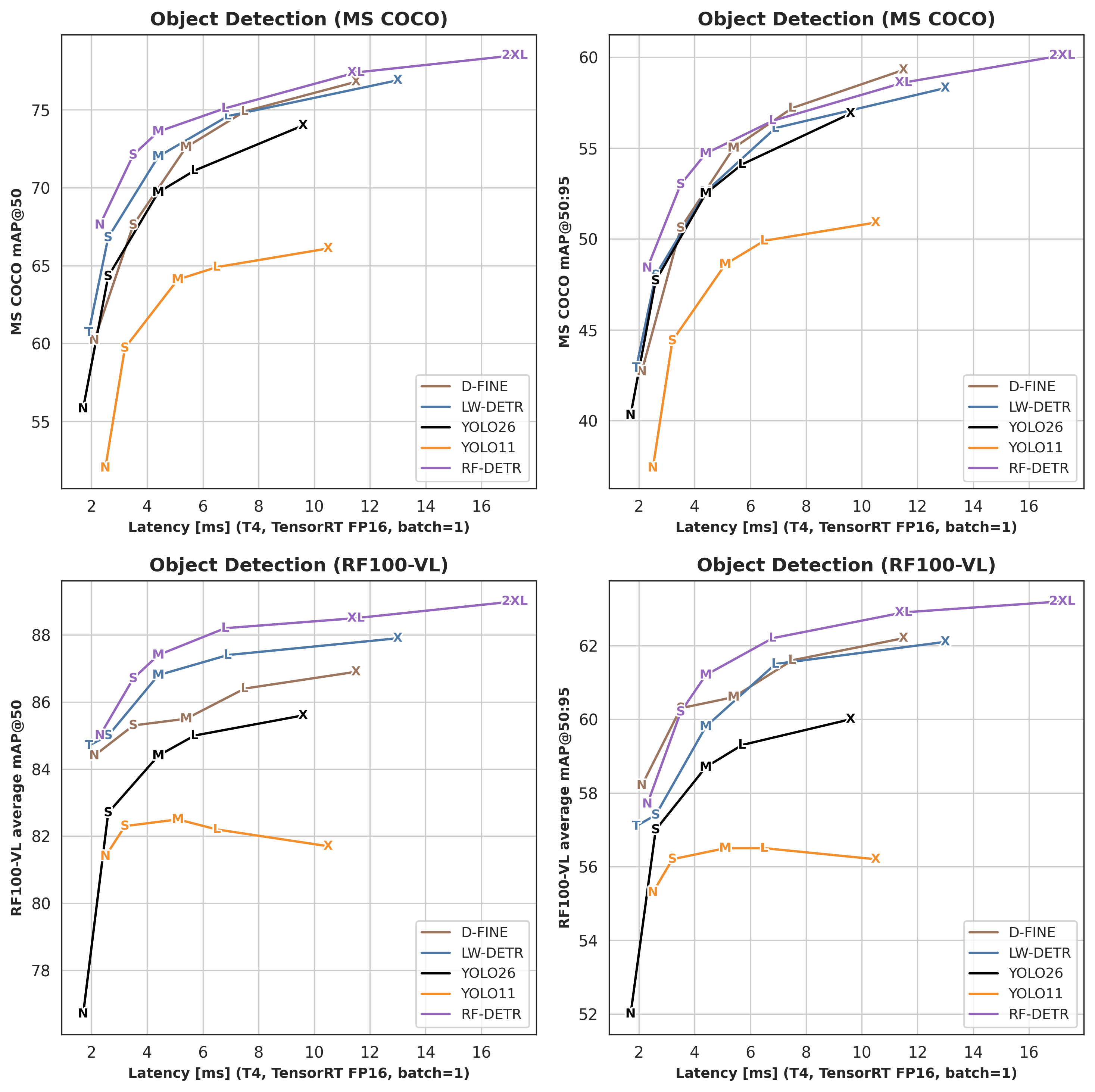
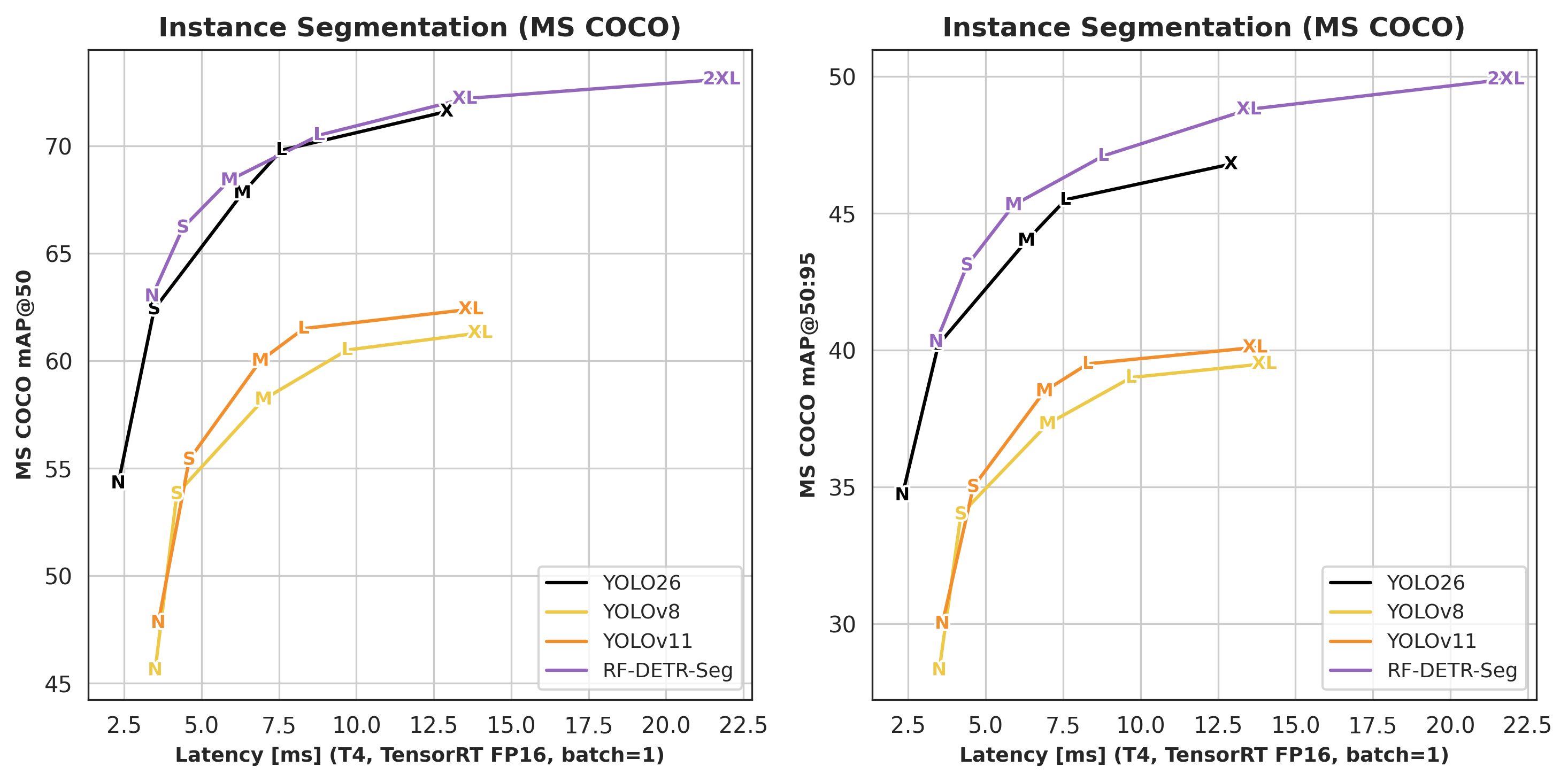
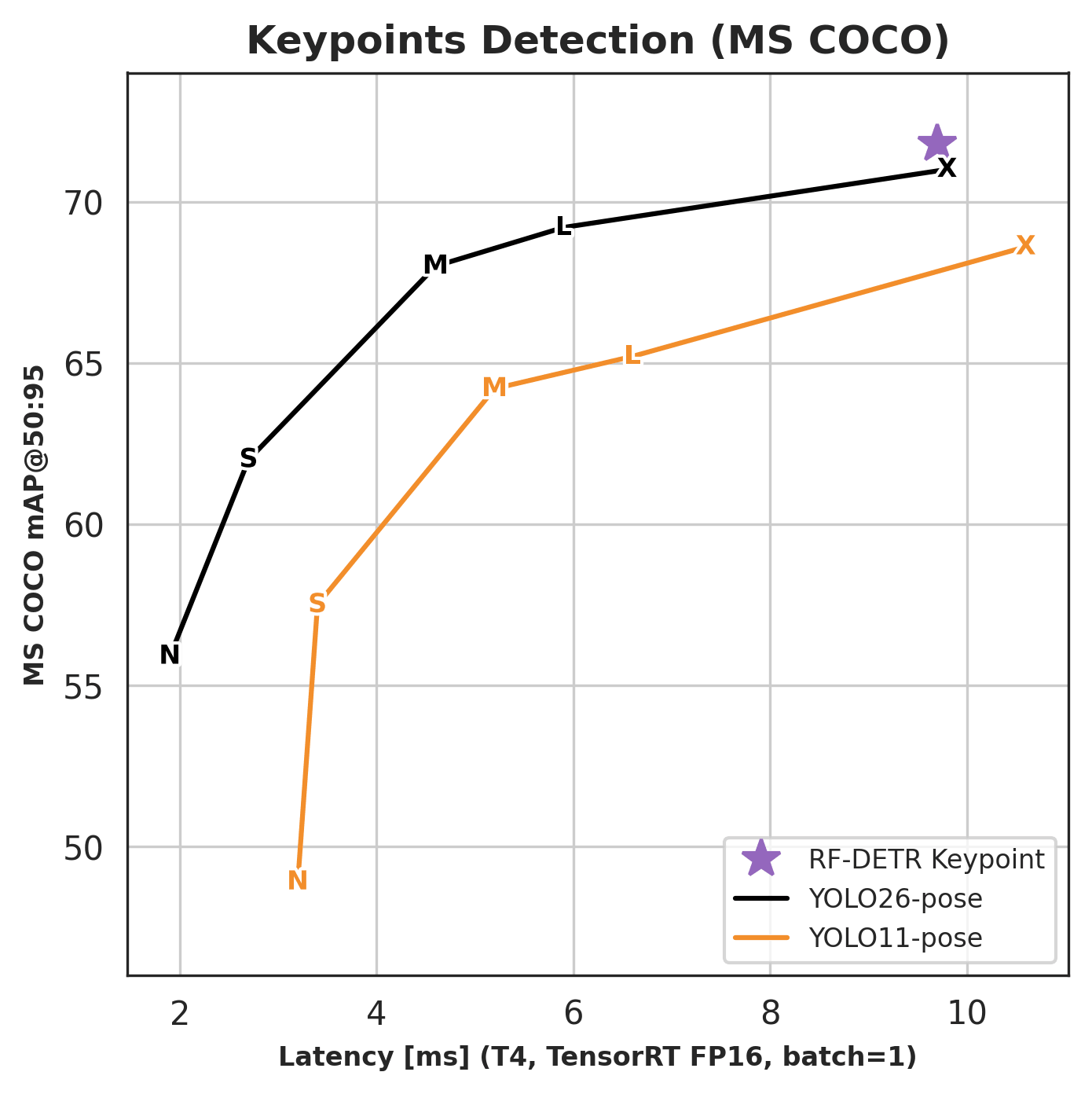
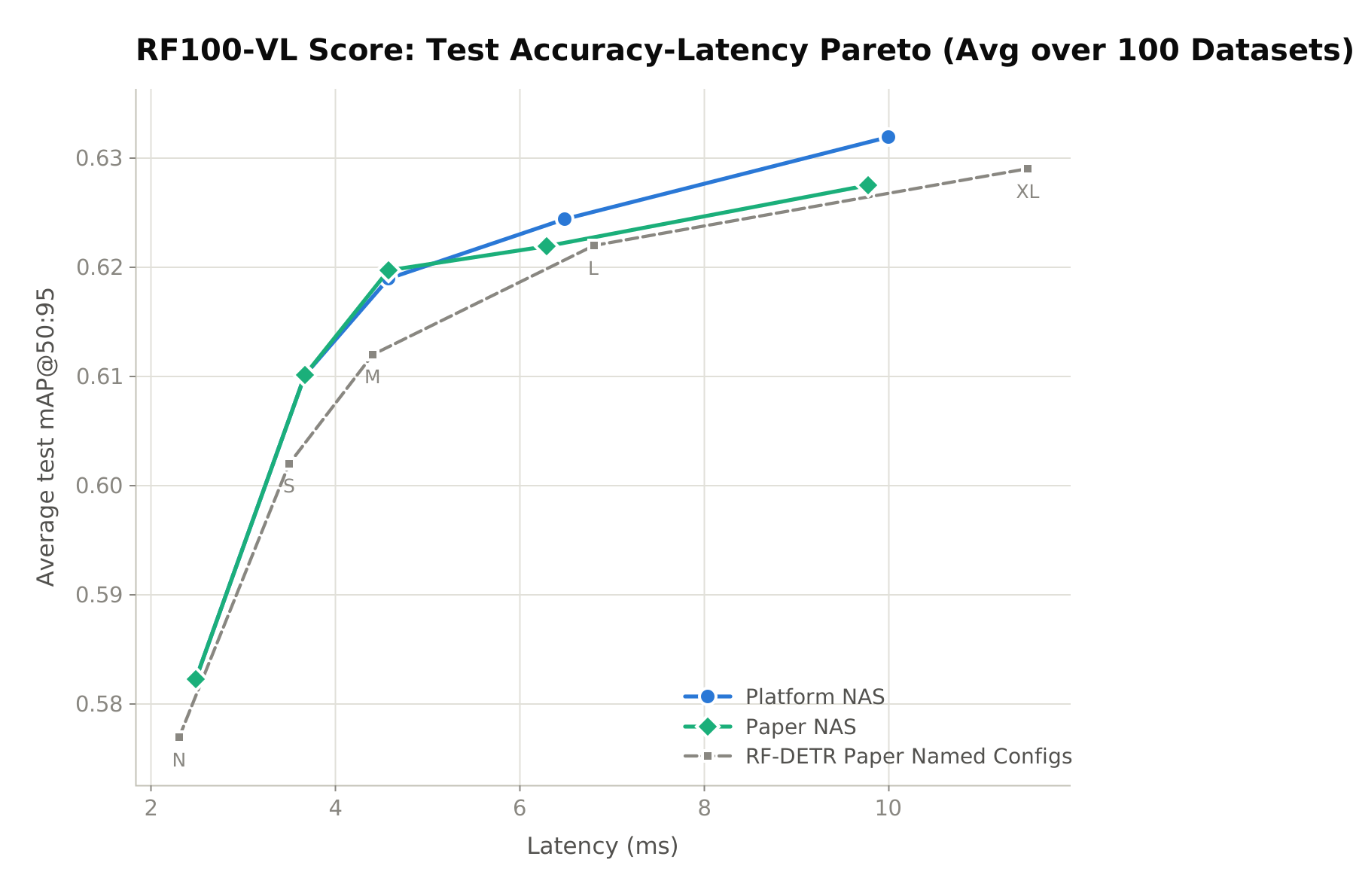 Since the paper release, we have improved RF-DETR NAS training on the Roboflow platform even further. A single training run gives you every model size, with results that beat not only the open-source checkpoints but also our own paper NAS results. [Try it now!](https://roboflow.com/)
## Run Models
### Detection
RF-DETR provides multiple model sizes, ranging from Nano to 2XLarge. To use a different model size, replace the class name in the code snippet below with another class from the table.
```python
import supervision as sv
from rfdetr import RFDETRMedium
from rfdetr.assets.coco_classes import COCO_CLASSES
model = RFDETRMedium()
detections = model.predict("https://media.roboflow.com/dog.jpg", threshold=0.5)
labels = [f"{COCO_CLASSES[class_id]}" for class_id in detections.class_id]
annotated_image = sv.BoxAnnotator().annotate(detections.metadata["source_image"], detections)
annotated_image = sv.LabelAnnotator().annotate(annotated_image, detections, labels)
```
> **Note:** `COCO_CLASSES` works for COCO-pretrained models. For fine-tuned models, use `detections.data["class_name"]` instead — it resolves class names from the checkpoint and works for both COCO and custom datasets.
Since the paper release, we have improved RF-DETR NAS training on the Roboflow platform even further. A single training run gives you every model size, with results that beat not only the open-source checkpoints but also our own paper NAS results. [Try it now!](https://roboflow.com/)
## Run Models
### Detection
RF-DETR provides multiple model sizes, ranging from Nano to 2XLarge. To use a different model size, replace the class name in the code snippet below with another class from the table.
```python
import supervision as sv
from rfdetr import RFDETRMedium
from rfdetr.assets.coco_classes import COCO_CLASSES
model = RFDETRMedium()
detections = model.predict("https://media.roboflow.com/dog.jpg", threshold=0.5)
labels = [f"{COCO_CLASSES[class_id]}" for class_id in detections.class_id]
annotated_image = sv.BoxAnnotator().annotate(detections.metadata["source_image"], detections)
annotated_image = sv.LabelAnnotator().annotate(annotated_image, detections, labels)
```
> **Note:** `COCO_CLASSES` works for COCO-pretrained models. For fine-tuned models, use `detections.data["class_name"]` instead — it resolves class names from the checkpoint and works for both COCO and custom datasets.
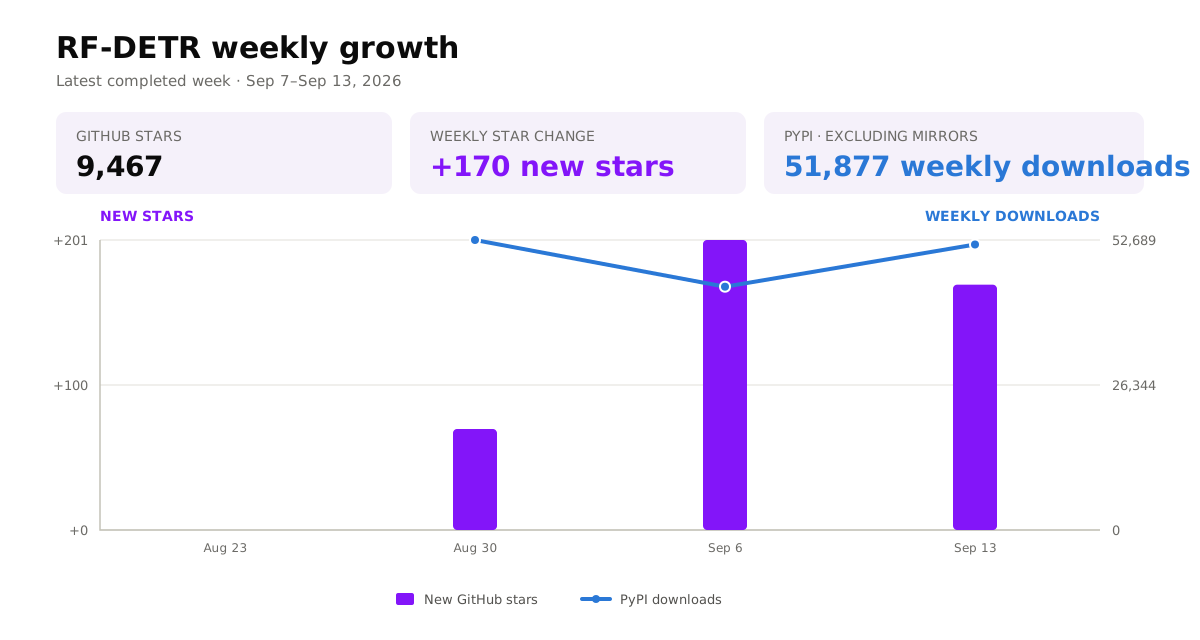 PyPI downloads cover completed Monday-to-Sunday periods and exclude known mirrors. New stars are calculated from consecutive scheduled GitHub snapshots.











 === "pip"
```bash
pip install rfdetr
```
=== "uv"
```bash
uv pip install rfdetr
```
For uv projects:
```bash
uv add rfdetr
```
## Quickstart
=== "pip"
```bash
pip install rfdetr
```
=== "uv"
```bash
uv pip install rfdetr
```
For uv projects:
```bash
uv add rfdetr
```
## Quickstart
 PyPI downloads cover completed Monday-to-Sunday periods and exclude known mirrors. New stars are calculated from consecutive scheduled GitHub snapshots.
## Benchmarks
RF-DETR achieves the best accuracy–latency trade-off among real-time object detection and instance segmentation models. It also provides keypoint detection (preview) on COCO person keypoints. For detailed benchmark tables and methodology, check out our [benchmarks](learn/benchmarks.md) page.
### Detection
PyPI downloads cover completed Monday-to-Sunday periods and exclude known mirrors. New stars are calculated from consecutive scheduled GitHub snapshots.
## Benchmarks
RF-DETR achieves the best accuracy–latency trade-off among real-time object detection and instance segmentation models. It also provides keypoint detection (preview) on COCO person keypoints. For detailed benchmark tables and methodology, check out our [benchmarks](learn/benchmarks.md) page.
### Detection
 | Architecture | COCO AP50:95 | Latency (ms) | Params (M) | Resolution |
| -------------------------- | ----------------------- | ------------ | ---------- | ---------- |
| RF-DETR Keypoint (Preview) | 71.8 | 9.7 | 40.7 | 576×576 |
> Keypoint benchmarks report AP50:95 (OKS-based); this is the standard COCO keypoint comparison metric. For the full competitor comparison (YOLO11-pose, YOLO26-pose), see the [Benchmarks](learn/benchmarks.md#keypoints) page.
## Frequently Asked Questions
**What is RF-DETR?** RF-DETR (Roboflow Detection Transformer) is a real-time object detection and instance segmentation model from Roboflow, accepted at ICLR 2026. It uses a DINOv2 vision transformer backbone (PE-Core-T for Atto, Femto and Pico) and achieves state-of-the-art accuracy–latency trade-offs on COCO (60.1 AP50:95 for RF-DETR-2XL) and RF100-VL.
**How does RF-DETR compare to YOLOv11?** RF-DETR-L achieves 56.5 AP50:95 on COCO at 6.8 ms latency on an NVIDIA T4, outperforming YOLOv11x (50.9 AP) at lower latency. The DINOv2 backbone gives RF-DETR stronger performance on domain-shift benchmarks such as RF100-VL.
**What GPU is required to train RF-DETR?** A CUDA-capable GPU with at least 8 GB VRAM (e.g., NVIDIA RTX 3060, T4, A10) is recommended for fine-tuning. Smaller models (RF-DETR-N and RF-DETR-S) can fit in 6 GB VRAM with reduced batch size. CPU inference is supported for evaluation.
**Which dataset formats does RF-DETR support?** RF-DETR supports COCO JSON and YOLO-format datasets (with `dataset_file: "yolo"`). Roboflow datasets export directly to both formats. Detection and segmentation datasets use the same format — the model variant determines the task.
**Can RF-DETR run in real time?** Yes. RF-DETR-N runs at 2.3 ms per frame on a T4 GPU (TensorRT FP16, batch 1), and RF-DETR-L at 6.8 ms — both well within real-time thresholds. ONNX, TFLite, TensorRT, ExecuTorch, CoreML, and OpenVINO exports are available for edge deployment.
**What is the difference between RF-DETR detection and segmentation models?** Detection models (e.g., `RFDETRLarge`) output bounding boxes. Segmentation models (e.g., `RFDETRSegLarge`) additionally output instance masks. Both share the same backbone and training API; segmentation adds a mask head and requires COCO-format segmentation annotations.
**Does RF-DETR support keypoint detection?** RF-DETR Keypoint (Preview) detects 17 body keypoints per person on COCO, achieving 71.8 AP50:95 at 9.7 ms on NVIDIA T4. It is available in the `rfdetr` package as `RFDETRKeypointPreview`. See [Run Keypoint Models](learn/run/keypoints.md) for usage.
**Is RF-DETR open source?** Yes. Core models (Nano through Large) and all training/inference code are released under the Apache 2.0 license. Atto, Femto, Pico, XLarge and 2XLarge models require the `rfdetr[plus]` package (PML 1.0 license).
**How do I fine-tune RF-DETR on a custom dataset?** Instantiate a model and call `model.train(...)` with your dataset directory in COCO JSON or YOLO format. Example: `model = RFDETRLarge(); model.train(dataset_dir='./dataset', epochs=50, batch_size=4)`. The model downloads pretrained weights automatically and saves best checkpoints automatically (use `resume=` to continue from one).
**How do I export RF-DETR to ONNX or TensorRT?** Call `model.export(format="onnx")` after training or loading a checkpoint. ONNX export works on CPU and produces a single `.onnx` file compatible with ONNX Runtime and OpenCV DNN. For TensorRT deployment, use `model.export(format="tensorrt")`, which exports ONNX and then builds a `.trt` engine in-process via the TensorRT Python API; this requires `pip install rfdetr[tensorrt]` and a CUDA GPU.
**Which RF-DETR model size should I use?** RF-DETR-Nano (2.3 ms, 67.6 AP50 on COCO) is best for edge and real-time applications. RF-DETR-Large (6.8 ms, 56.5 AP50:95) offers the best accuracy–latency trade-off for server deployment. RF-DETR-2XLarge (17.2 ms, 60.1 AP50:95) maximizes accuracy when latency allows.
> **Checkpoint note:** Current `RFDETRLarge` defaults to `rf-detr-large-2026.pth`. The older `rf-detr-large.pth` checkpoint is a legacy Large release kept for backward compatibility and has been superseded by the current release.
---
### Exports Index (`docs/exports/index.md`)
---
description: Overview of exporting RF-DETR models to ONNX, TensorRT, TFLite, LiteRT, ExecuTorch, native CoreML, Apple Core AI and OpenVINO IR (FP32/FP16/INT8) for high-performance inference on GPUs, mobile, and edge devices.
---
# Export RF-DETR Model
!!! tip "Key Takeaways"
- Export to ONNX for cross-platform inference with ONNX Runtime, OpenVINO, or TensorRT
- Export to OpenVINO IR for optimized inference on CPU (x86, ARM), GPU (Intel integrated & discrete GPU) and AI accelerators (Intel NPU)
- Export to TFLite (FP32, FP16, INT8) for mobile and edge deployment
- Export to LiteRT (`.tflite`) straight from PyTorch with `litert-torch` — no ONNX or TensorFlow step
- TensorRT conversion delivers the lowest latency on NVIDIA GPUs — 2.3 ms for Nano on a T4, TensorRT FP16, model only, batch 1 (the architecture headline on the [Benchmarks page](../learn/benchmarks.md); this page's own L4 end-to-end numbers below are a different measurement, see "Which latency number is this?")
- INT8 quantization: dynamic-range for TFLite (no calibration data), static for ONNX, OpenVINO and TensorRT (calibration data required; see [TensorRT INT8](tensorrt.md#int8))
- Custom input resolutions supported (must be divisible by `patch_size × num_windows`, which varies by model variant)
- Export to ExecuTorch for on-device PyTorch inference (XNNPACK, CoreML, QNN)
- Export directly to native CoreML (`.mlpackage`) for Xcode / Apple-platform deployment
- Adding a format is an in-tree contribution — see [Exporter Blueprint](blueprint.md)
- Per-format details are in the format guides below
RF-DETR supports exporting models to ONNX, TFLite, LiteRT, ExecuTorch, native CoreML, Apple Core AI and OpenVINO IR formats, enabling deployment across a wide range of inference frameworks, edge devices, and hardware accelerators.
The export docs are split into three pages:
- **Overview** (this page) — supported formats and measured performance per hardware.
- [Export Basics](basics.md) — installation, a first `model.export()` call, output files, and inference with `inference-models`.
- [Advanced Export](advanced.md) — the full parameter reference, custom resolution, backbone-only export, and how the export pipeline works.
For detailed installation, examples, and inference code per format, see the format guides:
- [ONNX Inference](onnx.md) — run an exported ONNX model with ONNX Runtime.
- [TensorRT](tensorrt.md) — build a `.trt` engine for NVIDIA GPUs, directly or from an existing ONNX file.
- [TFLite](tflite.md) — ONNX → TensorFlow → TFLite conversion for mobile and edge devices.
- [LiteRT](litert.md) — PyTorch → `.tflite` via `litert-torch`, no ONNX or TensorFlow step.
- [OpenVINO](openvino.md) — OpenVINO IR for Intel CPUs, GPUs, and NPUs.
- [ExecuTorch](executorch.md) — `.pte` binaries for XNNPACK, CoreML, and QNN backends.
- [Native CoreML](coreml.md) — `.mlpackage` export for Xcode / Apple platforms.
- [Core AI](coreai.md) — `.aimodel` export for iOS / iPadOS / macOS 27+.
## Measured Performance by Hardware
Which format is fastest depends entirely on the hardware you deploy to. The four per-hardware cookbooks each export every format targeting one class of device, run inference on it, and benchmark it against a PyTorch baseline on the same machine. Below is the fastest end-to-end result per hardware class, plus the PyTorch anchor it was measured against; the cookbooks carry the full tables, including forward-only timings, memory, and the slower configurations.
| Hardware | Fastest format | end2end [ms] | FPS [img/s] | PyTorch `predict()` anchor | Cookbook |
| ---------------------------------- | ---------------------------------------------------------------- | ------------ | ----------- | -------------------------- | ------------------------------------- |
| NVIDIA L4 (pkg `inference-models`) | TensorRT via `inference-models` (managed engine, auto precision) | 3.41 ± 0.06 | 293.5 | 19.88 ms / 50.3 FPS | [CUDA](../cookbooks/export-cuda/) |
| NVIDIA L4 (plain `rfdetr`) | TensorRT raw `.trt` engine (`TRTInference`, fp16, no extra pkg) | 9.82 ± 0.34 | 101.8 | 19.88 ms / 50.3 FPS | [CUDA](../cookbooks/export-cuda/) |
| Apple M4 Max (40-core GPU) | CoreML fp32 (default) | 11.57 ± 0.28 | 86.5 | 24.12 ms / 41.5 FPS | [Apple](../cookbooks/export-apple/) |
| x86 CPU (shared Colab vCPU) | No clear winner: ONNX, OpenVINO and PyTorch overlap within noise | 357–377 | 2.7–2.8 | 377.34 ms / 2.7 FPS | [CPU](../cookbooks/export-cpu/) |
| Apple M4 Max CPU (12P + 4E cores) | No clear winner yet: LiteRT ran on one thread, pending a rerun | — | — | 54.54 ms / 18.3 FPS | [Mobile](../cookbooks/export-mobile/) |
All numbers are batch 1, `RFDETRSmall`, rfdetr `develop` (version not recorded). Warmup and timed-run counts differ per cookbook (GPU uses 20 + 100, CPU 15 + 50, Apple and mobile 5 + 30). The rows come from three machines: a Colab L4 GPU host, a shared Colab x86 vCPU, and one Apple M4 Max (16-core CPU: 12 performance + 4 efficiency, 40-core GPU) that ran both the Apple row and the arm64 CPU row. Compare *within* a row, never across rows. On the shared x86 vCPU the gap between formats is about one run-to-run standard deviation, and a shared vCPU drifts between sessions, so that row is not a ranking. All of its rows were measured before the cookbook pinned one shared `CPU_THREADS` value, and its OpenVINO figures also before `OpenVINOInference` computed in float32 (see the [OpenVINO guide](openvino.md#openvino-inference-example)), so every x86 row is pending a rerun. The arm64 CPU row stands in for a phone or edge CPU only approximately: it is a laptop chip, and a phone's own delegate (NNAPI, QNN, Core ML) is not exercised. **Two L4 rows, on purpose**: the first goes through `inference-models`, a separate package that selects and loads its own prebuilt TensorRT engine; the second times the `.trt` file `model.export(format="trt")` itself writes, loaded directly with `rfdetr`'s own `TRTInference` reference runtime — no extra package beyond `rfdetr[tensorrt]`. Both are real end-to-end numbers on the same L4 — see the [CUDA cookbook](../cookbooks/export-cuda/#6-tensorrt) for the full table and the open gap against Roboflow's own product-page number.
`Memory [MB]` in the cookbooks is comparable only within one cookbook: the CUDA cookbook measures device memory, the CPU, Apple and mobile cookbooks measure host resident memory (RSS).
Each cookbook also scores every exported model and precision at batch 1 on the same seeded 500-image COCO val2017 subset (box mAP@50:95 and mAP@50), so a precision setting that loses accuracy shows up next to its latency. The subset is chosen for run time, so these are not the full-val2017 numbers on the [Benchmarks page](../learn/benchmarks.md); set `FULL_VAL = True` in a cookbook to score all 5000 images.
!!! note "Which latency number is this?"
RF-DETR latency appears on three different pages, and they are three different measurements:
- **Architecture headline** (T4, TensorRT FP16, model only, batch 1) — the number that compares architectures. See the [Benchmarks page](../learn/benchmarks.md).
- **Deployed product** (L4, Roboflow Inference, scope not stated, batch 1) — what a Roboflow Inference user gets. See [Roboflow's RF-DETR model page](https://docs.roboflow.com/models/supported-models/rf-detr).
- **Export cookbooks** (this page and below) — end-to-end and forward-only timings for every export format, on one machine per cookbook. Their value is **ratios within one machine**, not absolute milliseconds to set against the other two pages.
Never compare milliseconds across these three without checking hardware, precision, batch size, and scope (model-only vs end-to-end) match. The CUDA cookbook's own L4 forward-only times (ONNX 7.35 ms, TensorRT 2.16 ms) are lower than the 12.9 and 8.3 ms on Roboflow's model page, which does not state what its timing covers. The two harnesses have not been run side by side yet, so treat all of these as unreconciled — see the [CUDA cookbook's Results section](../cookbooks/export-cuda/#9-results).
!!! warning "fp16 pays off only where the silicon implements it"
Reduced precision is not a portable speedup, and the cookbooks measure this directly:
- **GPU — large win.** On an L4, TensorRT's auto-selected precision is 1.94× faster than the same engine forced to fp32 (3.41 vs 6.62 ms end-to-end, batch 1), and PyTorch `inference(dtype=torch.float16)` cuts the eager fp32 baseline from 19.88 to 11.37 ms.
- **CPU — no measured win.** A CPU without native fp16 kernels upconverts and computes in fp32, so fp16 storage (an fp16 OpenVINO IR or `.tflite`) saves disk and bandwidth, not arithmetic. The cookbooks' CPU fp16 and INT8 timings are pending a rerun: the OpenVINO rows ran at OpenVINO's own default execution precision, which is half precision on CPUs with native bf16 or f16 support (the Colab host's CPU flags were not recorded), and the TFLite rows ran through `tf.lite.Interpreter` at its default thread count (the same fp32 `.tflite` runs in 119 ms on one thread and 59 ms on eight through `ai_edge_litert` on the M4 Max, against 785 ms in the cookbook).
- **Apple — runtime-dependent.** On the M4 Max, Core AI fp16 beat its fp32 default (13.53 vs 14.62 ms), while CoreML fp16 came out *slower* than its fp32 default (19.86 vs 11.57 ms). The direction of both results reproduced across runs. The CoreML fp16 figures were measured with iOS 16 bundles, before the fp16 export was switched to iOS 15 (see the changelog); they are not re-measured and the comparison may differ for current bundles. Measure per runtime, not per platform.
## Per-Format Guides
The format guides listed above cover installation, export examples, output files, and inference code.
## Next Steps
After exporting your model, you may want to:
- [Deploy to Roboflow](../learn/deploy.md) for cloud-based inference and workflow integration
- Use [`inference-models`](https://github.com/roboflow/inference/tree/main/inference_models) for multi-backend inference (PyTorch, ONNX, TensorRT) with automatic backend selection
- Deploy TFLite and LiteRT `.tflite` models on mobile/edge devices with the LiteRT runtime
- Deploy ExecuTorch `.pte` models on mobile/edge devices with the ExecuTorch runtime
- Integrate with edge deployment frameworks like ONNX Runtime or OpenVINO
- Read the [Exporter Blueprint](blueprint.md) to add a new export format
- Browse the format guides above for per-format details
---
### Resources Index (`docs/resources/index.md`)
---
description: RF-DETR resources — blog posts, videos, and guides for training, deploying, and running detection and segmentation models across cloud, edge, iOS, Jetson, and Lightning workflows.
hide:
- toc
- navigation
---
# Resources
Use the resources below to learn how to train, build with, and deploy RF-DETR models both in the cloud and on your own hardware.
| Architecture | COCO AP50:95 | Latency (ms) | Params (M) | Resolution |
| -------------------------- | ----------------------- | ------------ | ---------- | ---------- |
| RF-DETR Keypoint (Preview) | 71.8 | 9.7 | 40.7 | 576×576 |
> Keypoint benchmarks report AP50:95 (OKS-based); this is the standard COCO keypoint comparison metric. For the full competitor comparison (YOLO11-pose, YOLO26-pose), see the [Benchmarks](learn/benchmarks.md#keypoints) page.
## Frequently Asked Questions
**What is RF-DETR?** RF-DETR (Roboflow Detection Transformer) is a real-time object detection and instance segmentation model from Roboflow, accepted at ICLR 2026. It uses a DINOv2 vision transformer backbone (PE-Core-T for Atto, Femto and Pico) and achieves state-of-the-art accuracy–latency trade-offs on COCO (60.1 AP50:95 for RF-DETR-2XL) and RF100-VL.
**How does RF-DETR compare to YOLOv11?** RF-DETR-L achieves 56.5 AP50:95 on COCO at 6.8 ms latency on an NVIDIA T4, outperforming YOLOv11x (50.9 AP) at lower latency. The DINOv2 backbone gives RF-DETR stronger performance on domain-shift benchmarks such as RF100-VL.
**What GPU is required to train RF-DETR?** A CUDA-capable GPU with at least 8 GB VRAM (e.g., NVIDIA RTX 3060, T4, A10) is recommended for fine-tuning. Smaller models (RF-DETR-N and RF-DETR-S) can fit in 6 GB VRAM with reduced batch size. CPU inference is supported for evaluation.
**Which dataset formats does RF-DETR support?** RF-DETR supports COCO JSON and YOLO-format datasets (with `dataset_file: "yolo"`). Roboflow datasets export directly to both formats. Detection and segmentation datasets use the same format — the model variant determines the task.
**Can RF-DETR run in real time?** Yes. RF-DETR-N runs at 2.3 ms per frame on a T4 GPU (TensorRT FP16, batch 1), and RF-DETR-L at 6.8 ms — both well within real-time thresholds. ONNX, TFLite, TensorRT, ExecuTorch, CoreML, and OpenVINO exports are available for edge deployment.
**What is the difference between RF-DETR detection and segmentation models?** Detection models (e.g., `RFDETRLarge`) output bounding boxes. Segmentation models (e.g., `RFDETRSegLarge`) additionally output instance masks. Both share the same backbone and training API; segmentation adds a mask head and requires COCO-format segmentation annotations.
**Does RF-DETR support keypoint detection?** RF-DETR Keypoint (Preview) detects 17 body keypoints per person on COCO, achieving 71.8 AP50:95 at 9.7 ms on NVIDIA T4. It is available in the `rfdetr` package as `RFDETRKeypointPreview`. See [Run Keypoint Models](learn/run/keypoints.md) for usage.
**Is RF-DETR open source?** Yes. Core models (Nano through Large) and all training/inference code are released under the Apache 2.0 license. Atto, Femto, Pico, XLarge and 2XLarge models require the `rfdetr[plus]` package (PML 1.0 license).
**How do I fine-tune RF-DETR on a custom dataset?** Instantiate a model and call `model.train(...)` with your dataset directory in COCO JSON or YOLO format. Example: `model = RFDETRLarge(); model.train(dataset_dir='./dataset', epochs=50, batch_size=4)`. The model downloads pretrained weights automatically and saves best checkpoints automatically (use `resume=` to continue from one).
**How do I export RF-DETR to ONNX or TensorRT?** Call `model.export(format="onnx")` after training or loading a checkpoint. ONNX export works on CPU and produces a single `.onnx` file compatible with ONNX Runtime and OpenCV DNN. For TensorRT deployment, use `model.export(format="tensorrt")`, which exports ONNX and then builds a `.trt` engine in-process via the TensorRT Python API; this requires `pip install rfdetr[tensorrt]` and a CUDA GPU.
**Which RF-DETR model size should I use?** RF-DETR-Nano (2.3 ms, 67.6 AP50 on COCO) is best for edge and real-time applications. RF-DETR-Large (6.8 ms, 56.5 AP50:95) offers the best accuracy–latency trade-off for server deployment. RF-DETR-2XLarge (17.2 ms, 60.1 AP50:95) maximizes accuracy when latency allows.
> **Checkpoint note:** Current `RFDETRLarge` defaults to `rf-detr-large-2026.pth`. The older `rf-detr-large.pth` checkpoint is a legacy Large release kept for backward compatibility and has been superseded by the current release.
---
### Exports Index (`docs/exports/index.md`)
---
description: Overview of exporting RF-DETR models to ONNX, TensorRT, TFLite, LiteRT, ExecuTorch, native CoreML, Apple Core AI and OpenVINO IR (FP32/FP16/INT8) for high-performance inference on GPUs, mobile, and edge devices.
---
# Export RF-DETR Model
!!! tip "Key Takeaways"
- Export to ONNX for cross-platform inference with ONNX Runtime, OpenVINO, or TensorRT
- Export to OpenVINO IR for optimized inference on CPU (x86, ARM), GPU (Intel integrated & discrete GPU) and AI accelerators (Intel NPU)
- Export to TFLite (FP32, FP16, INT8) for mobile and edge deployment
- Export to LiteRT (`.tflite`) straight from PyTorch with `litert-torch` — no ONNX or TensorFlow step
- TensorRT conversion delivers the lowest latency on NVIDIA GPUs — 2.3 ms for Nano on a T4, TensorRT FP16, model only, batch 1 (the architecture headline on the [Benchmarks page](../learn/benchmarks.md); this page's own L4 end-to-end numbers below are a different measurement, see "Which latency number is this?")
- INT8 quantization: dynamic-range for TFLite (no calibration data), static for ONNX, OpenVINO and TensorRT (calibration data required; see [TensorRT INT8](tensorrt.md#int8))
- Custom input resolutions supported (must be divisible by `patch_size × num_windows`, which varies by model variant)
- Export to ExecuTorch for on-device PyTorch inference (XNNPACK, CoreML, QNN)
- Export directly to native CoreML (`.mlpackage`) for Xcode / Apple-platform deployment
- Adding a format is an in-tree contribution — see [Exporter Blueprint](blueprint.md)
- Per-format details are in the format guides below
RF-DETR supports exporting models to ONNX, TFLite, LiteRT, ExecuTorch, native CoreML, Apple Core AI and OpenVINO IR formats, enabling deployment across a wide range of inference frameworks, edge devices, and hardware accelerators.
The export docs are split into three pages:
- **Overview** (this page) — supported formats and measured performance per hardware.
- [Export Basics](basics.md) — installation, a first `model.export()` call, output files, and inference with `inference-models`.
- [Advanced Export](advanced.md) — the full parameter reference, custom resolution, backbone-only export, and how the export pipeline works.
For detailed installation, examples, and inference code per format, see the format guides:
- [ONNX Inference](onnx.md) — run an exported ONNX model with ONNX Runtime.
- [TensorRT](tensorrt.md) — build a `.trt` engine for NVIDIA GPUs, directly or from an existing ONNX file.
- [TFLite](tflite.md) — ONNX → TensorFlow → TFLite conversion for mobile and edge devices.
- [LiteRT](litert.md) — PyTorch → `.tflite` via `litert-torch`, no ONNX or TensorFlow step.
- [OpenVINO](openvino.md) — OpenVINO IR for Intel CPUs, GPUs, and NPUs.
- [ExecuTorch](executorch.md) — `.pte` binaries for XNNPACK, CoreML, and QNN backends.
- [Native CoreML](coreml.md) — `.mlpackage` export for Xcode / Apple platforms.
- [Core AI](coreai.md) — `.aimodel` export for iOS / iPadOS / macOS 27+.
## Measured Performance by Hardware
Which format is fastest depends entirely on the hardware you deploy to. The four per-hardware cookbooks each export every format targeting one class of device, run inference on it, and benchmark it against a PyTorch baseline on the same machine. Below is the fastest end-to-end result per hardware class, plus the PyTorch anchor it was measured against; the cookbooks carry the full tables, including forward-only timings, memory, and the slower configurations.
| Hardware | Fastest format | end2end [ms] | FPS [img/s] | PyTorch `predict()` anchor | Cookbook |
| ---------------------------------- | ---------------------------------------------------------------- | ------------ | ----------- | -------------------------- | ------------------------------------- |
| NVIDIA L4 (pkg `inference-models`) | TensorRT via `inference-models` (managed engine, auto precision) | 3.41 ± 0.06 | 293.5 | 19.88 ms / 50.3 FPS | [CUDA](../cookbooks/export-cuda/) |
| NVIDIA L4 (plain `rfdetr`) | TensorRT raw `.trt` engine (`TRTInference`, fp16, no extra pkg) | 9.82 ± 0.34 | 101.8 | 19.88 ms / 50.3 FPS | [CUDA](../cookbooks/export-cuda/) |
| Apple M4 Max (40-core GPU) | CoreML fp32 (default) | 11.57 ± 0.28 | 86.5 | 24.12 ms / 41.5 FPS | [Apple](../cookbooks/export-apple/) |
| x86 CPU (shared Colab vCPU) | No clear winner: ONNX, OpenVINO and PyTorch overlap within noise | 357–377 | 2.7–2.8 | 377.34 ms / 2.7 FPS | [CPU](../cookbooks/export-cpu/) |
| Apple M4 Max CPU (12P + 4E cores) | No clear winner yet: LiteRT ran on one thread, pending a rerun | — | — | 54.54 ms / 18.3 FPS | [Mobile](../cookbooks/export-mobile/) |
All numbers are batch 1, `RFDETRSmall`, rfdetr `develop` (version not recorded). Warmup and timed-run counts differ per cookbook (GPU uses 20 + 100, CPU 15 + 50, Apple and mobile 5 + 30). The rows come from three machines: a Colab L4 GPU host, a shared Colab x86 vCPU, and one Apple M4 Max (16-core CPU: 12 performance + 4 efficiency, 40-core GPU) that ran both the Apple row and the arm64 CPU row. Compare *within* a row, never across rows. On the shared x86 vCPU the gap between formats is about one run-to-run standard deviation, and a shared vCPU drifts between sessions, so that row is not a ranking. All of its rows were measured before the cookbook pinned one shared `CPU_THREADS` value, and its OpenVINO figures also before `OpenVINOInference` computed in float32 (see the [OpenVINO guide](openvino.md#openvino-inference-example)), so every x86 row is pending a rerun. The arm64 CPU row stands in for a phone or edge CPU only approximately: it is a laptop chip, and a phone's own delegate (NNAPI, QNN, Core ML) is not exercised. **Two L4 rows, on purpose**: the first goes through `inference-models`, a separate package that selects and loads its own prebuilt TensorRT engine; the second times the `.trt` file `model.export(format="trt")` itself writes, loaded directly with `rfdetr`'s own `TRTInference` reference runtime — no extra package beyond `rfdetr[tensorrt]`. Both are real end-to-end numbers on the same L4 — see the [CUDA cookbook](../cookbooks/export-cuda/#6-tensorrt) for the full table and the open gap against Roboflow's own product-page number.
`Memory [MB]` in the cookbooks is comparable only within one cookbook: the CUDA cookbook measures device memory, the CPU, Apple and mobile cookbooks measure host resident memory (RSS).
Each cookbook also scores every exported model and precision at batch 1 on the same seeded 500-image COCO val2017 subset (box mAP@50:95 and mAP@50), so a precision setting that loses accuracy shows up next to its latency. The subset is chosen for run time, so these are not the full-val2017 numbers on the [Benchmarks page](../learn/benchmarks.md); set `FULL_VAL = True` in a cookbook to score all 5000 images.
!!! note "Which latency number is this?"
RF-DETR latency appears on three different pages, and they are three different measurements:
- **Architecture headline** (T4, TensorRT FP16, model only, batch 1) — the number that compares architectures. See the [Benchmarks page](../learn/benchmarks.md).
- **Deployed product** (L4, Roboflow Inference, scope not stated, batch 1) — what a Roboflow Inference user gets. See [Roboflow's RF-DETR model page](https://docs.roboflow.com/models/supported-models/rf-detr).
- **Export cookbooks** (this page and below) — end-to-end and forward-only timings for every export format, on one machine per cookbook. Their value is **ratios within one machine**, not absolute milliseconds to set against the other two pages.
Never compare milliseconds across these three without checking hardware, precision, batch size, and scope (model-only vs end-to-end) match. The CUDA cookbook's own L4 forward-only times (ONNX 7.35 ms, TensorRT 2.16 ms) are lower than the 12.9 and 8.3 ms on Roboflow's model page, which does not state what its timing covers. The two harnesses have not been run side by side yet, so treat all of these as unreconciled — see the [CUDA cookbook's Results section](../cookbooks/export-cuda/#9-results).
!!! warning "fp16 pays off only where the silicon implements it"
Reduced precision is not a portable speedup, and the cookbooks measure this directly:
- **GPU — large win.** On an L4, TensorRT's auto-selected precision is 1.94× faster than the same engine forced to fp32 (3.41 vs 6.62 ms end-to-end, batch 1), and PyTorch `inference(dtype=torch.float16)` cuts the eager fp32 baseline from 19.88 to 11.37 ms.
- **CPU — no measured win.** A CPU without native fp16 kernels upconverts and computes in fp32, so fp16 storage (an fp16 OpenVINO IR or `.tflite`) saves disk and bandwidth, not arithmetic. The cookbooks' CPU fp16 and INT8 timings are pending a rerun: the OpenVINO rows ran at OpenVINO's own default execution precision, which is half precision on CPUs with native bf16 or f16 support (the Colab host's CPU flags were not recorded), and the TFLite rows ran through `tf.lite.Interpreter` at its default thread count (the same fp32 `.tflite` runs in 119 ms on one thread and 59 ms on eight through `ai_edge_litert` on the M4 Max, against 785 ms in the cookbook).
- **Apple — runtime-dependent.** On the M4 Max, Core AI fp16 beat its fp32 default (13.53 vs 14.62 ms), while CoreML fp16 came out *slower* than its fp32 default (19.86 vs 11.57 ms). The direction of both results reproduced across runs. The CoreML fp16 figures were measured with iOS 16 bundles, before the fp16 export was switched to iOS 15 (see the changelog); they are not re-measured and the comparison may differ for current bundles. Measure per runtime, not per platform.
## Per-Format Guides
The format guides listed above cover installation, export examples, output files, and inference code.
## Next Steps
After exporting your model, you may want to:
- [Deploy to Roboflow](../learn/deploy.md) for cloud-based inference and workflow integration
- Use [`inference-models`](https://github.com/roboflow/inference/tree/main/inference_models) for multi-backend inference (PyTorch, ONNX, TensorRT) with automatic backend selection
- Deploy TFLite and LiteRT `.tflite` models on mobile/edge devices with the LiteRT runtime
- Deploy ExecuTorch `.pte` models on mobile/edge devices with the ExecuTorch runtime
- Integrate with edge deployment frameworks like ONNX Runtime or OpenVINO
- Read the [Exporter Blueprint](blueprint.md) to add a new export format
- Browse the format guides above for per-format details
---
### Resources Index (`docs/resources/index.md`)
---
description: RF-DETR resources — blog posts, videos, and guides for training, deploying, and running detection and segmentation models across cloud, edge, iOS, Jetson, and Lightning workflows.
hide:
- toc
- navigation
---
# Resources
Use the resources below to learn how to train, build with, and deploy RF-DETR models both in the cloud and on your own hardware.
 | Architecture | COCO AP50:95 | Latency (ms) | Params (M) |
| :------------------------: | :---------------------: | :----------: | :--------: |
| RF-DETR Keypoint (Preview) | 71.8 | 9.7 | 40.7 |
| YOLO11-pose N | 48.9 | 3.2 | 2.9 |
| YOLO11-pose S | 57.5 | 3.4 | 9.9 |
| YOLO11-pose M | 64.2 | 5.2 | 20.9 |
| YOLO11-pose L | 65.2 | 6.6 | 26.2 |
| YOLO11-pose X | 68.6 | 10.6 | 58.8 |
| YOLO26-pose N | 55.9 | 1.9 | 2.9 |
| YOLO26-pose S | 62.0 | 2.7 | 10.4 |
| YOLO26-pose M | 68.0 | 4.6 | 21.5 |
| YOLO26-pose L | 69.2 | 5.9 | 25.9 |
| YOLO26-pose X | 71.0 | 9.8 | 57.6 |
> Keypoint benchmarks report AP50:95 (OKS-based); this is the standard COCO keypoint comparison metric.
---
### Learn Deploy (`docs/learn/deploy.md`)
---
description: Deploy fine-tuned RF-DETR detection and segmentation models to Roboflow for cloud inference, edge hardware, and multi-step vision workflows.
---
# Deploy a Trained RF-DETR Model
!!! tip "Key Takeaways"
- Deploy fine-tuned RF-DETR models to Roboflow with a single `deploy_to_roboflow()` call
- Supports both detection and segmentation model deployment
- Run deployed models via Roboflow Inference on cloud, edge hardware, or NVIDIA Jetson
- Model weights are cached locally after the first inference run for fast subsequent predictions
You can deploy a fine-tuned RF-DETR model to Roboflow.
Deploying to Roboflow allows you to create multi-step computer vision applications that run both in the cloud and your own hardware.
To deploy your model to Roboflow, run:
=== "Object Detection"
```python
from rfdetr import RFDETRNano
x = RFDETRNano(pretrain_weights="
| Architecture | COCO AP50:95 | Latency (ms) | Params (M) |
| :------------------------: | :---------------------: | :----------: | :--------: |
| RF-DETR Keypoint (Preview) | 71.8 | 9.7 | 40.7 |
| YOLO11-pose N | 48.9 | 3.2 | 2.9 |
| YOLO11-pose S | 57.5 | 3.4 | 9.9 |
| YOLO11-pose M | 64.2 | 5.2 | 20.9 |
| YOLO11-pose L | 65.2 | 6.6 | 26.2 |
| YOLO11-pose X | 68.6 | 10.6 | 58.8 |
| YOLO26-pose N | 55.9 | 1.9 | 2.9 |
| YOLO26-pose S | 62.0 | 2.7 | 10.4 |
| YOLO26-pose M | 68.0 | 4.6 | 21.5 |
| YOLO26-pose L | 69.2 | 5.9 | 25.9 |
| YOLO26-pose X | 71.0 | 9.8 | 57.6 |
> Keypoint benchmarks report AP50:95 (OKS-based); this is the standard COCO keypoint comparison metric.
---
### Learn Deploy (`docs/learn/deploy.md`)
---
description: Deploy fine-tuned RF-DETR detection and segmentation models to Roboflow for cloud inference, edge hardware, and multi-step vision workflows.
---
# Deploy a Trained RF-DETR Model
!!! tip "Key Takeaways"
- Deploy fine-tuned RF-DETR models to Roboflow with a single `deploy_to_roboflow()` call
- Supports both detection and segmentation model deployment
- Run deployed models via Roboflow Inference on cloud, edge hardware, or NVIDIA Jetson
- Model weights are cached locally after the first inference run for fast subsequent predictions
You can deploy a fine-tuned RF-DETR model to Roboflow.
Deploying to Roboflow allows you to create multi-step computer vision applications that run both in the cloud and your own hardware.
To deploy your model to Roboflow, run:
=== "Object Detection"
```python
from rfdetr import RFDETRNano
x = RFDETRNano(pretrain_weights="