# Technical Documentation: milanvarady/Applite
> ℹ️ **Provenance:** Multi-Tier Ingestion · [CodeWiki Reference](https://codewiki.google/github.com/milanvarady/Applite)
### Overview (`README.md`)
# Applite
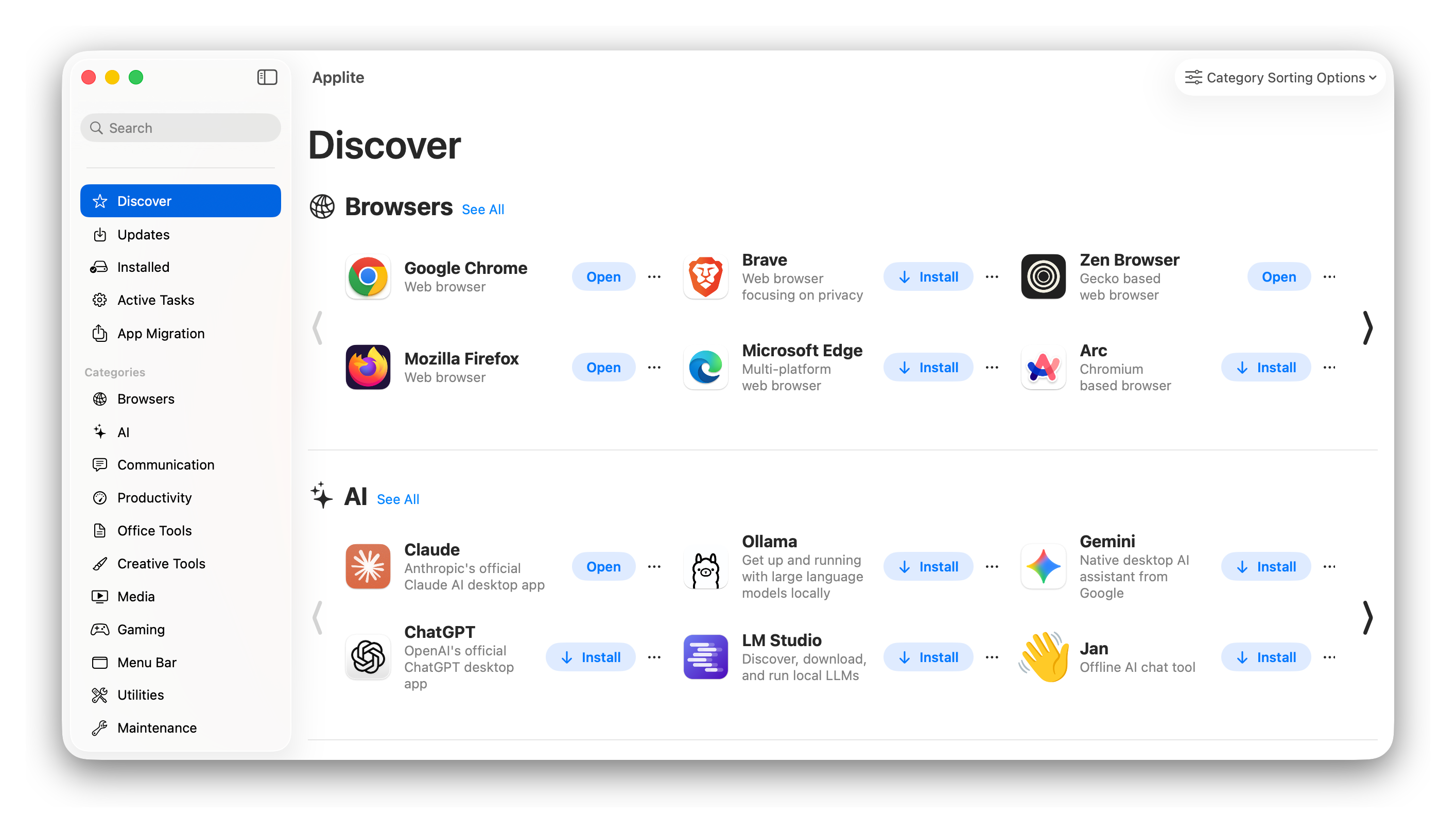
A native macOS app store for software that isn't on the App Store, backed by [Homebrew Cask](https://github.com/Homebrew/homebrew-cask).
[](https://github.com/milanvarady/Applite/releases/latest)
[](https://github.com/milanvarady/Applite/releases)
[](LICENSE.txt)
## Table of Contents
1. [What Sets Applite Apart](#what-sets-applite-apart)
2. [Comparison](#comparison)
3. [Key Features](#key-features)
4. [Screenshots](#screenshots)
5. [Download](#download)
6. [Built With](#built-with)
7. [Development and AI](#development-and-ai)
8. [Contact](#contact)
9. [Roadmap](#roadmap)
10. [Contributing](#contributing)
11. [Packages Used](#packages-used)
12. [Credits](#credits)
13. [License](#license)
14. [Alternatives](#alternatives)
## What Sets Applite Apart
**Applite brings its own Homebrew.** Every other Homebrew GUI expects `brew` to already be on the machine, which means the user has opened a Terminal and installed the Xcode Command Line Tools first. Applite downloads a Homebrew tarball into its own Application Support directory on first launch and runs it from there, in API mode behind a git shim.
- **No Terminal, no Command Line Tools.** Applite can be the first app on a fresh Mac.
- **Brewfile import and export**, so restoring your apps on a new machine is a file and a checklist.
- **Casks only, by design.** No formulae, no services, no CLI surface. Apps in categories, with icons and a search field.
- **Uses your existing Homebrew** if you have one. Point it at any prefix in Settings.
## Comparison
Three actively developed alternatives worth knowing about. All of them are good software solving a slightly different problem.
| | **Applite** | [CaskHub](https://github.com/alielsokary/CaskHub) | [BrewUI](https://github.com/Homebrew/brewui) | [Cork](https://github.com/buresdv/Cork) |
| ------------------------ | -------------------------------------- | ------------------------------------------------- | -------------------------------------------- | --------------------------------------- |
| Installs Homebrew itself | Yes, no CLT or Terminal needed | No, guided manual setup | No | No |
| Scope | Casks only | Casks only | Formulae and casks | Formulae, casks, services, taps |
| Audience | Non-technical | Non-technical | All Homebrew users | Power users |
| Price | Free | Free | Free | 25 € prebuilt, free if self-compiled |
| License | MIT | MIT | AGPL-3.0 | Commons Clause (source available) |
| Minimum macOS | 14 | 15.6 | 14 | 13 |
| Brewfile import/export | Yes, with a per-app selection sheet | No | Not yet | Yes |
| Telemetry | None | Sentry + TelemetryDeck | None | None |
| Status | Released | Released | Early development | Released |
Comparison drawn in August 2026; check the projects themselves for current state.
## Key Features
- Install, update, and uninstall apps in one click
- Self-contained Homebrew installation, no Command Line Tools required
- Works with an existing Homebrew installation if you have one
- Handpicked gallery of apps, plus full-catalog FTS5 search
- Brewfile import and export for migrating to a new Mac
- Casks from custom taps
- System proxy support (HTTP, HTTPS, SOCKS5)
- Localized in 7 languages
- Free and open source, no telemetry
## Screenshots
## Download
[applite.app](https://applite.app) or a direct
[DMG download](https://github.com/milanvarady/Applite/releases/latest/download/Applite.dmg)
or
`$ brew install --cask applite`
Minimum OS version: **macOS 14+**. Universal binary, Apple Silicon and Intel.
## Built With
Swift and SwiftUI, targeting macOS 14 so `@Observable` and `NavigationSplitView` are available without back-deployment shims. No Combine. The cask catalog is a local SQLite database (GRDB.swift, WAL mode) synced from the Homebrew JSON API, with FTS5 and BM25 ranking for full-catalog search. Loading is two-stage: SQLite paints the UI immediately, then `brew list --cask` and `brew outdated --cask` fill in installed and outdated state reactively, so nothing blocks on the brew CLI.
Architecture notes are in [CLAUDE.md](CLAUDE.md).
## Development and AI
I'm the sole maintainer of Applite. Starting with version 1.4, I use [Claude Code](https://claude.com/claude-code) as part of my development workflow, and I'd rather state that plainly than leave people to guess.
The reason is capacity. This is a side project maintained by one person, and the realistic alternative to AI-assisted development is not hand-written code, it's a much slower release cycle or no releases at all. Several things that shipped recently, the SQLite migration and the six-language localization among them, would have sat in the backlog indefinitely otherwise.
Scope of what that actually means:
- The core of the app was written by hand, before any AI involvement.
- AI assistance is used for refactoring and reorganization work, and for small to medium sized new features.
- Architecture decisions, code review, and what does and doesn't go into the app are mine. Nothing merges that I haven't read.
If you object to AI-assisted code on principle, that's a legitimate position and [Cork](https://github.com/buresdv/Cork) is explicitly developed without it.
## Contact
If you have any questions, feel free to e-mail me: [milan@milanvarady.dev](mailto:milan@milanvarady.dev)
Or join the [Official Discord Server](https://discord.gg/MpDMH9cPbK).
The [FAQ](https://applite.app/faq) and [Troubleshooting](https://applite.app/troubleshooting) pages
answer most questions.
## Roadmap
I don't have much time for development, but I release updates periodically.
View the [roadmap](https://github.com/users/milanvarady/projects/1).
## Contributing
The project is open to contributions. See the [Contribution Guidelines](docs/CONTRIBUTING.md) for more information.
For typos and minor bugs, open a PR directly. For anything larger, open an issue or bring it up on Discord first, so we don't both spend time on something that doesn't fit the project's scope.
## Packages Used
- [Homebrew](https://github.com/homebrew) - the package manager everything is built on
- [GRDB.swift](https://github.com/groue/GRDB.swift), Gwendal Roué - SQLite database and FTS5 search
- [Sparkle](https://github.com/sparkle-project/Sparkle) - app updates
- [Kingfisher](https://github.com/onevcat/Kingfisher), Wei Wang - image downloading and caching
- [ButtonKit](https://github.com/Dean151/ButtonKit), Thomas Durand - async buttons
- [SwiftUI-Shimmer](https://github.com/markiv/SwiftUI-Shimmer), Vikram Kriplaney - loading placeholders
## Credits
App icons are sourced from [CaskFlow](https://github.com/alielsokary/CaskFlow) by Ali Elsokary (MIT), a metadata pipeline that extracts icons from vendor `.icns` files. Casks without a CaskFlow icon fall back to a generated monogram tile.
## License
Applite is licensed under the [MIT](https://choosealicense.com/licenses/mit/) License. See [LICENSE](LICENSE.txt) for more details.
## Alternatives
Compared above:
- [CaskHub](https://github.com/alielsokary/CaskHub) - cask-focused app store with strong discovery features
- [BrewUI](https://github.com/Homebrew/brewui) - Homebrew's official GUI, in early development
- [Cork](https://github.com/buresdv/Cork) - full-featured Homebrew GUI for power users
Others:
- [WailBrew](https://github.com/wickenico/WailBrew) (Go, Wails, React)
- [Brewer X](https://panini.house/brewer/) (paid)
- [BrewMate](https://github.com/romankurnovskii/BrewMate) (Electron based)
- [Brewlet](https://github.com/zkokaja/Brewlet) (menu bar app)
- [App Fair](https://github.com/App-Fair/App) (looks discontinued)
- [Cakebrew](https://github.com/brunophilipe/Cakebrew) (discontinued)
---
### Overview (`Testing/README.md`)
# Applite test harness
`applite_test.py` is a **guided** end-to-end test harness. It doesn't automate the
UI — *you* perform each action in the real Applite window, and after each step the
script independently verifies the real result via the Homebrew CLI + filesystem
(`brew info --json=v2`, the Caskroom, `/Applications`) and prints **PASS / FAIL**.
Purely-visual outcomes (a green tick clearing, a dialog appearing) are guided `y/N`
confirmations. The "no Command Line Tools dialog" rule is stated **once** at the start
of the annex round as an invariant — if that dialog ever appears, you abort and report
it, rather than being asked about it every step.
It exists because Applite's real risk lives in the Homebrew integration — the
CLT-free "annex" flow, FFI quarantine/trash, pty-streamed installs, the annex
refresh (tarball overlay + `brew cleanup --prune=all` cache reclaim) — which is
impractical to unit-test and needs a real (fresh, CLT-free) machine to exercise.
Run it on a **throwaway VM**, not your dev machine — it hides/deletes Homebrew and
wipes Applite's data.
## Requirements
- A macOS VM, Apple Silicon assumed (`/opt/homebrew`). Note: Apple-Silicon VMs have no
native snapshots — see "No snapshots" below for the baseline strategy.
- **A standalone Python 3** — python.org's installer (gives `/usr/local/bin/python3`)
or `uv python install`. Do **not** use `/usr/bin/python3`: it's a Command Line
Tools stub that pops the very install dialog we simulate away, and it stops working
once CLT is hidden. The script refuses to run under it. Stdlib only — nothing to
`pip install`.
Invoke it with the standalone interpreter explicitly, e.g. `/usr/local/bin/python3 applite_test.py …`.
**Forgot the commands?** Run it with no arguments — `applite_test.py` prints the full
pass in order, the partial-run flags, and every phase id per round.
## How it works: rounds + hide/unhide
Applite behaves differently depending on which brew it drives, so we test both:
- **Round A — annex brew, CLT-free.** Applite installs its own bundled Homebrew and
runs it without the Command Line Tools. This is the risky path.
- **Round B — external `/opt/homebrew`.** The user's own full Homebrew (real git,
Swift quarantine, none of the annex env). A shorter core-lifecycle re-run.
Plus two rounds that stand apart from the A→B sequence:
- **Round U — upgrade from v1.3.1.** Its own pass, from its own `reset`, because it
starts from an *old install* rather than a clean machine. Every existing user arrives
this way and this release moved their storage underneath them (JSON cache → GRDB,
onboarding removed, annex `Applite/homebrew` → `Applite/Homebrew` — a case-only
rename, so the same directory on a default APFS volume and a different one on a
case-sensitive volume). Run it once per release.
- **Round `finalize` — self-uninstall.** Always last; it removes Applite.
Installing brew + CLT takes ~10 min, so we don't do it every run. Instead:
1. `provision` **once** installs Homebrew + CLT (if missing) and then **hides** them
(renames `/opt/homebrew` and `/Library/Developer/CommandLineTools` aside, and
`xcode-select --reset`). Hidden ⇒ the machine genuinely reads as CLT-free with no
system brew, which is exactly Round A's starting condition.
2. `reset` returns to a fresh baseline: it (a) `brew uninstall`s whatever is still
linked, then (b) removes the known test casks **by name from the catalog** — their
`.app` bundles, uninstall/zap paths, and pkg receipts — independent of brew's
receipts, then wipes Applite's data and hides the prereqs. The name-based step is
essential because the Reinstall Homebrew phase unlinks previously-installed apps,
so `brew uninstall` alone can no longer see them.
3. Round B's first phase **unhides** them and `brew update`s.
### No snapshots on Apple-Silicon UTM
macOS guests on Apple Silicon use Apple's Virtualization framework, which has **no
snapshot support** — so `reset` is what returns you to a clean state (it uninstalls
all casks rather than assuming a snapshot rollback). If you'd rather roll back the
whole disk, the only option is to **duplicate the `.utm` bundle** in UTM before a run
(a full copy) and restore from that. `reset --keep-apps` skips the uninstall sweep if
you're managing app state yourself.
## Full pass
```sh
PY=/usr/local/bin/python3 # your standalone interpreter
$PY applite_test.py provision # once per VM → then save a baseline (duplicate the .utm bundle; see below)
$PY applite_test.py reset # hide prereqs + wipe Applite
# → launch Applite, then:
$PY applite_test.py run --round annex
$PY applite_test.py run --round external
$PY applite_test.py run --round finalize # self-uninstall (LAST)
$PY applite_test.py teardown # re-hide prereqs, keep them cached
```
Once per release, as a **separate pass** from its own reset:
```sh
$PY applite_test.py reset
$PY applite_test.py run --round upgrade # install v1.3.1 first, then the new build over it
```
Each `run` prints a PASS/FAIL/SKIP summary and appends to `Testing/applite-test.log`.
### Running part of a round
```sh
$PY applite_test.py run --round annex --only 6 # just the update phase
$PY applite_test.py run --round annex --from 9 # phase 9 (catalog) onward
$PY applite_test.py run --round external --only B3
```
Phase ids per round are listed by running the script with no arguments.
### Other subcommands
| Command | What it does |
|---|---|
| `reset [--keep-apps]` | Fresh state: uninstall all casks + wipe Applite + hide prereqs. `--keep-apps` skips the uninstall sweep. |
| `preflight [--round ...]` | Validate the configured test casks against the live catalog. Run before a pass. |
| `verify [--round ...]` | Print current brew health, installed/outdated casks, and the hide/unhide state. |
| `fake-outdated [--round ...]` | Rename a cask's installed version to `0.0.1` so `brew outdated` reports it (used by the update phases). |
| `teardown [--full]` | Default: uninstall all casks, wipe Applite, re-hide prereqs. `--full`: also delete `/opt/homebrew`, CLT, and caches for a pristine image. |
## Test casks
Set at the top of `applite_test.py` (one per installer type); `preflight` re-checks each:
| Var | Default | Role |
|---|---|---|
| `DMG_CASK` | `rectangle` | `.app` DMG |
| `PKG_CASK` | `zoom` | `.pkg` installer |
| `ZAP_CASK` | `stats` | has a `zap trash:` stanza |
| `UPDATE_CASK` | `font-hack` | versioned, **`auto_updates: false`** — required so non-greedy `brew outdated` will report the faked-old version |
| `WARN_CASK` | `aegisub` | **deprecated** → triggers the download warning dialog (and checks a deprecated cask still installs — deprecation stays a warning, not a hard error) |
| `CANCEL_CASK` | `libreoffice` | large download so there's time to hit Stop mid-download (the harness clears its cache first); reused for the quit-mid-install phase |
| `FAIL_CASK` | `blackhole-2ch` | small **pkg** cask that always needs admin — cancelling its password dialog is a deterministic, offline-safe way to force a *failed* install. Must be used by no other phase, or it'd already be installed |
| `BULK_INSTALL_CASKS` | `hiddenbar`, `mos`, `font-fira-code` | set imported in one batch (`installAll`) — proves reliable bulk install + per-cask rings + one summary (just one font: fonts are barely used, and the harness cleans their files so a fresh install works) |
| `BULK_UPDATE_CASKS` | `hiddenbar`, `mos` | subset of the above (apps, not fonts), fake-outdated then "Update All" — need `auto_updates:false` **and a concrete version** (not `:latest`) |
| `BULK_STOP_CASKS` | `libreoffice`, `inkscape` | two big downloads so the batch is still running when you exercise the batch Stop |
Cask metadata drifts. If `preflight` flags one (wrong artifact type, `auto_updates`
became true, no zap/caveat), swap that variable for a cask that fits the role — the
table it prints tells you what it detected.
## The tap fixture (phase 16)
Phase 16 needs a third-party tap containing (a) a token that exists nowhere else and
(b) a token that **collides with a core cask**. Rather than depend on someone's real
tap, the harness writes one itself into `/Library/Taps/applite-harness/
homebrew-fixtures/`: no git, no network, no `brew tap`. Brew enumerates tap directories
directly, and Applite's `brew-tap-cask-info.rb` loads them through `FromPathLoader`
(which it un-trusts), so a plain directory of `.rb` files is enough — which also keeps
the phase runnable on the CLT-free annex, where there is no real git.
Both fixture casks point at an unreachable URL: they exist to be *listed*, never
installed. `reset` and `teardown` remove the fixture from both prefixes; a clean annex
reinstall (phase 20) wipes it too.
It guards two regressions worth naming:
- **Tap casks vanishing.** `Shell`'s stream reader used to drop the tail of a command's
output; `brew ruby`'s tap listing was the only thing big enough to hit it, so custom
taps silently disappeared from the catalog.
- **Token collisions (P2-29).** Casks were once keyed by the bare token, so a tap's
`rectangle` and core `rectangle` collapsed into one row. Identity is `fullToken` now,
and `brew list --cask --full-name` is matched *exactly* — a bare-token match let a tap
cask inherit the core cask's installed state.
## Safety
- The harness only ever **renames** (`sudo mv`, reversible) a system brew/CLT to
hide/restore them. It **deletes** `/opt/homebrew` + CLT only under the explicit
`teardown --full`.
- Outright deletes are a fixed allowlist of Applite's own data + the annex + brew
caches + the specific test-cask apps + the harness's own tap fixture — never
`/opt/homebrew`, `/usr/local`, `/Library/Developer`, or anything `$HOME`-wide. The
fixture cleanup removes only `Library/Taps/applite-harness/`, never a real tap.
- Hiding/unhiding needs `sudo` (you'll be prompted) and Applite to be quit.
## Caveats
- **Assumes CLT-only** (no full Xcode) on the VM. If Xcode.app is installed, the
machine won't read as CLT-free after hiding — also remove/rename Xcode or point
`xcode-select` away first. `reset` warns if it detects this.
- The assertions deliberately avoid invoking `/usr/bin/git|swift|xcrun` (that would
itself pop the dialog); "CLT-free" is checked via `xcode-select -p` pointing at a
missing dir.
- A few things are guided visual checks, not hard assertions: cancel-mid-download
timing, proxy/mirror, the get-info/terminal windows. Sparkle's *toggle plumbing* is
checked (phase 17) but an actual self-update is not — that needs a signed build and a
real appcast.
- The upgrade round needs you to fetch v1.3.1 from the GitHub releases page by hand; it
restores the CLT first, since an upgrader's machine has them.
- Not a CI tool — it's an interactive pre-release checklist meant to be run by hand.
---
### Overview (`Scripts/Localization/README.md`)
# Localization tooling
Four stdlib-only Python scripts for maintaining `Localizable.xcstrings`. Run them from the repo
root. None of them are part of the build; `Scripts/` sits outside the app target.
| Script | What it does |
|---|---|
| `sync_catalog.py ` | Merge the compiler's extracted keys + comments into the catalog |
| `apply_translations.py ` | Apply a batch of translations or corrections |
| `glossary_audit.py` | Check the catalog against the glossary in `TRANSLATING.md` |
| `apple_terms.py …` | Print how macOS itself renders a term, per language |
## Why `sync_catalog.py` exists
**`xcodebuild` never writes back to `Localizable.xcstrings`.** Only building inside Xcode updates
the catalog. Extraction still runs on the command line (`SWIFT_EMIT_LOC_STRINGS=YES`) — it just
leaves the result in `.stringsdata` files and stops there. So if you add or change a localized
literal and only ever build from the CLI, the catalog silently falls behind: new keys never appear,
and changed keys are never marked stale.
xcodebuild -project Applite.xcodeproj -scheme Applite -configuration Debug \
-destination 'platform=macOS' -derivedDataPath /tmp/dd build
python3 Scripts/Localization/sync_catalog.py \
/tmp/dd/Build/Intermediates.noindex/Applite.build/Debug/Applite.build/Objects-normal/arm64 \
--apply
It adds new keys, refreshes comments from source, marks vanished keys `stale`, and **never touches
`localizations`** — translations are only ever changed by a translator. It preserves the file's key
order, because Xcode sorts with a locale-aware collation (punctuation first) that a naive sort does
not reproduce, and re-sorting churns the whole file.
## Batch format for `apply_translations.py`
```python
TRANSLATIONS = {"": {"hu": "…", "fr": "…"}} # refuses to overwrite an existing value
FIXES = {"": {"hu": "…"}} # overwrites deliberately
```
A value may also be `{"one": …, "other": …}` for a language that inflects after a numeral, or
`{"_raw": {…}}` to pass a localization object through verbatim (two-count strings need
`substitutions`).
**It refuses to run if a key appears twice in one dict.** That is not hypothetical: a batch grouped
by language put the same key in two sections, Python kept only the last, and 15 corrections were
silently dropped while the applied count still looked right.
## `apple_terms.py`
macOS ships its own localizations as `.loctable` plists — one per string table, keyed by language.
This finds the keys whose `en` value matches your term exactly, reads those same keys back out of
`hu` / `fr` / `ja` / `zh_CN` / `zh_HK` / `tr`, and counts each rendering.
python3 Scripts/Localization/apple_terms.py "Install" "Uninstall" "Advanced"
Frequency is evidence, not a verdict. The same English word is usually several UI concepts: `Note`
resolves to the Notes **app**, `Utilities` most often to Launchpad's "Other" grouping. Always read
the alternates before adopting the top hit — see the deviations section of `TRANSLATING.md`.
---
### Overview (`Scripts/Release/README.md`)
# Release tooling
Everything mechanical about shipping a release, in one command:
Scripts/Release/release.sh run 1.4.0
It builds, signs, notarizes, packages, publishes the GitHub release, and updates the Sparkle
appcast. It stops twice, once for you to write the release notes and once for you to publish them
to applite.app, and both stops are *conditions* rather than prompts: do the thing, run the same
command again, and it carries on from where it stopped.
| Command | What it does |
|---|---|
| `release.sh preflight [version]` | Check this machine can cut a release. Safe to run any time |
| `release.sh run ` | Run, or resume, the pipeline |
| `release.sh status ` | Which steps have completed |
| `release.sh notes ` | Regenerate the release-note drafts |
| `release.sh clean ` | Delete `build/release/v/` |
Flags for `run`: `--dry-run`, `--skip-notarize`, `--critical`, `--build `, `--from `,
`--only `, `--force`.
## One-time setup
Three credentials live in the login keychain and never in the repo. `preflight` checks all three
and prints the fix for whichever is missing.
### 1. Developer ID Application certificate
Notarization requires it; *Apple Development* and *Apple Distribution* will not do.
Xcode ▸ Settings ▸ Accounts ▸ team `9CLTNBW4Z3` ▸ Manage Certificates… ▸ **+** ▸
**Developer ID Application**. Only the Account Holder can create one, and a team is capped at five.
security find-identity -v -p codesigning # verify
### 2. notarytool keychain profile
Create an app-specific password at appleid.apple.com ▸ Sign-In and Security, then:
xcrun notarytool store-credentials "applite-notary" \
--apple-id --team-id 9CLTNBW4Z3
xcrun notarytool history --keychain-profile applite-notary # verify
Omit `--password` and let it prompt, so the app-specific password stays out of your shell history.
Override the profile name with `APPLITE_NOTARY_PROFILE` if you ever rename it.
### 3. Sparkle EdDSA signing key
To restore the key on a new machine, from your 1Password backup:
Scripts/Release/release.sh import-key ~/path/to/sparkle-key.txt
That refuses to import anything that isn't the real key. Before touching the keychain it signs an
already-published DMG from `~/Documents/Applite/versions/` and requires a byte-identical match
against the signature in `appcast.xml` — Ed25519 is deterministic, so only the genuine key can
reproduce it. Afterwards it re-derives the public half and checks it against `SUPublicEDKey`. It
also refuses to overwrite a *different* key that is already present.
Delete your copy of the key file afterwards; 1Password is the backup.
The underlying tools, if you need them directly (`Scripts/Release/release.sh sparkle-bin` prints
the path — the Xcode DerivedData hash is unstable, so never hardcode it):
generate_keys # creates a NEW key — never run this for Applite
generate_keys -x sparkle-key.txt # export for backup
generate_keys -p # print the public half
`generate_keys -p` **exits 0 even when no key exists**, printing an error to stdout, so compare its
output rather than trusting the exit code — `preflight` and `import-key` both do.
### If the Sparkle key is ever lost
Read this before doing anything else.
Every installed copy of Applite has `SUPublicEDKey` baked into its `Info.plist` and **rejects any
update not signed by the matching private key**. Sparkle has no key-rotation mechanism. Publishing a
new keypair means every existing install silently stops updating, forever, and each of those users
has to be told to download the app again by hand.
So before concluding it's gone: check 1Password and any other password manager, Time Machine copies
of `~/Library/Keychains/login.keychain-db`, iCloud Keychain on another device, and any other Mac
that has ever built Applite.
If you find a candidate, `release.sh import-key ` performs the conclusive test for you — the
right key reproduces a *byte-identical* signature for an already-published DMG, because Ed25519
signing is deterministic. By hand that is:
"$(Scripts/Release/release.sh sparkle-bin)/sign_update" \
--ed-key-file ~/Documents/Applite/versions/v1.3.1/Applite.dmg
# must print the same edSignature as the 1.3.1 item in appcast.xml
## Running a release
Scripts/Release/preflight.sh # optional, but do it first
Scripts/Release/release.sh run 1.4.0 --skip-notarize --dry-run # ~2 min rehearsal
Scripts/Release/release.sh run 1.4.0 --dry-run # full rehearsal
Scripts/Release/release.sh run 1.4.0 # the real thing
| Step | Notes |
|---|---|
| `preflight` | Credentials, toolchain, clean tree, appcast validity |
| `bump` | `MARKETING_VERSION` + `CURRENT_PROJECT_VERSION`, committed locally, not pushed |
| `notes-draft` | Writes `changelog-raw.md` plus seeded `release-notes.md` and `website-notes.md` |
| **`notes-gate`** | Stops until you delete the draft sentinel from both notes files |
| `archive` | Clean release build, a few minutes |
| `export` | Re-signs to Developer ID via `ExportOptions.plist` |
| `verify-app` | Signature, hardened runtime, timestamp, universal, versions read back |
| `notarize-app` | Apple round trip, then staples the `.app` |
| `dmg` | Draws the background, runs `create-dmg`, re-checks the ticket inside the image |
| `notarize-dmg` | Signs the DMG with a secure timestamp, notarizes, staples |
| `sign-update` | Sparkle signature + byte length |
| `notes-website` | Writes `website-notes.md` into `applite-site` as the release-notes page |
| `github-release` | Pushes `main`, creates the release, uploads `Applite.dmg` |
| `appcast` | Inserts one `` and shows you the diff |
| **`site-gate`** | Stops until the notes page is live on applite.app |
| `publish-appcast` | Commits and pushes `appcast.xml`, then waits for Pages |
| `archive-artifacts` | Copies app, DMG and dSYMs to `~/Documents/Applite/versions/` |
### The two gates
**`notes-gate`.** Skim `changelog-raw.md`, then write **two** files. The gate holds until the
`APPLITE-RELEASE-NOTES-DRAFT` comment is gone from both.
| File | Goes to | Shape |
|---|---|---|
| `release-notes.md` | The GitHub release body | Everything that changed, in full |
| `website-notes.md` | The Sparkle update panel and applite.app | ~5 one-line bullets, no jargon |
They are separate on purpose. The Sparkle panel is a small window someone skims mid-update — it
needs a glance at the headline changes, not a changelog. GitHub is where the detail belongs, and
nobody reading it minds length.
Both use the same headings (`### New Features` / `### Improvements` / `### Fixes` /
`### Known Issues`) because both are parsed the same way; keep them. Delete any section you don't
need — empty ones are dropped, and the model's initialiser defaults them to `[]`.
`github-release` appends a compare link to the body it uploads:
**Full changelog**: https://github.com/milanvarady/Applite/compare/v1.3.1...v1.4.0
so every commit in the range stays one click away without a third document to maintain. It is
assembled into `build/release/v/github-release-body.md`, never appended to
`release-notes.md`, so re-running the step can't stack duplicate links onto your source.
**`site-gate`.** The `notes-website` step has already written
`~/GitHub/applite-site/src/content/releases/.md`. Read it, commit it, push it; Cloudflare
rebuilds in a minute or two. The gate then curls the real URL, and a miss there is a genuine 404
rather than a redirect, so a 200 proves this version's page is live and not merely that the site
is up.
`website-notes.md` ships verbatim. Whatever is in it is what gets published, bold lead-ins
included, so write the copy you want readers to see rather than a summary to be reworked later.
### Resuming
Re-run the identical command. Steps that finished are skipped; the gates re-check their condition.
release.sh run 1.4.0 --from export # redo export and everything after it
release.sh run 1.4.0 --only dmg --force # iterate on the DMG window alone
release.sh status 1.4.0
- **Build failed after the bump commit** → `git reset --hard HEAD~1`. Nothing was pushed.
- **Ctrl-C during notarization** → the submission id is on disk before anything can fail:
`xcrun notarytool wait "$(cat build/release/v1.4.0/logs/notarize-app.submission-id)" --keychain-profile applite-notary`
- **Notarization rejected** → resume `--from export`, not `--from notarize-app`. The binary has to
be rebuilt; resubmitting the same bytes cannot help.
### Dry runs
`--dry-run` still **builds for real** — archive, export, notarize, staple, DMG. A rehearsal that
doesn't produce a signed, notarized DMG isn't a rehearsal. Only publishing is stubbed: no commits,
no pushes, no GitHub release, the appcast is diffed rather than written, and
`~/Documents/Applite/versions/` is left alone. It does apply the version bump to `project.pbxproj`
(the built app has to carry the right version), so afterwards:
git checkout Applite.xcodeproj/project.pbxproj
The rehearsal reminds you of this at the end. If you forget, the next real run's preflight stops on
a dirty working tree rather than doing anything strange.
Rehearsals record their progress in `state-rehearsal/`, not `state/`. That separation matters: with
a shared directory a `--dry-run` would mark every step done — including the ones it had stubbed —
and the real release afterwards would skip everything, exit 0 and publish nothing.
`--skip-notarize` additionally skips Apple's servers for a ~2-minute cosmetic pass, and implies
`--dry-run`. The DMG it produces is **not** distributable, and `github-release` runs
`stapler validate` on the artifact itself before publishing, so a leftover rehearsal DMG can't be
uploaded by mistake.
## Where things go
build/release/v1.4.0/ gitignored
state/ step markers and values carried between steps
logs/ xcodebuild, notarytool, create-dmg
DerivedData/ also where the Sparkle CLI tools resolve to
export/Applite.app the signed, stapled app
dmgbg/ generated background, 1x + 2x + combined TIFF
Applite.dmg the artifact
notes/ changelog draft, release notes, website notes
~/Documents/Applite/versions/v1.4.0/ app, DMG and dSYMs, kept after the release
dSYMs were not kept before, which is why crash reports from older versions can't be symbolicated.
## Version numbers
`MARKETING_VERSION` is the user-facing `1.4.0`; `CURRENT_PROJECT_VERSION` is the build number
Sparkle actually compares. The build number is chosen as
max(CURRENT_PROJECT_VERSION, highest sparkle:version in appcast.xml + 1)
and asserted to be greater than everything published. That `max` exists because the scheme used to
bump the build number after every archive, so the project could sit one ahead of what shipped —
1.3.1 shipped as build 18 while the project said 19. That archive post-action has been removed;
`release.sh` owns the bump now.
**`agvtool` is not used, and must not be.** `agvtool what-marketing-version` reports finding
`CFBundleShortVersionString` of `""` in `Applite/Applite-Info.plist` — a key that isn't in that
file — because it misreads the `GENERATE_INFOPLIST_FILE = YES` setup. `agvtool new-marketing-version`
would then *write* that key into the plist, permanently shadowing `MARKETING_VERSION` and
desynchronising the version from the build settings in a way nobody would notice for months.
`release.sh` edits `project.pbxproj` with `sed` and verifies the result through
`xcodebuild -showBuildSettings` for both configurations — a grep can't prove a setting resolves.
## The appcast
`appcast.xml` at the repo root **is** the live feed: GitHub Pages serves `main`'s root at
`https://milanvarady.github.io/Applite/appcast.xml`, which is the `SUFeedURL` in every shipped
build. Pushing it publishes it. There is no other copy — if you find one, it's stale.
**`generate_appcast` is deliberately not used.** It rewrites the whole file, so every release would
produce an unreviewable diff; it prunes old items; it points enclosures at a `--download-url-prefix`
rather than the per-tag GitHub release URL; and it drops `` entirely. All
four were visible in the stale `~/Documents/Applite/updates/appcast.xml` it had left behind.
`appcast_insert.py` instead splices one templated `` in as text and validates the feed as XML
before *and* after — one item added, everything else byte-identical.
Fields worth knowing about:
- **`pubDate`** is generated with `LC_ALL=C`. Without it, the Hungarian system locale emits
`sze, 05 aug. 2026`, which is not RFC 822 and Sparkle cannot parse. The script also regex-checks it.
- **`minimumSystemVersion`** is read from the built app's `LSMinimumSystemVersion`, never hardcoded.
Hardcoding is exactly how every item up to 1.3.1 ended up claiming 13.0 after the deployment
target moved to 14.0 — which would offer the update to macOS 13 users who then can't launch it.
- **`length`** must be the byte count of the final, stapled DMG. Sparkle rejects a download whose
size doesn't match exactly. Nothing may touch the DMG after `sign-update`.
- **Critical updates**: `--critical` sets both `` in the feed and
`isCritical: true` in the website snippet, so the two can't disagree.
Rebuilding the DMG clears the `appcast` marker, so the step has to be re-runnable. It passes
`--replace-existing`, which rewrites the item for that version in place. Doing it that way rather
than reverting the file with git matters — a `git checkout appcast.xml` would also discard any other
uncommitted edit to the feed.
## The DMG
The background is **generated** by `make_dmg_background.swift` at build time — no image asset in the
repo, nothing to reopen in Affinity. Edit the constants at the top of that file to move things.
`create-dmg` cannot draw an arrow: its whole visual surface is `template.applescript`, which sets
window bounds, icon size, icon positions and `background picture` — nothing else. Every DMG arrow
you've ever seen is pixels in the background image, which is why the background exists at all.
Two things about that file worth not undoing:
- The wash is drawn at 140×100 and scaled up. Core Graphics dithers gradients, and that per-pixel
noise is incompressible — drawing it at full size made the background 709 KB and the DMG 17%
bigger than 1.3.1, for the smoothest part of the image. At 1/4 scale it's 317 KB and looks
identical. The arrow and caption are drawn afterwards at full resolution.
- The 1x and 2x renders are combined with `tiffutil -cathidpicheck`, which marks both as measuring
560×400 *points*. That marking is what makes Finder render it sharply on Retina. Round-tripping
the PNGs through JPEG breaks it — the 2x rep comes back claiming 1120×800 points.
`--codesign` and `--notarize` are deliberately **not** passed to `create-dmg`: it signs with a bare
`codesign -s` and no `--timestamp` (which notarization requires), and its `--notarize` never inspects
the submission status, so a rejection surfaces as a confusing stapler error. `release.sh` does both
itself and parses the result.
Iterate on the window with `release.sh run --only dmg --force`.
## Signing and stapling order
**Sign → notarize → staple. Never `codesign` after stapling.** The ticket is stored inside the
bundle; re-signing invalidates it.
Both the `.app` and the DMG are notarized and stapled, in that order. The DMG alone isn't enough:
Sparkle copies `Applite.app` *out* of the disk image, and the DMG's ticket doesn't travel with the
extracted app — so an auto-updated app first launching offline, or behind a proxy that blocks
Apple's notary endpoints, would be rejected by Gatekeeper. 1.3.1 was stapled at both levels; this
keeps that.
## Troubleshooting
| Symptom | Fix |
|---|---|
| `hdiutil: Resource busy` | Already retried 8×; close any Finder window showing a mounted Applite volume |
| Notarization `Invalid` | `build/release/v/logs/notarize-*.log.json` has the per-file reason |
| Export: "No profiles found" | Set `signingStyle` to `automatic` in `ExportOptions.plist` and add `-allowProvisioningUpdates` to the export step |
| Sparkle: "update is improperly signed" | `length` or `edSignature` doesn't match the served bytes — the DMG changed after `sign-update` |
| Appcast pushed but no update offered | Pages caches; `curl -H 'Cache-Control: no-cache'` the feed, and check the build number is higher than the installed one |
| `generate_keys -p` prints nothing | The key isn't in the keychain. See *If the Sparkle key is ever lost* |
---
### CONTRIBUTING (`docs/CONTRIBUTING.md`)
# Contributing to Applite
Contributions are welcome, and not only code. Bug reports, translations, and well-argued feature
suggestions are all useful.
## Table of Contents
1. [Project goal](#project-goal)
2. [Reporting a bug](#reporting-a-bug)
- [Getting the terminal output](#getting-the-terminal-output)
- [Getting logs from Console.app](#getting-logs-from-consoleapp)
3. [Suggesting a feature](#suggesting-a-feature)
4. [Contributing code](#contributing-code)
- [Building](#building)
- [Project layout](#project-layout)
- [AI-assisted contributions](#ai-assisted-contributions)
5. [Contributing a translation](#contributing-a-translation)
## Project Goal
> Applite aims to be more of an app store for third-party apps than a full-blown Homebrew GUI
> wrapper.
The goal is to bring Homebrew casks to people who would never open a Terminal. Simple setup, a UI
that can be understood at a glance, no technical knowledge required.
Applite does have features aimed at experienced users, such as a custom brew path and a custom
installation directory. Those stay out of the main interface by design. This is the standard the
project measures suggestions against, and it is the usual reason something gets turned down.
## Reporting a Bug
Open an issue and include:
- What went wrong
- The steps you took before it happened
- Any error message or terminal output (see below)
- App version and hardware, for example "Applite 1.4, MacBook Air M2"
### Getting the terminal output
If the problem happened during an install, update, or uninstall, the app card itself will show a red
**Error** label with two buttons next to it. The terminal icon opens the full Homebrew output in a
new window. That output is the single most useful thing you can paste into an issue, so please
include it rather than only describing the failure.
### Getting logs from Console.app
For anything that isn't a failed cask operation, the unified log is the next best source.
1. Open **Console.app** and select your device in the sidebar
2. Click **Start** to begin streaming
3. Reproduce the bug, then pause
4. Filter for the `dev.aerolite.Applite` subsystem, or search for "applite"
5. Copy the entries around the failure
If values show up as ``, follow [this Stack Exchange
answer](https://superuser.com/questions/1532031/how-to-show-private-data-in-macos-unified-log/1532052#1532052)
to reveal them.
## Suggesting a Feature
- Open an issue, or a discussion if the idea is open-ended
- Describe what you're missing and why
- Suggesting a solution is optional
Check it against the [project goal](#project-goal) first. Features that would only make sense to
someone who already knows Homebrew are usually declined, however well built.
## Contributing Code
Small fixes need no ceremony. If you spot a typo or a minor bug, open a pull request.
For anything larger, open an issue or bring it up on the [Discord
server](https://discord.gg/MpDMH9cPbK) before you write the code. It is a bad experience for
everyone when a well-made PR gets turned down on scope, and a five-minute conversation up front
avoids it.
### Building
Open `Applite.xcodeproj` in Xcode 16 or newer and build. Swift Package Manager resolves the
dependencies on first build; there is nothing else to install. The deployment target is macOS 14.
### Project layout
The project uses Xcode 16 **file-system synchronized groups**, which means the folder structure on
disk *is* the project structure. To add, remove, move, or rename a source file, just do it on disk.
Xcode picks it up automatically.
Do not hand-edit `project.pbxproj` to manage files. It is not needed, and it produces merge
conflicts and broken references for no benefit.
The architecture is documented in [CLAUDE.md](../CLAUDE.md) at the repo root. It's written as context
for AI coding agents, which makes it terse, but it's the most current description of how the app fits
together and is worth reading before a larger change.
A few conventions that are easy to miss:
- `@Observable` and `@MainActor` for view models and managers. No Combine.
- Cask identity is `full_token` (`tap/token`) everywhere. The bare token is not unique across taps,
since two taps can each ship a cask called `firefox`.
- Never block the UI on the brew CLI. Catalog data comes from SQLite first; installed and outdated
state arrives afterwards and updates reactively.
- One view struct per file.
### AI-assisted contributions
I use AI assistance on this project myself, so it would be strange to forbid it here. Use whatever
tools you like.
What I ask is that you can explain and defend every line you submit, and that you have actually run
it. A PR whose author can't answer questions about it costs me more time to review than writing the
change myself, and that is the only kind I will close on sight.
## Contributing a Translation
Applite ships in English plus Hungarian, French, Japanese, Simplified Chinese, Traditional Chinese
(Hong Kong), and Turkish. Translation help is very welcome, both for new languages and for fixing
awkward wording in the existing ones.
Everything lives in a single String Catalog, `Localizable.xcstrings`, with English as the source
language. You can edit it directly in Xcode's catalog editor.
**Read [TRANSLATING.md](../TRANSLATING.md) first.** It is the glossary: the agreed rendering of the
terms that recur across the UI, plus the register each language uses, how buttons are phrased, and
the spacing rules. Consistency matters more than any single elegant sentence. An app feels broken
much faster when the same button is called three different things than it does from one awkward
phrase.
Maintenance scripts live in `Scripts/Localization/` and have [their own
README](../Scripts/Localization/README.md). You don't need them to submit a translation. If you're
adding new localized strings to the code, though, note that `xcodebuild` never writes new keys back
into the catalog. Only building inside Xcode does. `sync_catalog.py` exists to cover that gap.
One trap worth knowing: in a String Catalog an empty translation is not the same as a missing one. A
missing entry falls back to English, while an empty string renders as blank space in the UI. If you
don't have a translation for something, leave the entry out rather than filling it with `""`.
---
--- METRICS ---
- Files Extracted: 5
- Estimated Token Budget: ~11744 tokens
- Canonical Reference: https://codewiki.google/github.com/milanvarady/Applite