# Technical Documentation: mapbox/mapbox-gl-js
> ℹ️ **Provenance:** Multi-Tier Ingestion · [CodeWiki Reference](https://codewiki.google/github.com/mapbox/mapbox-gl-js)
### Overview (README.md)
[ ](https://www.mapbox.com/)
**Mapbox GL JS** is a JavaScript library for interactive, customizable vector maps on the web. It takes map styles that conform to the
[Mapbox Style Specification](https://docs.mapbox.com/mapbox-gl-js/style-spec/), applies them to vector tiles that
conform to the [Mapbox Vector Tile Specification](https://github.com/mapbox/vector-tile-spec), and renders them using
WebGL.
Mapbox GL JS is part of the [cross-platform Mapbox GL ecosystem](https://www.mapbox.com/maps/), which also includes
compatible native SDKs for applications on [Android](https://docs.mapbox.com/android/maps/overview/),
[iOS](https://docs.mapbox.com/ios/maps/overview/), [macOS](http://mapbox.github.io/mapbox-gl-native/macos), and [React Native](https://github.com/mapbox/react-native-mapbox-gl/). Mapbox provides building blocks to add location features like maps, search, and navigation into any experience you
create. To get started with GL JS or any of our other building blocks,
[sign up for a Mapbox account](https://www.mapbox.com/signup/).
In addition to GL JS, this repository contains code, issues, and test fixtures that are common to both GL JS and the
native SDKs. For code and issues specific to the native SDKs, see the
[mapbox/mapbox-gl-native](https://github.com/mapbox/mapbox-gl-native/) repository.
- [Getting started with Mapbox GL JS](https://docs.mapbox.com/mapbox-gl-js/overview/)
- [Tutorials](https://docs.mapbox.com/help/tutorials/#web-apps)
- [API documentation](https://docs.mapbox.com/mapbox-gl-js/api/)
- [Examples](https://docs.mapbox.com/mapbox-gl-js/examples/)
- [Style documentation](https://docs.mapbox.com/mapbox-gl-js/style-spec/)
- [Open source styles](https://github.com/mapbox/mapbox-gl-styles)
- [Contributor documentation](./CONTRIBUTING.md)
- [Browser Data Storage](./STORAGE.md)
[
](https://www.mapbox.com/)
**Mapbox GL JS** is a JavaScript library for interactive, customizable vector maps on the web. It takes map styles that conform to the
[Mapbox Style Specification](https://docs.mapbox.com/mapbox-gl-js/style-spec/), applies them to vector tiles that
conform to the [Mapbox Vector Tile Specification](https://github.com/mapbox/vector-tile-spec), and renders them using
WebGL.
Mapbox GL JS is part of the [cross-platform Mapbox GL ecosystem](https://www.mapbox.com/maps/), which also includes
compatible native SDKs for applications on [Android](https://docs.mapbox.com/android/maps/overview/),
[iOS](https://docs.mapbox.com/ios/maps/overview/), [macOS](http://mapbox.github.io/mapbox-gl-native/macos), and [React Native](https://github.com/mapbox/react-native-mapbox-gl/). Mapbox provides building blocks to add location features like maps, search, and navigation into any experience you
create. To get started with GL JS or any of our other building blocks,
[sign up for a Mapbox account](https://www.mapbox.com/signup/).
In addition to GL JS, this repository contains code, issues, and test fixtures that are common to both GL JS and the
native SDKs. For code and issues specific to the native SDKs, see the
[mapbox/mapbox-gl-native](https://github.com/mapbox/mapbox-gl-native/) repository.
- [Getting started with Mapbox GL JS](https://docs.mapbox.com/mapbox-gl-js/overview/)
- [Tutorials](https://docs.mapbox.com/help/tutorials/#web-apps)
- [API documentation](https://docs.mapbox.com/mapbox-gl-js/api/)
- [Examples](https://docs.mapbox.com/mapbox-gl-js/examples/)
- [Style documentation](https://docs.mapbox.com/mapbox-gl-js/style-spec/)
- [Open source styles](https://github.com/mapbox/mapbox-gl-styles)
- [Contributor documentation](./CONTRIBUTING.md)
- [Browser Data Storage](./STORAGE.md)
[ ](https://www.mapbox.com/mapbox-gljs)
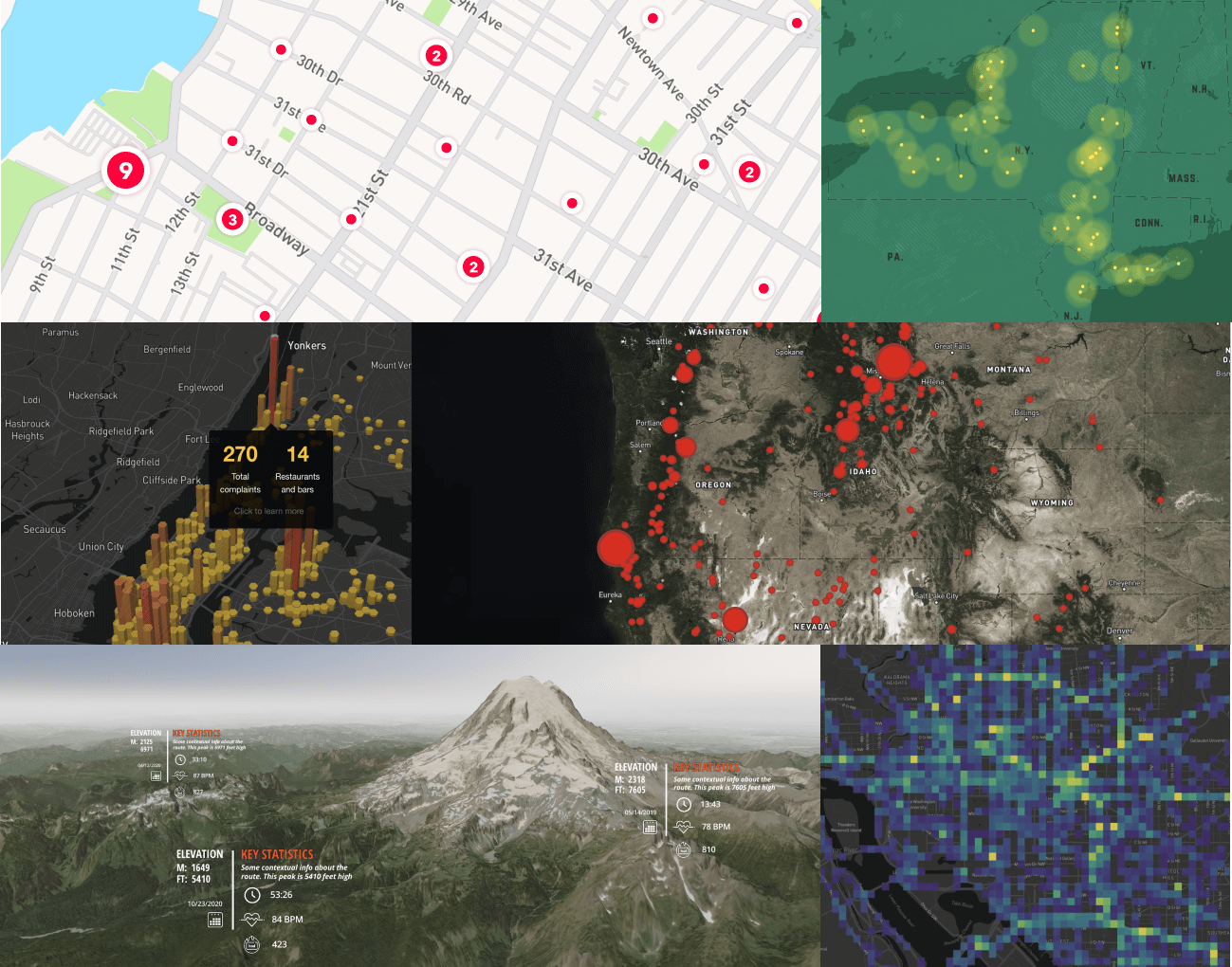
**Caption:** (_Mapbox GL JS maps, left-to-right, top-to-bottom_): Custom styled point [clusters](https://docs.mapbox.com/mapbox-gl-js/style-spec/sources/#geojson-cluster), custom style with points, [hexbin visualization](https://blog.mapbox.com/exploring-nyc-open-data-with-3d-hexbins-5af2b7d8bc46) on a [Dark style](https://www.mapbox.com/maps/dark) map with [`Popups`](https://docs.mapbox.com/mapbox-gl-js/api/markers/#popup), data-driven [circles](https://docs.mapbox.com/mapbox-gl-js/style-spec/layers/#circle) over a [`raster` layer](https://docs.mapbox.com/mapbox-gl-js/style-spec/layers/#raster) with [satellite imagery](https://docs.mapbox.com/help/getting-started/satellite-imagery/), [3D terrain](https://docs.mapbox.com/mapbox-gl-js/example/?topic=3D) with custom [`Markers`](https://docs.mapbox.com/mapbox-gl-js/api/markers/#marker), [Mapbox Movement data](https://docs.mapbox.com/data/movement/guides/) visualization.
## License
Mapbox Web SDK
Copyright © 2021 - 2023 Mapbox, Inc. All rights reserved.
The software and files in this repository (collectively, “Software”) are licensed under the Mapbox TOS for use only with the relevant Mapbox product(s) listed at www.mapbox.com/pricing. This license allows developers with a current active Mapbox account to use and modify the authorized portions of the Software as needed for use only with the relevant Mapbox product(s) through their Mapbox account in accordance with the Mapbox TOS. This license terminates automatically if a developer no longer has a Mapbox account in good standing or breaches the Mapbox TOS. For the license terms, please see the Mapbox TOS at https://www.mapbox.com/legal/tos/ which incorporates the Mapbox Product Terms at www.mapbox.com/legal/service-terms. If this Software is a SDK, modifications that change or interfere with marked portions of the code related to billing, accounting, or data collection are not authorized and the SDK sends limited de-identified location and usage data which is used in accordance with the Mapbox TOS. [Updated 2023-01]
---
--- METRICS ---
- Files Extracted: 1
- Estimated Token Budget: ~1046 tokens
- Canonical Reference: https://codewiki.google/github.com/mapbox/mapbox-gl-js
](https://www.mapbox.com/mapbox-gljs)
**Caption:** (_Mapbox GL JS maps, left-to-right, top-to-bottom_): Custom styled point [clusters](https://docs.mapbox.com/mapbox-gl-js/style-spec/sources/#geojson-cluster), custom style with points, [hexbin visualization](https://blog.mapbox.com/exploring-nyc-open-data-with-3d-hexbins-5af2b7d8bc46) on a [Dark style](https://www.mapbox.com/maps/dark) map with [`Popups`](https://docs.mapbox.com/mapbox-gl-js/api/markers/#popup), data-driven [circles](https://docs.mapbox.com/mapbox-gl-js/style-spec/layers/#circle) over a [`raster` layer](https://docs.mapbox.com/mapbox-gl-js/style-spec/layers/#raster) with [satellite imagery](https://docs.mapbox.com/help/getting-started/satellite-imagery/), [3D terrain](https://docs.mapbox.com/mapbox-gl-js/example/?topic=3D) with custom [`Markers`](https://docs.mapbox.com/mapbox-gl-js/api/markers/#marker), [Mapbox Movement data](https://docs.mapbox.com/data/movement/guides/) visualization.
## License
Mapbox Web SDK
Copyright © 2021 - 2023 Mapbox, Inc. All rights reserved.
The software and files in this repository (collectively, “Software”) are licensed under the Mapbox TOS for use only with the relevant Mapbox product(s) listed at www.mapbox.com/pricing. This license allows developers with a current active Mapbox account to use and modify the authorized portions of the Software as needed for use only with the relevant Mapbox product(s) through their Mapbox account in accordance with the Mapbox TOS. This license terminates automatically if a developer no longer has a Mapbox account in good standing or breaches the Mapbox TOS. For the license terms, please see the Mapbox TOS at https://www.mapbox.com/legal/tos/ which incorporates the Mapbox Product Terms at www.mapbox.com/legal/service-terms. If this Software is a SDK, modifications that change or interfere with marked portions of the code related to billing, accounting, or data collection are not authorized and the SDK sends limited de-identified location and usage data which is used in accordance with the Mapbox TOS. [Updated 2023-01]
---
--- METRICS ---
- Files Extracted: 1
- Estimated Token Budget: ~1046 tokens
- Canonical Reference: https://codewiki.google/github.com/mapbox/mapbox-gl-js