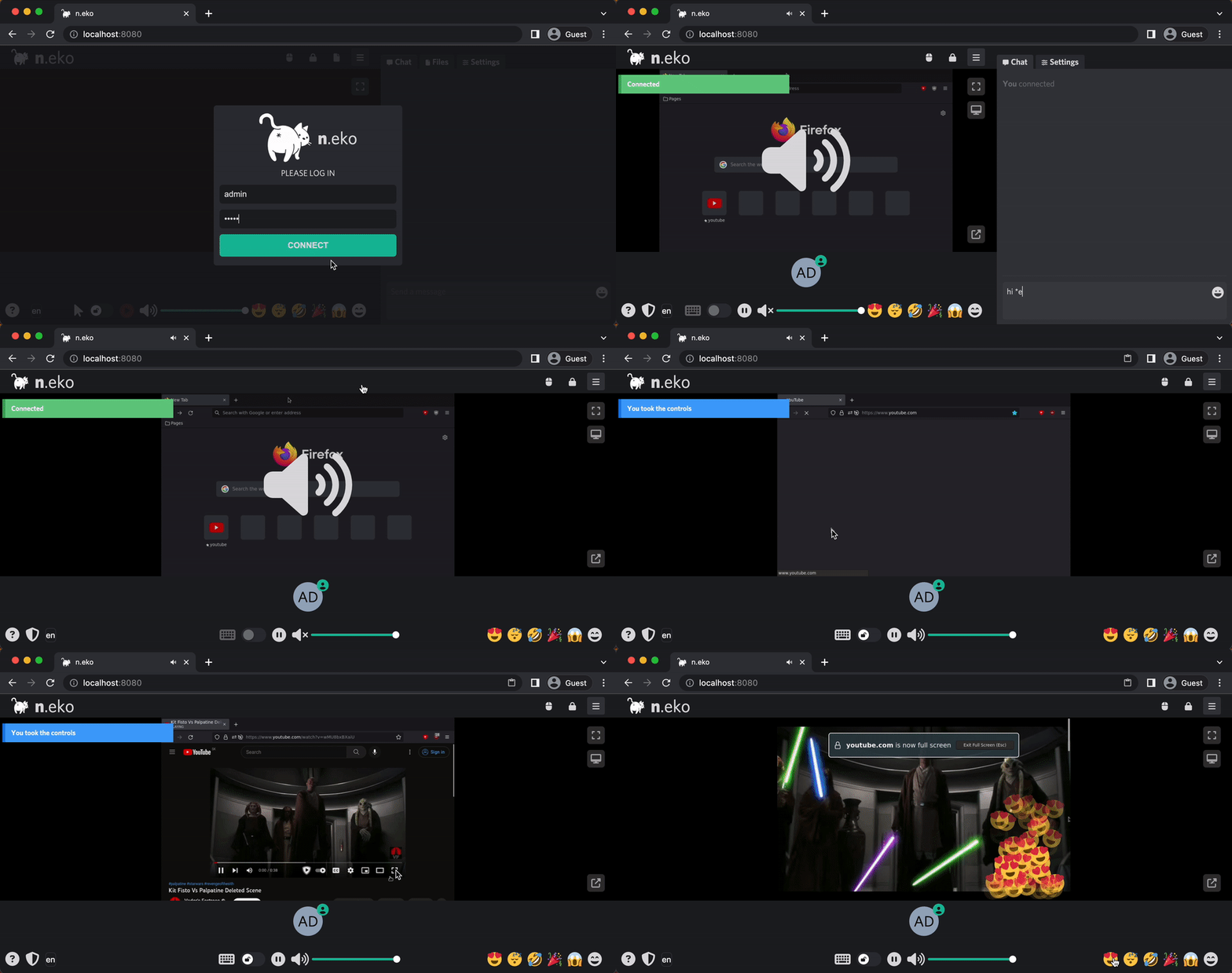
# Technical Documentation: m1k1o/neko

> ℹ️ **Provenance:** Multi-Tier Ingestion · [CodeWiki Reference](https://codewiki.google/github.com/m1k1o/neko)

### Overview (`README.md`)

<div align="center">
  <a href="https://github.com/m1k1o/neko" title="Neko's Github repository.">
    <img src="https://neko.m1k1o.net/img/logo.png" width="400" height="auto"/>
  </a>
  <p align="center">
    <a href="https://github.com/m1k1o/neko/releases">
      <img src="https://img.shields.io/github/v/release/m1k1o/neko" alt="release">
    </a>
    <a href="https://github.com/m1k1o/neko/blob/master/LICENSE">
      <img src="https://img.shields.io/github/license/m1k1o/neko" alt="license">
    </a>
    <a href="https://hub.docker.com/r/m1k1o/neko">
      <img src="https://img.shields.io/docker/pulls/m1k1o/neko" alt="pulls">
    </a>
    <a href="https://github.com/m1k1o/neko/issues">
      <img src="https://img.shields.io/github/issues/m1k1o/neko" alt="issues">
    </a>
    <a href="https://github.com/sponsors/m1k1o">
      <img src="https://img.shields.io/badge/-sponsor-red" alt="issues">
    </a>
    <a href="https://discord.gg/HXQJmqNJMz">
      <img src="https://discordapp.com/api/guilds/665851821906067466/widget.png" alt="Chat on discord">
    </a>
    <a href="https://hellogithub.com/repository/4536d4546af24196af3f08a023dfa007" target="_blank">
      <img src="https://abroad.hellogithub.com/v1/widgets/recommend.svg?rid=4536d4546af24196af3f08a023dfa007&claim_uid=0x19e4dJwD83aW2&theme=small" alt="Featured｜HelloGitHub" />
    </a>
    <a href="https://github.com/m1k1o/neko/actions">
      <img src="https://github.com/m1k1o/neko/actions/workflows/ghcr.yml/badge.svg" alt="build">
    </a>
  </p>
  <img src="https://neko.m1k1o.net/img/intro.gif" width="650" height="auto"/>
</div>

# n.eko

Welcome to Neko, a self-hosted virtual browser that runs in Docker and uses WebRTC technology. Neko is a powerful tool that allows you to **run a fully-functional browser in a virtual environment**, giving you the ability to **access the internet securely and privately from anywhere**. With Neko, you can browse the web, **run applications**, and perform other tasks just as you would on a regular browser, all within a **secure and isolated environment**. Whether you are a developer looking to test web applications, a **privacy-conscious user seeking a secure browsing experience**, or simply someone who wants to take advantage of the **convenience and flexibility of a virtual browser**, Neko is the perfect solution.

In addition to its security and privacy features, Neko offers the **ability for multiple users to access it simultaneously**. This makes it an ideal solution for teams or organizations that need to share access to a browser, as well as for individuals who want to use **multiple devices to access the same virtual environment**. With Neko, you can **easily and securely share access to a browser with others**, without having to worry about maintaining separate configurations or settings. Whether you need to **collaborate on a project**, access shared resources, or simply want to **share access to a browser with friends or family**, Neko makes it easy to do so.

Neko is also a great tool for **hosting watch parties** and interactive presentations. With its virtual browser capabilities, Neko allows you to host watch parties and presentations that are **accessible from anywhere**, without the need for in-person gatherings. This makes it easy to **stay connected with friends and colleagues**, even when you are unable to meet in person. With Neko, you can easily host a watch party or give an **interactive presentation**, whether it's for leisure or work. Simply invite your guests to join the virtual environment, and you can share the screen and **interact with them in real-time**.

## About

This app uses WebRTC to stream a desktop inside of a docker container, original author made this because [rabb.it](https://en.wikipedia.org/wiki/Rabb.it) went under and his internet could not handle streaming and discord kept crashing when his friend attempted to. He just wanted to watch anime with his friends ლ(ಠ益ಠლ) so he started digging throughout the internet and found a few *kinda* clones, but none of them had the virtual browser, then he found [Turtus](https://github.com/Khauri/Turtus) and he was able to figure out the rest.

Then I found [this](https://github.com/nurdism/neko) project and started to dig into it. I really liked the idea of having collaborative browser browsing together with multiple people, so I created a fork. Initially, I wanted to merge my changes to the upstream repository, but the original author did not have time for this project anymore and it got eventually archived.

## Use-cases and comparison

Neko started as a virtual browser that is streamed using WebRTC to multiple users.
- It is **not only limited to a browser**; it can run anything that runs on linux (e.g. VLC). Browser only happens to be the most popular and widely used use-case.
- In fact, it is not limited to a single program either; you can install a full desktop environment (e.g. XFCE, KDE).
- Speaking of limits, it does not need to run in a container; you could install neko on your host, connect to your X server and control your whole VM.
- Theoretically it is not limited to only X server, anything that can be controlled and scraped periodically for images could be used instead.
  - Like implementing RDP or VNC protocol, where neko would only act as WebRTC relay server. This is currently only future.

Primary use case is connecting with multiple people, leveraging real time synchronization and interactivity:
- **Watch party** - watching video content together with multiple people and reacting to it (chat, emotes) - open source alternative to [giggl.app](https://giggl.app/) or [hyperbeam](https://watch.hyperbeam.com).
- **Interactive presentation** - not only screen sharing, but others can control the screen.
- **Collaborative tool** - brainstorming ideas, cobrowsing, code debugging together.
- **Support/Teaching** - interactively guiding people in controlled environment.
- **Embed anything** - embed virtual browser in your web app - open source alternative to [hyperbeam API](https://hyperbeam.com/).
  - open any third-party website or application, synchronize audio and video flawlessly among multiple participants.
  - request rooms using API with [neko-rooms](https://github.com/m1k1o/neko-rooms).
- [**Neko inside VR Chat**](https://github.com/jameskitt616/vrchat_streaming) - watch remote browser together with friends in VR.

Other use cases that benefit from single-user:
- **Personal workspace** - streaming containerized apps and desktops to end-users - similar to [kasm](https://www.kasmweb.com/).
- **Persistent browser** - own browser with persistent cookies available anywhere - similar to [mightyapp](https://www.mightyapp.com/).
  - no state is left on the host browser after terminating the connection.
  - sensitive data like cookies are not transferred - only video is shared.
- **Throwaway browser** - a better solution for planning secret parties and buying birthday gifts off the internet.
  - use Tor Browser and [VPN](https://github.com/m1k1o/neko-vpn) for additional anonymity.
  - mitigates risk of OS fingerprinting and browser vulnerabilities by running in container.
- **Session broadcasting** - broadcast room content using RTMP (to e.g. twitch or youtube...).
- **Session recording** - broadcast RTMP can be saved to a file using e.g. [nginx-rtmp](https://www.nginx.com/products/nginx/modules/rtmp-media-streaming/)
  - have clean environment when recording tutorials.
  - no need to hide bookmarks or use incognito mode.
- **Jump host** - access your internal applications securely without the need for VPN.
- **Automated browser** - you can install [playwright](https://playwright.dev/) or [puppeteer](https://pptr.dev/) and automate tasks while being able to actively intercept them.

Compared to clientless remote desktop gateway (e.g. [Apache Guacamole](https://guacamole.apache.org/) or [websockify](https://github.com/novnc/websockify) with [noVNC](https://novnc.com/)), installed with remote desktop server along with desired program (e.g. [linuxserver/firefox](https://docs.linuxserver.io/images/docker-firefox)) provides neko additionally:
- **Smooth video** because it uses WebRTC and not images sent over WebSockets.
- **Built in audio** support, what is not part of Apache Guacamole or noVNC.
- **Multi-participant control**, what is not natively supported by Apache Guacamole or noVNC.

### Supported browsers

<div align="center">
  <a href="https://neko.m1k1o.net/docs/v3/installation/docker-images#firefox">
    <img src="https://neko.m1k1o.net/img/icons/firefox.svg" title="ghcr.io/m1k1o/neko/firefox" width="60" height="auto"/>
  </a>
  <a href="https://neko.m1k1o.net/docs/v3/installation/docker-images#tor-browser">
    <img src="https://neko.m1k1o.net/img/icons/tor-browser.svg" title="ghcr.io/m1k1o/neko/tor-browser" width="60" height="auto"/>
  </a>
  <a href="https://neko.m1k1o.net/docs/v3/installation/docker-images#waterfox">
    <img src="https://neko.m1k1o.net/img/icons/waterfox.svg" title="ghcr.io/m1k1o/neko/waterfox" width="60" height="auto"/>
  </a>
  <a href="https://neko.m1k1o.net/docs/v3/installation/docker-images#chromium">
    <img src="https://neko.m1k1o.net/img/icons/chromium.svg" title="ghcr.io/m1k1o/neko/chromium" width="60" height="auto"/>
  </a>
  <a href="https://neko.m1k1o.net/docs/v3/installation/docker-images#google-chrome">
    <img src="https://neko.m1k1o.net/img/icons/google-chrome.svg" title="ghcr.io/m1k1o/neko/google-chrome" width="60" height="auto"/>
  </a>
  <a href="https://neko.m1k1o.net/docs/v3/installation/docker-images#ungoogled-chromium">
    <img src="https://neko.m1k1o.net/img/icons/ungoogled-chromium.svg" title="ghcr.io/m1k1o/neko/google-chrome" width="60" height="auto"/>
  </a>
  <a href="https://neko.m1k1o.net/docs/v3/installation/docker-images#microsoft-edge">
    <img src="https://neko.m1k1o.net/img/icons/microsoft-edge.svg" title="ghcr.io/m1k1o/neko/microsoft-edge" width="60" height="auto"/>
  </a>
  <a href="https://neko.m1k1o.net/docs/v3/installation/docker-images#brave">
    <img src="https://neko.m1k1o.net/img/icons/brave.svg" title="ghcr.io/m1k1o/neko/brave" width="60" height="auto"/>
  </a>
  <a href="https://neko.m1k1o.net/docs/v3/installation/docker-images#vivaldi">
    <img src="https://neko.m1k1o.net/img/icons/vivaldi.svg" title="ghcr.io/m1k1o/neko/vivaldi" width="60" height="auto"/>
  </a>
  <a href="https://neko.m1k1o.net/docs/v3/installation/docker-images#opera">
    <img src="https://neko.m1k1o.net/img/icons/opera.svg" title="ghcr.io/m1k1o/neko/opera" width="60" height="auto"/>
  </a>

  ... see [all available images](https://neko.m1k1o.net/docs/v3/installation/docker-images)

</div>

### Other applications

<div align="center">
  <a href="https://neko.m1k1o.net/docs/v3/installation/docker-images#xfce">
    <img src="https://neko.m1k1o.net/img/icons/xfce.svg" title="ghcr.io/m1k1o/neko/xfce" width="60" height="auto"/>
  </a>
  <a href="https://neko.m1k1o.net/docs/v3/installation/docker-images#kde">
    <img src="https://neko.m1k1o.net/img/icons/kde.svg" title="ghcr.io/m1k1o/neko/kde" width="60" height="auto"/>
  </a>
  <a href="https://neko.m1k1o.net/docs/v3/installation/docker-images#remmina">
    <img src="https://neko.m1k1o.net/img/icons/remmina.svg" title="ghcr.io/m1k1o/neko/remmina" width="60" height="auto"/>
  </a>
  <a href="https://neko.m1k1o.net/docs/v3/installation/docker-images#vlc">
    <img src="https://neko.m1k1o.net/img/icons/vlc.svg" title="ghcr.io/m1k1o/neko/vlc" width="60" height="auto"/>
  </a>

  ... others in <a href="https://github.com/m1k1o/neko-apps">m1k1o/neko-apps</a>
</div>

### Why neko?

I like cats 🐱 (`Neko` is the Japanese word for cat), I'm a weeb/nerd.

***But why the cat butt?*** Because cats are *assholes*, but you love them anyways.

## Multiple rooms

For neko room management software, visit [neko-rooms](https://github.com/m1k1o/neko-rooms).

It also offers [Zero-knowledge installation (with HTTPS)](https://github.com/m1k1o/neko-rooms/?tab=readme-ov-file#zero-knowledge-installation-with-https).

## Documentation

Full documentation is available at [neko.m1k1o.net](https://neko.m1k1o.net/). Key sections include:

- [Migration from V2](https://neko.m1k1o.net/docs/v3/migration-from-v2)
- [Getting Started](https://neko.m1k1o.net/docs/v3/quick-start)
- [Installation](https://neko.m1k1o.net/docs/v3/installation)
- [Examples](https://neko.m1k1o.net/docs/v3/installation/examples)
- [Configuration](https://neko.m1k1o.net/docs/v3/configuration)
- [Frequently Asked Questions](https://neko.m1k1o.net/docs/v3/faq)
- [Troubleshooting](https://neko.m1k1o.net/docs/v3/troubleshooting)

## How to Contribute

Contributions are welcome! Check the [Contributing Guide](https://neko.m1k1o.net/contributing) for details.

## Support

If you find Neko useful, consider supporting the project via [GitHub Sponsors](https://github.com/sponsors/m1k1o).

---

### Overview (`client/README.md`)

# neko client

The web client for [neko](https://github.com/m1k1o/neko): React 19 + TypeScript, built with Vite.
It speaks only the v3 API (`/api/ws` + REST).

```
client/
  core/          @m1k1o/neko: the framework-free client library, its own npm package (core/README.md)
  src/
    main.tsx     start-up: the strings, the instance (createNekoApp), the plugins, the connection, the render under <NekoProvider>
    app/         the shell: App, ErrorBoundary, the #neko grid
    layout/      Header, Side (the tab bar), RoomBar (members, room menu, controls, emotes)
    features/    one folder per feature: video, members, controls, room-menu, emotes, settings, connect, about
    plugins/     the registry (index.ts: the list, the slots, event dispatch), the contract (types.ts), chat/, filetransfer/
    components/  shared pieces: IconButton, Avatar, Dialog, EachHook; ui/ holds the shadcn/ui kit (dialog, menus, popover, tabs, button, sonner)
    state/       the instance (neko.ts: createNekoApp, app.ts: the GUI store and NekoApp), the provider and hooks, actions, settings, dialogs, event wiring
    i18n/        i18next: initI18n(), setLang(), the loader of the locale files
    lib/         cn(): class names with Tailwind conflicts resolved (clsx + tailwind-merge)
    locales/     the strings, one folder per language: common.json, chat.json, files.json
    assets/      images
    index.css    Tailwind v4: the design tokens (@theme), the global rules, the layout's breakpoint variants
```

## Layering

Dependencies point one way: `app → layout → features → components → design`, with `state`, `i18n`
and `lib` below everything but `design`. In practice:

- A feature is a folder with its component(s), styled with Tailwind classes in the markup. Other
  folders import a feature by its main file with `@/` (`import { Stage } from '@/features/video/Stage'`);
  only a folder's own files are imported relatively.
- Shared components know nothing about features or plugins. Nothing imports `app/`.
- Plugins import neither each other nor `features/`; the app shell and the layout reach plugins only
  through the registry `@/plugins`, and features get plugin contributions passed in (they see only
  the contract in `@/plugins/types`).
- The core is imported only from its entry point, `@m1k1o/neko`, never from a path into `core/`.
- State is zustand: the core's `client.store`, the GUI's `app` store (`state/app.ts`) and each plugin's
  `store.ts`, all per instance (see Composition). A component gets the instance from the context
  (`useClient()`, `useApp()`, `useNeko()`), selects what it renders,
  `useStore(useClient().store, (s) => s.video.playing)` (`useShallow` for several fields; the core's
  `selectControlling`, `selectIsAdmin`, `selectSession` for the computed values), and re-renders only
  when that value changes. Everything outside React takes the instance as its first argument, reads
  `store.getState()` and writes `store.setState()` with a new object, never in place.
- Where two layers must talk without importing each other, there is a store or a signal in `state/`:
  the room's event lines ("bob took the controls") are emitted on `state/bus.ts` and shown by the chat
  plugin; `logout` is a bus signal every store with per-session data listens to.

`npm run check` enforces this: `eslint.config.js` holds one `no-restricted-imports` rule set per
layer, and `tools/cycles.mjs` fails on an import cycle (type-only imports excepted).

## Composition

There is no global client. `createNekoApp()` (`src/state/neko.ts`) makes one instance of the GUI, a
`NekoApp` (`src/state/app.ts`): the `NekoClient` (WebRTC transport, `autologin`, `autoconnect`,
`autoplay` from the viewer settings), its input `Overlay`, the GUI store `app` and the `bus`, with the
event wiring (server events to event lines and toasts, `state/events.ts`) and the settings (stored
and from the URL, `state/settings.ts`) applied. `main.tsx` composes the page in the order the pieces
need:

```tsx
const ready = initI18n(plugins.map((p) => p.ns)) // the strings of the active language
const neko = createNekoApp() // the client, its wiring, the settings
initPlugins(neko) // the slots, the event dispatch, each plugin's init
ready.then(() => {
  neko.client.setUrl(location.href) // the connection: resume a saved session and connect
  createRoot(root).render(
    <NekoProvider neko={neko}>
      <App />
    </NekoProvider>,
  )
})
```

`<NekoProvider>` (`src/state/provider.tsx`) puts the instance in a React context; a component reads it
with `useNeko()` (the whole `NekoApp`), `useClient()`, `useApp()` (the GUI store) and `useActions()`
(`state/actions.ts`, the room actions bound to the instance), and the rest, `setSetting(neko, ...)`,
`ask(app, ...)`, `api(neko, ...)`, a plugin's `store(neko)`, takes it as the first argument. Two
instances on one page share nothing but the page (the strings, the URL parameters, `localStorage`).

To embed the GUI in another React app, compose the same pieces and render `<App />` under a provider
(`?embed=1` and `?cast=1` on the page's URL still give the video-only layouts, for an iframe or a kiosk):

```tsx
import { initI18n } from '@/i18n'
import { plugins, initPlugins } from '@/plugins'
import { createNekoApp } from '@/state/neko'
import { NekoProvider } from '@/state/provider'
import { App } from '@/app/App'

await initI18n(plugins.map((p) => p.ns))
const neko = createNekoApp()
initPlugins(neko)
neko.client.setUrl('https://neko.example.com/')

export const Room = () => (
  <NekoProvider neko={neko}>
    <App />
  </NekoProvider>
)
```

## Design

Styling is Tailwind v4 (`tailwindcss`, `@tailwindcss/vite`): the classes are in the markup, there is no
stylesheet per component. `src/index.css` is the whole of the CSS:

- **Tokens**: an `@theme` block with the values of the previous SCSS variables under the same names, so
  `$background-primary` is `--color-background-primary` and the utility `bg-background-primary`;
  `$text-normal` is `text-text-normal`, `$style-primary` is `bg-style-primary` / `text-style-primary`,
  `$elevation-high` is `shadow-elevation-high`, `$side-width` / `$menu-height` / `$controls-height` are
  `w-side` / `h-menu` / `h-controls`, `$text-size` is `text-ui`. The font is Tailwind's system stack
  (`--font-sans`). Sizes are written in px where the legacy layout had px (`p-[5px]`, `h-7.5`).
- **Global rules** the preflight does not have: the page's size and overflow, 14px text with line-height 1
  on `body` (so `rem`, the base of Tailwind's spacing scale, stays 16px), no native video controls.
- **Breakpoints** as variants: `tablet:` (up to 1024px: the page scrolls and the side panel goes under the
  video, with Tailwind's `portrait:` / `landscape:` for the split), `phone:` (up to 768px: no room bar).
- The animations (`animate-shake`, `animate-loader`, `animate-badge`) and the `slider` utility (the range
  inputs).

`cn()` (`src/lib/utils.ts`, `clsx` + `tailwind-merge`) joins class names and lets the last Tailwind class
win, so a caller's `className` overrides a component's; `class-variance-authority` gives the variants.

The component kit under `src/components/ui/` is shadcn/ui on Radix, restyled with the tokens: `dialog.tsx`
(`@radix-ui/react-dialog`, the overlay and the content composed by the caller), `dropdown-menu.tsx` (a
menu from a button: the resolution list, the emote picker), `popover.tsx` (the clipboard textarea, the
emoji picker), `tabs.tsx` (the side panel), `context-menu.tsx` (the member menu: a menu opened at a
point, on `@radix-ui/react-menu`, since it is opened from the member list, a chat author and Shift+F10),
`button.tsx` (the text buttons: `primary`, `outline`, `confirm`, `cancel`) and `sonner.tsx` (the toasts,
`toast()` in `src/state/dialogs.ts`). They bring focus trapping, roving focus, Escape, outside click and
ARIA. `components.json` configures `npx shadcn add <component>` (the radix base); a component added
that way comes with shadcn's theme classes and is rewritten with the tokens, like the ones here.

Every icon control is `IconButton` (`src/components/IconButton.tsx`): a `<button type="button">` named
by its `label` (the accessible name and the tooltip), with the icon as its child and the variants `plain`
(the room bar, the chat, the files), `header` (a 30px box) and `video` (the translucent box over the
video). Icons are `@phosphor-icons/react` components, tree-shaken: `import { MouseIcon } from
'@phosphor-icons/react'` and `<MouseIcon className="size-4" />` (`size-3.5` next to 14px text, `size-6` in
the room bar), all filled: `IconContext` in `App.tsx` sets the weight once; a plugin tab's `icon` is one.
Emoji are text: the character of each name from `public/emoji.json` (`src/plugins/chat/Emoji.tsx`).

To add a component: Tailwind classes and the tokens in the markup, repeated class strings as constants
next to the component, `Button` / `IconButton` for buttons, the kit for a dialog, a menu or a popover. To
add an icon: import it from `@phosphor-icons/react`.

## Plugins

A plugin is a folder under `src/plugins/` with its components, styles, store and actions, described
by one object (`src/plugins/types.ts`); its strings are a namespace of their own under `src/locales/`:

| field        |                                                                                                                                                                                           |
| ------------ | ----------------------------------------------------------------------------------------------------------------------------------------------------------------------------------------- |
| `id`         | the prefix of its server events: `message` events named `<id>/...` reach `onEvent`                                                                                                        |
| `ns`         | the namespace of its strings, `src/locales/<lang>/<ns>.json` in every language, used as `t('<ns>:key')`                                                                                   |
| `tab`        | a side-panel tab: `id` (the remembered tab), `icon`, `label` (the key of its name, `chat:tab`), `component`, the hooks `useVisible()` and `useBadge()` (unread count)                     |
| `topBar`     | items for the header menu; each renders its own `<li>` or nothing                                                                                                                         |
| `memberMenu` | entries of another member's context menu: the hook `useVisible(member)`, `label(member)`, `onClick(member)`                                                                               |
| `onEvent`    | `(neko, ...[event, payload])` for its server events, typed by `PluginEvents` (event name to payload, `src/plugins/types.ts`): `if (event === 'chat/init')` narrows `payload` to its shape |
| `init`       | `(neko)`, called once per instance at start-up, before the connection: subscribe to `neko.client.events`, `neko.bus`, ...                                                                 |

Every callback gets the instance (`neko: NekoApp`, see Composition) as its first argument, the member
menu's `label(neko, member)` and `onClick(neko, member)` included; the hooks (`useVisible`, `useBadge`)
and the components read it from the context (`useNeko()`, `useClient()`). A plugin's store is one per
instance: `export const store = scoped(() => createStore(...))` (`scoped`, `src/state/app.ts`) and
`store(neko)` is the instance's.

`src/plugins/index.ts` lists the plugins of the build in side-panel order, and `initPlugins(neko)`
(called from `main.tsx`) wires them in that order: it puts each `tab`, `topBar` item and
`memberMenu` entry into its slot (`registerSlot('side.tab' | 'header.item' | 'member.menu', item)`,
once: the slots are the build's, not the instance's), builds the event dispatch (a map from the `id`
prefix to the plugin, one lookup per message) on the instance's `client.events` and runs each
`init(neko)`. The side panel, the header and the app shell read the slots with `useSlot(name)`
(`useVisible` and `useBadge` are hooks over the plugin's store, so each runs in a small component of
its own and re-renders only that).

To add a plugin:

1. Create `src/plugins/<name>/` with an `index.ts` exporting the plugin object, its components (Tailwind
   classes, the tokens of `src/index.css`), and a `store.ts` made with `scoped(() => createStore(...))`
   (components select from it with `useStore(store(useNeko()), (s) => s.field)`, the rest reads
   `store(neko).getState()` and writes `store(neko).setState()`).
2. Add its strings as `src/locales/<lang>/<ns>.json` in every language (see i18n).
3. Add the import and the entry to `src/plugins/index.ts`.

Removing the entry removes the tab, the header items, the menu entries and the event handling;
nothing else changes (its locale files are then unused).

## i18n

Strings live in `src/locales/<lang>/<ns>.json`: one folder per language, one file per namespace,
`common.json` (the GUI), `chat.json` and `files.json` (the plugins). The runtime is `i18next` with
`react-i18next` (`src/i18n/index.ts`): components call `useTranslation()` and render
`t('side.settings')` or `t('chat:tab')` (`common` is the default namespace, a plugin's is prefixed);
code outside components imports `t` from `@/i18n`. Values interpolate with `{{name}}`.

Only the active language is downloaded: the files are lazy chunks (`import.meta.glob`), and the
loader hands i18next the `<lang>/<ns>` it asks for at start-up (`initI18n`, before the first render)
and on a pick in the room menu (`setLang`, i18next's `changeLanguage`). `en` is the fallback for a
key a language lacks, so it is loaded next to the active language; the other languages never are
(`tools/dist.check.mjs`, run by `npm run build`, checks the main chunk carries none). The language is
kept in `localStorage` (`lang`, the short code) and set by `?lang=`; `<html lang>` gets the BCP 47
tag (`cn` is `zh-CN`). In development, a key no language has is logged (`i18n: missing ...`).

- Adding a key: add it to `en` and to the other fourteen files. `src/i18n/i18n.test.ts` lists the
  keys each language lacks today and fails on a new one.
- Adding a language: a folder with the three files, and its code in `langs` (`src/i18n/index.ts`,
  the picker order).
- Not yet: plural forms (`key_one`, `key_other`); the strings with a count keep one form, as before.

## core

`core/` is `@m1k1o/neko`: `NekoClient` (auth, websocket with reconnect and stale detection, WebRTC,
the binary input channel, control, clipboard, broadcast), the input `Overlay`, the zustand store with
its selectors, `Emitter`, `NekoApi` and the wire types. The GUI consumes it from source through the `@m1k1o/neko` alias in
`tsconfig.json` and `vite.config.ts`; `npm run build:core` builds the package (`core/dist/`). The API
reference is `core/README.md`.

```ts
import { NekoClient } from '@m1k1o/neko'

const client = new NekoClient({ autologin: true, autoconnect: true, autoplay: true })
client.store.subscribe((s) => s.sessions, render) // state: connection, sessions, control, screen, ...
client.events.on('message', (event, payload) => {}) // plugin events (chat/*, filetransfer/*, ...)
client.setUrl('https://neko.example.com/')
client.mount(document.getElementById('video')!)
```

## Development

Backend from `server/dev`, then:

```sh
cd client/dev && ./serve        # http://localhost:3001, /api proxied to the backend on :3000
# or without docker:
NEKO_URL=http://localhost:3000 npm run dev
```

| script                |                                                                                                                                                                                                                                                      |
| --------------------- | ---------------------------------------------------------------------------------------------------------------------------------------------------------------------------------------------------------------------------------------------------- |
| `npm run build`       | type-check + production build into `dist/`, then `tools/dist.check.mjs` (no language in the main chunk)                                                                                                                                              |
| `npm run build:core`  | build the `@m1k1o/neko` package into `core/dist/`                                                                                                                                                                                                    |
| `npm run check`       | `check:types`, `check:format`, `check:lint` (hooks, layering), `check:cycles` and `test` in parallel (`npm-run-all2`, one label per script), then `build:core` and `check:dist` (the built core package); each `check:*` script also runs on its own |
| `npm test`            | unit tests (vitest): the core's connection state machine and store, the chat's markdown (rendered with react-dom/server), the i18n runtime and locale files, the plugin registry, an instance and two of them, the provider; no browser              |
| `npm run format`      | prettier                                                                                                                                                                                                                                             |
| `npm run build:emoji` | regenerate the emoji data `public/emoji.json` (names, characters, groups, keywords; `tools/emoji.ts`)                                                                                                                                                |
| `npm run test:e2e`    | two-user browser test against a running server, see below                                                                                                                                                                                            |

### e2e

`e2e.mjs` drives two (or more) headless Chromium users through login, video, chat, control, files,
admin actions, reconnects and URL parameters. It needs a disposable server (it takes control, types
into the desktop and kicks users) with the multiuser provider:

```sh
docker run -d -p 8080:8080 -p 52000:52000/udp \
  -e NEKO_MEMBER_PROVIDER=multiuser -e NEKO_MEMBER_MULTIUSER_USER_PASSWORD=neko \
  -e NEKO_MEMBER_MULTIUSER_ADMIN_PASSWORD=admin -e NEKO_FILETRANSFER_ENABLED=true \
  -e NEKO_WEBRTC_UDPMUX=52000 \
  -e NEKO_WEBRTC_NAT1TO1=127.0.0.1 ghcr.io/m1k1o/neko/kde
npx playwright install chromium
NEKO_URL=http://localhost:8080/ npm run test:e2e
```

The typing step expects a launcher on Alt+F2 (KRunner on KDE, the app finder on Xfce). To run the
steps in a real Chromium-based browser instead of Playwright's, start it with
`--headless --remote-debugging-port=9222 --user-data-dir=<empty dir>
--autoplay-policy=no-user-gesture-required --use-fake-ui-for-media-stream
--use-fake-device-for-media-stream` and set `NEKO_CDP=http://127.0.0.1:9222`.

## Behaviour notes

- **Kick** removes the session (the user may log in again), see the comment at `actions.kick` in
  `src/state/actions.ts`.
- Settings use the same `localStorage` keys and format as the previous client, so preferences carry
  over. Scroll sensitivity now uses v3 steps (-5..5, key `scroll_sensitivity`); `?scroll=` is mapped.
- Chat markdown (`src/plugins/chat/markdown.ts`) is rendered by `react-markdown` with `remark-gfm`
  (`~~strike~~`, tables, bare links) and `remark-breaks` (a newline is a line break) to React elements,
  no HTML strings; four small rehype plugins of ours add the chat's dialect: `:name:` emoji, plain-text
  `||spoiler||` (click to reveal; no formatting inside), `__underline__`, and links to anything but
  http(s)/mailto, images and raw HTML shown as the text they were typed as (nothing in a message loads
  anything). Compared with the hand-written parser before: the Discord `>>>` block quote is gone
  (`> ` quotes stay, and continue until a blank line), and CommonMark's headings, lists, nested
  quotes and tables are in. Messages over 512 characters (the server's default `chat.max_length`), or one the renderer fails on, are shown
  as plain text.
- Short-lived list items (uploads, emote animations) are keyed by 64 random bits from `crypto.getRandomValues()`, which
  every origin has (`crypto.randomUUID()` needs a secure context, and plain http on a LAN is not one).
- File downloads are plain links so the browser streams them; the session token is added to the
  URL only when the server runs without cookies.

---

### Overview (`examples/README.md`)

# Examples

Ready-to-use [Docker Compose](https://docs.docker.com/compose/) configurations for Neko. Each folder is self-contained and can be copied out and run on its own with `docker compose up`. All files are heavily commented, showing available options and linking to the relevant documentation inline.

These are the same examples shown in the [documentation](https://neko.m1k1o.net/docs/v3/installation/examples), kept here so they can be browsed, cloned or downloaded directly from the repository.

| Example | Description |
| --- | --- |
| [simple-browser](./simple-browser) | Firefox with commented options for persistent/custom profiles and other available browser images. |
| [kiosk-browser](./kiosk-browser) | Firefox in kiosk mode that opens a fixed URL on startup (e.g. a streaming service or dashboard). Stateless by default. |
| [oauth](./oauth) | Firefox authenticating members through an external OAuth 2.0 / OpenID Connect provider, configured via a mounted config.yaml. |
| [gpu-nvidia-browser](./gpu-nvidia-browser) | Firefox with Nvidia GPU acceleration, with a commented "encode-only" option. |
| [gpu-intel-browser](./gpu-intel-browser) | Firefox with Intel (VAAPI) GPU acceleration, with a commented "encode-only" option. |
| [gpu-raspberry-pi-browser](./gpu-raspberry-pi-browser) | Firefox tuned for Raspberry Pi, with a commented hardware-encoding option. |
| [arm64-browser](./arm64-browser) | Firefox on generic ARM64 hosts, with links to DRM setup and GPU acceleration options. |
| [turn-server](./turn-server) | A Coturn TURN server running alongside Neko for WebRTC NAT traversal. |

---

### Overview (`webpage/README.md`)

# Website

This website is built using [Docusaurus](https://docusaurus.io/), a modern static website generator.

### Installation

```
$ npm run install
```

### Local Development

```
$ npm run start
```

This command starts a local development server and opens up a browser window. Most changes are reflected live without having to restart the server.

### Build

```
$ npm run build
```

This command generates static content into the `build` directory and can be served using any static contents hosting service.

### Deployment

Using SSH:

```
$ USE_SSH=true npm run deploy
```

Not using SSH:

```
$ GIT_USER=<Your GitHub username> npm run deploy
```

If you are using GitHub pages for hosting, this command is a convenient way to build the website and push to the `gh-pages` branch.

---

### Overview (`client/core/README.md`)

# @m1k1o/neko

Framework-free client library for the [neko](https://github.com/m1k1o/neko) v3 API: REST, the
`/api/ws` event protocol, the stream through a pluggable transport (WebRTC with its binary input
channel, see [Transports](#transports)), and a pluggable control device, with the keyboard/mouse/touch
overlay (wheel, file drop, the host's cursor) included (see [Control and input](#control-and-input)).
It is what the React GUI in `../src` is built on, and it can drive a neko server from any framework
or from a plain page.

ESM, TypeScript declarations included; the one runtime dependency is [zustand](https://github.com/pmndrs/zustand)
(its vanilla store, ~1 KB), which holds the state.

```sh
npm install @m1k1o/neko
```

## Quick start

```ts
import { NekoClient, mount } from '@m1k1o/neko'

const client = new NekoClient({ autologin: true, autoconnect: true, autoplay: true })

// state: connection, video, control, screen, sessions, settings (a zustand store: select what you need)
client.store.subscribe(
  (s) => s.connection.status,
  (status) => render(client.state),
)
// one-off happenings, including plugin events (chat/*, filetransfer/*, ...)
client.events.on('message', (event, payload) => console.log(event, payload))

// point at a server: resumes a saved session (autologin) or logs in with ?token= in the URL
client.setUrl('https://neko.example.com/')
// or log in by hand
await client.login('name', 'password')
client.connect()

// the video, with the keyboard/mouse overlay on top (mount() does the two attaches below)
const unmount = mount(client, document.getElementById('video')!)
```

The two pieces separately — the stream alone, or with the overlay as a second step:

```ts
import { Overlay } from '@m1k1o/neko'

const box = document.getElementById('box')! // position: relative, inside the area the video fills
const detach = client.transport.attach(box) // the stream: a <video> that fills the box
const overlay = new Overlay(client)
const detachOverlay = overlay.attach(box) // keyboard, mouse, touch and the host's cursor over it
```

## `NekoClient`

### Options

| option        | default  |                                                                                     |
| ------------- | -------- | ----------------------------------------------------------------------------------- |
| `autologin`   | `false`  | remember the session token in `localStorage` (`neko_session`) and resume it         |
| `autoconnect` | `false`  | connect as soon as `setUrl()` finds a valid session                                 |
| `autoplay`    | `false`  | start playback when the stream becomes playable (read each time, so a getter works) |
| `inputMode`   | `'auto'` | `'touch'` or `'mouse'` instead of detecting it (`isTouchDevice`)                    |
| `transport`   | WebRTC   | a `StreamTransport` (or a factory for one), see [Transports](#transports)           |

### Authentication

| method                        |                                                                                                          |
| ----------------------------- | -------------------------------------------------------------------------------------------------------- |
| `setUrl(url = location.href)` | the server (defaults to the page itself); `?token=` logs in with that token; with `autoconnect` connects |
| `authenticate(token?)`        | validate a token (or the saved one with `autologin`) with `GET /api/whoami`                              |
| `login(username, password)`   | `POST /api/login`; keeps the token when the server runs without cookies                                  |
| `logout()`                    | `POST /api/logout`, forgets the token                                                                    |

### Connection

`connect()` opens the websocket (`/api/ws`) and, once the server has introduced the session
(`system/init`), starts the transport, which brings up the stream (WebRTC: asks for an offer and
answers it; the server's ICE candidates are buffered until the offer is applied). The connection
is kept alive by itself: a socket that goes silent is replaced and the transport started over on the
new one, a peer the server drops is requested again, and after repeated failures the client backs
off and finally gives up (`connection.closed` with an error). While the socket is away the stream is
left alone, so the last picture stays (and keeps streaming while it can) until the reconnect
replaces it. `disconnect()` closes everything, the stream included (the element goes black); the
session stays valid.

`connection.status` follows both: `'connecting'` while the socket is being (re)opened or the
transport has no stream yet, `'connected'` once the transport reports `'connected'` (or
`'unavailable'`: the server will not stream to this session, the room is shown without video).

| event / state                                        |                                                 |
| ---------------------------------------------------- | ----------------------------------------------- |
| `state.connection.status`                            | `'disconnected'`, `'connecting'`, `'connected'` |
| `events: 'connection.status'`                        | the status changed                              |
| `events: 'connection.closed'`                        | closed; with an `Error` when not asked for      |
| `connected`, `session`, `isAdmin`, `implicitControl` | computed from the state (see [State](#state))   |
| `transport`                                          | the `StreamTransport` in use                    |

### State

`client.store` is a [zustand](https://github.com/pmndrs/zustand) vanilla store (`createStore` with
`subscribeWithSelector`), and `client.state` is its current state, `client.store.getState()`: a plain
object that is replaced, never mutated, on every change (the changed slice is a new object, the rest
keeps its identity). Read it anywhere; subscribe with a selector to be called when that value changes:

```ts
const off = client.store.subscribe(
  (s) => s.control.host_id,
  (hostId, before) => {},
) // when the selected value changes (Object.is; options: { equalityFn, fireImmediately })
client.store.subscribe((state, before) => {}) // after every change
useStore(client.store, (s) => s.video.playing) // React: zustand's hook, re-renders on that value only
```

`selectSession`, `selectControlling` and `selectIsAdmin` compute what the getters `session`,
`controlling` and `isAdmin` report, from a state: `client.store.subscribe(selectControlling, (on) => {})`,
`useStore(client.store, selectIsAdmin)`. The client owns the state: `client.store.setState()` exists
(zustand, and the tests use it) but nothing a consumer writes is sent to the server.

| field                                      |                                                                                    |
| ------------------------------------------ | ---------------------------------------------------------------------------------- |
| `authenticated`                            | a valid session is known                                                           |
| `connection.{url, token, status}`          |                                                                                    |
| `video.{playable, playing, volume, muted}` | as the transport reports it; plus `mutedByAutoplay` when the browser refused sound |
| `control.host_id`                          | who has control (`controlling` compares it with `session_id`)                      |
| `control.locked`                           | local lock: keep control, send no input                                            |
| `control.clipboard`                        | the remote clipboard, as the server reports it                                     |
| `control.{scroll, keyboard, touch}`        | input settings and whether the server takes native touch events                    |
| `screen.{size, configurations}`            | the current and the available screen sizes                                         |
| `session_id`, `sessions`                   | this session and all sessions (`Session`: `id`, `profile`, `state`)                |
| `settings`                                 | room settings (`Settings`: locks, implicit hosting, `plugins`, ...)                |
| `mobile_keyboard_open`                     | the on-screen keyboard is up (touch devices)                                       |

### Events

`client.events` is a typed `Emitter` (`on`, `off`, `once`; `on` returns the unsubscribe):

| event                    | arguments                                                              |
| ------------------------ | ---------------------------------------------------------------------- |
| `session.created`        | `id`                                                                   |
| `session.updated`        | `id` (profile or state changed)                                        |
| `session.deleted`        | `id`                                                                   |
| `room.control.host`      | `hasHost, hostId, by`                                                  |
| `room.control.request`   | `id` of the member asking for control (hosts only)                     |
| `room.screen.updated`    | `width, height, rate, by`                                              |
| `room.settings.updated`  | `settings, by`                                                         |
| `room.clipboard.updated` | `text`                                                                 |
| `room.broadcast.status`  | `active, url`                                                          |
| `receive.broadcast`      | `sender, subject, body` (`sendBroadcast` from another client)          |
| `receive.unicast`        | `sender, subject, body`                                                |
| `upload.drop.progress`   | `{ loaded, total }` of a file dropped on the video                     |
| `upload.drop.finished`   | `error?`                                                               |
| `overlay.click`          | a click on the video (the GUI hints at the control button with it)     |
| `message`                | `event, payload`: everything else, i.e. plugin events (`chat/message`) |

### Video and audio

The stream is the transport's: `transport.attach(box)` creates its media element inside `box` (a
`<video>` filling it, keeping the aspect ratio by itself) and returns what removes it again; the
media calls below go through the transport. `mount(client, el)` (a plain function, not a method)
attaches the transport and an `Overlay` into a box it letterboxes inside `el`, and returns the
function that takes them out again.

| method / field                       |                                                                                                          |
| ------------------------------------ | -------------------------------------------------------------------------------------------------------- |
| `transport.attach(box)`              | the media element into `box`; returns the detach function                                                |
| `transport.element`                  | the transport's media element (a `<video>` for WebRTC), once attached                                    |
| `play()`, `pause()`                  | when the browser refuses sound, `play()` starts muted (`mutedByAutoplay`) and unmutes on the first click |
| `mute()`, `unmute()`, `setVolume(v)` | `v` in 0..1                                                                                              |
| `shareMedia(stream)`                 | send local media (microphone) on a transport that can; returns the function that stops sharing it        |

### Control and input

Input reaches the remote desktop through `client.input`, an `InputChannel` in the server's terms:
the transport's own channel when it has one (WebRTC: the data channel, `DataChannelInput`, binary
frames), otherwise `WebSocketInput`, which sends the same input as the server's `control/*`
websocket events. The client does not care what produces the input: a control device is anything
that calls these methods, and the one included is the `Overlay`.

```ts
interface InputChannel {
  move(x: number, y: number): void // remote screen coordinates
  scroll(deltaX: number, deltaY: number, controlKey: boolean): void
  button(code: number, down: boolean): void // X11 button code
  key(keysym: number, down: boolean): void // X11 keysym
  touch(phase: 'begin' | 'update' | 'end', id: number, x: number, y: number, pressure: number): void
}
```

`Overlay` is the keyboard/mouse/touch device: a transparent layer over the stream that turns DOM
mouse, wheel, keyboard (Apache Guacamole's keyboard, vendored in `keyboard/`, so keysyms match the
server's layouts), touch, drop and paste events into `client.input` calls while this member is host
and not locked, asks for control on a click under implicit hosting, and draws the host's cursor for
everyone else from the transport's `cursor.*` events. `new Overlay(client)` builds it (it reads the
client's state and talks to it); `overlay.attach(box)` puts it into the box that already holds the
transport's element (so the stream is below) and keeps that box letterboxed inside its parent to the
remote screen's aspect ratio, so that its canvas maps onto the picture; the returned function
detaches it (a second attach replaces the first). `overlay.mobileKeyboardToggle()` opens / closes
the on-screen keyboard on touch devices. A stream without input is just `transport.attach(box)`: the
client never loads the overlay or the keyboard unless they are imported.

Another device (a gamepad, a VR controller, a test driver) does what the overlay does: watch
`client.controlling` / `client.state.control.locked` to know when input is accepted, call
`client.request()` to become host, and send through `client.input`:

```ts
const off = client.store.subscribe(
  (s) => selectControlling(s) && !s.control.locked,
  (on) => (on ? gamepad.start() : gamepad.stop()),
)
gamepad.onStick = (x, y) => client.input.move(x, y) // in remote screen pixels
gamepad.onButton = (n, down) => client.input.button(n + 1, down)
```

| method                                           |                                                                                            |
| ------------------------------------------------ | ------------------------------------------------------------------------------------------ |
| `request()`, `release()`                         | ask for / give up control                                                                  |
| `lock()`, `unlock()`                             | local lock (`control.locked`)                                                              |
| `setScrollInverse(v)`, `setScrollSensitivity(n)` | wheel direction and v3 scroll steps (-5..5)                                                |
| `setKeyboard(layout, variant?)`                  | the remote keyboard layout, sent while in control                                          |
| `setScreenSize(width, height, rate)`             | admins: change the screen                                                                  |
| `paste(text)`                                    | type text remotely through the server's clipboard                                          |
| `preparePaste(text)`                             | before a paste keystroke: the side that copied most recently wins (see the source comment) |
| `uploadDrop({ x, y, files })`                    | drop files into the remote desktop at a position (the overlay does this on drop)           |
| `input.move(x, y)`, `input.key(keysym, down)`, … | input straight to the remote desktop (the `InputChannel` above)                            |

### Messages

| method                                 |                                                            |
| -------------------------------------- | ---------------------------------------------------------- |
| `send(event, payload?)`                | a websocket message, e.g. `send('chat/message', { text })` |
| `sendBroadcast(subject, body)`         | to every other client (`receive.broadcast` there)          |
| `sendUnicast(receiver, subject, body)` | to one session                                             |

### REST

`client.api` (`NekoApi`) carries the server URL and the token:

```ts
const sessions = await client.api.req<Session[]>('GET', '/sessions')
await client.api.req('POST', `/members/${encodeURIComponent(id)}`, { can_login: false })
const blob = await client.api.blob('/room/screen/shot.jpg') // admins
await client.api.upload('/filetransfer', formData, ({ loaded, total }) => {})
```

Failures throw `ApiError` with `status` and the server's `message`. Session ids can come from
login names on some member providers, so they go through `encodeURIComponent` in paths.

## Transports

`NekoClient` owns the session (auth, the websocket, the room state) and leaves the stream to a
`StreamTransport` (`transport.ts`), the way Guacamole's client runs over a tunnel it does not care
about. WebRTC is the one implemented (`WebRTCTransport`, `transport/webrtc.ts`); others
(WebCodecs over a websocket, WebTransport, MSE, HLS) plug in the same way:

```ts
interface StreamTransport {
  readonly kind: 'webrtc' | 'webcodecs-ws' | 'ws-mse' | 'hls'
  readonly element: HTMLElement | null // its media element, created by attach()
  readonly input?: InputChannel // its own input path, if any (the data channel)

  connect(session: SessionInfo): Promise<void> // start streaming; again on every reconnect, replacing what runs
  close(): void // the stream is over: peer, timers, counters and the picture on the element go

  attach(container: HTMLElement): () => void // create the media element inside; returns what removes it

  setPlaying(on: boolean): Promise<void>
  setVolume(volume: number): void
  setMuted(on: boolean): void
  shareMedia?(stream: MediaStream): () => void // local media (microphone); returns what stops sharing it

  on(event: 'state' | 'stats' | 'error' | 'cursor.position' | 'cursor.image', cb): () => void
}
```

`SessionInfo` is what the client hands over on `system/init`: the server `url` and `token`, the
`init` payload, and `send(event, payload)` / `on(event, cb)` for the transport's own messages over
the main socket (every message reaches these subscribers; `signal/*` mean nothing to the client
itself, which passes them on as `message` events like any event it does not handle). A socket loss
does not touch the transport: `send` drops until the socket is back, and the reconnect's
`system/init` calls `connect()` again, which replaces whatever the previous session left (its peer,
retries and failure count) while the last picture stays until the new stream shows; `close()` is
called only when the connection ends for good (`disconnect()`, a kick, giving up) and empties the element.

A transport reports `'state'` (`{ status, size, video }`: its `status` — `'connecting'`,
`'connected'`, `'unavailable'` when the server will not stream, `'disconnected'` — the stream's
size and the media element's `playable`/`playing`/`volume`/`muted`/`mutedByAutoplay`, mirrored
into `state.video`; its status counts only while the socket is up), `'error'` (the stream is lost
for good; the client closes the connection with it), the host's `'cursor.position'`/`'cursor.image'`
when its server feeds them back (the `Overlay` draws them), and `'stats'` (reserved). A transport
does not start playback by itself: the client calls `setPlaying(true)` when `playable` turns true
and `autoplay` is on, and a transport keeps playing across its own reconnects. A second transport
needs: its own connection from the `SessionInfo`, an element it draws into, play/volume/mute, and
either an `input` channel or nothing (the client then sends input over the websocket). Pass it as
`new NekoClient({ transport })`; the GUI checks `WebRTCTransport.supported()` before rendering.

## The store and `Emitter`

The state is a zustand store (`createStore` from `zustand/vanilla` with `subscribeWithSelector`
from `zustand/middleware`; zustand is the package's one runtime dependency): every change is one
immutable `setState`, listeners run synchronously in it, and a selector subscription fires only when
its value changes (see [State](#state)). A GUI makes its own stores the same way and selects from all
of them with one hook (`useStore` from `zustand`). `Emitter<Events>` is a small typed event emitter
(`on` returns the unsubscribe, `once`, `off`, `emit`), exported for the same reason.

## Types

The wire types mirror `server/pkg/types`: `Session`, `MemberProfile`, `SessionState`, `Settings`,
`ScreenSize`, `InitPayload`, `LoginResponse`, `MemberData`, `CursorImage`, the client `State` and
the `NekoEvents` map; the transport seam is `StreamTransport`, `SessionInfo`, `InputChannel`,
`TransportKind`, `TransportStatus`, `TransportState` and `TransportEvents`.

## Development

```sh
npm run build   # tsc -> dist/ (ESM + .d.ts), plus the vendored keyboard library
npm test        # the unit tests in src/**/*.test.ts (vitest, run from ../ where it is installed): the connection
                # state machine (handshake, reconnects, timeouts, events, clipboard, auth), the transport seam,
                # the WebRTC transport, the input channels, the overlay and the store, against the fake browser
                # in src/test/browser.ts (sockets, peers, elements, fake timers)
npm run check   # build, the tests, then node dist.check.mjs against the built package: exports, the store
                # (selector subscriptions, immutable updates, zustand resolvable), Emitter, setUrl, .d.ts
                # specifiers, and that client.js never imports the overlay or the keyboard
```

The tests and dist.check.mjs run under Node with a few browser globals stubbed, so the connection state
machine and the store are tested without a browser. The GUI in `../src` consumes this package from source
through the `@m1k1o/neko` alias in `../tsconfig.json` and `../vite.config.ts`; consumers of the npm
package get `dist/`.

---

### Overview (`utils/xorg-deps/xf86-input-neko/README.md`)

# xf86-input-neko
[X.org](https://x.org/) [neko](http://m1k1o/neko) input driver

### how to use
xf86-input-neko assumes you have only one virtual touchscreen device available, see
`80-neko.conf`. If there are multiple in your system, please specify one config
section for each.
xf86-input-neko aims to make [neko](http://m1k1o/neko) easy to use and doesn't
offer special configuration options.

* `./configure --prefix=/usr`
* `make`
* `sudo make install`

Done.

To _uninstall_, again go inside the extracted directory, and do

    sudo make uninstall

---

### Overview (`utils/xorg-deps/xf86-video-dummy/README.md`)

From: https://salsa.debian.org/xorg-team/driver/xserver-xorg-video-dummy
Branch: xserver-xorg-video-dummy-1_0.3.8-2

---

### Overview (`webpage/docs/configuration/README.md`)

import { Def, Opt } from '@site/src/components/Anchor';
import { ConfigurationTab } from '@site/src/components/Configuration';
import configOptions from './help.json';

# Configuration

Neko uses the [Viper](https://github.com/spf13/viper) library to manage configuration. The configuration file is optional and is not required for Neko to run. If a configuration file is present, it will be read in and merged with the default configuration values.

The merge order is as follows:

- Default configuration values
- Configuration file
- Environment variables
- Command-line arguments

<details>
  <summary>Example merging order</summary>

```bash
# Default Value: 127.0.0.1:8080

# Config File
cat config.yaml <<EOF
server:
  bind: "127.0.0.1:8081"
EOF

# Environment Variable
export NEKO_SERVER_BIND=127.0.0.1:8082

# Command-line Argument
./neko -config=config.yaml -server.bind=127.0.0.1:8083
```

The final value of `server.bind` will be `127.0.0.1:8083`.

</details>

## Configuration File {#file}

You have multiple ways to specify the configuration file for the neko server:

- Command-line argument: `-config=/path/to/config.yaml`
- Environment variable: `NEKO_CONFIG=/path/to/config.yaml`
- Place the `neko.yaml` file in the same directory as the neko binary.
- Place the `neko.yaml` file to `/etc/neko/neko.yaml` *(ideal for Docker containers)*.

The configuration file can be specified in YAML, JSON, TOML, HCL, envfile, and Java properties format. Throughout the documentation, we will use the YAML format.

<details>
  <summary>Example configuration files</summary>

import Tabs from '@theme/Tabs';
import TabItem from '@theme/TabItem';

<Tabs>
  <TabItem value="yaml" label="YAML">

    ```yaml title="config.yaml"
    capture:
      screencast:
        enabled: false

    server:
      pprof: true

    desktop:
      screen: "1920x1080@60"

    member:
      provider: "multiuser"
      multiuser:
      admin_password: "admin"
      user_password: "neko"

    session:
      merciful_reconnect: true
      implicit_hosting: false
      inactive_cursors: true
      cookie:
        enabled: false

    webrtc:
      icelite: true
      iceservers:
        # Backend servers are ignored if icelite is true.
        backend:
          - urls: [ stun:stun.l.google.com:19302 ]
        frontend:
          - urls: [ stun:stun.l.google.com:19305 ]
    ```
  
  </TabItem>

  <TabItem value="json" label="JSON">

    ```json title="config.json"
    {
      "capture": {
        "screencast": {
          "enabled": false
        }
      },
      "server": {
        "pprof": true
      },
      "desktop": {
        "screen": "1920x1080@60"
      },
      "member": {
        "provider": "multiuser",
        "multiuser": {
          "admin_password": "admin",
          "user_password": "neko"
        }
      },
      "session": {
        "merciful_reconnect": true,
        "implicit_hosting": false,
        "inactive_cursors": true,
        "cookie": {
          "enabled": false
        }
      },
      "webrtc": {
        "icelite": true,
        "iceservers": {
          "backend": [
            {
              "urls": [ "stun:stun.l.google.com:19302" ]
            }
          ],
          "frontend": [
            {
              "urls": [ "stun:stun.l.google.com:19305" ]
            }
          ]
        }
      }
    }
    ```

  </TabItem>
  <TabItem value="toml" label="TOML">

    ```toml title="config.toml"
    [capture.screencast]
    enabled = false

    [server]
    pprof = true

    [desktop]
    screen = "1920x1080@60"

    [member]
    provider = "multiuser"

    [member.multiuser]
    admin_password = "admin"
    user_password = "neko"

    [session]
    merciful_reconnect = true
    implicit_hosting = false
    inactive_cursors = true

    [session.cookie]
    enabled = false

    [webrtc]
    icelite = true

    [[webrtc.iceservers.backend]]
    urls = [ "stun:stun.l.google.com:19302" ]

    [[webrtc.iceservers.frontend]]
    urls = [ "stun:stun.l.google.com:19305" ]
    ```

  </TabItem>

  <TabItem value="hcl" label="HCL">

    ```hcl title="config.hcl"
    capture {
      screencast {
        enabled = false
      }
    }

    server {
      pprof = true
    }

    desktop {
      screen = "1920x1080@60"
    }

    member {
      provider = "multiuser"

      multiuser {
        admin_password = "admin"
        user_password = "neko"
      }
    }

    session {
      merciful_reconnect = true
      implicit_hosting = false
      inactive_cursors = true

      cookie {
        enabled = false
      }
    }

    webrtc {
      icelite = true

      iceservers {
        backend {
          urls = [ "stun:stun.l.google.com:19302" ]
        }

        frontend {
          urls = [ "stun:stun.l.google.com:19305" ]
        }
      }
    }
    ```

  </TabItem>

  <TabItem value="envfile" label="Envfile">

    ```env title=".env"
    CAPTURE_SCREENCAST_ENABLED=false

    SERVER_PPROF=true

    DESKTOP_SCREEN=1920x1080@60

    MEMBER_PROVIDER=multiuser
    MEMBER_MULTIUSER_ADMIN_PASSWORD=admin
    MEMBER_MULTIUSER_USER_PASSWORD=neko

    SESSION_MERCIFUL_RECONNECT=true
    SESSION_IMPLICIT_HOSTING=false
    SESSION_INACTIVE_CURSORS=true
    SESSION_COOKIE_ENABLED=false

    WEBRTC_ICELITE=true

    WEBRTC_ICESERVERS_BACKEND="[{"urls":["stun:stun.l.google.com:19302"]}]"
    WEBRTC_ICESERVERS_FRONTEND="[{"urls":["stun:stun.l.google.com:19305"]}]"
    ```

  </TabItem>

  <TabItem value="properties" label="Java Properties">

    ```properties title="config.properties"
    capture.screencast.enabled = false

    server.pprof = true

    desktop.screen = 1920x1080@60

    member.provider = multiuser
    member.multiuser.admin_password = admin
    member.multiuser.user_password = neko

    session.merciful_reconnect = true
    session.implicit_hosting = false
    session.inactive_cursors = true
    session.cookie.enabled = false

    webrtc.icelite = true

    webrtc.iceservers.backend[0].urls[0] = stun:stun.l.google.com:19302
    webrtc.iceservers.frontend[0].urls[0] = stun:stun.l.google.com:19305
    ```

  </TabItem>

</Tabs>

</details>

## Room Configuration {#session}

This is the initial configuration of the room that can be modified by an admin in real-time.

<ConfigurationTab options={configOptions} filter={[
  'session.private_mode',
  'session.locked_logins',
  'session.locked_controls',
  'session.control_protection',
  'session.implicit_hosting',
  'session.inactive_cursors',
  'session.merciful_reconnect',
  'session.heartbeat_interval',
]} comments={false} />

- <Def id="session.private_mode" /> whether private mode is enabled, users do not receive the room video or audio.
- <Def id="session.locked_logins" /> whether logins are locked for users, admins can still login.
- <Def id="session.locked_controls" /> whether controls are locked for users, admins can still control.
- <Def id="session.control_protection" /> users can gain control only if at least one admin is in the room.
- <Def id="session.implicit_hosting" /> automatically grants control to a user when they click on the screen, unless an admin has locked the controls.
- <Def id="session.inactive_cursors" /> whether to show inactive cursors server-wide (only for users that have it enabled in their profile).
- <Def id="session.merciful_reconnect" /> whether to allow reconnecting to the websocket even if the previous connection was not closed. This means that a new login can kick out the previous one.
- <Def id="session.heartbeat_interval" /> interval in seconds for sending a heartbeat message to the server. This is used to keep the connection alive and to detect when the connection is lost.

## Server Configuration {#server}

This is the configuration of the neko server.

<ConfigurationTab options={configOptions} filter={[
  'server.bind',
  'server.cert',
  'server.key',
  'server.cors',
  'server.metrics',
  'server.path_prefix',
  'server.pprof',
  'server.proxy',
  'server.static',
]} comments={false} />

- <Def id="server.bind" /> address/port/socket to serve neko. For docker you might want to bind to `0.0.0.0` to allow connections from outside the container.
- <Def id="server.cert" /> and <Def id="server.key" /> paths to the SSL cert and key used to secure the neko server. If both are empty, the server will run in plain HTTP.
- <Def id="server.cors" /> is a list of allowed origins for CORS.
  - If empty, CORS is disabled, and only same-origin requests are allowed.
  - If `*` is present, all origins are allowed. Neko will respond always with the requested origin, not with `*` since [credentials are not allowed with wildcard](https://developer.mozilla.org/en-US/docs/Web/HTTP/CORS/Errors/CORSNotSupportingCredentials).
  - If a list of origins is present, only those origins are allowed for CORS.
- <Def id="server.metrics" /> when true, [prometheus](https://prometheus.io/docs/prometheus/latest/getting_started/) metrics are available at `/metrics`.
- <Def id="server.path_prefix" /> is the prefix for all HTTP requests. This is useful when running neko behind a reverse proxy and you want to serve neko under a subpath, e.g. `/neko`.
- <Def id="server.pprof" /> when true, the [pprof](https://golang.org/pkg/net/http/pprof/) endpoint is available at `/debug/pprof` for debugging and profiling. This should be disabled in production.
- <Def id="server.proxy" /> when true, neko will trust the `X-Forwarded-For` and `X-Real-IP` headers from the reverse proxy. Make sure your reverse proxy is configured to set these headers and never trust them when not behind a reverse proxy. See [Reverse Proxy Setup](/docs/v3/reverse-proxy-setup) for more information.
- <Def id="server.static" /> path to the directory containing the neko client files to serve. This is useful if you want to serve the client files on the same domain as the server.

## Logging Configuration {#log}

This is the configuration of the logging system.

<ConfigurationTab options={configOptions} filter={[
  'log.dir',
  'log.json',
  'log.level',
  'log.nocolor',
  'log.time',
]} comments={false} />

- <Def id="log.dir" /> directory to store logs. If empty, logs are written to stdout. This is useful when running neko in a container.
- <Def id="log.json" /> when true, logs are written in JSON format.
- <Def id="log.level" /> log level to set. Available levels are `trace`, `debug`, `info`, `warn`, `error`, `fatal`, `panic`, and `disabled`.
- <Def id="log.nocolor" /> when true, ANSI colors are disabled in non-JSON output. Accepts as well [`NO_COLOR` environment variable](https://no-color.org/).
- <Def id="log.time" /> time format used in logs. Available formats are `unix`, `unixms`, and `unixmicro`.

:::tip
Shortcut environment variable to enable DEBUG mode: `NEKO_DEBUG=true`
:::

## Full Configuration Reference {#full}

Here is a full configuration with default values as shown in the help command. Please refer to the sub-sections for more details.

<ConfigurationTab options={configOptions} heading={true} />

## Next Steps {#next}

import DocCardList from '@theme/DocCardList';

<DocCardList />

---

### Overview (`webpage/docs/customization/README.md`)

# Customization

When you want to customize the Neko virtual environment beyond the server configuration, you can do so by mounting your own files to the container that replace or extend the default files. This allows you to customize the desktop environment, browser settings, and more.

## Supervisord Configuration {#supervisord}

The Neko container uses [supervisord](https://supervisord.org/) to manage the processes inside the container. The search path for the configuration files is `/etc/neko/supervisord/<name>.conf`. You can mount your own `app.conf` file to the directory `/etc/neko/supervisord/` to add a new process to the container.

```config title="supervisord.conf"
[program:app]
environment=HOME="/home/%(ENV_USER)s",USER="%(ENV_USER)s",DISPLAY="%(ENV_DISPLAY)s"
command=/opt/path/to/my-app
stopsignal=INT
autorestart=true
priority=800
user=%(ENV_USER)s
stdout_logfile=/var/log/neko/app.log
stdout_logfile_maxbytes=100MB
stdout_logfile_backups=10
redirect_stderr=true
```

For example, with firefox, you can mount your own `firefox.conf` file to the directory `/etc/neko/supervisord/` to overwrite the default configuration file and modify the command that starts Firefox. Make sure to copy the default configuration file from the container to your local machine first:

```bash
# Create a container without starting it
docker create --name neko ghcr.io/m1k1o/neko/firefox:latest
# Copy the default configuration file to your local machine
docker cp neko:/etc/neko/supervisord/firefox.conf ./firefox.conf
# Remove the container
docker rm -f neko
```

Then, you can modify the configuration file to your liking and mount your new version to the container:

```yaml title="docker-compose.yaml"
services:
  neko:
    image: "ghcr.io/m1k1o/neko/firefox:latest"
    restart: "unless-stopped"
    shm_size: "2gb"
    ports:
      - "8080:8080"
      - "52000-52100:52000-52100/udp"
    # highlight-start
    volumes:
      - "./firefox.conf:/etc/neko/supervisord/firefox.conf"
    # highlight-end
    environment:
      NEKO_DESKTOP_SCREEN: 1920x1080@30
      NEKO_MEMBER_MULTIUSER_USER_PASSWORD: neko
      NEKO_MEMBER_MULTIUSER_ADMIN_PASSWORD: admin
      NEKO_WEBRTC_EPR: 52000-52100
      NEKO_WEBRTC_ICELITE: 1
```

## Next Steps

import DocCardList from '@theme/DocCardList';
import {useCurrentSidebarCategory} from '@docusaurus/theme-common';

<DocCardList items={useCurrentSidebarCategory().items}/>

---

### Overview (`webpage/docs/developer-guide/README.md`)

# Developer Guide

:::info
This guide is Work in Progress. It is not complete and will be updated over time.
:::

## Dependencies

- [node.js](https://nodejs.org/) and [npm](https://www.npmjs.com/) (for building the frontend).
- [go](https://golang.org/) (for building the server).
- [gstreamer](https://gstreamer.freedesktop.org/) (for video processing).
  ```shell
  sudo apt-get install libgstreamer1.0-dev libgstreamer-plugins-base1.0-dev \
      gstreamer1.0-plugins-base gstreamer1.0-plugins-good \
      gstreamer1.0-plugins-bad gstreamer1.0-plugins-ugly \
      gstreamer1.0-pulseaudio;
  ```
- [x.org](https://www.x.org/) (for X11 server).
  ```shell
  sudo apt-get install libx11-dev libxrandr-dev libxtst-dev libxcvt-dev xorg;
  ```
- [pulseaudio](https://www.freedesktop.org/wiki/Software/PulseAudio/) (for audio support).
  ```shell
  sudo apt-get install pulseaudio;
  ```
- other dependencies:
  ```shell
  sudo apt-get install xdotool xclip libgtk-3-0 libgtk-3-dev libopus0 libvpx6;
  ```

## Next Steps

import DocCardList from '@theme/DocCardList';
import {useCurrentSidebarCategory} from '@docusaurus/theme-common';

<DocCardList items={useCurrentSidebarCategory().items}/>

---

### Overview (`webpage/docs/installation/README.md`)

# Installation

The preferred way to install Neko is to use Docker. This method is easy to set up and manage, it contains all the necessary dependencies, and it is isolated from the host system. Other installation methods are out of scope for this documentation.

## Docker Run {#docker-run}

To start a basic Neko container, use the following command:

```sh
docker run -d --rm \
  -p 8080:8080 \
  -p 56000-56100:56000-56100/udp \
  -e NEKO_WEBRTC_EPR=56000-56100 \
  -e NEKO_WEBRTC_NAT1TO1=127.0.0.1 \
  -e NEKO_MEMBER_MULTIUSER_USER_PASSWORD=neko \
  -e NEKO_MEMBER_MULTIUSER_ADMIN_PASSWORD=admin \
  ghcr.io/m1k1o/neko/firefox:latest
```

### Explanation {#docker-run-explanation}

- `-d --rm` - Run the container in the background and automatically remove the container when it exits.
- `-p 8080:8080` - Map the container's port `8080` to the host's port `8080`.
- `-p 56000-56100:56000-56100/udp` - Map the container's UDP ports `56000-56100` to the host's ports `56000-56100`.
- `-e NEKO_WEBRTC_EPR=56000-56100` - Set the WebRTC endpoint range, this value must match the mapped ports above.
  - See [WebRTC Ephemeral Port Range](/docs/v3/configuration/webrtc#epr) for more information about this setting.
  - There is an alternative to use only a single port, see [WebRTC UDP/TCP multiplexing](/docs/v3/configuration/webrtc#mux).
- `-e NEKO_WEBRTC_NAT1TO1=127.0.0.1` - Set the address where the WebRTC client should connect to.
  - To test only on the local computer, use `127.0.0.1`.
  - To use it in a private network, use the host's IP address (e.g., `192.168.1.5`).
  - To use it in a public network, you need to correctly set up port forwarding on your router and remove this env variable.
  - See [WebRTC Server IP Address](/docs/v3/configuration/webrtc#ip) for more information about this setting.
- `-e NEKO_MEMBER_MULTIUSER_USER_PASSWORD=neko` - Set the password for the user account.
- `-e NEKO_MEMBER_MULTIUSER_ADMIN_PASSWORD=admin` - Set the password for the admin account.
  - See [Multiuser Configuration](/docs/v3/configuration/authentication#member.multiuser) for more information about this setting.
  - There are other authentication providers available, see [Authentication Providers](/docs/v3/configuration/authentication#member).
- `ghcr.io/m1k1o/neko/firefox:latest` - The Docker image to use.
  - See available [Docker Images](/docs/v3/installation/docker-images).

Now, open your browser and go to: `http://localhost:8080`. You should see the Neko interface.

### Further Configuration {#configuration}

You can configure Neko by setting environment variables or configuration file. See the [Configuration Reference](/docs/v3/configuration) for more information.

## Docker Compose {#docker-compose}

You can also use Docker Compose to run Neko. It is preferred to use Docker Compose for running Neko in production because you can easily manage the container, update it, and configure it.

Create a `docker-compose.yml` file with the following content:

```yaml title="docker-compose.yaml"
services:
  neko:
    image: ghcr.io/m1k1o/neko/firefox:latest
    restart: unless-stopped
    ports:
      - "8080:8080"
      - "56000-56100:56000-56100/udp"
    environment:
      NEKO_WEBRTC_EPR: "56000-56100"
      NEKO_WEBRTC_NAT1TO1: "127.0.0.1"
      NEKO_MEMBER_MULTIUSER_USER_PASSWORD: "neko"
      NEKO_MEMBER_MULTIUSER_ADMIN_PASSWORD: "admin"
```

Then, run the following command:

```sh
docker compose up -d
```

To stop Neko, run:

```sh
docker compose down
```

To update Neko, run:

```sh
docker compose pull
docker compose up -d
```

Learn more about [how compose works](https://docs.docker.com/compose/intro/compose-application-model/).

:::note
You need to be in the same directory as the `docker-compose.yml` file to run the `docker compose` commands.
:::

## Next Steps {#next}

import DocCardList from '@theme/DocCardList';

<DocCardList />

---

### Overview (`webpage/docs/migration-from-v2/README.md`)

# Migration from V2

Neko v3 accepts many V2 configuration options as deprecated aliases, which are mapped to their V3 equivalents. When both forms are set, the V3 option takes precedence. The V2 API and client compatibility layer have been removed; clients must use the V3 API.

## Docker Images {#docker}

Previously, neko was available primarily on Dockerhub as `m1k1o/neko`. While it stays as an option there, now the primary location is `ghcr.io/m1k1o/neko`.

ARM images were previously available as an flavor e.g. `m1k1o/neko:arm-firefox` or `ghcr.io/m1k1o/neko/arm-firefox`. Now, the ARM images are available as multi-arch images under the same tags as the amd64 images., e.g. `ghcr.io/m1k1o/neko/firefox`.

All applications available in the V2 images are also available in the V3 images. See the [Docker Images](/docs/v3/installation/docker-images) documentation for more details.

## Configuration {#config}

V3 continues to accept the V2 configuration aliases listed below. This does not enable or restore the V2 API.

The configuration in Neko V3 has been structured differently compared to V2. The V3 configuration is more modular and allows for more flexibility. The V3 configuration is split into multiple sections, each section is responsible for a specific part of the application. This allows for better organization and easier management of the configuration.

In order to migrate from V2 to V3, you need to update the configuration to the new format. The following table shows the mapping between the V2 and V3 configuration options.

| **V2 Configuration**                  | **V3 Configuration**                                      |
|---------------------------------------|-----------------------------------------------------------|
| `NEKO_LOGS=true`                      | `NEKO_LOG_DIR=/var/log/neko`, V3 allows specifying the log directory |
| `NEKO_CERT`                           | `NEKO_SERVER_CERT`                                        |
| `NEKO_KEY`                            | `NEKO_SERVER_KEY`                                         |
| `NEKO_BIND`                           | `NEKO_SERVER_BIND`                                        |
| `NEKO_PROXY`                          | `NEKO_SERVER_PROXY`                                       |
| `NEKO_STATIC`                         | `NEKO_SERVER_STATIC`                                      |
| `NEKO_PATH_PREFIX`                    | `NEKO_SERVER_PATH_PREFIX`                                 |
| `NEKO_CORS`                           | `NEKO_SERVER_CORS`                                        |
| `NEKO_LOCKS`                          | `NEKO_SESSION_LOCKED_CONTROLS` and `NEKO_SESSION_LOCKED_LOGINS`, <br /> V3 allows separate locks for controls and logins |
| `NEKO_IMPLICIT_CONTROL`               | `NEKO_SESSION_IMPLICIT_HOSTING`                           |
| `NEKO_CONTROL_PROTECTION`             | `NEKO_SESSION_CONTROL_PROTECTION`                         |
| `NEKO_HEARTBEAT_INTERVAL`             | `NEKO_SESSION_HEARTBEAT_INTERVAL`                         |
| `NEKO_FILE_TRANSFER_ENABLED`          | `NEKO_FILETRANSFER_ENABLED`                               |
| `NEKO_FILE_TRANSFER_PATH`             | `NEKO_FILETRANSFER_DIR`                                   |

See the V3 [configuration options](/docs/v3/configuration). For file transfer, see the [File Transfer Plugin](/docs/v3/configuration/plugins#filetransfer).

### WebRTC Video {#config.video}

See the V3 configuration options for the [WebRTC Video](/docs/v3/configuration/capture#video).

| **V2 Configuration**                  | **V3 Configuration**                                      |
|---------------------------------------|-----------------------------------------------------------|
| `NEKO_DISPLAY`                        | `NEKO_CAPTURE_VIDEO_DISPLAY` and `NEKO_DESKTOP_DISPLAY`, <br /> consider using `DISPLAY` env variable if both should be the same |
| `NEKO_VIDEO_CODEC`                    | `NEKO_CAPTURE_VIDEO_CODEC`                                |
| `NEKO_AV1=true` *deprecated*          | `NEKO_CAPTURE_VIDEO_CODEC=av1`                            |
| `NEKO_H264=true` *deprecated*         | `NEKO_CAPTURE_VIDEO_CODEC=h264`                           |
| `NEKO_VP8=true` *deprecated*          | `NEKO_CAPTURE_VIDEO_CODEC=vp8`                            |
| `NEKO_VP9=true` *deprecated*          | `NEKO_CAPTURE_VIDEO_CODEC=vp9`                            |
| `NEKO_VIDEO`                          | `NEKO_CAPTURE_VIDEO_PIPELINE`, V3 allows multiple video pipelines |
| `NEKO_VIDEO_BITRATE`                  | **removed**, use [custom pipeline](/docs/v3/configuration/capture#video.gst_pipeline) instead |
| `NEKO_HWENC`                          | **removed**, use [custom pipeline](/docs/v3/configuration/capture#video.gst_pipeline) instead |
| `NEKO_MAX_FPS`                        | **removed**, use [custom pipeline](/docs/v3/configuration/capture#video.gst_pipeline) instead |


V2 video settings map to a single V3 video pipeline. The V3 client renders the cursor separately from the video stream.

### WebRTC Audio {#config.audio}

See the V3 configuration options for the [WebRTC Audio](/docs/v3/configuration/capture#audio).

| **V2 Configuration**                  | **V3 Configuration**                                      |
|---------------------------------------|-----------------------------------------------------------|
| `NEKO_DEVICE`                         | `NEKO_CAPTURE_AUDIO_DEVICE`                               |
| `NEKO_AUDIO_CODEC`                    | `NEKO_CAPTURE_AUDIO_CODEC`                                |
| `NEKO_G722=true` *deprecated*         | `NEKO_CAPTURE_AUDIO_CODEC=g722`                           |
| `NEKO_OPUS=true` *deprecated*         | `NEKO_CAPTURE_AUDIO_CODEC=opus`                           |
| `NEKO_PCMA=true` *deprecated*         | `NEKO_CAPTURE_AUDIO_CODEC=pcma`                           |
| `NEKO_PCMU=true` *deprecated*         | `NEKO_CAPTURE_AUDIO_CODEC=pcmu`                           |
| `NEKO_AUDIO`                          | `NEKO_CAPTURE_AUDIO_PIPELINE`                             |
| `NEKO_AUDIO_BITRATE`                  | **removed**, use custom pipeline instead                  |

### Broadcast {#config.broadcast}

See the V3 configuration options for the [Broadcast](/docs/v3/configuration/capture#broadcast).

| **V2 Configuration**                  | **V3 Configuration**                                      |
|---------------------------------------|-----------------------------------------------------------|
| `NEKO_BROADCAST_PIPELINE`             | `NEKO_CAPTURE_BROADCAST_PIPELINE`                         |
| `NEKO_BROADCAST_URL`                  | `NEKO_CAPTURE_BROADCAST_URL`                              |
| `NEKO_BROADCAST_AUTOSTART`            | `NEKO_CAPTURE_BROADCAST_AUTOSTART`                        |

### Desktop {#config.desktop}

See the V3 configuration options for the [Desktop](/docs/v3/configuration/desktop).

| **V2 Configuration**                  | **V3 Configuration**                                      |
|---------------------------------------|-----------------------------------------------------------|
| `NEKO_SCREEN`                         | `NEKO_DESKTOP_SCREEN`                                     |

### Authentication {#config.auth}

See the V3 configuration options for the [Authentication](/docs/v3/configuration/authentication).

| **V2 Configuration**                  | **V3 Configuration**                                      |
|---------------------------------------|-----------------------------------------------------------|
| `NEKO_PASSWORD`                       | `NEKO_MEMBER_MULTIUSER_USER_PASSWORD` with `NEKO_MEMBER_PROVIDER=multiuser` |
| `NEKO_PASSWORD_ADMIN`                 | `NEKO_MEMBER_MULTIUSER_ADMIN_PASSWORD` with `NEKO_MEMBER_PROVIDER=multiuser` |

The V2 password settings map to the [Multi-user](/docs/v3/configuration/authentication#member.multiuser) provider.

:::warning Limitation
V2 clients might not be compatible with any other authentication provider than the `multiuser`.
:::

### WebRTC {#config.webrtc}

See the V3 configuration options for the [WebRTC](/docs/v3/configuration/webrtc).

| **V2 Configuration**                  | **V3 Configuration**                                      |
|---------------------------------------|-----------------------------------------------------------|
| `NEKO_NAT1TO1`                        | `NEKO_WEBRTC_NAT1TO1`                                     |
| `NEKO_TCPMUX`                         | `NEKO_WEBRTC_TCPMUX`                                      |
| `NEKO_UDPMUX`                         | `NEKO_WEBRTC_UDPMUX`                                      |
| `NEKO_ICELITE`                        | `NEKO_WEBRTC_ICELITE`                                     |
| `NEKO_ICESERVERS` or `NEKO_ICESERVER` | `NEKO_WEBRTC_ICESERVERS_FRONTEND` and `NEKO_WEBRTC_ICESERVERS_BACKEND`, <br /> V3 allows separate ICE servers for frontend and backend |
| `NEKO_IPFETCH`                        | `NEKO_WEBRTC_IP_RETRIEVAL_URL`                            |
| `NEKO_EPR`                            | `NEKO_WEBRTC_EPR`                                         |

### Full V2 Configuration Reference {#config.full}

Here is a full list of V2 configuration options that remain available as deprecated aliases in Neko V3.

import { ConfigurationTab } from '@site/src/components/Configuration';
import configOptions from './help.json';

<ConfigurationTab options={configOptions} heading={true} />

See the full [V3 configuration reference](/docs/v3/configuration/#full) for more details.

## API {#api}

The V2 API compatibility layer has been removed. Migrate clients to the [V3 API](/docs/v3/api); the V2 `/ws` endpoint and V2 HTTP endpoints are no longer available.

## Limitations {#limitations}

In v2, locks and muted users were managed using a simple map that tracked who set the lock and what was locked. In v3, locks are now implemented as setting options and no longer store the `session_id` of the user who applied the lock. As a result, if a client refreshes the page or reconnects, the lock information is lost, and the user who set the lock is displayed as `Somebody`.

Currently, the v3 has no native support for pipeline generation, meaning that the user has to manually specify the pipeline for video and audio if he wants to customize it. The v2 had a simple built-in support for setting the video bitrate, fps, audio bitrate, and hardware encoding. Since the introduction of multiple video pipelines in v3, this feature has been removed.

---

### Overview (`webpage/versioned_docs/version-v2/README.md`)

---
sidebar_position: 2
title: Getting started
---

# Getting started & FAQ

<div align="center">
  <img src="/v2/firefox.svg" title="m1k1o/neko:firefox" width="60" height="auto"/>
  <img src="/v2/google-chrome.svg" title="m1k1o/neko:google-chrome" width="60" height="auto"/>
  <img src="/v2/chromium.svg" title="m1k1o/neko:chromium" width="60" height="auto"/>
  <img src="/v2/microsoft-edge.svg" title="m1k1o/neko:microsoft-edge" width="60" height="auto"/>
  <img src="/v2/brave.svg" title="m1k1o/neko:brave" width="60" height="auto"/>
  <img src="/v2/vivaldi.svg" title="m1k1o/neko:vivaldi" width="60" height="auto"/>
  <img src="/v2/opera.svg" title="m1k1o/neko:opera" width="60" height="auto"/>
  <img src="/v2/tor-browser.svg" title="m1k1o/neko:tor-browser" width="60" height="auto"/>
  <img src="/v2/remmina.png" title="m1k1o/neko:remmina" width="60" height="auto"/>
  <img src="/v2/vlc.svg" title="m1k1o/neko:vlc" width="60" height="auto"/>
  <img src="/v2/xfce.svg" title="m1k1o/neko:xfce" width="60" height="auto"/>
  <img src="/v2/kde.svg" title="m1k1o/neko:kde" width="60" height="auto"/>
</div>

Use the following docker images from [Docker Hub](https://hub.docker.com/r/m1k1o/neko) for x86_64:
- `m1k1o/neko:latest` or `m1k1o/neko:firefox` - for Firefox.
- `m1k1o/neko:chromium` - for Chromium.
- `m1k1o/neko:google-chrome` - for Google Chrome.
- `m1k1o/neko:ungoogled-chromium` - for [Ungoogled Chromium](https://github.com/Eloston/ungoogled-chromium) (by @whalehub).
- `m1k1o/neko:microsoft-edge` - for Microsoft Edge.
- `m1k1o/neko:brave` - for [Brave Browser](https://brave.com).
- `m1k1o/neko:vivaldi` - for [Vivaldi Browser](https://vivaldi.com) (by @Xeddius).
- `m1k1o/neko:opera` for [Opera Browser](https://opera.com) (requires extra steps to enable DRM, see instructions [here](https://www.reddit.com/r/operabrowser/wiki/opera/linux_widevine_config/). libffmpeg is already configured.) (by @prophetofxenu)
- `m1k1o/neko:tor-browser` - for Tor Browser.
- `m1k1o/neko:remmina` - for remote desktop connection (by @lowne).
  - Pass env var `REMMINA_URL=<proto>://[<username>[:<password>]@]server[:port]` (proto being `vnc`, `rdp` or `spice`).
  - Or create your custom configuration with remmina locally (it's saved in `~/.local/share/remmina/path_to_profile.remmina`) and bind-mount it, then pass env var `REMMINA_PROFILE=<path_to_profile.remmina>`.
- `m1k1o/neko:vlc` - for VLC Video player (needs volume mounted to `/media` with local video files, or setting `VLC_MEDIA=/media` path).
- `m1k1o/neko:xfce` or `m1k1o/neko:kde` - for a shared desktop / installing shared software.
- `m1k1o/neko:base` - for custom base.

Dockerhub images are built using GitHub actions on every push and on weekly basis to keep all browsers up-to-date.

All images are also available on [GitHub Container Registry](https://github.com/m1k1o?tab=packages&repo_name=neko) for faster pulls:

- `ghcr.io/m1k1o/neko/firefox:latest`
- `ghcr.io/m1k1o/neko/chromium:latest`
- `ghcr.io/m1k1o/neko/google-chrome:latest`
- `ghcr.io/m1k1o/neko/ungoogled-chromium:latest`
- `ghcr.io/m1k1o/neko/microsoft-edge:latest`
- `ghcr.io/m1k1o/neko/brave:latest`
- `ghcr.io/m1k1o/neko/vivaldi:latest`
- `ghcr.io/m1k1o/neko/opera:latest`
- `ghcr.io/m1k1o/neko/tor-browser:latest`
- `ghcr.io/m1k1o/neko/remmina:latest`
- `ghcr.io/m1k1o/neko/vlc:latest`
- `ghcr.io/m1k1o/neko/xfce:latest`
- `ghcr.io/m1k1o/neko/kde:latest`

For ARM-based images (like Raspberry Pi - with GPU hardware acceleration, Oracle Cloud ARM tier). Currently, not all images are available for ARM, because not all applications are available for ARM.

:::danger IMPORTANT
`m1k1o/neko:arm-*` images from dockerhub are currently not maintained and they can contain outdated software.
:::

Please use images below:

- `ghcr.io/m1k1o/neko/arm-firefox:latest`
- `ghcr.io/m1k1o/neko/arm-chromium:latest`
- `ghcr.io/m1k1o/neko/arm-ungoogled-chromium:latest`
- `ghcr.io/m1k1o/neko/arm-vlc:latest`
- `ghcr.io/m1k1o/neko/arm-xfce:latest`

For images with VAAPI GPU hardware acceleration using intel drivers use:

- `ghcr.io/m1k1o/neko/intel-firefox:latest`
- `ghcr.io/m1k1o/neko/intel-chromium:latest`
- `ghcr.io/m1k1o/neko/intel-google-chrome:latest`
- `ghcr.io/m1k1o/neko/intel-ungoogled-chromium:latest`
- `ghcr.io/m1k1o/neko/intel-microsoft-edge:latest`
- `ghcr.io/m1k1o/neko/intel-brave:latest`
- `ghcr.io/m1k1o/neko/intel-vivaldi:latest`
- `ghcr.io/m1k1o/neko/intel-opera:latest`
- `ghcr.io/m1k1o/neko/intel-tor-browser:latest`
- `ghcr.io/m1k1o/neko/intel-remmina:latest`
- `ghcr.io/m1k1o/neko/intel-vlc:latest`
- `ghcr.io/m1k1o/neko/intel-xfce:latest`
- `ghcr.io/m1k1o/neko/intel-kde:latest`

For images with Nvidia GPU hardware acceleration using EGL (see example below) use (please note, there is a known issue with EGL and Chromium-based browsers, see [here](https://github.com/m1k1o/neko/issues/279)):

- `ghcr.io/m1k1o/neko/nvidia-firefox:latest`
- `ghcr.io/m1k1o/neko/nvidia-chromium:latest`
- `ghcr.io/m1k1o/neko/nvidia-google-chrome:latest`
- `ghcr.io/m1k1o/neko/nvidia-microsoft-edge:latest`
- `ghcr.io/m1k1o/neko/nvidia-brave:latest`

GHCR images are built using GitHub actions for every tag.

:::tip
For more applications, check out [m1k1o/neko-apps](https://github.com/m1k1o/neko-apps).
:::

### Networking:
- If you want to use n.eko in **external** network, you can omit `NEKO_NAT1TO1`. It will automatically get your Public IP.
- If you want to use n.eko in **internal** network, set `NEKO_NAT1TO1` to your local IP address (e.g. `NEKO_NAT1TO1: 192.168.1.20`)-

Currently, it is not supported to supply multiple NAT addresses directly to neko  (see https://github.com/m1k1o/neko/issues/47).

But it can be achieved by deploying own turn server alongside neko that is accessible from your LAN:

```yaml
version: "3.4"

services:
  neko:
    image: "m1k1o/neko:firefox"
    restart: "unless-stopped"
    shm_size: "2gb"
    ports:
    - "8080:8080"
    - "52000-52100:52000-52100/udp"
    environment:
      NEKO_SCREEN: 1920x1080@30
      NEKO_PASSWORD: neko
      NEKO_PASSWORD_ADMIN: admin
      NEKO_EPR: 52000-52100
      # highlight-start
      NEKO_ICESERVERS: |
        [{
          "urls": [ "turn:<MY-COTURN-SERVER>:3478" ],
          "username": "neko",
          "credential": "neko"
        },{
          "urls": [ "stun:stun.nextcloud.com:3478" ]
        }]
      # highlight-end
  coturn:
    image: 'coturn/coturn:latest'
    network_mode: "host"
    command: |
      -n
      --realm=localhost
      --fingerprint
      --listening-ip=0.0.0.0
      --external-ip=<MY-COTURN-SERVER>
      --listening-port=3478
      --min-port=49160
      --max-port=49200
      --log-file=stdout
      --user=neko:neko
      --lt-cred-mech
```

- Replace `<MY-COTURN-SERVER>` with your LAN IP address, and allow ports `49160-49200/udp` and `3478/tcp` in your LAN.
- Make sure you don't use `NEKO_ICELITE: true` because ICE LITE does not support TURN servers.

This setup adds local turn server to neko. It won't be reachable by your remote clients and your own IP won't be reachable from your lan. So it effectively just adds local candidate and allows connections from LAN.

### Why so many ports?
- WebRTC needs UDP ports in order to transfer Audio/Video towards user and Mouse/Keyboard events to the server in real time.
- If you don't set `NEKO_ICELITE=true`, every user will need 2 UDP ports.
- If you set `NEKO_ICELITE=true`, every user will need only 1 UDP port. It is **recommended** to use *ice-lite*.
- Do not forget, they are **UDP** ports, that configuration must be correct in your firewall/router/docker.
- You can freely limit number of UDP ports. But you can't map them to different ports.
  - This **WON'T** work: `32000-32100:52000-52100/udp`
- You can change API port (8080).
  - This **WILL** work: `3000:8080`

### Using mux instead of epr

When using a mux, not so many ports are needed.

```yaml
version: "3.4"
services:
  neko:
    image: "m1k1o/neko:firefox"
    restart: "unless-stopped"
    shm_size: "2gb"
    ports:
    - "8080:8080"
    # highlight-start
    - "8081:8081/tcp"
    - "8082:8082/udp"
    # highlight-end
    environment:
      NEKO_SCREEN: 1920x1080@30
      NEKO_PASSWORD: neko
      NEKO_PASSWORD_ADMIN: admin
      # highlight-start
      NEKO_TCPMUX: 8081
      NEKO_UDPMUX: 8082
      # highlight-end
      NEKO_ICELITE: 1
```


- When using mux, `NEKO_EPR` is ignored.
- Mux accepts only one port, not a range.
- You only need to expose maximum two ports for WebRTC on your router/firewall and have many users connected.
- It can even be the same port number, so e.g. `NEKO_TCPMUX: 8081` and `NEKO_UDPMUX: 8081`.
- The same port must be exposed from docker container, you can't map them to different ports. So `8082:8082` is OK, but `"5454:8082` will not work.
- You can use them alone (either TCP or UDP) when needed.
  - UDP is generally better for latency. But some networks block UDP so it is good to have TCP available as fallback.
- Still, using `NEKO_ICELITE=true` is recommended.

### Using turn servers instead of port forwarding

- If you don't want to use port forwarding, you can use turn servers.
- But you need to have your own turn server (e.g. [cotrun](https://github.com/coturn/coturn)) or have access to one.
- They are generally not free, because they require a lot of bandwidth.
- Please make sure that you correctly escape your turn server credentials in the environment variable or use aphostrophes.

```yaml
NEKO_ICESERVERS: '[{"urls": ["turn:<MY-COTURN-SERVER>:443?transport=udp", "turn:<MY-COTURN-SERVER>:443?transport=tcp", "turns:<MY-COTURN-SERVER>:443?transport=udp", "turns:<MY-COTURN-SERVER>:443?transport=tcp"], "credential": "<MY-COTURN-CREDENTIAL"}, {"urls": ["stun:stun.nextcloud.com:443"]}]'
```

### Want to customize and install own add-ons, set custom bookmarks?
- You would need to modify the existing policy file and mount it to your container.
- For Firefox, copy [this](https://github.com/m1k1o/neko/blob/master/.docker/firefox/policies.json) file, modify and mount it as: ` -v '${PWD}/policies.json:/usr/lib/firefox/distribution/policies.json'`
- For Chromium, copy [this](https://github.com/m1k1o/neko/blob/master/.docker/chromium/policies.json) file, modify and mount it as: ` -v '${PWD}/policies.json:/etc/chromium/policies/managed/policies.json'`
- For others, see where existing `policies.json` is placed in their `Dockerfile`.

#### Allow file uploading & downloading
- From security perspective, browser is not enabled to access local file data.
- If you want to enable this, you need to modify following policies:
```json
  "DownloadRestrictions": 0,
  "AllowFileSelectionDialogs": true,
  "URLAllowlist": [
      "file:///home/neko/Downloads"
  ],
```

### Want to preserve browser data between restarts?
- You need to mount browser profile as volume.
- For Firefox, that is this `/home/neko/.mozilla/firefox/profile.default` folder, mount it as: ` -v '${PWD}/data:/home/neko/.mozilla/firefox/profile.default'`
- For Chromium, that is this `/home/neko/.config/chromium` folder, mount it as: ` -v '${PWD}/data:/home/neko/.config/chromium'`
- For other chromium based browsers, see in `supervisord.conf` folder that is specified in `--user-data-dir`.

#### Allow persistent data in policies
- From security perspective, browser is set up to forget all cookies and browsing history when its closed.
- If you want to enable this, you need to modify following policies:
```json
  "DefaultCookiesSetting": 1,
  "RestoreOnStartup": 1,
```

### Nvidia GPU acceleration

:::danger
There is a known issue with EGL and Chromium-based browsers, see [WebGL not working for Nvidia Google Chrome 112.x](https://github.com/m1k1o/neko/issues/279).
That means currently only Firefox is supported for Nvidia GPU acceleration.
:::

You need to have [NVIDIA Container Toolkit](https://github.com/NVIDIA/nvidia-container-toolkit) installed, start the container with `--gpus all` flag and use images built for nvidia (see above).

```bash
docker run -d --gpus all \
  -p 8080:8080 \
  -p 56000-56100:56000-56100/udp \
  -e NEKO_SCREEN=1920x1080@30 \
  -e NEKO_PASSWORD=neko \
  -e NEKO_PASSWORD_ADMIN=admin \
  -e NEKO_EPR=56000-56100 \
  -e NEKO_NAT1TO1=192.168.1.10 \
  -e NEKO_ICELITE=1 \
  -e NEKO_VIDEO_CODEC=h264 \
  -e NEKO_HWENC=nvenc \
  --shm-size=2gb \
  --name neko \
  ghcr.io/m1k1o/neko/nvidia-google-chrome:latest
```

If you want to use docker-compose, you can use this example:

```yaml title="docker-compose.yaml"
version: "3.4"
services:
  neko:
    image: "ghcr.io/m1k1o/neko/nvidia-google-chrome:latest"
    restart: "unless-stopped"
    shm_size: "2gb"
    ports:
    - "8080:8080"
    - "56000-56100:56000-56100/udp"
    environment:
      NEKO_SCREEN: '1920x1080@30'
      NEKO_PASSWORD: neko
      NEKO_PASSWORD_ADMIN: admin
      NEKO_EPR: 56000-56100
      NEKO_NAT1TO1: 192.168.1.10
      NEKO_VIDEO_CODEC: h264
      NEKO_HWENC: nvenc
    deploy:
      resources:
        reservations:
          devices:
          - driver: nvidia
            count: 1
            capabilities: [gpu]
```

- You can verify that GPU is available inside the container by running `docker exec -it neko nvidia-smi` command.
- You can verify that GPU is used for encoding by searching for `nvh264enc` in `docker logs neko` output.
- If you don'ŧ specify `NEKO_HWENC: nvenc` environment variable, CPU encoding will be used but GPU will still be available for browser rendering.

Broadcast pipeline is not hardware accelerated by default. You can use this pipeline created by [@evilalmus](https://github.com/m1k1o/neko/issues/276#issuecomment-1498362533).

```yaml
NEKO_BROADCAST_PIPELINE: |
  flvmux name=mux 
    ! rtmpsink location={url} pulsesrc device={device} 
    ! audio/x-raw,channels=2 
    ! audioconvert 
    ! voaacenc 
    ! mux.
  ximagesrc display-name={display} show-pointer=false use-damage=false 
    ! video/x-raw,framerate=30/1 
    ! videoconvert 
    ! queue 
    ! video/x-raw,format=NV12 
    ! nvh264enc name=encoder preset=low-latency-hq gop-size=25 spatial-aq=true temporal-aq=true bitrate=2800 vbv-buffer-size=2800 rc-mode=6 
    ! h264parse config-interval=-1 
    ! video/x-h264,stream-format=byte-stream,profile=high 
    ! h264parse 
    ! mux.
```

### Want to use VPN for your n.eko browsing?
- Check this out: https://github.com/m1k1o/neko-vpn

### Want to have multiple rooms on demand?
- Check this out: https://github.com/m1k1o/neko-rooms

### Want to use different Apps than Browser?
- Check this out: https://github.com/m1k1o/neko-apps

### Accounts:
- There are no accounts, display name (a.k.a. username) can be freely chosen. Only password needs to match. Depending on which password matches, the visitor gets its privilege:
  - Anyone, who enters with `NEKO_PASSWORD` will be **user**.
  - Anyone, who enters with `NEKO_PASSWORD_ADMIN` will be **admin**.
- Disabling passwords is not possible. However, you can use following query parameters to create auto-join links:
  - Adding `?pwd=<password>` will prefill password.
  - Adding `?usr=<display-name>` will prefill username.
  - Adding `?cast=1` will hide all control and show only video.
  - Adding `?embed=1` will hide most additional components and show only video.
  - Adding `?volume=<0-1>` will set volume to given value.
  - Adding `?lang=<language>` will set language to given value.
  - Adding `?show_side=1` will show the sidebar on startup.
  - Adding `?mute_chat=1` will mute the chat on startup.
  - e.g. `http(s)://<URL:Port>/?pwd=neko&usr=guest&cast=1`

### Screen size
- Only admins can change screen size.
- You can set a default screen size, but this size **MUST** be one from the list, that your server supports.
- You will get this list in frontend, where you can choose from.

### Clipboard sharing
- Browsers have certain requirements to allow clipboard sharing.
  - Your instance must be HTTPS.
  - Firefox does not support clipboard sharing.
  - Use Chrome for the best experience.
- If your browser does not support clipboard sharing:
  - Clipboard icon in the bottom right corner will be displayed for host.
  - It opens text area that can share clipboard content bi-directionally.
  - Only plain-text is supported.

---

### Webpage Docs Hardware Acceleration Gpu Acceleration Overview (`webpage/docs/hardware-acceleration/gpu-acceleration-overview.md`)

---
sidebar_position: 1
---

# GPU Acceleration Overview

Benefits of hardware acceleration and when to use it.

---

### Webpage Docs Faq (`webpage/docs/faq.md`)

# Frequently Asked Questions

### How to enable debug mode? {#debug-mode}

To see verbose information from the neko server, you can enable debug mode using [`log.level=debug`](/docs/v3/configuration#log.level) or set the environment variable `NEKO_DEBUG=1`.

If you have issue with encoding, you can view the GStreamer debug information by setting the environment variable `GST_DEBUG=3`. Learn more about it on the [Gstreamer documentation](https://gstreamer.freedesktop.org/documentation/tutorials/basic/debugging-tools.html?gi-language=c#the-debug-log).

If you want to debug [Pion WebRTC](https://github.com/pion/webrtc), you can set the environment variable `PION_LOG_DEBUG=all`, available options are writen in the [Pion WebRTC codebase](https://github.com/pion/logging/blob/2d5402f6579f2579cc51a5bd9c1fac127a781abb/logging_test.go#L190-L194).

```yaml title="docker-compose.yaml"
services:
  neko:
    image: "ghcr.io/m1k1o/neko/firefox:latest"
    restart: "unless-stopped"
    shm_size: "2gb"
    ports:
    - "8080:8080"
    - "52000-52100:52000-52100/udp"
    environment:
      NEKO_DESKTOP_SCREEN: 1920x1080@30
      NEKO_MEMBER_MULTIUSER_USER_PASSWORD: neko
      NEKO_MEMBER_MULTIUSER_ADMIN_PASSWORD: admin
      NEKO_WEBRTC_EPR: 52000-52100
      # highlight-start
      NEKO_DEBUG: 1
      # highlight-end
```

And then view the logs using `docker logs -f neko`.

To see verbose information from the neko client, you need to visit the developer console in your browser. You can do this by pressing `F12` and then navigating to the `Console` tab.

### How to enable support for Chinese/Japanese/Korean input method? {#input-method}

There exists an extension [Google Input Tools](https://chrome.google.com/webstore/detail/mclkkofklkfljcocdinagocijmpgbhab) for Chrome that allows you to use Chinese input method.

### How can I embed the Neko into web page without login prompt coming up for viewers? {#embed}

You can use the following URL to embed the Neko into a web page without login prompt coming up for viewers:

```
http://<your-neko-server-ip>:8080/?usr=neko&pwd=neko
```

https://stackoverflow.com/questions/15276929/how-to-make-a-video-fullscreen-when-it-is-placed-inside-an-iframe

Your iframe needs an attribute: `allowfullscreen="true" webkitallowfullscreen="true" mozallowfullscreen="true"` or more modern `allow="fullscreen *"`. For the second you can remove the star if your iframe has the same origin or replace it with your iframe origin.

### Can I use neko without docker? {#without-docker}

Yes, you can, but it is not recommended. Neko is based on Debian and uses Xorg and Pulseaudio. Just follow the steps in the Dockerfile to install all dependencies.

However, it is recommend to start with existing system that has GUI with desktop manager, is based on Xorg and uses Pulseaudio (e.g. Ubuntu Desktop 24.04). For that matter you only need to install gstreamer dependencies, configure pulseaudio properly and run neko binary (you don't need to build it from scratch, you can copy it from docker image).

### Why does the clipboard button does not show up? {#clipboard-button}

When you are using HTTPS connection and a compatible host browser (currently only Chromium-based browsers) which supports the Clipboard API, the clipboard button will not show up. Instead, you can use the native clipboard functionality of your host browser.

### Why am I unable to install extensions in the Neko browser? {#extensions}

The browser in Neko uses policies to restrict the installation of extensions. You can either add extensions to the policy file or disable the policy.

---

### Webpage Docs Introduction (`webpage/docs/introduction.md`)

# Introduction

Neko is an open-source self-hosted virtual browser solution that allows multiple users to share a single web browser instance remotely. It is designed for use cases such as collaborative browsing, remote access to web-based applications, and private cloud-based browsing.

## Key Features {#features}

- **Multi-User Collaboration** – Multiple users can interact with the same browser session.
- **Audio & Video Streaming** – Real-time streaming of the browser’s output with low latency.
- **Secure & Self-Hosted** – You control the server, ensuring privacy and security.
- **GPU Acceleration** – Supports hardware acceleration for improved performance.
- **Customization Options** – Configure bookmarks, extensions, persistent data, and more.

## Use Cases {#use-cases}

- **Remote Browsing** – Access a web browser from any device without installing software.
- **Watch Parties** – Stream content together with friends and interact in real time.
- **Web Development & Testing** – Test websites in a controlled browser environment.
- **Cloud-Based Browsing** – Securely browse the web from a dedicated remote environment.

## Supported Platforms {#platforms}

Neko runs on various platforms, including:

- **Linux & Docker** – Easy deployment using Docker containers.
- **Cloud Services** – Deployable on AWS, Azure, Google Cloud, and other providers.
- **Raspberry Pi & ARM Devices** – Optimized versions for embedded and low-power hardware.

Explore the documentation to learn how to deploy, configure, and optimize Neko for your use case.

## Next Steps {#next}

import DocCardList from '@theme/DocCardList';
import {useCurrentSidebarCategory} from '@docusaurus/theme-common';

<DocCardList items={useCurrentSidebarCategory().items.filter((item) => item.docId !== 'introduction')} />

---

### Webpage Docs Quick Start (`webpage/docs/quick-start.md`)

---
description: A quick guide to get you started with Neko.
---

# Quick Start

Neko is easy to use and requires no technical expertise to get started. All you need to do is download the Docker image and you're ready to go:

1. Deploy a server or VPS with a public IP address.

    **Recommended Specs:**
    
    | Resolution  | Cores | Ram   | Recommendation   |
    |-------------|-------|-------|------------------|
    | 1024×576@30 | 2     | 2gb   | Not Recommended  |
    | 1280x720@30 | 4     | 3gb   | Good Performance |
    | 1280x720@30 | 6     | 4gb   | Recommended      |
    | 1280x720@30 | 8     | 4gb+  | Best Performance |
  

    :::danger[Why are the specs so high?]
    If you think about it, you have to run a full desktop, a browser (a resource hog on its own) *and* encode/transmit the desktop, there's a lot going on and so it demands some power.
    :::

    :::note
    The admin can change the resolution in the GUI.
    :::

2. [Login via SSH](https://www.digitalocean.com/docs/droplets/how-to/connect-with-ssh/).

3. Install [Docker](https://docs.docker.com/get-docker/):
    ```shell
    curl -sSL https://get.docker.com/ | CHANNEL=stable bash
    ```

4. Install [Docker Compose Plugin](https://docs.docker.com/compose/install/linux/):
    ```shell
    sudo apt-get update
    sudo apt-get install docker-compose-plugin
    ```

5. Download the docker compose file and start it:
    ```shell
    wget https://raw.githubusercontent.com/m1k1o/neko/master/docker-compose.yaml
    sudo docker compose up -d
    ```

    :::note
    If you want to run Neko on your local network, you have to add `NEKO_NAT1TO1: <your-local-ip>` to the `docker-compose.yaml` file.
    :::

6. Visit the server's IP address in your browser and log in, the default password is `neko`.

:::tip
Run `nano docker-compose.yaml` to edit the settings, then press `ctrl+x` to exit and save the file.
:::

## Well-known cloud providers {#providers}

* [Hetzner Cloud](https://www.hetzner.com/cloud)
* [Digital Ocean](https://www.digitalocean.com/)
* [Contabo](https://contabo.com/)
* [Linode](https://www.linode.com/)
* [Vultr](https://www.vultr.com/)

---

### Webpage Docs Release Notes (`webpage/docs/release-notes.md`)

# Release Notes

## [n.eko v3.2.0](https://github.com/m1k1o/neko/releases/tag/v3.2.0) {#v3.2.0}

### New Features {#v3.2.0-feats}
- Replaced the Vue 2 web client with a React 19 and TypeScript client built with Vite. It keeps the familiar layout and workflows: login and invite links, OAuth, video controls, fullscreen and Picture-in-Picture, clipboard, control handoff, microphone, emotes, chat, file transfer, settings, broadcast, member actions, and all 15 translations and URL parameters ([#713](https://github.com/m1k1o/neko/pull/713)).
- Added a framework-free TypeScript client core, `client/core` (`@m1k1o/neko`), with authentication, room state and events, a pluggable stream transport, WebRTC, typed input channels, and the keyboard/mouse/touch overlay. It can be used independently of the React GUI or embedded in another framework ([#713](https://github.com/m1k1o/neko/pull/713)).
- The client detects silent websocket connections, reconnects with backoff, and requests a replacement media peer when WebRTC fails. The stream can continue through a signalling outage, and playback resumes after reconnection ([#713](https://github.com/m1k1o/neko/pull/713)).
- Added binary WebRTC data-channel input with websocket control-event fallback for transports without their own input channel. The client also handles IME and on-screen keyboard text as key events; Ctrl+V uses whichever clipboard was changed most recently ([#713](https://github.com/m1k1o/neko/pull/713)).
- Chat now renders CommonMark and GitHub Flavored Markdown, including tables, lists, and nested quotes. Links are limited to HTTP, HTTPS, and mailto; HTML and images are not rendered. The new renderer replaces the hand-written parser and keeps hostile or oversized messages from stalling the chat ([#713](https://github.com/m1k1o/neko/pull/713)).

### Fixes {#v3.2.0-fixes}
- Bound each OAuth authorization state to a short-lived, HttpOnly browser cookie, preventing a callback URL from creating a session in a browser that did not start the login. Concurrent login flows and explicit reverse-proxy redirects are supported ([#708](https://github.com/m1k1o/neko/pull/708)).
- Fixed session and member IDs containing URL path characters. The `multiuser` and `noauth` providers now use sanitized IDs while preserving the display name; unsafe usernames submitted through `POST /api/members` are rejected ([#712](https://github.com/m1k1o/neko/pull/712)).
- Fixed a server panic when video pipelines were configured without explicit video IDs, and when no video stream was available ([#711](https://github.com/m1k1o/neko/pull/711)).
- Fixed slow WebRTC video timestamps under load, which could make browser buffers grow and audio/video drift. Generated pipelines also keep only the newest raw frame when an encoder falls behind, reducing input latency instead of accumulating stale frames ([#712](https://github.com/m1k1o/neko/pull/712)).
- Fixed the client leaving a user at the disconnected screen when the server rejects a banned session, and hiding the microphone control when the browser does not support media capture ([#713](https://github.com/m1k1o/neko/pull/713)).
- Internal websocket connections without an `Origin` header are now accepted, allowing trusted server-side websocket dials ([#710](https://github.com/m1k1o/neko/pull/710)).

### Changes {#v3.2.0-changes}
- The React client uses the v3 API only and works with `NEKO_LEGACY=false`. It no longer supports legacy v2-only behavior, including IP bans; kick removes the session, and the user may log in again ([#713](https://github.com/m1k1o/neko/pull/713)).
- Added `chat.max_length` (default 512 characters; `0` disables the limit). Longer messages receive HTTP 400 through REST and are dropped over the websocket. Incoming websocket frames are limited to 1 MiB ([#712](https://github.com/m1k1o/neko/pull/712)).
- Added the `neko_capture_streamsink_frames` metric to show when a video pipeline produces fewer frames than its configured frame rate ([#712](https://github.com/m1k1o/neko/pull/712)).
- The default video pipeline no longer draws the mouse pointer into the stream; the client draws it without the stream delay. Set `capture.video.show_pointer` to `true` to restore the old behavior ([#713](https://github.com/m1k1o/neko/pull/713)).
- Scroll sensitivity uses the v3 scale (-5 to 5), with the `?scroll` URL parameter mapped to it. File downloads are streamed instead of buffered in memory. The microphone turns off when the connection is re-established, and opening a second tab takes over the session ([#713](https://github.com/m1k1o/neko/pull/713)).
- The client uses the system font stack instead of Whitney and renders emoji as native characters rather than a sprite sheet ([#713](https://github.com/m1k1o/neko/pull/713)).

## [n.eko v3.1.6](https://github.com/m1k1o/neko/releases/tag/v3.1.6) {#v3.1.6}

### New Features {#v3.1.6-feats}
- Added a capture subscription API to support more transports ([#699](https://github.com/m1k1o/neko/pull/699)).
- Added support for restricting OAuth login by user email, along with a new `email` OAuth scope.
- Added OIDC-only member authentication ([#686](https://github.com/m1k1o/neko/pull/686)).
- Enabled automatic video quality (bandwidth estimation) for legacy (v2) clients ([#693](https://github.com/m1k1o/neko/pull/693)).
- Added a mouse pointer visibility toggle via `capture.video.show_pointer` ([#691](https://github.com/m1k1o/neko/pull/691)).
- Added multi-file selection and bulk deletion to file transfer ([#687](https://github.com/m1k1o/neko/pull/687)).
- Added file deletion support and a user delete config option to file transfer ([#683](https://github.com/m1k1o/neko/pull/683)).
- Added a `?scroll` query param to set scroll sensitivity on load ([#681](https://github.com/m1k1o/neko/pull/681)).
- Added an arm64 Google Chrome image ([#685](https://github.com/m1k1o/neko/pull/685)).
- Added example Docker Compose configurations for simple browser, TURN server, GPU-accelerated browser, and OAuth setups ([#684](https://github.com/m1k1o/neko/pull/684)).
- Added an "open in app" plugin to open chat links in a shared neko instance ([#682](https://github.com/m1k1o/neko/pull/682)).

### Fixes {#v3.1.6-fixes}
- Fixed missing clipboard fallback button in Safari ([#709](https://github.com/m1k1o/neko/pull/709)).
- Fixed a XSS vulnerability by sanitizing attribute values and preventing Vue template compilation in rendered markdown.
- Fixed video pipeline configuration to accept a bare pipeline string ([#701](https://github.com/m1k1o/neko/pull/701)).
- Fixed a goroutine leak in the RTCP PLI ticker ([#697](https://github.com/m1k1o/neko/pull/697)).
- Fixed a memory leak by freeing `CString` allocations and `GFile` references in drag URI handling ([#700](https://github.com/m1k1o/neko/pull/700)).
- Fixed a nil pointer panic when destroying the WebRTC peer during a profile change ([#695](https://github.com/m1k1o/neko/pull/695)).
- Fixed file transfer to allow non-admin uploads and downloads ([#679](https://github.com/m1k1o/neko/pull/679)).
- Fixed the TOR browser image to fetch it from the latest download source.

### Misc {#v3.1.6-misc}
- Removed the default configuration file bundled with the image; defaults are now built into the server, preventing accidental overrides when providing a custom config.
- Updated persistent data policies for Firefox-based browsers.

## [n.eko v3.1.5](https://github.com/m1k1o/neko/releases/tag/v3.1.5) {#v3.1.5}

### New Features {#v3.1.5-feats}
- Added H.265 (HEVC) video encoding support ([#648](https://github.com/m1k1o/neko/pull/648)).
- Added keyboard input via `XTestFakeDeviceKeyEvent` for improved XInput device compatibility ([#642](https://github.com/m1k1o/neko/pull/642)).
- Updated NVIDIA video encoding to use `nvautogpuh264enc` for NVIDIA driver 590+ ([#667](https://github.com/m1k1o/neko/pull/667)).
- Clipboard is now synced automatically when the browser window gains focus ([#662](https://github.com/m1k1o/neko/pull/662)).
- Display name input is now auto-focused when entering a room ([#654](https://github.com/m1k1o/neko/pull/654)).

### Fixes {#v3.1.5-fixes}
- Fixed incorrect `LegacyIsHost` boolean logic ([#675](https://github.com/m1k1o/neko/pull/675)).
- Fixed CORS handling: wildcard usage now emits a warning and CORS is disabled by default ([#674](https://github.com/m1k1o/neko/pull/674)).
- Fixed ungoogled-chromium Dockerfile to correctly fetch and extract the binary ([#676](https://github.com/m1k1o/neko/pull/676)).
- Reduced audio jitter buffer latency ([#673](https://github.com/m1k1o/neko/pull/673)).
- Fixed video pipelines being incorrectly overridden when using legacy settings ([#666](https://github.com/m1k1o/neko/pull/666)).
- Disabled `CommandLineFlagSecurityWarnings` in browser policies for Chromium-based browsers ([#668](https://github.com/m1k1o/neko/pull/668)).

### Misc {#v3.1.5-misc}
- Installed Widevine DRM support for ARM64 ([#660](https://github.com/m1k1o/neko/pull/660)).
- Upgraded Go dependencies ([#644](https://github.com/m1k1o/neko/pull/644)).

## [n.eko v3.1.4](https://github.com/m1k1o/neko/releases/tag/v3.1.4) {#v3.1.4}

### Fixes {#v3.1.4-fixes}
- Fixed regressions in GHCR workflow updates ([#639](https://github.com/m1k1o/neko/issues/639), [#638](https://github.com/m1k1o/neko/issues/638)).

### Misc {#v3.1.4-misc}
- Added latest-version check and automatic image update logic for GHCR workflows ([#637](https://github.com/m1k1o/neko/pull/637)).

## [n.eko v3.1.3](https://github.com/m1k1o/neko/releases/tag/v3.1.3) {#v3.1.3}

### Misc {#v3.1.3-misc}
- Upgraded Go to version 1.25.
- Updated Go module dependencies.
- Standardized internal constant names and improved goroutine lifecycle handling.

## [n.eko v3.1.2](https://github.com/m1k1o/neko/releases/tag/v3.1.2) {#v3.1.2}

### Fixes {#v3.1.2-fixes}
- Fixed profile API endpoint to only update the `name` field, preventing unintended changes to other profile attributes.

## [n.eko v3.1.1](https://github.com/m1k1o/neko/releases/tag/v3.1.1) {#v3.1.1}

### Misc {#v3.1.1-misc}
- Removed support for the `linux/arm/v7` platform. Supported platforms are now `linux/amd64` and `linux/arm64`.

## [n.eko v3.1.0](https://github.com/m1k1o/neko/releases/tag/v3.1.0) {#v3.1.0}

### New Features {#v3.1.0-feats}
- Upgraded base OS from Debian Bookworm (12) to Debian Trixie (13), bringing updated system packages and improved hardware support ([#581](https://github.com/m1k1o/neko/pull/581)).
- Added microphone passthrough button to the controls toolbar ([#620](https://github.com/m1k1o/neko/pull/620)).

### Fixes {#v3.1.0-fixes}
- Completed and standardized all locale translations ([#549](https://github.com/m1k1o/neko/pull/549)).

### Misc {#v3.1.0-misc}
- Added `vlc-plugin-skins2` to the VLC image ([#623](https://github.com/m1k1o/neko/pull/623)).

## [n.eko v3.0.11](https://github.com/m1k1o/neko/releases/tag/v3.0.11) {#v3.0.11}

Maintenance release for the v3.0.x series, backporting the new features from v3.1.0 while keeping Debian Bookworm (12) as the base OS.

### New Features {#v3.0.11-feats}
- Added microphone passthrough button to the controls toolbar ([#620](https://github.com/m1k1o/neko/pull/620)).

### Fixes {#v3.0.11-fixes}
- Fixed profile API endpoint to only update the `name` field, preventing unintended changes to other profile attributes.
- Completed and standardized all locale translations ([#549](https://github.com/m1k1o/neko/pull/549)).

### Misc {#v3.0.11-misc}
- Added `vlc-plugin-skins2` to the VLC image ([#623](https://github.com/m1k1o/neko/pull/623)).

## [n.eko v3.0.10](https://github.com/m1k1o/neko/releases/tag/v3.0.10) {#v3.0.10}

### Fixes {#v3.0.10-fixes}
- Fixed legacy API calls to correctly include the configured path prefix ([#615](https://github.com/m1k1o/neko/issues/615), [#618](https://github.com/m1k1o/neko/pull/618)).
- Fixed `--no-cache` flag in the build script.

## [n.eko v3.0.9](https://github.com/m1k1o/neko/releases/tag/v3.0.9) {#v3.0.9}

### Fixes {#v3.0.9-fixes}
- Fixed Opera browser Docker image build.
- Changed WebRTC heartbeat interval from 120 s to 10 s for more responsive disconnection detection ([#585](https://github.com/m1k1o/neko/issues/585)).
- Updated all Debian Bookworm-based images to the latest packages ([#580](https://github.com/m1k1o/neko/pull/580)).

### Misc {#v3.0.9-misc}
- Added Polish (`pl`) translation ([#582](https://github.com/m1k1o/neko/pull/582)).
- Removed additional Google telemetry from ungoogled-chromium.

## [n.eko v3.0.8](https://github.com/m1k1o/neko/releases/tag/v3.0.8) {#v3.0.8}

### New Features {#v3.0.8-feats}
- Added support for entering text indirectly through the virtual keyboard ([#577](https://github.com/m1k1o/neko/pull/577)).
- Hostname is now available as a broadcast template variable ([#576](https://github.com/m1k1o/neko/pull/576)).

### Fixes {#v3.0.8-fixes}
- Fixed WidevineCDM download for DRM-protected content ([#578](https://github.com/m1k1o/neko/pull/578)).
- Fixed unreliable CapsLock behavior under macOS Chrome (upstream fix from GUACAMOLE-1823).

## [n.eko v3.0.7](https://github.com/m1k1o/neko/releases/tag/v3.0.7) {#v3.0.7}

### New Features {#v3.0.7-feats}
- Implicit hosting: when a user interacts with the screen, control is automatically requested first ([#499](https://github.com/m1k1o/neko/issues/499), [#540](https://github.com/m1k1o/neko/pull/540)).

### Misc {#v3.0.7-misc}
- Added Indonesian (`id`) translation ([#552](https://github.com/m1k1o/neko/pull/552)).
- Upgraded Go to version 1.24 and updated all dependencies ([#564](https://github.com/m1k1o/neko/pull/564)).

## [n.eko v3.0.6](https://github.com/m1k1o/neko/releases/tag/v3.0.6) {#v3.0.6}

### New Features {#v3.0.6-feats}
- Added clipboard command replacement support on the desktop ([#539](https://github.com/m1k1o/neko/pull/539)).

### Fixes {#v3.0.6-fixes}
- Fixed Vivaldi browser installation in the Docker image.

### Misc {#v3.0.6-misc}
- Updated VirtualGL to a more recent version ([#538](https://github.com/m1k1o/neko/pull/538)).

## [n.eko v3.0.5](https://github.com/m1k1o/neko/releases/tag/v3.0.5) {#v3.0.5}

### Fixes {#v3.0.5-fixes}
- Fixed mobile keyboard behavior ([#522](https://github.com/m1k1o/neko/pull/522), [#523](https://github.com/m1k1o/neko/issues/523)).
- Fixed clipboard to use the `UTF8_STRING` target for better compatibility ([#517](https://github.com/m1k1o/neko/issues/517)).
- Fixed WebRTC pong message forwarding ([#510](https://github.com/m1k1o/neko/issues/510)).
- Fixed build script for Apple Silicon (macOS) ([#520](https://github.com/m1k1o/neko/pull/520)).
- Fixed Docker volume mount error in the build script ([#519](https://github.com/m1k1o/neko/pull/519)).
- Commented out Firefox `xpinstall` preferences that were causing extension issues ([#512](https://github.com/m1k1o/neko/issues/512)).

### Misc {#v3.0.5-misc}
- Added `SECURITY.md` with vulnerability reporting instructions.
- Temporarily disabled Waterfox build while the upstream download link is unavailable.

## [n.eko v3.0.4](https://github.com/m1k1o/neko/releases/tag/v3.0.4) {#v3.0.4}

### Fixes {#v3.0.4-fixes}
- Fixed HTTPS + legacy mode: a local HTTP server is now also started to handle both connection types ([#507](https://github.com/m1k1o/neko/pull/507)).
- Disabled HTTP proxy for local requests to prevent unintended request forwarding ([#509](https://github.com/m1k1o/neko/issues/509)).
- Updated Waterfox user agent to work around Cloudflare bot protection blocking downloads.

### Misc {#v3.0.4-misc}
- Added HTTPS condition to the Docker healthcheck ([#503](https://github.com/m1k1o/neko/pull/503), by [@Garrulousbrevity](https://github.com/Garrulousbrevity)).

## [n.eko v3.0.3](https://github.com/m1k1o/neko/releases/tag/v3.0.3) {#v3.0.3}

### Fixes {#v3.0.3-fixes}
- Fixed legacy WebSocket mode to correctly forward ping messages ([#506](https://github.com/m1k1o/neko/issues/506)).
- Fixed legacy handler logging and WebSocket error unwrapping.
- Fixed legacy pipeline generation when a specific codec is configured.

### Misc {#v3.0.3-misc}
- Configuration option names updated and scripts moved to a dedicated `scripts/` folder.
- Updated Docker image naming convention to include version information.
- Documentation improvements: legacy mode explanation, V2 migration guide, available encoders overview, NVIDIA GPU examples ([#502](https://github.com/m1k1o/neko/issues/502)), filetransfer migration guide.

## [n.eko v3.0.2](https://github.com/m1k1o/neko/releases/tag/v3.0.2) {#v3.0.2}

### Misc {#v3.0.2-misc}
- Added `net.m1k1o.neko.api-version` label to Docker images for easier API version detection.
- Legacy handler key/button action events are now only logged at trace level, reducing log verbosity.

## [n.eko v3.0.1](https://github.com/m1k1o/neko/releases/tag/v3.0.1) {#v3.0.1}

### New Features {#v3.0.1-feats}
- Added mobile keyboard icon for opening the on-screen keyboard on touch devices ([#497](https://github.com/m1k1o/neko/pull/497)).
- Chat now auto-scrolls to the latest message on mobile ([#496](https://github.com/m1k1o/neko/pull/496)).

### Fixes {#v3.0.1-fixes}
- Fixed ICE Lite being incorrectly enabled by default (it should be disabled).
- Fixed supervisord configuration to use the new `server.static` flag.

## [n.eko v3.0.0](https://github.com/m1k1o/neko/releases/tag/v3.0.0) {#v3.0.0}

### Repository Changes {#v3.0.0-repo}
- The default registry is now `ghcr.io/m1k1o/neko` instead of `docker.io/m1k1o/neko`.
- Multiarch builds for `linux/amd64`, `linux/arm64`, and `linux/arm/v7` are now available instead of `arm-`based images.
- App folders from `.docker/` have been moved to `apps/`.
- Dev scripts from `.docker/` are now available in `client/dev/` and `server/dev/`.
- The `docs/` folder is now available at `webpage/docs/` with a completely new structure.
- The base `Dockerfile` has been split into `client/Dockerfile`, `server/Dockerfile`, and `runtime/Dockerfile`.
- The build process has been moved from `.docker/build` to `build/`, supporting more options. See `--help` for more information.
- Brave, Vivaldi, Remmina, and KDE are now also available as ARM-based images.
- Waterfox is now available as a new browser.

### Server Changes {#v3.0.0-server}
- A REST API with OpenAPI 3.0 documentation is now available.
- Prometheus metrics are now available.
- The server name is now `github.com/m1k1o/neko/server` and can be used as a library.
- Reusable components and types are available in the `server/pkg/` folder, such as `gst`, `xevent`, and `xorg`.
- A new authentication system with support for multiple authentication methods has been added.
- A new user management system with support for granular feature access control has been implemented.
- The structure for configuration options has been updated, with options now separated into modules.
- Compatibility with V2 configuration options is still available but deprecated.
- **Capture**: Added a screencast feature as a fallback for WebRTC.
- **Capture**: Added experimental webcam and microphone passthrough support.
- **Capture**: Added video simulcast support and a stream selector.
- **Capture**: When joining a pipeline, a keyframe is requested on demand and sent to the client.
- **Desktop**: Clipboard now uses `xclip` instead of `libclipboard`, allowing multiple targets.
- **Desktop**: Added drag-and-drop file upload support.
- **Desktop**: Added a file chooser dialog to prompt users for file uploads (experimental).
- **Desktop**: Added an unminimize feature to ensure that the window is not minimized when the user is trying to control it.
- **Desktop**: Created a custom input X11 driver to support touchscreen devices.
- **Desktop**: Added support for `xrandr` to set the virtual monitor resolution to any resolution, not just predefined ones.
- **Desktop**: Added a function to send events when the cursor changes, along with the cursor image.
- **HTTP**: Added batch mode to allow multiple requests in a single connection.
- **HTTP**: Added `pprof` support to enable server profiling.
- **HTTP**: Created a legacy driver to support the current neko client.
- **HTTP**: Refactored HTTP logging.
- **Plugins**: Added support for Go plugins to enable custom features to be added to the server.
- **Plugins**: Chat has been implemented as a plugin that can be disabled globally or per user (mute feature).
- **Plugins**: File upload has been implemented as a plugin that can be disabled globally or per user.
- **Session**: Added support to save session tokens as cookies to allow persistent login.
- **Session**: Added the ability to serialize and deserialize sessions to a file to survive restarts.
- **Session**: Added support for dynamic permissions with granular feature access control.
- **WebRTC**: Forwarded desktop cursor changes to the client.
- **WebRTC**: Forwarded cursor position to other clients that have enabled the inactive cursors option.
- **WebRTC**: Switched from LittleEndian to BigEndian for the video stream to improve browser compatibility.
- **WebRTC**: Created a legacy driver to support the current neko client.
- **WebRTC**: Added WebRTC ping to check if the connection is still alive and to determine latency.
- **WebRTC**: Added the ability to switch video pipelines on the fly.
- **WebRTC**: Implemented bandwidth estimation and adaptive quality (experimental).
- **WebSocket**: Added support for controlling the desktop using WebSockets as a fallback for WebRTC.
- **WebSocket**: Added support for sending unicast and broadcast messages to all clients.

Please note that in this version, only the server has been updated. The client is still in the old version; therefore, new features may not yet be available in the client.

## [n.eko v2.9.0](https://github.com/m1k1o/neko/releases/tag/v2.9.0) {#v2.9.0}

### New Features {#v2.9.0-feats}
- Added nvidia support for firefox.
- Added `?lang=<lang>` parameter to the URL, which will set the language of the interface (by @mbattista).
- Added `?show_side=1` and `?mute_chat=1` parameter to the URL, for chat mute and show side (by @mbattista).
- Added `NEKO_BROADCAST_AUTOSTART` to automatically start or do not start broadcasting when the room is created. By default, it is set to `true` because it was the previous behavior.
- Added new translations (🇹🇼,🇯🇵) by various people.

### Bugs {#v2.9.0-bugs}
- Fix incorrect version sorting for chromium, microsoft-edge, opera and ungoogledchromium.
- Fix buffer overflow in Gstreamer log function [#382](https://github.com/m1k1o/neko/pull/382) (by @tt2468).

### Misc {#v2.9.0-misc}
- Added RTMP broadcast support to nvidia docker image [#274](https://github.com/m1k1o/neko/issues/274).
- Ensured that paths are writable by neko user [#277](https://github.com/m1k1o/neko/issues/277).
- Git commit and tag are now included in the build when creating a docker image.
- Remove any temporary files associated with a Form after file upload, that would be otherwise never removed.
- Add check for volume parameter in URL before setting volume (by @FapFapDragon).
- Add glib main loop to capture manager [#383](https://github.com/m1k1o/neko/pull/383) (by @tt2468).
- Sync clipboard only if in focus.

## [n.eko v2.8.0](https://github.com/m1k1o/neko/releases/tag/v2.8.0) {#v2.8.0}

### New Features {#v2.8.0-feats}
- Added AV1 tag, metadata and pipeline. Unfortunately does not work yet, since the encoding is way too slow (by @mbattista).
- Added `m1k1o/neko:kde` tag as an alternative to `m1k1o/neko:xfce`.
- New VirtualGL version 3.1 was released, adding support for Chromium browsers to use Nvidia GPU acceleration!
- Added `?embed=1` parameter to the URL, which will hide the sidebar and the top bar, so that it can be embedded in other websites.
- Added `?volume=<0-1>` parameter to the URL, which will set the inital volume of the player (by @urbanekpj).
- Touch events are now supported on mobile devices (by @urbanekpj).
- Added NVENC support, hardware h264 encoding for Nvidia GPUs!
- Fixed an issue where `nvh264enc` did not send SPS and PPS NAL units (by @mbattista).

### Bugs {#v2.8.0-bugs}
- Fixed TCP mux occasional freeze by adding write buffer to it.
- Fixed stereo problem in chromium-based browsers, where it was only as mono by adding `stereo=1` to opus SDP to clients answer.
- Fixed keysym mapping for unknown keycodes, which was causing some key combinations to not work on some keyboards.
- Fixed a bug where `max_fps=0` would lead to an invalid pipeline.
- Fixed client side webrtc ICE gathering, so that neko can be used without exposed ports, only with STUN and TURN servers.
- Fixed play state synchronization, when autoplay is disabled.

### Misc {#v2.8.0-misc}
- Updated to go 1.19 and Node 18, removed go-events as dependency (by @mbattista).
- Added adaptive framerate which now streams in the framerate you selected from the dropdown.
- Improved chinese and korean characters support.
- Disabled autolock for kde, so that it does not lock the screen when you are not using it.
- Refactored autoplay, so that it will start playing audio, if it's allowed by the browser (by @urbanekpj).
- Renamed pulseaudio sink from `auto_null` to `audio_output`, because it was ignored by KDE.
- Pulseaudio is now configured using environment variables, so that users can mount `/home/neko` without losing audio configuration.

## [n.eko v2.7](https://github.com/m1k1o/neko/releases/tag/v2.7) {#v2.7}

### New Features {#v2.7-feats}
- Added `m1k1o/neko:vivaldi` tag (thanks @Xeddius).
- Added `m1k1o/neko:opera` tag (thanks @prophetofxenu).
- Added `NEKO_PATH_PREFIX`.
- Added screenshot function `/screenshot.jpg?pwd=<admin>`, works only for unlocked rooms.
- Added emoji support (by @yesBad).
- Added file transfer (by @prophetofxenu).

### Misc {#v2.7-misc}
- Server: Split `remote` to `desktop` and `capture`.
- Server: Refactored `xorg` - added `xevent` and clipboard is handled as event (no looped polling anymore).
- Introduced `NEKO_AUDIO_CODEC=` and `NEKO_VIDEO_CODEC=` as a new way of setting codecs.
- Added CORS.
- Opera versions are not hardcoded in Dockerfile anymore but automatically are fetch latest.

## [n.eko v2.6](https://github.com/m1k1o/neko/releases/tag/v2.6) {#v2.6}

### Bugs {#v2.6-bugs}
- Fixed fullscreen incompatibility for Safari [#121](https://github.com/m1k1o/neko/issues/121).
- Fixed bad emoji matching for e.g. `:+1:` and `:100:` with new regex `/^:([^:\s]+):/`.

### New Features {#v2.6-feats}
- Added `m1k1o/neko:microsoft-edge` tag.
- Fixed clipboard sync in chromium based browsers.
- Added support for implicit control (using `NEKO_IMPLICITCONTROL=1`). That means, users do not need to request control prior usage.
- Automatically start broadcasting using `NEKO_BROADCAST_URL=rtmp://your-rtmp-endpoint/live` (thanks @konsti).
- Added `m1k1o/neko:remmina` tag (by @lowne).

### Misc {#v2.6-misc}
- Automatic WebRTC SDP negotiation using onnegotiationneeded handlers. This allows adding/removing track on demand in a session.
- Added UDP and TCP mux for WebRTC connection. It should handle multiple peers.
- Broadcast status change is sent to all admins now.
- NordVPN replaced with Sponsorblock extension in default configuration #144.
- Removed `vncviewer` image, as its functionality is replaced and extended by remmina.
- Opus uses `useinbandfec=1` from now on, hopefully fixes minor audio loss issues.
- Font Awesome and Sweetalert2 upgraded to newest major version.
- Add chinese characters support.

## [n.eko v2.5](https://github.com/m1k1o/neko/releases/tag/v2.5) {#v2.5}

### Bugs {#v2.5-bugs}
- Fix ungoogled-chromium auto build bug.
- Audio on iOS works now! Apparently only for 15+ though [#62](https://github.com/m1k1o/neko/issues/62).

### New Features {#v2.5-feats}
- Lock controls for users, globally.
- Ability to set locks from config `NEKO_LOCKS=control login`.
- Added control protection - users can gain control only if at least one admin is in the room `NEKO_CONTROL_PROTECTION=true`.
- Emotes sending on mouse down holding.
- Include `banned`, `locked`, `server_started_at`, `last_admin_left_at`, `last_user_left_at`, `control_protection` data in stats.

### Misc {#v2.5-misc}
- ARM-based images not bound to Raspberry Pi only.
- Repository cleanup, renamed `.m1k1o` to `.docker`.
- Updated docs, now available at https://neko.m1k1o.net.
- Add japanese characters support.
- Sanitize display name and markdown codeblock input to prevent xss.
- Display unmute overlay when joined.
- Sync player play/pause/mute/umpute/volume state with store (beneficial for mobiles when using fullscreen mode).
- Automatic WebRTC SDP negotiation using `onnegotiationneeded` handlers. This allows adding/removing track on demand in a session.

## [n.eko v2.4](https://github.com/m1k1o/neko/releases/tag/v2.4) {#v2.4}

### New Features {#v2.4-feats}
- Show red dot badge on sidebar toggle if there are new messages, and user can't see them.
- Added `m1k1o/neko:brave` tag.

### Bugs {#v2.4-bugs}
- Fixed keyboard mapping on macOS, when CMD could not be used for copy & paste.
- Fixed stop signal sent by supervisor to gracefully shut down neko server.

### Misc {#v2.4-misc}
- Switched to the latest Firefox version instead of esr.
- Fixed very fast scroll speed on macOS.
- Broadcast pipeline errors are reported to the user.
- On stopping server all websocket connections are going to be gracefully disconnected.

### Other changes {#v2.4-other}
- Upgraded dependencies (server, client),
- Don't kill webrtc on temporary network issues #48.  
- Custom ipfetch #63.
- Build images using github actions #70.
- Refactored RTMP broadcast design #88.
- Based on Debian 11 #91.

## [n.eko v2.3](https://github.com/m1k1o/neko/releases/tag/v2.3) {#v2.3}

### New Features {#v2.3-feats}
- Added simple language picker.
- Added `?usr=<display-name>` that will prefill username. This allows creating auto-join links.
- Added `?cast=1` that will hide all control and show only video.
- Shake keyboard icon if someone attempted to control when is nobody hosting.
- Support for password protected `NEKO_ICESERVERS` (by @mbattista).
- Added bunch of translations (🇸🇰, 🇪🇸, 🇸🇪, 🇳🇴, 🇫🇷) by various people.
- Added `m1k1o/neko:google-chrome` tag.

### Bugs {#v2.3-bugs}
- Upgraded and fixed emojis to a new major version.
- Fixed bad `keymap -> keysym` translation to respect active modifiers (#45, with @mbattista).
- Respecting `NEKO_DEBUG` env variable.
- Fullscreen support for iOS devices.
- Added `chrome-sandbox` to fix weird bug when chromium didn't start.

### Misc {#v2.3-misc}
- Arguments in broadcast pipeline are optional, not positional and can be repeated `{url} {device} {display}`.
- Chat messages are dense, when repeated, they are joined together.
- While IP address fetching is now proxy ignored.
- Start unmuted on reconnects and auto unmute on any control attempt.

## [n.eko v2.2](https://github.com/m1k1o/neko/releases/tag/v2.2) {#v2.2}

### New Features {#v2.2-feats}
- Added limited support for some mobile browsers with `playsinline` attribute.
- Added `VIDEO_BITRATE` and `AUDIO_BITRATE` in kbit/s to control stream quality (in collaboration with @mbattista).
- Added `MAX_FPS`, where you can specify max WebRTC frame rate. When set to `0`, frame rate won't be capped and you can enjoy your real `60fps` experience. Originally, it was constant at `25fps`.
- Invite links. You can invite people and they don't need to enter passwords by themselves (and get confused about user accounts that do not exits). You can put your password in URL using `?pwd=<your-password>` and it will be automatically used when logging in.
- Added `/stats?pwd=<admin>` endpoint to get total active connections, host and members.
- Added `m1k1o/neko:vlc` tag, use VLC to watch local files together (by @mbattista).
- Added `m1k1o/neko:xfce` tag, as an non video related showcase (by @mbattista).
- Added ARM-based images, for Raspberry Pi support (by @mbattista).

### Bugs {#v2.2-bugs}
- Fixed h264 pipelines bugs (by @mbattista).
- Fixed sessions manager thread safety by adding mutexes (caused panic in rare edge cases).
- Now when user gets kicked, he won't join as a ghost user again but will be logged out.
- **iOS compatibility!** Fixed really strange CSS bug, which prevented iOS from loading the video.
- Proper disconnect only once with unsubscribing events. When webrtc fails, user won't be logged in without username again.

### Misc {#v2.2-misc}
- Versions bumped: Go 16, Node.js 14 (by @mbattista).
- Remove HTML tags from user name.
- Upgraded `pion/webrtc` to v3 (by @mbattista).
- Added `requestFullscreen` compatibility for older browsers.
- Fixed small lags in video and improved video UX (by @mbattista).
- Added `m1k1o/neko:vncviewer` tag, use `NEKO_VNC_URL` to specify VNC target and use n.eko as a bridge.
- Abiltiy to include neko as a component in another Vue.Js project (by @gbrian).
- Added HEALTHCHECK to Dockerfile.

## [n.eko v2.1](https://github.com/m1k1o/neko/releases/tag/v2.1) {#v2.1}

### New Features {#v2.1-feats}
- Clipboard button with text area - for browsers, that don't support clipboard syncing or for HTTP.
- Keyboard modifier state synchronization (Num Lock, Caps Lock, Scroll Lock) for each hosting.
- Added chromium ungoogled (with h265 support) an kept up to date by @whalehub.
- Added Picture in Picture button (only for watching screen, controlling not possible).
- Added RTMP broadcast. Enables broadcasting neko screen to local RTMP server, YouTube or Twitch.
- Stereo sound (works properly only in Firefox host).

### Bugs {#v2.1-bugs}
- Fixed minor gst pipeline bug.
- Locked screen only for users, admins can still join.

### Misc {#v2.1-misc}
- Custom docker workflow.
- Based on debian buster instead of stretch.
- Custom avatars without any 3rd party depenency.
- Ignore duplicate notify bars.
- No pointer events for notify bars.
- Disable debug mode by default.

## [n.eko v2.0](https://github.com/nurdism/neko/releases/tag/2.0.0) {#v2.0.0}

## [n.eko v1.1](https://github.com/nurdism/neko/releases/tag/1.1.0) {#v1.1.0}

## [n.eko v1.0](https://github.com/nurdism/neko/releases/tag/1.0.0) {#v1.0.0}

---

### Webpage Docs Reverse Proxy Setup (`webpage/docs/reverse-proxy-setup.md`)

# Reverse Proxy Setup

If you want to run Neko behind a reverse proxy, you can use the following examples to configure your server.

:::tip
Do not forget to enable [`server.proxy=true`](/docs/v3/configuration#server.proxy) in your `config.yml` file to allow the server to trust the proxy headers.
:::

Neko pings websocket client every 10 seconds, and client is scheduled to send [heartbeat](/docs/v3/configuration#session.heartbeat_interval) to the server every 120 seconds. Make sure, that your timeout settings in the reverse proxy are set accordingly.

## Traefik v2 {#traefik-v2}

See the example below for a `docker-compose.yml` file.

```yaml title="docker-compose.yml"
labels:
  - "traefik.enable=true"
  - "traefik.http.services.neko-frontend.loadbalancer.server.port=8080"
  - "traefik.http.routers.neko.rule=${TRAEFIK_RULE}"
  - "traefik.http.routers.neko.entrypoints=${TRAEFIK_ENTRYPOINTS}"
  - "traefik.http.routers.neko.tls.certresolver=${TRAEFIK_CERTRESOLVER}"
```

For more information, check out the [official Traefik documentation](https://doc.traefik.io/traefik/v2.0/routing/routers/). For SSL, see the [official Traefik SSL documentation](https://doc.traefik.io/traefik/v2.0/https/acme/).

## Nginx {#nginx}

See the example below for an Nginx configuration file.

```conf title="/etc/nginx/sites-available/neko.conf"
server {
  listen 443 ssl http2;
  server_name example.com;

  location / {
    proxy_pass http://127.0.0.1:8080;
    proxy_http_version 1.1;
    proxy_set_header Upgrade $http_upgrade;
    proxy_set_header Connection "upgrade";
    proxy_set_header Host $host;
    proxy_set_header X-Real-IP $remote_addr;
    proxy_cache_bypass $http_upgrade;
  }
}
```

For more information, check out the [official Nginx documentation](https://nginx.org/en/docs/beginners_guide.html). For SSL, see the [official Nginx SSL documentation](https://nginx.org/en/docs/http/configuring_https_servers.html) or use [certbot](https://certbot.eff.org/instructions?ws=nginx&os=ubuntufocal).

## Apache {#apache}

To do this, you need to have a running Apache server. Navigate to the `/etc/apache2/sites-available` folder and create a new configuration file, for example, `neko.conf`.

After creating the new configuration file, you can use the example below and paste it in. Some things may vary on your machine, so read through and modify it if needed.

Bear in mind that your Neko server does not have to run on the same computer as Apache. They just need to be on the same network, and then you replace `localhost` with the correct internal IP.

```
/* Detailed source-code truncated for AI context efficiency. */
```

After creating your new configuration file, just use `sudo a2ensite neko.conf` and then `sudo systemctl reload apache2`.

See the [official Apache documentation](https://httpd.apache.org/docs/2.4/vhosts/examples.html) for more information. For SSL, see the [official Apache SSL documentation](https://httpd.apache.org/docs/2.4/ssl/ssl_howto.html) or use [certbot](https://certbot.eff.org/instructions?ws=apache&os=snap).

## Caddy {#caddy}

See the example below for a Caddyfile.

```conf title="Caddyfile"
https://example.com {
  reverse_proxy localhost:8080
}
```

For more information, check out the [official Caddy documentation](https://caddyserver.com/docs/caddyfile). For SSL, see the [official Caddy automatic HTTPS documentation](https://caddyserver.com/docs/automatic-https).

## HAProxy {#haproxy}

Using your frontend section *(mine is called http-in)*, add the ACL to redirect correctly to your Neko instance.

```sh title="/etc/haproxy/haproxy.cfg"
frontend http-in
  #/********
  #* NEKO *
  acl neko_rule_http hdr(host) neko.domain.com # Adapt the domain
  use_backend neko_srv if neko_rule_http
  #********/

backend neko_srv
  mode http
  option httpchk
      server neko 172.16.0.0:8080 # Adapt the IP
```

Then, restart the HAProxy service.

```sh
service haproxy restart
```

See the [official HAProxy documentation](https://www.haproxy.com/documentation/haproxy-configuration-manual/1-8r1/) for more information.

<details>

<summary>Troubleshooting HAProxy Issues</summary>

If you're having trouble reaching your HAProxy instance, try the following steps:

1. **Check HAProxy Logs**  
    Verify what HAProxy is reporting by checking its status:
    ```sh
    service haproxy status
    ```

2. **Monitor Logs in Real-Time**  
    If the service is running and the ACL rule and backend configuration seem correct, tail the logs to investigate further:
    ```sh
    tail -f /var/log/haproxy.log
    ```
    Then, access your `neko.instance.com` and observe the logs for any issues.

3. **Adjust Timeout Settings**  
    Ensure the global timeout is set to 60 seconds to prevent premature request failures:
    ```sh
    global
      stats timeout 60s
    ```

4. **Configure Defaults Section**  
    Add the following settings to the `defaults` section to handle timeouts and forward headers properly:
    ```sh
    defaults
      option forwardfor
      timeout connect 30000
      timeout client  65000
      timeout server  65000
    ```

:::note
Don't forget to restart the service each time you modify the `.cfg` file!
:::

</details>

---

### Webpage Docs Roadmap (`webpage/docs/roadmap.md`)

# Roadmap

The roadmap outlines the future development plans for Neko. It is divided into three phases, each focusing on a different aspect of the project.

## Phase 1 - Server migration to V3 {#phase-1}

This phase was successfully completed with the release of Neko V3.0.0. The [m1k1o/neko](https://github.com/m1k1o/neko) server was merged with the archived [demodesk/neko](https://github.com/demodesk/neko) server, and the new server was released as V3.0.0. A compatibility layer was added to support V2 clients.

## Phase 2 - Client rewrite to V3 {#phase-2}

The client rewrite is the next big step in the development of Neko. The V2 client uses Vue2, which reached [end of life](https://v2.vuejs.org/eol/) a long time ago. The new client will be based on Vue3 and will be more modular and easier to maintain.

While the V2 client focused on the user interface, the V3 client will focus on extensibility in the form of components. This means that the client will be able to be loaded seamlessly in any existing application, and the components will be able to be used in any other Vue3 application. For traditional users, the client will still be available as a standalone application with all the known features.

## Phase 3 - Modularization {#phase-3}

The V3 client and server will be modularized to allow for easier maintenance and extensibility.

- The client should be split into a library TypeScript component **that does not use Vue.js** or any library and can be imported by any project. It should be as easy to integrate into a custom project as embedding a video player. Similar to how [demodesk/neko-client](https://github.com/demodesk/neko-client) is built, but without Vue.js.
- The **connection**, **media streaming**, and **control** should be extracted as an interface so that it can be implemented by various protocols, not just WebSockets+WebRTC. That would elevate this project from just a shared virtual environment to basically a video streaming server with built-in tools for feedback and out-of-band communication (such as natively binding to RDP/VNC protocols, controlling drones/robots/PTZ cameras/industrial devices remotely). Since the controlling layer could be just a plugin, it does not need to rely on only keyboard and mouse but would allow plugging in gamepads, joysticks, or even Virtual Reality glasses (anything).

### Connection {#phase-3-connection}

Neko can connect to the backend using multiple channels. Therefore API users should not be exposed to WebSocket internals.

They should only care about the connection status:
- `connected` - user is connected to the server 
- `connecting` - currently the client is attempting to establish a connection to the server.
- `disconnected` - user is disconnected from the server and there are no attempts to connect to the server. This should always be notified with a reason why it has been disconnected.

And about connection type:
- `none` - no connection is currently used.
- `short_polling` - every X ms the client requests the server for updates.
- `long_polling` - HTTP request is kept open until the server has updates to send to the client. Then the client sends another request.
- `sse` - server sends updates to the client using Server-Sent Events.
- `websocket` - server sends updates to the client using WebSockets.
- ... others (e.g. MQTT...)

### Media streaming {#phase-3-media-streaming}

For media streaming, we implement a similar approach with the following streaming backends:
- `none` - no media streaming is currently streamed.
- `m3u8` - media is streamed using HLS.
- `webrtc` - media is streamed using WebRTC.
- `quic` - media is streamed using QUIC.
- ... others (e.g. RTSP, DASH...)

Various media streaming backends can have various features. For example, WebRTC can have a feature to send media to the server, while HTTP can only receive media from the server.
They can be selected based on the user's device capabilities, network conditions, and server capabilities.
There must be a single interface that all streaming backends must satisfy and it is their only communication channel with the rest of the system.

### Control (Human interface device) {#phase-3-control}

The user can control the target system using various human interface devices. The user can use a keyboard, mouse, gamepad, touch screen, or any other device that can be used to control the system. Custom or virtual devices can be used as well.

Normally in-band feedback should be provided to the user inside the media stream. But there can be cases where out-of-band feedback is required.
- When the user is using a gamepad, it can be used to control the system, but the gamepad can also have a vibration feature that can be used to provide feedback to the user.
- Cursors can be hidden on the screen, or for certain users, therefore they need to be transmitted out-of-band.
- Since there are multiple users, all of them can have custom cursors shown on the screen, but only one cursor can be controlled by the user. Therefore the cursor position must be transmitted out-of-band.
- Changing screen resolution, orientation, or other settings.
- Changing the keyboard layout or modifier keys.
- Setting a host - who is currently controlling the system based on priority and permissions.

Control can use both underlying connections or media streaming for transmitting and receiving control data. For example, WebRTC data channels can be used for transmitting control data in real-time.

---

### Webpage Docs Troubleshooting (`webpage/docs/troubleshooting.md`)

# Troubleshooting

Neko UI loads, but you don't see the screen, and it gives you a `connection timeout` or `disconnected` error?

## Test your client {#client}

Some browsers may block WebRTC access by default. You can check if it is enabled by going to `about:webrtc` or `chrome://webrtc-internals` in your browser.

Check if your extensions are not blocking WebRTC access. The following extensions are known to block or not work properly with WebRTC:
- Privacy Badger
- Private Internet Access
- PIA VPN (even if disabled)

Test whether your client [supports](https://www.webrtc-experiment.com/DetectRTC/) and can [connect to WebRTC](https://www.webcasts.com/webrtc/).

## Networking {#networking}

If you are absolutely sure that your client is working correctly, then most likely your networking is not set up correctly.

### Check if your ports are correctly exposed in Docker {#exposed-ports}

Check that your ephemeral port range [`NEKO_WEBRTC_EPR`](/docs/v3/configuration/webrtc#epr) is correctly exposed as a `/udp` port range.

In the following example, the specified range `52000-52100` must also be exposed using Docker. You can't map it to a different range, e.g. `52000-52100:53000-53100/udp`. If you want to use a different range, you must change the range in [`NEKO_WEBRTC_EPR`](/docs/v3/configuration/webrtc#epr) too.

```yaml title="docker-compose.yaml"
services:
  neko:
    image: "ghcr.io/m1k1o/neko/firefox:latest"
    restart: "unless-stopped"
    shm_size: "2gb"
    ports:
    - "8080:8080"
    # highlight-start
    - "52000-52100:52000-52100/udp"
    # highlight-end
    environment:
      NEKO_DESKTOP_SCREEN: 1920x1080@30
      NEKO_MEMBER_MULTIUSER_USER_PASSWORD: neko
      NEKO_MEMBER_MULTIUSER_ADMIN_PASSWORD: admin
      # highlight-start
      NEKO_WEBRTC_EPR: 52000-52100
      # highlight-end
      NEKO_WEBRTC_ICELITE: 1
```

### Validate UDP ports reachability {#reachable-ports}

Ensure that your ports are reachable through your external IP.

To validate the UDP connection the simplest way, run this on your server:

```shell
nc -ul 52101
```

And this on your local client:

```shell
nc -u [server ip] 52101
```
Then try to type on one end, you should see characters on the other side.

If it does not work for you, then most likely your port forwarding is not working correctly. Or your ISP is blocking traffic.

:::tip
If you get a [`command 'nc' not found`](https://command-not-found.com/nc) error, you can install the `netcat` package using:

```shell
sudo apt-get install netcat
```
:::

### Check if your external IP was determined correctly {#external-ip}

One of the first logs, when the server starts, writes down your external IP that will be sent to your clients to connect to.

```shell
docker compose logs neko | grep nat_ips
```

:::note
`docker-compose` was replaced with `docker compose` (no hyphen) recently. If you are using an older version of docker-compose, you should use `docker-compose` instead of `docker compose`.
:::

You should see this:

```
11:11AM INF webrtc starting ephemeral_port_range=52000-52100 ice_lite=true ice_servers="[{URLs:[stun:stun.l.google.com:19302] Username: Credential:<nil> CredentialType:password}]" module=webrtc nat_ips=<your-IP>
```

If your IP is not correct, you can specify your own IP resolver using [`NEKO_WEBRTC_IP_RETRIEVAL_URL`](/docs/v3/configuration/webrtc#ip_retrieval_url). It needs to return the IP address that will be used.

```yaml title="docker-compose.yaml"
services:
  neko:
    image: "ghcr.io/m1k1o/neko/firefox:latest"
    restart: "unless-stopped"
    shm_size: "2gb"
    ports:
    - "8080:8080"
    - "52000-52100:52000-52100/udp"
    environment:
      NEKO_DESKTOP_SCREEN: 1920x1080@30
      NEKO_MEMBER_MULTIUSER_USER_PASSWORD: neko
      NEKO_MEMBER_MULTIUSER_ADMIN_PASSWORD: admin
      NEKO_WEBRTC_EPR: 52000-52100
      NEKO_WEBRTC_ICELITE: 1
      # highlight-start
      NEKO_WEBRTC_IP_RETRIEVAL_URL: https://ifconfig.co/ip
      # highlight-end
```

Or you can specify your IP address manually using [`NEKO_WEBRTC_NAT1TO1`](/docs/v3/configuration/webrtc#nat1to1):

```yaml title="docker-compose.yaml"
services:
  neko:
    image: "ghcr.io/m1k1o/neko/firefox:latest"
    restart: "unless-stopped"
    shm_size: "2gb"
    ports:
    - "8080:8080"
    - "52000-52100:52000-52100/udp"
    environment:
      NEKO_DESKTOP_SCREEN: 1920x1080@30
      NEKO_MEMBER_MULTIUSER_USER_PASSWORD: neko
      NEKO_MEMBER_MULTIUSER_ADMIN_PASSWORD: admin
      NEKO_WEBRTC_EPR: 52000-52100
      NEKO_WEBRTC_ICELITE: 1
      # highlight-start
      NEKO_WEBRTC_NAT1TO1: <your-IP>
      # highlight-end
```

:::note
It's read as `NAT One to One`, so it's a capital letter `O`, not zero `0`, in `NAT1TO1`.
:::

If you want to use neko only locally, you must put your local IP address here, otherwise, the public address will be used.

### Neko works externally, but not locally {#works-externally-but-not-locally}

You are probably missing the NAT Loopback (NAT Hairpinning) setting on your router.

Example for pfsense with truecharts docker container:
- First, port forward the relevant ports `8080` and `52000-52100/udp` for the container.
- Then turn on `Pure NAT` in pfsense (under system > advanced > firewall and nat).
  - Make sure to check the two boxes so it works.
- Make sure [`NEKO_WEBRTC_NAT1TO1`](/docs/v3/configuration/webrtc#nat1to1) is blank and the [`NEKO_WEBRTC_IP_RETRIEVAL_URL`](/docs/v3/configuration/webrtc#ip_retrieval_url) address is working correctly (if unset, the default value is chosen).
- Test externally to confirm it works.
- Internally you have to access it using `<your-public-ip>:port`

If your router does not support NAT Loopback (NAT Hairpinning), you can use turn servers to overcome this issue. See [more details here](/docs/v3/configuration/webrtc#iceservers) on how to set up a local coturn instance.

### Neko works locally, but not externally {#works-locally-but-not-externally}

Make sure that you are exposing your ports correctly.

If you put a local IP as `NEKO_WEBRTC_NAT1TO1`, external clients try to connect to that IP. But it is unreachable for them because it is your local IP. You must use your public IP address with port forwarding.

:::danger Never use `127.0.0.1` as `NEKO_WEBRTC_NAT1TO1`
Setting `NEKO_WEBRTC_NAT1TO1: 127.0.0.1` tells every client to connect to *their own* localhost, not your server. The connection will time out for all clients, and the browser will report:
```
Failed to ping without candidate pairs. Connection is not possible yet.
```
Use your actual public IP (or leave it unset to auto-detect) instead.
:::

## Frequently Encountered Errors {#frequently-encountered-errors}

### Getting a black screen with a cursor, but no browser for Chromium-based browsers {#black-screen-with-cursor}

Make sure that the `shm_size` is set to `2gb` or higher.

```yaml title="docker-compose.yaml"
services:
  neko:
    image: "ghcr.io/m1k1o/neko/chromium:latest"
    restart: "unless-stopped"
    # highlight-start
    shm_size: "2gb"
    # highlight-end
    ports:
    - "8080:8080"
    - "52000-52100:52000-52100/udp"
    environment:
      NEKO_DESKTOP_SCREEN: 1920x1080@30
      NEKO_MEMBER_MULTIUSER_USER_PASSWORD: neko
      NEKO_MEMBER_MULTIUSER_ADMIN_PASSWORD: admin
      NEKO_WEBRTC_EPR: 52000-52100
```

### No internet in the remote browser {#no-internet}

Try visiting `https://1.1.1.1` in the browser. If it works, then your internet is functioning, but DNS is not resolving.

You can specify a custom DNS server in the Docker file using the `--dns` flag or in your `docker-compose.yaml` file.

```yaml title="docker-compose.yaml"
services:
  neko:
    image: "ghcr.io/m1k1o/neko/chromium:latest"
    # highlight-start
    dns:
    - 1.1.1.1
    - 8.8.8.8
    # highlight-end
    restart: "unless-stopped"
    shm_size: "2gb"
    # ...
```

If it still doesn't work, the issue is likely in the Docker/networking configuration. Check if your Docker network is not conflicting with your host network.

List all Docker networks:

```bash
$ for n in `docker network ls --format '{{ .ID }}'`; do docker network inspect --format '{{ .IPAM.Config }} {{ .Name }}' $n; done
[{172.16.0.0/24  172.16.0.1 map[]}] bridge
[] host
[{172.17.0.0/24  172.17.0.1 map[]}] neko1-net
[] none
[{172.18.0.0/24  172.18.0.1 map[]}] neko2-net
```

You can check your host network using:

```bash
$ ip route | grep default
default via 172.18.0.1 dev eth0 proto dhcp src 172.18.0.2 metric 100
```

In this case, the host subnet is the same as `neko2-net`, meaning that the internet stops working as soon as a second Docker network is created.

To fix this, you can either remove the conflicting Docker network or change the subnet of the Docker network by modifying the `daemon.json` file:

```json title="/etc/docker/daemon.json"
{
  "default-address-pools": [
    {
      "base" : "10.10.0.0/16",
      "size" : 24
    }
  ]
}
```

### Browser is not starting with persistent profile {#browser-profile-not-starting}

If you are using a persistent profile like `google-chrome` shown below, and the browser is not starting (you see a black screen), it may be because the profile is corrupted or not mounted correctly.

```yaml title="docker-compose.yaml"
volumes:
# For google-chrome
- /data:/home/neko/.config/google-chrome
```

Possible reasons are:
- The profile is corrupted, which can happen if the container is not stopped properly. Browsers should be able to recover from this, but it may not work in some cases.
- The profile is not mounted to the correct path. Make sure that you are mounting the profile to the correct path in your `docker-compose.yaml` file.
- The profile is not owned by the correct user. Make sure that the profile is owned by the `neko` user in the container. You can check this by running the following command:

```bash
# Check the owner of the profile
docker exec -it <container-id> ls -la /home/neko/.config/google-chrome
# To change the owner
docker exec -it <container-id> chown -R neko:neko /home/neko/.config/google-chrome
```

#### Brave browser: singleton lock files preventing startup {#brave-singleton-lock}

Brave (and other Chromium-based browsers) write singleton lock files (`SingletonLock`, `SingletonCookie`, `SingletonSocket`) to the profile directory when they start. If the container is stopped uncleanly, these files are left behind and the next container start fails because Brave thinks another instance is already running.

**Fix 1: Remove lock files on container startup**

Override the container's `command` to delete the stale lock files before launching supervisord:

```yaml title="docker-compose.yaml"
services:
  neko:
    image: "ghcr.io/m1k1o/neko/brave:latest"
    restart: "unless-stopped"
    shm_size: "2gb"
    ports:
      - "8080:8080"
      - "52000-52100:52000-52100/udp"
    volumes:
      - /data:/home/neko/.config/brave
    environment:
      NEKO_DESKTOP_SCREEN: 1920x1080@30
      NEKO_MEMBER_MULTIUSER_USER_PASSWORD: neko
      NEKO_MEMBER_MULTIUSER_ADMIN_PASSWORD: admin
      NEKO_WEBRTC_EPR: 52000-52100
    # highlight-start
    command: >
      sh -c "rm -f /home/neko/.config/brave/SingletonLock
             /home/neko/.config/brave/SingletonCookie
             /home/neko/.config/brave/SingletonSocket &&
             exec /usr/bin/supervisord -c /etc/neko/supervisord.conf"
    # highlight-end
```

**Fix 2: Set a persistent container hostname**

Chromium-based browsers also embed the hostname in the singleton lock. If the container hostname changes on every restart (which is Docker's default), the browser may refuse to reuse the profile. Setting a fixed hostname avoids this:

```yaml title="docker-compose.yaml"
services:
  neko:
    image: "ghcr.io/m1k1o/neko/brave:latest"
    # highlight-start
    hostname: neko
    # highlight-end
    volumes:
      - /data:/home/neko/.config/brave
    # ...
```

### Common server errors {#common-server-errors}

```
WRN session created with an error error="invalid 1:1 NAT IP mapping"
```

Check your [`NEKO_WEBRTC_NAT1TO1`](/docs/v3/configuration/webrtc#nat1to1) or ensure that [`NEKO_WEBRTC_IP_RETRIEVAL_URL`](/docs/v3/configuration/webrtc#ip_retrieval_url) returns the correct IP.

---

```
WRN could not get server reflexive address udp6 stun:stun.l.google.com:19302: write udp6 [::]:52042->[2607:f8b0:4001:c1a::7f]:19302: sendto: cannot assign requested address
```

Check if your DNS is set up correctly, and if your IPv6 connectivity is working properly, or is disabled.

---

```
WRN undeclaredMediaProcessor failed to open SrtcpSession: the DTLS transport has not started yet module=webrtc subsystem=
```

Check if your UDP ports are exposed correctly and reachable.

### Common client errors {#common-client-errors}

```
Firefox can’t establish a connection to the server at ws://<your-IP>/ws?password=neko.
```

Check if your TCP port is exposed correctly and your reverse proxy is correctly proxying websocket connections. And if your browser has not disabled websocket connections.

---

```
Failed to ping without candidate pairs. Connection is not possible yet.
```

This WebRTC error means the browser received ICE candidates (IP:port pairs) from the server but could not reach any of them. Common causes:

- **`NEKO_WEBRTC_NAT1TO1` is set to `127.0.0.1`** — never use localhost here; set it to your real public IP or leave it unset for auto-detection.
- **`NEKO_WEBRTC_NAT1TO1` is set to a private/LAN IP** — external clients cannot reach a private IP. Use your public IP with port forwarding.
- **UDP ports are blocked** — verify the ephemeral port range is exposed and reachable (see [Validate UDP ports reachability](#reachable-ports)).

---

```
NotAllowedError: play() failed because the user didn't interact with the document first
```

This error occurs when the browser blocks the video from playing because the user has not interacted with the document. You just need to manually click on the play button to start the video.

### Unrelated server errors {#unrelated-server-errors}

```
[ERROR:bus.cc(393)] Failed to connect to the bus: Could not parse server address: Unknown address type (examples of valid types are "tcp" and on UNIX "unix")
```

This error originates from the browser, that it could not connect to dbus. This does not affect us and can be ignored.

---

```
I: [pulseaudio] client.c: Created 0 "Native client (UNIX socket client)"
I: [pulseaudio] protocol-native.c: Client authenticated anonymously.
I: [pulseaudio] source-output.c: Trying to change sample spec
I: [pulseaudio] sink.c: Reconfigured successfully
I: [pulseaudio] source.c: Reconfigured successfully
I: [pulseaudio] client.c: Freed 0 "neko"
I: [pulseaudio] protocol-native.c: Connection died.
```

These are just logs from pulseaudio. Unless you have audio issues, you can ignore them.

### Broadcast pipeline not working with some ingest servers {#broadcast-pipeline-not-working}

See [related issue](https://github.com/m1k1o/neko/issues/276).

```
Could not connect to RTMP stream "'rtmp://<ingest-url>/live/<stream-key-removed> live=1'" for writing
```

Some ingest servers require the `live=1` parameter in the URL (e.g. `nginx-rtmp-module`). Some do not and do not accept apostrophes (e.g. `owncast`). You can try to change the pipeline to:

```yaml
NEKO_CAPTURE_BROADCAST_PIPELINE: "flvmux name=mux ! rtmpsink location={url} pulsesrc device={device} ! audio/x-raw,channels=2 ! audioconvert ! voaacenc ! mux. ximagesrc display-name={display} show-pointer=false use-damage=false ! video/x-raw,framerate=28/1 ! videoconvert ! queue ! x264enc bframes=0 key-int-max=0 byte-stream=true tune=zerolatency speed-preset=veryfast ! mux."
```

See more details in broadcast pipeline [documentation](/docs/v3/configuration/capture#broadcast.pipeline).

---

### Webpage Docs Api README (`webpage/docs/api/README.mdx`)

---
id: neko-api
title: "Neko API Reference"
description: "Neko uses WebRTC and WebSocket besides REST API to provide real-time video streaming, interactive collaboration, and remote desktop functionality."
sidebar_label: Introduction
sidebar_position: 0
hide_title: true
custom_edit_url: null
---

import ApiLogo from "@theme/ApiLogo";
import Heading from "@theme/Heading";
import SchemaTabs from "@theme/SchemaTabs";
import TabItem from "@theme/TabItem";
import Export from "@theme/ApiExplorer/Export";


<Export
  url={"https://raw.githubusercontent.com/m1k1o/neko/refs/heads/master/server/openapi.yaml"}
  proxy={undefined}
>
  
</Export>

<Heading
  as={"h1"}
  className={"openapi__heading"}
  children={"Neko API Reference"}
>
</Heading>


Neko uses WebRTC and WebSocket besides REST API to provide real-time video streaming, interactive collaboration, and remote desktop functionality.

### Core Technologies

- **Video Streaming over WebRTC**
  - Neko leverages **WebRTC** for real-time, low-latency, high-quality video and audio streaming.
  - Keyboard and mouse events are transmitted over the same WebRTC connection for seamless interaction.

- **Real-Time Signaling and Communication over WebSocket**
  - **WebSocket** is used for sSignaling in WebRTC (e.g., session establishment, ICE candidate exchange).  
  - Live chat, session updates, and keyboard/mouse fallback are handled over WebSocket.

- **REST API for Everything Else**
  - **Authentication & Session Management** - Secure user authentication and session handling.  
  - **Room and User Management** - Creating, modifying, and controlling user access to rooms.  
  - **Desktop Controls** - Adjusting screen configurations, managing keyboard and mouse events.
  - **System Health & Metrics** - Retrieving system health checks and operational insights.  

### How It All Works Together

1. **WebRTC** handles media streaming for **real-time video, audio and data**.
2. **WebSocket** ensures a **persistent, bidirectional** connection for low-latency interactions.  
3. **REST API** provides **fine-grained control** over user access, and room configuration.

For more details, refer to the full API documentation.


<div
  style={{"marginBottom":"2rem"}}
>
  <Heading
    id={"authentication"}
    as={"h2"}
    className={"openapi-tabs__heading"}
    children={"Authentication"}
  >
  </Heading><SchemaTabs
    className={"openapi-tabs__security-schemes"}
  >
    <TabItem
      label={"API Key: CookieAuth"}
      value={"CookieAuth"}
    >
      
      
      Authentication using a session cookie.
      
      <div>
        <table>
          <tbody>
            <tr>
              <th>
                Security Scheme Type:
              </th><td>
                apiKey
              </td>
            </tr><tr>
              <th>
                Header parameter name:
              </th><td>
                NEKO_SESSION
              </td>
            </tr>
          </tbody>
        </table>
      </div>
    </TabItem><TabItem
      label={"HTTP: Bearer Auth"}
      value={"BearerAuth"}
    >
      
      
      Authentication using a Bearer token.
      
      <div>
        <table>
          <tbody>
            <tr>
              <th>
                Security Scheme Type:
              </th><td>
                http
              </td>
            </tr><tr>
              <th>
                HTTP Authorization Scheme:
              </th><td>
                bearer
              </td>
            </tr>
          </tbody>
        </table>
      </div>
    </TabItem><TabItem
      label={"API Key: TokenAuth"}
      value={"TokenAuth"}
    >
      
      
      Authentication using a token passed as a query parameter.
      
      <div>
        <table>
          <tbody>
            <tr>
              <th>
                Security Scheme Type:
              </th><td>
                apiKey
              </td>
            </tr><tr>
              <th>
                Header parameter name:
              </th><td>
                token
              </td>
            </tr>
          </tbody>
        </table>
      </div>
    </TabItem>
  </SchemaTabs>
</div><div
  style={{"marginBottom":"var(--ifm-paragraph-margin-bottom)"}}
>
  <h3
    style={{"marginBottom":"0.25rem"}}
  >
    License
  </h3><a
    href={"http://www.apache.org/licenses/LICENSE-2.0.html"}
  >
    Apache 2.0
  </a>
</div>

---

### Webpage Docs Api Batch.Api (`webpage/docs/api/batch.api.mdx`)

---
id: batch
title: "Batch Request"
description: "Execute multiple API requests in a single call."
sidebar_label: "Batch Request"
hide_title: true
hide_table_of_contents: true
api: eJzlV91v2zYQ/1cOLFBsgixn6ZvfUtdbg3ZpEbvrQxoMZ+ossaZIlaScGob/9+FIKVaddij2Or9YIu/jd9+ngwhYeTG7ExUZcqjFfS5K8tKpNihrxEwsvpLsAkHT6aBaTXD1/hocfenIBw/KAIJXptIEErUuRC5sSw6Z+7oUM7HGIGuRC0e+tcaTF7ODuLy44L9vNb1kykE0UNJbgu+kJO83ndZ7Fi+tCWQC82PbaiWjrulnz0IOwsuaGuSnsG9JzAQ6h3uRCxWo8aNzu/5MMohctI4RB5WgtRjqEZUPTplKnHtlVSdHkClbq0wAZivEMRcNhdqW35NApmvY1X8sViIX798t+e/V4u1itXjqdlbwerV6D0kedJ7KKH9ty/1T3zH54GFgEtg420DoYabQHHPhA4Zu7AVlAlXkvmtg1J84QNqSwG6ixEFRIY7HXAQVNA3hu+2vxDH+OOwxnC971P/P4AULa/q5EKbkTxG07jyAT90d6cXJ18pRKWbBdTQyR7TWR2dF94gptmo61KUntyPHPeAc0FsrUUO6F7nonBYzUYfQzqZTzXe19WH24uLiQhzvWZDsnAr7KOkloSN31bG+u/tjfhBza7eKxicruyXzeDCSsOQsSAEdc52SolVvKGYFw5SRROTCYMO3N4s37/5eLpbL63c3T0LPksiEPu+g49bFHYy85/ckKwZpbMGjZraefRYBcnOLRD+rJYmEwHZHHSMP/MC4Lx25/cm2yPqz6iIxtOg9lYAeEKI0aNFhQ4FcSiiuvdtTlS6+YtNyht0N5XQqgsd84irgiCmzsRF7n5Q3tLWcryIXnFQJ3oviorh4AjqSdp48fKT17WoOaEp+XFq5pQBr8qokD7eL5SpWQLDQOrtTJVcJ6klQDQG/WvDBETbKVDlwO3Mog9oRSKs1rm2aRXmU76ixgaAkvw22hU1nJF+iVmFffDKfzLNnz2BuHcGKZG2stpUizxcTyLK/orbloA3sjlyPPss+GYAJRKs07chhRR6ybLiO1fwIPAdtHyYaAxm5z6FWVT350kUYvU2MFrtSjawrkoo3tF9bdGUkaWznCWhHJnhARxAcGt+owJMz4uMO4rGhwc3SGkPR6gjJEzaavD95zppiMPiW8a7Y0UtVsZc4r0wJc9s0nRnybXBDitzgiWj6cATKx/aXVJ6EKTPA+oWKqsgfC5F8wLVWvm7IhByu5wuQaEpVYiCgr7JGU9GvBUBS9jbGu8ZwktC1TOtT3Le9z6bJXxvUeo1yGz1Woyn14K1HzCcfDAnI0Bc7cvtQM/SF9nSy9awEn8Oyh/EnGqyIrcgymMCSW1wcBQ7wWx7GOYCPmDjkg4FZdmttE2k+MO+Z2LkjDLEAGluqzT4+MjHPW2d1dHZSGpcpriZnbeNHCl71RTFPLD4Kvio/d54lg5eOiDuk2aiqS0Xlc2gYCN9vf5SWxaBgufeBGnhNqEMNz+FPCk7JpOeWn2kXFSWyOpHJmuTWR6GPeyVqUMarqg4Jfyrb1/YBrgNcaQ0frdt6WNmKQk2OCX4rxrWYQu6hoVLhqcBiiLPsrL3kfR0yhBIDZlnxyVwWZwlOxneOuMlmWcutz4eYuWtVKkd9l8my8/IbtYFxBSa7XhSj/Muyof9xW9koQ5PKoTL0GOQsSzk8inPf9Th1vglczO7frYOGe11JAZX2OTjaxPkUmwYv3DHxSys7zrSBU+RCK0m85c0Ow2S6alHWBJex03+zKjw8PBQYbwvrqmnP6qdvr+eLm+VicllcFHVodBxGvKg0aEaC01fBsOicTZHRQvkfPlT6iRvoa5i2GpXhmRyxD6PvjsexyPuPmPtc8MrDx4fDGj19cPp45OM0pmd397nYoVO4jgP0/piLmrAkF6fplvZiJuYJ8GTFyplcd2nsn23DvCEljispqQ3/Sns/ms39bjosmY0tmcfhA3+E4YOYifiNFtOMCeLZQWg0VYcV0yaZ/PsHGQ7YGQ==
sidebar_class_name: "post api-method"
info_path: docs/v3/api
custom_edit_url: null
---

import MethodEndpoint from "@theme/ApiExplorer/MethodEndpoint";
import ParamsDetails from "@theme/ParamsDetails";
import RequestSchema from "@theme/RequestSchema";
import StatusCodes from "@theme/StatusCodes";
import OperationTabs from "@theme/OperationTabs";
import TabItem from "@theme/TabItem";
import Heading from "@theme/Heading";

<Heading
  as={"h1"}
  className={"openapi__heading"}
  children={"Batch Request"}
>
</Heading>

<MethodEndpoint
  method={"post"}
  path={"/api/batch"}
  context={"endpoint"}
>
  
</MethodEndpoint>


Execute multiple API requests in a single call.

<Heading
  id={"request"}
  as={"h2"}
  className={"openapi-tabs__heading"}
  children={"Request"}
>
</Heading>

<ParamsDetails
  parameters={undefined}
>
  
</ParamsDetails>

<RequestSchema
  title={"Body"}
  body={{"content":{"application/json":{"schema":{"type":"array","items":{"type":"object","properties":{"path":{"type":"string","description":"The API endpoint path."},"method":{"type":"string","enum":["GET","POST","DELETE"],"description":"The HTTP method to be used."},"body":{"description":"The request body for the API call."}},"title":"BatchRequest"}}}},"required":true}}
>
  
</RequestSchema>

<StatusCodes
  id={undefined}
  label={undefined}
  responses={{"200":{"description":"Batch request executed successfully.","content":{"application/json":{"schema":{"type":"array","items":{"type":"object","properties":{"path":{"type":"string","description":"The API endpoint path."},"method":{"type":"string","enum":["GET","POST","DELETE"],"description":"The HTTP method used."},"body":{"description":"The response body from the API call."},"status":{"type":"integer","description":"The HTTP status code of the response."}},"title":"BatchResponse"}}}}}}}
>
  
</StatusCodes>

---

### Webpage Docs Api Broadcast Start.Api (`webpage/docs/api/broadcast-start.api.mdx`)

---
id: broadcast-start
title: "Start Broadcast"
description: "Start broadcasting the room's content."
sidebar_label: "Start Broadcast"
hide_title: true
hide_table_of_contents: true
api: eJzVWFtv28YS/iuDDdDTEhSlOu2L3hxVBzXiJIUltw+JUYzIkbjRcpfZWdpRDf33YnYpiZaTgzycl/hFEjmX75ud2/pRBdywmr5X3rlmtPIOqxI5qLtcVcSl123QzqqpWgT0AY4C2m4g1ASi9h+G0tlANhQqV64lj6J0VampOipEfZUrT9w6y8Rq+qguJr/Ix1NPrw4qwKJDFXBXlsS87ozZFWqfq18mk+d6bzSzwDq6hNuba0HUgxMNbFujywhv/JFF7VFxWVOD8i3sWlJT5VYfqRSsrRcyQSewDTHjhgaCHLy2G3Ueqt8ooDZUAXnvPPR6hdrvcxV0MKI6l1dveov7/T6S+vk5qaXEmD51xCF+ak8MHZMH7EJNNvRsviueL7/Mk8nfk4fOVuQ5OFelDEvsc1h1EoJ1x8QQXOTvvP6HQIfvif3FxXP2i8RcM6DxhNXuSaF9R+x+/VJh3lpcGZIz46dN5Lshtpe+FdPwlat24uT/BLvz5kuQ6TM2bYTiQ9NOx2PjSjS14zA2+p6ekZLqub25BreOJTMI8D5Xmv/GMojaydPKOUNonxm6spVQIQZ9ZiomZzTzNFavBg0+dKyOwdKeKjUNvqN9rhoKtZN50DqOUcBQq6kaY6vHMkLGRz9j7gdF6gYym87z6VqC0XcLlacYqjqEJ4GavpxMJmp/J4bKzuuwi5ZeEXryl524f3+3zx/VzLmtpuGTpduSPT4YWFjIqaaDG2odo4qtfk07lSstMMsoonJlsZG3b+ev3/29mC8WV+/ePgv85ZNuDl2cZAhMzPI72YrHOWRw9CzsJWYRoJxvFPpWL8kkBOEdfQwi8BVynzryuxO3qPqt7qIwtMhMFSADQrQGLXpsKJBPGSa1dHOquvmhJvqq+WppDPK9zz5t1y4y6XP2LW0dXP5xpXIlKZbAviwmxeQZhSgaR85ftLpZzgBtJV8XrtxSgBWxrojhZr5YikVpcq1397qSwYVmFHRDID+l+XnCRttNDtoG8gkklM4YXLm0M+XRvqfGBYKKeBtcC+vOlvISjQ674oP9YF+8eAEz5wmWVNbWGbfRxPJiBFn2Z/S2OHgDJ6Mloc+yDxZgBJGVoXvyuCGGLDu8hrXzJ+A5GPcwMhjIlrscar2pR5+6CKPnJGixq/SAXZFcvKbdyqGvokjjOiage7KBAT1B8Gi50UG2u4hPeg1jQ4cwl85aiqwjJCZsDDGfIudscSB8I3iXEuiF3kiUJMtsBTPXNJ09ZN8hDOnkDpGI1A+PpMd1kpTR5cmYtgdYP1KxKfJjWRIHXBnNdUM25HA1m0OJttIVBgL6XNZoN/RTAZCcXcfzrjGcLHStyHI6920fs3GK1xqNWWG5jRGr0VbmEK0j5lMMDgko0Of35HehFuhzw3TielaQP8Cih/EGLW5IWGQZjGAhDY++tGdGnAfwEZMc+YFglt0410SZW9E9MzvzhCEWQOMqvd7FryIs09Q7E4OdnMaFX6pJpgMPHPzWF8UsqXA0fFl97NKdhEtPJP3SrvWmS0XFOTQCRN5vv5aWxcHBYseBGvid0IQafoA3FLwuk58b+U730VESq5NYWVO55Wj0eP9BA9qy3tQh4U9l+7t7gKsAl8bAX85vGZZuQ6EmLwI/F8NaTEfO0FCl8VRg8Yiz7Ky95H0dCoQKA2ZZ8cFeFGcJTpY7uUEgZFkrrY9DzNyVrrSnvstk2Xn5DdrAsAITr5fFIP+y7ND/pK2staXRxqO2dDzkLEs5PDjnvutJ6jw5uJjd/5UtTXpdFTc3zuUSEKdVbBpyKYyJX7myk0w7aKpcGV2S5Tgy+jl12WJZE1zETv9kcXh4eCgwvi2c34x7VR5fX83mbxfz0UUxKerQmDiaZItp0A4Mp+vxcRk6nyODhfHbb9L94A30OYxbg9rKaO43xrRAvZepLJdq5xqVny7bsgrENeouVzIaRfLxcYVMt97s9/I4DfDp+7tc3aPXsqGn/UfVhBX5uC1taaemapYgjZaCR8RNlxaCs71XdqekcVmW1Ib/KXs3WAr/eLdYCvx+t25cFVdffBBq+KCmKv5fIaacCMRnj8qg3XRx6VfJpvz9CzE/2co=
sidebar_class_name: "post api-method"
info_path: docs/v3/api
custom_edit_url: null
---

import MethodEndpoint from "@theme/ApiExplorer/MethodEndpoint";
import ParamsDetails from "@theme/ParamsDetails";
import RequestSchema from "@theme/RequestSchema";
import StatusCodes from "@theme/StatusCodes";
import OperationTabs from "@theme/OperationTabs";
import TabItem from "@theme/TabItem";
import Heading from "@theme/Heading";

<Heading
  as={"h1"}
  className={"openapi__heading"}
  children={"Start Broadcast"}
>
</Heading>

<MethodEndpoint
  method={"post"}
  path={"/api/room/broadcast/start"}
  context={"endpoint"}
>
  
</MethodEndpoint>


Start broadcasting the room's content.

<Heading
  id={"request"}
  as={"h2"}
  className={"openapi-tabs__heading"}
  children={"Request"}
>
</Heading>

<ParamsDetails
  parameters={undefined}
>
  
</ParamsDetails>

<RequestSchema
  title={"Body"}
  body={{"content":{"application/json":{"schema":{"type":"object","properties":{"url":{"type":"string","example":"rtmp://localhost/live","description":"The URL of the broadcast."},"is_active":{"type":"boolean","description":"Indicates if the broadcast is active."}},"title":"BroadcastStatus"}}},"required":true}}
>
  
</RequestSchema>

<StatusCodes
  id={undefined}
  label={undefined}
  responses={{"204":{"description":"Broadcast started successfully."},"400":{"description":"Missing broadcast URL.","content":{"application/json":{"schema":{"type":"object","properties":{"message":{"type":"string","description":"Detailed error message."}},"title":"ErrorMessage"}}}},"401":{"description":"The request requires user authentication.","content":{"application/json":{"schema":{"type":"object","properties":{"message":{"type":"string","description":"Detailed error message."}},"title":"ErrorMessage"}}}},"403":{"description":"The server understood the request, but refuses to authorize it.","content":{"application/json":{"schema":{"type":"object","properties":{"message":{"type":"string","description":"Detailed error message."}},"title":"ErrorMessage"}}}},"422":{"description":"Server is already broadcasting.","content":{"application/json":{"schema":{"type":"object","properties":{"message":{"type":"string","description":"Detailed error message."}},"title":"ErrorMessage"}}}},"500":{"description":"Unable to start broadcast.","content":{"application/json":{"schema":{"type":"object","properties":{"message":{"type":"string","description":"Detailed error message."}},"title":"ErrorMessage"}}}}}}
>
  
</StatusCodes>

---

### Webpage Docs Api Broadcast Status.Api (`webpage/docs/api/broadcast-status.api.mdx`)

---
id: broadcast-status
title: "Get Broadcast Status"
description: "Retrieve the current broadcast status of the room."
sidebar_label: "Get Broadcast Status"
hide_title: true
hide_table_of_contents: true
api: eJzVV9uO2zYQ/ZUBAxStIMtO0ie/bTZussilxXrTPCRBMZbGEmOKVDiUN+7C/14MKfmWFCiKvvTJtjiac+Zwbn5QAWtW8w/KO9dOVt5hVSIH9SlXFXHpdRe0s2qubil4TVuC0BCUvfdkAxzsgQOGnsGt47k4K1SuXEcexcFNpebqYL2MxipXnrhzlonV/EE9mc3k4xz22SWCH3hUwH1ZEvO6N2YnYKWzgWwQH9h1RpcRefqZxdGD4rKhFuVb2HWk5sqtPlMZVK46LzyDTjR6b06MOHhta5Ur+optZ+SRD203n06NK9E0jsPU6C2pS73uGoJ3t69HRQ6xF2qfK81/YBnktSPSyjlDaL9xdGMrCYUY9IUr0AzJTaH2+1wFHSLBZxc67/dy+vPs8bfyCktPX3riED+1J4aeyQP2oSEbBhX/Q31bYsaavqfxObfnFFAbqoC8dx6G985DXcjRm8HjGOfT78fJ5LfkobcVeQ7OVSlVU/Q5rHqRYN0zMQQX43de/0mgw/8m+n2uWgqNk2qrKaJjaNRcTbHTU6nK6bHEc5UUkfK/1Ou1JPegmMpTTagmhLPEnz+dzWZq/0kclb3XYRc9PSP05K96Af7waZ8/qGvnNppOn9y5DdnDgxMPS9ExSXX61kEt7PQr2qlcaaFZRhOVK4utnL5dvPr1j+Viubz59e03il6dZTT0rG0NCEzM8jv5iuV5GsEBWaIXzSJBqddo9E9RkksIEnfEOFHgb4L70pPfHWOLr/5TuGgMHTJTBciAEL1Bhx5bCuRTImm7dhF/SKi3tHFw9duNypUkRoJ4WsyK2TfA0TQWy3ta3d5dA9pKvi5duaEAK2JdEcPtYnknHqWkOu+2upKSQzMJuiWQnw44eMJW2zoHbQP51NOgdMbgyqUBkkf/nloXCCriTXAdrHtbyiEaHXbFR/vRPnr0CK6dJ7ijsrHOuFoTy8EEsuz3iLYc0cBJO0jss+yjBZhAjMrQljzWxJBl4zGsnT8Sz8G4+4nBQLbc5dDoupl86SONISZhi32lT6IrEsQr2q0c+iqatK5nAtqSDQzoCYJHy60OgarET3oUY0ujzKWzlmLUkRITtoaYj8o5W4wB3wrfOxF6qWtRSXLDVnDt2ra3Y86MMqSbG5WIoY+PZNL0kkoR8uhM25HWj1TURX4oJuKAK6O5acmGHG6uF1CirXSFgYC+lg3amn4qABLY63jfDYajh74TW073vhk0mya91mjMCstNVKxBW5lRrQPnowZjAgr1xZb8LjRCfWGYjrFelNEPsBxovEGLNUkUWQYTWEqbou9NyMhzJB85yZWPAWbZrXNttHkn7164vfaEIRZA6yq93sWvYixTxzsTxU6gceeRapJuzicAz4eiuE6vcHR8VX3uWTwDl55Iupxd67pPRcU5tEJEzjd/l5bFCLDccaAWXhKa0MAP8EY2sTLhDNthBEpmTTIrGyo3HJ0elkE0oC3rugmJfyrbl+4ebgJcGQPvnd8w3LmaQkNeDB4Xp7WYrpyhpUrjscDiFWfZRXvJhzoUChUGzLLio31SXCQ4We5l90HIsk5aH4eYuStdaU9Dl8myy/I7aQOnFZjielqc5F+Wjf1P2spaW5rUHrWlwyVnWcrhk3seup6kztnFxez+RdYC6XVVXBU4l/UlzpjYNGQvjolfubKXTBvfVLkyuiTLcQsZpstVh2VD8CR2+rNxf39/X2A8LZyvp8OrPH19c714u1xMnhSzogmtiQOlcxxatCeOX1CA4xJ/2PzPhsnDcbv6d/8zhvkZ6GuYdga1lQk7LPJpA/ogw1X+cTjXqlyd/dGRXUYsHh5WyPTOm/1eHqf5O//wKVdb9BpXMiJlfVENYUU+Ljsb2ol6ZUmdbFRbNH2a5Bcrouw4h9XsxeJO7fd/AesDr1g=
sidebar_class_name: "get api-method"
info_path: docs/v3/api
custom_edit_url: null
---

import MethodEndpoint from "@theme/ApiExplorer/MethodEndpoint";
import ParamsDetails from "@theme/ParamsDetails";
import RequestSchema from "@theme/RequestSchema";
import StatusCodes from "@theme/StatusCodes";
import OperationTabs from "@theme/OperationTabs";
import TabItem from "@theme/TabItem";
import Heading from "@theme/Heading";

<Heading
  as={"h1"}
  className={"openapi__heading"}
  children={"Get Broadcast Status"}
>
</Heading>

<MethodEndpoint
  method={"get"}
  path={"/api/room/broadcast"}
  context={"endpoint"}
>
  
</MethodEndpoint>


Retrieve the current broadcast status of the room.

<ParamsDetails
  parameters={undefined}
>
  
</ParamsDetails>

<RequestSchema
  title={"Body"}
  body={undefined}
>
  
</RequestSchema>

<StatusCodes
  id={undefined}
  label={undefined}
  responses={{"200":{"description":"Broadcast status retrieved successfully.","content":{"application/json":{"schema":{"type":"object","properties":{"url":{"type":"string","example":"rtmp://localhost/live","description":"The URL of the broadcast."},"is_active":{"type":"boolean","description":"Indicates if the broadcast is active."}},"title":"BroadcastStatus"}}}},"401":{"description":"The request requires user authentication.","content":{"application/json":{"schema":{"type":"object","properties":{"message":{"type":"string","description":"Detailed error message."}},"title":"ErrorMessage"}}}},"403":{"description":"The server understood the request, but refuses to authorize it.","content":{"application/json":{"schema":{"type":"object","properties":{"message":{"type":"string","description":"Detailed error message."}},"title":"ErrorMessage"}}}}}}
>
  
</StatusCodes>

---

### Webpage Docs Api Broadcast Stop.Api (`webpage/docs/api/broadcast-stop.api.mdx`)

---
id: broadcast-stop
title: "Stop Broadcast"
description: "Stop broadcasting the room's content."
sidebar_label: "Stop Broadcast"
hide_title: true
hide_table_of_contents: true
api: eJzVV0tv2zgQ/isDFujuCrLsJj35lrpeNGibFpG7PSTBgpbGEmuKVDmUU6/h/74YUrIdtwV67cmyOI/vG85LO+FlRWJ6J5y1zWjprCwLSV48pKJEKpxqvbJGTEXubQuHc2Uq8DUCa/1BUFjj0fhMpMK26CTrXJdiKg4KrC5S4ZBaawhJTHfiYvKSf576eTVoAHnbtlgCdUWBRKtO620m9ql4OXnxvd6C0eDXDsmHX+WQoCN0IDtfo/GqCLAYYw+Xjci21f3J+AuxpZ2gosZG8pPftiimwi6/YOFFKlrH9LyK+BskkhWeCJJ3ylTiPHav0UulsQR0zjro9TKx36fCK69Zdc5H73uL+/0+8Lz8MU9Ct0EHnSnRkbe2jHcR2aew7DgEq46QwNvA3zr1H4LyvxP7i4vv2eeRuSIw1j9Jx9+G2T4VDfracnm0loJ76WsxFWPZqjFX1PhAbEyxbuKNc6GeR+SdLaTuM0KkonNaTEXtfTsdjzWf1Zb89HIymYj9AxsqOqf8Nlh6hdKhu+rY+93DPt2JmbVrhadvFnaN5vDixELO0YwBO9U6xEy26i1uRSoUwyyCiEiFkQ2f3szffvg3n+f59Yeb7+J69aRioSNuNxIIifh/tBVawSmDg2dmzzELALkJBaFf9RJNgmfewcdJBH5C7muHbnvkFlR/1V0QhlYSYQmSQEKwBq10skGPLqaTMisb/PdpdYNrC1cfr0UqODGii8tskk2+cxxEQzP4jMvbxQykKfkxt8UaPSyRVIkEt/N8wRa5ZbTOblTJLUXqkVcNAv+1QN6hbJSpUlDGo5OFVxuEwmotlzb2/TTYd9hYj1AirXlwrDpT8KHUym+ze3Nvnj17BjPrEBZY1MZqWykkPhhBkvwTvOWDN7Bc9BF9ktwbgBEEVho36GSFBEkyHMPKuiPwFLR9HGnp0RTbFGpV1aOvXYDRc2K0sivVCbssuniL26WVrgwije0IATdoPIF0CN5JQ43yHsuIj3swyQaHMBfWGAysAyRC2WgkOkbOmmwgfMt4FxzoXFUcJc4NU8LMNk1nhpwZwhBvbohEoD684tbYcSoFl0djygyw/sSsytJDMSF5udSK6gaNT+F6NodCmlKV0iPgt6KWpsK/MoDo7F2471r6o4WuZVmK977uYzaO8VpJrZeyWIeI1dKUeojWAfMxBkMCMvT5Bt3W1wx9rgmPXM/K6DnkPYz30sgKmUWSwAhyblP4ow0g4BzAB0x85QPBJLm1tgkyn1j3zOzMofShABpbqtU2PLIwzx5ndQh2dBq2Fq4mbul04uB1XxSzqELB8FX5pYt7FRUOkbucWamqi0VFKTQMhM/XP0vLbHCQb8ljA29Qal/Dc3iP3qki+rnlZ9wER1GsjmJFjcWagtHDDic1KEOqqn3EH8v2jX2Eaw9XWsNn69YEC1uhr9GxwIvstBbjlRM0WCp5LLBwxUly1l7Svg4ZQim9TJLs3lxkZwmOhjre7SQkScutj3zI3KUqlcO+yyTJefmdtIHTCoy8LrOT/EuSof9xW1kpg6PKSWXwcMlJEnP45J77rsep8+TiQnb/zcsB97oyLAyU8noWZkxoGrzZhsQvbdFxpg2aIhVaFWgo7CL9dLlqZVEjXIRO/2TcPz4+ZjKcZtZV416Vxu+uZ/ObfD66yCZZ7RsdBgqvHo00J4bDhn9Yv8/HyO64Xf3yt0A/LD1+8+NWS2V4nAbIu37nueNJyt8F1jYiPX4u8PjmzechFby/sOBut5SEn5ze7/l1nLnTu4dUbKRTcsljkVcWUaMs0YUFZ41bjlhRYMsmN1J3cXqfLYe81xyWso8f8oXY7/8H3hSMhg==
sidebar_class_name: "post api-method"
info_path: docs/v3/api
custom_edit_url: null
---

import MethodEndpoint from "@theme/ApiExplorer/MethodEndpoint";
import ParamsDetails from "@theme/ParamsDetails";
import RequestSchema from "@theme/RequestSchema";
import StatusCodes from "@theme/StatusCodes";
import OperationTabs from "@theme/OperationTabs";
import TabItem from "@theme/TabItem";
import Heading from "@theme/Heading";

<Heading
  as={"h1"}
  className={"openapi__heading"}
  children={"Stop Broadcast"}
>
</Heading>

<MethodEndpoint
  method={"post"}
  path={"/api/room/broadcast/stop"}
  context={"endpoint"}
>
  
</MethodEndpoint>


Stop broadcasting the room's content.

<ParamsDetails
  parameters={undefined}
>
  
</ParamsDetails>

<RequestSchema
  title={"Body"}
  body={undefined}
>
  
</RequestSchema>

<StatusCodes
  id={undefined}
  label={undefined}
  responses={{"204":{"description":"Broadcast stopped successfully."},"401":{"description":"The request requires user authentication.","content":{"application/json":{"schema":{"type":"object","properties":{"message":{"type":"string","description":"Detailed error message."}},"title":"ErrorMessage"}}}},"403":{"description":"The server understood the request, but refuses to authorize it.","content":{"application/json":{"schema":{"type":"object","properties":{"message":{"type":"string","description":"Detailed error message."}},"title":"ErrorMessage"}}}},"422":{"description":"Server is not broadcasting.","content":{"application/json":{"schema":{"type":"object","properties":{"message":{"type":"string","description":"Detailed error message."}},"title":"ErrorMessage"}}}}}}
>
  
</StatusCodes>

---

### Webpage Docs Api Clipboard Get Image.Api (`webpage/docs/api/clipboard-get-image.api.mdx`)

---
id: clipboard-get-image
title: "Get Clipboard Image"
description: "Retrieve the current image content of the clipboard."
sidebar_label: "Get Clipboard Image"
hide_title: true
hide_table_of_contents: true
api: eJzVV0tv20YQ/iuDDRC0BEUpdnvRzVXUxMirsJTmYBvFiByRGy13mZ2lHNXQfy9mSUqy4wBBbzlJ5MzOfN/svHivApasptfKO1ePcqOblUNfqNtUFcS5103QzqqpuqLgNW0JQkWQt96TDaBrLAlyZ4M8uXUnHIxkKlWuIY9i4rJQU3UQvaJwKWdVqjxx4ywTq+m9OptM5Oeh69lwqvfneygFcJvnxLxujdmJtx6JmIiq48aW8sB5RTXKv7BrSE0VB69tqVK1dr7GoKZqpS36ndrv9/tU/TZ58S2MZSWuv7TEIf5qTwwtkwdsQ0U26DwyfQQEm8b0kvFnFktP4HGrz5QHlarGS8SC7sJRE7NE6QngD7G9pIDaUAHkvfPQn8uUkAk6GDk6F9G73uLA8/xpnkx+Sx5aW5Dn4FwRb7Znn8KqlRCsWyaG4CJ/5/W/BDr8ROx/fyrZPlpcGRJWJYVjLg9J/tPQ26eqplA5KbuSoncMlZqqMTZ6LNU+PpAbx2LJmui7u3rpCY9D89blaPrUUKlqvVFTVYXQTMdjI7LKcZieTyYTtb8VQ3nrddhFS38QevIXrUC4vt2n92rm3EbT6Zul25A9vDixsJCIdkE7PXWIGzb6De1UqrTAzKOKSpXFWqTv528+/LOYLxaXH95/E9uLB6ULLWtbAgITszx3tjK1Tx8wOHgW9hKzCFC6SFT6US+dSQjCO/o4icB3yH1pye+O3OLRH3UXlaFBZioAGRCiNWjQY02BfJdS2q5d9N+n1nvaOLj461KlShKjc3GeTbLJN46jauwKn2h1tZwB2kL+Lly+oQArYl0Qw9V8sRSLUmWNd1tdSG9BMwq6JpBHBxw8Ya1tmYK2gTzmQW9l1hiDK9fNlDTa91S7QFAQb4JrYN3aXIRodNhlN/bGPnv2DGbOEywpr6wzrtTEIhhBkvwdvS0Gb+Ck73Xok+TGAowgsjK0JY8lMSTJIIa180fgKRh3NzIYyOa7FCpdVqMvbYTRcxK02Bb6hF3WuXhDu67NiErtWiagLdnAgJ4geLRc6xCo6PBJM2asaQhz7qylyDpCYsLaEPMxcs5mA+ErwbuUQC90KVGS3LAFzFxdt3bImSEM3c0NkYjUh1eg4/grOpdHY9oOsH6hrMzSQzERB1wZzVVNNqRwOZtDjrbQBQYC+ppXaEv6NQPonL2N911hOFpoG9Hl7t43fczGXbzWaMwK802MWIW2MEO0DpiPMRgSUKDPt+R3oRLoc8N05PqojJ7DoofxDi2WJCySBEawkDZFT60CEecAPmKSKx8IJsmVc3XU+ShnH5mdecIQC6B2hV7v4l9RlvnjnYnB7pzGLUiqSfo6nzh42RfFrDvC0fBF8bllsQyceyLpcnaty7YrKk6hFiAi33wvLbPBwWLHgWp4TWhCBc/hnexmeeenXxmjo06t6tTyivINR6OH/RANaMu6rEKHvyvb1+4OLgNcGAOfnN8wLF1JoSIvCi+y01rsrpyhpkLjscDiFSfJo/aS9nUoEAoMmCTZjT3LHiU4WW5lyUNIkkZaH4eYuStdaE99l0mSx+V30gZOK7DjdZ6d5F+SDP1P2spaWxqVHrWlwyUnSZfDJ/fcdz1JnQcXF7P7T1kQpNcVcWngVPa0OGNi05BNOSZ+4fJWMm04qVJldE6W4z7ST5eLBvOK4Cx2+gfj/u7uLsMozZwvx/1RHr+9nM3fL+ajs2ySVaE2caA0jkON9sTwKwpw3OqHL4EHs+T+uGb932+PfoAG+hrGjUFtZcRGGvf9MnQt01W+QZyrZbE7fP6k6rgS3aZKFhvRvr9fIdNHb/Z7ed0N4+n1baq26LUsjt0uoyrCgnzcfDa0k1DmOTWyhW3RtILq+H0im85hVXs1X6r9/j8jnrbj
sidebar_class_name: "get api-method"
info_path: docs/v3/api
custom_edit_url: null
---

import MethodEndpoint from "@theme/ApiExplorer/MethodEndpoint";
import ParamsDetails from "@theme/ParamsDetails";
import RequestSchema from "@theme/RequestSchema";
import StatusCodes from "@theme/StatusCodes";
import OperationTabs from "@theme/OperationTabs";
import TabItem from "@theme/TabItem";
import Heading from "@theme/Heading";

<Heading
  as={"h1"}
  className={"openapi__heading"}
  children={"Get Clipboard Image"}
>
</Heading>

<MethodEndpoint
  method={"get"}
  path={"/api/room/clipboard/image.png"}
  context={"endpoint"}
>
  
</MethodEndpoint>


Retrieve the current image content of the clipboard.

<ParamsDetails
  parameters={undefined}
>
  
</ParamsDetails>

<RequestSchema
  title={"Body"}
  body={undefined}
>
  
</RequestSchema>

<StatusCodes
  id={undefined}
  label={undefined}
  responses={{"200":{"description":"Clipboard image retrieved successfully.","content":{"image/png":{"schema":{"type":"string","format":"binary"}}}},"401":{"description":"The request requires user authentication.","content":{"application/json":{"schema":{"type":"object","properties":{"message":{"type":"string","description":"Detailed error message."}},"title":"ErrorMessage"}}}},"403":{"description":"The server understood the request, but refuses to authorize it.","content":{"application/json":{"schema":{"type":"object","properties":{"message":{"type":"string","description":"Detailed error message."}},"title":"ErrorMessage"}}}},"500":{"description":"Unable to get clipboard content.","content":{"application/json":{"schema":{"type":"object","properties":{"message":{"type":"string","description":"Detailed error message."}},"title":"ErrorMessage"}}}}}}
>
  
</StatusCodes>

---

### Webpage Docs Api Clipboard Get Text.Api (`webpage/docs/api/clipboard-get-text.api.mdx`)

---
id: clipboard-get-text
title: "Get Clipboard Content"
description: "Retrieve the current content of the clipboard (rich-text or plain-text)."
sidebar_label: "Get Clipboard Content"
hide_title: true
hide_table_of_contents: true
api: eJzVV01v2zgQ/SsDFii6giy7ye7FKApkXW8btEkXsbs9JMGCpsYSa4pUScqJ1/B/Xwwp2YqTFj300pMkcjjz5nG+tGWeF46Nr5k1phoIJeuF4TZntynL0Qkray+NZmN2hd5KXCP4EkE01qL2IIz29DTLuNwdhxdWinLg8d6DsVArLnX4+i1jKTM1Wk5qz3M2ZvtDb9HP8d6zlFl0tdEOHRtv2cloRI+HaCZ7Sx0E2+LLwTVCoHPLRqkNmWslSAmvayVFsD384kjTljlRYsXpzW9qZGNmFl9QEIzaElIvIw6C35Ny3kpdsJThPa9qRUsTU0vMYdIienlyyo5ZnJcY2YDAzbf4y9guZaWv1PcNvlq8fmzz1XDx+km77+YXH75ncZcyL330pFsOF7Lb0d7vo5eP74H0WvzaoPPhKS06aBxa4I0vUfuW7Z94DxU6xwt8ipmH2N6g51JhDmitsdCee+jolLYuWo2dn6dP++nQrtFCo3O0zhuTBwZb71NYNETBsnHowJvgv7HyPwTpfyHv/3gq2z5pvlBIXhXoe1ne+vTLuLdLWYW+NFR2CgzWuS/ZmA15LYdUAYeHCpiyeOFUHY8J+WAEV21AsJQ1VrExK72vx8Ohor3SOD8+HY1GbHdLikRjpd8ETX8it2jPGjJ8fbtLt2xizEpif2VuVqj3Cz0NM+IxUtU/tWeL1/I9bljKJMEUQYSlTPOKdi+n7z/+O5vOZucfLx8xevYgYaFxUhfAwaFz9B11hcLU92BvmbwnzgJANmaLIPSjVqJK8OR3sNFj4BvOfW3Qbg6+haM/ai4IQ82dwxy4Aw5BG9Tc8go92hhIUi9NsN8G1CWuDJz9fc5SRoERTZxmo2z0yHAQDbXgMy6u5hPgOqfXmREr9LBAJ3N0cDWdzUkj5VZtzVrmVFG4GnhZIdCnAect8krqIgWpPVouvFwjCKMUX5jYSdOg32JlPEKObuVNDctGC9rkSvpNdqNv9LNnz2BiLMIcRamNMoVERxsDSJJ/grVZZw0MVbuIPkluNMAAglcK12h5gQ6SpNuGpbEH4CkoczdQ3KMWmxRKWZSDr02A0fpEaHmTy553WTTxHjexuJBIZRqHgGvU3gG3CN5y7SrpPeYRH5VgxyvsaBZGawxeB0gOeaXQuQNzRmedw1eEd05Ez2RBLFFsaGqmVdXoLmY6GuLNdUwE17slkKHp5dHkQZnUHawXmBVZuk8mdJ4vlHRlhdqncD6ZguA6lzn3CHgvSq4L/C0DiMY+hPsuuT9oaGqSdfHeVy1nw8jXkiu14GIVGCu5zlXH1h7zgYMuAAn6dI1240uCPlUOD74epdFzmLUwLrjmBZIXSQIDmFGZwqcGgICzAx8w0ZV3DibJlTFVkPlEZ4/UTixyHxKgMrlcbsIrCVPXsUYFsqPRMPpRNlE1dz0Db9qkmMQjLig+y780jjSDExaRqpxeyqKJSeVSqAgI7a++FZZZZ2C2cR4reIdc+RKewwUNpCLaaYfnYCiKlVFMlChWLijdT8VcgdROFqWP+GPavjN3cO7hTCn4bOzKwdwU6Eu0JPAy6+divHIHFeaSHxIsXHGSHJWXtM1DgpBzz5Mku9En2VGAo3YNjXYckqSm0ud8iNyFzKXFtsokyXH69cpAPwOjX6dZL/6SpKt/VFaWUuOgsFxq3F9yksQY7t1zW/UodB5cXIjuv2gsoFqXh1HBpTSdhR4Tigb9HoTAz41oKNK6kyxlSgrULkwhbXc5q7koEU5CpX/Q7u/u7jIedjNji2F71A0/nE+ml7Pp4CQbZWGSp4ZSG+crrnuK36KHw89MO8Yfd5PtYbz6mf9hbVul72HYosYbnNu2g9E19Vz6ITOmoiGv/3tIIw5JbLcL7vCTVbsdLce2PL6+TdmaW0mDY5xqWIk8RxtmoBVuiFQhsCZn11w1scEfTY40+uwntrfTOdvt/gcwFRl2
sidebar_class_name: "get api-method"
info_path: docs/v3/api
custom_edit_url: null
---

import MethodEndpoint from "@theme/ApiExplorer/MethodEndpoint";
import ParamsDetails from "@theme/ParamsDetails";
import RequestSchema from "@theme/RequestSchema";
import StatusCodes from "@theme/StatusCodes";
import OperationTabs from "@theme/OperationTabs";
import TabItem from "@theme/TabItem";
import Heading from "@theme/Heading";

<Heading
  as={"h1"}
  className={"openapi__heading"}
  children={"Get Clipboard Content"}
>
</Heading>

<MethodEndpoint
  method={"get"}
  path={"/api/room/clipboard"}
  context={"endpoint"}
>
  
</MethodEndpoint>


Retrieve the current content of the clipboard (rich-text or plain-text).

<ParamsDetails
  parameters={undefined}
>
  
</ParamsDetails>

<RequestSchema
  title={"Body"}
  body={undefined}
>
  
</RequestSchema>

<StatusCodes
  id={undefined}
  label={undefined}
  responses={{"200":{"description":"Clipboard content retrieved successfully.","content":{"application/json":{"schema":{"type":"object","properties":{"text":{"type":"string","example":"Copied Content 123","description":"The plain text content of the clipboard."},"html":{"type":"string","example":"<b>Copied Content 123</b>","description":"The HTML content of the clipboard."}},"title":"ClipboardText"}}}},"401":{"description":"The request requires user authentication.","content":{"application/json":{"schema":{"type":"object","properties":{"message":{"type":"string","description":"Detailed error message."}},"title":"ErrorMessage"}}}},"403":{"description":"The server understood the request, but refuses to authorize it.","content":{"application/json":{"schema":{"type":"object","properties":{"message":{"type":"string","description":"Detailed error message."}},"title":"ErrorMessage"}}}},"500":{"description":"Unable to get clipboard content.","content":{"application/json":{"schema":{"type":"object","properties":{"message":{"type":"string","description":"Detailed error message."}},"title":"ErrorMessage"}}}}}}
>
  
</StatusCodes>

---

### Webpage Docs Api Clipboard Set Text.Api (`webpage/docs/api/clipboard-set-text.api.mdx`)

---
id: clipboard-set-text
title: "Set Clipboard Content"
description: "Update the content of the clipboard (rich-text or plain-text)."
sidebar_label: "Set Clipboard Content"
hide_title: true
hide_table_of_contents: true
api: eJzVV9+P0zgQ/ldGRkIQpWnZ5V4qhLSUnlgBC9qW4wFWJzeZJqaOHWxnl96q//tpxkkbugtCunuhL03i8cz3jeeXb0WQpRfTT8JZW49yrZqVla4QV6ko0OdONUFZI6biQ1PIgBAqhNyagCaAXcfXfhM8ciqvRgG/BbAOGi2V4bfHmUiFbdBJUnZeiKnYb1pgWOK3IFLh0DfWePRieitOJk/p73sMs72lHkLLqArwbZ6j9+tW620mdql4Onlyd/+yQnD4tUUf+F859NB6dCDbUKEJKmeEBLezQEpk0+huZfzFk6Zb4fMKa0lPYdugmAq7+oI50WgcMQ0q8qjRe1niQNAHp0wpjv37EoNUGgtA56yDbl8mdrtUBBU0bZ3T0ttO4263Y56n9/P06K7RQWsKdD5YW/BZdexTWLXkgnXr0UOwzN869Q+CCr8R+z8mk7vsPxi50kisPIZBdHacfht6O0oJPq4XttiSkf8JNqXkfZjxm6wbxjKzjcICZl2WPTk5vUOJYowzHDjff1QTOBmrUOufG3y2en7X5rPx6vm9dl8t3775mcWBV/clg4vM3qnKYSGmwbW4S0WNobJUlBrr2VsyVGIqxrJRYyqL40NZTEXMKyqZx3H3xuZSd3knUtE6LaaiCqGZjsea1irrw/R0MpmI3RUpylunwpY1vUDp0J21ZPjT1S69FTNrNwqHX5Z2g2b/YaBhQecej3a4a+9v2ajXuBWpUAQzZxGRCiNrWr2Yv37392K+WJy/u7jj7bPv6iK0XpkSJHj0nt6jLj7jIYO9ZWJPPmOAYipWLPSrVqJKCMSbbQw88ANyX1t02wM33vqr5lgYGuk9FiA9SGBt0EgnawzoYmRRtl0e8nLex3CfV/cnT0yBn8T5jhisLevpYvcCNxbO3p+LVFDIRfCn2SSb3KHEolzMP+LqcjkDaQp6XNh8gwFW6FWBHi7niyVppOLYOHutCmoJUo+CqhHo1YIPDmWtTJmCMgGdzIO6pqavtVzZ2MJT1u+wtgGhQL8JtoF1a3JalFqFbfbZfDYPHjyAmXUIS8wrY7UtFXpaGEGS/MXWFr01sNSuIvok+WwARsCsNF6jkyV6SJJ+GdbWHYCnoO3NSMuAJt+mUKmyGn1tGUbHidDKtlADdlk08Rq3sTuQSG1bj4DXaIIH6RCCk8bXKtCIwfio0nhZY+/m3BqDzJoheZS1Ru8PnrMm6wlfEt4lOXqhSvISRZ2hSKjr1vTR2LshnlzvCabefwLFU0sRTR6UKdPDeoRZmaX7NEUf5EorX9VoQgrnsznk0hSKJzr8llfSlPg4A4jG3vB5VzIcNMQ5y8dz33Q+G0d/raXWK5lv2GOVNIXuvbXHfPBBH4AEfX6Nbhsqgj7XHg9cjxL0ISw6GG+lkSUSiySBESyoAOJ9Exzj7MEzJjrynmCSXFpbs8wH2nukduZQBk6A2hZqveVHEqaW46xmZ0ejPHVSNlGf8AMDL7ukmMUtnhWfFV9aT5rB5w6R6qdZq7KNSeVTqAkIrW9+FJZZb2Cx9QFreIVShwoewlsMTuXRziU94zUbimJVFMsrzDeele7HcalBGa/KKkT8MW1f2Rs4D3CmNXy0buNhaUsMFToSeJINczEeuYcaCyUPCcZHnCRH5SXt8pAgFDLIJMk+m5PsKMDR+JZmcwlJ0lDp84Ejd6UK5bCrMklynH6DMjDMwMjrNBvEX5L09Y/KyloZHJVOKoP7Q06SGMODc+6qHoXOdwfH0f0nzXVU6wqe9XxK4zV3Ly4adDPhwC9s3lKk9TtFKrTK0XhuIV3fOmtkXiGccKX/bpC4ubnJJK9m1pXjbqsfvzmfzS8W89FJNsm411CronmmlmageIEBDreorgcdd5PBoPnfr31dm6b3MS9Rp2NKt92g9Yl6ON3/rK1pNh/eQWlkIonb25X0+MHp3Y4+xzY//XSVimvpFM37cUoSFcoCHc9UG9xyN2bUoyXhIHHdxrHhaH6mCSvuOMtzbMJPZa8GQ+P7d4ulSMWqm9FrW9AeJ2+IkrwRU8GXXw5EEuBvt0JLU7Z8eRBRJ/3+BWwGYvU=
sidebar_class_name: "post api-method"
info_path: docs/v3/api
custom_edit_url: null
---

import MethodEndpoint from "@theme/ApiExplorer/MethodEndpoint";
import ParamsDetails from "@theme/ParamsDetails";
import RequestSchema from "@theme/RequestSchema";
import StatusCodes from "@theme/StatusCodes";
import OperationTabs from "@theme/OperationTabs";
import TabItem from "@theme/TabItem";
import Heading from "@theme/Heading";

<Heading
  as={"h1"}
  className={"openapi__heading"}
  children={"Set Clipboard Content"}
>
</Heading>

<MethodEndpoint
  method={"post"}
  path={"/api/room/clipboard"}
  context={"endpoint"}
>
  
</MethodEndpoint>


Update the content of the clipboard (rich-text or plain-text).

<Heading
  id={"request"}
  as={"h2"}
  className={"openapi-tabs__heading"}
  children={"Request"}
>
</Heading>

<ParamsDetails
  parameters={undefined}
>
  
</ParamsDetails>

<RequestSchema
  title={"Body"}
  body={{"content":{"application/json":{"schema":{"type":"object","properties":{"text":{"type":"string","example":"Copied Content 123","description":"The plain text content of the clipboard."},"html":{"type":"string","example":"<b>Copied Content 123</b>","description":"The HTML content of the clipboard."}},"title":"ClipboardText"}}},"required":true}}
>
  
</RequestSchema>

<StatusCodes
  id={undefined}
  label={undefined}
  responses={{"204":{"description":"Clipboard content updated successfully."},"401":{"description":"The request requires user authentication.","content":{"application/json":{"schema":{"type":"object","properties":{"message":{"type":"string","description":"Detailed error message."}},"title":"ErrorMessage"}}}},"403":{"description":"The server understood the request, but refuses to authorize it.","content":{"application/json":{"schema":{"type":"object","properties":{"message":{"type":"string","description":"Detailed error message."}},"title":"ErrorMessage"}}}},"500":{"description":"Unable to set clipboard content.","content":{"application/json":{"schema":{"type":"object","properties":{"message":{"type":"string","description":"Detailed error message."}},"title":"ErrorMessage"}}}}}}
>
  
</StatusCodes>

---

### Webpage Docs Api Control Give.Api (`webpage/docs/api/control-give.api.mdx`)

---
id: control-give
title: "Give Control"
description: "Give control of the room to a specific session."
sidebar_label: "Give Control"
hide_title: true
hide_table_of_contents: true
api: eJzVV01v2zgQ/SsDFihaQZbdtCffsql3G7RNi9jdHpJgQUtjiTVFKhzKqdfQf18MKdnOR3eLvfVkWSRn3hvOvBnthJcliemVcNbWo9wa76wWN6kokHKnGq+sEVPxh9og9KtgV+ArBD4B3oIEajBXK5UDIZGyJhOpsA06yafPCzEV/VE2I1LRSCdr9OjY804o9tBIX4lUGFmjmIre0HkhHiJZVAiqQOPVSqEbsBw5dnjbKoeFmHrXYioor7CWYroTftsE294pU4quu+HN1FhDSLx+MnnDP/f9nfWkS7VBA9TmORKtWq23mehS8WYyeXxmIV2JfgAFisBYD1Jre4cFh6yy5BkrhwWNZwuyabTKQ8TG34jN7B5Dt8tvmHuOoOP4ehWB10gkS3zM8WHw3qKXSmMB6Jx10J/LRNelwiuv+eiMlz72FruuCyRfPUGSUwBvWyQPfcwJWkIHsvUVX1Bk80vxfP00T0K3QQetKdCRt7aIBRDZp7BsOQSrlpBCQbS+sk79jaB+rVt+Iv0D+1jeWIBDsq3LEe5kzOmVbU3xy3DsUlGjrywrUmMpuGfZmYqxbNSYBW3cK9WY63282+tQJ1IRsyBq1n00H2wudZ8lIhWt02IqKu+b6XiseY0Lfvp6MpkIVh3CvHXKb4Ol31A6dKct47i66dKdOLN2rfD4zcKu0exfHFmYc1xj6I5P7aMnG/UetyKNGpuHLQeVvZi9//TXfDafn3+6eBTh03tVDC0pU7LW96IWbQUNPGaw98zsRa++/H8ZNv2sl2gSPPMOPo4i8ANyty267YFbOPqz7sJmaCQRFiAJJARrsG9UMbGUWdngv0+wC1xbOP18LlLBiRFdvM4m2eSR47A1CMRXXF4uzkCagh/nNl+jhyWSKpDgcjZfsEWWkcbZjSpYZqQeeVUj8F8L5B3KWpkyBWU8Opn72J21lksbm24a7DusrUcokNbeNrBqTc6LUiu/za7NtXn27BmcWYewwLwyVttSIfHCCJLkz+BtPngDyxIY0SfJtQEYQWClcYNOlkiQJMMyrKw7AE9B27uRlh5Nvk2hUmU1um0DjJ4To5VtoY7YZdHFe9wurXRF2FLblhBwg8YTSIfgnTRUK++xiPjCMCBrHMKcW2MwsA6QCGWtkegQOWuygfAl411woOeq5ChxbpgCzmxdt2bImSEM8eaGSATqwyvu+C2nUnB5MKbMAOsFZmWW7osJyculVlTVaHwK52czyKUpVCE9An7PK2lKfJkBRGcfwn1X0h8stA3vpXjv6z5m4xivldR6KfN1iFglTaGHaO0xH2IwJCBDn23QbX3F0Gea8MD1QRk9h3kP46M0skRmkSQwgjnLFD41FQScA/iAia98IJgklzxc8p4vfPaB2TOH0ocCqG2hVtvwyJt78Q7Bjk7DuMbVxOJORw7e9kXRz3cUDJ8W31piy0C5Q2SVMytVtrGoKIWagfD6+kdpmQ0O5lvyWMM7lNpX8Bw+oncqj34u+Rk3wVHcVsVteYX5moLR/QAtNShDqqx8xB/L9p29g3MPp1rDV+vWBAtboq/Q8YZX2XEtxisnqLFQ8lBg4YqT5IG8pH0dMoRCepkk2bU5yR4kOBpqed6TkCQNSx/5kLlLVSiHvcokycPyO5KB4wqMvF5nR/mXJIP+sayslMFR6aQyuL/kJIk5fHTPvepx6ty7uJDdv/OYwFpXhNGBUh7ZQo8JosEjfUj8wuYtZ9pwUqRCqxwNhamk7y6njcwrhJOg9Pfa/d3dXSbDamZdOe6P0vjD+dnsYj4bnWSTrPK1Dg2Fh5BamiPD4UOrz8mHTWR3mLL+xwdZ3zQ9fvfjRktluK0G6Lt+CrrijspfUNbW/UgXUZTxs216+Cq7SQWPNHxmt1tKwi9Odx2/jm14enWTio10Si65U/LApIifCzFdSU34L9ReXPZfcC/hPz/2niQ1jAeGx4GN1C3/E6lY4/bep2V306WiQlmgCxDj+mmeY+OPTj6aZ3kA28+Rnz/NF6Lr/gFlr028
sidebar_class_name: "post api-method"
info_path: docs/v3/api
custom_edit_url: null
---

import MethodEndpoint from "@theme/ApiExplorer/MethodEndpoint";
import ParamsDetails from "@theme/ParamsDetails";
import RequestSchema from "@theme/RequestSchema";
import StatusCodes from "@theme/StatusCodes";
import OperationTabs from "@theme/OperationTabs";
import TabItem from "@theme/TabItem";
import Heading from "@theme/Heading";

<Heading
  as={"h1"}
  className={"openapi__heading"}
  children={"Give Control"}
>
</Heading>

<MethodEndpoint
  method={"post"}
  path={"/api/room/control/give/{sessionId}"}
  context={"endpoint"}
>
  
</MethodEndpoint>


Give control of the room to a specific session.

<Heading
  id={"request"}
  as={"h2"}
  className={"openapi-tabs__heading"}
  children={"Request"}
>
</Heading>

<ParamsDetails
  parameters={[{"in":"path","name":"sessionId","description":"The identifier of the session.","required":true,"schema":{"type":"string"}}]}
>
  
</ParamsDetails>

<RequestSchema
  title={"Body"}
  body={undefined}
>
  
</RequestSchema>

<StatusCodes
  id={undefined}
  label={undefined}
  responses={{"204":{"description":"Control given successfully."},"400":{"description":"Target session is not allowed to host.","content":{"application/json":{"schema":{"type":"object","properties":{"message":{"type":"string","description":"Detailed error message."}},"title":"ErrorMessage"}}}},"401":{"description":"The request requires user authentication.","content":{"application/json":{"schema":{"type":"object","properties":{"message":{"type":"string","description":"Detailed error message."}},"title":"ErrorMessage"}}}},"403":{"description":"The server understood the request, but refuses to authorize it.","content":{"application/json":{"schema":{"type":"object","properties":{"message":{"type":"string","description":"Detailed error message."}},"title":"ErrorMessage"}}}},"404":{"description":"The specified resource was not found.","content":{"application/json":{"schema":{"type":"object","properties":{"message":{"type":"string","description":"Detailed error message."}},"title":"ErrorMessage"}}}}}}
>
  
</StatusCodes>

---

### Webpage Docs Api Control Release.Api (`webpage/docs/api/control-release.api.mdx`)

---
id: control-release
title: "Release Control"
description: "Release control of the room."
sidebar_label: "Release Control"
hide_title: true
hide_table_of_contents: true
api: eJzVV01v20gM/SvEFCh2BVlO0558y7peNGibLmJ3e0iCBS3R0tSjGXU4cuo1/N8XHEm247bYXnuyrOGQj1+P1E4FLFlN7pR3rh7lzgbvjHpIVUGce90E7ayaqFsyhEzQC4BbQagI5FKmUuUa8iii14WaqF6ov6NS5YkbZ5lYTXbq8uKV/DzVP+31+u5OAdzmOTGvWmO2mdqn6tXFi2+vLQQDfWmJQ/zVnhhaJg/Yhops0HmEJRgFFdkgSrBpTH8y/syiaac4r6hGeQrbhtREueVnyoNKVePFvaA7+DUxY0knghy8tqU6D9lrCqgNFUDeOw/9vUzt96kKOhi5OpOj973G/X4f/Xz5fT+Z/IY8tLYgz8G5ostA530Ky1ZCsGqZGIKL/juv/yXQ4Vfy/vLyu957As2AxhMWW0CoHP86bu1TVVOonPRG4ziax1CpiRpjo8fSROO+Z8b+0DRdvqU3z+PxzuVo+npQqWq9URNVhdBMxmMjZxKdycuLiwu1fxBFeet12EZNfxB68letmL972Kc7NXVuren0zcKtyR5enGiYSzi7iJ3eOgQNG/2WtipV2kYaEBGVKou1nN7M3n74Zz6bz68/3HwT2Ksn/Qota1sCAhOz/O90RSI49eBgWbyXmEWAaqKWUehnrXQqIYjf0cZJBH7g3JeW/PboW7z6s+aiMDTIQnTIgBC1QYMeawrku3rSduWi/b6ubmjt4Oqva5UqKYzOxMvsIrv4xnAUjVTwiZa3iymgLeRx7vI1BVgS64IYbmfzhWgUwmi82+hCCAXNKOiaQP464OAJa23LFLQN5DEPeiODwBhcuo7106jfU+0CQUG8Dq6BVWtzOUSjwza7t/f22bNnMHWeYEF5ZZ1xpSaWgxEkyd/R2nywBk7IrkOfJPcWYATRK0Mb8lgSQ5IMx7By/gg8BeMeRwYD2XybQqXLavSljTB6nwQttoU+8S7rTLyl7dKhL6JI7VomoA3ZwICeIHi0XOsQqOjwCQMz1jSEOXfWUvQ6QmLC2hDzMXLOZoPDt4J3IYGe61KiJLVhC5i6um7tUDNDGLrMDZGIrg+vhBlbKaVo8qhM2wHWb5SVWXpoJuKAS6O5qsmGFK6nM8jRFrrAQEBf8wptSb9nAJ2xdzHfFYajhrYRWe7yvu5jNu7itUJjlpivY8QqtIUZonXAfIzBUIACfbYhvw2VQJ8ZpqOvZ230HOY9jPdosSTxIklgBHOhKfre/I84B/ARk6R8cDBJbp2ro8xHuXumduoJQ2yA2hV6tY2PItxzdgx2ZzTuLNJNwul8YuB13xT9nsNR8VXxuWXRDJx7ImE5u9Jl2zUVp1ALEDlf/6gss8HAfMuBanhDaEIFz+E9Ba/zzs6tPNMmGurEqk4sryhfc1R62ODQgLasyyp0+Lu2feMe4TrAlTHwyfk1w8KVFCryIvAiO+3FLuUMNRUajw0WU5wkZ/SS9n0oEAoMmCTZvb3MzgqcLLey2SEkSSPUxyFW7lIX2lPPMkly3n4nNHDagZ1fL7OT+kuSgf+EVlba0qj0qC0dkpwkXQ2f5LlnPSmdJ4mL1f2nbAfCdUXcGDiV5SzOmEgastfGwi9c3kqlDTdVqozOyXJcRvrpctVgXhFcRqZ/Mu4fHx8zjKeZ8+W4v8rjd9fT2c18NrrMLrIq1CYOFNk9arQnioe1vi/L8zmyO+5X//cF0A/JQF/DuDGorYzRCHXXLzt3MkHlY8C5ut/cOpPDyvOQKllcRHK3WyLTR2/2e3ndDdvJ3UOqNug1LmUeyq6iKsKCfNxs1rSVUOU5NbJhbdC03dg+WwtloTmsY399mC/Ufv8fSL+EQg==
sidebar_class_name: "post api-method"
info_path: docs/v3/api
custom_edit_url: null
---

import MethodEndpoint from "@theme/ApiExplorer/MethodEndpoint";
import ParamsDetails from "@theme/ParamsDetails";
import RequestSchema from "@theme/RequestSchema";
import StatusCodes from "@theme/StatusCodes";
import OperationTabs from "@theme/OperationTabs";
import TabItem from "@theme/TabItem";
import Heading from "@theme/Heading";

<Heading
  as={"h1"}
  className={"openapi__heading"}
  children={"Release Control"}
>
</Heading>

<MethodEndpoint
  method={"post"}
  path={"/api/room/control/release"}
  context={"endpoint"}
>
  
</MethodEndpoint>


Release control of the room.

<ParamsDetails
  parameters={undefined}
>
  
</ParamsDetails>

<RequestSchema
  title={"Body"}
  body={undefined}
>
  
</RequestSchema>

<StatusCodes
  id={undefined}
  label={undefined}
  responses={{"204":{"description":"Control released successfully."},"401":{"description":"The request requires user authentication.","content":{"application/json":{"schema":{"type":"object","properties":{"message":{"type":"string","description":"Detailed error message."}},"title":"ErrorMessage"}}}},"403":{"description":"The server understood the request, but refuses to authorize it.","content":{"application/json":{"schema":{"type":"object","properties":{"message":{"type":"string","description":"Detailed error message."}},"title":"ErrorMessage"}}}},"422":{"description":"There is already a host.","content":{"application/json":{"schema":{"type":"object","properties":{"message":{"type":"string","description":"Detailed error message."}},"title":"ErrorMessage"}}}}}}
>
  
</StatusCodes>

---

### Webpage Docs Api Control Request.Api (`webpage/docs/api/control-request.api.mdx`)

---
id: control-request
title: "Request Control"
description: "Request control of the room."
sidebar_label: "Request Control"
hide_title: true
hide_table_of_contents: true
api: eJzVV99v00gQ/ldGi4TuLMcphae89UJOVEA5NeF4aKvTxJ7YS9a7Zmedkovyv59mbSdpAB2vPMXxzs583/z2TgUsWU3ulHeuHuXOBu+MekhVQZx73QTtrJqoW/rSEgfoBcCtIFQEcilTqXINeRTR60JNVC/U31Gp8sSNs0ysJjt1efFKfp7qn/Z6fXeHCuA2z4l51RqzzdQ+Va8uXnx7byEgemzyqz0xtEwesA0V2aDziEtACiyyQZRg05j+ZPyZRdNOcV5RjfIUtg2piXLLz5QL/MYLv6A7/DUxY0knghy8tqU699lrCqgNFUDeOw/9vUzt96kKOhi5OpOj973G/X4feb78Pk8mvyEPrS3Ic3Cu6ELQsU9h2YoLVi0TQ3CRv/P6XwIdfiX2l5ffZe8JNAMaT1hsAaFy/OvQ2qeqplA5KY7GxZJoMFRqosbY6LFU0bgvmrE/VE0XbynOc3+8czmaPh9Uqlpv1ERVITST8djImXhn8vLi4kLtH0RR3nodtlHTH4Se/FUr5u8e9ulOTZ1bazp9s3BrsocXJxrm4s7OY6e3Dk7DRr+lrUqVtrEPiIhKlcVaTm9mbz/8M5/N59cfbr5x7NWTeoWWtS0BgYlZ/ne6YiM4ZXCwLOzFZxGgmqhlFPpZK51KCMI72jjxwA/IfWnJb4/c4tWfNReFoUFmKgAZEKI2aNBjTYF8l0/arly03+fVDa0dXP11rVIlidGZeJldZBffGI6isRV8ouXtYgpoC3mcu3xNAZbEuiCG29l8IRqlYTTebXQhDQXNKOiaQP464OAJa23LFLQN5DEPekOQO2Nw6bq2n0b9nmoXCAridXANrFqbyyEaHbbZvb23z549g6nzBAvKK+uMKzWxHIwgSf6O1uaDNXDS7Dr0SXJvAUYQWRnakMeSGJJkOIaV80fgKRj3ODIYyObbFCpdVqMvbYTRcxK02Bb6hF3WmXhL26VDX0SR2rVMQBuygQE9QfBoudZBBlTEJx2YsabBzbmzliLrCIkJa0PMR885mw2EbwXvQhw916V4SXLDFjB1dd3aIWcGN3SRGzwRqQ+vpDO2kkrR5FGZtgOs3ygrs/RQTMQBl0ZzVZMNKVxPZ5CjLXSBgYC+5hXakn7PADpj72K8KwxHDW0jstzFfd37bNz5a4XGLDFfR49VaAszeOuA+eiDIQEF+mxDfhsqgT4zTEeuZ2X0HOY9jPdosSRhkSQwgrm0Kfre/I84B/ARk4R8IJgkt87VUeaj3D1TO/WEIRZA7Qq92sZHEe57dnR2ZzTuLFJN0tP5xMDrvij6RYej4qvic8uiGTj3RNLl7EqXbVdUnEItQOR8/aO0zAYD8y0HquENoQkVPIf3FLzOOzu38kybaKgTqzqxvKJ8zVHpYYVDA9qyLqvQ4e/K9o17hOsAV8bAJ+fXDAtXUqjIi8CL7LQWu5Az1FRoPBZYDHGSnLWXtK9DgVBgwCTJ7u1ldpbgZLmVzQ4hSRppfRxi5i51oT31XSZJzsvvpA2cVmDH62V2kn9JMvQ/aSsrbWlUetSWDkFOki6HT+Lcdz1JnSeBi9n9p2wH0uuKuDFwKstZnDGxacheGxO/cHkrmTbcVKkyOifLcRnpp8tVg3lFcBk7/ZNx//j4mGE8zZwvx/1VHr+7ns5u5rPRZXaRVaE2caDI7lGjPVE87PV9Wp7Pkd1xv/q/T4B+SAb6GsaNQW1ljEaou37ZuZMJKl8DztX95taZHFaeh1TJ4iKSu90SmT56s9/L627YTu4eUrVBr3Ep81B2FVURFuTjZrOmrbgqz6mR9WmDpu3G9tlaKAvNYR3768N8ofb7/wAuOoW/
sidebar_class_name: "post api-method"
info_path: docs/v3/api
custom_edit_url: null
---

import MethodEndpoint from "@theme/ApiExplorer/MethodEndpoint";
import ParamsDetails from "@theme/ParamsDetails";
import RequestSchema from "@theme/RequestSchema";
import StatusCodes from "@theme/StatusCodes";
import OperationTabs from "@theme/OperationTabs";
import TabItem from "@theme/TabItem";
import Heading from "@theme/Heading";

<Heading
  as={"h1"}
  className={"openapi__heading"}
  children={"Request Control"}
>
</Heading>

<MethodEndpoint
  method={"post"}
  path={"/api/room/control/request"}
  context={"endpoint"}
>
  
</MethodEndpoint>


Request control of the room.

<ParamsDetails
  parameters={undefined}
>
  
</ParamsDetails>

<RequestSchema
  title={"Body"}
  body={undefined}
>
  
</RequestSchema>

<StatusCodes
  id={undefined}
  label={undefined}
  responses={{"204":{"description":"Control requested successfully."},"401":{"description":"The request requires user authentication.","content":{"application/json":{"schema":{"type":"object","properties":{"message":{"type":"string","description":"Detailed error message."}},"title":"ErrorMessage"}}}},"403":{"description":"The server understood the request, but refuses to authorize it.","content":{"application/json":{"schema":{"type":"object","properties":{"message":{"type":"string","description":"Detailed error message."}},"title":"ErrorMessage"}}}},"422":{"description":"There is already a host.","content":{"application/json":{"schema":{"type":"object","properties":{"message":{"type":"string","description":"Detailed error message."}},"title":"ErrorMessage"}}}}}}
>
  
</StatusCodes>

---

### Webpage Docs Api Control Reset.Api (`webpage/docs/api/control-reset.api.mdx`)

---
id: control-reset
title: "Reset Control"
description: "Reset the control status of the room."
sidebar_label: "Reset Control"
hide_title: true
hide_table_of_contents: true
api: eJzVVktv2zgQ/isDFih2BVlOk558y7peNGibLmJ3e0iCxVgaS6wlUuVQTr2G//tiSMl23BbodU+WyXl883FeO+WxZDW5V87aZpRb452t1WOqCuLc6dZra9RE3RGTB18R9CLAHn3HYFfhVLQzlSrbkkPRuSnURPWyQVmlyhG31jCxmuzU5cVr+XnuZtobd8Edd3lOzKuurreZ2qfq9cWr73UW4p6+dsQ+/GpHDB2TA+x8RcbrPCASeAKIjBcj2LZ1fzP+wmJppzivqEH58tuW1ETZ5RfKBXrrJDKvI/aGmLGkE0H2TptSndP2hjzqmgog56yDXi9T+32qvPa1qM7k6kNvcb/fhzivfhwnk9uQg84U5NhbW0TyY/QpLDuhYNUxMXgb4rdO/0ug/f8m+n2qGvKVlfxpLQf36Cs1UWNs9VgSbdzn1dj1iRVpkTQ+J+29zbHuaVOp6lytJqryvp2Mx7XcVZb95Ori4kLtH8VQ3jntt8HSH4SO3HUnzu8f9+lOTa1dazo9Wdg1mcPBiYW5kBn5OtU6UIatfkdblSptQqGIiEqVwUZub2fvPv4zn83nNx9vv6P1+llaQ8falIDAxCz/o61QL6cRHDxL9MJZAKgmahmEftVLNAle4g4+Thj4SXBfO3LbY2xB9VfdBWFokZkKQAaEYA1adNiQJxezSZuVDf77rLqltYXrv25UqiQxoour7CK7+M5xEA0V85mWd4spoCnkc27zNXlYEuuCGO5m84VYlLpqnd3oQuoO65HXDYH8tcDeETbalClo48lh7vVGOmZd49LGvpgG+44a6wkK4rW3Law6k8sl1tpvswfzYF68eAFT6wgWlFfG1rbUxHIxgiT5O3ibD97ASk+I6JPkwQCMIERV04YclsSQJMM1rKw7Ak+htk+jGj2ZfJtCpctq9LULMPqYBC12hT6JLosu3tF2adEVQaSxHRPQhoxnQEfgHRputPdURHzSqBgbGmjOrTEUog6QmLCpifnInDXZEPCd4F0I0XNdCkuSG6aAqW2azgw5M9AQX25gIoQ+HIEOo6GILo/GtBlg/UZZmaWHYiL2uKw1Vw0Zn8LNdAY5mkIX6AnoW16hKen3DCA6ex/eu0J/tNC1Isvx3dc9Z+PI1wrreon5OjBWoSnqga0D5iMHQwIK9NmG3NZXAn1WMx1jPSujlzDvYXxAgyVJFEkCI5hLm6IfjcmAcwAfMMmTDwEmyZ21TZD5JLpnZqeO0IcCaGyhV9vwKcJ9xw5kR6dhtEs1SUfnEwdv+qLodwEOhq+LLx2LZeDcEUmXMytddrGoOIVGgMj9+mdpmQ0O5lv21MBbwtpX8BI+kHc6j37u5Js2wVEUq6JYXlG+5mD0sONgDdqwLisf8ceyfWuf4MbDdV3DZ+vWDAtbkq/IicCr7LQW45MzNFRoPBZYeOIkOWsvaV+HAqFAj0mSPZjL7CzByXAnCxBCkrTS+tiHzF3qQjvqu0ySnJffSRs4rcAY11V2kn9JMvQ/aSsrbWhUOtSGDo+cJDGHT96573qSOs8eLmT3n7IbSK8rwr7AqewwYcaEpiHrX0j8wuadZNqgqVJV65wMh1Wkny7XLeYVwWXo9M/G/dPTU4bhNrOuHPeqPH5/M53dzmejy+wiq3xTh4Eim0eD5sRw3ID7pDyfIrvjbvXLq3I/Kz198+O2Rm1kmgbEu37juZdBKnuztU2/vkXfce95TJVsLyK32y2R6ZOr93s5jhN3cv+Yqg06jUsZirKwqIqwIBfWmzVtha88p1Z2qA3WXZzdZ5uhbDWHjeyvj/OF2u//A3NlO/I=
sidebar_class_name: "post api-method"
info_path: docs/v3/api
custom_edit_url: null
---

import MethodEndpoint from "@theme/ApiExplorer/MethodEndpoint";
import ParamsDetails from "@theme/ParamsDetails";
import RequestSchema from "@theme/RequestSchema";
import StatusCodes from "@theme/StatusCodes";
import OperationTabs from "@theme/OperationTabs";
import TabItem from "@theme/TabItem";
import Heading from "@theme/Heading";

<Heading
  as={"h1"}
  className={"openapi__heading"}
  children={"Reset Control"}
>
</Heading>

<MethodEndpoint
  method={"post"}
  path={"/api/room/control/reset"}
  context={"endpoint"}
>
  
</MethodEndpoint>


Reset the control status of the room.

<ParamsDetails
  parameters={undefined}
>
  
</ParamsDetails>

<RequestSchema
  title={"Body"}
  body={undefined}
>
  
</RequestSchema>

<StatusCodes
  id={undefined}
  label={undefined}
  responses={{"204":{"description":"Control reset successfully."},"401":{"description":"The request requires user authentication.","content":{"application/json":{"schema":{"type":"object","properties":{"message":{"type":"string","description":"Detailed error message."}},"title":"ErrorMessage"}}}},"403":{"description":"The server understood the request, but refuses to authorize it.","content":{"application/json":{"schema":{"type":"object","properties":{"message":{"type":"string","description":"Detailed error message."}},"title":"ErrorMessage"}}}}}}
>
  
</StatusCodes>

---

### Webpage Docs Api Control Status.Api (`webpage/docs/api/control-status.api.mdx`)

---
id: control-status
title: "Get Control Status"
description: "Retrieve the current control status of the room."
sidebar_label: "Get Control Status"
hide_title: true
hide_table_of_contents: true
api: eJzVV99v20YM/leIK1Bsgiy76Z78lrleG7TNhjhdH5KgoCVauvp0px5PTr3A//vAk2Q7TosVw172ZFnkfSS/4y89qIAlq+mN8s7Vo9zZ4J1Rd6kqiHOvm6CdVVN1RcFr2hCEiiBvvScboNcGDhhaBreKUgHKVKpcQx7l+EWhpqrXXURVlSpP3DjLxGr6oM4mE/l5bHL2GN33HhTAbZ4T86o1ZiuGBJpsEARsGqPzaHX8mQXmQXFeUY3yFLYNqalyy8+UB5WqxouPQXdOVMifKsfhSHPpnCG06pSNC1uIFWLQMWZPoBkQ5PjAjvi2S5W8+qSLI1AOXtvyCeZ1RXDxaiBxoFiOp2IFreDtUhV0MHSgpyd0txPZL5MXT3kUYE9fWuIQf7UnhpbJA7ahIht6wv5DKmtixpL+OehXFFAbKoC8dx76c48DnYvofY84xPny23Ey+Q15aG1BnoNzRZeRXfQpLFuhYNUyMQQX43de/0Wgw/8m+l2qagqVk6IqKVrHUKmpGmOjx1J846GKU9XxIfV9ytY7l6Pp+VKpar1RU1WF0EzHYyMyybzpy8lkonZ3ApS3XodtRPqV0JM/b8Xszd0ufVAz59aajt9cuzXZ/YsjhIWw2BF1fGrPFTb6LW1VqrSNbUNUVKos1iK9nL/9/dNivlhc/H75hM/zR/kMLWtbAgITs/zvsGJVHkewtyzRC2fRQan+qPSjVjpICBJ3tHHEwHeC+9KS3x5ii0d/1FxUhgaZqQCU5hPRoEGPNQXyXRppu3LRfp9Ol7R2cP7HhUqVJEZn4mU2ySZPDEfVWCofaXl1PQO0hTwuXL6mAEtiXRDD1XxxLYhSUI13G11IwaEZBV0TyF8HHDxhrW2ZgraBPOZBbwhyZwwuXTcl0ojvqXaBoCBeB9fAqrW5CNHosM1u7a199uwZzJwnuKa8ss64UhOLYARJ8me0thisgZNm0HmfJLcWYAQxKkMb8lgSQ5IMYlg5f3A8BePuRwYD2XybQqXLavSljW70MYm32Bb6KLqsM/GWtkuHvogqtWuZgDZkAwN6guDRcq1DoKLzTzoUY00DzbmzlmLU0SUmrA0xH5hzNhsCvhJ/r4XohS6FJckNW8DM1XVrh5wZaOhubmAihj68kvnVSipFkwcwbQe3fqKszNJ9MREHXBrNVU02pHAxm0OOttAFBgL6mldoS/o5A+iMvYv3XWE4ILSN6HJ37+ues3HH1wqNWWK+joxVaAszsLX3+cDBkIDi+nxDfhsqcX1umA6xnpTRc1j0brxHiyVJFEkCI1hIm6Jvzcfo5+B89EmufAgwSa6cq6POBzl7AjvzhCEWQO0KvdrGR1Hue3UkuzMalxupJunlfGTgVV8U/eTnCHxefG5ZkIFzTyRdzq502XZFxSnU4ojI199Ly2wwsNhyoBreEJpQwXN4LytX3tnpF8BoqFOrOrW8onzNEXS/8aEBbVmXVej878r2jbuHiwDnxsBH59cM164k2Z5E4UV2XIvdlTPUVGg8FFi84iQ5aS9pX4fiQoEBkyS7tWfZSYKT5VY2H4QkaaT1cYiZu9SF9tR3mSQ5Lb+jNnBcgV1cL7Oj/EuSof9JW1lpS6PSo7a0v+Qk6XL46J77riep8+jiYnb/JkuB9LoiLgqcyvISZ0xsGrIAx8QvXN5Kpg0nVaqMzsly3EH66XLeYF4RnMVO/2jc39/fZxilmfPluD/K43cXs/nlYj46yyZZFWoTB0rjONRoj4BfUxhSEvbr/aNR8nDYrP7Nh0Q/OwN9DePGoLYyXWMED/3ucyODVT4qnKv7Pa7/iukW+hv18LBEpg/e7Hbyupu805u7VG3Qa1zKcJTFRVWEBfm45qxpK7zlOTWyZm3QtN0MP1kNZbvZr2Sv59dqt/sbLuiijA==
sidebar_class_name: "get api-method"
info_path: docs/v3/api
custom_edit_url: null
---

import MethodEndpoint from "@theme/ApiExplorer/MethodEndpoint";
import ParamsDetails from "@theme/ParamsDetails";
import RequestSchema from "@theme/RequestSchema";
import StatusCodes from "@theme/StatusCodes";
import OperationTabs from "@theme/OperationTabs";
import TabItem from "@theme/TabItem";
import Heading from "@theme/Heading";

<Heading
  as={"h1"}
  className={"openapi__heading"}
  children={"Get Control Status"}
>
</Heading>

<MethodEndpoint
  method={"get"}
  path={"/api/room/control"}
  context={"endpoint"}
>
  
</MethodEndpoint>


Retrieve the current control status of the room.

<ParamsDetails
  parameters={undefined}
>
  
</ParamsDetails>

<RequestSchema
  title={"Body"}
  body={undefined}
>
  
</RequestSchema>

<StatusCodes
  id={undefined}
  label={undefined}
  responses={{"200":{"description":"Control status retrieved successfully.","content":{"application/json":{"schema":{"type":"object","properties":{"has_host":{"type":"boolean","description":"Indicates if there is a host currently."},"host_id":{"type":"string","description":"The ID of the current host, if any."}},"title":"ControlStatus"}}}},"401":{"description":"The request requires user authentication.","content":{"application/json":{"schema":{"type":"object","properties":{"message":{"type":"string","description":"Detailed error message."}},"title":"ErrorMessage"}}}},"403":{"description":"The server understood the request, but refuses to authorize it.","content":{"application/json":{"schema":{"type":"object","properties":{"message":{"type":"string","description":"Detailed error message."}},"title":"ErrorMessage"}}}}}}
>
  
</StatusCodes>

---

### Webpage Docs Api Control Take.Api (`webpage/docs/api/control-take.api.mdx`)

---
id: control-take
title: "Take Control"
description: "Take control of the room."
sidebar_label: "Take Control"
hide_title: true
hide_table_of_contents: true
api: eJzVVk1v2zgQ/SsDFih2BVlO0558y7peNGibFrG7PSTBYiyNJdYSqXIop17D/30xpGQ7brvodU/+4HDmzeN8vJ3yWLKa3ClnbTPKrfHO1uohVQVx7nTrtTVqoha4JuhPwa7AVwRyI1Opsi05FLvrQk1UbyQXVKoccWsNE6vJTl1evJKPp56nvVOPazLAXZ4T86qr622m9ql6dfHi+zsLiU5fO2IfPrUjho7JAXa+IuN1HgAJOsFDxosTbNu6Pxl/YfG0U5xX1KB889uW1ETZ5RfKvUpV6yQxryP2hpixpBND9k6bUp0z9Zo86poKIOesg/5epvb7VHnta7k6k6P3vcf9fh/yfPnjPJnchhx0piDH3toich+zT2HZCQWrjonB25C/dfofAu3/N9nvU9WQr6yUT2s5hEdfqYkaY6vHUmfjvqzGPtZVZEUK95yzdzbHumdNpapztZqoyvt2Mh7XclZZ9pOXFxcXav8gjvLOab8Nnv4gdOSuOol997BPd2pq7VrT6T8LuyZz+OPEw1y4jHSd3jowhq1+S1uVKm1Cm4iJSpXBRk5vZm8//D2fzefXH26+Y/XqSVVDx9qUgMDELL+jr9AupxkcIkv2wlkAqCZqGYx+NUp0CV7yDjFOGPhJcl87cttjbuHqr4YLxtAiMxWADAjBG7TosCFPLhaTNisb4vdFdUNrC1cfr1WqpDBiiJfZRXbxXeBgGhrmMy1vF1NAU8jXuc3X5GFJrAtiuJ3NF+JR2qp1dqMLaTusR143BPLTAntH2GhTpqCNJ4e51xsZlHWNSxunYhr8O2qsJyiI1962sOpMLodYa7/N7s29efbsGUytI1hQXhlb21ITy8EIkuSvEG0+RAMrIyGiT5J7AzCCkFVNG3JYEkOSDMewsu4IPIXaPo5q9GTybQqVLqvR1y7A6HMStNgV+iS7LIZ4S9ulRVcEk8Z2TEAbMp4BHYF3aLjR3lMR8cmcYmxooDm3xlDIOkBiwqYm5iNz1mRDwreCdyFEz3UpLEltmAKmtmk6M9TMQEN8uYGJkPrwF+iwGYoY8uhMmwHWb5SVWXpoJmKPy1pz1ZDxKVxPZ5CjKXSBnoC+5RWakn7PAGKwd+G9K/RHD10rthzffd1zNo58rbCul5ivA2MVmqIe2DpgPnIwFKBAn23IbX0l0Gc10zHXszZ6DvMexns0WJJkkSQwgrmMKfrRlgw4B/ABkzz5kGCS3FrbBJtPcvfM7dQR+tAAjS30ahu+inE/sAPZMWjY7NJNMtD5JMDrvil6KcDB8VXxpWPxDJw7IplyZqXLLjYVp9AIEDlf/6wssyHAfMueGnhDWPsKnsN78k7nMc6tfKdNCBTNqmiWV5SvOTg9KBysQRvWZeUj/ti2b+wjXHu4qmv4bN2aYWFL8hU5MXiRnfZifHKGhgqNxwYLT5wkZ+Ml7ftQIBToMUmye3OZnRU4Ge5E/yAkSSujj32o3KUutKN+yiTJefudjIHTDox5vcxO6i9JhvknY2WlDY1Kh9rQ4ZGTJNbwyTv3U09K58nDher+U6SBzLoiyAVORcKEHROGhqi/UPiFzTuptOGmSlWtczIclEi/Xa5azCuCyzDpn6z7x8fHDMNpZl057q/y+N31dHYzn40us4us8k0dFooIjwbNieOgefuaPF8iu6Oy+k9t3K9HT9/8uK1RG1mgAeSu1zh3sjtFKVvb9IItxgtK5yFVolfEbLdbItMnV+/38nfcsZO7h1Rt0GlcyhoUiaIqwoJcEDRr2gpDeU6tqKoN1l3c1mdSUHTMQYJ9/DBfqP3+XyLTMKQ=
sidebar_class_name: "post api-method"
info_path: docs/v3/api
custom_edit_url: null
---

import MethodEndpoint from "@theme/ApiExplorer/MethodEndpoint";
import ParamsDetails from "@theme/ParamsDetails";
import RequestSchema from "@theme/RequestSchema";
import StatusCodes from "@theme/StatusCodes";
import OperationTabs from "@theme/OperationTabs";
import TabItem from "@theme/TabItem";
import Heading from "@theme/Heading";

<Heading
  as={"h1"}
  className={"openapi__heading"}
  children={"Take Control"}
>
</Heading>

<MethodEndpoint
  method={"post"}
  path={"/api/room/control/take"}
  context={"endpoint"}
>
  
</MethodEndpoint>


Take control of the room.

<ParamsDetails
  parameters={undefined}
>
  
</ParamsDetails>

<RequestSchema
  title={"Body"}
  body={undefined}
>
  
</RequestSchema>

<StatusCodes
  id={undefined}
  label={undefined}
  responses={{"204":{"description":"Control taken successfully."},"401":{"description":"The request requires user authentication.","content":{"application/json":{"schema":{"type":"object","properties":{"message":{"type":"string","description":"Detailed error message."}},"title":"ErrorMessage"}}}},"403":{"description":"The server understood the request, but refuses to authorize it.","content":{"application/json":{"schema":{"type":"object","properties":{"message":{"type":"string","description":"Detailed error message."}},"title":"ErrorMessage"}}}}}}
>
  
</StatusCodes>

---

### Webpage Docs Api Current Session.Tag (`webpage/docs/api/current-session.tag.mdx`)

---
id: current-session
title: "Current Session"
description: "Current Session"
custom_edit_url: null
---


Endpoints for managing the current user session.


```mdx-code-block
import DocCardList from '@theme/DocCardList';
import {useCurrentSidebarCategory} from '@docusaurus/theme-common';

<DocCardList items={useCurrentSidebarCategory().items}/>
```

---

### Webpage Docs Api General.Tag (`webpage/docs/api/general.tag.mdx`)

---
id: general
title: "General"
description: "General"
custom_edit_url: null
---


General endpoints for the API.


```mdx-code-block
import DocCardList from '@theme/DocCardList';
import {useCurrentSidebarCategory} from '@docusaurus/theme-common';

<DocCardList items={useCurrentSidebarCategory().items}/>
```

---

### Webpage Docs Api Healthcheck.Api (`webpage/docs/api/healthcheck.api.mdx`)

---
id: healthcheck
title: "Health Check"
description: "Check the health status of the API."
sidebar_label: "Health Check"
hide_title: true
hide_table_of_contents: true
api: eJyNVm1v2zYQ/isHFig2QVa89Ju/ZZ63Bn0bYnf9kATDWTpLnClS5VFODcP/vThSih0PG/rJMnm857n3O6iANavZvarJkkejHnNVEZded0E7q2Zq3lC5hdAQNIQmNMABQ8/gNvHw5s/bQuXKdeRRXtxWaqaSZCkvVa6Yyt7rsFez+8dceeLOWSZWs4O6nk7l5yXiKqkFzQPkvlDHY65aCo0T9TUFlasOQ6Nm6irJRBy/Iy/WXGp870o0kO5VrnpvhGQI3ezqyshd4zjM3kynU3V8PBFelg21iejcua2mm14gDyrsO1IzhZ1+R3uVKy0gZRRRubLYyu3HxbtPfy8Xy+Xtp4/q0quiiWzQZXQa9KxtDQhMzPI/6SrUMVe/EnryF8jCXSyOBNVMraPQj6IklRDclmzEWMnX/xr3tSe/P9kWn/4oXBSGDpmpAmRAiNqgQ48tBfIpvNpuXMTXwUT/0dZJHqhcSVgTxJtiWkz/BRxFeyaGL7S+W80BbSWfS1duKcCaWFfEcLdYrmJmBQeddztdEXhCMwm6JZC/Djh4wlbbOgdtA3ksg94RlM4YXLuU43nU76l1gaAi3gbXwaa3pVyi0WFfPNgH++rVK5g7T7CisrHOuFoTy8UEsuyviLYc0cDtyA/ss+zBAkwgWmVoRx5rYsiy8Ro2zp+I52Dc08RgIFvuc2h03Uy+9pHGYJOwxb7SZ9YVCeId7dcOfRVFWtczAe3IBgb0BMGj5VaHQFXiJwXP2NLo5tJZS9HqSIkJW0PMJ885W4wG3wnflTh6qWvxkuSGrWDu2ra3Y86MbkiRGz0RTR+PpC/0kkoR8qRM25HWT1TURf5cTMQB10Zz05INOdzOF1CirXSFgYC+lQ3amn4uABLY+xjvBsNJQ9+JLKe4bwefXSV/bdCYNZbb6LEGbWVGbz1zPvlgTEChvtiR34dGqC8M08nWizJ6DcuBxge0WJNYkWUwgaW0KRJfeMCXb4TnSD5ykpCPBmbZnXNtlPksby/Uzj1hiAXQukpv9vFThEtng3cmOjuBlqVEOzjwzrV8BvDbUBTz9ISj4pvqn55FM3DpiaTL2Y2u+1RUnEMrROR++19pWYwAyz0HauFtGkmv4QMFr8uEcyfftItASWyYXHEgcVT6PK/QgLas6yYk/qls37onuA1wYwx8cX7LsHI1hYa8CPxSnNdiCjlDS5XGU4HFEGfZRXvJhzoUChUGzLLiwV4XFwlOlntP0iizrJPWxyFm7lpX2tPQZbLssvzO2sB5BSa73hRn+ZdlY/+TtrLRlia1R23pOchZlnL4LM5D15PUeRG4mN2/Ow+t9LqKAmrDOXjaxBkTm8amNyYmfuXKXjJtfKlyZXRJlkla/zBdbjosG4Lr2OlfDOunp6cC423hfH01POWr97fzxcflYnJdTIsmtCYOlM5xaNGeKR7SZT4sJi+GyEGJ6WTDD+88w6AM9C1cdQa1lVEa6R6G5eR+2IRkq5IVQ04OhzUyffbmeJTjNFjjZrRDr3Ets+/+8Xzd+WOxUsfjd+UqUaE=
sidebar_class_name: "get api-method"
info_path: docs/v3/api
custom_edit_url: null
---

import MethodEndpoint from "@theme/ApiExplorer/MethodEndpoint";
import ParamsDetails from "@theme/ParamsDetails";
import RequestSchema from "@theme/RequestSchema";
import StatusCodes from "@theme/StatusCodes";
import OperationTabs from "@theme/OperationTabs";
import TabItem from "@theme/TabItem";
import Heading from "@theme/Heading";

<Heading
  as={"h1"}
  className={"openapi__heading"}
  children={"Health Check"}
>
</Heading>

<MethodEndpoint
  method={"get"}
  path={"/health"}
  context={"endpoint"}
>
  
</MethodEndpoint>


Check the health status of the API.

<ParamsDetails
  parameters={undefined}
>
  
</ParamsDetails>

<RequestSchema
  title={"Body"}
  body={undefined}
>
  
</RequestSchema>

<StatusCodes
  id={undefined}
  label={undefined}
  responses={{"200":{"description":"The API is healthy."}}}
>
  
</StatusCodes>

---

### Webpage Docs Api Keyboard Map Get.Api (`webpage/docs/api/keyboard-map-get.api.mdx`)

---
id: keyboard-map-get
title: "Get Keyboard Map"
description: "Retrieve the current keyboard map configuration."
sidebar_label: "Get Keyboard Map"
hide_title: true
hide_table_of_contents: true
api: eJzVV91v2zYQ/1cOLFBsgix76fbit8z12iBNOsTu+pAEw5k6S6wpUiEpp57h/304SvJHmm7FsJc+6YPHu9/9eF/cioCFF+Nb4aytBivaLCy6XNynIicvnaqDskaMxQ0Fp2hNEEoC2ThHJkAvDhXWIK1ZqqJxyDsykQpbU/txkYux6GWvsH5DQaTCka+t8eTFeCvORiN+nNq8PFbvOgA5+EZK8n7ZaL1hO9KaQCbwfqxrrWQ0OvzkWclWeFlShfwWNjWJsbCLTyQZQe0YYlAtBI0b24QjOR+cMoVIBX3Gqtbx10o8JWZe0oGHVkcmdqlYo1No/kXfwyO5sPlnnZ2iTOx2qQgqxI2XBzbFbscrP49++pJBVuTooSEf4lM58tB4coBNKMmEjqz/kcaKvMeCnvP7FNtrCqg05UDOWQfdvlM3p7x01Wns/Xz1vJ+e3JocNCYn54O1eQzVzvsUFg1TsGw8eQg2+m+d+otAhe/I+1+ey5MPBhea2KuCTpPyu/Fsl4qKQmm5UhSxPNQYSjEWQ6zVkGvTsPdrWGEtUtEeN5eup3S8sxJ1Fw4iFY3TYizKEOrxcKh5rbQ+jF+NRiOxu2dFsnEqbKKmXwkdufOGbd/e79KtmFi7UnT8Z25XZPY/jjTMmMqWreNde8KwVpfE2a4YpowiIhUGK169nl6+/3M2nc0u3l9/Qer5SbpC45UpAMGT9/zd6op159iDvWX2njmLAMVYLKLQt1ppVUJgv6ONIwa+4txDQ25z8C1u/VZzURhq9J5yQA8IURvU6LCiQK6NJWWWNtrvYuqaVhbOf78QqeDAaE28ykbZ6AvDUTRWgo+0uJlPAE3OrzMrVxRgQV7l5OFmOpuzRs6s2tm1yrmeoB4EVRHwpwUfHGGlTJGCMoEcyqDWBNJqjQvb9r806ndU2UCQk18FW8OyMZIXUauwye7MnXnx4gVMrCOYkyyN1bZQ5HlhAEnyR7Q2662B5VrXok+SOwMwgOiVpjU5LMhDkvTLsLTuADwFbR8HGgMZuUmhVEU5eGgijM4nRotNro68y1oT+47MIpVtPAGtyQQP6AiCQ+MrFQLlLT4uwB4r6mmW1hiKXkdInrDS5P2BOWuy3uEbxjtnomeqYJY4NkwOE1tVjeljpqehPbmeieh6/wtUbHl5a/KgTJke1g+UFVm6TybyARda+bIiE1K4mExBoslVjoGAPssSTUE/ZgCtsXfxvEsMBw1NzbK+PfdD3Yp8LVHrBcpVZKxEk+uerT3mAwd9ADL06ZrcJpQMfao9HXx9kkYvYdbBuEKDBbEXSQIDmHGZoufaf8TZg4+Y+Mh7B5PkxtoqynzgvU/UThxhiAlQ2VwtN/GVhbnxOKsj2a3ROLdxNnFB90cGXndJMWm3+Kj4PP/UeNYMXjoiczph+hQqBsLrq6+FZdYbmG18oAreEupQwku44mlStna60TYaasXKVkyWJFc+Kt3PsqhBGa+KMrT427R9ax/hIsC51vDRupWHuS0olORY4KfsOBfbI/dQUa7wkGDxiJPkSXlJuzxkCDkGTJLszpxlTwKcjG94sENIkppLnw8xchcqV466KpMkT9PvqAwcZ2Dr16vsKP6SpK9/XFaWytCgcKgM7Q85SdoYPjrnrupx6JxeDZiT33gy4FqXx2nBpzybxR4TiwbP9jHwcysbjrR+p0iFVpKMj4NI113Oa5QlwVms9Cft/vHxMcO4mllXDLutfvjuYjK9nk0HZ9koK0OlY0OprQ8VmiPFbygcSt5VHDtOGsn2MFz9lwtS1zkDfQ7DWqMy3Fsj/m03/txyW+W7krWVSPd3KJEKHoLuU8GjDItttwv09MHp3Y5/t+13fHvf3UMW3CF5ehElYU4uzjor2jB5UlLNA9caddM28idDIo84++HszXQudru/AfEi76g=
sidebar_class_name: "get api-method"
info_path: docs/v3/api
custom_edit_url: null
---

import MethodEndpoint from "@theme/ApiExplorer/MethodEndpoint";
import ParamsDetails from "@theme/ParamsDetails";
import RequestSchema from "@theme/RequestSchema";
import StatusCodes from "@theme/StatusCodes";
import OperationTabs from "@theme/OperationTabs";
import TabItem from "@theme/TabItem";
import Heading from "@theme/Heading";

<Heading
  as={"h1"}
  className={"openapi__heading"}
  children={"Get Keyboard Map"}
>
</Heading>

<MethodEndpoint
  method={"get"}
  path={"/api/room/keyboard/map"}
  context={"endpoint"}
>
  
</MethodEndpoint>


Retrieve the current keyboard map configuration.

<ParamsDetails
  parameters={undefined}
>
  
</ParamsDetails>

<RequestSchema
  title={"Body"}
  body={undefined}
>
  
</RequestSchema>

<StatusCodes
  id={undefined}
  label={undefined}
  responses={{"200":{"description":"Keyboard map retrieved successfully.","content":{"application/json":{"schema":{"type":"object","properties":{"layout":{"type":"string","example":"sk","description":"The keyboard layout."},"variant":{"type":"string","example":"qwerty","description":"The keyboard variant."}},"title":"KeyboardMap"}}}},"401":{"description":"The request requires user authentication.","content":{"application/json":{"schema":{"type":"object","properties":{"message":{"type":"string","description":"Detailed error message."}},"title":"ErrorMessage"}}}},"403":{"description":"The server understood the request, but refuses to authorize it.","content":{"application/json":{"schema":{"type":"object","properties":{"message":{"type":"string","description":"Detailed error message."}},"title":"ErrorMessage"}}}},"500":{"description":"Unable to get keyboard map.","content":{"application/json":{"schema":{"type":"object","properties":{"message":{"type":"string","description":"Detailed error message."}},"title":"ErrorMessage"}}}}}}
>
  
</StatusCodes>

---

### Webpage Docs Api Keyboard Map Set.Api (`webpage/docs/api/keyboard-map-set.api.mdx`)

---
id: keyboard-map-set
title: "Set Keyboard Map"
description: "Update the keyboard map configuration."
sidebar_label: "Set Keyboard Map"
hide_title: true
hide_table_of_contents: true
api: eJzVV01v2zgQ/SsDFih2BVl20+7Ft9T1okGatIid7SEJFmNpLLGmSIWkknoD//fFkJKtJG23h700l8jicOa9+daD8Fg6Mb0S1ph6tKHtyqAtxE0qCnK5lY2XRoupuGwK9AS+IuiFoMYGcqPXsmwtslwmUmEaij9OCjEVvewZNgvyIhWWXGO0IyemD+Jo8ob/PbZ0OlTfBrMFuDbPybl1q9Q2E7tUvJm8en51WRFYum3J+fBfWnLQOrKAra9Ie5nvceZGe9KelWDTqO5k/MWxpgfh8opq5Ce/bUhMhVl9oZwZNJYpehkp1OQcljQQdN5KXYqnDnxHHqWiAshaY6G7l4ndLhVeesVX53x01mnc7XaB5+tv83Rk78hCqwuyzhtThNh07FNYteyCdevIgTeBv7HyHwLpfyH2f0wmz9lfalwpYlZ5hbp8nJC/DLkd10II1ltTbNnI/wRb4da0/luo6SvWTUDjNs9ILIeVHXWEQrtDK1H/h77be7J++2OdnaLHbjk99Aex94m0VIipty3tUlGTrwy3ksa4QBZ9JaZijI0cc88a9wbGNTYiFbEuuKU9zZsPJkfV1Y1IRWuVmIrK+2Y6His+q4zz09eTyUTsblhR3lrpt0HTW0JL9rhl21c3u/RBzIzZSBq+WZoN6f2LgYYFRy4GZ3hr71Bs5Cmx9yTDzIOISIXGmk/P56cf/17MF4uTj+fPPHz8qK9B66QuAcGRc/w76gpxHDLYW2b27LMAUEzFKgj9rJWoEjzzDjYGHvgOuduW7PbALVz9WXNBGBp0jgpABwhBGzRosSZPNqYW18vFobLmfZIeKiOm/z6x++zdMca1Cdi79DynjYHjTycsTtZFeK+zSTZ5BjqIhnb7mVYXyxmgLvhxYfINeViRkwU5uJgvlqyR21djzZ0suGmjGnlZE/BPA85bwlrqMgWpPVnMvbwjyI1SuDJxuqZBv6XaeIKC3MabBtatzvkQlfTb7Fpf6xcvXsDMWIIl5ZU2ypSSHB+MIEn+CtYWvTUwPFAi+iS51gAjCKwU3ZHFkhwkSX8Ma2MPwFNQ5n6k0JPOtylUsqxGt22A0XFitNgWcsAuiyb2855FatM6Aroj7R2gJfAWtaul5yUg4OMp57Cm3s250ZoC6wDJEdaKnDt4zuisJ3zBeJfs6IUs2UucV7qAmanrVvf51rshRq73RKDevwIZ9ooimjwok7qH9RtlZZbuC5Gcx5WSrqpJ+xROZnPIURcyLFX0NQ6y3zOAaOxDiHeF/qAhbkIuxv3Q84K/1qjUCvNN8FiFulC9t/aYDz7oE5Chz+/Ibn3F0OfK0YHrkxJ8CYsOxhlqLIlZJAmMYMEtjr61YwWcPfiAiUPeE0ySC2PqIHPJd5+onVlCHwqgNoVcb8MjC/OMtEYFZ0ejYS/kauJh4AYG3nVFMYtXXFB8XHxpHWsGl1si/Xh/dSnUDITPN99Ly6w3sNg6TzW8J1S+gpdwRt7KPNq54Ge6C4aiWBXF8oryjQtK95syKpDaybLyEX8s2/fmHk48HCsFn43dOFiaknxFlgVeZcNajCF3UFMh8VBgIcRJ8qS9pF0dMoQCPSZJdq2PsicJTtq1vD0jJEnDrc/5kLkrWUhLXZdJkqflN2gDwwqMvF5ng/xLkr7/cVtZS02j0qLUtA9yksQcHsS563qcOo8/PNgnf/Luxb2uCPuYS3kBDvMpNA3+dgiJX5i85Uzrb4pUKJmTdmFIdJPpuMG8IjgKnf7RqnB/f59hOM2MLcfdVTf+cDKbny/mo6NsklW+VmEY8dJSox4oXpA/tLyzsLI8GiSDPfDnP7q6Wevpqx83CqXmYRZQP3QL0xUPYv7+MqYW6f67TKSC16abVPDyw2IPDyt0dGnVbsev48CeXt10A3PFc5H3HVERFmTDdrShrZiKWcQ9WjIYFldtXACe7LK8K8Ubx3lOjf+h7M1gA/z0cbEUqVh1+3JtCr5j8Z554b2YivD9GRKOBcI7Hvu6bMMiL6JO/vsXFgkyAg==
sidebar_class_name: "post api-method"
info_path: docs/v3/api
custom_edit_url: null
---

import MethodEndpoint from "@theme/ApiExplorer/MethodEndpoint";
import ParamsDetails from "@theme/ParamsDetails";
import RequestSchema from "@theme/RequestSchema";
import StatusCodes from "@theme/StatusCodes";
import OperationTabs from "@theme/OperationTabs";
import TabItem from "@theme/TabItem";
import Heading from "@theme/Heading";

<Heading
  as={"h1"}
  className={"openapi__heading"}
  children={"Set Keyboard Map"}
>
</Heading>

<MethodEndpoint
  method={"post"}
  path={"/api/room/keyboard/map"}
  context={"endpoint"}
>
  
</MethodEndpoint>


Update the keyboard map configuration.

<Heading
  id={"request"}
  as={"h2"}
  className={"openapi-tabs__heading"}
  children={"Request"}
>
</Heading>

<ParamsDetails
  parameters={undefined}
>
  
</ParamsDetails>

<RequestSchema
  title={"Body"}
  body={{"content":{"application/json":{"schema":{"type":"object","properties":{"layout":{"type":"string","example":"sk","description":"The keyboard layout."},"variant":{"type":"string","example":"qwerty","description":"The keyboard variant."}},"title":"KeyboardMap"}}},"required":true}}
>
  
</RequestSchema>

<StatusCodes
  id={undefined}
  label={undefined}
  responses={{"204":{"description":"Keyboard map updated successfully."},"401":{"description":"The request requires user authentication.","content":{"application/json":{"schema":{"type":"object","properties":{"message":{"type":"string","description":"Detailed error message."}},"title":"ErrorMessage"}}}},"403":{"description":"The server understood the request, but refuses to authorize it.","content":{"application/json":{"schema":{"type":"object","properties":{"message":{"type":"string","description":"Detailed error message."}},"title":"ErrorMessage"}}}},"500":{"description":"Unable to change keyboard map.","content":{"application/json":{"schema":{"type":"object","properties":{"message":{"type":"string","description":"Detailed error message."}},"title":"ErrorMessage"}}}}}}
>
  
</StatusCodes>

---

### Webpage Docs Api Keyboard Modifiers Get.Api (`webpage/docs/api/keyboard-modifiers-get.api.mdx`)

---
id: keyboard-modifiers-get
title: "Get Keyboard Modifiers"
description: "Retrieve the current keyboard modifiers status."
sidebar_label: "Get Keyboard Modifiers"
hide_title: true
hide_table_of_contents: true
api: eJzVV0tv20YQ/iuDDRC0BEUpSU+6ua6aGomTwnLag2MUI3JEbrTcZXaWclRB/72YJSnRjwCF0UtPorjz+L7ZeXGvApas5jfKO1dPNrRbOfSFuk1VQZx73QTtrJqrKwpe05YgVAR56z3ZAIM41K7Qa02egQOGljOVKteQR9G+KNRcDaKXg+RbCipVnrhxlonVfK9ez2byc9/xu8c+fI+lAG7znJjXrTE78Zk7G8gGsYJNY3QeAUy/sJjaK84rqlGewq4hNVdu9YVywdF4gRt0B4QrvQ4jsZVzhtCqh0G5sIW4IAa9joGJihIW0AyNJ2YqMnVIVY4NG5dvnmNUdEGUB8OYB72lzq6zwTvzLLOd6lNo0TyLPZonudu2fi5129bfY15TwOeYFL2nUHLbkH/WnYvid6JYPstiVHxs8ZCqoIOhUVEcq0kdDnL+0+zV4wq6rgg8fW2JQ/zVnhhaJg/Yhops6MvkPyygmpixpJEgB69t+Yj7LxRQGyqAvHceer37ZBdydNlbHHi+eZonk9+Sh9YW5Dk4V8SA9uxTWLUSgnXLxBBc5O+8/ptAh/8N+y73KyddtYxNtMFQqbmaYqOn0sanQ7OdHnumSlUXGun1DwP33uVo+tCpVLXeqLmqQmjm06mRs8pxmL+ZzWbqcCuG8tbrsIuWfib05M9aQXBze0j36ty5jabxm2u3IXt8MbKwlIB2MRtrHcOGjX5HO5UqLTDzKKJSZbGW0w+Ldx//Wi6Wy4uPHx6F9uxeakPL2paAwMQs/ztbsUzHDI6ehb3ELAKU2o1C/9ZLZxKC8I4+RhH4DrmvLfndiVtU/bfuojA0KH0CkAEhWoMGPdYUyHcZpe3aRf99Zn2gjYOz3y9UqiQxOhdvslk2e+Q4isaq+ZNWV9fngLaQx6XLNxRgRawLYrhaLK/FotRW491WF1J7aCZB1wTy1wEHT1hrW6agbSDftXTInTG4ct3GkEb7nmoXCAriTXANrFubyyEaHXbZZ/vZvnjxAs6dJ7imvLLOuFITy8EEkuSP6G05eAMnfaFDnySfLcAEIitDW/JYEkOSDMewdv4EPAXj7iYGA9l8l0Kly2rytY0wek6CFttCj9hlnYvj9iIitWuZgLZkAwN6guDRcq1DoKLDF+cJ1jSEOXfWUmQdITFhbYj5FDlns4HwleC9lkAvdSlRktywBZy7um7tkDNDGLqbGyIRqQ+vZOq0kkrR5cmYtgOsHygrs/RYTMQBV0ZzVZMNKVycLyBHW+gCAwF9yyu0Jf2YAXTO3sf7rjCcLLSNyHJ376PuJfFaozErzDcxYhXawgzROmI+xWBIQIG+2JLfhUqgLwzTieuDMnoJyx7GJVosSVgkCUxgKW2KnhqVEecAPmKSKx8IJsmVc3WU+SS6D8yee8IQCyC25118FOF+I4vB7pzG7VaqSdo6jxz80hfFeafC0fBZ8aVlsQyceyLpcnaty7YrKk6hFiByvvleWmaDg+WOA9XwG6EJFbyES9m5885P/y0QHXViVSeWV5RvOBo9bv9oQFvWZRU6/F3Z/ubu4CLAmTHwp/MbhmtXUqjIi8CrbFyL3ZUz1FRoPBVYvOIkedBe0r4OBUKBAZMk+2xfZw8SnCy3sgQhJEkjrY9DzNyVLrSnvsskycPyG7WBcQV2vN5ko/xLkqH/SVtZa0uT0qO2dLzkJOlyeHTPfdeT1Ll3cTG7f5X9QHpdEXcGTmWPiTMmNg35AoqJX7i8lUwbNFWqjM7JclxH+uly1mBeEbyOnf7euL+7u8swnmbOl9NelafvL84XH5aLyetsllWhNnGgNI5DjXZk+C2FU8u7HC0f98bJ/rRoPeO7sh+fgb6FaWNQWxmwkcS+34RuZLbKx6VztUqPn54qVad96DZVstWI8H6/QqZP3hwO8rqbxPOb21Rt0WtcybCURUZVhIV8I9zsxabEMc+pkQ1si6btZvqDrVG2neO29nZxrQ6HfwATSV/e
sidebar_class_name: "get api-method"
info_path: docs/v3/api
custom_edit_url: null
---

import MethodEndpoint from "@theme/ApiExplorer/MethodEndpoint";
import ParamsDetails from "@theme/ParamsDetails";
import RequestSchema from "@theme/RequestSchema";
import StatusCodes from "@theme/StatusCodes";
import OperationTabs from "@theme/OperationTabs";
import TabItem from "@theme/TabItem";
import Heading from "@theme/Heading";

<Heading
  as={"h1"}
  className={"openapi__heading"}
  children={"Get Keyboard Modifiers"}
>
</Heading>

<MethodEndpoint
  method={"get"}
  path={"/api/room/keyboard/modifiers"}
  context={"endpoint"}
>
  
</MethodEndpoint>


Retrieve the current keyboard modifiers status.

<ParamsDetails
  parameters={undefined}
>
  
</ParamsDetails>

<RequestSchema
  title={"Body"}
  body={undefined}
>
  
</RequestSchema>

<StatusCodes
  id={undefined}
  label={undefined}
  responses={{"200":{"description":"Keyboard modifiers retrieved successfully.","content":{"application/json":{"schema":{"type":"object","properties":{"shift":{"type":"boolean","description":"Indicates if the shift key is pressed."},"capslock":{"type":"boolean","description":"Indicates if the caps lock key is active."},"control":{"type":"boolean","description":"Indicates if the control key is pressed."},"alt":{"type":"boolean","description":"Indicates if the alt key is pressed."},"numlock":{"type":"boolean","description":"Indicates if the num lock key is active."},"meta":{"type":"boolean","description":"Indicates if the meta key is pressed."},"super":{"type":"boolean","description":"Indicates if the super key is pressed."},"altgr":{"type":"boolean","description":"Indicates if the altgr key is pressed."}},"title":"KeyboardModifiers"}}}},"401":{"description":"The request requires user authentication.","content":{"application/json":{"schema":{"type":"object","properties":{"message":{"type":"string","description":"Detailed error message."}},"title":"ErrorMessage"}}}},"403":{"description":"The server understood the request, but refuses to authorize it.","content":{"application/json":{"schema":{"type":"object","properties":{"message":{"type":"string","description":"Detailed error message."}},"title":"ErrorMessage"}}}}}}
>
  
</StatusCodes>

---

### Webpage Docs Api Keyboard Modifiers Set.Api (`webpage/docs/api/keyboard-modifiers-set.api.mdx`)

---
id: keyboard-modifiers-set
title: "Set Keyboard Modifiers"
description: "Update the keyboard modifiers status."
sidebar_label: "Set Keyboard Modifiers"
hide_title: true
hide_table_of_contents: true
api: eJzVWFtv3LYS/isDBijOEbRaN+nTvrnuFjUSJ4XXOX1wjINZaVZiliIVDmVna+x/L4aUduVLisDoS/2ykjiXb4YzH4e+VwFrVotr5Z1rZ1varR36St3kqiIuve6CdlYt1MeuwkAQGoJRCFpX6Y0mz8ABQ8+FypXryKPonFdqoUbRi1FyRUHlyhN3zjKxWtyr1yc/yc9Dd2+f+ugjggq4L0ti3vTG7Aq1z9VPJz8+NXDVEHj60hOH+Ks9MfRMHrAPDdmgywhTMJfOBrJBjGDXmWFl/pnF0r3isqEW5SnsOlIL5dafqZQ4Oi/hBp0CaYkZa5oIcvDa1upxLn+hgNpQBeS98zDoFWq/z1XQwYjqUpYuBov7/T7G+eb5OJn8LXnobUWeg3NV3KYh+hzWvaRg0zMxBBfjd17/SaDDvyb6vRRNjOdnV+3EyT8Emxu9CROxtXOG0D5BfW4rcUEMehPTGxWlF0AzdJ6YqYrlWGLHxpXblxgVXRDl0TCWQd9Ssuts8M68yGxSfQ4tmhdFj+bZ2G3fvjR027ffirylgC8xKXrPoeS+I/+iPRfFb2SxfpHFqPjU4qQV3j6mUHXoBu2pUovge0pJapxwbuc4ljmGRi3UHDs9F26fj1w8P1CqylWiDjkAHhPLO1eiGahF5ar3Ri1UE0K3mM+NrDWOw+LNycmJ2t+IobL3OuyipZ8JPfnTXhBc3+zze3Xm3FbT9MuV25I9fJhYWEnnpuacah1yi51+SzuVKy0wyyiicmWxldX3y7cf/r9arlbnH94/Sf/pA+qHnrWtAYGJWd6Trbih0wgOniV6yVkEKLschb7XSzIJQeKOPiYZ+EZwX3ryu2NsUfV73UVh6FAqCpABIVqDDj22FMinMhO+vDwy6/Irtp2hCTNKeU1JbXgfySi9RhZJjwcKSK+pd9Pz0HcHldofqlfbjYtpGKr+PW0dnP5+rnIl9ZkifVOcFCdP4o+i8XD7g9aXV2eAtpLHlSu3FGBNrCtiuFyursSiHIGdd7e6kiMSzSzolkBeHXDwhK22dQ7aBvKJg6B0xuDapbkmj/Y9tS4QVMTb4DrY9LaURTQ67IpP9pN99eoVnDlPcEVlY51xtSaWhRlk2f+it9XoDZwc3wl9ln2yADOIURm6JY81MWTZuAwb54/AczDubmYwkC13OTS6bmZf+ghjiEnQYl/pSXRFcnGYsUSkdT0T0C3ZwICeIHi03OogI1fEFwkQWxrTXDprKUYdITFha4j5mDlnizHgS8F7JYle6VqyJCVqKzhzbdvbsXTHNKSdGzMRQx8/CU32UtHR5dGYtiOs/1BRF/mhp4kDro3mpiUbcjg/W0KJttJxmqWvZYO2pv8WAMnZu7jfDYajhTR3ctr3CYlKvjZozBrLbcxYg7YyY7YOmI85GAtQoC9vye9CI9CXhukY66Nu/gFWA4wLtFiTRJFlMIOVsCU9N9FGnCP4iEm2fAwwyy6da6PMR9F9ZPbME4bYAPGU2MVHER4aPiY7OY1TuHSTnC48cfDL0BRnSYWj4dPqc89iGbj0REK2dqPrPjUV59AKEFnffqssi9HBaseBWviN0IQGfoALCl6Xyc+lPNNtdJTEmiRWNlRuORo93FHQgLas6yYk/Kltf3N3cB7g1Bj4w/ktw5WrKTTkReDHYtqLacsZWqo0HhssbnGWPaKXfOhDgVBhwCwrPtnXxaMCJ8u93FUQsqwT6uMQK3etK+1pYJkse9x+ExqYdmCK600xqb8sG/lPaGWjLc1qj9rSYZOzLNXwZJ8H1pPSebBxsbp/lTFeuK6Koz3nct2IR10kDbmpxcKvXNlLpY2aKldGl2Q5njfDIXfaYdkQvI5M/2DquLu7KzCuFs7X80GV5+/Oz5bvV8vZ6+KkaEJr4rkmU1CLdmJ4ReFIeReTGejBcTK5WHz3nXc4uwN9DfPOoLZyukfo98MYdi0Hu1x8nWtVfrgWq1wdh7GbXMlIJcL392tk+ujNfi+f0xiwuL7J1S16jWs5ImWKUg1hJUfq9b3YVAt1lsDPrgSSiJs+jRWPbkgygSWN07KkLvyt7M1kuvz9w+pK5Wo93MJaV4mOxzuJDu/UQsV/AsTaE4H47V4ZtHUfr4cq2ZS/vwC8Jrvz
sidebar_class_name: "post api-method"
info_path: docs/v3/api
custom_edit_url: null
---

import MethodEndpoint from "@theme/ApiExplorer/MethodEndpoint";
import ParamsDetails from "@theme/ParamsDetails";
import RequestSchema from "@theme/RequestSchema";
import StatusCodes from "@theme/StatusCodes";
import OperationTabs from "@theme/OperationTabs";
import TabItem from "@theme/TabItem";
import Heading from "@theme/Heading";

<Heading
  as={"h1"}
  className={"openapi__heading"}
  children={"Set Keyboard Modifiers"}
>
</Heading>

<MethodEndpoint
  method={"post"}
  path={"/api/room/keyboard/modifiers"}
  context={"endpoint"}
>
  
</MethodEndpoint>


Update the keyboard modifiers status.

<Heading
  id={"request"}
  as={"h2"}
  className={"openapi-tabs__heading"}
  children={"Request"}
>
</Heading>

<ParamsDetails
  parameters={undefined}
>
  
</ParamsDetails>

<RequestSchema
  title={"Body"}
  body={{"content":{"application/json":{"schema":{"type":"object","properties":{"shift":{"type":"boolean","description":"Indicates if the shift key is pressed."},"capslock":{"type":"boolean","description":"Indicates if the caps lock key is active."},"control":{"type":"boolean","description":"Indicates if the control key is pressed."},"alt":{"type":"boolean","description":"Indicates if the alt key is pressed."},"numlock":{"type":"boolean","description":"Indicates if the num lock key is active."},"meta":{"type":"boolean","description":"Indicates if the meta key is pressed."},"super":{"type":"boolean","description":"Indicates if the super key is pressed."},"altgr":{"type":"boolean","description":"Indicates if the altgr key is pressed."}},"title":"KeyboardModifiers"}}},"required":true}}
>
  
</RequestSchema>

<StatusCodes
  id={undefined}
  label={undefined}
  responses={{"204":{"description":"Keyboard modifiers updated successfully."},"401":{"description":"The request requires user authentication.","content":{"application/json":{"schema":{"type":"object","properties":{"message":{"type":"string","description":"Detailed error message."}},"title":"ErrorMessage"}}}},"403":{"description":"The server understood the request, but refuses to authorize it.","content":{"application/json":{"schema":{"type":"object","properties":{"message":{"type":"string","description":"Detailed error message."}},"title":"ErrorMessage"}}}}}}
>
  
</StatusCodes>

---

### Webpage Docs Api Login.Api (`webpage/docs/api/login.api.mdx`)

---
id: login
title: "User Login"
description: "Authenticate a user and start a new session."
sidebar_label: "User Login"
hide_title: true
hide_table_of_contents: true
api: eJzVWFtz27YS/is7yEyn5VCym/RJb66jM/XEuYzlnjw4Hg9ErkhEIMBgQSuqR/+9swtSN6epW5+X4wdZIhbfXrD77YIPKuqK1ORGFV0I6OKIkMh4p25zVSIVwbSRf07UWRdrdNEUOiJo6AgDaFcCRR0iaHC4gn7zWOXKtxg0b70o1URZXxmnckVYdMHEtZrc3OYqILXeEZKaPKiXp6f871Dp76JlT3MJ1BUFEi06a9esqPAuoou8V7etZSnj3clnYoAHRUWNjZZVa98v1OTmQcV1i2qi/PwzFlHlqg1sbTTJEFPyZy9DMRhXqeNgXNcInTNfOgRTsm0LgwH8AmKNuyhsBHphLD72jBH6RTBu4UMjdg8YHF727utoOKAGmzkG4oP5vv1ON/g0D1hyUJjgxWZDd7psjNsDmXtvUbtHKBeulGMhMPswYAi0A0ERyEK7u5QD/x6z0A6sr2APsvDOcQieB9qjbFFXOhb1MzEFY4tYe3qukQyxxaNaB7xrsDT6mbCCBIK0RddSYHeFNe3c61A+U0WCk6dbSNFF6Eq6M04X0dzjXdEF8uEZygQPBjxIeLuYIR7roucGD/FYHaWqt11l3D78tlZ1WRqG1vbDXtXG0OEjwt1KQsIDwhiNq1jHJlfRRCYW9VYM+tATDcc16vgXjNOzPIjII776O2YxNFQc/qukkJ5hCLYgA91ItTBLPQN0wDgMziz5NpOQfGPhtY5abfK/6wnRL9E9jVT7aIJsycE7u2ZTC++XBvd7GQsZgtKQnluJxWZz+8jAS2bNq75RssgmV7+c/vzt4w34pUOK8t8EpL5LH+j8Rz3z+1FpkEhXT2g2rzFqY7EEDMEH6PcdntSUl972iIOfr77tJ2G4xwCdKzFQ9L6UTOi9z2HecQgWHSFB9OK/D+YPBBP/b7zf8Hgk/vzqyzUr+R+ZzSnx9BFhkD6cS5jiNNHKhyfOSoP0EczjeuzTXRxX2yiYwITDJLnJVYOx9jxUttxV2ZJYq4k60a052c2ZnCAk096hNZe+0LZPIJWrLlg1UXWM7eTkxPIaN9rJq9PTU8XVOAysM45uCuC5VDKPw3u+69a8wbXKFY84KhW7yvtZTL2bvnl/N5vOZhfv3z2Kz9khJXRkXAV6yyMJS2L+K+qA4Ugz284ei4FMnCL0VC0JMpGV6Ljmb9917kuHYb3zLVHjE9WJsGQDlqAJNAgatDroBuOQFJzTV7vsn37VTZuG6F327tJtl4rDM+4qbuHFhT6/3uHSw9mHC5Urzoxk5avx6fj0ke0iKuTxEedX1+dyzfmI85kvlhhhjmRKJLiazq4ZkSmmDf7elExB2o6iaRD4pweKAXVjXJWDcRHDMCt4a/XcpwtSLvgBGx8RSqRl9C0sOlek5m/ievzJfXIvXryAcx8QrrGonedMR+KFEWTZf0XbbNAGnukxWZ9lnxzACMQri/cYdIUEWTYsw8KHneE5WL8aWR3RFescalPVoy+dmNH7xNbqrjR73o2Tije4lulORBrfEQLeo4sEPGTGoB01JvIlTuyT2YO5pQ9zPxZwvrBJhLqxPDluI+fdeHD4iu295kDPTMVR4vRyJZz7punckHZDGNLJDZEQ14dH3II7zkZRuQMzbjDrRxxX43xbj0hRz62hukEXc7g4n/IsWJqSJyr8WtTaVfjTGCApu5TzrnXcIXQty1I692Ufs5MUr4W2dq6LpUSs1q60Q7S2Nu9iMCQgmz69x7COPADB1BLufD2qxB+gZ1p4q52ukL3IMhjBjJkOvzUxpGt+v0ts4iMfHMyyK+8bkZHb+hHseUAdpQAaX5rFWr6yMLez4K0EOynt7wkegvcN7Sl43RfFedpCAnxWfu6IkYGKgCjXuIWpulRUlEPDhvD68q/ScjwomK0pYgO/obaxhh/gLcZgiqTnir/jvShKYnUSK2osliSg25cd2oJxZKo6JvtT2f7mV3AR4cxa+OjDkuDaVxhrDCzw83i/FtORU7qR7QpMjjjLjugl7+uQTSh11Fk2/uRejo8SHB11PAtqyLKWqY+iZO7clCZgzzJZdlx+ezSwX4HJr1fjvfzLsoH/mFYWxuGoCto43B5ylqUc3jvnnvU4dQ4OTrL7PzwmMdeVMjpRzuOctCkhDX73I4lf+qLjTBt2qlxZUyBPytsXIeqs1UWN8FKY/qDfr1arsZbVsQ/VSb+VTi4vzqfvZtPRy/HpuI6NlZ7E00aj3R6wpPtlP3EctJC9Ye2fvjfrW27Er/Gktdo4bmZi9UM/6dxwP2ZPRfNtrtLbhRv18DDXhL8Hu9nw49Sn5UXbvQ6GLxn8a5OrGnWJQYajJa7VRJ0na0fXrJzFbZf6/tGYyReltOOsKLCN35W93RvVPryfXatczftRtvEl7wl6pXL5nCh5ZSgJxgLy7EFZ7apOZmyVMPnvTwxIObo=
sidebar_class_name: "post api-method"
info_path: docs/v3/api
custom_edit_url: null
---

import MethodEndpoint from "@theme/ApiExplorer/MethodEndpoint";
import ParamsDetails from "@theme/ParamsDetails";
import RequestSchema from "@theme/RequestSchema";
import StatusCodes from "@theme/StatusCodes";
import OperationTabs from "@theme/OperationTabs";
import TabItem from "@theme/TabItem";
import Heading from "@theme/Heading";

<Heading
  as={"h1"}
  className={"openapi__heading"}
  children={"User Login"}
>
</Heading>

<MethodEndpoint
  method={"post"}
  path={"/api/login"}
  context={"endpoint"}
>
  
</MethodEndpoint>


Authenticate a user and start a new session.

<Heading
  id={"request"}
  as={"h2"}
  className={"openapi-tabs__heading"}
  children={"Request"}
>
</Heading>

<ParamsDetails
  parameters={undefined}
>
  
</ParamsDetails>

<RequestSchema
  title={"Body"}
  body={{"content":{"application/json":{"schema":{"type":"object","properties":{"username":{"type":"string","description":"The username of the user."},"password":{"type":"string","description":"The password of the user."}},"title":"SessionLoginRequest"}}},"required":true}}
>
  
</RequestSchema>

<StatusCodes
  id={undefined}
  label={undefined}
  responses={{"200":{"description":"User authenticated successfully.","content":{"application/json":{"schema":{"allOf":[{"type":"object","properties":{"id":{"type":"string","description":"The unique identifier of the session."},"profile":{"description":"The profile information of the user.","x-tags":["members"],"type":"object","properties":{"name":{"type":"string","description":"The name of the member."},"is_admin":{"type":"boolean","description":"Indicates if the member is an admin."},"can_login":{"type":"boolean","description":"Indicates if the member can log in."},"can_connect":{"type":"boolean","description":"Indicates if the member can connect."},"can_watch":{"type":"boolean","description":"Indicates if the member can watch."},"can_host":{"type":"boolean","description":"Indicates if the member can host."},"can_share_media":{"type":"boolean","description":"Indicates if the member can share media."},"can_access_clipboard":{"type":"boolean","description":"Indicates if the member can access the clipboard."},"sends_inactive_cursor":{"type":"boolean","description":"Indicates if the member sends inactive cursor."},"can_see_inactive_cursors":{"type":"boolean","description":"Indicates if the member can see inactive cursors."},"plugins":{"type":"object","additionalProperties":true,"description":"Additional plugin settings."}},"title":"MemberProfile"},"state":{"description":"The current state of the session.","type":"object","properties":{"is_connected":{"type":"boolean","description":"Indicates if the user is connected."},"is_watching":{"type":"boolean","description":"Indicates if the user is watching."}},"title":"SessionState"}},"title":"SessionData"},{"type":"object","properties":{"token":{"type":"string","description":"The session token, only if cookie authentication is disabled."}}}],"title":"SessionLoginResponse"}}}},"401":{"description":"The request requires user authentication.","content":{"application/json":{"schema":{"type":"object","properties":{"message":{"type":"string","description":"Detailed error message."}},"title":"ErrorMessage"}}}},"403":{"description":"The server understood the request, but refuses to authorize it.","content":{"application/json":{"schema":{"type":"object","properties":{"message":{"type":"string","description":"Detailed error message."}},"title":"ErrorMessage"}}}}}}
>
  
</StatusCodes>

---

### Webpage Docs Api Logout.Api (`webpage/docs/api/logout.api.mdx`)

---
id: logout
title: "User Logout"
description: "Terminate the current user session."
sidebar_label: "User Logout"
hide_title: true
hide_table_of_contents: true
api: eJyNVt9v2kgQ/ldGW6m6s4yh6T3xlqOcGjVNT4FeH5LoNNiDvWW96+6sSRHifz/N2gZCr1J5wfbOznzzzc+9Cliymj6ovPWebBgxMWtn1VOqCuLc6ybI61QtydfaYiAIFUEvDi2Th/5OplLlGvIoN24KNVXGla4NKlWeuHGWidV0r64mE/l7qf6zKDKuLKkA1wbgNs+Jed0as8vUIVV/TN78eGtZEXj61hKH+K89cYcJ21CRDTqPaARa7mwgG0QJNo3pT8ZfWTTtFecV1ShPYdeQmiq3+kq5gG+8eBV0h74mZizpTJCD17ZUl4S9o4DaUAHkvfPQ38vU4ZCqoIORq3M5+thrPMgvVTWFygl7jeNoHkOlpmqMjR4fCWXyW/ISuUtKbl2OBrpzlarWGzVVVQjNdDw2clY5DtO3k8lEHZ5EUd56HXZR05+Envx1KwYfng7pXs2c22g6/7J0G7LHD2caFkJgx9H5rSNN2OgPtFOp0gIzjyIqVRZrOb2bf/j072K+WNx8uvuByusXwYSWtS0Bh7yDTlfMknMPjpbFe+EsAlRTtYpCv2qlUwlB/I42zhj4iXPfWvK7k2/x6q+ai8LQIDMVgAwIURs06LGmQL7LIG3XLtrvM+mONg6u/75RqZLE6Ey8zSbZ5AfDUbRlYvhCq/vlDNAW8rhw+YYCrIh1QQz388VSNEJw0Hi31YXUGppR0DWBvDrg4AlrbcsUtA3kMQ96S5A7Y3Dluk6QRv2eahcICuJNcA2sW5vLIRoddtmjfbSvXr2CmfMES8or64wrNbEcjCBJ/onWFoM1cFvyPfokebQAI4heGdqSx5IYkmQ4hrXzJ+ApGPc8MhjI5rsUKl1Wo29thNH7JGixLfSZd1ln4gPtVg59EUVq1zIBbckGBvQEwaPlWocgHUzwSZ9krGmgOXfWUvQ6QmLC2hDziTlns8Hhe8G7FKIXuhSWJDdsATNX160dcmagoYvcwER0ffgEOjbEojN5UqbtAOs3ysosPRYTccCV0VzVZEMKN7M55GgLXUjrp+95hbak3zOAzthtjHeF4aShbUSWu7hves7GHV9rNGaF+SYyVqEtzMDWEfOJgyEBBfp8S34XKoE+N0wnXy/K6DUsehgf0WJJ4kWSwAgW0qbo/4ZDxDmAj5gk5IODSXLvXB1l4oy6UDvzhCEWQO0Kvd7FRxGWceOdiWR3RuNAk2ryztV8ZuBdXxSz7gpHxdfF15ZFM3DuiaTL2bUu266oOIVagMj55mdpmQ0GFjsOVMN7QhMqeA0fKXidd3bu5Zm20VAnVnVieUX5hqPS41RHA9qyLqvQ4e/K9r17hpsA18bAF+c3DEtXUqjIi8Cb7LwWu5Az1FRoPBVYDHGSXLSXtK9DgVBgwCTJHu1VdpHgZLmVsY+QJI20Pg4xc1e60J76LpMkl+V31gbOK7Dz6212ln9JMvQ/aStrbWlUetSWjkFOki6Hz+Lcdz1JnReBi9n9l+wD0uuKuCNwCp7WccbEpiFLT0z8wuWtZNpwU6XK6Jwsx/Wjny7XDeYVwVXs9C/G/fPzc4bxNHO+HPdXeXx7M5vfLeajq2ySVaE2caDItlGjPVMc0/122DhezJD9aZv6xcWwn5OBvodxY1BbmaQR7b7fcB5kiIqHncWnVMmmIt/3+xUyffbmcJDP3XSdPjylaote40oGoCwnqiIsyMdVZkM74SbPqRH0WzRtN6cvNj/ZYI4b19+fFkt1OPwHfpnV7g==
sidebar_class_name: "post api-method"
info_path: docs/v3/api
custom_edit_url: null
---

import MethodEndpoint from "@theme/ApiExplorer/MethodEndpoint";
import ParamsDetails from "@theme/ParamsDetails";
import RequestSchema from "@theme/RequestSchema";
import StatusCodes from "@theme/StatusCodes";
import OperationTabs from "@theme/OperationTabs";
import TabItem from "@theme/TabItem";
import Heading from "@theme/Heading";

<Heading
  as={"h1"}
  className={"openapi__heading"}
  children={"User Logout"}
>
</Heading>

<MethodEndpoint
  method={"post"}
  path={"/api/logout"}
  context={"endpoint"}
>
  
</MethodEndpoint>


Terminate the current user session.

<ParamsDetails
  parameters={undefined}
>
  
</ParamsDetails>

<RequestSchema
  title={"Body"}
  body={undefined}
>
  
</RequestSchema>

<StatusCodes
  id={undefined}
  label={undefined}
  responses={{"200":{"description":"User logged out successfully."},"401":{"description":"The request requires user authentication.","content":{"application/json":{"schema":{"type":"object","properties":{"message":{"type":"string","description":"Detailed error message."}},"title":"ErrorMessage"}}}}}}
>
  
</StatusCodes>

---

### Webpage Docs Api Members Bulk Delete.Api (`webpage/docs/api/members-bulk-delete.api.mdx`)

---
id: members-bulk-delete
title: "Bulk Delete Members"
description: "Remove multiple members in bulk."
sidebar_label: "Bulk Delete Members"
hide_title: true
hide_table_of_contents: true
api: eJzVV0tv2zgQ/isDFih2BVlOHyffUteLBn0idreHJChocSyxpkiVQzn1Bv7viyGlWHHbRQ97aS6RxXl833BeuhNBViRmV6LBZo2exE0uFFLpdRu0s2ImLrFxO4SmM0G3BqEXBG1h3ZltIXLhWvSSxS+UmA2WXnRm+xINBhS58Eits4QkZnfi6dlz/vfQzdverI/uFFBXlki06YzZF+KQi+dnT77XWtUIHr92SCH+1x4JOkIPsgs12qDLCIxRls4GtIGNyLY1/cn0C7GlO0FljY3kp7BvUcyEW3/BMohctJ4JBp3QN0gkKxwJUvDaVuI0cC8xSG1QAXrvPPR6hTgcchF0MKy64KO3vcXD4RB5PvsxT0K/Qw+dVegpOKcgHNnnsO44BJuOkCC4yN95/Q+CDr8V+x/kRmTfYqk3GhV4JNf5EuFWElgXYOM6q34bjgeuhnhnL5zas5P/CbZWNBKS3su9yIUO2ND3VA6nXDjGRlMAt+lLHC5exkxaI6hYx+ohs1SxozK/56Y9KjELvsNDLhoMteO+0DqKoGWoxUxMZaunfav4zI1kqoZmkRKdu9JpIrxxpTR9IYhcdN6ImahDaGfTqeGz2lGYPTs7OxOHGzZUdl6HfbT0AqVHf96x96ubQ34n5s5tNY7frNwW7f2LkYUl30EK81jrGO1Wv8YYboZZRhGRCysbPn23eP3+83KxXF68f/ddEp0/aFTQkbYVSCAk4t/JVuyAYwb3npk9xywCFDOxjkK/6iWZhMC8o49RBH5C7muHfn/kFlV/1V0UhlYSoQJJICFag1Z62WBAnzKMM//yWCOLb7JpDd7n+NWQxDcHxrRxEWufle9w6+D8w4XIBSdRgvOsOCvOvgMZRWO//ITry9UcpFX8uHTlFgOskbRCgsvFcsUWuRZa73ZacdeVZhJ0g8A/HVDwKBttqxy0DehlGfQOoXTGyLVLwzGP9nm+Ba4o2gbXwqazJR9Ko8O+uLbX9tGjRzB3HmGFZW2dcZVG4oMJZNnf0dty8AaOJ0JCn2XXFmACkZXBHXpZIUGWDcewcf4IPAfjbidGBrTlPodaV/Xkaxdh9JwYreyUHrErkovXuF876VUUaVxHCLhDGwikRwheWmp0CKgSPh5TJBscwlw6azGyjpAIZWOQ6Bg5Z4uB8CXjXXGgl7riKHEeWQVz1zSdHfJrCEO6uSESkfrwCnRcDFRyeTSm7QDrDyyqIr8vPKQg10ZT3aANOVzMF1BKq7SSAQG/lbW0Ff5ZACRnb+J91zIcLXQty1K6920fs2mK10Yas5blNkasllaZIVr3mI8xGBKQoS926PehZugLQ3jkelJyj2HZw3grrayQWWQZTGDJLQ1/tCRFnAP4iImvfCCYZZfONVHmI+uemJ17lCEWQOOU3uzjIwvzdPPOxGAnp3Gx42ryzjU0cvCyL4p5UqFo+Fx96YgtA5UekTui3eiqS0VFOTQMhM+3P0vLYnCw3FPABl6hNKGGx/AWg9dl8nPJz7iLjpJYncTKGsstRaP3i640oC3pqg4JfyrbV+4WLgKcGwOfnN8SrFyFoUbPAk+KcS2mKydoUGl5LLB4xVl20l7yvg4ZgpJBZllxbZ8WJwmOljpefyVkWcutj0LM3LVW2mPfZbLstPxGbWBcgYnXs2KUf1k29D9uKxttcVJ5qS3eX3KWpRwe3XPf9Th1HlxczO6/eGviXqfiJkU5b7BxHsWmwct/THzlyo4zbdAUuTC6REtxKPST6LyVZY3wNHb6B6vB7e1tIeNp4Xw17VVp+uZivni3XEyeFmdFHRoThw+vKY20I8O84kDacaD/TDmdJaMl7lc+mPrBGvBbmLZGasujN0K+6/ejK566IhfjDSk6jTvSTS5402Gxu7u1JPzozeHAr9N0nl3d5GInvZZrHoq83IgapUIfV6Et7sVMzBPiyYrBsLjp0rQ/WUF5MUoa52WJbfhP2ZvRwvfh/XIlcrHu19zGKdbx8pY/COWtmIn47RizjQXiuzthpK26uH+LZJP//gWf7hZ0
sidebar_class_name: "post api-method"
info_path: docs/v3/api
custom_edit_url: null
---

import MethodEndpoint from "@theme/ApiExplorer/MethodEndpoint";
import ParamsDetails from "@theme/ParamsDetails";
import RequestSchema from "@theme/RequestSchema";
import StatusCodes from "@theme/StatusCodes";
import OperationTabs from "@theme/OperationTabs";
import TabItem from "@theme/TabItem";
import Heading from "@theme/Heading";

<Heading
  as={"h1"}
  className={"openapi__heading"}
  children={"Bulk Delete Members"}
>
</Heading>

<MethodEndpoint
  method={"post"}
  path={"/api/members_bulk/delete"}
  context={"endpoint"}
>
  
</MethodEndpoint>


Remove multiple members in bulk.

<Heading
  id={"request"}
  as={"h2"}
  className={"openapi-tabs__heading"}
  children={"Request"}
>
</Heading>

<ParamsDetails
  parameters={undefined}
>
  
</ParamsDetails>

<RequestSchema
  title={"Body"}
  body={{"content":{"application/json":{"schema":{"type":"object","properties":{"ids":{"type":"array","items":{"type":"string"},"description":"The list of member IDs to be deleted."}},"title":"MemberBulkDelete"}}},"required":true}}
>
  
</RequestSchema>

<StatusCodes
  id={undefined}
  label={undefined}
  responses={{"204":{"description":"Members removed successfully."},"401":{"description":"The request requires user authentication.","content":{"application/json":{"schema":{"type":"object","properties":{"message":{"type":"string","description":"Detailed error message."}},"title":"ErrorMessage"}}}},"403":{"description":"The server understood the request, but refuses to authorize it.","content":{"application/json":{"schema":{"type":"object","properties":{"message":{"type":"string","description":"Detailed error message."}},"title":"ErrorMessage"}}}},"404":{"description":"The specified resource was not found.","content":{"application/json":{"schema":{"type":"object","properties":{"message":{"type":"string","description":"Detailed error message."}},"title":"ErrorMessage"}}}}}}
>
  
</StatusCodes>

---

### Webpage Docs Api Members Bulk Update.Api (`webpage/docs/api/members-bulk-update.api.mdx`)

---
id: members-bulk-update
title: "Bulk Update Members"
description: "Update the profiles of multiple members in bulk."
sidebar_label: "Bulk Update Members"
hide_title: true
hide_table_of_contents: true
api: eJzVWFtv27gS/isDFlicI8hOtt0nv6WpFxv0ijg9+5AGAS2NJdYUqXKouD6B//vBDCVbcdJFcbIvm5fIvHxz4cw3Q96rqCtSs2vVYLPEQOomVyVSEUwbjXdqpj63pY4IsUZog18ZiwR+BU1no2ktQr8RjINlZ9dTlSvfYtC8/aJUswH5dWfXCUvlKiC13hGSmt2rl6e/8b+HYt/3sJ1sKYG6okCiVWftdqp2ufrt9NfHu65qhIDfOqQo/01Ago4wgO5ijS6aQhRjLQvvIrrIILptbT9z8pUY6V5RUWOj+StuW1Qz5ZdfsYgqV21gA6NJ2jdIpCscLaQYjKvUsSPfYNTGYgkYgg/Q75uq3S5X0UTLW+c89b5H3O12Yuerp+0kDHcYoHMlBorel3JGvfU5LDt2waojJIhe7PfB/BfBxH+U9U/EhljfYmFWBksISL4LBcJGEzgfYeU7V/5jbNxxNsiZvfblloX8TWqbkkaLdAh6q3JlIjb02JTdsS3sY2soSq5LLsLFG4mkJQ5JKXnYkwJDfp88wSZ/raTTzU84lpXhlawMB3mCF/GGbnXZGDcCWXpvUbtHKBeuZF8igRnDgCHQDgRFIAvtbq2vnoVZaAfWVzCCLLxz7ILngfYoe9SNjkX9TEzB2CPWnp6rJEPs8ajWAW8bLI1+JqwggSDt0bWUhdvCmnbpdSifKSLByegeUmQRupJujdNFNHd4W3SBfHiGMMGDAQ8S3sFniMey6LnOQzwWRymBbVcZR08Rii5Lw9DafhplbQwdHks+26+EhAeEMRpX0UP6S2X9U88ZT+Y5boZGA4xb+dAI/cHKh5FJT8KOWow9r5qAZVJ5l6sGY+25J2k5xnPV6lirmTrRrTnpcW+5iTnphkYlFVnmtOMi9M4X2vZFWOWqC1bNVB1jOzs5sTzHSTB7dXp6qnY3DFR0wcStIL1GHTCcdSz9+maX36tz79cGxyNXfo1uPzBCWDD/J/Yc7zowfWveolA9q1nIEpX3TKs+zN9+vF3MF4uLjx8e+f/sQZMEHRlXgQZCIv6dsCRoxhbsJbP17DNRkMNUFv2slAQJke0WGSMP/MC4bx2G7cE22fqz4mQxtJoIS9AEGgQNWh10g1HKyy5XXHUvD/V5/l03bap2Ul+vh5J186AS9grty9mhSqXkGZWYw8C+QByGenY/DCRyPvx+QK6H4cesmOZ+wGIjvCeJJ80fiEKyi5NTTqbPwQ+49nD26ULlilMmOf/V9HR6+uhIZKl0pn/i8vLqHLQr+XPhizVGWCKZEgku54srRuSuow3+zpTc32o7iaZB4J8eKAbUjXFVDsZFDAPBeWv10qdrSC74ARsfEUqkdfQtrDpXJMYycTv94r64Fy9ewLkPCFdY1M7z+SDxxASy7D8ibTFIA8+9d9I+y744gAmIVRbvMOgKCbJsmBbu2iueg/WbidURXbHNoTZVPfnWiRq9Tayt7kozsm6aRLzFrZynLGl8Rwh4hy4ScGWMQTtqTOT7kujHfEncN/Vu7iNsoFNC3Vgud3vPeTcdDL5kfa/Y0QtTsZc4a1wJ575pOjdk0+CGdHKDJ8T0YYj7q46TTEQewIwb1PoXTqtpvqcZpKiX1lDdoIs5XJzPuYCVRu6h+L2otavw31OAJOydnHet4wEh0Telc1/3PjtJ/lppa5e6WIvHau1KO3hrr/PBB0MAsurzOwzbWLPqc0t4sPWIYH6BRa/Ge+10hWxFlsEEFkzg+NR1VPQclBed+MgHA7Ps0vtG1nzmvUew5wF1lARofGlWW/nkxXyPCN6Ks5PQvrnxELxvaCTgTZ8U52kLCfBZ+bUjRgYqAqL0nitTdSmpKIeGFeH59Y/CcjoIWGwpYgN/oLaxhl/gPcZgiiTnkr/xTgSlZXVaVtRYrElA908K2oJxZKo6Jv1T2v7hN3AR4cxa+NOHNcGVrzDWGHjBr9NxLqYjp9RGHhJMjjjLjugl7/OQVSh11Fk2/eJeTo8CHB11/NCgIctapj6KErlLU5qAPctk2XH6jWhgnIHJrlfTUfxl2cB/TCsr43BSBW0c7g85y1IMj865Zz0OnQcHJ9H9O99PmetKubNSzm8FUn2FNPiZRQK/9EXHkTbsVLmypkBH4zJ31uqiRngpTP+gEdpsNlMts1MfqpN+K528uziff1jMJy+np9M6NlZKLTdljXYjYG7ooH+A6h+EjmvJ6Lr8/zxV9W1FxO/xpLXaOG48xIT7vju85p5D5WrcH7KZqUO8yVUqydfq/n6pCT8Hu9vxcOpNZtc3ubrTweglF0lu7VSNusQgjeAat2qmzpMFkytWhpfbLvU6R5d/bgvTjrOiwDb+5dqbUbv76ePiSuVq2T8wNL7kPUFv+ClOb9RMyaudRB8vkLF7ZbWrOnn5UAmT//4HpcwODQ==
sidebar_class_name: "post api-method"
info_path: docs/v3/api
custom_edit_url: null
---

import MethodEndpoint from "@theme/ApiExplorer/MethodEndpoint";
import ParamsDetails from "@theme/ParamsDetails";
import RequestSchema from "@theme/RequestSchema";
import StatusCodes from "@theme/StatusCodes";
import OperationTabs from "@theme/OperationTabs";
import TabItem from "@theme/TabItem";
import Heading from "@theme/Heading";

<Heading
  as={"h1"}
  className={"openapi__heading"}
  children={"Bulk Update Members"}
>
</Heading>

<MethodEndpoint
  method={"post"}
  path={"/api/members_bulk/update"}
  context={"endpoint"}
>
  
</MethodEndpoint>


Update the profiles of multiple members in bulk.

<Heading
  id={"request"}
  as={"h2"}
  className={"openapi-tabs__heading"}
  children={"Request"}
>
</Heading>

<ParamsDetails
  parameters={undefined}
>
  
</ParamsDetails>

<RequestSchema
  title={"Body"}
  body={{"content":{"application/json":{"schema":{"type":"object","properties":{"ids":{"type":"array","items":{"type":"string"},"description":"The list of member IDs to be updated."},"profile":{"x-tags":["members"],"type":"object","properties":{"name":{"type":"string","description":"The name of the member."},"is_admin":{"type":"boolean","description":"Indicates if the member is an admin."},"can_login":{"type":"boolean","description":"Indicates if the member can log in."},"can_connect":{"type":"boolean","description":"Indicates if the member can connect."},"can_watch":{"type":"boolean","description":"Indicates if the member can watch."},"can_host":{"type":"boolean","description":"Indicates if the member can host."},"can_share_media":{"type":"boolean","description":"Indicates if the member can share media."},"can_access_clipboard":{"type":"boolean","description":"Indicates if the member can access the clipboard."},"sends_inactive_cursor":{"type":"boolean","description":"Indicates if the member sends inactive cursor."},"can_see_inactive_cursors":{"type":"boolean","description":"Indicates if the member can see inactive cursors."},"plugins":{"type":"object","additionalProperties":true,"description":"Additional plugin settings."}},"title":"MemberProfile","description":"The new profile information for the members."}},"title":"MemberBulkUpdate"}}},"required":true}}
>
  
</RequestSchema>

<StatusCodes
  id={undefined}
  label={undefined}
  responses={{"204":{"description":"Members updated successfully."},"401":{"description":"The request requires user authentication.","content":{"application/json":{"schema":{"type":"object","properties":{"message":{"type":"string","description":"Detailed error message."}},"title":"ErrorMessage"}}}},"403":{"description":"The server understood the request, but refuses to authorize it.","content":{"application/json":{"schema":{"type":"object","properties":{"message":{"type":"string","description":"Detailed error message."}},"title":"ErrorMessage"}}}},"404":{"description":"The specified resource was not found.","content":{"application/json":{"schema":{"type":"object","properties":{"message":{"type":"string","description":"Detailed error message."}},"title":"ErrorMessage"}}}}}}
>
  
</StatusCodes>

---

### Webpage Docs Api Members Create.Api (`webpage/docs/api/members-create.api.mdx`)

---
id: members-create
title: "Create Member"
description: "Create a new member."
sidebar_label: "Create Member"
hide_title: true
hide_table_of_contents: true
api: eJztWUtv4zgS/isFNjDYFWQ5k96Tb5m0BxP0E7Fn55AOAloqS2xTpJpFxfEG/u+LIiVLcZJBgMwcBuhcYlPFrx6s+qpE3wsvSxKzK1FjvUJH4joVBVLuVOOVNWImzh1KjyDB4BaiVCZSYRt0kkUuCjHrd0dZkQqH1FhDSGJ2L05PTvjfQ9iPYQfkYUcB1OY5Eq1brXcMn1vj0XjeJ5tGqzzomn4j3nwvKK+wlvzJ7xoUM2FX3zD3IhWNY8u8iqpVMZIh75QpxbGDywqhNep7i6AKNF6tFTqwa/AVHhzeB+S10siAd5MnwvbnlhhZ48tsYckn1Cu6kUWtzAhkZa1GaR6hXJiCA4YEagwDikAaCCgBMpfmRtvyVZi5NKBtCSPI3BrDIXgdaIdyQN1Kn1evxAwYB8TK0muNZIgDHlXS4U2NhZKvhA1IEJAO6DIUyE2uVbOy0hWvVBHhwuoBMugiNAXdKCNzr27xJm8dWfcKZQEPejyIeEPMEI910WuDh3isjmIB67ZUhp5iDVkUiqGl/jKqWu9aPNZ8dpCEiAeE3itTso59KrzyzBEdv33pOOOpOu/4BJRZW1cHfntU9o8A30kvxX7PD/5z8vNjWmVgh99bJB/+K4cELaED2fqK2S0y6V/IsTUSyfIF5PYOvVQaC0DnrINu30Mv5/zoY4fY+/n2aT8J3S06aE2Bjry1RYhd530Kq5ZDsG4JCbwN/lun/oeg/D/J+9PTZ5vnVvkK8soSGrh4B1I7lMUO8E6Rp3+Mj3seF8KZ/WKLHSv5i8zmtH952+2l+xocjztMHpJoa90L54le+jmwH6PEj1HixyjxY5T4+0eJB8zzCLR7YTuQsHJYRGP3qajRV5bf7hrObqZAX4mZmMpGTXuy4kPmLswMdtylPthc6q5Li1S0TouZqLxvZtOp5mec8rO3JycnYn/NQHnrlN8FpF9QOnRnLWu8ut6n9+Lc2o3C8crSbtAcFkYIC24QkSvHuw5nJRv1HnciFUxXIg8iIu14VXyav/98s5gvFhefPz2K9tmDKQpaUqYECYRE/D1ihRQZe3DQzN5zzIKBnJRB6KVaIiR49jvoGEXgGee+t+h2g29h60vVBeHQyrAASSAhoEEjnazR9xnFbflyaODzO1k3sbcNDXhoUkMfHa0N7fBYfGhVsYJGfWZYOHSJYamj+GEhMvTw/QHDDsuPqTE+e4bKRnhPsk98PrBFKDSu0nBgXSl+wo2Fsy8XIhVcSfFM3mYn2cmjkwqiYaL9A1eXy3OQpuCPC5tv0MMKSRVIcDlfLBmR597G2VtV8Fws9cSrGoG/WiDvUNbKlCko49H1LGe1lisb73bSgO+wth6hQNp428C6NXmkLeV32Vfz1bx58wbOrUNYYl4Zy+eDxA8mkCT/DdoWvTawPLNH65PkqwGYQPBK4y06WSJBkvSPYW3dYHgK2m4nWno0+S6FSpXV5HsbzOh8YmtlW6iRd1lU8R534TyDSG1bQsBbNJ6A26N30lCtPN9EBfuYOYmHpy7MXYZxdbBJhLLW3PMOkbMm6x2+ZHuXHOiFKjlKXEymgHNb163pi6wPQzy5PhLB9X6Jh6yWay+oHMCU6c36F2Zllh7YB8nLlVZU1Wh8Chfnc+5ihSr4Ag/v8kqaEv+dAURlH8J5V9IPCG3DshTPfdPFbBrjtZZar2S+CRGrpCl0H62DzUMM+gRk0+e36Ha+YtPnmnDw9Yh3foJFZ8ZHaWSJ7EWSwAQWzOv41GtssLM3PtjER947mCSX1tZB5nfeewQbml8ogNoWar0LH1mY3z+c1SHYUWk34Vhw1tY0UvCuK4rzuIUC8FnxrSVGBsodYhhA16psY1FRCjUbws83z6Vl1itY7MhjDb+h1L6Cn+AjeqfyqOeSP+NtUBTFqiiWV5hvKIAe7mmlBmVIlZWP9sey/c1u4cLDmdbwh3UbgqUt0VfoWODnbFyL8cgpzpJDgYUjTpIjekm7OmQTCullkmRfzWl2lOBoqOULCglJ0jD1kQ+Zu1KFctixTJIcl9+IBsYVGP16m43yL0l6/mNaWSuDk9JJZfBwyEkSc3h0zh3rceo8OLiQ3b/yey1zXRHedSnlO4bQlANp8AV2SPzC5i1nWr9TpEKrHA2N29xZI/MK4TQw/YP5aLvdZjI8zawrp91Wmn64OJ9/Wswnp9lJVvlahw7M81ktzQi4u7SPQ95xFxm9YD93u9/NEh7v/LTRUhmeNoKB990YeMWDhkjHb62xxV6J+/uVJPzd6f2el+MIMru6TsWtdEquuOnxBCcqlAW6MO9tcMfWRLsmS1bP4rqNI83RJQBPf3HHWZ5j4/9U9no0yX75vFiKVKy6i4baFrzHyS3/ZiG3YibCTxshm1ggrN0LLU3ZhhsQETH57/9Cq9G0
sidebar_class_name: "post api-method"
info_path: docs/v3/api
custom_edit_url: null
---

import MethodEndpoint from "@theme/ApiExplorer/MethodEndpoint";
import ParamsDetails from "@theme/ParamsDetails";
import RequestSchema from "@theme/RequestSchema";
import StatusCodes from "@theme/StatusCodes";
import OperationTabs from "@theme/OperationTabs";
import TabItem from "@theme/TabItem";
import Heading from "@theme/Heading";

<Heading
  as={"h1"}
  className={"openapi__heading"}
  children={"Create Member"}
>
</Heading>

<MethodEndpoint
  method={"post"}
  path={"/api/members"}
  context={"endpoint"}
>
  
</MethodEndpoint>


Create a new member.

<Heading
  id={"request"}
  as={"h2"}
  className={"openapi-tabs__heading"}
  children={"Request"}
>
</Heading>

<ParamsDetails
  parameters={undefined}
>
  
</ParamsDetails>

<RequestSchema
  title={"Body"}
  body={{"content":{"application/json":{"schema":{"type":"object","properties":{"username":{"type":"string","description":"The username of the new member."},"password":{"type":"string","description":"The password of the new member."},"profile":{"x-tags":["members"],"type":"object","properties":{"name":{"type":"string","description":"The name of the member."},"is_admin":{"type":"boolean","description":"Indicates if the member is an admin."},"can_login":{"type":"boolean","description":"Indicates if the member can log in."},"can_connect":{"type":"boolean","description":"Indicates if the member can connect."},"can_watch":{"type":"boolean","description":"Indicates if the member can watch."},"can_host":{"type":"boolean","description":"Indicates if the member can host."},"can_share_media":{"type":"boolean","description":"Indicates if the member can share media."},"can_access_clipboard":{"type":"boolean","description":"Indicates if the member can access the clipboard."},"sends_inactive_cursor":{"type":"boolean","description":"Indicates if the member sends inactive cursor."},"can_see_inactive_cursors":{"type":"boolean","description":"Indicates if the member can see inactive cursors."},"plugins":{"type":"object","additionalProperties":true,"description":"Additional plugin settings."}},"title":"MemberProfile","description":"The profile information of the new member."}},"title":"MemberCreate"}}},"required":true}}
>
  
</RequestSchema>

<StatusCodes
  id={undefined}
  label={undefined}
  responses={{"200":{"description":"Member created successfully.","content":{"application/json":{"schema":{"type":"object","properties":{"id":{"type":"string","description":"The unique identifier of the member."},"profile":{"x-tags":["members"],"type":"object","properties":{"name":{"type":"string","description":"The name of the member."},"is_admin":{"type":"boolean","description":"Indicates if the member is an admin."},"can_login":{"type":"boolean","description":"Indicates if the member can log in."},"can_connect":{"type":"boolean","description":"Indicates if the member can connect."},"can_watch":{"type":"boolean","description":"Indicates if the member can watch."},"can_host":{"type":"boolean","description":"Indicates if the member can host."},"can_share_media":{"type":"boolean","description":"Indicates if the member can share media."},"can_access_clipboard":{"type":"boolean","description":"Indicates if the member can access the clipboard."},"sends_inactive_cursor":{"type":"boolean","description":"Indicates if the member sends inactive cursor."},"can_see_inactive_cursors":{"type":"boolean","description":"Indicates if the member can see inactive cursors."},"plugins":{"type":"object","additionalProperties":true,"description":"Additional plugin settings."}},"title":"MemberProfile","description":"The profile information of the member."}},"title":"MemberData"}}}},"401":{"description":"The request requires user authentication.","content":{"application/json":{"schema":{"type":"object","properties":{"message":{"type":"string","description":"Detailed error message."}},"title":"ErrorMessage"}}}},"403":{"description":"The server understood the request, but refuses to authorize it.","content":{"application/json":{"schema":{"type":"object","properties":{"message":{"type":"string","description":"Detailed error message."}},"title":"ErrorMessage"}}}},"422":{"description":"Member with chosen ID already exists.","content":{"application/json":{"schema":{"type":"object","properties":{"message":{"type":"string","description":"Detailed error message."}},"title":"ErrorMessage"}}}}}}
>
  
</StatusCodes>

---

### Webpage Docs Api Members Get Profile.Api (`webpage/docs/api/members-get-profile.api.mdx`)

---
id: members-get-profile
title: "Get Member Profile"
description: "Retrieve the profile of a specific member."
sidebar_label: "Get Member Profile"
hide_title: true
hide_table_of_contents: true
api: eJzVWF1z27YS/Ss7yEyn5VCSm+RJb76uburJRzOW2z44Hg9ErEhEIMBgQTmqRv+9swBJ0bJzbzp+6pMoAjhnd7E4u+BeBFmSmN+IGusVehK3uVBIhddN0M6KubjC4DVuEUKF0Hi31gbBrUECNVjotS4grZ2KXLgGveSFl0rMe8w3GD6mdSIXjfSyxsBU85u90EzRyFCJXFhZ47DqUolTS64rBK3QBr3W6NkGNulI7vFLqz0qMQ++xVxQUWEtxXwvwq5hZApe21IcDrc8mRpnCYnHX56d8c9DuvcReHDZd3FQQG1RING6NWbHvIWzAW1gBNk0RhcxArPPxDD7kRlfJ09Eu7PNrT5jEThAnoMYdLIsxeTUg6ciwzNPY3LIhaY7qWptRyAr5wxK+wjl0iq2HQn0GAY0gbQQUSJkIe2dceWzMAtpwbgSRpCFs5ZD8DzQDmVAvZehqJ6JGTEGxMrRc41kiAGPKunxrkal5TNhIxJEpAFdxly9K4xuVk569UyKBBffDpCRi9AqutNWFkFv8a5oPTn/DLKIBz0eJLxjzBBPuei5wUM8paPI15i21HYMP5xVqZRmaGk+jk5tUp+HzOfDTEh4QBiCtiVzHHIRdDA4iE4vl4cDj70++/mxOvGRZ8FDCtAJH0FL6EG2oWKRTDL0jwTqf2tRjUSy/A45+gWD1AYVoPfOQ7fuoaMLHnrfIfZ+vnraT0K/RQ+tVegpOKfi3nXe57BqOQTrlpAguOi/8/ovBB3+Vd6//ob3qcyiAo/kWl8g3EsC6wKsXWvVv8bHQy5qDJXj1qDEyM6Ffy5mstGzriTO9n39PwhWFd751Co8tOCdK6TpMkPkovVGzEUVQjOfzQyPscbOX52dnQku94RF63XYRaT/oPToz1smv7k95Htx4dxG4/jNtdugHV6MEJYcyxSu8aohYrLRb3En8tTaFHHKsbn5sHj7291ysVxe/vbhUVTPH5xcaEnbkvssJOL/CStq0tiDgZm9F13bE1UwTvpelgQJgf2OHKMIfMO5Ly363dG3uPR76eJkaCQRKpAEEiIaDP1hSiZt1y7yd0n1ATcOzj9eilxwYiSKV9Oz6dkj4jg1isKfuLq6vgBpFT8uXbHBACskrZDgarG8ZkSWjsa7rVYsLdJMgq4R+K8DCh5lrW2Zg7YBfV8lnDFy5VLHm0d8j7ULCAppE1wD69YWSfZ12E0/2U/2xYsXcOE8wjUWlXXcRyHxwASy7I/ItuzZwLHsJeuz7JMFmED0yuAWvSyRIMv6YVg7fzQ8B+PuJ0YGtMUuh0qX1eRLG83ofGJrZav0yLtponiLu1jX45TatYSAW7SBgNuL4KWlWoeAKtnHWkzcfHZh7jow3mw2iVDWhnuGIXLOTnuHr9jeaw70UpccJc4Nq+DC1XVr+5zpw5B2ro9EdL1/xU1qy6kUKY9g2vZm/YjTcpoPhwkpyJXRVNVoQw6XFwvuApRWMiDg16KStsSfpgCJ7F3c70qGI0Lb8FxK+77pYjZL8VpLY1ay2MSIVdIq00drsPkYgz4B2fTFFv0uVGz6whAefT05Rj/AsjPjvbSyRPYiy2ACS5YpfKoTiHb2xkebeMt7B7Psyrk6zvmd157AXniUIR6A2im93sVHnsyVxzsTg51Iuw7RgXeuphHBL92huEhLKAKfq88tMTJQ4RFjA7/WZZsOFeVQsyE8vvlWWk57guWOAtbwK0oTKvgB3vOVrUg83TU2EqVpVZpWVFhsKIIOt1dpQFvSZRWS/enY/uru4TLAuTHwp/MbgmtXYqjQ84Sfp+OzmLacUi9+PGBxi7PsRF7y7hyyCUoGmWXTT/bl9CTB0VLLPZ6ELGtY+ijEzF1ppT12KpNlp8dvJAPjE5j8ejUd5V+W9frHsrLWFiell9risMlZlnJ4tM+d6nHqPNi4mN3/5daAtU7FdoFybtNijYmiwRfomPjKFS1nWr9S5MLoAi3h8QoszhtZVAgvo9I/KPf39/dTGUenzpezbinN3l1eLD4sF5OX07NpFWoTC0rjKNTSjoDfYIDurn/8TPGglOyP/dU/+xzSVc2AX8OsMVJbrqvR9n3X+9xwSRX58EEgF/Ph+8dtLtJd80bs9ytJ+Ls3hwO/ToV3fnObi630Wq64NnKLpImflZivpaHTS8jYjR+vuo8lP8H/+6zypBN9P2C5/m+lafmfyMUGd+NPOIfbQy4qlAp9NDANnxcFNmG08FHPyg3X0Cu+WVyLw+FvytB+LA==
sidebar_class_name: "get api-method"
info_path: docs/v3/api
custom_edit_url: null
---

import MethodEndpoint from "@theme/ApiExplorer/MethodEndpoint";
import ParamsDetails from "@theme/ParamsDetails";
import RequestSchema from "@theme/RequestSchema";
import StatusCodes from "@theme/StatusCodes";
import OperationTabs from "@theme/OperationTabs";
import TabItem from "@theme/TabItem";
import Heading from "@theme/Heading";

<Heading
  as={"h1"}
  className={"openapi__heading"}
  children={"Get Member Profile"}
>
</Heading>

<MethodEndpoint
  method={"get"}
  path={"/api/members/{memberId}"}
  context={"endpoint"}
>
  
</MethodEndpoint>


Retrieve the profile of a specific member.

<Heading
  id={"request"}
  as={"h2"}
  className={"openapi-tabs__heading"}
  children={"Request"}
>
</Heading>

<ParamsDetails
  parameters={[{"in":"path","name":"memberId","description":"The identifier of the member.","required":true,"schema":{"type":"string"}}]}
>
  
</ParamsDetails>

<RequestSchema
  title={"Body"}
  body={undefined}
>
  
</RequestSchema>

<StatusCodes
  id={undefined}
  label={undefined}
  responses={{"200":{"description":"Member profile retrieved successfully.","content":{"application/json":{"schema":{"x-tags":["members"],"type":"object","properties":{"name":{"type":"string","description":"The name of the member."},"is_admin":{"type":"boolean","description":"Indicates if the member is an admin."},"can_login":{"type":"boolean","description":"Indicates if the member can log in."},"can_connect":{"type":"boolean","description":"Indicates if the member can connect."},"can_watch":{"type":"boolean","description":"Indicates if the member can watch."},"can_host":{"type":"boolean","description":"Indicates if the member can host."},"can_share_media":{"type":"boolean","description":"Indicates if the member can share media."},"can_access_clipboard":{"type":"boolean","description":"Indicates if the member can access the clipboard."},"sends_inactive_cursor":{"type":"boolean","description":"Indicates if the member sends inactive cursor."},"can_see_inactive_cursors":{"type":"boolean","description":"Indicates if the member can see inactive cursors."},"plugins":{"type":"object","additionalProperties":true,"description":"Additional plugin settings."}},"title":"MemberProfile"}}}},"401":{"description":"The request requires user authentication.","content":{"application/json":{"schema":{"type":"object","properties":{"message":{"type":"string","description":"Detailed error message."}},"title":"ErrorMessage"}}}},"403":{"description":"The server understood the request, but refuses to authorize it.","content":{"application/json":{"schema":{"type":"object","properties":{"message":{"type":"string","description":"Detailed error message."}},"title":"ErrorMessage"}}}},"404":{"description":"The specified resource was not found.","content":{"application/json":{"schema":{"type":"object","properties":{"message":{"type":"string","description":"Detailed error message."}},"title":"ErrorMessage"}}}}}}
>
  
</StatusCodes>

---

### Webpage Docs Api Members List.Api (`webpage/docs/api/members-list.api.mdx`)

---
id: members-list
title: "List Members"
description: "Retrieve a list of all members."
sidebar_label: "List Members"
hide_title: true
hide_table_of_contents: true
api: eJzVWF1z27YS/Ss7yEznlkPTbtInvfk6uq0ncZqx3NsHJ+NZkSsSEQgwWNCO6tF/7yxASrTsdDz1U/UiiVics7vYL/BeBaxZza5VS+2SPKvPuaqIS6+7oJ1VM3VJwWu6JUAwmgO4FaAxMMgXKleuI48ifV6p2Qj0XnNQuerQY0tBkGfX90oL4tee/EblymJLaqaMbrWIctlQi2p2r8KmkwXbC5LabvOnN7rViunvd37OlSfunGViWX99ciJfDy28SBqDHyytgPuyJOZVb8xGLCydDWSDbMWuM7qM5h5/Ydl//5gfvUdRVAdqefLcLb9QGd3ixWlBJ610NZHh4LWt1eExXDUEvdVfewJdkQ16pcnLYYSGhsMo1DYir7QhAfx29MTh/r0mybPP0UUkn6DXfINVq+0EZOmcIbSPUM5tJY4kBj2FAc2AFiJKhCzR3hhXvwizRAvG1TCBLJ214oKXgQ4oO9Q7DGXzQsyIsUNsHL9USYHY4XGDnm5aqjS+EDYiQUTaoWNMnJvS6G7p0FcvpEhw8ekOMnIx2YpvtMUy6Fu6KXvPzr+ALOLBiAcJb+8zokMufqnziA7pOCWw6Wttn6waWFVaoNF8nGRt8D0dMp/uJCHhAVMI2tbCsc1V0EFqxFD6Pg4146k8H+oJaLtyvo1171HaPwJ8iwHVVj65+vnkp8clV5A9fe2JQ/zWnhh6Jg/Yh0bKWyqx/6T4fqe0tcSM9TOq21sKqA1VQN47D8O+h2bOZeliQBztfPO0nUz+ljz0tiLPwbkqOm+wPodlLy5Y9UwMwUX7ndd/Eujwr7F+m6uWQuOk/9eU+n5o1EwdY6ePx+4jWSuuSKPAQ9r3rkQzuErlqvdGzVQTQjc7PjayJjVs9ubk5ERJU2cqe6/DJiL9l9CTP+2F8fqzTAtnzq01TZ9cuTXZ3YMJwkIcmHw03bVv5Z1+R7GXi5plFNmPIB/m7367WcwXi/PfPjxy5emDUIaeta0BgYlZ/iesmPNTC3bMYv043MQqE4Wey5IgIYjdkWPige8YdzBexa3PpYvC0CEzVYAMCBENdvNfiiCpIpF/iKQPtHZw+vFc5UoCI1G8KU6Kk0fEUTRmyR+0vLw6A7SV/Fy4ck0BlsS6IobL+eJKECWXOu9udSW5huYo6JZA/jrg4AlbbesctA3kxyrsjMGlS7NsHvE9tS4QVMTr4DpY9bZMZVWHTfHJfrKvXr2CM+cJrqhsrJM5hVgWjiDL/h/ZFiMbOKkDSfss+2QBjiBaZeiWPNbEkGXjMqyc3yueg3F3RwYD2XKTQ6Pr5uhrH9UYbBJtsa/0xLoiUbyjTeybUaR1PRPQLdnAIO07eLTc6hCoSvpJcWIZ7gY3DxOOHLaoxIStkZ6885yzxWjwpeh7JY5e6Fq8JLFhKzhzbdvbMWZGN6STGz0RTR8fyRDYSyhFyj2YtqNa/6GiLvJdMhEHXBrNTUs25HB+NpcuW+kKAwF9Kxu0Nf1YACSy9/G8Gwx7hL4TWU7nvh58dpz8tUJjlliuo8catJUZvbXTee+DMQBF9fkt+U1oRPW5YdrbepBGP8BiUOMCLdYkVmQZHMFCyhQ91RqjnqPyUSc58tHALLt0ro0yv8veA9gzTxhiArSu0qtN/CnC0m68M9HZiXSYwBx451qeELwdkuIsbeEIfFp96VmQgUtPFAfkla77lFScQyuKyPr6e2FZjASLDQdq4VdCExr4AS7kflYmnuFWGomSWJPEyobKNUfQ3b0UDWjLum5C0j+l7a/uDs4DnBoDfzi/ZrhyNYWGvAj8VExzMR05p1l3n2DxiLPsoLzkQx6KChUGzLLik31dHAQ4We5l6EHIsk5KH4cYuUtdaU9Dlcmyw/SblIFpBia73hST+Muysf5JWVlpS0e1R21pd8hZlmJ4cs5D1ZPQeXBwMbr/J/OA1Loqzgicy9wSe0wsGnJbjoFfubKXSBt3qlwZXZJl2l8x1WmHZUPwOlb6B+3+7u6uwLhaOF8fD1v5+P352fzDYn70ujgpmtCa2FA6x6FFOwGWFw9wsRs5HjSR+/049Yz3GkOTDPQtHHcGtZU2GlW9H+aba+mgKp/er9N17Vrd3y+R6Xdvtlt5nHprnHs049JQpWYrNEy5WtNm8hbkFk0vrEqmlu/I7l587IU/yx+vRTqNPKohrMhHyrTrtCypm+56NE8Kym6O+2V+pbbbvwAlsEqX
sidebar_class_name: "get api-method"
info_path: docs/v3/api
custom_edit_url: null
---

import MethodEndpoint from "@theme/ApiExplorer/MethodEndpoint";
import ParamsDetails from "@theme/ParamsDetails";
import RequestSchema from "@theme/RequestSchema";
import StatusCodes from "@theme/StatusCodes";
import OperationTabs from "@theme/OperationTabs";
import TabItem from "@theme/TabItem";
import Heading from "@theme/Heading";

<Heading
  as={"h1"}
  className={"openapi__heading"}
  children={"List Members"}
>
</Heading>

<MethodEndpoint
  method={"get"}
  path={"/api/members"}
  context={"endpoint"}
>
  
</MethodEndpoint>


Retrieve a list of all members.

<Heading
  id={"request"}
  as={"h2"}
  className={"openapi-tabs__heading"}
  children={"Request"}
>
</Heading>

<ParamsDetails
  parameters={[{"in":"query","name":"limit","schema":{"type":"number"}},{"in":"query","name":"offset","schema":{"type":"number"}}]}
>
  
</ParamsDetails>

<RequestSchema
  title={"Body"}
  body={undefined}
>
  
</RequestSchema>

<StatusCodes
  id={undefined}
  label={undefined}
  responses={{"200":{"description":"Members retrieved successfully.","content":{"application/json":{"schema":{"type":"array","items":{"type":"object","properties":{"id":{"type":"string","description":"The unique identifier of the member."},"profile":{"x-tags":["members"],"type":"object","properties":{"name":{"type":"string","description":"The name of the member."},"is_admin":{"type":"boolean","description":"Indicates if the member is an admin."},"can_login":{"type":"boolean","description":"Indicates if the member can log in."},"can_connect":{"type":"boolean","description":"Indicates if the member can connect."},"can_watch":{"type":"boolean","description":"Indicates if the member can watch."},"can_host":{"type":"boolean","description":"Indicates if the member can host."},"can_share_media":{"type":"boolean","description":"Indicates if the member can share media."},"can_access_clipboard":{"type":"boolean","description":"Indicates if the member can access the clipboard."},"sends_inactive_cursor":{"type":"boolean","description":"Indicates if the member sends inactive cursor."},"can_see_inactive_cursors":{"type":"boolean","description":"Indicates if the member can see inactive cursors."},"plugins":{"type":"object","additionalProperties":true,"description":"Additional plugin settings."}},"title":"MemberProfile","description":"The profile information of the member."}},"title":"MemberData"}}}}},"401":{"description":"The request requires user authentication.","content":{"application/json":{"schema":{"type":"object","properties":{"message":{"type":"string","description":"Detailed error message."}},"title":"ErrorMessage"}}}},"403":{"description":"The server understood the request, but refuses to authorize it.","content":{"application/json":{"schema":{"type":"object","properties":{"message":{"type":"string","description":"Detailed error message."}},"title":"ErrorMessage"}}}}}}
>
  
</StatusCodes>

---

### Webpage Docs Api Members Remove.Api (`webpage/docs/api/members-remove.api.mdx`)

---
id: members-remove
title: "Remove Member"
description: "Remove a specific member."
sidebar_label: "Remove Member"
hide_title: true
hide_table_of_contents: true
api: eJzVV0tv2zgQ/isDFihaQZHTtCffsqkXDZqkizjdHtJgQYtjiTVFqhzKqdfQf18MKdlO0nZ77UkPDme+bzgvbkWQFYnprWiwWaAncZcLhVR63QbtrJiKa2zcGkECtVjqpS4hiRYiF65FL1nuXInpqCJtELlopZcNBtY6vd0KzdpaGWqRCysb3O04V+Kx0ZsaQSu0QS81enBLCDUeGPb4tdMelZgG32EuqKyxkWK6FWHTsmYKXttK9P0dC1PrLCHx+snxG348NHcZFYOPyBVQV5ZItOyM2RSiz8Wb41dPNzFGxoEUYMBD0BF6kF2oGXsZfcN4S2cD2sBKZNuaYWXyhVjT9il8t/iCZWAfevZx0Al8g0Sywqc8H/vvLQapDSpA752HYV8h+j4XQQfDW2e8dDlo7Ps+8nz9fZ6Efo0eOqvQU3BOxfMY2Oew6NgFy46QILjI33n9L4IOvxX774RGZJ8iHxV4JNf5EuFeElgXYOk6q34bjn0uGgy142xVaDCkNA21mIqJbPVkSOHJdszMXuQiHX5K4ocgLlwpzRAcIhedN2Iq6hDa6WRieK12FKavj4+PBSciYdl5HTZR0x8oPfrTjo3f3vX5Vpw5t9J4+OfGrdDufhxomLM7k8cOd+2cJlv9HjciT0WnjCL7snM1e//hn/lsPj//cPXEsacPkhc60rbi6odE/J10xapwyGBnmdmLoSDx9yIK/aqVpBIC8442DjzwA3JfO/SbPbe49VfNRWFoJREqkAQSojbYVe4UT9ouXbQ/xNUVrhyc/nUucsGBkUy8Lo6L4yeGo2isC59wcX1zBtIqfp27coUBFkhaIcH1bH7DGrl6tN6tteLqIs1R0A0Cfzqg4FE22lY5aBvQyzLoNULpjJELl/pQHvVzHQ8ICmkVXAvLzpa8KI0Om+Kz/WyfPXsGZ84j3GBZW2dcpZF44Qiy7O9obT5aA8eVL6HPss8W4AgiK4Nr9LJCgiwbl2Hp/B54DsbdHxkZ0JabHGpd1Udfuwhj4MRoZaf0AbsimXiPm4WTXkWRxnWEgGu0gUB6hOClpUaHgCrh43JMssHRzaWzFiPrCIlQNgaJ9p5zthgJXzPeG3b0XFfsJY4Nq+DMNU1nx5gZ3ZBObvREpD7+Ah0boEom98q0HWG9wKIq8l0yIQW5MJrqBm3I4fxsBqW0SisZEPBbWUtb4csCIBm7iOddy7DX0LUsS+ncV4PPJslfS2nMQpar6LFaWmVGb+0w730wBiBDn63Rb0LN0GeGcM/1URo9h/kA41JaWSGzyDI4gjmXKfzeMBBxjuAjJj7ykWCWXTvXRJmPvPeR2jOPMsQEaJzSy018ZWFuPt6Z6OxkNA4wnE3euYYODLwdkuIsbaGo+FR96Yg1A5UekaucXeqqS0lFOTQMhNdXPwrLYjQw31DABt6hNKGG53CJwesy2bnmd1xHQ0msTmJljeWKotLdTCkNaEu6qkPCn9L2nbuH8wCnxsAn51cEN67CUKNngVfFYS6mIydoUGm5T7B4xFn2qLzkQx4yBCWDzLLisz0pHgU4Wup4zJOQZS2XPgoxchdaaY9Dlcmyx+l3UAYOMzDxel0cxF+WjfWPy8pSWzyqvNQWd4ecZSmGD855qHocOg8OLkb3nzwdcK1TcWKgnCe12GNi0eAhNwa+cmXHkTbuFLkwukRLcRgZustpK8sa4SRW+gft/v7+vpBxtXC+mgxbaXJxfja7ms+OTorjog6NiQ2ldRQaaQ8UD7eMNIg/7iLb/XT10+vI0B8DfguT1khtuYNGlNthyrnl5iny3W0nF9PdHeQuFzyusNB2u5CEH73pe/6dWuz09i4Xa+m1XHAX5GFIE78rMV1KQ/gT1C+uhwvLS/i/q813SYyd33KnX0vT8ZfIxQo3h9eo/q7PRY1SoY8A0/JpWWIbDjY+GVB5tNoNhm9nF7Obmej7/wBKL+Iw
sidebar_class_name: "delete api-method"
info_path: docs/v3/api
custom_edit_url: null
---

import MethodEndpoint from "@theme/ApiExplorer/MethodEndpoint";
import ParamsDetails from "@theme/ParamsDetails";
import RequestSchema from "@theme/RequestSchema";
import StatusCodes from "@theme/StatusCodes";
import OperationTabs from "@theme/OperationTabs";
import TabItem from "@theme/TabItem";
import Heading from "@theme/Heading";

<Heading
  as={"h1"}
  className={"openapi__heading"}
  children={"Remove Member"}
>
</Heading>

<MethodEndpoint
  method={"delete"}
  path={"/api/members/{memberId}"}
  context={"endpoint"}
>
  
</MethodEndpoint>


Remove a specific member.

<Heading
  id={"request"}
  as={"h2"}
  className={"openapi-tabs__heading"}
  children={"Request"}
>
</Heading>

<ParamsDetails
  parameters={[{"in":"path","name":"memberId","description":"The identifier of the member.","required":true,"schema":{"type":"string"}}]}
>
  
</ParamsDetails>

<RequestSchema
  title={"Body"}
  body={undefined}
>
  
</RequestSchema>

<StatusCodes
  id={undefined}
  label={undefined}
  responses={{"204":{"description":"Member removed successfully."},"401":{"description":"The request requires user authentication.","content":{"application/json":{"schema":{"type":"object","properties":{"message":{"type":"string","description":"Detailed error message."}},"title":"ErrorMessage"}}}},"403":{"description":"The server understood the request, but refuses to authorize it.","content":{"application/json":{"schema":{"type":"object","properties":{"message":{"type":"string","description":"Detailed error message."}},"title":"ErrorMessage"}}}},"404":{"description":"The specified resource was not found.","content":{"application/json":{"schema":{"type":"object","properties":{"message":{"type":"string","description":"Detailed error message."}},"title":"ErrorMessage"}}}}}}
>
  
</StatusCodes>

---

### Webpage Docs Api Members Update Password.Api (`webpage/docs/api/members-update-password.api.mdx`)

---
id: members-update-password
title: "Update Member Password"
description: "Update the password of a specific member."
sidebar_label: "Update Member Password"
hide_title: true
hide_table_of_contents: true
api: eJzVV02P4zYS/SsFDhAkgix3ZnLyreN4kcZ8ou3ZHHoaC1osSxxTpIZF2eMY/u+LIiVb7p58LLCX9KVtk6x6r1j1qngUQVYkZg+iwWaNnsRjLhRS6XUbtLNiJj62SgaEUCO0kmjvvAK3AQnUYqk3uoR0tBC5cC16yefulJgNJpOBD/1ZkYtWetlgYG+zh6PQ7KWVoRa5sLLB88k73nwNZlUjaIU26I1GzzgY1wWAxy+d9qjELPgOc0FljY0Us6MIh5YtU/DaVuJ0euTN1DpLSLz+8uYn/nft7m00fOHdRSoKqCtLJNp0xhwKccrFTzc/Pj/NYBkQUoAeGEFH6EF2oWYSZQwWAy+dDWgDG5Fta/qV6WdiS8fnPNz6M5aBg+k56EEnFg0SyQqfE34ayF8wSG1QAXrvPPTnCnE65SLoYPjogpfe9hZPp1Pk+erbPAn9Dj10VqGn4JyKF9Ozz2HdcQg2HSFBcJG/8/p3BB3+Uey/kSORfSoFVOCRXOdLhL0ksC7AxnVW/WM4nlIJIYWfnTqwk/8T7KGE/ho3x9Pi/lJ0G+evqnxMIBXoWVvOBC4acMpFg6F2LEito4iMtWYmprLV016jpsdBck7T9qJUKauTTF2jfONKafqsF7novBEzUYfQzqZTw2u1ozB7dXNzI1hqCMvO63CIln5G6dHfdozi4fGUH8Xcua3G8S8rt0V7/mFkYckBTzEdnzpHVbb6NR5EnmS1jFsuwvpu8fr9f5aL5fLu/btnkb+9UiXoSNuKdR6J+HuyFeVuzODsmdmLXnL5+zpu+rtekkkIzDv6GEXgD8h96dAfLtzi0b/rLm6OOYYKJIGEaA3OvSnlGaf5/aUgFl9l0xq8TuhzT2FYGxfh9un5DrcObj/ciVxwHiVEr4qb4uYZzrg16uNvuL5fzUFaxR+XrtxigDWSVkhwv1iu2CKraOvdTitWWWkmQTcI/NUBBY+y0bbKQduAXpZB7xBKZ4xcu9Sg82jfY+MCgkLaBtfCprMlL0qjw6H4ZD/ZFy9ewNx5hBWWtXXGVRqJFyaQZf+O3paDN3DcARL6LPtkASYQWRncoZcVEmTZsByr+gw8B+P2EyMD2vKQQ62revKlizB6ToxWdkqP2BXJxWs8rJ30Km5pXEcIuEMbCKRHCF5aanTgrh3xsZKQbHAIc+msxcg6QiKUjUGiS+ScLQbC94x3xYFe6oqjxKlkFcxd03R2SLEhDOnmhkhE6sNPoOMgkLSNLsa0HWB9j0VV5OfaQwpybTTVDdqQw918AaW0SsfRDL+WtbQV/lAAJGdv4n3XMlwspNGF0r1v+5hNU7w20pi1LLcxYrW0ygzROmO+xGBIQIa+2KE/hJqhLwzhheuTqvsOlj2Mt9LKCplFlsEElqxq+K2hKOIcwEdMfOUDwSy7d66Jez7y2Sdm5x5liAXQOKU3h/iRN3M3887EYCencZDjavLONTRy8EtfFPN0hKLhW/W5I7YMVHpEFkW70VWXiopyaBgIr2//KC2LwcHyQAEb+BWlCTV8B28xeF0mP/f8GXfRUdpWp21ljeWWotHzsC0NaEu6qkPCn8r2V7eHuwC3xsBvzm8JVq7CUKPnDT8W41pMV07QoNLyUmDxirPsibzkfR0yBCWDzLLik31ZPElwtNTxuCshy1qWPgoxc9daaY+9ymTZ0/IbycC4AhOvV8Uo/7Js0D+WlY22OKm81BbPl5xlKYdH99yrHqfO1cXF7P4XT0msdSpOTpTzxBpbUhQNHvZj4itXdpxpw0mRC6NLtBT7Qt+MbltZ1ggvo9JfTQf7/b6QcbVwvpr2R2n65m6+eLdcTF4WN0UdGhP7D08sjbQjw/1zrH+ZjF5VV+1kNLf9Tw+4vs8G/BqmrZHacleL8I/92PTATVjk5/diLmaj19q5Kz7mgicg3n88riXhR29OJ/45de3Zw2MudtJrueZOyfOVJv6sxGwjDeGfEPr+vp/wfoC/eg9+k88wTFgeHnbSdPxN5GKLh/Hb8/R4ykWNUqGPANPyPMGYrNjI5fiz2ZiHuHTitiyxDX+693E0pH54v1yJXKz7+btxis94uefnrdwnqC6GJU6B8bejMNJWXXwYiGST//4LWRuDBw==
sidebar_class_name: "post api-method"
info_path: docs/v3/api
custom_edit_url: null
---

import MethodEndpoint from "@theme/ApiExplorer/MethodEndpoint";
import ParamsDetails from "@theme/ParamsDetails";
import RequestSchema from "@theme/RequestSchema";
import StatusCodes from "@theme/StatusCodes";
import OperationTabs from "@theme/OperationTabs";
import TabItem from "@theme/TabItem";
import Heading from "@theme/Heading";

<Heading
  as={"h1"}
  className={"openapi__heading"}
  children={"Update Member Password"}
>
</Heading>

<MethodEndpoint
  method={"post"}
  path={"/api/members/{memberId}/password"}
  context={"endpoint"}
>
  
</MethodEndpoint>


Update the password of a specific member.

<Heading
  id={"request"}
  as={"h2"}
  className={"openapi-tabs__heading"}
  children={"Request"}
>
</Heading>

<ParamsDetails
  parameters={[{"in":"path","name":"memberId","description":"The identifier of the member.","required":true,"schema":{"type":"string"}}]}
>
  
</ParamsDetails>

<RequestSchema
  title={"Body"}
  body={{"content":{"application/json":{"schema":{"type":"object","properties":{"password":{"type":"string","description":"The new password for the member."}},"title":"MemberPassword"}}},"required":true}}
>
  
</RequestSchema>

<StatusCodes
  id={undefined}
  label={undefined}
  responses={{"204":{"description":"Member password updated successfully."},"401":{"description":"The request requires user authentication.","content":{"application/json":{"schema":{"type":"object","properties":{"message":{"type":"string","description":"Detailed error message."}},"title":"ErrorMessage"}}}},"403":{"description":"The server understood the request, but refuses to authorize it.","content":{"application/json":{"schema":{"type":"object","properties":{"message":{"type":"string","description":"Detailed error message."}},"title":"ErrorMessage"}}}},"404":{"description":"The specified resource was not found.","content":{"application/json":{"schema":{"type":"object","properties":{"message":{"type":"string","description":"Detailed error message."}},"title":"ErrorMessage"}}}}}}
>
  
</StatusCodes>

---

### Webpage Docs Api Members Update Profile.Api (`webpage/docs/api/members-update-profile.api.mdx`)

---
id: members-update-profile
title: "Update Member Profile"
description: "Update the profile of a specific member."
sidebar_label: "Update Member Profile"
hide_title: true
hide_table_of_contents: true
api: eJzVWFlv4zYQ/isDLlC0giynu33yW5q6aLAn4mz7kA0CWhpLXFOklkPF6xr+78WQuuKk7RZ5al5i8fjm4BwfeRBeliQWN6LGeo2OxG0qCqTcqcYra8RCfGwK6RF8hdA4u1EawW5AAjWYq43KIe7MRCpsg07ytstCLHrEuP9D3CpS0Ugna/Qsa3FzEIplNNJXIhVG1jhsvCzEqSrXFYIq0Hi1UehYDdZqlO/wS6scFmLhXYupoLzCWorFQfh9w8jknTKlOB5veTE11hASz788+4n/PRT3NgAPVrfBkAKozXMk2rRa7zNxTMVPZz8+3sy6sj5IHjq9CFpCB7L1FduQB1ex3rk1Ho1nENk0upuZfyZGOjw2w64/Y+7Zl45d7lU0okYiWeJje0/9+At6qTQWgM5ZB92+TByPqfDKa9665Km3HeLxeAx2vnraTkJ3jw5aU6Ajb20RzqWzPoV1yy7YtIQE3gb7rVN/Iij/v7L+iRAJ1sdEwAIckm1djrCTBMZ62NjWFP8bG48xg5D8z7bYs5BvVvvr7Ik68s+2xGT/N0PYwbzyNNmPqVB0J4tamQnI2lqN0jxCuTQF644EagoDikAaCCgBMpfmTtvyWZi5NKBtCRPI3BrDLngeaIcyoO6kz6tnYgaMAbGy9FwlGWLAo0o6vKuxUPKZsAEJAtKALkMZvsu1atZWuuKZIiJcGB0ggyxCU9CdMjL36h7v8taRdc8QFvCgx4OIN/oM8VQWPdd5iKfiKMhrdFsqQ0/VHVkUiqGl/jDJ2thWH0o+H1ZCxANC75Up6WG5id205wFDtRn79TEVNfrKMndoOBLTyAsWYi4bNe8Ky/zQ04Oj4LPhzhOZxEO13thc6q4ziVS0TouFqLxvFvO55jmO1MWrs7MzwWyAMG+d8vuA9DNKh+68ZeE3t8f0IC6s3SqcjlzbLZphYIKw4qIYS9x01+Bi2ajXuBdpZD55WDJyn3fL1+/vVsvV6vL9u0eHfP6AOUBLypTMxJCIvyNWONmpBYNktl50rCjEUlj0rVIiJHi2O8iYeOBvjPvSotuPtoWt3youLIZGEmEBkkBCQIOBPsbo4lZ0NTat5VdZNxrH/jL2lbFdxCie1PpxYKjU41BXZseBWCXH7wdVbhx+XJ46Uvp0OZngPVkB4vyYsWy8MhsbnN+l2DvcWjj/cClSwVkR/fsqO8vOHnk9LA2M7A9cX11fgDQF/1zZfIse1kiqQIKr5eqaEZm3Nc7eq4J5ndQzr2oE/rRA3qGslSlTUMaj6wuN1VqubbwQpAHfYW09QoG09baBTWvyWDmU32efzCfz4sULuLAO4Rrzylg+HiSemEGS/B6krXppYJlzRu2T5JMBmEGwSuM9OlkiQZL007CxblQ8BW13My09mnyfQqXKavalDWp0NrG2si3UxLosiniN+3CcYUltW0LAezSegDuUd9JQrTzfE4J+XIqJ+Uvn5i7AONJZJUJZa247g+esyXqDr1jfa3b0SpXsJU4MU8CFrevW9AnTuyGeXO+JYHo/xDyn5TwKIkcwZXq1vseszNKhkiB5udaKqhqNT+HyYsmNpFDhJohf80qaEn/IAKKwN+G8K+lHhHhZonju285n8+ivjdR6LfNt8FglTaF7bw06jz7oA5BVX96j2/uKVV9qwtHWkxryHaw6Nd5KI0tkK5IEZrDiGo1PXcOCnr3yQSc+8t7AJLmytg5rPvLeE9gLh9KHBKhtoTb78JMXM392VgdnR6EdybDgrK1pIuCXLiku4hYKwOfF55YYGSh3iIEDblTZxqSiFGpWhOe3fxeWWS9gtSePNfyGUvsKvoO36J3Ko5wr/o33QVBcVsVleYX5lgLocLmXGpQhVVY+6h/T9je7g0sP51rDH9ZtCa5tib5Cxwt+zKa5GI+cIp0bEywccZKclJe0y0NWoZBeJkn2ybzMTgIcDbV8wZaQJA2XPvIhcteqUA67KpMkp+k3KQPTDIx2vcom8Zckff3jsrJRBmelk8rgcMhJEmN4cs5d1ePQeXBwIbp/5XsZ17oi3NUo5TtyaLChaPDzQgj8wuYtR1q/U6RCqxwNTbvceSPzCuFlqPQPuM5ut8tkmM2sK+fdVpq/ubxYvlstZy+zs6zytQ7dlGlXLc0EuHv96Z5CxlecB91kclH8L89FHWfw+NXPGy2VYVYRlD90zO+GCYVIh0tlKhbD49BtKmInvhGHw1oSfnT6eOThSDsWN7epuJdOyTU3RyaIivh3IRYbqemUyE6N+P6qY6Y/wL+9OT1pRM+GDLOfe6lb/hKp2OJ++r51vD2mokJZoAsKxumLqMbsmkHG7Y8u4MxC447zPMfG/+Pa2wm5/vB+dS1Sse4u+bUteI+TO35Ck7uoqg1uCTQ2jB2ElqZsw+uDiJj89xfOHg/Q
sidebar_class_name: "post api-method"
info_path: docs/v3/api
custom_edit_url: null
---

import MethodEndpoint from "@theme/ApiExplorer/MethodEndpoint";
import ParamsDetails from "@theme/ParamsDetails";
import RequestSchema from "@theme/RequestSchema";
import StatusCodes from "@theme/StatusCodes";
import OperationTabs from "@theme/OperationTabs";
import TabItem from "@theme/TabItem";
import Heading from "@theme/Heading";

<Heading
  as={"h1"}
  className={"openapi__heading"}
  children={"Update Member Profile"}
>
</Heading>

<MethodEndpoint
  method={"post"}
  path={"/api/members/{memberId}"}
  context={"endpoint"}
>
  
</MethodEndpoint>


Update the profile of a specific member.

<Heading
  id={"request"}
  as={"h2"}
  className={"openapi-tabs__heading"}
  children={"Request"}
>
</Heading>

<ParamsDetails
  parameters={[{"in":"path","name":"memberId","description":"The identifier of the member.","required":true,"schema":{"type":"string"}}]}
>
  
</ParamsDetails>

<RequestSchema
  title={"Body"}
  body={{"content":{"application/json":{"schema":{"x-tags":["members"],"type":"object","properties":{"name":{"type":"string","description":"The name of the member."},"is_admin":{"type":"boolean","description":"Indicates if the member is an admin."},"can_login":{"type":"boolean","description":"Indicates if the member can log in."},"can_connect":{"type":"boolean","description":"Indicates if the member can connect."},"can_watch":{"type":"boolean","description":"Indicates if the member can watch."},"can_host":{"type":"boolean","description":"Indicates if the member can host."},"can_share_media":{"type":"boolean","description":"Indicates if the member can share media."},"can_access_clipboard":{"type":"boolean","description":"Indicates if the member can access the clipboard."},"sends_inactive_cursor":{"type":"boolean","description":"Indicates if the member sends inactive cursor."},"can_see_inactive_cursors":{"type":"boolean","description":"Indicates if the member can see inactive cursors."},"plugins":{"type":"object","additionalProperties":true,"description":"Additional plugin settings."}},"title":"MemberProfile"}}},"required":true}}
>
  
</RequestSchema>

<StatusCodes
  id={undefined}
  label={undefined}
  responses={{"204":{"description":"Member profile updated successfully."},"401":{"description":"The request requires user authentication.","content":{"application/json":{"schema":{"type":"object","properties":{"message":{"type":"string","description":"Detailed error message."}},"title":"ErrorMessage"}}}},"403":{"description":"The server understood the request, but refuses to authorize it.","content":{"application/json":{"schema":{"type":"object","properties":{"message":{"type":"string","description":"Detailed error message."}},"title":"ErrorMessage"}}}},"404":{"description":"The specified resource was not found.","content":{"application/json":{"schema":{"type":"object","properties":{"message":{"type":"string","description":"Detailed error message."}},"title":"ErrorMessage"}}}}}}
>
  
</StatusCodes>

---

### Webpage Docs Api Members.Tag (`webpage/docs/api/members.tag.mdx`)

---
id: members
title: "Members"
description: "Members"
custom_edit_url: null
---


Endpoints for managing members.


```mdx-code-block
import DocCardList from '@theme/DocCardList';
import {useCurrentSidebarCategory} from '@docusaurus/theme-common';

<DocCardList items={useCurrentSidebarCategory().items}/>
```

---

### Webpage Docs Api Metrics.Api (`webpage/docs/api/metrics.api.mdx`)

---
id: metrics
title: "Metrics"
description: "Retrieve metrics for the API."
sidebar_label: "Metrics"
hide_title: true
hide_table_of_contents: true
api: eJyNVt9v2zYQ/lcOLFBsgix7yZvfMs9bgybpELvrQxIMZ+kscaZIlUc5NQz/78VRku142NAn07rjfd/95l4FLFlNn1RJljwa9ZKqgjj3ugnaWTVVjxS8pi1BLYecYe08hIrg5s/bTKXKNeRRdG8LNVW9kkoVU956HXZq+vSSKk/cOMvEarpXV5OJ/LzFue/N+x6vAG7znJjXrTG7TB0OqVivnMCUFFSqGgyVmqrxOajfkheHLs3fuRwNdHKVqtYbNVVVCM10PDYiqxyH6fVkMlGHlxP7RV5R3bGeObfRdNMK5l6FXUNqqrDRH2mnUqUFJI8qKlUWa5E+zD9++nsxXyxuPz2oy8CKJbJB5zF60LK2JSAwMcv/zlamDqn6ldCTv0AW7uJxJKimahWVfhSlMwnBbchGjKWc/te5ry353cm3ePVH4aIyNMhMBSADQrQGDXqsKZDv8qvt2kV8HUyMH22c1JlKlaS1g7jOJtnkX8BRtWVi+EKrx+UM0BZyXLh8QwFWxLoghsf5YikWIThovNvqgsATmlHQNYH8dcDBE9baliloG8hjHvSWIHfG4Mp1xZ5G+55qFwgK4k1wDaxbm4sQjQ677Nk+23fv3sHMeYIl5ZV1xpWaWAQjSJK/ItpiQAO3Jd+zT5JnCzCC6JWhLXksiSFJBnHswiPxFIx7HRkMZPNdCpUuq9HXNtLofRK22Bb6zLusg/hIu5VDX0SV2rVMQFuygQE9QfBoudYhUNHxk85nrGkIc+6speh1pMSEtSHmU+SczQaHH4XvUgK90KVESWrDFjBzdd3aoWaGMHSZGyIRXR8+gWbJddFBnoxpO9D6ibIyS4/NRBxwZTRXNdmQwu1sDjnaQhcYCOhbXqEt6ecMoAO7i/muMJwstI3ocpf3TR+zcRevNRqzwnwTI1ahLcwQrSPnUwyGAhTq8y35XaiE+twwnXy9aKP3sOhp3KPFksSLJIERLGRMkcTCA769IzwH8pGTpHxwMEkenaujzme5e2F25glDbIDaFXq9i0dRzp0N3pkY7A40jmjpJu9czWcAv/VNMeuucDR8U/zTslgGzj2RTDm71mXbNRWnUAsRkW/+qyyzAWCx40A1fCA0oYL30C+QiNMvrQjUqVWdWl5RvuFo9Li40IC2rMsqdPy7tv3gXuE2wI0x8MX5DcPSlRQq8qLwS3bei13KGWoqNJ4aLKY4SS7GS9r3oVAoMGCSZM/2KrsocLLcepJBmSSNjD4OsXJXutCe+imTJJftdzYGzjuw8+s6O6u/JBnmn4yVtbY0Kj1qS8ckJ0lXw2d57qeelM6bxMXq/t15qGXWFRRQG07B0zrumDg0ZI3Hwi9c3kqlDTdVqozOyTLJ6O+3y02DeUVwFSf9m2X9+vqaYZRmzpfj/iqP725n84fFfHSVTbIq1CYulMZxqNGeGb4/vhXe7I+9Eq/Jhh948fTbMdC3MG4Maiv7M3Lc90+Sp+M76CVV8rCQT/v9Cpk+e3M4yOduncbH0Ra9xpVsvKeX81fOH/OlOhy+A8PZUfU=
sidebar_class_name: "get api-method"
info_path: docs/v3/api
custom_edit_url: null
---

import MethodEndpoint from "@theme/ApiExplorer/MethodEndpoint";
import ParamsDetails from "@theme/ParamsDetails";
import RequestSchema from "@theme/RequestSchema";
import StatusCodes from "@theme/StatusCodes";
import OperationTabs from "@theme/OperationTabs";
import TabItem from "@theme/TabItem";
import Heading from "@theme/Heading";

<Heading
  as={"h1"}
  className={"openapi__heading"}
  children={"Metrics"}
>
</Heading>

<MethodEndpoint
  method={"get"}
  path={"/metrics"}
  context={"endpoint"}
>
  
</MethodEndpoint>


Retrieve metrics for the API.

<ParamsDetails
  parameters={undefined}
>
  
</ParamsDetails>

<RequestSchema
  title={"Body"}
  body={undefined}
>
  
</RequestSchema>

<StatusCodes
  id={undefined}
  label={undefined}
  responses={{"200":{"description":"Metrics retrieved successfully."}}}
>
  
</StatusCodes>

---

### Webpage Docs Api Profile.Api (`webpage/docs/api/profile.api.mdx`)

---
id: profile
title: "Update Profile"
description: "Update the current user's profile without syncing it with the member profile (experimental)."
sidebar_label: "Update Profile"
hide_title: true
hide_table_of_contents: true
api: eJy1WFtv27gS/isDFtiLIMvZdp/8lvV6sUFvQeyefUiDgJbGEmuKVDmUHSPwf18MKVmK0y4KBCcvscnhNxfOfDP0o/CyJDG7FXnrHBo/ISRS1oi7VBRIuVON568z8akppEfwFUInCy2h+5mgcXajNMJe+cq2HuhgcmVKUD4shSM11mt0J9Ff8KFBp2o0XupfM5EK26CTrOqqEDPRyYlUOKTGGkISs0fx+uJ3/vfUsOsOsw0GFkBtniPRptX6kIljKn6/+O35qVWF4PBri+TDf+WQgkMgW1+h8SoP5rBtuTUejWcQ2TS625l+IUZ6FJRXWEv+5A8Nipmw6y+Ye5GyGw06r6L1NRLJEkeC5J0ypTgP9Z/opdJYADpnHXTnMnE8psIrr/nogrfed4hH/uNYBX/+sMWBlfyw2Q+TPgviNRHf/n/7YmT9A45wkFkS7GaUBeFSFN3LolZmBLK2VqM0z1CuTMG2I4Eaw4AikAYCSoDMpbnXtnwRZi4NaFvCCDK3xnAIXgbaoZxQ99Ln1QsxA8YJsbL0UiMZ4oRHlXR4X2Oh5AthAxIEpBO6DEV6n2vVrK10xQtVRLjITj1k0EVoCrpXRuZe7fA+bx1Z9wJlAQ96PIh4Q8wQz3XRS4OHeK6Ogr5Gt6Uy9C3ekUWhGFrq61HVetfiuebLkyREPCD0XpmSntLN+2BQR7XixDbKYRGBj6mo0Vc2sDdnYioa6SsxE1PZqOlA6IRuxxQzuz2n5Hc2lxrivkhF67SYicr7Zjadat7j9Jy9ubi4EMc7Bspbp/whIP2B0qG7bFnj7d0xfRRza7cKxysru0VzWhghLJkJI6+NT53iKhv1Fg8iFUwtIg8iIu04UHxYvP14v1wsl1cfPzy72csnzQRa4sYooeuyELHCdY49OGlm7zlmwUBOoCD0o1oiJHj2O+gYReA7zn1t0R0G38LRH1UXhKGRRFiAJJAQ0KCRTtboA/EfU8H952boVIsHWTcah6YyNJOhR8TUHRH8sHCi52Gp49ZhIVLj8P0JtQ3Lzzkp7n2HQ0Z43yz7uD+UKTuvzMaG4Hd19QG3Fi6vr0QquCpifN9kF9nFs6gH0ZaQ4B9c36zmIE3BH5c236KHNZIqkOBmsVwxInjL49ZOFTzoSD3xqkbgrxbIO5S1MmUKynh0PbtYreXaxjksDfgOa+sRCqSttw1sWpNHulD+kH02n82rV69gbh3CCvPKWL4eJN6YQJL8L2hb9trA7tB11ifJZwMwgeCVxh06WSJBkvTbsLFuMDwFbfcTLT2a/JBCpcpq8rUNZnQ+sbWyLdTIuyyqeIuHcJ1BpLYtIeAOjSfgtuSdNFQrz6NjsI/5l3ho6cLcJRhnOptEKGvNveYUOWuy3uEbtnfFgV6qkqPEhWEKmNu6bk1fMH0Y4s31kQiu90s83LRcR0HlAKZMb9YvmJVZemISJC/XWlHFM3UKV/MFd49ChaEdH/JKmhJ/zQCisnfhvivpB4Q4P1O8920Xs2mM10ZqvZb5NkSskqbQfbRONg8x6BOQTV/s0B18xaYvNOHg6xmH/ATLzoz30sgS2YskgQksmaPxW5N5sLM3PtjEV947mCQ31tZB5hOfPYOdO5Q+FEBtC7U5hI8szEOzszoEOyrtJgsLztqaRgr+7IpiHo9QAL4svrTEyEC5QwyD30aVbSwqSqFmQ3h/+720zHoFywN5rOFvlNpX8BO8R+9UHvXc8GfcBUVRrIpieYX5lgLo6U0lNShDqqx8tD+W7d92D1ceLrWGf6zbEqxsib5CxwK/ZeNajFdOcYYbCixccZKc0Uva1SGbUEgvkyT7bF5nZwmOhlp+c0lIkoapj3zI3LUqlMOOZZLkvPxGNDCuwOjXm2yUf0nS8x/TykYZnJROKoOnS06SmMOje+5Yj1PnycWF7P6LH2PMdUV4oFEKDjehwQbS4BdnSPzC5m142nYnRSq0ytHQuMtdNjKvEF4Hpn8y6+z3+0yG3cy6ctodpem7q/niw3IxeZ1dZJWvdeimPGvV0oyAu4f69WnietJGRs/C//eTvhswPD74aaOlMjyCBE8fu9nwlqeP+LYMtt6lIrbqW/H4uJaEn5w+Hnk5ziWz27tU7KRTcs3dk8c6UaEs0IUhcIsHMRPz6N9kxepZXLdxzjl7AvNIGE9c5jk2/j9l70bj7fXH5UqkYt09s2tb8Bkn9/xzhdyLmQi/Z4S0ZIGw9ii0NGUb3v8iYvLfv5jyHXU=
sidebar_class_name: "post api-method"
info_path: docs/v3/api
custom_edit_url: null
---

import MethodEndpoint from "@theme/ApiExplorer/MethodEndpoint";
import ParamsDetails from "@theme/ParamsDetails";
import RequestSchema from "@theme/RequestSchema";
import StatusCodes from "@theme/StatusCodes";
import OperationTabs from "@theme/OperationTabs";
import TabItem from "@theme/TabItem";
import Heading from "@theme/Heading";

<Heading
  as={"h1"}
  className={"openapi__heading"}
  children={"Update Profile"}
>
</Heading>

<MethodEndpoint
  method={"post"}
  path={"/api/profile"}
  context={"endpoint"}
>
  
</MethodEndpoint>


Update the current user's profile without syncing it with the member profile (experimental).

<Heading
  id={"request"}
  as={"h2"}
  className={"openapi-tabs__heading"}
  children={"Request"}
>
</Heading>

<ParamsDetails
  parameters={undefined}
>
  
</ParamsDetails>

<RequestSchema
  title={"Body"}
  body={{"content":{"application/json":{"schema":{"x-tags":["members"],"type":"object","properties":{"name":{"type":"string","description":"The name of the member."},"is_admin":{"type":"boolean","description":"Indicates if the member is an admin."},"can_login":{"type":"boolean","description":"Indicates if the member can log in."},"can_connect":{"type":"boolean","description":"Indicates if the member can connect."},"can_watch":{"type":"boolean","description":"Indicates if the member can watch."},"can_host":{"type":"boolean","description":"Indicates if the member can host."},"can_share_media":{"type":"boolean","description":"Indicates if the member can share media."},"can_access_clipboard":{"type":"boolean","description":"Indicates if the member can access the clipboard."},"sends_inactive_cursor":{"type":"boolean","description":"Indicates if the member sends inactive cursor."},"can_see_inactive_cursors":{"type":"boolean","description":"Indicates if the member can see inactive cursors."},"plugins":{"type":"object","additionalProperties":true,"description":"Additional plugin settings."}},"title":"MemberProfile"}}},"required":true}}
>
  
</RequestSchema>

<StatusCodes
  id={undefined}
  label={undefined}
  responses={{"204":{"description":"Profile updated successfully."},"401":{"description":"The request requires user authentication.","content":{"application/json":{"schema":{"type":"object","properties":{"message":{"type":"string","description":"Detailed error message."}},"title":"ErrorMessage"}}}}}}
>
  
</StatusCodes>

---

### Webpage Docs Api Room Broadcast.Tag (`webpage/docs/api/room-broadcast.tag.mdx`)

---
id: room-broadcast
title: "Room Broadcast"
description: "Room Broadcast"
custom_edit_url: null
---


Endpoints for managing room broadcasts.


```mdx-code-block
import DocCardList from '@theme/DocCardList';
import {useCurrentSidebarCategory} from '@docusaurus/theme-common';

<DocCardList items={useCurrentSidebarCategory().items}/>
```

---

### Webpage Docs Api Room Clipboard.Tag (`webpage/docs/api/room-clipboard.tag.mdx`)

---
id: room-clipboard
title: "Room Clipboard"
description: "Room Clipboard"
custom_edit_url: null
---


Endpoints for managing the room clipboard.


```mdx-code-block
import DocCardList from '@theme/DocCardList';
import {useCurrentSidebarCategory} from '@docusaurus/theme-common';

<DocCardList items={useCurrentSidebarCategory().items}/>
```

---

### Webpage Docs Api Room Control.Tag (`webpage/docs/api/room-control.tag.mdx`)

---
id: room-control
title: "Room Control"
description: "Room Control"
custom_edit_url: null
---


Endpoints for managing room control.


```mdx-code-block
import DocCardList from '@theme/DocCardList';
import {useCurrentSidebarCategory} from '@docusaurus/theme-common';

<DocCardList items={useCurrentSidebarCategory().items}/>
```

---

### Webpage Docs Api Room Keyboard.Tag (`webpage/docs/api/room-keyboard.tag.mdx`)

---
id: room-keyboard
title: "Room Keyboard"
description: "Room Keyboard"
custom_edit_url: null
---


Endpoints for managing the room keyboard.


```mdx-code-block
import DocCardList from '@theme/DocCardList';
import {useCurrentSidebarCategory} from '@docusaurus/theme-common';

<DocCardList items={useCurrentSidebarCategory().items}/>
```

---

### Webpage Docs Api Room Screen.Tag (`webpage/docs/api/room-screen.tag.mdx`)

---
id: room-screen
title: "Room Screen"
description: "Room Screen"
custom_edit_url: null
---


Endpoints for managing room screen configurations.


```mdx-code-block
import DocCardList from '@theme/DocCardList';
import {useCurrentSidebarCategory} from '@docusaurus/theme-common';

<DocCardList items={useCurrentSidebarCategory().items}/>
```

---

### Webpage Docs Api Room Settings.Tag (`webpage/docs/api/room-settings.tag.mdx`)

---
id: room-settings
title: "Room Settings"
description: "Room Settings"
custom_edit_url: null
---


Endpoints for managing room settings.


```mdx-code-block
import DocCardList from '@theme/DocCardList';
import {useCurrentSidebarCategory} from '@docusaurus/theme-common';

<DocCardList items={useCurrentSidebarCategory().items}/>
```

---

### Webpage Docs Api Room Upload.Tag (`webpage/docs/api/room-upload.tag.mdx`)

---
id: room-upload
title: "Room Upload"
description: "Room Upload"
custom_edit_url: null
---


Endpoints for uploading files to the room.


```mdx-code-block
import DocCardList from '@theme/DocCardList';
import {useCurrentSidebarCategory} from '@docusaurus/theme-common';

<DocCardList items={useCurrentSidebarCategory().items}/>
```

---

### Webpage Docs Api Screen Cast Image.Api (`webpage/docs/api/screen-cast-image.api.mdx`)

---
id: screen-cast-image
title: "Get Screencast Image"
description: "Retrieve the current screencast image."
sidebar_label: "Get Screencast Image"
hide_title: true
hide_table_of_contents: true
api: eJzVV91v2zYQ/1cOLFBsgiynyfbit8z12qBtOsTu+pAEAy2dJcYUqfJOTr3A//twlGQ7aYr1tU/64PHu9zveFx8U65LU5FoF7+sR5QHRqdtUFUh5MA0b79REXSEHgxsErhDyNgR0DJ1wronB1LrETKXKNxi0bLoo1ER1ElNNfCECKlUBqfGOkNTkQZ2enMjjsan5E60QetsFUJvnSLRqrd2Ksdw7RseiI4qO7xos5YvyCmstb7xtUIBwMK5UqVr5UGtWE7U0Toet2u12u1T99n9ACJxnQKeXFosnpnXTWJNH0uM7kq3PAPDLO8xZpaoJ4iI2nQdqJBLHPIP0MZjXyNpYLABD8AH6fZkS9GzYytaZLH3oNQ7EXn1LbFGJU7+0SByfJiBBSxhAt1yh457NT8Xz7HmehGGDAVpXYCD2vogR3LNPYdmKC1YtIQH7yN8H8y+C4Z+I/e/Phe+nGKzCaoWcV4cU/SlI7VJVI1deqkiJ0brmSk3UWDdmLLVq3BWXsSRodteI3e6wpZo9dcZ7n2vbB4NKVRusmqiKuZmMx1bWKk88OTs5OVG7W1GUt8HwNmr6A3XAcN6K+evbXfqgpt6vDR7/Wfg1uv2PIw1z8WbnsONde5/pxrzDrUqVEZh5FFGpcrqW1cvZu4//zGfz+cXHy2/8ev4oWaEl40rQQEgk352uTO3SRwz2loW9+CwClIIYhX7USqcSWHhHG0ce+A65Ly2G7YFb3Pqj5qIwNJoIC9AEGqI2aHTQNTKGLpyMW/lovw+rS1x7OP/rQqVKAqMzcZadZCffGI6isQ58xuXVYgraFfI69/kaGZZIpkCCq9l8IRolr5rgN6aQaqLtiE2NIJ8eiAPq2rgyBeMYg87ZbBByb61e+q49plF/wNozQoG0Zt/AqnW5LGpreJvduBv34sULmPqAsMC8ct760iDJwgiS5O9obT5YAy+VrkOfJDcOYASRlcUNBl0iQZIMy7Dy4QA8BevvR1YzunybQmXKavSljTB6ToJWt4U5Ypd1Jt7hdul1KKJI7VtCwA06JtABgYN2VBtmLDp8Un5J1zi4OffOYWQdIRHq2iLRwXPeZQPhK8G7EEfPTSlekthwBUx9XbduiJnBDd3JDZ6I1Idf0tBbCaVo8qDMuAHWL5iVWbpPJiTWS2uoqtFxChfTGeTaFabQjIBf80q7En/NADpj7+N5V5oPGtpGZKk793Xvs3Hnr5W2dqnzdfRYpV1hB2/tMR98MASgQJ9tMGy5EugzS3jg+iSNXsK8h/FBO12isEgSGMFcyhQ+1/wjzgF8xCRHPhBMkivv6yjzSfY+UTsNqDkmQO0Ls9rGVxGW3hO8jc7ujMaJTrJJajodGXjdJ8W020JR8Xlx15Jo7odPUbgyZdslFaVQCxBZX38vLLPBwHxLjDW8RW25gpfwQebMvLPTz7vRUCdWdWJ5hfmaotL9qKstGEemrLjD36XtW38PFwzn1sJnH9YEC18iVxhE4FV2nIvdkRPUWBh9SLB4xEnypLykfR4KhEKzTpLsxp1mTwIcHbUy1mlIkkZKH3GM3KUpTMC+yiTJ0/Q7KgPHGdjxOsuO4i9JhvonZWVlHI7KoI3D/SEnSRfDR+fcVz0JnUcHF6P7TxkOpNYVcWCgVCaz2GNi0ZCpPwZ+4fNWIm3YqVJlTY6O4izSd5fzRucVwmms9I/a/f39fabjauZDOe630vj9xXR2OZ+NTrOTrOLaxobSeOJauyPFb5Dh6GYw3GseNZOHw4z14zenvmcyfuVxY7Vx0lUj8od+9rmWhip3KO/r2LnjXS1V+wnoNlUyx4jkw8NSE34KdreT313vnVzfpmqjg5HJsBtdVIW6wBAHnTVuxXN5jo0MXBttW0F0dLWSyWY/lr2ZLdRu9x/m9fGy
sidebar_class_name: "get api-method"
info_path: docs/v3/api
custom_edit_url: null
---

import MethodEndpoint from "@theme/ApiExplorer/MethodEndpoint";
import ParamsDetails from "@theme/ParamsDetails";
import RequestSchema from "@theme/RequestSchema";
import StatusCodes from "@theme/StatusCodes";
import OperationTabs from "@theme/OperationTabs";
import TabItem from "@theme/TabItem";
import Heading from "@theme/Heading";

<Heading
  as={"h1"}
  className={"openapi__heading"}
  children={"Get Screencast Image"}
>
</Heading>

<MethodEndpoint
  method={"get"}
  path={"/api/room/screen/cast.jpg"}
  context={"endpoint"}
>
  
</MethodEndpoint>


Retrieve the current screencast image.

<ParamsDetails
  parameters={undefined}
>
  
</ParamsDetails>

<RequestSchema
  title={"Body"}
  body={undefined}
>
  
</RequestSchema>

<StatusCodes
  id={undefined}
  label={undefined}
  responses={{"200":{"description":"Screencast image retrieved successfully.","content":{"image/jpeg":{"schema":{"type":"string","format":"binary"}}}},"400":{"description":"Screencast is not enabled.","content":{"application/json":{"schema":{"type":"object","properties":{"message":{"type":"string","description":"Detailed error message."}},"title":"ErrorMessage"}}}},"401":{"description":"The request requires user authentication.","content":{"application/json":{"schema":{"type":"object","properties":{"message":{"type":"string","description":"Detailed error message."}},"title":"ErrorMessage"}}}},"403":{"description":"The server understood the request, but refuses to authorize it.","content":{"application/json":{"schema":{"type":"object","properties":{"message":{"type":"string","description":"Detailed error message."}},"title":"ErrorMessage"}}}},"500":{"description":"Unable to fetch image.","content":{"application/json":{"schema":{"type":"object","properties":{"message":{"type":"string","description":"Detailed error message."}},"title":"ErrorMessage"}}}}}}
>
  
</StatusCodes>

---

### Webpage Docs Api Screen Configuration Change.Api (`webpage/docs/api/screen-configuration-change.api.mdx`)

---
id: screen-configuration-change
title: "Change Screen Configuration"
description: "Update the screen configuration of the room."
sidebar_label: "Change Screen Configuration"
hide_title: true
hide_table_of_contents: true
api: eJztWG1v2zYQ/isHFig2QZbdZMAGf0tdDw36ithdPyTBcJbOEmuKVEnKqRf4vw9HSrHipEUHDAMKzF8si/fy3PvRt8Jj6cT0Ulhj6pHLLZEW16koyOVWNl4aLabiQ1OgJ/AVQSSB3Oi1LFuLTAFmHc5YRiZSYRqKB+eFmIrIMRsyzCrUJYlUWHKN0Y6cmN6Kk8mEv+6rXjymrw14CnBtnpNz61apHSvOjfakPUvBplEyD+TjT45F3QqXV1QjP/ldQ2IqzOoT5V6korGM2csI5EYWvhqQSe2pJCtSQV+wbhSJ6bOT3ybHXlpWBIG190e0PBP7VFQky8p/W+avJ4+KjKyPyLTo6dsSTx8VaGltyVXA/A/E7lPhpWfmzvX3Aif2e6b4ZfLsYaSi6M8tOR++pSUHrSML2PqKtO/C8S8GqibnsBw6wXkrdSmOzX5BHqWiAshaY6Hju2/unI/edBJ7O08ft9OR3ZKFVhdknTemiPkfrU9h1bIL1q0jB94E+42VfxFI/yNZf3Ly0PpzvUUli0f7wA9jGxdPjNVzU+xYyf+d4z/oHNHr0lIhpt62tE9FTb4yPCUa44I7kf0nxtjIMY+TcTeSUhFLjmfVcUq+NjmqriRFKlqrxFRU3jfT8VjxWWWcn55OJhOxv2ZBeWul3wVJzwkt2bOWtV5e79NbMTNmI2n4Zmk2pO9eDCQsOCti4Idcd37FRr6inUiFZJh5IBGp0Fjz6dv5q3d/LuaLxfm7tw/S+uxey4TWSV0CgiPn+HeUFWI5tOBOM1vPPgsAxVSsAtH3aokiwbPdQcfAA18x7nNLdnewLbB+r7pADA06RwWgA4QgDRq0WJMnG5OLa/HiULXzPlXvqi5WVl8voSZiop9O9gxzbQL8Lkff0sbA2ftzkQrOq4jwNJtkkwe4A2lo5h9pdbGcAeqCHxcm35CHFTlZkIOL+WLJErnlN9ZsZcEVg2rkZU3APw04bwlrqcsUuOos5l5uCXKjFK5MLJU0yLdUG09QkNt408C61TkfopJ+l13pK/3kyROYGUuwpLzSRplSkuODESTJH0HbotcGhsdVRJ8kVxpgBMEqRVuyWJKDJOmPYW3sAXgKytyMFHrS+S6FSpbV6HMbYHQ2MVpsCzmwLosqXtFuZdAWgaQ2rSOgLWnvAC2Bt6hdLT1vcgFfaCdYU+/m3GhNweoAyRHWipw7eM7orDf4gvEu2dELWbKXOLV0ATNT163uU653Q4xc74lgev8KZNhaiqjyIEzqHtZPlJVZeleL5DyulHRVTdqncD6bQ466kGFlpi952HV/zgCistch3hX6g4S4zroY903ns3H01xqVWmG+CR6rUBeq99Yd5oMP+gRk6PMt2Z2vGPpcOTrYelSFT2HRwXiDGktiK5IERrDgLkePbXABZw8+YOKQ9wYmyYUxdaD5wLxHYmeW0IcCqE0h17vwyMQ8gq1RwdlRaVjuuZp4EriBghddUcwiiwuCz4pPrWPJj+4mLoWagfD55mtpmfUKFjvnqYaXhMpX8BTekLcyj3ou+Jm2QVEkqyJZXlG+cUHo3Q0IFUjtuCNF/LFsX5obOPdwphR8NHbjYGlK8hVZJniWDWsxhtxBTYXEQ4GFECfJUXtJuzpkCAV6TJLsSp9kRwlO2rW8myMkScOtz/mQuStZSEtdl0mS4/IbtIFhBUa7TrNB/iVJ3/+4raylplFpUWq6C3KSxBwexLnrepw695dK9snvvNpxryvCuudSXkXCiApNgy+AIfELk7ecaT2nSIWSOWkX5kQ3nM4azCuCk9Dp720LNzc3GYbTzNhy3LG68evz2fztYj46ySZZ5WsV5hFvLDXqgeB4rYXuynp//TmaKYON85/errv56+mLHzcKpeYJHcy47danSx7OfLs2pg5bQH+r50WIj29vV+jog1X7Pb+Ow3t6eZ2KLVqJKx6QvPuIirAgGzalDe3YxIh6tGQQTK7auAwc7cy8N0WOszynxn+T9nqwB75/t1iKVKy6vbw2BfNYvGF78EZMRfiDIWQeE4R3t0KhLttwYRBRJn/+BqD/13U=
sidebar_class_name: "post api-method"
info_path: docs/v3/api
custom_edit_url: null
---

import MethodEndpoint from "@theme/ApiExplorer/MethodEndpoint";
import ParamsDetails from "@theme/ParamsDetails";
import RequestSchema from "@theme/RequestSchema";
import StatusCodes from "@theme/StatusCodes";
import OperationTabs from "@theme/OperationTabs";
import TabItem from "@theme/TabItem";
import Heading from "@theme/Heading";

<Heading
  as={"h1"}
  className={"openapi__heading"}
  children={"Change Screen Configuration"}
>
</Heading>

<MethodEndpoint
  method={"post"}
  path={"/api/room/screen"}
  context={"endpoint"}
>
  
</MethodEndpoint>


Update the screen configuration of the room.

<Heading
  id={"request"}
  as={"h2"}
  className={"openapi-tabs__heading"}
  children={"Request"}
>
</Heading>

<ParamsDetails
  parameters={undefined}
>
  
</ParamsDetails>

<RequestSchema
  title={"Body"}
  body={{"content":{"application/json":{"schema":{"type":"object","properties":{"width":{"type":"integer","example":1280,"description":"The width of the screen."},"height":{"type":"integer","example":720,"description":"The height of the screen."},"rate":{"type":"integer","example":30,"description":"The refresh rate of the screen."}},"title":"ScreenConfiguration"}}},"required":true}}
>
  
</RequestSchema>

<StatusCodes
  id={undefined}
  label={undefined}
  responses={{"200":{"description":"Screen configuration updated successfully.","content":{"application/json":{"schema":{"type":"object","properties":{"width":{"type":"integer","example":1280,"description":"The width of the screen."},"height":{"type":"integer","example":720,"description":"The height of the screen."},"rate":{"type":"integer","example":30,"description":"The refresh rate of the screen."}},"title":"ScreenConfiguration"}}}},"401":{"description":"The request requires user authentication.","content":{"application/json":{"schema":{"type":"object","properties":{"message":{"type":"string","description":"Detailed error message."}},"title":"ErrorMessage"}}}},"403":{"description":"The server understood the request, but refuses to authorize it.","content":{"application/json":{"schema":{"type":"object","properties":{"message":{"type":"string","description":"Detailed error message."}},"title":"ErrorMessage"}}}},"422":{"description":"Invalid screen configuration.","content":{"application/json":{"schema":{"type":"object","properties":{"message":{"type":"string","description":"Detailed error message."}},"title":"ErrorMessage"}}}}}}
>
  
</StatusCodes>

---

### Webpage Docs Api Screen Configuration.Api (`webpage/docs/api/screen-configuration.api.mdx`)

---
id: screen-configuration
title: "Get Screen Configuration"
description: "Retrieve the current screen configuration of the room."
sidebar_label: "Get Screen Configuration"
hide_title: true
hide_table_of_contents: true
api: eJzVV99v2zYQ/lcOLFBsgiy7yYYNfstcrwvapkPsrg9JMNDUWWJNkSpJOfUM/+/DkZItO25RDHvpk2Xx7rv7jvdLW+Z54dj4jlljqoETFlGzh5Tl6ISVtZdGszG7RW8lrhF8iSAaa1F7iMIgjF7KorGcZMEsgwyhZSxlpsZ4cJ2zMYsak74CS5lFVxvt0LHxll2MRvRzbH52zpJtfcrBNUKgc8tGqQ0ZFUZ71J5weF0rKYLC8KMjsC1zosSK05Pf1MjGzCw+ovAsZbUlf72MrjzK3Jc9Mak9FmhZyvAzr2qFbPzi4tfRaazmJUJQ7WIRWWdsl7ISZVH6r2P+cnEWMqqewbTc49cRL88CWlxadCWQ/hPYXcq89KTcBv/40nY7kvhp9OLpXUXoTw06H36lRQeNQwu88SVq317H/3hRFTrHi34QnLdSF+yU9kv0XCrMAa01Flq9Y7pTOnrbInY8L8/zdGjXaKHROVrnjclj7kf2KSwaCsGycejAm8DfWPkPgvTfEfufz1Xke80XColVgec7wXfDcJeyCn1pqEEVGKxzqns25LUcUiMbtm0xZfHCqV+eBuSNEVy1CcFS1ljFxqz0vh4Ph4rOSuP8+HI0GrHdAwGJxkq/CUi/IbdorxqyevewS7dsYsxKYv/N3KxQ71/0EGYUxBinvtY+VLyWr3HDUibJTRFEWMo0r+j0Zvr63d+z6Wx2/e7mSTivjgoWGid1ARwcOkf/I1boQX0Ge8vEnmIWHGRjtghC32olQoIn3sFGLwJfIPepQbs5cAuq32ouCEPNncMcuAMOAQ1qbnmFHm3MIqmXJthvs+kGVwau/rxmKaPEiCYus1E2emI4iIZe8AEXt/MJcJ3T48yIFXpYoJM5OridzuaESLVVW7OWOXUUrgZeVgj014DzFnkldZECtXvLhZdrBGGU4gsT6y8N+BYr4xFydCtvalg2WtAhV9Jvsnt9r589ewYTYxHmKEptlCkkOjoYQJL8FazNOmtgqNtF75PkXgMMILBSuEbLC3SQJN0xLI09OJ6CMo8DxT1qsUmhlEU5+NQEN1pO5C1vctljl0UTr3GzMNzmQaQyjUPANWrvgFsEb7l2lfQe8+hfmGO8wi7MwmiNgXVwySGvFDp3iJzRWUf4lvydU6BnsqAoUW7oHCamqhrd5UwXhnhzXSQC9e4VyDD08mjyACZ159YPmBVZui8mdJ4vlHRlhdqncD2ZguA6lzlNZ/wsSq4L/DEDiMbehPsuuT8gNDXJunjvqzZmwxivJVdqwcUqRKzkOlddtPY+H2LQJSC5Pl2j3fiSXJ8qhweuJ2X0HGatG2+55gUSiySBAcyoTeG5BSD42TkffKIr7wgmya0xVZB5T7onsBOL3IcCqEwul5vwSMI0cqxRIdjRaNgNqZqolbuegZdtUUyiigvAV/nHxhHy2aHmUqjIETpffSkts87AbOM8VvAHcuVLeA5vaWMV0U67UQdDUayMYqJEsXIBdL88cwVSO9r/ov+xbP8wj3Dt4Uop+GDsysHcFOhLtCTwIuvXYrxyBxXmkh8KLFxxkpy0l7StQ3Ih554nSXavL7KTBEftGlrtOCRJTa3P+ZC5C5lLi22XSZLT8uu1gX4FRl6XWS//kqTrf9RWllLjoLBcatxfcpLEHO7dc9v1KHWOtxGKye+0E1Cvy8Oe4FLazsKMCU2Dvh9C4udGNJRpnSZLmZICtQsrSDtdrmouSoSL0OmPxv3j42PGw2lmbDFsVd3wzfVkejObDi6yUVb6SoWBUhvnK657wK/QQ/vBc/qldDRQtof16r9/n7Vz1ONnP6wVl5ombWCzbdegOxqy9JVmTBWmefeFSAsNHW+3C+7wvVW7Hb2OQ3h895CyNbeS1sS4w7ASeY42bDwr3FAIhcCaFq41V00c5ydLIi06++Xs1XTOdrt/AU/yGp8=
sidebar_class_name: "get api-method"
info_path: docs/v3/api
custom_edit_url: null
---

import MethodEndpoint from "@theme/ApiExplorer/MethodEndpoint";
import ParamsDetails from "@theme/ParamsDetails";
import RequestSchema from "@theme/RequestSchema";
import StatusCodes from "@theme/StatusCodes";
import OperationTabs from "@theme/OperationTabs";
import TabItem from "@theme/TabItem";
import Heading from "@theme/Heading";

<Heading
  as={"h1"}
  className={"openapi__heading"}
  children={"Get Screen Configuration"}
>
</Heading>

<MethodEndpoint
  method={"get"}
  path={"/api/room/screen"}
  context={"endpoint"}
>
  
</MethodEndpoint>


Retrieve the current screen configuration of the room.

<ParamsDetails
  parameters={undefined}
>
  
</ParamsDetails>

<RequestSchema
  title={"Body"}
  body={undefined}
>
  
</RequestSchema>

<StatusCodes
  id={undefined}
  label={undefined}
  responses={{"200":{"description":"Screen configuration retrieved successfully.","content":{"application/json":{"schema":{"type":"object","properties":{"width":{"type":"integer","example":1280,"description":"The width of the screen."},"height":{"type":"integer","example":720,"description":"The height of the screen."},"rate":{"type":"integer","example":30,"description":"The refresh rate of the screen."}},"title":"ScreenConfiguration"}}}},"401":{"description":"The request requires user authentication.","content":{"application/json":{"schema":{"type":"object","properties":{"message":{"type":"string","description":"Detailed error message."}},"title":"ErrorMessage"}}}},"403":{"description":"The server understood the request, but refuses to authorize it.","content":{"application/json":{"schema":{"type":"object","properties":{"message":{"type":"string","description":"Detailed error message."}},"title":"ErrorMessage"}}}},"500":{"description":"Unable to get screen configuration.","content":{"application/json":{"schema":{"type":"object","properties":{"message":{"type":"string","description":"Detailed error message."}},"title":"ErrorMessage"}}}}}}
>
  
</StatusCodes>

---

### Webpage Docs Api Screen Configurations List.Api (`webpage/docs/api/screen-configurations-list.api.mdx`)

---
id: screen-configurations-list
title: "Get List of Screen Configurations"
description: "Retrieve a list of all available screen configurations."
sidebar_label: "Get List of Screen Configurations"
hide_title: true
hide_table_of_contents: true
api: eJzVV91v2zYQ/1cOLFBsgiy7yYANfstcrwuapkOcrg9JMJyls8SaIlWScuoZ/t+HI6VYcdKi2J7mF0vkffzu+7QTHksnpjfCGlOPXG6JtLhLRUEut7Lx0mgxFVfkraQNAYKSzoNZASoFuEGpcKkIIiPkRq9k2VpkPpeJVJiG4tt5IaYiks0eUV1I50UqLLnGaEdOTHfiZDLhv8cgLjrNz+oC20EswLV5Ts6tWqW2DCE32pP2LBCbRsk8cIw/OZa6Ey6vqEZ+8tuGxFSgtbgVqZCeajc4N8tPlDPUxrJVXkas97Lw1YBMak8lWZEK+oJ1o0hMX538Mjl26XVFEFjZJF/1LszEPhUVybLy35b588mzIiPrMzItevq2xNNnBVpaWXIVMP8TsftUeOmZWSyehlbs+ZeKnyavnkYzyv7ckvPhX1py0DqygK2vSPsuTv8mgl+JVE3OYTn0gvNW6lIc2/2aPEpFBZC1xkLH99jeOV+96yT2dp4+b6cjuyELrS7IOm9MEbzYWZ/CsmUXrFpHDrwJ9hsr/yaQ/n9j/T4VNfnKcJWXFLQjl4UYYyPH3FzGMWvGj+tWpCJ6h5vQk4o3OarOeyIVrVViKirvm+l4rPiuMs5PTyeTidjfsaC8tdJvg6RfCS3Zs5ZB3Nzt052YGbOWNDy5NmvSDwcDCQv2aXTbkOvQIhr5lkKPYJh5IBGp0Fjz7eX87fu/FvPF4vz95RPvnj3Kbmid1CUgOHKO36OsULFDCx40s/XsswBQTMUyEH2vligSPNsddAw88BXjPrdktwfbAuv3qgvE0KBzVAA6QAjSoEGLNXmyMamkXpmgv0uuS1obOPvjXKSCEyOqOM0m2eSJ4kAaCucjLa+uZ4C64MeFydfkYUlOFuTgar64ZolcXo01G1lw+aEaeVkT8KsB5y1hLXWZAjdHi7mXG4LcKIVLE9M1DfIt1cYTFOTW3jSwanXOl6ik32a3+la/ePECZsYSXFNeaaNMKcnxxQiS5M+gbdFrA8OtIaJPklsNMIJglaINWSzJQZL017Ay9gA8BWXuRwo96XybQiXLavS5DTA6mxgttoUcWJdFFW9puzRoi0BSm9YR0Ia0d4CWwFvUrpbeUxHxha6PNfVuzo3WFKwOkBxhrci5g+eMznqDrxjvNTt6IUv2EueGLmBm6rrVfc70boiR6z0RTO+PQIYJUUSVB2FS97B+oKzM0odiIudxqaSratI+hfPZHHLUhSx4ltGXvEJd0o8ZQFR2EeJdoT9IaBumdTHu685n4+ivFSq1xHwdPFahLlTvrQfMBx/0CcjQ5xuyW18x9LlydLD1qIxewqKD8Q41lsRWJAmMYMFtip6blgFnDz5g4pD3BibJlTF1oPnAvEdiZ5bQhwKoTSFX2/DIxDyBrFHB2VFp2LC4mrizu4GC111RzCKLC4LPik+tY8nP724p1AyE79dfS8usV7DYOk81/E6ofAUv4R3vfXnU062pQVEkqyJZXlG+dkHow0KKCqR2vC1F/LFsfzf3cO7hTCn4aOzawbUpyVdkmeBVNqzFGHIHNRUSDwUWQpwkR+0l7eqQIRToMUmyW32SHSU4adfyHoSQJA23PudD5i5lIS11XSZJjstv0AaGFRjtOs0G+Zckff/jtrKSmkalRanpIchJEnN4EOeu63HqPApcyO7feEXgXleEtcGlvMqEGROaBm/hIfELk7ecaT2nSIWSOWkXNpJuupw1mFcEJ6HTPxr39/f3GYbbzNhy3LG68cX5bH65mI9OsklW+VqFgdIY52vUA8FvyEP//RA3VZgd7yGPJsvusHb9h6+fbqJ6+uLHjUKpeeYGu3bdfnTD45Y/f4ypw1wPH2Bh6Ruiu0sF7zpMv9st0dEHq/Z7Po7zeXpzl4oNWsl44nojKsKCbFiG1rRl7+Y5NbyabVC1cdIfrZO8Az2scW/m12K//wdBW+iV
sidebar_class_name: "get api-method"
info_path: docs/v3/api
custom_edit_url: null
---

import MethodEndpoint from "@theme/ApiExplorer/MethodEndpoint";
import ParamsDetails from "@theme/ParamsDetails";
import RequestSchema from "@theme/RequestSchema";
import StatusCodes from "@theme/StatusCodes";
import OperationTabs from "@theme/OperationTabs";
import TabItem from "@theme/TabItem";
import Heading from "@theme/Heading";

<Heading
  as={"h1"}
  className={"openapi__heading"}
  children={"Get List of Screen Configurations"}
>
</Heading>

<MethodEndpoint
  method={"get"}
  path={"/api/room/screen/configurations"}
  context={"endpoint"}
>
  
</MethodEndpoint>


Retrieve a list of all available screen configurations.

<ParamsDetails
  parameters={undefined}
>
  
</ParamsDetails>

<RequestSchema
  title={"Body"}
  body={undefined}
>
  
</RequestSchema>

<StatusCodes
  id={undefined}
  label={undefined}
  responses={{"200":{"description":"List of screen configurations retrieved successfully.","content":{"application/json":{"schema":{"type":"array","items":{"type":"object","properties":{"width":{"type":"integer","example":1280,"description":"The width of the screen."},"height":{"type":"integer","example":720,"description":"The height of the screen."},"rate":{"type":"integer","example":30,"description":"The refresh rate of the screen."}},"title":"ScreenConfiguration"}}}}},"401":{"description":"The request requires user authentication.","content":{"application/json":{"schema":{"type":"object","properties":{"message":{"type":"string","description":"Detailed error message."}},"title":"ErrorMessage"}}}},"403":{"description":"The server understood the request, but refuses to authorize it.","content":{"application/json":{"schema":{"type":"object","properties":{"message":{"type":"string","description":"Detailed error message."}},"title":"ErrorMessage"}}}}}}
>
  
</StatusCodes>

---

### Webpage Docs Api Screen Shot Image.Api (`webpage/docs/api/screen-shot-image.api.mdx`)

---
id: screen-shot-image
title: "Get Screenshot Image"
description: "Retrieve the current screenshot image."
sidebar_label: "Get Screenshot Image"
hide_title: true
hide_table_of_contents: true
api: eJzVV91v2zgM/1cIDRg2w3Gy9u4lb70styv2dWiy28NaHBSbsdXIkifK6XJB/vcDJTtfbYG97imxRJE/UuSP1FZ4WZIYfxPO2npAuUM04i4VBVLuVOOVNWIsbtA7hWsEXyHkrXNoPERhqqwHVcsSM5EK26CTfOi6EGMRJWaV9dcsIFLRSCdr9OjY5lYoVv69RbcRqTCyxvAptfK8cIohqIBuF16NBm9Go9ds0+H3VjksxHgpNWEqKK+wlmK8FX7TsEplPJboxG53x+LUWENILHAxGvHPqaXZmWPgOvcLoDbPkWjZar1h27k1Ho1nHUF0eN9gyV+PMJB3ypQiFUvraunFWCyUkW4jdrvdLhW/jd48BjKv2Pb3FslD5yVBS+hAtr5C41Uegn2GRDaN7naG98SansBjF/eYe74Sx5fmVQxIjUR8VU8AP8X2Fr1UGgtA56yD7lwm2BmvvOajU9762Gns/bx82k9Ct0YHrSnQkbe2CLnWeZ/CouUQLFtCAm+D/9ap/xCU/4W8//2pdPti5EIje5U7lB4P1fRLeLVLRY2+slzwJQbr0ldiLIayUUOmlWHkgSFXVHbfsN1425EETjF8sLnUXTaIVLROi7GovG/Gw6HmvcqSH1+ORiPB1UyYt47pgjX9gdKhu2rZ/Le7XboVE2tXCo9X5naFZr9wpGHG0YwBOz61j5ls1HtkWgqklQeRA2t9mr7//O9sOptdf/70KK5XJ9UKLSlTggRCIv6OujKxS0882Ftm70VHa/y9CEI/ayWqBM9+BxtHEXjGuTNGDkd/1lwQhkYSYQGSQELQBnvmj+mkzNIG+11afcKVhau/r0UqODGiictslI0eGQ6igQi+4uJmPgFpCv47s/kKPSyQVIEEN9PZnDVyYTXOrlXBdCL1wKsagT8tkHcoa2XKFLhHOJl7tUbIrdZyYWMnS4N+h7X1CAXSytsGlq3JeTM0o+zW3JoXL17AxDqEOeaVsdqWCok3BpAk/wRrs94aWKa6iD5Jbg3AAIJXGtfoZIkESdJvw9K6A/AUtH0YaOnR5JsUKlVWg74nRp8YrWwLdeRdFk28x83CSlcEkdq2hIBrNJ5AOgTvpKFaeY9FxMf8S7LGPsy5NQaD1wESoaw1Eh0iZ03WO3zDeOcc6JkqOUqcG6aAia3r1vQ504ch3lwfieB6vwQqdLwimjwoU6aH9QqzMkv3xYTk5UIrqmo0PoXryRRyaQpVMLPij7ySpsTXGUA09iHcdyX9QUPbsCzFe191MRvGeC2l1guZr0LEKmkK3Udrj/kQgz4BGfp0jW7jK4Y+1YQHX8/K6CXMOhgfpZElshdJAgOYMU3hU90/4OzBB0x85b2DSXJjbR1kvvDZM7UTbjmhAGpbqOUm/GVh7j3O6hDsaDRMPlxNzOl0ZOBtVxSTeISC4qviviXW3M2JrHCpyjYWFaVQMxDeXz2XlllvYLYhjzX8hVL7Cl7CR57H8minG02DoShWRbG8wnxFQel+KpUalCFVVj7ij2X7l32Aaw9XWsNX61YEc1uir9CxwJvsuBbjlRPUWCh5KLBwxUlyRi9pV4cMoZBeJkl2ay6yswRHQy3PdRKSpGHqIx8yd6EK5bBjmSQ5L78jGjiuwOjXZXaUf0nS8x/TylIZHJROKoP7S06SmMNH99yxHqfOycWF7P6ThwPmuiIMDJTyaBZ6TCANno5D4hc2bznT+pMiFVrlaCjMIl13uWpkXiFcBKY/afcPDw+ZDLuZdeWwO0rDD9eT6afZdHCRjbLK1zo0lMaSr6U5UvwOPRyN8v0T5KSZbA8z1s8/crqe6fGHHzZaKsNdNSDfdrPPN26o/DSxtg6dOzyrUrGfgO5SwXMMS263C0n4xendjpdj7w1zkSIeDA/vmmeRP/s0ehLpCjcnz6y11C1LhXlqLZ1iq3FcEhXKAl2AE49d5Tk2/ujU0bOHz+9HwXfTudjt/gcj/vim
sidebar_class_name: "get api-method"
info_path: docs/v3/api
custom_edit_url: null
---

import MethodEndpoint from "@theme/ApiExplorer/MethodEndpoint";
import ParamsDetails from "@theme/ParamsDetails";
import RequestSchema from "@theme/RequestSchema";
import StatusCodes from "@theme/StatusCodes";
import OperationTabs from "@theme/OperationTabs";
import TabItem from "@theme/TabItem";
import Heading from "@theme/Heading";

<Heading
  as={"h1"}
  className={"openapi__heading"}
  children={"Get Screenshot Image"}
>
</Heading>

<MethodEndpoint
  method={"get"}
  path={"/api/room/screen/shot.jpg"}
  context={"endpoint"}
>
  
</MethodEndpoint>


Retrieve the current screenshot image.

<Heading
  id={"request"}
  as={"h2"}
  className={"openapi-tabs__heading"}
  children={"Request"}
>
</Heading>

<ParamsDetails
  parameters={[{"in":"query","name":"quality","description":"Image quality (0-100).","required":false,"schema":{"type":"integer"}}]}
>
  
</ParamsDetails>

<RequestSchema
  title={"Body"}
  body={undefined}
>
  
</RequestSchema>

<StatusCodes
  id={undefined}
  label={undefined}
  responses={{"200":{"description":"Screenshot image retrieved successfully.","content":{"image/jpeg":{"schema":{"type":"string","format":"binary"}}}},"401":{"description":"The request requires user authentication.","content":{"application/json":{"schema":{"type":"object","properties":{"message":{"type":"string","description":"Detailed error message."}},"title":"ErrorMessage"}}}},"403":{"description":"The server understood the request, but refuses to authorize it.","content":{"application/json":{"schema":{"type":"object","properties":{"message":{"type":"string","description":"Detailed error message."}},"title":"ErrorMessage"}}}},"500":{"description":"Unable to create image.","content":{"application/json":{"schema":{"type":"object","properties":{"message":{"type":"string","description":"Detailed error message."}},"title":"ErrorMessage"}}}}}}
>
  
</StatusCodes>

---

### Webpage Docs Api Session Disconnect.Api (`webpage/docs/api/session-disconnect.api.mdx`)

---
id: session-disconnect
title: "Disconnect Session"
description: "Forcefully disconnect a specific session."
sidebar_label: "Disconnect Session"
hide_title: true
hide_table_of_contents: true
api: eJzVV1tv47YS/isDLlC0giKnu33yW07WRYO9FXF6+rAbHNDkWOKaIrUcyqlr6L8XQ0q2kmxP28c+WRbn8n3DuekooqxJLD8KQiLjHYn7UmgkFUwXjXdiKX70QeG2t/YA2pDyzqGKIIE6VGZrFIyqlSiF7zBI1rvRYjnZfH3SEqXoZJAtRgzs9SgMe+hkbEQpnGzxrHWjxVMkdw2C0eii2RoM4LcQG5y7D/ilNwG1WMbQYylINdhKsTyKeOiS7RiMq8Uw3LMwdd4REp+/vPyBfx77W2fLM9qogXqlkCgFpBJDKX64/P65KkNlNEgRRlQEPWEA2ceGKagUJ0atvIvoIhuRXWfHk8VnYkvH5yT85vMYy8DxjiZTaJFI1vic7dMwvsYojUUNGIIPMOpVYhhKEU20rLrio3ejxWEYEs9XX+dJGPYYoHcaA0XvdbqWkX0Jm55DsO0JCaJP/H0wvyOY+K9i/5UESexzGaCGgOT7oBAeJIHzEba+d/pfw3EoRYux8Vy5nadcrLERS7GQnVlMDWJxPBXosNDz0s55kOv6MZ63Xkk75okoRR+sWIomxm65WFg+azzF5avLy0vBlUmo+mDiIVn6D8qA4apnJB/vh/Iorr3fGZy/ufM7dKcXMwtrjmwO3lzrFD/ZmTd4EGXuQyqJnDvR+9WbD/9br9brmw/vn8X46lEdQ0/G1dwVx56RbaUGMWdw8szsxdih+P8mCf1dL9kkROadfMwi8CfkvvQYDmduSfXvukvC0Eki1CAJJCRrcGrmObWM2/rkf0yx97jzcPXzjSgFJ0Z28aq6rC6fOU6iqUX8ipvbu2uQTvPj2qsdRtggGY0Et6v1HVvkRtIFvzeaG420F9G0CPzXA8WAsjWuLsG4iEGqaPYIylsrNz6PpzLZD9j6iKCRdtF3sO2d4kNpTTxUn9wn9+LFC7j2AeEOVeO89bVB4oMLKIr/Jm/ryRt4boIZfVF8cgAXkFhZ3GOQNRIUxXQMWx/OwEuw/uHCyohOHUpoTN1cfOkTjJETo5W9NjN2VXbxBg8bL4NOIq3vCQH36CKBDAgxSEetiTy4Er40MGWLU5jH6uXLZkiEsrVIdI6cd9VE+Jbx3nGg16bmKHFuOA3Xvm17N+XMFIZ8c1MkEvXpFZg0C3V2eTZm3ATrW6zqqjwVE1KUG2uoadHFEm6uV6Ck00bLiIC/qUa6Gr+rALKzt+m+GxnPFvqOZSnf+26M2SLHayut3Ui1SxFrpNN2itYJ8zkGUwIy9NUewyE2DH1lCc9cn5TRNzBtEu+kkzUyi6KAC1hzm8Kv7QUJ5wQ+YeIrnwgWxa33bZL5hXWfmL0OKGMqgNZrsz2kRxbmORS8TcHOTtMuw9UUvG9p5uD1WBTXWYWS4Sv9uSe2DKQCInc5tzV1n4uKSmgZCJ/v/iwtq8nB+kARW/gJpY0NfAPvMAajsp9bfsZ9cpTFmiymGlQ7SkZPq6a0YByZuokZfy7bn/wD3ES4shZ+9WFHcOdrjA0GFvi+mtdivnKCFrWR5wJLV1wUT9pLOdYhQ9AyyqKoPrmX1ZMER0c9b3wSiqLj1kcxZe7GaBNw7DJF8bT8Zm1gXoGZ16tqln9FMfU/bitb4/CiDtI4PF1yUeQcnt3z2PU4dR5dXMruH3lR4F6n0/JAJS9tacakpsH7bkp87VXPmTZpilJYo9BR2kvG6XLVSdUgvEyd/tG4f3h4qGQ6rXyoF6MqLd7eXK/er1cXL6vLqomtTQOF15BWupnh87fEVFNPR8nxvG39o0+XcWhG/C0uOiuN47GaoB/HPegjT9S054yfSqVYPvpYOS9D96XglYZ1jseNJPwl2GHg13kMLz/el2Ivg5EbnpS8MBniZy2WW2kJ/w+pb2/Hr5zv4C8/iL5KaloPHK8De2l7/idKscPDo8+v4X4oRYNSY0gQ8/mVUtjFmeazjZYXsNMm+fOH9Z0Yhj8A7boCdA==
sidebar_class_name: "post api-method"
info_path: docs/v3/api
custom_edit_url: null
---

import MethodEndpoint from "@theme/ApiExplorer/MethodEndpoint";
import ParamsDetails from "@theme/ParamsDetails";
import RequestSchema from "@theme/RequestSchema";
import StatusCodes from "@theme/StatusCodes";
import OperationTabs from "@theme/OperationTabs";
import TabItem from "@theme/TabItem";
import Heading from "@theme/Heading";

<Heading
  as={"h1"}
  className={"openapi__heading"}
  children={"Disconnect Session"}
>
</Heading>

<MethodEndpoint
  method={"post"}
  path={"/api/sessions/{sessionId}/disconnect"}
  context={"endpoint"}
>
  
</MethodEndpoint>


Forcefully disconnect a specific session.

<Heading
  id={"request"}
  as={"h2"}
  className={"openapi-tabs__heading"}
  children={"Request"}
>
</Heading>

<ParamsDetails
  parameters={[{"in":"path","name":"sessionId","description":"The identifier of the session.","required":true,"schema":{"type":"string"}}]}
>
  
</ParamsDetails>

<RequestSchema
  title={"Body"}
  body={undefined}
>
  
</RequestSchema>

<StatusCodes
  id={undefined}
  label={undefined}
  responses={{"204":{"description":"Session disconnected successfully."},"401":{"description":"The request requires user authentication.","content":{"application/json":{"schema":{"type":"object","properties":{"message":{"type":"string","description":"Detailed error message."}},"title":"ErrorMessage"}}}},"403":{"description":"The server understood the request, but refuses to authorize it.","content":{"application/json":{"schema":{"type":"object","properties":{"message":{"type":"string","description":"Detailed error message."}},"title":"ErrorMessage"}}}},"404":{"description":"The specified resource was not found.","content":{"application/json":{"schema":{"type":"object","properties":{"message":{"type":"string","description":"Detailed error message."}},"title":"ErrorMessage"}}}}}}
>
  
</StatusCodes>

---

### Webpage Docs Api Session Get.Api (`webpage/docs/api/session-get.api.mdx`)

---
id: session-get
title: "Get Session"
description: "Retrieve information about a specific session."
sidebar_label: "Get Session"
hide_title: true
hide_table_of_contents: true
api: eJzVWFtz27YS/is7yEyn5dCSmuRJb66jk3pyacZy2wfH44GIFYkIBBgsaEfV6L93FiAlSnaanKPz0ifLxOLbC/byARsRZElieiMIibSzJG5zoZAKr5ugnRVTcYXBa7xH0HbpfC35M8iFawNIoAYLvdQFdPtHIheuQR+lLpWY9sCvMYhcNNLLGgN61rkRmvEbGSqRCytr3ItfKnFsx3WFoBXaoJcaPbglhAqHej1+brVHJabBt5gLKiqspZhuRFg3ETt4bUux3d6yMDXOEhKvP59M+M+hvnlCBt/5r4DaokCiZWvMmhUWzga0gbfKpjG6iF6PPxHv3zzW7xafsIhh8ByjoJN2rR7b+JTzrdWf23+MwTZCL7XBx+4wQrd4cJIdRkvo2acvZ31G1Fgv+KBu82/Yn07uezxgyV5hgo82a7qTqtZ2ALJwzqC0j1AureIwI4EewoAmkBYiSoQspL0zrjwJs5AWjCthAFk4azkEp4F2KDvUBxmK6kTMiLFDrBydaiRD7PCokh7valRanggbkSAi7dBlLKu7wuhm4aRXJ6pIcPHrDjLqIrSK7rSVRdD3eFe0npw/QVnEgx4PEt4+ZojHuujU4CEeq6NU9aYttaWneo1USjO0NB8GVZs65KHm850kJDwgDEHbknVscxF04MYi3kWDPnSNhuMaZPhKxyla79EGiCJP9OxvdEbqKw7/p6TgpsatYQfSt5tYLdylTgDtMQ6D002NeQzJEwuvZJBiu+WVl5Ofnw4aDzKkAN1Ao6RStqHizp+mzP9x/tRIJMvvaOGvMEhtUAF67zx0+w79n/HSuw6x9/PF034S+nv00FqFnoJzKsa38z6HRcshWLaEBMFF/53XfyHo8K/y/uVXvE/UCRV4JNf6AuFBElgXYOlaq/41Pm5zUWOoHLO9sqN5oRJTMZaNHvfEcrzZUbut4F7MZ59o4KENb10hTZcbIhetN2IqqhCa6XhseI0n0/TFZDIRTOQIi9brsI5Iv6D06M9bVn9zu8034sK5lcbhl2u3Qrv7MECYczRTwIa7djGTjX6Da5En2lpEkT1xfT9789vdfDafX/72/lFczw9qF1rStmT23FHMhBWb09CDnWb2XnSENvaqKPS9WhIkBPY76hhE4CvOfW7Rr/e+xa3fqy4KQyOJUIEkkBDRYMf9UzoxB436u7R6jysH5x8uRS44MZKKF6PJaPJIcRSNbeFPXFxdX4C0in/OXbHCAAskrZDgaja/ZkRuHo1391pxc5HmLOgagf91QMGjrLUtc9A2oO9nqzNGLly6xuQR32PtAoJCWgXXwLK1RRqWOqxHH+1H++zZM7hwHuEai8o6Zp9IvHAGWfZH1DbvtYHjxpesz7KPFuAMolcG79HLEgmyrF+GpfN7w3Mw7uHMyIC2WOdQ6bI6+9xGMzqf2FrZKj3wbpRUvMF1ZENRpHYtIeA92kDApCx4aanWIaBK9sVZzZS9C3M3Rvmw2SRCWRtmWrvIOTvqHb5ie6850HNdcpQ4N6yCC1fXre1zpg9DOrk+EtH1/hOP2pZTKarcg2nbm/UjjspRvismpCAXRlNVow05XF7MmDsprZiB4JeikrbEn0YASdnbeN6VDHuEtmFZSue+6mI2TvFaSmMWsljFiFXSKtNHa2fzPgZ9ArLps3v068CEAWaGcO/rURn9AP3F8520skT2IsvgDObcpvApLhDt7I2PNvGR9w5m2ZVzdZT5nfcewV54lCEWQO2UXq7jTxbm2eOdicFOSjte7cA7V9NAwauuKC7SForA5+pTS4wMVHjEeO1Z6rJNRUU51GwIr6++lpajXsF8TQFr+BWlCRX8AO/4Tl4kPd37RFSUxKokVlRYrCiC7p4kpAFtSZdVSPansv3VPcBlgHNj4E/nVwTXrsRQoWeBn0fDWkxHTukGsy+weMRZdtRe8q4O2QQlg8yy0Uf7fHSU4GipZZYnIcsabn0UYuYutNIeuy6TZcflN2gDwwpMfr0YDfIvy/r+x21lqS2elV5qi7tDzrKUw4Nz7roep87BwcXs/g+TA+51KhIGypmoxRkTmwa/kMTEV65oOdP6nSIXRhdoCfcPB+K8kUWF8Dx2+oNx//DwMJJxdeR8Oe620vjt5cXs/Xx29nw0GVWhNnGgNI5CLe0A+DWGvpiOZ8hmT63++weubmQG/BLGjZHa8lCNhm866nPD8zSynO5VLRfT/cvWbS7SBf1GbDYLSfi7N9stf05zd3pzm4t76bVc8GhkhqSJfysxXUpDxze3oTM/XnWvYD/BNx/MnvSj5wOW5/+9NC3/J3KxwvXB89z2dpuLCqVCH01M6+dFgU0Y7HxEW5lx7eji69m12G7/BnNVKGE=
sidebar_class_name: "get api-method"
info_path: docs/v3/api
custom_edit_url: null
---

import MethodEndpoint from "@theme/ApiExplorer/MethodEndpoint";
import ParamsDetails from "@theme/ParamsDetails";
import RequestSchema from "@theme/RequestSchema";
import StatusCodes from "@theme/StatusCodes";
import OperationTabs from "@theme/OperationTabs";
import TabItem from "@theme/TabItem";
import Heading from "@theme/Heading";

<Heading
  as={"h1"}
  className={"openapi__heading"}
  children={"Get Session"}
>
</Heading>

<MethodEndpoint
  method={"get"}
  path={"/api/sessions/{sessionId}"}
  context={"endpoint"}
>
  
</MethodEndpoint>


Retrieve information about a specific session.

<Heading
  id={"request"}
  as={"h2"}
  className={"openapi-tabs__heading"}
  children={"Request"}
>
</Heading>

<ParamsDetails
  parameters={[{"in":"path","name":"sessionId","description":"The identifier of the session.","required":true,"schema":{"type":"string"}}]}
>
  
</ParamsDetails>

<RequestSchema
  title={"Body"}
  body={undefined}
>
  
</RequestSchema>

<StatusCodes
  id={undefined}
  label={undefined}
  responses={{"200":{"description":"Session retrieved successfully.","content":{"application/json":{"schema":{"type":"object","properties":{"id":{"type":"string","description":"The unique identifier of the session."},"profile":{"description":"The profile information of the user.","x-tags":["members"],"type":"object","properties":{"name":{"type":"string","description":"The name of the member."},"is_admin":{"type":"boolean","description":"Indicates if the member is an admin."},"can_login":{"type":"boolean","description":"Indicates if the member can log in."},"can_connect":{"type":"boolean","description":"Indicates if the member can connect."},"can_watch":{"type":"boolean","description":"Indicates if the member can watch."},"can_host":{"type":"boolean","description":"Indicates if the member can host."},"can_share_media":{"type":"boolean","description":"Indicates if the member can share media."},"can_access_clipboard":{"type":"boolean","description":"Indicates if the member can access the clipboard."},"sends_inactive_cursor":{"type":"boolean","description":"Indicates if the member sends inactive cursor."},"can_see_inactive_cursors":{"type":"boolean","description":"Indicates if the member can see inactive cursors."},"plugins":{"type":"object","additionalProperties":true,"description":"Additional plugin settings."}},"title":"MemberProfile"},"state":{"description":"The current state of the session.","type":"object","properties":{"is_connected":{"type":"boolean","description":"Indicates if the user is connected."},"is_watching":{"type":"boolean","description":"Indicates if the user is watching."}},"title":"SessionState"}},"title":"SessionData"}}}},"401":{"description":"The request requires user authentication.","content":{"application/json":{"schema":{"type":"object","properties":{"message":{"type":"string","description":"Detailed error message."}},"title":"ErrorMessage"}}}},"403":{"description":"The server understood the request, but refuses to authorize it.","content":{"application/json":{"schema":{"type":"object","properties":{"message":{"type":"string","description":"Detailed error message."}},"title":"ErrorMessage"}}}},"404":{"description":"The specified resource was not found.","content":{"application/json":{"schema":{"type":"object","properties":{"message":{"type":"string","description":"Detailed error message."}},"title":"ErrorMessage"}}}}}}
>
  
</StatusCodes>

---

### Webpage Docs Api Session Remove.Api (`webpage/docs/api/session-remove.api.mdx`)

---
id: session-remove
title: "Remove Session"
description: "Terminate a specific session."
sidebar_label: "Remove Session"
hide_title: true
hide_table_of_contents: true
api: eJzVV91v2zgM/1cIDRg2w3G6dk9563U5rNjXoeluD11xUCzG1iJLniinywX+3w+U7CRtt9te9+QPUeSPFPkjtRNBViRmN4KQSDtL4jYXCqn0ug3aWTET1+gbbWVAkEAtlnqlSxjEC5EL16KXLHupxGzUc4WN26DIRSu9bDCgZys7oVljK0MtcmFlg4cdl0o8slwjaIU26JVGD24FocZj0x6/dtqjErPgO8wFlTU2Usx2ImzbqDt4bSvR97csTK2zhMTrpycv+XHf3iJpBh/BK6CuLJFo1RmzLUSfi5cnLx7vYpQMBCnAAIigI/Qgu1Az+jKGhwGXzga0gZXItjXDyvQLsabdY/xu+QXLwGH0HOagE/oGiWSFjx19GMFXGKQ2qAC9dx6GfYXo+1wEHQxvnfPSu0Fj3/fRz7Pv+0noN+ihswo9BedUPJHB+xyWHYdg1RESBBf9d17/i6DDb+X9d3Ijep+yHxV4JNf5EuFOElgXYOU6q34bH/tcNBhqxwWr0GBIlRpqMRNT2erpyAbT3b46e5GLdPypku/DeOtKaYb0ELnovBEzUYfQzqZTw2u1ozA7Ozk5EVyLhGXnddhGTX+g9OjPOzZ/c9vnO3Hh3Frj8Z9rt0a7/3GkYcEBTTE73rUPm2z1G9yKPDFPGUUO3PN+/ubDP4v5YnH54f2j0J7fK1/oSNuKOXBgiaQr8sKxB3vL7L0YOIm/l1HoV60klRDY72jjKAI/cO5rh3578C1u/VVzURhaSYQKJIGEqA329J0yStuVi/aHzHqPawfnf12KXHBiJBNnxUlx8shwFI3M8AmXV9cXIK3i14Ur1xhgiaQVElzNF9eskfmj9W6jFfOLNJOgGwT+dEDBo2y0rXLQNqCXZdAbhNIZI5cuNaM86mcmDwgKaR1cC6vOlrwojQ7b4rP9bJ88eQIXziNcY1lbZ1ylkXhhAln2d7S2GK2BY+5L6LPsswWYQPTK4Aa9rJAgy8ZlWDl/AJ6DcXcTIwPacptDrat68rWLMAafGK3slD7yrkgm3uB26aRXUaRxHSHgBm0gkB4heGmp0SGgSvhii5QNjmEunbUYvY6QCGVjkOgQOWeL0eErxnvNgV7oiqPEuWEVXLim6eyYM2MY0smNkYiuj79AxxaoksmDMm1HWM+wqIp8X0xIQS6NprpBG3K4vJhDKa3SiucO/FbW0lb4vABIxt7G865lOGjoWpaldO7rIWbTFK+VNGYpy3WMWC2tMmO09pgPMRgTkKHPN+i3oWboc0N48PVBGT2FcXZ4J62skL3IMpjAgmkKvzcORJwj+IiJj3x0MMuunGuizEfe+0DthUcZYgE0TunVNr6yMLcf70wMdjIaRxiuJu9cQ0cGXg1FcZG2UFR8rr50xJqBSo/ILGdXuupSUVEODQPh9fWP0rIYDSy2FLCB1yhNqOEpvMPgdZnsXPE7bqKhJFYnsbLGck1R6X6wlAa0JV3VIeFPZfva3cFlgHNj4JPza4JrV2Go0bPAi+K4FtOREzSotDwUWDziLHtAL/lQhwxBySCzrPhsT4sHCY6WOh70JGRZy9RHIWbuUivtcWCZLHtYfkc0cFyBya+z4ij/smzkP6aVlbY4qbzUFveHnGUph4/OeWA9Tp17Bxez+0+eD5jrVJwZKOdZLfaYSBo85sbEV67sONPGnSIXRpdoKY4jQ3c5b2VZI5xGpr/X7u/u7goZVwvnq+mwlaZvLy/m7xfzyWlxUtShMbGhtI5CI+2R4nRzGOvpYRvZHQasn15MhiYZ8FuYtkZqy200Qt0Nw84Nd9A41wyXn1zMDteR21zw1MJiu91SEn70pu/5d+q0s5vbXGyk13LJzZBnIk38rsRsJQ3h/2B/djVcXZ7DT2853/VjnAAsd/yNNB1/iVyscXvvTtXf9rmoUSr0EWJaPy9LbMPRzkezKs9Y+xnx1fzt/Hou+v4/0y7r2w==
sidebar_class_name: "delete api-method"
info_path: docs/v3/api
custom_edit_url: null
---

import MethodEndpoint from "@theme/ApiExplorer/MethodEndpoint";
import ParamsDetails from "@theme/ParamsDetails";
import RequestSchema from "@theme/RequestSchema";
import StatusCodes from "@theme/StatusCodes";
import OperationTabs from "@theme/OperationTabs";
import TabItem from "@theme/TabItem";
import Heading from "@theme/Heading";

<Heading
  as={"h1"}
  className={"openapi__heading"}
  children={"Remove Session"}
>
</Heading>

<MethodEndpoint
  method={"delete"}
  path={"/api/sessions/{sessionId}"}
  context={"endpoint"}
>
  
</MethodEndpoint>


Terminate a specific session.

<Heading
  id={"request"}
  as={"h2"}
  className={"openapi-tabs__heading"}
  children={"Request"}
>
</Heading>

<ParamsDetails
  parameters={[{"in":"path","name":"sessionId","description":"The identifier of the session.","required":true,"schema":{"type":"string"}}]}
>
  
</ParamsDetails>

<RequestSchema
  title={"Body"}
  body={undefined}
>
  
</RequestSchema>

<StatusCodes
  id={undefined}
  label={undefined}
  responses={{"204":{"description":"Session removed successfully."},"401":{"description":"The request requires user authentication.","content":{"application/json":{"schema":{"type":"object","properties":{"message":{"type":"string","description":"Detailed error message."}},"title":"ErrorMessage"}}}},"403":{"description":"The server understood the request, but refuses to authorize it.","content":{"application/json":{"schema":{"type":"object","properties":{"message":{"type":"string","description":"Detailed error message."}},"title":"ErrorMessage"}}}},"404":{"description":"The specified resource was not found.","content":{"application/json":{"schema":{"type":"object","properties":{"message":{"type":"string","description":"Detailed error message."}},"title":"ErrorMessage"}}}}}}
>
  
</StatusCodes>

---

### Webpage Docs Api Sessions Get.Api (`webpage/docs/api/sessions-get.api.mdx`)

---
id: sessions-get
title: "List Sessions"
description: "Retrieve a list of all active sessions."
sidebar_label: "List Sessions"
hide_title: true
hide_table_of_contents: true
api: eJzVWE1z2zgS/StdSNXULoumPcmedPM6mhlXPiZleXYOTsrVIlskIhBg0KAcrUv/fasBUqJlZyczPo0vkgngve6H/qLuVcCa1exGMTFrZ1l9ylVFXHrdBe2smqkrCl7ThgDBaA7gVoDGAJZBbwjGc4XKlevIo5y6rNRsj/gzBZUrT9w5y8Rqdq9enp3Jx0OexbAf/EBYAfdlScyr3pitEJTOBrJBzmLXGV1GttPPLAD3isuGWpRvYduRmin0HrcqVzpQy5PnbvmZSrGq82Jz0MksXU32cPDa1upYjeuGoLf6S0+gK7JBrzR50SQ0ezEKtYvQK23osZ+CMCyCtivn2+jFiNEzefH168l4NS21S/LxZv6//RZb+j4PZOdImOCjzZpvsWq1nYAsnTOE9hHKpa1EfmLQUxjQDGghokTIEu2tcfWzMEu0YFwNE8jSWSsSPA90QNmj3mEom2diRow9YuP4uUYKxB6PG/R021Kl8ZmwEQki0h4dY7rdlkZ3S4e+eiZFgotP95CRi8lWfKttqiG3Ze/Z+WeQRTwY8SDhHTQjOubi54pHdEzHKetNX2v7ZK3BqtICjebDJGuD7+mY+Xy/ExIeMIWgbS0cu1wFHaSwqHfRoA9DoRFdA4ZvVJyy955sgLjlUb36o8qiecw4+ktBIUVNSsMeZCw3MVukSj0DdMR4KM7QThZRkicWXmNAtZO/XP3r7MenVfP0pScO8VN74sSJfWik9Kf281ca0zdkbokZ6++o4a8poDZUAXnvPAznHgowl6V3A+Lo56un/WTyG/LQ24o8B+eqKPDgfQ7LXiRY9UwMwUX/ndf/JdDhb+P9LlcthcbJaFLHkaTD0KiZOsVOn+7HHylOooV03mOl3roSzaCVylXvjZqpJoRudnpqZE1K9ezV2dmZ2n0SoLL3Omwj0r8JPfnzXihvPu3ye3Xh3FrT9Mm1W5PdP5ggLETBJNL01GHO6fQbioOOmFnGLSof5gH1fv7m19vFfLG4/PX9Iy3PH8Qy9KxtDThWBkhYMVunHuyZxXvRLBooyRs3fS9LgoQgfkeOiQLfcO5LT3578C0e/V66uBk6ZKYKkAEhokGHHlsKcQiSsmRXLvIPofSe1g7OP1yqXElgJIpXxVlx9og4bo1p8jstr64vAG0lXxeuXFOAJbGuiOFqvrgWREmmzruNriTZ0JwE3RLIvw44eMJW2zoHbQP5sdk4Y3Dp0pydR3xPrQsEFfE6uA5WvS1T99BhW3y0H+2LFy/gwnmCayob62QcI5aFE8iy/0S2xcgGTgpBsj7LPlqAE4heGdqQx5oYsmxchpXzB8NzMO7uxGAgW25zaHTdnHzpoxmDT2It9pWeeFckije0jeNB3NK6ngloQzYwyJQSPFpudQhUJfti85IZdpB56Cty2WISE7ZGRo+9cs4Wo8NXYu+1CL3QtagksWEruHBt29sxZkYZ0s2NSkTXx0fSe3oJpUh5ANN2NOsfVNRFvk8m4oBLo7lpyYYcLi/mMkxUupKWTF/LBm1N/ywAEtnbeN8NhgNC38leTve+HjQ7TXqt0JglluuoWIO2MqNae5sPGowBKKbPN+S3QToozA3TwdejNPoBhtYJ79BiTeJFlsEJLKRM0VO9Mdo5Gh9tkisfHcyyK+fauOc3OXsEe+EJQ0yA1lV6tY1fZbP0G+9MFDuRDoOmA+9cyxOC10NSXKQjHIHPq889CzJw6Ynie8BK131KKs6hFUNkff2tsCxGgsWWA7XwC6EJDfwA7+TltUw8w5tzJErbmrStbKhccwTdvzOjAW1Z101I9qe0/cXdwWWAc2Pgd+fXDNeuptCQlw0/FtNcTFfOaaQ/JFi84iw7Ki/5kIdiQoUBs6z4aF8WRwFOlnuZehCyrJPSxyFG7lJX2tNQZbLsOP0mZWCagcmvV8Uk/rJsrH9SVlba0kntUVvaX3KWpRie3PNQ9SR0HlxcjO6fZCCQWlfFIYFzGVxij4lFQ35KiIFfubKXSBtPqlwZXZJlOrxJq/MOy4bgZaz0D9r93d1dgXG1cL4+HY7y6dvLi/n7xfzkZXFWNKE1saF0jkOLdgL8Vn5IWRxmjgdd5P4wUP2JH1+GbhnoazjtDGor/TTafD9MOjfSSuOAc/ipJ72f3qj7+yUy/ebNbiePU5ed3XzK1Qa9xqU0QhlSVENYkY8jzZq2olFZUifj1AZNn/r10Qgok8x+9Pp5fq12u/8B7w9v+w==
sidebar_class_name: "get api-method"
info_path: docs/v3/api
custom_edit_url: null
---

import MethodEndpoint from "@theme/ApiExplorer/MethodEndpoint";
import ParamsDetails from "@theme/ParamsDetails";
import RequestSchema from "@theme/RequestSchema";
import StatusCodes from "@theme/StatusCodes";
import OperationTabs from "@theme/OperationTabs";
import TabItem from "@theme/TabItem";
import Heading from "@theme/Heading";

<Heading
  as={"h1"}
  className={"openapi__heading"}
  children={"List Sessions"}
>
</Heading>

<MethodEndpoint
  method={"get"}
  path={"/api/sessions"}
  context={"endpoint"}
>
  
</MethodEndpoint>


Retrieve a list of all active sessions.

<ParamsDetails
  parameters={undefined}
>
  
</ParamsDetails>

<RequestSchema
  title={"Body"}
  body={undefined}
>
  
</RequestSchema>

<StatusCodes
  id={undefined}
  label={undefined}
  responses={{"200":{"description":"Sessions retrieved successfully.","content":{"application/json":{"schema":{"type":"array","items":{"type":"object","properties":{"id":{"type":"string","description":"The unique identifier of the session."},"profile":{"description":"The profile information of the user.","x-tags":["members"],"type":"object","properties":{"name":{"type":"string","description":"The name of the member."},"is_admin":{"type":"boolean","description":"Indicates if the member is an admin."},"can_login":{"type":"boolean","description":"Indicates if the member can log in."},"can_connect":{"type":"boolean","description":"Indicates if the member can connect."},"can_watch":{"type":"boolean","description":"Indicates if the member can watch."},"can_host":{"type":"boolean","description":"Indicates if the member can host."},"can_share_media":{"type":"boolean","description":"Indicates if the member can share media."},"can_access_clipboard":{"type":"boolean","description":"Indicates if the member can access the clipboard."},"sends_inactive_cursor":{"type":"boolean","description":"Indicates if the member sends inactive cursor."},"can_see_inactive_cursors":{"type":"boolean","description":"Indicates if the member can see inactive cursors."},"plugins":{"type":"object","additionalProperties":true,"description":"Additional plugin settings."}},"title":"MemberProfile"},"state":{"description":"The current state of the session.","type":"object","properties":{"is_connected":{"type":"boolean","description":"Indicates if the user is connected."},"is_watching":{"type":"boolean","description":"Indicates if the user is watching."}},"title":"SessionState"}},"title":"SessionData"}}}}},"401":{"description":"The request requires user authentication.","content":{"application/json":{"schema":{"type":"object","properties":{"message":{"type":"string","description":"Detailed error message."}},"title":"ErrorMessage"}}}},"403":{"description":"The server understood the request, but refuses to authorize it.","content":{"application/json":{"schema":{"type":"object","properties":{"message":{"type":"string","description":"Detailed error message."}},"title":"ErrorMessage"}}}}}}
>
  
</StatusCodes>

---

### Webpage Docs Api Sessions.Tag (`webpage/docs/api/sessions.tag.mdx`)

---
id: sessions
title: "Sessions"
description: "Sessions"
custom_edit_url: null
---


Endpoints for managing user sessions.


```mdx-code-block
import DocCardList from '@theme/DocCardList';
import {useCurrentSidebarCategory} from '@docusaurus/theme-common';

<DocCardList items={useCurrentSidebarCategory().items}/>
```

---

### Webpage Docs Api Settings Get.Api (`webpage/docs/api/settings-get.api.mdx`)

---
id: settings-get
title: "Get Room Settings"
description: "Retrieve the current settings of the room."
sidebar_label: "Get Room Settings"
hide_title: true
hide_table_of_contents: true
api: eJzVV99v2zYQ/lcOLFBsgiy76Z78lqVeG7TNithdH5IgoKWzxJoiVR7l1DP8vw9HSrbitkAz7GVPtqXjdz/43d3nnfCyJDG9Ec7aekTovTIlibtUFEi5U41X1oipuEbvFG4QfIWQt86h8dCbg12F54yRiVTYBp3kg5eFmIre6jV6kQqH1FhDSGK6E2eTCX+cuLK2PkK7znEB1OY5Eq1arbfsJbfGo/EMIJtGqzy4HH8mRtkJyiusJX/z2wbFVNjlZ8w5hMZxgF7FGBqnNtLjfW0LHFgvrdUojTgtxKUp2BMSqGPSoAiUgQ4KGCoT+1Rom6+xuOdIndX0r+F7AJAOIYIGfFVz3srfV5a4XE910J+H7jzngUYudY9vZO7VBu/z1pF1T06gPw/d+RA/VfbBBPgaXa5Wrb53mFtj+Hae6KBHgAPCaQqNbktl6Hs8kEWhGFTqDwNGeNfiqc/zgyVEvAM/M7Hfp8Irrxl63vfPfs+Pf5u8+JbeC75U/NIi+fCpHBK0hA5k6ys0viPyf0jxGolkOWQ3ecd0Oc3zFXqpNBaAzlkH3bnHOc741fsOsc/z5ffzJHQbdNCaAh15a4tI6Zh9CsuWS7BqCQm8Dflbp/5GUP5/k32gsa8sT7oyTLhG+kpMxVg2aszdOz5M1VTEgvDAPS3XO5tL3RVMpKJ1WkxF5X0zHY81v+MWnb6cTCZif8dAeeuU3wak31E6dOct+72526c7cWHtWuHwycKu0RweDBDmXMZYqeGpQ7Fko97iVvAwEFORBxORCiNrfns1e/vn/Xw2n1/+efVNQc8fERpa4hEjgZCIf0es0KXDDA6eOXuuWQiQJ0Iw+lkvERI85x18DCrwg+S+tOi2x9zC0Z91F4yhkURYgCSQENCgkU7W6NFFHimzssF/x6crXFs4/3ApUsHEiC5eZpNs8o3jYBp65RMurxcXIE3BX+e8DzwskVSBBNez+YIRuaMaZzeq4I6TeuRVjcA/LZB3KGtlyhSU8ej6KW21lksbd3ca8B3W1iMUSGtvG1i1Jo+DUPltdmtuzbNnz+DCOoQF5pWx2pYKiV+MIEn+Ct7mvTewPA1i9ElyawBGELLSuEEnSyRIkv41rKw7Bp6Ctg8jLT2afJtCpcpq9KUNYXQ5cbSyLdQguyy6eIvbpZWuCCa1bQkBN2h8XEfeSUO18h6LGB+PKJI19mXuFgtfNodEKGuNRMfKWZP1CV9zvAsu9FyVXCXmhingwtZ1a3rO9GWIN9dXIqTeP+I11jKVgssjmDJ9WL9gVmbpoZmQvFxqRVWNxqdweTGDXJpCFSxI8GteSVPirxlAdPYu3Hcl/RGhbdiW4r2vu5qNY71WUuulzNehYpU0he6rdYj5WIOegBz6bINu6ysOfaYJj7metNFzmHdhvJdGlshZJAmMYM5jCr+3IEOcffAhJr7yPsEkCTqSbT7y2RPYC4fShwaobaFW2/CVjTupFYodnQbVyd3Ew5wGDl51TXHRqbMAfF58bqOWotwh8pQzK1W2sakohZoD4ffrH9Ey6x3Mt+Sxhjcota/gObxnLZxHP50gD46iWRXN8grzNQXQgw6XGpQhVVY+xh/b9o19gEsP51rDJ+vWBAtboq/QscGLbNiL8coJaiyUPDZYuOIkORkvadeHHEIhvUyS7NacZScER0MtSx8JSdLw6CMfmLtUhXLYTZkkOW2/wRgYdmDM62U24F+S9POPx8pKGRyVTiqDh0tOksjhwT13U68T3ceLC+z+g1UBz7oiKAVKWb2EHROGBv8zCcQvbN4y0/qTIhVa5WgoiJBuu5w3Mq8QzsKkf7TuHx4eMhneZtaV4+4ojd9dXsyu5rPRWTbJKl/rsFAaS76WZgD8Gj0E7s+PuuPRJtkdldXT/td1S9PjVz9utFSG12oIfdepnhveqPwvz9o6yJ3j/0nWL2yw2y0l4Uen93t+HHfu9OYuFRvpFAv3KFlEhbJAFwTOGrdcsTzHhhXWRuo2bu8TVci65qDGXs8WYr//B5qsMb8=
sidebar_class_name: "get api-method"
info_path: docs/v3/api
custom_edit_url: null
---

import MethodEndpoint from "@theme/ApiExplorer/MethodEndpoint";
import ParamsDetails from "@theme/ParamsDetails";
import RequestSchema from "@theme/RequestSchema";
import StatusCodes from "@theme/StatusCodes";
import OperationTabs from "@theme/OperationTabs";
import TabItem from "@theme/TabItem";
import Heading from "@theme/Heading";

<Heading
  as={"h1"}
  className={"openapi__heading"}
  children={"Get Room Settings"}
>
</Heading>

<MethodEndpoint
  method={"get"}
  path={"/api/room/settings"}
  context={"endpoint"}
>
  
</MethodEndpoint>


Retrieve the current settings of the room.

<ParamsDetails
  parameters={undefined}
>
  
</ParamsDetails>

<RequestSchema
  title={"Body"}
  body={undefined}
>
  
</RequestSchema>

<StatusCodes
  id={undefined}
  label={undefined}
  responses={{"200":{"description":"Room settings retrieved successfully.","content":{"application/json":{"schema":{"type":"object","properties":{"private_mode":{"type":"boolean","description":"Indicates if the room is in private mode."},"locked_controls":{"type":"boolean","description":"Indicates if the room controls are locked."},"implicit_hosting":{"type":"boolean","description":"Indicates if implicit hosting is enabled."},"inactive_cursors":{"type":"boolean","description":"Indicates if inactive cursors are shown."},"merciful_reconnect":{"type":"boolean","description":"Indicates if merciful reconnect is enabled."},"plugins":{"type":"object","additionalProperties":true,"description":"Additional plugin settings."}},"title":"Settings"}}}},"401":{"description":"The request requires user authentication.","content":{"application/json":{"schema":{"type":"object","properties":{"message":{"type":"string","description":"Detailed error message."}},"title":"ErrorMessage"}}}},"403":{"description":"The server understood the request, but refuses to authorize it.","content":{"application/json":{"schema":{"type":"object","properties":{"message":{"type":"string","description":"Detailed error message."}},"title":"ErrorMessage"}}}}}}
>
  
</StatusCodes>

---

### Webpage Docs Api Settings Set.Api (`webpage/docs/api/settings-set.api.mdx`)

---
id: settings-set
title: "Update Room Settings"
description: "Update the settings of the room."
sidebar_label: "Update Room Settings"
hide_title: true
hide_table_of_contents: true
api: eJzVV01v2zgQ/SsDFih2BVlO0558S10vGrRNi9jdHpIgoKWxxJoiVZJy6g383xczlGzFSRftYi+bS2Ry+GbefHF4L4IsvZhcCWdtPfIYgjKlFzepKNDnTjVBWSMm4nNTyIAQKoReCOyKf9PJTKTCNugkiZ8XYiJ6qTkGkQqHvrHGoxeTe3F68or+PVRwaW19gG5ZXQG+zXP0ftVqvc3ELhWvTl48PrsgK/Bbiz7wf+XQQ+vRgWxDhSaonA0jK3NrAppAILJpdLcz/uoJ6V74vMJa0lfYNigmwi6/Yk4UGkcEg4ocavReljgQ9MEpU4pjx73BIJXGAtA566A7l4ndLhVBBU1HZ7T1oUPc7XbM8+XTPD26DTpoTYHOB2uLGIPIPoVlSy5YtR49BMv8rVN/Iajwv2G/o3xhPq9tsSUl/5HZjVMbGfC2tsXQ9qW1GqV5ZPy5KUgTelCHTAflQRnooICgODG1zddY3JKlzmr/r+F7AJAOIYIyvqqJtwq3lfVUI7+qoD8P3XnigUYudY9vZB7UBm/z1nnrfplAfx6682y/r+ydYfgaXa5Wrb51mFtjKDq/qKBHgD3CMYVGt6Uy/qk8kEWhCFTqT4OMCK7FY51ne0mIePum9DBr532r3OerclhETOYbKkt9sLGeE1GGSkzEWDZqTHEe71ttKmJJUxc+Lvj3Npe6K3mRitZpMRFVCM1kPNa0R8GcvDw5ORG7GwLKW6fClpFeo3TozlrSe3WzS+/F1Nq1wuHKwq7R7BcGCHOqqFg0w1N7x8pGvcOtoLQRE5GziEiFkTXtXszefbydz+bz848Xj4J69qAlQ+spGSV49J5+RyyO55DBXjOxJ5+xgZQ7LPSzWiIkBOLNOgYe+AG5by267YEbH/1ZdSwMjfQeC5AeJDAaNNLJGgO6mFPUxy4PHW/2XdaNxscdK+bro04Tlx83iG79UWHH9acqMu4c6mjHjWFl2Tld4l/g2sLZp3ORCsrayP9ldpKdPPIKi/JV9AWXl4spSFPQ55wYBFiiVwV6uJzNF4RIF1bj7EYVdKFJPQqqRqCfFnxwKGtlyhSUCej6ZmO1lksb546U8R3WNiAU6NfBNrBqTR7rWYVtdm2uzbNnz2BqHcIC88pYbUuFnjZGkCR/srZ5rw0sXbbR+iS5NgAjYFYaN+hkiR6SpN+GlXUHw1PQ9m6kZUCTb1OoVFmNvrVsRseJrJVtoQbssqjiHW6XVrqCRWrbegTcoAmxqwYnja9VoAGJ7eOpTNbYu7mLJ2UimeRR1hq9P3jOmqwnfEn2LsjRc1WSlyhxTQFTW9et6RO6d0OMXO8Jpt4vUTduKc9Z5QFMmd6s3zArs3Rf6eiDXGrlqxpNSOF8OoNcmkLxoInf80qaEn/PAKKy9xzvSoYDQpwSfYz7uvPZOPprJbVeynzNHqukKXTvrb3NBx/0CUimzzbotqEi02fa44HrUY0/h3lnxgdpZInEIklgBHPqofjU/Ml29sazTRTynmCS8AxMMp/p7BHs1KEMXAC1LdRqy58k3DUCdnZUyjMzVRPdNH6g4E1XFNOudzDwWfG1jSOBzx0itWCzUmUbi8qnUJMhtL/+UVpmvYL51ges4S1KHSp4Dh8wOJVHPZf0jRtWFMWqKJZXmK89g+7fEFKDMl6VVYj2x7J9a+/gPMCZ1vDFurWHhS0xVOhI4EU2rMUYcg81FkoeCoxDnCRH7SXt6pBMKGSQSZJdm9PsKMHR+JZeFhKSpKHW5wNn7lIVymHXZZLkuPwGbWBYgZHXy2yQf0nS9z9qKytlcFQ6qQzug5wkMYcHce66Xjc7HgLH2f0HDd3U6woexH1KjwO+ALlp0LuKE7+weUuZ1p8UqdAqR+P5FuquvrNG5hXCKXf6B7PI3d1dJnk3s64cd0f9+P35dHYxn41Os5OsCrXm244molqaAXD3uOT0nx/mogeXyeAR8DOP0e4qD/g9jBstlaHLnm2+72axK7rn6Wlqbc1D2OHpSzcoCdzfL6XHz07vdrQcJ4HJ1U0qNtIpGjzjICUqlAU6HrvWuBUTMY22jhZkBonrNk4WR48XGsLiibM8xyb8o+zNYKz89HG+EKlYdg+kOB8IJ++IkbwTE8Evck40EuC1e6GlKVt+uYmISX9/A+gumgw=
sidebar_class_name: "post api-method"
info_path: docs/v3/api
custom_edit_url: null
---

import MethodEndpoint from "@theme/ApiExplorer/MethodEndpoint";
import ParamsDetails from "@theme/ParamsDetails";
import RequestSchema from "@theme/RequestSchema";
import StatusCodes from "@theme/StatusCodes";
import OperationTabs from "@theme/OperationTabs";
import TabItem from "@theme/TabItem";
import Heading from "@theme/Heading";

<Heading
  as={"h1"}
  className={"openapi__heading"}
  children={"Update Room Settings"}
>
</Heading>

<MethodEndpoint
  method={"post"}
  path={"/api/room/settings"}
  context={"endpoint"}
>
  
</MethodEndpoint>


Update the settings of the room.

<Heading
  id={"request"}
  as={"h2"}
  className={"openapi-tabs__heading"}
  children={"Request"}
>
</Heading>

<ParamsDetails
  parameters={undefined}
>
  
</ParamsDetails>

<RequestSchema
  title={"Body"}
  body={{"content":{"application/json":{"schema":{"type":"object","properties":{"private_mode":{"type":"boolean","description":"Indicates if the room is in private mode."},"locked_controls":{"type":"boolean","description":"Indicates if the room controls are locked."},"implicit_hosting":{"type":"boolean","description":"Indicates if implicit hosting is enabled."},"inactive_cursors":{"type":"boolean","description":"Indicates if inactive cursors are shown."},"merciful_reconnect":{"type":"boolean","description":"Indicates if merciful reconnect is enabled."},"plugins":{"type":"object","additionalProperties":true,"description":"Additional plugin settings."}},"title":"Settings"}}},"required":true}}
>
  
</RequestSchema>

<StatusCodes
  id={undefined}
  label={undefined}
  responses={{"204":{"description":"Room settings updated successfully."},"401":{"description":"The request requires user authentication.","content":{"application/json":{"schema":{"type":"object","properties":{"message":{"type":"string","description":"Detailed error message."}},"title":"ErrorMessage"}}}},"403":{"description":"The server understood the request, but refuses to authorize it.","content":{"application/json":{"schema":{"type":"object","properties":{"message":{"type":"string","description":"Detailed error message."}},"title":"ErrorMessage"}}}}}}
>
  
</StatusCodes>

---

### Webpage Docs Api Stats.Api (`webpage/docs/api/stats.api.mdx`)

---
id: stats
title: "Get Stats"
description: "Retrieve statistics about the server and user sessions."
sidebar_label: "Get Stats"
hide_title: true
hide_table_of_contents: true
api: eJzVV9tu20YQ/ZXBBihagqbUpE96cx21NXJpYbnNQ2IYI3JEbrTcZXaWclVD/17MLmnRiosWvTz0yfJezsw5Ozfeq4A1q8V7VZMlj0bd5KoiLr3ugnZWLdQVBa9pR8ABg+agSwZcuz5AaAiY/I48oK2gZ/LAxKyd5ULlynXkUVAuK7VQcp1Vrjxx5ywTq8W9ej6fy5/HFldHQ34wXgH3ZUnMm96YvYCXzgayQW5j1xldRkuzjywQ94rLhlqUX2HfkVoot/5IZVC56rz4FXRyoEG+bRyHycm1c4bQqlMhLm0lVohBb4S7J9AMCHIdyt57skF8O+RKlm51NQHl4LWtP8O8bgguX4KLgCNIRMzFCtqEl1S+5YA+UHWL4SnkjfOt7KgKA50F3dKT5mSDA7Yd3DVkp484wEeLwQU0t/KkPLGlbaCa/NO4cgNs367JC6F4F0pnLZUjqkEOEfTW0Cb86zwEPoWhwD9SMPHBqtX27xJKl59iFHf+Q0oR/5STkNLB0JAwrA4HWftm/vXnGSXgnj71xCH+1Z44CYV9aMiGIX3+xcRqiRlr+vMUeEkBtaEKyHvnYbj3mOBStt4MiCPPF0/zHIK5txV5Ds5VUceBfQ7rXiTY9EwMwUX+zuvfCHT437A/5Kql0DgpqzVF6xgatVAz7PRsLLRJCCnupzK9diWaQSiVq94btVBNCN1iNjOyJwVo8WI+n6vDjQCVvddhH5G+JfTkz3ux9/7mkN+rC+e2mqYr125L9mFhgrAS+ZJC01sPImGnX9Fe5UqLm2U8onJlsZXdt8tXP96ulqvV5Y9vPxPy/FEgQ8/a1oBjP4KEFVN2yuDBsrAXzaKD0gTiob9qJUFCEN7RxkSBPyD3qSe/P3KLV/+quXgYOmSmClB6UESDDj22FMin+NF246L9IY7e0tbB+U+XKlcSGMnEi2JezD8zHI/GHHlH66vri9jg39F65cotBVgT64oYrpara0GUTOq82+lKMg1NLHEg/zrg4AlbbescpNp6LIPeEZTOGFy7NCDkEd9T6wJBRbwNroNNb0vZRKPDvvhgP9hnz57BhfME11Q21hlXa2LZOIMs+yVaW43WwEkVSN5n2QcLcAaRlaEdeayJIcvGbdg4f3Q8B+PuzgwGsuU+h0bXzdmnProxcBJvsa/0hF2RTLyi/dqhr+KR1vVMQDuygQE9QfBoudUhUJX8i90XWxplHpqLPLa4xIStIeajcs4WI+Er8fdahF7pWlSS2LAVXLi27e0YM6MM6eVGJSL1cUnGmF5CKZo8gmk7uvUlFXWRPySTNKm10dy0ZEMOlxdLKNFWWrob0K9lg7amrwqAZOx1fO8GwxGh7+Qsp3ffDprNkl4bNGaN5TYq1qCtzKjWg89HDcYAFNeXO/L70IjrS8N05HqSRl/AanDjDVqsSVhkGZzBSsoUPdUYo5+j89EnefKRYJZdOdfGMz/L3RPYC08YYgK0rtKbffwph6XZeGei2MlonHElm7xzLU8MvByS4iJd4Qh8Xn3sWZCBS08kVc5udN2npOIcWnFE9rd/FJbFaGC150At/EBoQgNfwBuZvMtkZ/gEiIbSsSYdKxsqtxxBH4Z9NKAt67oJyf+Utj+4O7gMcG4MvHN+y3DtapIhWg58XUxzMT05Q0uVxmOCxSfOspPykg95KC5UGDDLig/2eXES4GS5l5EHIcs6KX0cYuSudaU9DVUmy07Tb1IGphmYeL0oJvGXZWP9k7Ky0ZbOao/a0sMjZ1mK4ck7D1VPQufRw8Xo/k6mAal1VZwQOJepJfaYWDTkOygGfuXKXiJtvKlyZXRJluPwMXSX8w7LhuB5rPSP2v3d3V2Bcbdwvp4NV3n2+vJi+Xa1PHtezIsmtCY2lM5xaNFOgL+nAKth3njUQe6Pk9Q/+IIcOmegX8OsM6it9Nbo//0w8ryXtiqNOzpxkz69ZPn+fo1MP3tzOMhyareL9ze52qHXuJaOKNOKaggr8nG22dJexCpL6mSo2qHpU+M+GQRlpHkYwL5fXqvD4XcfwFHI
sidebar_class_name: "get api-method"
info_path: docs/v3/api
custom_edit_url: null
---

import MethodEndpoint from "@theme/ApiExplorer/MethodEndpoint";
import ParamsDetails from "@theme/ParamsDetails";
import RequestSchema from "@theme/RequestSchema";
import StatusCodes from "@theme/StatusCodes";
import OperationTabs from "@theme/OperationTabs";
import TabItem from "@theme/TabItem";
import Heading from "@theme/Heading";

<Heading
  as={"h1"}
  className={"openapi__heading"}
  children={"Get Stats"}
>
</Heading>

<MethodEndpoint
  method={"get"}
  path={"/api/stats"}
  context={"endpoint"}
>
  
</MethodEndpoint>


Retrieve statistics about the server and user sessions.

<ParamsDetails
  parameters={undefined}
>
  
</ParamsDetails>

<RequestSchema
  title={"Body"}
  body={undefined}
>
  
</RequestSchema>

<StatusCodes
  id={undefined}
  label={undefined}
  responses={{"200":{"description":"Statistics retrieved successfully.","content":{"application/json":{"schema":{"type":"object","properties":{"has_host":{"type":"boolean","description":"Indicates if there is a host currently."},"host_id":{"type":"string","description":"The ID of the current host, if any."},"server_started_at":{"type":"string","format":"date-time","description":"The timestamp when the server started."},"total_users":{"type":"integer","description":"The total number of users connected."},"last_user_left_at":{"type":"string","format":"date-time","description":"The timestamp when the last user left, if any."},"total_admins":{"type":"integer","description":"The total number of admins connected."},"last_admin_left_at":{"type":"string","format":"date-time","description":"The timestamp when the last admin left, if any."}},"title":"Stats"}}}},"401":{"description":"The request requires user authentication.","content":{"application/json":{"schema":{"type":"object","properties":{"message":{"type":"string","description":"Detailed error message."}},"title":"ErrorMessage"}}}},"403":{"description":"The server understood the request, but refuses to authorize it.","content":{"application/json":{"schema":{"type":"object","properties":{"message":{"type":"string","description":"Detailed error message."}},"title":"ErrorMessage"}}}}}}
>
  
</StatusCodes>

---

### Webpage Docs Api Upload Dialog Close.Api (`webpage/docs/api/upload-dialog-close.api.mdx`)

---
id: upload-dialog-close
title: "Close File Chooser Dialog"
description: "Close the file chooser dialog."
sidebar_label: "Close File Chooser Dialog"
hide_title: true
hide_table_of_contents: true
api: eJzVV01v2zgQ/SsDFih2BVlOk558yzouGjTNLuJ0e0iCxZgaS6wpUiUpp97A/30xpGQ7TovttSfL4nBm3nw+PYmAlReTO+GsbUZdqy2W4iEXJXnpVBuUNWIiptp6glATLJUmkLW1nhyUCrWtCpEL25JDFr4sxUQkNRfxNF4VuXDkW2s8eTF5Eqcnb/nnuZF3L1WD5Nsl+E5K8n7Zab0pxDYXb0/evFRwWxM4+tqRD/FXOfLQsTbsQk0mKBl9ZIelNYFMYCXYtro/GX/xrOlJeFlTg/wUNi2JibCLLySDyEXrGGtQCUhD3mNFB4I+OGUqcRzBCwqoNJVAzlkH/b1CbLe5CCpovjrjo4+9xu12G3GefR+nJ7cmB50pyflgbRmz06PPYdFxCJadJw/BRvzWqX8JVPiV0J+evkR/bSHV11AjrbNNGwBlUGv6ZdBtc9FQqC33S0maAjdJi6EWEzHGVo25IccJ6TghFblIaeeGPQ7LlZWo+7IQueicFhNRh9BOxmPNZ7X1YXJ2cnIitg+sSHZOhU3U9AehI3fesfG7h23+JKbWrhQdvrm1KzK7Fwca5hzOFLHDW7ugYas+0EbkQrGbMoqIXBhs+PR69uHPf+az+fzyz+sXgT1/1rbQeWUqQPDkPf9PuuI8OESws8zoOWbRQTERiyj0s1aSSgiMO9o4iMAPwH3tyG322OLVnzUXhaFFz/MOPSBEbdCiw4YCuVRPyixttN/X1TWtLJz/dSlywYWRTJwVJ8XJC8NRNE6Ez7S4uZ0CmpIf51auKMCCvCrJw81sfssaeW60zq5VyXMF9SiohoD/WvDBETbKVDkoE8il3gNptcaFTZsgj/odNTYQlORXwbaw7IzkQ9QqbIp7c29evXoFU+sIbknWxmpbKfJ8MIIs+ztamw/WwPLMS95n2b0BGEFEpWlNDivykGXDMSyt2zueg7aPI42BjNzkUKuqHn3tohs9JvYWu1IdoCuSiQ+0WVh0ZRRpbOcJaE0meEBHEBwa36gQqEz+8SD22NAQZmmNoYg6uuQJG03e7yNnTTEAvmF/bznQc1VxlLg2TAlT2zSdGWpmCEPK3BCJCH14BSquvjKZ3CtTZnDrNyqqIt81E/mAC6183ZAJOVxOZyDRlKrEQEDfZI2mot8LgGTsKua7xrDX0LUs61PeV33MxileS9R6gXIVI1ajKfUQrZ3P+xgMBciuz9bkNqFm12fa0x7rURu9hnnvxkc0WBGjyDIYwZzHFH2PBkQ/B+ejT5zyAWCW3VjbRJlPfPdI7dQRhtgAjS3VchMfWZiXj7M6BjsZjdSFu4knuj8wcNE3xTRd8VHxefml86wZvHREPOXMUlVdaiqfQ8OO8PnqR2VZDAbmGx+ogfeEOtTwGj5ScEomOzf8TOtoKInVSUzWJFc+Kt2xOtSgjFdVHZL/qW3f20e4DHCuNXy2buXh1lYUanIs8KY47MWUcg8NlQr3DRZTnGVH4yXv+5BdKDFglhX35rQ4KnAyvmOCh5BlLY8+H2LlLlSpHPVTJsuO2+9gDBx2YMJ1VhzUX5YN84/HylIZGlUOlaFdkrMs1fBBnvupx6XzLHGxut8xO+BZV0bG4HPmaHHHJG7daR0Lv7Sy40obbopcaCXJ+EhG+u1y3qKsCU7jpH+27h8fHwuMp4V11bi/6sdXl9PZ9Xw2Oi1Oijo0Oi6U1vrQoDlQnMh+ZOPTno1fDPzj2UZ52jOt//9C6BdmoG9h3GpUhldqdPuppz13vE35S8HahiGlb5Fc9OTnIRdMYVju6WmBnj45vd3y67R2J3cPuVijU7jgzcisRdSEJbnIcVa04aBJSS1TvTXqLi3wI4LI1GZHzC5mV7Pbmdhu/wO+PY8C
sidebar_class_name: "delete api-method"
info_path: docs/v3/api
custom_edit_url: null
---

import MethodEndpoint from "@theme/ApiExplorer/MethodEndpoint";
import ParamsDetails from "@theme/ParamsDetails";
import RequestSchema from "@theme/RequestSchema";
import StatusCodes from "@theme/StatusCodes";
import OperationTabs from "@theme/OperationTabs";
import TabItem from "@theme/TabItem";
import Heading from "@theme/Heading";

<Heading
  as={"h1"}
  className={"openapi__heading"}
  children={"Close File Chooser Dialog"}
>
</Heading>

<MethodEndpoint
  method={"delete"}
  path={"/api/room/upload/dialog"}
  context={"endpoint"}
>
  
</MethodEndpoint>


Close the file chooser dialog.

<ParamsDetails
  parameters={undefined}
>
  
</ParamsDetails>

<RequestSchema
  title={"Body"}
  body={undefined}
>
  
</RequestSchema>

<StatusCodes
  id={undefined}
  label={undefined}
  responses={{"204":{"description":"File chooser dialog closed successfully."},"401":{"description":"The request requires user authentication.","content":{"application/json":{"schema":{"type":"object","properties":{"message":{"type":"string","description":"Detailed error message."}},"title":"ErrorMessage"}}}},"403":{"description":"The server understood the request, but refuses to authorize it.","content":{"application/json":{"schema":{"type":"object","properties":{"message":{"type":"string","description":"Detailed error message."}},"title":"ErrorMessage"}}}},"422":{"description":"No upload dialog prompt active.","content":{"application/json":{"schema":{"type":"object","properties":{"message":{"type":"string","description":"Detailed error message."}},"title":"ErrorMessage"}}}}}}
>
  
</StatusCodes>

---

### Webpage Docs Api Upload Dialog.Api (`webpage/docs/api/upload-dialog.api.mdx`)

---
id: upload-dialog
title: "Upload File to Dialog"
description: "Upload a file to a dialog."
sidebar_label: "Upload File to Dialog"
hide_title: true
hide_table_of_contents: true
api: eJzVV91v2zYQ/1cOLDBsgiy7affit9R10aBtWsTu9tAGw1k8S6wpUiWppF7g/304UrKVpB22xz5ZFu/j9zvel+5EwMqL+SfhrG0mXastSnGdC0m+dKoNyhoxFx/je0DYKk0QLCBIhdpWhciFbckhC15IMRfJxMt4KnLhyLfWePJififOZs/5577tV2wyaZFk28ky+K4syfttp/W+EIdcPJ/NHmt/NLhJkJKJiJBRldYEMoE1sG21KiPE6RfPanfClzU1yE9h35KYC7v5QmUQuWgdEwoqQW7Ie6xoJOiDU4ap3QfykgIqTRLIOeug1yvE4ZCLoIJm1SUfvestHg6HSOrpY1LrmsDR1458iL/KkYfOkwPsQk0m9Gx+Kp7Pvs/Tk7shB52R5HywVkI4sc9h03EItp0nH/OuC7V16m8CFX4m9mdnj9lfHnO2z/jW2aYNgGVQNz9TDv/+74XZOsuFfKrxn6pED9zDYjK+sHLPTkawm04H1aIL0611zURiwP+DnAPhR2LoHO4fweYGGZN/c+qTHD4VqPHfY81YMIi52CiDbp9o9DyUIynmwXV0yEVDobbctFvrIzoMtZiLKbZqyvNgmtxN5dDNU7HyvHh43W9tibovZpGLzmkxF3UI7Xw61XxWWx/mz2azmThcs6Gycyrso6UXhI7cecfOP10f8juxsHanaPxmbXdkji9GFlYc6xTFsdYppq16QxxUxTDLKCJyYbDh08vlm/d/rZar1cX7y0eBP7/XbKHzylSA4Ml7/p9sxdE0ZnD0zOw5ZhEg30YU+q9ekkkIzDv6GEXgB+S+duT2J25R9b+6i8LQovckAT0gRGvQosOGArlUJspsbfTfl8sl7Sycf7gQueDESC6eFbNi9shxFI19/E/aXK0XgEby48qWOwqwIa8kebhartZsse8cN0ryNEA9Caoh4L8WfHCEjTJVDsoEcqljQmm1xo1Ny0ge7TtqbCCQ5HfBtrDtTMmHqFXYF5/NZ/PkyRNYWEewprI2VttKkeeDCWTZH9HbavAGlidVQp9lnw3ABCIrTTfksCIPWTYcw9a6E/ActL2daAxkyn0Otarqydcuwug5MVrspBqxK5KLN7TfWHQyijS28wR0QyZ4QEcQHBrfqBBIJnw8Pj02NIS5tMZQZB0hecJGczs+Rs6aYiB8xXjXHOiVqjhKnBtGwsI2TWeGnBnCkG5uiESkPrwCFRcWmVyejCkzwPqViqrIj8VEPuBGK183ZEIOF4sllGikkhgI6FtZo6notwIgOXsb77vGcLLQtSzr073v+phNU7y2qPUGy12MWI1G6iFaR8ynGAwJyNCXN+T2oWboS+3pxPVBGf0Cqx7GOzRYEbPIMpjAitsUfW95izgH8BETX/lAMMuurG2izEfWfWB24QhDLIDGSrXdx0cW5uHkrI7BTk7jFs3VxB3djxy87ItikVR8NHwuv3SeLYMvHRF3ObNVVZeKyufQMBA+3/0oLYvBwWrvAzXwmlCHGn6BdxScKpOfK36mm+goidVJrKyp3Plo9PhhgRqU8aqqQ8Kfyva1vYWLAOdaw5/W7TysbUWhJscCT4txLaYr99CQVHgqsHjFWfagveR9HTIEnuhZVnw2Z8WDBCfjO17LEbKs5dbnQ8zcjZLKUd9lsuxh+Y3awLgCE69nxSj/smzof9xWtsrQpHKoDB0vOctSDo/uue96nDr3Li5m9yteerjXybgI+Zw36zhjYtPgL62Y+NKWHWfaoClyoVVJxscdq58u5y2WNcFZ7PT3xv3t7W2B8bSwrpr2qn769mKxvFwtJ2fFrKhDo+NA4c2jQTMy3H9rvuq/NI9fkvemyWgL+/eP035QBvoWpq1GZXiURrh3/brziacof6la2zCV9Amci37puc4Fry4sd3e3QU8fnT4c+HUat/NP17m4Qad43U3biqgJJbm42+xoL+ZikcBO1oyGxXXHqL63PvKyk5TOy5LaMBJ/tCTzHnTc4T68X61FLjb9ltpYyTpsONrNT48M8nD4BwAXioA=
sidebar_class_name: "post api-method"
info_path: docs/v3/api
custom_edit_url: null
---

import MethodEndpoint from "@theme/ApiExplorer/MethodEndpoint";
import ParamsDetails from "@theme/ParamsDetails";
import RequestSchema from "@theme/RequestSchema";
import StatusCodes from "@theme/StatusCodes";
import OperationTabs from "@theme/OperationTabs";
import TabItem from "@theme/TabItem";
import Heading from "@theme/Heading";

<Heading
  as={"h1"}
  className={"openapi__heading"}
  children={"Upload File to Dialog"}
>
</Heading>

<MethodEndpoint
  method={"post"}
  path={"/api/room/upload/dialog"}
  context={"endpoint"}
>
  
</MethodEndpoint>


Upload a file to a dialog.

<Heading
  id={"request"}
  as={"h2"}
  className={"openapi-tabs__heading"}
  children={"Request"}
>
</Heading>

<ParamsDetails
  parameters={undefined}
>
  
</ParamsDetails>

<RequestSchema
  title={"Body"}
  body={{"content":{"multipart/form-data":{"schema":{"type":"object","properties":{"files":{"type":"array","description":"Files to be uploaded.","items":{"type":"string","format":"binary"}}}}}},"required":true}}
>
  
</RequestSchema>

<StatusCodes
  id={undefined}
  label={undefined}
  responses={{"204":{"description":"File uploaded to dialog successfully."},"400":{"description":"Unable to upload file.","content":{"application/json":{"schema":{"type":"object","properties":{"message":{"type":"string","description":"Detailed error message."}},"title":"ErrorMessage"}}}},"401":{"description":"The request requires user authentication.","content":{"application/json":{"schema":{"type":"object","properties":{"message":{"type":"string","description":"Detailed error message."}},"title":"ErrorMessage"}}}},"403":{"description":"The server understood the request, but refuses to authorize it.","content":{"application/json":{"schema":{"type":"object","properties":{"message":{"type":"string","description":"Detailed error message."}},"title":"ErrorMessage"}}}},"422":{"description":"No upload dialog prompt active.","content":{"application/json":{"schema":{"type":"object","properties":{"message":{"type":"string","description":"Detailed error message."}},"title":"ErrorMessage"}}}},"500":{"description":"Unable to process uploaded file.","content":{"application/json":{"schema":{"type":"object","properties":{"message":{"type":"string","description":"Detailed error message."}},"title":"ErrorMessage"}}}}}}
>
  
</StatusCodes>

---

### Webpage Docs Api Upload Drop.Api (`webpage/docs/api/upload-drop.api.mdx`)

---
id: upload-drop
title: "Upload and Drop File"
description: "Upload a file and drop it at a specified location."
sidebar_label: "Upload and Drop File"
hide_title: true
hide_table_of_contents: true
api: eJzVV1mP2zYQ/isDBghaQZbdJH3x28ZxkEVOrJ2mRbIoxuJYYkyRCkntxl34vxdDSraym7Rp3/Kkg3N8cw9vRMDKi/l74axtJl2rLUpxmQtJvnSqDcoaMRdv439A2CpNgEaCdLYFFQADIPiWSrVVJEHbEpmnELmwLbn4cS7FXCTRT5xtRS4c+dYaT17Mb8SD2SN+fKnxKStKPCSPGluS4LuyJO+3ndb7Qhxy8Wg2u8v/1uBGEwTbC4nIGVVpTSATmAPbVquEd/rRM9uN8GVNDfJb2Lck5sJuPlIZRC5axwYFlUA35D1WNCL0wSlTiduue0IBlSYJ5Jx10PMV4nDIRVBBM+uSj172Eg+HQzTql7tGrWsCR5868iE+lSMPnScH2IWaTFAn7/8wdj78up2e3BU56Iwk54O1EsLJ+hw2Hbtg23nyHGS23zr1F4EKP5D1v/5z6rbOcqqf6uCHSuID13kM12Mr96xkBLvpdFAtujDdWtdMJAb8L8g/j0hM12zI3cH8O5TWOqkMBgK7jf0j9ov9v/P+8S1eDoAf8aNzuL/Dzs0rpuXm1MM4bCpQ47/mbfYBBjEXG2XQ7ZP7ev8pR1LMg+vokIuGQm25nbbWR69gqMVcTLFVU+7g06RuKlOfTUXE/f12kr2wJeq+yEQuOqfFXNQhtPPplJu4rq0P84ez2UwcLllQ2TkV9lHSY0JH7qxj1e8vD/mNWFi7UzT+s7Y7MscfIwkrjnDy4Zjr5NFWPSd2qWKYZSQRuTDY8Omr5fPXf66Wq9X561d33H72RROEzitT8XQi7/k7yYphHFtw1MzWs88iQI5FJPpeLUkkBLY76hh54BvGferI7U+2RdbvVReJoUXveTx6QIjSoEWHDQVyqTiV2dqovy/SV7SzcPbmXOSCEyOpeFjMitkdxZE09td3tLlYL+IQfkeblS13FGBDXknycLFcrVli36+ulOQujXoSVEPAnxZ8cISNMlUOygRyWAZ1RVBarXFj05KQR/mOGhsIJPldsC1sO1PyIWoV9sUH88Hcu3cPFtYRrKmsjdW2UuT5YAJZ9lvUthq0geUJktBn2QcDMIFolaYrcliRhywbjmFr3Ql4DtpeTzQGMuU+h1pV9eRTF2H0NjFa7KQaWVckFc9pv7Ho0tbS2M4T0BWZ4AEdQXBofKNCIJnw8Vjz2NDg5tIaQ9HqCMkTNpqHwNFz1hSDwReMd82OXqmKvcS5YSQsbNN0ZsiZwQ0pcoMnounDL1BxkZBJ5UmYMgOsn6ioivxYTOQDbrTydUMm5HC+WEKJRirJHZM+lzWain4uAJKyFzHeNYaThK5lWp/ivut9Nk3+2qLWGyx30WM1GqkHbx0xn3wwJCBDX16R24eaoS+1p5Ott8roPqx6GC/RYEVsRZbBBFbcpuhrS1XEOYCPmDjkg4FZdmFtE2neMu8tsQtHGGIBNFaq7T6+MjGPRGd1dHZSGrdbribu536k4ElfFIvE4qPgM/mx8ywZfOmIuMuZraq6VFQ+h4aB8PnuW2lZDApWex+ogWeEOtRwH15ScKpMei74na6iokRWJ7KypnLno9Djwo8alPGqqkPCn8r2mb2G8wBnWsM763Ye1raiUJNjgl+KcS2mkHtoSCo8FVgMcZbdai95X4fxkoABs6z4YB4UtxKcjO94XUbIspZbnw8xczdKKkd9l8my2+U3agPjCkx2PSxG+ZdlQ//jtrJVhiaVQ2XoGOQsSzk8inPf9Th1vghczO6nvGpxr5Nx/fI5b7xxxsSmwTegmPjSlh1n2sApcqFVScbHza6fLmctljXBg9jpvxj319fXBcbTwrpq2rP66YvzxfLVajl5UMyKOjQ6DhTeOxo0I8HD3dBI4Nsd8PJze5iMVr//d5fs52egz2HaalSGJ2y04qbfgd7zcOWrpbUNW5husrmIm9BlLnifYaqbmw16euv04cC/0wyev7/MxRU6xZt3WmFETSjJxYVnR3sxF4tkwmTNWJhcd4zpa5ssb0CJ6awsqQ0j8jv7Oi9Hx7XuzevVWuRi0y/MjZXMw4Kj3Pz0yiAPh78Bkw507w==
sidebar_class_name: "post api-method"
info_path: docs/v3/api
custom_edit_url: null
---

import MethodEndpoint from "@theme/ApiExplorer/MethodEndpoint";
import ParamsDetails from "@theme/ParamsDetails";
import RequestSchema from "@theme/RequestSchema";
import StatusCodes from "@theme/StatusCodes";
import OperationTabs from "@theme/OperationTabs";
import TabItem from "@theme/TabItem";
import Heading from "@theme/Heading";

<Heading
  as={"h1"}
  className={"openapi__heading"}
  children={"Upload and Drop File"}
>
</Heading>

<MethodEndpoint
  method={"post"}
  path={"/api/room/upload/drop"}
  context={"endpoint"}
>
  
</MethodEndpoint>


Upload a file and drop it at a specified location.

<Heading
  id={"request"}
  as={"h2"}
  className={"openapi-tabs__heading"}
  children={"Request"}
>
</Heading>

<ParamsDetails
  parameters={undefined}
>
  
</ParamsDetails>

<RequestSchema
  title={"Body"}
  body={{"content":{"multipart/form-data":{"schema":{"type":"object","properties":{"x":{"type":"number","description":"X coordinate of drop."},"y":{"type":"number","description":"Y coordinate of drop."},"files":{"type":"array","description":"Files to be uploaded.","items":{"type":"string","format":"binary"}}}}}},"required":true}}
>
  
</RequestSchema>

<StatusCodes
  id={undefined}
  label={undefined}
  responses={{"204":{"description":"File uploaded and dropped successfully."},"400":{"description":"Unable to upload file.","content":{"application/json":{"schema":{"type":"object","properties":{"message":{"type":"string","description":"Detailed error message."}},"title":"ErrorMessage"}}}},"401":{"description":"The request requires user authentication.","content":{"application/json":{"schema":{"type":"object","properties":{"message":{"type":"string","description":"Detailed error message."}},"title":"ErrorMessage"}}}},"403":{"description":"The server understood the request, but refuses to authorize it.","content":{"application/json":{"schema":{"type":"object","properties":{"message":{"type":"string","description":"Detailed error message."}},"title":"ErrorMessage"}}}},"500":{"description":"Unable to process uploaded file.","content":{"application/json":{"schema":{"type":"object","properties":{"message":{"type":"string","description":"Detailed error message."}},"title":"ErrorMessage"}}}}}}
>
  
</StatusCodes>

---

### Webpage Docs Api Whoami.Api (`webpage/docs/api/whoami.api.mdx`)

---
id: whoami
title: "Get Current User"
description: "Retrieve information about the current user session."
sidebar_label: "Get Current User"
hide_title: true
hide_table_of_contents: true
api: eJzVWE2P2zgS/SsFBhjsCrLsSfbkW4/jTRr5mKDdM3PoNBq0VJYYU6TCotzxNvzfB0VKstrdmQ3Ge9mTbZF8r+qxvuQH4WVJYn4j8tY5NH5CSKSsEbepKJBypxrPP+fiCr1TuENQZmNdLfkxyLVtPfgKoTsPLaGDDiQTqbANurD3shBzcV9ZWSuRCofUWENIYv4gXs5m/PGYbzEGHHO6zpACqM1zJNq0Wu+ZK7fGo/GMJZtGqzwcmH4hBnwQlFdYS/7m9w2KubDrL5h7kYrGsZleRXNUMdpD3ilTilM1riuE1qivLYIq0Hi1UejAboIWg/uHAL1RGp/6xwjd4iP3Ogx2m336NulvqMZ6jY74Zv7afiNr/DEPeGdPGOGDzYruZFErMwJZW6tRmicol6ZgmZFAjWFAEUgDASVA5tLcaVuehZlLA9qWMILMrTEswXmgHcqAei99Xp2JGTAGxMrSuUYyxIBHlXR4V2Oh5JmwAQkC0oAuQ1rd5Vo1aytdcSZFhItVoocMXISmoDtlZO7VDu/y1pF1Z5AFPOjxIOIdNUM85aJzxUM8paOY9botlaHnao0sCsXQUn8aZa13LZ4yXww7IeIBoffKlMxxSIVXnguL+BAM+tQVGtbVS/+ditOX6bDlSb36b5VFUZ9x+LeCItZyggGkLzchW7hKnQHaYzwWZxV9WwVJnll4Lb0UhwOv/Gv28/OiOfzaIvnwqRxSpJStr7jyxy7zP+w/NRLJ8gdK+Gv0UmksAJ2zDrpzj/1f8tKHDrH389XzfhK6HTpoTYGOvLVF0LfzPoV1yxJsWkICb4P/1qn/ICj/f+P9IRU1+sryMFJiYJe+EnMxlY2aDuNJVILb7qlO720udaeUSEXrtJiLyvtmPp1qXuM6PX81m83E4ZaB8tYpvw9Iv6B06C5aJry5PaQPYmHtVuH4ybXdohkejBBWrF+UaHxqUEk26h3uRSq4x4o8bBFpNwyIj8t3v96tlqvV5a8fnyh58SiSoSVlSpB9WYCIFVJ17MHAzN6zZsFAztyw6UdZIiR49jtwjBT4jnNfW3T7o2/h6I/Shc3QSCIsQBJICGjQSCdr9GEC4ppkNjbwd4H0EbcWLj5dilRwYESKV9ksmz0hDltDkvyB66vrBUhT8NeVzbfoYY2kCiS4Wq6uGZFTqXF2pwpONaknXtUI/NMCeYeyVqZMQRmPru80Vmu5tnGuTgO+w9p6hAJp620Dm9bksXUov88+m8/mxYsXsLAO4RrzyliexZB4YQJJ8ntgW/VsYLkMROuT5LMBmEDwSuMOnSyRIEn6ZdhYdzQ8BW3vJ1p6NPk+hUqV1eRrG8zofGJrZVuokXdZpHiH+zAbhC21bQkBd2g8AY8o3klDtfIei2hf6Fw8wHYyd02FL5tNIpS15rljUM6arHf4iu29ZqFXqmSVODZMAQtb163pY6aXId5cr0RwvX/EjaflUAqURzBlerP+gVmZpUMyIXm51oqqGo1P4XKx5EmiUAX3Y/yWV9KU+M8MIJK9D/ddSX9EaBveS/Het51m06jXRmq9lvk2KFZJU+hercHmowZ9ALLpyx26vef2CUtNePT1JI1+gq5vwgdpZInsRZLABFZcpvC5zhjs7I0PNvGV9w4myZW1ddjzG589gV04lD4kQG0LtdmHr7yZu42zOogdSbsp04KztqYRwesuKRbxCAXgi+JLS4wMlDvE8BKwUWUbk4pSqNkQXt9+LyyznmC1J481vEWpfQU/wQd+Q80jT/faHIjitipuyyvMtxRAh3dkqUEZUmXlo/0xbd/ae7j0cKE1/GHdluDalugrdLzh52yci/HKKc7zxwQLV5wkJ+Ul7fKQTSikl0mSfTYvs5MAR0MtzzwSkqTh0kc+RO5aFcphV2WS5DT9RmVgnIHRr1fZKP6SpK9/XFY2yuCkdFIZHC45SWIMj+65q3ocOo8uLkT3v3kc4FpXhBGBUh5bQo8JRYP/LwiBX9i85UjrT4pUaJWjITy+RouLRuYVwstQ6R+1+/v7+0yG1cy6ctodpen7y8Xy42o5eZnNssrXOjSUxpKvpRkBv0EP/Z8cHPqnjeThOFH93T9fuu7p8ZufNloqw/01+PDQzT033FpF2v8xc5uK+Kp6Ix4e1pLwN6cPB34ce+785jYVO+mUXHNb5JFFVCgLdGHA2eKeFctzbHi02kndxu59Mg7yXDOMYW+W1+Jw+BPHSniv
sidebar_class_name: "get api-method"
info_path: docs/v3/api
custom_edit_url: null
---

import MethodEndpoint from "@theme/ApiExplorer/MethodEndpoint";
import ParamsDetails from "@theme/ParamsDetails";
import RequestSchema from "@theme/RequestSchema";
import StatusCodes from "@theme/StatusCodes";
import OperationTabs from "@theme/OperationTabs";
import TabItem from "@theme/TabItem";
import Heading from "@theme/Heading";

<Heading
  as={"h1"}
  className={"openapi__heading"}
  children={"Get Current User"}
>
</Heading>

<MethodEndpoint
  method={"get"}
  path={"/api/whoami"}
  context={"endpoint"}
>
  
</MethodEndpoint>


Retrieve information about the current user session.

<ParamsDetails
  parameters={undefined}
>
  
</ParamsDetails>

<RequestSchema
  title={"Body"}
  body={undefined}
>
  
</RequestSchema>

<StatusCodes
  id={undefined}
  label={undefined}
  responses={{"200":{"description":"Current user information retrieved successfully.","content":{"application/json":{"schema":{"type":"object","properties":{"id":{"type":"string","description":"The unique identifier of the session."},"profile":{"description":"The profile information of the user.","x-tags":["members"],"type":"object","properties":{"name":{"type":"string","description":"The name of the member."},"is_admin":{"type":"boolean","description":"Indicates if the member is an admin."},"can_login":{"type":"boolean","description":"Indicates if the member can log in."},"can_connect":{"type":"boolean","description":"Indicates if the member can connect."},"can_watch":{"type":"boolean","description":"Indicates if the member can watch."},"can_host":{"type":"boolean","description":"Indicates if the member can host."},"can_share_media":{"type":"boolean","description":"Indicates if the member can share media."},"can_access_clipboard":{"type":"boolean","description":"Indicates if the member can access the clipboard."},"sends_inactive_cursor":{"type":"boolean","description":"Indicates if the member sends inactive cursor."},"can_see_inactive_cursors":{"type":"boolean","description":"Indicates if the member can see inactive cursors."},"plugins":{"type":"object","additionalProperties":true,"description":"Additional plugin settings."}},"title":"MemberProfile"},"state":{"description":"The current state of the session.","type":"object","properties":{"is_connected":{"type":"boolean","description":"Indicates if the user is connected."},"is_watching":{"type":"boolean","description":"Indicates if the user is watching."}},"title":"SessionState"}},"title":"SessionData"}}}},"401":{"description":"The request requires user authentication.","content":{"application/json":{"schema":{"type":"object","properties":{"message":{"type":"string","description":"Detailed error message."}},"title":"ErrorMessage"}}}},"403":{"description":"The server understood the request, but refuses to authorize it.","content":{"application/json":{"schema":{"type":"object","properties":{"message":{"type":"string","description":"Detailed error message."}},"title":"ErrorMessage"}}}}}}
>
  
</StatusCodes>

---

### Webpage Docs Configuration Authentication (`webpage/docs/configuration/authentication.md`)

---
description: Configuration related to the Authentication and Sessions in Neko.
---

import { Def, Opt } from '@site/src/components/Anchor';
import { ConfigurationTab } from '@site/src/components/Configuration';
import configOptions from './help.json';

# Authentication

Authentication is split into two modules:

- **[Member Provider](#member)** - handles authentication and authorization of users, can be used to authenticate users against a database, LDAP, or any other system.
  :::warning NOTE
  LDAP, OIDC, and other subsystems are _not_ currently implemented. 
  If you are interested in these features, please consider contributing or sponsoring their development.
  :::

- **[Session Provider](#session)** - handles session management, after the module authenticates the user, it creates a session and handles the session lifecycle.

## Member Profile {#profile}

A member profile is a structure that describes the user and what the user is allowed to do in the system.

| Field                      | Description | Type |
|----------------------------|-------------|------|
| <Def id="profile.name" />                     | User's name as shown in the UI, must not be unique within the system (not used as an identifier). | string |
| <Def id="profile.avatar" />                   | Avatar URL shown in clients that support member avatars. OAuth logins synchronize this value from the configured user-info field. | string |
| <Def id="profile.is_admin" />                 | Whether the user can perform administrative tasks that include managing users, sessions, and settings. | boolean |
| <Def id="profile.can_login" />                | Whether the user can log in to the system and use the HTTP API. | boolean |
| <Def id="profile.can_connect" />              | Whether the user can connect to the room using the WebSocket API (needs <Opt id="profile.can_login" /> to be enabled). | boolean |
| <Def id="profile.can_watch" />                | Whether the user can connect to the WebRTC stream and watch the room's audio and video (needs <Opt id="profile.can_connect" /> to be enabled). | boolean |
| <Def id="profile.can_host" />                 | Whether the user can grab control of the room and control the mouse and keyboard. | boolean |
| <Def id="profile.can_share_media" />          | Whether the user can share their webcam and microphone with the room. | boolean |
| <Def id="profile.can_access_clipboard" />     | Whether the user can read and write to the room's clipboard. | boolean |
| <Def id="profile.sends_inactive_cursor" />    | Whether the user sends the cursor position even when the user is not hosting the room, this is used to show the cursor of the user to other users. | boolean |
| <Def id="profile.can_see_inactive_cursors" /> | Whether the user can see the cursor of other users even when they are not hosting the room. | boolean |
| <Def id="profile.plugins" />                  | A map of plugin names and their configuration, plugins can use this to store user-specific settings, see the [Plugins Configuration](/docs/v3/configuration/plugins) for more information. | object |

import Tabs from '@theme/Tabs';
import TabItem from '@theme/TabItem';

<Tabs>
  <TabItem value="yaml" label="YAML" default>
  
    ```yaml title="Example member profile in YAML"
    name: User Name
    avatar: https://example.com/avatar.png
    is_admin: false
    can_login: true
    can_connect: true
    can_watch: true
    can_host: true
    can_share_media: true
    can_access_clipboard: true
    sends_inactive_cursor: true
    can_see_inactive_cursors: true
    plugins:
      <key>: <value>
    ```

  </TabItem>
  <TabItem value="json" label="JSON">

    ```json title="Example member profile in JSON"
    {
      "name": "User Name",
      "avatar": "https://example.com/avatar.png",
      "is_admin": false,
      "can_login": true, 
      "can_connect": true, 
      "can_watch": true, 
      "can_host": true, 
      "can_share_media": true, 
      "can_access_clipboard": true, 
      "sends_inactive_cursor": true, 
      "can_see_inactive_cursors": true,
      "plugins": {
        "<key>": "<value>"
      }
    }
    ```

  </TabItem>
</Tabs>

## Member Providers {#member}

Member providers are responsible for deciding whether given credentials are valid or not. This validation can either be done against a local database or an external system.

:::info
Currently, Neko supports configuring only one authentication provider at a time. This means you must choose a single provider that best fits your deployment needs.
:::

### Multi-User Provider {#member.multiuser}

This is the **default provider** that works exactly like the authentication used to work in v2 of neko.

This provider allows you to define two types of users: **regular** users and **admins**. Which user is an admin is determined by the password they provide when logging in. If the password is correct, the user is an admin; otherwise, they are a regular user. Based on those profiles, the users are generated on demand when they log in and they are removed when they log out. Their username is prefixed with 5 random characters to avoid conflicts when multiple users share the same username.

Profiles for regular users and admins are optional, if not provided, the default profiles are used (see below in the example configuration).

<ConfigurationTab options={{
  "member.provider": 'multiuser',
  "member.multiuser.admin_password": {
    defaultValue: "admin",
    description: "Password for admins, in plain text.",
  },
  "member.multiuser.admin_profile": {
    defaultValue: {},
    description: "Profile fields as described above",
  },
  "member.multiuser.user_password": {
    defaultValue: "neko",
    description: "Password for regular users, in plain text.",
  },
  "member.multiuser.user_profile": {
    defaultValue: {},
    description: "Profile fields as described above",
  },
}} />

<details>
  <summary>See example configuration</summary>
  
  The default profiles for regular users and admins are as follows, highlighting the differences between them.

  ```yaml title="config.yaml"
  member:
    provider: multiuser
    multiuser:
      admin_password: "admin"
      admin_profile:
        name: "" # if empty, the login username is used
        # highlight-start
        is_admin: true
        # highlight-end
        can_login: true
        can_connect: true
        can_watch: true
        can_host: true
        can_share_media: true
        can_access_clipboard: true
        sends_inactive_cursor: true
        # highlight-start
        can_see_inactive_cursors: true
        # highlight-end
      user_password: "neko"
      user_profile:
        name: "" # if empty, the login username is used
        # highlight-start
        is_admin: false
        # highlight-end
        can_login: true
        can_connect: true
        can_watch: true
        can_host: true
        can_share_media: true
        can_access_clipboard: true
        sends_inactive_cursor: true
        # highlight-start
        can_see_inactive_cursors: false
        # highlight-end
  ```

</details>

:::tip
For easier configuration, you can specify only passwords using environment variables:

```yaml title="docker-compose.yaml"
environment:
  NEKO_MEMBER_MULTIUSER_ADMIN_PASSWORD: "admin"
  NEKO_MEMBER_MULTIUSER_USER_PASSWORD: "neko"
```
:::

### OAuth 2.0 Provider {#member.oauth}

Neko can use an OAuth 2.0 authorization-code provider. It exchanges the authorization code server-side and fetches the configured user-info endpoint. Provider access tokens, refresh tokens, and raw ID tokens are never persisted or returned to the browser.

For OpenID Connect providers, set `issuer_url`. Neko retrieves `/.well-known/openid-configuration` from that issuer and uses its authorization, token, and user-info endpoints. Issuer discovery takes precedence over explicitly configured endpoints, so it can be introduced without removing older endpoint settings.

When `redirect_url` is omitted, Neko derives the callback URL from the browser request as `https://<neko-host>/api/oauth/callback` (including `server.path_prefix`). Register that exact URL with the provider. Behind a TLS-terminating reverse proxy, set `server.proxy: true` so Neko trusts `X-Forwarded-Proto` and `X-Forwarded-Host`. The user-info endpoint must return JSON. `success_redirect` is relative to `server.path_prefix`.

```yaml title="config.yaml"
member:
  provider: "oauth"
  oauth:
    enabled: true
    # When true, visiting the Neko root page immediately starts OAuth login.
    auto_redirect: true
    name: "Example SSO"
    admin_emails: ["platform-admin@example.com", "security@example.com"]
    user_emails: [] # if empty, any authenticated user is allowed to log in
    client_id: "<client-id>"
    client_secret: "<client-secret>"
    issuer_url: "https://id.example.com"
    scopes: ["openid", "profile", "email"]
    # Configure these to match the JSON returned by userinfo_url.
    subject_field: "sub"
    username_field: "name"
    avatar_field: "picture"
    success_redirect: "/"
    user_profile:
      is_admin: false
      can_login: true
      can_connect: true
      can_watch: true
      can_host: true
      can_share_media: true
      can_access_clipboard: true
      sends_inactive_cursor: true
      can_see_inactive_cursors: false
    admin_profile:
      is_admin: true
      can_login: true
      can_connect: true
      can_watch: true
      can_host: true
      can_share_media: true
      can_access_clipboard: true
      sends_inactive_cursor: true
      can_see_inactive_cursors: true
```

The sign-in endpoint is `GET /api/oauth/login`; the callback endpoint is `GET /api/oauth/callback`. OAuth login requires `session.cookie.enabled: true`, which is the default. Set `member.provider: oauth` to make OAuth the only member provider.

`admin_emails` is a list matched against the standard `email` field, case-insensitively. An OAuth user is an administrator when either their email matches that list or their user-info/ID-token claims include `isAdmin: true`; their permissions then use `admin_profile`. The configured name and avatar fields are read from userinfo first, then fall back to the ID token when userinfo omits them. Avatar URLs are rendered by clients that support member avatars.

`user_emails` restricts non-admin login to a list of allowed emails, matched the same way as `admin_emails`. If `user_emails` is empty (the default), any authenticated user is allowed to log in. Administrators (matched by `admin_emails` or `isAdmin: true`) can always log in regardless of `user_emails`. Users whose email is not allowed receive an HTTP 403 response and no session is created.

:::warning
`admin_emails` and `user_emails` are matched against the `email` claim. Most providers only include that claim if the `email` scope is requested, so `scopes` must include `"email"` (in addition to `"openid"`) or the claim will be empty and these lists will never match.
:::

For OAuth sessions, `GET /api/whoami` includes `extra_data`: the merged userinfo and ID-token claims, with userinfo values taking precedence. It is returned only to the authenticated session owner and is intended for profile-field troubleshooting. Do not place secrets in provider profile claims.

For non-OIDC providers, set `authorization_url`, `token_url`, `userinfo_url`, and optionally `redirect_url` directly. For GitHub, for example, use `read:user` as a scope and set `subject_field: id`, `username_field: login`, and `avatar_field: avatar_url`.

### File Provider {#member.file}

This provider reads the user's credentials from a file. It is useful for small deployments where you don't want to set up a database or LDAP server and still want to have persistent users.

<ConfigurationTab options={{
  "member.provider": 'file',
  "member.file.path": {
    defaultValue: "/opt/neko/members.json",
    description: "Absolute path to the file containing the users and their passwords.",
  },
  "member.file.hash": {
    defaultValue: false,
    description: "Whether the passwords are hashed using sha256 or not.",
  },
}} />

It allows you to store the user's credentials in a JSON file. The JSON structure maps user logins to their passwords and profiles.

```json title="members.json"
{
  "<user_login>": {
    "password": "<user_password>",
    "profile": /* Member Profile, as described above */
  }
}
```

You can leave the file empty and add users later using the HTTP API.

<details>
  <summary>See example `members.json` file</summary>

  We have two users, `admin` and `user` with their passwords and profiles. `admin` is a regular user, while `user` is an admin.

  Please note that the passwords are stored in plain text. To store them securely, set the `hash` field to `true` in the configuration. After that, the passwords are expected to be hashed using sha256 and base64-encoded. The file will look like this:

  ```json title="members.json"
  {
    "admin": {
      "password": "admin",
      "profile": {
        "name": "Administrator",
        "is_admin": true,
        "can_login": true,
        "can_connect": true,
        "can_watch": true,
        "can_host": true,
        "can_share_media": true,
        "can_access_clipboard": true,
        "sends_inactive_cursor": true,
        "can_see_inactive_cursors": true,
        "plugins": {}
      }
    },
    "user": {
      "password": "neko",
      "profile": {
        "name": "User",
        "is_admin": false,
        "can_login": true,
        "can_connect": true,
        "can_watch": true,
        "can_host": true,
        "can_share_media": true,
        "can_access_clipboard": true,
        "sends_inactive_cursor": true,
        "can_see_inactive_cursors": false,
        "plugins": {}
      }
    }
  }
  ```

  If you want to hash the passwords, you can use the following command to generate a sha256 base64-encoded hash of the password:

  ```bash
  echo -n "password" | openssl sha256 -binary | base64 -
  ```  
</details>

### Object Provider {#member.object}

This provider is the same as the file provider, but it saves the users only in memory. That means that the users are lost when the server is restarted. However, the default users can be set in the configuration file. The difference from the multi-user provider is that the users are not generated on demand and we define exactly which users with their passwords and profiles are allowed to log in. They cannot be logged in twice with the same username.

<ConfigurationTab options={{
  "member.provider": 'object',
  "member.object.users": {
    defaultValue: [],
    description: "List of users with their passwords and profiles.",
  },
}} />

<details>
  <summary>See example configuration</summary>
  
  We have two users, `admin` and `user` with their passwords and profiles. `admin` is an admin, while `user` is a regular user.

  ```yaml title="config.yaml"
  member:
    provider: object
    object:
      users:
      - username: "admin"
        password: "admin"
        profile:
          name: "Administrator"
          is_admin: true
          can_login: true
          can_connect: true
          can_watch: true
          can_host: true
          can_share_media: true
          can_access_clipboard: true
          sends_inactive_cursor: true
          can_see_inactive_cursors: true
      - username: "user"
        password: "neko"
        profile:
          name: "User"
          is_admin: false
          can_login: true
          can_connect: true
          can_watch: true
          can_host: true
          can_share_media: true
          can_access_clipboard: true
          sends_inactive_cursor: true
          can_see_inactive_cursors: false
  ```

</details>

### No-Auth Provider {#member.noauth}

This provider allows any user to log in without any authentication. It is useful for testing and development purposes.

<ConfigurationTab options={configOptions} filter={{
  "member.provider": 'noauth',
}} comments={false} />

:::danger
Do not use this provider in production environments unless you know exactly what you are doing. It allows anyone to log in and control neko as an admin.
:::

## Session Provider {#session}

Currently, there are only two providers available for sessions: **memory** and **file**.

Simply by specifying the `session.file` to a file path, the session provider will store the sessions in a file. Otherwise, the sessions are stored in memory and are lost when the server is restarted.

<ConfigurationTab options={configOptions} filter={{
  "session.file": '/opt/neko/sessions.json',
}} comments={false} />

:::info
In the future, we plan to add more session providers, such as Redis, PostgreSQL, etc. So the Configuration Options may change.
:::

## API User {#api_token}

The API User is a special user that is used to authenticate the HTTP API requests. It cannot connect to the room, but it can perform administrative tasks. The API User does not have a password but only a token that is used to authenticate the requests. If the token is not set, the API User is disabled.

<ConfigurationTab options={configOptions} filter={{
  "session.api_token": '<secret_token>',
}} comments={false} />

:::tip
This user is useful in some situations when the rooms are generated by the server and the token is guaranteed to be random every time a short-lived room is run. It is not a good idea to define this token for long-lived rooms, as it can be stolen and used to perform administrative tasks.

You can generate a random token using the following command:

```bash
openssl rand -hex 32
```
:::

## Cookies {#session.cookie}

The authentication between the client and the server can be done using cookies or the `Authorization` header. The cookies are used by default, but you can disable them by setting the <Opt id="session.cookie.enabled" /> to `false`.

:::warning
If you disable the cookies, the token will be sent to the client in the login response and saved in local storage. This is less secure than using cookies, as the token **can be stolen using XSS attacks**. Therefore, it is recommended to use cookies.
:::

<ConfigurationTab options={configOptions} filter={[
  'session.cookie.enabled',
  'session.cookie.name',
  'session.cookie.expiration',
  'session.cookie.secure',
  'session.cookie.http_only',
  'session.cookie.domain',
  'session.cookie.path'
]} comments={false} />

- <Def id="session.cookie.enabled" /> - Whether the cookies are enabled or not.
- <Def id="session.cookie.name" /> - Name of the cookie used to store the session.
- <Def id="session.cookie.expiration" /> - Expiration time of the cookie, use [go duration format](https://pkg.go.dev/time#ParseDuration) (e.g., `24h`, `1h30m`, `60m`).
- <Def id="session.cookie.secure" /> and <Def id="session.cookie.http_only" /> - Ensures that the cookie is only sent over HTTPS and cannot be accessed by JavaScript, see [MDN Web Docs](https://developer.mozilla.org/en-US/docs/Web/HTTP/Cookies#block_access_to_your_cookies) for more information.
- <Def id="session.cookie.domain" /> and <Def id="session.cookie.path" /> - Define where the cookie is valid, see [MDN Web Docs](https://developer.mozilla.org/en-US/docs/Web/HTTP/Cookies#define_where_cookies_are_sent) for more information.

:::info
The <Opt id="session.cookie.secure" /> and <Opt id="session.cookie.http_only" /> are set to `true` by default, which means that the cookie is only sent over HTTPS. If you are using HTTP, you should really consider using HTTPS. Only for testing and development purposes should you consider setting it to `false`.
:::

---

### Webpage Docs Configuration Capture (`webpage/docs/configuration/capture.md`)

---
description: Configuration related to Gstreamer capture in Neko.
---

import { Def, Opt } from '@site/src/components/Anchor';
import { ConfigurationTab } from '@site/src/components/Configuration';
import configOptions from './help.json';

# Audio & Video Capture

This guide will show you how to configure the audio and video capture settings in neko.

Neko uses [Gstreamer](https://gstreamer.freedesktop.org/) to capture and encode audio and video in the following scenarios:

- WebRTC clients use the [Video](#video) and [Audio](#audio) pipelines to receive the audio and video streams from the server.
- The [Broadcast](#broadcast) feature allows you to broadcast the audio and video to a third-party service using RTMP.
- The WebRTC Fallback mechanism allows you to capture the display in the form of JPEG images and serve them over HTTP using [Screencast](#screencast).
- Clients can share their [Webcam](#webcam) and [Microphone](#microphone) with the server using WebRTC.

## WebRTC Video {#video}

Neko allows you to capture the display and encode it in real-time using Gstreamer. The encoded video is then sent to the client using WebRTC. This allows you to share the display with the client in real-time.

There can exist multiple video pipelines in neko that are referenced by their unique pipeline id. Each video pipeline can have its own configuration settings and clients can either choose which pipeline they want to use or let neko choose the best pipeline for them.

:::info Limitation
All video pipelines must use the same video codec (defined in the <Opt id="video.codec" /> setting).
:::

The Gstreamer pipeline is started when the first client requests the video stream and is stopped after the last client disconnects.

<ConfigurationTab options={configOptions} filter={[
  "capture.video.display",
  "capture.video.codec",
  "capture.video.ids",
  "capture.video.pipeline",
  "capture.video.pipelines",
  "capture.video.show_pointer",
]} comments={false} />

- <Def id="video.display" /> is the name of the [X display](https://www.x.org/wiki/) that you want to capture. If not specified, the environment variable `DISPLAY` will be used.
- <Def id="video.codec" /> available codecs are `vp8`, `vp9`, `av1`, `h264`, `h265`. [Supported video codecs](https://developer.mozilla.org/en-US/docs/Web/Media/Guides/Formats/WebRTC_codecs#supported_video_codecs) are dependent on the WebRTC implementation used by the client, `vp8` and `h264` are supported by all WebRTC implementations.
- <Def id="video.ids" /> is a list of pipeline ids that are defined in the <Opt id="video.pipelines" /> section. The first pipeline in the list will be the default pipeline.
- <Def id="video.pipeline" /> is a shorthand for defining [Gstreamer pipeline description](#video.gst_pipeline) for a single pipeline. This is option is ignored if <Opt id="video.pipelines" /> is defined.
- <Def id="video.pipelines" /> is a dictionary of pipeline configurations. Each pipeline configuration is defined by a unique pipeline id. They can be defined in two ways: either by building the pipeline dynamically using [Expression-Driven Configuration](#video.expression) or by defining the pipeline using a [Gstreamer Pipeline Description](#video.gst_pipeline).
- <Def id="video.show_pointer" /> overrides <Opt id="video.pipelines.show_pointer" /> for every video pipeline, only if explicitly set (per-pipeline `show_pointer` in `config.yaml` is left untouched when this flag is unset). It also controls the mouse pointer for the [Broadcast](#broadcast) and [Screencast](#screencast) pipelines, which do not have a per-pipeline setting of their own.

### Expression-Driven Configuration {#video.expression}

Expression allows you to build the pipeline dynamically based on the current resolution and framerate of the display. Expressions are evaluated using the [gval](https://github.com/PaesslerAG/gval) library. Available variables are <Opt id="video.pipelines.width" />, <Opt id="video.pipelines.height" />, and <Opt id="video.pipelines.fps" /> of the display at the time of capture.

```yaml title="config.yaml"
capture:
  video:
    ...
    pipelines:
      <pipeline_id>:
        width: "<expression>"
        height: "<expression>"
        fps: "<expression>"
        gst_prefix: "<gst_pipeline>"
        gst_encoder: "<gst_encoder_name>"
        gst_params:
          <param_name>: "<expression>"
        gst_suffix: "<gst_pipeline>"
        show_pointer: false
```

- <Def id="video.pipelines.width" />, <Def id="video.pipelines.height" />, and <Def id="video.pipelines.fps" /> are the expressions that are evaluated to get the stream resolution and framerate. They can be different from the display resolution and framerate if downscaling or upscaling is desired.
- <Def id="video.pipelines.gst_prefix" /> and <Def id="video.pipelines.gst_suffix" /> allow you to add custom Gstreamer elements before and after the encoder. Both parameters need to start with `!` and then be followed by the Gstreamer elements.
- <Def id="video.pipelines.gst_encoder" /> is the name of the Gstreamer encoder element, such as `vp8enc` or `x264enc`.
- <Def id="video.pipelines.gst_params" /> are the parameters that are passed to the encoder element specified in <Opt id="video.pipelines.gst_encoder" />.
- <Def id="video.pipelines.show_pointer" /> is a boolean value that determines whether the mouse pointer should be captured or not. The client draws the pointer itself (it receives the cursor image and position separately), so keep it `false` unless the stream is watched without the neko client, otherwise a second, delayed pointer is visible.

<details>
  <summary>Example pipeline configuration</summary>

import Tabs from '@theme/Tabs';
import TabItem from '@theme/TabItem';

<Tabs>
  <TabItem value="vp8" label="VP8 configuration">

    ```yaml title="config.yaml"
    capture:
      video:
        codec: vp8
        # HQ is the default pipeline
        ids: [ hq, lq ]
        pipelines:
          hq:
            fps: 25
            gst_encoder: vp8enc
            gst_params:
              target-bitrate: round(3072 * 650)
              cpu-used: 4
              end-usage: cbr
              threads: 4
              deadline: 1
              undershoot: 95
              buffer-size: (3072 * 4)
              buffer-initial-size: (3072 * 2)
              buffer-optimal-size: (3072 * 3)
              keyframe-max-dist: 25
              min-quantizer: 4
              max-quantizer: 20
          lq:
            fps: 25
            gst_encoder: vp8enc
            gst_params:
              target-bitrate: round(1024 * 650)
              cpu-used: 4
              end-usage: cbr
              threads: 4
              deadline: 1
              undershoot: 95
              buffer-size: (1024 * 4)
              buffer-initial-size: (1024 * 2)
              buffer-optimal-size: (1024 * 3)
              keyframe-max-dist: 25
              min-quantizer: 4
              max-quantizer: 20
    ```

  </TabItem>
  <TabItem value="h264" label="H264 configuration">

    ```yaml title="config.yaml"
    capture:
      video:
        codec: h264
        ids: [ main ]
        pipelines:
          main:
            width: (width / 3) * 2
            height: (height / 3) * 2
            fps: 20
            gst_prefix: "! video/x-raw,format=I420"
            gst_encoder: "x264enc"
            gst_params:
              threads: 4
              bitrate: 4096
              key-int-max: 15
              byte-stream: true
              tune: zerolatency
              speed-preset: veryfast 
            gst_suffix: "! video/x-h264,stream-format=byte-stream"
    ```

  </TabItem>
</Tabs>

</details>

### Gstreamer Pipeline Description {#video.gst_pipeline}

If you want to define the pipeline using a [Gstreamer pipeline description](https://gstreamer.freedesktop.org/documentation/tools/gst-launch.html?gi-language=c#pipeline-description), you can do so by setting the <Def id="video.pipelines.gst_pipeline" /> parameter.

```yaml title="config.yaml"
capture:
  video:
    ...
    pipelines:
      <pipeline_id>:
        gst_pipeline: "<gstreamer_pipeline>"
```

As a shorthand, a pipeline entry can also be a plain string instead of an object, which is equivalent to setting only <Opt id="video.pipelines.gst_pipeline" />:

```yaml title="config.yaml"
capture:
  video:
    ...
    pipelines:
      <pipeline_id>: "<gstreamer_pipeline>"
```

This shorthand also works when defining <Opt id="video.pipelines" /> via the `NEKO_CAPTURE_VIDEO_PIPELINES` environment variable as a JSON object, e.g. `NEKO_CAPTURE_VIDEO_PIPELINES='{"<pipeline_id>":"<gstreamer_pipeline>"}'`.

Since now you have to define the whole pipeline, you need to specify the src element to get the video frames and the sink element to send the encoded video frames to neko. In your pipeline, you can use `{display}` as a placeholder for the display name that will be replaced by the actual display name at runtime. You need to set the `name` property of the sink element to `appsink` so that neko can capture the video frames.

Your typical pipeline string would look like this:

```
ximagesrc display-name={display} show-pointer=false use-damage=false ! <your_elements> ! appsink name=appsink
```

See documentation for [ximagesrc](https://gstreamer.freedesktop.org/documentation/ximagesrc/index.html) and [appsink](https://gstreamer.freedesktop.org/documentation/app/appsink.html) for more information.

<details>
  <summary>Example pipeline configuration</summary>

<Tabs>
  <TabItem value="vp8" label="VP8 configuration">

    ```yaml title="config.yaml"
    capture:
      video:
        codec: vp8
        ids: [ hq, lq ]
        pipelines:
          hq:
            gst_pipeline: |
              ximagesrc display-name={display} show-pointer=false use-damage=false
              ! videoconvert ! queue
              ! vp8enc
                name=encoder
                target-bitrate=3072000
                cpu-used=4
                end-usage=cbr
                threads=4
                deadline=1
                undershoot=95
                buffer-size=12288
                buffer-initial-size=6144
                buffer-optimal-size=9216
                keyframe-max-dist=25
                min-quantizer=4
                max-quantizer=20
              ! appsink name=appsink
          lq:
            gst_pipeline: |
              ximagesrc display-name={display} show-pointer=false use-damage=false
              ! videoconvert ! queue
              ! vp8enc
                name=encoder
                target-bitrate=1024000
                cpu-used=4
                end-usage=cbr
                threads=4
                deadline=1
                undershoot=95
                buffer-size=4096
                buffer-initial-size=2048
                buffer-optimal-size=3072
                keyframe-max-dist=25
                min-quantizer=4
                max-quantizer=20
              ! appsink name=appsink
    ```

  </TabItem>
  <TabItem value="h264" label="H264 configuration">

    ```yaml title="config.yaml"
    capture:
      video:
        codec: h264
        ids: [ main ]
        pipelines:
          main:
            gst_pipeline: |
              ximagesrc display-name={display} show-pointer=false use-damage=false
              ! videoconvert ! queue
              ! x264enc
                name=encoder
                threads=4
                bitrate=4096
                key-int-max=15
                byte-stream=true
                tune=zerolatency
                speed-preset=veryfast
              ! video/x-h264,stream-format=byte-stream
              ! appsink name=appsink
    ```
  </TabItem>
  <TabItem value="nvh264enc" label="NVENC H264 configuration">

    ```yaml title="config.yaml"
    capture:
      video:
        codec: h264
        ids: [ main ]
        pipelines:
          main:
            gst_pipeline: |
              ximagesrc display-name={display} show-pointer=false use-damage=false
              ! videoconvert ! queue
              ! video/x-raw,format=NV12
              ! nvautogpuh264enc
                name=encoder
                preset=2
                gop-size=25
                spatial-aq=true
                temporal-aq=true
                bitrate=4096
                vbv-buffer-size=4096
                rc-mode=6
              ! h264parse config-interval=-1
              ! video/x-h264,stream-format=byte-stream
              ! appsink name=appsink
    ```

    This configuration requires [Nvidia GPU](https://developer.nvidia.com/cuda-gpus) with [NVENC](https://developer.nvidia.com/nvidia-video-codec-sdk) support.

    ```yaml title="config.yaml"
    capture:
      video:
        codec: h264
        ids: [ main ]
        pipelines:
          main:
            gst_pipeline: |
              ximagesrc display-name={display} show-pointer=false use-damage=false
              ! cudaupload ! cudaconvert ! queue
              ! video/x-raw(memory:CUDAMemory),format=NV12
              ! nvautogpuh264enc
                name=encoder
                preset=2
                gop-size=25
                spatial-aq=true
                temporal-aq=true
                bitrate=4096
                vbv-buffer-size=4096
                rc-mode=6
              ! h264parse config-interval=-1
              ! video/x-h264,stream-format=byte-stream
              ! appsink name=appsink
    ```

    This configuration requires [Nvidia GPU](https://developer.nvidia.com/cuda-gpus) with [NVENC](https://developer.nvidia.com/nvidia-video-codec-sdk) support and [Cuda](https://developer.nvidia.com/cuda-zone) support.

    :::tip
    `nvautogpuh264enc` (GStreamer 1.22+) is the recommended encoder for NVIDIA driver 590 and newer. It auto-selects the correct memory path and replaces the older `nvh264enc`. On older GStreamer or driver versions, substitute `nvautogpuh264enc` with `nvh264enc`.
    :::

  </TabItem>
</Tabs>

</details>

Overview of available encoders for each codec is shown in the table below. The encoder name is used in the <Opt id="video.pipelines.gst_encoder" /> parameter. The parameters for each encoder are different and you can find the documentation for each encoder in the links below.

| codec | encoder | vaapi encoder | nvenc encoder |
| ----- | ------- | ------------- | ------------- |
| VP8   | [vp8enc](https://gstreamer.freedesktop.org/documentation/vpx/vp8enc.html?gi-language=c) | [vaapivp8enc](https://github.com/GStreamer/gstreamer-vaapi/blob/master/gst/vaapi/gstvaapiencode_vp8.c) | ? |
| VP9   | [vp9enc](https://gstreamer.freedesktop.org/documentation/vpx/vp9enc.html?gi-language=c) | [vaapivp9enc](https://github.com/GStreamer/gstreamer-vaapi/blob/master/gst/vaapi/gstvaapiencode_vp9.c) | ? |
| AV1   | [av1enc](https://gstreamer.freedesktop.org/documentation/aom/av1enc.html?gi-language=c) | ? | [nvav1enc](https://gstreamer.freedesktop.org/documentation/nvcodec/nvav1enc.html?gi-language=c) |
| H264  | [x264enc](https://gstreamer.freedesktop.org/documentation/x264/index.html?gi-language=c) | [vah264enc](https://gstreamer.freedesktop.org/documentation/va/vah264enc.html?gi-language=c) | [nvautogpuh264enc](https://gstreamer.freedesktop.org/documentation/nvcodec/nvautogpuh264enc.html?gi-language=c) / [nvh264enc](https://gstreamer.freedesktop.org/documentation/nvcodec/nvh264enc.html?gi-language=c) |
| H265  | [x265enc](https://gstreamer.freedesktop.org/documentation/x265/index.html?gi-language=c) | [vah265enc](https://gstreamer.freedesktop.org/documentation/va/vah265enc.html?gi-language=c) | [nvh265enc](https://gstreamer.freedesktop.org/documentation/nvcodec/nvh265enc.html?gi-language=c) |


## WebRTC Audio {#audio}

Only one audio pipeline can be defined in neko. The audio pipeline is used to capture and encode audio, similar to the video pipeline. The encoded audio is then sent to the client using WebRTC.

The Gstreamer pipeline is started when the first client requests the video stream and is stopped after the last client disconnects.

<ConfigurationTab options={configOptions} filter={[
  "capture.audio.device",
  "capture.audio.codec",
  "capture.audio.pipeline",
]} comments={false} />

- <Def id="audio.device" /> is the name of the [pulseaudio device](https://wiki.archlinux.org/title/PulseAudio/Examples) that you want to capture. If not specified, the default audio device will be used.
- <Def id="audio.codec" /> available codecs are `opus`, `g722`, `pcmu`, `pcma`. [Supported audio codecs](https://developer.mozilla.org/en-US/docs/Web/Media/Guides/Formats/WebRTC_codecs#supported_audio_codecs) are dependent on the WebRTC implementation used by the client, `opus` is supported by all WebRTC implementations.
- <Def id="audio.pipeline" /> is the Gstreamer pipeline description that is used to capture and encode audio. You can use `{device}` as a placeholder for the audio device name that will be replaced by the actual device name at runtime.

<details>
  <summary>Example pipeline configuration</summary>

```yaml title="config.yaml"
capture:
  audio:
    codec: opus
    pipeline: |
      pulsesrc device={device}
      ! audioconvert
      ! opusenc
        bitrate=320000
      ! appsink name=appsink
```

</details>

## Broadcast {#broadcast}

Neko allows you to broadcast out-of-the-box the display and audio capture to a third-party service. This can be used to broadcast the display and audio to a streaming service like [Twitch](https://www.twitch.tv/) or [YouTube](https://www.youtube.com/), or to a custom RTMP server like [OBS](https://obsproject.com/), [Nginx RTMP module](https://github.com/arut/nginx-rtmp-module), or [MediaMTX](https://github.com/bluenviron/mediamtx).

The Gstreamer pipeline is started when the broadcast is started and is stopped when the broadcast is stopped regardless of the clients connected.

<ConfigurationTab options={configOptions} filter={[
  "capture.broadcast.audio_bitrate",
  "capture.broadcast.video_bitrate",
  "capture.broadcast.preset",
  "capture.broadcast.pipeline",
  "capture.broadcast.url",
  "capture.broadcast.autostart",
]} comments={false} />

The default encoder uses `h264` for video and `aac` for audio, muxed in the `flv` container and sent over the `rtmp` protocol. You can change the encoder settings by setting a custom Gstreamer pipeline description in the <Opt id="broadcast.pipeline" /> parameter.

- <Def id="broadcast.audio_bitrate" /> and <Def id="broadcast.video_bitrate" /> are the bitrate settings for the default audio and video encoders expressed in kilobits per second.
- <Def id="broadcast.preset" /> is the encoding speed preset for the default video encoder. See available presets [here](https://gstreamer.freedesktop.org/documentation/x264/index.html?gi-language=c#GstX264EncPreset).
- <Def id="broadcast.pipeline" /> when set, encoder settings above are ignored and the custom Gstreamer pipeline description is used. In the pipeline, you can use `{hostname}`, `{display}`, `{device}` and `{url}` as placeholders for the X display name, pulseaudio audio device name, and broadcast URL respectively.
- <Def id="broadcast.url" /> is the URL of the RTMP server where the broadcast will be sent e.g. `rtmp://<server>/<application>/<stream_key>`. This can be set later using the API if the URL is not known at the time of configuration or is expected to change.
- <Def id="broadcast.autostart" /> is a boolean value that determines whether the broadcast should start automatically when neko starts, works only if the URL is set.

<details>
  <summary>Example pipeline configuration</summary>

<Tabs>
  <TabItem value="x264" label="X264 configuration">

    ```yaml title="config.yaml"
    capture:
      broadcast:
        pipeline: |
          flvmux name=mux
            ! rtmpsink location={url}
          pulsesrc device={device}
            ! audio/x-raw,channels=2
            ! audioconvert
            ! voaacenc
            ! mux.
          ximagesrc display-name={display} show-pointer=false use-damage=false
            ! video/x-raw,framerate=28/1
            ! videoconvert
            ! queue
            ! x264enc bframes=0 key-int-max=0 byte-stream=true tune=zerolatency speed-preset=veryfast
            ! mux.
    ```

  </TabItem>
  <TabItem value="nvh264enc" label="NVENC H264 configuration">

    ```yaml title="config.yaml"
    capture:
      broadcast:
        pipeline: |
          flvmux name=mux
            ! rtmpsink location={url}
          pulsesrc device={device}
            ! audio/x-raw,channels=2
            ! audioconvert
            ! voaacenc
            ! mux.
          ximagesrc display-name={display} show-pointer=false use-damage=false
            ! video/x-raw,framerate=30/1
            ! videoconvert
            ! queue
            ! video/x-raw,format=NV12
            ! nvautogpuh264enc name=encoder preset=low-latency-hq gop-size=25 spatial-aq=true temporal-aq=true bitrate=2800 vbv-buffer-size=2800 rc-mode=6
            ! h264parse config-interval=-1
            ! video/x-h264,stream-format=byte-stream,profile=high
            ! h264parse
            ! mux.
    ```

    This configuration requires [Nvidia GPU](https://developer.nvidia.com/cuda-gpus) with [NVENC](https://developer.nvidia.com/nvidia-video-codec-sdk) support and [Nvidia docker image](/docs/v3/installation/docker-images#nvidia) of neko. Use `nvautogpuh264enc` for NVIDIA driver 590+ (GStreamer 1.22+), or substitute `nvh264enc` for older setups.

  </TabItem>
</Tabs>

</details>

## Screencast {#screencast}

As a fallback mechanism, neko can capture the display in the form of JPEG images and the client can request these images over HTTP. This is useful when the client does not support WebRTC or when the client is not able to establish a WebRTC connection, or there is a temporary issue with the WebRTC connection and the client should not miss the content being shared.

:::note
This is a fallback mechanism and should not be used as a primary video stream because of the high latency, low quality, and high bandwidth requirements.
:::

The Gstreamer pipeline is started in the background when the first client requests the screencast and is stopped after a period of inactivity.

<ConfigurationTab options={configOptions} filter={[
  "capture.screencast.enabled",
  "capture.screencast.rate",
  "capture.screencast.quality",
  "capture.screencast.pipeline",
]} comments={false} />

- <Def id="screencast.enabled" /> is a boolean value that determines whether the screencast is enabled or not.
- <Def id="screencast.rate" /> is the framerate of the screencast. It is expressed as a fraction of frames per second, for example, `10/1` means 10 frames per second.
- <Def id="screencast.quality" /> is the quality of the JPEG images. It is expressed as a percentage, for example, `60` means 60% quality.
- <Def id="screencast.pipeline" /> when set, the default pipeline settings above are ignored and the custom Gstreamer pipeline description is used. In the pipeline, you can use `{display}` as a placeholder for the X display name.

<details>
  <summary>Example pipeline configuration</summary>

```yaml title="config.yaml"
capture:
  screencast:
    enabled: true
    pipeline: |
      ximagesrc display-name={display} show-pointer=true use-damage=false
        ! video/x-raw,framerate=10/1
        ! videoconvert
        ! queue
        ! jpegenc quality=60
        ! appsink name=appsink
```

</details>

## Webcam {#webcam}

:::danger
This feature is experimental and may not work on all platforms.
:::

Neko allows you to capture the webcam on the client machine and send it to the server using WebRTC. This can be used to share the webcam feed with the server.

The Gstreamer pipeline is started when the client shares their webcam and is stopped when the client stops sharing the webcam. Maximum one webcam pipeline can be active at a time.

<ConfigurationTab options={configOptions} filter={[
  "capture.webcam.enabled",
  "capture.webcam.device",
  "capture.webcam.width",
  "capture.webcam.height",
]} comments={false} />

- <Def id="webcam.enabled" /> is a boolean value that determines whether the webcam capture is enabled or not.
- <Def id="webcam.device" /> is the name of the [video4linux device](https://www.kernel.org/doc/html/v4.12/media/v4l-drivers/index.html) that will be used as a virtual webcam.
- <Def id="webcam.width" /> and <Def id="webcam.height" /> are the resolution of the virtual webcam feed.

In order to use the webcam feature, the server must have the [v4l2loopback](https://github.com/v4l2loopback/v4l2loopback) kernel module installed and loaded. The module can be loaded using the following command:

```bash
# Install the required packages (Debian/Ubuntu)
sudo apt install v4l2loopback-dkms v4l2loopback-utils linux-headers-`uname -r` linux-modules-extra-`uname -r`
# Load the module with exclusive_caps=1 to allow multiple applications to access the virtual webcam
sudo modprobe v4l2loopback exclusive_caps=1
```

This is needed even if neko is running inside a Docker container. In that case, the `v4l2loopback` module must be loaded on the host machine and the device must be mounted inside the container.

```yaml title="docker-compose.yaml"
services:
  neko:
    ...
    # highlight-start
    devices:
      - /dev/video0:/dev/video0
    # highlight-end
    ...
```

## Microphone {#microphone}

Neko allows you to capture the microphone on the client machine and send it to the server using WebRTC. This can be used to share the microphone feed with the server.

The Gstreamer pipeline is started when the client shares their microphone and is stopped when the client stops sharing the microphone. Maximum one microphone pipeline can be active at a time.

<ConfigurationTab options={configOptions} filter={[
  "capture.microphone.enabled",
  "capture.microphone.device",
]} comments={false} />

- <Def id="microphone.enabled" /> is a boolean value that determines whether the microphone capture is enabled or not.
- <Def id="microphone.device" /> is the name of the [pulseaudio device](https://wiki.archlinux.org/title/PulseAudio/Examples) that will be used as a virtual microphone.

---

### Webpage Docs Configuration Desktop (`webpage/docs/configuration/desktop.md`)

---
description: Configuration related to the Desktop Environment in Neko.
---

import { Def, Opt } from '@site/src/components/Anchor';
import { ConfigurationTab } from '@site/src/components/Configuration';
import configOptions from './help.json';

# Desktop Environment

This section describes how to configure the desktop environment inside neko.

Neko uses the [X Server](https://www.x.org/archive/X11R7.6/doc/man/man1/Xserver.1.xhtml) as the display server with [Openbox](http://openbox.org/wiki/Main_Page) as the default window manager. For audio, [PulseAudio](https://www.freedesktop.org/wiki/Software/PulseAudio/) is used.

<ConfigurationTab options={configOptions} filter={[
  'desktop.display',
  'desktop.screen'
]} comments={false} />

- <Def id="display" /> refers to the X server that is running on the system. If it is not specified, the environment variable `DISPLAY` is used. The same display is referred to in the [Capture](capture#video.display) configuration to capture the screen. In most cases, we want to use the same display for both.
- <Def id="screen" /> refers to the screen resolution and refresh rate. The format is `<width>x<height>@<refresh rate>`. If not specified, the default is `1280x720@30`.

:::tip
Admin can change the resolution in the GUI.
:::

## Input Devices {#input}

Neko uses the [XTEST Extension Library](https://www.x.org/releases/X11R7.7/doc/libXtst/xtestlib.html) to simulate keyboard and mouse events. However, for more advanced input devices like touchscreens, we need to use a custom driver that can be loaded as a plugin to the X server and then neko can connect to it.

:::note
Currently, only touchscreens are supported through the custom driver.
:::

<ConfigurationTab options={configOptions} filter={[
  'desktop.input.enabled',
  'desktop.input.socket'
]} comments={false} />

- <Def id="input.enabled" /> enables the input device support. If not specified, the default is `false`.
- <Def id="input.socket" /> refers to the socket file that the custom driver creates. If not specified, the default is `/tmp/xf86-input-neko.sock`.

:::info
When using Docker, the custom driver is already included in the image and the socket file is created at `/tmp/xf86-input-neko.sock`. Therefore, no additional configuration is needed.
:::

## Unminimize {#unminimize}

Most of the time, only a single application is used in the minimal desktop environment without any taskbar or desktop icons. It could happen that the user accidentally minimizes the application and then it is not possible to restore it. To prevent this, we can use the `unminimize` feature that simply listens for the minimize event and restores the window back to the original state.

<ConfigurationTab options={configOptions} filter={[
  'desktop.unminimize'
]} comments={false} />

## Upload Drop {#upload_drop}

The upload drop is a feature that allows the user to upload files to the application by dragging and dropping them into the application window. The files are then uploaded to the application and the application can process them.

The current approach is to catch the drag and drop events on the client side, upload them to the server along with the coordinates of the drop event, and then open an invisible overlay window on the server that has set the file path to the uploaded file and allows it to be dragged and dropped into the application. Then the mouse events are simulated to drag the file from the overlay window to the application window.

<ConfigurationTab options={configOptions} filter={[
  'desktop.upload_drop'
]} comments={false} />

## File Chooser Dialog {#file_chooser_dialog}

:::danger
This feature is experimental and may not work as expected.
:::

The file chooser dialog is a feature that allows handling the file chooser dialog in the application (for example, when uploading a file) externally. This means that the file chooser dialog is not displayed inside the neko desktop environment, but the neko client is requested to upload the file from the local filesystem.

The current approach is to put the file chooser dialog in the background as soon as it is displayed, prompt the user to upload the file, and then select this file in the file chooser dialog by simulating the keyboard events to navigate to the file and press the open button. **This is very error-prone and may not work as expected.**

<ConfigurationTab options={configOptions} filter={[
  'desktop.file_chooser_dialog'
]} comments={false} />

---

### Webpage Docs Configuration Help.Json (`webpage/docs/configuration/help.json`)

[
  {
    "key": [
      "capture",
      "audio",
      "codec"
    ],
    "type": "string",
    "defaultValue": "opus",
    "description": "audio codec to be used"
  },
  {
    "key": [
      "capture",
      "audio",
      "device"
    ],
    "type": "string",
    "defaultValue": "audio_output.monitor",
    "description": "pulseaudio device to capture"
  },
  {
    "key": [
      "capture",
      "audio",
      "pipeline"
    ],
    "type": "string",
    "description": "gstreamer pipeline used for audio streaming"
  },
  {
    "key": [
      "capture",
      "broadcast",
      "audio_bitrate"
    ],
    "type": "int",
    "defaultValue": "128",
    "description": "broadcast audio bitrate in KB/s"
  },
  {
    "key": [
      "capture",
      "broadcast",
      "autostart"
    ],
    "type": "boolean",
    "defaultValue": "true",
    "description": "automatically start broadcasting when neko starts and broadcast_url is set"
  },
  {
    "key": [
      "capture",
      "broadcast",
      "pipeline"
    ],
    "type": "string",
    "description": "gstreamer pipeline used for broadcasting"
  },
  {
    "key": [
      "capture",
      "broadcast",
      "preset"
    ],
    "type": "string",
    "defaultValue": "veryfast",
    "description": "broadcast speed preset for h264 encoding"
  },
  {
    "key": [
      "capture",
      "broadcast",
      "url"
    ],
    "type": "string",
    "description": "initial URL for broadcasting, setting this value will automatically start broadcasting"
  },
  {
    "key": [
      "capture",
      "broadcast",
      "video_bitrate"
    ],
    "type": "int",
    "defaultValue": "4096",
    "description": "broadcast video bitrate in KB/s"
  },
  {
    "key": [
      "capture",
      "microphone",
      "device"
    ],
    "type": "string",
    "defaultValue": "audio_input",
    "description": "pulseaudio device used for microphone"
  },
  {
    "key": [
      "capture",
      "microphone",
      "enabled"
    ],
    "type": "boolean",
    "defaultValue": "true",
    "description": "enable microphone stream"
  },
  {
    "key": [
      "capture",
      "screencast",
      "enabled"
    ],
    "type": "boolean",
    "defaultValue": "false",
    "description": "enable screencast"
  },
  {
    "key": [
      "capture",
      "screencast",
      "pipeline"
    ],
    "type": "string",
    "description": "gstreamer pipeline used for screencasting"
  },
  {
    "key": [
      "capture",
      "screencast",
      "quality"
    ],
    "type": "string",
    "defaultValue": "60",
    "description": "screencast JPEG quality"
  },
  {
    "key": [
      "capture",
      "screencast",
      "rate"
    ],
    "type": "string",
    "defaultValue": "10/1",
    "description": "screencast frame rate"
  },
  {
    "key": [
      "capture",
      "video",
      "codec"
    ],
    "type": "string",
    "defaultValue": "vp8",
    "description": "video codec to be used"
  },
  {
    "key": [
      "capture",
      "video",
      "display"
    ],
    "type": "string",
    "description": "X display to capture"
  },
  {
    "key": [
      "capture",
      "video",
      "ids"
    ],
    "type": "strings",
    "description": "ordered list of video ids"
  },
  {
    "key": [
      "capture",
      "video",
      "pipeline"
    ],
    "type": "string",
    "description": "shortcut for configuring only a single gstreamer pipeline, ignored if pipelines is set"
  },
  {
    "key": [
      "capture",
      "video",
      "pipelines"
    ],
    "type": "object",
    "defaultValue": {},
    "description": "pipelines config used for video streaming"
  },
  {
    "key": [
      "capture",
      "video",
      "show_pointer"
    ],
    "type": "boolean",
    "defaultValue": "true",
    "description": "show mouse pointer in captured video, overrides show_pointer of all video pipelines"
  },
  {
    "key": [
      "capture",
      "webcam",
      "device"
    ],
    "type": "string",
    "defaultValue": "/dev/video0",
    "description": "v4l2sink device used for webcam"
  },
  {
    "key": [
      "capture",
      "webcam",
      "enabled"
    ],
    "type": "boolean",
    "defaultValue": "false",
    "description": "enable webcam stream"
  },
  {
    "key": [
      "capture",
      "webcam",
      "height"
    ],
    "type": "int",
    "defaultValue": "720",
    "description": "webcam stream height"
  },
  {
    "key": [
      "capture",
      "webcam",
      "width"
    ],
    "type": "int",
    "defaultValue": "1280",
    "description": "webcam stream width"
  },
  {
    "key": [
      "desktop",
      "display"
    ],
    "type": "string",
    "description": "X display to use for desktop sharing"
  },
  {
    "key": [
      "desktop",
      "file_chooser_dialog"
    ],
    "type": "boolean",
    "defaultValue": "false",
    "description": "whether to handle file chooser dialog externally"
  },
  {
    "key": [
      "desktop",
      "input",
      "enabled"
    ],
    "type": "boolean",
    "defaultValue": "true",
    "description": "whether custom xf86 input driver should be used to handle touchscreen"
  },
  {
    "key": [
      "desktop",
      "input",
      "socket"
    ],
    "type": "string",
    "defaultValue": "/tmp/xf86-input-neko.sock",
    "description": "socket path for custom xf86 input driver connection"
  },
  {
    "key": [
      "desktop",
      "screen"
    ],
    "type": "string",
    "defaultValue": "1280x720@30",
    "description": "default screen size and framerate"
  },
  {
    "key": [
      "desktop",
      "unminimize"
    ],
    "type": "boolean",
    "defaultValue": "true",
    "description": "automatically unminimize window when it is minimized"
  },
  {
    "key": [
      "desktop",
      "upload_drop"
    ],
    "type": "boolean",
    "defaultValue": "true",
    "description": "whether drop upload is enabled"
  },
  {
    "key": [
      "member",
      "file",
      "hash"
    ],
    "type": "boolean",
    "defaultValue": "true",
    "description": "member file provider: whether the passwords are hashed using sha256 or not (recommended)"
  },
  {
    "key": [
      "member",
      "file",
      "path"
    ],
    "type": "string",
    "description": "member file provider: path to the file containing the users and their passwords"
  },
  {
    "key": [
      "member",
      "multiuser",
      "admin_password"
    ],
    "type": "string",
    "defaultValue": "admin",
    "description": "member multiuser provider: password for admin users"
  },
  {
    "key": [
      "member",
      "multiuser",
      "admin_profile"
    ],
    "type": "object",
    "defaultValue": {},
    "description": "member multiuser provider: profile template for admin users"
  },
  {
    "key": [
      "member",
      "multiuser",
      "user_password"
    ],
    "type": "string",
    "defaultValue": "neko",
    "description": "member multiuser provider: password for regular users"
  },
  {
    "key": [
      "member",
      "multiuser",
      "user_profile"
    ],
    "type": "object",
    "defaultValue": {},
    "description": "member multiuser provider: profile template for regular users"
  },
  {
    "key": [
      "member",
      "object",
      "users"
    ],
    "type": "array",
    "defaultValue": [],
    "description": "member object provider: list of users with their passwords and profiles"
  },
  {
    "key": [
      "member",
      "provider"
    ],
    "type": "string",
    "defaultValue": "multiuser",
    "description": "selected member provider"
  },
  {
    "key": [
      "plugins",
      "dir"
    ],
    "type": "string",
    "defaultValue": "./bin/plugins",
    "description": "path to neko plugins to load"
  },
  {
    "key": [
      "plugins",
      "enabled"
    ],
    "type": "boolean",
    "defaultValue": "false",
    "description": "load plugins in runtime"
  },
  {
    "key": [
      "plugins",
      "required"
    ],
    "type": "boolean",
    "defaultValue": "false",
    "description": "if true, neko will exit if there is an error when loading a plugin"
  },
  {
    "key": [
      "server",
      "bind"
    ],
    "type": "string",
    "defaultValue": "127.0.0.1:8080",
    "description": "address/port/socket to serve neko"
  },
  {
    "key": [
      "server",
      "cert"
    ],
    "type": "string",
    "description": "path to the SSL cert used to secure the neko server"
  },
  {
    "key": [
      "server",
      "cors"
    ],
    "type": "strings",
    "description": "list of allowed origins for CORS, if empty CORS is disabled, if '*' is present all origins are allowed"
  },
  {
    "key": [
      "server",
      "key"
    ],
    "type": "string",
    "description": "path to the SSL key used to secure the neko server"
  },
  {
    "key": [
      "server",
      "metrics"
    ],
    "type": "boolean",
    "defaultValue": "true",
    "description": "enable prometheus metrics available at /metrics"
  },
  {
    "key": [
      "server",
      "path_prefix"
    ],
    "type": "string",
    "defaultValue": "/",
    "description": "path prefix for HTTP requests"
  },
  {
    "key": [
      "server",
      "pprof"
    ],
    "type": "boolean",
    "defaultValue": "false",
    "description": "enable pprof endpoint available at /debug/pprof"
  },
  {
    "key": [
      "server",
      "proxy"
    ],
    "type": "boolean",
    "defaultValue": "false",
    "description": "trust reverse proxy headers"
  },
  {
    "key": [
      "server",
      "static"
    ],
    "type": "string",
    "description": "path to neko client files to serve"
  },
  {
    "key": [
      "session",
      "api_token"
    ],
    "type": "string",
    "description": "API token for interacting with external services"
  },
  {
    "key": [
      "session",
      "control_protection"
    ],
    "type": "boolean",
    "defaultValue": "false",
    "description": "users can gain control only if at least one admin is in the room"
  },
  {
    "key": [
      "session",
      "cookie",
      "domain"
    ],
    "type": "string",
    "description": "domain of the cookie"
  },
  {
    "key": [
      "session",
      "cookie",
      "enabled"
    ],
    "type": "boolean",
    "defaultValue": "false",
    "description": "whether cookies authentication should be enabled"
  },
  {
    "key": [
      "session",
      "cookie",
      "expiration"
    ],
    "type": "duration",
    "defaultValue": "24h0m0s",
    "description": "expiration of the cookie"
  },
  {
    "key": [
      "session",
      "cookie",
      "http_only"
    ],
    "type": "boolean",
    "defaultValue": "true",
    "description": "use http only cookies"
  },
  {
    "key": [
      "session",
      "cookie",
      "name"
    ],
    "type": "string",
    "defaultValue": "NEKO_SESSION",
    "description": "name of the cookie that holds token"
  },
  {
    "key": [
      "session",
      "cookie",
      "path"
    ],
    "type": "string",
    "description": "path of the cookie"
  },
  {
    "key": [
      "session",
      "cookie",
      "secure"
    ],
    "type": "boolean",
    "defaultValue": "true",
    "description": "use secure cookies"
  },
  {
    "key": [
      "session",
      "file"
    ],
    "type": "string",
    "description": "if sessions should be stored in a file, otherwise they will be stored only in memory"
  },
  {
    "key": [
      "session",
      "heartbeat_interval"
    ],
    "type": "int",
    "defaultValue": "10",
    "description": "interval in seconds for sending heartbeat messages"
  },
  {
    "key": [
      "session",
      "implicit_hosting"
    ],
    "type": "boolean",
    "defaultValue": "false",
    "description": "allow implicit control switching"
  },
  {
    "key": [
      "session",
      "inactive_cursors"
    ],
    "type": "boolean",
    "defaultValue": "false",
    "description": "show inactive cursors on the screen"
  },
  {
    "key": [
      "session",
      "locked_controls"
    ],
    "type": "boolean",
    "defaultValue": "false",
    "description": "whether controls should be locked for users initially"
  },
  {
    "key": [
      "session",
      "locked_logins"
    ],
    "type": "boolean",
    "defaultValue": "false",
    "description": "whether logins should be locked for users initially"
  },
  {
    "key": [
      "session",
      "merciful_reconnect"
    ],
    "type": "boolean",
    "defaultValue": "true",
    "description": "allow reconnecting to websocket even if previous connection was not closed"
  },
  {
    "key": [
      "session",
      "private_mode"
    ],
    "type": "boolean",
    "defaultValue": "false",
    "description": "whether private mode should be enabled initially"
  },
  {
    "key": [
      "webrtc",
      "epr"
    ],
    "type": "string",
    "description": "limits the pool of ephemeral ports that ICE UDP connections can allocate from"
  },
  {
    "key": [
      "webrtc",
      "estimator",
      "debug"
    ],
    "type": "boolean",
    "defaultValue": "false",
    "description": "enables debug logging for the bandwidth estimator"
  },
  {
    "key": [
      "webrtc",
      "estimator",
      "diff_threshold"
    ],
    "type": "float",
    "defaultValue": "0.15",
    "description": "how bigger the difference between estimated and stream bitrate must be to trigger upgrade/downgrade"
  },
  {
    "key": [
      "webrtc",
      "estimator",
      "downgrade_backoff"
    ],
    "type": "duration",
    "defaultValue": "10s",
    "description": "how long to wait before downgrading again after previous downgrade"
  },
  {
    "key": [
      "webrtc",
      "estimator",
      "enabled"
    ],
    "type": "boolean",
    "defaultValue": "false",
    "description": "enables the bandwidth estimator"
  },
  {
    "key": [
      "webrtc",
      "estimator",
      "initial_bitrate"
    ],
    "type": "int",
    "defaultValue": "1000000",
    "description": "initial bitrate for the bandwidth estimator"
  },
  {
    "key": [
      "webrtc",
      "estimator",
      "passive"
    ],
    "type": "boolean",
    "defaultValue": "false",
    "description": "passive estimator mode, when it does not switch pipelines, only estimates"
  },
  {
    "key": [
      "webrtc",
      "estimator",
      "read_interval"
    ],
    "type": "duration",
    "defaultValue": "2s",
    "description": "how often to read and process bandwidth estimation reports"
  },
  {
    "key": [
      "webrtc",
      "estimator",
      "stable_duration"
    ],
    "type": "duration",
    "defaultValue": "12s",
    "description": "how long to wait for stable connection (upward or neutral trend) before upgrading"
  },
  {
    "key": [
      "webrtc",
      "estimator",
      "stalled_duration"
    ],
    "type": "duration",
    "defaultValue": "24s",
    "description": "how long to wait for stalled bandwidth estimation before downgrading"
  },
  {
    "key": [
      "webrtc",
      "estimator",
      "unstable_duration"
    ],
    "type": "duration",
    "defaultValue": "6s",
    "description": "how long to wait for stalled connection (neutral trend with low bandwidth) before downgrading"
  },
  {
    "key": [
      "webrtc",
      "estimator",
      "upgrade_backoff"
    ],
    "type": "duration",
    "defaultValue": "5s",
    "description": "how long to wait before upgrading again after previous upgrade"
  },
  {
    "key": [
      "webrtc",
      "icelite"
    ],
    "type": "boolean",
    "defaultValue": "false",
    "description": "configures whether or not the ICE agent should be a lite agent"
  },
  {
    "key": [
      "webrtc",
      "iceservers",
      "backend"
    ],
    "type": "array",
    "defaultValue": [],
    "description": "STUN and TURN servers used by the backend"
  },
  {
    "key": [
      "webrtc",
      "iceservers",
      "frontend"
    ],
    "type": "array",
    "defaultValue": [],
    "description": "STUN and TURN servers used by the frontend"
  },
  {
    "key": [
      "webrtc",
      "icetrickle"
    ],
    "type": "boolean",
    "defaultValue": "true",
    "description": "configures whether cadidates should be sent asynchronously using Trickle ICE"
  },
  {
    "key": [
      "webrtc",
      "ip_retrieval_url"
    ],
    "type": "string",
    "defaultValue": "https://checkip.amazonaws.com",
    "description": "URL address used for retrieval of the external IP address"
  },
  {
    "key": [
      "webrtc",
      "nat1to1"
    ],
    "type": "strings",
    "description": "sets a list of external IP addresses of 1:1 (D)NAT and a candidate type for which the external IP address is used"
  },
  {
    "key": [
      "webrtc",
      "tcpmux"
    ],
    "type": "int",
    "description": "single TCP mux port for all peers"
  },
  {
    "key": [
      "webrtc",
      "udpmux"
    ],
    "type": "int",
    "description": "single UDP mux port for all peers, replaces EPR"
  },
  {
    "key": [
      "config"
    ],
    "type": "string",
    "description": "configuration file path"
  },
  {
    "key": [
      "debug"
    ],
    "type": "boolean",
    "defaultValue": "false",
    "description": "enable debug mode"
  },
  {
    "key": [
      "log",
      "dir"
    ],
    "type": "string",
    "description": "logging directory to store logs"
  },
  {
    "key": [
      "log",
      "json"
    ],
    "type": "boolean",
    "defaultValue": "false",
    "description": "logs in JSON format"
  },
  {
    "key": [
      "log",
      "level"
    ],
    "type": "string",
    "defaultValue": "info",
    "description": "set log level (trace, debug, info, warn, error, fatal, panic, disabled)"
  },
  {
    "key": [
      "log",
      "nocolor"
    ],
    "type": "boolean",
    "defaultValue": "false",
    "description": "no ANSI colors in non-JSON output"
  },
  {
    "key": [
      "log",
      "time"
    ],
    "type": "string",
    "defaultValue": "unix",
    "description": "time format used in logs (unix, unixms, unixmicro)"
  }
]

---

### Webpage Docs Configuration Help (`webpage/docs/configuration/help.txt`)

--capture.audio.codec string                    audio codec to be used (default "opus")
      --capture.audio.device string                   pulseaudio device to capture (default "audio_output.monitor")
      --capture.audio.pipeline string                 gstreamer pipeline used for audio streaming
      --capture.broadcast.audio_bitrate int           broadcast audio bitrate in KB/s (default 128)
      --capture.broadcast.autostart                   automatically start broadcasting when neko starts and broadcast_url is set (default true)
      --capture.broadcast.pipeline string             gstreamer pipeline used for broadcasting
      --capture.broadcast.preset string               broadcast speed preset for h264 encoding (default "veryfast")
      --capture.broadcast.url string                  initial URL for broadcasting, setting this value will automatically start broadcasting
      --capture.broadcast.video_bitrate int           broadcast video bitrate in KB/s (default 4096)
      --capture.microphone.device string              pulseaudio device used for microphone (default "audio_input")
      --capture.microphone.enabled                    enable microphone stream (default true)
      --capture.screencast.enabled                    enable screencast
      --capture.screencast.pipeline string            gstreamer pipeline used for screencasting
      --capture.screencast.quality string             screencast JPEG quality (default "60")
      --capture.screencast.rate string                screencast frame rate (default "10/1")
      --capture.video.codec string                    video codec to be used (default "vp8")
      --capture.video.display string                  X display to capture
      --capture.video.ids strings                     ordered list of video ids
      --capture.video.pipeline string                 shortcut for configuring only a single gstreamer pipeline, ignored if pipelines is set
      --capture.video.pipelines string                pipelines config used for video streaming (default "{}")
      --capture.video.show_pointer                    show mouse pointer in captured video, overrides show_pointer of all video pipelines (default true)
      --capture.webcam.device string                  v4l2sink device used for webcam (default "/dev/video0")
      --capture.webcam.enabled                        enable webcam stream
      --capture.webcam.height int                     webcam stream height (default 720)
      --capture.webcam.width int                      webcam stream width (default 1280)
      --desktop.display string                        X display to use for desktop sharing
      --desktop.file_chooser_dialog                   whether to handle file chooser dialog externally
      --desktop.input.enabled                         whether custom xf86 input driver should be used to handle touchscreen (default true)
      --desktop.input.socket string                   socket path for custom xf86 input driver connection (default "/tmp/xf86-input-neko.sock")
      --desktop.screen string                         default screen size and framerate (default "1280x720@30")
      --desktop.unminimize                            automatically unminimize window when it is minimized (default true)
      --desktop.upload_drop                           whether drop upload is enabled (default true)
      --member.file.hash                              member file provider: whether the passwords are hashed using sha256 or not (recommended) (default true)
      --member.file.path string                       member file provider: path to the file containing the users and their passwords
      --member.multiuser.admin_password string        member multiuser provider: password for admin users (default "admin")
      --member.multiuser.admin_profile string         member multiuser provider: profile template for admin users (default "{}")
      --member.multiuser.user_password string         member multiuser provider: password for regular users (default "neko")
      --member.multiuser.user_profile string          member multiuser provider: profile template for regular users (default "{}")
      --member.object.users string                    member object provider: list of users with their passwords and profiles (default "[]")
      --member.provider string                        selected member provider (default "multiuser")
      --plugins.dir string                            path to neko plugins to load (default "./bin/plugins")
      --plugins.enabled                               load plugins in runtime
      --plugins.required                              if true, neko will exit if there is an error when loading a plugin
      --server.bind string                            address/port/socket to serve neko (default "127.0.0.1:8080")
      --server.cert string                            path to the SSL cert used to secure the neko server
      --server.cors strings                           list of allowed origins for CORS, if empty CORS is disabled, if '*' is present all origins are allowed
      --server.key string                             path to the SSL key used to secure the neko server
      --server.metrics                                enable prometheus metrics available at /metrics (default true)
      --server.path_prefix string                     path prefix for HTTP requests (default "/")
      --server.pprof                                  enable pprof endpoint available at /debug/pprof
      --server.proxy                                  trust reverse proxy headers
      --server.static string                          path to neko client files to serve
      --session.api_token string                      API token for interacting with external services
      --session.control_protection                    users can gain control only if at least one admin is in the room
      --session.cookie.domain string                  domain of the cookie
      --session.cookie.enabled                        whether cookies authentication should be enabled
      --session.cookie.expiration duration            expiration of the cookie (default 24h0m0s)
      --session.cookie.http_only                      use http only cookies (default true)
      --session.cookie.name string                    name of the cookie that holds token (default "NEKO_SESSION")
      --session.cookie.path string                    path of the cookie
      --session.cookie.secure                         use secure cookies (default true)
      --session.file string                           if sessions should be stored in a file, otherwise they will be stored only in memory
      --session.heartbeat_interval int                interval in seconds for sending heartbeat messages (default 10)
      --session.implicit_hosting                      allow implicit control switching
      --session.inactive_cursors                      show inactive cursors on the screen
      --session.locked_controls                       whether controls should be locked for users initially
      --session.locked_logins                         whether logins should be locked for users initially
      --session.merciful_reconnect                    allow reconnecting to websocket even if previous connection was not closed (default true)
      --session.private_mode                          whether private mode should be enabled initially
      --webrtc.epr string                             limits the pool of ephemeral ports that ICE UDP connections can allocate from
      --webrtc.estimator.debug                        enables debug logging for the bandwidth estimator
      --webrtc.estimator.diff_threshold float         how bigger the difference between estimated and stream bitrate must be to trigger upgrade/downgrade (default 0.15)
      --webrtc.estimator.downgrade_backoff duration   how long to wait before downgrading again after previous downgrade (default 10s)
      --webrtc.estimator.enabled                      enables the bandwidth estimator
      --webrtc.estimator.initial_bitrate int          initial bitrate for the bandwidth estimator (default 1000000)
      --webrtc.estimator.passive                      passive estimator mode, when it does not switch pipelines, only estimates
      --webrtc.estimator.read_interval duration       how often to read and process bandwidth estimation reports (default 2s)
      --webrtc.estimator.stable_duration duration     how long to wait for stable connection (upward or neutral trend) before upgrading (default 12s)
      --webrtc.estimator.stalled_duration duration    how long to wait for stalled bandwidth estimation before downgrading (default 24s)
      --webrtc.estimator.unstable_duration duration   how long to wait for stalled connection (neutral trend with low bandwidth) before downgrading (default 6s)
      --webrtc.estimator.upgrade_backoff duration     how long to wait before upgrading again after previous upgrade (default 5s)
      --webrtc.icelite                                configures whether or not the ICE agent should be a lite agent
      --webrtc.iceservers.backend string              STUN and TURN servers used by the backend (default "[]")
      --webrtc.iceservers.frontend string             STUN and TURN servers used by the frontend (default "[]")
      --webrtc.icetrickle                             configures whether cadidates should be sent asynchronously using Trickle ICE (default true)
      --webrtc.ip_retrieval_url string                URL address used for retrieval of the external IP address (default "https://checkip.amazonaws.com")
      --webrtc.nat1to1 strings                        sets a list of external IP addresses of 1:1 (D)NAT and a candidate type for which the external IP address is used
      --webrtc.tcpmux int                             single TCP mux port for all peers
      --webrtc.udpmux int                             single UDP mux port for all peers, replaces EPR

Global Flags:
  -c, --config string      configuration file path
  -d, --debug              enable debug mode
      --log.dir string     logging directory to store logs
      --log.json           logs in JSON format
      --log.level string   set log level (trace, debug, info, warn, error, fatal, panic, disabled) (default "info")
      --log.nocolor        no ANSI colors in non-JSON output
      --log.time string    time format used in logs (unix, unixms, unixmicro) (default "unix")

---

### Webpage Docs Configuration Plugins (`webpage/docs/configuration/plugins.md`)

---
description: Configuration related to the Neko plugins.
---

import { Def, Opt } from '@site/src/components/Anchor';
import { ConfigurationTab } from '@site/src/components/Configuration';
import configOptions from './help.json';

# Plugins Configuration

Neko allows you to extend its functionality by using [plugins](https://pkg.go.dev/plugin). Go plugins come with a lot of benefits as well as some limitations. The main advantage is that you can extend the functionality of the application without recompiling the main application. But the main limitation is that you need to use the same Go version and all dependencies with the same version as the main application.

<ConfigurationTab options={configOptions} filter={[
  'plugins.enabled',
  'plugins.required',
  'plugins.dir',
]} comments={false} />

- <Def id="enabled" /> enables the plugin support. If set to `false`, the plugins are not loaded.
- <Def id="required" /> makes the plugin loading mandatory, meaning that if a plugin fails to load, the application will not start.
- <Def id="dir" /> refers to the directory where the plugins are stored.

:::danger
External plugins are experimental and may not work as expected. They will be replaced with [hashicorp/go-plugin](https://github.com/hashicorp/go-plugin) in the future.
:::

There exist a few pre-loaded internal plugins that are shipped with Neko:

## Chat Plugin {#chat}

The chat plugin is a simple pre-loaded internal plugin that allows you to chat with other users in the same session. The chat messages are sent to the server and then broadcasted to all users in the same session.

<ConfigurationTab options={{
  'chat.enabled': true,
  'chat.max_length': 512,
}} />

- <Def id="chat.enabled" /> enables the chat support. If set to `false`, the chat is disabled.
- <Def id="chat.max_length" /> is the longest accepted chat message, counted in characters (not bytes). Longer messages are rejected with `400` over the API and dropped over the websocket. Set to `0` to disable the limit.

The chat plugin extends user profile and room settings by adding the following fields:

```yaml
plugins:
  chat.can_send: true
  chat.can_receive: true
```

- `chat.can_send` in the room settings context controls whether the chat messages can be sent by any user in the room, and in the user's profile context controls whether the user can send chat messages.
- `chat.can_receive` in the room settings context controls whether the chat messages can be received by any user in the room, and in the user's profile context controls whether the user can receive chat messages.

## File Transfer Plugin {#filetransfer}

The file transfer plugin is a simple pre-loaded internal plugin that allows you to transfer files between the client and the server. The files are uploaded to the server and then downloaded by the client.


<ConfigurationTab options={{
  'filetransfer.enabled': true,
  'filetransfer.dir': './uploads',
  'filetransfer.refresh_interval': {
    type: 'duration',
    defaultValue: '30s',
  },
  'filetransfer.user_download': false,
  'filetransfer.user_upload': false,
  'filetransfer.user_delete': false,
}} />

- <Def id="filetransfer.enabled" /> enables the file transfer support. If set to `false`, the file transfer is disabled.
- <Def id="filetransfer.dir" /> refers to the directory where the files are stored.
- <Def id="filetransfer.refresh_interval" /> refers to the interval at which the file list is refreshed.
- <Def id="filetransfer.user_download" /> allows non-admin users to download files. If set to `false` (default), only admins can download files.
- <Def id="filetransfer.user_upload" /> allows non-admin users to upload files. If set to `false` (default), only admins can upload files.
- <Def id="filetransfer.user_delete" /> allows non-admin users to delete files. If set to `false` (default), only admins can delete files.

The file transfer plugin extends user profile and room settings by adding the following fields:

```yaml
plugins:
  filetransfer.enabled: true
```

- `filetransfer.enabled` in the room settings context controls whether the file transfer is enabled for any user in the room, and in the user's profile context controls whether the user can transfer files.

## Open In App Plugin {#openinapp}

The open in app plugin allows users to open links directly from the chat inside the shared neko instance.

<ConfigurationTab options={{
  'openinapp.enabled': true,
  'openinapp.open_command': 'xdg-open',
}} />

- <Def id="openinapp.enabled" /> enables the open in app support.
  If set to `false`, the feature is hidden from all clients.
- <Def id="openinapp.open_command" /> is the shell command used to open
  URLs inside the neko instance. Defaults to `xdg-open`. Can be set to a
  browser-specific command such as `firefox -P default` depending on
  the app image in use.

---

### Webpage Docs Configuration Webrtc (`webpage/docs/configuration/webrtc.md`)

---
description: Configuration related to the WebRTC and Networking in Neko.
---

import { Def, Opt } from '@site/src/components/Anchor';
import { ConfigurationTab } from '@site/src/components/Configuration';
import configOptions from './help.json';

# WebRTC Configuration

This page describes how to configure WebRTC settings inside neko.

Neko uses WebRTC with the [Pion](https://github.com/pion/webrtc) library to establish a peer-to-peer connection between the client and the server. This connection is used to stream audio, video, and data bidirectionally between the client and the server.

## ICE Setup {#ice}

ICE, which stands for Interactive Connectivity Establishment, is a protocol used to find the best path to connect peers, such as a client and a server. It helps discover the public IP addresses and ports of both parties to establish a direct connection. ICE candidates, which contain this information, are exchanged through a signaling server to facilitate the connection process.

### ICE Trickle {#icetrickle}

ICE Trickle is a feature that allows ICE candidates to be sent as they are discovered, rather than waiting for all candidates to be discovered before sending them. It means that the ICE connection can be established faster as the server can start connecting to the client as soon as it has a few ICE candidates and doesn't have to wait for all of them to be discovered.

<ConfigurationTab options={configOptions} filter={[
  'webrtc.icetrickle'
]} comments={false} />

### ICE Lite {#icelite}

ICE Lite is a minimal implementation of the ICE protocol intended for servers running on a public IP address. It is not enabled by default to allow more complex ICE configurations out of the box.

<ConfigurationTab options={configOptions} filter={[
  'webrtc.icelite'
]} comments={false} />

:::info
When using ICE Servers, ICE Lite must be disabled.
:::

### ICE Servers {#iceservers}

ICE servers are used to establish a connection between the client and the server. There are two types of ICE servers:

- [STUN](https://en.wikipedia.org/wiki/STUN): A STUN server is used to discover the public IP address of the client. This is used to establish a direct connection between the client and the server.
- [TURN](https://en.wikipedia.org/wiki/Traversal_Using_Relays_around_NAT): A TURN server is used to relay data between the client and the server if a direct connection cannot be established.

The configuration of a single [ICE server](https://developer.mozilla.org/en-US/docs/Web/API/RTCPeerConnection/RTCPeerConnection#iceservers) is defined by the following fields:

| Field                               | Description | Type |
|-------------------------------------|-------------|------|
| <Def id="iceservers.urls" />       | List of URLs of the ICE server, if the same server is available on multiple URLs with the same credentials, they can be listed here. | `string[]` |
| <Def id="iceservers.username" />   | Username used to authenticate with the ICE server, if the server requires authentication. | `string` |
| <Def id="iceservers.credential" /> | Credential used to authenticate with the ICE server, if the server requires authentication. | `string` |

import Tabs from '@theme/Tabs';
import TabItem from '@theme/TabItem';

<Tabs>
  <TabItem value="yaml" label="YAML" default>
  
    ```yaml title="Example of multiple ICE servers in YAML"
    - urls: "turn:<MY-COTURN-SERVER>:3478"
      username: "neko"
      credential: "neko"
    - urls: "stun:stun.l.google.com:19302"
    ```

  </TabItem>
  <TabItem value="json" label="JSON">

    ```json title="Example of multiple ICE servers in JSON"
    [
      {
        "urls": "turn:<MY-COTURN-SERVER>:3478",
        "username": "neko",
        "credential": "neko"
      },
      {
        "urls": "stun:stun.l.google.com:19302"
      }
    ]
    ```

    :::tip
      You can specify the ICE servers as a JSON string in the `docker-compose.yaml` file using the `NEKO_WEBRTC_ICESERVERS_FRONTEND` and `NEKO_WEBRTC_ICESERVERS_BACKEND` environment variables.

      ```yaml title="docker-compose.yaml"
        NEKO_WEBRTC_ICESERVERS_FRONTEND: |
          [{
            "urls": [ "turn:<MY-COTURN-SERVER>:3478" ],
            "username": "neko",
            "credential": "neko"
          },{
            "urls": [ "stun:stun.nextcloud.com:3478" ]
          }]
      ```
    :::

  </TabItem>
</Tabs>

The ICE servers are divided into two groups:

<ConfigurationTab options={configOptions} filter={[
  'webrtc.iceservers.frontend',
  'webrtc.iceservers.backend'
]} />

- <Def id="iceservers.frontend" /> - ICE servers that are sent to the client and used to establish a connection between the client and the server.
- <Def id="iceservers.backend" /> - ICE servers that are used by the server to gather ICE candidates. They might contain private IP addresses or other sensitive information that should not be sent to the client.

<details>
<summary>Example with Coturn server in Docker Compose</summary>

```yaml title="docker-compose.yaml"
services:
  coturn:
    image: 'coturn/coturn:latest'
    network_mode: "host"
    command: |
      -n
      --realm=localhost
      --fingerprint
      --listening-ip=0.0.0.0
      --external-ip=<MY-COTURN-SERVER>
      --listening-port=3478
      --min-port=49160
      --max-port=49200
      --log-file=stdout
      --user=neko:neko
      --lt-cred-mech
```

Replace `<MY-COTURN-SERVER>` with your LAN or Public IP address, and allow ports `49160-49200/udp` and `3478/tcp`. The `--user` flag is used to specify the username and password for the TURN server. The `--lt-cred-mech` flag is used to enable the long-term credentials mechanism for authentication. More information about the Coturn server can be found [here](https://github.com/coturn/coturn).

</details>

## Network Setup {#network}

Since WebRTC is a peer-to-peer protocol that requires a direct connection between the client and the server. This can be achieved by:

- Using a public IP address for the server (or at least reachable from the client if deployed on a private network).
- Using a [TURN server](#iceservers) to relay data between the client and the server if a direct connection cannot be established.

All specified ports along with the server's IP address will be sent to the client in ICE candidates to establish a connection. Therefore, it is important to ensure that the specified ports are open on the server's firewall, are not remapped to different ports, and are reachable from the client.

:::danger Remember
WebRTC does not use the HTTP protocol, therefore it is not possible to use nginx or other reverse proxies to forward the WebRTC traffic. If you only have exposed port `443` on your server, you must expose as well the WebRTC ports or use a TURN server.
:::

There exist two types of connections:

- [Ephemeral UDP port range](#epr): The range of UDP ports that the server uses to establish a connection with the client. Every time a new connection is established, a new port from this range is used. This range should be open on the server's firewall.
- [UDP/TCP multiplexing](#mux): The server can use a single port for multiple connections. This port should be open on the server's firewall.

### Ephemeral UDP port range {#epr}

The ephemeral UDP port range can be configured using the following configuration:

<ConfigurationTab options={configOptions} filter={{
  'webrtc.epr': "59000-59100"
}} comments={false} />

The range `59000-59100` contains 101 ports, which should be open on the server's firewall. The server uses these ports to establish a connection with the client. You can specify a different range of ports if needed, with fewer or more ports, depending on the number of simultaneous connections you expect.

:::tip Make sure
When specifying the ephemeral UDP port range in `docker-compose.yaml`, make sure to use the same range for ports **as UDP**.

```yaml title="docker-compose.yaml"
environment:
  NEKO_WEBRTC_EPR: "59000-59100"
ports:
  - "59000-59100:59000-59100/udp"
```

It is important to expose the same ports to the host machine, without any remapping e.g. `49000-49100:59000-59100/udp` instead of `59000-59100:59000-59100/udp`.
:::

### UDP/TCP multiplexing {#mux}

The UDP/TCP multiplexing port can be configured using the following configuration:

<ConfigurationTab options={configOptions} filter={{
  'webrtc.udpmux': 59000,
  'webrtc.tcpmux': 59000
}} comments={false} />

- <Def id="udpmux" /> - The port used for UDP connections.
- <Def id="tcpmux" /> - The port used for TCP connections.

The server uses only port `59000` for both UDP and TCP connections. This port should be open on the server's firewall. You can specify a different port if needed, or specify only one of the two protocols. UDP is generally better for latency, but some networks block UDP so it is good to have TCP available as a fallback.

:::tip Make sure
When specifying the UDP/TCP multiplexing port in `docker-compose.yaml`, make sure to correctly specify the protocol in the ports section.

```yaml title="docker-compose.yaml"
environment:
  NEKO_WEBRTC_UDPMUX: "59000"
  NEKO_WEBRTC_TCPMUX: "59000"
ports:
  - "59000:59000/udp"
  - "59000:59000/tcp"
```

It is important to expose the same ports to the host machine, without any remapping e.g. `49000:59000/udp` instead of `59000:59000/udp`.
:::

### Server IP Address {#ip}

The server IP address is sent to the client in ICE candidates so that the client can establish a connection with the server. By default, the server IP address is automatically resolved by the server to the public IP address of the server. If the server is behind a NAT, you want to specify a different IP address or use neko only in a local network, you can specify the server IP address manually.

#### NAT 1-to-1 {#nat1to1}
<ConfigurationTab options={configOptions} filter={{
  'webrtc.nat1to1': '10.10.0.5'
}} comments={false} />

Currently, only one address can be specified. Therefore if you want to access your instance from both local and public networks, your router must support [NAT loopback (hairpinning)](https://en.wikipedia.org/wiki/Network_address_translation#NAT_hairpinning).

#### IP Retrieval URL {#ip_retrieval_url}

If you do not specify the server IP address, the server will try to resolve the public IP address of the server automatically.

<ConfigurationTab options={configOptions} filter={[
  'webrtc.ip_retrieval_url'
]} comments={false} />

The server will send an HTTP GET request to the specified URL to retrieve the public IP address of the server.

## Bandwidth Estimator {#estimator}

:::danger
The bandwidth estimator is an experimental feature and might not work as expected.
:::

The bandwidth estimator is a feature that allows the server to estimate the available bandwidth between the client and the server. It is used to switch between different video qualities based on the available bandwidth. The bandwidth estimator is disabled by default.

<ConfigurationTab options={configOptions} filter={[
  'webrtc.estimator'
]} comments={true} />

---

### Webpage Docs Customization Browsers.Json (`webpage/docs/customization/browsers.json`)

[
    {
        "tag": "firefox",
        "flavor": "firefox-based",
        "profileDir": "/home/neko/.mozilla/firefox/profile.default",
        "policiesFile": "/usr/lib/firefox/distribution/policies.json"
    },
    {
        "tag": "tor-browser",
        "flavor": "firefox-based",
        "profileDir": "/opt/tor-browser_en-US/Browser/TorBrowser/Data/Browser/profile.default",
        "policiesFile": "/opt/tor-browser_en-US/Browser/distribution/policies.json"
    },
    {
        "tag": "waterfox",
        "flavor": "firefox-based",
        "profileDir": "/home/neko/.waterfox/profile.default",
        "policiesFile": "/usr/lib/waterfox/distribution/policies.json"
    },
    {
        "tag": "chromium",
        "flavor": "chromium-based",
        "profileDir": "/home/neko/.config/chromium",
        "policiesFile": "/etc/chromium/policies/managed/policies.json"
    },
    {
        "tag": "google-chrome",
        "flavor": "chromium-based",
        "profileDir": "/home/neko/.config/google-chrome",
        "policiesFile": "/etc/opt/chrome/policies/managed/policies.json"
    },
    {
        "tag": "ungoogled-chromium",
        "flavor": "chromium-based",
        "profileDir": "/home/neko/.config/chromium",
        "policiesFile": "/etc/chromium/policies/managed/policies.json"
    },
    {
        "tag": "microsoft-edge",
        "flavor": "chromium-based",
        "profileDir": "/home/neko/.config/microsoft-edge",
        "policiesFile": "/etc/opt/edge/policies/managed/policies.json"
    },
    {
        "tag": "brave",
        "flavor": "chromium-based",
        "profileDir": "/home/neko/.config/brave",
        "policiesFile": "/etc/brave/policies/managed/policies.json"
    },
    {
        "tag": "vivaldi",
        "flavor": "chromium-based",
        "profileDir": "/home/neko/.config/vivaldi",
        "policiesFile": "/etc/opt/vivaldi/policies/managed/policies.json"
    },
    {
        "tag": "opera",
        "flavor": "chromium-based",
        "profileDir": "/home/neko/.config/opera"
    }
]

---

### Webpage Docs Customization Browsers (`webpage/docs/customization/browsers.md`)

---
sidebar_label: "Browsers"
description: "Customize your browser settings and configurations in Neko."
---

import { AppIcon } from '@site/src/components/AppIcon';
import { ProfileDirectoryPaths, PolicyFilePaths } from './browsers'

# Browsers Customization

Browsers use policies to manage settings and configurations programmatically. This is useful for Neko containers that can be set up with a specific configuration every time a fresh container is created. It also prevents users from changing certain settings, which is useful for security and privacy. For example, not allowing users to install extensions can prevent them from installing malicious extensions that could compromise their privacy and security.

However, as a user of Neko, you may want to customize your browser settings (install your own extensions) or wish to have your bookmarks and settings persist across sessions.

## Persistent Browser Profile {#persistent-profile}

When you run a browser in a container, the browser runs in a fresh environment every time you create (or upgrade) the container. This means that any changes you make to the browser settings or your browsing history will be lost when you stop the container. This is because the container is ephemeral and does not persist data across sessions.

If you want to persist your browser settings, bookmarks, extensions, and browsing history across sessions, you need to mount a volume to the browser's profile directory. This allows you to store your browser data outside of the container so it can be accessed even after the container is stopped or removed.

```yaml title="docker-compose.yaml"
services:
  neko:
    image: "ghcr.io/m1k1o/neko/firefox:latest"
    restart: "unless-stopped"
    shm_size: "2gb"
    ports:
      - "8080:8080"
      - "52000-52100:52000-52100/udp"
    # highlight-start
    volumes:
      - "./profile:/home/neko/.mozilla/firefox/profile.default"
    # highlight-end
    environment:
      NEKO_DESKTOP_SCREEN: 1920x1080@30
      NEKO_MEMBER_MULTIUSER_USER_PASSWORD: neko
      NEKO_MEMBER_MULTIUSER_ADMIN_PASSWORD: admin
      NEKO_WEBRTC_EPR: 52000-52100
      NEKO_WEBRTC_ICELITE: 1
```

Replace `./profile` with the path to the directory where you want to store your browser data. This directory will be created if it does not exist.

Make sure to set the correct permissions for the directory so that the container can access it. The Neko user inside the container has a UID of `1000`, so you need to set the ownership of the directory to `1000:1000`. You can do this by running the following command:

```bash
sudo chown -R 1000:1000 ./profile
```

The path inside the container will be `/home/neko/.mozilla/firefox/profile.default`, which is the default profile directory for Firefox. You can find the profile directory for other browsers in the table below:

<ProfileDirectoryPaths />

:::warning
Mounting a persistent profile volume alone is **not enough** to keep you logged in. By default, Neko's browser policy clears cookies and sessions on shutdown. You must also update the policy file to allow persistent data — see [Allow persistent data in policies](#firefox-based) below.
:::

## Browser Policy Files {#policy-files}

Browser policy files are JSON files that contain settings and configurations for the browser. These files are used to manage the browser settings programmatically and can be used to enforce certain policies, such as disabling extensions, setting the homepage, and more.

:::note
In the example below, we are using the Firefox browser. Make sure you replace `/usr/lib/firefox/distribution/policies.json` with the correct path for the browser you are using according to the tables below.
:::

If you want to customize the policy file, you can mount your own policy file to the container. This allows you to customize the browser settings and configurations to your liking.

```yaml title="docker-compose.yaml"
services:
  neko:
    image: "ghcr.io/m1k1o/neko/firefox:latest"
    restart: "unless-stopped"
    shm_size: "2gb"
    ports:
      - "8080:8080"
      - "52000-52100:52000-52100/udp"
    # highlight-start
    volumes:
      - "./policy.json:/usr/lib/firefox/distribution/policies.json"
    # highlight-end
    environment:
      NEKO_DESKTOP_SCREEN: 1920x1080@30
      NEKO_MEMBER_MULTIUSER_USER_PASSWORD: neko
      NEKO_MEMBER_MULTIUSER_ADMIN_PASSWORD: admin
      NEKO_WEBRTC_EPR: 52000-52100
      NEKO_WEBRTC_ICELITE: 1
```

If you just want to modify the default policy file, you can copy the current policy file from the container to your local machine:

```bash
# Create a container without starting it
docker create --name neko ghcr.io/m1k1o/neko/firefox:latest
# Copy the policy file from the container to your local machine
docker cp neko:/usr/lib/firefox/distribution/policies.json ./policy.json
# Remove the container
docker rm neko
```

Or you can download the default policy file from the repository directly:

```bash
# Replace firefox with the browser you are using
curl -o ./policy.json https://raw.githubusercontent.com/m1k1o/neko/refs/heads/main/apps/firefox/policies.json
```

If you wish to disable the policies altogether, you can just create an empty JSON file. This will disable all policies and allow you to customize the browser settings as you wish.

```json title="policy.json"
{}
```

### Firefox-based Browsers {#firefox-based}

The full configuration options for the Firefox-based policy JSON file can be found in the [Mozilla Policy Templates](https://mozilla.github.io/policy-templates/) documentation.

The policy files are located in the following paths:

<PolicyFilePaths flavors={['firefox-based']} />

**Allow persistent data in policies**

By default, Firefox-based browsers in Neko are set up to clear cookies, sessions, and other browsing data on shutdown. If you want persistent logins across container restarts, do not replace the policy with a minimal JSON file. Instead, copy the default policy file and only modify the `SanitizeOnShutdown` values you need.

You can copy the default policy from the container (or from this repository), then set these values to `false`:

```json title="policy.json"
{
  "policies": {
    "SanitizeOnShutdown": {
      "Cache": false,
      "Cookies": false,
      "Downloads": false,
      "FormData": false,
      "History": false,
      "OfflineApps": false,
      "Sessions": false,
      "SiteSettings": false
    },
    "Homepage": {
      "StartPage": "previous-session"
    }
  }
}
```

Keep the rest of the default policy entries unchanged so you preserve Neko defaults (for example extension rules and other hardened settings). Then mount it back into the container:

```yaml title="docker-compose.yaml"
services:
  neko:
    volumes:
      - "./policy.json:/usr/lib/firefox/distribution/policies.json:ro"
```

**Manage extensions**

By default, the browsers in Neko do not allow installing extensions except for the ones that are pre-installed.

- `installation_mode`: The installation mode for the extension. It can be one of the following:
  - `allowed`: The extension can be installed by the user.
  - `blocked`: The extension cannot be installed by the user.
  - `force_installed`: The extension is installed automatically and cannot be removed by the user.

```json title="policy.json"
{
  "policies": {
    "ExtensionSettings": {
      "*": {
        "installation_mode": "blocked"
      },
      "sponsorBlocker@ajay.app": {
        "install_url": "https://addons.mozilla.org/firefox/downloads/latest/sponsorblock/latest.xpi",
        "installation_mode": "force_installed"
      },
      "uBlock0@raymondhill.net": {
        "install_url": "https://addons.mozilla.org/firefox/downloads/latest/ublock-origin/latest.xpi",
        "installation_mode": "force_installed"
      }
    }
  }
}
```

<details>
  <summary>How to find the extension ID?</summary>

  Extension IDs for Firefox are not available in the URL like in Chrome. You can find the extension ID by navigating to the `about:debugging#/runtime/this-firefox` page and clicking on the extension you want to install. The extension ID will be displayed in the URL.

  Another way is to find the extension on the [Official Add-ons Webpage](https://addons.mozilla.org/en-US/firefox/), then open DevTools (<code>F12</code>) and go to the `Console` tab. Enter the following command:

  ```javascript
  Object.keys(JSON.parse(document.getElementById('redux-store-state').textContent).addons.byGUID)[0]
  ```

  This will return the ID of the first extension on the page.
</details>

### Chromium-based Browsers {#chromium-based}

The full configuration options for the Chromium-based policy JSON file can be found in the [Chrome Enterprise](https://chromeenterprise.google/policies) documentation.

The policy files are located in the following paths:

<PolicyFilePaths flavors={['chromium-based']} />

**Allow file uploading & downloading**

By default, the browsers in Neko do not allow local file access. If you want to allow file uploading and downloading, you can set the following policies in the JSON file:

```json title="policy.json"
{
  "DownloadRestrictions": 0,
  "AllowFileSelectionDialogs": true,
  "URLAllowlist": [
    "file:///home/neko/Downloads"
  ]
}
```

**Allow persistent data in policies**

By default, the browsers in Neko are set up to forget all cookies and browsing history when they are closed. If you want to allow persistent data, you can set the following policies in the JSON file:

```json title="policy.json"
{
  "DefaultCookiesSetting": 1,
  "RestoreOnStartup": 1
}
```

**Manage extensions**

By default, the browsers in Neko do not allow installing extensions except for the ones that are pre-installed.

- `ExtensionInstallForcelist`: These extensions will be installed automatically and cannot be removed by the user.
- `ExtensionInstallAllowlist`: These extensions can be installed by the user when needed; they are not pre-installed.
- `ExtensionInstallBlocklist`: These extensions cannot be installed by the user, which is `*` (all extensions) by default.

The ID of the extension can be found in the URL of the extension in the Chrome Web Store. For example, the ID of the [uBlock Origin Lite](https://chromewebstore.google.com/detail/ublock-origin-lite/ddkjiahejlhfcafbddmgiahcphecmpfh) extension is `ddkjiahejlhfcafbddmgiahcphecmpfh`.

```json title="policy.json"
{
  "ExtensionInstallForcelist": [
    "ddkjiahejlhfcafbddmgiahcphecmpfh;https://clients2.google.com/service/update2/crx",
    "mnjggcdmjocbbbhaepdhchncahnbgone;https://clients2.google.com/service/update2/crx"
  ],
  "ExtensionInstallAllowlist": [
    "ddkjiahejlhfcafbddmgiahcphecmpfh",
    "mnjggcdmjocbbbhaepdhchncahnbgone"
  ],
  "ExtensionInstallBlocklist": [
    "*"
  ]
}
```

## DRM for ARM64 {#arm64-drm}

To stream protected contents, Google’s content protection system, Widevine, is required. However, its support for AArch64 systems is limited and it does not come natively during browser installation. To workaround, a copy of Widevine for ARM64 is obtained and installed from ChromeOS. However, further configuration is needed to function properly.

### Firefox {#firefox-arm64-drm}

Add the following command in your `docker-compose.yml`:

```yaml title="docker-compose.yaml"
services:
  neko:
    ...
    command: sh -c "MOZ_GMP_PATH=/var/lib/widevine/gmp-widevinecdm/system-installed exec /usr/bin/supervisord -c /etc/neko/supervisord.conf"
```

In your [policies.json](#policy-files), add the following:

```json title="policies.json"
{
  "policies": {
    ...
    "Preferences": {
      ...
      "media.gmp-widevinecdm.enabled": true,
      "media.gmp-widevinecdm.visible": true,
      "media.gmp-widevinecdm.version": "system-installed",
      "media.gmp-widevinecdm.abi": "aarch64-gcc3",
      "media.gmp-widevinecdm.autoupdate": false,
      "media.eme.enabled": true,
      "media.eme.encrypted-media-encryption-scheme.enabled": true
    },
    ...
  }
}
```

For some streaming sites, you also need to use [a user agent switcher extension](https://addons.mozilla.org/firefox/addon/user-agent-string-switcher/) and set it to: `Mozilla/5.0 (X11; CrOS aarch64 15662.0.0) AppleWebKit/537.36 (KHTML, like Gecko) Chrome/120.0.6098.0 Safari/537.36`

### Chromium-based Browsers {#chromium-arm64-drm}

:::note
- For Brave, you have to go to `brave://settings/extensions` and enable Widevine.
- For Vivaldi, exit the browser and let it restart.
:::

For some streaming sites, you also need to use [a user agent switcher extension](https://chromewebstore.google.com/detail/bhchdcejhohfmigjafbampogmaanbfkg) and set it to: `Mozilla/5.0 (X11; CrOS aarch64 15662.0.0) AppleWebKit/537.36 (KHTML, like Gecko) Chrome/120.0.6098.0 Safari/537.36`

---

--- METRICS ---
- Files Extracted: 88
- Estimated Token Budget: ~125070 tokens
- Canonical Reference: https://codewiki.google/github.com/m1k1o/neko