// parameter z is a std::map
)
= {
// ...
}
```
The parameter type can be deduced by writing `_` (the default, so it can be omitted). You can use `is` to declare a type constraint (e.g., a concept) that a deduced type must match, in which case `_` is required. For example:
``` cpp title="Declaring a parameter of constrained deduced type" hl_lines="2 3 6"
// ordinary generic function, x's type is deduced
print: (x: _) = { std::cout << x; }
print: (x) = { std::cout << x; } // same, using the _ default
// number's type is deduced, but must match the std::integral concept
calc: (number: _ is std::integral) = { /*...*/ }
```
There are six ways to pass parameters that cover all use cases, that can be written before the parameter name:
| Parameter ***kind*** | "Pass an `x` the function ______" | Accepts arguments that are | Special semantics | ***kind*** `x: X` compiles to Cpp1 as |
|---|---|---|---|---|
| **`in`** (default) | can read from | anything | always `#!cpp const`automatically passes by value if cheaply copyable
to guarantee a by-reference passing, use `in_ref` | `X const x` or
`X const& x` |
| **`copy`** | gets a copy of | anything | acts like a normal local variable initialized with the argument | `X x` |
| **`inout`** | can read from and write to | lvalues | | `X& x` |
| **`out`** | writes to (including construct) | lvalues (including uninitialized) | must `=` assign/construct before other uses | `cpp2::impl::out` |
| **`move`** | moves from (consume the value of) | rvalues | automatically moves from every definite last use | `X&&` |
| **`forward`** | forwards | anything | automatically forwards from every definite last use | `auto&&`, and if a specific type is named also a `requires`-constraint requiring convertibilty to that type |
> Note: All parameters and other objects in Cpp2 are `#!cpp const` by default, except for local variables. For details, see [Design note: `#!cpp const` objects by default](https://github.com/hsutter/cppfront/wiki/Design-note%3A-const-objects-by-default).
For example:
``` cpp title="Declaring parameter kinds" hl_lines="2 3 10"
append_x_to_y: (
x : i32, // an i32 I can read from (i.e., const)
inout y : std::string // a string I can read from and write to
)
= {
y = y + to_string(x); // read x, read and write y
}
wrap_f: (
forward x // a generic value of deduced type I can forward
) // (omitting x's type means the same as ': _')
= {
global_counter += x; // ok to read x
f(x); // last use: automatically does 'std::forward(x)'
}
```
### Return values
A function can return either a single anonymous return value, or a return parameter list containing named return value(s). The default is `#!cpp -> void`.
#### Single anonymous return values
**`#!cpp ->` _kind_ `X`** to return a single unnamed value of type `X` using the same kinds as in the [parameters](#parameters) syntax, but where the only legal kinds are `move` (the default) or `forward` (with optional `forward_ref`; see below). The type can be `#!cpp -> void` to signify the function has no return value. If `X` is not `#!cpp void`, the function body must have a `#!cpp return /*value*/;` statement that returns a value of type `X` on every path that exits the function, or must be a single expression of type `X`.
To deduce the return type, write `_`:
- `-> _` deduces by-value return.
- `-> forward _` deduces by-value return (if the function returns a prvalue or type member object) or by-reference return (everything else), based on the `decltype` of the returned expression.
- `-> forward_ref _` deduces by-reference return only.
A function whose body is a single expression `= expr;` defaults to `-> forward _ = { return expr; }`.
For example:
``` cpp title="Functions with an unnamed return value" hl_lines="2 4 7 9 12 14 15 18 20 22"
// A function returning no value (void)
increment_in_place: (inout a: i32) -> void = { a++; }
// Or, using syntactic defaults, the following has identical meaning:
increment_in_place: (inout a: i32) = { a++; }
// A function returning a single value of type i32
add_one: (a: i32) -> i32 = { return a+1; }
// Or, using syntactic defaults, the following has identical meaning:
add_one: (a: i32) -> i32 = a+1;
// A generic function returning a single value of deduced type
add: (a:T, b:U) -> forward _ = { return a+b; }
// Or, using syntactic defaults, the following have identical meaning:
add: (a, b) -> forward _ = a+b;
add: (a, b) a+b;
// A generic function expression returning a single value of deduced type
vec.std::ranges::sort( :(x:_, y:_) -> forward _ = { return y (x:X, y:Y) -> forward _ = { return y ( /* parameter list */ )`** to return a list of named return parameters using the same [parameters](#parameters) syntax, but where the only needed kinds are `out` (the default, which moves where possible) or `forward`. The function body must [initialize](objects.md#init) the value of each return-parameter `ret` in its body the same way as any other local variable. An explicit return statement is written just `#!cpp return;` and returns the named values; the function has an implicit `#!cpp return;` at the end. If only a single return parameter is in the list, it is emitted in the lowered Cpp1 code the same way as a single anonymous return value above, so its name is only available inside the function body.
For example:
``` cpp title="Function with multiple/named return values" hl_lines="1 3-4 7-8 14 16-17"
divide: (dividend: int, divisor: int) -> (quotient: int, remainder: int) = {
if divisor == 0 {
quotient = 0; // constructs quotient
remainder = 0; // constructs remainder
}
else {
quotient = dividend / divisor; // constructs quotient
remainder = dividend % divisor; // constructs remainder
}
}
main: () = {
div := divide(11, 5);
std::cout << "(div.quotient)$, (div.remainder)$\n";
}
// Prints:
// 2, 1
```
This next example declares a [member function](types.md#this-parameter) with multiple return values in a [type](types.md) named `set`:
``` cpp title="Member function with multiple/named return values" hl_lines="7 9 10 22-24"
set: type = {
container: std::set;
iterator : type == std::set::iterator;
// A std::set::insert-like function using named return values
// instead of just a std::pair/tuple
insert: (inout this, value: Key) -> (where: iterator, inserted: bool) = {
set_returned := container.insert(value);
where = set_returned.first;
inserted = set_returned.second;
}
ssize: (this) -> i64 = std::ssize(container);
// ...
}
use_inserted_position: (_) = { }
main: () = {
m: set = ();
ret := m.insert("xyzzy");
if ret.inserted {
use_inserted_position( ret.where );
}
assert( m.ssize() == 1 );
}
```
#### Function outputs are not implicitly discardable
A function's outputs are its return values, and the "out" state of any `out` and `inout` parameters.
Function outputs cannot be silently discarded. To explicitly discard a function output, assign it to `_`. For example:
``` cpp title="No silent discard" hl_lines="9 11 13 17-18 23-24 29-30"
f: () -> void = { }
g: () -> int = { return 10; }
h: (inout x: int) -> void = { x = 20; }
main: ()
= {
f(); // ok, no return value
std::cout << g(); // ok, use return value
_ = g(); // ok, explicitly discard return value
g(); // ERROR, return value is ignored
{
x := 0;
h( x ); // ok, x is referred to again...
std::cout << x; // ... here, so its new value is used
}
{
x := 0;
h( x ); // ok, x is referred to again...
_ = x; // ... here where its value explicitly discarded
}
{
x := 0;
h( x ); // ERROR, this is a definite last use of x
} // so x is not referred to again, and its
// 'out' value can't be implicitly discarded
}
```
> Cpp2 imbues Cpp1 code with nondiscardable semantics, while staying fully compatible as usual:
>
> - A function written in Cpp2 syntax that returns something other than `#!cpp void` is always compiled to Cpp1 with `[[nodiscard]]`.
>
> - A function call written in Cpp2 `x.f()` member call syntax always treats a non-`#!cpp void` return type as not discardable, even if the function was written in Cpp1 syntax that did not write `[[nodiscard]]`.
For details and rationale, see [Design note: Explicit discard](https://github.com/hsutter/cppfront/wiki/Design-note%3A-Explicit-discard).
### Using function types
The same function parameter/return syntax can be used as a function type, for example to instantiate `std::function` or to declare a pointer to function variable. For example:
``` cpp title="Using function types with std::function and *pfunc" hl_lines="4 7"
decorate_int: (i: i32) -> std::string = "--> (i)$ <--";
main: () = {
pf1: std::function< (i: i32) -> std::string > = decorate_int&;
std::cout << "pf1(123) returned \"(pf1(123))$\"\n";
pf2: * (i: i32) -> std::string = decorate_int&;
std::cout << "pf2(456) returned \"(pf2(456))$\"\n";
}
// Prints:
// pf1 returned "--> 123 <--"
// pf2 returned "--> 456 <--"
```
## Control flow
### `#!cpp if`, `#!cpp else` — Branches
`if` and `else` are like always in C++, except that `(` `)` parentheses around the condition are not required. Instead, `{` `}` braces around a branch body *are* required. For example:
``` cpp title="Using if and else" hl_lines="1 4"
if vec.ssize() > 100 {
do_general_algorithm( container );
}
else {
do_linear_scan( vec );
}
```
### `#!cpp for`, `#!cpp while`, `#!cpp do` — Loops
**`#!cpp do`** and **`#!cpp while`** are like always in C++, except that `(` `)` parentheses around the condition are not required. Instead, `{` `}` braces around the loop body *are* required.
**`#!cpp for range do (e)`** ***statement*** says "for each element in `range`, call it `e` and perform the statement." The loop parameter `(e)` is an ordinary parameter that can be passed using any [parameter kinds](#parameters); as always, the default is `in`, which is read-only and expresses a read-only loop. The statement is not required to be enclosed in braces.
Every loop can have a `next` clause, that is performed at the end of each loop body execution. This makes it easy to have a counter for any loop, including a range `#!cpp for` loop.
> Note: Whitespace is just a stylistic choice. This documentation's style generally puts each keyword on its own line and lines up what follows.
For example:
``` cpp title="Using loops" hl_lines="4 5 13 16 17 22-24"
words: std::vector = ("Adam", "Betty");
i := 0;
while i < words.ssize() // while this condition is true
next i++ // and increment i after each loop body is run
{ // do this loop body
std::cout << "word: (words[i])$\n";
}
// prints:
// word: Adam
// word: Betty
do { // do this loop body
std::cout << "**\n";
}
next i-- // and decrement i after each loop body is run
while i > 0; // while this condition is true
// prints:
// **
// **
for words // for each element in 'words'
next i++ // and increment i after each loop body is run
do (inout word) // declare via 'inout' the loop can change the contents
{ // do this loop body
word = "[" + word + "]";
std::cout << "counter: (i)$, word: (word)$\n";
}
// prints:
// counter: 0, word: [Adam]
// counter: 1, word: [Betty]
```
There is no special "select" or "where" to perform the loop body for only a subset of matches, because this can naturally be expressed with `if`. For example:
``` cpp title="Using loops + if" hl_lines="7"
// Continuing the previous example
i = 0;
for words
next i++
do (word)
if i % 2 == 1 // if i is odd
{ // do this loop body
std::cout << "counter: (i)$, word: (word)$\n";
}
// prints:
// counter: 1, word: [Betty]
```
Here is the equivalent of the Cpp1 code `for ( int i = 0; i < 10; ++i ){ std::cout << i; }`:
``` cpp title="Equivalent of Cpp1 'for ( int i = 0; i < 10; ++i ){ std::cout << i; }'"
(copy i := 0)
while i < 10
next i++ {
std::cout << i;
}
```
Line by line:
- `(copy i := 0)`: Any statement can have [statement-local parameters](declarations.md#from-functions-to-local-scopes-and-back-again), and this is declaring `i` as an `int` that's local to the loop. Parameters by default are `const`, and for not-cheap-to-copy types they bind to the original value; so because we want to modify `i` we say `copy` to explicitly declare this is the loop's own mutable scratch variable.
- `while i < 10`: The termination condition.
- `next i++`: The end-of-loop-iteration statement. Note `++` is always postfix in Cpp2.
#### Loop names, `#!cpp break`, and `#!cpp continue`
Loops can be named using the usual **name `:`** syntax that introduces all names, and `#!cpp break` and `#!cpp continue` can refer to those names. For example:
``` cpp title="Using named break and continue" hl_lines="1 3 6 10"
outer: while i `#!cpp throw`, `#!cpp try`, `#!cpp catch` — Exceptions
**`#!cpp throw`**, **`#!cpp try`** and **`#!cpp catch`** are like always in C++, except:
- `#!cpp throw(something)` requires parentheses around the thrown value
- `#!cpp catch` uses Cpp2's usual [parameter syntax](#parameters), so you can write `#!cpp catch(obj: type)` to catch an exception of a specific type, and `#!cpp catch(_)` to catch any thrown exception
For example:
``` cpp title="Throw, try, catch" hl_lines="1 3-5 9-11"
// This program will print "caught something else"
main: () = {
try {
throw( "xyzzy" );
}
catch( i: int ) {
std::cout << "caught int with value " << i;
}
catch( _ ) {
std::cout << "caught something else";
}
}
```
### `#!cpp static` — Global variables inside functions
**`#!cpp static`** can be specified as the first token of a local variable declaration at function scope, to denote that the variable is a global value initialized thread-safely the first time the line is executed (aka C++ "function local static," aka "magic static").
For example (see also [`@singleton`](metafunctions.md#singleton)):
``` cpp title="static variable (function local scope only)" hl_lines="15"
// For exposition only - normally, use @singleton for convenience
my_singleton: type = {
value : int = 42;
print : (this) = std::cout << "(value)$\n";
//--------------------------------------------------------------------
// writing '@singleton type' above would generate these two functions
// but this example shows them for exposition of 'static'
//
private
operator=: (out this) = { }
instance : () -> forward my_singleton = {
static _instance: my_singleton = (); // singleton variable
return _instance;
}
//--------------------------------------------------------------------
}
main: () = {
my_singleton::instance().print();
}
```
## Move/forward from definite last use
In a function body, a **definite last use** of a local name is a single use of that name in a statement that is not in a loop, where no control flow path after that statement mentions the name again.
For each definite last use:
- If the name is a `copy` or `move` parameter or is a local object whose name does not start with `guard`, we know the object will not be used again before being destroyed, and so the object is automatically treated as an rvalue (move candidate). If the expression that contains the last use is able to move from the rvalue, the move will happen automatically.
- If the name is a `forward` parameter, the object is automatically forwarded to preserve its constness and value category (`std::forward`-ed).
> Note: This gives language meaning to a naming convention of `guard` as a name prefix for "guard" stack objects, such as local `std::scoped_lock` objects, whose destructors are always the object's real last use.
For example:
``` cpp title="Definite last uses" linenums="1" hl_lines="13 16 19 21"
f: (
copy x: some_type,
move y: some_type,
forward z: some_type
)
= {
w: some_type = "y";
prepare(x); // NOT a definite last use
if something() {
process(y);
z.process(x); // definite last uses of x and z
}
else {
cout << z; // definite last use of z
}
transfer(y); // definite last use of y
offload(w); // definite last use of w
}
```
In this example:
- `x` has a definite last use on one path, but not another. Line 13 is a definite last use that automatically treats `x` as an rvalue. However, if the `#!cpp else` is taken, `x` gets no special automatic handling. Line 9 is not a definite last use because `x` could be used again where it is mentioned later on line 13.
- `y` has a definite last use on every path, in this case the same on all executions of the function. Line 19 is a definite last use that automatically treats `x` as an rvalue.
- `z` has a definite last use on every path, but unlike `y` it can be a different last use on different executions of the function. That's fine, each of lines 13 and 16 is a definite last use that automatically forwards the constness and value category of `z`.
- `w` has a definite last use on every path, in this case the same on all executions of the function. Line 21 is a definite last use that automatically treats `w` as an rvalue.
## Generality note: Summary of function defaults
There is a single function syntax, designed so we can just omit the parts we're not currently using.
For example, let's express in full verbose detail that `equals` is a function template that has two type parameters `T` and `U`, two ordinary `in` parameters `a` and `b` of type `T` and `U` respectively, and a deduced return type, and its body returns the result of `a == b`:
``` cpp title="equals: A generic function written in full detail (using no defaults)"
equals: (in a: T, in b: U) -> _ = { return a == b; }
```
We can write all that, but we don't have to.
First, `: type` is the default for template parameters, so we can omit it since that's what we want:
``` cpp title="equals: Identical meaning, now using the :type default for template parameters"
equals: (in a: T, in b: U) -> _ = { return a == b; }
```
So far, the return type is already using one common default available throughout Cpp2: the wildcard `_` (pronounced "don't care"). Since this function's body doesn't actually use the parameter type names `T` and `U`, we can just use wildcards for the parameter types too:
``` cpp title="equals: Identical meaning, now using the _ wildcard also for the parameter types"
equals: (in a: _, in b: _) -> _ = { return a == b; }
```
Next, `: _` is also the default parameter type, so we don't need to write even that:
``` cpp title="equals: Identical meaning, now using the :_ default parameter type"
equals: (in a, in b) -> _ = { return a == b; }
```
Next, `in` is the default [parameter kind](#parameters). So we can use that default too:
``` cpp title="equals: Identical meaning, now using the 'in' default parameter kind"
equals: (a, b) -> _ = { return a == b; }
```
We already saw that `{ return` ... `; }` is the default for a single-expression function body that deduces its return type:
``` cpp title="equals: Identical meaning, now using the { return ... } default body decoration"
equals: (a, b) -> _ = a == b;
```
Next, `#!cpp -> forward _` (fully deduced return type) is the default for single-expression functions that return something, and in this case will have the same meaning as `#!cpp -> _` :
``` cpp title="equals: Identical meaning, now using the -> _ = default for functions that return something"
equals: (a, b) = a == b;
```
Finally, at expression scope (aka "lambda/temporary") functions/objects aren't named, and the trailing `;` is optional:
``` cpp title="(not) 'equals': Identical meaning, but without a name as an unnamed function at expression scope"
:(a, b) = a == b
```
Here are some additional examples of unnamed function expressions:
``` cpp title="Some more examples of unnamed function expressions"
std::ranges::for_each( a, :(x) = std::cout << x );
std::ranges::transform( a, std::back_inserter(b), :(x) = x+1 );
where_is = std::ranges::find_if( b, :(x) = x == waldo$ );
```
> Note: Cpp2 doesn't have a separate "lambda" syntax; you just use the regular function syntax at expression scope to write an unnamed function, and the syntactic defaults are chosen to make such function expressions convenient to write. And because in Cpp2 every local variable [capture](expressions.md#captures) (for example, `waldo$` above) is written in the body, it doesn't affect the function syntax.
---
### Cpp2 Metafunctions (`docs/cpp2/metafunctions.md`)
# Metafunctions
## Overview
A metafunction is a compile-time function that can participate in interpreting the meaning of a declaration, and can:
- apply defaults (e.g., `interface` makes functions virtual by default)
- enforce constraints (e.g., `value` enforces that the type has no virtual functions)
- generate additional functions and other code (e.g., `value` generates copy/move/comparison operations for a type if it didn't write them explicitly)
The most important thing about metafunctions is that they are not hardwired language features — they are compile-time library code that uses the reflection and code generation API, that lets the author of an ordinary type easily opt into a named set of defaults, requirements, and generated contents. This approach is essential to making the language simpler, because it lets us avoid hardwiring special "extra" types into the language and compiler.
## Applying metafunctions using `@`
Metafunctions provide an easy way for a type author to opt into a group of defaults, constraints, and generated functions: Just write `@name` afer the `:` of a declaration, where `name` is the name of the metafunction. This lets the type author declare (and the human reader see) the intent up front: "This isn't just any `type`, this is a `@value type`" which automatically gives the type default/copy/move construction and assignment, `<=>` with `std::strong_ordering` comparisons, and guarantees that it has a public destructor and no protected or virtual functions:
``` cpp title="Using the value metafunction when writing a type" hl_lines="1"
point2d: @value type = {
x: i32 = 0;
y: i32 = 0;
// @value automatically generates default/copy/move
// construction/assignment and <=> strong_ordering comparison,
// and emits an error if you try to write a non-public
// destructor or any protected or virtual function
}
```
## Generating source code at compile time
A metafunction applied to a definition using `@` gets to participate in interpreting the meaning of the definition by inspecting and manipulating the definition's parse tree. For example:
``` cpp title="shape.cpp2: Using @interface @print" hl_lines="1"
shape: @interface @print type = {
draw : (this);
move_by: (this, dx: double, dy: double);
}
```
The above code:
- applies `@interface`, which makes functions pure virtual by default and defines a virtual destructor with a do-nothing body if there isn't already a virtual destructor (among other things), and
- then applies `@print`, which pretty-prints the resulting parse tree as source code to the console so that we can see the results of what the first metafunction did.
The result of compiling this is the following cppfront output, which is the `@interface`-modified Cpp2 source code as printed by `@print`:
``` cpp title="'cppfront shape.cpp2' output to the console, from @print" hl_lines="1"
shape:/* @interface @print */ type =
{
public draw:(virtual in this);
public move_by:(
virtual in this,
in dx: double,
in dy: double
);
operator=:(virtual move this) =
{
}
}
```
Finally, cppfront also emits the following in `shape.cpp`:
``` cpp title="'cppfront shape.cpp' output to 'shape.cpp'"
class shape {
public: virtual auto draw() const -> void = 0;
public: virtual auto move_by(cpp2::in dx, cpp2::in dy) const -> void = 0;
public: virtual ~shape() noexcept;
public: shape() = default;
public: shape(shape const&) = delete; /* No 'that' constructor, suppress copy */
public: auto operator=(shape const&) -> void = delete;
};
shape::~shape() noexcept{}
```
## Built-in metafunctions
The following metafunctions are provided in the box with cppfront.
### For regular value-like types (copyable, comparable)
#### `ordered`, `weakly_ordered`, `partially_ordered`
An `ordered` (or `weakly_ordered` or `partially_ordered`) type has an `#!cpp operator<=>` three-way comparison operator that returns `std::strong_ordering` (or `std::weak_ordering` or `std::partial_ordering`, respectively). This means objects of this type can be used in all binary comparisons: `<`, `<=`, `==`, `!=`, `>=`, and `>`.
If the user explicitly writes `operator<=>`, its return type must be the same as the one implied by the metafunction they chose.
If the user doesn't explicitly write `operator<=>`, a default memberwise `operator<=>: (this, that) -> /* appropriate _ordering */;` will be generated for the type.
These metafunctions will emit a compile-time error if:
- a user-written `operator<=>` returns a different type than the one implied by the metafunction they chose
> Note: This feature derived from Cpp2 was already adopted into Standard C++ via paper [P0515](https://wg21.link/p0515), so most of the heavy lifting is done by the Cpp1 C++20/23 compiler, including the memberwise default semantics. In contrast, cppfront has to do the work itself for default memberwise semantics for operator= assignment as those aren't yet part of Standard C++.
#### `copyable`
A `copyable` type has (copy and move) x (construction and assignment).
If the user explicitly writes any of the copy/move `operator=` functions, they must also write the most general one that takes `(out this, that)`.
If the user doesn't write any of the copy/move `operator=` functions, a default general memberwise `operator=: (out this, that) = { }` will be generated for the type.
`copyable` will emit a compile-time error if:
- there is a user-written `operator=` but no user-written `operator=: (out this, that)`
#### `basic_value`, `value`, `weakly_ordered_value`, `partially_ordered_value`
A `basic_value` type is a regular type: [`copyable`](#copyable), default constructible, and not polymorphic (no protected or virtual functions).
A `value` (or `weakly_ordered_value` or `partially_ordered_value`) is a `basic_value` that is also [`ordered`](#ordered) (or `weakly_ordered` or `partially_ordered`, respectively).
```mermaid
graph TD;
value---->basic_value;
weakly_ordered_value---->basic_value;
partially_ordered_value---->basic_value;
basic_value-->copyable;
value-->ordered;
partially_ordered_value-->partially_ordered;
weakly_ordered_value-->weakly_ordered;
```
These metafunctions will emit a compile-time error if:
- any function is protected or virtual
- the type has a destructor that is not public
#### `struct`
A `struct` is a type with only public bases, objects, and functions, with no virtual functions, and with no user-defined constructors (i.e., no invariants) or assignment or destructors.
`struct` is implemented in terms of [`cpp1_rule_of_zero`](#cpp1_rule_of_zero).
`struct` will emit a compile-time error if:
- any member is non-public
- any function is virtual
- there is a user-written `operator=`
#### `hashable`
A `hashable` type provides a `hash: (this) -> size_t` function that performs a memberwise hash of its data members using `std::hash`.
### For polymorphic types (interfaces, base classes)
#### `interface`
An `interface` type is an abstract base class having only pure virtual functions.
Cpp2 has no `interface` feature hardwired into the language, as C# and Java do. Instead you apply the `@interface` metafunction when writing an ordinary `type`. For a detailed example, see [the `shape` example above](#generating-source-code-at-compile-time).
`interface` will emit a compile-time error if:
- the type contains a data object
- the type has a copy or move function (the diagnostic message will suggest a virtual `clone` function instead)
- any function has a body
- any function is nonpublic
#### `polymorphic_base`
A `polymorphic_base` type is a pure polymorphic base type that is not copyable, and whose destructor is either public and virtual or protected and nonvirtual.
Unlike an [interface](#interface), it can have nonpublic and nonvirtual functions.
`polymorphic_base` will emit a compile-time error if:
- the type has a copy or move function (the diagnostic message will suggest a virtual `clone` function instead)
- the type has a destructor that is not public and virtual, and also not protected and nonvirtual
### For enumeration types
#### `enum`
Cpp2 has no `enum` feature hardwired into the language. Instead you apply the `@enum` metafunction when writing an ordinary `type`.
`enum` will emit a compile-time error if:
- any member has the reserved name `operator=` or `operator<=>`, as these will be generated by the metafunction
- an enumerator is not public or does not have a deduced type
For example:
``` cpp title="Using the @enum metafunction when writing a type" hl_lines="14"
// skat_game is declaratively a safe enumeration type: it has
// default/copy/move construction/assignment and <=> with
// std::strong_ordering, a minimal-size signed underlying type
// by default if the user didn't specify a type, no implicit
// conversion to/from the underlying type, in fact no public
// construction except copy construction so that it can never
// have a value different from its listed enumerators, inline
// constexpr enumerators with values that automatically start
// at 1 and increment by 1 if the user didn't write their own
// value, and conveniences like to_string()... the word "enum"
// carries all that meaning as a convenient and readable
// opt-in, without hardwiring "enum" specially into the language
//
skat_game: @enum type = {
diamonds := 9;
hearts; // 10
spades; // 11
clubs; // 12
grand := 20;
null := 23;
}
```
Consider `hearts`: It's a member object declaration, but it doesn't have a type (or a default value) which is normally illegal, but here it's okay because the `@enum` metafunction fills them in: It iterates over all the data members and gives each one the underlying type (here explicitly specified as `i16`, otherwise it would be computed as the smallest signed type that's big enough), and an initializer (by default one higher than the previous enumerator).
Unlike C `#!cpp enum`, this `@enum` is scoped and strongly typed (does not implicitly convert to the underlying type).
Unlike C++11 `#!cpp enum class`, it's "just a `type`" which means it can naturally also have member functions and other things that a type can have:
``` cpp title="An @enum type with a member function" hl_lines="1"
janus: @enum type = {
past;
future;
flip: (inout this) == {
if this == past { this = future; }
else { this = past; }
}
}
```
#### `flag_enum`
`flag_enum` is a variation on `enum` that has power-of-two default enumerator values, a default signed underlying type that is large enough to hold the values, and supports bitwise operators to combine and test values.
`flag_enum` will emit a compile-time error if:
- any member has the reserved name `operator=`, `operator<=>`, `has`, `set`, `clear`, `to_string`, `get_raw_value`, or `none`, as these will be generated by the metafunction
- an enumerator is not public or does not have a deduced type
- the values are outside the range that can be represented by the largest default underlying type
For example:
``` cpp title="Using the @flag_enum metafunction when writing a type" hl_lines="11"
// file_attributes is declaratively a safe flag enum type:
// same as enum, but with a minimal-size unsigned underlying
// type by default, and values that automatically start at 1
// and rise by powers of two if the user didn't write their
// own value, and bitwise operations plus .has(flags),
// .set(flags), and .clear(flags)... the word "flag_enum"
// carries all that meaning as a convenient and readable
// opt-in without hardwiring "[Flags]" specially into the
// language
//
file_attributes: @flag_enum type = {
cached; // 1
current; // 2
obsolete; // 4
cached_and_current := cached | current;
}
```
### For dynamic types
#### `union`
`@union` declaratively opts into writing a safe discriminated union/variant dynamic type.
`union` will emit a compile-time error if:
- any alternative is not public or has an initializer
- any member starts with the reserved name prefix `is_` or `set_`, as these will be generated by the metafunction
For example:
``` cpp title="Using the @union metafunction when writing a type" hl_lines="10 18-20 25 26"
// name_or_number is declaratively a safe union/variant type:
// it has a discriminant that enforces only one alternative
// can be active at a time, members always have a name, and
// each member has .is_member(), .set_member(), and .member()
// accessors using the member name... the word "union"
// carries all that meaning as a convenient and readable
// opt-in without hardwiring "union" specially into the
// language
//
name_or_number: @union type = {
name: std::string;
num : i32;
}
main: () = {
x: name_or_number = ();
x.set_name("xyzzy"); // now x is a string
assert( x.is_name() );
std::cout << x.name(); // prints the string
// trying to use x.num() here would cause a Type safety
// contract violation, because x is currently a string
x.set_num( 120 ); // now x is a number
std::cout << x.num() + 3; // prints 123
}
```
Unlike C `#!cpp union`, this `@union` is safe to use because it always ensures only the active type is accessed.
Unlike C++11 `std::variant`, this `@union` is easier to use because its alternatives are anonymous, and safer to use because each union type is a distinct type. [^variant]
Each `@union` type has its own type-safe name, has clear and unambiguous named members, and safely encapsulates a discriminator to rule them all. It uses type-unsafe casts in the implementation, but they are fully encapsulated, where they can be tested once and be safe in all uses.
Because a `@union type` is still a `type`, it can naturally have other things normal types can have, such as template parameter lists and member functions:
``` cpp title="A templated custom safe union type" hl_lines="1"
name_or_other: @union type
= {
name : std::string;
other : T;
// a custom member function
to_string: (this) -> std::string = {
if is_name() { return name(); }
else if is_other() { return other() as std::string; }
else { return "invalid value"; }
}
}
main: () = {
x: name_or_other = ();
x.set_other(42);
std::cout << x.other() * 3.14 << "\n";
std::cout << x.to_string(); // prints "42" here, but is legal
// whichever alternative is active
}
```
### For other common types
#### `encapsulated`
An `encapsulated` type is one that has no public data members.
#### `noncopyable`
A `noncopyable` type is one that has no user-defined copy or move functions (`operator=` with `this` and `that` parameters).
#### `singleton`
A `singleton` type is one that has only one global object (instance) in the whole program. The single object is initialized lazily the first time it is accessed. A singleton type has no constructors other than a generated default constructor (note: therefore all data members must have default values), and provides a generated `instance()` function to create and give access to the global instance.
For example:
``` cpp title="A templated custom safe union type" hl_lines="1 7"
my_singleton: @singleton type = {
value: int = 42;
print: (this) = std::cout << "(value)$\n";
}
main: () = {
my_singleton::instance().print();
}
```
### For computational and functional types
#### `autodiff`
An `autodiff` type is extended so that derivatives can be computed. The metafunction adds for each function and member function a differentiated version. **This is a proof of concept implementation. Expect it to break.**
A simple hello diff example is:
``` cpp
ad: @autodiff type = {
func: (x: double) -> (r: double) = {
r = x * x;
}
}
main: (args) = {
x := 3.0;
x_d := 1.0;
r := ad::func_d(x, x_d);
std::cout << "Derivative of 'x*x' at (x)$ is (r.r_d)$" << std::endl;
}
```
The `@autodiff` metafunction mostly supports the forward mode of algorithmic differentiation. The reverse mode is only partly implemented and not yet well tested.
See [Supported autodiff features](../notes/autodiff_status.md) for a list of supported language features.
Options can be given by text template arguments, e.g. `@autodiff<"reverse">` enables the reverse mode.
| Option | Description |
| `"reverse"` | Reverse mode algorithmic differentiation. Default suffix `_b`. |
| `"order="` | Higher order derivatives. `` can be arbitrary. See `regression-tests/pure2-autodiff-higher-order.cpp2` for examples. |
| `"suffix="` | Change the forward mode suffix. Can be used to apply autodiff multiple times. E.g. `@autodiff @autodiff<"suffix=_d2">`. |
| `"rws_suffix="` | Change the reverse mode suffix. |
#### `regex`
A `regex` type has data members that are regular expression objects. This metafunction replaces all of the type's data members named `regex` or `regex_*` with regular expression objects of the same type. For example:
``` cpp title="Regular expression example" hl_lines="1 3 4 16 17 19 27 30 31"
name_matcher: @regex type
= {
regex := R"((\w+) (\w+))"; // for example: Margaret Hamilton
regex_no_case := R"(/(ab)+/i)"; // case insensitive match of "ab"+
}
main: (args) = {
m: name_matcher = ();
data: std::string = "Donald Duck";
if args.ssize() >= 2 {
data = args[1];
}
// regex.match requires matches to match the entire string, from start to end
result := m.regex.match(data);
if result.matched {
// We found a match; reverse the order of the substrings
std::cout << "Hello (result.group(2))$, (result.group(1))$!\n";
}
else {
std::cout << "I only know names of the form: .\n";
}
// regex.search finds a match anywhere within the target string
std::cout << "Case insensitive match: "
"(m.regex_no_case.search(\"blubabABblah\").group(0))$\n";
}
// Prints:
// Hello Duck, Donald!
// Case insensitive match: abAB
```
The `@regex` metafunction currently supports most of [Perl regex syntax](https://perldoc.perl.org/perlre), except for Unicode characters and the syntax tokens associated with them. See [Supported regular expression features](../notes/regex_status.md) for a list of regex options.
Each regex object has the type `cpp2::regex::regular_expression`, which is defined in `include/cpp2regex.h2`. The member functions are:
``` cpp title="Member functions for regular expressions"
// .match() requires matches to match the entire string, from start to end
// .search() finds a match anywhere within the target string
match : (this, str: std::string_view) -> search_return;
search: (this, str: std::string_view) -> search_return;
match : (this, str: std::string_view, start) -> search_return;
search: (this, str: std::string_view, start) -> search_return;
match : (this, str: std::string_view, start, length) -> search_return;
search: (this, str: std::string_view, start, length) -> search_return;
match : (this, start: Iter, end: Iter) -> search_return;
search: (this, start: Iter, end: Iter) -> search_return;
```
The return type `search_return` is defined in `cpp2::regex::regular_expression`. It has these members:
``` cpp title="Members of a regular expression result"
matched: bool;
pos: int;
// Functions to access groups by number
group_number: (this) -> size_t;;
group: (this, g: int) -> std::string;
group_start: (this, g: int) -> int;
group_end: (this, g: int) -> int;
// Functions to access groups by name
group: (this, g: bstring) -> std::string;
group_start: (this, g: bstring) -> int;
group_end: (this, g: bstring) -> int;
```
### Helpers and utilities
#### `cpp1_rule_of_zero`
A `cpp1_rule_of_zero` type is one that has no user-written copy/move/destructor functions, and for which Cpp2 should generate nothing so that the Cpp1 defaults for generated special member functions are accepted.
> C.20: If you can avoid defining default operations, do.
> Reason: It's the simplest and gives the cleanest semantics.
> This is known as "the rule of zero".
> — Stroustrup, Sutter, et al. (C++ Core Guidelines)
#### `print`
`print` prints a pretty-printed visualization of the type to the console.
This is most useful for debugging metafunctions, and otherwise seeing the results of applying previous metafunctions.
For a detailed example, see [the `shape` example above](#generating-source-code-at-compile-time).
[^variant]: With `variant`, there's no way to distinguish in the type system between a `variant` that stores either an employee id or employee name, and a `variant` that stores either a lucky number or a pet unicorn's dominant color.
---
### Cpp2 Namespaces (`docs/cpp2/namespaces.md`)
# Namespaces
## Overview
A namespace `N` can contain declarations that are then accessed by writing `N::` or [`using`](#using) the namespace or declaration. For example:
``` cpp title="Declaring some things in a namespace" hl_lines="2 8"
// A namespace to put all the names provided by a widget library
widgetlib: namespace = {
widget: type = { /*...*/ }
// ... more things ...
}
main: () = {
w: widgetlib::widget = /*...*/;
}
```
## `using`
A `#!cpp using` statement brings names declared in another namespace into the current scope as if they had been declared in the current scope.
`#!cpp using a_namespace::a_name ;` brings the single name `a_name` into scope.
`#!cpp using a_namespace::_ ;` brings all the namespace's names into scope using the `#!cpp _` wildcard.
For example:
``` cpp title="using statements" hl_lines="13 14 20 21"
// A namespace to put all the names provided by a widget library
widgetlib: namespace = {
widget: type = { /*...*/ }
// ... more things ...
}
main: () = {
// Explicit name qualification
w: widgetlib::widget = /*...*/;
{
// Using the specific name, no widgetlib:: qualification needed
using widgetlib::widget;
w2: widget = /*...*/;
// ...
}
{
// Using the whole namespace, no widgetlib:: qualification needed
using widgetlib::_;
w3: widget = /*...*/;
// ...
}
// ...
}
```
---
### Cpp2 Objects (`docs/cpp2/objects.md`)
## Overview
An object can be declared at any scope: in a namespace, in a `type`, in a function, in an expression.
Its declaration is written using the same **name `:` kind `=` value** [declaration syntax](../cpp2/declarations.md) as everything in Cpp2:
- **name** starts with a letter and is followed by other letters, digits, or `_`. Examples: `count`, `skat_game`, `Point2D` are valid names.
- **kind** is the object's type. In most places, except type scopes, you can write the `_` wildcard as the type (or omit the type entirely) to ask for the type to be deduced. When the type is a template, the templated arguments can be inferred from the constructor (via [CTAD](../welcome/hello-world.md#ctad)).
- **value** is the object's initial value. To use the default-constructed value, write `()`.
For example:
``` cpp title="Declaring some objects" hl_lines="3 4 7-9 12 13"
// numbers is an object of type std::vector,
// defined as having the initial contents 1, 2, 3
numbers: std::vector = (1, 2, 3);
numbers: std::vector = (1, 2, 3); // same, deducing the vector's type
// count is an object of type int, defined as having initial value -1
count: int = -1;
count: _ = -1; // same, deducing the object's type with the _ wildcard
count := -1; // same, deducing the object's type by just omitting it
// pi is a variable template; == signifies the value never changes (constexpr)
pi: T == 3.14159'26535'89793'23846L;
pi: _ == 3.14159'26535'89793'23846L; // same, deducing the object's type
```
The object type can be deduced by writing `_` (the default, so it can be omitted). You can use `is` to declare a type constraint (e.g., a concept) that a deduced type must match, in which case `_` is required. For example:
``` cpp title="Declaring an object of constrained deduced type" hl_lines="2"
// number's type is deduced, but must match the std::regular concept
number: _ is std::regular = some_factory_function();
```
## Guaranteed initialization
Every object must be initialized using `=` before it is used.
An object in any scope can be initialized at its declaration. For example:
``` cpp title="Initializing objects when they are declared" hl_lines="4 10"
shape: type = {
// An object at type scope (data member)
// initialized with its type's default value
points: std::vector = ();
draw: (this, where: canvas) -> bool
= {
// An object at function scope (local variable)
// initialized with color::red
pen := color::red;
// ...
}
// ...
}
```
Additionally, at function local scope an object `obj` can be initialized separately from its declaration. This can be useful when the object must be declared before a program-meaningful initial value is known (to avoid a dead write of a wrong 'dummy' value), and/or when the object may be initialized in more than one way depending on other logic (e.g., by using different constructors on different paths). The way to do this is:
- Declare `obj` without an `= initializer` value, for example: `obj: some_type;`. This allocates stack space for the object, but does not construct it.
- `obj` must have a definite first use on every `#!cpp if`/`#!cpp else` branch path (and that first use must not be inside any loop), and
- that definite first use must be of the form `obj = value;` which is a constructor call, or else pass `obj` as an `out` argument to an `out` parameter (which is also effectively a constructor call, and performs the construction in the callee).
For example:
``` cpp title="Initializing local objects after they are declared" hl_lines="5 14 17 21"
f: () = {
buf: std::array; // uninitialized
// ... calculate some things ...
// ... no uses of buf here ...
buf = some_calculated_value; // constructs (not assigns) buf
// ...
std::cout << buf[0]; // ok, a has been initialized
}
g: () = {
buf: std::array; // uninitialized
if flip_coin_is_heads() {
if heads_default_is_available {
buf = copy_heads_default(); // constructs buf
}
else {
buf = (other, constructor); // constructs buf
}
}
else {
load_from_disk( out buf ); // constructs buf (*)
}
std::cout << buf[0]; // ok, a has been initialized
}
load_from_disk: (out x) = {
x = /* data read from disk */ ; // when `buffer` is uninitialized,
} // constructs it; otherwise, assigns
```
In the above example, note the simple rule for branches: The local variable must be initialized on both the `#!cpp if` and `#!cpp else` branches, or neither branch.
## Heap objects
Objects can also be allocated on the heap using `#!cpp xxx.new (/*initializer, arguments*/)` where `xxx` is any object that acts as a memory allocator and provides a `#!cpp .new` function template. Two memory allocators objects are provided in namespace `cpp2`:
- `#!cpp unique.new` calls `std::make_unique` and returns a `std::unique_ptr`.
- `#!cpp shared.new` calls `std::make_shared` and returns a `std::shared_ptr`.
The default is `#!cpp unique.new` if you don't specify an allocator object.
For example (see [types](types.md) for more details about writing types):
``` cpp title="Heap allocation" hl_lines="3-6 10-11"
f: () -> std::shared_ptr
= {
// Dynamically allocate an object owned by a std::unique_ptr
// 'vec' is a unique_ptr> containing three values
vec := new>(1, 2, 3);
// shorthand for 'unique.new<...>(...)'
std::cout << vec*.ssize(); // prints 3
// note that * dereference is a suffix operator
// Dynamically allocate an object with shared ownership
wid := cpp2::shared.new();
store_a_copy( wid ); // store a copy of 'wid' somewhere
return wid; // and move-return a copy too
} // as always in C++, vec is destroyed here automatically, which
// destroys the heap vector and deallocates its dynamic memory
```
---
### Cpp2 Safety (`docs/cpp2/safety.md`)
# Safety and unchecked code
Cpp2 aims to be safe by default, usually entirely at compile time, and when needed at run time.
When Cpp2 rejects unsafe code (e.g., signed/unsigned comparison) or ensuring safety can require run-time checks (e.g., subscripts bounds checks), you can opt out as needed in two ways:
- at a specific place in your code, using `unchecked_*` functions (these are in namespace `cpp2::`, but can be used unqualified from Cpp2 code)
- for a whole source file, using `-no-*-checks` switches
Nearly always, you should opt out at a specific place in your code where you are confident the result is okay, and if there is a run-time check you have measured that the performance difference matters such as in a hot loop.
### Integer mixed-sign `<`, `<=`, `>`, and `>=` (compile-time enforced)
Comparing signed and unsigned integer values directly using `<`, `<=`, `>`, or `>=` can give wrong results, and so such comparisons are rejected at compile time.
To disable this check at a specific place in your code, use the appropriate `unchecked_cmp_*` function instead of the operator notation: `unchecked_cmp_less`, `unchecked_cmp_less_eq`,`unchecked_cmp_greater`, or `unchecked_cmp_greater_eq`.
For example:
``` cpp title="Integer comparisons" hl_lines="7"
main: () = {
x: i32 = 42;
y: u32 = 43;
if x < y { } // unsafe, therefore error by default
if unchecked_cmp_less(x,y) { } // ok, explicit "trust me" opt-out
}
```
To disable these checks for the entire source file, you can use cppfront's `-no-comparison-checks` switch:
``` bash title="Disable prevention of mixed-sign integer comparisons" hl_lines="3"
cppfront myfile.cpp2 # mixed-sign int comparisons banned
cppfront myfile.cpp2 -no-comparison-checks # mixed-sign int comparisons allowed
```
### Division by zero (run-time checked)
Dividing integers by zero is undefined behavior, and is rejected at run time by checking the denominator is nonzero.
To disable this check at a specific place in your code, use `unchecked_div`. For example:
``` cpp title="Division by zero" hl_lines="7"
main: () = {
x := 42;
y := 0;
z := x/y; // unsafe, therefore run-time checked
w := unchecked_div(x,y) // ok, explicit "trust me" opt-out
}
```
To disable these checks for the entire source file, you can use cppfront's `-no-div-zero-checks` switch:
``` bash title="Disable prevention of division by zero" hl_lines="3"
cppfront myfile.cpp2 # division by zero checked
cppfront myfile.cpp2 -no-div-zero-checks # division by zero not checked
```
### Null dereference (run-time checked)
Dereferencing a null pointer is undefined behavior, and is rejected at run time by checking the pointer is not null.
To disable this check at a specific place in your code, use `unchecked_dereference`. For example:
``` cpp title="Null dereference" hl_lines="6"
main: () = {
p: *int = cpp1_func(); // could be initialized to null
p* = 42; // unsafe, therefore run-time checked
unchecked_dereference(p) = 42; // ok, explicit "trust me" opt-out
}
```
To disable these checks for the entire source file, you can use cppfront's `-no-null-checks` switch:
``` bash title="Disable prevention of null deference" hl_lines="3"
cppfront myfile.cpp2 # null dereferences checked
cppfront myfile.cpp2 -no-null-checks # null dereferences not checked
```
### Subscript bounds (run-time checked)
Accessing an out of bounds subscript is undefined behavior, and is rejected at run time by checking the subscript is in bounds. For an expression `a[b]` where
- `a` is contiguous and supports `std::size(a)`, and
- `b` is an integral value
the cppfront compiler injects a check that **`0 <= b < std::size(a)`** before the call to `a[b]`.
To disable this check at a specific place in your code, use `unchecked_subscript`. For example:
``` cpp title="Subscript bounds" hl_lines="12 13"
main: () = {
v: std::vector = ( 1, 2, 3, 4, 5 );
s: std::span = v;
idx := calc_index(s);
v[idx] += 42; // unsafe, therefore run-time checked
s[idx] += 84; // unsafe, therefore run-time checked
// manually hoist the check and do it myself
if (0 ..< v.size()).contains(idx) {
unchecked_subscript(v,idx) += 42; // ok, explicit "trust me" opt-out
unchecked_subscript(s,idx) += 84; // ok, explicit "trust me" opt-out
}
}
```
To disable these checks for the entire source file, you can use cppfront's `-no-subscript-checks` switch:
``` bash title="Disable prevention of out-of-bounds subscripts" hl_lines="3"
cppfront myfile.cpp2 # subscript bounds checked
cppfront myfile.cpp2 -no-subscript-checks # subscript bounds not checked
```
---
### Cpp2 Types (`docs/cpp2/types.md`)
# Types
## Overview
A user-defined `type` is written using the same **name `:` kind `=` value** [declaration syntax](../cpp2/declarations.md) as everything in Cpp2. The type's "value" is a `{}`-enclosed body containing more declarations.
In a `type`, data members are private by default, and functions and nested types are public by default. To explicitly declare a type scope declaration `#!cpp public`, `#!cpp protected`, or `#!cpp private`, write that keyword at the beginning of the declaration.
``` cpp title="Writing a simple type" hl_lines="1"
mytype: type =
{
// data members are private by default
x: std::string;
// functions are public by default
protected f: (this) = { do_something_with(x); }
// ...
}
```
## `#!cpp this` — The parameter name
**`#!cpp this`** is a synonym for the current object. Inside the scope of a type that has a member named `member`, `member` by default means `#!cpp this.member`.
> Note: In Cpp2, `#!cpp this` is not a pointer.
The name `#!cpp this` may only be used for the first parameter of a type-scope function (aka member function). It is never declared with an explicit `: its_type` because its type is always the current type.
`#!cpp this` can be an `in` (default), `inout`, `out`, or `move` parameter. Which you choose naturally determines what kind of member function is being declared:
- **`#!cpp in this`**: Writing `#!cpp myfunc: (this /*...*/)`, which is shorthand for `#!cpp myfunc: (in this /*...*/)`, defines a Cpp1 `#!cpp const`-qualified member function, because `in` parameters are `#!cpp const`.
- **`#!cpp inout this`**: Writing `#!cpp myfunc: (inout this /*...*/)` defines a Cpp1 non-`#!cpp const` member function.
- **`#!cpp out this`**: Writing `#!cpp myfunc: (out this /*...*/)` defines a Cpp1 constructor... and more. (See below.)
- **`#!cpp move this`**: Writing `#!cpp myfunc: (move this /*...*/)` defines a Cpp1 `#!cpp &&`-qualified member function, or if there are no additional parameters it defines the destructor.
For example, here is how to write read-only member function named `print` that takes a read-only string value and prints this object's data value and the string message:
``` cpp title="The this parameter" hl_lines="4 6"
mytype: type = {
data: i32; // some data member (private by default)
print: (this, msg: std::string) = {
std::cout << data << msg;
// "data" is shorthand for "this.data"
}
// ...
}
```
## `#!cpp this` — Inheritance
Base types are written as members named `#!cpp this`. For example, just as a type could write a data member as `#!cpp data: string = "xyzzy";`, which is pronounced "`data` is a `string` defined as having the default value `#!cpp "xyzzy"`, a base type is written as `#!cpp this: Shape = (default, values);`, which is pronounced "`#!cpp this` is a `Shape` defined as having these default values."
> Cpp2 syntax has no separate base list or separate member initializer list.
Because base and member subobjects are all declared in the same place (the type body) and initialized in the same place (an `#!cpp operator=` function body), they can be written in any order, including interleaved, and are still guaranteed to be safely initialized in declared order. This means that in Cpp2 you can declare a data member object before a base subobject, so that it naturally outlives the base subobject.
> Cpp2 code doesn't need workarounds like Boost's `base_from_member`, because all of the motivating examples for that can be written directly. See [this explanation](https://github.com/hsutter/cppfront/issues/334#issuecomment-1500984173) for details.
## `#!cpp virtual`, `#!cpp override`, and `#!cpp final` — Virtual functions
A `#!cpp this` parameter can additionally be declared as one of the following:
- **`#!cpp virtual`**: Writing `#!cpp myfunc: (virtual this /*...*/)` defines a new virtual function.
- **`#!cpp override`**: Writing `#!cpp myfunc: (override this /*...*/)` defines an override of an existing base class virtual function.
- **`#!cpp final`**: Writing `#!cpp myfunc: (final this /*...*/)` defines a final override of an existing base class virtual function.
A pure virtual function is a function with a `#!cpp virtual this` or `#!cpp override this` parameter and no body.
For example:
``` cpp title="Virtual functions" hl_lines="3 4 14 15"
abstract_base: type
= {
// A pure virtual function: virtual + no body
print: (virtual this, msg: std::string);
// ...
}
derived: type
= {
// 'this' is-an 'abstract_base'
this: abstract_base;
// Explicit override
print: (override this, msg: std::string) = { /*...*/ }
// ...
}
```
## `implicit` — Controlling conversion functions
A `#!cpp this` parameter of an `#!cpp operator=` function can additionally be declared as:
- **`implicit`**: Writing `#!cpp operator=: (implicit out this, /*...*/)` defines a function that will not be marked as "explicit" when lowered to Cpp1 syntax.
> Note: This reverses the Cpp1 default, where constructors are not "explicit" by default, and you have to write "explicit" to make them explicit.
## `#!cpp operator=` — Construction, assignment, and destruction
All value operations are spelled `#!cpp operator=`, including construction, assignment, and destruction. `#!cpp operator=` sets the value of `#!cpp this` object, so the `#!cpp this` parameter can be passed as anything but `in` (which would imply `#!cpp const`):
- **`#!cpp out this`:** Writing `#!cpp operator=: (out this /*...*/ )` is naturally both a constructor and an assignment operator, because an `out` parameter can take an uninitialized or initialized argument. If you don't also write a more-specialized `#!cpp inout this` assignment operator, Cpp2 will use the `#!cpp out this` function also for assignment.
- **`#!cpp inout this`:** Writing `#!cpp operator=: (inout this /*...*/ )` is an assignment operator (only), because an `inout` parameter requires an initialized modifiable argument.
- **`#!cpp move this`:** Writing `#!cpp operator=: (move this)` is the destructor. No other parameters are allowed, so it connotes "move `#!cpp this` nowhere."
Unifying `#!cpp operator=` enables usable `out` parameters, which is essential for composable guaranteed initialization. We want the expression syntax `#!cpp x = value` to be able to call a constructor or an assignment operator, so naming them both `#!cpp operator=` is consistent.
An assignment operator always returns the same type as `#!cpp this` and automatically performs `#!cpp return this;`.
> Note: Writing `=` always invokes an `#!cpp operator=` (in fact for a Cpp2-authored type, and semantically for a Cpp1-authored type). This avoids the Cpp1 inconsistency that "writing `=` calls `#!cpp operator=`, except when it doesn't" (such as in a Cpp1 variable initialization). Conversely, `#!cpp operator=` is always invoked by `=` in Cpp2.
### `that` — A source parameter
All type-scope functions can have **`that`** as their second parameter, which is a synonym for the object to be copied/moved from. Like `this`, at type scope it is never declared with an explicit `: its_type` because its type is always the current type.
`that` can be an `in` (default) or `move` parameter. Which you choose naturally determines what kind of member function is being declared:
- **`in that`**: Writing `#!cpp myfunc: (/*...*/ this, that)`, which is shorthand for `#!cpp myfunc: (/*...*/ this, in that)`, is naturally both a copy and move function, because it can accept an lvalue or an rvalue `that` argument. If you don't write a more-specialized `move that` move function, Cpp2 will automatically use the `in that` function also for move.
- **`move that`**: Writing `#!cpp myfunc: (/*...*/ this, move that)` defines a move function.
Putting `this` and `that` together: The most general form of `#!cpp operator=` is **`#!cpp operator=: (out this, that)`**. It works as a unified general {copy, move} x { constructor, assignment } operator, and generates all of four of those in the lowered Cpp1 code if you didn't write a more specific one yourself.
### `#!cpp operator=` can generalize (A)ssignment from construction, and (M)ove from copy
As mentioned above:
- If you don't write an `#!cpp inout this` function, Cpp2 will use your `#!cpp out this` function in its place (if you wrote one).
- If you don't write a `move that` function, Cpp2 will use your `in that` function in its place (if you wrote one).
> Note: When lowering to Cpp1, this just means generating the applicable special member functions from the appropriate Cpp2 function.
This graphic summarizes these generalizations. For convenience I've numbered the (A)ssignment and (M)ove defaults.
In Cpp1 terms, they can be described as follows:
- **(M)ove, M1, M2:** If you write a copy constructor or assignment operator, but not a corresponding move constructor or assignment operator, the latter is generated.
- **(A)ssignment, A1, A3:** If you write a generalized constructor, but none of the three more-specific copy/move constructor/assignment functions, the latter three get generated. If you write a converting copy constructor, but no converting assignment operator for the same type and this is not a polymorphic type, the latter is generated.
- **The arrows are transitive.** For example, if you write a copy constructor and nothing else, the move constructor, copy assignment operator, and move assignment operator are generated.
The most general `#!cpp operator=` with `that` is `#!cpp (out this, that)`. In Cpp1 terms, it generates all four combinations of { copy, move } x { constructor, assignment }. This is often sufficient, so you can write all these value-setting functions just once. If you do want to write a more specific version that does something else, though, you can always write it too.
> Note: Generating `#!cpp inout this` (assignment) from `#!cpp out this` also generates **converting assignment** from converting construction, which is a new thing. Today in Cpp1, if you write a converting constructor from another type `X`, you may or may not write the corresponding assignment from `X`; in Cpp2 you will get that by default, and it sets the object to the same state as the converting constructor from `X` does.
### Minimal functions generated by default
There are only two defaults the language will generate implicitly for a type:
- The only special function every type must have is the destructor. If you don't write it by hand, a public nonvirtual destructor is generated by default.
- If no `#!cpp operator=` functions other than the destructor are written by hand, a public default constructor is generated by default.
All other `#!cpp operator=` functions are explicitly written, either by hand or by opting into applying a metafunction (see below).
> Note: Because generated functions are always opt-in, you can never get a generated function that's wrong for your type, and so Cpp2 doesn’t need to support "=delete" for the purpose of suppressing unwanted generated functions.
### Memberwise by default
All copy/move/conversion `#!cpp operator=` functions are memberwise by default in Cpp2. That includes when you write memberwise construction and assignment yourself.
In a hand-written `#!cpp operator=`:
- The body must begin with a series of `member = value;` statements, one for each of the type's data members (including base classes) in declaration order.
- If the body does not mention a member in the appropriate place in the beginning section, by default the member's default initializer is used.
- In an assignment operator (`#!cpp inout this`), you can explicitly skip setting a member by writing `member = _;` where it would normally be set if you know you have a reason to set its value later instead or if the existing value needs to be preserved. (This is rare; for an example, see the generated implementation of the [`union` metafunction](metafunctions.md#union).)
For example:
``` cpp title="Memberwise operator= semantics" hl_lines="9-11 20-22"
mytype: type
= {
// data members (private by default)
name: std::string;
social_handle: std::string = "(unknown)";
// conversion from string (construction + assignment)
operator=: (out this, who: std::string) = {
name = who;
// if social_handle is not mentioned, defaults to:
// social_handle = "(unknown)";
// now that the members have been set,
// any other code can follow...
print();
}
// copy/move constructor/assignment
operator=: (out this, that) = {
// if neither data member is mentioned, defaults to:
// name = that.name;
// social_handle = that.social_handle;
print();
}
print: (this) = { std::cout << "value is [(name)$] [(social_handle)$]\n"; }
}
// The above definition of mytype allows all of the following...
main: () = {
x: mytype = "Jim"; // construct from string
x = "John"; // assign from string
y := x; // copy construct
y = x; // copy assign
z := (move x); // move construct
z = (move y); // move assign
x.print(); // "value is [] []" - moved from
y.print(); // "value is [] []" - moved from
}
```
> Note: This makes memberwise semantics symmetric for construction and assignment. In Cpp1, only non-copy/move constructors have a default, which is to initialize a member with its default initializer. In Cpp2, both constructors and assignment operators default to using the default initializer if it's a conversion function (non-`that`, aka non-copy/move), and using memberwise `member = that.member;` for copy/move functions.
## `#!cpp operator<=>` — Unified comparisons
To write comparison functions for your type, usually you just need to write either or both of `operator<=>` and `operator==` with a first parameter of `this` and a second parameter of any type (usually `that` which is of the same type). If you omit the function body, a memberwise comparison will be generated by default.
`operator<=>` must return one of `std::strong_ordering`, `std::partial_ordering`, or `std::weak_ordering`. It makes `<`, `<=`, `>`, and `>=` comparisons available for your type. Prefer a strong ordering unless you have a reason to use a partial or weak ordering. If you write `operator<=>` without a custom function body, `operator==` is generated for you.
`operator==` must return `bool`. It makes `==` and `!=` comparisons available for your type.
For example:
``` cpp title="Writing the <=> operator" hl_lines="5-7 13"
item: type = {
x: i32 = ();
y: std::string = ();
operator<=>: (this, that) -> std::strong_ordering;
// memberwise by default: first compares x <=> that.x,
// then if those are equal compares y <=> that.y
// ...
}
test: (x: item, y: item) = {
if x != y { // ok
// ...
}
}
```
The above is the same as in Cpp1 because most of Cpp2's `#!cpp operator<=>` feature has already been merged into ISO C++ (Cpp1). In addition, in Cpp2 comparisons with the same precedence can be safely chained, and always have the mathematically sound transitive meaning or else are rejected at compile time:
- **Valid chains: All `<`/`<=`, all `>`/`>=`, or all `==`.** All mathematically sound and safe chains like `a <= b < c` are supported, with efficient single evaluation of each term. They are "sound" because they are transitive; these chains imply a relationship between `a` and `c` (in this case, the chain implies that `a <= c` is also true).
> Note: These valid chains always give mathematically expected results, even when invoking existing comparison operators authored in Cpp1 syntax.
- **Invalid chains: Everything else.** Nonsense chains like `a >= b < c` and `a != b != c` are compile time errors. They are "nonsense" because they are non-transitive; these chains do not imply any relationship between `a` and `c`.
- **Non-chains: Mixed precedence is not a chain.** Expressions like `a // Cpp1
#include // Cpp1
N: namespace = { // Cpp2
hello: (msg: std::string_view) = // Cpp2
std::cout << "Hello, (msg)$!\n"; // Cpp2
} // Cpp2
int main() { // Cpp1
auto words = std::vector{ "Alice", "Bob" }; // Cpp1
N::hello( words[0] ); // Cpp1
N::hello( words[1] ); // Cpp1
std::cout << "... and goodnight\n"; // Cpp1
} // Cpp1
```
## Not allowed: Nesting Cpp1 inside Cpp2 (and vice versa)
However, the following source file is not valid, because it tries to nest Cpp2 code inside Cpp1 code, and vice versa:
``` cpp title="ERROR.cpp2 — this is NOT allowed" linenums="1" hl_lines="5 6 9 14"
#include // Cpp1
#include // Cpp1
namespace N { // Cpp1
hello: (msg: std::string_view) = // Cpp2 (ERROR here)
std::cout << "Hello, (msg)$!\n"; // Cpp2 (ERROR here)
} // Cpp1
main: () = { // Cpp2
auto words = std::vector{ "Alice", "Bob" }; // Cpp1 (ERROR here)
N::hello( words[0] ); // ?
N::hello( words[1] ); // ?
std::cout << "... and goodnight\n"; // ?
} // Cpp2
```
The above nesting is not supported because it would create not just parsing problems but also semantic ambiguities. For example, lines 11-13 are syntactically valid as Cpp1 or as Cpp2, but if they are treated as Cpp2 then the `#!cpp words[0]` and `#!cpp words[1]` expressions' `#!cpp std::vector::operator[]` calls are bounds-checked and bounds-safe by default, whereas if they are treated as Cpp1 then they are not bounds-checked. And that's a pretty important difference to be sure about!
---
### Cppfront Options (`docs/cppfront/options.md`)
# Cppfront command line options
Cppfront is invoked using
cppfront [options] file ...
where
- **options** is optional, and can include options described on this page
- **file ...** is a list of one or more `.cpp2` filenames to be compiled
Command line options are spelled starting with `-` or `/` followed by the option name. For example, `-help` prints help.
For convenience, you can shorten the name to any unique prefix not shared with another option. For example:
- `-help` can be equivalently written as `-hel`, `-he`, or `-h`, because no other option starts with `h`.
- `-import-std` and `-include-std` can be shortened to `-im` and `-in` respectively, but not `-i` which would be ambiguous with each other.
## Basic command line options
### `-help`, `-h`, `-?`
Prints an abbreviated version of this documentation page.
### `-import-std`, `-im`
Makes the entire C++ standard library (namespace `std::`) available via a module `import std.compat;` (which implies `import std;`).
> When you use either `-import-std` or `-include-std`, your `.cpp2` program will not need to explicitly `import` any C++ standard library module or `#include` any C++ standard library header (it can still do that, but it would be redundant).
This option is implicitly set if `-pure-cpp2` is selected.
This option is ignored if `-include-std` is selected. If your Cpp1 compiler does not yet support standard library modules `std` and `std.compat`, this option automatically uses `-include-std` instead as a fallback.
### `-include-std`, `-in`
Makes the entire C++ standard library (namespace `std::`) available via an '#include" of every standard header.
This option should always work with all standard headers, including draft-standard C++26 headers that are not yet in a published standard, because it tracks new headers as they are added and uses feature tests to not include headers that are not yet available on your Cpp1 implementation.
### `-pure-cpp2`, `-p`
Allow Cpp2 syntax only.
This option also sets `-import-std`.
### `-version`, `-vers`
Print version, build, copyright, and license information.
## Additional dynamic safety check controls
### `-no-comparison-checks`, `-no-c`
Disable mixed-sign comparison safety checks. If not disabled, mixed-sign comparisons are diagnosed by default.
### `-no-div-zero-checks`, `-no-d`
Disable integer division by zero checks. If not disabled, integer division by zero checks are performed by default when both the numerator and denominator are integer types.
### `-no-null-checks`, `-no-n`
Disable null safety checks. If not disabled, null dereference checks are performed by default.
### `-no-subscript-checks`, `-no-s`
Disable subscript bounds safety checks. If not disabled, subscript bounds safety checks are performed by default.
## Support for constrained target environments
### `-fno-exceptions`, `-fno-e`
Disable C++ exception handling. This should be used only if you must run in an environment that bans C++ exception handling, and so you are already using a similar command line option for your Cpp1 compiler.
If this option is selected, a failed `as` for `std::variant` will assert.
### `-fno-rtti`, `-fno-r`
Disable C++ run-time type information (RTTI). This should be used only if you must run in an environment that bans C++ RTTI, and so you are already using a similar command line option for your Cpp1 compiler.
If this option is selected, trying to using `as` for `*` (raw pointers) or `std::any` will assert.
## Cpp1 file content options
### `-clean-cpp1`, `-cl`
Emit clean `.cpp` files without `#line` directives and other extra information that cppfront normally emits in the `.cpp` to light up C++ tools (e.g., to let IDEs integrate cppfront error message output, debuggers step to the right lines in Cpp2 source code, and so forth). In normal use, you won't need `-c`.
### `-emit-cppfront-info`, `-e`
Emit cppfront version and build in the `.cpp` file.
### `-line-paths`, `-l`
Emit absolute paths in `#line` directives.
## Cppfront output options
### `-cwd` _path_, `-cw` _path_
Changes the current working directory to 'path'. Can be useful in build scripts to control where generated Cpp1 files are places; see also `-output`.
### `-debug`, `-d`
Emit compiler debug output. This is only useful when debugging cppfront itself.
### `-format-colon-errors`, `-fo`
Emit cppfront diagnostics using `:line:col:` format for line and column numbers, if that is the format better recognized by your IDE, so that it will pick up cppfront messages and integrate them in its normal error message output location. If not set, by default cppfront diagnostics use `(line,col)` format.
### `-output` _filename_, `-o` _filename_
Output to 'filename' (can be 'stdout'). If not set, the default output filename for is the same as the input filename without the `2` (e.g., compiling `hello.cpp2` by default writes its output to `hello.cpp`, and `header.h2` to `header.h`).
### `-quiet`, `-q`
Print no console output unless there are errors to report.
### `-verbose`, `-verb`
Print verbose statistics and `-debug` output.
---
### Notes Autodiff Status (`docs/notes/autodiff_status.md`)
# Supported algorithmic differentiation (autodiff) features
The listings might be incomplete. If something is missing, it is not supported. Algorithmic differentiation is applied via the [`autodiff` metafunction](../cpp2/metafunctions.md#autodiff). Maybe the planned features are added in 2026. Do not wait for them. The autodif feature is a proof of concept implementation.
** Reverse mode algorithmic differentiation is very experimental. Expect it to break. **
## Currently supported or planned features
| Description | Status forward | Status reverse |
| --- | --- | --- |
| Type definitions (structures) | Supported | Supported |
| Member values | Supported | Planned |
| Member functions | Supported | Supported |
| Function arguments | Supported | Supported |
| Function return arguments | Supported | Supported |
| Addition and multiplication | Supported | Supported |
| Prefix addition and subtraction | Supported | Planned |
| Static member function calls | Supported | Supported |
| Member function calls | Supported | Planned |
| Function calls | Supported | Supported |
| Math functions (sin, cos, exp, sqrt) | Supported | Supported |
| If else | Supported | Planned |
| Return statement | Supported | Planned |
| Intermediate variables | Supported | Supported |
| Passive variables | Supported | Supported |
| While loop | Supported | Planned |
| Do while loop | Supported | Planned |
| For loop | Supported | Supported |
| Template arguments | Planned | Planned |
| Lambda functions | Planned | Planned |
---
### Notes Regex Status (`docs/notes/regex_status.md`)
# Supported regular expression features
The listings are taken from the [Perl regex docs](https://perldoc.perl.org/perlre). Regular expressions are applied via the [`regex` metafunction](../cpp2/metafunctions.md#regex).
## Currently supported or planned features
### Modifiers
| Modifier | Notes | Status |
| --- | --- | --- |
| **`i`** | Do case-insensitive pattern matching. For example, "A" will match "a" under `/i`. | Supported |
| **`m`** | Treat the string being matched against as multiple lines. That is, change `^` and `$` from matching the start of the string's first line and the end of its last line to matching the start and end of each line within the string. | Supported |
| **`s`** | Treat the string as single line. That is, change `.` to match any character whatsoever, even a newline, which normally it would not match. | Supported |
| ***`x` and `xx`** | Extend your pattern's legibility by permitting whitespace and comments. For details see: [Perl regex docs: `/x` and `/xx`](https://perldoc.perl.org/perlre#/x-and-/xx). | Supported |
| **`n`** | Prevent the grouping metacharacters `(` and `)` from capturing. This modifier will stop `$1`, `$2`, etc. from being filled in. | Supported |
| **`c`** | Keep the current position during repeated matching. | Supported |
### Escape sequences __(Complete)__
| Escape sequence | Notes | Status |
| --- | --- | --- |
| **`\t`** | Tab (HT, TAB)X | Supported |
| **`\n`** | Newline (LF, NL) | Supported |
| **`\r`** | Return (CR) | Supported |
| **`\f`** | Form feed (FF) | Supported |
| **`\a`** | Alarm (bell) (BEL) | Supported |
| **`\e`** | Escape (think troff) (ESC) | Supported |
| **`\x{}`, `\x00`** | Character whose ordinal is the given hexadecimal number | Supported |
| **`\o{}`, `\000`** | Character whose ordinal is the given octal number | Supported |
### Quantifiers __(Complete)__
| Quantifier | Notes | Status |
| --- | --- | --- |
| **`*`** | Match 0 or more times | Supported |
| **`+`** | Match 1 or more times | Supported |
| **`?`** | Match 1 or 0 times | Supported |
| **`{n}`** | Match exactly n times | Supported |
| **`{n,}`** | Match at least n times | Supported |
| **`{,n}`** | Match at most n times | Supported |
| **`{n,m}`** | Match at least n but not more than m times | Supported |
| | | |
| **`*?`** | Match 0 or more times, not greedily | Supported |
| **`+?`** | Match 1 or more times, not greedily | Supported |
| **`??`** | Match 0 or 1 time, not greedily | Supported |
| **`{n}?`** | Match exactly n times, not greedily (redundant) | Supported |
| **`{n,}?`** | Match at least n times, not greedily | Supported |
| **`{,n}?`** | Match at most n times, not greedily | Supported |
| **`{n,m}?`** | Match at least n but not more than m times, not greedily | Supported |
| | | |
| **`*+`** | Match 0 or more times and give nothing back | Supported |
| **`++`** | Match 1 or more times and give nothing back | Supported |
| **`?+`** | Match 0 or 1 time and give nothing back | Supported |
| **`{n}+`** | Match exactly n times and give nothing back (redundant) | Supported |
| **`{n,}+`** | Match at least n times and give nothing back | Supported |
| **`{,n}+`** | Match at most n times and give nothing back | Supported |
| **`{n,m}+`** | Match at least n but not more than m times and give nothing back | Supported |
### Character Classes and other Special Escapes __(Complete)__
| Feature | Notes | Status |
| --- | --- | --- |
| **`[`...`]`** | Match a character according to the rules of the bracketed character class defined by the "...". Example: `[a-z]` matches "a" or "b" or "c" ... or "z" | Supported |
| **`[[:`...`:]]`** | Match a character according to the rules of the POSIX character class "..." within the outer bracketed character class. Example: `[[:upper:]]` matches any uppercase character. | Supported |
| **`\g1`** or **`\g{-1}`** | Backreference to a specific or previous group. The number may be negative indicating a relative previous group and may optionally be wrapped in curly brackets for safer parsing. | Supported |
| **`\g{name}`** | Named backreference | Supported |
| **`\k`** | Named backreference | Supported |
| **`\k'name'`** | Named backreference | Supported |
| **`\k{name}`** | Named backreference | Supported |
| **`\w`** | Match a "word" character (alphanumeric plus "_", plus other connector punctuation chars plus Unicode marks) | Supported |
| **`\W`** | Match a non-"word" character | Supported |
| **`\s`** | Match a whitespace character | Supported |
| **`\S`** | Match a non-whitespace character | Supported |
| **`\d`** | Match a decimal digit character | Supported |
| **`\D`** | Match a non-digit character | Supported |
| **`\v`** | Vertical whitespace | Supported |
| **`\V`** | Not vertical whitespace | Supported |
| **`\h`** | Horizontal whitespace | Supported |
| **`\H`** | Not horizontal whitespace | Supported |
| **`\1`** | Backreference to a specific capture group or buffer. '1' may actually be any positive integer. | Supported |
| **`\N`** | Any character but \n. Not affected by /s modifier | Supported |
| **`\K`** | Keep the stuff left of the \K, don't include it in $& | Supported |
### Assertions
| Assertion | Notes | Status |
| --- | --- | --- |
| **`\b`** | Match a \w\W or \W\w boundary | Supported |
| **`\B`** | Match except at a \w\W or \W\w boundary | Supported |
| **`\A`** | Match only at beginning of string | Supported |
| **`\Z`** | Match only at end of string, or before newline at the end | Supported |
| **`\z`** | Match only at end of string | Supported |
| **`\G`** | Match only at pos() (e.g. at the end-of-match position of prior m//g) | Supported |
### Capture groups __(Complete)__
| Feature | Status |
| --- | --- |
| **`(`...`)`** | Supported |
### Quoting metacharacters __(Complete)__
| Feature | Status |
| --- | --- |
| **For `^.[]$()*{}?+|\`** | Supported |
### Extended Patterns
| Extended pattern | Notes | Status |
| --- | --- | --- |
| **`(?pattern)`** | Named capture group | Supported |
| **`(?#text)`** | Comments | Supported |
| **`(?adlupimnsx-imnsx)`** | Modification for surrounding context | Supported |
| **`(?^alupimnsx)`** | Modification for surrounding context | Supported |
| **`(?:pattern)`** | Clustering, does not generate a group index. | Supported |
| **`(?adluimnsx-imnsx:pattern)`** | Clustering, does not generate a group index and modifications for the cluster. | Supported |
| **`(?^aluimnsx:pattern)`** | Clustering, does not generate a group index and modifications for the cluster. | Supported |
| **`(?`|`pattern)`** | Branch reset | Supported |
| **`(?'NAME'pattern)`** | Named capture group | Supported |
| **`(?(condition)yes-pattern`|`no-pattern)`** | Conditional patterns. | Planned |
| **`(?(condition)yes-pattern)`** | Conditional patterns. | Planned |
| **`(?>pattern)`** | Atomic patterns. (Disable backtrack.) | Supported |
| **`(*atomic:pattern)`** | Atomic patterns. (Disable backtrack.) | Supported |
### Lookaround Assertions
| Lookaround assertion | Notes | Status |
| --- | --- | --- |
| **`(?=pattern)`** | Positive look ahead. | Supported |
| **`(*pla:pattern)`** | Positive look ahead. | Supported |
| **`(*positive_lookahead:pattern)`** | Positive look ahead. | Supported |
| **`(?!pattern)`** | Negative look ahead. | Supported |
| **`(*nla:pattern)`** | Negative look ahead. | Supported |
| **`(*negative_lookahead:pattern)`** | Negative look ahead. | Supported |
| **`(?<=pattern)`** | Positive look behind. | Supported |
| **`(*plb:pattern)`** | Positive look behind. | Supported |
| **`(*positive_lookbehind:pattern)`** | Positive look behind. | Supported |
| **`(?Supported |
| **`(*nlb:pattern)`** | Negative look behind. | Supported |
| **`(*negative_lookbehind:pattern)`** | Negative look behind. | Supported |
### Special Backtracking Control Verbs
| Backtracking control verb | Notes | Status |
| --- | --- | --- |
| **`(*SKIP) (*SKIP:NAME)`** | Start next search here. | Planned |
| **`(*PRUNE) (*PRUNE:NAME)`** | No backtracking over this point. | Planned |
| **`(*MARK:NAME) (*:NAME)`** | Place a named mark. | Planned |
| **`(*THEN) (*THEN:NAME)`** | Like PRUNE. | Planned |
| **`(*COMMIT) (*COMMIT:arg)`** | Stop searching. | Planned |
| **`(*FAIL) (*F) (*FAIL:arg)`** | Fail the pattern/branch. | Planned |
| **`(*ACCEPT) (*ACCEPT:arg)`** | Accept the pattern/subpattern. | Planned |
## Not planned (Mainly because of Unicode or perl specifics)
### Modifiers
| Modifier | Notes | Status |
| --- | --- | --- |
| `p` | Preserve the string matched such that ${^PREMATCH}, ${^MATCH}, and ${^POSTMATCH} are available for use after matching. | Not planned |
| `a`, `d`, `l`, and `u` | These modifiers affect which character-set rules (Unicode, etc.) are used, as described below in "Character set modifiers". | Not planned |
| `g` | globally match the pattern repeatedly in the string | Not planned |
| `e` | evaluate the right-hand side as an expression | Not planned |
| `ee` | evaluate the right side as a string then eval the result | Not planned |
| `o` | pretend to optimize your code, but actually introduce bugs | Not planned |
| `r` | perform non-destructive substitution and return the new value | Not planned |
### Escape sequences
| Escape sequence | Notes | Status |
| --- | --- | --- |
| `\cK` | control char (example: VT) | Not planned |
| `\N{name}` | named Unicode character or character sequence | Not planned |
| `\N{U+263D}` | Unicode character (example: FIRST QUARTER MOON) | Not planned |
| `\l` | lowercase next char (think vi) | Not planned |
| `\u` | uppercase next char (think vi) | Not planned |
| `\L` | lowercase until \E (think vi) | Not planned |
| `\U` | uppercase until \E (think vi) | Not planned |
| `\Q` | quote (disable) pattern metacharacters until \E | Not planned |
| `\E` | end either case modification or quoted section, think vi | Not planned |
### Character Classes and other Special Escapes
| Character class or escape | Notes | Status |
| --- | --- | --- |
| `(?[...])` | Extended bracketed character class | Not planned |
| `\pP` | Match P, named property. Use \p{Prop} for longer names | Not planned |
| `\PP` | Match non-P | Not planned |
| `\X` | Match Unicode "eXtended grapheme cluster" | Not planned |
| `\R` | Linebreak | Not planned |
### Assertions
| Assertion | Notes | Status |
| --- | --- | --- |
| `\b{}` | Match at Unicode boundary of specified type | Not planned |
| `\B{}` | Match where corresponding \b{} doesn't match | Not planned |
### Extended Patterns
| Extended pattern | Notes | Status |
| --- | --- | --- |
| `(?{ code })` | Perl code execution. | Not planned |
| `(*{ code })` | Perl code execution. | Not planned |
| `(??{ code })` | Perl code execution. | Not planned |
| `(?PARNO)` `(?-PARNO)` `(?+PARNO)` `(?R)` `(?0)` | Recursive subpattern. | Not planned |
| `(?&NAME)` | Recursive subpattern. | Not planned |
### Script runs
| Script runs | Notes | Status |
| --- | --- | --- |
| `(*script_run:pattern)` | All chars in pattern need to be of the same script. | Not planned |
| `(*sr:pattern)` | All chars in pattern need to be of the same script. | Not planned |
| `(*atomic_script_run:pattern)` | Without backtracking. | Not planned |
| `(*asr:pattern)` | Without backtracking. | Not planned |
---
### Welcome Hello World (`docs/welcome/hello-world.md`)
# **Hello, world!**
``` mermaid
graph LR
A["` hello.cpp**2** `"] ==> B(["` **cppfront** `"]);
B ==> C[hello.cpp];
C ==> D([Your favorite
C++ compiler... and IDE / libraries / build
system / in-house tools / ...]);
```
## A `hello.cpp2` program
Here is the usual one-line starter program that prints `Hello, world!`. Note that this is a complete program, no `#!cpp #include` required:
``` cpp title="hello.cpp2 — on one line"
main: () = std::cout << "Hello, world!\n";
```
But let's add a little more, just to show a few things:
``` cpp title="hello.cpp2 — slightly more interesting"
main: () = {
words: std::vector = ( "Alice", "Bob" );
hello( words[0] );
hello( words[1] );
}
hello: (msg: std::string_view) = {
std::cout << "Hello, (msg)$!\n";
}
```
This short program code already illustrates a few Cpp2 essentials.
**Consistent context-free syntax.** Cpp2 is designed so that there is one general way to spell a given thing, that works consistently everywhere. All Cpp2 types/functions/objects/namespaces are written using the unambiguous and context-free [declaration syntax](../cpp2/declarations.md) **"_name_ `:` _kind_ `=` _statement_"**. The `:` is pronounced **"is a,"** and the `=` is pronounced **"defined as."**
- `main` **is a** function that takes no arguments and returns nothing, and is **defined as** the code body shown.
- `words` **is a** `std::vector`, initially **defined as** holding `#!cpp "Alice"` and `#!cpp "Bob"`.
- `hello` **is a** function that takes a `std::string_view` it will only read from and that returns nothing, and is **defined as** code that prints the string to `cout` the usual C++ way.
All grammar is context-free. In particular, we (the human reading the code, and the compiler) never need to do name lookup to figure out how to parse something — there is never a ["vexing parse"](https://en.wikipedia.org/wiki/Most_vexing_parse) in Cpp2. For details, see [Design note: Unambiguous parsing](https://github.com/hsutter/cppfront/wiki/Design-note%3A-Unambiguous-parsing).
**Simple, safe, and efficient by default.** Cpp2 has contracts (tracking draft C++26 contracts), `inspect` pattern matching, string interpolation, automatic move from last use, and more.
- Declaring `words` uses **"CTAD"** (C++'s normal [constructor template argument deduction](https://en.cppreference.com/w/cpp/language/class_template_argument_deduction)) to deduce the type of elements in the `vector`.
- Calling `#!cpp words[0]` and `#!cpp words[1]` is **bounds-checked by default**. From Cpp2 code, ordinary `std::vector` subscript accesses are safely bounds-checked by default without requiring any upgrade to your favorite standard library, and that's true for any similar subscript of something whose size can be queried using `std::size()` and `std::ssize()`, and for which `std::begin()` returns a random access iterator, including any in-house integer-indexed container types you already have that can easily provide `std::size()` and `std::ssize()` if they don't already.
- `hello` uses **string interpolation** to be able to write `#!cpp "Hello, (msg)$!\n"` instead of `#!cpp "Hello, " << msg << "!\n"`. String interpolation also supports [standard C++ format specifications](https://en.cppreference.com/w/cpp/utility/format/spec), so you won't need iostream manipulators.
**Simplicity through generality + defaults.** A major way that Cpp2 delivers simplicity is by providing just one powerful general syntax for a given thing (e.g., one function definition syntax), but designing it so you can omit the parts you're not currently using (e.g., where you're happy with the defaults). We're already using some of those defaults above:
- We can omit writing the `#!cpp -> void` return type for a function that doesn't return anything, as both of these functions do.
- We can omit the `{` `}` around single-statement function bodies, as `hello` does.
- We can omit the `in` on the `msg` parameter. Cpp2 has just six ways to pass parameters: The most common ones are `in` for read-only (the default so we can omit it, as `hello` does), and `inout` for read-write. The others are `copy`, `out`, `move`, and `forward`.
For details, see [Design note: Defaults are one way to say the same thing](https://github.com/hsutter/cppfront/wiki/Design-note%3A-Defaults-are-one-way-to-say-the-same-thing).
**Order-independent by default.** Did you notice that `main` called `hello`, which was defined later? Cpp2 code is order-independent by default — there are no forward declarations.
**Seamless compatibility and interop.** We can just use `std::cout` and `#!cpp std::operator<<` and `std::string_view` directly as usual. Cpp2 code works with any C++ code or library, including the standard library, using ordinary direct calls without any wrapping/marshaling/thunking.
**C++ standard library is always available.** We didn't need `#!cpp #include ` or `#!cpp import std;`. The full C++ standard library is always available by default if your source file contains only syntax-2 code and you compile using cppfront's `-p` (short for `-pure-cpp2`), or if you use `-im` (short for `-import-std`). Cppfront is regularly updated to be compatible with C++23 and the latest draft C++26 library additions as soon as the ISO C++ committee votes them into the C++26 working draft, so as soon as you have a C++ implementation that has a new standard (or bleeding-edge draft standard!) C++ library feature, you'll be able to fully use it in Cpp2 code.
## Building `hello.cpp2`
Now use `cppfront` to compile `hello.cpp2` to a standard C++ file `hello.cpp`:
``` bash title="Call cppfront to produce hello.cpp"
cppfront hello.cpp2 -p
```
The result is an ordinary C++ file that looks like this: [^clean-cpp1]
``` cpp title="hello.cpp — created by cppfront" linenums="1"
#define CPP2_IMPORT_STD Yes
#include "cpp2util.h"
auto main() -> int;
auto hello(cpp2::in msg) -> void;
auto main() -> int{
std::vector words {"Alice", "Bob"};
hello(CPP2_ASSERT_IN_BOUNDS_LITERAL(words, 0));
hello(CPP2_ASSERT_IN_BOUNDS_LITERAL(std::move(words), 1));
}
auto hello(cpp2::in msg) -> void {
std::cout << ("Hello, " + cpp2::to_string(msg) + "!\n"); }
```
Here we can see more of how Cpp2 makes its features work.
**How: Consistent context-free syntax.**
- **All compiled lines are portable C++20 code** we can build with pretty much any C++ compiler released circa 2019 or later. Cpp2's context-free syntax converts directly to today's Cpp1 syntax. We can write and read our C++ types/functions/objects in simpler Cpp2 syntax without wrestling with context sensitivity and ambiguity, and they're all still just ordinary types/functions/objects.
**How: Simple, safe, and efficient by default.**
- **Line 9: CTAD** just works, because it turns into ordinary C++ code which already supports CTAD.
- **Lines 10-11: Automatic bounds checking** is added to `#!cpp words[0]` and `#!cpp words[1]` nonintrusively at the call site by default. Because it's nonintrusive, it works seamlessly with all existing container types that are `std::size` and `std::ssize`-aware, when you use them from safe Cpp2 code.
- **Line 11: Automatic move from last use** ensures the last use of `words` will automatically avoid a copy if it's being passed to something that's optimized for rvalues.
- **Line 15: String interpolation** performs the string capture of `msg`'s current value via `cpp2::to_string`. That uses `std::to_string` when available, and it also works for additional types (such as `#!cpp bool`, to print `#!cpp false` and `#!cpp true` instead of `0` and `1`, without having to remember to use `std::boolalpha`).
**How: Simplicity through generality + defaults.**
- **Line 7: `in` parameters** are implemented using `#!cpp cpp2::in<>`, which is smart enough to pass by `#!cpp const` value when that's safe and appropriate, otherwise by `#!cpp const&`, so you don't have to choose the right one by hand.
**How: Order-independent by default.**
- **Lines 5 and 7: Order independence** happens because cppfront generates all the type and function forward declarations for you, so you don't have to. That's why `main` can just call `hello`: both are forward-declared, so they can both see each other.
**How: Seamless compatibility and interop.**
- **Lines 9-11 and 15: Ordinary direct calls** to existing C++ code, so there's never a need for wrapping/marshaling/thunking.
**How: C++ standard library always available.**
- **Lines 1 and 3: `std::` is available** because cppfront was invoked with `-p`, which implies either `-im` (short for `-import-std`) or `-in` (short for `-include-std`, for compilers that don't support modules yet). The generated code tells `cpp2util.h` to `#!cpp import` the entire standard library as a module (or do the equivalent via headers if modules are not available).
## Building and running `hello.cpp` with any recent C++ compiler
Finally, just build `hello.cpp` using your favorite C++20 compiler, where `CPPFRONT_INCLUDE` is the path to `/cppfront/include`:
``` title="MSVC (Visual Studio 2019 version 16.11 or higher)"
> cl hello.cpp -std:c++20 -EHsc -I CPPFRONT_INCLUDE
> hello.exe
Hello, world!
```
``` bash title="GCC (GCC 10 or higher)"
$ g++ hello.cpp -std=c++20 -ICPPFRONT_INCLUDE -o hello
$ ./hello.exe
Hello, world!
```
``` bash title="Clang (Clang 12 or higher)"
$ clang++ hello.cpp -std=c++20 -ICPPFRONT_INCLUDE -o hello
$ ./hello.exe
Hello, world!
```
### ➤ Next: [Adding cppfront to your existing C++ project](integration.md)
[^clean-cpp1]: For presentation purposes, this documentation generally shows the `.cpp` as generated when using cppfront's `-cl` (short for `-clean-cpp1`), which suppresses extra information cppfront normally emits in the `.cpp` to light up C++ tools (e.g., to let IDEs integrate cppfront error message output, debuggers step to the right lines in Cpp2 source code, and so forth). In normal use, you won't need or even want `-cl`.
---
### Welcome Integration (`docs/welcome/integration.md`)
# Adding cppfront in your IDE / build system
To start trying out Cpp2 syntax in any existing C++ project, just add a build step to translate the Cpp2 to Cpp1 syntax:
- Copy the `.cpp` file to the same name with a `.cpp2` extension.
- Add the `.cpp2` file to the project, and ensure the `.cpp` is in C++20 mode.
- Tell the IDE to build that file using a custom build tool to invoke cppfront.
That's it... The result Just Works with every C++20 or higher compiler and all existing C++ tools (debuggers, build systems, sanitizers, etc.). The IDE build should just pick up the `.cpp2` file source locations for any error messages, and the debugger should just step through the `.cpp2` file.
The following uses Visual Studio as an example, but others have done the same in Xcode, Qt Creator, CMake, and other IDEs.
## 1. Add the `.cpp2` file to the project, and ensure the `.cpp` is in C++20 mode
For Visual Studio: In the Solution Explorer, right-click on Source Files and pick Add to add the file to the project.

Also in Solution Explorer, right-click on the `.cpp` file Properties and make sure it's in C++20 (or C++latest) mode.

## 2. Tell the project system to build that file using a custom build tool to invoke cppfront, and add `cppfront/include` to the include path
For Visual Studio: In Solution Explorer, right-click on the `.cpp2` file and select Properties, and add the custom build tool. Remember to also tell it that the custom build tool produces the `.cpp` file, so that it knows about the build dependency:
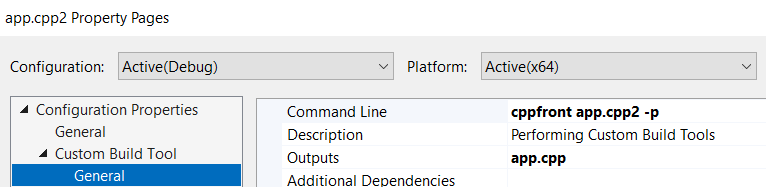
Finally, put the `/cppfront/include` directory on your `INCLUDE` path. In Solution Explorer, right-click the app and select Properties, and add it to the VC++ Directories > Include Directories:

## That's it: Error message outputs, debuggers, visualizers, and other tools should just work
That's enough to enable builds, and the IDE just picks up the rest from the `.cpp` file that cppfront generated:
- **The cppfront error messages in `filename(line, col)` format.** Most C++ IDEs recognize these, and usually automatically merge any diagnostic output wherever compiler error output normally appears. If your IDE prefers `filename:line:col`, just use the cppfront `-format-colon-errors` command line option.
- **The `#line` directives cppfront emits in the generated `.cpp` file.** Most C++ debuggers recognize these and will know to step through the `.cpp2` file. Note that `#line` emission is on by default, but if you choose `-c` (short for `-clean-cpp1`) these will be suppressed and then the debugger will step through the generated C++ code instead. If your debugger can't find the files, you may need to use `-line-paths` to have absolute paths instead of relative paths in the `#line` directives.
- **Regardless of syntax, every type/function/object/namespace/etc. is still just an ordinary C++ type/function/object/namespace/etc.** Most C++ debugger visualizers will just work and show beautiful output for the types your program uses, including to use any in-the-box visualizers for all the `std::` types (since those are used directly as usual) and any custom visualizers you may have already written for your own types or popular library types.
---
--- METRICS ---
- Files Extracted: 20
- Estimated Token Budget: ~47190 tokens
- Canonical Reference: https://codewiki.google/github.com/hsutter/cppfront