## [Live Demo](https://www.vvveb.com/vvvebjs/editor.html)
For a full featured Open Source CMS using VvvebJs page builder check [Vvveb CMS](https://github.com/givanz/Vvveb)
Using [Vvveb landing page template](https://github.com/givanz/landing) for demo page and Bootstrap 5 sections and blocks.
### Features
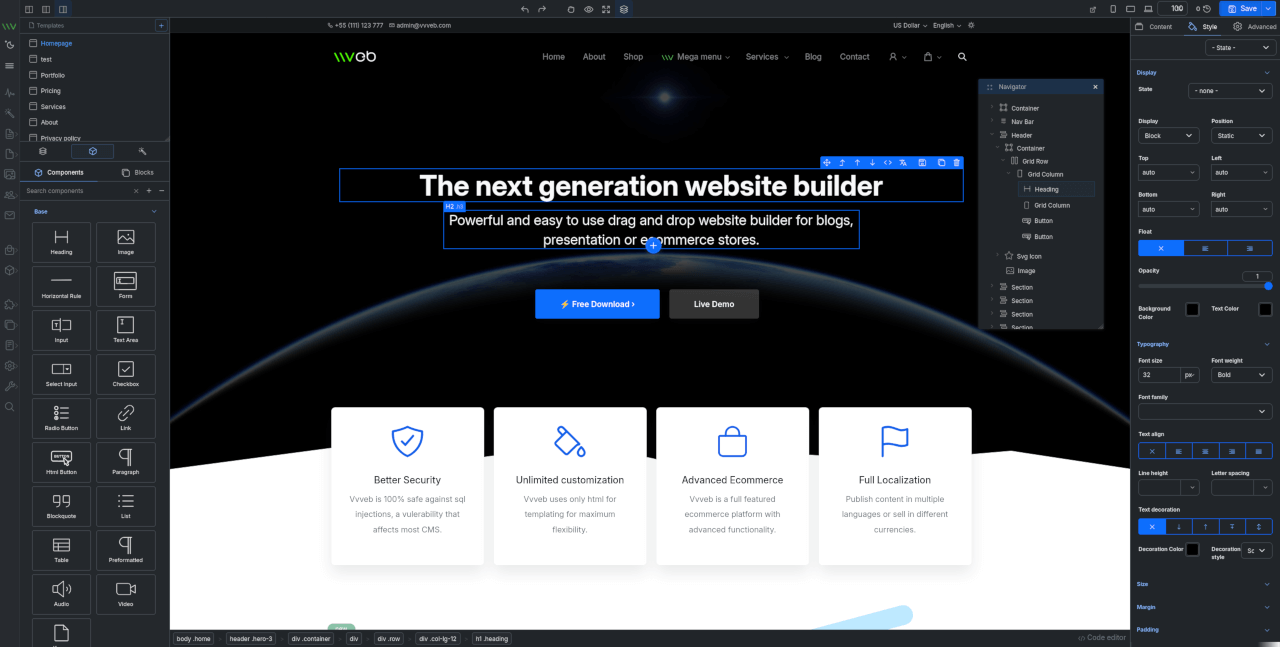
* Components and blocks/snippets drag and drop and in page insert.
* Undo/Redo operations.
* One or two panels interface.
* File manager and component hierarchy navigation.
* Add new page modal with template and folder options.
* Live code editor with codemirror plugin syntax highlighting.
* Image upload with example php script included.
* Page download or export html or save page on server with example php script included.
* Components/Sections/Blocks list search.
* Bootstrap 5 components.
* Media gallery with integrated CC0 image search and server upload support.
* Image, video and iframe elements resize handles.
* Elements breadcrumb for easier parent elements selection.
* Full Google fonts list support for font selection.
* Youtube, Google maps, Charts.js etc widgets.
* Optional CKEditor plugin to replace builtin text editor.
* Zip download plugin to download the page and all assets as zip file.
* SVG Icon component bundled with hundreds of free icons.
* Animate on scroll support for page elements.
* Theme global typography and color pallette editor.
By default the editor comes with Bootstrap 5 and Widgets components and can be extended with any kind of components and inputs.
## Install
* Clone the repository
```bash
#git 2.13+
git clone --recurse-submodules https://github.com/givanz/VvvebJs
# older git versions
git clone --recursive https://github.com/givanz/VvvebJs
```
* Pull changes
```bash
git pull --recurse-submodules
```
## Usage
Clone the repository or download a release then open `editor.html`
Because of browser iframe security you need to use a webserver such as apache/xampp and open `http://localhost/editor.html`
To disable browser security and open `editor.html` without installing a webserver run chrome with
```bash
chrome --disable-web-security --user-data-dir=/tmp/temporary_profile editor.html
```
To use the image upload or page save feature you need to have php installed.
## Docker
### Local development
From VvvebJs folder run
```bash
docker-compose up
```
### Image
Or run image
```bash
docker run -p 8080:80 vvveb/vvvebjs
```
Open http://localhost:8080/editor.php or http://localhost:8080/editor.html
## Save page
Save page function needs either php or node
### PHP
If you use docker, xampp or a shared hosting account php should work without any change.
Saving is done using [save.php](save.php)
### Node
For node go to VvvebJs folder and run
```bash
npm install express
node save.js
```
Open http://localhost:8080/editor.html
Saving is done using [save.js](save.js)
## [Landing template](https://github.com/givanz/landing)
To make changes to template files or sections run the following commands from `demo/landing` folder
### Install gulp
```bash
npm i
```
### Generate html files
Template html partials are located in `demo/landing/src` folder.
```bash
npm run gulp
```
### Watch for changes for development
```bash
npm run gulp watch
```
### Generate sections list for page builder
Sections html files are located in `demo/landing/src/sections` folder grouped in folders with the section group name.
```bash
npm run gulp sections
```
### Generate blocks list
Blocks html files are located in `demo/landing/src/blocks` folder grouped in folders with the blocks group name.
```bash
npm run gulp blocks
```
### Generate screenshots for sections
```bash
npm run gulp screenshots
```
## Usage
### Initialize example
```js
```
To use an icon, add the `` element to the location where the icon should be displayed:
```html
```
To use solid icons or logos add attribute `type` as solid or logo before the name
```html
```
The `` custom element supports the following attributes:
```html
```
- `type`: Should always be first and be one of the following values: `regular`,`solid`, `logo`
- `name` : (REQUIRED) the name of the icon to be displayed
- `color`: A color for the icon.
- `size`: The size for the icon. It supports one of two types of values:
- One of the following shortcuts: `xs`, `sm`, `md`, `lg`
- A css unit size (ex. `60px`)
- `rotate`: one of the following values: `90`, `180`, `270`
- `flip`: one of the following values: `horizontal`, `vertical`
- `border`: one of the following values: `square`, `circle`
- `animation`: One of the following values: `spin`, `tada`, `flashing`, `burst`, `fade-left`, `fade-right`, `spin-hover`, `tada-hover`, `flashing-hover`, `burst-hover`, `fade-left-hover`, `fade-right-hover`
- `pull`: one of the following values: `left`,`right`
The Custom Element class (`BoxIconElement`) exposes the following static members:
- `tagName`: property that holds the HTML element tag name. Default: `box-icon`
- `defined([tagName])`: Defines the Element in the custom element registry using either the tagName provided on input or the (default) the one defined on the Class.
- `cdnUrl`: property that holds the URL that will be used to retrieve the images. URL should point to the folder that contains the images. example: `//unpkg.com/boxicons@1.5.2/svg` (no trailing forward slash)
- `getIconSvg(iconName)`: method used to retrieve the SVG image. Should return a Promise that resolves with the SVG source (String).
[Check out all the icons here!](https://boxicons.com)
## Contributors
### Code Contributors
This project exists thanks to all the people who contribute. [[Contribute](CONTRIBUTING.md)].
### Financial Contributors
Become a financial contributor and help us sustain our community. [[Contribute](https://opencollective.com/boxicons/contribute)]
#### Individuals
#### Organizations
Support this project with your organization. Your logo will show up here with a link to your website. [[Contribute](https://opencollective.com/boxicons/contribute)]
## License
- The icons (.svg) files are free to download and are licensed under CC 4.0 By downloading it is assumed that you agree with the terms mentioned in CC 4.0.
- The fonts files are licensed under SIL OFL 1.1.
- Attribution is not required but is appreciated.
- Other files which are not fonts or icons are licensed under the MIT License.
[You can read more about the license here!](https://boxicons.com/get-started#license)
## Contributing
Pull requests are the way to go here. I apologise in advance for the slow action on pull requests and issues.
Caught a mistake or want to contribute to the documentation? [Edit this page on Github](https://github.com/atisawd/boxicons/blob/master/README.md)
---
### Resources/Svg/Icons/Clarity Icons/README (resources/svg/icons/clarity-icons/README.md)
# Clarity Assets
This repository is part of the [Clarity](https://github.com/vmware/clarity) project, and its purpose is to store the static assets that we provide for consumers of Clarity.
You are welcome to download the files from here, or you can find them listed our website https://clarity.design as well.
### Contents
**icons** contains the sets of icons from Clarity Icons
**sketch** contains the sketch files for designers crafting interfaces with Clarity
---
### Resources/Svg/Icons/Clarity Icons/NOTICE (resources/svg/icons/clarity-icons/NOTICE.txt)
Copyright (c) 2018 VMware, Inc.
This product is licensed to you under the MIT license (the "License"). You may not use this product except in compliance with the MIT License.
This product may include a number of subcomponents with separate copyright notices and license terms. Your use of these subcomponents is subject to the terms and conditions of the subcomponent's license, as noted in the LICENSE file.
---
### Resources/Svg/Icons/Coreui Icons/README (resources/svg/icons/coreui-icons/README.md)
# CoreUI Icons (1500+ Free icons)- Simply beautiful open source icons
CoreUI Icons is an open-source icon set with more than 1500 icons in multiple formats SVG, PNG, and Webfonts. CoreUI Icons are beautifully crafted symbols for common actions and items. You can use them in your digital products for web or mobile app.
## Table of Contents
- [CoreUI Icons (1500+ Free icons)- Simply beautiful open source icons](#coreui-icons-1500-free-icons--simply-beautiful-open-source-icons)
- [Table of Contents](#table-of-contents)
- [Preview & Docs](#preview--docs)
- [Installation](#installation)
- [CDN](#cdn)
- [NPM](#npm)
- [Yarn](#yarn)
- [Usage](#usage)
- [Basic Use](#basic-use)
- [SVG Sprites](#svg-sprites)
- [SVG Symbols](#svg-symbols)
- [CoreUI Icons for Angular](#coreui-icons-for-angular)
- [CoreUI Icons for React.js](#coreui-icons-for-reactjs)
- [CoreUI Icons for Vue.js](#coreui-icons-for-vuejs)
- [CoreUI Icons PRO](#coreui-icons-pro)
- [License](#license)
- [CoreUI Icons Free Icons](#coreui-icons-free-icons)
- [CoreUI Icons Brand and Flag Icons](#coreui-icons-brand-and-flag-icons)
- [Brand Icons](#brand-icons)
## Preview & Docs
[https://coreui.io/icons/](https://coreui.io/icons/)
## Installation
### CDN
```html
```
or
```html
```
### NPM
```shell
npm install @coreui/icons --save
```
### Yarn
```shell
yarn add @coreui/icons
```
Or, you can also clone or [download this repository](https://github.com/coreui/coreui-icons/archive/master.zip) as zip.
## Usage
### Basic Use
You can place CoreUI Icons just about anywhere using a CSS style prefix and the icon’s name. CoreUI Icons are designed to be used with inline elements ex. `` or ``.
Please use `cil-` prefix for linear icons, `cib-` prefix for brand icons, and `cif-` prefix for flag icons.
```html
```
```html
```
```html
```
### SVG Sprites
SVG sprites let you quickly use vector icons in your website. We have prepared all the icon set styles into their own SVG sprites.
Place sprite files with the rest of your static files, like images and styles, in your project. Make sure to add a proper path to the SVG sprite file, and use the fragment identifier specific to the SVG icon or symbol you want to display.
```html
```
### SVG Symbols
When you download your icon set, it comes with a sprites directory that contains SVG icon definitions. These icons can be referenced and used as inline SVGs like so:
```
/* Detailed source-code truncated for AI context efficiency. */
```
It is also possible to link to an external SVG containing the definitions:
```html
```
Referencing an external SVG has the advantage that your icons get cached, with one HTTP request. But the external SVG and the HTML should be served from the same domain. This approach works fine in modern browsers except for IE 9+. In order to support IE 9+, You should use `/js/svgxuse.js` or `/js/svgxuse.min.js`. This polyfill detects if the icons are loaded properly; if they aren't, it sends one HTTP request to fetch and cache symbol definitions.
```html
```
### CoreUI Icons for Angular
- Please check official repository [CoreUI Icons for Angular](https://github.com/coreui/coreui-icons-angular)
### CoreUI Icons for React.js
- Please check official repository [CoreUI Icons for React](https://github.com/coreui/coreui-icons-react)
### CoreUI Icons for Vue.js
- Please check official repository [CoreUI Icons for Vue.js](https://github.com/coreui/coreui-icons-vue)
## CoreUI Icons PRO
If our free icon set is insufficient you can buy [CoreUI Icons Pro](https://coreui.io/icons/pro/) with more than 2000 icons, and more styles - Solid, Duo-Tone and Linear.
## License
### CoreUI Icons Free Icons
CoreUI Icons Free is free, open source, and GPL friendly. You can use it for
commercial projects, open source projects, or really almost whatever you want.
- Icons — CC BY 4.0 License
- In the CoreUI Icons Free, the CC BY 4.0 license applies to all icons
packaged as .svg and .js files types.
- Fonts — SIL OFL 1.1 License
- In the CoreUI Icons Free, the SIL OLF license applies to all icons
packaged as web and desktop font files.
- Code — MIT License
- In the CoreUI Icons Free, the MIT license applies to all
non-font and non-icon files.
### CoreUI Icons Brand and Flag Icons
#### Brand Icons
All brand icons are trademarks of their respective owners. The use of these
trademarks does not indicate endorsement of the trademark holder by Font
Awesome, nor vice versa. **Please do not use brand logos for any purpose except
to represent the company, product, or service to which they refer.**
**CC0 1.0 Universal**
Statement of Purpose
The laws of most jurisdictions throughout the world automatically confer
exclusive Copyright and Related Rights (defined below) upon the creator and
subsequent owner(s) (each and all, an "owner") of an original work of
authorship and/or a database (each, a "Work").
Certain owners wish to permanently relinquish those rights to a Work for the
purpose of contributing to a commons of creative, cultural and scientific
works ("Commons") that the public can reliably and without fear of later
claims of infringement build upon, modify, incorporate in other works, reuse
and redistribute as freely as possible in any form whatsoever and for any
purposes, including without limitation commercial purposes. These owners may
contribute to the Commons to promote the ideal of a free culture and the
further production of creative, cultural and scientific works, or to gain
reputation or greater distribution for their Work in part through the use and
efforts of others.
For these and/or other purposes and motivations, and without any expectation
of additional consideration or compensation, the person associating CC0 with a
Work (the "Affirmer"), to the extent that he or she is an owner of Copyright
and Related Rights in the Work, voluntarily elects to apply CC0 to the Work
and publicly distribute the Work under its terms, with knowledge of his or her
Copyright and Related Rights in the Work and the meaning and intended legal
effect of CC0 on those rights.
1. Copyright and Related Rights. A Work made available under CC0 may be
protected by copyright and related or neighboring rights ("Copyright and
Related Rights"). Copyright and Related Rights include, but are not limited
to, the following:
i. the right to reproduce, adapt, distribute, perform, display, communicate,
and translate a Work;
ii. moral rights retained by the original author(s) and/or performer(s);
iii. publicity and privacy rights pertaining to a person's image or likeness
depicted in a Work;
iv. rights protecting against unfair competition in regards to a Work,
subject to the limitations in paragraph 4(a), below;
v. rights protecting the extraction, dissemination, use and reuse of data in
a Work;
vi. database rights (such as those arising under Directive 96/9/EC of the
European Parliament and of the Council of 11 March 1996 on the legal
protection of databases, and under any national implementation thereof,
including any amended or successor version of such directive); and
vii. other similar, equivalent or corresponding rights throughout the world
based on applicable law or treaty, and any national implementations thereof.
2. Waiver. To the greatest extent permitted by, but not in contravention of,
applicable law, Affirmer hereby overtly, fully, permanently, irrevocably and
unconditionally waives, abandons, and surrenders all of Affirmer's Copyright
and Related Rights and associated claims and causes of action, whether now
known or unknown (including existing as well as future claims and causes of
action), in the Work (i) in all territories worldwide, (ii) for the maximum
duration provided by applicable law or treaty (including future time
extensions), (iii) in any current or future medium and for any number of
copies, and (iv) for any purpose whatsoever, including without limitation
commercial, advertising or promotional purposes (the "Waiver"). Affirmer makes
the Waiver for the benefit of each member of the public at large and to the
detriment of Affirmer's heirs and successors, fully intending that such Waiver
shall not be subject to revocation, rescission, cancellation, termination, or
any other legal or equitable action to disrupt the quiet enjoyment of the Work
by the public as contemplated by Affirmer's express Statement of Purpose.
3. Public License Fallback. Should any part of the Waiver for any reason be
judged legally invalid or ineffective under applicable law, then the Waiver
shall be preserved to the maximum extent permitted taking into account
Affirmer's express Statement of Purpose. In addition, to the extent the Waiver
is so judged Affirmer hereby grants to each affected person a royalty-free,
non transferable, non sublicensable, non exclusive, irrevocable and
unconditional license to exercise Affirmer's Copyright and Related Rights in
the Work (i) in all territories worldwide, (ii) for the maximum duration
provided by applicable law or treaty (including future time extensions), (iii)
in any current or future medium and for any number of copies, and (iv) for any
purpose whatsoever, including without limitation commercial, advertising or
promotional purposes (the "License"). The License shall be deemed effective as
of the date CC0 was applied by Affirmer to the Work. Should any part of the
License for any reason be judged legally invalid or ineffective under
applicable law, such partial invalidity or ineffectiveness shall not
invalidate the remainder of the License, and in such case Affirmer hereby
affirms that he or she will not (i) exercise any of his or her remaining
Copyright and Related Rights in the Work or (ii) assert any associated claims
and causes of action with respect to the Work, in either case contrary to
Affirmer's express Statement of Purpose.
4. Limitations and Disclaimers.
a. No trademark or patent rights held by Affirmer are waived, abandoned,
surrendered, licensed or otherwise affected by this document.
b. Affirmer offers the Work as-is and makes no representations or warranties
of any kind concerning the Work, express, implied, statutory or otherwise,
including without limitation warranties of title, merchantability, fitness
for a particular purpose, non infringement, or the absence of latent or
other defects, accuracy, or the present or absence of errors, whether or not
discoverable, all to the greatest extent permissible under applicable law.
c. Affirmer disclaims responsibility for clearing rights of other persons
that may apply to the Work or any use thereof, including without limitation
any person's Copyright and Related Rights in the Work. Further, Affirmer
disclaims responsibility for obtaining any necessary consents, permissions
or other rights required for any use of the Work.
d. Affirmer understands and acknowledges that Creative Commons is not a
party to this document and has no duty or obligation with respect to this
CC0 or use of the Work.
For more information, please see
---
### Resources/Svg/Icons/Css.Gg/README (resources/svg/icons/css.gg/README.md)
# [Demo](https://css.gg) - [Figma](https://css.gg/fig) - [Twitter](https://twitter.com/astritmalsija)
Open-source CSS, SVG and Figma UI Icons \
Available in SVG Sprite, styled-components, NPM & API
# New in 2.0
#### 🥳 200 New Icons
#### 🚀 SVG Icons
#### 🔥 SVG Sprite
#### 💅 Styled Components
#### ⚛️ React Local Styled Components
#### 🦄 Figma Components
#### 🔮 Adobe XD Components
# Table of Contents
* [Get Started](#get-started)
* [HTML include](#html-include)
* [1. All icons](#1-all-icons)
* [2. Single icon](#2-single-icon)
* [3. Collection](#3-collection)
* [4. Markup](#4-markup)
* [5. Example](#5-example)
* [CSS @import](#css--import)
* [1. All icons](#1-all-icons-1)
* [2. Single icon](#2-single-icon-1)
* [3. Collection](#3-collection-1)
* [4. Resizing](#4-resizing)
* [5. Coloring](#5-coloring)
* [SVG](#svg)
* [1. SVG Sprite - Download Path](#1-svg-sprite---download-path)
* [1.1. Example](#11-example)
* [2. SVG Single Icon - Download Path](#2-svg-single-icon---download-path)
* [2.1. Example - SVG Sprite](#21-example---svg-sprite)
* [2.2. Example - Inline SVG Sprite/Symbol](#22-example---inline-svg-sprite-symbol)
* [2.3. Example Single copy/paste icon](#23-example-single-copy-paste-icon)
* [3. Encode SVG for CSS](#3-encode-svg-for-css)
* [3.1. Example - Encoded SVG for CSS icon](#31-example---encoded-svg-for-css-icon)
* [4. Coloring a SVG icon](#4-coloring-a-svg-icon)
* [4.1. Directly on the icon](#41-directly-on-the-icon)
* [4.2. using class](#42-using-class)
* [JSON - paths](#json---paths)
* [1. All icons](#1-all-icons-2)
* [2. Single icon](#2-single-icon-2)
* [3. Collection](#3-collection-2)
* [XML - paths](#xml---paths)
* [1. All icons](#1-all-icons-3)
* [2. Single icon](#2-single-icon-3)
* [3. Collection](#3-collection-3)
* [React](#react)
* [1. Styled Components](#1-styled-components---)
* [2. Local Single Icon as `styled-component`](#2-local-single-icon-as--styled-component-)
* [2.1. Copy directly from the page](#21-copy-directly-from-the-page)
* [2.2. Local Component Example](#22-local-component-example)
* [3. SVG Sprite method](#3-svg-sprite-method)
* [4. All CSS icons](#4-all-css-icons)
* [4.1. Single CSS icon](#41-single-css-icon)
* [5. All SCSS icons](#5-all-scss-icons)
* [5.1. Single SCSS icon](#51-single-scss-icon)
* [6. Combined import SVG, CSS, SCSS etc.](#6-combined-import-svg-css-scss-etc)
* [Design Tools](#design-tools)
* [1. Figma](#1-figma---httpscssggfig)
* [2. Adobe XD](#2-adobe-xd---httpscssggxd)
* [Contributors](#contributors)
* [Donate](#donate)
* [Support](#support)
* [v.1.0.6 or older](#v106-or-older)
* [TODO:](#todo)
# Get Started
Install the latest version via npm or yarn
```shell
npm i css.gg
```
```shell
yarn add css.gg
```
Using Package Manager \
This package contains the following directories and files:
| Path | What it is |
| :-| :-|
| /css | individual *.css icons |
| /scss | individual *.scss icons |
| /svg | individual *.svg icons |
| /tsx | individual *.tsx icons `styled-components` |
| /all.css | all icons compressed in a single file |
| /all.d.ts | `styled-components` |
| /all.fig | local figma file same as https://css.gg/fig |
| /all.js | list of exported `styled-components` |
| /all.js.map | `styled-components` |
| /all.json | all icons *.css, *.svg, *.tsx including markup & public path |
| /all.scss | all icons in a single SCSS file `npm i node-sass` needed |
| /all.svg | SVG Sprite with all icons |
| /all.xd | local adobe xd file same as https://css.gg/xd |
| /all.xml | all icons *.css, *.svg, *.tsx including markup & public path |
# HTML include
#### 1. All icons
```html
```
#### 2. Single icon
```html
```
#### 3. Collection
```html
```
#### 4. Markup
```html
```
##### 5. Example
```html
Document
```
# CSS @import
#### 1. All icons
```css
/* css.gg */
@import url('https://css.gg/css');
/* UNPKG */
@import url('https://unpkg.com/css.gg/icons/all.css');
/* JSDelivr */
@import url('https://cdn.jsdelivr.net/npm/css.gg/icons/all.css');
```
#### 2. Single icon
```css
/* css.gg */
@import url('https://css.gg/ {ICONNAME} .css');
/* UNPKG */
@import url('https://unpkg.com/css.gg/icons/css/ {ICONNAME} .css');
/* JSDelivr */
@import url('https://cdn.jsdelivr.net/npm/css.gg/icons/css/ {ICONNAME} .css');
```
#### 3. Collection
```css
/* css.gg */
@import url('https://css.gg/css?= {ICONNAME} | {ICONNAME}');
```
#### 4. Resizing
> To resize an icon you just need to change the value of a css variable "--ggs" to any value you like if not specified it falls back to 1 or the actual size.
```css
.gg-{ICONNAME} {
/* This value will multiple the actual size */
--ggs: 10;
}
```
> The variable can be added to the parent, custom class,body or root level if you want all icons same size.
```css
:root {
--ggs: 6;
}
```
#### 5. Coloring
By default all the CSS, SCSS icons inherit the color from the parent by using `currentColor` attribute how ever you can apply any color you like.
```css
.gg-{ICONNAME} {
color: teal;
}
```
# SVG
#### 1. SVG Sprite - Download Path
You can't use these paths, you must download since SVG doesn't allow external sources.
```html
https://css.gg/svg
https://unpkg.com/css.gg/icons/all.svg
https://cdn.jsdelivr.net/npm/css.gg/icons/all.svg
```
##### 1.1. Example
```html
Document
```
#### 2. SVG Single Icon - Download Path
```html
https://css.gg/ {ICONNAME} .svg
https://unpkg.com/css.gg/icons/svg/ {ICONNAME} .svg
https://cdn.jsdelivr.net/npm/css.gg/icons/svg/ {ICONNAME} .svg
```
##### 2.1. Example - SVG Sprite
```html
Document
```
##### 2.2. Example - Inline SVG Sprite/Symbol
You can add as symbol each or copy the entire file contents at one of the CDN alternatives as mentioned at 2.1
```html
Document
```
#### 2.3. Example Single copy/paste icon
You can go to `https://css.gg/{ICONNAME}` and copy the SVG icon directy and paste it on your project. \
You can also download a single icon by just visiting `https://css.gg/{ICONNAME}.svg`
```html
Document
```
#### 3. Encode SVG for CSS
You need to define width and height in order for this to work.
Afterwards you can just create a div
```css
.gg-{ICONNAME} {
background-image:
url("data:image/svg+xml,");
}
```
> To encode use this tool \
https://yoksel.github.io/url-encoder/
#### 3.1. Example - Encoded SVG for CSS icon
```html
Document
```
#### 4. Coloring a SVG icon
By default all colors use `currentColor` as value in order to inherit the color from the parent. \
If you wish to change that color you can do the following.
#### 4.1. Directly on the icon
```html
Document
```
#### 4.2. using class
```html
Document
```
# JSON - paths
#### 1. All icons
```html
https://css.gg/json
https://css.gg/json?=&op=css
https://css.gg/json?=&op=css+markup
https://unpkg.com/css.gg/icons/all.json
https://cdn.jsdelivr.net/npm/css.gg/icons/all.json
```
#### 2. Single icon
```html
https://css.gg/json?= {ICONNAME}
https://css.gg/json?= {ICONNAME} &op=css
https://css.gg/json?= {ICONNAME} &op=css+markup
```
#### 3. Collection
```html
https://css.gg/json?= {ICONNAME} | {ICONNAME}
https://css.gg/json?= {ICONNAME} | {ICONNAME} &op=css
https://css.gg/json?= {ICONNAME} | {ICONNAME} &op=css+markup
```
# XML - paths
#### 1. All icons
```html
https://css.gg/xml
https://css.gg/xml?=&op=css
https://css.gg/xml?=&op=css+markup
https://unpkg.com/css.gg/icons/all.xml
https://cdn.jsdelivr.net/npm/css.gg/icons/all.xml
```
#### 2. Single icon
```html
https://css.gg/xml?= {ICONNAME}
https://css.gg/xml?= {ICONNAME} &op=css
https://css.gg/xml?= {ICONNAME} &op=css+markup
```
#### 3. Collection
```html
https://css.gg/xml?= {ICONNAME} | {ICONNAME}
https://css.gg/xml?= {ICONNAME} | {ICONNAME} &op=css
https://css.gg/xml?= {ICONNAME} | {ICONNAME} &op=css+markup
```
# React
On a React project you can include a single icon as CSS, Styled Component, SCSS, SVG or call the contents using .json or .xml files.
\
Note that only `styled-components` icons can be called directly such as:
```js
import { ICONNAME } from 'css.gg'
```
#### 1. Styled Components 💅
After you install the package by using `npm i css.gg` or `yarn add css.gg` you can add a single icon like this:
```js
import React from 'react'
import { ICONNAME } from 'css.gg'
export default function() {
return (
)
}
```
#### 2. Local Single Icon as `styled-component`
If you need to download a single `typescript` or `styled-componment` format icon without downloading the entire package just visit the link like this:
```html
https://css.gg/{ICONNAME}.tsx
```
#### 2.1. Copy directly from the page
If you don't want to download at all but just copy paste visit the icon page and you have a special tab for it.
```html
https://css.gg/{ICONNAME}
```
#### 2.2. Local Component Example
```js
import React from 'react';
// local path
import { ICONNAME } from "./ {ICONNAME} "
function App() {
return (
);
}
export default App;
```
#### 3. SVG Sprite method
```js
import React from 'react';
// Import function from package
import { SVG } from 'css.gg'
function App() {
return (
);
}
export default App;
```
#### 4. All CSS icons
```js
import React from 'react';
// Import function from package
import { CSS } from 'css.gg'
function App() {
return (
);
}
export default App;
```
#### 4.1. Single CSS icon
```js
import React from 'react';
// Import path from package
import 'css.gg/icons/css/ {ICONNAME} .css'
function App() {
return (
);
}
export default App;
```
#### 5. All SCSS icons
SCSS format to work you need to have `node-sass` installed `npm i node-sass`
```js
import React from 'react';
// Import function from package
import { SCSS } from 'css.gg'
function App() {
return (
);
}
export default App;
```
#### 5.1. Single SCSS icon
SCSS format to work you need to have `node-sass` installed `npm i node-sass`
```js
import React from 'react';
// Import path from package
import 'css.gg/icons/scss/ {ICONNAME} .scss'
function App() {
return (
);
}
export default App;
```
#### 6. Combined import SVG, CSS, SCSS etc.
```js
import { SVG, CSS, SCSS, ICONNAME, ICONNAME } from 'css.gg'
```
# Design Tools
#### 1. Figma - https://css.gg/fig
All icons are available as components on assets from where you can search for a sigle icon or browse categories.
#### 2. Adobe XD - https://css.gg/xd
All icons are available as components \
# Contributors
1. [Astrit](https://github.com/astrit) - Author
2. [JiangWeixian](https://github.com/jiangWeixian) - Styled Components
3. [Lona](https://www.figma.com/@lona) - Figma/SVG Design
To become a contributor do a [new pull request](https://github.com/astrit/css.gg/pulls).
# Donate
| Source | Link |
| :-------------- | :----------------------------------|
| Github Sponsor | https://github.com/sponsors/astrit |
| Open Collective | https://opencollective.com/css-gg |
| PayPal | https://paypal.me/GjonMalsijaj |
# Support
Discord - https://discord.gg/e7NDKFM
# v.1.0.6 or older
In order to access older versions you can use one of the provided CDN Alternatives
```html
https://unpkg.com/browse/css.gg@1.0.6/
https://cdn.jsdelivr.net/npm/css.gg@1.0.6/
```
# TODO:
1. CSS Modules
2. Angluar
3. Vue.js
If you would like to contribute feel free to do a [new pull request](https://github.com/astrit/css.gg/pulls).
---
### Resources/Svg/Icons/Dripicons/Readme (resources/svg/icons/dripicons/readme.txt)
Dripicons V2 has been created by Amit Jakhu from www.amitjakhu.com
Terms of Use:
Dripicons V2 is available for free for use in both personal and commercial projects. Dripicons 2.0 are licensed under Creative Commons Attribution 4.0 International License (http://creativecommons.org/licenses/by-sa/4.0/) and the font under SIL Open Font License (http://scripts.sil.org/cms/scripts/page.php?site_id=nrsi&id=OFL).
You may freely use this icon set without restriction, in software programs, web templates and other materials intended for sale or distribution. No attribution or backlinks are required, but any form of spreading the word is always appreciated!
---
### Resources/Svg/Icons/Elegant Font/Gpl License (resources/svg/icons/elegant-font/gpl_license.txt)
GNU GENERAL PUBLIC LICENSE
Version 2, June 1991
Copyright (C) 1989, 1991 Free Software Foundation, Inc.,
51 Franklin Street, Fifth Floor, Boston, MA 02110-1301 USA
Everyone is permitted to copy and distribute verbatim copies
of this license document, but changing it is not allowed.
Preamble
The licenses for most software are designed to take away your
freedom to share and change it. By contrast, the GNU General Public
License is intended to guarantee your freedom to share and change free
software--to make sure the software is free for all its users. This
General Public License applies to most of the Free Software
Foundation's software and to any other program whose authors commit to
using it. (Some other Free Software Foundation software is covered by
the GNU Lesser General Public License instead.) You can apply it to
your programs, too.
When we speak of free software, we are referring to freedom, not
price. Our General Public Licenses are designed to make sure that you
have the freedom to distribute copies of free software (and charge for
this service if you wish), that you receive source code or can get it
if you want it, that you can change the software or use pieces of it
in new free programs; and that you know you can do these things.
To protect your rights, we need to make restrictions that forbid
anyone to deny you these rights or to ask you to surrender the rights.
These restrictions translate to certain responsibilities for you if you
distribute copies of the software, or if you modify it.
For example, if you distribute copies of such a program, whether
gratis or for a fee, you must give the recipients all the rights that
you have. You must make sure that they, too, receive or can get the
source code. And you must show them these terms so they know their
rights.
We protect your rights with two steps: (1) copyright the software, and
(2) offer you this license which gives you legal permission to copy,
distribute and/or modify the software.
Also, for each author's protection and ours, we want to make certain
that everyone understands that there is no warranty for this free
software. If the software is modified by someone else and passed on, we
want its recipients to know that what they have is not the original, so
that any problems introduced by others will not reflect on the original
authors' reputations.
Finally, any free program is threatened constantly by software
patents. We wish to avoid the danger that redistributors of a free
program will individually obtain patent licenses, in effect making the
program proprietary. To prevent this, we have made it clear that any
patent must be licensed for everyone's free use or not licensed at all.
The precise terms and conditions for copying, distribution and
modification follow.
GNU GENERAL PUBLIC LICENSE
TERMS AND CONDITIONS FOR COPYING, DISTRIBUTION AND MODIFICATION
0. This License applies to any program or other work which contains
a notice placed by the copyright holder saying it may be distributed
under the terms of this General Public License. The "Program", below,
refers to any such program or work, and a "work based on the Program"
means either the Program or any derivative work under copyright law:
that is to say, a work containing the Program or a portion of it,
either verbatim or with modifications and/or translated into another
language. (Hereinafter, translation is included without limitation in
the term "modification".) Each licensee is addressed as "you".
Activities other than copying, distribution and modification are not
covered by this License; they are outside its scope. The act of
running the Program is not restricted, and the output from the Program
is covered only if its contents constitute a work based on the
Program (independent of having been made by running the Program).
Whether that is true depends on what the Program does.
1. You may copy and distribute verbatim copies of the Program's
source code as you receive it, in any medium, provided that you
conspicuously and appropriately publish on each copy an appropriate
copyright notice and disclaimer of warranty; keep intact all the
notices that refer to this License and to the absence of any warranty;
and give any other recipients of the Program a copy of this License
along with the Program.
You may charge a fee for the physical act of transferring a copy, and
you may at your option offer warranty protection in exchange for a fee.
2. You may modify your copy or copies of the Program or any portion
of it, thus forming a work based on the Program, and copy and
distribute such modifications or work under the terms of Section 1
above, provided that you also meet all of these conditions:
a) You must cause the modified files to carry prominent notices
stating that you changed the files and the date of any change.
b) You must cause any work that you distribute or publish, that in
whole or in part contains or is derived from the Program or any
part thereof, to be licensed as a whole at no charge to all third
parties under the terms of this License.
c) If the modified program normally reads commands interactively
when run, you must cause it, when started running for such
interactive use in the most ordinary way, to print or display an
announcement including an appropriate copyright notice and a
notice that there is no warranty (or else, saying that you provide
a warranty) and that users may redistribute the program under
these conditions, and telling the user how to view a copy of this
License. (Exception: if the Program itself is interactive but
does not normally print such an announcement, your work based on
the Program is not required to print an announcement.)
These requirements apply to the modified work as a whole. If
identifiable sections of that work are not derived from the Program,
and can be reasonably considered independent and separate works in
themselves, then this License, and its terms, do not apply to those
sections when you distribute them as separate works. But when you
distribute the same sections as part of a whole which is a work based
on the Program, the distribution of the whole must be on the terms of
this License, whose permissions for other licensees extend to the
entire whole, and thus to each and every part regardless of who wrote it.
Thus, it is not the intent of this section to claim rights or contest
your rights to work written entirely by you; rather, the intent is to
exercise the right to control the distribution of derivative or
collective works based on the Program.
In addition, mere aggregation of another work not based on the Program
with the Program (or with a work based on the Program) on a volume of
a storage or distribution medium does not bring the other work under
the scope of this License.
3. You may copy and distribute the Program (or a work based on it,
under Section 2) in object code or executable form under the terms of
Sections 1 and 2 above provided that you also do one of the following:
a) Accompany it with the complete corresponding machine-readable
source code, which must be distributed under the terms of Sections
1 and 2 above on a medium customarily used for software interchange; or,
b) Accompany it with a written offer, valid for at least three
years, to give any third party, for a charge no more than your
cost of physically performing source distribution, a complete
machine-readable copy of the corresponding source code, to be
distributed under the terms of Sections 1 and 2 above on a medium
customarily used for software interchange; or,
c) Accompany it with the information you received as to the offer
to distribute corresponding source code. (This alternative is
allowed only for noncommercial distribution and only if you
received the program in object code or executable form with such
an offer, in accord with Subsection b above.)
The source code for a work means the preferred form of the work for
making modifications to it. For an executable work, complete source
code means all the source code for all modules it contains, plus any
associated interface definition files, plus the scripts used to
control compilation and installation of the executable. However, as a
special exception, the source code distributed need not include
anything that is normally distributed (in either source or binary
form) with the major components (compiler, kernel, and so on) of the
operating system on which the executable runs, unless that component
itself accompanies the executable.
If distribution of executable or object code is made by offering
access to copy from a designated place, then offering equivalent
access to copy the source code from the same place counts as
distribution of the source code, even though third parties are not
compelled to copy the source along with the object code.
4. You may not copy, modify, sublicense, or distribute the Program
except as expressly provided under this License. Any attempt
otherwise to copy, modify, sublicense or distribute the Program is
void, and will automatically terminate your rights under this License.
However, parties who have received copies, or rights, from you under
this License will not have their licenses terminated so long as such
parties remain in full compliance.
5. You are not required to accept this License, since you have not
signed it. However, nothing else grants you permission to modify or
distribute the Program or its derivative works. These actions are
prohibited by law if you do not accept this License. Therefore, by
modifying or distributing the Program (or any work based on the
Program), you indicate your acceptance of this License to do so, and
all its terms and conditions for copying, distributing or modifying
the Program or works based on it.
6. Each time you redistribute the Program (or any work based on the
Program), the recipient automatically receives a license from the
original licensor to copy, distribute or modify the Program subject to
these terms and conditions. You may not impose any further
restrictions on the recipients' exercise of the rights granted herein.
You are not responsible for enforcing compliance by third parties to
this License.
7. If, as a consequence of a court judgment or allegation of patent
infringement or for any other reason (not limited to patent issues),
conditions are imposed on you (whether by court order, agreement or
otherwise) that contradict the conditions of this License, they do not
excuse you from the conditions of this License. If you cannot
distribute so as to satisfy simultaneously your obligations under this
License and any other pertinent obligations, then as a consequence you
may not distribute the Program at all. For example, if a patent
license would not permit royalty-free redistribution of the Program by
all those who receive copies directly or indirectly through you, then
the only way you could satisfy both it and this License would be to
refrain entirely from distribution of the Program.
If any portion of this section is held invalid or unenforceable under
any particular circumstance, the balance of the section is intended to
apply and the section as a whole is intended to apply in other
circumstances.
It is not the purpose of this section to induce you to infringe any
patents or other property right claims or to contest validity of any
such claims; this section has the sole purpose of protecting the
integrity of the free software distribution system, which is
implemented by public license practices. Many people have made
generous contributions to the wide range of software distributed
through that system in reliance on consistent application of that
system; it is up to the author/donor to decide if he or she is willing
to distribute software through any other system and a licensee cannot
impose that choice.
This section is intended to make thoroughly clear what is believed to
be a consequence of the rest of this License.
8. If the distribution and/or use of the Program is restricted in
certain countries either by patents or by copyrighted interfaces, the
original copyright holder who places the Program under this License
may add an explicit geographical distribution limitation excluding
those countries, so that distribution is permitted only in or among
countries not thus excluded. In such case, this License incorporates
the limitation as if written in the body of this License.
9. The Free Software Foundation may publish revised and/or new versions
of the General Public License from time to time. Such new versions will
be similar in spirit to the present version, but may differ in detail to
address new problems or concerns.
Each version is given a distinguishing version number. If the Program
specifies a version number of this License which applies to it and "any
later version", you have the option of following the terms and conditions
either of that version or of any later version published by the Free
Software Foundation. If the Program does not specify a version number of
this License, you may choose any version ever published by the Free Software
Foundation.
10. If you wish to incorporate parts of the Program into other free
programs whose distribution conditions are different, write to the author
to ask for permission. For software which is copyrighted by the Free
Software Foundation, write to the Free Software Foundation; we sometimes
make exceptions for this. Our decision will be guided by the two goals
of preserving the free status of all derivatives of our free software and
of promoting the sharing and reuse of software generally.
NO WARRANTY
11. BECAUSE THE PROGRAM IS LICENSED FREE OF CHARGE, THERE IS NO WARRANTY
FOR THE PROGRAM, TO THE EXTENT PERMITTED BY APPLICABLE LAW. EXCEPT WHEN
OTHERWISE STATED IN WRITING THE COPYRIGHT HOLDERS AND/OR OTHER PARTIES
PROVIDE THE PROGRAM "AS IS" WITHOUT WARRANTY OF ANY KIND, EITHER EXPRESSED
OR IMPLIED, INCLUDING, BUT NOT LIMITED TO, THE IMPLIED WARRANTIES OF
MERCHANTABILITY AND FITNESS FOR A PARTICULAR PURPOSE. THE ENTIRE RISK AS
TO THE QUALITY AND PERFORMANCE OF THE PROGRAM IS WITH YOU. SHOULD THE
PROGRAM PROVE DEFECTIVE, YOU ASSUME THE COST OF ALL NECESSARY SERVICING,
REPAIR OR CORRECTION.
12. IN NO EVENT UNLESS REQUIRED BY APPLICABLE LAW OR AGREED TO IN WRITING
WILL ANY COPYRIGHT HOLDER, OR ANY OTHER PARTY WHO MAY MODIFY AND/OR
REDISTRIBUTE THE PROGRAM AS PERMITTED ABOVE, BE LIABLE TO YOU FOR DAMAGES,
INCLUDING ANY GENERAL, SPECIAL, INCIDENTAL OR CONSEQUENTIAL DAMAGES ARISING
OUT OF THE USE OR INABILITY TO USE THE PROGRAM (INCLUDING BUT NOT LIMITED
TO LOSS OF DATA OR DATA BEING RENDERED INACCURATE OR LOSSES SUSTAINED BY
YOU OR THIRD PARTIES OR A FAILURE OF THE PROGRAM TO OPERATE WITH ANY OTHER
PROGRAMS), EVEN IF SUCH HOLDER OR OTHER PARTY HAS BEEN ADVISED OF THE
POSSIBILITY OF SUCH DAMAGES.
END OF TERMS AND CONDITIONS
How to Apply These Terms to Your New Programs
If you develop a new program, and you want it to be of the greatest
possible use to the public, the best way to achieve this is to make it
free software which everyone can redistribute and change under these terms.
To do so, attach the following notices to the program. It is safest
to attach them to the start of each source file to most effectively
convey the exclusion of warranty; and each file should have at least
the "copyright" line and a pointer to where the full notice is found.
Copyright (C)
This program is free software; you can redistribute it and/or modify
it under the terms of the GNU General Public License as published by
the Free Software Foundation; either version 2 of the License, or
(at your option) any later version.
This program is distributed in the hope that it will be useful,
but WITHOUT ANY WARRANTY; without even the implied warranty of
MERCHANTABILITY or FITNESS FOR A PARTICULAR PURPOSE. See the
GNU General Public License for more details.
You should have received a copy of the GNU General Public License along
with this program; if not, write to the Free Software Foundation, Inc.,
51 Franklin Street, Fifth Floor, Boston, MA 02110-1301 USA.
Also add information on how to contact you by electronic and paper mail.
If the program is interactive, make it output a short notice like this
when it starts in an interactive mode:
Gnomovision version 69, Copyright (C) year name of author
Gnomovision comes with ABSOLUTELY NO WARRANTY; for details type `show w'.
This is free software, and you are welcome to redistribute it
under certain conditions; type `show c' for details.
The hypothetical commands `show w' and `show c' should show the appropriate
parts of the General Public License. Of course, the commands you use may
be called something other than `show w' and `show c'; they could even be
mouse-clicks or menu items--whatever suits your program.
You should also get your employer (if you work as a programmer) or your
school, if any, to sign a "copyright disclaimer" for the program, if
necessary. Here is a sample; alter the names:
Yoyodyne, Inc., hereby disclaims all copyright interest in the program
`Gnomovision' (which makes passes at compilers) written by James Hacker.
, 1 April 1989
Ty Coon, President of Vice
This General Public License does not permit incorporating your program into
proprietary programs. If your program is a subroutine library, you may
consider it more useful to permit linking proprietary applications with the
library. If this is what you want to do, use the GNU Lesser General
Public License instead of this License.
---
### Resources/Svg/Icons/Elegant Font/Mit License (resources/svg/icons/elegant-font/mit_license.txt)
The MIT License (MIT)
Copyright (c) <2013>
Permission is hereby granted, free of charge, to any person obtaining a copy
of this software and associated documentation files (the "Software"), to deal
in the Software without restriction, including without limitation the rights
to use, copy, modify, merge, publish, distribute, sublicense, and/or sell
copies of the Software, and to permit persons to whom the Software is
furnished to do so, subject to the following conditions:
The above copyright notice and this permission notice shall be included in
all copies or substantial portions of the Software.
THE SOFTWARE IS PROVIDED "AS IS", WITHOUT WARRANTY OF ANY KIND, EXPRESS OR
IMPLIED, INCLUDING BUT NOT LIMITED TO THE WARRANTIES OF MERCHANTABILITY,
FITNESS FOR A PARTICULAR PURPOSE AND NONINFRINGEMENT. IN NO EVENT SHALL THE
AUTHORS OR COPYRIGHT HOLDERS BE LIABLE FOR ANY CLAIM, DAMAGES OR OTHER
LIABILITY, WHETHER IN AN ACTION OF CONTRACT, TORT OR OTHERWISE, ARISING FROM,
OUT OF OR IN CONNECTION WITH THE SOFTWARE OR THE USE OR OTHER DEALINGS IN
THE SOFTWARE.
---
### Resources/Svg/Icons/Eva Icons/README (resources/svg/icons/eva-icons/README.md)
Eva Icons
**Eva Icons** is a pack of more than 480 beautifully crafted Open Source icons for common actions and items. Additionally, Eva Icons supports 4 animation types: `zoom`, `pulse`, `shake` and `flip`. Download on desktop to use them in your digital products for Web, iOS and Android. Icons are provided in two visual types: `Fill` and `Outline` and in several formats, including `PNG`, `SVG`, `font`, `Sketch`, etc.
## Download
- [Complete Eva Icons Package](https://akveo.github.io/eva-icons/eva-icons.zip)
- [NPM Package](https://www.npmjs.com/package/eva-icons)
- you also can download icons one by one in `PNG` and `SVG` formats from [Eva Icons Website](https://akveo.github.io/eva-icons/?utm_campaign=eva_icons%20-%20home%20-%20eva_icons%20github%20readme&utm_source=eva_icons&utm_medium=referral&utm_content=github_readme_download_eva_icons).
### CDN
Load from CDN in your project:
```html
```
After including the script, `eva` will be available as a global variable.
### NPM
- Install the package:
```
npm i eva-icons
```
- Include it to your page:
```html
```
- Or require the package (may vary depending on your build system):
```js
const eva = require('eva-icons');
```
```js
import * as eva from 'eva-icons';
```
## How to use
### JavaScript
- Add the `data-eva` attribute with the icon name to an element:
```html
```
- Call `eva.replace();` to replace all elements with the `data-eva` data attribute with SVG elements. You can also pass some additional parameters to the `replace` method to modify the `replace` function behavior.
```html
```
*Thanks to Feather Icons for the build process inspiration.*
- Additional attributes:
* `data-eva-fill`: set icon color
* `data-eva-height`: set icon height
* `data-eva-width`: set icon width
* `data-eva-animation`: [set icon animation](#animation)
```html
```
### Fonts
Eva Icons are also available as a Web Font.
- Include the font css into your page:
```html
```
- Add `eva` and `eva-icon` classes to an element:
```html
```
We recommend using SVG icons due to better rendering and performance capabilities, [more details](https://css-tricks.com/icon-fonts-vs-svg/).
## Documentation
### `eva.replace(options)`
Replaces all elements that have a `data-eva` attribute with SVG markup.
`options` optional object.
#### Available 'option' properties:
| Name | Type | Default value | Description |
|------| ------ | ------------- |-------------|
| fill | string | none | Icon color |
| width | string or number | 24px | Icon width |
| height | string or number | 24px | Icon height |
| class | string | none | Custom css class |
| animation | object | none | [Icon animation](#animation) |
### Animation
- Add the `data-eva-animation` attribute with the animation type `(zoom, pulse, shake and flip)` to an element:
```html
```
- Additional animation attributes:
* `data-eva-hover`: Makes the animation available on hover. Default value is `true`. Available true or false.
* `data-eva-infinite`: Makes the animation infinite. Default value is `false`. Available true or false.
```html
```
> **Note:** In the above example `github icon` will be always animated. This type of animation will be applied only to current icons.
- Pass animation as property in a `eva.replace` method.
```js
eva.replace({
animation: {
type: string, // zoom, pulse, shake, flip
hover: boolean, // default true
infinite: boolean, // default false
}
});
```
> **Note:** The animation will be applied to all replaced elements.
- Add `eva-parent-hover` class to the parent container in a case you want to activate the animation hovering on the parent element.
```html
Zoom animation
```
## 3rd party implementations
- [React Native](https://github.com/artyorsh/react-native-eva-icons)
- [Flutter](https://github.com/piyushmaurya23/eva_icons_flutter)
## License
[MIT](LICENSE.txt) license.
## More from Akveo
- [Nebular](https://github.com/akveo/nebular) - Angular Components, Auth and Security
- [ngx-admin](https://github.com/akveo/ngx-admin) - the best Angular admin template
## How can I support the developers?
- Star our GitHub repo :star:
- Create pull requests, submit bugs, suggest new features or documentation updates :wrench:
- Follow us on [Twitter](https://twitter.com/akveo_inc) :feet:
- Like our page on [Facebook](https://www.facebook.com/akveo/) :thumbsup:
## From Developers
Made with :heart: by [Akveo team](https://www.akveo.com?utm_campaign=services%20-%20homepage%20-%20eva_icons%20github%20readme&utm_source=eva_icons&utm_medium=referral&utm_content=readme_made_with_heart). Follow us on [Twitter](https://twitter.com/akveo_inc) to get the latest news first!
We're always happy to receive your feedback!
---
### Resources/Svg/Icons/Eva Icons/LICENSE (resources/svg/icons/eva-icons/LICENSE.txt)
The MIT License (MIT)
Copyright (c) 2018 Akveo.
Permission is hereby granted, free of charge, to any person obtaining a copy
of this software and associated documentation files (the "Software"), to deal
in the Software without restriction, including without limitation the rights
to use, copy, modify, merge, publish, distribute, sublicense, and/or sell
copies of the Software, and to permit persons to whom the Software is
furnished to do so, subject to the following conditions:
The above copyright notice and this permission notice shall be included in all
copies or substantial portions of the Software.
THE SOFTWARE IS PROVIDED "AS IS", WITHOUT WARRANTY OF ANY KIND, EXPRESS OR
IMPLIED, INCLUDING BUT NOT LIMITED TO THE WARRANTIES OF MERCHANTABILITY,
FITNESS FOR A PARTICULAR PURPOSE AND NONINFRINGEMENT. IN NO EVENT SHALL THE
AUTHORS OR COPYRIGHT HOLDERS BE LIABLE FOR ANY CLAIM, DAMAGES OR OTHER
LIABILITY, WHETHER IN AN ACTION OF CONTRACT, TORT OR OTHERWISE, ARISING FROM,
OUT OF OR IN CONNECTION WITH THE SOFTWARE OR THE USE OR OTHER DEALINGS IN THE
SOFTWARE.
---
### Resources/Svg/Icons/Feather/README (resources/svg/icons/feather/README.md)
# Feather
[](https://travis-ci.org/feathericons/feather)
[](https://codecov.io/gh/feathericons/feather)
[](https://www.npmjs.com/package/feather-icons)
[](https://www.npmjs.com/package/feather-icons)
[](https://cdnjs.com/libraries/feather-icons)
[](https://www.paypal.me/colebemis/5)
## What is Feather?
Feather is a collection of simply beautiful open source icons. Each icon is designed on a 24x24 grid with an emphasis on simplicity, consistency, and flexibility.
https://feathericons.com
```shell
npm install feather-icons
```
## Table of Contents
* [Quick Start](#quick-start)
* [Usage](#usage)
* [Client-side JavaScript](#client-side-javascript)
* [Node](#node)
* [SVG Sprite](#svg-sprite)
* [Figma](#figma)
* [API Reference](#api-reference)
* [`feather.icons`](#feathericons)
* [`feather.icons[name].toSvg()`](#feathericonsnametosvgattrs)
* [`feather.replace()`](#featherreplaceattrs)
* [(DEPRECATED) `feather.toSvg()`](#deprecated-feathertosvgname-attrs)
* [Contributing](#contributing)
* [Related Projects](#related-projects)
* [License](#license)
## Quick Start
Start with this [CodePen Template](https://codepen.io/pen?template=WOJZdM) to begin prototyping with Feather in the browser.
Or copy and paste the following code snippet into a blank `html` file.
```html
```
## Usage
At its core, Feather is a collection of [SVG](https://svgontheweb.com/#svg) files. This means that you can use Feather icons in all the same ways you can use SVGs (e.g. `img`, `background-image`, `inline`, `object`, `embed`, `iframe`). Here's a helpful article detailing the many ways SVGs can be used on the web: [SVG on the Web – Implementation Options](https://svgontheweb.com/#implementation)
The following are additional ways you can use Feather.
### Client-side JavaScript
#### 1. Install
> **Note:** If you intend to use Feather with a CDN, you can skip this installation step.
Install with [npm](https://docs.npmjs.com/getting-started/what-is-npm).
```shell
npm install feather-icons --save
```
Or just copy [`feather.js`](https://unpkg.com/feather-icons/dist/feather.js) or [`feather.min.js`](https://unpkg.com/feather-icons/dist/feather.min.js) into your project directory. You don't need both `feather.js` and `feather.min.js`.
#### 2. Include
Include `feather.js` or `feather.min.js` with a `
```
> **Note:** `feather.js` and `feather.min.js` are located in the `dist` directory of the npm package.
Or load the script from a CDN provider:
```html
```
After including the script, `feather` will be available as a global variable.
#### 3. Use
To use an icon on your page, add a `data-feather` attribute with the icon name to an element:
```html
```
See the complete list of icons at [feathericons.com](https://feathericons.com).
#### 4. Replace
Call the `feather.replace()` method:
```html
```
All elements that have a `data-feather` attribute will be replaced with SVG markup corresponding to their `data-feather` attribute value. See the [API Reference](#api-reference) for more information about `feather.replace()`.
### Node
#### 1. Install
Install with [npm](https://docs.npmjs.com/getting-started/what-is-npm):
```shell
npm install feather-icons --save
```
#### 2. Require
```js
const feather = require('feather-icons')
```
#### 3. Use
```js
feather.icons.x
// {
// name: 'x',
// contents: '`,
// tags: ['cancel', 'close', 'delete', 'remove'],
// attrs: {
// class: 'feather feather-x',
// xmlns: 'http://www.w3.org/2000/svg',
// width: 24,
// height: 24,
// viewBox: '0 0 24 24',
// fill: 'none',
// stroke: 'currentColor',
// 'stroke-width': 2,
// 'stroke-linecap': 'round',
// 'stroke-linejoin': 'round',
// },
// toSvg: [Function],
// }
feather.icons.x.toSvg()
//
feather.icons.x.toSvg({ class: 'foo bar', 'stroke-width': 1, color: 'red' })
//
```
See the [API Reference](#api-reference) for more information about the available properties and methods of the `feather` object.
### SVG Sprite
#### 1. Install
> **Note:** If you intend to use Feather with a CDN, you can skip this installation step.
Install with [npm](https://docs.npmjs.com/getting-started/what-is-npm).
```shell
npm install feather-icons --save
```
Or just copy [`feather-sprite.svg`](https://unpkg.com/feather-icons/dist/feather-sprite.svg) into your project directory.
#### 2. Use
Include an icon on your page with the following markup:
```html
```
> **Note:** `circle` in the above example can be replaced with any valid icon name. See the complete list of icon names at [feathericons.com](https://feathericons.com).
However, this markup can be simplified using a simple CSS class to avoid repetition of SVG attributes between icons:
```css
.feather {
width: 24px;
height: 24px;
stroke: currentColor;
stroke-width: 2;
stroke-linecap: round;
stroke-linejoin: round;
fill: none;
}
```
```html
```
### Figma
Feather is available as a [Figma component library](https://www.figma.com/file/dyJRSFTIajik4cdkcXN8yA3K/Feather-Component-Library). To use the components, log in to your Figma account and **duplicate** the file to your drafts.
## API Reference
### `feather.icons`
An object with data about every icon.
#### Usage
```js
feather.icons.x
// {
// name: 'x',
// contents: '',
// tags: ['cancel', 'close', 'delete', 'remove'],
// attrs: {
// class: 'feather feather-x',
// xmlns: 'http://www.w3.org/2000/svg',
// width: 24,
// height: 24,
// viewBox: '0 0 24 24',
// fill: 'none',
// stroke: 'currentColor',
// 'stroke-width': 2,
// 'stroke-linecap': 'round',
// 'stroke-linejoin': 'round',
// },
// toSvg: [Function],
// }
feather.icons.x.toString()
// ''
```
> **Note:** `x` in the above example can be replaced with any valid icon name. See the complete list of icon names at [feathericons.com](https://feathericons.com). Icons with multi-word names (e.g. `arrow-right`) **cannot** be accessed using dot notation (e.g. `feather.icons.x`). Instead, use bracket notation (e.g. `feather.icons['arrow-right']`).
[View Source](https://github.com/colebemis/feather/blob/master/src/icons.js)
---
### `feather.icons[name].toSvg([attrs])`
Returns an SVG string.
#### Parameters
| Name | Type | Description |
| --------- | ------ | ----------- |
| `attrs` (optional) | Object | Key-value pairs in the `attrs` object will be mapped to HTML attributes on the `

 ### Features
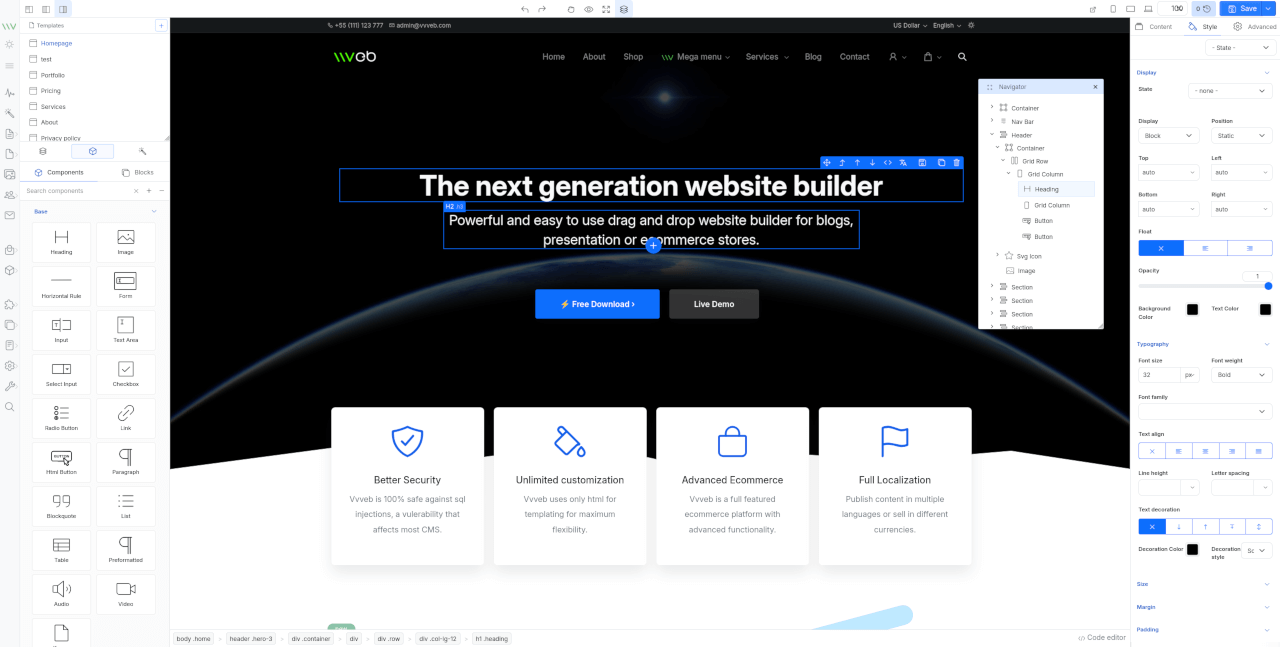
* Components and blocks/snippets drag and drop and in page insert.
* Undo/Redo operations.
* One or two panels interface.
* File manager and component hierarchy navigation.
* Add new page modal with template and folder options.
* Live code editor with codemirror plugin syntax highlighting.
* Image upload with example php script included.
* Page download or export html or save page on server with example php script included.
* Components/Sections/Blocks list search.
* Bootstrap 5 components.
* Media gallery with integrated CC0 image search and server upload support.
* Image, video and iframe elements resize handles.
* Elements breadcrumb for easier parent elements selection.
* Full Google fonts list support for font selection.
* Youtube, Google maps, Charts.js etc widgets.
* Optional CKEditor plugin to replace builtin text editor.
* Zip download plugin to download the page and all assets as zip file.
* SVG Icon component bundled with hundreds of free icons.
* Animate on scroll support for page elements.
* Theme global typography and color pallette editor.
By default the editor comes with Bootstrap 5 and Widgets components and can be extended with any kind of components and inputs.
## Install
* Clone the repository
```bash
#git 2.13+
git clone --recurse-submodules https://github.com/givanz/VvvebJs
# older git versions
git clone --recursive https://github.com/givanz/VvvebJs
```
* Pull changes
```bash
git pull --recurse-submodules
```
## Usage
Clone the repository or download a release then open `editor.html`
Because of browser iframe security you need to use a webserver such as apache/xampp and open `http://localhost/editor.html`
To disable browser security and open `editor.html` without installing a webserver run chrome with
```bash
chrome --disable-web-security --user-data-dir=/tmp/temporary_profile editor.html
```
To use the image upload or page save feature you need to have php installed.
## Docker
### Local development
From VvvebJs folder run
```bash
docker-compose up
```
### Image
Or run image
```bash
docker run -p 8080:80 vvveb/vvvebjs
```
Open http://localhost:8080/editor.php or http://localhost:8080/editor.html
## Save page
Save page function needs either php or node
### PHP
If you use docker, xampp or a shared hosting account php should work without any change.
Saving is done using [save.php](save.php)
### Node
For node go to VvvebJs folder and run
```bash
npm install express
node save.js
```
Open http://localhost:8080/editor.html
Saving is done using [save.js](save.js)
## [Landing template](https://github.com/givanz/landing)
To make changes to template files or sections run the following commands from `demo/landing` folder
### Install gulp
```bash
npm i
```
### Generate html files
Template html partials are located in `demo/landing/src` folder.
```bash
npm run gulp
```
### Watch for changes for development
```bash
npm run gulp watch
```
### Generate sections list for page builder
Sections html files are located in `demo/landing/src/sections` folder grouped in folders with the section group name.
```bash
npm run gulp sections
```
### Generate blocks list
Blocks html files are located in `demo/landing/src/blocks` folder grouped in folders with the blocks group name.
```bash
npm run gulp blocks
```
### Generate screenshots for sections
```bash
npm run gulp screenshots
```
## Usage
### Initialize example
```js
```
To use an icon, add the `
### Features
* Components and blocks/snippets drag and drop and in page insert.
* Undo/Redo operations.
* One or two panels interface.
* File manager and component hierarchy navigation.
* Add new page modal with template and folder options.
* Live code editor with codemirror plugin syntax highlighting.
* Image upload with example php script included.
* Page download or export html or save page on server with example php script included.
* Components/Sections/Blocks list search.
* Bootstrap 5 components.
* Media gallery with integrated CC0 image search and server upload support.
* Image, video and iframe elements resize handles.
* Elements breadcrumb for easier parent elements selection.
* Full Google fonts list support for font selection.
* Youtube, Google maps, Charts.js etc widgets.
* Optional CKEditor plugin to replace builtin text editor.
* Zip download plugin to download the page and all assets as zip file.
* SVG Icon component bundled with hundreds of free icons.
* Animate on scroll support for page elements.
* Theme global typography and color pallette editor.
By default the editor comes with Bootstrap 5 and Widgets components and can be extended with any kind of components and inputs.
## Install
* Clone the repository
```bash
#git 2.13+
git clone --recurse-submodules https://github.com/givanz/VvvebJs
# older git versions
git clone --recursive https://github.com/givanz/VvvebJs
```
* Pull changes
```bash
git pull --recurse-submodules
```
## Usage
Clone the repository or download a release then open `editor.html`
Because of browser iframe security you need to use a webserver such as apache/xampp and open `http://localhost/editor.html`
To disable browser security and open `editor.html` without installing a webserver run chrome with
```bash
chrome --disable-web-security --user-data-dir=/tmp/temporary_profile editor.html
```
To use the image upload or page save feature you need to have php installed.
## Docker
### Local development
From VvvebJs folder run
```bash
docker-compose up
```
### Image
Or run image
```bash
docker run -p 8080:80 vvveb/vvvebjs
```
Open http://localhost:8080/editor.php or http://localhost:8080/editor.html
## Save page
Save page function needs either php or node
### PHP
If you use docker, xampp or a shared hosting account php should work without any change.
Saving is done using [save.php](save.php)
### Node
For node go to VvvebJs folder and run
```bash
npm install express
node save.js
```
Open http://localhost:8080/editor.html
Saving is done using [save.js](save.js)
## [Landing template](https://github.com/givanz/landing)
To make changes to template files or sections run the following commands from `demo/landing` folder
### Install gulp
```bash
npm i
```
### Generate html files
Template html partials are located in `demo/landing/src` folder.
```bash
npm run gulp
```
### Watch for changes for development
```bash
npm run gulp watch
```
### Generate sections list for page builder
Sections html files are located in `demo/landing/src/sections` folder grouped in folders with the section group name.
```bash
npm run gulp sections
```
### Generate blocks list
Blocks html files are located in `demo/landing/src/blocks` folder grouped in folders with the blocks group name.
```bash
npm run gulp blocks
```
### Generate screenshots for sections
```bash
npm run gulp screenshots
```
## Usage
### Initialize example
```js
```
To use an icon, add the ` ### Financial Contributors
Become a financial contributor and help us sustain our community. [[Contribute](https://opencollective.com/boxicons/contribute)]
#### Individuals
### Financial Contributors
Become a financial contributor and help us sustain our community. [[Contribute](https://opencollective.com/boxicons/contribute)]
#### Individuals
 #### Organizations
Support this project with your organization. Your logo will show up here with a link to your website. [[Contribute](https://opencollective.com/boxicons/contribute)]
#### Organizations
Support this project with your organization. Your logo will show up here with a link to your website. [[Contribute](https://opencollective.com/boxicons/contribute)]



 ## License
- The icons (.svg) files are free to download and are licensed under CC 4.0 By downloading it is assumed that you agree with the terms mentioned in CC 4.0.
- The fonts files are licensed under SIL OFL 1.1.
- Attribution is not required but is appreciated.
- Other files which are not fonts or icons are licensed under the MIT License.
[You can read more about the license here!](https://boxicons.com/get-started#license)
## Contributing
Pull requests are the way to go here. I apologise in advance for the slow action on pull requests and issues.
Caught a mistake or want to contribute to the documentation? [Edit this page on Github](https://github.com/atisawd/boxicons/blob/master/README.md)
---
### Resources/Svg/Icons/Clarity Icons/README (resources/svg/icons/clarity-icons/README.md)
# Clarity Assets
This repository is part of the [Clarity](https://github.com/vmware/clarity) project, and its purpose is to store the static assets that we provide for consumers of Clarity.
You are welcome to download the files from here, or you can find them listed our website https://clarity.design as well.
### Contents
**icons** contains the sets of icons from Clarity Icons
**sketch** contains the sketch files for designers crafting interfaces with Clarity
---
### Resources/Svg/Icons/Clarity Icons/NOTICE (resources/svg/icons/clarity-icons/NOTICE.txt)
Copyright (c) 2018 VMware, Inc.
This product is licensed to you under the MIT license (the "License"). You may not use this product except in compliance with the MIT License.
This product may include a number of subcomponents with separate copyright notices and license terms. Your use of these subcomponents is subject to the terms and conditions of the subcomponent's license, as noted in the LICENSE file.
---
### Resources/Svg/Icons/Coreui Icons/README (resources/svg/icons/coreui-icons/README.md)
## License
- The icons (.svg) files are free to download and are licensed under CC 4.0 By downloading it is assumed that you agree with the terms mentioned in CC 4.0.
- The fonts files are licensed under SIL OFL 1.1.
- Attribution is not required but is appreciated.
- Other files which are not fonts or icons are licensed under the MIT License.
[You can read more about the license here!](https://boxicons.com/get-started#license)
## Contributing
Pull requests are the way to go here. I apologise in advance for the slow action on pull requests and issues.
Caught a mistake or want to contribute to the documentation? [Edit this page on Github](https://github.com/atisawd/boxicons/blob/master/README.md)
---
### Resources/Svg/Icons/Clarity Icons/README (resources/svg/icons/clarity-icons/README.md)
# Clarity Assets
This repository is part of the [Clarity](https://github.com/vmware/clarity) project, and its purpose is to store the static assets that we provide for consumers of Clarity.
You are welcome to download the files from here, or you can find them listed our website https://clarity.design as well.
### Contents
**icons** contains the sets of icons from Clarity Icons
**sketch** contains the sketch files for designers crafting interfaces with Clarity
---
### Resources/Svg/Icons/Clarity Icons/NOTICE (resources/svg/icons/clarity-icons/NOTICE.txt)
Copyright (c) 2018 VMware, Inc.
This product is licensed to you under the MIT license (the "License"). You may not use this product except in compliance with the MIT License.
This product may include a number of subcomponents with separate copyright notices and license terms. Your use of these subcomponents is subject to the terms and conditions of the subcomponent's license, as noted in the LICENSE file.
---
### Resources/Svg/Icons/Coreui Icons/README (resources/svg/icons/coreui-icons/README.md)



 Eva Icons
 **Eva Icons** is a pack of more than 480 beautifully crafted Open Source icons for common actions and items. Additionally, Eva Icons supports 4 animation types: `zoom`, `pulse`, `shake` and `flip`. Download on desktop to use them in your digital products for Web, iOS and Android. Icons are provided in two visual types: `Fill` and `Outline` and in several formats, including `PNG`, `SVG`, `font`, `Sketch`, etc.
## Download
- [Complete Eva Icons Package](https://akveo.github.io/eva-icons/eva-icons.zip)
- [NPM Package](https://www.npmjs.com/package/eva-icons)
- you also can download icons one by one in `PNG` and `SVG` formats from [Eva Icons Website](https://akveo.github.io/eva-icons/?utm_campaign=eva_icons%20-%20home%20-%20eva_icons%20github%20readme&utm_source=eva_icons&utm_medium=referral&utm_content=github_readme_download_eva_icons).
### CDN
Load from CDN in your project:
```html
```
After including the script, `eva` will be available as a global variable.
### NPM
- Install the package:
```
npm i eva-icons
```
- Include it to your page:
```html
```
- Or require the package (may vary depending on your build system):
```js
const eva = require('eva-icons');
```
```js
import * as eva from 'eva-icons';
```
## How to use
### JavaScript
- Add the `data-eva` attribute with the icon name to an element:
```html
```
- Call `eva.replace();` to replace all elements with the `data-eva` data attribute with SVG elements. You can also pass some additional parameters to the `replace` method to modify the `replace` function behavior.
```html
**Eva Icons** is a pack of more than 480 beautifully crafted Open Source icons for common actions and items. Additionally, Eva Icons supports 4 animation types: `zoom`, `pulse`, `shake` and `flip`. Download on desktop to use them in your digital products for Web, iOS and Android. Icons are provided in two visual types: `Fill` and `Outline` and in several formats, including `PNG`, `SVG`, `font`, `Sketch`, etc.
## Download
- [Complete Eva Icons Package](https://akveo.github.io/eva-icons/eva-icons.zip)
- [NPM Package](https://www.npmjs.com/package/eva-icons)
- you also can download icons one by one in `PNG` and `SVG` formats from [Eva Icons Website](https://akveo.github.io/eva-icons/?utm_campaign=eva_icons%20-%20home%20-%20eva_icons%20github%20readme&utm_source=eva_icons&utm_medium=referral&utm_content=github_readme_download_eva_icons).
### CDN
Load from CDN in your project:
```html
```
After including the script, `eva` will be available as a global variable.
### NPM
- Install the package:
```
npm i eva-icons
```
- Include it to your page:
```html
```
- Or require the package (may vary depending on your build system):
```js
const eva = require('eva-icons');
```
```js
import * as eva from 'eva-icons';
```
## How to use
### JavaScript
- Add the `data-eva` attribute with the icon name to an element:
```html
```
- Call `eva.replace();` to replace all elements with the `data-eva` data attribute with SVG elements. You can also pass some additional parameters to the `replace` method to modify the `replace` function behavior.
```html