# Technical Documentation: gaozhangmin/aliyunpan
> ℹ️ **Provenance:** Multi-Tier Ingestion · [CodeWiki Reference](https://codewiki.google/github.com/gaozhangmin/aliyunpan)
### Overview (README.md)

# BoxPlayer
跨手机、平板、电视与电脑的全平台播放器:把网盘、媒体服务器、音乐、阅读与 AI 放进同一个入口。
中文 · English ·
官网及全平台下载 ·
桌面版 Releases ·
CLI / MCP
BoxPlayer 是面向个人媒体资产的全平台播放器,支持 Apple 全家桶(iPhone、iPad、Mac、Apple TV)、Windows、Linux、Android 手机与平板,以及 Android TV。它把多个云盘、本地文件和 Jellyfin / Emby / Plex 内容放在统一入口中,支持文件管理、媒体刮削与播放、音乐库、电子书阅读及 AI 辅助操作。本仓库主要维护 Electron 桌面版;各平台客户端的界面、功能与发布节奏可能不同。
> 第一次使用?前往 [安装](#安装),添加云盘或媒体服务器,然后在媒体库扫描内容。版本变更与已知限制见 [v5.0.36 更新说明](docs/releases/v5.0.36.md)。
## 界面预览
### 统一媒体库
主屏幕汇集继续观看、收藏夹和媒体分类;详情页展示背景图、季集、演职员与播放进度。


### 音乐库与粒子播放器
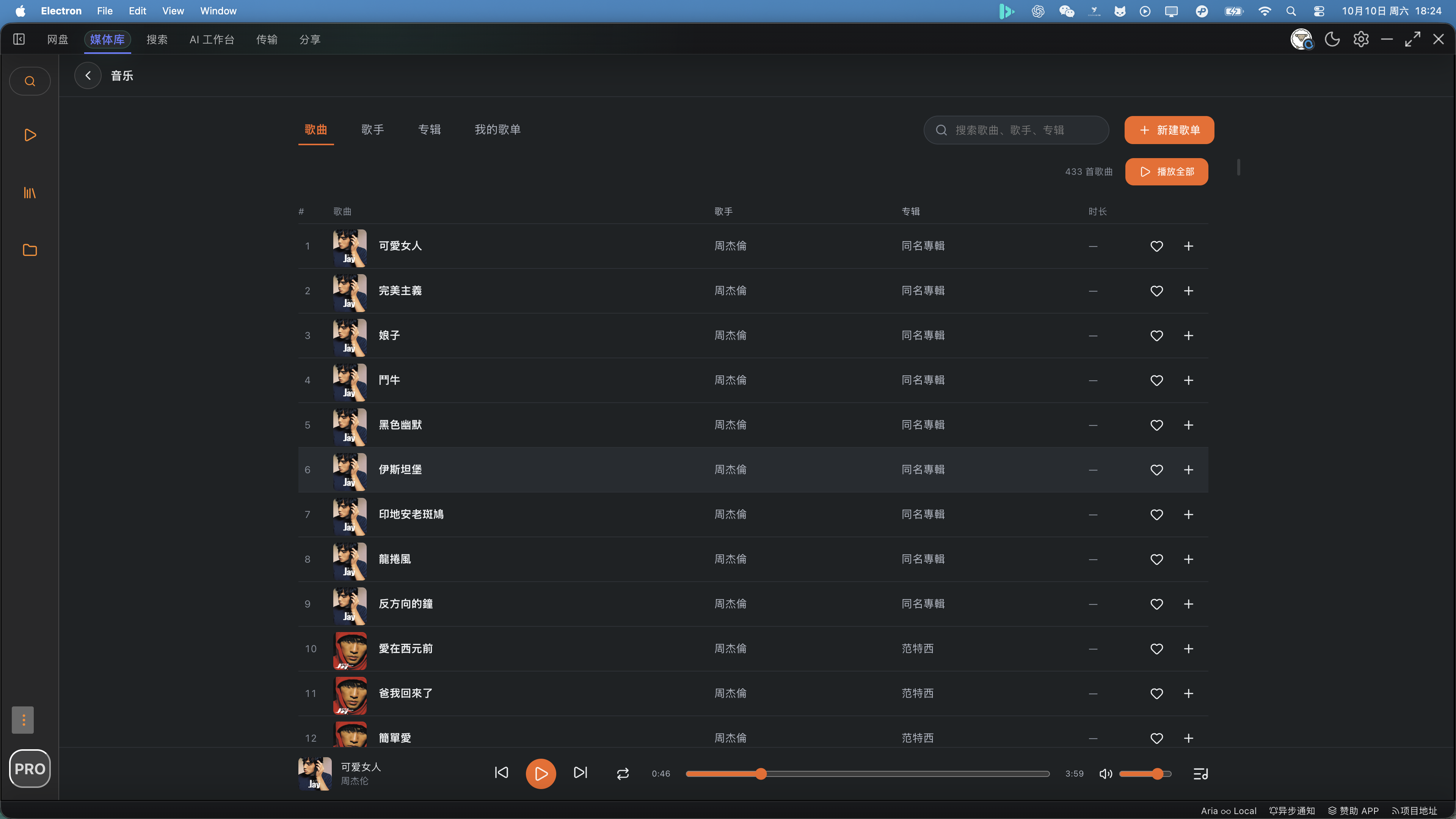
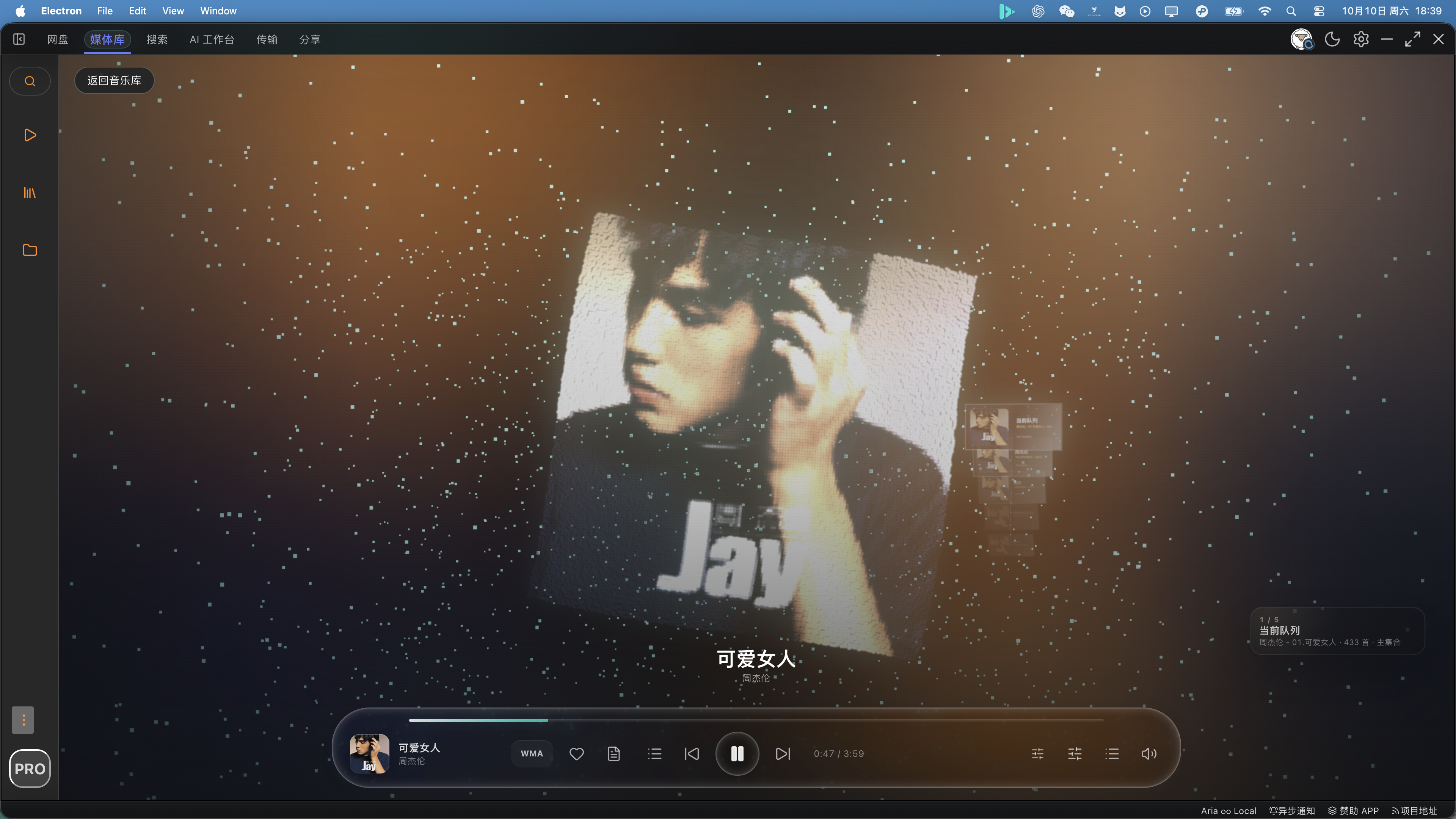
按歌曲、歌手、专辑和自建歌单浏览;从音乐库播放后可进入粒子播放器,也能返回列表继续管理曲目。


### 文件、搜索与 AI
云盘文件管理与跨来源搜索共用一个工作区。AI 功能可辅助寻找媒体、整理文件和阅读文档。


更多画面:[本地搜索](screenshot/search_local.png) · [书架](screenshot/book_home.png) · [阅读器](screenshot/book_reader.png) · [AI 阅读](screenshot/book_reader_ai.png)
## 能做什么
| 场景 | 主要能力 |
|---|---|
| 文件管理 | 多账号云盘浏览、搜索、上传下载、复制移动、分享与回收站;第三方云盘按其 API 能力展示操作。 |
| 影视媒体库 | 扫描云盘和本地目录,补全海报与元数据;统一浏览电影、剧集、季集、演员和分类。 |
| 媒体服务器 | 连接 Jellyfin、Emby、Plex,浏览媒体库、继续观看、搜索并播放。 |
| 视频播放 | 内置播放器与 MPV / IINA 外部播放;支持音轨、字幕、ASS/SSA、倍速、连续播放和进度恢复。 |
| 音乐 | 歌曲、歌手、专辑、自建歌单与播放队列;粒子播放器、歌词、音效和桌面歌词。 |
| 阅读 | EPUB、PDF、TXT 等电子书;书签、笔记、高亮与 AI 阅读辅助。 |
| AI 工作台 | 搜索与分析内容、规划文件整理、文档问答;执行写入操作前提供确认。 |
| 自动化 | `clouddrive-cli` 和 MCP Server,适合终端及 AI Agent 调用云盘能力。 |
### 云盘与内容来源
- 云盘:阿里云盘 / Alipan、百度网盘、123 网盘、115、夸克、PikPak、OneDrive、Dropbox、Box、中国移动云盘 139、天翼云盘 189、光鸭云盘。
- 媒体与目录:Jellyfin、Emby、Plex、WebDAV、AList、本地文件夹。
- 不同服务的官方能力、账号权限和限速可能不同。App 会尽量只展示当前来源支持的操作。
### AI 与 Pro
核心的文件管理、媒体播放、音乐、阅读和 CLI 功能可直接使用。Pro 主要覆盖需要持续服务端成本的内置 AI、资源搜索额度与优先支持。也可以配置自己的 OpenAI 兼容服务或本地模型;第三方 API 费用由对应服务商收取。
### 命令行与 MCP
`clouddrive-cli` 提供文件遍历、搜索、媒体整理计划、dry-run 预览、操作记录等能力,并能作为 MCP Server 供 AI 客户端使用。详见 [独立文档](./clouddrive-cli/README.md)。
## 安装
**官网:[xbyvideohub.com](https://xbyvideohub.com/)**,在「全部下载」中选择设备对应的版本:
| 设备 | 下载入口 |
|---|---|
| iPhone、iPad、Mac、Apple TV | [BoxPlayer App Store](https://apps.apple.com/us/app/boxplayer/id6739804060) |
| Android 手机、平板、Android TV | [官网 Android APK 下载](https://xbyvideohub.com/) |
| macOS、Windows、Linux 桌面版 | [官网下载安装包](https://xbyvideohub.com/) · [GitHub Releases](https://github.com/gaozhangmin/boxplayer/releases) |
请以下载页面实际列出的文件和架构为准;GitHub 草稿 Release 尚不能作为公开下载版本。Apple 平台 App Store 版与本仓库的 Electron 桌面版是不同客户端。
macOS 如遇系统安全提示,请先确认下载来源,再通过系统设置允许打开;不要对来源不明的安装包解除隔离。
## 开发
要求 Node.js >= 22.12.0,使用 **pnpm** 管理依赖。
```bash
pnpm install
pnpm dev
```
检查与构建:
```bash
CI=true pnpm exec vue-tsc --noEmit
pnpm run test
pnpm run test:clouddrive-cli
pnpm run build
```
`pnpm run build` 会先通过 `version.mjs` 自动递增 patch 版本,再进行类型检查和打包;只需检查类型时请运行上面的 `vue-tsc` 命令。平台打包命令见 `package.json`。
私有 client ID、secret 和 API key 放在忽略提交的 `.env.local` 中,运行 `pnpm run secrets:generate` 生成 `src/secrets.generated.ts`。不要提交真实凭据。
```text
electron/ 主进程、窗口与系统集成
src/ Vue 界面、云盘与媒体功能
shared/ 主进程与渲染端共享代码
clouddrive-cli/ CLI 与 MCP Server
scripts/ 构建、密钥与发布脚本
screenshot/ README 使用的当前界面截图
```
## 社区与声明
- 问题与建议:[GitHub Issues](https://github.com/gaozhangmin/boxplayer/issues)
- 官网:[xbyvideohub.com](https://xbyvideohub.com/)
- Telegram:[BoxPlayer 社区](https://t.me/+wjdFeQ7ZNNE1NmM1)
- 本项目基于 [liupan1890/aliyunpan](https://github.com/liupan1890/aliyunpan) 继续开发,感谢原作者及贡献者。
请遵守所在地区法律法规、各云盘及媒体服务的条款,并确认自己有权访问和使用相关内容。第三方服务产生的额度消耗、费用与账号风险由使用者自行承担。
---
### Promotion Boxplayer Campaign README (`docs/promotion/boxplayer-campaign/README.md`)
# BoxPlayer 宣发包
Date: 2026-05-12
## 一句话定位
BoxPlayer 是一个免费开源、跨平台的多网盘聚合播放器,支持阿里云盘、百度网盘、123 网盘、115 网盘、PikPak、OneDrive、Box、Dropbox、WebDAV、本地媒体库,以及 Emby/Jellyfin/Plex 等媒体服务器。
## 使用原则
- 对外统一使用 BoxPlayer,`aliyunpan` 只作为 GitHub 仓库名出现。
- 不把 GitHub 当发帖平台,只作为源码、下载和 issue 入口。
- 不同社区不要复制粘贴同一篇,至少调整标题、开头和截图。
- 不承诺不会封号、无限速或绝对安全。
- 优先使用“开源项目分享、欢迎试用反馈”的语气。
## 计划文件说明
以下文件会按计划逐步生成。
- `long-article-zh.md`: 中文长文,适合知乎、掘金、公众号、博客。
- `forum-short-zh.md`: 中文短帖,适合 V2EX、Linux.do、吾爱破解、酷安。
- `linux-nas-zh.md`: Linux、NAS、家庭影音用户版本。
- `english-posts.md`: Reddit、Hacker News、海外开源社区版本。
- `faq-replies.md`: 常见问题和评论回复模板。
- `screenshots.md`: 截图使用建议和宣发封面说明。
- `posting-checklist.md`: 平台发布顺序、发布前检查和复盘记录。
## 推荐发布顺序
1. V2EX、Linux.do、吾爱破解、酷安、知乎短帖或长文。
2. Linux/NAS/家庭影音社区。
3. Reddit r/selfhosted、r/linux、r/opensource、Hacker News Show HN。
## 主要入口
- [项目仓库](https://github.com/gaozhangmin/aliyunpan)
- [下载页面](https://github.com/gaozhangmin/aliyunpan/releases)
- [最新下载](https://github.com/gaozhangmin/aliyunpan/releases/latest)
---
### Releases 2026 08 18 V5.0.20 Release (`docs/releases/2026-08-18-v5.0.20-release.md`)
# BoxPlayer v5.0.20 Release Notes
发布日期 / Release date: 2026-08-18
## 中文
### 启动与性能
- 应用窗口优先显示,网盘账号资料、传输记录、缓存统计、WebDAV 和更新检查转为后台初始化,避免任一网盘请求阻塞进入文件列表。
- 上传、下载 Worker 改为按需创建;已排队的消息会在 Worker 就绪后自动补发。
- 重型页面与预览组件改为按需加载,减少首次启动的前端负担。
- 百度网盘资料和目录请求增加超时保护,异常账号不会长期阻塞启动流程。
### 网盘浏览、搜索与分页
- 文件列表触底续页与视频、音乐、书籍扫描现在共用同一套分页状态机:统一 cursor、结束条件和跨页文件去重保护。
- 遇到重复 cursor 会安全停止,避免无限加载;续页请求失败后可重新触发。
- Box 与 Dropbox 的后台扫描跳过缩略图补全,降低大目录扫描的额外 API 请求。
- 阿里云盘全盘搜索的范围设置会传递备份盘、资源盘和相册对应的 drive ID。
- 不支持全盘搜索的网盘不再展示搜索入口;直接调用时会给出明确提示。
### 稳定性与体验修复
- 对阿里云盘目录扫描请求增加统一节流,降低 `TooManyRequests` 发生概率。
- 修复 123 云盘根目录及分页目录的文件/文件夹加载路径,避免仅显示首页项目或误提示找不到目录。
- 优化后台媒体获取任务的启动时机,避免与账号和网盘初始加载竞争资源。
- 系统文件关联调整为仅注册实际支持的书籍与漫画格式。
### 验证
- `CI=true pnpm exec vue-tsc --noEmit`
- `pnpm exec vitest run src/utils/__tests__/providerPagination.test.ts src/cloud123/__tests__/dirfilelist.test.ts`
上述验证通过;Vitest 在受限环境中可能打印 Vite WebSocket `EPERM` 警告,但不影响测试结果。
---
## English
### Startup and performance
- The main window is now shown first. Account refresh, transfer history, storage statistics, WebDAV, and update checks initialize in the background so a slow provider cannot block access to files.
- Upload and download workers are created on demand, while queued messages are delivered once the worker is ready.
- Heavy pages and preview components are lazy-loaded to reduce startup cost.
- Baidu Pan account and directory requests now have timeout protection, preventing a stalled account from blocking startup.
### Drive browsing, search, and pagination
- Infinite scrolling in the file list and video, music, and book scanning now share one pagination state machine: the same cursor handling, completion rules, and cross-page deduplication.
- Repeated cursors stop safely to prevent infinite loading, and a failed continuation request can be retried.
- Background Box and Dropbox scans skip thumbnail hydration to reduce extra API traffic in large folders.
- Aliyun Pan global-search scopes now pass the selected backup, resource, and album drive IDs.
- Providers without global search no longer show a search entry point and return a clear message if invoked directly.
### Stability and fixes
- Aliyun directory-scan requests use shared throttling to reduce `TooManyRequests` errors.
- Fixed 123 Pan root and paginated-folder loading so files and folders are not limited to the first page or reported as missing.
- Delayed media-acquisition background work to avoid competing with initial account and drive loading.
- System file associations now include only book and comic formats supported by the application.
### Verification
- `CI=true pnpm exec vue-tsc --noEmit`
- `pnpm exec vitest run src/utils/__tests__/providerPagination.test.ts src/cloud123/__tests__/dirfilelist.test.ts`
Both checks passed. Vitest may print a Vite WebSocket `EPERM` warning in restricted environments; it does not affect the test result.
---
### Releases 2026 08 18 V5.0.21 Release (`docs/releases/2026-08-18-v5.0.21-release.md`)
# BoxPlayer v5.0.21 Release Notes
发布日期 / Release date: 2026-08-20
## 中文
### 启动更快、更稳定
- 主窗口会优先显示;账号资料、传输任务、缓存统计、WebDAV 与更新检查改在后台恢复,避免慢速网盘阻塞进入文件列表。
- 上传与下载 Worker 改为按需启动,并会补发 Worker 就绪前积压的消息。
- 非首屏页面和预览组件按需加载,降低启动阶段的渲染与内存开销。
- 百度网盘用户信息与文件列表加入超时保护,异常账号不会长期卡住启动。
### macOS 打包界面修复
- 修复 macOS DMG 中主窗口、辅助窗口和桌面歌词窗口未加载完整样式的问题。生产构建现在输出统一的入口样式,避免 Vue 懒加载把核心 CSS 留在未加载的异步分包中。
- 发布前新增强制 macOS 验收:必须构建、挂载并启动实际 DMG,核验 `app.asar` 中的页面入口和 CSS,确认主题、布局、导航、文件列表与控件正常后才能发布。
### 网盘浏览与扫描
- 文件列表触底续页、视频扫描、音乐扫描和书籍刮削共享同一套分页状态机:统一 cursor、结束条件和跨页去重。
- 重复 cursor 会安全停止,防止无限请求;续页失败可再次触发重试。
- Box、Dropbox 后台扫描不再额外补全缩略图,减少大目录扫描的 API 压力。
- 阿里云盘目录扫描统一限速,降低 `TooManyRequests` 风险。
- 修复 123 云盘根目录及分页目录加载,文件与子文件夹不会只显示首页或被误报为不存在。
### 搜索与能力边界
- 阿里云盘全盘搜索会正确携带备份盘、资源盘和相册的所选范围。
- 不支持全盘搜索的网盘会隐藏对应入口;直接调用时也会给出明确提示。
- 后台媒体获取任务延后启动,避免与账号、网盘首次加载争用网络和 CPU。
### 文件关联
- 系统“打开方式”仅注册应用实际支持的电子书和漫画格式。
### 验证
```bash
CI=true pnpm exec vue-tsc --noEmit
pnpm exec vitest run src/utils/__tests__/providerPagination.test.ts src/cloud123/__tests__/dirfilelist.test.ts
```
类型检查与 17 个相关回归测试均已通过。另已构建、挂载并验证 arm64 DMG:`boxplayer-5.0.21-mac-arm64.dmg`;DMG 内 `app.asar` 的三个窗口入口均引用存在的统一 CSS,启动后的实际界面渲染正常。受限运行环境可能输出 Vite WebSocket `EPERM` 警告,不影响测试结果。
---
## English
### Faster, more reliable startup
- The main window appears first. Account refresh, transfers, storage statistics, WebDAV, and update checks now recover in the background so a slow provider cannot block file browsing.
- Upload and download workers start on demand and replay messages queued before the worker is ready.
- Non-critical pages and preview components are lazy-loaded to reduce startup rendering and memory cost.
- Baidu Pan account and directory calls have timeout protection, preventing a stalled account from holding up startup.
### macOS packaged UI fix
- Fixed incomplete CSS loading in the main, auxiliary, and desktop-lyrics windows of the macOS DMG. Production builds now emit one deterministic entry stylesheet so Vue lazy loading cannot leave core CSS in an unloaded async chunk.
- Added a mandatory macOS release gate: build, mount, and launch the actual DMG; verify the page entries and CSS inside `app.asar`; and confirm the theme, layout, navigation, file list, and controls before publishing.
### Drive browsing and scanning
- File-list infinite scroll, video scanning, music scanning, and book scraping share one pagination state machine: the same cursor handling, completion rule, and cross-page deduplication.
- Repeated cursors stop safely to prevent infinite requests, and failed continuation requests can be retried.
- Background Box and Dropbox scans skip thumbnail hydration to reduce API pressure in large folders.
- Aliyun directory scans use shared throttling to reduce `TooManyRequests` errors.
- Fixed 123 Pan root and paginated directory loading so files and subfolders are not limited to the first page or falsely reported as missing.
### Search and capability boundaries
- Aliyun global search correctly carries selected backup, resource, and album drive scopes.
- Providers without global search hide the entry point and return a clear message when called directly.
- Media-acquisition background work starts later to avoid competing with initial account and drive loading.
### File associations
- System “Open with” registration now includes only e-book and comic formats supported by the app.
### Verification
```bash
CI=true pnpm exec vue-tsc --noEmit
pnpm exec vitest run src/utils/__tests__/providerPagination.test.ts src/cloud123/__tests__/dirfilelist.test.ts
```
Type checking and 17 related regression tests passed. The arm64 DMG, `boxplayer-5.0.21-mac-arm64.dmg`, was also built, mounted, and verified: all three window entries inside `app.asar` reference the unified CSS, and the launched packaged interface rendered correctly. A Vite WebSocket `EPERM` warning can appear in restricted environments and does not affect the result.
---
### Releases 2026 08 21 V5.0.22 Release (`docs/releases/2026-08-21-v5.0.22-release.md`)
# BoxPlayer v5.0.22 Release Notes
发布日期 / Release date: 2026-08-21
## 中文
### 网盘浏览与搜索
- 修复文件列表触底续页:列表、网格和大封面视图都会在滚动到底部后继续加载。大型文件夹不再停在首批结果。
- 对支持服务端全盘搜索的网盘,右上角输入框现在显示“全盘搜索”并调用网盘搜索 API;不支持的网盘继续使用本地“快速筛选”。
### 百度网盘路径可靠性
- 上传、扫描、直链与文件夹预览统一解析百度网盘的实际目录路径。
- 修复指定目录上传失败后误在根目录创建纯数字文件夹的问题;无法确认目标目录时会明确报错,而不会回退到根目录。
### 稳定性与数据统计
- Google Books 临时限流、服务端错误或超时后会短暂冷却,避免扫描期间反复请求失败的元数据服务。
- 不再把阿里云盘令牌刷新过程中的预期 401 记录为错误事件。
- Release 构建会注入 PostHog 配置,恢复正式版的使用统计与错误上报。
### 界面与系统集成
- 取消启动开屏动画,直接进入主窗口。
- 托盘菜单新增“系统默认应用设置”入口,便于查看系统默认应用说明。
### 验证
```bash
CI=true pnpm exec vue-tsc --noEmit
pnpm exec vitest run src/cloudbaidu/__tests__/filecmd.test.ts src/cloudbaidu/__tests__/upload.test.ts src/analytics/__tests__/posthog.test.ts src/utils/__tests__/bookExternalMetadata.test.ts
```
在开发版中使用真实阿里云盘测试了包含 665 个文件的大型目录;分页请求均成功完成,文件列表未受 100 项限制。另已构建、挂载并实际启动 arm64 DMG:`boxplayer-5.0.22-mac-arm64.dmg`;`app.asar` 中的 `dist/main.html` 明确引用存在的 `dist/style.css`,并已确认主题、导航、文件列表和控件正常渲染。
---
## English
### Drive browsing and search
- Fixed infinite scrolling in file lists: list, grid, and large-cover views now load the next page after reaching the bottom. Large folders no longer stop at their first batch of results.
- For providers with server-side global search, the toolbar input now shows “Global Search” and uses the provider search API. Providers without that capability keep the local “Quick Filter”.
### Reliable Baidu Pan paths
- Uploading, scanning, direct links, and folder previews now share accurate Baidu Pan directory-path resolution.
- Fixed uploads to a selected folder falling back to a numeric folder at the root. When the target cannot be resolved, BoxPlayer reports a clear error instead of uploading to root.
### Stability and analytics
- Google Books temporarily cools down after rate limits, server errors, or timeouts, preventing repeated failed metadata calls during scanning.
- Expected Aliyun 401 responses during token refresh are no longer reported as application errors.
- Release builds now inject PostHog configuration so production analytics and error reporting are active again.
### Interface and system integration
- Removed the startup splash animation and open directly into the main window.
- Added a “System default-app settings” entry to the tray menu for default-app guidance.
### Verification
```bash
CI=true pnpm exec vue-tsc --noEmit
pnpm exec vitest run src/cloudbaidu/__tests__/filecmd.test.ts src/cloudbaidu/__tests__/upload.test.ts src/analytics/__tests__/posthog.test.ts src/utils/__tests__/bookExternalMetadata.test.ts
```
The development build was tested against a real Aliyun account in a directory containing 665 files. Pagination completed successfully and the file list was not limited to 100 items. The arm64 DMG, `boxplayer-5.0.22-mac-arm64.dmg`, was also built, mounted, and launched. Its `app.asar` contains `dist/main.html` explicitly referencing the present `dist/style.css`; the theme, navigation, file list, and controls rendered normally.
---
### Releases V5.0.10 (`docs/releases/v5.0.10.md`)
## BoxPlayer v5.0.10
### 更新内容
- 媒体、音乐和书籍媒体库迁移至 Dexie,并完善分页加载、旧数据迁移、删除清理和大规模扫描的增量持久化,显著降低扫描大媒体库时的内存压力。
- 修复多网盘媒体扫描和递归目录加载,统一使用各网盘自己的分页与目录接口;补齐阿里云盘 WMA 下载、115 上传恢复、拖拽上传等问题修复。
- 支持系列电影:系列条目会展示包含的影片,并可在详情页内切换具体影片的元数据。
- 修复顶部标签隐藏/恢复、扫描进度、亮色主题文字、侧边栏折叠按钮以及 AI 工作台与媒体库的界面一致性问题。
- 后台更新现在使用设置中的更新代理;未设置或无效时默认使用 gh-proxy,代理失败自动回退 GitHub 原生下载源。
### English
- Migrated video, music, and book libraries to Dexie with pagination, legacy-data migration, deletion cleanup, and incremental scan persistence to substantially reduce memory pressure on large libraries.
- Fixed multi-provider media scanning and recursive folder loading by using each provider's own pagination and directory APIs. Also fixed Aliyun Drive WMA downloads, resumable 115 uploads, and drag-and-drop uploads.
- Added movie collection support: collection entries list their films and let users switch individual movie metadata within the details page.
- Fixed hidden/recoverable top tabs, scan progress, light-theme text contrast, sidebar-collapse controls, and visual consistency across the AI workspace and media libraries.
- Background updates now use the configured update proxy. When no valid proxy is configured, BoxPlayer uses gh-proxy first and automatically falls back to native GitHub downloads if the proxy fails.
---
### Releases V5.0.11 (`docs/releases/v5.0.11.md`)
## BoxPlayer v5.0.11
### 更新内容
- 新增媒体元数据人工纠错:可从海报右键菜单或详情页搜索 TMDB 并重新匹配电影;电视剧支持整部剧、单季和单集范围的元数据修正。
- 重新设计元数据编辑窗口,使用海报列表展示候选标题、年份和详细信息;手动编辑结果会持久化,并在后续扫描时得到保留。
- 统一视频、音乐和书籍媒体库的文件源身份、扫描归属和删除语义。删除文件源会清理仅属于该源的条目,共享条目继续保留,并兼容迁移历史扫描数据。
- 修复扫描期间“查看全部”只显示扫描状态的问题;已有媒体可以继续浏览,新结果增量写入媒体库。
- 改进媒体库导航、快速搜索、详情页操作菜单、书籍页标题区和跨页面字号/间距一致性。
- 统一视频文件名清洗与 TMDB 匹配输入:本地和网盘扫描共用单次标准化结果,支持季目录、更多季集格式和技术标签,并修复 `Se7en`、`1917`、中文续集等误判。
- 收敛 clouddrive-cli 的工具与计划模型,移除重复的媒体整理实现,统一使用结构化计划 schema。
- BoxPlayer 网站现在可直接下载最新 GitHub Release 安装包,并通过 gh-proxy 加速 Windows、macOS 和 Linux 下载。
### English
- Added manual media metadata correction. Search TMDB and rematch movies from poster context menus or detail pages; TV shows support whole-show, season, and episode scopes.
- Redesigned the metadata editor around poster-list results with titles, years, and detailed metadata. Manual edits are persisted and preserved by later scans.
- Unified source identity, scan membership, and deletion semantics across video, music, and book libraries. Removing a source deletes source-only items, preserves shared items, and migrates legacy scan data.
- Fixed the “view all” flow during active scans so existing media remains browsable while new results are persisted incrementally.
- Improved media navigation icons, quick search, detail actions, the book-library header, and typography/spacing consistency across pages.
- Unified video filename normalization and TMDB matching inputs across local and cloud scans, including season-folder context, more episode formats, technical tags, and ambiguous titles such as `Se7en`, `1917`, and numbered Chinese sequels.
- Simplified clouddrive-cli tools and planning models by removing duplicate media-organizer implementations and using shared structured plan schemas.
- The BoxPlayer website now downloads the latest GitHub Release installers directly through gh-proxy for Windows, macOS, and Linux.
---
### Releases V5.0.12 (`docs/releases/v5.0.12.md`)
## 更新内容
- 重构第三方网盘 provider adapter 与严格账号 token 校验,避免请求误落入阿里云盘分支。
- 新增并完善 Google Drive 登录、文件列表、搜索、下载、播放、预览、共享与导航支持。
- Google 左侧导航调整为“我的云端硬盘”和“共享云端硬盘”同级,根目录文件列表不再混入导航项。
- 修复 Google 文件夹、下载、视频播放、PDF 预览及共享内容相关路由问题。
- 改进 115、123、百度及其他第三方网盘的认证、文件操作、媒体扫描与下载请求隔离。
---
### Releases V5.0.13 (`docs/releases/v5.0.13.md`)
# BoxPlayer v5.0.13
## 更新内容
- 修复关闭“开机自动检测更新”后仍会后台检测、静默下载的问题;手动“检查更新”不受此设置影响,更新源不可用时仍会回退到 GitHub 原生地址。
- 修复电子书打开链路:EPUB 在所有已支持网盘中统一进入阅读器;百度网盘阅读和下载会携带必要的 User-Agent 与 Referer 请求头。
- 完善多网盘上传分流与能力边界,避免不支持上传的网盘错误落入阿里云盘上传实现。
- 改进 115 分片上传的会话、令牌与断点续传处理,并补齐 OSS 上传辅助逻辑。
- 改进 123、百度、夸克、光鸭、Dropbox、OneDrive、Box 和 Google Drive 的上传实现及相关校验。
- 修复属性页对只读网盘能力的展示边界,并补充各网盘上传与能力声明的回归测试。
- 更新 Electron 原生模块重建命令,便于在 Electron 版本变更后重新编译 better-sqlite3。
## Fixes / English
- Fixed background update checks and silent downloads continuing after the startup update-check setting is disabled. Manual checks remain available and fall back to the native GitHub feed when needed.
- Fixed cloud book opening: EPUB files now route to the reader for every supported provider, and Baidu downloads keep the required User-Agent and Referer headers.
- Hardened provider-specific upload routing, multipart resume handling, and capability boundaries across 115, 123, Baidu, Quark, Guangya, Dropbox, OneDrive, Box, and Google Drive.
- Added regression coverage for update behavior, cloud-book download headers, upload flows, resumable upload tokens, and provider capability rules.
## 验证 / Verification
```bash
pnpm exec vitest run electron/main/core/__tests__/autoUpdate.test.ts src/utils/__tests__/bookCloudOpen.test.ts src/box/__tests__/upload.test.ts src/dropbox/__tests__/upload.test.ts src/onedrive/__tests__/upload.test.ts src/quark/__tests__/uploaddisk.test.ts src/utils/__tests__/drive115UploadResume.test.ts src/utils/__tests__/drive115UploadToken.test.ts src/utils/__tests__/oss.test.ts src/utils/__tests__/providerCapabilities.test.ts src/utils/__tests__/remoteDriveReadOnly.test.ts src/cloud123/__tests__ src/cloudbaidu/__tests__ src/guangya/__tests__/filecmd.test.ts src/guangya/__tests__/upload.test.ts
pnpm exec vue-tsc --noEmit
```
---
### Releases V5.0.15 (`docs/releases/v5.0.15.md`)
## BoxPlayer v5.0.15
### 新功能 / Features
- 新增匿名活跃统计:应用启动、网盘登录成功、网盘 API 请求失败三类事件会以匿名方式上报,用于统计日活、留存与版本分布。上报前会脱敏所有令牌、Cookie、密码与签名等敏感字段,不采集任何文件内容,可在设置中确认隐私策略后再启用。
- MPV 播放器(darwin/arm64)支持带鉴权请求头的播放源:代理服务器会重写 HLS 播放列表(.m3u8)与重定向地址,将分片请求统一路由回鉴权代理,修复带签名直链的网盘视频在 MPV 中无法正常播放的问题。
- 视频字幕自动加载扩展:字幕查找范围从当前目录扩展到所有一级子目录,同目录字幕仍然优先匹配,命中率更高。
### 修复 / Fixes
- 修复百度网盘新建文件夹报错:创建接口需要目标绝对路径而非文件 ID,现在会从目录列表解析出父目录完整路径后再创建。
- 修复百度网盘移动、复制文件时目标路径无法解析导致操作静默失败的问题,无法确定路径时明确报错提示刷新目录。
- 修复 PikPak 手机号登录验证码校验失败:登录请求统一使用 `username` 字段提交,不再将手机号规范化为 `+86` 前缀格式,避免验证码签名不匹配。
- 修复 MPV 默认播放器切换音轨、外挂字幕时可能阻塞播放的问题(改为异步命令提交)。
### 工程 / Engineering
- 新增 PostHog 匿名分析接入:`POSTHOG_PROJECT_API_KEY`、`POSTHOG_HOST` 通过生成式密钥流程注入,CI 发布构建同步支持。
- 新增百度网盘文件命令、PikPak 登录、媒体代理重写等回归测试,并更新 Vitest 配置以覆盖分析模块。
- 更新 darwin/arm64 MPV 原生模块(mpv_texture.node)与 npm 依赖锁文件。
### Features / English
- Anonymous usage analytics: app launches, successful provider logins, and cloud API request failures are reported anonymously for DAU, retention, and version-distribution stats. All tokens, cookies, passwords, and signatures are redacted before reporting; no file content is collected.
- MPV playback (darwin/arm64) now supports sources that require signed request headers: the proxy rewrites HLS playlists (.m3u8) and redirects so segments route back through the authenticated proxy.
- Subtitle auto-loading now searches the video folder plus all immediate subfolders, with same-directory subtitles still preferred.
### Fixes / English
- Fixed Baidu Netdisk folder creation: the create API requires an absolute target path instead of a file ID; the parent path is now resolved from the directory listing.
- Fixed silent failures when moving/copying Baidu files because the target path could not be resolved; an explicit error now prompts a directory refresh.
- Fixed PikPak phone-number login captcha failures: the sign-in request always submits `username`, avoiding phone normalization to a `+86` prefix that invalidated the captcha signature.
- Fixed potential blocking when switching audio tracks or loading subtitles in the MPV default player (now submitted asynchronously).
### Engineering / English
- Added PostHog anonymous analytics with `POSTHOG_PROJECT_API_KEY` / `POSTHOG_HOST` flowing through the generated-secrets pipeline, including CI release builds.
- Added regression tests for Baidu file commands, PikPak login, and media-proxy rewriting; Vitest config now covers the analytics module.
- Updated the darwin/arm64 MPV native module (`mpv_texture.node`) and the npm lockfile.
---
### Releases V5.0.16 (`docs/releases/v5.0.16.md`)
## BoxPlayer v5.0.16
### 多网盘文件操作 / Cloud-drive File Operations
- 修复 Dropbox 在子目录中新建文件夹或文本文件时丢失目录路径、错误创建到根目录的问题,并补充同名文件/文件夹的清晰提示。
- 修复光鸭云盘的目录识别、签名下载地址解析和上传流程:使用服务端返回的表单上传凭证,不再自行构造不匹配的 OSS 签名。
- 修复 139 云盘备用路由重试逻辑,业务校验或权限错误不再被后续 404 覆盖;新建文件夹按接口要求提交名称与冲突策略。
- 修复 123 云盘新建文件夹响应中 `dirID` 的识别,并移除开放 API 未支持的“彻底删除回收站文件”调用。
- 修复百度网盘移入回收站的异步任务结果识别;已正确创建任务时不再误报失败。
### 菜单与能力边界 / Menu and Capability Boundaries
- 搜索、最近文件、收藏、回收站及 Google Drive 共享虚拟目录不再显示上传、新建文件或新建文件夹等写入操作。
- 115 与 Box 的普通文件页不再显示不支持的直接彻底删除;需要先移入回收站。123 云盘也会明确提示其开放 API 的限制。
- 百度、Dropbox、天翼云盘等已接入“移入回收站”能力的网盘会正确显示该操作;未接入回收站管理的能力不会被误展示。
- 首次打开网盘目录时会及时同步当前目录状态,避免工具栏在数据加载前错误判断目录能力。
### 书籍与下载 / Books and Downloads
- 书籍文本预览读取第三方网盘下载链接时,会保留该网盘所需的请求头;不再被阿里云盘请求拦截逻辑错误阻断。
- Dropbox 缩略图请求移除非官方参数,提升兼容性。
### 验证 / Verification
```bash
pnpm exec vitest run src/cloud123/__tests__/filecmd.test.ts src/cloud139/__tests__/cloud139Request.test.ts src/cloud139/__tests__/filecmd.test.ts src/cloudbaidu/__tests__/filemanager.test.ts src/dropbox/__tests__/filecmd.test.ts src/dropbox/__tests__/thumbnail.test.ts src/dropbox/__tests__/upload.test.ts src/guangya/__tests__/dirfilelist.test.ts src/guangya/__tests__/filecmd.test.ts src/guangya/__tests__/upload.test.ts src/utils/__tests__/bookCloudOpen.test.ts src/utils/__tests__/permanentDeleteCapabilities.test.ts src/utils/__tests__/providerFeatures.test.ts src/utils/__tests__/trashMoveCapabilities.test.ts
pnpm exec vue-tsc --noEmit
```
### English
- Fixed Dropbox folder and text-file creation inside subfolders by preserving the provider path, with clearer duplicate-name errors.
- Fixed Guangya directory detection, signed download URL parsing, and uploads by using the server-provided OSS form policy instead of generating an incompatible signature.
- Improved Cloud 139 request fallback and folder creation, fixed 123 Pan folder-id handling and removed its unsupported permanent-delete request, and recognize successful Baidu recycle-bin tasks.
- Virtual search, recent, favorite, recycle-bin, and Google shared locations now hide write actions. Provider menus no longer expose permanent deletion or recycle-bin actions the provider does not support.
- Third-party cloud book previews preserve required download headers, preventing Aliyun-only request guards from blocking legitimate provider URLs.
---
### Releases V5.0.17 (`docs/releases/v5.0.17.md`)
## BoxPlayer v5.0.17
### 云盘缩略图 / Cloud-drive Thumbnails
- Box 网盘缩略图现会通过已登录账号获取受保护的 Representation 图片,文件列表、搜索、最近文件、收藏和回收站都可正确显示。
- 123 网盘和 115 网盘会保留接口返回的预览图地址;115 的目录、搜索和回收站结果均已覆盖。
- OneDrive 和天翼云盘优先使用更高分辨率缩略图,改善大图与网格视图清晰度。
- 修复网格缩略图的尺寸适配,避免图片比例异常或溢出。
### 播放与字幕 / Playback and Subtitles
- 内置 Noto Sans CJK SC 字体作为 ASS/SSA 字幕回退字体,修复中文字体缺失、字形不一致的问题。
- 调整 ASS 字幕画布位置,降低字幕贴近播放器底边被裁切的风险。
### 文件列表 / File Lists
- 修复云盘文件列表在普通模式下未按用户选择的名称、大小、修改时间排序的问题;更改排序不再额外触发一次目录请求。
### 验证 / Verification
```bash
pnpm exec vitest run src/box/__tests__/dirfilelist.test.ts src/box/__tests__/thumbnail.test.ts src/utils/__tests__/drive115SubtitlePlayback.test.ts src/utils/__tests__/panFileSort.test.ts src/utils/__tests__/providerThumbnailMapping.test.ts
pnpm exec vue-tsc --noEmit
```
### English
- Box thumbnails now fetch protected representation images using the signed-in account across files, search, recent items, favorites, and trash.
- 123 Drive and 115 Drive preserve provider preview URLs, while OneDrive and Cloud 189 prefer higher-resolution thumbnails. Grid thumbnails now keep their intended aspect ratio.
- Bundled Noto Sans CJK SC is used as the ASS/SSA subtitle fallback font, and subtitle placement is raised to avoid clipping at the player edge.
- Cloud file lists consistently honor the selected name, size, and modified-time sort order without reloading the directory.
---
### Releases V5.0.18 (`docs/releases/v5.0.18.md`)
# BoxPlayer v5.0.18
## 中文
### 文档 AI:从“打开文件”到“基于来源的对话”
- 在 PDF、EPUB、TXT、Markdown、DOCX 等支持预览的文档中,点击 **BoxPlayer AI / 用 AI 分析**,即可围绕当前文件进行总结和追问。
- 可从网盘文件列表、文件夹或搜索结果中选择最多 10 份文档,在同一个对话中比较、总结和提问。
- 提供“总结这些来源”“关键要点”“如何改进”“下一步”等快捷问题,也支持直接输入问题;`@文件名` 可明确引用已添加的来源。
- 回答实时生成,附带可查看的引用片段;PDF 引用可跳转回对应位置。支持复制回答、清空会话、反馈,以及切换到宽视图继续对话。
- 文档仅在本机进行解析、分块和索引,AI 只接收与问题相关的检索片段。图片型 PDF 暂不进行 OCR,无法提取文字时会明确提示。
### AI 工作台与阅读体验
- 新增 AI 工作台会话与任务持久化,文档阅读、网盘检索和文件操作可在同一上下文中衔接。
- PDF 阅读器增加连续阅读进度保存与恢复,并支持从 AI 引用位置回到文档。
- 优化文档预览、全局搜索及文件菜单中的“用 AI 分析”入口。
### 播放、字幕与媒体库
- 播放器增强多语言字幕识别与选择,修复来源账号、代理请求头和同目录字幕加载问题。
- 扫描媒体库时按网盘接口限速与队列处理,减少高频请求触发限流。
- 视频与音乐播放界面进一步同步字幕、弹幕和沉浸式舞台状态。
### 书籍与系统集成
- 书籍库支持同作品多格式归并、外部图书元数据补全、漫画阅读模式,以及更可靠的独立窗口阅读进度恢复。
- Windows、macOS 已注册视频、音频、电子书文件关联,可从系统双击文件直接用 BoxPlayer 打开。
---
## English
### Document AI: from file preview to grounded conversations
- Open a supported PDF, EPUB, TXT, Markdown, or DOCX file and choose **BoxPlayer AI / Analyze with AI** to summarize and ask questions about the current document.
- Select up to ten documents from cloud-drive lists, folders, or search results to compare, summarize, and query them in one conversation.
- Use quick prompts such as “Summarize these sources,” “Key takeaways,” “How can this be improved?”, and “Next steps,” or ask anything directly. Type `@filename` to explicitly reference an added source.
- Responses stream in real time with inspectable citations. PDF citations can jump back to the referenced location. You can copy responses, clear the conversation, send feedback, or continue in a wider modal view.
- Documents are parsed, chunked, and indexed locally. Only relevant retrieved excerpts are sent to the AI provider. Image-only PDFs are not OCRed yet and clearly report when no text can be extracted.
### AI workspace and reading
- Added persistent AI Workspace sessions and tasks so document reading, drive search, and file operations share one working context.
- PDF reading now saves and restores continuous progress, including jumps from AI citations back into the document.
- Improved the **Analyze with AI** entry points in document preview, global search, and file menus.
### Playback, subtitles, and media library
- Improved multilingual subtitle recognition and selection, including source-account context, proxy headers, and same-folder subtitle loading.
- Cloud media scans now use provider request queues and rate limiting to reduce throttling.
- Video and music experiences better synchronize subtitles, danmaku, and immersive-stage state.
### Library and system integration
- The book library now groups format variants, enriches books with external metadata, adds comic reading mode, and more reliably restores independent reader-window progress.
- Windows and macOS file associations now open video, audio, and ebook files directly in BoxPlayer.
---
### Releases V5.0.19 (`docs/releases/v5.0.19.md`)
# BoxPlayer v5.0.19
## 中文
### 阅读器体验
- 阅读设置可按单本书保存;关闭“独立样式”会移除该书的专属设置,且可一键恢复默认阅读样式。
- 增加自动滚动阅读:滚动模式平滑向下阅读,分页模式会按页自动前进。
- PDF 支持透明背景、反色阅读,并可导出可提取的文字为 TXT 文件。
- 优化正文宽度与横向页边距,避免单页模式出现不必要的空白和相邻页面露出。
- 页眉、页脚和页框可独立隐藏;调整了其字号、间距与数字对齐,底部进度区域更清晰。
- 阅读器会更可靠地识别已有阅读位置;没有保存位置的书籍从第一章开始。
- 选中单个词时可直接进入词典查询;自定义 CSS 和字体样式会正确应用到重新渲染后的页面。
---
## English
### Reader experience
- Reader settings can now be saved per book. Turning off separate styles removes that book’s override, and defaults can be restored in one action.
- Added auto-scroll reading: scroll layouts advance smoothly, while paginated layouts turn pages automatically.
- PDFs support transparent backgrounds and inversion, and extractable text can be exported as a TXT file.
- Improved content width and horizontal margins to prevent excessive whitespace and exposed adjacent pages in single-page mode.
- Headers, footers, and page borders can be hidden independently. Their typography, spacing, and numeric alignment were refined, with a clearer bottom progress area.
- Existing reading positions are detected more reliably; books without a saved position open at the first chapter.
- Selecting a single word can open dictionary lookup directly. Custom CSS and font overrides now apply correctly after a page rerender.
---
### Releases V5.0.2 (`docs/releases/v5.0.2.md`)
# BoxPlayer v5.0.2
> 发布主题:115 网盘视频播放修复、原画字幕流支持、macOS 签名公证发布链路。
## 发布摘要
v5.0.2 是基于 v5.0.1 的增量修复版本。v5.0.1 已经发布了光鸭云盘、多网盘工具、115 云下载、AI tool call 和多网盘整理/扫描能力;本版本重点修复 115 网盘播放体验中的两个高优先级问题:转码视频播放失败,以及原画播放无法正确使用字幕流。
同时,本版本继续完善自动发布链路,macOS Release 包接入 Developer ID 签名与 Apple notarization,避免用户下载 dmg 后出现“已损坏,无法打开”的 Gatekeeper 提示。
## 重点修复
- 修复 115 网盘播放转码视频失败问题:补齐 HLS/转码播放地址的媒体类型识别,避免内置网页播放器提示“不支持当前媒体类型”。
- 修复 115 网盘原画不支持字幕流问题:新增 115 字幕接口解析,支持带鉴权 header 的字幕流通过本地代理加载。
- 修复 115 网盘默认清晰度设置为 1080P 时仍进入 4K 的问题,播放器会优先匹配用户在设置中选择的默认清晰度。
- 修复 115 原画使用 MPV 播放时内嵌字幕没有自动启用的问题;当没有外部字幕且 MPV 未选择字幕轨时,会自动选择第一条内嵌字幕轨。
- 修复天翼云盘登录二维码在深色/透明背景下显示不稳定的问题。
## 播放与字幕
- 115 转码播放现在会带上更准确的 video type,播放器能正确区分普通直链、HLS 转码流和原画播放。
- 115 字幕列表会映射为播放器可识别的字幕源,并复用播放接口返回的必要请求头。
- 网页播放器加载字幕时,如果字幕源需要鉴权 header,会走本地 subtitle proxy,避免浏览器直接请求字幕地址时丢失鉴权信息。
- MPV 内嵌播放界面补齐字幕轨自动选择逻辑,减少原画播放“有字幕但默认不显示”的情况。
## 发布链路
- GitHub Actions macOS 打包接入 `CSC_LINK`、`CSC_KEY_PASSWORD`、`APPLE_ID`、`APPLE_PASSWORD` 和 `APPLE_TEAM_ID`。
- macOS 包启用 Developer ID Application 签名与 Apple notarization。
- Release 文档继续使用 `docs/releases/v5.0.2.md` 作为 GitHub Release Notes 来源。
- 私有 Client ID、Client Secret、API URL 仍通过 `.env.local` / GitHub Secrets 生成 `src/secrets.generated.ts`,不会提交到公开仓库。
## 相对 v5.0.1 的说明
v5.0.1 已发布以下大功能,本版本不重复作为新增能力宣传:
- 光鸭云盘接入。
- 多网盘空目录、大文件、重复文件扫描。
- 移动整理、媒体整理和插件工具重组。
- 115 云下载与多网盘云下载入口调整。
- AI Agent 感知多网盘工具能力。
- 删除/回收站能力边界收紧。
v5.0.2 的主要价值是把 v5.0.1 后用户反馈的 115 播放、字幕和 macOS 安装问题收口。
## 升级建议
- 使用 115 网盘内置播放器、1080P/720P 转码播放或原画字幕播放的用户建议升级。
- macOS 用户建议使用本版本后重新下载 dmg 安装包,避免未签名包带来的 Gatekeeper 拦截。
- 使用光鸭云盘和多网盘工具的用户,如果已经升级到 v5.0.1,也建议继续升级到 v5.0.2 获取播放与发布包修复。
## 已知限制
- 不同网盘的转码、字幕和原画能力仍受官方接口、会员状态和账号权限影响。
- 115 字幕接口如果返回空列表或官方未提供字幕地址,播放器不会自行生成字幕。
- macOS 签名与公证依赖 GitHub Secrets 中的 Apple Developer 证书和账号配置;如果证书或公证失败,Release 构建会失败,不发布半签名包。
## 验证
本地已完成:
```bash
pnpm exec vitest run src/utils/__tests__/drive115VideoSubtitle.test.ts src/utils/__tests__/mpvSubtitleTrack.test.ts
CI=true pnpm exec vue-tsc --noEmit
```
---
### Releases V5.0.23 (`docs/releases/v5.0.23.md`)
# BoxPlayer v5.0.23
## 中文
### AI 工作台与文档理解
- AI 工作台升级为更可靠的任务执行链路:文件检索、媒体获取与工作区操作会在主进程中统一编排,并保留可追溯的执行记录。
- 文档 AI 支持在文件预览中发起连续追问;回答可关联本次使用的来源,便于回看与核对。
- AI 搜索与会话状态同步优化,减少任务完成后界面状态不同步的问题。
### 媒体与刮削
- 优化视频媒体刮削:临时网络错误、限流和服务端错误会按退避策略重试,不再被误判为“未匹配”。
- 加强文件名清洗、识别诊断与未匹配分析;仅上报改善识别率所需的非敏感诊断信息。
- 统一外链、磁力、分享和字幕获取的执行流程,提升任务恢复和错误提示的一致性。
### 网盘与上传
- 修复拖拽上传到非阿里云盘子目录时,因目录 ID 格式校验而被拒绝的问题。
- 修复 Dropbox 子目录上传丢失目标路径上下文的问题;文件和文件夹任务均会保存目标目录信息。
- 强化百度网盘上传目标路径解析,避免拖拽后因页面状态变化而上传到错误位置。
- 改善多个网盘的列表/文件模型兼容性与上传任务持久化。
### 稳定性与分析
- 修复应用启动时分析服务初始化时机,确保错误与使用事件能够正常发送。
- 增加媒体扫描、AI 刮削和上传目标的回归测试。
## English
### AI Workspace and document insights
- The AI Workspace now uses a more reliable task execution pipeline. File search, media acquisition, and workspace actions are orchestrated in the main process with an auditable execution history.
- Document AI supports follow-up questions from file preview, with source-aware responses for easier review.
- Improved AI Search and session state synchronization after task completion.
### Media and metadata matching
- Video matching now retries transient network, rate-limit, and server failures with backoff instead of incorrectly marking them as unmatched.
- Improved filename normalization, diagnostics, and unmatched-media analysis using only the non-sensitive data required to improve recognition.
- Unified the execution flow for external URLs, magnets, shares, and subtitles for more consistent recovery and error reporting.
### Cloud drives and uploads
- Fixed drag-and-drop uploads being rejected in non-Aliyun subfolders because of an Aliyun-specific folder-ID validation rule.
- Fixed Dropbox subfolder uploads losing their destination-path context; both file and folder tasks now retain the target folder information.
- Hardened Baidu upload destination resolution so drag uploads cannot be redirected by later UI state changes.
- Improved cross-provider file-list compatibility and upload-task persistence.
### Reliability and analytics
- Fixed application-start analytics initialization so usage and error events are sent reliably.
- Added regression coverage for media scanning, AI matching, and upload target handling.
---
### Releases V5.0.25 (`docs/releases/v5.0.25.md`)
# BoxPlayer v5.0.25
## 中文
### 网盘与传输
- 修复多网盘文件夹的分页续页与失败恢复,避免目录只显示首批文件。
- 改善启动时网盘根目录加载的重试与恢复;百度网盘从桌面拖入文件时会使用当前目录作为上传目标。
- 为 Aria2 WebSocket 错误增加处理,连接异常不会再造成未处理错误。
### 媒体与资料库
- 修复使用反向代理子路径的 Emby 播放地址,避免请求丢失代理路径而出现 404。
- 改善视频、音乐和书籍扫描的分页、去重、失败状态恢复与元数据补全流程。
### 使用体验
- 支持识别剪贴板中的常见网盘分享链接:可直接导入的链接会进入导入流程,其余链接会交由浏览器打开。
- 提升分栏拖拽线在浅色与深色主题下的可见性。
### 分析
- 修复正式发布包遗漏 PostHog 项目 Key 与 Host 的问题,确保安装版能够上报启动与诊断事件。
## English
### Cloud drives and transfers
- Fixed continuation and recovery for paginated folder listings across cloud drives, preventing folders from showing only the first batch of files.
- Improved startup root-folder loading and recovery. Drag-and-drop uploads to Baidu Netdisk now retain the current destination folder.
- Added Aria2 WebSocket error handling so connection failures no longer surface as unhandled errors.
### Media and libraries
- Fixed Emby playback URLs behind reverse-proxy subpaths, preventing missing-path 404 errors.
- Improved pagination, deduplication, failure recovery, and metadata enrichment for video, music, and book scans.
### Experience
- Recognizes common cloud-share links from the clipboard: supported imports enter the import flow, while other links open in the browser.
- Improved split-pane divider visibility in both light and dark themes.
### Analytics
- Fixed missing PostHog project key and host in release builds so installed clients can report startup and diagnostic events.
---
### Releases V5.0.26 (`docs/releases/v5.0.26.md`)
# BoxPlayer v5.0.26
## 中文
### 网盘浏览与传输
- 修复网盘文件夹超过单页数量后只能处理第一页的问题。文件列表滚动加载与文件夹下载现在共享正确的 cursor、结束条件和去重逻辑。
- 修复 123 云盘文件夹下载遗漏后续分页内容的问题。
- 修复 123 云盘及其他单根目录网盘在“移动到 / 复制到”目录选择器中无法展开子文件夹的问题。
- 优化启动阶段网盘根目录加载:资源盘与备份盘并行初始化,只打开用户配置的首选根目录,避免界面加载完成后又被异步切换。
### 桌面与打包
- 取消视频、音频、图书和漫画格式的系统默认文件关联;Windows 升级安装时仅清理 BoxPlayer 旧版创建的关联项。
- 修复打包应用通过 `file://` 加载时图标和样式资源路径不正确的问题,并删除不存在的 `/iconfont.css` 引用。
- Aria2 连接错误不再在通知中显示 RPC 密钥。
### 质量保障
- 接入 Electron Playwright 回归测试,覆盖实际打包页面、主导航、设置持久化及资源加载错误。
- 增加真实网盘账户测试,覆盖启动根目录稳定性、123 云盘全盘搜索、滚动续页、文件夹下载跨页、上传和媒体刮削流程。
- Release 工作流新增打包 Electron UI 测试门禁,并优先使用仓库内的版本化 Release 文档,避免发布正文被自动生成内容覆盖。
### macOS 发布验收
- 已构建并挂载 `boxplayer-5.0.26-mac-arm64.dmg`。
- 已确认 DMG 内为 arm64 应用,`app.asar` 包含 `main.html`、`style.css`、`icon.svg`、主进程和 preload 入口。
- 已从 DMG 直接启动应用,确认主题、导航、目录树、文件列表和工具栏显示正常。
---
## English
### Cloud browsing and transfers
- Fixed folders with more than one API page being limited to the first page. Infinite scrolling and folder downloads now use the correct cursor, completion conditions, and deduplication behavior.
- Fixed 123 Cloud Drive folder downloads omitting items from subsequent pages.
- Fixed subfolders not expanding in the Move To / Copy To folder picker for 123 Cloud Drive and other single-root providers.
- Improved startup root loading: backup and resource drives initialize concurrently, while only the configured preferred root is opened, preventing late asynchronous navigation changes.
### Desktop and packaging
- Removed system default associations for video, audio, book, and comic formats. Windows upgrades only remove legacy associations previously created by BoxPlayer.
- Fixed icon and stylesheet paths when the packaged application is loaded through `file://`, and removed the missing `/iconfont.css` reference.
- Aria2 connection notifications no longer expose the RPC secret.
### Quality assurance
- Added Electron Playwright regression coverage for packaged rendering, primary navigation, settings persistence, and resource-loading errors.
- Added real-account cloud tests for startup root stability, 123 Cloud Drive global search, infinite pagination, multi-page folder downloads, uploads, and media scraping flows.
- Added a packaged Electron UI gate to the Release workflow. Versioned release documents now take precedence so generated changelogs cannot overwrite the release body.
### macOS release acceptance
- Built and mounted `boxplayer-5.0.26-mac-arm64.dmg`.
- Confirmed the DMG contains an arm64 application and that `app.asar` includes `main.html`, `style.css`, `icon.svg`, and the main/preload entry points.
- Launched BoxPlayer directly from the DMG and verified the theme, navigation, folder tree, file list, and controls render correctly.
---
### Releases V5.0.27 (`docs/releases/v5.0.27.md`)
# BoxPlayer v5.0.27
## 中文
### 文档预览
- 修复 Word(DOCX)云端文件被错误交给电子书阅读器打开的问题。DOCX 现在恢复使用原生 Office 版式预览,保留文档布局、图片与表格展示能力。
- 保持 EPUB、MOBI、AZW3 等可重排电子书继续使用图书阅读器,PDF 继续使用专用 PDF 阅读器。
### 天翼云盘
- 修复天翼云盘登录后打开根目录返回 HTTP 400、提示 `date/signature is null` 的问题。
- 解决 Chromium 丢弃受限 `Date` 请求头导致签名失效的问题;Electron 主进程现在会在请求发出前恢复与签名一致的 `Date`,并移除内部传输头。
- 已使用真实天翼云盘账号验证根目录刷新,请求返回 HTTP 200 且文件列表正常加载。
### 质量保障
- 新增 Word 在线预览真实阿里云盘 Playwright 回归。
- 新增天翼云盘真实账号签名请求 Playwright 回归,校验 `Date`、`Signature`、`SessionKey` 和成功响应。
- 真实账号测试现在会自动启动构建后的 renderer 预览,并读取与开发环境一致的账号 origin,无需手动保持前端服务常驻。
### macOS 发布验收
- 已构建、挂载并检查 `boxplayer-5.0.27-mac-arm64.dmg`。
- 已确认 DMG 内的 `BoxPlayer.app` 包含主 HTML、CSS、Electron 主进程与 preload 资源。
- 已从 DMG 直接启动应用并检查主窗口主题、导航、目录树、文件列表与工具栏显示正常。
---
## English
### Document preview
- Fixed cloud DOCX files being incorrectly opened by the ebook reader. Word documents now use the native Office-layout preview again, preserving document layout, images, and tables.
- EPUB, MOBI, AZW3, and other reflowable ebooks continue to use the book reader, while PDF files continue to use the dedicated PDF viewer.
### Tianyi Cloud Drive
- Fixed HTTP 400 responses with `date/signature is null` when opening Tianyi Cloud Drive after login.
- Fixed invalid request signatures caused by Chromium dropping the restricted `Date` header. The Electron main process now restores the exact signed date before transmission and removes the internal transport header.
- Verified root-folder refresh with a real Tianyi Cloud Drive account: the request returns HTTP 200 and the file list loads successfully.
### Quality assurance
- Added a real-Aliyun Playwright regression for Word document preview.
- Added a real-account Tianyi Cloud Drive Playwright regression that verifies `Date`, `Signature`, `SessionKey`, and the successful response.
- Real-account tests now start the built renderer preview automatically and use the same account origin as development, without requiring a manually maintained frontend server.
### macOS release acceptance
- Built, mounted, and inspected `boxplayer-5.0.27-mac-arm64.dmg`.
- Confirmed the DMG's `BoxPlayer.app` contains the main HTML, CSS, Electron main process, and preload assets.
- Launched the app directly from the DMG and verified the main-window theme, navigation, folder tree, file list, and toolbar render correctly.
---
### Releases V5.0.28 (`docs/releases/v5.0.28.md`)
# BoxPlayer v5.0.28
## 变更摘要
- 修复 Windows 自动更新下载完成后重复下载同一版本的问题,持久化待安装版本并在版本更新后清理状态。
- 增加天翼云盘与 139 云盘的分片上传实现,并接入普通文件上传能力。
- 修正天翼云盘上传请求的参数加密、签名和上传域名请求头。
- 增加天翼云盘与 139 云盘真实账号上传回归用例及协议单元测试。
## English
- Fixed Windows auto-update loops by persisting the downloaded version, preventing duplicate downloads, and clearing the pending state after installation.
- Added multipart file uploads for Tianyi Cloud (189) and 139 Cloud and wired them into normal file upload flows.
- Corrected Tianyi upload parameter encryption, request signing, and upload-host request headers.
- Added real-account upload regression coverage and protocol unit tests for both providers.
---
### Releases V5.0.29 (`docs/releases/v5.0.29.md`)
# BoxPlayer v5.0.29
## 变更摘要
- 新增天翼云盘(189)本地文件分片上传:计算文件/分片校验值,初始化上传任务,获取分片地址并提交完成;支持断点式上传状态反馈和秒传结果。
- 新增 139 云盘本地文件分片上传:创建上传任务、按批获取分片地址、上传分片并提交完成;接入拖动上传和普通上传 worker。
- 统一第三方网盘上传注册表,天翼云盘和 139 云盘不再落入阿里云盘上传分支。
- 补充两种网盘的上传能力声明、协议请求头和认证测试,明确暂不支持内存新建文件上传。
- 修复 Windows 自动更新:下载完成后持久化待安装版本,避免应用重启时重复下载;下载完成会明确提示“重启安装”,并在安装完成后清理待安装状态,避免安装包反复累积。
- 统一 Pro 购买入口为“官网登录并购买”,并修复邮箱退出后仍停留在验证码输入状态的问题。
- 调整 CI 触发规则,推送 `main` 不再启动 MPV 集成工作流;发布工作流创建 Release 时读取版本化文档,避免正文被自动 changelog 覆盖。
## English
- Added local multipart uploads for Tianyi Cloud (189): file and part checksums, upload-session initialization, part URL retrieval, part uploads, and final commit, with progress and rapid-upload reporting.
- Added local multipart uploads for 139 Cloud: upload-session creation, batched part URL retrieval, part uploads, and final commit, wired into both drag-and-drop and normal upload workers.
- Added a provider upload registry so Tianyi Cloud and 139 Cloud no longer fall through to the Aliyun upload implementation.
- Added capability declarations, protocol headers, and authentication/upload regression coverage for both providers; in-memory new-file upload remains explicitly unsupported.
- Fixed Windows auto-update behavior: persist the pending version after download to prevent duplicate downloads, show an explicit “restart to install” prompt, and clear the pending state after installation so update packages do not accumulate.
- Unified the Pro purchase entry as “Sign in on website to purchase” and fixed the email login form staying in verification-code mode after logout.
- Updated CI so ordinary pushes to `main` do not start the MPV workflow. Release creation now reads the versioned release document, preventing generated changelogs from overwriting it.
## 验收记录 / Acceptance
- `pnpm exec vue-tsc --noEmit`:通过。
- `pnpm exec vitest run src/utils/__tests__/boxplayerAuth.test.ts electron/main/core/__tests__/autoUpdate.test.ts`:通过(14 tests)。
- macOS arm64 packaged app:已生成并启动 `release/mac-arm64/BoxPlayer.app`,确认 `file://` renderer 正常加载,主 HTML、CSS、导航、文件列表和控件均正常显示。
- DMG 文件创建受当前 macOS 沙箱 `hdiutil` 限制(`设备未配置`)阻断;同一应用 payload 的 arm64 zip 已生成:`release/boxplayer-5.0.29-mac-arm64.zip`。
---
### Releases V5.0.3 (`docs/releases/v5.0.3.md`)
# BoxPlayer v5.0.3
> 发布主题:139 云盘访问修复、115 云下载目录选择修复、账号配置安全收口。
## 发布摘要
v5.0.3 是基于 v5.0.2 的问题修复版本,重点处理用户反馈的两类网盘问题:
- 修复 139 云盘文件列表、预览和第三方直链访问中的兼容性问题。
- 修复 115 网盘云下载无法自定义选择保存文件夹,尤其是根目录选择失效的问题。
同时,本版本继续收口 BoxPlayer 账号登录相关配置,Supabase publishable key、站点地址等客户端配置改为通过 `.env.local` / GitHub Secrets 生成,避免继续硬编码在 `src/` 源码中。
## 重点修复
- 修复 139 云盘 PersonalCloud 路由地址拼接错误,避免出现重复 `/orchestration/orchestration/` 或错误路径。
- 修复 139 云盘新旧接口返回结构不一致导致的文件列表为空问题,兼容 `items`、`catalogList`、`contentList` 等返回格式。
- 修复 139 云盘请求签名时间格式和请求头兼容性问题,补齐 Web 端所需的 `mcloud-sign`、客户端版本、渠道等字段。
- 修复 139 云盘 PDF、图片、音频、视频和文件属性预览误走阿里云盘接口的问题,第三方网盘会使用原始下载地址或本地代理预览。
- 修复 115 网盘云下载保存到根目录时没有传递 `wp_path_id=0` 的问题。
- 修复从网盘页面打开 115 云下载时,当前目录为根目录却回退到默认离线下载目录的问题。
- 修复云下载选择目录弹窗中 115 根目录显示与提交值不一致的问题。
## 账号配置
- BoxPlayer app 侧的 `SUPABASE_PUBLISHABLE_KEY`、`BOXPLAYER_SUPABASE_URL`、`BOXPLAYER_SITE_URL` 已接入生成式 secrets 流程。
- GitHub Actions Release 构建会从 GitHub Secrets 生成 `src/secrets.generated.ts`。
- `.env.local` 和 `src/secrets.generated.ts` 仍保持 gitignore,不会提交真实配置。
- app 侧订阅状态刷新遇到 `invalid_auth_token` 时会主动刷新 Supabase session 并重试一次。
## 验证
本地已完成:
```bash
pnpm exec vitest run src/cloud139/__tests__ src/utils/__tests__/cloud139DocumentPreview.test.ts src/utils/__tests__/drive115Offline.test.ts
pnpm exec vue-tsc --noEmit --pretty false
```
## 升级建议
- 使用 139 云盘访问文件、预览 PDF/图片/音视频的用户建议升级。
- 使用 115 网盘云下载并需要选择保存目录的用户建议升级。
- 使用 BoxPlayer 账号/Pro 状态同步的用户建议升级,账号配置和 token 刷新链路更稳定。
---
### Releases V5.0.30 (`docs/releases/v5.0.30.md`)
# BoxPlayer v5.0.30
## 变更摘要
- 优化书籍阅读器与 PDF 阅读器的 BoxPlayer AI 对话体验:统一对话视觉、排版与输入提示;PDF 侧栏支持鼠标拖拽调整宽度,PDF 工具栏的 AI 按钮改为直接打开对话框。
- 新增“AI 刮削”设置。启用后,常规刮削完成才会把未匹配媒体交给 AI 处理;移除独立的 AI 刮削菜单,流程与 iOS 保持一致。
- 修复内置 AI 上游模型或流式桥接失败被误提示为“本月内置 AI 额度已用完”的问题。
- 改善文档 AI 的失败反馈和本地索引模块恢复提示。
- 修复天翼云盘会话失效后的自动刷新与重试,避免 `InvalidSessionKey` 直接中断文件请求。
- 移除不适用于当前能力范围的文件与目录菜单项。
## English
- Refined the BoxPlayer AI chat experience in the book and PDF readers with unified visual treatment, typography, and composer guidance. The PDF sidebar is mouse-resizable, and its AI toolbar button now opens chat directly.
- Added an **AI scraping** setting. When enabled, unmatched media is handed to AI only after normal scraping finishes; the separate AI scraping menu has been removed to match iOS.
- Fixed upstream-model and streaming-bridge failures being incorrectly reported as the monthly built-in AI quota being exhausted.
- Improved document-AI error feedback and local indexing recovery guidance.
- Fixed Tianyi Cloud session refresh and retry handling for `InvalidSessionKey` responses.
- Removed file and directory menu items outside the currently supported capability set.
---
### Releases V5.0.32 (`docs/releases/v5.0.32.md`)
# BoxPlayer v5.0.32
## 重点更新:内置 MPV 成为默认播放器
BoxPlayer 桌面版现在默认使用内置 MPV 播放器,同时继续保留“内置网页播放器”和“自定义播放软件”作为可选方案。内置 MPV 面向本地媒体、网盘直链和 Emby 播放提供统一的高兼容播放路径:
- 支持 **macOS arm64 / x64、Windows x64、Linux x64 / arm64**。macOS 使用共享纹理渲染,Windows 与 Linux 使用软件画面通道。
- 支持播放/暂停、停止、进度跳转、音量、倍速、章节、播放列表、上一集/下一集、片头片尾标记、画面旋转与比例裁剪。
- 支持识别和切换视频内置音轨、内置字幕,并可加载外部音轨和同目录/在线外挂字幕。
- 保留网盘与媒体服务器播放所需的 `Authorization`、Cookie、User-Agent、Referer、Origin 等请求头;带鉴权的字幕和媒体流会通过账号感知的本地代理安全转发。
- 支持原画与可用清晰度切换,并在切换时继承网盘级鉴权信息,避免临时地址可获取但 MPV 播放返回 401/403。
- 当当前平台的 MPV 原生资源缺失或架构不匹配时,会给出明确诊断,不会误加载其他架构的动态库。
## 发布质量门禁
- 新增 Windows x64、Linux x64 / arm64、macOS arm64 / x64 的内置 MPV 构建、打包与真实播放验证。
- Release 在打包前会验证本地多音轨/字幕样片的播放与所有主要控制按钮。
- Release 会在各桌面平台验证真实网盘与 Emby 的 MPV 播放链路;当前覆盖阿里云盘、123 云盘、百度网盘、PikPak、夸克网盘、139 云盘、光雅云盘、Dropbox、OneDrive、Google Drive 与 Emby。
- 115、Box、189 当前不纳入真实账号 Release 门禁,但其功能仍保留。
- 打包任务直接复用已经通过播放测试的 MPV 候选资源,避免“测试的是一套、发布的是另一套”。
## 网盘与账号修复
- 修复 Google Drive 账号切换按钮无响应的问题;切换期间显示加载状态,并对 OAuth/账号信息请求增加超时与明确错误提示。
- 修复夸克网盘 Cookie 域与合并规则,改善回收站和受鉴权下载请求的稳定性。
- 修复 115 与 Box 刷新 Token 后未同步过期时间和轮换 Refresh Token 的问题,避免使用旧令牌反复重试。
- 改进 115、189、139/光雅云盘的上传、分片提交、请求头和错误诊断。
- 修复 PikPak 登录刷新与部分真实账号回归场景。
- 移除设置页中已经不适用的 WebDAV 独立设置入口,并恢复账号设置区显示。
## 其他改进
- 修复网页播放器字幕设置出现重复层级的问题。
- 改进文档索引原生模块和设置持久化的端到端验证。
- 增加官方 mpv 源码构建脚本、资源清单与架构检查,便于后续升级 libmpv。
## English
### Highlight: Embedded MPV is now the default player
BoxPlayer desktop now defaults to the embedded MPV player while keeping the built-in web player and custom external players available as alternatives.
- Supports **macOS arm64/x64, Windows x64, and Linux x64/arm64**. macOS uses shared-texture rendering; Windows and Linux use the software-frame path.
- Includes playback, pause, stop, seek, volume, speed, chapters, playlist navigation, intro/outro markers, rotation, and crop/aspect controls.
- Detects and switches embedded audio/subtitle tracks and can load external audio plus local, cloud, and online subtitles.
- Preserves provider-required `Authorization`, Cookie, User-Agent, Referer, and Origin headers for cloud and Emby playback. Authenticated subtitle and media requests use an account-aware local proxy.
- Supports original and alternate quality sources without dropping provider-level authentication during quality switches.
- Reports missing or architecture-mismatched native MPV resources explicitly instead of attempting to load an incompatible bundle.
### Release quality gates
- Added embedded MPV build, package, and real-playback validation for Windows x64, Linux x64/arm64, and macOS arm64/x64.
- Release builds exercise a local multi-track/subtitle fixture and the complete MPV control surface before packaging.
- Cross-platform real-account playback gates cover Aliyun Drive, 123 Cloud, Baidu Netdisk, PikPak, Quark, China Mobile 139 Cloud, Guangya, Dropbox, OneDrive, Google Drive, and Emby.
- 115, Box, and Tianyi 189 are currently excluded from the real-account release gate, while their product integrations remain available.
- Packaging reuses the exact MPV runtime candidate that passed playback validation.
### Cloud and account fixes
- Fixed an unresponsive Google Drive account switch and added bounded OAuth/account-info requests with actionable failure messages.
- Corrected Quark cookie-domain and cookie-merge handling for authenticated downloads and recycle-bin access.
- Persisted rotated refresh tokens and expiry timestamps for 115 and Box.
- Improved multipart upload, request-header, commit, and error handling for 115, Tianyi 189, and 139/Guangya.
- Improved PikPak refresh/login regression coverage.
- Removed the obsolete standalone WebDAV settings entry and restored the account settings section.
### Other improvements
- Removed the duplicated subtitle menu layer in the web player.
- Expanded end-to-end coverage for document indexing and settings persistence.
- Added official mpv source-build scripts, runtime manifests, and architecture checks for future libmpv upgrades.
---
### Releases V5.0.33 (`docs/releases/v5.0.33.md`)
# BoxPlayer v5.0.33
## 重点更新:内置 MPV 成为默认播放器
桌面版默认使用内置 MPV,仍可在设置中选择内置网页播放器或自定义播放软件。内置 MPV 支持 macOS arm64/x64、Windows x64 和 Linux x64/arm64,提供播放控制、进度跳转、倍速、音量、章节、播放列表、画面比例,以及视频内置音轨和字幕切换、外挂字幕加载。
网盘及 Emby 播放会保留各来源要求的 Authorization、Cookie、User-Agent、Referer、Origin 等请求头,并在需要时通过账号感知的本地代理加载媒体和字幕。原画与其他可用清晰度切换也会保留鉴权信息。
## 本版稳定性修复
- 修复内置 MPV 关闭、重新打开或结束播放时可能导致 Electron 闪退的问题。
- 改进 Emby 直连播放及所需请求头的处理,并加强播放失败诊断。
- 修复真实播放测试中 Electron 退出后残留进程导致的 CI 超时。
- 发布门禁在各桌面平台验证真实网盘与 Emby 的 MPV 播放;Windows 不再运行单独的网盘搜索、上传、下载及文件操作测试。115、Box 和 189 暂不纳入真实账号播放门禁。
## 其他修复
- 修复 Google Drive 账号切换按钮无响应。
- 改进夸克网盘的鉴权下载,以及 115、Box 的刷新令牌处理。
- 改进部分网盘的上传与错误提示,并修复网页播放器重复的字幕菜单层级。
## English
### Embedded MPV is now the default player
The desktop app now defaults to embedded MPV while retaining the built-in web player and custom external players. It supports macOS arm64/x64, Windows x64, and Linux x64/arm64, with playback controls, seeking, speed, volume, chapters, playlists, aspect controls, audio-track and subtitle switching, and external subtitles.
Cloud-drive and Emby playback preserve provider-required authorization, cookies, User-Agent, Referer, and Origin headers. Account-aware local proxying handles authenticated media and subtitles when needed.
### Stability and release validation
- Fixed an intermittent Electron crash when closing, reopening, or finishing MPV playback.
- Improved direct Emby playback, request-header handling, and playback diagnostics.
- Fixed test teardown timeouts caused by Electron processes that did not exit cleanly.
- Real cloud-drive and Emby MPV playback is validated on supported desktop platforms. Windows no longer runs separate search, upload, download, or file-operation API tests. 115, Box, and Tianyi 189 are excluded from the real-account playback gate for now.
- Also includes Google Drive account-switch, Quark authenticated-download, 115/Box token-refresh, and duplicate web-player subtitle-menu fixes.
---
### Releases V5.0.34 (`docs/releases/v5.0.34.md`)
# BoxPlayer v5.0.34
## 重点更新:内置 MPV 成为默认播放器
桌面版默认使用内置 MPV,仍可选择内置网页播放器或自定义播放软件。支持 macOS arm64/x64、Windows x64 和 Linux x64/arm64;Windows ARM64 暂不支持,也不提供对应安装包。
内置 MPV 提供播放/暂停、进度跳转、倍速、音量、章节、播放列表、画面比例、视频内置音轨与字幕切换,以及外挂字幕加载。网盘与 Emby 播放保留来源要求的 Authorization、Cookie、User-Agent、Referer、Origin 等请求头;需鉴权的媒体与字幕使用账号感知的本地代理。
## 稳定性与测试
- 修复内置 MPV 关闭、重新打开或结束播放时可能导致 Electron 闪退的问题。
- 改进 Emby 直连播放、请求头处理与播放失败诊断。
- 修复真实播放测试中 Electron 未正常退出造成的 CI 超时。
- 在 Windows x64、Linux x64/arm64、macOS arm64/x64 验证真实网盘和 Emby 的 MPV 播放。Windows 不再运行单独的网盘搜索、上传、下载与文件操作测试。115、Box 和 189 暂不纳入真实账号播放门禁。
- 修复 Google Drive 账号切换按钮无响应、网页播放器字幕菜单重复层级,并改进夸克鉴权下载与 115/Box 刷新令牌处理。
## English
### Embedded MPV is now the default player
The desktop app now defaults to embedded MPV while retaining the built-in web player and external-player options. Supported platforms are macOS arm64/x64, Windows x64, and Linux x64/arm64. Windows ARM64 is not supported and no installer is provided.
Embedded MPV supports playback controls, seeking, speed, volume, chapters, playlists, aspect controls, audio-track and subtitle switching, and external subtitles. Cloud-drive and Emby playback preserve required authorization, cookies, User-Agent, Referer, and Origin headers; an account-aware local proxy handles authenticated media and subtitles.
### Stability and validation
- Fixed an intermittent Electron crash when closing, reopening, or finishing MPV playback.
- Improved direct Emby playback, authentication-header handling, and failure diagnostics.
- Fixed CI teardown timeouts caused by Electron processes that did not exit cleanly.
- Real cloud-drive and Emby MPV playback is validated on all supported desktop platforms. Windows no longer runs separate search, upload, download, or file-operation API tests. 115, Box, and Tianyi 189 are excluded from the real-account playback gate for now.
- Also fixes Google Drive account switching and the duplicate web-player subtitle-menu layer, with Quark authenticated-download and 115/Box token-refresh improvements.
---
### Releases V5.0.35 (`docs/releases/v5.0.35.md`)
# BoxPlayer v5.0.35
本次更新重点重构了聚合媒体库:将网盘、本地文件与媒体服务器集中到一个「媒体库」入口,以统一的首页、导航和浏览方式管理分散在不同来源中的内容。
## 重构的聚合媒体库
### 一个入口,连接多个媒体来源
- 将视频库、媒体服务器、音乐和书籍入口整合到统一侧栏,减少在不同顶栏页面之间切换。
- 在同一媒体库中浏览已配置的网盘与本地媒体,以及 Emby、Jellyfin、Plex 服务器;保留各来源独立的连接与内容管理。
- 整合来源快捷入口和文件夹浏览,支持列表与网格视图,并提供播放、循环播放及适用内容的随机播放操作。
- 兼容原有启动页面设置,原媒体服务器、音乐和书籍入口会转到对应的媒体库分区。
### 更完整、可定制的媒体首页
- 汇集网盘、本地媒体和媒体服务器的「继续观看」,并展示各来源的最近添加、服务器待续看等内容。
- 提供电影、电视剧、未观看、未匹配、类型等浏览入口,以及音乐和书籍分区。
- 新增每日推荐与高分电影栏目:根据 TMDB 榜单匹配库内已有媒体,方便从自己的收藏中发现值得观看的内容。
- 首页管理支持调整栏目与来源的顺序、名称和显示状态;个性化设置会在本机保存。
- 可分别控制来源在媒体库与首页中的显示,隐藏或暂时不可用的来源仍可在管理界面中调整。
### 统一浏览与媒体操作
- 搜索入口支持选择刮削媒体库、本地文件或指定媒体服务器的搜索范围。
- 完善媒体排序:刮削媒体支持名称、文件名、添加时间和上映日期;媒体服务器提供评分、年份、时长等更多排序字段,支持升序与降序。
- 统一海报菜单与已观看标记,按媒体类型和来源能力提供播放、收藏、下载、分享、元数据刷新等操作。
- 增加个人评分与自定义合集管理;个人评分独立于公共评分,自定义合集支持关联不同媒体服务器的条目。
- 简化媒体服务器添加表单,改进地址、端口和 HTTPS 输入处理。
## 元数据刮削与媒体保留
- 修复重新刮削时旧剧集、视频版本或合集成员被覆盖的问题;保留手动修正和已有播放记录。
- 区分电影和电视剧的 TMDB ID,避免同号条目相互覆盖;收紧剧集匹配条件,减少相似名称误合并。
- 修复重叠目录扫描的来源关联,未匹配媒体现在会在后续增量扫描中重试。
- 改进文件夹季数、数字集数、多集合并文件和数字电影名的识别。
- 扫描账户失效或媒体库读取失败时不再当成空目录或成功结果。
## 媒体详情页改版
- 重新设计媒体服务器与网盘媒体库详情页,采用统一的沉浸式海报背景、内容层级和暗色视觉。
- 加大 Hero 海报可见区域,并将播放按钮、视频版本选择和操作按钮调整到更清晰的位置。
- 播放与版本选择区域和下方操作按钮组保持等宽;操作按钮会按照实际数量自动等分宽度并保留固定间距。
- 网盘媒体库详情页新增视频、字幕媒体信息卡片,切换视频版本时同步更新对应的文件与字幕信息。
- 类型、制作年份和地区标签移动到演员区上方,详细信息独立放置在页面底部。
- 评分统一使用 TMDB 标识,媒体服务器详情页不再显示播放列表操作。
## 内置 MPV:修复播放卡顿,改进画面流畅度
针对此前内置 MPV 播放不流畅、画面停滞及播放窗口偶发卡死的问题,本次重点调整了原生渲染和画面传输链路。
- 移除 Windows / Linux 软件渲染路径中每 50 毫秒才处理一帧的限制。此前这一限制将画面输出压到约 20 FPS,导致 24、30、60 FPS 视频出现明显卡顿;现在按 MPV 请求处理画面帧。
- 减少画面传输与显示过程中的整帧内存复制,优化 Windows 硬件解码回拷路径,降低逐帧处理开销。
- 改进共享纹理和画面缓冲区的占用、复用与释放,避免尚在显示的资源被提前复用;完善播放器宿主生命周期处理。
- 改进播放状态、缓冲状态和错误反馈,首次画面加载超时时显示明确提示,避免持续停留在无反馈的加载状态。
以上为本次代码修复与优化内容,不代表所有平台、片源及硬件组合均已完成流畅度验证。
## 暗色模式、网盘播放与字幕
- 修复暗色模式中海报、背景图和人物图片占位仍显示亮色的问题。
- 改进本地 `data:` / `blob:` 图片在媒体服务器图片缓存流程中的兼容性。
- 调整网盘直链播放路径:普通未加密视频将提供商 URL 及必要请求头一起传给 MPV,Quark 保留提供商专用代理,加密视频仍使用本地解密代理。
- 同目录云字幕保留提供商所需的请求头;避免同一字幕轨道同时作为主、副字幕,并改进双字幕位置计算。
- 统一音乐、书籍分区的空状态与主题表现,修复书籍点击打开时被上次阅读恢复逻辑覆盖的问题。
## 其他修复与回归覆盖
- 修复阿里云上传重名自动重命名时误用已有文件的问题,冲突重试不再删除原有文件。
- 扩展聚合媒体库、刮削合并、来源关联、下载请求头和字幕的回归测试,并将媒体库回归检查加入发布流水线。
- 增加媒体服务器和网盘媒体详情页的 Electron Playwright 回归测试。
- 覆盖 Hero 海报高度、版本按钮位置、操作按钮自适应、TMDB 标识、暗色占位、媒体信息卡片和详情区块顺序。
## English
### Rebuilt aggregated media library
- A single Library entry now brings together scraped cloud/local media, Emby, Jellyfin, Plex, music and books, with shared navigation and source shortcuts.
- The home page combines continue-watching items and source-specific shelves. Daily recommendations and top-rated movies match TMDB rankings against titles already in your library.
- Customize shelf and source order, names and visibility, with preferences saved locally.
- Choose a search scope, browse in grid or list views, and use expanded sorting and source-aware poster actions.
- Added personal ratings and custom collection management, including collections referencing items from different media servers. Existing startup-section preferences remain supported.
- Simplified server setup and improved address, port and HTTPS handling.
### Scraping and media retention
- Merge existing episodes, file variants and collection members during scraping while preserving manual edits and playback records.
- Separate movie/TV identities, tighten series matching and improve season, numeric episode and multi-episode recognition.
- Correct overlapping-folder source membership and retry unmatched media in later incremental scans.
- Report account, folder and library-read failures rather than treating them as empty or successful scans.
### Media detail redesign
- Redesigned media-server and scraped cloud-library detail pages with a shared cinematic dark layout.
- Increased visible hero artwork and aligned playback, version selection, and action controls.
- Action buttons now share the playback row width and automatically divide the available space while keeping fixed gaps.
- Added video and external-subtitle information cards to scraped media details; cards update with the selected video version.
- Moved genre, year, and region tags above the cast section and placed detailed file information at the bottom.
- Standardized ratings on the TMDB logo and removed playlist actions from media-server details.
### Embedded MPV: playback stutter and rendering improvements
- Removed a 50 ms frame throttle in the Windows/Linux software-rendering path that capped presentation at approximately 20 FPS and caused stutter with 24/30/60 FPS videos.
- Reduced full-frame memory copies and improved Windows hardware-decoding copy-back to lower per-frame overhead.
- Improved shared-texture/buffer ownership, reuse and release, along with player-host lifecycle handling.
- Improved playback/buffering state and error feedback, including an explicit first-frame loading timeout.
- These describe code fixes and optimizations, not completed smoothness validation for every platform, source and hardware combination.
### Dark mode, cloud playback and subtitles
- Fixed light image placeholders appearing in dark mode.
- Preserved renderer-local `data:` and `blob:` images through the media-server image cache.
- Ordinary unencrypted streams now pass provider URLs and required headers directly to MPV; Quark retains its provider-aware proxy, while encrypted videos continue to use the local decryption proxy.
- Improved bilingual subtitle selection and positioning.
- Preserved provider headers for same-directory cloud subtitles and unified music/book empty states and theme styling.
### Other fixes and regression coverage
- Fixed Aliyun upload-name conflict handling without deleting existing files, and corrected explicit book-opening behavior.
- Expanded library, scraping, source-membership, detail-layout, playback-header and subtitle regression coverage; added library checks to the release pipeline.
---
### Releases V5.0.36 (`docs/releases/v5.0.36.md`)
# BoxPlayer v5.0.36
本次更新集中完善统一媒体库与音乐体验:统一各页面海报与详情页布局,改进首页和文件来源的拖动排序,补齐系列、播放列表与分类浏览;音乐库改为歌曲、歌手、专辑和自建歌单入口,并改进粒子播放器的切换;Trakt 支持系统浏览器登录、待看列表和个人评分同步。
## 统一媒体库与首页管理
- 主屏幕、分类、搜索结果和媒体服务器列表采用统一的海报尺寸、圆角、标题与年份布局,改进封面清晰度。
- 收藏夹使用彩色卡片,音乐、书籍与媒体服务器显示对应图标;补齐系列入口并去掉重复的收藏夹管理项。
- 首页管理支持拖动整行调整顺序,保存栏目顺序和显示设置;二级管理页面与一级页面保持一致宽度。
- 文件来源列表可直接拖动右侧手柄进行整行排序;网格选择「重新排序」后显示卡片抖动提示。
- 媒体库初次加载显示加载指示,改进空状态,删除列表顶部多余的说明文字。
- 修正继续观看卡片的本地进度比例,卡片底部显示清晰的橙色播放进度条。
### 主屏幕
## 媒体详情与分类浏览
- 扩大详情页背景图展示区域,去掉右侧独立圆角容器,统一底部内容对齐与按钮圆角。
- 修复暗色模式无背景图时出现白色区域的问题,调整简介与评分的间距。
- 有历史进度时,播放按钮显示进度及「继续:时间」提示。
- 媒体库与媒体服务器的集封面中央增加播放入口,简化重复的季标题。
- 系列和播放列表共用选择弹窗;海报菜单与详情页使用相同的选择界面,更多操作收纳到下拉菜单。
- 改进类型、年份、地区和演员的分类筛选与页面标题,从分类页返回时恢复原详情页。
- 移除媒体库详情页底部冗余的「详细信息」区块。
### 剧集详情
## 媒体服务器与文件来源
- Emby、Jellyfin、Plex 使用各自的品牌图标,服务器支持自定义图标。
- 调整编辑共享与选择封面的入口,非媒体服务器来源不显示选择封面菜单。
- 新增服务器端点管理弹窗,支持添加、编辑和选择不同连接地址。
- 统一服务器海报列表、收藏分类与媒体操作的展示。
### 媒体服务器海报列表
## 音乐库与粒子播放器
- 音乐库提供歌曲、歌手、专辑与我的歌单四个入口,支持搜索、创建歌单及从列表播放。
- 播放歌曲或「播放全部」时进入粒子播放器;返回音乐库后仍可通过底部播放条控制和再次进入。
- 修正队列标题显示全部歌曲、弹窗却只展示当前歌曲附近少量曲目的问题;现在可以滚动查看完整队列。
- 改进音乐元数据与封面展示,并保留歌词、音效及粒子可视化设置。
## Trakt 登录与同步
- 点击 Trakt 图标后直接打开系统浏览器授权,并通过应用回调完成登录。
- 登录后可将待看列表增删和个人评分同步到 Trakt;操作期间显示加载反馈,菜单按当前状态切换加入或移除。
- 账户弹窗展示用户名、头像、观看统计、同步开关与退出登录;修复弹窗宽度跳变和头像加载时的白色占位。
- 登录凭据由主进程加密保存;Trakt client_id 统一从本地环境配置和 GitHub Secrets 注入。
## 验证说明与已知问题
### 本次草稿重构建补充
- 首页管理采用三横线手柄、显示项目标题与橙色恢复按钮;调整指针捕获,避免移动行时意外取消拖动。
- Trakt 右上角入口仅在主屏幕显示,其他页面隐藏。
- 媒体服务器演员照片缺失或加载失败时使用人物头像图标。
- 补充海报评分、内容分级及列表信息,统一列表/网格模式记忆,并更新继续观看占位与进度显示。
- 向上拖动排序尚未完成真实应用验收,仍需验证;不得将单元测试通过视为该交互已验收。
- 本版本以 draft release 形式准备,安装包由发布流水线执行检查和构建后上传,最终由维护者手动公开发布。
- 「即将播放」为空的问题仍在核对:当前已配置 Emby 用户的 NextUp 与继续播放接口返回 0 条,移除时间过滤后结果相同,本版本不将该问题列为已修复。
## English
- Unified poster sizing, rounded corners, artwork quality, and titles across the home page, categories, search results, and media-server libraries.
- Added full-row drag sorting for home management and file sources, with an animated reorder mode for source cards.
- Refined immersive details, dark-mode artwork fallbacks, resume progress, episode play buttons, and navigation back from genre or cast results.
- Shared collection/playlist pickers between detail actions and poster menus; corrected music, books, favorites, and series entries.
- Added provider-specific server icons and endpoint management for alternate connection addresses.
- Trakt authorization opens the system browser. Signed-in users can update their watchlist and personal ratings, view account details, and control synchronization.
- The music library now offers songs, artists, albums, and personal playlists; playback opens the particle player and the full queue remains scrollable.
- The reported empty Emby Next Up result remains under investigation; it is not claimed as fixed in this release.
---
### Releases V5.0.4 (`docs/releases/v5.0.4.md`)
# BoxPlayer v5.0.4
> 发布主题:修复 Linux 自定义 MPV 播放、完善 115 网盘认证播放链路。
## 发布摘要
v5.0.4 是基于 v5.0.3 的播放修复版本,重点处理用户反馈的 Linux 环境视频无法播放,以及 115 网盘播放链接需要认证 header 时无法稳定播放的问题。
本版本统一收口了“获取播放链接时返回的 headers”和“实际播放器请求时使用的 headers”之间的链路,降低 115 网盘转码视频、原画、字幕在内置网页播放器和自定义 MPV 中播放失败的概率。
## 重点修复
- 修复 Linux 上自定义 MPV 播放器无法打开视频的问题。此前在启用播放历史或播放列表时,MPV 会走直接 `spawn` 控制模式,但播放器路径和 URL 参数仍按 shell 方式加引号,导致 `/usr/bin/mpv`、`mpv` 或 URL 被错误传递。
- 修复 Linux 自定义 MPV 填写 `mpv --profile=...`、带空格路径等命令时的解析问题。
- 修复自定义 MPV 只传递 `Authorization` 的问题,现在会将播放链接返回的所有有效 headers 传递给 MPV,并单独处理 `User-Agent`。
- 修复 115 网盘转码播放、原画播放在内置网页播放器中没有使用认证 headers 的问题。
- 修复 115 网盘字幕播放 headers 来源不准确的问题,字幕链接会使用字幕接口请求时对应的 `Authorization` 和 `User-Agent`。
- 修复媒体服务器播放 URL 带 headers 时,网页播放器未通过本地代理附带 headers 的问题。
- 将本地 `OpenList/` 项目目录加入 `.gitignore`,避免误提交本地子项目。
## 支持情况
- 115 网盘:转码视频、原画、字幕会保留播放接口返回的认证 headers,并通过本地代理或 MPV 参数传递给播放器。
- 百度网盘、夸克网盘:继续沿用已有代理补齐 header/cookie 的逻辑。
- Dropbox、OneDrive、Box、光鸭、123、139、189:通常使用可直接访问的临时直链;如后续返回 headers,新的播放链路也会通过本地代理处理。
## 验证
本地已完成:
```bash
pnpm exec vue-tsc --noEmit --pretty false
pnpm exec vitest run src/utils/__tests__/mpvPlayerPolicy.test.ts src/utils/__tests__/proxyhelper.test.ts src/utils/__tests__/drive115Offline.test.ts
```
## 升级建议
- Linux 用户使用自定义 MPV 播放器时建议升级。
- 使用 115 网盘播放转码视频、原画或字幕的用户建议升级。
- 使用需要认证 header 的私有媒体服务器播放源的用户建议升级。
---
### Releases V5.0.5 (`docs/releases/v5.0.5.md`)
# BoxPlayer v5.0.5
> 发布主题:AI 工作台与媒体获取正式落地,完善多网盘能力、播放下载体验与生产构建校验。
## 发布摘要
v5.0.5 将资源检索、媒体获取、追更和任务审计收拢到 AI 工作台。用户可以从搜索结果选择目标网盘和目录,由 Agent 在明确的能力边界内检索候选、导入资源、核验落盘并整理媒体库;涉及导入、移动、删除等写入操作均会先生成可确认的计划。
本版本还扩展了多网盘的能力声明与交互边界,增强夸克、115、123、PikPak、光鸭等网盘的目录、离线、分享和播放链路,并针对桌面端目录选择和请求认证补齐了稳定性处理。
## 重点新增
- **AI 工作台**:新增统一的对话、计划确认、工具活动、执行上下文与异步通知界面,支持检索、阅读与受控文件操作。
- **Agent 媒体获取(Pro)**:媒体搜索结果可直接创建获取任务,选择目标网盘及保存目录后,按标题、年份、季集、画质、字幕和目标网盘能力筛选候选并执行导入。
- **任务核验与追更**:获取任务会记录候选、导入、落盘核验、整理和失败原因;电视剧、动画支持缺集巡检、季订阅和追更任务,历史媒体自动补全默认关闭。
- **媒体结果体验**:搜索页新增媒体结果、热门内容和获取入口;媒体详情、媒体库、海报行与全局搜索同步适配新的获取和状态展示。
- **文档能力**:新增文档解析服务和文档 AI 入口,阅读器与书库补充对应的元数据、回收站及检索行为。
## 多网盘与传输改进
- **夸克网盘**:优化 Cookie 归一化和登录态校验;目录列表在 Electron 主进程通过显式 Cookie 发起请求,避免渲染进程跨域请求丢失认证信息。分享、下载、视频预览和目录错误信息也得到补强。
- **目录选择器**:第三方网盘按单根目录模型浏览;阿里云盘目标目录固定使用资源盘根目录,目录懒加载和选择状态更稳定。
- **网盘能力边界**:为阿里、115、123、百度、夸克、PikPak、139、189、Dropbox、OneDrive、Box、光鸭等网盘建立能力声明,菜单、Agent 和离线任务将据此限制到已支持的操作。
- **分享与离线任务**:完善 115、123、PikPak、光鸭的离线/分享处理,增加 123 付费分享提示,并改善 BT 目标目录、任务状态和 aria2 参数处理。
- **下载与本地播放**:下载记录、任务详情、BT 文件选择及本地视频播放策略继续完善;媒体播放链路补齐 MPV 启停与代理请求处理。
## 构建与运行时
- 发布工作流新增 Linux MPV 校验,在跨平台打包前验证原生播放运行时。
- 生产构建启用原生依赖重建,并将 `better-sqlite3` 作为运行时依赖,提升桌面包内 SQLite 运行可靠性。
- 新增 Agent 运行时依赖与相关测试覆盖,继续使用 SQLite 保存检索、任务和追更状态。
## 升级说明
- AI 媒体获取依赖目标网盘已开放的分享导入、磁力离线或 HTTP/HTTPS 离线能力;资源可用性、账户状态和网盘限制会影响最终结果。
- 已登录的夸克用户如仍收到 `require login [guest]`,请重新登录夸克以刷新 Cookie;桌面端更新后需完整退出并重启应用,确保主进程与 preload 更新生效。
- 追更巡检默认时间为北京时间 `06:00,21:00`,历史媒体自动补全需在设置中显式开启。
## 验证
发布前将执行:
```bash
pnpm run test
pnpm exec vitest run electron/main/core/__tests__/mediaAcquisitionDb.test.ts src/utils/__tests__/mediaAcquisitionPolicy.test.ts src/utils/__tests__/mediaAcquisitionSearchEvidence.test.ts src/quark/__tests__/auth.test.ts src/quark/__tests__/dirfilelist.test.ts
pnpm run build
```
---
### Releases V5.0.8 (`docs/releases/v5.0.8.md`)
## BoxPlayer v5.0.8
### 新功能 / New
- 新增简体中文与 English 界面语言,可在「设置 → 应用设置」即时切换。
- 重构设置中心的信息分组与视觉层次,上传冲突策略集中到上传设置。
- Added Simplified Chinese and English interface languages with instant switching in Settings.
- Refined the settings center hierarchy and moved upload-conflict behavior into Upload settings.
### 修复 / Fixes
- 修复未知分类的 MKV 文件无法进入播放流程的问题。
- 修复 GitHub 更新代理仍指向失效镜像的问题;后台更新与手动安装包链接均使用 gh-proxy 格式。
- 修复上传时重复显示确认窗口的问题,按已保存的同名文件策略自动入队。
- 修复隐藏顶部标签时访问 `checked` 属性报错的问题。
- 改进夸克网盘下载与预览请求的请求头透传,避免 403 拒绝访问。
- Fixed MKV playback routing when a provider reports an unknown file category.
- Fixed update proxy URLs and aligned background updates with gh-proxy.
- Fixed repeated upload-confirmation dialogs by applying the saved conflict policy automatically.
- Fixed the hidden top-tabs settings error and improved Quark download/preview request handling.
---
### Releases V5.0.9 (`docs/releases/v5.0.9.md`)
## BoxPlayer v5.0.9
### 修复 / Fixes
- 修复 123、115、百度、PikPak、夸克、139、189、光鸭、Dropbox、OneDrive 和 Box 的文件夹递归下载:目录枚举现在调用对应网盘接口,不再错误请求阿里云盘接口。
- 保留各网盘原生分页方式;139 云盘使用服务端 cursor,天翼云盘使用页码。百度网盘会在递归任务间保留目录路径,避免子目录错误从根目录重新枚举。
- 扫描媒体库时每处理 100 项或每 3 秒保存一次,界面仍实时显示扫描结果,同时避免大规模扫描触发频繁深度持久化。
- 设置页显示应用实际安装版本,避免更新后仍显示旧版本;后台更新下载完成后会提示用户重启安装。
- 115 网盘上传会持久化 OSS 分片会话与已上传分片;暂停或重启后可跳过已完成分片,并会校验完成回调。
- Arch Linux 的 Pacman 安装包不再错误声明 `http-parser` 依赖。
- 发布工作流持续生成发布说明;预发布版本仍需人工晋升为正式 Latest。
### Fixes / English
- Fixed recursive folder downloads for 123, 115, Baidu, PikPak, Quark, 139, 189, Guangya, Dropbox, OneDrive, and Box. Each provider now enumerates folders through its own API instead of the Aliyun Drive API.
- Preserved provider-native pagination: 139 uses the server cursor, 189 uses page numbers, and Baidu retains the folder path between recursive tasks.
- Media-library scans now persist every 100 items or 3 seconds while continuing to update the UI live, reducing memory and persistence pressure on large libraries.
- Settings now display the installed app version correctly, and completed background updates prompt for restart and installation.
- 115 uploads now persist the OSS multipart session and completed parts, so resumed uploads skip completed parts and validate the completion callback.
- The Arch Linux Pacman package no longer declares an unnecessary `http-parser` dependency.
- Release notes continue to be generated automatically. Promoting a prerelease to Latest remains a manual action.
---
### Promotion Boxplayer Campaign English Posts (`docs/promotion/boxplayer-campaign/english-posts.md`)
# English Promotion Drafts
## Reddit r/selfhosted / r/linux
Title:
BoxPlayer: a free open-source media player for cloud drives, Linux, and media servers
Body:
Hi everyone, I am maintaining an open-source project called BoxPlayer. The repository is still named `aliyunpan`, but the public product name is BoxPlayer.
BoxPlayer is a free, open-source, cross-platform media player and media library for multiple cloud drives. It supports Aliyun Drive, Baidu Netdisk, 123Pan, 115 Drive, PikPak, OneDrive, Box, Dropbox, WebDAV, local folders, and media servers such as Emby, Jellyfin, and Plex.
The main use case is simple: if your videos are spread across cloud drives, local folders, and media servers, BoxPlayer gives you one place to browse, search, organize, and play them.
Current features include:
- Multi-cloud and multi-account management
- Local folder import
- TMDB metadata scraping
- Movies, TV shows, anime, poster wall, and list views
- Aggregated search
- Online playback
- External subtitles, multiple audio tracks, quality switching, and playlists
- MPV and other external player support
- Aria2c downloads and remote Aria2 downloads
- Windows, macOS, and Linux builds
- Linux packages: AppImage, deb, Arch/pacman package, zip, x64, ARM64, and ARMv7
Links:
- Releases: https://github.com/gaozhangmin/aliyunpan/releases
- Latest release: https://github.com/gaozhangmin/aliyunpan/releases/latest
- Source code: https://github.com/gaozhangmin/aliyunpan
I would especially appreciate feedback from Linux, NAS, and home media users. The project is free, open source, and MIT-licensed. Please use it responsibly and follow the terms of the services you connect to.
## Hacker News Show HN
Title:
Show HN: BoxPlayer, an open-source player for cloud drives and media servers
Body:
Hi HN, I am working on BoxPlayer, a free open-source cross-platform media player for cloud drives, local folders, and media servers.
The repository is still named `aliyunpan`, but the public product name is BoxPlayer.
It supports Aliyun Drive, Baidu Netdisk, 123Pan, 115 Drive, PikPak, OneDrive, Box, Dropbox, WebDAV, local media libraries, and Emby/Jellyfin/Plex. It is MIT-licensed and built with Electron, Vue, and TypeScript.
The motivation is to make scattered media files easier to browse and play, especially for users who keep videos across several cloud drives or use Linux/NAS setups where native clients are limited.
Features:
- Multi-cloud account management
- TMDB metadata scraping
- Poster wall and list views
- Aggregated search
- Online playback with subtitles, audio tracks, and quality switching
- External player support
- Aria2c downloads
- Windows/macOS/Linux packages, including AppImage/deb/Arch packages
Source and releases:
- Source: https://github.com/gaozhangmin/aliyunpan
- Releases: https://github.com/gaozhangmin/aliyunpan/releases
Feedback is welcome, especially around Linux packaging, NAS usage, and self-hosted media workflows.
## Reddit r/opensource
Title:
BoxPlayer: open-source media player for cloud drives and media servers
Body:
I am sharing BoxPlayer, a free open-source project for managing and playing media across cloud drives, local folders, and media servers. It is MIT-licensed.
The repository is still named `aliyunpan`, but the public product name is BoxPlayer.
Supported sources include Aliyun Drive, Baidu Netdisk, 123Pan, 115 Drive, PikPak, OneDrive, Box, Dropbox, WebDAV, local folders, Emby, Jellyfin, and Plex.
The app is built with Electron, Vue, and TypeScript, and provides Windows, macOS, and Linux builds. Linux packages include AppImage, deb, Arch/pacman package, and zip.
Repository:
https://github.com/gaozhangmin/aliyunpan
Releases:
https://github.com/gaozhangmin/aliyunpan/releases
I would love feedback from open-source users and contributors.
---
### Promotion Boxplayer Campaign Faq Replies (`docs/promotion/boxplayer-campaign/faq-replies.md`)
# FAQ 和评论回复模板
## 这是什么?
BoxPlayer 是一个免费开源、跨平台的多网盘聚合播放器。它把网盘、本地文件夹、媒体服务器和播放器放到一个应用里,方便统一浏览、搜索、整理和播放。
## 为什么仓库叫 aliyunpan,宣传叫 BoxPlayer?
这是项目历史原因。仓库名沿用了 `aliyunpan`,但现在项目已经不只是阿里云盘工具,所以对外统一使用 BoxPlayer 这个产品名。
## 免费吗?
免费。项目是开源项目,可以从 GitHub Release 下载,也可以查看源码。
## 开源吗?
开源,使用 MIT License。源码地址是 https://github.com/gaozhangmin/aliyunpan
## 支持哪些网盘?
目前支持阿里云盘、百度网盘、123 网盘、115 网盘、PikPak、OneDrive、Box、Dropbox、WebDAV,也支持本地文件夹。WebDAV 可以连接更多兼容 WebDAV 的网盘或存储服务。
## 支持 Linux 吗?
支持。Linux 侧有 AppImage、deb、Arch/pacman 包、zip 等包,并覆盖 x64、ARM64、ARMv7 等架构。
## 和 Emby/Jellyfin/Plex 是什么关系?
BoxPlayer 不是替代它们的媒体服务器。它可以连接 Emby、Jellyfin、Plex,也可以把网盘和本地文件整理成自己的媒体库。你可以把它当作多网盘、本地文件和媒体服务器的聚合入口。
## 安全吗?
项目免费开源,代码可以审查。BoxPlayer 尽量使用官方 SDK/API、公开接口或通用协议能力,具体以 README 说明为准。项目设计上不以拦截、存储或篡改用户网盘内容为目的;具体行为可通过源码和网络请求自行审查。实际使用前,仍建议你理解第三方客户端、接口变化和账号风控风险。
## 会封号吗?会限速吗?
不能承诺不会。任何第三方客户端或工具都可能受到平台策略、接口变化、账号风控和限速影响。建议遵守各平台服务条款,不要滥用。
## 下载地址在哪里?
Release 下载:
https://github.com/gaozhangmin/aliyunpan/releases
最新版本:
https://github.com/gaozhangmin/aliyunpan/releases/latest
源码:
https://github.com/gaozhangmin/aliyunpan
## 我应该下载哪个安装包?
Windows 用户优先选 `win.exe`。macOS 用户按芯片选择 x64 或 arm64 的 dmg。Linux 用户可以优先试 AppImage;Debian/Ubuntu 可以用 deb;Arch/Manjaro 可以用 Arch/pacman 包;也可以使用 zip 免安装包。
## 可以提需求吗?
可以。欢迎在 GitHub 提 issue,最好带上系统版本、安装包类型、网盘类型、复现步骤和截图。
## 评论区简短回复模板
### 对 Linux 用户
感谢反馈。Linux 这块我也很重视,目前有 AppImage/deb/Arch/pacman 包/zip 和多架构包。如果你方便的话,可以说一下发行版、架构和使用哪个安装包,后面我会优先看 Linux/NAS 场景的问题。
### 对安全质疑
这个担心很正常。项目是免费开源的,代码可以审查;README 里也写了免责声明。它不承诺规避平台风控,也不建议滥用。欢迎从源码和网络行为角度帮忙一起 review。
### 对网盘支持问题
目前支持阿里云盘、百度网盘、123 网盘、115 网盘、PikPak、OneDrive、Box、Dropbox、WebDAV 和本地文件夹。如果你有其他网盘需求,可以提 issue,我会看是否适合通过官方接口或 WebDAV 支持。
### 对功能建议
感谢建议,这类反馈很有价值。可以的话请在 GitHub issue 里补一下使用场景、系统、网盘类型和你期望的交互方式,我会集中整理。
---
### Promotion Boxplayer Campaign Forum Short Zh (`docs/promotion/boxplayer-campaign/forum-short-zh.md`)
# 中文短帖版本
## V2EX
标题:
我做了一个免费开源的多网盘聚合播放器 BoxPlayer,支持阿里/百度/115/123/PikPak/OneDrive/Dropbox/Box/WebDAV
正文:
大家好,最近在继续维护一个开源项目 BoxPlayer。仓库名还是 `aliyunpan`,但对外宣传会统一叫 BoxPlayer。
它的定位是:免费、开源、跨平台的多网盘聚合播放器。支持阿里云盘、百度网盘、123 网盘、115 网盘、PikPak、OneDrive、Box、Dropbox、WebDAV,也支持本地文件夹和 Emby/Jellyfin/Plex。
我自己更希望它解决的是这个问题:电影、剧集、动漫、资料散落在多个网盘和本地目录里时,可以统一管理、搜索、整理媒体库,并直接播放。
目前主要功能:
- 多网盘和多账号管理
- TMDB 媒体库刮削、海报墙、详情页
- 聚合搜索
- 原画在线播放、字幕、多音轨、清晰度切换
- MPV/IINA 等第三方播放器
- Aria2c 下载和远程下载
- Windows/macOS/Linux,Linux 有 AppImage/deb/Arch/pacman 包/zip
下载:
- Release: https://github.com/gaozhangmin/aliyunpan/releases
- 最新版本: https://github.com/gaozhangmin/aliyunpan/releases/latest
- 源码: https://github.com/gaozhangmin/aliyunpan
这是免费开源项目,欢迎试用、提 issue、提建议。也想听听大家对 Linux/NAS/多网盘播放器这类工具的真实需求。
## Linux.do
标题:
BoxPlayer:一个免费开源的跨平台多网盘播放器,Linux 有 AppImage/deb/Arch/pacman 包
正文:
分享一个我在维护的开源项目:BoxPlayer。仓库名是 `aliyunpan`,对外产品名叫 BoxPlayer。
它不是单一网盘客户端,而是多网盘聚合播放器 + 媒体库。支持阿里云盘、百度网盘、123 网盘、115 网盘、PikPak、OneDrive、Box、Dropbox、WebDAV、本地文件夹,也能连接 Emby/Jellyfin/Plex。
比较想重点听 Linux/NAS 用户反馈:
- AppImage/deb/Arch/pacman 包/zip 哪种安装方式更常用?
- x64、ARM64、ARMv7 包是否够用?
- 迷你主机或连接 NAS 媒体库时更需要 WebDAV、远程 Aria2,还是媒体库?
- 多网盘聚合搜索和在线播放是否符合你的工作流?
下载和源码:
- https://github.com/gaozhangmin/aliyunpan/releases
- https://github.com/gaozhangmin/aliyunpan
项目免费开源,欢迎试用反馈。使用前也请理解各网盘平台可能存在接口变化、账号风控或限速风险。
## 吾爱破解
标题:
[开源] BoxPlayer 免费多网盘聚合播放器,支持国内外主流网盘和 WebDAV
正文:
分享一个免费开源项目 BoxPlayer,仓库名是 `aliyunpan`。
它主要面向多网盘和影音用户:支持阿里云盘、百度网盘、123 网盘、115 网盘、PikPak、OneDrive、Box、Dropbox、WebDAV,也支持本地文件夹、Emby、Jellyfin、Plex。
主要功能:
- 多网盘、多账号统一管理
- 文件管理、文件夹树、批量操作
- 媒体库扫描和 TMDB 元数据
- 在线播放、字幕、多音轨、清晰度切换
- MPV/IINA 第三方播放器
- Aria2c 下载和远程下载
- Windows/macOS/Linux
下载:
https://github.com/gaozhangmin/aliyunpan/releases
源码:
https://github.com/gaozhangmin/aliyunpan
说明:项目免费开源,仅用于学习交流和方便管理个人文件。请遵守法律法规和各平台服务条款。
## 酷安
标题:
BoxPlayer:免费开源的多网盘聚合播放器
正文:
做了一个免费开源的多网盘聚合播放器 BoxPlayer,仓库名叫 `aliyunpan`。
目前主要是 Windows/macOS/Linux 桌面端软件,不是 Android 客户端。
支持阿里云盘、百度网盘、123 网盘、115 网盘、PikPak、OneDrive、Box、Dropbox、WebDAV,也支持本地媒体库和 Emby/Jellyfin/Plex。
它更像是“网盘 + 媒体库 + 播放器”:
- 多账号、多网盘统一管理
- 媒体库扫描、刮削和整理
- 海报墙、详情页、聚合搜索
- 在线播放、字幕、多音轨、清晰度切换
- Windows/macOS/Linux 桌面端都有包
下载地址:
https://github.com/gaozhangmin/aliyunpan/releases
源码:
https://github.com/gaozhangmin/aliyunpan
欢迎试用和反馈,尤其想听多网盘、Linux、NAS 用户的建议。
---
### Promotion Boxplayer Campaign Linux Nas Zh (`docs/promotion/boxplayer-campaign/linux-nas-zh.md`)
# Linux/NAS/家庭影音版本
## 推荐标题
1. BoxPlayer:Linux 上可用的免费开源多网盘聚合播放器
2. 给 Linux/NAS 用户的多网盘媒体库:BoxPlayer
3. BoxPlayer 支持 AppImage/deb/Arch/pacman 包,把多网盘和 Emby/Jellyfin/Plex 聚合到一起
## 正文
分享一个我在维护的免费开源项目:BoxPlayer。
它的仓库名是 `aliyunpan`,但现在对外统一叫 BoxPlayer。这个项目比较适合 Linux 桌面、迷你主机、连接 NAS 媒体库的家庭影音用户:它把多网盘、本地媒体库、媒体服务器和播放器放在一个跨平台应用里。
## 为什么特别想请 Linux/NAS 用户试试
我自己在 Linux 上经常遇到的问题是:网盘工具要么没有合适客户端,要么更偏文件同步/下载能力。BoxPlayer 希望补上的是“多网盘 + 媒体库 + 播放器”这个场景。
目前 Linux 包包括:
- AppImage
- deb
- Arch/pacman 包
- zip
- x64、ARM64、ARMv7 等架构
## 支持内容
云盘和协议:
- 阿里云盘
- 百度网盘
- 123 网盘
- 115 网盘
- PikPak
- OneDrive
- Box
- Dropbox
- WebDAV
- 本地文件夹
媒体服务器:
- Emby
- Jellyfin
- Plex
播放器和媒体库:
- TMDB 元数据刮削
- 电影、剧集、动漫整理
- 海报墙和列表视图
- 聚合搜索
- 在线播放
- 字幕、多音轨、清晰度切换
- MPV 等第三方播放器
- Aria2c 下载和远程下载
## 下载
- Release: https://github.com/gaozhangmin/aliyunpan/releases
- 最新版本: https://github.com/gaozhangmin/aliyunpan/releases/latest
- 源码: https://github.com/gaozhangmin/aliyunpan
## 想收集的反馈
- 你的发行版和架构是什么?
- 哪种包格式最好用?
- AppImage/deb/Arch/pacman 包是否能正常运行?
- 迷你主机或连接 NAS 媒体库时最需要哪个功能?
- WebDAV、多网盘搜索、在线播放、远程下载哪个更重要?
项目免费开源,欢迎试用和提 issue。也请遵守法律法规和各平台服务条款;任何第三方客户端都可能受接口变化、账号风控或限速影响。
---
### Promotion Boxplayer Campaign Long Article Zh (`docs/promotion/boxplayer-campaign/long-article-zh.md`)
# 我做了一个免费开源的多网盘聚合播放器 BoxPlayer
大家好,我最近在继续维护一个开源项目:BoxPlayer。
它的仓库名叫 `aliyunpan`,但现在对外更希望大家记住 BoxPlayer 这个名字。它不是单一网盘客户端,而是一个免费开源、跨平台的多网盘聚合播放器:一边管理网盘和本地文件,一边把它们整理成更接近影音库的使用体验。
如果你平时有这些需求,可能会比较适合试试:
- 电影、剧集、动漫散落在不同网盘里,希望统一搜索和播放。
- 同时用阿里云盘、百度网盘、123 网盘、115 网盘、PikPak、OneDrive、Box、Dropbox 或 WebDAV。
- 想在 Linux 或 NAS 场景下找一个能跑的多网盘播放器。
- 已经在用 Emby、Jellyfin、Plex,但还希望有一个网盘和媒体库聚合入口。
- 想要一个免费开源、代码可查、能反馈 issue 的工具。
## BoxPlayer 能做什么
### 多网盘聚合
BoxPlayer 支持阿里云盘、百度网盘、123 网盘、115 网盘、PikPak、OneDrive、Box、Dropbox,也支持通过 WebDAV 连接更多网盘服务。你也可以导入本地文件夹,把本地媒体纳入同一个媒体库。
### 智能媒体库
它可以扫描网盘和本地文件,结合 TMDB 元数据整理电影、电视剧、动漫等内容,形成海报墙、列表视图和详情页。对影音用户来说,它更像一个“多来源媒体库”,而不只是文件列表。
### 在线播放
播放器支持原画播放、多音轨、外挂字幕、字幕轨道切换、清晰度切换、播放速度、播放列表,也可以调用 MPV、IINA 等第三方播放器。
### 媒体服务器
BoxPlayer 支持连接 Emby、Jellyfin、Plex,可以浏览继续观看、最近添加、电影、剧集、动漫等内容,也支持跨服务器搜索。
### Linux 支持
BoxPlayer 提供 Windows、macOS、Linux 版本。Linux 侧支持 AppImage、deb、Arch/pacman 包、zip 等安装方式,并覆盖 x64、ARM64、ARMv7 等架构。对 Linux 桌面、迷你主机、连接 NAS 媒体库的用户来说,这一点会比较实用。
## 下载和源码
- 项目仓库: https://github.com/gaozhangmin/aliyunpan
- Release 下载: https://github.com/gaozhangmin/aliyunpan/releases
- 最新版本: https://github.com/gaozhangmin/aliyunpan/releases/latest
## 开源和安全说明
BoxPlayer 是免费开源项目,使用时请遵守相关法律法规和各平台服务条款。项目尽量基于官方 SDK/API、开放接口或通用协议能力实现相关功能。项目代码公开,数据处理逻辑可审查;建议用户自行了解授权、缓存和第三方服务风险。
使用任何第三方客户端或工具前,都建议你理解可能存在的账号风控、限速或接口变化风险。这个项目不能承诺“不会封号”或“永远不限速”,但代码公开,大家可以审查、反馈和一起改进。
## 欢迎反馈
如果你试用了 BoxPlayer,欢迎反馈:
- 哪个系统和安装包是否能顺利运行。
- 哪个网盘体验最好或最需要改进。
- 字幕、音轨、媒体库、搜索、下载等功能是否符合你的使用习惯。
- Linux/NAS 场景下还缺什么。
如果觉得项目有用,也欢迎 Star、提 issue 或参与贡献。
## 发布备注
### 备用标题
1. 我做了一个免费开源的多网盘聚合播放器 BoxPlayer
2. BoxPlayer:把阿里/百度/115/123/PikPak/OneDrive/Dropbox/Box/WebDAV 聚合到一个播放器里
3. 给 Linux/NAS/影音用户的开源多网盘播放器:BoxPlayer
---
### Promotion Boxplayer Campaign Posting Checklist (`docs/promotion/boxplayer-campaign/posting-checklist.md`)
# 发布清单
## 发布前统一检查
- [ ] 标题已按平台调整,不是全平台复制粘贴。
- [ ] 开头 3 行说明 BoxPlayer 是什么。
- [ ] 已包含下载链接和源码链接。
- [ ] 已包含免费开源信息。
- [ ] 已包含主要网盘支持:阿里云盘、百度网盘、123 网盘、115 网盘、PikPak、OneDrive、Box、Dropbox、WebDAV。
- [ ] 没有承诺不会封号、无限速、绝对安全。
- [ ] 如果平台允许图片,已选择 1-4 张匹配截图。
- [ ] 如果平台规则限制推广,已改成“开源项目分享/征求反馈”语气。
## 第一批:中文核心社区
### V2EX
- [ ] 节点选择:分享创造、程序员、Linux 或相关节点。
- [ ] 使用 `forum-short-zh.md` 的 V2EX 版本。
- [ ] 图片:媒体库、聚合搜索、文件管理。
- [ ] 发布后记录链接:
- [ ] 24 小时后记录反馈:
### Linux.do
- [ ] 使用 `forum-short-zh.md` 的 Linux.do 版本。
- [ ] 强调 Linux 桌面、迷你主机、连接 NAS 媒体库、WebDAV、媒体服务器。
- [ ] 附 Release 页面链接,并说明 AppImage/deb/Arch/pacman 包/zip。
- [ ] 发布后记录链接:
- [ ] 24 小时后记录反馈:
### 吾爱破解
- [ ] 使用 `forum-short-zh.md` 的吾爱破解版本。
- [ ] 确认板块规则允许开源项目分享。
- [ ] 强调开源、学习交流、合法合规使用。
- [ ] 发布后记录链接:
- [ ] 24 小时后记录反馈:
### 酷安
- [ ] 使用 `forum-short-zh.md` 的酷安版本。
- [ ] 明确目前是 Windows/macOS/Linux 桌面端软件,不是 Android 客户端。
- [ ] 图片优先使用视觉效果强的海报墙和详情页。
- [ ] 发布后记录链接:
- [ ] 24 小时后记录反馈:
### 知乎/掘金
- [ ] 使用 `long-article-zh.md`。
- [ ] 每个能力模块配 1 张截图。
- [ ] 发布后记录链接:
- [ ] 24 小时后记录反馈:
## 第二批:Linux/NAS/家庭影音社区
- [ ] 使用 `linux-nas-zh.md`。
- [ ] 根据平台删减无关网盘说明。
- [ ] 重点询问发行版、架构、安装包和 NAS 场景。
- [ ] 发布后记录链接:
- [ ] 24 小时后记录反馈:
## 第三批:英文社区
### Reddit r/selfhosted / r/linux / r/opensource
- [ ] 使用 `english-posts.md` 的 Reddit 版本。
- [ ] 检查 subreddit self-promotion rules。
- [ ] 首段说明 open-source、MIT License、cross-platform、Linux builds。
- [ ] 发布后记录链接:
- [ ] 24 小时后记录反馈:
### Hacker News Show HN
- [ ] 使用 `english-posts.md` 的 Show HN 版本。
- [ ] 标题以 `Show HN:` 开头。
- [ ] 以项目链接/文字为主,正文简洁,避免营销味。
- [ ] 发布后记录链接:
- [ ] 24 小时后记录反馈:
## 复盘指标
- [ ] GitHub stars 变化:
- [ ] Release downloads 变化:
- [ ] 新 issue 数量:
- [ ] 最高互动平台:
- [ ] 最常见问题:
- [ ] 需要补充到 FAQ 的回复:
- [ ] 下一轮应该强化的卖点:
---
### Promotion Boxplayer Campaign Screenshots (`docs/promotion/boxplayer-campaign/screenshots.md`)
# 截图使用建议
## 核心截图组合
### 1. 媒体服务器主页和海报墙
用途:证明 BoxPlayer 是播放器和媒体库,不只是网盘文件管理器。
推荐文件:
- `screenshot/截屏2026-04-24 23.06.07.png`
- `screenshot/截屏2026-04-24 23.18.46.png`
- `images/media-library.png`
- `images/movie-grid.png`
建议说明:
> 媒体库主页、继续观看、分类浏览和海报墙。
### 2. 媒体详情和剧集
用途:展示 TMDB 信息、详情页和剧集体验。
推荐文件:
- `screenshot/截屏2026-04-24 23.06.22.png`
- `screenshot/截屏2026-04-24 23.28.52.png`
- `images/movie-details.png`
- `images/movie-info.png`
建议说明:
> 电影/剧集详情、评分、简介、分集列表和播放进度。
### 3. 聚合搜索和媒体库列表
用途:展示跨库搜索和查找能力。
推荐文件:
- `screenshot/截屏2026-04-24 23.19.41.png`
- `screenshot/截屏2026-04-24 23.19.53.png`
- `screenshot/截屏2026-04-24 23.20.36.png`
- `images/movie-list.png`
建议说明:
> 跨网盘、本地媒体库和媒体服务器的聚合搜索。
### 4. 文件管理和文件夹树
用途:展示网盘管理、文件夹树和文件操作能力。
推荐文件:
- `screenshot/截屏2026-04-24 23.20.18.png`
- `images/folder-tree.png`
- `images/file-manager.png`
建议说明:
> 文件管理、文件夹树、文件操作和快速浏览。
### 5. 多账号和登录
用途:展示多账号、多网盘管理。
推荐文件:
- `images/multi-account.png`
- `images/login-qr.png`
建议说明:
> 多账号管理和二维码登录。
## 平台建议
- V2EX: 2-3 张截图即可,优先媒体库、聚合搜索、文件管理。
- Linux.do: 媒体库截图 + Release 页面链接,正文里说明 AppImage/deb/Arch/pacman 包/zip。
- 吾爱破解: 文件管理、多账号、播放器能力截图。
- 酷安: 海报墙、详情页、多账号,视觉优先。
- Zhihu/掘金长文: 每个能力模块各放 1-2 张图。
- Reddit: 1 张最能说明产品的组合图,正文保持简洁。
- Hacker News: 以项目链接/文字为主,项目页或 README 首屏应能看到核心截图。
## 宣发封面 brief
尺寸:
- 横版 1600x900,适合文章封面和论坛首图。
- 可另做 1200x630,用于链接预览。
布局:
- 左侧:BoxPlayer 标题。
- 副标题:免费开源的多网盘聚合播放器。
- 右侧:3-4 张界面截图,优先选择海报墙、聚合搜索、文件管理、多账号。
- 底部标签:免费 / 开源 / Windows / macOS / Linux / 多网盘。
文案:
> BoxPlayer
> 免费开源的多网盘聚合播放器
> 阿里 / 百度 / 115 / 123 / PikPak / OneDrive / Box / Dropbox / WebDAV
风格:
- 清爽、可信、开源项目感。
- 不使用“最强”“唯一”“无限速”等字样。
- 不遮挡产品界面中的核心内容。
---
### Superpowers Plans 2026 05 12 Boxplayer Promotion Assets (`docs/superpowers/plans/2026-05-12-boxplayer-promotion-assets.md`)
# BoxPlayer Promotion Assets Implementation Plan
> **For agentic workers:** REQUIRED SUB-SKILL: Use superpowers:subagent-driven-development (recommended) or superpowers:executing-plans to implement this plan task-by-task. Steps use checkbox (`- [ ]`) syntax for tracking.
**Goal:** Produce a reusable BoxPlayer promotion package with platform-specific posts, FAQ replies, screenshot guidance, and a manual posting checklist.
**Architecture:** Create a self-contained content package under `docs/promotion/boxplayer-campaign/`. Keep strategy, drafts, replies, screenshot mapping, and posting checklist in separate Markdown files so each asset can be reviewed and copied independently.
**Tech Stack:** Markdown documentation, existing README/README.en.md content, existing screenshots in `screenshot/` and `images/`, manual review with `rg`.
---
## File Structure
- Create: `docs/promotion/boxplayer-campaign/README.md`
- Campaign index, positioning summary, file map, and publishing order.
- Create: `docs/promotion/boxplayer-campaign/long-article-zh.md`
- Long Chinese article for Zhihu, Juejin, WeChat, or blog.
- Create: `docs/promotion/boxplayer-campaign/forum-short-zh.md`
- Short Chinese forum versions for V2EX, Linux.do, 52pojie, Coolapk, and Zhihu short post.
- Create: `docs/promotion/boxplayer-campaign/linux-nas-zh.md`
- Linux/NAS/home-media focused Chinese draft.
- Create: `docs/promotion/boxplayer-campaign/english-posts.md`
- Reddit, Hacker News, and open-source community English drafts.
- Create: `docs/promotion/boxplayer-campaign/faq-replies.md`
- Reusable replies for common objections and questions.
- Create: `docs/promotion/boxplayer-campaign/screenshots.md`
- Screenshot mapping, caption suggestions, and optional cover image brief.
- Create: `docs/promotion/boxplayer-campaign/posting-checklist.md`
- Manual platform-by-platform posting checklist and follow-up tracker.
## Task 1: Create Campaign Index
**Files:**
- Create: `docs/promotion/boxplayer-campaign/README.md`
- [ ] **Step 1: Create the campaign directory**
Run:
```bash
mkdir -p docs/promotion/boxplayer-campaign
```
Expected: directory exists at `docs/promotion/boxplayer-campaign`.
- [ ] **Step 2: Write the index**
Create `docs/promotion/boxplayer-campaign/README.md` with:
```markdown
# BoxPlayer 宣发包
Date: 2026-05-12
## 一句话定位
BoxPlayer 是一个免费开源、跨平台的多网盘聚合播放器,支持阿里云盘、百度网盘、123 网盘、115 网盘、PikPak、OneDrive、Box、Dropbox、WebDAV、本地媒体库,以及 Emby/Jellyfin/Plex 等媒体服务器。
## 使用原则
- 对外统一使用 BoxPlayer,`aliyunpan` 只作为 GitHub 仓库名出现。
- 不把 GitHub 当发帖平台,只作为源码、下载和 issue 入口。
- 不同社区不要复制粘贴同一篇,至少调整标题、开头和截图。
- 不承诺不会封号、无限速或绝对安全。
- 优先使用“开源项目分享、欢迎试用反馈”的语气。
## 文件说明
- `long-article-zh.md`: 中文长文,适合知乎、掘金、公众号、博客。
- `forum-short-zh.md`: 中文短帖,适合 V2EX、Linux.do、吾爱破解、酷安。
- `linux-nas-zh.md`: Linux、NAS、家庭影音用户版本。
- `english-posts.md`: Reddit、Hacker News、海外开源社区版本。
- `faq-replies.md`: 常见问题和评论回复模板。
- `screenshots.md`: 截图使用建议和宣发封面 brief。
- `posting-checklist.md`: 平台发布顺序、发布前检查和复盘记录。
## 推荐发布顺序
1. V2EX、Linux.do、吾爱破解、酷安、知乎短帖或长文。
2. Linux/NAS/家庭影音社区。
3. Reddit r/selfhosted、r/linux、r/opensource、Hacker News Show HN。
## 主要入口
- 项目仓库: https://github.com/gaozhangmin/aliyunpan
- 下载页面: https://github.com/gaozhangmin/aliyunpan/releases
- 最新下载: https://github.com/gaozhangmin/aliyunpan/releases/latest
```
- [ ] **Step 3: Review the index**
Run:
```bash
sed -n '1,220p' docs/promotion/boxplayer-campaign/README.md
```
Expected: the file contains the positioning, principles, file map, publishing order, and links.
- [ ] **Step 4: Commit**
```bash
git add -f docs/promotion/boxplayer-campaign/README.md
git commit -m "docs: add BoxPlayer promotion campaign index"
```
## Task 2: Draft Long Chinese Article
**Files:**
- Create: `docs/promotion/boxplayer-campaign/long-article-zh.md`
- [ ] **Step 1: Write the long article**
Create `docs/promotion/boxplayer-campaign/long-article-zh.md` with this structure:
```
/* Detailed source-code truncated for AI context efficiency. */
```
- [ ] **Step 2: Check for risky claims**
Run:
```bash
rg -n "绝对|不会封号|无限速|吊打|最强|唯一" docs/promotion/boxplayer-campaign/long-article-zh.md
```
Expected: no output.
If output appears only in the warning sentence `不能承诺“不会封号”或“永远不限速”`, it is acceptable.
- [ ] **Step 3: Check required drive names**
Run:
```bash
rg -n "阿里云盘|百度网盘|123 网盘|115 网盘|PikPak|OneDrive|Box|Dropbox|WebDAV|Emby|Jellyfin|Plex" docs/promotion/boxplayer-campaign/long-article-zh.md
```
Expected: each supported service appears at least once.
- [ ] **Step 4: Commit**
```bash
git add -f docs/promotion/boxplayer-campaign/long-article-zh.md
git commit -m "docs: draft BoxPlayer long promotion article"
```
## Task 3: Draft Short Chinese Forum Posts
**Files:**
- Create: `docs/promotion/boxplayer-campaign/forum-short-zh.md`
- [ ] **Step 1: Write short forum drafts**
Create `docs/promotion/boxplayer-campaign/forum-short-zh.md` with:
```
/* Detailed source-code truncated for AI context efficiency. */
```
- [ ] **Step 2: Check platform sections**
Run:
```bash
rg -n "^## " docs/promotion/boxplayer-campaign/forum-short-zh.md
```
Expected: V2EX, Linux.do, 吾爱破解, and 酷安 sections appear.
- [ ] **Step 3: Check for risky claims**
Run:
```bash
rg -n "绝对|不会封号|无限速|吊打|最强|唯一" docs/promotion/boxplayer-campaign/forum-short-zh.md
```
Expected: no output.
- [ ] **Step 4: Commit**
```bash
git add -f docs/promotion/boxplayer-campaign/forum-short-zh.md
git commit -m "docs: draft BoxPlayer Chinese forum posts"
```
## Task 4: Draft Linux/NAS Chinese Post
**Files:**
- Create: `docs/promotion/boxplayer-campaign/linux-nas-zh.md`
- [ ] **Step 1: Write the Linux/NAS draft**
Create `docs/promotion/boxplayer-campaign/linux-nas-zh.md` with:
```markdown
# Linux/NAS/家庭影音版本
## 推荐标题
1. BoxPlayer:Linux 上可用的免费开源多网盘聚合播放器
2. 给 Linux/NAS 用户的多网盘媒体库:BoxPlayer
3. BoxPlayer 支持 AppImage/deb/pacman,把多网盘和 Emby/Jellyfin/Plex 聚合到一起
## 正文
分享一个我在维护的免费开源项目:BoxPlayer。
它的仓库名是 `aliyunpan`,但现在对外统一叫 BoxPlayer。这个项目比较适合 Linux 桌面、NAS、迷你主机、家庭影音用户:它把多网盘、本地媒体库、媒体服务器和播放器放在一个跨平台应用里。
## 为什么特别想请 Linux/NAS 用户试试
很多网盘工具优先照顾 Windows/macOS,Linux 上要么没有客户端,要么只有文件同步/下载能力。BoxPlayer 希望补上的是“多网盘 + 媒体库 + 播放器”这个场景。
目前 Linux 包包括:
- AppImage
- deb
- pacman
- zip
- x64、ARM64、ARMv7 等架构
## 支持内容
云盘和协议:
- 阿里云盘
- 百度网盘
- 123 网盘
- 115 网盘
- PikPak
- OneDrive
- Box
- Dropbox
- WebDAV
- 本地文件夹
媒体服务器:
- Emby
- Jellyfin
- Plex
播放器和媒体库:
- TMDB 元数据刮削
- 电影、剧集、动漫整理
- 海报墙和列表视图
- 聚合搜索
- 在线播放
- 字幕、多音轨、清晰度切换
- MPV/IINA 第三方播放器
- Aria2c 下载和远程下载
## 下载
- Release: https://github.com/gaozhangmin/aliyunpan/releases
- 最新版本: https://github.com/gaozhangmin/aliyunpan/releases/latest
- 源码: https://github.com/gaozhangmin/aliyunpan
## 想收集的反馈
- 你的发行版和架构是什么?
- 哪种包格式最好用?
- AppImage/deb/pacman 是否能正常运行?
- NAS 或迷你主机上最需要哪个功能?
- WebDAV、多网盘搜索、在线播放、远程下载哪个更重要?
项目免费开源,欢迎试用和提 issue。也请遵守法律法规和各平台服务条款;任何第三方客户端都可能受接口变化、账号风控或限速影响。
```
- [ ] **Step 2: Verify Linux package terms**
Run:
```bash
rg -n "AppImage|deb|pacman|zip|x64|ARM64|ARMv7" docs/promotion/boxplayer-campaign/linux-nas-zh.md
```
Expected: all Linux package and architecture terms appear.
- [ ] **Step 3: Commit**
```bash
git add -f docs/promotion/boxplayer-campaign/linux-nas-zh.md
git commit -m "docs: draft BoxPlayer Linux NAS promotion post"
```
## Task 5: Draft English Posts
**Files:**
- Create: `docs/promotion/boxplayer-campaign/english-posts.md`
- [ ] **Step 1: Write English drafts**
Create `docs/promotion/boxplayer-campaign/english-posts.md` with:
```
/* Detailed source-code truncated for AI context efficiency. */
```
- [ ] **Step 2: Check English service names**
Run:
```bash
rg -n "Aliyun Drive|Baidu Netdisk|123Pan|115 Drive|PikPak|OneDrive|Box|Dropbox|WebDAV|Emby|Jellyfin|Plex" docs/promotion/boxplayer-campaign/english-posts.md
```
Expected: supported services appear in English.
- [ ] **Step 3: Check for risky English claims**
Run:
```bash
rg -n "guarantee|unlimited|no ban|safest|best|only" docs/promotion/boxplayer-campaign/english-posts.md
```
Expected: no output.
- [ ] **Step 4: Commit**
```bash
git add -f docs/promotion/boxplayer-campaign/english-posts.md
git commit -m "docs: draft BoxPlayer English promotion posts"
```
## Task 6: Write FAQ And Reply Templates
**Files:**
- Create: `docs/promotion/boxplayer-campaign/faq-replies.md`
- [ ] **Step 1: Write FAQ replies**
Create `docs/promotion/boxplayer-campaign/faq-replies.md` with:
```
/* Detailed source-code truncated for AI context efficiency. */
```
- [ ] **Step 2: Check FAQ coverage**
Run:
```bash
rg -n "^## " docs/promotion/boxplayer-campaign/faq-replies.md
```
Expected: FAQ sections cover identity, name, price, open source, drives, Linux, media servers, safety, account risk, downloads, package choice, and feature requests.
- [ ] **Step 3: Commit**
```bash
git add -f docs/promotion/boxplayer-campaign/faq-replies.md
git commit -m "docs: add BoxPlayer promotion FAQ replies"
```
## Task 7: Write Screenshot Mapping And Cover Brief
**Files:**
- Create: `docs/promotion/boxplayer-campaign/screenshots.md`
- [ ] **Step 1: Write screenshot mapping**
Create `docs/promotion/boxplayer-campaign/screenshots.md` with:
```
/* Detailed source-code truncated for AI context efficiency. */
```
- [ ] **Step 2: Verify referenced screenshots exist**
Run:
```bash
while IFS= read -r path; do test -f "$path" || echo "missing: $path"; done < <(rg -o "`[^`]+\\.(png|jpg|jpeg|webp)`" docs/promotion/boxplayer-campaign/screenshots.md | tr -d '`')
```
Expected: no `missing:` output.
- [ ] **Step 3: Commit**
```bash
git add -f docs/promotion/boxplayer-campaign/screenshots.md
git commit -m "docs: map BoxPlayer promotion screenshots"
```
## Task 8: Write Manual Posting Checklist
**Files:**
- Create: `docs/promotion/boxplayer-campaign/posting-checklist.md`
- [ ] **Step 1: Write checklist**
Create `docs/promotion/boxplayer-campaign/posting-checklist.md` with:
```
/* Detailed source-code truncated for AI context efficiency. */
```
- [ ] **Step 2: Check checklist structure**
Run:
```bash
rg -n "^## |^### |^- \\[ \\]" docs/promotion/boxplayer-campaign/posting-checklist.md
```
Expected: sections and checklist items are visible.
- [ ] **Step 3: Commit**
```bash
git add -f docs/promotion/boxplayer-campaign/posting-checklist.md
git commit -m "docs: add BoxPlayer promotion posting checklist"
```
## Task 9: Final Campaign Review
**Files:**
- Verify: `docs/promotion/boxplayer-campaign/*.md`
- [ ] **Step 1: List generated files**
Run:
```bash
find docs/promotion/boxplayer-campaign -maxdepth 1 -type f -name '*.md' -print | sort
```
Expected:
```text
docs/promotion/boxplayer-campaign/README.md
docs/promotion/boxplayer-campaign/english-posts.md
docs/promotion/boxplayer-campaign/faq-replies.md
docs/promotion/boxplayer-campaign/forum-short-zh.md
docs/promotion/boxplayer-campaign/linux-nas-zh.md
docs/promotion/boxplayer-campaign/long-article-zh.md
docs/promotion/boxplayer-campaign/posting-checklist.md
docs/promotion/boxplayer-campaign/screenshots.md
```
- [ ] **Step 2: Run risky-claim scan**
Run:
```bash
rg -n "绝对|不会封号|无限速|吊打|最强|唯一|guarantee|unlimited|no ban|safest|best|only" docs/promotion/boxplayer-campaign
```
Expected: no output, except if the wording appears in a warning such as "不承诺不会封号、无限速、绝对安全".
- [ ] **Step 3: Run required-link scan**
Run:
```bash
rg -n "github.com/gaozhangmin/aliyunpan|github.com/gaozhangmin/aliyunpan/releases|github.com/gaozhangmin/aliyunpan/releases/latest" docs/promotion/boxplayer-campaign
```
Expected: campaign files include repository, releases, and latest release links.
- [ ] **Step 4: Run support-coverage scan**
Run:
```bash
rg -n "阿里云盘|百度网盘|123 网盘|115 网盘|PikPak|OneDrive|Box|Dropbox|WebDAV|Emby|Jellyfin|Plex|Aliyun Drive|Baidu Netdisk|123Pan|115 Drive" docs/promotion/boxplayer-campaign
```
Expected: Chinese and English drafts mention the relevant service names.
- [ ] **Step 5: Final commit if review fixes were needed**
If Task 9 required any edits, commit them:
```bash
git add -f docs/promotion/boxplayer-campaign
git commit -m "docs: polish BoxPlayer promotion campaign"
```
If Task 9 required no edits, do not create an empty commit.
---
### Superpowers Plans 2026 05 14 Boxplayer Cli Phase 1 (`docs/superpowers/plans/2026-05-14-boxplayer-cli-phase-1.md`)
# BoxPlayer CLI Phase 1 Implementation Plan
> **For agentic workers:** REQUIRED SUB-SKILL: Use superpowers:subagent-driven-development (recommended) or superpowers:executing-plans to implement this plan task-by-task. Steps use checkbox (`- [ ]`) syntax for tracking.
**Goal:** Build a first usable `clouddrive-cli` foundation with multi-provider abstractions, local auth/config storage, safe rename plans, dry-run validation, operation logging, undo planning, and a stubbed Aliyun provider boundary.
**Architecture:** Implement a provider-neutral CLI core under `src/clouddrive-cli/` using small Node-compatible ES modules, plus an executable `scripts/clouddrive-cli.mjs` entrypoint. The first phase proves the command/data contracts and safety model without wiring live Aliyun network calls yet; the Aliyun adapter exposes capabilities and returns explicit unsupported/auth errors for operations that require live API credentials.
**Tech Stack:** Node.js ES modules, Vitest, existing `pnpm` scripts, JSON files with owner-only token permissions where supported.
---
## File Structure
- Create `src/clouddrive-cli/core/models.mjs`: shared provider-neutral type documentation and constructors.
- Create `src/clouddrive-cli/core/authStore.mjs`: CLI config directory and JSON auth store.
- Create `src/clouddrive-cli/core/providerRegistry.mjs`: provider registration and lookup.
- Create `src/clouddrive-cli/providers/aliyun.mjs`: Aliyun provider capabilities and explicit MVP errors for unimplemented live calls.
- Create `src/clouddrive-cli/core/renamePlan.mjs`: rename plan validation and dry-run conflict checks.
- Create `src/clouddrive-cli/core/operationLog.mjs`: operation log persistence and undo plan generation.
- Create `src/clouddrive-cli/core/commands.mjs`: command handlers usable from tests and the CLI entrypoint.
- Create `scripts/clouddrive-cli.mjs`: executable CLI wrapper.
- Create `src/clouddrive-cli/__tests__/core.test.ts`: auth store, provider registry, rename plan, operation log tests.
- Create `src/clouddrive-cli/__tests__/commands.test.ts`: command behavior tests.
- Modify `vitest.config.ts`: include BoxPlayer CLI tests.
- Modify `package.json`: add `clouddrive-cli` bin and focused test script.
## Task 1: Auth Store And Provider Registry
**Files:**
- Create: `src/clouddrive-cli/core/authStore.mjs`
- Create: `src/clouddrive-cli/core/providerRegistry.mjs`
- Create: `src/clouddrive-cli/providers/aliyun.mjs`
- Test: `src/clouddrive-cli/__tests__/core.test.ts`
- Modify: `vitest.config.ts`
- [ ] **Step 1: Write failing tests for auth store and provider registry**
Add tests that create a temporary auth store, save an account, list it, mark it default, and look up the Aliyun provider by id.
- [ ] **Step 2: Run tests to verify they fail**
Run: `pnpm exec vitest run src/clouddrive-cli/__tests__/core.test.ts`
Expected: FAIL because the modules do not exist yet.
- [ ] **Step 3: Implement minimal auth store, registry, and Aliyun provider**
Implement JSON read/write helpers, `createAuthStore({ configDir })`, `createProviderRegistry(providers)`, and `createAliyunProvider()`.
- [ ] **Step 4: Run tests to verify they pass**
Run: `pnpm exec vitest run src/clouddrive-cli/__tests__/core.test.ts`
Expected: PASS for auth store and registry tests.
- [ ] **Step 5: Commit**
Run:
```bash
git add -f src/clouddrive-cli/core/authStore.mjs src/clouddrive-cli/core/providerRegistry.mjs src/clouddrive-cli/providers/aliyun.mjs src/clouddrive-cli/__tests__/core.test.ts vitest.config.ts
git commit -m "feat: add BoxPlayer CLI auth store"
```
## Task 2: Rename Plan Validation And Dry Run
**Files:**
- Create: `src/clouddrive-cli/core/renamePlan.mjs`
- Modify: `src/clouddrive-cli/__tests__/core.test.ts`
- [ ] **Step 1: Write failing tests for rename plan validation**
Add tests for rejecting malformed plans, detecting duplicate target names in one parent folder, detecting empty names, and reporting safe dry-run changes.
- [ ] **Step 2: Run tests to verify they fail**
Run: `pnpm exec vitest run src/clouddrive-cli/__tests__/core.test.ts`
Expected: FAIL because `renamePlan.mjs` does not exist or exports are missing.
- [ ] **Step 3: Implement rename plan validation and dry-run conflict detection**
Implement `validateRenamePlan(plan)` and `dryRunRenamePlan(plan, currentItems)`.
- [ ] **Step 4: Run tests to verify they pass**
Run: `pnpm exec vitest run src/clouddrive-cli/__tests__/core.test.ts`
Expected: PASS.
- [ ] **Step 5: Commit**
Run:
```bash
git add -f src/clouddrive-cli/core/renamePlan.mjs src/clouddrive-cli/__tests__/core.test.ts
git commit -m "feat: validate BoxPlayer CLI rename plans"
```
## Task 3: Operation Log And Undo Planning
**Files:**
- Create: `src/clouddrive-cli/core/operationLog.mjs`
- Modify: `src/clouddrive-cli/__tests__/core.test.ts`
- [ ] **Step 1: Write failing tests for operation logging and undo plans**
Add tests that save an operation log, list/show it, and generate an inverse rename plan from successful rename items.
- [ ] **Step 2: Run tests to verify they fail**
Run: `pnpm exec vitest run src/clouddrive-cli/__tests__/core.test.ts`
Expected: FAIL because operation log exports are missing.
- [ ] **Step 3: Implement operation log persistence and undo generation**
Implement `createOperationLogStore({ configDir })` and `createUndoRenamePlan(operation)`.
- [ ] **Step 4: Run tests to verify they pass**
Run: `pnpm exec vitest run src/clouddrive-cli/__tests__/core.test.ts`
Expected: PASS.
- [ ] **Step 5: Commit**
Run:
```bash
git add -f src/clouddrive-cli/core/operationLog.mjs src/clouddrive-cli/__tests__/core.test.ts
git commit -m "feat: add BoxPlayer CLI operation logs"
```
## Task 4: Command Handlers And CLI Entrypoint
**Files:**
- Create: `src/clouddrive-cli/core/commands.mjs`
- Create: `scripts/clouddrive-cli.mjs`
- Create: `src/clouddrive-cli/__tests__/commands.test.ts`
- Modify: `package.json`
- Modify: `vitest.config.ts`
- [ ] **Step 1: Write failing tests for command handlers**
Add tests for `auth list --json`, `auth default`, `files rename-apply --dry-run`, `ops list`, and unknown command errors.
- [ ] **Step 2: Run tests to verify they fail**
Run: `pnpm exec vitest run src/clouddrive-cli/__tests__/commands.test.ts`
Expected: FAIL because command modules do not exist.
- [ ] **Step 3: Implement command handlers and executable wrapper**
Implement `runBoxPlayerCli(argv, env)` returning `{ exitCode, stdout, stderr }`, and a Node executable that calls it.
- [ ] **Step 4: Run command tests**
Run: `pnpm exec vitest run src/clouddrive-cli/__tests__/commands.test.ts`
Expected: PASS.
- [ ] **Step 5: Run manual CLI smoke commands**
Run:
```bash
node scripts/clouddrive-cli.mjs auth list --json
node scripts/clouddrive-cli.mjs ops list --json
```
Expected: both commands exit 0 and print JSON.
- [ ] **Step 6: Commit**
Run:
```bash
git add -f src/clouddrive-cli/core/commands.mjs scripts/clouddrive-cli.mjs src/clouddrive-cli/__tests__/commands.test.ts package.json vitest.config.ts
git commit -m "feat: add BoxPlayer CLI commands"
```
## Task 5: Final Verification
**Files:**
- Modify only if verification finds a defect in files created by earlier tasks.
- [ ] **Step 1: Run focused CLI tests**
Run: `pnpm exec vitest run src/clouddrive-cli/__tests__`
Expected: all BoxPlayer CLI tests pass.
- [ ] **Step 2: Run repository test script**
Run: `pnpm test`
Expected: existing tests pass. A sandbox-only Vite WebSocket permission warning is acceptable if the process exits 0.
- [ ] **Step 3: Run type/build verification**
Run: `pnpm run build`
Expected: build exits 0.
- [ ] **Step 4: Commit verification fixes if any**
If fixes were needed, commit only those fixes with `git commit -m "fix: stabilize BoxPlayer CLI phase 1"`.
## Self-Review
- Spec coverage: Phase 1 covers provider abstraction, CLI auth store, Aliyun provider boundary, rename plan validation, dry-run, operation log, undo plan generation, and CLI commands. Live Aliyun network operations and media rename planning remain later phases as specified.
- Marker scan: The plan contains no unresolved filler markers.
- Type consistency: Command, auth, provider, rename, and operation names match across tasks.
---
### Superpowers Plans 2026 06 05 Agent Media Organizer (`docs/superpowers/plans/2026-06-05-agent-media-organizer.md`)
# Agent Media Organizer Implementation Plan
> **For agentic workers:** REQUIRED SUB-SKILL: Use superpowers:subagent-driven-development (recommended) or superpowers:executing-plans to implement this plan task-by-task. Steps use checkbox (`- [ ]`) syntax for tracking.
**Goal:** Build the BoxPlayer Agent Media Organizer MVP: a cloud-drive directory `AI Organize` entry that opens a right-side Agent drawer, scans the current directory, diagnoses media organization issues, generates a dry-run plan, requires explicit confirmation for execution, records operations, and supports undo.
**Architecture:** Implement a Vercel AI SDK Agent runtime first, backed by schema-validated tools for scan, diagnosis, planning, and dry-run. The MVP uses `ToolLoopAgent` / AI SDK tool calling as the orchestration boundary; deterministic media helpers are tool implementations, not a replacement for the Agent framework. Execution and undo remain app-side confirmed commands outside the autonomous tool loop.
**Tech Stack:** Vue 3, Pinia, TypeScript, Vitest, Arco Design Vue, Vercel AI SDK Core (`ai`, `zod`), AI Gateway model strings / `gateway()`, existing `AliFileCmd` provider operations, existing `PanTopbtn.vue` and `FileRightMenu.vue` cloud-drive surfaces.
---
## Scope Notes
- Do not add Bilibili following, TMDB discovery, personalized recommendations, or internet resource search in this plan.
- Do not add delete support.
- Do not allow execution without a generated dry-run and an explicit UI confirmation.
- Prefer app-local TypeScript utilities for this MVP. Do not shell out to `clouddrive-cli` from the renderer.
- Base Agent orchestration on Vercel AI SDK. Do not implement a handwritten pseudo-agent as the primary runtime.
- Keep all new Agent code under `src/agent/mediaOrganizer/` except the Pinia export, drawer component, and entry-point wiring.
## File Structure
- Create `src/agent/mediaOrganizer/types.ts`: shared task, scan, diagnosis, plan, dry-run, operation history, and permission-mode types.
- Create `src/agent/mediaOrganizer/mediaClassifier.ts`: deterministic filename/category heuristics for videos, subtitles, movies, episodes, duplicates, and unknown files.
- Create `src/agent/mediaOrganizer/organizePlanner.ts`: rule presets, plan generation, validation, dry-run generation, and stale/conflict checks.
- Create `src/agent/mediaOrganizer/operationHistory.ts`: Dexie `iobject`-backed history helpers using existing `DB`.
- Create `src/agent/mediaOrganizer/executor.ts`: safe adapter over `AliFileCmd.ApiCreatNewForder`, `ApiRenameBatch`, and `ApiMoveBatch`.
- Create `src/agent/mediaOrganizer/aiTools.ts`: Vercel AI SDK `tool()` definitions with Zod schemas for read/analysis/planning tools.
- Create `src/agent/mediaOrganizer/runtime.ts`: centralized Vercel AI SDK `ToolLoopAgent` facade used by the store.
- Create `src/agent/mediaOrganizer/__tests__/mediaClassifier.test.ts`.
- Create `src/agent/mediaOrganizer/__tests__/organizePlanner.test.ts`.
- Create `src/agent/mediaOrganizer/__tests__/operationHistory.test.ts`.
- Create `src/agent/mediaOrganizer/__tests__/runtime.test.ts`.
- Create `src/store/agentMediaOrganizer.ts`: Pinia state machine for the right drawer.
- Modify `src/store/index.ts`: export the new store.
- Create `src/components/AgentMediaOrganizerDrawer.vue`: right-side drawer with task header, status flow, cards, rule controls, dry-run preview, confirmation button, undo action, and contextual chatbox.
- Modify `src/pan/menus/PanTopbtn.vue`: add `AI 整理` toolbar button for normal cloud-drive directories.
- Modify `src/pan/menus/FileRightMenu.vue`: add `AI 诊断此目录` folder context-menu entry.
- Modify the parent page that renders pan menus, if needed after exploration, to mount `AgentMediaOrganizerDrawer.vue` once near the pan page root. Likely candidates are `src/pan/index.vue` or `src/layout/PageMain.vue`; choose the smallest surface that can display the drawer while the file list remains visible.
---
### Task 0: Add Vercel AI SDK Dependencies
**Files:**
- Modify: `package.json`
- Modify: `pnpm-lock.yaml`
- [ ] **Step 1: Install AI SDK packages**
Run: `pnpm add ai zod`
Expected: dependencies are added to `package.json` and `pnpm-lock.yaml`.
- [ ] **Step 2: Verify dependency entries**
Run: `rg -n '"ai"|"zod"' package.json pnpm-lock.yaml 2>&1 | head -c 4000`
Expected: output includes `ai` and `zod`.
- [ ] **Step 3: Commit**
```bash
git add package.json pnpm-lock.yaml
git commit -m "chore: add vercel ai sdk dependencies"
```
---
### Task 1: Define Agent Media Organizer Types
**Files:**
- Create: `src/agent/mediaOrganizer/types.ts`
- Test: none for this task; later tests compile against these types.
- [ ] **Step 1: Create the directory**
Run: `mkdir -p src/agent/mediaOrganizer/__tests__`
Expected: command succeeds.
- [ ] **Step 2: Create shared types**
Create `src/agent/mediaOrganizer/types.ts`:
```
/* Detailed source-code truncated for AI context efficiency. */
```
- [ ] **Step 3: Run type check for syntax**
Run: `pnpm exec vue-tsc --noEmit --pretty false`
Expected: it may fail on existing repo-wide declaration debt; it must not include syntax errors from `src/agent/mediaOrganizer/types.ts`.
- [ ] **Step 4: Commit**
```bash
git add src/agent/mediaOrganizer/types.ts
git commit -m "feat: define media organizer agent types"
```
---
### Task 2: Implement Media Classification
**Files:**
- Create: `src/agent/mediaOrganizer/mediaClassifier.ts`
- Test: `src/agent/mediaOrganizer/__tests__/mediaClassifier.test.ts`
- [ ] **Step 1: Write failing classifier tests**
Create `src/agent/mediaOrganizer/__tests__/mediaClassifier.test.ts`:
```
/* Detailed source-code truncated for AI context efficiency. */
```
- [ ] **Step 2: Run test to verify it fails**
Run: `pnpm exec vitest run src/agent/mediaOrganizer/__tests__/mediaClassifier.test.ts`
Expected: FAIL because `mediaClassifier.ts` does not exist.
- [ ] **Step 3: Implement classifier**
Create `src/agent/mediaOrganizer/mediaClassifier.ts`:
```
/* Detailed source-code truncated for AI context efficiency. */
```
- [ ] **Step 4: Run classifier test**
Run: `pnpm exec vitest run src/agent/mediaOrganizer/__tests__/mediaClassifier.test.ts`
Expected: PASS.
- [ ] **Step 5: Commit**
```bash
git add src/agent/mediaOrganizer/mediaClassifier.ts src/agent/mediaOrganizer/__tests__/mediaClassifier.test.ts
git commit -m "feat: classify media organizer directory items"
```
---
### Task 3: Implement Planning And Dry-run
**Files:**
- Create: `src/agent/mediaOrganizer/organizePlanner.ts`
- Test: `src/agent/mediaOrganizer/__tests__/organizePlanner.test.ts`
- [ ] **Step 1: Write failing planner tests**
Create `src/agent/mediaOrganizer/__tests__/organizePlanner.test.ts`:
```
/* Detailed source-code truncated for AI context efficiency. */
```
- [ ] **Step 2: Run test to verify it fails**
Run: `pnpm exec vitest run src/agent/mediaOrganizer/__tests__/organizePlanner.test.ts`
Expected: FAIL because `organizePlanner.ts` does not exist.
- [ ] **Step 3: Implement planner**
Create `src/agent/mediaOrganizer/organizePlanner.ts`:
```
/* Detailed source-code truncated for AI context efficiency. */
```
- [ ] **Step 4: Run planner tests**
Run: `pnpm exec vitest run src/agent/mediaOrganizer/__tests__/organizePlanner.test.ts src/agent/mediaOrganizer/__tests__/mediaClassifier.test.ts`
Expected: PASS.
- [ ] **Step 5: Commit**
```bash
git add src/agent/mediaOrganizer/organizePlanner.ts src/agent/mediaOrganizer/__tests__/organizePlanner.test.ts
git commit -m "feat: generate media organizer plans"
```
---
### Task 4: Add Operation History
**Files:**
- Create: `src/agent/mediaOrganizer/operationHistory.ts`
- Test: `src/agent/mediaOrganizer/__tests__/operationHistory.test.ts`
- [ ] **Step 1: Write failing history tests**
Create `src/agent/mediaOrganizer/__tests__/operationHistory.test.ts`:
```
/* Detailed source-code truncated for AI context efficiency. */
```
- [ ] **Step 2: Run test to verify it fails**
Run: `pnpm exec vitest run src/agent/mediaOrganizer/__tests__/operationHistory.test.ts`
Expected: FAIL because `operationHistory.ts` does not exist.
- [ ] **Step 3: Implement history helpers**
Create `src/agent/mediaOrganizer/operationHistory.ts`:
```ts
import DB from '../../utils/db'
import type { MediaOrganizerOperation } from './types'
const INDEX_KEY = 'agent_media_organizer_operation_index'
const keyFor = (id: string) => `agent_media_organizer_operation_${id}`
async function readIndex(): Promise {
const value = await DB.getValueObject(INDEX_KEY)
return Array.isArray(value) ? value.filter((id): id is string => typeof id === 'string') : []
}
async function writeIndex(ids: string[]) {
await DB.saveValueObject(INDEX_KEY, Array.from(new Set(ids)))
}
export async function saveMediaOrganizerOperation(operation: MediaOrganizerOperation) {
if (!operation.id) throw new Error('operation.id is required')
await DB.saveValueObject(keyFor(operation.id), operation)
const ids = await readIndex()
await writeIndex([operation.id, ...ids.filter((id) => id !== operation.id)])
return operation
}
export async function getMediaOrganizerOperation(id: string): Promise {
if (!id) return null
return (await DB.getValueObject(keyFor(id)) as MediaOrganizerOperation | undefined) || null
}
export async function listMediaOrganizerOperations(): Promise {
const ids = await readIndex()
const operations = await Promise.all(ids.map((id) => getMediaOrganizerOperation(id)))
return operations
.filter((operation): operation is MediaOrganizerOperation => !!operation)
.sort((a, b) => String(b.started_at).localeCompare(String(a.started_at)))
}
```
- [ ] **Step 4: Run history test**
Run: `pnpm exec vitest run src/agent/mediaOrganizer/__tests__/operationHistory.test.ts`
Expected: PASS.
- [ ] **Step 5: Commit**
```bash
git add src/agent/mediaOrganizer/operationHistory.ts src/agent/mediaOrganizer/__tests__/operationHistory.test.ts
git commit -m "feat: store media organizer operations"
```
---
### Task 5: Add Vercel AI SDK Tools And Runtime
**Files:**
- Create: `src/agent/mediaOrganizer/aiTools.ts`
- Create: `src/agent/mediaOrganizer/runtime.ts`
- Test: `src/agent/mediaOrganizer/__tests__/runtime.test.ts`
- [ ] **Step 1: Write failing runtime tests**
Create `src/agent/mediaOrganizer/__tests__/runtime.test.ts`:
```
/* Detailed source-code truncated for AI context efficiency. */
```
- [ ] **Step 2: Run test to verify it fails**
Run: `pnpm exec vitest run src/agent/mediaOrganizer/__tests__/runtime.test.ts`
Expected: FAIL because `runtime.ts` and `aiTools.ts` do not exist.
- [ ] **Step 3: Implement AI SDK tools**
Create `src/agent/mediaOrganizer/aiTools.ts`:
```
/* Detailed source-code truncated for AI context efficiency. */
```
- [ ] **Step 4: Implement Vercel AI SDK runtime facade**
Create `src/agent/mediaOrganizer/runtime.ts`:
```
/* Detailed source-code truncated for AI context efficiency. */
```
- [ ] **Step 5: Run runtime tests**
Run: `pnpm exec vitest run src/agent/mediaOrganizer/__tests__/runtime.test.ts src/agent/mediaOrganizer/__tests__/mediaClassifier.test.ts src/agent/mediaOrganizer/__tests__/organizePlanner.test.ts`
Expected: PASS.
- [ ] **Step 6: Commit**
```bash
git add src/agent/mediaOrganizer/aiTools.ts src/agent/mediaOrganizer/runtime.ts src/agent/mediaOrganizer/__tests__/runtime.test.ts
git commit -m "feat: add vercel ai media organizer runtime"
```
---
### Task 6: Add Pinia Drawer Store
**Files:**
- Create: `src/store/agentMediaOrganizer.ts`
- Modify: `src/store/index.ts`
- Test: `src/agent/mediaOrganizer/__tests__/store.test.ts`
- [ ] **Step 1: Write failing store tests**
Create `src/agent/mediaOrganizer/__tests__/store.test.ts`:
```ts
import { createPinia, setActivePinia } from 'pinia'
import { beforeEach, describe, expect, it } from 'vitest'
import useAgentMediaOrganizerStore from '../../../store/agentMediaOrganizer'
import type { MediaOrganizerContext } from '../types'
const context: MediaOrganizerContext = {
userId: 'user1',
driveId: 'drive1',
dirId: 'root',
dirName: 'Media',
path: '/Media',
selectedFiles: [],
items: [],
}
describe('agentMediaOrganizer store', () => {
beforeEach(() => {
setActivePinia(createPinia())
})
it('opens with directory context in plan mode', () => {
const store = useAgentMediaOrganizerStore()
store.openForDirectory(context)
expect(store.visible).toBe(true)
expect(store.permissionMode).toBe('plan_mode')
expect(store.context?.dirName).toBe('Media')
expect(store.status).toBe('waiting')
})
it('blocks execution until a successful dry-run exists and confirmation is requested', () => {
const store = useAgentMediaOrganizerStore()
store.openForDirectory(context)
expect(store.canExecute).toBe(false)
})
})
```
- [ ] **Step 2: Run test to verify it fails**
Run: `pnpm exec vitest run src/agent/mediaOrganizer/__tests__/store.test.ts`
Expected: FAIL because `src/store/agentMediaOrganizer.ts` does not exist.
- [ ] **Step 3: Implement store**
Create `src/store/agentMediaOrganizer.ts`:
```
/* Detailed source-code truncated for AI context efficiency. */
```
Modify `src/store/index.ts`:
```ts
import useAgentMediaOrganizerStore from './agentMediaOrganizer'
```
Add `useAgentMediaOrganizerStore` to the export list.
- [ ] **Step 4: Run store test**
Run: `pnpm exec vitest run src/agent/mediaOrganizer/__tests__/store.test.ts`
Expected: PASS.
- [ ] **Step 5: Commit**
```bash
git add src/store/agentMediaOrganizer.ts src/store/index.ts src/agent/mediaOrganizer/__tests__/store.test.ts
git commit -m "feat: add media organizer drawer store"
```
---
### Task 7: Build Agent Drawer UI
**Files:**
- Create: `src/components/AgentMediaOrganizerDrawer.vue`
- Modify: `src/pan/index.vue` or the smallest parent page discovered during implementation to mount the drawer once.
- [ ] **Step 1: Create drawer component**
Create `src/components/AgentMediaOrganizerDrawer.vue`:
```
/* Detailed source-code truncated for AI context efficiency. */
```
- [ ] **Step 2: Mount drawer once**
Inspect `src/pan/index.vue`. If it is the pan page root, add:
```vue
```
If `src/pan/index.vue` already has a script/template, merge the import and component into the existing structure without changing unrelated layout.
- [ ] **Step 3: Run component type check**
Run: `pnpm exec vue-tsc --noEmit --pretty false`
Expected: it may fail on existing repo-wide declaration debt; it must not report errors for `AgentMediaOrganizerDrawer.vue` or `agentMediaOrganizer.ts`.
- [ ] **Step 4: Commit**
```bash
git add src/components/AgentMediaOrganizerDrawer.vue src/pan/index.vue
git commit -m "feat: add media organizer agent drawer"
```
---
### Task 8: Add Toolbar And Context Menu Entry Points
**Files:**
- Modify: `src/pan/menus/PanTopbtn.vue`
- Modify: `src/pan/menus/FileRightMenu.vue`
- Test: extend `src/agent/mediaOrganizer/__tests__/store.test.ts` if helper extraction is needed.
- [ ] **Step 1: Add context builder helper if needed**
If both menu files need the same context-building logic, create `src/agent/mediaOrganizer/panContext.ts`:
```ts
import type { IAliGetFileModel } from '../../aliapi/alimodels'
import type { MediaOrganizerContext } from './types'
export function buildMediaOrganizerContext(input: {
userId: string
driveId: string
dirId: string
dirName: string
path?: string
selectedFiles?: IAliGetFileModel[]
items: IAliGetFileModel[]
}): MediaOrganizerContext {
return {
userId: input.userId,
driveId: input.driveId,
dirId: input.dirId,
dirName: input.dirName,
path: input.path || input.dirName,
selectedFiles: input.selectedFiles || [],
items: input.items,
}
}
```
- [ ] **Step 2: Add toolbar button**
Modify `src/pan/menus/PanTopbtn.vue`:
```ts
import { useAgentMediaOrganizerStore, usePanFileStore } from '../../store'
import { buildMediaOrganizerContext } from '../../agent/mediaOrganizer/panContext'
```
Inside setup:
```ts
const panFileStore = usePanFileStore()
const agentStore = useAgentMediaOrganizerStore()
const canShowAiOrganize = computed(() => {
return !props.isselected && props.dirtype === 'pan' && !!panTreeStore.user_id && !!panFileStore.DirID
})
const handleAiOrganizeCurrentDir = async () => {
agentStore.openForDirectory(buildMediaOrganizerContext({
userId: panTreeStore.user_id || '',
driveId: panTreeStore.drive_id || panFileStore.DriveID,
dirId: panFileStore.DirID,
dirName: panFileStore.DirName || panTreeStore.selectDir.name || '当前目录',
path: panTreeStore.selectDir.path || panFileStore.DirName,
selectedFiles: panFileStore.GetSelected(),
items: panFileStore.ListDataRaw,
}))
await agentStore.preparePlan()
}
```
Add a button in the normal pan toolbar group:
```vue
AI 整理
```
- [ ] **Step 3: Add folder context-menu entry**
Modify `src/pan/menus/FileRightMenu.vue`:
```ts
import { useAgentMediaOrganizerStore } from '../../store'
import { buildMediaOrganizerContext } from '../../agent/mediaOrganizer/panContext'
```
Inside setup:
```ts
const agentStore = useAgentMediaOrganizerStore()
const handleAiDiagnoseFolder = async () => {
const folder = pickFolderForScan()
if (!folder) return
agentStore.openForDirectory(buildMediaOrganizerContext({
userId: (folder as any).user_id || panTreeStore.user_id || '',
driveId: folder.drive_id || panTreeStore.drive_id,
dirId: folder.file_id,
dirName: folder.name,
path: folder.path || folder.name,
selectedFiles: [folder],
items: [folder],
}))
await agentStore.preparePlan()
}
```
Add under the existing scan submenu or near it:
```vue
AI 诊断此目录
```
- [ ] **Step 4: Run focused tests and type check**
Run: `pnpm exec vitest run src/agent/mediaOrganizer/__tests__`
Expected: PASS.
Run: `pnpm exec vue-tsc --noEmit --pretty false`
Expected: may fail on existing repo-wide declaration debt; no new errors from changed files.
- [ ] **Step 5: Commit**
```bash
git add src/agent/mediaOrganizer/panContext.ts src/pan/menus/PanTopbtn.vue src/pan/menus/FileRightMenu.vue
git commit -m "feat: add media organizer agent entry points"
```
---
### Task 9: Add Safe Execution Adapter
**Files:**
- Create: `src/agent/mediaOrganizer/executor.ts`
- Modify: `src/store/agentMediaOrganizer.ts`
- Test: `src/agent/mediaOrganizer/__tests__/executor.test.ts`
- [ ] **Step 1: Write failing executor tests**
Create `src/agent/mediaOrganizer/__tests__/executor.test.ts`:
```
/* Detailed source-code truncated for AI context efficiency. */
```
- [ ] **Step 2: Run test to verify it fails**
Run: `pnpm exec vitest run src/agent/mediaOrganizer/__tests__/executor.test.ts`
Expected: FAIL because `executor.ts` does not exist.
- [ ] **Step 3: Implement executor**
Create `src/agent/mediaOrganizer/executor.ts`:
```
/* Detailed source-code truncated for AI context efficiency. */
```
- [ ] **Step 4: Wire explicit execution action in store**
Modify `src/store/agentMediaOrganizer.ts`:
```ts
import { applyMediaOrganizerPlan } from '../agent/mediaOrganizer/executor'
import type { MediaOrganizerOperation } from '../agent/mediaOrganizer/types'
```
Add `operation: MediaOrganizerOperation | null` to state.
Initialize and reset `operation` to `null`.
Add action:
```ts
async executeConfirmedPlan() {
if (!this.canExecute || !this.plan || !this.context) {
this.error = '请先生成可执行的 dry-run 预览'
return
}
this.status = 'executing'
const operation = await applyMediaOrganizerPlan({ userId: this.context.userId, plan: this.plan })
this.operation = operation
this.status = operation.items.some((item) => item.status === 'success') ? 'undo_available' : 'failed'
}
```
Wire drawer `应用计划` button to `store.executeConfirmedPlan()`.
- [ ] **Step 5: Run executor and store tests**
Run: `pnpm exec vitest run src/agent/mediaOrganizer/__tests__/executor.test.ts src/agent/mediaOrganizer/__tests__/store.test.ts src/agent/mediaOrganizer/__tests__/operationHistory.test.ts`
Expected: PASS.
- [ ] **Step 6: Commit**
```bash
git add src/agent/mediaOrganizer/executor.ts src/agent/mediaOrganizer/__tests__/executor.test.ts src/store/agentMediaOrganizer.ts src/components/AgentMediaOrganizerDrawer.vue
git commit -m "feat: execute confirmed media organizer plans"
```
---
### Task 10: Add Undo For Successful Rename And Move Items
**Files:**
- Modify: `src/agent/mediaOrganizer/executor.ts`
- Modify: `src/store/agentMediaOrganizer.ts`
- Modify: `src/components/AgentMediaOrganizerDrawer.vue`
- Test: `src/agent/mediaOrganizer/__tests__/executor.test.ts`
- [ ] **Step 1: Extend executor test for undo**
Add to `src/agent/mediaOrganizer/__tests__/executor.test.ts`:
```ts
import { undoMediaOrganizerOperation } from '../executor'
it('undoes successful rename and move operation items', async () => {
const operation = await applyMediaOrganizerPlan({ userId: 'user1', plan })
const undo = await undoMediaOrganizerOperation({ userId: 'user1', operation })
expect(undo.type).toBe('media_organize')
expect(undo.items.length).toBeGreaterThan(0)
expect(undo.items.every((item) => item.status === 'success')).toBe(true)
})
```
- [ ] **Step 2: Run test to verify it fails**
Run: `pnpm exec vitest run src/agent/mediaOrganizer/__tests__/executor.test.ts`
Expected: FAIL because `undoMediaOrganizerOperation` does not exist.
- [ ] **Step 3: Implement undo**
Add to `src/agent/mediaOrganizer/executor.ts`:
```
/* Detailed source-code truncated for AI context efficiency. */
```
- [ ] **Step 4: Wire undo action in store and drawer**
Modify store:
```ts
import { applyMediaOrganizerPlan, undoMediaOrganizerOperation } from '../agent/mediaOrganizer/executor'
```
Add action:
```ts
async undoLastOperation() {
if (!this.operation || !this.context) {
this.error = '没有可撤销的操作'
return
}
this.status = 'executing'
this.operation = await undoMediaOrganizerOperation({ userId: this.context.userId, operation: this.operation })
this.status = 'complete'
}
```
Add drawer button near the result:
```vue
撤销本次操作
```
- [ ] **Step 5: Run executor tests**
Run: `pnpm exec vitest run src/agent/mediaOrganizer/__tests__/executor.test.ts`
Expected: PASS.
- [ ] **Step 6: Commit**
```bash
git add src/agent/mediaOrganizer/executor.ts src/agent/mediaOrganizer/__tests__/executor.test.ts src/store/agentMediaOrganizer.ts src/components/AgentMediaOrganizerDrawer.vue
git commit -m "feat: undo media organizer operations"
```
---
### Task 11: Add Large Scope And Provider Safety Guards
**Files:**
- Modify: `src/store/agentMediaOrganizer.ts`
- Modify: `src/components/AgentMediaOrganizerDrawer.vue`
- Test: `src/agent/mediaOrganizer/__tests__/store.test.ts`
- [ ] **Step 1: Extend store tests**
Add to `src/agent/mediaOrganizer/__tests__/store.test.ts`:
```ts
it('requires large-scope confirmation before scanning more than 500 items', async () => {
const store = useAgentMediaOrganizerStore()
store.openForDirectory({
...context,
items: Array.from({ length: 501 }, (_, index) => ({
drive_id: 'drive1',
file_id: `file${index}`,
parent_file_id: 'root',
name: `Movie.${index}.mkv`,
category: 'video',
size: 1,
isDir: false,
} as any)),
})
await store.preparePlan()
expect(store.status).toBe('failed')
expect(store.error).toMatch(/范围较大/)
})
```
- [ ] **Step 2: Run test to verify it fails**
Run: `pnpm exec vitest run src/agent/mediaOrganizer/__tests__/store.test.ts`
Expected: FAIL because no large-scope guard exists.
- [ ] **Step 3: Add guard state and actions**
Modify `src/store/agentMediaOrganizer.ts`:
```ts
largeScopeConfirmed: false,
```
Add to state type and initial state.
At the start of `preparePlan()`:
```ts
if (this.context.items.length > 500 && !this.largeScopeConfirmed) {
this.status = 'failed'
this.error = '当前目录范围较大,请缩小范围或确认继续扫描'
return
}
```
Add action:
```ts
async confirmLargeScopeAndPrepare() {
this.largeScopeConfirmed = true
await this.preparePlan()
}
```
Reset `largeScopeConfirmed` in `openForDirectory()`.
- [ ] **Step 4: Add drawer next action**
In `AgentMediaOrganizerDrawer.vue`, below the error alert:
```vue
确认继续扫描
```
- [ ] **Step 5: Run focused store tests**
Run: `pnpm exec vitest run src/agent/mediaOrganizer/__tests__/store.test.ts`
Expected: PASS.
- [ ] **Step 6: Commit**
```bash
git add src/store/agentMediaOrganizer.ts src/components/AgentMediaOrganizerDrawer.vue src/agent/mediaOrganizer/__tests__/store.test.ts
git commit -m "feat: guard large media organizer scans"
```
---
### Task 12: Final Verification And Manual Smoke
**Files:**
- No new files unless fixing issues found during verification.
- [ ] **Step 1: Run all media organizer tests**
Run: `pnpm exec vitest run src/agent/mediaOrganizer/__tests__`
Expected: PASS.
- [ ] **Step 2: Run related existing CLI/media tests**
Run: `pnpm exec vitest run clouddrive-cli/__tests__/media.test.ts clouddrive-cli/__tests__/core.test.ts`
Expected: PASS, or document pre-existing failures with exact error output.
- [ ] **Step 3: Run type check**
Run: `pnpm exec vue-tsc --noEmit --pretty false`
Expected: Ideally PASS. If blocked by existing repo-wide declaration debt, confirm there are no errors from:
- `src/agent/mediaOrganizer/`
- `src/store/agentMediaOrganizer.ts`
- `src/components/AgentMediaOrganizerDrawer.vue`
- `src/pan/menus/PanTopbtn.vue`
- `src/pan/menus/FileRightMenu.vue`
- [ ] **Step 4: Run dev server**
Run: `pnpm run dev`
Expected: Vite/Electron dev server starts. Keep command output byte-capped if running in this environment.
- [ ] **Step 5: Manual smoke**
In the app:
1. Open a normal cloud-drive directory.
2. Confirm `AI 整理` appears in the toolbar.
3. Click `AI 整理`.
4. Confirm the right drawer opens without leaving the directory.
5. Confirm scan, diagnosis, plan, and dry-run cards render.
6. Type `只重命名,不要移动` in the chatbox.
7. Confirm the plan regenerates with no move actions.
8. Confirm `应用计划` is disabled when dry-run has conflicts.
9. On a small safe test directory, confirm execution requires the button click and then shows an undo action.
- [ ] **Step 6: Commit final fixes**
If verification required fixes:
```bash
git add
git commit -m "fix: verify media organizer agent flow"
```
If no fixes were needed, do not create an empty commit.
---
## Plan Self-Review
### Spec Coverage
- `AI Organize` toolbar entry: Task 8.
- `AI Diagnose This Folder` context entry: Task 8.
- Right-side Agent drawer: Task 7.
- Structured cards: Task 7.
- Contextual chatbox for rule changes: Tasks 5, 6, 7.
- Current directory scanning: Tasks 2, 5, 6, 8.
- Movie, episode, subtitle, duplicate, unknown detection: Task 2.
- Naming issue diagnosis: Task 2.
- Rename/move planning: Task 3.
- Dry-run before writes: Tasks 3, 6, 9.
- Explicit confirmation before execution: Tasks 6, 7, 9.
- Operation history: Task 4 and Task 9.
- Undo: Task 10.
- Large-scope guard: Task 11.
- Provider limitation/error cards: Task 7 starts the card UI; Task 9 surfaces operation errors. A richer provider capability matrix can be added after MVP if existing `AliFileCmd` returns provider-specific failures.
### Placeholder Scan
The plan contains no unresolved placeholder markers or deferred implementation notes. Where component ownership is uncertain, the plan gives exact candidate files and a decision rule: mount in the smallest pan parent that keeps the drawer visible.
### Type Consistency
The plan uses `MediaOrganizerRules`, `MediaOrganizerPlan`, `MediaOrganizerDryRun`, `MediaOrganizerOperation`, and `useAgentMediaOrganizerStore` consistently across tasks.
---
### Superpowers Specs 2026 05 12 Boxplayer Promotion Design (`docs/superpowers/specs/2026-05-12-boxplayer-promotion-design.md`)
# BoxPlayer Promotion Design
Date: 2026-05-12
## Goal
Increase awareness, downloads, and real user feedback for BoxPlayer, the public-facing name of the `aliyunpan` open-source project.
The campaign should present BoxPlayer as a free, open-source, cross-platform multi-cloud media player with unusually broad cloud drive support, especially valuable for Linux, NAS, and home media users.
## Positioning
Use **BoxPlayer** as the public product name. Use `aliyunpan` only as the GitHub repository and open-source project name.
Primary message:
> BoxPlayer is a free, open-source, cross-platform multi-cloud media player. It supports Aliyun Drive, Baidu Netdisk, 123Pan, 115 Drive, PikPak, OneDrive, Box, Dropbox, WebDAV, local media libraries, and media servers such as Emby, Jellyfin, and Plex.
Priority claims:
1. Free and open source, with source code available under the MIT License.
2. Broad support for both Chinese and international cloud drives: Aliyun Drive, Baidu Netdisk, 123Pan, 115 Drive, PikPak, OneDrive, Box, Dropbox, and WebDAV.
3. Strong Linux story: AppImage, deb, pacman, zip, and multi-architecture packages make BoxPlayer rare among cloud-drive media players on Linux.
4. More than a file manager: it includes media playback, media library organization, TMDB metadata scraping, poster walls, aggregated search, subtitles, audio track switching, quality switching, playlists, and third-party player integration.
5. Useful beside existing media servers: Emby, Jellyfin, and Plex users can use it as a complementary aggregation and browsing layer.
Avoid aggressive claims such as "crushes every competitor" or "absolutely safe." In community posts, prefer "project sharing," "open-source tool," and "welcome feedback" language.
## Channel Strategy
Do not use GitHub as a posting channel. GitHub remains the traffic destination for source code, releases, downloads, issues, and stars.
### Chinese Core User Communities
Target platforms:
- V2EX
- Linux.do
- 52pojie
- Coolapk
- Zhihu
- Tieba or relevant Douban groups
Message style:
- Chinese, direct, and practical.
- Lead with "free/open-source multi-cloud media player."
- Mention broad cloud drive support early.
- Use a humble community-sharing tone and invite testing, feedback, and issues.
Example title:
> 我做了一个免费开源的多网盘聚合播放器 BoxPlayer,支持阿里/百度/115/123/PikPak/OneDrive/Dropbox/Box/WebDAV
### Linux, NAS, And Home Media Communities
Target platforms:
- Linux.do Linux/NAS-related topics
- Ubuntu and Arch Chinese communities
- NAS forums
- Emby, Jellyfin, and Plex user communities
- Reddit r/selfhosted
- Reddit r/linux
Message style:
- Emphasize Linux packages, AppImage, deb, pacman, and multi-architecture builds.
- Emphasize home media workflows, WebDAV, remote Aria2 downloads, and media server support.
- Mention that BoxPlayer is especially useful where cloud drive clients and media players are fragmented.
Example title:
> BoxPlayer: a free open-source cloud-drive media player with Linux builds and Emby/Jellyfin/Plex support
### Open-Source Developer Communities
Target platforms:
- OSChina
- Juejin
- Reddit r/opensource
- Hacker News Show HN
Message style:
- Emphasize MIT License, Electron, Vue, TypeScript, cross-platform builds, and contribution opportunities.
- Avoid over-centering Chinese cloud drive context for English audiences; present it as multi-cloud and media-server aggregation.
Example title:
> Show HN: BoxPlayer, an open-source cross-platform player for cloud drives and media servers
### Long-Form Content Hub
Target platforms:
- Zhihu article
- Juejin article
- WeChat official account
- Personal blog, if available
Purpose:
- Serve as the source article for shorter posts.
- Explain the project story, supported platforms, supported drives, Linux value, installation, open-source status, and feedback channels.
Suggested title:
> 我做了一个免费开源的多网盘聚合播放器 BoxPlayer
## Content Assets
Create a reusable promotion package instead of one universal post.
Required assets:
1. Long Chinese article for Zhihu, Juejin, WeChat, or blog.
2. Short Chinese forum post for V2EX, Linux.do, 52pojie, and Coolapk.
3. Linux/NAS focused post for Linux and home media communities.
4. English post for Reddit, Hacker News, and open-source communities.
5. FAQ and reply templates for common questions.
6. Screenshot selection list and optional cover image brief.
FAQ topics:
- Is BoxPlayer free?
- Is BoxPlayer open source?
- Which cloud drives are supported?
- Why is the repository named `aliyunpan` while the product is called BoxPlayer?
- Does it support Linux?
- How does it relate to Emby, Jellyfin, and Plex?
- Is it safe to use?
- Will using it risk account bans or speed limits?
- Where should users download it?
- Where should users report bugs or request features?
## Screenshot Strategy
Use existing README screenshots as proof points.
Recommended screenshot groups:
1. Media server home and poster wall: proves BoxPlayer is a media player and media library, not only a file manager.
2. Aggregated search and media library list: proves cross-library search and organization.
3. File manager and folder tree: proves cloud drive management.
4. Multi-account login and drive support icons: proves multi-platform account support.
Optional cover image:
- Horizontal layout.
- Left side: "BoxPlayer" headline and short tagline.
- Right side: three to four product screenshots.
- Footer badges: Free, Open Source, Windows, macOS, Linux, Multi-Cloud.
The cover image should avoid exaggerated marketing language and should look like a useful open-source project announcement.
## Publishing Plan
Publish in batches rather than posting everywhere at once.
### Batch 1: Chinese Core Communities
Platforms:
- V2EX
- Linux.do
- 52pojie
- Coolapk
- Zhihu short post or article
Goals:
- Test which title and value proposition gets attention.
- Collect early objections and missing details.
- Improve FAQ and later posts from real feedback.
### Batch 2: Linux, NAS, And Home Media Communities
Platforms:
- Linux/NAS communities
- NAS forums
- Emby/Jellyfin/Plex user groups
- Reddit r/selfhosted
- Reddit r/linux
Goals:
- Reach the highest-fit audience.
- Validate Linux installation flow and package clarity.
- Collect feedback from home media and NAS users.
### Batch 3: English And Open-Source Communities
Platforms:
- Reddit r/opensource
- Hacker News Show HN
- OSChina
- Juejin
Goals:
- Reach developers and overseas users.
- Encourage stars, downloads, issues, and contributions.
## Risk Controls
- Do not spam or paste identical text across communities.
- Tailor the title, screenshots, and first paragraph to each platform.
- Do not promise "no account ban," "unlimited speed," or "absolute safety."
- Use careful wording around cloud drive access: official SDK/API or common protocol integrations where applicable.
- Explain that the project does not intercept, store, or tamper with user data, consistent with the README disclaimer.
- Include legal and compliance language in long-form posts and FAQ.
- Respect each platform's rules; if a community treats promotional posts strictly, frame it as an open-source project sharing and ask for feedback.
## Success Metrics
Track first-round campaign impact through:
- GitHub stars.
- Release downloads.
- Issue and discussion volume.
- Comment sentiment and recurring questions.
- Linux installation success or failure reports.
- Which message drives the most engagement: multi-cloud support, Linux support, open source, media library, or media server aggregation.
## Execution Scope
The next implementation plan should produce:
1. Platform-specific posting list and priority order.
2. Long Chinese article draft.
3. Short Chinese forum draft.
4. Linux/NAS draft.
5. English Reddit/Hacker News draft.
6. FAQ and reply templates.
7. Screenshot-to-use mapping.
8. Optional cover image brief or generated asset plan.
9. Manual posting checklist for each platform.
Direct automated posting is out of scope unless the user explicitly opens a logged-in browser session and authorizes assistance for a specific platform. Even with authorization, posts should be submitted one by one and adapted to platform norms.
---
### Superpowers Specs 2026 05 14 Boxplayer Cli Design (`docs/superpowers/specs/2026-05-14-boxplayer-cli-design.md`)
# BoxPlayer CLI Design
## Summary
BoxPlayer should expose its cloud-drive capabilities through an independent `clouddrive-cli` that AI agents and humans can call from a shell. The CLI will not depend on a running Electron process. It will own its own configuration and auth store, call cloud provider APIs directly, and share a headless core with future non-UI integrations.
The architecture should be multi-provider from the beginning, while the first production-ready implementation should focus on Aliyun Drive. Other providers can be added behind the same interfaces after the command model and safety rules are stable.
## Goals
- Provide a stable command surface that AI tools such as Codex and Claude Code can call.
- Support multi-provider cloud drives through a common provider interface.
- Start with high-value media organization workflows, especially listing files, generating rename plans, applying batch renames, and undoing recent operations.
- Make write operations safe through dry-run validation, explicit operation logs, and reversible execution where provider APIs allow it.
- Avoid tying the CLI to Electron, Chromium IndexedDB, Pinia stores, browser-only APIs, or renderer UI state.
## Non-Goals
- The first version will not expose every BoxPlayer feature.
- The first version will not implement every provider fully.
- The first version will not require an MCP server. MCP can wrap the CLI or core after the CLI contract stabilizes.
- The CLI will not scrape or automate the Electron UI.
- The CLI will not perform irreversible destructive actions without a separate capability gate.
## Existing Context
The current app already has provider-specific API modules under `src/`, including Aliyun, 115, Baidu, PikPak, Dropbox, OneDrive, and Box integrations. File operations are centralized in places such as `src/aliapi/filecmd.ts`, where `ApiRenameBatch` already delegates to provider-specific rename implementations.
The current app stores user tokens in Dexie/IndexedDB through `src/utils/db.ts` in the `XBY3Database.itoken` table. That is suitable for the Electron renderer, but it is not a good direct dependency for a Node CLI. Some existing API code also depends on UI-facing modules such as Pinia stores, browser APIs, `message`, and debug UI behavior. The CLI therefore needs a headless core rather than direct reuse of renderer-oriented modules.
## Recommended Architecture
```text
packages/boxplayer-core
auth/
AuthStore
TokenRefresher
providers/
Provider
aliyun/
cloud115/
baidu/
pikpak/
dropbox/
onedrive/
box/
operations/
list
walk
rename
operation-log
media/
rename-plan
packages/clouddrive-cli
commands/
auth
files
media
ops
```
`boxplayer-core` owns provider-neutral models, auth abstractions, validation, operation logging, and safety rules. `clouddrive-cli` owns command parsing, terminal output, JSON output, exit codes, and user-facing help.
The existing Electron app may later consume the same core, but that should be a follow-up refactor. The first implementation should avoid destabilizing the current UI app.
## Provider Interface
Each provider adapter should implement a common interface:
```ts
interface DriveProvider {
id: string
displayName: string
capabilities: ProviderCapabilities
auth: {
login(input: LoginInput): Promise
refresh(accountId: string): Promise
listAccounts(): Promise
}
files: {
list(input: ListInput): Promise
walk(input: WalkInput): AsyncIterable
get(input: GetInput): Promise
rename(input: RenameInput): Promise
renameBatch?(input: RenameBatchInput): Promise
}
}
```
Provider capabilities must be explicit:
```ts
interface ProviderCapabilities {
batchRename: boolean
recursiveWalk: boolean
serverSideSearch: boolean
trash: boolean
permanentDelete: boolean
share: boolean
pathAddressable: boolean
fileIdAddressable: boolean
}
```
The CLI should use capabilities to validate commands before execution and to produce clear errors when a provider does not support a requested operation.
## Provider-Neutral File Model
All provider adapters should map native file models into a common shape:
```ts
interface FileItem {
provider: string
accountId: string
driveId: string
fileId: string
parentFileId: string
path?: string
name: string
type: 'file' | 'folder'
size?: number
contentHash?: string
mimeType?: string
category?: string
updatedAt?: string
createdAt?: string
raw?: unknown
}
```
The common model should preserve enough provider-native data to perform follow-up operations safely, but command outputs should default to stable fields. `raw` should be available only behind an explicit debug or verbose flag.
## Auth And Configuration
The CLI should use its own config directory:
```text
~/.clouddrive-cli/config.json
~/.clouddrive-cli/tokens.json
~/.clouddrive-cli/operations/*.json
```
Token files should be created with owner-only permissions where the platform supports it. A later hardening pass can add OS keychain support.
The CLI should support:
```bash
clouddrive-cli auth login aliyun
clouddrive-cli auth list
clouddrive-cli auth default aliyun
clouddrive-cli auth import-electron
```
`auth import-electron` is optional for the MVP. If implemented, it should import or export token data through a deliberate compatibility path instead of relying on fragile Chromium IndexedDB internals. A later Electron UI action could export selected accounts to the CLI auth store.
## CLI Commands
The first command surface should be small and composable:
```bash
clouddrive-cli auth login
clouddrive-cli auth list
clouddrive-cli files list --provider aliyun --account default --path "/影视" --json
clouddrive-cli files walk --provider aliyun --account default --path "/影视" --json
clouddrive-cli media rename-plan \
--input files.json \
--style jellyfin \
--output rename-plan.json
clouddrive-cli files rename-apply rename-plan.json --dry-run
clouddrive-cli files rename-apply rename-plan.json
clouddrive-cli ops list
clouddrive-cli ops show
clouddrive-cli ops undo
```
JSON output must be stable by default so AI agents can parse it reliably. Human-readable output can be the default for interactive commands, but every automation-relevant command should support `--json`.
## Rename Plan Format
AI agents should generate and edit rename plans, not directly perform cloud mutations. A rename plan should be a durable JSON file:
```json
{
"version": 1,
"operation": "rename",
"provider": "aliyun",
"account_id": "aliyun_xxx",
"created_at": "2026-05-14T00:00:00.000Z",
"items": [
{
"drive_id": "xxx",
"file_id": "xxx",
"parent_file_id": "xxx",
"old_name": "The.Last.of.Us.S01E01.mkv",
"new_name": "The Last of Us (2023) - S01E01.mkv",
"reason": "Normalized title, year, season, and episode for media scraping."
}
]
}
```
The apply command must validate that each item still matches the expected `old_name` before renaming. If the remote file has changed, that item should fail safely unless an explicit override flag is provided.
## Safety Model
Commands should be grouped into capability levels:
- Level 1: read-only operations such as auth list, file list, file walk, search, and file info.
- Level 2: reversible write operations such as rename, move, mkdir, and favorite/tag operations where providers support them.
- Level 3: dangerous write operations such as permanent delete, public share creation, large batch transfers, and trash clearing.
The MVP should implement Level 1 and the rename part of Level 2. Level 3 should be out of scope until the operation log, confirmation, and permission story is proven.
All write operations must support `--dry-run`. Dry-run should report:
- Items that would change.
- Items that would be skipped.
- Name conflicts in the same parent folder.
- Illegal names or provider-specific restrictions.
- Missing permissions or unsupported provider capabilities.
- Remote files whose current name no longer matches the plan.
## Operation Log And Undo
Every successful write operation should create an operation log:
```json
{
"id": "op_20260514_001",
"type": "rename",
"provider": "aliyun",
"account_id": "aliyun_xxx",
"started_at": "2026-05-14T00:00:00.000Z",
"finished_at": "2026-05-14T00:00:05.000Z",
"items": [
{
"drive_id": "xxx",
"file_id": "xxx",
"parent_file_id": "xxx",
"before_name": "The.Last.of.Us.S01E01.mkv",
"after_name": "The Last of Us (2023) - S01E01.mkv",
"status": "success"
}
]
}
```
Undo for rename should generate and apply the inverse rename plan after validating that each file still has the expected `after_name`. Partial undo must be reported item by item.
## Media Rename Planning
The first media workflow should target Jellyfin, Emby, and Plex friendly names:
- Movies: `Movie Title (Year).ext`
- TV episodes: `Series Title (Year) - S01E02 - Episode Title.ext`
- Folders: `Series Title (Year)/Season 01`
The planner should initially be conservative. It should normalize obvious separators, years, seasons, and episode numbers, but mark uncertain items instead of guessing silently. Later versions can integrate metadata providers such as TMDB, but the CLI should not require that for the first useful release.
## Error Handling
CLI commands should use predictable exit codes:
- `0`: success
- `1`: validation failed or user-correctable input error
- `2`: provider authentication error
- `3`: provider API error
- `4`: partial success
- `5`: unsupported capability
JSON error output should include `code`, `message`, and optional `details`.
## Testing Strategy
The core should have unit tests for:
- Provider capability validation.
- Auth store read/write behavior.
- File model mapping.
- Rename plan validation.
- Dry-run conflict detection.
- Operation log creation.
- Rename undo plan generation.
Provider adapters should have tests around request construction, response mapping, token refresh behavior, and provider-specific filename restrictions. Aliyun should be the first complete test target.
## Phased Delivery
### Phase 1: Headless Core And Aliyun Rename MVP
- Create package structure for `boxplayer-core` and `clouddrive-cli`.
- Define provider-neutral models and `DriveProvider`.
- Add CLI auth store.
- Implement Aliyun auth, list, walk, and rename.
- Implement rename plan validation, dry-run, apply, operation log, and undo.
- Add tests for the core and Aliyun adapter.
### Phase 2: Media Rename Planning
- Add `media rename-plan`.
- Support conservative Jellyfin/Emby/Plex naming.
- Add uncertainty reporting for ambiguous names.
- Keep metadata-provider lookup optional.
### Phase 3: Additional Providers
- Add providers behind the existing interface in priority order.
- Reuse the provider checklist in `AGENT.md`.
- Implement only capabilities that each provider supports.
- Keep unsupported operations explicit instead of falling back to Aliyun behavior.
### Phase 4: Agent-Friendly Integrations
- Add an MCP wrapper if the CLI contract proves stable.
- Add richer JSON schemas for tool discovery.
- Add optional Electron export/import flows for accounts.
## Open Decisions
- Whether the first auth flow should implement full Aliyun login or support token import first.
- Whether package structure should use `packages/` workspaces immediately or start under `src/cli` and migrate later.
- Whether operation logs should default to the CLI config directory or allow per-project logs for agent workspaces.
- Whether media rename planning should include online metadata lookup in the first version or stay purely local.
## Recommended Next Step
Write an implementation plan for Phase 1 only. The first implementation should prove the contract with Aliyun list, walk, rename dry-run, rename apply, operation log, and undo before exposing broader write capabilities or adding more providers.
---
### Superpowers Specs 2026 06 05 Agent Media Organizer Design (`docs/superpowers/specs/2026-06-05-agent-media-organizer-design.md`)
# BoxPlayer Agent Media Organizer MVP Design
## Status
Approved direction from brainstorming. This document defines the first MVP scope for integrating an AI Agent into BoxPlayer.
## Product Goal
BoxPlayer should not expose AI as a generic chat page first. The first Agent experience should help users safely organize the current cloud-drive media directory through a structured, confirmable workflow.
The MVP goal is:
> A user can click AI Organize in a cloud-drive directory, let the Agent scan and diagnose the directory, generate a dry-run organize plan, adjust the plan through a contextual chatbox, confirm execution, and undo the operation afterward.
The implementation must be based on the Vercel AI SDK (`vercel/ai`). The Agent runtime uses AI SDK Core tool calling as the orchestration boundary, with tools for scan, diagnosis, rule updates, plan generation, dry-run preview, and user-approved execution. The first Electron/Vue MVP can call the runtime through Pinia instead of an HTTP chat route; a later streaming Chatbox can add `@ai-sdk/vue` once the app has a clear transport boundary. Write operations remain gated by BoxPlayer's structured plan and confirmation UI.
This creates the foundation for later discovery, Bilibili following, TMDB recommendations, personalized suggestions, and library matching.
## MVP Scope
The first version includes:
- A cloud-drive directory toolbar entry: `AI Organize`.
- A right-side Agent drawer that stays attached to the current directory context.
- Structured task cards for scan results, diagnosis, rules, organize plan, and dry-run preview.
- A contextual chatbox inside the drawer for rule changes and follow-up questions.
- Current directory scanning.
- Movie, TV episode, subtitle, duplicate, and unknown-file detection.
- Naming issue diagnosis.
- Rename and move plan generation.
- Dry-run preview before every write operation.
- User confirmation before execution.
- Operation history and undo entry.
The first version does not include:
- Bilibili following.
- TMDB trending or discovery pages.
- Personalized recommendations.
- Internet-wide resource search.
- Automatic deletion.
- Background scheduled tasks.
- Fully autonomous execution without user confirmation.
These are follow-up features after the Agent drawer, tool layer, and safe execution loop are stable.
## User Experience
### Entry Points
The MVP has three restrained entry points:
1. `AI Organize` in the current cloud-drive directory toolbar.
2. `AI Diagnose This Folder` in a folder context menu or more menu.
3. The chatbox at the bottom of the Agent drawer after a task has started.
The chatbox is not the global primary entry. Users should not need to invent a prompt from a blank state.
### Agent Drawer Layout
The drawer opens from the right side and keeps the current directory visible.
It has four sections:
1. Task header:
- Task name.
- Current provider, account, file id, and path.
- Permission mode, such as `Plan Mode`.
2. Status flow:
- `Waiting`
- `Scanning`
- `Diagnosis Complete`
- `Waiting For Rules`
- `Generating Plan`
- `Waiting For Dry-run`
- `Waiting For Confirmation`
- `Executing`
- `Complete`
- `Undo Available`
- `Failed`
3. Structured result cards:
- Scan result card.
- Diagnosis card.
- Rule selection card.
- Organize plan card.
- Dry-run preview card.
- Error card when needed.
4. Contextual chatbox:
- Lets the user modify the current task or ask for explanations.
- Does not bypass dry-run or confirmation requirements.
### Main Task Flow
```mermaid
flowchart TD
A["User clicks AI Organize in a directory"] --> B["Agent drawer opens"]
B --> C["Agent scans the current directory"]
C --> D["Agent classifies media files and detects issues"]
D --> E["Drawer shows diagnosis cards"]
E --> F["User selects or edits organization rules"]
F --> G["Agent generates an organize plan"]
G --> H["Agent generates dry-run preview"]
H --> I{"User confirms execution?"}
I -->|No| J["User edits rules through card controls or chatbox"]
J --> G
I -->|Yes| K["Apply plan"]
K --> L["Write operation history"]
L --> M["Undo is available"]
```
## Cards
### Scan Result Card
Shows directory summary:
- File count.
- Folder count.
- Video count.
- Subtitle count.
- Suspected movies.
- Suspected TV episodes.
- Unknown files.
### Diagnosis Card
Shows actionable problems:
- Non-standard names.
- Missing episodes.
- Duplicate resources.
- Unmatched subtitles.
- Ambiguous movie or TV candidates.
- Items that may not be recognized by Jellyfin, Emby, or Plex.
### Rule Selection Card
Lets the user choose common rules:
- `Jellyfin`
- `Emby`
- `Plex`
- `Rename Only`
- `Rename + Move`
- `Keep Chinese Title`
- `Ignore Subtitles`
- `Only Selected Files`
### Organize Plan Card
Shows a plan summary:
- Number of files to rename.
- Number of files to move.
- Number of folders to create.
- Conflict count.
- Whether the operation is undoable.
- Risk level.
### Dry-run Preview Card
Shows concrete planned changes:
- Original path.
- New path.
- Operation type.
- Conflict state.
- Filters for movies, TV episodes, subtitles, and high-risk changes.
## Chatbox Behavior
The chatbox is contextual and task-bound.
Examples:
- `Only organize movies, do not touch TV shows.`
- `Use Jellyfin rules.`
- `Keep Chinese titles.`
- `Do not move files, only rename.`
- `Ignore subtitles.`
- `Why did you match this file to this movie?`
Expected behavior:
- Rule-changing messages update the current task rules and regenerate the plan.
- Explanation messages answer from the current scan, diagnosis, and matching data.
- Natural-language execution requests, such as `apply it`, cannot execute directly. The UI must still require an explicit confirmation action after dry-run.
- If there is no dry-run result, execution must be blocked.
Shortcut buttons should sit above the chatbox:
- `Only Selected`
- `Rename Only`
- `Jellyfin`
- `Keep Chinese`
- `Ignore Subtitles`
- `Rescan`
## Vercel AI SDK Runtime And Tooling
The LLM must not operate cloud-drive files directly. It can only call controlled tools.
Vercel AI SDK must be centralized in an Agent runtime module rather than scattered across Vue components.
The runtime should use AI SDK Core primitives:
- `ToolLoopAgent` for reusable multi-step agent behavior.
- AI SDK `tool()` definitions with schema validation for each controlled tool.
- `stopWhen` / step limits so a task cannot loop indefinitely.
- AI Gateway model strings or `gateway()` where configured by the app.
- Optional future `@ai-sdk/vue` integration for the drawer Chatbox transport and streaming UI state after the MVP runtime boundary is stable.
Suggested layers:
```mermaid
flowchart TD
A["Vue directory page"] --> B["Agent drawer"]
B --> C["Vercel AI SDK ToolLoopAgent runtime"]
C --> D["Schema-validated controlled tools"]
D --> E["Existing clouddrive capabilities"]
E --> F["Cloud-drive provider APIs"]
D --> G["Plan, dry-run, operation history"]
G --> B
```
### Tool Groups
Read-only tools:
- `listDirectory`
- `walkDirectory`
- `searchFiles`
- `getProviderCapabilities`
- `getOperationHistory`
Analysis tools:
- `classifyMediaFiles`
- `matchMovieOrTv`
- `detectEpisodes`
- `detectSubtitles`
- `detectDuplicates`
- `diagnoseNamingIssues`
Planning tools:
- `generateOrganizePlan`
- `generateRenamePlan`
- `validatePlan`
- `previewDryRun`
Execution tools:
- `applyPlan`
- `undoOperation`
Execution tools must not be auto-callable by the model. They are exposed as app-side commands invoked only after explicit user confirmation, not as tools available during autonomous AI SDK tool loops.
## Permission Model
The drawer always shows the current permission mode:
- `Read Only`: scan, analyze, recommend, and explain.
- `Plan Mode`: generate organize plans and dry-run previews.
- `Execution Confirmation`: apply a validated plan after explicit user confirmation.
The default task mode is `Plan Mode`, but no file writes happen before confirmation.
## Safety Rules
The MVP prohibits:
- Automatic deletion.
- Automatic overwrite of same-name files.
- Automatic cross-provider moves.
- Executing a model-generated plan without dry-run.
- Executing without explicit user confirmation.
- Processing a whole cloud-drive root without a second confirmation.
The MVP allows:
- Rename.
- Move.
- Folder creation required by a plan.
- Undo for supported operations.
Provider capability checks must run before planning or execution. Unsupported provider actions must become structured error cards with next actions.
## Error Handling
Errors are shown as structured cards, not plain text only.
Expected error classes:
- Permission unavailable.
- Provider does not support rename or move.
- Name conflict.
- Network failure.
- Ambiguous TMDB or media candidate.
- Directory too large and needs a narrower scope.
- Dry-run result is stale after directory changes.
Each error card should offer the next useful action, such as rescan, narrow scope, choose a candidate, switch to rename-only, or cancel.
## Acceptance Criteria
1. A user can click `AI Organize` in a cloud-drive directory and open the Agent drawer with the current directory context.
2. The Agent can scan the directory and show a scan result card.
3. The Agent can classify suspected movies, TV episodes, subtitles, and unknown files.
4. The user can choose Jellyfin, Emby, Plex, rename-only, and rename-plus-move rules.
5. The Agent can generate an organize plan card with rename, move, folder creation, conflict, undo, and risk summaries.
6. The user can view a dry-run preview with original path, new path, operation type, and conflict state.
7. Execution is impossible without a dry-run result.
8. Execution is impossible without explicit user confirmation.
9. Execution writes operation history.
10. A supported operation can be undone from the task result or operation history entry.
11. Chatbox messages can modify the current rules and regenerate the plan.
12. Provider limitations produce clear error cards and next actions.
## Follow-up Roadmap
After the MVP is stable:
1. TMDB matching improvements for ambiguous titles, years, seasons, and episodes.
2. Discovery and following page with TMDB trending and Bilibili following.
3. Resource health score for library items: completeness, subtitles, quality, naming, recognition, and progress.
4. Personalized recommendations from watch history, watch duration, favorites, and continue-watching data.
5. Agent workspace for history, undo records, rule templates, model settings, and permission policy.
## MVP Decisions
- The first `AI Organize` toolbar entry belongs to the existing cloud-drive directory toolbar surface. The implementation plan should identify the concrete Vue component during code exploration, but the product owner is the current file-list page, not a standalone chat page.
- The first execution path should share lower-level clouddrive capabilities instead of shelling out to the CLI from the renderer. CLI and MCP should remain external automation surfaces over the same safe primitives.
- The MVP implementation must use Vercel AI SDK as the Agent framework. Deterministic helpers are allowed as tool implementations, but the orchestration boundary is AI SDK tools / `ToolLoopAgent`, not a handwritten pseudo-agent.
- The MVP ships with built-in rule presets for Jellyfin, Emby, Plex, rename-only, rename-plus-move, keep-Chinese-title, ignore-subtitles, and selected-files-only. Editable rule templates are a follow-up.
- The MVP asks the user to narrow scope or confirm a large scan when a directory scan would include more than 500 files or descend more than 3 folder levels.
- TMDB matching is a follow-up enhancement for this MVP. The first version may expose a `matchMovieOrTv` tool interface, but implementation should work from filename and directory heuristics first.
---
### Superpowers Specs 2026 06 18 Ai Agent Actions Design (`docs/superpowers/specs/2026-06-18-ai-agent-actions-design.md`)
# AI Agent Actions — Design Spec
**Date:** 2026-06-18
**Status:** approved
**Scope:** Import share, download files, file organization (duplicates, storage analysis, categorization, batch move/delete)
## 1. Overview
Extend the AI search agent with action tools beyond search. The AI can now execute side effects — import share links, trigger downloads, analyze storage, find duplicates, categorize files, and perform batch move/delete. All destructive actions require user confirmation before execution.
## 2. New Part Types
```
/* Detailed source-code truncated for AI context efficiency. */
```
## 3. New AI Tools
### 3.1 `importShare`
- **Input:** `url` (share link), `password` (optional extraction code)
- **Flow:** parse URL → detect platform → get share token → list files → save all files to user's default drive root
- **Platforms:** Aliyun (`aliyundrive.com/s/`, `alipan.com/s/`), Quark (`pan.quark.cn/s/`)
- **APIs:** `AliShare.ApiGetShareToken` / `apiQuarkShareToken` → `AliShare.ApiSaveShareFilesBatch` / `apiQuarkSaveShareFilesBatch`
- **User ID / Drive ID** derived from the first logged-in account of the matching platform
- Unsupported platforms return error in part state
- Downloads appear in the app's download page automatically (DownDAL → DowningStore)
### 3.2 `downloadFiles`
- **Input:** file list `{ name, fileId, driveId, userId }[]`
- **Flow:** construct `IAliGetFileModel[]` → call `DownDAL.aAddDownload(fileList, '', false)`
- **Result:** success/failed count returned to AI
- Downloads visible in the app's download page (existing DowningStore integration)
### 3.3 `findDuplicates`
- **Input:** none (scans all logged-in drives)
- **Flow:** call `searchAllDrives('')` with empty keyword to get all files, then group by `(name, size)` pairs where count > 1
- **Output:** duplicate groups with file references so user can navigate to each file
- Limit to top 20 groups to avoid overwhelming output
### 3.4 `analyzeStorage`
- **Input:** none
- **Flow:** gather all files via `searchAllDrives`, aggregate by drive → total size + count, extract top 10 largest files, oldest 10 files, files not modified in 6+ months
- **Output:** per-drive stats + top/old/unused lists
- Uses `humanSize` format
### 3.5 `categorizeFiles`
- **Input:** none
- **Flow:** scan all files, map extensions to categories (video: mp4/mkv/avi…, document: pdf/docx/txt…, audio: mp3/flac…, image: jpg/png…, archive: zip/rar…, other), suggest target directory names
- **Output:** category breakdown with file counts and total sizes
- Does NOT execute moves — only produces a plan. User can then ask AI to move specific categories.
### 3.6 `moveFiles` (requires confirmation)
- **Input:** files + target directory
- **State machine:** `confirm` → user clicks "确认移动" → `running` → `done`/`error`
- Calls `AliFileCmd.ApiMoveBatch(user_id, drive_id, file_idList, to_drive_id, to_parent_file_id)`
- Files must be from the same drive (cross-drive moves not supported by backend)
### 3.7 `deleteFiles` (requires confirmation)
- **Input:** files
- **State machine:** `confirm` → user clicks "确认删除" → `running` → `done`/`error`
- Calls `AliFileCmd.ApiDeleteBatch(user_id, drive_id, file_idList)`
- Moves to trash (not permanent delete)
## 4. New Vue Components
### 4.1 `ImportShareCard.vue`
- **States:** parsing (URL icon + spinner) → listing (spinner + "列出分享文件...") → saving (progress "转存中 3/12...") → done (success summary: share name, platform badge, file count) → error (red banner + retry button)
- ~100 lines
### 4.2 `DownloadCard.vue`
- **States:** running → done → error
- Shows file name list, success/failed counts
- ~70 lines
### 4.3 `DuplicateCard.vue`
- Expandable groups: "movie.mkv — 1.2 GB — 3 copies"
- Each copy shows: file name, drive label, path snippet
- "全选" / "取消全选" per group
- "删除选中" button at bottom → triggers AI `deleteFiles` tool
- Selection tracked via local reactive state
- ~120 lines
### 4.4 `StorageCard.vue`
- Per-drive stat cards: name, total size, file count, horizontal bar chart (CSS)
- "TOP 10 大文件" collapsible list (file name, size, drive)
- "长期未访问" collapsible list
- ~100 lines
### 4.5 `OrganizeCard.vue`
- Table: category name | file count | total size | suggested target folder
- "按此方案整理" button → user clicks → AI executes moveFiles
- ~80 lines
### 4.6 `BatchActionCard.vue`
- Shared component for move/delete confirmation
- `confirm` state: file list preview (scrollable, max 10 visible + "…还有 N 个"), action description, "确认" / "取消" buttons
- `running` state: progress bar + "正在执行..."
- `done` state: success N / failed M summary
- `error` state: error message + retry
- ~100 lines
## 5. Safety Rules
- `deleteFiles` and `moveFiles` MUST have `state: 'confirm'` before execution
- The AI tool handler emits the confirm state and returns. The frontend renders the confirmation card.
- Only when the user clicks "确认" does the frontend call `executeConfirmAction(messageId, partIndex)` which re-enters the tool with `confirmed: true`.
- AI must NEVER call delete/move without prior user confirmation (enforced by system prompt).
## 6. Files Changed
| File | Action |
|------|--------|
| `src/layout/aisearch/types.ts` | +7 part interfaces |
| `src/layout/aisearch/useAISearchChat.ts` | +250 lines (7 tools), confirmation flow helpers |
| `src/layout/aisearch/ImportShareCard.vue` | New |
| `src/layout/aisearch/DownloadCard.vue` | New |
| `src/layout/aisearch/DuplicateCard.vue` | New |
| `src/layout/aisearch/StorageCard.vue` | New |
| `src/layout/aisearch/OrganizeCard.vue` | New |
| `src/layout/aisearch/BatchActionCard.vue` | New |
| `src/layout/AISearchAgent.vue` | +6 part rendering branches, confirm action handler |
---
--- METRICS ---
- Files Extracted: 46
- Estimated Token Budget: ~43338 tokens
- Canonical Reference: https://codewiki.google/github.com/gaozhangmin/aliyunpan