# Technical Documentation: developersdigest/llm-answer-engine
> ℹ️ **Provenance:** Multi-Tier Ingestion · [CodeWiki Reference](https://codewiki.google/github.com/developersdigest/llm-answer-engine)
### Overview (`README.md`)
Perplexity-Inspired LLM Answer Engine
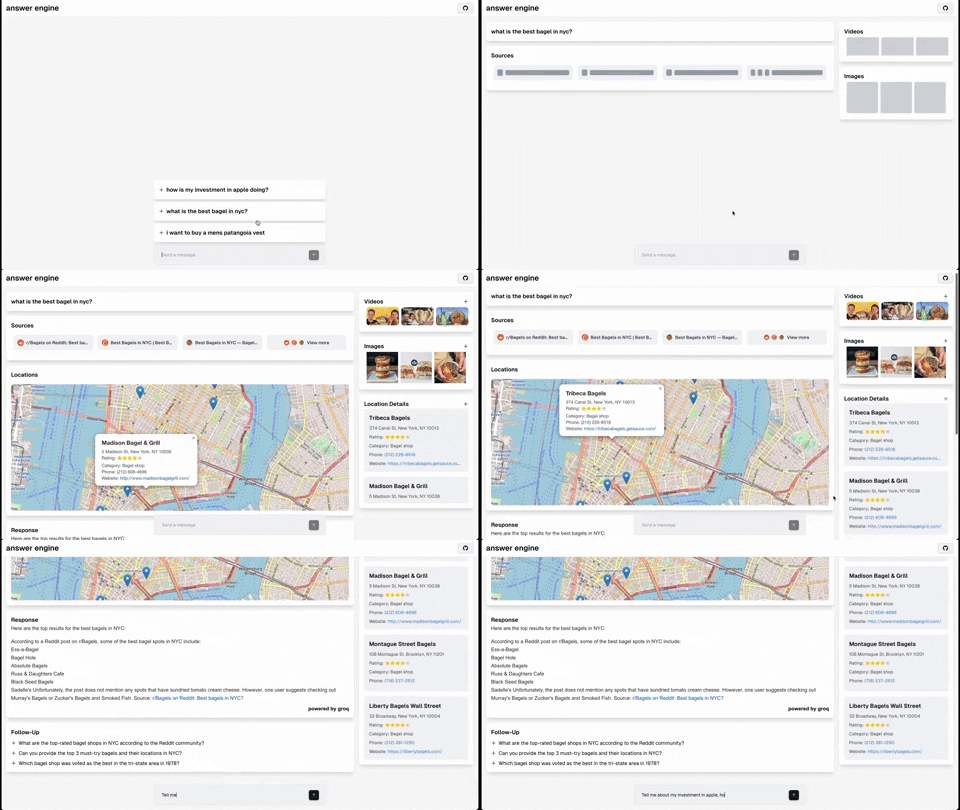
This repository contains the code and instructions needed to build a sophisticated answer engine that leverages the capabilities of [Groq](https://www.groq.com/), [Mistral AI's Mixtral](https://mistral.ai/news/mixtral-of-experts/), [Langchain.JS](https://js.langchain.com/docs/), [Brave Search](https://search.brave.com/), [Serper API](https://serper.dev/), and [OpenAI](https://openai.com/). Designed to efficiently return sources, answers, images, videos, and follow-up questions based on user queries, this project is an ideal starting point for developers interested in natural language processing and search technologies.
## YouTube Tutorials
## Technologies Used
- **Next.js**: A React framework for building server-side rendered and static web applications.
- **Tailwind CSS**: A utility-first CSS framework for rapidly building custom user interfaces.
- **Vercel AI SDK**: The Vercel AI SDK is a library for building AI-powered streaming text and chat UIs.
- **Groq & Mixtral**: Technologies for processing and understanding user queries.
- **Langchain.JS**: A JavaScript library focused on text operations, such as text splitting and embeddings.
- **Brave Search**: A privacy-focused search engine used for sourcing relevant content and images.
- **Serper API**: Used for fetching relevant video and image results based on the user's query.
- **OpenAI Embeddings**: Used for creating vector representations of text chunks.
- **Cheerio**: Utilized for HTML parsing, allowing the extraction of content from web pages.
- **Ollama (Optional)**: Used for streaming inference and embeddings.
- **Upstash Redis Rate Limiting (Optional)**: Used for setting up rate limiting for the application.
- **Upstash Semantic Cache (Optional)**: Used for caching data for faster response times.
## Getting Started
### Prerequisites
- Obtain API keys from OpenAI, Groq, Brave Search, and Serper.
#### Prerequisites for Non-Docker Installation
- Ensure Node.js and npm are installed on your machine.
#### Prerequisites for Docker Installation
- Ensure Docker and docker compose are installed on your machine.
### Obtaining API Keys
- **OpenAI API Key**: [Generate your OpenAI API key here](https://platform.openai.com/account/api-keys).
- **Groq API Key**: [Get your Groq API key here](https://console.groq.com/keys).
- **Brave Search API Key**: [Obtain your Brave Search API key here](https://brave.com/search/api/).
- **Serper API Key**: [Get your Serper API key here](https://serper.dev/).
### Quick Clone and Deploy
Simple, Easy, Fast and Free - deploy to vercel
> Make Sure to fill all the API Keys required for the Installation.
[](https://vercel.com/new/clone?repository-url=https%3A%2F%2Fgithub.com%2Fdevelopersdigest%2Fllm-answer-engine&env=OPENAI_API_KEY,GROQ_API_KEY,BRAVE_SEARCH_API_KEY,SERPER_API&envDescription=ALL%20API%20KEYS%20are%20needed%20for%20this%20application.%20If%20you%20are%20not%20using%20OpenAI%20KEY%20and%20Using%20Groq%20Instead%2C%20then%20just%20enter%20a%20random%20string%20in%20the%20OpenAI%20Key%20section%20so%20it%20wont%20generate%20any%20error%20while%20building%20the%20project.&project-name=llm-answer-engine&repository-name=llm-answer-engine&skippable-integrations=1)
### Installation
1. Clone the repository:
```
git clone https://github.com/developersdigest/llm-answer-engine.git
```
2. Move in the directory
```
cd llm-answer-engine
```
#### Docker Installation
3. Edit the `docker-compose.yml` file and add your API keys
4. Running the Server
To start the server, execute:
```
docker compose up -d #for v2
```
or
```
docker-compose up -d #for v1
```
the server will be listening on the specified port.
#### Non-Docker Installation
3. Install the required dependencies:
```
npm install
```
or
```
bun install
```
4. Create a `.env` file in the root of your project and add your API keys:
```
OPENAI_API_KEY=your_openai_api_key
GROQ_API_KEY=your_groq_api_key
BRAVE_SEARCH_API_KEY=your_brave_search_api_key
SERPER_API=your_serper_api_key
```
5. Running the Server
To start the server, execute:
```
npm run dev
```
or
```
bun run dev
```
the server will be listening on the specified port.
## Editing the Configuration
The configuration file is located in the `app/config.tsx` file. You can modify the following values
- useOllamaInference: false,
- useOllamaEmbeddings: false,
- inferenceModel: 'mixtral-8x7b-32768',
- inferenceAPIKey: process.env.GROQ_API_KEY,
- embeddingsModel: 'text-embedding-3-small',
- textChunkSize: 800,
- textChunkOverlap: 200,
- numberOfSimilarityResults: 2,
- numberOfPagesToScan: 10,
- nonOllamaBaseURL: 'https://api.groq.com/openai/v1'
- useFunctionCalling: true
- useRateLimiting: false
- useSemanticCache: false
- usePortkey: false
### Function Calling Support (Beta)
Currently, function calling is supported with the following capabilities:
- Maps and Locations (Serper Locations API)
- Shopping (Serper Shopping API)
- TradingView Stock Data (Free Widget)
- Spotify (Free API)
- Any functionality that you would like to see here, please open an issue or submit a PR.
- To enable function calling and conditional streaming UI (currently in beta), ensure useFunctionCalling is set to true in the config file.
### Ollama Support (Partially supported)
Currently, streaming text responses are supported for Ollama, but follow-up questions are not yet supported.
Embeddings are supported, however, time-to-first-token can be quite long when using both a local embedding model as well as a local model for the streaming inference. I recommended decreasing a number of the RAG values specified in the `app/config.tsx` file to decrease the time-to-first-token when using Ollama.
To get started, make sure you have the Ollama running model on your local machine and set within the config the model you would like to use and set use OllamaInference and/or useOllamaEmbeddings to true.
Note: When 'useOllamaInference' is set to true, the model will be used for both text generation, but it will skip the follow-up questions inference step when using Ollama.
More info: https://ollama.com/blog/openai-compatibility
### Roadmap
- [] Add document upload + RAG for document search/retrieval
- [] Add a settings component to allow users to select the model, embeddings model, and other parameters from the UI
- [] Add support for follow-up questions when using Ollama
- [Complete] Add support diffusion models (Fal.AI SD3 to start), accessible via '@ mention'
- [Complete] Add AI Gateway to support multiple models and embeddings. (OpenAI, Azure OpenAI, Anyscale, Google Gemini & Palm, Anthropic, Cohere, Together AI, Perplexity, Mistral, Nomic, AI21, Stability AI, DeepInfra, Ollama, etc)
```https://github.com/Portkey-AI/gateway```
- [Complete] Add support for semantic caching to improve response times
- [Complete] Add support for dynamic and conditionally rendered UI components based on the user's query
- [Completed] Add dark mode support based on the user's system preference
### Backend + Node Only Express API
[Watch the express tutorial here](https://youtu.be/43ZCeBTcsS8) for a detailed guide on setting up and running this project.
In addition to the Next.JS version of the project, there is a backend only version that uses Node.js and Express. Which is located in the 'express-api' directory. This is a standalone version of the project that can be used as a reference for building a similar API. There is also a readme file in the 'express-api' directory that explains how to run the backend version.
### Upstash Redis Rate Limiting
[Watch the Upstash Redis Rate Limiting tutorial here](https://youtu.be/3_aNVu6EU3Y) for a detailed guide on setting up and running this project.
Upstash Redis Rate Limiting is a free tier service that allows you to set up rate limiting for your application. It provides a simple and easy-to-use interface for configuring and managing rate limits. With Upstash, you can easily set limits on the number of requests per user, IP address, or other criteria. This can help prevent abuse and ensure that your application is not overwhelmed with requests.
## Contributing
Contributions to the project are welcome. Feel free to fork the repository, make your changes, and submit a pull request. You can also open issues to suggest improvements or report bugs.
## License
This project is licensed under the MIT License.
[](https://star-history.com/#developersdigest/llm-answer-engine&Date)
I'm the developer behind Developers Digest. If you find my work helpful or enjoy what I do, consider supporting me. Here are a few ways you can do that:
- **Patreon**: Support me on Patreon at [patreon.com/DevelopersDigest](https://www.patreon.com/DevelopersDigest)
- **Buy Me A Coffee**: You can buy me a coffee at [buymeacoffee.com/developersdigest](https://www.buymeacoffee.com/developersdigest)
- **Website**: Check out my website at [developersdigest.tech](https://developersdigest.tech)
- **Github**: Follow me on GitHub at [github.com/developersdigest](https://github.com/developersdigest)
- **Twitter**: Follow me on Twitter at [twitter.com/dev__digest](https://twitter.com/dev__digest)
## Troubleshooting
### Node.js version
This project uses Next.js 14.1.x which requires **Node.js >= 18.17.0**.
If you see `npm ERR! code EBADENGINE` / `Unsupported engine`, upgrade Node (e.g. via nvm):
```bash
nvm install 18.17.0
nvm use 18.17.0
```
### npm install / npm ci dependency resolution
If `npm install`/`npm ci` fails with a peer dependency conflict around `zod`, ensure you are using an up-to-date Node/npm and the repo dependencies (this repo pins `zod` to a compatible version).
---
### Overview (`express-api/README.md`)
# Perplexity Inspired LLM Answer Engine
This repository contains the code and instructions needed to build a sophisticated answer engine that leverages the capabilities of Groq, Mixtral, Langchain.JS, Brave Search, and OpenAI. Designed to efficiently return sources, answers, and follow-up questions based on user queries, this project is an ideal starting point for developers interested in natural language processing and search technologies.
## YouTube Tutorial
[Watch the tutorial here](https://youtu.be/43ZCeBTcsS8) for a detailed guide on setting up and running this project. The video covers every step of the process, from API key acquisition to server deployment.
## Technologies Used
- **Express.js**: A web application framework for Node.js, used to create server-side applications.
- **Body-Parser**: A middleware for Express.js, it's used to parse incoming request bodies before your handlers.
- **Groq & Mixtral**: Technologies for processing and understanding user queries.
- **Langchain.JS**: A JavaScript library focused on text operations, such as text splitting and embeddings.
- **Brave Search**: A privacy-focused search engine used for sourcing relevant content.
- **OpenAI**: Leveraged for generating coherent and contextually relevant answers and follow-up questions.
- **Cheerio**: Utilized for HTML parsing, allowing the extraction of content from web pages.
## Getting Started
### Prerequisites
- Ensure Node.js and npm are installed on your machine.
- Obtain API keys from Groq, OpenAI, and Brave Search.
### Obtaining API Keys
- **Groq API Key**: [Get your Groq API key here](https://console.groq.com/playground).
- **OpenAI API Key**: [Generate your OpenAI API key here](https://platform.openai.com/api-keys).
- **Brave Search API Key**: [Obtain your Brave Search API key here](https://api.search.brave.com/app/dashboard).
### Installation
1. Clone the repository:
```git clone https://github.com/developersdigest/llm-answer-engine```
2. cd into the directory
```cd express-api```
3. Install the required dependencies:
```npm install```
or
```bun install```
4. Create a `.env` file in the root of your project and add your API keys:
```
GROQ_API_KEY=
BRAVE_SEARCH_API_KEY=
OPENAI_API_KEY=
```
### Running the Server
To start the server, execute:
```npm start```
The server will be listening on port 3005.
## Usage
Make a POST request to `localhost:3005` with a JSON body containing your query and the desired parameters:
```
{
"message": "Tell me the Anthropic's Claude 3",
"returnSources": true,
"returnFollowUpQuestions": true,
"embedSourcesInLLMResponse": false,
"textChunkSize": 800,
"textChunkOverlap": 200,
"numberOfSimilarityResults": 2,
"numberOfPagesToScan": 4
}
```
The engine will process your query and return a comprehensive answer along with sources and, if requested, follow-up questions.
## Contributing
Contributions to the project are welcome. Feel free to fork the repository, make your changes, and submit a pull request. You can also open issues to suggest improvements or report bugs.
## License
This project is licensed under the MIT License - see the LICENSE file for more details.
I'm the developer behind Developers Digest. If you find my work helpful or enjoy what I do, consider supporting me. Here are a few ways you can do that:
- **Patreon**: Support me on Patreon at [patreon.com/DevelopersDigest](https://www.patreon.com/DevelopersDigest)
- **Buy Me A Coffee**: You can buy me a coffee at [buymeacoffee.com/developersdigest](https://www.buymeacoffee.com/developersdigest)
- **Website**: Check out my website at [developersdigest.tech](https://developersdigest.tech)
- **Github**: Follow me on GitHub at [github.com/developersdigest](https://github.com/developersdigest)
- **Twitter**: Follow me on Twitter at [twitter.com/dev__digest](https://twitter.com/dev__digest)
---
--- METRICS ---
- Files Extracted: 2
- Estimated Token Budget: ~3883 tokens
- Canonical Reference: https://codewiki.google/github.com/developersdigest/llm-answer-engine