# Technical Documentation: cytoscape/cytoscape.js
> ℹ️ **Provenance:** Hybrid Fusion: `cytoscape/cytoscape.js` (README + 1 In-Tree Chapters) · [CodeWiki Reference](https://codewiki.google/github.com/cytoscape/cytoscape.js) · Recency: Active (< 180 days)
## 1. Project Overview & Quickstart (cytoscape/cytoscape.js)
 [](https://github.com/cytoscape/cytoscape.js)
[](https://blog.js.cytoscape.org)
[](https://raw.githubusercontent.com/cytoscape/cytoscape.js/master/LICENSE)
[](https://www.npmjs.com/package/cytoscape)
[](https://zenodo.org/badge/latestdoi/2255947)
[](https://www.npmjs.com/package/cytoscape)
[](https://github.com/cytoscape/cytoscape.js/actions/workflows/tests.yml)
[](https://js.cytoscape.org/#extensions)
[](https://cloudflare.com)
Created at the [University of Toronto](https://utoronto.ca) and published in [Oxford Bioinformatics](https://js.cytoscape.org/#introduction/citation) ([2016](https://academic.oup.com/bioinformatics/article/32/2/309/1744007), [2023](https://academic.oup.com/bioinformatics/article/39/1/btad031/6988031)).
[](https://github.com/cytoscape/cytoscape.js)
[](https://blog.js.cytoscape.org)
[](https://raw.githubusercontent.com/cytoscape/cytoscape.js/master/LICENSE)
[](https://www.npmjs.com/package/cytoscape)
[](https://zenodo.org/badge/latestdoi/2255947)
[](https://www.npmjs.com/package/cytoscape)
[](https://github.com/cytoscape/cytoscape.js/actions/workflows/tests.yml)
[](https://js.cytoscape.org/#extensions)
[](https://cloudflare.com)
Created at the [University of Toronto](https://utoronto.ca) and published in [Oxford Bioinformatics](https://js.cytoscape.org/#introduction/citation) ([2016](https://academic.oup.com/bioinformatics/article/32/2/309/1744007), [2023](https://academic.oup.com/bioinformatics/article/39/1/btad031/6988031)).
Authored by: [Max Franz](https://github.com/maxkfranz), [Christian Lopes](https://github.com/chrtannus), [Dylan Fong](https://github.com/d2fong), [Mike Kucera](https://github.com/mikekucera), ..., [Gary Bader](https://baderlab.org)
# Cytoscape.js
Graph theory (network) library for visualisation and analysis : [https://js.cytoscape.org](https://js.cytoscape.org)
## Description
Cytoscape.js is a fully featured [graph theory](https://en.wikipedia.org/wiki/Graph_theory) library. Do you need to model and/or visualise relational data, like biological data or social networks? If so, Cytoscape.js is just what you need.
Cytoscape.js contains a graph theory model and an optional renderer to display interactive graphs. This library was designed to make it as easy as possible for programmers and scientists to use graph theory in their apps, whether it's for server-side analysis in a Node.js app or for a rich user interface.
You can get started with Cytoscape.js with one line:
```js
var cy = cytoscape({ elements: myElements, container: myDiv });
```
Learn more about the features of Cytoscape.js by reading [its documentation](https://js.cytoscape.org).
## Example
The Tokyo railway stations network can be visualised with Cytoscape:
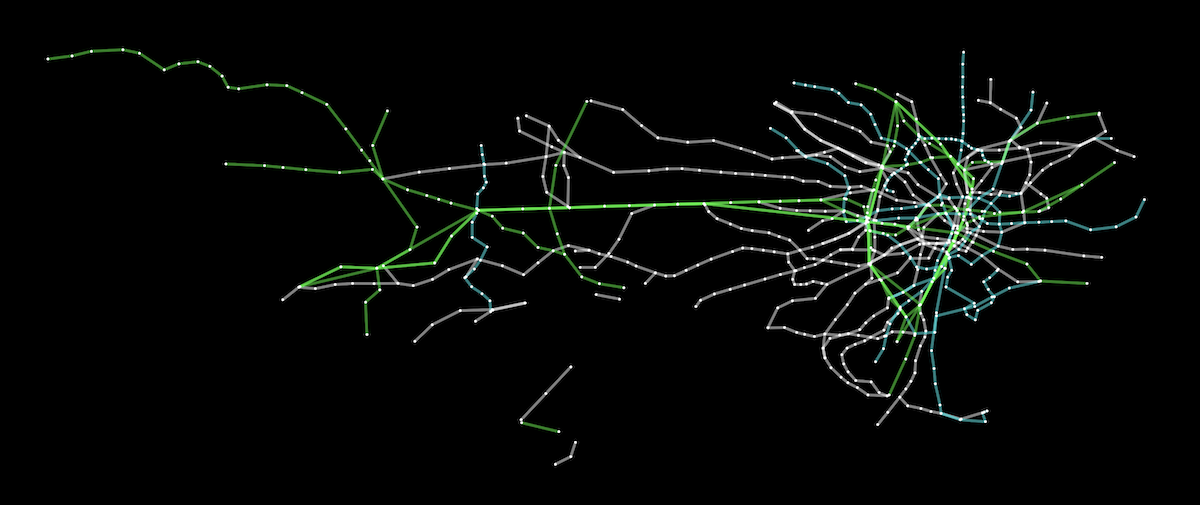
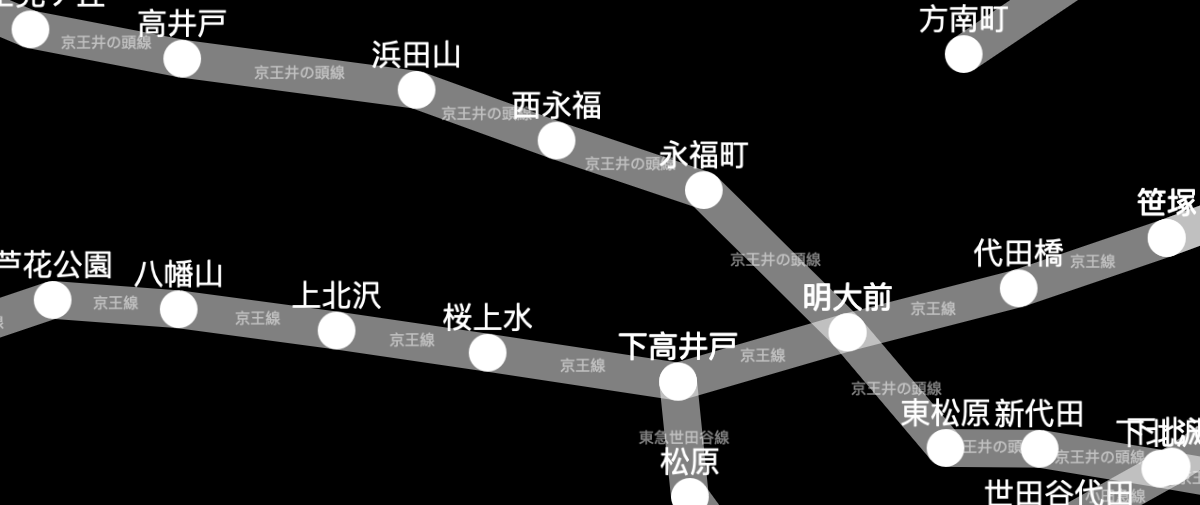 A [live demo](https://js.cytoscape.org/demos/tokyo-railways/) and [source code](https://github.com/cytoscape/cytoscape.js/tree/master/documentation/demos/tokyo-railways) are available for the Tokyo railway stations graph. More demos are available in the [documentation](https://js.cytoscape.org/#demos).
## Documentation
You can find the documentation and downloads on the [project website](https://js.cytoscape.org).
## Roadmap
Future versions of Cytoscape.js are planned in the [milestones of the Github issue tracker](https://github.com/cytoscape/cytoscape.js/milestones). You can use the milestones to see what's currently planned for future releases.
## Contributing to Cytoscape.js
Would you like to become a Cytoscape.js contributor? You can contribute in technical roles (e.g. features, testing) or non-technical roles (e.g. documentation, outreach), depending on your interests. [Get in touch with us by posting a GitHub discussion](https://github.com/cytoscape/cytoscape.js/discussions).
For the mechanics of contributing a pull request, refer to [CONTRIBUTING.md](CONTRIBUTING.md).
Feature releases are made monthly, while patch releases are made weekly. This allows for rapid releases of first- and third-party contributions.
## Citation
To cite Cytoscape.js in a paper, please cite the Oxford Bioinformatics issue:
*Cytoscape.js: a graph theory library for visualisation and analysis*
Franz M, Lopes CT, Huck G, Dong Y, Sumer O, Bader GD
[Bioinformatics (2016) 32 (2): 309-311 first published online September 28, 2015 doi:10.1093/bioinformatics/btv557](https://bioinformatics.oxfordjournals.org/content/32/2/309) [(PDF)](http://bioinformatics.oxfordjournals.org/content/32/2/309.full.pdf)
- [PubMed abstract for the original 2016 article](http://www.ncbi.nlm.nih.gov/pubmed/26415722)
- [PubMed abstract for the 2023 update article](https://pubmed.ncbi.nlm.nih.gov/36645249)
## Build dependencies
Install `node` and `npm`. Run `npm install` before using `npm run`.
## Build instructions
Run `npm run ` in the console. The main targets are:
**Building:**
* `build`: do all builds of the library (umd, min, cjs, esm)
* `build:min` : do the unminified build with bundled dependencies (for simple html pages, good for novices)
* `build:umd` : do the umd (cjs/amd/globals) build
* `build:esm` : do the esm (ES 2015 modules) build
* `clean` : clean the `build` directory
* `docs` : build the docs into `documentation`
* `release` : build all release artifacts
* `watch` : automatically build lib for debugging (with sourcemap, no babel, very quick)
* good for general testing on `debug/index.html`
* served on `http://localhost:8080` or the first available port thereafter, with livereload on `debug/index.html`
* `watch:babel` : automatically build lib for debugging (with sourcemap, with babel, a bit slower)
* good for testing performance or for testing out of date browsers
* served on `http://localhost:8080` or the first available port thereafter, with livereload on `debug/index.html`
* `watch:umd` : automatically build prod umd bundle (no sourcemap, with babel)
* good for testing cytoscape in another project (with a `"cytoscape": "file:./path/to/cytoscape"` reference in your project's `package.json`)
* no http server
* `dist` : update the distribution js for npm etc.
**Testing:**
The default test scripts run directly against the source code. Tests can alternatively be run on a built bundle. The library can be built on `node>=6`, but the library's bundle can be tested on `node>=0.10`.
* `test` : run all testing & linting
* `test:js` : run the mocha tests on the public API of the lib (directly on source files)
* `npm run test:js -- -g "my test name"` runs tests on only the matching test cases
* `test:build` : run the mocha tests on the public API of the lib (on a built bundle)
* `npm run build` should be run beforehand on a recent version of node
* `npm run test:build -- -g "my test name"` runs build tests on only the matching test cases
* `test:modules` : run unit tests on private, internal API
* `npm run test:modules -- -g "my test name"` runs modules tests on only the matching test cases
* `lint` : lint the js sources via eslint
* `benchmark` : run all benchmarks
* `benchmark:single` : run benchmarks only for the suite specified in `benchmark/single`
## Release instructions
### Background
- Ensure that a milestone exists for the release you want to make, with all the issues for that release assigned in the milestone.
- Bug fixes should be applied to both the `master` and `unstable` branches. PRs can go on either branch, with the patch applied to the other branch after merging.
- When a patch release is made concurrently with a feature release, the patch release should be made first. Wait 5 minutes after the patch release completes before starting the feature release -- otherwise Zenodo doesn't pick up releases properly.
### Patch version
1. Go to [Actions > Patch release](https://github.com/cytoscape/cytoscape.js/actions/workflows/patch-release.yml)
1. Go to the 'Run workflow' dropdown
1. [Optional] The 'master' branch should be preselected for you
1. Press the green 'Run workflow' button
1. Close the milestone for the release
A [live demo](https://js.cytoscape.org/demos/tokyo-railways/) and [source code](https://github.com/cytoscape/cytoscape.js/tree/master/documentation/demos/tokyo-railways) are available for the Tokyo railway stations graph. More demos are available in the [documentation](https://js.cytoscape.org/#demos).
## Documentation
You can find the documentation and downloads on the [project website](https://js.cytoscape.org).
## Roadmap
Future versions of Cytoscape.js are planned in the [milestones of the Github issue tracker](https://github.com/cytoscape/cytoscape.js/milestones). You can use the milestones to see what's currently planned for future releases.
## Contributing to Cytoscape.js
Would you like to become a Cytoscape.js contributor? You can contribute in technical roles (e.g. features, testing) or non-technical roles (e.g. documentation, outreach), depending on your interests. [Get in touch with us by posting a GitHub discussion](https://github.com/cytoscape/cytoscape.js/discussions).
For the mechanics of contributing a pull request, refer to [CONTRIBUTING.md](CONTRIBUTING.md).
Feature releases are made monthly, while patch releases are made weekly. This allows for rapid releases of first- and third-party contributions.
## Citation
To cite Cytoscape.js in a paper, please cite the Oxford Bioinformatics issue:
*Cytoscape.js: a graph theory library for visualisation and analysis*
Franz M, Lopes CT, Huck G, Dong Y, Sumer O, Bader GD
[Bioinformatics (2016) 32 (2): 309-311 first published online September 28, 2015 doi:10.1093/bioinformatics/btv557](https://bioinformatics.oxfordjournals.org/content/32/2/309) [(PDF)](http://bioinformatics.oxfordjournals.org/content/32/2/309.full.pdf)
- [PubMed abstract for the original 2016 article](http://www.ncbi.nlm.nih.gov/pubmed/26415722)
- [PubMed abstract for the 2023 update article](https://pubmed.ncbi.nlm.nih.gov/36645249)
## Build dependencies
Install `node` and `npm`. Run `npm install` before using `npm run`.
## Build instructions
Run `npm run ` in the console. The main targets are:
**Building:**
* `build`: do all builds of the library (umd, min, cjs, esm)
* `build:min` : do the unminified build with bundled dependencies (for simple html pages, good for novices)
* `build:umd` : do the umd (cjs/amd/globals) build
* `build:esm` : do the esm (ES 2015 modules) build
* `clean` : clean the `build` directory
* `docs` : build the docs into `documentation`
* `release` : build all release artifacts
* `watch` : automatically build lib for debugging (with sourcemap, no babel, very quick)
* good for general testing on `debug/index.html`
* served on `http://localhost:8080` or the first available port thereafter, with livereload on `debug/index.html`
* `watch:babel` : automatically build lib for debugging (with sourcemap, with babel, a bit slower)
* good for testing performance or for testing out of date browsers
* served on `http://localhost:8080` or the first available port thereafter, with livereload on `debug/index.html`
* `watch:umd` : automatically build prod umd bundle (no sourcemap, with babel)
* good for testing cytoscape in another project (with a `"cytoscape": "file:./path/to/cytoscape"` reference in your project's `package.json`)
* no http server
* `dist` : update the distribution js for npm etc.
**Testing:**
The default test scripts run directly against the source code. Tests can alternatively be run on a built bundle. The library can be built on `node>=6`, but the library's bundle can be tested on `node>=0.10`.
* `test` : run all testing & linting
* `test:js` : run the mocha tests on the public API of the lib (directly on source files)
* `npm run test:js -- -g "my test name"` runs tests on only the matching test cases
* `test:build` : run the mocha tests on the public API of the lib (on a built bundle)
* `npm run build` should be run beforehand on a recent version of node
* `npm run test:build -- -g "my test name"` runs build tests on only the matching test cases
* `test:modules` : run unit tests on private, internal API
* `npm run test:modules -- -g "my test name"` runs modules tests on only the matching test cases
* `lint` : lint the js sources via eslint
* `benchmark` : run all benchmarks
* `benchmark:single` : run benchmarks only for the suite specified in `benchmark/single`
## Release instructions
### Background
- Ensure that a milestone exists for the release you want to make, with all the issues for that release assigned in the milestone.
- Bug fixes should be applied to both the `master` and `unstable` branches. PRs can go on either branch, with the patch applied to the other branch after merging.
- When a patch release is made concurrently with a feature release, the patch release should be made first. Wait 5 minutes after the patch release completes before starting the feature release -- otherwise Zenodo doesn't pick up releases properly.
### Patch version
1. Go to [Actions > Patch release](https://github.com/cytoscape/cytoscape.js/actions/workflows/patch-release.yml)
1. Go to the 'Run workflow' dropdown
1. [Optional] The 'master' branch should be preselected for you
1. Press the green 'Run workflow' button
1. Close the milestone for the release
 ### Feature version
1. Go to [Actions > Feature release](https://github.com/cytoscape/cytoscape.js/actions/workflows/feature-release.yml)
1. Go to the 'Run workflow' dropdown
1. [Optional] The 'unstable' branch should be preselected for you
1. Press the green 'Run workflow' button
1. Close the milestone for the release
1. Make the release announcement [on the blog](https://github.com/cytoscape/cytoscape.js-blog)
### Feature version
1. Go to [Actions > Feature release](https://github.com/cytoscape/cytoscape.js/actions/workflows/feature-release.yml)
1. Go to the 'Run workflow' dropdown
1. [Optional] The 'unstable' branch should be preselected for you
1. Press the green 'Run workflow' button
1. Close the milestone for the release
1. Make the release announcement [on the blog](https://github.com/cytoscape/cytoscape.js-blog)
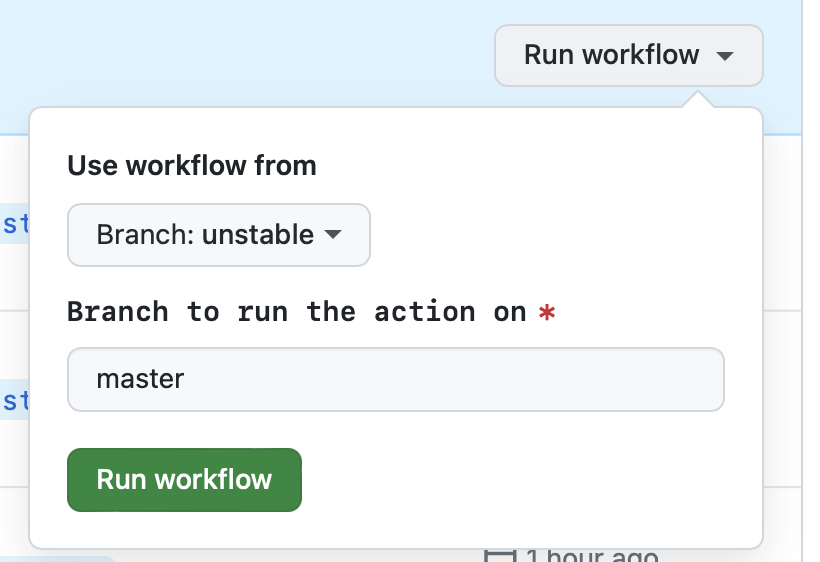
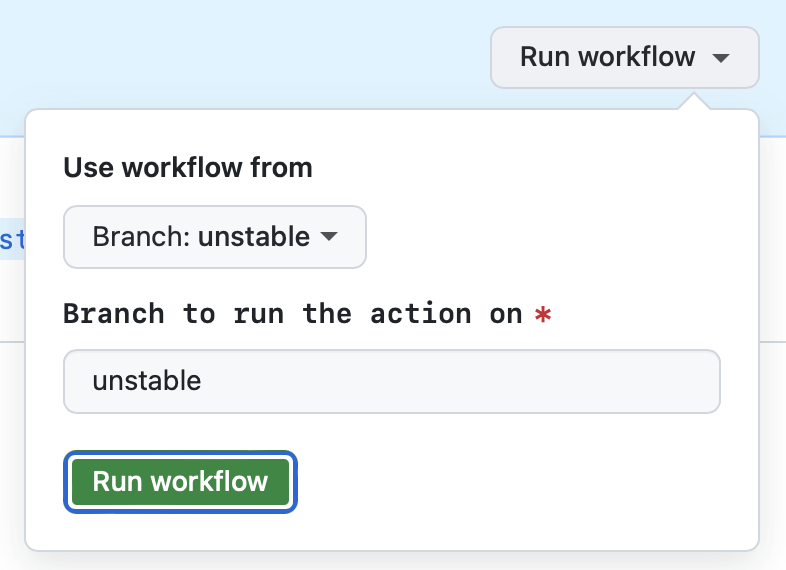 ### Notes on GitHub Actions UI
- 'Use workflow from' in the GitHub UI selects the branch from which the workflow YML file is selected. Since the workflow files should usually be the same on the master and unstable branches, it shouldn't matter what's selected.
- 'Branch to run the action on' in the GitHub UI is preselected for you. You don't need to change it.
## Tests
Mocha tests are found in the [test directory](https://github.com/cytoscape/cytoscape.js/tree/master/test). The tests can be run in the browser or they can be run via Node.js (`npm run test:js`).
## 2. In-Tree Documentation Chapters (cytoscape/cytoscape.js)
### CONTRIBUTING
# Contributing to Cytoscape.js
Cytoscape.js is an open source project, and we greatly appreciate any and all contributions.
A blog post is available [on blog.js.cytoscape.org](http://blog.js.cytoscape.org/2017/06/13/contributing/) geared towards first-time code contributors with more in-depth instructions on the project's structure, the process of creating and merging changes to the code, and more.
If you'd like to contribute code to Cytoscape.js but you're not sure exactly what you'd like to implement, take a look at our [current milestones](https://github.com/cytoscape/cytoscape.js/milestones) to see what features we have planned in future --- or anything labelled [`help-wanted`](https://github.com/cytoscape/cytoscape.js/issues?q=is%3Aopen+is%3Aissue+label%3Ahelp-wanted). Of course, we also welcome your own ideas. You can discuss new ideas with the community on [GitHub discussions](https://github.com/cytoscape/cytoscape.js/discussions).
Our goal is to make Cytoscape.js easy to use and comprehensive. Thank you for taking the time and effort to contribute and to help make that happen!
## Submitting issues
The first step towards providing a code contribution is to write [a short, descriptive issue](https://github.com/cytoscape/cytoscape.js/issues). If your issue pertains to an extension, you should file the issue on that extension's issue tracker instead.
Describe the bug or feature that you are addressing in your issue. Then, create your issue's corresponding pull request that contains your code changes.
## How to make your changes in a pull request
New features go in the `unstable` branch, which is used for the next (breaking/major or feature/minor) version. Bugfixes go in the `master` branch for the next bugfix/patch version. This allows us to follow [semver](http://semver.org/) nicely.
To propose a change, [fork](https://help.github.com/articles/fork-a-repo/) the cytoscape.js repository on Github, make a change, and then submit a [pull request](https://help.github.com/articles/creating-a-pull-request/) so that the proposed changes can be reviewed. If this is your first time making a pull request on GitHub, you can refer to [our comprehensive, step-by-step blog post](https://blog.js.cytoscape.org/2017/06/13/contributing/).
The source is organised in relatively the same way as the documentation, under `./src`. Try to maintain that organisation as best as you can. You are free to create new files and `require()` them using ESM [`import`](https://developer.mozilla.org/en-US/docs/Web/JavaScript/Reference/Statements/import) and [`export`](https://developer.mozilla.org/en-US/docs/Web/JavaScript/Reference/Statements/export).
Add your new feature to the documentation. Updates to the documentation should go in [`docmaker.json`](https://github.com/cytoscape/cytoscape.js/blob/unstable/documentation/docmaker.json) file or the accompanying md files. The documentation's HTML is generated from a template, and so it should not be edited directly.
## Code style
Cytoscape.js is transpiled with Babel, so ES2015/ES6+ language features can be used.
Use two spaces for indentation, and single-quoted strings are preferred. The main thing is to try to keep your code neat and readable. There isn't a strict styleguide; it's more important that your code is easily understood and well tested. We do use [eslint](http://eslint.org/), so you can use `eslint` in the terminal or use eslint support in your editor.
You can run `eslint --fix` to automatically format the code to more or less match the style we use. It will only catch basic things, though.
## Testing
Tests go in the `./test` directory, as Mocha tests usually do. They are just a flat list of `.js` files that Mocha runs. If your change is a bugfix, please add a test case that would fail without your fix. If your change is a new feature, please add tests accordingly.
If your change is visual/rendering-related, then Mocha tests are not pragmatic. Use the debug page in the `debug` directory to try out visual changes. That page contains a sidebar with buttons and dropdowns that make visual and interactive testing easy.
Please run `npm test` to make sure all the unit tests are passing before you make your pull request.
We also have support for running the Mocha tests in IE9+ and other old browsers. You can run the tests in a [Windows IE VM](https://developer.microsoft.com/en-us/microsoft-edge/tools/vms/) while running `npm run watch:umd`. Go to `http://youripaddress:8081/test/ie.html` in IE to open the Mocha test page.
---
--- METRICS ---
- Files Extracted: 2
- Estimated Token Budget: ~3470 tokens
- Recency Window: Active (< 180 days)
- Canonical Reference: https://codewiki.google/github.com/cytoscape/cytoscape.js
### Notes on GitHub Actions UI
- 'Use workflow from' in the GitHub UI selects the branch from which the workflow YML file is selected. Since the workflow files should usually be the same on the master and unstable branches, it shouldn't matter what's selected.
- 'Branch to run the action on' in the GitHub UI is preselected for you. You don't need to change it.
## Tests
Mocha tests are found in the [test directory](https://github.com/cytoscape/cytoscape.js/tree/master/test). The tests can be run in the browser or they can be run via Node.js (`npm run test:js`).
## 2. In-Tree Documentation Chapters (cytoscape/cytoscape.js)
### CONTRIBUTING
# Contributing to Cytoscape.js
Cytoscape.js is an open source project, and we greatly appreciate any and all contributions.
A blog post is available [on blog.js.cytoscape.org](http://blog.js.cytoscape.org/2017/06/13/contributing/) geared towards first-time code contributors with more in-depth instructions on the project's structure, the process of creating and merging changes to the code, and more.
If you'd like to contribute code to Cytoscape.js but you're not sure exactly what you'd like to implement, take a look at our [current milestones](https://github.com/cytoscape/cytoscape.js/milestones) to see what features we have planned in future --- or anything labelled [`help-wanted`](https://github.com/cytoscape/cytoscape.js/issues?q=is%3Aopen+is%3Aissue+label%3Ahelp-wanted). Of course, we also welcome your own ideas. You can discuss new ideas with the community on [GitHub discussions](https://github.com/cytoscape/cytoscape.js/discussions).
Our goal is to make Cytoscape.js easy to use and comprehensive. Thank you for taking the time and effort to contribute and to help make that happen!
## Submitting issues
The first step towards providing a code contribution is to write [a short, descriptive issue](https://github.com/cytoscape/cytoscape.js/issues). If your issue pertains to an extension, you should file the issue on that extension's issue tracker instead.
Describe the bug or feature that you are addressing in your issue. Then, create your issue's corresponding pull request that contains your code changes.
## How to make your changes in a pull request
New features go in the `unstable` branch, which is used for the next (breaking/major or feature/minor) version. Bugfixes go in the `master` branch for the next bugfix/patch version. This allows us to follow [semver](http://semver.org/) nicely.
To propose a change, [fork](https://help.github.com/articles/fork-a-repo/) the cytoscape.js repository on Github, make a change, and then submit a [pull request](https://help.github.com/articles/creating-a-pull-request/) so that the proposed changes can be reviewed. If this is your first time making a pull request on GitHub, you can refer to [our comprehensive, step-by-step blog post](https://blog.js.cytoscape.org/2017/06/13/contributing/).
The source is organised in relatively the same way as the documentation, under `./src`. Try to maintain that organisation as best as you can. You are free to create new files and `require()` them using ESM [`import`](https://developer.mozilla.org/en-US/docs/Web/JavaScript/Reference/Statements/import) and [`export`](https://developer.mozilla.org/en-US/docs/Web/JavaScript/Reference/Statements/export).
Add your new feature to the documentation. Updates to the documentation should go in [`docmaker.json`](https://github.com/cytoscape/cytoscape.js/blob/unstable/documentation/docmaker.json) file or the accompanying md files. The documentation's HTML is generated from a template, and so it should not be edited directly.
## Code style
Cytoscape.js is transpiled with Babel, so ES2015/ES6+ language features can be used.
Use two spaces for indentation, and single-quoted strings are preferred. The main thing is to try to keep your code neat and readable. There isn't a strict styleguide; it's more important that your code is easily understood and well tested. We do use [eslint](http://eslint.org/), so you can use `eslint` in the terminal or use eslint support in your editor.
You can run `eslint --fix` to automatically format the code to more or less match the style we use. It will only catch basic things, though.
## Testing
Tests go in the `./test` directory, as Mocha tests usually do. They are just a flat list of `.js` files that Mocha runs. If your change is a bugfix, please add a test case that would fail without your fix. If your change is a new feature, please add tests accordingly.
If your change is visual/rendering-related, then Mocha tests are not pragmatic. Use the debug page in the `debug` directory to try out visual changes. That page contains a sidebar with buttons and dropdowns that make visual and interactive testing easy.
Please run `npm test` to make sure all the unit tests are passing before you make your pull request.
We also have support for running the Mocha tests in IE9+ and other old browsers. You can run the tests in a [Windows IE VM](https://developer.microsoft.com/en-us/microsoft-edge/tools/vms/) while running `npm run watch:umd`. Go to `http://youripaddress:8081/test/ie.html` in IE to open the Mocha test page.
---
--- METRICS ---
- Files Extracted: 2
- Estimated Token Budget: ~3470 tokens
- Recency Window: Active (< 180 days)
- Canonical Reference: https://codewiki.google/github.com/cytoscape/cytoscape.js