
[](https://codecov.io/gh/crossoverJie/cim) [](https://github.com/crossoverJie/cim) [](https://juejin.im/post/5c2bffdc51882509181395d7) 📘[Introduction](#introduction) |📽[Video Demo](#video-demo) | 🏖[TODO LIST](#todo-list) | 🌈[Architecture](#architecture) |💡[Flow Chart](#flow-chart)|🌁[Quick Start](#quick-start)|👨🏻✈️[Built-in Commands](#built-in-commands)|🎤[Chat](#group-chatprivate-chat)|❓[QA](https://github.com/crossoverJie/cim/blob/master/doc/QA.md)|💌[Contact](#contact) [中文文档](README-zh.md)
 |
|  
## TODO LIST
* [x] [Group Chat](#group-chat)
* [x] [Private Chat](#private-chat)
* [x] [Built-in Commands](#built-in-commands)
* [x] [Chat History Query](#chat-history-query)
* [x] [AI Mode](#ai-mode)
* [x] Efficient encoding/decoding with `Google Protocol Buffer`
* [x] Flexible horizontal scaling based on actual needs
* [x] Server-side automatic removal of offline clients
* [x] Client automatic reconnection
* [x] [Delayed Messages](#delayed-messages)
* [x] SDK development package
* [ ] Group categorization
* [ ] Offline messages
* [ ] Message encryption
## Architecture

- Each component in `CIM` is built using `SpringBoot`
- Client build with [cim-client-sdk](https://github.com/crossoverJie/cim/tree/master/cim-client-sdk)
- Use `Netty` to build the underlying communication.
- `MetaStore` is used for registration and discovery of `IM-server` services.
### cim-server
IM server is used to receive client connections, message forwarding, message push, etc.
Support cluster deployment.
### cim-route
Route server; used to process message routing, message forwarding, user login, user offline, and some operation tools (get the number of online users, etc.).
### cim-client
IM client terminal, a command can be started and initiated to communicate with others (group chat, private chat).
## Flow Chart
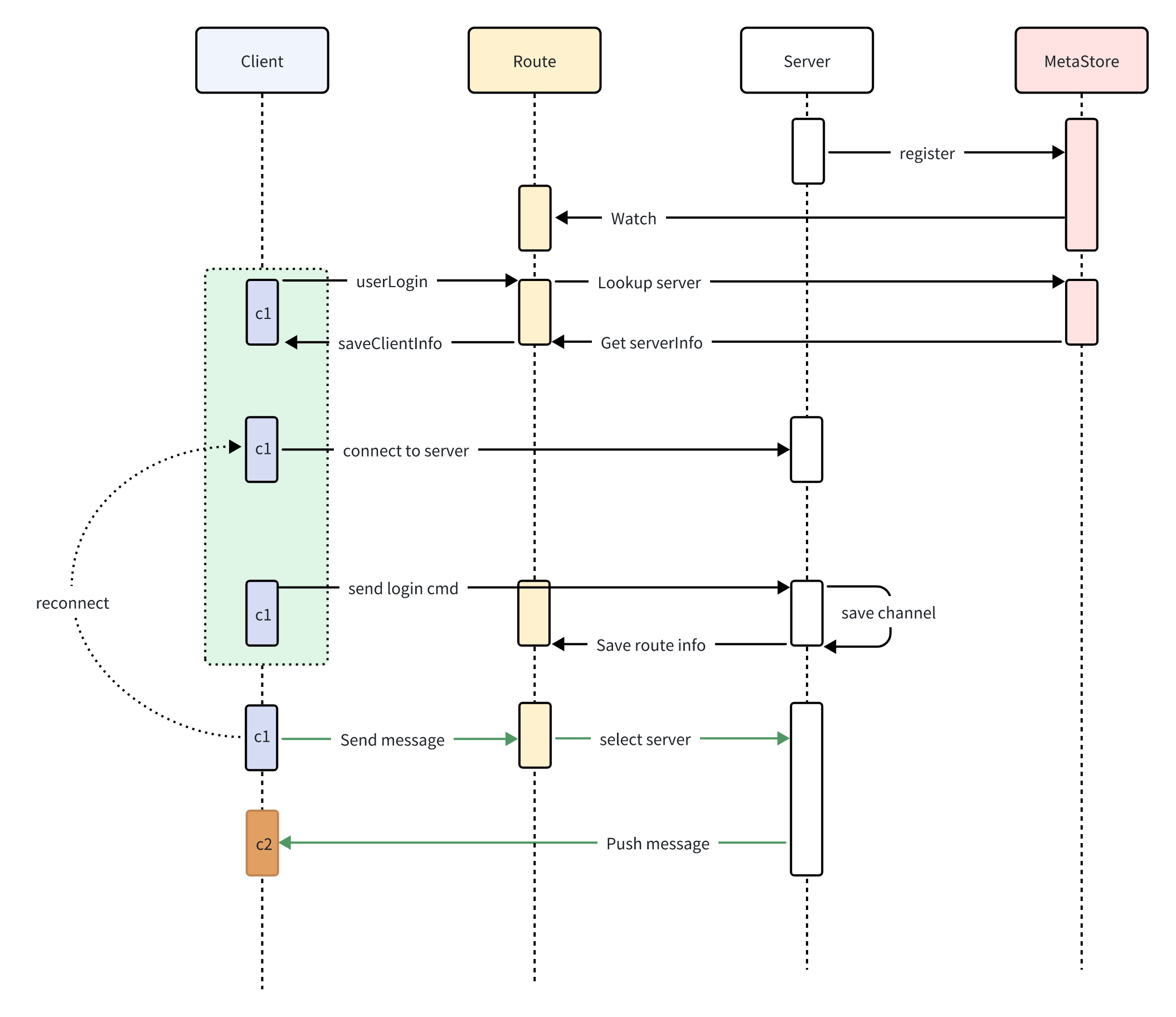
- Server register to `MetaStore`
- Route subscribe `MetaStore`
- Client login to Route
- Route get Server info from `MetaStore`
- Client open connection to Server
- Client1 send message to Route
- Route select Server and forward message to Server
- Server push message to Client2
## Quick Start
### Docker
The `allin1` image comes with Zookeeper, Redis, cim-server, and cim-forward-route pre-installed, all managed by [Supervisor](http://supervisord.org/) for an out-of-the-box experience.
**Supported platforms:** linux/amd64, linux/arm64, linux/arm/v7
**Port mapping:**
| Port | Service | Description |
|------|---------|-------------|
| 2181 | Zookeeper | Service registration & discovery |
| 6379 | Redis | Data caching |
| 8083 | Route Server | HTTP API routing service |
Pull the image and start the container:
```shell
docker pull ghcr.io/crossoverjie/allin1-ubuntu:latest
docker run -p 2181:2181 -p 6379:6379 -p 8083:8083 --rm --name cim-allin1 ghcr.io/crossoverjie/allin1-ubuntu:latest
```
After the container starts, refer to the [Register Account](#register-account) and [Start Client](#start-client) sections below to experience the full IM workflow.
### Build Docker Image Locally
To build the Docker image from source:
```shell
# Run from the project root directory
docker build -t cim-allin1:latest -f docker/allin1-ubuntu.Dockerfile .
docker run -p 2181:2181 -p 6379:6379 -p 8083:8083 --rm --name cim-allin1 cim-allin1:latest
```
### Build from Source
First, install `Zookeeper` and `Redis` and ensure the network is accessible.
```shell
docker run --rm --name zookeeper -d -p 2181:2181 zookeeper:3.9.2
docker run --rm --name redis -d -p 6379:6379 redis:7.4.0
```
```shell
git clone https://github.com/crossoverJie/cim.git
cd cim
mvn clean install -DskipTests=true
cd cim-server && cim-client && cim-forward-route
mvn clean package spring-boot:repackage -DskipTests=true
```
### Deploy IM-server (cim-server)
```shell
cp /cim/cim-server/target/cim-server-1.0.0-SNAPSHOT.jar /xx/work/server0/
cd /xx/work/server0/
nohup java -jar /root/work/server0/cim-server-1.0.0-SNAPSHOT.jar --cim.server.port=9000 --app.zk.addr=

## TODO LIST
* [x] [Group Chat](#group-chat)
* [x] [Private Chat](#private-chat)
* [x] [Built-in Commands](#built-in-commands)
* [x] [Chat History Query](#chat-history-query)
* [x] [AI Mode](#ai-mode)
* [x] Efficient encoding/decoding with `Google Protocol Buffer`
* [x] Flexible horizontal scaling based on actual needs
* [x] Server-side automatic removal of offline clients
* [x] Client automatic reconnection
* [x] [Delayed Messages](#delayed-messages)
* [x] SDK development package
* [ ] Group categorization
* [ ] Offline messages
* [ ] Message encryption
## Architecture

- Each component in `CIM` is built using `SpringBoot`
- Client build with [cim-client-sdk](https://github.com/crossoverJie/cim/tree/master/cim-client-sdk)
- Use `Netty` to build the underlying communication.
- `MetaStore` is used for registration and discovery of `IM-server` services.
### cim-server
IM server is used to receive client connections, message forwarding, message push, etc.
Support cluster deployment.
### cim-route
Route server; used to process message routing, message forwarding, user login, user offline, and some operation tools (get the number of online users, etc.).
### cim-client
IM client terminal, a command can be started and initiated to communicate with others (group chat, private chat).
## Flow Chart

- Server register to `MetaStore`
- Route subscribe `MetaStore`
- Client login to Route
- Route get Server info from `MetaStore`
- Client open connection to Server
- Client1 send message to Route
- Route select Server and forward message to Server
- Server push message to Client2
## Quick Start
### Docker
The `allin1` image comes with Zookeeper, Redis, cim-server, and cim-forward-route pre-installed, all managed by [Supervisor](http://supervisord.org/) for an out-of-the-box experience.
**Supported platforms:** linux/amd64, linux/arm64, linux/arm/v7
**Port mapping:**
| Port | Service | Description |
|------|---------|-------------|
| 2181 | Zookeeper | Service registration & discovery |
| 6379 | Redis | Data caching |
| 8083 | Route Server | HTTP API routing service |
Pull the image and start the container:
```shell
docker pull ghcr.io/crossoverjie/allin1-ubuntu:latest
docker run -p 2181:2181 -p 6379:6379 -p 8083:8083 --rm --name cim-allin1 ghcr.io/crossoverjie/allin1-ubuntu:latest
```
After the container starts, refer to the [Register Account](#register-account) and [Start Client](#start-client) sections below to experience the full IM workflow.
### Build Docker Image Locally
To build the Docker image from source:
```shell
# Run from the project root directory
docker build -t cim-allin1:latest -f docker/allin1-ubuntu.Dockerfile .
docker run -p 2181:2181 -p 6379:6379 -p 8083:8083 --rm --name cim-allin1 cim-allin1:latest
```
### Build from Source
First, install `Zookeeper` and `Redis` and ensure the network is accessible.
```shell
docker run --rm --name zookeeper -d -p 2181:2181 zookeeper:3.9.2
docker run --rm --name redis -d -p 6379:6379 redis:7.4.0
```
```shell
git clone https://github.com/crossoverJie/cim.git
cd cim
mvn clean install -DskipTests=true
cd cim-server && cim-client && cim-forward-route
mvn clean package spring-boot:repackage -DskipTests=true
```
### Deploy IM-server (cim-server)
```shell
cp /cim/cim-server/target/cim-server-1.0.0-SNAPSHOT.jar /xx/work/server0/
cd /xx/work/server0/
nohup java -jar /root/work/server0/cim-server-1.0.0-SNAPSHOT.jar --cim.server.port=9000 --app.zk.addr=