# Technical Documentation: charmbracelet/bubbles
> ℹ️ **Provenance:** Multi-Tier Ingestion · [CodeWiki Reference](https://codewiki.google/github.com/charmbracelet/bubbles)
### Overview (`README.md`)
# Bubbles
[](https://github.com/charmbracelet/bubbles/releases)
[](https://pkg.go.dev/charm.land/bubbles/v2)
[](https://github.com/charmbracelet/bubbles/actions)
[](https://goreportcard.com/report/charmbracelet/bubbles)
Primitives for [Bubble Tea](https://github.com/charmbracelet/bubbletea)
applications. These components are used in production in [Crush][crush], and [many other applications][otherstuff].
> [!TIP]
>
> Upgrading from v1? Check out the [upgrade guide](./UPGRADE_GUIDE_V2.md), or
> point your LLM at it and let it go to town.
[crush]: https://github.com/charmbracelet/crush
[otherstuff]: https://github.com/charmbracelet/bubbletea/#bubble-tea-in-the-wild
## Spinner
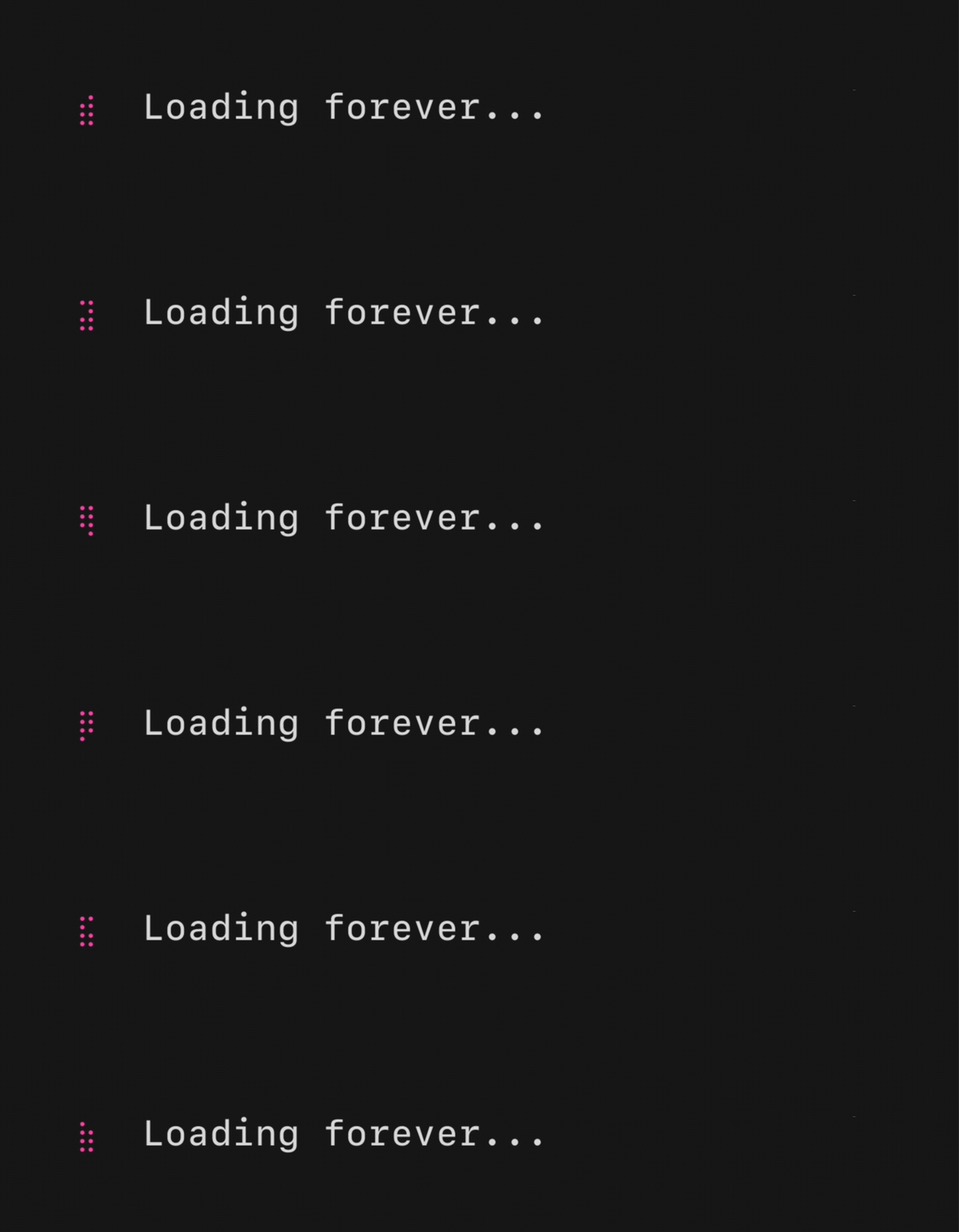
A spinner, useful for indicating that some kind an operation is happening.
There are a couple default ones, but you can also pass your own ”frames.”
- [Example code, basic spinner](https://github.com/charmbracelet/bubbletea/blob/main/examples/spinner/main.go)
- [Example code, various spinners](https://github.com/charmbracelet/bubbletea/blob/main/examples/spinners/main.go)
## Text Input
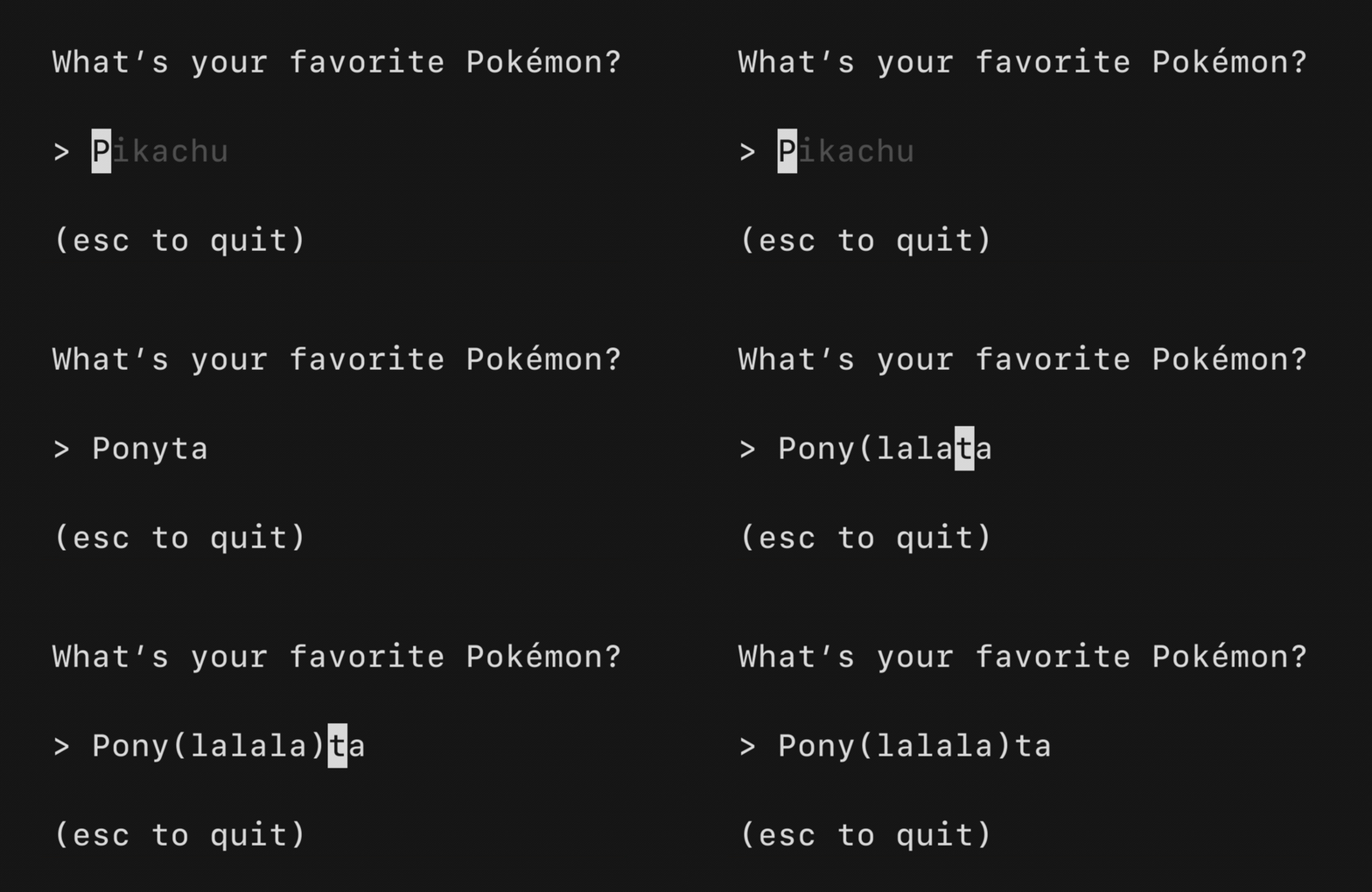
A text input field, akin to an `` in HTML. Supports unicode,
pasting, in-place scrolling when the value exceeds the width of the element and
the common, and many customization options.
- [Example code, one field](https://github.com/charmbracelet/bubbletea/blob/main/examples/textinput/main.go)
- [Example code, many fields](https://github.com/charmbracelet/bubbletea/blob/main/examples/textinputs/main.go)
## Text Area
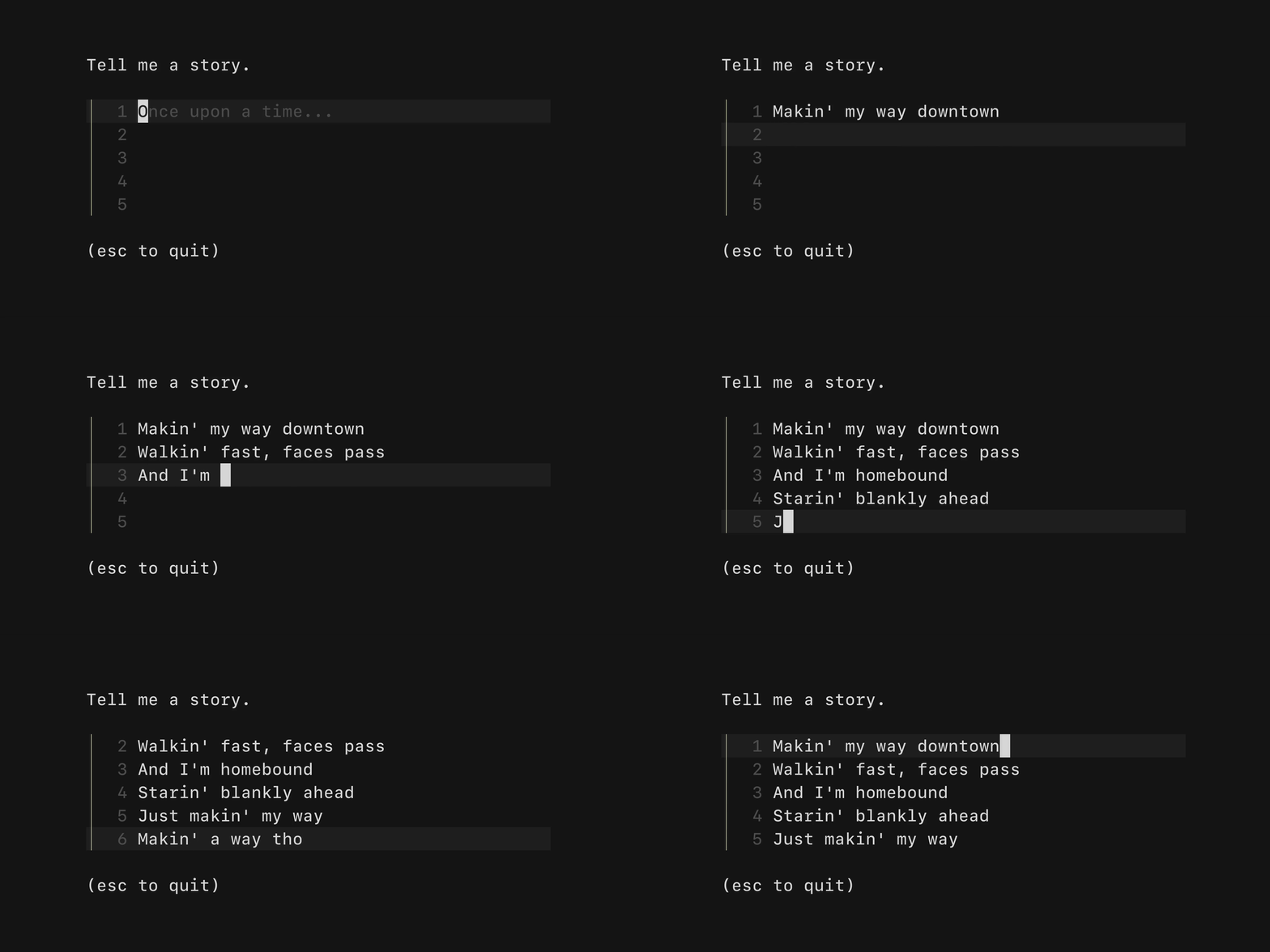
A text area field, akin to an `` in HTML. Allows for input that
spans multiple lines. Supports unicode, pasting, vertical scrolling when the
value exceeds the width and height of the element, and many customization
options.
- [Example code, chat input](https://github.com/charmbracelet/bubbletea/blob/main/examples/chat/main.go)
- [Example code, story time input](https://github.com/charmbracelet/bubbletea/blob/main/examples/textarea/main.go)
## Table
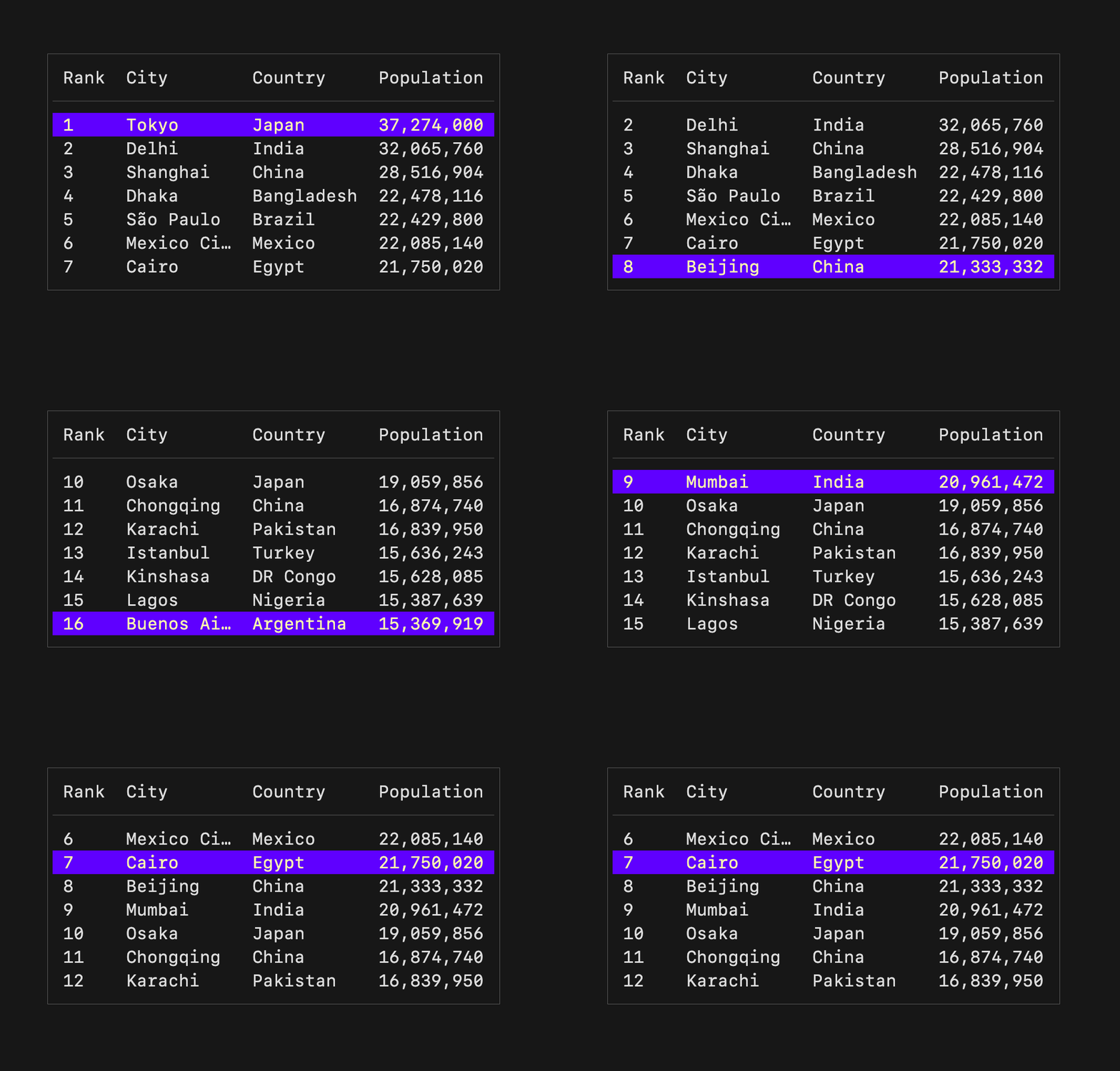
A component for displaying and navigating tabular data (columns and rows).
Supports vertical scrolling and many customization options.
- [Example code, countries and populations](https://github.com/charmbracelet/bubbletea/blob/main/examples/table/main.go)
## Progress
A simple, customizable progress meter, with optional animation via
[Harmonica][harmonica]. Supports solid and gradient fills. The empty and filled
runes can be set to whatever you'd like. The percentage readout is customizable
and can also be omitted entirely.
- [Animated example](https://github.com/charmbracelet/bubbletea/blob/main/examples/progress-animated/main.go)
- [Static example](https://github.com/charmbracelet/bubbletea/blob/main/examples/progress-static/main.go)
[harmonica]: https://github.com/charmbracelet/harmonica
## Paginator
A component for handling pagination logic and optionally drawing pagination UI.
Supports "dot-style" pagination (similar to what you might see on iOS) and
numeric page numbering, but you could also just use this component for the
logic and visualize pagination however you like.
- [Example code](https://github.com/charmbracelet/bubbletea/blob/main/examples/paginator/main.go)
## Viewport
A viewport for vertically scrolling content. Optionally includes standard
pager keybindings and mouse wheel support. A high performance mode is available
for applications which make use of the alternate screen buffer.
- [Example code](https://github.com/charmbracelet/bubbletea/blob/main/examples/pager/main.go)
This component is well complemented with [Reflow][reflow] for ANSI-aware
indenting and text wrapping.
[reflow]: https://github.com/muesli/reflow
## List
A customizable, batteries-included component for browsing a set of items.
Features pagination, fuzzy filtering, auto-generated help, an activity spinner,
and status messages, all of which can be enabled and disabled as needed.
Extrapolated from [Glow][glow].
- [Example code, default list](https://github.com/charmbracelet/bubbletea/blob/main/examples/list-default/main.go)
- [Example code, simple list](https://github.com/charmbracelet/bubbletea/blob/main/examples/list-simple/main.go)
- [Example code, all features](https://github.com/charmbracelet/bubbletea/blob/main/examples/list-fancy/main.go)
## File Picker
A customizable component for picking a file from the file system. Navigate
through directories and select files, optionally limit to certain file
extensions.
- [Example code](https://github.com/charmbracelet/bubbletea/blob/main/examples/file-picker/main.go)
## Timer
A simple, flexible component for counting down. The update frequency and output
can be customized as you like.
- [Example code](https://github.com/charmbracelet/bubbletea/blob/main/examples/timer/main.go)
## Stopwatch
A simple, flexible component for counting up. The update frequency and output
can be customized as you see fit.
- [Example code](https://github.com/charmbracelet/bubbletea/blob/main/examples/stopwatch/main.go)
## Help
A customizable horizontal mini help view that automatically generates itself
from your keybindings. It features single and multi-line modes, which the user
can optionally toggle between. It will truncate gracefully if the terminal is
too wide for the content.
- [Example code](https://github.com/charmbracelet/bubbletea/blob/main/examples/help/main.go)
## Key
A non-visual component for managing keybindings. It’s useful for allowing users
to remap keybindings as well as generating help views corresponding to your
keybindings.
```go
type KeyMap struct {
Up key.Binding
Down key.Binding
}
var DefaultKeyMap = KeyMap{
Up: key.NewBinding(
key.WithKeys("k", "up"), // actual keybindings
key.WithHelp("↑/k", "move up"), // corresponding help text
),
Down: key.NewBinding(
key.WithKeys("j", "down"),
key.WithHelp("↓/j", "move down"),
),
}
func (m Model) Update(msg tea.Msg) (tea.Model, tea.Cmd) {
switch msg := msg.(type) {
case tea.KeyPressMsg:
switch {
case key.Matches(msg, DefaultKeyMap.Up):
// The user pressed up
case key.Matches(msg, DefaultKeyMap.Down):
// The user pressed down
}
}
return m, nil
}
```
## There’s more where that came from
To check out community-maintained Bubbles see [Charm & Friends][charmandfriends].
Made a cool Bubble that you want to share? [PRs][prs] are welcome!
[charmandfriends]: https://github.com/charm-and-friends/additional-bubbles
[prs]: https://github.com/charm-and-friends/additional-bubbles?tab=readme-ov-file#what-is-a-complete-project
## Contributing
See [contributing][contribute].
[contribute]: https://github.com/charmbracelet/bubbles/contribute
## Feedback
We’d love to hear your thoughts on this project. Feel free to drop us a note!
- [Twitter](https://twitter.com/charmcli)
- [The Fediverse](https://mastodon.social/@charmcli)
- [Discord](https://charm.sh/chat)
## License
[MIT](https://github.com/charmbracelet/bubbletea/raw/main/LICENSE)
---
Part of [Charm](https://charm.land).
Charm热爱开源 • Charm loves open source
---
### Overview (`list/README.md`)
# Frequently Asked Questions
These are some of the most commonly asked questions regarding the `list` bubble.
## Adding Custom Items
There are a few things you need to do to create custom items. First off, they
need to implement the `list.Item` and `list.DefaultItem` interfaces.
```go
// Item is an item that appears in the list.
type Item interface {
// FilterValue is the value we use when filtering against this item when
// we're filtering the list.
FilterValue() string
}
```
```go
// DefaultItem describes an item designed to work with DefaultDelegate.
type DefaultItem interface {
Item
Title() string
Description() string
}
```
You can see a working example in our [Kancli][kancli] project built
explicitly for a tutorial on lists and composite views in Bubble Tea.
[VIDEO](https://youtu.be/ZA93qgdLUzM)
## Customizing Styles
Rendering (and behavior) for list items is done via the
[`ItemDelegate`][itemDelegate]
interface. It can be a little confusing at first, but it allows the list to be
very flexible and powerful.
If you just want to alter the default style you could do something like:
```go
import "github.com/charmbracelet/bubbles/v2/list"
// Create a new default delegate
d := list.NewDefaultDelegate()
// Change colors
c := lipgloss.Color("#6f03fc")
d.Styles.SelectedTitle = d.Styles.SelectedTitle.Foreground(c).BorderLeftForeground(c)
d.Styles.SelectedDesc = d.Styles.SelectedTitle.Copy() // reuse the title style here
// Initailize the list model with our delegate
width, height := 80, 40
l := list.New(listItems, d, width, height)
// You can also change the delegate on the fly
l.SetDelegate(d)
```
This code would replace [this line][replacedLine] in the [`list-default`
example][listDefault].
For full control over the way list items are rendered you can also define your
own `ItemDelegate` too ([example][customDelegate]).
[kancli]: https://github.com/charmbracelet/kancli/blob/main/main.go#L45
[itemDelegate]: https://pkg.go.dev/github.com/charmbracelet/bubbles/list#ItemDelegate
[replacedLine]: https://github.com/charmbracelet/bubbletea/blob/main/examples/list-default/main.go#L77
[listDefault]: https://github.com/charmbracelet/bubbletea/tree/main/examples/list-default
[customDelegate]: https://github.com/charmbracelet/bubbletea/blob/main/examples/list-simple/main.go#L29-L50
---
--- METRICS ---
- Files Extracted: 2
- Estimated Token Budget: ~2738 tokens
- Canonical Reference: https://codewiki.google/github.com/charmbracelet/bubbles

 A spinner, useful for indicating that some kind an operation is happening.
There are a couple default ones, but you can also pass your own ”frames.”
- [Example code, basic spinner](https://github.com/charmbracelet/bubbletea/blob/main/examples/spinner/main.go)
- [Example code, various spinners](https://github.com/charmbracelet/bubbletea/blob/main/examples/spinners/main.go)
## Text Input
A spinner, useful for indicating that some kind an operation is happening.
There are a couple default ones, but you can also pass your own ”frames.”
- [Example code, basic spinner](https://github.com/charmbracelet/bubbletea/blob/main/examples/spinner/main.go)
- [Example code, various spinners](https://github.com/charmbracelet/bubbletea/blob/main/examples/spinners/main.go)
## Text Input
 A text input field, akin to an `` in HTML. Supports unicode,
pasting, in-place scrolling when the value exceeds the width of the element and
the common, and many customization options.
- [Example code, one field](https://github.com/charmbracelet/bubbletea/blob/main/examples/textinput/main.go)
- [Example code, many fields](https://github.com/charmbracelet/bubbletea/blob/main/examples/textinputs/main.go)
## Text Area
A text input field, akin to an `` in HTML. Supports unicode,
pasting, in-place scrolling when the value exceeds the width of the element and
the common, and many customization options.
- [Example code, one field](https://github.com/charmbracelet/bubbletea/blob/main/examples/textinput/main.go)
- [Example code, many fields](https://github.com/charmbracelet/bubbletea/blob/main/examples/textinputs/main.go)
## Text Area
 A text area field, akin to an `` in HTML. Allows for input that
spans multiple lines. Supports unicode, pasting, vertical scrolling when the
value exceeds the width and height of the element, and many customization
options.
- [Example code, chat input](https://github.com/charmbracelet/bubbletea/blob/main/examples/chat/main.go)
- [Example code, story time input](https://github.com/charmbracelet/bubbletea/blob/main/examples/textarea/main.go)
## Table
A text area field, akin to an `` in HTML. Allows for input that
spans multiple lines. Supports unicode, pasting, vertical scrolling when the
value exceeds the width and height of the element, and many customization
options.
- [Example code, chat input](https://github.com/charmbracelet/bubbletea/blob/main/examples/chat/main.go)
- [Example code, story time input](https://github.com/charmbracelet/bubbletea/blob/main/examples/textarea/main.go)
## Table
 A component for displaying and navigating tabular data (columns and rows).
Supports vertical scrolling and many customization options.
- [Example code, countries and populations](https://github.com/charmbracelet/bubbletea/blob/main/examples/table/main.go)
## Progress
A component for displaying and navigating tabular data (columns and rows).
Supports vertical scrolling and many customization options.
- [Example code, countries and populations](https://github.com/charmbracelet/bubbletea/blob/main/examples/table/main.go)
## Progress
 A simple, customizable progress meter, with optional animation via
[Harmonica][harmonica]. Supports solid and gradient fills. The empty and filled
runes can be set to whatever you'd like. The percentage readout is customizable
and can also be omitted entirely.
- [Animated example](https://github.com/charmbracelet/bubbletea/blob/main/examples/progress-animated/main.go)
- [Static example](https://github.com/charmbracelet/bubbletea/blob/main/examples/progress-static/main.go)
[harmonica]: https://github.com/charmbracelet/harmonica
## Paginator
A simple, customizable progress meter, with optional animation via
[Harmonica][harmonica]. Supports solid and gradient fills. The empty and filled
runes can be set to whatever you'd like. The percentage readout is customizable
and can also be omitted entirely.
- [Animated example](https://github.com/charmbracelet/bubbletea/blob/main/examples/progress-animated/main.go)
- [Static example](https://github.com/charmbracelet/bubbletea/blob/main/examples/progress-static/main.go)
[harmonica]: https://github.com/charmbracelet/harmonica
## Paginator
 A component for handling pagination logic and optionally drawing pagination UI.
Supports "dot-style" pagination (similar to what you might see on iOS) and
numeric page numbering, but you could also just use this component for the
logic and visualize pagination however you like.
- [Example code](https://github.com/charmbracelet/bubbletea/blob/main/examples/paginator/main.go)
## Viewport
A component for handling pagination logic and optionally drawing pagination UI.
Supports "dot-style" pagination (similar to what you might see on iOS) and
numeric page numbering, but you could also just use this component for the
logic and visualize pagination however you like.
- [Example code](https://github.com/charmbracelet/bubbletea/blob/main/examples/paginator/main.go)
## Viewport
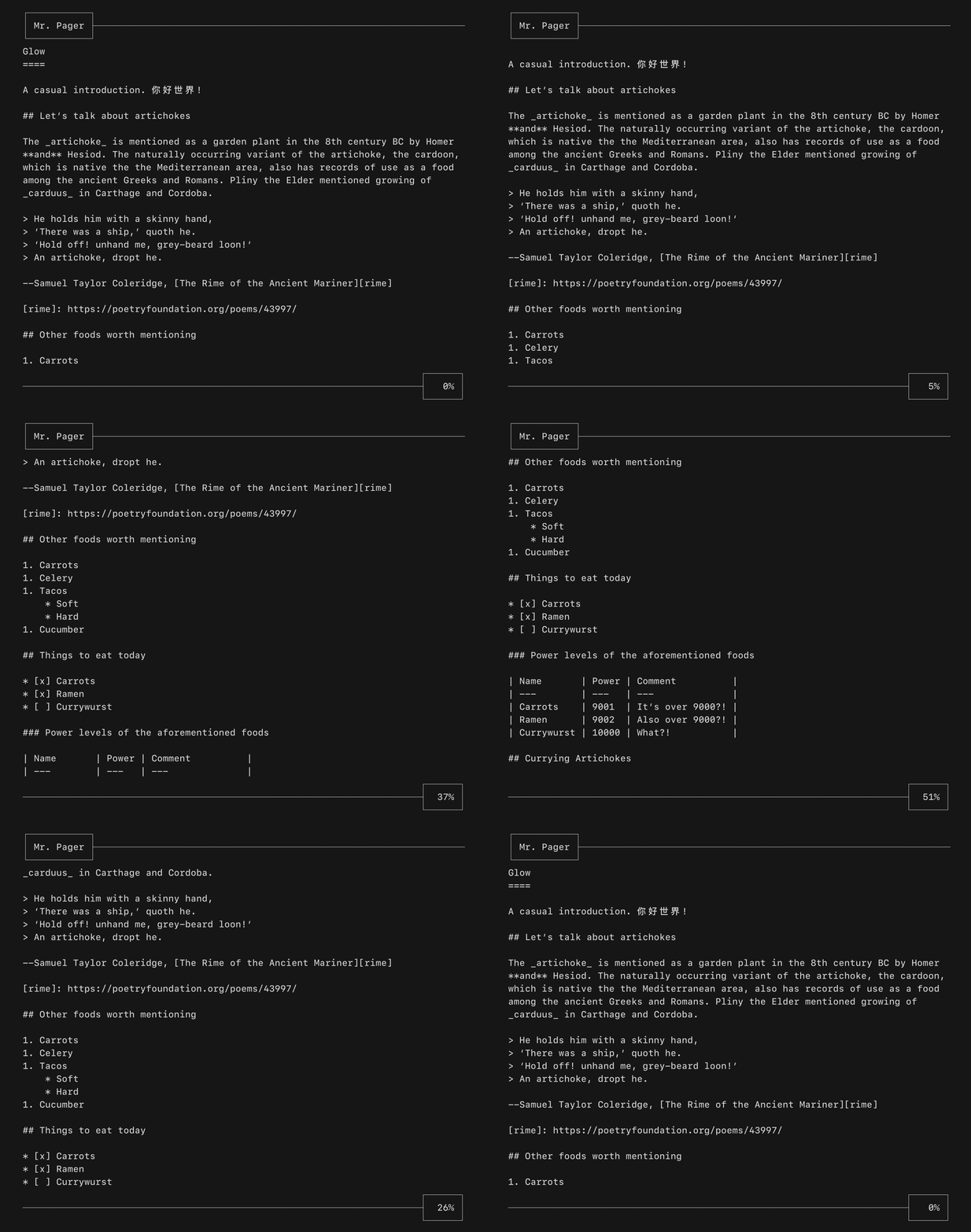 A viewport for vertically scrolling content. Optionally includes standard
pager keybindings and mouse wheel support. A high performance mode is available
for applications which make use of the alternate screen buffer.
- [Example code](https://github.com/charmbracelet/bubbletea/blob/main/examples/pager/main.go)
This component is well complemented with [Reflow][reflow] for ANSI-aware
indenting and text wrapping.
[reflow]: https://github.com/muesli/reflow
## List
A viewport for vertically scrolling content. Optionally includes standard
pager keybindings and mouse wheel support. A high performance mode is available
for applications which make use of the alternate screen buffer.
- [Example code](https://github.com/charmbracelet/bubbletea/blob/main/examples/pager/main.go)
This component is well complemented with [Reflow][reflow] for ANSI-aware
indenting and text wrapping.
[reflow]: https://github.com/muesli/reflow
## List
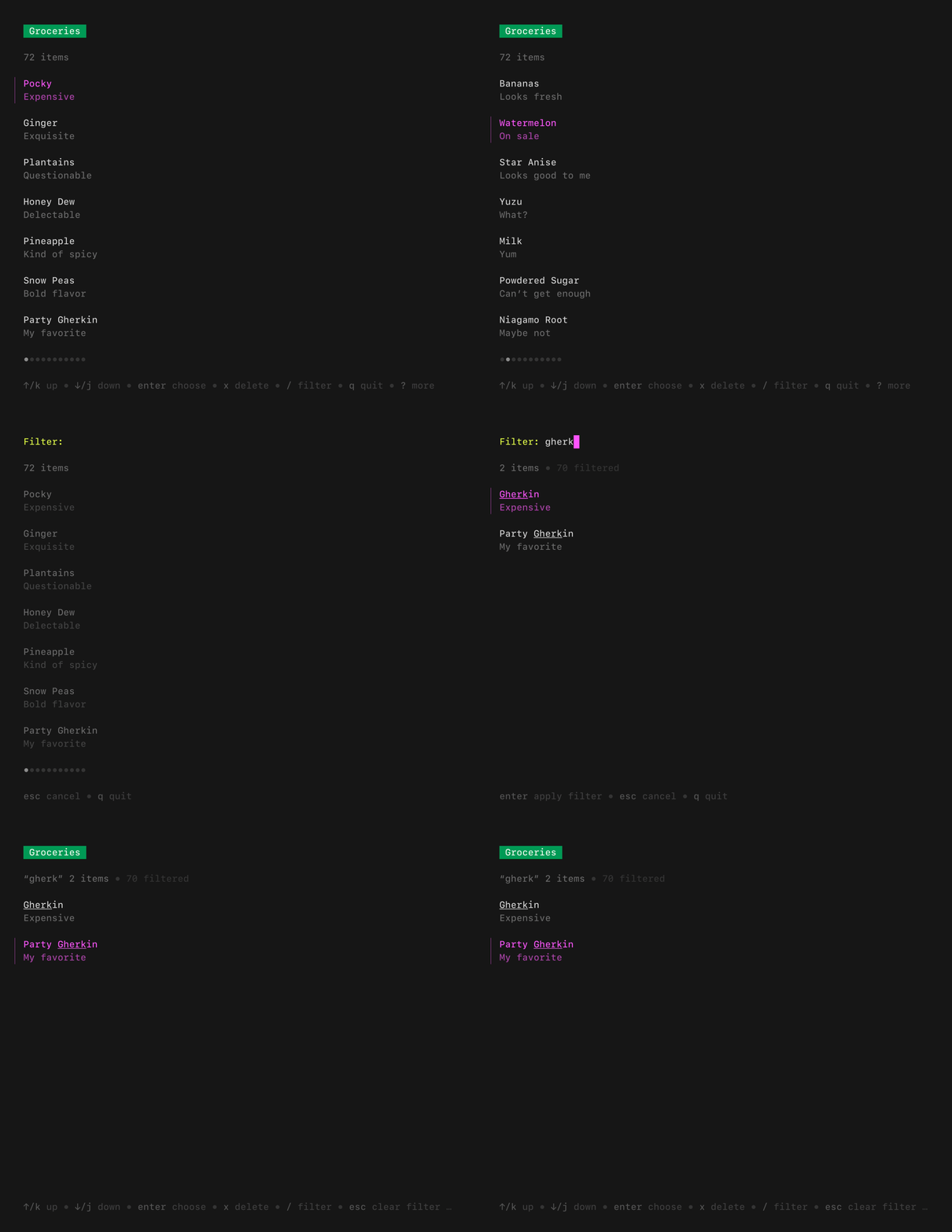 A customizable, batteries-included component for browsing a set of items.
Features pagination, fuzzy filtering, auto-generated help, an activity spinner,
and status messages, all of which can be enabled and disabled as needed.
Extrapolated from [Glow][glow].
- [Example code, default list](https://github.com/charmbracelet/bubbletea/blob/main/examples/list-default/main.go)
- [Example code, simple list](https://github.com/charmbracelet/bubbletea/blob/main/examples/list-simple/main.go)
- [Example code, all features](https://github.com/charmbracelet/bubbletea/blob/main/examples/list-fancy/main.go)
## File Picker
A customizable, batteries-included component for browsing a set of items.
Features pagination, fuzzy filtering, auto-generated help, an activity spinner,
and status messages, all of which can be enabled and disabled as needed.
Extrapolated from [Glow][glow].
- [Example code, default list](https://github.com/charmbracelet/bubbletea/blob/main/examples/list-default/main.go)
- [Example code, simple list](https://github.com/charmbracelet/bubbletea/blob/main/examples/list-simple/main.go)
- [Example code, all features](https://github.com/charmbracelet/bubbletea/blob/main/examples/list-fancy/main.go)
## File Picker
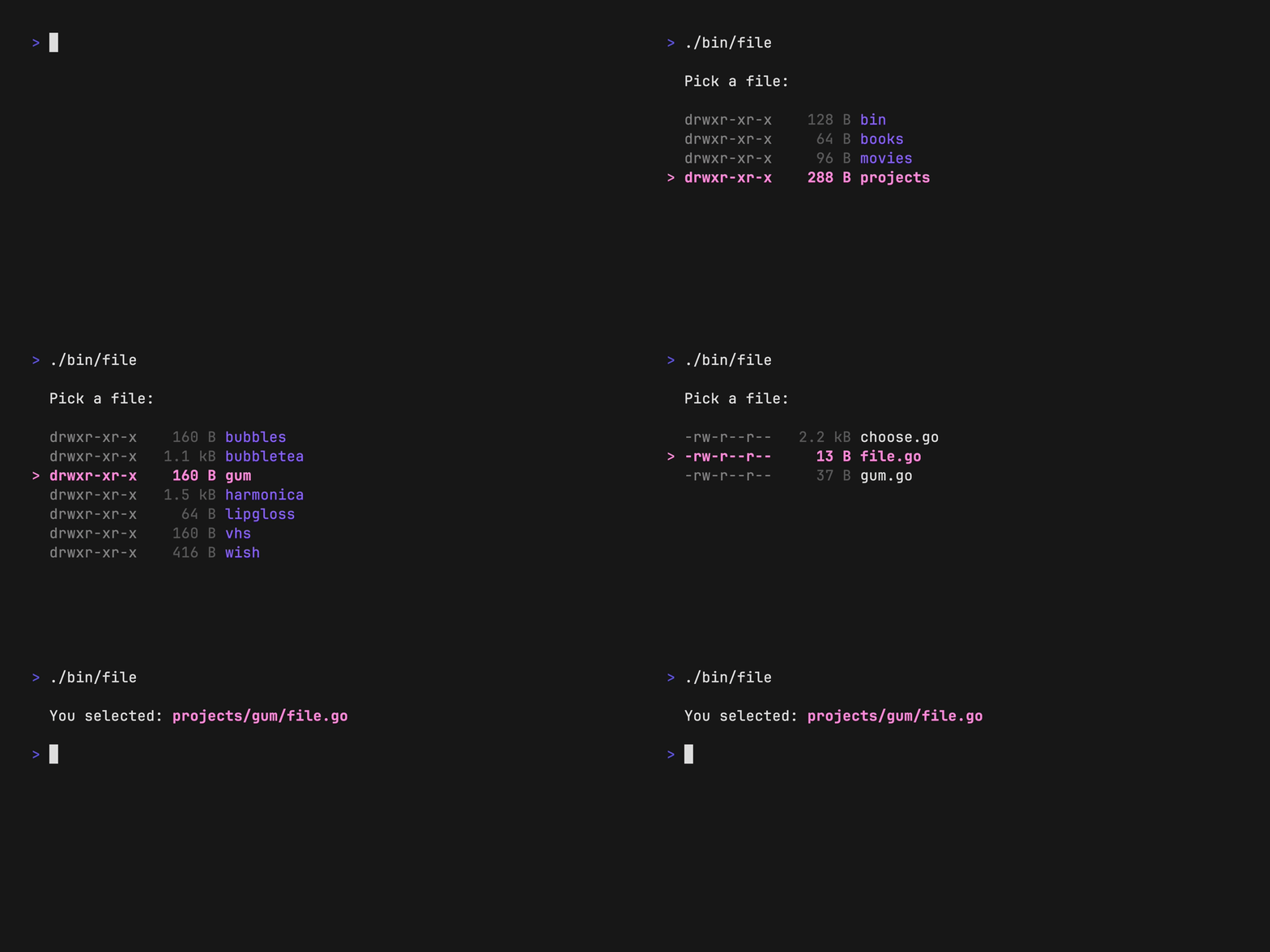 A customizable component for picking a file from the file system. Navigate
through directories and select files, optionally limit to certain file
extensions.
- [Example code](https://github.com/charmbracelet/bubbletea/blob/main/examples/file-picker/main.go)
## Timer
A simple, flexible component for counting down. The update frequency and output
can be customized as you like.
A customizable component for picking a file from the file system. Navigate
through directories and select files, optionally limit to certain file
extensions.
- [Example code](https://github.com/charmbracelet/bubbletea/blob/main/examples/file-picker/main.go)
## Timer
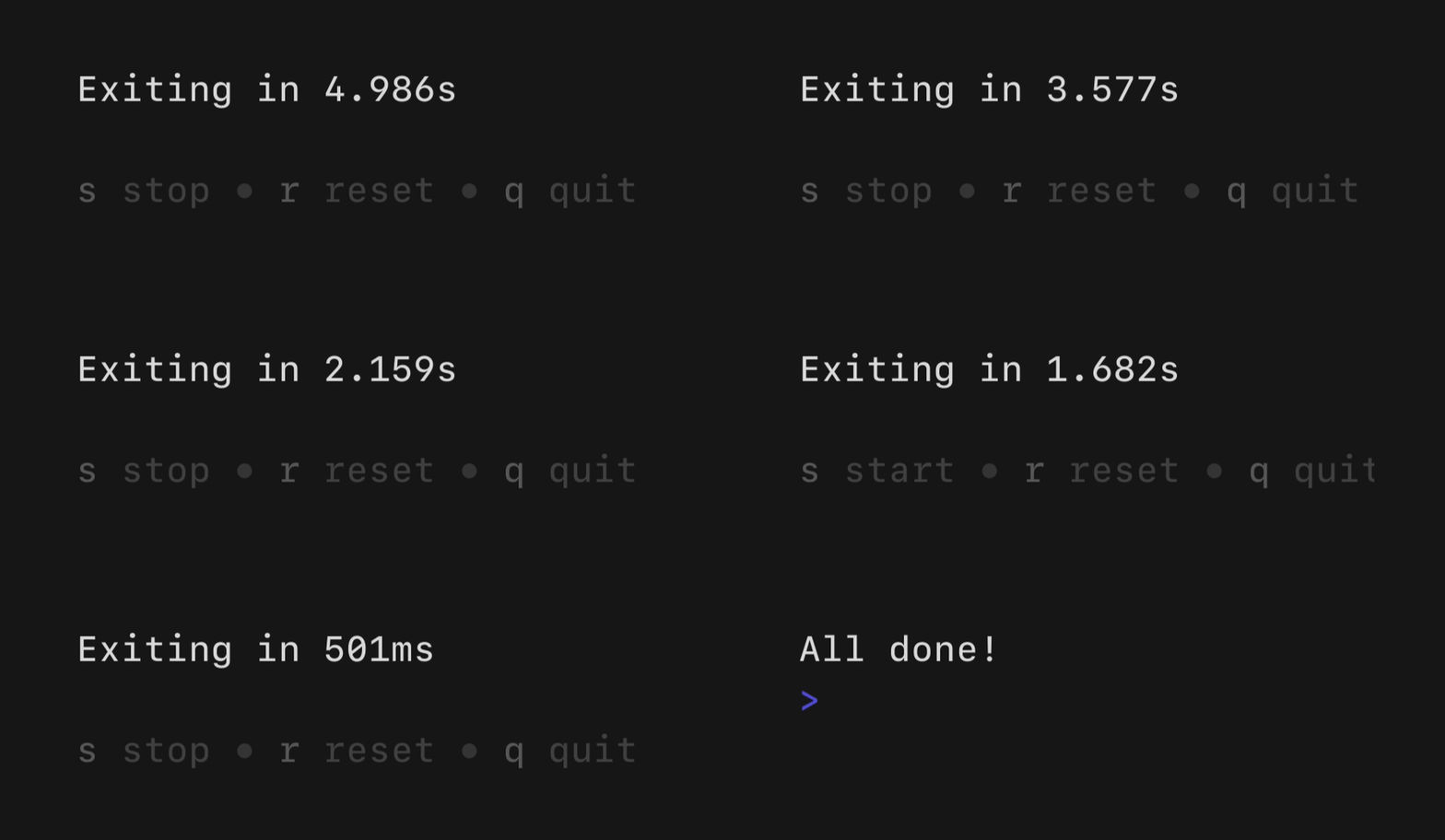
A simple, flexible component for counting down. The update frequency and output
can be customized as you like.
 - [Example code](https://github.com/charmbracelet/bubbletea/blob/main/examples/timer/main.go)
## Stopwatch
- [Example code](https://github.com/charmbracelet/bubbletea/blob/main/examples/timer/main.go)
## Stopwatch
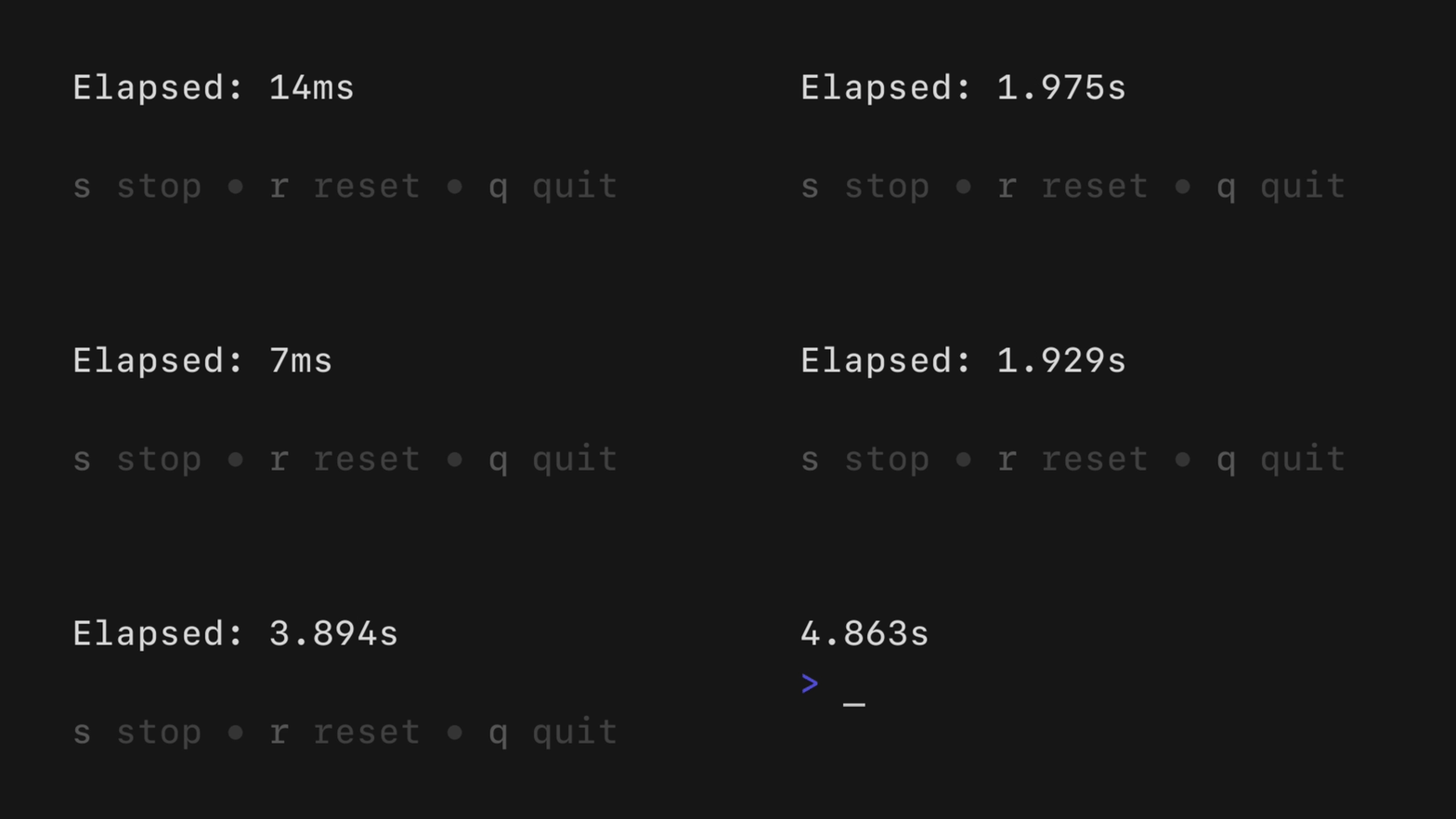 A simple, flexible component for counting up. The update frequency and output
can be customized as you see fit.
- [Example code](https://github.com/charmbracelet/bubbletea/blob/main/examples/stopwatch/main.go)
## Help
A simple, flexible component for counting up. The update frequency and output
can be customized as you see fit.
- [Example code](https://github.com/charmbracelet/bubbletea/blob/main/examples/stopwatch/main.go)
## Help
 A customizable horizontal mini help view that automatically generates itself
from your keybindings. It features single and multi-line modes, which the user
can optionally toggle between. It will truncate gracefully if the terminal is
too wide for the content.
- [Example code](https://github.com/charmbracelet/bubbletea/blob/main/examples/help/main.go)
## Key
A non-visual component for managing keybindings. It’s useful for allowing users
to remap keybindings as well as generating help views corresponding to your
keybindings.
```go
type KeyMap struct {
Up key.Binding
Down key.Binding
}
var DefaultKeyMap = KeyMap{
Up: key.NewBinding(
key.WithKeys("k", "up"), // actual keybindings
key.WithHelp("↑/k", "move up"), // corresponding help text
),
Down: key.NewBinding(
key.WithKeys("j", "down"),
key.WithHelp("↓/j", "move down"),
),
}
func (m Model) Update(msg tea.Msg) (tea.Model, tea.Cmd) {
switch msg := msg.(type) {
case tea.KeyPressMsg:
switch {
case key.Matches(msg, DefaultKeyMap.Up):
// The user pressed up
case key.Matches(msg, DefaultKeyMap.Down):
// The user pressed down
}
}
return m, nil
}
```
## There’s more where that came from
To check out community-maintained Bubbles see [Charm & Friends][charmandfriends].
Made a cool Bubble that you want to share? [PRs][prs] are welcome!
[charmandfriends]: https://github.com/charm-and-friends/additional-bubbles
[prs]: https://github.com/charm-and-friends/additional-bubbles?tab=readme-ov-file#what-is-a-complete-project
## Contributing
See [contributing][contribute].
[contribute]: https://github.com/charmbracelet/bubbles/contribute
## Feedback
We’d love to hear your thoughts on this project. Feel free to drop us a note!
- [Twitter](https://twitter.com/charmcli)
- [The Fediverse](https://mastodon.social/@charmcli)
- [Discord](https://charm.sh/chat)
## License
[MIT](https://github.com/charmbracelet/bubbletea/raw/main/LICENSE)
---
Part of [Charm](https://charm.land).
A customizable horizontal mini help view that automatically generates itself
from your keybindings. It features single and multi-line modes, which the user
can optionally toggle between. It will truncate gracefully if the terminal is
too wide for the content.
- [Example code](https://github.com/charmbracelet/bubbletea/blob/main/examples/help/main.go)
## Key
A non-visual component for managing keybindings. It’s useful for allowing users
to remap keybindings as well as generating help views corresponding to your
keybindings.
```go
type KeyMap struct {
Up key.Binding
Down key.Binding
}
var DefaultKeyMap = KeyMap{
Up: key.NewBinding(
key.WithKeys("k", "up"), // actual keybindings
key.WithHelp("↑/k", "move up"), // corresponding help text
),
Down: key.NewBinding(
key.WithKeys("j", "down"),
key.WithHelp("↓/j", "move down"),
),
}
func (m Model) Update(msg tea.Msg) (tea.Model, tea.Cmd) {
switch msg := msg.(type) {
case tea.KeyPressMsg:
switch {
case key.Matches(msg, DefaultKeyMap.Up):
// The user pressed up
case key.Matches(msg, DefaultKeyMap.Down):
// The user pressed down
}
}
return m, nil
}
```
## There’s more where that came from
To check out community-maintained Bubbles see [Charm & Friends][charmandfriends].
Made a cool Bubble that you want to share? [PRs][prs] are welcome!
[charmandfriends]: https://github.com/charm-and-friends/additional-bubbles
[prs]: https://github.com/charm-and-friends/additional-bubbles?tab=readme-ov-file#what-is-a-complete-project
## Contributing
See [contributing][contribute].
[contribute]: https://github.com/charmbracelet/bubbles/contribute
## Feedback
We’d love to hear your thoughts on this project. Feel free to drop us a note!
- [Twitter](https://twitter.com/charmcli)
- [The Fediverse](https://mastodon.social/@charmcli)
- [Discord](https://charm.sh/chat)
## License
[MIT](https://github.com/charmbracelet/bubbletea/raw/main/LICENSE)
---
Part of [Charm](https://charm.land).