### README
# Atlas - Manage Your Database Schema as Code
[](https://twitter.com/atlasgo_io)
[](https://discord.com/invite/zZ6sWVg6NT)
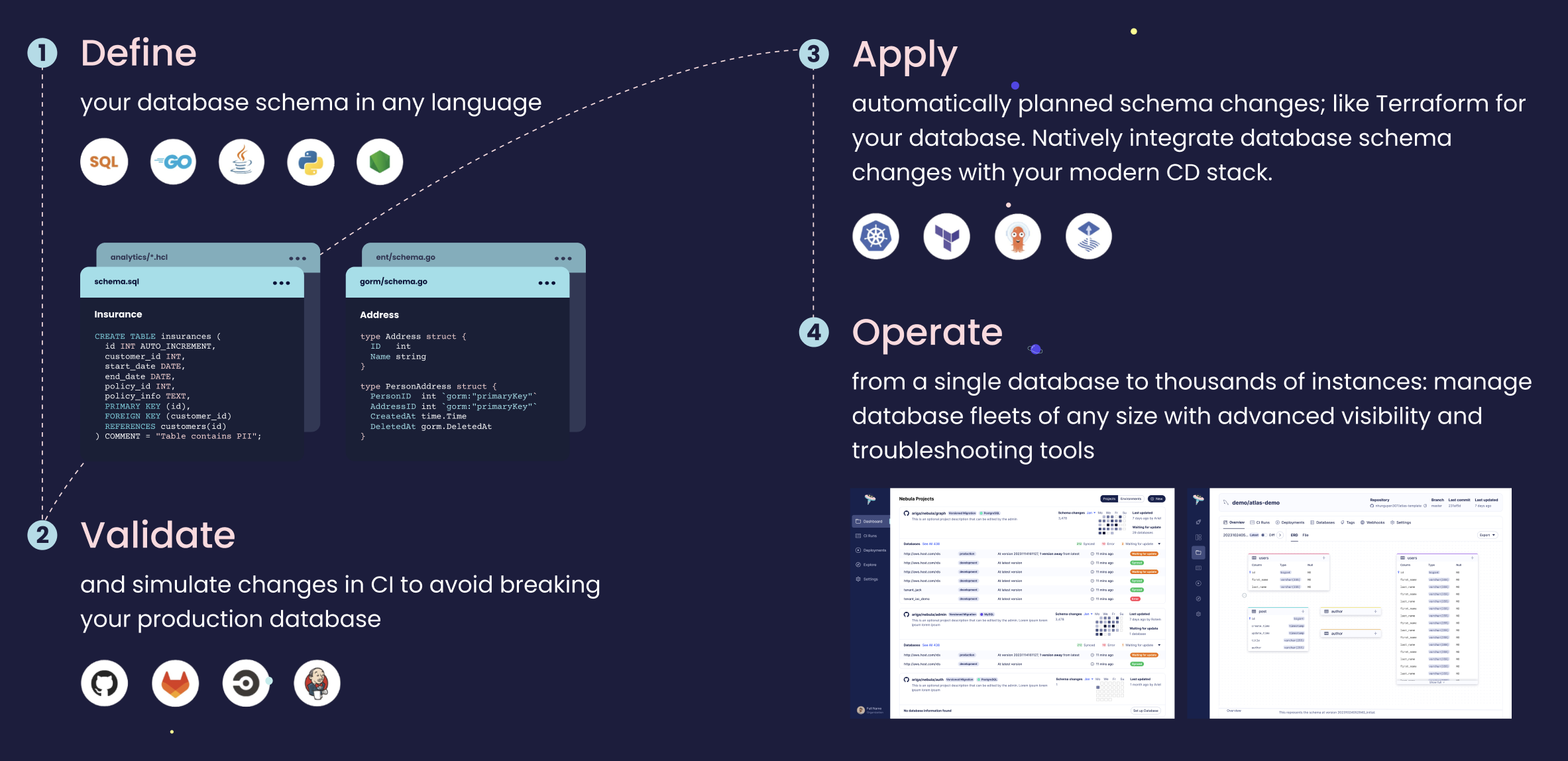
Atlas is a language-agnostic tool for managing and migrating database schemas using modern DevOps principles.
It offers two workflows:
- **Declarative**: Similar to Terraform, Atlas compares the current state of the database to the desired state, as
defined in an [HCL], [SQL], or [ORM] schema. Based on this comparison, it generates and executes a migration plan to
transition the database to its desired state.
- **Versioned**: Unlike other tools, Atlas automatically plans schema migrations for you. Users can describe their desired
database schema in [HCL], [SQL], or their chosen [ORM], and by utilizing Atlas, they can plan, lint, and apply the
necessary migrations to the database.
## Supported Databases
[PostgreSQL](https://atlasgo.io/guides/postgres) ·
[MySQL](https://atlasgo.io/guides/mysql) ·
[MariaDB](https://atlasgo.io/guides/mysql) ·
[SQL Server](https://atlasgo.io/guides/mssql) ·
[SQLite](https://atlasgo.io/guides/sqlite) ·
[ClickHouse](https://atlasgo.io/guides/clickhouse) ·
[Redshift](https://atlasgo.io/guides/redshift) ·
[Oracle](https://atlasgo.io/guides/oracle) ·
[Snowflake](https://atlasgo.io/guides/snowflake) ·
[CockroachDB](https://atlasgo.io/guides/cockroachdb) ·
[TiDB](https://atlasgo.io/guides/mysql) ·
[Databricks](https://atlasgo.io/guides/databricks) ·
[Spanner](https://atlasgo.io/guides/spanner) ·
[Aurora DSQL](https://atlasgo.io/guides/dsql) ·
[Azure Fabric](https://atlasgo.io/guides/azure-fabric)
## Installation
**macOS + Linux:**
```bash
curl -sSf https://atlasgo.sh | sh
```
**Homebrew:**
```bash
brew install ariga/tap/atlas
```
**Docker:**
```bash
docker pull arigaio/atlas
```
**NPM:**
```bash
npx @ariga/atlas
```
See [installation docs](https://atlasgo.io/getting-started#installation) for all platforms.
## Key Features
- **[Declarative schema migrations](https://atlasgo.io/declarative/apply)**: The `atlas schema` command offers various options for [inspecting](https://atlasgo.io/inspect), diffing, comparing, [planning](https://atlasgo.io/declarative/plan) and applying migrations using standard Terraform-like workflows.
- **[Versioned migrations](https://atlasgo.io/versioned/intro)**: The `atlas migrate` command provides a state-of-the-art experience for [planning](https://atlasgo.io/versioned/diff), [linting](https://atlasgo.io/lint/analyzers), and [applying](https://atlasgo.io/versioned/apply) migrations.
- **[Schema as Code](https://atlasgo.io/atlas-schema)**: Define your desired database schema using [SQL], [HCL], or your chosen [ORM]. Atlas supports [16 ORM loaders](https://atlasgo.io/orms) across 6 languages.
- **[Security-as-Code](https://atlasgo.io/guides/postgres/security-declarative)**: Manage roles, permissions, and [row-level security](https://atlasgo.io/guides/postgres/row-level-security) policies as version-controlled code.
- **[Data management](https://atlasgo.io/atlas-schema/sql)**: Manage seed and lookup data declaratively alongside your schema.
- **[Cloud-native CI/CD](https://atlasgo.io/integrations)**: [Kubernetes operator](https://atlasgo.io/integrations/kubernetes), [Terraform provider](https://atlasgo.io/integrations/terraform), [GitHub Actions](https://atlasgo.io/integrations/github-actions), [GitLab CI](https://atlasgo.io/integrations/gitlab), [ArgoCD](https://atlasgo.io/integrations/kubernetes/argocd), and more.
- **[Testing framework](https://atlasgo.io/testing/schema)**: Unit test schema logic (functions, views, triggers, procedures) and [migration behavior](https://atlasgo.io/testing/migrate).
- **[50+ safety analyzers](https://atlasgo.io/lint/analyzers)**: Database-aware migration linting that detects destructive changes, data-dependent modifications, table locks, backward-incompatible changes, and more.
- **[Multi-tenancy](https://atlasgo.io/guides/multi-tenancy)**: Built-in support for multi-tenant database migrations.
- **[Drift detection](https://atlasgo.io/monitoring)**: Monitoring as Code with automatic schema drift detection and remediation.
- **[Cloud integration](https://atlasgo.io/guides/deploying/secrets)**: IAM-based authentication for [AWS RDS](https://atlasgo.io/guides/deploying/secrets#aws-rds-iam-authentication) and [GCP Cloud SQL](https://atlasgo.io/guides/deploying/secrets#gcp-cloudsql-iam-authentication), secrets management via [AWS Secrets Manager](https://atlasgo.io/guides/deploying/secrets#aws-secrets-manager), [GCP Secret Manager](https://atlasgo.io/guides/deploying/secrets#gcp-secret-manager), [HashiCorp Vault](https://atlasgo.io/guides/deploying/secrets#hashicorp-vault), and more.
## Getting Started
Get started with Atlas by following the [Getting Started](https://atlasgo.io/getting-started/) docs.
Inspect an existing database schema:
```shell
atlas schema inspect -u "postgres://localhost:5432/mydb"
```
Apply your desired schema to the database:
```shell
atlas schema apply \
--url "postgres://localhost:5432/mydb" \
--to file://schema.hcl \
--dev-url "docker://postgres/16/dev"
```
📖 [Getting Started docs](https://atlasgo.io/getting-started/)
## Migration Linting
Atlas ships with 50+ built-in [analyzers](https://atlasgo.io/lint/analyzers) that review your migration files
and catch issues before they reach production. Analyzers detect [destructive changes](https://atlasgo.io/lint/analyzers#destructive-changes)
like dropped tables or columns, [data-dependent modifications](https://atlasgo.io/lint/analyzers#data-dependent-changes)
such as adding non-nullable columns without defaults, and database-specific risks like table locks
and table rewrites that can cause downtime on busy tables. You can also define
your own [custom policy rules](https://atlasgo.io/lint/rules).
```bash
atlas migrate lint --dev-url "docker://postgres/16/dev"
```
## Schema Testing
[Test](https://atlasgo.io/testing/schema) database logic (functions, views, triggers, procedures) and
[data migrations](https://atlasgo.io/testing/migrate) with `.test.hcl` files:
```hcl
test "schema" "postal" {
# Valid postal codes pass
exec {
sql = "SELECT '12345'::us_postal_code"
}
# Invalid postal codes fail
catch {
sql = "SELECT 'hello'::us_postal_code"
}
}
test "schema" "seed" {
for_each = [
{input: "hello", expected: "HELLO"},
{input: "world", expected: "WORLD"},
]
exec {
sql = "SELECT upper('${each.value.input}')"
output = each.value.expected
}
}
```
```bash
atlas schema test --dev-url "docker://postgres/16/dev"
```
📖 [Testing docs](https://atlasgo.io/testing/schema)
## Security-as-Code
Manage database [roles, permissions](https://atlasgo.io/guides/postgres/security-declarative), and
[row-level security](https://atlasgo.io/guides/postgres/row-level-security) as version-controlled code:
```hcl
role "app_readonly" {
comment = "Read-only access for reporting"
}
role "app_writer" {
comment = "Read-write access for the application"
member_of = [role.app_readonly]
}
user "api_user" {
password = var.api_password
conn_limit = 20
comment = "Application API service account"
member_of = [role.app_writer]
}
permission {
for_each = [table.orders, table.products, table.users]
for = each.value
to = role.app_readonly
privileges = [SELECT]
}
policy "tenant_isolation" {
on = table.orders
for = ALL
to = ["app_writer"]
using = "(tenant_id = current_setting('app.current_tenant')::integer)"
check = "(tenant_id = current_setting('app.current_tenant')::integer)"
}
```
📖 [Security-as-Code docs](https://atlasgo.io/guides/postgres/security-declarative)
## Data Management
Manage seed and lookup data declaratively alongside your schema:
```sql
CREATE TABLE countries (
id INT PRIMARY KEY,
code VARCHAR(2) NOT NULL,
name VARCHAR(100) NOT NULL
);
INSERT INTO countries (id, code, name) VALUES
(1, 'US', 'United States'),
(2, 'IL', 'Israel'),
(3, 'DE', 'Germany');
```
📖 [Data management docs](https://atlasgo.io/atlas-schema/sql)
## ORM Support
Define your schema in any of the 16 supported ORMs. Atlas reads your models and generates migrations:
| Language | ORMs |
|----------|------|
| Go | [GORM](https://atlasgo.io/guides/orms/gorm), [Ent](https://atlasgo.io/guides/orms/ent), [Bun](https://atlasgo.io/guides/orms/bun), [Beego](https://atlasgo.io/guides/orms/beego), [sqlc](https://atlasgo.io/guides/frameworks/sqlc-versioned) |
| TypeScript | [Prisma](https://atlasgo.io/guides/orms/prisma), [Drizzle](https://atlasgo.io/guides/orms/drizzle), [TypeORM](https://atlasgo.io/guides/orms/typeorm), [Sequelize](https://atlasgo.io/guides/orms/sequelize) |
| Python | [Django](https://atlasgo.io/guides/orms/django), [SQLAlchemy](https://atlasgo.io/guides/orms/sqlalchemy) |
| Java | [Hibernate](https://atlasgo.io/guides/orms/hibernate) |
| .NET | [EF Core](https://atlasgo.io/guides/orms/efcore) |
| PHP | [Doctrine](https://atlasgo.io/guides/orms/doctrine) |
📖 [ORM integration docs](https://atlasgo.io/orms)
## Integrations
Lint, test, and apply migrations automatically in your CI/CD pipeline or infrastructure-as-code workflow:
| Integration | Docs |
|-------------|------|
| GitHub Actions | [Versioned guide](https://atlasgo.io/guides/ci-platforms/github-versioned) · [Declarative guide](https://atlasgo.io/guides/ci-platforms/github-declarative) |
| GitLab CI | [Versioned guide](https://atlasgo.io/guides/ci-platforms/gitlab-versioned) · [Declarative guide](https://atlasgo.io/guides/ci-platforms/gitlab-declarative) |
| CircleCI | [Versioned guide](https://atlasgo.io/guides/ci-platforms/circleci-versioned) · [Declarative guide](https://atlasgo.io/guides/ci-platforms/circleci-declarative) |
| Bitbucket Pipes | [Versioned guide](https://atlasgo.io/guides/ci-platforms/bitbucket-versioned) · [Declarative guide](https://atlasgo.io/guides/ci-platforms/bitbucket-declarative) |
| Azure DevOps | [GitHub repos](https://atlasgo.io/guides/ci-platforms/azure-devops-github) · [Azure repos](https://atlasgo.io/guides/ci-platforms/azure-devops-repos) |
| Terraform Provider | [atlasgo.io/integrations/terraform-provider](https://atlasgo.io/integrations/terraform-provider) |
| Kubernetes Operator | [atlasgo.io/integrations/kubernetes](https://atlasgo.io/integrations/kubernetes) |
| ArgoCD | [atlasgo.io/guides/deploying/k8s-argo](https://atlasgo.io/guides/deploying/k8s-argo) |
| Flux | [atlasgo.io/guides/deploying/k8s-flux](https://atlasgo.io/guides/deploying/k8s-flux) |
| Crossplane | [atlasgo.io/guides/deploying/crossplane](https://atlasgo.io/guides/deploying/crossplane) |
| Go SDK | [pkg.go.dev/ariga.io/atlas-go-sdk/atlasexec](https://pkg.go.dev/ariga.io/atlas-go-sdk/atlasexec) |
### AI Agent Integration
Atlas provides [Agent Skills](https://atlasgo.io/guides/ai-tools/agent-skills), an open standard for packaging
migration expertise for AI coding assistants:
[Claude Code](https://atlasgo.io/guides/ai-tools/claude-code-instructions),
[GitHub Copilot](https://atlasgo.io/guides/ai-tools/github-copilot-instructions),
[Cursor](https://atlasgo.io/guides/ai-tools/cursor-rules),
[OpenAI Codex](https://atlasgo.io/guides/ai-tools/codex-instructions). Learn more at [AI tools docs](https://atlasgo.io/guides/ai-tools).
## CLI Usage
### `schema inspect`
_**Easily inspect your database schema by providing a database URL and convert it to HCL, JSON, SQL, ERD, or other formats.**_
Inspect a specific MySQL schema and get its representation in Atlas DDL syntax:
```shell
atlas schema inspect -u "mysql://root:pass@localhost:3306/example" > schema.hcl
```
Result
```hcl
table "users" {
schema = schema.example
column "id" {
null = false
type = int
}
...
}
```
Result
```json
{
"schemas": [
{
"name": "example",
"tables": [
{
"name": "users",
"columns": [
...
]
}
]
}
]
}
```
Result
```shell
-- Planned Changes:
-- Modify "users" table
ALTER TABLE `db1`.`users` DROP COLUMN `d`, ADD COLUMN `c` int NOT NULL;
Use the arrow keys to navigate: ↓ ↑ → ←
? Are you sure?:
▸ Apply
Abort
```