 **Prompt:**
```text
"A professional, high-resolution profile photo, maintaining the exact facial structure, identity, and key features of the person in the input image. The subject is framed from the chest up, with ample headroom. The person looks directly at the camera. They are styled for a professional photo studio shoot, wearing a premium smart casual blazer in a subtle charcoal gray. The background is a solid '#562226' neutral studio color. Shot from a high angle with bright and airy soft, diffused studio lighting, gently illuminating the face and creating a subtle catchlight in the eyes, conveying a sense of clarity. Captured on an 85mm f/1.8 lens with a shallow depth of field, exquisite focus on the eyes, and beautiful, soft bokeh. Observe crisp detail on the fabric texture of the blazer, individual strands of hair, and natural, realistic skin texture. The atmosphere exudes confidence, professionalism, and approachability. Clean and bright cinematic color grading with subtle warmth and balanced tones, ensuring a polished and contemporary feel."
```
*Source: [@PavolRusnak](https://x.com/PavolRusnak/status/1994097306526994558)*
### 1.8. Hyperrealistic Anime Portrait in Spotlight
*A hyperrealistic anime-style portrait with dramatic lighting*
**Prompt:**
```text
"A professional, high-resolution profile photo, maintaining the exact facial structure, identity, and key features of the person in the input image. The subject is framed from the chest up, with ample headroom. The person looks directly at the camera. They are styled for a professional photo studio shoot, wearing a premium smart casual blazer in a subtle charcoal gray. The background is a solid '#562226' neutral studio color. Shot from a high angle with bright and airy soft, diffused studio lighting, gently illuminating the face and creating a subtle catchlight in the eyes, conveying a sense of clarity. Captured on an 85mm f/1.8 lens with a shallow depth of field, exquisite focus on the eyes, and beautiful, soft bokeh. Observe crisp detail on the fabric texture of the blazer, individual strands of hair, and natural, realistic skin texture. The atmosphere exudes confidence, professionalism, and approachability. Clean and bright cinematic color grading with subtle warmth and balanced tones, ensuring a polished and contemporary feel."
```
*Source: [@PavolRusnak](https://x.com/PavolRusnak/status/1994097306526994558)*
### 1.8. Hyperrealistic Anime Portrait in Spotlight
*A hyperrealistic anime-style portrait with dramatic lighting*
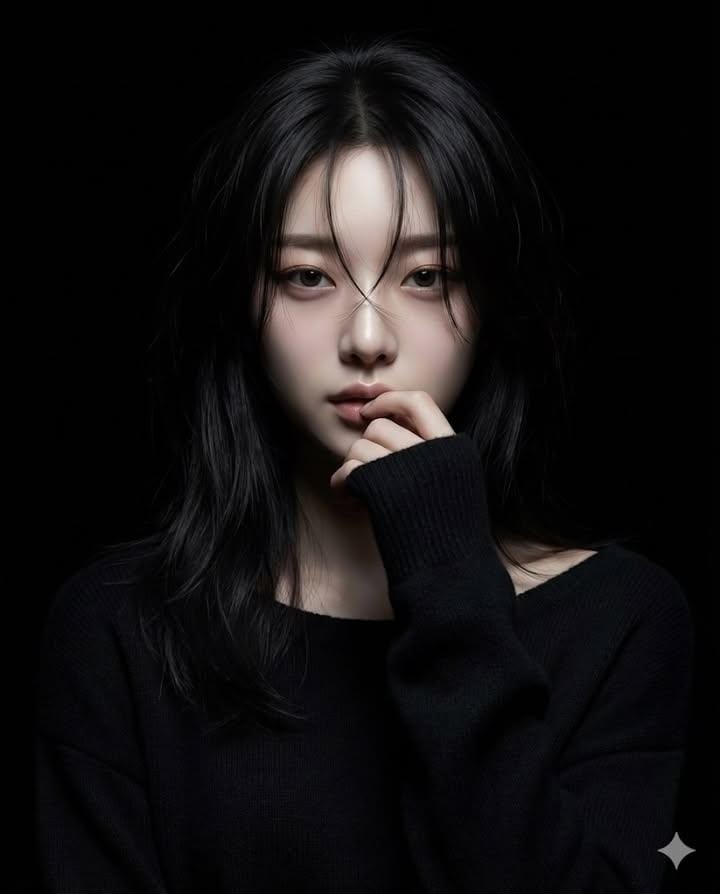 **Prompt:**
```text
Generate a hyperrealistic realistic-anime portrait of a female character standing in a completely black background.
Lighting: use a **narrow beam spotlight** focused only on the center of the face.
The edges of the light must be sharp and dramatic.
All areas outside the spotlight should fall quickly into deep darkness
(high falloff shadow), almost blending into the black background.
Not soft lighting.
Hair: long dark hair with some strands falling over the face. The lower parts of the hair should fade into the shadows.
Pose: one hand raised gently to the lips in a shy, hesitant gesture.
Eyes looking directly at the camera with a mysterious mood.
Clothing: black long-sleeve knit sweater;
the sweater and body should mostly disappear into the darkness with minimal detail.
Overall tone: dark, moody, dramatic, mysterious.
High-contrast only in the lit portion of the face.
Everything outside the spotlight should be nearly invisible.
```
*Source: Anissa ([@SimplyAnnisa](https://x.com/SimplyAnnisa)) - [Post](https://x.com/SimplyAnnisa/status/1995131975351562274?s=20)*
### 1.9. Bathroom Mirror Selfie
*Create a candid mirror selfie with specific styling and composition*
**Prompt:**
```text
Generate a hyperrealistic realistic-anime portrait of a female character standing in a completely black background.
Lighting: use a **narrow beam spotlight** focused only on the center of the face.
The edges of the light must be sharp and dramatic.
All areas outside the spotlight should fall quickly into deep darkness
(high falloff shadow), almost blending into the black background.
Not soft lighting.
Hair: long dark hair with some strands falling over the face. The lower parts of the hair should fade into the shadows.
Pose: one hand raised gently to the lips in a shy, hesitant gesture.
Eyes looking directly at the camera with a mysterious mood.
Clothing: black long-sleeve knit sweater;
the sweater and body should mostly disappear into the darkness with minimal detail.
Overall tone: dark, moody, dramatic, mysterious.
High-contrast only in the lit portion of the face.
Everything outside the spotlight should be nearly invisible.
```
*Source: Anissa ([@SimplyAnnisa](https://x.com/SimplyAnnisa)) - [Post](https://x.com/SimplyAnnisa/status/1995131975351562274?s=20)*
### 1.9. Bathroom Mirror Selfie
*Create a candid mirror selfie with specific styling and composition*
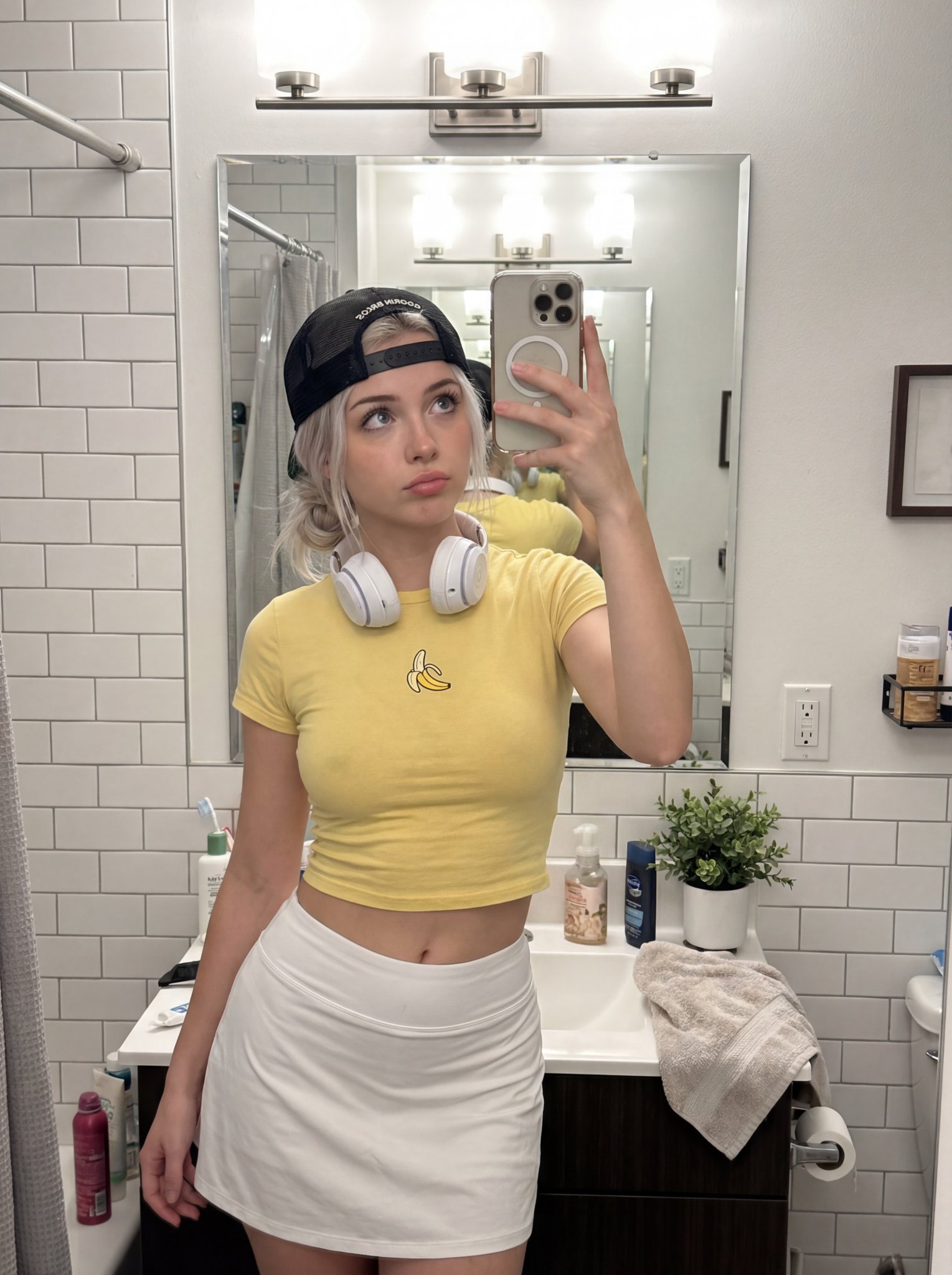 **Prompt:**
```
/* Detailed source-code truncated for AI context efficiency. */
```
*Source: gauche ([@gaucheai](https://x.com/gaucheai)) - [Post](https://x.com/gaucheai/status/1996184483343520186?s=20)*
### 1.10. Chalkboard Anime Art Documentation
*Photorealistic documentation of a chalkboard anime drawing*
**Prompt:**
```
/* Detailed source-code truncated for AI context efficiency. */
```
*Source: gauche ([@gaucheai](https://x.com/gaucheai)) - [Post](https://x.com/gaucheai/status/1996184483343520186?s=20)*
### 1.10. Chalkboard Anime Art Documentation
*Photorealistic documentation of a chalkboard anime drawing*
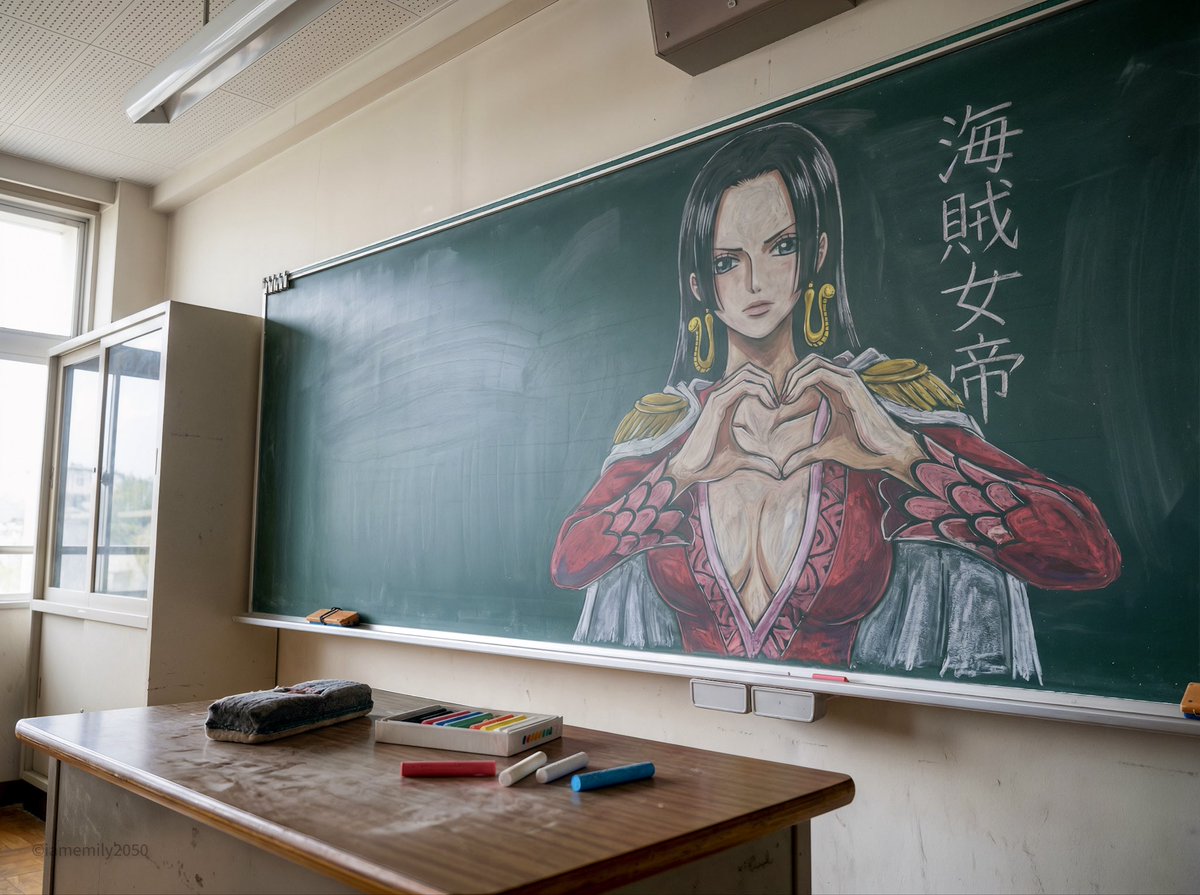 **Prompt:**
```
/* Detailed source-code truncated for AI context efficiency. */
```
*Source: Emily ([@IamEmily2050](https://x.com/IamEmily2050)) - [Post](https://x.com/IamEmily2050/status/1994624635300974734?s=20)*
### 1.11. Portrait with Puppy in Snow
*Create a winter portrait with a puppy*
**Prompt:**
```
/* Detailed source-code truncated for AI context efficiency. */
```
*Source: Emily ([@IamEmily2050](https://x.com/IamEmily2050)) - [Post](https://x.com/IamEmily2050/status/1994624635300974734?s=20)*
### 1.11. Portrait with Puppy in Snow
*Create a winter portrait with a puppy*
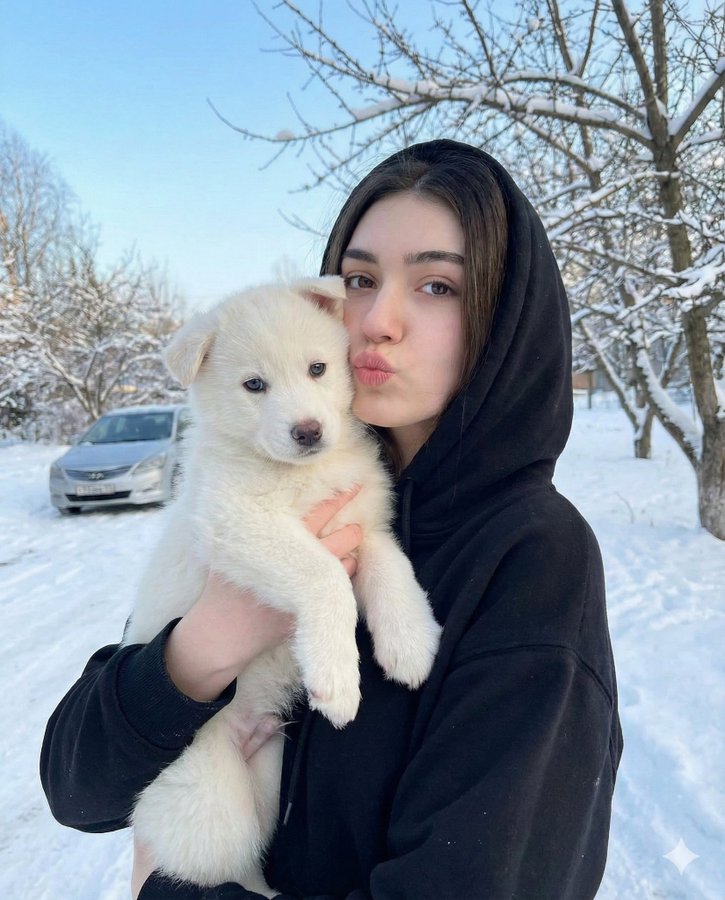 **Prompt:**
```json
{
"image_description": {
"subject": {
"face": {
"preserve_original": true,
"reference_match": true,
"description": "The girl's facial features, expression, and identity must remain exactly the same as the reference image."
},
"girl": {
"age": "young",
"hair": "long, wavy brown hair",
"expression": "puckering her lips toward the camera",
"clothing": "black hooded sweatshirt"
},
"puppy": {
"type": "small white puppy",
"eyes": "light blue",
"expression": "calm, looking forward"
}
},
"environment": {
"setting": "outdoors in a winter scene",
"elements": [
"snow covering the ground",
"bare trees in the background",
"blurred silver car behind the girl"
],
"sky": "clear light blue sky"
},
"mood": "cute, natural, winter outdoor moment",
"camera_style": "soft depth of field, natural daylight, subtle winter tones"
}
}
```
*Source: Zara ([@ZaraIrahh](https://x.com/ZaraIrahh)) - [Post](https://x.com/ZaraIrahh/status/1993560252319776812?s=20)*
### 1.12. Fisheye Movie Character Selfie
*A 360-degree selfie with movie characters*
**Prompt:**
```json
{
"image_description": {
"subject": {
"face": {
"preserve_original": true,
"reference_match": true,
"description": "The girl's facial features, expression, and identity must remain exactly the same as the reference image."
},
"girl": {
"age": "young",
"hair": "long, wavy brown hair",
"expression": "puckering her lips toward the camera",
"clothing": "black hooded sweatshirt"
},
"puppy": {
"type": "small white puppy",
"eyes": "light blue",
"expression": "calm, looking forward"
}
},
"environment": {
"setting": "outdoors in a winter scene",
"elements": [
"snow covering the ground",
"bare trees in the background",
"blurred silver car behind the girl"
],
"sky": "clear light blue sky"
},
"mood": "cute, natural, winter outdoor moment",
"camera_style": "soft depth of field, natural daylight, subtle winter tones"
}
}
```
*Source: Zara ([@ZaraIrahh](https://x.com/ZaraIrahh)) - [Post](https://x.com/ZaraIrahh/status/1993560252319776812?s=20)*
### 1.12. Fisheye Movie Character Selfie
*A 360-degree selfie with movie characters*
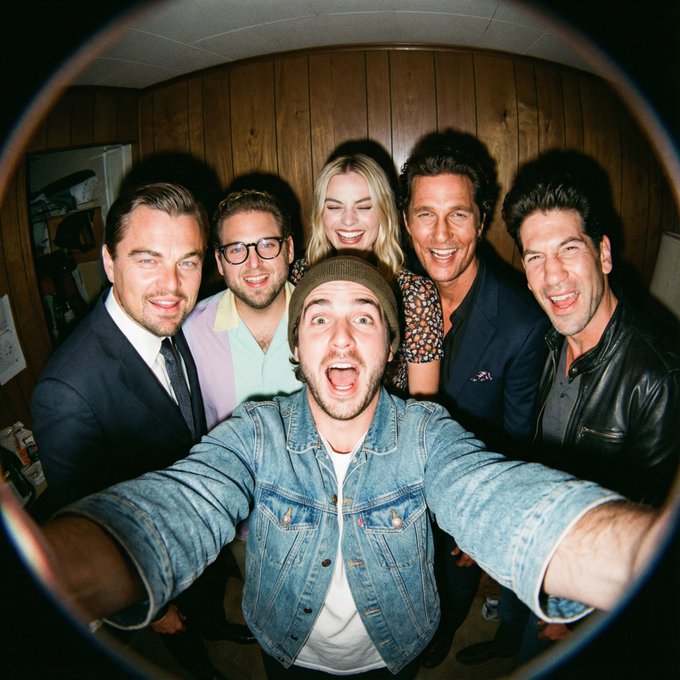 **Prompt:**
```text
A film-like fisheye wide-angle 360-degree selfie without any camera or phone visible in the subject's hands. A real and exaggerated selfie of [person from uploaded image] with [CHARACTERS]. They are making faces at the camera.
(more detailed version)
A hyper-realistic fisheye wide-angle selfie, captured with a vintage 35mm fisheye lens creating heavy barrel distortion. without any camera or phone visible in the subject's hands.
Subject & Action: A close-up, distorted group photo featuring [Person From Uploaded Image] taking selfie with [CHARACTERS]. Everyone is making wild, exaggerated faces, squinting slightly from the flash.
Lighting & Texture: Harsh, direct on-camera flash lighting that creates hard shadows behind the subjects. Authentic film grain, slight motion blur on the edges, and chromatic aberration. It looks like a candid, amateur snapshot as if captured during a chaotic behind-the-scenes moment, not a studio photo.
```
*Source: ΛRMIN | AI ([@Arminn_Ai](https://x.com/Arminn_Ai)) - [Post](https://x.com/Arminn_Ai/status/1996285140893622391?s=20)*
### 1.13. Character Consistency Selfie with Movie Character
*Take a selfie with a movie character while preserving your features*
**Prompt:**
```text
A film-like fisheye wide-angle 360-degree selfie without any camera or phone visible in the subject's hands. A real and exaggerated selfie of [person from uploaded image] with [CHARACTERS]. They are making faces at the camera.
(more detailed version)
A hyper-realistic fisheye wide-angle selfie, captured with a vintage 35mm fisheye lens creating heavy barrel distortion. without any camera or phone visible in the subject's hands.
Subject & Action: A close-up, distorted group photo featuring [Person From Uploaded Image] taking selfie with [CHARACTERS]. Everyone is making wild, exaggerated faces, squinting slightly from the flash.
Lighting & Texture: Harsh, direct on-camera flash lighting that creates hard shadows behind the subjects. Authentic film grain, slight motion blur on the edges, and chromatic aberration. It looks like a candid, amateur snapshot as if captured during a chaotic behind-the-scenes moment, not a studio photo.
```
*Source: ΛRMIN | AI ([@Arminn_Ai](https://x.com/Arminn_Ai)) - [Post](https://x.com/Arminn_Ai/status/1996285140893622391?s=20)*
### 1.13. Character Consistency Selfie with Movie Character
*Take a selfie with a movie character while preserving your features*
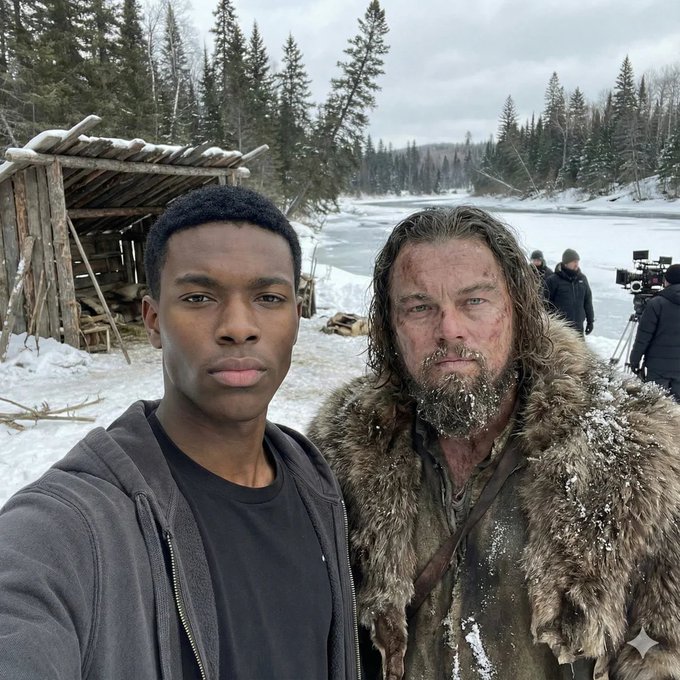 **Prompt:**
```text
"I'm taking a selfie with [movie character] on the set of [movie name].
Keep the person exactly as shown in the reference image with 100% identical facial features, bone structure, skin tone, facial expression, pose, and appearance. 1:1 aspect ratio, 4K detail."
```
*Source: Rohan Paul ([@rohanpaul_ai](https://x.com/rohanpaul_ai)) - [Post](https://x.com/rohanpaul_ai/status/1995641282056925680?s=20)*
### 1.14. Museum Art Exhibition Selfie
*A commercial-grade photo with a classical oil painting*
**Prompt:**
```text
"I'm taking a selfie with [movie character] on the set of [movie name].
Keep the person exactly as shown in the reference image with 100% identical facial features, bone structure, skin tone, facial expression, pose, and appearance. 1:1 aspect ratio, 4K detail."
```
*Source: Rohan Paul ([@rohanpaul_ai](https://x.com/rohanpaul_ai)) - [Post](https://x.com/rohanpaul_ai/status/1995641282056925680?s=20)*
### 1.14. Museum Art Exhibition Selfie
*A commercial-grade photo with a classical oil painting*
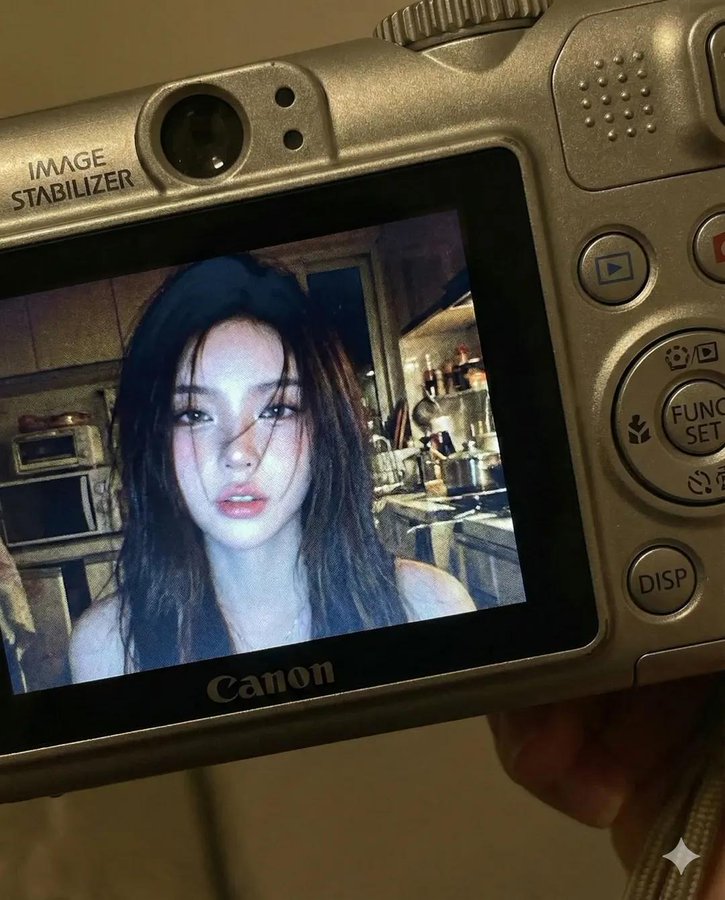 **Prompt:**
```text
Use facial feature of attached photo. A close-up shot of a young woman displayed on the screen of a compact Canon digital camera. The camera body surrounds the image with its buttons, dials, and textured surface visible, including the FUNC/SET wheel, DISP button, and the "IMAGE STABILIZER" label along the side. The photo on the screen shows the woman indoors at night, illuminated by a bright built-in flash that creates sharp highlights on her face and hair. She has long dark hair falling across part of her face in loose strands, with a soft, slightly open-lip expression. The flash accentuates her features against a dim, cluttered kitchen background with appliances, shelves, and metallic surfaces softly blurred. The mood is candid, raw, nostalgic, and reminiscent of early 2000s digital camera snapshots. Colors are slightly muted with cool undertones, strong flash contrast, and natural grain from the display. No text, no logos inside the photo preview itself.
Scale ratio: 4:5 vertical
Camera: compact digital camera simulation
Lens: equivalent to 28–35mm
Aperture: f/2.8
ISO: 400
Shutter speed: 1/60 with flash
White balance: auto flash
Lighting: harsh direct flash on subject, ambient low light in the background
Color grading: nostalgic digital-camera tones, high contrast flash, subtle display grain, authentic screen glow.
```
*Source: simply ([@kingofdairyque](https://x.com/kingofdairyque)) - [Post](https://x.com/kingofdairyque/status/1996033217795903655?s=20)*
### 1.16. Magazine Cover Portrait
*Create a glossy magazine cover*
**Prompt:**
```text
Use facial feature of attached photo. A close-up shot of a young woman displayed on the screen of a compact Canon digital camera. The camera body surrounds the image with its buttons, dials, and textured surface visible, including the FUNC/SET wheel, DISP button, and the "IMAGE STABILIZER" label along the side. The photo on the screen shows the woman indoors at night, illuminated by a bright built-in flash that creates sharp highlights on her face and hair. She has long dark hair falling across part of her face in loose strands, with a soft, slightly open-lip expression. The flash accentuates her features against a dim, cluttered kitchen background with appliances, shelves, and metallic surfaces softly blurred. The mood is candid, raw, nostalgic, and reminiscent of early 2000s digital camera snapshots. Colors are slightly muted with cool undertones, strong flash contrast, and natural grain from the display. No text, no logos inside the photo preview itself.
Scale ratio: 4:5 vertical
Camera: compact digital camera simulation
Lens: equivalent to 28–35mm
Aperture: f/2.8
ISO: 400
Shutter speed: 1/60 with flash
White balance: auto flash
Lighting: harsh direct flash on subject, ambient low light in the background
Color grading: nostalgic digital-camera tones, high contrast flash, subtle display grain, authentic screen glow.
```
*Source: simply ([@kingofdairyque](https://x.com/kingofdairyque)) - [Post](https://x.com/kingofdairyque/status/1996033217795903655?s=20)*
### 1.16. Magazine Cover Portrait
*Create a glossy magazine cover*
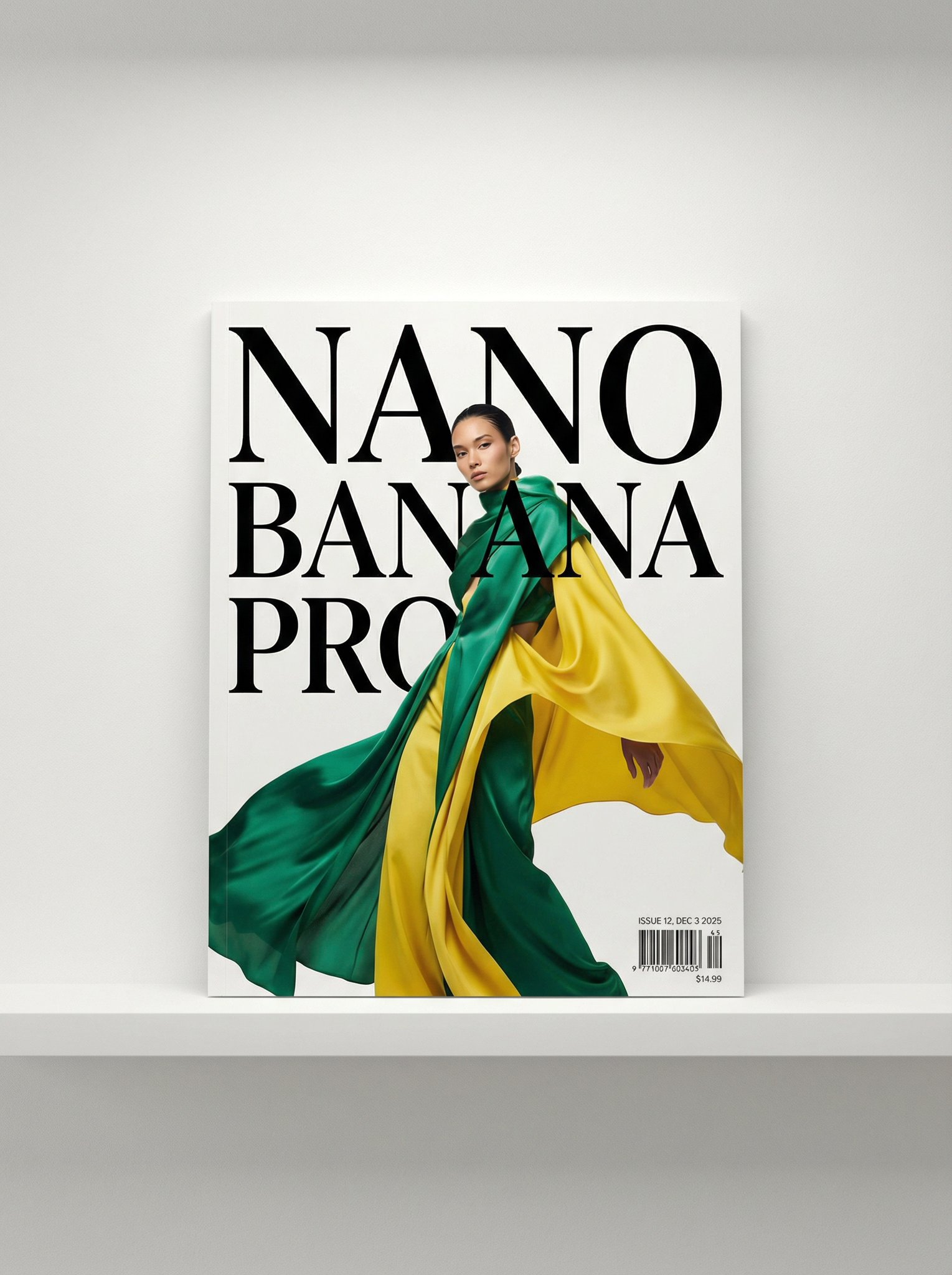 **Prompt:**
```text
A photo of a glossy magazine cover, the cover has the large bold words "Nano Banana Pro". The text is in a serif font, black on white, and fills the view. No other text.
In front of the text there is a dynamic portrait of a person in green and banana yellow colored high-end fashion.
Put the issue number and today's date in the corner along with a barcode and a price. The magazine is on a white shelf against a wall.
```
*Source: Nano Banana Pro ([@NanoBanana](https://x.com/NanoBanana)) - [Post](https://x.com/NanoBanana/status/1996262496802361675?s=20)*
### 1.17. Luxury Product Photography
*Create a floating luxury product shot*
**Prompt:**
```text
A photo of a glossy magazine cover, the cover has the large bold words "Nano Banana Pro". The text is in a serif font, black on white, and fills the view. No other text.
In front of the text there is a dynamic portrait of a person in green and banana yellow colored high-end fashion.
Put the issue number and today's date in the corner along with a barcode and a price. The magazine is on a white shelf against a wall.
```
*Source: Nano Banana Pro ([@NanoBanana](https://x.com/NanoBanana)) - [Post](https://x.com/NanoBanana/status/1996262496802361675?s=20)*
### 1.17. Luxury Product Photography
*Create a floating luxury product shot*
 **Prompt:**
```text
Product:
[BRAND] [PRODUCT NAME] - [bottle shape], [label description], [liquid color]
Scene:
Luxury product shot floating on dark water with [flower type] in [colors] arranged around it.
[Lighting style - e.g., "golden hour glow" /
"bright fresh light"] creates reflections and ripples across the water.
Mood & Style:
[Adjectives - e.g., "ethereal and luxurious" /
"fresh and clean"], high-end commercial photography, [camera angle], shallow depth of field with soft bokeh background
```
*Source: AmirMušić ([@AmirMushich](https://x.com/AmirMushich)) - [Post](https://x.com/AmirMushich/status/1974767431714304456)*
---
## 2. Creative Experiments
Prompts focused on pushing the boundaries of composition, crowd generation, minimalism, and temporal consistency.
### 2.1. Star Wars "Where's Waldo"
*A complex prompt testing the model's ability to handle dense crowds and specific character recognition.*
**Prompt:**
```text
Product:
[BRAND] [PRODUCT NAME] - [bottle shape], [label description], [liquid color]
Scene:
Luxury product shot floating on dark water with [flower type] in [colors] arranged around it.
[Lighting style - e.g., "golden hour glow" /
"bright fresh light"] creates reflections and ripples across the water.
Mood & Style:
[Adjectives - e.g., "ethereal and luxurious" /
"fresh and clean"], high-end commercial photography, [camera angle], shallow depth of field with soft bokeh background
```
*Source: AmirMušić ([@AmirMushich](https://x.com/AmirMushich)) - [Post](https://x.com/AmirMushich/status/1974767431714304456)*
---
## 2. Creative Experiments
Prompts focused on pushing the boundaries of composition, crowd generation, minimalism, and temporal consistency.
### 2.1. Star Wars "Where's Waldo"
*A complex prompt testing the model's ability to handle dense crowds and specific character recognition.*
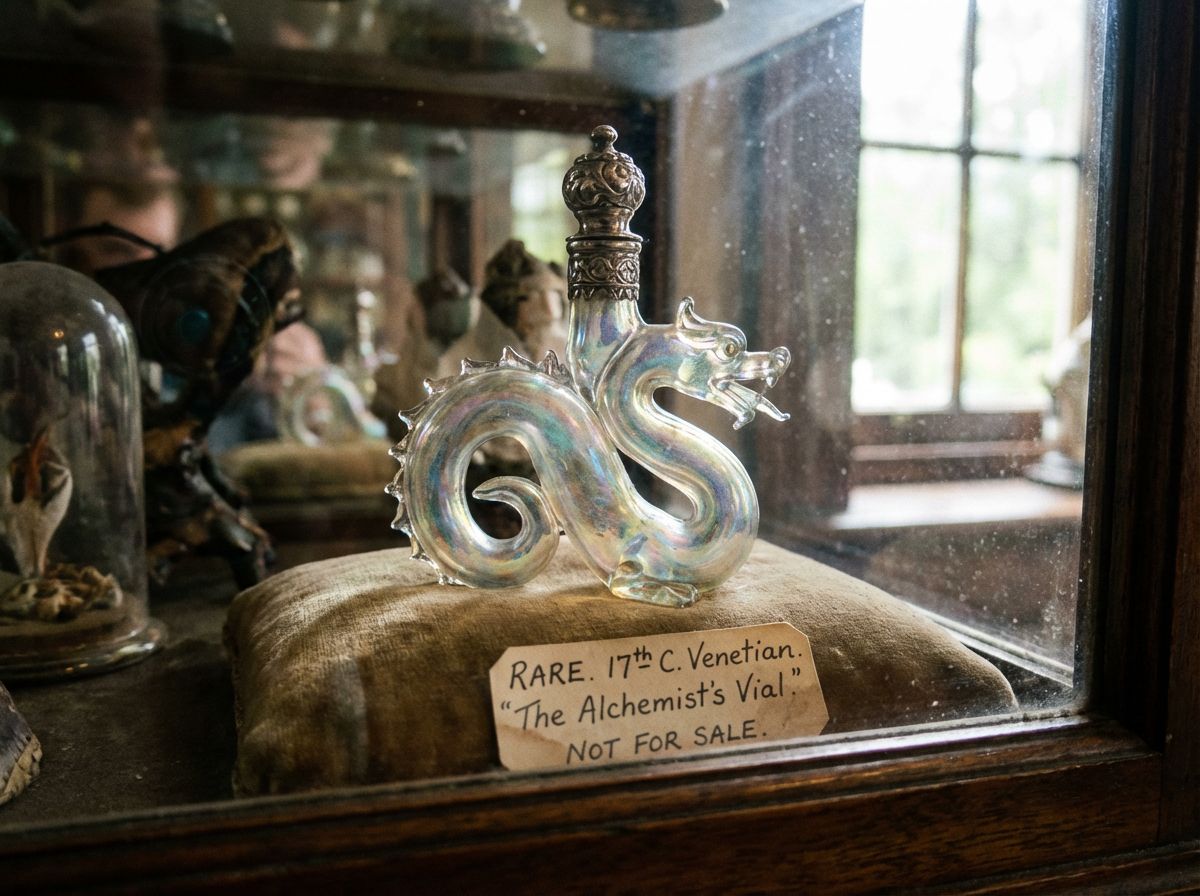 **Prompt:**
```text
rare.jpg
```
*Source: [Replicate](https://replicate.com/)*
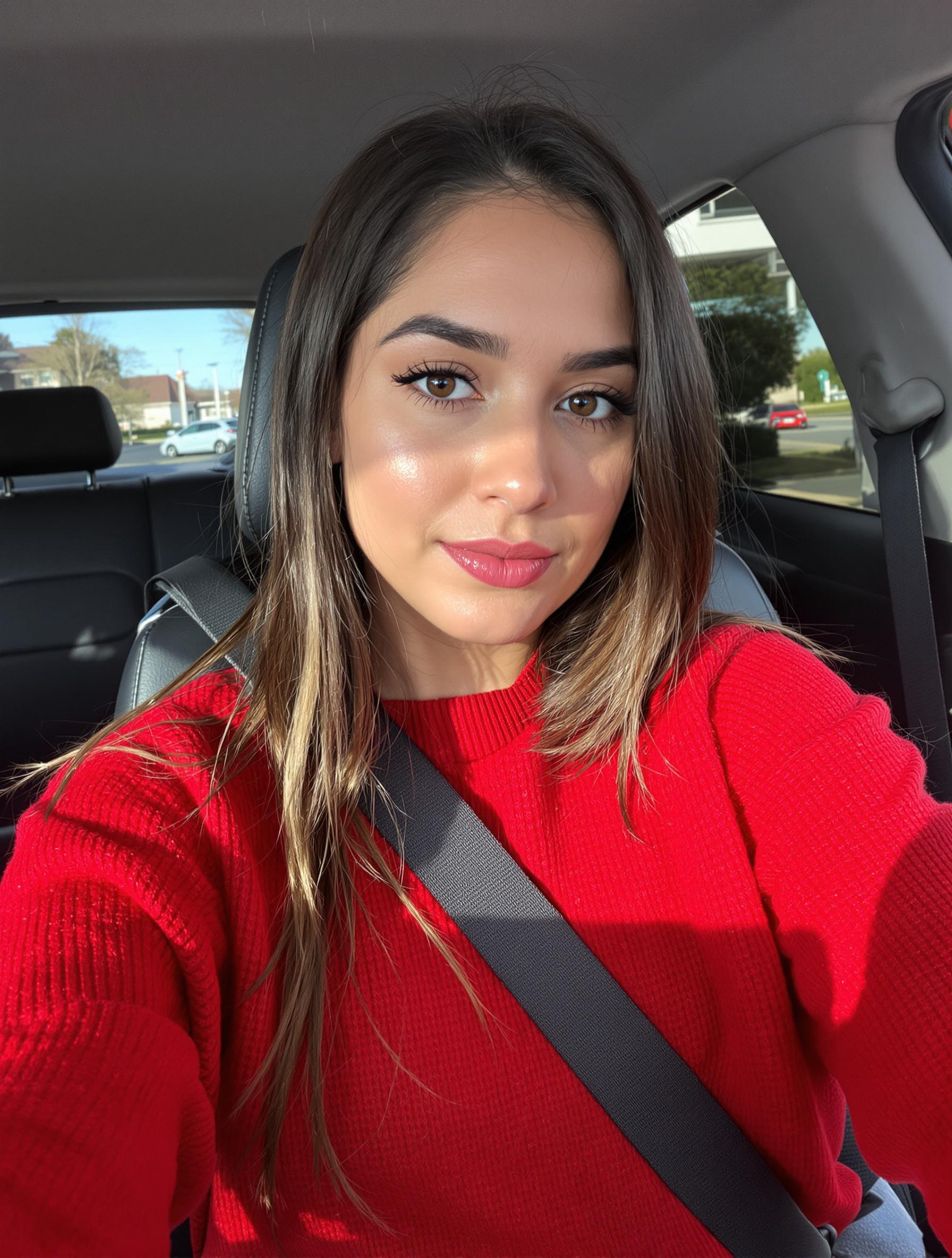
### 2.7. Multi-Subject Compositing
*Combines multiple input portraits into a single cohesive group photo with a specific expression.*
| Input References | Generated Output |
| :--- | :--- |
|
**Prompt:**
```text
rare.jpg
```
*Source: [Replicate](https://replicate.com/)*
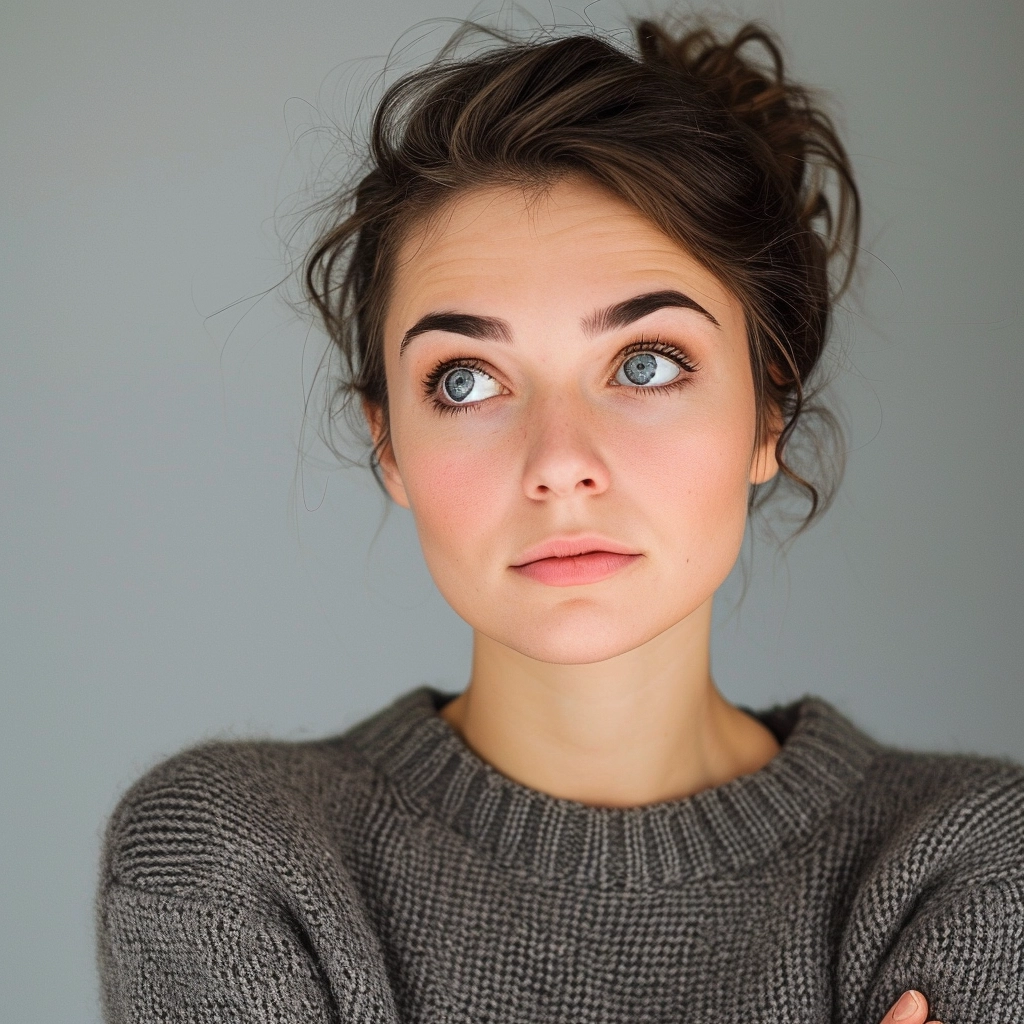
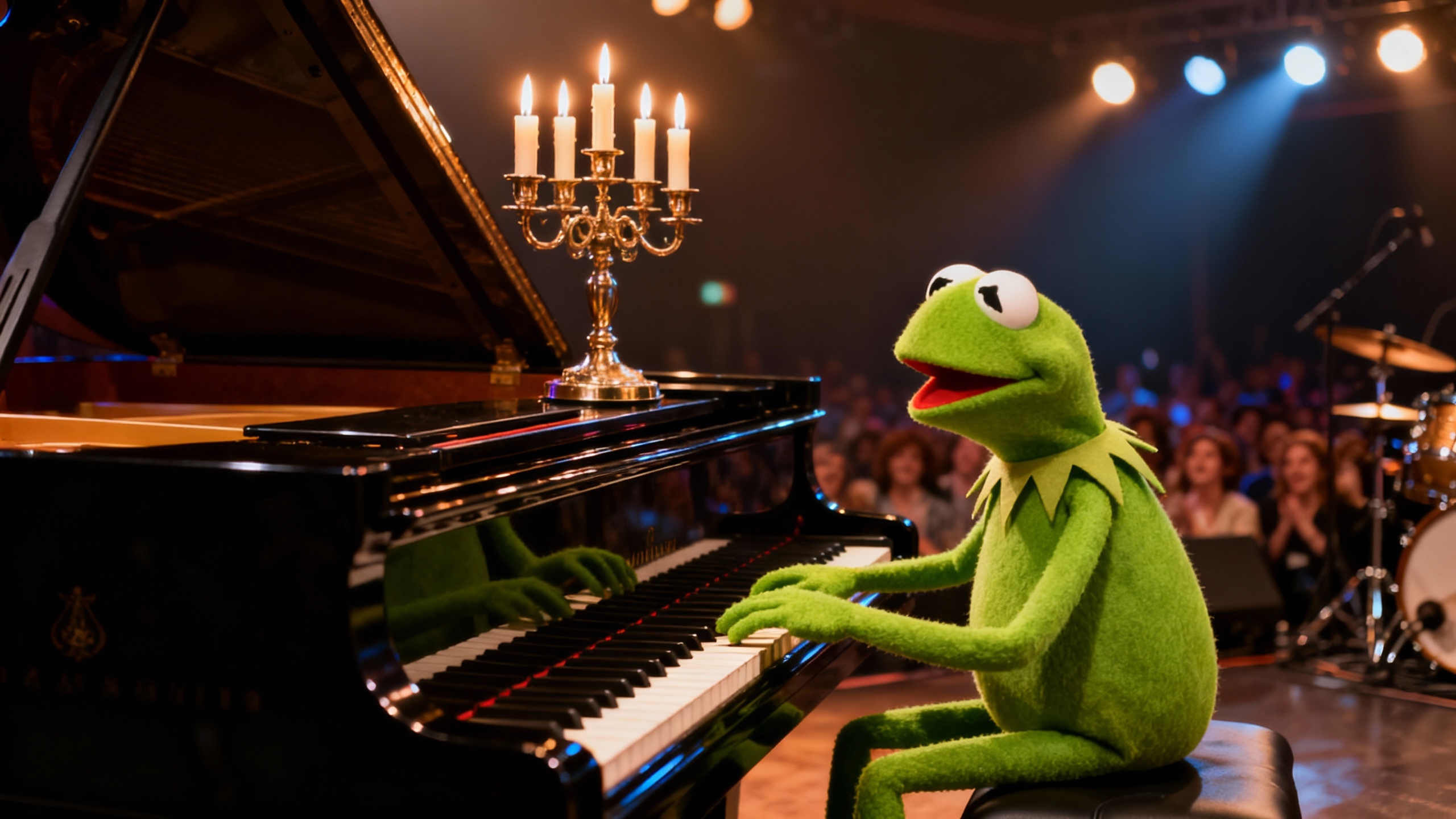
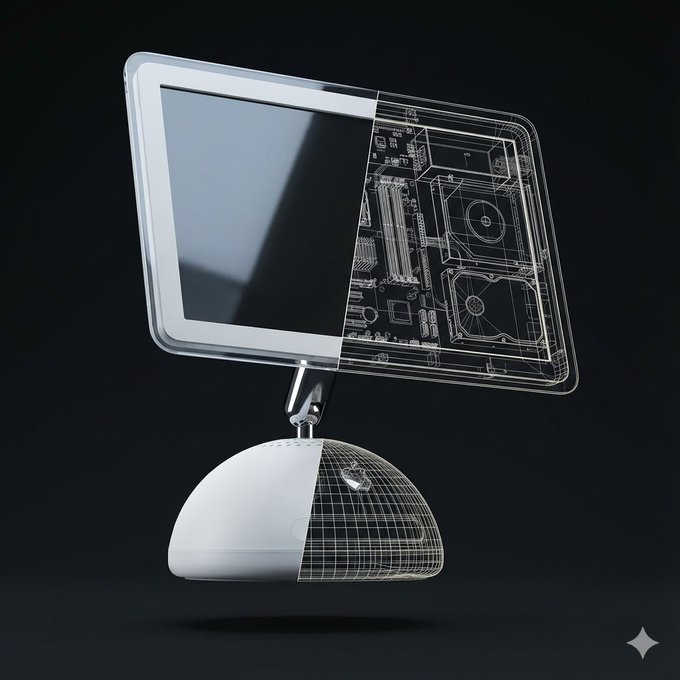
### 2.7. Multi-Subject Compositing
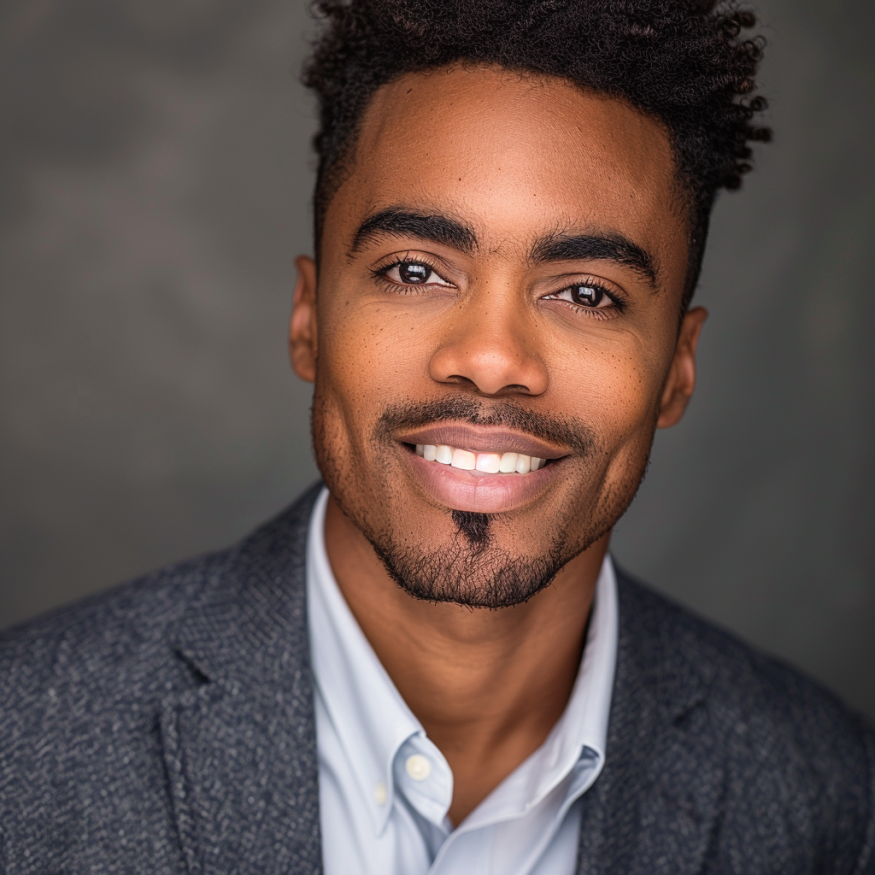
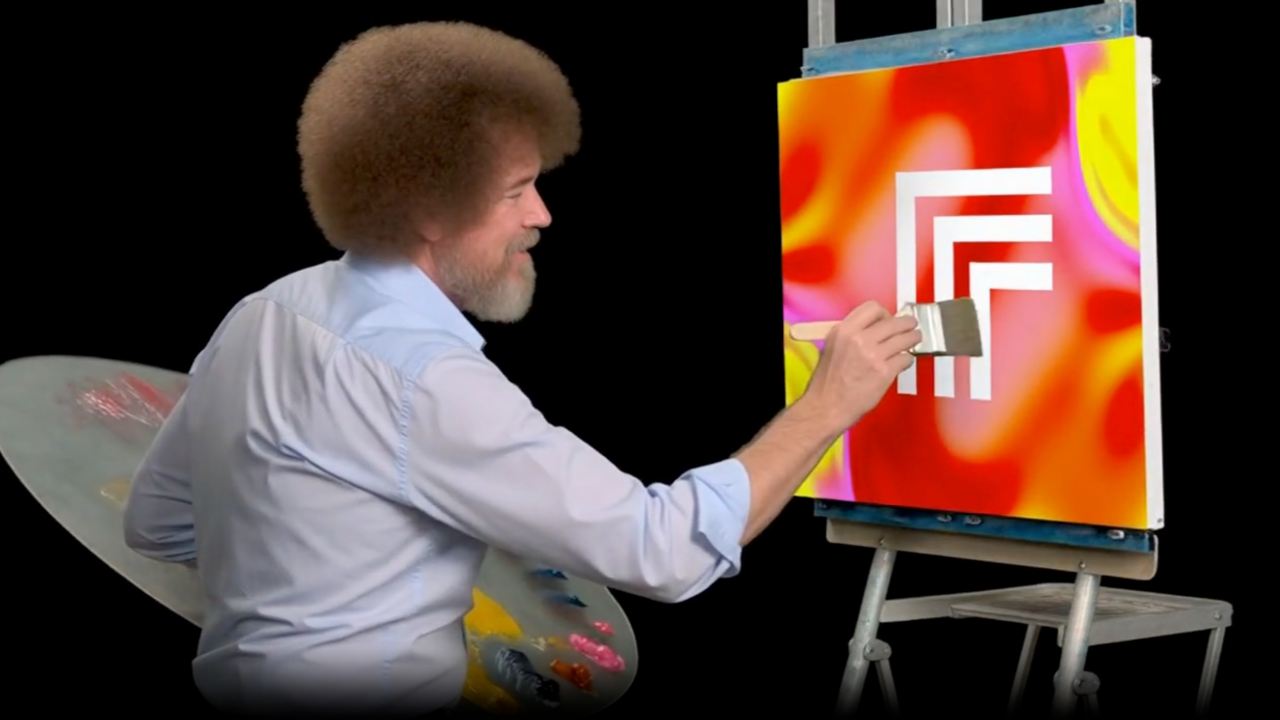
*Combines multiple input portraits into a single cohesive group photo with a specific expression.*
| Input References | Generated Output |
| :--- | :--- |
| 
 |
|  **Prompt:**
```
/* Detailed source-code truncated for AI context efficiency. */
```
*Source: Michal Malewicz ([@michalmalewicz](https://x.com/michalmalewicz)) - [Post](https://x.com/michalmalewicz/status/1995910758169752059?s=20)*
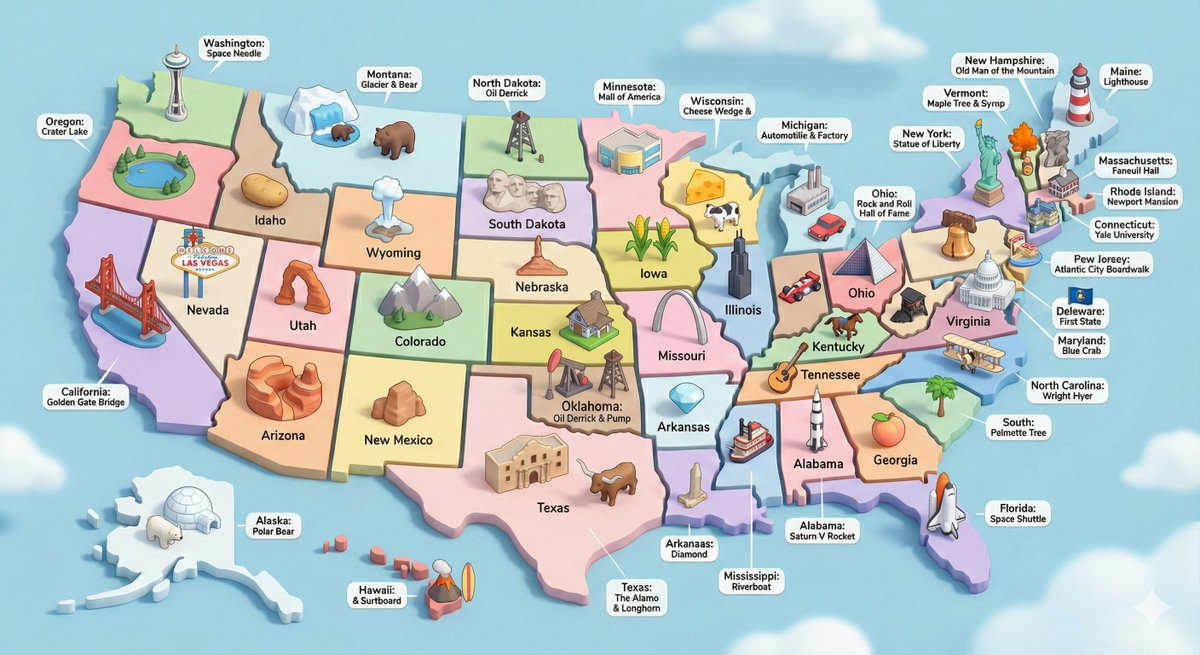
### 2.10. USA 3D Diorama with Landmarks
*Create an isometric 3D diorama of US landmarks*
**Prompt:**
```
/* Detailed source-code truncated for AI context efficiency. */
```
*Source: Michal Malewicz ([@michalmalewicz](https://x.com/michalmalewicz)) - [Post](https://x.com/michalmalewicz/status/1995910758169752059?s=20)*
### 2.10. USA 3D Diorama with Landmarks
*Create an isometric 3D diorama of US landmarks*
 **Prompt:**
```text
Create a high-detail 3D isometric diorama of the entire United States, where each state is represented as its own miniature platform. Inside each state, place a stylized, small-scale 3D model of that state's most iconic landmark. Use the same visual style as a cute, polished 3D city diorama: soft pastel colors, clean materials, smooth rounded forms, gentle shadows, and subtle reflections. Each landmark should look like a miniature model, charming, simplified, but clearly recognizable. Arrange the states in accurate geographical layout, with consistent lighting and perspective. Include state labels and landmark labels in a clean, modern font, floating above or near each model.
```
*Source: Data Exec ([@DataExec](https://x.com/DataExec)) - [Post](https://x.com/DataExec/status/1995876348879937648?s=20)*
### 2.11. US Map Made of Famous Foods
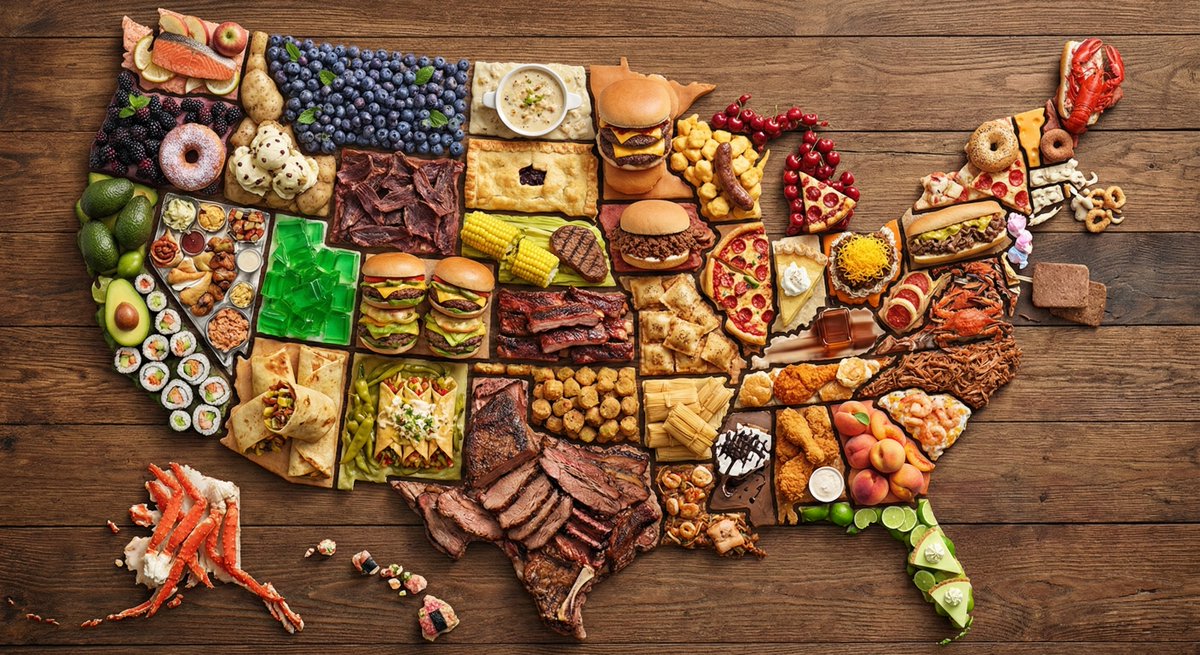
*Create a map of US states made of famous foods*
**Prompt:**
```text
Create a high-detail 3D isometric diorama of the entire United States, where each state is represented as its own miniature platform. Inside each state, place a stylized, small-scale 3D model of that state's most iconic landmark. Use the same visual style as a cute, polished 3D city diorama: soft pastel colors, clean materials, smooth rounded forms, gentle shadows, and subtle reflections. Each landmark should look like a miniature model, charming, simplified, but clearly recognizable. Arrange the states in accurate geographical layout, with consistent lighting and perspective. Include state labels and landmark labels in a clean, modern font, floating above or near each model.
```
*Source: Data Exec ([@DataExec](https://x.com/DataExec)) - [Post](https://x.com/DataExec/status/1995876348879937648?s=20)*
### 2.11. US Map Made of Famous Foods
*Create a map of US states made of famous foods*
 **Prompt:**
```text
create a map of the US where every state is made out of its most famous food (the states should actually look like they are made of the food, not a picture of the food). Check carefully to make sure each state is right.
```
*Source: Ethan Mollick ([@emollick](https://x.com/emollick)) - [Post](https://x.com/emollick/status/1995720976068137048?s=20)*
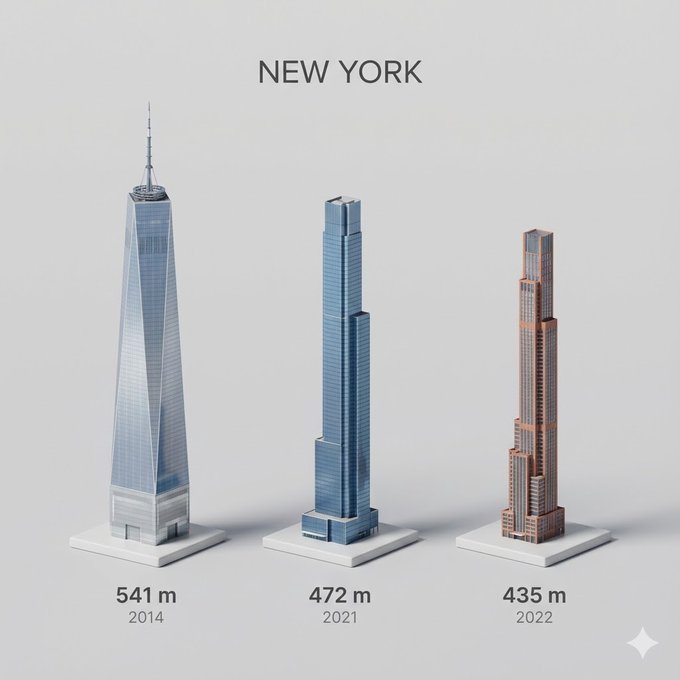
### 2.12. City's Tallest Buildings 3D Cartoon View
*Create a miniature 3D view of city's tallest buildings*
**Prompt:**
```text
create a map of the US where every state is made out of its most famous food (the states should actually look like they are made of the food, not a picture of the food). Check carefully to make sure each state is right.
```
*Source: Ethan Mollick ([@emollick](https://x.com/emollick)) - [Post](https://x.com/emollick/status/1995720976068137048?s=20)*
### 2.12. City's Tallest Buildings 3D Cartoon View
*Create a miniature 3D view of city's tallest buildings*
 **Prompt:**
```
/* Detailed source-code truncated for AI context efficiency. */
```
*Source: Michal Malewicz ([@michalmalewicz](https://x.com/michalmalewicz)) - [Post](https://x.com/michalmalewicz/status/1995532450861080956?s=20)*
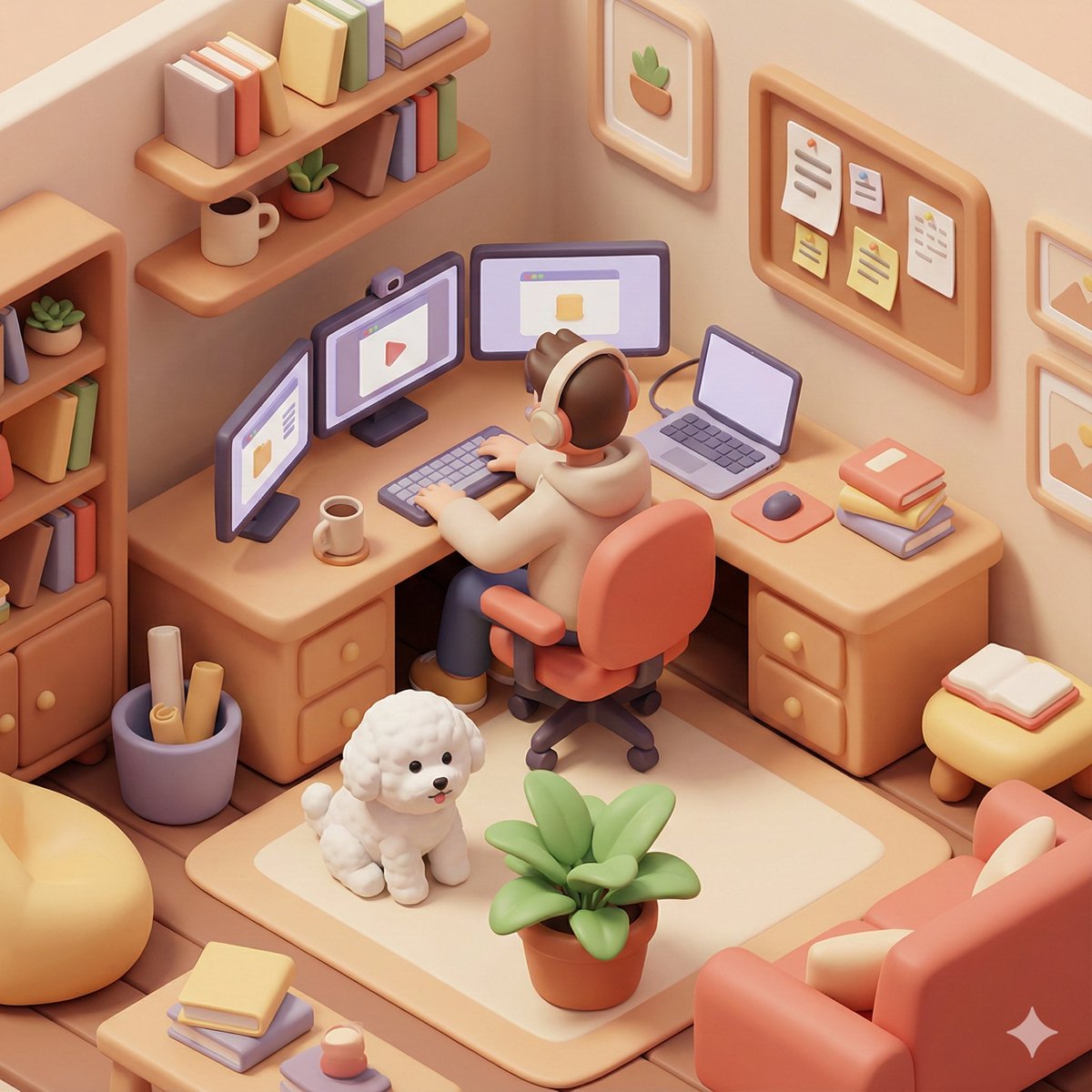
### 2.13. 3D Isometric Home Office Illustration
*Create a 3D isometric view of a home office*
**Prompt:**
```
/* Detailed source-code truncated for AI context efficiency. */
```
*Source: Michal Malewicz ([@michalmalewicz](https://x.com/michalmalewicz)) - [Post](https://x.com/michalmalewicz/status/1995532450861080956?s=20)*
### 2.13. 3D Isometric Home Office Illustration
*Create a 3D isometric view of a home office*
 **Prompt:**
```text
Based on you know about me, generate a 3D isometric colored illustration of me working from home, filled with various interior details. The visual style should be rounded, polished, and playful. --ar 1:1
[Additional details: a bichon frise and 3 monitors]
```
*Source: 宝玉 ([@dotey](https://x.com/dotey)) - [Post](https://x.com/dotey/status/1995944319677554985?s=20)*
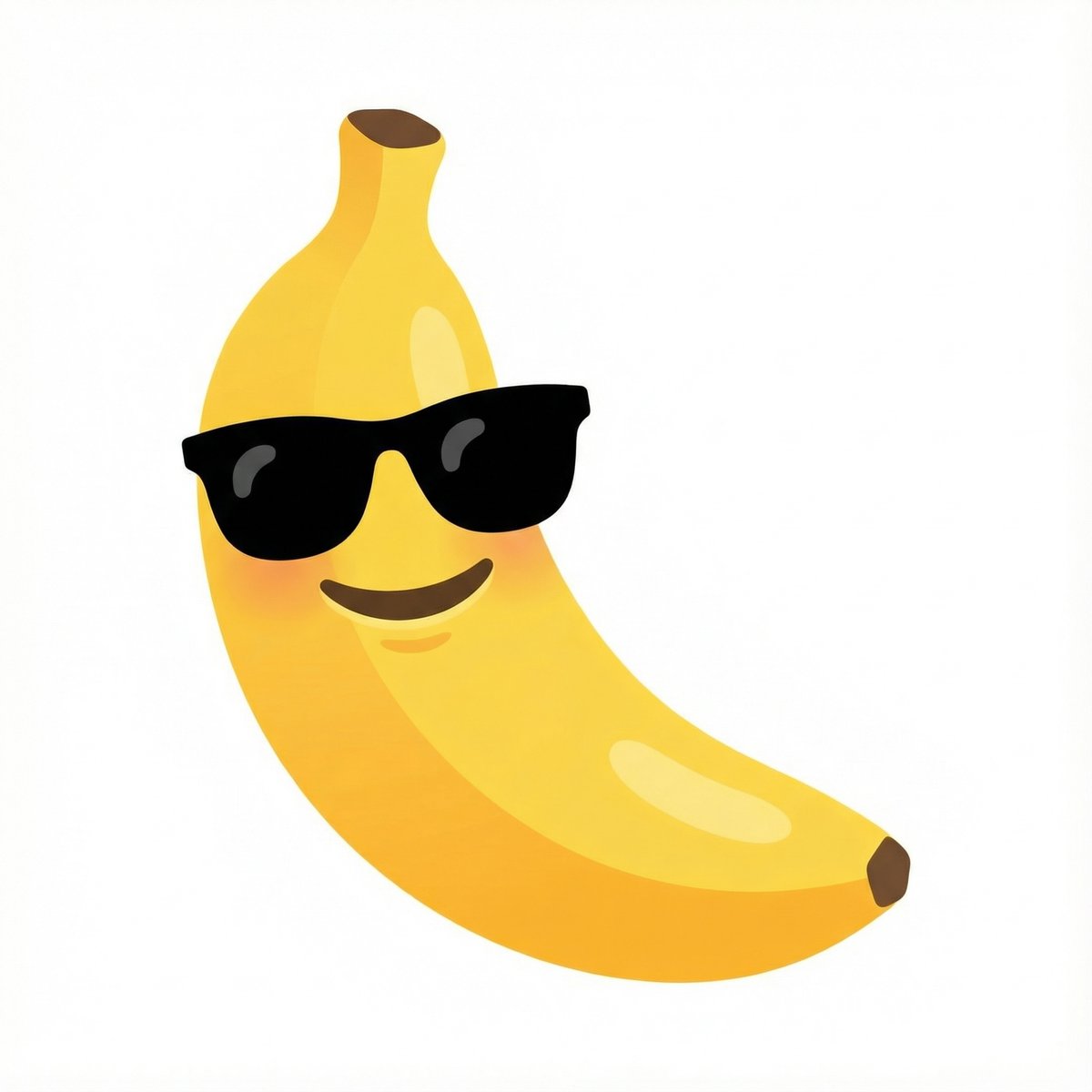
### 2.14. Emoji Combination - Banana with Sunglasses
*Combine emojis in a Google-style design*
**Prompt:**
```text
Based on you know about me, generate a 3D isometric colored illustration of me working from home, filled with various interior details. The visual style should be rounded, polished, and playful. --ar 1:1
[Additional details: a bichon frise and 3 monitors]
```
*Source: 宝玉 ([@dotey](https://x.com/dotey)) - [Post](https://x.com/dotey/status/1995944319677554985?s=20)*
### 2.14. Emoji Combination - Banana with Sunglasses
*Combine emojis in a Google-style design*
 **Prompt:**
```text
combine these emojis: 🍌 + 😎, on a white background as a google emoji design
```
*Source: Nano Banana Pro ([@NanoBanana](https://x.com/NanoBanana)) - [Post](https://x.com/NanoBanana/status/1996193397913317384?s=20)*
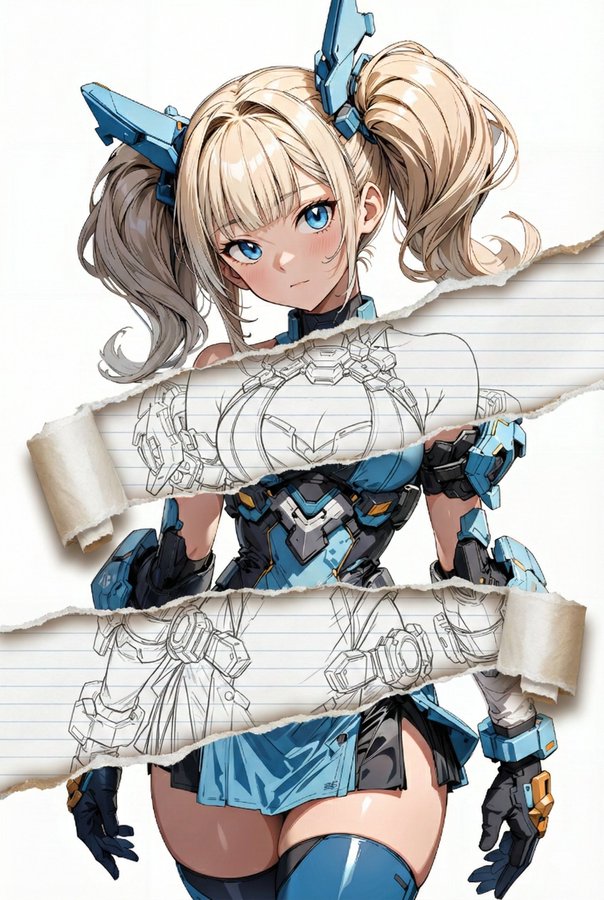
### 2.15. Torn Paper Art Effect
*Add torn paper effect to specific areas of an image*
**Prompt:**
```text
combine these emojis: 🍌 + 😎, on a white background as a google emoji design
```
*Source: Nano Banana Pro ([@NanoBanana](https://x.com/NanoBanana)) - [Post](https://x.com/NanoBanana/status/1996193397913317384?s=20)*
### 2.15. Torn Paper Art Effect
*Add torn paper effect to specific areas of an image*
 **Prompt:**
```
/* Detailed source-code truncated for AI context efficiency. */
```
*Source: てんねん ([@munou_ac](https://x.com/munou_ac)) - [Post](https://x.com/munou_ac/status/1996129537806213597?s=20)*
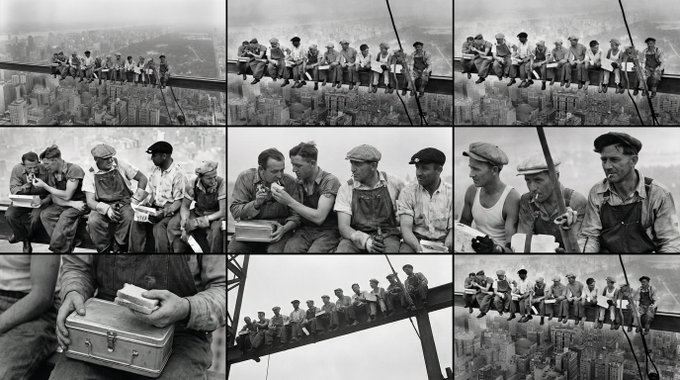
### 2.16. Cinematic Keyframe Generator
*Generates cinematic keyframes and storyboards from a reference image*
**Prompt:**
```
/* Detailed source-code truncated for AI context efficiency. */
```
*Source: てんねん ([@munou_ac](https://x.com/munou_ac)) - [Post](https://x.com/munou_ac/status/1996129537806213597?s=20)*
### 2.16. Cinematic Keyframe Generator
*Generates cinematic keyframes and storyboards from a reference image*
 **Prompt:**
```
/* Detailed source-code truncated for AI context efficiency. */
```
*Source: [@underwoodxie96](https://x.com/underwoodxie96/status/1995109628825489647)*
### 2.17. Photo Book Style Magazine Cover with Coordinates
*A beautiful, photo book style magazine cover that fully utilizes the 9:16 aspect ratio with precise coordinates.*
**Prompt:**
```
/* Detailed source-code truncated for AI context efficiency. */
```
*Source: [@underwoodxie96](https://x.com/underwoodxie96/status/1995109628825489647)*
### 2.17. Photo Book Style Magazine Cover with Coordinates
*A beautiful, photo book style magazine cover that fully utilizes the 9:16 aspect ratio with precise coordinates.*
 **Prompt:**
```text
Create a beautiful, photo book style magazine cover that fully utilizes the 9:16 aspect ratio. Place the attached person at the precise coordinates of [latitude/longitude coordinate], seamlessly blending them into the scene as if they are sightseeing. Approach this task with the understanding that this is a critical page that will significantly influence visitor numbers. NEGATIVE: coordinate texts
```
*Source: Min Choi ([@minchoi](https://x.com/minchoi)) - [Post](https://x.com/minchoi/status/1998784591155409397)*
### 2.18. Floating Country Island Diorama
*A hyper-realistic digital poster of a floating miniature island shaped like a specific country.*
**Prompt:**
```text
Create a beautiful, photo book style magazine cover that fully utilizes the 9:16 aspect ratio. Place the attached person at the precise coordinates of [latitude/longitude coordinate], seamlessly blending them into the scene as if they are sightseeing. Approach this task with the understanding that this is a critical page that will significantly influence visitor numbers. NEGATIVE: coordinate texts
```
*Source: Min Choi ([@minchoi](https://x.com/minchoi)) - [Post](https://x.com/minchoi/status/1998784591155409397)*
### 2.18. Floating Country Island Diorama
*A hyper-realistic digital poster of a floating miniature island shaped like a specific country.*
 **Prompt:**
```text
Create an ultra-HD, hyper-realistic digital poster of a floating miniature island shaped like [COUNTRY], resting on white clouds in the sky. Blend iconic landmarks, natural landscapes (like forests, mountains, or beaches), and cultural elements unique to [COUNTRY]. Carve "[COUNTRY]" into the terrain using large white 3D letters. Add artistic details like birds (native to [COUNTRY]), cinematic lighting, vivid colors, aerial perspective, and sun reflections to enhance realism. Ultra-quality, 4K+ resolution. 1080x1080 format.
```
*Source: TechieSA ([@TechieBySA](https://x.com/TechieBySA)) - [Post](https://x.com/TechieBySA/status/1999110884879221052)*
### 2.19. Novel Scene 3D Poster
*A 3D poster design for novels or films with a miniature diorama effect.*
**Prompt:**
```text
Create an ultra-HD, hyper-realistic digital poster of a floating miniature island shaped like [COUNTRY], resting on white clouds in the sky. Blend iconic landmarks, natural landscapes (like forests, mountains, or beaches), and cultural elements unique to [COUNTRY]. Carve "[COUNTRY]" into the terrain using large white 3D letters. Add artistic details like birds (native to [COUNTRY]), cinematic lighting, vivid colors, aerial perspective, and sun reflections to enhance realism. Ultra-quality, 4K+ resolution. 1080x1080 format.
```
*Source: TechieSA ([@TechieBySA](https://x.com/TechieBySA)) - [Post](https://x.com/TechieBySA/status/1999110884879221052)*
### 2.19. Novel Scene 3D Poster
*A 3D poster design for novels or films with a miniature diorama effect.*
 **Prompt:**
```text
Design a high-quality 3D poster for the movie/novel "Name to be added", first retrieving information about the movie/novel and famous scenes.
First, please use your knowledge base to retrieve information about this movie/novel and find a representative famous scene or core location. In the center of the image, construct this scene as a delicate axonometric 3D miniature model. The style should adopt DreamWorks Animation's delicate and soft rendering style. You need to reproduce the architectural details, character dynamics, and environmental atmosphere of that time, whether it's a storm or a quiet afternoon, naturally integrating into the model's lighting.
Regarding the background, do not use a simple pure white background. Please create a void environment with faint ink wash diffusion and flowing light mist around the model, with elegant colors, making the image look breathable and have depth, highlighting the preciousness of the central model.
Finally, for the bottom layout, please generate Chinese text. Center the novel title with a font that matches the original style. Below the title, automatically retrieve and typeset a classic description or quote about this scene from the original work, using an elegant serif font. The overall layout should be as精致balanced as a high-end museum exhibit label.
```
*Source: 歸藏(guizang.ai) ([@op7418](https://x.com/op7418)) - [Post](https://x.com/op7418/status/1998355915456790916)*
### 2.20. Miniature Swimming Pool Diorama
*Surreal miniature-world collage poster featuring an oversized container as a swimming pool.*
**Prompt:**
```text
Design a high-quality 3D poster for the movie/novel "Name to be added", first retrieving information about the movie/novel and famous scenes.
First, please use your knowledge base to retrieve information about this movie/novel and find a representative famous scene or core location. In the center of the image, construct this scene as a delicate axonometric 3D miniature model. The style should adopt DreamWorks Animation's delicate and soft rendering style. You need to reproduce the architectural details, character dynamics, and environmental atmosphere of that time, whether it's a storm or a quiet afternoon, naturally integrating into the model's lighting.
Regarding the background, do not use a simple pure white background. Please create a void environment with faint ink wash diffusion and flowing light mist around the model, with elegant colors, making the image look breathable and have depth, highlighting the preciousness of the central model.
Finally, for the bottom layout, please generate Chinese text. Center the novel title with a font that matches the original style. Below the title, automatically retrieve and typeset a classic description or quote about this scene from the original work, using an elegant serif font. The overall layout should be as精致balanced as a high-end museum exhibit label.
```
*Source: 歸藏(guizang.ai) ([@op7418](https://x.com/op7418)) - [Post](https://x.com/op7418/status/1998355915456790916)*
### 2.20. Miniature Swimming Pool Diorama
*Surreal miniature-world collage poster featuring an oversized container as a swimming pool.*
 **Prompt:**
```text
Surreal miniature-world collage poster featuring an oversized open blue Nivea-style tin repurposed as a whimsical swimming pool filled with glossy white "cream-water."
Tiny sunbathers float in pastel swim rings, lounge on miniature deck chairs, and slide into the cream pool from a small blue slide.
The background is a soft, warm, lightly textured countertop surface subtle marble or matte stone, evenly lit, no heavy veins or visual noise.
Keep the scene grounded with soft shadows beneath props and figures.
Surrounding the tin, keep the playful diorama elements: a small wooden deck with micro figures, pastel umbrellas, lounge chairs, and compact handcrafted accessories. Maintain the hovering pastel inflatables and plush cloud-like shapes, but ensure they feel like stylised decorative objects staged above the countertop
Preserve the soft, high-saturation, toy-like aesthetic with plush textures, pastel gradients, and gentle lighting.
```
*Source: Salma ([@Salmaaboukarr](https://x.com/Salmaaboukarr)) - [Post](https://x.com/Salmaaboukarr/status/1998394870759567373)*
### 2.21. Christmas Ornament 3D Character
*Transform yourself into a cute 3D character inside a Christmas ornament.*
**Prompt:**
```text
Surreal miniature-world collage poster featuring an oversized open blue Nivea-style tin repurposed as a whimsical swimming pool filled with glossy white "cream-water."
Tiny sunbathers float in pastel swim rings, lounge on miniature deck chairs, and slide into the cream pool from a small blue slide.
The background is a soft, warm, lightly textured countertop surface subtle marble or matte stone, evenly lit, no heavy veins or visual noise.
Keep the scene grounded with soft shadows beneath props and figures.
Surrounding the tin, keep the playful diorama elements: a small wooden deck with micro figures, pastel umbrellas, lounge chairs, and compact handcrafted accessories. Maintain the hovering pastel inflatables and plush cloud-like shapes, but ensure they feel like stylised decorative objects staged above the countertop
Preserve the soft, high-saturation, toy-like aesthetic with plush textures, pastel gradients, and gentle lighting.
```
*Source: Salma ([@Salmaaboukarr](https://x.com/Salmaaboukarr)) - [Post](https://x.com/Salmaaboukarr/status/1998394870759567373)*
### 2.21. Christmas Ornament 3D Character
*Transform yourself into a cute 3D character inside a Christmas ornament.*
 **Prompt:**
```text
A transparent Christmas bauble hanging by a red ribbon. Inside, a tiny diorama of the person from the reference reimagined as a cute 3d chibi character. He works at a mini futuristic AI desk with three glowing holo-screens showing neural networks and code. Add tiny plants, a mini coffee cup, soft desk lighting, floating UI icons, and snow-glitter at the base. Warm magical Christmas glow, cinematic reflections on glass, cozy high-end diorama aesthetic.
Cinematic lighting, shallow depth of field, soft reflections on the glass, ultra-polished materials, high detail, festive Christmas atmosphere. Whimsical, premium, and heartwarming.
```
*Source: Pierrick Chevallier | IA ([@CharaspowerAI](https://x.com/CharaspowerAI)) - [Post](https://x.com/CharaspowerAI/status/1998432458941858282)*
### 2.22. Ironing Out Wrinkles
*A surreal take on anti-aging with a miniature iron smoothing out wrinkles.*
**Prompt:**
```text
A transparent Christmas bauble hanging by a red ribbon. Inside, a tiny diorama of the person from the reference reimagined as a cute 3d chibi character. He works at a mini futuristic AI desk with three glowing holo-screens showing neural networks and code. Add tiny plants, a mini coffee cup, soft desk lighting, floating UI icons, and snow-glitter at the base. Warm magical Christmas glow, cinematic reflections on glass, cozy high-end diorama aesthetic.
Cinematic lighting, shallow depth of field, soft reflections on the glass, ultra-polished materials, high detail, festive Christmas atmosphere. Whimsical, premium, and heartwarming.
```
*Source: Pierrick Chevallier | IA ([@CharaspowerAI](https://x.com/CharaspowerAI)) - [Post](https://x.com/CharaspowerAI/status/1998432458941858282)*
### 2.22. Ironing Out Wrinkles
*A surreal take on anti-aging with a miniature iron smoothing out wrinkles.*
 **Prompt:**
```
/* Detailed source-code truncated for AI context efficiency. */
```
*Source: Ege ([@egeberkina](https://x.com/egeberkina)) - [Post](https://x.com/egeberkina/status/1997061102237049047)*
### 2.23. Perfectly Isometric Photography
*Create a captured photo that just happens to be perfectly isometric.*
**Prompt:**
```
/* Detailed source-code truncated for AI context efficiency. */
```
*Source: Ege ([@egeberkina](https://x.com/egeberkina)) - [Post](https://x.com/egeberkina/status/1997061102237049047)*
### 2.23. Perfectly Isometric Photography
*Create a captured photo that just happens to be perfectly isometric.*
 **Prompt:**
```text
Make a photo that is perfectly isometric. It is not a miniature, it is a captured photo that just happened to be perfectly isometric. It is a photo of [subject].
```
*Source: Nano Banana Pro ([@NanoBanana](https://x.com/NanoBanana)) - [Post](https://x.com/NanoBanana/status/1998085942201163905)*
### 2.24. Extreme Wide Angle Phone Screen Replacement
*Edit photo with extreme wide angle and phone screen replacement.*
**Prompt:**
```text
Make a photo that is perfectly isometric. It is not a miniature, it is a captured photo that just happened to be perfectly isometric. It is a photo of [subject].
```
*Source: Nano Banana Pro ([@NanoBanana](https://x.com/NanoBanana)) - [Post](https://x.com/NanoBanana/status/1998085942201163905)*
### 2.24. Extreme Wide Angle Phone Screen Replacement
*Edit photo with extreme wide angle and phone screen replacement.*
 **Prompt:**
```
/* Detailed source-code truncated for AI context efficiency. */
```
*Source: 骑司Chase ([@qisi_ai](https://x.com/qisi_ai)) - [Post](https://x.com/qisi_ai/status/1997925279948534056)*
### 2.25. Shop Window Cartoon Reflection
*Create a photograph of a person next to a shop window showing their cartoon version.*
**Prompt:**
```
/* Detailed source-code truncated for AI context efficiency. */
```
*Source: 骑司Chase ([@qisi_ai](https://x.com/qisi_ai)) - [Post](https://x.com/qisi_ai/status/1997925279948534056)*
### 2.25. Shop Window Cartoon Reflection
*Create a photograph of a person next to a shop window showing their cartoon version.*
 **Prompt:**
```json
{
"PROMPT": "Create a bright, high-end street-fashion photograph of the woman from the reference image, keeping her face, hair, body & outfit exactly the same. She stands outside a luxury toy-shop window, gently touching the glass. Inside the window display, place a full-height cartoon-style doll designed to resemble her—same features, hair, and outfit—transformed into a cute, big-eyed, stylized animated character. Crisp lighting, premium street-fashion look, realistic reflections, face unchanged.",
"settings": {
"style": "high-end street fashion",
"lighting": "crisp and bright",
"environment": "outside luxury toy-shop window",
"subject": "woman from reference image",
"focus": ["face", "hair", "body", "outfit"],
"additional_elements": [
{
"type": "doll",
"style": "cartoon-style, big-eyed, stylized",
"location": "inside window display",
"resemblance": "exact features, hair, outfit of woman"
}
],
"reflections": "realistic",
"photorealism": true
}
}
```
*Source: Mira ([@xmiiru_](https://x.com/xmiiru_)) - [Post](https://x.com/xmiiru_/status/1997182817235583293)*
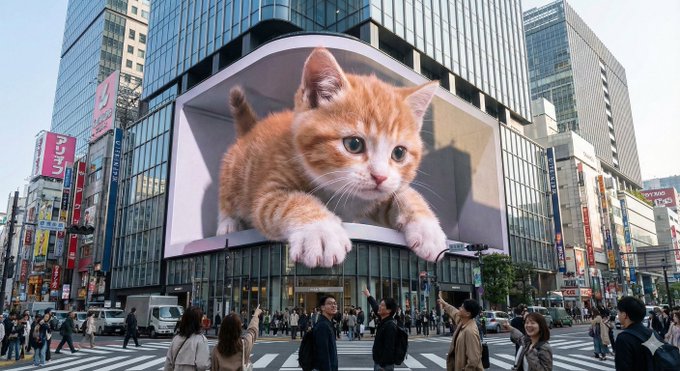
### 2.26. Urban 3D LED Display
*Create a scene with a large L-shaped 3D LED screen in an urban environment.*
**Prompt:**
```json
{
"PROMPT": "Create a bright, high-end street-fashion photograph of the woman from the reference image, keeping her face, hair, body & outfit exactly the same. She stands outside a luxury toy-shop window, gently touching the glass. Inside the window display, place a full-height cartoon-style doll designed to resemble her—same features, hair, and outfit—transformed into a cute, big-eyed, stylized animated character. Crisp lighting, premium street-fashion look, realistic reflections, face unchanged.",
"settings": {
"style": "high-end street fashion",
"lighting": "crisp and bright",
"environment": "outside luxury toy-shop window",
"subject": "woman from reference image",
"focus": ["face", "hair", "body", "outfit"],
"additional_elements": [
{
"type": "doll",
"style": "cartoon-style, big-eyed, stylized",
"location": "inside window display",
"resemblance": "exact features, hair, outfit of woman"
}
],
"reflections": "realistic",
"photorealism": true
}
}
```
*Source: Mira ([@xmiiru_](https://x.com/xmiiru_)) - [Post](https://x.com/xmiiru_/status/1997182817235583293)*
### 2.26. Urban 3D LED Display
*Create a scene with a large L-shaped 3D LED screen in an urban environment.*
 **Prompt:**
```text
An enormous L-shaped glasses-free 3D LED screen situated prominently at a bustling urban intersection, designed in an iconic architectural style reminiscent of Shinjuku in Tokyo or Taikoo Li in Chengdu. The screen displays a captivating glasses-free 3D animation featuring [scene description]. The characters and objects possess striking depth and appear to break through the screen's boundaries, extending outward or floating vividly in mid-air. Under realistic daylight conditions, these elements cast lifelike shadows onto the screen's surface and surrounding buildings. Rich in intricate detail and vibrant colors, the animation seamlessly integrates with the urban setting and the bright sky overhead.
----
scene description:
[An adorable giant kitten playfully paws at passing pedestrians, its fluffy paws and curious face extending realistically into the space around the screen.]
```
*Source: 宝玉 ([@dotey](https://x.com/dotey)) - [Post](https://x.com/dotey/status/1997574511705657772)*
### 2.27. Trans-Dimensional Liquid Pour
*A surreal scene where liquid from the physical world pours into a digital screen.*
**Prompt:**
```text
An enormous L-shaped glasses-free 3D LED screen situated prominently at a bustling urban intersection, designed in an iconic architectural style reminiscent of Shinjuku in Tokyo or Taikoo Li in Chengdu. The screen displays a captivating glasses-free 3D animation featuring [scene description]. The characters and objects possess striking depth and appear to break through the screen's boundaries, extending outward or floating vividly in mid-air. Under realistic daylight conditions, these elements cast lifelike shadows onto the screen's surface and surrounding buildings. Rich in intricate detail and vibrant colors, the animation seamlessly integrates with the urban setting and the bright sky overhead.
----
scene description:
[An adorable giant kitten playfully paws at passing pedestrians, its fluffy paws and curious face extending realistically into the space around the screen.]
```
*Source: 宝玉 ([@dotey](https://x.com/dotey)) - [Post](https://x.com/dotey/status/1997574511705657772)*
### 2.27. Trans-Dimensional Liquid Pour
*A surreal scene where liquid from the physical world pours into a digital screen.*
 **Prompt:**
```
/* Detailed source-code truncated for AI context efficiency. */
```
*Source: Yaseen Khan Gul ([@YaseenK7212](https://x.com/YaseenK7212)) - [Post](https://x.com/YaseenK7212/status/1996559154240967144)*
### 2.28. Fisheye Matcha Girl
*Ultra wide fisheye photo of a girl sipping a matcha drink.*
**Prompt:**
```
/* Detailed source-code truncated for AI context efficiency. */
```
*Source: Yaseen Khan Gul ([@YaseenK7212](https://x.com/YaseenK7212)) - [Post](https://x.com/YaseenK7212/status/1996559154240967144)*
### 2.28. Fisheye Matcha Girl
*Ultra wide fisheye photo of a girl sipping a matcha drink.*
 **Prompt:**
```json
{
"scene": {
"environment": "sunny_boardwalk",
"details": "wooden_planks, colorful_stalls, people_walking, distant_umbrellas",
"lighting": "bright_midday_sun",
"sky": "clear_blue"
},
"camera": {
"lens": "ultra_wide_fisheye_12mm",
"distance": "very_close_up",
"distortion": "strong_exaggeration",
"angle": "slightly_low_upward"
},
"subject": {
"type": "young_person",
"gender": "neutral",
"expression": "curious_playful",
"eyes": "large_due_to_lens_distortion",
"pose": "leaning_forward_sipping_drink",
"clothing": {
"top": "bright_green_knit_sweater",
"accessory": "chunky_blue_sunglasses"
}
},
"drink": {
"type": "iced_matcha_latte",
"ice_cubes": "large_clear",
"cup": "transparent_plastic",
"straw": "green_white_spiral"
},
"effects": {
"depth_of_field": "shallow_foreground_sharp_background_soft",
"reflections": "glasses_show_boardwalk_and_people",
"color_grade": "clean_natural"
},
"composition": {
"focus": "face_extreme_closeup",
"mood": "funny_intimate_casual",
"background_elements": [
"distant_people",
"benches",
"bright_shops"
]
}
}
```
*Source: Ege ([@egeberkina](https://x.com/egeberkina)) - [Post](https://x.com/egeberkina/status/1995069549805187087)*
### 2.29. Canon IXUS Aesthetic Portrait
*Create a portrait with Canon IXUS point-and-shoot camera aesthetic.*
**Prompt:**
```json
{
"scene": {
"environment": "sunny_boardwalk",
"details": "wooden_planks, colorful_stalls, people_walking, distant_umbrellas",
"lighting": "bright_midday_sun",
"sky": "clear_blue"
},
"camera": {
"lens": "ultra_wide_fisheye_12mm",
"distance": "very_close_up",
"distortion": "strong_exaggeration",
"angle": "slightly_low_upward"
},
"subject": {
"type": "young_person",
"gender": "neutral",
"expression": "curious_playful",
"eyes": "large_due_to_lens_distortion",
"pose": "leaning_forward_sipping_drink",
"clothing": {
"top": "bright_green_knit_sweater",
"accessory": "chunky_blue_sunglasses"
}
},
"drink": {
"type": "iced_matcha_latte",
"ice_cubes": "large_clear",
"cup": "transparent_plastic",
"straw": "green_white_spiral"
},
"effects": {
"depth_of_field": "shallow_foreground_sharp_background_soft",
"reflections": "glasses_show_boardwalk_and_people",
"color_grade": "clean_natural"
},
"composition": {
"focus": "face_extreme_closeup",
"mood": "funny_intimate_casual",
"background_elements": [
"distant_people",
"benches",
"bright_shops"
]
}
}
```
*Source: Ege ([@egeberkina](https://x.com/egeberkina)) - [Post](https://x.com/egeberkina/status/1995069549805187087)*
### 2.29. Canon IXUS Aesthetic Portrait
*Create a portrait with Canon IXUS point-and-shoot camera aesthetic.*
 **Prompt:**
```json
{
"image_parameters": {
"style": "Canon IXUS aesthetic",
"type": "Point-and-shoot photography",
"quality": "Hyper-realistic",
"tone": "Sharp, direct",
"lighting_and_atmosphere": "Realistic, flash-style/direct lighting"
},
"subject": {
"constraints": {
"facial_identity": "Match reference image exactly 100%",
"face_edits": "None allowed"
},
"hair": {
"style": "Long, natural, lightly messy layered look",
"movement": "Blowing gently in the wind",
"details": "Strands slightly covering part of face"
},
"makeup": {
"cheeks_and_nose": "Soft pink blush with blurred effect",
"lips": "Subtle pink-orange tinted outline"
},
"expression": [
"Cute",
"Naive",
"Cheerful",
"Slightly sexy/undone charm"
],
"pose": {
"body_position": "Half-sitting, half-standing",
"action": "Flicking hair"
},
"clothing": {
"top": "Black strapless top",
"bottom": "Low-waisted jeans with a floating waistline",
"neck": "Thin black fabric choker/wrap"
},
"accessories": [
"Small pendant necklace",
"Gold watch"
]
},
"environment": {
"setting": "Modern pub",
"foreground_props": [
"Round table",
"Bottle of liquor",
"Glass of liquor"
]
}
}
```
*Source: Lex ([@lexx_aura](https://x.com/lexx_aura)) - [Post](https://x.com/lexx_aura/status/1996561195424260299)*
### 2.30. Hyperrealistic Anime Portrait Spotlight
*Hyperrealistic anime-style portrait with dramatic spotlight lighting.*
**Prompt:**
```text
Generate a hyperrealistic realistic-anime portrait of a female character standing in a completely black background.
Lighting: use a **narrow beam spotlight** focused only on the center of the face.
The edges of the light must be sharp and dramatic.
All areas outside the spotlight should fall quickly into deep darkness
(high falloff shadow), almost blending into the black background.
Not soft lighting.
Hair: long dark hair with some strands falling over the face. The lower parts of the hair should fade into the shadows.
Pose: one hand raised gently to the lips in a shy, hesitant gesture.
Eyes looking directly at the camera with a mysterious mood.
Clothing: black long-sleeve knit sweater;
the sweater and body should mostly disappear into the darkness with minimal detail.
Overall tone: dark, moody, dramatic, mysterious.
High-contrast only in the lit portion of the face.
Everything outside the spotlight should be nearly invisible.
```
*Source: Anissa ([@SimplyAnnisa](https://x.com/SimplyAnnisa)) - [Post](https://x.com/SimplyAnnisa/status/1995131975351562274)*
---
## 3. Education & Knowledge
### 3.1. Concept Visualization (Text to Infographic)
*Converts textual concepts into clear, educational vector illustrations.*
**Prompt:**
```json
{
"image_parameters": {
"style": "Canon IXUS aesthetic",
"type": "Point-and-shoot photography",
"quality": "Hyper-realistic",
"tone": "Sharp, direct",
"lighting_and_atmosphere": "Realistic, flash-style/direct lighting"
},
"subject": {
"constraints": {
"facial_identity": "Match reference image exactly 100%",
"face_edits": "None allowed"
},
"hair": {
"style": "Long, natural, lightly messy layered look",
"movement": "Blowing gently in the wind",
"details": "Strands slightly covering part of face"
},
"makeup": {
"cheeks_and_nose": "Soft pink blush with blurred effect",
"lips": "Subtle pink-orange tinted outline"
},
"expression": [
"Cute",
"Naive",
"Cheerful",
"Slightly sexy/undone charm"
],
"pose": {
"body_position": "Half-sitting, half-standing",
"action": "Flicking hair"
},
"clothing": {
"top": "Black strapless top",
"bottom": "Low-waisted jeans with a floating waistline",
"neck": "Thin black fabric choker/wrap"
},
"accessories": [
"Small pendant necklace",
"Gold watch"
]
},
"environment": {
"setting": "Modern pub",
"foreground_props": [
"Round table",
"Bottle of liquor",
"Glass of liquor"
]
}
}
```
*Source: Lex ([@lexx_aura](https://x.com/lexx_aura)) - [Post](https://x.com/lexx_aura/status/1996561195424260299)*
### 2.30. Hyperrealistic Anime Portrait Spotlight
*Hyperrealistic anime-style portrait with dramatic spotlight lighting.*
**Prompt:**
```text
Generate a hyperrealistic realistic-anime portrait of a female character standing in a completely black background.
Lighting: use a **narrow beam spotlight** focused only on the center of the face.
The edges of the light must be sharp and dramatic.
All areas outside the spotlight should fall quickly into deep darkness
(high falloff shadow), almost blending into the black background.
Not soft lighting.
Hair: long dark hair with some strands falling over the face. The lower parts of the hair should fade into the shadows.
Pose: one hand raised gently to the lips in a shy, hesitant gesture.
Eyes looking directly at the camera with a mysterious mood.
Clothing: black long-sleeve knit sweater;
the sweater and body should mostly disappear into the darkness with minimal detail.
Overall tone: dark, moody, dramatic, mysterious.
High-contrast only in the lit portion of the face.
Everything outside the spotlight should be nearly invisible.
```
*Source: Anissa ([@SimplyAnnisa](https://x.com/SimplyAnnisa)) - [Post](https://x.com/SimplyAnnisa/status/1995131975351562274)*
---
## 3. Education & Knowledge
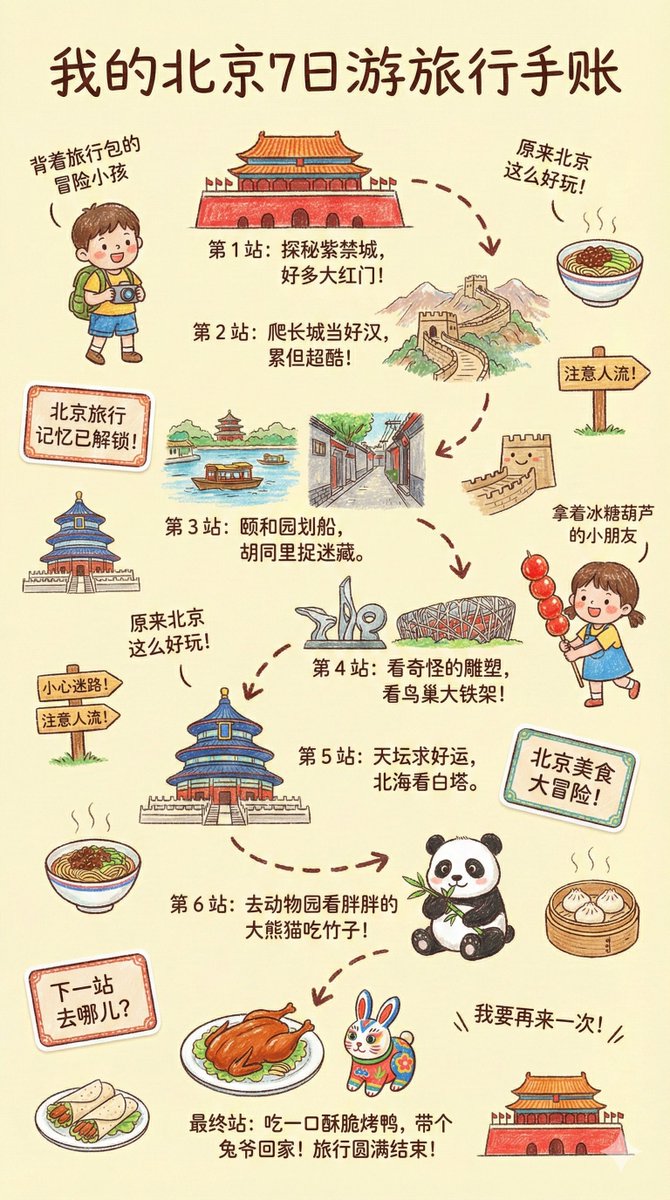
### 3.1. Concept Visualization (Text to Infographic)
*Converts textual concepts into clear, educational vector illustrations.*
 **Prompt:**
```
/* Detailed source-code truncated for AI context efficiency. */
```
*Source: [@dotey](https://x.com/dotey/status/1994908289813880915)*
### 3.3. Financial Sankey Diagram Visualization
*Create a professional financial Sankey diagram*
**Prompt:**
```
/* Detailed source-code truncated for AI context efficiency. */
```
*Source: [@dotey](https://x.com/dotey/status/1994908289813880915)*
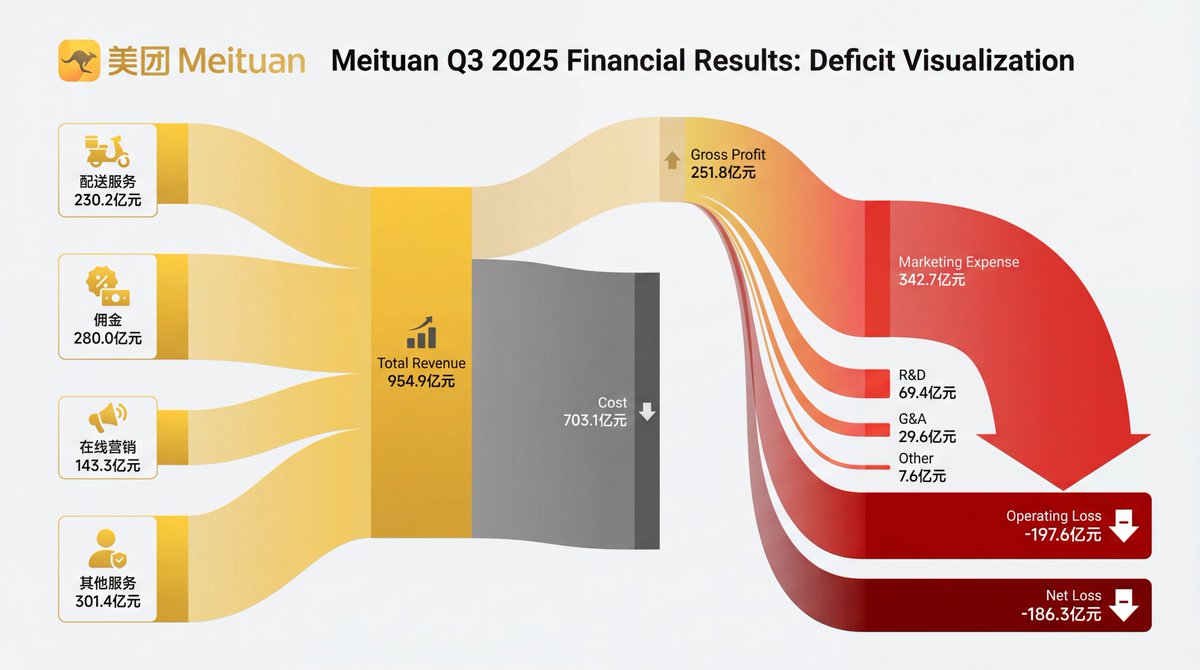
### 3.3. Financial Sankey Diagram Visualization
*Create a professional financial Sankey diagram*
 **Prompt:**
```
/* Detailed source-code truncated for AI context efficiency. */
```
*Source: 饼干哥哥AGI(2.0) ([@bggg_ai](https://x.com/bggg_ai)) - [Post](https://x.com/bggg_ai/status/1996211865207316751?s=20)*
---
## 4. E-commerce & Virtual Studio
### 4.1. Virtual Model Try-On
*Dresses a model in a specific garment while preserving fabric texture and lighting integration.*
**Prompt:**
```
/* Detailed source-code truncated for AI context efficiency. */
```
*Source: 饼干哥哥AGI(2.0) ([@bggg_ai](https://x.com/bggg_ai)) - [Post](https://x.com/bggg_ai/status/1996211865207316751?s=20)*
---
## 4. E-commerce & Virtual Studio
### 4.1. Virtual Model Try-On
*Dresses a model in a specific garment while preserving fabric texture and lighting integration.*
 **Prompt:**
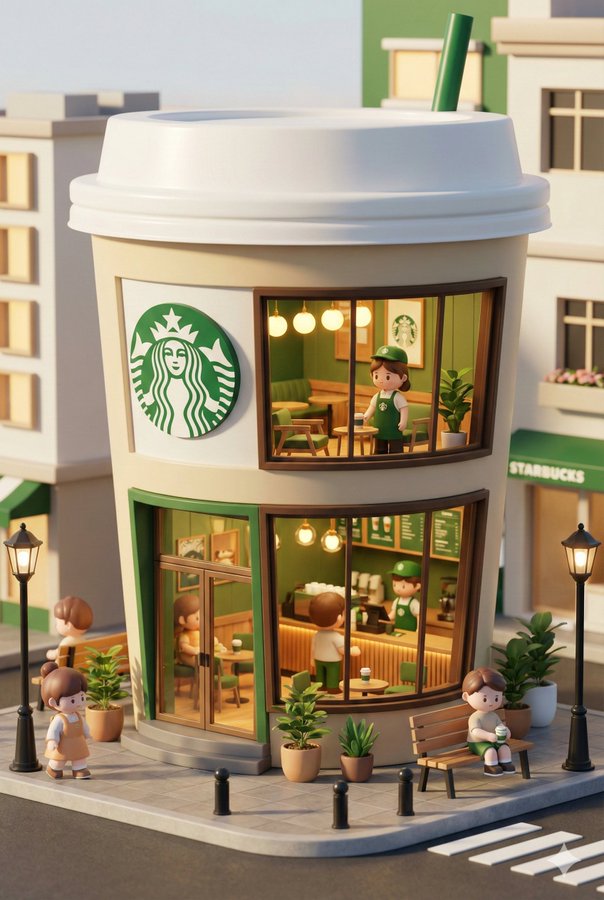
```text
3D chibi-style miniature concept store of {Brand Name}, creatively designed with an exterior inspired by the brand's most iconic product or packaging (such as a giant {brand's core product, e.g., chicken bucket/hamburger/donut/roast duck}). The store features two floors with large glass windows clearly showcasing the cozy and finely decorated interior: {brand's primary color}-themed decor, warm lighting, and busy staff dressed in outfits matching the brand. Adorable tiny figures stroll or sit along the street, surrounded by benches, street lamps, and potted plants, creating a charming urban scene. Rendered in a miniature cityscape style using Cinema 4D, with a blind-box toy aesthetic, rich in details and realism, and bathed in soft lighting that evokes a relaxing afternoon atmosphere. --ar 2:3
```
*Source: 宝玉 ([@dotey](https://x.com/dotey)) - [Post](https://x.com/dotey/status/1995190286775881780?s=20)*
### 4.4. Room Furnishing Visualization
*Visualize how furniture would look in an empty room*
**Prompt:**
```text
3D chibi-style miniature concept store of {Brand Name}, creatively designed with an exterior inspired by the brand's most iconic product or packaging (such as a giant {brand's core product, e.g., chicken bucket/hamburger/donut/roast duck}). The store features two floors with large glass windows clearly showcasing the cozy and finely decorated interior: {brand's primary color}-themed decor, warm lighting, and busy staff dressed in outfits matching the brand. Adorable tiny figures stroll or sit along the street, surrounded by benches, street lamps, and potted plants, creating a charming urban scene. Rendered in a miniature cityscape style using Cinema 4D, with a blind-box toy aesthetic, rich in details and realism, and bathed in soft lighting that evokes a relaxing afternoon atmosphere. --ar 2:3
```
*Source: 宝玉 ([@dotey](https://x.com/dotey)) - [Post](https://x.com/dotey/status/1995190286775881780?s=20)*
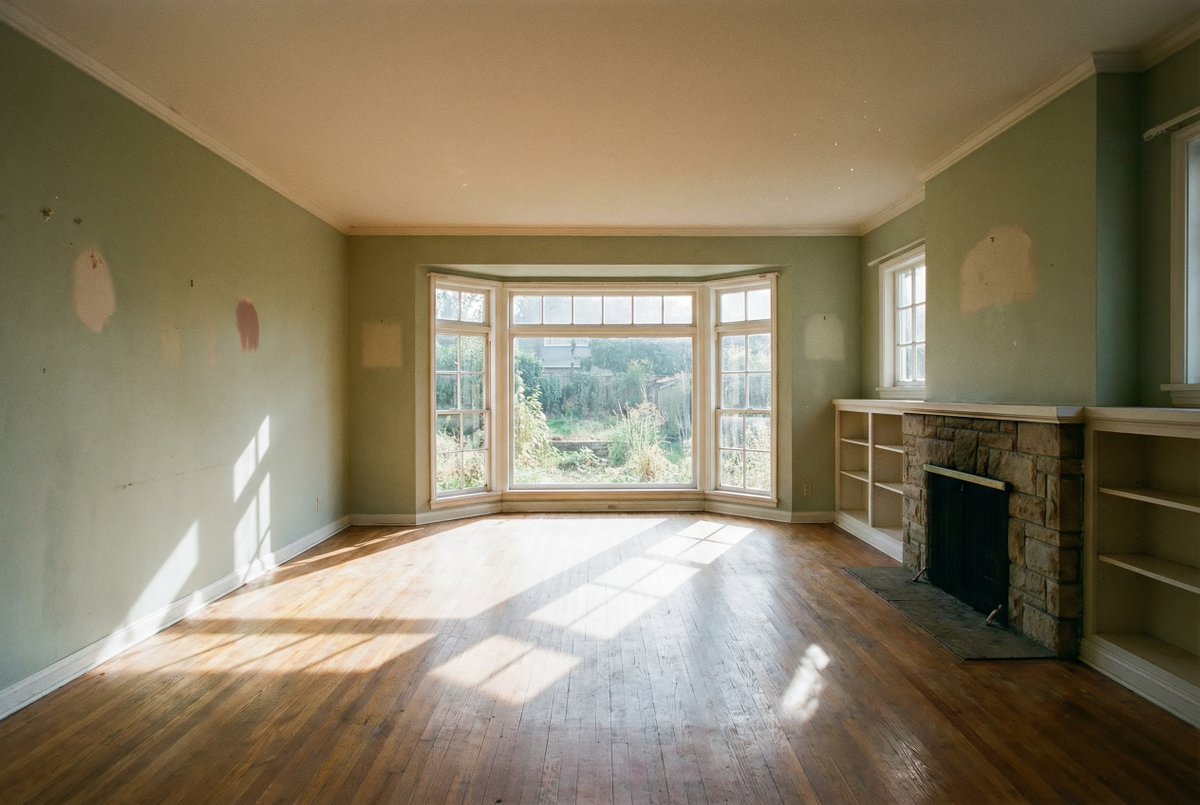
### 4.4. Room Furnishing Visualization
*Visualize how furniture would look in an empty room*
 **Prompt:**
```text
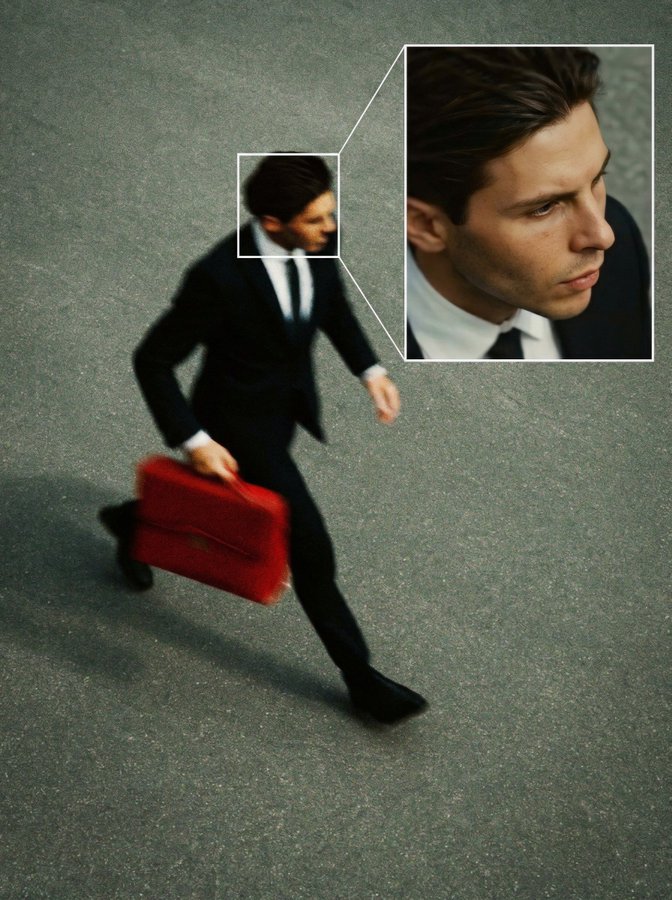
Create a high angle CCTV surveillance shot using the uploaded image as the source. Detect every visible person in the image and automatically draw a white rectangular bounding box around each face. For the most prominent person, add a large zoom in inset: a sharp, enhanced close-up of their face displayed in a floating rectangular frame connected with a thin white line.Keep the main image slightly noisy and security camera like (soft grain, slight distortion, muted colors), while the zoom in face box should be clearer, brighter, and more detailed. No text, no timestamps, no overlays except the boxes and connecting line. Maintain the original scene layout, angle, and environment of the uploaded image.
```
*Source: [@egeberkina](https://x.com/egeberkina/status/1994804061024010628)*
---
## 7. Interior Design
### 7.1. Hard Furnishing Preview (Floor Plan to Design)
*Generates a complete design presentation board including perspective views and 3D floor plans from a simple 2D map.*
**Prompt:**
```text
Create a high angle CCTV surveillance shot using the uploaded image as the source. Detect every visible person in the image and automatically draw a white rectangular bounding box around each face. For the most prominent person, add a large zoom in inset: a sharp, enhanced close-up of their face displayed in a floating rectangular frame connected with a thin white line.Keep the main image slightly noisy and security camera like (soft grain, slight distortion, muted colors), while the zoom in face box should be clearer, brighter, and more detailed. No text, no timestamps, no overlays except the boxes and connecting line. Maintain the original scene layout, angle, and environment of the uploaded image.
```
*Source: [@egeberkina](https://x.com/egeberkina/status/1994804061024010628)*
---
## 7. Interior Design
### 7.1. Hard Furnishing Preview (Floor Plan to Design)
*Generates a complete design presentation board including perspective views and 3D floor plans from a simple 2D map.*
 **Prompt:**
```
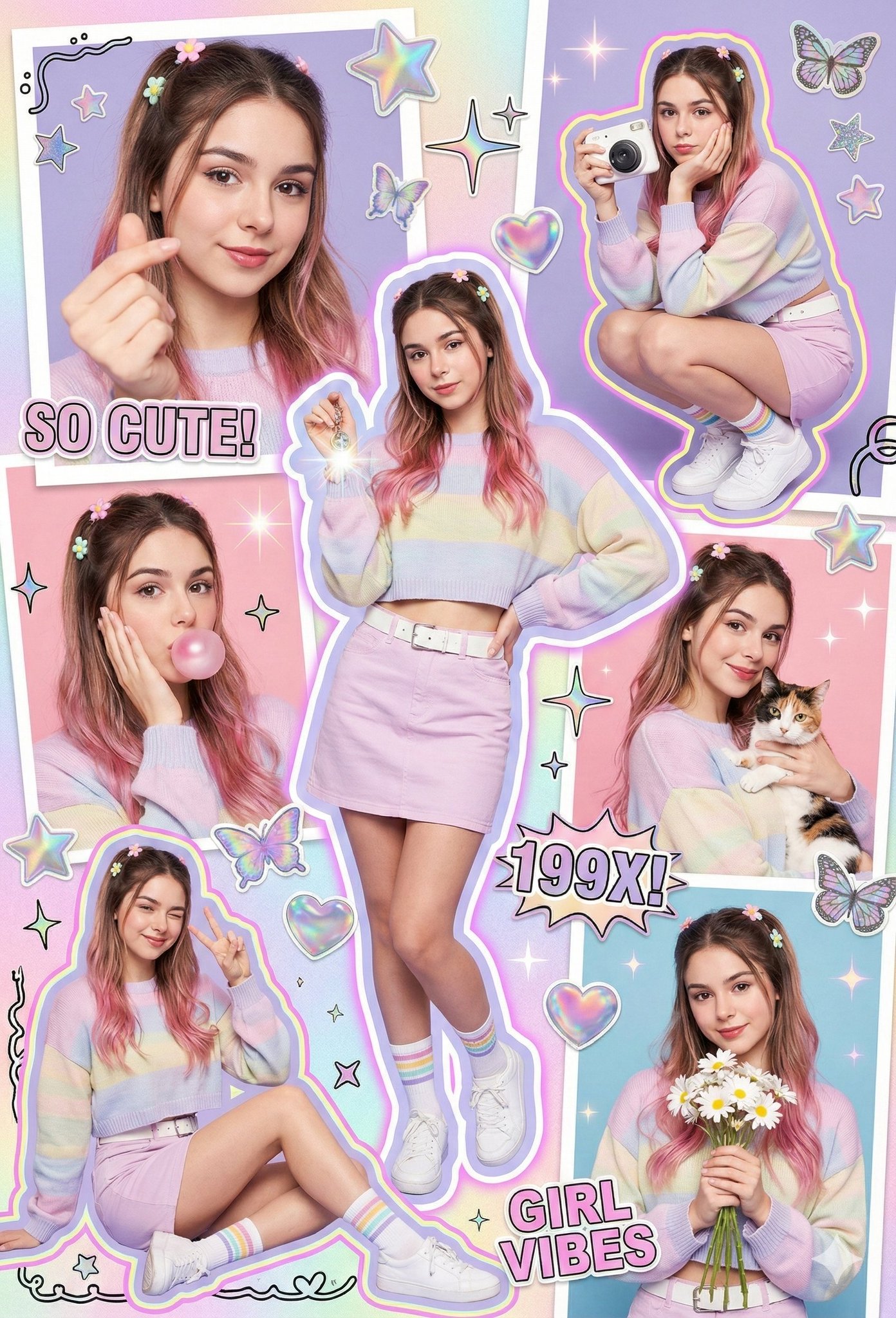
/* Detailed source-code truncated for AI context efficiency. */
```
*Source: Shreya Yadav ([@ShreyaYadav___](https://x.com/ShreyaYadav___)) - [Post](https://x.com/ShreyaYadav___/status/1995760655018942720?s=20)*
### 10.4. Japanese High School Student Snap Photo
*Create a snapshot in the style of a Japanese high school student*
**Prompt:**
```
/* Detailed source-code truncated for AI context efficiency. */
```
*Source: Shreya Yadav ([@ShreyaYadav___](https://x.com/ShreyaYadav___)) - [Post](https://x.com/ShreyaYadav___/status/1995760655018942720?s=20)*
### 10.4. Japanese High School Student Snap Photo
*Create a snapshot in the style of a Japanese high school student*
 **Prompt:**
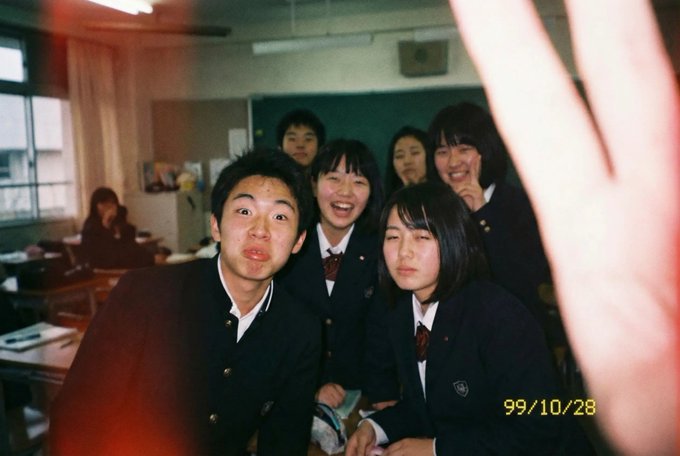
```text
A daily snapshot taken with a low-quality disposable camera. A clumsy photo taken by a Japanese high school student. (Aspect ratio 3:2 is recommended)
```
*Source: SSSS_CRYPTOMAN ([@SSSS_CRYPTOMAN](https://x.com/SSSS_CRYPTOMAN)) - [Post](https://x.com/SSSS_CRYPTOMAN/status/1994245271220568233?s=20)*
### 10.5. AI Skin Analysis and Skincare Routine
*Analyze skin and provide routine recommendations*
**Prompt:**
```text
A daily snapshot taken with a low-quality disposable camera. A clumsy photo taken by a Japanese high school student. (Aspect ratio 3:2 is recommended)
```
*Source: SSSS_CRYPTOMAN ([@SSSS_CRYPTOMAN](https://x.com/SSSS_CRYPTOMAN)) - [Post](https://x.com/SSSS_CRYPTOMAN/status/1994245271220568233?s=20)*
### 10.5. AI Skin Analysis and Skincare Routine
*Analyze skin and provide routine recommendations*
 **Prompt:**
```
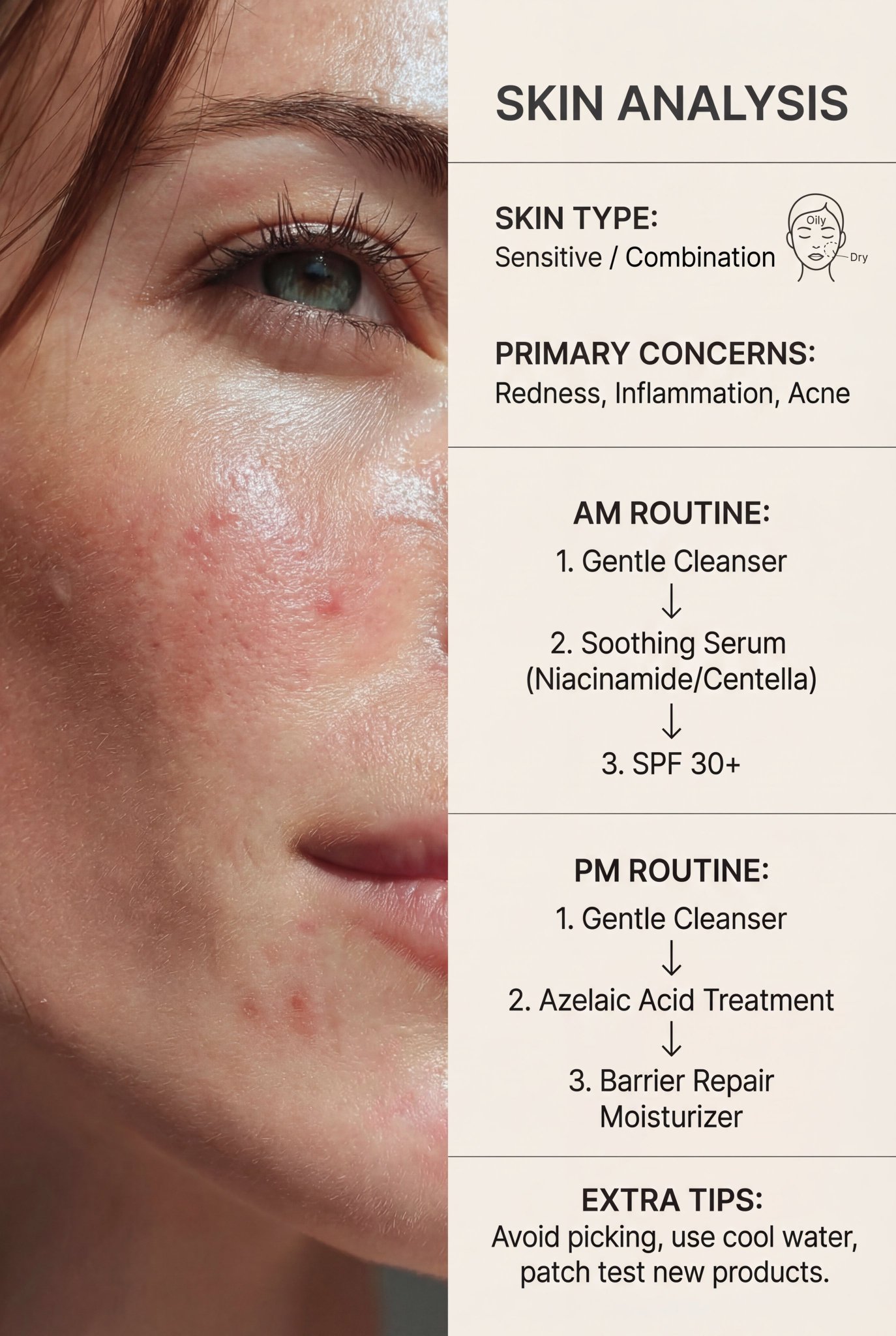
/* Detailed source-code truncated for AI context efficiency. */
```
*Source: Saman | AI ([@Samann_ai](https://x.com/Samann_ai)) - [Post](https://x.com/Samann_ai/status/1996230732470010064?s=20)*
---
## 11. Resources
- [Official Prompting Guide](https://blog.google/products/gemini/prompting-tips-nano-banana-pro/) - Learn how to structure your prompts effectively.
- [How to prompt Nano Banana Pro](https://www.fofr.ai/nano-banana-pro-guide)
- [Doloffer Guide](https://github.com/Doloffer-g/guide) - A practical guide for DolOffer users to save money on subscriptions like GPT and Claude.
## 12. Contributing
Contributions are welcome! If you have an **awesome Nano Banana prompt**, please submit a Pull Request.
1. Fork the repo.
2. Create a new branch.
3. Add your prompt in the correct category with the next available number.
4. Submit PR.
Please ensure you include the **Source** (link to the original creator) to give credit where it is due.
## 13. Star History
**Prompt:**
```
/* Detailed source-code truncated for AI context efficiency. */
```
*Source: Saman | AI ([@Samann_ai](https://x.com/Samann_ai)) - [Post](https://x.com/Samann_ai/status/1996230732470010064?s=20)*
---
## 11. Resources
- [Official Prompting Guide](https://blog.google/products/gemini/prompting-tips-nano-banana-pro/) - Learn how to structure your prompts effectively.
- [How to prompt Nano Banana Pro](https://www.fofr.ai/nano-banana-pro-guide)
- [Doloffer Guide](https://github.com/Doloffer-g/guide) - A practical guide for DolOffer users to save money on subscriptions like GPT and Claude.
## 12. Contributing
Contributions are welcome! If you have an **awesome Nano Banana prompt**, please submit a Pull Request.
1. Fork the repo.
2. Create a new branch.
3. Add your prompt in the correct category with the next available number.
4. Submit PR.
Please ensure you include the **Source** (link to the original creator) to give credit where it is due.
## 13. Star History