# Technical Documentation: PaddlePaddle/PaddleDetection
> ℹ️ **Provenance:** Multi-Tier Ingestion · [CodeWiki Reference](https://codewiki.google/github.com/PaddlePaddle/PaddleDetection)
### Contribution README (`docs/contribution/README.md`)
# Contributing to PaddleDetection
PaddleDetection非常欢迎你加入到飞桨社区的开源建设中,你可以通过以下方式参与贡献:
- 新建一个 ISSUE 来反馈 bug
- 新建一个 ISSUE 来提出新功能需求、建议、疑问
- 提 PR 来修复一个 bug
- 提 PR 来实现一个新功能
同时我们也会组织专项活动,引导大家参与到PaddleDetection的开发中:
- [Yes, PP-YOLOE! 基于PP-YOLOE的算法开发](https://github.com/PaddlePaddle/PaddleDetection/issues/7345)
## 贡献指南
提ISSUE、PR的步骤请参考[飞桨官网-贡献指南-代码贡献流程](https://www.paddlepaddle.org.cn/documentation/docs/zh/develop/dev_guides/code_contributing_path_cn.html)
## 开发者
我们非常欢迎你可以为PaddleDetection提供代码,也十分感谢你的反馈。
- 感谢[Mandroide](https://github.com/Mandroide)清理代码并且统一部分函数接口。
- 感谢[FL77N](https://github.com/FL77N/)贡献`Sparse-RCNN`模型。
- 感谢[Chen-Song](https://github.com/Chen-Song)贡献`Swin Faster-RCNN`模型。
- 感谢[yangyudong](https://github.com/yangyudong2020), [hchhtc123](https://github.com/hchhtc123) 开发PP-Tracking GUI界面
- 感谢Shigure19 开发PP-TinyPose健身APP
- 感谢[manangoel99](https://github.com/manangoel99)贡献Wandb可视化方式
- 感谢百度ACG政务产品部统管通办研发组视觉研发团队贡献PP-YOLOE蒸馏方案
非常感谢大家为飞桨贡献!共建飞桨繁荣社区!
---
### Paddlex Overview (`docs/paddlex/overview.md`)
## 目录
- [1. 低代码全流程开发简介](#1-低代码全流程开发简介)
- [2. 目标检测相关能力支持](#2-目标检测相关能力支持)
- [3. 目标检测相关模型产线列表和教程](#3-目标检测相关模型产线列表和教程)
- [4. 目标检测相关单功能模块列表和教程](#4-目标检测相关单功能模块列表和教程)
## 1. 低代码全流程开发简介
飞桨低代码开发工具[PaddleX](https://github.com/PaddlePaddle/PaddleX/tree/release/3.0-beta1),依托于PaddleDetection的先进技术,支持了目标检测领域的**低代码全流程**开发能力。通过低代码全流程开发,可实现简单且高效的模型使用、组合与定制。这将显著**减少模型开发的时间消耗**,**降低其开发难度**,大大加快模型在行业中的应用和推广速度。特色如下:
* 🎨 **模型丰富一键调用**:将通用目标检测、小目标检测和实例分割涉及的**55个模型**整合为3条模型产线,通过极简的**Python API一键调用**,快速体验模型效果。此外,同一套API,也支持图像分类、图像分割、文本图像智能分析、通用OCR、时序预测等共计**200+模型**,形成20+单功能模块,方便开发者进行**模型组合使用**。
* 🚀 **提高效率降低门槛**:提供基于**统一命令**和**图形界面**两种方式,实现模型简洁高效的使用、组合与定制。支持**高性能部署、服务化部署和端侧部署**等多种部署方式。此外,对于各种主流硬件如**英伟达GPU、昆仑芯、昇腾、寒武纪和海光**等,进行模型开发时,都可以**无缝切换**。
>**说明**:PaddleX 致力于实现产线级别的模型训练、推理与部署。模型产线是指一系列预定义好的、针对特定AI任务的开发流程,其中包含能够独立完成某类任务的单模型(单功能模块)组合。
## 2. 目标检测相关能力支持
PaddleX中目标检测领域相关的3条产线均支持本地**快速推理**,部分产线支持**在线体验**,您可以快速体验各个产线的预训练模型效果,如果您对产线的预训练模型效果满意,可以直接对产线进行[高性能部署](https://github.com/PaddlePaddle/PaddleX/blob/release/3.0-beta1/docs/pipeline_deploy/high_performance_deploy.md)/[服务化部署](https://github.com/PaddlePaddle/PaddleX/blob/release/3.0-beta1/docs/pipeline_deploy/service_deploy.md)/[端侧部署](https://github.com/PaddlePaddle/PaddleX/blob/release/3.0-beta1/docs/pipeline_deploy/lite_deploy.md),如果不满意,您也可以使用产线的**二次开发**能力,提升效果。完整的产线开发流程请参考[PaddleX产线使用概览](https://github.com/PaddlePaddle/PaddleX/blob/release/3.0-beta1/docs/pipeline_usage/pipeline_develop_guide.md)或各产线使用教程。
此外,PaddleX为开发者提供了基于[云端图形化开发界面](https://aistudio.baidu.com/pipeline/mine)的全流程开发工具, 详细请参考[教程《零门槛开发产业级AI模型》](https://aistudio.baidu.com/practical/introduce/546656605663301)
|
在线体验 |
快速推理 |
高性能部署 |
服务化部署 |
端侧部署 |
二次开发 |
星河零代码产线 |
| 通用目标检测 |
链接 |
✅ |
✅ |
✅ |
✅ |
✅ |
✅ |
| 通用实例分割 |
链接 |
✅ |
✅ |
✅ |
🚧 |
✅ |
✅ |
| 小目标检测 |
🚧 |
✅ |
✅ |
✅ |
🚧 |
✅ |
🚧 |
> ❗注:以上功能均基于GPU/CPU实现。PaddleX还可在昆仑、昇腾、寒武纪和海光等主流硬件上进行快速推理和二次开发。下表详细列出了模型产线的支持情况,具体支持的模型列表请参阅 [模型列表(NPU)](https://github.com/PaddlePaddle/PaddleX/blob/release/3.0-beta1/docs/support_list/model_list_npu.md) // [模型列表(XPU)](https://github.com/PaddlePaddle/PaddleX/blob/release/3.0-beta1/docs/support_list/model_list_xpu.md) // [模型列表(MLU)](https://github.com/PaddlePaddle/PaddleX/blob/release/3.0-beta1/docs/support_list/model_list_mlu.md) // [模型列表DCU](https://github.com/PaddlePaddle/PaddleX/blob/release/3.0-beta1/docs/support_list/model_list_dcu.md)。同时我们也在适配更多的模型,并在主流硬件上推动高性能和服务化部署的实施。
**🚀 国产化硬件能力支持**
| 产线名称 |
昇腾 910B |
昆仑 R200/R300 |
寒武纪 MLU370X8 |
海光 Z100 |
| 通用目标检测 |
✅ |
✅ |
✅ |
🚧 |
| 通用实例分割 |
✅ |
🚧 |
✅ |
🚧 |
## 3. 目标检测相关模型产线列表和教程
- **通用目标检测产线**: [使用教程](https://github.com/PaddlePaddle/PaddleX/blob/release/3.0-beta1/docs/pipeline_usage/tutorials/cv_pipelines/object_detection.md)
- **通用实例分割产线**: [使用教程](https://github.com/PaddlePaddle/PaddleX/blob/release/3.0-beta1/docs/pipeline_usage/tutorials/cv_pipelines/instance_segmentation.md)
- **小目标检测产线**: [使用教程](https://github.com/PaddlePaddle/PaddleX/blob/release/3.0-beta1/docs/pipeline_usage/tutorials/cv_pipelines/small_object_detection.md)
## 4. 目标检测相关单功能模块列表和教程
- **目标检测模块**: [使用教程](https://github.com/PaddlePaddle/PaddleX/blob/release/3.0-beta1/docs/module_usage/tutorials/cv_modules/object_detection.md)
- **实例分割模块**: [使用教程](https://github.com/PaddlePaddle/PaddleX/blob/release/3.0-beta1/docs/module_usage/tutorials/cv_modules/instance_segmentation.md)
- **小目标检测模块**: [使用教程](https://github.com/PaddlePaddle/PaddleX/blob/release/3.0-beta1/docs/module_usage/tutorials/cv_modules/small_object_detection.md)
---
### Advanced Tutorials Openvino Inference README (`docs/advanced_tutorials/openvino_inference/README.md`)
# Using OpenVINO for Inference
## Introduction
PaddleDetection has been a vibrant open-source project and has a large amout of contributors and maintainers around it. It is an AI framework which enables developers to quickly integrate AI capacities into their own projects and applications.
Intel OpenVINO is a widely used free toolkit. It facilitates the optimization of a deep learning model from a framework and deployment using an inference engine onto Intel hardware.
Apparently, the upstream(Paddle) and the downstream(Intel OpenVINO) can work together to streamline and simplify the process of developing an AI model and deploying the model onto hardware, which, in turn, makes our lives easier.
This article will show you how to use a PaddleDetection model [FairMOT](../../../configs/mot/fairmot/README.md) from the Model Zoo in PaddleDetection and use it with OpenVINO to do the inference.
------------
## Prerequisites
This article is not an entry level introduction to help you set up everything, in order to focus on its main purpose, the instruction of setting up environment will be kept at the minmum level and respective instructions will be provided by their official website links.
Before we can do anything, please make sure you have PaddlePaddle environment set up.
```
conda install paddlepaddle==2.2.2 --channel https://mirrors.tuna.tsinghua.edu.cn/anaconda/cloud/Paddle/
```
Please also download the converted [ONNX format of FairMOT](https://bj.bcebos.com/v1/paddledet/models/mot/fairmot_576_320_v3.onnx)
## Export the PaddleDetection Model to ONNX format
1. Download the [FairMOT Inference Model](https://bj.bcebos.com/v1/paddledet/models/mot/fairmot_hrnetv2_w18_dlafpn_30e_576x320.tar)
2. Using Paddle2ONNX to convert the model
Make sure you have the [Paddle2ONNX](https://github.com/PaddlePaddle/Paddle2ONNX) installed
```
paddle2onnx --model_dir . --model_filename model.pdmodel \
--params_filename model.pdiparams \
--input_shape_dict "{'image': [1, 3, 320, 576], 'scale_factor': [1, 2], 'im_shape': [1, 2]}" \
--save_file fairmot_576_320_v2.onnx \
--opset_version 12 \
--enable_onnx_checker True
```
For more details about how to convert Paddle models to ONNX, please see [Export ONNX Model](../../../deploy/EXPORT_ONNX_MODEL_en.md).
## Use the ONNX model for inference
Once the Paddle model has been converted to ONNX format, we can then use it with OpenVINO inference engine to do the prediction.
*Please make sure you have the OpenVINO installed, here is the [instruction for installation](https://docs.openvino.ai/cn/latest/openvino_docs_install_guides_installing_openvino_linux.html).*
1. ### Get the execution network
So the 1st thing to do here is to get an execution network which can be used later to do the inference.
Here is the code.
```
def get_net():
ie = IECore()
model_path = root_path / "PaddleDetection/FairMot/fairmot_576_320_v3.onnx"
net = ie.read_network(model= str(model_path))
exec_net = ie.load_network(network=net, device_name="CPU")
return net, exec_net
```
2. ### Preprocessing
Every AI model has its own steps of preprocessing, let's have a look how to do it for the FairMOT model:
```
def prepare_input():
transforms = [
T.Resize(target_size=(target_width, target_height)),
T.Normalize(mean=(0,0,0), std=(1,1,1))
]
img_file = root_path / "images/street.jpeg"
img = cv2.imread(str(img_file))
normalized_img, _ = T.Compose(transforms)(img)
# add an new axis in front
img_input = normalized_img[np.newaxis, :]
# scale_factor is calculated as: im_shape / original_im_shape
h_scale = target_height / img.shape[0]
w_scale = target_width / img.shape[1]
input = {"image": img_input, "im_shape": [target_height, target_width], "scale_factor": [h_scale, w_scale]}
return input, img
```
3. ### Prediction
After we have done all the load network and preprocessing, it finally comes to the stage of prediction.
```
def predict(exec_net, input):
result = exec_net.infer(input)
return result
```
You might be surprised to see the very exciting stage this small. Hang on there, the next stage is actually big again.
4. ### Post-processing
MOT(Multi-Object Tracking) is special, not like other AI models which require a few steps of post-processing. Instead, FairMOT requires a special object called tracker, to handle the prediction results. The prediction results are prediction detections and prediction embeddings.
Luckily, PaddleDetection has made this procesure easy for us, it has exported the JDETracker from `ppdet`, so that we do not need to write much code to handle it.
```
def postprocess(pred_dets, pred_embs, threshold = 0.5):
tracker = JDETracker()
online_targets_dict = tracker.update(pred_dets, pred_embs)
online_tlwhs = defaultdict(list)
online_scores = defaultdict(list)
online_ids = defaultdict(list)
for cls_id in range(1):
online_targets = online_targets_dict[cls_id]
for t in online_targets:
tlwh = t.tlwh
tid = t.track_id
tscore = t.score
# make sure the tscore is no less then the threshold.
if tscore < threshold: continue
# make sure the target area is not less than the min_box_area.
if tlwh[2] * tlwh[3] <= tracker.min_box_area:
continue
# make sure the vertical ratio of a found target is within the range (1.6 as default ratio).
if tracker.vertical_ratio > 0 and tlwh[2] / tlwh[3] > tracker.vertical_ratio:
continue
online_tlwhs[cls_id].append(tlwh)
online_ids[cls_id].append(tid)
online_scores[cls_id].append(tscore)
online_im = plot_tracking_dict(
img,
1,
online_tlwhs,
online_ids,
online_scores,
frame_id=0)
return online_im
```
5. ### Plot the detections (Optional)
This step is optional. For demo purpose, I just use `plot_tracking_dict()` method to draw all boundary boxes on the image. But you do not need to do this if you don't have the same requirement.
```
online_im = plot_tracking_dict(
img,
1,
online_tlwhs,
online_ids,
online_scores,
frame_id=0)
```
So these are the all steps which you need to follow in order to run FairMOT on your machine.
A companion article which explains in details of this procedure will be released soon and a link to that article will be updated here soon.
To see the full code, please take a look at [Paddle OpenVINO Prediction](./fairmot_onnx_openvino.py).
---
### Tutorials FAQ README (`docs/tutorials/FAQ/README.md`)
# FAQ/常见问题
**PaddleDetection**非常感谢各位开发者提出任何使用问题或需求,我们根据大家的提问,总结**FAQ/常见问题**合集,并在**每周一**进行更新,以下是往期的FAQ,欢迎大家进行查阅。
- [FAQ:第零期](./FAQ第零期.md)
- [FAQ:第一期](./FAQ第一期.md)
---
### Tutorials Data README (`docs/tutorials/data/README.md`)
# 数据准备
数据对于深度学习开发起到了至关重要的作用,数据采集和标注的质量是提升业务模型效果的重要因素。本文档主要介绍PaddleDetection中如何进行数据准备,包括采集高质量数据方法,覆盖多场景类型,提升模型泛化能力;以及各类任务数据标注工具和方法,并在PaddleDetection下使用
## 数据采集
在深度学习任务的实际落地中,数据采集往往决定了最终模型的效果,对于数据采集的几点建议如下:
### 确定方向
任务类型、数据的类别和目标场景这些因素决定了要收集什么数据,首先需要根据这些因素来确定整体数据收集的工作方向。
### 开源数据集
在实际场景中数据采集成本其实十分高昂,完全靠自己收集在时间和金钱上都有很高的成本,开源数据集是帮助增加训练数据量的重要手段,所以很多时候会考虑加入一些相似任务的开源数据。在使用中请遵守各个开源数据集的license规定的使用条件。
### 增加场景数据
开源数据一般不会覆盖实际使用的的目标场景,用户需要评估开源数据集中已包含的场景和目标场景间的差异,有针对性地补充目标场景数据,尽量让训练和部署数据的场景一致。
### 类别均衡
在采集阶段,也需要尽量保持类别均衡,帮助模型正确学习到目标特征。
## 数据标注及格式说明
| 任务类型 | 数据标注 | 数据格式说明 |
|:--------:| :--------:|:--------:|
| 目标检测 | [文档链接](DetAnnoTools.md) | [文档链接](PrepareDetDataSet.md) |
| 关键点检测 | [文档链接](KeyPointAnnoTools.md) | [文档链接](PrepareKeypointDataSet.md) |
| 多目标跟踪 | [文档链接](MOTAnnoTools.md) | [文档链接](PrepareMOTDataSet.md) |
---
### Advanced Tutorials Customization Action Recognotion README (`docs/advanced_tutorials/customization/action_recognotion/README.md`)
简体中文 | [English](./README_en.md)
# 行为识别任务二次开发
在产业落地过程中应用行为识别算法,不可避免地会出现希望自定义类型的行为识别的需求,或是对已有行为识别模型的优化,以提升在特定场景下模型的效果。鉴于行为的多样性,PP-Human支持抽烟、打电话、摔倒、打架、人员闯入五种异常行为识别,并根据行为的不同,集成了基于视频分类、基于检测、基于图像分类、基于跟踪以及基于骨骼点的五种行为识别技术方案,可覆盖90%+动作类型的识别,满足各类开发需求。我们在本文档通过案例来介绍如何根据期望识别的行为来进行行为识别方案的选择,以及使用PaddleDetection进行行为识别算法二次开发工作,包括:方案选择、数据准备、模型优化思路和新增行为的开发流程。
## 方案选择
在PaddleDetection的PP-Human中,我们为行为识别提供了多种方案:基于视频分类、基于图像分类、基于检测、基于跟踪以及基于骨骼点的行为识别方案,以期望满足不同场景、不同目标行为的需求。对于二次开发,首先我们需要确定要采用何种方案来实现行为识别的需求,其核心是要通过对场景和具体行为的分析、并考虑数据采集成本等因素,综合选择一个合适的识别方案。我们在这里简要列举了当前PaddleDetection中所支持的方案的优劣势和适用场景,供大家参考。
 下面以PaddleDetection目前已经支持的几个具体动作为例,介绍每个动作方案的选型依据:
### 吸烟
方案选择:基于人体id检测的行为识别
原因:吸烟动作中具有香烟这个明显特征目标,因此我们可以认为当在某个人物的对应图像中检测到香烟时,该人物即在吸烟动作中。相比于基于视频或基于骨骼点的识别方案,训练检测模型需要采集的是图片级别而非视频级别的数据,可以明显减轻数据收集与标注的难度。此外,目标检测任务具有丰富的预训练模型资源,整体模型的效果会更有保障,
### 打电话
方案选择:基于人体id分类的行为识别
原因:打电话动作中虽然有手机这个特征目标,但为了区分看手机等动作,以及考虑到在安防场景下打电话动作中会出现较多对手机的遮挡(如手对手机的遮挡、人头对手机的遮挡等等),不利于检测模型正确检测到目标。同时打电话通常持续的时间较长,且人物本身的动作不会发生太大变化,因此可以因此采用帧级别图像分类的策略。
此外,打电话这个动作主要可以通过上半身判别,可以采用半身图片,去除冗余信息以降低模型训练的难度。
### 摔倒
方案选择:基于人体骨骼点的行为识别
原因:摔倒是一个明显的时序行为的动作,可由一个人物本身进行区分,具有场景无关的特性。由于PP-Human的场景定位偏向安防监控场景,背景变化较为复杂,且部署上需要考虑到实时性,因此采用了基于骨骼点的行为识别方案,以获得更好的泛化性及运行速度。
### 闯入
方案选择:基于人体id跟踪的行为识别
原因:闯入识别判断行人的路径或所在位置是否在某区域内即可,与人体自身动作无关,因此只需要跟踪人体跟踪结果分析是否存在闯入行为。
### 打架
方案选择:基于视频分类的行为识别
原因:与上面的动作不同,打架是一个典型的多人组成的行为。因此不再通过检测与跟踪模型来提取行人及其ID,而对整体视频片段进行处理。此外,打架场景下各个目标间的互相遮挡极为严重,关键点识别的准确性不高,采用基于骨骼点的方案难以保证精度。
下面详细展开五大类方案的数据准备、模型优化和新增行为识别方法
1. [基于人体id检测的行为识别](./idbased_det.md)
2. [基于人体id分类的行为识别](./idbased_clas.md)
3. [基于人体骨骼点的行为识别](./skeletonbased_rec.md)
4. [基于人体id跟踪的行为识别](../pphuman_mot.md)
5. [基于视频分类的行为识别](./videobased_rec.md)
---
### CHANGELOG (`docs/CHANGELOG.md`)
简体中文 | [English](./CHANGELOG_en.md)
# 版本更新信息
## 最新版本信息
### 2.6(02.15/2023)
- 特色模型
- 发布旋转框检测模型PP-YOLOE-R:Anchor-free旋转框检测SOTA模型,精度速度双高、云边一体,s/m/l/x四个模型适配不用算力硬件、部署友好,避免使用特殊算子,能够轻松使用TensorRT加速;
- 发布小目标检测模型PP-YOLOE-SOD:基于切图的端到端检测方案、基于原图的检测模型,精度达VisDrone开源最优;
- 发布密集检测模型:基于PP-YOLOE+的密集检测算法,SKU数据集检测精度60.3,达到开源最优
- 前沿算法
- YOLO家族新增前沿算法YOLOv8,更新YOLOv6-v3.0
- 新增目标检测算法DINO,YOLOF
- 新增ViTDet系列检测模型,PP-YOLOE+ViT_base, Mask RCNN + ViT_base, Mask RCNN + ViT_large
- 新增多目标跟踪算法CenterTrack
- 新增旋转框检测算法FCOSR
- 新增实例分割算法QueryInst
- 新增3D关键点检测算法Metro3d
- 新增模型蒸馏算法FGD,LD,CWD,新增PP-YOLOE+模型蒸馏,精度提升1.1 mAP
- 新增半监督检测算法 DenseTeacher,并适配PP-YOLOE+
- 新增少样本迁移学习方案,包含Co-tuning,Contrastive learning两类算法
- 场景能力
- PP-Human v2开源边缘端实时检测模型,精度45.7,Jetson AGX速度80FPS
- PP-Vehicle开源边缘端实时检测模型,精度53.5,Jetson AGX速度80FPS
- PP-Human v2,PP-Vehicle支持多路视频流部署能力,实现Jetson AGX 4路视频流端到端20FPS实时部署
- PP-Vehicle新增车辆压线检测和车辆逆行检测能力
- 框架能力
- 功能新增
- 新增检测热力图可视化能力,适配FasterRCNN/MaskRCNN系列, PP-YOLOE系列, BlazeFace, SSD, RetinaNet
- 功能完善/Bug修复
- 支持python3.10版本
- EMA支持过滤不更新参数
- 简化PP-YOLOE architecture架构代码
- AdamW适配paddle2.4.1版本
### 2.5(08.26/2022)
- 特色模型
- PP-YOLOE+:
- 发布PP-YOLOE+模型,COCO test2017数据集精度提升0.7%-2.4% mAP,模型训练收敛速度提升3.75倍,端到端预测速度提升1.73-2.3倍
- 发布智慧农业,夜间安防检测,工业质检场景预训练模型,精度提升1.3%-8.1% mAP
- 支持分布式训练、在线量化、serving部署等10大高性能训练部署能力,新增C++/Python Serving、TRT原生推理、ONNX Runtime等5+部署demo教程
- PP-PicoDet:
- 发布PicoDet-NPU模型,支持模型全量化部署
- 新增PicoDet版面分析模型,基于FGD蒸馏算法精度提升0.5% mAP
- PP-TinyPose
- 发布PP-TinyPose增强版,在健身、舞蹈等场景的业务数据集端到端AP提升9.1% AP
- 覆盖侧身、卧躺、跳跃、高抬腿等非常规动作
- 新增滤波稳定模块,关键点稳定性显著增强
- 场景能力
- PP-Human v2
- 发布PP-Human v2,支持四大产业特色功能:多方案行为识别案例库、人体属性识别、人流检测与轨迹留存以及高精度跨镜跟踪
- 底层算法能力升级,行人检测精度提升1.5% mAP;行人跟踪精度提升10.2% MOTA,轻量级模型速度提升34%;属性识别精度提升0.6% ma,轻量级模型速度提升62.5%
- 提供全流程教程,覆盖数据采集标注,模型训练优化和预测部署,及pipeline中后处理代码修改
- 新增在线视频流输入支持
- 易用性提升,一行代码执行功能,执行流程判断、模型下载背后自动完成。
- PP-Vehicle
- 全新发布PP-Vehicle,支持四大交通场景核心功能:车牌识别、属性识别、车流量统计、违章检测
- 车牌识别支持基于PP-OCR v3的轻量级车牌识别模型
- 车辆属性识别支持基于PP-LCNet多标签分类模型
- 兼容图片、视频、在线视频流等各类数据输入格式
- 易用性提升,一行代码执行功能,执行流程判断、模型下载背后自动完成。
- 前沿算法
- YOLO家族全系列模型
- 发布YOLO家族全系列模型,覆盖前沿检测算法YOLOv5、YOLOv6及YOLOv7
- 基于ConvNext骨干网络,YOLO各算法训练周期缩5-8倍,精度普遍提升1%-5% mAP;使用模型压缩策略实现精度无损的同时速度提升30%以上
- 新增基于ViT骨干网络高精度检测模型,COCO数据集精度达到55.7% mAP
- 新增OC-SORT多目标跟踪模型
- 新增ConvNeXt骨干网络
- 产业实践范例教程
- 基于PP-TinyPose增强版的智能健身动作识别
- 基于PP-Human的打架识别
- 基于PP-Human的营业厅来客分析
- 基于PP-Vehicle的车辆结构化分析
- 基于PP-YOLOE+的PCB电路板缺陷检测
- 框架能力
- 功能新增
- 新增自动压缩工具支持并提供demo,PP-YOLOE l版本精度损失0.3% mAP,V100速度提升13%
- 新增PaddleServing python/C++和ONNXRuntime部署demo
- 新增PP-YOLOE 端到端TensorRT部署demo
- 新增FGC蒸馏算法,RetinaNet精度提升3.3%
- 新增分布式训练文档
- 功能完善/Bug修复
- 修复Windows c++部署编译问题
- 修复VOC格式数据预测时保存结果问题
- 修复FairMOT c++部署检测框输出
- 旋转框检测模型S2ANet支持batch size>1部署
### 2.4(03.24/2022)
- PP-YOLOE:
- 发布PP-YOLOE特色模型,l版本COCO test2017数据集精度51.6%,V100预测速度78.1 FPS,精度速度服务器端SOTA
- 发布s/m/l/x系列模型,打通TensorRT、ONNX部署能力
- 支持混合精度训练,训练较PP-YOLOv2加速33%
- PP-PicoDet:
- 发布PP-PicoDet优化模型,精度提升2%左右,CPU预测速度提升63%。
- 新增参数量0.7M的PicoDet-XS模型
- 后处理集成到网络中,优化端到端部署成本
- 行人分析Pipeline:
- 发布PP-Human行人分析Pipeline,覆盖行人检测、属性识别、行人跟踪、跨镜跟踪、人流量统计、动作识别多种功能,打通TensorRT部署
- 属性识别支持StrongBaseline模型
- ReID支持Centroid模型
- 动作识别支持ST-GCN摔倒检测
- 模型丰富度:
- 发布YOLOX,支持nano/tiny/s/m/l/x版本,x版本COCO val2017数据集精度51.8%
- 框架功能优化:
- EMA训练速度优化20%,优化EMA训练模型保存方式
- 支持infer预测结果保存为COCO格式
- 部署优化:
- RCNN全系列模型支持Paddle2ONNX导出ONNX模型
- SSD模型支持导出时融合解码OP,优化边缘端部署速度
- 支持NMS导出TensorRT,TensorRT部署端到端速度提升
### 2.3(11.03/2021)
- 特色模型:
- 检测: 轻量级移动端检测模型PP-PicoDet,精度速度达到移动端SOTA
- 关键点: 轻量级移动端关键点模型PP-TinyPose
- 模型丰富度:
- 检测:
- 新增Swin-Transformer目标检测模型
- 新增TOOD(Task-aligned One-stage Object Detection)模型
- 新增GFL(Generalized Focal Loss)目标检测模型
- 发布Sniper小目标检测优化方法,支持Faster RCNN及PP-YOLO系列模型
- 发布针对EdgeBoard优化的PP-YOLO-EB模型
- 跟踪
- 发布实时跟踪系统PP-Tracking
- 发布FairMot高精度模型、小尺度模型和轻量级模型
- 发布行人、人头和车辆实跟踪垂类模型库,覆盖航拍监控、自动驾驶、密集人群、极小目标等场景
- DeepSORT模型适配PP-YOLO, PP-PicoDet等更多检测器
- 关键点
- 新增Lite HRNet模型
- 预测部署:
- YOLOv3系列模型支持NPU预测部署
- FairMot模型C++预测部署打通
- 关键点系列模型C++预测部署打通, Paddle Lite预测部署打通
- 文档:
- 新增各系列模型英文文档
### 2.2(08.10/2021)
- 模型丰富度:
- 发布Transformer检测模型:DETR、Deformable DETR、Sparse RCNN
- 关键点检测新增Dark模型,发布Dark HRNet模型
- 发布MPII数据集HRNet关键点检测模型
- 发布人头、车辆跟踪垂类模型
- 模型优化:
- 旋转框检测模型S2ANet发布Align Conv优化模型,DOTA数据集mAP优化至74.0
- 预测部署
- 主流模型支持batch size>1预测部署,包含YOLOv3,PP-YOLO,Faster RCNN,SSD,TTFNet,FCOS
- 新增多目标跟踪模型(JDE, FairMot, DeepSort) Python端预测部署支持,并支持TensorRT预测
- 新增多目标跟踪模型FairMot联合关键点检测模型部署Python端预测部署支持
- 新增关键点检测模型联合PP-YOLO预测部署支持
- 文档:
- Windows预测部署文档新增TensorRT版本说明
- FAQ文档更新发布
- 问题修复:
- 修复PP-YOLO系列模型训练收敛性问题
- 修复batch size>1时无标签数据训练问题
### 2.1(05.20/2021)
- 模型丰富度提升:
- 发布关键点模型HRNet,HigherHRNet
- 发布多目标跟踪模型DeepSort, FairMot, JDE
- 框架基础能力:
- 支持无标注框训练
- 预测部署:
- Paddle Inference YOLOv3系列模型支持batch size>1预测
- 旋转框检测S2ANet模型预测部署打通
- 增加量化模型Benchmark
- 增加动态图模型与静态图模型Paddle-Lite demo
- 检测模型压缩:
- 发布PPYOLO系列模型压缩模型
- 文档:
- 更新快速开始,预测部署等教程文档
- 新增ONNX模型导出教程
- 新增移动端部署文档
### 2.0(04.15/2021)
**说明:** 自2.0版本开始,动态图作为PaddleDetection默认版本,原`dygraph`目录切换为根目录,原静态图实现移动到`static`目录下。
- 动态图模型丰富度提升:
- 发布PP-YOLOv2及PP-YOLO tiny模型,PP-YOLOv2 COCO test数据集精度达到49.5%,V100预测速度达到68.9 FPS
- 发布旋转框检测模型S2ANet
- 发布两阶段实用模型PSS-Det
- 发布人脸检测模型Blazeface
- 新增基础模块:
- 新增SENet,GhostNet,Res2Net骨干网络
- 新增VisualDL训练可视化支持
- 新增单类别精度计算及PR曲线绘制功能
- YOLO系列模型支持NHWC数据格式
- 预测部署:
- 发布主要模型的预测benchmark数据
- 适配TensorRT6,支持TensorRT动态尺寸输入,支持TensorRT int8量化预测
- PP-YOLO, YOLOv3, SSD, TTFNet, FCOS, Faster RCNN等7类模型在Linux、Windows、NV Jetson平台下python/cpp/TRT预测部署打通:
- 检测模型压缩:
- 蒸馏:新增动态图蒸馏支持,并发布YOLOv3-MobileNetV1蒸馏模型
- 联合策略:新增动态图剪裁+蒸馏联合策略压缩方案,并发布YOLOv3-MobileNetV1的剪裁+蒸馏压缩模型
- 问题修复:修复动态图量化模型导出问题
- 文档:
- 新增动态图英文文档:包含首页文档,入门使用,快速开始,模型算法、新增数据集等
- 新增动态图中英文安装文档
- 新增动态图RCNN系列和YOLO系列配置文件模板及配置项说明文档
## 历史版本信息
### 2.0-rc(02.23/2021)
- 动态图模型丰富度提升:
- 优化RCNN模型组网及训练方式,RCNN系列模型精度提升(依赖Paddle develop或2.0.1版本)
- 新增支持SSDLite,FCOS,TTFNet,SOLOv2系列模型
- 新增行人和车辆垂类目标检测模型
- 新增动态图基础模块:
- 新增MobileNetV3,HRNet骨干网络
- 优化RoIAlign计算逻辑,RCNN系列模型精度提升(依赖Paddle develop或2.0.1版本)
- 新增支持Synchronized Batch Norm
- 新增支持Modulated Deformable Convolution
- 预测部署:
- 发布动态图python、C++、Serving部署解决方案及文档,支持Faster RCNN,Mask RCNN,YOLOv3,PP-YOLO,SSD,TTFNet,FCOS,SOLOv2等系列模型预测部署
- 动态图预测部署支持TensorRT模式FP32,FP16推理加速
- 检测模型压缩:
- 裁剪:新增动态图裁剪支持,并发布YOLOv3-MobileNetV1裁剪模型
- 量化:新增动态图量化支持,并发布YOLOv3-MobileNetV1和YOLOv3-MobileNetV3量化模型
- 文档:
- 新增动态图入门教程文档:包含安装说明,快速开始,准备数据,训练/评估/预测流程文档
- 新增动态图进阶教程文档:包含模型压缩、推理部署文档
- 新增动态图模型库文档
### v2.0-beta(12.20/2020)
- 动态图支持:
- 支持Faster-RCNN, Mask-RCNN, FPN, Cascade Faster/Mask RCNN, YOLOv3和SSD模型,试用版本。
- 模型提升:
- 更新PP-YOLO MobileNetv3 large和small模型,精度提升,并新增裁剪和蒸馏后的模型。
- 新功能:
- 支持VisualDL可视化数据预处理图片。
- Bug修复:
- 修复BlazeFace人脸关键点预测bug。
### v0.5.0(11/2020)
- 模型丰富度提升:
- 发布SOLOv2系列模型,其中SOLOv2-Light-R50-VD-DCN-FPN 模型在单卡V100上达到 38.6 FPS,加速24% ,COCO验证集精度达到38.8%, 提升2.4绝对百分点。
- 新增Android移动端检测demo,包括SSD、YOLO系列模型,可直接扫码安装体验。
- 移动端模型优化:
- 新增PACT新量化策略,YOLOv3-Mobilenetv3在COCO数据集上比普通量化相比提升0.7%。
- 易用性提升及功能组件:
- 增强generate_proposal_labels算子功能,规避模型出nan风险。
- 修复deploy下python与C++预测若干问题。
- 统一COCO与VOC数据集下评估流程,支持输出单类AP和P-R曲线。
- PP-YOLO支持矩形输入图像。
- 文档:
- 新增目标检测全流程教程,新增Jetson平台部署教程。
### v0.4.0(07/2020)
- 模型丰富度提升:
- 发布PPYOLO模型,COCO数据集精度达到45.2%,单卡V100预测速度达到72.9 FPS,精度和预测速度优于YOLOv4模型。
- 新增TTFNet模型,base版本对齐竞品,COCO数据集精度达到32.9%。
- 新增HTC模型,base版本对齐竞品,COCO数据集精度达到42.2%。
- 新增BlazeFace人脸关键点检测模型,在Wider-Face数据集的Easy-Set精度达到85.2%。
- 新增ACFPN模型, COCO数据集精度达到39.6%。
- 发布服务器端通用目标检测模型(包含676类),相同策略在COCO数据集上,V100为19.5FPS时,COCO mAP可以达到49.4%。
- 移动端模型优化:
- 新增SSDLite系列优化模型,包括新增GhostNet的Backbone,新增FPN组件等,精度提升0.5%-1.5%。
- 易用性提升及功能组件:
- 新增GridMask, RandomErasing数据增强方法。
- 新增Matrix NMS支持。
- 新增EMA(Exponential Moving Average)训练支持。
- 新增多机训练方法,两机相对于单机平均加速比80%,多机训练支持待进一步验证。
### v0.3.0(05/2020)
- 模型丰富度提升:
- 添加Efficientdet-D0模型,速度与精度优于竞品。
- 新增YOLOv4预测模型,精度对齐竞品;新增YOLOv4在Pascal VOC数据集上微调训练,精度达到85.5%。
- YOLOv3新增MobileNetV3骨干网络,COCO数据集精度达到31.6%。
- 添加Anchor-free模型FCOS,精度优于竞品。
- 添加Anchor-free模型CornernetSqueeze,精度优于竞品,优化模型的COCO数据集精度38.2%, +3.7%,速度较YOLOv3-Darknet53快5%。
- 添加服务器端实用目标检测模型CascadeRCNN-ResNet50vd模型,速度与精度优于竞品EfficientDet。
- 移动端推出3种模型:
- SSDLite系列模型:SSDLite-Mobilenetv3 small/large模型,精度优于竞品。
- YOLOv3移动端方案: YOLOv3-MobileNetv3模型压缩后加速3.5倍,速度和精度均领先于竞品的SSDLite模型。
- RCNN移动端方案:CascadeRCNN-MobileNetv3经过系列优化, 推出输入图像分别为320x320和640x640的模型,速度与精度具有较高性价比。
- 预测部署重构:
- 新增Python预测部署流程,支持RCNN,YOLO,SSD,RetinaNet,人脸系列模型,支持视频预测。
- 重构C++预测部署,提高易用性。
- 易用性提升及功能组件:
- 增加AutoAugment数据增强。
- 升级检测库文档结构。
- 支持迁移学习自动进行shape匹配。
- 优化mask分支评估阶段内存占用。
### v0.2.0(02/2020)
- 新增模型:
- 新增基于CBResNet模型。
- 新增LibraRCNN模型。
- 进一步提升YOLOv3模型精度,基于COCO数据精度达到43.2%,相比上个版本提升1.4%。
- 新增基础模块:
- 主干网络: 新增CBResNet。
- loss模块: YOLOv3的loss支持细粒度op组合。
- 正则模块: 新增DropBlock模块。
- 功能优化和改进:
- 加速YOLOv3数据预处理,整体训练提速40%。
- 优化数据预处理逻辑,提升易用性。
- 增加人脸检测预测benchmark数据。
- 增加C++预测引擎Python API预测示例。
- 检测模型压缩 :
- 裁剪: 发布MobileNet-YOLOv3裁剪方案和模型,基于VOC数据FLOPs - 69.6%, mAP + 1.4%,基于COCO数据FLOPS-28.8%, mAP + 0.9%; 发布ResNet50vd-dcn-YOLOv3裁剪方案和模型,基于COCO数据集FLOPS - 18.4%, mAP + 0.8%。
- 蒸馏: 发布MobileNet-YOLOv3蒸馏方案和模型,基于VOC数据mAP + 2.8%,基于COCO数据mAP + 2.1%。
- 量化: 发布YOLOv3-MobileNet和BlazeFace的量化模型。
- 裁剪+蒸馏: 发布MobileNet-YOLOv3裁剪+蒸馏方案和模型,基于COCO数据FLOPS - 69.6%,基于TensorRT预测加速64.5%,mAP - 0.3 %; 发布ResNet50vd-dcn-YOLOv3裁剪+蒸馏方案和模型,基于COCO数据FLOPS - 43.7%,基于TensorRT预测加速24.0%,mAP + 0.6 %。
- 搜索: 开源BlazeFace-Nas的完成搜索方案。
- 预测部署:
- 集成 TensorRT,支持FP16、FP32、INT8量化推理加速。
- 文档:
- 增加详细的数据预处理模块介绍文档以及实现自定义数据Reader文档。
- 增加如何新增算法模型的文档。
- 文档部署到网站: https://paddledetection.readthedocs.io
### 12/2019
- 增加Res2Net模型。
- 增加HRNet模型。
- 增加GIOU loss和DIOU loss。
### 21/11/2019
- 增加CascadeClsAware RCNN模型。
- 增加CBNet,ResNet200和Non-local模型。
- 增加SoftNMS。
- 增加Open Image V5数据集和Objects365数据集模型。
### 10/2019
- 增加增强版YOLOv3模型,精度高达41.4%。
- 增加人脸检测模型BlazeFace、Faceboxes。
- 丰富基于COCO的模型,精度高达51.9%。
- 增加Objects365 2019 Challenge上夺冠的最佳单模型之一CACascade-RCNN。
- 增加行人检测和车辆检测预训练模型。
- 支持FP16训练。
- 增加跨平台的C++推理部署方案。
- 增加模型压缩示例。
### 2/9/2019
- 增加GroupNorm模型。
- 增加CascadeRCNN+Mask模型。
### 5/8/2019
- 增加Modulated Deformable Convolution系列模型。
### 29/7/2019
- 增加检测库中文文档
- 修复R-CNN系列模型训练同时进行评估的问题
- 新增ResNext101-vd + Mask R-CNN + FPN模型
- 新增基于VOC数据集的YOLOv3模型
### 3/7/2019
- 首次发布PaddleDetection检测库和检测模型库
- 模型包括:Faster R-CNN, Mask R-CNN, Faster R-CNN+FPN, Mask
R-CNN+FPN, Cascade-Faster-RCNN+FPN, RetinaNet, YOLOv3, 和SSD.
---
### CHANGELOG En (`docs/CHANGELOG_en.md`)
English | [简体中文](./CHANGELOG.md)
# Version Update Information
## Last Version Information
### 2.6(02.15/2023)
- Featured model
- Release rotated object detector PP-YOLOE-R:SOTA Anchor-free rotated object detection model with high accuracy and efficiency. It has a series of models, named s/m/l/x, for cloud and edge devices and avoids using special operators to be deployed friendly with TensorRT.
- Release small object detector PP-YOLOE-SOD: End-to-end detection pipeline based on sliced images and SOTA model on VisDrone based on original images.
- Release crowded object detector: Crowded object detection model with top accuracy on SKU dataset.
- Functions in different scenarios
- Release real-time object detection model on edge device in PP-Human v2. The model reaches 45.7mAP and 80FPS on Jetson AGX
- Release real-time object detection model on edge device in PP-Vehicle. The model reaches 53.5mAP and 80FPS on Jetson AGX
- Support multi-stream deployment in PP-Human v2 and PP-Vehicle. Achieved 20FPS in 4-stream deployment on Jetson AGX
- Support retrograde and press line detection in PP-Vehicle
- Cutting-edge algorithms
- Release YOLOv8 and YOLOv6 3.0 in YOLO Family
- Release object detection algorithm DINO, YOLOF
- Rich ViTDet series including PP-YOLOE+ViT_base, Mask RCNN + ViT_base, Mask RCNN + ViT_large
- Release MOT algorithm CenterTrack
- Release oriented object detection algorithm FCOSR
- Release instance segmentation algorithm QueryInst
- Release 3D keypoint detection algorithm Metro3d
- Release distillation algorithm FGD,LD,CWD and PP-YOLOE+ distillation with improvement of 1.1+ mAP
- Release SSOD algorithm DenseTeacher and adapt for PP-YOLOE+
- Release few shot finetuning algorithm, including Co-tuning and Contrastive learning
- Framework capabilities
- New functions
- Release Grad-CAM for heatmap visualization. Support Faster RCNN, Mask RCNN, PP-YOLOE, BlazeFace, SSD, RetinaNet.
- Improvement and fixes
- Support python 3.10
- Fix EMA for no-grad parameters
- Simplify PP-YOLOE architecture
- Support AdamW for Paddle 2.4.1
### 2.5(08.26/2022)
- Featured model
- PP-YOLOE+:
- Released PP-YOLOE+ model, with a 0.7%-2.4% mAP improvement on COCO test2017. 3.75 times faster model training convergence rate and 1.73-2.3 times faster end-to-end inference speed
- Released pre-trained models for smart agriculture, night security detection, and industrial quality inspection with 1.3%-8.1% mAP accuracy improvement
- supports 10 high-performance training deployment capabilities, including distributed training, online quantization, and serving deployment. We also provide more than five new deployment demos, such as C++/Python Serving, TRT native inference, and ONNX Runtime
- PP-PicoDet:
- Release the PicoDet-NPU model to support full quantization of model deployment
- Add PicoDet layout analysis model with 0.5% mAP accuracy improvement due to FGD distillation algorithm
- PP-TinyPose
- Release PP-TinyPose Plus with 9.1% end-to-end AP improvement for business data sets such as physical exercises, dance, and other scenarios
- Covers unconventional movements such as turning to one side, lying down, jumping, high lift
- Add stabilization module (via filter) to significantly improve the stability at key points
- Functions in different scenarios
- PP-Human v2
- Release PP-Human v2, which supports four industrial features: behavioral recognition case zoo for multiple solutions, human attribute recognition, human traffic detection and trajectory retention, as well as high precision multi-camera tracking
- Upgraded underlying algorithm capabilities: 1.5% mAP improvement in pedestrian detection accuracy; 10.2% MOTA improvement in pedestrian tracking accuracy, 34% speed improvement in the lightweight model; 0.6% ma improvement in attribute recognition accuracy, 62.5% speed improvement in the lightweight model
- Provides comprehensive tutorials covering data collection and annotation, model training optimization and prediction deployment, and post-processing code modification in the pipeline
- Supports online video streaming input
- Become more user-friendly with a one-line code execution function that automates the process determination and model download
- PP-Vehicle
- Launch PP-Vehicle, which supports four core functions for traffic application: license plate recognition, attribute recognition, traffic flow statistics, and violation detection
- License plate recognition supports a lightweight model based on PP-OCR v3
- Vehicle attribute recognition supports a multi-label classification model based on PP-LCNet
- Compatible with various data input formats such as pictures, videos and online video streaming
- Become more user-friendly with a one-line code execution function that automates the process determination and model download
- Cutting-edge algorithms
- YOLO Family
- Release the full range of YOLO family models covering the cutting-edge detection algorithms YOLOv5, YOLOv6 and YOLOv7
- Based on the ConvNext backbone network, YOLO's algorithm training periods are reduced by 5-8 times with accuracy generally improving by 1%-5% mAP; Thanks to the model compression strategy, its speed increased by over 30% with no loss of precision.
- Newly add high precision detection model based on [ViT](configs/vitdet) backbone network, with a 55.7% mAP accuracy on the COCO dataset
- Newly add multi-object tracking model [OC-SORT](configs/mot/ocsort)
- Newly add [ConvNeXt](configs/convnext) backbone network.
- Industrial application
- Intelligent physical exercise recognition based on PP-TinyPose Plus
- Fighting recognition based on PP-Human
- Business hall visitor analysis based on PP-Human
- Vehicle structuring analysis based on PP-Vehicle
- PCB board defect detection based on PP-YOLOE+
- Framework capabilities
- New functions
- Release auto-compression tools and demos, 0.3% mAP accuracy loss for PP-YOLOE l version, while 13% speed increase for V100
- Release PaddleServing python/C++ and ONNXRuntime deployment demos
- Release PP-YOLOE end-to-end TensorRT deployment demo
- Release FGC distillation algorithm with RetinaNet accuracy improved by 3.3%
- Release distributed training documentation
- Improvement and fixes
- Fix compilation problem with Windows c++ deployment
- Fix problems when saving results of inference data in VOC format
- Fix the detection box output of FairMOT c++ deployment
- Rotating frame detection model S2ANet supports batch size>1 deployment
### 2.4(03.24/2022)
- PP-YOLOE:
- Release PP-YOLOE object detection models, achieve mAP as 51.6% on COCO test dataset and 78.1 FPS on Nvidia V100 by PP-YOLOE-l, reach SOTA performance for object detection on GPU``
- Release series models: s/m/l/x, and support deployment base on TensorRT & ONNX
- Spport AMP training and training speed is 33% faster than PP-YOLOv2
- PP-PicoDet:
- Release enhanced models of PP-PicoDet, mAP promoted ~2% on COCO and inference speed accelerated 63% on CPU
- Release PP-PicoDet-XS model with 0.7M parameters
- Post-processing integrated into the network to optimize deployment pipeline
- PP-Human:
- Release PP-Human human analysis pipeline,including pedestrian detection, attribute recognition, human tracking, multi-camera tracking, human statistics, action recognition. Supporting deployment with TensorRT
- Release StrongBaseline model for attribute recognition
- Release Centroid model for ReID
- Release ST-GCN model for falldown action recognition
- Model richness:
- Publish YOLOX object detection model, release series models: nano/tiny/s/m/l/x, and YOLOX-x achieves mAP as 51.8% on COCO val2017 dataset
- Function Optimize:
- Optimize 20% training speed when training with EMA, improve saving method of EMA weights
- Support saving inference results in COCO format
- Deployment Optimize:
- Support export ONNX model by Paddle2ONNX for all RCNN models
- Supoort export model with fused decode OP for SSD models to enhance inference speed in edge side
- Support export NMS to TensorRT model, optmize inference speed on TensorRT
### 2.3(11.03/2021)
- Feature models:
- Object detection: The lightweight object detection model PP-PicoDet, performace and inference speed reaches SOTA on mobile side
- Keypoint detection: The lightweight keypoint detection model PP-TinyPose for mobile side
- Model richness:
- Object detection:
- Publish Swin-Transformer object detection model
- Publish TOOD(Task-aligned One-stage Object Detection) model
- Publish GFL(Generalized Focal Loss) object detection model
- Publish Sniper optimization method for tiny object detection, supporting Faster RCNN and PP-YOLO series models
- Publish PP-YOLO optimized model PP-YOLO-EB for EdgeBoard
- Multi-object tracking:
- Publish Real-time tracking system PP-Tracking
- Publish high-precision, small-scale and lightweight model based on FairMot
- Publish real-time tracking model zoo for pedestrian, head and vehicle tracking, including scenarios such as aerial surveillance, autonomous driving, dense crowds, and tiny object tracking
- DeepSort support PP-YOLO, PP-PicoDet as object detector
- Keypoint detection:
- Publish Lite HRNet model
- Inference deployment:
- Support NPU deployment for YOLOv3 series
- Support C++ deployment for FairMot
- Support C++ and PaddleLite deployment for keypoint detection series model
- Documents:
- Add series English documents
### 2.2(08.10/2021)
- Model richness:
- Publish the Transformer test model: DETR, Deformable DETR, Sparse RCNN
- Key point test new Dark model, release Dark HRNet model
- Publish the MPII dataset HRNet keypoint detection model
- Release head and vehicle tracking vertical model
- Model optimization:
- AlignConv optimization model was released by S2ANet, and DOTA dataset mAP was optimized to 74.0
- Inference deployment
- Mainstream models support batch size>1 predictive deployment, including YOLOv3, PP-YOLO, Faster RCNN, SSD, TTFNet, FCOS
- New addition of target tracking models (JDE, Fair Mot, Deep Sort) Python side prediction deployment support, and support for TensorRT prediction
- FairMot joint key point detection model deployment Python side predictive deployment support
- Added support for key point detection model combined with PP-YOLO prediction deployment
- Documents:
- New TensorRT version notes to Windows Predictive Deployment documentation
- FAQ documents are updated
- Bug fixes:
- Fixed PP-YOLO series model training convergence problem
- Fixed the problem of no label data training when batch_size > 1
### 2.1(05.20/2021)
- Model richness enhancement:
- Key point model: HRNet, HigherHRNet
- Publish the multi-target tracking model: DeepSort, FairMot, JDE
- Basic framework Capabilities:
- Supports training without labels
- Forecast deployment:
- Paddle Inference YOLOv3 series model support batch_size>1 prediction
- Rotating frame detection S2ANet model prediction deployment is open
- Incremental quantization model benchmark
- Add dynamic graph model and static graph model: Paddle-Lite demo
- Detection model compression:
- Release PP-YOLO series model compression model
- Documents:
- Update quick start, forecast deployment and other tutorial documentation
- Added ONNX model export tutorial
- Added the mobile deployment document
### 2.0(04.15/2021)
**Description:** Since version 2.0, dynamic graphs are used as the default version of Paddle Detection, the original `dygraph` directory is switched to the root directory, and the original static graph implementation is moved to the `static` directory.
- Enhancement of dynamic graph model richness:
- PP-YOLOv2 and PP-YOLO tiny models were published. The accuracy of PP-YOLOv2 COCO Test dataset reached 49.5%, and the prediction speed of V100 reached 68.9 FPS
- Release the rotary frame detection model S2ANet
- Release the two-phase utility model PSS-Det
- Publish the face detection model Blazeface
- New basic module:
- Added SENet, GhostNet, and Res2Net backbone networks
- Added VisualDL training visualization support
- Added single precision calculation and PR curve drawing function
- The YOLO models support THE NHWC data format
- Forecast deployment:
- Publish forecast benchmark data for major models
- Adaptive to TensorRT6, support TensorRT dynamic size input, support TensorRT int8 quantitative prediction
- 7 types of models including PP-YOLO, YOLOv3, SSD, TTFNet, FCOS, Faster RCNN are deployed in Python/CPP/TRT prediction on Linux, Windows and NV Jetson platforms
- Detection model compression:
- Distillation: Added dynamic map distillation support and released YOLOv3-MobileNetV1 distillation model
- Joint strategy: new dynamic graph prunning + distillation joint strategy compression scheme, and release YOLOv3-MobileNetV1 prunning + distillation compression model
- Problem fix: Fixed dynamic graph quantization model export problem
- Documents:
- New English document of dynamic graph: including homepage document, getting started, quick start, model algorithm, new dataset, etc
- Added both English and Chinese installation documents of dynamic diagrams
- Added configuration file templates and description documents of dynamic graph RCNN series and YOLO series
## Historical Version Information
### 2.0-rc(02.23/2021)
- Enhancement of dynamic graph model richness:
- Optimize networking and training mode of RCNN models, and improve accuracy of RCNN series models (depending on Paddle Develop or version 2.0.1)
- Added support for SSDLite, FCOS, TTFNet, SOLOv2 series models
- Added pedestrian and vehicle vertical object detection models
- New dynamic graph basic module:
- Added MobileNetV3 and HRNet backbone networks
- Improved roi-align calculation logic for RCNN series models (depending on Paddle Develop or version 2.0.1)
- Added support for Synchronized Batch Norm
- Added support for Modulated Deformable Convolution
- Forecast deployment:
- Publish dynamic diagrams in python, C++, and Serving deployment solution and documentation. Support Faster RCNN, Mask RCNN, YOLOv3, PPYOLO, SSD, TTFNet, FCOS, SOLOv2 and other models to predict deployment
- Dynamic graph prediction deployment supports TensorRT mode FP32, FP16 inference acceleration
- Detection model compression:
- Prunning: Added dynamic graph prunning support, and released YOLOv3-MobileNetV1 prunning model
- Quantization: Added quantization support of dynamic graph, and released quantization models of YOLOv3-MobileNetV1 and YOLOv3-MobileNetV3
- Documents:
- New Dynamic Diagram tutorial documentation: includes installation instructions, quick start, data preparation, and training/evaluation/prediction process documentation
- New advanced tutorial documentation for dynamic diagrams: includes documentation for model compression and inference deployment
- Added dynamic graph model library documentation
### v2.0-beta(12.20/2020)
- Dynamic graph support:
- Support for Faster-RCNN, Mask-RCNN, FPN, Cascade Faster/Mask RCNN, YOLOv3 and SSD models, trial version.
- Model upgrade:
- Updated PP-YOLO Mobile-Netv3 large and small models with improved accuracy, and added prunning and distillation models.
- New features:
- Support VisualDL visual data preprocessing pictures.
- Bug fix:
- Fix Blaze Face keypoint prediction bug.
### v0.5.0(11/2020)
- Model richness enhancement:
- SOLOv2 series models were released, in which the SOLOv2-Light-R50-VD-DCN-FPN model achieved 38.6 FPS on a single gpu V100, accelerating by 24%, and the accuracy of COCO verification set reached 38.8%, improving by 2.4 absolute percentage points.
- Added Android mobile terminal detection demo, including SSD, YOLO series model, can directly scan code installation experience.
- Mobile terminal model optimization:
- Added to PACT's new quantization strategy, YOLOv3 Mobilenetv3 is 0.7% better than normal quantization on COCO datasets.
- Ease of use and functional components:
- Enhance the function of generate_proposal_labels operator to avoid nan risk of the model.
- Fixed several problems with deploy python and C++ prediction.
- Unified COCO and VOC datasets under the evaluation process, support the output of a single class of AP and P-R curves.
- PP-YOLO supports rectangular input images.
- Documents:
- Added object detection whole process tutorial, added Jetson platform deployment tutorial.
### v0.4.0(07/2020)
- Model richness enhancement:
- The PPYOLO model was released. The accuracy of COCO dataset reached 45.2%, and the prediction speed of single gpu V100 reached 72.9 FPS, which was better than that of YOL Ov4 model.
- New TTFNet model, base version aligned with competing products, COCO dataset accuracy up to 32.9%.
- New HTC model, base version aligned with competing products, COCO dataset accuracy up to 42.2%.
- BlazeFace key point detection model was added, with an accuracy of 85.2% in Wider-Face's Easy-Set.
- ACFPN model was added, and the accuracy of COCO dataset reached 39.6%.
- General object detection model (including 676 classes) on the publisher side. On the COCO dataset with the same strategy, when V100 is 19.5FPS, the COCO mAP can reach 49.4%.
- Mobile terminal model optimization:
- Added SSD Lite series optimization models, including Ghost Net Backbone, FPN components, etc., with accuracy improved by 0.5% and 1.5%.
- Ease of use and functional components:
- Add GridMask, Random Erasing data enhancement method.
- Added support for Matrix NMS.
- EMA(Exponential Moving Average) training support.
- The new multi-machine training method, the average acceleration ratio of two machines to single machine is 80%, multi-machine training support needs to be further verified.
### v0.3.0(05/2020)
- Model richness enhancement:
- Efficientdet-D0 model added, speed and accuracy is better than competing products.
- Added YOLOv4 prediction model, precision aligned with competing products; Added YOLOv4 fine tuning training on Pascal VOC datasets with accuracy of 85.5%.
- YOLOv3 added MobileNetV3 backbone network, COCO dataset accuracy reached 31.6%.
- Add Anchor-free model FCOS, the accuracy is better than competing products.
- Anchor-free model Cornernet Squeeze was added, the accuracy was better than competing products, and the accuracy of COCO dataset of optimized model was 38.2% and +3.7%, 5% faster than YOL Ov3 Darknet53.
- The CascadeRCNN-ResNet50vd model, which is a practical object detection model on the server side, is added, and its speed and accuracy are better than that of the competitive EfficientDet.
- Mobile terminal launched three models:
- SSSDLite model: SSDLite-Mobilenetv3 small/large model, with better accuracy than competitors.
- YOLOv3 Mobile solution: The YOLOv3-MobileNetv3 model accelerates 3.5 times after compression, which is faster and more accurate than the SSD Lite model of competing products.
- RCNN Mobile terminal scheme: CascadeRCNN-MobileNetv3, after series optimization, launched models with input images of 320x320 and 640x640 respectively, with high cost performance for speed and accuracy.
- Anticipate deployment refactoring:
- New Python prediction deployment process, support for RCNN, YOLO, SSD, Retina Net, face models, support for video prediction.
- Refactoring C++ predictive deployment to improve ease of use.
- Ease of use and functional components:
- Added Auto Augment data enhancement.
- Upgrade the detection library document structure.
- Support shape matching automatically by transfer learning.
- Optimize memory footprint during mask branch evaluation.
### v0.2.0(02/2020)
- The new model:
- Added CBResNet model.
- Added LibraRCNN model.
- The accuracy of YOLOv3 model was further improved, and the accuracy based on COCO data reached 43.2%, 1.4% higher than the previous version.
- New Basic module:
- Trunk network: CBResNet is added.
- Loss module: Loss of YOLOv3 supports fine-grained OP combinations.
- Regular module: Added the Drop Block module.
- Function optimization and improvement:
- Accelerate YOLOv3 data preprocessing and increase the overall training speed by 40%.
- Optimize data preprocessing logic to improve ease of use.
- dd face detection prediction benchmark data.
- Added C++ prediction engine Python API prediction example.
- Detection model compression:
- prunning: Release MobileNet-YOLOv3 prunning scheme and model, based on VOC data FLOPs 69.6%, mAP + 1.4%, based on COCO DATA FLOPS 28.8%, mAP + 0.9%; Release ResNet50vd-DCN-YOLOv3 clipped solution and model based on COCO datasets 18.4%, mAP + 0.8%.
- Distillation: Release MobileNet-YOLOv3 distillation scheme and model, based on VOC data mAP + 2.8%, COCO data mAP + 2.1%.
- Quantification: Release quantification models of YOLOv3 Mobile Net and Blaze Face.
- Prunning + distillation: release MobileNet-YOLOv3 prunning + distillation solution and model, 69.6% based on COCO DATA FLOPS, 64.5% based on TensorRT prediction acceleration, 0.3% mAP; Release ResNet50vd-DCN-YOLOv3 tailoring + distillation solution and model, 43.7% based on COCO Data FLOPS, 24.0% based on TensorRT prediction acceleration, mAP + 0.6%.
- Search: Open source Blaze Face Nas complete search solution.
- Predict deployment:
- Integrated TensorRT, support FP16, FP32, INT8 quantitative inference acceleration.
- Document:
- Add detailed data preprocessing module to introduce documents and implement custom data Reader documents.
- Added documentation on how to add algorithm models.
- Document deployment to the web site: https://paddledetection.readthedocs.io
### 12/2019
- Add Res2Net model.
- Add HRNet model.
- Add GIOU loss and DIOU loss。
### 21/11/2019
- Add CascadeClsAware RCNN model.
- Add CBNet, ResNet200 and Non-local model.
- Add SoftNMS.
- Add Open Image V5 dataset and Objects365 dataset model
### 10/2019
- Added enhanced YOLOv3 model with accuracy up to 41.4%.
- Added Face detection models BlazeFace and Faceboxes.
- Rich COCO based models, accuracy up to 51.9%.
- Added CA-Cascade-RCNN, one of the best single models to win on Objects365 2019 Challenge.
- Add pedestrian detection and vehicle detection pre-training models.
- Support FP16 training.
- Added cross-platform C++ inference deployment scheme.
- Add model compression examples.
### 2/9/2019
- Add GroupNorm model.
- Add CascadeRCNN+Mask model.
### 5/8/2019
- Add Modulated Deformable Convolution series model
### 29/7/2019
- Add detection library Chinese document
- Fixed an issue where R-CNN series model training was evaluated simultaneously
- Add ResNext101-vd + Mask R-CNN + FPN models
- Added YOLOv3 model based on VOC dataset
### 3/7/2019
- First release of PaddleDetection Detection library and Detection model library
- models:Faster R-CNN, Mask R-CNN, Faster R-CNN+FPN, Mask
R-CNN+FPN, Cascade-Faster-RCNN+FPN, RetinaNet, YOLOv3, 和SSD.
---
### MODEL ZOO Cn (`docs/MODEL_ZOO_cn.md`)
# 模型库和基线
# 内容
- [基础设置](#基础设置)
- [测试环境](#测试环境)
- [通用设置](#通用设置)
- [训练策略](#训练策略)
- [ImageNet预训练模型](#ImageNet预训练模型)
- [基线](#基线)
- [目标检测](#目标检测)
- [实例分割](#实例分割)
- [PaddleYOLO](#PaddleYOLO)
- [人脸检测](#人脸检测)
- [旋转框检测](#旋转框检测)
- [关键点检测](#关键点检测)
- [多目标跟踪](#多目标跟踪)
# 基础设置
## 测试环境
- Python 3.7
- PaddlePaddle 每日版本
- CUDA 10.1
- cuDNN 7.5
- NCCL 2.4.8
## 通用设置
- 所有模型均在COCO17数据集中训练和测试。
- [YOLOv5](https://github.com/PaddlePaddle/PaddleYOLO/tree/develop/configs/yolov5)、[YOLOv6](https://github.com/PaddlePaddle/PaddleYOLO/tree/develop/configs/yolov6)、[YOLOv7](https://github.com/PaddlePaddle/PaddleYOLO/tree/develop/configs/yolov7)和[YOLOv8](https://github.com/PaddlePaddle/PaddleYOLO/tree/develop/configs/yolov8)这几类模型的代码在[PaddleYOLO](https://github.com/PaddlePaddle/PaddleYOLO)中,**PaddleYOLO库开源协议为GPL 3.0**。
- 除非特殊说明,所有ResNet骨干网络采用[ResNet-B](https://arxiv.org/pdf/1812.01187)结构。
- **推理时间(fps)**: 推理时间是在一张Tesla V100的GPU上通过'tools/eval.py'测试所有验证集得到,单位是fps(图片数/秒), cuDNN版本是7.5,包括数据加载、网络前向执行和后处理, batch size是1。
## 训练策略
- 我们采用和[Detectron](https://github.com/facebookresearch/Detectron/blob/master/MODEL_ZOO.md#training-schedules)相同的训练策略。
- 1x 策略表示:在总batch size为8时,初始学习率为0.01,在8 epoch和11 epoch后学习率分别下降10倍,最终训练12 epoch。
- 2x 策略为1x策略的两倍,同时学习率调整的epoch数位置也为1x的两倍。
## ImageNet预训练模型
Paddle提供基于ImageNet的骨架网络预训练模型。所有预训练模型均通过标准的Imagenet-1k数据集训练得到,ResNet和MobileNet等是采用余弦学习率调整策略或SSLD知识蒸馏训练得到的高精度预训练模型,可在[PaddleClas](https://github.com/PaddlePaddle/PaddleClas)查看模型细节。
# 基线
## 目标检测
### Faster R-CNN
请参考[Faster R-CNN](https://github.com/PaddlePaddle/PaddleDetection/tree/develop/configs/faster_rcnn/)
### YOLOv3
请参考[YOLOv3](https://github.com/PaddlePaddle/PaddleDetection/tree/develop/configs/yolov3/)
### PP-YOLOE/PP-YOLOE+
请参考[PP-YOLOE](https://github.com/PaddlePaddle/PaddleDetection/tree/develop/configs/ppyoloe/)
### PP-YOLO/PP-YOLOv2
请参考[PP-YOLO](https://github.com/PaddlePaddle/PaddleDetection/tree/develop/configs/ppyolo/)
### PicoDet
请参考[PicoDet](https://github.com/PaddlePaddle/PaddleDetection/tree/develop/configs/picodet)
### RetinaNet
请参考[RetinaNet](https://github.com/PaddlePaddle/PaddleDetection/tree/develop/configs/retinanet/)
### Cascade R-CNN
请参考[Cascade R-CNN](https://github.com/PaddlePaddle/PaddleDetection/tree/develop/configs/cascade_rcnn)
### SSD/SSDLite
请参考[SSD](https://github.com/PaddlePaddle/PaddleDetection/tree/develop/configs/ssd/)
### FCOS
请参考[FCOS](https://github.com/PaddlePaddle/PaddleDetection/tree/develop/configs/fcos/)
### CenterNet
请参考[CenterNet](https://github.com/PaddlePaddle/PaddleDetection/tree/develop/configs/centernet/)
### TTFNet/PAFNet
请参考[TTFNet](https://github.com/PaddlePaddle/PaddleDetection/tree/develop/configs/ttfnet/)
### Group Normalization
请参考[Group Normalization](https://github.com/PaddlePaddle/PaddleDetection/tree/develop/configs/gn/)
### Deformable ConvNets v2
请参考[Deformable ConvNets v2](https://github.com/PaddlePaddle/PaddleDetection/tree/develop/configs/dcn/)
### HRNets
请参考[HRNets](https://github.com/PaddlePaddle/PaddleDetection/tree/develop/configs/hrnet/)
### Res2Net
请参考[Res2Net](https://github.com/PaddlePaddle/PaddleDetection/tree/develop/configs/res2net/)
### ConvNeXt
请参考[ConvNeXt](https://github.com/PaddlePaddle/PaddleDetection/tree/develop/configs/convnext/)
### GFL
请参考[GFL](https://github.com/PaddlePaddle/PaddleDetection/tree/develop/configs/gfl)
### TOOD
请参考[TOOD](https://github.com/PaddlePaddle/PaddleDetection/tree/develop/configs/tood)
### PSS-DET(RCNN-Enhance)
请参考[PSS-DET](https://github.com/PaddlePaddle/PaddleDetection/tree/develop/configs/rcnn_enhance)
### DETR
请参考[DETR](https://github.com/PaddlePaddle/PaddleDetection/tree/develop/configs/detr)
### Deformable DETR
请参考[Deformable DETR](https://github.com/PaddlePaddle/PaddleDetection/tree/develop/configs/deformable_detr)
### Sparse R-CNN
请参考[Sparse R-CNN](https://github.com/PaddlePaddle/PaddleDetection/tree/develop/configs/sparse_rcnn)
### Vision Transformer
请参考[Vision Transformer](https://github.com/PaddlePaddle/PaddleDetection/tree/develop/configs/vitdet)
### DINO
请参考[DINO](https://github.com/PaddlePaddle/PaddleDetection/tree/develop/configs/dino)
### YOLOX
请参考[YOLOX](https://github.com/PaddlePaddle/PaddleDetection/tree/develop/configs/yolox)
### YOLOF
请参考[YOLOF](https://github.com/PaddlePaddle/PaddleDetection/tree/develop/configs/yolof)
## 实例分割
### Mask R-CNN
请参考[Mask R-CNN](https://github.com/PaddlePaddle/PaddleDetection/tree/develop/configs/mask_rcnn/)
### Cascade R-CNN
请参考[Cascade R-CNN](https://github.com/PaddlePaddle/PaddleDetection/tree/develop/configs/cascade_rcnn)
### SOLOv2
请参考[SOLOv2](https://github.com/PaddlePaddle/PaddleDetection/tree/develop/configs/solov2/)
### QueryInst
请参考[QueryInst](https://github.com/PaddlePaddle/PaddleDetection/tree/develop/configs/queryinst)
## [PaddleYOLO](https://github.com/PaddlePaddle/PaddleYOLO)
请参考[PaddleYOLO模型库](https://github.com/PaddlePaddle/PaddleYOLO/tree/develop/docs/MODEL_ZOO_cn.md)
### YOLOv5
请参考[YOLOv5](https://github.com/PaddlePaddle/PaddleYOLO/tree/develop/configs/yolov5)
### YOLOv6(v3.0)
请参考[YOLOv6](https://github.com/PaddlePaddle/PaddleYOLO/tree/develop/configs/yolov6)
### YOLOv7
请参考[YOLOv7](https://github.com/PaddlePaddle/PaddleYOLO/tree/develop/configs/yolov7)
### YOLOv8
请参考[YOLOv8](https://github.com/PaddlePaddle/PaddleYOLO/tree/develop/configs/yolov8)
### RTMDet
请参考[RTMDet](https://github.com/PaddlePaddle/PaddleYOLO/tree/develop/configs/rtmdet)
## 人脸检测
请参考[人脸检测模型库](https://github.com/PaddlePaddle/PaddleDetection/tree/develop/configs/face_detection)
### BlazeFace
请参考[BlazeFace](https://github.com/PaddlePaddle/PaddleDetection/tree/develop/configs/face_detection/)
## 旋转框检测
请参考[旋转框检测模型库](https://github.com/PaddlePaddle/PaddleDetection/tree/develop/configs/rotate)
### PP-YOLOE-R
请参考[PP-YOLOE-R](https://github.com/PaddlePaddle/PaddleDetection/tree/develop/configs/rotate/ppyoloe_r)
### FCOSR
请参考[FCOSR](https://github.com/PaddlePaddle/PaddleDetection/tree/develop/configs/rotate/fcosr)
### S2ANet
请参考[S2ANet](https://github.com/PaddlePaddle/PaddleDetection/tree/develop/configs/rotate/s2anet)
## 关键点检测
请参考[关键点检测模型库](https://github.com/PaddlePaddle/PaddleDetection/tree/develop/configs/keypoint)
### PP-TinyPose
请参考[PP-TinyPose](https://github.com/PaddlePaddle/PaddleDetection/tree/develop/configs/keypoint/tiny_pose)
### HRNet
请参考[HRNet](https://github.com/PaddlePaddle/PaddleDetection/tree/develop/configs/keypoint/hrnet)
### Lite-HRNet
请参考[Lite-HRNet](https://github.com/PaddlePaddle/PaddleDetection/tree/develop/configs/keypoint/lite_hrnet)
### HigherHRNet
请参考[HigherHRNet](https://github.com/PaddlePaddle/PaddleDetection/tree/develop/configs/keypoint/higherhrnet)
## 多目标跟踪
请参考[多目标跟踪模型库](https://github.com/PaddlePaddle/PaddleDetection/tree/develop/configs/mot)
### DeepSORT
请参考[DeepSORT](https://github.com/PaddlePaddle/PaddleDetection/tree/develop/configs/mot/deepsort)
### ByteTrack
请参考[ByteTrack](https://github.com/PaddlePaddle/PaddleDetection/tree/develop/configs/mot/bytetrack)
### OC-SORT
请参考[OC-SORT](https://github.com/PaddlePaddle/PaddleDetection/tree/develop/configs/mot/ocsort)
### BoT-SORT
请参考[BoT-SORT](https://github.com/PaddlePaddle/PaddleDetection/tree/develop/configs/mot/botsort)
### CenterTrack
请参考[CenterTrack](https://github.com/PaddlePaddle/PaddleDetection/tree/develop/configs/mot/centertrack)
### FairMOT/MC-FairMOT
请参考[FairMOT](https://github.com/PaddlePaddle/PaddleDetection/tree/develop/configs/mot/fairmot)
### JDE
请参考[JDE](https://github.com/PaddlePaddle/PaddleDetection/tree/develop/configs/mot/jde)
---
### MODEL ZOO En (`docs/MODEL_ZOO_en.md`)
# Model Zoos and Baselines
# Content
- [Basic Settings](#Basic-Settings)
- [Test Environment](#Test-Environment)
- [General Settings](#General-Settings)
- [Training strategy](#Training-strategy)
- [ImageNet pretraining model](#ImageNet-pretraining-model)
- [Baseline](#Baseline)
- [Object Detection](#Object-Detection)
- [Instance Segmentation](#Instance-Segmentation)
- [PaddleYOLO](#PaddleYOLO)
- [Face Detection](#Face-Detection)
- [Rotated Object detection](#Rotated-Object-detection)
- [KeyPoint Detection](#KeyPoint-Detection)
- [Multi Object Tracking](#Multi-Object-Tracking)
# Basic Settings
## Test Environment
- Python 3.7
- PaddlePaddle Daily version
- CUDA 10.1
- cuDNN 7.5
- NCCL 2.4.8
## General Settings
- All models were trained and tested in the COCO17 dataset.
- The codes of [YOLOv5](https://github.com/PaddlePaddle/PaddleYOLO/tree/develop/configs/yolov5),[YOLOv6](https://github.com/PaddlePaddle/PaddleYOLO/tree/develop/configs/yolov6),[YOLOv7](https://github.com/PaddlePaddle/PaddleYOLO/tree/develop/configs/yolov7) and [YOLOv8](https://github.com/PaddlePaddle/PaddleYOLO/tree/develop/configs/yolov8) can be found in [PaddleYOLO](https://github.com/PaddlePaddle/PaddleYOLO). Note that **the LICENSE of PaddleYOLO is GPL 3.0**.
- Unless special instructions, all the ResNet backbone network using [ResNet-B](https://arxiv.org/pdf/1812.01187) structure.
- **Inference time (FPS)**: The reasoning time was calculated on a Tesla V100 GPU by `tools/eval.py` testing all validation sets in FPS (number of pictures/second). CuDNN version is 7.5, including data loading, network forward execution and post-processing, and Batch size is 1.
## Training strategy
- We adopt and [Detectron](https://github.com/facebookresearch/Detectron/blob/master/MODEL_ZOO.md#training-schedules) in the same training strategy.
- 1x strategy indicates that when the total batch size is 8, the initial learning rate is 0.01, and the learning rate decreases by 10 times after 8 epoch and 11 epoch, respectively, and the final training is 12 epoch.
- 2x strategy is twice as much as strategy 1x, and the learning rate adjustment position of epochs is twice as much as strategy 1x.
## ImageNet pretraining model
Paddle provides a skeleton network pretraining model based on ImageNet. All pre-training models were trained by standard Imagenet 1K dataset. ResNet and MobileNet are high-precision pre-training models obtained by cosine learning rate adjustment strategy or SSLD knowledge distillation training. Model details are available at [PaddleClas](https://github.com/PaddlePaddle/PaddleClas).
# Baseline
## Object Detection
### Faster R-CNN
Please refer to [Faster R-CNN](https://github.com/PaddlePaddle/PaddleDetection/tree/develop/configs/faster_rcnn/)
### YOLOv3
Please refer to [YOLOv3](https://github.com/PaddlePaddle/PaddleDetection/tree/develop/configs/yolov3/)
### PP-YOLOE/PP-YOLOE+
Please refer to [PP-YOLOE](https://github.com/PaddlePaddle/PaddleDetection/tree/develop/configs/ppyoloe/)
### PP-YOLO/PP-YOLOv2
Please refer to [PP-YOLO](https://github.com/PaddlePaddle/PaddleDetection/tree/develop/configs/ppyolo/)
### PicoDet
Please refer to [PicoDet](https://github.com/PaddlePaddle/PaddleDetection/tree/develop/configs/picodet)
### RetinaNet
Please refer to [RetinaNet](https://github.com/PaddlePaddle/PaddleDetection/tree/develop/configs/retinanet/)
### Cascade R-CNN
Please refer to [Cascade R-CNN](https://github.com/PaddlePaddle/PaddleDetection/tree/develop/configs/cascade_rcnn)
### SSD/SSDLite
Please refer to [SSD](https://github.com/PaddlePaddle/PaddleDetection/tree/develop/configs/ssd/)
### FCOS
Please refer to [FCOS](https://github.com/PaddlePaddle/PaddleDetection/tree/develop/configs/fcos/)
### CenterNet
Please refer to [CenterNet](https://github.com/PaddlePaddle/PaddleDetection/tree/develop/configs/centernet/)
### TTFNet/PAFNet
Please refer to [TTFNet](https://github.com/PaddlePaddle/PaddleDetection/tree/develop/configs/ttfnet/)
### Group Normalization
Please refer to [Group Normalization](https://github.com/PaddlePaddle/PaddleDetection/tree/develop/configs/gn/)
### Deformable ConvNets v2
Please refer to [Deformable ConvNets v2](https://github.com/PaddlePaddle/PaddleDetection/tree/develop/configs/dcn/)
### HRNets
Please refer to [HRNets](https://github.com/PaddlePaddle/PaddleDetection/tree/develop/configs/hrnet/)
### Res2Net
Please refer to [Res2Net](https://github.com/PaddlePaddle/PaddleDetection/tree/develop/configs/res2net/)
### ConvNeXt
Please refer to [ConvNeXt](https://github.com/PaddlePaddle/PaddleDetection/tree/develop/configs/convnext/)
### GFL
Please refer to [GFL](https://github.com/PaddlePaddle/PaddleDetection/tree/develop/configs/gfl)
### TOOD
Please refer to [TOOD](https://github.com/PaddlePaddle/PaddleDetection/tree/develop/configs/tood)
### PSS-DET(RCNN-Enhance)
Please refer to [PSS-DET](https://github.com/PaddlePaddle/PaddleDetection/tree/develop/configs/rcnn_enhance)
### DETR
Please refer to [DETR](https://github.com/PaddlePaddle/PaddleDetection/tree/develop/configs/detr)
### Deformable DETR
Please refer to [Deformable DETR](https://github.com/PaddlePaddle/PaddleDetection/tree/develop/configs/deformable_detr)
### Sparse R-CNN
Please refer to [Sparse R-CNN](https://github.com/PaddlePaddle/PaddleDetection/tree/develop/configs/sparse_rcnn)
### Vision Transformer
Please refer to [Vision Transformer](https://github.com/PaddlePaddle/PaddleDetection/tree/develop/configs/vitdet)
### DINO
Please refer to [DINO](https://github.com/PaddlePaddle/PaddleDetection/tree/develop/configs/dino)
### YOLOX
Please refer to [YOLOX](https://github.com/PaddlePaddle/PaddleDetection/tree/develop/configs/yolox)
### YOLOF
Please refer to [YOLOF](https://github.com/PaddlePaddle/PaddleDetection/tree/develop/configs/yolof)
## Instance-Segmentation
### Mask R-CNN
Please refer to [Mask R-CNN](https://github.com/PaddlePaddle/PaddleDetection/tree/develop/configs/mask_rcnn/)
### Cascade R-CNN
Please refer to [Cascade R-CNN](https://github.com/PaddlePaddle/PaddleDetection/tree/develop/configs/cascade_rcnn)
### SOLOv2
Please refer to [SOLOv2](https://github.com/PaddlePaddle/PaddleDetection/tree/develop/configs/solov2/)
### QueryInst
Please refer to [QueryInst](https://github.com/PaddlePaddle/PaddleDetection/tree/develop/configs/queryinst)
## [PaddleYOLO](https://github.com/PaddlePaddle/PaddleYOLO)
Please refer to [Model Zoo for PaddleYOLO](https://github.com/PaddlePaddle/PaddleYOLO/tree/develop/docs/MODEL_ZOO_en.md)
### YOLOv5
Please refer to [YOLOv5](https://github.com/PaddlePaddle/PaddleYOLO/tree/develop/configs/yolov5)
### YOLOv6(v3.0)
Please refer to [YOLOv6](https://github.com/PaddlePaddle/PaddleYOLO/tree/develop/configs/yolov6)
### YOLOv7
Please refer to [YOLOv7](https://github.com/PaddlePaddle/PaddleYOLO/tree/develop/configs/yolov7)
### YOLOv8
Please refer to [YOLOv7](https://github.com/PaddlePaddle/PaddleYOLO/tree/develop/configs/yolov8)
### RTMDet
Please refer to [RTMDet](https://github.com/PaddlePaddle/PaddleYOLO/tree/develop/configs/rtmdet)
## Face Detection
Please refer to [Model Zoo for Face Detection](https://github.com/PaddlePaddle/PaddleDetection/tree/develop/configs/face_detection)
### BlazeFace
Please refer to [BlazeFace](https://github.com/PaddlePaddle/PaddleDetection/tree/develop/configs/face_detection/)
## Rotated Object detection
Please refer to [Model Zoo for Rotated Object Detection](https://github.com/PaddlePaddle/PaddleDetection/tree/develop/configs/rotate)
### PP-YOLOE-R
Please refer to [PP-YOLOE-R](https://github.com/PaddlePaddle/PaddleDetection/tree/develop/configs/rotate/ppyoloe_r)
### FCOSR
Please refer to [FCOSR](https://github.com/PaddlePaddle/PaddleDetection/tree/develop/configs/rotate/fcosr)
### S2ANet
Please refer to [S2ANet](https://github.com/PaddlePaddle/PaddleDetection/tree/develop/configs/rotate/s2anet)
## KeyPoint Detection
Please refer to [Model Zoo for KeyPoint Detection](https://github.com/PaddlePaddle/PaddleDetection/tree/develop/configs/keypoint)
### PP-TinyPose
Please refer to [PP-TinyPose](https://github.com/PaddlePaddle/PaddleDetection/tree/develop/configs/keypoint/tiny_pose)
### HRNet
Please refer to [HRNet](https://github.com/PaddlePaddle/PaddleDetection/tree/develop/configs/keypoint/hrnet)
### Lite-HRNet
Please refer to [Lite-HRNet](https://github.com/PaddlePaddle/PaddleDetection/tree/develop/configs/keypoint/lite_hrnet)
### HigherHRNet
Please refer to [HigherHRNet](https://github.com/PaddlePaddle/PaddleDetection/tree/develop/configs/keypoint/higherhrnet)
## Multi-Object Tracking
Please refer to [Model Zoo for Multi-Object Tracking](https://github.com/PaddlePaddle/PaddleDetection/tree/develop/configs/mot)
### DeepSORT
Please refer to [DeepSORT](https://github.com/PaddlePaddle/PaddleDetection/tree/develop/configs/mot/deepsort)
### ByteTrack
Please refer to [ByteTrack](https://github.com/PaddlePaddle/PaddleDetection/tree/develop/configs/mot/bytetrack)
### OC-SORT
Please refer to [OC-SORT](https://github.com/PaddlePaddle/PaddleDetection/tree/develop/configs/mot/ocsort)
### BoT-SORT
Please refer to [BoT-SORT](https://github.com/PaddlePaddle/PaddleDetection/tree/develop/configs/mot/botsort)
### CenterTrack
Please refer to [CenterTrack](https://github.com/PaddlePaddle/PaddleDetection/tree/develop/configs/mot/centertrack)
### FairMOT/MC-FairMOT
Please refer to [FairMOT](https://github.com/PaddlePaddle/PaddleDetection/tree/develop/configs/mot/fairmot)
### JDE
Please refer to [JDE](https://github.com/PaddlePaddle/PaddleDetection/tree/develop/configs/mot/jde)
---
### PaddleDetection动转静支持列表 (`docs/PaddleDetection动转静支持列表.md`)
# PaddleDetection动转静模型支持列表
| 模型名称 | 是否支持 | 运行命令 |
| :-------------: | :--------------------------: | :----------------------------------------------------------: |
| cascade_rcnn | ✅ | 使用动态图训练: python tools/train.py -c configs/cascade_rcnn/cascade_rcnn_r50_fpn_1x_coco.yml -se_vdl=true --vdl_log_dir=vdl_dir/scalar --eval
下面以PaddleDetection目前已经支持的几个具体动作为例,介绍每个动作方案的选型依据:
### 吸烟
方案选择:基于人体id检测的行为识别
原因:吸烟动作中具有香烟这个明显特征目标,因此我们可以认为当在某个人物的对应图像中检测到香烟时,该人物即在吸烟动作中。相比于基于视频或基于骨骼点的识别方案,训练检测模型需要采集的是图片级别而非视频级别的数据,可以明显减轻数据收集与标注的难度。此外,目标检测任务具有丰富的预训练模型资源,整体模型的效果会更有保障,
### 打电话
方案选择:基于人体id分类的行为识别
原因:打电话动作中虽然有手机这个特征目标,但为了区分看手机等动作,以及考虑到在安防场景下打电话动作中会出现较多对手机的遮挡(如手对手机的遮挡、人头对手机的遮挡等等),不利于检测模型正确检测到目标。同时打电话通常持续的时间较长,且人物本身的动作不会发生太大变化,因此可以因此采用帧级别图像分类的策略。
此外,打电话这个动作主要可以通过上半身判别,可以采用半身图片,去除冗余信息以降低模型训练的难度。
### 摔倒
方案选择:基于人体骨骼点的行为识别
原因:摔倒是一个明显的时序行为的动作,可由一个人物本身进行区分,具有场景无关的特性。由于PP-Human的场景定位偏向安防监控场景,背景变化较为复杂,且部署上需要考虑到实时性,因此采用了基于骨骼点的行为识别方案,以获得更好的泛化性及运行速度。
### 闯入
方案选择:基于人体id跟踪的行为识别
原因:闯入识别判断行人的路径或所在位置是否在某区域内即可,与人体自身动作无关,因此只需要跟踪人体跟踪结果分析是否存在闯入行为。
### 打架
方案选择:基于视频分类的行为识别
原因:与上面的动作不同,打架是一个典型的多人组成的行为。因此不再通过检测与跟踪模型来提取行人及其ID,而对整体视频片段进行处理。此外,打架场景下各个目标间的互相遮挡极为严重,关键点识别的准确性不高,采用基于骨骼点的方案难以保证精度。
下面详细展开五大类方案的数据准备、模型优化和新增行为识别方法
1. [基于人体id检测的行为识别](./idbased_det.md)
2. [基于人体id分类的行为识别](./idbased_clas.md)
3. [基于人体骨骼点的行为识别](./skeletonbased_rec.md)
4. [基于人体id跟踪的行为识别](../pphuman_mot.md)
5. [基于视频分类的行为识别](./videobased_rec.md)
---
### CHANGELOG (`docs/CHANGELOG.md`)
简体中文 | [English](./CHANGELOG_en.md)
# 版本更新信息
## 最新版本信息
### 2.6(02.15/2023)
- 特色模型
- 发布旋转框检测模型PP-YOLOE-R:Anchor-free旋转框检测SOTA模型,精度速度双高、云边一体,s/m/l/x四个模型适配不用算力硬件、部署友好,避免使用特殊算子,能够轻松使用TensorRT加速;
- 发布小目标检测模型PP-YOLOE-SOD:基于切图的端到端检测方案、基于原图的检测模型,精度达VisDrone开源最优;
- 发布密集检测模型:基于PP-YOLOE+的密集检测算法,SKU数据集检测精度60.3,达到开源最优
- 前沿算法
- YOLO家族新增前沿算法YOLOv8,更新YOLOv6-v3.0
- 新增目标检测算法DINO,YOLOF
- 新增ViTDet系列检测模型,PP-YOLOE+ViT_base, Mask RCNN + ViT_base, Mask RCNN + ViT_large
- 新增多目标跟踪算法CenterTrack
- 新增旋转框检测算法FCOSR
- 新增实例分割算法QueryInst
- 新增3D关键点检测算法Metro3d
- 新增模型蒸馏算法FGD,LD,CWD,新增PP-YOLOE+模型蒸馏,精度提升1.1 mAP
- 新增半监督检测算法 DenseTeacher,并适配PP-YOLOE+
- 新增少样本迁移学习方案,包含Co-tuning,Contrastive learning两类算法
- 场景能力
- PP-Human v2开源边缘端实时检测模型,精度45.7,Jetson AGX速度80FPS
- PP-Vehicle开源边缘端实时检测模型,精度53.5,Jetson AGX速度80FPS
- PP-Human v2,PP-Vehicle支持多路视频流部署能力,实现Jetson AGX 4路视频流端到端20FPS实时部署
- PP-Vehicle新增车辆压线检测和车辆逆行检测能力
- 框架能力
- 功能新增
- 新增检测热力图可视化能力,适配FasterRCNN/MaskRCNN系列, PP-YOLOE系列, BlazeFace, SSD, RetinaNet
- 功能完善/Bug修复
- 支持python3.10版本
- EMA支持过滤不更新参数
- 简化PP-YOLOE architecture架构代码
- AdamW适配paddle2.4.1版本
### 2.5(08.26/2022)
- 特色模型
- PP-YOLOE+:
- 发布PP-YOLOE+模型,COCO test2017数据集精度提升0.7%-2.4% mAP,模型训练收敛速度提升3.75倍,端到端预测速度提升1.73-2.3倍
- 发布智慧农业,夜间安防检测,工业质检场景预训练模型,精度提升1.3%-8.1% mAP
- 支持分布式训练、在线量化、serving部署等10大高性能训练部署能力,新增C++/Python Serving、TRT原生推理、ONNX Runtime等5+部署demo教程
- PP-PicoDet:
- 发布PicoDet-NPU模型,支持模型全量化部署
- 新增PicoDet版面分析模型,基于FGD蒸馏算法精度提升0.5% mAP
- PP-TinyPose
- 发布PP-TinyPose增强版,在健身、舞蹈等场景的业务数据集端到端AP提升9.1% AP
- 覆盖侧身、卧躺、跳跃、高抬腿等非常规动作
- 新增滤波稳定模块,关键点稳定性显著增强
- 场景能力
- PP-Human v2
- 发布PP-Human v2,支持四大产业特色功能:多方案行为识别案例库、人体属性识别、人流检测与轨迹留存以及高精度跨镜跟踪
- 底层算法能力升级,行人检测精度提升1.5% mAP;行人跟踪精度提升10.2% MOTA,轻量级模型速度提升34%;属性识别精度提升0.6% ma,轻量级模型速度提升62.5%
- 提供全流程教程,覆盖数据采集标注,模型训练优化和预测部署,及pipeline中后处理代码修改
- 新增在线视频流输入支持
- 易用性提升,一行代码执行功能,执行流程判断、模型下载背后自动完成。
- PP-Vehicle
- 全新发布PP-Vehicle,支持四大交通场景核心功能:车牌识别、属性识别、车流量统计、违章检测
- 车牌识别支持基于PP-OCR v3的轻量级车牌识别模型
- 车辆属性识别支持基于PP-LCNet多标签分类模型
- 兼容图片、视频、在线视频流等各类数据输入格式
- 易用性提升,一行代码执行功能,执行流程判断、模型下载背后自动完成。
- 前沿算法
- YOLO家族全系列模型
- 发布YOLO家族全系列模型,覆盖前沿检测算法YOLOv5、YOLOv6及YOLOv7
- 基于ConvNext骨干网络,YOLO各算法训练周期缩5-8倍,精度普遍提升1%-5% mAP;使用模型压缩策略实现精度无损的同时速度提升30%以上
- 新增基于ViT骨干网络高精度检测模型,COCO数据集精度达到55.7% mAP
- 新增OC-SORT多目标跟踪模型
- 新增ConvNeXt骨干网络
- 产业实践范例教程
- 基于PP-TinyPose增强版的智能健身动作识别
- 基于PP-Human的打架识别
- 基于PP-Human的营业厅来客分析
- 基于PP-Vehicle的车辆结构化分析
- 基于PP-YOLOE+的PCB电路板缺陷检测
- 框架能力
- 功能新增
- 新增自动压缩工具支持并提供demo,PP-YOLOE l版本精度损失0.3% mAP,V100速度提升13%
- 新增PaddleServing python/C++和ONNXRuntime部署demo
- 新增PP-YOLOE 端到端TensorRT部署demo
- 新增FGC蒸馏算法,RetinaNet精度提升3.3%
- 新增分布式训练文档
- 功能完善/Bug修复
- 修复Windows c++部署编译问题
- 修复VOC格式数据预测时保存结果问题
- 修复FairMOT c++部署检测框输出
- 旋转框检测模型S2ANet支持batch size>1部署
### 2.4(03.24/2022)
- PP-YOLOE:
- 发布PP-YOLOE特色模型,l版本COCO test2017数据集精度51.6%,V100预测速度78.1 FPS,精度速度服务器端SOTA
- 发布s/m/l/x系列模型,打通TensorRT、ONNX部署能力
- 支持混合精度训练,训练较PP-YOLOv2加速33%
- PP-PicoDet:
- 发布PP-PicoDet优化模型,精度提升2%左右,CPU预测速度提升63%。
- 新增参数量0.7M的PicoDet-XS模型
- 后处理集成到网络中,优化端到端部署成本
- 行人分析Pipeline:
- 发布PP-Human行人分析Pipeline,覆盖行人检测、属性识别、行人跟踪、跨镜跟踪、人流量统计、动作识别多种功能,打通TensorRT部署
- 属性识别支持StrongBaseline模型
- ReID支持Centroid模型
- 动作识别支持ST-GCN摔倒检测
- 模型丰富度:
- 发布YOLOX,支持nano/tiny/s/m/l/x版本,x版本COCO val2017数据集精度51.8%
- 框架功能优化:
- EMA训练速度优化20%,优化EMA训练模型保存方式
- 支持infer预测结果保存为COCO格式
- 部署优化:
- RCNN全系列模型支持Paddle2ONNX导出ONNX模型
- SSD模型支持导出时融合解码OP,优化边缘端部署速度
- 支持NMS导出TensorRT,TensorRT部署端到端速度提升
### 2.3(11.03/2021)
- 特色模型:
- 检测: 轻量级移动端检测模型PP-PicoDet,精度速度达到移动端SOTA
- 关键点: 轻量级移动端关键点模型PP-TinyPose
- 模型丰富度:
- 检测:
- 新增Swin-Transformer目标检测模型
- 新增TOOD(Task-aligned One-stage Object Detection)模型
- 新增GFL(Generalized Focal Loss)目标检测模型
- 发布Sniper小目标检测优化方法,支持Faster RCNN及PP-YOLO系列模型
- 发布针对EdgeBoard优化的PP-YOLO-EB模型
- 跟踪
- 发布实时跟踪系统PP-Tracking
- 发布FairMot高精度模型、小尺度模型和轻量级模型
- 发布行人、人头和车辆实跟踪垂类模型库,覆盖航拍监控、自动驾驶、密集人群、极小目标等场景
- DeepSORT模型适配PP-YOLO, PP-PicoDet等更多检测器
- 关键点
- 新增Lite HRNet模型
- 预测部署:
- YOLOv3系列模型支持NPU预测部署
- FairMot模型C++预测部署打通
- 关键点系列模型C++预测部署打通, Paddle Lite预测部署打通
- 文档:
- 新增各系列模型英文文档
### 2.2(08.10/2021)
- 模型丰富度:
- 发布Transformer检测模型:DETR、Deformable DETR、Sparse RCNN
- 关键点检测新增Dark模型,发布Dark HRNet模型
- 发布MPII数据集HRNet关键点检测模型
- 发布人头、车辆跟踪垂类模型
- 模型优化:
- 旋转框检测模型S2ANet发布Align Conv优化模型,DOTA数据集mAP优化至74.0
- 预测部署
- 主流模型支持batch size>1预测部署,包含YOLOv3,PP-YOLO,Faster RCNN,SSD,TTFNet,FCOS
- 新增多目标跟踪模型(JDE, FairMot, DeepSort) Python端预测部署支持,并支持TensorRT预测
- 新增多目标跟踪模型FairMot联合关键点检测模型部署Python端预测部署支持
- 新增关键点检测模型联合PP-YOLO预测部署支持
- 文档:
- Windows预测部署文档新增TensorRT版本说明
- FAQ文档更新发布
- 问题修复:
- 修复PP-YOLO系列模型训练收敛性问题
- 修复batch size>1时无标签数据训练问题
### 2.1(05.20/2021)
- 模型丰富度提升:
- 发布关键点模型HRNet,HigherHRNet
- 发布多目标跟踪模型DeepSort, FairMot, JDE
- 框架基础能力:
- 支持无标注框训练
- 预测部署:
- Paddle Inference YOLOv3系列模型支持batch size>1预测
- 旋转框检测S2ANet模型预测部署打通
- 增加量化模型Benchmark
- 增加动态图模型与静态图模型Paddle-Lite demo
- 检测模型压缩:
- 发布PPYOLO系列模型压缩模型
- 文档:
- 更新快速开始,预测部署等教程文档
- 新增ONNX模型导出教程
- 新增移动端部署文档
### 2.0(04.15/2021)
**说明:** 自2.0版本开始,动态图作为PaddleDetection默认版本,原`dygraph`目录切换为根目录,原静态图实现移动到`static`目录下。
- 动态图模型丰富度提升:
- 发布PP-YOLOv2及PP-YOLO tiny模型,PP-YOLOv2 COCO test数据集精度达到49.5%,V100预测速度达到68.9 FPS
- 发布旋转框检测模型S2ANet
- 发布两阶段实用模型PSS-Det
- 发布人脸检测模型Blazeface
- 新增基础模块:
- 新增SENet,GhostNet,Res2Net骨干网络
- 新增VisualDL训练可视化支持
- 新增单类别精度计算及PR曲线绘制功能
- YOLO系列模型支持NHWC数据格式
- 预测部署:
- 发布主要模型的预测benchmark数据
- 适配TensorRT6,支持TensorRT动态尺寸输入,支持TensorRT int8量化预测
- PP-YOLO, YOLOv3, SSD, TTFNet, FCOS, Faster RCNN等7类模型在Linux、Windows、NV Jetson平台下python/cpp/TRT预测部署打通:
- 检测模型压缩:
- 蒸馏:新增动态图蒸馏支持,并发布YOLOv3-MobileNetV1蒸馏模型
- 联合策略:新增动态图剪裁+蒸馏联合策略压缩方案,并发布YOLOv3-MobileNetV1的剪裁+蒸馏压缩模型
- 问题修复:修复动态图量化模型导出问题
- 文档:
- 新增动态图英文文档:包含首页文档,入门使用,快速开始,模型算法、新增数据集等
- 新增动态图中英文安装文档
- 新增动态图RCNN系列和YOLO系列配置文件模板及配置项说明文档
## 历史版本信息
### 2.0-rc(02.23/2021)
- 动态图模型丰富度提升:
- 优化RCNN模型组网及训练方式,RCNN系列模型精度提升(依赖Paddle develop或2.0.1版本)
- 新增支持SSDLite,FCOS,TTFNet,SOLOv2系列模型
- 新增行人和车辆垂类目标检测模型
- 新增动态图基础模块:
- 新增MobileNetV3,HRNet骨干网络
- 优化RoIAlign计算逻辑,RCNN系列模型精度提升(依赖Paddle develop或2.0.1版本)
- 新增支持Synchronized Batch Norm
- 新增支持Modulated Deformable Convolution
- 预测部署:
- 发布动态图python、C++、Serving部署解决方案及文档,支持Faster RCNN,Mask RCNN,YOLOv3,PP-YOLO,SSD,TTFNet,FCOS,SOLOv2等系列模型预测部署
- 动态图预测部署支持TensorRT模式FP32,FP16推理加速
- 检测模型压缩:
- 裁剪:新增动态图裁剪支持,并发布YOLOv3-MobileNetV1裁剪模型
- 量化:新增动态图量化支持,并发布YOLOv3-MobileNetV1和YOLOv3-MobileNetV3量化模型
- 文档:
- 新增动态图入门教程文档:包含安装说明,快速开始,准备数据,训练/评估/预测流程文档
- 新增动态图进阶教程文档:包含模型压缩、推理部署文档
- 新增动态图模型库文档
### v2.0-beta(12.20/2020)
- 动态图支持:
- 支持Faster-RCNN, Mask-RCNN, FPN, Cascade Faster/Mask RCNN, YOLOv3和SSD模型,试用版本。
- 模型提升:
- 更新PP-YOLO MobileNetv3 large和small模型,精度提升,并新增裁剪和蒸馏后的模型。
- 新功能:
- 支持VisualDL可视化数据预处理图片。
- Bug修复:
- 修复BlazeFace人脸关键点预测bug。
### v0.5.0(11/2020)
- 模型丰富度提升:
- 发布SOLOv2系列模型,其中SOLOv2-Light-R50-VD-DCN-FPN 模型在单卡V100上达到 38.6 FPS,加速24% ,COCO验证集精度达到38.8%, 提升2.4绝对百分点。
- 新增Android移动端检测demo,包括SSD、YOLO系列模型,可直接扫码安装体验。
- 移动端模型优化:
- 新增PACT新量化策略,YOLOv3-Mobilenetv3在COCO数据集上比普通量化相比提升0.7%。
- 易用性提升及功能组件:
- 增强generate_proposal_labels算子功能,规避模型出nan风险。
- 修复deploy下python与C++预测若干问题。
- 统一COCO与VOC数据集下评估流程,支持输出单类AP和P-R曲线。
- PP-YOLO支持矩形输入图像。
- 文档:
- 新增目标检测全流程教程,新增Jetson平台部署教程。
### v0.4.0(07/2020)
- 模型丰富度提升:
- 发布PPYOLO模型,COCO数据集精度达到45.2%,单卡V100预测速度达到72.9 FPS,精度和预测速度优于YOLOv4模型。
- 新增TTFNet模型,base版本对齐竞品,COCO数据集精度达到32.9%。
- 新增HTC模型,base版本对齐竞品,COCO数据集精度达到42.2%。
- 新增BlazeFace人脸关键点检测模型,在Wider-Face数据集的Easy-Set精度达到85.2%。
- 新增ACFPN模型, COCO数据集精度达到39.6%。
- 发布服务器端通用目标检测模型(包含676类),相同策略在COCO数据集上,V100为19.5FPS时,COCO mAP可以达到49.4%。
- 移动端模型优化:
- 新增SSDLite系列优化模型,包括新增GhostNet的Backbone,新增FPN组件等,精度提升0.5%-1.5%。
- 易用性提升及功能组件:
- 新增GridMask, RandomErasing数据增强方法。
- 新增Matrix NMS支持。
- 新增EMA(Exponential Moving Average)训练支持。
- 新增多机训练方法,两机相对于单机平均加速比80%,多机训练支持待进一步验证。
### v0.3.0(05/2020)
- 模型丰富度提升:
- 添加Efficientdet-D0模型,速度与精度优于竞品。
- 新增YOLOv4预测模型,精度对齐竞品;新增YOLOv4在Pascal VOC数据集上微调训练,精度达到85.5%。
- YOLOv3新增MobileNetV3骨干网络,COCO数据集精度达到31.6%。
- 添加Anchor-free模型FCOS,精度优于竞品。
- 添加Anchor-free模型CornernetSqueeze,精度优于竞品,优化模型的COCO数据集精度38.2%, +3.7%,速度较YOLOv3-Darknet53快5%。
- 添加服务器端实用目标检测模型CascadeRCNN-ResNet50vd模型,速度与精度优于竞品EfficientDet。
- 移动端推出3种模型:
- SSDLite系列模型:SSDLite-Mobilenetv3 small/large模型,精度优于竞品。
- YOLOv3移动端方案: YOLOv3-MobileNetv3模型压缩后加速3.5倍,速度和精度均领先于竞品的SSDLite模型。
- RCNN移动端方案:CascadeRCNN-MobileNetv3经过系列优化, 推出输入图像分别为320x320和640x640的模型,速度与精度具有较高性价比。
- 预测部署重构:
- 新增Python预测部署流程,支持RCNN,YOLO,SSD,RetinaNet,人脸系列模型,支持视频预测。
- 重构C++预测部署,提高易用性。
- 易用性提升及功能组件:
- 增加AutoAugment数据增强。
- 升级检测库文档结构。
- 支持迁移学习自动进行shape匹配。
- 优化mask分支评估阶段内存占用。
### v0.2.0(02/2020)
- 新增模型:
- 新增基于CBResNet模型。
- 新增LibraRCNN模型。
- 进一步提升YOLOv3模型精度,基于COCO数据精度达到43.2%,相比上个版本提升1.4%。
- 新增基础模块:
- 主干网络: 新增CBResNet。
- loss模块: YOLOv3的loss支持细粒度op组合。
- 正则模块: 新增DropBlock模块。
- 功能优化和改进:
- 加速YOLOv3数据预处理,整体训练提速40%。
- 优化数据预处理逻辑,提升易用性。
- 增加人脸检测预测benchmark数据。
- 增加C++预测引擎Python API预测示例。
- 检测模型压缩 :
- 裁剪: 发布MobileNet-YOLOv3裁剪方案和模型,基于VOC数据FLOPs - 69.6%, mAP + 1.4%,基于COCO数据FLOPS-28.8%, mAP + 0.9%; 发布ResNet50vd-dcn-YOLOv3裁剪方案和模型,基于COCO数据集FLOPS - 18.4%, mAP + 0.8%。
- 蒸馏: 发布MobileNet-YOLOv3蒸馏方案和模型,基于VOC数据mAP + 2.8%,基于COCO数据mAP + 2.1%。
- 量化: 发布YOLOv3-MobileNet和BlazeFace的量化模型。
- 裁剪+蒸馏: 发布MobileNet-YOLOv3裁剪+蒸馏方案和模型,基于COCO数据FLOPS - 69.6%,基于TensorRT预测加速64.5%,mAP - 0.3 %; 发布ResNet50vd-dcn-YOLOv3裁剪+蒸馏方案和模型,基于COCO数据FLOPS - 43.7%,基于TensorRT预测加速24.0%,mAP + 0.6 %。
- 搜索: 开源BlazeFace-Nas的完成搜索方案。
- 预测部署:
- 集成 TensorRT,支持FP16、FP32、INT8量化推理加速。
- 文档:
- 增加详细的数据预处理模块介绍文档以及实现自定义数据Reader文档。
- 增加如何新增算法模型的文档。
- 文档部署到网站: https://paddledetection.readthedocs.io
### 12/2019
- 增加Res2Net模型。
- 增加HRNet模型。
- 增加GIOU loss和DIOU loss。
### 21/11/2019
- 增加CascadeClsAware RCNN模型。
- 增加CBNet,ResNet200和Non-local模型。
- 增加SoftNMS。
- 增加Open Image V5数据集和Objects365数据集模型。
### 10/2019
- 增加增强版YOLOv3模型,精度高达41.4%。
- 增加人脸检测模型BlazeFace、Faceboxes。
- 丰富基于COCO的模型,精度高达51.9%。
- 增加Objects365 2019 Challenge上夺冠的最佳单模型之一CACascade-RCNN。
- 增加行人检测和车辆检测预训练模型。
- 支持FP16训练。
- 增加跨平台的C++推理部署方案。
- 增加模型压缩示例。
### 2/9/2019
- 增加GroupNorm模型。
- 增加CascadeRCNN+Mask模型。
### 5/8/2019
- 增加Modulated Deformable Convolution系列模型。
### 29/7/2019
- 增加检测库中文文档
- 修复R-CNN系列模型训练同时进行评估的问题
- 新增ResNext101-vd + Mask R-CNN + FPN模型
- 新增基于VOC数据集的YOLOv3模型
### 3/7/2019
- 首次发布PaddleDetection检测库和检测模型库
- 模型包括:Faster R-CNN, Mask R-CNN, Faster R-CNN+FPN, Mask
R-CNN+FPN, Cascade-Faster-RCNN+FPN, RetinaNet, YOLOv3, 和SSD.
---
### CHANGELOG En (`docs/CHANGELOG_en.md`)
English | [简体中文](./CHANGELOG.md)
# Version Update Information
## Last Version Information
### 2.6(02.15/2023)
- Featured model
- Release rotated object detector PP-YOLOE-R:SOTA Anchor-free rotated object detection model with high accuracy and efficiency. It has a series of models, named s/m/l/x, for cloud and edge devices and avoids using special operators to be deployed friendly with TensorRT.
- Release small object detector PP-YOLOE-SOD: End-to-end detection pipeline based on sliced images and SOTA model on VisDrone based on original images.
- Release crowded object detector: Crowded object detection model with top accuracy on SKU dataset.
- Functions in different scenarios
- Release real-time object detection model on edge device in PP-Human v2. The model reaches 45.7mAP and 80FPS on Jetson AGX
- Release real-time object detection model on edge device in PP-Vehicle. The model reaches 53.5mAP and 80FPS on Jetson AGX
- Support multi-stream deployment in PP-Human v2 and PP-Vehicle. Achieved 20FPS in 4-stream deployment on Jetson AGX
- Support retrograde and press line detection in PP-Vehicle
- Cutting-edge algorithms
- Release YOLOv8 and YOLOv6 3.0 in YOLO Family
- Release object detection algorithm DINO, YOLOF
- Rich ViTDet series including PP-YOLOE+ViT_base, Mask RCNN + ViT_base, Mask RCNN + ViT_large
- Release MOT algorithm CenterTrack
- Release oriented object detection algorithm FCOSR
- Release instance segmentation algorithm QueryInst
- Release 3D keypoint detection algorithm Metro3d
- Release distillation algorithm FGD,LD,CWD and PP-YOLOE+ distillation with improvement of 1.1+ mAP
- Release SSOD algorithm DenseTeacher and adapt for PP-YOLOE+
- Release few shot finetuning algorithm, including Co-tuning and Contrastive learning
- Framework capabilities
- New functions
- Release Grad-CAM for heatmap visualization. Support Faster RCNN, Mask RCNN, PP-YOLOE, BlazeFace, SSD, RetinaNet.
- Improvement and fixes
- Support python 3.10
- Fix EMA for no-grad parameters
- Simplify PP-YOLOE architecture
- Support AdamW for Paddle 2.4.1
### 2.5(08.26/2022)
- Featured model
- PP-YOLOE+:
- Released PP-YOLOE+ model, with a 0.7%-2.4% mAP improvement on COCO test2017. 3.75 times faster model training convergence rate and 1.73-2.3 times faster end-to-end inference speed
- Released pre-trained models for smart agriculture, night security detection, and industrial quality inspection with 1.3%-8.1% mAP accuracy improvement
- supports 10 high-performance training deployment capabilities, including distributed training, online quantization, and serving deployment. We also provide more than five new deployment demos, such as C++/Python Serving, TRT native inference, and ONNX Runtime
- PP-PicoDet:
- Release the PicoDet-NPU model to support full quantization of model deployment
- Add PicoDet layout analysis model with 0.5% mAP accuracy improvement due to FGD distillation algorithm
- PP-TinyPose
- Release PP-TinyPose Plus with 9.1% end-to-end AP improvement for business data sets such as physical exercises, dance, and other scenarios
- Covers unconventional movements such as turning to one side, lying down, jumping, high lift
- Add stabilization module (via filter) to significantly improve the stability at key points
- Functions in different scenarios
- PP-Human v2
- Release PP-Human v2, which supports four industrial features: behavioral recognition case zoo for multiple solutions, human attribute recognition, human traffic detection and trajectory retention, as well as high precision multi-camera tracking
- Upgraded underlying algorithm capabilities: 1.5% mAP improvement in pedestrian detection accuracy; 10.2% MOTA improvement in pedestrian tracking accuracy, 34% speed improvement in the lightweight model; 0.6% ma improvement in attribute recognition accuracy, 62.5% speed improvement in the lightweight model
- Provides comprehensive tutorials covering data collection and annotation, model training optimization and prediction deployment, and post-processing code modification in the pipeline
- Supports online video streaming input
- Become more user-friendly with a one-line code execution function that automates the process determination and model download
- PP-Vehicle
- Launch PP-Vehicle, which supports four core functions for traffic application: license plate recognition, attribute recognition, traffic flow statistics, and violation detection
- License plate recognition supports a lightweight model based on PP-OCR v3
- Vehicle attribute recognition supports a multi-label classification model based on PP-LCNet
- Compatible with various data input formats such as pictures, videos and online video streaming
- Become more user-friendly with a one-line code execution function that automates the process determination and model download
- Cutting-edge algorithms
- YOLO Family
- Release the full range of YOLO family models covering the cutting-edge detection algorithms YOLOv5, YOLOv6 and YOLOv7
- Based on the ConvNext backbone network, YOLO's algorithm training periods are reduced by 5-8 times with accuracy generally improving by 1%-5% mAP; Thanks to the model compression strategy, its speed increased by over 30% with no loss of precision.
- Newly add high precision detection model based on [ViT](configs/vitdet) backbone network, with a 55.7% mAP accuracy on the COCO dataset
- Newly add multi-object tracking model [OC-SORT](configs/mot/ocsort)
- Newly add [ConvNeXt](configs/convnext) backbone network.
- Industrial application
- Intelligent physical exercise recognition based on PP-TinyPose Plus
- Fighting recognition based on PP-Human
- Business hall visitor analysis based on PP-Human
- Vehicle structuring analysis based on PP-Vehicle
- PCB board defect detection based on PP-YOLOE+
- Framework capabilities
- New functions
- Release auto-compression tools and demos, 0.3% mAP accuracy loss for PP-YOLOE l version, while 13% speed increase for V100
- Release PaddleServing python/C++ and ONNXRuntime deployment demos
- Release PP-YOLOE end-to-end TensorRT deployment demo
- Release FGC distillation algorithm with RetinaNet accuracy improved by 3.3%
- Release distributed training documentation
- Improvement and fixes
- Fix compilation problem with Windows c++ deployment
- Fix problems when saving results of inference data in VOC format
- Fix the detection box output of FairMOT c++ deployment
- Rotating frame detection model S2ANet supports batch size>1 deployment
### 2.4(03.24/2022)
- PP-YOLOE:
- Release PP-YOLOE object detection models, achieve mAP as 51.6% on COCO test dataset and 78.1 FPS on Nvidia V100 by PP-YOLOE-l, reach SOTA performance for object detection on GPU``
- Release series models: s/m/l/x, and support deployment base on TensorRT & ONNX
- Spport AMP training and training speed is 33% faster than PP-YOLOv2
- PP-PicoDet:
- Release enhanced models of PP-PicoDet, mAP promoted ~2% on COCO and inference speed accelerated 63% on CPU
- Release PP-PicoDet-XS model with 0.7M parameters
- Post-processing integrated into the network to optimize deployment pipeline
- PP-Human:
- Release PP-Human human analysis pipeline,including pedestrian detection, attribute recognition, human tracking, multi-camera tracking, human statistics, action recognition. Supporting deployment with TensorRT
- Release StrongBaseline model for attribute recognition
- Release Centroid model for ReID
- Release ST-GCN model for falldown action recognition
- Model richness:
- Publish YOLOX object detection model, release series models: nano/tiny/s/m/l/x, and YOLOX-x achieves mAP as 51.8% on COCO val2017 dataset
- Function Optimize:
- Optimize 20% training speed when training with EMA, improve saving method of EMA weights
- Support saving inference results in COCO format
- Deployment Optimize:
- Support export ONNX model by Paddle2ONNX for all RCNN models
- Supoort export model with fused decode OP for SSD models to enhance inference speed in edge side
- Support export NMS to TensorRT model, optmize inference speed on TensorRT
### 2.3(11.03/2021)
- Feature models:
- Object detection: The lightweight object detection model PP-PicoDet, performace and inference speed reaches SOTA on mobile side
- Keypoint detection: The lightweight keypoint detection model PP-TinyPose for mobile side
- Model richness:
- Object detection:
- Publish Swin-Transformer object detection model
- Publish TOOD(Task-aligned One-stage Object Detection) model
- Publish GFL(Generalized Focal Loss) object detection model
- Publish Sniper optimization method for tiny object detection, supporting Faster RCNN and PP-YOLO series models
- Publish PP-YOLO optimized model PP-YOLO-EB for EdgeBoard
- Multi-object tracking:
- Publish Real-time tracking system PP-Tracking
- Publish high-precision, small-scale and lightweight model based on FairMot
- Publish real-time tracking model zoo for pedestrian, head and vehicle tracking, including scenarios such as aerial surveillance, autonomous driving, dense crowds, and tiny object tracking
- DeepSort support PP-YOLO, PP-PicoDet as object detector
- Keypoint detection:
- Publish Lite HRNet model
- Inference deployment:
- Support NPU deployment for YOLOv3 series
- Support C++ deployment for FairMot
- Support C++ and PaddleLite deployment for keypoint detection series model
- Documents:
- Add series English documents
### 2.2(08.10/2021)
- Model richness:
- Publish the Transformer test model: DETR, Deformable DETR, Sparse RCNN
- Key point test new Dark model, release Dark HRNet model
- Publish the MPII dataset HRNet keypoint detection model
- Release head and vehicle tracking vertical model
- Model optimization:
- AlignConv optimization model was released by S2ANet, and DOTA dataset mAP was optimized to 74.0
- Inference deployment
- Mainstream models support batch size>1 predictive deployment, including YOLOv3, PP-YOLO, Faster RCNN, SSD, TTFNet, FCOS
- New addition of target tracking models (JDE, Fair Mot, Deep Sort) Python side prediction deployment support, and support for TensorRT prediction
- FairMot joint key point detection model deployment Python side predictive deployment support
- Added support for key point detection model combined with PP-YOLO prediction deployment
- Documents:
- New TensorRT version notes to Windows Predictive Deployment documentation
- FAQ documents are updated
- Bug fixes:
- Fixed PP-YOLO series model training convergence problem
- Fixed the problem of no label data training when batch_size > 1
### 2.1(05.20/2021)
- Model richness enhancement:
- Key point model: HRNet, HigherHRNet
- Publish the multi-target tracking model: DeepSort, FairMot, JDE
- Basic framework Capabilities:
- Supports training without labels
- Forecast deployment:
- Paddle Inference YOLOv3 series model support batch_size>1 prediction
- Rotating frame detection S2ANet model prediction deployment is open
- Incremental quantization model benchmark
- Add dynamic graph model and static graph model: Paddle-Lite demo
- Detection model compression:
- Release PP-YOLO series model compression model
- Documents:
- Update quick start, forecast deployment and other tutorial documentation
- Added ONNX model export tutorial
- Added the mobile deployment document
### 2.0(04.15/2021)
**Description:** Since version 2.0, dynamic graphs are used as the default version of Paddle Detection, the original `dygraph` directory is switched to the root directory, and the original static graph implementation is moved to the `static` directory.
- Enhancement of dynamic graph model richness:
- PP-YOLOv2 and PP-YOLO tiny models were published. The accuracy of PP-YOLOv2 COCO Test dataset reached 49.5%, and the prediction speed of V100 reached 68.9 FPS
- Release the rotary frame detection model S2ANet
- Release the two-phase utility model PSS-Det
- Publish the face detection model Blazeface
- New basic module:
- Added SENet, GhostNet, and Res2Net backbone networks
- Added VisualDL training visualization support
- Added single precision calculation and PR curve drawing function
- The YOLO models support THE NHWC data format
- Forecast deployment:
- Publish forecast benchmark data for major models
- Adaptive to TensorRT6, support TensorRT dynamic size input, support TensorRT int8 quantitative prediction
- 7 types of models including PP-YOLO, YOLOv3, SSD, TTFNet, FCOS, Faster RCNN are deployed in Python/CPP/TRT prediction on Linux, Windows and NV Jetson platforms
- Detection model compression:
- Distillation: Added dynamic map distillation support and released YOLOv3-MobileNetV1 distillation model
- Joint strategy: new dynamic graph prunning + distillation joint strategy compression scheme, and release YOLOv3-MobileNetV1 prunning + distillation compression model
- Problem fix: Fixed dynamic graph quantization model export problem
- Documents:
- New English document of dynamic graph: including homepage document, getting started, quick start, model algorithm, new dataset, etc
- Added both English and Chinese installation documents of dynamic diagrams
- Added configuration file templates and description documents of dynamic graph RCNN series and YOLO series
## Historical Version Information
### 2.0-rc(02.23/2021)
- Enhancement of dynamic graph model richness:
- Optimize networking and training mode of RCNN models, and improve accuracy of RCNN series models (depending on Paddle Develop or version 2.0.1)
- Added support for SSDLite, FCOS, TTFNet, SOLOv2 series models
- Added pedestrian and vehicle vertical object detection models
- New dynamic graph basic module:
- Added MobileNetV3 and HRNet backbone networks
- Improved roi-align calculation logic for RCNN series models (depending on Paddle Develop or version 2.0.1)
- Added support for Synchronized Batch Norm
- Added support for Modulated Deformable Convolution
- Forecast deployment:
- Publish dynamic diagrams in python, C++, and Serving deployment solution and documentation. Support Faster RCNN, Mask RCNN, YOLOv3, PPYOLO, SSD, TTFNet, FCOS, SOLOv2 and other models to predict deployment
- Dynamic graph prediction deployment supports TensorRT mode FP32, FP16 inference acceleration
- Detection model compression:
- Prunning: Added dynamic graph prunning support, and released YOLOv3-MobileNetV1 prunning model
- Quantization: Added quantization support of dynamic graph, and released quantization models of YOLOv3-MobileNetV1 and YOLOv3-MobileNetV3
- Documents:
- New Dynamic Diagram tutorial documentation: includes installation instructions, quick start, data preparation, and training/evaluation/prediction process documentation
- New advanced tutorial documentation for dynamic diagrams: includes documentation for model compression and inference deployment
- Added dynamic graph model library documentation
### v2.0-beta(12.20/2020)
- Dynamic graph support:
- Support for Faster-RCNN, Mask-RCNN, FPN, Cascade Faster/Mask RCNN, YOLOv3 and SSD models, trial version.
- Model upgrade:
- Updated PP-YOLO Mobile-Netv3 large and small models with improved accuracy, and added prunning and distillation models.
- New features:
- Support VisualDL visual data preprocessing pictures.
- Bug fix:
- Fix Blaze Face keypoint prediction bug.
### v0.5.0(11/2020)
- Model richness enhancement:
- SOLOv2 series models were released, in which the SOLOv2-Light-R50-VD-DCN-FPN model achieved 38.6 FPS on a single gpu V100, accelerating by 24%, and the accuracy of COCO verification set reached 38.8%, improving by 2.4 absolute percentage points.
- Added Android mobile terminal detection demo, including SSD, YOLO series model, can directly scan code installation experience.
- Mobile terminal model optimization:
- Added to PACT's new quantization strategy, YOLOv3 Mobilenetv3 is 0.7% better than normal quantization on COCO datasets.
- Ease of use and functional components:
- Enhance the function of generate_proposal_labels operator to avoid nan risk of the model.
- Fixed several problems with deploy python and C++ prediction.
- Unified COCO and VOC datasets under the evaluation process, support the output of a single class of AP and P-R curves.
- PP-YOLO supports rectangular input images.
- Documents:
- Added object detection whole process tutorial, added Jetson platform deployment tutorial.
### v0.4.0(07/2020)
- Model richness enhancement:
- The PPYOLO model was released. The accuracy of COCO dataset reached 45.2%, and the prediction speed of single gpu V100 reached 72.9 FPS, which was better than that of YOL Ov4 model.
- New TTFNet model, base version aligned with competing products, COCO dataset accuracy up to 32.9%.
- New HTC model, base version aligned with competing products, COCO dataset accuracy up to 42.2%.
- BlazeFace key point detection model was added, with an accuracy of 85.2% in Wider-Face's Easy-Set.
- ACFPN model was added, and the accuracy of COCO dataset reached 39.6%.
- General object detection model (including 676 classes) on the publisher side. On the COCO dataset with the same strategy, when V100 is 19.5FPS, the COCO mAP can reach 49.4%.
- Mobile terminal model optimization:
- Added SSD Lite series optimization models, including Ghost Net Backbone, FPN components, etc., with accuracy improved by 0.5% and 1.5%.
- Ease of use and functional components:
- Add GridMask, Random Erasing data enhancement method.
- Added support for Matrix NMS.
- EMA(Exponential Moving Average) training support.
- The new multi-machine training method, the average acceleration ratio of two machines to single machine is 80%, multi-machine training support needs to be further verified.
### v0.3.0(05/2020)
- Model richness enhancement:
- Efficientdet-D0 model added, speed and accuracy is better than competing products.
- Added YOLOv4 prediction model, precision aligned with competing products; Added YOLOv4 fine tuning training on Pascal VOC datasets with accuracy of 85.5%.
- YOLOv3 added MobileNetV3 backbone network, COCO dataset accuracy reached 31.6%.
- Add Anchor-free model FCOS, the accuracy is better than competing products.
- Anchor-free model Cornernet Squeeze was added, the accuracy was better than competing products, and the accuracy of COCO dataset of optimized model was 38.2% and +3.7%, 5% faster than YOL Ov3 Darknet53.
- The CascadeRCNN-ResNet50vd model, which is a practical object detection model on the server side, is added, and its speed and accuracy are better than that of the competitive EfficientDet.
- Mobile terminal launched three models:
- SSSDLite model: SSDLite-Mobilenetv3 small/large model, with better accuracy than competitors.
- YOLOv3 Mobile solution: The YOLOv3-MobileNetv3 model accelerates 3.5 times after compression, which is faster and more accurate than the SSD Lite model of competing products.
- RCNN Mobile terminal scheme: CascadeRCNN-MobileNetv3, after series optimization, launched models with input images of 320x320 and 640x640 respectively, with high cost performance for speed and accuracy.
- Anticipate deployment refactoring:
- New Python prediction deployment process, support for RCNN, YOLO, SSD, Retina Net, face models, support for video prediction.
- Refactoring C++ predictive deployment to improve ease of use.
- Ease of use and functional components:
- Added Auto Augment data enhancement.
- Upgrade the detection library document structure.
- Support shape matching automatically by transfer learning.
- Optimize memory footprint during mask branch evaluation.
### v0.2.0(02/2020)
- The new model:
- Added CBResNet model.
- Added LibraRCNN model.
- The accuracy of YOLOv3 model was further improved, and the accuracy based on COCO data reached 43.2%, 1.4% higher than the previous version.
- New Basic module:
- Trunk network: CBResNet is added.
- Loss module: Loss of YOLOv3 supports fine-grained OP combinations.
- Regular module: Added the Drop Block module.
- Function optimization and improvement:
- Accelerate YOLOv3 data preprocessing and increase the overall training speed by 40%.
- Optimize data preprocessing logic to improve ease of use.
- dd face detection prediction benchmark data.
- Added C++ prediction engine Python API prediction example.
- Detection model compression:
- prunning: Release MobileNet-YOLOv3 prunning scheme and model, based on VOC data FLOPs 69.6%, mAP + 1.4%, based on COCO DATA FLOPS 28.8%, mAP + 0.9%; Release ResNet50vd-DCN-YOLOv3 clipped solution and model based on COCO datasets 18.4%, mAP + 0.8%.
- Distillation: Release MobileNet-YOLOv3 distillation scheme and model, based on VOC data mAP + 2.8%, COCO data mAP + 2.1%.
- Quantification: Release quantification models of YOLOv3 Mobile Net and Blaze Face.
- Prunning + distillation: release MobileNet-YOLOv3 prunning + distillation solution and model, 69.6% based on COCO DATA FLOPS, 64.5% based on TensorRT prediction acceleration, 0.3% mAP; Release ResNet50vd-DCN-YOLOv3 tailoring + distillation solution and model, 43.7% based on COCO Data FLOPS, 24.0% based on TensorRT prediction acceleration, mAP + 0.6%.
- Search: Open source Blaze Face Nas complete search solution.
- Predict deployment:
- Integrated TensorRT, support FP16, FP32, INT8 quantitative inference acceleration.
- Document:
- Add detailed data preprocessing module to introduce documents and implement custom data Reader documents.
- Added documentation on how to add algorithm models.
- Document deployment to the web site: https://paddledetection.readthedocs.io
### 12/2019
- Add Res2Net model.
- Add HRNet model.
- Add GIOU loss and DIOU loss。
### 21/11/2019
- Add CascadeClsAware RCNN model.
- Add CBNet, ResNet200 and Non-local model.
- Add SoftNMS.
- Add Open Image V5 dataset and Objects365 dataset model
### 10/2019
- Added enhanced YOLOv3 model with accuracy up to 41.4%.
- Added Face detection models BlazeFace and Faceboxes.
- Rich COCO based models, accuracy up to 51.9%.
- Added CA-Cascade-RCNN, one of the best single models to win on Objects365 2019 Challenge.
- Add pedestrian detection and vehicle detection pre-training models.
- Support FP16 training.
- Added cross-platform C++ inference deployment scheme.
- Add model compression examples.
### 2/9/2019
- Add GroupNorm model.
- Add CascadeRCNN+Mask model.
### 5/8/2019
- Add Modulated Deformable Convolution series model
### 29/7/2019
- Add detection library Chinese document
- Fixed an issue where R-CNN series model training was evaluated simultaneously
- Add ResNext101-vd + Mask R-CNN + FPN models
- Added YOLOv3 model based on VOC dataset
### 3/7/2019
- First release of PaddleDetection Detection library and Detection model library
- models:Faster R-CNN, Mask R-CNN, Faster R-CNN+FPN, Mask
R-CNN+FPN, Cascade-Faster-RCNN+FPN, RetinaNet, YOLOv3, 和SSD.
---
### MODEL ZOO Cn (`docs/MODEL_ZOO_cn.md`)
# 模型库和基线
# 内容
- [基础设置](#基础设置)
- [测试环境](#测试环境)
- [通用设置](#通用设置)
- [训练策略](#训练策略)
- [ImageNet预训练模型](#ImageNet预训练模型)
- [基线](#基线)
- [目标检测](#目标检测)
- [实例分割](#实例分割)
- [PaddleYOLO](#PaddleYOLO)
- [人脸检测](#人脸检测)
- [旋转框检测](#旋转框检测)
- [关键点检测](#关键点检测)
- [多目标跟踪](#多目标跟踪)
# 基础设置
## 测试环境
- Python 3.7
- PaddlePaddle 每日版本
- CUDA 10.1
- cuDNN 7.5
- NCCL 2.4.8
## 通用设置
- 所有模型均在COCO17数据集中训练和测试。
- [YOLOv5](https://github.com/PaddlePaddle/PaddleYOLO/tree/develop/configs/yolov5)、[YOLOv6](https://github.com/PaddlePaddle/PaddleYOLO/tree/develop/configs/yolov6)、[YOLOv7](https://github.com/PaddlePaddle/PaddleYOLO/tree/develop/configs/yolov7)和[YOLOv8](https://github.com/PaddlePaddle/PaddleYOLO/tree/develop/configs/yolov8)这几类模型的代码在[PaddleYOLO](https://github.com/PaddlePaddle/PaddleYOLO)中,**PaddleYOLO库开源协议为GPL 3.0**。
- 除非特殊说明,所有ResNet骨干网络采用[ResNet-B](https://arxiv.org/pdf/1812.01187)结构。
- **推理时间(fps)**: 推理时间是在一张Tesla V100的GPU上通过'tools/eval.py'测试所有验证集得到,单位是fps(图片数/秒), cuDNN版本是7.5,包括数据加载、网络前向执行和后处理, batch size是1。
## 训练策略
- 我们采用和[Detectron](https://github.com/facebookresearch/Detectron/blob/master/MODEL_ZOO.md#training-schedules)相同的训练策略。
- 1x 策略表示:在总batch size为8时,初始学习率为0.01,在8 epoch和11 epoch后学习率分别下降10倍,最终训练12 epoch。
- 2x 策略为1x策略的两倍,同时学习率调整的epoch数位置也为1x的两倍。
## ImageNet预训练模型
Paddle提供基于ImageNet的骨架网络预训练模型。所有预训练模型均通过标准的Imagenet-1k数据集训练得到,ResNet和MobileNet等是采用余弦学习率调整策略或SSLD知识蒸馏训练得到的高精度预训练模型,可在[PaddleClas](https://github.com/PaddlePaddle/PaddleClas)查看模型细节。
# 基线
## 目标检测
### Faster R-CNN
请参考[Faster R-CNN](https://github.com/PaddlePaddle/PaddleDetection/tree/develop/configs/faster_rcnn/)
### YOLOv3
请参考[YOLOv3](https://github.com/PaddlePaddle/PaddleDetection/tree/develop/configs/yolov3/)
### PP-YOLOE/PP-YOLOE+
请参考[PP-YOLOE](https://github.com/PaddlePaddle/PaddleDetection/tree/develop/configs/ppyoloe/)
### PP-YOLO/PP-YOLOv2
请参考[PP-YOLO](https://github.com/PaddlePaddle/PaddleDetection/tree/develop/configs/ppyolo/)
### PicoDet
请参考[PicoDet](https://github.com/PaddlePaddle/PaddleDetection/tree/develop/configs/picodet)
### RetinaNet
请参考[RetinaNet](https://github.com/PaddlePaddle/PaddleDetection/tree/develop/configs/retinanet/)
### Cascade R-CNN
请参考[Cascade R-CNN](https://github.com/PaddlePaddle/PaddleDetection/tree/develop/configs/cascade_rcnn)
### SSD/SSDLite
请参考[SSD](https://github.com/PaddlePaddle/PaddleDetection/tree/develop/configs/ssd/)
### FCOS
请参考[FCOS](https://github.com/PaddlePaddle/PaddleDetection/tree/develop/configs/fcos/)
### CenterNet
请参考[CenterNet](https://github.com/PaddlePaddle/PaddleDetection/tree/develop/configs/centernet/)
### TTFNet/PAFNet
请参考[TTFNet](https://github.com/PaddlePaddle/PaddleDetection/tree/develop/configs/ttfnet/)
### Group Normalization
请参考[Group Normalization](https://github.com/PaddlePaddle/PaddleDetection/tree/develop/configs/gn/)
### Deformable ConvNets v2
请参考[Deformable ConvNets v2](https://github.com/PaddlePaddle/PaddleDetection/tree/develop/configs/dcn/)
### HRNets
请参考[HRNets](https://github.com/PaddlePaddle/PaddleDetection/tree/develop/configs/hrnet/)
### Res2Net
请参考[Res2Net](https://github.com/PaddlePaddle/PaddleDetection/tree/develop/configs/res2net/)
### ConvNeXt
请参考[ConvNeXt](https://github.com/PaddlePaddle/PaddleDetection/tree/develop/configs/convnext/)
### GFL
请参考[GFL](https://github.com/PaddlePaddle/PaddleDetection/tree/develop/configs/gfl)
### TOOD
请参考[TOOD](https://github.com/PaddlePaddle/PaddleDetection/tree/develop/configs/tood)
### PSS-DET(RCNN-Enhance)
请参考[PSS-DET](https://github.com/PaddlePaddle/PaddleDetection/tree/develop/configs/rcnn_enhance)
### DETR
请参考[DETR](https://github.com/PaddlePaddle/PaddleDetection/tree/develop/configs/detr)
### Deformable DETR
请参考[Deformable DETR](https://github.com/PaddlePaddle/PaddleDetection/tree/develop/configs/deformable_detr)
### Sparse R-CNN
请参考[Sparse R-CNN](https://github.com/PaddlePaddle/PaddleDetection/tree/develop/configs/sparse_rcnn)
### Vision Transformer
请参考[Vision Transformer](https://github.com/PaddlePaddle/PaddleDetection/tree/develop/configs/vitdet)
### DINO
请参考[DINO](https://github.com/PaddlePaddle/PaddleDetection/tree/develop/configs/dino)
### YOLOX
请参考[YOLOX](https://github.com/PaddlePaddle/PaddleDetection/tree/develop/configs/yolox)
### YOLOF
请参考[YOLOF](https://github.com/PaddlePaddle/PaddleDetection/tree/develop/configs/yolof)
## 实例分割
### Mask R-CNN
请参考[Mask R-CNN](https://github.com/PaddlePaddle/PaddleDetection/tree/develop/configs/mask_rcnn/)
### Cascade R-CNN
请参考[Cascade R-CNN](https://github.com/PaddlePaddle/PaddleDetection/tree/develop/configs/cascade_rcnn)
### SOLOv2
请参考[SOLOv2](https://github.com/PaddlePaddle/PaddleDetection/tree/develop/configs/solov2/)
### QueryInst
请参考[QueryInst](https://github.com/PaddlePaddle/PaddleDetection/tree/develop/configs/queryinst)
## [PaddleYOLO](https://github.com/PaddlePaddle/PaddleYOLO)
请参考[PaddleYOLO模型库](https://github.com/PaddlePaddle/PaddleYOLO/tree/develop/docs/MODEL_ZOO_cn.md)
### YOLOv5
请参考[YOLOv5](https://github.com/PaddlePaddle/PaddleYOLO/tree/develop/configs/yolov5)
### YOLOv6(v3.0)
请参考[YOLOv6](https://github.com/PaddlePaddle/PaddleYOLO/tree/develop/configs/yolov6)
### YOLOv7
请参考[YOLOv7](https://github.com/PaddlePaddle/PaddleYOLO/tree/develop/configs/yolov7)
### YOLOv8
请参考[YOLOv8](https://github.com/PaddlePaddle/PaddleYOLO/tree/develop/configs/yolov8)
### RTMDet
请参考[RTMDet](https://github.com/PaddlePaddle/PaddleYOLO/tree/develop/configs/rtmdet)
## 人脸检测
请参考[人脸检测模型库](https://github.com/PaddlePaddle/PaddleDetection/tree/develop/configs/face_detection)
### BlazeFace
请参考[BlazeFace](https://github.com/PaddlePaddle/PaddleDetection/tree/develop/configs/face_detection/)
## 旋转框检测
请参考[旋转框检测模型库](https://github.com/PaddlePaddle/PaddleDetection/tree/develop/configs/rotate)
### PP-YOLOE-R
请参考[PP-YOLOE-R](https://github.com/PaddlePaddle/PaddleDetection/tree/develop/configs/rotate/ppyoloe_r)
### FCOSR
请参考[FCOSR](https://github.com/PaddlePaddle/PaddleDetection/tree/develop/configs/rotate/fcosr)
### S2ANet
请参考[S2ANet](https://github.com/PaddlePaddle/PaddleDetection/tree/develop/configs/rotate/s2anet)
## 关键点检测
请参考[关键点检测模型库](https://github.com/PaddlePaddle/PaddleDetection/tree/develop/configs/keypoint)
### PP-TinyPose
请参考[PP-TinyPose](https://github.com/PaddlePaddle/PaddleDetection/tree/develop/configs/keypoint/tiny_pose)
### HRNet
请参考[HRNet](https://github.com/PaddlePaddle/PaddleDetection/tree/develop/configs/keypoint/hrnet)
### Lite-HRNet
请参考[Lite-HRNet](https://github.com/PaddlePaddle/PaddleDetection/tree/develop/configs/keypoint/lite_hrnet)
### HigherHRNet
请参考[HigherHRNet](https://github.com/PaddlePaddle/PaddleDetection/tree/develop/configs/keypoint/higherhrnet)
## 多目标跟踪
请参考[多目标跟踪模型库](https://github.com/PaddlePaddle/PaddleDetection/tree/develop/configs/mot)
### DeepSORT
请参考[DeepSORT](https://github.com/PaddlePaddle/PaddleDetection/tree/develop/configs/mot/deepsort)
### ByteTrack
请参考[ByteTrack](https://github.com/PaddlePaddle/PaddleDetection/tree/develop/configs/mot/bytetrack)
### OC-SORT
请参考[OC-SORT](https://github.com/PaddlePaddle/PaddleDetection/tree/develop/configs/mot/ocsort)
### BoT-SORT
请参考[BoT-SORT](https://github.com/PaddlePaddle/PaddleDetection/tree/develop/configs/mot/botsort)
### CenterTrack
请参考[CenterTrack](https://github.com/PaddlePaddle/PaddleDetection/tree/develop/configs/mot/centertrack)
### FairMOT/MC-FairMOT
请参考[FairMOT](https://github.com/PaddlePaddle/PaddleDetection/tree/develop/configs/mot/fairmot)
### JDE
请参考[JDE](https://github.com/PaddlePaddle/PaddleDetection/tree/develop/configs/mot/jde)
---
### MODEL ZOO En (`docs/MODEL_ZOO_en.md`)
# Model Zoos and Baselines
# Content
- [Basic Settings](#Basic-Settings)
- [Test Environment](#Test-Environment)
- [General Settings](#General-Settings)
- [Training strategy](#Training-strategy)
- [ImageNet pretraining model](#ImageNet-pretraining-model)
- [Baseline](#Baseline)
- [Object Detection](#Object-Detection)
- [Instance Segmentation](#Instance-Segmentation)
- [PaddleYOLO](#PaddleYOLO)
- [Face Detection](#Face-Detection)
- [Rotated Object detection](#Rotated-Object-detection)
- [KeyPoint Detection](#KeyPoint-Detection)
- [Multi Object Tracking](#Multi-Object-Tracking)
# Basic Settings
## Test Environment
- Python 3.7
- PaddlePaddle Daily version
- CUDA 10.1
- cuDNN 7.5
- NCCL 2.4.8
## General Settings
- All models were trained and tested in the COCO17 dataset.
- The codes of [YOLOv5](https://github.com/PaddlePaddle/PaddleYOLO/tree/develop/configs/yolov5),[YOLOv6](https://github.com/PaddlePaddle/PaddleYOLO/tree/develop/configs/yolov6),[YOLOv7](https://github.com/PaddlePaddle/PaddleYOLO/tree/develop/configs/yolov7) and [YOLOv8](https://github.com/PaddlePaddle/PaddleYOLO/tree/develop/configs/yolov8) can be found in [PaddleYOLO](https://github.com/PaddlePaddle/PaddleYOLO). Note that **the LICENSE of PaddleYOLO is GPL 3.0**.
- Unless special instructions, all the ResNet backbone network using [ResNet-B](https://arxiv.org/pdf/1812.01187) structure.
- **Inference time (FPS)**: The reasoning time was calculated on a Tesla V100 GPU by `tools/eval.py` testing all validation sets in FPS (number of pictures/second). CuDNN version is 7.5, including data loading, network forward execution and post-processing, and Batch size is 1.
## Training strategy
- We adopt and [Detectron](https://github.com/facebookresearch/Detectron/blob/master/MODEL_ZOO.md#training-schedules) in the same training strategy.
- 1x strategy indicates that when the total batch size is 8, the initial learning rate is 0.01, and the learning rate decreases by 10 times after 8 epoch and 11 epoch, respectively, and the final training is 12 epoch.
- 2x strategy is twice as much as strategy 1x, and the learning rate adjustment position of epochs is twice as much as strategy 1x.
## ImageNet pretraining model
Paddle provides a skeleton network pretraining model based on ImageNet. All pre-training models were trained by standard Imagenet 1K dataset. ResNet and MobileNet are high-precision pre-training models obtained by cosine learning rate adjustment strategy or SSLD knowledge distillation training. Model details are available at [PaddleClas](https://github.com/PaddlePaddle/PaddleClas).
# Baseline
## Object Detection
### Faster R-CNN
Please refer to [Faster R-CNN](https://github.com/PaddlePaddle/PaddleDetection/tree/develop/configs/faster_rcnn/)
### YOLOv3
Please refer to [YOLOv3](https://github.com/PaddlePaddle/PaddleDetection/tree/develop/configs/yolov3/)
### PP-YOLOE/PP-YOLOE+
Please refer to [PP-YOLOE](https://github.com/PaddlePaddle/PaddleDetection/tree/develop/configs/ppyoloe/)
### PP-YOLO/PP-YOLOv2
Please refer to [PP-YOLO](https://github.com/PaddlePaddle/PaddleDetection/tree/develop/configs/ppyolo/)
### PicoDet
Please refer to [PicoDet](https://github.com/PaddlePaddle/PaddleDetection/tree/develop/configs/picodet)
### RetinaNet
Please refer to [RetinaNet](https://github.com/PaddlePaddle/PaddleDetection/tree/develop/configs/retinanet/)
### Cascade R-CNN
Please refer to [Cascade R-CNN](https://github.com/PaddlePaddle/PaddleDetection/tree/develop/configs/cascade_rcnn)
### SSD/SSDLite
Please refer to [SSD](https://github.com/PaddlePaddle/PaddleDetection/tree/develop/configs/ssd/)
### FCOS
Please refer to [FCOS](https://github.com/PaddlePaddle/PaddleDetection/tree/develop/configs/fcos/)
### CenterNet
Please refer to [CenterNet](https://github.com/PaddlePaddle/PaddleDetection/tree/develop/configs/centernet/)
### TTFNet/PAFNet
Please refer to [TTFNet](https://github.com/PaddlePaddle/PaddleDetection/tree/develop/configs/ttfnet/)
### Group Normalization
Please refer to [Group Normalization](https://github.com/PaddlePaddle/PaddleDetection/tree/develop/configs/gn/)
### Deformable ConvNets v2
Please refer to [Deformable ConvNets v2](https://github.com/PaddlePaddle/PaddleDetection/tree/develop/configs/dcn/)
### HRNets
Please refer to [HRNets](https://github.com/PaddlePaddle/PaddleDetection/tree/develop/configs/hrnet/)
### Res2Net
Please refer to [Res2Net](https://github.com/PaddlePaddle/PaddleDetection/tree/develop/configs/res2net/)
### ConvNeXt
Please refer to [ConvNeXt](https://github.com/PaddlePaddle/PaddleDetection/tree/develop/configs/convnext/)
### GFL
Please refer to [GFL](https://github.com/PaddlePaddle/PaddleDetection/tree/develop/configs/gfl)
### TOOD
Please refer to [TOOD](https://github.com/PaddlePaddle/PaddleDetection/tree/develop/configs/tood)
### PSS-DET(RCNN-Enhance)
Please refer to [PSS-DET](https://github.com/PaddlePaddle/PaddleDetection/tree/develop/configs/rcnn_enhance)
### DETR
Please refer to [DETR](https://github.com/PaddlePaddle/PaddleDetection/tree/develop/configs/detr)
### Deformable DETR
Please refer to [Deformable DETR](https://github.com/PaddlePaddle/PaddleDetection/tree/develop/configs/deformable_detr)
### Sparse R-CNN
Please refer to [Sparse R-CNN](https://github.com/PaddlePaddle/PaddleDetection/tree/develop/configs/sparse_rcnn)
### Vision Transformer
Please refer to [Vision Transformer](https://github.com/PaddlePaddle/PaddleDetection/tree/develop/configs/vitdet)
### DINO
Please refer to [DINO](https://github.com/PaddlePaddle/PaddleDetection/tree/develop/configs/dino)
### YOLOX
Please refer to [YOLOX](https://github.com/PaddlePaddle/PaddleDetection/tree/develop/configs/yolox)
### YOLOF
Please refer to [YOLOF](https://github.com/PaddlePaddle/PaddleDetection/tree/develop/configs/yolof)
## Instance-Segmentation
### Mask R-CNN
Please refer to [Mask R-CNN](https://github.com/PaddlePaddle/PaddleDetection/tree/develop/configs/mask_rcnn/)
### Cascade R-CNN
Please refer to [Cascade R-CNN](https://github.com/PaddlePaddle/PaddleDetection/tree/develop/configs/cascade_rcnn)
### SOLOv2
Please refer to [SOLOv2](https://github.com/PaddlePaddle/PaddleDetection/tree/develop/configs/solov2/)
### QueryInst
Please refer to [QueryInst](https://github.com/PaddlePaddle/PaddleDetection/tree/develop/configs/queryinst)
## [PaddleYOLO](https://github.com/PaddlePaddle/PaddleYOLO)
Please refer to [Model Zoo for PaddleYOLO](https://github.com/PaddlePaddle/PaddleYOLO/tree/develop/docs/MODEL_ZOO_en.md)
### YOLOv5
Please refer to [YOLOv5](https://github.com/PaddlePaddle/PaddleYOLO/tree/develop/configs/yolov5)
### YOLOv6(v3.0)
Please refer to [YOLOv6](https://github.com/PaddlePaddle/PaddleYOLO/tree/develop/configs/yolov6)
### YOLOv7
Please refer to [YOLOv7](https://github.com/PaddlePaddle/PaddleYOLO/tree/develop/configs/yolov7)
### YOLOv8
Please refer to [YOLOv7](https://github.com/PaddlePaddle/PaddleYOLO/tree/develop/configs/yolov8)
### RTMDet
Please refer to [RTMDet](https://github.com/PaddlePaddle/PaddleYOLO/tree/develop/configs/rtmdet)
## Face Detection
Please refer to [Model Zoo for Face Detection](https://github.com/PaddlePaddle/PaddleDetection/tree/develop/configs/face_detection)
### BlazeFace
Please refer to [BlazeFace](https://github.com/PaddlePaddle/PaddleDetection/tree/develop/configs/face_detection/)
## Rotated Object detection
Please refer to [Model Zoo for Rotated Object Detection](https://github.com/PaddlePaddle/PaddleDetection/tree/develop/configs/rotate)
### PP-YOLOE-R
Please refer to [PP-YOLOE-R](https://github.com/PaddlePaddle/PaddleDetection/tree/develop/configs/rotate/ppyoloe_r)
### FCOSR
Please refer to [FCOSR](https://github.com/PaddlePaddle/PaddleDetection/tree/develop/configs/rotate/fcosr)
### S2ANet
Please refer to [S2ANet](https://github.com/PaddlePaddle/PaddleDetection/tree/develop/configs/rotate/s2anet)
## KeyPoint Detection
Please refer to [Model Zoo for KeyPoint Detection](https://github.com/PaddlePaddle/PaddleDetection/tree/develop/configs/keypoint)
### PP-TinyPose
Please refer to [PP-TinyPose](https://github.com/PaddlePaddle/PaddleDetection/tree/develop/configs/keypoint/tiny_pose)
### HRNet
Please refer to [HRNet](https://github.com/PaddlePaddle/PaddleDetection/tree/develop/configs/keypoint/hrnet)
### Lite-HRNet
Please refer to [Lite-HRNet](https://github.com/PaddlePaddle/PaddleDetection/tree/develop/configs/keypoint/lite_hrnet)
### HigherHRNet
Please refer to [HigherHRNet](https://github.com/PaddlePaddle/PaddleDetection/tree/develop/configs/keypoint/higherhrnet)
## Multi-Object Tracking
Please refer to [Model Zoo for Multi-Object Tracking](https://github.com/PaddlePaddle/PaddleDetection/tree/develop/configs/mot)
### DeepSORT
Please refer to [DeepSORT](https://github.com/PaddlePaddle/PaddleDetection/tree/develop/configs/mot/deepsort)
### ByteTrack
Please refer to [ByteTrack](https://github.com/PaddlePaddle/PaddleDetection/tree/develop/configs/mot/bytetrack)
### OC-SORT
Please refer to [OC-SORT](https://github.com/PaddlePaddle/PaddleDetection/tree/develop/configs/mot/ocsort)
### BoT-SORT
Please refer to [BoT-SORT](https://github.com/PaddlePaddle/PaddleDetection/tree/develop/configs/mot/botsort)
### CenterTrack
Please refer to [CenterTrack](https://github.com/PaddlePaddle/PaddleDetection/tree/develop/configs/mot/centertrack)
### FairMOT/MC-FairMOT
Please refer to [FairMOT](https://github.com/PaddlePaddle/PaddleDetection/tree/develop/configs/mot/fairmot)
### JDE
Please refer to [JDE](https://github.com/PaddlePaddle/PaddleDetection/tree/develop/configs/mot/jde)
---
### PaddleDetection动转静支持列表 (`docs/PaddleDetection动转静支持列表.md`)
# PaddleDetection动转静模型支持列表
| 模型名称 | 是否支持 | 运行命令 |
| :-------------: | :--------------------------: | :----------------------------------------------------------: |
| cascade_rcnn | ✅ | 使用动态图训练: python tools/train.py -c configs/cascade_rcnn/cascade_rcnn_r50_fpn_1x_coco.yml -se_vdl=true --vdl_log_dir=vdl_dir/scalar --eval
使用静态图训练: python tools/train.py -c configs/cascade_rcnn/cascade_rcnn_r50_fpn_1x_coco.yml -se_vdl=true --vdl_log_dir=vdl_dir/scalar --eval --to_static |
| centernet | ✅ | 使用动态图训练: python tools/train.py -c configs/centernet/centernet_r50_140e_coco.yml -se_vdl=true --vdl_log_dir=vdl_dir/scalar --eval
使用静态图训练: python tools/train.py -c configs/centernet/centernet_r50_140e_coco.yml -se_vdl=true --vdl_log_dir=vdl_dir/scalar --eval --to_static |
| clrnet | ✅ | 使用动态图训练: python tools/train.py -c configs/clrnet/clrnet_resnet18_culane.yml -se_vdl=true --vdl_log_dir=vdl_dir/scalar --eval
使用静态图训练: python tools/train.py -c configs/clrnet/clrnet_resnet18_culane.yml -se_vdl=true --vdl_log_dir=vdl_dir/scalar --eval --to_static |
| convnext | ✅ | 使用动态图训练: python tools/train.py -c configs/convnext/ppyoloe_convnext_tiny_36e_coco.yml -se_vdl=true --vdl_log_dir=vdl_dir/scalar --eval
使用静态图训练: python tools/train.py -c configs/convnext/ppyoloe_convnext_tiny_36e_coco.yml -se_vdl=true --vdl_log_dir=vdl_dir/scalar --eval --to_static |
| dcn | ✅ | 使用动态图训练: python tools/train.py -c configs/dcn/faster_rcnn_dcn_r50_fpn_1x_coco.yml -se_vdl=true --vdl_log_dir=vdl_dir/scalar --eval
使用静态图训练: python tools/train.py -c configs/dcn/faster_rcnn_dcn_r50_fpn_1x_coco.yml -se_vdl=true --vdl_log_dir=vdl_dir/scalar --eval --to_static |
| deformable_detr | ✅ | 使用动态图训练: python tools/train.py -c configs/deformable_detr/deformable_detr_r50_1x_coco.yml -se_vdl=true --vdl_log_dir=vdl_dir/scalar --eval
使用静态图训练: python tools/train.py -c configs/deformable_detr/deformable_detr_r50_1x_coco.yml -se_vdl=true --vdl_log_dir=vdl_dir/scalar --eval --to_static |
| detr | - | 使用动态图训练: python tools/train.py -c configs/detr/detr_r50_1x_coco.yml -se_vdl=true --vdl_log_dir=vdl_dir/scalar --eval
使用静态图训练: python tools/train.py -c configs/detr/detr_r50_1x_coco.yml -se_vdl=true --vdl_log_dir=vdl_dir/scalar --eval --to_static |
| dino | - | 使用动态图训练: python tools/train.py -c configs/dino/dino_r50_4scale_1x_coco.yml -se_vdl=true --vdl_log_dir=vdl_dir/scalar --eval
使用静态图训练: python tools/train.py -c configs/dino/dino_r50_4scale_1x_coco.yml -se_vdl=true --vdl_log_dir=vdl_dir/scalar --eval --to_static |
| face_detection | ✅ | 使用动态图训练: python tools/train.py -c configs/face_detection/blazeface_1000e.yml -se_vdl=true --vdl_log_dir=vdl_dir/scalar --eval
使用静态图训练: python tools/train.py -c configs/face_detection/blazeface_1000e.yml -se_vdl=true --vdl_log_dir=vdl_dir/scalar --eval --to_static |
| faster_rcnn | ✅ | 使用动态图训练: python tools/train.py -c configs/faster_rcnn/faster_rcnn_r50_1x_coco.yml -se_vdl=true --vdl_log_dir=vdl_dir/scalar --eval
使用静态图训练: python tools/train.py -c configs/faster_rcnn/faster_rcnn_r50_1x_coco.yml -se_vdl=true --vdl_log_dir=vdl_dir/scalar --eval --to_static |
| fcos | ✅ | 使用动态图训练: python tools/train.py -c configs/fcos/fcos_r50_fpn_1x_coco.yml -se_vdl=true --vdl_log_dir=vdl_dir/scalar --eval
使用静态图训练: python tools/train.py -c configs/fcos/fcos_r50_fpn_1x_coco.yml -se_vdl=true --vdl_log_dir=vdl_dir/scalar --eval --to_static |
| few-shot | ✅ | 使用动态图训练: python tools/train.py -c configs/few-shot/faster_rcnn_r50_vd_fpn_1x_coco_cotuning_roadsign.yml -se_vdl=true --vdl_log_dir=vdl_dir/scalar --eval
使用静态图训练: python tools/train.py -c configs/few-shot/faster_rcnn_r50_vd_fpn_1x_coco_cotuning_roadsign.yml -se_vdl=true --vdl_log_dir=vdl_dir/scalar --eval --to_static |
| focalnet | ✅ | 使用动态图训练: python tools/train.py -c configs/focalnet/ppyoloe_plus_focalnet_tiny_36e_coco.yml -se_vdl=true --vdl_log_dir=vdl_dir/scalar --eval
使用静态图训练: python tools/train.py -c configs/focalnet/ppyoloe_plus_focalnet_tiny_36e_coco.yml -se_vdl=true --vdl_log_dir=vdl_dir/scalar --eval --to_static |
| gfl | - | 使用动态图训练: python tools/train.py -c configs/gfl/gfl_r18vd_1x_coco.yml -se_vdl=true --vdl_log_dir=vdl_dir/scalar --eval
使用静态图训练: python tools/train.py -c configs/gfl/gfl_r18vd_1x_coco.yml -se_vdl=true --vdl_log_dir=vdl_dir/scalar --eval --to_static |
| gn | ✅ | 使用动态图训练: python tools/train.py -c configs/gn/faster_rcnn_r50_fpn_gn_2x_coco.yml -se_vdl=true --vdl_log_dir=vdl_dir/scalar --eval
使用静态图训练: python tools/train.py -c configs/gn/faster_rcnn_r50_fpn_gn_2x_coco.yml -se_vdl=true --vdl_log_dir=vdl_dir/scalar --eval --to_static |
| group_detr | 动态图、静态图运行均出现错误 | 使用动态图训练: python tools/train.py -c configs/group_detr/group_dino_r50_4scale_1x_coco.yml -se_vdl=true --vdl_log_dir=vdl_dir/scalar --eval
使用静态图训练: python tools/train.py -c configs/group_detr/group_dino_r50_4scale_1x_coco.yml -se_vdl=true --vdl_log_dir=vdl_dir/scalar --eval --to_static |
| hrnet | ✅ | 使用动态图训练: python tools/train.py -c configs/hrnet/faster_rcnn_hrnetv2p_w18_1x_coco.yml -se_vdl=true --vdl_log_dir=vdl_dir/scalar --eval
使用静态图训练: python tools/train.py -c configs/hrnet/faster_rcnn_hrnetv2p_w18_1x_coco.yml -se_vdl=true --vdl_log_dir=vdl_dir/scalar --eval --to_static |
| mask_rcnn | ✅ | 使用动态图训练: python tools/train.py -c configs/mask_rcnn/mask_rcnn_r50_1x_coco.yml -se_vdl=true --vdl_log_dir=vdl_dir/scalar --eval
使用静态图训练: python tools/train.py -c configs/mask_rcnn/mask_rcnn_r50_1x_coco.yml -se_vdl=true --vdl_log_dir=vdl_dir/scalar --eval --to_static |
| picodet | ✅ | 使用动态图训练: python tools/train.py -c configs/picodet/picodet_l_320_coco_lcnet.yml -se_vdl=true --vdl_log_dir=vdl_dir/scalar --eval
使用静态图训练: python tools/train.py -c configs/picodet/picodet_l_320_coco_lcnet.yml -se_vdl=true --vdl_log_dir=vdl_dir/scalar --eval --to_static |
| pphuman | ✅ | 使用动态图训练: python tools/train.py -c configs/pphuman/ppyoloe_crn_l_36e_crowdhuman.yml -se_vdl=true --vdl_log_dir=vdl_dir/scalar --eval
使用静态图训练: python tools/train.py -c configs/pphuman/ppyoloe_crn_l_36e_crowdhuman.yml -se_vdl=true --vdl_log_dir=vdl_dir/scalar --eval --to_static |
| ppvehicle | ✅ | 使用动态图训练: python tools/train.py -c configs/ppvehicle/mot_ppyoloe_s_36e_ppvehicle.yml -se_vdl=true --vdl_log_dir=vdl_dir/scalar --eval
使用静态图训练: python tools/train.py -c configs/ppvehicle/mot_ppyoloe_s_36e_ppvehicle.yml -se_vdl=true --vdl_log_dir=vdl_dir/scalar --eval --to_static |
| ppyolo | ✅ | 使用动态图训练: python tools/train.py -c configs/ppyolo/ppyolo_mbv3_small_coco.yml -se_vdl=true --vdl_log_dir=vdl_dir/scalar --eval
使用静态图训练: python tools/train.py -c configs/ppyolo/ppyolo_mbv3_small_coco.yml -se_vdl=true --vdl_log_dir=vdl_dir/scalar --eval --to_static |
| ppyoloe | ✅ | 使用动态图训练: python tools/train.py -c configs/ppyoloe/ppyoloe_crn_m_300e_coco.yml -se_vdl=true --vdl_log_dir=vdl_dir/scalar --eval
使用静态图训练: python tools/train.py -c configs/ppyoloe/ppyoloe_crn_m_300e_coco.yml -se_vdl=true --vdl_log_dir=vdl_dir/scalar --eval --to_static |
| queryinst | - | 使用动态图训练: python tools/train.py -c configs/queryinst/queryinst_r50_fpn_1x_pro100_coco.yml -se_vdl=true --vdl_log_dir=vdl_dir/scalar --eval
使用静态图训练: python tools/train.py -c configs/queryinst/queryinst_r50_fpn_1x_pro100_coco.yml -se_vdl=true --vdl_log_dir=vdl_dir/scalar --eval --to_static |
| rcnn_enhance | ✅ | 使用动态图训练: python tools/train.py -c configs/rcnn_enhance/faster_rcnn_enhance_3x_coco.yml -se_vdl=true --vdl_log_dir=vdl_dir/scalar --eval
使用静态图训练: python tools/train.py -c configs/rcnn_enhance/faster_rcnn_enhance_3x_coco.yml -se_vdl=true --vdl_log_dir=vdl_dir/scalar --eval --to_static |
| res2net | ✅ | 使用动态图训练: python tools/train.py -c configs/res2net/faster_rcnn_res2net50_vb_26w_4s_fpn_1x_coco.yml -se_vdl=true --vdl_log_dir=vdl_dir/scalar --eval
使用静态图训练: python tools/train.py -c configs/res2net/faster_rcnn_res2net50_vb_26w_4s_fpn_1x_coco.yml -se_vdl=true --vdl_log_dir=vdl_dir/scalar --eval --to_static |
| retinanet | ✅ | 使用动态图训练: python tools/train.py -c configs/retinanet/retinanet_r50_fpn_1x_coco.yml -se_vdl=true --vdl_log_dir=vdl_dir/scalar --eval
使用静态图训练: python tools/train.py -c configs/retinanet/retinanet_r50_fpn_1x_coco.yml -se_vdl=true --vdl_log_dir=vdl_dir/scalar --eval --to_static |
| rtdetr | - | 使用动态图训练: python tools/train.py -c configs/rtdetr/rtdetr_r18vd_6x_coco.yml -se_vdl=true --vdl_log_dir=vdl_dir/scalar --eval
使用静态图训练: python tools/train.py -c configs/rtdetr/rtdetr_r18vd_6x_coco.yml -se_vdl=true --vdl_log_dir=vdl_dir/scalar --eval --to_static |
| ppyoloe_sod | ✅ | 使用动态图训练: python tools/train.py -c configs/smalldet/ppyoloe_plus_sod_crn_l_80e_coco.yml -se_vdl=true --vdl_log_dir=vdl_dir/scalar --eval
使用静态图训练: python tools/train.py -c configs/smalldet/ppyoloe_plus_sod_crn_l_80e_coco.yml -se_vdl=true --vdl_log_dir=vdl_dir/scalar --eval --to_static |
| solov2 | ✅ | 使用动态图训练: python tools/train.py -c configs/solov2/solov2_r50_fpn_1x_coco.yml -se_vdl=true --vdl_log_dir=vdl_dir/scalar --eval
使用静态图训练: python tools/train.py -c configs/solov2/solov2_r50_fpn_1x_coco.yml -se_vdl=true --vdl_log_dir=vdl_dir/scalar --eval --to_static |
| sparse_rcnn | - | 使用动态图训练: python tools/train.py -c configs/sparse_rcnn/sparse_rcnn_r50_fpn_3x_pro100_coco.yml -se_vdl=true --vdl_log_dir=vdl_dir/scalar --eval
使用静态图训练: python tools/train.py -c configs/sparse_rcnn/sparse_rcnn_r50_fpn_3x_pro100_coco.yml -se_vdl=true --vdl_log_dir=vdl_dir/scalar --eval --to_static |
| sqr | ✅ | 使用动态图训练: python tools/train.py -c configs/sqr/deformable_detr_sqr_r50_12e_coco.yml -se_vdl=true --vdl_log_dir=vdl_dir/scalar --eval
使用静态图训练: python tools/train.py -c configs/sqr/deformable_detr_sqr_r50_12e_coco.yml -se_vdl=true --vdl_log_dir=vdl_dir/scalar --eval --to_static |
| ssd | ✅ | 使用动态图训练: python tools/train.py -c configs/ssd/ssd_r34_70e_coco.yml -se_vdl=true --vdl_log_dir=vdl_dir/scalar --eval
使用静态图训练: python tools/train.py -c configs/ssd/ssd_r34_70e_coco.yml -se_vdl=true --vdl_log_dir=vdl_dir/scalar --eval --to_static |
| swin | - | 使用动态图训练: python tools/train.py -c configs/swin/faster_rcnn_swin_tiny_fpn_3x_coco.yml -se_vdl=true --vdl_log_dir=vdl_dir/scalar --eval
使用静态图训练: python tools/train.py -c configs/swin/faster_rcnn_swin_tiny_fpn_3x_coco.yml -se_vdl=true --vdl_log_dir=vdl_dir/scalar --eval --to_static |
| tood | ✅ | 使用动态图训练: python tools/train.py -c configs/tood/tood_r50_fpn_1x_coco.yml -se_vdl=true --vdl_log_dir=vdl_dir/scalar --eval
使用静态图训练: python tools/train.py -c configs/tood/tood_r50_fpn_1x_coco.yml -se_vdl=true --vdl_log_dir=vdl_dir/scalar --eval --to_static |
| ttfnet | ✅ | 使用动态图训练: python tools/train.py -c configs/ttfnet/ttfnet_darknet53_1x_coco.yml -se_vdl=true --vdl_log_dir=vdl_dir/scalar --eval
使用静态图训练: python tools/train.py -c configs/ttfnet/ttfnet_darknet53_1x_coco.yml -se_vdl=true --vdl_log_dir=vdl_dir/scalar --eval --to_static |
| vitdet | ✅ | 使用动态图训练: python tools/train.py -c configs/vitdet/ppyoloe_vit_base_csppan_cae_36e_coco.yml -se_vdl=true --vdl_log_dir=vdl_dir/scalar --eval
使用静态图训练: python tools/train.py -c configs/vitdet/ppyoloe_vit_base_csppan_cae_36e_coco.yml -se_vdl=true --vdl_log_dir=vdl_dir/scalar --eval --to_static |
| yolof | ✅ | 使用动态图训练: python tools/train.py -c configs/yolof/yolof_r50_c5_1x_coco.yml -se_vdl=true --vdl_log_dir=vdl_dir/scalar --eval
使用静态图训练: python tools/train.py -c configs/yolof/yolof_r50_c5_1x_coco.yml -se_vdl=true --vdl_log_dir=vdl_dir/scalar --eval --to_static |
| yolov3 | ✅ | 使用动态图训练: python tools/train.py -c configs/yolov3/yolov3_mobilenet_v1_roadsign.yml -se_vdl=true --vdl_log_dir=vdl_dir/scalar --eval
使用静态图训练: python tools/train.py -c configs/yolov3/yolov3_mobilenet_v1_roadsign.yml -se_vdl=true --vdl_log_dir=vdl_dir/scalar --eval --to_static |
| yolox | ✅ | 使用动态图训练: python tools/train.py -c configs/yolox/yolox_l_300e_coco.yml -se_vdl=true --vdl_log_dir=vdl_dir/scalar --eval
使用静态图训练: python tools/train.py -c configs/yolox/yolox_l_300e_coco.yml -se_vdl=true --vdl_log_dir=vdl_dir/scalar --eval --to_static |
---
### Advanced Tutorials MODEL TECHNICAL (`docs/advanced_tutorials/MODEL_TECHNICAL.md`)
# 新增模型算法
为了让用户更好的使用PaddleDetection,本文档中,我们将介绍PaddleDetection的主要模型技术细节及应用
## 目录
- [1.简介](#1.简介)
- [2.新增模型](#2.新增模型)
- [2.1新增网络结构](#2.1新增网络结构)
- [2.1.1新增Backbone](#2.1.1新增Backbone)
- [2.1.2新增Neck](#2.1.2新增Neck)
- [2.1.3新增Head](#2.1.3新增Head)
- [2.1.4新增Loss](#2.1.4新增Loss)
- [2.1.5新增后处理模块](#2.1.5新增后处理模块)
- [2.1.6新增Architecture](#2.1.6新增Architecture)
- [2.2新增配置文件](#2.2新增配置文件)
- [2.2.1网络结构配置文件](#2.2.1网络结构配置文件)
- [2.2.2优化器配置文件](#2.2.2优化器配置文件)
- [2.2.3Reader配置文件](#2.2.3Reader配置文件)
### 1.简介
PaddleDetecion中的每一种模型对应一个文件夹,以yolov3为例,yolov3系列的模型对应于`configs/yolov3`文件夹,其中yolov3_darknet的总配置文件`configs/yolov3/yolov3_darknet53_270e_coco.yml`的内容如下:
```
_BASE_: [
'../datasets/coco_detection.yml', # 数据集配置文件,所有模型共用
'../runtime.yml', # 运行时相关配置
'_base_/optimizer_270e.yml', # 优化器相关配置
'_base_/yolov3_darknet53.yml', # yolov3网络结构配置文件
'_base_/yolov3_reader.yml', # yolov3 Reader模块配置
]
# 定义在此处的相关配置可以覆盖上述文件中的同名配置
snapshot_epoch: 5
weights: output/yolov3_darknet53_270e_coco/model_final
```
可以看到,配置文件中的模块进行了清晰的划分,除了公共的数据集配置以及运行时配置,其他配置被划分为优化器,网络结构以及Reader模块。PaddleDetection中支持丰富的优化器,学习率调整策略,预处理算子等,因此大多数情况下不需要编写优化器以及Reader相关的代码,而只需要在配置文件中配置即可。因此,新增一个模型的主要在于搭建网络结构。
PaddleDetection网络结构的代码在`ppdet/modeling/`中,所有网络结构以组件的形式进行定义与组合,网络结构的主要构成如下所示:
```
ppdet/modeling/
├── architectures
│ ├── faster_rcnn.py # Faster Rcnn模型
│ ├── ssd.py # SSD模型
│ ├── yolo.py # YOLOv3模型
│ │ ...
├── heads # 检测头模块
│ ├── xxx_head.py # 定义各类检测头
│ ├── roi_extractor.py #检测感兴趣区域提取
├── backbones # 基干网络模块
│ ├── resnet.py # ResNet网络
│ ├── mobilenet.py # MobileNet网络
│ │ ...
├── losses # 损失函数模块
│ ├── xxx_loss.py # 定义注册各类loss函数
├── necks # 特征融合模块
│ ├── xxx_fpn.py # 定义各种FPN模块
├── proposal_generator # anchor & proposal生成与匹配模块
│ ├── anchor_generator.py # anchor生成模块
│ ├── proposal_generator.py # proposal生成模块
│ ├── target.py # anchor & proposal的匹配函数
│ ├── target_layer.py # anchor & proposal的匹配模块
├── tests # 单元测试模块
│ ├── test_xxx.py # 对网络中的算子以及模块结构进行单元测试
├── ops.py # 封装各类PaddlePaddle物体检测相关公共检测组件/算子
├── layers.py # 封装及注册各类PaddlePaddle物体检测相关公共检测组件/算子
├── bbox_utils.py # 封装检测框相关的函数
├── post_process.py # 封装及注册后处理相关模块
├── shape_spec.py # 定义模块输出shape的类
```
### 2.新增模型
接下来,以单阶段检测器YOLOv3为例,对建立模型过程进行详细描述,按照此思路您可以快速搭建新的模型。
#### 2.1新增网络结构
##### 2.1.1新增Backbone
PaddleDetection中现有所有Backbone网络代码都放置在`ppdet/modeling/backbones`目录下,所以我们在其中新建`darknet.py`如下:
```python
import paddle.nn as nn
from ppdet.core.workspace import register, serializable
@register
@serializable
class DarkNet(nn.Layer):
__shared__ = ['norm_type']
def __init__(self,
depth=53,
return_idx=[2, 3, 4],
norm_type='bn',
norm_decay=0.):
super(DarkNet, self).__init__()
# 省略内容
def forward(self, inputs):
# 省略处理逻辑
pass
@property
def out_shape(self):
# 省略内容
pass
```
然后在`backbones/__init__.py`中加入引用:
```python
from . import darknet
from .darknet import *
```
**几点说明:**
- 为了在yaml配置文件中灵活配置网络,所有Backbone需要利用`ppdet.core.workspace`里的`register`进行注册,形式请参考如上示例。此外,可以使用`serializable`以使backbone支持序列化;
- 所有的Backbone需继承`paddle.nn.Layer`类,并实现forward函数。此外,还需实现out_shape属性定义输出的feature map的channel信息,具体可参见源码;
- `__shared__`为了实现一些参数的配置全局共享,这些参数可以被backbone, neck,head,loss等所有注册模块共享。
##### 2.1.2新增Neck
特征融合模块放置在`ppdet/modeling/necks`目录下,我们在其中新建`yolo_fpn.py`如下:
``` python
import paddle.nn as nn
from ppdet.core.workspace import register, serializable
@register
@serializable
class YOLOv3FPN(nn.Layer):
__shared__ = ['norm_type']
def __init__(self,
in_channels=[256, 512, 1024],
norm_type='bn'):
super(YOLOv3FPN, self).__init__()
# 省略内容
def forward(self, blocks):
# 省略内容
pass
@classmethod
def from_config(cls, cfg, input_shape):
# 省略内容
pass
@property
def out_shape(self):
# 省略内容
pass
```
然后在`necks/__init__.py`中加入引用:
```python
from . import yolo_fpn
from .yolo_fpn import *
```
**几点说明:**
- neck模块需要使用`register`进行注册,可以使用`serializable`进行序列化;
- neck模块需要继承`paddle.nn.Layer`类,并实现forward函数。除此之外,还需要实现`out_shape`属性,用于定义输出的feature map的channel信息,还需要实现类函数`from_config`用于在配置文件中推理出输入channel,并用于`YOLOv3FPN`的初始化;
- neck模块可以使用`__shared__`实现一些参数的配置全局共享。
##### 2.1.3新增Head
Head模块全部存放在`ppdet/modeling/heads`目录下,我们在其中新建`yolo_head.py`如下
``` python
import paddle.nn as nn
from ppdet.core.workspace import register
@register
class YOLOv3Head(nn.Layer):
__shared__ = ['num_classes']
__inject__ = ['loss']
def __init__(self,
anchors=[[10, 13], [16, 30], [33, 23],
[30, 61], [62, 45],[59, 119],
[116, 90], [156, 198], [373, 326]],
anchor_masks=[[6, 7, 8], [3, 4, 5], [0, 1, 2]],
num_classes=80,
loss='YOLOv3Loss',
iou_aware=False,
iou_aware_factor=0.4):
super(YOLOv3Head, self).__init__()
# 省略内容
def forward(self, feats, targets=None):
# 省略内容
pass
```
然后在`heads/__init__.py`中加入引用:
```python
from . import yolo_head
from .yolo_head import *
```
**几点说明:**
- Head模块需要使用`register`进行注册;
- Head模块需要继承`paddle.nn.Layer`类,并实现forward函数。
- `__inject__`表示引入全局字典中已经封装好的模块。如loss等。
##### 2.1.4新增Loss
Loss模块全部存放在`ppdet/modeling/losses`目录下,我们在其中新建`yolo_loss.py`下
```python
import paddle.nn as nn
from ppdet.core.workspace import register
@register
class YOLOv3Loss(nn.Layer):
__inject__ = ['iou_loss', 'iou_aware_loss']
__shared__ = ['num_classes']
def __init__(self,
num_classes=80,
ignore_thresh=0.7,
label_smooth=False,
downsample=[32, 16, 8],
scale_x_y=1.,
iou_loss=None,
iou_aware_loss=None):
super(YOLOv3Loss, self).__init__()
# 省略内容
def forward(self, inputs, targets, anchors):
# 省略内容
pass
```
然后在`losses/__init__.py`中加入引用:
```python
from . import yolo_loss
from .yolo_loss import *
```
**几点说明:**
- loss模块需要使用`register`进行注册;
- loss模块需要继承`paddle.nn.Layer`类,并实现forward函数。
- 可以使用`__inject__`表示引入全局字典中已经封装好的模块,使用`__shared__`可以实现一些参数的配置全局共享。
##### 2.1.5新增后处理模块
后处理模块定义在`ppdet/modeling/post_process.py`中,其中定义了`BBoxPostProcess`类来进行后处理操作,如下所示:
``` python
from ppdet.core.workspace import register
@register
class BBoxPostProcess(object):
__shared__ = ['num_classes']
__inject__ = ['decode', 'nms']
def __init__(self, num_classes=80, decode=None, nms=None):
# 省略内容
pass
def __call__(self, head_out, rois, im_shape, scale_factor):
# 省略内容
pass
```
**几点说明:**
- 后处理模块需要使用`register`进行注册
- `__inject__`注入了全局字典中封装好的模块,如decode和nms等。decode和nms定义在`ppdet/modeling/layers.py`中。
##### 2.1.6新增Architecture
所有architecture网络代码都放置在`ppdet/modeling/architectures`目录下,`meta_arch.py`中定义了`BaseArch`类,代码如下:
``` python
import paddle.nn as nn
from ppdet.core.workspace import register
@register
class BaseArch(nn.Layer):
def __init__(self):
super(BaseArch, self).__init__()
def forward(self, inputs):
self.inputs = inputs
self.model_arch()
if self.training:
out = self.get_loss()
else:
out = self.get_pred()
return out
def model_arch(self, ):
pass
def get_loss(self, ):
raise NotImplementedError("Should implement get_loss method!")
def get_pred(self, ):
raise NotImplementedError("Should implement get_pred method!")
```
所有的architecture需要继承`BaseArch`类,如`yolo.py`中的`YOLOv3`定义如下:
``` python
@register
class YOLOv3(BaseArch):
__category__ = 'architecture'
__inject__ = ['post_process']
def __init__(self,
backbone='DarkNet',
neck='YOLOv3FPN',
yolo_head='YOLOv3Head',
post_process='BBoxPostProcess'):
super(YOLOv3, self).__init__()
self.backbone = backbone
self.neck = neck
self.yolo_head = yolo_head
self.post_process = post_process
@classmethod
def from_config(cls, cfg, *args, **kwargs):
# 省略内容
pass
def get_loss(self):
# 省略内容
pass
def get_pred(self):
# 省略内容
pass
```
**几点说明:**
- 所有的architecture需要使用`register`进行注册
- 在组建一个完整的网络时必须要设定`__category__ = 'architecture'`来表示一个完整的物体检测模型;
- backbone, neck, yolo_head以及post_process等检测组件传入到architecture中组成最终的网络。像这样将检测模块化,提升了检测模型的复用性,可以通过组合不同的检测组件得到多个模型。
- from_config类函数实现了模块间组合时channel的自动配置。
#### 2.2新增配置文件
##### 2.2.1网络结构配置文件
上面详细地介绍了如何新增一个architecture,接下来演示如何配置一个模型,yolov3关于网络结构的配置在`configs/yolov3/_base_/`文件夹中定义,如`yolov3_darknet53.yml`定义了yolov3_darknet的网络结构,其定义如下:
```
architecture: YOLOv3
pretrain_weights: https://paddledet.bj.bcebos.com/models/pretrained/DarkNet53_pretrained.pdparams
norm_type: sync_bn
YOLOv3:
backbone: DarkNet
neck: YOLOv3FPN
yolo_head: YOLOv3Head
post_process: BBoxPostProcess
DarkNet:
depth: 53
return_idx: [2, 3, 4]
# use default config
# YOLOv3FPN:
YOLOv3Head:
anchors: [[10, 13], [16, 30], [33, 23],
[30, 61], [62, 45], [59, 119],
[116, 90], [156, 198], [373, 326]]
anchor_masks: [[6, 7, 8], [3, 4, 5], [0, 1, 2]]
loss: YOLOv3Loss
YOLOv3Loss:
ignore_thresh: 0.7
downsample: [32, 16, 8]
label_smooth: false
BBoxPostProcess:
decode:
name: YOLOBox
conf_thresh: 0.005
downsample_ratio: 32
clip_bbox: true
nms:
name: MultiClassNMS
keep_top_k: 100
score_threshold: 0.01
nms_threshold: 0.45
nms_top_k: 1000
```
可以看到在配置文件中,首先需要指定网络的architecture,pretrain_weights指定训练模型的url或者路径,norm_type等可以作为全局参数共享。模型的定义自上而下依次在文件中定义,与上节中的模型组件一一对应。对于一些模型组件,如果采用默认
的参数,可以不用配置,如上文中的`yolo_fpn`。通过改变相关配置,我们可以轻易地组合出另一个模型,比如`configs/yolov3/_base_/yolov3_mobilenet_v1.yml`将backbone从Darknet切换成MobileNet。
##### 2.2.2优化器配置文件
优化器配置文件定义模型使用的优化器以及学习率的调度策略,目前PaddleDetection中已经集成了多种多样的优化器和学习率策略,具体可参见代码`ppdet/optimizer.py`。比如,yolov3的优化器配置文件定义在`configs/yolov3/_base_/optimizer_270e.yml`,其定义如下:
```
epoch: 270
LearningRate:
base_lr: 0.001
schedulers:
- !PiecewiseDecay
gamma: 0.1
milestones:
# epoch数目
- 216
- 243
- !LinearWarmup
start_factor: 0.
steps: 4000
OptimizerBuilder:
optimizer:
momentum: 0.9
type: Momentum
regularizer:
factor: 0.0005
type: L2
```
**几点说明:**
- 可以通过OptimizerBuilder.optimizer指定优化器的类型及参数,目前支持的优化器可以参考[PaddlePaddle官方文档](https://www.paddlepaddle.org.cn/documentation/docs/zh/api/paddle/optimizer/Overview_cn.html)
- 可以设置LearningRate.schedulers设置不同学习率调整策略的组合,PaddlePaddle目前支持多种学习率调整策略,具体也可参考[PaddlePaddle官方文档](https://www.paddlepaddle.org.cn/documentation/docs/zh/api/paddle/optimizer/Overview_cn.html)。需要注意的是,你需要对于PaddlePaddle中的学习率调整策略进行简单的封装,具体可参考源码`ppdet/optimizer.py`。
##### 2.2.3Reader配置文件
关于Reader的配置可以参考[Reader配置文档](./READER.md#5.配置及运行)。
> 看过此文档,您应该对PaddleDetection中模型搭建与配置有了一定经验,结合源码会理解的更加透彻。关于模型技术,如您有其他问题或建议,请给我们提issue,我们非常欢迎您的反馈。
---
### Advanced Tutorials MODEL TECHNICAL En (`docs/advanced_tutorials/MODEL_TECHNICAL_en.md`)
# How to Create Model Algorithm
In order to make better use of PaddleDetection, we will introduce the main model technical details and application of PaddleDetection in this document
## Directory
- [How to Create Model Algorithm](#how-to-create-model-algorithm)
- [Directory](#directory)
- [1. Introduction](#1-introduction)
- [2. Create Model](#2-create-model)
- [2.1 Create Model Structure](#21-create-model-structure)
- [2.1.1 Create Backbone](#211-create-backbone)
- [2.1.2 Create Neck](#212-create-neck)
- [2.1.3 Create Head](#213-create-head)
- [2.1.4 Create Loss](#214-create-loss)
- [2.1.5 Create Post-processing Module](#215-create-post-processing-module)
- [2.1.6 Create Architecture](#216-create-architecture)
- [2.2 Create Configuration File](#22-create-configuration-file)
- [2.2.1 Network Structure Configuration File](#221-network-structure-configuration-file)
- [2.2.2 Optimizer configuration file](#222-optimizer-configuration-file)
- [2.2.3 Reader Configuration File](#223-reader-configuration-file)
### 1. Introduction
Each model in the PaddleDetecion corresponds to a folder. In the case of Yolov3, models in the Yolov3 family correspond to the `configs/yolov3` folder. Yolov3 Darknet's general configuration file `configs/yolov3/yolov3_darknet53_270e_coco.yml`.
```
_BASE_: [
'../datasets/coco_detection.yml', # Dataset configuration file shared by all models
'../runtime.yml', # Runtime configuration
'_base_/optimizer_270e.yml', # Optimizer related configuration
'_base_/yolov3_darknet53.yml', # yolov3 Network structure configuration file
'_base_/yolov3_reader.yml', # yolov3 Reader module configuration
]
# The relevant configuration defined here can override the configuration of the same name in the above file
snapshot_epoch: 5
weights: output/yolov3_darknet53_270e_coco/model_final
```
As you can see, the modules in the configuration file are clearly divided into optimizer, network structure, and reader modules, with the exception of the common dataset configuration and runtime configuration. Rich optimizers, learning rate adjustment strategies, preprocessing operators, etc., are supported in PaddleDetection, so most of the time you don't need to write the optimizer and reader-related code, just configure it in the configuration file. Therefore, the main purpose of adding a new model is to build the network structure.
In `ppdet/modeling/`, all of the Paddle Detection network structures are defined and combined in the form of components. The main components of the network structure are as follows:
```
/* Detailed source-code truncated for AI context efficiency. */
```
### 2. Create Model
Next, the modeling process is described in detail by taking the single-stage detector YOLOv3 as an example, so that you can quickly build a new model according to this idea.
#### 2.1 Create Model Structure
##### 2.1.1 Create Backbone
All existing Backbone network code in PaddleDetection is placed under `ppdet/modeling/backbones` directory, so we created `darknet.py` as follows:
```python
import paddle.nn as nn
from ppdet.core.workspace import register, serializable
@register
@serializable
class DarkNet(nn.Layer):
__shared__ = ['norm_type']
def __init__(self,
depth=53,
return_idx=[2, 3, 4],
norm_type='bn',
norm_decay=0.):
super(DarkNet, self).__init__()
# Omit the content
def forward(self, inputs):
# Ellipsis processing logic
pass
@property
def out_shape(self):
# Omit the content
pass
```
Then add a reference to `backbones/__init__.py`:
```python
from . import darknet
from .darknet import *
```
**A few notes:**
- To flexibly configure networks in the YAML configuration file, all backbone nodes need to register in `ppdet.core.workspace` as shown in the preceding example. In addition, `serializable` can be used to enable backbone to support serialization;
- All backbone needs to inherit the `paddle.nn.Layer` class and implement the forward function. In addition, it is necessary to implement the out shape attribute to define the channel information of the output feature map. For details, please refer to the source code.
- `__shared__` To realize global sharing of configuration parameters, these parameters can be shared by all registration modules, such as backbone, neck, head, and loss.
##### 2.1.2 Create Neck
The feature fusion module is placed under the `ppdet/modeling/necks` directory and we create the following `yolo_fpn.py`:
``` python
import paddle.nn as nn
from ppdet.core.workspace import register, serializable
@register
@serializable
class YOLOv3FPN(nn.Layer):
__shared__ = ['norm_type']
def __init__(self,
in_channels=[256, 512, 1024],
norm_type='bn'):
super(YOLOv3FPN, self).__init__()
# Omit the content
def forward(self, blocks):
# Omit the content
pass
@classmethod
def from_config(cls, cfg, input_shape):
# Omit the content
pass
@property
def out_shape(self):
# Omit the content
pass
```
Then add a reference to `necks/__init__.py`:
```python
from . import yolo_fpn
from .yolo_fpn import *
```
**A few notes:**
- The neck module needs to be registered with `register` and can be serialized with `serializable`.
- The neck module needs to inherit the `paddle.nn.Layer` class and implement the forward function. In addition, the `out_shape` attribute needs to be implemented to define the channel information of the output feature map, and the class function `from_config` needs to be implemented to deduce the input channel in the configuration file and initialize `YOLOv3FPN`.
- The neck module can use `shared` to implement global sharing of configuration parameters.
##### 2.1.3 Create Head
The head module is all stored in the `ppdet/modeling/heads` directory, where we create `yolo_head.py` as follows
``` python
import paddle.nn as nn
from ppdet.core.workspace import register
@register
class YOLOv3Head(nn.Layer):
__shared__ = ['num_classes']
__inject__ = ['loss']
def __init__(self,
anchors=[[10, 13], [16, 30], [33, 23],
[30, 61], [62, 45],[59, 119],
[116, 90], [156, 198], [373, 326]],
anchor_masks=[[6, 7, 8], [3, 4, 5], [0, 1, 2]],
num_classes=80,
loss='YOLOv3Loss',
iou_aware=False,
iou_aware_factor=0.4):
super(YOLOv3Head, self).__init__()
# Omit the content
def forward(self, feats, targets=None):
# Omit the content
pass
```
Then add a reference to `heads/__init__.py`:
```python
from . import yolo_head
from .yolo_head import *
```
**A few notes:**
- The head module needs to register with `register`.
- The head module needs to inherit the `paddle.nn.Layer` class and implement the forward function.
- `__inject__` indicates that the module encapsulated in the global dictionary is imported. Such as loss, etc.
##### 2.1.4 Create Loss
The loss modules are all stored under `ppdet/modeling/losses` directory, where we created `yolo_loss.py`
```python
import paddle.nn as nn
from ppdet.core.workspace import register
@register
class YOLOv3Loss(nn.Layer):
__inject__ = ['iou_loss', 'iou_aware_loss']
__shared__ = ['num_classes']
def __init__(self,
num_classes=80,
ignore_thresh=0.7,
label_smooth=False,
downsample=[32, 16, 8],
scale_x_y=1.,
iou_loss=None,
iou_aware_loss=None):
super(YOLOv3Loss, self).__init__()
# Omit the content
def forward(self, inputs, targets, anchors):
# Omit the content
pass
```
Then add a reference to `losses/__init__.py`:
```python
from . import yolo_loss
from .yolo_loss import *
```
**A few notes:**
- The loss module needs to register with `register`.
- The loss module needs to inherit the `paddle.nn.Layer` class and implement the forward function.
- `__inject__` modules that have been encapsulated in the global dictionary can be used. Some parameters can be globally shared with `__shared__` configuration.
##### 2.1.5 Create Post-processing Module
The post-processing module is defined in `ppdet/modeling/post_process.py`, where the `BBoxPostProcess` class is defined for post-processing operations, as follows:
``` python
from ppdet.core.workspace import register
@register
class BBoxPostProcess(object):
__shared__ = ['num_classes']
__inject__ = ['decode', 'nms']
def __init__(self, num_classes=80, decode=None, nms=None):
# Omit the content
pass
def __call__(self, head_out, rois, im_shape, scale_factor):
# Omit the content
pass
```
**A few notes:**
- Post-processing modules need to register with `register`
- `__inject__` modules encapsulated in the global dictionary, such as decode and NMS. Decode and NMS are defined in `ppdet/modeling/layers.py`.
##### 2.1.6 Create Architecture
All architecture network code is placed in `ppdet/modeling/architectures` directory, `meta_arch.py` defines the `BaseArch` class, the code is as follows:
``` python
import paddle.nn as nn
from ppdet.core.workspace import register
@register
class BaseArch(nn.Layer):
def __init__(self):
super(BaseArch, self).__init__()
def forward(self, inputs):
self.inputs = inputs
self.model_arch()
if self.training:
out = self.get_loss()
else:
out = self.get_pred()
return out
def model_arch(self, ):
pass
def get_loss(self, ):
raise NotImplementedError("Should implement get_loss method!")
def get_pred(self, ):
raise NotImplementedError("Should implement get_pred method!")
```
All architecture needs to inherit from the `BaseArch` class, as defined by `yolo.py` in `YOLOv3` as follows:
``` python
@register
class YOLOv3(BaseArch):
__category__ = 'architecture'
__inject__ = ['post_process']
def __init__(self,
backbone='DarkNet',
neck='YOLOv3FPN',
yolo_head='YOLOv3Head',
post_process='BBoxPostProcess'):
super(YOLOv3, self).__init__()
self.backbone = backbone
self.neck = neck
self.yolo_head = yolo_head
self.post_process = post_process
@classmethod
def from_config(cls, cfg, *args, **kwargs):
# Omit the content
pass
def get_loss(self):
# Omit the content
pass
def get_pred(self):
# Omit the content
pass
```
**A few notes:**
- All architecture needs to be registered using a `register`
- When constructing a complete network, `__category__ = 'architecture'` must be set to represent a complete object detection model;
- Backbone, neck, YOLO head, post-process and other inspection components are passed into the architecture to form the final network. Modularization of detection like this improves the reusability of detection models, and multiple models can be obtained by combining different detection components.
- The from config class function implements the automatic configuration of channels when modules are combined.
#### 2.2 Create Configuration File
##### 2.2.1 Network Structure Configuration File
The configuration of the yolov3 network structure is defined in the `configs/yolov3/_base_/` folder. For example, `yolov3_darknet53.yml` defines the network structure of Yolov3 Darknet as follows:
```
architecture: YOLOv3
pretrain_weights: https://paddledet.bj.bcebos.com/models/pretrained/DarkNet53_pretrained.pdparams
norm_type: sync_bn
YOLOv3:
backbone: DarkNet
neck: YOLOv3FPN
yolo_head: YOLOv3Head
post_process: BBoxPostProcess
DarkNet:
depth: 53
return_idx: [2, 3, 4]
# use default config
# YOLOv3FPN:
YOLOv3Head:
anchors: [[10, 13], [16, 30], [33, 23],
[30, 61], [62, 45], [59, 119],
[116, 90], [156, 198], [373, 326]]
anchor_masks: [[6, 7, 8], [3, 4, 5], [0, 1, 2]]
loss: YOLOv3Loss
YOLOv3Loss:
ignore_thresh: 0.7
downsample: [32, 16, 8]
label_smooth: false
BBoxPostProcess:
decode:
name: YOLOBox
conf_thresh: 0.005
downsample_ratio: 32
clip_bbox: true
nms:
name: MultiClassNMS
keep_top_k: 100
score_threshold: 0.01
nms_threshold: 0.45
nms_top_k: 1000
```
In the configuration file, you need to specify the network architecture, pretrain weights to specify the URL or path of the training model, and norm type to share as global parameters. The definition of the model is defined in the file from top to bottom, corresponding to the model components in the previous section. For some model components, if the default parameters are used, you do not need to configure them, such as `yolo_fpn` above. By changing related configuration, we can easily combine another model, such as `configs/yolov3/_base_/yolov3_mobilenet_v1.yml` to switch backbone from Darknet to MobileNet.
##### 2.2.2 Optimizer configuration file
The optimizer profile defines the optimizer used by the model and the learning rate scheduling strategy. Currently, a variety of optimizers and learning rate strategies have been integrated in PaddleDetection, as described in the code `ppdet/optimizer.py`. For example, the optimizer configuration file for yolov3 is defined in `configs/yolov3/_base_/optimizer_270e.yml` as follows:
```
epoch: 270
LearningRate:
base_lr: 0.001
schedulers:
- !PiecewiseDecay
gamma: 0.1
milestones:
# epoch number
- 216
- 243
- !LinearWarmup
start_factor: 0.
steps: 4000
OptimizerBuilder:
optimizer:
momentum: 0.9
type: Momentum
regularizer:
factor: 0.0005
type: L2
```
**A few notes:**
- Optimizer builder. Optimizer specifies the type and parameters of the Optimizer. Currently support the optimizer can reference [PaddlePaddle official documentation](https://www.paddlepaddle.org.cn/documentation/docs/zh/api/paddle/optimizer/Overview_cn.html)
- The `LearningRate.schedulers` sets the combination of different Learning Rate adjustment strategies. Paddle currently supports a variety of Learning Rate adjustment strategies. Specific also can reference [Paddle Paddle official documentation](https://www.paddlepaddle.org.cn/documentation/docs/zh/api/paddle/optimizer/Overview_cn.html). It is important to note that you need to simply package the learning rate adjustment strategy in Paddle, which can be found in the source code `ppdet/optimizer.py`.
##### 2.2.3 Reader Configuration File
For Reader configuration, see [Reader configuration documentation](./READER_en.md#5.Configuration-and-Operation).
> After reading this document, you should have some experience in model construction and configuration of Paddle Detection, and you will understand it more thoroughly with the source code. If you have other questions or suggestions about model technology, please send us an issue. We welcome your feedback.
---
### Advanced Tutorials READER (`docs/advanced_tutorials/READER.md`)
# 数据处理模块
## 目录
- [1.简介](#1.简介)
- [2.数据集](#2.数据集)
- [2.1COCO数据集](#2.1COCO数据集)
- [2.2Pascal VOC数据集](#2.2Pascal-VOC数据集)
- [2.3自定义数据集](#2.3自定义数据集)
- [3.数据预处理](#3.数据预处理)
- [3.1数据增强算子](#3.1数据增强算子)
- [3.2自定义数据增强算子](#3.2自定义数据增强算子)
- [4.Raeder](#4.Reader)
- [5.配置及运行](#5.配置及运行)
- [5.1配置](#5.1配置)
- [5.2运行](#5.2运行)
### 1.简介
PaddleDetection的数据处理模块的所有代码逻辑在`ppdet/data/`中,数据处理模块用于加载数据并将其转换成适用于物体检测模型的训练、评估、推理所需要的格式。
数据处理模块的主要构成如下架构所示:
```bash
ppdet/data/
├── reader.py # 基于Dataloader封装的Reader模块
├── source # 数据源管理模块
│ ├── dataset.py # 定义数据源基类,各类数据集继承于此
│ ├── coco.py # COCO数据集解析与格式化数据
│ ├── voc.py # Pascal VOC数据集解析与格式化数据
│ ├── widerface.py # WIDER-FACE数据集解析与格式化数据
│ ├── category.py # 相关数据集的类别信息
├── transform # 数据预处理模块
│ ├── batch_operators.py # 定义各类基于批量数据的预处理算子
│ ├── op_helper.py # 预处理算子的辅助函数
│ ├── operators.py # 定义各类基于单张图片的预处理算子
│ ├── gridmask_utils.py # GridMask数据增强函数
│ ├── autoaugment_utils.py # AutoAugment辅助函数
├── shm_utils.py # 用于使用共享内存的辅助函数
```
### 2.数据集
数据集定义在`source`目录下,其中`dataset.py`中定义了数据集的基类`DetDataSet`, 所有的数据集均继承于基类,`DetDataset`基类里定义了如下等方法:
| 方法 | 输入 | 输出 | 备注 |
| :------------------------: | :----: | :------------: | :--------------: |
| \_\_len\_\_ | 无 | int, 数据集中样本的数量 | 过滤掉了无标注的样本 |
| \_\_getitem\_\_ | int, 样本的索引idx | dict, 索引idx对应的样本roidb | 得到transform之后的样本roidb |
| check_or_download_dataset | 无 | 无 | 检查数据集是否存在,如果不存在则下载,目前支持COCO, VOC,widerface等数据集 |
| set_kwargs | 可选参数,以键值对的形式给出 | 无 | 目前用于支持接收mixup, cutmix等参数的设置 |
| set_transform | 一系列的transform函数 | 无 | 设置数据集的transform函数 |
| set_epoch | int, 当前的epoch | 无 | 用于dataset与训练过程的交互 |
| parse_dataset | 无 | 无 | 用于从数据中读取所有的样本 |
| get_anno | 无 | 无 | 用于获取标注文件的路径 |
当一个数据集类继承自`DetDataSet`,那么它只需要实现parse_dataset函数即可。parse_dataset根据数据集设置的数据集根路径dataset_dir,图片文件夹image_dir, 标注文件路径anno_path取出所有的样本,并将其保存在一个列表roidbs中,每一个列表中的元素为一个样本xxx_rec(比如coco_rec或者voc_rec),用dict表示,dict中包含样本的image, gt_bbox, gt_class等字段。COCO和Pascal-VOC数据集中的xxx_rec的数据结构定义如下:
```python
xxx_rec = {
'im_file': im_fname, # 一张图像的完整路径
'im_id': np.array([img_id]), # 一张图像的ID序号
'h': im_h, # 图像高度
'w': im_w, # 图像宽度
'is_crowd': is_crowd, # 是否是群落对象, 默认为0 (VOC中无此字段)
'gt_class': gt_class, # 标注框标签名称的ID序号
'gt_bbox': gt_bbox, # 标注框坐标(xmin, ymin, xmax, ymax)
'gt_poly': gt_poly, # 分割掩码,此字段只在coco_rec中出现,默认为None
'difficult': difficult # 是否是困难样本,此字段只在voc_rec中出现,默认为0
}
```
xxx_rec中的内容也可以通过`DetDataSet`的data_fields参数来控制,即可以过滤掉一些不需要的字段,但大多数情况下不需要修改,按照`configs/datasets`中的默认配置即可。
此外,在parse_dataset函数中,保存了类别名到id的映射的一个字典`cname2cid`。在coco数据集中,会利用[COCO API](https://github.com/cocodataset/cocoapi)从标注文件中加载数据集的类别名,并设置此字典。在voc数据集中,如果设置`use_default_label=False`,将从`label_list.txt`中读取类别列表,反之将使用voc默认的类别列表。
#### 2.1COCO数据集
COCO数据集目前分为COCO2014和COCO2017,主要由json文件和image文件组成,其组织结构如下所示:
```
dataset/coco/
├── annotations
│ ├── instances_train2014.json
│ ├── instances_train2017.json
│ ├── instances_val2014.json
│ ├── instances_val2017.json
│ │ ...
├── train2017
│ ├── 000000000009.jpg
│ ├── 000000580008.jpg
│ │ ...
├── val2017
│ ├── 000000000139.jpg
│ ├── 000000000285.jpg
│ │ ...
```
在`source/coco.py`中定义并注册了`COCODataSet`数据集类,其继承自`DetDataSet`,并实现了parse_dataset方法,调用[COCO API](https://github.com/cocodataset/cocoapi)加载并解析COCO格式数据源`roidbs`和`cname2cid`,具体可参见`source/coco.py`源码。将其他数据集转换成COCO格式可以参考[用户数据转成COCO数据](../tutorials/data/PrepareDetDataSet.md#用户数据转成COCO数据)
#### 2.2Pascal VOC数据集
该数据集目前分为VOC2007和VOC2012,主要由xml文件和image文件组成,其组织结构如下所示:
```
dataset/voc/
├── trainval.txt
├── test.txt
├── label_list.txt (optional)
├── VOCdevkit/VOC2007
│ ├── Annotations
│ ├── 001789.xml
│ │ ...
│ ├── JPEGImages
│ ├── 001789.jpg
│ │ ...
│ ├── ImageSets
│ | ...
├── VOCdevkit/VOC2012
│ ├── Annotations
│ ├── 2011_003876.xml
│ │ ...
│ ├── JPEGImages
│ ├── 2011_003876.jpg
│ │ ...
│ ├── ImageSets
│ │ ...
```
在`source/voc.py`中定义并注册了`VOCDataSet`数据集,它继承自`DetDataSet`基类,并重写了`parse_dataset`方法,解析VOC数据集中xml格式标注文件,更新`roidbs`和`cname2cid`。将其他数据集转换成VOC格式可以参考[用户数据转成VOC数据](../tutorials/data/PrepareDetDataSet.md#用户数据转成VOC数据)
#### 2.3自定义数据集
如果COCODataSet和VOCDataSet不能满足你的需求,可以通过自定义数据集的方式来加载你的数据集。只需要以下两步即可实现自定义数据集
1. 新建`source/xxx.py`,定义类`XXXDataSet`继承自`DetDataSet`基类,完成注册与序列化,并重写`parse_dataset`方法对`roidbs`与`cname2cid`更新:
```python
from ppdet.core.workspace import register, serializable
#注册并序列化
@register
@serializable
class XXXDataSet(DetDataSet):
def __init__(self,
dataset_dir=None,
image_dir=None,
anno_path=None,
...
):
self.roidbs = None
self.cname2cid = None
...
def parse_dataset(self):
...
省略具体解析数据逻辑
...
self.roidbs, self.cname2cid = records, cname2cid
```
2. 在`source/__init__.py`中添加引用:
```python
from . import xxx
from .xxx import *
```
完成以上两步就将新的数据源`XXXDataSet`添加好了,你可以参考[配置及运行](#5.配置及运行)实现自定义数据集的使用。
### 3.数据预处理
#### 3.1数据增强算子
PaddleDetection中支持了种类丰富的数据增强算子,有单图像数据增强算子与批数据增强算子两种方式,您可选取合适的算子组合使用。单图像数据增强算子定义在`transform/operators.py`中,已支持的单图像数据增强算子详见下表:
| 名称 | 作用 |
| :---------------------: | :--------------: |
| Decode | 从图像文件或内存buffer中加载图像,格式为RGB格式 |
| Permute | 假如输入是HWC顺序变成CHW |
| RandomErasingImage | 对图像进行随机擦除 |
| NormalizeImage | 对图像像素值进行归一化,如果设置is_scale=True,则先将像素值除以255.0, 再进行归一化。 |
| GridMask | GridMask数据增广 |
| RandomDistort | 随机扰动图片亮度、对比度、饱和度和色相 |
| AutoAugment | AutoAugment数据增广,包含一系列数据增强方法 |
| RandomFlip | 随机水平翻转图像 |
| Resize | 对于图像进行resize,并对标注进行相应的变换 |
| MultiscaleTestResize | 将图像重新缩放为多尺度list的每个尺寸 |
| RandomResize | 对于图像进行随机Resize,可以Resize到不同的尺寸以及使用不同的插值策略 |
| RandomExpand | 将原始图片放入用像素均值填充的扩张图中,对此图进行裁剪、缩放和翻转 |
| CropWithSampling | 根据缩放比例、长宽比例生成若干候选框,再依据这些候选框和标注框的面积交并比(IoU)挑选出符合要求的裁剪结果 |
| CropImageWithDataAchorSampling | 基于CropImage,在人脸检测中,随机将图片尺度变换到一定范围的尺度,大大增强人脸的尺度变化 |
| RandomCrop | 原理同CropImage,以随机比例与IoU阈值进行处理 |
| RandomScaledCrop | 根据长边对图像进行随机裁剪,并对标注做相应的变换 |
| Cutmix | Cutmix数据增强,对两张图片做拼接 |
| Mixup | Mixup数据增强,按比例叠加两张图像 |
| NormalizeBox | 对bounding box进行归一化 |
| PadBox | 如果bounding box的数量少于num_max_boxes,则将零填充到bbox |
| BboxXYXY2XYWH | 将bounding box从(xmin,ymin,xmax,ymin)形式转换为(xmin,ymin,width,height)格式 |
| Pad | 将图片Pad某一个数的整数倍或者指定的size,并支持指定Pad的方式 |
| Poly2Mask | Poly2Mask数据增强 |
批数据增强算子定义在`transform/batch_operators.py`中, 目前支持的算子列表如下:
| 名称 | 作用 |
| :---------------------: | :--------------: |
| PadBatch | 随机对每个batch的数据图片进行Pad操作,使得batch中的图片具有相同的shape |
| BatchRandomResize | 对一个batch的图片进行resize,使得batch中的图片随机缩放到相同的尺寸 |
| Gt2YoloTarget | 通过gt数据生成YOLO系列模型的目标 |
| Gt2FCOSTarget | 通过gt数据生成FCOS模型的目标 |
| Gt2TTFTarget | 通过gt数据生成TTFNet模型的目标 |
| Gt2Solov2Target | 通过gt数据生成SOLOv2模型的目标 |
**几点说明:**
- 数据增强算子的输入为sample或者samples,每一个sample对应上文所说的`DetDataSet`输出的roidbs中的一个样本,如coco_rec或者voc_rec
- 单图像数据增强算子(Mixup, Cutmix等除外)也可用于批数据处理中。但是,单图像处理算子和批图像处理算子仍有一些差异,以RandomResize和BatchRandomResize为例,RandomResize会将一个Batch中的每张图片进行随机缩放,但是每一张图像Resize之后的形状不尽相同,BatchRandomResize则会将一个Batch中的所有图片随机缩放到相同的形状。
- 除BatchRandomResize外,定义在`transform/batch_operators.py`的批数据增强算子接收的输入图像均为CHW形式,所以使用这些批数据增强算子�前请先使用Permute进行处理。如果用到Gt2xxxTarget算子,需要将其放置在靠后的位置。NormalizeBox算子建议放置在Gt2xxxTarget之前。将这些限制条件总结下来,推荐的预处理算子的顺序为
```
- XXX: {}
- ...
- BatchRandomResize: {...} # 如果不需要,可以移除,如果需要,放置在Permute之前
- Permute: {} # 必须项
- NormalizeBox: {} # 如果需要,建议放在Gt2XXXTarget之前
- PadBatch: {...} # 如果不需要可移除,如果需要,建议放置在Permute之后
- Gt2XXXTarget: {...} # 建议与PadBatch放置在最后的位置
```
#### 3.2自定义数据增强算子
如果需要自定义数据增强算子,那么您需要了解下数据增强算子的相关逻辑。数据增强算子基类为定义在`transform/operators.py`中的`BaseOperator`类,单图像数据增强算子与批数据增强算子均继承自这个基类。完整定义参考源码,以下代码显示了`BaseOperator`类的关键函数: apply和__call__方法
``` python
class BaseOperator(object):
...
def apply(self, sample, context=None):
return sample
def __call__(self, sample, context=None):
if isinstance(sample, Sequence):
for i in range(len(sample)):
sample[i] = self.apply(sample[i], context)
else:
sample = self.apply(sample, context)
return sample
```
__call__方法为`BaseOperator`的调用入口,接收一个sample(单图像)或者多个sample(多图像)作为输入,并调用apply函数对一个或者多个sample进行处理。大多数情况下,你只需要继承`BaseOperator`重写apply方法或者重写__call__方法即可,如下所示,定义了一个XXXOp继承自BaseOperator,并注册:
```python
@register_op
class XXXOp(BaseOperator):
def __init__(self,...):
super(XXXImage, self).__init__()
...
# 大多数情况下只需要重写apply方法
def apply(self, sample, context=None):
...
省略对输入的sample具体操作
...
return sample
# 如果有需要,可以重写__call__方法,如Mixup, Gt2XXXTarget等
# def __call__(self, sample, context=None):
# ...
# 省略对输入的sample具体操作
# ...
# return sample
```
大多数情况下,只需要重写apply方法即可,如`transform/operators.py`中除Mixup和Cutmix外的预处理算子。对于批处理的情况一般需要重写__call__方法,如`transform/batch_operators.py`的预处理算子。
### 4.Reader
Reader相关的类定义在`reader.py`, 其中定义了`BaseDataLoader`类。`BaseDataLoader`在`paddle.io.DataLoader`的基础上封装了一层,其具备`paddle.io.DataLoader`的所有功能,并能够实现不同模型对于`DetDataset`的不同需求,如可以通过对Reader进行设置,以控制`DetDataset`支持Mixup, Cutmix等操作。除此之外,数据预处理算子通过`Compose`类和`BatchCompose`类组合起来分别传入`DetDataset`和`paddle.io.DataLoader`中。
所有的Reader类都继承自`BaseDataLoader`类,具体可参见源码。
### 5.配置及运行
#### 5.1 配置
与数据预处理相关的模块的配置文件包含所有模型公用的Dataset的配置文件,以及不同模型专用的Reader的配置文件。
##### 5.1.1 Dataset配置
关于Dataset的配置文件存在于`configs/datasets`文件夹。比如COCO数据集的配置文件如下:
```
metric: COCO # 目前支持COCO, VOC, OID, WiderFace等评估标准
num_classes: 80 # num_classes数据集的类别数,不包含背景类
TrainDataset:
!COCODataSet
image_dir: train2017 # 训练集的图片所在文件相对于dataset_dir的路径
anno_path: annotations/instances_train2017.json # 训练集的标注文件相对于dataset_dir的路径
dataset_dir: dataset/coco #数据集所在路径,相对于PaddleDetection路径
data_fields: ['image', 'gt_bbox', 'gt_class', 'is_crowd'] # 控制dataset输出的sample所包含的字段,注意此为TrainDataset独有的且必须配置的字段
EvalDataset:
!COCODataSet
image_dir: val2017 # 验证集的图片所在文件夹相对于dataset_dir的路径
anno_path: annotations/instances_val2017.json # 验证集的标注文件相对于dataset_dir的路径
dataset_dir: dataset/coco # 数据集所在路径,相对于PaddleDetection路径
TestDataset:
!ImageFolder
anno_path: annotations/instances_val2017.json # 标注文件所在路径,仅用于读取数据集的类别信息,支持json和txt格式
dataset_dir: dataset/coco # 数据集所在路径,若添加了此行,则`anno_path`路径为`dataset_dir/anno_path`,若此行不设置或去掉此行,则`anno_path`路径即为`anno_path`
```
在PaddleDetection的yml配置文件中,使用`!`直接序列化模块实例(可以是函数,实例等),上述的配置文件均使用Dataset进行了序列化。
**注意:**
请运行前自行仔细检查数据集的配置路径,在训练或验证时如果TrainDataset和EvalDataset的路径配置有误,会提示自动下载数据集。若使用自定义数据集,在推理时如果TestDataset路径配置有误,会提示使用默认COCO数据集的类别信息。
##### 5.1.2 Reader配置
不同模型专用的Reader定义在每一个模型的文件夹下,如yolov3的Reader配置文件定义在`configs/yolov3/_base_/yolov3_reader.yml`。一个Reader的示例配置如下:
```
worker_num: 2
TrainReader:
sample_transforms:
- Decode: {}
...
batch_transforms:
...
batch_size: 8
shuffle: true
drop_last: true
use_shared_memory: true
EvalReader:
sample_transforms:
- Decode: {}
...
batch_size: 1
TestReader:
inputs_def:
image_shape: [3, 608, 608]
sample_transforms:
- Decode: {}
...
batch_size: 1
```
你可以在Reader中定义不同的预处理算子,每张卡的batch_size以及DataLoader的worker_num等。
#### 5.2运行
在PaddleDetection的训练、评估和测试运行程序中,都通过创建Reader迭代器。Reader在`ppdet/engine/trainer.py`中创建。下面的代码展示了如何创建训练时的Reader
``` python
from ppdet.core.workspace import create
# build data loader
self.dataset = cfg['TrainDataset']
self.loader = create('TrainReader')(selfdataset, cfg.worker_num)
```
相应的预测以及评估时的Reader与之类似,具体可参考`ppdet/engine/trainer.py`源码。
> 关于数据处理模块,如您有其他问题或建议,请给我们提issue,我们非常欢迎您的反馈。
---
### Advanced Tutorials READER En (`docs/advanced_tutorials/READER_en.md`)
# Data Processing Module
## Directory
- [Data Processing Module](#data-processing-module)
- [Directory](#directory)
- [1.Introduction](#1introduction)
- [2.Dataset](#2dataset)
- [2.1COCO Dataset](#21coco-dataset)
- [2.2Pascal VOC dataset](#22pascal-voc-dataset)
- [2.3Customize Dataset](#23customize-dataset)
- [3.Data preprocessing](#3data-preprocessing)
- [3.1Data Enhancement Operator](#31data-enhancement-operator)
- [3.2Custom data enhancement operator](#32custom-data-enhancement-operator)
- [4.Reader](#4reader)
- [5.Configuration and Operation](#5configuration-and-operation)
- [5.1Configuration](#51configuration)
- [5.2run](#52run)
### 1.Introduction
All code logic for Paddle Detection's data processing module in `ppdet/data/`, the data processing module is used to load data and convert it into a format required for training, evaluation and reasoning of object Detection models. The main components of the data processing module are as follows:
The main components of the data processing module are as follows:
```bash
ppdet/data/
├── reader.py # Reader module based on Dataloader encapsulation
├── source # Data source management module
│ ├── dataset.py # Defines the data source base class from which various datasets are inherited
│ ├── coco.py # The COCO dataset parses and formats the data
│ ├── voc.py # Pascal VOC datasets parse and format data
│ ├── widerface.py # The WIDER-FACE dataset parses and formats data
│ ├── category.py # Category information for the relevant dataset
├── transform # Data preprocessing module
│ ├── batch_operators.py # Define all kinds of preprocessing operators based on batch data
│ ├── op_helper.py # The auxiliary function of the preprocessing operator
│ ├── operators.py # Define all kinds of preprocessing operators based on single image
│ ├── gridmask_utils.py # GridMask data enhancement function
│ ├── autoaugment_utils.py # AutoAugment auxiliary function
├── shm_utils.py # Auxiliary functions for using shared memory
```
### 2.Dataset
The dataset is defined in the `source` directory, where `dataset.py` defines the base class `DetDataSet` of the dataset. All datasets inherit from the base class, and the `DetDataset` base class defines the following methods:
| Method | Input | Output | Note |
| :-----------------------: | :------------------------------------------: | :---------------------------------------: | :-------------------------------------------------------------------------------------------------------------: |
| \_\_len\_\_ | no | int, the number of samples in the dataset | Filter out the unlabeled samples |
| \_\_getitem\_\_ | int, The index of the sample | dict, Index idx to sample ROIDB | Get the sample roidb after transform |
| check_or_download_dataset | no | no | Check whether the dataset exists, if not, download, currently support COCO, VOC, Widerface and other datasets |
| set_kwargs | Optional arguments, given as key-value pairs | no | Currently used to support receiving mixup, cutMix and other parameters |
| set_transform | A series of transform functions | no | Set the transform function of the dataset |
| set_epoch | int, current epoch | no | Interaction between dataset and training process |
| parse_dataset | no | no | Used to read all samples from the data |
| get_anno | no | no | Used to get the path to the annotation file |
When a dataset class inherits from `DetDataSet`, it simply implements the Parse dataset function. parse_dataset set dataset root path dataset_dir, image folder image dir, annotated file path anno_path retrieve all samples and save them in a list roidbs Each element in the list is a sample XXX rec(such as coco_rec or voc_rec), represented by dict, which contains the sample image, gt_bbox, gt_class and other fields. The data structure of xxx_rec in COCO and Pascal-VOC datasets is defined as follows:
```python
xxx_rec = {
'im_file': im_fname, # The full path to an image
'im_id': np.array([img_id]), # The ID number of an image
'h': im_h, # Height of the image
'w': im_w, # The width of the image
'is_crowd': is_crowd, # Community object, default is 0 (VOC does not have this field)
'gt_class': gt_class, # ID number of an enclosure label name
'gt_bbox': gt_bbox, # label box coordinates(xmin, ymin, xmax, ymax)
'gt_poly': gt_poly, # Segmentation mask. This field only appears in coco_rec and defaults to None
'difficult': difficult # Is it a difficult sample? This field only appears in voc_rec and defaults to 0
}
```
The contents of the xxx_rec can also be controlled by the Data fields parameter of `DetDataSet`, that is, some unwanted fields can be filtered out, but in most cases you do not need to change them. The default configuration in `configs/datasets` will do.
In addition, a dictionary `cname2cid` holds the mapping of category names to IDS in the Parse dataset function. In coco dataset, can use [coco API](https://github.com/cocodataset/cocoapi) from the label category name of the file to load dataset, and set up the dictionary. In the VOC dataset, if `use_default_label=False` is set, the category list will be read from `label_list.txt`, otherwise the VOC default category list will be used.
#### 2.1COCO Dataset
COCO datasets are currently divided into COCO2014 and COCO2017, which are mainly composed of JSON files and image files, and their organizational structure is shown as follows:
```
dataset/coco/
├── annotations
│ ├── instances_train2014.json
│ ├── instances_train2017.json
│ ├── instances_val2014.json
│ ├── instances_val2017.json
│ │ ...
├── train2017
│ ├── 000000000009.jpg
│ ├── 000000580008.jpg
│ │ ...
├── val2017
│ ├── 000000000139.jpg
│ ├── 000000000285.jpg
│ │ ...
```
class `COCODataSet` is defined and registered on `source/coco.py`. And implements the parse the dataset method, called [COCO API](https://github.com/cocodataset/cocoapi) to load and parse COCO format data source ` roidbs ` and ` cname2cid `, See `source/coco.py` source code for details. Converting other datasets to COCO format can be done by referring to [converting User Data to COCO Data](../tutorials/data/PrepareDataSet_en.md#convert-user-data-to-coco-data)
And implements the parse the dataset method, called [COCO API](https://github.com/cocodataset/cocoapi) to load and parse COCO format data source `roidbs` and `cname2cid`, See `source/coco.py` source code for details. Converting other datasets to COCO format can be done by referring to [converting User Data to COCO Data](../tutorials/data/PrepareDetDataSet_en.md#convert-user-data-to-coco-data)
#### 2.2Pascal VOC dataset
The dataset is currently divided into VOC2007 and VOC2012, mainly composed of XML files and image files, and its organizational structure is shown as follows:
```
dataset/voc/
├── trainval.txt
├── test.txt
├── label_list.txt (optional)
├── VOCdevkit/VOC2007
│ ├── Annotations
│ ├── 001789.xml
│ │ ...
│ ├── JPEGImages
│ ├── 001789.jpg
│ │ ...
│ ├── ImageSets
│ | ...
├── VOCdevkit/VOC2012
│ ├── Annotations
│ ├── 2011_003876.xml
│ │ ...
│ ├── JPEGImages
│ ├── 2011_003876.jpg
│ │ ...
│ ├── ImageSets
│ │ ...
```
The `VOCDataSet` dataset is defined and registered in `source/voc.py` . It inherits the `DetDataSet` base class and rewrites the `parse_dataset` method to parse XML annotations in the VOC dataset. Update `roidbs` and `cname2cid`. To convert other datasets to VOC format, refer to [User Data to VOC Data](../tutorials/data/PrepareDetDataSet_en.md#convert-user-data-to-voc-data)
#### 2.3Customize Dataset
If the COCO dataset and VOC dataset do not meet your requirements, you can load your dataset by customizing it. There are only two steps to implement a custom dataset
1. create`source/xxx.py`, define class `XXXDataSet` extends from `DetDataSet` base class, complete registration and serialization, and rewrite `parse_dataset`methods to update `roidbs` and `cname2cid`:
```python
from ppdet.core.workspace import register, serializable
#Register and serialize
@register
@serializable
class XXXDataSet(DetDataSet):
def __init__(self,
dataset_dir=None,
image_dir=None,
anno_path=None,
...
):
self.roidbs = None
self.cname2cid = None
...
def parse_dataset(self):
...
Omit concrete parse data logic
...
self.roidbs, self.cname2cid = records, cname2cid
```
2. Add a reference to `source/__init__.py`:
```python
from . import xxx
from .xxx import *
```
Complete the above two steps to add the new Data source `XXXDataSet`, you can refer to [Configure and Run](#5.Configuration-and-Operation) to implement the use of custom datasets.
### 3.Data preprocessing
#### 3.1Data Enhancement Operator
A variety of data enhancement operators are supported in PaddleDetection, including single image data enhancement operator and batch data enhancement operator. You can choose suitable operators to use in combination. Single image data enhancement operators are defined in `transform/operators.py`. The supported single image data enhancement operators are shown in the following table:
| Name | Function |
| :----------------------------: | :----------------------------------------------------------------------------------------------------------------------------------------------------------------------------------------------------------------------------------------------------------------------: |
| Decode | Loads an image from an image file or memory buffer in RGB format |
| Permute | If the input is HWC, the sequence changes to CHW |
| RandomErasingImage | Random erasure of the image |
| NormalizeImage | The pixel value of the image is normalized. If is scale= True is set, the pixel value is divided by 255.0 before normalization. |
| GridMask | GridMask data is augmented |
| RandomDistort | Random disturbance of image brightness, contrast, saturation and hue |
| AutoAugment | Auto Augment data, which contains a series of data augmentation methods |
| RandomFlip | Randomly flip the image horizontally |
| Resize | Resize the image and transform the annotation accordingly |
| MultiscaleTestResize | Rescale the image to each size of the multi-scale list |
| RandomResize | Random Resize of images can be resized to different sizes and different interpolation strategies can be used |
| RandomExpand | Place the original image into an expanded image filled with pixel mean, crop, scale, and flip the image |
| CropWithSampling | Several candidate frames are generated according to the scaling ratio and length-width ratio, and then the prunning results that meet the requirements are selected according to the area intersection ratio (IoU) between these candidate frames and the marking frames |
| CropImageWithDataAchorSampling | Based on Crop Image, in face detection, the Image scale is randomly transformed to a certain range of scale, which greatly enhances the scale change of face |
| RandomCrop | The principle is the same as CropImage, which is processed with random proportion and IoU threshold |
| RandomScaledCrop | According to the long edge, the image is randomly clipped and the corresponding transformation is made to the annotations |
| Cutmix | Cutmix data enhancement, Mosaic of two images |
| Mixup | Mixup data enhancement to scale up two images |
| NormalizeBox | Bounding box is normalized |
| PadBox | If the number of bounding boxes is less than num Max boxes, zero is populated into bboxes |
| BboxXYXY2XYWH | Bounding Box is converted from (xmin,ymin,xmax,ymin) form to (xmin,ymin, Width,height) form |
| Pad | The image Pad is an integer multiple of a certain number or the specified size, and supports the way of specifying Pad |
| Poly2Mask | Poly2Mask data enhancement | |
Batch data enhancement operators are defined in `transform/batch_operators.py`. The list of operators currently supported is as follows:
| Name | Function |
| :---------------: | :------------------------------------------------------------------------------------------------------------------: |
| PadBatch | Pad operation is performed on each batch of data images randomly to make the images in the batch have the same shape |
| BatchRandomResize | Resize a batch of images so that the images in the batch are randomly scaled to the same size |
| Gt2YoloTarget | Generate the objectives of YOLO series models from GT data |
| Gt2FCOSTarget | Generate the target of the FCOS model from GT data |
| Gt2TTFTarget | Generate TTF Net model targets from GT data |
| Gt2Solov2Target | Generate targets for SOL Ov2 models from GT data |
**A few notes:**
- The input of Data enhancement operator is sample or samples, and each sample corresponds to a sample of RoIDBS output by `DetDataSet` mentioned above, such as coco_rec or voc_rec
- Single image data enhancement operators (except Mixup, Cutmix, etc.) can also be used in batch data processing. However, there are still some differences between single image processing operators and Batch image processing operators. Taking Random Resize and Batch Random Resize as an example, Random Resize will randomly scale each picture in a Batch. However, the shapes of each image after Resize are different. Batch Random Resize means that all images in a Batch will be randomly scaled to the same shape.
- In addition to Batch Random Resize, the Batch data enhancement operators defined in `transform/batch_operators.py` receive input images in the form of CHW, so please use Permute before using these Batch data enhancement operators �. If the Gt2xxx Target operator is used, it needs to be placed further back. The Normalize Box operator is recommended to be placed before Gt2xxx Target. After summarizing these constraints, the order of the recommended preprocessing operator is:
```
- XXX: {}
- ...
- BatchRandomResize: {...} # Remove it if not needed, and place it in front of Permute if necessary
- Permute: {} # flush privileges
- NormalizeBox: {} # If necessary, it is recommended to precede Gt2XXXTarget
- PadBatch: {...} # If not, you can remove it. If necessary, it is recommended to place it behind Permute
- Gt2XXXTarget: {...} # It is recommended to place with Pad Batch in the last position
```
#### 3.2Custom data enhancement operator
If you need to customize data enhancement operators, you need to understand the logic of data enhancement operators. The Base class of the data enhancement Operator is the `transform/operators.py`class defined in `BaseOperator`, from which both the single image data enhancement Operator and the batch data enhancement Operator inherit. Refer to the source code for the complete definition. The following code shows the key functions of the `BaseOperator` class: the apply and __call__ methods
``` python
class BaseOperator(object):
...
def apply(self, sample, context=None):
return sample
def __call__(self, sample, context=None):
if isinstance(sample, Sequence):
for i in range(len(sample)):
sample[i] = self.apply(sample[i], context)
else:
sample = self.apply(sample, context)
return sample
```
__call__ method is call entry of `BaseOperator`, Receive one sample(single image) or multiple samples (multiple images) as input, and call the Apply function to process one or more samples. In most cases, you simply inherit from `BaseOperator` and override the apply method or override the __call__ method, as shown below. Define a XXXOp that inherits from Base Operator and register it:
```python
@register_op
class XXXOp(BaseOperator):
def __init__(self,...):
super(XXXImage, self).__init__()
...
# In most cases, you just need to override the Apply method
def apply(self, sample, context=None):
...
省略对输入的sample具体操作
...
return sample
# If necessary, override call methods such as Mixup, Gt2XXXTarget, etc
# def __call__(self, sample, context=None):
# ...
# The specific operation on the input sample is omitted
# ...
# return sample
```
In most cases, you simply override the Apply method, such as the preprocessor in `transform/operators.py` in addition to Mixup and Cutmix. In the case of batch processing, it is generally necessary to override the call method, such as the preprocessing operator of `transform/batch_operators.py`.
### 4.Reader
The Reader class is defined in `reader.py`, where the `BaseDataLoader` class is defined. `BaseDataLoader` encapsulates a layer on the basis of `paddle.io.DataLoader`, which has all the functions of `paddle.io.DataLoader` and can realize the different needs of `DetDataset` for different models. For example, you can set Reader to control `DetDataset` to support Mixup, Cutmix and other operations. In addition, the Data preprocessing operators are combined into the `DetDataset` and `paddle.io.DataLoader` by the `Compose` and 'Batch Compose' classes, respectively. All Reader classes inherit from the `BaseDataLoader` class. See source code for details.
### 5.Configuration and Operation
#### 5.1 Configuration
The configuration files for modules related to data preprocessing contain the configuration files for Datasets common to all models and the configuration files for readers specific to different models.
##### 5.1.1 Dataset Configuration
The configuration file for the Dataset exists in the `configs/datasets` folder. For example, the COCO dataset configuration file is as follows:
```
/* Detailed source-code truncated for AI context efficiency. */
```
In the YML profile for Paddle Detection, use `!`directly serializes module instances (functions, instances, etc.). The above configuration files are serialized using Dataset.
**Note:**
Please carefully check the configuration path of the dataset before running. During training or verification, if the path of TrainDataset or EvalDataset is wrong, it will download the dataset automatically. When using a user-defined dataset, if the TestDataset path is incorrectly configured during inference, the category of the default COCO dataset will be used.
##### 5.1.2 Reader configuration
The Reader configuration files for yolov3 are defined in `configs/yolov3/_base_/yolov3_reader.yml`. An example Reader configuration is as follows:
```
worker_num: 2
TrainReader:
sample_transforms:
- Decode: {}
...
batch_transforms:
...
batch_size: 8
shuffle: true
drop_last: true
use_shared_memory: true
EvalReader:
sample_transforms:
- Decode: {}
...
batch_size: 1
TestReader:
inputs_def:
image_shape: [3, 608, 608]
sample_transforms:
- Decode: {}
...
batch_size: 1
```
You can define different preprocessing operators in Reader, batch_size per gpu, worker_num of Data Loader, etc.
#### 5.2run
In the Paddle Detection training, evaluation, and test runs, Reader iterators are created. The Reader is created in `ppdet/engine/trainer.py`. The following code shows how to create a training-time Reader
``` python
from ppdet.core.workspace import create
# build data loader
self.dataset = cfg['TrainDataset']
self.loader = create('TrainReader')(selfdataset, cfg.worker_num)
```
The Reader for prediction and evaluation is similar to `ppdet/engine/trainer.py`.
> About the data processing module, if you have other questions or suggestions, please send us an issue, we welcome your feedback.
---
### Contribution Yes PP YOLOE (`docs/contribution/Yes_PP-YOLOE.md`)
# [Contribute to PaddleDetection] Yes, PP-YOLOE! 基于PP-YOLOE的算法开发
本期活动联系人:[thinkthinking](https://github.com/thinkthinking)
## 建设目标
[PP-YOLOE+](../../configs/ppyoloe)是百度飞桨团队开源的最新SOTA通用检测模型,COCO数据集精度达54.7mAP,其L版本相比YOLOv7精度提升1.9%,V100端到端(包含前后处理)推理速度达42.2FPS。
我们鼓励大家基于PP-YOLOE去做新的算法开发,比如:
- 改造PP-YOLOE适用于旋转框、小目标、关键点检测、实例分割等场景;
- 精调PP-YOLOE用于工业质检、火灾检测、垃圾检测等垂类场景;
- 将PP-YOLOE用于PP-Human、PP-Vehicle等Pipeline中,提升pipeline的检测效果。
相信通过这些活动,大家可以对PP-YOLOE的细节有更深刻的理解,对业务场景的应用也可以做更细节的适配。
## 参与方式
- **方式一**:**列表选题**,见招募列表(提供了选题方向、题目、优秀的对标项目、文章和代码,以供学习)。
- **方式二**:**自选题目**,对于非参考列表内的题目,可自主命题,需要与负责人 [thinkthinking](https://github.com/thinkthinking)讨论后决定题目。
## 题目认领
为避免重复选题、知晓任务状态、方便统计管理,请根据如下操作认领您的题目。
在本issue提交题目:[issue](https://github.com/PaddlePaddle/PaddleDetection/issues/7345)
* 方式一(列表选题):在“招募列表”中选择题目,并在[issue](https://github.com/PaddlePaddle/PaddleDetection/issues/7345)中,回复下列信息:
```
【列表选题】
编号:XX
题目:XXXX
认领人:XX
```
* 方式二(自选题目):自主命题,直接在 [issue](https://github.com/PaddlePaddle/PaddleDetection/issues/7345) 中,回复下列信息:
```
【自选题目】
题目:XXXX
认领人:XX
```
## 招募列表
| 序号 | 类型 | 题目 | 难度 | 参考 | 认领人 |
| :--- | :------- | :-------------------------- | :--- | :-------------------------------------------------------------------------------- | :----- |
| 01 | 模型改造 | PP-YOLOE用于旋转框检测 | 高 | https://github.com/PaddlePaddle/PaddleDetection/tree/release/2.5/configs/rotate | ---- |
| 02 | 模型改造 | PP-YOLOE用于小目标检测 | 高 | https://github.com/PaddlePaddle/PaddleDetection/tree/release/2.5/configs/smalldet | ---- |
| 03 | 模型改造 | PP-YOLOE用于关键点检测 | 高 | https://github.com/WongKinYiu/yolov7/tree/pose | ---- |
| 04 | 模型改造 | PP-YOLOE用于实例分割 | 高 | https://github.com/WongKinYiu/yolov7/tree/mask | ---- |
| 05 | 垂类应用 | 基于PP-YOLOE的缺陷检测 | 中 | https://aistudio.baidu.com/aistudio/projectdetail/2367089 | ---- |
| 06 | 垂类应用 | 基于PP-YOLOE的行为检测 | 中 | https://aistudio.baidu.com/aistudio/projectdetail/2500639 | ---- |
| 07 | 垂类应用 | 基于PP-YOLOE的异物检测 | 中 | https://aistudio.baidu.com/aistudio/projectdetail/3846170?channelType=0&channel=0 | ---- |
| 08 | 垂类应用 | 基于PP-YOLOE的安全监测 | 中 | https://aistudio.baidu.com/aistudio/projectdetail/2503301?channelType=0&channel=0 | ---- |
| 09 | Pipeline | PP-YOLOE-->PP-Human大升级 | 中 | https://aistudio.baidu.com/aistudio/projectdetail/4606001 | ---- |
| 10 | Pipeline | PP-YOLOE-->PP-Vehicle大升级 | 中 | https://aistudio.baidu.com/aistudio/projectdetail/4512254 | ---- |
【注意】招募列表外的,欢迎开发者联系活动负责人[thinkthinking](https://github.com/thinkthinking)提交贡献👏
## 贡献指南
1. 提ISSUE、PR的步骤请参考[飞桨官网-贡献指南-代码贡献流程](https://www.paddlepaddle.org.cn/documentation/docs/zh/develop/dev_guides/code_contributing_path_cn.html)
2. AI-Studio使用指南请参考[AI-Studio新手指南](https://ai.baidu.com/ai-doc/AISTUDIO/Tk39ty6ho)
## 原则及注意事项
1. 需使用PaddlePaddle框架, 建议复用PaddleDetection代码。
2. 建议使用[Paddle框架最新版本](https://www.paddlepaddle.org.cn/).
3. PR需提到[PaddleDetection-develop](https://github.com/PaddlePaddle/PaddleDetection/tree/develop)分支。
4. 模型改造类的任务建议以PR形式提交
5. 垂类应用以及Pipeline类的任务建议以AI-Studio项目形式提交,项目会同步到[产业范例页面](https://github.com/PaddlePaddle/PaddleDetection/blob/develop/industrial_tutorial/README.md)
## 还有不清楚的问题
欢迎大家随时在本[issue](https://github.com/PaddlePaddle/PaddleDetection/issues/7345)下提问,飞桨会有专门的管理员进行疑问解答。
有任何问题,请联系本期活动联系人 [thinkthinking](https://github.com/thinkthinking)
非常感谢大家为飞桨贡献!共建飞桨繁荣社区!
---
### Feature Models PaddleYOLO MODEL (`docs/feature_models/PaddleYOLO_MODEL.md`)
简体中文 | [English](PaddleYOLO_MODEL_en.md)
# [**PaddleYOLO**](https://github.com/PaddlePaddle/PaddleYOLO)
## 内容
- [**PaddleYOLO**](#paddleyolo)
- [内容](#内容)
- [简介](#简介)
- [更新日志](#更新日志)
- [模型库](#模型库)
- [PP-YOLOE](#pp-yoloe)
- [YOLOX](#yolox)
- [YOLOv5](#yolov5)
- [YOLOv6](#yolov6)
- [YOLOv7](#yolov7)
- [YOLOv8](#yolov8)
- [RTMDet](#rtmdet)
- [**注意:**](#注意)
- [VOC](#voc)
- [使用指南](#使用指南)
- [**一键运行全流程**](#一键运行全流程)
- [自定义数据集](#自定义数据集)
- [数据集准备:](#数据集准备)
- [fintune训练:](#fintune训练)
- [预测和导出:](#预测和导出)
## 简介
**PaddleYOLO**是基于[PaddleDetection](https://github.com/PaddlePaddle/PaddleDetection)的YOLO系列模型库,**只包含YOLO系列模型的相关代码**,支持`YOLOv3`,`PP-YOLO`,`PP-YOLOv2`,`PP-YOLOE`,`PP-YOLOE+`,`YOLOX`,`YOLOv5`,`YOLOv6`,`YOLOv7`,`YOLOv8`,`RTMDet`等模型,欢迎一起使用和建设!
## 更新日志
* 【2022/01/10】支持[YOLOv8](https://github.com/PaddlePaddle/PaddleYOLO/tree/release/2.5/configs/yolov8)预测和部署;
* 【2022/09/29】支持[RTMDet](https://github.com/PaddlePaddle/PaddleYOLO/tree/release/2.5/configs/rtmdet)预测和部署;
* 【2022/09/26】发布[`PaddleYOLO`](https://github.com/PaddlePaddle/PaddleYOLO)模型套件;
* 【2022/09/19】支持[`YOLOv6`](https://github.com/PaddlePaddle/PaddleYOLO/tree/release/2.5/configs/yolov6)新版,包括n/t/s/m/l模型;
* 【2022/08/23】发布`YOLOSeries`代码库: 支持`YOLOv3`,`PP-YOLOE`,`PP-YOLOE+`,`YOLOX`,`YOLOv5`,`YOLOv6`,`YOLOv7`等YOLO模型,支持`ConvNeXt`骨干网络高精度版`PP-YOLOE`,`YOLOX`和`YOLOv5`等模型,支持PaddleSlim无损加速量化训练`PP-YOLOE`,`YOLOv5`,`YOLOv6`和`YOLOv7`等模型,详情可阅读[此文章](https://mp.weixin.qq.com/s/Hki01Zs2lQgvLSLWS0btrA);
**注意:**
- **PaddleYOLO**代码库协议为**GPL 3.0**,[YOLOv5](https://github.com/PaddlePaddle/PaddleYOLO/tree/release/2.5/configs/yolov5),[YOLOv6](https://github.com/PaddlePaddle/PaddleYOLO/tree/release/2.5/configs/yolov6),[YOLOv7](https://github.com/PaddlePaddle/PaddleYOLO/tree/release/2.5/configs/yolov7)和[YOLOv8](https://github.com/PaddlePaddle/PaddleYOLO/tree/release/2.5/configs/yolov8)这几类模型代码不合入[PaddleDetection](https://github.com/PaddlePaddle/PaddleDetection),其余YOLO模型推荐在[PaddleDetection](https://github.com/PaddlePaddle/PaddleDetection)中使用,**会最先发布PP-YOLO系列特色检测模型的最新进展**;;
- **PaddleYOLO**代码库**推荐使用paddlepaddle-2.3.2以上的版本**,请参考[官网](https://www.paddlepaddle.org.cn/install/quick?docurl=/documentation/docs/zh/install/pip/linux-pip.html)下载对应适合版本,**Windows平台请安装paddle develop版本**;
- PaddleYOLO 的[Roadmap](https://github.com/PaddlePaddle/PaddleYOLO/issues/44) issue用于收集用户的需求,欢迎提出您的建议和需求。
- 训练**自定义数据集**请参照[文档](#自定义数据集)和[issue](https://github.com/PaddlePaddle/PaddleYOLO/issues/43)。请首先**确保加载了COCO权重作为预训练**,YOLO检测模型建议**总`batch_size`至少大于`64`**去训练,如果资源不够请**换小模型**或**减小模型的输入尺度**,为了保障较高检测精度,**尽量不要尝试单卡训和总`batch_size`小于`32`训**;
## 模型库
### [PP-YOLOE](https://github.com/PaddlePaddle/PaddleYOLO/tree/release/2.5/configs/ppyoloe)
基础模型
| 网络模型 | 输入尺寸 | 图片数/GPU | 学习率策略 | TRT-FP16-Latency(ms) | mAPval
0.5:0.95 | mAPval
0.5 | Params(M) | FLOPs(G) | 下载链接 | 配置文件 |
| :------------- | :------- | :-------: | :------: | :------------: | :---------------------: | :----------------: |:---------: | :------: |:---------------: |:-----: |
| PP-YOLOE-s | 640 | 32 | 400e | 2.9 | 43.4 | 60.0 | 7.93 | 17.36 | [model](https://paddledet.bj.bcebos.com/models/ppyoloe_crn_s_400e_coco.pdparams) | [config](https://github.com/PaddlePaddle/PaddleYOLO/tree/release/2.5/configs/ppyoloe/ppyoloe_crn_s_400e_coco.yml) |
| PP-YOLOE-s | 640 | 32 | 300e | 2.9 | 43.0 | 59.6 | 7.93 | 17.36 | [model](https://paddledet.bj.bcebos.com/models/ppyoloe_crn_s_300e_coco.pdparams) | [config](https://github.com/PaddlePaddle/PaddleYOLO/tree/release/2.5/configs/ppyoloe/ppyoloe_crn_s_300e_coco.yml) |
| PP-YOLOE-m | 640 | 28 | 300e | 6.0 | 49.0 | 65.9 | 23.43 | 49.91 | [model](https://paddledet.bj.bcebos.com/models/ppyoloe_crn_m_300e_coco.pdparams) | [config](https://github.com/PaddlePaddle/PaddleYOLO/tree/release/2.5/configs/ppyoloe/ppyoloe_crn_m_300e_coco.yml) |
| PP-YOLOE-l | 640 | 20 | 300e | 8.7 | 51.4 | 68.6 | 52.20 | 110.07 | [model](https://paddledet.bj.bcebos.com/models/ppyoloe_crn_l_300e_coco.pdparams) | [config](https://github.com/PaddlePaddle/PaddleYOLO/tree/release/2.5/configs/ppyoloe/ppyoloe_crn_l_300e_coco.yml) |
| PP-YOLOE-x | 640 | 16 | 300e | 14.9 | 52.3 | 69.5 | 98.42 | 206.59 |[model](https://paddledet.bj.bcebos.com/models/ppyoloe_crn_x_300e_coco.pdparams) | [config](https://github.com/PaddlePaddle/PaddleYOLO/tree/release/2.5/configs/ppyoloe/ppyoloe_crn_x_300e_coco.yml) |
| PP-YOLOE-tiny ConvNeXt| 640 | 16 | 36e | - | 44.6 | 63.3 | 33.04 | 13.87 | [model](https://paddledet.bj.bcebos.com/models/ppyoloe_convnext_tiny_36e_coco.pdparams) | [config](https://github.com/PaddlePaddle/PaddleYOLO/tree/release/2.5/configs/convnext/ppyoloe_convnext_tiny_36e_coco.yml) |
| **PP-YOLOE+_s** | 640 | 8 | 80e | 2.9 | **43.7** | **60.6** | 7.93 | 17.36 | [model](https://paddledet.bj.bcebos.com/models/ppyoloe_plus_crn_s_80e_coco.pdparams) | [config](https://github.com/PaddlePaddle/PaddleYOLO/tree/release/2.5/configs/ppyoloe/ppyoloe_plus_crn_s_80e_coco.yml) |
| **PP-YOLOE+_m** | 640 | 8 | 80e | 6.0 | **49.8** | **67.1** | 23.43 | 49.91 | [model](https://paddledet.bj.bcebos.com/models/ppyoloe_plus_crn_m_80e_coco.pdparams) | [config](https://github.com/PaddlePaddle/PaddleYOLO/tree/release/2.5/configs/ppyoloe/ppyoloe_plus_crn_m_80e_coco.yml) |
| **PP-YOLOE+_l** | 640 | 8 | 80e | 8.7 | **52.9** | **70.1** | 52.20 | 110.07 | [model](https://paddledet.bj.bcebos.com/models/ppyoloe_plus_crn_l_80e_coco.pdparams) | [config](https://github.com/PaddlePaddle/PaddleYOLO/tree/release/2.5/configs/ppyoloe/ppyoloe_plus_crn_l_80e_coco.yml) |
| **PP-YOLOE+_x** | 640 | 8 | 80e | 14.9 | **54.7** | **72.0** | 98.42 | 206.59 |[model](https://paddledet.bj.bcebos.com/models/ppyoloe_plus_crn_x_80e_coco.pdparams) | [config](https://github.com/PaddlePaddle/PaddleYOLO/tree/release/2.5/configs/ppyoloe/ppyoloe_plus_crn_x_80e_coco.yml) |
部署模型
| 网络模型 | 输入尺寸 | 导出后的权重(w/o NMS) | ONNX(w/o NMS) |
| :-------- | :--------: | :---------------------: | :----------------: |
| PP-YOLOE-s(400epoch) | 640 | [( w/ nms)](https://paddledet.bj.bcebos.com/deploy/yoloseries/ppyoloe/ppyoloe_crn_s_400e_coco_w_nms.zip) | [( w/o nms)](https://paddledet.bj.bcebos.com/deploy/yoloseries/ppyoloe/ppyoloe_crn_s_400e_coco_wo_nms.zip) | [( w/ nms)](https://paddledet.bj.bcebos.com/deploy/yoloseries/ppyoloe/ppyoloe_crn_s_400e_coco_w_nms.onnx) | [( w/o nms)](https://paddledet.bj.bcebos.com/deploy/yoloseries/ppyoloe/ppyoloe_crn_s_400e_coco_wo_nms.onnx) |
| PP-YOLOE-s | 640 | [( w/ nms)](https://paddledet.bj.bcebos.com/deploy/yoloseries/ppyoloe/ppyoloe_crn_s_300e_coco_w_nms.zip) | [( w/o nms)](https://paddledet.bj.bcebos.com/deploy/yoloseries/ppyoloe/ppyoloe_crn_s_300e_coco_wo_nms.zip) | [( w/ nms)](https://paddledet.bj.bcebos.com/deploy/yoloseries/ppyoloe/ppyoloe_crn_s_300e_coco_w_nms.onnx) | [( w/o nms)](https://paddledet.bj.bcebos.com/deploy/yoloseries/ppyoloe/ppyoloe_crn_s_300e_coco_wo_nms.onnx) |
| PP-YOLOE-m | 640 | [( w/ nms)](https://paddledet.bj.bcebos.com/deploy/yoloseries/ppyoloe/ppyoloe_crn_m_300e_coco_w_nms.zip) | [( w/o nms)](https://paddledet.bj.bcebos.com/deploy/yoloseries/ppyoloe/ppyoloe_crn_m_300e_coco_wo_nms.zip) | [( w/ nms)](https://paddledet.bj.bcebos.com/deploy/yoloseries/ppyoloe/ppyoloe_crn_m_300e_coco_w_nms.onnx) | [( w/o nms)](https://paddledet.bj.bcebos.com/deploy/yoloseries/ppyoloe/ppyoloe_crn_m_300e_coco_wo_nms.onnx) |
| PP-YOLOE-l | 640 | [( w/ nms)](https://paddledet.bj.bcebos.com/deploy/yoloseries/ppyoloe/ppyoloe_crn_l_300e_coco_w_nms.zip) | [( w/o nms)](https://paddledet.bj.bcebos.com/deploy/yoloseries/ppyoloe/ppyoloe_crn_l_300e_coco_wo_nms.zip) | [( w/ nms)](https://paddledet.bj.bcebos.com/deploy/yoloseries/ppyoloe/ppyoloe_crn_l_300e_coco_w_nms.onnx) | [( w/o nms)](https://paddledet.bj.bcebos.com/deploy/yoloseries/ppyoloe/ppyoloe_crn_l_300e_coco_wo_nms.onnx) |
| PP-YOLOE-x | 640 | [( w/ nms)](https://paddledet.bj.bcebos.com/deploy/yoloseries/ppyoloe/ppyoloe_crn_x_300e_coco_w_nms.zip) | [( w/o nms)](https://paddledet.bj.bcebos.com/deploy/yoloseries/ppyoloe/ppyoloe_crn_x_300e_coco_wo_nms.zip) | [( w/ nms)](https://paddledet.bj.bcebos.com/deploy/yoloseries/ppyoloe/ppyoloe_crn_x_300e_coco_w_nms.onnx) | [( w/o nms)](https://paddledet.bj.bcebos.com/deploy/yoloseries/ppyoloe/ppyoloe_crn_x_300e_coco_wo_nms.onnx) |
| **PP-YOLOE+_s** | 640 | [( w/ nms)](https://paddledet.bj.bcebos.com/deploy/yoloseries/ppyoloe/ppyoloe_plus_crn_s_80e_coco_w_nms.zip) | [( w/o nms)](https://paddledet.bj.bcebos.com/deploy/yoloseries/ppyoloe/ppyoloe_plus_crn_s_80e_coco_wo_nms.zip) | [( w/ nms)](https://paddledet.bj.bcebos.com/deploy/yoloseries/ppyoloe/ppyoloe_plus_crn_s_80e_coco_w_nms.onnx) | [( w/o nms)](https://paddledet.bj.bcebos.com/deploy/yoloseries/ppyoloe/ppyoloe_plus_crn_s_80e_coco_wo_nms.onnx) |
| **PP-YOLOE+_m** | 640 | [( w/ nms)](https://paddledet.bj.bcebos.com/deploy/yoloseries/ppyoloe/ppyoloe_plus_crn_m_80e_coco_w_nms.zip) | [( w/o nms)](https://paddledet.bj.bcebos.com/deploy/yoloseries/ppyoloe/ppyoloe_plus_crn_m_80e_coco_wo_nms.zip) | [( w/ nms)](https://paddledet.bj.bcebos.com/deploy/yoloseries/ppyoloe/ppyoloe_plus_crn_m_80e_coco_w_nms.onnx) | [( w/o nms)](https://paddledet.bj.bcebos.com/deploy/yoloseries/ppyoloe/ppyoloe_plus_crn_m_80e_coco_wo_nms.onnx) |
| **PP-YOLOE+_l** | 640 | [( w/ nms)](https://paddledet.bj.bcebos.com/deploy/yoloseries/ppyoloe/ppyoloe_plus_crn_l_80e_coco_w_nms.zip) | [( w/o nms)](https://paddledet.bj.bcebos.com/deploy/yoloseries/ppyoloe/ppyoloe_plus_crn_l_80e_coco_wo_nms.zip) | [( w/ nms)](https://paddledet.bj.bcebos.com/deploy/yoloseries/ppyoloe/ppyoloe_plus_crn_l_80e_coco_w_nms.onnx) | [( w/o nms)](https://paddledet.bj.bcebos.com/deploy/yoloseries/ppyoloe/ppyoloe_plus_crn_l_80e_coco_wo_nms.onnx) |
| **PP-YOLOE+_x** | 640 | [( w/ nms)](https://paddledet.bj.bcebos.com/deploy/yoloseries/ppyoloe/ppyoloe_plus_crn_x_80e_coco_w_nms.zip) | [( w/o nms)](https://paddledet.bj.bcebos.com/deploy/yoloseries/ppyoloe/ppyoloe_plus_crn_x_80e_coco_wo_nms.zip) | [( w/ nms)](https://paddledet.bj.bcebos.com/deploy/yoloseries/ppyoloe/ppyoloe_plus_crn_x_80e_coco_w_nms.onnx) | [( w/o nms)](https://paddledet.bj.bcebos.com/deploy/yoloseries/ppyoloe/ppyoloe_plus_crn_x_80e_coco_wo_nms.onnx) |
### [YOLOX](https://github.com/PaddlePaddle/PaddleYOLO/tree/release/2.5/configs/yolox)
基础模型
| 网络模型 | 输入尺寸 | 图片数/GPU | 学习率策略 | TRT-FP16-Latency(ms) | mAPval
0.5:0.95 | mAPval
0.5 | Params(M) | FLOPs(G) | 下载链接 | 配置文件 |
| :------------- | :------- | :-------: | :------: | :------------: | :---------------------: | :----------------: |:---------: | :------: |:---------------: |:-----: |
| YOLOX-nano | 416 | 8 | 300e | 2.3 | 26.1 | 42.0 | 0.91 | 1.08 | [model](https://paddledet.bj.bcebos.com/models/yolox_nano_300e_coco.pdparams) | [config](https://github.com/PaddlePaddle/PaddleYOLO/tree/release/2.5/configs/yolox/yolox_nano_300e_coco.yml) |
| YOLOX-tiny | 416 | 8 | 300e | 2.8 | 32.9 | 50.4 | 5.06 | 6.45 | [model](https://paddledet.bj.bcebos.com/models/yolox_tiny_300e_coco.pdparams) | [config](https://github.com/PaddlePaddle/PaddleYOLO/tree/release/2.5/configs/yolox/yolox_tiny_300e_coco.yml) |
| YOLOX-s | 640 | 8 | 300e | 3.0 | 40.4 | 59.6 | 9.0 | 26.8 | [model](https://paddledet.bj.bcebos.com/models/yolox_s_300e_coco.pdparams) | [config](https://github.com/PaddlePaddle/PaddleYOLO/tree/release/2.5/configs/yolox/yolox_s_300e_coco.yml) |
| YOLOX-m | 640 | 8 | 300e | 5.8 | 46.9 | 65.7 | 25.3 | 73.8 | [model](https://paddledet.bj.bcebos.com/models/yolox_m_300e_coco.pdparams) | [config](https://github.com/PaddlePaddle/PaddleYOLO/tree/release/2.5/configs/yolox/yolox_m_300e_coco.yml) |
| YOLOX-l | 640 | 8 | 300e | 9.3 | 50.1 | 68.8 | 54.2 | 155.6 | [model](https://paddledet.bj.bcebos.com/models/yolox_l_300e_coco.pdparams) | [config](https://github.com/PaddlePaddle/PaddleYOLO/tree/release/2.5/configs/yolox/yolox_l_300e_coco.yml) |
| YOLOX-x | 640 | 8 | 300e | 16.6 | **51.8** | **70.6** | 99.1 | 281.9 | [model](https://paddledet.bj.bcebos.com/models/yolox_x_300e_coco.pdparams) | [config](https://github.com/PaddlePaddle/PaddleYOLO/tree/release/2.5/configs/yolox/yolox_x_300e_coco.yml) |
YOLOX-cdn-tiny | 416 | 8 | 300e | 1.9 | 32.4 | 50.2 | 5.03 | 6.33 | [model](https://paddledet.bj.bcebos.com/models/yolox_cdn_tiny_300e_coco.pdparams) | [config](c../../onfigs/yolox/yolox_cdn_tiny_300e_coco.yml) |
| YOLOX-crn-s | 640 | 8 | 300e | 3.0 | 40.4 | 59.6 | 7.7 | 24.69 | [model](https://paddledet.bj.bcebos.com/models/yolox_crn_s_300e_coco.pdparams) | [config](https://github.com/PaddlePaddle/PaddleYOLO/tree/release/2.5/configs/yolox/yolox_crn_s_300e_coco.yml) |
| YOLOX-s ConvNeXt| 640 | 8 | 36e | - | 44.6 | 65.3 | 36.2 | 27.52 | [model](https://paddledet.bj.bcebos.com/models/yolox_convnext_s_36e_coco.pdparams) | [config](https://github.com/PaddlePaddle/PaddleYOLO/tree/release/2.5/configs/convnext/yolox_convnext_s_36e_coco.yml) |
部署模型
| 网络模型 | 输入尺寸 | 导出后的权重(w/o NMS) | ONNX(w/o NMS) |
| :-------- | :--------: | :---------------------: | :----------------: |
| YOLOx-nano | 416 | [( w/ nms)](https://paddledet.bj.bcebos.com/deploy/yoloseries/yolox/yolox_nano_300e_coco_w_nms.zip) | [( w/o nms)](https://paddledet.bj.bcebos.com/deploy/yoloseries/yolox/yolox_nano_300e_coco_wo_nms.zip) | [( w/ nms)](https://paddledet.bj.bcebos.com/deploy/yoloseries/yolox/yolox_nano_300e_coco_w_nms.onnx) | [( w/o nms)](https://paddledet.bj.bcebos.com/deploy/yoloseries/yolox/yolox_nano_300e_coco_wo_nms.onnx) |
| YOLOx-tiny | 416 | [( w/ nms)](https://paddledet.bj.bcebos.com/deploy/yoloseries/yolox/yolox_tiny_300e_coco_w_nms.zip) | [( w/o nms)](https://paddledet.bj.bcebos.com/deploy/yoloseries/yolox/yolox_tiny_300e_coco_wo_nms.zip) | [( w/ nms)](https://paddledet.bj.bcebos.com/deploy/yoloseries/yolox/yolox_tiny_300e_coco_w_nms.onnx) | [( w/o nms)](https://paddledet.bj.bcebos.com/deploy/yoloseries/yolox/yolox_tiny_300e_coco_wo_nms.onnx) |
| YOLOx-s | 640 | [( w/ nms)](https://paddledet.bj.bcebos.com/deploy/yoloseries/yolox/yolox_s_300e_coco_w_nms.zip) | [( w/o nms)](https://paddledet.bj.bcebos.com/deploy/yoloseries/yolox/yolox_s_300e_coco_wo_nms.zip) | [( w/ nms)](https://paddledet.bj.bcebos.com/deploy/yoloseries/yolox/yolox_s_300e_coco_w_nms.onnx) | [( w/o nms)](https://paddledet.bj.bcebos.com/deploy/yoloseries/yolox/yolox_s_300e_coco_wo_nms.onnx) |
| YOLOx-m | 640 | [( w/ nms)](https://paddledet.bj.bcebos.com/deploy/yoloseries/yolox/yolox_m_300e_coco_w_nms.zip) | [( w/o nms)](https://paddledet.bj.bcebos.com/deploy/yoloseries/yolox/yolox_m_300e_coco_wo_nms.zip) | [( w/ nms)](https://paddledet.bj.bcebos.com/deploy/yoloseries/yolox/yolox_m_300e_coco_w_nms.onnx) | [( w/o nms)](https://paddledet.bj.bcebos.com/deploy/yoloseries/yolox/yolox_m_300e_coco_wo_nms.onnx) |
| YOLOx-l | 640 | [( w/ nms)](https://paddledet.bj.bcebos.com/deploy/yoloseries/yolox/yolox_l_300e_coco_w_nms.zip) | [( w/o nms)](https://paddledet.bj.bcebos.com/deploy/yoloseries/yolox/yolox_l_300e_coco_wo_nms.zip) | [( w/ nms)](https://paddledet.bj.bcebos.com/deploy/yoloseries/yolox/yolox_l_300e_coco_w_nms.onnx) | [( w/o nms)](https://paddledet.bj.bcebos.com/deploy/yoloseries/yolox/yolox_l_300e_coco_wo_nms.onnx) |
| YOLOx-x | 640 | [( w/ nms)](https://paddledet.bj.bcebos.com/deploy/yoloseries/yolox/yolox_x_300e_coco_w_nms.zip) | [( w/o nms)](https://paddledet.bj.bcebos.com/deploy/yoloseries/yolox/yolox_x_300e_coco_wo_nms.zip) | [( w/ nms)](https://paddledet.bj.bcebos.com/deploy/yoloseries/yolox/yolox_x_300e_coco_w_nms.onnx) | [( w/o nms)](https://paddledet.bj.bcebos.com/deploy/yoloseries/yolox/yolox_x_300e_coco_wo_nms.onnx) |
### [YOLOv5](https://github.com/PaddlePaddle/PaddleYOLO/tree/release/2.5/configs/yolov5)
基础模型
| 网络模型 | 输入尺寸 | 图片数/GPU | 学习率策略 | TRT-FP16-Latency(ms) | mAPval
0.5:0.95 | mAPval
0.5 | Params(M) | FLOPs(G) | 下载链接 | 配置文件 |
| :------------- | :------- | :-------: | :------: | :------------: | :---------------------: | :----------------: |:---------: | :------: |:---------------: |:-----: |
| YOLOv5-n | 640 | 16 | 300e | 2.6 | 28.0 | 45.7 | 1.87 | 4.52 | [model](https://paddledet.bj.bcebos.com/models/yolov5_n_300e_coco.pdparams) | [config](https://github.com/PaddlePaddle/PaddleYOLO/tree/release/2.5/configs/yolov5/yolov5_n_300e_coco.yml) |
| YOLOv5-s | 640 | 16 | 300e | 3.2 | 37.6 | 56.7 | 7.24 | 16.54 | [model](https://paddledet.bj.bcebos.com/models/yolov5_s_300e_coco.pdparams) | [config](https://github.com/PaddlePaddle/PaddleYOLO/tree/release/2.5/configs/yolov5/yolov5_s_300e_coco.yml) |
| YOLOv5-m | 640 | 16 | 300e | 5.2 | 45.4 | 64.1 | 21.19 | 49.08 | [model](https://paddledet.bj.bcebos.com/models/yolov5_m_300e_coco.pdparams) | [config](https://github.com/PaddlePaddle/PaddleYOLO/tree/release/2.5/configs/yolov5/yolov5_m_300e_coco.yml) |
| YOLOv5-l | 640 | 16 | 300e | 7.9 | 48.9 | 67.1 | 46.56 | 109.32 | [model](https://paddledet.bj.bcebos.com/models/yolov5_l_300e_coco.pdparams) | [config](https://github.com/PaddlePaddle/PaddleYOLO/tree/release/2.5/configs/yolov5/yolov5_l_300e_coco.yml) |
| YOLOv5-x | 640 | 16 | 300e | 13.7 | 50.6 | 68.7 | 86.75 | 205.92 | [model](https://paddledet.bj.bcebos.com/models/yolov5_x_300e_coco.pdparams) | [config](https://github.com/PaddlePaddle/PaddleYOLO/tree/release/2.5/configs/yolov5/yolov5_x_300e_coco.yml) |
| YOLOv5-s ConvNeXt| 640 | 8 | 36e | - | 42.4 | 65.3 | 34.54 | 17.96 | [model](https://paddledet.bj.bcebos.com/models/yolov5_convnext_s_36e_coco.pdparams) | [config](https://github.com/PaddlePaddle/PaddleYOLO/tree/release/2.5/configs/yolov5/yolov5_convnext_s_36e_coco.yml) |
| *YOLOv5p6-n | 1280 | 16 | 300e | - | 35.9 | 54.2 | 3.25 | 9.23 | [model](https://paddledet.bj.bcebos.com/models/yolov5p6_n_300e_coco.pdparams) | [config](https://github.com/PaddlePaddle/PaddleYOLO/tree/release/2.5/configs/yolov5/yolov5p6_n_300e_coco.yml) |
| *YOLOv5p6-s | 1280 | 16 | 300e | - | 44.5 | 63.3 | 12.63 | 33.81 | [model](https://paddledet.bj.bcebos.com/models/yolov5p6_s_300e_coco.pdparams) | [config](https://github.com/PaddlePaddle/PaddleYOLO/tree/release/2.5/configs/yolov5/yolov5p6_s_300e_coco.yml) |
| *YOLOv5p6-m | 1280 | 16 | 300e | - | 51.1 | 69.0 | 35.73 | 100.21 | [model](https://paddledet.bj.bcebos.com/models/yolov5p6_m_300e_coco.pdparams) | [config](https://github.com/PaddlePaddle/PaddleYOLO/tree/release/2.5/configs/yolov5/yolov5p6_m_300e_coco.yml) |
| *YOLOv5p6-l | 1280 | 8 | 300e | - | 53.4 | 71.0 | 76.77 | 223.09 | [model](https://paddledet.bj.bcebos.com/models/yolov5p6_l_300e_coco.pdparams) | [config](https://github.com/PaddlePaddle/PaddleYOLO/tree/release/2.5/configs/yolov5/yolov5p6_l_300e_coco.yml) |
| *YOLOv5p6-x | 1280 | 8 | 300e | - | 54.7 | 72.4 | 140.80 | 420.03 | [model](https://paddledet.bj.bcebos.com/models/yolov5p6_x_300e_coco.pdparams) | [config](https://github.com/PaddlePaddle/PaddleYOLO/tree/release/2.5/configs/yolov5/yolov5p6_x_300e_coco.yml) |
部署模型
| 网络模型 | 输入尺寸 | 导出后的权重(w/o NMS) | ONNX(w/o NMS) |
| :-------- | :--------: | :---------------------: | :----------------: |
| YOLOv5-n | 640 | [( w/ nms)](https://paddledet.bj.bcebos.com/deploy/yoloseries/yolov5/yolov5_n_300e_coco_w_nms.zip) | [( w/o nms)](https://paddledet.bj.bcebos.com/deploy/yoloseries/yolov5/yolov5_n_300e_coco_wo_nms.zip) | [( w/ nms)](https://paddledet.bj.bcebos.com/deploy/yoloseries/yolov5/yolov5_n_300e_coco_w_nms.onnx) | [( w/o nms)](https://paddledet.bj.bcebos.com/deploy/yoloseries/yolov5/yolov5_n_300e_coco_wo_nms.onnx) |
| YOLOv5-s | 640 | [( w/ nms)](https://paddledet.bj.bcebos.com/deploy/yoloseries/yolov5/yolov5_s_300e_coco_w_nms.zip) | [( w/o nms)](https://paddledet.bj.bcebos.com/deploy/yoloseries/yolov5/yolov5_s_300e_coco_wo_nms.zip) | [( w/ nms)](https://paddledet.bj.bcebos.com/deploy/yoloseries/yolov5/yolov5_s_300e_coco_w_nms.onnx) | [( w/o nms)](https://paddledet.bj.bcebos.com/deploy/yoloseries/yolov5/yolov5_s_300e_coco_wo_nms.onnx) |
| YOLOv5-m | 640 | [( w/ nms)](https://paddledet.bj.bcebos.com/deploy/yoloseries/yolov5/yolov5_m_300e_coco_w_nms.zip) | [( w/o nms)](https://paddledet.bj.bcebos.com/deploy/yoloseries/yolov5/yolov5_m_300e_coco_wo_nms.zip) | [( w/ nms)](https://paddledet.bj.bcebos.com/deploy/yoloseries/yolov5/yolov5_m_300e_coco_w_nms.onnx) | [( w/o nms)](https://paddledet.bj.bcebos.com/deploy/yoloseries/yolov5/yolov5_m_300e_coco_wo_nms.onnx) |
| YOLOv5-l | 640 | [( w/ nms)](https://paddledet.bj.bcebos.com/deploy/yoloseries/yolov5/yolov5_l_300e_coco_w_nms.zip) | [( w/o nms)](https://paddledet.bj.bcebos.com/deploy/yoloseries/yolov5/yolov5_l_300e_coco_wo_nms.zip) | [( w/ nms)](https://paddledet.bj.bcebos.com/deploy/yoloseries/yolov5/yolov5_l_300e_coco_w_nms.onnx) | [( w/o nms)](https://paddledet.bj.bcebos.com/deploy/yoloseries/yolov5/yolov5_l_300e_coco_wo_nms.onnx) |
| YOLOv5-x | 640 | [( w/ nms)](https://paddledet.bj.bcebos.com/deploy/yoloseries/yolov5/yolov5_x_300e_coco_w_nms.zip) | [( w/o nms)](https://paddledet.bj.bcebos.com/deploy/yoloseries/yolov5/yolov5_x_300e_coco_wo_nms.zip) | [( w/ nms)](https://paddledet.bj.bcebos.com/deploy/yoloseries/yolov5/yolov5_x_300e_coco_w_nms.onnx) | [( w/o nms)](https://paddledet.bj.bcebos.com/deploy/yoloseries/yolov5/yolov5_x_300e_coco_wo_nms.onnx) |
### [YOLOv6](https://github.com/PaddlePaddle/PaddleYOLO/tree/release/2.5/configs/yolov6)
基础模型
| 网络网络 | 输入尺寸 | 图片数/GPU | 学习率策略 | TRT-FP16-Latency(ms) | mAP | AP50 | Params(M) | FLOPs(G) | 下载链接 | 配置文件 |
| :------------- | :------- | :-------: | :------: | :---------: | :-----: |:-----: | :-----: |:-----: | :-------------: | :-----: |
| *YOLOv6-n | 640 | 16 | 300e(+300e) | 2.0 | 37.5 | 53.1 | 5.07 | 12.49 |[model](https://paddledet.bj.bcebos.com/models/yolov6_n_300e_coco.pdparams) | [config](https://github.com/PaddlePaddle/PaddleYOLO/tree/release/2.5/configs/yolov6/yolov6_n_300e_coco.yml) |
| *YOLOv6-s | 640 | 32 | 300e(+300e) | 2.7 | 44.8 | 61.7 | 20.18 | 49.36 |[model](https://paddledet.bj.bcebos.com/models/yolov6_s_300e_coco.pdparams) | [config](https://github.com/PaddlePaddle/PaddleYOLO/tree/release/2.5/configs/yolov6/yolov6_s_300e_coco.yml) |
| *YOLOv6-m | 640 | 32 | 300e(+300e) | - | 49.5 | 66.9 | 37.74 | 92.47 |[model](https://paddledet.bj.bcebos.com/models/yolov6_m_300e_coco.pdparams) | [config](https://github.com/PaddlePaddle/PaddleYOLO/tree/release/2.5/configs/yolov6/yolov6_m_300e_coco.yml) |
| *YOLOv6-l(silu) | 640 | 32 | 300e(+300e) | - | 52.2 | 70.2 | 59.66 | 149.4 |[model](https://paddledet.bj.bcebos.com/models/yolov6_l_300e_coco.pdparams) | [config](https://github.com/PaddlePaddle/PaddleYOLO/tree/release/2.5/configs/yolov6/yolov6_l_300e_coco.yml) |
部署模型
| 网络模型 | 输入尺寸 | 导出后的权重(w/o NMS) | ONNX(w/o NMS) |
| :-------- | :--------: | :---------------------: | :----------------: |
| yolov6-n | 640 | [(w/ nms)](https://paddledet.bj.bcebos.com/deploy/yoloseries/yolov6/yolov6_n_300e_coco_w_nms.zip) | [(w/o nms)](https://paddledet.bj.bcebos.com/deploy/yoloseries/yolov6/yolov6_n_300e_coco_wo_nms.zip) | [(w/ nms)](https://paddledet.bj.bcebos.com/deploy/yoloseries/yolov6/yolov6_n_300e_coco_w_nms.onnx) | [(w/o nms)](https://paddledet.bj.bcebos.com/deploy/yoloseries/yolov6/yolov6_n_300e_coco_wo_nms.onnx) |
| yolov6-s | 640 | [(w/ nms)](https://paddledet.bj.bcebos.com/deploy/yoloseries/yolov6/yolov6_s_300e_coco_w_nms.zip) | [(w/o nms)](https://paddledet.bj.bcebos.com/deploy/yoloseries/yolov6/yolov6_s_300e_coco_wo_nms.zip) | [(w/ nms)](https://paddledet.bj.bcebos.com/deploy/yoloseries/yolov6/yolov6_s_300e_coco_w_nms.onnx) | [(w/o nms)](https://paddledet.bj.bcebos.com/deploy/yoloseries/yolov6/yolov6_s_300e_coco_wo_nms.onnx) |
| yolov6-m | 640 | [(w/ nms)](https://paddledet.bj.bcebos.com/deploy/yoloseries/yolov6/yolov6_m_300e_coco_w_nms.zip) | [(w/o nms)](https://paddledet.bj.bcebos.com/deploy/yoloseries/yolov6/yolov6_m_300e_coco_wo_nms.zip) | [(w/ nms)](https://paddledet.bj.bcebos.com/deploy/yoloseries/yolov6/yolov6_m_300e_coco_w_nms.onnx) | [(w/o nms)](https://paddledet.bj.bcebos.com/deploy/yoloseries/yolov6/yolov6_m_300e_coco_wo_nms.onnx) |
| yolov6-l(silu) | 640 | [(w/ nms)](https://paddledet.bj.bcebos.com/deploy/yoloseries/yolov6/yolov6_l_300e_coco_w_nms.zip) | [(w/o nms)](https://paddledet.bj.bcebos.com/deploy/yoloseries/yolov6/yolov6_l_300e_coco_wo_nms.zip) | [(w/ nms)](https://paddledet.bj.bcebos.com/deploy/yoloseries/yolov6/yolov6_l_300e_coco_w_nms.onnx) | [(w/o nms)](https://paddledet.bj.bcebos.com/deploy/yoloseries/yolov6/yolov6_l_300e_coco_wo_nms.onnx) |
### [YOLOv7](https://github.com/PaddlePaddle/PaddleYOLO/tree/release/2.5/configs/yolov7)
基础模型
| 网络模型 | 输入尺寸 | 图片数/GPU | 学习率策略 | TRT-FP16-Latency(ms) | mAPval
0.5:0.95 | mAPval
0.5 | Params(M) | FLOPs(G) | 下载链接 | 配置文件 |
| :------------- | :------- | :-------: | :------: | :------------: | :---------------------: | :----------------: |:---------: | :------: |:---------------: |:-----: |
| YOLOv7-L | 640 | 32 | 300e | 7.4 | 51.0 | 70.2 | 37.62 | 106.08 |[model](https://paddledet.bj.bcebos.com/models/yolov7_l_300e_coco.pdparams) | [config](https://github.com/PaddlePaddle/PaddleYOLO/tree/release/2.5/configs/yolov7/yolov7_l_300e_coco.yml) |
| *YOLOv7-X | 640 | 32 | 300e | 12.2 | 53.0 | 70.8 | 71.34 | 190.08 | [model](https://paddledet.bj.bcebos.com/models/yolov7_x_300e_coco.pdparams) | [config](https://github.com/PaddlePaddle/PaddleYOLO/tree/release/2.5/configs/yolov7/yolov7_x_300e_coco.yml) |
| *YOLOv7P6-W6 | 1280 | 16 | 300e | 25.5 | 54.4 | 71.8 | 70.43 | 360.26 | [model](https://paddledet.bj.bcebos.com/models/yolov7p6_w6_300e_coco.pdparams) | [config](https://github.com/PaddlePaddle/PaddleYOLO/tree/release/2.5/configs/yolov7/yolov7p6_w6_300e_coco.yml) |
| *YOLOv7P6-E6 | 1280 | 10 | 300e | 31.1 | 55.7 | 73.0 | 97.25 | 515.4 | [model](https://paddledet.bj.bcebos.com/models/yolov7p6_e6_300e_coco.pdparams) | [config](https://github.com/PaddlePaddle/PaddleYOLO/tree/release/2.5/configs/yolov7/yolov7p6_e6_300e_coco.yml) |
| *YOLOv7P6-D6 | 1280 | 8 | 300e | 37.4 | 56.1 | 73.3 | 133.81 | 702.92 | [model](https://paddledet.bj.bcebos.com/models/yolov7p6_d6_300e_coco.pdparams) | [config](https://github.com/PaddlePaddle/PaddleYOLO/tree/release/2.5/configs/yolov7/yolov7p6_d6_300e_coco.yml) |
| *YOLOv7P6-E6E | 1280 | 6 | 300e | 48.7 | 56.5 | 73.7 | 151.76 | 843.52 | [model](https://paddledet.bj.bcebos.com/models/yolov7p6_e6e_300e_coco.pdparams) | [config](https://github.com/PaddlePaddle/PaddleYOLO/tree/release/2.5/configs/yolov7/yolov7p6_e6e_300e_coco.yml) |
| YOLOv7-tiny | 640 | 32 | 300e | - | 37.3 | 54.5 | 6.23 | 6.90 |[model](https://paddledet.bj.bcebos.com/models/yolov7_tiny_300e_coco.pdparams) | [config](https://github.com/PaddlePaddle/PaddleYOLO/tree/release/2.5/configs/yolov7/yolov7_tiny_300e_coco.yml) |
| YOLOv7-tiny | 416 | 32 | 300e | - | 33.3 | 49.5 | 6.23 | 2.91 |[model](https://paddledet.bj.bcebos.com/models/yolov7_tiny_416_300e_coco.pdparams) | [config](https://github.com/PaddlePaddle/PaddleYOLO/tree/release/2.5/configs/yolov7/yolov7_tiny_416_300e_coco.yml) |
| YOLOv7-tiny | 320 | 32 | 300e | - | 29.1 | 43.8 | 6.23 | 1.73 |[model](https://paddledet.bj.bcebos.com/models/yolov7_tiny_320_300e_coco.pdparams) | [config](https://github.com/PaddlePaddle/PaddleYOLO/tree/release/2.5/configs/yolov7/yolov7_tiny_320_300e_coco.yml) |
部署模型
| 网络模型 | 输入尺寸 | 导出后的权重(w/o NMS) | ONNX(w/o NMS) |
| :-------- | :--------: | :---------------------: | :----------------: |
| YOLOv7-l | 640 | [( w/ nms)](https://paddledet.bj.bcebos.com/deploy/yoloseries/yolov7/yolov7_l_300e_coco_w_nms.zip) | [( w/o nms)](https://paddledet.bj.bcebos.com/deploy/yoloseries/yolov7/yolov7_l_300e_coco_wo_nms.zip) | [( w/ nms)](https://paddledet.bj.bcebos.com/deploy/yoloseries/yolov7/yolov7_l_300e_coco_w_nms.onnx) | [( w/o nms)](https://paddledet.bj.bcebos.com/deploy/yoloseries/yolov7/yolov7_l_300e_coco_wo_nms.onnx) |
| YOLOv7-x | 640 | [( w/ nms)](https://paddledet.bj.bcebos.com/deploy/yoloseries/yolov7/yolov7_x_300e_coco_w_nms.zip) | [( w/o nms)](https://paddledet.bj.bcebos.com/deploy/yoloseries/yolov7/yolov7_x_300e_coco_wo_nms.zip) | [( w/ nms)](https://paddledet.bj.bcebos.com/deploy/yoloseries/yolov7/yolov7_x_300e_coco_w_nms.onnx) | [( w/o nms)](https://paddledet.bj.bcebos.com/deploy/yoloseries/yolov7/yolov7_x_300e_coco_wo_nms.onnx) |
| YOLOv7P6-W6 | 1280 | [( w/ nms)](https://paddledet.bj.bcebos.com/deploy/yoloseries/yolov7/yolov7p6_w6_300e_coco_w_nms.zip) | [( w/o nms)](https://paddledet.bj.bcebos.com/deploy/yoloseries/yolov7/yolov7p6_w6_300e_coco_wo_nms.zip) | [( w/ nms)](https://paddledet.bj.bcebos.com/deploy/yoloseries/yolov7/yolov7p6_w6_300e_coco_w_nms.onnx) | [( w/o nms)](https://paddledet.bj.bcebos.com/deploy/yoloseries/yolov7/yolov7p6_w6_300e_coco_wo_nms.onnx) |
| YOLOv7P6-E6 | 1280 | [( w/ nms)](https://paddledet.bj.bcebos.com/deploy/yoloseries/yolov7/yolov7p6_e6_300e_coco_w_nms.zip) | [( w/o nms)](https://paddledet.bj.bcebos.com/deploy/yoloseries/yolov7/yolov7p6_e6_300e_coco_wo_nms.zip) | [( w/ nms)](https://paddledet.bj.bcebos.com/deploy/yoloseries/yolov7/yolov7p6_e6_300e_coco_w_nms.onnx) | [( w/o nms)](https://paddledet.bj.bcebos.com/deploy/yoloseries/yolov7/yolov7p6_e6_300e_coco_wo_nms.onnx) |
| YOLOv7P6-D6 | 1280 | [( w/ nms)](https://paddledet.bj.bcebos.com/deploy/yoloseries/yolov7/yolov7p6_d6_300e_coco_w_nms.zip) | [( w/o nms)](https://paddledet.bj.bcebos.com/deploy/yoloseries/yolov7/yolov7p6_d6_300e_coco_wo_nms.zip) | [( w/ nms)](https://paddledet.bj.bcebos.com/deploy/yoloseries/yolov7/yolov7p6_d6_300e_coco_w_nms.onnx) | [( w/o nms)](https://paddledet.bj.bcebos.com/deploy/yoloseries/yolov7/yolov7p6_d6_300e_coco_wo_nms.onnx) |
| YOLOv7P6-E6E | 1280 | [( w/ nms)](https://paddledet.bj.bcebos.com/deploy/yoloseries/yolov7/yolov7p6_e6e_300e_coco_w_nms.zip) | [( w/o nms)](https://paddledet.bj.bcebos.com/deploy/yoloseries/yolov7/yolov7p6_e6e_300e_coco_wo_nms.zip) | [( w/ nms)](https://paddledet.bj.bcebos.com/deploy/yoloseries/yolov7/yolov7p6_e6e_300e_coco_w_nms.onnx) | [( w/o nms)](https://paddledet.bj.bcebos.com/deploy/yoloseries/yolov7/yolov7p6_e6e_300e_coco_wo_nms.onnx) |
| YOLOv7-tiny | 640 | [( w/ nms)](https://paddledet.bj.bcebos.com/deploy/yoloseries/yolov7/yolov7_tiny_300e_coco_w_nms.zip) | [( w/o nms)](https://paddledet.bj.bcebos.com/deploy/yoloseries/yolov7/yolov7_tiny_300e_coco_wo_nms.zip) | [( w/ nms)](https://paddledet.bj.bcebos.com/deploy/yoloseries/yolov7/yolov7_tiny_300e_coco_w_nms.onnx) | [( w/o nms)](https://paddledet.bj.bcebos.com/deploy/yoloseries/yolov7/yolov7_tiny_300e_coco_wo_nms.onnx) |
| YOLOv7-tiny | 416 | [( w/ nms)](https://paddledet.bj.bcebos.com/deploy/yoloseries/yolov7/yolov7_tiny_416_300e_coco_w_nms.zip) | [( w/o nms)](https://paddledet.bj.bcebos.com/deploy/yoloseries/yolov7/yolov7_tiny_416_300e_coco_wo_nms.zip) | [( w/ nms)](https://paddledet.bj.bcebos.com/deploy/yoloseries/yolov7/yolov7_tiny_416_300e_coco_w_nms.onnx) | [( w/o nms)](https://paddledet.bj.bcebos.com/deploy/yoloseries/yolov7/yolov7_tiny_416_300e_coco_wo_nms.onnx) |
| YOLOv7-tiny | 320 | [( w/ nms)](https://paddledet.bj.bcebos.com/deploy/yoloseries/yolov7/yolov7_tiny_320_300e_coco_w_nms.zip) | [( w/o nms)](https://paddledet.bj.bcebos.com/deploy/yoloseries/yolov7/yolov7_tiny_320_300e_coco_wo_nms.zip) | [( w/ nms)](https://paddledet.bj.bcebos.com/deploy/yoloseries/yolov7/yolov7_tiny_320_300e_coco_w_nms.onnx) | [( w/o nms)](https://paddledet.bj.bcebos.com/deploy/yoloseries/yolov7/yolov7_tiny_320_300e_coco_wo_nms.onnx) |
### [YOLOv8](https://github.com/PaddlePaddle/PaddleYOLO/tree/release/2.5/configs/yolov8)
基础模型
| 网络网络 | 输入尺寸 | 图片数/GPU | 学习率策略 | TRT-FP16-Latency(ms) | mAPval
0.5:0.95 | mAPval
0.5 | Params(M) | FLOPs(G) | 下载链接 | 配置文件 |
| :------------- | :------- | :-------: | :------: | :------------: | :---------------------: | :----------------: |:---------: | :------: |:---------------: |:-----: |
| *YOLOv8-n | 640 | 16 | 500e | 2.4 | 37.3 | 53.0 | 3.16 | 8.7 | [model](https://paddledet.bj.bcebos.com/models/yolov8_n_300e_coco.pdparams) | [config](https://github.com/PaddlePaddle/PaddleYOLO/tree/release/2.5/configs/yolov8/yolov8_n_300e_coco.yml) |
| *YOLOv8-s | 640 | 16 | 500e | 3.4 | 44.9 | 61.8 | 11.17 | 28.6 | [model](https://paddledet.bj.bcebos.com/models/yolov8_s_300e_coco.pdparams) | [config](https://github.com/PaddlePaddle/PaddleYOLO/tree/release/2.5/configs/yolov8/yolov8_s_300e_coco.yml) |
| *YOLOv8-m | 640 | 16 | 500e | 6.5 | 50.2 | 67.3 | 25.90 | 78.9 | [model](https://paddledet.bj.bcebos.com/models/yolov8_m_300e_coco.pdparams) | [config](https://github.com/PaddlePaddle/PaddleYOLO/tree/release/2.5/configs/yolov8/yolov8_m_300e_coco.yml) |
| *YOLOv8-l | 640 | 16 | 500e | 10.0 | 52.8 | 69.6 | 43.69 | 165.2 | [model](https://paddledet.bj.bcebos.com/models/yolov8_l_300e_coco.pdparams) | [config](https://github.com/PaddlePaddle/PaddleYOLO/tree/release/2.5/configs/yolov8/yolov8_l_300e_coco.yml) |
| *YOLOv8-x | 640 | 16 | 500e | 15.1 | 53.8 | 70.6 | 68.23 | 257.8 | [model](https://paddledet.bj.bcebos.com/models/yolov8_x_300e_coco.pdparams) | [config](https://github.com/PaddlePaddle/PaddleYOLO/tree/release/2.5/configs/yolov8/yolov8_x_300e_coco.yml) |
| *YOLOv8-P6-x | 1280 | 16 | 500e | 55.0 | - | - | 97.42 | 522.93 | [model](https://paddledet.bj.bcebos.com/models/yolov8p6_x_500e_coco.pdparams) | [config](https://github.com/PaddlePaddle/PaddleYOLO/tree/release/2.5/configs/yolov8/yolov8p6_x_500e_coco.yml) |
部署模型
| 网络模型 | 输入尺寸 | 导出后的权重(w/o NMS) | ONNX(w/o NMS) |
| :-------- | :--------: | :---------------------: | :----------------: |
| YOLOv8-n | 640 | [( w/ nms)](https://paddledet.bj.bcebos.com/deploy/yoloseries/yolov8/yolov8_n_500e_coco_w_nms.zip) | [( w/o nms)](https://paddledet.bj.bcebos.com/deploy/yoloseries/yolov8/yolov8_n_500e_coco_wo_nms.zip) | [( w/ nms)](https://paddledet.bj.bcebos.com/deploy/yoloseries/yolov8/yolov8_n_500e_coco_w_nms.onnx) | [( w/o nms)](https://paddledet.bj.bcebos.com/deploy/yoloseries/yolov8/yolov8_n_500e_coco_wo_nms.onnx) |
| YOLOv8-s | 640 | [( w/ nms)](https://paddledet.bj.bcebos.com/deploy/yoloseries/yolov8/yolov8_s_500e_coco_w_nms.zip) | [( w/o nms)](https://paddledet.bj.bcebos.com/deploy/yoloseries/yolov8/yolov8_s_500e_coco_wo_nms.zip) | [( w/ nms)](https://paddledet.bj.bcebos.com/deploy/yoloseries/yolov8/yolov8_s_500e_coco_w_nms.onnx) | [( w/o nms)](https://paddledet.bj.bcebos.com/deploy/yoloseries/yolov8/yolov8_s_500e_coco_wo_nms.onnx) |
| YOLOv8-m | 640 | [( w/ nms)](https://paddledet.bj.bcebos.com/deploy/yoloseries/yolov8/yolov8_m_500e_coco_w_nms.zip) | [( w/o nms)](https://paddledet.bj.bcebos.com/deploy/yoloseries/yolov8/yolov8_m_500e_coco_wo_nms.zip) | [( w/ nms)](https://paddledet.bj.bcebos.com/deploy/yoloseries/yolov8/yolov8_m_500e_coco_w_nms.onnx) | [( w/o nms)](https://paddledet.bj.bcebos.com/deploy/yoloseries/yolov8/yolov8_m_500e_coco_wo_nms.onnx) |
| YOLOv8-l | 640 | [( w/ nms)](https://paddledet.bj.bcebos.com/deploy/yoloseries/yolov8/yolov8_l_500e_coco_w_nms.zip) | [( w/o nms)](https://paddledet.bj.bcebos.com/deploy/yoloseries/yolov8/yolov8_l_500e_coco_wo_nms.zip) | [( w/ nms)](https://paddledet.bj.bcebos.com/deploy/yoloseries/yolov8/yolov8_l_500e_coco_w_nms.onnx) | [( w/o nms)](https://paddledet.bj.bcebos.com/deploy/yoloseries/yolov8/yolov8_l_500e_coco_wo_nms.onnx) |
| YOLOv8-x | 640 | [( w/ nms)](https://paddledet.bj.bcebos.com/deploy/yoloseries/yolov8/yolov8_x_500e_coco_w_nms.zip) | [( w/o nms)](https://paddledet.bj.bcebos.com/deploy/yoloseries/yolov8/yolov8_x_500e_coco_wo_nms.zip) | [( w/ nms)](https://paddledet.bj.bcebos.com/deploy/yoloseries/yolov8/yolov8_x_500e_coco_w_nms.onnx) | [( w/o nms)](https://paddledet.bj.bcebos.com/deploy/yoloseries/yolov8/yolov8_x_500e_coco_wo_nms.onnx) |
### [RTMDet](https://github.com/PaddlePaddle/PaddleYOLO/tree/release/2.5/configs/rtmdet)
基础模型
| 网络网络 | 输入尺寸 | 图片数/GPU | 学习率策略 | TRT-FP16-Latency(ms) | mAP | AP50 | Params(M) | FLOPs(G) | 下载链接 | 配置文件 |
| :------------- | :------- | :-------: | :------: | :---------: | :-----: |:-----: | :-----: |:-----: | :-------------: | :-----: |
| *RTMDet-t | 640 | 32 | 300e | 2.8 | 40.9 | 57.9 | 4.90 | 16.21 |[model](https://paddledet.bj.bcebos.com/models/rtmdet_t_300e_coco.pdparams) | [config](https://github.com/PaddlePaddle/PaddleYOLO/tree/release/2.5/configs/rtmdet/rtmdet_t_300e_coco.yml) |
| *RTMDet-s | 640 | 32 | 300e | 3.3 | 44.5 | 62.0 | 8.89 | 29.71 |[model](https://paddledet.bj.bcebos.com/models/rtmdet_s_300e_coco.pdparams) | [config](https://github.com/PaddlePaddle/PaddleYOLO/tree/release/2.5/configs/rtmdet/rtmdet_s_300e_coco.yml) |
| *RTMDet-m | 640 | 32 | 300e | 6.4 | 49.1 | 66.8 | 24.71 | 78.47 |[model](https://paddledet.bj.bcebos.com/models/rtmdet_m_300e_coco.pdparams) | [config](https://github.com/PaddlePaddle/PaddleYOLO/tree/release/2.5/configs/rtmdet/rtmdet_m_300e_coco.yml) |
| *RTMDet-l | 640 | 32 | 300e | 10.2 | 51.2 | 68.8 | 52.31 | 160.32 |[model](https://paddledet.bj.bcebos.com/models/rtmdet_l_300e_coco.pdparams) | [config](https://github.com/PaddlePaddle/PaddleYOLO/tree/release/2.5/configs/rtmdet/rtmdet_l_300e_coco.yml) |
| *RTMDet-x | 640 | 32 | 300e | 18.0 | 52.6 | 70.4 | 94.86 | 283.12 |[model](https://paddledet.bj.bcebos.com/models/rtmdet_x_300e_coco.pdparams) | [config](https://github.com/PaddlePaddle/PaddleYOLO/tree/release/2.5/configs/rtmdet/rtmdet_x_300e_coco.yml) |
部署模型
| 网络模型 | 输入尺寸 | 导出后的权重(w/o NMS) | ONNX(w/o NMS) |
| :-------- | :--------: | :---------------------: | :----------------: |
| RTMDet-t | 640 | [( w/ nms)](https://paddledet.bj.bcebos.com/deploy/yoloseries/rtmdet/rtmdet_t_300e_coco_w_nms.zip) | [( w/o nms)](https://paddledet.bj.bcebos.com/deploy/yoloseries/rtmdet/rtmdet_t_300e_coco_wo_nms.zip) | [( w/ nms)](https://paddledet.bj.bcebos.com/deploy/yoloseries/rtmdet/rtmdet_t_300e_coco_w_nms.onnx) | [( w/o nms)](https://paddledet.bj.bcebos.com/deploy/yoloseries/rtmdet/rtmdet_t_300e_coco_wo_nms.onnx) |
| RTMDet-s | 640 | [( w/ nms)](https://paddledet.bj.bcebos.com/deploy/yoloseries/rtmdet/rtmdet_s_300e_coco_w_nms.zip) | [( w/o nms)](https://paddledet.bj.bcebos.com/deploy/yoloseries/rtmdet/rtmdet_s_300e_coco_wo_nms.zip) | [( w/ nms)](https://paddledet.bj.bcebos.com/deploy/yoloseries/rtmdet/rtmdet_s_300e_coco_w_nms.onnx) | [( w/o nms)](https://paddledet.bj.bcebos.com/deploy/yoloseries/rtmdet/rtmdet_s_300e_coco_wo_nms.onnx) |
| RTMDet-m | 640 | [( w/ nms)](https://paddledet.bj.bcebos.com/deploy/yoloseries/rtmdet/rtmdet_m_300e_coco_w_nms.zip) | [( w/o nms)](https://paddledet.bj.bcebos.com/deploy/yoloseries/rtmdet/rtmdet_m_300e_coco_wo_nms.zip) | [( w/ nms)](https://paddledet.bj.bcebos.com/deploy/yoloseries/rtmdet/rtmdet_m_300e_coco_w_nms.onnx) | [( w/o nms)](https://paddledet.bj.bcebos.com/deploy/yoloseries/rtmdet/rtmdet_m_300e_coco_wo_nms.onnx) |
| RTMDet-l | 640 | [( w/ nms)](https://paddledet.bj.bcebos.com/deploy/yoloseries/rtmdet/rtmdet_l_300e_coco_w_nms.zip) | [( w/o nms)](https://paddledet.bj.bcebos.com/deploy/yoloseries/rtmdet/rtmdet_l_300e_coco_wo_nms.zip) | [( w/ nms)](https://paddledet.bj.bcebos.com/deploy/yoloseries/rtmdet/rtmdet_l_300e_coco_w_nms.onnx) | [( w/o nms)](https://paddledet.bj.bcebos.com/deploy/yoloseries/rtmdet/rtmdet_l_300e_coco_wo_nms.onnx) |
| RTMDet-x | 640 | [( w/ nms)](https://paddledet.bj.bcebos.com/deploy/yoloseries/rtmdet/rtmdet_x_300e_coco_w_nms.zip) | [( w/o nms)](https://paddledet.bj.bcebos.com/deploy/yoloseries/rtmdet/rtmdet_x_300e_coco_wo_nms.zip) | [( w/ nms)](https://paddledet.bj.bcebos.com/deploy/yoloseries/rtmdet/rtmdet_x_300e_coco_w_nms.onnx) | [( w/o nms)](https://paddledet.bj.bcebos.com/deploy/yoloseries/rtmdet/rtmdet_x_300e_coco_wo_nms.onnx) |
### **注意:**
- 所有模型均使用COCO train2017作为训练集,在COCO val2017上验证精度,模型前带*表示训练更新中。
- 具体精度和速度细节请查看[PP-YOLOE](https://github.com/PaddlePaddle/PaddleYOLO/tree/release/2.5/configs/ppyoloe),[YOLOX](https://github.com/PaddlePaddle/PaddleYOLO/tree/release/2.5/configs/yolox),[YOLOv5](https://github.com/PaddlePaddle/PaddleYOLO/tree/release/2.5/configs/yolov5),[YOLOv6](https://github.com/PaddlePaddle/PaddleYOLO/tree/release/2.5/configs/yolov6),[YOLOv7](https://github.com/PaddlePaddle/PaddleYOLO/tree/release/2.5/configs/yolov7),**其中YOLOv5,YOLOv6,YOLOv7评估并未采用`multi_label`形式**。
- 模型推理耗时(ms)为TensorRT-FP16下测试的耗时,**不包含数据预处理和模型输出后处理(NMS)的耗时**。测试采用**单卡Tesla T4 GPU,batch size=1**,测试环境为**paddlepaddle-2.3.2**, **CUDA 11.2**, **CUDNN 8.2**, **GCC-8.2**, **TensorRT 8.0.3.4**,具体请参考各自模型主页。
- **统计FLOPs(G)和Params(M)**,首先安装[PaddleSlim](https://github.com/PaddlePaddle/PaddleSlim), `pip install paddleslim`,然后设置[runtime.yml](https://github.com/PaddlePaddle/PaddleYOLO/tree/release/2.5/configs/runtime.yml)里`print_flops: True`和`print_params: True`,并且注意确保是**单尺度**下如640x640,**打印的是MACs,FLOPs=2*MACs**。
- 各模型导出后的权重以及ONNX,分为**带(w)**和**不带(wo)**后处理NMS,都提供了下载链接,请参考各自模型主页下载。`w_nms`表示**带NMS后处理**,可以直接使用预测出最终检测框结果如```python deploy/python/infer.py --model_dir=ppyoloe_crn_l_300e_coco_w_nms/ --image_file=demo/000000014439.jpg --device=GPU```;`wo_nms`表示**不带NMS后处理**,是**测速**时使用,如需预测出检测框结果需要找到**对应head中的后处理相关代码**并修改为如下:
```
if self.exclude_nms:
# `exclude_nms=True` just use in benchmark for speed test
# return pred_bboxes.sum(), pred_scores.sum() # 原先是这行,现在注释
return pred_bboxes, pred_scores # 新加这行,表示保留进NMS前的原始结果
else:
bbox_pred, bbox_num, _ = self.nms(pred_bboxes, pred_scores)
return bbox_pred, bbox_num
```
并重新导出,使用时再**另接自己写的NMS后处理**。
- 基于[PaddleSlim](https://github.com/PaddlePaddle/PaddleSlim)对YOLO系列模型进行量化训练,可以实现精度基本无损,速度普遍提升30%以上,具体请参照[模型自动化压缩工具ACT](https://github.com/PaddlePaddle/PaddleSlim/tree/develop/example/auto_compression)。
### [VOC](https://github.com/PaddlePaddle/PaddleYOLO/tree/release/2.5/configs/voc)
基础模型
| 网络模型 | 输入尺寸 | 图片数/GPU | 学习率策略 | TRT-FP16-Latency(ms) | mAP(0.50,11point) | Params(M) | FLOPs(G) | 下载链接 | 配置文件 |
| :-----------: | :-------: | :-------: | :------: | :------------: | :---------------: | :------------------: |:-----------------: | :------: | :------: |
| YOLOv5-s | 640 | 16 | 60e | 3.2 | 80.3 | 7.24 | 16.54 | [下载链接](https://paddledet.bj.bcebos.com/models/yolov5_s_60e_voc.pdparams) | [配置文件](https://github.com/PaddlePaddle/PaddleYOLO/tree/release/2.5/configs/voc/yolov5_s_60e_voc.yml) |
| YOLOv7-tiny | 640 | 32 | 60e | 2.6 | 80.2 | 6.23 | 6.90 | [下载链接](https://paddledet.bj.bcebos.com/models/yolov7_tiny_60e_voc.pdparams) | [配置文件](https://github.com/PaddlePaddle/PaddleYOLO/tree/release/2.5/configs/voc/yolov7_tiny_60e_voc.yml) |
| YOLOX-s | 640 | 8 | 40e | 3.0 | 82.9 | 9.0 | 26.8 | [下载链接](https://paddledet.bj.bcebos.com/models/yolox_s_40e_voc.pdparams) | [配置文件](https://github.com/PaddlePaddle/PaddleYOLO/tree/release/2.5/configs/voc/yolox_s_40e_voc.yml) |
| PP-YOLOE+_s | 640 | 8 | 30e | 2.9 | 86.7 | 7.93 | 17.36 | [下载链接](https://paddledet.bj.bcebos.com/models/ppyoloe_plus_crn_s_30e_voc.pdparams) | [配置文件](https://github.com/PaddlePaddle/PaddleYOLO/tree/release/2.5/configs/voc/ppyoloe_plus_crn_s_30e_voc.yml) |
**注意:**
- VOC数据集训练的mAP为`mAP(IoU=0.5)`的结果,且评估未使用`multi_label`等trick;
- 所有YOLO VOC模型均加载各自模型的COCO权重作为预训练,各个配置文件的配置均为默认使用8卡GPU,可作为自定义数据集设置参考,具体精度会因数据集而异;
- YOLO检测模型建议**总`batch_size`至少大于`64`**去训练,如果资源不够请**换小模型**或**减小模型的输入尺度**,为了保障较高检测精度,**尽量不要尝试单卡训和总`batch_size`小于`64`训**;
- Params(M)和FLOPs(G)均为训练时所测,YOLOv7没有s模型,故选用tiny模型;
- TRT-FP16-Latency(ms)测速相关请查看各YOLO模型的config的主页;
## 使用指南
下载MS-COCO数据集,[官网](https://cocodataset.org)下载地址为: [annotations](http://images.cocodataset.org/annotations/annotations_trainval2017.zip), [train2017](http://images.cocodataset.org/zips/train2017.zip), [val2017](http://images.cocodataset.org/zips/val2017.zip), [test2017](http://images.cocodataset.org/zips/test2017.zip)。
PaddleDetection团队提供的下载链接为:[coco](https://bj.bcebos.com/v1/paddledet/data/coco.tar)(共约22G)和[test2017](https://bj.bcebos.com/v1/paddledet/data/cocotest2017.zip),注意test2017可不下载,评估是使用的val2017。
### **一键运行全流程**
将以下命令写在一个脚本文件里如```run.sh```,一键运行命令为:```sh run.sh```,也可命令行一句句去运行。
```
/* Detailed source-code truncated for AI context efficiency. */
```
- 如果想切换模型,只要修改开头两行即可,如:
```
model_name=yolov7
job_name=yolov7_l_300e_coco
```
- 导出**onnx**,首先安装[Paddle2ONNX](https://github.com/PaddlePaddle/Paddle2ONNX),`pip install paddle2onnx`;
- **统计FLOPs(G)和Params(M)**,首先安装[PaddleSlim](https://github.com/PaddlePaddle/PaddleSlim),`pip install paddleslim`,然后设置[runtime.yml](https://github.com/PaddlePaddle/PaddleYOLO/tree/release/2.5/configs/runtime.yml)里`print_flops: True`和`print_params: True`,并且注意确保是**单尺度**下如640x640,**打印的是MACs,FLOPs=2*MACs**。
### 自定义数据集
#### 数据集准备:
1.自定义数据集的标注制作,请参考[DetAnnoTools](../tutorials/data/DetAnnoTools.md);
2.自定义数据集的训练准备,请参考[PrepareDataSet](../tutorials/PrepareDataSet.md)。
#### fintune训练:
除了更改数据集的路径外,训练一般推荐加载**对应模型的COCO预训练权重**去fintune,会更快收敛和达到更高精度,如:
```base
# 单卡fintune训练:
# CUDA_VISIBLE_DEVICES=0 python tools/train.py -c ${config} --eval --amp -o pretrain_weights=https://paddledet.bj.bcebos.com/models/ppyoloe_crn_l_300e_coco.pdparams
# 多卡fintune训练:
python -m paddle.distributed.launch --log_dir=./log_dir --gpus 0,1,2,3,4,5,6,7 tools/train.py -c ${config} --eval --amp -o pretrain_weights=https://paddledet.bj.bcebos.com/models/ppyoloe_crn_l_300e_coco.pdparams
```
**注意:**
- fintune训练一般会提示head分类分支最后一层卷积的通道数没对应上,属于正常情况,是由于自定义数据集一般和COCO数据集种类数不一致;
- fintune训练一般epoch数可以设置更少,lr设置也更小点如1/10,最高精度可能出现在中间某个epoch;
#### 预测和导出:
使用自定义数据集预测和导出模型时,如果TestDataset数据集路径设置不正确会默认使用COCO 80类。
除了TestDataset数据集路径设置正确外,也可以自行修改和添加对应的label_list.txt文件(一行记录一个对应种类),TestDataset中的anno_path也可设置为绝对路径,如:
```
TestDataset:
!ImageFolder
anno_path: label_list.txt # 如不使用dataset_dir,则anno_path即为相对于PaddleDetection主目录的相对路径
# dataset_dir: dataset/my_coco # 如使用dataset_dir,则dataset_dir/anno_path作为新的anno_path
```
label_list.txt里的一行记录一个对应种类,如下所示:
```
person
vehicle
```
---
### Feature Models PaddleYOLO MODEL En (`docs/feature_models/PaddleYOLO_MODEL_en.md`)
[简体中文](PaddleYOLO_MODEL.md) | English
# [**PaddleYOLO**](https://github.com/PaddlePaddle/PaddleYOLO)
## Introduction
- [**PaddleYOLO**](#paddleyolo)
- [Introduction](#introduction)
- [Introduction](#introduction-1)
- [Updates](#updates)
- [ModelZoo](#modelzoo)
- [PP-YOLOE](#pp-yoloe)
- [YOLOX](#yolox)
- [YOLOv5](#yolov5)
- [YOLOv6](#yolov6)
- [YOLOv7](#yolov7)
- [YOLOv8](#yolov8)
- [RTMDet](#rtmdet)
- [**Notes:**](#notes)
- [VOC](#voc)
- [UserGuide](#userguide)
- [**Pipeline**](#pipeline)
- [CustomDataset](#customdataset)
- [preparation:](#preparation)
- [fintune:](#fintune)
- [Predict and export:](#predict-and-export)
## Introduction
**PaddleYOLO** is a YOLO Series toolbox based on [PaddleDetection](https://github.com/PaddlePaddle/PaddleDetection), **only relevant codes of YOLO series models are included**. It supports `YOLOv3`,`PP-YOLO`,`PP-YOLOv2`,`PP-YOLOE`,`PP-YOLOE+`,`YOLOX`,`YOLOv5`,`YOLOv6`,`YOLOv7`,`YOLOv8`,`RTMDet` and so on. Welcome to use and build it together!
## Updates
* 【2023/01/10】Support [YOLOv8](https://github.com/PaddlePaddle/PaddleYOLO/tree/release/2.5/configs/yolov8) inference and deploy;
* 【2022/09/29】Support [RTMDet](https://github.com/PaddlePaddle/PaddleYOLO/tree/release/2.5/configs/rtmdet) inference and deploy;
* 【2022/09/26】Release [`PaddleYOLO`](https://github.com/PaddlePaddle/PaddleYOLO);
* 【2022/09/19】Support the new version of [`YOLOv6`](https://github.com/PaddlePaddle/PaddleYOLO/tree/release/2.5/configs/yolov6), including n/t/s/m/l model;
* 【2022/08/23】Release `YOLOSeries` codebase: support `YOLOv3`,`PP-YOLOE`,`PP-YOLOE+`,`YOLOX`,`YOLOv5`,`YOLOv6` and `YOLOv7`; support using `ConvNeXt` backbone to get high-precision version of `PP-YOLOE`,`YOLOX` and `YOLOv5`; support PaddleSlim accelerated quantitative training `PP-YOLOE`,`YOLOv5`,`YOLOv6` and `YOLOv7`. For details, please read this [article](https://mp.weixin.qq.com/s/Hki01Zs2lQgvLSLWS0btrA);
**Notes:**
- The Licence of **PaddleYOLO** is **GPL 3.0**, the codes of [YOLOv5](https://github.com/PaddlePaddle/PaddleYOLO/tree/release/2.5/configs/yolov5),[YOLOv6](https://github.com/PaddlePaddle/PaddleYOLO/tree/release/2.5/configs/yolov6),[YOLOv7](https://github.com/PaddlePaddle/PaddleYOLO/tree/release/2.5/configs/yolov7) and [YOLOv8](https://github.com/PaddlePaddle/PaddleYOLO/tree/release/2.5/configs/yolov8) will not be merged into [PaddleDetection](https://github.com/PaddlePaddle/PaddleDetection). Except for these three YOLO models, other YOLO models are recommended to use in [PaddleDetection](https://github.com/PaddlePaddle/PaddleDetection), **which will be the first to release the latest progress of PP-YOLO series detection model**;
- To use **PaddleYOLO**, **PaddlePaddle-2.3.2 or above is recommended**,please refer to the [official website](https://www.paddlepaddle.org.cn/install/quick?docurl=/documentation/docs/zh/install/pip/linux-pip.html) to download the appropriate version. **For Windows platforms, please install the paddle develop version**;
- Training **Custom dataset** please refer to [doc](#CustomDataset) and [issue](https://github.com/PaddlePaddle/PaddleYOLO/issues/43). Please **ensure COCO trained weights are loaded as pre-train** at first. We recommend to use YOLO detection model **with a total `batch_size` at least greater than `64` to train**. If the resources are insufficient, please **use the smaller model** or **reduce the input size of the model**. To ensure high detection accuracy, **you'd better never try to using single GPU or total `batch_size` less than `32` for training**;
## ModelZoo
### [PP-YOLOE](https://github.com/PaddlePaddle/PaddleYOLO/tree/release/2.5/configs/ppyoloe)
Baseline
| Model | Input Size | images/GPU | Epoch | TRT-FP16-Latency(ms) | mAPval
0.5:0.95 | mAPval
0.5 | Params(M) | FLOPs(G) | download | config |
| :------------- | :------- | :-------: | :------: | :------------: | :---------------------: | :----------------: |:---------: | :------: |:---------------: |:-----: |
| PP-YOLOE-s | 640 | 32 | 400e | 2.9 | 43.4 | 60.0 | 7.93 | 17.36 | [model](https://paddledet.bj.bcebos.com/models/ppyoloe_crn_s_400e_coco.pdparams) | [config](https://github.com/PaddlePaddle/PaddleYOLO/tree/release/2.5/configs/ppyoloe/ppyoloe_crn_s_400e_coco.yml) |
| PP-YOLOE-s | 640 | 32 | 300e | 2.9 | 43.0 | 59.6 | 7.93 | 17.36 | [model](https://paddledet.bj.bcebos.com/models/ppyoloe_crn_s_300e_coco.pdparams) | [config](https://github.com/PaddlePaddle/PaddleYOLO/tree/release/2.5/configs/ppyoloe/ppyoloe_crn_s_300e_coco.yml) |
| PP-YOLOE-m | 640 | 28 | 300e | 6.0 | 49.0 | 65.9 | 23.43 | 49.91 | [model](https://paddledet.bj.bcebos.com/models/ppyoloe_crn_m_300e_coco.pdparams) | [config](https://github.com/PaddlePaddle/PaddleYOLO/tree/release/2.5/configs/ppyoloe/ppyoloe_crn_m_300e_coco.yml) |
| PP-YOLOE-l | 640 | 20 | 300e | 8.7 | 51.4 | 68.6 | 52.20 | 110.07 | [model](https://paddledet.bj.bcebos.com/models/ppyoloe_crn_l_300e_coco.pdparams) | [config](https://github.com/PaddlePaddle/PaddleYOLO/tree/release/2.5/configs/ppyoloe/ppyoloe_crn_l_300e_coco.yml) |
| PP-YOLOE-x | 640 | 16 | 300e | 14.9 | 52.3 | 69.5 | 98.42 | 206.59 |[model](https://paddledet.bj.bcebos.com/models/ppyoloe_crn_x_300e_coco.pdparams) | [config](https://github.com/PaddlePaddle/PaddleYOLO/tree/release/2.5/configs/ppyoloe/ppyoloe_crn_x_300e_coco.yml) |
| PP-YOLOE-tiny ConvNeXt| 640 | 16 | 36e | - | 44.6 | 63.3 | 33.04 | 13.87 | [model](https://paddledet.bj.bcebos.com/models/ppyoloe_convnext_tiny_36e_coco.pdparams) | [config](https://github.com/PaddlePaddle/PaddleYOLO/tree/release/2.5/configs/convnext/ppyoloe_convnext_tiny_36e_coco.yml) |
| **PP-YOLOE+_s** | 640 | 8 | 80e | 2.9 | **43.7** | **60.6** | 7.93 | 17.36 | [model](https://paddledet.bj.bcebos.com/models/ppyoloe_plus_crn_s_80e_coco.pdparams) | [config](https://github.com/PaddlePaddle/PaddleYOLO/tree/release/2.5/configs/ppyoloe/ppyoloe_plus_crn_s_80e_coco.yml) |
| **PP-YOLOE+_m** | 640 | 8 | 80e | 6.0 | **49.8** | **67.1** | 23.43 | 49.91 | [model](https://paddledet.bj.bcebos.com/models/ppyoloe_plus_crn_m_80e_coco.pdparams) | [config](https://github.com/PaddlePaddle/PaddleYOLO/tree/release/2.5/configs/ppyoloe/ppyoloe_plus_crn_m_80e_coco.yml) |
| **PP-YOLOE+_l** | 640 | 8 | 80e | 8.7 | **52.9** | **70.1** | 52.20 | 110.07 | [model](https://paddledet.bj.bcebos.com/models/ppyoloe_plus_crn_l_80e_coco.pdparams) | [config](https://github.com/PaddlePaddle/PaddleYOLO/tree/release/2.5/configs/ppyoloe/ppyoloe_plus_crn_l_80e_coco.yml) |
| **PP-YOLOE+_x** | 640 | 8 | 80e | 14.9 | **54.7** | **72.0** | 98.42 | 206.59 |[model](https://paddledet.bj.bcebos.com/models/ppyoloe_plus_crn_x_80e_coco.pdparams) | [config](https://github.com/PaddlePaddle/PaddleYOLO/tree/release/2.5/configs/ppyoloe/ppyoloe_plus_crn_x_80e_coco.yml) |
Deploy Models
| Model | Input Size | Exported weights(w/o NMS) | ONNX(w/o NMS) |
| :-------- | :--------: | :---------------------: | :----------------: |
| PP-YOLOE-s(400epoch) | 640 | [( w/ nms)](https://paddledet.bj.bcebos.com/deploy/yoloseries/ppyoloe/ppyoloe_crn_s_400e_coco_w_nms.zip) | [( w/o nms)](https://paddledet.bj.bcebos.com/deploy/yoloseries/ppyoloe/ppyoloe_crn_s_400e_coco_wo_nms.zip) | [( w/ nms)](https://paddledet.bj.bcebos.com/deploy/yoloseries/ppyoloe/ppyoloe_crn_s_400e_coco_w_nms.onnx) | [( w/o nms)](https://paddledet.bj.bcebos.com/deploy/yoloseries/ppyoloe/ppyoloe_crn_s_400e_coco_wo_nms.onnx) |
| PP-YOLOE-s | 640 | [( w/ nms)](https://paddledet.bj.bcebos.com/deploy/yoloseries/ppyoloe/ppyoloe_crn_s_300e_coco_w_nms.zip) | [( w/o nms)](https://paddledet.bj.bcebos.com/deploy/yoloseries/ppyoloe/ppyoloe_crn_s_300e_coco_wo_nms.zip) | [( w/ nms)](https://paddledet.bj.bcebos.com/deploy/yoloseries/ppyoloe/ppyoloe_crn_s_300e_coco_w_nms.onnx) | [( w/o nms)](https://paddledet.bj.bcebos.com/deploy/yoloseries/ppyoloe/ppyoloe_crn_s_300e_coco_wo_nms.onnx) |
| PP-YOLOE-m | 640 | [( w/ nms)](https://paddledet.bj.bcebos.com/deploy/yoloseries/ppyoloe/ppyoloe_crn_m_300e_coco_w_nms.zip) | [( w/o nms)](https://paddledet.bj.bcebos.com/deploy/yoloseries/ppyoloe/ppyoloe_crn_m_300e_coco_wo_nms.zip) | [( w/ nms)](https://paddledet.bj.bcebos.com/deploy/yoloseries/ppyoloe/ppyoloe_crn_m_300e_coco_w_nms.onnx) | [( w/o nms)](https://paddledet.bj.bcebos.com/deploy/yoloseries/ppyoloe/ppyoloe_crn_m_300e_coco_wo_nms.onnx) |
| PP-YOLOE-l | 640 | [( w/ nms)](https://paddledet.bj.bcebos.com/deploy/yoloseries/ppyoloe/ppyoloe_crn_l_300e_coco_w_nms.zip) | [( w/o nms)](https://paddledet.bj.bcebos.com/deploy/yoloseries/ppyoloe/ppyoloe_crn_l_300e_coco_wo_nms.zip) | [( w/ nms)](https://paddledet.bj.bcebos.com/deploy/yoloseries/ppyoloe/ppyoloe_crn_l_300e_coco_w_nms.onnx) | [( w/o nms)](https://paddledet.bj.bcebos.com/deploy/yoloseries/ppyoloe/ppyoloe_crn_l_300e_coco_wo_nms.onnx) |
| PP-YOLOE-x | 640 | [( w/ nms)](https://paddledet.bj.bcebos.com/deploy/yoloseries/ppyoloe/ppyoloe_crn_x_300e_coco_w_nms.zip) | [( w/o nms)](https://paddledet.bj.bcebos.com/deploy/yoloseries/ppyoloe/ppyoloe_crn_x_300e_coco_wo_nms.zip) | [( w/ nms)](https://paddledet.bj.bcebos.com/deploy/yoloseries/ppyoloe/ppyoloe_crn_x_300e_coco_w_nms.onnx) | [( w/o nms)](https://paddledet.bj.bcebos.com/deploy/yoloseries/ppyoloe/ppyoloe_crn_x_300e_coco_wo_nms.onnx) |
| **PP-YOLOE+_s** | 640 | [( w/ nms)](https://paddledet.bj.bcebos.com/deploy/yoloseries/ppyoloe/ppyoloe_plus_crn_s_80e_coco_w_nms.zip) | [( w/o nms)](https://paddledet.bj.bcebos.com/deploy/yoloseries/ppyoloe/ppyoloe_plus_crn_s_80e_coco_wo_nms.zip) | [( w/ nms)](https://paddledet.bj.bcebos.com/deploy/yoloseries/ppyoloe/ppyoloe_plus_crn_s_80e_coco_w_nms.onnx) | [( w/o nms)](https://paddledet.bj.bcebos.com/deploy/yoloseries/ppyoloe/ppyoloe_plus_crn_s_80e_coco_wo_nms.onnx) |
| **PP-YOLOE+_m** | 640 | [( w/ nms)](https://paddledet.bj.bcebos.com/deploy/yoloseries/ppyoloe/ppyoloe_plus_crn_m_80e_coco_w_nms.zip) | [( w/o nms)](https://paddledet.bj.bcebos.com/deploy/yoloseries/ppyoloe/ppyoloe_plus_crn_m_80e_coco_wo_nms.zip) | [( w/ nms)](https://paddledet.bj.bcebos.com/deploy/yoloseries/ppyoloe/ppyoloe_plus_crn_m_80e_coco_w_nms.onnx) | [( w/o nms)](https://paddledet.bj.bcebos.com/deploy/yoloseries/ppyoloe/ppyoloe_plus_crn_m_80e_coco_wo_nms.onnx) |
| **PP-YOLOE+_l** | 640 | [( w/ nms)](https://paddledet.bj.bcebos.com/deploy/yoloseries/ppyoloe/ppyoloe_plus_crn_l_80e_coco_w_nms.zip) | [( w/o nms)](https://paddledet.bj.bcebos.com/deploy/yoloseries/ppyoloe/ppyoloe_plus_crn_l_80e_coco_wo_nms.zip) | [( w/ nms)](https://paddledet.bj.bcebos.com/deploy/yoloseries/ppyoloe/ppyoloe_plus_crn_l_80e_coco_w_nms.onnx) | [( w/o nms)](https://paddledet.bj.bcebos.com/deploy/yoloseries/ppyoloe/ppyoloe_plus_crn_l_80e_coco_wo_nms.onnx) |
| **PP-YOLOE+_x** | 640 | [( w/ nms)](https://paddledet.bj.bcebos.com/deploy/yoloseries/ppyoloe/ppyoloe_plus_crn_x_80e_coco_w_nms.zip) | [( w/o nms)](https://paddledet.bj.bcebos.com/deploy/yoloseries/ppyoloe/ppyoloe_plus_crn_x_80e_coco_wo_nms.zip) | [( w/ nms)](https://paddledet.bj.bcebos.com/deploy/yoloseries/ppyoloe/ppyoloe_plus_crn_x_80e_coco_w_nms.onnx) | [( w/o nms)](https://paddledet.bj.bcebos.com/deploy/yoloseries/ppyoloe/ppyoloe_plus_crn_x_80e_coco_wo_nms.onnx) |
### [YOLOX](https://github.com/PaddlePaddle/PaddleYOLO/tree/release/2.5/configs/yolox)
Baseline
| Model | Input Size | images/GPU | Epoch | TRT-FP16-Latency(ms) | mAPval
0.5:0.95 | mAPval
0.5 | Params(M) | FLOPs(G) | download | config |
| :------------- | :------- | :-------: | :------: | :------------: | :---------------------: | :----------------: |:---------: | :------: |:---------------: |:-----: |
| YOLOX-nano | 416 | 8 | 300e | 2.3 | 26.1 | 42.0 | 0.91 | 1.08 | [model](https://paddledet.bj.bcebos.com/models/yolox_nano_300e_coco.pdparams) | [config](https://github.com/PaddlePaddle/PaddleYOLO/tree/release/2.5/configs/yolox/yolox_nano_300e_coco.yml) |
| YOLOX-tiny | 416 | 8 | 300e | 2.8 | 32.9 | 50.4 | 5.06 | 6.45 | [model](https://paddledet.bj.bcebos.com/models/yolox_tiny_300e_coco.pdparams) | [config](https://github.com/PaddlePaddle/PaddleYOLO/tree/release/2.5/configs/yolox/yolox_tiny_300e_coco.yml) |
| YOLOX-s | 640 | 8 | 300e | 3.0 | 40.4 | 59.6 | 9.0 | 26.8 | [model](https://paddledet.bj.bcebos.com/models/yolox_s_300e_coco.pdparams) | [config](https://github.com/PaddlePaddle/PaddleYOLO/tree/release/2.5/configs/yolox/yolox_s_300e_coco.yml) |
| YOLOX-m | 640 | 8 | 300e | 5.8 | 46.9 | 65.7 | 25.3 | 73.8 | [model](https://paddledet.bj.bcebos.com/models/yolox_m_300e_coco.pdparams) | [config](https://github.com/PaddlePaddle/PaddleYOLO/tree/release/2.5/configs/yolox/yolox_m_300e_coco.yml) |
| YOLOX-l | 640 | 8 | 300e | 9.3 | 50.1 | 68.8 | 54.2 | 155.6 | [model](https://paddledet.bj.bcebos.com/models/yolox_l_300e_coco.pdparams) | [config](https://github.com/PaddlePaddle/PaddleYOLO/tree/release/2.5/configs/yolox/yolox_l_300e_coco.yml) |
| YOLOX-x | 640 | 8 | 300e | 16.6 | **51.8** | **70.6** | 99.1 | 281.9 | [model](https://paddledet.bj.bcebos.com/models/yolox_x_300e_coco.pdparams) | [config](https://github.com/PaddlePaddle/PaddleYOLO/tree/release/2.5/configs/yolox/yolox_x_300e_coco.yml) |
YOLOX-cdn-tiny | 416 | 8 | 300e | 1.9 | 32.4 | 50.2 | 5.03 | 6.33 | [model](https://paddledet.bj.bcebos.com/models/yolox_cdn_tiny_300e_coco.pdparams) | [config](c../../onfigs/yolox/yolox_cdn_tiny_300e_coco.yml) |
| YOLOX-crn-s | 640 | 8 | 300e | 3.0 | 40.4 | 59.6 | 7.7 | 24.69 | [model](https://paddledet.bj.bcebos.com/models/yolox_crn_s_300e_coco.pdparams) | [config](https://github.com/PaddlePaddle/PaddleYOLO/tree/release/2.5/configs/yolox/yolox_crn_s_300e_coco.yml) |
| YOLOX-s ConvNeXt| 640 | 8 | 36e | - | 44.6 | 65.3 | 36.2 | 27.52 | [model](https://paddledet.bj.bcebos.com/models/yolox_convnext_s_36e_coco.pdparams) | [config](https://github.com/PaddlePaddle/PaddleYOLO/tree/release/2.5/configs/convnext/yolox_convnext_s_36e_coco.yml) |
Deploy Models
| Model | Input Size | Exported weights(w/o NMS) | ONNX(w/o NMS) |
| :-------- | :--------: | :---------------------: | :----------------: |
| YOLOx-nano | 416 | [( w/ nms)](https://paddledet.bj.bcebos.com/deploy/yoloseries/yolox/yolox_nano_300e_coco_w_nms.zip) | [( w/o nms)](https://paddledet.bj.bcebos.com/deploy/yoloseries/yolox/yolox_nano_300e_coco_wo_nms.zip) | [( w/ nms)](https://paddledet.bj.bcebos.com/deploy/yoloseries/yolox/yolox_nano_300e_coco_w_nms.onnx) | [( w/o nms)](https://paddledet.bj.bcebos.com/deploy/yoloseries/yolox/yolox_nano_300e_coco_wo_nms.onnx) |
| YOLOx-tiny | 416 | [( w/ nms)](https://paddledet.bj.bcebos.com/deploy/yoloseries/yolox/yolox_tiny_300e_coco_w_nms.zip) | [( w/o nms)](https://paddledet.bj.bcebos.com/deploy/yoloseries/yolox/yolox_tiny_300e_coco_wo_nms.zip) | [( w/ nms)](https://paddledet.bj.bcebos.com/deploy/yoloseries/yolox/yolox_tiny_300e_coco_w_nms.onnx) | [( w/o nms)](https://paddledet.bj.bcebos.com/deploy/yoloseries/yolox/yolox_tiny_300e_coco_wo_nms.onnx) |
| YOLOx-s | 640 | [( w/ nms)](https://paddledet.bj.bcebos.com/deploy/yoloseries/yolox/yolox_s_300e_coco_w_nms.zip) | [( w/o nms)](https://paddledet.bj.bcebos.com/deploy/yoloseries/yolox/yolox_s_300e_coco_wo_nms.zip) | [( w/ nms)](https://paddledet.bj.bcebos.com/deploy/yoloseries/yolox/yolox_s_300e_coco_w_nms.onnx) | [( w/o nms)](https://paddledet.bj.bcebos.com/deploy/yoloseries/yolox/yolox_s_300e_coco_wo_nms.onnx) |
| YOLOx-m | 640 | [( w/ nms)](https://paddledet.bj.bcebos.com/deploy/yoloseries/yolox/yolox_m_300e_coco_w_nms.zip) | [( w/o nms)](https://paddledet.bj.bcebos.com/deploy/yoloseries/yolox/yolox_m_300e_coco_wo_nms.zip) | [( w/ nms)](https://paddledet.bj.bcebos.com/deploy/yoloseries/yolox/yolox_m_300e_coco_w_nms.onnx) | [( w/o nms)](https://paddledet.bj.bcebos.com/deploy/yoloseries/yolox/yolox_m_300e_coco_wo_nms.onnx) |
| YOLOx-l | 640 | [( w/ nms)](https://paddledet.bj.bcebos.com/deploy/yoloseries/yolox/yolox_l_300e_coco_w_nms.zip) | [( w/o nms)](https://paddledet.bj.bcebos.com/deploy/yoloseries/yolox/yolox_l_300e_coco_wo_nms.zip) | [( w/ nms)](https://paddledet.bj.bcebos.com/deploy/yoloseries/yolox/yolox_l_300e_coco_w_nms.onnx) | [( w/o nms)](https://paddledet.bj.bcebos.com/deploy/yoloseries/yolox/yolox_l_300e_coco_wo_nms.onnx) |
| YOLOx-x | 640 | [( w/ nms)](https://paddledet.bj.bcebos.com/deploy/yoloseries/yolox/yolox_x_300e_coco_w_nms.zip) | [( w/o nms)](https://paddledet.bj.bcebos.com/deploy/yoloseries/yolox/yolox_x_300e_coco_wo_nms.zip) | [( w/ nms)](https://paddledet.bj.bcebos.com/deploy/yoloseries/yolox/yolox_x_300e_coco_w_nms.onnx) | [( w/o nms)](https://paddledet.bj.bcebos.com/deploy/yoloseries/yolox/yolox_x_300e_coco_wo_nms.onnx) |
### [YOLOv5](https://github.com/PaddlePaddle/PaddleYOLO/tree/release/2.5/configs/yolov5)
Baseline
| Model | Input Size | images/GPU | Epoch | TRT-FP16-Latency(ms) | mAPval
0.5:0.95 | mAPval
0.5 | Params(M) | FLOPs(G) | download | config |
| :------------- | :------- | :-------: | :------: | :------------: | :---------------------: | :----------------: |:---------: | :------: |:---------------: |:-----: |
| YOLOv5-n | 640 | 16 | 300e | 2.6 | 28.0 | 45.7 | 1.87 | 4.52 | [model](https://paddledet.bj.bcebos.com/models/yolov5_n_300e_coco.pdparams) | [config](https://github.com/PaddlePaddle/PaddleYOLO/tree/release/2.5/configs/yolov5/yolov5_n_300e_coco.yml) |
| YOLOv5-s | 640 | 16 | 300e | 3.2 | 37.6 | 56.7 | 7.24 | 16.54 | [model](https://paddledet.bj.bcebos.com/models/yolov5_s_300e_coco.pdparams) | [config](https://github.com/PaddlePaddle/PaddleYOLO/tree/release/2.5/configs/yolov5/yolov5_s_300e_coco.yml) |
| YOLOv5-m | 640 | 16 | 300e | 5.2 | 45.4 | 64.1 | 21.19 | 49.08 | [model](https://paddledet.bj.bcebos.com/models/yolov5_m_300e_coco.pdparams) | [config](https://github.com/PaddlePaddle/PaddleYOLO/tree/release/2.5/configs/yolov5/yolov5_m_300e_coco.yml) |
| YOLOv5-l | 640 | 16 | 300e | 7.9 | 48.9 | 67.1 | 46.56 | 109.32 | [model](https://paddledet.bj.bcebos.com/models/yolov5_l_300e_coco.pdparams) | [config](https://github.com/PaddlePaddle/PaddleYOLO/tree/release/2.5/configs/yolov5/yolov5_l_300e_coco.yml) |
| YOLOv5-x | 640 | 16 | 300e | 13.7 | 50.6 | 68.7 | 86.75 | 205.92 | [model](https://paddledet.bj.bcebos.com/models/yolov5_x_300e_coco.pdparams) | [config](https://github.com/PaddlePaddle/PaddleYOLO/tree/release/2.5/configs/yolov5/yolov5_x_300e_coco.yml) |
| YOLOv5-s ConvNeXt| 640 | 8 | 36e | - | 42.4 | 65.3 | 34.54 | 17.96 | [model](https://paddledet.bj.bcebos.com/models/yolov5_convnext_s_36e_coco.pdparams) | [config](https://github.com/PaddlePaddle/PaddleYOLO/tree/release/2.5/configs/yolov5/yolov5_convnext_s_36e_coco.yml) |
| *YOLOv5p6-n | 1280 | 16 | 300e | - | 35.9 | 54.2 | 3.25 | 9.23 | [model](https://paddledet.bj.bcebos.com/models/yolov5p6_n_300e_coco.pdparams) | [config](https://github.com/PaddlePaddle/PaddleYOLO/tree/release/2.5/configs/yolov5/yolov5p6_n_300e_coco.yml) |
| *YOLOv5p6-s | 1280 | 16 | 300e | - | 44.5 | 63.3 | 12.63 | 33.81 | [model](https://paddledet.bj.bcebos.com/models/yolov5p6_s_300e_coco.pdparams) | [config](https://github.com/PaddlePaddle/PaddleYOLO/tree/release/2.5/configs/yolov5/yolov5p6_s_300e_coco.yml) |
| *YOLOv5p6-m | 1280 | 16 | 300e | - | 51.1 | 69.0 | 35.73 | 100.21 | [model](https://paddledet.bj.bcebos.com/models/yolov5p6_m_300e_coco.pdparams) | [config](https://github.com/PaddlePaddle/PaddleYOLO/tree/release/2.5/configs/yolov5/yolov5p6_m_300e_coco.yml) |
| *YOLOv5p6-l | 1280 | 8 | 300e | - | 53.4 | 71.0 | 76.77 | 223.09 | [model](https://paddledet.bj.bcebos.com/models/yolov5p6_l_300e_coco.pdparams) | [config](https://github.com/PaddlePaddle/PaddleYOLO/tree/release/2.5/configs/yolov5/yolov5p6_l_300e_coco.yml) |
| *YOLOv5p6-x | 1280 | 8 | 300e | - | 54.7 | 72.4 | 140.80 | 420.03 | [model](https://paddledet.bj.bcebos.com/models/yolov5p6_x_300e_coco.pdparams) | [config](https://github.com/PaddlePaddle/PaddleYOLO/tree/release/2.5/configs/yolov5/yolov5p6_x_300e_coco.yml) |
Deploy Models
| Model | Input Size | Exported weights(w/o NMS) | ONNX(w/o NMS) |
| :-------- | :--------: | :---------------------: | :----------------: |
| YOLOv5-n | 640 | [( w/ nms)](https://paddledet.bj.bcebos.com/deploy/yoloseries/yolov5/yolov5_n_300e_coco_w_nms.zip) | [( w/o nms)](https://paddledet.bj.bcebos.com/deploy/yoloseries/yolov5/yolov5_n_300e_coco_wo_nms.zip) | [( w/ nms)](https://paddledet.bj.bcebos.com/deploy/yoloseries/yolov5/yolov5_n_300e_coco_w_nms.onnx) | [( w/o nms)](https://paddledet.bj.bcebos.com/deploy/yoloseries/yolov5/yolov5_n_300e_coco_wo_nms.onnx) |
| YOLOv5-s | 640 | [( w/ nms)](https://paddledet.bj.bcebos.com/deploy/yoloseries/yolov5/yolov5_s_300e_coco_w_nms.zip) | [( w/o nms)](https://paddledet.bj.bcebos.com/deploy/yoloseries/yolov5/yolov5_s_300e_coco_wo_nms.zip) | [( w/ nms)](https://paddledet.bj.bcebos.com/deploy/yoloseries/yolov5/yolov5_s_300e_coco_w_nms.onnx) | [( w/o nms)](https://paddledet.bj.bcebos.com/deploy/yoloseries/yolov5/yolov5_s_300e_coco_wo_nms.onnx) |
| YOLOv5-m | 640 | [( w/ nms)](https://paddledet.bj.bcebos.com/deploy/yoloseries/yolov5/yolov5_m_300e_coco_w_nms.zip) | [( w/o nms)](https://paddledet.bj.bcebos.com/deploy/yoloseries/yolov5/yolov5_m_300e_coco_wo_nms.zip) | [( w/ nms)](https://paddledet.bj.bcebos.com/deploy/yoloseries/yolov5/yolov5_m_300e_coco_w_nms.onnx) | [( w/o nms)](https://paddledet.bj.bcebos.com/deploy/yoloseries/yolov5/yolov5_m_300e_coco_wo_nms.onnx) |
| YOLOv5-l | 640 | [( w/ nms)](https://paddledet.bj.bcebos.com/deploy/yoloseries/yolov5/yolov5_l_300e_coco_w_nms.zip) | [( w/o nms)](https://paddledet.bj.bcebos.com/deploy/yoloseries/yolov5/yolov5_l_300e_coco_wo_nms.zip) | [( w/ nms)](https://paddledet.bj.bcebos.com/deploy/yoloseries/yolov5/yolov5_l_300e_coco_w_nms.onnx) | [( w/o nms)](https://paddledet.bj.bcebos.com/deploy/yoloseries/yolov5/yolov5_l_300e_coco_wo_nms.onnx) |
| YOLOv5-x | 640 | [( w/ nms)](https://paddledet.bj.bcebos.com/deploy/yoloseries/yolov5/yolov5_x_300e_coco_w_nms.zip) | [( w/o nms)](https://paddledet.bj.bcebos.com/deploy/yoloseries/yolov5/yolov5_x_300e_coco_wo_nms.zip) | [( w/ nms)](https://paddledet.bj.bcebos.com/deploy/yoloseries/yolov5/yolov5_x_300e_coco_w_nms.onnx) | [( w/o nms)](https://paddledet.bj.bcebos.com/deploy/yoloseries/yolov5/yolov5_x_300e_coco_wo_nms.onnx) |
### [YOLOv6](https://github.com/PaddlePaddle/PaddleYOLO/tree/release/2.5/configs/yolov6)
Baseline
| Model | Input Size | images/GPU | Epoch | TRT-FP16-Latency(ms) | mAPval
0.5:0.95 | mAPval
0.5 | Params(M) | FLOPs(G) | download | config |
| :------------- | :------- | :-------: | :------: | :---------: | :-----: |:-----: | :-----: |:-----: | :-------------: | :-----: |
| *YOLOv6-n | 640 | 16 | 300e(+300e) | 2.0 | 37.5 | 53.1 | 5.07 | 12.49 |[model](https://paddledet.bj.bcebos.com/models/yolov6_n_300e_coco.pdparams) | [config](https://github.com/PaddlePaddle/PaddleYOLO/tree/release/2.5/configs/yolov6/yolov6_n_300e_coco.yml) |
| *YOLOv6-s | 640 | 32 | 300e(+300e) | 2.7 | 44.8 | 61.7 | 20.18 | 49.36 |[model](https://paddledet.bj.bcebos.com/models/yolov6_s_300e_coco.pdparams) | [config](https://github.com/PaddlePaddle/PaddleYOLO/tree/release/2.5/configs/yolov6/yolov6_s_300e_coco.yml) |
| *YOLOv6-m | 640 | 32 | 300e(+300e) | - | 49.5 | 66.9 | 37.74 | 92.47 |[model](https://paddledet.bj.bcebos.com/models/yolov6_m_300e_coco.pdparams) | [config](https://github.com/PaddlePaddle/PaddleYOLO/tree/release/2.5/configs/yolov6/yolov6_m_300e_coco.yml) |
| *YOLOv6-l(silu) | 640 | 32 | 300e(+300e) | - | 52.2 | 70.2 | 59.66 | 149.4 |[model](https://paddledet.bj.bcebos.com/models/yolov6_l_300e_coco.pdparams) | [config](https://github.com/PaddlePaddle/PaddleYOLO/tree/release/2.5/configs/yolov6/yolov6_l_300e_coco.yml) |
Deploy Models
| Model | Input Size | Exported weights(w/o NMS) | ONNX(w/o NMS) |
| :-------- | :--------: | :---------------------: | :----------------: |
| yolov6-n | 640 | [(w/ nms)](https://paddledet.bj.bcebos.com/deploy/yoloseries/yolov6/yolov6_n_300e_coco_w_nms.zip) | [(w/o nms)](https://paddledet.bj.bcebos.com/deploy/yoloseries/yolov6/yolov6_n_300e_coco_wo_nms.zip) | [(w/ nms)](https://paddledet.bj.bcebos.com/deploy/yoloseries/yolov6/yolov6_n_300e_coco_w_nms.onnx) | [(w/o nms)](https://paddledet.bj.bcebos.com/deploy/yoloseries/yolov6/yolov6_n_300e_coco_wo_nms.onnx) |
| yolov6-s | 640 | [(w/ nms)](https://paddledet.bj.bcebos.com/deploy/yoloseries/yolov6/yolov6_s_300e_coco_w_nms.zip) | [(w/o nms)](https://paddledet.bj.bcebos.com/deploy/yoloseries/yolov6/yolov6_s_300e_coco_wo_nms.zip) | [(w/ nms)](https://paddledet.bj.bcebos.com/deploy/yoloseries/yolov6/yolov6_s_300e_coco_w_nms.onnx) | [(w/o nms)](https://paddledet.bj.bcebos.com/deploy/yoloseries/yolov6/yolov6_s_300e_coco_wo_nms.onnx) |
| yolov6-m | 640 | [(w/ nms)](https://paddledet.bj.bcebos.com/deploy/yoloseries/yolov6/yolov6_m_300e_coco_w_nms.zip) | [(w/o nms)](https://paddledet.bj.bcebos.com/deploy/yoloseries/yolov6/yolov6_m_300e_coco_wo_nms.zip) | [(w/ nms)](https://paddledet.bj.bcebos.com/deploy/yoloseries/yolov6/yolov6_m_300e_coco_w_nms.onnx) | [(w/o nms)](https://paddledet.bj.bcebos.com/deploy/yoloseries/yolov6/yolov6_m_300e_coco_wo_nms.onnx) |
| yolov6-l(silu) | 640 | [(w/ nms)](https://paddledet.bj.bcebos.com/deploy/yoloseries/yolov6/yolov6_l_300e_coco_w_nms.zip) | [(w/o nms)](https://paddledet.bj.bcebos.com/deploy/yoloseries/yolov6/yolov6_l_300e_coco_wo_nms.zip) | [(w/ nms)](https://paddledet.bj.bcebos.com/deploy/yoloseries/yolov6/yolov6_l_300e_coco_w_nms.onnx) | [(w/o nms)](https://paddledet.bj.bcebos.com/deploy/yoloseries/yolov6/yolov6_l_300e_coco_wo_nms.onnx) |
### [YOLOv7](https://github.com/PaddlePaddle/PaddleYOLO/tree/release/2.5/configs/yolov7)
Baseline
| Model | Input Size | images/GPU | Epoch | TRT-FP16-Latency(ms) | mAPval
0.5:0.95 | mAPval
0.5 | Params(M) | FLOPs(G) | download | config |
| :------------- | :------- | :-------: | :------: | :------------: | :---------------------: | :----------------: |:---------: | :------: |:---------------: |:-----: |
| YOLOv7-L | 640 | 32 | 300e | 7.4 | 51.0 | 70.2 | 37.62 | 106.08 |[model](https://paddledet.bj.bcebos.com/models/yolov7_l_300e_coco.pdparams) | [config](https://github.com/PaddlePaddle/PaddleYOLO/tree/release/2.5/configs/yolov7/yolov7_l_300e_coco.yml) |
| *YOLOv7-X | 640 | 32 | 300e | 12.2 | 53.0 | 70.8 | 71.34 | 190.08 | [model](https://paddledet.bj.bcebos.com/models/yolov7_x_300e_coco.pdparams) | [config](https://github.com/PaddlePaddle/PaddleYOLO/tree/release/2.5/configs/yolov7/yolov7_x_300e_coco.yml) |
| *YOLOv7P6-W6 | 1280 | 16 | 300e | 25.5 | 54.4 | 71.8 | 70.43 | 360.26 | [model](https://paddledet.bj.bcebos.com/models/yolov7p6_w6_300e_coco.pdparams) | [config](https://github.com/PaddlePaddle/PaddleYOLO/tree/release/2.5/configs/yolov7/yolov7p6_w6_300e_coco.yml) |
| *YOLOv7P6-E6 | 1280 | 10 | 300e | 31.1 | 55.7 | 73.0 | 97.25 | 515.4 | [model](https://paddledet.bj.bcebos.com/models/yolov7p6_e6_300e_coco.pdparams) | [config](https://github.com/PaddlePaddle/PaddleYOLO/tree/release/2.5/configs/yolov7/yolov7p6_e6_300e_coco.yml) |
| *YOLOv7P6-D6 | 1280 | 8 | 300e | 37.4 | 56.1 | 73.3 | 133.81 | 702.92 | [model](https://paddledet.bj.bcebos.com/models/yolov7p6_d6_300e_coco.pdparams) | [config](https://github.com/PaddlePaddle/PaddleYOLO/tree/release/2.5/configs/yolov7/yolov7p6_d6_300e_coco.yml) |
| *YOLOv7P6-E6E | 1280 | 6 | 300e | 48.7 | 56.5 | 73.7 | 151.76 | 843.52 | [model](https://paddledet.bj.bcebos.com/models/yolov7p6_e6e_300e_coco.pdparams) | [config](https://github.com/PaddlePaddle/PaddleYOLO/tree/release/2.5/configs/yolov7/yolov7p6_e6e_300e_coco.yml) |
| YOLOv7-tiny | 640 | 32 | 300e | - | 37.3 | 54.5 | 6.23 | 6.90 |[model](https://paddledet.bj.bcebos.com/models/yolov7_tiny_300e_coco.pdparams) | [config](https://github.com/PaddlePaddle/PaddleYOLO/tree/release/2.5/configs/yolov7/yolov7_tiny_300e_coco.yml) |
| YOLOv7-tiny | 416 | 32 | 300e | - | 33.3 | 49.5 | 6.23 | 2.91 |[model](https://paddledet.bj.bcebos.com/models/yolov7_tiny_416_300e_coco.pdparams) | [config](https://github.com/PaddlePaddle/PaddleYOLO/tree/release/2.5/configs/yolov7/yolov7_tiny_416_300e_coco.yml) |
| YOLOv7-tiny | 320 | 32 | 300e | - | 29.1 | 43.8 | 6.23 | 1.73 |[model](https://paddledet.bj.bcebos.com/models/yolov7_tiny_320_300e_coco.pdparams) | [config](https://github.com/PaddlePaddle/PaddleYOLO/tree/release/2.5/configs/yolov7/yolov7_tiny_320_300e_coco.yml) |
Deploy Models
| Model | Input Size | Exported weights(w/o NMS) | ONNX(w/o NMS) |
| :-------- | :--------: | :---------------------: | :----------------: |
| YOLOv7-l | 640 | [( w/ nms)](https://paddledet.bj.bcebos.com/deploy/yoloseries/yolov7/yolov7_l_300e_coco_w_nms.zip) | [( w/o nms)](https://paddledet.bj.bcebos.com/deploy/yoloseries/yolov7/yolov7_l_300e_coco_wo_nms.zip) | [( w/ nms)](https://paddledet.bj.bcebos.com/deploy/yoloseries/yolov7/yolov7_l_300e_coco_w_nms.onnx) | [( w/o nms)](https://paddledet.bj.bcebos.com/deploy/yoloseries/yolov7/yolov7_l_300e_coco_wo_nms.onnx) |
| YOLOv7-x | 640 | [( w/ nms)](https://paddledet.bj.bcebos.com/deploy/yoloseries/yolov7/yolov7_x_300e_coco_w_nms.zip) | [( w/o nms)](https://paddledet.bj.bcebos.com/deploy/yoloseries/yolov7/yolov7_x_300e_coco_wo_nms.zip) | [( w/ nms)](https://paddledet.bj.bcebos.com/deploy/yoloseries/yolov7/yolov7_x_300e_coco_w_nms.onnx) | [( w/o nms)](https://paddledet.bj.bcebos.com/deploy/yoloseries/yolov7/yolov7_x_300e_coco_wo_nms.onnx) |
| YOLOv7P6-W6 | 1280 | [( w/ nms)](https://paddledet.bj.bcebos.com/deploy/yoloseries/yolov7/yolov7p6_w6_300e_coco_w_nms.zip) | [( w/o nms)](https://paddledet.bj.bcebos.com/deploy/yoloseries/yolov7/yolov7p6_w6_300e_coco_wo_nms.zip) | [( w/ nms)](https://paddledet.bj.bcebos.com/deploy/yoloseries/yolov7/yolov7p6_w6_300e_coco_w_nms.onnx) | [( w/o nms)](https://paddledet.bj.bcebos.com/deploy/yoloseries/yolov7/yolov7p6_w6_300e_coco_wo_nms.onnx) |
| YOLOv7P6-E6 | 1280 | [( w/ nms)](https://paddledet.bj.bcebos.com/deploy/yoloseries/yolov7/yolov7p6_e6_300e_coco_w_nms.zip) | [( w/o nms)](https://paddledet.bj.bcebos.com/deploy/yoloseries/yolov7/yolov7p6_e6_300e_coco_wo_nms.zip) | [( w/ nms)](https://paddledet.bj.bcebos.com/deploy/yoloseries/yolov7/yolov7p6_e6_300e_coco_w_nms.onnx) | [( w/o nms)](https://paddledet.bj.bcebos.com/deploy/yoloseries/yolov7/yolov7p6_e6_300e_coco_wo_nms.onnx) |
| YOLOv7P6-D6 | 1280 | [( w/ nms)](https://paddledet.bj.bcebos.com/deploy/yoloseries/yolov7/yolov7p6_d6_300e_coco_w_nms.zip) | [( w/o nms)](https://paddledet.bj.bcebos.com/deploy/yoloseries/yolov7/yolov7p6_d6_300e_coco_wo_nms.zip) | [( w/ nms)](https://paddledet.bj.bcebos.com/deploy/yoloseries/yolov7/yolov7p6_d6_300e_coco_w_nms.onnx) | [( w/o nms)](https://paddledet.bj.bcebos.com/deploy/yoloseries/yolov7/yolov7p6_d6_300e_coco_wo_nms.onnx) |
| YOLOv7P6-E6E | 1280 | [( w/ nms)](https://paddledet.bj.bcebos.com/deploy/yoloseries/yolov7/yolov7p6_e6e_300e_coco_w_nms.zip) | [( w/o nms)](https://paddledet.bj.bcebos.com/deploy/yoloseries/yolov7/yolov7p6_e6e_300e_coco_wo_nms.zip) | [( w/ nms)](https://paddledet.bj.bcebos.com/deploy/yoloseries/yolov7/yolov7p6_e6e_300e_coco_w_nms.onnx) | [( w/o nms)](https://paddledet.bj.bcebos.com/deploy/yoloseries/yolov7/yolov7p6_e6e_300e_coco_wo_nms.onnx) |
| YOLOv7-tiny | 640 | [( w/ nms)](https://paddledet.bj.bcebos.com/deploy/yoloseries/yolov7/yolov7_tiny_300e_coco_w_nms.zip) | [( w/o nms)](https://paddledet.bj.bcebos.com/deploy/yoloseries/yolov7/yolov7_tiny_300e_coco_wo_nms.zip) | [( w/ nms)](https://paddledet.bj.bcebos.com/deploy/yoloseries/yolov7/yolov7_tiny_300e_coco_w_nms.onnx) | [( w/o nms)](https://paddledet.bj.bcebos.com/deploy/yoloseries/yolov7/yolov7_tiny_300e_coco_wo_nms.onnx) |
| YOLOv7-tiny | 416 | [( w/ nms)](https://paddledet.bj.bcebos.com/deploy/yoloseries/yolov7/yolov7_tiny_416_300e_coco_w_nms.zip) | [( w/o nms)](https://paddledet.bj.bcebos.com/deploy/yoloseries/yolov7/yolov7_tiny_416_300e_coco_wo_nms.zip) | [( w/ nms)](https://paddledet.bj.bcebos.com/deploy/yoloseries/yolov7/yolov7_tiny_416_300e_coco_w_nms.onnx) | [( w/o nms)](https://paddledet.bj.bcebos.com/deploy/yoloseries/yolov7/yolov7_tiny_416_300e_coco_wo_nms.onnx) |
| YOLOv7-tiny | 320 | [( w/ nms)](https://paddledet.bj.bcebos.com/deploy/yoloseries/yolov7/yolov7_tiny_320_300e_coco_w_nms.zip) | [( w/o nms)](https://paddledet.bj.bcebos.com/deploy/yoloseries/yolov7/yolov7_tiny_320_300e_coco_wo_nms.zip) | [( w/ nms)](https://paddledet.bj.bcebos.com/deploy/yoloseries/yolov7/yolov7_tiny_320_300e_coco_w_nms.onnx) | [( w/o nms)](https://paddledet.bj.bcebos.com/deploy/yoloseries/yolov7/yolov7_tiny_320_300e_coco_wo_nms.onnx) |
### [YOLOv8](https://github.com/PaddlePaddle/PaddleYOLO/tree/release/2.5/configs/yolov8)
Baseline
| Model | Input Size | images/GPU | Epoch | TRT-FP16-Latency(ms) | mAPval
0.5:0.95 | mAPval
0.5 | Params(M) | FLOPs(G) | download | config |
| :------------- | :------- | :-------: | :------: | :------------: | :---------------------: | :----------------: |:---------: | :------: |:---------------: |:-----: |
| *YOLOv8-n | 640 | 16 | 500e | 2.4 | 37.3 | 53.0 | 3.16 | 8.7 | [model](https://paddledet.bj.bcebos.com/models/yolov8_n_300e_coco.pdparams) | [config](https://github.com/PaddlePaddle/PaddleYOLO/tree/release/2.5/configs/yolov8/yolov8_n_300e_coco.yml) |
| *YOLOv8-s | 640 | 16 | 500e | 3.4 | 44.9 | 61.8 | 11.17 | 28.6 | [model](https://paddledet.bj.bcebos.com/models/yolov8_s_300e_coco.pdparams) | [config](https://github.com/PaddlePaddle/PaddleYOLO/tree/release/2.5/configs/yolov8/yolov8_s_300e_coco.yml) |
| *YOLOv8-m | 640 | 16 | 500e | 6.5 | 50.2 | 67.3 | 25.90 | 78.9 | [model](https://paddledet.bj.bcebos.com/models/yolov8_m_300e_coco.pdparams) | [config](https://github.com/PaddlePaddle/PaddleYOLO/tree/release/2.5/configs/yolov8/yolov8_m_300e_coco.yml) |
| *YOLOv8-l | 640 | 16 | 500e | 10.0 | 52.8 | 69.6 | 43.69 | 165.2 | [model](https://paddledet.bj.bcebos.com/models/yolov8_l_300e_coco.pdparams) | [config](https://github.com/PaddlePaddle/PaddleYOLO/tree/release/2.5/configs/yolov8/yolov8_l_300e_coco.yml) |
| *YOLOv8-x | 640 | 16 | 500e | 15.1 | 53.8 | 70.6 | 68.23 | 257.8 | [model](https://paddledet.bj.bcebos.com/models/yolov8_x_300e_coco.pdparams) | [config](https://github.com/PaddlePaddle/PaddleYOLO/tree/release/2.5/configs/yolov8/yolov8_x_300e_coco.yml) |
| *YOLOv8-P6-x | 1280 | 16 | 500e | 55.0 | - | - | 97.42 | 522.93 | [model](https://paddledet.bj.bcebos.com/models/yolov8p6_x_500e_coco.pdparams) | [config](https://github.com/PaddlePaddle/PaddleYOLO/tree/release/2.5/configs/yolov8/yolov8p6_x_500e_coco.yml) |
Deploy Models
| Model | Input Size | Exported weights(w/o NMS) | ONNX(w/o NMS) |
| :-------- | :--------: | :---------------------: | :----------------: |
| YOLOv8-n | 640 | [( w/ nms)](https://paddledet.bj.bcebos.com/deploy/yoloseries/yolov8/yolov8_n_500e_coco_w_nms.zip) | [( w/o nms)](https://paddledet.bj.bcebos.com/deploy/yoloseries/yolov8/yolov8_n_500e_coco_wo_nms.zip) | [( w/ nms)](https://paddledet.bj.bcebos.com/deploy/yoloseries/yolov8/yolov8_n_500e_coco_w_nms.onnx) | [( w/o nms)](https://paddledet.bj.bcebos.com/deploy/yoloseries/yolov8/yolov8_n_500e_coco_wo_nms.onnx) |
| YOLOv8-s | 640 | [( w/ nms)](https://paddledet.bj.bcebos.com/deploy/yoloseries/yolov8/yolov8_s_500e_coco_w_nms.zip) | [( w/o nms)](https://paddledet.bj.bcebos.com/deploy/yoloseries/yolov8/yolov8_s_500e_coco_wo_nms.zip) | [( w/ nms)](https://paddledet.bj.bcebos.com/deploy/yoloseries/yolov8/yolov8_s_500e_coco_w_nms.onnx) | [( w/o nms)](https://paddledet.bj.bcebos.com/deploy/yoloseries/yolov8/yolov8_s_500e_coco_wo_nms.onnx) |
| YOLOv8-m | 640 | [( w/ nms)](https://paddledet.bj.bcebos.com/deploy/yoloseries/yolov8/yolov8_m_500e_coco_w_nms.zip) | [( w/o nms)](https://paddledet.bj.bcebos.com/deploy/yoloseries/yolov8/yolov8_m_500e_coco_wo_nms.zip) | [( w/ nms)](https://paddledet.bj.bcebos.com/deploy/yoloseries/yolov8/yolov8_m_500e_coco_w_nms.onnx) | [( w/o nms)](https://paddledet.bj.bcebos.com/deploy/yoloseries/yolov8/yolov8_m_500e_coco_wo_nms.onnx) |
| YOLOv8-l | 640 | [( w/ nms)](https://paddledet.bj.bcebos.com/deploy/yoloseries/yolov8/yolov8_l_500e_coco_w_nms.zip) | [( w/o nms)](https://paddledet.bj.bcebos.com/deploy/yoloseries/yolov8/yolov8_l_500e_coco_wo_nms.zip) | [( w/ nms)](https://paddledet.bj.bcebos.com/deploy/yoloseries/yolov8/yolov8_l_500e_coco_w_nms.onnx) | [( w/o nms)](https://paddledet.bj.bcebos.com/deploy/yoloseries/yolov8/yolov8_l_500e_coco_wo_nms.onnx) |
| YOLOv8-x | 640 | [( w/ nms)](https://paddledet.bj.bcebos.com/deploy/yoloseries/yolov8/yolov8_x_500e_coco_w_nms.zip) | [( w/o nms)](https://paddledet.bj.bcebos.com/deploy/yoloseries/yolov8/yolov8_x_500e_coco_wo_nms.zip) | [( w/ nms)](https://paddledet.bj.bcebos.com/deploy/yoloseries/yolov8/yolov8_x_500e_coco_w_nms.onnx) | [( w/o nms)](https://paddledet.bj.bcebos.com/deploy/yoloseries/yolov8/yolov8_x_500e_coco_wo_nms.onnx) |
### [RTMDet](https://github.com/PaddlePaddle/PaddleYOLO/tree/release/2.5/configs/rtmdet)
Baseline
| Model | Input Size | images/GPU | Epoch | TRT-FP16-Latency(ms) | mAPval
0.5:0.95 | mAPval
0.5 | Params(M) | FLOPs(G) | download | config |
| :------------- | :------- | :-------: | :------: | :------------: | :---------------------: | :----------------: |:---------: | :------: |:---------------: |:-----: |
| *RTMDet-t | 640 | 32 | 300e | 2.8 | 40.9 | 57.9 | 4.90 | 16.21 |[model](https://paddledet.bj.bcebos.com/models/rtmdet_t_300e_coco.pdparams) | [config](https://github.com/PaddlePaddle/PaddleYOLO/tree/release/2.5/configs/rtmdet/rtmdet_t_300e_coco.yml) |
| *RTMDet-s | 640 | 32 | 300e | 3.3 | 44.5 | 62.0 | 8.89 | 29.71 |[model](https://paddledet.bj.bcebos.com/models/rtmdet_s_300e_coco.pdparams) | [config](https://github.com/PaddlePaddle/PaddleYOLO/tree/release/2.5/configs/rtmdet/rtmdet_s_300e_coco.yml) |
| *RTMDet-m | 640 | 32 | 300e | 6.4 | 49.1 | 66.8 | 24.71 | 78.47 |[model](https://paddledet.bj.bcebos.com/models/rtmdet_m_300e_coco.pdparams) | [config](https://github.com/PaddlePaddle/PaddleYOLO/tree/release/2.5/configs/rtmdet/rtmdet_m_300e_coco.yml) |
| *RTMDet-l | 640 | 32 | 300e | 10.2 | 51.2 | 68.8 | 52.31 | 160.32 |[model](https://paddledet.bj.bcebos.com/models/rtmdet_l_300e_coco.pdparams) | [config](https://github.com/PaddlePaddle/PaddleYOLO/tree/release/2.5/configs/rtmdet/rtmdet_l_300e_coco.yml) |
| *RTMDet-x | 640 | 32 | 300e | 18.0 | 52.6 | 70.4 | 94.86 | 283.12 |[model](https://paddledet.bj.bcebos.com/models/rtmdet_x_300e_coco.pdparams) | [config](https://github.com/PaddlePaddle/PaddleYOLO/tree/release/2.5/configs/rtmdet/rtmdet_x_300e_coco.yml) |
Deploy Models
| Model | Input Size | Exported weights(w/o NMS) | ONNX(w/o NMS) |
| :-------- | :--------: | :---------------------: | :----------------: |
| RTMDet-t | 640 | [( w/ nms)](https://paddledet.bj.bcebos.com/deploy/yoloseries/rtmdet/rtmdet_t_300e_coco_w_nms.zip) | [( w/o nms)](https://paddledet.bj.bcebos.com/deploy/yoloseries/rtmdet/rtmdet_t_300e_coco_wo_nms.zip) | [( w/ nms)](https://paddledet.bj.bcebos.com/deploy/yoloseries/rtmdet/rtmdet_t_300e_coco_w_nms.onnx) | [( w/o nms)](https://paddledet.bj.bcebos.com/deploy/yoloseries/rtmdet/rtmdet_t_300e_coco_wo_nms.onnx) |
| RTMDet-s | 640 | [( w/ nms)](https://paddledet.bj.bcebos.com/deploy/yoloseries/rtmdet/rtmdet_s_300e_coco_w_nms.zip) | [( w/o nms)](https://paddledet.bj.bcebos.com/deploy/yoloseries/rtmdet/rtmdet_s_300e_coco_wo_nms.zip) | [( w/ nms)](https://paddledet.bj.bcebos.com/deploy/yoloseries/rtmdet/rtmdet_s_300e_coco_w_nms.onnx) | [( w/o nms)](https://paddledet.bj.bcebos.com/deploy/yoloseries/rtmdet/rtmdet_s_300e_coco_wo_nms.onnx) |
| RTMDet-m | 640 | [( w/ nms)](https://paddledet.bj.bcebos.com/deploy/yoloseries/rtmdet/rtmdet_m_300e_coco_w_nms.zip) | [( w/o nms)](https://paddledet.bj.bcebos.com/deploy/yoloseries/rtmdet/rtmdet_m_300e_coco_wo_nms.zip) | [( w/ nms)](https://paddledet.bj.bcebos.com/deploy/yoloseries/rtmdet/rtmdet_m_300e_coco_w_nms.onnx) | [( w/o nms)](https://paddledet.bj.bcebos.com/deploy/yoloseries/rtmdet/rtmdet_m_300e_coco_wo_nms.onnx) |
| RTMDet-l | 640 | [( w/ nms)](https://paddledet.bj.bcebos.com/deploy/yoloseries/rtmdet/rtmdet_l_300e_coco_w_nms.zip) | [( w/o nms)](https://paddledet.bj.bcebos.com/deploy/yoloseries/rtmdet/rtmdet_l_300e_coco_wo_nms.zip) | [( w/ nms)](https://paddledet.bj.bcebos.com/deploy/yoloseries/rtmdet/rtmdet_l_300e_coco_w_nms.onnx) | [( w/o nms)](https://paddledet.bj.bcebos.com/deploy/yoloseries/rtmdet/rtmdet_l_300e_coco_wo_nms.onnx) |
| RTMDet-x | 640 | [( w/ nms)](https://paddledet.bj.bcebos.com/deploy/yoloseries/rtmdet/rtmdet_x_300e_coco_w_nms.zip) | [( w/o nms)](https://paddledet.bj.bcebos.com/deploy/yoloseries/rtmdet/rtmdet_x_300e_coco_wo_nms.zip) | [( w/ nms)](https://paddledet.bj.bcebos.com/deploy/yoloseries/rtmdet/rtmdet_x_300e_coco_w_nms.onnx) | [( w/o nms)](https://paddledet.bj.bcebos.com/deploy/yoloseries/rtmdet/rtmdet_x_300e_coco_wo_nms.onnx) |
### **Notes:**
- All the models are trained on COCO train2017 dataset and evaluated on val2017 dataset. The * in front of the model indicates that the training is being updated.
- Please check the specific accuracy and speed details in [PP-YOLOE](https://github.com/PaddlePaddle/PaddleYOLO/tree/release/2.5/configs/ppyoloe),[YOLOX](https://github.com/PaddlePaddle/PaddleYOLO/tree/release/2.5/configs/yolox),[YOLOv5](https://github.com/PaddlePaddle/PaddleYOLO/tree/release/2.5/configs/yolov5),[YOLOv6](https://github.com/PaddlePaddle/PaddleYOLO/tree/release/2.5/configs/yolov6),[YOLOv7](https://github.com/PaddlePaddle/PaddleYOLO/tree/release/2.5/configs/yolov7). **Note that YOLOv5, YOLOv6 and YOLOv7 have not adopted `multi_label` to eval**.
- TRT-FP16-Latency(ms) is the time spent in testing under TensorRT-FP16, **excluding data preprocessing and model output post-processing (NMS)**. The test adopts single card **Tesla T4 GPU, batch size=1**, and the test environment is **paddlepaddle-2.3.2**, **CUDA 11.2**, **CUDNN 8.2**, **GCC-8.2**, **TensorRT 8.0.3.4**. Please refer to the respective model homepage for details.
- For **FLOPs(G) and Params(M)**, you should first install [PaddleSlim](https://github.com/PaddlePaddle/PaddleSlim), `pip install paddleslim`, then set `print_flops: True` and `print_params: True` in [runtime.yml](https://github.com/PaddlePaddle/PaddleYOLO/tree/release/2.5/configs/runtime.yml). Make sure **single scale** like 640x640, **MACs are printed,FLOPs=2*MACs**.
- Based on [PaddleSlim](https://github.com/PaddlePaddle/PaddleSlim), quantitative training of YOLO series models can achieve basically lossless accuracy and generally improve the speed by more than 30%. For details, please refer to [auto_compression](https://github.com/PaddlePaddle/PaddleSlim/tree/develop/example/auto_compression).
### [VOC](https://github.com/PaddlePaddle/PaddleYOLO/tree/release/2.5/configs/voc)
Baseline
| Model | Input Size | images/GPU | Epoch | TRT-FP16-Latency(ms) | mAP(0.50,11point) | Params(M) | FLOPs(G) | download | config |
| :-----------: | :-------: | :-------: | :------: | :------------: | :---------------: | :------------------: |:-----------------: | :------: | :------: |
| YOLOv5-s | 640 | 16 | 60e | 3.2 | 80.3 | 7.24 | 16.54 | [model](https://paddledet.bj.bcebos.com/models/yolov5_s_60e_voc.pdparams) | [config](https://github.com/PaddlePaddle/PaddleYOLO/tree/release/2.5/configs/voc/yolov5_s_60e_voc.yml) |
| YOLOv7-tiny | 640 | 32 | 60e | 2.6 | 80.2 | 6.23 | 6.90 | [model](https://paddledet.bj.bcebos.com/models/yolov7_tiny_60e_voc.pdparams) | [config](https://github.com/PaddlePaddle/PaddleYOLO/tree/release/2.5/configs/voc/yolov7_tiny_60e_voc.yml) |
| YOLOX-s | 640 | 8 | 40e | 3.0 | 82.9 | 9.0 | 26.8 | [model](https://paddledet.bj.bcebos.com/models/yolox_s_40e_voc.pdparams) | [config](https://github.com/PaddlePaddle/PaddleYOLO/tree/release/2.5/configs/voc/yolox_s_40e_voc.yml) |
| PP-YOLOE+_s | 640 | 8 | 30e | 2.9 | 86.7 | 7.93 | 17.36 | [model](https://paddledet.bj.bcebos.com/models/ppyoloe_plus_crn_s_30e_voc.pdparams) | [config](https://github.com/PaddlePaddle/PaddleYOLO/tree/release/2.5/configs/voc/ppyoloe_plus_crn_s_30e_voc.yml) |
**Note:**
- The VOC mAP is `mAP(IoU=0.5)`, and all the models **have not adopted `multi_label` to eval**.
- All YOLO VOC models are loaded with the COCO weights of their respective models as pre-train weights. Each config file uses 8 GPUs by default, which can be used as a reference for setting custom datasets. The specific mAP will vary depending on the datasets;
- We recommend to use YOLO detection model **with a total `batch_size` at least greater than `64` to train**. If the resources are insufficient, please **use the smaller model** or **reduce the input size of the model**. To ensure high detection accuracy, **you'd better not try to using single GPU or total `batch_size` less than `64` for training**;
- Params (M) and FLOPs (G) are measured during training. YOLOv7 has no s model, so tiny model is selected;
- For TRT-FP16 Latency (ms) speed measurement, please refer to the config homepage of each YOLO model;
## UserGuide
Download MS-COCO dataset, [official website](https://cocodataset.org). The download links are: [annotations](http://images.cocodataset.org/annotations/annotations_trainval2017.zip), [train2017](http://images.cocodataset.org/zips/train2017.zip), [val2017](http://images.cocodataset.org/zips/val2017.zip), [test2017](http://images.cocodataset.org/zips/test2017.zip).
The download link provided by PaddleDetection team is: [coco](https://bj.bcebos.com/v1/paddledet/data/coco.tar)(about 22G) and [test2017](https://bj.bcebos.com/v1/paddledet/data/cocotest2017.zip). Note that test2017 is optional, and the evaluation is based on val2017.
### **Pipeline**
Write the following commands in a script file, such as ```run.sh```, and run as:```sh run.sh```. You can also run the command line sentence by sentence.
```
/* Detailed source-code truncated for AI context efficiency. */
```
**Note:**
- If you want to switch models, just modify the first two lines, such as:
```
model_name=yolov7
job_name=yolov7_tiny_300e_coco
```
- For **exporting onnx**, you should install [Paddle2ONNX](https://github.com/PaddlePaddle/Paddle2ONNX) by `pip install paddle2onnx` at first.
- For **FLOPs(G) and Params(M)**, you should install [PaddleSlim](https://github.com/PaddlePaddle/PaddleSlim) by `pip install paddleslim` at first, then set `print_flops: True` and `print_params: True` in [runtime.yml](https://github.com/PaddlePaddle/PaddleYOLO/tree/release/2.5/configs/runtime.yml). Make sure **single scale** like 640x640, **MACs are printed,FLOPs=2*MACs**.
### CustomDataset
#### preparation:
1.For the annotation of custom dataset, please refer to[DetAnnoTools](../tutorials/data/DetAnnoTools.md);
2.For training preparation of custom dataset,please refer to[PrepareDataSet](../tutorials/PrepareDataSet.md).
#### fintune:
In addition to changing the path of the dataset, it is generally recommended to load **the COCO pre training weight of the corresponding model** to fintune, which will converge faster and achieve higher accuracy, such as:
```base
# fintune with single GPU:
# CUDA_VISIBLE_DEVICES=0 python tools/train.py -c ${config} --eval --amp -o pretrain_weights=https://paddledet.bj.bcebos.com/models/ppyoloe_crn_l_300e_coco.pdparams
# fintune with multi GPU:
python -m paddle.distributed.launch --log_dir=./log_dir --gpus 0,1,2,3,4,5,6,7 tools/train.py -c ${config} --eval --amp -o pretrain_weights=https://paddledet.bj.bcebos.com/models/ppyoloe_crn_l_300e_coco.pdparams
```
**Note:**
- The fintune training will show that the channels of the last layer of the head classification branch is not matched, which is a normal situation, because the number of custom dataset is generally inconsistent with that of COCO dataset;
- In general, the number of epochs for fintune training can be set less, and the lr setting is also smaller, such as 1/10. The highest accuracy may occur in one of the middle epochs;
#### Predict and export:
When using custom dataset to predict and export models, if the path of the TestDataset dataset is set incorrectly, COCO 80 categories will be used by default.
In addition to the correct path setting of the TestDataset dataset, you can also modify and add the corresponding `label_list`. Txt file (one category is recorded in one line), and `anno_path` in TestDataset can also be set as an absolute path, such as:
```
TestDataset:
!ImageFolder
anno_path: label_list.txt # if not set dataset_dir, the anno_path will be relative path of PaddleDetection root directory
# dataset_dir: dataset/my_coco # if set dataset_dir, the anno_path will be dataset_dir/anno_path
```
one line in `label_list.txt` records a corresponding category:
```
person
vehicle
```
---
### Feature Models SSLD PRETRAINED MODEL (`docs/feature_models/SSLD_PRETRAINED_MODEL.md`)
简体中文 | [English](SSLD_PRETRAINED_MODEL_en.md)
### Simple semi-supervised label knowledge distillation solution (SSLD)
### R-CNN on COCO
| 骨架网络 | 网络类型 | 每张GPU图片个数 | 学习率策略 |推理时间(fps) | Box AP | Mask AP | 下载 | 配置文件 |
| :------------------- | :------------| :-----: | :-----: | :------------: | :-----: | :-----: | :-----------------------------------------------------: | :-----: |
| ResNet50-vd-SSLDv2-FPN | Faster | 1 | 1x | ---- | 41.4 | - | [下载链接](https://paddledet.bj.bcebos.com/models/faster_rcnn_r50_vd_fpn_ssld_1x_coco.pdparams) | [配置文件](https://github.com/PaddlePaddle/PaddleDetection/tree/develop/configs/faster_rcnn/faster_rcnn_r50_vd_fpn_ssld_1x_coco.yml) |
| ResNet50-vd-SSLDv2-FPN | Faster | 1 | 2x | ---- | 42.3 | - | [下载链接](https://paddledet.bj.bcebos.com/models/faster_rcnn_r50_vd_fpn_ssld_2x_coco.pdparams) | [配置文件](https://github.com/PaddlePaddle/PaddleDetection/tree/develop/configs/faster_rcnn/faster_rcnn_r50_vd_fpn_ssld_2x_coco.yml) |
| ResNet50-vd-SSLDv2-FPN | Mask | 1 | 1x | ---- | 42.0 | 38.2 | [下载链接](https://paddledet.bj.bcebos.com/models/mask_rcnn_r50_vd_fpn_ssld_1x_coco.pdparams) | [配置文件](https://github.com/PaddlePaddle/PaddleDetection/tree/develop/configs/mask_rcnn/mask_rcnn_r50_vd_fpn_ssld_1x_coco.yml) |
| ResNet50-vd-SSLDv2-FPN | Mask | 1 | 2x | ---- | 42.7 | 38.9 | [下载链接](https://paddledet.bj.bcebos.com/models/mask_rcnn_r50_vd_fpn_ssld_2x_coco.pdparams) | [配置文件](https://github.com/PaddlePaddle/PaddleDetection/tree/develop/configs/mask_rcnn/mask_rcnn_r50_vd_fpn_ssld_2x_coco.yml) |
| ResNet50-vd-SSLDv2-FPN | Cascade Faster | 1 | 1x | ---- | 44.4 | - | [下载链接](https://paddledet.bj.bcebos.com/models/cascade_rcnn_r50_vd_fpn_ssld_1x_coco.pdparams) | [配置文件](https://github.com/PaddlePaddle/PaddleDetection/tree/develop/configs/cascade_rcnn/cascade_rcnn_r50_vd_fpn_ssld_1x_coco.yml) |
| ResNet50-vd-SSLDv2-FPN | Cascade Faster | 1 | 2x | ---- | 45.0 | - | [下载链接](https://paddledet.bj.bcebos.com/models/cascade_rcnn_r50_vd_fpn_ssld_2x_coco.pdparams) | [配置文件](https://github.com/PaddlePaddle/PaddleDetection/tree/develop/configs/cascade_rcnn/cascade_rcnn_r50_vd_fpn_ssld_2x_coco.yml) |
| ResNet50-vd-SSLDv2-FPN | Cascade Mask | 1 | 1x | ---- | 44.9 | 39.1 | [下载链接](https://paddledet.bj.bcebos.com/models/cascade_mask_rcnn_r50_vd_fpn_ssld_1x_coco.pdparams) | [配置文件](https://github.com/PaddlePaddle/PaddleDetection/tree/develop/configs/cascade_rcnn/cascade_mask_rcnn_r50_vd_fpn_ssld_1x_coco.yml) |
| ResNet50-vd-SSLDv2-FPN | Cascade Mask | 1 | 2x | ---- | 45.7 | 39.7 | [下载链接](https://paddledet.bj.bcebos.com/models/cascade_mask_rcnn_r50_vd_fpn_ssld_2x_coco.pdparams) | [配置文件](https://github.com/PaddlePaddle/PaddleDetection/tree/develop/configs/cascade_rcnn/cascade_mask_rcnn_r50_vd_fpn_ssld_2x_coco.yml) |
### YOLOv3 on COCO
| 骨架网络 | 输入尺寸 | 每张GPU图片个数 | 学习率策略 |推理时间(fps) | Box AP | 下载 | 配置文件 |
| :----------------- | :-------- | :-----------: | :------: | :---------: | :----: | :----------------------------------------------------: | :-----: |
| MobileNet-V1-SSLD | 608 | 8 | 270e | ---- | 31.0 | [下载链接](https://paddledet.bj.bcebos.com/models/yolov3_mobilenet_v1_ssld_270e_coco.pdparams) | [配置文件](https://github.com/PaddlePaddle/PaddleDetection/tree/develop/configs/yolov3/yolov3_mobilenet_v1_ssld_270e_coco.yml) |
| MobileNet-V1-SSLD | 416 | 8 | 270e | ---- | 30.6 | [下载链接](https://paddledet.bj.bcebos.com/models/yolov3_mobilenet_v1_ssld_270e_coco.pdparams) | [配置文件](https://github.com/PaddlePaddle/PaddleDetection/tree/develop/configs/yolov3/yolov3_mobilenet_v1_ssld_270e_coco.yml) |
| MobileNet-V1-SSLD | 320 | 8 | 270e | ---- | 28.4 | [下载链接](https://paddledet.bj.bcebos.com/models/yolov3_mobilenet_v1_ssld_270e_coco.pdparams) | [配置文件](https://github.com/PaddlePaddle/PaddleDetection/tree/develop/configs/yolov3/yolov3_mobilenet_v1_ssld_270e_coco.yml) |
### YOLOv3 on Pasacl VOC
| 骨架网络 | 输入尺寸 | 每张GPU图片个数 | 学习率策略 |推理时间(fps) | Box AP | 下载 | 配置文件 |
| :----------------- | :-------- | :-----------: | :------: | :---------: | :----: | :----------------------------------------------------: | :-----: |
| MobileNet-V1-SSLD | 608 | 8 | 270e | - | 78.3 | [下载链接](https://paddledet.bj.bcebos.com/models/yolov3_mobilenet_v1_ssld_270e_voc.pdparams) | [配置文件](https://github.com/PaddlePaddle/PaddleDetection/tree/develop/configs/yolov3/yolov3_mobilenet_v1_ssld_270e_voc.yml) |
| MobileNet-V1-SSLD | 416 | 8 | 270e | - | 79.6 | [下载链接](https://paddledet.bj.bcebos.com/models/yolov3_mobilenet_v1_ssld_270e_voc.pdparams) | [配置文件](https://github.com/PaddlePaddle/PaddleDetection/tree/develop/configs/yolov3/yolov3_mobilenet_v1_ssld_270e_voc.yml) |
| MobileNet-V1-SSLD | 320 | 8 | 270e | - | 77.3 | [下载链接](https://paddledet.bj.bcebos.com/models/yolov3_mobilenet_v1_ssld_270e_voc.pdparams) | [配置文件](https://github.com/PaddlePaddle/PaddleDetection/tree/develop/configs/yolov3/yolov3_mobilenet_v1_ssld_270e_voc.yml) |
| MobileNet-V3-SSLD | 608 | 8 | 270e | - | 80.4 | [下载链接](https://paddledet.bj.bcebos.com/models/yolov3_mobilenet_v3_large_ssld_270e_voc.pdparams) | [配置文件](https://github.com/PaddlePaddle/PaddleDetection/tree/develop/configs/yolov3/yolov3_mobilenet_v3_large_ssld_270e_voc.yml) |
| MobileNet-V3-SSLD | 416 | 8 | 270e | - | 79.2 | [下载链接](https://paddledet.bj.bcebos.com/models/yolov3_mobilenet_v3_large_ssld_270e_voc.pdparams) | [配置文件](https://github.com/PaddlePaddle/PaddleDetection/tree/develop/configs/yolov3/yolov3_mobilenet_v3_large_ssld_270e_voc.yml) |
| MobileNet-V3-SSLD | 320 | 8 | 270e | - | 77.3 | [下载链接](https://paddledet.bj.bcebos.com/models/yolov3_mobilenet_v3_large_ssld_270e_voc.pdparams) | [配置文件](https://github.com/PaddlePaddle/PaddleDetection/tree/develop/configs/yolov3/yolov3_mobilenet_v3_large_ssld_270e_voc.yml) |
**注意事项:**
- [SSLD](https://arxiv.org/abs/2103.05959)是一种知识蒸馏方法,我们使用蒸馏后性能更强的backbone预训练模型,进一步提升检测精度,详细方案请参考[知识蒸馏教程](https://github.com/PaddlePaddle/PaddleClas/blob/develop/docs/en/advanced_tutorials/distillation/distillation_en.md)
## Citations
```
@misc{cui2021selfsupervision,
title={Beyond Self-Supervision: A Simple Yet Effective Network Distillation Alternative to Improve Backbones},
author={Cheng Cui and Ruoyu Guo and Yuning Du and Dongliang He and Fu Li and Zewu Wu and Qiwen Liu and Shilei Wen and Jizhou Huang and Xiaoguang Hu and Dianhai Yu and Errui Ding and Yanjun Ma},
year={2021},
eprint={2103.05959},
archivePrefix={arXiv},
primaryClass={cs.CV}
}
```
---
### Feature Models SSLD PRETRAINED MODEL En (`docs/feature_models/SSLD_PRETRAINED_MODEL_en.md`)
English | [简体中文](SSLD_PRETRAINED_MODEL.md)
### Simple semi-supervised label knowledge distillation solution (SSLD)
### R-CNN on COCO
| Backbone | Model | Images/GPU | Lr schd | FPS | Box AP | Mask AP | Download | Config |
| :------------------- | :------------| :-----: | :-----: | :------------: | :-----: | :-----: | :-----------------------------------------------------: | :-----: |
| ResNet50-vd-SSLDv2-FPN | Faster | 1 | 1x | ---- | 41.4 | - | [model](https://paddledet.bj.bcebos.com/models/faster_rcnn_r50_vd_fpn_ssld_1x_coco.pdparams) | [config](https://github.com/PaddlePaddle/PaddleDetection/tree/develop/configs/faster_rcnn/faster_rcnn_r50_vd_fpn_ssld_1x_coco.yml) |
| ResNet50-vd-SSLDv2-FPN | Faster | 1 | 2x | ---- | 42.3 | - | [model](https://paddledet.bj.bcebos.com/models/faster_rcnn_r50_vd_fpn_ssld_2x_coco.pdparams) | [config](https://github.com/PaddlePaddle/PaddleDetection/tree/develop/configs/faster_rcnn/faster_rcnn_r50_vd_fpn_ssld_2x_coco.yml) |
| ResNet50-vd-SSLDv2-FPN | Mask | 1 | 1x | ---- | 42.0 | 38.2 | [model](https://paddledet.bj.bcebos.com/models/mask_rcnn_r50_vd_fpn_ssld_1x_coco.pdparams) | [config](https://github.com/PaddlePaddle/PaddleDetection/tree/develop/configs/mask_rcnn/mask_rcnn_r50_vd_fpn_ssld_1x_coco.yml) |
| ResNet50-vd-SSLDv2-FPN | Mask | 1 | 2x | ---- | 42.7 | 38.9 | [model](https://paddledet.bj.bcebos.com/models/mask_rcnn_r50_vd_fpn_ssld_2x_coco.pdparams) | [config](https://github.com/PaddlePaddle/PaddleDetection/tree/develop/configs/mask_rcnn/mask_rcnn_r50_vd_fpn_ssld_2x_coco.yml) |
| ResNet50-vd-SSLDv2-FPN | Cascade Faster | 1 | 1x | ---- | 44.4 | - | [model](https://paddledet.bj.bcebos.com/models/cascade_rcnn_r50_vd_fpn_ssld_1x_coco.pdparams) | [config](https://github.com/PaddlePaddle/PaddleDetection/tree/develop/configs/cascade_rcnn/cascade_rcnn_r50_vd_fpn_ssld_1x_coco.yml) |
| ResNet50-vd-SSLDv2-FPN | Cascade Faster | 1 | 2x | ---- | 45.0 | - | [model](https://paddledet.bj.bcebos.com/models/cascade_rcnn_r50_vd_fpn_ssld_2x_coco.pdparams) | [config](https://github.com/PaddlePaddle/PaddleDetection/tree/develop/configs/cascade_rcnn/cascade_rcnn_r50_vd_fpn_ssld_2x_coco.yml) |
| ResNet50-vd-SSLDv2-FPN | Cascade Mask | 1 | 1x | ---- | 44.9 | 39.1 | [model](https://paddledet.bj.bcebos.com/models/cascade_mask_rcnn_r50_vd_fpn_ssld_1x_coco.pdparams) | [config](https://github.com/PaddlePaddle/PaddleDetection/tree/develop/configs/cascade_rcnn/cascade_mask_rcnn_r50_vd_fpn_ssld_1x_coco.yml) |
| ResNet50-vd-SSLDv2-FPN | Cascade Mask | 1 | 2x | ---- | 45.7 | 39.7 | [model](https://paddledet.bj.bcebos.com/models/cascade_mask_rcnn_r50_vd_fpn_ssld_2x_coco.pdparams) | [config](https://github.com/PaddlePaddle/PaddleDetection/tree/develop/configs/cascade_rcnn/cascade_mask_rcnn_r50_vd_fpn_ssld_2x_coco.yml) |
### YOLOv3 on COCO
| Backbone | Input shape | Images/GPU | Lr schd | FPS | Box AP | Download | Config |
| :----------------- | :-------- | :-----------: | :------: | :---------: | :----: | :----------------------------------------------------: | :-----: |
| MobileNet-V1-SSLD | 608 | 8 | 270e | ---- | 31.0 | [model](https://paddledet.bj.bcebos.com/models/yolov3_mobilenet_v1_ssld_270e_coco.pdparams) | [config](https://github.com/PaddlePaddle/PaddleDetection/tree/develop/configs/yolov3/yolov3_mobilenet_v1_ssld_270e_coco.yml) |
| MobileNet-V1-SSLD | 416 | 8 | 270e | ---- | 30.6 | [model](https://paddledet.bj.bcebos.com/models/yolov3_mobilenet_v1_ssld_270e_coco.pdparams) | [config](https://github.com/PaddlePaddle/PaddleDetection/tree/develop/configs/yolov3/yolov3_mobilenet_v1_ssld_270e_coco.yml) |
| MobileNet-V1-SSLD | 320 | 8 | 270e | ---- | 28.4 | [model](https://paddledet.bj.bcebos.com/models/yolov3_mobilenet_v1_ssld_270e_coco.pdparams) | [config](https://github.com/PaddlePaddle/PaddleDetection/tree/develop/configs/yolov3/yolov3_mobilenet_v1_ssld_270e_coco.yml) |
### YOLOv3 on Pasacl VOC
| Backbone | Input shape | Images/GPU | Lr schd | FPS | Box AP | Download | Config |
| :----------------- | :-------- | :-----------: | :------: | :---------: | :----: | :----------------------------------------------------: | :-----: |
| MobileNet-V1-SSLD | 608 | 8 | 270e | - | 78.3 | [model](https://paddledet.bj.bcebos.com/models/yolov3_mobilenet_v1_ssld_270e_voc.pdparams) | [config](https://github.com/PaddlePaddle/PaddleDetection/tree/develop/configs/yolov3/yolov3_mobilenet_v1_ssld_270e_voc.yml) |
| MobileNet-V1-SSLD | 416 | 8 | 270e | - | 79.6 | [model](https://paddledet.bj.bcebos.com/models/yolov3_mobilenet_v1_ssld_270e_voc.pdparams) | [config](https://github.com/PaddlePaddle/PaddleDetection/tree/develop/configs/yolov3/yolov3_mobilenet_v1_ssld_270e_voc.yml) |
| MobileNet-V1-SSLD | 320 | 8 | 270e | - | 77.3 | [model](https://paddledet.bj.bcebos.com/models/yolov3_mobilenet_v1_ssld_270e_voc.pdparams) | [config](https://github.com/PaddlePaddle/PaddleDetection/tree/develop/configs/yolov3/yolov3_mobilenet_v1_ssld_270e_voc.yml) |
| MobileNet-V3-SSLD | 608 | 8 | 270e | - | 80.4 | [model](https://paddledet.bj.bcebos.com/models/yolov3_mobilenet_v3_large_ssld_270e_voc.pdparams) | [config](https://github.com/PaddlePaddle/PaddleDetection/tree/develop/configs/yolov3/yolov3_mobilenet_v3_large_ssld_270e_voc.yml) |
| MobileNet-V3-SSLD | 416 | 8 | 270e | - | 79.2 | [model](https://paddledet.bj.bcebos.com/models/yolov3_mobilenet_v3_large_ssld_270e_voc.pdparams) | [config](https://github.com/PaddlePaddle/PaddleDetection/tree/develop/configs/yolov3/yolov3_mobilenet_v3_large_ssld_270e_voc.yml) |
| MobileNet-V3-SSLD | 320 | 8 | 270e | - | 77.3 | [model](https://paddledet.bj.bcebos.com/models/yolov3_mobilenet_v3_large_ssld_270e_voc.pdparams) | [config](https://github.com/PaddlePaddle/PaddleDetection/tree/develop/configs/yolov3/yolov3_mobilenet_v3_large_ssld_270e_voc.yml) |
**Notes:**
- [SSLD](https://arxiv.org/abs/2103.05959) is a knowledge distillation method. We use the stronger backbone pretrained model after distillation to further improve the detection accuracy. Please refer to the [knowledge distillation tutorial](https://github.com/PaddlePaddle/PaddleClas/blob/develop/docs/en/advanced_tutorials/distillation/distillation_en.md).
## Citations
```
@misc{cui2021selfsupervision,
title={Beyond Self-Supervision: A Simple Yet Effective Network Distillation Alternative to Improve Backbones},
author={Cheng Cui and Ruoyu Guo and Yuning Du and Dongliang He and Fu Li and Zewu Wu and Qiwen Liu and Shilei Wen and Jizhou Huang and Xiaoguang Hu and Dianhai Yu and Errui Ding and Yanjun Ma},
year={2021},
eprint={2103.05959},
archivePrefix={arXiv},
primaryClass={cs.CV}
}
```
---
### Paddlex Quick Start (`docs/paddlex/quick_start.md`)
# 快速开始
>**说明:**
>* 飞桨低代码开发工具[PaddleX](https://github.com/PaddlePaddle/PaddleX/tree/release/3.0-beta1),依托于PaddleDetection的先进技术,支持了目标检测领域的**低代码全流程**开发能力。通过低代码全流程开发,可实现简单且高效的模型使用、组合与定制。
>* PaddleX 致力于实现产线级别的模型训练、推理与部署。模型产线是指一系列预定义好的、针对特定AI任务的开发流程,其中包含能够独立完成某类任务的单模型(单功能模块)组合。本文档提供**目标检测相关产线**的快速使用,单功能模块的快速使用以及更多功能请参考[PaddleDetection低代码全流程开发](./overview.md)中相关章节。
### 🛠️ 安装
> ❗安装PaddleX前请先确保您有基础的**Python运行环境**。(注:当前支持Python 3.8 ~ Python 3.10下运行,更多Python版本适配中)。
* **安装PaddlePaddle**
```bash
# cpu
python -m pip install paddlepaddle==3.0.0b1 -i https://www.paddlepaddle.org.cn/packages/stable/cpu/
# gpu,该命令仅适用于 CUDA 版本为 11.8 的机器环境
python -m pip install paddlepaddle-gpu==3.0.0b1 -i https://www.paddlepaddle.org.cn/packages/stable/cu118/
# gpu,该命令仅适用于 CUDA 版本为 12.3 的机器环境
python -m pip install paddlepaddle-gpu==3.0.0b1 -i https://www.paddlepaddle.org.cn/packages/stable/cu123/
```
> ❗ 更多飞桨 Wheel 版本请参考[飞桨官网](https://www.paddlepaddle.org.cn/install/quick?docurl=/documentation/docs/zh/install/pip/linux-pip.html)。
* **安装PaddleX**
```bash
pip install https://paddle-model-ecology.bj.bcebos.com/paddlex/whl/paddlex-3.0.0b1-py3-none-any.whl
```
> ❗ 更多安装方式参考[PaddleX安装教程](https://github.com/PaddlePaddle/PaddleX/blob/release/3.0-beta1/docs/installation/installation.md)
### 💻 命令行使用
一行命令即可快速体验产线效果,统一的命令行格式为:
```bash
paddlex --pipeline [产线名称] --input [输入图片] --device [运行设备]
```
只需指定三个参数:
* `pipeline`:产线名称
* `input`:待处理的输入图片的本地路径或URL
* `device`: 使用的GPU序号(例如`gpu:0`表示使用第0块GPU),也可选择使用CPU(`cpu`)
以通用目标检测产线为例:
```bash
paddlex --pipeline object_detection --input https://paddle-model-ecology.bj.bcebos.com/paddlex/imgs/demo_image/general_object_detection_002.png --device gpu:0
```
运行后,得到的结果为:
```
{'input_path': '/root/.paddlex/predict_input/general_object_detection_002.png', 'boxes': [{'cls_id': 49, 'label': 'orange', 'score': 0.8188097476959229, 'coordinate': [661, 93, 870, 305]}, {'cls_id': 47, 'label': 'apple', 'score': 0.7743489146232605, 'coordinate': [76, 274, 330, 520]}, {'cls_id': 47, 'label': 'apple', 'score': 0.7270504236221313, 'coordinate': [285, 94, 469, 297]}, {'cls_id': 46, 'label': 'banana', 'score': 0.5570532083511353, 'coordinate': [310, 361, 685, 712]}, {'cls_id': 47, 'label': 'apple', 'score': 0.5484835505485535, 'coordinate': [764, 285, 924, 440]}, {'cls_id': 47, 'label': 'apple', 'score': 0.5160726308822632, 'coordinate': [853, 169, 987, 303]}, {'cls_id': 60, 'label': 'dining table', 'score': 0.5142655968666077, 'coordinate': [0, 0, 1072, 720]}, {'cls_id': 47, 'label': 'apple', 'score': 0.5101479291915894, 'coordinate': [57, 23, 213, 176]}]}
```
其他产线的命令行使用,只需将`pipeline`参数调整为相应产线的名称。下面列出了每个产线对应的命令:
| 产线名称 | 使用命令 |
|-----------|--------------------------------------------------------------------------------------------------------------------------------------------------------------------------------------------------|
| 通用目标检测 | `paddlex --pipeline object_detection --input https://paddle-model-ecology.bj.bcebos.com/paddlex/imgs/demo_image/general_object_detection_002.png --device gpu:0` |
| 通用实例分割 | `paddlex --pipeline instance_segmentation --input https://paddle-model-ecology.bj.bcebos.com/paddlex/imgs/demo_image/general_instance_segmentation_004.png --device gpu:0` |
| 小目标检测 | `paddlex --pipeline small_object_detection --input https://paddle-model-ecology.bj.bcebos.com/paddlex/imgs/demo_image/small_object_detection.jpg --device gpu:0` |
### 📝 Python脚本使用
几行代码即可完成产线的快速推理,以小目标检测产线为例:
```python
from paddlex import create_pipeline
pipeline = create_pipeline(pipeline="small_object_detection")
output = pipeline.predict("small_object_detection.jpg")
for res in output:
res.print() ## 打印预测的结构化输出
res.save_to_img("./output/") ## 保存结果可视化图像
res.save_to_json("./output/") ## 保存预测的结构化输出
```
运行后,得到的结果为:
```
/* Detailed source-code truncated for AI context efficiency. */
```
执行了如下几个步骤:
* `create_pipeline()` 实例化产线对象
* 传入图片并调用产线对象的`predict` 方法进行推理预测
* 对预测结果进行处理
其他产线的Python脚本使用,只需将`create_pipeline()`方法的`pipeline`参数调整为相应产线的名称。下面列出了每个产线对应的参数名称及详细的使用解释:
| 产线名称 | 对应参数 | 详细说明 |
|----------|----------------------|------|
| 通用目标检测 | `object_detection` | [通用目标检测产线Python脚本使用说明](https://github.com/PaddlePaddle/PaddleX/blob/release/3.0-beta1/docs/pipeline_usage/tutorials/cv_pipelines/object_detection.md) |
| 通用实例分割 | `instance_segmentation` | [通用实例分割产线Python脚本使用说明](https://github.com/PaddlePaddle/PaddleX/blob/release/3.0-beta1/docs/pipeline_usage/tutorials/cv_pipelines/instance_segmentation.md) |
| 小目标检测 | `small_object_detection` | [小目标检测产线Python脚本使用说明](https://github.com/PaddlePaddle/PaddleX/blob/release/3.0-beta1/docs/pipeline_usage/tutorials/cv_pipelines/small_object_detection.md) |
---
### Tutorials DistributedTraining Cn (`docs/tutorials/DistributedTraining_cn.md`)
[English](DistributedTraining_en.md) | 简体中文
# 分布式训练
## 1. 简介
* 分布式训练指的是将训练任务按照一定方法拆分到多个计算节点进行计算,再按照一定的方法对拆分后计算得到的梯度等信息进行聚合与更新。飞桨分布式训练技术源自百度的业务实践,在自然语言处理、计算机视觉、搜索和推荐等领域经过超大规模业务检验。分布式训练的高性能,是飞桨的核心优势技术之一,PaddleDetection同时支持单机训练与多机训练。更多关于分布式训练的方法与文档可以参考:[分布式训练快速开始教程](https://fleet-x.readthedocs.io/en/latest/paddle_fleet_rst/parameter_server/ps_quick_start.html)。
## 2. 使用方法
### 2.1 单机训练
* 以PP-YOLOE-s为例,本地准备好数据之后,使用`paddle.distributed.launch`或者`fleetrun`的接口启动训练任务即可。下面为运行脚本示例。
```bash
fleetrun \
--selected_gpu 0,1,2,3,4,5,6,7 \
tools/train.py -c configs/ppyoloe/ppyoloe_crn_s_300e_coco.yml \
--eval &>logs.txt 2>&1 &
```
### 2.2 多机训练
* 相比单机训练,多机训练时,只需要添加`--ips`的参数,该参数表示需要参与分布式训练的机器的ip列表,不同机器的ip用逗号隔开。下面为运行代码示例。
```shell
ip_list="10.127.6.17,10.127.5.142,10.127.45.13,10.127.44.151"
fleetrun \
--ips=${ip_list} \
--selected_gpu 0,1,2,3,4,5,6,7 \
tools/train.py -c configs/ppyoloe/ppyoloe_crn_s_300e_coco.yml \
--eval &>logs.txt 2>&1 &
```
**注:**
* 不同机器的ip信息需要用逗号隔开,可以通过`ifconfig`或者`ipconfig`查看。
* 不同机器之间需要做免密设置,且可以直接ping通,否则无法完成通信。
* 不同机器之间的代码、数据与运行命令或脚本需要保持一致,且所有的机器上都需要运行设置好的训练命令或者脚本。最终`ip_list`中的第一台机器的第一块设备是trainer0,以此类推。
* 不同机器的起始端口可能不同,建议在启动多机任务前,在不同的机器中设置相同的多机运行起始端口,命令为`export FLAGS_START_PORT=17000`,端口值建议在`10000~20000`之间。
## 3. 性能效果测试
* 在3机8卡V100的机器上进行模型训练,不同模型的精度、训练耗时、多机加速比情况如下所示。
| 模型 | 数据集 | 配置 | 单机8卡耗时/精度 | 3机8卡耗时/精度 | 加速比 |
|:---------:|:--------:|:--------:|:--------:|:--------:|:------:|
| PP-YOLOE-s | Objects365 | [ppyoloe_crn_s_300e_coco.yml](../../configs/ppyoloe/ppyoloe_crn_s_300e_coco.yml) | 301h/- | 162h/17.7% | **1.85** |
| PP-YOLOE-l | Objects365 | [ppyoloe_crn_l_300e_coco.yml](../../configs/ppyoloe/ppyoloe_crn_l_300e_coco.yml) | 401h/- | 178h/30.3% | **2.25** |
* 在4机8卡V100的机器上进行模型训练,不同模型的精度、训练耗时、多机加速比情况如下所示。
| 模型 | 数据集 | 配置 | 单机8卡耗时/精度 | 4机8卡耗时/精度 | 加速比 |
|:---------:|:--------:|:--------:|:--------:|:--------:|:------:|
| PP-YOLOE-s | COCO | [ppyoloe_crn_s_300e_coco.yml](../../configs/ppyoloe/ppyoloe_crn_s_300e_coco.yml) | 39h/42.7% | 13h/42.1% | **3.0** |
| PP-YOLOE-m | Objects365 | [ppyoloe_crn_m_300e_coco.yml](../../configs/ppyoloe/ppyoloe_crn_m_300e_coco.yml) | 337h/- | 112h/24.6% | **3.0** |
| PP-YOLOE-x | Objects365 | [ppyoloe_crn_x_300e_coco.yml](../../configs/ppyoloe/ppyoloe_crn_x_300e_coco.yml) | 464h/- | 125h/32.1% | **3.4** |
* **注意**
* 在训练的GPU卡数过多时,精度会稍微有所损失(1%左右),此时可以尝试通过添加warmup或者适当增加迭代轮数来弥补精度损失。
* 这里的配置文件均提供的是COCO数据集的配置文件,如果需要训练其他的数据集,需要修改数据集路径。
* 上面的`PP-YOLOE`系列模型在多机训练过程中,均设置单卡batch size为8,同时学习率相比于单机8卡保持不变。
---
### Tutorials DistributedTraining En (`docs/tutorials/DistributedTraining_en.md`)
English | [简体中文](DistributedTraining_cn.md)
## 1. Usage
### 1.1 Single-machine
* Take PP-YOLOE-s as an example, after preparing the data locally, use the interface of `paddle.distributed.launch` or `fleetrun` to start the training task. Below is an example of running the script.
```bash
fleetrun \
--selected_gpu 0,1,2,3,4,5,6,7 \
tools/train.py -c configs/ppyoloe/ppyoloe_crn_s_300e_coco.yml \
--eval &>logs.txt 2>&1 &
```
### 1.2 Multi-machine
* Compared with single-machine training, when training on multiple machines, you only need to add the `--ips` parameter, which indicates the ip list of machines that need to participate in distributed training. The ips of different machines are separated by commas. Below is an example of running code.
```shell
ip_list="10.127.6.17,10.127.5.142,10.127.45.13,10.127.44.151"
fleetrun \
--ips=${ip_list} \
--selected_gpu 0,1,2,3,4,5,6,7 \
tools/train.py -c configs/ppyoloe/ppyoloe_crn_s_300e_coco.yml \
--eval &>logs.txt 2>&1 &
```
**Note:**
* The ip information of different machines needs to be separated by commas, which can be viewed through `ifconfig` or `ipconfig`.
* Password-free settings are required between different machines, and they can be pinged directly, otherwise the communication cannot be completed.
* The code, data, and running commands or scripts between different machines need to be consistent, and the set training commands or scripts need to be run on all machines. The first device of the first machine in the final `ip_list` is trainer0, and so on.
* The starting port of different machines may be different. It is recommended to set the same starting port for multi-machine running in different machines before starting the multi-machine task. The command is `export FLAGS_START_PORT=17000`, and the port value is recommended to be `10000~20000`.
## 2. Performance
* We conducted model training on 3x8 V100 GPUs. Accuracy, training time, and multi machine acceleration ratio of different models are shown below.
| Model | Dataset | Configuration | 8 GPU training time / Accuracy | 3x8 GPU training time / Accuracy | Acceleration ratio |
|:---------:|:--------:|:--------:|:--------:|:--------:|:------:|
| PP-YOLOE-s | Objects365 | [ppyoloe_crn_s_300e_coco.yml](../../configs/ppyoloe/ppyoloe_crn_s_300e_coco.yml) | 301h/- | 162h/17.7% | **1.85** |
| PP-YOLOE-l | Objects365 | [ppyoloe_crn_l_300e_coco.yml](../../configs/ppyoloe/ppyoloe_crn_l_300e_coco.yml) | 401h/- | 178h/30.3% | **2.25** |
* We conducted model training on 4x8 V100 GPUs. Accuracy, training time, and multi machine acceleration ratio of different models are shown below.
| Model | Dataset | Configuration | 8 GPU training time / Accuracy | 4x8 GPU training time / Accuracy | Acceleration ratio |
|:---------:|:--------:|:--------:|:--------:|:--------:|:------:|
| PP-YOLOE-s | COCO | [ppyoloe_crn_s_300e_coco.yml](../../configs/ppyoloe/ppyoloe_crn_s_300e_coco.yml) | 39h/42.7% | 13h/42.1% | **3.0** |
| PP-YOLOE-m | Objects365 | [ppyoloe_crn_m_300e_coco.yml](../../configs/ppyoloe/ppyoloe_crn_m_300e_coco.yml) | 337h/- | 112h/24.6% | **3.0** |
| PP-YOLOE-x | Objects365 | [ppyoloe_crn_x_300e_coco.yml](../../configs/ppyoloe/ppyoloe_crn_x_300e_coco.yml) | 464h/- | 125h/32.1% | **3.4** |
* **Note**
* When the number of GPU cards for training is too large, the accuracy will be slightly lost (about 1%). At this time, you can try to warmup the training process or increase some training epochs to reduce the lost.
* The configuration files here are provided based on COCO datasets. If you need to train on other datasets, you need to modify the dataset path.
* For the multi-machine training process of `PP-YOLOE` series, the batch size of single card is set as 8 and learning rate is same as that of single machine.
---
### Tutorials GETTING STARTED (`docs/tutorials/GETTING_STARTED.md`)
English | [简体中文](GETTING_STARTED_cn.md)
# Getting Started
## Installation
For setting up the running environment, please refer to [installation
instructions](INSTALL_cn.md).
## Data preparation
- Please refer to [PrepareDetDataSet](./data/PrepareDetDataSet_en.md) for data preparation
- Please set the data path for data configuration file in ```configs/datasets```
## Training & Evaluation & Inference
PaddleDetection provides scripts for training, evalution and inference with various features according to different configure. And for more distribued training details see [DistributedTraining].(./DistributedTraining_en.md)
```bash
# training on single-GPU
export CUDA_VISIBLE_DEVICES=0
python tools/train.py -c configs/faster_rcnn/faster_rcnn_r50_fpn_1x_coco.yml
# training on multi-GPU
export CUDA_VISIBLE_DEVICES=0,1,2,3,4,5,6,7
python -m paddle.distributed.launch --gpus 0,1,2,3,4,5,6,7 tools/train.py -c configs/faster_rcnn/faster_rcnn_r50_fpn_1x_coco.yml
# training on multi-machines and multi-GPUs
export CUDA_VISIBLE_DEVICES=0,1,2,3,4,5,6,7
$fleetrun --ips="10.127.6.17,10.127.5.142,10.127.45.13,10.127.44.151" --selected_gpu 0,1,2,3,4,5,6,7 tools/train.py -c configs/faster_rcnn/faster_rcnn_r50_fpn_1x_coco.yml
# GPU evaluation
export CUDA_VISIBLE_DEVICES=0
python tools/eval.py -c configs/faster_rcnn/faster_rcnn_r50_fpn_1x_coco.yml -o weights=https://paddledet.bj.bcebos.com/models/faster_rcnn_r50_fpn_1x_coco.pdparams
# Inference
python tools/infer.py -c configs/faster_rcnn/faster_rcnn_r50_fpn_1x_coco.yml --infer_img=demo/000000570688.jpg -o weights=https://paddledet.bj.bcebos.com/models/faster_rcnn_r50_fpn_1x_coco.pdparams
```
### Other argument list
list below can be viewed by `--help`
| FLAG | script supported | description | default | remark |
| :----------------------: | :------------: | :---------------: | :--------------: | :-----------------: |
| -c | ALL | Select config file | None | **required**, such as `-c configs/faster_rcnn/faster_rcnn_r50_fpn_1x_coco.yml` |
| -o | ALL | Set parameters in configure file | None | `-o` has higher priority to file configured by `-c`. Such as `-o use_gpu=False` |
| --eval | train | Whether to perform evaluation in training | False | set `--eval` if needed |
| -r/--resume_checkpoint | train | Checkpoint path for resuming training | None | such as `-r output/faster_rcnn_r50_1x_coco/10000` |
| --slim_config | ALL | Configure file of slim method | None | such as `--slim_config configs/slim/prune/yolov3_prune_l1_norm.yml` |
| --use_vdl | train/infer | Whether to record the data with [VisualDL](https://github.com/paddlepaddle/visualdl), so as to display in VisualDL | False | VisualDL requires Python>=3.5 |
| --vdl\_log_dir | train/infer | VisualDL logging directory for image | train:`vdl_log_dir/scalar` infer: `vdl_log_dir/image` | VisualDL requires Python>=3.5 |
| --output_eval | eval | Directory for storing the evaluation output | None | such as `--output_eval=eval_output`, default is current directory |
| --json_eval | eval | Whether to evaluate with already existed bbox.json or mask.json | False | set `--json_eval` if needed and json path is set in `--output_eval` |
| --classwise | eval | Whether to eval AP for each class and draw PR curve | False | set `--classwise` if needed |
| --output_dir | infer | Directory for storing the output visualization files | `./output` | such as `--output_dir output` |
| --draw_threshold | infer | Threshold to reserve the result for visualization | 0.5 | such as `--draw_threshold 0.7` |
| --infer_dir | infer | Directory for images to perform inference on | None | One of `infer_dir` and `infer_img` is requied |
| --infer_img | infer | Image path | None | One of `infer_dir` and `infer_img` is requied, `infer_img` has higher priority over `infer_dir` |
| --save_results | infer | Whether to save detection results to file | False | Optional
## Examples
### Training
- Perform evaluation in training
```bash
export CUDA_VISIBLE_DEVICES=0,1,2,3,4,5,6,7
python -m paddle.distributed.launch --gpus 0,1,2,3,4,5,6,7 tools/train.py -c configs/faster_rcnn/faster_rcnn_r50_fpn_1x_coco.yml --eval
```
Perform training and evalution alternatively and evaluate at each end of epoch. Meanwhile, the best model with highest MAP is saved at each epoch which has the same path as `model_final`.
If evaluation dataset is large, we suggest modifing `snapshot_epoch` in `configs/runtime.yml` to decrease evaluation times or evaluating after training.
- Fine-tune other task
When using pre-trained model to fine-tune other task, pretrain\_weights can be used directly. The parameters with different shape will be ignored automatically. For example:
```bash
export CUDA_VISIBLE_DEVICES=0,1,2,3,4,5,6,7
# If the shape of parameters in program is different from pretrain_weights,
# then PaddleDetection will not use such parameters.
python -m paddle.distributed.launch --gpus 0,1,2,3,4,5,6,7 tools/train.py -c configs/faster_rcnn/faster_rcnn_r50_fpn_1x_coco.yml \
-o pretrain_weights=output/faster_rcnn_r50_1x_coco/model_final \
```
##### NOTES
- `CUDA_VISIBLE_DEVICES` can specify different gpu numbers. Such as: `export CUDA_VISIBLE_DEVICES=0,1,2,3`.
- Dataset will be downloaded automatically and cached in `~/.cache/paddle/dataset` if not be found locally.
- Pretrained model is downloaded automatically and cached in `~/.cache/paddle/weights`.
- Checkpoints are saved in `output` by default, and can be revised from `save_dir` in `configs/runtime.yml`.
### Evaluation
- Evaluate by specified weights path and dataset path
```bash
export CUDA_VISIBLE_DEVICES=0
python -u tools/eval.py -c configs/faster_rcnn/faster_rcnn_r50_fpn_1x_coco.yml \
-o weights=https://paddledet.bj.bcebos.com/models/faster_rcnn_r50_fpn_1x_coco.pdparams
```
The path of model to be evaluted can be both local path and link in [MODEL_ZOO](../MODEL_ZOO_cn.md).
- Evaluate with json
```bash
export CUDA_VISIBLE_DEVICES=0
python tools/eval.py -c configs/faster_rcnn/faster_rcnn_r50_fpn_1x_coco.yml \
--json_eval \
-output_eval evaluation/
```
The json file must be named bbox.json or mask.json, placed in the `evaluation/` directory.
### Inference
- Output specified directory && Set up threshold
```bash
export CUDA_VISIBLE_DEVICES=0
python tools/infer.py -c configs/faster_rcnn/faster_rcnn_r50_fpn_1x_coco.yml \
--infer_img=demo/000000570688.jpg \
--output_dir=infer_output/ \
--draw_threshold=0.5 \
-o weights=output/faster_rcnn_r50_fpn_1x_coco/model_final \
--use_vdl=True
```
`--draw_threshold` is an optional argument. Default is 0.5.
Different thresholds will produce different results depending on the calculation of [NMS](https://ieeexplore.ieee.org/document/1699659).
## Deployment
Please refer to [depolyment](../../deploy/README_en.md)
## Model Compression
Please refer to [slim](../../configs/slim/README_en.md)
---
### Tutorials GETTING STARTED Cn (`docs/tutorials/GETTING_STARTED_cn.md`)
[English](GETTING_STARTED.md) | 简体中文
# 30分钟快速上手PaddleDetection
PaddleDetection作为成熟的目标检测开发套件,提供了从数据准备、模型训练、模型评估、模型导出到模型部署的全流程。在这个章节里面,我们以路标检测数据集为例,提供快速上手PaddleDetection的流程。
## 1 安装
关于安装配置运行环境,请参考[安装指南](INSTALL_cn.md)
在本演示案例中,假定用户将PaddleDetection的代码克隆并放置在`/home/paddle`目录中。用户执行的命令操作均在`/home/paddle/PaddleDetection`目录下完成
## 2 准备数据
目前PaddleDetection支持:COCO VOC WiderFace, MOT四种数据格式。
- 首先按照[准备数据文档](./data/PrepareDetDataSet.md) 准备数据。
- 然后设置`configs/datasets`中相应的coco或voc等数据配置文件中的数据路径。
- 在本项目中,我们使用路标识别数据集
```bash
python dataset/roadsign_voc/download_roadsign_voc.py
```
- 下载后的数据格式为
```
├── download_roadsign_voc.py
├── annotations
│ ├── road0.xml
│ ├── road1.xml
│ | ...
├── images
│ ├── road0.png
│ ├── road1.png
│ | ...
├── label_list.txt
├── train.txt
├── valid.txt
```
## 3 配置文件改动和说明
我们使用`configs/yolov3/yolov3_mobilenet_v1_roadsign`配置进行训练。
在静态图版本下,一个模型往往可以通过两个配置文件(一个主配置文件、一个reader的读取配置)实现,在PaddleDetection 2.0后续版本,采用了模块解耦设计,用户可以组合配置模块实现检测器,并可自由修改覆盖各模块配置,如下图所示

配置文件摘要
从上图看到`yolov3_mobilenet_v1_roadsign.yml`配置需要依赖其他的配置文件。在该例子中需要依赖:
```bash
roadsign_voc.yml
runtime.yml
optimizer_40e.yml
yolov3_mobilenet_v1.yml
yolov3_reader.yml
--------------------------------------
yolov3_mobilenet_v1_roadsign 文件入口
roadsign_voc 主要说明了训练数据和验证数据的路径
runtime.yml 主要说明了公共的运行参数,比如说是否使用GPU、每多少个epoch存储checkpoint等
optimizer_40e.yml 主要说明了学习率和优化器的配置。
ppyolov2_r50vd_dcn.yml 主要说明模型、和主干网络的情况。
ppyolov2_reader.yml 主要说明数据读取器配置,如batch size,并发加载子进程数等,同时包含读取后预处理操作,如resize、数据增强等等
```

配置文件结构说明
### 修改配置文件说明
* 关于数据的路径修改说明
在修改配置文件中,用户如何实现自定义数据集是非常关键的一步,如何定义数据集请参考[如何自定义数据集](https://aistudio.baidu.com/aistudio/projectdetail/1917140)
* 默认学习率是适配多GPU训练(8x GPU),若使用单GPU训练,须对应调整学习率(例如,除以8)
* 更多使用问题,请参考[FAQ](FAQ)
## 4 训练
PaddleDetection提供了单卡/多卡训练模式,满足用户多种训练需求
* GPU单卡训练
```bash
export CUDA_VISIBLE_DEVICES=0 #windows和Mac下不需要执行该命令
python tools/train.py -c configs/yolov3/yolov3_mobilenet_v1_roadsign.yml
```
* GPU多卡训练
```bash
export CUDA_VISIBLE_DEVICES=0,1,2,3,4,5,6,7 #windows和Mac下不需要执行该命令
python -m paddle.distributed.launch --gpus 0,1,2,3,4,5,6,7 tools/train.py -c configs/yolov3/yolov3_mobilenet_v1_roadsign.yml
```
* [GPU多机多卡训练](./DistributedTraining_cn.md)
```bash
$fleetrun \
--ips="10.127.6.17,10.127.5.142,10.127.45.13,10.127.44.151" \
--selected_gpu 0,1,2,3,4,5,6,7 \
tools/train.py -c configs/yolov3/yolov3_mobilenet_v1_roadsign.yml \
```
* Fine-tune其他任务
使用预训练模型fine-tune其他任务时,可以直接加载预训练模型,形状不匹配的参数将自动忽略,例如:
```bash
export CUDA_VISIBLE_DEVICES=0,1,2,3,4,5,6,7
# 如果模型中参数形状与加载权重形状不同,将不会加载这类参数
python -m paddle.distributed.launch --gpus 0,1,2,3,4,5,6,7 tools/train.py -c configs/yolov3/yolov3_mobilenet_v1_roadsign.yml -o pretrain_weights=output/model_final
```
* 模型恢复训练
在日常训练过程中,有的用户由于一些原因导致训练中断,用户可以使用-r的命令恢复训练
```bash
export CUDA_VISIBLE_DEVICES=0 #windows和Mac下不需要执行该命令
python tools/train.py -c configs/yolov3/yolov3_mobilenet_v1_roadsign.yml -r output/faster_rcnn_r50_1x_coco/10000
```
## 5 评估
* 默认将训练生成的模型保存在当前`output`文件夹下
```bash
export CUDA_VISIBLE_DEVICES=0 #windows和Mac下不需要执行该命令
python tools/eval.py -c configs/yolov3/yolov3_mobilenet_v1_roadsign.yml -o weights=https://paddledet.bj.bcebos.com/models/yolov3_mobilenet_v1_roadsign.pdparams
```
* 边训练,边评估
```bash
export CUDA_VISIBLE_DEVICES=0,1,2,3,4,5,6,7 #windows和Mac下不需要执行该命令
python -m paddle.distributed.launch --gpus 0,1,2,3,4,5,6,7 tools/train.py -c configs/yolov3/yolov3_mobilenet_v1_roadsign.yml --eval
```
在训练中交替执行评估, 评估在每个epoch训练结束后开始。每次评估后还会评出最佳mAP模型保存到`best_model`文件夹下。
如果验证集很大,测试将会比较耗时,建议调整`configs/runtime.yml` 文件中的 `snapshot_epoch`配置以减少评估次数,或训练完成后再进行评估。
- 通过json文件评估
```bash
export CUDA_VISIBLE_DEVICES=0 #windows和Mac下不需要执行该命令
python tools/eval.py -c configs/yolov3/yolov3_mobilenet_v1_roadsign.yml \
--json_eval \
-output_eval evaluation/
```
* 上述命令中没有加载模型的选项,则使用配置文件中weights的默认配置,`weights`表示训练过程中保存的最后一轮模型文件
* json文件必须命名为bbox.json或者mask.json,放在`evaluation`目录下。
## 6 预测
```bash
python tools/infer.py -c configs/yolov3/yolov3_mobilenet_v1_roadsign.yml --infer_img=demo/road554.png -o weights=https://paddledet.bj.bcebos.com/models/yolov3_mobilenet_v1_roadsign.pdparams
```
* 设置参数预测
```bash
export CUDA_VISIBLE_DEVICES=0 #windows和Mac下不需要执行该命令
python tools/infer.py -c configs/yolov3/yolov3_mobilenet_v1_roadsign.yml \
--infer_img=demo/road554.png \
--output_dir=infer_output/ \
--draw_threshold=0.5 \
-o weights=output/yolov3_mobilenet_v1_roadsign/model_final \
--use_vdl=True
```
`--draw_threshold` 是个可选参数. 根据 [NMS](https://ieeexplore.ieee.org/document/1699659) 的计算,不同阈值会产生不同的结果
`keep_top_k`表示设置输出目标的最大数量,默认值为100,用户可以根据自己的实际情况进行设定。
结果如下图:
## 7 训练可视化
当打开`use_vdl`开关后,为了方便用户实时查看训练过程中状态,PaddleDetection集成了VisualDL可视化工具,当打开`use_vdl`开关后,记录的数据包括:
1. loss变化趋势
2. mAP变化趋势
```bash
export CUDA_VISIBLE_DEVICES=0 #windows和Mac下不需要执行该命令
python tools/train.py -c configs/yolov3/yolov3_mobilenet_v1_roadsign.yml
--use_vdl=true \
--vdl_log_dir=vdl_dir/scalar \
```
使用如下命令启动VisualDL查看日志
```shell
# 下述命令会在127.0.0.1上启动一个服务,支持通过前端web页面查看,可以通过--host这个参数指定实际ip地址
visualdl --logdir vdl_dir/scalar/
```
在浏览器输入提示的网址,效果如下:
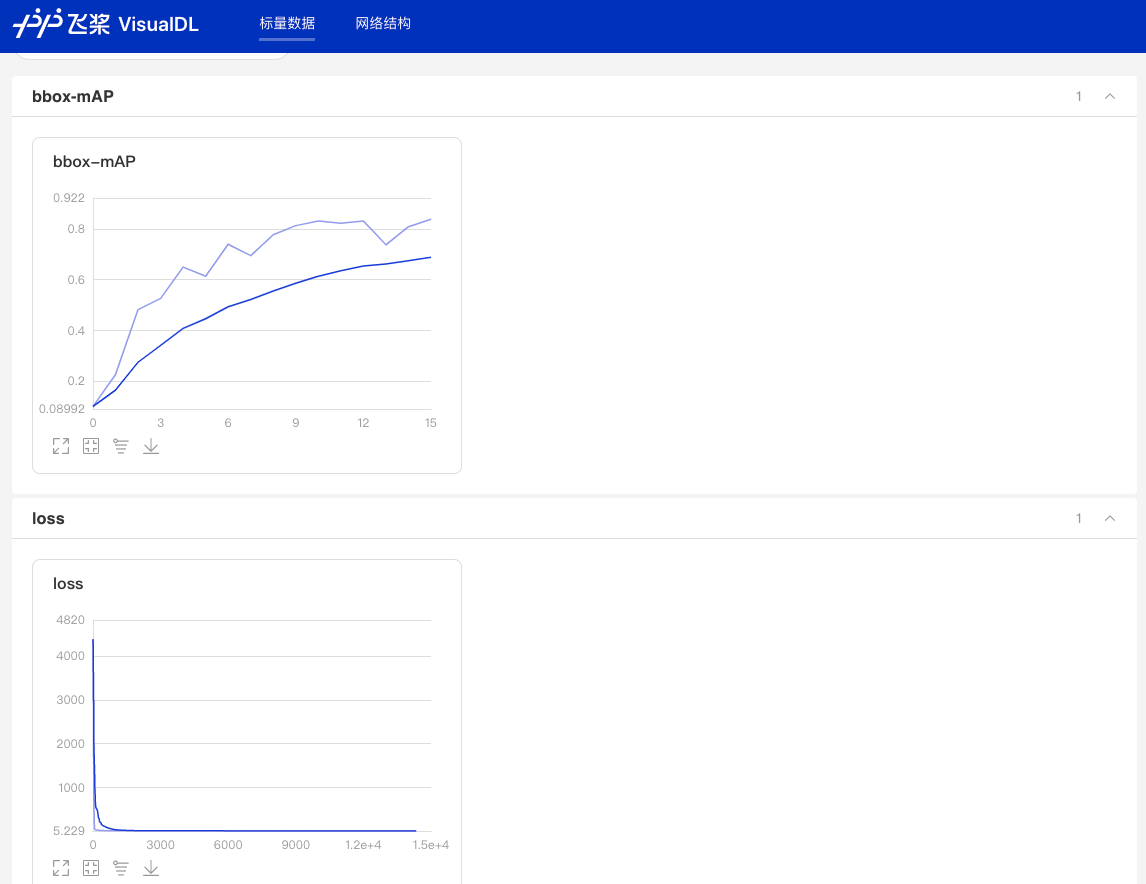
图:VDL效果演示
**参数列表**
以下列表可以通过`--help`查看
| FLAG | 支持脚本 | 用途 | 默认值 | 备注 |
| :----------------------: | :------------: | :---------------: | :--------------: | :-----------------: |
| -c | ALL | 指定配置文件 | None | **必选**,例如-c configs/faster_rcnn/faster_rcnn_r50_fpn_1x_coco.yml |
| -o | ALL | 设置或更改配置文件里的参数内容 | None | 相较于`-c`设置的配置文件有更高优先级,例如:`-o use_gpu=False` |
| --eval | train | 是否边训练边测试 | False | 如需指定,直接`--eval`即可 |
| -r/--resume_checkpoint | train | 恢复训练加载的权重路径 | None | 例如:`-r output/faster_rcnn_r50_1x_coco/10000` |
| --slim_config | ALL | 模型压缩策略配置文件 | None | 例如`--slim_config configs/slim/prune/yolov3_prune_l1_norm.yml` |
| --use_vdl | train/infer | 是否使用[VisualDL](https://github.com/paddlepaddle/visualdl)记录数据,进而在VisualDL面板中显示 | False | VisualDL需Python>=3.5 |
| --vdl\_log_dir | train/infer | 指定 VisualDL 记录数据的存储路径 | train:`vdl_log_dir/scalar` infer: `vdl_log_dir/image` | VisualDL需Python>=3.5 |
| --output_eval | eval | 评估阶段保存json路径 | None | 例如 `--output_eval=eval_output`, 默认为当前路径 |
| --json_eval | eval | 是否通过已存在的bbox.json或者mask.json进行评估 | False | 如需指定,直接`--json_eval`即可, json文件路径在`--output_eval`中设置 |
| --classwise | eval | 是否评估单类AP和绘制单类PR曲线 | False | 如需指定,直接`--classwise`即可 |
| --output_dir | infer/export_model | 预测后结果或导出模型保存路径 | `./output` | 例如`--output_dir=output` |
| --draw_threshold | infer | 可视化时分数阈值 | 0.5 | 例如`--draw_threshold=0.7` |
| --infer_dir | infer | 用于预测的图片文件夹路径 | None | `--infer_img`和`--infer_dir`必须至少设置一个 |
| --infer_img | infer | 用于预测的图片路径 | None | `--infer_img`和`--infer_dir`必须至少设置一个,`infer_img`具有更高优先级 |
| --save_results | infer | 是否在文件夹下将图片的预测结果保存到文件中 | False | 可选 |
## 8 模型导出
在模型训练过程中保存的模型文件是包含前向预测和反向传播的过程,在实际的工业部署则不需要反向传播,因此需要将模型进行导成部署需要的模型格式。
在PaddleDetection中提供了 `tools/export_model.py`脚本来导出模型
```bash
python tools/export_model.py -c configs/yolov3/yolov3_mobilenet_v1_roadsign.yml --output_dir=./inference_model \
-o weights=output/yolov3_mobilenet_v1_roadsign/best_model
```
预测模型会导出到`inference_model/yolov3_mobilenet_v1_roadsign`目录下,分别为`infer_cfg.yml`, `model.pdiparams`, `model.pdiparams.info`,`model.pdmodel` 如果不指定文件夹,模型则会导出在`output_inference`
* 更多关于模型导出的文档,请参考[模型导出文档](../../deploy/EXPORT_MODEL.md)
## 9 模型压缩
为了进一步对模型进行优化,PaddleDetection提供了基于PaddleSlim进行模型压缩的完整教程和benchmark。目前支持的方案:
* 裁剪
* 量化
* 蒸馏
* 联合策略
* 更多关于模型压缩的文档,请参考[模型压缩文档](../../configs/slim/README.md)。
## 10 预测部署
PaddleDetection提供了PaddleInference、PaddleServing、PaddleLite多种部署形式,支持服务端、移动端、嵌入式等多种平台,提供了完善的Python和C++部署方案。
* 在这里,我们以Python为例,说明如何使用PaddleInference进行模型部署
```bash
python deploy/python/infer.py --model_dir=./output_inference/yolov3_mobilenet_v1_roadsign --image_file=demo/road554.png --device=GPU
```
* 同时`infer.py`提供了丰富的接口,用户进行接入视频文件、摄像头进行预测,更多内容请参考[Python端预测部署](../../deploy/python)
### PaddleDetection支持的部署形式说明
|形式|语言|教程|设备/平台|
|-|-|-|-|
|PaddleInference|Python|已完善|Linux(arm X86)、Windows
|PaddleInference|C++|已完善|Linux(arm X86)、Windows|
|PaddleServing|Python|已完善|Linux(arm X86)、Windows|
|PaddleLite|C++|已完善|Android、IOS、FPGA、RK...
* 更多关于预测部署的文档,请参考[预测部署文档](../../deploy/README.md)。
---
### Tutorials GradCAM Cn (`docs/tutorials/GradCAM_cn.md`)
# 目标检测热力图
## 1.简介
基于backbone/roi特征图计算物体预测框的cam(类激活图), 目前支持基于FasterRCNN/MaskRCNN系列, PPYOLOE系列, 以及BlazeFace, SSD, Retinanet网络。
## 2.使用方法
* 以PP-YOLOE为例,准备好数据之后,指定网络配置文件、模型权重地址和图片路径以及输出文件夹路径,使用脚本调用tools/cam_ppdet.py计算图片中物体预测框的grad_cam热力图。下面为运行脚本示例。
```shell
python tools/cam_ppdet.py -c configs/ppyoloe/ppyoloe_crn_l_300e_coco.yml --infer_img demo/000000014439.jpg --cam_out cam_ppyoloe --target_feature_layer_name model.backbone -o weights=https://paddledet.bj.bcebos.com/models/ppyoloe_crn_l_300e_coco.pdparams
```
* **参数**
| FLAG | 用途 |
|:--------------------------:|:--------------------------------------------------------------------------------------------------------------------------:|
| -c | 指定配置文件 |
| --infer_img | 用于预测的图片路径 |
| --cam_out | 指定输出路径 |
| --target_feature_layer_name | 计算cam的特征图位置, 如model.backbone、 model.bbox_head.roi_extractor |
| -o | 设置或更改配置文件里的参数内容, 如 -o weights=https://paddledet.bj.bcebos.com/models/ppyoloe_crn_l_300e_coco.pdparams |
* 运行效果

cam_ppyoloe/225.jpg
## 3. 目前支持基于FasterRCNN/MaskRCNN系列, PPYOLOE系列以及BlazeFace, SSD, Retinanet网络。
* PPYOLOE网络热图可视化脚本
```bash
python tools/cam_ppdet.py -c configs/ppyoloe/ppyoloe_crn_l_300e_coco.yml --infer_img demo/000000014439.jpg --cam_out cam_ppyoloe --target_feature_layer_name model.backbone -o weights=https://paddledet.bj.bcebos.com/models/ppyoloe_crn_l_300e_coco.pdparams
```
* MaskRCNN网络roi特征热图可视化脚本
```bash
python tools/cam_ppdet.py -c configs/mask_rcnn/mask_rcnn_r50_vd_fpn_2x_coco.yml --infer_img demo/000000014439.jpg --cam_out cam_mask_rcnn_roi --target_feature_layer_name model.bbox_head.roi_extractor -o weights=https://paddledet.bj.bcebos.com/models/mask_rcnn_r50_vd_fpn_2x_coco.pdparams
```
* MaskRCNN网络backbone特征的热图可视化脚本
```bash
python tools/cam_ppdet.py -c configs/mask_rcnn/mask_rcnn_r50_vd_fpn_2x_coco.yml --infer_img demo/000000014439.jpg --cam_out cam_mask_rcnn_backbone --target_feature_layer_name model.backbone -o weights=https://paddledet.bj.bcebos.com/models/mask_rcnn_r50_vd_fpn_2x_coco.pdparams
```
* FasterRCNN网络基于roi特征的热图可视化脚本
```bash
python tools/cam_ppdet.py -c configs/faster_rcnn/faster_rcnn_r50_vd_fpn_2x_coco.yml --infer_img demo/000000014439.jpg --cam_out cam_faster_rcnn_roi --target_feature_layer_name model.bbox_head.roi_extractor -o weights=https://paddledet.bj.bcebos.com/models/faster_rcnn_r50_vd_fpn_ssld_2x_coco.pdparams
```
* FasterRCNN网络基于backbone特征的热图可视化脚本
```bash
python tools/cam_ppdet.py -c configs/faster_rcnn/faster_rcnn_r50_vd_fpn_2x_coco.yml --infer_img demo/000000014439.jpg --cam_out cam_faster_rcnn_backbone --target_feature_layer_name model.backbone -o weights=https://paddledet.bj.bcebos.com/models/faster_rcnn_r50_vd_fpn_ssld_2x_coco.pdparams
```
* BlaczeFace网络backbone特征热图可视化脚本
```bash
python tools/cam_ppdet.py -c configs/face_detection/blazeface_1000e.yml --infer_img demo/hrnet_demo.jpg --cam_out cam_blazeface --target_feature_layer_name model.backbone -o weights=https://paddledet.bj.bcebos.com/models/blazeface_1000e.pdparams
```
* SSD网络backbone特征热图可视化脚本
```bash
python tools/cam_ppdet.py -c configs/ssd/ssd_mobilenet_v1_300_120e_voc.yml --infer_img demo/000000014439.jpg --cam_out cam_ssd --target_feature_layer_name model.backbone -o weights=https://paddledet.bj.bcebos.com/models/ssd_mobilenet_v1_300_120e_voc.pdparams
```
* Retinanet网络backbone特征热图可视化脚本
```bash
python tools/cam_ppdet.py -c configs/retinanet/retinanet_r50_fpn_2x_coco.yml --infer_img demo/000000014439.jpg --cam_out cam_retinanet --target_feature_layer_name model.backbone -o weights=https://bj.bcebos.com/v1/paddledet/models/retinanet_r50_fpn_2x_coco.pdparams
```
---
### Tutorials GradCAM En (`docs/tutorials/GradCAM_en.md`)
# Object detection grad_cam heatmap
## 1.Introduction
Calculate the cam (class activation map) of the object predict bbox based on the backbone/roi feature map, currently supports networks based on FasterRCNN/MaskRCNN series, PPYOLOE series and BlazeFace, SSD, Retinanet.
## 2.Usage
* Taking PP-YOLOE as an example, after preparing the data, specify the network configuration file, model weight address, image path and output folder path, and then use the script to call tools/cam_ppdet.py to calculate the grad_cam heat map of the prediction box. Below is an example run script.
```shell
python tools/cam_ppdet.py -c configs/ppyoloe/ppyoloe_crn_l_300e_coco.yml --infer_img demo/000000014439.jpg --cam_out cam_ppyoloe --target_feature_layer_name model.backbone -o weights=https://paddledet.bj.bcebos.com/models/ppyoloe_crn_l_300e_coco.pdparams
```
* **Arguments**
| FLAG | description |
| :----------------------: |:---------------------------------------------------------------------------------------------------------------------------------:|
| -c | Select config file |
| --infer_img | Image path |
| --cam_out | Directory for output |
| --target_feature_layer_name | The position of featuremap to do gradcam, for example:model.backbone, model.bbox_head.roi_extractor |
| -o | Set parameters in configure file, for example: -o weights=https://paddledet.bj.bcebos.com/models/ppyoloe_crn_l_300e_coco.pdparams |
* result
cam_ppyoloe/225.jpg
## 3.Currently supports networks based on FasterRCNN/MaskRCNN series, PPYOLOE series and BlazeFace, SSD, Retinanet.
* PPYOLOE bbox heat map visualization script (with backbone featuremap)
```bash
python tools/cam_ppdet.py -c configs/ppyoloe/ppyoloe_crn_l_300e_coco.yml --infer_img demo/000000014439.jpg --cam_out cam_ppyoloe -o weights=https://paddledet.bj.bcebos.com/models/ppyoloe_crn_l_300e_coco.pdparams
```
* MaskRCNN bbox heat map visualization script (with roi featuremap)
```bash
python tools/cam_ppdet.py -c configs/mask_rcnn/mask_rcnn_r50_vd_fpn_2x_coco.yml --infer_img demo/000000014439.jpg --cam_out cam_mask_rcnn_roi --target_feature_layer_name model.bbox_head.roi_extractor -o weights=https://paddledet.bj.bcebos.com/models/mask_rcnn_r50_vd_fpn_2x_coco.pdparams
```
* MaskRCNN bbox heat map visualization script (with backbone featuremap)
```bash
python tools/cam_ppdet.py -c configs/mask_rcnn/mask_rcnn_r50_vd_fpn_2x_coco.yml --infer_img demo/000000014439.jpg --cam_out cam_mask_rcnn_backbone --target_feature_layer_name model.backbone -o weights=https://paddledet.bj.bcebos.com/models/mask_rcnn_r50_vd_fpn_2x_coco.pdparams
```
* FasterRCNN bbox heat map visualization script (with roi featuremap)
```bash
python tools/cam_ppdet.py -c configs/faster_rcnn/faster_rcnn_r50_vd_fpn_2x_coco.yml --infer_img demo/000000014439.jpg --cam_out cam_faster_rcnn_roi --target_feature_layer_name model.bbox_head.roi_extractor -o weights=https://paddledet.bj.bcebos.com/models/faster_rcnn_r50_vd_fpn_ssld_2x_coco.pdparams
```
* FasterRCNN bbox heat map visualization script (with backbone featuremap)
```bash
python tools/cam_ppdet.py -c configs/faster_rcnn/faster_rcnn_r50_vd_fpn_2x_coco.yml --infer_img demo/000000014439.jpg --cam_out cam_faster_rcnn_backbone --target_feature_layer_name model.backbone -o weights=https://paddledet.bj.bcebos.com/models/faster_rcnn_r50_vd_fpn_ssld_2x_coco.pdparams
```
* BlaczeFace bbox heat map visualization script (with backbone featuremap)
```bash
python tools/cam_ppdet.py -c configs/face_detection/blazeface_1000e.yml --infer_img demo/hrnet_demo.jpg --cam_out cam_blazeface --target_feature_layer_name model.backbone -o weights=https://paddledet.bj.bcebos.com/models/blazeface_1000e.pdparams
```
* SSD bbox heat map visualization script (with backbone featuremap)
```bash
python tools/cam_ppdet.py -c configs/ssd/ssd_mobilenet_v1_300_120e_voc.yml --infer_img demo/000000014439.jpg --cam_out cam_ssd --target_feature_layer_name model.backbone -o weights=https://paddledet.bj.bcebos.com/models/ssd_mobilenet_v1_300_120e_voc.pdparams
```
* Retinanet bbox heat map visualization script (with backbone featuremap)
```bash
python tools/cam_ppdet.py -c configs/retinanet/retinanet_r50_fpn_2x_coco.yml --infer_img demo/000000014439.jpg --cam_out cam_retinanet --target_feature_layer_name model.backbone -o weights=https://bj.bcebos.com/v1/paddledet/models/retinanet_r50_fpn_2x_coco.pdparams
```
---
### Tutorials INSTALL (`docs/tutorials/INSTALL.md`)
English | [简体中文](INSTALL_cn.md)
# Installation
This document covers how to install PaddleDetection and its dependencies
(including PaddlePaddle), together with COCO and Pascal VOC dataset.
For general information about PaddleDetection, please see [README.md](https://github.com/PaddlePaddle/PaddleDetection/tree/develop).
## Requirements:
- PaddlePaddle 2.2
- OS 64 bit
- Python 3(3.5.1+/3.6/3.7/3.8/3.9/3.10),64 bit
- pip/pip3(9.0.1+), 64 bit
- CUDA >= 10.2
- cuDNN >= 7.6
Dependency of PaddleDetection and PaddlePaddle:
| PaddleDetection version | PaddlePaddle version | tips |
| :----------------: | :---------------: | :-------: |
| develop | >= 2.3.2 | Dygraph mode is set as default |
| release/2.6 | >= 2.3.2 | Dygraph mode is set as default |
| release/2.5 | >= 2.2.2 | Dygraph mode is set as default |
| release/2.4 | >= 2.2.2 | Dygraph mode is set as default |
| release/2.3 | >= 2.2.0rc | Dygraph mode is set as default |
| release/2.2 | >= 2.1.2 | Dygraph mode is set as default |
| release/2.1 | >= 2.1.0 | Dygraph mode is set as default |
| release/2.0 | >= 2.0.1 | Dygraph mode is set as default |
| release/2.0-rc | >= 2.0.1 | -- |
| release/0.5 | >= 1.8.4 | Cascade R-CNN and SOLOv2 depends on 2.0.0.rc |
| release/0.4 | >= 1.8.4 | PP-YOLO depends on 1.8.4 |
| release/0.3 | >=1.7 | -- |
## Instruction
### 1. Install PaddlePaddle
```
# CUDA10.2
python -m pip install paddlepaddle-gpu==2.3.2 -i https://pypi.tuna.tsinghua.edu.cn/simple
# CPU
python -m pip install paddlepaddle==2.3.2 -i https://pypi.tuna.tsinghua.edu.cn/simple
```
- For more CUDA version or environment to quick install, please refer to the [PaddlePaddle Quick Installation document](https://www.paddlepaddle.org.cn/install/quick)
- For more installation methods such as conda or compile with source code, please refer to the [installation document](https://www.paddlepaddle.org.cn/documentation/docs/en/install/index_en.html)
Please make sure that your PaddlePaddle is installed successfully and the version is not lower than the required version. Use the following command to verify.
```
# check
>>> import paddle
>>> paddle.utils.run_check()
# confirm the paddle's version
python -c "import paddle; print(paddle.__version__)"
```
**Note**
1. If you want to use PaddleDetection on multi-GPU, please install NCCL at first.
### 2. Install PaddleDetection
**Note:** Installing via pip only supports Python3
```
# Clone PaddleDetection repository
cd
git clone https://github.com/PaddlePaddle/PaddleDetection.git
# Install other dependencies
cd PaddleDetection
pip install -r requirements.txt
# Compile and install paddledet
python setup.py install
```
**Note**
1. If you are working on Windows OS, `pycocotools` installing may failed because of the origin version of cocoapi does not support windows, another version can be used used which only supports Python3:
```pip install git+https://github.com/philferriere/cocoapi.git#subdirectory=PythonAPI```
2. If you are using Python <= 3.6, `pycocotools` installing may failed with error like `distutils.errors.DistutilsError: Could not find suitable distribution for Requirement.parse('cython>=0.27.3')`, please install `cython` firstly, for example `pip install cython`
After installation, make sure the tests pass:
```shell
python ppdet/modeling/tests/test_architectures.py
```
If the tests are passed, the following information will be prompted:
```
.......
----------------------------------------------------------------------
Ran 7 tests in 12.816s
OK
```
## Use built Docker images
> If you do not have a Docker environment, please refer to [Docker](https://www.docker.com/).
We provide docker images containing the latest PaddleDetection code, and all environment and package dependencies are pre-installed. All you have to do is to **pull and run the docker image**. Then you can enjoy PaddleDetection without any extra steps.
Get these images and guidance in [docker hub](https://hub.docker.com/repository/docker/paddlecloud/paddledetection), including CPU, GPU, ROCm environment versions.
If you have some customized requirements about automatic building docker images, you can get it in github repo [PaddlePaddle/PaddleCloud](https://github.com/PaddlePaddle/PaddleCloud/tree/main/tekton).
## Inference demo
**Congratulation!** Now you have installed PaddleDetection successfully and try our inference demo:
```
# Predict an image by GPU
export CUDA_VISIBLE_DEVICES=0
python tools/infer.py -c configs/ppyolo/ppyolo_r50vd_dcn_1x_coco.yml -o use_gpu=true weights=https://paddledet.bj.bcebos.com/models/ppyolo_r50vd_dcn_1x_coco.pdparams --infer_img=demo/000000014439.jpg
```
An image of the same name with the predicted result will be generated under the `output` folder.
The result is as shown below:
---
### Tutorials INSTALL Cn (`docs/tutorials/INSTALL_cn.md`)
[English](INSTALL.md) | 简体中文
# 安装文档
## 环境要求
- PaddlePaddle 2.3.2
- OS 64位操作系统
- Python 3(3.5.1+/3.6/3.7/3.8/3.9/3.10),64位版本
- pip/pip3(9.0.1+),64位版本
- CUDA >= 10.2
- cuDNN >= 7.6
PaddleDetection 依赖 PaddlePaddle 版本关系:
| PaddleDetection版本 | PaddlePaddle版本 | 备注 |
| :------------------: | :---------------: | :-------: |
| develop | >=2.3.2 | 默认使用动态图模式 |
| release/2.6 | >=2.3.2 | 默认使用动态图模式 |
| release/2.5 | >= 2.2.2 | 默认使用动态图模式 |
| release/2.4 | >= 2.2.2 | 默认使用动态图模式 |
| release/2.3 | >= 2.2.0rc | 默认使用动态图模式 |
| release/2.2 | >= 2.1.2 | 默认使用动态图模式 |
| release/2.1 | >= 2.1.0 | 默认使用动态图模式 |
| release/2.0 | >= 2.0.1 | 默认使用动态图模式 |
| release/2.0-rc | >= 2.0.1 | -- |
| release/0.5 | >= 1.8.4 | 大部分模型>=1.8.4即可运行,Cascade R-CNN系列模型与SOLOv2依赖2.0.0.rc版本 |
| release/0.4 | >= 1.8.4 | PP-YOLO依赖1.8.4 |
| release/0.3 | >=1.7 | -- |
## 安装说明
### 1. 安装PaddlePaddle
```
# CUDA10.2
python -m pip install paddlepaddle-gpu==2.3.2 -i https://pypi.tuna.tsinghua.edu.cn/simple
# CPU
python -m pip install paddlepaddle==2.3.2 -i https://pypi.tuna.tsinghua.edu.cn/simple
```
- 更多CUDA版本或环境快速安装,请参考[PaddlePaddle快速安装文档](https://www.paddlepaddle.org.cn/install/quick)
- 更多安装方式例如conda或源码编译安装方法,请参考[PaddlePaddle安装文档](https://www.paddlepaddle.org.cn/documentation/docs/zh/install/index_cn.html)
请确保您的PaddlePaddle安装成功并且版本不低于需求版本。使用以下命令进行验证。
```
# 在您的Python解释器中确认PaddlePaddle安装成功
>>> import paddle
>>> paddle.utils.run_check()
# 确认PaddlePaddle版本
python -c "import paddle; print(paddle.__version__)"
```
**注意**
1. 如果您希望在多卡环境下使用PaddleDetection,请首先安装NCCL
### 2. 安装PaddleDetection
**注意:** pip安装方式只支持Python3
```
# 克隆PaddleDetection仓库
cd
git clone https://github.com/PaddlePaddle/PaddleDetection.git
# 安装其他依赖
cd PaddleDetection
pip install -r requirements.txt
# 编译安装paddledet
python setup.py install
```
**注意**
1. 如果github下载代码较慢,可尝试使用[gitee](https://gitee.com/PaddlePaddle/PaddleDetection.git)或者[代理加速](https://doc.fastgit.org/zh-cn/guide.html)。
1. 若您使用的是Windows系统,由于原版cocoapi不支持Windows,`pycocotools`依赖可能安装失败,可采用第三方实现版本,该版本仅支持Python3
```pip install git+https://github.com/philferriere/cocoapi.git#subdirectory=PythonAPI```
2. 若您使用的是Python <= 3.6的版本,安装`pycocotools`可能会报错`distutils.errors.DistutilsError: Could not find suitable distribution for Requirement.parse('cython>=0.27.3')`, 您可通过先安装`cython`如`pip install cython`解决该问题
安装后确认测试通过:
```
python ppdet/modeling/tests/test_architectures.py
```
测试通过后会提示如下信息:
```
.......
----------------------------------------------------------------------
Ran 7 tests in 12.816s
OK
```
## 使用Docker镜像
> 如果您没有Docker运行环境,请参考[Docker官网](https://www.docker.com/)进行安装。
我们提供了包含最新 PaddleDetection 代码的docker镜像,并预先安装好了所有的环境和库依赖,您只需要**拉取docker镜像**,然后**运行docker镜像**,无需其他任何额外操作,即可开始使用PaddleDetection的所有功能。
在[Docker Hub](https://hub.docker.com/repository/docker/paddlecloud/paddledetection)中获取这些镜像及相应的使用指南,包括CPU、GPU、ROCm版本。
如果您对自动化制作docker镜像感兴趣,或有自定义需求,请访问[PaddlePaddle/PaddleCloud](https://github.com/PaddlePaddle/PaddleCloud/tree/main/tekton)做进一步了解。
## 快速体验
**恭喜!** 您已经成功安装了PaddleDetection,接下来快速体验目标检测效果
```
# 在GPU上预测一张图片
export CUDA_VISIBLE_DEVICES=0
python tools/infer.py -c configs/ppyolo/ppyolo_r50vd_dcn_1x_coco.yml -o use_gpu=true weights=https://paddledet.bj.bcebos.com/models/ppyolo_r50vd_dcn_1x_coco.pdparams --infer_img=demo/000000014439.jpg
```
会在`output`文件夹下生成一个画有预测结果的同名图像。
结果如下图:
---
### Tutorials KeyPointConfigGuide Cn (`docs/tutorials/KeyPointConfigGuide_cn.md`)
**# config yaml配置项说明**
KeyPoint 使用时config文件配置项说明,以[tinypose_256x192.yml](../../configs/keypoint/tiny_pose/tinypose_256x192.yml)为例
```
/* Detailed source-code truncated for AI context efficiency. */
```
---
### Tutorials KeyPointConfigGuide En (`docs/tutorials/KeyPointConfigGuide_en.md`)
**# config yaml guide**
KeyPoint config guide,Take an example of [tinypose_256x192.yml](../../configs/keypoint/tiny_pose/tinypose_256x192.yml)
```
/* Detailed source-code truncated for AI context efficiency. */
```
---
### Tutorials QUICK STARTED (`docs/tutorials/QUICK_STARTED.md`)
English | [简体中文](QUICK_STARTED_cn.md)
# Quick Start
In order to enable users to experience PaddleDetection and produce models in a short time, this tutorial introduces the pipeline to get a decent object detection model by finetuning on a small dataset in 10 minutes only. In practical applications, it is recommended that users select a suitable model configuration file for their specific demand.
- **Set GPU**
```bash
export CUDA_VISIBLE_DEVICES=0
```
## Inference Demo with Pre-trained Models
```
# predict an image using PP-YOLO
python tools/infer.py -c configs/ppyolo/ppyolo_r50vd_dcn_1x_coco.yml -o use_gpu=true weights=https://paddledet.bj.bcebos.com/models/ppyolo_r50vd_dcn_1x_coco.pdparams --infer_img=demo/000000014439.jpg
```
the result:
## Data preparation
The Dataset is [Kaggle dataset](https://www.kaggle.com/andrewmvd/road-sign-detection) ,including 877 images and 4 data categories: crosswalk, speedlimit, stop, trafficlight. The dataset is divided into training set (701 images) and test set (176 images),[download link](https://paddlemodels.bj.bcebos.com/object_detection/roadsign_voc.tar).
```
# Note: this command could skip and
# the dataset will be dowloaded automatically at the stage of training.
python dataset/roadsign_voc/download_roadsign_voc.py
```
## Training & Evaluation & Inference
### 1、Training
```
# It will takes about 10 minutes on 1080Ti and 1 hour on CPU
# -c set configuration file
# -o overwrite the settings in the configuration file
# --eval Evaluate while training, and a model named best_model.pdmodel with the most evaluation results will be automatically saved
python tools/train.py -c configs/yolov3/yolov3_mobilenet_v1_roadsign.yml --eval -o use_gpu=true
```
If you want to observe the loss change curve in real time through VisualDL, add --use_vdl=true to the training command, and set the log save path through --vdl_log_dir.
**Note: VisualDL need Python>=3.5**
Please install [VisualDL](https://github.com/PaddlePaddle/VisualDL) first
```
python -m pip install visualdl -i https://mirror.baidu.com/pypi/simple
```
```
python -u tools/train.py -c configs/yolov3/yolov3_mobilenet_v1_roadsign.yml \
--use_vdl=true \
--vdl_log_dir=vdl_dir/scalar \
--eval
```
View the change curve in real time through the visualdl command:
```
visualdl --logdir vdl_dir/scalar/ --host --port
```
### 2、Evaluation
```
# Evaluate best_model by default
# -c set config file
# -o overwrite the settings in the configuration file
python tools/eval.py -c configs/yolov3/yolov3_mobilenet_v1_roadsign.yml -o use_gpu=true
```
The final mAP should be around 0.85. The dataset is small so the precision may vary a little after each training.
### 3、Inference
```
# -c set config file
# -o overwrite the settings in the configuration file
# --infer_img image path
# After the prediction is over, an image of the same name with the prediction result will be generated in the output folder
python tools/infer.py -c configs/yolov3/yolov3_mobilenet_v1_roadsign.yml -o use_gpu=true --infer_img=demo/road554.png
```
The result is as shown below:
---
### Tutorials QUICK STARTED Cn (`docs/tutorials/QUICK_STARTED_cn.md`)
[English](QUICK_STARTED.md) | 简体中文
# 快速开始
为了使得用户能够在很短时间内快速产出模型,掌握PaddleDetection的使用方式,这篇教程通过一个预训练检测模型对小数据集进行finetune。在较短时间内即可产出一个效果不错的模型。实际业务中,建议用户根据需要选择合适模型配置文件进行适配。
- **设置显卡**
```bash
export CUDA_VISIBLE_DEVICES=0
```
## 一、快速体验
```
# 用PP-YOLO算法在COCO数据集上预训练模型预测一张图片
python tools/infer.py -c configs/ppyolo/ppyolo_r50vd_dcn_1x_coco.yml -o use_gpu=true weights=https://paddledet.bj.bcebos.com/models/ppyolo_r50vd_dcn_1x_coco.pdparams --infer_img=demo/000000014439.jpg
```
结果如下图:
## 二、准备数据
数据集参考[Kaggle数据集](https://www.kaggle.com/andrewmvd/road-sign-detection) ,包含877张图像,数据类别4类:crosswalk,speedlimit,stop,trafficlight。
将数据划分为训练集701张图和测试集176张图,[下载链接](https://paddlemodels.bj.bcebos.com/object_detection/roadsign_voc.tar).
```
# 注意:可跳过这步下载,后面训练会自动下载
python dataset/roadsign_voc/download_roadsign_voc.py
```
## 三、训练、评估、预测
### 1、训练
```
# 边训练边测试 CPU需要约1小时(use_gpu=false),1080Ti GPU需要约10分钟
# -c 参数表示指定使用哪个配置文件
# -o 参数表示指定配置文件中的全局变量(覆盖配置文件中的设置),这里设置使用gpu
# --eval 参数表示边训练边评估,最后会自动保存一个名为model_final.pdparams的模型
python tools/train.py -c configs/yolov3/yolov3_mobilenet_v1_roadsign.yml --eval -o use_gpu=true
```
如果想通过VisualDL实时观察loss变化曲线,在训练命令中添加--use_vdl=true,以及通过--vdl_log_dir设置日志保存路径。
**但注意VisualDL需Python>=3.5**
首先安装[VisualDL](https://github.com/PaddlePaddle/VisualDL)
```
python -m pip install visualdl -i https://mirror.baidu.com/pypi/simple
```
```
python -u tools/train.py -c configs/yolov3/yolov3_mobilenet_v1_roadsign.yml \
--use_vdl=true \
--vdl_log_dir=vdl_dir/scalar \
--eval
```
通过visualdl命令实时查看变化曲线:
```
visualdl --logdir vdl_dir/scalar/ --host --port
```
### 2、评估
```
# 评估 默认使用训练过程中保存的model_final.pdparams
# -c 参数表示指定使用哪个配置文件
# -o 参数表示指定配置文件中的全局变量(覆盖配置文件中的设置)
# 目前只支持单卡评估
python tools/eval.py -c configs/yolov3/yolov3_mobilenet_v1_roadsign.yml -o use_gpu=true
```
最终模型精度在mAP=0.85左右,由于数据集较小因此每次训练结束后精度会有一定波动
### 3、预测
```
# -c 参数表示指定使用哪个配置文件
# -o 参数表示指定配置文件中的全局变量(覆盖配置文件中的设置)
# --infer_img 参数指定预测图像路径
# 预测结束后会在output文件夹中生成一张画有预测结果的同名图像
python tools/infer.py -c configs/yolov3/yolov3_mobilenet_v1_roadsign.yml -o use_gpu=true --infer_img=demo/road554.png
```
结果如下图:
---
### Tutorials Logging En (`docs/tutorials/logging_en.md`)
# Logging
This document talks about how to track metrics and visualize model performance during training. The library currently supports [VisualDL](https://www.paddlepaddle.org.cn/documentation/docs/en/guides/03_VisualDL/visualdl_usage_en.html) and [Weights & Biases](https://docs.wandb.ai).
## VisualDL
Logging to VisualDL is supported only in python >= 3.5. To install VisualDL
```
pip install visualdl
```
PaddleDetection uses a callback to log the training metrics at the end of every step and metrics from the validation step at the end of every epoch. To use VisualDL for visualization, add the `--use_vdl` flag to the training command and `--vdl_log_dir ` to set the directory which stores the records.
For example
```
python tools/train -c config.yml --use_vdl --vdl_log_dir ./logs
```
Another possible way to do this is to add the aforementioned flags to the `config.yml` file.
## Weights & Biases
W&B is a MLOps tool that can be used for experiment tracking, dataset/model versioning, visualizing results and collaborating with colleagues. A W&B logger is integrated directly into PaddleDetection and to use it, first you need to install the wandb sdk and login to your wandb account.
```
pip install wandb
wandb login
```
To use wandb to log metrics while training add the `--use_wandb` flag to the training command and any other arguments for the W&B logger can be provided like this -
```
python tools/train -c config.yml --use_wandb -o wandb-project=MyDetector wandb-entity=MyTeam wandb-save_dir=./logs
```
The arguments to the W&B logger must be proceeded by `-o` and each invidiual argument must contain the prefix "wandb-".
If this is too tedious, an alternative way is to add the arguments to the `config.yml` file under the `wandb` header. For example
```
use_wandb: True
wandb:
project: MyProject
entity: MyTeam
save_dir: ./logs
```
---
### Test Tipc Docs Benchmark Train (`test_tipc/docs/benchmark_train.md`)
# TIPC Linux端Benchmark测试文档
该文档为Benchmark测试说明,Benchmark预测功能测试的主程序为`benchmark_train.sh`,用于验证监控模型训练的性能。
# 1. 测试流程
## 1.1 准备数据和环境安装
运行`test_tipc/prepare.sh`,完成训练数据准备和安装环境流程。
```shell
# 运行格式:bash test_tipc/prepare.sh train_benchmark.txt mode
bash test_tipc/prepare.sh test_tipc/configs/faster_rcnn/faster_rcnn_r50_fpn_1x_coco_train_infer_python.txt benchmark_train
```
## 1.2 功能测试
执行`test_tipc/benchmark_train.sh`,完成模型训练和日志解析
```shell
# 运行格式:bash test_tipc/benchmark_train.sh train_benchmark.txt mode
bash test_tipc/benchmark_train.sh test_tipc/configs/faster_rcnn/faster_rcnn_r50_fpn_1x_coco_train_infer_python.txt benchmark_train
```
`test_tipc/benchmark_train.sh`支持根据传入的第三个参数实现只运行某一个训练配置,如下:
```shell
# 运行格式:bash test_tipc/benchmark_train.sh train_benchmark.txt mode
bash test_tipc/benchmark_train.sh test_tipc/configs/faster_rcnn/faster_rcnn_r50_fpn_1x_coco_train_infer_python.txt benchmark_train dynamic_bs2_fp32_DP_N1C1
```
dynamic_bs2_fp32_DP_N1C1为test_tipc/benchmark_train.sh传入的参数,格式如下:
`${modeltype}_${batch_size}_${fp_item}_${run_mode}_${device_num}`
包含的信息有:模型类型、batchsize大小、训练精度如fp32,fp16等、分布式运行模式以及分布式训练使用的机器信息如单机单卡(N1C1)。
## 2. 日志输出
运行后将保存模型的训练日志和解析日志,使用 `test_tipc/configs/faster_rcnn/faster_rcnn_r50_fpn_1x_coco_train_infer_python.txt` 参数文件的训练日志解析结果是:
```
{"model_branch": "tipc_fuse_benchmark", "model_commit": "4cce901d231f7954468045cf96302505bd6be495", "model_name": "faster_rcnn_r50_fpn_1x_coco_bs2_fp32_SingleP_DP", "batch_size": 2, "fp_item": "fp32", "run_process_type": "SingleP", "run_mode": "DP", "convergence_value": "0.556966", "convergence_key": "loss:", "ips": 4.857, "speed_unit": "images/s", "device_num": "N1C1", "model_run_time": "590", "frame_commit": "6b0c57cf65945e97d87a8fba89c0a2fc18dd8544", "frame_version": "0.0.0"}
```
训练日志和日志解析结果保存在benchmark_log目录下,文件组织格式如下:
```
train_log/
├── index
│ └── PaddleDetection_faster_rcnn_r50_fpn_1x_coco_bs2_fp32_SingleP_DP_N1C1_speed
├── profiling_log
│ └── PaddleDetection_faster_rcnn_r50_fpn_1x_coco_bs2_fp32_SingleP_DP_N1C1_profiling
└── train_log
├── PaddleDetection_faster_rcnn_r50_fpn_1x_coco_bs2_fp32_SingleP_DP_N1C1_log
└── PaddleDetection_faster_rcnn_r50_fpn_1x_coco_bs2_fp32_MultiP_DP_N1C4_log
```
---
### Test Tipc Docs Install (`test_tipc/docs/install.md`)
## 1. 环境准备
本教程适用于test_tipc目录下基础功能测试的运行环境搭建。
推荐环境:
- CUDA 10.1/10.2
- CUDNN 7.6/cudnn8.1
- TensorRT 6.1.0.5 / 7.1 / 7.2
环境配置可以选择docker镜像安装,或者在本地环境Python搭建环境。推荐使用docker镜像安装,避免不必要的环境配置。
## 2. Docker 镜像安装
推荐docker镜像安装,按照如下命令创建镜像,当前目录映射到镜像中的`/paddle`目录下
```
# 启动docker镜像
nvidia-docker run --name paddle -it -v $PWD:/paddle paddlepaddle/paddle:latest-gpu-cuda10.1-cudnn7-gcc82-dev /bin/bash
cd /paddle
```
```
# 编译安装Paddle
git clone https://github.com/PaddlePaddle/Paddle.git
cd Paddle
mkdir build && cd build
cmake .. \
-DWITH_MKL=ON \
-DWITH_MKLDNN=ON \
-DWITH_GPU=ON \
-DWITH_DISTRIBUTE=ON \
-DCMAKE_BUILD_TYPE=Release \
-DCUDA_ARCH_NAME=Auto \
-DPY_VERSION=3.7 \
-DON_INFER=ON \
-DWITH_TENSORRT=ON \
-DTENSORRT_ROOT=/usr/local/TensorRT6-cuda10.1-cudnn7
make -j 20
pip3.7 install python/dist/paddlepaddle_gpu-0.0.0-cp37-cp37m-linux_x86_64.whl
cd ../../
```
or
```
# 下载安装Paddle-2.2
wget https://paddle-inference-lib.bj.bcebos.com/2.2.0/python/Linux/GPU/x86-64_gcc8.2_avx_mkl_cuda10.1_cudnn7.6.5_trt6.0.1.5/paddlepaddle_gpu-2.2.0.post101-cp37-cp37m-linux_x86_64.whl
pip3.7 install paddlepaddle_gpu-2.2.0.post101-cp37-cp37m-linux_x86_64.whl
# 下载C++预测库用于C++ inference
wget https://paddle-inference-lib.bj.bcebos.com/2.2.0/cxx_c/Linux/GPU/x86-64_gcc8.2_avx_mkl_cuda10.1_cudnn7.6.5_trt6.0.1.5/paddle_inference.tgz
tar -xvf paddle_inference.tgz
export PADDLE_DIR=/paddle/paddle_inference
```
## 3 Python 环境构建
如果您已经通过docker方式构建环境,跳过该部分内容。非docker环境下,环境配置比较灵活,推荐环境组合配置:
- CUDA10.1 + CUDNN7.6 + TensorRT 6
- CUDA10.2 + CUDNN8.1 + TensorRT 7
- CUDA11.1 + CUDNN8.1 + TensorRT 7
下面以 CUDA10.2 + CUDNN8.1 + TensorRT 7 配置为例,介绍环境配置的流程。
### 3.1 安装CUDNN
如果当前环境满足CUDNN版本的要求,可以跳过此步骤。
以CUDNN8.1 安装安装为例,安装步骤如下,首先下载CUDNN,从[Nvidia官网](https://developer.nvidia.com/rdp/cudnn-archive)下载CUDNN8.1版本,下载符合当前系统版本的三个deb文件,分别是:
- cuDNN Runtime Library ,如:libcudnn8_8.1.0.77-1+cuda10.2_amd64.deb
- cuDNN Developer Library ,如:libcudnn8-dev_8.1.0.77-1+cuda10.2_amd64.deb
- cuDNN Code Samples,如:libcudnn8-samples_8.1.0.77-1+cuda10.2_amd64.deb
deb安装可以参考[官方文档](https://docs.nvidia.com/deeplearning/cudnn/install-guide/index.html#installlinux-deb),安装方式如下
```
# x.x.x表示下载的版本号
# $HOME为工作目录
sudo dpkg -i libcudnn8_x.x.x-1+cudax.x_arm64.deb
sudo dpkg -i libcudnn8-dev_8.x.x.x-1+cudax.x_arm64.deb
sudo dpkg -i libcudnn8-samples_8.x.x.x-1+cudax.x_arm64.deb
# 验证是否正确安装
cp -r /usr/src/cudnn_samples_v8/ $HOME
cd $HOME/cudnn_samples_v8/mnistCUDNN
# 编译
make clean && make
./mnistCUDNN
```
如果运行mnistCUDNN完后提示运行成功,则表示安装成功。如果运行后出现freeimage相关的报错,需要按照提示安装freeimage库:
```
sudo apt-get install libfreeimage-dev
sudo apt-get install libfreeimage
```
### 3.2 安装TensorRT
首先,从[Nvidia官网TensorRT板块](https://developer.nvidia.com/tensorrt-getting-started)下载TensorRT,这里选择7.1.3.4版本的TensorRT,注意选择适合自己系统版本和CUDA版本的TensorRT,另外建议下载TAR package的安装包。
以Ubuntu16.04+CUDA10.2为例,下载并解压后可以参考[官方文档](https://docs.nvidia.com/deeplearning/tensorrt/archives/tensorrt-713/install-guide/index.html#installing-tar)的安装步骤,按照如下步骤安装:
```
# 以下安装命令中 '${version}' 为下载的TensorRT版本,如7.1.3.4
# 设置环境变量, 为解压后的TensorRT的lib目录
export LD_LIBRARY_PATH=$LD_LIBRARY_PATH:
# 安装TensorRT
cd TensorRT-${version}/python
pip3.7 install tensorrt-*-cp3x-none-linux_x86_64.whl
# 安装graphsurgeon
cd TensorRT-${version}/graphsurgeon
```
### 3.3 安装PaddlePaddle
下载支持TensorRT版本的Paddle安装包,注意安装包的TensorRT版本需要与本地TensorRT一致,下载[链接](https://paddleinference.paddlepaddle.org.cn/master/user_guides/download_lib.html#python)
选择下载 linux-cuda10.2-trt7-gcc8.2 Python3.7版本的Paddle:
```
# 从下载链接中可以看到是paddle2.1.1-cuda10.2-cudnn8.1版本
wget https://paddle-wheel.bj.bcebos.com/with-trt/2.1.1-gpu-cuda10.2-cudnn8.1-mkl-gcc8.2/paddlepaddle_gpu-2.1.1-cp37-cp37m-linux_x86_64.whl
pip3.7 install -U paddlepaddle_gpu-2.1.1-cp37-cp37m-linux_x86_64.whl
```
## 4. 安装PaddleDetection依赖
```
# 安装AutoLog
git clone https://github.com/LDOUBLEV/AutoLog
cd AutoLog
pip3.7 install -r requirements.txt
python3.7 setup.py bdist_wheel
pip3.7 install ./dist/auto_log-1.0.0-py3-none-any.whl
# 下载PaddleDetection代码
cd ../
git clone https://github.com/PaddlePaddle/PaddleDetection
```
安装PaddleDetection依赖:
```
cd PaddleDetection
pip3.7 install -r ./requirements.txt
```
## FAQ :
Q. You are using Paddle compiled with TensorRT, but TensorRT dynamic library is not found. Ignore this if TensorRT is not needed.
A. 问题一般是当前安装paddle版本带TRT,但是本地环境找不到TensorRT的预测库,需要下载TensorRT库,解压后设置环境变量LD_LIBRARY_PATH;
如:
```
export LD_LIBRARY_PATH=/usr/local/python3.7.0/lib:/usr/local/nvidia/lib:/usr/local/nvidia/lib64:/paddle/package/TensorRT-6.0.1.5/lib
```
或者问题是下载的TensorRT版本和当前paddle中编译的TRT版本不匹配,需要下载版本相符的TensorRT重新安装。
---
### Test Tipc Docs More Models (`test_tipc/docs/more_models.md`)
## 汇总信息
已填写的部分表示可以使用本工具进行一键测试,未填写的表示正在支持中。
**字段说明:**
- 基础训练预测:包括模型训练、Paddle Inference Python预测。
- 更多训练方式:包括多机多卡、混合精度。
- 模型压缩:包括裁剪、离线/在线量化、蒸馏。
- 其他预测部署:包括Paddle Inference C++预测、Paddle Serving部署、Paddle-Lite部署等。
| 算法论文 | 模型名称 | 模型类型 | 基础
训练预测 | 更多
训练方式 | 模型压缩 | 其他预测部署 |
| :--- |:----------------------------------------------------------------------------------------------------------------------| :----: | :--------: | :---- | :---- | :---- |
| [YOLOv3](https://arxiv.org/abs/1804.02767) | [yolov3_darknet53_270e_coco](../../configs/yolov3/yolov3_darknet53_270e_coco.yml) | 目标检测 | 支持 | 混合精度 | FPGM裁剪
PACT量化
离线量化 | Paddle Inference: C++ |
| YOLOv3 | [yolov3_mobilenet_v1_270e_coco](../../configs/yolov3/yolov3_mobilenet_v1_270e_coco.yml) | 目标检测 | 支持 | 混合精度 | | Paddle Inference: C++ |
| YOLOv3 | [yolov3_mobilenet_v3_large_270e_coco](../../configs/yolov3/yolov3_mobilenet_v3_large_270e_coco.yml) | 目标检测 | 支持 | 混合精度 | | Paddle Inference: C++ |
| YOLOv3 | [yolov3_r34_270e_coco](../../configs/yolov3/yolov3_r34_270e_coco.yml) | 目标检测 | 支持 | 混合精度 | | Paddle Inference: C++ |
| YOLOv3 | [yolov3_r50vd_dcn_270e_coco](../../configs/yolov3/yolov3_r50vd_dcn_270e_coco.yml) | 目标检测 | 支持 | 混合精度 | | Paddle Inference: C++ |
| [PPYOLO](https://arxiv.org/abs/2007.12099) | [ppyolo_mbv3_large_coco](../../configs/ppyolo/ppyolo_mbv3_large_coco.yml) | 目标检测 | 支持 | 混合精度 | FPGM裁剪
PACT量化
离线量化 | Paddle Inference: C++ |
| PPYOLO | [ppyolo_r50vd_dcn_1x_coco](../../configs/ppyolo/ppyolo_r50vd_dcn_1x_coco.yml) | 目标检测 | 支持 | 混合精度 | FPGM裁剪
PACT量化
离线量化 | Paddle Inference: C++ |
| PPYOLO | [ppyolo_mbv3_small_coco](../../configs/ppyolo/ppyolo_mbv3_small_coco.yml) | 目标检测 | 支持 | 混合精度 | | Paddle Inference: C++ |
| PPYOLO | [ppyolo_r18vd_coco](../../configs/ppyolo/ppyolo_r18vd_coco.yml) | 目标检测 | 支持 | 混合精度 | | Paddle Inference: C++ |
| PPYOLO-tiny | [ppyolo_tiny_650e_coco](../../configs/ppyolo/ppyolo_tiny_650e_coco.yml) | 目标检测 | 支持 | 混合精度 | | Paddle Inference: C++ |
| [PPYOLOv2](https://arxiv.org/abs/2104.10419) | [ppyolov2_r50vd_dcn_365e_coco](../../configs/ppyolo/ppyolov2_r50vd_dcn_365e_coco.yml) | 目标检测 | 支持 | 多机多卡
混合精度 | | Paddle Inference: C++ |
| PPYOLOv2 | [ppyolov2_r50vd_dcn_365e_coco](../../configs/ppyolo/ppyolov2_r50vd_dcn_365e_coco.yml) | 目标检测 | 支持 | 混合精度 | | Paddle Inference: C++ |
| PPYOLOv2 | [ppyolov2_r101vd_dcn_365e_coco](../../configs/ppyolo/ppyolov2_r101vd_dcn_365e_coco.yml) | 目标检测 | 支持 | 混合精度 | | Paddle Inference: C++ |
| [PP-PicoDet](https://arxiv.org/abs/2111.00902) | picodet_s_320_coco | 目标检测 | 支持 | 混合精度 | | Paddle Inference: C++ |
| PP-PicoDet | picodet_m_416_coco | 目标检测 | 支持 | 混合精度 | | Paddle Inference: C++ |
| PP-PicoDet | picodet_l_640_coco | 目标检测 | 支持 | 混合精度 | | Paddle Inference: C++ |
| PP-PicoDet | picodet_lcnet_1_5x_416_coco | 目标检测 | 支持 | 混合精度 | | Paddle Inference: C++ |
| PP-PicoDet | picodet_mobilenetv3_large_1x_416_coco | 目标检测 | 支持 | 混合精度 | | Paddle Inference: C++ |
| PP-PicoDet | picodet_r18_640_coco | 目标检测 | 支持 | 混合精度 | | Paddle Inference: C++ |
| PP-PicoDet | picodet_shufflenetv2_1x_416_coco | 目标检测 | 支持 | 混合精度 | | Paddle Inference: C++ |
| [SSD](https://arxiv.org/abs/1512.02325) | [ssdlite_mobilenet_v1_300_coco](../../configs/ssd/ssdlite_mobilenet_v1_300_coco.yml) | 目标检测 | 支持 | 混合精度 | | Paddle Inference: C++ |
| [Faster R-CNN](https://arxiv.org/abs/1506.01497) | [faster_rcnn_r50_fpn_1x_coco](../../configs/faster_rcnn/faster_rcnn_r50_fpn_1x_coco.yml) | 目标检测 | 支持 | 混合精度 | | Paddle Inference: C++ |
| Faster R-CNN | [faster_rcnn_r34_fpn_1x_coco](../../configs/faster_rcnn/faster_rcnn_r34_fpn_1x_coco.yml) | 目标检测 | 支持 | 混合精度 | | Paddle Inference: C++ |
| Faster R-CNN | [faster_rcnn_r34_vd_fpn_1x_coco](../../configs/faster_rcnn/faster_rcnn_r34_vd_fpn_1x_coco.yml) | 目标检测 | 支持 | 混合精度 | | Paddle Inference: C++ |
| Faster R-CNN | [faster_rcnn_r50_1x_coco](../../configs/faster_rcnn/faster_rcnn_r50_1x_coco.yml) | 目标检测 | 支持 | 混合精度 | | Paddle Inference: C++ |
| Faster R-CNN | [faster_rcnn_r50_vd_1x_coco](../../configs/faster_rcnn/faster_rcnn_r50_vd_1x_coco.yml) | 目标检测 | 支持 | 混合精度 | | Paddle Inference: C++ |
| Faster R-CNN | [faster_rcnn_r50_vd_fpn_1x_coco](../../configs/faster_rcnn/faster_rcnn_r50_vd_fpn_1x_coco.yml) | 目标检测 | 支持 | 混合精度 | | Paddle Inference: C++ |
| Faster R-CNN | [faster_rcnn_r101_1x_coco](../../configs/faster_rcnn/faster_rcnn_r101_1x_coco.yml) | 目标检测 | 支持 | 混合精度 | | Paddle Inference: C++ |
| Faster R-CNN | [faster_rcnn_r101_fpn_1x_coco](../../configs/faster_rcnn/faster_rcnn_r101_fpn_1x_coco.yml) | 目标检测 | 支持 | 混合精度 | | Paddle Inference: C++ |
| Faster R-CNN | [faster_rcnn_r101_vd_fpn_1x_coco](../../configs/faster_rcnn/faster_rcnn_r101_vd_fpn_1x_coco.yml) | 目标检测 | 支持 | 混合精度 | | Paddle Inference: C++ |
| Faster R-CNN | [faster_rcnn_x101_vd_64x4d_fpn_1x_coco](../../configs/faster_rcnn/faster_rcnn_x101_vd_64x4d_fpn_1x_coco.yml) | 目标检测 | 支持 | 混合精度 | | Paddle Inference: C++ |
| Faster R-CNN | [faster_rcnn_swin_tiny_fpn_1x_coco](../../configs/faster_rcnn/faster_rcnn_swin_tiny_fpn_1x_coco.yml) | 目标检测 | 支持 | 混合精度 | | Paddle Inference: C++ |
| [Cascade Faster R-CNN](https://arxiv.org/abs/1712.00726) | [cascade_rcnn_r50_fpn_1x_coco](../../configs/cascade_rcnn/cascade_rcnn_r50_fpn_1x_coco.yml) | 目标检测 | 支持 | 混合精度 | | Paddle Inference: C++ |
| Cascade Faster R-CNN | [cascade_rcnn_r50_vd_fpn_ssld_1x_coco](../../configs/cascade_rcnn/cascade_rcnn_r50_vd_fpn_ssld_1x_coco.yml) | 目标检测 | 支持 | 混合精度 | | Paddle Inference: C++ |
| [FCOS](https://arxiv.org/abs/1904.01355) | [fcos_r50_fpn_1x_coco](../../configs/fcos/fcos_r50_fpn_1x_coco.yml) | 目标检测 | 支持 | 混合精度 | | Paddle Inference: C++ |
| FCOS | [fcos_dcn_r50_fpn_1x_coco](../../configs/fcos/fcos_dcn_r50_fpn_1x_coco.yml) | 目标检测 | 支持 | 混合精度 | | Paddle Inference: C++ |
| [TTFNet](https://arxiv.org/abs/1909.00700) | [ttfnet_darknet53_1x_coco](../../configs/ttfnet/ttfnet_darknet53_1x_coco.yml) | 目标检测 | 支持 | 混合精度 | | Paddle Inference: C++ |
| [S2ANet](https://arxiv.org/abs/2008.09397) | [s2anet_conv_2x_dota](../../configs/dota/s2anet_conv_2x_dota.yml) | 目标检测 | 支持 | 混合精度 | | Paddle Inference: C++ |
| S2ANet | [s2anet_1x_spine](../../configs/dota/s2anet_1x_spine.yml) | 目标检测 | 支持 | 混合精度 | | Paddle Inference: C++ |
| S2ANet | [s2anet_alignconv_2x_dota](../../configs/dota/s2anet_alignconv_2x_dota.yml) | 目标检测 | 支持 | 混合精度 | | Paddle Inference: C++ |
| [BlazeFace](https://arxiv.org/abs/1907.05047) | [blazeface_1000e](../../configs/face_detection/blazeface_1000e.yml) | 目标检测 | 支持 | 混合精度 | | Paddle Inference: C++ |
| BlazeFace | [blazeface_fpn_ssh_1000e](../../configs/face_detection/blazeface_fpn_ssh_1000e.yml) | 目标检测 | 支持 | 混合精度 | | Paddle Inference: C++ |
| [Mask R-CNN](https://arxiv.org/abs/1703.06870) | [mask_rcnn_r50_fpn_1x_coco](../../configs/mask_rcnn/mask_rcnn_r50_fpn_1x_coco.yml) | 实例分割 | 支持 | 混合精度 | | Paddle Inference: C++ |
| Mask R-CNN | [mask_rcnn_r50_1x_coco](../../configs/mask_rcnn/mask_rcnn_r50_1x_coco.yml) | 实例分割 | 支持 | 混合精度 | | Paddle Inference: C++ |
| Mask R-CNN | [mask_rcnn_r50_vd_fpn_1x_coco](../../configs/mask_rcnn/mask_rcnn_r50_vd_fpn_1x_coco.yml) | 实例分割 | 支持 | 混合精度 | | Paddle Inference: C++ |
| Mask R-CNN | [mask_rcnn_r101_fpn_1x_coco](../../configs/mask_rcnn/mask_rcnn_r101_fpn_1x_coco.yml) | 实例分割 | 支持 | 混合精度 | | Paddle Inference: C++ |
| Mask R-CNN | [mask_rcnn_r101_vd_fpn_1x_coco](../../configs/mask_rcnn/mask_rcnn_r101_vd_fpn_1x_coco.yml) | 实例分割 | 支持 | 混合精度 | | Paddle Inference: C++ |
| Mask R-CNN | [mask_rcnn_x101_vd_64x4d_fpn_1x_coco](../../configs/mask_rcnn/mask_rcnn_x101_vd_64x4d_fpn_1x_coco.yml) | 实例分割 | 支持 | 混合精度 | | Paddle Inference: C++ |
| [Cascade Mask R-CNN](https://arxiv.org/abs/1906.09756) | [cascade_mask_rcnn_r50_fpn_1x_coco](../../configs/cascade_rcnn/cascade_mask_rcnn_r50_fpn_1x_coco.yml) | 实例分割 | 支持 | 混合精度 | | Paddle Inference: C++ |
| Cascade Mask R-CNN | [cascade_mask_rcnn_r50_vd_fpn_ssld_1x_coco](../../configs/cascade_rcnn/cascade_mask_rcnn_r50_vd_fpn_ssld_1x_coco.yml) | 实例分割 | 支持 | 混合精度 | | Paddle Inference: C++ |
| [SOLOv2](https://arxiv.org/abs/2003.10152) | [solov2_r50_fpn_1x_coco](../../configs/solov2/solov2_r50_fpn_1x_coco.yml) | 实例分割 | 支持 | 混合精度 | | Paddle Inference: C++ |
| SOLOv2 | [solov2_r50_enhance_coco](../../configs/solov2/solov2_r50_enhance_coco.yml) | 实例分割 | 支持 | 混合精度 | | Paddle Inference: C++ |
| SOLOv2 | [solov2_r101_vd_fpn_3x_coco](../../configs/solov2/solov2_r101_vd_fpn_3x_coco.yml) | 实例分割 | 支持 | 混合精度 | | Paddle Inference: C++ |
| [PP-Tinypose] | [tinypose_128x96](../../configs/keypoint/tiny_pose/tinypose_128x96.yml) | 关键点检测 | 支持 | 混合精度 | | Paddle Inference: C++ |
| [HRNet](https://arxiv.org/abs/1902.09212) | [hrnet_w32_256x192](../../configs/keypoint/hrnet/hrnet_w32_256x192.yml) | 关键点检测 | 支持 | 混合精度 | | Paddle Inference: C++ |
| HRNet | [dark_hrnet_w32_256x192](../../configs/keypoint/hrnet/dark_hrnet_w32_256x192.yml) | 关键点检测 | 支持 | 混合精度 | | Paddle Inference: C++ |
| HRNet | [dark_hrnet_w48_256x192](../../configs/keypoint/hrnet/dark_hrnet_w48_256x192.yml) | 关键点检测 | 支持 | 混合精度 | | Paddle Inference: C++ |
| [HigherHRNet](https://arxiv.org/abs/1908.10357) | [higherhrnet_hrnet_w32_512](../../configs/keypoint/higherhrnet/higherhrnet_hrnet_w32_512.yml) | 关键点检测 | 支持 | 混合精度 | | Paddle Inference: C++ |
| [FairMot](https://arxiv.org/abs/2004.01888) | [fairmot_dla34_30e_576x320](../../configs/mot/fairmot/fairmot_dla34_30e_576x320.yml) | 目标跟踪 | 支持 | 混合精度 | | Paddle Inference: C++ |
| FairMot | [fairmot_hrnetv2_w18_dlafpn_30e_576x320](../../configs/mot/fairmot/fairmot_hrnetv2_w18_dlafpn_30e_576x320.yml) | 目标跟踪 | 支持 | 混合精度 | | Paddle Inference: C++ |
| [JDE](https://arxiv.org/abs/1909.12605) | [jde_darknet53_30e_576x320](../../configs/mot/jde/jde_darknet53_30e_576x320.yml) | 目标跟踪 | 支持 | 混合精度 | | Paddle Inference: C++ |
---
### Test Tipc Docs Test Inference Cpp (`test_tipc/docs/test_inference_cpp.md`)
# C++预测功能测试
C++预测功能测试的主程序为`test_inference_cpp.sh`,可以测试基于C++预测库的模型推理功能。
## 1. 测试结论汇总
基于训练是否使用量化,进行本测试的模型可以分为`正常模型`和`量化模型`,这两类模型对应的C++预测功能汇总如下:
| 模型类型 |device | batchsize | tensorrt | mkldnn | cpu多线程 |
| ---- | ---- | ---- | :----: | :----: | :----: |
| 正常模型 | GPU | 1/8 | fp32/fp16 | - | - |
| 正常模型 | CPU | 1/8 | - | fp32 | 支持 |
| 量化模型 | GPU | 1/8 | int8 | - | - |
| 量化模型 | CPU | 1/8 | - | int8 | 支持 |
## 2. 测试流程
运行环境配置请参考[文档](./install.md)的内容配置TIPC的运行环境。
```
# 请设置paddle_inference环境变量,如:
export PADDLE_INFER_DIR=/path/to/paddle_inference
# 若不设置paddle_inference环境变量,也可通过指定参数的方式使脚本自动下载paddle_inference.tgz,如:
bash test_tipc/test_inference_cpp.sh test_tipc/configs/yolov3/yolov3_darknet53_270e_coco_model_linux_gpu_normal_normal_infer_cpp_linux_gpu_cpu.txt 'https://paddle-inference-lib.bj.bcebos.com/2.3.0/cxx_c/Linux/GPU/x86-64_gcc8.2_avx_mkl_cuda10.1_cudnn7.6.5_trt6.0.1.5/paddle_inference.tgz'
# 若未使用docker镜像: paddlepaddle/paddle:latest-gpu-cuda10.1-cudnn7-gcc82-dev
# 请设置TensorRT环境变量,如:
export TENSORRT_ROOT=/usr/local/TensorRT6-cuda10.1-cudnn7
```
### 2.1 功能测试
先运行`prepare.sh`准备数据和模型,然后运行`test_inference_cpp.sh`进行测试,最终在```test_tipc/output```目录下生成`cpp_infer_*.log`后缀的日志文件。
```shell
bash test_tipc/prepare.sh ./test_tipc/configs/yolov3/yolov3_darknet53_270e_coco_model_linux_gpu_normal_normal_infer_cpp_linux_gpu_cpu.txt "cpp_infer"
# 用法1:
bash test_tipc/test_inference_cpp.sh test_tipc/configs/yolov3/yolov3_darknet53_270e_coco_model_linux_gpu_normal_normal_infer_cpp_linux_gpu_cpu.txt
# 用法2: 指定下载paddle_inference.tgz链接,第二个传入参数为下载链接
bash test_tipc/test_inference_cpp.sh test_tipc/configs/yolov3/yolov3_darknet53_270e_coco_model_linux_gpu_normal_normal_infer_cpp_linux_gpu_cpu.txt 'https://paddle-inference-lib.bj.bcebos.com/2.3.0/cxx_c/Linux/GPU/x86-64_gcc8.2_avx_mkl_cuda10.1_cudnn7.6.5_trt6.0.1.5/paddle_inference.tgz'
# 用法3: 同时指定下载paddle_inference.tgz链接和指定GPU卡预测,第三个传入参数为GPU卡号
bash test_tipc/test_inference_cpp.sh test_tipc/configs/yolov3/yolov3_darknet53_270e_coco_model_linux_gpu_normal_normal_infer_cpp_linux_gpu_cpu.txt 'https://paddle-inference-lib.bj.bcebos.com/2.3.0/cxx_c/Linux/GPU/x86-64_gcc8.2_avx_mkl_cuda10.1_cudnn7.6.5_trt6.0.1.5/paddle_inference.tgz' '1'
```
运行预测指令后,在`test_tipc/output`文件夹下自动会保存运行日志,包括以下文件:
```shell
test_tipc/output/
|- results_cpp.log # 运行指令状态的日志
|- cpp_infer_cpu_usemkldnn_False_threads_1_precision_fluid_batchsize_1.log # CPU上不开启Mkldnn,线程数设置为1,测试batch_size=1条件下的预测运行日志
|- cpp_infer_cpu_usemkldnn_False_threads_6_precision_fluid_batchsize_1.log # CPU上不开启Mkldnn,线程数设置为6,测试batch_size=1条件下的预测运行日志
|- cpp_infer_gpu_precision_fluid_batchsize_1.log # GPU上不开启TensorRT,测试batch_size=1的fp32精度预测日志
|- cpp_infer_gpu_precision_trt_fp16_batchsize_1.log # GPU上开启TensorRT,测试batch_size=1的fp16精度预测日志
......
```
其中results_cpp.log中包含了每条指令的运行状态,如果运行成功会输出:
```
Run successfully with command - python3.7 tools/export_model.py -c configs/yolov3/yolov3_darknet53_270e_coco.yml -o weights=https://paddledet.bj.bcebos.com/models/yolov3_darknet53_270e_coco.pdparams filename=yolov3_darknet53_270e_coco --output_dir=./output_inference !
Run successfully with command - ./deploy/cpp/build/main --device=gpu --run_mode=fluid --model_dir=./output_inference/yolov3_darknet53_270e_coco --batch_size=8 --image_dir=./dataset/coco/test2017/ --run_benchmark=True > ./test_tipc/output/cpp_infer_gpu_precision_fluid_batchsize_8.log 2>&1 !
......
```
如果运行失败,会输出:
```
Run failed with command - python3.7 tools/export_model.py -c configs/yolov3/yolov3_darknet53_270e_coco.yml -o weights=https://paddledet.bj.bcebos.com/models/yolov3_darknet53_270e_coco.pdparams filename=yolov3_darknet53_270e_coco --output_dir=./output_inference !
Run failed with command - ./deploy/cpp/build/main --device=gpu --run_mode=fluid --model_dir=./output_inference/yolov3_darknet53_270e_coco --batch_size=8 --image_dir=./dataset/coco/test2017/ --run_benchmark=True > ./test_tipc/output/cpp_infer_gpu_precision_fluid_batchsize_8.log 2>&1 !
......
```
可以很方便的根据results_cpp.log中的内容判定哪一个指令运行错误。
### 2.2 精度测试
使用compare_results.py脚本比较模型预测的结果是否符合预期,主要步骤包括:
- 提取日志中的预测坐标;
- 从本地文件中提取保存好的坐标结果;
- 比较上述两个结果是否符合精度预期,误差大于设置阈值时会报错。
#### 使用方式
运行命令:
```shell
python3.7 test_tipc/compare_results.py --gt_file=./test_tipc/results/cpp_*.txt --log_file=./test_tipc/output/cpp_*.log --atol=1e-3 --rtol=1e-3
```
参数介绍:
- gt_file: 指向事先保存好的预测结果路径,支持*.txt 结尾,会自动索引*.txt格式的文件,文件默认保存在test_tipc/result/ 文件夹下
- log_file: 指向运行test_tipc/test_inference_cpp.sh 脚本的infer模式保存的预测日志,预测日志中打印的有预测结果,比如:文本框,预测文本,类别等等,同样支持cpp_infer_*.log格式传入
- atol: 设置的绝对误差
- rtol: 设置的相对误差
#### 运行结果
正常运行效果如下图:
 出现不一致结果时的运行输出:
 ## 3. 更多教程
本文档为功能测试用,更详细的c++预测使用教程请参考:[C++预测](../../deploy/cpp/README.md)
---
### Test Tipc Docs Test Paddle2onnx (`test_tipc/docs/test_paddle2onnx.md`)
# Paddle2onnx预测功能测试
PaddleServing预测功能测试的主程序为`test_paddle2onnx.sh`,可以测试Paddle2ONNX的模型转化功能,并验证正确性。
## 1. 测试结论汇总
基于训练是否使用量化,进行本测试的模型可以分为`正常模型`和`量化模型`,这两类模型对应的Paddle2ONNX预测功能汇总如下:
| 模型类型 |device |
| ---- | ---- |
| 正常模型 | GPU |
| 正常模型 | CPU |
| 量化模型 | GPU |
| 量化模型 | CPU |
## 2. 测试流程
### 2.1 功能测试
先运行`prepare.sh`准备数据和模型,然后运行`test_paddle2onnx.sh`进行测试,最终在```test_tipc/output```目录下生成`paddle2onnx_infer_*.log`后缀的日志文件。
```shell
bash test_tipc/prepare.sh ./test_tipc/configs/yolov3/yolov3_darknet53_270e_coco_model_linux_gpu_normal_normal_paddle2onnx_python_linux_cpu.txt "paddle2onnx_infer"
# 用法:
bash test_tipc/test_paddle2onnx.sh ./test_tipc/configs/yolov3/yolov3_darknet53_270e_coco_model_linux_gpu_normal_normal_paddle2onnx_python_linux_cpu.txt
```
#### 运行结果
各测试的运行情况会打印在 `test_tipc/output/results_paddle2onnx.log` 中:
运行成功时会输出:
```
Run successfully with command - yolov3_darknet53_270e_coco - paddle2onnx --model_dir=./output_inference/yolov3_darknet53_270e_coco --model_filename=model.pdmodel --params_filename=model.pdiparams --save_file=./output_inference/yolov3_darknet53_270e_coco/model.onnx --opset_version=11 --enable_onnx_checker=True !
Run successfully with command - yolov3_darknet53_270e_coco - python3.7 ./deploy/third_engine/onnx/infer.py --infer_cfg=./output_inference/yolov3_darknet53_270e_coco/infer_cfg.yml --onnx_file=./output_inference/yolov3_darknet53_270e_coco/model.onnx --image_file=./demo/000000014439.jpg > ./test_tipc/output/paddle2onnx_infer_cpu.log 2>&1 !
```
运行失败时会输出:
```
Run failed with command - yolov3_darknet53_270e_coco - paddle2onnx --model_dir=./output_inference/yolov3_darknet53_270e_coco --model_filename=model.pdmodel --params_filename=model.pdiparams --save_file=./output_inference/yolov3_darknet53_270e_coco/model.onnx --opset_version=11 --enable_onnx_checker=True !
...
```
## 3. 更多教程
本文档为功能测试用,更详细的Paddle2onnx预测使用教程请参考:[Paddle2ONNX](https://github.com/PaddlePaddle/Paddle2ONNX)
---
### Test Tipc Docs Test Ptq Inference Python (`test_tipc/docs/test_ptq_inference_python.md`)
# Linux GPU/CPU 离线量化功能测试
Linux GPU/CPU 离线量化功能测试的主程序为`test_ptq_inference_python.sh`,可以测试基于Python的离线量化功能。
## 1. 测试结论汇总
| 模型类型 |device | batchsize | tensorrt | mkldnn | cpu多线程 |
| ---- | ---- |-----------| :----: | :----: | :----: |
| 量化模型 | GPU | 1/2 | int8 | - | - |
| 量化模型 | CPU | 1/2 | - | int8 | 支持 |
## 2. 测试流程
### 2.1 功能测试
先运行`prepare.sh`准备数据和模型,然后运行`test_ptq_inference_python.sh`进行测试,最终在```test_tipc/output```目录下生成`python_infer_*.log`后缀的日志文件。
```shell
bash test_tipc/prepare.sh ./test_tipc/configs/yolov3/yolov3_darknet53_270e_coco_train_ptq_infer_python.txt "whole_infer"
# 用法:
bash test_tipc/test_ptq_inference_python.sh ./test_tipc/configs/yolov3/yolov3_darknet53_270e_coco_train_ptq_infer_python.txt
```
#### 运行结果
各测试的运行情况会打印在 `test_tipc/output/results_ptq_python.log` 中:
运行成功时会输出:
```
Run successfully with command - yolov3_darknet53_270e_coco - python3.7 tools/post_quant.py -c configs/yolov3/yolov3_darknet53_270e_coco.yml --slim_config configs/slim/post_quant/yolov3_darknet53_ptq.yml -o weights=https://paddledet.bj.bcebos.com/models/yolov3_darknet53_270e_coco.pdparams filename=yolov3_darknet53_270e_coco --output_dir=./output_inference !
Run successfully with command - yolov3_darknet53_270e_coco - python3.7 ./deploy/python/infer.py --device=gpu --run_mode=paddle --model_dir=./output_inference/yolov3_darknet53_270e_coco --batch_size=2 --image_dir=./dataset/coco/test2017/ --run_benchmark=False > ./test_tipc/output/yolov3_darknet53_270e_coco/whole_infer/python_infer_gpu_mode_paddle_batchsize_2.log 2>&1 !
...
```
运行失败时会输出:
```
Run failed with command - yolov3_darknet53_270e_coco - python3.7 tools/post_quant.py -c configs/yolov3/yolov3_darknet53_270e_coco.yml --slim_config configs/slim/post_quant/yolov3_darknet53_ptq.yml -o weights=https://paddledet.bj.bcebos.com/models/yolov3_darknet53_270e_coco.pdparams filename=yolov3_darknet53_270e_coco --output_dir=./output_inference!
...
```
## 3. 更多教程
本文档为功能测试用,更详细的离线量化功能使用教程请参考:[Paddle 离线量化官网教程](https://github.com/PaddlePaddle/PaddleSlim/blob/develop/docs/zh_cn/api_cn/static/quant/quantization_api.rst#quant_post_static)
---
### Test Tipc Docs Test Serving (`test_tipc/docs/test_serving.md`)
# PaddleServing预测功能测试
PaddleServing预测功能测试的主程序为`test_serving_infer_python.sh`和`test_serving_infer_cpp.sh`,可以测试基于PaddleServing的部署功能。
## 1. 测试结论汇总
基于训练是否使用量化,进行本测试的模型可以分为`正常模型`和`量化模型`,这两类模型对应的Serving预测功能汇总如下:
| 模型类型 |device | batchsize | tensorrt | mkldnn | cpu多线程 |
| ---- | ---- |-----------| :----: | :----: | :----: |
| 正常模型 | GPU | 1/2 | fp32/fp16 | - | - |
| 正常模型 | CPU | 1/2 | - | fp32 | 支持 |
| 量化模型 | GPU | 1/2 | int8 | - | - |
| 量化模型 | CPU | 1/2 | - | int8 | 支持 |
## 2. 测试流程
运行环境配置请参考[文档](./install.md)的内容配置TIPC的运行环境。
### 2.1 功能测试
**python serving**
先运行`prepare.sh`准备数据和模型,然后运行`test_serving_infer_python.sh`进行测试,最终在```test_tipc/output```目录下生成`serving_infer_python*.log`后缀的日志文件。
```shell
bash test_tipc/prepare.sh test_tipc/configs/yolov3/yolov3_darknet53_270e_coco_model_linux_gpu_normal_normal_serving_python_linux_gpu_cpu.txt "serving_infer"
# 用法1:
bash test_tipc/test_serving_infer_python.sh test_tipc/configs/yolov3/yolov3_darknet53_270e_coco_model_linux_gpu_normal_normal_serving_python_linux_gpu_cpu.txt
# 用法2: 指定GPU卡预测,第二个传入参数为GPU卡号
bash test_tipc/test_serving_infer_python.sh test_tipc/configs/yolov3/yolov3_darknet53_270e_coco_model_linux_gpu_normal_normal_serving_python_linux_gpu_cpu.txt "1"
```
**cpp serving**
先运行`prepare.sh`准备数据和模型,然后运行`test_serving_infer_cpp.sh`进行测试,最终在```test_tipc/output```目录下生成`serving_infer_cpp*.log`后缀的日志文件。
```shell
bash test_tipc/prepare.sh test_tipc/configs/yolov3/yolov3_darknet53_270e_coco_model_linux_gpu_normal_normal_serving_cpp_linux_gpu_cpu.txt "serving_infer"
# 用法:
bash test_tipc/test_serving_infer_cpp.sh test_tipc/configs/yolov3/yolov3_darknet53_270e_coco_model_linux_gpu_normal_normal_serving_cpp_linux_gpu_cpu.txt
```
#### 运行结果
各测试的运行情况会打印在 `test_tipc/output/results_serving.log` 中:
运行成功时会输出:
```
Run successfully with command - python3.7 pipeline_http_client.py --image_dir=../../doc/imgs > ../../tests/output/server_infer_cpu_usemkldnn_True_threads_1_batchsize_1.log 2>&1 !
Run successfully with command - xxxxx
...
```
运行失败时会输出:
```
Run failed with command - python3.7 pipeline_http_client.py --image_dir=../../doc/imgs > ../../tests/output/server_infer_cpu_usemkldnn_True_threads_1_batchsize_1.log 2>&1 !
Run failed with command - python3.7 pipeline_http_client.py --image_dir=../../doc/imgs > ../../tests/output/server_infer_cpu_usemkldnn_True_threads_6_batchsize_1.log 2>&1 !
Run failed with command - xxxxx
...
```
详细的预测结果会存在 test_tipc/output/ 文件夹下,例如`server_infer_gpu_usetrt_True_precision_fp32_batchsize_1.log`中会返回检测框的坐标:
```
/* Detailed source-code truncated for AI context efficiency. */
```
## 3. 更多教程
本文档为功能测试用,更详细的Serving预测使用教程请参考:[PaddleDetection 服务化部署](https://github.com/PaddlePaddle/PaddleDetection/tree/develop/deploy/serving)
---
### Test Tipc Docs Test Train Fleet Inference Python (`test_tipc/docs/test_train_fleet_inference_python.md`)
# Linux GPU/CPU 多机多卡训练推理测试
Linux GPU/CPU 多机多卡训练推理测试的主程序为`test_train_fleet_inference_python.sh`,可以测试基于Python的模型训练、评估、推理等基本功能。
## 1. 测试结论汇总
- 训练相关:
| 算法名称 | 模型名称 | 多机多卡 |
|:--------:| :----: | :----: |
| PP-YOLOE | ppyoloe_crn_s_300e_coco | 分布式训练 |
- 推理相关:
| 算法名称 | 模型名称 | device_CPU | device_GPU | batchsize |
|:--------:|:------------------------:| :----: | :----: |:---------:|
| PP-YOLOE | ppyoloe_crn_s_300e_coco | 支持 | 支持 | 1, 2 |
## 2. 测试流程
运行环境配置请参考[文档](./install.md)的内容配置TIPC的运行环境。
### 2.1 功能测试
#### 2.1.1 修改配置文件
首先,修改配置文件中的`ip`设置: 假设两台机器的`ip`地址分别为`192.168.0.1`和`192.168.0.2`,则对应的配置文件`gpu_list`字段需要修改为`gpu_list:192.168.0.1,192.168.0.2;0,1`; `ip`地址查看命令为`ifconfig`。
#### 2.1.2 准备数据
运行`prepare.sh`准备数据和模型,以配置文件`test_tipc/configs/ppyoloe/ppyoloe_crn_s_300e_coco_train_linux_gpu_fleet_normal_infer_python_linux_gpu_cpu.txt`为例,数据准备命令如下所示。
```shell
bash test_tipc/prepare.sh test_tipc/configs/ppyoloe/ppyoloe_crn_s_300e_coco_train_linux_gpu_fleet_normal_infer_python_linux_gpu_cpu.txt lite_train_lite_infer
```
**注意:** 由于是多机训练,这里需要在所有的节点上均运行启动上述命令,准备数据。
#### 2.1.3 修改起始端口并开始测试
在多机的节点上使用下面的命令设置分布式的起始端口(否则后面运行的时候会由于无法找到运行端口而hang住),一般建议设置在`10000~20000`之间。
```shell
export FLAGS_START_PORT=17000
```
以配置文件`test_tipc/configs/ppyoloe/ppyoloe_crn_s_300e_coco_train_linux_gpu_fleet_normal_infer_python_linux_gpu_cpu.txt`为例,测试方法如下所示。
```shell
bash test_tipc/test_train_inference_python.sh test_tipc/configs/ppyoloe/ppyoloe_crn_s_300e_coco_train_linux_gpu_fleet_normal_infer_python_linux_gpu_cpu.txt lite_train_lite_infer
```
**注意:** 由于是多机训练,这里需要在所有的节点上均运行启动上述命令进行测试。
#### 2.1.4 输出结果
输出结果如下,表示命令运行成功。
```bash
Run successfully with command - python3.7 -m paddle.distributed.launch --ips=192.168.0.1,192.168.0.2 --gpus=0,1
tools/train.py -c configs/ppyoloe/ppyoloe_crn_s_300e_coco.yml -o log_iter=1 use_gpu=True save_dir=./test_tipc/outpu
t/ppyoloe_crn_s_300e_coco/norm_train_gpus_0,1_autocast_null_nodes_2 epoch=1 pretrain_weights=https://paddledet.bj.bc
ebos.com/models/ppyoloe_crn_s_300e_coco.pdparams TrainReader.batch_size=2 filename=ppyoloe_crn_s_300e_coco !
......
Run successfully with command - python3.7 ./deploy/python/infer.py --device=cpu --enable_mkldnn=False --cpu_threads
=4 --model_dir=./test_tipc/output/ppyoloe_crn_s_300e_coco/norm_train_gpus_0,1_autocast_null_nodes_2/ppyoloe_crn_s_30
0e_coco --batch_size=2 --image_dir=./dataset/coco/test2017/ --run_benchmark=False --trt_max_shape=1600 > ./test_tipc
/output/ppyoloe_crn_s_300e_coco/python_infer_cpu_usemkldnn_False_threads_4_precision_fluid_batchsize_2.log 2>&1 !
```
**注意:** 由于分布式训练时,仅在`trainer_id=0`所在的节点中保存模型,因此其他的节点中在运行模型导出与推理时会报错,为正常现象。
---
### Test Tipc Docs Test Train Inference Python (`test_tipc/docs/test_train_inference_python.md`)
# Linux端基础训练预测功能测试
Linux端基础训练预测功能测试的主程序为`test_train_inference_python.sh`,可以测试基于Python的模型训练、评估、推理等基本功能,包括裁剪、量化、蒸馏。
- Mac端基础训练预测功能测试参考[链接](./)
- Windows端基础训练预测功能测试参考[链接](./)
## 1. 测试结论汇总
- 训练相关:
| 算法名称 | 模型名称 | 单机单卡 | 单机多卡 | 多机多卡 | 模型压缩(单机多卡) |
| :---- | :---- | :---- | :---- | :---- | :---- |
| PPYOLO | ppyolo_mbv3_large_coco | 正常训练
## 3. 更多教程
本文档为功能测试用,更详细的c++预测使用教程请参考:[C++预测](../../deploy/cpp/README.md)
---
### Test Tipc Docs Test Paddle2onnx (`test_tipc/docs/test_paddle2onnx.md`)
# Paddle2onnx预测功能测试
PaddleServing预测功能测试的主程序为`test_paddle2onnx.sh`,可以测试Paddle2ONNX的模型转化功能,并验证正确性。
## 1. 测试结论汇总
基于训练是否使用量化,进行本测试的模型可以分为`正常模型`和`量化模型`,这两类模型对应的Paddle2ONNX预测功能汇总如下:
| 模型类型 |device |
| ---- | ---- |
| 正常模型 | GPU |
| 正常模型 | CPU |
| 量化模型 | GPU |
| 量化模型 | CPU |
## 2. 测试流程
### 2.1 功能测试
先运行`prepare.sh`准备数据和模型,然后运行`test_paddle2onnx.sh`进行测试,最终在```test_tipc/output```目录下生成`paddle2onnx_infer_*.log`后缀的日志文件。
```shell
bash test_tipc/prepare.sh ./test_tipc/configs/yolov3/yolov3_darknet53_270e_coco_model_linux_gpu_normal_normal_paddle2onnx_python_linux_cpu.txt "paddle2onnx_infer"
# 用法:
bash test_tipc/test_paddle2onnx.sh ./test_tipc/configs/yolov3/yolov3_darknet53_270e_coco_model_linux_gpu_normal_normal_paddle2onnx_python_linux_cpu.txt
```
#### 运行结果
各测试的运行情况会打印在 `test_tipc/output/results_paddle2onnx.log` 中:
运行成功时会输出:
```
Run successfully with command - yolov3_darknet53_270e_coco - paddle2onnx --model_dir=./output_inference/yolov3_darknet53_270e_coco --model_filename=model.pdmodel --params_filename=model.pdiparams --save_file=./output_inference/yolov3_darknet53_270e_coco/model.onnx --opset_version=11 --enable_onnx_checker=True !
Run successfully with command - yolov3_darknet53_270e_coco - python3.7 ./deploy/third_engine/onnx/infer.py --infer_cfg=./output_inference/yolov3_darknet53_270e_coco/infer_cfg.yml --onnx_file=./output_inference/yolov3_darknet53_270e_coco/model.onnx --image_file=./demo/000000014439.jpg > ./test_tipc/output/paddle2onnx_infer_cpu.log 2>&1 !
```
运行失败时会输出:
```
Run failed with command - yolov3_darknet53_270e_coco - paddle2onnx --model_dir=./output_inference/yolov3_darknet53_270e_coco --model_filename=model.pdmodel --params_filename=model.pdiparams --save_file=./output_inference/yolov3_darknet53_270e_coco/model.onnx --opset_version=11 --enable_onnx_checker=True !
...
```
## 3. 更多教程
本文档为功能测试用,更详细的Paddle2onnx预测使用教程请参考:[Paddle2ONNX](https://github.com/PaddlePaddle/Paddle2ONNX)
---
### Test Tipc Docs Test Ptq Inference Python (`test_tipc/docs/test_ptq_inference_python.md`)
# Linux GPU/CPU 离线量化功能测试
Linux GPU/CPU 离线量化功能测试的主程序为`test_ptq_inference_python.sh`,可以测试基于Python的离线量化功能。
## 1. 测试结论汇总
| 模型类型 |device | batchsize | tensorrt | mkldnn | cpu多线程 |
| ---- | ---- |-----------| :----: | :----: | :----: |
| 量化模型 | GPU | 1/2 | int8 | - | - |
| 量化模型 | CPU | 1/2 | - | int8 | 支持 |
## 2. 测试流程
### 2.1 功能测试
先运行`prepare.sh`准备数据和模型,然后运行`test_ptq_inference_python.sh`进行测试,最终在```test_tipc/output```目录下生成`python_infer_*.log`后缀的日志文件。
```shell
bash test_tipc/prepare.sh ./test_tipc/configs/yolov3/yolov3_darknet53_270e_coco_train_ptq_infer_python.txt "whole_infer"
# 用法:
bash test_tipc/test_ptq_inference_python.sh ./test_tipc/configs/yolov3/yolov3_darknet53_270e_coco_train_ptq_infer_python.txt
```
#### 运行结果
各测试的运行情况会打印在 `test_tipc/output/results_ptq_python.log` 中:
运行成功时会输出:
```
Run successfully with command - yolov3_darknet53_270e_coco - python3.7 tools/post_quant.py -c configs/yolov3/yolov3_darknet53_270e_coco.yml --slim_config configs/slim/post_quant/yolov3_darknet53_ptq.yml -o weights=https://paddledet.bj.bcebos.com/models/yolov3_darknet53_270e_coco.pdparams filename=yolov3_darknet53_270e_coco --output_dir=./output_inference !
Run successfully with command - yolov3_darknet53_270e_coco - python3.7 ./deploy/python/infer.py --device=gpu --run_mode=paddle --model_dir=./output_inference/yolov3_darknet53_270e_coco --batch_size=2 --image_dir=./dataset/coco/test2017/ --run_benchmark=False > ./test_tipc/output/yolov3_darknet53_270e_coco/whole_infer/python_infer_gpu_mode_paddle_batchsize_2.log 2>&1 !
...
```
运行失败时会输出:
```
Run failed with command - yolov3_darknet53_270e_coco - python3.7 tools/post_quant.py -c configs/yolov3/yolov3_darknet53_270e_coco.yml --slim_config configs/slim/post_quant/yolov3_darknet53_ptq.yml -o weights=https://paddledet.bj.bcebos.com/models/yolov3_darknet53_270e_coco.pdparams filename=yolov3_darknet53_270e_coco --output_dir=./output_inference!
...
```
## 3. 更多教程
本文档为功能测试用,更详细的离线量化功能使用教程请参考:[Paddle 离线量化官网教程](https://github.com/PaddlePaddle/PaddleSlim/blob/develop/docs/zh_cn/api_cn/static/quant/quantization_api.rst#quant_post_static)
---
### Test Tipc Docs Test Serving (`test_tipc/docs/test_serving.md`)
# PaddleServing预测功能测试
PaddleServing预测功能测试的主程序为`test_serving_infer_python.sh`和`test_serving_infer_cpp.sh`,可以测试基于PaddleServing的部署功能。
## 1. 测试结论汇总
基于训练是否使用量化,进行本测试的模型可以分为`正常模型`和`量化模型`,这两类模型对应的Serving预测功能汇总如下:
| 模型类型 |device | batchsize | tensorrt | mkldnn | cpu多线程 |
| ---- | ---- |-----------| :----: | :----: | :----: |
| 正常模型 | GPU | 1/2 | fp32/fp16 | - | - |
| 正常模型 | CPU | 1/2 | - | fp32 | 支持 |
| 量化模型 | GPU | 1/2 | int8 | - | - |
| 量化模型 | CPU | 1/2 | - | int8 | 支持 |
## 2. 测试流程
运行环境配置请参考[文档](./install.md)的内容配置TIPC的运行环境。
### 2.1 功能测试
**python serving**
先运行`prepare.sh`准备数据和模型,然后运行`test_serving_infer_python.sh`进行测试,最终在```test_tipc/output```目录下生成`serving_infer_python*.log`后缀的日志文件。
```shell
bash test_tipc/prepare.sh test_tipc/configs/yolov3/yolov3_darknet53_270e_coco_model_linux_gpu_normal_normal_serving_python_linux_gpu_cpu.txt "serving_infer"
# 用法1:
bash test_tipc/test_serving_infer_python.sh test_tipc/configs/yolov3/yolov3_darknet53_270e_coco_model_linux_gpu_normal_normal_serving_python_linux_gpu_cpu.txt
# 用法2: 指定GPU卡预测,第二个传入参数为GPU卡号
bash test_tipc/test_serving_infer_python.sh test_tipc/configs/yolov3/yolov3_darknet53_270e_coco_model_linux_gpu_normal_normal_serving_python_linux_gpu_cpu.txt "1"
```
**cpp serving**
先运行`prepare.sh`准备数据和模型,然后运行`test_serving_infer_cpp.sh`进行测试,最终在```test_tipc/output```目录下生成`serving_infer_cpp*.log`后缀的日志文件。
```shell
bash test_tipc/prepare.sh test_tipc/configs/yolov3/yolov3_darknet53_270e_coco_model_linux_gpu_normal_normal_serving_cpp_linux_gpu_cpu.txt "serving_infer"
# 用法:
bash test_tipc/test_serving_infer_cpp.sh test_tipc/configs/yolov3/yolov3_darknet53_270e_coco_model_linux_gpu_normal_normal_serving_cpp_linux_gpu_cpu.txt
```
#### 运行结果
各测试的运行情况会打印在 `test_tipc/output/results_serving.log` 中:
运行成功时会输出:
```
Run successfully with command - python3.7 pipeline_http_client.py --image_dir=../../doc/imgs > ../../tests/output/server_infer_cpu_usemkldnn_True_threads_1_batchsize_1.log 2>&1 !
Run successfully with command - xxxxx
...
```
运行失败时会输出:
```
Run failed with command - python3.7 pipeline_http_client.py --image_dir=../../doc/imgs > ../../tests/output/server_infer_cpu_usemkldnn_True_threads_1_batchsize_1.log 2>&1 !
Run failed with command - python3.7 pipeline_http_client.py --image_dir=../../doc/imgs > ../../tests/output/server_infer_cpu_usemkldnn_True_threads_6_batchsize_1.log 2>&1 !
Run failed with command - xxxxx
...
```
详细的预测结果会存在 test_tipc/output/ 文件夹下,例如`server_infer_gpu_usetrt_True_precision_fp32_batchsize_1.log`中会返回检测框的坐标:
```
/* Detailed source-code truncated for AI context efficiency. */
```
## 3. 更多教程
本文档为功能测试用,更详细的Serving预测使用教程请参考:[PaddleDetection 服务化部署](https://github.com/PaddlePaddle/PaddleDetection/tree/develop/deploy/serving)
---
### Test Tipc Docs Test Train Fleet Inference Python (`test_tipc/docs/test_train_fleet_inference_python.md`)
# Linux GPU/CPU 多机多卡训练推理测试
Linux GPU/CPU 多机多卡训练推理测试的主程序为`test_train_fleet_inference_python.sh`,可以测试基于Python的模型训练、评估、推理等基本功能。
## 1. 测试结论汇总
- 训练相关:
| 算法名称 | 模型名称 | 多机多卡 |
|:--------:| :----: | :----: |
| PP-YOLOE | ppyoloe_crn_s_300e_coco | 分布式训练 |
- 推理相关:
| 算法名称 | 模型名称 | device_CPU | device_GPU | batchsize |
|:--------:|:------------------------:| :----: | :----: |:---------:|
| PP-YOLOE | ppyoloe_crn_s_300e_coco | 支持 | 支持 | 1, 2 |
## 2. 测试流程
运行环境配置请参考[文档](./install.md)的内容配置TIPC的运行环境。
### 2.1 功能测试
#### 2.1.1 修改配置文件
首先,修改配置文件中的`ip`设置: 假设两台机器的`ip`地址分别为`192.168.0.1`和`192.168.0.2`,则对应的配置文件`gpu_list`字段需要修改为`gpu_list:192.168.0.1,192.168.0.2;0,1`; `ip`地址查看命令为`ifconfig`。
#### 2.1.2 准备数据
运行`prepare.sh`准备数据和模型,以配置文件`test_tipc/configs/ppyoloe/ppyoloe_crn_s_300e_coco_train_linux_gpu_fleet_normal_infer_python_linux_gpu_cpu.txt`为例,数据准备命令如下所示。
```shell
bash test_tipc/prepare.sh test_tipc/configs/ppyoloe/ppyoloe_crn_s_300e_coco_train_linux_gpu_fleet_normal_infer_python_linux_gpu_cpu.txt lite_train_lite_infer
```
**注意:** 由于是多机训练,这里需要在所有的节点上均运行启动上述命令,准备数据。
#### 2.1.3 修改起始端口并开始测试
在多机的节点上使用下面的命令设置分布式的起始端口(否则后面运行的时候会由于无法找到运行端口而hang住),一般建议设置在`10000~20000`之间。
```shell
export FLAGS_START_PORT=17000
```
以配置文件`test_tipc/configs/ppyoloe/ppyoloe_crn_s_300e_coco_train_linux_gpu_fleet_normal_infer_python_linux_gpu_cpu.txt`为例,测试方法如下所示。
```shell
bash test_tipc/test_train_inference_python.sh test_tipc/configs/ppyoloe/ppyoloe_crn_s_300e_coco_train_linux_gpu_fleet_normal_infer_python_linux_gpu_cpu.txt lite_train_lite_infer
```
**注意:** 由于是多机训练,这里需要在所有的节点上均运行启动上述命令进行测试。
#### 2.1.4 输出结果
输出结果如下,表示命令运行成功。
```bash
Run successfully with command - python3.7 -m paddle.distributed.launch --ips=192.168.0.1,192.168.0.2 --gpus=0,1
tools/train.py -c configs/ppyoloe/ppyoloe_crn_s_300e_coco.yml -o log_iter=1 use_gpu=True save_dir=./test_tipc/outpu
t/ppyoloe_crn_s_300e_coco/norm_train_gpus_0,1_autocast_null_nodes_2 epoch=1 pretrain_weights=https://paddledet.bj.bc
ebos.com/models/ppyoloe_crn_s_300e_coco.pdparams TrainReader.batch_size=2 filename=ppyoloe_crn_s_300e_coco !
......
Run successfully with command - python3.7 ./deploy/python/infer.py --device=cpu --enable_mkldnn=False --cpu_threads
=4 --model_dir=./test_tipc/output/ppyoloe_crn_s_300e_coco/norm_train_gpus_0,1_autocast_null_nodes_2/ppyoloe_crn_s_30
0e_coco --batch_size=2 --image_dir=./dataset/coco/test2017/ --run_benchmark=False --trt_max_shape=1600 > ./test_tipc
/output/ppyoloe_crn_s_300e_coco/python_infer_cpu_usemkldnn_False_threads_4_precision_fluid_batchsize_2.log 2>&1 !
```
**注意:** 由于分布式训练时,仅在`trainer_id=0`所在的节点中保存模型,因此其他的节点中在运行模型导出与推理时会报错,为正常现象。
---
### Test Tipc Docs Test Train Inference Python (`test_tipc/docs/test_train_inference_python.md`)
# Linux端基础训练预测功能测试
Linux端基础训练预测功能测试的主程序为`test_train_inference_python.sh`,可以测试基于Python的模型训练、评估、推理等基本功能,包括裁剪、量化、蒸馏。
- Mac端基础训练预测功能测试参考[链接](./)
- Windows端基础训练预测功能测试参考[链接](./)
## 1. 测试结论汇总
- 训练相关:
| 算法名称 | 模型名称 | 单机单卡 | 单机多卡 | 多机多卡 | 模型压缩(单机多卡) |
| :---- | :---- | :---- | :---- | :---- | :---- |
| PPYOLO | ppyolo_mbv3_large_coco | 正常训练
混合精度 | 正常训练
混合精度 | 正常训练
混合精度 | 正常训练:FPGM裁剪、PACT量化
离线量化(无需训练) |
| PPYOLO | ppyolo_r50vd_dcn_1x_coco | 正常训练
混合精度 | 正常训练
混合精度 | 正常训练
混合精度 | 正常训练:FPGM裁剪、PACT量化
离线量化(无需训练) |
- 预测相关:基于训练是否使用量化,可以将训练产出的模型可以分为`正常模型`和`量化模型`,这两类模型对应的预测功能汇总如下,
| 模型类型 |device | batchsize | tensorrt | mkldnn | cpu多线程 |
| ---- | ---- | ---- | :----: | :----: | :----: |
| 正常模型 | GPU | 1/8 | fp32/fp16 | - | - |
| 正常模型 | CPU | 1/8 | - | fp32/fp16 | 支持 |
| 量化模型 | GPU | 1/8 | int8 | - | - |
| 量化模型 | CPU | 1/8 | - | int8 | 支持 |
## 2. 测试流程
运行环境配置请参考[文档](./install.md)的内容配置TIPC的运行环境。
### 2.1 安装依赖
- 安装PaddlePaddle >= 2.2
- 安装PaddleDetection依赖
```
pip install -r ./requirements.txt
pip install -r ./test_tipc/requirements.txt
```
- 安装autolog(规范化日志输出工具)
```
git clone https://github.com/LDOUBLEV/AutoLog
cd AutoLog
pip install -r ./requirements.txt
python setup.py bdist_wheel
pip install ./dist/auto_log-1.0.0-py3-none-any.whl
```
- 安装PaddleSlim (可选)
```
# 如果要测试量化、裁剪等功能,需要安装PaddleSlim
pip install paddleslim
```
### 2.2 功能测试
先运行`prepare.sh`准备数据和模型,然后运行`test_train_inference_python.sh`进行测试,最终在```test_tipc/output```目录下生成`python_infer_*.log`格式的日志文件,
以yolov3_darknet53_270e_coco为例。
`test_train_inference_python.sh`包含5种运行模式,每种模式的运行数据不同,分别用于测试速度和精度,分别是:
- 模式1:lite_train_lite_infer,使用少量数据训练,用于快速验证训练到预测的走通流程,不验证精度和速度;
```shell
bash test_tipc/prepare.sh ./test_tipc/configs/yolov3/yolov3_darknet53_270e_coco_train_infer_python.txt 'lite_train_lite_infer'
bash test_tipc/test_train_inference_python.sh ./test_tipc/configs/yolov3/yolov3_darknet53_270e_coco_train_infer_python.txt 'lite_train_lite_infer'
```
- 模式2:lite_train_whole_infer,使用少量数据训练,一定量数据预测,用于验证训练后的模型执行预测,预测速度是否合理;
```shell
bash test_tipc/prepare.sh ./test_tipc/configs/yolov3/yolov3_darknet53_270e_coco_train_infer_python.txt 'lite_train_whole_infer'
bash test_tipc/test_train_inference_python.sh ../test_tipc/configs/yolov3/yolov3_darknet53_270e_coco_train_infer_python.txt 'lite_train_whole_infer'
```
- 模式3:whole_infer,不训练,全量数据预测,走通开源模型评估、动转静,检查inference model预测时间和精度;
```shell
bash test_tipc/prepare.sh ./test_tipc/configs/yolov3/yolov3_darknet53_270e_coco_train_infer_python.txt 'whole_infer'
# 用法1:
bash test_tipc/test_train_inference_python.sh ../test_tipc/configs/yolov3/yolov3_darknet53_270e_coco_train_infer_python.txt 'whole_infer'
# 用法2: 指定GPU卡预测,第三个传入参数为GPU卡号
bash test_tipc/test_train_inference_python.sh ./test_tipc/configs/yolov3/yolov3_darknet53_270e_coco_train_infer_python.txt 'whole_infer' '1'
```
- 模式4:whole_train_whole_infer,CE: 全量数据训练,全量数据预测,验证模型训练精度,预测精度,预测速度;
```shell
bash test_tipc/prepare.sh ./test_tipc/configs/yolov3/yolov3_darknet53_270e_coco_train_infer_python.txt 'whole_train_whole_infer'
bash test_tipc/test_train_inference_python.sh ./test_tipc/configs/yolov3/yolov3_darknet53_270e_coco_train_infer_python.txt 'whole_train_whole_infer'
```
- 模式5:klquant_whole_infer,测试离线量化;
```shell
bash test_tipc/prepare.sh ./test_tipc/configs/yolov3/yolov3_darknet53_270e_coco_train_infer_python.txt 'klquant_whole_infer'
bash test_tipc/test_train_inference_python.sh ./test_tipc/configs/yolov3/yolov3_darknet53_270e_coco_train_infer_python.txt 'klquant_whole_infer'
```
运行相应指令后,在`test_tipc/output`文件夹下自动会保存运行日志。如'lite_train_lite_infer'模式下,会运行训练+推理的链条,因此,在`test_tipc/output`文件夹有以下文件:
```
test_tipc/output/
|- results_python.log # 运行指令状态的日志
|- norm_train_gpus_0_autocast_null/ # GPU 0号卡上正常训练的训练日志和模型保存文件夹
|- pact_train_gpus_0_autocast_null/ # GPU 0号卡上量化训练的训练日志和模型保存文件夹
......
|- python_infer_cpu_usemkldnn_True_threads_1_precision_fluid_batchsize_1.log # CPU上开启Mkldnn线程数设置为1,测试batch_size=1条件下的预测运行日志
|- python_infer_gpu_precision_trt_fp16_batchsize_1.log # GPU上开启TensorRT,测试batch_size=1的半精度预测日志
......
```
其中`results_python.log`中包含了每条指令的运行状态,如果运行成功会输出:
```
Run successfully with command - python3.7 tools/train.py -c configs/yolov3/yolov3_darknet53_270e_coco.yml -o use_gpu=True save_dir=./test_tipc/output/norm_train_gpus_0_autocast_null epoch=1 pretrain_weights=https://paddledet.bj.bcebos.com/models/yolov3_darknet53_270e_coco.pdparams TrainReader.batch_size=2 filename=yolov3_darknet53_270e_coco !
Run successfully with command - python3.7 tools/eval.py -c configs/yolov3/yolov3_darknet53_270e_coco.yml -o weights=./test_tipc/output/norm_train_gpus_0_autocast_null/yolov3_darknet53_270e_coco/model_final.pdparams use_gpu=True !
......
```
如果运行失败,会输出:
```
Run failed with command - python3.7 tools/train.py -c configs/yolov3/yolov3_darknet53_270e_coco.yml -o use_gpu=True save_dir=./test_tipc/output/norm_train_gpus_0_autocast_null epoch=1 pretrain_weights=https://paddledet.bj.bcebos.com/models/yolov3_darknet53_270e_coco.pdparams TrainReader.batch_size=2 filename=yolov3_darknet53_270e_coco !
Run failed with command - python3.7 tools/eval.py -c configs/yolov3/yolov3_darknet53_270e_coco.yml -o weights=./test_tipc/output/norm_train_gpus_0_autocast_null/yolov3_darknet53_270e_coco/model_final.pdparams use_gpu=True !
......
```
可以很方便的根据`results_python.log`中的内容判定哪一个指令运行错误。
### 2.3 精度测试
使用compare_results.py脚本比较模型预测的结果是否符合预期,主要步骤包括:
- 提取日志中的预测坐标;
- 从本地文件中提取保存好的坐标结果;
- 比较上述两个结果是否符合精度预期,误差大于设置阈值时会报错。
#### 使用方式
运行命令:
```shell
python3.7 test_tipc/compare_results.py --gt_file=./test_tipc/results/python_*.txt --log_file=./test_tipc/output/python_*.log --atol=1e-3 --rtol=1e-3
```
参数介绍:
- gt_file: 指向事先保存好的预测结果路径,支持*.txt 结尾,会自动索引*.txt格式的文件,文件默认保存在test_tipc/result/ 文件夹下
- log_file: 指向运行test_tipc/test_train_inference_python.sh 脚本的infer模式保存的预测日志,预测日志中打印的有预测结果,比如:文本框,预测文本,类别等等,同样支持python_infer_*.log格式传入
- atol: 设置的绝对误差
- rtol: 设置的相对误差
#### 运行结果
正常运行效果如下图:
 出现不一致结果时的运行输出:
 ## 3. 更多教程
本文档为功能测试用,更丰富的训练预测使用教程请参考:
[模型训练](../../docs/tutorials/GETTING_STARTED_cn.md)
[PaddleDetection预测部署](../../deploy/README.md)
---
### Deploy Cpp Docs Jetson Build (`deploy/cpp/docs/Jetson_build.md`)
# Jetson平台编译指南
## 说明
`NVIDIA Jetson`设备是具有`NVIDIA GPU`的嵌入式设备,可以将目标检测算法部署到该设备上。本文档是在`Jetson`硬件上部署`PaddleDetection`模型的教程。
本文档以`Jetson TX2`硬件、`JetPack 4.3`版本为例进行说明。
`Jetson`平台的开发指南请参考[NVIDIA Jetson Linux Developer Guide](https://docs.nvidia.com/jetson/l4t/index.html).
## Jetson环境搭建
`Jetson`系统软件安装,请参考[NVIDIA Jetson Linux Developer Guide](https://docs.nvidia.com/jetson/l4t/index.html).
* (1) 查看硬件系统的l4t的版本号
```
cat /etc/nv_tegra_release
```
* (2) 根据硬件,选择硬件可安装的`JetPack`版本,硬件和`JetPack`版本对应关系请参考[jetpack-archive](https://developer.nvidia.com/embedded/jetpack-archive).
* (3) 下载`JetPack`,请参考[NVIDIA Jetson Linux Developer Guide](https://docs.nvidia.com/jetson/l4t/index.html) 中的`Preparing a Jetson Developer Kit for Use`章节内容进行刷写系统镜像。
**注意**: 请在[jetpack-archive](https://developer.nvidia.com/embedded/jetpack-archive) 根据硬件选择适配的`JetPack`版本进行刷机。
## 下载或编译`Paddle`预测库
本文档使用`Paddle`在`JetPack4.3`上预先编译好的预测库,请根据硬件在[安装与编译 Linux 预测库](https://www.paddlepaddle.org.cn/documentation/docs/zh/guides/05_inference_deployment/inference/build_and_install_lib_cn.html) 中选择对应版本的`Paddle`预测库。
这里选择[nv_jetson_cuda10_cudnn7.6_trt6(jetpack4.3)](https://paddle-inference-lib.bj.bcebos.com/2.0.0-nv-jetson-jetpack4.3-all/paddle_inference.tgz), `Paddle`版本`2.0.0-rc0`,`CUDA`版本`10.0`,`CUDNN`版本`7.6`,`TensorRT`版本`6`。
若需要自己在`Jetson`平台上自定义编译`Paddle`库,请参考文档[安装与编译 Linux 预测库](https://www.paddlepaddle.org.cn/documentation/docs/zh/advanced_guide/inference_deployment/inference/build_and_install_lib_cn.html) 的`NVIDIA Jetson嵌入式硬件预测库源码编译`部分内容。
### Step1: 下载代码
`git clone https://github.com/PaddlePaddle/PaddleDetection.git`
**说明**:其中`C++`预测代码在`/root/projects/PaddleDetection/deploy/cpp` 目录,该目录不依赖任何`PaddleDetection`下其他目录。
### Step2: 下载PaddlePaddle C++ 预测库 paddle_inference
解压下载的[nv_jetson_cuda10_cudnn7.6_trt6(jetpack4.3)](https://paddle-inference-lib.bj.bcebos.com/2.0.1-nv-jetson-jetpack4.3-all/paddle_inference.tgz) 。
下载并解压后`/root/projects/paddle_inference`目录包含内容为:
```
paddle_inference
├── paddle # paddle核心库和头文件
|
├── third_party # 第三方依赖库和头文件
|
└── version.txt # 版本和编译信息
```
**注意:** 预编译库`nv-jetson-cuda10-cudnn7.6-trt6`使用的`GCC`版本是`7.5.0`,其他都是使用`GCC 4.8.5`编译的。使用高版本的GCC可能存在`ABI`兼容性问题,建议降级或[自行编译预测库](https://www.paddlepaddle.org.cn/documentation/docs/zh/advanced_guide/inference_deployment/inference/build_and_install_lib_cn.html)。
### Step4: 编译
编译`cmake`的命令在`scripts/build.sh`中,请根据实际情况修改主要参数,其主要内容说明如下:
注意,`TX2`平台的`CUDA`、`CUDNN`需要通过`JetPack`安装。
```
# 是否使用GPU(即是否使用 CUDA)
WITH_GPU=ON
# 是否使用MKL or openblas,TX2需要设置为OFF
WITH_MKL=OFF
# 是否集成 TensorRT(仅WITH_GPU=ON 有效)
WITH_TENSORRT=ON
# TensorRT 的include路径
TENSORRT_INC_DIR=/usr/include/aarch64-linux-gnu
# TensorRT 的lib路径
TENSORRT_LIB_DIR=/usr/lib/aarch64-linux-gnu
# Paddle 预测库路径
PADDLE_DIR=/path/to/paddle_inference/
# Paddle 预测库名称
PADDLE_LIB_NAME=paddle_inference
# Paddle 的预测库是否使用静态库来编译
# 使用TensorRT时,Paddle的预测库通常为动态库
WITH_STATIC_LIB=OFF
# CUDA 的 lib 路径
CUDA_LIB=/usr/local/cuda-10.0/lib64
# CUDNN 的 lib 路径
CUDNN_LIB=/usr/lib/aarch64-linux-gnu
# 是否开启关键点模型预测功能
WITH_KEYPOINT=ON
# OPENCV_DIR 的路径
# linux平台请下载:https://bj.bcebos.com/paddleseg/deploy/opencv3.4.6gcc4.8ffmpeg.tar.gz2,并解压到deps文件夹下
# TX2平台请下载:https://paddlemodels.bj.bcebos.com/TX2_JetPack4.3_opencv_3.4.10_gcc7.5.0.zip,并解压到deps文件夹下
OPENCV_DIR=/path/to/opencv
# 请检查以上各个路径是否正确
# 以下无需改动
cmake .. \
-DWITH_GPU=${WITH_GPU} \
-DWITH_MKL=OFF \
-DWITH_TENSORRT=${WITH_TENSORRT} \
-DTENSORRT_DIR=${TENSORRT_DIR} \
-DPADDLE_DIR=${PADDLE_DIR} \
-DWITH_STATIC_LIB=${WITH_STATIC_LIB} \
-DCUDA_LIB=${CUDA_LIB} \
-DCUDNN_LIB=${CUDNN_LIB} \
-DOPENCV_DIR=${OPENCV_DIR} \
-DPADDLE_LIB_NAME={PADDLE_LIB_NAME} \
-DWITH_KEYPOINT=${WITH_KEYPOINT}
make
```
例如设置如下:
```
# 是否使用GPU(即是否使用 CUDA)
WITH_GPU=ON
# 是否使用MKL or openblas
WITH_MKL=OFF
# 是否集成 TensorRT(仅WITH_GPU=ON 有效)
WITH_TENSORRT=OFF
# TensorRT 的include路径
TENSORRT_INC_DIR=/usr/include/aarch64-linux-gnu
# TensorRT 的lib路径
TENSORRT_LIB_DIR=/usr/lib/aarch64-linux-gnu
# Paddle 预测库路径
PADDLE_DIR=/home/nvidia/PaddleDetection_infer/paddle_inference/
# Paddle 预测库名称
PADDLE_LIB_NAME=paddle_inference
# Paddle 的预测库是否使用静态库来编译
# 使用TensorRT时,Paddle的预测库通常为动态库
WITH_STATIC_LIB=OFF
# CUDA 的 lib 路径
CUDA_LIB=/usr/local/cuda-10.0/lib64
# CUDNN 的 lib 路径
CUDNN_LIB=/usr/lib/aarch64-linux-gnu/
# 是否开启关键点模型预测功能
WITH_KEYPOINT=ON
```
修改脚本设置好主要参数后,执行`build`脚本:
```shell
sh ./scripts/build.sh
```
### Step5: 预测及可视化
编译成功后,预测入口程序为`build/main`其主要命令参数说明如下:
| 参数 | 说明 |
| ---- | ---- |
| --model_dir | 导出的检测预测模型所在路径 |
| --model_dir_keypoint | Option | 导出的关键点预测模型所在路径 |
| --image_file | 要预测的图片文件路径 |
| --image_dir | 要预测的图片文件夹路径 |
| --video_file | 要预测的视频文件路径 |
| --camera_id | Option | 用来预测的摄像头ID,默认为-1(表示不使用摄像头预测)|
| --device | 运行时的设备,可选择`CPU/GPU/XPU`,默认为`CPU`|
| --gpu_id | 指定进行推理的GPU device id(默认值为0)|
| --run_mode | 使用GPU时,默认为paddle, 可选(paddle/trt_fp32/trt_fp16/trt_int8)|
| --batch_size | 检测模型预测时的batch size,在指定`image_dir`时有效 |
| --batch_size_keypoint | 关键点模型预测时的batch size,默认为8 |
| --run_benchmark | 是否重复预测来进行benchmark测速 |
| --output_dir | 输出图片所在的文件夹, 默认为output |
| --use_mkldnn | CPU预测中是否开启MKLDNN加速 |
| --cpu_threads | 设置cpu线程数,默认为1 |
| --use_dark | 关键点模型输出预测是否使用DarkPose后处理,默认为true |
**注意**:
- 优先级顺序:`camera_id` > `video_file` > `image_dir` > `image_file`。
- --run_benchmark如果设置为True,则需要安装依赖`pip install pynvml psutil GPUtil`。
`样例一`:
```shell
#不使用`GPU`测试图片 `/root/projects/images/test.jpeg`
./main --model_dir=/root/projects/models/yolov3_darknet --image_file=/root/projects/images/test.jpeg
```
图片文件`可视化预测结果`会保存在当前目录下`output.jpg`文件中。
`样例二`:
```shell
#使用 `GPU`预测视频`/root/projects/videos/test.mp4`
./main --model_dir=/root/projects/models/yolov3_darknet --video_path=/root/projects/images/test.mp4 --device=GPU
```
视频文件目前支持`.mp4`格式的预测,`可视化预测结果`会保存在当前目录下`output.mp4`文件中。
`样例三`:
```shell
#使用关键点模型与检测模型联合预测,使用 `GPU`预测
#检测模型检测到的人送入关键点模型进行关键点预测
./main --model_dir=/root/projects/models/yolov3_darknet --model_dir_keypoint=/root/projects/models/hrnet_w32_256x192 --image_file=/root/projects/images/test.jpeg --device=GPU
```
## 性能测试
benchmark请查看[BENCHMARK_INFER](../../BENCHMARK_INFER.md)
---
### Deploy Cpp Docs Linux Build (`deploy/cpp/docs/linux_build.md`)
# Linux平台编译指南
## 说明
本文档在 `Linux`平台使用`GCC 8.2`测试过,如果需要使用其他G++版本编译使用,则需要重新编译Paddle预测库,请参考: [从源码编译Paddle预测库](https://paddleinference.paddlepaddle.org.cn/user_guides/source_compile.html)。本文档使用的预置的opencv库是在ubuntu 16.04上用gcc8.2编译的,如果需要在gcc8.2以外的环境编译,那么需自行编译opencv库。
## 前置条件
* G++ 8.2
* CUDA 9.0 / CUDA 10.1, cudnn 7+ (仅在使用GPU版本的预测库时需要)
* CMake 3.0+
请确保系统已经安装好上述基本软件,**下面所有示例以工作目录为 `/root/projects/`演示**。
### Step1: 下载代码
`git clone https://github.com/PaddlePaddle/PaddleDetection.git`
**说明**:其中`C++`预测代码在`/root/projects/PaddleDetection/deploy/cpp` 目录,该目录不依赖任何`PaddleDetection`下其他目录。
### Step2: 下载PaddlePaddle C++ 预测库 paddle_inference
PaddlePaddle C++ 预测库针对不同的`CPU`和`CUDA`版本提供了不同的预编译版本,请根据实际情况下载: [C++预测库下载列表](https://paddleinference.paddlepaddle.org.cn/user_guides/download_lib.html)
下载并解压后`/root/projects/paddle_inference`目录包含内容为:
```
paddle_inference
├── paddle # paddle核心库和头文件
|
├── third_party # 第三方依赖库和头文件
|
└── version.txt # 版本和编译信息
```
**注意:** 预编译版本除`nv-jetson-cuda10-cudnn7.5-trt5` 以外其它包都是基于`GCC 4.8.5`编译,使用高版本`GCC`可能存在 `ABI`兼容性问题,建议降级或[自行编译预测库](https://www.paddlepaddle.org.cn/documentation/docs/zh/advanced_guide/inference_deployment/inference/build_and_install_lib_cn.html)。
### Step3: 编译
编译`cmake`的命令在`scripts/build.sh`中,请根据实际情况修改主要参数,其主要内容说明如下:
```
# 是否使用GPU(即是否使用 CUDA)
WITH_GPU=OFF
# 使用MKL or openblas
WITH_MKL=ON
# 是否集成 TensorRT(仅WITH_GPU=ON 有效)
WITH_TENSORRT=OFF
# TensorRT 的include路径
TENSORRT_LIB_DIR=/path/to/TensorRT/include
# TensorRT 的lib路径
TENSORRT_LIB_DIR=/path/to/TensorRT/lib
# Paddle 预测库路径
PADDLE_DIR=/path/to/paddle_inference
# Paddle 预测库名称
PADDLE_LIB_NAME=paddle_inference
# CUDA 的 lib 路径
CUDA_LIB=/path/to/cuda/lib
# CUDNN 的 lib 路径
CUDNN_LIB=/path/to/cudnn/lib
# 是否开启关键点模型预测功能
WITH_KEYPOINT=ON
# 请检查以上各个路径是否正确
# 以下无需改动
cmake .. \
-DWITH_GPU=${WITH_GPU} \
-DWITH_MKL=${WITH_MKL} \
-DWITH_TENSORRT=${WITH_TENSORRT} \
-DTENSORRT_LIB_DIR=${TENSORRT_LIB_DIR} \
-DTENSORRT_INC_DIR=${TENSORRT_INC_DIR} \
-DPADDLE_DIR=${PADDLE_DIR} \
-DCUDA_LIB=${CUDA_LIB} \
-DCUDNN_LIB=${CUDNN_LIB} \
-DOPENCV_DIR=${OPENCV_DIR} \
-DPADDLE_LIB_NAME=${PADDLE_LIB_NAME} \
-DWITH_KEYPOINT=${WITH_KEYPOINT}
make
```
修改脚本设置好主要参数后,执行`build`脚本:
```shell
sh ./scripts/build.sh
```
**注意**: OPENCV依赖OPENBLAS,Ubuntu用户需确认系统是否已存在`libopenblas.so`。如未安装,可执行apt-get install libopenblas-dev进行安装。
### Step4: 预测及可视化
编译成功后,预测入口程序为`build/main`其主要命令参数说明如下:
| 参数 | 说明 |
| ---- | ---- |
| --model_dir | 导出的检测预测模型所在路径 |
| --model_dir_keypoint | Option | 导出的关键点预测模型所在路径 |
| --image_file | 要预测的图片文件路径 |
| --image_dir | 要预测的图片文件夹路径 |
| --video_file | 要预测的视频文件路径 |
| --camera_id | Option | 用来预测的摄像头ID,默认为-1(表示不使用摄像头预测)|
| --device | 运行时的设备,可选择`CPU/GPU/XPU`,默认为`CPU`|
| --gpu_id | 指定进行推理的GPU device id(默认值为0)|
| --run_mode | 使用GPU时,默认为paddle, 可选(paddle/trt_fp32/trt_fp16/trt_int8)|
| --batch_size | 检测模型预测时的batch size,在指定`image_dir`时有效 |
| --batch_size_keypoint | 关键点模型预测时的batch size,默认为8 |
| --run_benchmark | 是否重复预测来进行benchmark测速 |
| --output_dir | 输出图片所在的文件夹, 默认为output |
| --use_mkldnn | CPU预测中是否开启MKLDNN加速 |
| --cpu_threads | 设置cpu线程数,默认为1 |
| --use_dark | 关键点模型输出预测是否使用DarkPose后处理,默认为true |
**注意**:
- 优先级顺序:`camera_id` > `video_file` > `image_dir` > `image_file`。
- --run_benchmark如果设置为True,则需要安装依赖`pip install pynvml psutil GPUtil`。
`样例一`:
```shell
#不使用`GPU`测试图片 `/root/projects/images/test.jpeg`
./build/main --model_dir=/root/projects/models/yolov3_darknet --image_file=/root/projects/images/test.jpeg
```
图片文件`可视化预测结果`会保存在当前目录下`output.jpg`文件中。
`样例二`:
```shell
#使用 `GPU`预测视频`/root/projects/videos/test.mp4`
./build/main --model_dir=/root/projects/models/yolov3_darknet --video_file=/root/projects/images/test.mp4 --device=GPU
```
视频文件目前支持`.mp4`格式的预测,`可视化预测结果`会保存在当前目录下`output.mp4`文件中。
`样例三`:
```shell
#使用关键点模型与检测模型联合预测,使用 `GPU`预测
#检测模型检测到的人送入关键点模型进行关键点预测
./build/main --model_dir=/root/projects/models/yolov3_darknet --model_dir_keypoint=/root/projects/models/hrnet_w32_256x192 --image_file=/root/projects/images/test.jpeg --device=GPU
```
## 性能测试
benchmark请查看[BENCHMARK_INFER](../../BENCHMARK_INFER.md)
---
### Deploy Cpp Docs Windows Vs2019 Build (`deploy/cpp/docs/windows_vs2019_build.md`)
# Visual Studio 2019 Community CMake 编译指南
Windows 平台下,我们使用`Visual Studio 2019 Community` 进行了测试。微软从`Visual Studio 2017`开始即支持直接管理`CMake`跨平台编译项目,但是直到`2019`才提供了稳定和完全的支持,所以如果你想使用CMake管理项目编译构建,我们推荐你使用`Visual Studio 2019`环境下构建。
## 前置条件
* Visual Studio 2019 (根据Paddle预测库所使用的VS版本选择,请参考 [Visual Studio 不同版本二进制兼容性](https://docs.microsoft.com/zh-cn/cpp/porting/binary-compat-2015-2017?view=vs-2019) )
* CUDA 9.0 / CUDA 10.0,cudnn 7+ / TensorRT(仅在使用GPU版本的预测库时需要)
* CMake 3.0+ [CMake下载](https://cmake.org/download/)
**特别注意:windows下预测库需要的TensorRT版本为:**。
| 预测库版本 | TensorRT版本 |
| ---- | ---- |
| cuda10.1_cudnn7.6_avx_mkl_trt6 | TensorRT-6.0.1.5 |
| cuda10.2_cudnn7.6_avx_mkl_trt7 | TensorRT-7.0.0.11 |
| cuda11.0_cudnn8.0_avx_mkl_trt7 | TensorRT-7.2.1.6 |
请确保系统已经安装好上述基本软件,我们使用的是`VS2019`的社区版。
**下面所有示例以工作目录为 `D:\projects`演示**。
### Step1: 下载代码
下载源代码
```shell
git clone https://github.com/PaddlePaddle/PaddleDetection.git
```
**说明**:其中`C++`预测代码在`PaddleDetection/deploy/cpp` 目录,该目录不依赖任何`PaddleDetection`下其他目录。
### Step2: 下载PaddlePaddle C++ 预测库 paddle_inference
PaddlePaddle C++ 预测库针对不同的`CPU`和`CUDA`版本提供了不同的预编译版本,请根据实际情况下载: [C++预测库下载列表](https://paddleinference.paddlepaddle.org.cn/user_guides/download_lib.html#windows)
解压后`D:\projects\paddle_inference`目录包含内容为:
```
paddle_inference
├── paddle # paddle核心库和头文件
|
├── third_party # 第三方依赖库和头文件
|
└── version.txt # 版本和编译信息
```
### Step3: 安装配置OpenCV
1. 在OpenCV官网下载适用于Windows平台的3.4.6版本, [下载地址](https://sourceforge.net/projects/opencvlibrary/files/3.4.6/opencv-3.4.6-vc14_vc15.exe/download)
2. 运行下载的可执行文件,将OpenCV解压至指定目录,如`D:\projects\opencv`
3. 配置环境变量,如下流程所示(如果使用全局绝对路径,可以不用设置环境变量)
- 我的电脑->属性->高级系统设置->环境变量
- 在系统变量中找到Path(如没有,自行创建),并双击编辑
- 新建,将opencv路径填入并保存,如`D:\projects\opencv\build\x64\vc14\bin`
### Step4: 编译
1. 进入到`cpp`文件夹
```
cd D:\projects\PaddleDetection\deploy\cpp
```
2. 使用CMake生成项目文件
编译参数的含义说明如下(带`*`表示仅在使用**GPU版本**预测库时指定, 其中CUDA库版本尽量对齐,**使用9.0、10.0版本,不使用9.2、10.1等版本CUDA库**):
| 参数名 | 含义 |
| ---- | ---- |
| *CUDA_LIB | CUDA的库路径 |
| *CUDNN_LIB | CUDNN的库路径 |
| OPENCV_DIR | OpenCV的安装路径, |
| PADDLE_DIR | Paddle预测库的路径 |
| PADDLE_LIB_NAME | Paddle 预测库名称 |
**注意:**
1. 如果编译环境为CPU,需要下载`CPU`版预测库,请把`WITH_GPU`的勾去掉
2. 如果使用的是`openblas`版本,请把`WITH_MKL`勾去掉
3. 如无需使用关键点模型可以把`WITH_KEYPOINT`勾去掉
4. Windows环境下,`PADDLE_LIB_NAME`需要设置为`paddle_inference`
执行如下命令项目文件:
```
cmake . -G "Visual Studio 16 2019" -A x64 -T host=x64 -DWITH_GPU=ON -DWITH_MKL=ON -DCMAKE_BUILD_TYPE=Release -DCUDA_LIB=path_to_cuda_lib -DCUDNN_LIB=path_to_cudnn_lib -DPADDLE_DIR=path_to_paddle_lib -DPADDLE_LIB_NAME=paddle_inference -DOPENCV_DIR=path_to_opencv -DWITH_KEYPOINT=ON
```
例如:
```
cmake . -G "Visual Studio 16 2019" -A x64 -T host=x64 -DWITH_GPU=ON -DWITH_MKL=ON -DCMAKE_BUILD_TYPE=Release -DCUDA_LIB=D:\projects\packages\cuda10_0\lib\x64 -DCUDNN_LIB=D:\projects\packages\cuda10_0\lib\x64 -DPADDLE_DIR=D:\projects\packages\paddle_inference -DPADDLE_LIB_NAME=paddle_inference -DOPENCV_DIR=D:\projects\packages\opencv3_4_6 -DWITH_KEYPOINT=ON
```
3. 编译
用`Visual Studio 16 2019`打开`cpp`文件夹下的`PaddleObjectDetector.sln`,将编译模式设置为`Release`,点击`生成`->`全部生成
### Step5: 预测及可视化
上述`Visual Studio 2019`编译产出的可执行文件在`out\build\x64-Release`目录下,打开`cmd`,并切换到该目录:
```
cd D:\projects\PaddleDetection\deploy\cpp\out\build\x64-Release
```
可执行文件`main`即为样例的预测程序,其主要的命令行参数如下:
| 参数 | 说明 |
| ---- | ---- |
| --model_dir | 导出的检测预测模型所在路径 |
| --model_dir_keypoint | Option | 导出的关键点预测模型所在路径 |
| --image_file | 要预测的图片文件路径 |
| --image_dir | 要预测的图片文件夹路径 |
| --video_file | 要预测的视频文件路径 |
| --camera_id | Option | 用来预测的摄像头ID,默认为-1(表示不使用摄像头预测)|
| --device | 运行时的设备,可选择`CPU/GPU/XPU`,默认为`CPU`|
| --gpu_id | 指定进行推理的GPU device id(默认值为0)|
| --run_mode | 使用GPU时,默认为paddle, 可选(paddle/trt_fp32/trt_fp16/trt_int8)|
| --batch_size | 检测模型预测时的batch size,在指定`image_dir`时有效 |
| --batch_size_keypoint | 关键点模型预测时的batch size,默认为8 |
| --run_benchmark | 是否重复预测来进行benchmark测速 |
| --output_dir | 输出图片所在的文件夹, 默认为output |
| --use_mkldnn | CPU预测中是否开启MKLDNN加速 |
| --cpu_threads | 设置cpu线程数,默认为1 |
| --use_dark | 关键点模型输出预测是否使用DarkPose后处理,默认为true |
**注意**:
(1)优先级顺序:`camera_id` > `video_file` > `image_dir` > `image_file`。
(2)如果提示找不到`opencv_world346.dll`,把`D:\projects\packages\opencv3_4_6\build\x64\vc14\bin`文件夹下的`opencv_world346.dll`拷贝到`main.exe`文件夹下即可。
(3)--run_benchmark如果设置为True,则需要安装依赖`pip install pynvml psutil GPUtil`。
`样例一`:
```shell
#不使用`GPU`测试图片 `D:\\images\\test.jpeg`
.\main --model_dir=D:\\models\\yolov3_darknet --image_file=D:\\images\\test.jpeg
```
图片文件`可视化预测结果`会保存在当前目录下`output.jpg`文件中。
`样例二`:
```shell
#使用`GPU`测试视频 `D:\\videos\\test.mp4`
.\main --model_dir=D:\\models\\yolov3_darknet --video_path=D:\\videos\\test.mp4 --device=GPU
```
视频文件目前支持`.mp4`格式的预测,`可视化预测结果`会保存在当前目录下`output.mp4`文件中。
`样例三`:
```shell
#使用关键点模型与检测模型联合预测,使用 `GPU`预测
#检测模型检测到的人送入关键点模型进行关键点预测
.\main --model_dir=D:\\models\\yolov3_darknet --model_dir_keypoint=D:\\models\\hrnet_w32_256x192 --image_file=D:\\images\\test.jpeg --device=GPU
```
## 性能测试
Benchmark请查看[BENCHMARK_INFER](../../BENCHMARK_INFER.md)
---
### Advanced Tutorials Customization Detection (`docs/advanced_tutorials/customization/detection.md`)
简体中文 | [English](./detection_en.md)
# 目标检测任务二次开发
在目标检测算法产业落地过程中,常常会出现需要额外训练以满足实际使用的要求,项目迭代过程中也会出先需要修改类别的情况。本文档详细介绍如何使用PaddleDetection进行目标检测算法二次开发,流程包括:数据准备、模型优化思路和修改类别开发流程。
## 数据准备
二次开发首先需要进行数据集的准备,针对场景特点采集合适的数据从而提升模型效果和泛化性能。然后使用Labeme,LabelImg等标注工具标注目标检测框,并将标注结果转化为COCO或VOC数据格式。详细文档可以参考[数据准备文档](../../tutorials/data/README.md)
## 模型优化
### 1. 使用自定义数据集训练
基于准备的数据在数据配置文件中修改对应路径,例如`configs/dataset/coco_detection.yml`:
```
metric: COCO
num_classes: 80
TrainDataset:
!COCODataSet
image_dir: train2017 # 训练集的图片所在文件相对于dataset_dir的路径
anno_path: annotations/instances_train2017.json # 训练集的标注文件相对于dataset_dir的路径
dataset_dir: dataset/coco # 数据集所在路径,相对于PaddleDetection路径
data_fields: ['image', 'gt_bbox', 'gt_class', 'is_crowd']
EvalDataset:
!COCODataSet
image_dir: val2017 # 验证集的图片所在文件相对于dataset_dir的路径
anno_path: annotations/instances_val2017.json # 验证集的标注文件相对于dataset_dir的路径
dataset_dir: dataset/coco # 数据集所在路径,相对于PaddleDetection路径
TestDataset:
!ImageFolder
anno_path: annotations/instances_val2017.json # also support txt (like VOC's label_list.txt) # 标注文件所在文件 相对于dataset_dir的路径
dataset_dir: dataset/coco # if set, anno_path will be 'dataset_dir/anno_path' # 数据集所在路径,相对于PaddleDetection路径
```
配置修改完成后,即可以启动训练评估,命令如下
```
export CUDA_VISIBLE_DEVICES=0
python tools/train.py -c configs/yolov3/yolov3_mobilenet_v1_270e_coco.yml --eval
```
更详细的命令参考[30分钟快速上手PaddleDetection](../../tutorials/GETTING_STARTED_cn.md)
### 2. 加载COCO模型作为预训练
目前PaddleDetection提供的配置文件加载的预训练模型均为ImageNet数据集的权重,加载到检测算法的骨干网络中,实际使用时,建议加载COCO数据集训练好的权重,通常能够对模型精度有较大提升,使用方法如下:
#### 1) 设置预训练权重路径
COCO数据集训练好的模型权重均在各算法配置文件夹下,例如`configs/ppyoloe`下提供了PP-YOLOE-l COCO数据集权重:[链接](https://paddledet.bj.bcebos.com/models/ppyoloe_crn_l_300e_coco.pdparams) 。配置文件中设置`pretrain_weights: https://paddledet.bj.bcebos.com/models/ppyoloe_crn_l_300e_coco.pdparams`
#### 2) 修改超参数
加载COCO预训练权重后,需要修改学习率超参数,例如`configs/ppyoloe/_base_/optimizer_300e.yml`中:
```
epoch: 120 # 原始配置为300epoch,加载COCO权重后可以适当减少迭代轮数
LearningRate:
base_lr: 0.005 # 原始配置为0.025,加载COCO权重后需要降低学习率
schedulers:
- !CosineDecay
max_epochs: 144 # 依据epoch数进行修改
- !LinearWarmup
start_factor: 0.
epochs: 5
```
## 修改类别
当实际使用场景类别发生变化时,需要修改数据配置文件,例如`configs/datasets/coco_detection.yml`中:
```
metric: COCO
num_classes: 10 # 原始类别80
```
配置修改完成后,同样可以加载COCO预训练权重,PaddleDetection支持自动加载shape匹配的权重,对于shape不匹配的权重会自动忽略,因此无需其他修改。
---
### Advanced Tutorials Customization Detection En (`docs/advanced_tutorials/customization/detection_en.md`)
[简体中文](./detection.md) | English
# Customize Object Detection task
In the practical application of object detection algorithms in a specific industry, additional training is often required for practical use. The project iteration will also need to modify categories. This document details how to use PaddleDetection for a customized object detection algorithm. The process includes data preparation, model optimization roadmap, and modifying the category development process.
## Data Preparation
Customization starts with the preparation of the dataset. We need to collect suitable data for the scenario features, so as to improve the model effect and generalization performance. Then Labeme, LabelImg and other labeling tools will be used to label the object detection bouding boxes and convert the labeling results into COCO or VOC data format. Details please refer to [Data Preparation](../../tutorials/data/PrepareDetDataSet_en.md)
## Model Optimization
### 1. Use customized dataset for training
Modify the corresponding path in the data configuration file based on the prepared data, for example:
configs/dataset/coco_detection.yml`:
```
metric: COCO
num_classes: 80
TrainDataset:
!COCODataSet
image_dir: train2017 # Path to the images of the training set relative to the dataset_dir
anno_path: annotations/instances_train2017.json # Path to the annotation file of the training set relative to the dataset_dir
dataset_dir: dataset/coco # Path to the dataset relative to the PaddleDetection path
data_fields: ['image', 'gt_bbox', 'gt_class', 'is_crowd']
EvalDataset:
!COCODataSet
image_dir: val2017 # Path to the images of the evaldataset set relative to the dataset_dir
anno_path: annotations/instances_val2017.json # Path to the annotation file of the evaldataset relative to the dataset_dir
dataset_dir: dataset/coco # Path to the dataset relative to the PaddleDetection path
TestDataset:
!ImageFolder
anno_path: annotations/instances_val2017.json # also support txt (like VOC's label_list.txt) # Path to the annotation files relative to dataset_di.
dataset_dir: dataset/coco # if set, anno_path will be 'dataset_dir/anno_path' # Path to the dataset relative to the PaddleDetection path
```
Once the configuration changes are completed, the training evaluation can be started with the following command
```
export CUDA_VISIBLE_DEVICES=0
python tools/train.py -c configs/yolov3/yolov3_mobilenet_v1_270e_coco.yml --eval
```
More details please refer to [Getting Started for PaddleDetection](../../tutorials/GETTING_STARTED_cn.md)
###
### 2. Load the COCO model as pre-training
The currently provided pre-trained models in PaddleDetection's configurations are weights from the ImageNet dataset, loaded into the backbone network of the detection algorithm. For practical use, it is recommended to load the weights trained on the COCO dataset, which can usually provide a large improvement to the model accuracy. The method is as follows.
#### 1) Set pre-training weight path
The trained model weights for the COCO dataset are saved in the configuration folder of each algorithm, for example, PP-YOLOE-l COCO dataset weights are provided under `configs/ppyoloe`: [Link](https://paddledet.bj.bcebos.com/models/ppyoloe_crn_l_300e_coco.pdparams) The configuration file sets`pretrain_weights: https://paddledet.bj.bcebos.com/models/ppyoloe_crn_l_300e_coco.pdparams`
#### 2) Modify hyperparameters
After loading the COCO pre-training weights, the learning rate hyperparameters need to be modified, for example
In `configs/ppyoloe/_base_/optimizer_300e.yml`:
```
epoch: 120 # The original configuration is 300 epoch, after loading COCO weights, the iteration number can be reduced appropriately
LearningRate:
base_lr: 0.005 # The original configuration is 0.025, after loading COCO weights, the learning rate should be reduced.
schedulers:
- !CosineDecay
max_epochs: 144 # Modify based on the number of epochs
- LinearWarmup
start_factor: 0.
epochs: 5
```
## Modify categories
When the actual application scenario category changes, the data configuration file needs to be modified, for example in `configs/datasets/coco_detection.yml`:
```
metric: COCO
num_classes: 10 # original class 80
```
After the configuration changes are completed, the COCO pre-training weights can also be loaded. PaddleDetection supports automatic loading of shape-matching weights, and weights that do not match the shape are automatically ignored, so no other modifications are needed.
---
### Advanced Tutorials Customization Keypoint Detection (`docs/advanced_tutorials/customization/keypoint_detection.md`)
简体中文 | [English](./keypoint_detection_en.md)
# 关键点检测任务二次开发
在实际场景中应用关键点检测算法,不可避免地会出现需要二次开发的需求。包括对目前的预训练模型效果不满意,希望优化模型效果;或是目前的关键点点位定义不能满足实际场景需求,希望新增或是替换关键点点位的定义,训练新的关键点模型。本文档将介绍如何在PaddleDetection中,对关键点检测算法进行二次开发。
## 数据准备
### 基本流程说明
在PaddleDetection中,目前支持的标注数据格式为`COCO`和`MPII`。这两个数据格式的详细说明,可以参考文档[关键点数据准备](../../tutorials/data/PrepareKeypointDataSet.md)。在这一步中,通过使用Labeme等标注工具,依照特征点序号标注对应坐标。并转化成对应可训练的标注格式。建议使用`COCO`格式进行。
### 合并数据集
为了扩展使用的训练数据,合并多个不同的数据集一起训练是一个很直观的解决手段,但不同的数据集往往对关键点的定义并不一致。合并数据集的第一步是需要统一不同数据集的点位定义,确定标杆点位,即最终模型学习的特征点类型,然后根据各个数据集的点位定义与标杆点位定义之间的关系进行调整。
- 在标杆点位中的点:调整点位序号,使其与标杆点位一致
- 未在标杆点位中的点:舍去
- 数据集缺少标杆点位中的点:对应将标注的标志位记为“未标注”
在[关键点数据准备](../../tutorials/data/PrepareKeypointDataSet.md)中,提供了如何合并`COCO`数据集和`AI Challenger`数据集,并统一为以`COCO`为标杆点位定义的案例说明,供参考。
## 模型优化
### 检测-跟踪模型优化
在PaddleDetection中,关键点检测能力支持Top-Down、Bottom-Up两套方案,Top-Down先检测主体,再检测局部关键点,优点是精度较高,缺点是速度会随着检测对象的个数增加,Bottom-Up先检测关键点再组合到对应的部位上,优点是速度快,与检测对象个数无关,缺点是精度较低。关于两种方案的详情及对应模型,可参考[关键点检测系列模型](../../../configs/keypoint/README.md)
当使用Top-Down方案时,模型效果依赖于前序的检测和跟踪效果,如果实际场景中不能准确检测到行人位置,会使关键点检测部分表现受限。如果在实际使用中遇到了上述问题,请参考[目标检测任务二次开发](./detection.md)以及[多目标跟踪任务二次开发](./pphuman_mot.md)对检测/跟踪模型进行优化。
### 使用符合场景的数据迭代
目前发布的关键点检测算法模型主要在`COCO`/ `AI Challenger`等开源数据集上迭代,这部分数据集中可能缺少与实际任务较为相似的监控场景(视角、光照等因素)、体育场景(存在较多非常规的姿态)。使用更符合实际任务场景的数据进行训练,有助于提升模型效果。
### 使用预训练模型迭代
关键点模型的数据的标注复杂度较大,直接使用模型从零开始在业务数据集上训练,效果往往难以满足需求。在实际工程中使用时,建议加载已经训练好的权重,通常能够对模型精度有较大提升,以`HRNet`为例,使用方法如下:
```bash
python tools/train.py -c configs/keypoint/hrnet/hrnet_w32_256x192.yml -o pretrain_weights=https://paddledet.bj.bcebos.com/models/keypoint/hrnet_w32_256x192.pdparams
```
在加载预训练模型后,可以适当减小初始学习率和最终迭代轮数, 建议初始学习率取默认配置值的1/2至1/5,并可开启`--eval`观察迭代过程中AP值的变化。
### 遮挡数据增强
关键点任务中有较多遮挡问题,包括自身遮挡与不同目标之间的遮挡。
1. 检测模型优化(仅针对Top-Down方案)
参考[目标检测任务二次开发](./detection.md),提升检测模型在复杂场景下的效果。
2. 关键点数据增强
在关键点模型训练中增加遮挡的数据增强,参考[PP-TinyPose](https://github.com/PaddlePaddle/PaddleDetection/blob/release/2.4/configs/keypoint/tiny_pose/tinypose_256x192.yml#L100)。有助于模型提升这类场景下的表现。
### 对视频预测进行平滑处理
关键点模型是在图片级别的基础上进行训练和预测的,对于视频类型的输入也是将视频拆分为帧进行预测。帧与帧之间虽然内容大多相似,但微小的差异仍然可能导致模型的输出发生较大的变化,表现为虽然预测的坐标大体正确,但视觉效果上有较大的抖动问题。通过添加滤波平滑处理,将每一帧预测的结果与历史结果综合考虑,得到最终的输出结果,可以有效提升视频上的表现。该部分内容可参考[滤波平滑处理](https://github.com/PaddlePaddle/PaddleDetection/blob/develop/deploy/python/det_keypoint_unite_infer.py#L206)。
## 新增或修改关键点点位定义
### 数据准备
根据前述说明,完成数据的准备,放置于`{root of PaddleDetection}/dataset`下。
## 3. 更多教程
本文档为功能测试用,更丰富的训练预测使用教程请参考:
[模型训练](../../docs/tutorials/GETTING_STARTED_cn.md)
[PaddleDetection预测部署](../../deploy/README.md)
---
### Deploy Cpp Docs Jetson Build (`deploy/cpp/docs/Jetson_build.md`)
# Jetson平台编译指南
## 说明
`NVIDIA Jetson`设备是具有`NVIDIA GPU`的嵌入式设备,可以将目标检测算法部署到该设备上。本文档是在`Jetson`硬件上部署`PaddleDetection`模型的教程。
本文档以`Jetson TX2`硬件、`JetPack 4.3`版本为例进行说明。
`Jetson`平台的开发指南请参考[NVIDIA Jetson Linux Developer Guide](https://docs.nvidia.com/jetson/l4t/index.html).
## Jetson环境搭建
`Jetson`系统软件安装,请参考[NVIDIA Jetson Linux Developer Guide](https://docs.nvidia.com/jetson/l4t/index.html).
* (1) 查看硬件系统的l4t的版本号
```
cat /etc/nv_tegra_release
```
* (2) 根据硬件,选择硬件可安装的`JetPack`版本,硬件和`JetPack`版本对应关系请参考[jetpack-archive](https://developer.nvidia.com/embedded/jetpack-archive).
* (3) 下载`JetPack`,请参考[NVIDIA Jetson Linux Developer Guide](https://docs.nvidia.com/jetson/l4t/index.html) 中的`Preparing a Jetson Developer Kit for Use`章节内容进行刷写系统镜像。
**注意**: 请在[jetpack-archive](https://developer.nvidia.com/embedded/jetpack-archive) 根据硬件选择适配的`JetPack`版本进行刷机。
## 下载或编译`Paddle`预测库
本文档使用`Paddle`在`JetPack4.3`上预先编译好的预测库,请根据硬件在[安装与编译 Linux 预测库](https://www.paddlepaddle.org.cn/documentation/docs/zh/guides/05_inference_deployment/inference/build_and_install_lib_cn.html) 中选择对应版本的`Paddle`预测库。
这里选择[nv_jetson_cuda10_cudnn7.6_trt6(jetpack4.3)](https://paddle-inference-lib.bj.bcebos.com/2.0.0-nv-jetson-jetpack4.3-all/paddle_inference.tgz), `Paddle`版本`2.0.0-rc0`,`CUDA`版本`10.0`,`CUDNN`版本`7.6`,`TensorRT`版本`6`。
若需要自己在`Jetson`平台上自定义编译`Paddle`库,请参考文档[安装与编译 Linux 预测库](https://www.paddlepaddle.org.cn/documentation/docs/zh/advanced_guide/inference_deployment/inference/build_and_install_lib_cn.html) 的`NVIDIA Jetson嵌入式硬件预测库源码编译`部分内容。
### Step1: 下载代码
`git clone https://github.com/PaddlePaddle/PaddleDetection.git`
**说明**:其中`C++`预测代码在`/root/projects/PaddleDetection/deploy/cpp` 目录,该目录不依赖任何`PaddleDetection`下其他目录。
### Step2: 下载PaddlePaddle C++ 预测库 paddle_inference
解压下载的[nv_jetson_cuda10_cudnn7.6_trt6(jetpack4.3)](https://paddle-inference-lib.bj.bcebos.com/2.0.1-nv-jetson-jetpack4.3-all/paddle_inference.tgz) 。
下载并解压后`/root/projects/paddle_inference`目录包含内容为:
```
paddle_inference
├── paddle # paddle核心库和头文件
|
├── third_party # 第三方依赖库和头文件
|
└── version.txt # 版本和编译信息
```
**注意:** 预编译库`nv-jetson-cuda10-cudnn7.6-trt6`使用的`GCC`版本是`7.5.0`,其他都是使用`GCC 4.8.5`编译的。使用高版本的GCC可能存在`ABI`兼容性问题,建议降级或[自行编译预测库](https://www.paddlepaddle.org.cn/documentation/docs/zh/advanced_guide/inference_deployment/inference/build_and_install_lib_cn.html)。
### Step4: 编译
编译`cmake`的命令在`scripts/build.sh`中,请根据实际情况修改主要参数,其主要内容说明如下:
注意,`TX2`平台的`CUDA`、`CUDNN`需要通过`JetPack`安装。
```
# 是否使用GPU(即是否使用 CUDA)
WITH_GPU=ON
# 是否使用MKL or openblas,TX2需要设置为OFF
WITH_MKL=OFF
# 是否集成 TensorRT(仅WITH_GPU=ON 有效)
WITH_TENSORRT=ON
# TensorRT 的include路径
TENSORRT_INC_DIR=/usr/include/aarch64-linux-gnu
# TensorRT 的lib路径
TENSORRT_LIB_DIR=/usr/lib/aarch64-linux-gnu
# Paddle 预测库路径
PADDLE_DIR=/path/to/paddle_inference/
# Paddle 预测库名称
PADDLE_LIB_NAME=paddle_inference
# Paddle 的预测库是否使用静态库来编译
# 使用TensorRT时,Paddle的预测库通常为动态库
WITH_STATIC_LIB=OFF
# CUDA 的 lib 路径
CUDA_LIB=/usr/local/cuda-10.0/lib64
# CUDNN 的 lib 路径
CUDNN_LIB=/usr/lib/aarch64-linux-gnu
# 是否开启关键点模型预测功能
WITH_KEYPOINT=ON
# OPENCV_DIR 的路径
# linux平台请下载:https://bj.bcebos.com/paddleseg/deploy/opencv3.4.6gcc4.8ffmpeg.tar.gz2,并解压到deps文件夹下
# TX2平台请下载:https://paddlemodels.bj.bcebos.com/TX2_JetPack4.3_opencv_3.4.10_gcc7.5.0.zip,并解压到deps文件夹下
OPENCV_DIR=/path/to/opencv
# 请检查以上各个路径是否正确
# 以下无需改动
cmake .. \
-DWITH_GPU=${WITH_GPU} \
-DWITH_MKL=OFF \
-DWITH_TENSORRT=${WITH_TENSORRT} \
-DTENSORRT_DIR=${TENSORRT_DIR} \
-DPADDLE_DIR=${PADDLE_DIR} \
-DWITH_STATIC_LIB=${WITH_STATIC_LIB} \
-DCUDA_LIB=${CUDA_LIB} \
-DCUDNN_LIB=${CUDNN_LIB} \
-DOPENCV_DIR=${OPENCV_DIR} \
-DPADDLE_LIB_NAME={PADDLE_LIB_NAME} \
-DWITH_KEYPOINT=${WITH_KEYPOINT}
make
```
例如设置如下:
```
# 是否使用GPU(即是否使用 CUDA)
WITH_GPU=ON
# 是否使用MKL or openblas
WITH_MKL=OFF
# 是否集成 TensorRT(仅WITH_GPU=ON 有效)
WITH_TENSORRT=OFF
# TensorRT 的include路径
TENSORRT_INC_DIR=/usr/include/aarch64-linux-gnu
# TensorRT 的lib路径
TENSORRT_LIB_DIR=/usr/lib/aarch64-linux-gnu
# Paddle 预测库路径
PADDLE_DIR=/home/nvidia/PaddleDetection_infer/paddle_inference/
# Paddle 预测库名称
PADDLE_LIB_NAME=paddle_inference
# Paddle 的预测库是否使用静态库来编译
# 使用TensorRT时,Paddle的预测库通常为动态库
WITH_STATIC_LIB=OFF
# CUDA 的 lib 路径
CUDA_LIB=/usr/local/cuda-10.0/lib64
# CUDNN 的 lib 路径
CUDNN_LIB=/usr/lib/aarch64-linux-gnu/
# 是否开启关键点模型预测功能
WITH_KEYPOINT=ON
```
修改脚本设置好主要参数后,执行`build`脚本:
```shell
sh ./scripts/build.sh
```
### Step5: 预测及可视化
编译成功后,预测入口程序为`build/main`其主要命令参数说明如下:
| 参数 | 说明 |
| ---- | ---- |
| --model_dir | 导出的检测预测模型所在路径 |
| --model_dir_keypoint | Option | 导出的关键点预测模型所在路径 |
| --image_file | 要预测的图片文件路径 |
| --image_dir | 要预测的图片文件夹路径 |
| --video_file | 要预测的视频文件路径 |
| --camera_id | Option | 用来预测的摄像头ID,默认为-1(表示不使用摄像头预测)|
| --device | 运行时的设备,可选择`CPU/GPU/XPU`,默认为`CPU`|
| --gpu_id | 指定进行推理的GPU device id(默认值为0)|
| --run_mode | 使用GPU时,默认为paddle, 可选(paddle/trt_fp32/trt_fp16/trt_int8)|
| --batch_size | 检测模型预测时的batch size,在指定`image_dir`时有效 |
| --batch_size_keypoint | 关键点模型预测时的batch size,默认为8 |
| --run_benchmark | 是否重复预测来进行benchmark测速 |
| --output_dir | 输出图片所在的文件夹, 默认为output |
| --use_mkldnn | CPU预测中是否开启MKLDNN加速 |
| --cpu_threads | 设置cpu线程数,默认为1 |
| --use_dark | 关键点模型输出预测是否使用DarkPose后处理,默认为true |
**注意**:
- 优先级顺序:`camera_id` > `video_file` > `image_dir` > `image_file`。
- --run_benchmark如果设置为True,则需要安装依赖`pip install pynvml psutil GPUtil`。
`样例一`:
```shell
#不使用`GPU`测试图片 `/root/projects/images/test.jpeg`
./main --model_dir=/root/projects/models/yolov3_darknet --image_file=/root/projects/images/test.jpeg
```
图片文件`可视化预测结果`会保存在当前目录下`output.jpg`文件中。
`样例二`:
```shell
#使用 `GPU`预测视频`/root/projects/videos/test.mp4`
./main --model_dir=/root/projects/models/yolov3_darknet --video_path=/root/projects/images/test.mp4 --device=GPU
```
视频文件目前支持`.mp4`格式的预测,`可视化预测结果`会保存在当前目录下`output.mp4`文件中。
`样例三`:
```shell
#使用关键点模型与检测模型联合预测,使用 `GPU`预测
#检测模型检测到的人送入关键点模型进行关键点预测
./main --model_dir=/root/projects/models/yolov3_darknet --model_dir_keypoint=/root/projects/models/hrnet_w32_256x192 --image_file=/root/projects/images/test.jpeg --device=GPU
```
## 性能测试
benchmark请查看[BENCHMARK_INFER](../../BENCHMARK_INFER.md)
---
### Deploy Cpp Docs Linux Build (`deploy/cpp/docs/linux_build.md`)
# Linux平台编译指南
## 说明
本文档在 `Linux`平台使用`GCC 8.2`测试过,如果需要使用其他G++版本编译使用,则需要重新编译Paddle预测库,请参考: [从源码编译Paddle预测库](https://paddleinference.paddlepaddle.org.cn/user_guides/source_compile.html)。本文档使用的预置的opencv库是在ubuntu 16.04上用gcc8.2编译的,如果需要在gcc8.2以外的环境编译,那么需自行编译opencv库。
## 前置条件
* G++ 8.2
* CUDA 9.0 / CUDA 10.1, cudnn 7+ (仅在使用GPU版本的预测库时需要)
* CMake 3.0+
请确保系统已经安装好上述基本软件,**下面所有示例以工作目录为 `/root/projects/`演示**。
### Step1: 下载代码
`git clone https://github.com/PaddlePaddle/PaddleDetection.git`
**说明**:其中`C++`预测代码在`/root/projects/PaddleDetection/deploy/cpp` 目录,该目录不依赖任何`PaddleDetection`下其他目录。
### Step2: 下载PaddlePaddle C++ 预测库 paddle_inference
PaddlePaddle C++ 预测库针对不同的`CPU`和`CUDA`版本提供了不同的预编译版本,请根据实际情况下载: [C++预测库下载列表](https://paddleinference.paddlepaddle.org.cn/user_guides/download_lib.html)
下载并解压后`/root/projects/paddle_inference`目录包含内容为:
```
paddle_inference
├── paddle # paddle核心库和头文件
|
├── third_party # 第三方依赖库和头文件
|
└── version.txt # 版本和编译信息
```
**注意:** 预编译版本除`nv-jetson-cuda10-cudnn7.5-trt5` 以外其它包都是基于`GCC 4.8.5`编译,使用高版本`GCC`可能存在 `ABI`兼容性问题,建议降级或[自行编译预测库](https://www.paddlepaddle.org.cn/documentation/docs/zh/advanced_guide/inference_deployment/inference/build_and_install_lib_cn.html)。
### Step3: 编译
编译`cmake`的命令在`scripts/build.sh`中,请根据实际情况修改主要参数,其主要内容说明如下:
```
# 是否使用GPU(即是否使用 CUDA)
WITH_GPU=OFF
# 使用MKL or openblas
WITH_MKL=ON
# 是否集成 TensorRT(仅WITH_GPU=ON 有效)
WITH_TENSORRT=OFF
# TensorRT 的include路径
TENSORRT_LIB_DIR=/path/to/TensorRT/include
# TensorRT 的lib路径
TENSORRT_LIB_DIR=/path/to/TensorRT/lib
# Paddle 预测库路径
PADDLE_DIR=/path/to/paddle_inference
# Paddle 预测库名称
PADDLE_LIB_NAME=paddle_inference
# CUDA 的 lib 路径
CUDA_LIB=/path/to/cuda/lib
# CUDNN 的 lib 路径
CUDNN_LIB=/path/to/cudnn/lib
# 是否开启关键点模型预测功能
WITH_KEYPOINT=ON
# 请检查以上各个路径是否正确
# 以下无需改动
cmake .. \
-DWITH_GPU=${WITH_GPU} \
-DWITH_MKL=${WITH_MKL} \
-DWITH_TENSORRT=${WITH_TENSORRT} \
-DTENSORRT_LIB_DIR=${TENSORRT_LIB_DIR} \
-DTENSORRT_INC_DIR=${TENSORRT_INC_DIR} \
-DPADDLE_DIR=${PADDLE_DIR} \
-DCUDA_LIB=${CUDA_LIB} \
-DCUDNN_LIB=${CUDNN_LIB} \
-DOPENCV_DIR=${OPENCV_DIR} \
-DPADDLE_LIB_NAME=${PADDLE_LIB_NAME} \
-DWITH_KEYPOINT=${WITH_KEYPOINT}
make
```
修改脚本设置好主要参数后,执行`build`脚本:
```shell
sh ./scripts/build.sh
```
**注意**: OPENCV依赖OPENBLAS,Ubuntu用户需确认系统是否已存在`libopenblas.so`。如未安装,可执行apt-get install libopenblas-dev进行安装。
### Step4: 预测及可视化
编译成功后,预测入口程序为`build/main`其主要命令参数说明如下:
| 参数 | 说明 |
| ---- | ---- |
| --model_dir | 导出的检测预测模型所在路径 |
| --model_dir_keypoint | Option | 导出的关键点预测模型所在路径 |
| --image_file | 要预测的图片文件路径 |
| --image_dir | 要预测的图片文件夹路径 |
| --video_file | 要预测的视频文件路径 |
| --camera_id | Option | 用来预测的摄像头ID,默认为-1(表示不使用摄像头预测)|
| --device | 运行时的设备,可选择`CPU/GPU/XPU`,默认为`CPU`|
| --gpu_id | 指定进行推理的GPU device id(默认值为0)|
| --run_mode | 使用GPU时,默认为paddle, 可选(paddle/trt_fp32/trt_fp16/trt_int8)|
| --batch_size | 检测模型预测时的batch size,在指定`image_dir`时有效 |
| --batch_size_keypoint | 关键点模型预测时的batch size,默认为8 |
| --run_benchmark | 是否重复预测来进行benchmark测速 |
| --output_dir | 输出图片所在的文件夹, 默认为output |
| --use_mkldnn | CPU预测中是否开启MKLDNN加速 |
| --cpu_threads | 设置cpu线程数,默认为1 |
| --use_dark | 关键点模型输出预测是否使用DarkPose后处理,默认为true |
**注意**:
- 优先级顺序:`camera_id` > `video_file` > `image_dir` > `image_file`。
- --run_benchmark如果设置为True,则需要安装依赖`pip install pynvml psutil GPUtil`。
`样例一`:
```shell
#不使用`GPU`测试图片 `/root/projects/images/test.jpeg`
./build/main --model_dir=/root/projects/models/yolov3_darknet --image_file=/root/projects/images/test.jpeg
```
图片文件`可视化预测结果`会保存在当前目录下`output.jpg`文件中。
`样例二`:
```shell
#使用 `GPU`预测视频`/root/projects/videos/test.mp4`
./build/main --model_dir=/root/projects/models/yolov3_darknet --video_file=/root/projects/images/test.mp4 --device=GPU
```
视频文件目前支持`.mp4`格式的预测,`可视化预测结果`会保存在当前目录下`output.mp4`文件中。
`样例三`:
```shell
#使用关键点模型与检测模型联合预测,使用 `GPU`预测
#检测模型检测到的人送入关键点模型进行关键点预测
./build/main --model_dir=/root/projects/models/yolov3_darknet --model_dir_keypoint=/root/projects/models/hrnet_w32_256x192 --image_file=/root/projects/images/test.jpeg --device=GPU
```
## 性能测试
benchmark请查看[BENCHMARK_INFER](../../BENCHMARK_INFER.md)
---
### Deploy Cpp Docs Windows Vs2019 Build (`deploy/cpp/docs/windows_vs2019_build.md`)
# Visual Studio 2019 Community CMake 编译指南
Windows 平台下,我们使用`Visual Studio 2019 Community` 进行了测试。微软从`Visual Studio 2017`开始即支持直接管理`CMake`跨平台编译项目,但是直到`2019`才提供了稳定和完全的支持,所以如果你想使用CMake管理项目编译构建,我们推荐你使用`Visual Studio 2019`环境下构建。
## 前置条件
* Visual Studio 2019 (根据Paddle预测库所使用的VS版本选择,请参考 [Visual Studio 不同版本二进制兼容性](https://docs.microsoft.com/zh-cn/cpp/porting/binary-compat-2015-2017?view=vs-2019) )
* CUDA 9.0 / CUDA 10.0,cudnn 7+ / TensorRT(仅在使用GPU版本的预测库时需要)
* CMake 3.0+ [CMake下载](https://cmake.org/download/)
**特别注意:windows下预测库需要的TensorRT版本为:**。
| 预测库版本 | TensorRT版本 |
| ---- | ---- |
| cuda10.1_cudnn7.6_avx_mkl_trt6 | TensorRT-6.0.1.5 |
| cuda10.2_cudnn7.6_avx_mkl_trt7 | TensorRT-7.0.0.11 |
| cuda11.0_cudnn8.0_avx_mkl_trt7 | TensorRT-7.2.1.6 |
请确保系统已经安装好上述基本软件,我们使用的是`VS2019`的社区版。
**下面所有示例以工作目录为 `D:\projects`演示**。
### Step1: 下载代码
下载源代码
```shell
git clone https://github.com/PaddlePaddle/PaddleDetection.git
```
**说明**:其中`C++`预测代码在`PaddleDetection/deploy/cpp` 目录,该目录不依赖任何`PaddleDetection`下其他目录。
### Step2: 下载PaddlePaddle C++ 预测库 paddle_inference
PaddlePaddle C++ 预测库针对不同的`CPU`和`CUDA`版本提供了不同的预编译版本,请根据实际情况下载: [C++预测库下载列表](https://paddleinference.paddlepaddle.org.cn/user_guides/download_lib.html#windows)
解压后`D:\projects\paddle_inference`目录包含内容为:
```
paddle_inference
├── paddle # paddle核心库和头文件
|
├── third_party # 第三方依赖库和头文件
|
└── version.txt # 版本和编译信息
```
### Step3: 安装配置OpenCV
1. 在OpenCV官网下载适用于Windows平台的3.4.6版本, [下载地址](https://sourceforge.net/projects/opencvlibrary/files/3.4.6/opencv-3.4.6-vc14_vc15.exe/download)
2. 运行下载的可执行文件,将OpenCV解压至指定目录,如`D:\projects\opencv`
3. 配置环境变量,如下流程所示(如果使用全局绝对路径,可以不用设置环境变量)
- 我的电脑->属性->高级系统设置->环境变量
- 在系统变量中找到Path(如没有,自行创建),并双击编辑
- 新建,将opencv路径填入并保存,如`D:\projects\opencv\build\x64\vc14\bin`
### Step4: 编译
1. 进入到`cpp`文件夹
```
cd D:\projects\PaddleDetection\deploy\cpp
```
2. 使用CMake生成项目文件
编译参数的含义说明如下(带`*`表示仅在使用**GPU版本**预测库时指定, 其中CUDA库版本尽量对齐,**使用9.0、10.0版本,不使用9.2、10.1等版本CUDA库**):
| 参数名 | 含义 |
| ---- | ---- |
| *CUDA_LIB | CUDA的库路径 |
| *CUDNN_LIB | CUDNN的库路径 |
| OPENCV_DIR | OpenCV的安装路径, |
| PADDLE_DIR | Paddle预测库的路径 |
| PADDLE_LIB_NAME | Paddle 预测库名称 |
**注意:**
1. 如果编译环境为CPU,需要下载`CPU`版预测库,请把`WITH_GPU`的勾去掉
2. 如果使用的是`openblas`版本,请把`WITH_MKL`勾去掉
3. 如无需使用关键点模型可以把`WITH_KEYPOINT`勾去掉
4. Windows环境下,`PADDLE_LIB_NAME`需要设置为`paddle_inference`
执行如下命令项目文件:
```
cmake . -G "Visual Studio 16 2019" -A x64 -T host=x64 -DWITH_GPU=ON -DWITH_MKL=ON -DCMAKE_BUILD_TYPE=Release -DCUDA_LIB=path_to_cuda_lib -DCUDNN_LIB=path_to_cudnn_lib -DPADDLE_DIR=path_to_paddle_lib -DPADDLE_LIB_NAME=paddle_inference -DOPENCV_DIR=path_to_opencv -DWITH_KEYPOINT=ON
```
例如:
```
cmake . -G "Visual Studio 16 2019" -A x64 -T host=x64 -DWITH_GPU=ON -DWITH_MKL=ON -DCMAKE_BUILD_TYPE=Release -DCUDA_LIB=D:\projects\packages\cuda10_0\lib\x64 -DCUDNN_LIB=D:\projects\packages\cuda10_0\lib\x64 -DPADDLE_DIR=D:\projects\packages\paddle_inference -DPADDLE_LIB_NAME=paddle_inference -DOPENCV_DIR=D:\projects\packages\opencv3_4_6 -DWITH_KEYPOINT=ON
```
3. 编译
用`Visual Studio 16 2019`打开`cpp`文件夹下的`PaddleObjectDetector.sln`,将编译模式设置为`Release`,点击`生成`->`全部生成
### Step5: 预测及可视化
上述`Visual Studio 2019`编译产出的可执行文件在`out\build\x64-Release`目录下,打开`cmd`,并切换到该目录:
```
cd D:\projects\PaddleDetection\deploy\cpp\out\build\x64-Release
```
可执行文件`main`即为样例的预测程序,其主要的命令行参数如下:
| 参数 | 说明 |
| ---- | ---- |
| --model_dir | 导出的检测预测模型所在路径 |
| --model_dir_keypoint | Option | 导出的关键点预测模型所在路径 |
| --image_file | 要预测的图片文件路径 |
| --image_dir | 要预测的图片文件夹路径 |
| --video_file | 要预测的视频文件路径 |
| --camera_id | Option | 用来预测的摄像头ID,默认为-1(表示不使用摄像头预测)|
| --device | 运行时的设备,可选择`CPU/GPU/XPU`,默认为`CPU`|
| --gpu_id | 指定进行推理的GPU device id(默认值为0)|
| --run_mode | 使用GPU时,默认为paddle, 可选(paddle/trt_fp32/trt_fp16/trt_int8)|
| --batch_size | 检测模型预测时的batch size,在指定`image_dir`时有效 |
| --batch_size_keypoint | 关键点模型预测时的batch size,默认为8 |
| --run_benchmark | 是否重复预测来进行benchmark测速 |
| --output_dir | 输出图片所在的文件夹, 默认为output |
| --use_mkldnn | CPU预测中是否开启MKLDNN加速 |
| --cpu_threads | 设置cpu线程数,默认为1 |
| --use_dark | 关键点模型输出预测是否使用DarkPose后处理,默认为true |
**注意**:
(1)优先级顺序:`camera_id` > `video_file` > `image_dir` > `image_file`。
(2)如果提示找不到`opencv_world346.dll`,把`D:\projects\packages\opencv3_4_6\build\x64\vc14\bin`文件夹下的`opencv_world346.dll`拷贝到`main.exe`文件夹下即可。
(3)--run_benchmark如果设置为True,则需要安装依赖`pip install pynvml psutil GPUtil`。
`样例一`:
```shell
#不使用`GPU`测试图片 `D:\\images\\test.jpeg`
.\main --model_dir=D:\\models\\yolov3_darknet --image_file=D:\\images\\test.jpeg
```
图片文件`可视化预测结果`会保存在当前目录下`output.jpg`文件中。
`样例二`:
```shell
#使用`GPU`测试视频 `D:\\videos\\test.mp4`
.\main --model_dir=D:\\models\\yolov3_darknet --video_path=D:\\videos\\test.mp4 --device=GPU
```
视频文件目前支持`.mp4`格式的预测,`可视化预测结果`会保存在当前目录下`output.mp4`文件中。
`样例三`:
```shell
#使用关键点模型与检测模型联合预测,使用 `GPU`预测
#检测模型检测到的人送入关键点模型进行关键点预测
.\main --model_dir=D:\\models\\yolov3_darknet --model_dir_keypoint=D:\\models\\hrnet_w32_256x192 --image_file=D:\\images\\test.jpeg --device=GPU
```
## 性能测试
Benchmark请查看[BENCHMARK_INFER](../../BENCHMARK_INFER.md)
---
### Advanced Tutorials Customization Detection (`docs/advanced_tutorials/customization/detection.md`)
简体中文 | [English](./detection_en.md)
# 目标检测任务二次开发
在目标检测算法产业落地过程中,常常会出现需要额外训练以满足实际使用的要求,项目迭代过程中也会出先需要修改类别的情况。本文档详细介绍如何使用PaddleDetection进行目标检测算法二次开发,流程包括:数据准备、模型优化思路和修改类别开发流程。
## 数据准备
二次开发首先需要进行数据集的准备,针对场景特点采集合适的数据从而提升模型效果和泛化性能。然后使用Labeme,LabelImg等标注工具标注目标检测框,并将标注结果转化为COCO或VOC数据格式。详细文档可以参考[数据准备文档](../../tutorials/data/README.md)
## 模型优化
### 1. 使用自定义数据集训练
基于准备的数据在数据配置文件中修改对应路径,例如`configs/dataset/coco_detection.yml`:
```
metric: COCO
num_classes: 80
TrainDataset:
!COCODataSet
image_dir: train2017 # 训练集的图片所在文件相对于dataset_dir的路径
anno_path: annotations/instances_train2017.json # 训练集的标注文件相对于dataset_dir的路径
dataset_dir: dataset/coco # 数据集所在路径,相对于PaddleDetection路径
data_fields: ['image', 'gt_bbox', 'gt_class', 'is_crowd']
EvalDataset:
!COCODataSet
image_dir: val2017 # 验证集的图片所在文件相对于dataset_dir的路径
anno_path: annotations/instances_val2017.json # 验证集的标注文件相对于dataset_dir的路径
dataset_dir: dataset/coco # 数据集所在路径,相对于PaddleDetection路径
TestDataset:
!ImageFolder
anno_path: annotations/instances_val2017.json # also support txt (like VOC's label_list.txt) # 标注文件所在文件 相对于dataset_dir的路径
dataset_dir: dataset/coco # if set, anno_path will be 'dataset_dir/anno_path' # 数据集所在路径,相对于PaddleDetection路径
```
配置修改完成后,即可以启动训练评估,命令如下
```
export CUDA_VISIBLE_DEVICES=0
python tools/train.py -c configs/yolov3/yolov3_mobilenet_v1_270e_coco.yml --eval
```
更详细的命令参考[30分钟快速上手PaddleDetection](../../tutorials/GETTING_STARTED_cn.md)
### 2. 加载COCO模型作为预训练
目前PaddleDetection提供的配置文件加载的预训练模型均为ImageNet数据集的权重,加载到检测算法的骨干网络中,实际使用时,建议加载COCO数据集训练好的权重,通常能够对模型精度有较大提升,使用方法如下:
#### 1) 设置预训练权重路径
COCO数据集训练好的模型权重均在各算法配置文件夹下,例如`configs/ppyoloe`下提供了PP-YOLOE-l COCO数据集权重:[链接](https://paddledet.bj.bcebos.com/models/ppyoloe_crn_l_300e_coco.pdparams) 。配置文件中设置`pretrain_weights: https://paddledet.bj.bcebos.com/models/ppyoloe_crn_l_300e_coco.pdparams`
#### 2) 修改超参数
加载COCO预训练权重后,需要修改学习率超参数,例如`configs/ppyoloe/_base_/optimizer_300e.yml`中:
```
epoch: 120 # 原始配置为300epoch,加载COCO权重后可以适当减少迭代轮数
LearningRate:
base_lr: 0.005 # 原始配置为0.025,加载COCO权重后需要降低学习率
schedulers:
- !CosineDecay
max_epochs: 144 # 依据epoch数进行修改
- !LinearWarmup
start_factor: 0.
epochs: 5
```
## 修改类别
当实际使用场景类别发生变化时,需要修改数据配置文件,例如`configs/datasets/coco_detection.yml`中:
```
metric: COCO
num_classes: 10 # 原始类别80
```
配置修改完成后,同样可以加载COCO预训练权重,PaddleDetection支持自动加载shape匹配的权重,对于shape不匹配的权重会自动忽略,因此无需其他修改。
---
### Advanced Tutorials Customization Detection En (`docs/advanced_tutorials/customization/detection_en.md`)
[简体中文](./detection.md) | English
# Customize Object Detection task
In the practical application of object detection algorithms in a specific industry, additional training is often required for practical use. The project iteration will also need to modify categories. This document details how to use PaddleDetection for a customized object detection algorithm. The process includes data preparation, model optimization roadmap, and modifying the category development process.
## Data Preparation
Customization starts with the preparation of the dataset. We need to collect suitable data for the scenario features, so as to improve the model effect and generalization performance. Then Labeme, LabelImg and other labeling tools will be used to label the object detection bouding boxes and convert the labeling results into COCO or VOC data format. Details please refer to [Data Preparation](../../tutorials/data/PrepareDetDataSet_en.md)
## Model Optimization
### 1. Use customized dataset for training
Modify the corresponding path in the data configuration file based on the prepared data, for example:
configs/dataset/coco_detection.yml`:
```
metric: COCO
num_classes: 80
TrainDataset:
!COCODataSet
image_dir: train2017 # Path to the images of the training set relative to the dataset_dir
anno_path: annotations/instances_train2017.json # Path to the annotation file of the training set relative to the dataset_dir
dataset_dir: dataset/coco # Path to the dataset relative to the PaddleDetection path
data_fields: ['image', 'gt_bbox', 'gt_class', 'is_crowd']
EvalDataset:
!COCODataSet
image_dir: val2017 # Path to the images of the evaldataset set relative to the dataset_dir
anno_path: annotations/instances_val2017.json # Path to the annotation file of the evaldataset relative to the dataset_dir
dataset_dir: dataset/coco # Path to the dataset relative to the PaddleDetection path
TestDataset:
!ImageFolder
anno_path: annotations/instances_val2017.json # also support txt (like VOC's label_list.txt) # Path to the annotation files relative to dataset_di.
dataset_dir: dataset/coco # if set, anno_path will be 'dataset_dir/anno_path' # Path to the dataset relative to the PaddleDetection path
```
Once the configuration changes are completed, the training evaluation can be started with the following command
```
export CUDA_VISIBLE_DEVICES=0
python tools/train.py -c configs/yolov3/yolov3_mobilenet_v1_270e_coco.yml --eval
```
More details please refer to [Getting Started for PaddleDetection](../../tutorials/GETTING_STARTED_cn.md)
###
### 2. Load the COCO model as pre-training
The currently provided pre-trained models in PaddleDetection's configurations are weights from the ImageNet dataset, loaded into the backbone network of the detection algorithm. For practical use, it is recommended to load the weights trained on the COCO dataset, which can usually provide a large improvement to the model accuracy. The method is as follows.
#### 1) Set pre-training weight path
The trained model weights for the COCO dataset are saved in the configuration folder of each algorithm, for example, PP-YOLOE-l COCO dataset weights are provided under `configs/ppyoloe`: [Link](https://paddledet.bj.bcebos.com/models/ppyoloe_crn_l_300e_coco.pdparams) The configuration file sets`pretrain_weights: https://paddledet.bj.bcebos.com/models/ppyoloe_crn_l_300e_coco.pdparams`
#### 2) Modify hyperparameters
After loading the COCO pre-training weights, the learning rate hyperparameters need to be modified, for example
In `configs/ppyoloe/_base_/optimizer_300e.yml`:
```
epoch: 120 # The original configuration is 300 epoch, after loading COCO weights, the iteration number can be reduced appropriately
LearningRate:
base_lr: 0.005 # The original configuration is 0.025, after loading COCO weights, the learning rate should be reduced.
schedulers:
- !CosineDecay
max_epochs: 144 # Modify based on the number of epochs
- LinearWarmup
start_factor: 0.
epochs: 5
```
## Modify categories
When the actual application scenario category changes, the data configuration file needs to be modified, for example in `configs/datasets/coco_detection.yml`:
```
metric: COCO
num_classes: 10 # original class 80
```
After the configuration changes are completed, the COCO pre-training weights can also be loaded. PaddleDetection supports automatic loading of shape-matching weights, and weights that do not match the shape are automatically ignored, so no other modifications are needed.
---
### Advanced Tutorials Customization Keypoint Detection (`docs/advanced_tutorials/customization/keypoint_detection.md`)
简体中文 | [English](./keypoint_detection_en.md)
# 关键点检测任务二次开发
在实际场景中应用关键点检测算法,不可避免地会出现需要二次开发的需求。包括对目前的预训练模型效果不满意,希望优化模型效果;或是目前的关键点点位定义不能满足实际场景需求,希望新增或是替换关键点点位的定义,训练新的关键点模型。本文档将介绍如何在PaddleDetection中,对关键点检测算法进行二次开发。
## 数据准备
### 基本流程说明
在PaddleDetection中,目前支持的标注数据格式为`COCO`和`MPII`。这两个数据格式的详细说明,可以参考文档[关键点数据准备](../../tutorials/data/PrepareKeypointDataSet.md)。在这一步中,通过使用Labeme等标注工具,依照特征点序号标注对应坐标。并转化成对应可训练的标注格式。建议使用`COCO`格式进行。
### 合并数据集
为了扩展使用的训练数据,合并多个不同的数据集一起训练是一个很直观的解决手段,但不同的数据集往往对关键点的定义并不一致。合并数据集的第一步是需要统一不同数据集的点位定义,确定标杆点位,即最终模型学习的特征点类型,然后根据各个数据集的点位定义与标杆点位定义之间的关系进行调整。
- 在标杆点位中的点:调整点位序号,使其与标杆点位一致
- 未在标杆点位中的点:舍去
- 数据集缺少标杆点位中的点:对应将标注的标志位记为“未标注”
在[关键点数据准备](../../tutorials/data/PrepareKeypointDataSet.md)中,提供了如何合并`COCO`数据集和`AI Challenger`数据集,并统一为以`COCO`为标杆点位定义的案例说明,供参考。
## 模型优化
### 检测-跟踪模型优化
在PaddleDetection中,关键点检测能力支持Top-Down、Bottom-Up两套方案,Top-Down先检测主体,再检测局部关键点,优点是精度较高,缺点是速度会随着检测对象的个数增加,Bottom-Up先检测关键点再组合到对应的部位上,优点是速度快,与检测对象个数无关,缺点是精度较低。关于两种方案的详情及对应模型,可参考[关键点检测系列模型](../../../configs/keypoint/README.md)
当使用Top-Down方案时,模型效果依赖于前序的检测和跟踪效果,如果实际场景中不能准确检测到行人位置,会使关键点检测部分表现受限。如果在实际使用中遇到了上述问题,请参考[目标检测任务二次开发](./detection.md)以及[多目标跟踪任务二次开发](./pphuman_mot.md)对检测/跟踪模型进行优化。
### 使用符合场景的数据迭代
目前发布的关键点检测算法模型主要在`COCO`/ `AI Challenger`等开源数据集上迭代,这部分数据集中可能缺少与实际任务较为相似的监控场景(视角、光照等因素)、体育场景(存在较多非常规的姿态)。使用更符合实际任务场景的数据进行训练,有助于提升模型效果。
### 使用预训练模型迭代
关键点模型的数据的标注复杂度较大,直接使用模型从零开始在业务数据集上训练,效果往往难以满足需求。在实际工程中使用时,建议加载已经训练好的权重,通常能够对模型精度有较大提升,以`HRNet`为例,使用方法如下:
```bash
python tools/train.py -c configs/keypoint/hrnet/hrnet_w32_256x192.yml -o pretrain_weights=https://paddledet.bj.bcebos.com/models/keypoint/hrnet_w32_256x192.pdparams
```
在加载预训练模型后,可以适当减小初始学习率和最终迭代轮数, 建议初始学习率取默认配置值的1/2至1/5,并可开启`--eval`观察迭代过程中AP值的变化。
### 遮挡数据增强
关键点任务中有较多遮挡问题,包括自身遮挡与不同目标之间的遮挡。
1. 检测模型优化(仅针对Top-Down方案)
参考[目标检测任务二次开发](./detection.md),提升检测模型在复杂场景下的效果。
2. 关键点数据增强
在关键点模型训练中增加遮挡的数据增强,参考[PP-TinyPose](https://github.com/PaddlePaddle/PaddleDetection/blob/release/2.4/configs/keypoint/tiny_pose/tinypose_256x192.yml#L100)。有助于模型提升这类场景下的表现。
### 对视频预测进行平滑处理
关键点模型是在图片级别的基础上进行训练和预测的,对于视频类型的输入也是将视频拆分为帧进行预测。帧与帧之间虽然内容大多相似,但微小的差异仍然可能导致模型的输出发生较大的变化,表现为虽然预测的坐标大体正确,但视觉效果上有较大的抖动问题。通过添加滤波平滑处理,将每一帧预测的结果与历史结果综合考虑,得到最终的输出结果,可以有效提升视频上的表现。该部分内容可参考[滤波平滑处理](https://github.com/PaddlePaddle/PaddleDetection/blob/develop/deploy/python/det_keypoint_unite_infer.py#L206)。
## 新增或修改关键点点位定义
### 数据准备
根据前述说明,完成数据的准备,放置于`{root of PaddleDetection}/dataset`下。
标注文件示例
一个标注文件示例如下:
```
self_dataset/
├── train_coco_joint.json # 训练集标注文件
├── val_coco_joint.json # 验证集标注文件
├── images/ # 存放图片文件
├── 0.jpg
├── 1.jpg
├── 2.jpg
```
其中标注文件中需要注意的改动如下:
```
/* Detailed source-code truncated for AI context efficiency. */
```
### 配置文件设置
在配置文件中,完整的含义参考[config yaml配置项说明](../../tutorials/KeyPointConfigGuide_cn.md)。以[HRNet模型配置](../../../configs/keypoint/hrnet/hrnet_w32_256x192.yml)为例,重点需要关注的内容如下:
配置文件示例
一个配置文件的示例如下
```yaml
use_gpu: true
log_iter: 5
save_dir: output
snapshot_epoch: 10
weights: output/hrnet_w32_256x192/model_final
epoch: 210
num_joints: &num_joints 5 # 预测的点数与定义点数量一致
pixel_std: &pixel_std 200
metric: KeyPointTopDownCOCOEval
num_classes: 1
train_height: &train_height 256
train_width: &train_width 192
trainsize: &trainsize [*train_width, *train_height]
hmsize: &hmsize [48, 64]
flip_perm: &flip_perm [[1, 2], [3, 4]] # 注意只有含义上镜像对称的点才写到这里
...
# 保证dataset_dir + anno_path 能正确定位到标注文件位置
# 保证dataset_dir + image_dir + 标注文件中的图片路径能正确定位到图片
TrainDataset:
!KeypointTopDownCocoDataset
image_dir: images
anno_path: train_coco_joint.json
dataset_dir: dataset/self_dataset
num_joints: *num_joints
trainsize: *trainsize
pixel_std: *pixel_std
use_gt_bbox: True
EvalDataset:
!KeypointTopDownCocoDataset
image_dir: images
anno_path: val_coco_joint.json
dataset_dir: dataset/self_dataset
bbox_file: bbox.json
num_joints: *num_joints
trainsize: *trainsize
pixel_std: *pixel_std
use_gt_bbox: True
image_thre: 0.0
```
### 模型训练及评估
#### 模型训练
通过如下命令启动训练:
```bash
CUDA_VISIBLE_DEVICES=0,1,2,3 python3 -m paddle.distributed.launch tools/train.py -c configs/keypoint/hrnet/hrnet_w32_256x192.yml
```
#### 模型评估
训练好模型之后,可以通过以下命令实现对模型指标的评估:
```bash
python3 tools/eval.py -c configs/keypoint/hrnet/hrnet_w32_256x192.yml
```
注意:由于测试依赖pycocotools工具,其默认为`COCO`数据集的17点,如果修改后的模型并非预测17点,直接使用评估命令会报错。
需要修改以下内容以获得正确的评估结果:
- [sigma列表](https://github.com/PaddlePaddle/PaddleDetection/blob/develop/ppdet/modeling/keypoint_utils.py#L219),表示每个关键点的范围方差,越大则容忍度越高。其长度与预测点数一致。根据实际关键点可信区域设置,区域精确的一般0.25-0.5,例如眼睛。区域范围大的一般0.5-1.0,例如肩膀。若不确定建议0.75。
- [pycocotools sigma列表](https://github.com/cocodataset/cocoapi/blob/master/PythonAPI/pycocotools/cocoeval.py#L523),含义及内容同上,取值与sigma列表一致。
### 模型导出及预测
#### Top-Down模型联合部署
```shell
#导出关键点模型
python tools/export_model.py -c configs/keypoint/hrnet/hrnet_w32_256x192.yml -o weights={path_to_your_weights}
#detector 检测 + keypoint top-down模型联合部署(联合推理只支持top-down方式)
python deploy/python/det_keypoint_unite_infer.py --det_model_dir=output_inference/ppyolo_r50vd_dcn_2x_coco/ --keypoint_model_dir=output_inference/hrnet_w32_256x192/ --video_file=../video/xxx.mp4 --device=gpu
```
- 注意目前PP-Human中使用的为该方案
#### Bottom-Up模型独立部署
```shell
#导出模型
python tools/export_model.py -c configs/keypoint/higherhrnet/higherhrnet_hrnet_w32_512.yml -o weights=output/higherhrnet_hrnet_w32_512/model_final.pdparams
#部署推理
python deploy/python/keypoint_infer.py --model_dir=output_inference/higherhrnet_hrnet_w32_512/ --image_file=./demo/000000014439_640x640.jpg --device=gpu --threshold=0.5
```
---
### Advanced Tutorials Customization Keypoint Detection En (`docs/advanced_tutorials/customization/keypoint_detection_en.md`)
[简体中文](./keypoint_detection.md) | English
# Customized Keypoint Detection
When applying keypoint detection algorithms in real practice, inevitably, we may need customization as we may dissatisfy with the current pre-trained model results, or the current keypoint detection cannot meet the actual demand, or we may want to add or replace the definition of keypoints and train a new keypoint detection model. This document will introduce how to customize the keypoint detection algorithm in PaddleDetection.
## Data Preparation
### Basic Process Description
PaddleDetection currently supports `COCO` and `MPII` annotation data formats. For detailed descriptions of these two data formats, please refer to the document [Keypoint Data Preparation](./../tutorials/data/PrepareKeypointDataSet.md). In this step, by using annotation tools such as Labeme, the corresponding coordinates are annotated according to the feature point serial numbers and then converted into the corresponding trainable annotation format. And we recommend `COCO` format.
### Merging datasets
To extend the training data, we can merge several different datasets together. But different datasets often have different definitions of key points. Therefore, the first step in merging datasets is to unify the point definitions of different datasets, and determine the benchmark points, i.e., the types of feature points finally learned by the model, and then adjust them according to the relationship between the point definitions of each dataset and the benchmark point definitions.
- Points in the benchmark point location: adjust the point number to make it consistent with the benchmark point location
- Points that are not in the benchmark points: discard
- Points in the dataset that are missing from the benchmark: annotate the marked points as "unannotated".
In [Key point data preparation](... /... /tutorials/data/PrepareKeypointDataSet.md), we provide a case illustration of how to merge the `COCO` dataset and the `AI Challenger` dataset and unify them as a benchmark point definition with `COCO` for your reference.
## Model Optimization
### Detection and tracking model optimization
In PaddleDetection, the keypoint detection supports Top-Down and Bottom-Up solutions. Top-Down first detects the main body and then detects the local key points. It has higher accuracy but will take a longer time as the number of detected objects increases.The Bottom-Up plan first detects the keypoints and then combines them with the corresponding parts. It is fast and its speed is independent of the number of detected objects. Its disadvantage is that the accuracy is relatively low. For details of the two solutions and the corresponding models, please refer to [Keypoint Detection Series Models](../../../configs/keypoint/README.md)
When using the Top-Down solution, the model's effects depend on the previous detection or tracking effect. If the pedestrian position cannot be accurately detected in the actual practice, the performance of the keypoint detection will be limited. If you encounter the above problem in actual application, please refer to [Customized Object Detection](./detection_en.md) and [Customized Multi-target tracking](./pphuman_mot_en.md) for optimization of the detection and tracking model.
### Iterate with scenario-compatible data
The currently released keypoint detection algorithm models are mainly iterated on open source datasets such as `COCO`/ `AI Challenger`, which may lack surveillance scenarios (angles, lighting and other factors), sports scenarios (more unconventional poses) that are more similar to the actual task. Training with data that more closely matches the actual task scenario can help improve the model's results.
### Iteration via pre-trained models
The data annotation of the keypoint model is complex, and using the model directly to train on the business dataset from scratch is often difficult to meet the demand. When used in practical projects, it is recommended to load the pre-trained weights, which usually improve the model accuracy significantly. Let's take `HRNet` as an example with the following method:
```
python tools/train.py \
-c configs/keypoint/hrnet/hrnet_w32_256x192.yml \
-o pretrain_weights=https://paddledet.bj.bcebos.com/models/keypoint/hrnet_w32_256x192.pdparams
```
After loading the pre-trained model, the initial learning rate and the rounds of iterations can be reduced appropriately. It is recommended that the initial learning rate be 1/2 to 1/5 of the default configuration, and you can enable`--eval` to observe the change of AP values during the iterations.
## Data augmentation with occlusion
There are a lot of data in occlusion in keypoint tasks, including self-covered objects and occlusion between different objects.
1. Detection model optimization (only for Top-Down solutions)
Refer to [Target Detection Task Secondary Development](. /detection.md) to improve the detection model in complex scenarios.
2. Keypoint data augmentation
Augmentation of covered data in keypoint model training to improve model performance in such scenarios, please refer to [PP-TinyPose](https://github.com/PaddlePaddle/PaddleDetection/blob/release/2.4/configs/keypoint/tiny_pose/)
### Smooth video prediction
The keypoint model is trained and predicted on the basis of image, and video input is also predicted by splitting the video into frames. Although the content is mostly similar between frames, small differences may still lead to large changes in the output of the model. As a result of that, although the predicted coordinates are roughly correct, there may be jitters in the visual effect.
By adding a smoothing filter process, the performance of the video output can be effectively improved by combining the predicted results of each frame and the historical results. For this part, please see [Filter Smoothing](https://github.com/PaddlePaddle/PaddleDetection/blob/develop/deploy/python/det_keypoint_unite_infer.py#L206).
## Add or modify keypoint definition
### Data Preparation
Complete the data preparation according to the previous instructions and place it under `{root of PaddleDetection}/dataset`.
Examples of annotation file
```
self_dataset/
├── train_coco_joint.json # training set annotation file
├── val_coco_joint.json # Validation set annotation file
├── images/ # Store the image files
├── 0.jpg
├── 1.jpg
├── 2.jpg
```
Notable changes as follows:
```
/* Detailed source-code truncated for AI context efficiency. */
```
### Settings of configuration file
In the configuration file, refer to [config yaml configuration](... /... /tutorials/KeyPointConfigGuide_cn.md) for more details . Take [HRNet model configuration](... /... /... /configs/keypoint/hrnet/hrnet_w32_256x192.yml) as an example, we need to focus on following contents:
Example of configuration
```
use_gpu: true
log_iter: 5
save_dir: output
snapshot_epoch: 10
weights: output/hrnet_w32_256x192/model_final
epoch: 210
num_joints: &num_joints 5 # The number of predicted points matches the number of defined points
pixel_std: &pixel_std 200
Metric. keyPointTopDownCOCOEval
num_classes: 1
train_height: &train_height 256
train_width: &train_width 192
trainsize: &trainsize [*train_width, *train_height].
hmsize: &hmsize [48, 64].
flip_perm: &flip_perm [[1, 2], [3, 4]]. # Note that only points that are mirror-symmetric are recorded here.
...
# Ensure that dataset_dir + anno_path can correctly locate the annotation file
# Ensure that dataset_dir + image_dir + image path in annotation file can correctly locate the image.
TrainDataset:
!KeypointTopDownCocoDataset
image_dir: images
anno_path: train_coco_joint.json
dataset_dir: dataset/self_dataset
num_joints: *num_joints
trainsize. *trainsize
pixel_std: *pixel_std
use_gt_box: true
Evaluate the dataset.
!KeypointTopDownCocoDataset
image_dir: images
anno_path: val_coco_joint.json
dataset_dir: dataset/self_dataset
bbox_file: bbox.json
num_joints: *num_joints
trainsize. *trainsize
pixel_std: *pixel_std
use_gt_box: true
image_thre: 0.0
```
### Model Training and Evaluation
#### Model Training
Run the following command to start training:
```
CUDA_VISIBLE_DEVICES=0,1,2,3 python3 -m paddle.distributed.launch tools/train.py -c configs/keypoint/hrnet/hrnet_w32_256x192.yml
```
#### Model Evaluation
After training the model, you can evaluate the model metrics by running the following commands:
```
python3 tools/eval.py -c configs/keypoint/hrnet/hrnet_w32_256x192.yml
```
### Model Export and Inference
#### Top-Down model deployment
```
#Export keypoint model
python tools/export_model.py -c configs/keypoint/hrnet/hrnet_w32_256x192.yml -o weights={path_to_your_weights}
#detector detection + keypoint top-down model co-deployment(for top-down solutions only)
python deploy/python/det_keypoint_unite_infer.py --det_model_dir=output_inference/ppyolo_r50vd_dcn_2x_coco/ --keypoint_model_dir=output_inference/hrnet_w32_256x192/ --video_file=../video/xxx.mp4 --device=gpu
```
---
### Advanced Tutorials Customization Pphuman Attribute (`docs/advanced_tutorials/customization/pphuman_attribute.md`)
简体中文 | [English](./pphuman_attribute_en.md)
# 行人属性识别任务二次开发
## 数据准备
### 数据格式
格式采用PA100K的属性标注格式,共有26位属性。
这26位属性的名称、位置、种类数量见下表。
| Attribute | index | length |
|:----------|:----------|:----------|
| 'Hat','Glasses' | [0, 1] | 2 |
| 'ShortSleeve','LongSleeve','UpperStride','UpperLogo','UpperPlaid','UpperSplice' | [2, 3, 4, 5, 6, 7] | 6 |
| 'LowerStripe','LowerPattern','LongCoat','Trousers','Shorts','Skirt&Dress' | [8, 9, 10, 11, 12, 13] | 6 |
| 'boots' | [14, ] | 1 |
| 'HandBag','ShoulderBag','Backpack','HoldObjectsInFront' | [15, 16, 17, 18] | 4 |
| 'AgeOver60', 'Age18-60', 'AgeLess18' | [19, 20, 21] | 3 |
| 'Female' | [22, ] | 1 |
| 'Front','Side','Back' | [23, 24, 25] | 3 |
举例:
[0, 1, 1, 0, 0, 0, 0, 0, 0, 0, 0, 0, 0, 0, 0, 0, 0, 0, 0, 0, 0, 0, 0, 0, 1, 0]
第一组,位置[0, 1]数值分别是[0, 1],表示'no hat'、'has glasses'。
第二组,位置[22, ]数值分别是[0, ], 表示gender属性是'male', 否则是'female'。
第三组,位置[23, 24, 25]数值分别是[0, 1, 0], 表示方向属性是侧面'side'。
其他组依次类推
### 数据标注
理解了上面`属性标注`格式的含义后,就可以进行数据标注的工作。其本质是:每张单人图建立一组26个长度的标注项,分别与26个位置的属性值对应。
举例:
对于一张原始图片,
1) 使用检测框,标注图片中每一个人的位置。
2) 每一个检测框(对应每一个人),包含一组26位的属性值数组,数组的每一位以0或1表示。对应上述26个属性。例如,如果图片是'Female',则数组第22位为0,如果满足'Age18-60',则位置[19, 20, 21]对应的数值是[0, 1, 0], 或者满足'AgeOver60',则相应数值为[1, 0, 0].
标注完成后利用检测框将每一个人截取成单人图,其图片与26位属性标注建立对应关系。也可先截成单人图再进行标注,效果相同。
## 模型训练
数据标注完成后,就可以拿来做模型的训练,完成自定义模型的优化工作。
其主要有两步工作需要完成:1)将数据与标注数据整理成训练格式。2)修改配置文件开始训练。
### 训练数据格式
训练数据包括训练使用的图片和一个训练列表train.txt,其具体位置在训练配置中指定,其放置方式示例如下:
```
Attribute/
|-- data 训练图片文件夹
| |-- 00001.jpg
| |-- 00002.jpg
| `-- 0000x.jpg
`-- train.txt 训练数据列表
```
train.txt文件内为所有训练图片名称(相对于根路径的文件路径)+ 26个标注值
其每一行表示一个人的图片和标注结果。其格式为:
```
00001.jpg 0,0,1,0,....
```
注意:1)图片与标注值之间是以Tab[\t]符号隔开, 2)标注值之间是以逗号[,]隔开。该格式不能错,否则解析失败。
### 修改配置开始训练
首先执行以下命令下载训练代码(更多环境问题请参考[Install_PaddleClas](https://github.com/PaddlePaddle/PaddleClas/blob/release/2.4/docs/en/installation/install_paddleclas_en.md)):
```shell
git clone https://github.com/PaddlePaddle/PaddleClas
```
需要在配置文件`PaddleClas/blob/develop/ppcls/configs/PULC/person_attribute/PPLCNet_x1_0.yaml`中,修改的配置项如下:
```
DataLoader:
Train:
dataset:
name: MultiLabelDataset
image_root: "dataset/pa100k/" #指定训练图片所在根路径
cls_label_path: "dataset/pa100k/train_list.txt" #指定训练列表文件位置
label_ratio: True
transform_ops:
Eval:
dataset:
name: MultiLabelDataset
image_root: "dataset/pa100k/" #指定评估图片所在根路径
cls_label_path: "dataset/pa100k/val_list.txt" #指定评估列表文件位置
label_ratio: True
transform_ops:
```
注意:
1. 这里image_root路径+train.txt中图片相对路径,对应图片的完整路径位置。
2. 如果有修改属性数量,则还需修改内容配置项中属性种类数量:
```
# model architecture
Arch:
name: "PPLCNet_x1_0"
pretrained: True
use_ssld: True
class_num: 26 #属性种类数量
```
然后运行以下命令开始训练。
```
#多卡训练
export CUDA_VISIBLE_DEVICES=0,1,2,3
python3 -m paddle.distributed.launch \
--gpus="0,1,2,3" \
tools/train.py \
-c ./ppcls/configs/PULC/person_attribute/PPLCNet_x1_0.yaml
#单卡训练
python3 tools/train.py \
-c ./ppcls/configs/PULC/person_attribute/PPLCNet_x1_0.yaml
```
训练完成后可以执行以下命令进行性能评估:
```
#多卡评估
export CUDA_VISIBLE_DEVICES=0,1,2,3
python3 -m paddle.distributed.launch \
--gpus="0,1,2,3" \
tools/eval.py \
-c ./ppcls/configs/PULC/person_attribute/PPLCNet_x1_0.yaml \
-o Global.pretrained_model=./output/PPLCNet_x1_0/best_model
#单卡评估
python3 tools/eval.py \
-c ./ppcls/configs/PULC/person_attribute/PPLCNet_x1_0.yaml \
-o Global.pretrained_model=./output/PPLCNet_x1_0/best_model
```
### 模型导出
使用下述命令将训练好的模型导出为预测部署模型。
```
python3 tools/export_model.py \
-c ./ppcls/configs/PULC/person_attribute/PPLCNet_x1_0.yaml \
-o Global.pretrained_model=output/PPLCNet_x1_0/best_model \
-o Global.save_inference_dir=deploy/models/PPLCNet_x1_0_person_attribute_infer
```
导出模型后,需要下载[infer_cfg.yml](https://bj.bcebos.com/v1/paddledet/models/pipeline/infer_cfg.yml)文件,并放置到导出的模型文件夹`PPLCNet_x1_0_person_attribute_infer`中。
使用时在PP-Human中的配置文件`./deploy/pipeline/config/infer_cfg_pphuman.yml`中修改新的模型路径`model_dir`项,并开启功能`enable: True`。
```
ATTR:
model_dir: [YOUR_DEPLOY_MODEL_DIR]/PPLCNet_x1_0_person_attribute_infer/ #新导出的模型路径位置
enable: True #开启功能
```
然后可以使用-->至此即完成新增属性类别识别任务。
## 属性增减
上述是以26个属性为例的标注、训练过程。
如果需要增加、减少属性数量,则需要:
1)标注时需增加新属性类别信息或删减属性类别信息;
2)对应修改训练中train.txt所使用的属性数量和名称;
3)修改训练配置,例如``PaddleClas/blob/develop/ppcls/configs/PULC/person_attribute/PPLCNet_x1_0.yaml``文件中的属性数量,详细见上述`修改配置开始训练`部分。
增加属性示例:
1. 在标注数据时在26位后继续增加新的属性标注数值;
2. 在train.txt文件的标注数值中也增加新的属性数值。
3. 注意属性类型在train.txt中属性数值列表中的位置的对应关系需要时固定的,例如第[19, 20, 21]位表示年龄,所有图片都要使用[19, 20, 21]位置表示年龄,不再赘述。

删减属性同理。
例如,如果不需要年龄属性,则位置[19, 20, 21]的数值可以去掉。只需在train.txt中标注的26个数字中全部删除第19-21位数值即可,同时标注数据时也不再需要标注这3位属性值。
## 修改后处理代码
修改了属性定义后,pipeline后处理部分也需要做相应修改,主要影响结果可视化时的显示结果。
相应代码在路径`deploy/pipeline/pphuman/attr_infer.py`文件中`postprocess`函数。
其函数实现说明如下:
```
/* Detailed source-code truncated for AI context efficiency. */
```
---
### Advanced Tutorials Customization Pphuman Attribute En (`docs/advanced_tutorials/customization/pphuman_attribute_en.md`)
[简体中文](pphuman_attribute.md) | English
# Customized Pedestrian Attribute Recognition
## Data Preparation
### Data format
We use the PA100K attribute annotation format, with a total of 26 attributes.
The names, locations, and the number of these 26 attributes are shown in the table below.
| Attribute | index | length |
|:------------------------------------------------------------------------------- |:---------------------- |:------ |
| 'Hat','Glasses' | [0, 1] | 2 |
| 'ShortSleeve','LongSleeve','UpperStride','UpperLogo','UpperPlaid','UpperSplice' | [2, 3, 4, 5, 6, 7] | 6 |
| 'LowerStripe','LowerPattern','LongCoat','Trousers','Shorts','Skirt&Dress' | [8, 9, 10, 11, 12, 13] | 6 |
| 'boots' | [14, ] | 1 |
| 'HandBag','ShoulderBag','Backpack','HoldObjectsInFront' | [15, 16, 17, 18] | 4 |
| 'AgeOver60', 'Age18-60', 'AgeLess18' | [19, 20, 21] | 3 |
| 'Female' | [22, ] | 1 |
| 'Front','Side','Back' | [23, 24, 25] | 3 |
Examples:
[0, 1, 1, 0, 0, 0, 0, 0, 0, 0, 0, 0, 0, 0, 0, 0, 0, 0, 0, 0, 0, 0, 0, 0, 0, 0, 0, 0, 1, 0]
The first group: position [0, 1] values are [0, 1], which means'no hat', 'has glasses'.
The second group: position [22, ] values are [0, ], indicating that the gender attribute is 'male', otherwise it is 'female'.
The third group: position [23, 24, 25] values are [0, 1, 0], indicating that the direction attribute is 'side'.
Other groups follow in this order
### Data Annotation
After knowing the purpose of the above `attribute annotation` format, we can start to annotate data. The essence is that each single-person image creates a set of 26 annotation items, corresponding to the attribute values at 26 positions.
Examples:
For an original image:
1) Using bounding boxes to annotate the position of each person in the picture.
2) Each detection box (corresponding to each person) contains 26 attribute values which are represented by 0 or 1. It corresponds to the above 26 attributes. For example, if the picture is 'Female', then the 22nd bit of the array is 0. If the person is between 'Age18-60', then the corresponding value at position [19, 20, 21] is [0, 1, 0], or if the person matches 'AgeOver60', then the corresponding value is [1, 0, 0].
After the annotation is completed, the model will use the detection box to intercept each person into a single-person picture, and its picture establishes a corresponding relationship with the 26 attribute annotation. It is also possible to cut into a single-person image first and then annotate it. The results are the same.
## Model Training
Once the data is annotated, it can be used for model training to complete the optimization of the customized model.
There are two main steps: 1) Organize the data and annotated data into the training format. 2) Modify the configuration file to start training.
### Training data format
The training data includes the images used for training and a training list called train.txt. Its location is specified in the training configuration, with the following example:
```
Attribute/
|-- data Training images folder
|-- 00001.jpg
|-- 00002.jpg
| `-- 0000x.jpg
train.txt List of training data
```
train.txt file contains the names of all training images (file path relative to the root path) + 26 annotation values
Each line of it represents a person's image and annotation result. The format is as follows:
```
00001.jpg 0,0,1,0,....
```
Note 1) The images are separated by Tab[\t], 2) The annotated values are separated by commas [,]. If the format is wrong, the parsing will fail.
### Modify the configuration to start training
First run the following command to download the training code (for more environmental issues, please refer to [Install_PaddleClas](https://github.com/PaddlePaddle/PaddleClas/blob/release/2.4/docs/en/installation/ install_paddleclas_en.md)):
```
git clone https://github.com/PaddlePaddle/PaddleClas
```
You need to modify the following configuration in the configuration file `PaddleClas/blob/develop/ppcls/configs/PULC/person_attribute/PPLCNet_x1_0.yaml`
```
DataLoader:
Train:
Train: dataset:
name: MultiLabelDataset
image_root: "dataset/pa100k/" #Specify the root path of training image
cls_label_path: "dataset/pa100k/train_list.txt" #Specify the location of the training list file
label_ratio: True
transform_ops:
Eval:
dataset:
name: MultiLabelDataset
image_root: "dataset/pa100k/" #Specify the root path of evaluated image
cls_label_path: "dataset/pa100k/val_list.txt" #Specify the location of the evaluation list file
label_ratio: True
transform_ops:
```
Note:
1. here image_root path and the relative path of the image in train.txt, corresponding to the full path of the image.
2. If you modify the number of attributes, the number of attribute types in the content configuration item should also be modified accordingly.
```
# model architecture
Arch:
name: "PPLCNet_x1_0"
pretrained: True
use_ssld: True
class_num: 26 #Attribute classes and numbers
```
Then run the following command to start training:
```
#Multi-card training
export CUDA_VISIBLE_DEVICES=0,1,2,3
python3 -m paddle.distributed.launch \
--gpus="0,1,2,3" \
tools/train.py \
-c ./ppcls/configs/PULC/person_attribute/PPLCNet_x1_0.yaml
#Single card training
python3 tools/train.py \
-c ./ppcls/configs/PULC/person_attribute/PPLCNet_x1_0.yaml
```
You can run the following commands for performance evaluation after the training is completed:
```
#Multi-card evaluation
export CUDA_VISIBLE_DEVICES=0,1,2,3
python3 -m paddle.distributed.launch \
--gpus="0,1,2,3" \
tools/eval.py \
-c ./ppcls/configs/PULC/person_attribute/PPLCNet_x1_0.yaml \
-o Global.pretrained_model=./output/PPLCNet_x1_0/best_model
#Single card evaluation
python3 tools/eval.py \
-c ./ppcls/configs/PULC/person_attribute/PPLCNet_x1_0.yaml \
-o Global.pretrained_model=./output/PPLCNet_x1_0/best_model
```
### Model Export
Use the following command to export the trained model as an inference deployment model.
```
python3 tools/export_model.py \
-c ./ppcls/configs/PULC/person_attribute/PPLCNet_x1_0.yaml \
-o Global.pretrained_model=output/PPLCNet_x1_0/best_model \
-o Global.save_inference_dir=deploy/models/PPLCNet_x1_0_person_attribute_infer
```
After exporting the model, you need to download the [infer_cfg.yml](https://bj.bcebos.com/v1/paddledet/models/pipeline/infer_cfg.yml) file and put it into the exported model folder `PPLCNet_x1_0_person_ attribute_infer` .
When you use the model, you need to modify the new model path `model_dir` entry and set `enable: True` in the configuration file of PP-Human `. /deploy/pipeline/config/infer_cfg_pphuman.yml` .
```
ATTR:
model_dir: [YOUR_DEPLOY_MODEL_DIR]/PPLCNet_x1_0_person_attribute_infer/ #The exported model location
enable: True #Whether to enable the function
```
Now, the model is ready for you.
To this point, a new attribute category recognition task is completed.
## Adding or deleting attributes
The above is the annotation and training process with 26 attributes.
If the attributes need to be added or deleted, you need to
1) New attribute category information needs to be added or deleted when annotating the data.
2) Modify the number and name of attributes used in train.txt corresponding to the training.
3) Modify the training configuration, for example, the number of attributes in the ``PaddleClas/blob/develop/ppcls/configs/PULC/person_attribute/PPLCNet_x1_0.yaml`` file, for details, please see the ``Modify configuration to start training`` section above.
Example of adding attributes.
1. Continue to add new attribute annotation values after 26 values when annotating the data.
2. Add new attribute values to the annotated values in the train.txt file as well.
3. The above is the annotation and training process with 26 attributes.
If the attributes need to be added or deleted, you need to
1) New attribute category information needs to be added or deleted when annotating the data.
2) Modify the number and name of attributes used in train.txt corresponding to the training.
3) Modify the training configuration, for example, the number of attributes in the ``PaddleClas/blob/develop/ppcls/configs/PULC/person_attribute/PPLCNet_x1_0.yaml`` file, for details, please see the ``Modify configuration to start training`` section above.
Example of adding attributes.
1. Continue to add new attribute annotation values after 26 values when annotating the data.
2. Add new attribute values to the annotated values in the train.txt file as well.
3. Note that the correlation of attribute types and values in train.txt needs to be fixed, for example, the [19, 20, 21] position indicates age, and all images should use the [19, 20, 21] position to indicate age.
The same applies to the deletion of attributes.
For example, if the age attribute is not needed, the values in positions [19, 20, 21] can be removed. You can simply remove all the values in positions 19-21 from the 26 numbers marked in train.txt, and you no longer need to annotate these 3 attribute values.
---
### Advanced Tutorials Customization Pphuman Mot (`docs/advanced_tutorials/customization/pphuman_mot.md`)
简体中文 | [English](./pphuman_mot_en.md)
# 多目标跟踪任务二次开发
在产业落地过程中应用多目标跟踪算法,不可避免地会出现希望自定义类型的多目标跟踪的需求,或是对已有多目标跟踪模型的优化,以提升在特定场景下模型的效果。我们在本文档通过案例来介绍如何根据期望识别的行为来进行多目标跟踪方案的选择,以及使用PaddleDetection进行多目标跟踪算法二次开发工作,包括:数据准备、模型优化思路和跟踪类别修改的开发流程。
## 数据准备
多目标跟踪模型方案采用[ByteTrack](https://arxiv.org/pdf/2110.06864.pdf),其中使用PP-YOLOE替换原文的YOLOX作为检测器,使用BYTETracker作为跟踪器,详细文档参考[ByteTrack](../../../configs/mot/bytetrack)。原文的ByteTrack只支持行人单类别,PaddleDetection中也支持多类别同时进行跟踪。训练ByteTrack也就是训练检测器的过程,只需要准备好检测标注即可,不需要ReID标注信息,即当成纯检测来做即可。数据集最好是连续视频中抽取出来的而不是无关联的图片集合。
二次开发首先需要进行数据集的准备,针对场景特点采集合适的数据从而提升模型效果和泛化性能。然后使用Labeme,LabelImg等标注工具标注目标检测框,并将标注结果转化为COCO或VOC数据格式。详细文档可以参考[数据准备文档](../../tutorials/data/README.md)
## 模型优化
### 1. 使用自定义数据集训练
ByteTrack跟踪方案采用的数据集只需要有检测标注即可。参照[MOT数据集准备](../../../configs/mot)和[MOT数据集教程](docs/tutorials/data/PrepareMOTDataSet.md)。
```
# 单卡训练
CUDA_VISIBLE_DEVICES=0 python tools/train.py -c configs/ppyoloe/ppyoloe_crn_l_300e_coco.yml --eval --amp
# 多卡训练
python -m paddle.distributed.launch --log_dir=log_dir --gpus 0,1,2,3,4,5,6,7 tools/train.py -c configs/ppyoloe/ppyoloe_crn_l_300e_coco.yml --eval --amp
```
更详细的命令参考[30分钟快速上手PaddleDetection](../../tutorials/GETTING_STARTED_cn.md)和[ByteTrack](../../../configs/mot/bytetrack/detector)
### 2. 加载COCO模型作为预训练
目前PaddleDetection提供的配置文件加载的预训练模型均为ImageNet数据集的权重,加载到检测算法的骨干网络中,实际使用时,建议加载COCO数据集训练好的权重,通常能够对模型精度有较大提升,使用方法如下:
#### 1) 设置预训练权重路径
COCO数据集训练好的模型权重均在各算法配置文件夹下,例如`configs/ppyoloe`下提供了PP-YOLOE-l COCO数据集权重:[链接](https://paddledet.bj.bcebos.com/models/ppyoloe_crn_l_300e_coco.pdparams) 。配置文件中设置`pretrain_weights: https://paddledet.bj.bcebos.com/models/ppyoloe_crn_l_300e_coco.pdparams`
#### 2) 修改超参数
加载COCO预训练权重后,需要修改学习率超参数,例如`configs/ppyoloe/_base_/optimizer_300e.yml`中:
```
epoch: 120 # 原始配置为300epoch,加载COCO权重后可以适当减少迭代轮数
LearningRate:
base_lr: 0.005 # 原始配置为0.025,加载COCO权重后需要降低学习率
schedulers:
- !CosineDecay
max_epochs: 144 # 依据epoch数进行修改,一般为epoch数的1.2倍
- !LinearWarmup
start_factor: 0.
epochs: 5
```
## 跟踪类别修改
当实际使用场景类别发生变化时,需要修改数据配置文件,例如`configs/datasets/coco_detection.yml`中:
```
metric: COCO
num_classes: 10 # 原始类别1
```
配置修改完成后,同样可以加载COCO预训练权重,PaddleDetection支持自动加载shape匹配的权重,对于shape不匹配的权重会自动忽略,因此无需其他修改。
---
### Advanced Tutorials Customization Pphuman Mot En (`docs/advanced_tutorials/customization/pphuman_mot_en.md`)
[简体中文](./pphuman_mot.md) | English
# Customized multi-object tracking task
When applying multi-object tracking algorithms in industrial applications, there will be inevitable demands for customized types of multi-object tracking or optimization of existing multi-object tracking models to improve the effectiveness of the models in specific scenarios. In this document, we present examples of how to choose a multi-object tracking solution based on the expected identified behavior, and how to use PaddleDetection for further development of multi-object tracking algorithms, including data preparation, model optimization ideas, and the development process of tracking category modification.
## Data Preparation
The multi-object tracking model scheme uses [ByteTrack](https://arxiv.org/pdf/2110.06864.pdf), which adopts PP-YOLOE to replace the original YOLOX as a detector and BYTETracker as a tracker, for details, please refer to [ByteTrack](... /... /... /configs/mot/bytetrack). The original ByteTrack only supports single pedestrian category, while PaddleDetection supports multiple categories for simultaneous tracking. Training ByteTrack, which is the process of training the detector, only requires the detection annotations to be prepared, and does not require ReID annotation information, i.e., it can be done as pure detection. The dataset should preferably be extracted from continuous video rather than a collection of unrelated images.
Customization starts with the preparation of the dataset. We need to collect suitable data for the scenario features, so as to improve the model effect and generalization performance. Then Labeme, LabelImg and other labeling tools will be used to label the object detection frame and convert the labeling results into COCO or VOC data format. Details please refer to [Data Preparation](../../tutorials/data/README.md)
## Model Optimization
### 1. Use customized data set for training
The dataset used by the ByteTrack tracking solution only needs detection annotations. Refer to [MOT dataset preparation](... /... /... /configs/mot) and [MOT dataset tutorial](docs/tutorials/data/PrepareMOTDataSet.md).
```
# Single card training
CUDA_VISIBLE_DEVICES=0 python tools/train.py -c configs/ppyoloe/ppyoloe_crn_l_300e_coco.yml --eval --amp
# Multi-card training
python -m paddle.distributed.launch --log_dir=log_dir --gpus 0,1,2,3,4,5,6,7 tools/train.py -c configs/ppyoloe/ppyoloe_crn_l_300e_coco.yml --eval --amp
```
More details please refer to [Getting Started for PaddleDetection](../../tutorials/GETTING_STARTED_cn.md) and [ByteTrack](../../../configs/mot/bytetrack/detector)
### 2. Load the COCO model as the pre-trained model
The currently provided pre-trained models in PaddleDetection's configurations are weights from the ImageNet dataset, loaded into the backbone network of the detection algorithm. For practical use, it is recommended to load the weights trained on the COCO dataset, which can usually provide a large improvement to the model accuracy. The method is as follows.
#### 1) Set pre-training weight path
The trained model weights for the COCO dataset are saved in the configuration folder of each algorithm, for example, PP-YOLOE-l COCO dataset weights are provided under `configs/ppyoloe`: [Link](https://paddledet.bj.bcebos.com/models/ppyoloe_crn_l_300e_coco.pdparams) The configuration file sets`pretrain_weights: https://paddledet.bj.bcebos.com/models/ppyoloe_crn_l_300e_coco.pdparams`
#### 2) Modify hyperparameters
After loading the COCO pre-training weights, the learning rate hyperparameters need to be modified, for example
In `configs/ppyoloe/*base*/optimizer_300e.yml`:
```
epoch: 120 # The original configuration is 300 epoch, after loading COCO weights, the iteration number can be reduced appropriately
LearningRate:
base_lr: 0.005 # The original configuration is 0.025, after loading COCO weights, the learning rate should be reduced.
schedulers:
- !CosineDecay
max_epochs: 144 # Modified according to the number of epochs, usually 1.2 times the number of epochs
- LinearWarmup
start_factor: 0.
epochs: 5
```
## Modify categories
When the actual application scenario category changes, the data configuration file needs to be modified, for example in `configs/datasets/coco_detection.yml`:
```
metric: COCO
num_classes: 10 # original class 80
```
After the configuration changes are completed, the COCO pre-training weights can also be loaded. PaddleDetection supports automatic loading of shape-matching weights, and weights that do not match the shape are automatically ignored, so no other modifications are needed.
---
### Advanced Tutorials Customization Pphuman Mtmct (`docs/advanced_tutorials/customization/pphuman_mtmct.md`)
简体中文 | [English](./pphuman_mtmct_en.md)
# 跨镜跟踪任务二次开发
## 数据准备
### 数据格式
跨镜跟踪使用行人REID技术实现,其训练方式采用多分类模型训练,使用时取分类softmax头部前的特征作为检索特征向量。
因此其格式与多分类任务相同。每一个行人分配一个专属id,不同行人id不同,同一行人在不同图片中的id相同。
例如图片0001.jpg、0003.jpg是同一个人,0002.jpg、0004.jpg是不同的其他行人。则标注id为:
```
0001.jpg 00001
0002.jpg 00002
0003.jpg 00001
0004.jpg 00003
...
```
依次类推。
### 数据标注
理解了上面`标注`格式的含义后,就可以进行数据标注的工作。其本质是:每张单人图建立一个标注项,对应该行人分配的id。
举例:
对于一张原始图片,
1) 使用检测框,标注图片中每一个人的位置。
2) 每一个检测框(对应每一个人),包含一个int类型的id属性。例如,上述举例中的0001.jpg中的人,对应id:1.
标注完成后利用检测框将每一个人截取成单人图,其图片与id属性标注建立对应关系。也可先截成单人图再进行标注,效果相同。
## 模型训练
数据标注完成后,就可以拿来做模型的训练,完成自定义模型的优化工作。
其主要有两步工作需要完成:1)将数据与标注数据整理成训练格式。2)修改配置文件开始训练。
### 训练数据格式
训练数据包括训练使用的图片和一个训练列表bounding_box_train.txt,其具体位置在训练配置中指定,其放置方式示例如下:
```
REID/
|-- data 训练图片文件夹
| |-- 00001.jpg
| |-- 00002.jpg
| `-- 0000x.jpg
`-- bounding_box_train.txt 训练数据列表
```
bounding_box_train.txt文件内为所有训练图片名称(相对于根路径的文件路径)+ 1个id标注值
其每一行表示一个人的图片和id标注结果。其格式为:
```
0001.jpg 00001
0002.jpg 00002
0003.jpg 00001
0004.jpg 00003
```
注意:图片与标注值之间是以Tab[\t]符号隔开。该格式不能错,否则解析失败。
### 修改配置开始训练
首先执行以下命令下载训练代码(更多环境问题请参考[Install_PaddleClas](https://github.com/PaddlePaddle/PaddleClas/blob/release/2.4/docs/en/installation/install_paddleclas_en.md)):
```shell
git clone https://github.com/PaddlePaddle/PaddleClas
```
需要在配置文件[softmax_triplet_with_center.yaml](https://github.com/PaddlePaddle/PaddleClas/blob/develop/ppcls/configs/reid/strong_baseline/softmax_triplet_with_center.yaml)中,修改的配置项如下:
```
Head:
name: "FC"
embedding_size: *feat_dim
class_num: &class_num 751 #行人id总数量
DataLoader:
Train:
dataset:
name: "Market1501"
image_root: "./dataset/" #训练图片根路径
cls_label_path: "bounding_box_train" #训练文件列表
Eval:
Query:
dataset:
name: "Market1501"
image_root: "./dataset/" #评估图片根路径
cls_label_path: "query" #评估文件列表
```
注意:
1. 这里image_root路径+bounding_box_train.txt中图片相对路径,对应图片存放的完整路径。
然后运行以下命令开始训练。
```
#多卡训练
export CUDA_VISIBLE_DEVICES=0,1,2,3
python3 -m paddle.distributed.launch \
--gpus="0,1,2,3" \
tools/train.py \
-c ./ppcls/configs/reid/strong_baseline/softmax_triplet_with_center.yaml
#单卡训练
python3 tools/train.py \
-c ./ppcls/configs/reid/strong_baseline/softmax_triplet_with_center.yaml
```
训练完成后可以执行以下命令进行性能评估:
```
#多卡评估
export CUDA_VISIBLE_DEVICES=0,1,2,3
python3 -m paddle.distributed.launch \
--gpus="0,1,2,3" \
tools/eval.py \
-c ./ppcls/configs/reid/strong_baseline/softmax_triplet_with_center.yaml \
-o Global.pretrained_model=./output/strong_baseline/best_model
#单卡评估
python3 tools/eval.py \
-c ./ppcls/configs/reid/strong_baseline/softmax_triplet_with_center.yaml \
-o Global.pretrained_model=./output/strong_baseline/best_model
```
### 模型导出
使用下述命令将训练好的模型导出为预测部署模型。
```
python3 tools/export_model.py \
-c ./ppcls/configs/reid/strong_baseline/softmax_triplet_with_center.yaml \
-o Global.pretrained_model=./output/strong_baseline/best_model \
-o Global.save_inference_dir=deploy/models/strong_baseline_inference
```
导出模型后,下载[infer_cfg.yml](https://bj.bcebos.com/v1/paddledet/models/pipeline/REID/infer_cfg.yml)文件到新导出的模型文件夹'strong_baseline_inference'中。
使用时在PP-Human中的配置文件infer_cfg_pphuman.yml中修改模型路径`model_dir`并开启功能`enable`。
```
REID:
model_dir: [YOUR_DEPLOY_MODEL_DIR]/strong_baseline_inference/
enable: True
```
然后可以使用。至此完成模型开发。
---
### Advanced Tutorials Customization Pphuman Mtmct En (`docs/advanced_tutorials/customization/pphuman_mtmct_en.md`)
[简体中文](./pphuman_mtmct.md) | English
# Customized Multi-Target Multi-Camera Tracking Module of PP-Human
## Data Preparation
### Data Format
Multi-target multi-camera tracking, or mtmct is achieved by the pedestrian REID technique. It is trained with a multiclassification model and uses the features before the head of the classification softmax as the retrieval feature vector.
Therefore its format is the same as the multi-classification task. Each pedestrian is assigned an exclusive id, which is different for different pedestrians while the same pedestrian has the same id in different images.
For example, images 0001.jpg, 0003.jpg are the same person, 0002.jpg, 0004.jpg are different pedestrians. Then the labeled ids are.
```
0001.jpg 00001
0002.jpg 00002
0003.jpg 00001
0004.jpg 00003
...
```
### Data Annotation
After understanding the meaning of the `annotation` format above, we can work on the data annotation. The essence of data annotation is that each single person diagram creates an annotation item that corresponds to the id assigned to that pedestrian.
For example:
For an original picture
1) Use bouding boxes to annotate the position of each person in the picture.
2) Each bouding box (corresponding to each person) contains an int id attribute. For example, the person in 0001.jpg in the above example corresponds to id: 1.
After the annotation is completed, use the detection box to intercept each person into a single picture, the picture and id attribute annotation will establish a corresponding relationship. You can also first cut into a single image and then annotate, the result is the same.
## Model Training
Once the data is annotated, it can be used for model training to complete the optimization of the customized model.
There are two main steps to implement: 1) organize the data and annotated data into a training format. 2) modify the configuration file to start training.
### Training data format
The training data consists of the images used for training and a training list bounding_box_train.txt, the location of which is specified in the training configuration, with the following example placement.
```
REID/
|-- data Training image folder
|-- 00001.jpg
|-- 00002.jpg
|-- 0000x.jpg
`-- bounding_box_train.txt List of training data
```
bounding_box_train.txt file contains the names of all training images (file path relative to the root path) + 1 id annotation value
Each line represents a person's image and id annotation result. The format is as follows:
```
0001.jpg 00001
0002.jpg 00002
0003.jpg 00001
0004.jpg 00003
```
Note: The images are separated from the annotated values by a Tab[\t] symbol. This format must be correct, otherwise, the parsing will fail.
### Modify the configuration to start training
First, execute the following command to download the training code (for more environment issues, please refer to [Install_PaddleClas](https://github.com/PaddlePaddle/PaddleClas/blob/release/2.4/docs/en/installation/ install_paddleclas_en.md):
```
git clone https://github.com/PaddlePaddle/PaddleClas
```
You need to change the following configuration items in the configuration file [softmax_triplet_with_center.yaml](https://github.com/PaddlePaddle/PaddleClas/blob/develop/ppcls/configs/reid/strong_ baseline/softmax_triplet_with_center.yaml):
```
Head:
name: "FC"
embedding_size: *feat_dim
class_num: &class_num 751 #Total number of pedestrian ids
DataLoader:
Train:
dataset:
name: "Market1501"
image_root: ". /dataset/" #training image root path
cls_label_path: "bounding_box_train" #training_file_list
Eval:
Query:
dataset:
name: "Market1501"
image_root: ". /dataset/" #Evaluated image root path
cls_label_path: "query" #List of evaluation files
```
Note:
1. Here the image_root path + the relative path of the image in the bounding_box_train.txt corresponds to the full path where the image is stored.
Then run the following command to start the training.
```
#Multi-card training
export CUDA_VISIBLE_DEVICES=0,1,2,3
python3 -m paddle.distributed.launch \
--gpus="0,1,2,3" \
tools/train.py \
-c ./ppcls/configs/reid/strong_baseline/softmax_triplet_with_center.yaml
#Single card training
python3 tools/train.py \
-c ./ppcls/configs/reid/strong_baseline/softmax_triplet_with_center.yaml
```
After the training is completed, you may run the following commands for performance evaluation:
```
#Multi-card evaluation
export CUDA_VISIBLE_DEVICES=0,1,2,3
python3 -m paddle.distributed.launch \
--gpus="0,1,2,3" \
tools/eval.py \
-c ./ppcls/configs/reid/strong_baseline/softmax_triplet_with_center.yaml \
-o Global.pretrained_model=./output/strong_baseline/best_model
#Single card evaluation
python3 tools/eval.py \
-c ./ppcls/configs/reid/strong_baseline/softmax_triplet_with_center.yaml \
-o Global.pretrained_model=./output/strong_baseline/best_model
```
### Model Export
Use the following command to export the trained model as an inference deployment model.
```
python3 tools/export_model.py \
-c ./ppcls/configs/reid/strong_baseline/softmax_triplet_with_center.yaml \
-o Global.pretrained_model=./output/strong_baseline/best_model \
-o Global.save_inference_dir=deploy/models/strong_baseline_inference
```
After exporting the model, download the [infer_cfg.yml](https://bj.bcebos.com/v1/paddledet/models/pipeline/REID/infer_cfg.yml) file to the newly exported model folder 'strong_baseline_ inference'.
Change the model path `model_dir` in the configuration file `infer_cfg_pphuman.yml` in PP-Human and set `enable`.
```
REID:
model_dir: [YOUR_DEPLOY_MODEL_DIR]/strong_baseline_inference/
enable: True
```
Now, the model is ready.
---
### Advanced Tutorials Customization Ppvehicle Attribute (`docs/advanced_tutorials/customization/ppvehicle_attribute.md`)
简体中文 | [English](./ppvehicle_attribute_en.md)
# 车辆属性识别任务二次开发
## 数据准备
### 数据格式
车辆属性模型采用VeRi数据集的属性,共计10种车辆颜色及9种车型, 具体如下:
```
# 车辆颜色
- "yellow"
- "orange"
- "green"
- "gray"
- "red"
- "blue"
- "white"
- "golden"
- "brown"
- "black"
# 车型
- "sedan"
- "suv"
- "van"
- "hatchback"
- "mpv"
- "pickup"
- "bus"
- "truck"
- "estate"
```
在标注文件中使用长度为19的序列来表示上述属性。
举例:
[1, 0, 0, 0, 0, 0, 0, 0, 0, 0, 0, 1, 0, 0, 0, 0, 0, 0, 0]
前10位中,位序号0的值为1,表示车辆颜色为`"yellow"`。
后9位中,位序号11的值为1,表示车型为`"suv"`。
### 数据标注
理解了上面`数据格式`的含义后,就可以进行数据标注的工作。其本质是:每张车辆的图片,建立一组长度为19的标注项,分别对应各项属性值。
举例:
对于一张原始图片,
1) 使用检测框,标注图片中每台车辆的位置。
2) 每一个检测框(对应每辆车),包含一组19位的属性值数组,数组的每一位以0或1表示。对应上述19个属性分类。例如,如果颜色是'orange',则数组索引为1的位置值为1,如果车型是'sedan',则数组索引为10的位置值为1。
标注完成后利用检测框将每辆车截取成只包含单辆车的图片,则图片与19位属性标注建立了对应关系。也可先截取再进行标注,效果相同。
## 模型训练
数据标注完成后,就可以拿来做模型的训练,完成自定义模型的优化工作。
其主要有两步工作需要完成:1)将数据与标注数据整理成训练格式。2)修改配置文件开始训练。
### 训练数据格式
训练数据包括训练使用的图片和一个训练列表train.txt,其具体位置在训练配置中指定,其放置方式示例如下:
```
Attribute/
|-- data 训练图片文件夹
| |-- 00001.jpg
| |-- 00002.jpg
| `-- 0000x.jpg
`-- train.txt 训练数据列表
```
train.txt文件内为所有训练图片名称(相对于根路径的文件路径)+ 19个标注值
其每一行表示一辆车的图片和标注结果。其格式为:
```
00001.jpg 0,0,1,0,....
```
注意:1)图片与标注值之间是以Tab[\t]符号隔开, 2)标注值之间是以逗号[,]隔开。该格式不能错,否则解析失败。
### 修改配置开始训练
首先执行以下命令下载训练代码(更多环境问题请参考[Install_PaddleClas](https://github.com/PaddlePaddle/PaddleClas/blob/release/2.4/docs/en/installation/install_paddleclas_en.md)):
```shell
git clone https://github.com/PaddlePaddle/PaddleClas
```
需要在[配置文件](https://github.com/PaddlePaddle/PaddleClas/blob/release/2.4/ppcls/configs/PULC/vehicle_attribute/PPLCNet_x1_0.yaml)中,修改的配置项如下:
```yaml
DataLoader:
Train:
dataset:
name: MultiLabelDataset
image_root: "dataset/VeRi/" # the root path of training images
cls_label_path: "dataset/VeRi/train_list.txt" # the location of the training list file
label_ratio: True
transform_ops:
...
Eval:
dataset:
name: MultiLabelDataset
image_root: "dataset/VeRi/" # the root path of evaluation images
cls_label_path: "dataset/VeRi/val_list.txt" # the location of the evaluation list file
label_ratio: True
transform_ops:
...
```
注意:
1. 这里image_root路径+train.txt中图片相对路径,对应图片的完整路径位置。
2. 如果有修改属性数量,则还需修改内容配置项中属性种类数量:
```yaml
# model architecture
Arch:
name: "PPLCNet_x1_0"
pretrained: True
use_ssld: True
class_num: 19 #属性种类数量
```
然后运行以下命令开始训练。
```
#多卡训练
export CUDA_VISIBLE_DEVICES=0,1,2,3
python3 -m paddle.distributed.launch \
--gpus="0,1,2,3" \
tools/train.py \
-c ./ppcls/configs/PULC/vehicle_attribute/PPLCNet_x1_0.yaml
#单卡训练
python3 tools/train.py \
-c ./ppcls/configs/PULC/vehicle_attribute/PPLCNet_x1_0.yaml
```
训练完成后可以执行以下命令进行性能评估:
```
#多卡评估
export CUDA_VISIBLE_DEVICES=0,1,2,3
python3 -m paddle.distributed.launch \
--gpus="0,1,2,3" \
tools/eval.py \
-c ./ppcls/configs/PULC/vehicle_attribute/PPLCNet_x1_0.yaml \
-o Global.pretrained_model=./output/PPLCNet_x1_0/best_model
#单卡评估
python3 tools/eval.py \
-c ./ppcls/configs/PULC/vehicle_attribute/PPLCNet_x1_0.yaml \
-o Global.pretrained_model=./output/PPLCNet_x1_0/best_model
```
### 模型导出
使用下述命令将训练好的模型导出为预测部署模型。
```
python3 tools/export_model.py \
-c ./ppcls/configs/PULC/vehicle_attribute/PPLCNet_x1_0.yaml \
-o Global.pretrained_model=output/PPLCNet_x1_0/best_model \
-o Global.save_inference_dir=deploy/models/PPLCNet_x1_0_vehicle_attribute_model
```
导出模型后,如果希望在PP-Vehicle中使用,则需要下载[预测部署模型](https://bj.bcebos.com/v1/paddledet/models/pipeline/vehicle_attribute_model.zip),解压并将其中的配置文件`infer_cfg.yml`文件,放置到导出的模型文件夹`PPLCNet_x1_0_vehicle_attribute_model`中。
使用时在PP-Vehicle中的配置文件`./deploy/pipeline/config/infer_cfg_ppvehicle.yml`中修改新的模型路径`model_dir`项,并开启功能`enable: True`。
```
VEHICLE_ATTR:
model_dir: [YOUR_DEPLOY_MODEL_DIR]/PPLCNet_x1_0_vehicle_attribute_infer/ #新导出的模型路径位置
enable: True #开启功能
```
然后可以使用-->至此即完成新增属性类别识别任务。
## 属性增减
该过程与行人属性的增减过程相似,如果需要增加、减少属性数量,则需要:
1)标注时需增加新属性类别信息或删减属性类别信息;
2)对应修改训练中train.txt所使用的属性数量和名称;
3)修改训练配置,例如``PaddleClas/blob/develop/ppcls/configs/PULC/vehicle_attribute/PPLCNet_x1_0.yaml``文件中的属性数量,详细见上述`修改配置开始训练`部分。
增加属性示例:
1. 在标注数据时在19位后继续增加新的属性标注数值;
2. 在train.txt文件的标注数值中也增加新的属性数值。
3. 注意属性类型在train.txt中属性数值列表中的位置的对应关系需要固定。
删减属性同理。
## 修改后处理代码
修改了属性定义后,pipeline后处理部分也需要做相应修改,主要影响结果可视化时的显示结果。
相应代码在[文件](https://github.com/PaddlePaddle/PaddleDetection/blob/develop/deploy/pipeline/ppvehicle/vehicle_attr.py#L108)中`postprocess`函数。
其函数实现说明如下:
```python
# 在类的初始化函数中,定义了颜色/车型的名称
self.color_list = [
"yellow", "orange", "green", "gray", "red", "blue", "white",
"golden", "brown", "black"
]
self.type_list = [
"sedan", "suv", "van", "hatchback", "mpv", "pickup", "bus", "truck",
"estate"
]
...
def postprocess(self, inputs, result):
# postprocess output of predictor
im_results = result['output']
batch_res = []
for res in im_results:
res = res.tolist()
attr_res = []
color_res_str = "Color: "
type_res_str = "Type: "
color_idx = np.argmax(res[:10]) # 前10项表示各项颜色得分,取得分最大项作为颜色结果
type_idx = np.argmax(res[10:]) # 后9项表示各项车型得分,取得分最大项作为车型结果
# 颜色和车型的得分都需要超过对应阈值,否则视为'UnKnown'
if res[color_idx] >= self.color_threshold:
color_res_str += self.color_list[color_idx]
else:
color_res_str += "Unknown"
attr_res.append(color_res_str)
if res[type_idx + 10] >= self.type_threshold:
type_res_str += self.type_list[type_idx]
else:
type_res_str += "Unknown"
attr_res.append(type_res_str)
batch_res.append(attr_res)
result = {'output': batch_res}
return result
```
---
### Advanced Tutorials Customization Ppvehicle Attribute En (`docs/advanced_tutorials/customization/ppvehicle_attribute_en.md`)
[简体中文](ppvehicle_attribute.md) | English
# Customized Vehicle Attribute Recognition
## Data Preparation
### Data Format
We use the VeRi attribute annotation format, with a total of 10 color and 9 model attributes shown as follows.
```
# colors
- "yellow"
- "orange"
- "green"
- "gray"
- "red"
- "blue"
- "white"
- "golden"
- "brown"
- "black"
# models
- "sedan"
- "suv"
- "van"
- "hatchback"
- "mpv"
- "pickup"
- "bus"
- "truck"
- "estate"
```
A sequence of length 19 is used in the annotation file to represent the above attributes.
Examples:
[1, 0, 0, 0, 0, 0, 0, 0, 0, 0, 0, 1, 0, 0, 0, 0, 0, 0, 0]
In the first 10 bits, the value of bit index 0 is 1, indicating that the vehicle color is `"yellow"`.
In the last 9 bits, the value of bit index 11 is 1, indicating that the model is `"suv"`.
### Data Annotation
After knowing the purpose of the above `Data format`, we can start to annotate data. The essence is that each single-vehicle image creates a set of 19 annotation items, corresponding to the attribute values at 19 positions.
Examples:
For an original image:
1) Using bounding boxes to annotate the position of each vehicle in the picture.
2) Each detection box (corresponding to each vehicle) contains 19 attribute values which are represented by 0 or 1. It corresponds to the above 19 attributes. For example, if the color is 'orange', then the index 1 bit of the array is 1. If the model is 'sedan', then the index 10 bit of the array is 1.
After the annotation is completed, the model will use the detection box to intercept each vehicle into a single-vehicle picture, and its picture establishes a corresponding relationship with the 19 attribute annotation. It is also possible to cut into a single-vehicle image first and then annotate it. The results are the same.
## Model Training
Once the data is annotated, it can be used for model training to complete the optimization of the customized model.
There are two main steps: 1) Organize the data and annotated data into the training format. 2) Modify the configuration file to start training.
### Training Data Format
The training data includes the images used for training and a training list called train.txt. Its location is specified in the training configuration, with the following example:
```
Attribute/
|-- data Training images folder
|-- 00001.jpg
|-- 00002.jpg
| `-- 0000x.jpg
train.txt List of training data
```
train.txt file contains the names of all training images (file path relative to the root path) + 19 annotation values
Each line of it represents a vehicle's image and annotation result. The format is as follows:
```
00001.jpg 0,0,1,0,....
```
Note 1) The images are separated by Tab[\t], 2) The annotated values are separated by commas [,]. If the format is wrong, the parsing will fail.
### Modify The Configuration To Start Training
First run the following command to download the training code (for more environmental issues, please refer to [Install_PaddleClas](https://github.com/PaddlePaddle/PaddleClas/blob/release/2.4/docs/en/installation/ install_paddleclas_en.md)):
```
git clone https://github.com/PaddlePaddle/PaddleClas
```
You need to modify the following configuration in the configuration file `PaddleClas/blob/develop/ppcls/configs/PULC/vehicle_attribute/PPLCNet_x1_0.yaml`
```yaml
DataLoader:
Train:
dataset:
name: MultiLabelDataset
image_root: "dataset/VeRi/" # the root path of training images
cls_label_path: "dataset/VeRi/train_list.txt" # the location of the training list file
label_ratio: True
transform_ops:
...
Eval:
dataset:
name: MultiLabelDataset
image_root: "dataset/VeRi/" # the root path of evaluation images
cls_label_path: "dataset/VeRi/val_list.txt" # the location of the training list file
label_ratio: True
transform_ops:
...
```
Note:
1. here image_root path and the relative path of the image in train.txt, corresponding to the full path of the image.
2. If you modify the number of attributes, the number of attribute types in the content configuration item should also be modified accordingly.
```yaml
# model architecture
Arch:
name: "PPLCNet_x1_0"
pretrained: True
use_ssld: True
class_num: 19 # Number of attribute classes
```
Then run the following command to start training:
```bash
#Multi-card training
export CUDA_VISIBLE_DEVICES=0,1,2,3
python3 -m paddle.distributed.launch \
--gpus="0,1,2,3" \
tools/train.py \
-c ./ppcls/configs/PULC/vehicle_attribute/PPLCNet_x1_0.yaml
#Single card training
python3 tools/train.py \
-c ./ppcls/configs/PULC/vehicle_attribute/PPLCNet_x1_0.yaml
```
You can run the following commands for performance evaluation after the training is completed:
```
#Multi-card evaluation
export CUDA_VISIBLE_DEVICES=0,1,2,3
python3 -m paddle.distributed.launch \
--gpus="0,1,2,3" \
tools/eval.py \
-c ./ppcls/configs/PULC/vehicle_attribute/PPLCNet_x1_0.yaml \
-o Global.pretrained_model=./output/PPLCNet_x1_0/best_model
#Single card evaluation
python3 tools/eval.py \
-c ./ppcls/configs/PULC/vehicle_attribute/PPLCNet_x1_0.yaml \
-o Global.pretrained_model=./output/PPLCNet_x1_0/best_model
```
### Model Export
Use the following command to export the trained model as an inference deployment model.
```
python3 tools/export_model.py \
-c ./ppcls/configs/PULC/vehicle_attribute/PPLCNet_x1_0.yaml \
-o Global.pretrained_model=output/PPLCNet_x1_0/best_model \
-o Global.save_inference_dir=deploy/models/PPLCNet_x1_0_vehicle_attribute_model
```
After exporting the model, if want to use it in PP-Vehicle, you need to download the [deploy infer model](https://bj.bcebos.com/v1/paddledet/models/pipeline/vehicle_attribute_model.zip) and copy `infer_cfg.yml` into the exported model folder `PPLCNet_x1_0_vehicle_attribute_model` .
When you use the model, you need to modify the new model path `model_dir` entry and set `enable: True` in the configuration file of PP-Vehicle `. /deploy/pipeline/config/infer_cfg_ppvehicle.yml` .
```
VEHICLE_ATTR:
model_dir: [YOUR_DEPLOY_MODEL_DIR]/PPLCNet_x1_0_vehicle_attribute_infer/ #The exported model location
enable: True #Whether to enable the function
```
To this point, a new attribute category recognition task is completed.
## Adding or deleting attributes
This is similar to the increase and decrease process of pedestrian attributes.
If the attributes need to be added or deleted, you need to
1) New attribute category information needs to be added or deleted when annotating the data.
2) Modify the number and name of attributes used in train.txt corresponding to the training.
3) Modify the training configuration, for example, the number of attributes in the ``PaddleClas/blob/develop/ppcls/configs/PULC/vehicle_attribute/PPLCNet_x1_0.yaml`` file, for details, please see the ``Modify configuration to start training`` section above.
Example of adding attributes.
1. Continue to add new attribute annotation values after 19 values when annotating the data.
2. Add new attribute values to the annotated values in the train.txt file as well.
3. The above is the annotation and training process with 19 attributes.
The same applies to the deletion of attributes.
## Modifications to post-processing code
After modifying the attribute definition, the post-processing part of the pipeline also needs to be modified accordingly, which mainly affects the display results when the results are visualized.
The code is at [file](https://github.com/PaddlePaddle/PaddleDetection/blob/develop/deploy/pipeline/ppvehicle/vehicle_attr.py#L108), that is, the `postprocess` function.
The function implementation is described as follows:
```
/* Detailed source-code truncated for AI context efficiency. */
```
---
### Advanced Tutorials Customization Ppvehicle Plate (`docs/advanced_tutorials/customization/ppvehicle_plate.md`)
简体中文 | [English](./ppvehicle_plate_en.md)
# 车牌识别任务二次开发
车牌识别任务,采用PP-OCRv3模型在车牌数据集上进行fine-tune得到,过程参考[PaddleOCR车牌应用介绍](https://github.com/PaddlePaddle/PaddleOCR/blob/release/2.5/applications/%E8%BD%BB%E9%87%8F%E7%BA%A7%E8%BD%A6%E7%89%8C%E8%AF%86%E5%88%AB.md)在CCPD2019数据集上进行了拓展。
## 数据准备
1. 对于CCPD2019、CCPD2020数据集,我们提供了处理脚本[ccpd2ocr_all.py](../../../deploy/pipeline/tools/ccpd2ocr_all.py), 使用时跟CCPD2019、CCPD2020数据集文件夹放在同一目录下,然后执行脚本即可在CCPD2019/PPOCR、CCPD2020/PPOCR目录下得到检测、识别模型的训练标注文件。训练时可以整合到一起使用。
2. 对于其他来源数据或者自标注数据,可以按如下格式整理训练列表文件:
- **车牌检测标注**
标注文件格式如下,中间用'\t'分隔:
```
" 图像文件路径 标注框标注信息"
CCPD2020/xxx.jpg [{"transcription": "京AD88888", "points": [[310, 104], [416, 141], [418, 216], [312, 179]]}, {...}]
```
标注框标注信息是包含多个字典的list,有多少个标注框就有多少个字典对应,字典中的 `points` 表示车牌框的四个点的坐标(x, y),从左上角的点开始顺时针排列。 `transcription` 表示当前文本框的文字,***当其内容为“###”时,表示该文本框无效,在训练时会跳过。***
- **车牌字符识别标注**
标注文件的格式如下,txt文件中默认请将图片路径和图片标签用'\t'分割,如用其他方式分割将造成训练报错。其中图片是对车牌字符的截图。
```
" 图像文件名 字符标注信息 "
CCPD2020/crop_imgs/xxx.jpg 京AD88888
```
## 模型训练
首先执行以下命令clone PaddleOCR库代码到训练机器:
```
git clone git@github.com:PaddlePaddle/PaddleOCR.git
```
下载预训练模型:
```
#检测预训练模型:
mkdir models
cd models
wget https://paddleocr.bj.bcebos.com/PP-OCRv3/chinese/ch_PP-OCRv3_det_distill_train.tar
tar -xf ch_PP-OCRv3_det_distill_train.tar
#识别预训练模型:
wget https://paddleocr.bj.bcebos.com/PP-OCRv3/chinese/ch_PP-OCRv3_rec_train.tar
tar -xf ch_PP-OCRv3_rec_train.tar
cd ..
```
安装相关依赖环境:
```
cd PaddleOCR
pip install -r requirements.txt
```
然后进行训练相关配置修改。
### 修改配置
**检测模型配置项**
修改配置项包括以下3部分内容,可以在训练时以命令行修改,或者直接在配置文件`configs/det/ch_PP-OCRv3/ch_PP-OCRv3_det_student.yml`中修改:
1. 模型存储和训练相关:
- Global.pretrained_model: 指向前面下载的PP-OCRv3文本检测预训练模型地址
- Global.eval_batch_step: 模型多少step评估一次,一般设置为一个epoch对应的step数,可以从训练开始的log中读取。此处以[0, 772]为例,第一个数字表示从第0各step开始算起。
2. 优化器相关:
- Optimizer.lr.name: 学习率衰减器设为常量 Const
- Optimizer.lr.learning_rate: 做 fine-tune 实验,学习率需要设置的比较小,此处学习率设为配置文件中的0.05倍
- Optimizer.lr.warmup_epoch: warmup_epoch设为0
3. 数据集相关:
- Train.dataset.data_dir:指向训练集图片存放根目录
- Train.dataset.label_file_list:指向训练集标注文件
- Eval.dataset.data_dir:指向测试集图片存放根目录
- Eval.dataset.label_file_list:指向测试集标注文件
**识别模型配置项**
修改配置项包括以下3部分内容,可以在训练时以命令行修改,或者直接在配置文件`configs/rec/PP-OCRv3/ch_PP-OCRv3_rec.yml`中修改:
1. 模型存储和训练相关:
- Global.pretrained_model: 指向PP-OCRv3文本识别预训练模型地址
- Global.eval_batch_step: 模型多少step评估一次,一般设置为一个epoch对应的step数,可以从训练开始的log中读取。此处以[0, 90]为例,第一个数字表示从第0各step开始算起。
2. 优化器相关
- Optimizer.lr.name: 学习率衰减器设为常量 Const
- Optimizer.lr.learning_rate: 做 fine-tune 实验,学习率需要设置的比较小,此处学习率设为配置文件中的0.05倍
- Optimizer.lr.warmup_epoch: warmup_epoch设为0
3. 数据集相关
- Train.dataset.data_dir:指向训练集图片存放根目录
- Train.dataset.label_file_list:指向训练集标注文件
- Eval.dataset.data_dir:指向测试集图片存放根目录
- Eval.dataset.label_file_list:指向测试集标注文件
### 执行训练
然后运行以下命令开始训练。如果在配置文件中已经做了修改,可以省略`-o`及其后面的内容。
**检测模型训练命令**
```
#单卡训练
python3 tools/train.py -c configs/det/ch_PP-OCRv3/ch_PP-OCRv3_det_student.yml -o \
Global.pretrained_model=models/ch_PP-OCRv3_det_distill_train/student.pdparams \
Global.save_model_dir=output/CCPD/det \
Global.eval_batch_step="[0, 772]" \
Optimizer.lr.name=Const \
Optimizer.lr.learning_rate=0.0005 \
Optimizer.lr.warmup_epoch=0 \
Train.dataset.data_dir=/home/aistudio/ccpd_data/ \
Train.dataset.label_file_list=[/home/aistudio/ccpd_data/train/det.txt]
#多卡训练
export CUDA_VISIBLE_DEVICES=0,1,2,3
python3 -m paddle.distributed.launch \
tools/train.py -c configs/det/ch_PP-OCRv3/ch_PP-OCRv3_det_student.yml -o \
Global.pretrained_model=models/ch_PP-OCRv3_det_distill_train/student.pdparams \
Global.save_model_dir=output/CCPD/det \
Global.eval_batch_step="[0, 772]" \
Optimizer.lr.name=Const \
Optimizer.lr.learning_rate=0.0005 \
Optimizer.lr.warmup_epoch=0 \
Train.dataset.data_dir=/home/aistudio/ccpd_data/ \
Train.dataset.label_file_list=[/home/aistudio/ccpd_data/train/det.txt]
```
训练完成后可以执行以下命令进行性能评估:
```
#单卡评估
python tools/eval.py -c configs/det/ch_PP-OCRv3/ch_PP-OCRv3_det_student.yml -o \
Global.pretrained_model=output/CCPD/det/best_accuracy.pdparams \
Eval.dataset.data_dir=/home/aistudio/ccpd_data/ \
Eval.dataset.label_file_list=[/home/aistudio/ccpd_data/test/det.txt]
```
**识别模型训练命令**
```
#单卡训练
python3 tools/train.py -c configs/rec/PP-OCRv3/ch_PP-OCRv3_rec.yml -o \
Global.pretrained_model=models/ch_PP-OCRv3_rec_train/student.pdparams \
Global.save_model_dir=output/CCPD/rec/ \
Global.eval_batch_step="[0, 90]" \
Optimizer.lr.name=Const \
Optimizer.lr.learning_rate=0.0005 \
Optimizer.lr.warmup_epoch=0 \
Train.dataset.data_dir=/home/aistudio/ccpd_data \
Train.dataset.label_file_list=[/home/aistudio/ccpd_data/train/rec.txt] \
Eval.dataset.data_dir=/home/aistudio/ccpd_data \
Eval.dataset.label_file_list=[/home/aistudio/ccpd_data/test/rec.txt]
#多卡训练
export CUDA_VISIBLE_DEVICES=0,1,2,3
python3 -m paddle.distributed.launch \
tools/train.py -c configs/rec/PP-OCRv3/ch_PP-OCRv3_rec.yml -o \
Global.pretrained_model=models/ch_PP-OCRv3_rec_train/student.pdparams \
Global.save_model_dir=output/CCPD/rec/ \
Global.eval_batch_step="[0, 90]" \
Optimizer.lr.name=Const \
Optimizer.lr.learning_rate=0.0005 \
Optimizer.lr.warmup_epoch=0 \
Train.dataset.data_dir=/home/aistudio/ccpd_data \
Train.dataset.label_file_list=[/home/aistudio/ccpd_data/train/rec.txt] \
Eval.dataset.data_dir=/home/aistudio/ccpd_data \
Eval.dataset.label_file_list=[/home/aistudio/ccpd_data/test/rec.txt]
```
训练完成后可以执行以下命令进行性能评估:
```
#单卡评估
python tools/eval.py -c configs/rec/PP-OCRv3/ch_PP-OCRv3_rec.yml -o \
Global.pretrained_model=output/CCPD/rec/best_accuracy.pdparams \
Eval.dataset.data_dir=/home/aistudio/ccpd_data/ \
Eval.dataset.label_file_list=[/home/aistudio/ccpd_data/test/rec.txt]
```
### 模型导出
使用下述命令将训练好的模型导出为预测部署模型。
**检测模型导出**
```
python tools/export_model.py -c configs/det/ch_PP-OCRv3/ch_PP-OCRv3_det_student.yml -o \
Global.pretrained_model=output/CCPD/det/best_accuracy.pdparams \
Global.save_inference_dir=output/det/infer
```
**识别模型导出**
```
python tools/export_model.py -c configs/rec/PP-OCRv3/ch_PP-OCRv3_rec.yml -o \
Global.pretrained_model=output/CCPD/rec/best_accuracy.pdparams \
Global.save_inference_dir=output/CCPD/rec/infer
```
使用时在PP-Vehicle中的配置文件`./deploy/pipeline/config/infer_cfg_ppvehicle.yml`中修改`VEHICLE_PLATE`模块中的`det_model_dir`、`rec_model_dir`项,并开启功能`enable: True`。
```
VEHICLE_PLATE:
det_model_dir: [YOUR_DET_INFERENCE_MODEL_PATH] #设置检测模型路径
det_limit_side_len: 736
det_limit_type: "max"
rec_model_dir: [YOUR_REC_INFERENCE_MODEL_PATH] #设置识别模型路径
rec_image_shape: [3, 48, 320]
rec_batch_num: 6
word_dict_path: deploy/pipeline/ppvehicle/rec_word_dict.txt
enable: True #开启功能
```
然后可以使用-->至此即完成更新车牌识别模型任务。
---
### Advanced Tutorials Customization Ppvehicle Violation (`docs/advanced_tutorials/customization/ppvehicle_violation.md`)
简体中文 | [English](./ppvehicle_violation_en.md)
# 车辆违章任务二次开发
车辆违章任务的二次开发,主要集中于车道线分割模型任务。采用PP-LiteSeg模型在车道线数据集bdd100k,上进行fine-tune得到,过程参考[PP-LiteSeg](https://github.com/PaddlePaddle/PaddleSeg/blob/release/2.7/configs/pp_liteseg/README.md)。
## 数据准备
ppvehicle违法分析将车道线类别分为4类
```
0 背景
1 双黄线
2 实线
3 虚线
```
1. 对于bdd100k数据集,可以结合我们的提供的处理脚本[lane_to_mask.py](../../../deploy/pipeline/tools/lane_to_mask.py)和bdd100k官方[repo](https://github.com/bdd100k/bdd100k)将数据处理成分割需要的数据格式.
```
#首先执行以下命令clone bdd100k库:
git clone https://github.com/bdd100k/bdd100k.git
#拷贝lane_to_mask.py到bdd100k目录
cp PaddleDetection/deploy/pipeline/tools/lane_to_mask.py bdd100k/
#准备bdd100k环境
cd bdd100k && pip install -r requirements.txt
#数据转换
python lane_to_mask.py -i dataset/labels/lane/polygons/lane_train.json -o /output_path
# -i bdd100k数据集label的json路径,
# -o 生成的mask图像路径
```
2. 整理数据,按如下格式存放数据
```
dataset_root
|
|--images
| |--train
| |--image1.jpg
| |--image2.jpg
| |--...
| |--val
| |--image3.jpg
| |--image4.jpg
| |--...
| |--test
| |--image5.jpg
| |--image6.jpg
| |--...
|
|--labels
| |--train
| |--label1.jpg
| |--label2.jpg
| |--...
| |--val
| |--label3.jpg
| |--label4.jpg
| |--...
| |--test
| |--label5.jpg
| |--label6.jpg
| |--...
|
```
运行[create_dataset_list.py](../../../deploy/pipeline/tools/create_dataset_list.py)生成txt文件
```
python create_dataset_list.py #数据根目录
--type custom #数据类型,支持cityscapes、custom
```
其他数据以及数据标注,可参考PaddleSeg[准备自定义数据集](https://github.com/PaddlePaddle/PaddleSeg/blob/release/2.7/docs/data/marker/marker_cn.md)
## 模型训练
首先执行以下命令clone PaddleSeg库代码到训练机器:
```
git clone https://github.com/PaddlePaddle/PaddleSeg.git
```
安装相关依赖环境:
```
cd PaddleSeg
pip install -r requirements.txt
```
### 准备配置文件
详细可参考PaddleSeg[准备配置文件](https://github.com/PaddlePaddle/PaddleSeg/blob/release/2.7/docs/config/pre_config_cn.md).
本例用pp_liteseg_stdc2_bdd100k_1024x512.yml示例
```
batch_size: 16
iters: 50000
train_dataset:
type: Dataset
dataset_root: data/bdd100k #数据集路径
train_path: data/bdd100k/train.txt #数据集训练txt文件
num_classes: 4 #ppvehicle将道路分为4类
mode: train
transforms:
- type: ResizeStepScaling
min_scale_factor: 0.5
max_scale_factor: 2.0
scale_step_size: 0.25
- type: RandomPaddingCrop
crop_size: [512, 1024]
- type: RandomHorizontalFlip
- type: RandomAffine
- type: RandomDistort
brightness_range: 0.5
contrast_range: 0.5
saturation_range: 0.5
- type: Normalize
val_dataset:
type: Dataset
dataset_root: data/bdd100k #数据集路径
val_path: data/bdd100k/val.txt #数据集验证集txt文件
num_classes: 4
mode: val
transforms:
- type: Normalize
optimizer:
type: sgd
momentum: 0.9
weight_decay: 4.0e-5
lr_scheduler:
type: PolynomialDecay
learning_rate: 0.01 #0.01
end_lr: 0
power: 0.9
loss:
types:
- type: MixedLoss
losses:
- type: CrossEntropyLoss
- type: LovaszSoftmaxLoss
coef: [0.6, 0.4]
- type: MixedLoss
losses:
- type: CrossEntropyLoss
- type: LovaszSoftmaxLoss
coef: [0.6, 0.4]
- type: MixedLoss
losses:
- type: CrossEntropyLoss
- type: LovaszSoftmaxLoss
coef: [0.6, 0.4]
coef: [1, 1,1]
model:
type: PPLiteSeg
backbone:
type: STDC2
pretrained: https://bj.bcebos.com/paddleseg/dygraph/PP_STDCNet2.tar.gz #预训练模型
```
### 执行训练
```
#单卡训练
export CUDA_VISIBLE_DEVICES=0 # Linux上设置1张可用的卡
# set CUDA_VISIBLE_DEVICES=0 # Windows上设置1张可用的卡
python train.py \
--config configs/pp_liteseg/pp_liteseg_stdc2_bdd100k_1024x512.yml \
--do_eval \
--use_vdl \
--save_interval 500 \
--save_dir output
```
### 训练参数解释
```
--do_eval 是否在保存模型时启动评估, 启动时将会根据mIoU保存最佳模型至best_model
--use_vdl 是否开启visualdl记录训练数据
--save_interval 500 模型保存的间隔步数
--save_dir output 模型输出路径
```
## 2、多卡训练
如果想要使用多卡训练的话,需要将环境变量CUDA_VISIBLE_DEVICES指定为多卡(不指定时默认使用所有的gpu),并使用paddle.distributed.launch启动训练脚本(windows下由于不支持nccl,无法使用多卡训练):
```
export CUDA_VISIBLE_DEVICES=0,1,2,3 # 设置4张可用的卡
python -m paddle.distributed.launch train.py \
--config configs/pp_liteseg/pp_liteseg_stdc2_bdd100k_1024x512.yml \
--do_eval \
--use_vdl \
--save_interval 500 \
--save_dir output
```
训练完成后可以执行以下命令进行性能评估:
```
#单卡评估
python val.py \
--config configs/pp_liteseg/pp_liteseg_stdc2_bdd100k_1024x512.yml \
--model_path output/iter_1000/model.pdparams
```
### 模型导出
使用下述命令将训练好的模型导出为预测部署模型。
```
python export.py \
--config configs/pp_liteseg/pp_liteseg_stdc2_bdd100k_1024x512.yml \
--model_path output/iter_1000/model.pdparams \
--save_dir output/inference_model
```
使用时在PP-Vehicle中的配置文件`./deploy/pipeline/config/infer_cfg_ppvehicle.yml`中修改`LANE_SEG`模块中的`model_dir`项.
```
LANE_SEG:
lane_seg_config: deploy/pipeline/config/lane_seg_config.yml
model_dir: output/inference_model
```
然后可以使用-->至此即完成更新车道线分割模型任务。
---
### Advanced Tutorials Customization Ppvehicle Violation En (`docs/advanced_tutorials/customization/ppvehicle_violation_en.md`)
English | [简体中文](./ppvehicle_violation.md)
# Customized Vehicle Violation
The secondary development of vehicle violation task mainly focuses on the task of lane line segmentation model. PP-LiteSeg model is used to get the lane line data set bdd100k through fine-tune. The process is referred to [PP-LiteSeg](https://github.com/PaddlePaddle/PaddleSeg/blob/release/2.7/configs/pp_liteseg/README.md)。
## Data preparation
ppvehicle violation analysis divides the lane line into 4 categories
```
0 Background
1 double yellow line
2 Solid line
3 Dashed line
```
1. For the bdd100k data set, we can combine the processing script provided by [lane_to_mask.py](../../../deploy/pipeline/tools/lane_to_mask.py) and bdd100k [repo](https://github.com/bdd100k/bdd100k) to process the data into the data format required for segmentation.
```
# clone bdd100k:
git clone https://github.com/bdd100k/bdd100k.git
# copy lane_to_mask.py to bdd100k/
cp PaddleDetection/deploy/pipeline/tools/lane_to_mask.py bdd100k/
# preparation bdd100k env
cd bdd100k && pip install -r requirements.txt
#bdd100k to mask
python lane_to_mask.py -i dataset/labels/lane/polygons/lane_train.json -o /output_path
# -i means input path for bdd100k dataset label json,
# -o for output patn
```
2. Organize data and store data in the following format:
```
dataset_root
|
|--images
| |--train
| |--image1.jpg
| |--image2.jpg
| |--...
| |--val
| |--image3.jpg
| |--image4.jpg
| |--...
| |--test
| |--image5.jpg
| |--image6.jpg
| |--...
|
|--labels
| |--train
| |--label1.jpg
| |--label2.jpg
| |--...
| |--val
| |--label3.jpg
| |--label4.jpg
| |--...
| |--test
| |--label5.jpg
| |--label6.jpg
| |--...
|
```
run [create_dataset_list.py](../../../deploy/pipeline/tools/create_dataset_list.py) create txt file
```
python create_dataset_list.py #dataset path
--type custom #dataset type,support cityscapes、custom
```
For other data and data annotation, please refer to PaddleSeg [Prepare Custom Datasets](https://github.com/PaddlePaddle/PaddleSeg/blob/release/2.7/docs/data/marker/marker_cn.md)
## model training
clone PaddleSeg:
```
git clone https://github.com/PaddlePaddle/PaddleSeg.git
```
prepapation env:
```
cd PaddleSeg
pip install -r requirements.txt
```
### Prepare configuration file
For details, please refer to PaddleSeg [prepare configuration file](https://github.com/PaddlePaddle/PaddleSeg/blob/release/2.7/docs/config/pre_config_cn.md).
exp: pp_liteseg_stdc2_bdd100k_1024x512.yml
```
/* Detailed source-code truncated for AI context efficiency. */
```
### training model
```
#Single GPU training
export CUDA_VISIBLE_DEVICES=0 # Linux
# set CUDA_VISIBLE_DEVICES=0 # Windows
python train.py \
--config configs/pp_liteseg/pp_liteseg_stdc2_bdd100k_1024x512.yml \
--do_eval \
--use_vdl \
--save_interval 500 \
--save_dir output
```
### Explanation of training parameters
```
--do_eval Whether to start the evaluation when saving the model. When starting, the best model will be saved to best according to mIoU model
--use_vdl Whether to enable visualdl to record training data
--save_interval 500 Number of steps between model saving
--save_dir output Model output path
```
## 2、Multiple GPUs training
if you want to use multiple gpus training, you need to set the environment variable CUDA_VISIBLE_DEVICES is specified as multiple gpus (if not specified, all gpus will be used by default), and the training script will be started using paddle.distributed.launch (because nccl is not supported under windows, multi-card training cannot be used):
```
export CUDA_VISIBLE_DEVICES=0,1,2,3 # 4 gpus
python -m paddle.distributed.launch train.py \
--config configs/pp_liteseg/pp_liteseg_stdc2_bdd100k_1024x512.yml \
--do_eval \
--use_vdl \
--save_interval 500 \
--save_dir output
```
After training, you can execute the following commands for performance evaluation:
```
python val.py \
--config configs/pp_liteseg/pp_liteseg_stdc2_bdd100k_1024x512.yml \
--model_path output/iter_1000/model.pdparams
```
### Model export
Use the following command to export the trained model as a prediction deployment model.
```
python export.py \
--config configs/pp_liteseg/pp_liteseg_stdc2_bdd100k_1024x512.yml \
--model_path output/iter_1000/model.pdparams \
--save_dir output/inference_model
```
Profile in PP-Vehicle when used `./deploy/pipeline/config/infer_cfg_ppvehicle.yml` set `model_dir` in `LANE_SEG`.
```
LANE_SEG:
lane_seg_config: deploy/pipeline/config/lane_seg_config.yml
model_dir: output/inference_model
```
Then you can use -->to finish the task of updating the lane line segmentation model.
---
### Advanced Tutorials Openvino Inference README Cn (`docs/advanced_tutorials/openvino_inference/README_cn.md`)
# 将FairMOT模型为ONNX格式,并用OpenVINO做推理
## 简介
PaddleDetection是一个充满活力的开源项目,拥有大量的贡献者和维护者。 PaddleDetection是PaddlePaddle下面一个人工智能框物体检测工具集,能够帮助开发人员快速的将人工智能集成到自己的项目和应用程序中。
Intel OpenVINO 是一个广泛使用的免费工具包。 它能帮助优化深度学习模型,并使用推理引擎将其部署到英特尔硬件上。
很显然,当我们可以协同上下游(PaddlePaddle, OpenVINO)一起工作,这将可以极大的简化工作流程, 并且帮助我们实现AI模型从开发到部署的流水线工作模式, 这也让我们的生活更轻松。
本文将向您展示如何在 PaddleDetection 中使用 Model Zoo 中的FairMOT模型 [FairMOT](../../../configs/mot/fairmot/README.md) 并用OpenVINO来实现推理过程。
------------
## 前提要求
为了专注于介绍如何在OpenVINO中使用飞桨的模型这一主题,本文将不是一片入门级文章,它不会帮助您设置好您的开发环境, 本文只会提供最核心的组件安装, 并且会为每个需要用到的组件提供相应的链接.
在开始之前 请确保您已经安装了 PaddlePaddle.
```
conda install paddlepaddle==2.2.2 --channel https://mirrors.tuna.tsinghua.edu.cn/anaconda/cloud/Paddle/
```
为了运行演示程序, 您还需要下载已经转换好了的[ONNX格式的FairMOT模型](https://bj.bcebos.com/v1/paddledet/models/mot/fairmot_576_320_v3.onnx).
## 将FairMOT模型到ONNX格式
1. 下载[FairMOT推理模型](https://bj.bcebos.com/v1/paddledet/models/mot/fairmot_hrnetv2_w18_dlafpn_30e_576x320.tar).
2. 使用Paddle2ONNX来转换FairMOT模型.
请确保您已经安装了[Paddle2ONNX](https://github.com/PaddlePaddle/Paddle2ONNX).
```
paddle2onnx --model_dir . --model_filename model.pdmodel \
--params_filename model.pdiparams \
--input_shape_dict "{'image': [1, 3, 320, 576], 'scale_factor': [1, 2], 'im_shape': [1, 2]}" \
--save_file fairmot_576_320_v2.onnx \
--opset_version 12 \
--enable_onnx_checker True
```
更多关于如何使用Paddle2ONNX的详细信息, 请参考: [ONNX模型导出](../../../deploy/EXPORT_ONNX_MODEL_en.md).
## 使用ONNX模型以及OpenVINO进行推理
当我们把Paddle模型转换成ONNX模型之后, 我们可以直接使用OpenVINO读取其模型 并且进行推理.
*请确保您已经安装了OpenVINO, 这里是[OpenVINO的安装指南](https://docs.openvino.ai/cn/latest/openvino_docs_install_guides_installing_openvino_linux.html).*
1. ### 创建一个execution network
所以这里要做的第一件事是获得一个执行网络,以后可以使用它来进行推理。
代码如下:
```
def get_net():
ie = IECore()
model_path = root_path / "PaddleDetection/FairMot/fairmot_576_320_v3.onnx"
net = ie.read_network(model= str(model_path))
exec_net = ie.load_network(network=net, device_name="CPU")
return net, exec_net
```
2. ### 预处理
每个 AI 模型都有自己不同的预处理步骤,让我们看看 FairMOT 模型是如何做的:
```
def prepare_input():
transforms = [
T.Resize(target_size=(target_width, target_height)),
T.Normalize(mean=(0,0,0), std=(1,1,1))
]
img_file = root_path / "images/street.jpeg"
img = cv2.imread(str(img_file))
normalized_img, _ = T.Compose(transforms)(img)
# add an new axis in front
img_input = normalized_img[np.newaxis, :]
# scale_factor is calculated as: im_shape / original_im_shape
h_scale = target_height / img.shape[0]
w_scale = target_width / img.shape[1]
input = {"image": img_input, "im_shape": [target_height, target_width], "scale_factor": [h_scale, w_scale]}
return input, img
```
3. ### 预测
在我们完成了所有的负载网络和预处理之后,终于开始了预测阶段。
```
def predict(exec_net, input):
result = exec_net.infer(input)
return result
```
您可能会惊讶地看到, 最激动人心的步骤居然如此简单。 不过下一个阶段会更加复杂。
4. ### 后处理
相较于大多数其他类型的AI推理, MOT(Multi-Object Tracking)显然是特殊的. FairMOT 需要一个称为跟踪器的特殊对象来处理预测结果。 这个预测结果则包括预测检测和预测的行人特征向量。
幸运的是,PaddleDetection 为我们简化了这个过程,我们可以从`ppdet`导出JDETracker,然后用这个tracker挑选出来符合条件的检测框,而且我们不需要编写太多代码来处理它。
```
def postprocess(pred_dets, pred_embs, threshold = 0.5):
tracker = JDETracker()
online_targets_dict = tracker.update(pred_dets, pred_embs)
online_tlwhs = defaultdict(list)
online_scores = defaultdict(list)
online_ids = defaultdict(list)
for cls_id in range(1):
online_targets = online_targets_dict[cls_id]
for t in online_targets:
tlwh = t.tlwh
tid = t.track_id
tscore = t.score
# make sure the tscore is no less then the threshold.
if tscore < threshold: continue
# make sure the target area is not less than the min_box_area.
if tlwh[2] * tlwh[3] <= tracker.min_box_area:
continue
# make sure the vertical ratio of a found target is within the range (1.6 as default ratio).
if tracker.vertical_ratio > 0 and tlwh[2] / tlwh[3] > tracker.vertical_ratio:
continue
online_tlwhs[cls_id].append(tlwh)
online_ids[cls_id].append(tid)
online_scores[cls_id].append(tscore)
online_im = plot_tracking_dict(
img,
1,
online_tlwhs,
online_ids,
online_scores,
frame_id=0)
return online_im
```
5. ### 画出检测框(可选)
这一步是可选的。出于演示目的,我只使用 `plot_tracking_dict()` 方法在图像上绘制所有边界框。 但是,如果您没有相同的要求,则不需要这样做。
```
online_im = plot_tracking_dict(
img,
1,
online_tlwhs,
online_ids,
online_scores,
frame_id=0)
```
这些就是在您的硬件上运行 FairMOT 所需要遵循的所有步骤。
之后会有一篇详细解释此过程的配套文章将会发布,并且该文章的链接将很快在此处更新。
完整代码请查看 [Paddle OpenVINO 预测](./fairmot_onnx_openvino.py).
---
### Tutorials FAQ FAQ第一期 (`docs/tutorials/FAQ/FAQ第一期.md`)
# FAQ:第一期
**Q:**SOLOv2训练mAP值宽幅震荡,无上升趋势,检测效果不好,检测置信度超过了1的原因是?
**A:** SOLOv2训练不收敛的话,先更新PaddleDetection到release/2.2或者develop分支尝试。
**Q:** Optimizer中优化器支持哪几种?
**A:** Paddle中支持的优化器[Optimizer](https://www.paddlepaddle.org.cn/documentation/docs/zh/api/paddle/optimizer/Overview_cn.html )在PaddleDetection中均支持,需要手动修改下配置文件即可。
**Q:** 在tools/infer.py加入如下函数,得到FLOPs值为-1,请问原因?
**A:** 更新PaddleDetection到release/2.2或者develop分支,`print_flops`设为True即可打印FLOPs。
**Q:** 使用官方的ReID模块时遇到了模块未注册的问题
**A:** 请尝试`pip uninstall paddledet`并重新安装,或者`python setup.py install`。
**Q:** 大规模实用目标检测模型有动态图版本吗,或者可以转换为动态图版本吗?
**A:** 大规模实用模型的动态图版本正在整理,我们正在开发更大规模的通用预训练模型,预计在2.3版本中发布。
**Q:** Develop分支下FairMot预测视频问题:预测视频时不会完全运行完毕。比如用一个300frame的视频,代码会保存预测结果的每一帧图片,但只保存到299张就没了,并且也没有预测好的视频文件生成,该如何解决?
**A:** 已经支持自己设置帧率infer视频,请使用develop分支或release/2.2分支,命令如下:
```
CUDA_VISIBLE_DEVICES=0 python tools/infer_mot.py -c configs/mot/fairmot/fairmot_dla34_30e_1088x608.yml -o weights=https://paddledet.bj.bcebos.com/models/mot/fairmot_dla34_30e_1088x608.pdparams --video_file={your video name}.mp4 --frame_rate=20 --save_videos
```
**Q:** 使用YOLOv3模型如何通过yml文件修改输入图片尺寸?
**A:** 模型预测部署需要用到指定的尺寸时,首先在训练前需要修改`configs/_base_/yolov3_reader.yml`中的`TrainReader`的`BatchRandomResize`中`target_size`包含指定的尺寸,训练完成后,在评估或者预测时,需要将`EvalReader`和`TestReader`中的`Resize`的`target_size`修改成对应的尺寸,如果是需要模型导出(export_model),则需要将`TestReader`中的`image_shape`修改为对应的图片输入尺寸 。
**Q:** 以前的模型都是用静态图训练的,现在想用动态图训练,但想加载原来静态图的模型作为预训练模型,可以直接用加载静态图保存的模型断点吗?如不行,有其它方法吗?
**A:** 静态图和动态图模型的权重的key做下映射一一对应转过去是可以的,可以参考[这个代码](https://github.com/nemonameless/weights_st2dy )。但是不保证所有静态图的权重的key映射都能对应上,静态图是把背景也训练了,动态图去背景类训的,而且现有动态图模型训出来的一般都比以前静态图更高,资源时间够的情况下建议还是直接训动态图版本。
**Q:** TTFNet训练过程中hm_loss异常
**A:** 如果是单卡的话学习率需要对应降低8倍。另外ttfnet模型因为自身设置的学习率比较大,可能会出现其他数据集训练出现不稳定的情况。建议pretrain_weights加载官方release出的coco数据集上训练好的模型,然后将学习率再调低一些。
---
### Tutorials FAQ FAQ第零期 (`docs/tutorials/FAQ/FAQ第零期.md`)
# FAQ:第零期
**Q:** 为什么我使用单GPU训练loss会出`NaN`?
**A:** 配置文件中原始学习率是适配多GPU训练(8x GPU),若使用单GPU训练,须对应调整学习率(例如,除以8)。
以[faster_rcnn_r50](https://github.com/PaddlePaddle/PaddleDetection/blob/release/2.1/configs/faster_rcnn/faster_rcnn_r50_1x_coco.yml) 为例,在静态图下计算规则表如下所示,它们是等价的,表中变化节点即为`piecewise decay`里的`boundaries`:
| GPU数 |batch size/卡| 学习率 | 最大轮数 | 变化节点 |
| :---------: | :------------:|:------------: | :-------: | :--------------: |
| 2 | 1 | 0.0025 | 720000 | [480000, 640000] |
| 4 | 1 | 0.005 | 360000 | [240000, 320000] |
| 8 | 1| 0.01 | 180000 | [120000, 160000] |
* 上述方式适用于静态图下。在动态图中,由于训练以epoch方式计数,因此调整GPU卡数后只需要修改学习率即可,修改方式和静态图相同.
**Q:** 自定义数据集时,配置文件里的`num_classes`应该如何设置?
**A:** 动态图中,自定义数据集时将`num_classes`统一设置为自定义数据集的类别数即可,静态图中(static目录下),YOLO系列模型和anchor free系列模型将`num_classes`设置为自定义数据集类别即可,其他模型如RCNN系列,SSD,RetinaNet,SOLOv2等模型,由于检测原理上分类中需要区分背景框和前景框,设置的`num_classes`须为自定义数据集类别数+1,即增加一类背景类。
**Q:** PP-YOLOv2模型训练使用`—eval`做训练中验证,在第一次做eval的时候hang住,该如何处理?
**A:** PP-YOLO系列模型如果只加载backbone的预训练权重从头开始训练的话收敛会比较慢,当模型还没有较好收敛的时候做预测时,由于输出的预测框比较混乱,在NMS时做排序和滤除会非常耗时,就好像eval时hang住了一样,这种情况一般发生在使用自定义数据集并且自定义数据集样本数较少导致训练到第一次做eval的时候训练轮数较少,模型还没有较好收敛的情况下,可以通过如下三个方面排查解决。
* PaddleDetection中提供的默认配置一般是采用8卡训练的配置,配置文件中的`batch_size`数为每卡的batch size,若训练的时候不是使用8卡或者对`batch_size`有修改,需要等比例的调小初始`learning_rate`来获得较好的收敛效果
* 如果使用自定义数据集并且样本数比较少,建议增大`snapshot_epoch`数来增加第一次进行eval的时候的训练轮数来保证模型已经较好收敛
* 若使用自定义数据集训练,可以加载我们发布的COCO或VOC数据集上训练好的权重进行finetune训练来加快收敛速度,可以使用`-o pretrain_weights=xxx`的方式指定预训练权重,xxx可以是Model Zoo里发布的模型权重链接
**Q:** 如何更好的理解reader和自定义修改reader文件
```
/* Detailed source-code truncated for AI context efficiency. */
```
**Q:** 用户如何控制类别类别输出?即图中有多类目标只输出其中的某几类
**A:** 用户可自行在代码中进行修改,增加条件设置。
```
# filter by class_id
keep_class_id = [1, 2]
bbox_res = [e for e in bbox_res if int(e[0]) in keep_class_id]
```
https://github.com/PaddlePaddle/PaddleDetection/blob/b87a1ea86fa18ce69e44a17ad1b49c1326f19ff9/ppdet/engine/trainer.py#L438
**Q:** 用户自定义数据集训练,预测结果标签错误
**A:** 此类情况往往是用户在设置数据集路径时候,并没有关注TestDataset中anno_path的路径问题。需要用户将anno_path设置成自己的路径。
```
TestDataset:
!ImageFolder
anno_path: annotations/instances_val2017.json
```
**Q:** 如何打印网络FLOPs?
**A:** 在`configs/runtime.yml`中设置`print_flops: true`,同时需要安装PaddleSlim(比如:pip install paddleslim),即可打印模型的FLOPs。
**Q:** 如何使用无标注框进行训练?
**A:** 在`configs/dataset/coco.py` 或者`configs/dataset/voc.py`中的TrainDataset下设置`allow_empty: true`, 此时允许数据集加载无标注框进行训练。该功能支持coco,voc数据格式,RCNN系列和YOLO系列模型验证能够正常训练。另外,如果无标注框数据过多,会影响模型收敛,在TrainDataset下可以设置`empty_ratio: 0.1`对无标注框数据进行随机采样,控制无标注框的数据量占总数据量的比例,默认值为1.,即使用全部无标注框
---
### Tutorials Config Annotation Faster Rcnn R50 Fpn 1x Coco Annotation (`docs/tutorials/config_annotation/faster_rcnn_r50_fpn_1x_coco_annotation.md`)
# RCNN系列模型参数配置教程
标签: 模型参数配置
以`faster_rcnn_r50_fpn_1x_coco.yml`为例,这个模型由五个子配置文件组成:
- 数据配置文件 `coco_detection.yml`
```yaml
# 数据评估类型
metric: COCO
# 数据集的类别数
num_classes: 80
# TrainDataset
TrainDataset:
!COCODataSet
# 图像数据路径,相对 dataset_dir 路径,os.path.join(dataset_dir, image_dir)
image_dir: train2017
# 标注文件路径,相对 dataset_dir 路径,os.path.join(dataset_dir, anno_path)
anno_path: annotations/instances_train2017.json
# 数据文件夹
dataset_dir: dataset/coco
# data_fields
data_fields: ['image', 'gt_bbox', 'gt_class', 'is_crowd']
EvalDataset:
!COCODataSet
# 图像数据路径,相对 dataset_dir 路径,os.path.join(dataset_dir, image_dir)
image_dir: val2017
# 标注文件路径,相对 dataset_dir 路径,os.path.join(dataset_dir, anno_path)
anno_path: annotations/instances_val2017.json
# 数据文件夹
dataset_dir: dataset/coco
TestDataset:
!ImageFolder
# 标注文件路径,相对 dataset_dir 路径,os.path.join(dataset_dir, anno_path)
anno_path: annotations/instances_val2017.json
```
- 优化器配置文件 `optimizer_1x.yml`
```yaml
# 总训练轮数
epoch: 12
# 学习率设置
LearningRate:
# 默认为8卡训学习率
base_lr: 0.01
# 学习率调整策略
schedulers:
- !PiecewiseDecay
gamma: 0.1
# 学习率变化位置(轮数)
milestones: [8, 11]
- !LinearWarmup
start_factor: 0.1
steps: 1000
# 优化器
OptimizerBuilder:
# 优化器
optimizer:
momentum: 0.9
type: Momentum
# 正则化
regularizer:
factor: 0.0001
type: L2
```
- 数据读取配置文件 `faster_fpn_reader.yml`
```
/* Detailed source-code truncated for AI context efficiency. */
```
- 模型配置文件 `faster_rcnn_r50_fpn.yml`
```
/* Detailed source-code truncated for AI context efficiency. */
```
- 运行时置文件 `runtime.yml`
```yaml
# 是否使用gpu
use_gpu: true
# 日志打印间隔
log_iter: 20
# save_dir
save_dir: output
# 模型保存间隔时间
snapshot_epoch: 1
```
---
### Tutorials Config Annotation Faster Rcnn R50 Fpn 1x Coco Annotation En (`docs/tutorials/config_annotation/faster_rcnn_r50_fpn_1x_coco_annotation_en.md`)
# RCNN series model parameter configuration tutorial
Tag: Model parameter configuration
Take `faster_rcnn_r50_fpn_1x_coco.yml` as an example. The model consists of five sub-profiles:
- Data profile `coco_detection.yml`
```yaml
# Data evaluation type
metric: COCO
# The number of categories in the dataset
num_classes: 80
# TrainDataset
TrainDataset:
!COCODataSet
# Image data path, Relative path of dataset_dir, os.path.join(dataset_dir, image_dir)
image_dir: train2017
# Annotation file path, Relative path of dataset_dir, os.path.join(dataset_dir, anno_path)
anno_path: annotations/instances_train2017.json
# data file
dataset_dir: dataset/coco
# data_fields
data_fields: ['image', 'gt_bbox', 'gt_class', 'is_crowd']
EvalDataset:
!COCODataSet
# Image data path, Relative path of dataset_dir, os.path.join(dataset_dir, image_dir)
image_dir: val2017
# Annotation file path, Relative path of dataset_dir, os.path.join(dataset_dir, anno_path)
anno_path: annotations/instances_val2017.json
# data file file os.path.join(dataset_dir, anno_path)
dataset_dir: dataset/coco
TestDataset:
!ImageFolder
# Annotation file path, Relative path of dataset_dir, os.path.join(dataset_dir, anno_path)
anno_path: annotations/instances_val2017.json
```
- Optimizer configuration file `optimizer_1x.yml`
```yaml
# Total training epoches
epoch: 12
# learning rate setting
LearningRate:
# Default is 8 Gpus training learning rate
base_lr: 0.01
# Learning rate adjustment strategy
schedulers:
- !PiecewiseDecay
gamma: 0.1
# Position of change in learning rate (number of epoches)
milestones: [8, 11]
- !LinearWarmup
start_factor: 0.1
steps: 1000
# Optimizer
OptimizerBuilder:
# Optimizer
optimizer:
momentum: 0.9
type: Momentum
# Regularization
regularizer:
factor: 0.0001
type: L2
```
- Data reads configuration files `faster_fpn_reader.yml`
```
/* Detailed source-code truncated for AI context efficiency. */
```
- Model profile `faster_rcnn_r50_fpn.yml`
```
/* Detailed source-code truncated for AI context efficiency. */
```
- runtime configuration file `runtime.yml`
```yaml
# Whether to use gpu
use_gpu: true
# Log Printing interval
log_iter: 20
# save_dir
save_dir: output
# Model save interval
snapshot_epoch: 1
```
---
### Tutorials Config Annotation Multi Scale Test Config (`docs/tutorials/config_annotation/multi_scale_test_config.md`)
# Multi Scale Test Configuration
Tags: Configuration
---
```yaml
##################################### Multi scale test configuration #####################################
EvalReader:
sample_transforms:
- Decode: {}
- MultiscaleTestResize: {origin_target_size: [800, 1333], target_size: [700 , 900]}
- NormalizeImage: {is_scale: true, mean: [0.485,0.456,0.406], std: [0.229, 0.224,0.225]}
- Permute: {}
TestReader:
sample_transforms:
- Decode: {}
- MultiscaleTestResize: {origin_target_size: [800, 1333], target_size: [700 , 900]}
- NormalizeImage: {is_scale: true, mean: [0.485,0.456,0.406], std: [0.229, 0.224,0.225]}
- Permute: {}
```
---
Multi Scale Test is a TTA (Test Time Augmentation) method, it can improve object detection performance.
The input image will be scaled into different scales, then model generated predictions (bboxes) at different scales, finally all the predictions will be combined to generate final prediction. (Here **NMS** is used to aggregate the predictions.)
## _MultiscaleTestResize_ option
`MultiscaleTestResize` option is used to enable multi scale test prediction.
`origin_target_size: [800, 1333]` means the input image will be scaled to 800 (for short edge) and 1333 (max edge length cannot be greater than 1333) at first
`target_size: [700 , 900]` property is used to specify different scales.
It can be plugged into evaluation process or test (inference) process, by adding `MultiscaleTestResize` entry to `EvalReader.sample_transforms` or `TestReader.sample_transforms`
---
###Note
Now only CascadeRCNN, FasterRCNN and MaskRCNN are supported for multi scale testing. And batch size must be 1.
---
### Tutorials Config Annotation Multi Scale Test Config Cn (`docs/tutorials/config_annotation/multi_scale_test_config_cn.md`)
# 多尺度测试的配置
标签: 配置
---
```yaml
##################################### 多尺度测试的配置 #####################################
EvalReader:
sample_transforms:
- Decode: {}
- MultiscaleTestResize: {origin_target_size: [800, 1333], target_size: [700 , 900]}
- NormalizeImage: {is_scale: true, mean: [0.485,0.456,0.406], std: [0.229, 0.224,0.225]}
- Permute: {}
TestReader:
sample_transforms:
- Decode: {}
- MultiscaleTestResize: {origin_target_size: [800, 1333], target_size: [700 , 900]}
- NormalizeImage: {is_scale: true, mean: [0.485,0.456,0.406], std: [0.229, 0.224,0.225]}
- Permute: {}
```
---
多尺度测试是一种TTA方法(测试时增强),可以用于提高目标检测的准确率
输入图像首先被缩放为不同尺度的图像,然后模型对这些不同尺度的图像进行预测,最后将这些不同尺度上的预测结果整合为最终预测结果。(这里使用了**NMS**来整合不同尺度的预测结果)
## _MultiscaleTestResize_ 选项
`MultiscaleTestResize` 选项用于开启多尺度测试.
`origin_target_size: [800, 1333]` 项代表输入图像首先缩放为短边为800,最长边不超过1333.
`target_size: [700 , 900]` 项设置不同的预测尺度。
通过在`EvalReader.sample_transforms`或`TestReader.sample_transforms`中设置`MultiscaleTestResize`项,可以在评估过程或预测过程中开启多尺度测试。
---
###注意
目前多尺度测试只支持CascadeRCNN, FasterRCNN and MaskRCNN网络, 并且batch size需要是1.
---
### Tutorials Config Annotation Ppyolo R50vd Dcn 1x Coco Annotation (`docs/tutorials/config_annotation/ppyolo_r50vd_dcn_1x_coco_annotation.md`)
# YOLO系列模型参数配置教程
标签: 模型参数配置
以`ppyolo_r50vd_dcn_1x_coco.yml`为例,这个模型由五个子配置文件组成:
- 数据配置文件 `coco_detection.yml`
```yaml
# 数据评估类型
metric: COCO
# 数据集的类别数
num_classes: 80
# TrainDataset
TrainDataset:
!COCODataSet
# 图像数据路径,相对 dataset_dir 路径,os.path.join(dataset_dir, image_dir)
image_dir: train2017
# 标注文件路径,相对 dataset_dir 路径,os.path.join(dataset_dir, anno_path)
anno_path: annotations/instances_train2017.json
# 数据文件夹
dataset_dir: dataset/coco
# data_fields
data_fields: ['image', 'gt_bbox', 'gt_class', 'is_crowd']
EvalDataset:
!COCODataSet
# 图像数据路径,相对 dataset_dir 路径,os.path.join(dataset_dir, image_dir)
image_dir: val2017
# 标注文件路径,相对 dataset_dir 路径,os.path.join(dataset_dir, anno_path)
anno_path: annotations/instances_val2017.json
# 数据文件夹,os.path.join(dataset_dir, anno_path)
dataset_dir: dataset/coco
TestDataset:
!ImageFolder
# 标注文件路径,相对 dataset_dir 路径
anno_path: annotations/instances_val2017.json
```
- 优化器配置文件 `optimizer_1x.yml`
```yaml
# 总训练轮数
epoch: 405
# 学习率设置
LearningRate:
# 默认为8卡训学习率
base_lr: 0.01
# 学习率调整策略
schedulers:
- !PiecewiseDecay
gamma: 0.1
# 学习率变化位置(轮数)
milestones:
- 243
- 324
# Warmup
- !LinearWarmup
start_factor: 0.
steps: 4000
# 优化器
OptimizerBuilder:
# 优化器
optimizer:
momentum: 0.9
type: Momentum
# 正则化
regularizer:
factor: 0.0005
type: L2
```
- 数据读取配置文件 `ppyolo_reader.yml`
```
/* Detailed source-code truncated for AI context efficiency. */
```
- 模型配置文件 `ppyolo_r50vd_dcn.yml`
```
/* Detailed source-code truncated for AI context efficiency. */
```
- 运行时置文件 `runtime.yml`
```yaml
# 是否使用gpu
use_gpu: true
# 日志打印间隔
log_iter: 20
# save_dir
save_dir: output
# 模型保存间隔时间
snapshot_epoch: 1
```
---
### Tutorials Config Annotation Ppyolo R50vd Dcn 1x Coco Annotation En (`docs/tutorials/config_annotation/ppyolo_r50vd_dcn_1x_coco_annotation_en.md`)
# YOLO series model parameter configuration tutorial
Tag: Model parameter configuration
Take `ppyolo_r50vd_dcn_1x_coco.yml` as an example, The model consists of five sub-profiles:
- Data profile `coco_detection.yml`
```yaml
# Data evaluation type
metric: COCO
# The number of categories in the dataset
num_classes: 80
# TrainDataset
TrainDataset:
!COCODataSet
# Image data path, Relative path of dataset_dir, os.path.join(dataset_dir, image_dir)
image_dir: train2017
# Annotation file path, Relative path of dataset_dir, os.path.join(dataset_dir, anno_path)
anno_path: annotations/instances_train2017.json
# data file
dataset_dir: dataset/coco
# data_fields
data_fields: ['image', 'gt_bbox', 'gt_class', 'is_crowd']
EvalDataset:
!COCODataSet
# Image data path, Relative path of dataset_dir, os.path.join(dataset_dir, image_dir)
image_dir: val2017
# Annotation file path, Relative path of dataset_dir, os.path.join(dataset_dir, anno_path)
anno_path: annotations/instances_val2017.json
# data file os.path.join(dataset_dir, anno_path)
dataset_dir: dataset/coco
TestDataset:
!ImageFolder
# Annotation file path, Relative path of dataset_dir, os.path.join(dataset_dir, anno_path)
anno_path: annotations/instances_val2017.json
```
- Optimizer configuration file `optimizer_1x.yml`
```yaml
# Total training epoches
epoch: 405
# learning rate setting
LearningRate:
# Default is 8 Gpus training learning rate
base_lr: 0.01
# Learning rate adjustment strategy
schedulers:
- !PiecewiseDecay
gamma: 0.1
# Position of change in learning rate (number of epoches)
milestones:
- 243
- 324
# Warmup
- !LinearWarmup
start_factor: 0.
steps: 4000
# Optimizer
OptimizerBuilder:
# Optimizer
optimizer:
momentum: 0.9
type: Momentum
# Regularization
regularizer:
factor: 0.0005
type: L2
```
- Data reads configuration files `ppyolo_reader.yml`
```
/* Detailed source-code truncated for AI context efficiency. */
```
- Model profile `ppyolo_r50vd_dcn.yml`
```
/* Detailed source-code truncated for AI context efficiency. */
```
- Runtime file `runtime.yml`
```yaml
# Whether to use gpu
use_gpu: true
# Log Printing interval
log_iter: 20
# save_dir
save_dir: output
# Model save interval
snapshot_epoch: 1
```
---
### Tutorials Data DetAnnoTools (`docs/tutorials/data/DetAnnoTools.md`)
简体中文 | [English](DetAnnoTools_en.md)
# 目标检测标注工具
## 目录
[LabelMe](#LabelMe)
* [使用说明](#使用说明)
* [安装](#LabelMe安装)
* [图片标注过程](#LabelMe图片标注过程)
* [标注格式](#LabelMe标注格式)
* [导出数据格式](#LabelMe导出数据格式)
* [格式转化总结](#格式转化总结)
* [标注文件(json)-->VOC](#标注文件(json)-->VOC数据集)
* [标注文件(json)-->COCO](#标注文件(json)-->COCO数据集)
[LabelImg](#LabelImg)
* [使用说明](#使用说明)
* [LabelImg安装](#LabelImg安装)
* [安装注意事项](#安装注意事项)
* [图片标注过程](#LabelImg图片标注过程)
* [标注格式](#LabelImg标注格式)
* [导出数据格式](#LabelImg导出数据格式)
* [格式转换注意事项](#格式转换注意事项)
## [LabelMe](https://github.com/wkentaro/labelme)
### 使用说明
#### LabelMe安装
具体安装操作请参考[LabelMe官方教程](https://github.com/wkentaro/labelme)中的Installation
Ubuntu
```
sudo apt-get install labelme
# or
sudo pip3 install labelme
# or install standalone executable from:
# https://github.com/wkentaro/labelme/releases
```
macOS
```
brew install pyqt # maybe pyqt5
pip install labelme
# or
brew install wkentaro/labelme/labelme # command line interface
# brew install --cask wkentaro/labelme/labelme # app
# or install standalone executable/app from:
# https://github.com/wkentaro/labelme/releases
```
推荐使用Anaconda的安装方式
```
conda create –name=labelme python=3
conda activate labelme
pip install pyqt5
pip install labelme
```
#### LabelMe图片标注过程
启动labelme后,选择图片文件或者图片所在文件夹
左侧编辑栏选择`create polygons` 绘制标注区域如下图所示(右击图像区域可以选择不同的标注形状),绘制好区域后按下回车,弹出新的框填入标注区域对应的标签,如:people
左侧菜单栏点击保存,生成`json`形式的**标注文件**
### LabelMe标注格式
#### LabelMe导出数据格式
```
#生成标注文件
png/jpeg/jpg-->labelme标注-->json
```
#### 格式转化总结
```
#标注文件转化为VOC数据集格式
json-->labelme2voc.py-->VOC数据集
#标注文件转化为COCO数据集格式
json-->labelme2coco.py-->COCO数据集
```
#### 标注文件(json)-->VOC数据集
使用[官方给出的labelme2voc.py](https://github.com/wkentaro/labelme/blob/main/examples/bbox_detection/labelme2voc.py)这份脚本
下载该脚本,在命令行中使用
```Te
python labelme2voc.py data_annotated(标注文件所在文件夹) data_dataset_voc(输出文件夹) --labels labels.txt
```
运行后,在指定的输出文件夹中会如下的目录
```
# It generates:
# - data_dataset_voc/JPEGImages
# - data_dataset_voc/Annotations
# - data_dataset_voc/AnnotationsVisualization
```
#### 标注文件(json)-->COCO数据集
使用[PaddleDetection提供的x2coco.py](https://github.com/PaddlePaddle/PaddleDetection/blob/develop/tools/x2coco.py) 将labelme标注的数据转换为COCO数据集形式
```bash
python tools/x2coco.py \
--dataset_type labelme \
--json_input_dir ./labelme_annos/ \
--image_input_dir ./labelme_imgs/ \
--output_dir ./cocome/ \
--train_proportion 0.8 \
--val_proportion 0.2 \
--test_proportion 0.0
```
用户数据集转成COCO数据后目录结构如下(注意数据集中路径名、文件名尽量不要使用中文,避免中文编码问题导致出错):
```
dataset/xxx/
├── annotations
│ ├── train.json # coco数据的标注文件
│ ├── valid.json # coco数据的标注文件
├── images
│ ├── xxx1.jpg
│ ├── xxx2.jpg
│ ├── xxx3.jpg
│ | ...
...
```
## [LabelImg](https://github.com/tzutalin/labelImg)
### 使用说明
#### LabelImg安装
安装操作请参考[LabelImg官方教程](https://github.com/tzutalin/labelImg)
Ubuntu
```
sudo apt-get install pyqt5-dev-tools
sudo pip3 install -r requirements/requirements-linux-python3.txt
make qt5py3
python3 labelImg.py
python3 labelImg.py [IMAGE_PATH] [PRE-DEFINED CLASS FILE]
```
macOS
```
brew install qt # Install qt-5.x.x by Homebrew
brew install libxml2
or using pip
pip3 install pyqt5 lxml # Install qt and lxml by pip
make qt5py3
python3 labelImg.py
python3 labelImg.py [IMAGE_PATH] [PRE-DEFINED CLASS FILE]
```
推荐使用Anaconda的安装方式
首先下载并进入 [labelImg](https://github.com/tzutalin/labelImg#labelimg) 的目录
```
conda install pyqt=5
conda install -c anaconda lxml
pyrcc5 -o libs/resources.py resources.qrc
python labelImg.py
python labelImg.py [IMAGE_PATH] [PRE-DEFINED CLASS FILE]
```
#### 安装注意事项
以Anaconda安装方式为例,比Labelme配置要麻烦一些
启动方式是通过python运行脚本`python labelImg.py <图片路径>`
#### LabelImg图片标注过程
启动labelImg后,选择图片文件或者图片所在文件夹
左侧编辑栏选择`创建区块` 绘制标注区,在弹出新的框选择对应的标签
左侧菜单栏点击保存,可以选择VOC/YOLO/CreateML三种类型的标注文件
### LabelImg标注格式
#### LabelImg导出数据格式
```
#生成标注文件
png/jpeg/jpg-->labelImg标注-->xml/txt/json
```
#### 格式转换注意事项
**PaddleDetection支持VOC或COCO格式的数据**,经LabelImg标注导出后的标注文件,需要修改为**VOC或COCO格式**,调整说明可以参考[准备训练数据](./PrepareDataSet.md#%E5%87%86%E5%A4%87%E8%AE%AD%E7%BB%83%E6%95%B0%E6%8D%AE)
---
### Tutorials Data DetAnnoTools En (`docs/tutorials/data/DetAnnoTools_en.md`)
[简体中文](DetAnnoTools.md) | English
# Object Detection Annotation Tools
## Concents
[LabelMe](#LabelMe)
* [Instruction](#Instruction-of-LabelMe)
* [Installation](#Installation)
* [Annotation of Images](#Annotation-of-images-in-LabelMe)
* [Annotation Format](#Annotation-Format-of-LabelMe)
* [Export Format](#Export-Format-of-LabelMe)
* [Summary of Format Conversion](#Summary-of-Format-Conversion)
* [Annotation file(json)—>VOC Dataset](#annotation-filejsonvoc-dataset)
* [Annotation file(json)—>COCO Dataset](#annotation-filejsoncoco-dataset)
[LabelImg](#LabelImg)
* [Instruction](#Instruction-of-LabelImg)
* [Installation](#Installation-of-LabelImg)
* [Installation Notes](#Installation-Notes)
* [Annotation of images](#Annotation-of-images-in-LabelImg)
* [Annotation Format](#Annotation-Format-of-LabelImg)
* [Export Format](#Export-Format-of-LabelImg)
* [Notes of Format Conversion](#Notes-of-Format-Conversion)
## [LabelMe](https://github.com/wkentaro/labelme)
### Instruction of LabelMe
#### Installation
Please refer to [The github of LabelMe](https://github.com/wkentaro/labelme) for installation details.
Ubuntu
```
sudo apt-get install labelme
# or
sudo pip3 install labelme
# or install standalone executable from:
# https://github.com/wkentaro/labelme/releases
```
macOS
```
brew install pyqt # maybe pyqt5
pip install labelme
# or
brew install wkentaro/labelme/labelme # command line interface
# brew install --cask wkentaro/labelme/labelme # app
# or install standalone executable/app from:
# https://github.com/wkentaro/labelme/releases
```
We recommend installing by Anoncanda.
```
conda create –name=labelme python=3
conda activate labelme
pip install pyqt5
pip install labelme
```
#### Annotation of Images in LabelMe
After starting labelme, select an image or an folder with images.
Select `create polygons` in the formula bar. Draw an annotation area as shown in the following GIF. You can right-click on the image to select different shape. When finished, press the Enter/Return key, then fill the corresponding label in the popup box, such as, people.
Click the save button in the formula bar,it will generate an annotation file in json.
### Annotation Format of LabelMe
#### Export Format of LabelMe
```
#generate an annotation file
png/jpeg/jpg-->labelme-->json
```
#### Summary of Format Conversion
```
#convert annotation file to VOC dataset format
json-->labelme2voc.py-->VOC dataset
#convert annotation file to COCO dataset format
json-->labelme2coco.py-->COCO dataset
```
#### Annotation file(json)—>VOC Dataset
Use this script [labelme2voc.py](https://github.com/wkentaro/labelme/blob/main/examples/bbox_detection/labelme2voc.py) in command line.
```Te
python labelme2voc.py data_annotated(annotation folder) data_dataset_voc(output folder) --labels labels.txt
```
Then, it will generate following contents:
```
# It generates:
# - data_dataset_voc/JPEGImages
# - data_dataset_voc/Annotations
# - data_dataset_voc/AnnotationsVisualization
```
#### Annotation file(json)—>COCO Dataset
Convert the data annotated by LabelMe to COCO dataset by the script [x2coco.py](https://github.com/PaddlePaddle/PaddleDetection/blob/develop/tools/x2coco.py) provided by PaddleDetection.
```bash
python tools/x2coco.py \
--dataset_type labelme \
--json_input_dir ./labelme_annos/ \
--image_input_dir ./labelme_imgs/ \
--output_dir ./cocome/ \
--train_proportion 0.8 \
--val_proportion 0.2 \
--test_proportion 0.0
```
After the user dataset is converted to COCO data, the directory structure is as follows (Try to avoid use Chinese for the path name in case of errors caused by Chinese coding problems):
```
dataset/xxx/
├── annotations
│ ├── train.json # Annotation file of coco data
│ ├── valid.json # Annotation file of coco data
├── images
│ ├── xxx1.jpg
│ ├── xxx2.jpg
│ ├── xxx3.jpg
│ | ...
...
```
## [LabelImg](https://github.com/tzutalin/labelImg)
### Instruction
#### Installation of LabelImg
Please refer to [The github of LabelImg](https://github.com/tzutalin/labelImg) for installation details.
Ubuntu
```
sudo apt-get install pyqt5-dev-tools
sudo pip3 install -r requirements/requirements-linux-python3.txt
make qt5py3
python3 labelImg.py
python3 labelImg.py [IMAGE_PATH] [PRE-DEFINED CLASS FILE]
```
macOS
```
brew install qt # Install qt-5.x.x by Homebrew
brew install libxml2
or using pip
pip3 install pyqt5 lxml # Install qt and lxml by pip
make qt5py3
python3 labelImg.py
python3 labelImg.py [IMAGE_PATH] [PRE-DEFINED CLASS FILE]
```
We recommend installing by Anoncanda.
Download and go to the folder of [labelImg](https://github.com/tzutalin/labelImg#labelimg)
```
conda install pyqt=5
conda install -c anaconda lxml
pyrcc5 -o libs/resources.py resources.qrc
python labelImg.py
python labelImg.py [IMAGE_PATH] [PRE-DEFINED CLASS FILE]
```
#### Installation Notes
Use python scripts to startup LabelImg: `python labelImg.py `
#### Annotation of images in LabelImg
After the startup of LabelImg, select an image or a folder with images.
Select `Create RectBox` in the formula bar. Draw an annotation area as shown in the following GIF. When finished, select corresponding label in the popup box. Then save the annotated file in three forms: VOC/YOLO/CreateML.
### Annotation Format of LabelImg
#### Export Format of LabelImg
```
#generate annotation files
png/jpeg/jpg-->labelImg-->xml/txt/json
```
#### Notes of Format Conversion
**PaddleDetection supports the format of VOC or COCO.** The annotation file generated by LabelImg needs to be converted by VOC or COCO. You can refer to [PrepareDataSet](./PrepareDataSet.md#%E5%87%86%E5%A4%87%E8%AE%AD%E7%BB%83%E6%95%B0%E6%8D%AE).
---
### Tutorials Data KeyPointAnnoTools (`docs/tutorials/data/KeyPointAnnoTools.md`)
简体中文 | [English](KeyPointAnnoTools_en.md)
# 关键点检测标注工具
## 目录
[LabelMe](#LabelMe)
- [使用说明](#使用说明)
- [安装](#安装)
- [关键点数据说明](#关键点数据说明)
- [图片标注过程](#图片标注过程)
- [标注格式](#标注格式)
- [导出数据格式](#导出数据格式)
- [格式转化总结](#格式转化总结)
- [标注文件(json)-->COCO](#标注文件(json)-->COCO数据集)
## [LabelMe](https://github.com/wkentaro/labelme)
### 使用说明
#### 安装
具体安装操作请参考[LabelMe官方教程](https://github.com/wkentaro/labelme)中的Installation
Ubuntu
```
sudo apt-get install labelme
# or
sudo pip3 install labelme
# or install standalone executable from:
# https://github.com/wkentaro/labelme/releases
```
macOS
```
brew install pyqt # maybe pyqt5
pip install labelme
# or
brew install wkentaro/labelme/labelme # command line interface
# brew install --cask wkentaro/labelme/labelme # app
# or install standalone executable/app from:
# https://github.com/wkentaro/labelme/releases
```
推荐使用Anaconda的安装方式
```
conda create –name=labelme python=3
conda activate labelme
pip install pyqt5
pip install labelme
```
#### 关键点数据说明
以COCO数据集为例,共需采集17个关键点
```
keypoint indexes:
0: 'nose',
1: 'left_eye',
2: 'right_eye',
3: 'left_ear',
4: 'right_ear',
5: 'left_shoulder',
6: 'right_shoulder',
7: 'left_elbow',
8: 'right_elbow',
9: 'left_wrist',
10: 'right_wrist',
11: 'left_hip',
12: 'right_hip',
13: 'left_knee',
14: 'right_knee',
15: 'left_ankle',
16: 'right_ankle'
```
#### 图片标注过程
启动labelme后,选择图片文件或者图片所在文件夹
左侧编辑栏选择`create polygons` ,右击图像区域选择标注形状,绘制好关键点后按下回车,弹出新的框填入标注关键点对应的标签
左侧菜单栏点击保存,生成`json`形式的**标注文件**
### 标注格式
#### 导出数据格式
```
#生成标注文件
png/jpeg/jpg-->labelme标注-->json
```
#### 格式转化总结
```
#标注文件转化为COCO数据集格式
json-->labelme2coco.py-->COCO数据集
```
#### 标注文件(json)-->COCO数据集
使用[PaddleDetection提供的x2coco.py](https://github.com/PaddlePaddle/PaddleDetection/blob/develop/tools/x2coco.py) 将labelme标注的数据转换为COCO数据集形式
```bash
python tools/x2coco.py \
--dataset_type labelme \
--json_input_dir ./labelme_annos/ \
--image_input_dir ./labelme_imgs/ \
--output_dir ./cocome/ \
--train_proportion 0.8 \
--val_proportion 0.2 \
--test_proportion 0.0
```
用户数据集转成COCO数据后目录结构如下(注意数据集中路径名、文件名尽量不要使用中文,避免中文编码问题导致出错):
```
dataset/xxx/
├── annotations
│ ├── train.json # coco数据的标注文件
│ ├── valid.json # coco数据的标注文件
├── images
│ ├── xxx1.jpg
│ ├── xxx2.jpg
│ ├── xxx3.jpg
│ | ...
...
```
---
### Tutorials Data KeyPointAnnoTools En (`docs/tutorials/data/KeyPointAnnoTools_en.md`)
[简体中文](KeyPointAnnoTools.md) | English
# Key Points Detection Annotation Tool
## Concents
[LabelMe](#LabelMe)
- [Instruction](#Instruction)
- [Installation](#Installation)
- [Notes of Key Points Data](#Notes-of-Key-Points-Data)
- [Annotation of LabelMe](#Annotation-of-LabelMe)
- [Annotation Format](#Annotation-Format)
- [Data Export Format](#Data-Export-Format)
- [Summary of Format Conversion](#Summary-of-Format-Conversion)
- [Annotation file(json)—>COCO Dataset](#annotation-filejsoncoco-dataset)
## [LabelMe](https://github.com/wkentaro/labelme)
### Instruction
#### Installation
Please refer to [The github of LabelMe](https://github.com/wkentaro/labelme) for installation details.
Ubuntu
```
sudo apt-get install labelme
# or
sudo pip3 install labelme
# or install standalone executable from:
# https://github.com/wkentaro/labelme/releases
```
macOS
```
brew install pyqt # maybe pyqt5
pip install labelme
# or
brew install wkentaro/labelme/labelme # command line interface
# brew install --cask wkentaro/labelme/labelme # app
# or install standalone executable/app from:
# https://github.com/wkentaro/labelme/releases
```
We recommend installing by Anoncanda.
```
conda create –name=labelme python=3
conda activate labelme
pip install pyqt5
pip install labelme
```
#### Notes of Key Points Data
COCO dataset needs to collect 17 key points.
```
keypoint indexes:
0: 'nose',
1: 'left_eye',
2: 'right_eye',
3: 'left_ear',
4: 'right_ear',
5: 'left_shoulder',
6: 'right_shoulder',
7: 'left_elbow',
8: 'right_elbow',
9: 'left_wrist',
10: 'right_wrist',
11: 'left_hip',
12: 'right_hip',
13: 'left_knee',
14: 'right_knee',
15: 'left_ankle',
16: 'right_ankle'
```
#### Annotation of LabelMe
After starting labelme, select an image or an folder with images.
Select `create polygons` in the formula bar. Draw an annotation area as shown in the following GIF. You can right-click on the image to select different shape. When finished, press the Enter/Return key, then fill the corresponding label in the popup box, such as, people.
Click the save button in the formula bar,it will generate an annotation file in json.
### Annotation Format
#### Data Export Format
```
#generate an annotation file
png/jpeg/jpg-->labelme-->json
```
#### Summary of Format Conversion
```
#convert annotation file to COCO dataset format
json-->labelme2coco.py-->COCO dataset
```
#### Annotation file(json)—>COCO Dataset
Convert the data annotated by LabelMe to COCO dataset by this script [x2coco.py](https://github.com/PaddlePaddle/PaddleDetection/blob/develop/tools/x2coco.py).
```bash
python tools/x2coco.py \
--dataset_type labelme \
--json_input_dir ./labelme_annos/ \
--image_input_dir ./labelme_imgs/ \
--output_dir ./cocome/ \
--train_proportion 0.8 \
--val_proportion 0.2 \
--test_proportion 0.0
```
After the user dataset is converted to COCO data, the directory structure is as follows (note that the path name and file name in the dataset should not use Chinese as far as possible to avoid errors caused by Chinese coding problems):
```
dataset/xxx/
├── annotations
│ ├── train.json # Annotation file of coco data
│ ├── valid.json # Annotation file of coco data
├── images
│ ├── xxx1.jpg
│ ├── xxx2.jpg
│ ├── xxx3.jpg
│ | ...
...
```
---
### Tutorials Data MOTAnnoTools (`docs/tutorials/data/MOTAnnoTools.md`)
# 多目标跟踪标注工具
## 目录
* [前期准备](#前期准备)
* [SDE数据集](#SDE数据集)
* [LabelMe](#LabelMe)
* [LabelImg](#LabelImg)
* [JDE数据集](#JDE数据集)
* [DarkLabel](#DarkLabel)
* [标注格式](#标注格式)
### 前期准备
请先查看[多目标跟踪数据集准备](PrepareMOTDataSet.md)确定MOT模型选型和MOT数据集的类型。
通常综合数据标注成本和模型精度速度平衡考虑,更推荐使用SDE系列数据集,和SDE系列模型的ByteTrack或OC-SORT。SDE系列数据集的标注工具与目标检测任务是一致的。
### SDE数据集
SDE数据集是纯检测标注的数据集,用户自定义数据集可以参照[DET数据准备文档](./PrepareDetDataSet.md)准备。
#### LabelMe
LabelMe的使用可以参考[DetAnnoTools](DetAnnoTools.md)
#### LabelImg
LabelImg的使用可以参考[DetAnnoTools](DetAnnoTools.md)
### JDE数据集
JDE数据集是同时有检测和ReID标注的数据集,标注成本比SDE数据集更高。
#### [DarkLabel](https://github.com/darkpgmr/DarkLabel)
#### 使用说明
##### 安装
从官方给出的下载[链接](https://github.com/darkpgmr/DarkLabel/releases)中下载想要的版本,Windows环境解压后能够直接使用
**视频/图片标注过程**
1. 启动应用程序后,能看到左侧的工具栏
2. 选择视频/图像文件后,按需选择标注形式:
* Box仅绘制标注框
* Box+Label绘制标注框&标签
* Box+Label+AutoID绘制标注框&标签&ID号
* Popup LabelSelect可以自行定义标签
3. 在视频帧/图像上进行拖动鼠标,进行标注框的绘制
4. 绘制完成后,在上数第六行里选择保存标注文件的形式,默认.txt
##### 注意事项
1. 如果标注的是视频文件,需要在工具栏上数第五行的下拉框里选择`[fn,cname,id,x1,y1,w,h]` (DarkLabel2.4版本)
2. 鼠标移动到标注框所在区域,右键可以删除标注框
3. 按下shift,可以选中标注框,进行框的移动和对某条边的编辑
4. 按住enter回车,可以自动跟踪标注目标
5. 自动跟踪标注目标过程中可以暂停(松开enter),按需修改标注框
##### 其他使用参考视频
* [DarkLabel (Video/Image Annotation Tool) - Ver.2.0](https://www.youtube.com/watch?v=lok30aIZgUw)
* [DarkLabel (Image/Video Annotation Tool)](https://www.youtube.com/watch?v=vbydG78Al8s&t=11s)
#### 标注格式
标注文件需要转化为MOT JDE数据集格式,包含`images`和`labels_with_ids`文件夹,具体参照[用户自定义数据集准备](PrepareMOTDataSet.md#用户自定义数据集准备)。
---
### Tutorials Data PrepareDetDataSet (`docs/tutorials/data/PrepareDetDataSet.md`)
# 目标检测数据准备
## 目录
- [目标检测数据说明](#目标检测数据说明)
- [准备训练数据](#准备训练数据)
- [VOC数据](#VOC数据)
- [VOC数据集下载](#VOC数据集下载)
- [VOC数据标注文件介绍](#VOC数据标注文件介绍)
- [COCO数据](#COCO数据)
- [COCO数据集下载](#COCO数据下载)
- [COCO数据标注文件介绍](#COCO数据标注文件介绍)
- [用户数据准备](#用户数据准备)
- [用户数据转成VOC数据](#用户数据转成VOC数据)
- [用户数据转成COCO数据](#用户数据转成COCO数据)
- [用户数据自定义reader](#用户数据自定义reader)
- [用户数据使用示例](#用户数据使用示例)
- [数据格式转换](#数据格式转换)
- [自定义数据训练](#自定义数据训练)
- [(可选)生成Anchor](#(可选)生成Anchor)
### 目标检测数据说明
目标检测的数据比分类复杂,一张图像中,需要标记出各个目标区域的位置和类别。
一般的目标区域位置用一个矩形框来表示,一般用以下3种方式表达:
| 表达方式 | 说明 |
| :----------------: | :--------------------------------: |
| x1,y1,x2,y2 | (x1,y1)为左上角坐标,(x2,y2)为右下角坐标 |
| x1,y1,w,h | (x1,y1)为左上角坐标,w为目标区域宽度,h为目标区域高度 |
| xc,yc,w,h | (xc,yc)为目标区域中心坐标,w为目标区域宽度,h为目标区域高度 |
常见的目标检测数据集如Pascal VOC采用的`[x1,y1,x2,y2]` 表示物体的bounding box, [COCO](https://cocodataset.org/#format-data)采用的`[x1,y1,w,h]` 表示物体的bounding box.
### 准备训练数据
PaddleDetection默认支持[COCO](http://cocodataset.org)和[Pascal VOC](http://host.robots.ox.ac.uk/pascal/VOC/) 和[WIDER-FACE](http://shuoyang1213.me/WIDERFACE/) 数据源。
同时还支持自定义数据源,包括:
(1) 自定义数据转换成VOC数据;
(2) 自定义数据转换成COCO数据;
(3) 自定义新的数据源,增加自定义的reader。
首先进入到`PaddleDetection`根目录下
```
cd PaddleDetection/
ppdet_root=$(pwd)
```
#### VOC数据
VOC数据是[Pascal VOC](http://host.robots.ox.ac.uk/pascal/VOC/) 比赛使用的数据。Pascal VOC比赛不仅包含图像分类分类任务,还包含图像目标检测、图像分割等任务,其标注文件中包含多个任务的标注内容。
VOC数据集指的是Pascal VOC比赛使用的数据。用户自定义的VOC数据,xml文件中的非必须字段,请根据实际情况选择是否标注或是否使用默认值。
##### VOC数据集下载
- 通过代码自动化下载VOC数据集,数据集较大,下载需要较长时间
```
# 执行代码自动化下载VOC数据集
python dataset/voc/download_voc.py
```
代码执行完成后VOC数据集文件组织结构为:
```
>>cd dataset/voc/
>>tree
├── create_list.py
├── download_voc.py
├── generic_det_label_list.txt
├── generic_det_label_list_zh.txt
├── label_list.txt
├── VOCdevkit/VOC2007
│ ├── annotations
│ ├── 001789.xml
│ | ...
│ ├── JPEGImages
│ ├── 001789.jpg
│ | ...
│ ├── ImageSets
│ | ...
├── VOCdevkit/VOC2012
│ ├── Annotations
│ ├── 2011_003876.xml
│ | ...
│ ├── JPEGImages
│ ├── 2011_003876.jpg
│ | ...
│ ├── ImageSets
│ | ...
| ...
```
各个文件说明
```
# label_list.txt 是类别名称列表,文件名必须是 label_list.txt。若使用VOC数据集,config文件中use_default_label为true时不需要这个文件
>>cat label_list.txt
aeroplane
bicycle
...
# trainval.txt 是训练数据集文件列表
>>cat trainval.txt
VOCdevkit/VOC2007/JPEGImages/007276.jpg VOCdevkit/VOC2007/Annotations/007276.xml
VOCdevkit/VOC2012/JPEGImages/2011_002612.jpg VOCdevkit/VOC2012/Annotations/2011_002612.xml
...
# test.txt 是测试数据集文件列表
>>cat test.txt
VOCdevkit/VOC2007/JPEGImages/000001.jpg VOCdevkit/VOC2007/Annotations/000001.xml
...
# label_list.txt voc 类别名称列表
>>cat label_list.txt
aeroplane
bicycle
...
```
- 已下载VOC数据集
按照如上数据文件组织结构组织文件即可。
##### VOC数据标注文件介绍
VOC数据是每个图像文件对应一个同名的xml文件,xml文件中标记物体框的坐标和类别等信息。例如图像`2007_002055.jpg`:
图片对应的xml文件内包含对应图片的基本信息,比如文件名、来源、图像尺寸以及图像中包含的物体区域信息和类别信息等。
xml文件中包含以下字段:
- filename,表示图像名称。
- size,表示图像尺寸。包括:图像宽度、图像高度、图像深度。
```
500
375
3
```
- object字段,表示每个物体。包括:
| 标签 | 说明 |
| :--------: | :-----------: |
| name | 物体类别名称 |
| pose | 关于目标物体姿态描述(非必须字段) |
| truncated | 如果物体的遮挡超过15-20%并且位于边界框之外,请标记为`truncated`(非必须字段) |
| difficult | 难以识别的物体标记为`difficult`(非必须字段) |
| bndbox子标签 | (xmin,ymin) 左上角坐标,(xmax,ymax) 右下角坐标, |
#### COCO数据
COCO数据是[COCO](http://cocodataset.org) 比赛使用的数据。同样的,COCO比赛数也包含多个比赛任务,其标注文件中包含多个任务的标注内容。
COCO数据集指的是COCO比赛使用的数据。用户自定义的COCO数据,json文件中的一些字段,请根据实际情况选择是否标注或是否使用默认值。
##### COCO数据下载
- 通过代码自动化下载COCO数据集,数据集较大,下载需要较长时间
```
# 执行代码自动化下载COCO数据集
python dataset/coco/download_coco.py
```
代码执行完成后COCO数据集文件组织结构为:
```
>>cd dataset/coco/
>>tree
├── annotations
│ ├── instances_train2017.json
│ ├── instances_val2017.json
│ | ...
├── train2017
│ ├── 000000000009.jpg
│ ├── 000000580008.jpg
│ | ...
├── val2017
│ ├── 000000000139.jpg
│ ├── 000000000285.jpg
│ | ...
| ...
```
- 已下载COCO数据集
按照如上数据文件组织结构组织文件即可。
##### COCO数据标注介绍
COCO数据标注是将所有训练图像的标注都存放到一个json文件中。数据以字典嵌套的形式存放。
json文件中包含以下key:
- info,表示标注文件info。
- licenses,表示标注文件licenses。
- images,表示标注文件中图像信息列表,每个元素是一张图像的信息。如下为其中一张图像的信息:
```
{
'license': 3, # license
'file_name': '000000391895.jpg', # file_name
# coco_url
'coco_url': 'http://images.cocodataset.org/train2017/000000391895.jpg',
'height': 360, # image height
'width': 640, # image width
'date_captured': '2013-11-14 11:18:45', # date_captured
# flickr_url
'flickr_url': 'http://farm9.staticflickr.com/8186/8119368305_4e622c8349_z.jpg',
'id': 391895 # image id
}
```
- annotations,表示标注文件中目标物体的标注信息列表,每个元素是一个目标物体的标注信息。如下为其中一个目标物体的标注信息:
```
{
'segmentation': # 物体的分割标注
'area': 2765.1486500000005, # 物体的区域面积
'iscrowd': 0, # iscrowd
'image_id': 558840, # image id
'bbox': [199.84, 200.46, 77.71, 70.88], # bbox [x1,y1,w,h]
'category_id': 58, # category_id
'id': 156 # image id
}
```
```
# 查看COCO标注文件
import json
coco_anno = json.load(open('./annotations/instances_train2017.json'))
# coco_anno.keys
print('\nkeys:', coco_anno.keys())
# 查看类别信息
print('\n物体类别:', coco_anno['categories'])
# 查看一共多少张图
print('\n图像数量:', len(coco_anno['images']))
# 查看一共多少个目标物体
print('\n标注物体数量:', len(coco_anno['annotations']))
# 查看一条目标物体标注信息
print('\n查看一条目标物体标注信息:', coco_anno['annotations'][0])
```
#### 用户数据准备
对于用户数据有3种处理方法:
(1) 将用户数据转成VOC数据(根据需要仅包含物体检测所必须的标签即可)
(2) 将用户数据转成COCO数据(根据需要仅包含物体检测所必须的标签即可)
(3) 自定义一个用户数据的reader(较复杂数据,需要自定义reader)
##### 用户数据转成VOC数据
用户数据集转成VOC数据后目录结构如下(注意数据集中路径名、文件名尽量不要使用中文,避免中文编码问题导致出错):
```
dataset/xxx/
├── annotations
│ ├── xxx1.xml
│ ├── xxx2.xml
│ ├── xxx3.xml
│ | ...
├── images
│ ├── xxx1.jpg
│ ├── xxx2.jpg
│ ├── xxx3.jpg
│ | ...
├── label_list.txt (必须提供,且文件名称必须是label_list.txt )
├── train.txt (训练数据集文件列表, ./images/xxx1.jpg ./annotations/xxx1.xml)
└── valid.txt (测试数据集文件列表)
```
各个文件说明
```
# label_list.txt 是类别名称列表,改文件名必须是这个
>>cat label_list.txt
classname1
classname2
...
# train.txt 是训练数据文件列表
>>cat train.txt
./images/xxx1.jpg ./annotations/xxx1.xml
./images/xxx2.jpg ./annotations/xxx2.xml
...
# valid.txt 是验证数据文件列表
>>cat valid.txt
./images/xxx3.jpg ./annotations/xxx3.xml
...
```
##### 用户数据转成COCO数据
在`./tools/`中提供了`x2coco.py`用于将VOC数据集、labelme标注的数据集或cityscape数据集转换为COCO数据,例如:
(1)labelme数据转换为COCO数据:
```bash
python tools/x2coco.py \
--dataset_type labelme \
--json_input_dir ./labelme_annos/ \
--image_input_dir ./labelme_imgs/ \
--output_dir ./cocome/ \
--train_proportion 0.8 \
--val_proportion 0.2 \
--test_proportion 0.0
```
(2)voc数据转换为COCO数据:
```bash
python tools/x2coco.py \
--dataset_type voc \
--voc_anno_dir path/to/VOCdevkit/VOC2007/Annotations/ \
--voc_anno_list path/to/VOCdevkit/VOC2007/ImageSets/Main/trainval.txt \
--voc_label_list dataset/voc/label_list.txt \
--voc_out_name voc_train.json
```
用户数据集转成COCO数据后目录结构如下(注意数据集中路径名、文件名尽量不要使用中文,避免中文编码问题导致出错):
```
dataset/xxx/
├── annotations
│ ├── train.json # coco数据的标注文件
│ ├── valid.json # coco数据的标注文件
├── images
│ ├── xxx1.jpg
│ ├── xxx2.jpg
│ ├── xxx3.jpg
│ | ...
...
```
##### 用户数据自定义reader
如果数据集有新的数据需要添加进PaddleDetection中,您可参考数据处理文档中的[添加新数据源](../advanced_tutorials/READER.md#2.3自定义数据集)文档部分,开发相应代码完成新的数据源支持,同时数据处理具体代码解析等可阅读[数据处理文档](../advanced_tutorials/READER.md)。
#### 用户数据使用示例
以[Kaggle数据集](https://www.kaggle.com/andrewmvd/road-sign-detection) 比赛数据为例,说明如何准备自定义数据。
Kaggle上的 [road-sign-detection](https://www.kaggle.com/andrewmvd/road-sign-detection) 比赛数据包含877张图像,数据类别4类:crosswalk,speedlimit,stop,trafficlight。
可从Kaggle上下载,也可以从[下载链接](https://paddlemodels.bj.bcebos.com/object_detection/roadsign_voc.tar) 下载。
路标数据集示例图:
```
# 下载解压数据
>>cd $(ppdet_root)/dataset
# 下载kaggle数据集并解压,当前文件组织结构如下
├── annotations
│ ├── road0.xml
│ ├── road1.xml
│ ├── road10.xml
│ | ...
├── images
│ ├── road0.jpg
│ ├── road1.jpg
│ ├── road2.jpg
│ | ...
```
#### 数据格式转换
将数据划分为训练集和测试集
```
# 生成 label_list.txt 文件
>>echo -e "speedlimit\ncrosswalk\ntrafficlight\nstop" > label_list.txt
# 生成 train.txt、valid.txt和test.txt列表文件
>>ls images/*.png | shuf > all_image_list.txt
>>awk -F"/" '{print $2}' all_image_list.txt | awk -F".png" '{print $1}' | awk -F"\t" '{print "images/"$1".png annotations/"$1".xml"}' > all_list.txt
# 训练集、验证集、测试集比例分别约80%、10%、10%。
>>head -n 88 all_list.txt > test.txt
>>head -n 176 all_list.txt | tail -n 88 > valid.txt
>>tail -n 701 all_list.txt > train.txt
# 删除不用文件
>>rm -rf all_image_list.txt all_list.txt
最终数据集文件组织结构为:
├── annotations
│ ├── road0.xml
│ ├── road1.xml
│ ├── road10.xml
│ | ...
├── images
│ ├── road0.jpg
│ ├── road1.jpg
│ ├── road2.jpg
│ | ...
├── label_list.txt
├── test.txt
├── train.txt
└── valid.txt
# label_list.txt 是类别名称列表,文件名必须是 label_list.txt
>>cat label_list.txt
crosswalk
speedlimit
stop
trafficlight
# train.txt 是训练数据集文件列表,每一行是一张图像路径和对应标注文件路径,以空格分开。注意这里的路径是数据集文件夹内的相对路径。
>>cat train.txt
./images/road839.png ./annotations/road839.xml
./images/road363.png ./annotations/road363.xml
...
# valid.txt 是验证数据集文件列表,每一行是一张图像路径和对应标注文件路径,以空格分开。注意这里的路径是数据集文件夹内的相对路径。
>>cat valid.txt
./images/road218.png ./annotations/road218.xml
./images/road681.png ./annotations/road681.xml
```
也可以下载准备好的数据[下载链接](https://paddlemodels.bj.bcebos.com/object_detection/roadsign_voc.tar) ,解压到`dataset/roadsign_voc/`文件夹下即可。
准备好数据后,一般的我们要对数据有所了解,比如图像量,图像尺寸,每一类目标区域个数,目标区域大小等。如有必要,还要对数据进行清洗。
roadsign数据集统计:
| 数据 | 图片数量 |
| :--------: | :-----------: |
| train | 701 |
| valid | 176 |
**说明:**
(1)用户数据,建议在训练前仔细检查数据,避免因数据标注格式错误或图像数据不完整造成训练过程中的crash
(2)如果图像尺寸太大的话,在不限制读入数据尺寸情况下,占用内存较多,会造成内存/显存溢出,请合理设置batch_size,可从小到大尝试
#### 自定义数据训练
数据准备完成后,需要修改PaddleDetection中关于Dataset的配置文件,在`configs/datasets`文件夹下。比如roadsign数据集的配置文件如下:
```
metric: VOC # 目前支持COCO, VOC, WiderFace等评估标准
num_classes: 4 # 数据集的类别数,不包含背景类,roadsign数据集为4类,其他数据需要修改为自己的数据类别
TrainDataset:
!VOCDataSet
dataset_dir: dataset/roadsign_voc # 训练集的图片所在文件相对于dataset_dir的路径
anno_path: train.txt # 训练集的标注文件相对于dataset_dir的路径
label_list: label_list.txt # 数据集所在路径,相对于PaddleDetection路径
data_fields: ['image', 'gt_bbox', 'gt_class', 'difficult'] # 控制dataset输出的sample所包含的字段,注意此为训练集Reader独有的且必须配置的字段
EvalDataset:
!VOCDataSet
dataset_dir: dataset/roadsign_voc # 数据集所在路径,相对于PaddleDetection路径
anno_path: valid.txt # 验证集的标注文件相对于dataset_dir的路径
label_list: label_list.txt # 标签文件,相对于dataset_dir的路径
data_fields: ['image', 'gt_bbox', 'gt_class', 'difficult']
TestDataset:
!ImageFolder
anno_path: label_list.txt # 标注文件所在路径,仅用于读取数据集的类别信息,支持json和txt格式
dataset_dir: dataset/roadsign_voc # 数据集所在路径,若添加了此行,则`anno_path`路径为相对于`dataset_dir`路径,若此行不设置或去掉此行,则为相对于PaddleDetection路径
```
然后在对应模型配置文件中将自定义数据文件路径替换为新路径,以`configs/yolov3/yolov3_mobilenet_v1_roadsign.yml`为例
```
_BASE_: [
'../datasets/roadsign_voc.yml', # 指定为自定义数据集配置路径
'../runtime.yml',
'_base_/optimizer_40e.yml',
'_base_/yolov3_mobilenet_v1.yml',
'_base_/yolov3_reader.yml',
]
pretrain_weights: https://paddledet.bj.bcebos.com/models/yolov3_mobilenet_v1_270e_coco.pdparams
weights: output/yolov3_mobilenet_v1_roadsign/model_final
YOLOv3Loss:
ignore_thresh: 0.7
label_smooth: true
```
在PaddleDetection的yml配置文件中,使用`!`直接序列化模块实例(可以是函数,实例等),上述的配置文件均使用Dataset进行了序列化。
配置修改完成后,即可以启动训练评估,命令如下
```
export CUDA_VISIBLE_DEVICES=0
python tools/train.py -c configs/yolov3/yolov3_mobilenet_v1_roadsign.yml --eval
```
更详细的命令参考[30分钟快速上手PaddleDetection](../GETTING_STARTED_cn.md)
**注意:**
请运行前自行仔细检查数据集的配置路径,在训练或验证时如果TrainDataset和EvalDataset的路径配置有误,会提示自动下载数据集。若使用自定义数据集,在推理时如果TestDataset路径配置有误,会提示使用默认COCO数据集的类别信息。
### (可选)生成Anchor
在yolo系列模型中,大多数情况下使用默认的anchor设置即可, 你也可以运行`tools/anchor_cluster.py`来得到适用于你的数据集Anchor,使用方法如下:
``` bash
python tools/anchor_cluster.py -c configs/ppyolo/ppyolo.yml -n 9 -s 608 -m v2 -i 1000
```
目前`tools/anchor_cluster.py`支持的主要参数配置如下表所示:
| 参数 | 用途 | 默认值 | 备注 |
|:------:|:------:|:------:|:------:|
| -c/--config | 模型的配置文件 | 无默认值 | 必须指定 |
| -n/--n | 聚类的簇数 | 9 | Anchor的数目 |
| -s/--size | 图片的输入尺寸 | None | 若指定,则使用指定的尺寸,如果不指定, 则尝试从配置文件中读取图片尺寸 |
| -m/--method | 使用的Anchor聚类方法 | v2 | 目前只支持yolov2的聚类算法 |
| -i/--iters | kmeans聚类算法的迭代次数 | 1000 | kmeans算法收敛或者达到迭代次数后终止 |
---
### Tutorials Data PrepareDetDataSet En (`docs/tutorials/data/PrepareDetDataSet_en.md`)
# How to Prepare Training Data
## Directory
- [How to Prepare Training Data](#how-to-prepare-training-data)
- [Directory](#directory)
- [Description of Object Detection Data](#description-of-object-detection-data)
- [Prepare Training Data](#prepare-training-data)
- [VOC Data](#voc-data)
- [VOC Dataset Download](#voc-dataset-download)
- [Introduction to VOC Data Annotation File](#introduction-to-voc-data-annotation-file)
- [COCO Data](#coco-data)
- [COCO Data Download](#coco-data-download)
- [Description of COCO Data Annotation](#description-of-coco-data-annotation)
- [User Data](#user-data)
- [Convert User Data to VOC Data](#convert-user-data-to-voc-data)
- [Convert User Data to COCO Data](#convert-user-data-to-coco-data)
- [Reader of User Define Data](#reader-of-user-define-data)
- [Example of User Data Conversion](#example-of-user-data-conversion)
### Description of Object Detection Data
The data of object detection is more complex than classification. In an image, it is necessary to mark the position and category of each object.
The general object position is represented by a rectangular box, which is generally expressed in the following three ways
| Expression | Explanation |
| :---------: | :----------------------------------------------------------------------------: |
| x1,y1,x2,y2 | (x1,y1)is the top left coordinate, (x2,y2)is the bottom right coordonate |
| x1,y1,w,h | (x1,y1)is the top left coordinate, w is width of object, h is height of object |
| xc,yc,w,h | (xc,yc)is center of object, w is width of object, h is height of object |
Common object detection datasets such as Pascal VOC, adopting `[x1,y1,x2,y2]` to express the bounding box of object. COCO uses `[x1,y1,w,h]`, [format](https://cocodataset.org/#format-data).
### Prepare Training Data
PaddleDetection is supported [COCO](http://cocodataset.org) and [Pascal VOC](http://host.robots.ox.ac.uk/pascal/VOC/) and [WIDER-FACE](http://shuoyang1213.me/WIDERFACE/) datasets by default.
It also supports custom data sources including:
(1) Convert custom data to VOC format;
(2) Convert custom data to COOC format;
(3) Customize a new data source, and add custom reader;
firstly, enter `PaddleDetection` root directory
```
cd PaddleDetection/
ppdet_root=$(pwd)
```
#### VOC Data
VOC data is used in [Pascal VOC](http://host.robots.ox.ac.uk/pascal/VOC/) competition. Pascal VOC competition not only contains image classification task, but also contains object detection and object segmentation et al., the annotation file contains the ground truth of multiple tasks.
VOC dataset denotes the data of PAscal VOC competition. when customizeing VOC data, For non mandatory fields in the XML file, please select whether to label or use the default value according to the actual situation.
##### VOC Dataset Download
- Download VOC datasets through code automation. The datasets are large and take a long time to download
```
# Execute code to automatically download VOC dataset
python dataset/voc/download_voc.py
```
After code execution, the VOC dataset file organization structure is:
```
>>cd dataset/voc/
>>tree
├── create_list.py
├── download_voc.py
├── generic_det_label_list.txt
├── generic_det_label_list_zh.txt
├── label_list.txt
├── VOCdevkit/VOC2007
│ ├── annotations
│ ├── 001789.xml
│ | ...
│ ├── JPEGImages
│ ├── 001789.jpg
│ | ...
│ ├── ImageSets
│ | ...
├── VOCdevkit/VOC2012
│ ├── Annotations
│ ├── 2011_003876.xml
│ | ...
│ ├── JPEGImages
│ ├── 2011_003876.jpg
│ | ...
│ ├── ImageSets
│ | ...
| ...
```
Description of each document
```
# label_list.txt is list of classes name,filename must be label_list.txt. If using VOC dataset, when `use_default_label=true` in config file, this file is not required.
>>cat label_list.txt
aeroplane
bicycle
...
# trainval.txt is file list of trainset
>>cat trainval.txt
VOCdevkit/VOC2007/JPEGImages/007276.jpg VOCdevkit/VOC2007/Annotations/007276.xml
VOCdevkit/VOC2012/JPEGImages/2011_002612.jpg VOCdevkit/VOC2012/Annotations/2011_002612.xml
...
# test.txt is file list of testset
>>cat test.txt
VOCdevkit/VOC2007/JPEGImages/000001.jpg VOCdevkit/VOC2007/Annotations/000001.xml
...
# label_list.txt voc list of classes name
>>cat label_list.txt
aeroplane
bicycle
...
```
- If the VOC dataset has been downloaded
You can organize files according to the above data file organization structure.
##### Introduction to VOC Data Annotation File
In VOC dataset, Each image file corresponds to an XML file with the same name, the coordinates and categories of the marked object frame in the XML file, such as `2007_002055.jpg`:
The XML file corresponding to the image contains the basic information of the corresponding image, such as file name, source, image size, object area information and category information contained in the image.
The XML file contains the following fields:
- filename, indicating the image name.
- size, indicating the image size, including: image width, image height and image depth
```
500
375
3
```
- object field, indict each object, including:
| Label | Explanation |
| :--------------: | :------------------------------------------------------------------------------------------------------------------------: |
| name | name of object class |
| pose | attitude description of the target object (non required field) |
| truncated | If the occlusion of the object exceeds 15-20% and is outside the bounding box,mark it as `truncated` (non required field) |
| difficult | objects that are difficult to recognize are marked as`difficult` (non required field) |
| bndbox son laebl | (xmin,ymin) top left coordinate, (xmax,ymax) bottom right coordinate |
#### COCO Data
COOC data is used in [COCO](http://cocodataset.org) competition. alike, Coco competition also contains multiple competition tasks, and its annotation file contains the annotation contents of multiple tasks.
The coco dataset refers to the data used in the coco competition. Customizing coco data, some fields in JSON file, please select whether to label or use the default value according to the actual situation.
##### COCO Data Download
- The coco dataset is downloaded automatically through the code. The dataset is large and takes a long time to download
```
# automatically download coco datasets by executing code
python dataset/coco/download_coco.py
```
after code execution, the organization structure of coco dataset file is:
```
>>cd dataset/coco/
>>tree
├── annotations
│ ├── instances_train2017.json
│ ├── instances_val2017.json
│ | ...
├── train2017
│ ├── 000000000009.jpg
│ ├── 000000580008.jpg
│ | ...
├── val2017
│ ├── 000000000139.jpg
│ ├── 000000000285.jpg
│ | ...
| ...
```
- If the coco dataset has been downloaded
The files can be organized according to the above data file organization structure.
##### Description of COCO Data Annotation
Coco data annotation is to store the annotations of all training images in a JSON file. Data is stored in the form of nested dictionaries.
The JSON file contains the following keys:
- info,indicating the annotation file info。
- licenses, indicating the label file licenses。
- images, indicating the list of image information in the annotation file, and each element is the information of an image. The following is the information of one of the images:
```
{
'license': 3, # license
'file_name': '000000391895.jpg', # file_name
# coco_url
'coco_url': 'http://images.cocodataset.org/train2017/000000391895.jpg',
'height': 360, # image height
'width': 640, # image width
'date_captured': '2013-11-14 11:18:45', # date_captured
# flickr_url
'flickr_url': 'http://farm9.staticflickr.com/8186/8119368305_4e622c8349_z.jpg',
'id': 391895 # image id
}
```
- annotations: indicating the annotation information list of the target object in the annotation file. Each element is the annotation information of a target object. The following is the annotation information of one of the target objects:
```
{
'segmentation': # object segmentation annotation
'area': 2765.1486500000005, # object area
'iscrowd': 0, # iscrowd
'image_id': 558840, # image id
'bbox': [199.84, 200.46, 77.71, 70.88], # bbox [x1,y1,w,h]
'category_id': 58, # category_id
'id': 156 # image id
}
```
```
# Viewing coco annotation files
import json
coco_anno = json.load(open('./annotations/instances_train2017.json'))
# coco_anno.keys
print('\nkeys:', coco_anno.keys())
# Viewing categories information
print('\ncategories:', coco_anno['categories'])
# Viewing the number of images
print('\nthe number of images:', len(coco_anno['images']))
# Viewing the number of obejcts
print('\nthe number of annotation:', len(coco_anno['annotations']))
# View object annotation information
print('\nobject annotation information: ', coco_anno['annotations'][0])
```
Coco data is prepared as follows.
`dataset/coco/`Initial document organization
```
>>cd dataset/coco/
>>tree
├── download_coco.py
```
#### User Data
There are three processing methods for user data:
(1) Convert user data into VOC data (only include labels necessary for object detection as required)
(2) Convert user data into coco data (only include labels necessary for object detection as required)
(3) Customize a reader for user data (for complex data, you need to customize the reader)
##### Convert User Data to VOC Data
After the user dataset is converted to VOC data, the directory structure is as follows (note that the path name and file name in the dataset should not use Chinese as far as possible to avoid errors caused by Chinese coding problems):
```
dataset/xxx/
├── annotations
│ ├── xxx1.xml
│ ├── xxx2.xml
│ ├── xxx3.xml
│ | ...
├── images
│ ├── xxx1.jpg
│ ├── xxx2.jpg
│ ├── xxx3.jpg
│ | ...
├── label_list.txt (Must be provided and the file name must be label_list.txt )
├── train.txt (list of trainset ./images/xxx1.jpg ./annotations/xxx1.xml)
└── valid.txt (list of valid file)
```
Description of each document
```
# label_list.txt is a list of category names. The file name must be this
>>cat label_list.txt
classname1
classname2
...
# train.txt is list of trainset
>>cat train.txt
./images/xxx1.jpg ./annotations/xxx1.xml
./images/xxx2.jpg ./annotations/xxx2.xml
...
# valid.txt is list of validset
>>cat valid.txt
./images/xxx3.jpg ./annotations/xxx3.xml
...
```
##### Convert User Data to COCO Data
`x2coco.py` is provided in `./tools/` to convert VOC dataset, labelme labeled dataset or cityscape dataset into coco data, for example:
(1)Conversion of labelme data to coco data:
```bash
python tools/x2coco.py \
--dataset_type labelme \
--json_input_dir ./labelme_annos/ \
--image_input_dir ./labelme_imgs/ \
--output_dir ./cocome/ \
--train_proportion 0.8 \
--val_proportion 0.2 \
--test_proportion 0.0
```
(2)Convert VOC data to coco data:
```bash
python tools/x2coco.py \
--dataset_type voc \
--voc_anno_dir path/to/VOCdevkit/VOC2007/Annotations/ \
--voc_anno_list path/to/VOCdevkit/VOC2007/ImageSets/Main/trainval.txt \
--voc_label_list dataset/voc/label_list.txt \
--voc_out_name voc_train.json
```
After the user dataset is converted to coco data, the directory structure is as follows (note that the path name and file name in the dataset should not use Chinese as far as possible to avoid errors caused by Chinese coding problems):
```
dataset/xxx/
├── annotations
│ ├── train.json # Annotation file of coco data
│ ├── valid.json # Annotation file of coco data
├── images
│ ├── xxx1.jpg
│ ├── xxx2.jpg
│ ├── xxx3.jpg
│ | ...
...
```
##### Reader of User Define Data
If new data in the dataset needs to be added to paddedetection, you can refer to the [add new data source] (../advanced_tutorials/READER.md#2.3_Customizing_Dataset) document section in the data processing document to develop corresponding code to complete the new data source support. At the same time, you can read the [data processing document] (../advanced_tutorials/READER.md) for specific code analysis of data processing
The configuration file for the Dataset exists in the `configs/datasets` folder. For example, the COCO dataset configuration file is as follows:
```
/* Detailed source-code truncated for AI context efficiency. */
```
In the YML profile for Paddle Detection, use `!`directly serializes module instances (functions, instances, etc.). The above configuration files are serialized using Dataset.
**Note:**
Please carefully check the configuration path of the dataset before running. During training or verification, if the path of TrainDataset or EvalDataset is wrong, it will download the dataset automatically. When using a user-defined dataset, if the TestDataset path is incorrectly configured during inference, the category of the default COCO dataset will be used.
#### Example of User Data Conversion
Take [Kaggle Dataset](https://www.kaggle.com/andrewmvd/road-sign-detection) competition data as an example to illustrate how to prepare custom data. The dataset of Kaggle [road-sign-detection](https://www.kaggle.com/andrewmvd/road-sign-detection) competition contains 877 images, four categories:crosswalk,speedlimit,stop,trafficlight. Available for download from kaggle, also available from [link](https://paddlemodels.bj.bcebos.com/object_detection/roadsign_voc.tar).
Example diagram of road sign dataset:
```
# Downing and unziping data
>>cd $(ppdet_root)/dataset
# Download and unzip the kaggle dataset. The current file organization is as follows
├── annotations
│ ├── road0.xml
│ ├── road1.xml
│ ├── road10.xml
│ | ...
├── images
│ ├── road0.jpg
│ ├── road1.jpg
│ ├── road2.jpg
│ | ...
```
The data is divided into training set and test set
```
/* Detailed source-code truncated for AI context efficiency. */
```
You can also download [the prepared data](https://paddlemodels.bj.bcebos.com/object_detection/roadsign_voc.tar), unzip to `dataset/roadsign_voc/`
After preparing the data, we should generally understand the data, such as image quantity, image size, number of target areas of each type, target area size, etc. If necessary, clean the data.
Roadsign dataset statistics:
| data | number of images |
| :---: | :--------------: |
| train | 701 |
| valid | 176 |
**Explanation:**
(1) For user data, it is recommended to carefully check the data before training to avoid crash during training due to wrong data annotation format or incomplete image data
(2) If the image size is too large, it will occupy more memory without limiting the read data size, which will cause memory / video memory overflow. Please set batch reasonably_ Size, you can try from small to large
---
### Tutorials Data PrepareKeypointDataSet (`docs/tutorials/data/PrepareKeypointDataSet.md`)
简体中文 | [English](PrepareKeypointDataSet_en.md)
# 关键点数据准备
## 目录
- [COCO数据集](#COCO数据集)
- [MPII数据集](#MPII数据集)
- [用户数据准备](#用户数据准备)
- [数据格式转换](#数据格式转换)
- [自定义数据训练](#自定义数据训练)
## COCO数据集
### COCO数据集的准备
我们提供了一键脚本来自动完成COCO2017数据集的下载及准备工作,请参考[COCO数据集下载](https://github.com/PaddlePaddle/PaddleDetection/blob/f0a30f3ba6095ebfdc8fffb6d02766406afc438a/docs/tutorials/PrepareDetDataSet.md#COCO%E6%95%B0%E6%8D%AE)。
### COCO数据集(KeyPoint)说明
在COCO中,关键点序号与部位的对应关系为:
```
COCO keypoint indexes:
0: 'nose',
1: 'left_eye',
2: 'right_eye',
3: 'left_ear',
4: 'right_ear',
5: 'left_shoulder',
6: 'right_shoulder',
7: 'left_elbow',
8: 'right_elbow',
9: 'left_wrist',
10: 'right_wrist',
11: 'left_hip',
12: 'right_hip',
13: 'left_knee',
14: 'right_knee',
15: 'left_ankle',
16: 'right_ankle'
```
与Detection任务不同,KeyPoint任务的标注文件为`person_keypoints_train2017.json`和`person_keypoints_val2017.json`两个json文件。json文件中包含的`info`、`licenses`和`images`字段的含义与Detection相同,而`annotations`和`categories`则是不同的。
在`categories`字段中,除了给出类别,还给出了关键点的名称和互相之间的连接性。
在`annotations`字段中,标注了每一个实例的ID与所在图像,同时还有分割信息和关键点信息。其中与关键点信息较为相关的有:
- `keypoints`:`[x1,y1,v1 ...]`,是一个长度为17*3=51的List,每组表示了一个关键点的坐标与可见性,`v=0, x=0, y=0`表示该点不可见且未标注,`v=1`表示该点有标注但不可见,`v=2`表示该点有标注且可见。
- `bbox`: `[x1,y1,w,h]`表示该实例的检测框位置。
- `num_keypoints`: 表示该实例标注关键点的数目。
## MPII数据集
### MPII数据集的准备
请先通过[MPII Human Pose Dataset](http://human-pose.mpi-inf.mpg.de/#download)下载MPII数据集的图像与对应标注文件,并存放到`dataset/mpii`路径下。标注文件可以采用[mpii_annotations](https://download.openmmlab.com/mmpose/datasets/mpii_annotations.tar),已对应转换为json格式,完成后的目录结构为:
```
mpii
|── annotations
| |── mpii_gt_val.mat
| |── mpii_test.json
| |── mpii_train.json
| |── mpii_trainval.json
| `── mpii_val.json
`── images
|── 000001163.jpg
|── 000003072.jpg
```
### MPII数据集的说明
在MPII中,关键点序号与部位的对应关系为:
```
MPII keypoint indexes:
0: 'right_ankle',
1: 'right_knee',
2: 'right_hip',
3: 'left_hip',
4: 'left_knee',
5: 'left_ankle',
6: 'pelvis',
7: 'thorax',
8: 'upper_neck',
9: 'head_top',
10: 'right_wrist',
11: 'right_elbow',
12: 'right_shoulder',
13: 'left_shoulder',
14: 'left_elbow',
15: 'left_wrist',
```
下面以一个解析后的标注信息为例,说明标注的内容,其中每条标注信息标注了一个人物实例:
```
{
'joints_vis': [0, 0, 0, 0, 0, 0, 0, 1, 1, 1, 1, 1, 1, 1, 1, 1],
'gt_joints': [
[-1.0, -1.0],
[-1.0, -1.0],
[-1.0, -1.0],
[-1.0, -1.0],
[-1.0, -1.0],
[-1.0, -1.0],
[-1.0, -1.0],
[1232.0, 288.0],
[1236.1271, 311.7755],
[1181.8729, -0.77553],
[692.0, 464.0],
[902.0, 417.0],
[1059.0, 247.0],
[1405.0, 329.0],
[1498.0, 613.0],
[1303.0, 562.0]
],
'image': '077096718.jpg',
'scale': 9.516749,
'center': [1257.0, 297.0]
}
```
- `joints_vis`:分别表示16个关键点是否标注,若为0,则对应序号的坐标也为`[-1.0, -1.0]`。
- `joints`:分别表示16个关键点的坐标。
- `image`:表示对应的图片文件。
- `center`:表示人物的大致坐标,用于定位人物在图像中的位置。
- `scale`:表示人物的比例,对应200px。
## 用户数据准备
### 数据格式转换
这里我们以`AIChallenger`数据集为例,展示如何将其他数据集对齐到COCO格式并加入关键点模型训练中。
`AI challenger`的标注格式如下:
```
AI Challenger Description:
0: 'Right Shoulder',
1: 'Right Elbow',
2: 'Right Wrist',
3: 'Left Shoulder',
4: 'Left Elbow',
5: 'Left Wrist',
6: 'Right Hip',
7: 'Right Knee',
8: 'Right Ankle',
9: 'Left Hip',
10: 'Left Knee',
11: 'Left Ankle',
12: 'Head top',
13: 'Neck'
```
1. 将`AI Challenger`点位序号,调整至与`COCO`数据集一致,(如`Right Shoulder`的序号由`0`调整到`13`。
2. 统一是否标注/可见的标志位信息,如`AI Challenger`中`标注且可见`需要由`1`调整到`2`。
3. 在该过程中,舍弃该数据集特有的点位(如`Neck`);同时该数据集中没有的COCO点位(如`left_eye`等),对应设置为`v=0, x=0, y=0`,表示该未标注。
4. 为了避免不同数据集ID重复的问题,需要重新排列图像的`image_id`和`annotation id`。
5. 整理图像路径`file_name`,使其能够被正确访问到。
我们提供了整合`COCO`训练集和`AI Challenger`数据集的[标注文件](https://bj.bcebos.com/v1/paddledet/data/keypoint/aic_coco_train_cocoformat.json),供您参考调整后的效果。
### 自定义数据训练
以[tinypose_256x192](../../../configs/keypoint/tiny_pose/README.md)为例来说明对于自定义数据如何修改:
#### 1、配置文件[tinypose_256x192.yml](../../../configs/keypoint/tiny_pose/tinypose_256x192.yml)
基本的修改内容及其含义如下:
```
num_joints: &num_joints 17 #自定义数据的关键点数量
train_height: &train_height 256 #训练图片尺寸-高度h
train_width: &train_width 192 #训练图片尺寸-宽度w
hmsize: &hmsize [48, 64] #对应训练尺寸的输出尺寸,这里是输入[w,h]的1/4
flip_perm: &flip_perm [[1, 2], [3, 4], [5, 6], [7, 8], [9, 10], [11, 12], [13, 14], [15, 16]] #关键点定义中左右对称的关键点,用于flip增强。若没有对称结构在 TrainReader 的 RandomFlipHalfBodyTransform 一栏中 flip_pairs 后面加一行 "flip: False"(注意缩紧对齐)
num_joints_half_body: 8 #半身关键点数量,用于半身增强
prob_half_body: 0.3 #半身增强实现概率,若不需要则修改为0
upper_body_ids: [0, 1, 2, 3, 4, 5, 6, 7, 8, 9, 10] #上半身对应关键点id,用于半身增强中获取上半身对应的关键点。
```
上述是自定义数据时所需要的修改部分,完整的配置及含义说明可参考文件:[关键点配置文件说明](../KeyPointConfigGuide_cn.md)。
#### 2、其他代码修改(影响测试、可视化)
- keypoint_utils.py中的sigmas = np.array([.26, .25, .25, .35, .35, .79, .79, .72, .72, .62, .62, 1.07, 1.07,.87, .87, .89, .89]) / 10.0,表示每个关键点的确定范围方差,根据实际关键点可信区域设置,区域精确的一般0.25-0.5,例如眼睛。区域范围大的一般0.5-1.0,例如肩膀。若不确定建议0.75。
- visualizer.py中的draw_pose函数中的EDGES,表示可视化时关键点之间的连接线关系。
- pycocotools工具中的sigmas,同第一个keypoint_utils.py中的设置。用于coco指标评估时计算。
#### 3、数据准备注意
- 训练数据请按coco数据格式处理。需要包括关键点[Nx3]、检测框[N]标注。
- 请注意area>0,area=0时数据在训练时会被过滤掉。此外,由于COCO的评估机制,area较小的数据在评估时也会被过滤掉,我们建议在自定义数据时取`area = bbox_w * bbox_h`。
---
### Tutorials Data PrepareKeypointDataSet En (`docs/tutorials/data/PrepareKeypointDataSet_en.md`)
[简体中文](PrepareKeypointDataSet.md) | English
# How to prepare dataset?
## Table of Contents
- [COCO](#COCO)
- [MPII](#MPII)
- [Training for other dataset](#Training_for_other_dataset)
## COCO
### Preperation for COCO dataset
We provide a one-click script to automatically complete the download and preparation of the COCO2017 dataset. Please refer to [COCO Download](https://github.com/PaddlePaddle/PaddleDetection/blob/f0a30f3ba6095ebfdc8fffb6d02766406afc438a/docs/tutorials/PrepareDetDataSet_en.md#COCO%E6%95%B0%E6%8D%AE).
### Description for COCO dataset(Keypoint):
In COCO, the indexes and corresponding keypoint name are:
```
COCO keypoint indexes:
0: 'nose',
1: 'left_eye',
2: 'right_eye',
3: 'left_ear',
4: 'right_ear',
5: 'left_shoulder',
6: 'right_shoulder',
7: 'left_elbow',
8: 'right_elbow',
9: 'left_wrist',
10: 'right_wrist',
11: 'left_hip',
12: 'right_hip',
13: 'left_knee',
14: 'right_knee',
15: 'left_ankle',
16: 'right_ankle'
```
Being different from detection task, the annotation files for keyPoint task are `person_keypoints_train2017.json` and `person_keypoints_val2017.json`. In these two json files, the terms `info`、`licenses` and `images` are same with detection task. However, the `annotations` and `categories` are different.
In `categories`, in addition to the category, there are also the names of the keypoints and the connectivity among them.
In `annotations`, the ID and image of each instance are annotated, as well as segmentation information and keypoint information. Among them, terms related to the keypoints are:
- `keypoints`: `[x1,y1,v1 ...]`, which is a `List` with length 17*3=51. Each combination represents the coordinates and visibility of one keypoint. `v=0, x=0, y=0` indicates this keypoint is not visible and unlabeled. `v=1` indicates this keypoint is labeled but not visible. `v=2` indicates this keypoint is labeled and visible.
- `bbox`: `[x1,y1,w,h]`, the bounding box of this instance.
- `num_keypoints`: the number of labeled keypoints of this instance.
## MPII
### Preperation for MPII dataset
Please download MPII dataset images and corresponding annotation files from [MPII Human Pose Dataset](http://human-pose.mpi-inf.mpg.de/#download), and save them to `dataset/mpii`. You can use [mpii_annotations](https://download.openmmlab.com/mmpose/datasets/mpii_annotations.tar), which are already converted to `.json`. The directory structure will be shown as:
```
mpii
|── annotations
| |── mpii_gt_val.mat
| |── mpii_test.json
| |── mpii_train.json
| |── mpii_trainval.json
| `── mpii_val.json
`── images
|── 000001163.jpg
|── 000003072.jpg
```
### Description for MPII dataset
In MPII, the indexes and corresponding keypoint name are:
```
MPII keypoint indexes:
0: 'right_ankle',
1: 'right_knee',
2: 'right_hip',
3: 'left_hip',
4: 'left_knee',
5: 'left_ankle',
6: 'pelvis',
7: 'thorax',
8: 'upper_neck',
9: 'head_top',
10: 'right_wrist',
11: 'right_elbow',
12: 'right_shoulder',
13: 'left_shoulder',
14: 'left_elbow',
15: 'left_wrist',
```
The following example takes a parsed annotation information to illustrate the content of the annotation, each annotation information represents a person instance:
```
{
'joints_vis': [0, 0, 0, 0, 0, 0, 0, 1, 1, 1, 1, 1, 1, 1, 1, 1],
'gt_joints': [
[-1.0, -1.0],
[-1.0, -1.0],
[-1.0, -1.0],
[-1.0, -1.0],
[-1.0, -1.0],
[-1.0, -1.0],
[-1.0, -1.0],
[1232.0, 288.0],
[1236.1271, 311.7755],
[1181.8729, -0.77553],
[692.0, 464.0],
[902.0, 417.0],
[1059.0, 247.0],
[1405.0, 329.0],
[1498.0, 613.0],
[1303.0, 562.0]
],
'image': '077096718.jpg',
'scale': 9.516749,
'center': [1257.0, 297.0]
}
```
- `joints_vis`: indicates whether the 16 keypoints are labeled respectively, if it is 0, the corresponding coordinate will be `[-1.0, -1.0]`.
- `joints`: the coordinates of 16 keypoints.
- `image`: image file which this instance belongs to.
- `center`: the coordinate of person instance center, which is used to locate instance in the image.
- `scale`: scale of the instance, corresponding to 200px.
## Training for other dataset
Here, we take `AI Challenger` dataset as example, to show how to align other datasets to `COCO` and add them into training of keypoint models.
In `AI Challenger`, the indexes and corresponding keypoint name are:
```
AI Challenger Description:
0: 'Right Shoulder',
1: 'Right Elbow',
2: 'Right Wrist',
3: 'Left Shoulder',
4: 'Left Elbow',
5: 'Left Wrist',
6: 'Right Hip',
7: 'Right Knee',
8: 'Right Ankle',
9: 'Left Hip',
10: 'Left Knee',
11: 'Left Ankle',
12: 'Head top',
13: 'Neck'
```
1. Align the indexes of the `AI Challenger` keypoint to be consistent with `COCO`. For example, the index of `Right Shoulder` should be adjusted from `0` to `13`.
2. Unify the flags whether the keypoint is labeled/visible. For example, `labeled and visible` in `AI Challenger` needs to be adjusted from `1` to `2`.
3. In this proprocess, we discard the unique keypoints in this dataset (like `Neck`). For keypoints not in this dataset but in `COCO` (like `left_eye`), we set `v=0, x=0, y=0` to indicate these keypoints are not labeled.
4. To avoid the problem of ID duplication in different datasets, the `image_id` and `annotation id` need to be rearranged.
5. Rewrite the image path `file_name`, to make sure images can be accessed correctly.
We also provide an [annotation file](https://bj.bcebos.com/v1/paddledet/data/keypoint/aic_coco_train_cocoformat.json) combining `COCO` trainset and `AI Challenger` trainset.
---
### Tutorials Data PrepareMOTDataSet (`docs/tutorials/data/PrepareMOTDataSet.md`)
简体中文 | [English](PrepareMOTDataSet_en.md)
# 多目标跟踪数据集准备
## 目录
- [简介和模型选型](#简介和模型选型)
- [MOT数据集准备](#MOT数据集准备)
- [SDE数据集](#SDE数据集)
- [JDE数据集](#JDE数据集)
- [用户自定义数据集准备](#用户自定义数据集准备)
- [SDE数据集](#SDE数据集)
- [JDE数据集](#JDE数据集)
- [引用](#引用)
## 简介和模型选型
PaddleDetection中提供了SDE和JDE两个系列的多种算法实现:
- SDE(Separate Detection and Embedding)
- [ByteTrack](../../../configs/mot/bytetrack)
- [DeepSORT](../../../configs/mot/deepsort)
- JDE(Joint Detection and Embedding)
- [JDE](../../../configs/mot/jde)
- [FairMOT](../../../configs/mot/fairmot)
- [MCFairMOT](../../../configs/mot/mcfairmot)
**注意:**
- 以上算法原论文均为单类别的多目标跟踪,PaddleDetection团队同时也支持了[ByteTrack](./bytetrack)和FairMOT([MCFairMOT](./mcfairmot))的多类别的多目标跟踪;
- [DeepSORT](../../../configs/mot/deepsort)和[JDE](../../../configs/mot/jde)均只支持单类别的多目标跟踪;
- [DeepSORT](../../../configs/mot/deepsort)需要额外添加ReID权重一起执行,[ByteTrack](../../../configs/mot/bytetrack)可加可不加ReID权重,默认不加;
关于模型选型,PaddleDetection团队提供的总结建议如下:
| MOT方式 | 经典算法 | 算法流程 | 数据集要求 | 其他特点 |
| :--------------| :--------------| :------- | :----: | :----: |
| SDE系列 | DeepSORT,ByteTrack | 分离式,两个独立模型权重先检测后ReID,也可不加ReID | 检测和ReID数据相对独立,不加ReID时即纯检测数据集 |检测和ReID可分别调优,鲁棒性较高,AI竞赛常用|
| JDE系列 | FairMOT | 联合式,一个模型权重端到端同时检测和ReID | 必须同时具有检测和ReID标注 | 检测和ReID联合训练,不易调优,泛化性不强|
**注意:**
- 由于数据标注的成本较大,建议选型前优先考虑**数据集要求**,如果数据集只有检测框标注而没有ReID标注,是无法使用JDE系列算法训练的,更推荐使用SDE系列;
- SDE系列算法在检测器精度足够高时,也可以不使用ReID权重进行物体间的长时序关联,可以参照[ByteTrack](bytetrack);
- 耗时速度和模型权重参数量计算量有一定关系,耗时从理论上看`不使用ReID的SDE系列 < JDE系列 < 使用ReID的SDE系列`;
## MOT数据集准备
PaddleDetection团队提供了众多公开数据集或整理后数据集的下载链接,参考[数据集下载汇总](../../../configs/mot/DataDownload.md),用户可以自行下载使用。
根据模型选型总结,MOT数据集可以分为两类:一类纯检测框标注的数据集,仅SDE系列可以使用;另一类是同时有检测和ReID标注的数据集,SDE系列和JDE系列都可以使用。
### SDE数据集
SDE数据集是纯检测标注的数据集,用户自定义数据集可以参照[DET数据准备文档](./PrepareDetDataSet.md)准备。
以MOT17数据集为例,下载并解压放在`PaddleDetection/dataset/mot`目录下:
```
wget https://bj.bcebos.com/v1/paddledet/data/mot/MOT17.zip
```
并修改数据集部分的配置文件如下:
```
num_classes: 1
TrainDataset:
!COCODataSet
dataset_dir: dataset/mot/MOT17
anno_path: annotations/train_half.json
image_dir: images/train
data_fields: ['image', 'gt_bbox', 'gt_class', 'is_crowd']
EvalDataset:
!COCODataSet
dataset_dir: dataset/mot/MOT17
anno_path: annotations/val_half.json
image_dir: images/train
TestDataset:
!ImageFolder
dataset_dir: dataset/mot/MOT17
anno_path: annotations/val_half.json
```
数据集目录为:
```
dataset/mot
|——————MOT17
|——————annotations
|——————images
```
### JDE数据集
JDE数据集是同时有检测和ReID标注的数据集,首先按照以下命令`image_lists.zip`并解压放在`PaddleDetection/dataset/mot`目录下:
```
wget https://bj.bcebos.com/v1/paddledet/data/mot/image_lists.zip
```
然后按照以下命令可以快速下载各个公开数据集,也解压放在`PaddleDetection/dataset/mot`目录下:
```
# MIX数据,同JDE,FairMOT论文使用的数据集
wget https://bj.bcebos.com/v1/paddledet/data/mot/MOT17.zip
wget https://bj.bcebos.com/v1/paddledet/data/mot/Caltech.zip
wget https://bj.bcebos.com/v1/paddledet/data/mot/CUHKSYSU.zip
wget https://bj.bcebos.com/v1/paddledet/data/mot/PRW.zip
wget https://bj.bcebos.com/v1/paddledet/data/mot/Cityscapes.zip
wget https://bj.bcebos.com/v1/paddledet/data/mot/ETHZ.zip
wget https://bj.bcebos.com/v1/paddledet/data/mot/MOT16.zip
```
数据集目录为:
```
dataset/mot
|——————image_lists
|——————caltech.all
|——————citypersons.train
|——————cuhksysu.train
|——————eth.train
|——————mot16.train
|——————mot17.train
|——————prw.train
|——————Caltech
|——————Cityscapes
|——————CUHKSYSU
|——————ETHZ
|——————MOT16
|——————MOT17
|——————PRW
```
#### JDE数据集的格式
这几个相关数据集都遵循以下结构:
```
MOT17
|——————images
| └——————train
| └——————test
└——————labels_with_ids
└——————train
```
所有数据集的标注是以统一数据格式提供的。各个数据集中每张图片都有相应的标注文本。给定一个图像路径,可以通过将字符串`images`替换为`labels_with_ids`并将`.jpg`替换为`.txt`来生成标注文本路径。在标注文本中,每行都描述一个边界框,格式如下:
```
[class] [identity] [x_center] [y_center] [width] [height]
```
- `class`为类别id,支持单类别和多类别,从`0`开始计,单类别即为`0`。
- `identity`是从`1`到`num_identities`的整数(`num_identities`是数据集中所有视频或图片序列的不同物体实例的总数),如果此框没有`identity`标注,则为`-1`。
- `[x_center] [y_center] [width] [height]`是中心点坐标和宽高,注意他们的值是由图片的宽度/高度标准化的,因此它们是从0到1的浮点数。
**注意:**
- MIX数据集是[JDE](https://github.com/Zhongdao/Towards-Realtime-MOT)和[FairMOT](https://github.com/ifzhang/FairMOT)原论文使用的数据集,包括**Caltech Pedestrian, CityPersons, CUHK-SYSU, PRW, ETHZ, MOT17和MOT16**。使用前6者作为联合数据集参与训练,MOT16作为评测数据集。如果您想使用这些数据集,请**遵循他们的License**。
- MIX数据集以及其子数据集都是单类别的行人跟踪数据集,可认为相比于行人检测数据集多了id号的标注。
- 更多场景的垂类模型例如车辆行人人头跟踪等,垂类数据集也需要处理成与MIX数据集相同的格式,参照[数据集下载汇总](DataDownload.md)、[车辆跟踪](vehicle/README_cn.md)、[人头跟踪](headtracking21/README_cn.md)以及更通用的[行人跟踪](pedestrian/README_cn.md)。
- 用户自定义数据集可参照[MOT数据集准备教程](../../docs/tutorials/PrepareMOTDataSet_cn.md)去准备。
## 用户自定义数据集准备
### SDE数据集
如果用户选择SDE系列方案,是准备准检测标注的自定义数据集,则可以参照[DET数据准备文档](./PrepareDetDataSet.md)准备。
### JDE数据集
如果用户选择JDE系列方案,则需要同时具有检测和ReID标注,且符合MOT-17数据集的格式。
为了规范地进行训练和评测,用户数据需要转成和MOT-17数据集相同的目录和格式:
```
custom_data
|——————images
| └——————test
| └——————train
| └——————seq1
| | └——————gt
| | | └——————gt.txt
| | └——————img1
| | | └——————000001.jpg
| | | |——————000002.jpg
| | | └—————— ...
| | └——————seqinfo.ini
| └——————seq2
| └——————...
└——————labels_with_ids
└——————train
└——————seq1
| └——————000001.txt
| |——————000002.txt
| └—————— ...
└——————seq2
└—————— ...
```
##### images文件夹
- `gt.txt`是原始标注文件,而训练所用标注是`labels_with_ids`文件夹。
- `gt.txt`里是当前视频中所有图片的原始标注文件,每行都描述一个边界框,格式如下:
```
[frame_id],[identity],[bb_left],[bb_top],[width],[height],[score],[label],[vis_ratio]
```
- `img1`文件夹里是按照一定帧率抽好的图片。
- `seqinfo.ini`文件是视频信息描述文件,需要如下格式的信息:
```
[Sequence]
name=MOT17-02
imDir=img1
frameRate=30
seqLength=600
imWidth=1920
imHeight=1080
imExt=.jpg
```
其中`gt.txt`里是当前视频中所有图片的原始标注文件,每行都描述一个边界框,格式如下:
```
[frame_id],[identity],[bb_left],[bb_top],[width],[height],[score],[label],[vis_ratio]
```
**注意**:
- `frame_id`为当前图片帧序号
- `identity`是从`1`到`num_identities`的整数(`num_identities`是**当前视频或图片序列**的不同物体实例的总数),如果此框没有`identity`标注,则为`-1`。
- `bb_left`是目标框的左边界的x坐标
- `bb_top`是目标框的上边界的y坐标
- `width,height`是真实的像素宽高
- `score`是当前目标是否进入考虑范围内的标志(值为0表示此目标在计算中被忽略,而值为1则用于将其标记为活动实例),默认为`1`
- `label`是当前目标的种类标签,由于目前仅支持单类别跟踪,默认为`1`,MOT-16数据集中会有其他类别标签,但都是当作ignore类别计算
- `vis_ratio`是当前目标被其他目标包含或覆挡后的可见率,是从0到1的浮点数,默认为`1`
##### labels_with_ids文件夹
所有数据集的标注是以统一数据格式提供的。各个数据集中每张图片都有相应的标注文本。给定一个图像路径,可以通过将字符串`images`替换为`labels_with_ids`并将`.jpg`替换为`.txt`来生成标注文本路径。在标注文本中,每行都描述一个边界框,格式如下:
```
[class] [identity] [x_center] [y_center] [width] [height]
```
**注意**:
- `class`为类别id,支持单类别和多类别,从`0`开始计,单类别即为`0`。
- `identity`是从`1`到`num_identities`的整数(`num_identities`是数据集中所有视频或图片序列的不同物体实例的总数),如果此框没有`identity`标注,则为`-1`。
- `[x_center] [y_center] [width] [height]`是中心点坐标和宽高,注意是由图片的宽度/高度标准化的,因此它们是从0到1的浮点数。
可采用如下脚本生成相应的`labels_with_ids`:
```
cd dataset/mot
python gen_labels_MOT.py
```
### 引用
Caltech:
```
@inproceedings{ dollarCVPR09peds,
author = "P. Doll\'ar and C. Wojek and B. Schiele and P. Perona",
title = "Pedestrian Detection: A Benchmark",
booktitle = "CVPR",
month = "June",
year = "2009",
city = "Miami",
}
```
Citypersons:
```
@INPROCEEDINGS{Shanshan2017CVPR,
Author = {Shanshan Zhang and Rodrigo Benenson and Bernt Schiele},
Title = {CityPersons: A Diverse Dataset for Pedestrian Detection},
Booktitle = {CVPR},
Year = {2017}
}
@INPROCEEDINGS{Cordts2016Cityscapes,
title={The Cityscapes Dataset for Semantic Urban Scene Understanding},
author={Cordts, Marius and Omran, Mohamed and Ramos, Sebastian and Rehfeld, Timo and Enzweiler, Markus and Benenson, Rodrigo and Franke, Uwe and Roth, Stefan and Schiele, Bernt},
booktitle={Proc. of the IEEE Conference on Computer Vision and Pattern Recognition (CVPR)},
year={2016}
}
```
CUHK-SYSU:
```
@inproceedings{xiaoli2017joint,
title={Joint Detection and Identification Feature Learning for Person Search},
author={Xiao, Tong and Li, Shuang and Wang, Bochao and Lin, Liang and Wang, Xiaogang},
booktitle={CVPR},
year={2017}
}
```
PRW:
```
@inproceedings{zheng2017person,
title={Person re-identification in the wild},
author={Zheng, Liang and Zhang, Hengheng and Sun, Shaoyan and Chandraker, Manmohan and Yang, Yi and Tian, Qi},
booktitle={Proceedings of the IEEE Conference on Computer Vision and Pattern Recognition},
pages={1367--1376},
year={2017}
}
```
ETHZ:
```
@InProceedings{eth_biwi_00534,
author = {A. Ess and B. Leibe and K. Schindler and and L. van Gool},
title = {A Mobile Vision System for Robust Multi-Person Tracking},
booktitle = {IEEE Conference on Computer Vision and Pattern Recognition (CVPR'08)},
year = {2008},
month = {June},
publisher = {IEEE Press},
keywords = {}
}
```
MOT-16&17:
```
@article{milan2016mot16,
title={MOT16: A benchmark for multi-object tracking},
author={Milan, Anton and Leal-Taix{\'e}, Laura and Reid, Ian and Roth, Stefan and Schindler, Konrad},
journal={arXiv preprint arXiv:1603.00831},
year={2016}
}
```
---
### Tutorials Data PrepareMOTDataSet En (`docs/tutorials/data/PrepareMOTDataSet_en.md`)
English | [简体中文](PrepareMOTDataSet.md)
# Contents
## Multi-Object Tracking Dataset Preparation
- [MOT Dataset](#MOT_Dataset)
- [Dataset Directory](#Dataset_Directory)
- [Data Format](#Data_Format)
- [Custom Dataset Preparation](#Custom_Dataset_Preparation)
- [Citations](#Citations)
### MOT Dataset
PaddleDetection implement [JDE](https://github.com/Zhongdao/Towards-Realtime-MOT) and [FairMOT](https://github.com/ifzhang/FairMOT), and use the same training data named 'MIX' as them, including **Caltech Pedestrian, CityPersons, CUHK-SYSU, PRW, ETHZ, MOT17 and MOT16**. The former six are used as the mixed dataset for training, and MOT16 are used as the evaluation dataset. If you want to use these datasets, please **follow their licenses**.
**Notes:**
- Multi-Object Tracking(MOT) datasets are always used for single category tracking. DeepSORT, JDE and FairMOT are single category MOT models. 'MIX' dataset and it's sub datasets are also single category pedestrian tracking datasets. It can be considered that there are additional IDs ground truth for detection datasets.
- In order to train the feature models of more scenes, more datasets are also processed into the same format as the MIX dataset. PaddleDetection Team also provides feature datasets and models of [vehicle tracking](../../configs/mot/vehicle/readme.md), [head tracking](../../configs/mot/headtracking21/readme.md) and more general [pedestrian tracking](../../configs/mot/pedestrian/readme.md). User defined datasets can also be prepared by referring to this data preparation doc.
- The multipe category MOT model is [MCFairMOT] (../../configs/mot/mcfairmot/readme_cn.md), and the multi category dataset is the integrated version of VisDrone dataset. Please refer to the doc of [MCFairMOT](../../configs/mot/mcfairmot/README.md).
- The Multi-Target Multi-Camera Tracking (MTMCT) model is [AIC21 MTMCT](https://www.aicitychallenge.org)(CityFlow) Multi-Camera Vehicle Tracking dataset. The dataset and model can refer to the doc of [MTMCT](../../configs/mot/mtmct/README.md).
### Dataset Directory
First, download the image_lists.zip using the following command, and unzip them into `PaddleDetection/dataset/mot`:
```
wget https://bj.bcebos.com/v1/paddledet/data/mot/image_lists.zip
```
Then, download the MIX dataset using the following command, and unzip them into `PaddleDetection/dataset/mot`:
```
wget https://bj.bcebos.com/v1/paddledet/data/mot/MOT17.zip
wget https://bj.bcebos.com/v1/paddledet/data/mot/Caltech.zip
wget https://bj.bcebos.com/v1/paddledet/data/mot/CUHKSYSU.zip
wget https://bj.bcebos.com/v1/paddledet/data/mot/PRW.zip
wget https://bj.bcebos.com/v1/paddledet/data/mot/Cityscapes.zip
wget https://bj.bcebos.com/v1/paddledet/data/mot/ETHZ.zip
wget https://bj.bcebos.com/v1/paddledet/data/mot/MOT16.zip
```
The final directory is:
```
dataset/mot
|——————image_lists
|——————caltech.10k.val
|——————caltech.all
|——————caltech.train
|——————caltech.val
|——————citypersons.train
|——————citypersons.val
|——————cuhksysu.train
|——————cuhksysu.val
|——————eth.train
|——————mot16.train
|——————mot17.train
|——————prw.train
|——————prw.val
|——————Caltech
|——————Cityscapes
|——————CUHKSYSU
|——————ETHZ
|——————MOT16
|——————MOT17
|——————PRW
```
### Data Format
These several relevant datasets have the following structure:
```
MOT17
|——————images
| └——————train
| └——————test
└——————labels_with_ids
└——————train
```
Annotations of these datasets are provided in a unified format. Every image has a corresponding annotation text. Given an image path, the annotation text path can be generated by replacing the string `images` with `labels_with_ids` and replacing `.jpg` with `.txt`.
In the annotation text, each line is describing a bounding box and has the following format:
```
[class] [identity] [x_center] [y_center] [width] [height]
```
**Notes:**
- `class` is the class id, support single class and multi-class, start from `0`, and for single class is `0`.
- `identity` is an integer from `1` to `num_identities`(`num_identities` is the total number of instances of objects in the dataset), or `-1` if this box has no identity annotation.
- `[x_center] [y_center] [width] [height]` are the center coordinates, width and height, note that they are normalized by the width/height of the image, so they are floating point numbers ranging from 0 to 1.
### Custom Dataset Preparation
In order to standardize training and evaluation, custom data needs to be converted into the same directory and format as MOT-16 dataset:
```
custom_data
|——————images
| └——————test
| └——————train
| └——————seq1
| | └——————gt
| | | └——————gt.txt
| | └——————img1
| | | └——————000001.jpg
| | | |——————000002.jpg
| | | └—————— ...
| | └——————seqinfo.ini
| └——————seq2
| └——————...
└——————labels_with_ids
└——————train
└——————seq1
| └——————000001.txt
| |——————000002.txt
| └—————— ...
└——————seq2
└—————— ...
```
#### images
- `gt.txt` is the original annotation file of all images extracted from the video.
- `img1` is the folder of images extracted from the video by a certain frame rate.
- `seqinfo.ini` is a video information description file, and the following format is required:
```
[Sequence]
name=MOT16-02
imDir=img1
frameRate=30
seqLength=600
imWidth=1920
imHeight=1080
imExt=.jpg
```
Each line in `gt.txt` describes a bounding box, with the format as follows:
```
[frame_id],[identity],[bb_left],[bb_top],[width],[height],[score],[label],[vis_ratio]
```
**Notes:**:
- `frame_id` is the current frame id.
- `identity` is an integer from `1` to `num_identities`(`num_identities` is the total number of instances of objects in **this video or image sequence**), or `-1` if this box has no identity annotation.
- `bb_left` is the x coordinate of the left boundary of the target box
- `bb_top` is the Y coordinate of the upper boundary of the target box
- `width, height` are the pixel width and height
- `score` acts as a flag whether the entry is to be considered. A value of 0 means that this particular instance is ignored in the evaluation, while a value of 1 is used to mark it as active. `1` by default.
- `label` is the type of object annotated, use `1` as default because only single-class multi-object tracking is supported now. There are other classes of object in MOT-16, but they are treated as ignore.
- `vis_ratio` is the visibility ratio of each bounding box. This can be due to occlusion by another
static or moving object, or due to image border cropping. `1` by default.
#### labels_with_ids
Annotations of these datasets are provided in a unified format. Every image has a corresponding annotation text. Given an image path, the annotation text path can be generated by replacing the string `images` with `labels_with_ids` and replacing `.jpg` with `.txt`.
In the annotation text, each line is describing a bounding box and has the following format:
```
[class] [identity] [x_center] [y_center] [width] [height]
```
**Notes:**
- `class` is the class id, support single class and multi-class, start from `0`, and for single class is `0`.
- `identity` is an integer from `1` to `num_identities`(`num_identities` is the total number of instances of objects in the dataset of all videos or image squences), or `-1` if this box has no identity annotation.
- `[x_center] [y_center] [width] [height]` are the center coordinates, width and height, note that they are normalized by the width/height of the image, so they are floating point numbers ranging from 0 to 1.
Generate the corresponding `labels_with_ids` with following command:
```
cd dataset/mot
python gen_labels_MOT.py
```
### Citation
Caltech:
```
@inproceedings{ dollarCVPR09peds,
author = "P. Doll\'ar and C. Wojek and B. Schiele and P. Perona",
title = "Pedestrian Detection: A Benchmark",
booktitle = "CVPR",
month = "June",
year = "2009",
city = "Miami",
}
```
Citypersons:
```
@INPROCEEDINGS{Shanshan2017CVPR,
Author = {Shanshan Zhang and Rodrigo Benenson and Bernt Schiele},
Title = {CityPersons: A Diverse Dataset for Pedestrian Detection},
Booktitle = {CVPR},
Year = {2017}
}
@INPROCEEDINGS{Cordts2016Cityscapes,
title={The Cityscapes Dataset for Semantic Urban Scene Understanding},
author={Cordts, Marius and Omran, Mohamed and Ramos, Sebastian and Rehfeld, Timo and Enzweiler, Markus and Benenson, Rodrigo and Franke, Uwe and Roth, Stefan and Schiele, Bernt},
booktitle={Proc. of the IEEE Conference on Computer Vision and Pattern Recognition (CVPR)},
year={2016}
}
```
CUHK-SYSU:
```
@inproceedings{xiaoli2017joint,
title={Joint Detection and Identification Feature Learning for Person Search},
author={Xiao, Tong and Li, Shuang and Wang, Bochao and Lin, Liang and Wang, Xiaogang},
booktitle={CVPR},
year={2017}
}
```
PRW:
```
@inproceedings{zheng2017person,
title={Person re-identification in the wild},
author={Zheng, Liang and Zhang, Hengheng and Sun, Shaoyan and Chandraker, Manmohan and Yang, Yi and Tian, Qi},
booktitle={Proceedings of the IEEE Conference on Computer Vision and Pattern Recognition},
pages={1367--1376},
year={2017}
}
```
ETHZ:
```
@InProceedings{eth_biwi_00534,
author = {A. Ess and B. Leibe and K. Schindler and and L. van Gool},
title = {A Mobile Vision System for Robust Multi-Person Tracking},
booktitle = {IEEE Conference on Computer Vision and Pattern Recognition (CVPR'08)},
year = {2008},
month = {June},
publisher = {IEEE Press},
keywords = {}
}
```
MOT-16&17:
```
@article{milan2016mot16,
title={MOT16: A benchmark for multi-object tracking},
author={Milan, Anton and Leal-Taix{\'e}, Laura and Reid, Ian and Roth, Stefan and Schindler, Konrad},
journal={arXiv preprint arXiv:1603.00831},
year={2016}
}
```
---
### Deploy Pipeline Docs Tutorials PPHuman QUICK STARTED (`deploy/pipeline/docs/tutorials/PPHuman_QUICK_STARTED.md`)
[English](PPHuman_QUICK_STARTED_en.md) | 简体中文
# PP-Human快速开始
## 目录
- [环境准备](#环境准备)
- [模型下载](#模型下载)
- [配置文件说明](#配置文件说明)
- [预测部署](#预测部署)
- [在线视频流](#在线视频流)
- [Jetson部署说明](#Jetson部署说明)
- [参数说明](#参数说明)
- [方案介绍](#方案介绍)
- [行人检测](#行人检测)
- [行人跟踪](#行人跟踪)
- [跨镜行人跟踪](#跨镜行人跟踪)
- [属性识别](#属性识别)
- [行为识别](#行为识别)
## 环境准备
环境要求: PaddleDetection版本 >= release/2.4 或 develop版本
PaddlePaddle和PaddleDetection安装
```
# PaddlePaddle CUDA10.1
python -m pip install paddlepaddle-gpu==2.2.2.post101 -f https://www.paddlepaddle.org.cn/whl/linux/mkl/avx/stable.html
# PaddlePaddle CPU
python -m pip install paddlepaddle -i https://mirror.baidu.com/pypi/simple
# 克隆PaddleDetection仓库
cd
git clone https://github.com/PaddlePaddle/PaddleDetection.git
# 安装其他依赖
cd PaddleDetection
pip install -r requirements.txt
```
1. 详细安装文档参考[文档](../../../../docs/tutorials/INSTALL_cn.md)
2. 如果需要TensorRT推理加速(测速方式),请安装带`TensorRT版本Paddle`。您可以从[Paddle安装包](https://paddleinference.paddlepaddle.org.cn/v2.2/user_guides/download_lib.html#python)下载安装,或者按照[指导文档](https://www.paddlepaddle.org.cn/inference/master/optimize/paddle_trt.html)使用docker或自编译方式准备Paddle环境。
## 模型下载
PP-Human提供了目标检测、属性识别、行为识别、ReID预训练模型,以实现不同使用场景,用户可以直接下载使用
| 任务 | 端到端速度(ms)| 模型方案 | 模型体积 |
| :---------: | :-------: | :------: |:------: |
| 行人检测(高精度) | 25.1ms | [多目标跟踪](https://bj.bcebos.com/v1/paddledet/models/pipeline/mot_ppyoloe_l_36e_pipeline.zip) | 182M |
| 行人检测(轻量级) | 16.2ms | [多目标跟踪](https://bj.bcebos.com/v1/paddledet/models/pipeline/mot_ppyoloe_s_36e_pipeline.zip) | 27M |
| 行人检测(超轻量级) | 10ms(Jetson AGX) | [多目标跟踪](https://bj.bcebos.com/v1/paddledet/models/pipeline/pphuman/ppyoloe_plus_crn_t_auxhead_320_60e_pphuman.tar.gz) | 17M |
| 行人跟踪(高精度) | 31.8ms | [多目标跟踪](https://bj.bcebos.com/v1/paddledet/models/pipeline/mot_ppyoloe_l_36e_pipeline.zip) | 182M |
| 行人跟踪(轻量级) | 21.0ms | [多目标跟踪](https://bj.bcebos.com/v1/paddledet/models/pipeline/mot_ppyoloe_s_36e_pipeline.zip) | 27M |
| 行人跟踪(超轻量级) | 13.2ms(Jetson AGX) | [多目标跟踪](https://bj.bcebos.com/v1/paddledet/models/pipeline/pphuman/ppyoloe_plus_crn_t_auxhead_320_60e_pphuman.tar.gz) | 17M |
| 跨镜跟踪(REID) | 单人1.5ms | [REID](https://bj.bcebos.com/v1/paddledet/models/pipeline/reid_model.zip) | REID:92M |
| 属性识别(高精度) | 单人8.5ms | [目标检测](https://bj.bcebos.com/v1/paddledet/models/pipeline/mot_ppyoloe_l_36e_pipeline.zip)
[属性识别](https://bj.bcebos.com/v1/paddledet/models/pipeline/PPHGNet_small_person_attribute_954_infer.zip) | 目标检测:182M
属性识别:86M |
| 属性识别(轻量级) | 单人7.1ms | [目标检测](https://bj.bcebos.com/v1/paddledet/models/pipeline/mot_ppyoloe_l_36e_pipeline.zip)
[属性识别](https://bj.bcebos.com/v1/paddledet/models/pipeline/PPLCNet_x1_0_person_attribute_945_infer.zip) | 目标检测:182M
属性识别:86M |
| 摔倒识别 | 单人10ms | [多目标跟踪](https://bj.bcebos.com/v1/paddledet/models/pipeline/mot_ppyoloe_l_36e_pipeline.zip)
[关键点检测](https://bj.bcebos.com/v1/paddledet/models/pipeline/dark_hrnet_w32_256x192.zip)
[基于关键点行为识别](https://bj.bcebos.com/v1/paddledet/models/pipeline/STGCN.zip) | 多目标跟踪:182M
关键点检测:101M
基于关键点行为识别:21.8M |
| 闯入识别 | 31.8ms | [多目标跟踪](https://bj.bcebos.com/v1/paddledet/models/pipeline/mot_ppyoloe_l_36e_pipeline.zip) | 多目标跟踪:182M |
| 打架识别 | 19.7ms | [视频分类](https://bj.bcebos.com/v1/paddledet/models/pipeline/mot_ppyoloe_l_36e_pipeline.zip) | 90M |
| 抽烟识别 | 单人15.1ms | [目标检测](https://bj.bcebos.com/v1/paddledet/models/pipeline/mot_ppyoloe_l_36e_pipeline.zip)
[基于人体id的目标检测](https://bj.bcebos.com/v1/paddledet/models/pipeline/ppyoloe_crn_s_80e_smoking_visdrone.zip) | 目标检测:182M
基于人体id的目标检测:27M |
| 打电话识别 | 单人6.0ms | [目标检测](https://bj.bcebos.com/v1/paddledet/models/pipeline/mot_ppyoloe_l_36e_pipeline.zip)
[基于人体id的图像分类](https://bj.bcebos.com/v1/paddledet/models/pipeline/PPHGNet_tiny_calling_halfbody.zip) | 目标检测:182M
基于人体id的图像分类:45M |
下载模型后,解压至`./output_inference`文件夹。
在配置文件中,模型路径默认为模型的下载路径,如果用户不修改,则在推理时会自动下载对应的模型。
**注意:**
- 模型精度为融合数据集结果,数据集包含开源数据集和企业数据集
- ReID模型精度为Market1501数据集测试结果
- 预测速度为T4下,开启TensorRT FP16的效果, 模型预测速度包含数据预处理、模型预测、后处理全流程
## 配置文件说明
PP-Human相关配置位于```deploy/pipeline/config/infer_cfg_pphuman.yml```中,存放模型路径,该配置文件中包含了目前PP-Human支持的所有功能。如果想要查看某个单一功能的配置,请参见```deploy/pipeline/config/examples/```中相关配置。此外,配置文件中的内容可以通过```-o```命令行参数修改,如修改属性的模型目录,则可通过```-o ATTR.model_dir="DIR_PATH"```进行设置。
功能及任务类型对应表单如下:
| 输入类型 | 功能 | 任务类型 | 配置项 |
|-------|-------|----------|-----|
| 图片 | 属性识别 | 目标检测 属性识别 | DET ATTR |
| 单镜头视频 | 属性识别 | 多目标跟踪 属性识别 | MOT ATTR |
| 单镜头视频 | 行为识别 | 多目标跟踪 关键点检测 摔倒识别 | MOT KPT SKELETON_ACTION |
例如基于视频输入的属性识别,任务类型包含多目标跟踪和属性识别,具体配置如下:
```
crop_thresh: 0.5
attr_thresh: 0.5
visual: True
MOT:
model_dir: https://bj.bcebos.com/v1/paddledet/models/pipeline/mot_ppyoloe_l_36e_pipeline.zip
tracker_config: deploy/pipeline/config/tracker_config.yml
batch_size: 1
enable: True
ATTR:
model_dir: https://bj.bcebos.com/v1/paddledet/models/pipeline/PPLCNet_x1_0_person_attribute_945_infer.zip
batch_size: 8
enable: True
```
**注意:**
- 如果用户需要实现不同任务,可以在配置文件对应enable选项设置为True。
## 预测部署
1. 直接使用默认配置或者examples中配置文件,或者直接在`infer_cfg_pphuman.yml`中修改配置:
```
# 例:行人检测,指定配置文件路径和测试图片,图片输入默认打开检测模型
python deploy/pipeline/pipeline.py --config deploy/pipeline/config/infer_cfg_pphuman.yml --image_file=test_image.jpg --device=gpu
# 例:行人属性识别,直接使用examples中配置
python deploy/pipeline/pipeline.py --config deploy/pipeline/config/examples/infer_cfg_human_attr.yml --video_file=test_video.mp4 --device=gpu
```
2. 使用命令行进行功能开启,或者模型路径修改:
```
# 例:行人跟踪,指定配置文件路径,模型路径和测试视频, 命令行中指定的模型路径优先级高于配置文件
python deploy/pipeline/pipeline.py --config deploy/pipeline/config/infer_cfg_pphuman.yml -o MOT.enable=True MOT.model_dir=ppyoloe_infer/ --video_file=test_video.mp4 --device=gpu
# 例:行为识别,以摔倒识别为例,命令行中开启SKELETON_ACTION模型
python deploy/pipeline/pipeline.py --config deploy/pipeline/config/infer_cfg_pphuman.yml -o SKELETON_ACTION.enbale=True --video_file=test_video.mp4 --device=gpu
```
### 在线视频流
在线视频流解码功能基于opencv的capture函数,支持rtsp、rtmp格式。
- rtsp拉流预测
对rtsp拉流的支持,使用--rtsp RTSP [RTSP ...]参数指定一路或者多路rtsp视频流,如果是多路地址中间用空格隔开。(或者video_file后面的视频地址直接更换为rtsp流地址),示例如下:
```
# 例:行人属性识别,单路视频流
python deploy/pipeline/pipeline.py --config deploy/pipeline/config/examples/infer_cfg_human_attr.yml -o visual=False --rtsp rtsp://[YOUR_RTSP_SITE] --device=gpu
# 例:行人属性识别,多路视频流
python deploy/pipeline/pipeline.py --config deploy/pipeline/config/examples/infer_cfg_human_attr.yml -o visual=False --rtsp rtsp://[YOUR_RTSP_SITE1] rtsp://[YOUR_RTSP_SITE2] --device=gpu
```
- 视频结果推流rtsp
预测结果进行rtsp推流,使用--pushurl rtsp:[IP] 推流到IP地址端,PC端可以使用[VLC播放器](https://vlc.onl/)打开网络流进行播放,播放地址为 `rtsp:[IP]/videoname`。其中`videoname`是预测的视频文件名,如果视频来源是本地摄像头则`videoname`默认为`output`.
```
# 例:行人属性识别,单路视频流,该示例播放地址为 rtsp://[YOUR_SERVER_IP]:8554/test_video
python deploy/pipeline/pipeline.py --config deploy/pipeline/config/examples/infer_cfg_human_attr.yml --video_file=test_video.mp4 --device=gpu --pushurl rtsp://[YOUR_SERVER_IP]:8554
```
注:
1. rtsp推流服务基于 [rtsp-simple-server](https://github.com/aler9/rtsp-simple-server), 如使用推流功能请先开启该服务.
使用方法很简单,以linux平台为例:1)下载对应平台release包;2)解压后在命令行执行命令 `./rtsp-simple-server`即可,成功后进入服务开启状态就可以接收视频流了。
2. rtsp推流如果模型处理速度跟不上会出现很明显的卡顿现象,建议跟踪模型使用ppyoloe_s或ppyoloe-plus-tiny版本,方式为修改配置中跟踪模型mot_ppyoloe_l_36e_pipeline.zip替换为mot_ppyoloe_s_36e_pipeline.zip。
### Jetson部署说明
由于Jetson平台算力相比服务器有较大差距,有如下使用建议:
1. 模型选择轻量级版本,我们最新提供了轻量级[PP-YOLOE-Plus Tiny模型](../../../../configs/pphuman/README.md),该模型在Jetson AGX上可以实现4路视频流20fps实时跟踪。
2. 如果需进一步提升速度,建议开启跟踪跳帧功能,推荐使用2或者3: `skip_frame_num: 3`,该功能当前默认关闭。
上述修改可以直接修改配置文件(推荐),也可以在命令行中修改(字段较长,不推荐)。
PP-YOLOE-Plus Tiny模型在AGX平台不同功能开启时的速度如下:(跟踪人数为3人情况下,以属性为例,总耗时为跟踪13.3+5.2*3≈29ms)
| 功能 | 平均每帧耗时(ms) | 运行帧率(fps) |
|:----------|:----------|:----------|
| 跟踪 | 13 | 77 |
| 属性识别 | 29 | 34 |
| 摔倒识别 | 64.5 | 15.5 |
| 抽烟识别 | 68.8 | 14.5 |
| 打电话识别 | 22.5 | 44.5 |
| 打架识别 | 3.98 | 251 |
### 参数说明
| 参数 | 是否必须|含义 |
|-------|-------|----------|
| --config | Yes | 配置文件路径 |
| -o | Option | 覆盖配置文件中对应的配置 |
| --image_file | Option | 需要预测的图片 |
| --image_dir | Option | 要预测的图片文件夹路径 |
| --video_file | Option | 需要预测的视频,或者rtsp流地址(推荐使用rtsp参数) |
| --rtsp | Option | rtsp视频流地址,支持一路或者多路同时输入 |
| --camera_id | Option | 用来预测的摄像头ID,默认为-1(表示不使用摄像头预测,可设置为:0 - (摄像头数目-1) ),预测过程中在可视化界面按`q`退出输出预测结果到:output/output.mp4|
| --device | Option | 运行时的设备,可选择`CPU/GPU/XPU`,默认为`CPU`|
| --pushurl | Option| 对预测结果视频进行推流的地址,以rtsp://开头,该选项优先级高于视频结果本地存储,打开时不再另外存储本地预测结果视频|
| --output_dir | Option|可视化结果保存的根目录,默认为output/|
| --run_mode | Option |使用GPU时,默认为paddle, 可选(paddle/trt_fp32/trt_fp16/trt_int8)|
| --enable_mkldnn | Option | CPU预测中是否开启MKLDNN加速,默认为False |
| --cpu_threads | Option| 设置cpu线程数,默认为1 |
| --trt_calib_mode | Option| TensorRT是否使用校准功能,默认为False。使用TensorRT的int8功能时,需设置为True,使用PaddleSlim量化后的模型时需要设置为False |
| --do_entrance_counting | Option | 是否统计出入口流量,默认为False |
| --draw_center_traj | Option | 是否绘制跟踪轨迹,默认为False |
| --region_type | Option | 'horizontal'(默认值)、'vertical':表示流量统计方向选择;'custom':表示设置闯入区域 |
| --region_polygon | Option | 设置闯入区域多边形多点的坐标,无默认值 |
| --do_break_in_counting | Option | 此项表示做区域闯入检查 |
## 方案介绍
PP-Human v2整体方案如下图所示:

### 行人检测
- 采用PP-YOLOE L 作为目标检测模型
- 详细文档参考[PP-YOLOE](../../../../configs/ppyoloe/)和[检测跟踪文档](pphuman_mot.md)
### 行人跟踪
- 采用SDE方案完成行人跟踪
- 检测模型使用PP-YOLOE L(高精度)和S(轻量级)
- 跟踪模块采用OC-SORT方案
- 详细文档参考[OC-SORT](../../../../configs/mot/ocsort)和[检测跟踪文档](pphuman_mot.md)
### 跨镜行人跟踪
- 使用PP-YOLOE + OC-SORT得到单镜头多目标跟踪轨迹
- 使用ReID(StrongBaseline网络)对每一帧的检测结果提取特征
- 多镜头轨迹特征进行匹配,得到跨镜头跟踪结果
- 详细文档参考[跨镜跟踪](pphuman_mtmct.md)
### 属性识别
- 使用PP-YOLOE + OC-SORT跟踪人体
- 使用PP-HGNet、PP-LCNet(多分类模型)完成识别属性,主要属性包括年龄、性别、帽子、眼睛、上衣下衣款式、背包等
- 详细文档参考[属性识别](pphuman_attribute.md)
### 行为识别:
- 提供四种行为识别方案
- 1. 基于骨骼点的行为识别,例如摔倒识别
- 2. 基于图像分类的行为识别,例如打电话识别
- 3. 基于检测的行为识别,例如吸烟识别
- 4. 基于视频分类的行为识别,例如打架识别
- 详细文档参考[行为识别](pphuman_action.md)
---
### Deploy Pipeline Docs Tutorials PPHuman QUICK STARTED En (`deploy/pipeline/docs/tutorials/PPHuman_QUICK_STARTED_en.md`)
English | [简体中文](PPHuman_QUICK_STARTED.md)
# Quick Start for PP-Human
## Contents
- [Environment Preparation](#Environment-Preparation)
- [Model Download](#Model-Download)
- [Configuration](#Configuration)
- [Inference Deployment](#Inference-Deployment)
- [rtsp_stream](#rtsp_stream)
- [Nvidia_Jetson](#Nvidia_Jetson)
- [Parameters](#Parameters)
- [Solutions](#Solutions)
- [Pedestrian Detection](#edestrian-Detection)
- [Pedestrian Tracking](#Pedestrian-Tracking)
- [Multi-camera & multi-pedestrain tracking](#Multi-camera-&-multi-pedestrain-tracking)
- [Attribute Recognition](#Attribute-Recognition)
- [Behavior Recognition](#Behavior-Recognition)
## Environment Preparation
Environment requirements: PaddleDetection>= release/2.4 or develop version
Installation of PaddlePaddle and PaddleDetection
```
# PaddlePaddle CUDA10.1
python -m pip install paddlepaddle-gpu==2.2.2.post101 -f https://www.paddlepaddle.org.cn/whl/linux/mkl/avx/stable.html
# PaddlePaddle CPU
python -m pip install paddlepaddle -i https://mirror.baidu.com/pypi/simple
#Clone PaddleDetection repositories
cd
git clone https://github.com/PaddlePaddle/PaddleDetection.git
# Install dependencies
cd PaddleDetection
pip install -r requirements.txt
```
1. For installation details, please refer to [Installation Tutorials](../../../../docs/tutorials/INSTALL.md)
2. If you need TensorRT inference acceleration (speed measurement), please install PaddlePaddle with `TensorRT version`. You can download and install it from the [PaddlePaddle Installation Package](https://paddleinference.paddlepaddle.org.cn/v2.2/user_guides/download_lib.html#python) or follow the [Instructions](https://www. paddlepaddle.org.cn/inference/master/optimize/paddle_trt.html) or use docker, or self-compiling to prepare the environment.
## Model Download
PP-Human provides object detection, attribute recognition, behaviour recognition and ReID pre-trained models for different applications. Developers can download them directly.
| Task | End-to(ms) | Model Solution | Model Size |
|:--------------------------------------:|:--------------------:|:--------------------------------------------------------------------------------------------------------------------------------------------------------------------------------------------------------------------------------------------------------------------------------------------------------------------------:|:------------------------------------------------------------------------------------------------:|
| Pedestrian Detection (high precision) | 25.1ms | [Multi-Object Tracking](https://bj.bcebos.com/v1/paddledet/models/pipeline/mot_ppyoloe_l_36e_pipeline.zip) | 182M |
| Pedestrian Detection (Lightweight) | 16.2ms | [Multi-Object Tracking](https://bj.bcebos.com/v1/paddledet/models/pipeline/mot_ppyoloe_s_36e_pipeline.zip) | 27M |
| Pedestrian detection (super lightweight) | 10ms(Jetson AGX) | [Multi-object tracking](https://bj.bcebos.com/v1/paddledet/models/pipeline/pphuman/ppyoloe_plus_crn_t_auxhead_320_60e_pphuman.tar.gz) | 17M |
| Pedestrian Tracking (high precision) | 31.8ms | [Multi-Object Tracking](https://bj.bcebos.com/v1/paddledet/models/pipeline/mot_ppyoloe_l_36e_pipeline.zip) | 182M |
| Pedestrian Tracking (Lightweight) | 21.0ms | [Multi-Object Tracking](https://bj.bcebos.com/v1/paddledet/models/pipeline/mot_ppyoloe_s_36e_pipeline.zip) | 27M |
| Pedestrian tracking(super lightweight) | 13.2ms(Jetson AGX) | [Multi-object tracking](https://bj.bcebos.com/v1/paddledet/models/pipeline/pphuman/ppyoloe_plus_crn_t_auxhead_320_60e_pphuman.tar.gz) | 17M |
| MTMCT(REID) | Single Person 1.5ms | [REID](https://bj.bcebos.com/v1/paddledet/models/pipeline/reid_model.zip) | REID:92M |
| Attribute Recognition (high precision) | Single Person 8.5ms | [Object Detection](https://bj.bcebos.com/v1/paddledet/models/pipeline/mot_ppyoloe_l_36e_pipeline.zip)
[Attribute Recognition](https://bj.bcebos.com/v1/paddledet/models/pipeline/PPHGNet_small_person_attribute_954_infer.zip) | Object Detection:182M
Attribute Recogniton:86M |
| Attribute Recognition (Lightweight) | Single Person 7.1ms | [Object Detection](https://bj.bcebos.com/v1/paddledet/models/pipeline/mot_ppyoloe_l_36e_pipeline.zip)
[Attribute Recogniton](https://bj.bcebos.com/v1/paddledet/models/pipeline/PPLCNet_x1_0_person_attribute_945_infer.zip) | Object Detection:182M
Attribute Recogniton:86M |
| Falling Detection | Single Person 10ms | [Multi-Object Tracking](https://bj.bcebos.com/v1/paddledet/models/pipeline/mot_ppyoloe_l_36e_pipeline.zip)
[Keypoint Detection](https://bj.bcebos.com/v1/paddledet/models/pipeline/dark_hrnet_w32_256x192.zip)
[Skeleton Based Action Recognition](https://bj.bcebos.com/v1/paddledet/models/pipeline/STGCN.zip) | Multi-Object Tracking:182M
Keypoint Detection:101M
Skeleton Based Action Recognition:21.8M |
| Breaking-In Detection | 31.8ms | [Multi-Object Tracking](https://bj.bcebos.com/v1/paddledet/models/pipeline/mot_ppyoloe_l_36e_pipeline.zip) | Multi-Object Tracking:182M |
| Fighting Detection | 19.7ms | [Video Classification](https://bj.bcebos.com/v1/paddledet/models/pipeline/mot_ppyoloe_l_36e_pipeline.zip) | 90M |
| Smoking Detection | Single Person 15.1ms | [Object Detection](https://bj.bcebos.com/v1/paddledet/models/pipeline/mot_ppyoloe_l_36e_pipeline.zip)
[Object Detection Based On Body ID](https://bj.bcebos.com/v1/paddledet/models/pipeline/ppyoloe_crn_s_80e_smoking_visdrone.zip) | Object Detection:182M
Object Detection Based On Body ID:27M |
| Phone-calling Detection | Single Person 6.0ms | [Object Detection](https://bj.bcebos.com/v1/paddledet/models/pipeline/mot_ppyoloe_l_36e_pipeline.zip)
[Image Classification Based On Body ID](https://bj.bcebos.com/v1/paddledet/models/pipeline/PPHGNet_tiny_calling_halfbody.zip) | Object Detection:182M
Image Classification Based On Body ID:45M |
Download the model and unzip it into the `. /output_inference` folder.
In the configuration file, the model path defaults to the download path of the model. If the user does not change it, the corresponding model will be downloaded automatically upon inference.
**Note:**
- Model accuracy is tested on fused datasets, which contain both open source and enterprise datasets.
- ReID model accuracy is tested on the Market1501 dataset
- Prediction speed is obtained at T4 with TensorRT FP16 enabled, which includes data pre-processing, model inference and post-processing.
## Configuration
The PP-Human-related configuration is located in ``deploy/pipeline/config/infer_cfg_pphuman.yml``, and this configuration file contains all the features currently supported by PP-Human. If you want to see the configuration for a specific feature, please refer to the relevant configuration in ``deploy/pipeline/config/examples/``. In addition, the contents of the configuration file can be modified with the `-o`command line parameter. E.g. to modify the model directory of an attribute, developers can run ```-o ATTR.model_dir="DIR_PATH"``.
The features and corresponding task types are as follows.
| Input | Feature | Task | Config |
| ------------------- | --------------------- | ---------------------------------------------------------- | ----------------------- |
| Image | Attribute Recognition | Object Detection Attribute Recognition | DET ATTR |
| Single-camera video | Attribute Recognition | Multi-Object Tracking Attribute Recognition | MOT ATTR |
| Single-camera video | Behaviour Recognition | Multi-Object Tracking Keypoint Detection Falling detection | MOT KPT SKELETON_ACTION |
Take attribute recognition based on video input as an example: Its task type includes multi-object tracking and attributes recognition. The specific configuration is as follows.
```
crop_thresh: 0.5
attr_thresh: 0.5
visual: True
MOT:
model_dir: https://bj.bcebos.com/v1/paddledet/models/pipeline/mot_ppyoloe_l_36e_pipeline.zip
tracker_config: deploy/pipeline/config/tracker_config.yml
batch_size: 1
enable: True
ATTR:
model_dir: https://bj.bcebos.com/v1/paddledet/models/pipeline/PPLCNet_x1_0_person_attribute_945_infer.zip
batch_size: 8
enable: True
```
**Note:**
- If developer needs to carry out different tasks, set the corresponding enables option to be True in the configuration file.
## Inference Deployment
1. Use the default configuration directly or the configuration file in examples, or modify the configuration in `infer_cfg_pphuman.yml`
```
# Example: In pedestrian detection model, specify configuration file path and test image, and image input opens detection model by default
python deploy/pipeline/pipeline.py --config deploy/pipeline/config/infer_cfg_pphuman.yml --image_file=test_image.jpg --device=gpu
# Example: In pedestrian attribute recognition, directly configure the examples
python deploy/pipeline/pipeline.py --config deploy/pipeline/config/examples/infer_cfg_human_attr.yml --video_file=test_video.mp4 --device=gpu
```
2. Use the command line to enable functions or change the model path.
```
# Example: Pedestrian tracking, specify config file path, model path and test video. The specified model path on the command line has a higher priority than the config file.
python deploy/pipeline/pipeline.py --config deploy/pipeline/config/infer_cfg_pphuman.yml -o MOT.enable=True MOT.model_dir=ppyoloe_infer/ --video_file=test_video.mp4 --device=gpu
# Example: In behaviour recognition, with fall recognition as an example, enable the SKELETON_ACTION model on the command line
python deploy/pipeline/pipeline.py --config deploy/pipeline/config/infer_cfg_pphuman.yml -o SKELETON_ACTION.enbale=True --video_file=test_video.mp4 --device=gpu
```
### rtsp_stream
The online stream decode based on opencv Capture function, normally support rtsp and rtmp.
- rtsp pull stream
For rtsp pull stream, use `--rtsp RTSP [RTSP ...]` parameter to specify one or more rtsp streams. Separate the multiple addresses with a space, or replace the video address directly after the video_file with the rtsp stream address), examples as follows
```
# Example: Single video stream for pedestrian attribute recognition
python deploy/pipeline/pipeline.py --config deploy/pipeline/config/examples/infer_cfg_human_attr.yml -o visual=False --rtsp rtsp://[YOUR_RTSP_SITE] --device=gpu
# Example: Multiple-video stream for pedestrian attribute recognition
python deploy/pipeline/pipeline.py --config deploy/pipeline/config/examples/infer_cfg_human_attr.yml -o visual=False --rtsp rtsp://[YOUR_RTSP_SITE1] rtsp://[YOUR_RTSP_SITE2] --device=gpu |
```
- rtsp push stream
For rtsp push stream, use `--pushurl rtsp:[IP]` parameter to push stream to a IP set, and you can visualize the output video by [VLC Player](https://vlc.onl/) with the `open network` funciton. the whole url path is `rtsp:[IP]/videoname`, the videoname here is the basename of the video file to infer, and the default of videoname is `output` when the video come from local camera and there is no video name.
```
# Example:Pedestrian attribute recognition,in this example the whole url path is: rtsp://[YOUR_SERVER_IP]:8554/test_video
python deploy/pipeline/pipeline.py --config deploy/pipeline/config/examples/infer_cfg_human_attr.yml --video_file=test_video.mp4 --device=gpu --pushurl rtsp://[YOUR_SERVER_IP]:8554
```
Note:
1. rtsp push stream is based on [rtsp-simple-server](https://github.com/aler9/rtsp-simple-server), please enable this serving first.
It's very easy to use: 1) download the [release package](https://github.com/aler9/rtsp-simple-server/releases) which is compatible with your workspace. 2) run command './rtsp-simple-server', which works as a rtsp server.
2. the output visualize will be frozen frequently if the model cost too much time, we suggest to use faster model like ppyoloe_s or ppyoloe_plus_tiny in tracking, this is simply replace mot_ppyoloe_l_36e_pipeline.zip with mot_ppyoloe_s_36e_pipeline.zip in model config yaml file.
### Nvidia_Jetson
Due to the large gap in computing power of the Jetson platform compared to the server, we suggest:
1. choose a lightweight model, we provide a new model named [PP-YOLOE-Plus Tiny](../../../../configs/pphuman/README.md),which achieve 20fps with four rtsp streams work togather on Jetson AGX.
2. For further speedup, you can set frame skipping of tracking; we recommend 2 or 3: `skip_frame_num: 3`
PP-YOLOE-Plus Tiny module speed test data on AGX:(three people in video, for example of attribute,the whole time cost per frame is 13.3+5.2*3≈29ms)
| module | time cost per frame(ms) | speed(fps) |
|:----------|:----------|:----------|
| tracking | 13 | 77 |
| Attribute | 29 | 34 |
| falldown | 64.5 | 15.5 |
| smoking | 68.8 | 14.5 |
| calling | 22.5 | 44.5 |
| fighting | 3.98 | 251 |
### Parameters
| Parameters | Necessity | Implications |
| ---------------------- | --------- | ------------------------------------------------------------------------------------------------------------------------------------------------------------------------------------------------------------------------------------------------- |
| --config | Yes | Path to configuration file |
| -o | Option | Overwrite the corresponding configuration in the configuration file |
| --image_file | Option | Images to be predicted |
| --image_dir | Option | Path to the images folder to be predicted |
| --video_file | Option | Video to be predicted, or rtsp stream address (rtsp parameter recommended) |
| --rtsp | Option | rtsp video stream address, supports one or more simultaneous streams input |
| --camera_id | Option | The camera ID for prediction, default is -1 ( for no camera prediction, can be set to 0 - (number of cameras - 1) ), press `q` in the visualization interface during the prediction process to output the prediction result to: output/output.mp4 |
| --device | Option | Running device, options include `CPU/GPU/XPU`, and the default is `CPU`. |
| --pushurl | Option | push the output video to rtsp stream, normaly start with `rtsp://`; this has higher priority than local video save, while this is set, pipeline will not save local visualize video, the default is "", means this will not work now.|
| --output_dir | Option | The root directory for the visualization results, and the default is output/ |
| --run_mode | Option | For GPU, the default is paddle, with (paddle/trt_fp32/trt_fp16/trt_int8) as optional |
| --enable_mkldnn | Option | Whether to enable MKLDNN acceleration in CPU prediction, the default is False |
| --cpu_threads | Option | Set the number of cpu threads, and the default is 1 |
| --trt_calib_mode | Option | Whether TensorRT uses the calibration function, and the default is False; set to True when using TensorRT's int8 function and False when using the PaddleSlim quantized model |
| --do_entrance_counting | Option | Whether to count entrance/exit traffic flows, the default is False |
| --draw_center_traj | Option | Whether to map the trace, the default is False |
| --region_type | Option | 'horizontal' (default), 'vertical': traffic count direction; 'custom': set break-in area |
| --region_polygon | Option | Set the coordinates of the polygon multipoint in the break-in area. No default. |
| --do_break_in_counting | Option | Area break-in checks |
## Solutions
The overall solution for PP-Human v2 is shown in the graph below:
### Pedestrian detection
- Take PP-YOLOE L as the object detection model
- For detailed documentation, please refer to [PP-YOLOE](../../../../configs/ppyoloe/) and [Multiple-Object-Tracking](pphuman_mot_en.md)
### Pedestrian tracking
- Vehicle tracking by SDE solution
- Adopt PP-YOLOE L (high precision) and S (lightweight) for detection models
- Adopt the OC-SORT solution for racking module
- Refer to [OC-SORT](../../../../configs/mot/ocsort) and [Multi-Object Tracking](pphuman_mot_en.md) for details
### Multi-camera & multi-pedestrain tracking
- Use PP-YOLOE & OC-SORT to acquire single-camera multi-object tracking trajectory
- Extract features for each frame using ReID (StrongBaseline network).
- Match multi-camera trajectory features to obtain multi-camera tracking results.
- Refer to [Multi-camera & multi-pedestrain tracking](pphuman_mtmct_en.md) for details.
### Attribute Recognition
- Use PP-YOLOE + OC-SORT to track the human body.
- Use PP-HGNet, PP-LCNet (multi-classification model) to complete the attribute recognition. Main attributes include age, gender, hat, eyes, top and bottom dressing style, backpack.
- Refer to [attribute recognition](pphuman_attribute_en.md) for details.
### Behaviour Recognition:
- Four behaviour recognition solutions are provided:
- 1. Behaviour recognition based on skeletal points, e.g. falling recognition
- 2. Behaviour recognition based on image classification, e.g. phone call recognition
- 3. Behaviour recognition based on detection, e.g. smoking recognition
- 4. Behaviour recognition based on Video classification, e.g. fighting recognition
- For details, please refer to [Behaviour Recognition](pphuman_action_en.md)
---
### Deploy Pipeline Docs Tutorials PPVehicle QUICK STARTED (`deploy/pipeline/docs/tutorials/PPVehicle_QUICK_STARTED.md`)
[English](PPVehicle_QUICK_STARTED_en.md) | 简体中文
# PP-Vehicle快速开始
## 目录
- [环境准备](#环境准备)
- [模型下载](#模型下载)
- [配置文件说明](#配置文件说明)
- [预测部署](#预测部署)
- [在线视频流](#在线视频流)
- [Jetson部署说明](#Jetson部署说明)
- [参数说明](#参数说明)
- [方案介绍](#方案介绍)
- [车辆检测](#车辆检测)
- [车辆跟踪](#车辆跟踪)
- [车牌识别](#车牌识别)
- [属性识别](#属性识别)
- [违章停车识别](#违章停车识别)
## 环境准备
环境要求: PaddleDetection版本 >= release/2.5 或 develop版本
PaddlePaddle和PaddleDetection安装
```
# PaddlePaddle CUDA10.1
python -m pip install paddlepaddle-gpu==2.2.2.post101 -f https://www.paddlepaddle.org.cn/whl/linux/mkl/avx/stable.html
# PaddlePaddle CPU
python -m pip install paddlepaddle -i https://mirror.baidu.com/pypi/simple
# 克隆PaddleDetection仓库
cd
git clone https://github.com/PaddlePaddle/PaddleDetection.git
# 安装其他依赖
cd PaddleDetection
pip install -r requirements.txt
```
1. 详细安装文档参考[文档](../../../../docs/tutorials/INSTALL_cn.md)
2. 如果需要TensorRT推理加速(测速方式),请安装带`TensorRT版本Paddle`。您可以从[Paddle安装包](https://paddleinference.paddlepaddle.org.cn/v2.2/user_guides/download_lib.html#python)下载安装,或者按照[指导文档](https://www.paddlepaddle.org.cn/inference/master/optimize/paddle_trt.html)使用docker或自编译方式准备Paddle环境。
## 模型下载
PP-Vehicle提供了目标检测、属性识别、行为识别、ReID预训练模型,以实现不同使用场景,用户可以直接下载使用
| 任务 | 端到端速度(ms)| 模型方案 | 模型体积 |
| :---------: | :-------: | :------: |:------: |
| 车辆检测(高精度) | 25.7ms | [多目标跟踪](https://bj.bcebos.com/v1/paddledet/models/pipeline/mot_ppyoloe_l_36e_ppvehicle.zip) | 182M |
| 车辆检测(轻量级) | 13.2ms | [多目标跟踪](https://bj.bcebos.com/v1/paddledet/models/pipeline/mot_ppyoloe_s_36e_ppvehicle.zip) | 27M |
| 车辆检测(超轻量级) | 10ms(Jetson AGX) | [多目标跟踪](https://bj.bcebos.com/v1/paddledet/models/pipeline/ppvehicle/ppyoloe_plus_crn_t_auxhead_320_60e_ppvehicle.tar.gz) | 17M |
| 车辆跟踪(高精度) | 40ms | [多目标跟踪](https://bj.bcebos.com/v1/paddledet/models/pipeline/mot_ppyoloe_l_36e_ppvehicle.zip) | 182M |
| 车辆跟踪(轻量级) | 25ms | [多目标跟踪](https://bj.bcebos.com/v1/paddledet/models/pipeline/mot_ppyoloe_s_36e_ppvehicle.zip) | 27M |
| 车辆跟踪(超轻量级) | 13.2ms(Jetson AGX) | [多目标跟踪](https://bj.bcebos.com/v1/paddledet/models/pipeline/ppvehicle/ppyoloe_plus_crn_t_auxhead_320_60e_ppvehicle.tar.gz) | 17M |
| 车牌识别 | 4.68ms | [车牌检测](https://bj.bcebos.com/v1/paddledet/models/pipeline/ch_PP-OCRv3_det_infer.tar.gz)
[车牌字符识别](https://bj.bcebos.com/v1/paddledet/models/pipeline/ch_PP-OCRv3_rec_infer.tar.gz) | 车牌检测:3.9M
车牌字符识别: 12M |
| 车辆属性 | 7.31ms | [车辆属性](https://bj.bcebos.com/v1/paddledet/models/pipeline/vehicle_attribute_model.zip) | 7.2M |
| 车道线检测 | 47ms | [车道线模型](https://bj.bcebos.com/v1/paddledet/models/pipeline/pp_lite_stdc2_bdd100k.zip) | 47M |
下载模型后,解压至`./output_inference`文件夹。
在配置文件中,模型路径默认为模型的下载路径,如果用户不修改,则在推理时会自动下载对应的模型。
**注意:**
- 检测跟踪模型精度为公开数据集BDD100K-MOT和UA-DETRAC整合后的联合数据集PPVehicle的结果,具体参照[ppvehicle](../../../../configs/ppvehicle)
- 预测速度为T4下,开启TensorRT FP16的效果, 模型预测速度包含数据预处理、模型预测、后处理全流程
## 配置文件说明
PP-Vehicle相关配置位于```deploy/pipeline/config/infer_cfg_ppvehicle.yml```中,存放模型路径,完成不同功能需要设置不同的任务类型
功能及任务类型对应表单如下:
| 输入类型 | 功能 | 任务类型 | 配置项 |
|-------|-------|----------|-----|
| 图片 | 属性识别 | 目标检测 属性识别 | DET ATTR |
| 单镜头视频 | 属性识别 | 多目标跟踪 属性识别 | MOT ATTR |
| 单镜头视频 | 车牌识别 | 多目标跟踪 车牌识别 | MOT VEHICLEPLATE |
例如基于视频输入的属性识别,任务类型包含多目标跟踪和属性识别,具体配置如下:
```
crop_thresh: 0.5
visual: True
warmup_frame: 50
MOT:
model_dir: https://bj.bcebos.com/v1/paddledet/models/pipeline/mot_ppyoloe_l_36e_ppvehicle.zip
tracker_config: deploy/pipeline/config/tracker_config.yml
batch_size: 1
enable: True
VEHICLE_ATTR:
model_dir: https://bj.bcebos.com/v1/paddledet/models/pipeline/vehicle_attribute_model.zip
batch_size: 8
color_threshold: 0.5
type_threshold: 0.5
enable: True
```
**注意:**
- 如果用户需要实现不同任务,可以在配置文件对应enable选项设置为True。
- 如果用户仅需要修改模型文件路径,可以在命令行中--config后面紧跟着 `-o MOT.model_dir=ppyoloe/` 进行修改即可,也可以手动修改配置文件中的相应模型路径,详细说明参考下方参数说明文档。
## 预测部署
1. 直接使用默认配置或者examples中配置文件,或者直接在`infer_cfg_ppvehicle.yml`中修改配置:
```
# 例:车辆检测,指定配置文件路径和测试图片
python deploy/pipeline/pipeline.py --config deploy/pipeline/config/infer_cfg_ppvehicle.yml --image_file=test_image.jpg --device=gpu
# 例:车辆车牌识别,指定配置文件路径和测试视频
python deploy/pipeline/pipeline.py --config deploy/pipeline/config/examples/infer_cfg_vehicle_plate.yml --video_file=test_video.mp4 --device=gpu
```
2. 使用命令行进行功能开启,或者模型路径修改:
```
# 例:车辆跟踪,指定配置文件路径和测试视频,命令行中开启MOT模型并修改模型路径,命令行中指定的模型路径优先级高于配置文件
python deploy/pipeline/pipeline.py --config deploy/pipeline/config/infer_cfg_ppvehicle.yml -o MOT.enable=True MOT.model_dir=ppyoloe_infer/ --video_file=test_video.mp4 --device=gpu
# 例:车辆违章分析,指定配置文件和测试视频,命令行中指定违停区域设置、违停时间判断。
python deploy/pipeline/pipeline.py --config deploy/pipeline/config/examples/infer_cfg_illegal_parking.yml \
--video_file=../car_test.mov \
--device=gpu \
--draw_center_traj \
--illegal_parking_time=3 \
--region_type=custom \
--region_polygon 600 300 1300 300 1300 800 600 800
```
### 在线视频流
在线视频流解码功能基于opencv的capture函数,支持rtsp、rtmp格式。
- rtsp拉流预测
对rtsp拉流的支持,使用--rtsp RTSP [RTSP ...]参数指定一路或者多路rtsp视频流,如果是多路地址中间用空格隔开。(或者video_file后面的视频地址直接更换为rtsp流地址),示例如下:
```
# 例:车辆属性识别,单路视频流
python deploy/pipeline/pipeline.py --config deploy/pipeline/config/examples/infer_cfg_vehicle_attr.yml -o visual=False --rtsp rtsp://[YOUR_RTSP_SITE] --device=gpu
# 例:车辆属性识别,多路视频流
python deploy/pipeline/pipeline.py --config deploy/pipeline/config/examples/infer_cfg_vehicle_attr.yml -o visual=False --rtsp rtsp://[YOUR_RTSP_SITE1] rtsp://[YOUR_RTSP_SITE2] --device=gpu
```
- 视频结果推流rtsp
预测结果进行rtsp推流,使用--pushurl rtsp:[IP] 推流到IP地址端,PC端可以使用[VLC播放器](https://vlc.onl/)打开网络流进行播放,播放地址为 `rtsp:[IP]/videoname`。其中`videoname`是预测的视频文件名,如果视频来源是本地摄像头则`videoname`默认为`output`.
```
# 例:车辆属性识别,单路视频流,该示例播放地址为 rtsp://[YOUR_SERVER_IP]:8554/test_video
python deploy/pipeline/pipeline.py --config deploy/pipeline/config/examples/infer_cfg_vehicle_attr.yml -o visual=False --video_file=test_video.mp4 --device=gpu --pushurl rtsp://[YOUR_SERVER_IP]:8554
```
注:
1. rtsp推流服务基于 [rtsp-simple-server](https://github.com/aler9/rtsp-simple-server), 如使用推流功能请先开启该服务.
使用方法很简单,以linux平台为例:1)下载对应平台release包;2)解压后在命令行执行命令 `./rtsp-simple-server`即可,成功后进入服务开启状态就可以接收视频流了。
2. rtsp推流如果模型处理速度跟不上会出现很明显的卡顿现象,建议跟踪模型使用ppyoloe_s版本,即修改配置中跟踪模型mot_ppyoloe_l_36e_pipeline.zip替换为mot_ppyoloe_s_36e_pipeline.zip。
### Jetson部署说明
由于Jetson平台算力相比服务器有较大差距,有如下使用建议:
1. 模型选择轻量级版本,我们最新提供了轻量级[PP-YOLOE-Plus Tiny模型](../../../../configs/ppvehicle/README.md),该模型在Jetson AGX上可以实现4路视频流20fps实时跟踪。
2. 如果需进一步提升速度,建议开启跟踪跳帧功能,推荐使用2或者3: `skip_frame_num: 3`,该功能当前默认关闭。
上述修改可以直接修改配置文件(推荐),也可以在命令行中修改(字段较长,不推荐)。
PP-YOLOE-Plus Tiny模型在AGX平台不同功能开启时的速度如下:(测试视频跟踪车辆为1个)
| 功能 | 平均每帧耗时(ms) | 运行帧率(fps) |
|:----------|:----------|:----------|
| 跟踪 | 13 | 77 |
| 属性识别 | 20.2 | 49.4 |
| 车牌识别 | - | - |
### 参数说明
| 参数 | 是否必须|含义 |
|-------|-------|----------|
| --config | Yes | 配置文件路径 |
| -o | Option | 覆盖配置文件中对应的配置 |
| --image_file | Option | 需要预测的图片 |
| --image_dir | Option | 要预测的图片文件夹路径 |
| --video_file | Option | 需要预测的视频,或者rtsp流地址 |
| --rtsp | Option | rtsp视频流地址,支持一路或者多路同时输入 |
| --camera_id | Option | 用来预测的摄像头ID,默认为-1(表示不使用摄像头预测,可设置为:0 - (摄像头数目-1) ),预测过程中在可视化界面按`q`退出输出预测结果到:output/output.mp4|
| --device | Option | 运行时的设备,可选择`CPU/GPU/XPU`,默认为`CPU`|
| --pushurl | Option| 对预测结果视频进行推流的地址,以rtsp://开头,该选项优先级高于视频结果本地存储,打开时不再另外存储本地预测结果视频, 默认为空,表示没有开启|
| --output_dir | Option|可视化结果保存的根目录,默认为output/|
| --run_mode | Option |使用GPU时,默认为paddle, 可选(paddle/trt_fp32/trt_fp16/trt_int8)|
| --enable_mkldnn | Option | CPU预测中是否开启MKLDNN加速,默认为False |
| --cpu_threads | Option| 设置cpu线程数,默认为1 |
| --trt_calib_mode | Option| TensorRT是否使用校准功能,默认为False。使用TensorRT的int8功能时,需设置为True,使用PaddleSlim量化后的模型时需要设置为False |
| --do_entrance_counting | Option | 是否统计出入口流量,默认为False |
| --draw_center_traj | Option | 是否绘制跟踪轨迹,默认为False |
| --region_type | Option | 'horizontal'(默认值)、'vertical':表示流量统计方向选择;'custom':表示设置车辆禁停区域 |
| --region_polygon | Option | 设置禁停区域多边形多点的坐标,无默认值 |
| --illegal_parking_time | Option | 设置禁停时间阈值,单位秒(s),-1(默认值)表示不做检查 |
## 方案介绍
PP-Vehicle 整体方案如下图所示:

### 车辆检测
- 采用PP-YOLOE L 作为目标检测模型
- 详细文档参考[PP-YOLOE](../../../../configs/ppyoloe/)和[检测跟踪文档](ppvehicle_mot.md)
### 车辆跟踪
- 采用SDE方案完成车辆跟踪
- 检测模型使用PP-YOLOE L(高精度)和S(轻量级)
- 跟踪模块采用OC-SORT方案
- 详细文档参考[OC-SORT](../../../../configs/mot/ocsort)和[检测跟踪文档](ppvehicle_mot.md)
### 属性识别
- 使用PaddleClas提供的特色模型PP-LCNet,实现对车辆颜色及车型属性的识别。
- 详细文档参考[属性识别](ppvehicle_attribute.md)
### 车牌识别
- 使用PaddleOCR特色模型ch_PP-OCRv3_det+ch_PP-OCRv3_rec模型,识别车牌号码
- 详细文档参考[车牌识别](ppvehicle_plate.md)
### 违章停车识别
- 车辆跟踪模型使用高精度模型PP-YOLOE L,根据车辆的跟踪轨迹以及指定的违停区域判断是否违章停车,如果存在则展示违章停车车牌号。
- 详细文档参考[违章停车识别](ppvehicle_illegal_parking.md)
### 违法分析-逆行
- 违法分析-逆行,通过使用高精度分割模型PP-Seg,对车道线进行分割拟合,然后与车辆轨迹组合判断车辆行驶方向是否与道路方向一致。
- 详细文档参考[违法分析-逆行](ppvehicle_retrograde.md)
### 违法分析-压线
- 违法分析-逆行,通过使用高精度分割模型PP-Seg,对车道线进行分割拟合,然后与车辆区域是否覆盖实线区域,进行压线判断。
- 详细文档参考[违法分析-压线](ppvehicle_press.md)
---
### Deploy Pipeline Docs Tutorials PPVehicle QUICK STARTED En (`deploy/pipeline/docs/tutorials/PPVehicle_QUICK_STARTED_en.md`)
English | [简体中文](PPVehicle_QUICK_STARTED.md)
# Quick Start for PP-Vehicle
## Content
- [Environment Preparation](#Environment-Preparation)
- [Model Download](#Model-Download)
- [Configuration](#Configuration)
- [Inference Deployment](#Inference-Deployment)
- [rtsp_stream](#rtsp_stream)
- [Nvidia_Jetson](#Nvidia_Jetson)
- [Parameters](#Parameters)
- [Solutions](#Solutions)
- [Vehicle Detection](#Vehicle-Detection)
- [Vehicle Tracking](#Vehicle-Tracking)
- [License Plate Recognition](#License-Plate-Recognition)
- [Attribute Recognition](#Attribute-Recognition)
- [Illegal Parking Detection](#Illegal-Parking-Detection)
## Environment Preparation
Environment Preparation: PaddleDetection version >= release/2.5 or develop
Installation of PaddlePaddle and PaddleDetection
```
# PaddlePaddle CUDA10.1
python -m pip install paddlepaddle-gpu==2.2.2.post101 -f https://www.paddlepaddle.org.cn/whl/linux/mkl/avx/stable.html
# PaddlePaddle CPU
python -m pip install paddlepaddle -i https://mirror.baidu.com/pypi/simple
# Clone PaddleDetectionrepositories
cd
git clone https://github.com/PaddlePaddle/PaddleDetection.git
# Installing dependencies
cd PaddleDetection
pip install -r requirements.txt
```
1. For installation details, please refer to [Installation Tutorials](../../../../docs/tutorials/INSTALL.md)
2. If you need TensorRT inference acceleration (speed measurement), please install PaddlePaddle with `TensorRT version`. You can download and install it from the [PaddlePaddle Installation Package](https://paddleinference.paddlepaddle.org.cn/v2.2/user_guides/download_lib.html#python) or follow the [Instructions]([https://www](https://www). paddlepaddle.org.cn/inference/master/optimize/paddle_trt.html) or use docker, or self-compiling to prepare the environment.
## Model Download
PP-Vehicle provides object detection, attribute recognition, behaviour recognition and ReID pre-trained models for different applications. Developers can download them directly.
| Task | End-to(ms) | Model Solution | Model Size |
|:---------------------------------:|:----------:|:----------------------------------------------------------------------------------------------------------------------------------------------------------------------------------------------------------------------------------------:|:---------------------------------------------------------------------:|
| Vehicle Detection(high precision) | 25.7ms | [Multi-Object Tracking](https://bj.bcebos.com/v1/paddledet/models/pipeline/mot_ppyoloe_l_36e_ppvehicle.zip) | 182M |
| Vehicle Detection(Lightweight) | 13.2ms | [Multi-Object Tracking](https://bj.bcebos.com/v1/paddledet/models/pipeline/mot_ppyoloe_s_36e_ppvehicle.zip) | 27M |
| Vehicle detection (super lightweight) | 10ms(Jetson AGX) | [object detection](https://bj.bcebos.com/v1/paddledet/models/pipeline/ppvehicle/ppyoloe_plus_crn_t_auxhead_320_60e_ppvehicle.tar.gz) | 17M |
| Vehicle Tracking(high precision) | 40ms | [Multi-Object Tracking](https://bj.bcebos.com/v1/paddledet/models/pipeline/mot_ppyoloe_l_36e_ppvehicle.zip) | 182M |
| Vehicle Tracking(Lightweight) | 25ms | [Multi-Object Tracking](https://bj.bcebos.com/v1/paddledet/models/pipeline/mot_ppyoloe_s_36e_ppvehicle.zip) | 27M |
| Vehicle tracking (super lightweight) | 13.2ms(Jetson AGX) | [multi-object tracking](https://bj.bcebos.com/v1/paddledet/models/pipeline/ppvehicle/ppyoloe_plus_crn_t_auxhead_320_60e_ppvehicle.tar.gz) | 17M |
| License plate recognition | 4.68ms | [License plate recognition](https://bj.bcebos.com/v1/paddledet/models/pipeline/ch_PP-OCRv3_det_infer.tar.gz)
[License plate character recognition](https://bj.bcebos.com/v1/paddledet/models/pipeline/ch_PP-OCRv3_rec_infer.tar.gz) | Vehicle Detection:3.9M
License plate character recognition: 12M |
| Vehicle Attribute Recognition | 7.31ms | [Vehicle Attribute](https://bj.bcebos.com/v1/paddledet/models/pipeline/vehicle_attribute_model.zip) | 7.2M |
| Lane line Segmentation | 47ms | [Lane line Segmentation](https://bj.bcebos.com/v1/paddledet/models/pipeline/pp_lite_stdc2_bdd100k.zip) | 47M |
Download the model and unzip it into the `. /output_inference` folder.
In the configuration file, the model path defaults to the download path of the model. If the user does not change it, the corresponding model will be downloaded automatically upon inference.
**Notes:**
- The accuracy of detection tracking model is obtained from the joint dataset PPVehicle (integration of the public dataset BDD100K-MOT and UA-DETRAC). For more details, please refer to [PP-Vehicle](../../../../configs/ppvehicle)
- Inference speed is obtained at T4 with TensorRT FP16 enabled, which includes data pre-processing, model inference and post-processing.
## Configuration
PP-Vehicle related configuration locates in ``deploy/pipeline/config/infer_cfg_ppvehicle.yml``. Developers need to set specific task types to use different features.
The features and corresponding task types are as follows.
| Input | Feature | Task | Config |
| ------------------- | --------------------- | ------------------------------------------- | ---------------- |
| Image | Attribute Recognition | Object Detection Attribute Recognition | DET ATTR |
| Single-camera video | Attribute Recognition | Multi-Object Tracking Attribute Recognition | MOT ATTR |
| Single-camera video | License-plate Recognition | Multi-Object Tracking License-plate Recognition | MOT VEHICLEPLATE |
Take attribute recognition based on video input as an example: Its task type includes multi-object tracking and attributes recognition. The specific configuration is as follows.
```
crop_thresh: 0.5
visual: True
warmup_frame: 50
MOT:
model_dir: https://bj.bcebos.com/v1/paddledet/models/pipeline/mot_ppyoloe_l_36e_ppvehicle.zip
tracker_config: deploy/pipeline/config/tracker_config.yml
batch_size: 1
enable: True
VEHICLE_ATTR:
model_dir: https://bj.bcebos.com/v1/paddledet/models/pipeline/vehicle_attribute_model.zip
batch_size: 8
color_threshold: 0.5
type_threshold: 0.5
enable: True
```
**Notes:**
- If the developer needs to carry out different tasks, set the corresponding enables option to be True in the configuration file.
- If the developer only needs to modify the model file path, run the command line with `-o MOT.model_dir=ppyoloe/` after --config, or manually modify the corresponding model path in the configuration file. For more details, please refer to the following parameter descriptions
## Inference Deployment
1. Use the default configuration directly or the configuration file in examples, or modify the configuration in `infer_cfg_ppvehicle.yml`
```
# Example:In vehicle detection,specify configuration file path and test image
python deploy/pipeline/pipeline.py --config deploy/pipeline/config/infer_cfg_ppvehicle.yml --image_file=test_image.jpg --device=gpu
# Example:In license plate recognition,directly configure the examples
python deploy/pipeline/pipeline.py --config deploy/pipeline/config/examples/infer_cfg_vehicle_plate.yml --video_file=test_video.mp4 --device=gpu
```
2. Use the command line to enable functions or change the model path.
```
# Example:In vehicle tracking,specify configuration file path and test video, Turn on the MOT model and modify the model path on the command line, the model path specified on the command line has higher priority than the configuration file
python deploy/pipeline/pipeline.py --config deploy/pipeline/config/infer_cfg_ppvehicle.yml -o MOT.enable=True MOT.model_dir=ppyoloe_infer/ --video_file=test_video.mp4 --device=gpu
# Example:In vehicle illegal action analysis,specify configuration file path and test video, 命令行中指定违停区域设置、违停时间判断。
python deploy/pipeline/pipeline.py --config deploy/pipeline/config/examples/infer_cfg_illegal_parking.yml \
--video_file=../car_test.mov \
--device=gpu \
--draw_center_traj \
--illegal_parking_time=3 \
--region_type=custom \
--region_polygon 600 300 1300 300 1300 800 600 800
```
### rtsp_stream
The online stream decode based on opencv Capture function, normally support rtsp and rtmp.
- rtsp pull stream
For rtsp pull stream, use --rtsp RTSP [RTSP ...] parameter to specify one or more rtsp streams. Separate the multiple addresses with a space, or replace the video address directly after the video_file with the rtsp stream address), examples as follows
```
# Example: Single video stream for pedestrian attribute recognition
python deploy/pipeline/pipeline.py --config deploy/pipeline/config/examples/infer_cfg_human_attr.yml -o visual=False --rtsp rtsp://[YOUR_RTSP_SITE] --device=gpu
# Example: Multiple-video stream for pedestrian attribute recognition
python deploy/pipeline/pipeline.py --config deploy/pipeline/config/examples/infer_cfg_human_attr.yml -o visual=False --rtsp rtsp://[YOUR_RTSP_SITE1] rtsp://[YOUR_RTSP_SITE2] --device=gpu |
```
- rtsp push stream
For rtsp push stream, use --pushurl rtsp:[IP] parameter to push stream to a IP set, and you can visualize the output video by [VLC Player](https://vlc.onl/) with the `open network` funciton. the whole url path is `rtsp:[IP]/videoname`, the videoname here is the basename of the video file to infer, and the default of videoname is `output` when the video come from local camera and there is no video name.
```
# Example:license plate recognition,in this example the whole url path is: rtsp://[YOUR_SERVER_IP]:8554/test_video
python deploy/pipeline/pipeline.py --config deploy/pipeline/config/examples/infer_cfg_vehicle_plate.yml --video_file=test_video.mp4 --device=gpu --pushurl rtsp://[YOUR_SERVER_IP]:8554
```
Note:
1. rtsp push stream is based on [rtsp-simple-server](https://github.com/aler9/rtsp-simple-server), please enable this serving first.
It's very easy to use: 1) download the [release package](https://github.com/aler9/rtsp-simple-server/releases) which is compatible with your workspace. 2) run command './rtsp-simple-server', which works as a rtsp server.
2. the output visualize will be frozen frequently if the model cost too much time, we suggest to use faster model like ppyoloe_s in tracking, this is simply replace mot_ppyoloe_l_36e_pipeline.zip with mot_ppyoloe_s_36e_pipeline.zip in model config yaml file.
### Nvidia_Jetson
Due to the large gap in computing power of the Jetson platform compared to the server, we suggest:
1. choose a lightweight model, we provide a new model named [PP-YOLOE-Plus Tiny](../../../../configs/ppvehicle/README.md),which achieve 20fps with four rtsp streams work togather on Jetson AGX.
2. For further speedup, you can set frame skipping of tracking; we recommend 2 or 3: `skip_frame_num: 3`
PP-YOLOE-Plus Tiny module speed test data on AGX:(a single car in the test video)
| module | time cost per frame(ms) | speed(fps) |
|:----------|:----------|:----------|
| tracking | 13 | 77 |
| Attribute | 20.2 | 49.4 |
| Plate | - | - |
### Parameters
#
| Parameters | Necessity | Implications |
| ---------------------- | --------- | ------------------------------------------------------------------------------------------------------------------------------------------------------------------------------------------------------------------------------------------------- |
| --config | Yes | Path to configuration file |
| -o | Option | Overwrite the corresponding configuration in the configuration file |
| --image_file | Option | Images to be predicted |
| --image_dir | Option | Path to the images folder to be predicted |
| --video_file | Option | Video to be predicted, or rtsp stream address (rtsp parameter recommended) |
| --rtsp | Option | rtsp video stream address, supports one or more simultaneous streams input |
| --camera_id | Option | The camera ID for prediction, default is -1 ( for no camera prediction, can be set to 0 - (number of cameras - 1) ), press `q` in the visualization interface during the prediction process to output the prediction result to: output/output.mp4 |
| --device | Option | Running device, options include `CPU/GPU/XPU`, and the default is `CPU`. |
| --pushurl | Option | push the output video to rtsp stream, normaly start with `rtsp://`; this has higher priority than local video save, while this is set, pipeline will not save local visualize video, the default is "", means this will not work now.|
| --output_dir | Option | The root directory for the visualization results, and the default is output/ |
| --run_mode | Option | For GPU, the default is paddle, with (paddle/trt_fp32/trt_fp16/trt_int8) as optional |
| --enable_mkldnn | Option | Whether to enable MKLDNN acceleration in CPU prediction, the default is False |
| --cpu_threads | Option | Set the number of cpu threads, and the default is 1 |
| --trt_calib_mode | Option | Whether TensorRT uses the calibration function, and the default is False; set to True when using TensorRT's int8 function and False when using the PaddleSlim quantized model |
| --do_entrance_counting | Option | Whether to count entrance/exit traffic flows, the default is False |
| --draw_center_traj | Option | Whether to draw center trajectory, the default is False |
| --region_type | Option | 'horizontal' (default), 'vertical': traffic count direction; 'custom': set illegal parking area |
| --region_polygon | Option | Set the coordinates of the polygon multipoint in the illegal parking area. No default. |
| --illegal_parking_time | Option | Set the time threshold for illegal parking in seconds (s), -1 (default) indicates no check |
## Solutions
The overall solution for PP-Vehicle v2 is shown in the graph below:
###
### Vehicle detection
- Take PP-YOLOE L as the object detection model
- For detailed documentation, please refer to [PP-YOLOE](../../../../configs/ppyoloe/) and [Multiple-Object-Tracking](ppvehicle_mot_en.md)
### Vehicle tracking
- Vehicle tracking by SDE solution
- Adopt PP-YOLOE L (high precision) and S (lightweight) for detection models
- Adopt the OC-SORT solution for racking module
- Refer to [OC-SORT](../../../../configs/mot/ocsort) and [Multi-Object Tracking](ppvehicle_mot_en.md) for details
### Attribute Recognition
- Use PP-LCNet provided by PaddleClas to recognize vehicle colours and model attributes.
- For details, please refer to [Attribute Recognition](ppvehicle_attribute_en.md)
### License plate recognition
- Use ch_PP-OCRv3_det+ch_PP-OCRv3_rec model to recognize license plate number
- For details, please refer to [Plate Recognition](ppvehicle_plate_en.md)
### Illegal Parking Detection
- Use vehicle tracking model (high precision) PP-YOLOE L to determine whether the parking is illegal based on the vehicle's trajectory and the designated illegal parking area. If it is illegal parking, display the illegal parking plate number.
- For details, please refer to [Illegal Parking Detection](ppvehicle_illegal_parking_en.md)
#### Vehicle Press Line
- Use segmentation model PP-LiteSeg to get the lane line in frame, combine it with vehicle route to find out the vehicle against traffic.
- For details, please refer to [Vehicle Press Line](ppvehicle_press_en.md)
#### Vehicle Retrograde
- Use segmentation model PP-LiteSeg to get the lane line in frame, combine it with vehicle detection box to juege if the car is pressing on lines.
- For details, please refer to [Vehicle Retrograde](ppvehicle_retrograde_en.md)
---
### Deploy Pipeline Docs Tutorials Pphuman Action (`deploy/pipeline/docs/tutorials/pphuman_action.md`)
[English](pphuman_action_en.md) | 简体中文
# PP-Human行为识别模块
## 目录
- [基于骨骼点的行为识别](#基于骨骼点的行为识别)
- [基于图像分类的行为识别](#基于图像分类的行为识别)
- [基于检测的行为识别](#基于检测的行为识别)
- [基于行人轨迹的行为识别](#基于行人轨迹的行为识别)
- [基于视频分类的行为识别](#基于视频分类的行为识别)
行为识别在智慧社区,安防监控等方向具有广泛应用,根据行为的不同,PP-Human中集成了基于视频分类、基于检测、基于图像分类,基于行人轨迹以及基于骨骼点的行为识别模块,方便用户根据需求进行选择。
## 基于骨骼点的行为识别
应用行为:摔倒识别
 数据来源及版权归属:天覆科技,感谢提供并开源实际场景数据,仅限学术研究使用
### 模型库
基于骨骼点的行为识别包含行人检测/跟踪,关键点检测和摔倒行为识别三个模型,首先需要下载以下预训练模型
| 任务 | 算法 | 精度 | 预测速度(ms) | 模型权重 | 预测部署模型 |
|:---------------------|:---------:|:------:|:------:| :------: |:---------------------------------------------------------------------------------: |
| 行人检测/跟踪 | PP-YOLOE | mAP: 56.3
MOTA: 72.0 | 检测: 16.2ms
跟踪:22.3ms |[下载链接](https://bj.bcebos.com/v1/paddledet/models/pipeline/mot_ppyoloe_l_36e_pipeline.pdparams) |[下载链接](https://bj.bcebos.com/v1/paddledet/models/pipeline/mot_ppyoloe_l_36e_pipeline.zip) |
| 关键点识别 | HRNet | AP: 87.1 | 单人 2.9ms |[下载链接](https://bj.bcebos.com/v1/paddledet/models/pipeline/dark_hrnet_w32_256x192.pdparams) |[下载链接](https://bj.bcebos.com/v1/paddledet/models/pipeline/dark_hrnet_w32_256x192.zip)|
| 摔倒行为识别 | ST-GCN | 准确率: 96.43 | 单人 2.7ms | - |[下载链接](https://bj.bcebos.com/v1/paddledet/models/pipeline/STGCN.zip) |
注:
1. 检测/跟踪模型精度为[MOT17](https://motchallenge.net/),[CrowdHuman](http://www.crowdhuman.org/),[HIEVE](http://humaninevents.org/)和部分业务数据融合训练测试得到。
2. 关键点模型使用[COCO](https://cocodataset.org/),[UAV-Human](https://github.com/SUTDCV/UAV-Human)和部分业务数据融合训练, 精度在业务数据测试集上得到。
3. 摔倒行为识别模型使用[NTU-RGB+D](https://rose1.ntu.edu.sg/dataset/actionRecognition/),[UR Fall Detection Dataset](http://fenix.univ.rzeszow.pl/~mkepski/ds/uf.html)和部分业务数据融合训练,精度在业务数据测试集上得到。
4. 预测速度为NVIDIA T4 机器上使用TensorRT FP16时的速度, 速度包含数据预处理、模型预测、后处理全流程。
### 配置说明
[配置文件](../../config/infer_cfg_pphuman.yml)中与行为识别相关的参数如下:
```
SKELETON_ACTION: # 基于骨骼点的行为识别模型配置
model_dir: output_inference/STGCN # 模型所在路径
batch_size: 1 # 预测批大小。 当前仅支持为1进行推理
max_frames: 50 # 动作片段对应的帧数。在行人ID对应时序骨骼点结果时达到该帧数后,会通过行为识别模型判断该段序列的动作类型。与训练设置一致时效果最佳。
display_frames: 80 # 显示帧数。当预测结果为摔倒时,在对应人物ID中显示状态的持续时间。
coord_size: [384, 512] # 坐标统一缩放到的尺度大小。与训练设置一致时效果最佳。
enable: False # 是否开启该功能
```
### 使用方法
1. 从`模型库`中下载`行人检测/跟踪`、`关键点识别`、`摔倒行为识别`三个预测部署模型并解压到```./output_inference```路径下;默认自动下载模型,如果手动下载,需要修改模型文件夹为模型存放路径。
2. 目前行为识别模块仅支持视频输入,根据期望开启的行为识别方案类型,设置infer_cfg_pphuman.yml中`SKELETON_ACTION`的enable: True, 然后启动命令如下:
```bash
python deploy/pipeline/pipeline.py --config deploy/pipeline/config/infer_cfg_pphuman.yml \
--video_file=test_video.mp4 \
--device=gpu \
```
3. 若修改模型路径,有以下两种方式:
- ```./deploy/pipeline/config/infer_cfg_pphuman.yml```下可以配置不同模型路径,关键点模型和摔倒行为识别模型分别对应`KPT`和`SKELETON_ACTION`字段,修改对应字段下的路径为实际期望的路径即可。
- 命令行中--config后面紧跟着增加`-o KPT.model_dir=xxx SKELETON_ACTION.model_dir=xxx `修改模型路径:
```bash
python deploy/pipeline/pipeline.py --config deploy/pipeline/config/infer_cfg_pphuman.yml \
-o KPT.model_dir=./dark_hrnet_w32_256x192 SKELETON_ACTION.model_dir=./STGCN \
--video_file=test_video.mp4 \
--device=gpu
```
4. 启动命令中的完整参数说明,请参考[参数说明](./PPHuman_QUICK_STARTED.md)。
### 方案说明
1. 使用多目标跟踪获取视频输入中的行人检测框及跟踪ID序号,模型方案为PP-YOLOE,详细文档参考[PP-YOLOE](../../../../configs/ppyoloe/README_cn.md),跟踪方案为OC-SORT,详细文档参考[OC-SORT](../../../../configs/mot/ocsort)。
2. 通过行人检测框的坐标在输入视频的对应帧中截取每个行人。
3. 使用[关键点识别模型](../../../../configs/keypoint/hrnet/dark_hrnet_w32_256x192.yml)得到对应的17个骨骼特征点。骨骼特征点的顺序及类型与COCO一致,详见[如何准备关键点数据集](../../../../docs/tutorials/data/PrepareKeypointDataSet.md)中的`COCO数据集`部分。
4. 每个跟踪ID对应的目标行人各自累计骨骼特征点结果,组成该人物的时序关键点序列。当累计到预定帧数或跟踪丢失后,使用行为识别模型判断时序关键点序列的动作类型。当前版本模型支持摔倒行为的识别,预测得到的`class id`对应关系为:
```
0: 摔倒,
1: 其他
```
- 摔倒行为识别模型使用了[ST-GCN](https://arxiv.org/abs/1801.07455),并基于[PaddleVideo](https://github.com/PaddlePaddle/PaddleVideo/blob/develop/docs/zh-CN/model_zoo/recognition/stgcn.md)套件完成模型训练。
## 基于图像分类的行为识别
应用行为:打电话识别
 数据来源及版权归属:天覆科技,感谢提供并开源实际场景数据,仅限学术研究使用
### 模型库
基于图像分类的行为识别包含行人检测/跟踪,打电话识别两个模型,首先需要下载以下预训练模型
| 任务 | 算法 | 精度 | 预测速度(ms) | 模型权重 | 预测部署模型 |
|:---------------------|:---------:|:------:|:------:| :------: |:---------------------------------------------------------------------------------: |
| 行人检测/跟踪 | PP-YOLOE | mAP: 56.3
MOTA: 72.0 | 检测: 16.2ms
跟踪:22.3ms |[下载链接](https://bj.bcebos.com/v1/paddledet/models/pipeline/mot_ppyoloe_l_36e_pipeline.pdparams) |[下载链接](https://bj.bcebos.com/v1/paddledet/models/pipeline/mot_ppyoloe_l_36e_pipeline.zip) |
| 打电话识别 | PP-HGNet | 准确率: 86.85 | 单人 2.94ms | [下载链接](https://bj.bcebos.com/v1/paddledet/models/pipeline/PPHGNet_tiny_calling_halfbody.pdparams) | [下载链接](https://bj.bcebos.com/v1/paddledet/models/pipeline/PPHGNet_tiny_calling_halfbody.zip) |
注:
1. 检测/跟踪模型精度为[MOT17](https://motchallenge.net/),[CrowdHuman](http://www.crowdhuman.org/),[HIEVE](http://humaninevents.org/)和部分业务数据融合训练测试得到。
2. 打电话行为识别模型使用[UAV-Human](https://github.com/SUTDCV/UAV-Human)的打电话行为部分进行训练和测试。
3. 预测速度为NVIDIA T4 机器上使用TensorRT FP16时的速度, 速度包含数据预处理、模型预测、后处理全流程。
### 配置说明
[配置文件](../../config/infer_cfg_pphuman.yml)中相关的参数如下:
```
ID_BASED_CLSACTION: # 基于分类的行为识别模型配置
model_dir: output_inference/PPHGNet_tiny_calling_halfbody # 模型所在路径
batch_size: 8 # 预测批大小
threshold: 0.45 #识别为对应行为的阈值
display_frames: 80 # 显示帧数。当识别到对应动作时,在对应人物ID中显示状态的持续时间。
enable: False # 是否开启该功能
```
### 使用方法
1. 从`模型库`中下载`行人检测/跟踪`、`打电话行为识别`两个预测部署模型并解压到`./output_inference`路径下;默认自动下载模型,如果手动下载,需要修改模型文件夹为模型存放路径。
2. 修改配置文件`deploy/pipeline/config/infer_cfg_pphuman.yml`中`ID_BASED_CLSACTION`下的`enable`为`True`;
3. 仅支持输入视频,启动命令如下:
```
python deploy/pipeline/pipeline.py --config deploy/pipeline/config/infer_cfg_pphuman.yml \
--video_file=test_video.mp4 \
--device=gpu
```
4. 启动命令中的完整参数说明,请参考[参数说明](./PPHuman_QUICK_STARTED.md)。
### 方案说明
1. 使用目标检测与多目标跟踪获取视频输入中的行人检测框及跟踪ID序号,模型方案为PP-YOLOE,详细文档参考[PP-YOLOE](../../../../configs/ppyoloe/README_cn.md),跟踪方案为OC-SORT,详细文档参考[OC-SORT](../../../../configs/mot/ocsort)。
2. 通过行人检测框的坐标在输入视频的对应帧中截取每个行人。
3. 通过在帧级别的行人图像通过图像分类的方式实现。当图片所属类别为对应行为时,即认为在一定时间段内该人物处于该行为状态中。该任务使用[PP-HGNet](https://github.com/PaddlePaddle/PaddleClas/blob/develop/docs/zh_CN/models/PP-HGNet.md)实现,当前版本模型支持打电话行为的识别,预测得到的`class id`对应关系为:
```
0: 打电话,
1: 其他
```
- 基于分类的行为识别基于[PaddleClas](https://github.com/PaddlePaddle/PaddleClas/blob/develop/docs/zh_CN/models/PP-HGNet.md#3.3)完成模型训练。
## 基于检测的行为识别
应用行为:吸烟识别
 数据来源及版权归属:天覆科技,感谢提供并开源实际场景数据,仅限学术研究使用
### 模型库
在这里,我们提供了行人检测/跟踪、吸烟行为识别的预训练模型,用户可以直接下载使用。
| 任务 | 算法 | 精度 | 预测速度(ms) | 模型权重 | 预测部署模型 |
|:---------------------|:---------:|:------:|:------:| :------: |:---------------------------------------------------------------------------------: |
| 行人检测/跟踪 | PP-YOLOE | mAP: 56.3
MOTA: 72.0 | 检测: 16.2ms
跟踪:22.3ms |[下载链接](https://bj.bcebos.com/v1/paddledet/models/pipeline/mot_ppyoloe_l_36e_pipeline.pdparams) |[下载链接](https://bj.bcebos.com/v1/paddledet/models/pipeline/mot_ppyoloe_l_36e_pipeline.zip) |
| 吸烟行为识别 | PP-YOLOE | mAP: 39.7 | 单人 2.0ms | [下载链接](https://bj.bcebos.com/v1/paddledet/models/pipeline/ppyoloe_crn_s_80e_smoking_visdrone.pdparams) | [下载链接](https://bj.bcebos.com/v1/paddledet/models/pipeline/ppyoloe_crn_s_80e_smoking_visdrone.zip) |
注:
1. 检测/跟踪模型精度为[MOT17](https://motchallenge.net/),[CrowdHuman](http://www.crowdhuman.org/),[HIEVE](http://humaninevents.org/)和部分业务数据融合训练测试得到。
2. 抽烟行为识别模型使用业务数据进行训练和测试。
3. 预测速度为NVIDIA T4 机器上使用TensorRT FP16时的速度, 速度包含数据预处理、模型预测、后处理全流程。
### 配置说明
[配置文件](../../config/infer_cfg_pphuman.yml)中相关的参数如下:
```
ID_BASED_DETACTION: # 基于检测的行为识别模型配置
model_dir: output_inference/ppyoloe_crn_s_80e_smoking_visdrone # 模型所在路径
batch_size: 8 # 预测批大小
threshold: 0.4 # 识别为对应行为的阈值
display_frames: 80 # 显示帧数。当识别到对应动作时,在对应人物ID中显示状态的持续时间。
enable: False # 是否开启该功能
```
### 使用方法
1. 从`模型库`中下载`行人检测/跟踪`、`抽烟行为识别`两个预测部署模型并解压到`./output_inference`路径下;默认自动下载模型,如果手动下载,需要修改模型文件夹为模型存放路径。
2. 修改配置文件`deploy/pipeline/config/infer_cfg_pphuman.yml`中`ID_BASED_DETACTION`下的`enable`为`True`;
3. 仅支持输入视频,启动命令如下:
```
python deploy/pipeline/pipeline.py --config deploy/pipeline/config/infer_cfg_pphuman.yml \
--video_file=test_video.mp4 \
--device=gpu
```
4. 启动命令中的完整参数说明,请参考[参数说明](./PPHuman_QUICK_STARTED.md)。
### 方案说明
1. 使用目标检测与多目标跟踪获取视频输入中的行人检测框及跟踪ID序号,模型方案为PP-YOLOE,详细文档参考[PP-YOLOE](../../../../configs/ppyoloe/README_cn.md),跟踪方案为OC-SORT,详细文档参考[OC-SORT](../../../../configs/mot/ocsort)。
2. 通过行人检测框的坐标在输入视频的对应帧中截取每个行人。
3. 通过在帧级别的行人图像中检测该行为的典型特定目标实现。当检测到特定目标(在这里即烟头)以后,即认为在一定时间段内该人物处于该行为状态中。该任务使用[PP-YOLOE](../../../../configs/ppyoloe/README_cn.md)实现,当前版本模型支持吸烟行为的识别,预测得到的`class id`对应关系为:
```
0: 吸烟,
1: 其他
```
## 基于行人轨迹的行为识别
应用行为:闯入识别
具体使用请参照[PP-Human检测跟踪模块](pphuman_mot.md)的`5. 区域闯入判断和计数`。
### 方案说明
1. 使用多目标跟踪获取视频输入中的行人检测框及跟踪ID序号,模型方案为PP-YOLOE,详细文档参考[PP-YOLOE](../../../../configs/ppyoloe/README_cn.md),跟踪方案为OC-SORT,详细文档参考[OC-SORT](../../../../configs/mot/ocsort)。
2. 通过行人检测框的下边界中点在相邻帧位于用户所选区域的内外位置,来识别是否闯入所选区域。
## 基于视频分类的行为识别
应用行为:打架识别
 数据来源及版权归属:Surveillance Camera Fight Dataset。
该方案关注的场景为监控摄像头下的打架行为识别。打架行为涉及多人,基于骨骼点技术的方案更适用于单人的行为识别。此外,打架行为对时序信息依赖较强,基于检测和分类的方案也不太适用。由于监控场景背景复杂,人的密集程度、光线、拍摄角度等都会对识别造成影响,本方案采用基于视频分类的方式判断视频中是否存在打架行为。针对摄像头距离人较远的情况,通过增大输入图像分辨率优化。由于训练数据有限,采用数据增强的方式提升模型的泛化性能。
### 模型库
在这里,我们提供了打架识别的预训练模型,用户可以直接下载使用。
| 任务 | 算法 | 精度 | 预测速度(ms) | 模型权重 | 预测部署模型 |
|:---------------------|:---------:|:------:|:------:| :------: |:---------------------------------------------------------------------------------: |
| 打架识别 | PP-TSM | 准确率:89.06% | 2s视频 128ms | [下载链接](https://videotag.bj.bcebos.com/PaddleVideo-release2.3/ppTSM_fight.pdparams) | [下载链接](https://videotag.bj.bcebos.com/PaddleVideo-release2.3/ppTSM_fight.zip) |
注:
1. 打架识别模型基于6个公开数据集训练得到:Surveillance Camera Fight Dataset、A Dataset for Automatic Violence Detection in Videos、Hockey Fight Detection Dataset、Video Fight Detection Dataset、Real Life Violence Situations Dataset、UBI Abnormal Event Detection Dataset。
2. 预测速度为NVIDIA T4 机器上使用TensorRT FP16时的速度, 速度包含数据预处理、模型预测、后处理全流程。
### 配置说明
[配置文件](../../config/infer_cfg_pphuman.yml)中与行为识别相关的参数如下:
```
VIDEO_ACTION: # 基于视频分类的行为识别模型配置
model_dir: output_inference/ppTSM # 模型所在路径
batch_size: 1 # 预测批大小。当前仅支持为1进行推理
frame_len: 8 # 累计抽样帧数量,达到该数量后执行一次识别
sample_freq: 7 # 抽样频率,即间隔多少帧抽样一帧
short_size: 340 # 视频帧尺度变换最小边的长度
target_size: 320 # 目标视频帧的大小
enable: False # 是否开启该功能
```
### 使用方法
1. 从上表链接中下载`打架识别`任务的预测部署模型并解压到`./output_inference`路径下;默认自动下载模型,如果手动下载,需要修改模型文件夹为模型存放路径。
2. 修改配置文件`deploy/pphuman/config/infer_cfg_pphuman.yml`中`VIDEO_ACTION`下的`enable`为`True`;
3. 仅支持输入视频,启动命令如下:
```
python deploy/pipeline/pipeline.py --config deploy/pipeline/config/infer_cfg_pphuman.yml \
--video_file=test_video.mp4 \
--device=gpu
```
4. 启动命令中的完整参数说明,请参考[参数说明](./PPHuman_QUICK_STARTED.md)。
### 方案说明
目前打架识别模型使用的是[PP-TSM](https://github.com/PaddlePaddle/PaddleVideo/blob/develop/docs/zh-CN/model_zoo/recognition/pp-tsm.md),并在PP-TSM视频分类模型训练流程的基础上修改适配,完成模型训练。对于输入的视频或者视频流,进行等间隔抽帧,当视频帧累计到指定数目时,输入到视频分类模型中判断是否存在打架行为。
## 参考文献
```
@inproceedings{stgcn2018aaai,
title = {Spatial Temporal Graph Convolutional Networks for Skeleton-Based Action Recognition},
author = {Sijie Yan and Yuanjun Xiong and Dahua Lin},
booktitle = {AAAI},
year = {2018},
}
`````
---
### Deploy Pipeline Docs Tutorials Pphuman Action En (`deploy/pipeline/docs/tutorials/pphuman_action_en.md`)
English | [简体中文](pphuman_action.md)
# Action Recognition Module of PP-Human
Action Recognition is widely used in the intelligent community/smart city, and security monitoring. PP-Human provides the module of video-classification-based, detection-based, image-classification-based and skeleton-based action recognition.
## Model Zoo
There are multiple available pretrained models including pedestrian detection/tracking, keypoint detection, fighting, calling, smoking and fall detection models. Users can download and use them directly.
| Task | Algorithm | Precision | Inference Speed(ms) | Model Weights |Model Inference and Deployment |
|:----------------------------- |:---------:|:-------------------------:|:-----------------------------------:| :-----------------: |:-----------------------------------------------------------------------------------------:|
| Pedestrian Detection/Tracking | PP-YOLOE | mAP: 56.3
MOTA: 72.0 | Detection: 28ms
Tracking:33.1ms |[Link](https://bj.bcebos.com/v1/paddledet/models/pipeline/mot_ppyoloe_l_36e_pipeline.pdparams) |[Link](https://bj.bcebos.com/v1/paddledet/models/pipeline/mot_ppyoloe_l_36e_pipeline.zip) |
| Calling Recognition | PP-HGNet | Precision Rate: 86.85 | Single Person 2.94ms | [Link](https://bj.bcebos.com/v1/paddledet/models/pipeline/PPHGNet_tiny_calling_halfbody.pdparams) | [Link](https://bj.bcebos.com/v1/paddledet/models/pipeline/PPHGNet_tiny_calling_halfbody.zip) |
| Smoking Recognition | PP-YOLOE | mAP: 39.7 | Single Person 2.0ms | [Link](https://bj.bcebos.com/v1/paddledet/models/pipeline/ppyoloe_crn_s_80e_smoking_visdrone.pdparams) | [Link](https://bj.bcebos.com/v1/paddledet/models/pipeline/ppyoloe_crn_s_80e_smoking_visdrone.zip) |
| Keypoint Detection | HRNet | AP: 87.1 | Single Person 2.9ms |[Link](https://bj.bcebos.com/v1/paddledet/models/pipeline/dark_hrnet_w32_256x192.pdparams) |[Link](https://bj.bcebos.com/v1/paddledet/models/pipeline/dark_hrnet_w32_256x192.zip) |
| Falling Recognition | ST-GCN | Precision Rate: 96.43 | Single Person 2.7ms | - |[Link](https://bj.bcebos.com/v1/paddledet/models/pipeline/STGCN.zip) |
| Fighting Recognition | PP-TSM | Precision Rate: 89.06% | 128ms for a 2sec video | [Link](https://videotag.bj.bcebos.com/PaddleVideo-release2.3/ppTSM_fight.pdparams) | [Link](https://videotag.bj.bcebos.com/PaddleVideo-release2.3/ppTSM_fight.zip) |
Note:
1. The precision of the pedestrian detection/ tracking model is obtained by trainning and testing on [MOT17](https://motchallenge.net/), [CrowdHuman](http://www.crowdhuman.org/), [HIEVE](http://humaninevents.org/) and some business data.
2. The keypoint detection model is trained on [COCO](https://cocodataset.org/), [UAV-Human](https://github.com/SUTDCV/UAV-Human), and some business data, and the precision is obtained on test sets of business data.
3. The falling action recognition model is trained on [NTU-RGB+D](https://rose1.ntu.edu.sg/dataset/actionRecognition/), [UR Fall Detection Dataset](http://fenix.univ.rzeszow.pl/~mkepski/ds/uf.html), and some business data, and the precision is obtained on the testing set of business data.
4. The calling action recognition model is trained and tested on [UAV-Human](https://github.com/SUTDCV/UAV-Human), by using video frames of calling in this dataset.
5. The smoking action recognition model is trained and tested on business data.
6. The fighting action recognition model is trained and tested on 6 public datasets, including Surveillance Camera Fight Dataset, A Dataset for Automatic Violence Detection in Videos, Hockey Fight Detection Dataset, Video Fight Detection Dataset, Real Life Violence Situations Dataset, UBI Abnormal Event Detection Dataset.
7. The inference speed is the speed of using TensorRT FP16 on NVIDIA T4, including the total time of data pre-training, model inference, and post-processing.
## Skeleton-based action recognition -- falling detection
Data source and copyright owner:Skyinfor
Technology. Thanks for the provision of actual scenario data, which are only
used for academic research here.
### Description of Configuration
Parameters related to action recognition in the [config file](../../config/infer_cfg_pphuman.yml) are as follow:
```
SKELETON_ACTION: # Config for skeleton-based action recognition model
model_dir: output_inference/STGCN # Path of the model
batch_size: 1 # The size of the inference batch. Current now only support 1.
max_frames: 50 # The number of frames of action segments. When frames of time-ordered skeleton keypoints of each pedestrian ID achieve the max value,the action type will be judged by the action recognition model. If the setting is the same as the training, there will be an ideal inference result.
display_frames: 80 # The number of display frames. When the inferred action type is falling down, the time length of the act will be displayed in the ID.
coord_size: [384, 512] # The unified size of the coordinate, which is the best when it is the same as the training setting.
enable: False # Whether to enable this function
```
## How to Use
1. Download models `Pedestrian Detection/Tracking`, `Keypoint Detection` and `Falling Recognition` from the links in the Model Zoo and unzip them to ```./output_inference```. The models are automatically downloaded by default. If you download them manually, you need to modify the `model_dir` as the model storage path.
2. Now the only available input is the video input in the action recognition module. set the "enable: True" of `SKELETON_ACTION` in infer_cfg_pphuman.yml. And then run the command:
```bash
python deploy/pipeline/pipeline.py --config deploy/pipeline/config/infer_cfg_pphuman.yml \
--video_file=test_video.mp4 \
--device=gpu
```
3. There are two ways to modify the model path:
- In ```./deploy/pipeline/config/infer_cfg_pphuman.yml```, you can configurate different model paths,which is proper only if you match keypoint models and action recognition models with the fields of `KPT` and `SKELETON_ACTION` respectively, and modify the corresponding path of each field into the expected path.
- Add `-o KPT.model_dir=xxx SKELETON_ACTION.model_dir=xxx ` in the command line following the --config to change the model path:
```bash
python deploy/pipeline/pipeline.py --config deploy/pipeline/config/infer_cfg_pphuman.yml \
-o KPT.model_dir=./dark_hrnet_w32_256x192 SKELETON_ACTION.model_dir=./STGCN \
--video_file=test_video.mp4 \
--device=gpu
```
4. For detailed parameter description, please refer to [Parameter Description](./PPHuman_QUICK_STARTED.md)
### Introduction to the Solution
1. Get the pedestrian detection box and the tracking ID number of the video input through object detection and multi-object tracking. The adopted model is PP-YOLOE, and for details, please refer to [PP-YOLOE](../../../../configs/ppyoloe).
2. Capture every pedestrian in frames of the input video accordingly by using the coordinate of the detection box.
3. In this strategy, we use the [keypoint detection model](../../../../configs/keypoint/hrnet/dark_hrnet_w32_256x192.yml) to obtain 17 skeleton keypoints. Their sequences and types are identical to those of COCO. For details, please refer to the `COCO dataset` part of [how to prepare keypoint datasets](../../../../docs/tutorials/data/PrepareKeypointDataSet_en.md).
4. Each target pedestrian with a tracking ID has their own accumulation of skeleton keypoints, which is used to form a keypoint sequence in time order. When the number of accumulated frames reach a preset threshold or the tracking is lost, the action recognition model will be applied to judging the action type of the time-ordered keypoint sequence. The current model only supports the recognition of the act of falling down, and the relationship between the action type and `class id` is:
```
0: Fall down
1: Others
```
- The falling action recognition model uses [ST-GCN](https://arxiv.org/abs/1801.07455), and employ the [PaddleVideo](https://github.com/PaddlePaddle/PaddleVideo/blob/develop/docs/zh-CN/model_zoo/recognition/stgcn.md) toolkit to complete model training.
## Image-Classification-Based Action Recognition -- Calling Recognition
Data source and copyright owner:Skyinfor
Technology. Thanks for the provision of actual scenario data, which are only
used for academic research here.
### Description of Configuration
Parameters related to action recognition in the [config file](../../config/infer_cfg_pphuman.yml) are as follow:
```
ID_BASED_CLSACTION: # config for classfication-based action recognition model
model_dir: output_inference/PPHGNet_tiny_calling_halfbody # Path of the model
batch_size: 8 # The size of the inference batch
threshold: 0.45 # Threshold for corresponding behavior
display_frames: 80 # The number of display frames. When the corresponding action is detected, the time length of the act will be displayed in the ID.
enable: False # Whether to enable this function
```
### How to Use
1. Download models `Pedestrian Detection/Tracking` and `Calling Recognition` from the links in `Model Zoo` and unzip them to ```./output_inference```. The models are automatically downloaded by default. If you download them manually, you need to modify the `model_dir` as the model storage path.
2. Now the only available input is the video input in the action recognition module. Set the "enable: True" of `ID_BASED_CLSACTION` in infer_cfg_pphuman.yml.
3. Run this command:
```python
python deploy/pipeline/pipeline.py --config deploy/pipeline/config/infer_cfg_pphuman.yml \
--video_file=test_video.mp4 \
--device=gpu
```
4. For detailed parameter description, please refer to [Parameter Description](./PPHuman_QUICK_STARTED.md)
### Introduction to the Solution
1. Get the pedestrian detection box and the tracking ID number of the video input through object detection and multi-object tracking. The adopted model is PP-YOLOE, and for details, please refer to [PP-YOLOE](../../../configs/ppyoloe).
2. Capture every pedestrian in frames of the input video accordingly by using the coordinate of the detection box.
3. With image classification through pedestrian images at the frame level, when the category to which the image belongs is the corresponding behavior, it is considered that the character is in the behavior state for a certain period of time. This task is implemented with [PP-HGNet](https://github.com/PaddlePaddle/PaddleClas/blob/develop/docs/zh_CN/models/PP-HGNet.md). In current version, the behavior of calling is supported and the relationship between the action type and `class id` is:
```
0: Calling
1: Others
```
## Detection-based Action Recognition -- Smoking Detection
Data source and copyright owner:Skyinfor
Technology. Thanks for the provision of actual scenario data, which are only
used for academic research here.
### Description of Configuration
Parameters related to action recognition in the [config file](../../config/infer_cfg_pphuman.yml) are as follow:
```
ID_BASED_DETACTION: # Config for detection-based action recognition model
model_dir: output_inference/ppyoloe_crn_s_80e_smoking_visdrone # Path of the model
batch_size: 8 # The size of the inference batch
threshold: 0.4 # Threshold for corresponding behavior.
display_frames: 80 # The number of display frames. When the corresponding action is detected, the time length of the act will be displayed in the ID.
enable: False # Whether to enable this function
```
### How to Use
1. Download models `Pedestrian Detection/Tracking` and `Smoking Recognition` from the links in `Model Zoo` and unzip them to ```./output_inference```. The models are automatically downloaded by default. If you download them manually, you need to modify the `model_dir` as the model storage path.
2. Now the only available input is the video input in the action recognition module. set the "enable: True" of `ID_BASED_DETACTION` in infer_cfg_pphuman.yml.
3. Run this command:
```bash
python deploy/pipeline/pipeline.py --config deploy/pipeline/config/infer_cfg_pphuman.yml \
--video_file=test_video.mp4 \
--device=gpu
```
4. For detailed parameter description, please refer to [Parameter Description](./PPHuman_QUICK_STARTED.md)
### Introduction to the Solution
1. Get the pedestrian detection box and the tracking ID number of the video input through object detection and multi-object tracking. The adopted model is PP-YOLOE, and for details, please refer to [PP-YOLOE](../../../../configs/ppyoloe).
2. Capture every pedestrian in frames of the input video accordingly by using the coordinate of the detection box.
3. We detecting the typical specific target of this behavior in frame-level pedestrian images. When a specific target (in this case, cigarette is the target) is detected, it is considered that the character is in the behavior state for a certain period of time. This task is implemented by [PP-YOLOE](../../../../configs/ppyoloe/). In current version, the behavior of smoking is supported and the relationship between the action type and `class id` is:
```
0: Smoking
1: Others
```
## Video-Classification-Based Action Recognition -- Fighting Detection
With wider and wider deployment of surveillance cameras, it is time-consuming and labor-intensive and inefficient to manually check whether there are abnormal behaviors such as fighting. AI + security assistant smart security. A fight recognition module is integrated into PP-Human to identify whether there is fighting in the video. We provide pre-trained models that users can download and use directly.
| Task | Model | Acc. | Speed(ms) | Weight | Deploy Model |
| ---- | ---- | ---------- | ---- | ---- | ---------- |
| Fighting Detection | PP-TSM | 89.06% | 128ms for a 2-sec video| [Link](https://videotag.bj.bcebos.com/PaddleVideo-release2.3/ppTSM_fight.pdparams) | [Link](https://videotag.bj.bcebos.com/PaddleVideo-release2.3/ppTSM_fight.zip) |
The model is trained with 6 public dataset, including Surveillance Camera Fight Dataset、A Dataset for Automatic Violence Detection in Videos、Hockey Fight Detection Dataset、Video Fight Detection Dataset、Real Life Violence Situations Dataset、UBI Abnormal Event Detection Dataset.
This project focuses on is the identification of fighting behavior under surveillance cameras. Fighting behavior involves multiple people, and the skeleton-based technology is more suitable for single-person behavior recognition. In addition, fighting behavior is strongly dependent on timing information, and the detection and classification-based scheme is not suitable. Due to the complex background of the monitoring scene, the density of people, light, filming angle may affect the accuracy. This solution uses video-classification-based method to determine whether there is fighting in the video.
For the case where the camera is far away from the person, it is optimized by increasing the resolution of the input image. Due to the limited training data, data augmentation is used to improve the generalization performance of the model.
### Description of Configuration
Parameters related to action recognition in the [config file](../../config/infer_cfg_pphuman.yml) are as follow:
```
VIDEO_ACTION: # Config for detection-based action recognition model
model_dir: output_inference/ppTSM # Path of the model
batch_size: 1 # The size of the inference batch. Current now only support 1.
frame_len: 8 # Accumulate the number of sampling frames. Inference will be executed when sampled frames reached this value.
sample_freq: 7 # Sampling frequency. It means how many frames to sample one frame.
short_size: 340 # The shortest length for video frame scaling transforms.
target_size: 320 # Target size for input video
enable: False # Whether to enable this function
```
### How to Use
1. Download model `Fighting Detection` from the links of the above table and unzip it to ```./output_inference```. The models are automatically downloaded by default. If you download them manually, you need to modify the `model_dir` as the model storage path.
2. Modify the file names in the `ppTSM` folder to `model.pdiparams, model.pdiparams.info and model.pdmodel`;
3. Now the only available input is the video input in the action recognition module. set the "enable: True" of `VIDEO_ACTION` in infer_cfg_pphuman.yml.
4. Run this command:
```bash
python deploy/pipeline/pipeline.py --config deploy/pipeline/config/infer_cfg_pphuman.yml \
--video_file=test_video.mp4 \
--device=gpu
```
5. For detailed parameter description, please refer to [Parameter Description](./PPHuman_QUICK_STARTED.md).
The result is shown as follow:
Data source and copyright owner: Surveillance Camera Fight Dataset.
### Introduction to the Solution
The current fight recognition model is using [PP-TSM](https://github.com/PaddlePaddle/PaddleVideo/blob/develop/docs/zh-CN/model_zoo/recognition/pp-tsm.md), and adaptated to complete the model training. For the input video or video stream, we extraction frame at a certain interval. When the video frame accumulates to the specified number, it is input into the video classification model to determine whether there is fighting.
## Custom Training
The pretrained models are provided and can be used directly, including pedestrian detection/ tracking, keypoint detection, smoking, calling and fighting recognition. If users need to train custom action or optimize the model performance, please refer the link below.
| Task | Model | Development Document |
| ---- | ---- | -------- |
| pedestrian detection/tracking | PP-YOLOE | [doc](../../../../configs/ppyoloe/README.md#getting-start) |
| keypoint detection | HRNet | [doc](../../../../configs/keypoint/README_en.md#3training-and-testing) |
| action recognition (fall down) | ST-GCN | [doc](../../../../docs/advanced_tutorials/customization/action_recognotion/skeletonbased_rec.md) |
| action recognition (smoking) | PP-YOLOE | [doc](../../../../docs/advanced_tutorials/customization/action_recognotion/idbased_det.md) |
| action recognition (calling) | PP-HGNet | [doc](../../../../docs/advanced_tutorials/customization/action_recognotion/idbased_clas.md) |
| action recognition (fighting) | PP-TSM | [doc](../../../../docs/advanced_tutorials/customization/action_recognotion/videobased_rec.md) |
## Reference
```
@inproceedings{stgcn2018aaai,
title = {Spatial Temporal Graph Convolutional Networks for Skeleton-Based Action Recognition},
author = {Sijie Yan and Yuanjun Xiong and Dahua Lin},
booktitle = {AAAI},
year = {2018},
}
```
---
### Deploy Pipeline Docs Tutorials Pphuman Attribute (`deploy/pipeline/docs/tutorials/pphuman_attribute.md`)
[English](pphuman_attribute_en.md) | 简体中文
# PP-Human属性识别模块
行人属性识别在智慧社区,工业巡检,交通监控等方向都具有广泛应用,PP-Human中集成了属性识别模块,属性包含性别、年龄、帽子、眼镜、上衣下衣款式等。我们提供了预训练模型,用户可以直接下载使用。
| 任务 | 算法 | 精度 | 预测速度(ms) |下载链接 |
|:---------------------|:---------:|:------:|:------:| :---------------------------------------------------------------------------------: |
| 行人检测/跟踪 | PP-YOLOE | mAP: 56.3
MOTA: 72.0 | 检测: 16.2ms
跟踪:22.3ms |[下载链接](https://bj.bcebos.com/v1/paddledet/models/pipeline/mot_ppyoloe_l_36e_pipeline.zip) |
| 行人属性高精度模型 | PP-HGNet_small | mA: 95.4 | 单人 1.54ms | [下载链接](https://bj.bcebos.com/v1/paddledet/models/pipeline/PPHGNet_small_person_attribute_954_infer.zip) |
| 行人属性轻量级模型 | PP-LCNet_x1_0 | mA: 94.5 | 单人 0.54ms | [下载链接](https://bj.bcebos.com/v1/paddledet/models/pipeline/PPLCNet_x1_0_person_attribute_945_infer.zip) |
| 行人属性精度与速度均衡模型 | PP-HGNet_tiny | mA: 95.2 | 单人 1.14ms | [下载链接](https://bj.bcebos.com/v1/paddledet/models/pipeline/PPHGNet_tiny_person_attribute_952_infer.zip) |
1. 检测/跟踪模型精度为[MOT17](https://motchallenge.net/),[CrowdHuman](http://www.crowdhuman.org/),[HIEVE](http://humaninevents.org/)和部分业务数据融合训练测试得到。
2. 行人属性分析精度为[PA100k](https://github.com/xh-liu/HydraPlus-Net#pa-100k-dataset),[RAPv2](http://www.rapdataset.com/rapv2.html),[PETA](http://mmlab.ie.cuhk.edu.hk/projects/PETA.html)和部分业务数据融合训练测试得到
3. 预测速度为V100 机器上使用TensorRT FP16时的速度, 该处测速速度为模型预测速度
4. 属性模型应用依赖跟踪模型结果,请在[跟踪模型页面](./pphuman_mot.md)下载跟踪模型,依自身需求选择高精或轻量级下载。
5. 模型下载后解压放置在PaddleDetection/output_inference/目录下。
## 使用方法
1. 从上表链接中下载模型并解压到```PaddleDetection/output_inference```路径下,并修改配置文件中模型路径,也可默认自动下载模型。设置```deploy/pipeline/config/infer_cfg_pphuman.yml```中`ATTR`的enable: True
`infer_cfg_pphuman.yml`中配置项说明:
```
ATTR: #模块名称
model_dir: output_inference/PPLCNet_x1_0_person_attribute_945_infer/ #模型路径
batch_size: 8 #推理最大batchsize
enable: False #功能是否开启
```
2. 图片输入时,启动命令如下(更多命令参数说明,请参考[快速开始-参数说明](./PPHuman_QUICK_STARTED.md#41-参数说明))。
```python
#单张图片
python deploy/pipeline/pipeline.py --config deploy/pipeline/config/infer_cfg_pphuman.yml \
--image_file=test_image.jpg \
--device=gpu \
#图片文件夹
python deploy/pipeline/pipeline.py --config deploy/pipeline/config/infer_cfg_pphuman.yml \
--image_dir=images/ \
--device=gpu \
```
3. 视频输入时,启动命令如下
```python
#单个视频文件
python deploy/pipeline/pipeline.py --config deploy/pipeline/config/infer_cfg_pphuman.yml \
--video_file=test_video.mp4 \
--device=gpu \
#视频文件夹
python deploy/pipeline/pipeline.py --config deploy/pipeline/config/infer_cfg_pphuman.yml \
--video_dir=test_videos/ \
--device=gpu \
```
4. 若修改模型路径,有以下两种方式:
- 方法一:```./deploy/pipeline/config/infer_cfg_pphuman.yml```下可以配置不同模型路径,属性识别模型修改ATTR字段下配置
- 方法二:命令行中--config后面紧跟着增加`-o ATTR.model_dir`修改模型路径:
```python
python deploy/pipeline/pipeline.py --config deploy/pipeline/config/infer_cfg_pphuman.yml
-o ATTR.model_dir=output_inference/PPLCNet_x1_0_person_attribute_945_infer/\
--video_file=test_video.mp4 \
--device=gpu
```
测试效果如下:
数据来源及版权归属:天覆科技,感谢提供并开源实际场景数据,仅限学术研究使用
## 方案说明
1. 目标检测/多目标跟踪获取图片/视频输入中的行人检测框,模型方案为PP-YOLOE,详细文档参考[PP-YOLOE](../../../configs/ppyoloe/README_cn.md)
2. 通过行人检测框的坐标在输入图像中截取每个行人
3. 使用属性识别分析每个行人对应属性,属性类型与PA100k数据集相同,具体属性列表如下:
```
- 性别:男、女
- 年龄:小于18、18-60、大于60
- 朝向:朝前、朝后、侧面
- 配饰:眼镜、帽子、无
- 正面持物:是、否
- 包:双肩包、单肩包、手提包
- 上衣风格:带条纹、带logo、带格子、拼接风格
- 下装风格:带条纹、带图案
- 短袖上衣:是、否
- 长袖上衣:是、否
- 长外套:是、否
- 长裤:是、否
- 短裤:是、否
- 短裙&裙子:是、否
- 穿靴:是、否
```
4. 属性识别模型方案为[StrongBaseline](https://arxiv.org/pdf/2107.03576.pdf),模型结构更改为基于PP-HGNet、PP-LCNet的多分类网络结构,引入Weighted BCE loss提升模型效果。
## 参考文献
```
@article{jia2020rethinking,
title={Rethinking of pedestrian attribute recognition: Realistic datasets with efficient method},
author={Jia, Jian and Huang, Houjing and Yang, Wenjie and Chen, Xiaotang and Huang, Kaiqi},
journal={arXiv preprint arXiv:2005.11909},
year={2020}
}
```
---
### Deploy Pipeline Docs Tutorials Pphuman Attribute En (`deploy/pipeline/docs/tutorials/pphuman_attribute_en.md`)
English | [简体中文](pphuman_attribute.md)
# Attribute Recognition Modules of PP-Human
Pedestrian attribute recognition has been widely used in the intelligent community, industrial, and transportation monitoring. Many attribute recognition modules have been gathered in PP-Human, including gender, age, hats, eyes, clothing and up to 26 attributes in total. Also, the pre-trained models are offered here and users can download and use them directly.
| Task | Algorithm | Precision | Inference Speed(ms) | Download Link |
|:---------------------|:---------:|:------:|:------:| :---------------------------------------------------------------------------------: |
| High-Precision Model | PP-HGNet_small | mA: 95.4 | per person 1.54ms | [Download](https://bj.bcebos.com/v1/paddledet/models/pipeline/PPHGNet_small_person_attribute_954_infer.tar) |
| Fast Model | PP-LCNet_x1_0 | mA: 94.5 | per person 0.54ms | [Download](https://bj.bcebos.com/v1/paddledet/models/pipeline/PPLCNet_x1_0_person_attribute_945_infer.tar) |
| Balanced Model | PP-HGNet_tiny | mA: 95.2 | per person 1.14ms | [Download](https://bj.bcebos.com/v1/paddledet/models/pipeline/PPHGNet_tiny_person_attribute_952_infer.tar) |
1. The precision of pedestiran attribute analysis is obtained by training and testing on the dataset consist of [PA100k](https://github.com/xh-liu/HydraPlus-Net#pa-100k-dataset),[RAPv2](http://www.rapdataset.com/rapv2.html),[PETA](http://mmlab.ie.cuhk.edu.hk/projects/PETA.html) and some business data.
2. The inference speed is V100, the speed of using TensorRT FP16.
3. This model of Attribute is based on the result of tracking, please download tracking model in the [Page of Mot](./pphuman_mot_en.md). The High precision and Faster model are both available.
4. You should place the model unziped in the directory of `PaddleDetection/output_inference/`.
## Instruction
1. Download the model from the link in the above table, and unzip it to```./output_inference```, and set the "enable: True" in ATTR of infer_cfg_pphuman.yml
The meaning of configs of `infer_cfg_pphuman.yml`:
```
ATTR: #module name
model_dir: output_inference/PPLCNet_x1_0_person_attribute_945_infer/ #model path
batch_size: 8 #maxmum batchsize when inference
enable: False #whether to enable this model
```
2. When inputting the image, run the command as follows (please refer to [QUICK_STARTED-Parameters](./PPHuman_QUICK_STARTED.md#41-参数说明) for more details):
```python
#single image
python deploy/pipeline/pipeline.py --config deploy/pipeline/config/infer_cfg_pphuman.yml \
--image_file=test_image.jpg \
--device=gpu \
#image directory
python deploy/pipeline/pipeline.py --config deploy/pipeline/config/infer_cfg_pphuman.yml \
--image_dir=images/ \
--device=gpu \
```
3. When inputting the video, run the command as follows:
```python
#a single video file
python deploy/pipeline/pipeline.py --config deploy/pipeline/config/infer_cfg_pphuman.yml \
--video_file=test_video.mp4 \
--device=gpu \
#directory of videos
python deploy/pipeline/pipeline.py --config deploy/pipeline/config/infer_cfg_pphuman.yml \
--video_dir=test_videos/ \
--device=gpu \
```
4. If you want to change the model path, there are two methods:
- The first: In ```./deploy/pipeline/config/infer_cfg_pphuman.yml``` you can configurate different model paths. In attribute recognition models, you can modify the configuration in the field of ATTR.
- The second: Add `-o ATTR.model_dir` in the command line following the --config to change the model path:
```python
python deploy/pipeline/pipeline.py --config deploy/pipeline/config/infer_cfg_pphuman.yml \
-o ATTR.model_dir=output_inference/PPLCNet_x1_0_person_attribute_945_infer/\
--video_file=test_video.mp4 \
--device=gpu
```
The test result is:
Data Source and Copyright:Skyinfor Technology. Thanks for the provision of actual scenario data, which are only used for academic research here.
## Introduction to the Solution
1. The PP-YOLOE model is used to handle detection boxs of input images/videos from object detection/ multi-object tracking. For details, please refer to the document [PP-YOLOE](../../../configs/ppyoloe).
2. Capture every pedestrian in the input images with the help of coordiantes of detection boxes.
3. Analyze the listed labels of pedestirans through attribute recognition. They are the same as those in the PA100k dataset. The label list is as follows:
```
- Gender
- Age: Less than 18; 18-60; Over 60
- Orientation: Front; Back; Side
- Accessories: Glasses; Hat; None
- HoldObjectsInFront: Yes; No
- Bag: BackPack; ShoulderBag; HandBag
- TopStyle: UpperStride; UpperLogo; UpperPlaid; UpperSplice
- BottomStyle: LowerStripe; LowerPattern
- ShortSleeve: Yes; No
- LongSleeve: Yes; No
- LongCoat: Yes; No
- Trousers: Yes; No
- Shorts: Yes; No
- Skirt&Dress: Yes; No
- Boots: Yes; No
```
4. The model adopted in the attribute recognition is [StrongBaseline](https://arxiv.org/pdf/2107.03576.pdf), where the structure is the multi-class network structure based on PP-HGNet、PP-LCNet, and Weighted BCE loss is introduced for effect optimization.
## Reference
```
@article{jia2020rethinking,
title={Rethinking of pedestrian attribute recognition: Realistic datasets with efficient method},
author={Jia, Jian and Huang, Houjing and Yang, Wenjie and Chen, Xiaotang and Huang, Kaiqi},
journal={arXiv preprint arXiv:2005.11909},
year={2020}
}
```
---
### Deploy Pipeline Docs Tutorials Pphuman Mot (`deploy/pipeline/docs/tutorials/pphuman_mot.md`)
[English](pphuman_mot_en.md) | 简体中文
# PP-Human检测跟踪模块
行人检测与跟踪在智慧社区,工业巡检,交通监控等方向都具有广泛应用,PP-Human中集成了检测跟踪模块,是关键点检测、属性行为识别等任务的基础。我们提供了预训练模型,用户可以直接下载使用。
| 任务 | 算法 | 精度 | 预测速度(ms) |下载链接 |
|:---------------------|:---------:|:------:|:------:| :---------------------------------------------------------------------------------: |
| 行人检测/跟踪 | PP-YOLOE-l | mAP: 57.8
MOTA: 82.2 | 检测: 25.1ms
跟踪:31.8ms | [下载链接](https://bj.bcebos.com/v1/paddledet/models/pipeline/mot_ppyoloe_l_36e_pipeline.zip) |
| 行人检测/跟踪 | PP-YOLOE-s | mAP: 53.2
MOTA: 73.9 | 检测: 16.2ms
跟踪:21.0ms | [下载链接](https://bj.bcebos.com/v1/paddledet/models/pipeline/mot_ppyoloe_s_36e_pipeline.zip) |
1. 检测/跟踪模型精度为[COCO-Person](http://cocodataset.org/), [CrowdHuman](http://www.crowdhuman.org/), [HIEVE](http://humaninevents.org/) 和部分业务数据融合训练测试得到,验证集为业务数据
2. 预测速度为T4 机器上使用TensorRT FP16时的速度, 速度包含数据预处理、模型预测、后处理全流程
## 使用方法
1. 从上表链接中下载模型并解压到```./output_inference```路径下,并修改配置文件中模型路径。默认为自动下载模型,无需做改动。
2. 图片输入时,是纯检测任务,启动命令如下
```python
python deploy/pipeline/pipeline.py --config deploy/pipeline/config/infer_cfg_pphuman.yml \
--image_file=test_image.jpg \
--device=gpu
```
3. 视频输入时,是跟踪任务,注意首先设置infer_cfg_pphuman.yml中的MOT配置的`enable=True`,如果希望跳帧加速检测跟踪流程,可以设置`skip_frame_num: 2`,建议跳帧帧数最大不超过3:
```
MOT:
model_dir: https://bj.bcebos.com/v1/paddledet/models/pipeline/mot_ppyoloe_l_36e_pipeline.zip
tracker_config: deploy/pipeline/config/tracker_config.yml
batch_size: 1
skip_frame_num: 2
enable: True
```
然后启动命令如下
```python
python deploy/pipeline/pipeline.py --config deploy/pipeline/config/infer_cfg_pphuman.yml \
--video_file=test_video.mp4 \
--device=gpu
```
4. 若修改模型路径,有以下两种方式:
- ```./deploy/pipeline/config/infer_cfg_pphuman.yml```下可以配置不同模型路径,检测和跟踪模型分别对应`DET`和`MOT`字段,修改对应字段下的路径为实际期望的路径即可。
- 命令行中--config后面紧跟着增加`-o MOT.model_dir`修改模型路径:
```python
python deploy/pipeline/pipeline.py --config deploy/pipeline/config/infer_cfg_pphuman.yml \
-o MOT.model_dir=ppyoloe/\
--video_file=test_video.mp4 \
--device=gpu \
--region_type=horizontal \
--do_entrance_counting \
--draw_center_traj
```
**注意:**
- `--do_entrance_counting`表示是否统计出入口流量,不设置即默认为False。
- `--draw_center_traj`表示是否绘制跟踪轨迹,不设置即默认为False。注意绘制跟踪轨迹的测试视频最好是静止摄像头拍摄的。
- `--region_type`表示流量计数的区域,当设置`--do_entrance_counting`时可选择`horizontal`或者`vertical`,默认是`horizontal`,表示以视频图片的中心水平线为出入口,同一物体框的中心点在相邻两秒内分别在区域中心水平线的两侧,即完成计数加一。
测试效果如下:
数据来源及版权归属:天覆科技,感谢提供并开源实际场景数据,仅限学术研究使用
5. 区域闯入判断和计数
注意首先设置infer_cfg_pphuman.yml中的MOT配置的enable=True,然后启动命令如下
```python
python deploy/pipeline/pipeline.py --config deploy/pipeline/config/infer_cfg_pphuman.yml \
--video_file=test_video.mp4 \
--device=gpu \
--draw_center_traj \
--do_break_in_counting \
--region_type=custom \
--region_polygon 200 200 400 200 300 400 100 400
```
**注意:**
- 区域闯入的测试视频必须是静止摄像头拍摄的,镜头不能抖动或移动。
- `--do_break_in_counting`表示是否进行区域出入后计数,不设置即默认为False。
- `--region_type`表示流量计数的区域,当设置`--do_break_in_counting`时仅可选择`custom`,默认是`custom`,表示以用户自定义区域为出入口,同一物体框的下边界中点坐标在相邻两秒内从区域外到区域内,即完成计数加一。
- `--region_polygon`表示用户自定义区域的多边形的点坐标序列,每两个为一对点坐标(x,y),**按顺时针顺序**连成一个**封闭区域**,至少需要3对点也即6个整数,默认值是`[]`,需要用户自行设置点坐标,如是四边形区域,坐标顺序是`左上、右上、右下、左下`。用户可以运行[此段代码](../../tools/get_video_info.py)获取所测视频的分辨率帧数,以及可以自定义画出自己想要的多边形区域的可视化并自己调整。
自定义多边形区域的可视化代码运行如下:
```python
python get_video_info.py --video_file=demo.mp4 --region_polygon 200 200 400 200 300 400 100 400
```
快速画出想要的区域的小技巧:先任意取点得到图片,用画图工具打开,鼠标放到想要的区域点上会显示出坐标,记录下来并取整,作为这段可视化代码的region_polygon参数,并再次运行可视化,微调点坐标参数直至满意。
测试效果如下:
## 方案说明
1. 使用目标检测/多目标跟踪技术来获取图片/视频输入中的行人检测框,检测模型方案为PP-YOLOE,详细文档参考[PP-YOLOE](../../../../configs/ppyoloe)。
2. 多目标跟踪模型方案采用[ByteTrack](https://arxiv.org/pdf/2110.06864.pdf)和[OC-SORT](https://arxiv.org/pdf/2203.14360.pdf),采用PP-YOLOE替换原文的YOLOX作为检测器,采用BYTETracker和OCSORTTracker作为跟踪器,详细文档参考[ByteTrack](../../../../configs/mot/bytetrack)和[OC-SORT](../../../../configs/mot/ocsort)。
## 参考文献
```
@article{zhang2021bytetrack,
title={ByteTrack: Multi-Object Tracking by Associating Every Detection Box},
author={Zhang, Yifu and Sun, Peize and Jiang, Yi and Yu, Dongdong and Yuan, Zehuan and Luo, Ping and Liu, Wenyu and Wang, Xinggang},
journal={arXiv preprint arXiv:2110.06864},
year={2021}
}
@article{cao2022observation,
title={Observation-Centric SORT: Rethinking SORT for Robust Multi-Object Tracking},
author={Cao, Jinkun and Weng, Xinshuo and Khirodkar, Rawal and Pang, Jiangmiao and Kitani, Kris},
journal={arXiv preprint arXiv:2203.14360},
year={2022}
}
```
---
### Deploy Pipeline Docs Tutorials Pphuman Mot En (`deploy/pipeline/docs/tutorials/pphuman_mot_en.md`)
English | [简体中文](pphuman_mot.md)
# Detection and Tracking Module of PP-Human
Pedestrian detection and tracking is widely used in the intelligent community, industrial inspection, transportation monitoring and so on. PP-Human has the detection and tracking module, which is fundamental to keypoint detection, attribute action recognition, etc. Users enjoy easy access to pretrained models here.
| Task | Algorithm | Precision | Inference Speed(ms) | Download Link |
|:---------------------|:---------:|:------:|:------:| :---------------------------------------------------------------------------------: |
| Pedestrian Detection/ Tracking | PP-YOLOE-l | mAP: 57.8
MOTA: 82.2 | Detection: 25.1ms
Tracking:31.8ms | [Download](https://bj.bcebos.com/v1/paddledet/models/pipeline/mot_ppyoloe_l_36e_pipeline.zip) |
| Pedestrian Detection/ Tracking | PP-YOLOE-s | mAP: 53.2
MOTA: 73.9 | Detection: 16.2ms
Tracking:21.0ms | [Download](https://bj.bcebos.com/v1/paddledet/models/pipeline/mot_ppyoloe_s_36e_pipeline.zip) |
1. The precision of the pedestrian detection/ tracking model is obtained by trainning and testing on [COCO-Person](http://cocodataset.org/), [CrowdHuman](http://www.crowdhuman.org/), [HIEVE](http://humaninevents.org/) and some business data.
2. The inference speed is the speed of using TensorRT FP16 on T4, the total number of data pre-training, model inference, and post-processing.
## How to Use
1. Download models from the links of the above table and unizp them to ```./output_inference```.
2. When use the image as input, it's a detection task, the start command is as follows:
```python
python deploy/pipeline/pipeline.py --config deploy/pipeline/config/infer_cfg_pphuman.yml \
--image_file=test_image.jpg \
--device=gpu
```
3. When use the video as input, it's a tracking task, first you should set the "enable: True" in MOT of infer_cfg_pphuman.yml. If you want skip some frames speed up the detection and tracking process, you can set `skip_frame_num: 2`, it is recommended that the maximum number of skip_frame_num should not exceed 3:
```
MOT:
model_dir: https://bj.bcebos.com/v1/paddledet/models/pipeline/mot_ppyoloe_l_36e_pipeline.zip
tracker_config: deploy/pipeline/config/tracker_config.yml
batch_size: 1
skip_frame_num: 2
enable: True
```
and then the start command is as follows:
```python
python deploy/pipeline/pipeline.py --config deploy/pipeline/config/infer_cfg_pphuman.yml \
--video_file=test_video.mp4 \
--device=gpu
```
4. There are two ways to modify the model path:
- In `./deploy/pipeline/config/infer_cfg_pphuman.yml`, you can configurate different model paths,which is proper only if you match keypoint models and action recognition models with the fields of `DET` and `MOT` respectively, and modify the corresponding path of each field into the expected path.
- Add `-o MOT.model_dir` in the command line following the --config to change the model path:
```python
python deploy/pipeline/pipeline.py --config deploy/pipeline/config/infer_cfg_pphuman.yml \
-o MOT.model_dir=ppyoloe/\
--video_file=test_video.mp4 \
--device=gpu \
--region_type=horizontal \
--do_entrance_counting \
--draw_center_traj
```
**Note:**
- `--do_entrance_counting` is whether to calculate flow at the gateway, and the default setting is False.
- `--draw_center_traj` means whether to draw the track, and the default setting is False. It's worth noting that the test video of track drawing should be filmed by the still camera.
- `--region_type` means the region type of flow counting. When set `--do_entrance_counting`, you can select from `horizontal` or `vertical`, the default setting is `horizontal`, means that the central horizontal line of the video picture is used as the entrance and exit, and when the central point of the same object box is on both sides of the central horizontal line of the area in two adjacent seconds, the counting plus one is completed.
The test result is:
Data source and copyright owner:Skyinfor Technology. Thanks for the provision of actual scenario data, which are only used for academic research here.
5. Break in and counting
Please set the "enable: True" in MOT of infer_cfg_pphuman.yml at first, and then the start command is as follows:
```python
python deploy/pipeline/pipeline.py --config deploy/pipeline/config/infer_cfg_pphuman.yml \
--video_file=test_video.mp4 \
--device=gpu \
--draw_center_traj \
--do_break_in_counting \
--region_type=custom \
--region_polygon 200 200 400 200 300 400 100 400
```
**Note:**
- `--do_break_in_counting` is whether to calculate flow when break in the user-defined region, and the default setting is False.
- `--region_type` means the region type of flow counting. When set `--do_break_in_counting`, only `custom` can be selected, and the default is `custom`, which means that the user-defined region is used as the entrance and exit, and when the midpoint coords of the bottom boundary of the same object moves from outside to inside the region within two adjacent seconds, the counting plus one is completed.
- `--region_polygon` means the point coords sequence of the polygon in the user-defined region. Every two integers are a pair of point coords (x,y), which are connected into a closed area in clockwise order. At least 3 pairs of points, that is, 6 integers, are required. The default value is `[]`, and the user needs to set the point coords by himself. Users can run this [code](../../tools/get_video_info.py) to obtain the resolution and frame number of the measured video, and can customize the visualization of drawing the polygon area they want and adjust it by themselves.
The visualization code of the custom polygon region runs as follows:
```python
python get_video_info.py --video_file=demo.mp4 --region_polygon 200 200 400 200 300 400 100 400
```
The test result is:
## Introduction to the Solution
1. Get the pedestrian detection box of the image/ video input through object detection and multi-object tracking. The detection model is PP-YOLOE, please refer to [PP-YOLOE](../../../../configs/ppyoloe) for details.
2. The multi-object tracking solution is based on [ByteTrack](https://arxiv.org/pdf/2110.06864.pdf) and [OC-SORT](https://arxiv.org/pdf/2203.14360.pdf), and replace the original YOLOX with PP-YOLOE as the detector,and BYTETracker or OC-SORT Tracker as the tracker, please refer to [ByteTrack](../../../../configs/mot/bytetrack) and [OC-SORT](../../../../configs/mot/ocsort).
## Reference
```
@article{zhang2021bytetrack,
title={ByteTrack: Multi-Object Tracking by Associating Every Detection Box},
author={Zhang, Yifu and Sun, Peize and Jiang, Yi and Yu, Dongdong and Yuan, Zehuan and Luo, Ping and Liu, Wenyu and Wang, Xinggang},
journal={arXiv preprint arXiv:2110.06864},
year={2021}
}
```
---
### Deploy Pipeline Docs Tutorials Pphuman Mtmct (`deploy/pipeline/docs/tutorials/pphuman_mtmct.md`)
[English](pphuman_mtmct_en.md) | 简体中文
# PP-Human跨镜头跟踪模块
跨镜头跟踪任务,是在单镜头跟踪的基础上,实现不同摄像头中人员的身份匹配关联。在安放、智慧零售等方向有较多的应用。
PP-Human跨镜头跟踪模块主要目的在于提供一套简洁、高效的跨镜跟踪Pipeline,REID模型完全基于开源数据集训练。
## 使用方法
1. 下载模型 [行人跟踪](https://bj.bcebos.com/v1/paddledet/models/pipeline/mot_ppyoloe_l_36e_pipeline.zip)和[REID模型](https://bj.bcebos.com/v1/paddledet/models/pipeline/reid_model.zip) 并解压到```./output_inference```路径下,修改配置文件中模型路径。也可简单起见直接用默认配置,自动下载模型。 MOT模型请参考[mot说明](./pphuman_mot.md)文件下载。
2. 跨镜头跟踪模式下,要求输入的多个视频放在同一目录下,同时开启infer_cfg_pphuman.yml 中的REID选择中的enable=True, 命令如下:
```python
python3 deploy/pipeline/pipeline.py --config deploy/pipeline/config/infer_cfg_pphuman.yml --video_dir=[your_video_file_directory] --device=gpu
```
3. 相关配置在`./deploy/pipeline/config/infer_cfg_pphuman.yml`文件中修改:
```python
python3 deploy/pipeline/pipeline.py
--config deploy/pipeline/config/infer_cfg_pphuman.yml -o REID.model_dir=reid_best/
--video_dir=[your_video_file_directory]
--device=gpu
```
## 方案说明
跨镜头跟踪模块,主要由跨镜头跟踪Pipeline及REID模型两部分组成。
1. 跨镜头跟踪Pipeline
```
单镜头跟踪[id+bbox]
│
根据bbox截取原图中目标——│
│ │
REID模型 质量评估(遮挡、完整度、亮度等)
│ │
[feature] [quality]
│ │
datacollector—————│
│
特征排序、筛选
│
多视频各id相似度计算
│
id聚类、重新分配id
```
2. 模型方案为[reid-strong-baseline](https://github.com/michuanhaohao/reid-strong-baseline), Backbone为ResNet50, 主要特色为模型结构简单。
本跨镜跟踪中所用REID模型在上述基础上,整合多个开源数据集并压缩模型特征到128维以提升泛化性能。大幅提升了在实际应用中的泛化效果。
### 其他建议
- 提供的REID模型基于开源数据集训练得到,建议加入自有数据,训练更加强有力的REID模型,将非常明显提升跨镜跟踪效果。
- 质量评估部分基于简单逻辑+OpenCV实现,效果有限,如果有条件建议针对性训练质量判断模型。
### 示例效果
- camera 1:
- camera 2:
## 参考文献
```
@InProceedings{Luo_2019_CVPR_Workshops,
author = {Luo, Hao and Gu, Youzhi and Liao, Xingyu and Lai, Shenqi and Jiang, Wei},
title = {Bag of Tricks and a Strong Baseline for Deep Person Re-Identification},
booktitle = {The IEEE Conference on Computer Vision and Pattern Recognition (CVPR) Workshops},
month = {June},
year = {2019}
}
@ARTICLE{Luo_2019_Strong_TMM,
author={H. {Luo} and W. {Jiang} and Y. {Gu} and F. {Liu} and X. {Liao} and S. {Lai} and J. {Gu}},
journal={IEEE Transactions on Multimedia},
title={A Strong Baseline and Batch Normalization Neck for Deep Person Re-identification},
year={2019},
pages={1-1},
doi={10.1109/TMM.2019.2958756},
ISSN={1941-0077},
}
```
---
### Deploy Pipeline Docs Tutorials Pphuman Mtmct En (`deploy/pipeline/docs/tutorials/pphuman_mtmct_en.md`)
English | [简体中文](pphuman_mtmct.md)
# Multi-Target Multi-Camera Tracking Module of PP-Human
Multi-target multi-camera tracking, or MTMCT, matches the identity of a person in different cameras based on the single-camera tracking. MTMCT is usually applied to the security system and the smart retailing.
The MTMCT module of PP-Human aims to provide a multi-target multi-camera pipleline which is simple, and efficient.
## How to Use
1. Download [REID model](https://bj.bcebos.com/v1/paddledet/models/pipeline/reid_model.zip) and unzip it to ```./output_inference```. For the MOT model, please refer to [mot description](./pphuman_mot.md).
2. In the MTMCT mode, input videos are required to be put in the same directory. set the REID "enable: True" in the infer_cfg_pphuman.yml. The command line is:
```python
python3 deploy/pipeline/pipeline.py --config deploy/pipeline/config/infer_cfg_pphuman.yml --video_dir=[your_video_file_directory] --device=gpu
```
3. Configuration can be modified in `./deploy/pipeline/config/infer_cfg_pphuman.yml`.
```python
python3 deploy/pipeline/pipeline.py
--config deploy/pipeline/config/infer_cfg_pphuman.yml -o REID.model_dir=reid_best/
--video_dir=[your_video_file_directory]
--device=gpu
```
## Intorduction to the Solution
MTMCT module consists of the multi-target multi-camera tracking pipeline and the REID model.
1. Multi-Target Multi-Camera Tracking Pipeline
```
single-camera tracking[id+bbox]
│
capture the target in the original image according to bbox——│
│ │
REID model quality assessment (covered or not, complete or not, brightness, etc.)
│ │
[feature] [quality]
│ │
datacollector—————│
│
sort out and filter features
│
calculate the similarity of IDs in the videos
│
make the IDs cluster together and rearrange them
```
2. The model solution is [reid-strong-baseline](https://github.com/michuanhaohao/reid-strong-baseline), with ResNet50 as the backbone.
Under the above circumstances, the REID model used in MTMCT integrates open-source datasets and compresses model features to 128-dimensional features to optimize the generalization. In this way, the actual generalization result becomes much better.
### Other Suggestions
- The provided REID model is obtained from open-source dataset training. It is recommended to add your own data to get a more powerful REID model, notably improving the MTMCT effect.
- The quality assessment is based on simple logic +OpenCV, whose effect is limited. If possible, it is advisable to conduct specific training on the quality assessment model.
### Example
- camera 1:
- camera 2:
## Reference
```
@InProceedings{Luo_2019_CVPR_Workshops,
author = {Luo, Hao and Gu, Youzhi and Liao, Xingyu and Lai, Shenqi and Jiang, Wei},
title = {Bag of Tricks and a Strong Baseline for Deep Person Re-Identification},
booktitle = {The IEEE Conference on Computer Vision and Pattern Recognition (CVPR) Workshops},
month = {June},
year = {2019}
}
@ARTICLE{Luo_2019_Strong_TMM,
author={H. {Luo} and W. {Jiang} and Y. {Gu} and F. {Liu} and X. {Liao} and S. {Lai} and J. {Gu}},
journal={IEEE Transactions on Multimedia},
title={A Strong Baseline and Batch Normalization Neck for Deep Person Re-identification},
year={2019},
pages={1-1},
doi={10.1109/TMM.2019.2958756},
ISSN={1941-0077},
}
```
---
### Deploy Pipeline Docs Tutorials Ppvehicle Attribute (`deploy/pipeline/docs/tutorials/ppvehicle_attribute.md`)
[English](ppvehicle_attribute_en.md) | 简体中文
# PP-Vehicle属性识别模块
车辆属性识别在智慧城市,智慧交通等方向具有广泛应用。在PP-Vehicle中,集成了车辆属性识别模块,可识别车辆颜色及车型属性的识别。
| 任务 | 算法 | 精度 | 预测速度 | 下载链接|
|-----------|------|-----------|----------|---------------|
| 车辆检测/跟踪 | PP-YOLOE | mAP 63.9 | 38.67ms | [预测部署模型](https://bj.bcebos.com/v1/paddledet/models/pipeline/mot_ppyoloe_l_36e_ppvehicle.zip) |
| 车辆属性识别 | PPLCNet | 90.81 | 7.31 ms | [预测部署模型](https://bj.bcebos.com/v1/paddledet/models/pipeline/vehicle_attribute_model.zip) |
注意:
1. 属性模型预测速度是基于NVIDIA T4, 开启TensorRT FP16得到。模型预测速度包含数据预处理、模型预测、后处理部分。
2. 关于PP-LCNet的介绍可以参考[PP-LCNet](https://github.com/PaddlePaddle/PaddleClas/blob/release/2.4/docs/zh_CN/models/PP-LCNet.md)介绍,相关论文可以查阅[PP-LCNet paper](https://arxiv.org/abs/2109.15099)。
3. 属性模型的训练和精度测试均基于[VeRi数据集](https://www.v7labs.com/open-datasets/veri-dataset)。
- 当前提供的预训练模型支持识别10种车辆颜色及9种车型,同VeRi数据集,具体如下:
```yaml
# 车辆颜色
- "yellow"
- "orange"
- "green"
- "gray"
- "red"
- "blue"
- "white"
- "golden"
- "brown"
- "black"
# 车型
- "sedan"
- "suv"
- "van"
- "hatchback"
- "mpv"
- "pickup"
- "bus"
- "truck"
- "estate"
```
## 使用方法
### 配置项说明
[配置文件](../../config/infer_cfg_ppvehicle.yml)中与属性相关的参数如下:
```
VEHICLE_ATTR:
model_dir: output_inference/vehicle_attribute_infer/ # 车辆属性模型调用路径
batch_size: 8 # 模型预测时的batch_size大小
color_threshold: 0.5 # 颜色属性阈值,需要置信度达到此阈值才会确定具体颜色,否则为'Unknown‘
type_threshold: 0.5 # 车型属性阈值,需要置信度达到此阈值才会确定具体属性,否则为'Unknown‘
enable: False # 是否开启该功能
```
### 使用命令
1. 从模型库下载`车辆检测/跟踪`, `车辆属性识别`两个预测部署模型并解压到`./output_inference`路径下;默认会自动下载模型,如果手动下载,需要修改模型文件夹为模型存放路径。
2. 修改配置文件中`VEHICLE_ATTR`项的`enable: True`,以启用该功能。
3. 图片输入时,启动命令如下(更多命令参数说明,请参考[快速开始-参数说明](./PPVehicle_QUICK_STARTED.md)):
```bash
# 预测单张图片文件
python deploy/pipeline/pipeline.py --config deploy/pipeline/config/infer_cfg_ppvehicle.yml \
--image_file=test_image.jpg \
--device=gpu
# 预测包含一张或多张图片的文件夹
python deploy/pipeline/pipeline.py --config deploy/pipeline/config/infer_cfg_ppvehicle.yml \
--image_dir=images/ \
--device=gpu
```
4. 视频输入时,启动命令如下:
```bash
#预测单个视频文件
python deploy/pipeline/pipeline.py --config deploy/pipeline/config/infer_cfg_ppvehicle.yml \
--video_file=test_video.mp4 \
--device=gpu
#预测包含一个或多个视频的文件夹
python deploy/pipeline/pipeline.py --config deploy/pipeline/config/infer_cfg_ppvehicle.yml \
--video_dir=test_videos/ \
--device=gpu
```
5. 若修改模型路径,有以下两种方式:
- 方法一:`./deploy/pipeline/config/infer_cfg_ppvehicle.yml`下可以配置不同模型路径,属性识别模型修改`VEHICLE_ATTR`字段下配置
- 方法二:直接在命令行中增加`-o`,以覆盖配置文件中的默认模型路径:
```bash
python deploy/pipeline/pipeline.py --config deploy/pipeline/config/infer_cfg_ppvehicle.yml \
--video_file=test_video.mp4 \
--device=gpu \
-o VEHICLE_ATTR.model_dir=output_inference/vehicle_attribute_infer
```
测试效果如下:
## 方案说明
车辆属性识别模型使用了[PaddleClas](https://github.com/PaddlePaddle/PaddleClas) 的超轻量图像分类方案(PULC,Practical Ultra Lightweight image Classification)。关于该模型的数据准备、训练、测试等详细内容,请见[PULC 车辆属性识别模型](https://github.com/PaddlePaddle/PaddleClas/blob/release/2.4/docs/zh_CN/PULC/PULC_vehicle_attribute.md).
车辆属性识别模型选用了轻量级、高精度的PPLCNet。并在该模型的基础上,进一步使用了以下优化方案:
- 使用SSLD预训练模型,在不改变推理速度的前提下,精度可以提升约0.5个百分点
- 融合EDA数据增强策略,精度可以再提升0.52个百分点
- 使用SKL-UGI知识蒸馏, 精度可以继续提升0.23个百分点
---
### Deploy Pipeline Docs Tutorials Ppvehicle Attribute En (`deploy/pipeline/docs/tutorials/ppvehicle_attribute_en.md`)
English | [简体中文](ppvehicle_attribute.md)
# Attribute Recognition Module of PP-Vehicle
Vehicle attribute recognition is widely used in smart cities, smart transportation and other scenarios. In PP-Vehicle, a vehicle attribute recognition module is integrated, which can identify vehicle color and model.
| Task | Algorithm | Precision | Inference Speed | Download |
|-----------|------|-----------|----------|---------------------|
| Vehicle Detection/Tracking | PP-YOLOE | mAP 63.9 | 38.67ms | [Inference and Deployment Model](https://bj.bcebos.com/v1/paddledet/models/pipeline/mot_ppyoloe_l_36e_ppvehicle.zip) |
| Vehicle Attribute Recognition | PPLCNet | 90.81 | 7.31 ms | [Inference and Deployment Model](https://bj.bcebos.com/v1/paddledet/models/pipeline/vehicle_attribute_model.zip) |
Note:
1. The inference speed of the attribute model is obtained from the test on NVIDIA T4, with TensorRT FP16. The time includes data pre-process, model inference and post-process.
2. For introductions, please refer to [PP-LCNet Series](https://github.com/PaddlePaddle/PaddleClas/blob/release/2.4/docs/en/models/PP-LCNet_en.md). Related paper is available on PP-LCNet paper
3. The training and test phase of vehicle attribute recognition model are both obtained from [VeRi dataset](https://www.v7labs.com/open-datasets/veri-dataset).
- The provided pre-trained model supports 10 colors and 9 models, which is the same with VeRi dataset. The details are as follows:
```yaml
# Vehicle Colors
- "yellow"
- "orange"
- "green"
- "gray"
- "red"
- "blue"
- "white"
- "golden"
- "brown"
- "black"
# Vehicle Models
- "sedan"
- "suv"
- "van"
- "hatchback"
- "mpv"
- "pickup"
- "bus"
- "truck"
- "estate"
```
## Instructions
### Description of Configuration
Parameters related to vehicle attribute recognition in the [config file](../../config/infer_cfg_ppvehicle.yml) are as follows:
```yaml
VEHICLE_ATTR:
model_dir: output_inference/vehicle_attribute_infer/ # Path of the model
batch_size: 8 # The size of the inference batch
color_threshold: 0.5 # Threshold of color. Confidence is required to reach this threshold to determine the specific attribute, otherwise it will be 'Unknown‘.
type_threshold: 0.5 # Threshold of vehicle model. Confidence is required to reach this threshold to determine the specific attribute, otherwise it will be 'Unknown‘.
enable: False # Whether to enable this function
```
### How to Use
1. Download models `Vehicle Detection/Tracking` and `Vehicle Attribute Recognition` from the links in `Model Zoo` and unzip them to ```./output_inference```. The models are automatically downloaded by default. If you download them manually, you need to modify the `model_dir` as the model storage path to use this function.
2. Set the "enable: True" of `VEHICLE_ATTR` in infer_cfg_ppvehicle.yml.
3. For image input, please run these commands. (Description of more parameters, please refer to [QUICK_STARTED - Parameter_Description](./PPVehicle_QUICK_STARTED.md).
```bash
# For single image
python deploy/pipeline/pipeline.py --config deploy/pipeline/config/infer_cfg_ppvehicle.yml \
--image_file=test_image.jpg \
--device=gpu
# For folder contains one or multiple images
python deploy/pipeline/pipeline.py --config deploy/pipeline/config/infer_cfg_ppvehicle.yml \
--image_dir=images/ \
--device=gpu
```
4. For video input, please run these commands.
```bash
# For single video
python deploy/pipeline/pipeline.py --config deploy/pipeline/config/infer_cfg_ppvehicle.yml \
--video_file=test_video.mp4 \
--device=gpu
# For folder contains one or multiple videos
python deploy/pipeline/pipeline.py --config deploy/pipeline/config/infer_cfg_ppvehicle.yml \
--video_dir=test_videos/ \
--device=gpu
```
5. There are two ways to modify the model path:
- Method 1:Set paths of each model in `./deploy/pipeline/config/infer_cfg_ppvehicle.yml`. For vehicle attribute recognition, the path should be modified under the `VEHICLE_ATTR` field.
- Method 2: Directly add `-o` in command line to override the default model path in the configuration file:
```bash
python deploy/pipeline/pipeline.py --config deploy/pipeline/config/infer_cfg_ppvehicle.yml \
--video_file=test_video.mp4 \
--device=gpu \
-o VEHICLE_ATTR.model_dir=output_inference/vehicle_attribute_infer
```
The result is shown as follow:
### Features to the Solution
The vehicle attribute recognition model adopts PULC, Practical Ultra Lightweight image Classification from [PaddleClas](https://github.com/PaddlePaddle/PaddleClas). For details on data preparation, training, and testing of the model, please refer to [PULC Recognition Model of Vehicle Attribute](https://github.com/PaddlePaddle/PaddleClas/blob/release/2.4/docs/en/PULC/PULC_vehicle_attribute_en.md).
The vehicle attribute recognition model adopts the lightweight and high-precision PPLCNet. And on top of PPLCNet, our model optimized via::
- Improved about 0.5 percentage points accuracy by using the SSLD pre-trained model without changing the inference speed.
- Improved 0.52 percentage points accuracy further by integrating EDA data augmentation strategy.
- Improved 0.23 percentage points accuracy by using SKL-UGI knowledge distillation.
---
### Deploy Pipeline Docs Tutorials Ppvehicle Illegal Parking (`deploy/pipeline/docs/tutorials/ppvehicle_illegal_parking.md`)
# PP-Vehicle违章停车识别模块
禁停区域违章停车识别在车辆应用场景中有着非常广泛的应用,借助AI的力量可以减轻人力投入,精准快速识别出违停车辆并进一步采取如广播驱离行为。PP-Vehicle中基于车辆跟踪模型、车牌检测模型和车牌识别模型实现了违章停车识别功能,具体模型信息如下:
| 任务 | 算法 | 精度 | 预测速度(ms) |预测模型下载链接 |
|:---------------------|:---------:|:------:|:------:| :---------------------------------------------------------------------------------: |
| 车辆检测/跟踪 | PP-YOLOE-l | mAP: 63.9 | - |[下载链接](https://bj.bcebos.com/v1/paddledet/models/pipeline/mot_ppyoloe_l_36e_ppvehicle.zip) |
| 车牌检测模型 | ch_PP-OCRv3_det | hmean: 0.979 | - | [下载链接](https://bj.bcebos.com/v1/paddledet/models/pipeline/ch_PP-OCRv3_det_infer.tar.gz) |
| 车牌识别模型 | ch_PP-OCRv3_rec | acc: 0.773 | - | [下载链接](https://bj.bcebos.com/v1/paddledet/models/pipeline/ch_PP-OCRv3_rec_infer.tar.gz) |
1. 跟踪模型使用PPVehicle数据集(整合了BDD100K-MOT和UA-DETRAC),是将BDD100K-MOT中的car, truck, bus, van和UA-DETRAC中的car, bus, van都合并为1类vehicle(1)后的数据集。
2. 车牌检测、识别模型使用PP-OCRv3模型在CCPD2019、CCPD2020混合车牌数据集上fine-tune得到。
## 使用方法
1. 用户可从上表链接中下载模型并解压到```PaddleDetection/output_inference```路径下,并修改配置文件中模型路径,也可默认自动下载模型。在```deploy/pipeline/config/examples/infer_cfg_illegal_parking.yml```中可手动设置三个模型的模型路径。
`infer_cfg_illegal_parking.yml`中配置项说明:
```
/* Detailed source-code truncated for AI context efficiency. */
```
2. 输入视频,启动命令如下
```python
python deploy/pipeline/pipeline.py --config deploy/pipeline/config/examples/infer_cfg_illegal_parking.yml \
--video_file=test_video.mp4 \
--device=gpu \
--draw_center_traj \
--illegal_parking_time=5 \
--region_type=custom \
--region_polygon 100 1000 1000 1000 900 1700 0 1700
```
参数说明如下:
- config:配置文件路径;
- video_file:测试视频路径;
- device:推理设备配置;
- draw_center_traj:画出车辆中心运动轨迹;
- illegal_parking_time:非法停车时间,单位为秒;
- region_type:非法停车区域类型,custom表示自定义;
- region_polygon:自定义非法停车多边形,至少为3个点。
**注意:**
- 违章停车的测试视频必须是静止摄像头拍摄的,镜头不能抖动或移动。
- 判断车辆是否在违停区域内是**以车辆的中心点**作为参考,车辆擦边而过等场景不算作违章停车。
- `--region_polygon`表示用户自定义区域的多边形的点坐标序列,每两个为一对点坐标(x,y),**按顺时针顺序**连成一个**封闭区域**,至少需要3对点也即6个整数,默认值是`[]`,需要用户自行设置点坐标,如是四边形区域,坐标顺序是`左上、右上、右下、左下`。用户可以运行[此段代码](../../tools/get_video_info.py)获取所测视频的分辨率帧数,以及可以自定义画出自己想要的多边形区域的可视化并自己调整。
自定义多边形区域的可视化代码运行如下:
```python
python get_video_info.py --video_file=demo.mp4 --region_polygon 200 200 400 200 300 400 100 400
```
快速画出想要的区域的小技巧:先任意取点得到图片,用画图工具打开,鼠标放到想要的区域点上会显示出坐标,记录下来并取整,作为这段可视化代码的region_polygon参数,并再次运行可视化,微调点坐标参数直至满意。
3. 若修改模型路径,有以下两种方式:
- 方法一:```./deploy/pipeline/config/examples/infer_cfg_illegal_parking.yml```下可以配置不同模型路径;
- 方法二:命令行中--config配置项后面增加`-o VEHICLE_PLATE.det_model_dir=[YOUR_DETMODEL_PATH] VEHICLE_PLATE.rec_model_dir=[YOUR_RECMODEL_PATH]`修改模型路径。
测试效果如下:
可视化视频中左上角num后面的数值表示当前帧中车辆的数目;Total count表示画面中出现的车辆的总数,包括出现又消失的车辆。
## 方案说明
1. 目标检测/多目标跟踪获取图片/视频输入中的车辆检测框,模型方案为PP-YOLOE,详细文档参考[PP-YOLOE](../../../configs/ppyoloe/README_cn.md)
2. 基于跟踪算法获取每辆车的轨迹,如果车辆中心在违停区域内且在指定时间内未发生移动,则视为违章停车;
3. 使用车牌识别模型得到违章停车车牌并可视化。
## 参考资料
1. PaddeDetection特色检测模型[PP-YOLOE](../../../../configs/ppyoloe)。
2. Paddle字符识别模型库[PaddleOCR](https://github.com/PaddlePaddle/PaddleOCR)。
---
### Deploy Pipeline Docs Tutorials Ppvehicle Illegal Parking En (`deploy/pipeline/docs/tutorials/ppvehicle_illegal_parking_en.md`)
# PP-Vehicle Illegal Parking Recognition Module
Illegal parking recognition in no-parking areas has a very wide range of applications in vehicle application scenarios. With the help of AI, human input can be reduced, and illegally parked vehicles can be accurately and quickly identified, and further behaviors such as broadcasting to expel the vehicles can be performed. Based on the vehicle tracking model, license plate detection model and license plate recognition model, the PP-Vehicle realizes the illegal parking recognition function. The specific model information is as follows:
| Task | Algorithm | Precision | Inference Speed(ms) |Inference Model Download Link |
|:---------------------|:---------:|:------:|:------:| :---------------------------------------------------------------------------------: |
| Vehicle Tracking | PP-YOLOE-l | mAP: 63.9 | - |[Link](https://bj.bcebos.com/v1/paddledet/models/pipeline/mot_ppyoloe_l_36e_ppvehicle.zip) |
| Plate Detection | ch_PP-OCRv3_det | hmean: 0.979 | - | [Link](https://bj.bcebos.com/v1/paddledet/models/pipeline/ch_PP-OCRv3_det_infer.tar.gz) |
| Plate Recognition | ch_PP-OCRv3_rec | acc: 0.773 | - | [Link](https://bj.bcebos.com/v1/paddledet/models/pipeline/ch_PP-OCRv3_rec_infer.tar.gz) |
1. The tracking model uses the PPVehicle dataset (integrating BDD100K-MOT and UA-DETRAC), which combines car, truck, bus, van in BDD100K-MOT and car, bus, and van in UA-DETRAC into one class which named vehicle (1).
2. The license plate detection and recognition model is fine-tuned on the CCPD2019 and CCPD2020 using the PP-OCRv3 model.
## Instructions
1. Users can download the model from the link in the table above and unzip it to the ``PaddleDetection/output_inference``` path, and modify the model path in the configuration file, or download the model automatically by default. The model paths for the three models can be manually set in ``deploy/pipeline/config/examples/infer_cfg_illegal_parking.yml```.
Description of configuration items in `infer_cfg_illegal_parking.yml`:
```
/* Detailed source-code truncated for AI context efficiency. */
```
2. Input video, the command is as follows:
```python
python deploy/pipeline/pipeline.py --config deploy/pipeline/config/examples/infer_cfg_illegal_parking.yml \
--video_file=test_video.mp4 \
--device=gpu \
--draw_center_traj \
--illegal_parking_time=5 \
--region_type=custom \
--region_polygon 100 1000 1000 1000 900 1700 0 1700
The parameter description:
- config: config path;
- video_file: video path to be tested;
- device: device to infe;
- draw_center_traj: draw the trajectory of the center of the vehicle;
- illegal_parking_time: illegal parking time, in seconds;
- region_type: illegal parking region type, 'custom' means the region is customized;
- region_polygon: customized illegal parking region which includes three points at least.
3. Methods to modify the path of model:
- Method 1: Configure different model paths in ```./deploy/pipeline/config/examples/infer_cfg_illegal_parking.yml``` file;
- Method2: In the command line, add `-o VEHICLE_PLATE.det_model_dir=[YOUR_DETMODEL_PATH] VEHICLE_PLATE.rec_model_dir=[YOUR_RECMODEL_PATH]` after the --config configuration item to modify the model path.
Test Result:
## Method Description
1. Target multi-target tracking obtains the vehicle detection frame in the picture/video input. The model scheme is PP-YOLOE. For detailed documentation, refer to [PP-YOLOE](../../../configs/ppyoloe/README_cn. md)
2. Obtain the trajectory of each vehicle based on the tracking algorithm. If the center of the vehicle is in the illegal parking area and does not move within the specified time, it is considered illegal parking;
3. Use the license plate recognition model to get the illegal parking license plate and visualize it.
## References
1. Detection Model in PaddeDetection:[PP-YOLOE](../../../../configs/ppyoloe).
2. Character Recognition Model Library in Paddle: [PaddleOCR](https://github.com/PaddlePaddle/PaddleOCR).
---
### Deploy Pipeline Docs Tutorials Ppvehicle Mot (`deploy/pipeline/docs/tutorials/ppvehicle_mot.md`)
[English](ppvehicle_mot_en.md) | 简体中文
# PP-Vehicle车辆跟踪模块
【应用介绍】
车辆检测与跟踪在交通监控、自动驾驶等方向都具有广泛应用,PP-Vehicle中集成了检测跟踪模块,是车牌检测、车辆属性识别等任务的基础。我们提供了预训练模型,用户可以直接下载使用。
【模型下载】
| 任务 | 算法 | 精度 | 预测速度(ms) |下载链接 |
|:---------------------|:---------:|:------:|:------:| :---------------------------------------------------------------------------------: |
| 车辆检测/跟踪 | PP-YOLOE-l | mAP: 63.9
MOTA: 50.1 | 检测: 25.1ms
跟踪:31.8ms | [下载链接](https://bj.bcebos.com/v1/paddledet/models/pipeline/mot_ppyoloe_l_36e_ppvehicle.zip) |
| 车辆检测/跟踪 | PP-YOLOE-s | mAP: 61.3
MOTA: 46.8 | 检测: 16.2ms
跟踪:21.0ms | [下载链接](https://bj.bcebos.com/v1/paddledet/models/pipeline/mot_ppyoloe_s_36e_ppvehicle.zip) |
1. 检测/跟踪模型精度为PPVehicle数据集训练得到,整合了BDD100K-MOT和UA-DETRAC,是将BDD100K-MOT中的`car, truck, bus, van`和UA-DETRAC中的`car, bus, van`都合并为1类`vehicle(1)`后的数据集,检测精度mAP是PPVehicle的验证集上测得,跟踪精度MOTA是在BDD100K-MOT的验证集上测得(`car, truck, bus, van`合并为1类`vehicle`)。训练具体流程请参照[ppvehicle](../../../../configs/ppvehicle)。
2. 预测速度为T4 机器上使用TensorRT FP16时的速度, 速度包含数据预处理、模型预测、后处理全流程。
## 使用方法
【配置项说明】
配置文件中与属性相关的参数如下:
```
DET:
model_dir: output_inference/mot_ppyoloe_l_36e_ppvehicle/ # 车辆检测模型调用路径
batch_size: 1 # 模型预测时的batch_size大小
MOT:
model_dir: output_inference/mot_ppyoloe_l_36e_ppvehicle/ # 车辆跟踪模型调用路径
tracker_config: deploy/pipeline/config/tracker_config.yml
batch_size: 1 # 模型预测时的batch_size大小, 跟踪任务只能设置为1
skip_frame_num: -1 # 跳帧预测的帧数,-1表示不进行跳帧,建议跳帧帧数最大不超过3
enable: False # 是否开启该功能,使用跟踪前必须确保设置为True
```
【使用命令】
1. 从上表链接中下载模型并解压到```./output_inference```路径下,并修改配置文件中模型路径。默认为自动下载模型,无需做改动。
2. 图片输入时,是纯检测任务,启动命令如下
```python
python deploy/pipeline/pipeline.py --config deploy/pipeline/config/infer_cfg_ppvehicle.yml \
--image_file=test_image.jpg \
--device=gpu
```
3. 视频输入时,是跟踪任务,注意首先设置infer_cfg_ppvehicle.yml中的MOT配置的`enable=True`,如果希望跳帧加速检测跟踪流程,可以设置`skip_frame_num: 2`,建议跳帧帧数最大不超过3:
```
MOT:
model_dir: https://bj.bcebos.com/v1/paddledet/models/pipeline/mot_ppyoloe_l_36e_ppvehicle.zip
tracker_config: deploy/pipeline/config/tracker_config.yml
batch_size: 1
skip_frame_num: 2
enable: True
```
```python
python deploy/pipeline/pipeline.py --config deploy/pipeline/config/infer_cfg_ppvehicle.yml \
--video_file=test_video.mp4 \
--device=gpu
```
4. 若修改模型路径,有以下两种方式:
- 方法一:```./deploy/pipeline/config/infer_cfg_ppvehicle.yml```下可以配置不同模型路径,检测和跟踪模型分别对应`DET`和`MOT`字段,修改对应字段下的路径为实际期望的路径即可。
- 方法二:命令行中--config配置项后面增加`-o MOT.model_dir=[YOUR_DETMODEL_PATH]`修改模型路径。
```python
python deploy/pipeline/pipeline.py --config deploy/pipeline/config/infer_cfg_ppvehicle.yml \
--video_file=test_video.mp4 \
--device=gpu \
--region_type=horizontal \
--do_entrance_counting \
--draw_center_traj \
-o MOT.model_dir=ppyoloe/
```
**注意:**
- `--do_entrance_counting`表示是否统计出入口流量,不设置即默认为False。
- `--draw_center_traj`表示是否绘制跟踪轨迹,不设置即默认为False。注意绘制跟踪轨迹的测试视频最好是静止摄像头拍摄的。
- `--region_type`表示流量计数的区域,当设置`--do_entrance_counting`时可选择`horizontal`或者`vertical`,默认是`horizontal`,表示以视频图片的中心水平线为出入口,同一物体框的中心点在相邻两秒内分别在区域中心水平线的两侧,即完成计数加一。
5. 区域闯入判断和计数
注意首先设置infer_cfg_ppvehicle.yml中的MOT配置的enable=True,然后启动命令如下
```python
python deploy/pipeline/pipeline.py --config deploy/pipeline/config/infer_cfg_ppvehicle.yml \
--video_file=test_video.mp4 \
--device=gpu \
--draw_center_traj \
--do_break_in_counting \
--region_type=custom \
--region_polygon 200 200 400 200 300 400 100 400
```
**注意:**
- 区域闯入的测试视频必须是静止摄像头拍摄的,镜头不能抖动或移动。
- `--do_break_in_counting`表示是否进行区域出入后计数,不设置即默认为False。
- `--region_type`表示流量计数的区域,当设置`--do_break_in_counting`时仅可选择`custom`,默认是`custom`,表示以用户自定义区域为出入口,同一物体框的下边界中点坐标在相邻两秒内从区域外到区域内,即完成计数加一。
- `--region_polygon`表示用户自定义区域的多边形的点坐标序列,每两个为一对点坐标(x,y),**按顺时针顺序**连成一个**封闭区域**,至少需要3对点也即6个整数,默认值是`[]`,需要用户自行设置点坐标,如是四边形区域,坐标顺序是`左上、右上、右下、左下`。用户可以运行[此段代码](../../tools/get_video_info.py)获取所测视频的分辨率帧数,以及可以自定义画出自己想要的多边形区域的可视化并自己调整。
自定义多边形区域的可视化代码运行如下:
```python
python get_video_info.py --video_file=demo.mp4 --region_polygon 200 200 400 200 300 400 100 400
```
快速画出想要的区域的小技巧:先任意取点得到图片,用画图工具打开,鼠标放到想要的区域点上会显示出坐标,记录下来并取整,作为这段可视化代码的region_polygon参数,并再次运行可视化,微调点坐标参数直至满意。
【效果展示】
## 方案说明
【实现方案及特色】
1. 使用目标检测/多目标跟踪技术来获取图片/视频输入中的车辆检测框,检测模型方案为PP-YOLOE,详细文档参考[PP-YOLOE](../../../../configs/ppyoloe)和[ppvehicle](../../../../configs/ppvehicle)。
2. 多目标跟踪模型方案采用[OC-SORT](https://arxiv.org/pdf/2203.14360.pdf),采用PP-YOLOE替换原文的YOLOX作为检测器,采用OCSORTTracker作为跟踪器,详细文档参考[OC-SORT](../../../../configs/mot/ocsort)。
## 参考文献
```
@article{cao2022observation,
title={Observation-Centric SORT: Rethinking SORT for Robust Multi-Object Tracking},
author={Cao, Jinkun and Weng, Xinshuo and Khirodkar, Rawal and Pang, Jiangmiao and Kitani, Kris},
journal={arXiv preprint arXiv:2203.14360},
year={2022}
}
```
---
### Deploy Pipeline Docs Tutorials Ppvehicle Mot En (`deploy/pipeline/docs/tutorials/ppvehicle_mot_en.md`)
English | [简体中文](ppvehicle_mot.md)
# PP-Vehicle Vehicle Tracking Module
【Application Introduction】
Vehicle detection and tracking are widely used in traffic monitoring and autonomous driving. The detection and tracking module is integrated in PP-Vehicle, providing a solid foundation for tasks including license plate detection and vehicle attribute recognition. We provide pre-trained models that can be directly used by developers.
【Model Download】
| Task | Algorithm | Accuracy | Inference speed(ms) | Download Link |
| -------------------------- | ---------- | ----------------------- | ------------------------------------ | ------------------------------------------------------------------------------------------ |
| Vehicle Detection/Tracking | PP-YOLOE-l | mAP: 63.9
MOTA: 50.1 | Detection: 25.1ms
Tracking:31.8ms | [Link](https://bj.bcebos.com/v1/paddledet/models/pipeline/mot_ppyoloe_l_36e_ppvehicle.zip) |
| Vehicle Detection/Tracking | PP-YOLOE-s | mAP: 61.3
MOTA: 46.8 | Detection: 16.2ms
Tracking:21.0ms | [Link](https://bj.bcebos.com/v1/paddledet/models/pipeline/mot_ppyoloe_s_36e_ppvehicle.zip) |
1. The detection/tracking model uses the PPVehicle dataset ( which integrates BDD100K-MOT and UA-DETRAC). The dataset merged car, truck, bus, van from BDD100K-MOT and car, bus, van from UA-DETRAC all into 1 class vehicle(1). The detection accuracy mAP was tested on the test set of PPVehicle, and the tracking accuracy MOTA was obtained on the test set of BDD100K-MOT (`car, truck, bus, van` were combined into 1 class `vehicle`). For more details about the training procedure, please refer to [ppvehicle](../../../../configs/ppvehicle).
2. Inference speed is obtained at T4 with TensorRT FP16 enabled, which includes data pre-processing, model inference and post-processing.
## How To Use
【Config】
The parameters associated with the attributes in the configuration file are as follows.
```
DET:
model_dir: output_inference/mot_ppyoloe_l_36e_ppvehicle/ # Vehicle detection model path
batch_size: 1 # Batch_size size for model inference
MOT:
model_dir: output_inference/mot_ppyoloe_l_36e_ppvehicle/ # Vehicle tracking model path
tracker_config: deploy/pipeline/config/tracker_config.yml
batch_size: 1 # Batch_size size for model inference, 1 only for tracking task.
skip_frame_num: -1 # Number of frames to skip, -1 means no skipping, the maximum skipped frames are recommended to be 3
enable: False # Whether or not to enable this function, please make sure it is set to True before tracking
```
【Usage】
1. Download the model from the link in the table above and unzip it to ``. /output_inference`` and change the model path in the configuration file. The default is to download the model automatically, no changes are needed.
2. The image input will start a pure detection task, and the start command is as follows
```python
python deploy/pipeline/pipeline.py --config deploy/pipeline/config/infer_cfg_ppvehicle.yml \
--image_file=test_image.jpg \
--device=gpu
```
3. Video input will start a tracking task. Please set `enable=True` for the MOT configuration in infer_cfg_ppvehicle.yml. If skip frames are needed for faster detection and tracking, it is recommended to set `skip_frame_num: 2` the maximum should not exceed 3.
```
MOT:
model_dir: https://bj.bcebos.com/v1/paddledet/models/pipeline/mot_ppyoloe_l_36e_ppvehicle.zip
tracker_config: deploy/pipeline/config/tracker_config.yml
batch_size: 1
skip_frame_num: 2
enable: True
```
```python
python deploy/pipeline/pipeline.py --config deploy/pipeline/config/infer_cfg_ppvehicle.yml \
--video_file=test_video.mp4 \
--device=gpu
```
4. There are two ways to modify the model path
- Config different model path in```./deploy/pipeline/config/infer_cfg_ppvehicle.yml```. The detection and tracking models correspond to the `DET` and `MOT` fields respectively. Modify the path under the corresponding field to the actual path.
- **[Recommand]** Add`-o MOT.model_dir=[YOUR_DETMODEL_PATH]` after the config in the command line to modify model path
```python
python deploy/pipeline/pipeline.py --config deploy/pipeline/config/infer_cfg_ppvehicle.yml \
--video_file=test_video.mp4 \
--device=gpu \
--region_type=horizontal \
--do_entrance_counting \
--draw_center_traj \
-o MOT.model_dir=ppyoloe/
```
**Note:**
- `--do_entrance_counting` : Whether to count entrance/exit traffic flows, the default is False
- `--draw_center_traj` : Whether to draw center trajectory, the default is False. Its input video is preferably taken from a still camera
- `--region_type` : The region for traffic counting. When setting `--do_entrance_counting`, there are two options: `horizontal` or `vertical`. The default is `horizontal`, which means the center horizontal line of the video picture is the entrance and exit. When the center point of the same object frame is on both sides of the centre horizontal line of the region in two adjacent seconds, i.e. the count adds 1.
5. Regional break-in and counting
Please set the MOT config: enable=True in `infer_cfg_ppvehicle.yml` before running the starting command:
```
python deploy/pipeline/pipeline.py --config deploy/pipeline/config/infer_cfg_ppvehicle.yml \
--video_file=test_video.mp4 \
--device=gpu \
--draw_center_traj \
--do_break_in_counting \
--region_type=custom \
--region_polygon 200 200 400 200 300 400 100 400
```
**Note:**
- Test video of area break-ins must be taken from a still camera, with no shaky or moving footage.
- `--do_break_in_counting`Indicates whether or not to count the entrance and exit of the area. The default is False.
- `--region_type` indicates the region for traffic counting, when setting `--do_break_in_counting` only `custom` can be selected, and the default is `custom`. It means that the customized region is used as the entry and exit. When the coordinates of the lower boundary midpoint of the same object frame goes to the inside of the region within two adjacent seconds, i.e. the count adds one.
- `--region_polygon` indicates a sequence of point coordinates for a polygon in a customized region. Every two are a pair of point coordinates (x,y). **In clockwise order** they are connected into a **closed region**, at least 3 pairs of points are needed (or 6 integers). The default value is `[]`. Developers need to set the point coordinates manually. If it is a quadrilateral region, the coordinate order is `top left, top right , bottom right, bottom left`. Developers can run [this code](... /... /tools/get_video_info.py) to get the resolution frames of the predicted video. It also supports customizing and adjusting the visualisation of the polygon area.
The code for the visualisation of the customized polygon area runs as follows.
```python
python get_video_info.py --video_file=demo.mp4 --region_polygon 200 200 400 200 300 400 100 400
```
A quick tip for drawing customized area: first take any point to get the picture, open it with the drawing tool, mouse over the area point and the coordinates will be displayed, record it and round it up, use it as a region_polygon parameter for this visualisation code and run the visualisation again, and fine-tune the point coordinates parameter.
【Showcase】
## Solution
【Solution and feature】
- PP-YOLOE is adopted for vehicle detection frame of object detection, multi-object tracking in the picture/video input. For details, please refer to [PP-YOLOE](... /... /... /configs/ppyoloe/README_cn.md) and [PPVehicle](../../../../configs/ppvehicle)
- [OC-SORT](https://arxiv.org/pdf/2203.14360.pdf) is adopted as multi-object tracking model. PP-YOLOE replaced YOLOX as detector, and OCSORTTracker is the tracker. For more details, please refer to [OC-SORT](../../../../configs/mot/ocsort)
## Reference
```
@article{cao2022observation,
title={Observation-Centric SORT: Rethinking SORT for Robust Multi-Object Tracking},
author={Cao, Jinkun and Weng, Xinshuo and Khirodkar, Rawal and Pang, Jiangmiao and Kitani, Kris},
journal={arXiv preprint arXiv:2203.14360},
year={2022}
}
```
---
--- METRICS ---
- Files Extracted: 99
- Estimated Token Budget: ~181720 tokens
- Canonical Reference: https://codewiki.google/github.com/PaddlePaddle/PaddleDetection


