# Technical Documentation: KittenML/KittenTTS
> ℹ️ **Provenance:** Multi-Tier Ingestion · [CodeWiki Reference](https://codewiki.google/github.com/KittenML/KittenTTS)
### Overview (`README.md`)
# Kitten-TTS




> ## **New:** Free Kitten-TTS 2 API available at [https://platform.kittenml.com](https://platform.kittenml.com/)
Kitten-TTS is a series of sota open-source text-to-speech models, built by KittenML. Its flagship model, **Kitten-TTS 2**, is a
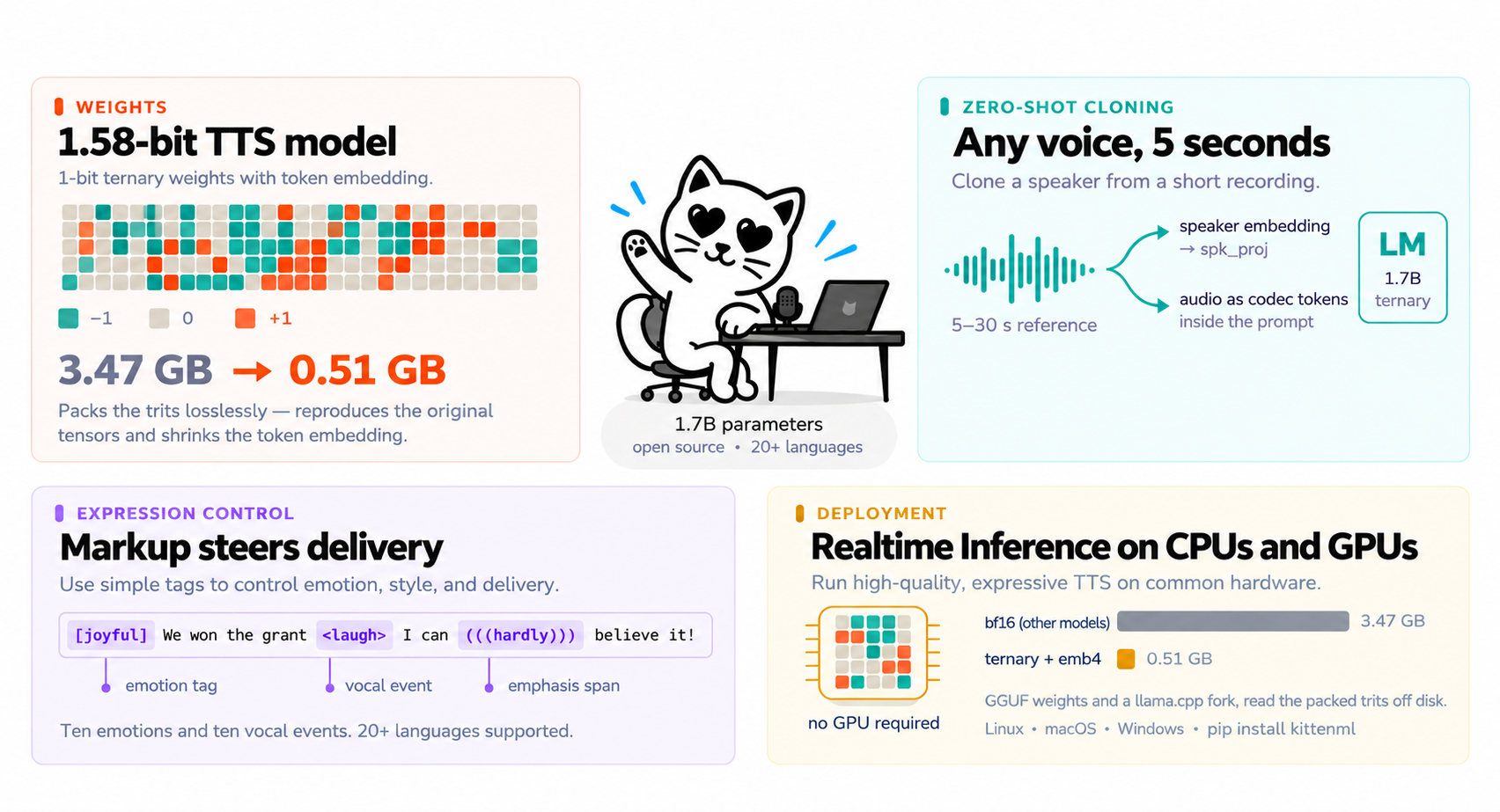
1.7B-parameter 1-bit TTS model with in-context voice cloning and expression control. It provides SOTA quality while being so efficient that it runs realtime on CPUs and consumer GPU's!
The library also ships our existing [**lightweight V0.8 models**](docs/onnx-models.md),
15M-80M parameters, which run on CPU without a GPU. Both families load through the same
`KittenTTS(...)` constructor.
**Commercial support is available.** For integration assistance, custom voices, or enterprise licensing, [contact us](https://docs.google.com/forms/d/e/1FAIpQLSc49erSr7jmh3H2yeqH4oZyRRuXm0ROuQdOgWguTzx6SMdUnQ/viewform?usp=preview).
 ## Table of Contents
- [Features](#features)
- [Available Models](#available-models)
- [Demo](#demo)
- [Quick Start](#quick-start)
- [Voice cloning](#voice-cloning)
- [Expression controls](#expression-controls)
- [Running on CPU](#running-on-cpu)
- [Running on a Mac](#running-on-a-mac)
- [Running with vLLM](#running-with-vllm)
- [Long text and streaming](#long-text-and-streaming)
- [Documentation](#documentation)
- [System Requirements](#system-requirements)
- [Commercial Support](#commercial-support)
- [Community and Support](#community-and-support)
- [License](#license)
## Features
- **Voice cloning** -- Clone any speaker from 5-30 seconds of audio, no fine-tuning
- **47 built-in voices** -- Including the eight from KittenTTS 0.8 and nine non-English
- **Multilingual** -- 20 languages: English, Arabic, Chinese, French, German, Hindi, Italian, Portuguese, Russian, Spanish, Japanese, Korean, Turkish, Dutch, Swedish, Danish, Finnish, Swahili, Greek, Hebrew
- **Expression control** -- `[emotion]` tags, inline `` tags, and `(((emphasis)))` spans
- **Decoding presets** -- Trade stability against expressiveness per request
- **Long-form text** -- Sentence-aware chunking with seamless joins
- **Text preprocessing** -- Numbers, currencies, dates, units and abbreviations expanded automatically
- **24 kHz output** -- High-quality audio at a standard sample rate
- **Runs without a GPU**
- **Runs real time on a CPU** -- Check [Running on CPU](#running-on-cpu)
- **Optimized C++ inference for CPU** -- Our fork of [llama.cpp](https://github.com/KittenML/kitten-tts-2-cpp)
- **Several times realtime on Apple silicon** -- Check [Running on a Mac](#running-on-a-mac)
## Available Models
**KittenTTS 2** -- speech language model:
| Model | Parameters | Size | Voices | Download |
|---|---|---|---|---|
| kitten-tts-2 | 1.7B | 506 MiB | 47 + cloning | [KittenML/kitten-tts-2](https://huggingface.co/KittenML/kitten-tts-2) |
**Lightweight ONNX** -- runs on CPU, no GPU required:
| Model | Parameters | Size | Download |
|---|---|---|---|
| kitten-tts-mini | 80M | 80 MB | [KittenML/kitten-tts-mini-0.8](https://huggingface.co/KittenML/kitten-tts-mini-0.8) |
| kitten-tts-micro | 40M | 41 MB | [KittenML/kitten-tts-micro-0.8](https://huggingface.co/KittenML/kitten-tts-micro-0.8) |
| kitten-tts-nano | 15M | 56 MB | [KittenML/kitten-tts-nano-0.8](https://huggingface.co/KittenML/kitten-tts-nano-0.8-fp32) |
| kitten-tts-nano (int8) | 15M | 25 MB | [KittenML/kitten-tts-nano-0.8-int8](https://huggingface.co/KittenML/kitten-tts-nano-0.8-int8) |
## Demo
https://github.com/user-attachments/assets/c42c236b-7b7d-41d6-944b-7527a5f30626
### Try it online
Try Kitten TTS directly in your browser on [KittenML Platform](https://platform.kittenml.com).
Or run the Gradio demo locally: `pip install kittenml gradio`, then `python gradio_demo.py`.
## Quick Start
### Prerequisites
- Python 3.9 or later
- A CUDA GPU with roughly 8 GB free, or a CPU with about 6 GB of RAM
- About 1 GB of disk space for the model, or 506 MiB with the smaller weights
### Installation
```bash
pip install kittenml
```
That is the whole install. KittenTTS 2 is the default model, voice cloning is included, and no
Hugging Face login is needed -- every weight the model uses ships in its own repository. It also
pulls the small ONNX runtime, so the [lightweight models](docs/onnx-models.md) work from the
same install.
### Basic usage
```python
from kittenml import KittenTTS
import soundfile as sf
m = KittenTTS("KittenML/kitten-tts-2")
audio = m.generate("Hi! umm.. how are you, I guess? .. uh.. nice to meet you??",
voice="WeatherPresenterCheerful")
sf.write("output.wav", audio, m.sample_rate)
```
> To run Kitten-TTS 2 on a CPU, please refer to [Running on CPU](#running-on-cpu)
`m.available_voices` lists all 47 built-in voices, described in
[voices and expression](docs/voices-and-expression.md). Bella, Jasper, Luna, Bruno, Rosie, Hugo,
Kiki and Leo are the same speakers as in KittenTTS 0.8, so code written against the ONNX models
keeps working.
The weights come in two sizes. The default is 947 MiB and lossless; `weights="emb4"` is 506 MiB
because it quantises the token embedding, which costs a little quality. Only the one you ask for
is downloaded.
```python
m = KittenTTS("KittenML/kitten-tts-2", weights="emb4") # half the download
```
```python
# Trade stability against expressiveness
audio = m.generate("Hello, world.", voice="Matthew", preset="expressive")
# Save directly to a file
m.generate_to_file("Hello, world.", "output.wav", voice="Bruno")
```
## Voice cloning
Pass `reference=` instead of `voice=` — same method, the recording just replaces the built-in
speaker. Give it 5-30 seconds of a single speaker. The transcript is part of the prompt, but you
do not have to type it; Whisper fills it in when omitted.
```python
audio = m.generate("This is my own voice, cloned.", reference="my_voice.wav")
# Supplying the transcript skips the Whisper pass
audio = m.generate("This is my own voice.", reference="my_voice.wav",
reference_text="what is actually said in the clip")
```
The reference feeds the model by two independent routes -- a speaker embedding through the
model's projection head, and the clip itself as codec tokens in the prompt -- so identity
survives even when one route is weak.
Measured on the built-in voices: a generated clip scores 0.49-0.72 speaker similarity against its
own reference and 0.01-0.18 against the other 37, and cloning an unseen recording scores 0.81
against that recording.
## Expression controls
> **Beta.** Emotion control steers delivery rather than guaranteeing it, and the effect varies
> by voice and by sentence.
```python
audio = m.generate(
"[joyful] We actually won the grant I can (((hardly))) believe it!",
voice="Kiki",
preset="expressive",
)
```
A leading `[emotion]` tag, inline `` tags and `(((emphasis)))` spans reach the model as
markup rather than being spoken, and automatically enable its expression conditioning. Ten
emotions and ten vocal events are recognised -- see
[voices and expression](docs/voices-and-expression.md) for the full lists and what is not
covered.
## Running on CPU
Kitten-TTS 2 runs on CPU out of the box — `device` is auto-detected — but the fastest way is
[kitten-tts-2-cpp](https://github.com/KittenML/kitten-tts-2-cpp), our llama.cpp fork. It reads
the GGUF weights in the model repository's `cpp/` directory. You can use the Python bindings too:
```
pip install kitten_tts_cpp
```
```python
from kitten_tts_cpp import KittenTTS
model = KittenTTS("KittenML/kitten-tts-2", decoder="student_w4", threads=8)
model.generate_to_file("One day, a little girl named Lily found a needle in her room.", "hello.wav", voice="Bruno")
print(model.last_report) # Generation timings and token IDs.
```
> Kitten-TTS 2 C++ is in beta. Please report any issues you encounter.
## Running on a Mac
On an Apple-silicon Mac, install the optional MLX backend and select it:
```bash
pip install "kittenml[mlx]"
```
```python
from kittenml import KittenTTS
m = KittenTTS("KittenML/kitten-tts-2", backend="mlx")
m.generate_to_file("One day, a little girl named Lily found a needle in her room.",
"hello.wav", voice="Bruno")
```
See the [MLX guide](docs/mlx.md) for benchmarks and the full details.
## Running with vLLM
For GPU inference with vLLM on Linux and an NVIDIA CUDA GPU with compute capability
8.0 or newer (Ampere or later, for bfloat16), install the optional backend. GPUs with compute
capability 7.5 can use a float16 fallback that is supported but not the optimal path
([vLLM guide](docs/vllm.md#older-gpus-compute-capability-75)).
```bash
pip install "kittenml[vllm]"
```
Select `backend="vllm"`:
```python
from kittenml import KittenTTS
def main():
m = KittenTTS("KittenML/kitten-tts-2", backend="vllm",
vllm_options={"quantization": "w4a16"})
m.generate_to_file("Hello there.", "output.wav", voice="Bruno")
print("Saved output.wav")
if __name__ == "__main__":
main()
```
Keep the main guard when running a script: vLLM starts a worker process. The same
voices, decoders, weight choices and generation arguments apply. The example
uses 4-bit language-model weights (`"quantization": "w4a16"`): the same weights, exactly, in about
2 GB less GPU memory, and faster for single requests. Leave out `vllm_options` to run in bf16; see
[4-bit weights](docs/vllm.md#4-bit-weights). See the
[vLLM guide](docs/vllm.md) for memory settings and benchmarks.
## Long text and streaming
Long input is split on sentence boundaries and synthesized chunk by chunk, then joined with
silence trimming and short edge fades so the seams are inaudible. This is automatic: the model is
reliable on short inputs but truncates or drifts into repetition when asked for a whole script in
one pass.
To start playing before the whole thing is ready, stream it:
```python
for chunk in m.generate_stream(long_text, voice="Luna"):
play(chunk) # each chunk is a numpy array at m.sample_rate
```
It takes the same arguments as `generate`, so `reference=` streams a cloned voice too.
Streaming is **chunk-level, not token-level**: a chunk is generated and vocoded in full before it
is yielded, so the first chunk still costs its own generation time. On an A100, a 936-character
passage yielded its first 21 s of audio after 17 s and finished 54 s of audio in 42 s of wall
clock -- so playback keeps ahead of generation, but there is a real initial delay.
Two consequences worth knowing:
- **Short text does not stream.** Input that fits in one chunk (under roughly 380 characters,
and short trailing pieces get merged into their neighbour) yields exactly one chunk, so
`generate_stream` behaves like `generate`.
- **Chunks are yielded raw.** `generate` post-processes the seams -- trimming each segment's edge
silence, adding short fades and one consistent pause -- which a streaming caller cannot do
without waiting for the next chunk. Concatenating streamed chunks directly gives slightly
rougher joins than `generate` on the same text.
## Documentation
| | |
|---|---|
| [API reference](docs/api.md) | Every argument to `generate`, streaming, and the advanced knobs |
| [Voices and expression](docs/voices-and-expression.md) | The 47 voices, emotion and vocal-event tags, the ten languages |
| [Decoders](docs/decoders.md) | How audio is decoded, and the smaller quantised decoders |
| [Text normalization](docs/text-normalization.md) | How written text becomes spoken text |
| [Architecture](docs/architecture.md) | What the model is, package layout, vendored components |
| [Docker](docs/docker.md) | Run a basic OpenAI-compatible speech API, with voice cloning, in a container |
| [Lightweight ONNX models](docs/onnx-models.md) | The CPU models, 15M-80M parameters, and their API |
| [MLX on Apple silicon](docs/mlx.md) | The optional Mac GPU backend, and why it is faster |
## System Requirements
**KittenTTS 2**
- **Operating system:** Linux, Windows or Mac
- **Python:** 3.9 or later
A virtual environment (conda, venv, or similar) is recommended to avoid dependency conflicts.
## Commercial Support
We offer commercial support for teams integrating Kitten TTS into their products. This includes integration assistance, custom voice development, and enterprise licensing.
[Contact us](https://docs.google.com/forms/d/e/1FAIpQLSc49erSr7jmh3H2yeqH4oZyRRuXm0ROuQdOgWguTzx6SMdUnQ/viewform?usp=preview) or email info@stellonlabs.com to discuss your requirements.
## Community and Support
- **Discord:** [Join the community](https://discord.com/invite/VJ86W4SURW)
- **Website:** [kittenml.com](https://kittenml.com)
- **Custom support:** [Request form](https://docs.google.com/forms/d/e/1FAIpQLSc49erSr7jmh3H2yeqH4oZyRRuXm0ROuQdOgWguTzx6SMdUnQ/viewform?usp=preview)
- **Email:** info@stellonlabs.com
- **Issues:** [GitHub Issues](https://github.com/KittenML/KittenTTS/issues)
## License
This project is licensed under the [Apache License 2.0](LICENSE). That covers the code in this
repository.
**The models are licensed separately and their terms may differ.** Each model repository carries
its own licensing, so check the one you intend to use before relying on it — do not assume the
code's license extends to the weights.
KittenTTS 2 is released under the
[Stellon Labs Community License](https://huggingface.co/KittenML/kitten-tts-2/blob/main/LICENSE.md)
---
### Overview (`docs/README.md`)
# Documentation
Fuller detail than the [project README](../README.md), which covers getting started.
| | |
|---|---|
| [api.md](api.md) | The KittenTTS 2 API: every argument to `generate`, streaming, and the advanced knobs |
| [voices-and-expression.md](voices-and-expression.md) | The 47 built-in voices, the emotion and vocal-event tags, the ten languages |
| [decoders.md](decoders.md) | How audio is decoded, and the smaller quantised decoders |
| [mlx.md](mlx.md) | Optional Apple-silicon GPU inference with MLX |
| [vllm.md](vllm.md) | Optional NVIDIA GPU inference with vLLM |
| [docker.md](docker.md) | A basic OpenAI-compatible speech API, with voice cloning, in a container |
| [text-normalization.md](text-normalization.md) | How written text becomes spoken text |
| [architecture.md](architecture.md) | What the model is, package layout, vendored components |
| [onnx-models.md](onnx-models.md) | The lightweight CPU models and their API |
---
### Api (`docs/api.md`)
# API Reference
The KittenTTS 2 API. For the ONNX models see [onnx-models.md](onnx-models.md).
# `KittenTTS(model_name, cache_dir=None, device=None, hf_token=None)`
Loads whichever model family the repository's `config.json` declares.
| Parameter | Type | Default | Description |
|---|---|---|---|
| `model_name` | `str` | -- | Hugging Face repo ID, or a path to a local repository directory |
| `cache_dir` | `str` | `None` | Local directory for caching downloaded files |
| `device` | `str` | `None` | `"cuda"`, `"mps"` or `"cpu"`; auto-detected when omitted. With `backend="mlx"` the language model always runs on the Mac GPU and this selects only where audio decoding runs, defaulting to `"mps"`. Note: this Python package is for demo only, and not optimized for speed. For real-time performance on CPU, please refer to our [optimized cpu inference repo](https://github.com/KittenML/kitten-tts-2-cpp). And for GPU, please refer to the vllm instructions below. |
| `hf_token` | `str` | `None` | Token, only for downloading a private model repository |
| `decoder` | `str` | repo default | Which decoder to load; see [decoders.md](decoders.md) |
| `weights` | `str` | `"packed"` | Which weight packing to load: `"packed"` (lossless), `"emb4"` (smaller, quantised embedding), `"full"` (bf16) |
| `backend` | `str` | `None` | Default PyTorch inference, `"mlx"` for the Apple-silicon GPU, `"vllm"` for optional NVIDIA GPU inference on Linux, or `"auto"` to pick MLX on a Mac and PyTorch elsewhere |
| `vllm_options` | `dict` | `None` | Engine memory and context settings; see [vLLM](vllm.md) |
| `mlx_options` | `dict` | `None` | Reserved; the MLX backend currently takes no options. See [MLX](mlx.md) |
# `model.generate(text, voice=None, reference=None, ...)`
Returns a float32 NumPy array at `model.sample_rate` (24 kHz). The speaker comes from exactly one
of `voice` or `reference`; giving both, or `reference_text` without `reference`, raises
`ValueError`.
| Parameter | Type | Default | Description |
|---|---|---|---|
| `text` | `str` | -- | Text to speak; supports the expression controls above |
| `voice` | `str` | repo default | Built-in voice name |
| `reference` | `str` | `None` | Path to a recording to clone instead of using a built-in voice |
| `reference_text` | `str` | `None` | Reference transcript; auto-transcribed when omitted |
| `preset` | `str` | `"stable"` | Decoding preset: `"stable"` or `"expressive"` |
| `max_new_tokens` | `int` | `1000` | Per-chunk token budget; 25 tokens is about one second |
| `normalize` | `bool` | `True` | Expand written forms before synthesis |
| `use_reference_prompt` | `bool` | repo default | Include the reference clip's audio in the prompt |
| `temperature`, `top_k`, `top_p`, `min_p` | | preset | Override individual preset values |
| `advanced` | `dict` | `None` | Rarely-needed knobs; see [Advanced options](#advanced-options) |
# Advanced options
`temperature`, `top_k`, `top_p` and `min_p` are arguments in their own right. Everything else
tunable lives behind `advanced=`, a dict validated against `ADVANCED_OPTIONS` -- an unknown key
raises `ValueError` rather than being silently ignored.
```python
audio = m.generate("Hello.", voice="Bruno", advanced={"seed": 1234}) # reproducible
```
| Option | Default | What it does |
|---|---|---|
| `seed` | `None` | Seed the sampler; the same seed gives the same audio |
| `repetition_penalty` | `1.1` | Penalty on tokens already seen; higher suppresses loops harder |
| `repetition_window` | repo default | Limit that penalty to the last N generated tokens |
| `token_run_penalty` | `1.3` | Escalating penalty once one codec token repeats |
| `token_run_grace` | `10` | How many repeats to allow before that kicks in |
| `chunk_chars` | repo default | Target chunk size for long text |
| `chunk_min_chars` | repo default | Chunks below this are merged into a neighbour |
| `chunk_gap_s` | `0.16` | Pause inserted at a chunk join |
| `use_emotion` | `None` | Force expression conditioning on or off; `None` auto-detects from tags |
`model.advanced_options` returns these with the repository's defaults already filled in.
# `model.generate_stream(...)`
Same arguments; yields each chunk's audio as it is produced.
# `model.generate_to_file(text, output_path, **kwargs)`
Synthesize and write a wav. Returns the path written.
# `model.available_voices`
List of the built-in voice names accepted by `voice`.
# `model.sample_rate`
Output sample rate, 24000.
---
### Architecture (`docs/architecture.md`)
# Architecture
KittenTTS 2 is not a phoneme-to-waveform model. It is a language model over a vocabulary shared
between text and audio: it reads your text and writes S3 audio codec tokens, which the s3gen
vocoder turns into 24 kHz speech. Voice identity enters through a speaker embedding projected into
the first position's hidden state, plus the reference clip's own codec tokens in the prompt.
# Package layout
```
kittenml/
get_model.py KittenTTS(...) -- reads config.json, builds the right backend
repo.py repository resolution shared by both backends
preprocess.py text normalization shared by both backends
kittentts2/ the KittenTTS 2 speech language model
model.py KittenTTS2: generate, clone, streaming
prompt.py reference prefix and target segment assembly
logits.py decode-time sampling and runaway penalties
speaker.py spk_proj head, pyannote embedding, Whisper transcription
text.py expression markup, normalization, chunking, joining
tokens.py the shared text/audio token layout
vocoder.py reference encoding and token -> waveform
s3gen.py vendored S3 tokenizer + s3gen vocoder
mlx/ the optional Apple-silicon backend
loader.py ternary weights -> MLX's 4-bit kernels, exactly
model.py Qwen3 and the speaker head as MLX modules
sample.py the same decode pipeline, in MLX
kittentts_legacy/ the ONNX models
model.py KittenTTSOnnx: generate, speed control
onnx_model.py the ONNX session and phonemizer
```
Neither backend is imported until it is the one selected, so a KittenTTS 2 install never needs
espeak and an ONNX install never needs torch. The same is true of the optional language-model
backends under `kittentts2/`: `mlx/` is imported only for `backend="mlx"`, `vllm/` only for
`backend="vllm"`.
# The model repository
A KittenTTS 2 repository is assembled by internal tooling from a training bundle, and holds
everything inference needs:
```
config.json token layout, decode presets, voice and decoder indexes
lm/ the speech language model, plus its spk_proj head
speaker/ the speaker-embedding model and its license
voices/ reference clips, transcripts, and precomputed embeddings
decoders/ optional quantised decoders
```
Precomputing the per-voice embeddings is what lets a built-in voice skip the embedding model
entirely at run time. Nothing in the repository is gated, so installing KittenTTS 2 needs no
Hugging Face credentials.
Only the paths `config.json` names are downloaded, so a repository can carry artifacts for other
runtimes without every install paying for them.
### Packed language-model weights
The LM's linear weights are ternary: within each 128-wide group every value is exactly one of
`{-scale, 0, +scale}`. Stored as bf16 that spends 16 bits per weight to express one of three
states, so `ternary.py` packs them five trits to a byte — 1.6 bits each, log2(3) rounded up to a
byte boundary — keeping every group's scale at full bf16 precision. The token embedding, layer
norms and speaker head are not ternary and are stored unchanged.
That takes the checkpoint from 3.47 GB to 0.95 GB **losslessly**: unpacking reproduces the
original tensors bit-for-bit, and generated audio is bit-identical. `config.json` advertises it as
`lm_packed`, and the loader prefers it when present.
See `example.py` for a runnable script, and `example_cloning.py`, `example_expression.py`, `example_streaming.py` and `example_advanced.py` for the rest of the API.
---
### Decoders (`docs/decoders.md`)
# Decoders
How KittenTTS 2 turns the model's codec tokens back into audio, and the
smaller decoders you can swap in.
Audio is decoded in two stages: a flow turns the model's codec tokens into a mel spectrogram,
then a vocoder turns that into audio. The flow can be swapped for a distilled, weight-quantised
student that is much smaller on disk:
```python
m = KittenTTS("KittenML/kitten-tts-2", decoder="student_w4")
```
| Decoder | Flow on disk | Notes |
|---|---|---|
| `default` | 459 MB | The stock flow, two sampling steps. Best quality |
| `student_w4` | 39 MB | Distilled single-step student, weights packed to 4 bits |
`model.available_decoders` lists them. Only the flow changes -- the tokenizer, speaker encoder
and vocoder are shared, so voices and prompts behave the same.
Two things worth knowing before choosing one. Quantisation shrinks storage and memory bandwidth,
not arithmetic, so these are **not meaningfully faster** without a kernel that multiplies in low
precision. And quality is below the default: measured mel L1 against the teacher is 0.250 for the
4-bit student versus 0.168 dense, and voices far from the student's 539-speaker training pool
degrade more than they do on the default decoder. Pick these for footprint.
---
### Docker (`docs/docker.md`)
# Running with Docker
The image runs a basic OpenAI-compatible speech API on one NVIDIA GPU: speech as a
complete file or streamed, and voice cloning. Its routes follow the
[hosted KittenML API](https://docs.kittenml.com/tts/generate-speech).
Use a Linux host with Docker, an NVIDIA GPU and the
[NVIDIA Container Toolkit](https://docs.nvidia.com/datacenter/cloud-native/container-toolkit/latest/install-guide.html).
The host driver must meet the [vLLM GPU requirements](https://docs.vllm.ai/en/v0.31.0/getting_started/installation/gpu/).
## Start the server
Build the image from the root of a KittenTTS checkout. The final `.` is that
directory, which the build reads the package from:
```sh
git clone https://github.com/KittenML/KittenTTS.git
cd KittenTTS
docker build -f kittenml/kittentts2/docker/Dockerfile -t kittenml .
```
Then start the server, from any directory:
```sh
docker run --rm --gpus all --ipc=host -p 8000:8000 -v kittenml-cache:/cache kittenml
```
The first start downloads the model and compiles GPU kernels, which takes a few
minutes. The named volume keeps both, so later starts are faster. The server is
ready when it prints `Ready`. Model files are not included in the image.
## Generate speech
```sh
curl http://localhost:8000/v1/audio/speech \
-H "Content-Type: application/json" \
-d '{"model": "kitten-tts-2-latest", "input": "Hello from Kitten TTS.",
"voice": "Bruno", "response_format": "wav", "stream": false}' \
--output speech.wav
```
`"stream": false` returns the complete file. Without it, audio is streamed as each
sentence chunk is generated; `"stream_format": "sse"` sends Base64
`speech.audio.delta` events and a final `speech.audio.done`. `response_format` is
`mp3` (the default), `wav`, `pcm`, `flac` or `opus`; `flac` and `opus` are sent once
complete. `GET /v1/voices` lists the 47 built-in voices.
The OpenAI SDK works with any API key:
```python
from openai import OpenAI
client = OpenAI(base_url="http://localhost:8000/v1", api_key="unused")
with client.audio.speech.with_streaming_response.create(
model="kitten-tts-2-latest", voice="Bruno", input="Hello there.",
response_format="mp3") as response:
response.stream_to_file("speech.mp3")
```
## Clone a voice
Upload 2-30 seconds of one speaker as `reference_audio` to clone it for one request:
```sh
curl http://localhost:8000/v1/audio/speech \
-F model=kitten-tts-2-latest \
-F input="This sentence uses the uploaded voice." \
-F reference_audio=@reference.wav \
-F response_format=wav -F stream=false \
--output cloned.wav
```
Or save the voice once and reuse its ID as `"voice": {"id": "voice_..."}`:
```sh
curl http://localhost:8000/v1/audio/voices \
-F name="My voice" \
-F audio_sample=@reference.wav
```
Saved voices are kept in the cache volume and deleted with
`DELETE /v1/audio/voices/{voice_id}`. The clip is transcribed with Whisper, which
needs more GPU memory; add `-F reference_transcript="..."` with the exact words
spoken to skip it.
## Options
Pass these with `-e`:
| Variable | Default | Meaning |
|---|---|---|
| `KITTENML_BACKEND` | `vllm` | `torch` uses the PyTorch backend |
| `KITTENML_VLLM_OPTIONS` | | `vllm_options` as JSON, e.g. `{"gpu_memory_utilization": 0.7}` on an 8 GB GPU |
The server has no authentication, so do not expose its port publicly. Unlike the
hosted API, it supports only `speed` 1.0, uses the voice names from `/v1/voices`,
and has no consent resources.
To run your own script instead, run this from the directory that contains it:
```sh
docker run --rm --gpus all --ipc=host -v kittenml-cache:/cache -v "$PWD:/workspace" \
kittenml python my_script.py
```
---
### Mlx (`docs/mlx.md`)
# Running with MLX (Apple silicon)
The optional `mlx` backend runs KittenTTS 2's language model on a Mac's GPU
through [MLX](https://github.com/ml-explore/mlx). It is the fast way to run
KittenTTS 2 on an Apple-silicon Mac: the default PyTorch backend runs the model
on the CPU there, below realtime.
```bash
pip install "kittenml[mlx]"
```
```python
from kittenml import KittenTTS
m = KittenTTS("KittenML/kitten-tts-2", backend="mlx")
m.generate_to_file("One day, a little girl named Lily found a needle in her room.",
"output.wav", voice="Bruno")
```
`backend="auto"` is the portable spelling: MLX on an Apple-silicon Mac with
`mlx` installed, the PyTorch backend everywhere else. It never selects vLLM,
which has memory settings of its own to choose.
Voices, cloning, expression tags, decode presets, chunking and streaming are the
existing implementations and behave identically. Only the language model moves.
## Why it is faster
Generating audio is one forward pass per 1/25 s of speech, each pass reading
every weight once, so the model is bound by memory bandwidth rather than
arithmetic. Two things change:
- **The weights stay packed.** The published checkpoint's linear weights are
ternary — inside every 128-wide group each value is exactly one of
`{-scale, 0, +scale}` — and the repository ships them at 1.6 bits each. Both
other backends expand them to bf16 before the first token, spending 16 bits to
say one of three things. MLX's 4-bit quantised format can represent those three
values *exactly*, by taking its scale from the group and its zero point at
`-scale`, which puts `-scale`, `0` and `+scale` at codes 0, 1 and 2. So the
1.4B ternary parameters are read as 4 bits each, and the weights being
multiplied are bit-for-bit the published ones. Nothing is rounded, and there is
no quantisation step at load time — the trits on disk already *are* the codes,
so loading is bit shuffling and takes about a second.
- **It runs on the GPU.** Unified memory means the weights are not copied
anywhere to get there, and audio decoding runs on the same GPU through MPS.
The result is roughly 1.4 GB read per token instead of 3.5 GB, at GPU bandwidth
instead of CPU bandwidth.
## What is and is not identical
The weights are exact, and the decode pipeline — the run and repetition
penalties, temperature, top-k, top-p, min-p, in that order — is a port of the
same one, checked against it in `tests/test_mlx.py`.
Generated audio is still not sample-identical to the PyTorch backend's, for the
same reason two PyTorch runs with different attention kernels are not: the model
computes in bfloat16, whose rounding depends on the order of operations. The
logit differences are of the size bfloat16 rounding produces — the same size as
between MLX in bfloat16 and MLX in float32 — and a seed therefore reproduces a
generation within a backend, not across backends. Speaker similarity against the
reference is unchanged.
## Requirements and limits
- An Apple-silicon Mac. `backend="mlx"` raises on Intel Macs and elsewhere.
- `weights="packed"`, which is the default. `weights="emb4"` is a different
packing with a quantised embedding and is refused rather than silently
expanded; `weights="full"` is not the packed file this backend reads.
- The first generation of a process also compiles the Metal kernels, which costs
about a second on top; the numbers below are steady state.
- `device=` selects only where audio decoding, speaker embedding and
transcription run, since the language model is always on the GPU. It defaults
to `"mps"`, which decodes several times faster than the CPU. Pass
`device="cpu"` if a PyTorch build's MPS backend is missing an op s3gen needs.
- One request at a time, like the PyTorch backend. Long text still uses
KittenTTS's sentence chunking, and `generate_stream` yields completed chunks.
- Voice cloning without a supplied `reference_text` still loads Whisper through
transformers, which runs on the CPU.
---
### Onnx Models (`docs/onnx-models.md`)
# Lightweight ONNX models
The original Kitten TTS models. For KittenTTS 2 see [api.md](api.md).
The original Kitten TTS models, 15M to 80M parameters (25-80 MB on disk), built on ONNX. They run
efficiently on CPU without a GPU, which makes them the right choice for edge deployment and for
anything that cannot carry a PyTorch stack. They offer eight voices and adjustable speech speed,
and no voice cloning or expression control.
# Installation
Already covered by `pip install kittenml`, which includes the ONNX runtime. Python 3.8 or later,
and no GPU required.
Note that the default install also pulls PyTorch for KittenTTS 2, which is large relative to
these models. Installing `kittenml` with `--no-deps` alongside `onnxruntime`, `espeakng_loader`,
`phonemizer`, `soundfile`, `numpy` and `huggingface_hub` is enough to run them on their own.
# Basic usage
```python
from kittenml import KittenTTS
model = KittenTTS("KittenML/kitten-tts-mini-0.8")
audio = model.generate("This high-quality TTS model runs without a GPU.", voice="Jasper")
import soundfile as sf
sf.write("output.wav", audio, 24000)
```
# Advanced usage
```python
# Adjust speech speed (default: 1.0)
audio = model.generate("Hello, world.", voice="Luna", speed=1.2)
# Save directly to a file
model.generate_to_file("Hello, world.", "output.wav", voice="Bruno", speed=0.9)
# List available voices
print(model.available_voices)
# ['Bella', 'Jasper', 'Luna', 'Bruno', 'Rosie', 'Hugo', 'Kiki', 'Leo']
```
# Using with GPU
```
pip install -r requirements_gpu.txt
```
```python
m = KittenTTS("KittenML/kitten-tts-mini-0.8", backend="cuda")
```
Check out `example_onnx_0.8.py`
# ONNX API Reference
# `KittenTTS(model_name, cache_dir=None, backend=None)`
Load a model from Hugging Face Hub.
| Parameter | Type | Default | Description |
|---|---|---|---|
| `model_name` | `str` | `"KittenML/kitten-tts-nano-0.8"` | Hugging Face repository ID |
| `cache_dir` | `str` | `None` | Local directory for caching downloaded model files |
| `backend` | `str` | `None` | ONNX execution provider: `"cpu"`, `"cuda"`, `"amd_gpu"` |
# `model.generate(text, voice, speed, clean_text)`
Synthesize speech from text, returning a NumPy array of audio samples at 24 kHz.
| Parameter | Type | Default | Description |
|---|---|---|---|
| `text` | `str` | -- | Input text to synthesize |
| `voice` | `str` | `"expr-voice-5-m"` | Voice name (see available voices) |
| `speed` | `float` | `1.0` | Speech speed multiplier |
| `clean_text` | `bool` | `False` | Preprocess text (expand numbers, currencies, etc.) |
# `model.generate_to_file(text, output_path, voice, speed, sample_rate, clean_text)`
Synthesize speech and write directly to an audio file.
| Parameter | Type | Default | Description |
|---|---|---|---|
| `text` | `str` | -- | Input text to synthesize |
| `output_path` | `str` | -- | Path to save the audio file |
| `voice` | `str` | `"expr-voice-5-m"` | Voice name |
| `speed` | `float` | `1.0` | Speech speed multiplier |
| `sample_rate` | `int` | `24000` | Audio sample rate in Hz |
| `clean_text` | `bool` | `True` | Preprocess text (expand numbers, currencies, etc.) |
# `model.available_voices`
Returns a list of available voice names: `['Bella', 'Jasper', 'Luna', 'Bruno', 'Rosie', 'Hugo', 'Kiki', 'Leo']`
---
### Text Normalization (`docs/text-normalization.md`)
# Text normalization
Numbers, currencies, dates, units and abbreviations are expanded automatically before synthesis,
so `$12.50` is spoken rather than spelled. You can also call it directly:
```python
from kittenml import normalize_text
normalized = normalize_text("Dr. Rivera paid $12.50 at 3:05 p.m.")
# "Doctor Rivera paid twelve dollars and fifty cents at three oh five p m."
result = normalize_text("Fig. 2", return_spans=True)
print(result.text)
print(result.spans)
```
With `return_spans=True` the result also carries original-to-normalized character spans for each
changed segment.
KittenTTS 2 uses [`kitten-text-processing`](https://github.com/KittenML/kitten-text-processing)
for this, which reproduces the normalization the checkpoint was served with. It is pure Python
and pulled in automatically, so there is nothing to compile on any platform.
The `normalize_text` shown above is `kittenml/preprocess.py`, a separate in-repo implementation
that the ONNX models use and that is the one able to return spans.
---
### Vllm (`docs/vllm.md`)
# Running with vLLM
The optional `vllm` backend runs KittenTTS 2's language model with vLLM 0.31.0 on an NVIDIA GPU;
audio decoding, voice cloning and text preparation stay the same. It needs Linux and a GPU with
compute capability 8.0 or newer (Ampere or later). GPUs with compute capability 7.5 can use a
float16 fallback that is supported but not the optimal path
([Older GPUs](#older-gpus-compute-capability-75)); older GPUs are refused before any download.
Install and select it as shown in the [README](../README.md#running-with-vllm). That install gets
CUDA 13.0 builds of vLLM and PyTorch, which need a driver for CUDA 13.0
([GPU requirements](https://docs.vllm.ai/en/v0.31.0/getting_started/installation/gpu/)). If
`nvidia-smi` reports a lower CUDA version, install the CUDA 12.9 builds with
[uv](https://docs.astral.sh/uv/) instead (checked with driver 570.195, which reports CUDA 12.8):
```bash
curl -LO https://github.com/vllm-project/vllm/releases/download/v0.31.0/vllm-0.31.0+cu129-cp38-abi3-manylinux_2_28_x86_64.whl
uv pip install --torch-backend cu129 "kittenml[vllm]" ./vllm-0.31.0+cu129-cp38-abi3-manylinux_2_28_x86_64.whl
```
## Options
| Option | Default | What it is for |
|---|---|---|
| `gpu_memory_utilization` | `0.5` | Share of the GPU's memory vLLM may use for the language model and its cache. Audio decoding needs memory outside this share. |
| `max_model_len` | `4096` | Longest request in tokens: the voice's reference prompt and the text, plus `max_new_tokens` (1000 by default). A request that does not fit raises an error. |
| `max_num_seqs` | `8` | Most requests generated at the same time. |
| `kv_cache_memory_bytes` | not set | A fixed cache size in bytes, used instead of sizing the cache from `gpu_memory_utilization`. |
| `enforce_eager` | `False` | Turns off CUDA graphs. Keep it off: with it on, 4-bit can be slower than the default bf16. |
| `quantization` | not set | `"w4a16"` for 4-bit weights; see [4-bit weights](#4-bit-weights). |
| `dtype` | `"bfloat16"` | Precision of the language model. `"float16"` is a fallback for GPUs without bfloat16; see [Older GPUs](#older-gpus-compute-capability-75). |
Pass these as `vllm_options` when constructing the model, for example
`vllm_options={"max_model_len": 2048}`; unknown option names are refused before any download. Select
the GPU with `CUDA_VISIBLE_DEVICES`; set `VLLM_LOGGING_LEVEL=INFO` before starting Python to see
routine engine logs. Long text uses the default backend's sentence chunking, and `generate_stream`
yields each audio chunk once it is complete. The same seed can give different audio across backends
and with or without 4-bit weights. Start-up is slow (see [Benchmarks](#benchmarks)), so reuse the
loaded model.
## Low GPU memory
- Reduce `max_model_len`, keeping room for the prompt plus `max_new_tokens`: a shorter context
needs a smaller cache.
- If startup reports no memory available for the cache, raise `gpu_memory_utilization`, leaving room
for audio decoding, or set `kv_cache_memory_bytes`. The cache needs 112 KiB per token; a cache of
exactly `max_model_len` tokens is rejected, so leave some margin.
- Use [4-bit weights](#4-bit-weights); the smaller `weights="packed"` download alone does not
lower GPU memory.
- Cloning without `reference_text` also loads Whisper large-v3 on the GPU to transcribe the clip;
pass `reference_text` to skip it.
## 4-bit weights
Add `"quantization": "w4a16"` to `vllm_options` to use about 2 GB less GPU memory for the language
model's weights (1.29 instead of 3.24 GiB). The model's weights stay exactly the same, and measured
audio quality was the same as without it. With default settings vLLM still takes half the GPU and
gives the saved memory to its cache; to lower total use, also set `kv_cache_memory_bytes` or a lower
`gpu_memory_utilization`. It works with `weights="packed"` (the default) or `"full"`, and also
with `weights="emb4"`. That one is lossy: its embedding is stored in 4 bits (at export, perplexity
13.60 against 13.50), and it only makes the download smaller, not GPU memory, because the
embedding is expanded to bf16 on the GPU either way. `"emb4"` is not available with the float16
fallback below. KittenTTS checks that vLLM runs the 4-bit layers
with the kernel they were verified with, and refuses settings that would change it.
The biggest gain is with one request at a time: the language model ran about 1.4x faster on an RTX
PRO 6000 (96 GB) and 1.8x faster on an RTX A2000 (6 GB). With many concurrent requests the gain is
small (1.02x with 50 at once on the RTX PRO 6000). On the RTX A2000, bf16 does not start with
default `vllm_options` but 4-bit does; with `kv_cache_memory_bytes` 512 MiB and `max_num_seqs` 1 for
both, five sentences one at a time:
| RTX A2000 (6 GB) | bf16 (default) | 4-bit |
|---|---:|---:|
| Peak GPU memory, whole card | 6,116 MiB | 4,096 MiB |
| Median time per sentence | 2.65 s | 1.73 s |
| Language-model speed | 54.5 tokens/s | 97.2 tokens/s |
## Older GPUs (compute capability 7.5)
GPUs without bfloat16, such as the GeForce RTX 20 and GTX 16 series, can run the language model in
float16 instead, with or without 4-bit weights:
```python
m = KittenTTS("KittenML/kitten-tts-2", backend="vllm",
vllm_options={"dtype": "float16", "quantization": "w4a16"})
```
**This is a fallback: it is supported, but it is not the optimal path.** Float16 is used only when
you ask for it; on GPUs with compute capability 8.0 or newer, keep the default (bfloat16). Only an
RTX 2070 (8 GB) was measured.
- **Precision change.** The model is published in bfloat16 and overflows in plain float16, so
KittenTTS scales its internal values down by an exact power of two. Rounding follows float16
instead of bfloat16. Given the same text and tokens, the next-token probabilities differ from
bfloat16's by 0.0085 nats on average (KL divergence; 4-bit weights in bfloat16 differ by
0.0047). Word error rates on 36 requests (8 languages, long text, cloning) were 0.9% in
bfloat16 and 0.8-0.9% in float16. No listening test was done.
- **Not the fastest attention kernel.** vLLM's FlashAttention 2 needs compute capability 8.0, so
these GPUs use a general kernel; startup logs `Cannot use FA version 2 ...`, which is expected.
bfloat16 cannot run on these GPUs, so there is no same-card speed comparison.
- **More memory.** Float16 keeps a separate copy of the output layer: 618 MiB more than bfloat16.
| RTX 2070 (8 GB), one request at a time | float16 + 4-bit, default settings | float16, `kv_cache_memory_bytes` 1 GiB |
|---|---:|---:|
| Language-model speed | 108 tokens/s | 74 tokens/s |
| Synthesis time per second of audio | 0.30 s | 0.41 s |
| First audio when streaming (median) | 1.33 s | 1.80 s |
| Peak GPU memory, whole card | 6,574 MiB | 8,024 MiB |
| Startup with warm caches | 55 s | 46 s |
Measured with `generate()` on the same 36 texts (29 of them for streaming), one request at a time.
## Benchmarks
One RTX 3060 (12 GB), driver 570.195.03 (CUDA 12.8), Ubuntu 24.04, Python 3.12, nothing else on the
GPU. PyTorch GPU is the default backend (PyTorch 2.14.1 CUDA 12.6 build, Transformers 5.20.2); the
vLLM columns use vLLM 0.31.0 (CUDA 12.9 build, PyTorch 2.13.0, Transformers 5.17.0) with default
`vllm_options`: "vLLM bf16" is without quantization, "vLLM 4-bit" adds `"quantization": "w4a16"`
([4-bit weights](#4-bit-weights)). Each time is the median of five `generate()` calls after two
warmups (`weights="packed"`, default decoder, stable preset, model loading excluded) on 61, 226 and
680 characters of text (the last in two chunks).
| Input / voice | PyTorch GPU | vLLM bf16 | vLLM 4-bit | Speedup bf16 vs PyTorch | Speedup 4-bit vs PyTorch |
|---|---:|---:|---:|---:|---:|
| Short / Bruno | 4.44 s | 1.72 s | 1.18 s | 2.59x | 3.77x |
| Short / Bella | 6.14 s | 2.67 s | 1.62 s | 2.30x | 3.78x |
| Medium / Bruno | 14.74 s | 5.12 s | 3.43 s | 2.88x | 4.30x |
| Medium / Bella | 20.63 s | 7.01 s | 4.63 s | 2.94x | 4.46x |
| Long / Bruno | 45.20 s | 16.10 s | 10.38 s | 2.81x | 4.35x |
| Long / Bella | 53.15 s | 18.96 s | 12.24 s | 2.80x | 4.34x |
| RTX 3060 (12 GB) | PyTorch GPU | vLLM bf16 | vLLM 4-bit |
|---|---:|---:|---:|
| Synthesis time per second of audio | 1.17-1.19 s | 0.41-0.45 s | 0.26-0.30 s |
| Peak GPU memory, whole card | 6,901 MiB | 9,026 MiB | 9,890 MiB |
| Start-up with files already downloaded (very first start) | 9.8 s (11.2 s) | 44.0 s (145.4 s) | 50.3 s (140.7 s) |
Per second of audio the speedups are 2.64-2.85x (bf16) and 3.94-4.51x (4-bit). Both vLLM columns
give vLLM the same share of the card, so 4-bit gets a larger cache (37,120 tokens instead of
18,512); its higher whole-card peak was in the main process, which decodes the audio, not in
vLLM's own process. Whole-card peaks include about 374 MiB the GPU reports as used when idle. A
full repeat of every column was within -0.9% to +3.4%.
---
### Voices And Expression (`docs/voices-and-expression.md`)
# Voices and expression
The built-in voices, the expression markup the model understands, and what it does and
does not cover. See [api.md](api.md) for the arguments these go with.
## Expression controls
Three kinds of markup reach the model as direction rather than as words to pronounce. Using
any of them automatically switches on the model's `{emo: 1}` conditioning; pass
`advanced={"use_emotion": False}` to force it off, or `True` to force it on for untagged text.
Emotion support is **early beta**. It steers delivery rather than guaranteeing it, and the
effect varies by voice and by sentence.
### Emotion
A leading tag sets the emotion for the whole line.
```python
m.generate("[joyful] We actually won the grant!", voice="Kiki")
```
`[angry]` `[contemplative]` `[excited]` `[joyful]` `[mundane]` `[nervous]` `[sad]` `[stern]`
`[surprised]` `[tender]`
### Vocal events
An inline tag inserts a non-verbal beat anywhere in the line.
```python
m.generate("We won I can hardly believe it.", voice="Kiki")
```
`` `` `` `` `` `` `` `` `` ``
### Emphasis
Triple parentheses stress a word or short phrase.
```python
m.generate("I told you (((never))) to open that door.", voice="Victor")
```
### Why these lists and not others
The training data carries 2,684 distinct emotion values and 1,101 distinct vocal-event values.
The twenty above are the ten most common of each, covering roughly half of all tagged lines.
They are a recognition list, not the model's full vocabulary: a rarer tag such as `[reverent]`
is real in the data but is **not** recognised here, and will be normalized and spoken as
ordinary text.
That restraint is deliberate. Treating every bracketed span as markup would silently swallow
things people write for other reasons — a citation like `section [3]`, a comparison like
`x < 5`. Those are left as text.
Anything bracketed that is *not* one of these tags gets rewritten to plain comma-separated
text before synthesis, because the model destabilises on bracket punctuation it was not
trained to read. This was observed directly: a parenthetical list,
`(salons, dental offices, restaurants)`, generated abnormally fast — ~0.043 s/char against
0.056–0.093 for every other chunk of the same request, reproducibly — consistent with the
model rushing through it.
`EXPRESSION_TAGS` and `VOCAL_EVENT_TAGS` in `kittenml.kittentts2.text` are the live lists;
extend them if you want more tags protected.
## Built-in voices
Forty-seven voices, listed by `model.available_voices`: thirty-eight English, plus nine named
after the [languages](#languages) below. Bella, Jasper, Luna, Bruno, Rosie, Hugo, Kiki and Leo
are the same speakers as in KittenTTS 0.8, so code written against the ONNX models keeps
working.
| Voice | Character | | Voice | Character |
|---|---|---|---|---|
| **Bella** | KittenTTS 0.8 voice, female | | **Herbert** | Wise elderly professor, male |
| **Jasper** | KittenTTS 0.8 voice, male | | **Diana** | Stern military officer, female |
| **Luna** | KittenTTS 0.8 voice, female | | **Laurence** | Dramatic stage actor, male |
| **Bruno** | KittenTTS 0.8 voice, male | | **Maeve** | Cozy warm storyteller, female |
| **Rosie** | KittenTTS 0.8 voice, female | | **Walter** | Warm grandfather, male |
| **Hugo** | KittenTTS 0.8 voice, male | | **Edith** | Soft elderly grandmother, female |
| **Kiki** | KittenTTS 0.8 voice, female | | **Miles** | Gentle librarian, male |
| **Leo** | KittenTTS 0.8 voice, male | | **Grace** | Soothing nurse, female |
| **Matthew** | Exhausted mechanic, male | | **Reginald** | Distinguished elderly diplomat, male |
| **Elliot** | Grieving young, male | | **Iris** | Hushed museum guide, female |
| **Willow** | Hushed young, female | | **Frank** | Gravelly grizzled war veteran, male |
| **Dolores** | Southern elderly, female | | **Serena** | Gentle yoga instructor, female |
| **Victor** | Controlled fury older, male | | **Julian** | Dreamy poet soft, male |
| **Dante** | Playful smooth young, male | | **Eleanor** | Somber historian, female |
| **Alfred** | Tender older, male | | **Otis** | Rumbling blues musician, male |
| **Saoirse** | Joyful irish, female | | **Vincent** | Hushed museum guide, male |
| **Claire** | Playful professional, female | | **Martha** | Weathered radio journalist, female |
| **Raven** | Controlled fury young, female | | **Sable** | Hushed conspirator, female |
| **Marcus** | Smooth radio DJ, male | | **Victoria** | Regal narrator, female |
Every reference clip is 8–18 seconds of a single speaker. A voice is the clip *and* its
transcript: both go into the prompt, which is why cloning a new voice wants a transcript too
(and transcribes one for you when you omit it).
## Languages
The model is multilingual. Its SFT mix is about 10% non-English across nine languages, and a
Hindi voice was added on top, giving ten in total. Each ships as one built-in voice, named
after its language:
| Voice | Language | Voice | Language |
|---|---|---|---|
| **Arabic** | العربية | **Italian** | Italiano |
| **Chinese** | 简体中文 | **Portuguese** | Português |
| **French** | Français | **Russian** | Русский |
| **German** | Deutsch | **Spanish** | Español |
| **Hindi** | हिन्दी | | |
```python
m.generate("Guten Morgen. Ich wünsche dir einen wunderschönen Tag.",
voice="German", normalize=False)
```
The voice carries the language: these clips are what supply the accent and phonotactics, so
asking an English voice for German text will not work well. Cloning from your own non-English
recording works the same way.
**Pass `normalize=False` for non-English text.** The normalizer is English-tuned, and will
mangle numbers, dates and abbreviations in other languages. That is a real limitation, not an
oversight — the upstream demo carries the same caveat.
One reference clip per language is a modest base, so expect these to be less robust than the
English voices, and quality to vary by language. Measured by transcribing generated audio back
with Whisper, all ten reproduce their prompt: German, Spanish, French, Italian, Portuguese,
Russian and Chinese came back verbatim; Arabic and Hindi came back with small errors.
## Getting more expressive output
The `expressive` preset loosens sampling a little. To push further, use the
[advanced options](api.md#advanced-options): disable `top_k` by setting it to `0`, raise
`temperature` above `1.0`, and raise `top_p` to `0.9` or above. The further you push, the
livelier — and the less predictable — the delivery.
```python
m.generate("[excited] This is going to be good!", voice="Dante",
preset="expressive", top_k=0, temperature=1.1, top_p=0.95)
```
## Known limitations
- Emotion conditioning is early beta; it biases delivery rather than guaranteeing it.
- Only the twenty tags above are recognised, not the full long tail in the data.
- The non-English voices rest on a single reference clip each; they are more fragile than the
English set, and the text normalizer does not cover them.
- Voices far from the model's training distribution clone less well than the built-in ones.
This is more pronounced on the quantised [decoders](decoders.md), whose student was trained
on a 539-speaker pool.
---
--- METRICS ---
- Files Extracted: 11
- Estimated Token Budget: ~13347 tokens
- Canonical Reference: https://codewiki.google/github.com/KittenML/KittenTTS
## Table of Contents
- [Features](#features)
- [Available Models](#available-models)
- [Demo](#demo)
- [Quick Start](#quick-start)
- [Voice cloning](#voice-cloning)
- [Expression controls](#expression-controls)
- [Running on CPU](#running-on-cpu)
- [Running on a Mac](#running-on-a-mac)
- [Running with vLLM](#running-with-vllm)
- [Long text and streaming](#long-text-and-streaming)
- [Documentation](#documentation)
- [System Requirements](#system-requirements)
- [Commercial Support](#commercial-support)
- [Community and Support](#community-and-support)
- [License](#license)
## Features
- **Voice cloning** -- Clone any speaker from 5-30 seconds of audio, no fine-tuning
- **47 built-in voices** -- Including the eight from KittenTTS 0.8 and nine non-English
- **Multilingual** -- 20 languages: English, Arabic, Chinese, French, German, Hindi, Italian, Portuguese, Russian, Spanish, Japanese, Korean, Turkish, Dutch, Swedish, Danish, Finnish, Swahili, Greek, Hebrew
- **Expression control** -- `[emotion]` tags, inline `` tags, and `(((emphasis)))` spans
- **Decoding presets** -- Trade stability against expressiveness per request
- **Long-form text** -- Sentence-aware chunking with seamless joins
- **Text preprocessing** -- Numbers, currencies, dates, units and abbreviations expanded automatically
- **24 kHz output** -- High-quality audio at a standard sample rate
- **Runs without a GPU**
- **Runs real time on a CPU** -- Check [Running on CPU](#running-on-cpu)
- **Optimized C++ inference for CPU** -- Our fork of [llama.cpp](https://github.com/KittenML/kitten-tts-2-cpp)
- **Several times realtime on Apple silicon** -- Check [Running on a Mac](#running-on-a-mac)
## Available Models
**KittenTTS 2** -- speech language model:
| Model | Parameters | Size | Voices | Download |
|---|---|---|---|---|
| kitten-tts-2 | 1.7B | 506 MiB | 47 + cloning | [KittenML/kitten-tts-2](https://huggingface.co/KittenML/kitten-tts-2) |
**Lightweight ONNX** -- runs on CPU, no GPU required:
| Model | Parameters | Size | Download |
|---|---|---|---|
| kitten-tts-mini | 80M | 80 MB | [KittenML/kitten-tts-mini-0.8](https://huggingface.co/KittenML/kitten-tts-mini-0.8) |
| kitten-tts-micro | 40M | 41 MB | [KittenML/kitten-tts-micro-0.8](https://huggingface.co/KittenML/kitten-tts-micro-0.8) |
| kitten-tts-nano | 15M | 56 MB | [KittenML/kitten-tts-nano-0.8](https://huggingface.co/KittenML/kitten-tts-nano-0.8-fp32) |
| kitten-tts-nano (int8) | 15M | 25 MB | [KittenML/kitten-tts-nano-0.8-int8](https://huggingface.co/KittenML/kitten-tts-nano-0.8-int8) |
## Demo
https://github.com/user-attachments/assets/c42c236b-7b7d-41d6-944b-7527a5f30626
### Try it online
Try Kitten TTS directly in your browser on [KittenML Platform](https://platform.kittenml.com).
Or run the Gradio demo locally: `pip install kittenml gradio`, then `python gradio_demo.py`.
## Quick Start
### Prerequisites
- Python 3.9 or later
- A CUDA GPU with roughly 8 GB free, or a CPU with about 6 GB of RAM
- About 1 GB of disk space for the model, or 506 MiB with the smaller weights
### Installation
```bash
pip install kittenml
```
That is the whole install. KittenTTS 2 is the default model, voice cloning is included, and no
Hugging Face login is needed -- every weight the model uses ships in its own repository. It also
pulls the small ONNX runtime, so the [lightweight models](docs/onnx-models.md) work from the
same install.
### Basic usage
```python
from kittenml import KittenTTS
import soundfile as sf
m = KittenTTS("KittenML/kitten-tts-2")
audio = m.generate("Hi! umm.. how are you, I guess? .. uh.. nice to meet you??",
voice="WeatherPresenterCheerful")
sf.write("output.wav", audio, m.sample_rate)
```
> To run Kitten-TTS 2 on a CPU, please refer to [Running on CPU](#running-on-cpu)
`m.available_voices` lists all 47 built-in voices, described in
[voices and expression](docs/voices-and-expression.md). Bella, Jasper, Luna, Bruno, Rosie, Hugo,
Kiki and Leo are the same speakers as in KittenTTS 0.8, so code written against the ONNX models
keeps working.
The weights come in two sizes. The default is 947 MiB and lossless; `weights="emb4"` is 506 MiB
because it quantises the token embedding, which costs a little quality. Only the one you ask for
is downloaded.
```python
m = KittenTTS("KittenML/kitten-tts-2", weights="emb4") # half the download
```
```python
# Trade stability against expressiveness
audio = m.generate("Hello, world.", voice="Matthew", preset="expressive")
# Save directly to a file
m.generate_to_file("Hello, world.", "output.wav", voice="Bruno")
```
## Voice cloning
Pass `reference=` instead of `voice=` — same method, the recording just replaces the built-in
speaker. Give it 5-30 seconds of a single speaker. The transcript is part of the prompt, but you
do not have to type it; Whisper fills it in when omitted.
```python
audio = m.generate("This is my own voice, cloned.", reference="my_voice.wav")
# Supplying the transcript skips the Whisper pass
audio = m.generate("This is my own voice.", reference="my_voice.wav",
reference_text="what is actually said in the clip")
```
The reference feeds the model by two independent routes -- a speaker embedding through the
model's projection head, and the clip itself as codec tokens in the prompt -- so identity
survives even when one route is weak.
Measured on the built-in voices: a generated clip scores 0.49-0.72 speaker similarity against its
own reference and 0.01-0.18 against the other 37, and cloning an unseen recording scores 0.81
against that recording.
## Expression controls
> **Beta.** Emotion control steers delivery rather than guaranteeing it, and the effect varies
> by voice and by sentence.
```python
audio = m.generate(
"[joyful] We actually won the grant I can (((hardly))) believe it!",
voice="Kiki",
preset="expressive",
)
```
A leading `[emotion]` tag, inline `` tags and `(((emphasis)))` spans reach the model as
markup rather than being spoken, and automatically enable its expression conditioning. Ten
emotions and ten vocal events are recognised -- see
[voices and expression](docs/voices-and-expression.md) for the full lists and what is not
covered.
## Running on CPU
Kitten-TTS 2 runs on CPU out of the box — `device` is auto-detected — but the fastest way is
[kitten-tts-2-cpp](https://github.com/KittenML/kitten-tts-2-cpp), our llama.cpp fork. It reads
the GGUF weights in the model repository's `cpp/` directory. You can use the Python bindings too:
```
pip install kitten_tts_cpp
```
```python
from kitten_tts_cpp import KittenTTS
model = KittenTTS("KittenML/kitten-tts-2", decoder="student_w4", threads=8)
model.generate_to_file("One day, a little girl named Lily found a needle in her room.", "hello.wav", voice="Bruno")
print(model.last_report) # Generation timings and token IDs.
```
> Kitten-TTS 2 C++ is in beta. Please report any issues you encounter.
## Running on a Mac
On an Apple-silicon Mac, install the optional MLX backend and select it:
```bash
pip install "kittenml[mlx]"
```
```python
from kittenml import KittenTTS
m = KittenTTS("KittenML/kitten-tts-2", backend="mlx")
m.generate_to_file("One day, a little girl named Lily found a needle in her room.",
"hello.wav", voice="Bruno")
```
See the [MLX guide](docs/mlx.md) for benchmarks and the full details.
## Running with vLLM
For GPU inference with vLLM on Linux and an NVIDIA CUDA GPU with compute capability
8.0 or newer (Ampere or later, for bfloat16), install the optional backend. GPUs with compute
capability 7.5 can use a float16 fallback that is supported but not the optimal path
([vLLM guide](docs/vllm.md#older-gpus-compute-capability-75)).
```bash
pip install "kittenml[vllm]"
```
Select `backend="vllm"`:
```python
from kittenml import KittenTTS
def main():
m = KittenTTS("KittenML/kitten-tts-2", backend="vllm",
vllm_options={"quantization": "w4a16"})
m.generate_to_file("Hello there.", "output.wav", voice="Bruno")
print("Saved output.wav")
if __name__ == "__main__":
main()
```
Keep the main guard when running a script: vLLM starts a worker process. The same
voices, decoders, weight choices and generation arguments apply. The example
uses 4-bit language-model weights (`"quantization": "w4a16"`): the same weights, exactly, in about
2 GB less GPU memory, and faster for single requests. Leave out `vllm_options` to run in bf16; see
[4-bit weights](docs/vllm.md#4-bit-weights). See the
[vLLM guide](docs/vllm.md) for memory settings and benchmarks.
## Long text and streaming
Long input is split on sentence boundaries and synthesized chunk by chunk, then joined with
silence trimming and short edge fades so the seams are inaudible. This is automatic: the model is
reliable on short inputs but truncates or drifts into repetition when asked for a whole script in
one pass.
To start playing before the whole thing is ready, stream it:
```python
for chunk in m.generate_stream(long_text, voice="Luna"):
play(chunk) # each chunk is a numpy array at m.sample_rate
```
It takes the same arguments as `generate`, so `reference=` streams a cloned voice too.
Streaming is **chunk-level, not token-level**: a chunk is generated and vocoded in full before it
is yielded, so the first chunk still costs its own generation time. On an A100, a 936-character
passage yielded its first 21 s of audio after 17 s and finished 54 s of audio in 42 s of wall
clock -- so playback keeps ahead of generation, but there is a real initial delay.
Two consequences worth knowing:
- **Short text does not stream.** Input that fits in one chunk (under roughly 380 characters,
and short trailing pieces get merged into their neighbour) yields exactly one chunk, so
`generate_stream` behaves like `generate`.
- **Chunks are yielded raw.** `generate` post-processes the seams -- trimming each segment's edge
silence, adding short fades and one consistent pause -- which a streaming caller cannot do
without waiting for the next chunk. Concatenating streamed chunks directly gives slightly
rougher joins than `generate` on the same text.
## Documentation
| | |
|---|---|
| [API reference](docs/api.md) | Every argument to `generate`, streaming, and the advanced knobs |
| [Voices and expression](docs/voices-and-expression.md) | The 47 voices, emotion and vocal-event tags, the ten languages |
| [Decoders](docs/decoders.md) | How audio is decoded, and the smaller quantised decoders |
| [Text normalization](docs/text-normalization.md) | How written text becomes spoken text |
| [Architecture](docs/architecture.md) | What the model is, package layout, vendored components |
| [Docker](docs/docker.md) | Run a basic OpenAI-compatible speech API, with voice cloning, in a container |
| [Lightweight ONNX models](docs/onnx-models.md) | The CPU models, 15M-80M parameters, and their API |
| [MLX on Apple silicon](docs/mlx.md) | The optional Mac GPU backend, and why it is faster |
## System Requirements
**KittenTTS 2**
- **Operating system:** Linux, Windows or Mac
- **Python:** 3.9 or later
A virtual environment (conda, venv, or similar) is recommended to avoid dependency conflicts.
## Commercial Support
We offer commercial support for teams integrating Kitten TTS into their products. This includes integration assistance, custom voice development, and enterprise licensing.
[Contact us](https://docs.google.com/forms/d/e/1FAIpQLSc49erSr7jmh3H2yeqH4oZyRRuXm0ROuQdOgWguTzx6SMdUnQ/viewform?usp=preview) or email info@stellonlabs.com to discuss your requirements.
## Community and Support
- **Discord:** [Join the community](https://discord.com/invite/VJ86W4SURW)
- **Website:** [kittenml.com](https://kittenml.com)
- **Custom support:** [Request form](https://docs.google.com/forms/d/e/1FAIpQLSc49erSr7jmh3H2yeqH4oZyRRuXm0ROuQdOgWguTzx6SMdUnQ/viewform?usp=preview)
- **Email:** info@stellonlabs.com
- **Issues:** [GitHub Issues](https://github.com/KittenML/KittenTTS/issues)
## License
This project is licensed under the [Apache License 2.0](LICENSE). That covers the code in this
repository.
**The models are licensed separately and their terms may differ.** Each model repository carries
its own licensing, so check the one you intend to use before relying on it — do not assume the
code's license extends to the weights.
KittenTTS 2 is released under the
[Stellon Labs Community License](https://huggingface.co/KittenML/kitten-tts-2/blob/main/LICENSE.md)
---
### Overview (`docs/README.md`)
# Documentation
Fuller detail than the [project README](../README.md), which covers getting started.
| | |
|---|---|
| [api.md](api.md) | The KittenTTS 2 API: every argument to `generate`, streaming, and the advanced knobs |
| [voices-and-expression.md](voices-and-expression.md) | The 47 built-in voices, the emotion and vocal-event tags, the ten languages |
| [decoders.md](decoders.md) | How audio is decoded, and the smaller quantised decoders |
| [mlx.md](mlx.md) | Optional Apple-silicon GPU inference with MLX |
| [vllm.md](vllm.md) | Optional NVIDIA GPU inference with vLLM |
| [docker.md](docker.md) | A basic OpenAI-compatible speech API, with voice cloning, in a container |
| [text-normalization.md](text-normalization.md) | How written text becomes spoken text |
| [architecture.md](architecture.md) | What the model is, package layout, vendored components |
| [onnx-models.md](onnx-models.md) | The lightweight CPU models and their API |
---
### Api (`docs/api.md`)
# API Reference
The KittenTTS 2 API. For the ONNX models see [onnx-models.md](onnx-models.md).
# `KittenTTS(model_name, cache_dir=None, device=None, hf_token=None)`
Loads whichever model family the repository's `config.json` declares.
| Parameter | Type | Default | Description |
|---|---|---|---|
| `model_name` | `str` | -- | Hugging Face repo ID, or a path to a local repository directory |
| `cache_dir` | `str` | `None` | Local directory for caching downloaded files |
| `device` | `str` | `None` | `"cuda"`, `"mps"` or `"cpu"`; auto-detected when omitted. With `backend="mlx"` the language model always runs on the Mac GPU and this selects only where audio decoding runs, defaulting to `"mps"`. Note: this Python package is for demo only, and not optimized for speed. For real-time performance on CPU, please refer to our [optimized cpu inference repo](https://github.com/KittenML/kitten-tts-2-cpp). And for GPU, please refer to the vllm instructions below. |
| `hf_token` | `str` | `None` | Token, only for downloading a private model repository |
| `decoder` | `str` | repo default | Which decoder to load; see [decoders.md](decoders.md) |
| `weights` | `str` | `"packed"` | Which weight packing to load: `"packed"` (lossless), `"emb4"` (smaller, quantised embedding), `"full"` (bf16) |
| `backend` | `str` | `None` | Default PyTorch inference, `"mlx"` for the Apple-silicon GPU, `"vllm"` for optional NVIDIA GPU inference on Linux, or `"auto"` to pick MLX on a Mac and PyTorch elsewhere |
| `vllm_options` | `dict` | `None` | Engine memory and context settings; see [vLLM](vllm.md) |
| `mlx_options` | `dict` | `None` | Reserved; the MLX backend currently takes no options. See [MLX](mlx.md) |
# `model.generate(text, voice=None, reference=None, ...)`
Returns a float32 NumPy array at `model.sample_rate` (24 kHz). The speaker comes from exactly one
of `voice` or `reference`; giving both, or `reference_text` without `reference`, raises
`ValueError`.
| Parameter | Type | Default | Description |
|---|---|---|---|
| `text` | `str` | -- | Text to speak; supports the expression controls above |
| `voice` | `str` | repo default | Built-in voice name |
| `reference` | `str` | `None` | Path to a recording to clone instead of using a built-in voice |
| `reference_text` | `str` | `None` | Reference transcript; auto-transcribed when omitted |
| `preset` | `str` | `"stable"` | Decoding preset: `"stable"` or `"expressive"` |
| `max_new_tokens` | `int` | `1000` | Per-chunk token budget; 25 tokens is about one second |
| `normalize` | `bool` | `True` | Expand written forms before synthesis |
| `use_reference_prompt` | `bool` | repo default | Include the reference clip's audio in the prompt |
| `temperature`, `top_k`, `top_p`, `min_p` | | preset | Override individual preset values |
| `advanced` | `dict` | `None` | Rarely-needed knobs; see [Advanced options](#advanced-options) |
# Advanced options
`temperature`, `top_k`, `top_p` and `min_p` are arguments in their own right. Everything else
tunable lives behind `advanced=`, a dict validated against `ADVANCED_OPTIONS` -- an unknown key
raises `ValueError` rather than being silently ignored.
```python
audio = m.generate("Hello.", voice="Bruno", advanced={"seed": 1234}) # reproducible
```
| Option | Default | What it does |
|---|---|---|
| `seed` | `None` | Seed the sampler; the same seed gives the same audio |
| `repetition_penalty` | `1.1` | Penalty on tokens already seen; higher suppresses loops harder |
| `repetition_window` | repo default | Limit that penalty to the last N generated tokens |
| `token_run_penalty` | `1.3` | Escalating penalty once one codec token repeats |
| `token_run_grace` | `10` | How many repeats to allow before that kicks in |
| `chunk_chars` | repo default | Target chunk size for long text |
| `chunk_min_chars` | repo default | Chunks below this are merged into a neighbour |
| `chunk_gap_s` | `0.16` | Pause inserted at a chunk join |
| `use_emotion` | `None` | Force expression conditioning on or off; `None` auto-detects from tags |
`model.advanced_options` returns these with the repository's defaults already filled in.
# `model.generate_stream(...)`
Same arguments; yields each chunk's audio as it is produced.
# `model.generate_to_file(text, output_path, **kwargs)`
Synthesize and write a wav. Returns the path written.
# `model.available_voices`
List of the built-in voice names accepted by `voice`.
# `model.sample_rate`
Output sample rate, 24000.
---
### Architecture (`docs/architecture.md`)
# Architecture
KittenTTS 2 is not a phoneme-to-waveform model. It is a language model over a vocabulary shared
between text and audio: it reads your text and writes S3 audio codec tokens, which the s3gen
vocoder turns into 24 kHz speech. Voice identity enters through a speaker embedding projected into
the first position's hidden state, plus the reference clip's own codec tokens in the prompt.
# Package layout
```
kittenml/
get_model.py KittenTTS(...) -- reads config.json, builds the right backend
repo.py repository resolution shared by both backends
preprocess.py text normalization shared by both backends
kittentts2/ the KittenTTS 2 speech language model
model.py KittenTTS2: generate, clone, streaming
prompt.py reference prefix and target segment assembly
logits.py decode-time sampling and runaway penalties
speaker.py spk_proj head, pyannote embedding, Whisper transcription
text.py expression markup, normalization, chunking, joining
tokens.py the shared text/audio token layout
vocoder.py reference encoding and token -> waveform
s3gen.py vendored S3 tokenizer + s3gen vocoder
mlx/ the optional Apple-silicon backend
loader.py ternary weights -> MLX's 4-bit kernels, exactly
model.py Qwen3 and the speaker head as MLX modules
sample.py the same decode pipeline, in MLX
kittentts_legacy/ the ONNX models
model.py KittenTTSOnnx: generate, speed control
onnx_model.py the ONNX session and phonemizer
```
Neither backend is imported until it is the one selected, so a KittenTTS 2 install never needs
espeak and an ONNX install never needs torch. The same is true of the optional language-model
backends under `kittentts2/`: `mlx/` is imported only for `backend="mlx"`, `vllm/` only for
`backend="vllm"`.
# The model repository
A KittenTTS 2 repository is assembled by internal tooling from a training bundle, and holds
everything inference needs:
```
config.json token layout, decode presets, voice and decoder indexes
lm/ the speech language model, plus its spk_proj head
speaker/ the speaker-embedding model and its license
voices/ reference clips, transcripts, and precomputed embeddings
decoders/ optional quantised decoders
```
Precomputing the per-voice embeddings is what lets a built-in voice skip the embedding model
entirely at run time. Nothing in the repository is gated, so installing KittenTTS 2 needs no
Hugging Face credentials.
Only the paths `config.json` names are downloaded, so a repository can carry artifacts for other
runtimes without every install paying for them.
### Packed language-model weights
The LM's linear weights are ternary: within each 128-wide group every value is exactly one of
`{-scale, 0, +scale}`. Stored as bf16 that spends 16 bits per weight to express one of three
states, so `ternary.py` packs them five trits to a byte — 1.6 bits each, log2(3) rounded up to a
byte boundary — keeping every group's scale at full bf16 precision. The token embedding, layer
norms and speaker head are not ternary and are stored unchanged.
That takes the checkpoint from 3.47 GB to 0.95 GB **losslessly**: unpacking reproduces the
original tensors bit-for-bit, and generated audio is bit-identical. `config.json` advertises it as
`lm_packed`, and the loader prefers it when present.
See `example.py` for a runnable script, and `example_cloning.py`, `example_expression.py`, `example_streaming.py` and `example_advanced.py` for the rest of the API.
---
### Decoders (`docs/decoders.md`)
# Decoders
How KittenTTS 2 turns the model's codec tokens back into audio, and the
smaller decoders you can swap in.
Audio is decoded in two stages: a flow turns the model's codec tokens into a mel spectrogram,
then a vocoder turns that into audio. The flow can be swapped for a distilled, weight-quantised
student that is much smaller on disk:
```python
m = KittenTTS("KittenML/kitten-tts-2", decoder="student_w4")
```
| Decoder | Flow on disk | Notes |
|---|---|---|
| `default` | 459 MB | The stock flow, two sampling steps. Best quality |
| `student_w4` | 39 MB | Distilled single-step student, weights packed to 4 bits |
`model.available_decoders` lists them. Only the flow changes -- the tokenizer, speaker encoder
and vocoder are shared, so voices and prompts behave the same.
Two things worth knowing before choosing one. Quantisation shrinks storage and memory bandwidth,
not arithmetic, so these are **not meaningfully faster** without a kernel that multiplies in low
precision. And quality is below the default: measured mel L1 against the teacher is 0.250 for the
4-bit student versus 0.168 dense, and voices far from the student's 539-speaker training pool
degrade more than they do on the default decoder. Pick these for footprint.
---
### Docker (`docs/docker.md`)
# Running with Docker
The image runs a basic OpenAI-compatible speech API on one NVIDIA GPU: speech as a
complete file or streamed, and voice cloning. Its routes follow the
[hosted KittenML API](https://docs.kittenml.com/tts/generate-speech).
Use a Linux host with Docker, an NVIDIA GPU and the
[NVIDIA Container Toolkit](https://docs.nvidia.com/datacenter/cloud-native/container-toolkit/latest/install-guide.html).
The host driver must meet the [vLLM GPU requirements](https://docs.vllm.ai/en/v0.31.0/getting_started/installation/gpu/).
## Start the server
Build the image from the root of a KittenTTS checkout. The final `.` is that
directory, which the build reads the package from:
```sh
git clone https://github.com/KittenML/KittenTTS.git
cd KittenTTS
docker build -f kittenml/kittentts2/docker/Dockerfile -t kittenml .
```
Then start the server, from any directory:
```sh
docker run --rm --gpus all --ipc=host -p 8000:8000 -v kittenml-cache:/cache kittenml
```
The first start downloads the model and compiles GPU kernels, which takes a few
minutes. The named volume keeps both, so later starts are faster. The server is
ready when it prints `Ready`. Model files are not included in the image.
## Generate speech
```sh
curl http://localhost:8000/v1/audio/speech \
-H "Content-Type: application/json" \
-d '{"model": "kitten-tts-2-latest", "input": "Hello from Kitten TTS.",
"voice": "Bruno", "response_format": "wav", "stream": false}' \
--output speech.wav
```
`"stream": false` returns the complete file. Without it, audio is streamed as each
sentence chunk is generated; `"stream_format": "sse"` sends Base64
`speech.audio.delta` events and a final `speech.audio.done`. `response_format` is
`mp3` (the default), `wav`, `pcm`, `flac` or `opus`; `flac` and `opus` are sent once
complete. `GET /v1/voices` lists the 47 built-in voices.
The OpenAI SDK works with any API key:
```python
from openai import OpenAI
client = OpenAI(base_url="http://localhost:8000/v1", api_key="unused")
with client.audio.speech.with_streaming_response.create(
model="kitten-tts-2-latest", voice="Bruno", input="Hello there.",
response_format="mp3") as response:
response.stream_to_file("speech.mp3")
```
## Clone a voice
Upload 2-30 seconds of one speaker as `reference_audio` to clone it for one request:
```sh
curl http://localhost:8000/v1/audio/speech \
-F model=kitten-tts-2-latest \
-F input="This sentence uses the uploaded voice." \
-F reference_audio=@reference.wav \
-F response_format=wav -F stream=false \
--output cloned.wav
```
Or save the voice once and reuse its ID as `"voice": {"id": "voice_..."}`:
```sh
curl http://localhost:8000/v1/audio/voices \
-F name="My voice" \
-F audio_sample=@reference.wav
```
Saved voices are kept in the cache volume and deleted with
`DELETE /v1/audio/voices/{voice_id}`. The clip is transcribed with Whisper, which
needs more GPU memory; add `-F reference_transcript="..."` with the exact words
spoken to skip it.
## Options
Pass these with `-e`:
| Variable | Default | Meaning |
|---|---|---|
| `KITTENML_BACKEND` | `vllm` | `torch` uses the PyTorch backend |
| `KITTENML_VLLM_OPTIONS` | | `vllm_options` as JSON, e.g. `{"gpu_memory_utilization": 0.7}` on an 8 GB GPU |
The server has no authentication, so do not expose its port publicly. Unlike the
hosted API, it supports only `speed` 1.0, uses the voice names from `/v1/voices`,
and has no consent resources.
To run your own script instead, run this from the directory that contains it:
```sh
docker run --rm --gpus all --ipc=host -v kittenml-cache:/cache -v "$PWD:/workspace" \
kittenml python my_script.py
```
---
### Mlx (`docs/mlx.md`)
# Running with MLX (Apple silicon)
The optional `mlx` backend runs KittenTTS 2's language model on a Mac's GPU
through [MLX](https://github.com/ml-explore/mlx). It is the fast way to run
KittenTTS 2 on an Apple-silicon Mac: the default PyTorch backend runs the model
on the CPU there, below realtime.
```bash
pip install "kittenml[mlx]"
```
```python
from kittenml import KittenTTS
m = KittenTTS("KittenML/kitten-tts-2", backend="mlx")
m.generate_to_file("One day, a little girl named Lily found a needle in her room.",
"output.wav", voice="Bruno")
```
`backend="auto"` is the portable spelling: MLX on an Apple-silicon Mac with
`mlx` installed, the PyTorch backend everywhere else. It never selects vLLM,
which has memory settings of its own to choose.
Voices, cloning, expression tags, decode presets, chunking and streaming are the
existing implementations and behave identically. Only the language model moves.
## Why it is faster
Generating audio is one forward pass per 1/25 s of speech, each pass reading
every weight once, so the model is bound by memory bandwidth rather than
arithmetic. Two things change:
- **The weights stay packed.** The published checkpoint's linear weights are
ternary — inside every 128-wide group each value is exactly one of
`{-scale, 0, +scale}` — and the repository ships them at 1.6 bits each. Both
other backends expand them to bf16 before the first token, spending 16 bits to
say one of three things. MLX's 4-bit quantised format can represent those three
values *exactly*, by taking its scale from the group and its zero point at
`-scale`, which puts `-scale`, `0` and `+scale` at codes 0, 1 and 2. So the
1.4B ternary parameters are read as 4 bits each, and the weights being
multiplied are bit-for-bit the published ones. Nothing is rounded, and there is
no quantisation step at load time — the trits on disk already *are* the codes,
so loading is bit shuffling and takes about a second.
- **It runs on the GPU.** Unified memory means the weights are not copied
anywhere to get there, and audio decoding runs on the same GPU through MPS.
The result is roughly 1.4 GB read per token instead of 3.5 GB, at GPU bandwidth
instead of CPU bandwidth.
## What is and is not identical
The weights are exact, and the decode pipeline — the run and repetition
penalties, temperature, top-k, top-p, min-p, in that order — is a port of the
same one, checked against it in `tests/test_mlx.py`.
Generated audio is still not sample-identical to the PyTorch backend's, for the
same reason two PyTorch runs with different attention kernels are not: the model
computes in bfloat16, whose rounding depends on the order of operations. The
logit differences are of the size bfloat16 rounding produces — the same size as
between MLX in bfloat16 and MLX in float32 — and a seed therefore reproduces a
generation within a backend, not across backends. Speaker similarity against the
reference is unchanged.
## Requirements and limits
- An Apple-silicon Mac. `backend="mlx"` raises on Intel Macs and elsewhere.
- `weights="packed"`, which is the default. `weights="emb4"` is a different
packing with a quantised embedding and is refused rather than silently
expanded; `weights="full"` is not the packed file this backend reads.
- The first generation of a process also compiles the Metal kernels, which costs
about a second on top; the numbers below are steady state.
- `device=` selects only where audio decoding, speaker embedding and
transcription run, since the language model is always on the GPU. It defaults
to `"mps"`, which decodes several times faster than the CPU. Pass
`device="cpu"` if a PyTorch build's MPS backend is missing an op s3gen needs.
- One request at a time, like the PyTorch backend. Long text still uses
KittenTTS's sentence chunking, and `generate_stream` yields completed chunks.
- Voice cloning without a supplied `reference_text` still loads Whisper through
transformers, which runs on the CPU.
---
### Onnx Models (`docs/onnx-models.md`)
# Lightweight ONNX models
The original Kitten TTS models. For KittenTTS 2 see [api.md](api.md).
The original Kitten TTS models, 15M to 80M parameters (25-80 MB on disk), built on ONNX. They run
efficiently on CPU without a GPU, which makes them the right choice for edge deployment and for
anything that cannot carry a PyTorch stack. They offer eight voices and adjustable speech speed,
and no voice cloning or expression control.
# Installation
Already covered by `pip install kittenml`, which includes the ONNX runtime. Python 3.8 or later,
and no GPU required.
Note that the default install also pulls PyTorch for KittenTTS 2, which is large relative to
these models. Installing `kittenml` with `--no-deps` alongside `onnxruntime`, `espeakng_loader`,
`phonemizer`, `soundfile`, `numpy` and `huggingface_hub` is enough to run them on their own.
# Basic usage
```python
from kittenml import KittenTTS
model = KittenTTS("KittenML/kitten-tts-mini-0.8")
audio = model.generate("This high-quality TTS model runs without a GPU.", voice="Jasper")
import soundfile as sf
sf.write("output.wav", audio, 24000)
```
# Advanced usage
```python
# Adjust speech speed (default: 1.0)
audio = model.generate("Hello, world.", voice="Luna", speed=1.2)
# Save directly to a file
model.generate_to_file("Hello, world.", "output.wav", voice="Bruno", speed=0.9)
# List available voices
print(model.available_voices)
# ['Bella', 'Jasper', 'Luna', 'Bruno', 'Rosie', 'Hugo', 'Kiki', 'Leo']
```
# Using with GPU
```
pip install -r requirements_gpu.txt
```
```python
m = KittenTTS("KittenML/kitten-tts-mini-0.8", backend="cuda")
```
Check out `example_onnx_0.8.py`
# ONNX API Reference
# `KittenTTS(model_name, cache_dir=None, backend=None)`
Load a model from Hugging Face Hub.
| Parameter | Type | Default | Description |
|---|---|---|---|
| `model_name` | `str` | `"KittenML/kitten-tts-nano-0.8"` | Hugging Face repository ID |
| `cache_dir` | `str` | `None` | Local directory for caching downloaded model files |
| `backend` | `str` | `None` | ONNX execution provider: `"cpu"`, `"cuda"`, `"amd_gpu"` |
# `model.generate(text, voice, speed, clean_text)`
Synthesize speech from text, returning a NumPy array of audio samples at 24 kHz.
| Parameter | Type | Default | Description |
|---|---|---|---|
| `text` | `str` | -- | Input text to synthesize |
| `voice` | `str` | `"expr-voice-5-m"` | Voice name (see available voices) |
| `speed` | `float` | `1.0` | Speech speed multiplier |
| `clean_text` | `bool` | `False` | Preprocess text (expand numbers, currencies, etc.) |
# `model.generate_to_file(text, output_path, voice, speed, sample_rate, clean_text)`
Synthesize speech and write directly to an audio file.
| Parameter | Type | Default | Description |
|---|---|---|---|
| `text` | `str` | -- | Input text to synthesize |
| `output_path` | `str` | -- | Path to save the audio file |
| `voice` | `str` | `"expr-voice-5-m"` | Voice name |
| `speed` | `float` | `1.0` | Speech speed multiplier |
| `sample_rate` | `int` | `24000` | Audio sample rate in Hz |
| `clean_text` | `bool` | `True` | Preprocess text (expand numbers, currencies, etc.) |
# `model.available_voices`
Returns a list of available voice names: `['Bella', 'Jasper', 'Luna', 'Bruno', 'Rosie', 'Hugo', 'Kiki', 'Leo']`
---
### Text Normalization (`docs/text-normalization.md`)
# Text normalization
Numbers, currencies, dates, units and abbreviations are expanded automatically before synthesis,
so `$12.50` is spoken rather than spelled. You can also call it directly:
```python
from kittenml import normalize_text
normalized = normalize_text("Dr. Rivera paid $12.50 at 3:05 p.m.")
# "Doctor Rivera paid twelve dollars and fifty cents at three oh five p m."
result = normalize_text("Fig. 2", return_spans=True)
print(result.text)
print(result.spans)
```
With `return_spans=True` the result also carries original-to-normalized character spans for each
changed segment.
KittenTTS 2 uses [`kitten-text-processing`](https://github.com/KittenML/kitten-text-processing)
for this, which reproduces the normalization the checkpoint was served with. It is pure Python
and pulled in automatically, so there is nothing to compile on any platform.
The `normalize_text` shown above is `kittenml/preprocess.py`, a separate in-repo implementation
that the ONNX models use and that is the one able to return spans.
---
### Vllm (`docs/vllm.md`)
# Running with vLLM
The optional `vllm` backend runs KittenTTS 2's language model with vLLM 0.31.0 on an NVIDIA GPU;
audio decoding, voice cloning and text preparation stay the same. It needs Linux and a GPU with
compute capability 8.0 or newer (Ampere or later). GPUs with compute capability 7.5 can use a
float16 fallback that is supported but not the optimal path
([Older GPUs](#older-gpus-compute-capability-75)); older GPUs are refused before any download.
Install and select it as shown in the [README](../README.md#running-with-vllm). That install gets
CUDA 13.0 builds of vLLM and PyTorch, which need a driver for CUDA 13.0
([GPU requirements](https://docs.vllm.ai/en/v0.31.0/getting_started/installation/gpu/)). If
`nvidia-smi` reports a lower CUDA version, install the CUDA 12.9 builds with
[uv](https://docs.astral.sh/uv/) instead (checked with driver 570.195, which reports CUDA 12.8):
```bash
curl -LO https://github.com/vllm-project/vllm/releases/download/v0.31.0/vllm-0.31.0+cu129-cp38-abi3-manylinux_2_28_x86_64.whl
uv pip install --torch-backend cu129 "kittenml[vllm]" ./vllm-0.31.0+cu129-cp38-abi3-manylinux_2_28_x86_64.whl
```
## Options
| Option | Default | What it is for |
|---|---|---|
| `gpu_memory_utilization` | `0.5` | Share of the GPU's memory vLLM may use for the language model and its cache. Audio decoding needs memory outside this share. |
| `max_model_len` | `4096` | Longest request in tokens: the voice's reference prompt and the text, plus `max_new_tokens` (1000 by default). A request that does not fit raises an error. |
| `max_num_seqs` | `8` | Most requests generated at the same time. |
| `kv_cache_memory_bytes` | not set | A fixed cache size in bytes, used instead of sizing the cache from `gpu_memory_utilization`. |
| `enforce_eager` | `False` | Turns off CUDA graphs. Keep it off: with it on, 4-bit can be slower than the default bf16. |
| `quantization` | not set | `"w4a16"` for 4-bit weights; see [4-bit weights](#4-bit-weights). |
| `dtype` | `"bfloat16"` | Precision of the language model. `"float16"` is a fallback for GPUs without bfloat16; see [Older GPUs](#older-gpus-compute-capability-75). |
Pass these as `vllm_options` when constructing the model, for example
`vllm_options={"max_model_len": 2048}`; unknown option names are refused before any download. Select
the GPU with `CUDA_VISIBLE_DEVICES`; set `VLLM_LOGGING_LEVEL=INFO` before starting Python to see
routine engine logs. Long text uses the default backend's sentence chunking, and `generate_stream`
yields each audio chunk once it is complete. The same seed can give different audio across backends
and with or without 4-bit weights. Start-up is slow (see [Benchmarks](#benchmarks)), so reuse the
loaded model.
## Low GPU memory
- Reduce `max_model_len`, keeping room for the prompt plus `max_new_tokens`: a shorter context
needs a smaller cache.
- If startup reports no memory available for the cache, raise `gpu_memory_utilization`, leaving room
for audio decoding, or set `kv_cache_memory_bytes`. The cache needs 112 KiB per token; a cache of
exactly `max_model_len` tokens is rejected, so leave some margin.
- Use [4-bit weights](#4-bit-weights); the smaller `weights="packed"` download alone does not
lower GPU memory.
- Cloning without `reference_text` also loads Whisper large-v3 on the GPU to transcribe the clip;
pass `reference_text` to skip it.
## 4-bit weights
Add `"quantization": "w4a16"` to `vllm_options` to use about 2 GB less GPU memory for the language
model's weights (1.29 instead of 3.24 GiB). The model's weights stay exactly the same, and measured
audio quality was the same as without it. With default settings vLLM still takes half the GPU and
gives the saved memory to its cache; to lower total use, also set `kv_cache_memory_bytes` or a lower
`gpu_memory_utilization`. It works with `weights="packed"` (the default) or `"full"`, and also
with `weights="emb4"`. That one is lossy: its embedding is stored in 4 bits (at export, perplexity
13.60 against 13.50), and it only makes the download smaller, not GPU memory, because the
embedding is expanded to bf16 on the GPU either way. `"emb4"` is not available with the float16
fallback below. KittenTTS checks that vLLM runs the 4-bit layers
with the kernel they were verified with, and refuses settings that would change it.
The biggest gain is with one request at a time: the language model ran about 1.4x faster on an RTX
PRO 6000 (96 GB) and 1.8x faster on an RTX A2000 (6 GB). With many concurrent requests the gain is
small (1.02x with 50 at once on the RTX PRO 6000). On the RTX A2000, bf16 does not start with
default `vllm_options` but 4-bit does; with `kv_cache_memory_bytes` 512 MiB and `max_num_seqs` 1 for
both, five sentences one at a time:
| RTX A2000 (6 GB) | bf16 (default) | 4-bit |
|---|---:|---:|
| Peak GPU memory, whole card | 6,116 MiB | 4,096 MiB |
| Median time per sentence | 2.65 s | 1.73 s |
| Language-model speed | 54.5 tokens/s | 97.2 tokens/s |
## Older GPUs (compute capability 7.5)
GPUs without bfloat16, such as the GeForce RTX 20 and GTX 16 series, can run the language model in
float16 instead, with or without 4-bit weights:
```python
m = KittenTTS("KittenML/kitten-tts-2", backend="vllm",
vllm_options={"dtype": "float16", "quantization": "w4a16"})
```
**This is a fallback: it is supported, but it is not the optimal path.** Float16 is used only when
you ask for it; on GPUs with compute capability 8.0 or newer, keep the default (bfloat16). Only an
RTX 2070 (8 GB) was measured.
- **Precision change.** The model is published in bfloat16 and overflows in plain float16, so
KittenTTS scales its internal values down by an exact power of two. Rounding follows float16
instead of bfloat16. Given the same text and tokens, the next-token probabilities differ from
bfloat16's by 0.0085 nats on average (KL divergence; 4-bit weights in bfloat16 differ by
0.0047). Word error rates on 36 requests (8 languages, long text, cloning) were 0.9% in
bfloat16 and 0.8-0.9% in float16. No listening test was done.
- **Not the fastest attention kernel.** vLLM's FlashAttention 2 needs compute capability 8.0, so
these GPUs use a general kernel; startup logs `Cannot use FA version 2 ...`, which is expected.
bfloat16 cannot run on these GPUs, so there is no same-card speed comparison.
- **More memory.** Float16 keeps a separate copy of the output layer: 618 MiB more than bfloat16.
| RTX 2070 (8 GB), one request at a time | float16 + 4-bit, default settings | float16, `kv_cache_memory_bytes` 1 GiB |
|---|---:|---:|
| Language-model speed | 108 tokens/s | 74 tokens/s |
| Synthesis time per second of audio | 0.30 s | 0.41 s |
| First audio when streaming (median) | 1.33 s | 1.80 s |
| Peak GPU memory, whole card | 6,574 MiB | 8,024 MiB |
| Startup with warm caches | 55 s | 46 s |
Measured with `generate()` on the same 36 texts (29 of them for streaming), one request at a time.
## Benchmarks
One RTX 3060 (12 GB), driver 570.195.03 (CUDA 12.8), Ubuntu 24.04, Python 3.12, nothing else on the
GPU. PyTorch GPU is the default backend (PyTorch 2.14.1 CUDA 12.6 build, Transformers 5.20.2); the
vLLM columns use vLLM 0.31.0 (CUDA 12.9 build, PyTorch 2.13.0, Transformers 5.17.0) with default
`vllm_options`: "vLLM bf16" is without quantization, "vLLM 4-bit" adds `"quantization": "w4a16"`
([4-bit weights](#4-bit-weights)). Each time is the median of five `generate()` calls after two
warmups (`weights="packed"`, default decoder, stable preset, model loading excluded) on 61, 226 and
680 characters of text (the last in two chunks).
| Input / voice | PyTorch GPU | vLLM bf16 | vLLM 4-bit | Speedup bf16 vs PyTorch | Speedup 4-bit vs PyTorch |
|---|---:|---:|---:|---:|---:|
| Short / Bruno | 4.44 s | 1.72 s | 1.18 s | 2.59x | 3.77x |
| Short / Bella | 6.14 s | 2.67 s | 1.62 s | 2.30x | 3.78x |
| Medium / Bruno | 14.74 s | 5.12 s | 3.43 s | 2.88x | 4.30x |
| Medium / Bella | 20.63 s | 7.01 s | 4.63 s | 2.94x | 4.46x |
| Long / Bruno | 45.20 s | 16.10 s | 10.38 s | 2.81x | 4.35x |
| Long / Bella | 53.15 s | 18.96 s | 12.24 s | 2.80x | 4.34x |
| RTX 3060 (12 GB) | PyTorch GPU | vLLM bf16 | vLLM 4-bit |
|---|---:|---:|---:|
| Synthesis time per second of audio | 1.17-1.19 s | 0.41-0.45 s | 0.26-0.30 s |
| Peak GPU memory, whole card | 6,901 MiB | 9,026 MiB | 9,890 MiB |
| Start-up with files already downloaded (very first start) | 9.8 s (11.2 s) | 44.0 s (145.4 s) | 50.3 s (140.7 s) |
Per second of audio the speedups are 2.64-2.85x (bf16) and 3.94-4.51x (4-bit). Both vLLM columns
give vLLM the same share of the card, so 4-bit gets a larger cache (37,120 tokens instead of
18,512); its higher whole-card peak was in the main process, which decodes the audio, not in
vLLM's own process. Whole-card peaks include about 374 MiB the GPU reports as used when idle. A
full repeat of every column was within -0.9% to +3.4%.
---
### Voices And Expression (`docs/voices-and-expression.md`)
# Voices and expression
The built-in voices, the expression markup the model understands, and what it does and
does not cover. See [api.md](api.md) for the arguments these go with.
## Expression controls
Three kinds of markup reach the model as direction rather than as words to pronounce. Using
any of them automatically switches on the model's `{emo: 1}` conditioning; pass
`advanced={"use_emotion": False}` to force it off, or `True` to force it on for untagged text.
Emotion support is **early beta**. It steers delivery rather than guaranteeing it, and the
effect varies by voice and by sentence.
### Emotion
A leading tag sets the emotion for the whole line.
```python
m.generate("[joyful] We actually won the grant!", voice="Kiki")
```
`[angry]` `[contemplative]` `[excited]` `[joyful]` `[mundane]` `[nervous]` `[sad]` `[stern]`
`[surprised]` `[tender]`
### Vocal events
An inline tag inserts a non-verbal beat anywhere in the line.
```python
m.generate("We won I can hardly believe it.", voice="Kiki")
```
`` `` `` `` `` `` `` `` `` ``
### Emphasis
Triple parentheses stress a word or short phrase.
```python
m.generate("I told you (((never))) to open that door.", voice="Victor")
```
### Why these lists and not others
The training data carries 2,684 distinct emotion values and 1,101 distinct vocal-event values.
The twenty above are the ten most common of each, covering roughly half of all tagged lines.
They are a recognition list, not the model's full vocabulary: a rarer tag such as `[reverent]`
is real in the data but is **not** recognised here, and will be normalized and spoken as
ordinary text.
That restraint is deliberate. Treating every bracketed span as markup would silently swallow
things people write for other reasons — a citation like `section [3]`, a comparison like
`x < 5`. Those are left as text.
Anything bracketed that is *not* one of these tags gets rewritten to plain comma-separated
text before synthesis, because the model destabilises on bracket punctuation it was not
trained to read. This was observed directly: a parenthetical list,
`(salons, dental offices, restaurants)`, generated abnormally fast — ~0.043 s/char against
0.056–0.093 for every other chunk of the same request, reproducibly — consistent with the
model rushing through it.
`EXPRESSION_TAGS` and `VOCAL_EVENT_TAGS` in `kittenml.kittentts2.text` are the live lists;
extend them if you want more tags protected.
## Built-in voices
Forty-seven voices, listed by `model.available_voices`: thirty-eight English, plus nine named
after the [languages](#languages) below. Bella, Jasper, Luna, Bruno, Rosie, Hugo, Kiki and Leo
are the same speakers as in KittenTTS 0.8, so code written against the ONNX models keeps
working.
| Voice | Character | | Voice | Character |
|---|---|---|---|---|
| **Bella** | KittenTTS 0.8 voice, female | | **Herbert** | Wise elderly professor, male |
| **Jasper** | KittenTTS 0.8 voice, male | | **Diana** | Stern military officer, female |
| **Luna** | KittenTTS 0.8 voice, female | | **Laurence** | Dramatic stage actor, male |
| **Bruno** | KittenTTS 0.8 voice, male | | **Maeve** | Cozy warm storyteller, female |
| **Rosie** | KittenTTS 0.8 voice, female | | **Walter** | Warm grandfather, male |
| **Hugo** | KittenTTS 0.8 voice, male | | **Edith** | Soft elderly grandmother, female |
| **Kiki** | KittenTTS 0.8 voice, female | | **Miles** | Gentle librarian, male |
| **Leo** | KittenTTS 0.8 voice, male | | **Grace** | Soothing nurse, female |
| **Matthew** | Exhausted mechanic, male | | **Reginald** | Distinguished elderly diplomat, male |
| **Elliot** | Grieving young, male | | **Iris** | Hushed museum guide, female |
| **Willow** | Hushed young, female | | **Frank** | Gravelly grizzled war veteran, male |
| **Dolores** | Southern elderly, female | | **Serena** | Gentle yoga instructor, female |
| **Victor** | Controlled fury older, male | | **Julian** | Dreamy poet soft, male |
| **Dante** | Playful smooth young, male | | **Eleanor** | Somber historian, female |
| **Alfred** | Tender older, male | | **Otis** | Rumbling blues musician, male |
| **Saoirse** | Joyful irish, female | | **Vincent** | Hushed museum guide, male |
| **Claire** | Playful professional, female | | **Martha** | Weathered radio journalist, female |
| **Raven** | Controlled fury young, female | | **Sable** | Hushed conspirator, female |
| **Marcus** | Smooth radio DJ, male | | **Victoria** | Regal narrator, female |
Every reference clip is 8–18 seconds of a single speaker. A voice is the clip *and* its
transcript: both go into the prompt, which is why cloning a new voice wants a transcript too
(and transcribes one for you when you omit it).
## Languages
The model is multilingual. Its SFT mix is about 10% non-English across nine languages, and a
Hindi voice was added on top, giving ten in total. Each ships as one built-in voice, named
after its language:
| Voice | Language | Voice | Language |
|---|---|---|---|
| **Arabic** | العربية | **Italian** | Italiano |
| **Chinese** | 简体中文 | **Portuguese** | Português |
| **French** | Français | **Russian** | Русский |
| **German** | Deutsch | **Spanish** | Español |
| **Hindi** | हिन्दी | | |
```python
m.generate("Guten Morgen. Ich wünsche dir einen wunderschönen Tag.",
voice="German", normalize=False)
```
The voice carries the language: these clips are what supply the accent and phonotactics, so
asking an English voice for German text will not work well. Cloning from your own non-English
recording works the same way.
**Pass `normalize=False` for non-English text.** The normalizer is English-tuned, and will
mangle numbers, dates and abbreviations in other languages. That is a real limitation, not an
oversight — the upstream demo carries the same caveat.
One reference clip per language is a modest base, so expect these to be less robust than the
English voices, and quality to vary by language. Measured by transcribing generated audio back
with Whisper, all ten reproduce their prompt: German, Spanish, French, Italian, Portuguese,
Russian and Chinese came back verbatim; Arabic and Hindi came back with small errors.
## Getting more expressive output
The `expressive` preset loosens sampling a little. To push further, use the
[advanced options](api.md#advanced-options): disable `top_k` by setting it to `0`, raise
`temperature` above `1.0`, and raise `top_p` to `0.9` or above. The further you push, the
livelier — and the less predictable — the delivery.
```python
m.generate("[excited] This is going to be good!", voice="Dante",
preset="expressive", top_k=0, temperature=1.1, top_p=0.95)
```
## Known limitations
- Emotion conditioning is early beta; it biases delivery rather than guaranteeing it.
- Only the twenty tags above are recognised, not the full long tail in the data.
- The non-English voices rest on a single reference clip each; they are more fragile than the
English set, and the text normalizer does not cover them.
- Voices far from the model's training distribution clone less well than the built-in ones.
This is more pronounced on the quantised [decoders](decoders.md), whose student was trained
on a 539-speaker pool.
---
--- METRICS ---
- Files Extracted: 11
- Estimated Token Budget: ~13347 tokens
- Canonical Reference: https://codewiki.google/github.com/KittenML/KittenTTS