# Technical Documentation: HaveAGitGat/Tdarr
> ℹ️ **Provenance:** Multi-Tier Ingestion · [CodeWiki Reference](https://codewiki.google/github.com/HaveAGitGat/Tdarr)
### Overview (`README.md`)
# Tdarr V2: Distributed Transcoding System
Audio/Video Library Analytics & Transcode/Remux Automation
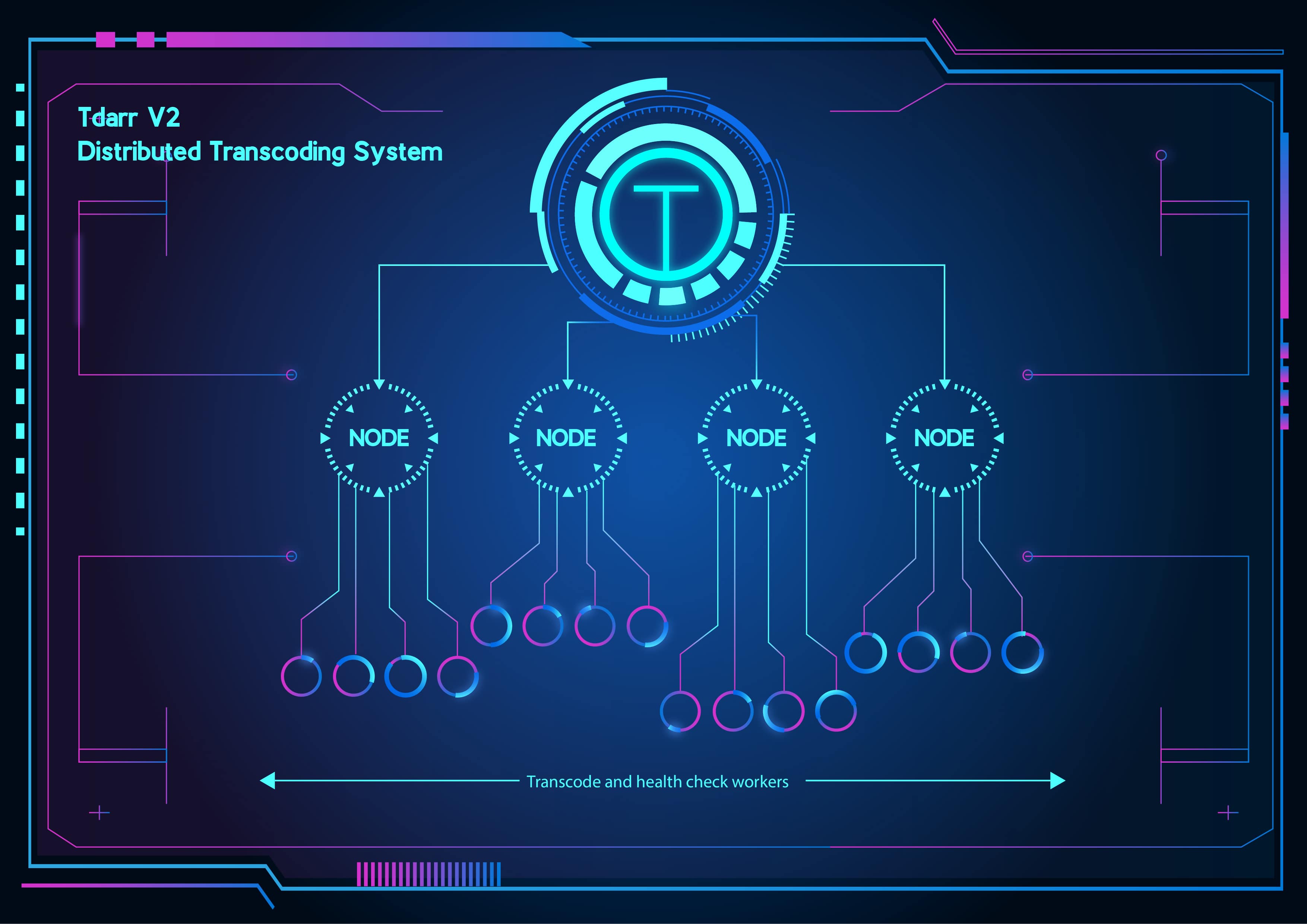
- FFmpeg/HandBrake + video health checking (Windows, macOS, Linux & Docker)
[](https://home.tdarr.io/download) [](https://www.reddit.com/r/Tdarr/) [](https://discord.gg/GF8X8cq)
About:
More information can be found on the following websites:
[https://tdarr.io/](https://tdarr.io/)
[https://docs.tdarr.io/](https://docs.tdarr.io/)
[Builds](https://docs.tdarr.io/docs/releases/changing-version#all-images)
Tdarr V2 is a cross-platform conditional based transcoding application for automating media library transcode/remux management in order to process your media files as required. For example, you can set rules for the required codecs, containers, languages etc that your media should have which helps keeps things organized and can increase compatability with your devices. A common use for Tdarr is to simply convert video files from h264 to h265 (hevc), saving 40%-50% in size.
The application is in the form of a click-to-run web-app, comprised of the following 2 components:
- Tdarr_Server - Central process which all Nodes connect with
- Tdarr_Node - Processes running on same/other devices which collect tasks from the Server
Put your spare hardware to use with Tdarr Nodes for Windows, Linux (including Linux arm/arm64) and macOS.
Designed to work alongside applications like Sonarr/Radarr and built with the aim of modularisation, parallelisation and scalability, each library you add has its own transcode settings, filters and schedule. Workers can be fired up and closed down as necessary, and are split into 4 types - Transcode CPU/GPU and Health Check CPU/GPU. Worker limits can be managed by the scheduler as well as manually. For a desktop application with similar functionality please see [HBBatchBeast](https://github.com/HaveAGitGat/HBBatchBeast).
- Cross-platform Tdarr Nodes which work together with Tdarr Server to process your files
- GPU and CPU workers
- Use/create Tdarr Plugins for infinite control on how your files are processed:
https://github.com/HaveAGitGat/Tdarr_Plugins
- Audio and video library management
- 7 day, 24 hour scheduler
- Folder watcher
- Worker stall detector
- Load balancing between libraries/drives
- Use HandBrake or FFmpeg
- Tested on a 1,000,000 file dummy library
- Search for files based on hundreds of properties
- Library stats
- Hardware transcoding container (install Nvidia plugin on unRAID/Nvidia runtime container on Ubuntu)

---------------------------------------------------------------------------------------
## Stats
---------------------------------------------------------------------------------------
## Nodes
---------------------------------------------------------------------------------------
## Job reports
---------------------------------------------------------------------------------------
## Property explorer
---------------------------------------------------------------------------------------
## Worker verdict history
---------------------------------------------------------------------------------------
## Plugin stack system
---------------------------------------------------------------------------------------
## Property search
---------------------------------------------------------------------------------------
## Library schedule
---------------------------------------------------------------------------------------
Tdarr is extremely modular/configurable and the main idea behind it is creating a plugin stack to clean up/standardise your files. For example, a typical plugin stack might look like this:
(1) Transcode non hevc files into hevc
(2) Remove subs
(3) Remove meta data (if title)
(4) Add aac stereo audio if none (eng preferred)
(5) Remove closed captions
In this example, plugins 1,2,3 and 5 are community plugins which are available for you to use immediately. Plugin 4 can be created in the plugin creator interface in Tdarr and will appear as a local plugin.
Each of the plugins are conditional, so are only used if needed. They are located in Tdarr/Documents and are written in JavaScript so if none of the plugins do what you want then you can modify/create new plugins if you have a bit of coding experience (or get the gist from having a look). Steps for doing so are in the README here:https://github.com/HaveAGitGat/Tdarr_Plugins . Ask for help in the Discord channel if need be.
Here is an illustration of how the plugin stack works:
For the term 'streams', here is an example of how a file appears in Tdarr search results:
That file has 3 streams - a video, audio and subtitle stream. Subtitles and closed captions are very different. Where is the closed caption data in this example? It's embedded inside the h264 video stream.
Extra streams and closed captions which you don't need can cause problems with direct playing and syncing files, so you might as well remove them (it's recommended to use something like Bazarr for subtitles). Even when playing files in programs such as VLC or Kodi, subtitles/closed captions can cause playback delays and make things stuttery for a few seconds when jumping around the video.
Extra streams can also take up a lot of space. Don't be surprised to see some files in your library with 15+ audio/commentary/subtitle tracks in a bunch of different languages. These can take up an extra GB+ per file.
The plugin creator is split into 'Filters' and 'Actions'. Filters encapsulate the actions, so the actions will only be carried out if the filter conditions are met.
Current filters:
Filter by codec
Filter by medium
Filter by age
Filter by resolution
Filter by size
Current actions:
Transcode - HandBrake basic options
Transcode - HandBrake/FFmpeg custom arguments
Transcode - Standardise audio stream codecs
Transcode - Add audio stream
Transcode - Keep one audio stream
Remux container
Some actions/plugins have built-in filters (specified in the plugin creator). This means they'll automatically detect if a file needs to be processed or not (such as the remove subtitles community plugin). Additional filters can be added.
Some of the actions have become quite complicated so take a bit more time. For example, the 'Keep one audio stream' has 16 different outcomes as it tries to determine the best audio stream to keep based on the codec, language and channel count you specify.
If you have a request for a new filter/action, then try and think of it generically so I can implement it in way that other people can configure and apply it to their (slightly) different circumstances. Request on GitHub,Reddit or Discord.
For example, to maximize direct play, a plugin stack like this can be used:
(1) If not in h264, transcode into h264 [h264 is a more universal video codec than others]
(2) If not in mp4, remux into mp4 [mp4 is the most universal container]
(3) Remove subs
(4) Remove closed captions
(5) Add aac stereo audio if none (eng preferred) [very universal audio codec/channel count]
(6) Remove meta-data if title meta detected [Stops annoying titles appearing in Plex]
---
### Overview (`updater/README.md`)
# Tdarr v2 Preview
Updated instructions: https://tdarr.io/
1.99.11 Module Matrix
| Platform/Module | Updater | Server | Node | WebUI | Desktop |
|----------------------|---------|--------|------|-------|---------|
| linux_x64 | ✔ | ✔ | ✔ | ✔ | ✔ |
| win32_x64 | ✔ | ✔ | ✔ | ✔ | ✔ |
| darwin_x64 | ✔ | ✔ | ✔ | ✔ | ✔ |
| linux_arm (Armv7) | ✔ | ✔ | ✔ |✔ | - |
| Docker | - | ✔ tdarr:1.99.11| ✔ tdarr_node:1.99.11| ✔ tdarr:1.99.11| - |
Descriptions:
| Module\Desc. | |
|--------------|--------------------------------------------------------------------------------------------------------------------------------|
| Updater | Module used to update the other modules |
| Server | The core of Tdarr. All modules connect with it. Does not do any encoding. |
| Node | Module used for encoding. Can be run on same machine as server or remotely. |
| WebUI | Module used for web user interface. Can be run on same machine as server or remotely. |
| Desktop | Module used for desktop user interface. Can be run on same machine as server or remotely. Has options to start up server/node. |
Download the relevant Tdarr_Updater:
https://docs.tdarr.io/docs/installation/windows-linux-macos
Unzip it.
If on linux or mac it's best to run the packages from a terminal so you can see the output.
Run /Tdarr_Updater
4 Modules will be downloaded.
Run:
/Tdarr_Server/Tdarr_Server
You should be able to see 7 tests run in the logs:
[Info] Tdarr_Server - Binary test 1: handbrakePath working
[INFO] Tdarr_Server - Binary test 2: ffmpegPath working
[INFO] Tdarr_Server - Binary test 3: mkvpropeditPath working
[INFO] Tdarr_Server - Scanner test 1: FFprobe working
[INFO] Tdarr_Server - Scanner test 2: Exiftool working
[INFO] Tdarr_Server - Scanner test 3: Mediainfo working
[INFO] Tdarr_Server - Scanner test 4: CCExtractor working
If the handbrakePath or ffmpegPath aren't working, you need to set the paths in the config below. mkvpropeditPath is currently not use for anything.
Run:
/Tdarr_Node/Tdarr_Node
You should be able to see 3 tests run in the logs:
[Info] Tdarr_Node - Binary test 1: handbrakePath working
[INFO] Tdarr_Node - Binary test 2: ffmpegPath working
[INFO] Tdarr_Node - Binary test 3: mkvpropeditPath working
If the handbrakePath or ffmpegPath aren't working, you need to set the paths in the config below. mkvpropeditPath is currently not use for anything.
Close both down once init has finished.
Open /configs/Tdarr_Server_Config.json:
{
"serverPort": "8266",
"handbrakePath": "",
"ffmpegPath": ""
}
Set the server port as desired.
Add handbrakePath and ffmpegPath, make sure to use double back slash or a single forward slash in the paths e.g.:
C:\\ffmpeg\\ffmpeg
C:/ffmpeg/ffmpeg
Open /configs/Tdarr_WebUI_Config.json:
{
"webUIPort": 8265,
"serverIP": "0.0.0.0",
"serverPort": 8266
}
Set the webUIPort as desired. If running the webUI on the same machine as the server, leave serverIP as is else change it to the server machine IP. Set the serverPort
to the same as in the previous config.
Open /configs/Tdarr_Node_Config.json:
{
"nodeID": "QUkJYfSSD",
"nodeIP": "0.0.0.0",
"nodePort": "8267",
"serverIP": "0.0.0.0",
"serverPort": "8266",
"handbrakePath": "",
"ffmpegPath": "",
"pathTranslators": [
{
"server": "",
"node": ""
}
]
}
If runnig the node and server on the same machine leave the IPs as-is else set the machine IPs.
Add handbrakePath and ffmpegPath. Set whichever nodePort you like. If running a node on a different machine to the server,
make sure to specify the serverIP address. Also make sure the node and server machines have the same library and cache paths. For example,
y:\Movies on the server should point to the same location as y:\Movies on the node machine. Else you can use the pathTranslators
in the config above, similar to Docker. e.g.:
{
"server": "y:/Movies",
"node": "z:/Stuff/Movies"
}
In the above config, when the server sends a file path to the node, the base path will be translated and vice versa.
Make sure ports are open (8266 for server and 8267 for a default node).
Run /Tdarr_Server/Tdarr_Server
Run /Tdarr_Node/Tdarr_Node
Run /Tdarr_WebUI/Tdarr_WebUI
Visit http://localhost:8265/ and the Tdarr UI should be visible. The connected node should appear on the 'Tdarr' tab.
For Tdarr Desktop, run /Tdarr_Desktop/Tdarr_Desktop which will by default start a server and a local node.
A new config /configs/Tdarr_Desktop_Config.json will be created:
{
"Tdarr_Node": true,
"Tdarr_Server": true,
"Tdarr_WebUI": false,
"serverIP": "0.0.0.0",
"serverPort": 8266
}
Above you can specify which modules will run when you start Tdarr_Desktop
If all is working, you should be able to start up workers on different nodes on the 'Tdarr' tab if you have a library set up and some files scanned.
Logs for all modules stored in:
/logs/
Using docker, all server plugins, samples, database files etc are stored in '/app/server' so make sure to map that folder to your host.
The 'tdarr' container contains both Tdarr_Server and Tdarr_WebUI.
Note: The server and nodes must have the same library folders and cache mounted.
Docker run examples:
docker run -ti \
-v /home/h/Desktop/server:/app/server \
-v /home/h/Desktop/Transcode:/mount \
--network host \
-e "serverIP=0.0.0.0" \
-e "serverPort=8266" \
-e "webUIPort=8265" \
-e "TZ=Europe/London" \
-e PUID=1000 \
-e PGID=1000 \
haveagitgat/tdarr:1.99.11
docker run -ti \
-v /home/h/Desktop/Transcode:/mount \
-e "serverIP=0.0.0.0" \
-e "serverPort=8266" \
--network host \
-e "TZ=Europe/London" \
-e PUID=1000 \
-e PGID=1000 \
haveagitgat/tdarr_node:1.99.11
Note: All the variables in the config files can be set through environment variables
Work in progress. Feedback welcome!
---
--- METRICS ---
- Files Extracted: 2
- Estimated Token Budget: ~3616 tokens
- Canonical Reference: https://codewiki.google/github.com/HaveAGitGat/Tdarr