MusicSquare is a browser-based music playground — search, play, and download tracks directly in your browser.
⚠️ For learning and testing only: please respect copyright and the terms of each music platform.
学习收获更多有趣的内容, 欢迎关注微信公众号:Charles的皮卡丘
# 🎉 What's New
- 2026-10-16: Released musicdl v2.14.2 — performed monthly maintenance on common music clients and fixed broken API integrations in four affected clients.
- 2026-10-10: Released musicdl v2.14.1 — monthly maintenance of third-party music clients: fixed API issues on four platforms and replaced three discontinued ones with similar alternatives.
- 2026-09-23: Released musicdl v2.14.0 — fix several bugs in Apple Music, and refactor parts of the third-party parsing interfaces for Qobuz, Deezer, and TIDAL Music.
# 🎵 Introduction
A lightweight music downloader built entirely in pure Python, designed for simplicity, clarity, and ease of use.
It is suitable for personal listening workflows, collection management, and academic or educational purposes such as music information retrieval, data collection, and reproducible research.
With a clean codebase and minimal dependencies, the project is easy to use, extend, and study.
If you find this project useful, please consider giving it a ⭐ star to support ongoing development, help more people discover it, and stay updated with future improvements.
# ⚠️ Disclaimer
This repository is provided solely for educational and research purposes. Commercial use is prohibited.
The software only interacts with publicly accessible web endpoints and does not host, store, mirror, or distribute any copyrighted or proprietary content.
No executables are distributed with this repository. Redistribution, resale, or bundling of this software (or any derivative packaged distribution) without explicit permission is strictly prohibited.
Access to paid, subscription, or otherwise restricted content must be obtained through authorized channels (*e.g.*, purchase or subscription via the relevant service). Use of this software to circumvent paywalls, DRM, licensing restrictions, or other access controls is strictly prohibited.
If you are a copyright or rights holder and believe that this repository infringes your rights, please contact me with sufficient detail (*e.g.*, relevant URLs and proof of ownership), and I will promptly investigate and take appropriate action, which may include removal of the referenced material.
# 🎧 Supported Music Client
| Category | MusicClient (EN) | MusicClient (CN) | 🔎 Search | ⬇️ Download | Code Snippet |
| :-- | :-- | :-- | :--: | :--: | :-- |
| **Platforms in Greater China** | [BilibiliMusicClient](https://www.bilibili.com/audio/home/?type=9) | [Bilibili音乐](https://www.bilibili.com/audio/home/?type=9) | ✅ | ✅ | [bilibili.py](https://github.com/CharlesPikachu/musicdl/blob/master/musicdl/modules/sources/bilibili.py) |
| | [BodianMusicClient](https://bodian.kuwo.cn/) | [波点音乐](https://bodian.kuwo.cn/) | ✅ | ✅ | [bodian.py](https://github.com/CharlesPikachu/musicdl/blob/master/musicdl/modules/sources/bodian.py) |
| | [FiveSingMusicClient](https://5sing.kugou.com/index.html) | [5SING音乐](https://5sing.kugou.com/index.html) | ✅ | ✅ | [fivesing.py](https://github.com/CharlesPikachu/musicdl/blob/master/musicdl/modules/sources/fivesing.py) |
| | [KugouMusicClient](http://www.kugou.com/) | [酷狗音乐](http://www.kugou.com/) | ✅ | ✅ | [kugou.py](https://github.com/CharlesPikachu/musicdl/blob/master/musicdl/modules/sources/kugou.py) |
| | [KuwoMusicClient](http://www.kuwo.cn/) | [酷我音乐](http://www.kuwo.cn/) | ✅ | ✅ | [kuwo.py](https://github.com/CharlesPikachu/musicdl/blob/master/musicdl/modules/sources/kuwo.py) |
| | [MiguMusicClient](https://music.migu.cn/v5/#/musicLibrary) | [咪咕音乐](https://music.migu.cn/v5/#/musicLibrary) | ✅ | ✅ | [migu.py](https://github.com/CharlesPikachu/musicdl/blob/master/musicdl/modules/sources/migu.py) |
| | [MOOVMusicClient](https://moov.hk/) | [摩音符](https://moov.hk/) | ✅ | ✅ | [moov.py](https://github.com/CharlesPikachu/musicdl/blob/master/musicdl/modules/sources/moov.py) |
| | [NeteaseMusicClient](https://music.163.com/) | [网易云音乐](https://music.163.com/) | ✅ | ✅ | [netease.py](https://github.com/CharlesPikachu/musicdl/blob/master/musicdl/modules/sources/netease.py) |
| | [QianqianMusicClient](http://music.taihe.com/) | [千千音乐](http://music.taihe.com/) | ✅ | ✅ | [qianqian.py](https://github.com/CharlesPikachu/musicdl/blob/master/musicdl/modules/sources/qianqian.py) |
| | [QQMusicClient](https://y.qq.com/) | [QQ音乐](https://y.qq.com/) | ✅ | ✅ | [qq.py](https://github.com/CharlesPikachu/musicdl/blob/master/musicdl/modules/sources/qq.py) |
| | [SodaMusicClient](https://www.douyin.com/qishui/) | [汽水音乐](https://www.douyin.com/qishui/) | ✅ | ✅ | [soda.py](https://github.com/CharlesPikachu/musicdl/blob/master/musicdl/modules/sources/soda.py) |
| | [StreetVoiceMusicClient](https://www.streetvoice.cn/) | [街声](https://www.streetvoice.cn/) | ✅ | ✅ | [streetvoice.py](https://github.com/CharlesPikachu/musicdl/blob/master/musicdl/modules/sources/streetvoice.py) |
| **Global Streaming / Indie** | [AppleMusicClient](https://music.apple.com/) | [苹果音乐](https://music.apple.com/) | ✅ | ✅ | [apple.py](https://github.com/CharlesPikachu/musicdl/blob/master/musicdl/modules/sources/apple.py) |
| | [AudiusMusicClient](https://audius.co/) | [Audius音乐平台](https://audius.co/) | ✅ | ✅ | [audius.py](https://github.com/CharlesPikachu/musicdl/blob/master/musicdl/modules/sources/audius.py) |
| | [CCMixterMusicClient](https://ccmixter.org/) | [ccMixter (混音社区)](https://ccmixter.org/) | ✅ | ✅ | [ccmixter.py](https://github.com/CharlesPikachu/musicdl/blob/master/musicdl/modules/sources/ccmixter.py) |
| | [DeezerMusicClient](https://www.deezer.com/us/) | [Deezer (法国音乐平台)](https://www.deezer.com/us/) | ✅ | ✅ | [deezer.py](https://github.com/CharlesPikachu/musicdl/blob/master/musicdl/modules/sources/deezer.py) |
| | [FMAMusicClient](https://freemusicarchive.org/) | [FMA (自由音乐网)](https://freemusicarchive.org/) | ✅ | ✅ | [fma.py](https://github.com/CharlesPikachu/musicdl/blob/master/musicdl/modules/sources/fma.py) |
| | [JamendoMusicClient](https://www.jamendo.com/) | [简音乐 (欧美流行音乐)](https://www.jamendo.com/) | ✅ | ✅ | [jamendo.py](https://github.com/CharlesPikachu/musicdl/blob/master/musicdl/modules/sources/jamendo.py) |
| | [JooxMusicClient](https://www.joox.com/intl) | [JOOX (QQ音乐海外版)](https://www.joox.com/intl) | ✅ | ✅ | [joox.py](https://github.com/CharlesPikachu/musicdl/blob/master/musicdl/modules/sources/joox.py) |
| | [JioSaavnMusicClient](https://www.jiosaavn.com/) | [JioSaavn (印度语音乐)](https://www.jiosaavn.com/) | ✅ | ✅ | [jiosaavn.py](https://github.com/CharlesPikachu/musicdl/blob/master/musicdl/modules/sources/jiosaavn.py) |
| | [OpenGameArtMusicClient](https://opengameart.org/) | [开源游戏素材网](https://opengameart.org/) | ✅ | ✅ | [opengameart.py](https://github.com/CharlesPikachu/musicdl/blob/master/musicdl/modules/sources/opengameart.py) |
| | [QobuzMusicClient](https://play.qobuz.com/discover) | [Qobuz (提供CD质量的流媒体平台)](https://play.qobuz.com/discover) | ✅ | ✅ | [qobuz.py](https://github.com/CharlesPikachu/musicdl/blob/master/musicdl/modules/sources/qobuz.py) |
| | [SoundCloudMusicClient](https://soundcloud.com/discover) | [SoundCloud (声云)](https://soundcloud.com/discover) | ✅ | ✅ | [soundcloud.py](https://github.com/CharlesPikachu/musicdl/blob/master/musicdl/modules/sources/soundcloud.py) |
| | [SpotifyMusicClient](https://open.spotify.com/) | [Spotify (思播)](https://open.spotify.com/) | ✅ | ✅ | [spotify.py](https://github.com/CharlesPikachu/musicdl/blob/master/musicdl/modules/sources/spotify.py) |
| | [SunoMusicClient](https://suno.com/discover) | [Suno (AI音乐生成网站)](https://suno.com/discover) | ✅ | ✅ | [suno.py](https://github.com/CharlesPikachu/musicdl/blob/master/musicdl/modules/sources/suno.py) |
| | [TIDALMusicClient](https://tidal.com/) | [TIDAL (提供HiFi音质的流媒体平台)](https://tidal.com/) | ✅ | ✅ | [tidal.py](https://github.com/CharlesPikachu/musicdl/blob/master/musicdl/modules/sources/tidal.py) |
| | [WikimediaCommonsMusicClient](https://commons.wikimedia.org/) | [维基共享资源(音频)](https://commons.wikimedia.org/) | ✅ | ✅ | [wikimediacommons.py](https://github.com/CharlesPikachu/musicdl/blob/master/musicdl/modules/sources/wikimediacommons.py) |
| | [YouTubeMusicClient](https://music.youtube.com/) | [油管音乐](https://music.youtube.com/) | ✅ | ✅ | [youtube.py](https://github.com/CharlesPikachu/musicdl/blob/master/musicdl/modules/sources/youtube.py) |
| **Audio / Radio** | [ITunesMusicClient](https://www.apple.com/itunes/) | [苹果播客](https://www.apple.com/itunes/) | ✅ | ✅ | [itunes.py](https://github.com/CharlesPikachu/musicdl/blob/master/musicdl/modules/audiobooks/itunes.py) |
| | [LizhiMusicClient](https://www.lizhi.fm/) | [荔枝FM](https://www.lizhi.fm/) | ✅ | ✅ | [lizhi.py](https://github.com/CharlesPikachu/musicdl/blob/master/musicdl/modules/audiobooks/lizhi.py) |
| | [LRTSMusicClient](https://www.lrts.me/) | [懒人听书](https://www.lrts.me/) | ✅ | ✅ | [lrts.py](https://github.com/CharlesPikachu/musicdl/blob/master/musicdl/modules/audiobooks/lrts.py) |
| | [QingtingMusicClient](https://www.qtfm.cn/) | [蜻蜓FM](https://www.qtfm.cn/) | ✅ | ✅ | [qingting.py](https://github.com/CharlesPikachu/musicdl/blob/master/musicdl/modules/audiobooks/qingting.py) |
| | [XimalayaMusicClient](https://www.ximalaya.com/) | [喜马拉雅](https://www.ximalaya.com/) | ✅ | ✅ | [ximalaya.py](https://github.com/CharlesPikachu/musicdl/blob/master/musicdl/modules/audiobooks/ximalaya.py) |
| **Aggregators / Multi-Source Gateways** | [GDStudioMusicClient](https://music.gdstudio.xyz/) | [GD音乐台 (Spotify, Qobuz等10个音乐源)](https://music.gdstudio.xyz/) | ✅ | ✅ | [gdstudio.py](https://github.com/CharlesPikachu/musicdl/blob/master/musicdl/modules/common/gdstudio.py) |
| | [JBSouMusicClient](https://www.jbsou.cn/) | [煎饼搜 (QQ网易云酷我酷狗音乐源)](https://www.jbsou.cn/) | ✅ | ✅ | [jbsou.py](https://github.com/CharlesPikachu/musicdl/blob/master/musicdl/modules/common/jbsou.py) |
| | [MP3JuiceMusicClient](https://mp3juice.co/) | [MP3 Juice (SoundCloud+YouTube音乐源)](https://mp3juice.co/) | ✅ | ✅ | [mp3juice.py](https://github.com/CharlesPikachu/musicdl/blob/master/musicdl/modules/common/mp3juice.py) |
| | [MyFreeMP3MusicClient](https://www.myfreemp3.com.cn/) | [MyFreeMP3 (网易云+夸克音乐源)](https://www.myfreemp3.com.cn/) | ✅ | ✅ | [myfreemp3.py](https://github.com/CharlesPikachu/musicdl/blob/master/musicdl/modules/common/myfreemp3.py) |
| | [TuneHubMusicClient](https://tunehub.sayqz.com/docs) | [TuneHub音乐 (QQ网易云酷我音乐源)](https://tunehub.sayqz.com/docs) | ✅ | ✅ | [tunehub.py](https://github.com/CharlesPikachu/musicdl/blob/master/musicdl/modules/common/tunehub.py) |
| | [XiaoBaiMusicClient](https://music.90svip.cn/) | [小白音乐 (QQ网易云酷我酷狗音乐源)](https://music.90svip.cn/) | ✅ | ✅ | [xiaobai.py](https://github.com/CharlesPikachu/musicdl/blob/master/musicdl/modules/common/xiaobai.py) |
| **Unofficial Download Sites / Scrapers** | [BuguyyMusicClient](https://buguyy.top/) | [布谷音乐](https://buguyy.top/) | ✅ | ✅ | [buguyy.py](https://github.com/CharlesPikachu/musicdl/blob/master/musicdl/modules/thirdpartysites/buguyy.py) |
| | [FangpiMusicClient](https://www.fangpiw.com/) | [放屁音乐](https://www.fangpiw.com/) | ✅ | ✅ | [fangpi.py](https://github.com/CharlesPikachu/musicdl/blob/master/musicdl/modules/thirdpartysites/fangpi.py) |
| | [FiveSongMusicClient](https://www.5song.xyz/index.html) | [5Song无损音乐](https://www.5song.xyz/index.html) | ✅ | ✅ | [fivesong.py](https://github.com/CharlesPikachu/musicdl/blob/master/musicdl/modules/thirdpartysites/fivesong.py) |
| | [GequbaoMusicClient](https://www.gequbao.com/) | [歌曲宝](https://www.gequbao.com/) | ✅ | ✅ | [gequbao.py](https://github.com/CharlesPikachu/musicdl/blob/master/musicdl/modules/thirdpartysites/gequbao.py) |
| | [GequhaiMusicClient](https://www.gequhai.com/) | [歌曲海](https://www.gequhai.com/) | ✅ | ✅ | [gequhai.py](https://github.com/CharlesPikachu/musicdl/blob/master/musicdl/modules/thirdpartysites/gequhai.py) |
| | [GequkeMusicClient](https://www.gequke.com/) | [歌曲客](https://www.gequke.com/) | ✅ | ✅ | [gequke.py](https://github.com/CharlesPikachu/musicdl/blob/master/musicdl/modules/thirdpartysites/gequke.py) |
| | [HTQYYMusicClient](http://www.htqyy.com/) | [好听轻音乐网](http://www.htqyy.com/) | ✅ | ✅ | [htqyy.py](https://github.com/CharlesPikachu/musicdl/blob/master/musicdl/modules/thirdpartysites/htqyy.py) |
| | [HeishanMusicClient](https://www.163cn.cc/) | [黑山音乐](https://www.163cn.cc/) | ✅ | ✅ | [heishan.py](https://github.com/CharlesPikachu/musicdl/blob/master/musicdl/modules/thirdpartysites/heishan.py) |
| | [KKWSMusicClient](https://www.kkws.cc/) | [开开无损音乐](https://www.kkws.cc/) | ✅ | ✅ | [kkws.py](https://github.com/CharlesPikachu/musicdl/blob/master/musicdl/modules/thirdpartysites/kkws.py) |
| | [LeedodoMusicClient](https://music.leedodo.com/) | [乐多多轻音乐](https://music.leedodo.com/) | ✅ | ✅ | [leedodo.py](https://github.com/CharlesPikachu/musicdl/blob/master/musicdl/modules/thirdpartysites/leedodo.py) |
| | [MituMusicClient](https://www.qqmp3.vip/) | [米兔音乐](https://www.qqmp3.vip/) | ✅ | ✅ | [mitu.py](https://github.com/CharlesPikachu/musicdl/blob/master/musicdl/modules/thirdpartysites/mitu.py) |
| | [MGMP3MusicClient](https://www.mgmp3.top/) | [木瓜音乐](https://www.mgmp3.top/) | ✅ | ✅ | [mgmp3.py](https://github.com/CharlesPikachu/musicdl/blob/master/musicdl/modules/thirdpartysites/mgmp3.py) |
| | [SgogoMusicClient](https://www.sgogo.com/) | [搜歌网](https://www.sgogo.com/) | ✅ | ✅ | [sgogo.py](https://github.com/CharlesPikachu/musicdl/blob/master/musicdl/modules/thirdpartysites/sgogo.py) |
| | [TwoT58MusicClient](https://www.2t58.com/) | [爱听音乐网](https://www.2t58.com/) | ✅ | ✅ | [twot58.py](https://github.com/CharlesPikachu/musicdl/blob/master/musicdl/modules/thirdpartysites/twot58.py) |
| | [XiagebaMusicClient](https://xiageba.liumingye.cn/) | [下歌吧](https://xiageba.liumingye.cn/) | ✅ | ✅ | [xiageba.py](https://github.com/CharlesPikachu/musicdl/blob/master/musicdl/modules/thirdpartysites/xiageba.py) |
| | [XMFWAVMusicClient](https://www.xmfwav.com/) | [小蜜蜂音乐网](https://www.xmfwav.com/) | ✅ | ✅ | [xmfwav.py](https://github.com/CharlesPikachu/musicdl/blob/master/musicdl/modules/thirdpartysites/xmfwav.py) |
| | [YinyuedaoMusicClient](https://1mp3.top/) | [音乐岛](https://1mp3.top/) | ✅ | ✅ | [yinyuedao.py](https://github.com/CharlesPikachu/musicdl/blob/master/musicdl/modules/thirdpartysites/yinyuedao.py) |
| | [YinyuekuMusicClient](http://yinyueku.cn/) | [音乐库](http://yinyueku.cn/) | ✅ | ✅ | [yinyueku.py](https://github.com/CharlesPikachu/musicdl/blob/master/musicdl/modules/thirdpartysites/yinyueku.py) |
# 🧪 Playground
Here are some projects built on top of musicdl,
| Project (EN) | Project (CN) | WeChat Article | Project Location |
| :----: | :----: | :----: | :----: |
| Modern Web Music Player (Claude.ai) | 现代化Web音乐播放器 (Claude.ai) | [click](https://mp.weixin.qq.com/s/fN1ORyI6lzQFqxf6Zk1oIg) | [claudeai-modern-web-music-player](https://github.com/CharlesPikachu/musicdl/tree/master/examples/claudeai-modern-web-music-player) |
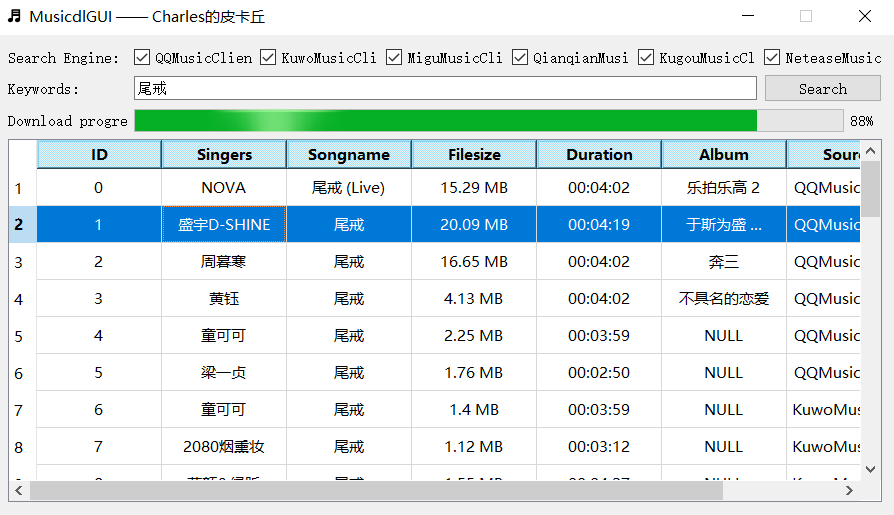
| Music downloader GUI | 音乐下载器GUI界面 | [click](https://mp.weixin.qq.com/s/fN1ORyI6lzQFqxf6Zk1oIg) | [musicdlgui](https://github.com/CharlesPikachu/musicdl/tree/master/examples/musicdlgui) |
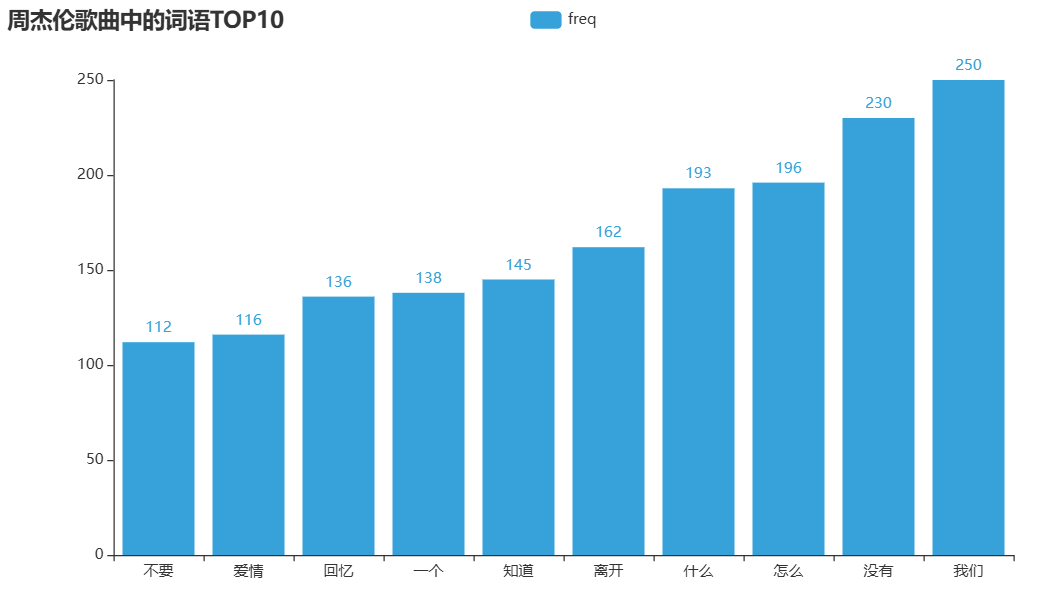
| Singer lyrics analysis | 歌手歌词分析 | [click](https://mp.weixin.qq.com/s/I8Dy7CoM2ThnSpjoUaPtig) | [singerlyricsanalysis](https://github.com/CharlesPikachu/musicdl/tree/master/examples/singerlyricsanalysis) |
| Lyric-based song snippet retrieval | 歌词获取歌曲片段 | [click](https://mp.weixin.qq.com/s/Vmc1IhuhMJ6C5vBwBe43Pg) | [searchlyrics](https://github.com/CharlesPikachu/musicdl/tree/master/examples/searchlyrics) |
For example, the Modern Web Music Player (Claude.ai) looks/works like this,
# 📦 Install
You have three installation methods to choose from,
```sh
# from pip
pip install musicdl
# from github repo method-1
pip install git+https://github.com/CharlesPikachu/musicdl.git@master
# from github repo method-2
git clone https://github.com/CharlesPikachu/musicdl.git
cd musicdl
python setup.py install
```
Certain music clients supported by musicdl require extra CLI tools to function correctly, mainly to decrypt encrypted search and download requests, as well as protected audio files. These tools include:
- [FFmpeg](https://www.ffmpeg.org/) is a cross-platform command-line tool for processing audio and video. The official FFmpeg site provides source code and links to ready-to-use builds for different platforms.
Required By:
- [AppleMusicClient](https://music.apple.com/)
- [MOOVMusicClient](https://moov.hk/)
- [SoundCloudMusicClient](https://soundcloud.com/discover)
- [StreetVoiceMusicClient](https://www.streetvoice.cn/)
- [TIDALMusicClient](https://tidal.com/)
Install Guidance:
- Windows: Download a build from the [official site](https://ffmpeg.org/download.html), extract it, and add the "bin" directory to your `PATH`.
- macOS: `brew install ffmpeg`
- Ubuntu / Debian: `sudo apt install ffmpeg`
Verify that the installation was successful:
```bash
ffmpeg -version
```
If version information is shown, FFmpeg was installed successfully.
- [Node.js](https://nodejs.org/en) is a cross-platform JavaScript runtime used to run JavaScript outside the browser.
Required By:
- [YouTubeMusicClient](https://music.youtube.com/)
Install Guidance:
- Windows: Download and install it from the [official Node.js site](https://nodejs.org/en/download).
- macOS: Download and install it from the [official Node.js site](https://nodejs.org/en/download).
- Linux: Follow the installation guidance on the [official Node.js site](https://nodejs.org/en/download).
Verify that the installation was successful:
```bash
node -v
npm -v
```
If both commands print version information, Node.js was installed successfully.
- [N_m3u8DL-RE](https://github.com/nilaoda/N_m3u8DL-RE) is a cross-platform stream downloader for MPD, M3U8, and ISM.
Required By:
- [AppleMusicClient](https://music.apple.com/)
- [MOOVMusicClient](https://moov.hk/)
- [SoundCloudMusicClient](https://soundcloud.com/discover)
- [TIDALMusicClient](https://tidal.com/)
Install Guidance:
- Windows: Download a prebuilt binary from the [official Releases page](https://github.com/nilaoda/N_m3u8DL-RE/releases).
- macOS: Download a prebuilt binary from the [official Releases page](https://github.com/nilaoda/N_m3u8DL-RE/releases).
- Linux: Download a prebuilt binary from the [official Releases page](https://github.com/nilaoda/N_m3u8DL-RE/releases).
- Arch Linux: `yay -Syu n-m3u8dl-re-bin` or `yay -Syu n-m3u8dl-re-git`
Verify that the installation was successful:
```bash
N_m3u8DL-RE --version
```
If version information is shown, N_m3u8DL-RE was installed successfully.
- [Bento4](https://www.bento4.com/downloads/) is a full-featured MP4 and MPEG-DASH toolkit. In this setup, its mp4decrypt tool is required by amdecrypt and N_m3u8DL-RE.
Required By:
- [AppleMusicClient](https://music.apple.com/)
- [MOOVMusicClient](https://moov.hk/)
- [SoundCloudMusicClient](https://soundcloud.com/discover)
- [TIDALMusicClient](https://tidal.com/)
Install Guidance:
- Windows: Download the binaries from the [official Bento4 downloads page](https://www.bento4.com/downloads/).
- macOS: Download the binaries from the [official Bento4 downloads page](https://www.bento4.com/downloads/), or install with `brew install bento4`.
- Linux: Download the binaries from the [official Bento4 downloads page](https://www.bento4.com/downloads/).
Verify that the installation was successful:
```bash
mp4decrypt
```
If usage or version information is shown, Bento4 was installed successfully.
- [amdecrypt](https://github.com/CharlesPikachu/musicdl/releases/tag/clitools) is a command-line tool for decrypting Apple Music songs in conjunction with a wrapper server.
Required By:
- [AppleMusicClient](https://music.apple.com/)
Install Guidance:
- Prerequisite: Make sure [Bento4](https://www.bento4.com/downloads/) is installed first, and mp4decrypt is available in your `PATH`.
- Windows: Download the binary from the [musicdl clitools release](https://github.com/CharlesPikachu/musicdl/releases/tag/clitools), extract it, and add it to your `PATH`.
- macOS: Download the binary from the [musicdl clitools release](https://github.com/CharlesPikachu/musicdl/releases/tag/clitools), extract it, and add it to your `PATH`.
- Linux: Download the binary from the [musicdl clitools release](https://github.com/CharlesPikachu/musicdl/releases/tag/clitools), extract it, and add it to your `PATH`.
Verify that the installation was successful:
```bash
python -c "import shutil; print(shutil.which('amdecrypt'))"
```
If the command prints the full path of `amdecrypt` without an error, amdecrypt was installed successfully.
# 🚀 Quick Start
This guide explains the most common ways to use musicdl in both the command line and Python.
It is written for practical, day-to-day usage, so the focus is on the workflows most users need first: searching songs, choosing music sources, downloading playlists, saving files to custom folders, and passing cookies or request settings when needed.
#### Typical Usage
(1) Run Musicdl in Interactive Mode
The quickest way to verify that musicdl is installed correctly is to start the interactive terminal UI.
```python
from musicdl import musicdl
music_client = musicdl.MusicClient(
music_sources=['MiguMusicClient', 'NeteaseMusicClient', 'QQMusicClient', 'KuwoMusicClient', 'QianqianMusicClient']
)
music_client.startcmdui()
```
Equivalent command-line usage:
```bash
musicdl -m MiguMusicClient,NeteaseMusicClient,QQMusicClient,KuwoMusicClient,QianqianMusicClient
```
By default, musicdl uses five Mainland China sources for search and download:
```python
MiguMusicClient, NeteaseMusicClient, QQMusicClient, KuwoMusicClient, QianqianMusicClient
```
If you want overseas sources, specify them explicitly each time, for example:
```bash
musicdl -m QobuzMusicClient,JamendoMusicClient,YouTubeMusicClient
```
If you already know where a song is likely to be available, it is usually better to search a small number of sources:
```bash
musicdl -m NeteaseMusicClient,QQMusicClient
```
Interactive selection keys:
- `↑` / `↓`: move cursor
- `Space`: toggle selection
- `a`: select all
- `i`: invert selection
- `Enter`: confirm and download
- `Esc` or `q`: cancel selection
- `r`: restart the program
- `q` at the main prompt: exit
The demonstration is as follows:
(2) Search Directly from The Command Line
Use `-k` / `--keyword` when you already know the query text.
This still opens the selection UI before downloading.
```bash
musicdl -k "Jay Chou"
```
Use a specific set of sources if needed:
```bash
musicdl -k "Jay Chou" -m NeteaseMusicClient,QQMusicClient
```
(3) Parse and Download A Playlist
Use `-p` / `--playlist-url` to parse a supported playlist URL and download all recognized tracks.
```bash
musicdl -p "https://music.163.com/#/playlist?id=3039971654" -m NeteaseMusicClient
```
In Python:
```python
from musicdl import musicdl
music_client = musicdl.MusicClient(music_sources=['NeteaseMusicClient'])
song_infos = music_client.parseplaylist("https://music.163.com/#/playlist?id=7583298906")
music_client.download(song_infos=song_infos)
```
Note:
- `--keyword` and `--playlist-url` cannot be used at the same time.
#### CLI Help
You can always inspect the full command-line interface with:
```bash
musicdl --help
```
Show CLI help output
```
/* Detailed source-code truncated for AI context efficiency. */
```
#### Common Configuration
(1) Save Files to Custom Folders
Python:
```python
from musicdl import musicdl
init_music_clients_cfg = {
'MiguMusicClient': {'work_dir': 'migu'},
'NeteaseMusicClient': {'work_dir': 'netease'},
'QQMusicClient': {'work_dir': 'qq'},
}
music_client = musicdl.MusicClient(
music_sources=['MiguMusicClient', 'NeteaseMusicClient', 'QQMusicClient'],
init_music_clients_cfg=init_music_clients_cfg,
)
music_client.startcmdui()
```
Command line:
```bash
musicdl -m MiguMusicClient,NeteaseMusicClient,QQMusicClient \
-i '{"MiguMusicClient": {"work_dir": "migu"}, "NeteaseMusicClient": {"work_dir": "netease"}, "QQMusicClient": {"work_dir": "qq"}}'
```
(2) Pass Cookies for VIP or Logged-in Access
If a source works better when logged in, provide cookies from that platform's web session, *e.g.*, `QQMusicClient`:
```python
from musicdl import musicdl
your_vip_cookies_with_str_or_dict_format = ""
init_music_clients_cfg = {
'QQMusicClient': {
'default_search_cookies': your_vip_cookies_with_str_or_dict_format,
'default_download_cookies': your_vip_cookies_with_str_or_dict_format,
}
}
music_client = musicdl.MusicClient(
music_sources=['NeteaseMusicClient', 'QQMusicClient'],
init_music_clients_cfg=init_music_clients_cfg,
)
music_client.startcmdui()
```
Command line:
```bash
musicdl -m NeteaseMusicClient,QQMusicClient \
-i '{"QQMusicClient": {"default_search_cookies": "YOUR_COOKIES", "default_download_cookies": "YOUR_COOKIES"}}'
```
(3) Increase The Number of Search Results from One Source
```python
from musicdl import musicdl
init_music_clients_cfg = {
'QQMusicClient': {'search_size_per_source': 20}
}
music_client = musicdl.MusicClient(
music_sources=['NeteaseMusicClient', 'QQMusicClient'],
init_music_clients_cfg=init_music_clients_cfg,
)
music_client.startcmdui()
```
Equivalent command:
```bash
musicdl -m NeteaseMusicClient,QQMusicClient \
-i '{"QQMusicClient": {"search_size_per_source": 20}}'
```
(4) Use Free Proxies Automatically
If you want to use the [pyfreeproxy](https://github.com/CharlesPikachu/freeproxy) library to fetch free proxies automatically:
```python
from musicdl import musicdl
init_music_clients_cfg = {
'NeteaseMusicClient': {
'search_size_per_source': 1000,
'auto_set_proxies': True,
'freeproxy_settings': {
'proxy_sources': ["ProxyScrapeProxiedSession", "ProxylistProxiedSession"],
'init_proxied_session_cfg': {
'max_pages': 2,
'filter_rule': {
'country_code': ["CN"],
'anonymity': ["elite"],
'protocol': ["http", "https"],
},
},
'disable_print': True,
'max_tries': 20,
},
}
}
music_client = musicdl.MusicClient(
music_sources=['NeteaseMusicClient'],
init_music_clients_cfg=init_music_clients_cfg,
)
music_client.startcmdui()
```
Command line:
```bash
musicdl -m NeteaseMusicClient \
-i '{"NeteaseMusicClient": {"search_size_per_source": 1000, "auto_set_proxies": true, "freeproxy_settings": {"proxy_sources": ["ProxyScrapeProxiedSession", "ProxylistProxiedSession"], "init_proxied_session_cfg": {"max_pages": 2, "filter_rule": {"country_code": ["CN"], "anonymity": ["elite"], "protocol": ["http", "https"]}}, "disable_print": true, "max_tries": 20}}}'
```
(5) Override Request Settings Per Source
Use `requests_overrides` when you need to pass extra request options such as `proxies`, `timeout`, or `verify`.
```python
from musicdl import musicdl
requests_overrides = {
'NeteaseMusicClient': {
'timeout': (10, 30),
'verify': False,
'headers': {'User-Agent': 'Mozilla/5.0'},
}
}
music_client = musicdl.MusicClient(
music_sources=['NeteaseMusicClient'],
requests_overrides=requests_overrides,
)
search_results = music_client.search(keyword='tail ring')
music_client.download(song_infos=search_results)
```
Command line:
```bash
musicdl -k "tail ring" -m NeteaseMusicClient \
-r '{"NeteaseMusicClient": {"timeout": [10, 30], "verify": false, "headers": {"User-Agent": "Mozilla/5.0"}}}'
```
(6) Pass Source-Specific Search Rules
Use `search_rules` when a source supports extra search options.
Behavior is implementation-specific.
```python
from musicdl import musicdl
search_rules = {
'FiveSingMusicClient': {
'sort': 1,
'filter': 0,
'type': 0,
}
}
music_client = musicdl.MusicClient(
music_sources=['FiveSingMusicClient'],
search_rules=search_rules,
)
music_client.startcmdui()
```
Command line:
```bash
musicdl -m FiveSingMusicClient \
-s '{"FiveSingMusicClient": {"sort": 1, "filter": 0, "type": 0}}'
```
(7) Adjust Thread Counts Per Source
```python
from musicdl import musicdl
clients_threadings = {
'NeteaseMusicClient': 8,
'QQMusicClient': 4,
}
music_client = musicdl.MusicClient(
music_sources=['NeteaseMusicClient', 'QQMusicClient'],
clients_threadings=clients_threadings,
)
music_client.startcmdui()
```
Command line:
```bash
musicdl -m NeteaseMusicClient,QQMusicClient \
-c '{"NeteaseMusicClient": 8, "QQMusicClient": 4}'
```
#### Separate Search and Download
You can call `.search()` and `.download()` separately to inspect intermediate results or build custom workflows.
```python
from musicdl import musicdl
music_client = musicdl.MusicClient(music_sources=['NeteaseMusicClient'])
search_results = music_client.search(keyword='尾戒')
print(search_results)
song_infos = []
for song_infos_per_source in search_results.values():
song_infos.extend(song_infos_per_source)
music_client.download(song_infos=song_infos)
```
#### Secondary Development
You can also bypass the unified `MusicClient` and use a specific client directly.
For example:
```python
from musicdl.modules.sources import NeteaseMusicClient
netease_music_client = NeteaseMusicClient()
search_results = netease_music_client.search(keyword='那些年')
print(search_results)
netease_music_client.download(song_infos=search_results)
```
To inspect all registered client classes:
```python
from musicdl.modules import MusicClientBuilder
print(MusicClientBuilder.REGISTERED_MODULES)
```
#### Download Playlist Items
From musicdl v2.9.0 onward, support for playlist parsing and downloading is being added gradually, now including,
```python
AppleMusicClient, DeezerMusicClient, FiveSingMusicClient, JamendoMusicClient, JooxMusicClient,
KuwoMusicClient, KugouMusicClient, MiguMusicClient, NeteaseMusicClient, QQMusicClient,
QianqianMusicClient, QobuzMusicClient, SoundCloudMusicClient, StreetVoiceMusicClient, SodaMusicClient,
SpotifyMusicClient, TIDALMusicClient, FMAMusicClient, JioSaavnMusicClient, BodianMusicClient,
SunoMusicClient, MOOVMusicClient, AudiusMusicClient, CCMixterMusicClient,
```
You can download a supported playlist directly from the terminal:
```
/* Detailed source-code truncated for AI context efficiency. */
```
Alternatively, in Python:
```python
from musicdl import musicdl
init_music_clients_cfg = {
'NeteaseMusicClient': {'default_parse_cookies': YOUR_VIP_COOKIES}
}
music_client = musicdl.MusicClient(
music_sources=['NeteaseMusicClient'],
init_music_clients_cfg=init_music_clients_cfg,
)
song_infos = music_client.parseplaylist("https://music.163.com/#/playlist?id=7583298906")
music_client.download(song_infos=song_infos)
```
#### WhisperLRC
On some music platforms, it is not possible to obtain lyric files directly, for example `XimalayaMusicClient`, `LizhiMusicClient`, `LRTSMusicClient`, `QingtingMusicClient` and `MituMusicClient`.
To handle this, musicdl provides a faster-whisper-based interface that can generate lyrics automatically.
Generate lyrics from a local file:
```python
from musicdl.modules import WhisperLRC
your_local_music_file_path = 'xxx.flac'
print(WhisperLRC(model_size_or_path='base').fromfilepath(your_local_music_file_path))
```
Available `model_size_or_path` values:
```python
tiny, tiny.en, base, base.en, small, small.en, distil-small.en, medium, medium.en, distil-medium.en, large-v1, large-v2, large-v3, large, distil-large-v2, distil-large-v3, large-v3-turbo, turbo
```
In general, larger models generate better lyrics but take longer to run.
Use the environment variable `ENABLE_WHISPERLRC=True` to toggle on-the-fly lyric generation for all music downloads.
For example:
```bash
export ENABLE_WHISPERLRC=True
```
This is usually *not recommended* for normal downloading workflows, because it can make one run take a very long time unless you keep `search_size_per_source=1` and use a very small Whisper model such as `tiny`.
You can also generate lyrics from a direct audio URL:
```python
from musicdl.modules import WhisperLRC
music_link = ''
print(WhisperLRC(model_size_or_path='base').fromurl(music_link))
```
#### Scenarios Where Quark Netdisk Login Cookies Are Required
Some websites share high-quality or lossless music through [Quark Netdisk](https://pan.quark.cn/) links, for example:
```python
MituMusicClient, GequbaoMusicClient, YinyuedaoMusicClient, BuguyyMusicClient
```
If you want to download high-quality or lossless files from these sources, provide the cookies from your logged-in Quark Netdisk web session.
```python
from musicdl import musicdl
init_music_clients_cfg = {
'YinyuedaoMusicClient': {'quark_parser_config': {'cookies': your_cookies_with_str_or_dict_format}},
'GequbaoMusicClient': {'quark_parser_config': {'cookies': your_cookies_with_str_or_dict_format}},
'MituMusicClient': {'quark_parser_config': {'cookies': your_cookies_with_str_or_dict_format}},
'BuguyyMusicClient': {'quark_parser_config': {'cookies': your_cookies_with_str_or_dict_format}},
}
music_client = musicdl.MusicClient(
music_sources=['MituMusicClient', 'YinyuedaoMusicClient', 'GequbaoMusicClient', 'BuguyyMusicClient'],
init_music_clients_cfg=init_music_clients_cfg,
)
music_client.startcmdui()
```
Please note:
- musicdl does not provide any speed-limit bypass for Quark Netdisk.
- If the cookies belong to a non-VIP Quark account, the download speed may be only a few hundred KB/s.
- Quark may first save the file into your own account before downloading it.
- If your Quark storage is insufficient, the download may fail.
#### Common Issues and Solutions (FAQ)
How to Parse New Kugou Web Playlist URLs?
If you have a new playlist link, for example,
`https://www.kugou.com/songlist/gcid_3zs9qlpmzdz003/`,
you need to manually extract the `special ID` via your browser.
1. Open the playlist link in your browser and make sure you are logged into Kugou Music.
2. Open Developer Tools (`F12`) and inspect the returned HTML page in the Network panel.
3. Search for the keyword `"specialid"`.
4. The number immediately after it is the special ID.
5. Construct a new URL in the form:
`https://www.kugou.com/yy/special/single/{YOUR_SPECIAL_ID}.html`
6. Use that new URL as the playlist input for musicdl.
Why is The Downloaded Apple Music Playlist Incomplete?
musicdl currently only supports parsing Apple Music playlists with a maximum of 300 tracks.
If your playlist exceeds this limit, split it into several smaller playlists and download them separately.
For more details, please refer to the [official documentation](https://musicdl.readthedocs.io/).
# ⭐ Recommended Projects
| Project | ⭐ Stars | 📦 Version | ⏱ Last Update | 🛠 Repository |
| ------------- | --------- | ----------- | ---------------- | -------- |
| 🎵 **Musicdl** 轻量级无损音乐下载器 | [](https://github.com/CharlesPikachu/musicdl) | [](https://pypi.org/project/musicdl) | [](https://github.com/CharlesPikachu/musicdl/commits/master) | [🛠 Repository](https://github.com/CharlesPikachu/musicdl) |
| 🎬 **Videodl** 轻量级高清无水印视频下载器 | [](https://github.com/CharlesPikachu/videodl) | [](https://pypi.org/project/videofetch) | [](https://github.com/CharlesPikachu/videodl/commits/master) | [🛠 Repository](https://github.com/CharlesPikachu/videodl) |
| 🖼️ **Imagedl** 轻量级海量图片搜索下载器 | [](https://github.com/CharlesPikachu/imagedl) | [](https://pypi.org/project/pyimagedl) | [](https://github.com/CharlesPikachu/imagedl/commits/main) | [🛠 Repository](https://github.com/CharlesPikachu/imagedl) |
| 🖼️ **Paperdl** 轻量级学术论文搜索下载器 | [](https://github.com/CharlesPikachu/paperdl) | [](https://pypi.org/project/paperdl) | [](https://github.com/CharlesPikachu/paperdl/commits/main) | [🛠 Repository](https://github.com/CharlesPikachu/paperdl) |
| 🌐 **FreeProxy** 全球海量高质量免费代理采集器 | [](https://github.com/CharlesPikachu/freeproxy) | [](https://pypi.org/project/pyfreeproxy) | [](https://github.com/CharlesPikachu/freeproxy/commits/master) | [🛠 Repository](https://github.com/CharlesPikachu/freeproxy) |
| 🌐 **MusicSquare** 简易音乐搜索下载和播放网页 | [](https://github.com/CharlesPikachu/musicsquare) | [](https://pypi.org/project/musicdl) | [](https://github.com/CharlesPikachu/musicsquare/commits/main) | [🛠 Repository](https://github.com/CharlesPikachu/musicsquare) |
| 🌐 **ZHIHU://VERSE** Zhihu CLI 驱动的交互式知乎实验场 | [](https://github.com/CharlesPikachu/zhihu-verse) | [](https://pypi.org/project/pyzhihu-cli) | [](https://github.com/CharlesPikachu/zhihu-verse/commits/main) | [🛠 Repository](https://github.com/CharlesPikachu/zhihu-verse) |
| 🌐 **FreeGPTHub** 真正免费的GPT统一接口 | [](https://github.com/CharlesPikachu/FreeGPTHub) | [](https://pypi.org/project/freegpthub) | [](https://github.com/CharlesPikachu/FreeGPTHub/commits/main) | [🛠 Repository](https://github.com/CharlesPikachu/FreeGPTHub) |
# 📚 Citation
If you use this project in your research, please cite the repository.
```
@misc{musicdl2020,
author = {Zhenchao Jin},
title = {Musicdl: A lightweight music downloader written in pure python},
year = {2020},
publisher = {GitHub},
journal = {GitHub repository},
howpublished = {\url{https://github.com/CharlesPikachu/musicdl}},
}
```
# 🌟 Star History
# ☕ Appreciation (赞赏 / 打赏)
| WeChat Appreciation QR Code (微信赞赏码) | Alipay Appreciation QR Code (支付宝赞赏码) |
| :--------: | :----------: |
| | |
# 📢 WeChat Official Account (微信公众号):
Charles的皮卡丘 (*Charles_pikachu*)
---
### Quickstart (`docs/Quickstart.md`)
# Quick Start
This guide explains the most common ways to use musicdl in both the command line and Python.
It is written for practical, day-to-day usage, so the focus is on the workflows most users need first: searching songs, choosing music sources, downloading playlists, saving files to custom folders, and passing cookies or request settings when needed.
#### Typical Usage
(1) Run Musicdl in Interactive Mode
The quickest way to verify that musicdl is installed correctly is to start the interactive terminal UI.
```python
from musicdl import musicdl
music_client = musicdl.MusicClient(
music_sources=['MiguMusicClient', 'NeteaseMusicClient', 'QQMusicClient', 'KuwoMusicClient', 'QianqianMusicClient']
)
music_client.startcmdui()
```
Equivalent command-line usage:
```bash
musicdl -m MiguMusicClient,NeteaseMusicClient,QQMusicClient,KuwoMusicClient,QianqianMusicClient
```
By default, musicdl uses five Mainland China sources for search and download:
```python
MiguMusicClient, NeteaseMusicClient, QQMusicClient, KuwoMusicClient, QianqianMusicClient
```
If you want overseas sources, specify them explicitly each time, for example:
```bash
musicdl -m QobuzMusicClient,JamendoMusicClient,YouTubeMusicClient
```
If you already know where a song is likely to be available, it is usually better to search a small number of sources:
```bash
musicdl -m NeteaseMusicClient,QQMusicClient
```
Interactive selection keys:
- `↑` / `↓`: move cursor
- `Space`: toggle selection
- `a`: select all
- `i`: invert selection
- `Enter`: confirm and download
- `Esc` or `q`: cancel selection
- `r`: restart the program
- `q` at the main prompt: exit
The demonstration is as follows:
(2) Search Directly from The Command Line
Use `-k` / `--keyword` when you already know the query text.
This still opens the selection UI before downloading.
```bash
musicdl -k "Jay Chou"
```
Use a specific set of sources if needed:
```bash
musicdl -k "Jay Chou" -m NeteaseMusicClient,QQMusicClient
```
(3) Parse and Download A Playlist
Use `-p` / `--playlist-url` to parse a supported playlist URL and download all recognized tracks.
```bash
musicdl -p "https://music.163.com/#/playlist?id=3039971654" -m NeteaseMusicClient
```
In Python:
```python
from musicdl import musicdl
music_client = musicdl.MusicClient(music_sources=['NeteaseMusicClient'])
song_infos = music_client.parseplaylist("https://music.163.com/#/playlist?id=7583298906")
music_client.download(song_infos=song_infos)
```
Note:
- `--keyword` and `--playlist-url` cannot be used at the same time.
#### CLI Help
You can always inspect the full command-line interface with:
```bash
musicdl --help
```
Show CLI help output
```
/* Detailed source-code truncated for AI context efficiency. */
```
#### Common Configuration
(1) Save Files to Custom Folders
Python:
```python
from musicdl import musicdl
init_music_clients_cfg = {
'MiguMusicClient': {'work_dir': 'migu'},
'NeteaseMusicClient': {'work_dir': 'netease'},
'QQMusicClient': {'work_dir': 'qq'},
}
music_client = musicdl.MusicClient(
music_sources=['MiguMusicClient', 'NeteaseMusicClient', 'QQMusicClient'],
init_music_clients_cfg=init_music_clients_cfg,
)
music_client.startcmdui()
```
Command line:
```bash
musicdl -m MiguMusicClient,NeteaseMusicClient,QQMusicClient \
-i '{"MiguMusicClient": {"work_dir": "migu"}, "NeteaseMusicClient": {"work_dir": "netease"}, "QQMusicClient": {"work_dir": "qq"}}'
```
(2) Pass Cookies for VIP or Logged-in Access
If a source works better when logged in, provide cookies from that platform's web session, *e.g.*, `QQMusicClient`:
```python
from musicdl import musicdl
your_vip_cookies_with_str_or_dict_format = ""
init_music_clients_cfg = {
'QQMusicClient': {
'default_search_cookies': your_vip_cookies_with_str_or_dict_format,
'default_download_cookies': your_vip_cookies_with_str_or_dict_format,
}
}
music_client = musicdl.MusicClient(
music_sources=['NeteaseMusicClient', 'QQMusicClient'],
init_music_clients_cfg=init_music_clients_cfg,
)
music_client.startcmdui()
```
Command line:
```bash
musicdl -m NeteaseMusicClient,QQMusicClient \
-i '{"QQMusicClient": {"default_search_cookies": "YOUR_COOKIES", "default_download_cookies": "YOUR_COOKIES"}}'
```
(3) Increase The Number of Search Results from One Source
```python
from musicdl import musicdl
init_music_clients_cfg = {
'QQMusicClient': {'search_size_per_source': 20}
}
music_client = musicdl.MusicClient(
music_sources=['NeteaseMusicClient', 'QQMusicClient'],
init_music_clients_cfg=init_music_clients_cfg,
)
music_client.startcmdui()
```
Equivalent command:
```bash
musicdl -m NeteaseMusicClient,QQMusicClient \
-i '{"QQMusicClient": {"search_size_per_source": 20}}'
```
(4) Use Free Proxies Automatically
If you want to use the [pyfreeproxy](https://github.com/CharlesPikachu/freeproxy) library to fetch free proxies automatically:
```python
from musicdl import musicdl
init_music_clients_cfg = {
'NeteaseMusicClient': {
'search_size_per_source': 1000,
'auto_set_proxies': True,
'freeproxy_settings': {
'proxy_sources': ["ProxyScrapeProxiedSession", "ProxylistProxiedSession"],
'init_proxied_session_cfg': {
'max_pages': 2,
'filter_rule': {
'country_code': ["CN"],
'anonymity': ["elite"],
'protocol': ["http", "https"],
},
},
'disable_print': True,
'max_tries': 20,
},
}
}
music_client = musicdl.MusicClient(
music_sources=['NeteaseMusicClient'],
init_music_clients_cfg=init_music_clients_cfg,
)
music_client.startcmdui()
```
Command line:
```bash
musicdl -m NeteaseMusicClient \
-i '{"NeteaseMusicClient": {"search_size_per_source": 1000, "auto_set_proxies": true, "freeproxy_settings": {"proxy_sources": ["ProxyScrapeProxiedSession", "ProxylistProxiedSession"], "init_proxied_session_cfg": {"max_pages": 2, "filter_rule": {"country_code": ["CN"], "anonymity": ["elite"], "protocol": ["http", "https"]}}, "disable_print": true, "max_tries": 20}}}'
```
(5) Override Request Settings Per Source
Use `requests_overrides` when you need to pass extra request options such as `proxies`, `timeout`, or `verify`.
```python
from musicdl import musicdl
requests_overrides = {
'NeteaseMusicClient': {
'timeout': (10, 30),
'verify': False,
'headers': {'User-Agent': 'Mozilla/5.0'},
}
}
music_client = musicdl.MusicClient(
music_sources=['NeteaseMusicClient'],
requests_overrides=requests_overrides,
)
search_results = music_client.search(keyword='tail ring')
music_client.download(song_infos=search_results)
```
Command line:
```bash
musicdl -k "tail ring" -m NeteaseMusicClient \
-r '{"NeteaseMusicClient": {"timeout": [10, 30], "verify": false, "headers": {"User-Agent": "Mozilla/5.0"}}}'
```
(6) Pass Source-Specific Search Rules
Use `search_rules` when a source supports extra search options.
Behavior is implementation-specific.
```python
from musicdl import musicdl
search_rules = {
'FiveSingMusicClient': {
'sort': 1,
'filter': 0,
'type': 0,
}
}
music_client = musicdl.MusicClient(
music_sources=['FiveSingMusicClient'],
search_rules=search_rules,
)
music_client.startcmdui()
```
Command line:
```bash
musicdl -m FiveSingMusicClient \
-s '{"FiveSingMusicClient": {"sort": 1, "filter": 0, "type": 0}}'
```
(7) Adjust Thread Counts Per Source
```python
from musicdl import musicdl
clients_threadings = {
'NeteaseMusicClient': 8,
'QQMusicClient': 4,
}
music_client = musicdl.MusicClient(
music_sources=['NeteaseMusicClient', 'QQMusicClient'],
clients_threadings=clients_threadings,
)
music_client.startcmdui()
```
Command line:
```bash
musicdl -m NeteaseMusicClient,QQMusicClient \
-c '{"NeteaseMusicClient": 8, "QQMusicClient": 4}'
```
#### Separate Search and Download
You can call `.search()` and `.download()` separately to inspect intermediate results or build custom workflows.
```python
from musicdl import musicdl
music_client = musicdl.MusicClient(music_sources=['NeteaseMusicClient'])
search_results = music_client.search(keyword='尾戒')
print(search_results)
song_infos = []
for song_infos_per_source in search_results.values():
song_infos.extend(song_infos_per_source)
music_client.download(song_infos=song_infos)
```
#### Secondary Development
You can also bypass the unified `MusicClient` and use a specific client directly.
For example:
```python
from musicdl.modules.sources import NeteaseMusicClient
netease_music_client = NeteaseMusicClient()
search_results = netease_music_client.search(keyword='那些年')
print(search_results)
netease_music_client.download(song_infos=search_results)
```
To inspect all registered client classes:
```python
from musicdl.modules import MusicClientBuilder
print(MusicClientBuilder.REGISTERED_MODULES)
```
#### Download Playlist Items
From musicdl v2.9.0 onward, support for playlist parsing and downloading is being added gradually, now including,
```python
AppleMusicClient, DeezerMusicClient, FiveSingMusicClient, JamendoMusicClient, JooxMusicClient,
KuwoMusicClient, KugouMusicClient, MiguMusicClient, NeteaseMusicClient, QQMusicClient,
QianqianMusicClient, QobuzMusicClient, SoundCloudMusicClient, StreetVoiceMusicClient, SodaMusicClient,
SpotifyMusicClient, TIDALMusicClient, FMAMusicClient, JioSaavnMusicClient, BodianMusicClient,
SunoMusicClient, MOOVMusicClient, AudiusMusicClient, CCMixterMusicClient,
```
You can download a supported playlist directly from the terminal:
```
/* Detailed source-code truncated for AI context efficiency. */
```
Alternatively, in Python:
```python
from musicdl import musicdl
init_music_clients_cfg = {
'NeteaseMusicClient': {'default_parse_cookies': YOUR_VIP_COOKIES}
}
music_client = musicdl.MusicClient(
music_sources=['NeteaseMusicClient'],
init_music_clients_cfg=init_music_clients_cfg,
)
song_infos = music_client.parseplaylist("https://music.163.com/#/playlist?id=7583298906")
music_client.download(song_infos=song_infos)
```
#### WhisperLRC
On some music platforms, it is not possible to obtain lyric files directly, for example `XimalayaMusicClient`, `LizhiMusicClient`, `LRTSMusicClient`, `QingtingMusicClient` and `MituMusicClient`.
To handle this, musicdl provides a faster-whisper-based interface that can generate lyrics automatically.
Generate lyrics from a local file:
```python
from musicdl.modules import WhisperLRC
your_local_music_file_path = 'xxx.flac'
print(WhisperLRC(model_size_or_path='base').fromfilepath(your_local_music_file_path))
```
Available `model_size_or_path` values:
```python
tiny, tiny.en, base, base.en, small, small.en, distil-small.en, medium, medium.en, distil-medium.en, large-v1, large-v2, large-v3, large, distil-large-v2, distil-large-v3, large-v3-turbo, turbo
```
In general, larger models generate better lyrics but take longer to run.
Use the environment variable `ENABLE_WHISPERLRC=True` to toggle on-the-fly lyric generation for all music downloads.
For example:
```bash
export ENABLE_WHISPERLRC=True
```
This is usually *not recommended* for normal downloading workflows, because it can make one run take a very long time unless you keep `search_size_per_source=1` and use a very small Whisper model such as `tiny`.
You can also generate lyrics from a direct audio URL:
```python
from musicdl.modules import WhisperLRC
music_link = ''
print(WhisperLRC(model_size_or_path='base').fromurl(music_link))
```
#### Scenarios Where Quark Netdisk Login Cookies Are Required
Some websites share high-quality or lossless music through [Quark Netdisk](https://pan.quark.cn/) links, for example:
```python
MituMusicClient, GequbaoMusicClient, YinyuedaoMusicClient, BuguyyMusicClient
```
If you want to download high-quality or lossless files from these sources, provide the cookies from your logged-in Quark Netdisk web session.
```python
from musicdl import musicdl
init_music_clients_cfg = {
'YinyuedaoMusicClient': {'quark_parser_config': {'cookies': your_cookies_with_str_or_dict_format}},
'GequbaoMusicClient': {'quark_parser_config': {'cookies': your_cookies_with_str_or_dict_format}},
'MituMusicClient': {'quark_parser_config': {'cookies': your_cookies_with_str_or_dict_format}},
'BuguyyMusicClient': {'quark_parser_config': {'cookies': your_cookies_with_str_or_dict_format}},
}
music_client = musicdl.MusicClient(
music_sources=['MituMusicClient', 'YinyuedaoMusicClient', 'GequbaoMusicClient', 'BuguyyMusicClient'],
init_music_clients_cfg=init_music_clients_cfg,
)
music_client.startcmdui()
```
Please note:
- musicdl does not provide any speed-limit bypass for Quark Netdisk.
- If the cookies belong to a non-VIP Quark account, the download speed may be only a few hundred KB/s.
- Quark may first save the file into your own account before downloading it.
- If your Quark storage is insufficient, the download may fail.
#### Common Issues and Solutions (FAQ)
How to Parse New Kugou Web Playlist URLs?
If you have a new playlist link, for example,
`https://www.kugou.com/songlist/gcid_3zs9qlpmzdz003/`,
you need to manually extract the `special ID` via your browser.
1. Open the playlist link in your browser and make sure you are logged into Kugou Music.
2. Open Developer Tools (`F12`) and inspect the returned HTML page in the Network panel.
3. Search for the keyword `"specialid"`.
4. The number immediately after it is the special ID.
5. Construct a new URL in the form:
`https://www.kugou.com/yy/special/single/{YOUR_SPECIAL_ID}.html`
6. Use that new URL as the playlist input for musicdl.
Why is The Downloaded Apple Music Playlist Incomplete?
musicdl currently only supports parsing Apple Music playlists with a maximum of 300 tracks.
If your playlist exceeds this limit, split it into several smaller playlists and download them separately.
---
### API (`docs/API.md`)
# Musicdl APIs
This document describes the main public interfaces of `MusicClient`, `MusicClientCMD`, and `BaseMusicClient` based on the latest code version.
## `musicdl.musicdl.MusicClient`
`MusicClient` is the high-level entry point for end users. It manages multiple source-specific clients, sends search and download requests to the correct source, and provides both programmatic and interactive workflows.
Constructor:
```python
musicdl.musicdl.MusicClient(
music_sources: list = [],
init_music_clients_cfg: dict = {},
clients_threadings: dict = {},
requests_overrides: dict = {},
search_rules: dict = {},
)
```
Arguments:
- **`music_sources`**
A list of source client names to enable. You can pass a list such as `["NeteaseMusicClient", "QQMusicClient"]`.
You can also pass a single string, it will be converted into a one-item list internally.
If empty, the default sources are:
```python
["MiguMusicClient", "NeteaseMusicClient", "QQMusicClient", "KuwoMusicClient", "QianqianMusicClient"]
```
- **`init_music_clients_cfg`**
Per-source initialization settings. The key is the source name, and the value is a config dictionary used when building that source client.
Example:
```python
{
"NeteaseMusicClient": {"work_dir": "outputs", "search_size_per_source": 10, "maintain_session": True},
"QQMusicClient": {"search_size_per_source": 5, "default_search_cookies": {"foo": "bar"}},
}
```
Common fields include:
- `search_size_per_source`
- `auto_set_proxies`
- `random_update_ua`
- `max_retries`
- `maintain_session`
- `disable_print`
- `work_dir`
- `default_search_cookies`
- `default_download_cookies`
- `default_parse_cookies`
- `search_size_per_page`
- `strict_limit_search_size_per_page`
- `quark_parser_config`
- `freeproxy_settings`
- `enable_search_curl_cffi`
- `enable_download_curl_cffi`
- `enable_parse_curl_cffi`
Notes:
- `logger_handle` is injected automatically by `MusicClient`.
- `type` is also set automatically to the current source name.
- Some sources use a smaller default `search_size_per_source` internally.
- **`clients_threadings`**
Per-source thread counts used during search and download.
Example:
```python
{"NeteaseMusicClient": 8, "QQMusicClient": 4}
```
If a source is not provided here, `MusicClient` uses its internal default thread count.
- **`requests_overrides`**
Per-source request overrides forwarded to the underlying source client.
Typical values include:
- `headers`
- `cookies`
- `proxies`
- `timeout`
- `verify`
Example:
```python
{"NeteaseMusicClient": {"timeout": (10, 30), "headers": {"User-Agent": "..."},}}
```
- **`search_rules`**
Per-source search rules passed into each source client’s `search()` implementation.
Example:
```python
{"FiveSingMusicClient": {"sort": 1, "filter": 0, "type": 0}}
```
Use this when a source supports custom search filters or paging rules.
#### `MusicClient.search(keyword) -> dict[str, list[SongInfo]]`
Searches all enabled music sources in parallel.
What it does:
- Starts one search task per enabled source.
- Uses the per-source thread count from `clients_threadings`.
- Passes `requests_overrides[source]` and `search_rules[source]` to each source client.
- Returns a dictionary keyed by source name.
Example:
```python
music_client = MusicClient(
music_sources=["NeteaseMusicClient", "QQMusicClient"]
)
results = music_client.search("Jay Chou")
```
Typical return shape:
```python
{
"NeteaseMusicClient": [SongInfo(...), SongInfo(...)],
"QQMusicClient": [SongInfo(...)]
}
```
#### `MusicClient.download(song_infos) -> list[SongInfo]`
Downloads songs by routing them to the correct underlying source client.
Accepted input:
- a flat list of `SongInfo`
- or a dictionary like `dict[str, list[SongInfo]]`
What it does:
- Groups songs by `song_info.source`
- Calls the matching source client’s `download()` method
- Merges all successful downloads into one list
Example with a flat list:
```python
results = music_client.search("Faded")
selected = results["NeteaseMusicClient"][:2]
downloaded = music_client.download(selected)
```
Example with the full search result dictionary:
```python
results = music_client.search("Faded")
downloaded = music_client.download(results)
```
Return value:
```python
list[SongInfo]
```
Only successfully downloaded items are returned.
#### `MusicClient.parseplaylist(playlist_url: str) -> list[SongInfo]`
Tries to parse a playlist URL by asking enabled source clients one by one.
What it does:
- Iterates through all initialized clients
- Calls each client’s `parseplaylist()`
- Stops at the first client that returns a non-empty result
Example:
```python
songs = music_client.parseplaylist(
"https://music.163.com/#/playlist?id=7583298906"
)
downloaded = music_client.download(songs)
```
This is useful when the caller does not want to manually determine which source owns the playlist URL.
#### `MusicClient.startcmdui()`
Starts the interactive terminal UI.
What it does:
- Prints basic usage information (version, save paths, *etc.*.).
- Prompts the user to input keywords for music search.
- Calls `MusicClient.search()` to retrieve search results from all configured music sources.
- Displays a formatted table of candidate songs with IDs.
- Opens a cursor-based selection UI where the user can choose one or multiple songs:
- Use "↑/↓" to move the cursor
- Press "Space" to toggle selection
- Press "a" to select all, "i" to invert selection
- Press "Enter" to confirm and start downloading
- Press "Esc" or "q" to cancel selection
- Collects the corresponding song info entries and calls `MusicClient.download()` to download them.
Special inputs at the main prompt:
- `q`: quit the program
- `r`: restart the interactive flow
This method runs in a loop until the user exits.
## `musicdl.musicdl.MusicClientCMD`
`MusicClientCMD` is the Click-based command-line entry point.
It supports three modes:
1. **Interactive mode**
If both `keyword` and `playlist_url` are empty, it launches `startcmdui()`.
2. **Playlist mode**
If `playlist_url` is provided, it parses the playlist and downloads all parsed tracks.
3. **Keyword mode**
If `keyword` is provided, it searches by keyword, opens the selection UI, and downloads the chosen tracks.
Signature:
```python
musicdl.musicdl.MusicClientCMD(
keyword: str,
playlist_url: str,
music_sources: str,
init_music_clients_cfg: str,
requests_overrides: str,
clients_threadings: str,
search_rules: str,
)
```
CLI Options:
- **`-k, --keyword`**
Search keyword. If omitted and no playlist URL is given, the program enters interactive mode.
Example:
```bash
musicdl -k "Taylor Swift"
```
- **`-p, --playlist-url, --playlist_url`**
Playlist URL to parse and download.
Example:
```bash
musicdl -p "https://music.163.com/#/playlist?id=7583298906"
```
- **`-m, --music-sources, --music_sources`**
Comma-separated list of source names.
Example:
```bash
musicdl -k "Adele" -m "NeteaseMusicClient,QQMusicClient"
```
- **`-i, --init-music-clients-cfg, --init_music_clients_cfg`**
JSON string for per-source client initialization config.
Example:
```bash
musicdl -k "Adele" -i '{"NeteaseMusicClient": {"work_dir": "outputs", "search_size_per_source": 10}}'
```
- **`-r, --requests-overrides, --requests_overrides`**
JSON string for per-source request overrides.
Example:
```bash
musicdl -k "Adele" -r '{"NeteaseMusicClient": {"timeout": [10, 30]}}'
```
- **`-c, --clients-threadings, --clients_threadings`**
JSON string for per-source thread counts.
Example:
```bash
musicdl -k "Adele" -c '{"NeteaseMusicClient": 8, "QQMusicClient": 4}'
```
- **`-s, --search-rules, --search_rules`**
JSON string for per-source search rules.
Example:
```bash
musicdl -k "Adele" -s '{"FiveSingMusicClient": {"sort": 1, "type": 0}}'
```
Important Behavior:
- `keyword` and `playlist_url` cannot be set at the same time.
- The JSON-like CLI strings are parsed with `json_repair.loads`, which is more tolerant than strict `json.loads`.
- `music_sources` is split by commas after removing extra spaces.
## `musicdl.modules.sources.BaseMusicClient`
`BaseMusicClient` is the common base class for source-specific music clients.
End users usually do not create this class directly. Instead, they use subclasses such as,
- `musicdl.modules.sources.AppleMusicClient`
- `musicdl.modules.sources.AudiusMusicClient`
- `musicdl.modules.sources.BilibiliMusicClient`
- `musicdl.modules.sources.BodianMusicClient`
- `musicdl.modules.sources.CCMixterMusicClient`
- `musicdl.modules.sources.DeezerMusicClient`
- `musicdl.modules.sources.FiveSingMusicClient`
- `musicdl.modules.sources.FMAMusicClient`
- `musicdl.modules.sources.JamendoMusicClient`
- `musicdl.modules.sources.JooxMusicClient`
- `musicdl.modules.sources.JioSaavnMusicClient`
- `musicdl.modules.sources.KugouMusicClient`
- `musicdl.modules.sources.KuwoMusicClient`
- `musicdl.modules.sources.MiguMusicClient`
- `musicdl.modules.sources.MOOVMusicClient`
- `musicdl.modules.sources.NeteaseMusicClient`
- `musicdl.modules.sources.OpenGameArtMusicClient`
- `musicdl.modules.sources.QianqianMusicClient`
- `musicdl.modules.sources.QQMusicClient`
- `musicdl.modules.sources.QobuzMusicClient`
- `musicdl.modules.sources.SodaMusicClient`
- `musicdl.modules.sources.StreetVoiceMusicClient`
- `musicdl.modules.sources.SoundCloudMusicClient`
- `musicdl.modules.sources.SpotifyMusicClient`
- `musicdl.modules.sources.SunoMusicClient`
- `musicdl.modules.sources.TIDALMusicClient`
- `musicdl.modules.sources.WikimediaCommonsMusicClient`
- `musicdl.modules.sources.YouTubeMusicClient`
- `musicdl.modules.thirdpartysites.BuguyyMusicClient`
- `musicdl.modules.thirdpartysites.FiveSongMusicClient`
- `musicdl.modules.thirdpartysites.FangpiMusicClient`
- `musicdl.modules.thirdpartysites.GequbaoMusicClient`
- `musicdl.modules.thirdpartysites.GequhaiMusicClient`
- `musicdl.modules.thirdpartysites.GequkeMusicClient`
- `musicdl.modules.thirdpartysites.HTQYYMusicClient`
- `musicdl.modules.thirdpartysites.HeishanMusicClient`
- `musicdl.modules.thirdpartysites.KKWSMusicClient`
- `musicdl.modules.thirdpartysites.LeedodoMusicClient`
- `musicdl.modules.thirdpartysites.MituMusicClient`
- `musicdl.modules.thirdpartysites.MGMP3MusicClient`
- `musicdl.modules.thirdpartysites.SgogoMusicClient`
- `musicdl.modules.thirdpartysites.TwoT58MusicClient`
- `musicdl.modules.thirdpartysites.XiagebaMusicClient`
- `musicdl.modules.thirdpartysites.XMFWAVMusicClient`
- `musicdl.modules.thirdpartysites.YinyuedaoMusicClient`
- `musicdl.modules.thirdpartysites.YinyuekuMusicClient`
- `musicdl.modules.common.GDStudioMusicClient`
- `musicdl.modules.common.JBSouMusicClient`
- `musicdl.modules.common.MP3JuiceMusicClient`
- `musicdl.modules.common.MyFreeMP3MusicClient`
- `musicdl.modules.common.TuneHubMusicClient`
- `musicdl.modules.common.XiaoBaiMusicClient`
- `musicdl.modules.audiobooks.ITunesMusicClient`
- `musicdl.modules.audiobooks.LizhiMusicClient`
- `musicdl.modules.audiobooks.LRTSMusicClient`
- `musicdl.modules.audiobooks.QingtingMusicClient`
- `musicdl.modules.audiobooks.XimalayaMusicClient`
For developers, this class provides the shared workflow for:
- search URL construction
- concurrent searching
- deduplication
- work directory creation
- progress display
- downloading with HTTP or HLS
- playlist parsing hooks
- HTTP session / retry handling
Constructor:
```python
musicdl.modules.sources.BaseMusicClient(
search_size_per_source: int = 5,
auto_set_proxies: bool = False,
random_update_ua: bool = False,
enable_search_curl_cffi: bool = False,
enable_parse_curl_cffi: bool = False,
enable_download_curl_cffi: bool = False,
maintain_session: bool = False,
logger_handle: LoggerHandle = None,
disable_print: bool = False,
work_dir: str = "musicdl_outputs",
max_retries: int = 3,
freeproxy_settings: dict = None,
default_search_cookies: dict | str = None,
default_download_cookies: dict | str = None,
default_parse_cookies: dict | str = None,
strict_limit_search_size_per_page: bool = True,
search_size_per_page: int = 10,
quark_parser_config: dict = None,
)
```
Arguments:
- `search_size_per_source`: maximum number of results to keep for this source
- `search_size_per_page`: page size used when building paginated search requests
- `strict_limit_search_size_per_page`: whether to strictly cap returned results
- `maintain_session`: reuse one session across requests
- `max_retries`: retry count for `get()` and `post()`
- `random_update_ua`: randomly refresh `User-Agent`
- `enable_search_curl_cffi`
- `enable_parse_curl_cffi`
- `enable_download_curl_cffi`
- `auto_set_proxies`: auto-fetch proxies through `freeproxy`
- `freeproxy_settings`: config for the proxy client
- `default_search_cookies`
- `default_download_cookies`
- `default_parse_cookies`
- `work_dir`: root output directory
- `logger_handle`: logger instance
- `disable_print`: disable supported logger prints
- `quark_parser_config`: configuration used when a source needs Quark Netdisk cookies or related settings
Methods Subclasses Usually Override:
- **`_constructsearchurls(keyword, rule=None, request_overrides=None) -> list`**
Must be implemented by each subclass. This method should build the list of search URLs or search request targets for the given keyword.
Example idea:
```python
def _constructsearchurls(self, keyword, rule=None, request_overrides=None):
return [f"https://example.com/search?q={keyword}&page=1"]
```
- **`_search(keyword="", search_url="", request_overrides=None, song_infos=[], progress=None, progress_id=0)`**
Must be implemented by each subclass. This method should:
- fetch data from one search URL
- parse the source response
- create `SongInfo` objects
- append valid results into the provided `song_infos` list
- update progress text if needed
- **`parseplaylist(playlist_url, request_overrides=None)`**
Optional for subclasses. The base implementation raises `NotImplementedError`.
A subclass should override it if the source supports albums, playlists, episode collections, or other grouped URLs.
#### `BaseMusicClient.search(keyword, num_threadings=5, request_overrides=None, rule=None, main_process_context=None, main_progress_id=None, main_progress_lock=None) -> list[SongInfo]`
Searches this source only.
What it does:
1. Builds search URLs using `_constructsearchurls()`
2. Searches those URLs concurrently with `_search()`
3. Merges results from all worker threads
4. Removes duplicates by `song_info.identifier`
5. Creates a unique work directory for this search
6. Assigns `work_dir` to returned songs
7. Saves serialized results to `search_results.pkl`
Example:
```python
client = SomeMusicClient(search_size_per_source=10)
songs = client.search("Imagine Dragons")
```
Return value:
```python
list[SongInfo]
```
Only valid downloadable items are kept in the final result.
#### `BaseMusicClient.download(song_infos, num_threadings=5, request_overrides=None, auto_supplement_song=True) -> list[SongInfo]`
Downloads songs from this source only.
What it does:
- filters invalid items before downloading
- creates an overall progress bar and per-song progress bars
- downloads with multiple threads
- supports different download paths depending on protocol
- saves serialized results to `download_results.pkl`
Example:
```python
songs = client.search("Imagine Dragons")
downloaded = client.download(songs[:3])
```
Return value:
```python
list[SongInfo]
```
Only successful downloads are returned.
When `auto_supplement_song=True`, each successful download is post-processed through:
```python
SongInfoUtils.supplsonginfothensavelyricsthenwritetags(...)
```
This may supplement metadata, save lyrics, and write tags.
#### `BaseMusicClient.get(url, **kwargs)`
A retry-aware wrapper around `session.get()`.
Features:
- applies default cookies when not explicitly provided
- optionally uses auto proxies
- optionally uses `curl_cffi` impersonation
- optionally refreshes `User-Agent`
- retries up to `max_retries`
#### `BaseMusicClient.post(url, **kwargs)`
Same idea as `get()`, but for POST requests.
---
### Author (`docs/Author.md`)
# Personal Information
#### Homepage
Personal Homepage: [https://charlespikachu.github.io/](https://charlespikachu.github.io/)
#### Social Media
**WeChat Official Account (微信公众号)**
Here’s my WeChat Official Account! You can scan the QR code to follow, or search "Charles的皮卡丘" / "Charles_pikachu" Thanks!
**Twitter (推特账号)**
My Twitter handle is listed below. You’re very welcome to follow.
[https://x.com/Charles40973215](https://x.com/Charles40973215)
**Zhihu (知乎账号)**
If you use Zhihu, you can follow me via the account below.
[https://www.zhihu.com/people/charles_pikachu](https://www.zhihu.com/people/charles_pikachu)
**Bilibili (B站账号)**
You can find my Bilibili account below. I’d be glad to have you as a follower.
[https://space.bilibili.com/406756145](https://space.bilibili.com/406756145)
**Github**
My GitHub profile is shared below, where I post code and projects, feel free to follow.
[https://github.com/CharlesPikachu](https://github.com/CharlesPikachu)
---
### Changelog (`docs/Changelog.md`)
# Release Log
- 2026-10-16: Released musicdl v2.14.2 — performed monthly maintenance on common music clients and fixed broken API integrations in four affected clients.
- 2026-10-10: Released musicdl v2.14.1 — monthly maintenance of third-party music clients: fixed API issues on four platforms and replaced three discontinued ones with similar alternatives.
- 2026-09-23: Released musicdl v2.14.0 — fix several bugs in Apple Music, and refactor parts of the third-party parsing interfaces for Qobuz, Deezer, and TIDAL Music.
- 2026-09-08: Released musicdl v2.13.11 — regularly maintain the APIs for Kugou Music, NetEase Cloud Music, Soda Music, and QQ Music, fixing or deprecating endpoints that are no longer functional.
- 2026-09-05: Released musicdl v2.13.10 — perform routine checks and maintenance on the Audius, ccMixter, FMA, JOOX, MOOV, SoundCloud, Spotify, and YouTube music clients to ensure that all their interfaces remain valid.
- 2026-09-02: Released musicdl v2.13.9 — performed routine checks and maintenance on the Audius, ccMixter, FMA, JOOX, SoundCloud, Suno, and YouTube music clients; since YouTube's native API had become completely unusable, the YouTube client was fully refactored, with a large amount of unnecessary code removed.
- 2026-08-31: Released musicdl v2.13.8 — routine maintenance for Bilibili, Bodian, FiveSing, Jamendo, JioSaavn, Kugou, Kuwo, Migu, NetEase, OpenGameArt, Qianqian, QQ, StreetVoice, and Wikimedia Commons music clients.
- 2026-08-30: Released musicdl v2.13.7 — fix all broken audiobook clients; thoroughly test and inspect all third-party music clients and common music clients, and properly handle any clients that are no longer working.
- 2026-08-10: Released musicdl v2.13.6 — perform routine updates and maintenance for the common music clients, this update fixes two common music clients.
- 2026-08-09: Released musicdl v2.13.5 — perform monthly maintenance checks on third-party music clients, fixing numerous bugs and restoring all broken clients; remove the FLMP3 music client and introduce the new XMFWAV music client; add support for three music platforms with clearly copyrighted content.
- 2026-07-26: Released musicdl v2.13.4 — fix potential bugs in playlist parsing for several music clients; add and fix several third-party parsing APIs for the Deezer, Tidal, and Qobuz music clients.
- 2026-07-24: Released musicdl v2.13.3 — fixed bugs in all affected common music clients; addressed potential issues in DeezerMusicClient, QobuzMusicClient, YouTubeMusicClient, JooxMusicClient, BilibiliMusicClient, JamendoMusicClient, JioSaavnMusicClient, FiveSingMusicClient, and SpotifyMusicClient.
- 2026-07-20: Released musicdl v2.13.2 — added support for music search and downloading from multiple third-party music platforms, including liziyy.top, mgmp3.top, itingwa.com, sgogo.com, and xiageba.liumingye.cn; regularly maintained and updated third-party APIs for Kuwo Music, Kugou Music, QQ Music, Qianqian Music, Migu Music, Bodian Music, and NetEase Cloud Music, while also fixing unreasonable behavior in playlist parsing.
- 2026-07-08: Released musicdl v2.13.1 — optimized the unreasonable display of progress; removed all third-party music clients that no longer exist; optimized several third-party APIs; updated some music clients that had become unavailable; added support for configuring cookies in Soda Music to download VIP songs.
- 2026-07-04: Released musicdl v2.13.0 — perform routine maintenance on several commonly used clients.
- 2026-06-24: Released musicdl v2.12.9 — fixed and cleaned up a large number of unavailable third-party interfaces, and added many new parsing interfaces with VIP account support, including QQ Music, Kuwo, TIDAL, Qobuz, and others. Also fixed bugs on platforms such as NetEase Cloud Music.
- 2026-06-21: Released musicdl v2.12.8 — updated third-party API integrations for Deezer, YouTube, Spotify, and Qobuz; fixed the GDStudio music client and upgraded it to the latest API algorithm.
- 2026-06-16: Released musicdl v2.12.7 — fix the freezing issue that occurs when Kugou, Kuwo, QQ Music, and NetEase Cloud Music access third-party APIs (refer to issues #79).
- 2026-06-11: Released musicdl v2.12.6 — consolidate the third-party APIs for QQ, Kuwo, Kugou, and NetEase Cloud Music, and optimize the request mechanism to improve the overall pipeline efficiency.
- 2026-06-01: Released musicdl v2.12.5 — fixed invalid interfaces for QQ Music Client and NetEase Cloud Music Client, and added multiple parsing interfaces with SVIP/VIP/member accounts.
- 2026-05-27: Released musicdl v2.12.4 — optimize the third-party NetEase Cloud Music lossless audio API to avoid returning preview clips; add several lossless music APIs for netease music client.
- 2026-05-25: Released musicdl v2.12.3 — added multiple lossless music APIs; optimized the search interface for common music clients and added message prompts to make the search process feel more natural.
- 2026-05-24: Released musicdl v2.12.2 — added multiple high-quality lossless music sources; fixed all invalid third-party music platforms in the supported list; added progress bars to the search process for all third-party music platforms, making the search experience appear smoother and more natural.
- 2026-05-23: Released musicdl v2.12.1 — for users in mainland China, Kuwo Music song downloads now support higher audio quality; added several member-only interfaces; optimized the search interface for some supported platforms so that it no longer appears frozen while waiting for search results.
- 2026-05-22: Released musicdl v2.12.0 — improved third-party API support across multiple platforms, including VIP-account handling and cookie-free fallback calls; added music search, playlist parsing, and download support for MOOV Music, plus search and downloads for Alger Music.
- 2026-05-16: Released musicdl v2.11.10 — emergency fix for Migu Music becoming invalid issues, ensuring access to at least 320 kbps files and restoring lossless audio via member cookies.
- 2026-05-15: Released musicdl v2.11.9 — optimized some third-party interfaces; added multiple API endpoints with member-quality audio for supported music platforms (kuwo, netease, kugou).
- 2026-05-14: Released musicdl v2.11.8 — added support for music search and downloads from the Suno site, as well as playlist parsing and downloading; added multiple third-party parsing APIs for the Ximalaya and Qobuz platforms.
- 2026-05-13: Released musicdl v2.11.7 — fix some broken third-party APIs for TIDAL, Qobuz, Deezer, YouTube, and Spotify, and add multiple new parsing APIs that include VIP accounts.
- 2026-05-11: Released musicdl v2.11.6 — added support for Bodian Music, including search, download, and playlist parsing features; fixed multiple lossless music API endpoints; added several new lossless music API endpoints; Tidal now downloads in FLAC format by default.
- 2026-05-09: Released musicdl v2.11.5 — added support for music search and downloads from OpenGameArt ("opengameart.org"), along with multiple VIP account APIs for QQ Music, Kuwo Music, and NetEase Cloud Music.
- 2026-05-08: Released musicdl v2.11.4 — added a NetEase Cloud Music lossless parsing interface; added a Qobuz lossless music parsing interface; added a common music client that supports JOOX and Qobuz music sources.
- 2026-04-28: Released musicdl v2.11.3 — added support for searching and downloading a large collection of free audiobooks/audio programs from Apple Podcasts; added a free built-in member account for the Qobuz Music.
- 2026-04-26: Released musicdl v2.11.2 — introduced support for the JioSaavn music platform, enabling users to easily search for songs, parse entire playlists, and download tracks directly.
- 2026-04-24: Released musicdl v2.11.1 — fix Spotify playlist parsing; add multiple free lossless music sources; add support for music search, playlist parsing, and music downloads from Free Music Archive.
- 2026-04-16: Released musicdl v2.11.0 — fix all broken music clients; refactor and optimize a large amount of low-performance code, such as file sniffing logic; add more free lossless music download sources; and restructure the documentation to make it clearer and easier to understand.
- 2026-03-16: Released musicdl v2.10.2 — added multiple shared premium membership APIs for Tidal, Deezer, and Qobuz; added support for multiple lyric search platforms to supplement third-party lyric information for several music platforms supported by musicdl; and made some minor code optimizations.
- 2026-03-14: Released musicdl v2.10.1 — added music search and download support for Qobuz (https://play.qobuz.com/discover), along with playlist parsing and download features; expanded the number of shared NetEase Cloud Music premium accounts; fixed several known minor bugs.
- 2026-03-13: Released musicdl v2.10.0 — added support for the Deezer Music Client (search, download, playlist); modified arguments of some API interfaces so that users can choose whether to write song metadata and save lyrics; and attempted to fix several known bugs.
- 2026-03-11: Released musicdl v2.9.10 — meticulously refactored the core code for Qishui Music, SoundCloud, TIDAL, and Apple Music to support playlist parsing and downloading across these platforms; fixed some bugs.
- 2026-03-10: Released musicdl v2.9.9 — refactored the code for QQ Music, Migu Music, Kugou Music, Kuwo Music, Qianqian Music, NetEase Cloud Music, YouTube Music, JOOX Music, Jamendo Music, Bilibili Music, 5SING Music, and StreetVoice to better support playlist parsing and future feature expansion; also improved the downloadable audio quality for some of the above platforms, such as Jamendo Music; fix some known bugs.
- 2026-03-07: Released musicdl v2.9.8 — fixed multiple third-party music search and download platforms; resolved a bug in determining whether music download links are available; unified the code style across the e-book platform and third-party music platforms.
- 2026-02-24: Released musicdl v2.9.7 — fix some bugs in musicdl, and add support for searching and downloading books and albums from LanRenTingShu site.
- 2026-02-19: Released musicdl v2.9.6 — this release introduces official API support for parsing complete playlists across NetEase, Migu, Qianqian, Kuwo, and Kugou Music; it also includes bug fixes for incomplete playlist/lyric fetching on specific platforms, alongside minor under-the-hood code improvements.
- 2026-02-14: Released musicdl v2.9.5 — this update fixes the incomplete playlist retrieval for NetEase Cloud Music, adds support for Kugou Music playlist parsing, introduces multiple lossless music APIs, and includes several potential bug fixes.
- 2026-02-11: Released musicdl v2.9.4 — supported batch downloading for Kuwo Music playlists; optimized playlist downloading for NetEase Cloud Music and QQ Music; added support for QQ Music’s "Premium Master 4.0" (臻品母带 4.0) to provide high-fidelity audio files.
- 2026-02-10: Released musicdl v2.9.3 — refactored the TIDAL client to utilize N_m3u8DL-RE for HI_RES_LOSSLESS support, and optimized the lossless interface for shared membership accounts.
- 2026-02-07: Released musicdl v2.9.2 — support parsing and downloading QQ Music playlists; update arguments for some API endpoints; update the KuGou Music track link parsing API to enable downloading music files with Viper audio effects/quality using a KuGou VIP account; and fix several bugs.
- 2026-02-05: Released musicdl v2.9.1 — support ALAC-quality downloads for Apple Music; add song search and download for the StreetVoice platform; add two new shared VIP-account API endpoints for NetEase Cloud Music.
- 2026-02-03: Released musicdl v2.9.0 — added support for native SoundCloud search and download APIs, session cookie authentication, and batch lossless music downloads from NetEase Cloud Music playlists.
- 2026-01-31: Released musicdl v2.8.12 — refactored the terminal table rendering algorithm to better accommodate support for giant table; fixed kugou lossless api; added a new YouTube parsing endpoint.
- 2026-01-30: Released musicdl v2.8.11 — added or enhanced search and download support for Ximalaya, Lizhi FM, and Qingting FM; fixed several known bugs.
- 2026-01-29: Released musicdl v2.8.10 — support batch downloading audiobooks from the same album on the Ximalaya platform; update the API interfaces for Ximalaya, Kuwo, and TuneHub; and fix some minor bugs.
- 2026-01-28: Released musicdl v2.8.9 — add an automatic song tag autofill feature, introduce shared membership APIs for additional platforms, and deploy a TuneHub hotfix.
- 2026-01-26: Released musicdl v2.8.8 — added a new lossless music search and download site, implemented a Lanzou Cloud direct-download link parser, and performed partial code optimizations.
- 2026-01-22: Released musicdl v2.8.7 — refactor the code for three music platforms (*i.e.*, YouTube, Joox, and Jamendo) to retrieve higher-quality audio from each platform.
- 2026-01-21: Released musicdl v2.8.6 — refactor the currently supported unofficial download sites to return more standardized song information.
- 2026-01-19: Released musicdl v2.8.5 — refactored four cross-platform search sources to speed up song cover and metadata extraction via the musicdl API, revamped the terminal UI, and fixed several potential bugs.
- 2026-01-16: Released musicdl v2.8.4 — partial code optimizations, added support for Qishui Music, refactored the Bilibili and 5sing music APIs.
- 2026-01-14: Released musicdl v2.8.3 — refactor and optimize the code for Migu Music, QQ Music, NetEase Cloud Music, Qianqian Music, Kuwo Music, and Kugou Music, standardize the lyrics output format, extract song cover image URLs into a unified location in the returned song information, and integrate more high-quality third-party APIs for retrieving lossless music.
- 2026-01-01: Released musicdl v2.8.2 — adjusted the FreeProxy API arguments, improved the robustness of fetching high-quality music from NetEase Cloud Music, QQ Music, and Migu Music, and fixed some bugs.
- 2025-12-31: Released musicdl v2.8.1 — support more lossless-music sharing sites, add pagination support for some of the previously supported sites, and fix the Rich display conflict under two-level concurrency with multi-source searching.
- 2025-12-29: Released musicdl v2.8.0 — added support for two additional sites, improved the search speed, stability and metadata completeness when fetching lossless tracks from some sites, and optimized certain default arguments (prioritize search speed).
- 2025-12-24: Released musicdl v2.7.6 — add support for MissEvan FM, and fix bugs on the Gequhai site.
- 2025-12-24: Released musicdl v2.7.5 — add support for lossless music search and parsing for the gequhai site, and optimize parts of the code.
- 2025-12-19: Released musicdl v2.7.4 — supports music search and download using TuneHubMusicClient.
- 2025-12-17: Released musicdl v2.7.3 — supports native Bilibili music search and downloads, improves the search speed of some third-party APIs, refactors the Ximalaya music platform code, and includes several other minor code optimizations.
- 2025-12-15: Released musicdl v2.7.2 — added support for jamendo and make some improvements.
- 2025-12-11: Released musicdl v2.7.1 — added support for two new sites and fixed several potential bugs.
- 2025-12-10: Released musicdl v2.7.0 — the code has been further refactored, with a large amount of redundant code removed or merged; all supported sites can now download lossless music (for some sites, you need to set your membership cookies in the command line or in the code), the search speed has been greatly optimized, and several problematic sites have been fixed.
- 2025-12-02: Released musicdl v2.6.2 — support parsing `AppleMusicClient` encrypted audio streams, along with some minor optimizations.
- 2025-12-01: Released musicdl v2.6.1 — we have provided more comprehensive documentation and added four new music search and download sources, *i.e.*, `MituMusicClient`, `GequbaoMusicClient`, `YinyuedaoMusicClient`, and `BuguyyMusicClient`, which allow you to download a large collection of lossless tracks.
- 2025-11-30: Released musicdl v2.6.0 — by tuning and improving the search arguments, we have significantly increased the search efficiency for some music sources, added support for searching and downloading music from Apple Music and MP3 Juice, and made several other minor optimizations.
- 2025-11-25: Released musicdl v2.5.0 — supports searching and downloading from YouTube Music and make musicdl more robust.
- 2025-11-21: Released musicdl v2.4.6 — fixed bugs caused by mismatched arguments in MusicClient.download and optimized music sources.
- 2025-11-19: Released musicdl v2.4.5 — fix potential in-place modified bugs in HTTP requests.
- 2025-11-19: Released musicdl v2.4.4 — some minor improvements and bug fixes.
- 2025-11-15: Released musicdl v2.4.3 — migu and netease have introduced an automatic audio quality enhancement feature, which significantly increases the chances of getting lossless quality, Hi-Res audio, JyEffect (HD surround sound), Sky (immersive surround sound), and JyMaster (ultra-clear master quality).
- 2025-11-15: Released musicdl v2.4.2 — save meta info to music files from TIDAL, fix user input bugs and migu search bugs.
- 2025-11-14: Released musicdl v2.4.1 — beautify print, add support for TIDAL (TIDAL is an artist-first, fan-centered music streaming platform that delivers over 110 million songs in HiFi sound quality to the global music community).
- 2025-11-12: Released musicdl v2.4.0 — complete code refactor; reintroduced support for music search and downloads on major platforms.
- 2023-02-22: Released musicdl v2.3.6 — fixed incorrect Netease Cloud Music information display and Migu lossless music download failures.
- 2022-09-03: Released musicdl v2.3.5 — fixed QQ Music song search.
- 2022-06-08: Released musicdl v2.3.4 — added support for Ximalaya audio search and download.
- 2022-05-14: Released musicdl v2.3.3 — fixed minor bugs.
- 2022-03-24: Released musicdl v2.3.0–v2.3.2 — removed Xiami Music; improved user interaction (progress bar, speech recognition, printed messages, etc.); and optimized code.
- 2022-03-15: Released musicdl v2.2.8 — fixed download issues for KuGou Music.
- 2022-03-08: Released musicdl v2.2.7 — added support for running directly via the `musicdl` command in the terminal.
- 2022-02-09: Released musicdl v2.2.6 — fixed header retrieval issues for QQ Music downloads.
- 2022-01-15: Released musicdl v2.2.5 — added support for specifying page indices in some music sources.
- 2022-01-05: Released musicdl v2.2.4 — refactored the code, removed Baidu lossless music (API deprecated and not recoverable), and fixed 5Sing song search.
- 2021-12-14: Released musicdl v2.2.3 — fixed issues with KuWo Music sources.
- 2021-08-30: Released musicdl v2.2.2 — added support for online voice-based song requests.
- 2021-08-29: Released musicdl v2.2.1 — fixed KuWo Music and Qianqian Music.
- 2020-11-27: Released musicdl v2.2.0 — added support for Lizhi FM, YiTing Music, and 5Sing Music; fixed issues with the progress bar and display; and added multi-threaded search.
- 2020-11-21: Released musicdl v2.1.11 — fixed Qianqian Music.
- 2020-11-20: Released musicdl v2.1.10 — further code optimization.
- 2020-11-04: Released musicdl v2.1.9 — added support for saving error messages to a `.log` file.
- 2020-10-17: Released musicdl v2.1.8 — optimized code.
- 2020-10-16: Released musicdl v2.1.7 — fixed Baidu lossless and Qianqian Music interfaces, and removed potential bugs and unnecessary characters.
- 2020-07-26: Released musicdl v2.1.6 — updated KuGou integration and removed the default proxy to avoid potential bugs.
- 2020-07-04: Released musicdl v2.1.5 — fixed QQ Music and JOOX Music.
- 2020-04-15: Released musicdl v2.1.4 — fixed several minor issues.
- 2020-04-03: Released musicdl v2.1.2 — added support for JOOX Music.
- 2020-04-02: Released musicdl v2.1.1 — improved robustness and re-added support for Xiami Music.
- 2020-04-01: Released musicdl v2.1.0 — major upgrade with a more user-friendly design, bug fixes, code optimization, and added project documentation.
- 2020-01-07: Released musicdl v2.0.7 — fixed bugs in Migu Music.
- 2019-08-28: Released musicdl v2.0.6 — added support for Migu Music.
- 2019-08-24: Released musicdl v2.0.5 — fixed various bugs and repaired invalid APIs.
- 2019-07-13: Released musicdl v2.0.4 — added support for Baidu lossless music.
- 2019-06-09: Released musicdl v2.0.2 — fixed bugs in KuGou Music.
- 2019-04-15: Released musicdl v2.0.2 — fixed bugs in Xiami Music.
- 2019-02-02: Released musicdl v2.0.1 — optimized code, improved user experience, and added support for installation via pip.
- 2018-08-05: Released musicdl v1.3 — added support for running in the terminal.
- 2018-07-02: Released musicdl v1.2 — optimized code and added support for Xiami Music.
- 2018-07-01: Released musicdl v1.1 — added support for KuWo Music.
- 2018-06-27: Released musicdl v1.0 — added download support for Netease Cloud Music, Qianqian Music, KuGou Music, and QQ Music.
---
### Clients (`docs/Clients.md`)
# Music Clients
This section explains how to use all music clients supported by musicdl, covering two main scenarios: direct use from the terminal and integration within Python code.
## Platforms in Greater China
#### BilibiliMusicClient
[Bilibili Music](https://www.bilibili.com/audio/home/?type=9) is Bilibili’s dedicated audio platform, where users can discover, stream, and enjoy a wide variety of music, podcasts, and original audio content.
We can use BilibiliMusicClient to download music from the above music platform.
BilibiliMusicClient requires no additional CLI tools such as ffmpeg or N_m3u8DL-RE. Just install musicdl via pip and it is ready to use out of the box.
(1) Command-Line Usage
- Basic usage for song search and download, without login cookies:
`musicdl -m BilibiliMusicClient`
- Simple usage for searching and downloading songs, with login cookies:
`musicdl -m BilibiliMusicClient -i "{'BilibiliMusicClient': {'default_search_cookies': 'YOUR_COOKIES', 'default_download_cookies': 'YOUR_COOKIES'}}"`
(2) Invoke It in Python
- Basic usage for song search and download, without login cookies:
```python
from musicdl import musicdl
music_client = musicdl.MusicClient(music_sources=['BilibiliMusicClient'])
music_client.startcmdui()
```
- Simple usage for searching and downloading songs, with login cookies:
```python
from musicdl import musicdl
your_vip_cookies_with_str_or_dict_format = ''
init_music_clients_cfg = {
'BilibiliMusicClient': {
'default_search_cookies': your_vip_cookies_with_str_or_dict_format,
'default_download_cookies': your_vip_cookies_with_str_or_dict_format,
}
}
music_client = musicdl.MusicClient(music_sources=['BilibiliMusicClient'], init_music_clients_cfg=init_music_clients_cfg)
music_client.startcmdui()
```
#### BodianMusicClient (Built-in Premium Account)
[Bodian Music](https://bodian.kuwo.cn/) is a streamlined QQ Music app offering over 100 million licensed songs, one-tap listening, personalized recommendations, scene-based radio, customizable players, and immersive music backgrounds.
BodianMusicClient supports downloading music from the platform mentioned above.
BodianMusicClient requires no additional command-line tools such as ffmpeg or N_m3u8DL-RE, just install it with pip install musicdl and start using it right away.
(1) Command-Line Usage
- Basic usage for song search and download, without login cookies:
`musicdl -m BodianMusicClient`
- Simple usage for searching and downloading songs, with login cookies:
`musicdl -m BodianMusicClient -i "{'BodianMusicClient': {'default_search_cookies': {'uid': 'xxx', 'token': 'xxx', 'dev_id': 'xxx'}}}"`
Please be aware that BodianMusicClient only accepts VIP membership cookies in the following format:
`default_search_cookies = {"uid": "xxx", "token": "xxx", "dev_id": "xxx-xxx-xxx-xxx-xxx"}`
The `uid`, `token`, and `dev_id` can be obtained by packet capturing the Bodian Music desktop client or mobile app.
- Basic usage for playlist parsing and downloading, without login cookies:
`musicdl -p "https://h5app.kuwo.cn/m/bodian/collection.html?uid=45780003&playlistId=86749638&source=5&owerId=" -m BodianMusicClient`
- Simple usage for playlist parsing and downloading, with login cookies:
`musicdl -p "https://h5app.kuwo.cn/m/bodian/collection.html?uid=45780003&playlistId=86749638&source=5&owerId=" -m BodianMusicClient -i "{'BodianMusicClient': {'default_parse_cookies': {'uid': 'xxx', 'token': 'xxx', 'dev_id': 'xxx'}}}"`
(2) Invoke It in Python
- Basic usage for song search and download, without login cookies:
```python
from musicdl import musicdl
music_client = musicdl.MusicClient(music_sources=['BodianMusicClient'])
music_client.startcmdui()
```
- Simple usage for searching and downloading songs, with login cookies:
```python
from musicdl import musicdl
your_vip_cookies_with_str_or_dict_format = ''
init_music_clients_cfg = {
'BodianMusicClient': {
'default_search_cookies': your_vip_cookies_with_str_or_dict_format,
}
}
music_client = musicdl.MusicClient(music_sources=['BodianMusicClient'], init_music_clients_cfg=init_music_clients_cfg)
music_client.startcmdui()
```
- Basic usage for playlist parsing and downloading, without login cookies:
```python
from musicdl import musicdl
music_client = musicdl.MusicClient(music_sources=['BodianMusicClient'])
song_infos = music_client.parseplaylist("https://h5app.kuwo.cn/m/bodian/collection.html?uid=45780003&playlistId=86749638&source=5&owerId=")
music_client.download(song_infos=song_infos)
```
- Simple usage for playlist parsing and downloading, with login cookies:
```python
from musicdl import musicdl
your_vip_cookies_with_str_or_dict_format = ''
init_music_clients_cfg = {
'BodianMusicClient': {
'default_parse_cookies': your_vip_cookies_with_str_or_dict_format,
}
}
music_client = musicdl.MusicClient(music_sources=['BodianMusicClient'], init_music_clients_cfg=init_music_clients_cfg)
song_infos = music_client.parseplaylist("https://h5app.kuwo.cn/m/bodian/collection.html?uid=45780003&playlistId=86749638&source=5&owerId=")
music_client.download(song_infos=song_infos)
```
#### FiveSingMusicClient
[5SING Music](https://5sing.kugou.com/index.html) is a KuGou-affiliated online music platform where users can upload and discover original songs, covers, instrumentals, playlists, videos, and independent musicians.
FiveSingMusicClient can be used to download music from the music platform mentioned above.
Using FiveSingMusicClient does not require installing any extra command-line tools like ffmpeg or N_m3u8DL-RE. Simply run pip install musicdl and you can start using it right away.
(1) Command-Line Usage
- Basic usage for song search and download, without login cookies:
`musicdl -m FiveSingMusicClient`
- Simple usage for searching and downloading songs, with login cookies:
`musicdl -m FiveSingMusicClient -i "{'FiveSingMusicClient': {'default_search_cookies': 'YOUR_COOKIES', 'default_download_cookies': 'YOUR_COOKIES'}}"`
- Basic usage for playlist parsing and downloading, without login cookies:
`musicdl -p "https://5sing.kugou.com/yeluoluo/dj/631b3fa72418b11003089b8d.html" -m FiveSingMusicClient`
- Simple usage for playlist parsing and downloading, with login cookies:
`musicdl -p "https://5sing.kugou.com/yeluoluo/dj/631b3fa72418b11003089b8d.html" -m FiveSingMusicClient -i "{'FiveSingMusicClient': {'default_parse_cookies': 'YOUR_COOKIES', 'default_download_cookies': 'YOUR_COOKIES'}}"`
(2) Invoke It in Python
- Basic usage for song search and download, without login cookies:
```python
from musicdl import musicdl
music_client = musicdl.MusicClient(music_sources=['FiveSingMusicClient'])
music_client.startcmdui()
```
- Simple usage for searching and downloading songs, with login cookies:
```python
from musicdl import musicdl
your_vip_cookies_with_str_or_dict_format = ''
init_music_clients_cfg = {
'FiveSingMusicClient': {
'default_search_cookies': your_vip_cookies_with_str_or_dict_format,
'default_download_cookies': your_vip_cookies_with_str_or_dict_format,
}
}
music_client = musicdl.MusicClient(music_sources=['FiveSingMusicClient'], init_music_clients_cfg=init_music_clients_cfg)
music_client.startcmdui()
```
- Basic usage for playlist parsing and downloading, without login cookies:
```python
from musicdl import musicdl
music_client = musicdl.MusicClient(music_sources=['FiveSingMusicClient'])
song_infos = music_client.parseplaylist("https://5sing.kugou.com/yeluoluo/dj/631b3fa72418b11003089b8d.html")
music_client.download(song_infos=song_infos)
```
- Simple usage for playlist parsing and downloading, with login cookies:
```python
from musicdl import musicdl
your_vip_cookies_with_str_or_dict_format = ''
init_music_clients_cfg = {
'FiveSingMusicClient': {
'default_parse_cookies': your_vip_cookies_with_str_or_dict_format,
'default_download_cookies': your_vip_cookies_with_str_or_dict_format,
}
}
music_client = musicdl.MusicClient(music_sources=['FiveSingMusicClient'], init_music_clients_cfg=init_music_clients_cfg)
song_infos = music_client.parseplaylist("https://5sing.kugou.com/yeluoluo/dj/631b3fa72418b11003089b8d.html")
music_client.download(song_infos=song_infos)
```
#### KugouMusicClient (Built-in Premium Account)
[KuGou Music](http://www.kugou.com/) is a major Chinese online music platform that offers songs, charts, playlists, music videos, audiobooks, and live content.
Music from the above platform can be downloaded using KugouMusicClient.
KugouMusicClient works out of the box with no need for extra CLI dependencies such as ffmpeg or N_m3u8DL-RE — all you need is pip install musicdl.
(1) Command-Line Usage
- Basic usage for song search and download, without login cookies:
`musicdl -m KugouMusicClient`
- Simple usage for searching and downloading songs, with login cookies:
Kugou Music membership cookies copied directly from the web page can easily cause issues, so we provide the script [build_cookies_for_kugou.py](https://github.com/CharlesPikachu/musicdl/blob/master/scripts/build_cookies_for_kugou.py) in the repository to help you directly obtain valid cookies for your member account.
The output format is as follows:
```python
{'KUGOU_API_GUID': 'xxx', 'KUGOU_API_MID': 'xxx', 'KUGOU_API_MAC': 'xxx', 'KUGOU_API_DEV': 'xxx', 'token': 'xxx', 'userid': 'xxx', 'dfid': 'xxx'}
```
Then, you can use KugouMusicClient just like other music clients by passing the membership cookies as follows,
`musicdl -m KugouMusicClient -i "{'KugouMusicClient': {'default_search_cookies': 'YOUR_COOKIES', 'default_download_cookies': 'YOUR_COOKIES'}}"`
- Basic usage for playlist parsing and downloading, without login cookies:
`musicdl -p "https://www.kugou.com/yy/special/single/18170.html" -m KugouMusicClient`
- Simple usage for playlist parsing and downloading, with login cookies:
`musicdl -p "https://www.kugou.com/yy/special/single/18170.html" -m KugouMusicClient -i "{'KugouMusicClient': {'default_parse_cookies': 'YOUR_COOKIES', 'default_download_cookies': 'YOUR_COOKIES'}}"`
(2) Invoke It in Python
- Basic usage for song search and download, without login cookies:
```python
from musicdl import musicdl
music_client = musicdl.MusicClient(music_sources=['KugouMusicClient'])
music_client.startcmdui()
```
- Simple usage for searching and downloading songs, with login cookies:
```python
from musicdl import musicdl
your_vip_cookies_with_str_or_dict_format = ''
init_music_clients_cfg = {
'KugouMusicClient': {
'default_search_cookies': your_vip_cookies_with_str_or_dict_format,
'default_download_cookies': your_vip_cookies_with_str_or_dict_format,
}
}
music_client = musicdl.MusicClient(music_sources=['KugouMusicClient'], init_music_clients_cfg=init_music_clients_cfg)
music_client.startcmdui()
```
- Basic usage for playlist parsing and downloading, without login cookies:
```python
from musicdl import musicdl
music_client = musicdl.MusicClient(music_sources=['KugouMusicClient'])
song_infos = music_client.parseplaylist("https://www.kugou.com/yy/special/single/18170.html")
music_client.download(song_infos=song_infos)
```
- Simple usage for playlist parsing and downloading, with login cookies:
```python
from musicdl import musicdl
your_vip_cookies_with_str_or_dict_format = ''
init_music_clients_cfg = {
'KugouMusicClient': {
'default_parse_cookies': your_vip_cookies_with_str_or_dict_format,
'default_download_cookies': your_vip_cookies_with_str_or_dict_format,
}
}
music_client = musicdl.MusicClient(music_sources=['KugouMusicClient'], init_music_clients_cfg=init_music_clients_cfg)
song_infos = music_client.parseplaylist("https://www.kugou.com/yy/special/single/18170.html")
music_client.download(song_infos=song_infos)
```
#### KuwoMusicClient (Built-in Premium Account)
[Kuwo Music](http://www.kuwo.cn/) is a major Chinese online music platform that offers high-quality music streaming, charts, playlists, radio, and downloadable songs.
We can download music from the aforementioned platform with KuwoMusicClient.
No additional command-line tools, including ffmpeg or N_m3u8DL-RE, are needed to use KuwoMusicClient. Installing musicdl with pip is enough to get started immediately.
(1) Command-Line Usage
- Basic usage for song search and download, without login cookies:
`musicdl -m KuwoMusicClient`
- Simple usage for searching and downloading songs, with login cookies:
`musicdl -m KuwoMusicClient -i "{'KuwoMusicClient': {'default_search_cookies': 'YOUR_COOKIES'}}"`
- Basic usage for playlist parsing and downloading, without login cookies:
`musicdl -p "https://www.kuwo.cn/playlist_detail/2648040171" -m KuwoMusicClient`
- Simple usage for playlist parsing and downloading, with login cookies:
`musicdl -p "https://www.kuwo.cn/playlist_detail/2648040171" -m KuwoMusicClient -i "{'KuwoMusicClient': {'default_parse_cookies': 'YOUR_COOKIES'}}"`
(2) Invoke It in Python
- Basic usage for song search and download, without login cookies:
```python
from musicdl import musicdl
music_client = musicdl.MusicClient(music_sources=['KuwoMusicClient'])
music_client.startcmdui()
```
- Simple usage for searching and downloading songs, with login cookies:
```python
from musicdl import musicdl
your_vip_cookies_with_str_or_dict_format = ''
init_music_clients_cfg = {
'KuwoMusicClient': {
'default_search_cookies': your_vip_cookies_with_str_or_dict_format,
}
}
music_client = musicdl.MusicClient(music_sources=['KuwoMusicClient'], init_music_clients_cfg=init_music_clients_cfg)
music_client.startcmdui()
```
- Basic usage for playlist parsing and downloading, without login cookies:
```python
from musicdl import musicdl
music_client = musicdl.MusicClient(music_sources=['KuwoMusicClient'])
song_infos = music_client.parseplaylist("https://www.kuwo.cn/playlist_detail/2648040171")
music_client.download(song_infos=song_infos)
```
- Simple usage for playlist parsing and downloading, with login cookies:
```python
from musicdl import musicdl
your_vip_cookies_with_str_or_dict_format = ''
init_music_clients_cfg = {
'KuwoMusicClient': {
'default_parse_cookies': your_vip_cookies_with_str_or_dict_format,
}
}
music_client = musicdl.MusicClient(music_sources=['KuwoMusicClient'], init_music_clients_cfg=init_music_clients_cfg)
song_infos = music_client.parseplaylist("https://www.kuwo.cn/playlist_detail/2648040171")
music_client.download(song_infos=song_infos)
```
#### MiguMusicClient
[Migu Music](https://music.migu.cn/v5/#/musicLibrary) is a Chinese music streaming platform that offers a large library of songs, albums, playlists, and other digital music content.
MiguMusicClient allows us to download music from the platform above.
MiguMusicClient can be used directly without installing any extra CLI utilities like ffmpeg or N_m3u8DL-RE. Just install musicdl via pip and it is good to go.
(1) Command-Line Usage
- Basic usage for song search and download, without login cookies:
`musicdl -m MiguMusicClient`
- Simple usage for searching and downloading songs, with login cookies:
`musicdl -m MiguMusicClient -i "{'MiguMusicClient': {'default_search_cookies': 'YOUR_COOKIES'}}"`
- Basic usage for playlist parsing and downloading, without login cookies:
`musicdl -p "https://music.migu.cn/v5/#/playlist?playlistId=208219194&playlistType=create" -m MiguMusicClient`
- Simple usage for playlist parsing and downloading, with login cookies:
`musicdl -p "https://music.migu.cn/v5/#/playlist?playlistId=208219194&playlistType=create" -m MiguMusicClient -i "{'MiguMusicClient': {'default_parse_cookies': 'YOUR_COOKIES'}}"`
(2) Invoke It in Python
- Basic usage for song search and download, without login cookies:
```python
from musicdl import musicdl
music_client = musicdl.MusicClient(music_sources=['MiguMusicClient'])
music_client.startcmdui()
```
- Simple usage for searching and downloading songs, with login cookies:
```python
from musicdl import musicdl
your_vip_cookies_with_str_or_dict_format = ''
init_music_clients_cfg = {
'MiguMusicClient': {
'default_search_cookies': your_vip_cookies_with_str_or_dict_format,
}
}
music_client = musicdl.MusicClient(music_sources=['MiguMusicClient'], init_music_clients_cfg=init_music_clients_cfg)
music_client.startcmdui()
```
- Basic usage for playlist parsing and downloading, without login cookies:
```python
from musicdl import musicdl
music_client = musicdl.MusicClient(music_sources=['MiguMusicClient'])
song_infos = music_client.parseplaylist("https://music.migu.cn/v5/#/playlist?playlistId=208219194&playlistType=create")
music_client.download(song_infos=song_infos)
```
- Simple usage for playlist parsing and downloading, with login cookies:
```python
from musicdl import musicdl
your_vip_cookies_with_str_or_dict_format = ''
init_music_clients_cfg = {
'MiguMusicClient': {
'default_parse_cookies': your_vip_cookies_with_str_or_dict_format,
}
}
music_client = musicdl.MusicClient(music_sources=['MiguMusicClient'], init_music_clients_cfg=init_music_clients_cfg)
song_infos = music_client.parseplaylist("https://music.migu.cn/v5/#/playlist?playlistId=208219194&playlistType=create")
music_client.download(song_infos=song_infos)
```
#### MOOVMusicClient
[MOOV Music](https://moov.hk/) is a Hong Kong music streaming platform known for its strong Cantopop catalogue, 24-bit lossless audio, and rich collection of music videos and concert content.
MOOVMusicClient provides music download support for the platform mentioned above.
MOOVMusicClient works out of the box without requiring additional command-line tools such as ffmpeg or N_m3u8DL-RE. Simply install musicdl via pip, and you are ready to use it.
(1) Command-Line Usage
- Simple usage for searching and downloading songs, with login cookies:
`musicdl -m MOOVMusicClient -i "{'MOOVMusicClient': {'default_search_cookies': 'YOUR_COOKIES'}}"`
The cookies must include the `MOOVUUID` and `MTGSESSIONID` fields, like this:
`MOOVUUID=7A1DA713-6CC7-461F-91BD-595DF18C159F; MTGSESSIONID=xxx`
- Simple usage for playlist parsing and downloading, with login cookies:
`musicdl -p "https://app.moov.hk/xIeFa" -m MOOVMusicClient -i "{'MOOVMusicClient': {'default_parse_cookies': 'YOUR_COOKIES'}}"`
Please note that if the playlist was created by yourself, for example "https://moov.hk/#/collection/UPL/list/7574202", it is recommended to click Share and use the shared link to parse and download the playlist.
(2) Invoke It in Python
- Simple usage for searching and downloading songs, with login cookies:
```python
from musicdl import musicdl
your_vip_cookies_with_str_or_dict_format = ''
init_music_clients_cfg = {
'MOOVMusicClient': {
'default_search_cookies': your_vip_cookies_with_str_or_dict_format,
}
}
music_client = musicdl.MusicClient(music_sources=['MOOVMusicClient'], init_music_clients_cfg=init_music_clients_cfg)
music_client.startcmdui()
```
- Simple usage for playlist parsing and downloading, with login cookies:
```python
from musicdl import musicdl
your_vip_cookies_with_str_or_dict_format = ''
init_music_clients_cfg = {
'MOOVMusicClient': {
'default_parse_cookies': your_vip_cookies_with_str_or_dict_format,
}
}
music_client = musicdl.MusicClient(music_sources=['MOOVMusicClient'], init_music_clients_cfg=init_music_clients_cfg)
song_infos = music_client.parseplaylist("https://app.moov.hk/xIeFa")
music_client.download(song_infos=song_infos)
```
#### NeteaseMusicClient (Built-in Premium Account)
[NetEase Cloud Music](https://music.163.com/) is one of China’s most popular music streaming platforms, known for its vast song library, personalized recommendations, and active user community.
NeteaseMusicClient makes it possible to download music from the above platform.
There is no need to install extra tools such as ffmpeg or N_m3u8DL-RE to use NeteaseMusicClient. A simple pip install musicdl is all it takes.
(1) Command-Line Usage
- Basic usage for song search and download, without login cookies:
`musicdl -m NeteaseMusicClient`
- Simple usage for searching and downloading songs, with login cookies:
`musicdl -m NeteaseMusicClient -i "{'NeteaseMusicClient': {'default_search_cookies': 'YOUR_COOKIES'}}"`
- Basic usage for playlist parsing and downloading, without login cookies:
`musicdl -p "https://music.163.com/#/my/m/music/playlist?id=7583298906" -m NeteaseMusicClient`
- Simple usage for playlist parsing and downloading, with login cookies:
`musicdl -p "https://music.163.com/#/my/m/music/playlist?id=7583298906" -m NeteaseMusicClient -i "{'NeteaseMusicClient': {'default_parse_cookies': 'YOUR_COOKIES'}}"`
(2) Invoke It in Python
- Basic usage for song search and download, without login cookies:
```python
from musicdl import musicdl
music_client = musicdl.MusicClient(music_sources=['NeteaseMusicClient'])
music_client.startcmdui()
```
- Simple usage for searching and downloading songs, with login cookies:
```python
from musicdl import musicdl
your_vip_cookies_with_str_or_dict_format = ''
init_music_clients_cfg = {
'NeteaseMusicClient': {
'default_search_cookies': your_vip_cookies_with_str_or_dict_format,
}
}
music_client = musicdl.MusicClient(music_sources=['NeteaseMusicClient'], init_music_clients_cfg=init_music_clients_cfg)
music_client.startcmdui()
```
- Basic usage for playlist parsing and downloading, without login cookies:
```python
from musicdl import musicdl
music_client = musicdl.MusicClient(music_sources=['NeteaseMusicClient'])
song_infos = music_client.parseplaylist("https://music.163.com/#/my/m/music/playlist?id=7583298906")
music_client.download(song_infos=song_infos)
```
- Simple usage for playlist parsing and downloading, with login cookies:
```python
from musicdl import musicdl
your_vip_cookies_with_str_or_dict_format = ''
init_music_clients_cfg = {
'NeteaseMusicClient': {
'default_parse_cookies': your_vip_cookies_with_str_or_dict_format,
}
}
music_client = musicdl.MusicClient(music_sources=['NeteaseMusicClient'], init_music_clients_cfg=init_music_clients_cfg)
song_infos = music_client.parseplaylist("https://music.163.com/#/my/m/music/playlist?id=7583298906")
music_client.download(song_infos=song_infos)
```
#### QianqianMusicClient
[Qianqian Music](https://music.91q.com/) is an online music platform offering a large library of songs, popular playlists, artist content, and curated videos.
We use QianqianMusicClient to download music from the above-mentioned platform.
QianqianMusicClient comes ready to use without relying on additional CLI tools like ffmpeg or N_m3u8DL-RE. Just install musicdl through pip and you are all set.
(1) Command-Line Usage
- Basic usage for song search and download, without login cookies:
`musicdl -m QianqianMusicClient`
- Simple usage for searching and downloading songs, with login cookies:
`musicdl -m QianqianMusicClient -i "{'QianqianMusicClient': {'default_search_cookies': 'YOUR_COOKIES'}}"`
- Basic usage for playlist parsing and downloading, without login cookies:
`musicdl -p "https://music.91q.com/songlist/309421" -m QianqianMusicClient`
- Simple usage for playlist parsing and downloading, with login cookies:
`musicdl -p "https://music.91q.com/songlist/309421" -m QianqianMusicClient -i "{'QianqianMusicClient': {'default_parse_cookies': 'YOUR_COOKIES'}}"`
(2) Invoke It in Python
- Basic usage for song search and download, without login cookies:
```python
from musicdl import musicdl
music_client = musicdl.MusicClient(music_sources=['QianqianMusicClient'])
music_client.startcmdui()
```
- Simple usage for searching and downloading songs, with login cookies:
```python
from musicdl import musicdl
your_vip_cookies_with_str_or_dict_format = ''
init_music_clients_cfg = {
'QianqianMusicClient': {
'default_search_cookies': your_vip_cookies_with_str_or_dict_format,
}
}
music_client = musicdl.MusicClient(music_sources=['QianqianMusicClient'], init_music_clients_cfg=init_music_clients_cfg)
music_client.startcmdui()
```
- Basic usage for playlist parsing and downloading, without login cookies:
```python
from musicdl import musicdl
music_client = musicdl.MusicClient(music_sources=['QianqianMusicClient'])
song_infos = music_client.parseplaylist("https://music.91q.com/songlist/309421")
music_client.download(song_infos=song_infos)
```
- Simple usage for playlist parsing and downloading, with login cookies:
```python
from musicdl import musicdl
your_vip_cookies_with_str_or_dict_format = ''
init_music_clients_cfg = {
'QianqianMusicClient': {
'default_parse_cookies': your_vip_cookies_with_str_or_dict_format,
}
}
music_client = musicdl.MusicClient(music_sources=['QianqianMusicClient'], init_music_clients_cfg=init_music_clients_cfg)
song_infos = music_client.parseplaylist("https://music.91q.com/songlist/309421")
music_client.download(song_infos=song_infos)
```
#### QQMusicClient (Built-in Premium Account)
[QQ Music](https://y.qq.com/) is a high-quality music streaming platform offering a vast licensed song library, new releases, charts, playlists, MVs, and digital albums.
QQMusicClient enables music downloads from the platform mentioned above.
To use QQMusicClient, you do not need any extra command-line tools such as ffmpeg or N_m3u8DL-RE. Once musicdl is installed with pip, it works immediately.
(1) Command-Line Usage
- Basic usage for song search and download, without login cookies:
`musicdl -m QQMusicClient`
- Simple usage for searching and downloading songs, with login cookies:
`musicdl -m QQMusicClient -i "{'QQMusicClient': {'default_search_cookies': 'YOUR_COOKIES'}}"`
- Basic usage for playlist parsing and downloading, without login cookies:
`musicdl -p "https://y.qq.com/n/ryqq_v2/playlist/8740590963" -m QQMusicClient`
- Simple usage for playlist parsing and downloading, with login cookies:
`musicdl -p "https://y.qq.com/n/ryqq_v2/playlist/8740590963" -m QQMusicClient -i "{'QQMusicClient': {'default_parse_cookies': 'YOUR_COOKIES'}}"`
(2) Invoke It in Python
- Basic usage for song search and download, without login cookies:
```python
from musicdl import musicdl
music_client = musicdl.MusicClient(music_sources=['QQMusicClient'])
music_client.startcmdui()
```
- Simple usage for searching and downloading songs, with login cookies:
```python
from musicdl import musicdl
your_vip_cookies_with_str_or_dict_format = ''
init_music_clients_cfg = {
'QQMusicClient': {
'default_search_cookies': your_vip_cookies_with_str_or_dict_format,
}
}
music_client = musicdl.MusicClient(music_sources=['QQMusicClient'], init_music_clients_cfg=init_music_clients_cfg)
music_client.startcmdui()
```
- Basic usage for playlist parsing and downloading, without login cookies:
```python
from musicdl import musicdl
music_client = musicdl.MusicClient(music_sources=['QQMusicClient'])
song_infos = music_client.parseplaylist("https://y.qq.com/n/ryqq_v2/playlist/8740590963")
music_client.download(song_infos=song_infos)
```
- Simple usage for playlist parsing and downloading, with login cookies:
```python
from musicdl import musicdl
your_vip_cookies_with_str_or_dict_format = ''
init_music_clients_cfg = {
'QQMusicClient': {
'default_parse_cookies': your_vip_cookies_with_str_or_dict_format,
}
}
music_client = musicdl.MusicClient(music_sources=['QQMusicClient'], init_music_clients_cfg=init_music_clients_cfg)
song_infos = music_client.parseplaylist("https://y.qq.com/n/ryqq_v2/playlist/8740590963")
music_client.download(song_infos=song_infos)
```
#### SodaMusicClient (Built-in Premium Account)
[Soda Music](https://www.douyin.com/qishui/) is Douyin’s official music streaming app, designed to help users discover and enjoy personalized songs anytime, anywhere.
Music from the above-mentioned platform can be fetched using SodaMusicClient.
SodaMusicClient offers an out-of-the-box experience: no extra CLI tools like ffmpeg or N_m3u8DL-RE are required, and pip install musicdl is all you need.
(1) Command-Line Usage
- Basic usage for song search and download, without login cookies:
`musicdl -m SodaMusicClient`
- Simple usage for searching and downloading songs, with login cookies:
`musicdl -m SodaMusicClient -i "{'SodaMusicClient': {'default_search_cookies': 'YOUR_COOKIES'}}"`
Please note that the cookies must be captured from the network requests of an older desktop version of [Soda Music](https://www.douyin.com/qishui/), such as version 3.4.0 or earlier, and they must be provided in the following format:
```python
SODA_MUSIC_REQUIRED_COOKIES = {
'cookies': 'ttwid=1|fqVX...5a72; passport_csrf_token=87b410...207c; passport_csrf_token_default=87b410...207c; d_ticket=b654f9...b1f; passport_mfa_token=CjahRQ...s5rw; odin_tt=5f5c92...f1dd; passport_assist_user=CkGoZ3...y3rT; n_mh=geOcP6...6gMI; passport_auth_status=ca3fdc...07f,; passport_auth_status_ss=ca3fdc...07f,; sid_guard=e28737...GMT; uid_tt=bfc1f3...eca0; uid_tt_ss=bfc1f3...eca0; sid_tt=e28737...6850; sessionid=e28737...6850; sessionid_ss=e28737...6850; session_tlb_tag=sttt|6...aI; is_staff_user=fa...se; has_biz_token=fa...se; sid_ucp_v1=1.0.0...Njg1MA; ssid_ucp_v1=1.0.0...Njg1MA',
'device_id': 'xxx',
'x_helios': 'xxx',
'x_medusa': 'xxx',
'iid': 'xxx',
}
```
I recommend using [Reqable](https://reqable.com/zh-CN/) to capture network traffic and obtain cookies that meet the above requirements.
- Basic usage for playlist parsing and downloading, without login cookies:
`musicdl -p "https://qishui.douyin.com/s/ix9JA2oW" -m SodaMusicClient`
- Simple usage for playlist parsing and downloading, with login cookies:
`musicdl -p "https://qishui.douyin.com/s/ix9JA2oW" -m SodaMusicClient -i "{'SodaMusicClient': {'default_parse_cookies': 'YOUR_COOKIES'}}"`
(2) Invoke It in Python
- Basic usage for song search and download, without login cookies:
```python
from musicdl import musicdl
music_client = musicdl.MusicClient(music_sources=['SodaMusicClient'])
music_client.startcmdui()
```
- Simple usage for searching and downloading songs, with login cookies:
```python
from musicdl import musicdl
your_vip_cookies_with_str_or_dict_format = ''
init_music_clients_cfg = {
'SodaMusicClient': {
'default_search_cookies': your_vip_cookies_with_str_or_dict_format,
}
}
music_client = musicdl.MusicClient(music_sources=['SodaMusicClient'], init_music_clients_cfg=init_music_clients_cfg)
music_client.startcmdui()
```
- Basic usage for playlist parsing and downloading, without login cookies:
```python
from musicdl import musicdl
music_client = musicdl.MusicClient(music_sources=['SodaMusicClient'])
song_infos = music_client.parseplaylist("https://qishui.douyin.com/s/ix9JA2oW")
music_client.download(song_infos=song_infos)
```
- Simple usage for playlist parsing and downloading, with login cookies:
```python
from musicdl import musicdl
your_vip_cookies_with_str_or_dict_format = ''
init_music_clients_cfg = {
'SodaMusicClient': {
'default_parse_cookies': your_vip_cookies_with_str_or_dict_format,
}
}
music_client = musicdl.MusicClient(music_sources=['SodaMusicClient'], init_music_clients_cfg=init_music_clients_cfg)
song_infos = music_client.parseplaylist("https://qishui.douyin.com/s/ix9JA2oW")
music_client.download(song_infos=song_infos)
```
#### StreetVoiceMusicClient
[StreetVoice](https://www.streetvoice.cn/) is a music platform that helps independent artists share their work, reach new listeners, and grow through playlists, charts, discovery features, and a creator-focused community.
To download music from the platform above, we can use StreetVoiceMusicClient.
Since StreetVoice audio files are delivered in HLS format, downloading music from the platform with StreetVoiceMusicClient requires the command-line tool [FFmpeg](https://www.ffmpeg.org/).
(1) Command-Line Usage
- Basic usage for song search and download, without login cookies:
`musicdl -m StreetVoiceMusicClient`
- Simple usage for searching and downloading songs, with login cookies:
`musicdl -m StreetVoiceMusicClient -i "{'StreetVoiceMusicClient': {'default_search_cookies': 'YOUR_COOKIES'}}"`
- Basic usage for playlist parsing and downloading, without login cookies:
`musicdl -p "https://www.streetvoice.cn/svmusic_cn/playlists/964546/" -m StreetVoiceMusicClient`
- Simple usage for playlist parsing and downloading, with login cookies:
`musicdl -p "https://www.streetvoice.cn/svmusic_cn/playlists/964546/" -m StreetVoiceMusicClient -i "{'StreetVoiceMusicClient': {'default_parse_cookies': 'YOUR_COOKIES'}}"`
(2) Invoke It in Python
- Basic usage for song search and download, without login cookies:
```python
from musicdl import musicdl
music_client = musicdl.MusicClient(music_sources=['StreetVoiceMusicClient'])
music_client.startcmdui()
```
- Simple usage for searching and downloading songs, with login cookies:
```python
from musicdl import musicdl
your_vip_cookies_with_str_or_dict_format = ''
init_music_clients_cfg = {
'StreetVoiceMusicClient': {
'default_search_cookies': your_vip_cookies_with_str_or_dict_format,
}
}
music_client = musicdl.MusicClient(music_sources=['StreetVoiceMusicClient'], init_music_clients_cfg=init_music_clients_cfg)
music_client.startcmdui()
```
- Basic usage for playlist parsing and downloading, without login cookies:
```python
from musicdl import musicdl
music_client = musicdl.MusicClient(music_sources=['StreetVoiceMusicClient'])
song_infos = music_client.parseplaylist("https://www.streetvoice.cn/svmusic_cn/playlists/964546/")
music_client.download(song_infos=song_infos)
```
- Simple usage for playlist parsing and downloading, with login cookies:
```python
from musicdl import musicdl
your_vip_cookies_with_str_or_dict_format = ''
init_music_clients_cfg = {
'StreetVoiceMusicClient': {
'default_parse_cookies': your_vip_cookies_with_str_or_dict_format,
}
}
music_client = musicdl.MusicClient(music_sources=['StreetVoiceMusicClient'], init_music_clients_cfg=init_music_clients_cfg)
song_infos = music_client.parseplaylist("https://www.streetvoice.cn/svmusic_cn/playlists/964546/")
music_client.download(song_infos=song_infos)
```
## Global Streaming / Indie
#### AppleMusicClient
[Apple Music](https://music.apple.com/) is Apple’s music streaming platform, offering songs, albums, playlists, radio, and other audio content through its web player and apps.
Music available on the platform above can be retrieved by means of AppleMusicClient.
To use AppleMusicClient, you will need extra CLI tools such as [FFmpeg](https://www.ffmpeg.org/), [N_m3u8DL-RE](https://github.com/nilaoda/N_m3u8DL-RE/releases/tag/v0.5.1-beta), [Bento4](https://www.bento4.com/) and [amdecrypt](https://github.com/CharlesPikachu/musicdl/releases/tag/clitools), in addition to musicdl.
(1) Command-Line Usage
- Basic usage for song search and download, without login cookies:
`musicdl -m AppleMusicClient`
Without configured Apple Music subscriber cookies, AppleMusicClient is limited to downloading 30–90-second preview clips instead of full tracks.
- Simple usage for searching and downloading songs, with login cookies:
`musicdl -m AppleMusicClient -i "{'AppleMusicClient': {'default_search_cookies': 'YOUR_COOKIES'}}"`
A few important things to keep in mind:
- The cookies you provide must include the `media-user-token` field, for example: `{'media-user-token': 'xxx'}`.
- In this case, you only need to make sure [FFmpeg](https://www.ffmpeg.org/) and [N_m3u8DL-RE](https://github.com/nilaoda/N_m3u8DL-RE/releases/tag/v0.5.1-beta) are installed.
- musicdl currently supports downloading Apple Music tracks in the following audio formats/quality variants:
- `aac-legacy`
- `aac-he-legacy`
- `aac`
- `aac-he`
- `aac-binaural`
- `aac-downmix`
- `aac-he-binaural`
- `aac-he-downmix`
- `atmos`
- `ac3`
- `alac`
However, if you are downloading with subscriber cookies alone, the highest quality currently available is `aac-legacy`.
- Using the wrapper server to search for and download songs:
`musicdl -m AppleMusicClient -i "{'AppleMusicClient': {'search_size_per_source': 3, 'language': 'en-US', 'use_wrapper': True, 'wrapper_account_url': 'http://127.0.0.1:30020/', 'wrapper_decrypt_ip': '127.0.0.1:10020'}}"`
Using the wrapper server enables musicdl to download higher-quality audio, such as `alac`, although the setup is a bit more complex.
- To get started, follow the guide in the [WorldObservationLog/wrapper](https://github.com/WorldObservationLog/wrapper) repository and launch the wrapper server.
- If you are on Windows, be aware that decryption will very likely fail unless the wrapper server is run inside Ubuntu on WSL. In other words, you will need to install WSL, set up Ubuntu within it, and start the wrapper server from the Ubuntu environment.
- You should also ensure that the `wrapper_account_url` and `wrapper_decrypt_ip` settings are consistent with the corresponding arguments used by your wrapper server.
- Besides [FFmpeg](https://www.ffmpeg.org/) and [N_m3u8DL-RE](https://github.com/nilaoda/N_m3u8DL-RE/releases/tag/v0.5.1-beta), you will also need to install [Bento4](https://www.bento4.com/downloads/) and [amdecrypt](https://github.com/CharlesPikachu/musicdl/releases/tag/clitools).
- Simple usage for playlist parsing and downloading, with login cookies:
`musicdl -p "https://music.apple.com/cn/playlist/%E6%9C%80%E6%96%B0%E7%83%AD%E6%9B%B2/pl.24cc3e1bd436415e93d801bccbebdf05" -m AppleMusicClient -i "{'AppleMusicClient': {'default_parse_cookies': 'YOUR_COOKIES'}}"`
- Using the wrapper server to parse and download songs from a playlist:
`musicdl -p "https://music.apple.com/cn/playlist/%E6%9C%80%E6%96%B0%E7%83%AD%E6%9B%B2/pl.24cc3e1bd436415e93d801bccbebdf05" -m AppleMusicClient -i "{'AppleMusicClient': {'search_size_per_source': 3, 'language': 'en-US', 'use_wrapper': True, 'wrapper_account_url': 'http://127.0.0.1:30020/', 'wrapper_decrypt_ip': '127.0.0.1:10020'}}"`
(2) Invoke It in Python
- Basic usage for song search and download, without login cookies:
```python
from musicdl import musicdl
music_client = musicdl.MusicClient(music_sources=['AppleMusicClient'])
music_client.startcmdui()
```
- Simple usage for searching and downloading songs, with login cookies:
```python
from musicdl import musicdl
from musicdl.modules.sources.apple import SongCodec
cookies = {'media-user-token': 'xxx'}
init_music_clients_cfg = {'AppleMusicClient': {'default_search_cookies': cookies, 'search_size_per_source': 10, 'language': 'en-US', 'codec': SongCodec.AAC_LEGACY}}
music_client = musicdl.MusicClient(music_sources=['AppleMusicClient'], init_music_clients_cfg=init_music_clients_cfg)
music_client.startcmdui()
```
- Using the wrapper server to search for and download songs:
```python
from musicdl import musicdl
from musicdl.modules.sources.apple import SongCodec
init_music_clients_cfg = {'AppleMusicClient': {'search_size_per_source': 3, 'language': 'en-US', 'use_wrapper': True, 'wrapper_account_url': 'http://127.0.0.1:30020/', 'wrapper_decrypt_ip': '127.0.0.1:10020'}}
music_client = musicdl.MusicClient(music_sources=['AppleMusicClient'], init_music_clients_cfg=init_music_clients_cfg)
music_client.startcmdui()
```
- Simple usage for playlist parsing and downloading, with login cookies:
```python
from musicdl import musicdl
your_vip_cookies_with_str_or_dict_format = ''
init_music_clients_cfg = {
'AppleMusicClient': {
'default_parse_cookies': your_vip_cookies_with_str_or_dict_format,
}
}
music_client = musicdl.MusicClient(music_sources=['AppleMusicClient'], init_music_clients_cfg=init_music_clients_cfg)
song_infos = music_client.parseplaylist("https://music.apple.com/cn/playlist/%E6%9C%80%E6%96%B0%E7%83%AD%E6%9B%B2/pl.24cc3e1bd436415e93d801bccbebdf05")
music_client.download(song_infos=song_infos)
```
- Using the wrapper server to parse and download songs from a playlist:
```python
from musicdl import musicdl
init_music_clients_cfg = {'AppleMusicClient': {'search_size_per_source': 3, 'language': 'en-US', 'use_wrapper': True, 'wrapper_account_url': 'http://127.0.0.1:30020/', 'wrapper_decrypt_ip': '127.0.0.1:10020'}}
music_client = musicdl.MusicClient(music_sources=['AppleMusicClient'], init_music_clients_cfg=init_music_clients_cfg)
song_infos = music_client.parseplaylist("https://music.apple.com/cn/playlist/%E6%9C%80%E6%96%B0%E7%83%AD%E6%9B%B2/pl.24cc3e1bd436415e93d801bccbebdf05")
music_client.download(song_infos=song_infos)
```
#### AudiusMusicClient
[Audius](https://audius.co/) is a decentralized music streaming platform that connects artists directly with listeners.
AudiusMusicClient provides access to the music available on the platform described above.
AudiusMusicClient works out of the box and requires no external command-line dependencies such as ffmpeg or N_m3u8DL-RE; installing musicdl is all you need.
(1) Command-Line Usage
- Basic usage for song search and download, without login cookies:
`musicdl -m AudiusMusicClient`
- Simple usage for searching and downloading songs, with login cookies:
`musicdl -m AudiusMusicClient -i "{'AudiusMusicClient': {'default_search_cookies': 'YOUR_COOKIES'}}"`
- Basic usage for playlist parsing and downloading, without login cookies:
`musicdl -p "https://audius.co/shakdiselekta/playlist/selekta-vs-rvssian-songs-of-flesh-fire" -m AudiusMusicClient`
- Simple usage for playlist parsing and downloading, with login cookies:
`musicdl -p "https://audius.co/shakdiselekta/playlist/selekta-vs-rvssian-songs-of-flesh-fire" -m AudiusMusicClient -i "{'AudiusMusicClient': {'default_parse_cookies': 'YOUR_COOKIES'}}"`
(2) Invoke It in Python
- Basic usage for song search and download, without login cookies:
```python
from musicdl import musicdl
music_client = musicdl.MusicClient(music_sources=['AudiusMusicClient'])
music_client.startcmdui()
```
- Simple usage for searching and downloading songs, with login cookies:
```python
from musicdl import musicdl
your_vip_cookies_with_str_or_dict_format = ''
init_music_clients_cfg = {
'AudiusMusicClient': {
'default_search_cookies': your_vip_cookies_with_str_or_dict_format,
}
}
music_client = musicdl.MusicClient(music_sources=['AudiusMusicClient'], init_music_clients_cfg=init_music_clients_cfg)
music_client.startcmdui()
```
- Basic usage for playlist parsing and downloading, without login cookies:
```python
from musicdl import musicdl
music_client = musicdl.MusicClient(music_sources=['AudiusMusicClient'])
song_infos = music_client.parseplaylist("https://audius.co/shakdiselekta/playlist/selekta-vs-rvssian-songs-of-flesh-fire")
music_client.download(song_infos=song_infos)
```
- Simple usage for playlist parsing and downloading, with login cookies:
```python
from musicdl import musicdl
your_vip_cookies_with_str_or_dict_format = ''
init_music_clients_cfg = {
'AudiusMusicClient': {
'default_parse_cookies': your_vip_cookies_with_str_or_dict_format,
}
}
music_client = musicdl.MusicClient(music_sources=['AudiusMusicClient'], init_music_clients_cfg=init_music_clients_cfg)
song_infos = music_client.parseplaylist("https://audius.co/shakdiselekta/playlist/selekta-vs-rvssian-songs-of-flesh-fire")
music_client.download(song_infos=song_infos)
```
#### CCMixterMusicClient
[ccMixter](https://ccmixter.org/) is a Creative Commons music community where artists share, remix, and reuse vocals, samples, and original tracks for collaborative and royalty-friendly music creation.
CCMixterMusicClient lets you access the music hosted on the platform introduced above.
CCMixterMusicClient works out of the box without relying on external command-line tools such as ffmpeg or N_m3u8DL-RE; simply installing musicdl is sufficient.
(1) Command-Line Usage
- Basic usage for song search and download, without login cookies:
`musicdl -m CCMixterMusicClient`
- Simple usage for searching and downloading songs, with login cookies:
`musicdl -m CCMixterMusicClient -i "{'CCMixterMusicClient': {'default_search_cookies': 'YOUR_COOKIES'}}"`
- Basic usage for playlist parsing and downloading, without login cookies:
`musicdl -p "https://ccmixter.org/playlist/browse/57965" -m CCMixterMusicClient`
- Simple usage for playlist parsing and downloading, with login cookies:
`musicdl -p "https://ccmixter.org/playlist/browse/57965" -m CCMixterMusicClient -i "{'CCMixterMusicClient': {'default_parse_cookies': 'YOUR_COOKIES'}}"`
(2) Invoke It in Python
- Basic usage for song search and download, without login cookies:
```python
from musicdl import musicdl
music_client = musicdl.MusicClient(music_sources=['CCMixterMusicClient'])
music_client.startcmdui()
```
- Simple usage for searching and downloading songs, with login cookies:
```python
from musicdl import musicdl
your_vip_cookies_with_str_or_dict_format = ''
init_music_clients_cfg = {
'CCMixterMusicClient': {
'default_search_cookies': your_vip_cookies_with_str_or_dict_format,
}
}
music_client = musicdl.MusicClient(music_sources=['CCMixterMusicClient'], init_music_clients_cfg=init_music_clients_cfg)
music_client.startcmdui()
```
- Basic usage for playlist parsing and downloading, without login cookies:
```python
from musicdl import musicdl
music_client = musicdl.MusicClient(music_sources=['CCMixterMusicClient'])
song_infos = music_client.parseplaylist("https://ccmixter.org/playlist/browse/57965")
music_client.download(song_infos=song_infos)
```
- Simple usage for playlist parsing and downloading, with login cookies:
```python
from musicdl import musicdl
your_vip_cookies_with_str_or_dict_format = ''
init_music_clients_cfg = {
'CCMixterMusicClient': {
'default_parse_cookies': your_vip_cookies_with_str_or_dict_format,
}
}
music_client = musicdl.MusicClient(music_sources=['CCMixterMusicClient'], init_music_clients_cfg=init_music_clients_cfg)
song_infos = music_client.parseplaylist("https://ccmixter.org/playlist/browse/57965")
music_client.download(song_infos=song_infos)
```
#### DeezerMusicClient (Built-in Premium Account)
[Deezer](https://www.deezer.com/us/) is a music streaming platform that lets users listen to over 120 million tracks, podcasts, playlists, and other audio content online.
Songs hosted on the platform above can be accessed using DeezerMusicClient.
DeezerMusicClient comes with no extra CLI tool requirements such as ffmpeg or N_m3u8DL-RE, and only musicdl needs to be installed.
(1) Command-Line Usage
- Basic usage for song search and download, without login cookies:
`musicdl -m DeezerMusicClient`
Please note that if you use DeezerMusicClient without configuring your account cookies, you will only be able to download roughly a 30-second preview clip for each song (if the built-in premium account expires, which happens quite easily).
- Simple usage for searching and downloading songs, with login cookies:
`musicdl -m DeezerMusicClient -i "{'DeezerMusicClient': {'default_search_cookies': 'YOUR_COOKIES'}}"`
Configured cookies must include the "arl" field, for example `{'arl': xxx, ...}` or `arl=xxx; ...`.
In addition, if the account cookies you provide are not from a Deezer Premium subscriber, you will only be able to download songs at 128 kbps.
- Basic usage for playlist parsing and downloading, without login cookies:
`musicdl -p "https://www.deezer.com/en/playlist/9221517042" -m DeezerMusicClient`
- Simple usage for playlist parsing and downloading, with login cookies:
`musicdl -p "https://www.deezer.com/en/playlist/9221517042" -m DeezerMusicClient -i "{'DeezerMusicClient': {'default_parse_cookies': 'YOUR_COOKIES'}}"`
(2) Invoke It in Python
- Basic usage for song search and download, without login cookies:
```python
from musicdl import musicdl
music_client = musicdl.MusicClient(music_sources=['DeezerMusicClient'])
music_client.startcmdui()
```
- Simple usage for searching and downloading songs, with login cookies:
```python
from musicdl import musicdl
your_vip_cookies_with_str_or_dict_format = ''
init_music_clients_cfg = {
'DeezerMusicClient': {
'default_search_cookies': your_vip_cookies_with_str_or_dict_format,
}
}
music_client = musicdl.MusicClient(music_sources=['DeezerMusicClient'], init_music_clients_cfg=init_music_clients_cfg)
music_client.startcmdui()
```
- Basic usage for playlist parsing and downloading, without login cookies:
```python
from musicdl import musicdl
music_client = musicdl.MusicClient(music_sources=['DeezerMusicClient'])
song_infos = music_client.parseplaylist("https://www.deezer.com/en/playlist/9221517042")
music_client.download(song_infos=song_infos)
```
- Simple usage for playlist parsing and downloading, with login cookies:
```python
from musicdl import musicdl
your_vip_cookies_with_str_or_dict_format = ''
init_music_clients_cfg = {
'DeezerMusicClient': {
'default_parse_cookies': your_vip_cookies_with_str_or_dict_format,
}
}
music_client = musicdl.MusicClient(music_sources=['DeezerMusicClient'], init_music_clients_cfg=init_music_clients_cfg)
song_infos = music_client.parseplaylist("https://www.deezer.com/en/playlist/9221517042")
music_client.download(song_infos=song_infos)
```
#### FMAMusicClient
[Free Music Archive (FMA)](https://freemusicarchive.org/) is a curated online library offering free, legal access to independent music that users can play, download, and share.
FMAMusicClient provides access to the songs available on the platform mentioned above.
FMAMusicClient works out of the box without relying on external CLI dependencies like ffmpeg or N_m3u8DL-RE, installing musicdl is sufficient.
(1) Command-Line Usage
- Basic usage for song search and download, without login cookies:
`musicdl -m FMAMusicClient`
- Simple usage for searching and downloading songs, with login cookies:
`musicdl -m FMAMusicClient -i "{'FMAMusicClient': {'default_search_cookies': 'YOUR_COOKIES'}}"`
- Simple usage for playlist parsing and downloading, with login cookies:
`musicdl -p "https://freemusicarchive.org/member/meghan-admin/meet-policy-mix/" -m FMAMusicClient -i "{'FMAMusicClient': {'default_parse_cookies': 'YOUR_COOKIES'}}"`
(2) Invoke It in Python
- Basic usage for song search and download, without login cookies:
```python
from musicdl import musicdl
music_client = musicdl.MusicClient(music_sources=['FMAMusicClient'])
music_client.startcmdui()
```
- Simple usage for searching and downloading songs, with login cookies:
```python
from musicdl import musicdl
your_vip_cookies_with_str_or_dict_format = ''
init_music_clients_cfg = {
'FMAMusicClient': {
'default_search_cookies': your_vip_cookies_with_str_or_dict_format,
}
}
music_client = musicdl.MusicClient(music_sources=['FMAMusicClient'], init_music_clients_cfg=init_music_clients_cfg)
music_client.startcmdui()
```
- Simple usage for playlist parsing and downloading, with login cookies:
```python
from musicdl import musicdl
your_vip_cookies_with_str_or_dict_format = ''
init_music_clients_cfg = {
'FMAMusicClient': {
'default_parse_cookies': your_vip_cookies_with_str_or_dict_format,
}
}
music_client = musicdl.MusicClient(music_sources=['FMAMusicClient'], init_music_clients_cfg=init_music_clients_cfg)
song_infos = music_client.parseplaylist("https://freemusicarchive.org/member/meghan-admin/meet-policy-mix/")
music_client.download(song_infos=song_infos)
```
#### JamendoMusicClient
[Jamendo](https://www.jamendo.com/) is a music platform that offers free music streaming and downloads, with a focus on independent artists and royalty-free music.
JamendoMusicClient supports fetching music from the platform noted above.
JamendoMusicClient requires only a pip installation of musicdl, with no additional setup for tools like ffmpeg or N_m3u8DL-RE.
(1) Command-Line Usage
- Basic usage for song search and download, without login cookies:
`musicdl -m JamendoMusicClient`
- Simple usage for searching and downloading songs, with login cookies:
`musicdl -m JamendoMusicClient -i "{'JamendoMusicClient': {'default_search_cookies': 'YOUR_COOKIES'}}"`
- Basic usage for playlist parsing and downloading, without login cookies:
`musicdl -p "https://www.jamendo.com/playlist/500362331/demo" -m JamendoMusicClient`
- Simple usage for playlist parsing and downloading, with login cookies:
`musicdl -p "https://www.jamendo.com/playlist/500362331/demo" -m JamendoMusicClient -i "{'JamendoMusicClient': {'default_parse_cookies': 'YOUR_COOKIES'}}"`
(2) Invoke It in Python
- Basic usage for song search and download, without login cookies:
```python
from musicdl import musicdl
music_client = musicdl.MusicClient(music_sources=['JamendoMusicClient'])
music_client.startcmdui()
```
- Simple usage for searching and downloading songs, with login cookies:
```python
from musicdl import musicdl
your_vip_cookies_with_str_or_dict_format = ''
init_music_clients_cfg = {
'JamendoMusicClient': {
'default_search_cookies': your_vip_cookies_with_str_or_dict_format,
}
}
music_client = musicdl.MusicClient(music_sources=['JamendoMusicClient'], init_music_clients_cfg=init_music_clients_cfg)
music_client.startcmdui()
```
- Basic usage for playlist parsing and downloading, without login cookies:
```python
from musicdl import musicdl
music_client = musicdl.MusicClient(music_sources=['JamendoMusicClient'])
song_infos = music_client.parseplaylist("https://www.jamendo.com/playlist/500362331/demo")
music_client.download(song_infos=song_infos)
```
- Simple usage for playlist parsing and downloading, with login cookies:
```python
from musicdl import musicdl
your_vip_cookies_with_str_or_dict_format = ''
init_music_clients_cfg = {
'JamendoMusicClient': {
'default_parse_cookies': your_vip_cookies_with_str_or_dict_format,
}
}
music_client = musicdl.MusicClient(music_sources=['JamendoMusicClient'], init_music_clients_cfg=init_music_clients_cfg)
song_infos = music_client.parseplaylist("https://www.jamendo.com/playlist/500362331/demo")
music_client.download(song_infos=song_infos)
```
#### JooxMusicClient (Built-in Premium Account)
[JOOX](https://www.joox.com/intl) is a music streaming platform by Tencent that offers over 40 million songs, playlists, karaoke, live broadcasting, and social audio features.
JooxMusicClient allows you to obtain music from the platform referenced above.
With JooxMusicClient, there is no extra dependency on CLI tools such as ffmpeg or N_m3u8DL-RE. Just install musicdl and you are ready to go.
(1) Command-Line Usage
- Basic usage for song search and download, without login cookies:
`musicdl -m JooxMusicClient`
- Simple usage for searching and downloading songs, with login cookies:
`musicdl -m JooxMusicClient -i "{'JooxMusicClient': {'default_search_cookies': 'YOUR_COOKIES'}}"`
If you’re unsure which cookies to use, you can run the [build_cookies_for_joox.py](https://github.com/CharlesPikachu/musicdl/blob/master/scripts/build_cookies_for_joox.py) script included in this repository to generate cookies in the format required by musicdl.
Just fill in your own premium account credentials in the appropriate section of the script.
- Basic usage for playlist parsing and downloading, without login cookies:
`musicdl -p "https://www.joox.com/hk/playlist/5HTvfy7AAW9QJHPqM+T0+w==" -m JooxMusicClient`
- Simple usage for playlist parsing and downloading, with login cookies:
`musicdl -p "https://www.joox.com/hk/playlist/5HTvfy7AAW9QJHPqM+T0+w==" -m JooxMusicClient -i "{'JooxMusicClient': {'default_parse_cookies': 'YOUR_COOKIES'}}"`
(2) Invoke It in Python
- Basic usage for song search and download, without login cookies:
```python
from musicdl import musicdl
music_client = musicdl.MusicClient(music_sources=['JooxMusicClient'])
music_client.startcmdui()
```
- Simple usage for searching and downloading songs, with login cookies:
```python
from musicdl import musicdl
your_vip_cookies_with_str_or_dict_format = ''
init_music_clients_cfg = {
'JooxMusicClient': {
'default_search_cookies': your_vip_cookies_with_str_or_dict_format,
}
}
music_client = musicdl.MusicClient(music_sources=['JooxMusicClient'], init_music_clients_cfg=init_music_clients_cfg)
music_client.startcmdui()
```
- Basic usage for playlist parsing and downloading, without login cookies:
```python
from musicdl import musicdl
music_client = musicdl.MusicClient(music_sources=['JooxMusicClient'])
song_infos = music_client.parseplaylist("https://www.joox.com/hk/playlist/5HTvfy7AAW9QJHPqM+T0+w==")
music_client.download(song_infos=song_infos)
```
- Simple usage for playlist parsing and downloading, with login cookies:
```python
from musicdl import musicdl
your_vip_cookies_with_str_or_dict_format = ''
init_music_clients_cfg = {
'JooxMusicClient': {
'default_parse_cookies': your_vip_cookies_with_str_or_dict_format,
}
}
music_client = musicdl.MusicClient(music_sources=['JooxMusicClient'], init_music_clients_cfg=init_music_clients_cfg)
song_infos = music_client.parseplaylist("https://www.joox.com/hk/playlist/5HTvfy7AAW9QJHPqM+T0+w==")
music_client.download(song_infos=song_infos)
```
#### JioSaavnMusicClient
[JioSaavn](https://www.jiosaavn.com/) is an Indian music streaming platform that offers songs, playlists, podcasts, and regional music across multiple Indian languages.
JioSaavnMusicClient allows access to music from the previously discussed platform.
JioSaavnMusicClient works out of the box without requiring external command-line tools such as FFmpeg or N_m3u8DL-RE; installing musicdl is sufficient to start using it.
(1) Command-Line Usage
- Basic usage for song search and download, without login cookies:
`musicdl -m JioSaavnMusicClient`
- Simple usage for searching and downloading songs, with login cookies:
`musicdl -m JioSaavnMusicClient -i "{'JioSaavnMusicClient': {'default_search_cookies': 'YOUR_COOKIES'}}"`
- Basic usage for playlist parsing and downloading, without login cookies:
`musicdl -p "https://www.jiosaavn.com/featured/o-saathiya/PROeDetW3ZWMQv7FkH9rjg__" -m JioSaavnMusicClient`
- Simple usage for playlist parsing and downloading, with login cookies:
`musicdl -p "https://www.jiosaavn.com/featured/o-saathiya/PROeDetW3ZWMQv7FkH9rjg__" -m JioSaavnMusicClient -i "{'JioSaavnMusicClient': {'default_parse_cookies': 'YOUR_COOKIES'}}"`
(2) Invoke It in Python
- Basic usage for song search and download, without login cookies:
```python
from musicdl import musicdl
music_client = musicdl.MusicClient(music_sources=['JioSaavnMusicClient'])
music_client.startcmdui()
```
- Simple usage for searching and downloading songs, with login cookies:
```python
from musicdl import musicdl
your_vip_cookies_with_str_or_dict_format = ''
init_music_clients_cfg = {
'JioSaavnMusicClient': {
'default_search_cookies': your_vip_cookies_with_str_or_dict_format,
}
}
music_client = musicdl.MusicClient(music_sources=['JioSaavnMusicClient'], init_music_clients_cfg=init_music_clients_cfg)
music_client.startcmdui()
```
- Basic usage for playlist parsing and downloading, without login cookies:
```python
from musicdl import musicdl
music_client = musicdl.MusicClient(music_sources=['JioSaavnMusicClient'])
song_infos = music_client.parseplaylist("https://www.jiosaavn.com/featured/o-saathiya/PROeDetW3ZWMQv7FkH9rjg__")
music_client.download(song_infos=song_infos)
```
- Simple usage for playlist parsing and downloading, with login cookies:
```python
from musicdl import musicdl
your_vip_cookies_with_str_or_dict_format = ''
init_music_clients_cfg = {
'JioSaavnMusicClient': {
'default_parse_cookies': your_vip_cookies_with_str_or_dict_format,
}
}
music_client = musicdl.MusicClient(music_sources=['JioSaavnMusicClient'], init_music_clients_cfg=init_music_clients_cfg)
song_infos = music_client.parseplaylist("https://www.jiosaavn.com/featured/o-saathiya/PROeDetW3ZWMQv7FkH9rjg__")
music_client.download(song_infos=song_infos)
```
#### OpenGameArtMusicClient
[OpenGameArt](https://opengameart.org/) is a community-driven platform that provides free and open-licensed game assets, including sprites, textures, music, and sound effects for game developers.
You can use OpenGameArtMusicClient to download music from the platform mentioned above.
OpenGameArtMusicClient does not require any additional CLI tools, such as ffmpeg or N_m3u8DL-RE. Simply install musicdl via pip, and it is ready to use out of the box.
(1) Command-Line Usage
- Basic usage for song search and download, without login cookies:
`musicdl -m OpenGameArtMusicClient`
(2) Invoke It in Python
- Basic usage for song search and download, without login cookies:
```python
from musicdl import musicdl
music_client = musicdl.MusicClient(music_sources=['OpenGameArtMusicClient'])
music_client.startcmdui()
```
#### QobuzMusicClient (Built-in Premium Account)
[Qobuz](https://play.qobuz.com/discover) is a high-resolution music streaming and download platform that offers more than 100 million tracks in CD-quality and Hi-Res audio for music listening and discovery.
Music from the platform referenced above can be fetched through QobuzMusicClient.
With QobuzMusicClient, you do not need extra CLI tools like ffmpeg or N_m3u8DL-RE. A simple musicdl installation is sufficient.
(1) Command-Line Usage
- Basic usage for song search and download, without login cookies:
`musicdl -m QobuzMusicClient`
- Simple usage for searching and downloading songs, with login cookies:
`musicdl -m QobuzMusicClient -i "{'QobuzMusicClient': {'default_search_cookies': 'YOUR_COOKIES'}}"`
The cookies should be provided either as a dictionary in the format `{"x-user-auth-token": "xxx", ...}` or as a cookie string such as `x-user-auth-token=xxx; ...`.
The `x-user-auth-token` field is required, while any other fields are optional.
For convenience, the GitHub repo also includes a script named [build_cookies_for_qobuz.py](https://github.com/CharlesPikachu/musicdl/blob/master/scripts/build_cookies_for_qobuz.py), which can generate subscriber cookies in the format required by musicdl in one go.
All you need to do is enter your own subscriber account credentials in the appropriate section of the code and run the script.
- Basic usage for playlist parsing and downloading, without login cookies:
`musicdl -p "https://www.qobuz.com/us-en/playlists/next-up-at-sam-first/21512061" -m QobuzMusicClient`
- Simple usage for playlist parsing and downloading, with login cookies:
`musicdl -p "https://www.qobuz.com/us-en/playlists/next-up-at-sam-first/21512061" -m QobuzMusicClient -i "{'QobuzMusicClient': {'default_parse_cookies': 'YOUR_COOKIES'}}"`
(2) Invoke It in Python
- Basic usage for song search and download, without login cookies:
```python
from musicdl import musicdl
music_client = musicdl.MusicClient(music_sources=['QobuzMusicClient'])
music_client.startcmdui()
```
- Simple usage for searching and downloading songs, with login cookies:
```python
from musicdl import musicdl
your_vip_cookies_with_str_or_dict_format = ''
init_music_clients_cfg = {
'QobuzMusicClient': {
'default_search_cookies': your_vip_cookies_with_str_or_dict_format,
}
}
music_client = musicdl.MusicClient(music_sources=['QobuzMusicClient'], init_music_clients_cfg=init_music_clients_cfg)
music_client.startcmdui()
```
- Basic usage for playlist parsing and downloading, without login cookies:
```python
from musicdl import musicdl
music_client = musicdl.MusicClient(music_sources=['QobuzMusicClient'])
song_infos = music_client.parseplaylist("https://www.qobuz.com/us-en/playlists/next-up-at-sam-first/21512061")
music_client.download(song_infos=song_infos)
```
- Simple usage for playlist parsing and downloading, with login cookies:
```python
from musicdl import musicdl
your_vip_cookies_with_str_or_dict_format = ''
init_music_clients_cfg = {
'QobuzMusicClient': {
'default_parse_cookies': your_vip_cookies_with_str_or_dict_format,
}
}
music_client = musicdl.MusicClient(music_sources=['QobuzMusicClient'], init_music_clients_cfg=init_music_clients_cfg)
song_infos = music_client.parseplaylist("https://www.qobuz.com/us-en/playlists/next-up-at-sam-first/21512061")
music_client.download(song_infos=song_infos)
```
#### SoundCloudMusicClient
[SoundCloud](https://soundcloud.com/discover) is a music streaming and sharing platform where users can discover tracks, playlists, and podcasts, while artists can upload and share their work with listeners worldwide.
Songs offered by the platform above can be retrieved through SoundCloudMusicClient.
To use SoundCloudMusicClient, you will need a few extra CLI tools, including [FFmpeg](https://www.ffmpeg.org/), [N_m3u8DL-RE](https://github.com/nilaoda/N_m3u8DL-RE/releases/tag/v0.5.1-beta), and [Bento4](https://www.bento4.com/). After installing them together with musicdl, you are ready to go.
(1) Command-Line Usage
- Basic usage for song search and download, without login cookies:
`musicdl -m SoundCloudMusicClient`
- Simple usage for searching and downloading songs, with login cookies:
`musicdl -m SoundCloudMusicClient -i "{'SoundCloudMusicClient': {'default_search_cookies': 'YOUR_COOKIES'}}"`
Note that the cookies must be provided in the format `{'oauth_token': 'OAuth xxx', 'client_id': 'xxx'}`.
When the `oauth_token` is obtained by capturing it from the web client of your own membership account rather than through the official channel, the corresponding `client_id` is also required.
- Basic usage for playlist parsing and downloading, without login cookies:
`musicdl -p "https://soundcloud.com/raudymithut/sets/sets-from-dj-raudy-mit-hut" -m SoundCloudMusicClient`
- Simple usage for playlist parsing and downloading, with login cookies:
`musicdl -p "https://soundcloud.com/raudymithut/sets/sets-from-dj-raudy-mit-hut" -m SoundCloudMusicClient -i "{'SoundCloudMusicClient': {'default_parse_cookies': 'YOUR_COOKIES'}}"`
(2) Invoke It in Python
- Basic usage for song search and download, without login cookies:
```python
from musicdl import musicdl
music_client = musicdl.MusicClient(music_sources=['SoundCloudMusicClient'])
music_client.startcmdui()
```
- Simple usage for searching and downloading songs, with login cookies:
```python
from musicdl import musicdl
your_vip_cookies_with_str_or_dict_format = ''
init_music_clients_cfg = {
'SoundCloudMusicClient': {
'default_search_cookies': your_vip_cookies_with_str_or_dict_format,
}
}
music_client = musicdl.MusicClient(music_sources=['SoundCloudMusicClient'], init_music_clients_cfg=init_music_clients_cfg)
music_client.startcmdui()
```
- Basic usage for playlist parsing and downloading, without login cookies:
```python
from musicdl import musicdl
music_client = musicdl.MusicClient(music_sources=['SoundCloudMusicClient'])
song_infos = music_client.parseplaylist("https://soundcloud.com/raudymithut/sets/sets-from-dj-raudy-mit-hut")
music_client.download(song_infos=song_infos)
```
- Simple usage for playlist parsing and downloading, with login cookies:
```python
from musicdl import musicdl
your_vip_cookies_with_str_or_dict_format = ''
init_music_clients_cfg = {
'SoundCloudMusicClient': {
'default_parse_cookies': your_vip_cookies_with_str_or_dict_format,
}
}
music_client = musicdl.MusicClient(music_sources=['SoundCloudMusicClient'], init_music_clients_cfg=init_music_clients_cfg)
song_infos = music_client.parseplaylist("https://soundcloud.com/raudymithut/sets/sets-from-dj-raudy-mit-hut")
music_client.download(song_infos=song_infos)
```
#### SpotifyMusicClient (Built-in Premium Account)
[Spotify](https://open.spotify.com/) is a global audio streaming platform where users can listen to music, podcasts, and playlists through its web player and apps.
SpotifyMusicClient allows users to pull music from the platform referred to above.
SpotifyMusicClient works out of the box with just musicdl installed, without requiring extra CLI tools like ffmpeg or N_m3u8DL-RE.
(1) Command-Line Usage
- Basic usage for song search and download, without login cookies:
`musicdl -m SpotifyMusicClient`
- Basic usage for playlist parsing and downloading, without login cookies:
`musicdl -p "https://open.spotify.com/playlist/36S7vjbqxUnzEGg9pBJ6p3" -m SpotifyMusicClient`
(2) Invoke It in Python
- Basic usage for song search and download, without login cookies:
```python
from musicdl import musicdl
music_client = musicdl.MusicClient(music_sources=['SpotifyMusicClient'])
music_client.startcmdui()
```
- Basic usage for playlist parsing and downloading, without login cookies:
```python
from musicdl import musicdl
music_client = musicdl.MusicClient(music_sources=['SpotifyMusicClient'])
song_infos = music_client.parseplaylist("https://open.spotify.com/playlist/36S7vjbqxUnzEGg9pBJ6p3")
music_client.download(song_infos=song_infos)
```
#### SunoMusicClient
[Suno](https://suno.com/discover) is a music company built to amplify imagination, making it possible for anyone to turn ideas, emotions, and stories into original songs and explore new ways of creating music with AI.
SunoMusicClient provides a simple way to fetch music from the platform mentioned above.
SunoMusicClient works out of the box with only musicdl installed and does not require extra command-line tools such as ffmpeg or N_m3u8DL-RE.
(1) Command-Line Usage
- Simple usage for searching and downloading songs, with login cookies:
`musicdl -m SunoMusicClient -i "{'SunoMusicClient': {'default_search_cookies': 'YOUR_COOKIES'}}"`
The cookies config for SunoMusicClient should only include `auth_token`.
This value can be obtained from the network requests: look for the authorization header in Request Headers and copy the long token after Bearer.
For example:
`{'auth_token': xxx}`
- Basic usage for playlist parsing and downloading, without login cookies:
`musicdl -p "https://suno.com/playlist/176ff485-6f66-4701-ac01-d55f194c325e" -m SunoMusicClient`
- Simple usage for playlist parsing and downloading, with login cookies:
`musicdl -p "https://suno.com/playlist/176ff485-6f66-4701-ac01-d55f194c325e" -m SunoMusicClient -i "{'SunoMusicClient': {'default_parse_cookies': 'YOUR_COOKIES'}}"`
(2) Invoke It in Python
- Simple usage for searching and downloading songs, with login cookies:
```python
from musicdl import musicdl
your_vip_cookies_with_str_or_dict_format = ''
init_music_clients_cfg = {
'SunoMusicClient': {
'default_search_cookies': your_vip_cookies_with_str_or_dict_format,
}
}
music_client = musicdl.MusicClient(music_sources=['SunoMusicClient'], init_music_clients_cfg=init_music_clients_cfg)
music_client.startcmdui()
```
- Basic usage for playlist parsing and downloading, without login cookies:
```python
from musicdl import musicdl
music_client = musicdl.MusicClient(music_sources=['SunoMusicClient'])
song_infos = music_client.parseplaylist("https://suno.com/playlist/176ff485-6f66-4701-ac01-d55f194c325e")
music_client.download(song_infos=song_infos)
```
- Simple usage for playlist parsing and downloading, with login cookies:
```python
from musicdl import musicdl
your_vip_cookies_with_str_or_dict_format = ''
init_music_clients_cfg = {
'SunoMusicClient': {
'default_parse_cookies': your_vip_cookies_with_str_or_dict_format,
}
}
music_client = musicdl.MusicClient(music_sources=['SunoMusicClient'], init_music_clients_cfg=init_music_clients_cfg)
song_infos = music_client.parseplaylist("https://suno.com/playlist/176ff485-6f66-4701-ac01-d55f194c325e")
music_client.download(song_infos=song_infos)
```
#### TIDALMusicClient (Built-in Premium Account)
[TIDAL](https://tidal.com/) is a music streaming platform that offers millions of tracks, albums, playlists, and videos, with a focus on high-fidelity audio quality.
TIDALMusicClient is designed to fetch music from the platform referenced above.
With TIDALMusicClient, additional CLI tools such as [FFmpeg](https://www.ffmpeg.org/), [N_m3u8DL-RE](https://github.com/nilaoda/N_m3u8DL-RE/releases/tag/v0.5.1-beta), and [Bento4](https://www.bento4.com/) are required to perform audio decryption.
(1) Command-Line Usage
- Basic usage for song search and download, with login cookies:
Unlike other music clients that come with built-in membership accounts, TIDALMusicClient requires cookies from your own account.
However, because a membership account is already built in, the account used to obtain the cookies does not need to be a paid subscription account, cookies from a normally registered free account are enough.
To make sure your account cookies meet musicdl’s requirements, we recommend using the [build_cookies_for_tidal.py](https://github.com/CharlesPikachu/musicdl/blob/master/scripts/build_cookies_for_tidal.py) script included in the repository to obtain the cookies needed by musicdl.
The generated cookies will look roughly as follows:
`{"access_token": "xxx", "refresh_token": "xxx", "expires": "2026-02-10T07:32:18.102233", "user_id": xxx, "country_code": "SG", "client_id": "7m7Ap0JC9j1cOM3n", "client_secret": "vRAdA108tlvkJpTsGZS8rGZ7xTlbJ0qaZ2K9saEzsgY="}`
After that, you can simply provide the membership cookies in the same way as with other music clients:
`musicdl -m TIDALMusicClient -i "{'TIDALMusicClient': {'default_search_cookies': 'YOUR_COOKIES'}}"`
- Simple usage for playlist parsing and downloading, with login cookies:
`musicdl -p "https://tidal.com/playlist/7aa5d764-192f-45cb-ab9b-3692975e1f88" -m TIDALMusicClient -i "{'TIDALMusicClient': {'default_parse_cookies': 'YOUR_COOKIES'}}"`
(2) Invoke It in Python
- Basic usage for song search and download, with login cookies:
```python
from musicdl import musicdl
your_cookies_with_str_or_dict_format = ''
init_music_clients_cfg = {
'TIDALMusicClient': {
'default_search_cookies': your_cookies_with_str_or_dict_format,
}
}
music_client = musicdl.MusicClient(music_sources=['TIDALMusicClient'], init_music_clients_cfg=init_music_clients_cfg)
music_client.startcmdui()
```
- Simple usage for playlist parsing and downloading, with login cookies:
```python
from musicdl import musicdl
your_cookies_with_str_or_dict_format = ''
init_music_clients_cfg = {
'TIDALMusicClient': {
'default_parse_cookies': your_cookies_with_str_or_dict_format,
}
}
music_client = musicdl.MusicClient(music_sources=['TIDALMusicClient'], init_music_clients_cfg=init_music_clients_cfg)
song_infos = music_client.parseplaylist("https://tidal.com/playlist/7aa5d764-192f-45cb-ab9b-3692975e1f88")
music_client.download(song_infos=song_infos)
```
#### WikimediaCommonsMusicClient
[Wikimedia Commons](https://commons.wikimedia.org/) is a free media repository offering openly licensed audio files, images, videos, and other multimedia content.
WikimediaCommonsMusicClient allows you to download music directly from Wikimedia Commons.
No external command-line dependencies, including ffmpeg and N_m3u8DL-RE, are required. After installing musicdl with pip, WikimediaCommonsMusicClient works immediately.
(1) Command-Line Usage
- Basic usage for song search and download, without login cookies:
`musicdl -m WikimediaCommonsMusicClient`
(2) Invoke It in Python
- Basic usage for song search and download, without login cookies:
```python
from musicdl import musicdl
music_client = musicdl.MusicClient(music_sources=['WikimediaCommonsMusicClient'])
music_client.startcmdui()
```
#### YouTubeMusicClient (Built-in Premium Account)
[YouTube Music](https://music.youtube.com/) is Google’s music streaming platform, offering access to over 100 million songs, albums, playlists, remixes, and music videos for listening and discovery.
The retrieval of music from the aforementioned platform can be handled by YouTubeMusicClient.
YouTubeMusicClient comes with an extra dependency on [Node.js](https://nodejs.org/en), so a separate [Node.js installation](https://nodejs.org/en/download) is required before use.
(1) Command-Line Usage
- Basic usage for song search and download, without login cookies:
`musicdl -m YouTubeMusicClient`
(2) Invoke It in Python
- Basic usage for song search and download, without login cookies:
```python
from musicdl import musicdl
music_client = musicdl.MusicClient(music_sources=['YouTubeMusicClient'])
music_client.startcmdui()
```
## Audio / Radio
#### ITunesMusicClient
[iTunes Podcasts](https://www.apple.com/itunes/) is a digital platform where users can discover, subscribe to, and listen to audio shows across a wide range of topics.
ITunesMusicClient is the go-to tool for downloading audio from the above platform.
With ITunesMusicClient, all you need is pip install musicdl; there are no extra CLI dependencies or complicated configuration steps.
(1) Command-Line Usage
- Search and Download Podcasts from This Platform
`musicdl -m ITunesMusicClient -i "{'ITunesMusicClient': {'search_size_per_source': 2, 'allowed_search_types': ['podcast']}}"`
(2) Invoke It in Python
- Search and Download Podcasts from This Platform
```python
from musicdl import musicdl
init_music_clients_cfg = {'ITunesMusicClient': {'search_size_per_source': 2, 'allowed_search_types': ['podcast']}}
music_client = musicdl.MusicClient(music_sources=['ITunesMusicClient'], init_music_clients_cfg=init_music_clients_cfg)
music_client.startcmdui()
```
#### LizhiMusicClient
[Lizhi FM](https://www.lizhi.fm/) is a Chinese audio-sharing platform and podcast community built around the idea that "Everyone can be a podcaster."
LizhiMusicClient is the right tool for downloading audio content from the platform above.
LizhiMusicClient works out of the box with just pip install musicdl — no extra CLI tools or complicated setup required.
(1) Command-Line Usage
- Search and Download Tracks from This Platform
`musicdl -m LizhiMusicClient -i "{'LizhiMusicClient': {'search_size_per_source': 2, 'allowed_search_types': ['track']}}"`
- Search and Download Albums from This Platform
`musicdl -m LizhiMusicClient -i "{'LizhiMusicClient': {'search_size_per_source': 2, 'allowed_search_types': ['album']}}"`
- Search and Download User Works from This Platform
`musicdl -m LizhiMusicClient -i "{'LizhiMusicClient': {'search_size_per_source': 2, 'allowed_search_types': ['user']}}"`
- Search for and Download Tracks, Albums and User Works from This Platform
`musicdl -m LizhiMusicClient -i "{'LizhiMusicClient': {'search_size_per_source': 2, 'allowed_search_types': ['track', 'album', 'user']}}"`
- Search & Download Tracks, Albums and User Works Using Your Own Premium Account Cookies
`musicdl -m LizhiMusicClient -i "{'LizhiMusicClient': {'search_size_per_source': 2, 'allowed_search_types': ['track', 'album', 'user'], 'default_search_cookies': 'YOUR_COOKIES'}}"`
(2) Invoke It in Python
- Search and Download Tracks from This Platform
```python
from musicdl import musicdl
init_music_clients_cfg = {'LizhiMusicClient': {'search_size_per_source': 2, 'allowed_search_types': ['track']}}
music_client = musicdl.MusicClient(music_sources=['LizhiMusicClient'], init_music_clients_cfg=init_music_clients_cfg)
music_client.startcmdui()
```
- Search and Download Albums from This Platform
```python
from musicdl import musicdl
init_music_clients_cfg = {'LizhiMusicClient': {'search_size_per_source': 2, 'allowed_search_types': ['album']}}
music_client = musicdl.MusicClient(music_sources=['LizhiMusicClient'], init_music_clients_cfg=init_music_clients_cfg)
music_client.startcmdui()
```
- Search and Download User Works from This Platform
```python
from musicdl import musicdl
init_music_clients_cfg = {'LizhiMusicClient': {'search_size_per_source': 2, 'allowed_search_types': ['user']}}
music_client = musicdl.MusicClient(music_sources=['LizhiMusicClient'], init_music_clients_cfg=init_music_clients_cfg)
music_client.startcmdui()
```
- Search for and Download Tracks, Albums and User Works from This Platform
```python
from musicdl import musicdl
init_music_clients_cfg = {'LizhiMusicClient': {'search_size_per_source': 2, 'allowed_search_types': ['track', 'album', 'user']}}
music_client = musicdl.MusicClient(music_sources=['LizhiMusicClient'], init_music_clients_cfg=init_music_clients_cfg)
music_client.startcmdui()
```
- Search & Download Tracks, Albums and User Works Using Your Own Premium Account Cookies
```python
from musicdl import musicdl
init_music_clients_cfg = {'LizhiMusicClient': {'search_size_per_source': 2, 'allowed_search_types': ['track', 'album', 'user'], 'default_search_cookies': 'YOUR_COOKIES'}}
music_client = musicdl.MusicClient(music_sources=['LizhiMusicClient'], init_music_clients_cfg=init_music_clients_cfg)
music_client.startcmdui()
```
#### LRTSMusicClient
[LRTS.me](https://www.lrts.me/) is the official website of Lanrentingshu, a leading Chinese audio reading platform that offers audiobooks, podcasts, radio-style programs, and other spoken-word content.
LRTSMusicClient is the recommended client for downloading audio from the platform above.
You can start using LRTSMusicClient right after installing musicdl via pip, without having to install tools like ffmpeg or N_m3u8DL-RE.
(1) Command-Line Usage
- Search and Download Books from This Platform
`musicdl -m LRTSMusicClient -i "{'LRTSMusicClient': {'search_size_per_source': 2, 'allowed_search_types': ['book']}}"`
- Search and Download Albums from This Platform
`musicdl -m LRTSMusicClient -i "{'LRTSMusicClient': {'search_size_per_source': 2, 'allowed_search_types': ['album']}}"`
- Search for and Download Books and Albums from This Platform
`musicdl -m LRTSMusicClient -i "{'LRTSMusicClient': {'search_size_per_source': 2, 'allowed_search_types': ['book', 'album']}}"`
- Search & Download Books and Albums Using Your Own Premium Account Cookies
`musicdl -m LRTSMusicClient -i "{'LRTSMusicClient': {'search_size_per_source': 2, 'allowed_search_types': ['book', 'album'], 'default_search_cookies': 'YOUR_COOKIES'}}"`
(2) Invoke It in Python
- Search and Download Books from This Platform
```python
from musicdl import musicdl
init_music_clients_cfg = {'LRTSMusicClient': {'search_size_per_source': 2, 'allowed_search_types': ['book']}}
music_client = musicdl.MusicClient(music_sources=['LRTSMusicClient'], init_music_clients_cfg=init_music_clients_cfg)
music_client.startcmdui()
```
- Search and Download Albums from This Platform
```python
from musicdl import musicdl
init_music_clients_cfg = {'LRTSMusicClient': {'search_size_per_source': 2, 'allowed_search_types': ['album']}}
music_client = musicdl.MusicClient(music_sources=['LRTSMusicClient'], init_music_clients_cfg=init_music_clients_cfg)
music_client.startcmdui()
```
- Search for and Download Books and Albums from This Platform
```python
from musicdl import musicdl
init_music_clients_cfg = {'LRTSMusicClient': {'search_size_per_source': 2, 'allowed_search_types': ['book', 'album']}}
music_client = musicdl.MusicClient(music_sources=['LRTSMusicClient'], init_music_clients_cfg=init_music_clients_cfg)
music_client.startcmdui()
```
- Search & Download Books and Albums Using Your Own Premium Account Cookies
```python
from musicdl import musicdl
init_music_clients_cfg = {'LRTSMusicClient': {'search_size_per_source': 2, 'allowed_search_types': ['book', 'album'], 'default_search_cookies': 'YOUR_COOKIES'}}
music_client = musicdl.MusicClient(music_sources=['LRTSMusicClient'], init_music_clients_cfg=init_music_clients_cfg)
music_client.startcmdui()
```
#### QingtingMusicClient
[Qingting FM](https://www.qtfm.cn/) is a major Chinese audio streaming platform that offers podcasts, radio broadcasts, audiobooks, news, music, education, and other spoken-word content.
With QingtingMusicClient, audio from the platform above can be downloaded easily.
QingtingMusicClient keeps things easy: no additional CLI tools to install, just pip install musicdl and you’re all set.
(1) Command-Line Usage
- Search and Download Tracks from This Platform
`musicdl -m QingtingMusicClient -i "{'QingtingMusicClient': {'search_size_per_source': 2, 'allowed_search_types': ['track']}}"`
- Search and Download Albums from This Platform
`musicdl -m QingtingMusicClient -i "{'QingtingMusicClient': {'search_size_per_source': 2, 'allowed_search_types': ['album']}}"`
- Search for and Download Tracks and Albums from This Platform
`musicdl -m QingtingMusicClient -i "{'QingtingMusicClient': {'search_size_per_source': 2, 'allowed_search_types': ['track', 'album']}}"`
- Search & Download Tracks and Albums Using Your Own Premium Account Cookies
Manually extracting the cookies for a QingTing FM VIP account from the browser can be cumbersome and error-prone
(have to capture the network traffic yourself on the QingTing FM web client. Look for an AJAX request with the keyword "auth").
To simplify the process, we provide the [build_cookies_for_qingtingfm.py](https://github.com/CharlesPikachu/musicdl/tree/master/scripts/build_cookies_for_qingtingfm.py) script, which helps generate the QingTing FM VIP account cookies in the format expected by musicdl.
A successful output will look roughly like this:
`{"errorno": 0, "errormsg": "", "data": {"qingting_id": "xxx", "access_token": "xxx", "refresh_token": "xxx", "expires_in": 7200}}`
Then, you can use QingtingMusicClient in the same way as any other music client by simply passing in the membership cookies, as shown below:
`musicdl -m QingtingMusicClient -i "{'QingtingMusicClient': {'search_size_per_source': 2, 'allowed_search_types': ['track', 'album'], 'default_search_cookies': 'YOUR_COOKIES'}}"`
(2) Invoke It in Python
- Search and Download Tracks from This Platform
```python
from musicdl import musicdl
init_music_clients_cfg = {'QingtingMusicClient': {'search_size_per_source': 2, 'allowed_search_types': ['track']}}
music_client = musicdl.MusicClient(music_sources=['QingtingMusicClient'], init_music_clients_cfg=init_music_clients_cfg)
music_client.startcmdui()
```
- Search and Download Albums from This Platform
```python
from musicdl import musicdl
init_music_clients_cfg = {'QingtingMusicClient': {'search_size_per_source': 2, 'allowed_search_types': ['album']}}
music_client = musicdl.MusicClient(music_sources=['QingtingMusicClient'], init_music_clients_cfg=init_music_clients_cfg)
music_client.startcmdui()
```
- Search for and Download Tracks and Albums from This Platform
```python
from musicdl import musicdl
init_music_clients_cfg = {'QingtingMusicClient': {'search_size_per_source': 2, 'allowed_search_types': ['track', 'album']}}
music_client = musicdl.MusicClient(music_sources=['QingtingMusicClient'], init_music_clients_cfg=init_music_clients_cfg)
music_client.startcmdui()
```
- Search & Download Tracks and Albums Using Your Own Premium Account Cookies
```python
from musicdl import musicdl
init_music_clients_cfg = {'QingtingMusicClient': {'search_size_per_source': 2, 'allowed_search_types': ['track', 'album'], 'default_search_cookies': 'YOUR_COOKIES'}}
music_client = musicdl.MusicClient(music_sources=['QingtingMusicClient'], init_music_clients_cfg=init_music_clients_cfg)
music_client.startcmdui()
```
#### XimalayaMusicClient
[Ximalaya](https://www.ximalaya.com/) is a leading Chinese online audio platform where users can listen to podcasts, audiobooks, radio-style programs, and other spoken-word content.
Audio content from the platform above can be downloaded with XimalayaMusicClient.
XimalayaMusicClient is ready to use after a simple pip install. No extra command-line tools like ffmpeg or N_m3u8DL-RE are needed.
(1) Command-Line Usage
- Search and Download Tracks from This Platform
`musicdl -m XimalayaMusicClient -i "{'XimalayaMusicClient': {'search_size_per_source': 2, 'allowed_search_types': ['track']}}"`
- Search and Download Albums from This Platform
`musicdl -m XimalayaMusicClient -i "{'XimalayaMusicClient': {'search_size_per_source': 2, 'allowed_search_types': ['album']}}"`
- Search for and Download Tracks and Albums from This Platform
`musicdl -m XimalayaMusicClient -i "{'XimalayaMusicClient': {'search_size_per_source': 2, 'allowed_search_types': ['track', 'album']}}"`
- Search & Download Tracks and Albums Using Your Own Premium Account Cookies
`musicdl -m XimalayaMusicClient -i "{'XimalayaMusicClient': {'search_size_per_source': 2, 'allowed_search_types': ['track', 'album'], 'default_search_cookies': 'YOUR_COOKIES'}}"`
If you're not sure what format the cookies should follow, you can use the script [build_cookies_for_ximalaya.py](https://github.com/CharlesPikachu/musicdl/tree/master/scripts/build_cookies_for_ximalaya.py) we provide to obtain cookies that meet musicdl's requirements.
(2) Invoke It in Python
- Search and Download Tracks from This Platform
```python
from musicdl import musicdl
init_music_clients_cfg = {'XimalayaMusicClient': {'search_size_per_source': 2, 'allowed_search_types': ['track']}}
music_client = musicdl.MusicClient(music_sources=['XimalayaMusicClient'], init_music_clients_cfg=init_music_clients_cfg)
music_client.startcmdui()
```
- Search and Download Albums from This Platform
```python
from musicdl import musicdl
init_music_clients_cfg = {'XimalayaMusicClient': {'search_size_per_source': 2, 'allowed_search_types': ['album']}}
music_client = musicdl.MusicClient(music_sources=['XimalayaMusicClient'], init_music_clients_cfg=init_music_clients_cfg)
music_client.startcmdui()
```
- Search for and Download Tracks and Albums from This Platform
```python
from musicdl import musicdl
init_music_clients_cfg = {'XimalayaMusicClient': {'search_size_per_source': 2, 'allowed_search_types': ['track', 'album']}}
music_client = musicdl.MusicClient(music_sources=['XimalayaMusicClient'], init_music_clients_cfg=init_music_clients_cfg)
music_client.startcmdui()
```
- Search & Download Tracks and Albums Using Your Own Premium Account Cookies
```python
from musicdl import musicdl
init_music_clients_cfg = {'XimalayaMusicClient': {'search_size_per_source': 2, 'allowed_search_types': ['track', 'album'], 'default_search_cookies': 'YOUR_COOKIES'}}
music_client = musicdl.MusicClient(music_sources=['XimalayaMusicClient'], init_music_clients_cfg=init_music_clients_cfg)
music_client.startcmdui()
```
(3) Screenshots of Running Results
## Aggregators / Multi-Source Gateways
#### GDStudioMusicClient
[GD Music Station](https://music.gdstudio.xyz/) is an online music platform that lets users search, stream, and download music across multiple music sources through a simple web interface.
GDStudioMusicClient is the right tool for downloading music from the platform above.
The table below shows all music platforms currently supported by GDStudioMusicClient via GD Music Station,
| Source (EN) | Source (CN) | Official Websites | `allowed_music_sources` |
| ----------------- | ------------------- | ----------------------------------- | ------------------- |
| Embeat | Embeat | https://sectarian-match407.github.io/ | `embeat` |
| Spotify | Spotify | https://www.spotify.com | `spotify` |
| Tencent (QQ Music) | QQ音乐 | https://y.qq.com | `tencent` |
| NetEase Cloud Music | 网易云音乐 | https://music.163.com | `netease` |
| Kuwo | 酷我音乐 | https://www.kuwo.cn | `kuwo` |
| TIDAL | TIDAL | https://tidal.com | `tidal` |
| Qobuz | Qobuz | https://www.qobuz.com | `qobuz` |
| JOOX | JOOX | https://www.joox.com | `joox` |
| Bilibili | 哔哩哔哩 | https://www.bilibili.com | `bilibili` |
| Apple Music | 苹果音乐 | https://www.apple.com/apple-music/ | `apple` |
| YouTube Music | 油管音乐 | https://music.youtube.com | `ytmusic` |
There’s no need to set up extra CLI tools such as ffmpeg or N_m3u8DL-RE. Just install musicdl via pip and start using GDStudioMusicClient right away.
(1) Command-Line Usage
- Search for and Download Playable Music Files from Websites
`musicdl -m GDStudioMusicClient`
- Restrict Music Sources and Number of Results
`musicdl -m GDStudioMusicClient -i "{'GDStudioMusicClient': {'search_size_per_source': 5, 'allowed_music_sources': ['kuwo', 'netease', 'tidal', 'apple']}}"`
(2) Invoke It in Python
- Search for and Download Playable Music Files from Websites
```python
from musicdl import musicdl
music_client = musicdl.MusicClient(music_sources=['GDStudioMusicClient'])
music_client.startcmdui()
```
- Restrict Music Sources and Number of Results
```python
from musicdl import musicdl
# allowed_music_sources can be set to any subset (i.e., any combination) of ['embeat', 'spotify', 'tencent', 'netease', 'kuwo', 'tidal', 'qobuz', 'joox', 'bilibili', 'apple', 'ytmusic']
# host should be in {'music.gdstudio.xyz', 'music.gdstudio.org'}. The former is the full-featured overseas version, while the latter is intended for users in mainland China without VPN access
init_music_clients_cfg = {'GDStudioMusicClient': {'search_size_per_source': 5, 'allowed_music_sources': ['kuwo', 'netease', 'tidal', 'apple'], 'host': 'music.gdstudio.xyz'}}
music_client = musicdl.MusicClient(music_sources=['GDStudioMusicClient'], init_music_clients_cfg=init_music_clients_cfg)
music_client.startcmdui()
```
(3) Screenshots of Running Results
#### JBSouMusicClient
[JBSou](https://www.jbsou.cn/) is a free online music search and download site that lets users look up tracks across multiple Chinese music platforms, including NetEase, QQ Music, Kugou, Kuwo, Migu, and Qianqian.
JBSouMusicClient is designed for downloading music from the platform above, with a focus on searching and downloading 320 kbps MP3 audio files.
The following table summarizes all music platforms currently supported by JBSouMusicClient via JBSou,
| Source (EN) | Source (CN) | Official Websites | `allowed_music_sources` |
| ----------------- | ------------------- | ----------------------------------- | ------------------- |
| Tencent (QQ Music) | QQ音乐 | https://y.qq.com | `qq` |
| NetEase Cloud Music | 网易云音乐 | https://music.163.com | `netease` |
| Kuwo | 酷我音乐 | https://www.kuwo.cn | `kuwo` |
| Kugou | 酷狗音乐 | https://www.kugou.com/ | `kugou` |
Using JBSouMusicClient is simple: just pip install musicdl. No additional tools like ffmpeg or N_m3u8DL-RE are required.
(1) Command-Line Usage
- Search for and Download Playable Music Files from Websites
`musicdl -m JBSouMusicClient`
- Restrict Music Sources and Number of Results
`musicdl -m JBSouMusicClient -i "{'JBSouMusicClient': {'search_size_per_source': 5, 'allowed_music_sources': ['qq', 'netease', 'kugou']}}"`
(2) Invoke It in Python
- Search for and Download Playable Music Files from Websites
```python
from musicdl import musicdl
music_client = musicdl.MusicClient(music_sources=['JBSouMusicClient'])
music_client.startcmdui()
```
- Restrict Music Sources and Number of Results
```python
from musicdl import musicdl
# allowed_music_sources can be set to any subset (i.e., any combination) of ['qq', 'netease', 'kuwo', 'kugou']
init_music_clients_cfg = {'JBSouMusicClient': {'search_size_per_source': 5, 'allowed_music_sources': ['qq', 'netease', 'kugou']}}
music_client = musicdl.MusicClient(music_sources=['JBSouMusicClient'], init_music_clients_cfg=init_music_clients_cfg)
music_client.startcmdui()
```
(3) Screenshots of Running Results
#### MP3JuiceMusicClient
[MP3Juice](https://mp3juice.co/) is a free online music search and download platform that lets users find tracks across multiple sources and save them as MP3 or MP4 files without sign-up or extra software.
For music downloads from the platform above, MP3JuiceMusicClient is the go-to option.
The following table details the music platforms currently accessible through MP3JuiceMusicClient via MP3Juice,
| Source (EN) | Source (CN) | Official Websites |
| ----------------- | ------------------- | ----------------------------------- |
| SoundCloud | 声云 | https://soundcloud.com/discover |
| YouTube Music | 油管音乐 | https://music.youtube.com |
MP3JuiceMusicClient doesn’t rely on external CLI tools like ffmpeg or N_m3u8DL-RE. Once you install musicdl, it’s ready to use.
(1) Command-Line Usage
- Search for and Download Playable Music Files from Websites
`musicdl -m MP3JuiceMusicClient`
(2) Invoke It in Python
- Search for and Download Playable Music Files from Websites
```python
from musicdl import musicdl
music_client = musicdl.MusicClient(music_sources=['MP3JuiceMusicClient'])
music_client.startcmdui()
```
#### MyFreeMP3MusicClient
[MyFreeMP3](https://www.myfreemp3.com.cn/) is a free online music search and download site that lets users look up songs from multiple sources and download high-quality audio through a simple web interface.
If you're looking to download music from the aforementioned platform, MyFreeMP3MusicClient is the way to go.
The table below outlines the music platforms currently supported by MyFreeMP3MusicClient through MyFreeMP3,
| Source (EN) | Source (CN) | Official Websites |
| ----------------- | ------------------- | ----------------------------------- |
| Quark Cloud Disk | 夸克网盘 | https://pan.quark.cn/list#/list/all |
| NetEase Cloud Music | 网易云音乐 | https://music.163.com |
No extra setup is needed for MyFreeMP3MusicClient — just install musicdl with pip and it will work out of the box.
(1) Command-Line Usage
- Search for and Download Playable Music Files from Websites
`musicdl -m MyFreeMP3MusicClient -i "{'MyFreeMP3MusicClient': {'quark_parser_config': {'cookies': 'Your Quark Drive Login Cookies'}}}"`
(2) Invoke It in Python
- Search for and Download Playable Music Files from Websites
```python
from musicdl import musicdl
your_quark_drive_login_cookies_with_str_or_dict_format = ''
init_music_clients_cfg = {
'MyFreeMP3MusicClient': {'quark_parser_config': {'cookies': your_quark_drive_login_cookies_with_str_or_dict_format}},
}
music_client = musicdl.MusicClient(music_sources=['MyFreeMP3MusicClient'], init_music_clients_cfg=init_music_clients_cfg)
music_client.startcmdui()
```
#### TuneHubMusicClient
[TuneHub](https://tunehub.sayqz.com/docs) is a music parsing API platform that lets developers search and retrieve playable links from multiple music services through a unified interface.
Music from the platform above can be downloaded using TuneHubMusicClient.
The following table shows all music platforms that TuneHubMusicClient currently supports via TuneHub,
| Source (EN) | Source (CN) | Official Websites | `allowed_music_sources` |
| ----------------- | ------------------- | ----------------------------------- | ------------------- |
| Tencent (QQ Music) | QQ音乐 | https://y.qq.com | `qq` |
| NetEase Cloud Music | 网易云音乐 | https://music.163.com | `netease` |
| Kuwo | 酷我音乐 | https://www.kuwo.cn | `kuwo` |
To use TuneHubMusicClient, all you need is pip install musicdl. You don’t have to install ffmpeg, N_m3u8DL-RE, or any other CLI tools.
(1) Command-Line Usage
- Search for and Download Playable Music Files from Websites
`musicdl -m TuneHubMusicClient`
- Restrict Music Sources and Number of Results
`musicdl -m TuneHubMusicClient -i "{'TuneHubMusicClient': {'search_size_per_source': 5, 'allowed_music_sources': ['qq', 'netease'], 'tunehub_api_key': 'YOUR_OWN_API_KEY'}}"`
(2) Invoke It in Python
- Search for and Download Playable Music Files from Websites
```python
from musicdl import musicdl
music_client = musicdl.MusicClient(music_sources=['TuneHubMusicClient'])
music_client.startcmdui()
```
- Restrict Music Sources and Number of Results
```python
from musicdl import musicdl
# allowed_music_sources can be set to any subset (i.e., any combination) of ['qq', 'netease', 'kuwo']
init_music_clients_cfg = {'TuneHubMusicClient': {'search_size_per_source': 5, 'allowed_music_sources': ['qq', 'netease'], 'tunehub_api_key': 'YOUR_OWN_API_KEY'}}
music_client = musicdl.MusicClient(music_sources=['TuneHubMusicClient'], init_music_clients_cfg=init_music_clients_cfg)
music_client.startcmdui()
```
(3) Screenshots of Running Results
#### XiaoBaiMusicClient
[XiaoBai Music](https://music.90svip.cn/) is a clean, multi-platform music search webpage that lets users query songs by name, ID, or URL across NetEase, QQ Music, Kugou, Kuwo, Migu, and Qianqian Music.
For music-related operations on the platform above, XiaoBaiMusicClient provides a simple client implementation for interacting with XiaoBai Music.
The table below lists the music sources currently supported by XiaoBaiMusicClient through XiaoBai Music:
| Source (EN) | Source (CN) | Official Websites | `allowed_music_sources` |
| ----------------- | ------------------- | ----------------------------------- | ------------------- |
| Tencent (QQ Music) | QQ音乐 | https://y.qq.com | `qq` |
| NetEase Cloud Music | 网易云音乐 | https://music.163.com | `netease` |
| Kuwo | 酷我音乐 | https://www.kuwo.cn | `kuwo` |
| Kugou | 酷狗音乐 | https://www.kugou.com/ | `kugou` |
XiaoBaiMusicClient does not depend on external command-line tools such as ffmpeg or N_m3u8DL-RE. Once musicdl is installed, it is ready to use.
(1) Command-Line Usage
- Search for and Download Playable Music Files from Websites
`musicdl -m XiaoBaiMusicClient`
- Restrict Music Sources and Number of Results
`musicdl -m XiaoBaiMusicClient -i "{'XiaoBaiMusicClient': {'search_size_per_source': 3, 'allowed_music_sources': ['joox']}}"`
(2) Invoke It in Python
- Search for and Download Playable Music Files from Websites
```python
from musicdl import musicdl
music_client = musicdl.MusicClient(music_sources=['XiaoBaiMusicClient'])
music_client.startcmdui()
```
- Restrict Music Sources and Number of Results
```python
from musicdl import musicdl
# allowed_music_sources can be set to any subset (i.e., any combination) of ['qobuz', 'joox', 'migu']
init_music_clients_cfg = {'XiaoBaiMusicClient': {'search_size_per_source': 3, 'allowed_music_sources': ['qobuz']}}
music_client = musicdl.MusicClient(music_sources=['XiaoBaiMusicClient'], init_music_clients_cfg=init_music_clients_cfg)
music_client.startcmdui()
```
## Unofficial Download Sites / Scrapers
#### BuguyyMusicClient
[Buguyy](https://buguyy.top/) is an online music platform that lets users browse, stream, and download songs, with a focus on popular and curated tracks.
When downloading music from the platform above, BuguyyMusicClient is the tool to use.
No extra CLI tools like ffmpeg or N_m3u8DL-RE are needed. Just run pip install musicdl and start using BuguyyMusicClient right away.
(1) Command-Line Usage
- Search for and Download Playable Music Files from Websites
`musicdl -m BuguyyMusicClient`
- Configure Quark Drive Cookies to Search for and Download Higher-Quality Music Files
`musicdl -m BuguyyMusicClient -i "{'BuguyyMusicClient': {'quark_parser_config': {'cookies': 'Your Quark Drive Login Cookies'}}}"`
(2) Invoke It in Python
- Search for and Download Playable Music Files from Websites
```python
from musicdl import musicdl
music_client = musicdl.MusicClient(music_sources=['BuguyyMusicClient'])
music_client.startcmdui()
```
- Configure Quark Drive Cookies to Search for and Download Higher-Quality Music Files
```python
from musicdl import musicdl
your_quark_drive_login_cookies_with_str_or_dict_format = ''
init_music_clients_cfg = {
'BuguyyMusicClient': {'quark_parser_config': {'cookies': your_quark_drive_login_cookies_with_str_or_dict_format}},
}
music_client = musicdl.MusicClient(music_sources=['BuguyyMusicClient'], init_music_clients_cfg=init_music_clients_cfg)
music_client.startcmdui()
```
#### FangpiMusicClient
[Fangpi.net](https://www.fangpiw.com/) is a music website that offers online streaming and free MP3 downloads, along with charts, recommendations, and song collections.
FangpiMusicClient makes it easy to download music from the platform above.
FangpiMusicClient works out of the box with just pip install musicdl — no ffmpeg, no N_m3u8DL-RE, and no other CLI tools required.
(1) Command-Line Usage
- Search for and Download Playable Music Files from Websites
`musicdl -m FangpiMusicClient`
- Configure Quark Drive Cookies to Search for and Download Higher-Quality Music Files
`musicdl -m FangpiMusicClient -i "{'FangpiMusicClient': {'quark_parser_config': {'cookies': 'Your Quark Drive Login Cookies'}}}"`
(2) Invoke It in Python
- Search for and Download Playable Music Files from Websites
```python
from musicdl import musicdl
music_client = musicdl.MusicClient(music_sources=['FangpiMusicClient'])
music_client.startcmdui()
```
- Configure Quark Drive Cookies to Search for and Download Higher-Quality Music Files
```python
from musicdl import musicdl
your_quark_drive_login_cookies_with_str_or_dict_format = ''
init_music_clients_cfg = {
'FangpiMusicClient': {'quark_parser_config': {'cookies': your_quark_drive_login_cookies_with_str_or_dict_format}},
}
music_client = musicdl.MusicClient(music_sources=['FangpiMusicClient'], init_music_clients_cfg=init_music_clients_cfg)
music_client.startcmdui()
```
#### FiveSongMusicClient
[5song.xyz](https://www.5song.xyz/index.html) is a music website that offers searchable MP3 and lossless music downloads across multiple genres, artists, and curated collections.
For downloading music from the platform above, FiveSongMusicClient can be used.
Using FiveSongMusicClient does not require the installation of any additional command-line tools, such as ffmpeg or N_m3u8DL-RE. Installing musicdl via pip is sufficient for immediate use.
(1) Command-Line Usage
- Configure Quark Drive Cookies to Search for and Download High-Quality Music Files
`musicdl -m FiveSongMusicClient -i "{'FiveSongMusicClient': {'quark_parser_config': {'cookies': 'Your Quark Drive Login Cookies'}}}"`
(2) Invoke It in Python
- Configure Quark Drive Cookies to Search for and Download High-Quality Music Files
```python
from musicdl import musicdl
your_quark_drive_login_cookies_with_str_or_dict_format = ''
init_music_clients_cfg = {
'FiveSongMusicClient': {'quark_parser_config': {'cookies': your_quark_drive_login_cookies_with_str_or_dict_format}},
}
music_client = musicdl.MusicClient(music_sources=['FiveSongMusicClient'], init_music_clients_cfg=init_music_clients_cfg)
music_client.startcmdui()
```
#### GequbaoMusicClient
[gequbao.com](https://www.gequbao.com/) is a music website for searching, streaming, and downloading high-quality MP3 songs, with charts, updates, and curated collections.
Downloading music from the platform above is possible with GequbaoMusicClient.
GequbaoMusicClient saves you from dealing with extra CLI dependencies like ffmpeg or N_m3u8DL-RE — a simple pip install musicdl is all it takes.
(1) Command-Line Usage
- Search for and Download Playable Music Files from Websites
`musicdl -m GequbaoMusicClient`
- Configure Quark Drive Cookies to Search for and Download Higher-Quality Music Files
`musicdl -m GequbaoMusicClient -i "{'GequbaoMusicClient': {'quark_parser_config': {'cookies': 'Your Quark Drive Login Cookies'}}}"`
(2) Invoke It in Python
- Search for and Download Playable Music Files from Websites
```python
from musicdl import musicdl
music_client = musicdl.MusicClient(music_sources=['GequbaoMusicClient'])
music_client.startcmdui()
```
- Configure Quark Drive Cookies to Search for and Download Higher-Quality Music Files
```python
from musicdl import musicdl
your_quark_drive_login_cookies_with_str_or_dict_format = ''
init_music_clients_cfg = {
'GequbaoMusicClient': {'quark_parser_config': {'cookies': your_quark_drive_login_cookies_with_str_or_dict_format}},
}
music_client = musicdl.MusicClient(music_sources=['GequbaoMusicClient'], init_music_clients_cfg=init_music_clients_cfg)
music_client.startcmdui()
```
#### GequhaiMusicClient
[gequhai.com](https://www.gequhai.com/) is a music download platform that lets users quickly search for and download high-quality MP3 songs, while also browsing charts, singers, and song bundles.
GequhaiMusicClient provides a way to download music from the platform above.
GequhaiMusicClient is truly plug-and-play: no external CLI tools such as ffmpeg or N_m3u8DL-RE are required. Just install musicdl and use it instantly.
(1) Command-Line Usage
- Search for and Download Playable Music Files from Websites
`musicdl -m GequhaiMusicClient`
- Configure Quark Drive Cookies to Search for and Download Higher-Quality Music Files
`musicdl -m GequhaiMusicClient -i "{'GequhaiMusicClient': {'quark_parser_config': {'cookies': 'Your Quark Drive Login Cookies'}}}"`
(2) Invoke It in Python
- Search for and Download Playable Music Files from Websites
```python
from musicdl import musicdl
music_client = musicdl.MusicClient(music_sources=['GequhaiMusicClient'])
music_client.startcmdui()
```
- Configure Quark Drive Cookies to Search for and Download Higher-Quality Music Files
```python
from musicdl import musicdl
your_quark_drive_login_cookies_with_str_or_dict_format = ''
init_music_clients_cfg = {
'GequhaiMusicClient': {'quark_parser_config': {'cookies': your_quark_drive_login_cookies_with_str_or_dict_format}},
}
music_client = musicdl.MusicClient(music_sources=['GequhaiMusicClient'], init_music_clients_cfg=init_music_clients_cfg)
music_client.startcmdui()
```
#### GequkeMusicClient
[gequke.com](https://www.gequke.com/) is a free online music website that allows users to search for songs, listen to music, and download MP3 files and lyrics.
GequkeMusicClient enables users to download music directly from the platform mentioned above.
GequkeMusicClient works out of the box, requiring no additional command-line tools like ffmpeg or N_m3u8DL-RE. Simply install musicdl and start using it right away.
(1) Command-Line Usage
- Search for and Download Playable Music Files from Websites
`musicdl -m GequkeMusicClient`
- Configure Quark Drive Cookies to Search for and Download Higher-Quality Music Files
`musicdl -m GequkeMusicClient -i "{'GequkeMusicClient': {'quark_parser_config': {'cookies': 'Your Quark Drive Login Cookies'}}}"`
(2) Invoke It in Python
- Search for and Download Playable Music Files from Websites
```python
from musicdl import musicdl
music_client = musicdl.MusicClient(music_sources=['GequkeMusicClient'])
music_client.startcmdui()
```
- Configure Quark Drive Cookies to Search for and Download Higher-Quality Music Files
```python
from musicdl import musicdl
your_quark_drive_login_cookies_with_str_or_dict_format = ''
init_music_clients_cfg = {
'GequkeMusicClient': {'quark_parser_config': {'cookies': your_quark_drive_login_cookies_with_str_or_dict_format}},
}
music_client = musicdl.MusicClient(music_sources=['GequkeMusicClient'], init_music_clients_cfg=init_music_clients_cfg)
music_client.startcmdui()
```
#### HTQYYMusicClient
[htqyy.com](http://www.htqyy.com/) is a light music platform focused on instrumental, relaxing, and background music, offering online listening, recommendations, and MP3 downloads.
You may use HTQYYMusicClient to download music from the platform above.
There is no need to set up external command-line tools like ffmpeg or N_m3u8DL-RE when using HTQYYMusicClient. A single pip install musicdl is enough.
(1) Command-Line Usage
- Search for and Download Playable Music Files from Websites
`musicdl -m HTQYYMusicClient`
(2) Invoke It in Python
- Search for and Download Playable Music Files from Websites
```python
from musicdl import musicdl
music_client = musicdl.MusicClient(music_sources=['HTQYYMusicClient'])
music_client.startcmdui()
```
#### HeishanMusicClient
[163cn.cc](https://www.163cn.cc/) is a Chinese music website offering free MP3 and lossless music downloads, including individual songs, albums, and music collections.
To get music from the platform above, we can rely on HeishanMusicClient.
HeishanMusicClient operates without reliance on supplementary CLI tools, including ffmpeg and N_m3u8DL-RE. Installation of musicdl via pip alone enables out-of-the-box usage.
(1) Command-Line Usage
- Configure Quark Drive Cookies to Search for and Download Higher-Quality Music Files
`musicdl -m HeishanMusicClient -i "{'HeishanMusicClient': {'quark_parser_config': {'cookies': 'Your Quark Drive Login Cookies'}}}"`
(2) Invoke It in Python
- Configure Quark Drive Cookies to Search for and Download Higher-Quality Music Files
```python
from musicdl import musicdl
your_quark_drive_login_cookies_with_str_or_dict_format = ''
init_music_clients_cfg = {
'HeishanMusicClient': {'quark_parser_config': {'cookies': your_quark_drive_login_cookies_with_str_or_dict_format}},
}
music_client = musicdl.MusicClient(music_sources=['HeishanMusicClient'], init_music_clients_cfg=init_music_clients_cfg)
music_client.startcmdui()
```
#### KKWSMusicClient
[kkws.cc](https://www.kkws.cc/) is a lossless music sharing website that provides free MP3 and high-quality music downloads, including trending songs and curated music collections.
KKWSMusicClient allows us to download music from the platform above.
KKWSMusicClient now works without requiring extra CLI tools like ffmpeg or N_m3u8DL-RE. After installing musicdl with pip, it is ready to use straight away.
(1) Command-Line Usage
- Configure Quark Drive Cookies to Search for and Download High-Quality Music Files
`musicdl -m KKWSMusicClient -i "{'KKWSMusicClient': {'quark_parser_config': {'cookies': 'Your Quark Drive Login Cookies'}}}"`
(2) Invoke It in Python
- Configure Quark Drive Cookies to Search for and Download High-Quality Music Files
```python
from musicdl import musicdl
your_quark_drive_login_cookies_with_str_or_dict_format = ''
init_music_clients_cfg = {
'KKWSMusicClient': {'quark_parser_config': {'cookies': your_quark_drive_login_cookies_with_str_or_dict_format}},
}
music_client = musicdl.MusicClient(music_sources=['KKWSMusicClient'], init_music_clients_cfg=init_music_clients_cfg)
music_client.startcmdui()
```
#### LeedodoMusicClient
[music.leedodo.com](https://music.leedodo.com/) is a platform for streaming and downloading light and instrumental music, featuring curated playlists across genres such as piano, traditional Chinese music, soundtracks, and relaxation music.
LeedodoMusicClient provides built-in support for downloading tracks from [music.leedodo.com](https://music.leedodo.com/).
LeedodoMusicClient does not require external command-line tools such as ffmpeg or N_m3u8DL-RE. Simply install musicdl with pip, and you’re ready to go.
(1) Command-Line Usage
- Search for and Download Playable Music Files from Websites
`musicdl -m LeedodoMusicClient`
(2) Invoke It in Python
- Search for and Download Playable Music Files from Websites
```python
from musicdl import musicdl
music_client = musicdl.MusicClient(music_sources=['LeedodoMusicClient'])
music_client.startcmdui()
```
#### MituMusicClient
[qqmp3.vip](https://www.qqmp3.vip/) is an online music player that offers free streaming and high-quality downloads in formats such as MP3, FLAC, and WAV.
We can download songs from the platform above through MituMusicClient.
No extra setup. No external CLI tools. Just pip install musicdl and MituMusicClient is ready to use.
(1) Command-Line Usage
- Search for and Download Playable Music Files from Websites
`musicdl -m MituMusicClient`
- Configure Quark Drive Cookies to Search for and Download Higher-Quality Music Files
`musicdl -m MituMusicClient -i "{'MituMusicClient': {'quark_parser_config': {'cookies': 'Your Quark Drive Login Cookies'}}}"`
(2) Invoke It in Python
- Search for and Download Playable Music Files from Websites
```python
from musicdl import musicdl
music_client = musicdl.MusicClient(music_sources=['MituMusicClient'])
music_client.startcmdui()
```
- Configure Quark Drive Cookies to Search for and Download Higher-Quality Music Files
```python
from musicdl import musicdl
your_quark_drive_login_cookies_with_str_or_dict_format = ''
init_music_clients_cfg = {
'MituMusicClient': {'quark_parser_config': {'cookies': your_quark_drive_login_cookies_with_str_or_dict_format}},
}
music_client = musicdl.MusicClient(music_sources=['MituMusicClient'], init_music_clients_cfg=init_music_clients_cfg)
music_client.startcmdui()
```
#### MGMP3MusicClient
[mgmp3.top](https://www.mgmp3.top/) is a music resource platform distinguished by its convenient search experience and flexible download options, including both packaged archives and individual MP3 links.
Songs from the platform above can be downloaded using MGMP3MusicClient.
No extra setup or external CLI tools are required; simply install musicdl via pip, and MGMP3MusicClient is ready to use.
(1) Command-Line Usage
- Search for and Download Playable Music Files from Websites
`musicdl -m MGMP3MusicClient`
- Configure Quark Drive Cookies to Search for and Download Higher-Quality Music Files
`musicdl -m MGMP3MusicClient -i "{'MGMP3MusicClient': {'quark_parser_config': {'cookies': 'Your Quark Drive Login Cookies'}}}"`
(2) Invoke It in Python
- Search for and Download Playable Music Files from Websites
```python
from musicdl import musicdl
music_client = musicdl.MusicClient(music_sources=['MGMP3MusicClient'])
music_client.startcmdui()
```
- Configure Quark Drive Cookies to Search for and Download Higher-Quality Music Files
```python
from musicdl import musicdl
your_quark_drive_login_cookies_with_str_or_dict_format = ''
init_music_clients_cfg = {
'MGMP3MusicClient': {'quark_parser_config': {'cookies': your_quark_drive_login_cookies_with_str_or_dict_format}},
}
music_client = musicdl.MusicClient(music_sources=['MGMP3MusicClient'], init_music_clients_cfg=init_music_clients_cfg)
music_client.startcmdui()
```
#### SgogoMusicClient
[sgogo.com](https://www.sgogo.com/) is a streamlined music discovery platform offering fast song and artist search, online previews, lyrics, detailed track information, and curated music resources in one place.
SgogoMusicClient enables direct downloading of songs available on the platform above.
Getting started is straightforward: install musicdl with pip, and SgogoMusicClient works immediately without any additional configuration or third-party command-line tools.
(1) Command-Line Usage
- Search for and Download Playable Music Files from Websites
`musicdl -m SgogoMusicClient`
- Configure Quark Drive Cookies to Search for and Download Higher-Quality Music Files
`musicdl -m SgogoMusicClient -i "{'SgogoMusicClient': {'quark_parser_config': {'cookies': 'Your Quark Drive Login Cookies'}}}"`
(2) Invoke It in Python
- Search for and Download Playable Music Files from Websites
```python
from musicdl import musicdl
music_client = musicdl.MusicClient(music_sources=['SgogoMusicClient'])
music_client.startcmdui()
```
- Configure Quark Drive Cookies to Search for and Download Higher-Quality Music Files
```python
from musicdl import musicdl
your_quark_drive_login_cookies_with_str_or_dict_format = ''
init_music_clients_cfg = {
'SgogoMusicClient': {'quark_parser_config': {'cookies': your_quark_drive_login_cookies_with_str_or_dict_format}},
}
music_client = musicdl.MusicClient(music_sources=['SgogoMusicClient'], init_music_clients_cfg=init_music_clients_cfg)
music_client.startcmdui()
```
#### TwoT58MusicClient
[2t58.com](https://www.2t58.com/) is a music portal featuring charts, artists, playlists, albums, radio, MV content, and free MP3 downloads.
TwoT58MusicClient is available for downloading music from the platform above.
TwoT58MusicClient is designed for hassle-free use: no additional CLI tools like ffmpeg or N_m3u8DL-RE are needed, and a simple pip install musicdl gets everything ready.
(1) Command-Line Usage
- Search for and Download Playable Music Files from Websites
`musicdl -m TwoT58MusicClient`
- If It Fails, Try Capturing and Adding the Website’s Cookies
`musicdl -m TwoT58MusicClient -i "{'TwoT58MusicClient': {'default_search_cookies': 'Hm_tf_hx9umupwu8o=1766942296; 9be49c0fcbd87e6a36f944af3f638e63=701e0362d41fe970a431ab4e7e0a8260; server_name_session=8e658a40df8491e40010dc3307caacde; Hm_lvt_hx9umupwu8o=1775811750,1776490879; Hm_lpvt_hx9umupwu8o=1776492031'}}"`
(2) Invoke It in Python
- Search for and Download Playable Music Files from Websites
```python
from musicdl import musicdl
music_client = musicdl.MusicClient(music_sources=['TwoT58MusicClient'])
music_client.startcmdui()
```
- If It Fails, Try Capturing and Adding the Website’s Cookies
```python
from musicdl import musicdl
cookies_with_str_or_dict_format = 'Hm_tf_hx9umupwu8o=1766942296; 9be49c0fcbd87e6a36f944af3f638e63=701e0362d41fe970a431ab4e7e0a8260; server_name_session=8e658a40df8491e40010dc3307caacde; Hm_lvt_hx9umupwu8o=1775811750,1776490879; Hm_lpvt_hx9umupwu8o=1776492031'
init_music_clients_cfg = {
'TwoT58MusicClient': {
'default_search_cookies': cookies_with_str_or_dict_format,
}
}
music_client = musicdl.MusicClient(music_sources=['TwoT58MusicClient'], init_music_clients_cfg=init_music_clients_cfg)
music_client.startcmdui()
```
#### XiagebaMusicClient
[xiageba.liumingye.cn](https://xiageba.liumingye.cn/) is a music aggregation platform for searching, streaming, and finding high-quality MP3 and lossless FLAC tracks shared across the web.
Music from the platform mentioned above can be accessed using XiagebaMusicClient.
XiagebaMusicClient does not rely on external command-line utilities such as FFmpeg or N_m3u8DL-RE. After installing musicdl with pip, it can be used directly without any additional setup.
(1) Command-Line Usage
- Configure Quark Drive Cookies to Search for and Download High-Quality Music Files
`musicdl -m XiagebaMusicClient -i "{'XiagebaMusicClient': {'quark_parser_config': {'cookies': 'Your Quark Drive Login Cookies'}}}"`
(2) Invoke It in Python
- Configure Quark Drive Cookies to Search for and Download High-Quality Music Files
```python
from musicdl import musicdl
your_quark_drive_login_cookies_with_str_or_dict_format = ''
init_music_clients_cfg = {
'XiagebaMusicClient': {'quark_parser_config': {'cookies': your_quark_drive_login_cookies_with_str_or_dict_format}},
}
music_client = musicdl.MusicClient(music_sources=['XiagebaMusicClient'], init_music_clients_cfg=init_music_clients_cfg)
music_client.startcmdui()
```
#### XMFWAVMusicClient
[xmfwav.com](https://www.xmfwav.com/) is a streamlined music platform known for its extensive song library, fast search, online playback, and high-quality lossless FLAC/APE downloads.
XMFWAVMusicClient provides seamless access to music downloads from the platform above, with no external CLI tooling required.
Unlike workflows that rely on utilities such as ffmpeg or N_m3u8DL-RE, XMFWAVMusicClient works out of the box with a simple pip install musicdl.
(1) Command-Line Usage
- Search for and Download Playable Music Files from Websites
`musicdl -m XMFWAVMusicClient`
- Configure Quark Drive Cookies to Search for and Download Higher-Quality Music Files
`musicdl -m XMFWAVMusicClient -i "{'XMFWAVMusicClient': {'quark_parser_config': {'cookies': 'Your Quark Drive Login Cookies'}}}"`
(2) Invoke It in Python
- Search for and Download Playable Music Files from Websites
```python
from musicdl import musicdl
music_client = musicdl.MusicClient(music_sources=['XMFWAVMusicClient'])
music_client.startcmdui()
```
- Configure Quark Drive Cookies to Search for and Download Higher-Quality Music Files
```python
from musicdl import musicdl
your_quark_drive_login_cookies_with_str_or_dict_format = ''
init_music_clients_cfg = {
'XMFWAVMusicClient': {'quark_parser_config': {'cookies': your_quark_drive_login_cookies_with_str_or_dict_format}},
}
music_client = musicdl.MusicClient(music_sources=['XMFWAVMusicClient'], init_music_clients_cfg=init_music_clients_cfg)
music_client.startcmdui()
```
#### YinyuedaoMusicClient
[1mp3.top](https://1mp3.top/) is a music download website that provides free MP3 and lossless tracks, searchable song pages, and bundled music collections.
Music downloads from the platform above can be handled by YinyuedaoMusicClient.
You don’t need to install any extra tools like ffmpeg or N_m3u8DL-RE to use YinyuedaoMusicClient — just pip install musicdl and you’re good to go.
(1) Command-Line Usage
- Search for and Download Playable Music Files from Websites
`musicdl -m YinyuedaoMusicClient`
- Configure Quark Drive Cookies to Search for and Download Higher-Quality Music Files
`musicdl -m YinyuedaoMusicClient -i "{'YinyuedaoMusicClient': {'quark_parser_config': {'cookies': 'Your Quark Drive Login Cookies'}}}"`
(2) Invoke It in Python
- Search for and Download Playable Music Files from Websites
```python
from musicdl import musicdl
music_client = musicdl.MusicClient(music_sources=['YinyuedaoMusicClient'])
music_client.startcmdui()
```
- Configure Quark Drive Cookies to Search for and Download Higher-Quality Music Files
```python
from musicdl import musicdl
your_quark_drive_login_cookies_with_str_or_dict_format = ''
init_music_clients_cfg = {
'YinyuedaoMusicClient': {'quark_parser_config': {'cookies': your_quark_drive_login_cookies_with_str_or_dict_format}},
}
music_client = musicdl.MusicClient(music_sources=['YinyuedaoMusicClient'], init_music_clients_cfg=init_music_clients_cfg)
music_client.startcmdui()
```
#### YinyuekuMusicClient
[yinyueku.cn](http://yinyueku.cn/) is an online music platform that provides music search, playback, lyrics, cover art, and direct audio access from multiple sources.
To fetch music from the platform above, we can use YinyuekuMusicClient.
YinyuekuMusicClient works right out of the box. No ffmpeg, no N_m3u8DL-RE, and no other CLI tools needed — just install musicdl with pip.
(1) Command-Line Usage
- Search for and Download Playable Music Files from Websites
`musicdl -m YinyuekuMusicClient`
(2) Invoke It in Python
- Search for and Download Playable Music Files from Websites
```python
from musicdl import musicdl
music_client = musicdl.MusicClient(music_sources=['YinyuekuMusicClient'])
music_client.startcmdui()
```
---
### Disclaimer (`docs/Disclaimer.md`)
# Project Disclaimer
This repository is provided solely for educational and research purposes. Commercial use is prohibited.
The software only interacts with publicly accessible web endpoints and does not host, store, mirror, or distribute any copyrighted or proprietary content.
No executables are distributed with this repository. Redistribution, resale, or bundling of this software (or any derivative packaged distribution) without explicit permission is strictly prohibited.
Access to paid, subscription, or otherwise restricted content must be obtained through authorized channels (*e.g.*, purchase or subscription via the relevant service). Use of this software to circumvent paywalls, DRM, licensing restrictions, or other access controls is strictly prohibited.
If you are a copyright or rights holder and believe that this repository infringes your rights, please contact me with sufficient detail (*e.g.*, relevant URLs and proof of ownership), and I will promptly investigate and take appropriate action, which may include removal of the referenced material.
---
### Install (`docs/Install.md`)
# Musicdl Installation
#### Environment Requirements
- Operating system: Linux, macOS, or Windows.
- Python version: Python 3.10+ with requirements in [musicdl requirements.txt](https://github.com/CharlesPikachu/musicdl/blob/master/requirements.txt).
#### Installation Instructions
You have three installation methods to choose from,
```sh
# from pip
pip install musicdl
# from github repo method-1
pip install git+https://github.com/CharlesPikachu/musicdl.git@master
# from github repo method-2
git clone https://github.com/CharlesPikachu/musicdl.git
cd musicdl
python setup.py install
```
Certain music clients supported by musicdl require extra CLI tools to function correctly, mainly to decrypt encrypted search and download requests, as well as protected audio files. These tools include:
- [FFmpeg](https://www.ffmpeg.org/) is a cross-platform command-line tool for processing audio and video. The official FFmpeg site provides source code and links to ready-to-use builds for different platforms.
Required By:
- [AppleMusicClient](https://music.apple.com/)
- [MOOVMusicClient](https://moov.hk/)
- [SoundCloudMusicClient](https://soundcloud.com/discover)
- [StreetVoiceMusicClient](https://www.streetvoice.cn/)
- [TIDALMusicClient](https://tidal.com/)
Install Guidance:
- Windows: Download a build from the [official site](https://ffmpeg.org/download.html), extract it, and add the "bin" directory to your `PATH`.
- macOS: `brew install ffmpeg`
- Ubuntu / Debian: `sudo apt install ffmpeg`
Verify that the installation was successful:
```bash
ffmpeg -version
```
If version information is shown, FFmpeg was installed successfully.
- [Node.js](https://nodejs.org/en) is a cross-platform JavaScript runtime used to run JavaScript outside the browser.
Required By:
- [YouTubeMusicClient](https://music.youtube.com/)
Install Guidance:
- Windows: Download and install it from the [official Node.js site](https://nodejs.org/en/download).
- macOS: Download and install it from the [official Node.js site](https://nodejs.org/en/download).
- Linux: Follow the installation guidance on the [official Node.js site](https://nodejs.org/en/download).
Verify that the installation was successful:
```bash
node -v
npm -v
```
If both commands print version information, Node.js was installed successfully.
- [N_m3u8DL-RE](https://github.com/nilaoda/N_m3u8DL-RE) is a cross-platform stream downloader for MPD, M3U8, and ISM.
Required By:
- [AppleMusicClient](https://music.apple.com/)
- [MOOVMusicClient](https://moov.hk/)
- [SoundCloudMusicClient](https://soundcloud.com/discover)
- [TIDALMusicClient](https://tidal.com/)
Install Guidance:
- Windows: Download a prebuilt binary from the [official Releases page](https://github.com/nilaoda/N_m3u8DL-RE/releases).
- macOS: Download a prebuilt binary from the [official Releases page](https://github.com/nilaoda/N_m3u8DL-RE/releases).
- Linux: Download a prebuilt binary from the [official Releases page](https://github.com/nilaoda/N_m3u8DL-RE/releases).
- Arch Linux: `yay -Syu n-m3u8dl-re-bin` or `yay -Syu n-m3u8dl-re-git`
Verify that the installation was successful:
```bash
N_m3u8DL-RE --version
```
If version information is shown, N_m3u8DL-RE was installed successfully.
- [Bento4](https://www.bento4.com/downloads/) is a full-featured MP4 and MPEG-DASH toolkit. In this setup, its mp4decrypt tool is required by amdecrypt and N_m3u8DL-RE.
Required By:
- [AppleMusicClient](https://music.apple.com/)
- [MOOVMusicClient](https://moov.hk/)
- [SoundCloudMusicClient](https://soundcloud.com/discover)
- [TIDALMusicClient](https://tidal.com/)
Install Guidance:
- Windows: Download the binaries from the [official Bento4 downloads page](https://www.bento4.com/downloads/).
- macOS: Download the binaries from the [official Bento4 downloads page](https://www.bento4.com/downloads/), or install with `brew install bento4`.
- Linux: Download the binaries from the [official Bento4 downloads page](https://www.bento4.com/downloads/).
Verify that the installation was successful:
```bash
mp4decrypt
```
If usage or version information is shown, Bento4 was installed successfully.
- [amdecrypt](https://github.com/CharlesPikachu/musicdl/releases/tag/clitools) is a command-line tool for decrypting Apple Music songs in conjunction with a wrapper server.
Required By:
- [AppleMusicClient](https://music.apple.com/)
Install Guidance:
- Prerequisite: Make sure [Bento4](https://www.bento4.com/downloads/) is installed first, and mp4decrypt is available in your `PATH`.
- Windows: Download the binary from the [musicdl clitools release](https://github.com/CharlesPikachu/musicdl/releases/tag/clitools), extract it, and add it to your `PATH`.
- macOS: Download the binary from the [musicdl clitools release](https://github.com/CharlesPikachu/musicdl/releases/tag/clitools), extract it, and add it to your `PATH`.
- Linux: Download the binary from the [musicdl clitools release](https://github.com/CharlesPikachu/musicdl/releases/tag/clitools), extract it, and add it to your `PATH`.
Verify that the installation was successful:
```bash
python -c "import shutil; print(shutil.which('amdecrypt'))"
```
If the command prints the full path of `amdecrypt` without an error, amdecrypt was installed successfully.
---
### Playground (`docs/Playground.md`)
# Playground
## Projects
| Project (EN) | Project (CN) | WeChat Article | Project Location |
| :----: | :----: | :----: | :----: |
| Modern Web Music Player (Claude.ai) | 现代化Web音乐播放器 (Claude.ai) | [click](https://mp.weixin.qq.com/s/fN1ORyI6lzQFqxf6Zk1oIg) | [claudeai-modern-web-music-player](https://github.com/CharlesPikachu/musicdl/tree/master/examples/claudeai-modern-web-music-player) |
| Music downloader GUI | 音乐下载器GUI界面 | [click](https://mp.weixin.qq.com/s/fN1ORyI6lzQFqxf6Zk1oIg) | [musicdlgui](https://github.com/CharlesPikachu/musicdl/tree/master/examples/musicdlgui) |
| Singer lyrics analysis | 歌手歌词分析 | [click](https://mp.weixin.qq.com/s/I8Dy7CoM2ThnSpjoUaPtig) | [singerlyricsanalysis](https://github.com/CharlesPikachu/musicdl/tree/master/examples/singerlyricsanalysis) |
| Lyric-based song snippet retrieval | 歌词获取歌曲片段 | [click](https://mp.weixin.qq.com/s/Vmc1IhuhMJ6C5vBwBe43Pg) | [searchlyrics](https://github.com/CharlesPikachu/musicdl/tree/master/examples/searchlyrics) |
## Usage and results demonstration
#### Modern Web Music Player
This project is located in the [claudeai-modern-web-music-player](https://github.com/CharlesPikachu/musicdl/tree/master/examples/examples/claudeai-modern-web-music-player) directory.
To use it, run `app.py` and open http://127.0.0.1:5000 in your browser. The result is shown below:
#### Music downloader GUI
This project is located in the [musicdlgui](https://github.com/CharlesPikachu/musicdl/tree/master/examples/examples/musicdlgui) directory.
To use it, run `python musicdlgui.py`. The result is shown below:
#### Singer lyrics analysis
This project is located in the [singerlyricsanalysis](https://github.com/CharlesPikachu/musicdl/tree/master/examples/examples/singerlyricsanalysis) directory.
To use it, run `python singerlyricsanalysis.py`. The result is shown below:
#### Lyric-based song snippet retrieval
This project is located in the [searchlyrics](https://github.com/CharlesPikachu/musicdl/tree/master/examples/examples/searchlyrics) directory.
To use it, run `python searchlyrics.py`.
---
### Recommend (`docs/Recommend.md`)
# Recommended Projects
| Project | ⭐ Stars | 📦 Version | ⏱ Last Update | 🛠 Repository |
| ------------- | --------- | ----------- | ---------------- | -------- |
| 🎵 **Musicdl** 轻量级无损音乐下载器 | [](https://github.com/CharlesPikachu/musicdl) | [](https://pypi.org/project/musicdl) | [](https://github.com/CharlesPikachu/musicdl/commits/master) | [🛠 Repository](https://github.com/CharlesPikachu/musicdl) |
| 🎬 **Videodl** 轻量级高清无水印视频下载器 | [](https://github.com/CharlesPikachu/videodl) | [](https://pypi.org/project/videofetch) | [](https://github.com/CharlesPikachu/videodl/commits/master) | [🛠 Repository](https://github.com/CharlesPikachu/videodl) |
| 🖼️ **Imagedl** 轻量级海量图片搜索下载器 | [](https://github.com/CharlesPikachu/imagedl) | [](https://pypi.org/project/pyimagedl) | [](https://github.com/CharlesPikachu/imagedl/commits/main) | [🛠 Repository](https://github.com/CharlesPikachu/imagedl) |
| 🖼️ **Paperdl** 轻量级学术论文搜索下载器 | [](https://github.com/CharlesPikachu/paperdl) | [](https://pypi.org/project/paperdl) | [](https://github.com/CharlesPikachu/paperdl/commits/main) | [🛠 Repository](https://github.com/CharlesPikachu/paperdl) |
| 🌐 **FreeProxy** 全球海量高质量免费代理采集器 | [](https://github.com/CharlesPikachu/freeproxy) | [](https://pypi.org/project/pyfreeproxy) | [](https://github.com/CharlesPikachu/freeproxy/commits/master) | [🛠 Repository](https://github.com/CharlesPikachu/freeproxy) |
| 🌐 **MusicSquare** 简易音乐搜索下载和播放网页 | [](https://github.com/CharlesPikachu/musicsquare) | [](https://pypi.org/project/musicdl) | [](https://github.com/CharlesPikachu/musicsquare/commits/main) | [🛠 Repository](https://github.com/CharlesPikachu/musicsquare) |
| 🌐 **ZHIHU://VERSE** Zhihu CLI 驱动的交互式知乎实验场 | [](https://github.com/CharlesPikachu/zhihu-verse) | [](https://pypi.org/project/pyzhihu-cli) | [](https://github.com/CharlesPikachu/zhihu-verse/commits/main) | [🛠 Repository](https://github.com/CharlesPikachu/zhihu-verse) |
| 🌐 **FreeGPTHub** 真正免费的GPT统一接口 | [](https://github.com/CharlesPikachu/FreeGPTHub) | [](https://pypi.org/project/freegpthub) | [](https://github.com/CharlesPikachu/FreeGPTHub/commits/main) | [🛠 Repository](https://github.com/CharlesPikachu/FreeGPTHub) |
---
### Index (`docs/index.rst`)
.. Musicdl documentation master file, created by
sphinx-quickstart on Sat Feb 29 22:07:23 2020.
You can adapt this file completely to your liking, but it should at least
contain the root `toctree` directive.
Welcome to Musicdl's documentation!
========================================
.. toctree::
:maxdepth: 2
Disclaimer.md
Install.md
Quickstart.md
Clients.md
API.md
Playground.md
Changelog.md
Recommend.md
Author.md
---
### Requirements (`docs/requirements.txt`)
recommonmark
sphinx==5.0.0
sphinx_markdown_tables==0.0.12
sphinx_rtd_theme
markdown==3.0.1
setuptools<82
---
--- METRICS ---
- Files Extracted: 12
- Estimated Token Budget: ~63107 tokens
- Canonical Reference: https://codewiki.google/github.com/CharlesPikachu/musicdl











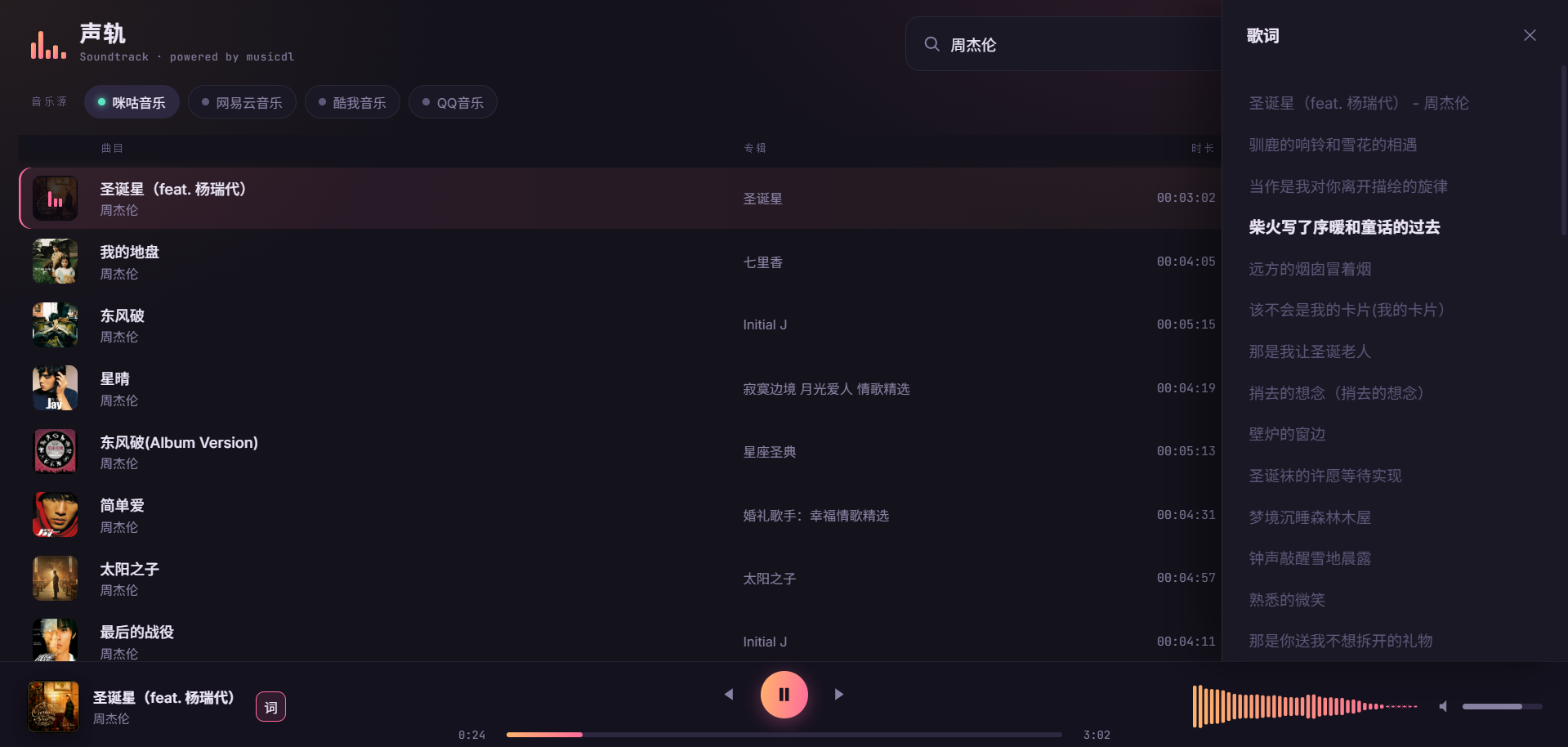


 |
|  |
# 📢 WeChat Official Account (微信公众号):
Charles的皮卡丘 (*Charles_pikachu*)
---
### Quickstart (`docs/Quickstart.md`)
# Quick Start
This guide explains the most common ways to use musicdl in both the command line and Python.
It is written for practical, day-to-day usage, so the focus is on the workflows most users need first: searching songs, choosing music sources, downloading playlists, saving files to custom folders, and passing cookies or request settings when needed.
#### Typical Usage
(1) Run Musicdl in Interactive Mode
The quickest way to verify that musicdl is installed correctly is to start the interactive terminal UI.
```python
from musicdl import musicdl
music_client = musicdl.MusicClient(
music_sources=['MiguMusicClient', 'NeteaseMusicClient', 'QQMusicClient', 'KuwoMusicClient', 'QianqianMusicClient']
)
music_client.startcmdui()
```
Equivalent command-line usage:
```bash
musicdl -m MiguMusicClient,NeteaseMusicClient,QQMusicClient,KuwoMusicClient,QianqianMusicClient
```
By default, musicdl uses five Mainland China sources for search and download:
```python
MiguMusicClient, NeteaseMusicClient, QQMusicClient, KuwoMusicClient, QianqianMusicClient
```
If you want overseas sources, specify them explicitly each time, for example:
```bash
musicdl -m QobuzMusicClient,JamendoMusicClient,YouTubeMusicClient
```
If you already know where a song is likely to be available, it is usually better to search a small number of sources:
```bash
musicdl -m NeteaseMusicClient,QQMusicClient
```
Interactive selection keys:
- `↑` / `↓`: move cursor
- `Space`: toggle selection
- `a`: select all
- `i`: invert selection
- `Enter`: confirm and download
- `Esc` or `q`: cancel selection
- `r`: restart the program
- `q` at the main prompt: exit
The demonstration is as follows:
|
# 📢 WeChat Official Account (微信公众号):
Charles的皮卡丘 (*Charles_pikachu*)
---
### Quickstart (`docs/Quickstart.md`)
# Quick Start
This guide explains the most common ways to use musicdl in both the command line and Python.
It is written for practical, day-to-day usage, so the focus is on the workflows most users need first: searching songs, choosing music sources, downloading playlists, saving files to custom folders, and passing cookies or request settings when needed.
#### Typical Usage
(1) Run Musicdl in Interactive Mode
The quickest way to verify that musicdl is installed correctly is to start the interactive terminal UI.
```python
from musicdl import musicdl
music_client = musicdl.MusicClient(
music_sources=['MiguMusicClient', 'NeteaseMusicClient', 'QQMusicClient', 'KuwoMusicClient', 'QianqianMusicClient']
)
music_client.startcmdui()
```
Equivalent command-line usage:
```bash
musicdl -m MiguMusicClient,NeteaseMusicClient,QQMusicClient,KuwoMusicClient,QianqianMusicClient
```
By default, musicdl uses five Mainland China sources for search and download:
```python
MiguMusicClient, NeteaseMusicClient, QQMusicClient, KuwoMusicClient, QianqianMusicClient
```
If you want overseas sources, specify them explicitly each time, for example:
```bash
musicdl -m QobuzMusicClient,JamendoMusicClient,YouTubeMusicClient
```
If you already know where a song is likely to be available, it is usually better to search a small number of sources:
```bash
musicdl -m NeteaseMusicClient,QQMusicClient
```
Interactive selection keys:
- `↑` / `↓`: move cursor
- `Space`: toggle selection
- `a`: select all
- `i`: invert selection
- `Enter`: confirm and download
- `Esc` or `q`: cancel selection
- `r`: restart the program
- `q` at the main prompt: exit
The demonstration is as follows: